CSGBase
CSGBase is the main class developers should interact with when implementing the generateCSG method for any mesh generator. This framework class acts as a container and driver for all methods necessary for creating a constructive solid geometry (CSG) representation such as generating surfaces, cells, and universes of the mesh generator under consideration.
Throughout this documentation, csg_obj will be used in example code blocks to refer to a CSGBase instance.
Declaring that a mesh generator supports the generation of CSG
In order to call generateCSG, the setHasGenerateCSG method must be called on the mesh generator to declare that the method has been implemented.
InputParameters
TestCSGAxialSurfaceMeshGenerator::validParams()
{
  InputParameters params = MeshGenerator::validParams();
  // input parameter that is an existing mesh generator
  params.addRequiredParam<MeshGeneratorName>("input", "The input MeshGenerator.");
  // additional params for this specific mesh generator
  params.addRequiredParam<Real>("axial_height", "Axial height of the model.");
  params.addParam<Real>("z_rotation",
                        "optional rotation around the z axis to apply to the generated cell.");
  // Declare that this generator has a generateCSG method
  MeshGenerator::setHasGenerateCSG(params);
  return params;
}
How to implement the generateCSG routine
This section will describe the various components developers should implement into the generateCSG method for a given MeshGenerator. This method will return a unique pointer to the CSGBase object that was created or modified by the mesh generator in the generateCSG method.
Initialization
A new CSGBase object can be initialized with:
auto csg_obj = std::make_unique<CSG::CSGBase>();
Once initialized, surfaces, cells, and universes can be created and manipulated. The following sections explain in detail how to do this as a part of the generateCSG method.
Surfaces
Surfaces are used to define the spatial extent of the region of a CSGCell. To create a CSGSurface object, the surface constructor must be called directly to create a unique pointer. This pointer then has to be passed to the current CSGBase instance with addSurface which will then return a const reference to that generated surface (const & CSGSurface). The syntax to do this is as follows, where SurfaceType should be replaced with the specific type of surface being created (e.g., CSG::CSGPlane):
// the unique surface pointer is made first, creating the surface object
std::unique_ptr<CSG::CSGSurface> surf_ptr = std::make_unique<SurfaceType>(arguments);
// and then it is explicitly passed to this CSGBase instance, which holds the memory ownership for the object
const auto & surface = csg_obj->addSurface(std::move(surf_ptr));
Surfaces need to be added to the CSGBase instance with addSurface as described above. If this is not done and these surfaces are referenced in regions used to define cells within the CSGBase instance, an error will occur.
The CSG framework in MOOSE provides various classes for creating basic surfaces (see table below). Information about how to define new types of surfaces can be found in CSGSurface.
| Surface Type | Class | Description |
|---|---|---|
| Plane | CSGPlane | create a plane defined by 3 points or from coefficients a, b, c, and d for the equation ax + by + cz = d |
| Sphere | CSGSphere | creates a sphere of radius r at an optionally specified center point (default is (0, 0, 0)) |
| Cylinder | CSGXCylinder | creates a cylinder aligned with the x-axis at the specified center location (y, z) |
| Cylinder | CSGYCylinder | creates a cylinder aligned with the y-axis at the specified center location (x, z) |
| Cylinder | CSGZCylinder | creates a cylinder aligned with the z-axis at the specified center location (x, y) |
Example:
    // create a plane using the coefficients for the equation of a plane
    // z plane equation: 0.0*x + 0.0*y + 1.0*z = (+/-)0.5 * axial_height
    std::unique_ptr<CSG::CSGSurface> surface_ptr =
        std::make_unique<CSG::CSGPlane>(default_surf_name, 0.0, 0.0, 1.0, coeffs[i]);
    auto & csg_plane = csg_obj->addSurface(std::move(surface_ptr));
In order to define a surface, the header file for that surface type must be included in the MeshGenerator.C file (i.e., #include "CSGPlane.h" to create planes).
The CSGSurface objects can then be accessed or updated with the following methods from CSGBase:
addSurface: add a unique pointer to aCSGSurfaceobject to thisCSGBaseinstancegetAllSurfaces: retrieve a list of const references to eachCSGSurfaceobject in theCSGBaseinstancegetSurfaceByName: retrieve a const reference to theCSGSurfaceof the specified namerenameSurface: change the name of theCSGSurface
Regions
A region is a space defined by boolean operations applied to surfaces and other regions. Half-space regions are defined as the positive and negative space separated by a surface. These regions can be unionized, intersected, or the complement taken to further define more complex regions. Series of operations can be defined using parentheses ( ) to indicate which operations to perform first. The types of operators available to define a CSGRegion using CSGSurface objects are:
| Operator | Description | Example Use |
|---|---|---|
+ | positive half-space | +surf |
- | negative half-space | -surf |
& | intersection | -surfA & +surfB |
| | union | -surfA | +surfB |
~ | complement | ~(-surfA & +surfB) |
&= | update existing region with an intersection | region1 &= -surfA |
|= | update existing region with a union | region1 |= +surfB |
The following is an example of using a combination of all operators to define the space outside a cylinder of a finite height that is topped with a half-sphere. Each of the half-spaces associated with each surface are shown in Figure 1. The cylinder and planes are then combined via intersection to form the region inside a finite cylinder, and the space above the top plane is intersected with the sphere to define a half sphere (Figure 2). These two regions are unionized as shown in Figure 3. The complement of the previous combination then defines the final region ~((-cylinder_surf & -top_plane & +bottom_plane) | (+top_plane & -sphere_surf)), as shown in blue in Figure 4.
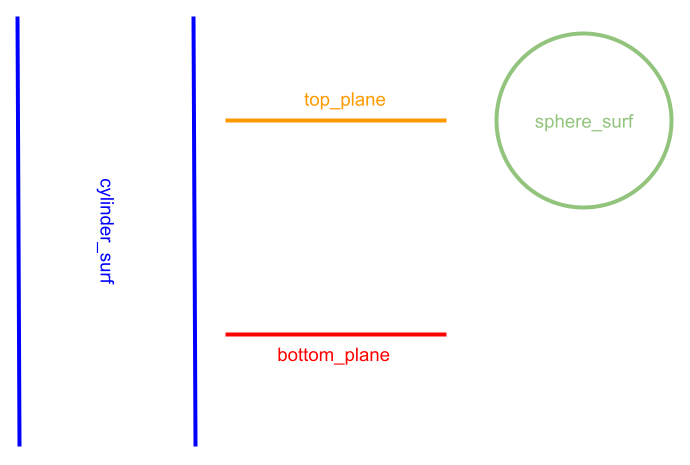
Figure 1: Four different surfaces: an infinite cylinder (blue), a top plane (orange), a bottom plane (red), and a sphere (green)
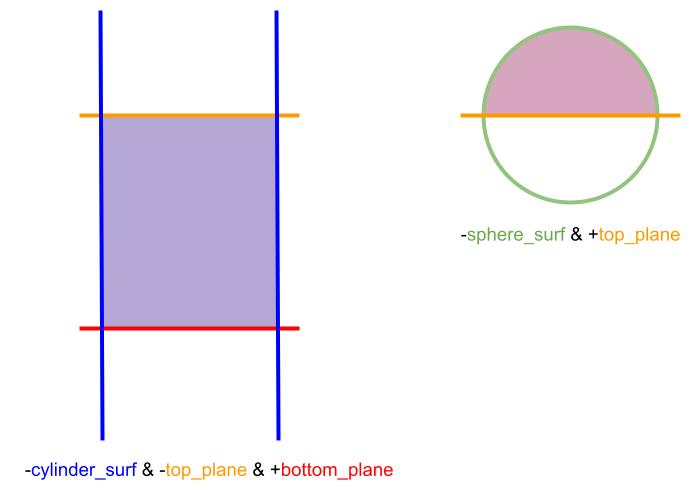
Figure 2: Two separate regions both defined as intersections of half-spaces.
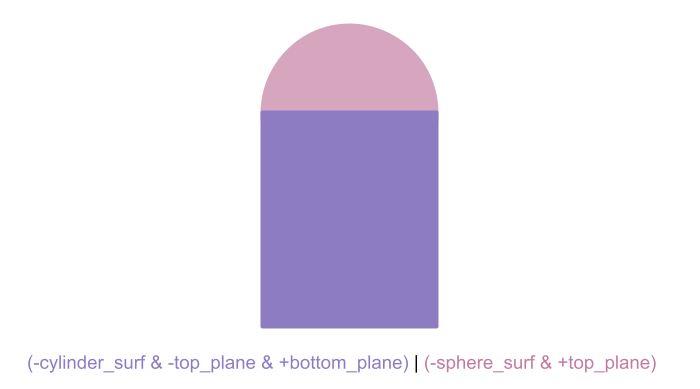
Figure 3: One region defined by the union of two other regions.
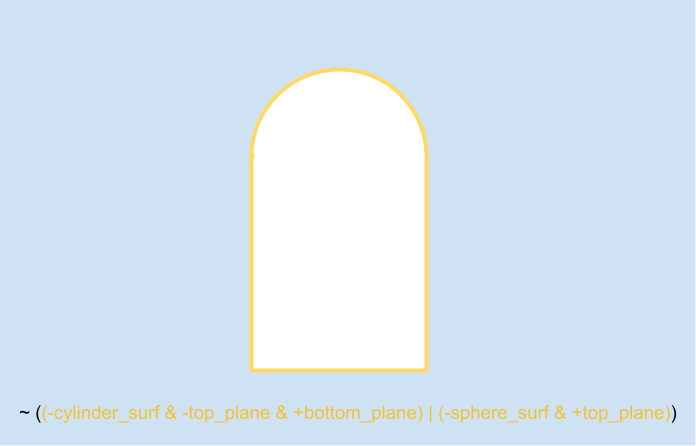
Figure 4: A region defined as the complement of an existing region.
Cells
A cell is an object defined by a region and a fill. To create any CSGCell, use the method createCell from CSGBase which will return a const reference to the CSGCell object that is created (const CSGCell &). At the time of calling createCell, a unique cell name, the cell region (CSGRegion), and an indicator of the fill must be provided. The CSGRegion is defined by boolean combinations of CSGSurfaces as described below. Four types of cell fills are currently supported: void, material, universe, and lattice. If creating a void cell, no fill has to be passed to the creation method. To create a cell with a material fill, simply provide it with a name of a material as a string. For a cell with a CSGUniverse fill, pass it a reference to the CSGUniverse. And for a CSGLattice fill, pass a reference to the CSGLattice. Some examples of creating the different types of cells are shown below:
    // create a void cell with name cname1 and defined by region reg1
    csg_obj->createCell(cname1, reg1);
    // create a material-filled cell with name cname1, a fill with material matname,
    // and defined by region reg1
    csg_obj->createCell(cname1, "matname", reg1);
    // create a universe-filled cell with name cname1, a fill of universe new_univ,
    // and defined by region reg1
    csg_obj->createCell(cname1, new_univ, reg1);
    // create a lattice-filled cell with name cname1, a fill of lattice,
    // and defined by region reg1
    csg_obj->createCell(cname1, lattice, reg1);
A cell with a material fill is not connected to a MOOSE material definition at this time. The "material" is currently just a string to represent the name of a CSG material or other type of fill that is otherwise undefined.
The CSGCell objects can then be accessed or updated with the following methods from CSGBase:
getAllCells: retrieve a list of const references to eachCSGCellobject in theCSGBaseinstancegetCellByName: retrieve a const reference to theCSGCellobject of the specified namerenameCell: change the name of theCSGCellobjectupdateCellRegion: change the region of the cell; if used, allCSGSurfaceobjects used to define the newCSGRegionmust also be a part of the currentCSGBaseupdateCellFill: change the fill of the cell - this takes in a material fill as a string, a universe fill as a pointer to a CSGUniverse instance, or a lattice fill as a pointer to a CSGLattice instance; if used, the CSGLattice and CSGUniverse instances also need to be a part of the currentCSGBaseinstanceresetCellFill: resets the fill of the cell to void
Universes
A universe is a collection of cells and is created by calling createUniverse from CSGBase which will return a const reference to the CSGUniverse object (const CSGUniverse &). A CSGUniverse can be initialized as an empty universe, or by passing a vector of shared pointers to CSGCell objects. Any CSGUniverse object can be renamed (including the root universe) with renameUniverse.
The CSGUniverse objects can then be accessed or updated with the following methods from CSGBase:
getAllUniverses: retrieve a list of const references to eachCSGUniverseobject in theCSGBaseinstancegetUniverseByName: retrieve a const reference to theCSGUniverseof the specified namerenameUniverse: change the name of theCSGUniverse
Examples:
auto new_univ = csg_obj->createUniverse("new_univ");
    // create a list of cells to be added to the universe
    std::vector<std::reference_wrapper<const CSG::CSGCell>> cells = {c1, c2};
    auto & univ = csg_obj->createUniverse("louise", cells);
Root Universe
All universes in a model should be able to be traced back, through the hierarchical tree of cells and universes, to a singular overarching universe known as the root universe. Because universes are a collection of cells and cells can be filled with universe, a tree of universes can be constructed such that the root universe contains the collection of all cells in the model. When a CSGBase object is first initialized, a root CSGUniverse called ROOT_UNIVERSE is created by default. Every CSGCell that is created will be added to the root universe unless otherwise specified (as described below). The root universe exists by default, and which universe is set as the root cannot be changed, except when joining CSGBase objects, as described below. However, the name of the root universe can be updated and cells can be manually added or removed using the same methods described above.
Methods available for managing the root universe:
getRootUniverse: returns a const reference to the root universe of theCSGBaseinstancerenameRootUniverse: change the name of the root universe
Adding or Removing Cells
There are multiple ways in which cells can be added to a universe:
At the time of universe creation, a vector of references to
CSGCellobjects can be passed intocreateUniverse(as described above). Example:
    // create a list of cells to be added to the universe
    std::vector<std::reference_wrapper<const CSG::CSGCell>> cells = {c1, c2};
    auto & univ = csg_obj->createUniverse("louise", cells);
When a
CSGCellis created withcreateCell, a pointer to aCSGUniversecan be passed as the final argument to indicate that the cell will be created and added directly to that specified universe. In this case, the cell will not be added to the root universe. A cell that has a universe fill type cannot be added to the same universe that is being used for the fill. For example, the two snippets below come from the same file where a new universe is initialized and passed by reference to the cell when it is created:
  // make a new universe to which the new cells can be added at time of creation
  auto & add_to_univ = csg_obj->createUniverse("add_univ");
    // create a cell and add to different universe, not root
    std::string cname2 = "void_cell2";
    csg_obj->createCell(cname2, reg1, &add_to_univ);
A cell or list of cells can be added to an existing universe with the
addCellToUniverseandaddCellsToUniversemethods. In this case, if aCSGCellexists in anotherCSGUniverse(such as the root universe), it will not be removed when being added to another (i.e. if the same behavior as option 2 above is desired, the cell will have to be manually removed from the root universe, as described below). The following is an example where the list of cells is collected first and then added at one time to the existing universe, but this could also be accomplished by usingaddCellToUniversein a for-loop after each cell is initially created.
  // add a list of cells to an existing universe
  {
    std::vector<std::reference_wrapper<const CSG::CSGCell>> cells = {c1, c2};
    csg_obj->addCellsToUniverse(univ, cells);
Cells can also be removed from a universe in the same way as method 3 above by using the removeCellFromUniverse and removeCellsFromUniverse methods. An example is shown above where the cells are removed from the root universe after they are added to the new universe. Doing this in multiple steps has the same outcome as that of method 2 for adding cells to a universe at the time of cell creation.
When adding and removing cells to/from universes, it is important to maintain the connectivity of all universes meaning all universes should be nested under the root universe at the end of the generation process, in order to have a consistent model.
Lattices
A CSGLattice is defined as a patterned arrangement of CSGUniverse objects and an "outer" to fill the space around lattice elements. To create any type of lattice, the lattice constructor must be called directly to create a unique pointer. This pointer then has to be passed to the current CSGBase instance with addLattice (optionally specifying the lattice type) which will then return a const reference to that generated lattice object (const & CSGLattice or const & LatticeType). At the time that addLattice is called to add the lattice to the base instance, any CSGUniverse objects associated with the lattice must also be in the CSGBase instance already. The syntax for creating the pointer and adding it is shown below, where LatticeType should be replaced with the specific type of the lattice (e.g., CSGCartesianLattice or CSGHexagonalLattice).
// the unique lattice pointer is made first, creating the lattice object of the specified type
std::unique_ptr<LatticeType> lat_ptr = std::make_unique<LatticeType>(arguments);
// and then it is explicitly passed to this CSGBase instance, which will keep the memory ownership for the object
const auto & lattice = csg_obj->addLattice<LatticeType>(std::move(lat_ptr));
An example of creating a Cartesian lattice is shown below:
    std::unique_ptr<CSG::CSGCartesianLattice> lat_ptr =
        std::make_unique<CSG::CSGCartesianLattice>(lat_name, _pitch, universe_pattern);
    csg_obj->addLattice<CSG::CSGCartesianLattice>(std::move(lat_ptr));
It is _highly_ recommended that the specific LatticeType of the lattice object always be specified when calling addLattice or getLatticeByName. If it is not specified, it will default to setting the type as the abstract type CSGLattice. If this is the case, no methods or data that is specific to the actual lattice type will be callable on the lattice object, unless a reference cast is used.
The CSGBase class provides support for two types of 2D lattice types (Cartesian and regular hexagonal), but any custom lattice type can also be defined by following the information in CSGLattice. It is assumed that both the Cartesian and hexagonal lattice types are in the plane (having a normal). Three types of outer fill are supported: void (default), material (an std::string name), and CSGUniverse. For both lattice types, the lattice can be initialized minimally with a name and pitch (the flat-to-flat size of a lattice element). The pattern of universes can also be set at the time of initialization or updated later using the setLatticeUniverses method. And similarly, the outer fill (either a CSGUniverse object or an std::string representing the name of a material) can be set at the time of initialization or set later with the setLatticeOuter method; if the outer is not set, it is assumed to be VOID. Some examples of initializing a lattice with the various options are shown below.
    // initialize without universe map, outer is void, and pitch=1.0
    auto cart_lattice = CSGCartesianLattice("cartlat", 1.0);
    // initialize with universe map and set outer fill to be a universe
    auto cart_lattice = CSGCartesianLattice("cartlat", 1.0, univ_map, outer_univ);
    // initialize without universe map but set outer to a material
    auto cart_lattice = CSGCartesianLattice("cartlat", 1.0, "outer_mat");
The CSGBase class supports only the creation of 2D lattices. A "3D" lattice can be created by filling multiple 3D cells with 2D lattices and arranging them in layers to form the desired 3D structure.
The CSGLattice objects can be accessed or updated with the following methods from CSGBase:
setLatticeUniverses: sets the vector of vectors ofCSGUniverseobjects as the lattice layout.setUniverseAtLatticeIndex: add aCSGUniverseto the lattice at the specified location index (replaces the existing universe).setLatticeOuter: sets theCSGUniverse(for aCSGUniverseouter) or thestd::stringname (for a material outer) as the outer fill.resetLatticeOuter: resets the outer fill to void for the lattice.renameLattice: change the name of theCSGLatticeobject.getAllLattices: retrieve a vector of const references to eachCSGLatticeobject in theCSGBaseinstance.getLatticeByName: retrieve a const reference to the lattice object of the specified name.
Lattice Indexing
Both the Cartesian and hexagonal lattice types follow a row-column indexing scheme for the location of universes in the lattice.
For Cartesian lattices, there can be any number of rows and columns, but each row must be the same length. The indexing starts at the top left corner of the lattice with element . An example of the indices for a Cartesian lattice is shown in Figure 5.
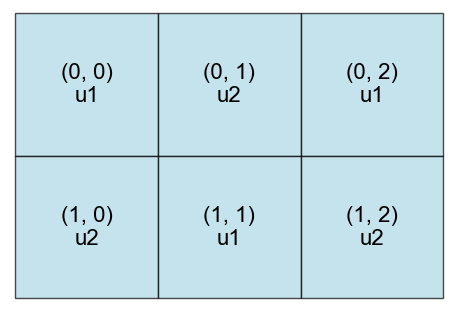
Figure 5: Example of a Cartesian lattice and the corresponding location indices.
For hexagonal lattices, the lattice is assumed to be x-oriented and also uses the row-column indexing scheme, with element being the top row, leftmost element. The length of the rows is expected to be consistent with the size of the lattice (i.e., the number of rings), which is verified when the universes are set. An example of the indices for a 3-ring hexagonal lattice is shown in Figure 6.
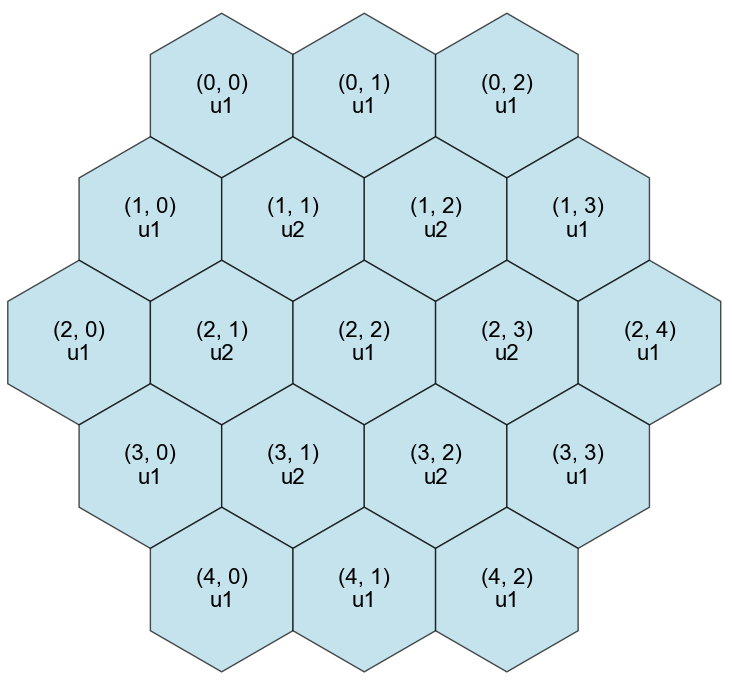
Figure 6: Example of a 3-ring hexagonal lattice that has the location indices labeled in the form.
The CSGHexagonalLattice class assumes an x-oriented lattice layout. To define a y-oriented lattice, the recommendation is to first define an x-oriented lattice and apply a rotation transformation. All indexing in this case will still remain consistent with the x-oriented indexing as described below.
Convenience methods are provided for CSGHexagonalLattice objects to convert between the required indices and a ring-based indexing scheme. In the ring-based scheme, the outermost ring is the 0th ring, and the right-most element in the ring is the 0th position of the ring with indices increasing counter-clockwise around the ring. For the 3-ring lattice above in Figure 6, the corresponding indices would be as shown in Figure 7.
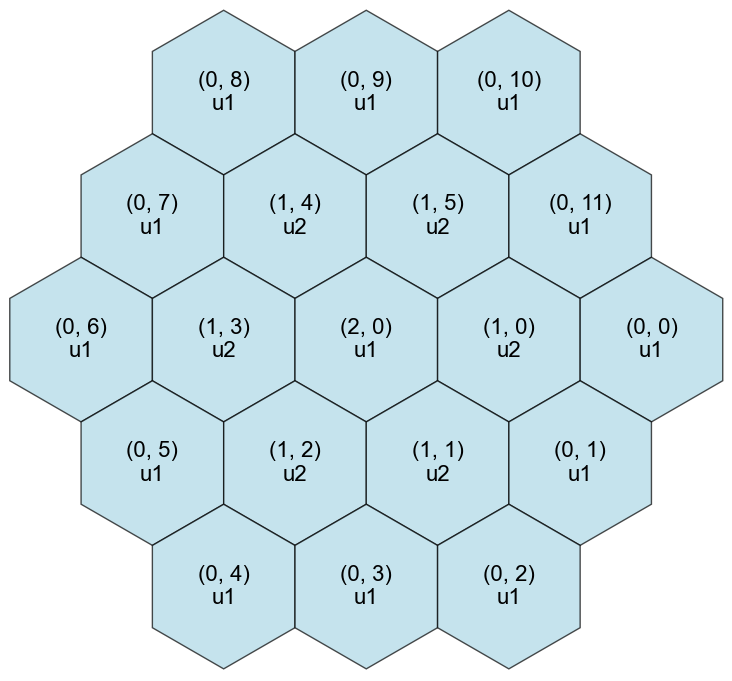
Figure 7: Example of a 3-ring hexagonal lattice that has the location indices labeled in the form.
For any lattice, the index of a universe in the lattice can be retrieved from the index by calling the getRingIndexFromRowIndex method. And similarly, if the index form is known, the corresponding index can be retrieved using the getRowIndexFromRingIndex method. It is important to note that while these convenience methods exist to convert between the two indexing schemes, the CSGUniverse objects in the lattice can only be accessed using the index.
Defining the Universe Layout
As mentioned above, the layout of the CSGUniverse objects for the lattice can be set at the time of initialization or set/updated later. At the time that the universes are set, the dimensionality of the lattice is determined (i.e., the number of rows, columns, or rings for the lattice). If the dimensionality should need to be changed, a new complete universe arrangement can be set to overwrite the previous arrangement using setLatticeUniverses. Anytime the universe layout is set or changed, the dimensionality will be validated to ensure it compatible with the lattice type. To replace a single element of the lattice, the setUniverseAtLatticeIndex method can be used by providing the element location in form. In order to use this method, the full set of universes must have already been defined, either during the lattice initialization or with setLatticeUniverses.
    // initialize a lattice without universes and then add universes with setLatticeUniverses
    std::unique_ptr<CSGCartesianLattice> new_lat_ptr =
        std::make_unique<CSGCartesianLattice>("new_lattice", 1.0);
    const auto & lat = csg_obj->addLattice(std::move(new_lat_ptr));
    std::vector<std::vector<std::reference_wrapper<const CSGUniverse>>> new_univs = {{univ1},
                                                                                     {univ1}};
    csg_obj->setLatticeUniverses(lat, new_univs);
csg_obj->setUniverseAtLatticeIndex(lat, univ2, std::make_pair<int, int>(1, 0));
The setUniverseAtLatticeIndex method is not meant to be used to change a lattice's dimensions by building the lattice element-by-element because the index supplied would be considered out of range in this context. The dimensionality of the lattice is determined when setLatticeUniverses is called. Therefore, to build a lattice incrementally, the recommendation is to build up a vector of vectors of universes incrementally and then call setLatticeUniverses one time. From there, setUniverseAtLatticeIndex can be called to replace an existing universe in the lattice.
Engineering Units
Engineering units are CSG classes that are defined in user-friendly domain-specific terms that can be used in a "plug-and-play" manner as a surface, cell, or universe in a Constructive Solid Geometry (CSG) definition. Like surfaces and lattices, an engineering unit is defined by calling the specific constructor directly to create a unique pointer. This pointer is then added to the CSGBase instance using addEngUnit(), which will return a const reference to that engineering unit. The addEngUnit() method is a templated method, meaning that the return type will be a reference to the specific unit type if requested. An example of creating an N-sided polygon unit is shown below.
  // define a 4-sided polygon
  std::unique_ptr<CSGNPolygonUnit> poly_ptr =
      std::make_unique<CSGNPolygonUnit>("polygon_unit", 4, 2.0);
  const auto & poly = csg_obj->addEngUnit(std::move(poly_ptr)); // returns CSGEngUnit type
  // make a 4-sided polygon with apothem length 2.0
  std::unique_ptr<CSGNPolygonUnit> poly_ptr = std::make_unique<CSGNPolygonUnit>(name, 4, 2.0);
  // add to base and return as CSGNPolygonUnit type
  const auto & poly = csg_obj->addEngUnit<CSGNPolygonUnit>(std::move(poly_ptr));
Instructions for how to define custom engineering units that behave as surfaces, cells, or universes, are provided in Engineering Units.
Behavior
Engineering units can behave as a CSGSurface (defined as a CSGSurfaceEngUnit), CSGCell (defined as a CSGCellEngUnit), or CSGUniverse (defined as a CSGUniverseEngUnit), depending on the specific engineering unit implementation and definition. This means that a unit with surface behavior can be used in place of any CSGSurface object, one with cell behavior can be used in place of any CSGCell, and a universe type in place of any CSGUniverse. For example, a standard CSGCell can have a region that is defined using a CSGSurfaceEngUnit (such as a CSGNPolygonUnit) instead of the individual planes, as shown in the example below.
  // make a cell that uses the polygon unit in the region definition as if it were a regular surface
  std::unique_ptr<CSGNPolygonUnit> poly_ptr =
      std::make_unique<CSGNPolygonUnit>("polygon_unit", 4, 2.0);
  const auto & poly = csg_obj->addEngUnit(std::move(poly_ptr));
  const auto & cell = csg_obj->createCell("my_cell", "my_mat", -poly); // negative half-space
Because each engineering unit is technically derived from a basic CSG component (CSGSurface, CSGCell, and CSGUniverse), each engineering unit is stored and managed in CSGBase as if were an object of that type. For all rudimentary component types, any getter-type method for that component is also usable on the derived CSGEngUnit objects too. This means that calling methods like getAllSurfaces() or getSurfaceByName will include any CSGSurfaceEngUnit types in the query. Similarly, methods like hasCell(name) will return true if a CSGCellEngUnit exists that is called name. Not all methods that alter an object are available though. Below is a table that shows which of the CSGBase non-getter-type methods are usable for each type of CSGEngUnit.
| Method | CSGSurfaceEngUnit | CSGCellEngUnit | CSGUniverseEngUnit |
|---|---|---|---|
addSurface | no | - | - |
renameSurface | yes | - | - |
deleteSurface | yes | - | - |
createCell | yes, as a CSGSurface in the region | no | yes as a fill, but not as the "add-to" universe |
renameCell | - | yes | - |
deleteCell | - | yes | - |
updateCellRegion | yes, as a CSGSurface in the region | no | - |
resetCellFill | - | no | - |
updateCellFill | - | no | yes |
createUniverse | - | yes | no |
renameUniverse | - | - | yes |
deleteUniverse | - | - | yes |
addCell[s]ToUniverse | - | yes | no |
removeCell[s]FromUniverse | - | yes | no |
addLattice | - | - | yes, can be used as either a lattice element(s) or outer for the lattice being added |
setUniverseAtLatticeIndex | - | - | yes |
setLatticeUniverses | - | - | yes |
setLatticeOuter | - | - | yes |
In order to use any of the above methods, it may be necessary to "retrieve" the engineering unit object as that type first. For example, in order to call deleteSurface on a CSGNPolygonUnit called name2 below, the unit is retrieved with getSurfaceByName first.
  // delete the other as if it were a surface (get as surface to have the right type)
  const auto & poly2 = csg_obj->getSurfaceByName(name2);
  csg_obj->deleteSurface(poly2);
Naming Restrictions
Naming engineering units follows the same rules as described in the section below. However, because each engineering unit is also considered an object of the type from which it is derived (e.g., a CSGSurfaceEngUnit is also a CSGSurface), there are additional restrictions on naming components when engineering units are involved. All CSGEngUnit objects must have unique names (regardless of derived type units). No basic object or engineering unit of that derived type may have the same name. In other words, a CSGSurface and CSGSurfaceEngUnit cannot use the same name, but a CSGSurface and CSGCellEngUnit can be named the same. And furthermore, a CSGSurfaceEngUnit and CSGCellEngUnit cannot have the same name either.
Expansion
Any engineering unit that is used in a geometry can be "expanded" and replaced with the equivalent basic CSG components to define the object by calling expandEngUnit on any CSGEngUnit object. Expanding a CSGSurfaceEngUnit returns a CSGRegion, a CSGCellEngUnit returns a CSGCell, and a CSGUniverseEngUnit returns a CSGUniverse. During the expansion process, a unit is redefined in terms of the rudimentary components and those additional components are added to the CSGBase instance. For example, a CSGCellEngUnit might also need to create new CSGSurface objects to define the cell region or a CSGUniverse to use as a fill. In this case, any generated CSGSurface or CSGUniverse would be added to the CSGBase instance at the time of expansion. Any instance where the CSGEngUnit object was used in the CSGBase instance is updated and replaced with the aforementioned returned basic object. When the expansion process is complete, that original CSGEngUnit will be deleted and no longer exist in the CSGBase instance. The code snippet below demonstrates this expansion behavior by expanding a CSGNPolygonUnit that is used as a single surface in a CSGCell region into a new region that defined by four new CSGSurface objects.
  // make a cell that uses the polygon unit in the region definition as if it were a regular surface
  std::unique_ptr<CSGNPolygonUnit> poly_ptr =
      std::make_unique<CSGNPolygonUnit>("polygon_unit", 4, 2.0);
  const auto & poly = csg_obj->addEngUnit(std::move(poly_ptr));
  const auto & cell = csg_obj->createCell("my_cell", "my_mat", -poly); // negative half-space

  // check cell region has just one surface associated with it
  auto pre_reg = cell.getRegion();
  auto pre_surfs = pre_reg.getSurfaces();
  ASSERT_EQ(1, pre_surfs.size());
  // original region should be considered a halfspace (one surface)
  ASSERT_EQ("HALFSPACE", pre_reg.getRegionTypeString());
  ASSERT_EQ("(-polygon_unit)", infixJSONToString(pre_reg.toInfixJSON()));

  // surface should be exactly the polygon unit
  ASSERT_TRUE(cast_ref<const CSGSurface &>(poly) == pre_surfs[0]);

  // expand unit and check surface of cell region again
  csg_obj->expandEngUnit(poly);

  // should no longer have the unit at all
  ASSERT_FALSE(csg_obj->hasEngUnit("polygon_unit"));

  // new cell region should be 4 surfaces and considered an intersection instead
  auto post_reg = cell.getRegion();
  auto post_surfs = post_reg.getSurfaces();
  ASSERT_EQ(4, post_surfs.size());
  std::string reg_str_out = infixJSONToString(post_reg.toInfixJSON());
  std::string reg_str_exp = "(-polygon_unit_expanded_surf_0 & -polygon_unit_expanded_surf_1 & "
                            "-polygon_unit_expanded_surf_2 & -polygon_unit_expanded_surf_3)";
  ASSERT_EQ(reg_str_exp, reg_str_out);
  ASSERT_EQ("INTERSECTION", post_reg.getRegionTypeString());
CSGSurfaceEngUnits are intended to be used as a surface for a CSGRegion definition. Each derived unit type has a mechanism for determining the positive or negative half-space for that "surface" and therefore should be treated as a half-space during use. During expansion, the unit "surface" is replaced with a CSGRegion that defines the negative half-space of that unit. If the positive half-space was used in the CSGRegion definition, then the unit half-space is replaced with the complement (~) of the newly generated CSGRegion. Upon completion of the expansion process, the CSGRegion that corresponds to the negative half-space of that original unit is returned.
It is allowable to define an expansion method for an engineering unit that creates additional CSGEngUnit objects during the expansion process. If expandUnit() is called on a single engineering unit, any newly generated engineering units will not be subsequently expanded. However, if expandAllEngUnits() is called, any additionally created CSGEngUnit objects will also be expanded recursively until no more CSGEngUnit objects remain.
If an engineering unit has transformations applied to it, those transformations will be transferred to the appropriate expanded objects after expansion. For CSGCellEngUnit and CSGUniverseEngUnit, this means that the returned CSGCell and CSGUniverse will have the same transformations. For CSGSurfaceEngUnit types, this means that each new CSGSurface that is a part of the expanded CSGRegion will have the transformations applied.
Deletion Methods
In order to delete CSG components from the CSGBase object, the deleteSurface, deleteCell, deleteUniverse, deleteLattice, and deleteEngUnit methods can be used, which take in a reference to the CSG object to be deleted. Once the CSG component is deleted, the object is deallocated and the reference to that object should no longer be used. Additionally, these methods do not automatically delete any other components associated with the object to be deleted. Therefore, users should ensure that the CSG component to be deleted is not used in the definition of other CSG components. For these scenarios, an error is thrown:
A
CSGSurfaceis deleted but it is used in the region definition of aCSGCellA
CSGLatticeis deleted but it is used as a fill of aCSGCellA
CSGUniverseis deleted but it is used as a fill of aCSGCellA
CSGUniverseis deleted but it is used as either the outer definition or in the universe layout of aCSGLattice
Additionally, when a CSGCell is deleted but it is used in the cells definition of a CSGUniverse, the cell is first removed from the cells of the CSGUniverse and a warning is thrown by MOOSE about this additional operation.
For CSGEngUnit objects deleted with deleteEngUnit, the deletion method for the derived types is called (e.g., deleteSurface for CSGSurfaceEngUnits), and therefore are subjected to the same set or error and warnings listed above.
Nested CSG components should be manually deleted by starting from the top-most level and going downwards in terms of the dependency tree. For example, when deleting a universe and the cells linked to the universe, start by deleting the universe first and then its cells, as shown in the following example:
  // delete newly created universe and its cell
  const auto & universe_to_delete = csg_obj->getUniverseByName(join_name);
  const auto cells_to_delete = universe_to_delete.getAllCells();

  csg_obj->deleteUniverse(universe_to_delete);
  for (const auto & cell : cells_to_delete)
    csg_obj->deleteCell(cell.get());
Transformations
Three types of object transformations are supported in the CSGBase class: rotation, translation, and scaling. These transformations can be applied to any CSGBase object (CSGSurface, CSGRegion, CSGCell, CSGUniverse, CSGLattice, and CSGEngUnit-derived types). When a transformation is applied, existing attributes for the object (such as surface coefficients) are not directly altered. Instead, information about the transformation applied is stored as vector of pairs on the object, where the first item in the pair is the type of transformation and the second item is the value of the transformation (stored as a size 3 tuple). The order of the transformation vector is the order in which the transformations are applied. The types of transformations and the form of their values are shown in the table below. These transformations do not alter other information about the object because it is expected that the downstream connected code will process the transformations in a way that makes most sense for that code.
| Transformation Type | Vector Values | Value Restrictions |
|---|---|---|
TRANSLATION | x-distance, y-distance, z-distance | none |
ROTATION | none | |
SCALE | x-scale, y-scale, z-scale | non-zero |
Rotation angle is stored in Euler notation (, , ) using degrees, which is consistent with the TransformGenerator. A convenience method is provided in CSGBase to specify a simple axis rotation (applyAxisRotation()) which will automatically convert the single angle rotation around a specified axis into the correct Euler notation.
If applying a transformation to a CSGRegion object, the CSGRegion object will not store the transformation information. Rather, the transformation will be applied to each CSGSurface associated with that CSGRegion. This means that if one CSGSurface object is used in multiple CSGRegion objects, all regions with that surface may be affected by the transformation. If the intention is to apply a transformation to just one use case of the shared CSGSurface, then a clone of that surface should be made prior to applying the transformation.
Below are several examples of applying transformations:
Surface rotation using a vector of Euler angles:
  // euler rotation
  std::tuple<Real, Real, Real> euler_angles = {30.0, 45.0, 60.0};
csg_obj->applyRotation(*surf, euler_angles);
Rotation of a cell around the z-axis:
  // apply rotation around z-axis if specified
  if (_rotation != 0.0)
    csg_obj->applyAxisRotation(csg_cell, CSG::RotationAxisType::Z, _rotation);
Translation of a Universe:
  // apply multidirectional translations
  std::tuple<Real, Real, Real> dists1 = {1.0, -2.0, 3.0};
csg_obj->applyTranslation(*univ, dists1);
Scaling of a cell in the x and z directions:
  // scaling vector
  std::tuple<Real, Real, Real> scales = {-2.0, 1.0, 4.0};
csg_obj->applyScaling(*cell, scales);
Any transformation that is applied to an object must be done through the methods available from CSGBase, but information about the transformations applied can be retrieved directly from each object with getTransformations().
Updating Existing CSGBase Objects
An empty CSGBase object can be initialized on its own in each generateCSG method for each mesh generator. However, in most cases, it is necessary to update an existing CSGBase object from a previous MeshGenerator or join multiple CSGBase together such that only one CSGBase object is ultimately produced at the end of the mesh/CSG generation process. There are two main ways to handle this: passing and joining.
Passing between Mesh Generators
CSGBase objects from other mesh generators can be accessed through methods that parallel those available for accessing other MeshGenerator objects. For all methods listed below, a unique pointer to the CSGBase object(s) created by generateCSG for the specified MeshGenerator names are returned.
getCSGBase: get theCSGBaseobject given a parameter name represented as astd::stringthat stores the mesh generator namegetCSGBases: get theCSGBaseobjects given a parameter name represented as astd::stringthat stores a list of mesh generator namesgetCSGBaseByName: get theCSGBaseobject given aMeshGeneratorNamegetCSGBasesByName: get allCSGBaseobjects given a list ofMeshGeneratorNames
These functions should be called from the constructor of the MeshGenerator, so that the MeshGenerator system can properly define the dependency tree of all mesh generators in the input file. The returned CSGBase pointers can be stored in a member variable and updated in the generateCSG() method in order to make any changes to the CSGBase object.
For example, the following member variable stores the pointer to the CSGBase object that is generated by an input mesh generator:
  /// Holds the generated CSGBase object
  std::unique_ptr<CSG::CSGBase> * _build_csg;
This variable is initialized in the constructor as:
_build_csg = &getCSGBase("input");
Finally, in the generateCSG() method, std::move is called on the member variable to transfer ownership to the current mesh generator
  // get the existing CSGBase associated with the input mesh generator
  // this is the CSGBase object that will be updated
  std::unique_ptr<CSG::CSGBase> csg_obj = std::move(*_build_csg);
A MeshGenerator object(s) can be passed to another mesh generator as input by providing InputParameters of type MeshGeneratorName. See the ExampleAxialSurfaceMeshGenerator implementation below for an example of this.
Joining Bases
When two or more existing CSGBase objects need to be combined to continue to use and update, the joinOtherBase method should be used. This method is called from another CSGBase and takes at least two input parameters as inputs. The first parameter is a different CSGBase object that is meant to be joined to the existing CSGBase object. The second argument controls what should happen when identical CSG components (surfaces, cells, universes, and lattices) exist across the two CSGBase objects to be joined. Since two CSG components with identical names cannot be added into a single CSGBase instance, if the second argument is set to true, then the CSG component from the existing CSGBase object will be retained while the one from the input CSGBase object with the same name will be discarded (all object references that rely on this CSG component will point to the object from the existing CSGBase instance). Therefore, the second parameter should be set to true if you expect identical surfaces, cells, universes, or lattices to be defined across the two CSGBase objects in terms of member data. It should be noted here that the check for identical CSG objects is not based solely on name, so if the two objects being compared have different properties but share the same name an error will still occur even if the second argument to joinOtherBase is set to true.
There are 3 different behaviors for joining bases that are supported depending on the additional arguments that are passed:
No additional arguments: All cells that are in the root universe of the incoming
CSGBaseobject will be added to the existing root universe of the current base object, and the root universe from the incoming base will no longer exist.
  // Case 1(a): Create two CSGBase objects to join together into a single root
  // uses plain universes in lattice

  // CSGBase 1: only one cell containing a lattice of one universe, which lives in the ROOT_UNIVERSE
  std::unique_ptr<CSGBase> base1 = std::make_unique<CSG::CSGBase>();
  std::unique_ptr<CSG::CSGSphere> surf_ptr1 = std::make_unique<CSG::CSGSphere>("s1", 1.0);
  const auto & surf1 = base1->addSurface(std::move(surf_ptr1));
  // create a lattice of one universe
  auto & univ_in_lat = base1->createUniverse("univ_in_lat");
  std::vector<std::vector<std::reference_wrapper<const CSGUniverse>>> univs = {{univ_in_lat}};
  std::unique_ptr<CSGCartesianLattice> lat_ptr =
      std::make_unique<CSGCartesianLattice>("lat1", 1.0, univs);
  const auto & lat = base1->addLattice(std::move(lat_ptr));
  // create cell containing lattice
  auto & c1 = base1->createCell("c1", lat, +surf1);
  // CSGBase 2: two total unverses (ROOT_UNIVERSE and extra_univ) with a cell in each
  std::unique_ptr<CSGBase> base2 = std::make_unique<CSG::CSGBase>();
  std::unique_ptr<CSG::CSGSphere> surf_ptr2 = std::make_unique<CSG::CSGSphere>("s2", 1.0);
  const auto & surf2 = base2->addSurface(std::move(surf_ptr2));
  auto & c2 = base2->createCell("c2", +surf2);
  auto & extra_univ = base2->createUniverse("extra_univ");
  auto & c3 = base2->createCell("c3", -surf2, &extra_univ);

  // Joining: two universes will remain
  // base1 ROOT_UNIVERSE will gain all cells from base2 ROOT_UNIVERSE
  // base2 ROOT_UNIVERSE will not exist as a separate universe
  // the "extra_univ" from base2 and "univ_in_lat" from base1 will remain separate universes
  base1->joinOtherBase(std::move(base2), false);
One new root universe name (
new_root_name_join): All cells in the root universe of the incoming base will be used to create a new universe of the name specified by thenew_root_name_joinparameter. These cells will not be added to the existing root universe, which will remain unchanged. This new universe will be added as a new non-root universe in the existing base object. This newly created universe will not be connected to the root universe of the existingCSGBaseobject by default.
  // Case 2(a): Create two CSGBase objects to join together but keep incoming root separate
  // uses plain universes in lattice

  // CSGBase 1: only one cell containing a lattice of one universe, which lives in the ROOT_UNIVERSE
  std::unique_ptr<CSGBase> base1 = std::make_unique<CSG::CSGBase>();
  std::unique_ptr<CSG::CSGSphere> surf_ptr1 = std::make_unique<CSG::CSGSphere>("s1", 1.0);
  const auto & surf1 = base1->addSurface(std::move(surf_ptr1));
  // create a lattice of one universe
  auto & univ_in_lat = base1->createUniverse("univ_in_lat");
  std::vector<std::vector<std::reference_wrapper<const CSG::CSGUniverse>>> univs = {{univ_in_lat}};
  std::unique_ptr<CSGCartesianLattice> lat_ptr =
      std::make_unique<CSGCartesianLattice>("lat1", 1.0, univs);
  const auto & lat = base1->addLattice(std::move(lat_ptr));
  // create cell containing lattice
  auto & c1 = base1->createCell("c1", lat, +surf1);
  // CSGBase 2: two total unverses (ROOT_UNIVERSE and extra_univ) with a cell in each
  std::unique_ptr<CSGBase> base2 = std::make_unique<CSG::CSGBase>();
  std::unique_ptr<CSG::CSGSphere> surf_ptr2 = std::make_unique<CSG::CSGSphere>("s2", 1.0);
  const auto & surf2 = base2->addSurface(std::move(surf_ptr2));
  auto & c2 = base2->createCell("c2", +surf2);
  auto & extra_univ = base2->createUniverse("extra_univ");
  auto & c3 = base2->createCell("c3", -surf2, &extra_univ);

  // Joining: 4 universes will remain
  // base1 ROOT_UNIVERSE and univ_in_lat will remain untouched
  // all cells from ROOT_UNIVERSE in base2 create new universe called "new_univ"
  // the "extra_univ" from base2 and "univ_in_lat" from base1 will remain separate universes
  std::string new_root_name = "new_univ";
  base1->joinOtherBase(std::move(base2), false, new_root_name);
Two new root universe names (
new_root_name_baseandnew_root_name_join): The cells in the root universe of the currentCSGBaseobject will be used to create a new non-root universe of the name specified by thenew_root_name_baseparameter, and the cells in the root universe of the incomingCSGBaseobject will be used to create a separate non-root universe of the name specified by thenew_root_name_joinparameter. At the end of this join method, the root universe of the current base object will be empty and neither of the two new non-root universes will be connected to the root universe by default.
  // Case 3(a): Create two CSGBase objects to join together with each root becoming a new universe
  // This cases uses basic universes in the lattice

  // CSGBase 1: only one cell containing a lattice of one universe, which lives in the ROOT_UNIVERSE
  std::unique_ptr<CSGBase> base1 = std::make_unique<CSG::CSGBase>();
  std::unique_ptr<CSG::CSGSphere> surf_ptr1 = std::make_unique<CSG::CSGSphere>("s1", 1.0);
  const auto & surf1 = base1->addSurface(std::move(surf_ptr1));
  // create a lattice of one universe
  auto & univ_in_lat = base1->createUniverse("univ_in_lat");
  std::vector<std::vector<std::reference_wrapper<const CSGUniverse>>> univs = {{univ_in_lat}};
  std::unique_ptr<CSGCartesianLattice> lat_ptr =
      std::make_unique<CSGCartesianLattice>("lat1", 1.0, univs);
  const auto & lat = base1->addLattice(std::move(lat_ptr));
  // create cell containing lattice
  auto & c1 = base1->createCell("c1", lat, +surf1);
  // CSGBase 2: two total unverses (ROOT_UNIVERSE and extra_univ) with a cell in each
  std::unique_ptr<CSGBase> base2 = std::make_unique<CSG::CSGBase>();
  std::unique_ptr<CSG::CSGSphere> surf_ptr2 = std::make_unique<CSG::CSGSphere>("s2", 1.0);
  const auto & surf2 = base2->addSurface(std::move(surf_ptr2));
  auto & c2 = base2->createCell("c2", +surf2);
  auto & extra_univ = base2->createUniverse("extra_univ");
  auto & c3 = base2->createCell("c3", -surf2, &extra_univ);

  // Joining: 5 universes will remain
  // all cells from base1 ROOT_UNIVERSE will be moved to a new universe called "new_univ1"
  // all cells from base2 ROOT_UNIVERSE will be moved to a new universe called "new_univ2"
  // base1 ROOT_UNIVERSE will be empty
  // the "extra_univ" from base2 and "univ_in_lat" from base1 will remain separate universes
  std::string new_name1 = "new_univ1";
  std::string new_name2 = "new_univ2";
  base1->joinOtherBase(std::move(base2), false, new_name1, new_name2);
For all of these join methods, any non-root universes will remain unchanged and simply added to the list of universes for the current CSGBase object. Similarly, all incoming cells and surfaces are added alongside existing cells and surfaces.
It is very important when using the joinOtherBase method that all CSGSurfaces, CSGCells, and CSGSurfaces are uniquely named so that errors are not encountered when combining sets of objects. An error will be produced during the join process if an object of the same type and name already exists. See recommendations for naming below.
Accessing CSG-related Methods
All CSG methods related to creating or changing a CSG object must be called through CSGBase. Calls that retrieve information only but do not manipulate an object (such as getName methods) can be called on the object directly. For example, if a cell were to be created, the current name and region could be retrieved directly from the CSGCell object, but if the name or region needed to be changed, that would need to be handled through CSGBase.
This ensures proper accounting of all CSG-related objects in the CSGBase instance. Consult the Doxygen documentation for information on all object-specific methods.
Object Naming Recommendations
For each new CSG element (CSGSurface, CSGCell, CSGUniverse, CSGLattice, and CSGEngUnit) that is created, a unique name identifier (of type std::string) must be provided (name parameter for all creation methods). A recommended best practice is to include the mesh generator name (which can be accessed with this->getName() in any MeshGenerator class) as a part of that object name. This name is used as the unique identifier within the CSGBase instance. Methods for renaming objects are available as described in the above sections to help prevent issues and errors.
Example Implementations
Provided here are example implementations of the generateCSG method for four basic MeshGenerator types.
To run any of these examples, use --allow-test-objects. For example:
./moose_test-opt --allow-test-objects --csg-only -i tests/csg/csg_only_chained.i
Infinite Prism Example
The first mesh generator creates an infinite rectangular prism given an input parameter for side_length. The code snippets provided here correspond to the .C file.
InputParameters
ExampleCSGInfiniteSquareMeshGenerator::validParams()
{
  InputParameters params = MeshGenerator::validParams();

  params.addRequiredParam<Real>("side_length", "Side length of infinite square.");
  params.addParam<MeshGeneratorName>(
      "fill", "optional input lattice mesh generator to fill generated cell with.");
  // Declare that this generator has a generateCSG method
  MeshGenerator::setHasGenerateCSG(params);
  return params;
}

ExampleCSGInfiniteSquareMeshGenerator::ExampleCSGInfiniteSquareMeshGenerator(
    const InputParameters & params)
  : MeshGenerator(params),
    _side_length(getParam<Real>("side_length")),
    _input_fill_name(isParamValid("fill") ? getParam<MeshGeneratorName>("fill") : ""),
    _has_fill(isParamValid("fill"))
{
  if (_has_fill)
  {
    _input_fill_mg_ptr = &getMesh("fill");
    _input_fill_csg = &getCSGBase("fill");
  }
}

std::unique_ptr<MeshBase>
ExampleCSGInfiniteSquareMeshGenerator::generate()
{
  auto null_mesh = nullptr;
  return null_mesh;
}

std::unique_ptr<CSG::CSGBase>
ExampleCSGInfiniteSquareMeshGenerator::generateCSG()
{
  // name of the current mesh generator to use for naming generated objects
  auto mg_name = this->name();

  // initialize a CSGBase object
  auto csg_obj = std::make_unique<CSG::CSGBase>();

  // Add surfaces and halfspaces corresponding to 4 planes of infinite square
  std::vector<std::vector<Point>> points_on_planes{{Point(1. * _side_length / 2., 0., 0.),
                                                    Point(1. * _side_length / 2., 1., 0.),
                                                    Point(1. * _side_length / 2., 0., 1.)},
                                                   {Point(-1. * _side_length / 2., 0., 0.),
                                                    Point(-1. * _side_length / 2., 1., 0.),
                                                    Point(-1. * _side_length / 2., 0., 1.)},
                                                   {Point(0., 1. * _side_length / 2., 0.),
                                                    Point(1., 1. * _side_length / 2., 0.),
                                                    Point(0., 1. * _side_length / 2., 1.)},
                                                   {Point(0., -1. * _side_length / 2., 0.),
                                                    Point(1., -1. * _side_length / 2., 0.),
                                                    Point(0., -1. * _side_length / 2., 1.)}};
  std::vector<std::string> surf_names{"plus_x", "minus_x", "plus_y", "minus_y"};

  // initialize cell region to be updated
  CSG::CSGRegion region;

  // set the center of the prism to be used for determining half-spaces
  const auto centroid = Point(0, 0, 0);

  for (unsigned int i = 0; i < points_on_planes.size(); ++i)
  {
    // object name includes the mesh generator name for uniqueness
    const auto surf_name = mg_name + "_surf_" + surf_names[i];
    // create the plane for one face of the prism
    std::unique_ptr<CSG::CSGSurface> plane_ptr = std::make_unique<CSG::CSGPlane>(
        surf_name, points_on_planes[i][0], points_on_planes[i][1], points_on_planes[i][2]);
    auto & csg_plane = csg_obj->addSurface(std::move(plane_ptr));
    // determine where the plane is in relation to the centroid to be able to set the half-space
    const auto region_direction = csg_plane.getHalfspaceFromPoint(centroid);
    // half-space is either positive (+plane_ptr) or negative (-plane_ptr)
    // depending on the direction to the centroid
    auto halfspace =
        ((region_direction == CSG::CSGSurface::Halfspace::POSITIVE) ? +csg_plane : -csg_plane);
    // check if this is the first half-space to be added to the region,
    // if not, update the existing region with the intersection of the regions (&=)
    if (region.getRegionType() == CSG::CSGRegion::RegionType::EMPTY)
      region = halfspace;
    else
      region &= halfspace;
  }

  // create the cell defined by the surfaces and region just created
  const auto cell_name = mg_name + "_square_cell";
  // determine fill: either from input fill mesh generator or default material
  if (_has_fill)
  {
    // join the fill CSGBase into the current CSGBase & use the lattice as the fill
    csg_obj->joinOtherBase(std::move(*_input_fill_csg), false);
    // assume input MG is a lattice type for sake of this example/test
    const CSG::CSGLattice & lattice = csg_obj->getLatticeByName(_input_fill_name + "_lattice");
    csg_obj->createCell(cell_name, lattice, region);
  }
  else // default material fill
  {
    const auto material_name = "square_material";
    csg_obj->createCell(cell_name, material_name, region);
  }

  return csg_obj;
}
Chained Mesh Generator Example
The next example mesh generator builds on the infinite prism example above by taking a MeshGeneratorName for an existing ExampleCSGInfiniteSquareMeshGenerator as input and adds planes to create a finite rectangular prism. This will also optionally rotate the generated cell a specified angle around the z-axis.
InputParameters
TestCSGAxialSurfaceMeshGenerator::validParams()
{
  InputParameters params = MeshGenerator::validParams();
  // input parameter that is an existing mesh generator
  params.addRequiredParam<MeshGeneratorName>("input", "The input MeshGenerator.");
  // additional params for this specific mesh generator
  params.addRequiredParam<Real>("axial_height", "Axial height of the model.");
  params.addParam<Real>("z_rotation",
                        "optional rotation around the z axis to apply to the generated cell.");
  // Declare that this generator has a generateCSG method
  MeshGenerator::setHasGenerateCSG(params);
  return params;
}

TestCSGAxialSurfaceMeshGenerator::TestCSGAxialSurfaceMeshGenerator(const InputParameters & params)
  : MeshGenerator(params),
    _mesh_ptr(getMesh("input")),
    _axial_height(getParam<Real>("axial_height")),
    _rotation(isParamValid("z_rotation") ? getParam<Real>("z_rotation") : 0.0)
{
  _build_csg = &getCSGBase("input");
}

std::unique_ptr<MeshBase>
TestCSGAxialSurfaceMeshGenerator::generate()
{
  auto null_mesh = nullptr;
  return null_mesh;
}

std::unique_ptr<CSG::CSGBase>
TestCSGAxialSurfaceMeshGenerator::generateCSG()
{
  // get the existing CSGBase associated with the input mesh generator
  // this is the CSGBase object that will be updated
  std::unique_ptr<CSG::CSGBase> csg_obj = std::move(*_build_csg);

  // get the names of the current mesh generator and the input mesh generator
  // so that unique object naming can be enforced
  auto mg_name = this->name();
  auto inp_name = getParam<MeshGeneratorName>("input");

  // get the expected existing cell
  const auto cell_name = inp_name + "_square_cell";
  const auto & csg_cell = csg_obj->getCellByName(cell_name);

  // get the existing cell region to update
  auto cell_region = csg_cell.getRegion();

  // centroid used to determine direction for half-space
  const auto centroid = Point(0, 0, 0);

  // setting a default surface name purely for testing purposes
  const auto default_surf_name = "default_surf";

  // Add surfaces and halfspaces corresponding to top and bottom axial planes
  std::vector<std::string> surf_names{"plus_z", "minus_z"};
  std::vector<Real> coeffs{0.5 * _axial_height, -0.5 * _axial_height};
  for (unsigned int i = 0; i < coeffs.size(); ++i)
  {
    // create a plane using the coefficients for the equation of a plane
    // z plane equation: 0.0*x + 0.0*y + 1.0*z = (+/-)0.5 * axial_height
    std::unique_ptr<CSG::CSGSurface> surface_ptr =
        std::make_unique<CSG::CSGPlane>(default_surf_name, 0.0, 0.0, 1.0, coeffs[i]);
    auto & csg_plane = csg_obj->addSurface(std::move(surface_ptr));

    // Rename surface so that it has a unique surface name based on the mesh generator
    const auto surf_name = mg_name + "_surf_" + surf_names[i];
    csg_obj->renameSurface(csg_plane, surf_name);

    // determine the half-space to add as an updated intersection
    const auto region_direction = csg_plane.getHalfspaceFromPoint(centroid);
    auto halfspace =
        ((region_direction == CSG::CSGSurface::Halfspace::POSITIVE) ? +csg_plane : -csg_plane);

    // update the existing region with a half-space
    cell_region &= halfspace;
  }

  // set the new region for the existing cell
  csg_obj->updateCellRegion(csg_cell, cell_region);

  // Rename cell as it now defines a box region instead of an infinite square region
  csg_obj->renameCell(csg_cell, mg_name + "_box_cell");

  // apply rotation around z-axis if specified
  if (_rotation != 0.0)
    csg_obj->applyAxisRotation(csg_cell, CSG::RotationAxisType::Z, _rotation);

  return csg_obj;
}
If the above methods were to be used, the following input would generate the corresponding JavaScript Object Notation (JSON) output below.
Example Input:
[Mesh<<<{"href": "../../syntax/Mesh/index.html"}>>>]
  [inf_square]
    type = ExampleCSGInfiniteSquareMeshGenerator
    side_length = 4
  []
  [cube]
    type = TestCSGAxialSurfaceMeshGenerator
    input = inf_square
    axial_height = 5
    z_rotation = 45.0
  []
[]Example Output:
{
  "cells": {
    "cube_box_cell": {
      "fill": "square_material",
      "filltype": "CSG_MATERIAL",
      "region_infix": [
        "+inf_square_surf_plus_x",
        "&",
        "-inf_square_surf_minus_x",
        "&",
        "-inf_square_surf_plus_y",
        "&",
        "+inf_square_surf_minus_y",
        "&",
        "-cube_surf_plus_z",
        "&",
        "+cube_surf_minus_z"
      ],
      "region_postfix": [
        "inf_square_surf_plus_x",
        "+",
        "inf_square_surf_minus_x",
        "-",
        "&",
        "inf_square_surf_plus_y",
        "-",
        "&",
        "inf_square_surf_minus_y",
        "+",
        "&",
        "cube_surf_plus_z",
        "-",
        "&",
        "cube_surf_minus_z",
        "+",
        "&"
      ],
      "transformations": [
        [
          "ROTATION",
          [
            45.0,
            0.0,
            0.0
          ]
        ]
      ]
    }
  },
  "surfaces": {
    "cube_surf_minus_z": {
      "coefficients": {
        "a": 0.0,
        "b": 0.0,
        "c": 1.0,
        "d": -2.5
      },
      "type": "CSG::CSGPlane"
    },
    "cube_surf_plus_z": {
      "coefficients": {
        "a": 0.0,
        "b": 0.0,
        "c": 1.0,
        "d": 2.5
      },
      "type": "CSG::CSGPlane"
    },
    "inf_square_surf_minus_x": {
      "coefficients": {
        "a": -1.0,
        "b": 0.0,
        "c": 0.0,
        "d": 2.0
      },
      "type": "CSG::CSGPlane"
    },
    "inf_square_surf_minus_y": {
      "coefficients": {
        "a": 0.0,
        "b": 1.0,
        "c": 0.0,
        "d": -2.0
      },
      "type": "CSG::CSGPlane"
    },
    "inf_square_surf_plus_x": {
      "coefficients": {
        "a": -1.0,
        "b": 0.0,
        "c": 0.0,
        "d": -2.0
      },
      "type": "CSG::CSGPlane"
    },
    "inf_square_surf_plus_y": {
      "coefficients": {
        "a": 0.0,
        "b": 1.0,
        "c": 0.0,
        "d": 2.0
      },
      "type": "CSG::CSGPlane"
    }
  },
  "universes": {
    "ROOT_UNIVERSE": {
      "cells": [
        "cube_box_cell"
      ],
      "root": true
    }
  }
}
Lattice Example
A third example implementation shows the construction of a 2D lattice of universes, using the ExampleCSGInfiniteSquareMeshGenerator as input.
InputParameters
TestCSGLatticeMeshGenerator::validParams()
{
  InputParameters params = MeshGenerator::validParams();
  // input parameter that is an existing mesh generator
  params.addRequiredParam<std::vector<MeshGeneratorName>>(
      "inputs",
      "The MeshGenerators that form the components of the lattice. Order of inputs corresponds to "
      "the associated integer ID for the pattern (i.e., 0 for first input, 1 for second input, "
      "etc.)");
  params.addRequiredParam<std::string>(
      "lattice_type", "The type of lattice to create. Options are 'cartesian' and 'hexagonal'.");
  params.addRequiredParam<Real>("pitch",
                                "The pitch (flat-to-flat distance) of each lattice element.");
  params.addRequiredParam<std::vector<std::vector<unsigned int>>>(
      "pattern",
      "A double-indexed array starting with the upper-left corner where the index"
      "represents the index of the mesh/CSG generator in the 'inputs' vector");
  // Declare that this generator has a generateCSG method
  MeshGenerator::setHasGenerateCSG(params);
  return params;
}

TestCSGLatticeMeshGenerator::TestCSGLatticeMeshGenerator(const InputParameters & params)
  : MeshGenerator(params),
    _lattice_type(getParam<std::string>("lattice_type")),
    _pitch(getParam<Real>("pitch")),
    _input_names(getParam<std::vector<MeshGeneratorName>>("inputs")),
    _mesh_ptrs(getMeshes("inputs")),
    _pattern(getParam<std::vector<std::vector<unsigned int>>>("pattern"))
{
  for (auto inp : _input_names)
    _input_csgs.push_back(&getCSGBaseByName(inp));
}

std::unique_ptr<MeshBase>
TestCSGLatticeMeshGenerator::generate()
{
  auto null_mesh = nullptr;
  return null_mesh;
}

std::unique_ptr<CSG::CSGBase>
TestCSGLatticeMeshGenerator::generateCSG()
{
  // create a new CSGBase object to build the lattice in
  auto csg_obj = std::make_unique<CSG::CSGBase>();
  // get the name of the current mesh generator
  auto mg_name = this->name();

  // join each input CSGBase into the new CSGBase as a unique universe
  std::unordered_map<unsigned int, std::string> univ_id_names;
  for (const auto i : index_range(_input_names))
  {
    std::string join_name = _input_names[i] + "_univ";
    csg_obj->joinOtherBase(std::move(*_input_csgs[i]), false, join_name);
    univ_id_names[i] = join_name;
  }

  // build the universe pattern for the lattice using the input pattern
  std::vector<std::vector<std::reference_wrapper<const CSG::CSGUniverse>>> universe_pattern;
  for (const auto & row : _pattern)
  {
    std::vector<std::reference_wrapper<const CSG::CSGUniverse>> universe_row;
    for (const auto univ_id : row)
    {
      const auto & univ = csg_obj->getUniverseByName(univ_id_names[univ_id]);
      universe_row.push_back(univ);
    }
    universe_pattern.push_back(universe_row);
  }

  // create the lattice based on the specified type
  std::string lat_name = mg_name + "_lattice";
  if (_lattice_type == "cartesian")
  {
    std::unique_ptr<CSG::CSGCartesianLattice> lat_ptr =
        std::make_unique<CSG::CSGCartesianLattice>(lat_name, _pitch, universe_pattern);
    csg_obj->addLattice<CSG::CSGCartesianLattice>(std::move(lat_ptr));
  }
  else if (_lattice_type == "hexagonal")
  {
    std::unique_ptr<CSG::CSGHexagonalLattice> lat_ptr =
        std::make_unique<CSG::CSGHexagonalLattice>(lat_name, _pitch, universe_pattern);
    csg_obj->addLattice<CSG::CSGHexagonalLattice>(std::move(lat_ptr));
  }
  return csg_obj;
}
For this example, the following input would generate the corresponding JSON output below.
Example Input:
[Mesh<<<{"href": "../../syntax/Mesh/index.html"}>>>]
  [sq1]
    type = ExampleCSGInfiniteSquareMeshGenerator
    side_length = 4
  []
  [sq2]
    type = ExampleCSGInfiniteSquareMeshGenerator
    side_length = 3
  []
  [cart_lat]
    type = TestCSGLatticeMeshGenerator
    lattice_type = 'cartesian'
    inputs = 'sq1 sq2'
    pattern = '0 0;
               0 1'
    pitch = 5
  []
  [sq3]
      type = ExampleCSGInfiniteSquareMeshGenerator
      side_length = 15
      fill = 'cart_lat'
  []
[]Example Output:
{
  "cells": {
    "sq1_square_cell": {
      "fill": "square_material",
      "filltype": "CSG_MATERIAL",
      "region_infix": [
        "+sq1_surf_plus_x",
        "&",
        "-sq1_surf_minus_x",
        "&",
        "-sq1_surf_plus_y",
        "&",
        "+sq1_surf_minus_y"
      ],
      "region_postfix": [
        "sq1_surf_plus_x",
        "+",
        "sq1_surf_minus_x",
        "-",
        "&",
        "sq1_surf_plus_y",
        "-",
        "&",
        "sq1_surf_minus_y",
        "+",
        "&"
      ]
    },
    "sq2_square_cell": {
      "fill": "square_material",
      "filltype": "CSG_MATERIAL",
      "region_infix": [
        "+sq2_surf_plus_x",
        "&",
        "-sq2_surf_minus_x",
        "&",
        "-sq2_surf_plus_y",
        "&",
        "+sq2_surf_minus_y"
      ],
      "region_postfix": [
        "sq2_surf_plus_x",
        "+",
        "sq2_surf_minus_x",
        "-",
        "&",
        "sq2_surf_plus_y",
        "-",
        "&",
        "sq2_surf_minus_y",
        "+",
        "&"
      ]
    },
    "sq3_square_cell": {
      "fill": "cart_lat_lattice",
      "filltype": "LATTICE",
      "region_infix": [
        "+sq3_surf_plus_x",
        "&",
        "-sq3_surf_minus_x",
        "&",
        "-sq3_surf_plus_y",
        "&",
        "+sq3_surf_minus_y"
      ],
      "region_postfix": [
        "sq3_surf_plus_x",
        "+",
        "sq3_surf_minus_x",
        "-",
        "&",
        "sq3_surf_plus_y",
        "-",
        "&",
        "sq3_surf_minus_y",
        "+",
        "&"
      ]
    }
  },
  "lattices": {
    "cart_lat_lattice": {
      "attributes": {
        "ncol": 2,
        "nrow": 2,
        "pitch": 5.0
      },
      "outertype": "VOID",
      "type": "CSG::CSGCartesianLattice",
      "universes": [
        [
          "sq1_univ",
          "sq1_univ"
        ],
        [
          "sq1_univ",
          "sq2_univ"
        ]
      ]
    }
  },
  "surfaces": {
    "sq1_surf_minus_x": {
      "coefficients": {
        "a": -1.0,
        "b": 0.0,
        "c": 0.0,
        "d": 2.0
      },
      "type": "CSG::CSGPlane"
    },
    "sq1_surf_minus_y": {
      "coefficients": {
        "a": 0.0,
        "b": 1.0,
        "c": 0.0,
        "d": -2.0
      },
      "type": "CSG::CSGPlane"
    },
    "sq1_surf_plus_x": {
      "coefficients": {
        "a": -1.0,
        "b": 0.0,
        "c": 0.0,
        "d": -2.0
      },
      "type": "CSG::CSGPlane"
    },
    "sq1_surf_plus_y": {
      "coefficients": {
        "a": 0.0,
        "b": 1.0,
        "c": 0.0,
        "d": 2.0
      },
      "type": "CSG::CSGPlane"
    },
    "sq2_surf_minus_x": {
      "coefficients": {
        "a": -1.0,
        "b": 0.0,
        "c": 0.0,
        "d": 1.5
      },
      "type": "CSG::CSGPlane"
    },
    "sq2_surf_minus_y": {
      "coefficients": {
        "a": 0.0,
        "b": 1.0,
        "c": 0.0,
        "d": -1.5
      },
      "type": "CSG::CSGPlane"
    },
    "sq2_surf_plus_x": {
      "coefficients": {
        "a": -1.0,
        "b": 0.0,
        "c": 0.0,
        "d": -1.5
      },
      "type": "CSG::CSGPlane"
    },
    "sq2_surf_plus_y": {
      "coefficients": {
        "a": 0.0,
        "b": 1.0,
        "c": 0.0,
        "d": 1.5
      },
      "type": "CSG::CSGPlane"
    },
    "sq3_surf_minus_x": {
      "coefficients": {
        "a": -1.0,
        "b": 0.0,
        "c": 0.0,
        "d": 7.5
      },
      "type": "CSG::CSGPlane"
    },
    "sq3_surf_minus_y": {
      "coefficients": {
        "a": 0.0,
        "b": 1.0,
        "c": 0.0,
        "d": -7.5
      },
      "type": "CSG::CSGPlane"
    },
    "sq3_surf_plus_x": {
      "coefficients": {
        "a": -1.0,
        "b": 0.0,
        "c": 0.0,
        "d": -7.5
      },
      "type": "CSG::CSGPlane"
    },
    "sq3_surf_plus_y": {
      "coefficients": {
        "a": 0.0,
        "b": 1.0,
        "c": 0.0,
        "d": 7.5
      },
      "type": "CSG::CSGPlane"
    }
  },
  "universes": {
    "ROOT_UNIVERSE": {
      "cells": [
        "sq3_square_cell"
      ],
      "root": true
    },
    "sq1_univ": {
      "cells": [
        "sq1_square_cell"
      ]
    },
    "sq2_univ": {
      "cells": [
        "sq2_square_cell"
      ]
    }
  }
}
Engineering Unit Example
This fourth example is creating an infinite N-Sided polygon, similar to the first infinite prism example, but it instead creates an engineering unit with the option to expand that unit into the corresponding rudimentary components.
InputParameters
TestPolygonUnitMeshGenerator::validParams()
{
  InputParameters params = MeshGenerator::validParams();

  params.addRequiredParam<Real>("apothem", "apothem distance (center-to-flat) for the polygon.");
  params.addRequiredParam<int>("num_sides", "number of sides for for the polygon (>= 3)");
  params.addParam<bool>("expand_unit", false, "expand the polygon into plain surfaces");
  // Declare that this generator has a generateCSG method
  MeshGenerator::setHasGenerateCSG(params);
  return params;
}

TestPolygonUnitMeshGenerator::TestPolygonUnitMeshGenerator(const InputParameters & params)
  : MeshGenerator(params),
    _apothem(getParam<Real>("apothem")),
    _num_sides(getParam<int>("num_sides")),
    _expand(getParam<bool>("expand_unit"))
{
}

std::unique_ptr<MeshBase>
TestPolygonUnitMeshGenerator::generate()
{
  auto null_mesh = nullptr;
  return null_mesh;
}

std::unique_ptr<CSG::CSGBase>
TestPolygonUnitMeshGenerator::generateCSG()
{
  // name of the current mesh generator to use for naming generated objects
  auto mg_name = this->name();

  // initialize a CSGBase object
  auto csg_obj = std::make_unique<CSG::CSGBase>();

  // create an CSGNPolygonUnit for the surface
  std::unique_ptr<CSG::CSGNPolygonUnit> poly_ptr =
      std::make_unique<CSG::CSGNPolygonUnit>(mg_name + "_poly_surf", _num_sides, _apothem);
  const auto & poly = csg_obj->addEngUnit(std::move(poly_ptr));

  // create the cell with region defined by the polygon
  const auto cell_name = mg_name + "_poly_cell";
  const auto material_name = "poly_material";
  csg_obj->createCell(cell_name, material_name, -poly);

  // expand polygon unit if requested
  if (_expand)
    csg_obj->expandEngUnit(poly);

  return csg_obj;
}
This first set of input and output show the use case where the engineering unit is the final output (not expanded).
Input:
[Mesh<<<{"href": "../../syntax/Mesh/index.html"}>>>]
  [tri_prism]
    type = TestPolygonUnitMeshGenerator
    apothem = 4
    num_sides = 3
  []
[]Output:
{
  "cells": {
    "tri_prism_poly_cell": {
      "fill": "poly_material",
      "filltype": "CSG_MATERIAL",
      "region_infix": [
        "-tri_prism_poly_surf"
      ],
      "region_postfix": [
        "tri_prism_poly_surf",
        "-"
      ]
    }
  },
  "units": {
    "tri_prism_poly_surf": {
      "attributes": {
        "apothem": 4.0,
        "num_sides": 3
      },
      "behavior": "SURFACE",
      "unit_type": "CSG::CSGNPolygonUnit"
    }
  },
  "universes": {
    "ROOT_UNIVERSE": {
      "cells": [
        "tri_prism_poly_cell"
      ],
      "root": true
    }
  }
}
The second use case for this mesh generator is when expand_unit = true, thus removing the engineering unit from the output and replacing it with the appropriate surface definitions.
Input:
[Mesh<<<{"href": "../../syntax/Mesh/index.html"}>>>]
  [tri_prism]
    type = TestPolygonUnitMeshGenerator
    apothem = 4
    num_sides = 3
    expand_unit = true
  []
[]Output:
{
  "cells": {
    "tri_prism_poly_cell": {
      "fill": "poly_material",
      "filltype": "CSG_MATERIAL",
      "region_infix": [
        "-tri_prism_poly_surf_expanded_surf_0",
        "&",
        "-tri_prism_poly_surf_expanded_surf_1",
        "&",
        "-tri_prism_poly_surf_expanded_surf_2"
      ],
      "region_postfix": [
        "tri_prism_poly_surf_expanded_surf_0",
        "-",
        "tri_prism_poly_surf_expanded_surf_1",
        "-",
        "&",
        "tri_prism_poly_surf_expanded_surf_2",
        "-",
        "&"
      ]
    }
  },
  "surfaces": {
    "tri_prism_poly_surf_expanded_surf_0": {
      "coefficients": {
        "a": 1.0,
        "b": 0.0,
        "c": 0.0,
        "d": 4.0
      },
      "type": "CSG::CSGPlane"
    },
    "tri_prism_poly_surf_expanded_surf_1": {
      "coefficients": {
        "a": -0.49999999999999983,
        "b": 0.8660254037844387,
        "c": 0.0,
        "d": 4.0
      },
      "type": "CSG::CSGPlane"
    },
    "tri_prism_poly_surf_expanded_surf_2": {
      "coefficients": {
        "a": -0.5000000000000004,
        "b": -0.8660254037844384,
        "c": 0.0,
        "d": 4.0
      },
      "type": "CSG::CSGPlane"
    }
  },
  "universes": {
    "ROOT_UNIVERSE": {
      "cells": [
        "tri_prism_poly_cell"
      ],
      "root": true
    }
  }
}
(moose/test/src/csg/TestCSGAxialSurfaceMeshGenerator.C)
// This file is part of the MOOSE framework
// https://www.mooseframework.org
//
// All rights reserved, see COPYRIGHT for full restrictions
// https://github.com/idaholab/moose/blob/master/COPYRIGHT
//
// Licensed under LGPL 2.1, please see LICENSE for details
// https://www.gnu.org/licenses/lgpl-2.1.html

#include "TestCSGAxialSurfaceMeshGenerator.h"
#include "MeshGenerator.h"
#include "CSGPlane.h"

registerMooseObject("MooseTestApp", TestCSGAxialSurfaceMeshGenerator);

InputParameters
TestCSGAxialSurfaceMeshGenerator::validParams()
{
  InputParameters params = MeshGenerator::validParams();
  // input parameter that is an existing mesh generator
  params.addRequiredParam<MeshGeneratorName>("input", "The input MeshGenerator.");
  // additional params for this specific mesh generator
  params.addRequiredParam<Real>("axial_height", "Axial height of the model.");
  params.addParam<Real>("z_rotation",
                        "optional rotation around the z axis to apply to the generated cell.");
  // Declare that this generator has a generateCSG method
  MeshGenerator::setHasGenerateCSG(params);
  return params;
}

TestCSGAxialSurfaceMeshGenerator::TestCSGAxialSurfaceMeshGenerator(const InputParameters & params)
  : MeshGenerator(params),
    _mesh_ptr(getMesh("input")),
    _axial_height(getParam<Real>("axial_height")),
    _rotation(isParamValid("z_rotation") ? getParam<Real>("z_rotation") : 0.0)
{
  _build_csg = &getCSGBase("input");
}

std::unique_ptr<MeshBase>
TestCSGAxialSurfaceMeshGenerator::generate()
{
  auto null_mesh = nullptr;
  return null_mesh;
}

std::unique_ptr<CSG::CSGBase>
TestCSGAxialSurfaceMeshGenerator::generateCSG()
{
  // get the existing CSGBase associated with the input mesh generator
  // this is the CSGBase object that will be updated
  std::unique_ptr<CSG::CSGBase> csg_obj = std::move(*_build_csg);

  // get the names of the current mesh generator and the input mesh generator
  // so that unique object naming can be enforced
  auto mg_name = this->name();
  auto inp_name = getParam<MeshGeneratorName>("input");

  // get the expected existing cell
  const auto cell_name = inp_name + "_square_cell";
  const auto & csg_cell = csg_obj->getCellByName(cell_name);

  // get the existing cell region to update
  auto cell_region = csg_cell.getRegion();

  // centroid used to determine direction for half-space
  const auto centroid = Point(0, 0, 0);

  // setting a default surface name purely for testing purposes
  const auto default_surf_name = "default_surf";

  // Add surfaces and halfspaces corresponding to top and bottom axial planes
  std::vector<std::string> surf_names{"plus_z", "minus_z"};
  std::vector<Real> coeffs{0.5 * _axial_height, -0.5 * _axial_height};
  for (unsigned int i = 0; i < coeffs.size(); ++i)
  {
    // create a plane using the coefficients for the equation of a plane
    // z plane equation: 0.0*x + 0.0*y + 1.0*z = (+/-)0.5 * axial_height
    std::unique_ptr<CSG::CSGSurface> surface_ptr =
        std::make_unique<CSG::CSGPlane>(default_surf_name, 0.0, 0.0, 1.0, coeffs[i]);
    auto & csg_plane = csg_obj->addSurface(std::move(surface_ptr));

    // Rename surface so that it has a unique surface name based on the mesh generator
    const auto surf_name = mg_name + "_surf_" + surf_names[i];
    csg_obj->renameSurface(csg_plane, surf_name);

    // determine the half-space to add as an updated intersection
    const auto region_direction = csg_plane.getHalfspaceFromPoint(centroid);
    auto halfspace =
        ((region_direction == CSG::CSGSurface::Halfspace::POSITIVE) ? +csg_plane : -csg_plane);

    // update the existing region with a half-space
    cell_region &= halfspace;
  }

  // set the new region for the existing cell
  csg_obj->updateCellRegion(csg_cell, cell_region);

  // Rename cell as it now defines a box region instead of an infinite square region
  csg_obj->renameCell(csg_cell, mg_name + "_box_cell");

  // apply rotation around z-axis if specified
  if (_rotation != 0.0)
    csg_obj->applyAxisRotation(csg_cell, CSG::RotationAxisType::Z, _rotation);

  return csg_obj;
}
(moose/test/src/csg/ExampleCSGInfiniteSquareMeshGenerator.C)
// This file is part of the MOOSE framework
// https://www.mooseframework.org
//
// All rights reserved, see COPYRIGHT for full restrictions
// https://github.com/idaholab/moose/blob/master/COPYRIGHT
//
// Licensed under LGPL 2.1, please see LICENSE for details
// https://www.gnu.org/licenses/lgpl-2.1.html

#include "ExampleCSGInfiniteSquareMeshGenerator.h"
#include "CSGBase.h"
#include "CSGPlane.h"

registerMooseObject("MooseTestApp", ExampleCSGInfiniteSquareMeshGenerator);

InputParameters
ExampleCSGInfiniteSquareMeshGenerator::validParams()
{
  InputParameters params = MeshGenerator::validParams();

  params.addRequiredParam<Real>("side_length", "Side length of infinite square.");
  params.addParam<MeshGeneratorName>(
      "fill", "optional input lattice mesh generator to fill generated cell with.");
  // Declare that this generator has a generateCSG method
  MeshGenerator::setHasGenerateCSG(params);
  return params;
}

ExampleCSGInfiniteSquareMeshGenerator::ExampleCSGInfiniteSquareMeshGenerator(
    const InputParameters & params)
  : MeshGenerator(params),
    _side_length(getParam<Real>("side_length")),
    _input_fill_name(isParamValid("fill") ? getParam<MeshGeneratorName>("fill") : ""),
    _has_fill(isParamValid("fill"))
{
  if (_has_fill)
  {
    _input_fill_mg_ptr = &getMesh("fill");
    _input_fill_csg = &getCSGBase("fill");
  }
}

std::unique_ptr<MeshBase>
ExampleCSGInfiniteSquareMeshGenerator::generate()
{
  auto null_mesh = nullptr;
  return null_mesh;
}

std::unique_ptr<CSG::CSGBase>
ExampleCSGInfiniteSquareMeshGenerator::generateCSG()
{
  // name of the current mesh generator to use for naming generated objects
  auto mg_name = this->name();

  // initialize a CSGBase object
  auto csg_obj = std::make_unique<CSG::CSGBase>();

  // Add surfaces and halfspaces corresponding to 4 planes of infinite square
  std::vector<std::vector<Point>> points_on_planes{{Point(1. * _side_length / 2., 0., 0.),
                                                    Point(1. * _side_length / 2., 1., 0.),
                                                    Point(1. * _side_length / 2., 0., 1.)},
                                                   {Point(-1. * _side_length / 2., 0., 0.),
                                                    Point(-1. * _side_length / 2., 1., 0.),
                                                    Point(-1. * _side_length / 2., 0., 1.)},
                                                   {Point(0., 1. * _side_length / 2., 0.),
                                                    Point(1., 1. * _side_length / 2., 0.),
                                                    Point(0., 1. * _side_length / 2., 1.)},
                                                   {Point(0., -1. * _side_length / 2., 0.),
                                                    Point(1., -1. * _side_length / 2., 0.),
                                                    Point(0., -1. * _side_length / 2., 1.)}};
  std::vector<std::string> surf_names{"plus_x", "minus_x", "plus_y", "minus_y"};

  // initialize cell region to be updated
  CSG::CSGRegion region;

  // set the center of the prism to be used for determining half-spaces
  const auto centroid = Point(0, 0, 0);

  for (unsigned int i = 0; i < points_on_planes.size(); ++i)
  {
    // object name includes the mesh generator name for uniqueness
    const auto surf_name = mg_name + "_surf_" + surf_names[i];
    // create the plane for one face of the prism
    std::unique_ptr<CSG::CSGSurface> plane_ptr = std::make_unique<CSG::CSGPlane>(
        surf_name, points_on_planes[i][0], points_on_planes[i][1], points_on_planes[i][2]);
    auto & csg_plane = csg_obj->addSurface(std::move(plane_ptr));
    // determine where the plane is in relation to the centroid to be able to set the half-space
    const auto region_direction = csg_plane.getHalfspaceFromPoint(centroid);
    // half-space is either positive (+plane_ptr) or negative (-plane_ptr)
    // depending on the direction to the centroid
    auto halfspace =
        ((region_direction == CSG::CSGSurface::Halfspace::POSITIVE) ? +csg_plane : -csg_plane);
    // check if this is the first half-space to be added to the region,
    // if not, update the existing region with the intersection of the regions (&=)
    if (region.getRegionType() == CSG::CSGRegion::RegionType::EMPTY)
      region = halfspace;
    else
      region &= halfspace;
  }

  // create the cell defined by the surfaces and region just created
  const auto cell_name = mg_name + "_square_cell";
  // determine fill: either from input fill mesh generator or default material
  if (_has_fill)
  {
    // join the fill CSGBase into the current CSGBase & use the lattice as the fill
    csg_obj->joinOtherBase(std::move(*_input_fill_csg), false);
    // assume input MG is a lattice type for sake of this example/test
    const CSG::CSGLattice & lattice = csg_obj->getLatticeByName(_input_fill_name + "_lattice");
    csg_obj->createCell(cell_name, lattice, region);
  }
  else // default material fill
  {
    const auto material_name = "square_material";
    csg_obj->createCell(cell_name, material_name, region);
  }

  return csg_obj;
}
(moose/test/src/csg/TestCSGAxialSurfaceMeshGenerator.C)
// This file is part of the MOOSE framework
// https://www.mooseframework.org
//
// All rights reserved, see COPYRIGHT for full restrictions
// https://github.com/idaholab/moose/blob/master/COPYRIGHT
//
// Licensed under LGPL 2.1, please see LICENSE for details
// https://www.gnu.org/licenses/lgpl-2.1.html

#include "TestCSGAxialSurfaceMeshGenerator.h"
#include "MeshGenerator.h"
#include "CSGPlane.h"

registerMooseObject("MooseTestApp", TestCSGAxialSurfaceMeshGenerator);

InputParameters
TestCSGAxialSurfaceMeshGenerator::validParams()
{
  InputParameters params = MeshGenerator::validParams();
  // input parameter that is an existing mesh generator
  params.addRequiredParam<MeshGeneratorName>("input", "The input MeshGenerator.");
  // additional params for this specific mesh generator
  params.addRequiredParam<Real>("axial_height", "Axial height of the model.");
  params.addParam<Real>("z_rotation",
                        "optional rotation around the z axis to apply to the generated cell.");
  // Declare that this generator has a generateCSG method
  MeshGenerator::setHasGenerateCSG(params);
  return params;
}

TestCSGAxialSurfaceMeshGenerator::TestCSGAxialSurfaceMeshGenerator(const InputParameters & params)
  : MeshGenerator(params),
    _mesh_ptr(getMesh("input")),
    _axial_height(getParam<Real>("axial_height")),
    _rotation(isParamValid("z_rotation") ? getParam<Real>("z_rotation") : 0.0)
{
  _build_csg = &getCSGBase("input");
}

std::unique_ptr<MeshBase>
TestCSGAxialSurfaceMeshGenerator::generate()
{
  auto null_mesh = nullptr;
  return null_mesh;
}

std::unique_ptr<CSG::CSGBase>
TestCSGAxialSurfaceMeshGenerator::generateCSG()
{
  // get the existing CSGBase associated with the input mesh generator
  // this is the CSGBase object that will be updated
  std::unique_ptr<CSG::CSGBase> csg_obj = std::move(*_build_csg);

  // get the names of the current mesh generator and the input mesh generator
  // so that unique object naming can be enforced
  auto mg_name = this->name();
  auto inp_name = getParam<MeshGeneratorName>("input");

  // get the expected existing cell
  const auto cell_name = inp_name + "_square_cell";
  const auto & csg_cell = csg_obj->getCellByName(cell_name);

  // get the existing cell region to update
  auto cell_region = csg_cell.getRegion();

  // centroid used to determine direction for half-space
  const auto centroid = Point(0, 0, 0);

  // setting a default surface name purely for testing purposes
  const auto default_surf_name = "default_surf";

  // Add surfaces and halfspaces corresponding to top and bottom axial planes
  std::vector<std::string> surf_names{"plus_z", "minus_z"};
  std::vector<Real> coeffs{0.5 * _axial_height, -0.5 * _axial_height};
  for (unsigned int i = 0; i < coeffs.size(); ++i)
  {
    // create a plane using the coefficients for the equation of a plane
    // z plane equation: 0.0*x + 0.0*y + 1.0*z = (+/-)0.5 * axial_height
    std::unique_ptr<CSG::CSGSurface> surface_ptr =
        std::make_unique<CSG::CSGPlane>(default_surf_name, 0.0, 0.0, 1.0, coeffs[i]);
    auto & csg_plane = csg_obj->addSurface(std::move(surface_ptr));

    // Rename surface so that it has a unique surface name based on the mesh generator
    const auto surf_name = mg_name + "_surf_" + surf_names[i];
    csg_obj->renameSurface(csg_plane, surf_name);

    // determine the half-space to add as an updated intersection
    const auto region_direction = csg_plane.getHalfspaceFromPoint(centroid);
    auto halfspace =
        ((region_direction == CSG::CSGSurface::Halfspace::POSITIVE) ? +csg_plane : -csg_plane);

    // update the existing region with a half-space
    cell_region &= halfspace;
  }

  // set the new region for the existing cell
  csg_obj->updateCellRegion(csg_cell, cell_region);

  // Rename cell as it now defines a box region instead of an infinite square region
  csg_obj->renameCell(csg_cell, mg_name + "_box_cell");

  // apply rotation around z-axis if specified
  if (_rotation != 0.0)
    csg_obj->applyAxisRotation(csg_cell, CSG::RotationAxisType::Z, _rotation);

  return csg_obj;
}
(moose/unit/src/CSGBaseTest.C)
// This file is part of the MOOSE framework
// https://mooseframework.inl.gov
//
// All rights reserved, see COPYRIGHT for full restrictions
// https://github.com/idaholab/moose/blob/master/COPYRIGHT
//
// Licensed under LGPL 2.1, please see LICENSE for details
// https://www.gnu.org/licenses/lgpl-2.1.html
#include "gtest/gtest.h"
#include "CSGBase.h"
#include "CSGSphere.h"
#include "CSGPlane.h"
#include "CSGXCylinder.h"
#include "CSGCartesianLattice.h"
#include "CSGHexagonalLattice.h"
#include "CSGTransformationHelper.h"
#include "CSGNPolygonUnit.h"
#include "CSGEngUnitTest.h"
#include "CSGRegionTestHelper.h"
#include "MooseUnitUtils.h"
namespace CSG
{
/**
* Tests associated with CSGSurfaceList functionality as called through CSGBase
*/
/// tests CSG[Base/SurfaceList]::addSurface() and CSG[Base/SurfaceList]::getSurfaceByName()
TEST(CSGBaseTest, testAddGetSurface)
{
// initialize a CSGBase object
auto csg_obj = std::make_unique<CSG::CSGBase>();
// make two surfaces that have the same name
std::unique_ptr<CSG::CSGSphere> surf_ptr1 = std::make_unique<CSG::CSGSphere>("surf", 1.0);
std::unique_ptr<CSG::CSGSphere> surf_ptr2 = std::make_unique<CSG::CSGSphere>("surf", 2.0);
// add one surface to base initially
const auto & added_surf = csg_obj->addSurface(std::move(surf_ptr1));
// assert surface is present after adding by successfully using getSurfaceByName
{
// check for whether surface with given name exists in CSGBase
ASSERT_FALSE(csg_obj->hasSurface("dummy"));
ASSERT_TRUE(csg_obj->hasSurface("surf"));
// public method, returns const
ASSERT_TRUE(added_surf == csg_obj->getSurfaceByName("surf"));
// private method, returns non-const
ASSERT_TRUE(added_surf == csg_obj->getSurface("surf"));
}
// try to add surface that already exists of the same name, should raise error
{
Moose::UnitUtils::assertThrows([&csg_obj, &surf_ptr2]()
{ csg_obj->addSurface(std::move(surf_ptr2)); },
"Surface with name surf already exists in geometry.");
}
// try to get surface that doesn't exist in base, should raise error
{
Moose::UnitUtils::assertThrows([&csg_obj]() { csg_obj->getSurfaceByName("fake_name"); },
"No surface by name fake_name exists in the geometry.");
}
}
/// tests CSG[Base/SurfaceList]::getAllSurfaces
TEST(CSGBaseTest, testGetAllSurfaces)
{
// initialize a CSGBase object
auto csg_obj = std::make_unique<CSG::CSGBase>();
// make two surfaces to add to base
std::unique_ptr<CSG::CSGSphere> surf_ptr1 = std::make_unique<CSG::CSGSphere>("surf1", 1.0);
std::unique_ptr<CSG::CSGSphere> surf_ptr2 = std::make_unique<CSG::CSGSphere>("surf2", 2.0);
csg_obj->addSurface(std::move(surf_ptr1));
csg_obj->addSurface(std::move(surf_ptr2));
auto all_surfs = csg_obj->getAllSurfaces();
ASSERT_EQ(2, all_surfs.size());
}
/// tests CSG[Base/SurfaceList]::renameSurface
TEST(CSGBaseTest, testRenameSurface)
{
// initialize a CSGBase object
auto csg_obj = std::make_unique<CSG::CSGBase>();
// make two surfaces to add to base
std::unique_ptr<CSG::CSGSphere> surf_ptr1 = std::make_unique<CSG::CSGSphere>("surf1", 1.0);
std::unique_ptr<CSG::CSGSphere> surf_ptr2 = std::make_unique<CSG::CSGSphere>("surf2", 2.0);
const auto & s1 = csg_obj->addSurface(std::move(surf_ptr1));
const auto & s2 = csg_obj->addSurface(std::move(surf_ptr2));
// successfully rename surface
{
csg_obj->renameSurface(s1, "george");
ASSERT_EQ("george", s1.getName());
}
// error should be raised if try to rename to a name that already exists
{
Moose::UnitUtils::assertThrows([&csg_obj, &s2]() { csg_obj->renameSurface(s2, "george"); },
"Surface with name george already exists in geometry");
}
// error should be raised if trying to rename a surface that is not a part of this instance
{
// initialize a new CSGBase object
auto csg_obj_new = std::make_unique<CSG::CSGBase>();
// make new surface to add to new base
std::unique_ptr<CSG::CSGSphere> surf_ptr3 = std::make_unique<CSG::CSGSphere>("surf3", 1.0);
const auto & s3 = csg_obj_new->addSurface(std::move(surf_ptr3));
// try to rename s3 via original base where it was not added
Moose::UnitUtils::assertThrows([&csg_obj, &s3]() { csg_obj->renameSurface(s3, "ringo"); },
"cannot be renamed to ringo as it does not exist");
}
}
/// tests CSGBase::checkRegionSurfaces
TEST(CSGBaseTest, testCheckRegionSurfaces)
{
// make two sets of surfaces that are identical but different base ownership
// create a region from surfaces in base 1 and make sure that base 2 recognizes the surfaces as
// not available in that base even though names exist
auto csg_obj1 = std::make_unique<CSG::CSGBase>();
std::unique_ptr<CSG::CSGSphere> surf1 = std::make_unique<CSG::CSGSphere>("surf", 1.0);
const auto & s1 = csg_obj1->addSurface(std::move(surf1));
auto csg_obj2 = std::make_unique<CSG::CSGBase>();
std::unique_ptr<CSG::CSGSphere> surf2 = std::make_unique<CSG::CSGSphere>("surf", 1.0);
csg_obj2->addSurface(std::move(surf2));
auto reg1 = +s1; // uses surfaces from base 1
// expect error when surfaces are checked in base2
Moose::UnitUtils::assertThrows([&csg_obj2, ®1]() { csg_obj2->checkRegionSurfaces(reg1); },
"Region is being set with a surface named surf that is different "
"from the surface of the same name in the CSGBase instance.");
}
/// tests CSGBase::deleteSurface
TEST(CSGBaseTest, testDeleteSurface)
{
// initialize a CSGBase object
auto csg_obj = std::make_unique<CSG::CSGBase>();
// make a surface and add it to base
std::unique_ptr<CSG::CSGSphere> surf_ptr1 =
std::make_unique<CSG::CSGSphere>("surf_to_delete", 1.0);
const auto & surf_to_delete = csg_obj->addSurface(std::move(surf_ptr1));
ASSERT_TRUE(csg_obj->hasSurface("surf_to_delete"));
// delete surface and confirm it no longer exists in base
csg_obj->deleteSurface(surf_to_delete);
ASSERT_FALSE(csg_obj->hasSurface("surf_to_delete"));
// create a new surface that is used in a cell region definition
std::unique_ptr<CSG::CSGSphere> surf_ptr2 =
std::make_unique<CSG::CSGSphere>("surf_cannot_delete", 2.0);
const auto & surf_cannot_delete = csg_obj->addSurface(std::move(surf_ptr2));
const auto & cell = csg_obj->createCell("cell", +surf_cannot_delete);
// try to delete this surface, this should not be allowable as a cell depends on this surface
{
Moose::UnitUtils::assertThrows(
[&csg_obj, &surf_cannot_delete]() { csg_obj->deleteSurface(surf_cannot_delete); },
"Cannot delete surface with name surf_cannot_delete as it is used in region definition");
}
// try to delete this surface by deleting cell first
csg_obj->deleteCell(cell);
csg_obj->deleteSurface(surf_cannot_delete);
ASSERT_FALSE(csg_obj->hasSurface("surf_cannot_delete"));
}
/**
* Tests associated with CSGCellList or CSGCell functionality as called through CSGBase
*/
/// tests CSG[Base/CellList]::createCell
TEST(CSGBaseTest, testCreateCell)
{
// create each type of cell, each w/ or w/out add_to_univ specified to test universe ownership
// initialize a CSGBase object
auto csg_obj = std::make_unique<CSG::CSGBase>();
// surfaces for regions for cell
std::unique_ptr<CSG::CSGSphere> surf1 = std::make_unique<CSG::CSGSphere>("surf1", 1.0);
const auto & s1 = csg_obj->addSurface(std::move(surf1));
auto reg1 = +s1;
// make a new universe to which the new cells can be added at time of creation
auto & add_to_univ = csg_obj->createUniverse("add_univ");
// root universe to check in tests
auto & root_univ = csg_obj->getRootUniverse();
// create lattice to be used as fill
auto & lat_univ1 = csg_obj->createUniverse("latt_univ1");
std::unique_ptr<CSG::CSGCartesianLattice> lat_ptr = std::make_unique<CSG::CSGCartesianLattice>(
"lat1",
1.0,
std::vector<std::vector<std::reference_wrapper<const CSGUniverse>>>{
{std::cref(lat_univ1), std::cref(lat_univ1)}});
const auto & lattice = csg_obj->addLattice<CSG::CSGCartesianLattice>(std::move(lat_ptr));
// make void cells and check universe ownership
{
// create cell to be auto added to root universe
std::string cname1 = "void_cell1";
// create a void cell with name cname1 and defined by region reg1
csg_obj->createCell(cname1, reg1);
// create a cell and add to different universe, not root
std::string cname2 = "void_cell2";
csg_obj->createCell(cname2, reg1, &add_to_univ);
// cname1 should exist in root but not the other universe
ASSERT_TRUE(root_univ.hasCell(cname1));
ASSERT_FALSE(add_to_univ.hasCell(cname1));
// cname2 should exist in add_to_univ but not root
ASSERT_TRUE(add_to_univ.hasCell(cname2));
ASSERT_FALSE(root_univ.hasCell(cname2));
}
// make material cells and check universe ownership
{
// create cell to be auto added to root universe
std::string cname1 = "mat_cell1";
// create a material-filled cell with name cname1, a fill with material matname,
// and defined by region reg1
csg_obj->createCell(cname1, "matname", reg1);
// create a cell and add to different universe, not root
std::string cname2 = "mat_cell2";
csg_obj->createCell(cname2, "matname", reg1, &add_to_univ);
// cname1 should exist in root but not the other universe
ASSERT_TRUE(root_univ.hasCell(cname1));
ASSERT_FALSE(add_to_univ.hasCell(cname1));
// cname2 should exist in add_to_univ but not root
ASSERT_TRUE(add_to_univ.hasCell(cname2));
ASSERT_FALSE(root_univ.hasCell(cname2));
}
// make universe cells and check universe ownership
{
auto new_univ = csg_obj->createUniverse("new_univ");
// create cell to be auto added to root universe
std::string cname1 = "univ_cell1";
// create a universe-filled cell with name cname1, a fill of universe new_univ,
// and defined by region reg1
csg_obj->createCell(cname1, new_univ, reg1);
// create a cell and add to different universe, not root
std::string cname2 = "univ_cell2";
csg_obj->createCell(cname2, new_univ, reg1, &add_to_univ);
// cname1 should exist in root but not the other universe
ASSERT_TRUE(root_univ.hasCell(cname1));
ASSERT_FALSE(add_to_univ.hasCell(cname1));
// cname2 should exist in add_to_univ but not root
ASSERT_TRUE(add_to_univ.hasCell(cname2));
ASSERT_FALSE(root_univ.hasCell(cname2));
}
// expected error: create a universe cell and add it to the same universe
{
Moose::UnitUtils::assertThrows(
[&csg_obj, &add_to_univ, ®1]()
{ csg_obj->createCell("c", add_to_univ, reg1, &add_to_univ); },
"cannot be filled with the same universe to which it is being added");
}
// make lattice cells and check universe ownership
{
// create cell to be auto added to root universe
std::string cname1 = "latt_cell1";
// create a lattice-filled cell with name cname1, a fill of lattice,
// and defined by region reg1
csg_obj->createCell(cname1, lattice, reg1);
// create a cell and add to different universe, not root
std::string cname2 = "latt_cell2";
csg_obj->createCell(cname2, lattice, reg1, &add_to_univ);
// cname1 should exist in root but not the other universe
ASSERT_TRUE(root_univ.hasCell(cname1));
ASSERT_FALSE(add_to_univ.hasCell(cname1));
// cname2 should exist in add_to_univ but not root
ASSERT_TRUE(add_to_univ.hasCell(cname2));
ASSERT_FALSE(root_univ.hasCell(cname2));
}
// expected error: create a lattice cell and add it to a universe that exists in the lattice
// itself
{
Moose::UnitUtils::assertThrows(
[&csg_obj, &lattice, &lat_univ1, ®1]()
{ csg_obj->createCell("c", lattice, reg1, &lat_univ1); },
"cannot be filled with a lattice containing the same universe to which it is being added");
}
// expect error: create a cell with existing name
{
Moose::UnitUtils::assertThrows([&csg_obj, ®1]() { csg_obj->createCell("void_cell1", reg1); },
"Cell with name void_cell1 already exists");
}
}
/// tests CSG[Base/CellList]::getAllCells
TEST(CSGBaseTest, testGetAllCells)
{
auto csg_obj = std::make_unique<CSG::CSGBase>();
std::unique_ptr<CSG::CSGSphere> surf1 = std::make_unique<CSG::CSGSphere>("surf1", 1.0);
const auto & s1 = csg_obj->addSurface(std::move(surf1));
csg_obj->createCell("c1", +s1);
csg_obj->createCell("c2", -s1);
// expect the 2 cells to be present
auto all_cells = csg_obj->getAllCells();
ASSERT_EQ(2, all_cells.size());
}
/// tests CSGBase::getCellByName / CSGCellList::getCell
TEST(CSGBaseTest, testGetCellByName)
{
auto csg_obj = std::make_unique<CSG::CSGBase>();
std::unique_ptr<CSG::CSGSphere> surf1 = std::make_unique<CSG::CSGSphere>("surf1", 1.0);
const auto & s1 = csg_obj->addSurface(std::move(surf1));
auto c1 = csg_obj->createCell("c1", +s1);
// get cell that exists
{
auto c1_get = csg_obj->getCellByName("c1");
ASSERT_EQ(c1, c1_get);
}
// try to get cell that doesn't exist in base, should raise error
{
Moose::UnitUtils::assertThrows([&csg_obj]() { csg_obj->getCellByName("fake_name"); },
"No cell by name fake_name exists in the geometry.");
}
}
/// tests CSG[Base/CellList]::renameCell
TEST(CSGBaseTest, testRenameCell)
{
auto csg_obj = std::make_unique<CSG::CSGBase>();
std::unique_ptr<CSG::CSGSphere> surf1 = std::make_unique<CSG::CSGSphere>("surf1", 1.0);
const auto & s1 = csg_obj->addSurface(std::move(surf1));
auto & c1 = csg_obj->createCell("c1", +s1);
// rename success
{
csg_obj->renameCell(c1, "paul");
ASSERT_EQ("paul", c1.getName());
}
// rename cell to existing name
{
// make a second cell
auto & c2 = csg_obj->createCell("c2", -s1);
Moose::UnitUtils::assertThrows([&csg_obj, &c2]() { csg_obj->renameCell(c2, "paul"); },
"Cell with name paul already exists");
}
// rename cell that does not exist in this base
{
// make an identical cell in a different base
auto csg_obj2 = std::make_unique<CSG::CSGBase>();
std::unique_ptr<CSG::CSGSphere> surf2 = std::make_unique<CSG::CSGSphere>("surf1", 1.0);
const auto & s2 = csg_obj2->addSurface(std::move(surf2));
auto & c2 = csg_obj2->createCell("c1", +s2);
// try to rename from the first base
Moose::UnitUtils::assertThrows([&csg_obj, &c2]() { csg_obj->renameCell(c2, "john"); },
"cannot be renamed to john as it does not exist");
}
}
/// tests CSGBase::updateCellRegion
TEST(CSGBaseTest, testUpdateCellRegion)
{
auto csg_obj = std::make_unique<CSG::CSGBase>();
std::unique_ptr<CSG::CSGSphere> surf1 = std::make_unique<CSG::CSGSphere>("surf1", 1.0);
const auto & s1 = csg_obj->addSurface(std::move(surf1));
auto & c1 = csg_obj->createCell("c1", +s1);
// successfully update cell region to new region
{
csg_obj->updateCellRegion(c1, -s1);
ASSERT_EQ(-s1, c1.getRegion());
}
// try to update cell not in this base
{
// make an identical cell in a different base
auto csg_obj2 = std::make_unique<CSG::CSGBase>();
std::unique_ptr<CSG::CSGSphere> surf2 = std::make_unique<CSG::CSGSphere>("surf1", 1.0);
const auto & s2 = csg_obj2->addSurface(std::move(surf2));
auto & c2 = csg_obj2->createCell("c1", +s2);
Moose::UnitUtils::assertThrows([&csg_obj, &c2, &s1]() { csg_obj->updateCellRegion(c2, -s1); },
"that is being updated is different from the cell of the same "
"name in the CSGBase instance.");
}
}
/// tests CSGBase::updateCellFill and CSGBase::resetCellFill
TEST(CSGBaseTest, testUpdateCellFill)
{
auto csg_obj = std::make_unique<CSG::CSGBase>();
std::unique_ptr<CSG::CSGSphere> surf1 = std::make_unique<CSG::CSGSphere>("surf1", 1.0);
const auto & s1 = csg_obj->addSurface(std::move(surf1));
auto & c1 = csg_obj->createCell("c1", "mat", +s1);
// successfully update cell fill to a new material name
{
csg_obj->updateCellFill(c1, "new_mat");
ASSERT_EQ("new_mat", c1.getFillMaterial());
}
{
// successfully update cell fill to a universe
const auto & univ = csg_obj->createUniverse("universe");
csg_obj->updateCellFill(c1, &univ);
ASSERT_EQ(univ, c1.getFillUniverse());
// safely remove universe by resetting cell fill type
csg_obj->resetCellFill(c1);
csg_obj->deleteUniverse(univ);
ASSERT_FALSE(csg_obj->hasUniverse("universe"));
}
{
// successfully update cell fill to a lattice
std::unique_ptr<CSGCartesianLattice> lat_ptr =
std::make_unique<CSGCartesianLattice>("lattice", 1.0);
const auto & lattice = csg_obj->addLattice(std::move(lat_ptr));
csg_obj->updateCellFill(c1, &lattice);
ASSERT_EQ(lattice, c1.getFillLattice());
// safely remove lattice by resetting cell fill type
csg_obj->resetCellFill(c1);
csg_obj->deleteLattice(lattice);
ASSERT_FALSE(csg_obj->hasLattice("lattice"));
}
// successfully reset cell fill to void
{
csg_obj->resetCellFill(c1);
ASSERT_EQ("VOID", c1.getFillType());
}
}
/// tests CSGBase::deleteCell
TEST(CSGBaseTest, testDeleteCell)
{
// initialize a CSGBase object
auto csg_obj = std::make_unique<CSG::CSGBase>();
// make a cell and add it to base
CSGRegion empty_region;
const auto & cell_to_delete = csg_obj->createCell("cell_to_delete", empty_region);
ASSERT_TRUE(csg_obj->hasCell("cell_to_delete"));
// delete cell and confirm it no longer exists in base
csg_obj->deleteCell(cell_to_delete);
ASSERT_FALSE(csg_obj->hasCell("cell_to_delete"));
// create a cell that is used in a universe definition
const auto & universe = csg_obj->createUniverse("universe");
const auto & cell_cannot_delete =
csg_obj->createCell("cell_cannot_delete", empty_region, &universe);
// try to delete this cell, this should throw a warning that a universe depends on this cell
{
Moose::UnitUtils::assertThrows([&csg_obj, &cell_cannot_delete]()
{ csg_obj->deleteCell(cell_cannot_delete); },
"Removing cell cell_cannot_delete from universe");
}
// try to delete this cell by deleting universe first
csg_obj->deleteUniverse(universe);
csg_obj->deleteCell(cell_cannot_delete);
ASSERT_FALSE(csg_obj->hasCell("cell_cannot_delete"));
}
/**
* Tests associated with CSGUniverseList and CSGUniverse functionality as called through CSGBase
*/
/// tests CSGBase::createUniverse
TEST(CSGBaseTest, testCreateUniverse)
{
auto csg_obj = std::make_unique<CSG::CSGBase>();
// create empty universe
{
auto & univ = csg_obj->createUniverse("thelma");
ASSERT_NO_THROW(csg_obj->getUniverseByName("thelma")); // no throw confirms existence
ASSERT_EQ(0, univ.getAllCells().size()); // confirms empty
}
// create universe from cells
{
std::unique_ptr<CSG::CSGSphere> surf1 = std::make_unique<CSG::CSGSphere>("surf1", 1.0);
const auto & s1 = csg_obj->addSurface(std::move(surf1));
auto & c1 = csg_obj->createCell("c1", +s1);
auto & c2 = csg_obj->createCell("c2", -s1);
// create a list of cells to be added to the universe
std::vector<std::reference_wrapper<const CSG::CSGCell>> cells = {c1, c2};
auto & univ = csg_obj->createUniverse("louise", cells);
ASSERT_NO_THROW(csg_obj->getUniverseByName("louise")); // no throw confirms existence
ASSERT_EQ(2, univ.getAllCells().size()); // confirms has cells
}
// create universe for name that already exists
{
Moose::UnitUtils::assertThrows([&csg_obj]() { csg_obj->createUniverse("louise"); },
"Universe with name louise already exists in geometry.");
}
}
/// tests CSG[Base/UniverseList]::renameUniverse and CSGBase::renameRootUniverse
TEST(CSGBaseTest, renameUniverse)
{
auto csg_obj = std::make_unique<CSG::CSGBase>();
auto & root = csg_obj->getRootUniverse();
std::string new_name_1 = "simon";
std::string new_name_2 = "alvin";
std::string new_name_3 = "theo";
// rename root through root-specific function
{
csg_obj->renameRootUniverse(new_name_1);
ASSERT_EQ(new_name_1, root.getName());
}
// rename root by passing to method explicitly
{
csg_obj->renameUniverse(root, new_name_2);
ASSERT_EQ(new_name_2, root.getName());
}
// rename a different universe to name that already exists, should raise error
{
auto & univ = csg_obj->createUniverse("new_univ");
Moose::UnitUtils::assertThrows([&csg_obj, &univ, &new_name_2]()
{ csg_obj->renameUniverse(univ, new_name_2); },
"Universe with name " + new_name_2 + " already exists");
}
// rename a universe that doesn't exist in the current base
{
auto csg_obj2 = std::make_unique<CSG::CSGBase>();
auto & univ = csg_obj2->createUniverse("new_univ");
Moose::UnitUtils::assertThrows([&csg_obj, &univ, &new_name_3]()
{ csg_obj->renameUniverse(univ, new_name_3); },
"cannot be renamed to " + new_name_3 + " as it does not exist");
}
}
/// tests CSGBase::addCell[s]ToUniverse
TEST(CSGBaseTest, testAddCellToUniverse)
{
auto csg_obj = std::make_unique<CSG::CSGBase>();
std::unique_ptr<CSG::CSGSphere> surf1 = std::make_unique<CSG::CSGSphere>("surf1", 1.0);
const auto & s1 = csg_obj->addSurface(std::move(surf1));
auto & c1 = csg_obj->createCell("c1", +s1);
auto & c2 = csg_obj->createCell("c2", -s1);
auto & c3 = csg_obj->createCell("c3", -s1 | +s1);
auto & univ = csg_obj->createUniverse("univ");
// add a list of cells to an existing universe
{
std::vector<std::reference_wrapper<const CSG::CSGCell>> cells = {c1, c2};
csg_obj->addCellsToUniverse(univ, cells);
ASSERT_EQ(2, univ.getAllCells().size());
}
// add individual cell
{
csg_obj->addCellToUniverse(univ, c3);
ASSERT_EQ(3, univ.getAllCells().size());
}
// add cell that is not in current base but has the same name and attributes, should raise error
{
auto csg_obj2 = std::make_unique<CSG::CSGBase>();
std::unique_ptr<CSG::CSGSphere> surf2 = std::make_unique<CSG::CSGSphere>("surf1", 1.0);
const auto & s2 = csg_obj2->addSurface(std::move(surf2));
auto & c4 = csg_obj2->createCell("c1", +s2);
Moose::UnitUtils::assertThrows([&csg_obj, &univ, &c4]()
{ csg_obj->addCellToUniverse(univ, c4); },
"is being added to universe univ that is different from the "
"cell of the same name in the CSGBase instance.");
}
// add cell that is in the base a universe that is not in the base, should raise error
{
auto csg_obj2 = std::make_unique<CSG::CSGBase>();
auto & univ_new = csg_obj2->createUniverse("univ");
Moose::UnitUtils::assertThrows(
[&csg_obj, &univ_new, &c1]() { csg_obj->addCellToUniverse(univ_new, c1); },
"Cells are being added to a universe named univ that is different "
"from the universe of the same name in the CSGBase instance.");
}
}
/// tests CSGBase::removeCell[s]FromUniverse
TEST(CSGBaseTest, testRemoveCellFromUniverse)
{
auto csg_obj = std::make_unique<CSG::CSGBase>();
std::unique_ptr<CSG::CSGSphere> surf1 = std::make_unique<CSG::CSGSphere>("surf1", 1.0);
const auto & s1 = csg_obj->addSurface(std::move(surf1));
auto & c1 = csg_obj->createCell("c1", +s1);
auto & c2 = csg_obj->createCell("c2", -s1);
auto & c3 = csg_obj->createCell("c3", -s1 | +s1);
std::vector<std::reference_wrapper<const CSG::CSGCell>> cells = {c1, c2, c3};
auto & univ = csg_obj->createUniverse("univ", cells);
// remove inidividual cell
{
csg_obj->removeCellFromUniverse(univ, c1);
ASSERT_EQ(2, univ.getAllCells().size());
}
// remove list of cells
{
std::vector<std::reference_wrapper<const CSG::CSGCell>> cells_remove = {c2, c3};
csg_obj->removeCellsFromUniverse(univ, cells_remove);
ASSERT_EQ(0, univ.getAllCells().size());
}
// remove cell that is not in current base but has the same name and attributes, should raise
// error
{
auto csg_obj2 = std::make_unique<CSG::CSGBase>();
std::unique_ptr<CSG::CSGSphere> surf2 = std::make_unique<CSG::CSGSphere>("surf1", 1.0);
const auto & s2 = csg_obj2->addSurface(std::move(surf2));
auto & c4 = csg_obj2->createCell("c1", +s2);
Moose::UnitUtils::assertThrows([&csg_obj, &univ, &c4]()
{ csg_obj->removeCellFromUniverse(univ, c4); },
"is being removed from universe univ that is different from the "
"cell of the same name in the CSGBase instance.");
}
// remove cell that is in the base a universe that is not in the base, should raise error
{
auto csg_obj2 = std::make_unique<CSG::CSGBase>();
auto & univ_new = csg_obj2->createUniverse("univ");
Moose::UnitUtils::assertThrows(
[&csg_obj, &univ_new, &c1]() { csg_obj->removeCellFromUniverse(univ_new, c1); },
"Cells are being removed from a universe named univ that is different "
"from the universe of the same name in the CSGBase instance.");
}
}
/// tests CSGBase::get*Universe* methods
TEST(CSGBaseTest, testGetUniverse)
{
auto csg_obj = std::make_unique<CSG::CSGBase>();
auto & univ = csg_obj->createUniverse("harry");
// get root
{
auto & root = csg_obj->getRootUniverse();
ASSERT_TRUE(root.isRoot());
}
// successful getUniverseByName call
{
auto & univ_get = csg_obj->getUniverseByName("harry");
ASSERT_EQ(univ, univ_get);
}
// get universe for name that does not exist, expect error
{
Moose::UnitUtils::assertThrows([&csg_obj]() { csg_obj->getUniverseByName("potter"); },
"No universe by name potter exists in the geometry.");
}
// getAllUniverses
{
// two universes expected: ROOT_UNIVERSE and harry
auto all_univs = csg_obj->getAllUniverses();
ASSERT_EQ(2, all_univs.size());
}
}
/// tests CSGBase::deleteUniverse
TEST(CSGBaseTest, testDeleteUniverse)
{
// initialize a CSGBase object
auto csg_obj = std::make_unique<CSG::CSGBase>();
// try to delete the root universe, this is not allowable
{
Moose::UnitUtils::assertThrows([&csg_obj]()
{ csg_obj->deleteUniverse(csg_obj->getRootUniverse()); },
"Cannot delete root universe");
}
// make a universe and add it to base
const auto & universe_to_delete = csg_obj->createUniverse("universe_to_delete");
ASSERT_TRUE(csg_obj->hasUniverse("universe_to_delete"));
// delete universe and confirm it no longer exists in base
csg_obj->deleteUniverse(universe_to_delete);
ASSERT_FALSE(csg_obj->hasUniverse("universe_to_delete"));
// create a universe that is used as a cell fill
const auto & universe_cannot_delete = csg_obj->createUniverse("universe_cannot_delete");
CSGRegion empty_region;
const auto & cell = csg_obj->createCell("cell", universe_cannot_delete, empty_region);
// try to delete this universe, this should throw an error that a cell depends on this universe
{
Moose::UnitUtils::assertThrows([&csg_obj, &universe_cannot_delete]()
{ csg_obj->deleteUniverse(universe_cannot_delete); },
"Cannot delete universe with name universe_cannot_delete as it "
"is used as the fill of cell");
}
// try to delete this universe by deleting cell first
csg_obj->deleteCell(cell);
csg_obj->deleteUniverse(universe_cannot_delete);
ASSERT_FALSE(csg_obj->hasUniverse("universe_cannot_delete"));
// create two universes - one that is used as the outer of a lattice and one that is used to
// define the lattice itself
const auto & outer_univ = csg_obj->createUniverse("universe_cannot_delete2");
const auto & lattice_univ = csg_obj->createUniverse("universe_cannot_delete3");
std::vector<std::vector<std::reference_wrapper<const CSGUniverse>>> univs = {{lattice_univ},
{lattice_univ}};
std::unique_ptr<CSGCartesianLattice> lat_ptr =
std::make_unique<CSGCartesianLattice>("lattice_to_delete", 1.0);
const auto & lattice = csg_obj->addLattice(std::move(lat_ptr));
csg_obj->setLatticeOuter(lattice, outer_univ);
csg_obj->setLatticeUniverses(lattice, univs);
// try to delete the outer universe, this should throw an error that a lattice depends on this
// universe
{
Moose::UnitUtils::assertThrows([&csg_obj, &outer_univ]()
{ csg_obj->deleteUniverse(outer_univ); },
"Cannot delete universe with name universe_cannot_delete2 as it "
"is used as the outer universe");
}
// try to delete the lattice universe, this should throw an error that a lattice depends on this
// universe
{
Moose::UnitUtils::assertThrows(
[&csg_obj, &lattice_univ]() { csg_obj->deleteUniverse(lattice_univ); },
"Cannot delete universe with name universe_cannot_delete3 as it is used in lattice");
}
// try to delete these universes by deleting lattice first
csg_obj->deleteLattice(lattice);
csg_obj->deleteUniverse(outer_univ);
csg_obj->deleteUniverse(lattice_univ);
ASSERT_FALSE(csg_obj->hasUniverse("universe_cannot_delete2"));
ASSERT_FALSE(csg_obj->hasUniverse("universe_cannot_delete3"));
}
/**
* Tests associated with CSGLattice or CSGLatticeList functionality through CSGBase
*/
/// tests the [re]setLatticeOuter methods
TEST(CSGBaseTest, testLatticeOuter)
{
auto csg_obj = std::make_unique<CSG::CSGBase>();
std::unique_ptr<CSG::CSGCartesianLattice> lat_ptr =
std::make_unique<CSG::CSGCartesianLattice>("lat1", 1.0);
const auto & lat = csg_obj->addLattice<CSG::CSGCartesianLattice>(std::move(lat_ptr));
// initial outer should be VOID
{
ASSERT_TRUE(lat.getOuterType() == "VOID");
}
// update to CSG_MATERIAL type
{
csg_obj->setLatticeOuter(lat, "mat_outer");
ASSERT_TRUE(lat.getOuterType() == "CSG_MATERIAL");
ASSERT_TRUE(lat.getOuterMaterial() == "mat_outer");
}
// update to UNIVERSE type
{
auto & u_out = csg_obj->createUniverse("univ_outer"); // universe for lattice outer
csg_obj->setLatticeOuter(lat, u_out);
ASSERT_TRUE(lat.getOuterType() == "UNIVERSE");
ASSERT_TRUE(lat.getOuterUniverse() == u_out);
}
// reset back to VOID
{
csg_obj->resetLatticeOuter(lat);
ASSERT_TRUE(lat.getOuterType() == "VOID");
}
// try to set outer universe that is not in this base
{
auto csg_obj2 = std::make_unique<CSG::CSGBase>();
auto & u_out2 = csg_obj2->createUniverse("univ_outer");
Moose::UnitUtils::assertThrows([&csg_obj, &lat, &u_out2]()
{ csg_obj->setLatticeOuter(lat, u_out2); },
"Cannot set outer universe for lattice lat1. Outer universe "
"univ_outer is not in the CSGBase instance.");
}
}
/// tests CSGBase::addLattice
TEST(CSGBaseTest, testAddLattice)
{
auto csg_obj = std::make_unique<CSG::CSGBase>();
auto & univ = csg_obj->createUniverse("uni");
auto csg_obj2 = std::make_unique<CSG::CSGBase>(); // used for error checking
auto & univ2 = csg_obj2->createUniverse("uni"); // universe of same name from different base
{
// create a lattice as a unique pointer and manually add it to the CSGBase
std::vector<std::vector<std::reference_wrapper<const CSGUniverse>>> univs = {{univ}};
std::unique_ptr<CSGCartesianLattice> custom_lat =
std::make_unique<CSGCartesianLattice>("custom_lat", 1.0, univs);
// add to CSGBase
const auto & lat_ref = csg_obj->addLattice(std::move(custom_lat));
// check that it exists in the base now
auto all_lats = csg_obj->getAllLattices();
ASSERT_EQ(1, all_lats.size());
ASSERT_EQ(lat_ref, all_lats[0]);
}
{
// create a custom lattice containing a universe that was not in this base (raise error)
std::vector<std::vector<std::reference_wrapper<const CSGUniverse>>> univs2 = {{univ2}};
std::unique_ptr<CSGCartesianLattice> custom_lat2 =
std::make_unique<CSGCartesianLattice>("custom_lat2", 1.0, univs2);
// try to add to first CSGBase - raises error because universe is not in this base
Moose::UnitUtils::assertThrows([&csg_obj, &custom_lat2]()
{ csg_obj->addLattice(std::move(custom_lat2)); },
"Cannot add lattice custom_lat2 of type "
"CSG::CSGCartesianLattice. Universe uni is not in the CSGBase "
"instance.");
}
{
// create a custom lattice with a universe outer that is not a part of this base
std::vector<std::vector<std::reference_wrapper<const CSGUniverse>>> univs = {{univ}};
std::unique_ptr<CSGCartesianLattice> custom_lat3 =
std::make_unique<CSGCartesianLattice>("custom_lat3", 1.0, univs);
// set outer universe to one from different base
custom_lat3->updateOuter(univ2);
// try to add to first CSGBase - raises error because outer universe is not in this base
Moose::UnitUtils::assertThrows([&csg_obj, &custom_lat3]()
{ csg_obj->addLattice(std::move(custom_lat3)); },
"Cannot add lattice custom_lat3 of type "
"CSG::CSGCartesianLattice. Outer universe uni is not in the "
"CSGBase instance.");
}
}
/// tests errors are properly raised when adding a lattice that uses universe engineering units that
/// have not been added to CSGBase
TEST(CSGBaseTest, testAddLatticeEngUnitError)
{
// make units but do not add them to base before adding lattice
auto csg_obj = std::make_unique<CSG::CSGBase>();
std::string ele_name = "unit_element";
std::string outer_name = "unit_outer";
auto uele = TestUnivEngUnit(ele_name);
auto uout = TestUnivEngUnit(outer_name);
// make a lattice using these the units as elements (no outer)
std::vector<std::vector<std::reference_wrapper<const CSGUniverse>>> univs = {{uele, uele},
{uele, uele}};
std::unique_ptr<CSGCartesianLattice> lat_ptr1 =
std::make_unique<CSGCartesianLattice>("lat1", 1.0, univs);
// make a lattice with outer units (no elements)
std::unique_ptr<CSGCartesianLattice> lat_ptr2 =
std::make_unique<CSGCartesianLattice>("lat2", 1.0, uout);
// adding either of these lattices should raise an error that the units/universes are not in the
// base instance
Moose::UnitUtils::assertThrows([&csg_obj, &lat_ptr1]()
{ csg_obj->addLattice(std::move(lat_ptr1)); },
"No universe by name unit_element exists in the geometry.");
Moose::UnitUtils::assertThrows([&csg_obj, &lat_ptr2]()
{ csg_obj->addLattice(std::move(lat_ptr2)); },
"No universe by name unit_outer exists in the geometry.");
}
/// tests the CSGBase::setUniverseAtLatticeIndex method
TEST(CSGBaseTest, testSetUniverseAtLatticeIndex)
{
auto csg_obj = std::make_unique<CSG::CSGBase>();
auto & univ1 = csg_obj->createUniverse("spidey");
auto & univ2 = csg_obj->createUniverse("spin");
std::vector<std::vector<std::reference_wrapper<const CSGUniverse>>> univs = {{univ1}, {univ1}};
std::unique_ptr<CSGCartesianLattice> lat_ptr =
std::make_unique<CSGCartesianLattice>("spiderverse", 1.0, univs);
const auto & lat = csg_obj->addLattice(std::move(lat_ptr));
{
// test valid add new univ
csg_obj->setUniverseAtLatticeIndex(lat, univ2, std::make_pair<int, int>(1, 0));
auto all_univs = lat.getUniverses();
ASSERT_EQ(all_univs[0][0].get(), univ1);
ASSERT_EQ(all_univs[1][0].get(), univ2);
}
{
// try to add a universe that is not from this base
auto csg_obj2 = std::make_unique<CSG::CSGBase>();
auto & univ3 = csg_obj2->createUniverse("spidey");
Moose::UnitUtils::assertThrows(
[&csg_obj, &lat, &univ3]()
{ csg_obj->setUniverseAtLatticeIndex(lat, univ3, std::make_pair<int, int>(1, 0)); },
"Cannot add universe spidey to lattice spiderverse. Universe is not in the CSGBase "
"instance.");
}
}
/// tests the CSGBase::setLatticeUniverses method
TEST(CSGBaseTest, testSetLatticeUniverses)
{
auto csg_obj = std::make_unique<CSG::CSGBase>();
auto & univ1 = csg_obj->createUniverse("batman");
auto & univ2 = csg_obj->createUniverse("robin");
std::vector<std::vector<std::reference_wrapper<const CSGUniverse>>> univs = {{univ1}, {univ1}};
std::unique_ptr<CSGCartesianLattice> lat_ptr =
std::make_unique<CSGCartesianLattice>("batverse", 1.0, univs);
const auto & cartlat = csg_obj->addLattice(std::move(lat_ptr));
{
// test valid set universes - overwrite old universes
std::vector<std::vector<std::reference_wrapper<const CSGUniverse>>> new_univs = {{univ2},
{univ2}};
csg_obj->setLatticeUniverses(cartlat, new_univs);
auto all_univs = cartlat.getUniverses();
ASSERT_EQ(all_univs[0][0].get(), univ2);
ASSERT_EQ(all_univs[1][0].get(), univ2);
}
{
// try to set universes with one that is not from this base
auto csg_obj2 = std::make_unique<CSG::CSGBase>();
auto & univ3 = csg_obj2->createUniverse("batman");
std::vector<std::vector<std::reference_wrapper<const CSGUniverse>>> new_univs = {{univ3},
{univ2}};
Moose::UnitUtils::assertThrows(
[&csg_obj, &cartlat, &new_univs]() { csg_obj->setLatticeUniverses(cartlat, new_univs); },
"Cannot set universes for lattice batverse. Universe batman is not in the CSGBase "
"instance.");
}
{
// initialize a lattice without universes and then add universes with setLatticeUniverses
std::unique_ptr<CSGCartesianLattice> new_lat_ptr =
std::make_unique<CSGCartesianLattice>("new_lattice", 1.0);
const auto & lat = csg_obj->addLattice(std::move(new_lat_ptr));
std::vector<std::vector<std::reference_wrapper<const CSGUniverse>>> new_univs = {{univ1},
{univ1}};
csg_obj->setLatticeUniverses(lat, new_univs);
auto all_univs = lat.getUniverses();
ASSERT_EQ(all_univs[0][0].get(), univ1);
ASSERT_EQ(all_univs[1][0].get(), univ1);
}
}
/// tests CSGBase::renameLattice
TEST(CSGBaseTest, testRenameLattice)
{
auto csg_obj = std::make_unique<CSG::CSGBase>();
std::unique_ptr<CSGCartesianLattice> lat_ptr =
std::make_unique<CSGCartesianLattice>("original_name", 1.0);
const auto & lat = csg_obj->addLattice(std::move(lat_ptr));
{
// successful rename
csg_obj->renameLattice(lat, "new_name");
ASSERT_EQ("new_name", lat.getName());
}
{
// try to rename to existing name
std::unique_ptr<CSGCartesianLattice> lat_ptr2 =
std::make_unique<CSGCartesianLattice>("another_lattice", 1.0);
const auto & lat2 = csg_obj->addLattice(std::move(lat_ptr2));
Moose::UnitUtils::assertThrows([&csg_obj, &lat2]()
{ csg_obj->renameLattice(lat2, "new_name"); },
"Lattice with name new_name already exists in geometry.");
}
{
// try to rename lattice that does not exist in this base
auto csg_obj2 = std::make_unique<CSG::CSGBase>();
std::unique_ptr<CSGCartesianLattice> lat_ptr3 =
std::make_unique<CSGCartesianLattice>("another_lattice", 1.0);
const auto & lat3 = csg_obj2->addLattice(std::move(lat_ptr3));
Moose::UnitUtils::assertThrows([&csg_obj, &lat3]()
{ csg_obj->renameLattice(lat3, "some_name"); },
"another_lattice cannot be renamed to some_name as it does not "
"exist in this CSGBase instance.");
}
}
/// tests CSGBase::getLatticeByName and CSGBase::getAllLattices
TEST(CSGBaseTest, testGetLatticeMethods)
{
auto csg_obj = std::make_unique<CSG::CSGBase>();
std::unique_ptr<CSGCartesianLattice> lat_ptr =
std::make_unique<CSGCartesianLattice>("lattice1", 1.0);
const auto & lat = csg_obj->addLattice(std::move(lat_ptr));
{
// get lattice by name successfully
const auto & lat_get = csg_obj->getLatticeByName<CSGCartesianLattice>("lattice1");
ASSERT_EQ(lat, lat_get);
ASSERT_EQ(typeid(lat_get), typeid(CSGCartesianLattice));
}
{
// get lattice by name without specifying type, assumes default CSGLattice
const auto & lat_get = csg_obj->getLatticeByName("lattice1");
ASSERT_EQ(lat, lat_get);
static_assert(std::is_same<decltype(lat_get), const CSGLattice &>::value);
}
{
// try to get lattice by name that does not exist
Moose::UnitUtils::assertThrows([&csg_obj]()
{ csg_obj->getLatticeByName<CSGCartesianLattice>("fake_name"); },
"No lattice by name fake_name exists in the geometry.");
}
{
// try to get lattice by name with wrong type
Moose::UnitUtils::assertThrows(
[&csg_obj]() { csg_obj->getLatticeByName<CSGHexagonalLattice>("lattice1"); },
"Cannot get lattice lattice1. Lattice is not of specified type CSG::CSGHexagonalLattice");
}
{
// get all lattices
std::unique_ptr<CSGCartesianLattice> lat_ptr2 =
std::make_unique<CSGCartesianLattice>("lattice2", 1.0);
const auto & lat2 = csg_obj->addLattice(std::move(lat_ptr2));
auto all_lats = csg_obj->getAllLattices();
ASSERT_EQ(2, all_lats.size());
ASSERT_TRUE(((all_lats[0].get() == lat) && (all_lats[1].get() == lat2)) ||
((all_lats[0].get() == lat2) && (all_lats[1].get() == lat)));
}
}
/// tests CSGBase::deleteLattice
TEST(CSGBaseTest, testDeleteLattice)
{
// initialize a CSGBase object
auto csg_obj = std::make_unique<CSG::CSGBase>();
// make a lattice and add it to base
std::unique_ptr<CSGCartesianLattice> lat_ptr =
std::make_unique<CSGCartesianLattice>("lattice_to_delete", 1.0);
const auto & lattice_to_delete = csg_obj->addLattice(std::move(lat_ptr));
ASSERT_TRUE(csg_obj->hasLattice("lattice_to_delete"));
// delete lattice and confirm it no longer exists in base
csg_obj->deleteLattice(lattice_to_delete);
ASSERT_FALSE(csg_obj->hasLattice("lattice_to_delete"));
// create a lattice that is used as a cell fill
std::unique_ptr<CSGCartesianLattice> lat_ptr2 =
std::make_unique<CSGCartesianLattice>("lattice_cannot_delete", 1.0);
const auto & lattice_cannot_delete = csg_obj->addLattice(std::move(lat_ptr2));
CSGRegion empty_region;
const auto & cell = csg_obj->createCell("cell", lattice_cannot_delete, empty_region);
// try to delete this lattice, this should throw an error that a cell depends on this lattice
{
Moose::UnitUtils::assertThrows(
[&csg_obj, &lattice_cannot_delete]() { csg_obj->deleteLattice(lattice_cannot_delete); },
"Cannot delete lattice with name lattice_cannot_delete as it is used as the fill of cell");
}
// try to delete this lattice by deleting cell first
csg_obj->deleteCell(cell);
csg_obj->deleteLattice(lattice_cannot_delete);
ASSERT_FALSE(csg_obj->hasLattice("lattice_cannot_delete"));
}
/**
* Engineering Units Tests - test usage of all 3 types using:
* CSGSurfaceEngUnit - uses CSGNPolygonUnit
* CSGCellEngUnit - uses TestCellEngUnit (which also uses FakeSurfaceEngUnit for nested units)
* CSGUnivEngUnit - uses TestUnivEngUnit
*/
/// tests addEngUnit for surface-type units
TEST(CSGBaseTest, testSurfEngUnitAdd)
{
auto csg_obj = std::make_unique<CSG::CSGBase>();
// define a 4-sided polygon
std::unique_ptr<CSGNPolygonUnit> poly_ptr =
std::make_unique<CSGNPolygonUnit>("polygon_unit", 4, 2.0);
const auto & poly = csg_obj->addEngUnit(std::move(poly_ptr)); // returns CSGEngUnit type
// check that this is registered as a "surface" and an engineering unit in CSGBase
ASSERT_EQ(1, csg_obj->getAllSurfaces().size());
ASSERT_EQ(1, csg_obj->getAllEngUnits().size());
ASSERT_EQ(1, csg_obj->getAllSurfaceEngUnits().size());
ASSERT_TRUE(csg_obj->hasSurface("polygon_unit"));
ASSERT_TRUE(csg_obj->hasEngUnit("polygon_unit"));
// should be able to retrieve as a surface or engineering unit
// check that objects are the same in-memory
ASSERT_EQ(&poly, &csg_obj->getSurfaceByName("polygon_unit"));
ASSERT_EQ(&poly, &csg_obj->getEngUnitByName("polygon_unit"));
}
/// tests the different mechanisms for renaming a surface-type engineering unit
TEST(CSGBaseTest, testSurfEngUnitRename)
{
// renaming allowable either through renameSurface or renameEngUnit
auto csg_obj = std::make_unique<CSG::CSGBase>();
std::unique_ptr<CSGNPolygonUnit> poly_ptr =
std::make_unique<CSGNPolygonUnit>("polygon_unit", 4, 2.0);
const auto & poly = csg_obj->addEngUnit(std::move(poly_ptr));
// starting name
ASSERT_EQ(poly.getName(), "polygon_unit");
// rename using renameSurface()
csg_obj->renameSurface(poly, "new_name_for_surf");
ASSERT_EQ(poly.getName(), "new_name_for_surf");
// rename using renameEngUnit()
csg_obj->renameEngUnit(poly, "another_name");
ASSERT_EQ(poly.getName(), "another_name");
}
/// tests that errors are raised properly for renaming surfaces and surface engineering units
TEST(CSGBaseTest, testSurfEngUnitRenameErrors)
{
std::string eng_unit_name = "polygon_unit";
std::string surf_name = "duplicate_name";
// need to recreate unit/surf for each error check because when the error is thrown during rename,
// it leaves the lists in a corrupted state. This is fine in practice because we don't need to
// continue if the error is raised. For testing, make a new pointer each time.
auto make_csg = [&]()
{
auto csg_obj = std::make_unique<CSG::CSGBase>();
auto poly_ptr = std::make_unique<CSGNPolygonUnit>(eng_unit_name, 4, 2.0);
csg_obj->addEngUnit(std::move(poly_ptr));
auto sptr = std::make_unique<CSGSphere>(surf_name, 2.0);
csg_obj->addSurface(std::move(sptr));
return csg_obj;
};
// renaming unit via renameEngUnit to same name as existing surface raises error
{
auto csg_obj = make_csg();
const auto & poly = csg_obj->getEngUnitByName(eng_unit_name); // get as generic CSGEngUnit type
Moose::UnitUtils::assertThrows(
[&csg_obj, &poly, &surf_name]() { csg_obj->renameEngUnit(poly, surf_name); },
"Surface with name " + surf_name + " already exists in geometry.");
}
// renaming unit via renameSurface to same name as existing surface raises error
{
auto csg_obj = make_csg();
const auto & poly = csg_obj->getEngUnitByName<CSGNPolygonUnit>(
eng_unit_name); // need to specify type to be able to call renameSurface
Moose::UnitUtils::assertThrows(
[&csg_obj, &poly, &surf_name]() { csg_obj->renameSurface(poly, surf_name); },
"Surface with name " + surf_name + " already exists in geometry.");
}
// renaming surface to same name as engineering unit raises error
{
auto csg_obj = make_csg();
const auto & surf = csg_obj->getSurfaceByName(surf_name);
Moose::UnitUtils::assertThrows(
[&csg_obj, &surf, &eng_unit_name]() { csg_obj->renameSurface(surf, eng_unit_name); },
"Surface with name " + eng_unit_name + " already exists in geometry.");
}
// add a cell-type engineering unit and try to rename the surface engineering unit via
// renameSurface to the same name as the cell unit. This should also raise an error because a unit
// with that name already exists.
{
auto csg_obj = make_csg();
auto unit_ptr = std::make_unique<TestCellEngUnit>("other_name");
csg_obj->addEngUnit(std::move(unit_ptr));
const auto & poly = csg_obj->getEngUnitByName<CSGNPolygonUnit>(
eng_unit_name); // need to specify type to be able to call renameSurface
Moose::UnitUtils::assertThrows([&csg_obj, &poly]()
{ csg_obj->renameSurface(poly, "other_name"); },
" is an engineering unit and a unit with name ");
}
// add a cell-type engineering unit and try to rename the surface engineering unit via
// renameEngUnit to the same name as the cell unit. This calls renameSurface and so it should
// raise the same error as above that a unit of that name already exists.
{
auto csg_obj = make_csg();
auto unit_ptr = std::make_unique<TestCellEngUnit>("other_name");
csg_obj->addEngUnit(std::move(unit_ptr));
const auto & poly = csg_obj->getEngUnitByName(eng_unit_name); // get as generic CSGEngUnit type
Moose::UnitUtils::assertThrows([&csg_obj, &poly]()
{ csg_obj->renameEngUnit(poly, "other_name"); },
" is an engineering unit and a unit with name ");
}
}
/// tests error is raised via addSurface for engineering units
TEST(CSGBaseTest, testSurfEngUnitAddErrors)
{
// trying to add unit via addSurface will raise error
auto csg_obj = std::make_unique<CSG::CSGBase>();
// make the unit a surface pointer instead so that we can try to add it via addSurface
std::unique_ptr<CSGSurface> poly_ptr = std::make_unique<CSGNPolygonUnit>("polygon_unit", 4, 2.0);
Moose::UnitUtils::assertThrows([&csg_obj, &poly_ptr]()
{ csg_obj->addSurface(std::move(poly_ptr)); },
" is a CSGSurfaceEngUnit and must be added via addEngUnit()");
}
/// tests deleteSurface and deleteEngUnit for a surface engineering unit
TEST(CSGBaseTest, testSurfEngUnitDelete)
{
// make 2 units to delete
auto csg_obj = std::make_unique<CSG::CSGBase>();
std::string name1 = "polygon_unit1";
std::unique_ptr<CSGNPolygonUnit> poly_ptr1 = std::make_unique<CSGNPolygonUnit>(name1, 4, 2.0);
const auto & poly1 = csg_obj->addEngUnit(std::move(poly_ptr1));
std::string name2 = "polygon_unit2";
std::unique_ptr<CSGNPolygonUnit> poly_ptr2 = std::make_unique<CSGNPolygonUnit>(name2, 4, 2.0);
csg_obj->addEngUnit(std::move(poly_ptr2));
// check that it has both registered as a surface and as an engineering unit
ASSERT_TRUE(csg_obj->hasSurface(name1));
ASSERT_TRUE(csg_obj->hasSurface(name2));
ASSERT_TRUE(csg_obj->hasEngUnit(name1));
ASSERT_TRUE(csg_obj->hasEngUnit(name2));
// delete one as an engineering unit
csg_obj->deleteEngUnit(poly1);
ASSERT_FALSE(csg_obj->hasSurface(name1));
ASSERT_FALSE(csg_obj->hasEngUnit(name1));
// delete the other as if it were a surface (get as surface to have the right type)
const auto & poly2 = csg_obj->getSurfaceByName(name2);
csg_obj->deleteSurface(poly2);
ASSERT_FALSE(csg_obj->hasSurface(name2));
ASSERT_FALSE(csg_obj->hasEngUnit(name2));
}
/// test the successful expandUnit for surface units via base
TEST(CSGBaseTest, testSurfEngUnitExpand)
{
std::string name = "polygon_unit";
auto csg_obj = std::make_unique<CSG::CSGBase>();
// make a 4-sided polygon with apothem length 2.0
std::unique_ptr<CSGNPolygonUnit> poly_ptr = std::make_unique<CSGNPolygonUnit>(name, 4, 2.0);
// add to base and return as CSGNPolygonUnit type
const auto & poly = csg_obj->addEngUnit<CSGNPolygonUnit>(std::move(poly_ptr));
// check number of surfaces and units pre-expansion
ASSERT_EQ(1, csg_obj->getAllSurfaces().size());
ASSERT_EQ(1, csg_obj->getAllSurfaceEngUnits().size());
ASSERT_EQ(1, csg_obj->getAllEngUnits().size());
// include transformation on the unit (to check that it transfers with expansion)
csg_obj->applyAxisRotation(poly, RotationAxisType::Z, 30.0);
// expand the unit
csg_obj->expandEngUnit(poly);
// no units should be in base, but should have 4 surfaces
ASSERT_EQ(4, csg_obj->getAllSurfaces().size());
ASSERT_EQ(0, csg_obj->getAllSurfaceEngUnits().size());
ASSERT_EQ(0, csg_obj->getAllEngUnits().size());
// expandUnit method in CSGNPolygonUnit renames surfaces to "<name>_exp_<k>". Original
// "polygon_unit" should not exist as a surface or an engineering unit.
ASSERT_FALSE(csg_obj->hasSurface(name));
ASSERT_FALSE(csg_obj->hasEngUnit(name));
for (int k = 0; k < 4; ++k)
{
std::string new_name = name + "_expanded_surf_" + std::to_string(k);
ASSERT_TRUE(csg_obj->hasSurface(new_name));
}
// all surfaces should also have the transformations applied
std::pair<TransformationType, std::tuple<Real, Real, Real>> exp_trans = {
TransformationType::ROTATION, std::make_tuple(30, 0, 0)};
auto all_surfs = csg_obj->getAllSurfaces();
for (const CSGSurface & s : all_surfs)
{
auto trans = s.getTransformations();
ASSERT_EQ(1, trans.size());
ASSERT_EQ(exp_trans, trans[0]);
}
}
/// tests that uses of the engineering unit are properly updated in cell regions after expansion
/// when the original region was a negative "half-space"
TEST(CSGBaseTest, testUseSurfEngUnit)
{
auto csg_obj = std::make_unique<CSG::CSGBase>();
// make a cell that uses the polygon unit in the region definition as if it were a regular surface
std::unique_ptr<CSGNPolygonUnit> poly_ptr =
std::make_unique<CSGNPolygonUnit>("polygon_unit", 4, 2.0);
const auto & poly = csg_obj->addEngUnit(std::move(poly_ptr));
const auto & cell = csg_obj->createCell("my_cell", "my_mat", -poly); // negative half-space
// check cell region has just one surface associated with it
auto pre_reg = cell.getRegion();
auto pre_surfs = pre_reg.getSurfaces();
ASSERT_EQ(1, pre_surfs.size());
// original region should be considered a halfspace (one surface)
ASSERT_EQ("HALFSPACE", pre_reg.getRegionTypeString());
ASSERT_EQ("(-polygon_unit)", infixJSONToString(pre_reg.toInfixJSON()));
// surface should be exactly the polygon unit
ASSERT_TRUE(cast_ref<const CSGSurface &>(poly) == pre_surfs[0]);
// expand unit and check surface of cell region again
csg_obj->expandEngUnit(poly);
// should no longer have the unit at all
ASSERT_FALSE(csg_obj->hasEngUnit("polygon_unit"));
// new cell region should be 4 surfaces and considered an intersection instead
auto post_reg = cell.getRegion();
auto post_surfs = post_reg.getSurfaces();
ASSERT_EQ(4, post_surfs.size());
std::string reg_str_out = infixJSONToString(post_reg.toInfixJSON());
std::string reg_str_exp = "(-polygon_unit_expanded_surf_0 & -polygon_unit_expanded_surf_1 & "
"-polygon_unit_expanded_surf_2 & -polygon_unit_expanded_surf_3)";
ASSERT_EQ(reg_str_exp, reg_str_out);
ASSERT_EQ("INTERSECTION", post_reg.getRegionTypeString());
}
/// tests that the surface references in a region definition are properly updated when original unit
/// was used as a positive half-sapce
TEST(CSGBaseTest, testUseSurfEngUnitAsPos)
{
// make a cell that uses the POSITIVE halfspace of the polygon unit in the region definition
auto csg_obj = std::make_unique<CSG::CSGBase>();
std::unique_ptr<CSGNPolygonUnit> poly_ptr =
std::make_unique<CSGNPolygonUnit>("polygon_unit", 4, 2.0);
const auto & poly = csg_obj->addEngUnit(std::move(poly_ptr));
const auto & cell = csg_obj->createCell("my_cell", "my_mat", +poly);
// check cell region - should be considered positive halfspace
auto pre_reg = cell.getRegion();
// original region should be considered a halfspace (one surface)
ASSERT_EQ("HALFSPACE", pre_reg.getRegionTypeString());
ASSERT_EQ("(+polygon_unit)", infixJSONToString(pre_reg.toInfixJSON()));
// expand unit and check surface of cell region again
csg_obj->expandEngUnit(poly);
// new region should be a complement of the negative "half-space" representation
auto post_reg = cell.getRegion();
std::string reg_str_out = infixJSONToString(post_reg.toInfixJSON());
std::string reg_str_exp = "(~ (-polygon_unit_expanded_surf_0 & -polygon_unit_expanded_surf_1 & "
"-polygon_unit_expanded_surf_2 & -polygon_unit_expanded_surf_3))";
ASSERT_EQ(reg_str_exp, reg_str_out);
ASSERT_EQ("COMPLEMENT", post_reg.getRegionTypeString());
}
/// tests that cell region is updated properly with mix of surface units and regular surfaces
TEST(CSGBaseTest, testUseSurfEngUnitComplex)
{
// create a cell with a region that uses a mix of surface units and regular surfaces
auto csg_obj = std::make_unique<CSG::CSGBase>();
std::unique_ptr<CSGNPolygonUnit> poly_ptr =
std::make_unique<CSGNPolygonUnit>("polygon_unit", 4, 2.0);
const auto & poly = csg_obj->addEngUnit(std::move(poly_ptr));
// make normal plane at z=2
std::unique_ptr<CSGPlane> surf_ptr = std::make_unique<CSGPlane>("plane", 0, 0, 1, 2);
const auto & surf = csg_obj->addSurface(std::move(surf_ptr));
// make the region use the positive halfspace to check proper accounting of neg/pos halfspace
const auto & cell = csg_obj->createCell("my_cell", "my_mat", +poly & -surf);
// original region should have just 2 surfaces
// check cell region has just one surface associated with it
auto pre_reg = cell.getRegion();
auto pre_surfs = pre_reg.getSurfaces();
ASSERT_EQ(2, pre_surfs.size());
// original region should be considered an intersection
ASSERT_EQ("INTERSECTION", pre_reg.getRegionTypeString());
std::string pre_reg_str_out = infixJSONToString(pre_reg.toInfixJSON());
std::string pre_reg_str_exp = "(+polygon_unit & -plane)";
ASSERT_EQ(pre_reg_str_exp, pre_reg_str_out);
// when expanded, only the "polygon_unit" in the region should be replaced
csg_obj->expandEngUnit(poly);
// new region should contain a complement of the negative "half-space" representation but
// ultimately still be an intersection
auto post_reg = cell.getRegion();
std::string post_reg_str_out = infixJSONToString(post_reg.toInfixJSON());
std::string post_reg_str_exp = "(~ (-polygon_unit_expanded_surf_0 & "
"-polygon_unit_expanded_surf_1 & -polygon_unit_expanded_surf_2 & "
"-polygon_unit_expanded_surf_3) & -plane)";
ASSERT_EQ(post_reg_str_exp, post_reg_str_out);
ASSERT_EQ("INTERSECTION", post_reg.getRegionTypeString());
}
/// tests addEngUnit for cell-type units
TEST(CSGBaseTest, testCellEngUnitAdd)
{
// make a cell engineering unit
auto csg_obj = std::make_unique<CSG::CSGBase>();
std::unique_ptr<TestCellEngUnit> cell_ptr = std::make_unique<TestCellEngUnit>("cell_unit");
const auto & cu = csg_obj->addEngUnit(std::move(cell_ptr));
// check that this is registered as a "cell" and an engineering unit in CSGBase
ASSERT_EQ(1, csg_obj->getAllCells().size());
ASSERT_EQ(1, csg_obj->getAllEngUnits().size());
ASSERT_EQ(1, csg_obj->getAllCellEngUnits().size());
ASSERT_TRUE(csg_obj->hasCell("cell_unit"));
ASSERT_TRUE(csg_obj->hasEngUnit("cell_unit"));
// cell unit did not specify a universe to add to, so it should be in root by default
ASSERT_TRUE(csg_obj->getRootUniverse().hasCell("cell_unit"));
// should be able to retrieve as a cell or engineering unit
// check that objects are the same in-memory
ASSERT_EQ(&cu, &csg_obj->getCellByName("cell_unit"));
ASSERT_EQ(&cu, &csg_obj->getEngUnitByName("cell_unit"));
}
/// tests that addEngUnit adds a cell unit to a different universe (not root) if specified
TEST(CSGBaseTest, testCellEngUnitAddToUniv)
{
// make a cell engineering unit and add it to a universe right away to bypass root
auto csg_obj = std::make_unique<CSG::CSGBase>();
const auto & univ = csg_obj->createUniverse("extra_univ");
std::unique_ptr<TestCellEngUnit> cell_ptr = std::make_unique<TestCellEngUnit>("cell_unit");
csg_obj->addEngUnit(std::move(cell_ptr), &univ);
// cell should not be in root
ASSERT_FALSE(csg_obj->getRootUniverse().hasCell("cell_unit"));
ASSERT_TRUE(univ.hasCell("cell_unit"));
}
/// tests the different mechanisms for renaming a cell-type engineering unit
TEST(CSGBaseTest, testCellEngUnitRename)
{
// renaming allowable either through renameSurface or renameEngUnit
auto csg_obj = std::make_unique<CSG::CSGBase>();
std::unique_ptr<TestCellEngUnit> cell_ptr = std::make_unique<TestCellEngUnit>("cell_unit");
const auto & cu = csg_obj->addEngUnit(std::move(cell_ptr));
// starting name
ASSERT_EQ(cu.getName(), "cell_unit");
// rename using renameCell()
csg_obj->renameCell(cu, "new_name_for_cell");
ASSERT_EQ(cu.getName(), "new_name_for_cell");
// rename using renameEngUnit()
csg_obj->renameEngUnit(cu, "another_name");
ASSERT_EQ(cu.getName(), "another_name");
}
/// tests that errors are raised properly for renaming cells and cell engineering units
TEST(CSGBaseTest, testCellEngUnitRenameErrors)
{
std::string eng_unit_name = "cell_unit";
std::string cell_name = "duplicate_name";
// need to recreate unit/cell for each error check because when the error is thrown during rename,
// it leaves the lists in a corrupted state. This is fine in practice because we don't need to
// continue if the error is raised. For testing, make a new pointer each time.
auto make_csg = [&]()
{
auto csg_obj = std::make_unique<CSG::CSGBase>();
std::unique_ptr<TestCellEngUnit> cu_ptr = std::make_unique<TestCellEngUnit>(eng_unit_name);
csg_obj->addEngUnit(std::move(cu_ptr));
auto sptr = std::make_unique<CSGSphere>("sphere", 2.0);
auto & sph = csg_obj->addSurface(std::move(sptr));
csg_obj->createCell(cell_name, -sph);
return csg_obj;
};
// renaming unit via renameEngUnit to same name as existing cell raises error
{
auto csg_obj = make_csg();
const auto & unit = csg_obj->getEngUnitByName(eng_unit_name); // get as generic CSGEngUnit type
Moose::UnitUtils::assertThrows([&csg_obj, &unit, &cell_name]()
{ csg_obj->renameEngUnit(unit, cell_name); },
"Cell with name " + cell_name + " already exists in geometry.");
}
// renaming unit via renameCell to same name as existing cell raises error
{
auto csg_obj = make_csg();
const auto & unit = csg_obj->getEngUnitByName<TestCellEngUnit>(
eng_unit_name); // need to specify type to be able to call renameCell
Moose::UnitUtils::assertThrows([&csg_obj, &unit, &cell_name]()
{ csg_obj->renameCell(unit, cell_name); },
"Cell with name " + cell_name + " already exists in geometry.");
}
// renaming cell to same name as engineering unit raises error
{
auto csg_obj = make_csg();
const auto & cell = csg_obj->getCellByName(cell_name);
Moose::UnitUtils::assertThrows(
[&csg_obj, &cell, &eng_unit_name]() { csg_obj->renameCell(cell, eng_unit_name); },
"Cell with name " + eng_unit_name + " already exists in geometry.");
}
// add a surface-type engineering unit and try to rename the cell engineering unit via
// renameCell to the same name as the surface unit. This should also raise an error because a unit
// with that name already exists.
{
auto csg_obj = make_csg();
auto unit_ptr = std::make_unique<TestSurfEngUnit>("other_name");
csg_obj->addEngUnit(std::move(unit_ptr));
const auto & unit = csg_obj->getEngUnitByName<TestCellEngUnit>(
eng_unit_name); // need to specify type to be able to call renameCell
Moose::UnitUtils::assertThrows([&csg_obj, &unit]() { csg_obj->renameCell(unit, "other_name"); },
" is an engineering unit and a unit with name ");
}
// add a surface-type engineering unit and try to rename the cell engineering unit via
// renameEngUnit to the same name as the surface unit. This calls renameCell and so it should
// raise the same error as above that a unit of that name already exists.
{
auto csg_obj = make_csg();
auto unit_ptr = std::make_unique<TestSurfEngUnit>("other_name");
csg_obj->addEngUnit(std::move(unit_ptr));
const auto & unit = csg_obj->getEngUnitByName(eng_unit_name); // get as generic CSGEngUnit type
Moose::UnitUtils::assertThrows([&csg_obj, &unit]()
{ csg_obj->renameEngUnit(unit, "other_name"); },
" is an engineering unit and a unit with name ");
}
}
/// tests error is raised via addCellToList (private) for engineering units
TEST(CSGBaseTest, testCellEngUnitAddErrors)
{
// Note - this method of adding a cell is not done in practice as it is a private method, but
// it is being tested for sake of robustness
// trying to add unit via addCellToList will raise error
auto csg_obj = std::make_unique<CSG::CSGBase>();
// make the unit as a normal ref to use addCellToList (not done in practice)
const auto & cu = TestCellEngUnit("cell_unit");
Moose::UnitUtils::assertThrows([&csg_obj, &cu]() { csg_obj->addCellToList(cu); },
" is a CSGCellEngUnit and must be added via addEngUnit()");
}
/// tests deleteCell and deleteEngUnit for a cell engineering unit
TEST(CSGBaseTest, testCellEngUnitDelete)
{
// make 2 units to delete
auto csg_obj = std::make_unique<CSG::CSGBase>();
std::string name1 = "unit1";
std::unique_ptr<TestCellEngUnit> unit_ptr1 = std::make_unique<TestCellEngUnit>(name1);
csg_obj->addEngUnit(std::move(unit_ptr1));
std::string name2 = "unit2";
std::unique_ptr<TestCellEngUnit> unit_ptr2 = std::make_unique<TestCellEngUnit>(name2);
csg_obj->addEngUnit(std::move(unit_ptr2));
// check that it has both registered as a cell and as an engineering unit
ASSERT_TRUE(csg_obj->hasCell(name1));
ASSERT_TRUE(csg_obj->hasCell(name2));
ASSERT_TRUE(csg_obj->hasEngUnit(name1));
ASSERT_TRUE(csg_obj->hasEngUnit(name2));
// delete one as an engineering unit
const auto & unit1 = csg_obj->getEngUnitByName(name1);
csg_obj->deleteEngUnit(unit1);
ASSERT_FALSE(csg_obj->hasCell(name1));
ASSERT_FALSE(csg_obj->hasEngUnit(name1));
// delete the other as if it were a cell (get as cell to have the right type)
const auto & unit2 = csg_obj->getCellByName(name2);
csg_obj->deleteCell(unit2);
ASSERT_FALSE(csg_obj->hasCell(name2));
ASSERT_FALSE(csg_obj->hasEngUnit(name2));
}
/// test the successful expandUnit for cell units via base
TEST(CSGBaseTest, testCellEngUnitExpand)
{
std::string name = "cell_unit";
auto csg_obj = std::make_unique<CSG::CSGBase>();
std::unique_ptr<TestCellEngUnit> cell_ptr = std::make_unique<TestCellEngUnit>(name);
const auto & cell_unit = csg_obj->addEngUnit<TestCellEngUnit>(std::move(cell_ptr));
// create an extra universe to add the cell unit to; should also still be a part of root because
// a different universe was not specified at the time of adding the cell unit
const auto & univ = csg_obj->createUniverse("extra_univ");
csg_obj->addCellToUniverse(univ, cell_unit);
// assert num cells, eng units, surfaces, and universes pre-expansion
ASSERT_EQ(1, csg_obj->getAllCells().size());
ASSERT_EQ(1, csg_obj->getAllCellEngUnits().size());
ASSERT_EQ(1, csg_obj->getAllEngUnits().size());
ASSERT_EQ(0, csg_obj->getAllSurfaces().size());
ASSERT_EQ(2, csg_obj->getAllUniverses().size()); // root + extra that contains the unit
// assert that cell unit is in the extra universe and in root
ASSERT_TRUE(csg_obj->getRootUniverse().hasCell(name));
ASSERT_TRUE(univ.hasCell(name));
// include transformation on the unit (to check that it transfers with expansion)
csg_obj->applyAxisRotation(cell_unit, RotationAxisType::Z, 30.0);
// expand the unit - returns the cell that was created
auto cell_expanded = csg_obj->expandEngUnit(cell_unit);
// TestCellEngUnit intentionally includes the creation of another engineering unit during the
// expansion process to test the handling of such nested units.
// Expect 1 unit in base (different from original, surface-type), 1 cell, no cell units, and 2
// additional universe (beyond root)
ASSERT_EQ(1, csg_obj->getAllSurfaces().size()); // this is the generated surface-type unit
ASSERT_EQ(1, csg_obj->getAllSurfaceEngUnits().size()); // surface unit created in expansion
ASSERT_EQ(0, csg_obj->getAllCellEngUnits().size());
ASSERT_EQ(1, csg_obj->getAllEngUnits().size());
ASSERT_EQ(3, csg_obj->getAllUniverses().size()); // root, extra, and one created during expansion
// expansion should remove the original cell unit
ASSERT_FALSE(csg_obj->hasCell(name));
ASSERT_FALSE(csg_obj->hasEngUnit(name));
// new cell should belong to the extra universe and root
ASSERT_TRUE(univ.hasCell(cell_expanded.getName()));
ASSERT_TRUE(
csg_obj->getRootUniverse().hasCell(cell_expanded.getName())); // root should contain new cell
// new cell should also have the transformations applied
std::pair<TransformationType, std::tuple<Real, Real, Real>> exp_trans = {
TransformationType::ROTATION, std::make_tuple(30, 0, 0)};
auto trans = cell_expanded.getTransformations();
ASSERT_EQ(1, trans.size());
ASSERT_EQ(exp_trans, trans[0]);
}
/// tests addEngUnit for universe-type units
TEST(CSGBaseTest, testUniverseEngUnitAdd)
{
// make a universe engineering unit
auto csg_obj = std::make_unique<CSG::CSGBase>();
std::unique_ptr<TestUnivEngUnit> uptr = std::make_unique<TestUnivEngUnit>("univ_unit");
const auto & unit = csg_obj->addEngUnit(std::move(uptr));
// check that this is registered as a "universe" and an engineering unit in CSGBase
ASSERT_EQ(2, csg_obj->getAllUniverses().size()); // root and unit
ASSERT_EQ(1, csg_obj->getAllEngUnits().size());
ASSERT_EQ(1, csg_obj->getAllUniverseEngUnits().size());
ASSERT_TRUE(csg_obj->hasUniverse("univ_unit"));
ASSERT_TRUE(csg_obj->hasEngUnit("univ_unit"));
// should be able to retrieve as a universe or engineering unit
// check that objects are the same in-memory
ASSERT_EQ(&unit, &csg_obj->getUniverseByName("univ_unit"));
ASSERT_EQ(&unit, &csg_obj->getEngUnitByName("univ_unit"));
}
/// tests the different mechanisms for renaming a universe-type engineering unit
TEST(CSGBaseTest, testUniverseEngUnitRename)
{
// renaming allowable either through renameSurface or renameEngUnit
auto csg_obj = std::make_unique<CSG::CSGBase>();
std::unique_ptr<TestUnivEngUnit> uptr = std::make_unique<TestUnivEngUnit>("univ_unit");
const auto & unit = csg_obj->addEngUnit(std::move(uptr));
// starting name
ASSERT_EQ(unit.getName(), "univ_unit");
// rename using renameUniverse()
csg_obj->renameUniverse(unit, "new_name_for_univ");
ASSERT_EQ(unit.getName(), "new_name_for_univ");
// rename using renameEngUnit()
csg_obj->renameEngUnit(unit, "another_name");
ASSERT_EQ(unit.getName(), "another_name");
}
/// tests that errors are raised properly for renaming universes and universe engineering units
TEST(CSGBaseTest, testUnivEngUnitRenameErrors)
{
std::string eng_unit_name = "univ_unit";
std::string univ_name = "duplicate_name";
// need to recreate unit/univ for each error check because when the error is thrown during rename,
// it leaves the lists in a corrupted state. This is fine in practice because we don't need to
// continue if the error is raised. For testing, make a new pointer each time.
auto make_csg = [&]()
{
auto csg_obj = std::make_unique<CSG::CSGBase>();
std::unique_ptr<TestUnivEngUnit> uptr = std::make_unique<TestUnivEngUnit>(eng_unit_name);
csg_obj->addEngUnit(std::move(uptr));
csg_obj->createUniverse(univ_name);
return csg_obj;
};
// renaming unit via renameEngUnit to same name as existing universe raises error
{
auto csg_obj = make_csg();
const auto & unit = csg_obj->getEngUnitByName(eng_unit_name); // get as generic CSGEngUnit type
Moose::UnitUtils::assertThrows(
[&csg_obj, &unit, &univ_name]() { csg_obj->renameEngUnit(unit, univ_name); },
"Universe with name " + univ_name + " already exists in geometry.");
}
// renaming unit via renameUniverse to same name as existing universe raises error
{
auto csg_obj = make_csg();
const auto & unit = csg_obj->getEngUnitByName<TestUnivEngUnit>(
eng_unit_name); // need to specify type to be able to call renameUniverse
Moose::UnitUtils::assertThrows(
[&csg_obj, &unit, &univ_name]() { csg_obj->renameUniverse(unit, univ_name); },
"Universe with name " + univ_name + " already exists in geometry.");
}
// renaming universe to same name as engineering unit raises error
{
auto csg_obj = make_csg();
const auto & univ = csg_obj->getUniverseByName(univ_name);
Moose::UnitUtils::assertThrows(
[&csg_obj, &univ, &eng_unit_name]() { csg_obj->renameUniverse(univ, eng_unit_name); },
"Universe with name " + eng_unit_name + " already exists in geometry.");
}
// add a surface-type engineering unit and try to rename the universe engineering unit via
// renameUniverse to the same name as the surface unit. This should also raise an error because a
// unit with that name already exists.
{
auto csg_obj = make_csg();
auto unit_ptr = std::make_unique<TestSurfEngUnit>("other_name");
csg_obj->addEngUnit(std::move(unit_ptr));
const auto & unit = csg_obj->getEngUnitByName<TestUnivEngUnit>(
eng_unit_name); // need to specify type to be able to call renameUniverse
Moose::UnitUtils::assertThrows([&csg_obj, &unit]()
{ csg_obj->renameUniverse(unit, "other_name"); },
" is an engineering unit and a unit with name ");
}
// add a surface-type engineering unit and try to rename the universe engineering unit via
// renameEngUnit to the same name as the surface unit. This calls renameUniverse and so it should
// raise the same error as above that a unit of that name already exists.
{
auto csg_obj = make_csg();
auto unit_ptr = std::make_unique<TestSurfEngUnit>("other_name");
csg_obj->addEngUnit(std::move(unit_ptr));
const auto & unit = csg_obj->getEngUnitByName(eng_unit_name); // get as generic CSGEngUnit type
Moose::UnitUtils::assertThrows([&csg_obj, &unit]()
{ csg_obj->renameEngUnit(unit, "other_name"); },
" is an engineering unit and a unit with name ");
}
}
/// tests error is raised via addUniverseToList (private) for engineering units
TEST(CSGBaseTest, testUnivEngUnitAddErrors)
{
// Note - this method of adding a universe is not done in practice as it is a private method, but
// it is being tested for sake of robustness
// trying to add unit via addUniverseToList will raise error
auto csg_obj = std::make_unique<CSG::CSGBase>();
// make the unit as a normal ref to use addUniverseToList (not done in practice)
const auto & unit = TestUnivEngUnit("universe_unit");
Moose::UnitUtils::assertThrows([&csg_obj, &unit]() { csg_obj->addUniverseToList(unit); },
" is a CSGUniverseEngUnit and must be added via addEngUnit()");
}
/// tests deleteUniverse and deleteEngUnit for a universe engineering unit
TEST(CSGBaseTest, testUnivEngUnitDelete)
{
// make 2 units to delete
auto csg_obj = std::make_unique<CSG::CSGBase>();
std::string name1 = "unit1";
std::unique_ptr<TestUnivEngUnit> unit_ptr1 = std::make_unique<TestUnivEngUnit>(name1);
csg_obj->addEngUnit(std::move(unit_ptr1));
std::string name2 = "unit2";
std::unique_ptr<TestUnivEngUnit> unit_ptr2 = std::make_unique<TestUnivEngUnit>(name2);
csg_obj->addEngUnit(std::move(unit_ptr2));
// check that it has both registered as a universe and as an engineering unit
ASSERT_TRUE(csg_obj->hasUniverse(name1));
ASSERT_TRUE(csg_obj->hasUniverse(name2));
ASSERT_TRUE(csg_obj->hasEngUnit(name1));
ASSERT_TRUE(csg_obj->hasEngUnit(name2));
// delete one as an engineering unit
const auto & unit1 = csg_obj->getEngUnitByName(name1);
csg_obj->deleteEngUnit(unit1);
ASSERT_FALSE(csg_obj->hasUniverse(name1));
ASSERT_FALSE(csg_obj->hasEngUnit(name1));
// delete the other as if it were a universe (get as universe to have the right type)
const auto & unit2 = csg_obj->getUniverseByName(name2);
csg_obj->deleteUniverse(unit2);
ASSERT_FALSE(csg_obj->hasUniverse(name2));
ASSERT_FALSE(csg_obj->hasEngUnit(name2));
}
/// test the successful expandUnit for universe units via base
TEST(CSGBaseTest, testUnivEngUnitExpand)
{
std::string name = "univ_unit";
auto csg_obj = std::make_unique<CSG::CSGBase>();
std::unique_ptr<TestUnivEngUnit> uptr = std::make_unique<TestUnivEngUnit>(name);
const auto & unit = csg_obj->addEngUnit<TestUnivEngUnit>(std::move(uptr));
// create a cell with a fill that is the universe unit (needs surface for cell region)
std::unique_ptr<CSGSurface> sptr = std::make_unique<CSGSphere>("sph", 3.0);
auto & sph = csg_obj->addSurface(std::move(sptr));
auto & cell = csg_obj->createCell("extra_cell", unit, -sph);
// assert num cells, eng units, surfaces, and universes pre-expansion
ASSERT_EQ(1, csg_obj->getAllCells().size());
ASSERT_EQ(2, csg_obj->getAllUniverses().size()); // unit + root
ASSERT_EQ(1, csg_obj->getAllUniverseEngUnits().size());
ASSERT_EQ(1, csg_obj->getAllEngUnits().size());
ASSERT_EQ(1, csg_obj->getAllSurfaces().size());
// assert that cell fill is the universe unit object
ASSERT_TRUE(&unit == &cell.getFillUniverse());
// include transformation on the unit (to check that it transfers with expansion)
csg_obj->applyAxisRotation(unit, RotationAxisType::Z, 30.0);
// expand the unit - returns the universe that was created
const auto & univ_expanded = csg_obj->expandEngUnit(unit);
// TestUnivEngUnit creates a TestCellEngUnit and a real cell, both in the root of the internal
// base (which is taken to be the expanded universe). This expanded universe (root) becomes a
// named non-root universe in this CSGBase upon expansion and cells only belong to the expanded
// universe.
//
// Post expansion expected objects:
// - 2 universes: root + expanded univ
// - 0 universe engineering units
// - 2 real surfaces (1 created during expansion, and original surface for original cell above)
// - 0 surface units
// - 1 cell unit
// - 2 real cells (original created above and the one created in the expansion)
//
// Expected Cell/Universe tree/relationships:
// - original "extra_cell" should still have a univ fill but it should be the expanded universe
// - generated cell engineering unit and real cell from unit expansion should both be a part of
// expanded universe, but not root
// check number and types of objects generated
ASSERT_EQ(2, csg_obj->getAllUniverses().size());
ASSERT_EQ(0, csg_obj->getAllUniverseEngUnits().size());
ASSERT_EQ(2, csg_obj->getAllSurfaces().size());
ASSERT_EQ(0, csg_obj->getAllSurfaceEngUnits().size());
ASSERT_EQ(3, csg_obj->getAllCells().size()); // 2 real + 1 unit
ASSERT_EQ(1, csg_obj->getAllCellEngUnits().size());
// expansion should remove the original universe unit
ASSERT_FALSE(csg_obj->hasUniverse(name));
ASSERT_FALSE(csg_obj->hasEngUnit(name));
// Check cell/universe relationships (see notes above about expected relationships)
ASSERT_TRUE(&univ_expanded == &cell.getFillUniverse());
std::string cell_unit_name = name + "_c1_unit";
ASSERT_TRUE(univ_expanded.hasCell(cell_unit_name));
ASSERT_FALSE(csg_obj->getRootUniverse().hasCell(cell_unit_name));
std::string real_cell_name = name + "_c2";
ASSERT_TRUE(univ_expanded.hasCell(real_cell_name));
ASSERT_FALSE(csg_obj->getRootUniverse().hasCell(real_cell_name));
// new universe should also have the transformations applied
std::pair<TransformationType, std::tuple<Real, Real, Real>> exp_trans = {
TransformationType::ROTATION, std::make_tuple(30, 0, 0)};
auto trans = univ_expanded.getTransformations();
ASSERT_EQ(1, trans.size());
ASSERT_EQ(exp_trans, trans[0]);
}
/// test expansion of universe units when used in a lattice
TEST(CSGBaseTest, testUnivEngUnitExpandLattice)
{
// make two univ units - one to use as lattice elements and one to use as lattice outer
auto csg_obj = std::make_unique<CSG::CSGBase>();
std::string ele_name = "unit_element";
std::string outer_name = "unit_outer";
std::unique_ptr<TestUnivEngUnit> uptr1 = std::make_unique<TestUnivEngUnit>(ele_name);
std::unique_ptr<TestUnivEngUnit> uptr2 = std::make_unique<TestUnivEngUnit>(outer_name);
const auto & uele = csg_obj->addEngUnit<TestUnivEngUnit>(std::move(uptr1));
const auto & uout = csg_obj->addEngUnit<TestUnivEngUnit>(std::move(uptr2));
// make a lattice using these universe units
std::vector<std::vector<std::reference_wrapper<const CSGUniverse>>> univs = {{uele, uele},
{uele, uele}};
std::unique_ptr<CSGCartesianLattice> lat_ptr =
std::make_unique<CSGCartesianLattice>("lat", 1.0, univs, uout);
auto & lat = csg_obj->addLattice(std::move(lat_ptr));
// pre-expansion: all universe elements and outer should be the exact units above
auto univ_eles = lat.getUniverses();
for (auto urow : univ_eles)
for (auto & u : urow)
ASSERT_TRUE(&u.get() == &uele);
ASSERT_TRUE(&uout == &lat.getOuterUniverse());
// expand just the universe elements first and check refs (all elements should be new expanded
// universes, and outer should still be the unit)
auto & u_ele_exp = csg_obj->expandEngUnit(uele);
auto univs_exp = lat.getUniverses();
for (auto urow : univs_exp)
for (auto & u : urow)
ASSERT_TRUE(&u.get() == &u_ele_exp);
// outer universe is still the original unit
ASSERT_TRUE(&uout == &lat.getOuterUniverse());
// expand the outer too and check refs again (elements should be unchanged from last expansion,
// outer should be new expanded universe)
auto & u_out_exp = csg_obj->expandEngUnit(uout);
auto univs_exp2 = lat.getUniverses();
for (auto urow : univs_exp2) // these should not change from above
for (auto & u : urow)
ASSERT_TRUE(&u.get() == &u_ele_exp);
// outer universe is expanded now
ASSERT_TRUE(&u_out_exp == &lat.getOuterUniverse());
}
/// tests CSGBase::expandAllEngUnits()
TEST(CSGBaseTest, testExpandAllUnits)
{
// create two engineering units that do not create any other engineering units when expanded
auto csg_obj = std::make_unique<CSG::CSGBase>();
std::unique_ptr<CSGNPolygonUnit> ptr1 = std::make_unique<CSGNPolygonUnit>("u1", 4, 2.0);
csg_obj->addEngUnit(std::move(ptr1));
std::unique_ptr<CSGNPolygonUnit> ptr2 = std::make_unique<CSGNPolygonUnit>("u2", 3, 1.0);
csg_obj->addEngUnit(std::move(ptr2));
// before expansion: should have 2 surfaces which are 2 engineering units
ASSERT_EQ(2, csg_obj->getAllSurfaces().size());
ASSERT_EQ(2, csg_obj->getAllSurfaceEngUnits().size());
ASSERT_EQ(2, csg_obj->getAllEngUnits().size());
// expand all
csg_obj->expandAllEngUnits();
// after expansion: should have 7 real surfaces and no engineering units
ASSERT_EQ(7, csg_obj->getAllSurfaces().size());
ASSERT_EQ(0, csg_obj->getAllSurfaceEngUnits().size());
ASSERT_EQ(0, csg_obj->getAllEngUnits().size());
}
/// tests CSGBase::expandAllUnits() when unit expansion recursively creates more units that need
/// to be subsequently expanded as well.
TEST(CSGBaseTest, testExpandAllRecursive)
{
// create a TestUnivEngUnit which should cause a recursion of depth 2 during expansion.
// - TestUnivEngUnit will create TestCellEngUnit
// - TestCellEngUnit will create TestSurfEngUnit
// create just a single universe unit
std::string name = "original_unit";
auto csg_obj = std::make_unique<CSG::CSGBase>();
std::unique_ptr<TestUnivEngUnit> uptr = std::make_unique<TestUnivEngUnit>(name);
csg_obj->addEngUnit<TestUnivEngUnit>(std::move(uptr));
// check number of expected objects before expansion: 2 univs (root + unit), 1 universe unit, &
// no other object types
ASSERT_EQ(2, csg_obj->getAllUniverses().size());
ASSERT_EQ(1, csg_obj->getAllUniverseEngUnits().size());
ASSERT_EQ(0, csg_obj->getAllSurfaces().size());
ASSERT_EQ(0, csg_obj->getAllSurfaceEngUnits().size());
ASSERT_EQ(0, csg_obj->getAllCells().size());
ASSERT_EQ(0, csg_obj->getAllCellEngUnits().size());
// expand all - should expand TestUnivEngUnit, then TestCellEngUnit, and then TestSurfEngUnit
csg_obj->expandAllEngUnits();
// Expected objects after expansion
// - 0 units of any type
// - 3 surfaces (1 from TestUnivEngUnit and 2 from TestCellEngUnit)
// - 2 cells (1 from TestUnivEngUnit and 1 from TestCellEngUnit)
// - 3 universes (root, 1 from TestUnivEngUnit, and 1 from TestCellEngUnit (used as a fill))
ASSERT_EQ(0, csg_obj->getAllEngUnits().size());
ASSERT_EQ(3, csg_obj->getAllSurfaces().size());
ASSERT_EQ(0, csg_obj->getAllSurfaceEngUnits().size());
ASSERT_EQ(2, csg_obj->getAllCells().size());
ASSERT_EQ(0, csg_obj->getAllCellEngUnits().size());
ASSERT_EQ(3, csg_obj->getAllUniverses().size());
ASSERT_EQ(0, csg_obj->getAllUniverseEngUnits().size());
// Expected cell/universe relationships after expansion
// - root universe should be empty (no cells leaked from universe unit expansion)
// - expanded universe <name>_expanded_root should contain <name>_c2, <name>_c1_unit_real_cell
// (recursively generated)
// - cell <name>_c1_unit_real_cell should use <name>_c1_unit_fill_univ for the cell fill
// - <name>_c1_unit_fill_univ should not contain any cells (used only as a fill)
std::string exp_univ_name = name + "_expanded_root"; // universe eng unit's expanded root universe
// should be automatically renamed to this
auto exp_univ = csg_obj->getUniverseByName(exp_univ_name);
auto root = csg_obj->getRootUniverse();
auto exp_cell = csg_obj->getCellByName(name + "_c1_unit_real_cell");
auto fill_univ = csg_obj->getUniverseByName(name + "_c1_unit_fill_univ");
std::string c2_name = name + "_c2";
ASSERT_FALSE(root.hasCell(c2_name)); // cells stay in expanded universe, not leaked to root
ASSERT_EQ(0, root.getAllCells().size());
ASSERT_TRUE(exp_univ.hasCell(c2_name));
ASSERT_TRUE(exp_univ.hasCell(name + "_c1_unit_real_cell"));
ASSERT_EQ(2, exp_univ.getAllCells().size()); // should only contain the 2
ASSERT_TRUE(exp_cell.getFillUniverse() == fill_univ);
ASSERT_EQ(0, fill_univ.getAllCells().size()); // should not have any cells added to it
// expected cell region surface names:
// - exp_cell <name>_c1_unit_real_cell (created as a TestCellEngUnit) should use the two surfaces
// created by TestSurfEngUnit when fully expanded: <name>_c1_unit_s1_s[1/2]
// - c2 cell <name>_c2 uses one real surface <name>_s1 (should never be modified after it is
// first created)
// checking the exp_cell surfaces
auto c1_surfs = exp_cell.getRegion().getSurfaces();
ASSERT_EQ(2, c1_surfs.size());
bool found_1 = false; // <name>_c1_unit_s1_s1
bool found_2 = false; // <name>_c1_unit_s1_s2
for (auto & s : c1_surfs)
{
auto s_name = s.get().getName();
if (s_name == name + "_c1_unit_s1_s1")
found_1 = true;
if (s_name == name + "_c1_unit_s1_s2")
found_2 = true;
}
ASSERT_TRUE(found_1);
ASSERT_TRUE(found_2);
// checking the c2 cell surface (should only have one)
auto c2_cell = csg_obj->getCellByName(c2_name);
auto c2_surfs = c2_cell.getRegion().getSurfaces();
ASSERT_EQ(1, c2_surfs.size());
ASSERT_TRUE(c2_surfs[0].get().getName() == name + "_s1");
}
/// tests that expandAllEngUnits raises an error when a circular dependency exists between unit types
TEST(CSGBaseTest, testExpandAllCyclicError)
{
auto csg_obj = std::make_unique<CSG::CSGBase>();
csg_obj->addEngUnit(std::make_unique<TestCycleUnivEngUnit>("cycle_unit"));
Moose::UnitUtils::assertThrows([&csg_obj]() { csg_obj->expandAllEngUnits(); },
"Circular dependency detected in engineering unit expansion");
}
/// tests that expandAllEngUnits will not raise an error in the case where there are multiple of one
/// type of unit after an expansion pass but not a cyclic relationship
TEST(CSGBaseTest, testExpandAllMulti)
{
// make two units where one expands to create the other but in a non-cyclic manner
// (TestUnivEngUnit creates TestCellEngUnit)
auto csg_obj = std::make_unique<CSG::CSGBase>();
csg_obj->addEngUnit(std::make_unique<TestUnivEngUnit>("unit1"));
csg_obj->addEngUnit(std::make_unique<TestCellEngUnit>("unit2"));
// the fact that there are two TestCellEngUnits after TestUnivEngUnit is expanded should not
// trigger the repetition error that checks for cyclic behavior because the TestCellEngUnits are
// both unique and do not cycle.
ASSERT_NO_THROW(csg_obj->expandAllEngUnits());
}
/// tests that expanding a surface engineering unit that incorrectly creates cells or universes
/// raises an error
TEST(CSGBaseTest, testSurfBadExpansion)
{
auto csg_obj = std::make_unique<CSG::CSGBase>();
const auto & unit = csg_obj->addEngUnit(std::make_unique<TestSurfBadExpansion>("bad_surf"));
Moose::UnitUtils::assertThrows([&csg_obj, &unit]() { csg_obj->expandEngUnit(unit); },
"contains either cells or universes");
}
/// tests that expanding a cell engineering unit whose expandUnit() creates more than one cell in
/// root raises an error
TEST(CSGBaseTest, testCellBadExpansionMulti)
{
auto csg_obj = std::make_unique<CSG::CSGBase>();
const auto & unit =
csg_obj->addEngUnit(std::make_unique<TestCellBadExpansionMulti>("bad_cell_multi"));
Moose::UnitUtils::assertThrows([&csg_obj, &unit]() { csg_obj->expandEngUnit(unit); },
"exactly one cell");
}
/// tests that expanding a cell engineering unit whose expandUnit() leaves an orphaned universe
/// raises an error
TEST(CSGBaseTest, testCellBadExpansionUnlinked)
{
auto csg_obj = std::make_unique<CSG::CSGBase>();
const auto & unit =
csg_obj->addEngUnit(std::make_unique<TestCellBadExpansionUnlinked>("bad_cell_unlinked"));
Moose::UnitUtils::assertThrows([&csg_obj, &unit]() { csg_obj->expandEngUnit(unit); },
"unlinked universes or cells");
}
/// tests that expanding a universe engineering unit whose expandUnit() leaves an orphaned universe
/// at the same level as root raises an error
TEST(CSGBaseTest, testUnivBadExpansion)
{
auto csg_obj = std::make_unique<CSG::CSGBase>();
const auto & unit =
csg_obj->addEngUnit(std::make_unique<TestUnivEngUnitBadExpansion>("bad_univ_unit"));
Moose::UnitUtils::assertThrows([&csg_obj, &unit]() { csg_obj->expandEngUnit(unit); },
"unlinked universes or cells");
}
/// tests getEngUnitByName
TEST(CSGBaseTest, testGetEngUnit)
{
auto csg_obj = std::make_unique<CSG::CSGBase>();
std::string name = "polygon_unit";
std::unique_ptr<CSGNPolygonUnit> poly_ptr = std::make_unique<CSGNPolygonUnit>(name, 4, 1.0);
csg_obj->addEngUnit(std::move(poly_ptr));
// get unit without specifying type (should default to return CSGEngUnit type)
const auto & eng_obj = csg_obj->getEngUnitByName(name);
ASSERT_TRUE((std::is_same_v<decltype(eng_obj), const CSGEngUnit &>));
// specify the specific unit type
const auto & poly_obj = csg_obj->getEngUnitByName<CSGNPolygonUnit>(name);
ASSERT_TRUE((std::is_same_v<decltype(poly_obj), const CSGNPolygonUnit &>));
// specify the wrong unit type - should raise error
Moose::UnitUtils::assertThrows([&csg_obj, &name]()
{ csg_obj->getEngUnitByName<TestUnivEngUnit>(name); },
"Engineering unit is not of specified type CSG::TestUnivEngUnit");
// try to get unit using name that doesn't exist - should raise error
Moose::UnitUtils::assertThrows(
[&csg_obj]() { csg_obj->getEngUnitByName("fake_name"); },
"Engineering unit with name 'fake_name' does not exist in this CSGBase.");
}
/// tests the error checks in CSGBase::addEngUnitError
TEST(CSGBaseTest, addEngUnitError)
{
auto csg_obj = std::make_unique<CSG::CSGBase>();
std::string name = "polygon_unit";
std::unique_ptr<CSGNPolygonUnit> poly_ptr = std::make_unique<CSGNPolygonUnit>(name, 4, 3.0);
csg_obj->addEngUnit(std::move(poly_ptr));
// try to add another engineering unit of the same derived type with the same name
std::unique_ptr<TestSurfEngUnit> sptr = std::make_unique<TestSurfEngUnit>(name);
Moose::UnitUtils::assertThrows(
[&csg_obj, &sptr]() { csg_obj->addEngUnit(std::move(sptr)); },
"An engineering unit with name 'polygon_unit' already exists in geometry.");
// try to add another engineering unit of a different derived type with the same name
// should capture at the addEngUnit level
std::unique_ptr<TestCellEngUnit> cptr = std::make_unique<TestCellEngUnit>(name);
Moose::UnitUtils::assertThrows(
[&csg_obj, &cptr]() { csg_obj->addEngUnit(std::move(cptr)); },
"An engineering unit with name 'polygon_unit' already exists in geometry.");
ASSERT_FALSE(csg_obj->hasCell(name));
// try to add a unit of the same base type that has the same name (ie CSGSurfaceEngUnit has same
// name as existing CSGSurface)
std::string sname = "new_surf";
std::unique_ptr<CSGSphere> sp_ptr = std::make_unique<CSGSphere>(sname, 2.0);
csg_obj->addSurface(std::move(sp_ptr));
// make a surface unit of the same name and try to add it (error should be captured by addSurface)
std::unique_ptr<CSGNPolygonUnit> new_poly = std::make_unique<CSGNPolygonUnit>(sname, 4, 2.0);
Moose::UnitUtils::assertThrows([&csg_obj, &new_poly]()
{ csg_obj->addEngUnit(std::move(new_poly)); },
"Surface with name new_surf already exists in geometry.");
// should not have a unit with this name
ASSERT_FALSE(csg_obj->hasEngUnit(sname));
}
/// tests that for the various add/create methods for CSGSurfaces, CSGCells, and CSGUniverses, that
/// errors are raised when an engineering unit of the same base type already exists with that name.
TEST(CSGBaseTest, testAddObjUnitErrors)
{
/// make engineering units of each of the 3 base types
auto csg_obj = std::make_unique<CSG::CSGBase>();
std::string sname = "curly";
std::unique_ptr<TestSurfEngUnit> su_ptr = std::make_unique<TestSurfEngUnit>(sname);
auto & surf = csg_obj->addEngUnit(std::move(su_ptr));
std::string cname = "larry";
std::unique_ptr<TestCellEngUnit> cu_ptr = std::make_unique<TestCellEngUnit>(cname);
csg_obj->addEngUnit(std::move(cu_ptr));
std::string uname = "moe";
std::unique_ptr<TestUnivEngUnit> uu_ptr = std::make_unique<TestUnivEngUnit>(uname);
csg_obj->addEngUnit(std::move(uu_ptr));
// Try to make/add each of the real types of the same names. This should raise errors for
// identical base types, but not other types. Ie, a CSGSurface named sname is not allowed, but one
// named cname or uname is allowable.
// CSGSurface
{
// same name as CSGSurfaceEngUnit: error
std::unique_ptr<CSGSphere> s_ptr1 = std::make_unique<CSGSphere>(sname, 1.0);
Moose::UnitUtils::assertThrows([&csg_obj, &s_ptr1]()
{ csg_obj->addSurface(std::move(s_ptr1)); },
"Surface with name curly already exists in geometry.");
// same name as CSGCellEngUnit: allowable
std::unique_ptr<CSGSphere> s_ptr2 = std::make_unique<CSGSphere>(cname, 1.0);
ASSERT_NO_THROW(csg_obj->addSurface(std::move(s_ptr2)));
// same name as CSGUniverseEngUnit: allowable
std::unique_ptr<CSGSphere> s_ptr3 = std::make_unique<CSGSphere>(uname, 1.0);
ASSERT_NO_THROW(csg_obj->addSurface(std::move(s_ptr3)));
}
// CSGCell
{
// same name as CSGSurfaceEngUnit: allowable
ASSERT_NO_THROW(csg_obj->createCell(sname, -surf));
// same name as CSGCellEngUnit: error
Moose::UnitUtils::assertThrows([&csg_obj, &cname, &surf]()
{ csg_obj->createCell(cname, -surf); },
"Cell with name larry already exists in geometry.");
// same name as CSGUniverseEngUnit: allowable
ASSERT_NO_THROW(csg_obj->createCell(uname, -surf));
}
// CSGUniverse
{
// same name as CSGSurfaceEngUnit: allowable
ASSERT_NO_THROW(csg_obj->createUniverse(sname));
// same name as CSGCellEngUnit: allowable
ASSERT_NO_THROW(csg_obj->createUniverse(cname));
// same name as CSGUniverseEngUnit: error
Moose::UnitUtils::assertThrows([&csg_obj, &uname]() { csg_obj->createUniverse(uname); },
"Universe with name moe already exists in geometry.");
}
}
/**
* CSGBase::addTransformation methods
*/
/// Helper function to create a CSGBase object and various CSG objects for transformation tests
void
setupTransformationTestObjects(std::unique_ptr<CSGBase> & csg_obj,
const CSGSurface *& surf,
CSGRegion & reg,
const CSGCell *& cell,
const CSGUniverse *& univ,
const CSGLattice *& lat)
{
csg_obj = std::make_unique<CSGBase>();
// create various objects to apply transformations to
std::unique_ptr<CSGXCylinder> surf_ptr = std::make_unique<CSGXCylinder>("cyl", 0.0, 0.0, 1.0);
surf = &(csg_obj->addSurface(std::move(surf_ptr)));
reg = +(*surf);
cell = &(csg_obj->createCell("cell", reg));
std::vector<std::reference_wrapper<const CSGCell>> cells = {std::cref(*cell)};
univ = &(csg_obj->createUniverse("univ", cells));
std::vector<std::vector<std::reference_wrapper<const CSGUniverse>>> univs = {{std::cref(*univ)}};
std::unique_ptr<CSGCartesianLattice> lat_ptr =
std::make_unique<CSGCartesianLattice>("lat", 1.0, univs);
lat = &(csg_obj->addLattice(std::move(lat_ptr)));
}
/// tests the various CSGBase::apply*Rotation convenience methods
TEST(CSGBaseTest, testApplyRotation)
{
// Setup objects for testing
std::unique_ptr<CSGBase> csg_obj;
const CSGSurface * surf;
CSGRegion reg = CSGRegion();
const CSGCell * cell;
const CSGUniverse * univ;
const CSGLattice * lat;
setupTransformationTestObjects(csg_obj, surf, reg, cell, univ, lat);
// rotation values to use for all tests
// simple axis rotation around each axis (x, y, z)
Real angle = 45.0;
// euler rotation
std::tuple<Real, Real, Real> euler_angles = {30.0, 45.0, 60.0};
// expected vector of rotations to be applied in this order (x, y, z, euler):
std::vector<std::pair<TransformationType, std::tuple<Real, Real, Real>>> expected_rotations = {
{TransformationType::ROTATION, {0.0, angle, 0.0}}, // around x-axis
{TransformationType::ROTATION, {90.0, angle, -90.0}}, // around y-axis
{TransformationType::ROTATION, {angle, 0.0, 0.0}}, // around z-axis
{TransformationType::ROTATION, euler_angles}}; // euler angless
// apply to surface
{
csg_obj->applyAxisRotation(*surf, RotationAxisType::X, angle);
csg_obj->applyAxisRotation(*surf, RotationAxisType::Y, angle);
csg_obj->applyAxisRotation(*surf, RotationAxisType::Z, angle);
csg_obj->applyRotation(*surf, euler_angles);
ASSERT_EQ(surf->getTransformations(), expected_rotations);
}
// apply to cell
{
csg_obj->applyAxisRotation(*cell, RotationAxisType::X, angle);
csg_obj->applyAxisRotation(*cell, RotationAxisType::Y, angle);
csg_obj->applyAxisRotation(*cell, RotationAxisType::Z, angle);
csg_obj->applyRotation(*cell, euler_angles);
ASSERT_EQ(cell->getTransformations(), expected_rotations);
}
// apply to universe
{
csg_obj->applyAxisRotation(*univ, RotationAxisType::X, angle);
csg_obj->applyAxisRotation(*univ, RotationAxisType::Y, angle);
csg_obj->applyAxisRotation(*univ, RotationAxisType::Z, angle);
csg_obj->applyRotation(*univ, euler_angles);
ASSERT_EQ(univ->getTransformations(), expected_rotations);
}
// apply to lattice
{
csg_obj->applyAxisRotation(*lat, RotationAxisType::X, angle);
csg_obj->applyAxisRotation(*lat, RotationAxisType::Y, angle);
csg_obj->applyAxisRotation(*lat, RotationAxisType::Z, angle);
csg_obj->applyRotation(*lat, euler_angles);
ASSERT_EQ(lat->getTransformations(), expected_rotations);
}
// apply to region (should apply to the surface)
{
csg_obj->applyAxisRotation(reg, RotationAxisType::X, angle);
csg_obj->applyAxisRotation(reg, RotationAxisType::Y, angle);
csg_obj->applyAxisRotation(reg, RotationAxisType::Z, angle);
csg_obj->applyRotation(reg, euler_angles);
// surface should have the transformations applied x2 (from the above transformations applied
// directly to the surface and then from the region)
auto double_rotations = expected_rotations;
double_rotations.insert(
double_rotations.end(), expected_rotations.begin(), expected_rotations.end());
ASSERT_EQ(surf->getTransformations(), double_rotations);
}
}
/// tests the various CSGBase::apply*Translation convenience methods
TEST(CSGBaseTest, testApplyTranslation)
{
// Setup objects for testing
std::unique_ptr<CSGBase> csg_obj;
const CSGSurface * surf;
CSGRegion reg = CSGRegion();
const CSGCell * cell;
const CSGUniverse * univ;
const CSGLattice * lat;
setupTransformationTestObjects(csg_obj, surf, reg, cell, univ, lat);
// apply multidirectional translations
std::tuple<Real, Real, Real> dists1 = {1.0, -2.0, 3.0};
std::tuple<Real, Real, Real> dists2 = {4.0, 5.0, -6.0};
// expected vector of translations to be applied in this order (dists1, dists2):
std::vector<std::pair<TransformationType, std::tuple<Real, Real, Real>>> expected_trans = {
{TransformationType::TRANSLATION, dists1}, {TransformationType::TRANSLATION, dists2}};
// apply to surface
{
csg_obj->applyTranslation(*surf, dists1);
csg_obj->applyTranslation(*surf, dists2);
ASSERT_EQ(surf->getTransformations(), expected_trans);
}
// apply to cell
{
csg_obj->applyTranslation(*cell, dists1);
csg_obj->applyTranslation(*cell, dists2);
ASSERT_EQ(cell->getTransformations(), expected_trans);
}
// apply to universe
{
csg_obj->applyTranslation(*univ, dists1);
csg_obj->applyTranslation(*univ, dists2);
ASSERT_EQ(univ->getTransformations(), expected_trans);
}
// apply to lattice
{
csg_obj->applyTranslation(*lat, dists1);
csg_obj->applyTranslation(*lat, dists2);
ASSERT_EQ(lat->getTransformations(), expected_trans);
}
// apply to region (should apply to the surface)
{
csg_obj->applyTranslation(reg, dists1);
csg_obj->applyTranslation(reg, dists2);
// surface should have the transformations applied x2 (from the above transformations applied
// directly to the surface and then from the region)
auto double_trans = expected_trans;
double_trans.insert(double_trans.end(), expected_trans.begin(), expected_trans.end());
ASSERT_EQ(surf->getTransformations(), double_trans);
}
}
/// tests the CSGBase::applyScaling method
TEST(CSGBaseTest, testApplyScaling)
{
// Setup objects for testing
std::unique_ptr<CSGBase> csg_obj;
const CSGSurface * surf;
CSGRegion reg = CSGRegion();
const CSGCell * cell;
const CSGUniverse * univ;
const CSGLattice * lat;
setupTransformationTestObjects(csg_obj, surf, reg, cell, univ, lat);
// scaling vector
std::tuple<Real, Real, Real> scales = {-2.0, 1.0, 4.0};
// expected vector of scalings to be applied (only one scaling transformation):
std::vector<std::pair<TransformationType, std::tuple<Real, Real, Real>>> expected_scaling = {
{TransformationType::SCALE, scales}};
// apply to surface
{
csg_obj->applyScaling(*surf, scales);
ASSERT_EQ(surf->getTransformations(), expected_scaling);
}
// apply to cell
{
csg_obj->applyScaling(*cell, scales);
ASSERT_EQ(cell->getTransformations(), expected_scaling);
}
// apply to universe
{
csg_obj->applyScaling(*univ, scales);
ASSERT_EQ(univ->getTransformations(), expected_scaling);
}
// apply to lattice
{
csg_obj->applyScaling(*lat, scales);
ASSERT_EQ(lat->getTransformations(), expected_scaling);
}
// apply to region (should apply to the surface)
{
csg_obj->applyScaling(reg, scales);
// surface should have the scaling transformation applied twice (from the above transformations
// applied directly to the surface and then from the region)
auto double_scaling = expected_scaling;
double_scaling.insert(double_scaling.end(), expected_scaling.begin(), expected_scaling.end());
ASSERT_EQ(surf->getTransformations(), double_scaling);
}
}
/// tests errors are properly raised in CSGBase::ApplyTransromation methods
TEST(CSGBaseTest, testAddTransformationErrors)
{
// Setup objects for testing
std::unique_ptr<CSGBase> csg_obj;
const CSGSurface * surf;
CSGRegion reg = CSGRegion();
const CSGCell * cell;
const CSGUniverse * univ;
const CSGLattice * lat;
setupTransformationTestObjects(csg_obj, surf, reg, cell, univ, lat);
// second set of objects in different CSGBase instance
std::unique_ptr<CSGBase> csg_obj2;
const CSGSurface * surf2;
CSGRegion reg2 = CSGRegion();
const CSGCell * cell2;
const CSGUniverse * univ2;
const CSGLattice * lat2;
setupTransformationTestObjects(csg_obj2, surf2, reg2, cell2, univ2, lat2);
// try to apply transformations to each object via the first base, should raise errors
{
Moose::UnitUtils::assertThrows(
[&csg_obj, &surf2]() { csg_obj->applyAxisRotation(*surf2, RotationAxisType::X, 90); },
"Cannot apply transformation to surface cyl that is not in this CSGBase instance.");
Moose::UnitUtils::assertThrows([&csg_obj, ®2]()
{ csg_obj->applyAxisRotation(reg2, RotationAxisType::X, 90); },
"Cannot apply transformation to region with surface cyl that is "
"not in this CSGBase instance.");
Moose::UnitUtils::assertThrows(
[&csg_obj, &cell2]() { csg_obj->applyAxisRotation(*cell2, RotationAxisType::X, 90); },
"Cannot apply transformation to cell cell that is not in this CSGBase instance.");
Moose::UnitUtils::assertThrows(
[&csg_obj, &univ2]() { csg_obj->applyAxisRotation(*univ2, RotationAxisType::X, 90); },
"Cannot apply transformation to universe univ that is not in this CSGBase instance.");
Moose::UnitUtils::assertThrows(
[&csg_obj, &lat2]() { csg_obj->applyAxisRotation(*lat2, RotationAxisType::X, 90); },
"Cannot apply transformation to lattice lat that is not in this CSGBase instance.");
}
// try to apply an invalid value for a transformation
{
Moose::UnitUtils::assertThrows(
[&csg_obj, &surf]()
{
csg_obj->addTransformation(
*surf, TransformationType::SCALE, std::make_tuple(0.0, 0.0, 0.0));
},
"Invalid transformation values provided for transformation type ");
}
}
/**
* CSGBase::joinOtherBase methods
*/
/// test CSGBase::joinOtherBase no passed name
TEST(CSGBaseTest, joinOtherBaseJoinRoot)
{
// Case 1(a): Create two CSGBase objects to join together into a single root
// uses plain universes in lattice
// CSGBase 1: only one cell containing a lattice of one universe, which lives in the ROOT_UNIVERSE
std::unique_ptr<CSGBase> base1 = std::make_unique<CSG::CSGBase>();
std::unique_ptr<CSG::CSGSphere> surf_ptr1 = std::make_unique<CSG::CSGSphere>("s1", 1.0);
const auto & surf1 = base1->addSurface(std::move(surf_ptr1));
// create a lattice of one universe
auto & univ_in_lat = base1->createUniverse("univ_in_lat");
std::vector<std::vector<std::reference_wrapper<const CSGUniverse>>> univs = {{univ_in_lat}};
std::unique_ptr<CSGCartesianLattice> lat_ptr =
std::make_unique<CSGCartesianLattice>("lat1", 1.0, univs);
const auto & lat = base1->addLattice(std::move(lat_ptr));
// create cell containing lattice
auto & c1 = base1->createCell("c1", lat, +surf1);
// CSGBase 2: two total unverses (ROOT_UNIVERSE and extra_univ) with a cell in each
std::unique_ptr<CSGBase> base2 = std::make_unique<CSG::CSGBase>();
std::unique_ptr<CSG::CSGSphere> surf_ptr2 = std::make_unique<CSG::CSGSphere>("s2", 1.0);
const auto & surf2 = base2->addSurface(std::move(surf_ptr2));
auto & c2 = base2->createCell("c2", +surf2);
auto & extra_univ = base2->createUniverse("extra_univ");
auto & c3 = base2->createCell("c3", -surf2, &extra_univ);
// Joining: two universes will remain
// base1 ROOT_UNIVERSE will gain all cells from base2 ROOT_UNIVERSE
// base2 ROOT_UNIVERSE will not exist as a separate universe
// the "extra_univ" from base2 and "univ_in_lat" from base1 will remain separate universes
base1->joinOtherBase(std::move(base2), false);
// expect 3 universes: root, extra, lattice universe
// 3 cells: 2 owned by root, 1 owned by extra
ASSERT_EQ(3, base1->getAllUniverses().size());
auto & root = base1->getRootUniverse();
ASSERT_EQ(3, base1->getAllCells().size());
ASSERT_EQ(2, root.getAllCells().size());
ASSERT_TRUE(root.hasCell(c1.getName()));
ASSERT_TRUE(root.hasCell(c2.getName()));
auto & new_extra = base1->getUniverseByName("extra_univ");
ASSERT_EQ(1, new_extra.getAllCells().size());
ASSERT_TRUE(new_extra.hasCell(c3.getName()));
// expect 2 surfaces
ASSERT_EQ(2, base1->getAllSurfaces().size());
// expect 1 lattice
ASSERT_EQ(1, base1->getAllLattices().size());
}
/// test CSGBase::joinOtherBase no passed name - use engineering units
TEST(CSGBaseTest, joinOtherBaseJoinRootEngUnit)
{
// Case 1(b): Create two CSGBase objects to join together into a single root
// uses engineering units in lattice
// CSGBase 1: only one cell containing a lattice of one universe, which lives in the ROOT_UNIVERSE
std::unique_ptr<CSGBase> base1 = std::make_unique<CSG::CSGBase>();
std::unique_ptr<CSG::CSGSphere> surf_ptr1 = std::make_unique<CSG::CSGSphere>("s1", 1.0);
const auto & surf1 = base1->addSurface(std::move(surf_ptr1));
// create a lattice of one universe engineering unit
std::unique_ptr<TestUnivEngUnit> uu_ptr = std::make_unique<TestUnivEngUnit>("univ_in_lat");
auto & univ_in_lat = base1->addEngUnit(std::move(uu_ptr));
std::vector<std::vector<std::reference_wrapper<const CSGUniverse>>> univs = {{univ_in_lat}};
std::unique_ptr<CSGCartesianLattice> lat_ptr =
std::make_unique<CSGCartesianLattice>("lat1", 1.0, univs);
const auto & lat = base1->addLattice(std::move(lat_ptr));
// create cell containing lattice
auto & c1 = base1->createCell("c1", lat, +surf1);
// CSGBase 2: two total unverses (ROOT_UNIVERSE and extra_univ) with a cell in each
std::unique_ptr<CSGBase> base2 = std::make_unique<CSG::CSGBase>();
std::unique_ptr<CSG::CSGSphere> surf_ptr2 = std::make_unique<CSG::CSGSphere>("s2", 1.0);
const auto & surf2 = base2->addSurface(std::move(surf_ptr2));
auto & c2 = base2->createCell("c2", +surf2);
auto & extra_univ = base2->createUniverse("extra_univ");
auto & c3 = base2->createCell("c3", -surf2, &extra_univ);
// Joining: two universes will remain
// base1 ROOT_UNIVERSE will gain all cells from base2 ROOT_UNIVERSE
// base2 ROOT_UNIVERSE will not exist as a separate universe
// the "extra_univ" from base2 and "univ_in_lat" from base1 will remain separate universes
base1->joinOtherBase(std::move(base2), false);
// expect 3 universes: root, extra, lattice universe
// 3 cells: 2 owned by root, 1 owned by extra
ASSERT_EQ(3, base1->getAllUniverses().size());
auto & root = base1->getRootUniverse();
ASSERT_EQ(3, base1->getAllCells().size());
ASSERT_EQ(2, root.getAllCells().size());
ASSERT_TRUE(root.hasCell(c1.getName()));
ASSERT_TRUE(root.hasCell(c2.getName()));
auto & new_extra = base1->getUniverseByName("extra_univ");
ASSERT_EQ(1, new_extra.getAllCells().size());
ASSERT_TRUE(new_extra.hasCell(c3.getName()));
// expect 2 surfaces
ASSERT_EQ(2, base1->getAllSurfaces().size());
// expect 1 lattice
ASSERT_EQ(1, base1->getAllLattices().size());
// expect 1 engineering unit (universe-type)
ASSERT_EQ(1, base1->getAllEngUnits().size());
ASSERT_EQ(1, base1->getAllUniverseEngUnits().size());
}
/// test CSGBase::joinOtherBase one passed name
TEST(CSGBaseTest, joinOtherBaseOneNewRoot)
{
// Case 2(a): Create two CSGBase objects to join together but keep incoming root separate
// uses plain universes in lattice
// CSGBase 1: only one cell containing a lattice of one universe, which lives in the ROOT_UNIVERSE
std::unique_ptr<CSGBase> base1 = std::make_unique<CSG::CSGBase>();
std::unique_ptr<CSG::CSGSphere> surf_ptr1 = std::make_unique<CSG::CSGSphere>("s1", 1.0);
const auto & surf1 = base1->addSurface(std::move(surf_ptr1));
// create a lattice of one universe
auto & univ_in_lat = base1->createUniverse("univ_in_lat");
std::vector<std::vector<std::reference_wrapper<const CSG::CSGUniverse>>> univs = {{univ_in_lat}};
std::unique_ptr<CSGCartesianLattice> lat_ptr =
std::make_unique<CSGCartesianLattice>("lat1", 1.0, univs);
const auto & lat = base1->addLattice(std::move(lat_ptr));
// create cell containing lattice
auto & c1 = base1->createCell("c1", lat, +surf1);
// CSGBase 2: two total unverses (ROOT_UNIVERSE and extra_univ) with a cell in each
std::unique_ptr<CSGBase> base2 = std::make_unique<CSG::CSGBase>();
std::unique_ptr<CSG::CSGSphere> surf_ptr2 = std::make_unique<CSG::CSGSphere>("s2", 1.0);
const auto & surf2 = base2->addSurface(std::move(surf_ptr2));
auto & c2 = base2->createCell("c2", +surf2);
auto & extra_univ = base2->createUniverse("extra_univ");
auto & c3 = base2->createCell("c3", -surf2, &extra_univ);
// Joining: 4 universes will remain
// base1 ROOT_UNIVERSE and univ_in_lat will remain untouched
// all cells from ROOT_UNIVERSE in base2 create new universe called "new_univ"
// the "extra_univ" from base2 and "univ_in_lat" from base1 will remain separate universes
std::string new_root_name = "new_univ";
base1->joinOtherBase(std::move(base2), false, new_root_name);
// expect 4 universes: root, extra, new, and lat
// 3 cells: 1 owned by root, 1 owned by new, 1 owned by extra
ASSERT_EQ(4, base1->getAllUniverses().size());
auto & root = base1->getRootUniverse();
ASSERT_EQ(3, base1->getAllCells().size());
// root should have c1 from original root
ASSERT_EQ(1, root.getAllCells().size());
ASSERT_TRUE(root.hasCell(c1.getName()));
// new_univ should have c2 from root of base 2
auto new_univ = base1->getUniverseByName(new_root_name);
ASSERT_EQ(1, new_univ.getAllCells().size());
ASSERT_TRUE(new_univ.hasCell(c2.getName()));
// original existing extra universe should still only have c3
auto & new_extra = base1->getUniverseByName("extra_univ");
ASSERT_EQ(1, new_extra.getAllCells().size());
ASSERT_TRUE(new_extra.hasCell(c3.getName()));
// expect 2 surfaces
ASSERT_EQ(2, base1->getAllSurfaces().size());
// expect 1 lattice
ASSERT_EQ(1, base1->getAllLattices().size());
}
/// test CSGBase::joinOtherBase one passed name - uses engineering unit
TEST(CSGBaseTest, joinOtherBaseOneNewRootEngUnit)
{
// Case 2(b): Create two CSGBase objects to join together but keep incoming root separate
// uses universe engineering unit in lattice
// CSGBase 1: only one cell containing a lattice of one universe, which lives in the ROOT_UNIVERSE
std::unique_ptr<CSGBase> base1 = std::make_unique<CSG::CSGBase>();
std::unique_ptr<CSG::CSGSphere> surf_ptr1 = std::make_unique<CSG::CSGSphere>("s1", 1.0);
const auto & surf1 = base1->addSurface(std::move(surf_ptr1));
// create a lattice of one universe engineering unit
std::unique_ptr<TestUnivEngUnit> uu_ptr = std::make_unique<TestUnivEngUnit>("univ_in_lat");
auto & univ_in_lat = base1->addEngUnit(std::move(uu_ptr));
std::vector<std::vector<std::reference_wrapper<const CSG::CSGUniverse>>> univs = {{univ_in_lat}};
std::unique_ptr<CSGCartesianLattice> lat_ptr =
std::make_unique<CSGCartesianLattice>("lat1", 1.0, univs);
const auto & lat = base1->addLattice(std::move(lat_ptr));
// create cell containing lattice
auto & c1 = base1->createCell("c1", lat, +surf1);
// CSGBase 2: two total unverses (ROOT_UNIVERSE and extra_univ) with a cell in each
std::unique_ptr<CSGBase> base2 = std::make_unique<CSG::CSGBase>();
std::unique_ptr<CSG::CSGSphere> surf_ptr2 = std::make_unique<CSG::CSGSphere>("s2", 1.0);
const auto & surf2 = base2->addSurface(std::move(surf_ptr2));
auto & c2 = base2->createCell("c2", +surf2);
auto & extra_univ = base2->createUniverse("extra_univ");
auto & c3 = base2->createCell("c3", -surf2, &extra_univ);
// Joining: 4 universes will remain
// base1 ROOT_UNIVERSE and univ_in_lat will remain untouched
// all cells from ROOT_UNIVERSE in base2 create new universe called "new_univ"
// the "extra_univ" from base2 and "univ_in_lat" from base1 will remain separate universes
std::string new_root_name = "new_univ";
base1->joinOtherBase(std::move(base2), false, new_root_name);
// expect 4 universes: root, extra, new, and lat
// 3 cells: 1 owned by root, 1 owned by new, 1 owned by extra
ASSERT_EQ(4, base1->getAllUniverses().size());
auto & root = base1->getRootUniverse();
ASSERT_EQ(3, base1->getAllCells().size());
// root should have c1 from original root
ASSERT_EQ(1, root.getAllCells().size());
ASSERT_TRUE(root.hasCell(c1.getName()));
// new_univ should have c2 from root of base 2
auto new_univ = base1->getUniverseByName(new_root_name);
ASSERT_EQ(1, new_univ.getAllCells().size());
ASSERT_TRUE(new_univ.hasCell(c2.getName()));
// original existing extra universe should still only have c3
auto & new_extra = base1->getUniverseByName("extra_univ");
ASSERT_EQ(1, new_extra.getAllCells().size());
ASSERT_TRUE(new_extra.hasCell(c3.getName()));
// expect 2 surfaces
ASSERT_EQ(2, base1->getAllSurfaces().size());
// expect 1 lattice
ASSERT_EQ(1, base1->getAllLattices().size());
// expect 1 engineering unit (universe-type)
ASSERT_EQ(1, base1->getAllEngUnits().size());
ASSERT_EQ(1, base1->getAllUniverseEngUnits().size());
}
/// test CSGBase::joinOtherBase two passed names
TEST(CSGBaseTest, joinOtherBaseTwoNewRoot)
{
// Case 3(a): Create two CSGBase objects to join together with each root becoming a new universe
// This cases uses basic universes in the lattice
// CSGBase 1: only one cell containing a lattice of one universe, which lives in the ROOT_UNIVERSE
std::unique_ptr<CSGBase> base1 = std::make_unique<CSG::CSGBase>();
std::unique_ptr<CSG::CSGSphere> surf_ptr1 = std::make_unique<CSG::CSGSphere>("s1", 1.0);
const auto & surf1 = base1->addSurface(std::move(surf_ptr1));
// create a lattice of one universe
auto & univ_in_lat = base1->createUniverse("univ_in_lat");
std::vector<std::vector<std::reference_wrapper<const CSGUniverse>>> univs = {{univ_in_lat}};
std::unique_ptr<CSGCartesianLattice> lat_ptr =
std::make_unique<CSGCartesianLattice>("lat1", 1.0, univs);
const auto & lat = base1->addLattice(std::move(lat_ptr));
// create cell containing lattice
auto & c1 = base1->createCell("c1", lat, +surf1);
// CSGBase 2: two total unverses (ROOT_UNIVERSE and extra_univ) with a cell in each
std::unique_ptr<CSGBase> base2 = std::make_unique<CSG::CSGBase>();
std::unique_ptr<CSG::CSGSphere> surf_ptr2 = std::make_unique<CSG::CSGSphere>("s2", 1.0);
const auto & surf2 = base2->addSurface(std::move(surf_ptr2));
auto & c2 = base2->createCell("c2", +surf2);
auto & extra_univ = base2->createUniverse("extra_univ");
auto & c3 = base2->createCell("c3", -surf2, &extra_univ);
// Joining: 5 universes will remain
// all cells from base1 ROOT_UNIVERSE will be moved to a new universe called "new_univ1"
// all cells from base2 ROOT_UNIVERSE will be moved to a new universe called "new_univ2"
// base1 ROOT_UNIVERSE will be empty
// the "extra_univ" from base2 and "univ_in_lat" from base1 will remain separate universes
std::string new_name1 = "new_univ1";
std::string new_name2 = "new_univ2";
base1->joinOtherBase(std::move(base2), false, new_name1, new_name2);
// expect 5 universes: root, extra, lat, new1 and new2
// 3 cells: 0 owned by root, 1 owned by new1, 1 owned by new2, 1 owned by extra
ASSERT_EQ(5, base1->getAllUniverses().size());
auto & root = base1->getRootUniverse();
ASSERT_EQ(3, base1->getAllCells().size());
// root should have 0 cells since all were moved
ASSERT_EQ(0, root.getAllCells().size());
// new_univ1 should have c1 from original root of base 1
auto new_univ1 = base1->getUniverseByName(new_name1);
ASSERT_TRUE(new_univ1.hasCell(c1.getName()));
// new_univ2 should have c2 from original root of base 2
auto new_univ2 = base1->getUniverseByName(new_name2);
ASSERT_TRUE(new_univ2.hasCell(c2.getName()));
// original existing extra universe should still only have c3
auto & new_extra = base1->getUniverseByName("extra_univ");
ASSERT_TRUE(new_extra.hasCell(c3.getName()));
ASSERT_EQ(1, new_extra.getAllCells().size());
// expect 2 surfaces
ASSERT_EQ(2, base1->getAllSurfaces().size());
// expect 1 lattice
ASSERT_EQ(1, base1->getAllLattices().size());
}
/// test CSGBase::joinOtherBase two passed names - uses engineering units
TEST(CSGBaseTest, joinOtherBaseTwoNewRootEngUnit)
{
// Case 3(b): Create two CSGBase objects to join together with each root becoming a new universe
// This case uses universe engineering unit in the lattice
// CSGBase 1: only one cell containing a lattice of one universe, which lives in the ROOT_UNIVERSE
std::unique_ptr<CSGBase> base1 = std::make_unique<CSG::CSGBase>();
std::unique_ptr<CSG::CSGSphere> surf_ptr1 = std::make_unique<CSG::CSGSphere>("s1", 1.0);
const auto & surf1 = base1->addSurface(std::move(surf_ptr1));
// create a lattice of one universe engineering unit
std::unique_ptr<TestUnivEngUnit> uu_ptr = std::make_unique<TestUnivEngUnit>("univ_in_lat");
auto & univ_in_lat = base1->addEngUnit(std::move(uu_ptr));
std::vector<std::vector<std::reference_wrapper<const CSGUniverse>>> univs = {{univ_in_lat}};
std::unique_ptr<CSGCartesianLattice> lat_ptr =
std::make_unique<CSGCartesianLattice>("lat1", 1.0, univs);
const auto & lat = base1->addLattice(std::move(lat_ptr));
// create cell containing lattice
auto & c1 = base1->createCell("c1", lat, +surf1);
// CSGBase 2: two total unverses (ROOT_UNIVERSE and extra_univ) with a cell in each
std::unique_ptr<CSGBase> base2 = std::make_unique<CSG::CSGBase>();
std::unique_ptr<CSG::CSGSphere> surf_ptr2 = std::make_unique<CSG::CSGSphere>("s2", 1.0);
const auto & surf2 = base2->addSurface(std::move(surf_ptr2));
auto & c2 = base2->createCell("c2", +surf2);
auto & extra_univ = base2->createUniverse("extra_univ");
auto & c3 = base2->createCell("c3", -surf2, &extra_univ);
// Joining: 5 universes will remain
// all cells from base1 ROOT_UNIVERSE will be moved to a new universe called "new_univ1"
// all cells from base2 ROOT_UNIVERSE will be moved to a new universe called "new_univ2"
// base1 ROOT_UNIVERSE will be empty
// the "extra_univ" from base2 and "univ_in_lat" from base1 will remain separate universes
std::string new_name1 = "new_univ1";
std::string new_name2 = "new_univ2";
base1->joinOtherBase(std::move(base2), false, new_name1, new_name2);
// expect 5 universes: root, extra, lat, new1 and new2
// 3 cells: 0 owned by root, 1 owned by new1, 1 owned by new2, 1 owned by extra
ASSERT_EQ(5, base1->getAllUniverses().size());
auto & root = base1->getRootUniverse();
ASSERT_EQ(3, base1->getAllCells().size());
// root should have 0 cells since all were moved
ASSERT_EQ(0, root.getAllCells().size());
// new_univ1 should have c1 from original root of base 1
auto new_univ1 = base1->getUniverseByName(new_name1);
ASSERT_TRUE(new_univ1.hasCell(c1.getName()));
// new_univ2 should have c2 from original root of base 2
auto new_univ2 = base1->getUniverseByName(new_name2);
ASSERT_TRUE(new_univ2.hasCell(c2.getName()));
// original existing extra universe should still only have c3
auto & new_extra = base1->getUniverseByName("extra_univ");
ASSERT_TRUE(new_extra.hasCell(c3.getName()));
ASSERT_EQ(1, new_extra.getAllCells().size());
// expect 2 surfaces
ASSERT_EQ(2, base1->getAllSurfaces().size());
// expect 1 lattice
ASSERT_EQ(1, base1->getAllLattices().size());
// expect 1 engineering unit (universe-type)
ASSERT_EQ(1, base1->getAllEngUnits().size());
ASSERT_EQ(1, base1->getAllUniverseEngUnits().size());
}
/// test CSGBase::joinOtherBase with identical surfaces
TEST(CSGBaseTest, joinOtherBaseIgnoreIdenticalSurface)
{
// Create two CSGBase objects to join together into a single root
// Both of these CSGBase objects will contain the same surfaces (one real surface and one
// engineering unit) based on its member data.
// Upon joining these CSGBases, the identical surfaces will be discarded and not inserted
// into the combined CSGBase object.
// CSGBase 1: only one cell with a region defined by the positive halfspace of a plane intersected
// with the positive half-space of a polygon
std::unique_ptr<CSGBase> base1 = std::make_unique<CSG::CSGBase>();
std::unique_ptr<CSG::CSGPlane> surf_ptr1 = std::make_unique<CSG::CSGPlane>("s1", 1, 1, 1, 1);
const auto & surf1 = base1->addSurface(std::move(surf_ptr1));
std::unique_ptr<CSGNPolygonUnit> poly_ptr1 = std::make_unique<CSGNPolygonUnit>("s2", 4, 2.0);
const auto & poly1 = base1->addEngUnit(std::move(poly_ptr1));
base1->createCell("c1", +surf1 & +poly1);
// CSGBase 2: only one cell with a region defined by the negative halfspace of the same plane
// intersected with the negative half-space of the same polygon
std::unique_ptr<CSGBase> base2 = std::make_unique<CSG::CSGBase>();
std::unique_ptr<CSG::CSGPlane> surf_ptr2 = std::make_unique<CSG::CSGPlane>("s1", 1, 1, 1, 1);
const auto & surf2 = base2->addSurface(std::move(surf_ptr2));
std::unique_ptr<CSGNPolygonUnit> poly_ptr2 = std::make_unique<CSGNPolygonUnit>("s2", 4, 2.0);
const auto & poly2 = base2->addEngUnit(std::move(poly_ptr2));
base2->createCell("c2", -surf2 & -poly2);
// CSGBase 3: deep copy of base2, used in following error check
auto base3 = base2->clone();
// Joining: without setting ignore_identical_components to true, an error should occur because the
// surface name already exists
{
Moose::UnitUtils::assertThrows([&base1, &base3]()
{ base1->joinOtherBase(std::move(base3), false); },
"Surface with name s1 already exists in geometry.");
}
// CSGBase 4: deep copy of base2, but s1 has a transformation applied and is no longer identical
// to original s1
auto base4 = base2->clone();
auto & surf = base4->getSurfaceByName("s1");
base4->addTransformation(surf, TransformationType::SCALE, std::make_tuple(10, 10, 10));
// Joining: with ignore_identical_components set to true, an error still occurs because the
// two surfaces are not identical (different transformations) even though they have the same name
{
Moose::UnitUtils::assertThrows([&base1, &base4]()
{ base1->joinOtherBase(std::move(base4), true); },
"cannot be discarded as it is not an identical surface.");
}
// Joining: by setting ignore_identical_components to true, base1 and base2
// can be combined properly
base1->joinOtherBase(std::move(base2), true);
// We now rename the s1 and s2 surface. Both regions of c1 and c2 should point to
// the renamed surfaces
base1->renameSurface(surf1, "s1_rename");
base1->renameSurface(poly1, "s2_rename");
auto c1 = base1->getCellByName("c1");
std::string exp_reg_str_c1 = "(+s1_rename & +s2_rename)";
ASSERT_EQ(exp_reg_str_c1, infixJSONToString(c1.getRegion().toInfixJSON()));
auto c2 = base1->getCellByName("c2");
std::string exp_reg_str_c2 = "(-s1_rename & -s2_rename)";
ASSERT_EQ(exp_reg_str_c2, infixJSONToString(c2.getRegion().toInfixJSON()));
// Check that there are only 2 surfaces in base1, one of which should be a surface eng unit
ASSERT_EQ(base1->getAllSurfaces().size(), 2);
ASSERT_EQ(base1->getAllEngUnits().size(), 1);
ASSERT_EQ(base1->getAllSurfaceEngUnits().size(), 1);
}
/// test CSGBase::joinOtherBase with identical cells that have a universe fill
TEST(CSGBaseTest, joinOtherBaseIgnoreIdenticalCellsUniverseFill)
{
// Create two CSGBase objects to join together into a single root
// Both of these CSGBase objects will contain the identical cell based on its member data
// Upon joining these CSGBases, the identical cell will be discarded and not inserted
// into the combined CSGBase object
// CSGBase 1: one cell with a universe fill, added to another universe
std::unique_ptr<CSGBase> base1 = std::make_unique<CSG::CSGBase>();
auto & add_to_univ1 = base1->createUniverse("add_to_univ1");
auto & fill_univ1 = base1->createUniverse("fill_univ");
CSGRegion empty_region;
auto c1 = base1->createCell("c1", fill_univ1, empty_region, &add_to_univ1);
// CSGBase 2: clone of CSGBase 1 but cell belongs to a renamed universe
std::unique_ptr<CSGBase> base2 = base1->clone();
auto & add_to_univ2 = base2->getUniverseByName("add_to_univ1");
base2->renameUniverse(add_to_univ2, "add_to_univ2");
// CSGBase 3: deep copy of base2, used in following error check.
auto base3 = base2->clone();
// Joining: without setting ignore_identical_components to true, an error should occur because the
// cell name already exists
{
Moose::UnitUtils::assertThrows([&base1, &base3]()
{ base1->joinOtherBase(std::move(base3), false); },
"Cell with name c1 already exists in geometry.");
}
// CSGBase 4: deep copy of base2, but c1 has a transformation applied and is no longer identical
// to original c1
auto base4 = base2->clone();
auto & cell = base4->getCellByName("c1");
base4->addTransformation(cell, TransformationType::SCALE, std::make_tuple(10, 10, 10));
// Joining: with ignore_identical_components set to true, an error still occurs because the
// two cells are not identical (different transformations) even though they have the same name
{
Moose::UnitUtils::assertThrows([&base1, &base4]()
{ base1->joinOtherBase(std::move(base4), true); },
"cannot be discarded as it is not an identical cell.");
}
// Joining: by setting ignore_identical_components to true, base1 and base2
// can be combined properly
base1->joinOtherBase(std::move(base2), true);
// We now rename the c1 cell. Both cells of add_to_univ1 and add_to_univ2 should point to
// the renamed cell
auto & c1_rename = base1->getCellByName("c1");
base1->renameCell(c1_rename, "c1_rename");
auto u1 = base1->getUniverseByName("add_to_univ1");
ASSERT_TRUE(u1.hasCell("c1_rename"));
ASSERT_FALSE(u1.hasCell("c1"));
auto u2 = base1->getUniverseByName("add_to_univ2");
ASSERT_TRUE(u2.hasCell("c1_rename"));
ASSERT_FALSE(u2.hasCell("c1"));
// Check that there is only one cell defined in base1
ASSERT_EQ(base1->getAllCells().size(), 1);
// Check that there are four universes defined in base1 (root universe, fill universe, and two
// universes that contain c1)
ASSERT_EQ(base1->getAllUniverses().size(), 4);
}
/// test CSGBase::joinOtherBase with identical cells that have a lattice fill
TEST(CSGBaseTest, joinOtherBaseIgnoreIdenticalCellsLatticeFill)
{
// Create two CSGBase objects to join together into a single root
// Both of these CSGBase objects will contain the identical cell based on its member data
// Upon joining these CSGBases, the identical cell will be discarded and not inserted
// into the combined CSGBase object
// CSGBase 1: one cell with a lattice fill, added to another universe
std::unique_ptr<CSGBase> base1 = std::make_unique<CSG::CSGBase>();
auto & add_to_univ1 = base1->createUniverse("add_to_univ1");
auto & lat_univ = base1->createUniverse("lat_univ");
std::vector<std::vector<std::reference_wrapper<const CSGUniverse>>> univs = {{lat_univ}};
std::unique_ptr<CSGCartesianLattice> lat_ptr =
std::make_unique<CSGCartesianLattice>("lat", 1.0, univs);
const auto & fill_lat = base1->addLattice(std::move(lat_ptr));
const auto & outer_univ = base1->createUniverse("outer_univ");
base1->setLatticeOuter(fill_lat, outer_univ);
CSGRegion empty_region;
auto c1 = base1->createCell("c1", fill_lat, empty_region, &add_to_univ1);
// CSGBase 2: clone of CSGBase 1 but cell belongs to a renamed universe
std::unique_ptr<CSGBase> base2 = base1->clone();
auto & add_to_univ2 = base2->getUniverseByName("add_to_univ1");
base2->renameUniverse(add_to_univ2, "add_to_univ2");
// CSGBase 3: deep copy of base2, used in following error check
auto base3 = base2->clone();
// Joining: without setting ignore_identical_components to true, an error should occur because the
// cell name already exists
{
Moose::UnitUtils::assertThrows([&base1, &base3]()
{ base1->joinOtherBase(std::move(base3), false); },
"Cell with name c1 already exists in geometry.");
}
// CSGBase 4: deep copy of base2, but lattice universe is renamed and is no longer identical to
// original lattice
auto base4 = base2->clone();
auto & lat_univ_rename = base4->getUniverseByName("lat_univ");
base4->renameUniverse(lat_univ_rename, "lat_univ_rename");
// Joining: with ignore_identical_components set to true, an error still occurs because the
// two fill lattices' elements do not contain the same universe even though they have the same
// name
{
Moose::UnitUtils::assertThrows([&base1, &base4]()
{ base1->joinOtherBase(std::move(base4), true); },
"cannot be discarded as it is not an identical lattice.");
}
// CSGBase 5: deep copy of base2, but lattice outer is renamed and is no longer identical to
// original lattice's outer
auto base5 = base2->clone();
auto & outer_univ_rename = base5->getUniverseByName("outer_univ");
base5->renameUniverse(outer_univ_rename, "outer_univ_rename");
// Joining: with ignore_identical_components set to true, an error still occurs because the
// two fill lattices do not have the same outer universe even though they have the same name
{
Moose::UnitUtils::assertThrows([&base1, &base5]()
{ base1->joinOtherBase(std::move(base5), true); },
"cannot be discarded as it is not an identical lattice.");
}
// Joining: by setting ignore_identical_components to true, base1 and base2
// can be combined properly
base1->joinOtherBase(std::move(base2), true);
// We now rename the c1 cell. Both cells of add_to_univ1 and add_to_univ2 should point to
// the renamed cell
auto & c1_rename = base1->getCellByName("c1");
base1->renameCell(c1_rename, "c1_rename");
auto u1 = base1->getUniverseByName("add_to_univ1");
ASSERT_TRUE(u1.hasCell("c1_rename"));
ASSERT_FALSE(u1.hasCell("c1"));
auto u2 = base1->getUniverseByName("add_to_univ2");
ASSERT_TRUE(u2.hasCell("c1_rename"));
ASSERT_FALSE(u2.hasCell("c1"));
// Check that there is only one cell defined in base1
ASSERT_EQ(base1->getAllCells().size(), 1);
// Check that there are five universes defined in base1 (root universe, two universes that contain
// c1, and two universes that define the lattice)
ASSERT_EQ(base1->getAllUniverses().size(), 5);
// Check that there is only one lattice defined in base1 (fill lattice of cell)
ASSERT_EQ(base1->getAllLattices().size(), 1);
}
/// test CSGBase::joinOtherBase with identical universes
TEST(CSGBaseTest, joinOtherBaseIgnoreIdenticalUniverses)
{
// Create two CSGBase objects to join together into a single root
// Both of these CSGBase objects will contain the identical universe based on its member data
// Upon joining these CSGBases, the identical universe will be discarded and not inserted
// into the combined CSGBase object
// CSGBase 1: one cell with a universe fill that contains a material cell
std::unique_ptr<CSGBase> base1 = std::make_unique<CSG::CSGBase>();
auto & fill_univ = base1->createUniverse("fill_univ");
CSGRegion empty_region;
auto c1 = base1->createCell("c1", fill_univ, empty_region);
// CSGBase 2: clone of CSGBase 1 but cell with universe fill is renamed
std::unique_ptr<CSGBase> base2 = base1->clone();
auto & c1_rename = base2->getCellByName("c1");
base2->renameCell(c1_rename, "c1_rename");
// CSGBase 3: deep copy of base2, used in following error check. Clone of base1 is
// also created as it gets modified by the error check
auto base3 = base2->clone();
auto base1_copy = base1->clone();
// Joining: without setting ignore_identical_components to true, an error should occur because the
// universe name already exits
{
Moose::UnitUtils::assertThrows([&base1_copy, &base3]()
{ base1_copy->joinOtherBase(std::move(base3), false); },
"Universe with name fill_univ already exists in geometry.");
}
// CSGBase 4: deep copy of base2, but fill_univ has a transformation applied and is no longer
// identical to original fill_univ
auto base4 = base2->clone();
auto & fill_univ_transform = base4->getUniverseByName("fill_univ");
base4->addTransformation(
fill_univ_transform, TransformationType::SCALE, std::make_tuple(10, 10, 10));
// Joining: with ignore_identical_components set to true, an error still occurs because the
// two universes are not identical even though they have the same name
{
Moose::UnitUtils::assertThrows([&base1, &base4]()
{ base1->joinOtherBase(std::move(base4), true); },
"cannot be discarded as it is not an identical universe.");
}
// Joining: by setting ignore_identical_components to true, base1 and base2
// can be combined properly
base1->joinOtherBase(std::move(base2), true);
// We now rename the fill_univ universe. Both fills of of c1 and c1_rename should point to
// the renamed universe
auto & fill_univ_rename = base1->getUniverseByName("fill_univ");
base1->renameUniverse(fill_univ_rename, "fill_univ_rename");
auto & c1_join = base1->getCellByName("c1");
ASSERT_EQ(c1_join.getFillName(), "fill_univ_rename");
auto & c1_rename_join = base1->getCellByName("c1_rename");
ASSERT_EQ(c1_rename_join.getFillName(), "fill_univ_rename");
// Check that there are two cells defined in base1
ASSERT_EQ(base1->getAllCells().size(), 2);
// Check that there are two universes defined in base1 (root universe and fill universe)
ASSERT_EQ(base1->getAllUniverses().size(), 2);
}
/// test CSGBase::checkUniverseLinking / getLinkedCSGObjects
TEST(CSGBaseTest, testUniverseLinking)
{
auto csg_obj = std::make_unique<CSG::CSGBase>();
auto & univ1 = csg_obj->createUniverse("univ1");
// new universe is not inherently linked to ROOT_UNIVERSE, should raise warning when checked
Moose::UnitUtils::assertThrows([&csg_obj]() { csg_obj->checkUniverseLinking(); },
"Universe with name univ1 is not linked to root universe.");
// link the universe by adding it to a cell that is created in root
std::unique_ptr<CSG::CSGSphere> surf1 = std::make_unique<CSG::CSGSphere>("surf1", 1.0);
const auto & s1 = csg_obj->addSurface(std::move(surf1));
csg_obj->createCell("c1", univ1, +s1);
// no warning should be raised because it is a part of c1, which is a part of root
// linking tree: ROOT_UNIVERSE -> c1 -> univ1
ASSERT_NO_THROW(csg_obj->checkUniverseLinking());
// create a lattice of universes that is not linked to root, should raise warning when checked
auto & univ2 = csg_obj->createUniverse("univ2");
std::vector<std::vector<std::reference_wrapper<const CSGUniverse>>> univs = {{univ2}};
std::unique_ptr<CSGCartesianLattice> lat_ptr =
std::make_unique<CSGCartesianLattice>("lat1", 1.0, univs);
const auto & lat = csg_obj->addLattice(std::move(lat_ptr));
Moose::UnitUtils::assertThrows([&csg_obj]() { csg_obj->checkUniverseLinking(); },
"Universe with name univ2 is not linked to root universe.");
// set the outer to a universe, universe should also not be linked
auto & univ_out = csg_obj->createUniverse("univ_out");
csg_obj->setLatticeOuter(lat, univ_out);
Moose::UnitUtils::assertThrows([&csg_obj]() { csg_obj->checkUniverseLinking(); },
"Universe with name univ_out is not linked to root universe.");
// fill a new cell with the lattice, linking it to root, confirm no warning is raised when checked
// linking tree: ROOT_UNIVERSE -> c2 -> lat1 -> univ2 + univ_out
csg_obj->createCell("c2", lat, +s1);
ASSERT_NO_THROW(csg_obj->checkUniverseLinking());
// create cell that is added to root universe
CSGRegion empty_region;
auto & cell1 = csg_obj->createCell("cell1", empty_region);
// remove cell from root universe so that it is orphaned
csg_obj->removeCellFromUniverse(csg_obj->getRootUniverse(), cell1);
// since this cell is orphaned, a warning should be raised
Moose::UnitUtils::assertThrows([&csg_obj]() { csg_obj->checkUniverseLinking(); },
"Cell with name cell1 is not linked to root universe.");
// link this cell to another universe, now the cell should no longer be orphaned
csg_obj->addCellToUniverse(univ1, cell1);
ASSERT_NO_THROW(csg_obj->checkUniverseLinking());
}
/// test that CSGBase::checkUniverseLinking correctly identifies universe and cell engineering units
/// as linked (or not) to the root universe, just like plain universes and cells
TEST(CSGBaseTest, testEngUnitLinking)
{
auto csg_obj = std::make_unique<CSG::CSGBase>();
// surface used for cell regions throughout the test
const auto & s1 = csg_obj->addSurface(std::make_unique<CSG::CSGSphere>("surf1", 1.0));
// Universe engineering unit - to be used as a cell fill eventually
const auto & univ_unit = csg_obj->addEngUnit(std::make_unique<TestUnivEngUnit>("univ_unit"));
// not used anywhere yet, so it is not linked to root
Moose::UnitUtils::assertThrows([&csg_obj]() { csg_obj->checkUniverseLinking(); },
"Universe with name univ_unit is not linked to root universe.");
// use it as the fill of a cell in root: ROOT_UNIVERSE -> c1 -> univ_unit
csg_obj->createCell("c1", univ_unit, +s1);
ASSERT_NO_THROW(csg_obj->checkUniverseLinking());
// Cell engineering unit: like a plain cell, it is linked once it belongs to a linked universe
const auto & cell_unit = csg_obj->addEngUnit(std::make_unique<TestCellEngUnit>("cell_unit"));
// added to the root universe by default, so it is linked
ASSERT_NO_THROW(csg_obj->checkUniverseLinking());
// orphan it by removing it from root; it should now be flagged as not linked
csg_obj->removeCellFromUniverse(csg_obj->getRootUniverse(), cell_unit);
Moose::UnitUtils::assertThrows([&csg_obj]() { csg_obj->checkUniverseLinking(); },
"Cell with name cell_unit is not linked to root universe.");
// re-link it by adding it back to the root universe
csg_obj->addCellToUniverse(csg_obj->getRootUniverse(), cell_unit);
ASSERT_NO_THROW(csg_obj->checkUniverseLinking());
}
/**
* Tests associated with CSGBase::clone
*/
/// test CSGBase::clone and equality operators for CSGBase and CSG[Surface|Cell|Universe|Lattice]List
TEST(CSGBaseTest, testCSGBaseClone)
{
auto csg_obj = std::make_unique<CSG::CSGBase>();
auto & inner_univ = csg_obj->createUniverse("univ1");
std::unique_ptr<CSG::CSGSurface> sphere_ptr_inner =
std::make_unique<CSG::CSGSphere>("inner_surf", 3.0);
auto & csg_sphere_inner = csg_obj->addSurface(std::move(sphere_ptr_inner));
csg_obj->createCell("cell_inner", "mat1", -csg_sphere_inner, &inner_univ);
// create cell with universe fill
std::unique_ptr<CSG::CSGSurface> sphere_ptr_outer =
std::make_unique<CSG::CSGSphere>("outer_surf", 5.0);
auto & csg_sphere_outer = csg_obj->addSurface(std::move(sphere_ptr_outer));
csg_obj->createCell("cell_univ_fill", inner_univ, -csg_sphere_outer);
csg_obj->createCell("cell_void", +csg_sphere_outer);
// create lattice and cell with lattice fill
auto & lat_univ = csg_obj->createUniverse("lat_univ");
std::vector<std::vector<std::reference_wrapper<const CSGUniverse>>> univs = {{lat_univ}};
auto & outer_univ = csg_obj->createUniverse("outer_univ");
std::unique_ptr<CSGCartesianLattice> lat_ptr =
std::make_unique<CSGCartesianLattice>("lat1", 2.0, univs);
const auto & lat = csg_obj->addLattice(std::move(lat_ptr));
csg_obj->setLatticeOuter(lat, outer_univ);
csg_obj->createCell("cell_lat_fill", lat, -csg_sphere_outer);
// create each type of engineering unit
std::unique_ptr<TestSurfEngUnit> su_ptr = std::make_unique<TestSurfEngUnit>("surf_unit_name");
csg_obj->addEngUnit(std::move(su_ptr));
std::unique_ptr<TestCellEngUnit> cu_ptr = std::make_unique<TestCellEngUnit>("cell_unit_name");
csg_obj->addEngUnit(std::move(cu_ptr));
std::unique_ptr<TestUnivEngUnit> uu_ptr = std::make_unique<TestUnivEngUnit>("univ_unit_name");
csg_obj->addEngUnit(std::move(uu_ptr));
auto csg_obj_clone = csg_obj->clone();
ASSERT_TRUE(*csg_obj == *csg_obj_clone);
// Add new surface to csg_obj, csg_obj and csg_obj_clone should no longer be equal
std::unique_ptr<CSG::CSGSurface> sphere_ptr_new =
std::make_unique<CSG::CSGSphere>("new_surf", 6.0);
csg_obj->addSurface(std::move(sphere_ptr_new));
ASSERT_TRUE(*csg_obj != *csg_obj_clone);
// Add same surface to cloned csg_obj, so that csg_obj and csg_obj_clone are equal again
sphere_ptr_new = std::make_unique<CSG::CSGSphere>("new_surf", 6.0);
csg_obj_clone->addSurface(std::move(sphere_ptr_new));
ASSERT_TRUE(*csg_obj == *csg_obj_clone);
// Reset outer universe in csg_obj and test equality of csg_obj and csg_obj_clone
csg_obj->resetLatticeOuter(lat);
ASSERT_TRUE(*csg_obj != *csg_obj_clone);
}
}
(moose/unit/src/CSGBaseTest.C)
// This file is part of the MOOSE framework
// https://mooseframework.inl.gov
//
// All rights reserved, see COPYRIGHT for full restrictions
// https://github.com/idaholab/moose/blob/master/COPYRIGHT
//
// Licensed under LGPL 2.1, please see LICENSE for details
// https://www.gnu.org/licenses/lgpl-2.1.html
#include "gtest/gtest.h"
#include "CSGBase.h"
#include "CSGSphere.h"
#include "CSGPlane.h"
#include "CSGXCylinder.h"
#include "CSGCartesianLattice.h"
#include "CSGHexagonalLattice.h"
#include "CSGTransformationHelper.h"
#include "CSGNPolygonUnit.h"
#include "CSGEngUnitTest.h"
#include "CSGRegionTestHelper.h"
#include "MooseUnitUtils.h"
namespace CSG
{
/**
* Tests associated with CSGSurfaceList functionality as called through CSGBase
*/
/// tests CSG[Base/SurfaceList]::addSurface() and CSG[Base/SurfaceList]::getSurfaceByName()
TEST(CSGBaseTest, testAddGetSurface)
{
// initialize a CSGBase object
auto csg_obj = std::make_unique<CSG::CSGBase>();
// make two surfaces that have the same name
std::unique_ptr<CSG::CSGSphere> surf_ptr1 = std::make_unique<CSG::CSGSphere>("surf", 1.0);
std::unique_ptr<CSG::CSGSphere> surf_ptr2 = std::make_unique<CSG::CSGSphere>("surf", 2.0);
// add one surface to base initially
const auto & added_surf = csg_obj->addSurface(std::move(surf_ptr1));
// assert surface is present after adding by successfully using getSurfaceByName
{
// check for whether surface with given name exists in CSGBase
ASSERT_FALSE(csg_obj->hasSurface("dummy"));
ASSERT_TRUE(csg_obj->hasSurface("surf"));
// public method, returns const
ASSERT_TRUE(added_surf == csg_obj->getSurfaceByName("surf"));
// private method, returns non-const
ASSERT_TRUE(added_surf == csg_obj->getSurface("surf"));
}
// try to add surface that already exists of the same name, should raise error
{
Moose::UnitUtils::assertThrows([&csg_obj, &surf_ptr2]()
{ csg_obj->addSurface(std::move(surf_ptr2)); },
"Surface with name surf already exists in geometry.");
}
// try to get surface that doesn't exist in base, should raise error
{
Moose::UnitUtils::assertThrows([&csg_obj]() { csg_obj->getSurfaceByName("fake_name"); },
"No surface by name fake_name exists in the geometry.");
}
}
/// tests CSG[Base/SurfaceList]::getAllSurfaces
TEST(CSGBaseTest, testGetAllSurfaces)
{
// initialize a CSGBase object
auto csg_obj = std::make_unique<CSG::CSGBase>();
// make two surfaces to add to base
std::unique_ptr<CSG::CSGSphere> surf_ptr1 = std::make_unique<CSG::CSGSphere>("surf1", 1.0);
std::unique_ptr<CSG::CSGSphere> surf_ptr2 = std::make_unique<CSG::CSGSphere>("surf2", 2.0);
csg_obj->addSurface(std::move(surf_ptr1));
csg_obj->addSurface(std::move(surf_ptr2));
auto all_surfs = csg_obj->getAllSurfaces();
ASSERT_EQ(2, all_surfs.size());
}
/// tests CSG[Base/SurfaceList]::renameSurface
TEST(CSGBaseTest, testRenameSurface)
{
// initialize a CSGBase object
auto csg_obj = std::make_unique<CSG::CSGBase>();
// make two surfaces to add to base
std::unique_ptr<CSG::CSGSphere> surf_ptr1 = std::make_unique<CSG::CSGSphere>("surf1", 1.0);
std::unique_ptr<CSG::CSGSphere> surf_ptr2 = std::make_unique<CSG::CSGSphere>("surf2", 2.0);
const auto & s1 = csg_obj->addSurface(std::move(surf_ptr1));
const auto & s2 = csg_obj->addSurface(std::move(surf_ptr2));
// successfully rename surface
{
csg_obj->renameSurface(s1, "george");
ASSERT_EQ("george", s1.getName());
}
// error should be raised if try to rename to a name that already exists
{
Moose::UnitUtils::assertThrows([&csg_obj, &s2]() { csg_obj->renameSurface(s2, "george"); },
"Surface with name george already exists in geometry");
}
// error should be raised if trying to rename a surface that is not a part of this instance
{
// initialize a new CSGBase object
auto csg_obj_new = std::make_unique<CSG::CSGBase>();
// make new surface to add to new base
std::unique_ptr<CSG::CSGSphere> surf_ptr3 = std::make_unique<CSG::CSGSphere>("surf3", 1.0);
const auto & s3 = csg_obj_new->addSurface(std::move(surf_ptr3));
// try to rename s3 via original base where it was not added
Moose::UnitUtils::assertThrows([&csg_obj, &s3]() { csg_obj->renameSurface(s3, "ringo"); },
"cannot be renamed to ringo as it does not exist");
}
}
/// tests CSGBase::checkRegionSurfaces
TEST(CSGBaseTest, testCheckRegionSurfaces)
{
// make two sets of surfaces that are identical but different base ownership
// create a region from surfaces in base 1 and make sure that base 2 recognizes the surfaces as
// not available in that base even though names exist
auto csg_obj1 = std::make_unique<CSG::CSGBase>();
std::unique_ptr<CSG::CSGSphere> surf1 = std::make_unique<CSG::CSGSphere>("surf", 1.0);
const auto & s1 = csg_obj1->addSurface(std::move(surf1));
auto csg_obj2 = std::make_unique<CSG::CSGBase>();
std::unique_ptr<CSG::CSGSphere> surf2 = std::make_unique<CSG::CSGSphere>("surf", 1.0);
csg_obj2->addSurface(std::move(surf2));
auto reg1 = +s1; // uses surfaces from base 1
// expect error when surfaces are checked in base2
Moose::UnitUtils::assertThrows([&csg_obj2, ®1]() { csg_obj2->checkRegionSurfaces(reg1); },
"Region is being set with a surface named surf that is different "
"from the surface of the same name in the CSGBase instance.");
}
/// tests CSGBase::deleteSurface
TEST(CSGBaseTest, testDeleteSurface)
{
// initialize a CSGBase object
auto csg_obj = std::make_unique<CSG::CSGBase>();
// make a surface and add it to base
std::unique_ptr<CSG::CSGSphere> surf_ptr1 =
std::make_unique<CSG::CSGSphere>("surf_to_delete", 1.0);
const auto & surf_to_delete = csg_obj->addSurface(std::move(surf_ptr1));
ASSERT_TRUE(csg_obj->hasSurface("surf_to_delete"));
// delete surface and confirm it no longer exists in base
csg_obj->deleteSurface(surf_to_delete);
ASSERT_FALSE(csg_obj->hasSurface("surf_to_delete"));
// create a new surface that is used in a cell region definition
std::unique_ptr<CSG::CSGSphere> surf_ptr2 =
std::make_unique<CSG::CSGSphere>("surf_cannot_delete", 2.0);
const auto & surf_cannot_delete = csg_obj->addSurface(std::move(surf_ptr2));
const auto & cell = csg_obj->createCell("cell", +surf_cannot_delete);
// try to delete this surface, this should not be allowable as a cell depends on this surface
{
Moose::UnitUtils::assertThrows(
[&csg_obj, &surf_cannot_delete]() { csg_obj->deleteSurface(surf_cannot_delete); },
"Cannot delete surface with name surf_cannot_delete as it is used in region definition");
}
// try to delete this surface by deleting cell first
csg_obj->deleteCell(cell);
csg_obj->deleteSurface(surf_cannot_delete);
ASSERT_FALSE(csg_obj->hasSurface("surf_cannot_delete"));
}
/**
* Tests associated with CSGCellList or CSGCell functionality as called through CSGBase
*/
/// tests CSG[Base/CellList]::createCell
TEST(CSGBaseTest, testCreateCell)
{
// create each type of cell, each w/ or w/out add_to_univ specified to test universe ownership
// initialize a CSGBase object
auto csg_obj = std::make_unique<CSG::CSGBase>();
// surfaces for regions for cell
std::unique_ptr<CSG::CSGSphere> surf1 = std::make_unique<CSG::CSGSphere>("surf1", 1.0);
const auto & s1 = csg_obj->addSurface(std::move(surf1));
auto reg1 = +s1;
// make a new universe to which the new cells can be added at time of creation
auto & add_to_univ = csg_obj->createUniverse("add_univ");
// root universe to check in tests
auto & root_univ = csg_obj->getRootUniverse();
// create lattice to be used as fill
auto & lat_univ1 = csg_obj->createUniverse("latt_univ1");
std::unique_ptr<CSG::CSGCartesianLattice> lat_ptr = std::make_unique<CSG::CSGCartesianLattice>(
"lat1",
1.0,
std::vector<std::vector<std::reference_wrapper<const CSGUniverse>>>{
{std::cref(lat_univ1), std::cref(lat_univ1)}});
const auto & lattice = csg_obj->addLattice<CSG::CSGCartesianLattice>(std::move(lat_ptr));
// make void cells and check universe ownership
{
// create cell to be auto added to root universe
std::string cname1 = "void_cell1";
// create a void cell with name cname1 and defined by region reg1
csg_obj->createCell(cname1, reg1);
// create a cell and add to different universe, not root
std::string cname2 = "void_cell2";
csg_obj->createCell(cname2, reg1, &add_to_univ);
// cname1 should exist in root but not the other universe
ASSERT_TRUE(root_univ.hasCell(cname1));
ASSERT_FALSE(add_to_univ.hasCell(cname1));
// cname2 should exist in add_to_univ but not root
ASSERT_TRUE(add_to_univ.hasCell(cname2));
ASSERT_FALSE(root_univ.hasCell(cname2));
}
// make material cells and check universe ownership
{
// create cell to be auto added to root universe
std::string cname1 = "mat_cell1";
// create a material-filled cell with name cname1, a fill with material matname,
// and defined by region reg1
csg_obj->createCell(cname1, "matname", reg1);
// create a cell and add to different universe, not root
std::string cname2 = "mat_cell2";
csg_obj->createCell(cname2, "matname", reg1, &add_to_univ);
// cname1 should exist in root but not the other universe
ASSERT_TRUE(root_univ.hasCell(cname1));
ASSERT_FALSE(add_to_univ.hasCell(cname1));
// cname2 should exist in add_to_univ but not root
ASSERT_TRUE(add_to_univ.hasCell(cname2));
ASSERT_FALSE(root_univ.hasCell(cname2));
}
// make universe cells and check universe ownership
{
auto new_univ = csg_obj->createUniverse("new_univ");
// create cell to be auto added to root universe
std::string cname1 = "univ_cell1";
// create a universe-filled cell with name cname1, a fill of universe new_univ,
// and defined by region reg1
csg_obj->createCell(cname1, new_univ, reg1);
// create a cell and add to different universe, not root
std::string cname2 = "univ_cell2";
csg_obj->createCell(cname2, new_univ, reg1, &add_to_univ);
// cname1 should exist in root but not the other universe
ASSERT_TRUE(root_univ.hasCell(cname1));
ASSERT_FALSE(add_to_univ.hasCell(cname1));
// cname2 should exist in add_to_univ but not root
ASSERT_TRUE(add_to_univ.hasCell(cname2));
ASSERT_FALSE(root_univ.hasCell(cname2));
}
// expected error: create a universe cell and add it to the same universe
{
Moose::UnitUtils::assertThrows(
[&csg_obj, &add_to_univ, ®1]()
{ csg_obj->createCell("c", add_to_univ, reg1, &add_to_univ); },
"cannot be filled with the same universe to which it is being added");
}
// make lattice cells and check universe ownership
{
// create cell to be auto added to root universe
std::string cname1 = "latt_cell1";
// create a lattice-filled cell with name cname1, a fill of lattice,
// and defined by region reg1
csg_obj->createCell(cname1, lattice, reg1);
// create a cell and add to different universe, not root
std::string cname2 = "latt_cell2";
csg_obj->createCell(cname2, lattice, reg1, &add_to_univ);
// cname1 should exist in root but not the other universe
ASSERT_TRUE(root_univ.hasCell(cname1));
ASSERT_FALSE(add_to_univ.hasCell(cname1));
// cname2 should exist in add_to_univ but not root
ASSERT_TRUE(add_to_univ.hasCell(cname2));
ASSERT_FALSE(root_univ.hasCell(cname2));
}
// expected error: create a lattice cell and add it to a universe that exists in the lattice
// itself
{
Moose::UnitUtils::assertThrows(
[&csg_obj, &lattice, &lat_univ1, ®1]()
{ csg_obj->createCell("c", lattice, reg1, &lat_univ1); },
"cannot be filled with a lattice containing the same universe to which it is being added");
}
// expect error: create a cell with existing name
{
Moose::UnitUtils::assertThrows([&csg_obj, ®1]() { csg_obj->createCell("void_cell1", reg1); },
"Cell with name void_cell1 already exists");
}
}
/// tests CSG[Base/CellList]::getAllCells
TEST(CSGBaseTest, testGetAllCells)
{
auto csg_obj = std::make_unique<CSG::CSGBase>();
std::unique_ptr<CSG::CSGSphere> surf1 = std::make_unique<CSG::CSGSphere>("surf1", 1.0);
const auto & s1 = csg_obj->addSurface(std::move(surf1));
csg_obj->createCell("c1", +s1);
csg_obj->createCell("c2", -s1);
// expect the 2 cells to be present
auto all_cells = csg_obj->getAllCells();
ASSERT_EQ(2, all_cells.size());
}
/// tests CSGBase::getCellByName / CSGCellList::getCell
TEST(CSGBaseTest, testGetCellByName)
{
auto csg_obj = std::make_unique<CSG::CSGBase>();
std::unique_ptr<CSG::CSGSphere> surf1 = std::make_unique<CSG::CSGSphere>("surf1", 1.0);
const auto & s1 = csg_obj->addSurface(std::move(surf1));
auto c1 = csg_obj->createCell("c1", +s1);
// get cell that exists
{
auto c1_get = csg_obj->getCellByName("c1");
ASSERT_EQ(c1, c1_get);
}
// try to get cell that doesn't exist in base, should raise error
{
Moose::UnitUtils::assertThrows([&csg_obj]() { csg_obj->getCellByName("fake_name"); },
"No cell by name fake_name exists in the geometry.");
}
}
/// tests CSG[Base/CellList]::renameCell
TEST(CSGBaseTest, testRenameCell)
{
auto csg_obj = std::make_unique<CSG::CSGBase>();
std::unique_ptr<CSG::CSGSphere> surf1 = std::make_unique<CSG::CSGSphere>("surf1", 1.0);
const auto & s1 = csg_obj->addSurface(std::move(surf1));
auto & c1 = csg_obj->createCell("c1", +s1);
// rename success
{
csg_obj->renameCell(c1, "paul");
ASSERT_EQ("paul", c1.getName());
}
// rename cell to existing name
{
// make a second cell
auto & c2 = csg_obj->createCell("c2", -s1);
Moose::UnitUtils::assertThrows([&csg_obj, &c2]() { csg_obj->renameCell(c2, "paul"); },
"Cell with name paul already exists");
}
// rename cell that does not exist in this base
{
// make an identical cell in a different base
auto csg_obj2 = std::make_unique<CSG::CSGBase>();
std::unique_ptr<CSG::CSGSphere> surf2 = std::make_unique<CSG::CSGSphere>("surf1", 1.0);
const auto & s2 = csg_obj2->addSurface(std::move(surf2));
auto & c2 = csg_obj2->createCell("c1", +s2);
// try to rename from the first base
Moose::UnitUtils::assertThrows([&csg_obj, &c2]() { csg_obj->renameCell(c2, "john"); },
"cannot be renamed to john as it does not exist");
}
}
/// tests CSGBase::updateCellRegion
TEST(CSGBaseTest, testUpdateCellRegion)
{
auto csg_obj = std::make_unique<CSG::CSGBase>();
std::unique_ptr<CSG::CSGSphere> surf1 = std::make_unique<CSG::CSGSphere>("surf1", 1.0);
const auto & s1 = csg_obj->addSurface(std::move(surf1));
auto & c1 = csg_obj->createCell("c1", +s1);
// successfully update cell region to new region
{
csg_obj->updateCellRegion(c1, -s1);
ASSERT_EQ(-s1, c1.getRegion());
}
// try to update cell not in this base
{
// make an identical cell in a different base
auto csg_obj2 = std::make_unique<CSG::CSGBase>();
std::unique_ptr<CSG::CSGSphere> surf2 = std::make_unique<CSG::CSGSphere>("surf1", 1.0);
const auto & s2 = csg_obj2->addSurface(std::move(surf2));
auto & c2 = csg_obj2->createCell("c1", +s2);
Moose::UnitUtils::assertThrows([&csg_obj, &c2, &s1]() { csg_obj->updateCellRegion(c2, -s1); },
"that is being updated is different from the cell of the same "
"name in the CSGBase instance.");
}
}
/// tests CSGBase::updateCellFill and CSGBase::resetCellFill
TEST(CSGBaseTest, testUpdateCellFill)
{
auto csg_obj = std::make_unique<CSG::CSGBase>();
std::unique_ptr<CSG::CSGSphere> surf1 = std::make_unique<CSG::CSGSphere>("surf1", 1.0);
const auto & s1 = csg_obj->addSurface(std::move(surf1));
auto & c1 = csg_obj->createCell("c1", "mat", +s1);
// successfully update cell fill to a new material name
{
csg_obj->updateCellFill(c1, "new_mat");
ASSERT_EQ("new_mat", c1.getFillMaterial());
}
{
// successfully update cell fill to a universe
const auto & univ = csg_obj->createUniverse("universe");
csg_obj->updateCellFill(c1, &univ);
ASSERT_EQ(univ, c1.getFillUniverse());
// safely remove universe by resetting cell fill type
csg_obj->resetCellFill(c1);
csg_obj->deleteUniverse(univ);
ASSERT_FALSE(csg_obj->hasUniverse("universe"));
}
{
// successfully update cell fill to a lattice
std::unique_ptr<CSGCartesianLattice> lat_ptr =
std::make_unique<CSGCartesianLattice>("lattice", 1.0);
const auto & lattice = csg_obj->addLattice(std::move(lat_ptr));
csg_obj->updateCellFill(c1, &lattice);
ASSERT_EQ(lattice, c1.getFillLattice());
// safely remove lattice by resetting cell fill type
csg_obj->resetCellFill(c1);
csg_obj->deleteLattice(lattice);
ASSERT_FALSE(csg_obj->hasLattice("lattice"));
}
// successfully reset cell fill to void
{
csg_obj->resetCellFill(c1);
ASSERT_EQ("VOID", c1.getFillType());
}
}
/// tests CSGBase::deleteCell
TEST(CSGBaseTest, testDeleteCell)
{
// initialize a CSGBase object
auto csg_obj = std::make_unique<CSG::CSGBase>();
// make a cell and add it to base
CSGRegion empty_region;
const auto & cell_to_delete = csg_obj->createCell("cell_to_delete", empty_region);
ASSERT_TRUE(csg_obj->hasCell("cell_to_delete"));
// delete cell and confirm it no longer exists in base
csg_obj->deleteCell(cell_to_delete);
ASSERT_FALSE(csg_obj->hasCell("cell_to_delete"));
// create a cell that is used in a universe definition
const auto & universe = csg_obj->createUniverse("universe");
const auto & cell_cannot_delete =
csg_obj->createCell("cell_cannot_delete", empty_region, &universe);
// try to delete this cell, this should throw a warning that a universe depends on this cell
{
Moose::UnitUtils::assertThrows([&csg_obj, &cell_cannot_delete]()
{ csg_obj->deleteCell(cell_cannot_delete); },
"Removing cell cell_cannot_delete from universe");
}
// try to delete this cell by deleting universe first
csg_obj->deleteUniverse(universe);
csg_obj->deleteCell(cell_cannot_delete);
ASSERT_FALSE(csg_obj->hasCell("cell_cannot_delete"));
}
/**
* Tests associated with CSGUniverseList and CSGUniverse functionality as called through CSGBase
*/
/// tests CSGBase::createUniverse
TEST(CSGBaseTest, testCreateUniverse)
{
auto csg_obj = std::make_unique<CSG::CSGBase>();
// create empty universe
{
auto & univ = csg_obj->createUniverse("thelma");
ASSERT_NO_THROW(csg_obj->getUniverseByName("thelma")); // no throw confirms existence
ASSERT_EQ(0, univ.getAllCells().size()); // confirms empty
}
// create universe from cells
{
std::unique_ptr<CSG::CSGSphere> surf1 = std::make_unique<CSG::CSGSphere>("surf1", 1.0);
const auto & s1 = csg_obj->addSurface(std::move(surf1));
auto & c1 = csg_obj->createCell("c1", +s1);
auto & c2 = csg_obj->createCell("c2", -s1);
// create a list of cells to be added to the universe
std::vector<std::reference_wrapper<const CSG::CSGCell>> cells = {c1, c2};
auto & univ = csg_obj->createUniverse("louise", cells);
ASSERT_NO_THROW(csg_obj->getUniverseByName("louise")); // no throw confirms existence
ASSERT_EQ(2, univ.getAllCells().size()); // confirms has cells
}
// create universe for name that already exists
{
Moose::UnitUtils::assertThrows([&csg_obj]() { csg_obj->createUniverse("louise"); },
"Universe with name louise already exists in geometry.");
}
}
/// tests CSG[Base/UniverseList]::renameUniverse and CSGBase::renameRootUniverse
TEST(CSGBaseTest, renameUniverse)
{
auto csg_obj = std::make_unique<CSG::CSGBase>();
auto & root = csg_obj->getRootUniverse();
std::string new_name_1 = "simon";
std::string new_name_2 = "alvin";
std::string new_name_3 = "theo";
// rename root through root-specific function
{
csg_obj->renameRootUniverse(new_name_1);
ASSERT_EQ(new_name_1, root.getName());
}
// rename root by passing to method explicitly
{
csg_obj->renameUniverse(root, new_name_2);
ASSERT_EQ(new_name_2, root.getName());
}
// rename a different universe to name that already exists, should raise error
{
auto & univ = csg_obj->createUniverse("new_univ");
Moose::UnitUtils::assertThrows([&csg_obj, &univ, &new_name_2]()
{ csg_obj->renameUniverse(univ, new_name_2); },
"Universe with name " + new_name_2 + " already exists");
}
// rename a universe that doesn't exist in the current base
{
auto csg_obj2 = std::make_unique<CSG::CSGBase>();
auto & univ = csg_obj2->createUniverse("new_univ");
Moose::UnitUtils::assertThrows([&csg_obj, &univ, &new_name_3]()
{ csg_obj->renameUniverse(univ, new_name_3); },
"cannot be renamed to " + new_name_3 + " as it does not exist");
}
}
/// tests CSGBase::addCell[s]ToUniverse
TEST(CSGBaseTest, testAddCellToUniverse)
{
auto csg_obj = std::make_unique<CSG::CSGBase>();
std::unique_ptr<CSG::CSGSphere> surf1 = std::make_unique<CSG::CSGSphere>("surf1", 1.0);
const auto & s1 = csg_obj->addSurface(std::move(surf1));
auto & c1 = csg_obj->createCell("c1", +s1);
auto & c2 = csg_obj->createCell("c2", -s1);
auto & c3 = csg_obj->createCell("c3", -s1 | +s1);
auto & univ = csg_obj->createUniverse("univ");
// add a list of cells to an existing universe
{
std::vector<std::reference_wrapper<const CSG::CSGCell>> cells = {c1, c2};
csg_obj->addCellsToUniverse(univ, cells);
ASSERT_EQ(2, univ.getAllCells().size());
}
// add individual cell
{
csg_obj->addCellToUniverse(univ, c3);
ASSERT_EQ(3, univ.getAllCells().size());
}
// add cell that is not in current base but has the same name and attributes, should raise error
{
auto csg_obj2 = std::make_unique<CSG::CSGBase>();
std::unique_ptr<CSG::CSGSphere> surf2 = std::make_unique<CSG::CSGSphere>("surf1", 1.0);
const auto & s2 = csg_obj2->addSurface(std::move(surf2));
auto & c4 = csg_obj2->createCell("c1", +s2);
Moose::UnitUtils::assertThrows([&csg_obj, &univ, &c4]()
{ csg_obj->addCellToUniverse(univ, c4); },
"is being added to universe univ that is different from the "
"cell of the same name in the CSGBase instance.");
}
// add cell that is in the base a universe that is not in the base, should raise error
{
auto csg_obj2 = std::make_unique<CSG::CSGBase>();
auto & univ_new = csg_obj2->createUniverse("univ");
Moose::UnitUtils::assertThrows(
[&csg_obj, &univ_new, &c1]() { csg_obj->addCellToUniverse(univ_new, c1); },
"Cells are being added to a universe named univ that is different "
"from the universe of the same name in the CSGBase instance.");
}
}
/// tests CSGBase::removeCell[s]FromUniverse
TEST(CSGBaseTest, testRemoveCellFromUniverse)
{
auto csg_obj = std::make_unique<CSG::CSGBase>();
std::unique_ptr<CSG::CSGSphere> surf1 = std::make_unique<CSG::CSGSphere>("surf1", 1.0);
const auto & s1 = csg_obj->addSurface(std::move(surf1));
auto & c1 = csg_obj->createCell("c1", +s1);
auto & c2 = csg_obj->createCell("c2", -s1);
auto & c3 = csg_obj->createCell("c3", -s1 | +s1);
std::vector<std::reference_wrapper<const CSG::CSGCell>> cells = {c1, c2, c3};
auto & univ = csg_obj->createUniverse("univ", cells);
// remove inidividual cell
{
csg_obj->removeCellFromUniverse(univ, c1);
ASSERT_EQ(2, univ.getAllCells().size());
}
// remove list of cells
{
std::vector<std::reference_wrapper<const CSG::CSGCell>> cells_remove = {c2, c3};
csg_obj->removeCellsFromUniverse(univ, cells_remove);
ASSERT_EQ(0, univ.getAllCells().size());
}
// remove cell that is not in current base but has the same name and attributes, should raise
// error
{
auto csg_obj2 = std::make_unique<CSG::CSGBase>();
std::unique_ptr<CSG::CSGSphere> surf2 = std::make_unique<CSG::CSGSphere>("surf1", 1.0);
const auto & s2 = csg_obj2->addSurface(std::move(surf2));
auto & c4 = csg_obj2->createCell("c1", +s2);
Moose::UnitUtils::assertThrows([&csg_obj, &univ, &c4]()
{ csg_obj->removeCellFromUniverse(univ, c4); },
"is being removed from universe univ that is different from the "
"cell of the same name in the CSGBase instance.");
}
// remove cell that is in the base a universe that is not in the base, should raise error
{
auto csg_obj2 = std::make_unique<CSG::CSGBase>();
auto & univ_new = csg_obj2->createUniverse("univ");
Moose::UnitUtils::assertThrows(
[&csg_obj, &univ_new, &c1]() { csg_obj->removeCellFromUniverse(univ_new, c1); },
"Cells are being removed from a universe named univ that is different "
"from the universe of the same name in the CSGBase instance.");
}
}
/// tests CSGBase::get*Universe* methods
TEST(CSGBaseTest, testGetUniverse)
{
auto csg_obj = std::make_unique<CSG::CSGBase>();
auto & univ = csg_obj->createUniverse("harry");
// get root
{
auto & root = csg_obj->getRootUniverse();
ASSERT_TRUE(root.isRoot());
}
// successful getUniverseByName call
{
auto & univ_get = csg_obj->getUniverseByName("harry");
ASSERT_EQ(univ, univ_get);
}
// get universe for name that does not exist, expect error
{
Moose::UnitUtils::assertThrows([&csg_obj]() { csg_obj->getUniverseByName("potter"); },
"No universe by name potter exists in the geometry.");
}
// getAllUniverses
{
// two universes expected: ROOT_UNIVERSE and harry
auto all_univs = csg_obj->getAllUniverses();
ASSERT_EQ(2, all_univs.size());
}
}
/// tests CSGBase::deleteUniverse
TEST(CSGBaseTest, testDeleteUniverse)
{
// initialize a CSGBase object
auto csg_obj = std::make_unique<CSG::CSGBase>();
// try to delete the root universe, this is not allowable
{
Moose::UnitUtils::assertThrows([&csg_obj]()
{ csg_obj->deleteUniverse(csg_obj->getRootUniverse()); },
"Cannot delete root universe");
}
// make a universe and add it to base
const auto & universe_to_delete = csg_obj->createUniverse("universe_to_delete");
ASSERT_TRUE(csg_obj->hasUniverse("universe_to_delete"));
// delete universe and confirm it no longer exists in base
csg_obj->deleteUniverse(universe_to_delete);
ASSERT_FALSE(csg_obj->hasUniverse("universe_to_delete"));
// create a universe that is used as a cell fill
const auto & universe_cannot_delete = csg_obj->createUniverse("universe_cannot_delete");
CSGRegion empty_region;
const auto & cell = csg_obj->createCell("cell", universe_cannot_delete, empty_region);
// try to delete this universe, this should throw an error that a cell depends on this universe
{
Moose::UnitUtils::assertThrows([&csg_obj, &universe_cannot_delete]()
{ csg_obj->deleteUniverse(universe_cannot_delete); },
"Cannot delete universe with name universe_cannot_delete as it "
"is used as the fill of cell");
}
// try to delete this universe by deleting cell first
csg_obj->deleteCell(cell);
csg_obj->deleteUniverse(universe_cannot_delete);
ASSERT_FALSE(csg_obj->hasUniverse("universe_cannot_delete"));
// create two universes - one that is used as the outer of a lattice and one that is used to
// define the lattice itself
const auto & outer_univ = csg_obj->createUniverse("universe_cannot_delete2");
const auto & lattice_univ = csg_obj->createUniverse("universe_cannot_delete3");
std::vector<std::vector<std::reference_wrapper<const CSGUniverse>>> univs = {{lattice_univ},
{lattice_univ}};
std::unique_ptr<CSGCartesianLattice> lat_ptr =
std::make_unique<CSGCartesianLattice>("lattice_to_delete", 1.0);
const auto & lattice = csg_obj->addLattice(std::move(lat_ptr));
csg_obj->setLatticeOuter(lattice, outer_univ);
csg_obj->setLatticeUniverses(lattice, univs);
// try to delete the outer universe, this should throw an error that a lattice depends on this
// universe
{
Moose::UnitUtils::assertThrows([&csg_obj, &outer_univ]()
{ csg_obj->deleteUniverse(outer_univ); },
"Cannot delete universe with name universe_cannot_delete2 as it "
"is used as the outer universe");
}
// try to delete the lattice universe, this should throw an error that a lattice depends on this
// universe
{
Moose::UnitUtils::assertThrows(
[&csg_obj, &lattice_univ]() { csg_obj->deleteUniverse(lattice_univ); },
"Cannot delete universe with name universe_cannot_delete3 as it is used in lattice");
}
// try to delete these universes by deleting lattice first
csg_obj->deleteLattice(lattice);
csg_obj->deleteUniverse(outer_univ);
csg_obj->deleteUniverse(lattice_univ);
ASSERT_FALSE(csg_obj->hasUniverse("universe_cannot_delete2"));
ASSERT_FALSE(csg_obj->hasUniverse("universe_cannot_delete3"));
}
/**
* Tests associated with CSGLattice or CSGLatticeList functionality through CSGBase
*/
/// tests the [re]setLatticeOuter methods
TEST(CSGBaseTest, testLatticeOuter)
{
auto csg_obj = std::make_unique<CSG::CSGBase>();
std::unique_ptr<CSG::CSGCartesianLattice> lat_ptr =
std::make_unique<CSG::CSGCartesianLattice>("lat1", 1.0);
const auto & lat = csg_obj->addLattice<CSG::CSGCartesianLattice>(std::move(lat_ptr));
// initial outer should be VOID
{
ASSERT_TRUE(lat.getOuterType() == "VOID");
}
// update to CSG_MATERIAL type
{
csg_obj->setLatticeOuter(lat, "mat_outer");
ASSERT_TRUE(lat.getOuterType() == "CSG_MATERIAL");
ASSERT_TRUE(lat.getOuterMaterial() == "mat_outer");
}
// update to UNIVERSE type
{
auto & u_out = csg_obj->createUniverse("univ_outer"); // universe for lattice outer
csg_obj->setLatticeOuter(lat, u_out);
ASSERT_TRUE(lat.getOuterType() == "UNIVERSE");
ASSERT_TRUE(lat.getOuterUniverse() == u_out);
}
// reset back to VOID
{
csg_obj->resetLatticeOuter(lat);
ASSERT_TRUE(lat.getOuterType() == "VOID");
}
// try to set outer universe that is not in this base
{
auto csg_obj2 = std::make_unique<CSG::CSGBase>();
auto & u_out2 = csg_obj2->createUniverse("univ_outer");
Moose::UnitUtils::assertThrows([&csg_obj, &lat, &u_out2]()
{ csg_obj->setLatticeOuter(lat, u_out2); },
"Cannot set outer universe for lattice lat1. Outer universe "
"univ_outer is not in the CSGBase instance.");
}
}
/// tests CSGBase::addLattice
TEST(CSGBaseTest, testAddLattice)
{
auto csg_obj = std::make_unique<CSG::CSGBase>();
auto & univ = csg_obj->createUniverse("uni");
auto csg_obj2 = std::make_unique<CSG::CSGBase>(); // used for error checking
auto & univ2 = csg_obj2->createUniverse("uni"); // universe of same name from different base
{
// create a lattice as a unique pointer and manually add it to the CSGBase
std::vector<std::vector<std::reference_wrapper<const CSGUniverse>>> univs = {{univ}};
std::unique_ptr<CSGCartesianLattice> custom_lat =
std::make_unique<CSGCartesianLattice>("custom_lat", 1.0, univs);
// add to CSGBase
const auto & lat_ref = csg_obj->addLattice(std::move(custom_lat));
// check that it exists in the base now
auto all_lats = csg_obj->getAllLattices();
ASSERT_EQ(1, all_lats.size());
ASSERT_EQ(lat_ref, all_lats[0]);
}
{
// create a custom lattice containing a universe that was not in this base (raise error)
std::vector<std::vector<std::reference_wrapper<const CSGUniverse>>> univs2 = {{univ2}};
std::unique_ptr<CSGCartesianLattice> custom_lat2 =
std::make_unique<CSGCartesianLattice>("custom_lat2", 1.0, univs2);
// try to add to first CSGBase - raises error because universe is not in this base
Moose::UnitUtils::assertThrows([&csg_obj, &custom_lat2]()
{ csg_obj->addLattice(std::move(custom_lat2)); },
"Cannot add lattice custom_lat2 of type "
"CSG::CSGCartesianLattice. Universe uni is not in the CSGBase "
"instance.");
}
{
// create a custom lattice with a universe outer that is not a part of this base
std::vector<std::vector<std::reference_wrapper<const CSGUniverse>>> univs = {{univ}};
std::unique_ptr<CSGCartesianLattice> custom_lat3 =
std::make_unique<CSGCartesianLattice>("custom_lat3", 1.0, univs);
// set outer universe to one from different base
custom_lat3->updateOuter(univ2);
// try to add to first CSGBase - raises error because outer universe is not in this base
Moose::UnitUtils::assertThrows([&csg_obj, &custom_lat3]()
{ csg_obj->addLattice(std::move(custom_lat3)); },
"Cannot add lattice custom_lat3 of type "
"CSG::CSGCartesianLattice. Outer universe uni is not in the "
"CSGBase instance.");
}
}
/// tests errors are properly raised when adding a lattice that uses universe engineering units that
/// have not been added to CSGBase
TEST(CSGBaseTest, testAddLatticeEngUnitError)
{
// make units but do not add them to base before adding lattice
auto csg_obj = std::make_unique<CSG::CSGBase>();
std::string ele_name = "unit_element";
std::string outer_name = "unit_outer";
auto uele = TestUnivEngUnit(ele_name);
auto uout = TestUnivEngUnit(outer_name);
// make a lattice using these the units as elements (no outer)
std::vector<std::vector<std::reference_wrapper<const CSGUniverse>>> univs = {{uele, uele},
{uele, uele}};
std::unique_ptr<CSGCartesianLattice> lat_ptr1 =
std::make_unique<CSGCartesianLattice>("lat1", 1.0, univs);
// make a lattice with outer units (no elements)
std::unique_ptr<CSGCartesianLattice> lat_ptr2 =
std::make_unique<CSGCartesianLattice>("lat2", 1.0, uout);
// adding either of these lattices should raise an error that the units/universes are not in the
// base instance
Moose::UnitUtils::assertThrows([&csg_obj, &lat_ptr1]()
{ csg_obj->addLattice(std::move(lat_ptr1)); },
"No universe by name unit_element exists in the geometry.");
Moose::UnitUtils::assertThrows([&csg_obj, &lat_ptr2]()
{ csg_obj->addLattice(std::move(lat_ptr2)); },
"No universe by name unit_outer exists in the geometry.");
}
/// tests the CSGBase::setUniverseAtLatticeIndex method
TEST(CSGBaseTest, testSetUniverseAtLatticeIndex)
{
auto csg_obj = std::make_unique<CSG::CSGBase>();
auto & univ1 = csg_obj->createUniverse("spidey");
auto & univ2 = csg_obj->createUniverse("spin");
std::vector<std::vector<std::reference_wrapper<const CSGUniverse>>> univs = {{univ1}, {univ1}};
std::unique_ptr<CSGCartesianLattice> lat_ptr =
std::make_unique<CSGCartesianLattice>("spiderverse", 1.0, univs);
const auto & lat = csg_obj->addLattice(std::move(lat_ptr));
{
// test valid add new univ
csg_obj->setUniverseAtLatticeIndex(lat, univ2, std::make_pair<int, int>(1, 0));
auto all_univs = lat.getUniverses();
ASSERT_EQ(all_univs[0][0].get(), univ1);
ASSERT_EQ(all_univs[1][0].get(), univ2);
}
{
// try to add a universe that is not from this base
auto csg_obj2 = std::make_unique<CSG::CSGBase>();
auto & univ3 = csg_obj2->createUniverse("spidey");
Moose::UnitUtils::assertThrows(
[&csg_obj, &lat, &univ3]()
{ csg_obj->setUniverseAtLatticeIndex(lat, univ3, std::make_pair<int, int>(1, 0)); },
"Cannot add universe spidey to lattice spiderverse. Universe is not in the CSGBase "
"instance.");
}
}
/// tests the CSGBase::setLatticeUniverses method
TEST(CSGBaseTest, testSetLatticeUniverses)
{
auto csg_obj = std::make_unique<CSG::CSGBase>();
auto & univ1 = csg_obj->createUniverse("batman");
auto & univ2 = csg_obj->createUniverse("robin");
std::vector<std::vector<std::reference_wrapper<const CSGUniverse>>> univs = {{univ1}, {univ1}};
std::unique_ptr<CSGCartesianLattice> lat_ptr =
std::make_unique<CSGCartesianLattice>("batverse", 1.0, univs);
const auto & cartlat = csg_obj->addLattice(std::move(lat_ptr));
{
// test valid set universes - overwrite old universes
std::vector<std::vector<std::reference_wrapper<const CSGUniverse>>> new_univs = {{univ2},
{univ2}};
csg_obj->setLatticeUniverses(cartlat, new_univs);
auto all_univs = cartlat.getUniverses();
ASSERT_EQ(all_univs[0][0].get(), univ2);
ASSERT_EQ(all_univs[1][0].get(), univ2);
}
{
// try to set universes with one that is not from this base
auto csg_obj2 = std::make_unique<CSG::CSGBase>();
auto & univ3 = csg_obj2->createUniverse("batman");
std::vector<std::vector<std::reference_wrapper<const CSGUniverse>>> new_univs = {{univ3},
{univ2}};
Moose::UnitUtils::assertThrows(
[&csg_obj, &cartlat, &new_univs]() { csg_obj->setLatticeUniverses(cartlat, new_univs); },
"Cannot set universes for lattice batverse. Universe batman is not in the CSGBase "
"instance.");
}
{
// initialize a lattice without universes and then add universes with setLatticeUniverses
std::unique_ptr<CSGCartesianLattice> new_lat_ptr =
std::make_unique<CSGCartesianLattice>("new_lattice", 1.0);
const auto & lat = csg_obj->addLattice(std::move(new_lat_ptr));
std::vector<std::vector<std::reference_wrapper<const CSGUniverse>>> new_univs = {{univ1},
{univ1}};
csg_obj->setLatticeUniverses(lat, new_univs);
auto all_univs = lat.getUniverses();
ASSERT_EQ(all_univs[0][0].get(), univ1);
ASSERT_EQ(all_univs[1][0].get(), univ1);
}
}
/// tests CSGBase::renameLattice
TEST(CSGBaseTest, testRenameLattice)
{
auto csg_obj = std::make_unique<CSG::CSGBase>();
std::unique_ptr<CSGCartesianLattice> lat_ptr =
std::make_unique<CSGCartesianLattice>("original_name", 1.0);
const auto & lat = csg_obj->addLattice(std::move(lat_ptr));
{
// successful rename
csg_obj->renameLattice(lat, "new_name");
ASSERT_EQ("new_name", lat.getName());
}
{
// try to rename to existing name
std::unique_ptr<CSGCartesianLattice> lat_ptr2 =
std::make_unique<CSGCartesianLattice>("another_lattice", 1.0);
const auto & lat2 = csg_obj->addLattice(std::move(lat_ptr2));
Moose::UnitUtils::assertThrows([&csg_obj, &lat2]()
{ csg_obj->renameLattice(lat2, "new_name"); },
"Lattice with name new_name already exists in geometry.");
}
{
// try to rename lattice that does not exist in this base
auto csg_obj2 = std::make_unique<CSG::CSGBase>();
std::unique_ptr<CSGCartesianLattice> lat_ptr3 =
std::make_unique<CSGCartesianLattice>("another_lattice", 1.0);
const auto & lat3 = csg_obj2->addLattice(std::move(lat_ptr3));
Moose::UnitUtils::assertThrows([&csg_obj, &lat3]()
{ csg_obj->renameLattice(lat3, "some_name"); },
"another_lattice cannot be renamed to some_name as it does not "
"exist in this CSGBase instance.");
}
}
/// tests CSGBase::getLatticeByName and CSGBase::getAllLattices
TEST(CSGBaseTest, testGetLatticeMethods)
{
auto csg_obj = std::make_unique<CSG::CSGBase>();
std::unique_ptr<CSGCartesianLattice> lat_ptr =
std::make_unique<CSGCartesianLattice>("lattice1", 1.0);
const auto & lat = csg_obj->addLattice(std::move(lat_ptr));
{
// get lattice by name successfully
const auto & lat_get = csg_obj->getLatticeByName<CSGCartesianLattice>("lattice1");
ASSERT_EQ(lat, lat_get);
ASSERT_EQ(typeid(lat_get), typeid(CSGCartesianLattice));
}
{
// get lattice by name without specifying type, assumes default CSGLattice
const auto & lat_get = csg_obj->getLatticeByName("lattice1");
ASSERT_EQ(lat, lat_get);
static_assert(std::is_same<decltype(lat_get), const CSGLattice &>::value);
}
{
// try to get lattice by name that does not exist
Moose::UnitUtils::assertThrows([&csg_obj]()
{ csg_obj->getLatticeByName<CSGCartesianLattice>("fake_name"); },
"No lattice by name fake_name exists in the geometry.");
}
{
// try to get lattice by name with wrong type
Moose::UnitUtils::assertThrows(
[&csg_obj]() { csg_obj->getLatticeByName<CSGHexagonalLattice>("lattice1"); },
"Cannot get lattice lattice1. Lattice is not of specified type CSG::CSGHexagonalLattice");
}
{
// get all lattices
std::unique_ptr<CSGCartesianLattice> lat_ptr2 =
std::make_unique<CSGCartesianLattice>("lattice2", 1.0);
const auto & lat2 = csg_obj->addLattice(std::move(lat_ptr2));
auto all_lats = csg_obj->getAllLattices();
ASSERT_EQ(2, all_lats.size());
ASSERT_TRUE(((all_lats[0].get() == lat) && (all_lats[1].get() == lat2)) ||
((all_lats[0].get() == lat2) && (all_lats[1].get() == lat)));
}
}
/// tests CSGBase::deleteLattice
TEST(CSGBaseTest, testDeleteLattice)
{
// initialize a CSGBase object
auto csg_obj = std::make_unique<CSG::CSGBase>();
// make a lattice and add it to base
std::unique_ptr<CSGCartesianLattice> lat_ptr =
std::make_unique<CSGCartesianLattice>("lattice_to_delete", 1.0);
const auto & lattice_to_delete = csg_obj->addLattice(std::move(lat_ptr));
ASSERT_TRUE(csg_obj->hasLattice("lattice_to_delete"));
// delete lattice and confirm it no longer exists in base
csg_obj->deleteLattice(lattice_to_delete);
ASSERT_FALSE(csg_obj->hasLattice("lattice_to_delete"));
// create a lattice that is used as a cell fill
std::unique_ptr<CSGCartesianLattice> lat_ptr2 =
std::make_unique<CSGCartesianLattice>("lattice_cannot_delete", 1.0);
const auto & lattice_cannot_delete = csg_obj->addLattice(std::move(lat_ptr2));
CSGRegion empty_region;
const auto & cell = csg_obj->createCell("cell", lattice_cannot_delete, empty_region);
// try to delete this lattice, this should throw an error that a cell depends on this lattice
{
Moose::UnitUtils::assertThrows(
[&csg_obj, &lattice_cannot_delete]() { csg_obj->deleteLattice(lattice_cannot_delete); },
"Cannot delete lattice with name lattice_cannot_delete as it is used as the fill of cell");
}
// try to delete this lattice by deleting cell first
csg_obj->deleteCell(cell);
csg_obj->deleteLattice(lattice_cannot_delete);
ASSERT_FALSE(csg_obj->hasLattice("lattice_cannot_delete"));
}
/**
* Engineering Units Tests - test usage of all 3 types using:
* CSGSurfaceEngUnit - uses CSGNPolygonUnit
* CSGCellEngUnit - uses TestCellEngUnit (which also uses FakeSurfaceEngUnit for nested units)
* CSGUnivEngUnit - uses TestUnivEngUnit
*/
/// tests addEngUnit for surface-type units
TEST(CSGBaseTest, testSurfEngUnitAdd)
{
auto csg_obj = std::make_unique<CSG::CSGBase>();
// define a 4-sided polygon
std::unique_ptr<CSGNPolygonUnit> poly_ptr =
std::make_unique<CSGNPolygonUnit>("polygon_unit", 4, 2.0);
const auto & poly = csg_obj->addEngUnit(std::move(poly_ptr)); // returns CSGEngUnit type
// check that this is registered as a "surface" and an engineering unit in CSGBase
ASSERT_EQ(1, csg_obj->getAllSurfaces().size());
ASSERT_EQ(1, csg_obj->getAllEngUnits().size());
ASSERT_EQ(1, csg_obj->getAllSurfaceEngUnits().size());
ASSERT_TRUE(csg_obj->hasSurface("polygon_unit"));
ASSERT_TRUE(csg_obj->hasEngUnit("polygon_unit"));
// should be able to retrieve as a surface or engineering unit
// check that objects are the same in-memory
ASSERT_EQ(&poly, &csg_obj->getSurfaceByName("polygon_unit"));
ASSERT_EQ(&poly, &csg_obj->getEngUnitByName("polygon_unit"));
}
/// tests the different mechanisms for renaming a surface-type engineering unit
TEST(CSGBaseTest, testSurfEngUnitRename)
{
// renaming allowable either through renameSurface or renameEngUnit
auto csg_obj = std::make_unique<CSG::CSGBase>();
std::unique_ptr<CSGNPolygonUnit> poly_ptr =
std::make_unique<CSGNPolygonUnit>("polygon_unit", 4, 2.0);
const auto & poly = csg_obj->addEngUnit(std::move(poly_ptr));
// starting name
ASSERT_EQ(poly.getName(), "polygon_unit");
// rename using renameSurface()
csg_obj->renameSurface(poly, "new_name_for_surf");
ASSERT_EQ(poly.getName(), "new_name_for_surf");
// rename using renameEngUnit()
csg_obj->renameEngUnit(poly, "another_name");
ASSERT_EQ(poly.getName(), "another_name");
}
/// tests that errors are raised properly for renaming surfaces and surface engineering units
TEST(CSGBaseTest, testSurfEngUnitRenameErrors)
{
std::string eng_unit_name = "polygon_unit";
std::string surf_name = "duplicate_name";
// need to recreate unit/surf for each error check because when the error is thrown during rename,
// it leaves the lists in a corrupted state. This is fine in practice because we don't need to
// continue if the error is raised. For testing, make a new pointer each time.
auto make_csg = [&]()
{
auto csg_obj = std::make_unique<CSG::CSGBase>();
auto poly_ptr = std::make_unique<CSGNPolygonUnit>(eng_unit_name, 4, 2.0);
csg_obj->addEngUnit(std::move(poly_ptr));
auto sptr = std::make_unique<CSGSphere>(surf_name, 2.0);
csg_obj->addSurface(std::move(sptr));
return csg_obj;
};
// renaming unit via renameEngUnit to same name as existing surface raises error
{
auto csg_obj = make_csg();
const auto & poly = csg_obj->getEngUnitByName(eng_unit_name); // get as generic CSGEngUnit type
Moose::UnitUtils::assertThrows(
[&csg_obj, &poly, &surf_name]() { csg_obj->renameEngUnit(poly, surf_name); },
"Surface with name " + surf_name + " already exists in geometry.");
}
// renaming unit via renameSurface to same name as existing surface raises error
{
auto csg_obj = make_csg();
const auto & poly = csg_obj->getEngUnitByName<CSGNPolygonUnit>(
eng_unit_name); // need to specify type to be able to call renameSurface
Moose::UnitUtils::assertThrows(
[&csg_obj, &poly, &surf_name]() { csg_obj->renameSurface(poly, surf_name); },
"Surface with name " + surf_name + " already exists in geometry.");
}
// renaming surface to same name as engineering unit raises error
{
auto csg_obj = make_csg();
const auto & surf = csg_obj->getSurfaceByName(surf_name);
Moose::UnitUtils::assertThrows(
[&csg_obj, &surf, &eng_unit_name]() { csg_obj->renameSurface(surf, eng_unit_name); },
"Surface with name " + eng_unit_name + " already exists in geometry.");
}
// add a cell-type engineering unit and try to rename the surface engineering unit via
// renameSurface to the same name as the cell unit. This should also raise an error because a unit
// with that name already exists.
{
auto csg_obj = make_csg();
auto unit_ptr = std::make_unique<TestCellEngUnit>("other_name");
csg_obj->addEngUnit(std::move(unit_ptr));
const auto & poly = csg_obj->getEngUnitByName<CSGNPolygonUnit>(
eng_unit_name); // need to specify type to be able to call renameSurface
Moose::UnitUtils::assertThrows([&csg_obj, &poly]()
{ csg_obj->renameSurface(poly, "other_name"); },
" is an engineering unit and a unit with name ");
}
// add a cell-type engineering unit and try to rename the surface engineering unit via
// renameEngUnit to the same name as the cell unit. This calls renameSurface and so it should
// raise the same error as above that a unit of that name already exists.
{
auto csg_obj = make_csg();
auto unit_ptr = std::make_unique<TestCellEngUnit>("other_name");
csg_obj->addEngUnit(std::move(unit_ptr));
const auto & poly = csg_obj->getEngUnitByName(eng_unit_name); // get as generic CSGEngUnit type
Moose::UnitUtils::assertThrows([&csg_obj, &poly]()
{ csg_obj->renameEngUnit(poly, "other_name"); },
" is an engineering unit and a unit with name ");
}
}
/// tests error is raised via addSurface for engineering units
TEST(CSGBaseTest, testSurfEngUnitAddErrors)
{
// trying to add unit via addSurface will raise error
auto csg_obj = std::make_unique<CSG::CSGBase>();
// make the unit a surface pointer instead so that we can try to add it via addSurface
std::unique_ptr<CSGSurface> poly_ptr = std::make_unique<CSGNPolygonUnit>("polygon_unit", 4, 2.0);
Moose::UnitUtils::assertThrows([&csg_obj, &poly_ptr]()
{ csg_obj->addSurface(std::move(poly_ptr)); },
" is a CSGSurfaceEngUnit and must be added via addEngUnit()");
}
/// tests deleteSurface and deleteEngUnit for a surface engineering unit
TEST(CSGBaseTest, testSurfEngUnitDelete)
{
// make 2 units to delete
auto csg_obj = std::make_unique<CSG::CSGBase>();
std::string name1 = "polygon_unit1";
std::unique_ptr<CSGNPolygonUnit> poly_ptr1 = std::make_unique<CSGNPolygonUnit>(name1, 4, 2.0);
const auto & poly1 = csg_obj->addEngUnit(std::move(poly_ptr1));
std::string name2 = "polygon_unit2";
std::unique_ptr<CSGNPolygonUnit> poly_ptr2 = std::make_unique<CSGNPolygonUnit>(name2, 4, 2.0);
csg_obj->addEngUnit(std::move(poly_ptr2));
// check that it has both registered as a surface and as an engineering unit
ASSERT_TRUE(csg_obj->hasSurface(name1));
ASSERT_TRUE(csg_obj->hasSurface(name2));
ASSERT_TRUE(csg_obj->hasEngUnit(name1));
ASSERT_TRUE(csg_obj->hasEngUnit(name2));
// delete one as an engineering unit
csg_obj->deleteEngUnit(poly1);
ASSERT_FALSE(csg_obj->hasSurface(name1));
ASSERT_FALSE(csg_obj->hasEngUnit(name1));
// delete the other as if it were a surface (get as surface to have the right type)
const auto & poly2 = csg_obj->getSurfaceByName(name2);
csg_obj->deleteSurface(poly2);
ASSERT_FALSE(csg_obj->hasSurface(name2));
ASSERT_FALSE(csg_obj->hasEngUnit(name2));
}
/// test the successful expandUnit for surface units via base
TEST(CSGBaseTest, testSurfEngUnitExpand)
{
std::string name = "polygon_unit";
auto csg_obj = std::make_unique<CSG::CSGBase>();
// make a 4-sided polygon with apothem length 2.0
std::unique_ptr<CSGNPolygonUnit> poly_ptr = std::make_unique<CSGNPolygonUnit>(name, 4, 2.0);
// add to base and return as CSGNPolygonUnit type
const auto & poly = csg_obj->addEngUnit<CSGNPolygonUnit>(std::move(poly_ptr));
// check number of surfaces and units pre-expansion
ASSERT_EQ(1, csg_obj->getAllSurfaces().size());
ASSERT_EQ(1, csg_obj->getAllSurfaceEngUnits().size());
ASSERT_EQ(1, csg_obj->getAllEngUnits().size());
// include transformation on the unit (to check that it transfers with expansion)
csg_obj->applyAxisRotation(poly, RotationAxisType::Z, 30.0);
// expand the unit
csg_obj->expandEngUnit(poly);
// no units should be in base, but should have 4 surfaces
ASSERT_EQ(4, csg_obj->getAllSurfaces().size());
ASSERT_EQ(0, csg_obj->getAllSurfaceEngUnits().size());
ASSERT_EQ(0, csg_obj->getAllEngUnits().size());
// expandUnit method in CSGNPolygonUnit renames surfaces to "<name>_exp_<k>". Original
// "polygon_unit" should not exist as a surface or an engineering unit.
ASSERT_FALSE(csg_obj->hasSurface(name));
ASSERT_FALSE(csg_obj->hasEngUnit(name));
for (int k = 0; k < 4; ++k)
{
std::string new_name = name + "_expanded_surf_" + std::to_string(k);
ASSERT_TRUE(csg_obj->hasSurface(new_name));
}
// all surfaces should also have the transformations applied
std::pair<TransformationType, std::tuple<Real, Real, Real>> exp_trans = {
TransformationType::ROTATION, std::make_tuple(30, 0, 0)};
auto all_surfs = csg_obj->getAllSurfaces();
for (const CSGSurface & s : all_surfs)
{
auto trans = s.getTransformations();
ASSERT_EQ(1, trans.size());
ASSERT_EQ(exp_trans, trans[0]);
}
}
/// tests that uses of the engineering unit are properly updated in cell regions after expansion
/// when the original region was a negative "half-space"
TEST(CSGBaseTest, testUseSurfEngUnit)
{
auto csg_obj = std::make_unique<CSG::CSGBase>();
// make a cell that uses the polygon unit in the region definition as if it were a regular surface
std::unique_ptr<CSGNPolygonUnit> poly_ptr =
std::make_unique<CSGNPolygonUnit>("polygon_unit", 4, 2.0);
const auto & poly = csg_obj->addEngUnit(std::move(poly_ptr));
const auto & cell = csg_obj->createCell("my_cell", "my_mat", -poly); // negative half-space
// check cell region has just one surface associated with it
auto pre_reg = cell.getRegion();
auto pre_surfs = pre_reg.getSurfaces();
ASSERT_EQ(1, pre_surfs.size());
// original region should be considered a halfspace (one surface)
ASSERT_EQ("HALFSPACE", pre_reg.getRegionTypeString());
ASSERT_EQ("(-polygon_unit)", infixJSONToString(pre_reg.toInfixJSON()));
// surface should be exactly the polygon unit
ASSERT_TRUE(cast_ref<const CSGSurface &>(poly) == pre_surfs[0]);
// expand unit and check surface of cell region again
csg_obj->expandEngUnit(poly);
// should no longer have the unit at all
ASSERT_FALSE(csg_obj->hasEngUnit("polygon_unit"));
// new cell region should be 4 surfaces and considered an intersection instead
auto post_reg = cell.getRegion();
auto post_surfs = post_reg.getSurfaces();
ASSERT_EQ(4, post_surfs.size());
std::string reg_str_out = infixJSONToString(post_reg.toInfixJSON());
std::string reg_str_exp = "(-polygon_unit_expanded_surf_0 & -polygon_unit_expanded_surf_1 & "
"-polygon_unit_expanded_surf_2 & -polygon_unit_expanded_surf_3)";
ASSERT_EQ(reg_str_exp, reg_str_out);
ASSERT_EQ("INTERSECTION", post_reg.getRegionTypeString());
}
/// tests that the surface references in a region definition are properly updated when original unit
/// was used as a positive half-sapce
TEST(CSGBaseTest, testUseSurfEngUnitAsPos)
{
// make a cell that uses the POSITIVE halfspace of the polygon unit in the region definition
auto csg_obj = std::make_unique<CSG::CSGBase>();
std::unique_ptr<CSGNPolygonUnit> poly_ptr =
std::make_unique<CSGNPolygonUnit>("polygon_unit", 4, 2.0);
const auto & poly = csg_obj->addEngUnit(std::move(poly_ptr));
const auto & cell = csg_obj->createCell("my_cell", "my_mat", +poly);
// check cell region - should be considered positive halfspace
auto pre_reg = cell.getRegion();
// original region should be considered a halfspace (one surface)
ASSERT_EQ("HALFSPACE", pre_reg.getRegionTypeString());
ASSERT_EQ("(+polygon_unit)", infixJSONToString(pre_reg.toInfixJSON()));
// expand unit and check surface of cell region again
csg_obj->expandEngUnit(poly);
// new region should be a complement of the negative "half-space" representation
auto post_reg = cell.getRegion();
std::string reg_str_out = infixJSONToString(post_reg.toInfixJSON());
std::string reg_str_exp = "(~ (-polygon_unit_expanded_surf_0 & -polygon_unit_expanded_surf_1 & "
"-polygon_unit_expanded_surf_2 & -polygon_unit_expanded_surf_3))";
ASSERT_EQ(reg_str_exp, reg_str_out);
ASSERT_EQ("COMPLEMENT", post_reg.getRegionTypeString());
}
/// tests that cell region is updated properly with mix of surface units and regular surfaces
TEST(CSGBaseTest, testUseSurfEngUnitComplex)
{
// create a cell with a region that uses a mix of surface units and regular surfaces
auto csg_obj = std::make_unique<CSG::CSGBase>();
std::unique_ptr<CSGNPolygonUnit> poly_ptr =
std::make_unique<CSGNPolygonUnit>("polygon_unit", 4, 2.0);
const auto & poly = csg_obj->addEngUnit(std::move(poly_ptr));
// make normal plane at z=2
std::unique_ptr<CSGPlane> surf_ptr = std::make_unique<CSGPlane>("plane", 0, 0, 1, 2);
const auto & surf = csg_obj->addSurface(std::move(surf_ptr));
// make the region use the positive halfspace to check proper accounting of neg/pos halfspace
const auto & cell = csg_obj->createCell("my_cell", "my_mat", +poly & -surf);
// original region should have just 2 surfaces
// check cell region has just one surface associated with it
auto pre_reg = cell.getRegion();
auto pre_surfs = pre_reg.getSurfaces();
ASSERT_EQ(2, pre_surfs.size());
// original region should be considered an intersection
ASSERT_EQ("INTERSECTION", pre_reg.getRegionTypeString());
std::string pre_reg_str_out = infixJSONToString(pre_reg.toInfixJSON());
std::string pre_reg_str_exp = "(+polygon_unit & -plane)";
ASSERT_EQ(pre_reg_str_exp, pre_reg_str_out);
// when expanded, only the "polygon_unit" in the region should be replaced
csg_obj->expandEngUnit(poly);
// new region should contain a complement of the negative "half-space" representation but
// ultimately still be an intersection
auto post_reg = cell.getRegion();
std::string post_reg_str_out = infixJSONToString(post_reg.toInfixJSON());
std::string post_reg_str_exp = "(~ (-polygon_unit_expanded_surf_0 & "
"-polygon_unit_expanded_surf_1 & -polygon_unit_expanded_surf_2 & "
"-polygon_unit_expanded_surf_3) & -plane)";
ASSERT_EQ(post_reg_str_exp, post_reg_str_out);
ASSERT_EQ("INTERSECTION", post_reg.getRegionTypeString());
}
/// tests addEngUnit for cell-type units
TEST(CSGBaseTest, testCellEngUnitAdd)
{
// make a cell engineering unit
auto csg_obj = std::make_unique<CSG::CSGBase>();
std::unique_ptr<TestCellEngUnit> cell_ptr = std::make_unique<TestCellEngUnit>("cell_unit");
const auto & cu = csg_obj->addEngUnit(std::move(cell_ptr));
// check that this is registered as a "cell" and an engineering unit in CSGBase
ASSERT_EQ(1, csg_obj->getAllCells().size());
ASSERT_EQ(1, csg_obj->getAllEngUnits().size());
ASSERT_EQ(1, csg_obj->getAllCellEngUnits().size());
ASSERT_TRUE(csg_obj->hasCell("cell_unit"));
ASSERT_TRUE(csg_obj->hasEngUnit("cell_unit"));
// cell unit did not specify a universe to add to, so it should be in root by default
ASSERT_TRUE(csg_obj->getRootUniverse().hasCell("cell_unit"));
// should be able to retrieve as a cell or engineering unit
// check that objects are the same in-memory
ASSERT_EQ(&cu, &csg_obj->getCellByName("cell_unit"));
ASSERT_EQ(&cu, &csg_obj->getEngUnitByName("cell_unit"));
}
/// tests that addEngUnit adds a cell unit to a different universe (not root) if specified
TEST(CSGBaseTest, testCellEngUnitAddToUniv)
{
// make a cell engineering unit and add it to a universe right away to bypass root
auto csg_obj = std::make_unique<CSG::CSGBase>();
const auto & univ = csg_obj->createUniverse("extra_univ");
std::unique_ptr<TestCellEngUnit> cell_ptr = std::make_unique<TestCellEngUnit>("cell_unit");
csg_obj->addEngUnit(std::move(cell_ptr), &univ);
// cell should not be in root
ASSERT_FALSE(csg_obj->getRootUniverse().hasCell("cell_unit"));
ASSERT_TRUE(univ.hasCell("cell_unit"));
}
/// tests the different mechanisms for renaming a cell-type engineering unit
TEST(CSGBaseTest, testCellEngUnitRename)
{
// renaming allowable either through renameSurface or renameEngUnit
auto csg_obj = std::make_unique<CSG::CSGBase>();
std::unique_ptr<TestCellEngUnit> cell_ptr = std::make_unique<TestCellEngUnit>("cell_unit");
const auto & cu = csg_obj->addEngUnit(std::move(cell_ptr));
// starting name
ASSERT_EQ(cu.getName(), "cell_unit");
// rename using renameCell()
csg_obj->renameCell(cu, "new_name_for_cell");
ASSERT_EQ(cu.getName(), "new_name_for_cell");
// rename using renameEngUnit()
csg_obj->renameEngUnit(cu, "another_name");
ASSERT_EQ(cu.getName(), "another_name");
}
/// tests that errors are raised properly for renaming cells and cell engineering units
TEST(CSGBaseTest, testCellEngUnitRenameErrors)
{
std::string eng_unit_name = "cell_unit";
std::string cell_name = "duplicate_name";
// need to recreate unit/cell for each error check because when the error is thrown during rename,
// it leaves the lists in a corrupted state. This is fine in practice because we don't need to
// continue if the error is raised. For testing, make a new pointer each time.
auto make_csg = [&]()
{
auto csg_obj = std::make_unique<CSG::CSGBase>();
std::unique_ptr<TestCellEngUnit> cu_ptr = std::make_unique<TestCellEngUnit>(eng_unit_name);
csg_obj->addEngUnit(std::move(cu_ptr));
auto sptr = std::make_unique<CSGSphere>("sphere", 2.0);
auto & sph = csg_obj->addSurface(std::move(sptr));
csg_obj->createCell(cell_name, -sph);
return csg_obj;
};
// renaming unit via renameEngUnit to same name as existing cell raises error
{
auto csg_obj = make_csg();
const auto & unit = csg_obj->getEngUnitByName(eng_unit_name); // get as generic CSGEngUnit type
Moose::UnitUtils::assertThrows([&csg_obj, &unit, &cell_name]()
{ csg_obj->renameEngUnit(unit, cell_name); },
"Cell with name " + cell_name + " already exists in geometry.");
}
// renaming unit via renameCell to same name as existing cell raises error
{
auto csg_obj = make_csg();
const auto & unit = csg_obj->getEngUnitByName<TestCellEngUnit>(
eng_unit_name); // need to specify type to be able to call renameCell
Moose::UnitUtils::assertThrows([&csg_obj, &unit, &cell_name]()
{ csg_obj->renameCell(unit, cell_name); },
"Cell with name " + cell_name + " already exists in geometry.");
}
// renaming cell to same name as engineering unit raises error
{
auto csg_obj = make_csg();
const auto & cell = csg_obj->getCellByName(cell_name);
Moose::UnitUtils::assertThrows(
[&csg_obj, &cell, &eng_unit_name]() { csg_obj->renameCell(cell, eng_unit_name); },
"Cell with name " + eng_unit_name + " already exists in geometry.");
}
// add a surface-type engineering unit and try to rename the cell engineering unit via
// renameCell to the same name as the surface unit. This should also raise an error because a unit
// with that name already exists.
{
auto csg_obj = make_csg();
auto unit_ptr = std::make_unique<TestSurfEngUnit>("other_name");
csg_obj->addEngUnit(std::move(unit_ptr));
const auto & unit = csg_obj->getEngUnitByName<TestCellEngUnit>(
eng_unit_name); // need to specify type to be able to call renameCell
Moose::UnitUtils::assertThrows([&csg_obj, &unit]() { csg_obj->renameCell(unit, "other_name"); },
" is an engineering unit and a unit with name ");
}
// add a surface-type engineering unit and try to rename the cell engineering unit via
// renameEngUnit to the same name as the surface unit. This calls renameCell and so it should
// raise the same error as above that a unit of that name already exists.
{
auto csg_obj = make_csg();
auto unit_ptr = std::make_unique<TestSurfEngUnit>("other_name");
csg_obj->addEngUnit(std::move(unit_ptr));
const auto & unit = csg_obj->getEngUnitByName(eng_unit_name); // get as generic CSGEngUnit type
Moose::UnitUtils::assertThrows([&csg_obj, &unit]()
{ csg_obj->renameEngUnit(unit, "other_name"); },
" is an engineering unit and a unit with name ");
}
}
/// tests error is raised via addCellToList (private) for engineering units
TEST(CSGBaseTest, testCellEngUnitAddErrors)
{
// Note - this method of adding a cell is not done in practice as it is a private method, but
// it is being tested for sake of robustness
// trying to add unit via addCellToList will raise error
auto csg_obj = std::make_unique<CSG::CSGBase>();
// make the unit as a normal ref to use addCellToList (not done in practice)
const auto & cu = TestCellEngUnit("cell_unit");
Moose::UnitUtils::assertThrows([&csg_obj, &cu]() { csg_obj->addCellToList(cu); },
" is a CSGCellEngUnit and must be added via addEngUnit()");
}
/// tests deleteCell and deleteEngUnit for a cell engineering unit
TEST(CSGBaseTest, testCellEngUnitDelete)
{
// make 2 units to delete
auto csg_obj = std::make_unique<CSG::CSGBase>();
std::string name1 = "unit1";
std::unique_ptr<TestCellEngUnit> unit_ptr1 = std::make_unique<TestCellEngUnit>(name1);
csg_obj->addEngUnit(std::move(unit_ptr1));
std::string name2 = "unit2";
std::unique_ptr<TestCellEngUnit> unit_ptr2 = std::make_unique<TestCellEngUnit>(name2);
csg_obj->addEngUnit(std::move(unit_ptr2));
// check that it has both registered as a cell and as an engineering unit
ASSERT_TRUE(csg_obj->hasCell(name1));
ASSERT_TRUE(csg_obj->hasCell(name2));
ASSERT_TRUE(csg_obj->hasEngUnit(name1));
ASSERT_TRUE(csg_obj->hasEngUnit(name2));
// delete one as an engineering unit
const auto & unit1 = csg_obj->getEngUnitByName(name1);
csg_obj->deleteEngUnit(unit1);
ASSERT_FALSE(csg_obj->hasCell(name1));
ASSERT_FALSE(csg_obj->hasEngUnit(name1));
// delete the other as if it were a cell (get as cell to have the right type)
const auto & unit2 = csg_obj->getCellByName(name2);
csg_obj->deleteCell(unit2);
ASSERT_FALSE(csg_obj->hasCell(name2));
ASSERT_FALSE(csg_obj->hasEngUnit(name2));
}
/// test the successful expandUnit for cell units via base
TEST(CSGBaseTest, testCellEngUnitExpand)
{
std::string name = "cell_unit";
auto csg_obj = std::make_unique<CSG::CSGBase>();
std::unique_ptr<TestCellEngUnit> cell_ptr = std::make_unique<TestCellEngUnit>(name);
const auto & cell_unit = csg_obj->addEngUnit<TestCellEngUnit>(std::move(cell_ptr));
// create an extra universe to add the cell unit to; should also still be a part of root because
// a different universe was not specified at the time of adding the cell unit
const auto & univ = csg_obj->createUniverse("extra_univ");
csg_obj->addCellToUniverse(univ, cell_unit);
// assert num cells, eng units, surfaces, and universes pre-expansion
ASSERT_EQ(1, csg_obj->getAllCells().size());
ASSERT_EQ(1, csg_obj->getAllCellEngUnits().size());
ASSERT_EQ(1, csg_obj->getAllEngUnits().size());
ASSERT_EQ(0, csg_obj->getAllSurfaces().size());
ASSERT_EQ(2, csg_obj->getAllUniverses().size()); // root + extra that contains the unit
// assert that cell unit is in the extra universe and in root
ASSERT_TRUE(csg_obj->getRootUniverse().hasCell(name));
ASSERT_TRUE(univ.hasCell(name));
// include transformation on the unit (to check that it transfers with expansion)
csg_obj->applyAxisRotation(cell_unit, RotationAxisType::Z, 30.0);
// expand the unit - returns the cell that was created
auto cell_expanded = csg_obj->expandEngUnit(cell_unit);
// TestCellEngUnit intentionally includes the creation of another engineering unit during the
// expansion process to test the handling of such nested units.
// Expect 1 unit in base (different from original, surface-type), 1 cell, no cell units, and 2
// additional universe (beyond root)
ASSERT_EQ(1, csg_obj->getAllSurfaces().size()); // this is the generated surface-type unit
ASSERT_EQ(1, csg_obj->getAllSurfaceEngUnits().size()); // surface unit created in expansion
ASSERT_EQ(0, csg_obj->getAllCellEngUnits().size());
ASSERT_EQ(1, csg_obj->getAllEngUnits().size());
ASSERT_EQ(3, csg_obj->getAllUniverses().size()); // root, extra, and one created during expansion
// expansion should remove the original cell unit
ASSERT_FALSE(csg_obj->hasCell(name));
ASSERT_FALSE(csg_obj->hasEngUnit(name));
// new cell should belong to the extra universe and root
ASSERT_TRUE(univ.hasCell(cell_expanded.getName()));
ASSERT_TRUE(
csg_obj->getRootUniverse().hasCell(cell_expanded.getName())); // root should contain new cell
// new cell should also have the transformations applied
std::pair<TransformationType, std::tuple<Real, Real, Real>> exp_trans = {
TransformationType::ROTATION, std::make_tuple(30, 0, 0)};
auto trans = cell_expanded.getTransformations();
ASSERT_EQ(1, trans.size());
ASSERT_EQ(exp_trans, trans[0]);
}
/// tests addEngUnit for universe-type units
TEST(CSGBaseTest, testUniverseEngUnitAdd)
{
// make a universe engineering unit
auto csg_obj = std::make_unique<CSG::CSGBase>();
std::unique_ptr<TestUnivEngUnit> uptr = std::make_unique<TestUnivEngUnit>("univ_unit");
const auto & unit = csg_obj->addEngUnit(std::move(uptr));
// check that this is registered as a "universe" and an engineering unit in CSGBase
ASSERT_EQ(2, csg_obj->getAllUniverses().size()); // root and unit
ASSERT_EQ(1, csg_obj->getAllEngUnits().size());
ASSERT_EQ(1, csg_obj->getAllUniverseEngUnits().size());
ASSERT_TRUE(csg_obj->hasUniverse("univ_unit"));
ASSERT_TRUE(csg_obj->hasEngUnit("univ_unit"));
// should be able to retrieve as a universe or engineering unit
// check that objects are the same in-memory
ASSERT_EQ(&unit, &csg_obj->getUniverseByName("univ_unit"));
ASSERT_EQ(&unit, &csg_obj->getEngUnitByName("univ_unit"));
}
/// tests the different mechanisms for renaming a universe-type engineering unit
TEST(CSGBaseTest, testUniverseEngUnitRename)
{
// renaming allowable either through renameSurface or renameEngUnit
auto csg_obj = std::make_unique<CSG::CSGBase>();
std::unique_ptr<TestUnivEngUnit> uptr = std::make_unique<TestUnivEngUnit>("univ_unit");
const auto & unit = csg_obj->addEngUnit(std::move(uptr));
// starting name
ASSERT_EQ(unit.getName(), "univ_unit");
// rename using renameUniverse()
csg_obj->renameUniverse(unit, "new_name_for_univ");
ASSERT_EQ(unit.getName(), "new_name_for_univ");
// rename using renameEngUnit()
csg_obj->renameEngUnit(unit, "another_name");
ASSERT_EQ(unit.getName(), "another_name");
}
/// tests that errors are raised properly for renaming universes and universe engineering units
TEST(CSGBaseTest, testUnivEngUnitRenameErrors)
{
std::string eng_unit_name = "univ_unit";
std::string univ_name = "duplicate_name";
// need to recreate unit/univ for each error check because when the error is thrown during rename,
// it leaves the lists in a corrupted state. This is fine in practice because we don't need to
// continue if the error is raised. For testing, make a new pointer each time.
auto make_csg = [&]()
{
auto csg_obj = std::make_unique<CSG::CSGBase>();
std::unique_ptr<TestUnivEngUnit> uptr = std::make_unique<TestUnivEngUnit>(eng_unit_name);
csg_obj->addEngUnit(std::move(uptr));
csg_obj->createUniverse(univ_name);
return csg_obj;
};
// renaming unit via renameEngUnit to same name as existing universe raises error
{
auto csg_obj = make_csg();
const auto & unit = csg_obj->getEngUnitByName(eng_unit_name); // get as generic CSGEngUnit type
Moose::UnitUtils::assertThrows(
[&csg_obj, &unit, &univ_name]() { csg_obj->renameEngUnit(unit, univ_name); },
"Universe with name " + univ_name + " already exists in geometry.");
}
// renaming unit via renameUniverse to same name as existing universe raises error
{
auto csg_obj = make_csg();
const auto & unit = csg_obj->getEngUnitByName<TestUnivEngUnit>(
eng_unit_name); // need to specify type to be able to call renameUniverse
Moose::UnitUtils::assertThrows(
[&csg_obj, &unit, &univ_name]() { csg_obj->renameUniverse(unit, univ_name); },
"Universe with name " + univ_name + " already exists in geometry.");
}
// renaming universe to same name as engineering unit raises error
{
auto csg_obj = make_csg();
const auto & univ = csg_obj->getUniverseByName(univ_name);
Moose::UnitUtils::assertThrows(
[&csg_obj, &univ, &eng_unit_name]() { csg_obj->renameUniverse(univ, eng_unit_name); },
"Universe with name " + eng_unit_name + " already exists in geometry.");
}
// add a surface-type engineering unit and try to rename the universe engineering unit via
// renameUniverse to the same name as the surface unit. This should also raise an error because a
// unit with that name already exists.
{
auto csg_obj = make_csg();
auto unit_ptr = std::make_unique<TestSurfEngUnit>("other_name");
csg_obj->addEngUnit(std::move(unit_ptr));
const auto & unit = csg_obj->getEngUnitByName<TestUnivEngUnit>(
eng_unit_name); // need to specify type to be able to call renameUniverse
Moose::UnitUtils::assertThrows([&csg_obj, &unit]()
{ csg_obj->renameUniverse(unit, "other_name"); },
" is an engineering unit and a unit with name ");
}
// add a surface-type engineering unit and try to rename the universe engineering unit via
// renameEngUnit to the same name as the surface unit. This calls renameUniverse and so it should
// raise the same error as above that a unit of that name already exists.
{
auto csg_obj = make_csg();
auto unit_ptr = std::make_unique<TestSurfEngUnit>("other_name");
csg_obj->addEngUnit(std::move(unit_ptr));
const auto & unit = csg_obj->getEngUnitByName(eng_unit_name); // get as generic CSGEngUnit type
Moose::UnitUtils::assertThrows([&csg_obj, &unit]()
{ csg_obj->renameEngUnit(unit, "other_name"); },
" is an engineering unit and a unit with name ");
}
}
/// tests error is raised via addUniverseToList (private) for engineering units
TEST(CSGBaseTest, testUnivEngUnitAddErrors)
{
// Note - this method of adding a universe is not done in practice as it is a private method, but
// it is being tested for sake of robustness
// trying to add unit via addUniverseToList will raise error
auto csg_obj = std::make_unique<CSG::CSGBase>();
// make the unit as a normal ref to use addUniverseToList (not done in practice)
const auto & unit = TestUnivEngUnit("universe_unit");
Moose::UnitUtils::assertThrows([&csg_obj, &unit]() { csg_obj->addUniverseToList(unit); },
" is a CSGUniverseEngUnit and must be added via addEngUnit()");
}
/// tests deleteUniverse and deleteEngUnit for a universe engineering unit
TEST(CSGBaseTest, testUnivEngUnitDelete)
{
// make 2 units to delete
auto csg_obj = std::make_unique<CSG::CSGBase>();
std::string name1 = "unit1";
std::unique_ptr<TestUnivEngUnit> unit_ptr1 = std::make_unique<TestUnivEngUnit>(name1);
csg_obj->addEngUnit(std::move(unit_ptr1));
std::string name2 = "unit2";
std::unique_ptr<TestUnivEngUnit> unit_ptr2 = std::make_unique<TestUnivEngUnit>(name2);
csg_obj->addEngUnit(std::move(unit_ptr2));
// check that it has both registered as a universe and as an engineering unit
ASSERT_TRUE(csg_obj->hasUniverse(name1));
ASSERT_TRUE(csg_obj->hasUniverse(name2));
ASSERT_TRUE(csg_obj->hasEngUnit(name1));
ASSERT_TRUE(csg_obj->hasEngUnit(name2));
// delete one as an engineering unit
const auto & unit1 = csg_obj->getEngUnitByName(name1);
csg_obj->deleteEngUnit(unit1);
ASSERT_FALSE(csg_obj->hasUniverse(name1));
ASSERT_FALSE(csg_obj->hasEngUnit(name1));
// delete the other as if it were a universe (get as universe to have the right type)
const auto & unit2 = csg_obj->getUniverseByName(name2);
csg_obj->deleteUniverse(unit2);
ASSERT_FALSE(csg_obj->hasUniverse(name2));
ASSERT_FALSE(csg_obj->hasEngUnit(name2));
}
/// test the successful expandUnit for universe units via base
TEST(CSGBaseTest, testUnivEngUnitExpand)
{
std::string name = "univ_unit";
auto csg_obj = std::make_unique<CSG::CSGBase>();
std::unique_ptr<TestUnivEngUnit> uptr = std::make_unique<TestUnivEngUnit>(name);
const auto & unit = csg_obj->addEngUnit<TestUnivEngUnit>(std::move(uptr));
// create a cell with a fill that is the universe unit (needs surface for cell region)
std::unique_ptr<CSGSurface> sptr = std::make_unique<CSGSphere>("sph", 3.0);
auto & sph = csg_obj->addSurface(std::move(sptr));
auto & cell = csg_obj->createCell("extra_cell", unit, -sph);
// assert num cells, eng units, surfaces, and universes pre-expansion
ASSERT_EQ(1, csg_obj->getAllCells().size());
ASSERT_EQ(2, csg_obj->getAllUniverses().size()); // unit + root
ASSERT_EQ(1, csg_obj->getAllUniverseEngUnits().size());
ASSERT_EQ(1, csg_obj->getAllEngUnits().size());
ASSERT_EQ(1, csg_obj->getAllSurfaces().size());
// assert that cell fill is the universe unit object
ASSERT_TRUE(&unit == &cell.getFillUniverse());
// include transformation on the unit (to check that it transfers with expansion)
csg_obj->applyAxisRotation(unit, RotationAxisType::Z, 30.0);
// expand the unit - returns the universe that was created
const auto & univ_expanded = csg_obj->expandEngUnit(unit);
// TestUnivEngUnit creates a TestCellEngUnit and a real cell, both in the root of the internal
// base (which is taken to be the expanded universe). This expanded universe (root) becomes a
// named non-root universe in this CSGBase upon expansion and cells only belong to the expanded
// universe.
//
// Post expansion expected objects:
// - 2 universes: root + expanded univ
// - 0 universe engineering units
// - 2 real surfaces (1 created during expansion, and original surface for original cell above)
// - 0 surface units
// - 1 cell unit
// - 2 real cells (original created above and the one created in the expansion)
//
// Expected Cell/Universe tree/relationships:
// - original "extra_cell" should still have a univ fill but it should be the expanded universe
// - generated cell engineering unit and real cell from unit expansion should both be a part of
// expanded universe, but not root
// check number and types of objects generated
ASSERT_EQ(2, csg_obj->getAllUniverses().size());
ASSERT_EQ(0, csg_obj->getAllUniverseEngUnits().size());
ASSERT_EQ(2, csg_obj->getAllSurfaces().size());
ASSERT_EQ(0, csg_obj->getAllSurfaceEngUnits().size());
ASSERT_EQ(3, csg_obj->getAllCells().size()); // 2 real + 1 unit
ASSERT_EQ(1, csg_obj->getAllCellEngUnits().size());
// expansion should remove the original universe unit
ASSERT_FALSE(csg_obj->hasUniverse(name));
ASSERT_FALSE(csg_obj->hasEngUnit(name));
// Check cell/universe relationships (see notes above about expected relationships)
ASSERT_TRUE(&univ_expanded == &cell.getFillUniverse());
std::string cell_unit_name = name + "_c1_unit";
ASSERT_TRUE(univ_expanded.hasCell(cell_unit_name));
ASSERT_FALSE(csg_obj->getRootUniverse().hasCell(cell_unit_name));
std::string real_cell_name = name + "_c2";
ASSERT_TRUE(univ_expanded.hasCell(real_cell_name));
ASSERT_FALSE(csg_obj->getRootUniverse().hasCell(real_cell_name));
// new universe should also have the transformations applied
std::pair<TransformationType, std::tuple<Real, Real, Real>> exp_trans = {
TransformationType::ROTATION, std::make_tuple(30, 0, 0)};
auto trans = univ_expanded.getTransformations();
ASSERT_EQ(1, trans.size());
ASSERT_EQ(exp_trans, trans[0]);
}
/// test expansion of universe units when used in a lattice
TEST(CSGBaseTest, testUnivEngUnitExpandLattice)
{
// make two univ units - one to use as lattice elements and one to use as lattice outer
auto csg_obj = std::make_unique<CSG::CSGBase>();
std::string ele_name = "unit_element";
std::string outer_name = "unit_outer";
std::unique_ptr<TestUnivEngUnit> uptr1 = std::make_unique<TestUnivEngUnit>(ele_name);
std::unique_ptr<TestUnivEngUnit> uptr2 = std::make_unique<TestUnivEngUnit>(outer_name);
const auto & uele = csg_obj->addEngUnit<TestUnivEngUnit>(std::move(uptr1));
const auto & uout = csg_obj->addEngUnit<TestUnivEngUnit>(std::move(uptr2));
// make a lattice using these universe units
std::vector<std::vector<std::reference_wrapper<const CSGUniverse>>> univs = {{uele, uele},
{uele, uele}};
std::unique_ptr<CSGCartesianLattice> lat_ptr =
std::make_unique<CSGCartesianLattice>("lat", 1.0, univs, uout);
auto & lat = csg_obj->addLattice(std::move(lat_ptr));
// pre-expansion: all universe elements and outer should be the exact units above
auto univ_eles = lat.getUniverses();
for (auto urow : univ_eles)
for (auto & u : urow)
ASSERT_TRUE(&u.get() == &uele);
ASSERT_TRUE(&uout == &lat.getOuterUniverse());
// expand just the universe elements first and check refs (all elements should be new expanded
// universes, and outer should still be the unit)
auto & u_ele_exp = csg_obj->expandEngUnit(uele);
auto univs_exp = lat.getUniverses();
for (auto urow : univs_exp)
for (auto & u : urow)
ASSERT_TRUE(&u.get() == &u_ele_exp);
// outer universe is still the original unit
ASSERT_TRUE(&uout == &lat.getOuterUniverse());
// expand the outer too and check refs again (elements should be unchanged from last expansion,
// outer should be new expanded universe)
auto & u_out_exp = csg_obj->expandEngUnit(uout);
auto univs_exp2 = lat.getUniverses();
for (auto urow : univs_exp2) // these should not change from above
for (auto & u : urow)
ASSERT_TRUE(&u.get() == &u_ele_exp);
// outer universe is expanded now
ASSERT_TRUE(&u_out_exp == &lat.getOuterUniverse());
}
/// tests CSGBase::expandAllEngUnits()
TEST(CSGBaseTest, testExpandAllUnits)
{
// create two engineering units that do not create any other engineering units when expanded
auto csg_obj = std::make_unique<CSG::CSGBase>();
std::unique_ptr<CSGNPolygonUnit> ptr1 = std::make_unique<CSGNPolygonUnit>("u1", 4, 2.0);
csg_obj->addEngUnit(std::move(ptr1));
std::unique_ptr<CSGNPolygonUnit> ptr2 = std::make_unique<CSGNPolygonUnit>("u2", 3, 1.0);
csg_obj->addEngUnit(std::move(ptr2));
// before expansion: should have 2 surfaces which are 2 engineering units
ASSERT_EQ(2, csg_obj->getAllSurfaces().size());
ASSERT_EQ(2, csg_obj->getAllSurfaceEngUnits().size());
ASSERT_EQ(2, csg_obj->getAllEngUnits().size());
// expand all
csg_obj->expandAllEngUnits();
// after expansion: should have 7 real surfaces and no engineering units
ASSERT_EQ(7, csg_obj->getAllSurfaces().size());
ASSERT_EQ(0, csg_obj->getAllSurfaceEngUnits().size());
ASSERT_EQ(0, csg_obj->getAllEngUnits().size());
}
/// tests CSGBase::expandAllUnits() when unit expansion recursively creates more units that need
/// to be subsequently expanded as well.
TEST(CSGBaseTest, testExpandAllRecursive)
{
// create a TestUnivEngUnit which should cause a recursion of depth 2 during expansion.
// - TestUnivEngUnit will create TestCellEngUnit
// - TestCellEngUnit will create TestSurfEngUnit
// create just a single universe unit
std::string name = "original_unit";
auto csg_obj = std::make_unique<CSG::CSGBase>();
std::unique_ptr<TestUnivEngUnit> uptr = std::make_unique<TestUnivEngUnit>(name);
csg_obj->addEngUnit<TestUnivEngUnit>(std::move(uptr));
// check number of expected objects before expansion: 2 univs (root + unit), 1 universe unit, &
// no other object types
ASSERT_EQ(2, csg_obj->getAllUniverses().size());
ASSERT_EQ(1, csg_obj->getAllUniverseEngUnits().size());
ASSERT_EQ(0, csg_obj->getAllSurfaces().size());
ASSERT_EQ(0, csg_obj->getAllSurfaceEngUnits().size());
ASSERT_EQ(0, csg_obj->getAllCells().size());
ASSERT_EQ(0, csg_obj->getAllCellEngUnits().size());
// expand all - should expand TestUnivEngUnit, then TestCellEngUnit, and then TestSurfEngUnit
csg_obj->expandAllEngUnits();
// Expected objects after expansion
// - 0 units of any type
// - 3 surfaces (1 from TestUnivEngUnit and 2 from TestCellEngUnit)
// - 2 cells (1 from TestUnivEngUnit and 1 from TestCellEngUnit)
// - 3 universes (root, 1 from TestUnivEngUnit, and 1 from TestCellEngUnit (used as a fill))
ASSERT_EQ(0, csg_obj->getAllEngUnits().size());
ASSERT_EQ(3, csg_obj->getAllSurfaces().size());
ASSERT_EQ(0, csg_obj->getAllSurfaceEngUnits().size());
ASSERT_EQ(2, csg_obj->getAllCells().size());
ASSERT_EQ(0, csg_obj->getAllCellEngUnits().size());
ASSERT_EQ(3, csg_obj->getAllUniverses().size());
ASSERT_EQ(0, csg_obj->getAllUniverseEngUnits().size());
// Expected cell/universe relationships after expansion
// - root universe should be empty (no cells leaked from universe unit expansion)
// - expanded universe <name>_expanded_root should contain <name>_c2, <name>_c1_unit_real_cell
// (recursively generated)
// - cell <name>_c1_unit_real_cell should use <name>_c1_unit_fill_univ for the cell fill
// - <name>_c1_unit_fill_univ should not contain any cells (used only as a fill)
std::string exp_univ_name = name + "_expanded_root"; // universe eng unit's expanded root universe
// should be automatically renamed to this
auto exp_univ = csg_obj->getUniverseByName(exp_univ_name);
auto root = csg_obj->getRootUniverse();
auto exp_cell = csg_obj->getCellByName(name + "_c1_unit_real_cell");
auto fill_univ = csg_obj->getUniverseByName(name + "_c1_unit_fill_univ");
std::string c2_name = name + "_c2";
ASSERT_FALSE(root.hasCell(c2_name)); // cells stay in expanded universe, not leaked to root
ASSERT_EQ(0, root.getAllCells().size());
ASSERT_TRUE(exp_univ.hasCell(c2_name));
ASSERT_TRUE(exp_univ.hasCell(name + "_c1_unit_real_cell"));
ASSERT_EQ(2, exp_univ.getAllCells().size()); // should only contain the 2
ASSERT_TRUE(exp_cell.getFillUniverse() == fill_univ);
ASSERT_EQ(0, fill_univ.getAllCells().size()); // should not have any cells added to it
// expected cell region surface names:
// - exp_cell <name>_c1_unit_real_cell (created as a TestCellEngUnit) should use the two surfaces
// created by TestSurfEngUnit when fully expanded: <name>_c1_unit_s1_s[1/2]
// - c2 cell <name>_c2 uses one real surface <name>_s1 (should never be modified after it is
// first created)
// checking the exp_cell surfaces
auto c1_surfs = exp_cell.getRegion().getSurfaces();
ASSERT_EQ(2, c1_surfs.size());
bool found_1 = false; // <name>_c1_unit_s1_s1
bool found_2 = false; // <name>_c1_unit_s1_s2
for (auto & s : c1_surfs)
{
auto s_name = s.get().getName();
if (s_name == name + "_c1_unit_s1_s1")
found_1 = true;
if (s_name == name + "_c1_unit_s1_s2")
found_2 = true;
}
ASSERT_TRUE(found_1);
ASSERT_TRUE(found_2);
// checking the c2 cell surface (should only have one)
auto c2_cell = csg_obj->getCellByName(c2_name);
auto c2_surfs = c2_cell.getRegion().getSurfaces();
ASSERT_EQ(1, c2_surfs.size());
ASSERT_TRUE(c2_surfs[0].get().getName() == name + "_s1");
}
/// tests that expandAllEngUnits raises an error when a circular dependency exists between unit types
TEST(CSGBaseTest, testExpandAllCyclicError)
{
auto csg_obj = std::make_unique<CSG::CSGBase>();
csg_obj->addEngUnit(std::make_unique<TestCycleUnivEngUnit>("cycle_unit"));
Moose::UnitUtils::assertThrows([&csg_obj]() { csg_obj->expandAllEngUnits(); },
"Circular dependency detected in engineering unit expansion");
}
/// tests that expandAllEngUnits will not raise an error in the case where there are multiple of one
/// type of unit after an expansion pass but not a cyclic relationship
TEST(CSGBaseTest, testExpandAllMulti)
{
// make two units where one expands to create the other but in a non-cyclic manner
// (TestUnivEngUnit creates TestCellEngUnit)
auto csg_obj = std::make_unique<CSG::CSGBase>();
csg_obj->addEngUnit(std::make_unique<TestUnivEngUnit>("unit1"));
csg_obj->addEngUnit(std::make_unique<TestCellEngUnit>("unit2"));
// the fact that there are two TestCellEngUnits after TestUnivEngUnit is expanded should not
// trigger the repetition error that checks for cyclic behavior because the TestCellEngUnits are
// both unique and do not cycle.
ASSERT_NO_THROW(csg_obj->expandAllEngUnits());
}
/// tests that expanding a surface engineering unit that incorrectly creates cells or universes
/// raises an error
TEST(CSGBaseTest, testSurfBadExpansion)
{
auto csg_obj = std::make_unique<CSG::CSGBase>();
const auto & unit = csg_obj->addEngUnit(std::make_unique<TestSurfBadExpansion>("bad_surf"));
Moose::UnitUtils::assertThrows([&csg_obj, &unit]() { csg_obj->expandEngUnit(unit); },
"contains either cells or universes");
}
/// tests that expanding a cell engineering unit whose expandUnit() creates more than one cell in
/// root raises an error
TEST(CSGBaseTest, testCellBadExpansionMulti)
{
auto csg_obj = std::make_unique<CSG::CSGBase>();
const auto & unit =
csg_obj->addEngUnit(std::make_unique<TestCellBadExpansionMulti>("bad_cell_multi"));
Moose::UnitUtils::assertThrows([&csg_obj, &unit]() { csg_obj->expandEngUnit(unit); },
"exactly one cell");
}
/// tests that expanding a cell engineering unit whose expandUnit() leaves an orphaned universe
/// raises an error
TEST(CSGBaseTest, testCellBadExpansionUnlinked)
{
auto csg_obj = std::make_unique<CSG::CSGBase>();
const auto & unit =
csg_obj->addEngUnit(std::make_unique<TestCellBadExpansionUnlinked>("bad_cell_unlinked"));
Moose::UnitUtils::assertThrows([&csg_obj, &unit]() { csg_obj->expandEngUnit(unit); },
"unlinked universes or cells");
}
/// tests that expanding a universe engineering unit whose expandUnit() leaves an orphaned universe
/// at the same level as root raises an error
TEST(CSGBaseTest, testUnivBadExpansion)
{
auto csg_obj = std::make_unique<CSG::CSGBase>();
const auto & unit =
csg_obj->addEngUnit(std::make_unique<TestUnivEngUnitBadExpansion>("bad_univ_unit"));
Moose::UnitUtils::assertThrows([&csg_obj, &unit]() { csg_obj->expandEngUnit(unit); },
"unlinked universes or cells");
}
/// tests getEngUnitByName
TEST(CSGBaseTest, testGetEngUnit)
{
auto csg_obj = std::make_unique<CSG::CSGBase>();
std::string name = "polygon_unit";
std::unique_ptr<CSGNPolygonUnit> poly_ptr = std::make_unique<CSGNPolygonUnit>(name, 4, 1.0);
csg_obj->addEngUnit(std::move(poly_ptr));
// get unit without specifying type (should default to return CSGEngUnit type)
const auto & eng_obj = csg_obj->getEngUnitByName(name);
ASSERT_TRUE((std::is_same_v<decltype(eng_obj), const CSGEngUnit &>));
// specify the specific unit type
const auto & poly_obj = csg_obj->getEngUnitByName<CSGNPolygonUnit>(name);
ASSERT_TRUE((std::is_same_v<decltype(poly_obj), const CSGNPolygonUnit &>));
// specify the wrong unit type - should raise error
Moose::UnitUtils::assertThrows([&csg_obj, &name]()
{ csg_obj->getEngUnitByName<TestUnivEngUnit>(name); },
"Engineering unit is not of specified type CSG::TestUnivEngUnit");
// try to get unit using name that doesn't exist - should raise error
Moose::UnitUtils::assertThrows(
[&csg_obj]() { csg_obj->getEngUnitByName("fake_name"); },
"Engineering unit with name 'fake_name' does not exist in this CSGBase.");
}
/// tests the error checks in CSGBase::addEngUnitError
TEST(CSGBaseTest, addEngUnitError)
{
auto csg_obj = std::make_unique<CSG::CSGBase>();
std::string name = "polygon_unit";
std::unique_ptr<CSGNPolygonUnit> poly_ptr = std::make_unique<CSGNPolygonUnit>(name, 4, 3.0);
csg_obj->addEngUnit(std::move(poly_ptr));
// try to add another engineering unit of the same derived type with the same name
std::unique_ptr<TestSurfEngUnit> sptr = std::make_unique<TestSurfEngUnit>(name);
Moose::UnitUtils::assertThrows(
[&csg_obj, &sptr]() { csg_obj->addEngUnit(std::move(sptr)); },
"An engineering unit with name 'polygon_unit' already exists in geometry.");
// try to add another engineering unit of a different derived type with the same name
// should capture at the addEngUnit level
std::unique_ptr<TestCellEngUnit> cptr = std::make_unique<TestCellEngUnit>(name);
Moose::UnitUtils::assertThrows(
[&csg_obj, &cptr]() { csg_obj->addEngUnit(std::move(cptr)); },
"An engineering unit with name 'polygon_unit' already exists in geometry.");
ASSERT_FALSE(csg_obj->hasCell(name));
// try to add a unit of the same base type that has the same name (ie CSGSurfaceEngUnit has same
// name as existing CSGSurface)
std::string sname = "new_surf";
std::unique_ptr<CSGSphere> sp_ptr = std::make_unique<CSGSphere>(sname, 2.0);
csg_obj->addSurface(std::move(sp_ptr));
// make a surface unit of the same name and try to add it (error should be captured by addSurface)
std::unique_ptr<CSGNPolygonUnit> new_poly = std::make_unique<CSGNPolygonUnit>(sname, 4, 2.0);
Moose::UnitUtils::assertThrows([&csg_obj, &new_poly]()
{ csg_obj->addEngUnit(std::move(new_poly)); },
"Surface with name new_surf already exists in geometry.");
// should not have a unit with this name
ASSERT_FALSE(csg_obj->hasEngUnit(sname));
}
/// tests that for the various add/create methods for CSGSurfaces, CSGCells, and CSGUniverses, that
/// errors are raised when an engineering unit of the same base type already exists with that name.
TEST(CSGBaseTest, testAddObjUnitErrors)
{
/// make engineering units of each of the 3 base types
auto csg_obj = std::make_unique<CSG::CSGBase>();
std::string sname = "curly";
std::unique_ptr<TestSurfEngUnit> su_ptr = std::make_unique<TestSurfEngUnit>(sname);
auto & surf = csg_obj->addEngUnit(std::move(su_ptr));
std::string cname = "larry";
std::unique_ptr<TestCellEngUnit> cu_ptr = std::make_unique<TestCellEngUnit>(cname);
csg_obj->addEngUnit(std::move(cu_ptr));
std::string uname = "moe";
std::unique_ptr<TestUnivEngUnit> uu_ptr = std::make_unique<TestUnivEngUnit>(uname);
csg_obj->addEngUnit(std::move(uu_ptr));
// Try to make/add each of the real types of the same names. This should raise errors for
// identical base types, but not other types. Ie, a CSGSurface named sname is not allowed, but one
// named cname or uname is allowable.
// CSGSurface
{
// same name as CSGSurfaceEngUnit: error
std::unique_ptr<CSGSphere> s_ptr1 = std::make_unique<CSGSphere>(sname, 1.0);
Moose::UnitUtils::assertThrows([&csg_obj, &s_ptr1]()
{ csg_obj->addSurface(std::move(s_ptr1)); },
"Surface with name curly already exists in geometry.");
// same name as CSGCellEngUnit: allowable
std::unique_ptr<CSGSphere> s_ptr2 = std::make_unique<CSGSphere>(cname, 1.0);
ASSERT_NO_THROW(csg_obj->addSurface(std::move(s_ptr2)));
// same name as CSGUniverseEngUnit: allowable
std::unique_ptr<CSGSphere> s_ptr3 = std::make_unique<CSGSphere>(uname, 1.0);
ASSERT_NO_THROW(csg_obj->addSurface(std::move(s_ptr3)));
}
// CSGCell
{
// same name as CSGSurfaceEngUnit: allowable
ASSERT_NO_THROW(csg_obj->createCell(sname, -surf));
// same name as CSGCellEngUnit: error
Moose::UnitUtils::assertThrows([&csg_obj, &cname, &surf]()
{ csg_obj->createCell(cname, -surf); },
"Cell with name larry already exists in geometry.");
// same name as CSGUniverseEngUnit: allowable
ASSERT_NO_THROW(csg_obj->createCell(uname, -surf));
}
// CSGUniverse
{
// same name as CSGSurfaceEngUnit: allowable
ASSERT_NO_THROW(csg_obj->createUniverse(sname));
// same name as CSGCellEngUnit: allowable
ASSERT_NO_THROW(csg_obj->createUniverse(cname));
// same name as CSGUniverseEngUnit: error
Moose::UnitUtils::assertThrows([&csg_obj, &uname]() { csg_obj->createUniverse(uname); },
"Universe with name moe already exists in geometry.");
}
}
/**
* CSGBase::addTransformation methods
*/
/// Helper function to create a CSGBase object and various CSG objects for transformation tests
void
setupTransformationTestObjects(std::unique_ptr<CSGBase> & csg_obj,
const CSGSurface *& surf,
CSGRegion & reg,
const CSGCell *& cell,
const CSGUniverse *& univ,
const CSGLattice *& lat)
{
csg_obj = std::make_unique<CSGBase>();
// create various objects to apply transformations to
std::unique_ptr<CSGXCylinder> surf_ptr = std::make_unique<CSGXCylinder>("cyl", 0.0, 0.0, 1.0);
surf = &(csg_obj->addSurface(std::move(surf_ptr)));
reg = +(*surf);
cell = &(csg_obj->createCell("cell", reg));
std::vector<std::reference_wrapper<const CSGCell>> cells = {std::cref(*cell)};
univ = &(csg_obj->createUniverse("univ", cells));
std::vector<std::vector<std::reference_wrapper<const CSGUniverse>>> univs = {{std::cref(*univ)}};
std::unique_ptr<CSGCartesianLattice> lat_ptr =
std::make_unique<CSGCartesianLattice>("lat", 1.0, univs);
lat = &(csg_obj->addLattice(std::move(lat_ptr)));
}
/// tests the various CSGBase::apply*Rotation convenience methods
TEST(CSGBaseTest, testApplyRotation)
{
// Setup objects for testing
std::unique_ptr<CSGBase> csg_obj;
const CSGSurface * surf;
CSGRegion reg = CSGRegion();
const CSGCell * cell;
const CSGUniverse * univ;
const CSGLattice * lat;
setupTransformationTestObjects(csg_obj, surf, reg, cell, univ, lat);
// rotation values to use for all tests
// simple axis rotation around each axis (x, y, z)
Real angle = 45.0;
// euler rotation
std::tuple<Real, Real, Real> euler_angles = {30.0, 45.0, 60.0};
// expected vector of rotations to be applied in this order (x, y, z, euler):
std::vector<std::pair<TransformationType, std::tuple<Real, Real, Real>>> expected_rotations = {
{TransformationType::ROTATION, {0.0, angle, 0.0}}, // around x-axis
{TransformationType::ROTATION, {90.0, angle, -90.0}}, // around y-axis
{TransformationType::ROTATION, {angle, 0.0, 0.0}}, // around z-axis
{TransformationType::ROTATION, euler_angles}}; // euler angless
// apply to surface
{
csg_obj->applyAxisRotation(*surf, RotationAxisType::X, angle);
csg_obj->applyAxisRotation(*surf, RotationAxisType::Y, angle);
csg_obj->applyAxisRotation(*surf, RotationAxisType::Z, angle);
csg_obj->applyRotation(*surf, euler_angles);
ASSERT_EQ(surf->getTransformations(), expected_rotations);
}
// apply to cell
{
csg_obj->applyAxisRotation(*cell, RotationAxisType::X, angle);
csg_obj->applyAxisRotation(*cell, RotationAxisType::Y, angle);
csg_obj->applyAxisRotation(*cell, RotationAxisType::Z, angle);
csg_obj->applyRotation(*cell, euler_angles);
ASSERT_EQ(cell->getTransformations(), expected_rotations);
}
// apply to universe
{
csg_obj->applyAxisRotation(*univ, RotationAxisType::X, angle);
csg_obj->applyAxisRotation(*univ, RotationAxisType::Y, angle);
csg_obj->applyAxisRotation(*univ, RotationAxisType::Z, angle);
csg_obj->applyRotation(*univ, euler_angles);
ASSERT_EQ(univ->getTransformations(), expected_rotations);
}
// apply to lattice
{
csg_obj->applyAxisRotation(*lat, RotationAxisType::X, angle);
csg_obj->applyAxisRotation(*lat, RotationAxisType::Y, angle);
csg_obj->applyAxisRotation(*lat, RotationAxisType::Z, angle);
csg_obj->applyRotation(*lat, euler_angles);
ASSERT_EQ(lat->getTransformations(), expected_rotations);
}
// apply to region (should apply to the surface)
{
csg_obj->applyAxisRotation(reg, RotationAxisType::X, angle);
csg_obj->applyAxisRotation(reg, RotationAxisType::Y, angle);
csg_obj->applyAxisRotation(reg, RotationAxisType::Z, angle);
csg_obj->applyRotation(reg, euler_angles);
// surface should have the transformations applied x2 (from the above transformations applied
// directly to the surface and then from the region)
auto double_rotations = expected_rotations;
double_rotations.insert(
double_rotations.end(), expected_rotations.begin(), expected_rotations.end());
ASSERT_EQ(surf->getTransformations(), double_rotations);
}
}
/// tests the various CSGBase::apply*Translation convenience methods
TEST(CSGBaseTest, testApplyTranslation)
{
// Setup objects for testing
std::unique_ptr<CSGBase> csg_obj;
const CSGSurface * surf;
CSGRegion reg = CSGRegion();
const CSGCell * cell;
const CSGUniverse * univ;
const CSGLattice * lat;
setupTransformationTestObjects(csg_obj, surf, reg, cell, univ, lat);
// apply multidirectional translations
std::tuple<Real, Real, Real> dists1 = {1.0, -2.0, 3.0};
std::tuple<Real, Real, Real> dists2 = {4.0, 5.0, -6.0};
// expected vector of translations to be applied in this order (dists1, dists2):
std::vector<std::pair<TransformationType, std::tuple<Real, Real, Real>>> expected_trans = {
{TransformationType::TRANSLATION, dists1}, {TransformationType::TRANSLATION, dists2}};
// apply to surface
{
csg_obj->applyTranslation(*surf, dists1);
csg_obj->applyTranslation(*surf, dists2);
ASSERT_EQ(surf->getTransformations(), expected_trans);
}
// apply to cell
{
csg_obj->applyTranslation(*cell, dists1);
csg_obj->applyTranslation(*cell, dists2);
ASSERT_EQ(cell->getTransformations(), expected_trans);
}
// apply to universe
{
csg_obj->applyTranslation(*univ, dists1);
csg_obj->applyTranslation(*univ, dists2);
ASSERT_EQ(univ->getTransformations(), expected_trans);
}
// apply to lattice
{
csg_obj->applyTranslation(*lat, dists1);
csg_obj->applyTranslation(*lat, dists2);
ASSERT_EQ(lat->getTransformations(), expected_trans);
}
// apply to region (should apply to the surface)
{
csg_obj->applyTranslation(reg, dists1);
csg_obj->applyTranslation(reg, dists2);
// surface should have the transformations applied x2 (from the above transformations applied
// directly to the surface and then from the region)
auto double_trans = expected_trans;
double_trans.insert(double_trans.end(), expected_trans.begin(), expected_trans.end());
ASSERT_EQ(surf->getTransformations(), double_trans);
}
}
/// tests the CSGBase::applyScaling method
TEST(CSGBaseTest, testApplyScaling)
{
// Setup objects for testing
std::unique_ptr<CSGBase> csg_obj;
const CSGSurface * surf;
CSGRegion reg = CSGRegion();
const CSGCell * cell;
const CSGUniverse * univ;
const CSGLattice * lat;
setupTransformationTestObjects(csg_obj, surf, reg, cell, univ, lat);
// scaling vector
std::tuple<Real, Real, Real> scales = {-2.0, 1.0, 4.0};
// expected vector of scalings to be applied (only one scaling transformation):
std::vector<std::pair<TransformationType, std::tuple<Real, Real, Real>>> expected_scaling = {
{TransformationType::SCALE, scales}};
// apply to surface
{
csg_obj->applyScaling(*surf, scales);
ASSERT_EQ(surf->getTransformations(), expected_scaling);
}
// apply to cell
{
csg_obj->applyScaling(*cell, scales);
ASSERT_EQ(cell->getTransformations(), expected_scaling);
}
// apply to universe
{
csg_obj->applyScaling(*univ, scales);
ASSERT_EQ(univ->getTransformations(), expected_scaling);
}
// apply to lattice
{
csg_obj->applyScaling(*lat, scales);
ASSERT_EQ(lat->getTransformations(), expected_scaling);
}
// apply to region (should apply to the surface)
{
csg_obj->applyScaling(reg, scales);
// surface should have the scaling transformation applied twice (from the above transformations
// applied directly to the surface and then from the region)
auto double_scaling = expected_scaling;
double_scaling.insert(double_scaling.end(), expected_scaling.begin(), expected_scaling.end());
ASSERT_EQ(surf->getTransformations(), double_scaling);
}
}
/// tests errors are properly raised in CSGBase::ApplyTransromation methods
TEST(CSGBaseTest, testAddTransformationErrors)
{
// Setup objects for testing
std::unique_ptr<CSGBase> csg_obj;
const CSGSurface * surf;
CSGRegion reg = CSGRegion();
const CSGCell * cell;
const CSGUniverse * univ;
const CSGLattice * lat;
setupTransformationTestObjects(csg_obj, surf, reg, cell, univ, lat);
// second set of objects in different CSGBase instance
std::unique_ptr<CSGBase> csg_obj2;
const CSGSurface * surf2;
CSGRegion reg2 = CSGRegion();
const CSGCell * cell2;
const CSGUniverse * univ2;
const CSGLattice * lat2;
setupTransformationTestObjects(csg_obj2, surf2, reg2, cell2, univ2, lat2);
// try to apply transformations to each object via the first base, should raise errors
{
Moose::UnitUtils::assertThrows(
[&csg_obj, &surf2]() { csg_obj->applyAxisRotation(*surf2, RotationAxisType::X, 90); },
"Cannot apply transformation to surface cyl that is not in this CSGBase instance.");
Moose::UnitUtils::assertThrows([&csg_obj, ®2]()
{ csg_obj->applyAxisRotation(reg2, RotationAxisType::X, 90); },
"Cannot apply transformation to region with surface cyl that is "
"not in this CSGBase instance.");
Moose::UnitUtils::assertThrows(
[&csg_obj, &cell2]() { csg_obj->applyAxisRotation(*cell2, RotationAxisType::X, 90); },
"Cannot apply transformation to cell cell that is not in this CSGBase instance.");
Moose::UnitUtils::assertThrows(
[&csg_obj, &univ2]() { csg_obj->applyAxisRotation(*univ2, RotationAxisType::X, 90); },
"Cannot apply transformation to universe univ that is not in this CSGBase instance.");
Moose::UnitUtils::assertThrows(
[&csg_obj, &lat2]() { csg_obj->applyAxisRotation(*lat2, RotationAxisType::X, 90); },
"Cannot apply transformation to lattice lat that is not in this CSGBase instance.");
}
// try to apply an invalid value for a transformation
{
Moose::UnitUtils::assertThrows(
[&csg_obj, &surf]()
{
csg_obj->addTransformation(
*surf, TransformationType::SCALE, std::make_tuple(0.0, 0.0, 0.0));
},
"Invalid transformation values provided for transformation type ");
}
}
/**
* CSGBase::joinOtherBase methods
*/
/// test CSGBase::joinOtherBase no passed name
TEST(CSGBaseTest, joinOtherBaseJoinRoot)
{
// Case 1(a): Create two CSGBase objects to join together into a single root
// uses plain universes in lattice
// CSGBase 1: only one cell containing a lattice of one universe, which lives in the ROOT_UNIVERSE
std::unique_ptr<CSGBase> base1 = std::make_unique<CSG::CSGBase>();
std::unique_ptr<CSG::CSGSphere> surf_ptr1 = std::make_unique<CSG::CSGSphere>("s1", 1.0);
const auto & surf1 = base1->addSurface(std::move(surf_ptr1));
// create a lattice of one universe
auto & univ_in_lat = base1->createUniverse("univ_in_lat");
std::vector<std::vector<std::reference_wrapper<const CSGUniverse>>> univs = {{univ_in_lat}};
std::unique_ptr<CSGCartesianLattice> lat_ptr =
std::make_unique<CSGCartesianLattice>("lat1", 1.0, univs);
const auto & lat = base1->addLattice(std::move(lat_ptr));
// create cell containing lattice
auto & c1 = base1->createCell("c1", lat, +surf1);
// CSGBase 2: two total unverses (ROOT_UNIVERSE and extra_univ) with a cell in each
std::unique_ptr<CSGBase> base2 = std::make_unique<CSG::CSGBase>();
std::unique_ptr<CSG::CSGSphere> surf_ptr2 = std::make_unique<CSG::CSGSphere>("s2", 1.0);
const auto & surf2 = base2->addSurface(std::move(surf_ptr2));
auto & c2 = base2->createCell("c2", +surf2);
auto & extra_univ = base2->createUniverse("extra_univ");
auto & c3 = base2->createCell("c3", -surf2, &extra_univ);
// Joining: two universes will remain
// base1 ROOT_UNIVERSE will gain all cells from base2 ROOT_UNIVERSE
// base2 ROOT_UNIVERSE will not exist as a separate universe
// the "extra_univ" from base2 and "univ_in_lat" from base1 will remain separate universes
base1->joinOtherBase(std::move(base2), false);
// expect 3 universes: root, extra, lattice universe
// 3 cells: 2 owned by root, 1 owned by extra
ASSERT_EQ(3, base1->getAllUniverses().size());
auto & root = base1->getRootUniverse();
ASSERT_EQ(3, base1->getAllCells().size());
ASSERT_EQ(2, root.getAllCells().size());
ASSERT_TRUE(root.hasCell(c1.getName()));
ASSERT_TRUE(root.hasCell(c2.getName()));
auto & new_extra = base1->getUniverseByName("extra_univ");
ASSERT_EQ(1, new_extra.getAllCells().size());
ASSERT_TRUE(new_extra.hasCell(c3.getName()));
// expect 2 surfaces
ASSERT_EQ(2, base1->getAllSurfaces().size());
// expect 1 lattice
ASSERT_EQ(1, base1->getAllLattices().size());
}
/// test CSGBase::joinOtherBase no passed name - use engineering units
TEST(CSGBaseTest, joinOtherBaseJoinRootEngUnit)
{
// Case 1(b): Create two CSGBase objects to join together into a single root
// uses engineering units in lattice
// CSGBase 1: only one cell containing a lattice of one universe, which lives in the ROOT_UNIVERSE
std::unique_ptr<CSGBase> base1 = std::make_unique<CSG::CSGBase>();
std::unique_ptr<CSG::CSGSphere> surf_ptr1 = std::make_unique<CSG::CSGSphere>("s1", 1.0);
const auto & surf1 = base1->addSurface(std::move(surf_ptr1));
// create a lattice of one universe engineering unit
std::unique_ptr<TestUnivEngUnit> uu_ptr = std::make_unique<TestUnivEngUnit>("univ_in_lat");
auto & univ_in_lat = base1->addEngUnit(std::move(uu_ptr));
std::vector<std::vector<std::reference_wrapper<const CSGUniverse>>> univs = {{univ_in_lat}};
std::unique_ptr<CSGCartesianLattice> lat_ptr =
std::make_unique<CSGCartesianLattice>("lat1", 1.0, univs);
const auto & lat = base1->addLattice(std::move(lat_ptr));
// create cell containing lattice
auto & c1 = base1->createCell("c1", lat, +surf1);
// CSGBase 2: two total unverses (ROOT_UNIVERSE and extra_univ) with a cell in each
std::unique_ptr<CSGBase> base2 = std::make_unique<CSG::CSGBase>();
std::unique_ptr<CSG::CSGSphere> surf_ptr2 = std::make_unique<CSG::CSGSphere>("s2", 1.0);
const auto & surf2 = base2->addSurface(std::move(surf_ptr2));
auto & c2 = base2->createCell("c2", +surf2);
auto & extra_univ = base2->createUniverse("extra_univ");
auto & c3 = base2->createCell("c3", -surf2, &extra_univ);
// Joining: two universes will remain
// base1 ROOT_UNIVERSE will gain all cells from base2 ROOT_UNIVERSE
// base2 ROOT_UNIVERSE will not exist as a separate universe
// the "extra_univ" from base2 and "univ_in_lat" from base1 will remain separate universes
base1->joinOtherBase(std::move(base2), false);
// expect 3 universes: root, extra, lattice universe
// 3 cells: 2 owned by root, 1 owned by extra
ASSERT_EQ(3, base1->getAllUniverses().size());
auto & root = base1->getRootUniverse();
ASSERT_EQ(3, base1->getAllCells().size());
ASSERT_EQ(2, root.getAllCells().size());
ASSERT_TRUE(root.hasCell(c1.getName()));
ASSERT_TRUE(root.hasCell(c2.getName()));
auto & new_extra = base1->getUniverseByName("extra_univ");
ASSERT_EQ(1, new_extra.getAllCells().size());
ASSERT_TRUE(new_extra.hasCell(c3.getName()));
// expect 2 surfaces
ASSERT_EQ(2, base1->getAllSurfaces().size());
// expect 1 lattice
ASSERT_EQ(1, base1->getAllLattices().size());
// expect 1 engineering unit (universe-type)
ASSERT_EQ(1, base1->getAllEngUnits().size());
ASSERT_EQ(1, base1->getAllUniverseEngUnits().size());
}
/// test CSGBase::joinOtherBase one passed name
TEST(CSGBaseTest, joinOtherBaseOneNewRoot)
{
// Case 2(a): Create two CSGBase objects to join together but keep incoming root separate
// uses plain universes in lattice
// CSGBase 1: only one cell containing a lattice of one universe, which lives in the ROOT_UNIVERSE
std::unique_ptr<CSGBase> base1 = std::make_unique<CSG::CSGBase>();
std::unique_ptr<CSG::CSGSphere> surf_ptr1 = std::make_unique<CSG::CSGSphere>("s1", 1.0);
const auto & surf1 = base1->addSurface(std::move(surf_ptr1));
// create a lattice of one universe
auto & univ_in_lat = base1->createUniverse("univ_in_lat");
std::vector<std::vector<std::reference_wrapper<const CSG::CSGUniverse>>> univs = {{univ_in_lat}};
std::unique_ptr<CSGCartesianLattice> lat_ptr =
std::make_unique<CSGCartesianLattice>("lat1", 1.0, univs);
const auto & lat = base1->addLattice(std::move(lat_ptr));
// create cell containing lattice
auto & c1 = base1->createCell("c1", lat, +surf1);
// CSGBase 2: two total unverses (ROOT_UNIVERSE and extra_univ) with a cell in each
std::unique_ptr<CSGBase> base2 = std::make_unique<CSG::CSGBase>();
std::unique_ptr<CSG::CSGSphere> surf_ptr2 = std::make_unique<CSG::CSGSphere>("s2", 1.0);
const auto & surf2 = base2->addSurface(std::move(surf_ptr2));
auto & c2 = base2->createCell("c2", +surf2);
auto & extra_univ = base2->createUniverse("extra_univ");
auto & c3 = base2->createCell("c3", -surf2, &extra_univ);
// Joining: 4 universes will remain
// base1 ROOT_UNIVERSE and univ_in_lat will remain untouched
// all cells from ROOT_UNIVERSE in base2 create new universe called "new_univ"
// the "extra_univ" from base2 and "univ_in_lat" from base1 will remain separate universes
std::string new_root_name = "new_univ";
base1->joinOtherBase(std::move(base2), false, new_root_name);
// expect 4 universes: root, extra, new, and lat
// 3 cells: 1 owned by root, 1 owned by new, 1 owned by extra
ASSERT_EQ(4, base1->getAllUniverses().size());
auto & root = base1->getRootUniverse();
ASSERT_EQ(3, base1->getAllCells().size());
// root should have c1 from original root
ASSERT_EQ(1, root.getAllCells().size());
ASSERT_TRUE(root.hasCell(c1.getName()));
// new_univ should have c2 from root of base 2
auto new_univ = base1->getUniverseByName(new_root_name);
ASSERT_EQ(1, new_univ.getAllCells().size());
ASSERT_TRUE(new_univ.hasCell(c2.getName()));
// original existing extra universe should still only have c3
auto & new_extra = base1->getUniverseByName("extra_univ");
ASSERT_EQ(1, new_extra.getAllCells().size());
ASSERT_TRUE(new_extra.hasCell(c3.getName()));
// expect 2 surfaces
ASSERT_EQ(2, base1->getAllSurfaces().size());
// expect 1 lattice
ASSERT_EQ(1, base1->getAllLattices().size());
}
/// test CSGBase::joinOtherBase one passed name - uses engineering unit
TEST(CSGBaseTest, joinOtherBaseOneNewRootEngUnit)
{
// Case 2(b): Create two CSGBase objects to join together but keep incoming root separate
// uses universe engineering unit in lattice
// CSGBase 1: only one cell containing a lattice of one universe, which lives in the ROOT_UNIVERSE
std::unique_ptr<CSGBase> base1 = std::make_unique<CSG::CSGBase>();
std::unique_ptr<CSG::CSGSphere> surf_ptr1 = std::make_unique<CSG::CSGSphere>("s1", 1.0);
const auto & surf1 = base1->addSurface(std::move(surf_ptr1));
// create a lattice of one universe engineering unit
std::unique_ptr<TestUnivEngUnit> uu_ptr = std::make_unique<TestUnivEngUnit>("univ_in_lat");
auto & univ_in_lat = base1->addEngUnit(std::move(uu_ptr));
std::vector<std::vector<std::reference_wrapper<const CSG::CSGUniverse>>> univs = {{univ_in_lat}};
std::unique_ptr<CSGCartesianLattice> lat_ptr =
std::make_unique<CSGCartesianLattice>("lat1", 1.0, univs);
const auto & lat = base1->addLattice(std::move(lat_ptr));
// create cell containing lattice
auto & c1 = base1->createCell("c1", lat, +surf1);
// CSGBase 2: two total unverses (ROOT_UNIVERSE and extra_univ) with a cell in each
std::unique_ptr<CSGBase> base2 = std::make_unique<CSG::CSGBase>();
std::unique_ptr<CSG::CSGSphere> surf_ptr2 = std::make_unique<CSG::CSGSphere>("s2", 1.0);
const auto & surf2 = base2->addSurface(std::move(surf_ptr2));
auto & c2 = base2->createCell("c2", +surf2);
auto & extra_univ = base2->createUniverse("extra_univ");
auto & c3 = base2->createCell("c3", -surf2, &extra_univ);
// Joining: 4 universes will remain
// base1 ROOT_UNIVERSE and univ_in_lat will remain untouched
// all cells from ROOT_UNIVERSE in base2 create new universe called "new_univ"
// the "extra_univ" from base2 and "univ_in_lat" from base1 will remain separate universes
std::string new_root_name = "new_univ";
base1->joinOtherBase(std::move(base2), false, new_root_name);
// expect 4 universes: root, extra, new, and lat
// 3 cells: 1 owned by root, 1 owned by new, 1 owned by extra
ASSERT_EQ(4, base1->getAllUniverses().size());
auto & root = base1->getRootUniverse();
ASSERT_EQ(3, base1->getAllCells().size());
// root should have c1 from original root
ASSERT_EQ(1, root.getAllCells().size());
ASSERT_TRUE(root.hasCell(c1.getName()));
// new_univ should have c2 from root of base 2
auto new_univ = base1->getUniverseByName(new_root_name);
ASSERT_EQ(1, new_univ.getAllCells().size());
ASSERT_TRUE(new_univ.hasCell(c2.getName()));
// original existing extra universe should still only have c3
auto & new_extra = base1->getUniverseByName("extra_univ");
ASSERT_EQ(1, new_extra.getAllCells().size());
ASSERT_TRUE(new_extra.hasCell(c3.getName()));
// expect 2 surfaces
ASSERT_EQ(2, base1->getAllSurfaces().size());
// expect 1 lattice
ASSERT_EQ(1, base1->getAllLattices().size());
// expect 1 engineering unit (universe-type)
ASSERT_EQ(1, base1->getAllEngUnits().size());
ASSERT_EQ(1, base1->getAllUniverseEngUnits().size());
}
/// test CSGBase::joinOtherBase two passed names
TEST(CSGBaseTest, joinOtherBaseTwoNewRoot)
{
// Case 3(a): Create two CSGBase objects to join together with each root becoming a new universe
// This cases uses basic universes in the lattice
// CSGBase 1: only one cell containing a lattice of one universe, which lives in the ROOT_UNIVERSE
std::unique_ptr<CSGBase> base1 = std::make_unique<CSG::CSGBase>();
std::unique_ptr<CSG::CSGSphere> surf_ptr1 = std::make_unique<CSG::CSGSphere>("s1", 1.0);
const auto & surf1 = base1->addSurface(std::move(surf_ptr1));
// create a lattice of one universe
auto & univ_in_lat = base1->createUniverse("univ_in_lat");
std::vector<std::vector<std::reference_wrapper<const CSGUniverse>>> univs = {{univ_in_lat}};
std::unique_ptr<CSGCartesianLattice> lat_ptr =
std::make_unique<CSGCartesianLattice>("lat1", 1.0, univs);
const auto & lat = base1->addLattice(std::move(lat_ptr));
// create cell containing lattice
auto & c1 = base1->createCell("c1", lat, +surf1);
// CSGBase 2: two total unverses (ROOT_UNIVERSE and extra_univ) with a cell in each
std::unique_ptr<CSGBase> base2 = std::make_unique<CSG::CSGBase>();
std::unique_ptr<CSG::CSGSphere> surf_ptr2 = std::make_unique<CSG::CSGSphere>("s2", 1.0);
const auto & surf2 = base2->addSurface(std::move(surf_ptr2));
auto & c2 = base2->createCell("c2", +surf2);
auto & extra_univ = base2->createUniverse("extra_univ");
auto & c3 = base2->createCell("c3", -surf2, &extra_univ);
// Joining: 5 universes will remain
// all cells from base1 ROOT_UNIVERSE will be moved to a new universe called "new_univ1"
// all cells from base2 ROOT_UNIVERSE will be moved to a new universe called "new_univ2"
// base1 ROOT_UNIVERSE will be empty
// the "extra_univ" from base2 and "univ_in_lat" from base1 will remain separate universes
std::string new_name1 = "new_univ1";
std::string new_name2 = "new_univ2";
base1->joinOtherBase(std::move(base2), false, new_name1, new_name2);
// expect 5 universes: root, extra, lat, new1 and new2
// 3 cells: 0 owned by root, 1 owned by new1, 1 owned by new2, 1 owned by extra
ASSERT_EQ(5, base1->getAllUniverses().size());
auto & root = base1->getRootUniverse();
ASSERT_EQ(3, base1->getAllCells().size());
// root should have 0 cells since all were moved
ASSERT_EQ(0, root.getAllCells().size());
// new_univ1 should have c1 from original root of base 1
auto new_univ1 = base1->getUniverseByName(new_name1);
ASSERT_TRUE(new_univ1.hasCell(c1.getName()));
// new_univ2 should have c2 from original root of base 2
auto new_univ2 = base1->getUniverseByName(new_name2);
ASSERT_TRUE(new_univ2.hasCell(c2.getName()));
// original existing extra universe should still only have c3
auto & new_extra = base1->getUniverseByName("extra_univ");
ASSERT_TRUE(new_extra.hasCell(c3.getName()));
ASSERT_EQ(1, new_extra.getAllCells().size());
// expect 2 surfaces
ASSERT_EQ(2, base1->getAllSurfaces().size());
// expect 1 lattice
ASSERT_EQ(1, base1->getAllLattices().size());
}
/// test CSGBase::joinOtherBase two passed names - uses engineering units
TEST(CSGBaseTest, joinOtherBaseTwoNewRootEngUnit)
{
// Case 3(b): Create two CSGBase objects to join together with each root becoming a new universe
// This case uses universe engineering unit in the lattice
// CSGBase 1: only one cell containing a lattice of one universe, which lives in the ROOT_UNIVERSE
std::unique_ptr<CSGBase> base1 = std::make_unique<CSG::CSGBase>();
std::unique_ptr<CSG::CSGSphere> surf_ptr1 = std::make_unique<CSG::CSGSphere>("s1", 1.0);
const auto & surf1 = base1->addSurface(std::move(surf_ptr1));
// create a lattice of one universe engineering unit
std::unique_ptr<TestUnivEngUnit> uu_ptr = std::make_unique<TestUnivEngUnit>("univ_in_lat");
auto & univ_in_lat = base1->addEngUnit(std::move(uu_ptr));
std::vector<std::vector<std::reference_wrapper<const CSGUniverse>>> univs = {{univ_in_lat}};
std::unique_ptr<CSGCartesianLattice> lat_ptr =
std::make_unique<CSGCartesianLattice>("lat1", 1.0, univs);
const auto & lat = base1->addLattice(std::move(lat_ptr));
// create cell containing lattice
auto & c1 = base1->createCell("c1", lat, +surf1);
// CSGBase 2: two total unverses (ROOT_UNIVERSE and extra_univ) with a cell in each
std::unique_ptr<CSGBase> base2 = std::make_unique<CSG::CSGBase>();
std::unique_ptr<CSG::CSGSphere> surf_ptr2 = std::make_unique<CSG::CSGSphere>("s2", 1.0);
const auto & surf2 = base2->addSurface(std::move(surf_ptr2));
auto & c2 = base2->createCell("c2", +surf2);
auto & extra_univ = base2->createUniverse("extra_univ");
auto & c3 = base2->createCell("c3", -surf2, &extra_univ);
// Joining: 5 universes will remain
// all cells from base1 ROOT_UNIVERSE will be moved to a new universe called "new_univ1"
// all cells from base2 ROOT_UNIVERSE will be moved to a new universe called "new_univ2"
// base1 ROOT_UNIVERSE will be empty
// the "extra_univ" from base2 and "univ_in_lat" from base1 will remain separate universes
std::string new_name1 = "new_univ1";
std::string new_name2 = "new_univ2";
base1->joinOtherBase(std::move(base2), false, new_name1, new_name2);
// expect 5 universes: root, extra, lat, new1 and new2
// 3 cells: 0 owned by root, 1 owned by new1, 1 owned by new2, 1 owned by extra
ASSERT_EQ(5, base1->getAllUniverses().size());
auto & root = base1->getRootUniverse();
ASSERT_EQ(3, base1->getAllCells().size());
// root should have 0 cells since all were moved
ASSERT_EQ(0, root.getAllCells().size());
// new_univ1 should have c1 from original root of base 1
auto new_univ1 = base1->getUniverseByName(new_name1);
ASSERT_TRUE(new_univ1.hasCell(c1.getName()));
// new_univ2 should have c2 from original root of base 2
auto new_univ2 = base1->getUniverseByName(new_name2);
ASSERT_TRUE(new_univ2.hasCell(c2.getName()));
// original existing extra universe should still only have c3
auto & new_extra = base1->getUniverseByName("extra_univ");
ASSERT_TRUE(new_extra.hasCell(c3.getName()));
ASSERT_EQ(1, new_extra.getAllCells().size());
// expect 2 surfaces
ASSERT_EQ(2, base1->getAllSurfaces().size());
// expect 1 lattice
ASSERT_EQ(1, base1->getAllLattices().size());
// expect 1 engineering unit (universe-type)
ASSERT_EQ(1, base1->getAllEngUnits().size());
ASSERT_EQ(1, base1->getAllUniverseEngUnits().size());
}
/// test CSGBase::joinOtherBase with identical surfaces
TEST(CSGBaseTest, joinOtherBaseIgnoreIdenticalSurface)
{
// Create two CSGBase objects to join together into a single root
// Both of these CSGBase objects will contain the same surfaces (one real surface and one
// engineering unit) based on its member data.
// Upon joining these CSGBases, the identical surfaces will be discarded and not inserted
// into the combined CSGBase object.
// CSGBase 1: only one cell with a region defined by the positive halfspace of a plane intersected
// with the positive half-space of a polygon
std::unique_ptr<CSGBase> base1 = std::make_unique<CSG::CSGBase>();
std::unique_ptr<CSG::CSGPlane> surf_ptr1 = std::make_unique<CSG::CSGPlane>("s1", 1, 1, 1, 1);
const auto & surf1 = base1->addSurface(std::move(surf_ptr1));
std::unique_ptr<CSGNPolygonUnit> poly_ptr1 = std::make_unique<CSGNPolygonUnit>("s2", 4, 2.0);
const auto & poly1 = base1->addEngUnit(std::move(poly_ptr1));
base1->createCell("c1", +surf1 & +poly1);
// CSGBase 2: only one cell with a region defined by the negative halfspace of the same plane
// intersected with the negative half-space of the same polygon
std::unique_ptr<CSGBase> base2 = std::make_unique<CSG::CSGBase>();
std::unique_ptr<CSG::CSGPlane> surf_ptr2 = std::make_unique<CSG::CSGPlane>("s1", 1, 1, 1, 1);
const auto & surf2 = base2->addSurface(std::move(surf_ptr2));
std::unique_ptr<CSGNPolygonUnit> poly_ptr2 = std::make_unique<CSGNPolygonUnit>("s2", 4, 2.0);
const auto & poly2 = base2->addEngUnit(std::move(poly_ptr2));
base2->createCell("c2", -surf2 & -poly2);
// CSGBase 3: deep copy of base2, used in following error check
auto base3 = base2->clone();
// Joining: without setting ignore_identical_components to true, an error should occur because the
// surface name already exists
{
Moose::UnitUtils::assertThrows([&base1, &base3]()
{ base1->joinOtherBase(std::move(base3), false); },
"Surface with name s1 already exists in geometry.");
}
// CSGBase 4: deep copy of base2, but s1 has a transformation applied and is no longer identical
// to original s1
auto base4 = base2->clone();
auto & surf = base4->getSurfaceByName("s1");
base4->addTransformation(surf, TransformationType::SCALE, std::make_tuple(10, 10, 10));
// Joining: with ignore_identical_components set to true, an error still occurs because the
// two surfaces are not identical (different transformations) even though they have the same name
{
Moose::UnitUtils::assertThrows([&base1, &base4]()
{ base1->joinOtherBase(std::move(base4), true); },
"cannot be discarded as it is not an identical surface.");
}
// Joining: by setting ignore_identical_components to true, base1 and base2
// can be combined properly
base1->joinOtherBase(std::move(base2), true);
// We now rename the s1 and s2 surface. Both regions of c1 and c2 should point to
// the renamed surfaces
base1->renameSurface(surf1, "s1_rename");
base1->renameSurface(poly1, "s2_rename");
auto c1 = base1->getCellByName("c1");
std::string exp_reg_str_c1 = "(+s1_rename & +s2_rename)";
ASSERT_EQ(exp_reg_str_c1, infixJSONToString(c1.getRegion().toInfixJSON()));
auto c2 = base1->getCellByName("c2");
std::string exp_reg_str_c2 = "(-s1_rename & -s2_rename)";
ASSERT_EQ(exp_reg_str_c2, infixJSONToString(c2.getRegion().toInfixJSON()));
// Check that there are only 2 surfaces in base1, one of which should be a surface eng unit
ASSERT_EQ(base1->getAllSurfaces().size(), 2);
ASSERT_EQ(base1->getAllEngUnits().size(), 1);
ASSERT_EQ(base1->getAllSurfaceEngUnits().size(), 1);
}
/// test CSGBase::joinOtherBase with identical cells that have a universe fill
TEST(CSGBaseTest, joinOtherBaseIgnoreIdenticalCellsUniverseFill)
{
// Create two CSGBase objects to join together into a single root
// Both of these CSGBase objects will contain the identical cell based on its member data
// Upon joining these CSGBases, the identical cell will be discarded and not inserted
// into the combined CSGBase object
// CSGBase 1: one cell with a universe fill, added to another universe
std::unique_ptr<CSGBase> base1 = std::make_unique<CSG::CSGBase>();
auto & add_to_univ1 = base1->createUniverse("add_to_univ1");
auto & fill_univ1 = base1->createUniverse("fill_univ");
CSGRegion empty_region;
auto c1 = base1->createCell("c1", fill_univ1, empty_region, &add_to_univ1);
// CSGBase 2: clone of CSGBase 1 but cell belongs to a renamed universe
std::unique_ptr<CSGBase> base2 = base1->clone();
auto & add_to_univ2 = base2->getUniverseByName("add_to_univ1");
base2->renameUniverse(add_to_univ2, "add_to_univ2");
// CSGBase 3: deep copy of base2, used in following error check.
auto base3 = base2->clone();
// Joining: without setting ignore_identical_components to true, an error should occur because the
// cell name already exists
{
Moose::UnitUtils::assertThrows([&base1, &base3]()
{ base1->joinOtherBase(std::move(base3), false); },
"Cell with name c1 already exists in geometry.");
}
// CSGBase 4: deep copy of base2, but c1 has a transformation applied and is no longer identical
// to original c1
auto base4 = base2->clone();
auto & cell = base4->getCellByName("c1");
base4->addTransformation(cell, TransformationType::SCALE, std::make_tuple(10, 10, 10));
// Joining: with ignore_identical_components set to true, an error still occurs because the
// two cells are not identical (different transformations) even though they have the same name
{
Moose::UnitUtils::assertThrows([&base1, &base4]()
{ base1->joinOtherBase(std::move(base4), true); },
"cannot be discarded as it is not an identical cell.");
}
// Joining: by setting ignore_identical_components to true, base1 and base2
// can be combined properly
base1->joinOtherBase(std::move(base2), true);
// We now rename the c1 cell. Both cells of add_to_univ1 and add_to_univ2 should point to
// the renamed cell
auto & c1_rename = base1->getCellByName("c1");
base1->renameCell(c1_rename, "c1_rename");
auto u1 = base1->getUniverseByName("add_to_univ1");
ASSERT_TRUE(u1.hasCell("c1_rename"));
ASSERT_FALSE(u1.hasCell("c1"));
auto u2 = base1->getUniverseByName("add_to_univ2");
ASSERT_TRUE(u2.hasCell("c1_rename"));
ASSERT_FALSE(u2.hasCell("c1"));
// Check that there is only one cell defined in base1
ASSERT_EQ(base1->getAllCells().size(), 1);
// Check that there are four universes defined in base1 (root universe, fill universe, and two
// universes that contain c1)
ASSERT_EQ(base1->getAllUniverses().size(), 4);
}
/// test CSGBase::joinOtherBase with identical cells that have a lattice fill
TEST(CSGBaseTest, joinOtherBaseIgnoreIdenticalCellsLatticeFill)
{
// Create two CSGBase objects to join together into a single root
// Both of these CSGBase objects will contain the identical cell based on its member data
// Upon joining these CSGBases, the identical cell will be discarded and not inserted
// into the combined CSGBase object
// CSGBase 1: one cell with a lattice fill, added to another universe
std::unique_ptr<CSGBase> base1 = std::make_unique<CSG::CSGBase>();
auto & add_to_univ1 = base1->createUniverse("add_to_univ1");
auto & lat_univ = base1->createUniverse("lat_univ");
std::vector<std::vector<std::reference_wrapper<const CSGUniverse>>> univs = {{lat_univ}};
std::unique_ptr<CSGCartesianLattice> lat_ptr =
std::make_unique<CSGCartesianLattice>("lat", 1.0, univs);
const auto & fill_lat = base1->addLattice(std::move(lat_ptr));
const auto & outer_univ = base1->createUniverse("outer_univ");
base1->setLatticeOuter(fill_lat, outer_univ);
CSGRegion empty_region;
auto c1 = base1->createCell("c1", fill_lat, empty_region, &add_to_univ1);
// CSGBase 2: clone of CSGBase 1 but cell belongs to a renamed universe
std::unique_ptr<CSGBase> base2 = base1->clone();
auto & add_to_univ2 = base2->getUniverseByName("add_to_univ1");
base2->renameUniverse(add_to_univ2, "add_to_univ2");
// CSGBase 3: deep copy of base2, used in following error check
auto base3 = base2->clone();
// Joining: without setting ignore_identical_components to true, an error should occur because the
// cell name already exists
{
Moose::UnitUtils::assertThrows([&base1, &base3]()
{ base1->joinOtherBase(std::move(base3), false); },
"Cell with name c1 already exists in geometry.");
}
// CSGBase 4: deep copy of base2, but lattice universe is renamed and is no longer identical to
// original lattice
auto base4 = base2->clone();
auto & lat_univ_rename = base4->getUniverseByName("lat_univ");
base4->renameUniverse(lat_univ_rename, "lat_univ_rename");
// Joining: with ignore_identical_components set to true, an error still occurs because the
// two fill lattices' elements do not contain the same universe even though they have the same
// name
{
Moose::UnitUtils::assertThrows([&base1, &base4]()
{ base1->joinOtherBase(std::move(base4), true); },
"cannot be discarded as it is not an identical lattice.");
}
// CSGBase 5: deep copy of base2, but lattice outer is renamed and is no longer identical to
// original lattice's outer
auto base5 = base2->clone();
auto & outer_univ_rename = base5->getUniverseByName("outer_univ");
base5->renameUniverse(outer_univ_rename, "outer_univ_rename");
// Joining: with ignore_identical_components set to true, an error still occurs because the
// two fill lattices do not have the same outer universe even though they have the same name
{
Moose::UnitUtils::assertThrows([&base1, &base5]()
{ base1->joinOtherBase(std::move(base5), true); },
"cannot be discarded as it is not an identical lattice.");
}
// Joining: by setting ignore_identical_components to true, base1 and base2
// can be combined properly
base1->joinOtherBase(std::move(base2), true);
// We now rename the c1 cell. Both cells of add_to_univ1 and add_to_univ2 should point to
// the renamed cell
auto & c1_rename = base1->getCellByName("c1");
base1->renameCell(c1_rename, "c1_rename");
auto u1 = base1->getUniverseByName("add_to_univ1");
ASSERT_TRUE(u1.hasCell("c1_rename"));
ASSERT_FALSE(u1.hasCell("c1"));
auto u2 = base1->getUniverseByName("add_to_univ2");
ASSERT_TRUE(u2.hasCell("c1_rename"));
ASSERT_FALSE(u2.hasCell("c1"));
// Check that there is only one cell defined in base1
ASSERT_EQ(base1->getAllCells().size(), 1);
// Check that there are five universes defined in base1 (root universe, two universes that contain
// c1, and two universes that define the lattice)
ASSERT_EQ(base1->getAllUniverses().size(), 5);
// Check that there is only one lattice defined in base1 (fill lattice of cell)
ASSERT_EQ(base1->getAllLattices().size(), 1);
}
/// test CSGBase::joinOtherBase with identical universes
TEST(CSGBaseTest, joinOtherBaseIgnoreIdenticalUniverses)
{
// Create two CSGBase objects to join together into a single root
// Both of these CSGBase objects will contain the identical universe based on its member data
// Upon joining these CSGBases, the identical universe will be discarded and not inserted
// into the combined CSGBase object
// CSGBase 1: one cell with a universe fill that contains a material cell
std::unique_ptr<CSGBase> base1 = std::make_unique<CSG::CSGBase>();
auto & fill_univ = base1->createUniverse("fill_univ");
CSGRegion empty_region;
auto c1 = base1->createCell("c1", fill_univ, empty_region);
// CSGBase 2: clone of CSGBase 1 but cell with universe fill is renamed
std::unique_ptr<CSGBase> base2 = base1->clone();
auto & c1_rename = base2->getCellByName("c1");
base2->renameCell(c1_rename, "c1_rename");
// CSGBase 3: deep copy of base2, used in following error check. Clone of base1 is
// also created as it gets modified by the error check
auto base3 = base2->clone();
auto base1_copy = base1->clone();
// Joining: without setting ignore_identical_components to true, an error should occur because the
// universe name already exits
{
Moose::UnitUtils::assertThrows([&base1_copy, &base3]()
{ base1_copy->joinOtherBase(std::move(base3), false); },
"Universe with name fill_univ already exists in geometry.");
}
// CSGBase 4: deep copy of base2, but fill_univ has a transformation applied and is no longer
// identical to original fill_univ
auto base4 = base2->clone();
auto & fill_univ_transform = base4->getUniverseByName("fill_univ");
base4->addTransformation(
fill_univ_transform, TransformationType::SCALE, std::make_tuple(10, 10, 10));
// Joining: with ignore_identical_components set to true, an error still occurs because the
// two universes are not identical even though they have the same name
{
Moose::UnitUtils::assertThrows([&base1, &base4]()
{ base1->joinOtherBase(std::move(base4), true); },
"cannot be discarded as it is not an identical universe.");
}
// Joining: by setting ignore_identical_components to true, base1 and base2
// can be combined properly
base1->joinOtherBase(std::move(base2), true);
// We now rename the fill_univ universe. Both fills of of c1 and c1_rename should point to
// the renamed universe
auto & fill_univ_rename = base1->getUniverseByName("fill_univ");
base1->renameUniverse(fill_univ_rename, "fill_univ_rename");
auto & c1_join = base1->getCellByName("c1");
ASSERT_EQ(c1_join.getFillName(), "fill_univ_rename");
auto & c1_rename_join = base1->getCellByName("c1_rename");
ASSERT_EQ(c1_rename_join.getFillName(), "fill_univ_rename");
// Check that there are two cells defined in base1
ASSERT_EQ(base1->getAllCells().size(), 2);
// Check that there are two universes defined in base1 (root universe and fill universe)
ASSERT_EQ(base1->getAllUniverses().size(), 2);
}
/// test CSGBase::checkUniverseLinking / getLinkedCSGObjects
TEST(CSGBaseTest, testUniverseLinking)
{
auto csg_obj = std::make_unique<CSG::CSGBase>();
auto & univ1 = csg_obj->createUniverse("univ1");
// new universe is not inherently linked to ROOT_UNIVERSE, should raise warning when checked
Moose::UnitUtils::assertThrows([&csg_obj]() { csg_obj->checkUniverseLinking(); },
"Universe with name univ1 is not linked to root universe.");
// link the universe by adding it to a cell that is created in root
std::unique_ptr<CSG::CSGSphere> surf1 = std::make_unique<CSG::CSGSphere>("surf1", 1.0);
const auto & s1 = csg_obj->addSurface(std::move(surf1));
csg_obj->createCell("c1", univ1, +s1);
// no warning should be raised because it is a part of c1, which is a part of root
// linking tree: ROOT_UNIVERSE -> c1 -> univ1
ASSERT_NO_THROW(csg_obj->checkUniverseLinking());
// create a lattice of universes that is not linked to root, should raise warning when checked
auto & univ2 = csg_obj->createUniverse("univ2");
std::vector<std::vector<std::reference_wrapper<const CSGUniverse>>> univs = {{univ2}};
std::unique_ptr<CSGCartesianLattice> lat_ptr =
std::make_unique<CSGCartesianLattice>("lat1", 1.0, univs);
const auto & lat = csg_obj->addLattice(std::move(lat_ptr));
Moose::UnitUtils::assertThrows([&csg_obj]() { csg_obj->checkUniverseLinking(); },
"Universe with name univ2 is not linked to root universe.");
// set the outer to a universe, universe should also not be linked
auto & univ_out = csg_obj->createUniverse("univ_out");
csg_obj->setLatticeOuter(lat, univ_out);
Moose::UnitUtils::assertThrows([&csg_obj]() { csg_obj->checkUniverseLinking(); },
"Universe with name univ_out is not linked to root universe.");
// fill a new cell with the lattice, linking it to root, confirm no warning is raised when checked
// linking tree: ROOT_UNIVERSE -> c2 -> lat1 -> univ2 + univ_out
csg_obj->createCell("c2", lat, +s1);
ASSERT_NO_THROW(csg_obj->checkUniverseLinking());
// create cell that is added to root universe
CSGRegion empty_region;
auto & cell1 = csg_obj->createCell("cell1", empty_region);
// remove cell from root universe so that it is orphaned
csg_obj->removeCellFromUniverse(csg_obj->getRootUniverse(), cell1);
// since this cell is orphaned, a warning should be raised
Moose::UnitUtils::assertThrows([&csg_obj]() { csg_obj->checkUniverseLinking(); },
"Cell with name cell1 is not linked to root universe.");
// link this cell to another universe, now the cell should no longer be orphaned
csg_obj->addCellToUniverse(univ1, cell1);
ASSERT_NO_THROW(csg_obj->checkUniverseLinking());
}
/// test that CSGBase::checkUniverseLinking correctly identifies universe and cell engineering units
/// as linked (or not) to the root universe, just like plain universes and cells
TEST(CSGBaseTest, testEngUnitLinking)
{
auto csg_obj = std::make_unique<CSG::CSGBase>();
// surface used for cell regions throughout the test
const auto & s1 = csg_obj->addSurface(std::make_unique<CSG::CSGSphere>("surf1", 1.0));
// Universe engineering unit - to be used as a cell fill eventually
const auto & univ_unit = csg_obj->addEngUnit(std::make_unique<TestUnivEngUnit>("univ_unit"));
// not used anywhere yet, so it is not linked to root
Moose::UnitUtils::assertThrows([&csg_obj]() { csg_obj->checkUniverseLinking(); },
"Universe with name univ_unit is not linked to root universe.");
// use it as the fill of a cell in root: ROOT_UNIVERSE -> c1 -> univ_unit
csg_obj->createCell("c1", univ_unit, +s1);
ASSERT_NO_THROW(csg_obj->checkUniverseLinking());
// Cell engineering unit: like a plain cell, it is linked once it belongs to a linked universe
const auto & cell_unit = csg_obj->addEngUnit(std::make_unique<TestCellEngUnit>("cell_unit"));
// added to the root universe by default, so it is linked
ASSERT_NO_THROW(csg_obj->checkUniverseLinking());
// orphan it by removing it from root; it should now be flagged as not linked
csg_obj->removeCellFromUniverse(csg_obj->getRootUniverse(), cell_unit);
Moose::UnitUtils::assertThrows([&csg_obj]() { csg_obj->checkUniverseLinking(); },
"Cell with name cell_unit is not linked to root universe.");
// re-link it by adding it back to the root universe
csg_obj->addCellToUniverse(csg_obj->getRootUniverse(), cell_unit);
ASSERT_NO_THROW(csg_obj->checkUniverseLinking());
}
/**
* Tests associated with CSGBase::clone
*/
/// test CSGBase::clone and equality operators for CSGBase and CSG[Surface|Cell|Universe|Lattice]List
TEST(CSGBaseTest, testCSGBaseClone)
{
auto csg_obj = std::make_unique<CSG::CSGBase>();
auto & inner_univ = csg_obj->createUniverse("univ1");
std::unique_ptr<CSG::CSGSurface> sphere_ptr_inner =
std::make_unique<CSG::CSGSphere>("inner_surf", 3.0);
auto & csg_sphere_inner = csg_obj->addSurface(std::move(sphere_ptr_inner));
csg_obj->createCell("cell_inner", "mat1", -csg_sphere_inner, &inner_univ);
// create cell with universe fill
std::unique_ptr<CSG::CSGSurface> sphere_ptr_outer =
std::make_unique<CSG::CSGSphere>("outer_surf", 5.0);
auto & csg_sphere_outer = csg_obj->addSurface(std::move(sphere_ptr_outer));
csg_obj->createCell("cell_univ_fill", inner_univ, -csg_sphere_outer);
csg_obj->createCell("cell_void", +csg_sphere_outer);
// create lattice and cell with lattice fill
auto & lat_univ = csg_obj->createUniverse("lat_univ");
std::vector<std::vector<std::reference_wrapper<const CSGUniverse>>> univs = {{lat_univ}};
auto & outer_univ = csg_obj->createUniverse("outer_univ");
std::unique_ptr<CSGCartesianLattice> lat_ptr =
std::make_unique<CSGCartesianLattice>("lat1", 2.0, univs);
const auto & lat = csg_obj->addLattice(std::move(lat_ptr));
csg_obj->setLatticeOuter(lat, outer_univ);
csg_obj->createCell("cell_lat_fill", lat, -csg_sphere_outer);
// create each type of engineering unit
std::unique_ptr<TestSurfEngUnit> su_ptr = std::make_unique<TestSurfEngUnit>("surf_unit_name");
csg_obj->addEngUnit(std::move(su_ptr));
std::unique_ptr<TestCellEngUnit> cu_ptr = std::make_unique<TestCellEngUnit>("cell_unit_name");
csg_obj->addEngUnit(std::move(cu_ptr));
std::unique_ptr<TestUnivEngUnit> uu_ptr = std::make_unique<TestUnivEngUnit>("univ_unit_name");
csg_obj->addEngUnit(std::move(uu_ptr));
auto csg_obj_clone = csg_obj->clone();
ASSERT_TRUE(*csg_obj == *csg_obj_clone);
// Add new surface to csg_obj, csg_obj and csg_obj_clone should no longer be equal
std::unique_ptr<CSG::CSGSurface> sphere_ptr_new =
std::make_unique<CSG::CSGSphere>("new_surf", 6.0);
csg_obj->addSurface(std::move(sphere_ptr_new));
ASSERT_TRUE(*csg_obj != *csg_obj_clone);
// Add same surface to cloned csg_obj, so that csg_obj and csg_obj_clone are equal again
sphere_ptr_new = std::make_unique<CSG::CSGSphere>("new_surf", 6.0);
csg_obj_clone->addSurface(std::move(sphere_ptr_new));
ASSERT_TRUE(*csg_obj == *csg_obj_clone);
// Reset outer universe in csg_obj and test equality of csg_obj and csg_obj_clone
csg_obj->resetLatticeOuter(lat);
ASSERT_TRUE(*csg_obj != *csg_obj_clone);
}
}
(moose/unit/src/CSGBaseTest.C)
// This file is part of the MOOSE framework
// https://mooseframework.inl.gov
//
// All rights reserved, see COPYRIGHT for full restrictions
// https://github.com/idaholab/moose/blob/master/COPYRIGHT
//
// Licensed under LGPL 2.1, please see LICENSE for details
// https://www.gnu.org/licenses/lgpl-2.1.html
#include "gtest/gtest.h"
#include "CSGBase.h"
#include "CSGSphere.h"
#include "CSGPlane.h"
#include "CSGXCylinder.h"
#include "CSGCartesianLattice.h"
#include "CSGHexagonalLattice.h"
#include "CSGTransformationHelper.h"
#include "CSGNPolygonUnit.h"
#include "CSGEngUnitTest.h"
#include "CSGRegionTestHelper.h"
#include "MooseUnitUtils.h"
namespace CSG
{
/**
* Tests associated with CSGSurfaceList functionality as called through CSGBase
*/
/// tests CSG[Base/SurfaceList]::addSurface() and CSG[Base/SurfaceList]::getSurfaceByName()
TEST(CSGBaseTest, testAddGetSurface)
{
// initialize a CSGBase object
auto csg_obj = std::make_unique<CSG::CSGBase>();
// make two surfaces that have the same name
std::unique_ptr<CSG::CSGSphere> surf_ptr1 = std::make_unique<CSG::CSGSphere>("surf", 1.0);
std::unique_ptr<CSG::CSGSphere> surf_ptr2 = std::make_unique<CSG::CSGSphere>("surf", 2.0);
// add one surface to base initially
const auto & added_surf = csg_obj->addSurface(std::move(surf_ptr1));
// assert surface is present after adding by successfully using getSurfaceByName
{
// check for whether surface with given name exists in CSGBase
ASSERT_FALSE(csg_obj->hasSurface("dummy"));
ASSERT_TRUE(csg_obj->hasSurface("surf"));
// public method, returns const
ASSERT_TRUE(added_surf == csg_obj->getSurfaceByName("surf"));
// private method, returns non-const
ASSERT_TRUE(added_surf == csg_obj->getSurface("surf"));
}
// try to add surface that already exists of the same name, should raise error
{
Moose::UnitUtils::assertThrows([&csg_obj, &surf_ptr2]()
{ csg_obj->addSurface(std::move(surf_ptr2)); },
"Surface with name surf already exists in geometry.");
}
// try to get surface that doesn't exist in base, should raise error
{
Moose::UnitUtils::assertThrows([&csg_obj]() { csg_obj->getSurfaceByName("fake_name"); },
"No surface by name fake_name exists in the geometry.");
}
}
/// tests CSG[Base/SurfaceList]::getAllSurfaces
TEST(CSGBaseTest, testGetAllSurfaces)
{
// initialize a CSGBase object
auto csg_obj = std::make_unique<CSG::CSGBase>();
// make two surfaces to add to base
std::unique_ptr<CSG::CSGSphere> surf_ptr1 = std::make_unique<CSG::CSGSphere>("surf1", 1.0);
std::unique_ptr<CSG::CSGSphere> surf_ptr2 = std::make_unique<CSG::CSGSphere>("surf2", 2.0);
csg_obj->addSurface(std::move(surf_ptr1));
csg_obj->addSurface(std::move(surf_ptr2));
auto all_surfs = csg_obj->getAllSurfaces();
ASSERT_EQ(2, all_surfs.size());
}
/// tests CSG[Base/SurfaceList]::renameSurface
TEST(CSGBaseTest, testRenameSurface)
{
// initialize a CSGBase object
auto csg_obj = std::make_unique<CSG::CSGBase>();
// make two surfaces to add to base
std::unique_ptr<CSG::CSGSphere> surf_ptr1 = std::make_unique<CSG::CSGSphere>("surf1", 1.0);
std::unique_ptr<CSG::CSGSphere> surf_ptr2 = std::make_unique<CSG::CSGSphere>("surf2", 2.0);
const auto & s1 = csg_obj->addSurface(std::move(surf_ptr1));
const auto & s2 = csg_obj->addSurface(std::move(surf_ptr2));
// successfully rename surface
{
csg_obj->renameSurface(s1, "george");
ASSERT_EQ("george", s1.getName());
}
// error should be raised if try to rename to a name that already exists
{
Moose::UnitUtils::assertThrows([&csg_obj, &s2]() { csg_obj->renameSurface(s2, "george"); },
"Surface with name george already exists in geometry");
}
// error should be raised if trying to rename a surface that is not a part of this instance
{
// initialize a new CSGBase object
auto csg_obj_new = std::make_unique<CSG::CSGBase>();
// make new surface to add to new base
std::unique_ptr<CSG::CSGSphere> surf_ptr3 = std::make_unique<CSG::CSGSphere>("surf3", 1.0);
const auto & s3 = csg_obj_new->addSurface(std::move(surf_ptr3));
// try to rename s3 via original base where it was not added
Moose::UnitUtils::assertThrows([&csg_obj, &s3]() { csg_obj->renameSurface(s3, "ringo"); },
"cannot be renamed to ringo as it does not exist");
}
}
/// tests CSGBase::checkRegionSurfaces
TEST(CSGBaseTest, testCheckRegionSurfaces)
{
// make two sets of surfaces that are identical but different base ownership
// create a region from surfaces in base 1 and make sure that base 2 recognizes the surfaces as
// not available in that base even though names exist
auto csg_obj1 = std::make_unique<CSG::CSGBase>();
std::unique_ptr<CSG::CSGSphere> surf1 = std::make_unique<CSG::CSGSphere>("surf", 1.0);
const auto & s1 = csg_obj1->addSurface(std::move(surf1));
auto csg_obj2 = std::make_unique<CSG::CSGBase>();
std::unique_ptr<CSG::CSGSphere> surf2 = std::make_unique<CSG::CSGSphere>("surf", 1.0);
csg_obj2->addSurface(std::move(surf2));
auto reg1 = +s1; // uses surfaces from base 1
// expect error when surfaces are checked in base2
Moose::UnitUtils::assertThrows([&csg_obj2, ®1]() { csg_obj2->checkRegionSurfaces(reg1); },
"Region is being set with a surface named surf that is different "
"from the surface of the same name in the CSGBase instance.");
}
/// tests CSGBase::deleteSurface
TEST(CSGBaseTest, testDeleteSurface)
{
// initialize a CSGBase object
auto csg_obj = std::make_unique<CSG::CSGBase>();
// make a surface and add it to base
std::unique_ptr<CSG::CSGSphere> surf_ptr1 =
std::make_unique<CSG::CSGSphere>("surf_to_delete", 1.0);
const auto & surf_to_delete = csg_obj->addSurface(std::move(surf_ptr1));
ASSERT_TRUE(csg_obj->hasSurface("surf_to_delete"));
// delete surface and confirm it no longer exists in base
csg_obj->deleteSurface(surf_to_delete);
ASSERT_FALSE(csg_obj->hasSurface("surf_to_delete"));
// create a new surface that is used in a cell region definition
std::unique_ptr<CSG::CSGSphere> surf_ptr2 =
std::make_unique<CSG::CSGSphere>("surf_cannot_delete", 2.0);
const auto & surf_cannot_delete = csg_obj->addSurface(std::move(surf_ptr2));
const auto & cell = csg_obj->createCell("cell", +surf_cannot_delete);
// try to delete this surface, this should not be allowable as a cell depends on this surface
{
Moose::UnitUtils::assertThrows(
[&csg_obj, &surf_cannot_delete]() { csg_obj->deleteSurface(surf_cannot_delete); },
"Cannot delete surface with name surf_cannot_delete as it is used in region definition");
}
// try to delete this surface by deleting cell first
csg_obj->deleteCell(cell);
csg_obj->deleteSurface(surf_cannot_delete);
ASSERT_FALSE(csg_obj->hasSurface("surf_cannot_delete"));
}
/**
* Tests associated with CSGCellList or CSGCell functionality as called through CSGBase
*/
/// tests CSG[Base/CellList]::createCell
TEST(CSGBaseTest, testCreateCell)
{
// create each type of cell, each w/ or w/out add_to_univ specified to test universe ownership
// initialize a CSGBase object
auto csg_obj = std::make_unique<CSG::CSGBase>();
// surfaces for regions for cell
std::unique_ptr<CSG::CSGSphere> surf1 = std::make_unique<CSG::CSGSphere>("surf1", 1.0);
const auto & s1 = csg_obj->addSurface(std::move(surf1));
auto reg1 = +s1;
// make a new universe to which the new cells can be added at time of creation
auto & add_to_univ = csg_obj->createUniverse("add_univ");
// root universe to check in tests
auto & root_univ = csg_obj->getRootUniverse();
// create lattice to be used as fill
auto & lat_univ1 = csg_obj->createUniverse("latt_univ1");
std::unique_ptr<CSG::CSGCartesianLattice> lat_ptr = std::make_unique<CSG::CSGCartesianLattice>(
"lat1",
1.0,
std::vector<std::vector<std::reference_wrapper<const CSGUniverse>>>{
{std::cref(lat_univ1), std::cref(lat_univ1)}});
const auto & lattice = csg_obj->addLattice<CSG::CSGCartesianLattice>(std::move(lat_ptr));
// make void cells and check universe ownership
{
// create cell to be auto added to root universe
std::string cname1 = "void_cell1";
// create a void cell with name cname1 and defined by region reg1
csg_obj->createCell(cname1, reg1);
// create a cell and add to different universe, not root
std::string cname2 = "void_cell2";
csg_obj->createCell(cname2, reg1, &add_to_univ);
// cname1 should exist in root but not the other universe
ASSERT_TRUE(root_univ.hasCell(cname1));
ASSERT_FALSE(add_to_univ.hasCell(cname1));
// cname2 should exist in add_to_univ but not root
ASSERT_TRUE(add_to_univ.hasCell(cname2));
ASSERT_FALSE(root_univ.hasCell(cname2));
}
// make material cells and check universe ownership
{
// create cell to be auto added to root universe
std::string cname1 = "mat_cell1";
// create a material-filled cell with name cname1, a fill with material matname,
// and defined by region reg1
csg_obj->createCell(cname1, "matname", reg1);
// create a cell and add to different universe, not root
std::string cname2 = "mat_cell2";
csg_obj->createCell(cname2, "matname", reg1, &add_to_univ);
// cname1 should exist in root but not the other universe
ASSERT_TRUE(root_univ.hasCell(cname1));
ASSERT_FALSE(add_to_univ.hasCell(cname1));
// cname2 should exist in add_to_univ but not root
ASSERT_TRUE(add_to_univ.hasCell(cname2));
ASSERT_FALSE(root_univ.hasCell(cname2));
}
// make universe cells and check universe ownership
{
auto new_univ = csg_obj->createUniverse("new_univ");
// create cell to be auto added to root universe
std::string cname1 = "univ_cell1";
// create a universe-filled cell with name cname1, a fill of universe new_univ,
// and defined by region reg1
csg_obj->createCell(cname1, new_univ, reg1);
// create a cell and add to different universe, not root
std::string cname2 = "univ_cell2";
csg_obj->createCell(cname2, new_univ, reg1, &add_to_univ);
// cname1 should exist in root but not the other universe
ASSERT_TRUE(root_univ.hasCell(cname1));
ASSERT_FALSE(add_to_univ.hasCell(cname1));
// cname2 should exist in add_to_univ but not root
ASSERT_TRUE(add_to_univ.hasCell(cname2));
ASSERT_FALSE(root_univ.hasCell(cname2));
}
// expected error: create a universe cell and add it to the same universe
{
Moose::UnitUtils::assertThrows(
[&csg_obj, &add_to_univ, ®1]()
{ csg_obj->createCell("c", add_to_univ, reg1, &add_to_univ); },
"cannot be filled with the same universe to which it is being added");
}
// make lattice cells and check universe ownership
{
// create cell to be auto added to root universe
std::string cname1 = "latt_cell1";
// create a lattice-filled cell with name cname1, a fill of lattice,
// and defined by region reg1
csg_obj->createCell(cname1, lattice, reg1);
// create a cell and add to different universe, not root
std::string cname2 = "latt_cell2";
csg_obj->createCell(cname2, lattice, reg1, &add_to_univ);
// cname1 should exist in root but not the other universe
ASSERT_TRUE(root_univ.hasCell(cname1));
ASSERT_FALSE(add_to_univ.hasCell(cname1));
// cname2 should exist in add_to_univ but not root
ASSERT_TRUE(add_to_univ.hasCell(cname2));
ASSERT_FALSE(root_univ.hasCell(cname2));
}
// expected error: create a lattice cell and add it to a universe that exists in the lattice
// itself
{
Moose::UnitUtils::assertThrows(
[&csg_obj, &lattice, &lat_univ1, ®1]()
{ csg_obj->createCell("c", lattice, reg1, &lat_univ1); },
"cannot be filled with a lattice containing the same universe to which it is being added");
}
// expect error: create a cell with existing name
{
Moose::UnitUtils::assertThrows([&csg_obj, ®1]() { csg_obj->createCell("void_cell1", reg1); },
"Cell with name void_cell1 already exists");
}
}
/// tests CSG[Base/CellList]::getAllCells
TEST(CSGBaseTest, testGetAllCells)
{
auto csg_obj = std::make_unique<CSG::CSGBase>();
std::unique_ptr<CSG::CSGSphere> surf1 = std::make_unique<CSG::CSGSphere>("surf1", 1.0);
const auto & s1 = csg_obj->addSurface(std::move(surf1));
csg_obj->createCell("c1", +s1);
csg_obj->createCell("c2", -s1);
// expect the 2 cells to be present
auto all_cells = csg_obj->getAllCells();
ASSERT_EQ(2, all_cells.size());
}
/// tests CSGBase::getCellByName / CSGCellList::getCell
TEST(CSGBaseTest, testGetCellByName)
{
auto csg_obj = std::make_unique<CSG::CSGBase>();
std::unique_ptr<CSG::CSGSphere> surf1 = std::make_unique<CSG::CSGSphere>("surf1", 1.0);
const auto & s1 = csg_obj->addSurface(std::move(surf1));
auto c1 = csg_obj->createCell("c1", +s1);
// get cell that exists
{
auto c1_get = csg_obj->getCellByName("c1");
ASSERT_EQ(c1, c1_get);
}
// try to get cell that doesn't exist in base, should raise error
{
Moose::UnitUtils::assertThrows([&csg_obj]() { csg_obj->getCellByName("fake_name"); },
"No cell by name fake_name exists in the geometry.");
}
}
/// tests CSG[Base/CellList]::renameCell
TEST(CSGBaseTest, testRenameCell)
{
auto csg_obj = std::make_unique<CSG::CSGBase>();
std::unique_ptr<CSG::CSGSphere> surf1 = std::make_unique<CSG::CSGSphere>("surf1", 1.0);
const auto & s1 = csg_obj->addSurface(std::move(surf1));
auto & c1 = csg_obj->createCell("c1", +s1);
// rename success
{
csg_obj->renameCell(c1, "paul");
ASSERT_EQ("paul", c1.getName());
}
// rename cell to existing name
{
// make a second cell
auto & c2 = csg_obj->createCell("c2", -s1);
Moose::UnitUtils::assertThrows([&csg_obj, &c2]() { csg_obj->renameCell(c2, "paul"); },
"Cell with name paul already exists");
}
// rename cell that does not exist in this base
{
// make an identical cell in a different base
auto csg_obj2 = std::make_unique<CSG::CSGBase>();
std::unique_ptr<CSG::CSGSphere> surf2 = std::make_unique<CSG::CSGSphere>("surf1", 1.0);
const auto & s2 = csg_obj2->addSurface(std::move(surf2));
auto & c2 = csg_obj2->createCell("c1", +s2);
// try to rename from the first base
Moose::UnitUtils::assertThrows([&csg_obj, &c2]() { csg_obj->renameCell(c2, "john"); },
"cannot be renamed to john as it does not exist");
}
}
/// tests CSGBase::updateCellRegion
TEST(CSGBaseTest, testUpdateCellRegion)
{
auto csg_obj = std::make_unique<CSG::CSGBase>();
std::unique_ptr<CSG::CSGSphere> surf1 = std::make_unique<CSG::CSGSphere>("surf1", 1.0);
const auto & s1 = csg_obj->addSurface(std::move(surf1));
auto & c1 = csg_obj->createCell("c1", +s1);
// successfully update cell region to new region
{
csg_obj->updateCellRegion(c1, -s1);
ASSERT_EQ(-s1, c1.getRegion());
}
// try to update cell not in this base
{
// make an identical cell in a different base
auto csg_obj2 = std::make_unique<CSG::CSGBase>();
std::unique_ptr<CSG::CSGSphere> surf2 = std::make_unique<CSG::CSGSphere>("surf1", 1.0);
const auto & s2 = csg_obj2->addSurface(std::move(surf2));
auto & c2 = csg_obj2->createCell("c1", +s2);
Moose::UnitUtils::assertThrows([&csg_obj, &c2, &s1]() { csg_obj->updateCellRegion(c2, -s1); },
"that is being updated is different from the cell of the same "
"name in the CSGBase instance.");
}
}
/// tests CSGBase::updateCellFill and CSGBase::resetCellFill
TEST(CSGBaseTest, testUpdateCellFill)
{
auto csg_obj = std::make_unique<CSG::CSGBase>();
std::unique_ptr<CSG::CSGSphere> surf1 = std::make_unique<CSG::CSGSphere>("surf1", 1.0);
const auto & s1 = csg_obj->addSurface(std::move(surf1));
auto & c1 = csg_obj->createCell("c1", "mat", +s1);
// successfully update cell fill to a new material name
{
csg_obj->updateCellFill(c1, "new_mat");
ASSERT_EQ("new_mat", c1.getFillMaterial());
}
{
// successfully update cell fill to a universe
const auto & univ = csg_obj->createUniverse("universe");
csg_obj->updateCellFill(c1, &univ);
ASSERT_EQ(univ, c1.getFillUniverse());
// safely remove universe by resetting cell fill type
csg_obj->resetCellFill(c1);
csg_obj->deleteUniverse(univ);
ASSERT_FALSE(csg_obj->hasUniverse("universe"));
}
{
// successfully update cell fill to a lattice
std::unique_ptr<CSGCartesianLattice> lat_ptr =
std::make_unique<CSGCartesianLattice>("lattice", 1.0);
const auto & lattice = csg_obj->addLattice(std::move(lat_ptr));
csg_obj->updateCellFill(c1, &lattice);
ASSERT_EQ(lattice, c1.getFillLattice());
// safely remove lattice by resetting cell fill type
csg_obj->resetCellFill(c1);
csg_obj->deleteLattice(lattice);
ASSERT_FALSE(csg_obj->hasLattice("lattice"));
}
// successfully reset cell fill to void
{
csg_obj->resetCellFill(c1);
ASSERT_EQ("VOID", c1.getFillType());
}
}
/// tests CSGBase::deleteCell
TEST(CSGBaseTest, testDeleteCell)
{
// initialize a CSGBase object
auto csg_obj = std::make_unique<CSG::CSGBase>();
// make a cell and add it to base
CSGRegion empty_region;
const auto & cell_to_delete = csg_obj->createCell("cell_to_delete", empty_region);
ASSERT_TRUE(csg_obj->hasCell("cell_to_delete"));
// delete cell and confirm it no longer exists in base
csg_obj->deleteCell(cell_to_delete);
ASSERT_FALSE(csg_obj->hasCell("cell_to_delete"));
// create a cell that is used in a universe definition
const auto & universe = csg_obj->createUniverse("universe");
const auto & cell_cannot_delete =
csg_obj->createCell("cell_cannot_delete", empty_region, &universe);
// try to delete this cell, this should throw a warning that a universe depends on this cell
{
Moose::UnitUtils::assertThrows([&csg_obj, &cell_cannot_delete]()
{ csg_obj->deleteCell(cell_cannot_delete); },
"Removing cell cell_cannot_delete from universe");
}
// try to delete this cell by deleting universe first
csg_obj->deleteUniverse(universe);
csg_obj->deleteCell(cell_cannot_delete);
ASSERT_FALSE(csg_obj->hasCell("cell_cannot_delete"));
}
/**
* Tests associated with CSGUniverseList and CSGUniverse functionality as called through CSGBase
*/
/// tests CSGBase::createUniverse
TEST(CSGBaseTest, testCreateUniverse)
{
auto csg_obj = std::make_unique<CSG::CSGBase>();
// create empty universe
{
auto & univ = csg_obj->createUniverse("thelma");
ASSERT_NO_THROW(csg_obj->getUniverseByName("thelma")); // no throw confirms existence
ASSERT_EQ(0, univ.getAllCells().size()); // confirms empty
}
// create universe from cells
{
std::unique_ptr<CSG::CSGSphere> surf1 = std::make_unique<CSG::CSGSphere>("surf1", 1.0);
const auto & s1 = csg_obj->addSurface(std::move(surf1));
auto & c1 = csg_obj->createCell("c1", +s1);
auto & c2 = csg_obj->createCell("c2", -s1);
// create a list of cells to be added to the universe
std::vector<std::reference_wrapper<const CSG::CSGCell>> cells = {c1, c2};
auto & univ = csg_obj->createUniverse("louise", cells);
ASSERT_NO_THROW(csg_obj->getUniverseByName("louise")); // no throw confirms existence
ASSERT_EQ(2, univ.getAllCells().size()); // confirms has cells
}
// create universe for name that already exists
{
Moose::UnitUtils::assertThrows([&csg_obj]() { csg_obj->createUniverse("louise"); },
"Universe with name louise already exists in geometry.");
}
}
/// tests CSG[Base/UniverseList]::renameUniverse and CSGBase::renameRootUniverse
TEST(CSGBaseTest, renameUniverse)
{
auto csg_obj = std::make_unique<CSG::CSGBase>();
auto & root = csg_obj->getRootUniverse();
std::string new_name_1 = "simon";
std::string new_name_2 = "alvin";
std::string new_name_3 = "theo";
// rename root through root-specific function
{
csg_obj->renameRootUniverse(new_name_1);
ASSERT_EQ(new_name_1, root.getName());
}
// rename root by passing to method explicitly
{
csg_obj->renameUniverse(root, new_name_2);
ASSERT_EQ(new_name_2, root.getName());
}
// rename a different universe to name that already exists, should raise error
{
auto & univ = csg_obj->createUniverse("new_univ");
Moose::UnitUtils::assertThrows([&csg_obj, &univ, &new_name_2]()
{ csg_obj->renameUniverse(univ, new_name_2); },
"Universe with name " + new_name_2 + " already exists");
}
// rename a universe that doesn't exist in the current base
{
auto csg_obj2 = std::make_unique<CSG::CSGBase>();
auto & univ = csg_obj2->createUniverse("new_univ");
Moose::UnitUtils::assertThrows([&csg_obj, &univ, &new_name_3]()
{ csg_obj->renameUniverse(univ, new_name_3); },
"cannot be renamed to " + new_name_3 + " as it does not exist");
}
}
/// tests CSGBase::addCell[s]ToUniverse
TEST(CSGBaseTest, testAddCellToUniverse)
{
auto csg_obj = std::make_unique<CSG::CSGBase>();
std::unique_ptr<CSG::CSGSphere> surf1 = std::make_unique<CSG::CSGSphere>("surf1", 1.0);
const auto & s1 = csg_obj->addSurface(std::move(surf1));
auto & c1 = csg_obj->createCell("c1", +s1);
auto & c2 = csg_obj->createCell("c2", -s1);
auto & c3 = csg_obj->createCell("c3", -s1 | +s1);
auto & univ = csg_obj->createUniverse("univ");
// add a list of cells to an existing universe
{
std::vector<std::reference_wrapper<const CSG::CSGCell>> cells = {c1, c2};
csg_obj->addCellsToUniverse(univ, cells);
ASSERT_EQ(2, univ.getAllCells().size());
}
// add individual cell
{
csg_obj->addCellToUniverse(univ, c3);
ASSERT_EQ(3, univ.getAllCells().size());
}
// add cell that is not in current base but has the same name and attributes, should raise error
{
auto csg_obj2 = std::make_unique<CSG::CSGBase>();
std::unique_ptr<CSG::CSGSphere> surf2 = std::make_unique<CSG::CSGSphere>("surf1", 1.0);
const auto & s2 = csg_obj2->addSurface(std::move(surf2));
auto & c4 = csg_obj2->createCell("c1", +s2);
Moose::UnitUtils::assertThrows([&csg_obj, &univ, &c4]()
{ csg_obj->addCellToUniverse(univ, c4); },
"is being added to universe univ that is different from the "
"cell of the same name in the CSGBase instance.");
}
// add cell that is in the base a universe that is not in the base, should raise error
{
auto csg_obj2 = std::make_unique<CSG::CSGBase>();
auto & univ_new = csg_obj2->createUniverse("univ");
Moose::UnitUtils::assertThrows(
[&csg_obj, &univ_new, &c1]() { csg_obj->addCellToUniverse(univ_new, c1); },
"Cells are being added to a universe named univ that is different "
"from the universe of the same name in the CSGBase instance.");
}
}
/// tests CSGBase::removeCell[s]FromUniverse
TEST(CSGBaseTest, testRemoveCellFromUniverse)
{
auto csg_obj = std::make_unique<CSG::CSGBase>();
std::unique_ptr<CSG::CSGSphere> surf1 = std::make_unique<CSG::CSGSphere>("surf1", 1.0);
const auto & s1 = csg_obj->addSurface(std::move(surf1));
auto & c1 = csg_obj->createCell("c1", +s1);
auto & c2 = csg_obj->createCell("c2", -s1);
auto & c3 = csg_obj->createCell("c3", -s1 | +s1);
std::vector<std::reference_wrapper<const CSG::CSGCell>> cells = {c1, c2, c3};
auto & univ = csg_obj->createUniverse("univ", cells);
// remove inidividual cell
{
csg_obj->removeCellFromUniverse(univ, c1);
ASSERT_EQ(2, univ.getAllCells().size());
}
// remove list of cells
{
std::vector<std::reference_wrapper<const CSG::CSGCell>> cells_remove = {c2, c3};
csg_obj->removeCellsFromUniverse(univ, cells_remove);
ASSERT_EQ(0, univ.getAllCells().size());
}
// remove cell that is not in current base but has the same name and attributes, should raise
// error
{
auto csg_obj2 = std::make_unique<CSG::CSGBase>();
std::unique_ptr<CSG::CSGSphere> surf2 = std::make_unique<CSG::CSGSphere>("surf1", 1.0);
const auto & s2 = csg_obj2->addSurface(std::move(surf2));
auto & c4 = csg_obj2->createCell("c1", +s2);
Moose::UnitUtils::assertThrows([&csg_obj, &univ, &c4]()
{ csg_obj->removeCellFromUniverse(univ, c4); },
"is being removed from universe univ that is different from the "
"cell of the same name in the CSGBase instance.");
}
// remove cell that is in the base a universe that is not in the base, should raise error
{
auto csg_obj2 = std::make_unique<CSG::CSGBase>();
auto & univ_new = csg_obj2->createUniverse("univ");
Moose::UnitUtils::assertThrows(
[&csg_obj, &univ_new, &c1]() { csg_obj->removeCellFromUniverse(univ_new, c1); },
"Cells are being removed from a universe named univ that is different "
"from the universe of the same name in the CSGBase instance.");
}
}
/// tests CSGBase::get*Universe* methods
TEST(CSGBaseTest, testGetUniverse)
{
auto csg_obj = std::make_unique<CSG::CSGBase>();
auto & univ = csg_obj->createUniverse("harry");
// get root
{
auto & root = csg_obj->getRootUniverse();
ASSERT_TRUE(root.isRoot());
}
// successful getUniverseByName call
{
auto & univ_get = csg_obj->getUniverseByName("harry");
ASSERT_EQ(univ, univ_get);
}
// get universe for name that does not exist, expect error
{
Moose::UnitUtils::assertThrows([&csg_obj]() { csg_obj->getUniverseByName("potter"); },
"No universe by name potter exists in the geometry.");
}
// getAllUniverses
{
// two universes expected: ROOT_UNIVERSE and harry
auto all_univs = csg_obj->getAllUniverses();
ASSERT_EQ(2, all_univs.size());
}
}
/// tests CSGBase::deleteUniverse
TEST(CSGBaseTest, testDeleteUniverse)
{
// initialize a CSGBase object
auto csg_obj = std::make_unique<CSG::CSGBase>();
// try to delete the root universe, this is not allowable
{
Moose::UnitUtils::assertThrows([&csg_obj]()
{ csg_obj->deleteUniverse(csg_obj->getRootUniverse()); },
"Cannot delete root universe");
}
// make a universe and add it to base
const auto & universe_to_delete = csg_obj->createUniverse("universe_to_delete");
ASSERT_TRUE(csg_obj->hasUniverse("universe_to_delete"));
// delete universe and confirm it no longer exists in base
csg_obj->deleteUniverse(universe_to_delete);
ASSERT_FALSE(csg_obj->hasUniverse("universe_to_delete"));
// create a universe that is used as a cell fill
const auto & universe_cannot_delete = csg_obj->createUniverse("universe_cannot_delete");
CSGRegion empty_region;
const auto & cell = csg_obj->createCell("cell", universe_cannot_delete, empty_region);
// try to delete this universe, this should throw an error that a cell depends on this universe
{
Moose::UnitUtils::assertThrows([&csg_obj, &universe_cannot_delete]()
{ csg_obj->deleteUniverse(universe_cannot_delete); },
"Cannot delete universe with name universe_cannot_delete as it "
"is used as the fill of cell");
}
// try to delete this universe by deleting cell first
csg_obj->deleteCell(cell);
csg_obj->deleteUniverse(universe_cannot_delete);
ASSERT_FALSE(csg_obj->hasUniverse("universe_cannot_delete"));
// create two universes - one that is used as the outer of a lattice and one that is used to
// define the lattice itself
const auto & outer_univ = csg_obj->createUniverse("universe_cannot_delete2");
const auto & lattice_univ = csg_obj->createUniverse("universe_cannot_delete3");
std::vector<std::vector<std::reference_wrapper<const CSGUniverse>>> univs = {{lattice_univ},
{lattice_univ}};
std::unique_ptr<CSGCartesianLattice> lat_ptr =
std::make_unique<CSGCartesianLattice>("lattice_to_delete", 1.0);
const auto & lattice = csg_obj->addLattice(std::move(lat_ptr));
csg_obj->setLatticeOuter(lattice, outer_univ);
csg_obj->setLatticeUniverses(lattice, univs);
// try to delete the outer universe, this should throw an error that a lattice depends on this
// universe
{
Moose::UnitUtils::assertThrows([&csg_obj, &outer_univ]()
{ csg_obj->deleteUniverse(outer_univ); },
"Cannot delete universe with name universe_cannot_delete2 as it "
"is used as the outer universe");
}
// try to delete the lattice universe, this should throw an error that a lattice depends on this
// universe
{
Moose::UnitUtils::assertThrows(
[&csg_obj, &lattice_univ]() { csg_obj->deleteUniverse(lattice_univ); },
"Cannot delete universe with name universe_cannot_delete3 as it is used in lattice");
}
// try to delete these universes by deleting lattice first
csg_obj->deleteLattice(lattice);
csg_obj->deleteUniverse(outer_univ);
csg_obj->deleteUniverse(lattice_univ);
ASSERT_FALSE(csg_obj->hasUniverse("universe_cannot_delete2"));
ASSERT_FALSE(csg_obj->hasUniverse("universe_cannot_delete3"));
}
/**
* Tests associated with CSGLattice or CSGLatticeList functionality through CSGBase
*/
/// tests the [re]setLatticeOuter methods
TEST(CSGBaseTest, testLatticeOuter)
{
auto csg_obj = std::make_unique<CSG::CSGBase>();
std::unique_ptr<CSG::CSGCartesianLattice> lat_ptr =
std::make_unique<CSG::CSGCartesianLattice>("lat1", 1.0);
const auto & lat = csg_obj->addLattice<CSG::CSGCartesianLattice>(std::move(lat_ptr));
// initial outer should be VOID
{
ASSERT_TRUE(lat.getOuterType() == "VOID");
}
// update to CSG_MATERIAL type
{
csg_obj->setLatticeOuter(lat, "mat_outer");
ASSERT_TRUE(lat.getOuterType() == "CSG_MATERIAL");
ASSERT_TRUE(lat.getOuterMaterial() == "mat_outer");
}
// update to UNIVERSE type
{
auto & u_out = csg_obj->createUniverse("univ_outer"); // universe for lattice outer
csg_obj->setLatticeOuter(lat, u_out);
ASSERT_TRUE(lat.getOuterType() == "UNIVERSE");
ASSERT_TRUE(lat.getOuterUniverse() == u_out);
}
// reset back to VOID
{
csg_obj->resetLatticeOuter(lat);
ASSERT_TRUE(lat.getOuterType() == "VOID");
}
// try to set outer universe that is not in this base
{
auto csg_obj2 = std::make_unique<CSG::CSGBase>();
auto & u_out2 = csg_obj2->createUniverse("univ_outer");
Moose::UnitUtils::assertThrows([&csg_obj, &lat, &u_out2]()
{ csg_obj->setLatticeOuter(lat, u_out2); },
"Cannot set outer universe for lattice lat1. Outer universe "
"univ_outer is not in the CSGBase instance.");
}
}
/// tests CSGBase::addLattice
TEST(CSGBaseTest, testAddLattice)
{
auto csg_obj = std::make_unique<CSG::CSGBase>();
auto & univ = csg_obj->createUniverse("uni");
auto csg_obj2 = std::make_unique<CSG::CSGBase>(); // used for error checking
auto & univ2 = csg_obj2->createUniverse("uni"); // universe of same name from different base
{
// create a lattice as a unique pointer and manually add it to the CSGBase
std::vector<std::vector<std::reference_wrapper<const CSGUniverse>>> univs = {{univ}};
std::unique_ptr<CSGCartesianLattice> custom_lat =
std::make_unique<CSGCartesianLattice>("custom_lat", 1.0, univs);
// add to CSGBase
const auto & lat_ref = csg_obj->addLattice(std::move(custom_lat));
// check that it exists in the base now
auto all_lats = csg_obj->getAllLattices();
ASSERT_EQ(1, all_lats.size());
ASSERT_EQ(lat_ref, all_lats[0]);
}
{
// create a custom lattice containing a universe that was not in this base (raise error)
std::vector<std::vector<std::reference_wrapper<const CSGUniverse>>> univs2 = {{univ2}};
std::unique_ptr<CSGCartesianLattice> custom_lat2 =
std::make_unique<CSGCartesianLattice>("custom_lat2", 1.0, univs2);
// try to add to first CSGBase - raises error because universe is not in this base
Moose::UnitUtils::assertThrows([&csg_obj, &custom_lat2]()
{ csg_obj->addLattice(std::move(custom_lat2)); },
"Cannot add lattice custom_lat2 of type "
"CSG::CSGCartesianLattice. Universe uni is not in the CSGBase "
"instance.");
}
{
// create a custom lattice with a universe outer that is not a part of this base
std::vector<std::vector<std::reference_wrapper<const CSGUniverse>>> univs = {{univ}};
std::unique_ptr<CSGCartesianLattice> custom_lat3 =
std::make_unique<CSGCartesianLattice>("custom_lat3", 1.0, univs);
// set outer universe to one from different base
custom_lat3->updateOuter(univ2);
// try to add to first CSGBase - raises error because outer universe is not in this base
Moose::UnitUtils::assertThrows([&csg_obj, &custom_lat3]()
{ csg_obj->addLattice(std::move(custom_lat3)); },
"Cannot add lattice custom_lat3 of type "
"CSG::CSGCartesianLattice. Outer universe uni is not in the "
"CSGBase instance.");
}
}
/// tests errors are properly raised when adding a lattice that uses universe engineering units that
/// have not been added to CSGBase
TEST(CSGBaseTest, testAddLatticeEngUnitError)
{
// make units but do not add them to base before adding lattice
auto csg_obj = std::make_unique<CSG::CSGBase>();
std::string ele_name = "unit_element";
std::string outer_name = "unit_outer";
auto uele = TestUnivEngUnit(ele_name);
auto uout = TestUnivEngUnit(outer_name);
// make a lattice using these the units as elements (no outer)
std::vector<std::vector<std::reference_wrapper<const CSGUniverse>>> univs = {{uele, uele},
{uele, uele}};
std::unique_ptr<CSGCartesianLattice> lat_ptr1 =
std::make_unique<CSGCartesianLattice>("lat1", 1.0, univs);
// make a lattice with outer units (no elements)
std::unique_ptr<CSGCartesianLattice> lat_ptr2 =
std::make_unique<CSGCartesianLattice>("lat2", 1.0, uout);
// adding either of these lattices should raise an error that the units/universes are not in the
// base instance
Moose::UnitUtils::assertThrows([&csg_obj, &lat_ptr1]()
{ csg_obj->addLattice(std::move(lat_ptr1)); },
"No universe by name unit_element exists in the geometry.");
Moose::UnitUtils::assertThrows([&csg_obj, &lat_ptr2]()
{ csg_obj->addLattice(std::move(lat_ptr2)); },
"No universe by name unit_outer exists in the geometry.");
}
/// tests the CSGBase::setUniverseAtLatticeIndex method
TEST(CSGBaseTest, testSetUniverseAtLatticeIndex)
{
auto csg_obj = std::make_unique<CSG::CSGBase>();
auto & univ1 = csg_obj->createUniverse("spidey");
auto & univ2 = csg_obj->createUniverse("spin");
std::vector<std::vector<std::reference_wrapper<const CSGUniverse>>> univs = {{univ1}, {univ1}};
std::unique_ptr<CSGCartesianLattice> lat_ptr =
std::make_unique<CSGCartesianLattice>("spiderverse", 1.0, univs);
const auto & lat = csg_obj->addLattice(std::move(lat_ptr));
{
// test valid add new univ
csg_obj->setUniverseAtLatticeIndex(lat, univ2, std::make_pair<int, int>(1, 0));
auto all_univs = lat.getUniverses();
ASSERT_EQ(all_univs[0][0].get(), univ1);
ASSERT_EQ(all_univs[1][0].get(), univ2);
}
{
// try to add a universe that is not from this base
auto csg_obj2 = std::make_unique<CSG::CSGBase>();
auto & univ3 = csg_obj2->createUniverse("spidey");
Moose::UnitUtils::assertThrows(
[&csg_obj, &lat, &univ3]()
{ csg_obj->setUniverseAtLatticeIndex(lat, univ3, std::make_pair<int, int>(1, 0)); },
"Cannot add universe spidey to lattice spiderverse. Universe is not in the CSGBase "
"instance.");
}
}
/// tests the CSGBase::setLatticeUniverses method
TEST(CSGBaseTest, testSetLatticeUniverses)
{
auto csg_obj = std::make_unique<CSG::CSGBase>();
auto & univ1 = csg_obj->createUniverse("batman");
auto & univ2 = csg_obj->createUniverse("robin");
std::vector<std::vector<std::reference_wrapper<const CSGUniverse>>> univs = {{univ1}, {univ1}};
std::unique_ptr<CSGCartesianLattice> lat_ptr =
std::make_unique<CSGCartesianLattice>("batverse", 1.0, univs);
const auto & cartlat = csg_obj->addLattice(std::move(lat_ptr));
{
// test valid set universes - overwrite old universes
std::vector<std::vector<std::reference_wrapper<const CSGUniverse>>> new_univs = {{univ2},
{univ2}};
csg_obj->setLatticeUniverses(cartlat, new_univs);
auto all_univs = cartlat.getUniverses();
ASSERT_EQ(all_univs[0][0].get(), univ2);
ASSERT_EQ(all_univs[1][0].get(), univ2);
}
{
// try to set universes with one that is not from this base
auto csg_obj2 = std::make_unique<CSG::CSGBase>();
auto & univ3 = csg_obj2->createUniverse("batman");
std::vector<std::vector<std::reference_wrapper<const CSGUniverse>>> new_univs = {{univ3},
{univ2}};
Moose::UnitUtils::assertThrows(
[&csg_obj, &cartlat, &new_univs]() { csg_obj->setLatticeUniverses(cartlat, new_univs); },
"Cannot set universes for lattice batverse. Universe batman is not in the CSGBase "
"instance.");
}
{
// initialize a lattice without universes and then add universes with setLatticeUniverses
std::unique_ptr<CSGCartesianLattice> new_lat_ptr =
std::make_unique<CSGCartesianLattice>("new_lattice", 1.0);
const auto & lat = csg_obj->addLattice(std::move(new_lat_ptr));
std::vector<std::vector<std::reference_wrapper<const CSGUniverse>>> new_univs = {{univ1},
{univ1}};
csg_obj->setLatticeUniverses(lat, new_univs);
auto all_univs = lat.getUniverses();
ASSERT_EQ(all_univs[0][0].get(), univ1);
ASSERT_EQ(all_univs[1][0].get(), univ1);
}
}
/// tests CSGBase::renameLattice
TEST(CSGBaseTest, testRenameLattice)
{
auto csg_obj = std::make_unique<CSG::CSGBase>();
std::unique_ptr<CSGCartesianLattice> lat_ptr =
std::make_unique<CSGCartesianLattice>("original_name", 1.0);
const auto & lat = csg_obj->addLattice(std::move(lat_ptr));
{
// successful rename
csg_obj->renameLattice(lat, "new_name");
ASSERT_EQ("new_name", lat.getName());
}
{
// try to rename to existing name
std::unique_ptr<CSGCartesianLattice> lat_ptr2 =
std::make_unique<CSGCartesianLattice>("another_lattice", 1.0);
const auto & lat2 = csg_obj->addLattice(std::move(lat_ptr2));
Moose::UnitUtils::assertThrows([&csg_obj, &lat2]()
{ csg_obj->renameLattice(lat2, "new_name"); },
"Lattice with name new_name already exists in geometry.");
}
{
// try to rename lattice that does not exist in this base
auto csg_obj2 = std::make_unique<CSG::CSGBase>();
std::unique_ptr<CSGCartesianLattice> lat_ptr3 =
std::make_unique<CSGCartesianLattice>("another_lattice", 1.0);
const auto & lat3 = csg_obj2->addLattice(std::move(lat_ptr3));
Moose::UnitUtils::assertThrows([&csg_obj, &lat3]()
{ csg_obj->renameLattice(lat3, "some_name"); },
"another_lattice cannot be renamed to some_name as it does not "
"exist in this CSGBase instance.");
}
}
/// tests CSGBase::getLatticeByName and CSGBase::getAllLattices
TEST(CSGBaseTest, testGetLatticeMethods)
{
auto csg_obj = std::make_unique<CSG::CSGBase>();
std::unique_ptr<CSGCartesianLattice> lat_ptr =
std::make_unique<CSGCartesianLattice>("lattice1", 1.0);
const auto & lat = csg_obj->addLattice(std::move(lat_ptr));
{
// get lattice by name successfully
const auto & lat_get = csg_obj->getLatticeByName<CSGCartesianLattice>("lattice1");
ASSERT_EQ(lat, lat_get);
ASSERT_EQ(typeid(lat_get), typeid(CSGCartesianLattice));
}
{
// get lattice by name without specifying type, assumes default CSGLattice
const auto & lat_get = csg_obj->getLatticeByName("lattice1");
ASSERT_EQ(lat, lat_get);
static_assert(std::is_same<decltype(lat_get), const CSGLattice &>::value);
}
{
// try to get lattice by name that does not exist
Moose::UnitUtils::assertThrows([&csg_obj]()
{ csg_obj->getLatticeByName<CSGCartesianLattice>("fake_name"); },
"No lattice by name fake_name exists in the geometry.");
}
{
// try to get lattice by name with wrong type
Moose::UnitUtils::assertThrows(
[&csg_obj]() { csg_obj->getLatticeByName<CSGHexagonalLattice>("lattice1"); },
"Cannot get lattice lattice1. Lattice is not of specified type CSG::CSGHexagonalLattice");
}
{
// get all lattices
std::unique_ptr<CSGCartesianLattice> lat_ptr2 =
std::make_unique<CSGCartesianLattice>("lattice2", 1.0);
const auto & lat2 = csg_obj->addLattice(std::move(lat_ptr2));
auto all_lats = csg_obj->getAllLattices();
ASSERT_EQ(2, all_lats.size());
ASSERT_TRUE(((all_lats[0].get() == lat) && (all_lats[1].get() == lat2)) ||
((all_lats[0].get() == lat2) && (all_lats[1].get() == lat)));
}
}
/// tests CSGBase::deleteLattice
TEST(CSGBaseTest, testDeleteLattice)
{
// initialize a CSGBase object
auto csg_obj = std::make_unique<CSG::CSGBase>();
// make a lattice and add it to base
std::unique_ptr<CSGCartesianLattice> lat_ptr =
std::make_unique<CSGCartesianLattice>("lattice_to_delete", 1.0);
const auto & lattice_to_delete = csg_obj->addLattice(std::move(lat_ptr));
ASSERT_TRUE(csg_obj->hasLattice("lattice_to_delete"));
// delete lattice and confirm it no longer exists in base
csg_obj->deleteLattice(lattice_to_delete);
ASSERT_FALSE(csg_obj->hasLattice("lattice_to_delete"));
// create a lattice that is used as a cell fill
std::unique_ptr<CSGCartesianLattice> lat_ptr2 =
std::make_unique<CSGCartesianLattice>("lattice_cannot_delete", 1.0);
const auto & lattice_cannot_delete = csg_obj->addLattice(std::move(lat_ptr2));
CSGRegion empty_region;
const auto & cell = csg_obj->createCell("cell", lattice_cannot_delete, empty_region);
// try to delete this lattice, this should throw an error that a cell depends on this lattice
{
Moose::UnitUtils::assertThrows(
[&csg_obj, &lattice_cannot_delete]() { csg_obj->deleteLattice(lattice_cannot_delete); },
"Cannot delete lattice with name lattice_cannot_delete as it is used as the fill of cell");
}
// try to delete this lattice by deleting cell first
csg_obj->deleteCell(cell);
csg_obj->deleteLattice(lattice_cannot_delete);
ASSERT_FALSE(csg_obj->hasLattice("lattice_cannot_delete"));
}
/**
* Engineering Units Tests - test usage of all 3 types using:
* CSGSurfaceEngUnit - uses CSGNPolygonUnit
* CSGCellEngUnit - uses TestCellEngUnit (which also uses FakeSurfaceEngUnit for nested units)
* CSGUnivEngUnit - uses TestUnivEngUnit
*/
/// tests addEngUnit for surface-type units
TEST(CSGBaseTest, testSurfEngUnitAdd)
{
auto csg_obj = std::make_unique<CSG::CSGBase>();
// define a 4-sided polygon
std::unique_ptr<CSGNPolygonUnit> poly_ptr =
std::make_unique<CSGNPolygonUnit>("polygon_unit", 4, 2.0);
const auto & poly = csg_obj->addEngUnit(std::move(poly_ptr)); // returns CSGEngUnit type
// check that this is registered as a "surface" and an engineering unit in CSGBase
ASSERT_EQ(1, csg_obj->getAllSurfaces().size());
ASSERT_EQ(1, csg_obj->getAllEngUnits().size());
ASSERT_EQ(1, csg_obj->getAllSurfaceEngUnits().size());
ASSERT_TRUE(csg_obj->hasSurface("polygon_unit"));
ASSERT_TRUE(csg_obj->hasEngUnit("polygon_unit"));
// should be able to retrieve as a surface or engineering unit
// check that objects are the same in-memory
ASSERT_EQ(&poly, &csg_obj->getSurfaceByName("polygon_unit"));
ASSERT_EQ(&poly, &csg_obj->getEngUnitByName("polygon_unit"));
}
/// tests the different mechanisms for renaming a surface-type engineering unit
TEST(CSGBaseTest, testSurfEngUnitRename)
{
// renaming allowable either through renameSurface or renameEngUnit
auto csg_obj = std::make_unique<CSG::CSGBase>();
std::unique_ptr<CSGNPolygonUnit> poly_ptr =
std::make_unique<CSGNPolygonUnit>("polygon_unit", 4, 2.0);
const auto & poly = csg_obj->addEngUnit(std::move(poly_ptr));
// starting name
ASSERT_EQ(poly.getName(), "polygon_unit");
// rename using renameSurface()
csg_obj->renameSurface(poly, "new_name_for_surf");
ASSERT_EQ(poly.getName(), "new_name_for_surf");
// rename using renameEngUnit()
csg_obj->renameEngUnit(poly, "another_name");
ASSERT_EQ(poly.getName(), "another_name");
}
/// tests that errors are raised properly for renaming surfaces and surface engineering units
TEST(CSGBaseTest, testSurfEngUnitRenameErrors)
{
std::string eng_unit_name = "polygon_unit";
std::string surf_name = "duplicate_name";
// need to recreate unit/surf for each error check because when the error is thrown during rename,
// it leaves the lists in a corrupted state. This is fine in practice because we don't need to
// continue if the error is raised. For testing, make a new pointer each time.
auto make_csg = [&]()
{
auto csg_obj = std::make_unique<CSG::CSGBase>();
auto poly_ptr = std::make_unique<CSGNPolygonUnit>(eng_unit_name, 4, 2.0);
csg_obj->addEngUnit(std::move(poly_ptr));
auto sptr = std::make_unique<CSGSphere>(surf_name, 2.0);
csg_obj->addSurface(std::move(sptr));
return csg_obj;
};
// renaming unit via renameEngUnit to same name as existing surface raises error
{
auto csg_obj = make_csg();
const auto & poly = csg_obj->getEngUnitByName(eng_unit_name); // get as generic CSGEngUnit type
Moose::UnitUtils::assertThrows(
[&csg_obj, &poly, &surf_name]() { csg_obj->renameEngUnit(poly, surf_name); },
"Surface with name " + surf_name + " already exists in geometry.");
}
// renaming unit via renameSurface to same name as existing surface raises error
{
auto csg_obj = make_csg();
const auto & poly = csg_obj->getEngUnitByName<CSGNPolygonUnit>(
eng_unit_name); // need to specify type to be able to call renameSurface
Moose::UnitUtils::assertThrows(
[&csg_obj, &poly, &surf_name]() { csg_obj->renameSurface(poly, surf_name); },
"Surface with name " + surf_name + " already exists in geometry.");
}
// renaming surface to same name as engineering unit raises error
{
auto csg_obj = make_csg();
const auto & surf = csg_obj->getSurfaceByName(surf_name);
Moose::UnitUtils::assertThrows(
[&csg_obj, &surf, &eng_unit_name]() { csg_obj->renameSurface(surf, eng_unit_name); },
"Surface with name " + eng_unit_name + " already exists in geometry.");
}
// add a cell-type engineering unit and try to rename the surface engineering unit via
// renameSurface to the same name as the cell unit. This should also raise an error because a unit
// with that name already exists.
{
auto csg_obj = make_csg();
auto unit_ptr = std::make_unique<TestCellEngUnit>("other_name");
csg_obj->addEngUnit(std::move(unit_ptr));
const auto & poly = csg_obj->getEngUnitByName<CSGNPolygonUnit>(
eng_unit_name); // need to specify type to be able to call renameSurface
Moose::UnitUtils::assertThrows([&csg_obj, &poly]()
{ csg_obj->renameSurface(poly, "other_name"); },
" is an engineering unit and a unit with name ");
}
// add a cell-type engineering unit and try to rename the surface engineering unit via
// renameEngUnit to the same name as the cell unit. This calls renameSurface and so it should
// raise the same error as above that a unit of that name already exists.
{
auto csg_obj = make_csg();
auto unit_ptr = std::make_unique<TestCellEngUnit>("other_name");
csg_obj->addEngUnit(std::move(unit_ptr));
const auto & poly = csg_obj->getEngUnitByName(eng_unit_name); // get as generic CSGEngUnit type
Moose::UnitUtils::assertThrows([&csg_obj, &poly]()
{ csg_obj->renameEngUnit(poly, "other_name"); },
" is an engineering unit and a unit with name ");
}
}
/// tests error is raised via addSurface for engineering units
TEST(CSGBaseTest, testSurfEngUnitAddErrors)
{
// trying to add unit via addSurface will raise error
auto csg_obj = std::make_unique<CSG::CSGBase>();
// make the unit a surface pointer instead so that we can try to add it via addSurface
std::unique_ptr<CSGSurface> poly_ptr = std::make_unique<CSGNPolygonUnit>("polygon_unit", 4, 2.0);
Moose::UnitUtils::assertThrows([&csg_obj, &poly_ptr]()
{ csg_obj->addSurface(std::move(poly_ptr)); },
" is a CSGSurfaceEngUnit and must be added via addEngUnit()");
}
/// tests deleteSurface and deleteEngUnit for a surface engineering unit
TEST(CSGBaseTest, testSurfEngUnitDelete)
{
// make 2 units to delete
auto csg_obj = std::make_unique<CSG::CSGBase>();
std::string name1 = "polygon_unit1";
std::unique_ptr<CSGNPolygonUnit> poly_ptr1 = std::make_unique<CSGNPolygonUnit>(name1, 4, 2.0);
const auto & poly1 = csg_obj->addEngUnit(std::move(poly_ptr1));
std::string name2 = "polygon_unit2";
std::unique_ptr<CSGNPolygonUnit> poly_ptr2 = std::make_unique<CSGNPolygonUnit>(name2, 4, 2.0);
csg_obj->addEngUnit(std::move(poly_ptr2));
// check that it has both registered as a surface and as an engineering unit
ASSERT_TRUE(csg_obj->hasSurface(name1));
ASSERT_TRUE(csg_obj->hasSurface(name2));
ASSERT_TRUE(csg_obj->hasEngUnit(name1));
ASSERT_TRUE(csg_obj->hasEngUnit(name2));
// delete one as an engineering unit
csg_obj->deleteEngUnit(poly1);
ASSERT_FALSE(csg_obj->hasSurface(name1));
ASSERT_FALSE(csg_obj->hasEngUnit(name1));
// delete the other as if it were a surface (get as surface to have the right type)
const auto & poly2 = csg_obj->getSurfaceByName(name2);
csg_obj->deleteSurface(poly2);
ASSERT_FALSE(csg_obj->hasSurface(name2));
ASSERT_FALSE(csg_obj->hasEngUnit(name2));
}
/// test the successful expandUnit for surface units via base
TEST(CSGBaseTest, testSurfEngUnitExpand)
{
std::string name = "polygon_unit";
auto csg_obj = std::make_unique<CSG::CSGBase>();
// make a 4-sided polygon with apothem length 2.0
std::unique_ptr<CSGNPolygonUnit> poly_ptr = std::make_unique<CSGNPolygonUnit>(name, 4, 2.0);
// add to base and return as CSGNPolygonUnit type
const auto & poly = csg_obj->addEngUnit<CSGNPolygonUnit>(std::move(poly_ptr));
// check number of surfaces and units pre-expansion
ASSERT_EQ(1, csg_obj->getAllSurfaces().size());
ASSERT_EQ(1, csg_obj->getAllSurfaceEngUnits().size());
ASSERT_EQ(1, csg_obj->getAllEngUnits().size());
// include transformation on the unit (to check that it transfers with expansion)
csg_obj->applyAxisRotation(poly, RotationAxisType::Z, 30.0);
// expand the unit
csg_obj->expandEngUnit(poly);
// no units should be in base, but should have 4 surfaces
ASSERT_EQ(4, csg_obj->getAllSurfaces().size());
ASSERT_EQ(0, csg_obj->getAllSurfaceEngUnits().size());
ASSERT_EQ(0, csg_obj->getAllEngUnits().size());
// expandUnit method in CSGNPolygonUnit renames surfaces to "<name>_exp_<k>". Original
// "polygon_unit" should not exist as a surface or an engineering unit.
ASSERT_FALSE(csg_obj->hasSurface(name));
ASSERT_FALSE(csg_obj->hasEngUnit(name));
for (int k = 0; k < 4; ++k)
{
std::string new_name = name + "_expanded_surf_" + std::to_string(k);
ASSERT_TRUE(csg_obj->hasSurface(new_name));
}
// all surfaces should also have the transformations applied
std::pair<TransformationType, std::tuple<Real, Real, Real>> exp_trans = {
TransformationType::ROTATION, std::make_tuple(30, 0, 0)};
auto all_surfs = csg_obj->getAllSurfaces();
for (const CSGSurface & s : all_surfs)
{
auto trans = s.getTransformations();
ASSERT_EQ(1, trans.size());
ASSERT_EQ(exp_trans, trans[0]);
}
}
/// tests that uses of the engineering unit are properly updated in cell regions after expansion
/// when the original region was a negative "half-space"
TEST(CSGBaseTest, testUseSurfEngUnit)
{
auto csg_obj = std::make_unique<CSG::CSGBase>();
// make a cell that uses the polygon unit in the region definition as if it were a regular surface
std::unique_ptr<CSGNPolygonUnit> poly_ptr =
std::make_unique<CSGNPolygonUnit>("polygon_unit", 4, 2.0);
const auto & poly = csg_obj->addEngUnit(std::move(poly_ptr));
const auto & cell = csg_obj->createCell("my_cell", "my_mat", -poly); // negative half-space
// check cell region has just one surface associated with it
auto pre_reg = cell.getRegion();
auto pre_surfs = pre_reg.getSurfaces();
ASSERT_EQ(1, pre_surfs.size());
// original region should be considered a halfspace (one surface)
ASSERT_EQ("HALFSPACE", pre_reg.getRegionTypeString());
ASSERT_EQ("(-polygon_unit)", infixJSONToString(pre_reg.toInfixJSON()));
// surface should be exactly the polygon unit
ASSERT_TRUE(cast_ref<const CSGSurface &>(poly) == pre_surfs[0]);
// expand unit and check surface of cell region again
csg_obj->expandEngUnit(poly);
// should no longer have the unit at all
ASSERT_FALSE(csg_obj->hasEngUnit("polygon_unit"));
// new cell region should be 4 surfaces and considered an intersection instead
auto post_reg = cell.getRegion();
auto post_surfs = post_reg.getSurfaces();
ASSERT_EQ(4, post_surfs.size());
std::string reg_str_out = infixJSONToString(post_reg.toInfixJSON());
std::string reg_str_exp = "(-polygon_unit_expanded_surf_0 & -polygon_unit_expanded_surf_1 & "
"-polygon_unit_expanded_surf_2 & -polygon_unit_expanded_surf_3)";
ASSERT_EQ(reg_str_exp, reg_str_out);
ASSERT_EQ("INTERSECTION", post_reg.getRegionTypeString());
}
/// tests that the surface references in a region definition are properly updated when original unit
/// was used as a positive half-sapce
TEST(CSGBaseTest, testUseSurfEngUnitAsPos)
{
// make a cell that uses the POSITIVE halfspace of the polygon unit in the region definition
auto csg_obj = std::make_unique<CSG::CSGBase>();
std::unique_ptr<CSGNPolygonUnit> poly_ptr =
std::make_unique<CSGNPolygonUnit>("polygon_unit", 4, 2.0);
const auto & poly = csg_obj->addEngUnit(std::move(poly_ptr));
const auto & cell = csg_obj->createCell("my_cell", "my_mat", +poly);
// check cell region - should be considered positive halfspace
auto pre_reg = cell.getRegion();
// original region should be considered a halfspace (one surface)
ASSERT_EQ("HALFSPACE", pre_reg.getRegionTypeString());
ASSERT_EQ("(+polygon_unit)", infixJSONToString(pre_reg.toInfixJSON()));
// expand unit and check surface of cell region again
csg_obj->expandEngUnit(poly);
// new region should be a complement of the negative "half-space" representation
auto post_reg = cell.getRegion();
std::string reg_str_out = infixJSONToString(post_reg.toInfixJSON());
std::string reg_str_exp = "(~ (-polygon_unit_expanded_surf_0 & -polygon_unit_expanded_surf_1 & "
"-polygon_unit_expanded_surf_2 & -polygon_unit_expanded_surf_3))";
ASSERT_EQ(reg_str_exp, reg_str_out);
ASSERT_EQ("COMPLEMENT", post_reg.getRegionTypeString());
}
/// tests that cell region is updated properly with mix of surface units and regular surfaces
TEST(CSGBaseTest, testUseSurfEngUnitComplex)
{
// create a cell with a region that uses a mix of surface units and regular surfaces
auto csg_obj = std::make_unique<CSG::CSGBase>();
std::unique_ptr<CSGNPolygonUnit> poly_ptr =
std::make_unique<CSGNPolygonUnit>("polygon_unit", 4, 2.0);
const auto & poly = csg_obj->addEngUnit(std::move(poly_ptr));
// make normal plane at z=2
std::unique_ptr<CSGPlane> surf_ptr = std::make_unique<CSGPlane>("plane", 0, 0, 1, 2);
const auto & surf = csg_obj->addSurface(std::move(surf_ptr));
// make the region use the positive halfspace to check proper accounting of neg/pos halfspace
const auto & cell = csg_obj->createCell("my_cell", "my_mat", +poly & -surf);
// original region should have just 2 surfaces
// check cell region has just one surface associated with it
auto pre_reg = cell.getRegion();
auto pre_surfs = pre_reg.getSurfaces();
ASSERT_EQ(2, pre_surfs.size());
// original region should be considered an intersection
ASSERT_EQ("INTERSECTION", pre_reg.getRegionTypeString());
std::string pre_reg_str_out = infixJSONToString(pre_reg.toInfixJSON());
std::string pre_reg_str_exp = "(+polygon_unit & -plane)";
ASSERT_EQ(pre_reg_str_exp, pre_reg_str_out);
// when expanded, only the "polygon_unit" in the region should be replaced
csg_obj->expandEngUnit(poly);
// new region should contain a complement of the negative "half-space" representation but
// ultimately still be an intersection
auto post_reg = cell.getRegion();
std::string post_reg_str_out = infixJSONToString(post_reg.toInfixJSON());
std::string post_reg_str_exp = "(~ (-polygon_unit_expanded_surf_0 & "
"-polygon_unit_expanded_surf_1 & -polygon_unit_expanded_surf_2 & "
"-polygon_unit_expanded_surf_3) & -plane)";
ASSERT_EQ(post_reg_str_exp, post_reg_str_out);
ASSERT_EQ("INTERSECTION", post_reg.getRegionTypeString());
}
/// tests addEngUnit for cell-type units
TEST(CSGBaseTest, testCellEngUnitAdd)
{
// make a cell engineering unit
auto csg_obj = std::make_unique<CSG::CSGBase>();
std::unique_ptr<TestCellEngUnit> cell_ptr = std::make_unique<TestCellEngUnit>("cell_unit");
const auto & cu = csg_obj->addEngUnit(std::move(cell_ptr));
// check that this is registered as a "cell" and an engineering unit in CSGBase
ASSERT_EQ(1, csg_obj->getAllCells().size());
ASSERT_EQ(1, csg_obj->getAllEngUnits().size());
ASSERT_EQ(1, csg_obj->getAllCellEngUnits().size());
ASSERT_TRUE(csg_obj->hasCell("cell_unit"));
ASSERT_TRUE(csg_obj->hasEngUnit("cell_unit"));
// cell unit did not specify a universe to add to, so it should be in root by default
ASSERT_TRUE(csg_obj->getRootUniverse().hasCell("cell_unit"));
// should be able to retrieve as a cell or engineering unit
// check that objects are the same in-memory
ASSERT_EQ(&cu, &csg_obj->getCellByName("cell_unit"));
ASSERT_EQ(&cu, &csg_obj->getEngUnitByName("cell_unit"));
}
/// tests that addEngUnit adds a cell unit to a different universe (not root) if specified
TEST(CSGBaseTest, testCellEngUnitAddToUniv)
{
// make a cell engineering unit and add it to a universe right away to bypass root
auto csg_obj = std::make_unique<CSG::CSGBase>();
const auto & univ = csg_obj->createUniverse("extra_univ");
std::unique_ptr<TestCellEngUnit> cell_ptr = std::make_unique<TestCellEngUnit>("cell_unit");
csg_obj->addEngUnit(std::move(cell_ptr), &univ);
// cell should not be in root
ASSERT_FALSE(csg_obj->getRootUniverse().hasCell("cell_unit"));
ASSERT_TRUE(univ.hasCell("cell_unit"));
}
/// tests the different mechanisms for renaming a cell-type engineering unit
TEST(CSGBaseTest, testCellEngUnitRename)
{
// renaming allowable either through renameSurface or renameEngUnit
auto csg_obj = std::make_unique<CSG::CSGBase>();
std::unique_ptr<TestCellEngUnit> cell_ptr = std::make_unique<TestCellEngUnit>("cell_unit");
const auto & cu = csg_obj->addEngUnit(std::move(cell_ptr));
// starting name
ASSERT_EQ(cu.getName(), "cell_unit");
// rename using renameCell()
csg_obj->renameCell(cu, "new_name_for_cell");
ASSERT_EQ(cu.getName(), "new_name_for_cell");
// rename using renameEngUnit()
csg_obj->renameEngUnit(cu, "another_name");
ASSERT_EQ(cu.getName(), "another_name");
}
/// tests that errors are raised properly for renaming cells and cell engineering units
TEST(CSGBaseTest, testCellEngUnitRenameErrors)
{
std::string eng_unit_name = "cell_unit";
std::string cell_name = "duplicate_name";
// need to recreate unit/cell for each error check because when the error is thrown during rename,
// it leaves the lists in a corrupted state. This is fine in practice because we don't need to
// continue if the error is raised. For testing, make a new pointer each time.
auto make_csg = [&]()
{
auto csg_obj = std::make_unique<CSG::CSGBase>();
std::unique_ptr<TestCellEngUnit> cu_ptr = std::make_unique<TestCellEngUnit>(eng_unit_name);
csg_obj->addEngUnit(std::move(cu_ptr));
auto sptr = std::make_unique<CSGSphere>("sphere", 2.0);
auto & sph = csg_obj->addSurface(std::move(sptr));
csg_obj->createCell(cell_name, -sph);
return csg_obj;
};
// renaming unit via renameEngUnit to same name as existing cell raises error
{
auto csg_obj = make_csg();
const auto & unit = csg_obj->getEngUnitByName(eng_unit_name); // get as generic CSGEngUnit type
Moose::UnitUtils::assertThrows([&csg_obj, &unit, &cell_name]()
{ csg_obj->renameEngUnit(unit, cell_name); },
"Cell with name " + cell_name + " already exists in geometry.");
}
// renaming unit via renameCell to same name as existing cell raises error
{
auto csg_obj = make_csg();
const auto & unit = csg_obj->getEngUnitByName<TestCellEngUnit>(
eng_unit_name); // need to specify type to be able to call renameCell
Moose::UnitUtils::assertThrows([&csg_obj, &unit, &cell_name]()
{ csg_obj->renameCell(unit, cell_name); },
"Cell with name " + cell_name + " already exists in geometry.");
}
// renaming cell to same name as engineering unit raises error
{
auto csg_obj = make_csg();
const auto & cell = csg_obj->getCellByName(cell_name);
Moose::UnitUtils::assertThrows(
[&csg_obj, &cell, &eng_unit_name]() { csg_obj->renameCell(cell, eng_unit_name); },
"Cell with name " + eng_unit_name + " already exists in geometry.");
}
// add a surface-type engineering unit and try to rename the cell engineering unit via
// renameCell to the same name as the surface unit. This should also raise an error because a unit
// with that name already exists.
{
auto csg_obj = make_csg();
auto unit_ptr = std::make_unique<TestSurfEngUnit>("other_name");
csg_obj->addEngUnit(std::move(unit_ptr));
const auto & unit = csg_obj->getEngUnitByName<TestCellEngUnit>(
eng_unit_name); // need to specify type to be able to call renameCell
Moose::UnitUtils::assertThrows([&csg_obj, &unit]() { csg_obj->renameCell(unit, "other_name"); },
" is an engineering unit and a unit with name ");
}
// add a surface-type engineering unit and try to rename the cell engineering unit via
// renameEngUnit to the same name as the surface unit. This calls renameCell and so it should
// raise the same error as above that a unit of that name already exists.
{
auto csg_obj = make_csg();
auto unit_ptr = std::make_unique<TestSurfEngUnit>("other_name");
csg_obj->addEngUnit(std::move(unit_ptr));
const auto & unit = csg_obj->getEngUnitByName(eng_unit_name); // get as generic CSGEngUnit type
Moose::UnitUtils::assertThrows([&csg_obj, &unit]()
{ csg_obj->renameEngUnit(unit, "other_name"); },
" is an engineering unit and a unit with name ");
}
}
/// tests error is raised via addCellToList (private) for engineering units
TEST(CSGBaseTest, testCellEngUnitAddErrors)
{
// Note - this method of adding a cell is not done in practice as it is a private method, but
// it is being tested for sake of robustness
// trying to add unit via addCellToList will raise error
auto csg_obj = std::make_unique<CSG::CSGBase>();
// make the unit as a normal ref to use addCellToList (not done in practice)
const auto & cu = TestCellEngUnit("cell_unit");
Moose::UnitUtils::assertThrows([&csg_obj, &cu]() { csg_obj->addCellToList(cu); },
" is a CSGCellEngUnit and must be added via addEngUnit()");
}
/// tests deleteCell and deleteEngUnit for a cell engineering unit
TEST(CSGBaseTest, testCellEngUnitDelete)
{
// make 2 units to delete
auto csg_obj = std::make_unique<CSG::CSGBase>();
std::string name1 = "unit1";
std::unique_ptr<TestCellEngUnit> unit_ptr1 = std::make_unique<TestCellEngUnit>(name1);
csg_obj->addEngUnit(std::move(unit_ptr1));
std::string name2 = "unit2";
std::unique_ptr<TestCellEngUnit> unit_ptr2 = std::make_unique<TestCellEngUnit>(name2);
csg_obj->addEngUnit(std::move(unit_ptr2));
// check that it has both registered as a cell and as an engineering unit
ASSERT_TRUE(csg_obj->hasCell(name1));
ASSERT_TRUE(csg_obj->hasCell(name2));
ASSERT_TRUE(csg_obj->hasEngUnit(name1));
ASSERT_TRUE(csg_obj->hasEngUnit(name2));
// delete one as an engineering unit
const auto & unit1 = csg_obj->getEngUnitByName(name1);
csg_obj->deleteEngUnit(unit1);
ASSERT_FALSE(csg_obj->hasCell(name1));
ASSERT_FALSE(csg_obj->hasEngUnit(name1));
// delete the other as if it were a cell (get as cell to have the right type)
const auto & unit2 = csg_obj->getCellByName(name2);
csg_obj->deleteCell(unit2);
ASSERT_FALSE(csg_obj->hasCell(name2));
ASSERT_FALSE(csg_obj->hasEngUnit(name2));
}
/// test the successful expandUnit for cell units via base
TEST(CSGBaseTest, testCellEngUnitExpand)
{
std::string name = "cell_unit";
auto csg_obj = std::make_unique<CSG::CSGBase>();
std::unique_ptr<TestCellEngUnit> cell_ptr = std::make_unique<TestCellEngUnit>(name);
const auto & cell_unit = csg_obj->addEngUnit<TestCellEngUnit>(std::move(cell_ptr));
// create an extra universe to add the cell unit to; should also still be a part of root because
// a different universe was not specified at the time of adding the cell unit
const auto & univ = csg_obj->createUniverse("extra_univ");
csg_obj->addCellToUniverse(univ, cell_unit);
// assert num cells, eng units, surfaces, and universes pre-expansion
ASSERT_EQ(1, csg_obj->getAllCells().size());
ASSERT_EQ(1, csg_obj->getAllCellEngUnits().size());
ASSERT_EQ(1, csg_obj->getAllEngUnits().size());
ASSERT_EQ(0, csg_obj->getAllSurfaces().size());
ASSERT_EQ(2, csg_obj->getAllUniverses().size()); // root + extra that contains the unit
// assert that cell unit is in the extra universe and in root
ASSERT_TRUE(csg_obj->getRootUniverse().hasCell(name));
ASSERT_TRUE(univ.hasCell(name));
// include transformation on the unit (to check that it transfers with expansion)
csg_obj->applyAxisRotation(cell_unit, RotationAxisType::Z, 30.0);
// expand the unit - returns the cell that was created
auto cell_expanded = csg_obj->expandEngUnit(cell_unit);
// TestCellEngUnit intentionally includes the creation of another engineering unit during the
// expansion process to test the handling of such nested units.
// Expect 1 unit in base (different from original, surface-type), 1 cell, no cell units, and 2
// additional universe (beyond root)
ASSERT_EQ(1, csg_obj->getAllSurfaces().size()); // this is the generated surface-type unit
ASSERT_EQ(1, csg_obj->getAllSurfaceEngUnits().size()); // surface unit created in expansion
ASSERT_EQ(0, csg_obj->getAllCellEngUnits().size());
ASSERT_EQ(1, csg_obj->getAllEngUnits().size());
ASSERT_EQ(3, csg_obj->getAllUniverses().size()); // root, extra, and one created during expansion
// expansion should remove the original cell unit
ASSERT_FALSE(csg_obj->hasCell(name));
ASSERT_FALSE(csg_obj->hasEngUnit(name));
// new cell should belong to the extra universe and root
ASSERT_TRUE(univ.hasCell(cell_expanded.getName()));
ASSERT_TRUE(
csg_obj->getRootUniverse().hasCell(cell_expanded.getName())); // root should contain new cell
// new cell should also have the transformations applied
std::pair<TransformationType, std::tuple<Real, Real, Real>> exp_trans = {
TransformationType::ROTATION, std::make_tuple(30, 0, 0)};
auto trans = cell_expanded.getTransformations();
ASSERT_EQ(1, trans.size());
ASSERT_EQ(exp_trans, trans[0]);
}
/// tests addEngUnit for universe-type units
TEST(CSGBaseTest, testUniverseEngUnitAdd)
{
// make a universe engineering unit
auto csg_obj = std::make_unique<CSG::CSGBase>();
std::unique_ptr<TestUnivEngUnit> uptr = std::make_unique<TestUnivEngUnit>("univ_unit");
const auto & unit = csg_obj->addEngUnit(std::move(uptr));
// check that this is registered as a "universe" and an engineering unit in CSGBase
ASSERT_EQ(2, csg_obj->getAllUniverses().size()); // root and unit
ASSERT_EQ(1, csg_obj->getAllEngUnits().size());
ASSERT_EQ(1, csg_obj->getAllUniverseEngUnits().size());
ASSERT_TRUE(csg_obj->hasUniverse("univ_unit"));
ASSERT_TRUE(csg_obj->hasEngUnit("univ_unit"));
// should be able to retrieve as a universe or engineering unit
// check that objects are the same in-memory
ASSERT_EQ(&unit, &csg_obj->getUniverseByName("univ_unit"));
ASSERT_EQ(&unit, &csg_obj->getEngUnitByName("univ_unit"));
}
/// tests the different mechanisms for renaming a universe-type engineering unit
TEST(CSGBaseTest, testUniverseEngUnitRename)
{
// renaming allowable either through renameSurface or renameEngUnit
auto csg_obj = std::make_unique<CSG::CSGBase>();
std::unique_ptr<TestUnivEngUnit> uptr = std::make_unique<TestUnivEngUnit>("univ_unit");
const auto & unit = csg_obj->addEngUnit(std::move(uptr));
// starting name
ASSERT_EQ(unit.getName(), "univ_unit");
// rename using renameUniverse()
csg_obj->renameUniverse(unit, "new_name_for_univ");
ASSERT_EQ(unit.getName(), "new_name_for_univ");
// rename using renameEngUnit()
csg_obj->renameEngUnit(unit, "another_name");
ASSERT_EQ(unit.getName(), "another_name");
}
/// tests that errors are raised properly for renaming universes and universe engineering units
TEST(CSGBaseTest, testUnivEngUnitRenameErrors)
{
std::string eng_unit_name = "univ_unit";
std::string univ_name = "duplicate_name";
// need to recreate unit/univ for each error check because when the error is thrown during rename,
// it leaves the lists in a corrupted state. This is fine in practice because we don't need to
// continue if the error is raised. For testing, make a new pointer each time.
auto make_csg = [&]()
{
auto csg_obj = std::make_unique<CSG::CSGBase>();
std::unique_ptr<TestUnivEngUnit> uptr = std::make_unique<TestUnivEngUnit>(eng_unit_name);
csg_obj->addEngUnit(std::move(uptr));
csg_obj->createUniverse(univ_name);
return csg_obj;
};
// renaming unit via renameEngUnit to same name as existing universe raises error
{
auto csg_obj = make_csg();
const auto & unit = csg_obj->getEngUnitByName(eng_unit_name); // get as generic CSGEngUnit type
Moose::UnitUtils::assertThrows(
[&csg_obj, &unit, &univ_name]() { csg_obj->renameEngUnit(unit, univ_name); },
"Universe with name " + univ_name + " already exists in geometry.");
}
// renaming unit via renameUniverse to same name as existing universe raises error
{
auto csg_obj = make_csg();
const auto & unit = csg_obj->getEngUnitByName<TestUnivEngUnit>(
eng_unit_name); // need to specify type to be able to call renameUniverse
Moose::UnitUtils::assertThrows(
[&csg_obj, &unit, &univ_name]() { csg_obj->renameUniverse(unit, univ_name); },
"Universe with name " + univ_name + " already exists in geometry.");
}
// renaming universe to same name as engineering unit raises error
{
auto csg_obj = make_csg();
const auto & univ = csg_obj->getUniverseByName(univ_name);
Moose::UnitUtils::assertThrows(
[&csg_obj, &univ, &eng_unit_name]() { csg_obj->renameUniverse(univ, eng_unit_name); },
"Universe with name " + eng_unit_name + " already exists in geometry.");
}
// add a surface-type engineering unit and try to rename the universe engineering unit via
// renameUniverse to the same name as the surface unit. This should also raise an error because a
// unit with that name already exists.
{
auto csg_obj = make_csg();
auto unit_ptr = std::make_unique<TestSurfEngUnit>("other_name");
csg_obj->addEngUnit(std::move(unit_ptr));
const auto & unit = csg_obj->getEngUnitByName<TestUnivEngUnit>(
eng_unit_name); // need to specify type to be able to call renameUniverse
Moose::UnitUtils::assertThrows([&csg_obj, &unit]()
{ csg_obj->renameUniverse(unit, "other_name"); },
" is an engineering unit and a unit with name ");
}
// add a surface-type engineering unit and try to rename the universe engineering unit via
// renameEngUnit to the same name as the surface unit. This calls renameUniverse and so it should
// raise the same error as above that a unit of that name already exists.
{
auto csg_obj = make_csg();
auto unit_ptr = std::make_unique<TestSurfEngUnit>("other_name");
csg_obj->addEngUnit(std::move(unit_ptr));
const auto & unit = csg_obj->getEngUnitByName(eng_unit_name); // get as generic CSGEngUnit type
Moose::UnitUtils::assertThrows([&csg_obj, &unit]()
{ csg_obj->renameEngUnit(unit, "other_name"); },
" is an engineering unit and a unit with name ");
}
}
/// tests error is raised via addUniverseToList (private) for engineering units
TEST(CSGBaseTest, testUnivEngUnitAddErrors)
{
// Note - this method of adding a universe is not done in practice as it is a private method, but
// it is being tested for sake of robustness
// trying to add unit via addUniverseToList will raise error
auto csg_obj = std::make_unique<CSG::CSGBase>();
// make the unit as a normal ref to use addUniverseToList (not done in practice)
const auto & unit = TestUnivEngUnit("universe_unit");
Moose::UnitUtils::assertThrows([&csg_obj, &unit]() { csg_obj->addUniverseToList(unit); },
" is a CSGUniverseEngUnit and must be added via addEngUnit()");
}
/// tests deleteUniverse and deleteEngUnit for a universe engineering unit
TEST(CSGBaseTest, testUnivEngUnitDelete)
{
// make 2 units to delete
auto csg_obj = std::make_unique<CSG::CSGBase>();
std::string name1 = "unit1";
std::unique_ptr<TestUnivEngUnit> unit_ptr1 = std::make_unique<TestUnivEngUnit>(name1);
csg_obj->addEngUnit(std::move(unit_ptr1));
std::string name2 = "unit2";
std::unique_ptr<TestUnivEngUnit> unit_ptr2 = std::make_unique<TestUnivEngUnit>(name2);
csg_obj->addEngUnit(std::move(unit_ptr2));
// check that it has both registered as a universe and as an engineering unit
ASSERT_TRUE(csg_obj->hasUniverse(name1));
ASSERT_TRUE(csg_obj->hasUniverse(name2));
ASSERT_TRUE(csg_obj->hasEngUnit(name1));
ASSERT_TRUE(csg_obj->hasEngUnit(name2));
// delete one as an engineering unit
const auto & unit1 = csg_obj->getEngUnitByName(name1);
csg_obj->deleteEngUnit(unit1);
ASSERT_FALSE(csg_obj->hasUniverse(name1));
ASSERT_FALSE(csg_obj->hasEngUnit(name1));
// delete the other as if it were a universe (get as universe to have the right type)
const auto & unit2 = csg_obj->getUniverseByName(name2);
csg_obj->deleteUniverse(unit2);
ASSERT_FALSE(csg_obj->hasUniverse(name2));
ASSERT_FALSE(csg_obj->hasEngUnit(name2));
}
/// test the successful expandUnit for universe units via base
TEST(CSGBaseTest, testUnivEngUnitExpand)
{
std::string name = "univ_unit";
auto csg_obj = std::make_unique<CSG::CSGBase>();
std::unique_ptr<TestUnivEngUnit> uptr = std::make_unique<TestUnivEngUnit>(name);
const auto & unit = csg_obj->addEngUnit<TestUnivEngUnit>(std::move(uptr));
// create a cell with a fill that is the universe unit (needs surface for cell region)
std::unique_ptr<CSGSurface> sptr = std::make_unique<CSGSphere>("sph", 3.0);
auto & sph = csg_obj->addSurface(std::move(sptr));
auto & cell = csg_obj->createCell("extra_cell", unit, -sph);
// assert num cells, eng units, surfaces, and universes pre-expansion
ASSERT_EQ(1, csg_obj->getAllCells().size());
ASSERT_EQ(2, csg_obj->getAllUniverses().size()); // unit + root
ASSERT_EQ(1, csg_obj->getAllUniverseEngUnits().size());
ASSERT_EQ(1, csg_obj->getAllEngUnits().size());
ASSERT_EQ(1, csg_obj->getAllSurfaces().size());
// assert that cell fill is the universe unit object
ASSERT_TRUE(&unit == &cell.getFillUniverse());
// include transformation on the unit (to check that it transfers with expansion)
csg_obj->applyAxisRotation(unit, RotationAxisType::Z, 30.0);
// expand the unit - returns the universe that was created
const auto & univ_expanded = csg_obj->expandEngUnit(unit);
// TestUnivEngUnit creates a TestCellEngUnit and a real cell, both in the root of the internal
// base (which is taken to be the expanded universe). This expanded universe (root) becomes a
// named non-root universe in this CSGBase upon expansion and cells only belong to the expanded
// universe.
//
// Post expansion expected objects:
// - 2 universes: root + expanded univ
// - 0 universe engineering units
// - 2 real surfaces (1 created during expansion, and original surface for original cell above)
// - 0 surface units
// - 1 cell unit
// - 2 real cells (original created above and the one created in the expansion)
//
// Expected Cell/Universe tree/relationships:
// - original "extra_cell" should still have a univ fill but it should be the expanded universe
// - generated cell engineering unit and real cell from unit expansion should both be a part of
// expanded universe, but not root
// check number and types of objects generated
ASSERT_EQ(2, csg_obj->getAllUniverses().size());
ASSERT_EQ(0, csg_obj->getAllUniverseEngUnits().size());
ASSERT_EQ(2, csg_obj->getAllSurfaces().size());
ASSERT_EQ(0, csg_obj->getAllSurfaceEngUnits().size());
ASSERT_EQ(3, csg_obj->getAllCells().size()); // 2 real + 1 unit
ASSERT_EQ(1, csg_obj->getAllCellEngUnits().size());
// expansion should remove the original universe unit
ASSERT_FALSE(csg_obj->hasUniverse(name));
ASSERT_FALSE(csg_obj->hasEngUnit(name));
// Check cell/universe relationships (see notes above about expected relationships)
ASSERT_TRUE(&univ_expanded == &cell.getFillUniverse());
std::string cell_unit_name = name + "_c1_unit";
ASSERT_TRUE(univ_expanded.hasCell(cell_unit_name));
ASSERT_FALSE(csg_obj->getRootUniverse().hasCell(cell_unit_name));
std::string real_cell_name = name + "_c2";
ASSERT_TRUE(univ_expanded.hasCell(real_cell_name));
ASSERT_FALSE(csg_obj->getRootUniverse().hasCell(real_cell_name));
// new universe should also have the transformations applied
std::pair<TransformationType, std::tuple<Real, Real, Real>> exp_trans = {
TransformationType::ROTATION, std::make_tuple(30, 0, 0)};
auto trans = univ_expanded.getTransformations();
ASSERT_EQ(1, trans.size());
ASSERT_EQ(exp_trans, trans[0]);
}
/// test expansion of universe units when used in a lattice
TEST(CSGBaseTest, testUnivEngUnitExpandLattice)
{
// make two univ units - one to use as lattice elements and one to use as lattice outer
auto csg_obj = std::make_unique<CSG::CSGBase>();
std::string ele_name = "unit_element";
std::string outer_name = "unit_outer";
std::unique_ptr<TestUnivEngUnit> uptr1 = std::make_unique<TestUnivEngUnit>(ele_name);
std::unique_ptr<TestUnivEngUnit> uptr2 = std::make_unique<TestUnivEngUnit>(outer_name);
const auto & uele = csg_obj->addEngUnit<TestUnivEngUnit>(std::move(uptr1));
const auto & uout = csg_obj->addEngUnit<TestUnivEngUnit>(std::move(uptr2));
// make a lattice using these universe units
std::vector<std::vector<std::reference_wrapper<const CSGUniverse>>> univs = {{uele, uele},
{uele, uele}};
std::unique_ptr<CSGCartesianLattice> lat_ptr =
std::make_unique<CSGCartesianLattice>("lat", 1.0, univs, uout);
auto & lat = csg_obj->addLattice(std::move(lat_ptr));
// pre-expansion: all universe elements and outer should be the exact units above
auto univ_eles = lat.getUniverses();
for (auto urow : univ_eles)
for (auto & u : urow)
ASSERT_TRUE(&u.get() == &uele);
ASSERT_TRUE(&uout == &lat.getOuterUniverse());
// expand just the universe elements first and check refs (all elements should be new expanded
// universes, and outer should still be the unit)
auto & u_ele_exp = csg_obj->expandEngUnit(uele);
auto univs_exp = lat.getUniverses();
for (auto urow : univs_exp)
for (auto & u : urow)
ASSERT_TRUE(&u.get() == &u_ele_exp);
// outer universe is still the original unit
ASSERT_TRUE(&uout == &lat.getOuterUniverse());
// expand the outer too and check refs again (elements should be unchanged from last expansion,
// outer should be new expanded universe)
auto & u_out_exp = csg_obj->expandEngUnit(uout);
auto univs_exp2 = lat.getUniverses();
for (auto urow : univs_exp2) // these should not change from above
for (auto & u : urow)
ASSERT_TRUE(&u.get() == &u_ele_exp);
// outer universe is expanded now
ASSERT_TRUE(&u_out_exp == &lat.getOuterUniverse());
}
/// tests CSGBase::expandAllEngUnits()
TEST(CSGBaseTest, testExpandAllUnits)
{
// create two engineering units that do not create any other engineering units when expanded
auto csg_obj = std::make_unique<CSG::CSGBase>();
std::unique_ptr<CSGNPolygonUnit> ptr1 = std::make_unique<CSGNPolygonUnit>("u1", 4, 2.0);
csg_obj->addEngUnit(std::move(ptr1));
std::unique_ptr<CSGNPolygonUnit> ptr2 = std::make_unique<CSGNPolygonUnit>("u2", 3, 1.0);
csg_obj->addEngUnit(std::move(ptr2));
// before expansion: should have 2 surfaces which are 2 engineering units
ASSERT_EQ(2, csg_obj->getAllSurfaces().size());
ASSERT_EQ(2, csg_obj->getAllSurfaceEngUnits().size());
ASSERT_EQ(2, csg_obj->getAllEngUnits().size());
// expand all
csg_obj->expandAllEngUnits();
// after expansion: should have 7 real surfaces and no engineering units
ASSERT_EQ(7, csg_obj->getAllSurfaces().size());
ASSERT_EQ(0, csg_obj->getAllSurfaceEngUnits().size());
ASSERT_EQ(0, csg_obj->getAllEngUnits().size());
}
/// tests CSGBase::expandAllUnits() when unit expansion recursively creates more units that need
/// to be subsequently expanded as well.
TEST(CSGBaseTest, testExpandAllRecursive)
{
// create a TestUnivEngUnit which should cause a recursion of depth 2 during expansion.
// - TestUnivEngUnit will create TestCellEngUnit
// - TestCellEngUnit will create TestSurfEngUnit
// create just a single universe unit
std::string name = "original_unit";
auto csg_obj = std::make_unique<CSG::CSGBase>();
std::unique_ptr<TestUnivEngUnit> uptr = std::make_unique<TestUnivEngUnit>(name);
csg_obj->addEngUnit<TestUnivEngUnit>(std::move(uptr));
// check number of expected objects before expansion: 2 univs (root + unit), 1 universe unit, &
// no other object types
ASSERT_EQ(2, csg_obj->getAllUniverses().size());
ASSERT_EQ(1, csg_obj->getAllUniverseEngUnits().size());
ASSERT_EQ(0, csg_obj->getAllSurfaces().size());
ASSERT_EQ(0, csg_obj->getAllSurfaceEngUnits().size());
ASSERT_EQ(0, csg_obj->getAllCells().size());
ASSERT_EQ(0, csg_obj->getAllCellEngUnits().size());
// expand all - should expand TestUnivEngUnit, then TestCellEngUnit, and then TestSurfEngUnit
csg_obj->expandAllEngUnits();
// Expected objects after expansion
// - 0 units of any type
// - 3 surfaces (1 from TestUnivEngUnit and 2 from TestCellEngUnit)
// - 2 cells (1 from TestUnivEngUnit and 1 from TestCellEngUnit)
// - 3 universes (root, 1 from TestUnivEngUnit, and 1 from TestCellEngUnit (used as a fill))
ASSERT_EQ(0, csg_obj->getAllEngUnits().size());
ASSERT_EQ(3, csg_obj->getAllSurfaces().size());
ASSERT_EQ(0, csg_obj->getAllSurfaceEngUnits().size());
ASSERT_EQ(2, csg_obj->getAllCells().size());
ASSERT_EQ(0, csg_obj->getAllCellEngUnits().size());
ASSERT_EQ(3, csg_obj->getAllUniverses().size());
ASSERT_EQ(0, csg_obj->getAllUniverseEngUnits().size());
// Expected cell/universe relationships after expansion
// - root universe should be empty (no cells leaked from universe unit expansion)
// - expanded universe <name>_expanded_root should contain <name>_c2, <name>_c1_unit_real_cell
// (recursively generated)
// - cell <name>_c1_unit_real_cell should use <name>_c1_unit_fill_univ for the cell fill
// - <name>_c1_unit_fill_univ should not contain any cells (used only as a fill)
std::string exp_univ_name = name + "_expanded_root"; // universe eng unit's expanded root universe
// should be automatically renamed to this
auto exp_univ = csg_obj->getUniverseByName(exp_univ_name);
auto root = csg_obj->getRootUniverse();
auto exp_cell = csg_obj->getCellByName(name + "_c1_unit_real_cell");
auto fill_univ = csg_obj->getUniverseByName(name + "_c1_unit_fill_univ");
std::string c2_name = name + "_c2";
ASSERT_FALSE(root.hasCell(c2_name)); // cells stay in expanded universe, not leaked to root
ASSERT_EQ(0, root.getAllCells().size());
ASSERT_TRUE(exp_univ.hasCell(c2_name));
ASSERT_TRUE(exp_univ.hasCell(name + "_c1_unit_real_cell"));
ASSERT_EQ(2, exp_univ.getAllCells().size()); // should only contain the 2
ASSERT_TRUE(exp_cell.getFillUniverse() == fill_univ);
ASSERT_EQ(0, fill_univ.getAllCells().size()); // should not have any cells added to it
// expected cell region surface names:
// - exp_cell <name>_c1_unit_real_cell (created as a TestCellEngUnit) should use the two surfaces
// created by TestSurfEngUnit when fully expanded: <name>_c1_unit_s1_s[1/2]
// - c2 cell <name>_c2 uses one real surface <name>_s1 (should never be modified after it is
// first created)
// checking the exp_cell surfaces
auto c1_surfs = exp_cell.getRegion().getSurfaces();
ASSERT_EQ(2, c1_surfs.size());
bool found_1 = false; // <name>_c1_unit_s1_s1
bool found_2 = false; // <name>_c1_unit_s1_s2
for (auto & s : c1_surfs)
{
auto s_name = s.get().getName();
if (s_name == name + "_c1_unit_s1_s1")
found_1 = true;
if (s_name == name + "_c1_unit_s1_s2")
found_2 = true;
}
ASSERT_TRUE(found_1);
ASSERT_TRUE(found_2);
// checking the c2 cell surface (should only have one)
auto c2_cell = csg_obj->getCellByName(c2_name);
auto c2_surfs = c2_cell.getRegion().getSurfaces();
ASSERT_EQ(1, c2_surfs.size());
ASSERT_TRUE(c2_surfs[0].get().getName() == name + "_s1");
}
/// tests that expandAllEngUnits raises an error when a circular dependency exists between unit types
TEST(CSGBaseTest, testExpandAllCyclicError)
{
auto csg_obj = std::make_unique<CSG::CSGBase>();
csg_obj->addEngUnit(std::make_unique<TestCycleUnivEngUnit>("cycle_unit"));
Moose::UnitUtils::assertThrows([&csg_obj]() { csg_obj->expandAllEngUnits(); },
"Circular dependency detected in engineering unit expansion");
}
/// tests that expandAllEngUnits will not raise an error in the case where there are multiple of one
/// type of unit after an expansion pass but not a cyclic relationship
TEST(CSGBaseTest, testExpandAllMulti)
{
// make two units where one expands to create the other but in a non-cyclic manner
// (TestUnivEngUnit creates TestCellEngUnit)
auto csg_obj = std::make_unique<CSG::CSGBase>();
csg_obj->addEngUnit(std::make_unique<TestUnivEngUnit>("unit1"));
csg_obj->addEngUnit(std::make_unique<TestCellEngUnit>("unit2"));
// the fact that there are two TestCellEngUnits after TestUnivEngUnit is expanded should not
// trigger the repetition error that checks for cyclic behavior because the TestCellEngUnits are
// both unique and do not cycle.
ASSERT_NO_THROW(csg_obj->expandAllEngUnits());
}
/// tests that expanding a surface engineering unit that incorrectly creates cells or universes
/// raises an error
TEST(CSGBaseTest, testSurfBadExpansion)
{
auto csg_obj = std::make_unique<CSG::CSGBase>();
const auto & unit = csg_obj->addEngUnit(std::make_unique<TestSurfBadExpansion>("bad_surf"));
Moose::UnitUtils::assertThrows([&csg_obj, &unit]() { csg_obj->expandEngUnit(unit); },
"contains either cells or universes");
}
/// tests that expanding a cell engineering unit whose expandUnit() creates more than one cell in
/// root raises an error
TEST(CSGBaseTest, testCellBadExpansionMulti)
{
auto csg_obj = std::make_unique<CSG::CSGBase>();
const auto & unit =
csg_obj->addEngUnit(std::make_unique<TestCellBadExpansionMulti>("bad_cell_multi"));
Moose::UnitUtils::assertThrows([&csg_obj, &unit]() { csg_obj->expandEngUnit(unit); },
"exactly one cell");
}
/// tests that expanding a cell engineering unit whose expandUnit() leaves an orphaned universe
/// raises an error
TEST(CSGBaseTest, testCellBadExpansionUnlinked)
{
auto csg_obj = std::make_unique<CSG::CSGBase>();
const auto & unit =
csg_obj->addEngUnit(std::make_unique<TestCellBadExpansionUnlinked>("bad_cell_unlinked"));
Moose::UnitUtils::assertThrows([&csg_obj, &unit]() { csg_obj->expandEngUnit(unit); },
"unlinked universes or cells");
}
/// tests that expanding a universe engineering unit whose expandUnit() leaves an orphaned universe
/// at the same level as root raises an error
TEST(CSGBaseTest, testUnivBadExpansion)
{
auto csg_obj = std::make_unique<CSG::CSGBase>();
const auto & unit =
csg_obj->addEngUnit(std::make_unique<TestUnivEngUnitBadExpansion>("bad_univ_unit"));
Moose::UnitUtils::assertThrows([&csg_obj, &unit]() { csg_obj->expandEngUnit(unit); },
"unlinked universes or cells");
}
/// tests getEngUnitByName
TEST(CSGBaseTest, testGetEngUnit)
{
auto csg_obj = std::make_unique<CSG::CSGBase>();
std::string name = "polygon_unit";
std::unique_ptr<CSGNPolygonUnit> poly_ptr = std::make_unique<CSGNPolygonUnit>(name, 4, 1.0);
csg_obj->addEngUnit(std::move(poly_ptr));
// get unit without specifying type (should default to return CSGEngUnit type)
const auto & eng_obj = csg_obj->getEngUnitByName(name);
ASSERT_TRUE((std::is_same_v<decltype(eng_obj), const CSGEngUnit &>));
// specify the specific unit type
const auto & poly_obj = csg_obj->getEngUnitByName<CSGNPolygonUnit>(name);
ASSERT_TRUE((std::is_same_v<decltype(poly_obj), const CSGNPolygonUnit &>));
// specify the wrong unit type - should raise error
Moose::UnitUtils::assertThrows([&csg_obj, &name]()
{ csg_obj->getEngUnitByName<TestUnivEngUnit>(name); },
"Engineering unit is not of specified type CSG::TestUnivEngUnit");
// try to get unit using name that doesn't exist - should raise error
Moose::UnitUtils::assertThrows(
[&csg_obj]() { csg_obj->getEngUnitByName("fake_name"); },
"Engineering unit with name 'fake_name' does not exist in this CSGBase.");
}
/// tests the error checks in CSGBase::addEngUnitError
TEST(CSGBaseTest, addEngUnitError)
{
auto csg_obj = std::make_unique<CSG::CSGBase>();
std::string name = "polygon_unit";
std::unique_ptr<CSGNPolygonUnit> poly_ptr = std::make_unique<CSGNPolygonUnit>(name, 4, 3.0);
csg_obj->addEngUnit(std::move(poly_ptr));
// try to add another engineering unit of the same derived type with the same name
std::unique_ptr<TestSurfEngUnit> sptr = std::make_unique<TestSurfEngUnit>(name);
Moose::UnitUtils::assertThrows(
[&csg_obj, &sptr]() { csg_obj->addEngUnit(std::move(sptr)); },
"An engineering unit with name 'polygon_unit' already exists in geometry.");
// try to add another engineering unit of a different derived type with the same name
// should capture at the addEngUnit level
std::unique_ptr<TestCellEngUnit> cptr = std::make_unique<TestCellEngUnit>(name);
Moose::UnitUtils::assertThrows(
[&csg_obj, &cptr]() { csg_obj->addEngUnit(std::move(cptr)); },
"An engineering unit with name 'polygon_unit' already exists in geometry.");
ASSERT_FALSE(csg_obj->hasCell(name));
// try to add a unit of the same base type that has the same name (ie CSGSurfaceEngUnit has same
// name as existing CSGSurface)
std::string sname = "new_surf";
std::unique_ptr<CSGSphere> sp_ptr = std::make_unique<CSGSphere>(sname, 2.0);
csg_obj->addSurface(std::move(sp_ptr));
// make a surface unit of the same name and try to add it (error should be captured by addSurface)
std::unique_ptr<CSGNPolygonUnit> new_poly = std::make_unique<CSGNPolygonUnit>(sname, 4, 2.0);
Moose::UnitUtils::assertThrows([&csg_obj, &new_poly]()
{ csg_obj->addEngUnit(std::move(new_poly)); },
"Surface with name new_surf already exists in geometry.");
// should not have a unit with this name
ASSERT_FALSE(csg_obj->hasEngUnit(sname));
}
/// tests that for the various add/create methods for CSGSurfaces, CSGCells, and CSGUniverses, that
/// errors are raised when an engineering unit of the same base type already exists with that name.
TEST(CSGBaseTest, testAddObjUnitErrors)
{
/// make engineering units of each of the 3 base types
auto csg_obj = std::make_unique<CSG::CSGBase>();
std::string sname = "curly";
std::unique_ptr<TestSurfEngUnit> su_ptr = std::make_unique<TestSurfEngUnit>(sname);
auto & surf = csg_obj->addEngUnit(std::move(su_ptr));
std::string cname = "larry";
std::unique_ptr<TestCellEngUnit> cu_ptr = std::make_unique<TestCellEngUnit>(cname);
csg_obj->addEngUnit(std::move(cu_ptr));
std::string uname = "moe";
std::unique_ptr<TestUnivEngUnit> uu_ptr = std::make_unique<TestUnivEngUnit>(uname);
csg_obj->addEngUnit(std::move(uu_ptr));
// Try to make/add each of the real types of the same names. This should raise errors for
// identical base types, but not other types. Ie, a CSGSurface named sname is not allowed, but one
// named cname or uname is allowable.
// CSGSurface
{
// same name as CSGSurfaceEngUnit: error
std::unique_ptr<CSGSphere> s_ptr1 = std::make_unique<CSGSphere>(sname, 1.0);
Moose::UnitUtils::assertThrows([&csg_obj, &s_ptr1]()
{ csg_obj->addSurface(std::move(s_ptr1)); },
"Surface with name curly already exists in geometry.");
// same name as CSGCellEngUnit: allowable
std::unique_ptr<CSGSphere> s_ptr2 = std::make_unique<CSGSphere>(cname, 1.0);
ASSERT_NO_THROW(csg_obj->addSurface(std::move(s_ptr2)));
// same name as CSGUniverseEngUnit: allowable
std::unique_ptr<CSGSphere> s_ptr3 = std::make_unique<CSGSphere>(uname, 1.0);
ASSERT_NO_THROW(csg_obj->addSurface(std::move(s_ptr3)));
}
// CSGCell
{
// same name as CSGSurfaceEngUnit: allowable
ASSERT_NO_THROW(csg_obj->createCell(sname, -surf));
// same name as CSGCellEngUnit: error
Moose::UnitUtils::assertThrows([&csg_obj, &cname, &surf]()
{ csg_obj->createCell(cname, -surf); },
"Cell with name larry already exists in geometry.");
// same name as CSGUniverseEngUnit: allowable
ASSERT_NO_THROW(csg_obj->createCell(uname, -surf));
}
// CSGUniverse
{
// same name as CSGSurfaceEngUnit: allowable
ASSERT_NO_THROW(csg_obj->createUniverse(sname));
// same name as CSGCellEngUnit: allowable
ASSERT_NO_THROW(csg_obj->createUniverse(cname));
// same name as CSGUniverseEngUnit: error
Moose::UnitUtils::assertThrows([&csg_obj, &uname]() { csg_obj->createUniverse(uname); },
"Universe with name moe already exists in geometry.");
}
}
/**
* CSGBase::addTransformation methods
*/
/// Helper function to create a CSGBase object and various CSG objects for transformation tests
void
setupTransformationTestObjects(std::unique_ptr<CSGBase> & csg_obj,
const CSGSurface *& surf,
CSGRegion & reg,
const CSGCell *& cell,
const CSGUniverse *& univ,
const CSGLattice *& lat)
{
csg_obj = std::make_unique<CSGBase>();
// create various objects to apply transformations to
std::unique_ptr<CSGXCylinder> surf_ptr = std::make_unique<CSGXCylinder>("cyl", 0.0, 0.0, 1.0);
surf = &(csg_obj->addSurface(std::move(surf_ptr)));
reg = +(*surf);
cell = &(csg_obj->createCell("cell", reg));
std::vector<std::reference_wrapper<const CSGCell>> cells = {std::cref(*cell)};
univ = &(csg_obj->createUniverse("univ", cells));
std::vector<std::vector<std::reference_wrapper<const CSGUniverse>>> univs = {{std::cref(*univ)}};
std::unique_ptr<CSGCartesianLattice> lat_ptr =
std::make_unique<CSGCartesianLattice>("lat", 1.0, univs);
lat = &(csg_obj->addLattice(std::move(lat_ptr)));
}
/// tests the various CSGBase::apply*Rotation convenience methods
TEST(CSGBaseTest, testApplyRotation)
{
// Setup objects for testing
std::unique_ptr<CSGBase> csg_obj;
const CSGSurface * surf;
CSGRegion reg = CSGRegion();
const CSGCell * cell;
const CSGUniverse * univ;
const CSGLattice * lat;
setupTransformationTestObjects(csg_obj, surf, reg, cell, univ, lat);
// rotation values to use for all tests
// simple axis rotation around each axis (x, y, z)
Real angle = 45.0;
// euler rotation
std::tuple<Real, Real, Real> euler_angles = {30.0, 45.0, 60.0};
// expected vector of rotations to be applied in this order (x, y, z, euler):
std::vector<std::pair<TransformationType, std::tuple<Real, Real, Real>>> expected_rotations = {
{TransformationType::ROTATION, {0.0, angle, 0.0}}, // around x-axis
{TransformationType::ROTATION, {90.0, angle, -90.0}}, // around y-axis
{TransformationType::ROTATION, {angle, 0.0, 0.0}}, // around z-axis
{TransformationType::ROTATION, euler_angles}}; // euler angless
// apply to surface
{
csg_obj->applyAxisRotation(*surf, RotationAxisType::X, angle);
csg_obj->applyAxisRotation(*surf, RotationAxisType::Y, angle);
csg_obj->applyAxisRotation(*surf, RotationAxisType::Z, angle);
csg_obj->applyRotation(*surf, euler_angles);
ASSERT_EQ(surf->getTransformations(), expected_rotations);
}
// apply to cell
{
csg_obj->applyAxisRotation(*cell, RotationAxisType::X, angle);
csg_obj->applyAxisRotation(*cell, RotationAxisType::Y, angle);
csg_obj->applyAxisRotation(*cell, RotationAxisType::Z, angle);
csg_obj->applyRotation(*cell, euler_angles);
ASSERT_EQ(cell->getTransformations(), expected_rotations);
}
// apply to universe
{
csg_obj->applyAxisRotation(*univ, RotationAxisType::X, angle);
csg_obj->applyAxisRotation(*univ, RotationAxisType::Y, angle);
csg_obj->applyAxisRotation(*univ, RotationAxisType::Z, angle);
csg_obj->applyRotation(*univ, euler_angles);
ASSERT_EQ(univ->getTransformations(), expected_rotations);
}
// apply to lattice
{
csg_obj->applyAxisRotation(*lat, RotationAxisType::X, angle);
csg_obj->applyAxisRotation(*lat, RotationAxisType::Y, angle);
csg_obj->applyAxisRotation(*lat, RotationAxisType::Z, angle);
csg_obj->applyRotation(*lat, euler_angles);
ASSERT_EQ(lat->getTransformations(), expected_rotations);
}
// apply to region (should apply to the surface)
{
csg_obj->applyAxisRotation(reg, RotationAxisType::X, angle);
csg_obj->applyAxisRotation(reg, RotationAxisType::Y, angle);
csg_obj->applyAxisRotation(reg, RotationAxisType::Z, angle);
csg_obj->applyRotation(reg, euler_angles);
// surface should have the transformations applied x2 (from the above transformations applied
// directly to the surface and then from the region)
auto double_rotations = expected_rotations;
double_rotations.insert(
double_rotations.end(), expected_rotations.begin(), expected_rotations.end());
ASSERT_EQ(surf->getTransformations(), double_rotations);
}
}
/// tests the various CSGBase::apply*Translation convenience methods
TEST(CSGBaseTest, testApplyTranslation)
{
// Setup objects for testing
std::unique_ptr<CSGBase> csg_obj;
const CSGSurface * surf;
CSGRegion reg = CSGRegion();
const CSGCell * cell;
const CSGUniverse * univ;
const CSGLattice * lat;
setupTransformationTestObjects(csg_obj, surf, reg, cell, univ, lat);
// apply multidirectional translations
std::tuple<Real, Real, Real> dists1 = {1.0, -2.0, 3.0};
std::tuple<Real, Real, Real> dists2 = {4.0, 5.0, -6.0};
// expected vector of translations to be applied in this order (dists1, dists2):
std::vector<std::pair<TransformationType, std::tuple<Real, Real, Real>>> expected_trans = {
{TransformationType::TRANSLATION, dists1}, {TransformationType::TRANSLATION, dists2}};
// apply to surface
{
csg_obj->applyTranslation(*surf, dists1);
csg_obj->applyTranslation(*surf, dists2);
ASSERT_EQ(surf->getTransformations(), expected_trans);
}
// apply to cell
{
csg_obj->applyTranslation(*cell, dists1);
csg_obj->applyTranslation(*cell, dists2);
ASSERT_EQ(cell->getTransformations(), expected_trans);
}
// apply to universe
{
csg_obj->applyTranslation(*univ, dists1);
csg_obj->applyTranslation(*univ, dists2);
ASSERT_EQ(univ->getTransformations(), expected_trans);
}
// apply to lattice
{
csg_obj->applyTranslation(*lat, dists1);
csg_obj->applyTranslation(*lat, dists2);
ASSERT_EQ(lat->getTransformations(), expected_trans);
}
// apply to region (should apply to the surface)
{
csg_obj->applyTranslation(reg, dists1);
csg_obj->applyTranslation(reg, dists2);
// surface should have the transformations applied x2 (from the above transformations applied
// directly to the surface and then from the region)
auto double_trans = expected_trans;
double_trans.insert(double_trans.end(), expected_trans.begin(), expected_trans.end());
ASSERT_EQ(surf->getTransformations(), double_trans);
}
}
/// tests the CSGBase::applyScaling method
TEST(CSGBaseTest, testApplyScaling)
{
// Setup objects for testing
std::unique_ptr<CSGBase> csg_obj;
const CSGSurface * surf;
CSGRegion reg = CSGRegion();
const CSGCell * cell;
const CSGUniverse * univ;
const CSGLattice * lat;
setupTransformationTestObjects(csg_obj, surf, reg, cell, univ, lat);
// scaling vector
std::tuple<Real, Real, Real> scales = {-2.0, 1.0, 4.0};
// expected vector of scalings to be applied (only one scaling transformation):
std::vector<std::pair<TransformationType, std::tuple<Real, Real, Real>>> expected_scaling = {
{TransformationType::SCALE, scales}};
// apply to surface
{
csg_obj->applyScaling(*surf, scales);
ASSERT_EQ(surf->getTransformations(), expected_scaling);
}
// apply to cell
{
csg_obj->applyScaling(*cell, scales);
ASSERT_EQ(cell->getTransformations(), expected_scaling);
}
// apply to universe
{
csg_obj->applyScaling(*univ, scales);
ASSERT_EQ(univ->getTransformations(), expected_scaling);
}
// apply to lattice
{
csg_obj->applyScaling(*lat, scales);
ASSERT_EQ(lat->getTransformations(), expected_scaling);
}
// apply to region (should apply to the surface)
{
csg_obj->applyScaling(reg, scales);
// surface should have the scaling transformation applied twice (from the above transformations
// applied directly to the surface and then from the region)
auto double_scaling = expected_scaling;
double_scaling.insert(double_scaling.end(), expected_scaling.begin(), expected_scaling.end());
ASSERT_EQ(surf->getTransformations(), double_scaling);
}
}
/// tests errors are properly raised in CSGBase::ApplyTransromation methods
TEST(CSGBaseTest, testAddTransformationErrors)
{
// Setup objects for testing
std::unique_ptr<CSGBase> csg_obj;
const CSGSurface * surf;
CSGRegion reg = CSGRegion();
const CSGCell * cell;
const CSGUniverse * univ;
const CSGLattice * lat;
setupTransformationTestObjects(csg_obj, surf, reg, cell, univ, lat);
// second set of objects in different CSGBase instance
std::unique_ptr<CSGBase> csg_obj2;
const CSGSurface * surf2;
CSGRegion reg2 = CSGRegion();
const CSGCell * cell2;
const CSGUniverse * univ2;
const CSGLattice * lat2;
setupTransformationTestObjects(csg_obj2, surf2, reg2, cell2, univ2, lat2);
// try to apply transformations to each object via the first base, should raise errors
{
Moose::UnitUtils::assertThrows(
[&csg_obj, &surf2]() { csg_obj->applyAxisRotation(*surf2, RotationAxisType::X, 90); },
"Cannot apply transformation to surface cyl that is not in this CSGBase instance.");
Moose::UnitUtils::assertThrows([&csg_obj, ®2]()
{ csg_obj->applyAxisRotation(reg2, RotationAxisType::X, 90); },
"Cannot apply transformation to region with surface cyl that is "
"not in this CSGBase instance.");
Moose::UnitUtils::assertThrows(
[&csg_obj, &cell2]() { csg_obj->applyAxisRotation(*cell2, RotationAxisType::X, 90); },
"Cannot apply transformation to cell cell that is not in this CSGBase instance.");
Moose::UnitUtils::assertThrows(
[&csg_obj, &univ2]() { csg_obj->applyAxisRotation(*univ2, RotationAxisType::X, 90); },
"Cannot apply transformation to universe univ that is not in this CSGBase instance.");
Moose::UnitUtils::assertThrows(
[&csg_obj, &lat2]() { csg_obj->applyAxisRotation(*lat2, RotationAxisType::X, 90); },
"Cannot apply transformation to lattice lat that is not in this CSGBase instance.");
}
// try to apply an invalid value for a transformation
{
Moose::UnitUtils::assertThrows(
[&csg_obj, &surf]()
{
csg_obj->addTransformation(
*surf, TransformationType::SCALE, std::make_tuple(0.0, 0.0, 0.0));
},
"Invalid transformation values provided for transformation type ");
}
}
/**
* CSGBase::joinOtherBase methods
*/
/// test CSGBase::joinOtherBase no passed name
TEST(CSGBaseTest, joinOtherBaseJoinRoot)
{
// Case 1(a): Create two CSGBase objects to join together into a single root
// uses plain universes in lattice
// CSGBase 1: only one cell containing a lattice of one universe, which lives in the ROOT_UNIVERSE
std::unique_ptr<CSGBase> base1 = std::make_unique<CSG::CSGBase>();
std::unique_ptr<CSG::CSGSphere> surf_ptr1 = std::make_unique<CSG::CSGSphere>("s1", 1.0);
const auto & surf1 = base1->addSurface(std::move(surf_ptr1));
// create a lattice of one universe
auto & univ_in_lat = base1->createUniverse("univ_in_lat");
std::vector<std::vector<std::reference_wrapper<const CSGUniverse>>> univs = {{univ_in_lat}};
std::unique_ptr<CSGCartesianLattice> lat_ptr =
std::make_unique<CSGCartesianLattice>("lat1", 1.0, univs);
const auto & lat = base1->addLattice(std::move(lat_ptr));
// create cell containing lattice
auto & c1 = base1->createCell("c1", lat, +surf1);
// CSGBase 2: two total unverses (ROOT_UNIVERSE and extra_univ) with a cell in each
std::unique_ptr<CSGBase> base2 = std::make_unique<CSG::CSGBase>();
std::unique_ptr<CSG::CSGSphere> surf_ptr2 = std::make_unique<CSG::CSGSphere>("s2", 1.0);
const auto & surf2 = base2->addSurface(std::move(surf_ptr2));
auto & c2 = base2->createCell("c2", +surf2);
auto & extra_univ = base2->createUniverse("extra_univ");
auto & c3 = base2->createCell("c3", -surf2, &extra_univ);
// Joining: two universes will remain
// base1 ROOT_UNIVERSE will gain all cells from base2 ROOT_UNIVERSE
// base2 ROOT_UNIVERSE will not exist as a separate universe
// the "extra_univ" from base2 and "univ_in_lat" from base1 will remain separate universes
base1->joinOtherBase(std::move(base2), false);
// expect 3 universes: root, extra, lattice universe
// 3 cells: 2 owned by root, 1 owned by extra
ASSERT_EQ(3, base1->getAllUniverses().size());
auto & root = base1->getRootUniverse();
ASSERT_EQ(3, base1->getAllCells().size());
ASSERT_EQ(2, root.getAllCells().size());
ASSERT_TRUE(root.hasCell(c1.getName()));
ASSERT_TRUE(root.hasCell(c2.getName()));
auto & new_extra = base1->getUniverseByName("extra_univ");
ASSERT_EQ(1, new_extra.getAllCells().size());
ASSERT_TRUE(new_extra.hasCell(c3.getName()));
// expect 2 surfaces
ASSERT_EQ(2, base1->getAllSurfaces().size());
// expect 1 lattice
ASSERT_EQ(1, base1->getAllLattices().size());
}
/// test CSGBase::joinOtherBase no passed name - use engineering units
TEST(CSGBaseTest, joinOtherBaseJoinRootEngUnit)
{
// Case 1(b): Create two CSGBase objects to join together into a single root
// uses engineering units in lattice
// CSGBase 1: only one cell containing a lattice of one universe, which lives in the ROOT_UNIVERSE
std::unique_ptr<CSGBase> base1 = std::make_unique<CSG::CSGBase>();
std::unique_ptr<CSG::CSGSphere> surf_ptr1 = std::make_unique<CSG::CSGSphere>("s1", 1.0);
const auto & surf1 = base1->addSurface(std::move(surf_ptr1));
// create a lattice of one universe engineering unit
std::unique_ptr<TestUnivEngUnit> uu_ptr = std::make_unique<TestUnivEngUnit>("univ_in_lat");
auto & univ_in_lat = base1->addEngUnit(std::move(uu_ptr));
std::vector<std::vector<std::reference_wrapper<const CSGUniverse>>> univs = {{univ_in_lat}};
std::unique_ptr<CSGCartesianLattice> lat_ptr =
std::make_unique<CSGCartesianLattice>("lat1", 1.0, univs);
const auto & lat = base1->addLattice(std::move(lat_ptr));
// create cell containing lattice
auto & c1 = base1->createCell("c1", lat, +surf1);
// CSGBase 2: two total unverses (ROOT_UNIVERSE and extra_univ) with a cell in each
std::unique_ptr<CSGBase> base2 = std::make_unique<CSG::CSGBase>();
std::unique_ptr<CSG::CSGSphere> surf_ptr2 = std::make_unique<CSG::CSGSphere>("s2", 1.0);
const auto & surf2 = base2->addSurface(std::move(surf_ptr2));
auto & c2 = base2->createCell("c2", +surf2);
auto & extra_univ = base2->createUniverse("extra_univ");
auto & c3 = base2->createCell("c3", -surf2, &extra_univ);
// Joining: two universes will remain
// base1 ROOT_UNIVERSE will gain all cells from base2 ROOT_UNIVERSE
// base2 ROOT_UNIVERSE will not exist as a separate universe
// the "extra_univ" from base2 and "univ_in_lat" from base1 will remain separate universes
base1->joinOtherBase(std::move(base2), false);
// expect 3 universes: root, extra, lattice universe
// 3 cells: 2 owned by root, 1 owned by extra
ASSERT_EQ(3, base1->getAllUniverses().size());
auto & root = base1->getRootUniverse();
ASSERT_EQ(3, base1->getAllCells().size());
ASSERT_EQ(2, root.getAllCells().size());
ASSERT_TRUE(root.hasCell(c1.getName()));
ASSERT_TRUE(root.hasCell(c2.getName()));
auto & new_extra = base1->getUniverseByName("extra_univ");
ASSERT_EQ(1, new_extra.getAllCells().size());
ASSERT_TRUE(new_extra.hasCell(c3.getName()));
// expect 2 surfaces
ASSERT_EQ(2, base1->getAllSurfaces().size());
// expect 1 lattice
ASSERT_EQ(1, base1->getAllLattices().size());
// expect 1 engineering unit (universe-type)
ASSERT_EQ(1, base1->getAllEngUnits().size());
ASSERT_EQ(1, base1->getAllUniverseEngUnits().size());
}
/// test CSGBase::joinOtherBase one passed name
TEST(CSGBaseTest, joinOtherBaseOneNewRoot)
{
// Case 2(a): Create two CSGBase objects to join together but keep incoming root separate
// uses plain universes in lattice
// CSGBase 1: only one cell containing a lattice of one universe, which lives in the ROOT_UNIVERSE
std::unique_ptr<CSGBase> base1 = std::make_unique<CSG::CSGBase>();
std::unique_ptr<CSG::CSGSphere> surf_ptr1 = std::make_unique<CSG::CSGSphere>("s1", 1.0);
const auto & surf1 = base1->addSurface(std::move(surf_ptr1));
// create a lattice of one universe
auto & univ_in_lat = base1->createUniverse("univ_in_lat");
std::vector<std::vector<std::reference_wrapper<const CSG::CSGUniverse>>> univs = {{univ_in_lat}};
std::unique_ptr<CSGCartesianLattice> lat_ptr =
std::make_unique<CSGCartesianLattice>("lat1", 1.0, univs);
const auto & lat = base1->addLattice(std::move(lat_ptr));
// create cell containing lattice
auto & c1 = base1->createCell("c1", lat, +surf1);
// CSGBase 2: two total unverses (ROOT_UNIVERSE and extra_univ) with a cell in each
std::unique_ptr<CSGBase> base2 = std::make_unique<CSG::CSGBase>();
std::unique_ptr<CSG::CSGSphere> surf_ptr2 = std::make_unique<CSG::CSGSphere>("s2", 1.0);
const auto & surf2 = base2->addSurface(std::move(surf_ptr2));
auto & c2 = base2->createCell("c2", +surf2);
auto & extra_univ = base2->createUniverse("extra_univ");
auto & c3 = base2->createCell("c3", -surf2, &extra_univ);
// Joining: 4 universes will remain
// base1 ROOT_UNIVERSE and univ_in_lat will remain untouched
// all cells from ROOT_UNIVERSE in base2 create new universe called "new_univ"
// the "extra_univ" from base2 and "univ_in_lat" from base1 will remain separate universes
std::string new_root_name = "new_univ";
base1->joinOtherBase(std::move(base2), false, new_root_name);
// expect 4 universes: root, extra, new, and lat
// 3 cells: 1 owned by root, 1 owned by new, 1 owned by extra
ASSERT_EQ(4, base1->getAllUniverses().size());
auto & root = base1->getRootUniverse();
ASSERT_EQ(3, base1->getAllCells().size());
// root should have c1 from original root
ASSERT_EQ(1, root.getAllCells().size());
ASSERT_TRUE(root.hasCell(c1.getName()));
// new_univ should have c2 from root of base 2
auto new_univ = base1->getUniverseByName(new_root_name);
ASSERT_EQ(1, new_univ.getAllCells().size());
ASSERT_TRUE(new_univ.hasCell(c2.getName()));
// original existing extra universe should still only have c3
auto & new_extra = base1->getUniverseByName("extra_univ");
ASSERT_EQ(1, new_extra.getAllCells().size());
ASSERT_TRUE(new_extra.hasCell(c3.getName()));
// expect 2 surfaces
ASSERT_EQ(2, base1->getAllSurfaces().size());
// expect 1 lattice
ASSERT_EQ(1, base1->getAllLattices().size());
}
/// test CSGBase::joinOtherBase one passed name - uses engineering unit
TEST(CSGBaseTest, joinOtherBaseOneNewRootEngUnit)
{
// Case 2(b): Create two CSGBase objects to join together but keep incoming root separate
// uses universe engineering unit in lattice
// CSGBase 1: only one cell containing a lattice of one universe, which lives in the ROOT_UNIVERSE
std::unique_ptr<CSGBase> base1 = std::make_unique<CSG::CSGBase>();
std::unique_ptr<CSG::CSGSphere> surf_ptr1 = std::make_unique<CSG::CSGSphere>("s1", 1.0);
const auto & surf1 = base1->addSurface(std::move(surf_ptr1));
// create a lattice of one universe engineering unit
std::unique_ptr<TestUnivEngUnit> uu_ptr = std::make_unique<TestUnivEngUnit>("univ_in_lat");
auto & univ_in_lat = base1->addEngUnit(std::move(uu_ptr));
std::vector<std::vector<std::reference_wrapper<const CSG::CSGUniverse>>> univs = {{univ_in_lat}};
std::unique_ptr<CSGCartesianLattice> lat_ptr =
std::make_unique<CSGCartesianLattice>("lat1", 1.0, univs);
const auto & lat = base1->addLattice(std::move(lat_ptr));
// create cell containing lattice
auto & c1 = base1->createCell("c1", lat, +surf1);
// CSGBase 2: two total unverses (ROOT_UNIVERSE and extra_univ) with a cell in each
std::unique_ptr<CSGBase> base2 = std::make_unique<CSG::CSGBase>();
std::unique_ptr<CSG::CSGSphere> surf_ptr2 = std::make_unique<CSG::CSGSphere>("s2", 1.0);
const auto & surf2 = base2->addSurface(std::move(surf_ptr2));
auto & c2 = base2->createCell("c2", +surf2);
auto & extra_univ = base2->createUniverse("extra_univ");
auto & c3 = base2->createCell("c3", -surf2, &extra_univ);
// Joining: 4 universes will remain
// base1 ROOT_UNIVERSE and univ_in_lat will remain untouched
// all cells from ROOT_UNIVERSE in base2 create new universe called "new_univ"
// the "extra_univ" from base2 and "univ_in_lat" from base1 will remain separate universes
std::string new_root_name = "new_univ";
base1->joinOtherBase(std::move(base2), false, new_root_name);
// expect 4 universes: root, extra, new, and lat
// 3 cells: 1 owned by root, 1 owned by new, 1 owned by extra
ASSERT_EQ(4, base1->getAllUniverses().size());
auto & root = base1->getRootUniverse();
ASSERT_EQ(3, base1->getAllCells().size());
// root should have c1 from original root
ASSERT_EQ(1, root.getAllCells().size());
ASSERT_TRUE(root.hasCell(c1.getName()));
// new_univ should have c2 from root of base 2
auto new_univ = base1->getUniverseByName(new_root_name);
ASSERT_EQ(1, new_univ.getAllCells().size());
ASSERT_TRUE(new_univ.hasCell(c2.getName()));
// original existing extra universe should still only have c3
auto & new_extra = base1->getUniverseByName("extra_univ");
ASSERT_EQ(1, new_extra.getAllCells().size());
ASSERT_TRUE(new_extra.hasCell(c3.getName()));
// expect 2 surfaces
ASSERT_EQ(2, base1->getAllSurfaces().size());
// expect 1 lattice
ASSERT_EQ(1, base1->getAllLattices().size());
// expect 1 engineering unit (universe-type)
ASSERT_EQ(1, base1->getAllEngUnits().size());
ASSERT_EQ(1, base1->getAllUniverseEngUnits().size());
}
/// test CSGBase::joinOtherBase two passed names
TEST(CSGBaseTest, joinOtherBaseTwoNewRoot)
{
// Case 3(a): Create two CSGBase objects to join together with each root becoming a new universe
// This cases uses basic universes in the lattice
// CSGBase 1: only one cell containing a lattice of one universe, which lives in the ROOT_UNIVERSE
std::unique_ptr<CSGBase> base1 = std::make_unique<CSG::CSGBase>();
std::unique_ptr<CSG::CSGSphere> surf_ptr1 = std::make_unique<CSG::CSGSphere>("s1", 1.0);
const auto & surf1 = base1->addSurface(std::move(surf_ptr1));
// create a lattice of one universe
auto & univ_in_lat = base1->createUniverse("univ_in_lat");
std::vector<std::vector<std::reference_wrapper<const CSGUniverse>>> univs = {{univ_in_lat}};
std::unique_ptr<CSGCartesianLattice> lat_ptr =
std::make_unique<CSGCartesianLattice>("lat1", 1.0, univs);
const auto & lat = base1->addLattice(std::move(lat_ptr));
// create cell containing lattice
auto & c1 = base1->createCell("c1", lat, +surf1);
// CSGBase 2: two total unverses (ROOT_UNIVERSE and extra_univ) with a cell in each
std::unique_ptr<CSGBase> base2 = std::make_unique<CSG::CSGBase>();
std::unique_ptr<CSG::CSGSphere> surf_ptr2 = std::make_unique<CSG::CSGSphere>("s2", 1.0);
const auto & surf2 = base2->addSurface(std::move(surf_ptr2));
auto & c2 = base2->createCell("c2", +surf2);
auto & extra_univ = base2->createUniverse("extra_univ");
auto & c3 = base2->createCell("c3", -surf2, &extra_univ);
// Joining: 5 universes will remain
// all cells from base1 ROOT_UNIVERSE will be moved to a new universe called "new_univ1"
// all cells from base2 ROOT_UNIVERSE will be moved to a new universe called "new_univ2"
// base1 ROOT_UNIVERSE will be empty
// the "extra_univ" from base2 and "univ_in_lat" from base1 will remain separate universes
std::string new_name1 = "new_univ1";
std::string new_name2 = "new_univ2";
base1->joinOtherBase(std::move(base2), false, new_name1, new_name2);
// expect 5 universes: root, extra, lat, new1 and new2
// 3 cells: 0 owned by root, 1 owned by new1, 1 owned by new2, 1 owned by extra
ASSERT_EQ(5, base1->getAllUniverses().size());
auto & root = base1->getRootUniverse();
ASSERT_EQ(3, base1->getAllCells().size());
// root should have 0 cells since all were moved
ASSERT_EQ(0, root.getAllCells().size());
// new_univ1 should have c1 from original root of base 1
auto new_univ1 = base1->getUniverseByName(new_name1);
ASSERT_TRUE(new_univ1.hasCell(c1.getName()));
// new_univ2 should have c2 from original root of base 2
auto new_univ2 = base1->getUniverseByName(new_name2);
ASSERT_TRUE(new_univ2.hasCell(c2.getName()));
// original existing extra universe should still only have c3
auto & new_extra = base1->getUniverseByName("extra_univ");
ASSERT_TRUE(new_extra.hasCell(c3.getName()));
ASSERT_EQ(1, new_extra.getAllCells().size());
// expect 2 surfaces
ASSERT_EQ(2, base1->getAllSurfaces().size());
// expect 1 lattice
ASSERT_EQ(1, base1->getAllLattices().size());
}
/// test CSGBase::joinOtherBase two passed names - uses engineering units
TEST(CSGBaseTest, joinOtherBaseTwoNewRootEngUnit)
{
// Case 3(b): Create two CSGBase objects to join together with each root becoming a new universe
// This case uses universe engineering unit in the lattice
// CSGBase 1: only one cell containing a lattice of one universe, which lives in the ROOT_UNIVERSE
std::unique_ptr<CSGBase> base1 = std::make_unique<CSG::CSGBase>();
std::unique_ptr<CSG::CSGSphere> surf_ptr1 = std::make_unique<CSG::CSGSphere>("s1", 1.0);
const auto & surf1 = base1->addSurface(std::move(surf_ptr1));
// create a lattice of one universe engineering unit
std::unique_ptr<TestUnivEngUnit> uu_ptr = std::make_unique<TestUnivEngUnit>("univ_in_lat");
auto & univ_in_lat = base1->addEngUnit(std::move(uu_ptr));
std::vector<std::vector<std::reference_wrapper<const CSGUniverse>>> univs = {{univ_in_lat}};
std::unique_ptr<CSGCartesianLattice> lat_ptr =
std::make_unique<CSGCartesianLattice>("lat1", 1.0, univs);
const auto & lat = base1->addLattice(std::move(lat_ptr));
// create cell containing lattice
auto & c1 = base1->createCell("c1", lat, +surf1);
// CSGBase 2: two total unverses (ROOT_UNIVERSE and extra_univ) with a cell in each
std::unique_ptr<CSGBase> base2 = std::make_unique<CSG::CSGBase>();
std::unique_ptr<CSG::CSGSphere> surf_ptr2 = std::make_unique<CSG::CSGSphere>("s2", 1.0);
const auto & surf2 = base2->addSurface(std::move(surf_ptr2));
auto & c2 = base2->createCell("c2", +surf2);
auto & extra_univ = base2->createUniverse("extra_univ");
auto & c3 = base2->createCell("c3", -surf2, &extra_univ);
// Joining: 5 universes will remain
// all cells from base1 ROOT_UNIVERSE will be moved to a new universe called "new_univ1"
// all cells from base2 ROOT_UNIVERSE will be moved to a new universe called "new_univ2"
// base1 ROOT_UNIVERSE will be empty
// the "extra_univ" from base2 and "univ_in_lat" from base1 will remain separate universes
std::string new_name1 = "new_univ1";
std::string new_name2 = "new_univ2";
base1->joinOtherBase(std::move(base2), false, new_name1, new_name2);
// expect 5 universes: root, extra, lat, new1 and new2
// 3 cells: 0 owned by root, 1 owned by new1, 1 owned by new2, 1 owned by extra
ASSERT_EQ(5, base1->getAllUniverses().size());
auto & root = base1->getRootUniverse();
ASSERT_EQ(3, base1->getAllCells().size());
// root should have 0 cells since all were moved
ASSERT_EQ(0, root.getAllCells().size());
// new_univ1 should have c1 from original root of base 1
auto new_univ1 = base1->getUniverseByName(new_name1);
ASSERT_TRUE(new_univ1.hasCell(c1.getName()));
// new_univ2 should have c2 from original root of base 2
auto new_univ2 = base1->getUniverseByName(new_name2);
ASSERT_TRUE(new_univ2.hasCell(c2.getName()));
// original existing extra universe should still only have c3
auto & new_extra = base1->getUniverseByName("extra_univ");
ASSERT_TRUE(new_extra.hasCell(c3.getName()));
ASSERT_EQ(1, new_extra.getAllCells().size());
// expect 2 surfaces
ASSERT_EQ(2, base1->getAllSurfaces().size());
// expect 1 lattice
ASSERT_EQ(1, base1->getAllLattices().size());
// expect 1 engineering unit (universe-type)
ASSERT_EQ(1, base1->getAllEngUnits().size());
ASSERT_EQ(1, base1->getAllUniverseEngUnits().size());
}
/// test CSGBase::joinOtherBase with identical surfaces
TEST(CSGBaseTest, joinOtherBaseIgnoreIdenticalSurface)
{
// Create two CSGBase objects to join together into a single root
// Both of these CSGBase objects will contain the same surfaces (one real surface and one
// engineering unit) based on its member data.
// Upon joining these CSGBases, the identical surfaces will be discarded and not inserted
// into the combined CSGBase object.
// CSGBase 1: only one cell with a region defined by the positive halfspace of a plane intersected
// with the positive half-space of a polygon
std::unique_ptr<CSGBase> base1 = std::make_unique<CSG::CSGBase>();
std::unique_ptr<CSG::CSGPlane> surf_ptr1 = std::make_unique<CSG::CSGPlane>("s1", 1, 1, 1, 1);
const auto & surf1 = base1->addSurface(std::move(surf_ptr1));
std::unique_ptr<CSGNPolygonUnit> poly_ptr1 = std::make_unique<CSGNPolygonUnit>("s2", 4, 2.0);
const auto & poly1 = base1->addEngUnit(std::move(poly_ptr1));
base1->createCell("c1", +surf1 & +poly1);
// CSGBase 2: only one cell with a region defined by the negative halfspace of the same plane
// intersected with the negative half-space of the same polygon
std::unique_ptr<CSGBase> base2 = std::make_unique<CSG::CSGBase>();
std::unique_ptr<CSG::CSGPlane> surf_ptr2 = std::make_unique<CSG::CSGPlane>("s1", 1, 1, 1, 1);
const auto & surf2 = base2->addSurface(std::move(surf_ptr2));
std::unique_ptr<CSGNPolygonUnit> poly_ptr2 = std::make_unique<CSGNPolygonUnit>("s2", 4, 2.0);
const auto & poly2 = base2->addEngUnit(std::move(poly_ptr2));
base2->createCell("c2", -surf2 & -poly2);
// CSGBase 3: deep copy of base2, used in following error check
auto base3 = base2->clone();
// Joining: without setting ignore_identical_components to true, an error should occur because the
// surface name already exists
{
Moose::UnitUtils::assertThrows([&base1, &base3]()
{ base1->joinOtherBase(std::move(base3), false); },
"Surface with name s1 already exists in geometry.");
}
// CSGBase 4: deep copy of base2, but s1 has a transformation applied and is no longer identical
// to original s1
auto base4 = base2->clone();
auto & surf = base4->getSurfaceByName("s1");
base4->addTransformation(surf, TransformationType::SCALE, std::make_tuple(10, 10, 10));
// Joining: with ignore_identical_components set to true, an error still occurs because the
// two surfaces are not identical (different transformations) even though they have the same name
{
Moose::UnitUtils::assertThrows([&base1, &base4]()
{ base1->joinOtherBase(std::move(base4), true); },
"cannot be discarded as it is not an identical surface.");
}
// Joining: by setting ignore_identical_components to true, base1 and base2
// can be combined properly
base1->joinOtherBase(std::move(base2), true);
// We now rename the s1 and s2 surface. Both regions of c1 and c2 should point to
// the renamed surfaces
base1->renameSurface(surf1, "s1_rename");
base1->renameSurface(poly1, "s2_rename");
auto c1 = base1->getCellByName("c1");
std::string exp_reg_str_c1 = "(+s1_rename & +s2_rename)";
ASSERT_EQ(exp_reg_str_c1, infixJSONToString(c1.getRegion().toInfixJSON()));
auto c2 = base1->getCellByName("c2");
std::string exp_reg_str_c2 = "(-s1_rename & -s2_rename)";
ASSERT_EQ(exp_reg_str_c2, infixJSONToString(c2.getRegion().toInfixJSON()));
// Check that there are only 2 surfaces in base1, one of which should be a surface eng unit
ASSERT_EQ(base1->getAllSurfaces().size(), 2);
ASSERT_EQ(base1->getAllEngUnits().size(), 1);
ASSERT_EQ(base1->getAllSurfaceEngUnits().size(), 1);
}
/// test CSGBase::joinOtherBase with identical cells that have a universe fill
TEST(CSGBaseTest, joinOtherBaseIgnoreIdenticalCellsUniverseFill)
{
// Create two CSGBase objects to join together into a single root
// Both of these CSGBase objects will contain the identical cell based on its member data
// Upon joining these CSGBases, the identical cell will be discarded and not inserted
// into the combined CSGBase object
// CSGBase 1: one cell with a universe fill, added to another universe
std::unique_ptr<CSGBase> base1 = std::make_unique<CSG::CSGBase>();
auto & add_to_univ1 = base1->createUniverse("add_to_univ1");
auto & fill_univ1 = base1->createUniverse("fill_univ");
CSGRegion empty_region;
auto c1 = base1->createCell("c1", fill_univ1, empty_region, &add_to_univ1);
// CSGBase 2: clone of CSGBase 1 but cell belongs to a renamed universe
std::unique_ptr<CSGBase> base2 = base1->clone();
auto & add_to_univ2 = base2->getUniverseByName("add_to_univ1");
base2->renameUniverse(add_to_univ2, "add_to_univ2");
// CSGBase 3: deep copy of base2, used in following error check.
auto base3 = base2->clone();
// Joining: without setting ignore_identical_components to true, an error should occur because the
// cell name already exists
{
Moose::UnitUtils::assertThrows([&base1, &base3]()
{ base1->joinOtherBase(std::move(base3), false); },
"Cell with name c1 already exists in geometry.");
}
// CSGBase 4: deep copy of base2, but c1 has a transformation applied and is no longer identical
// to original c1
auto base4 = base2->clone();
auto & cell = base4->getCellByName("c1");
base4->addTransformation(cell, TransformationType::SCALE, std::make_tuple(10, 10, 10));
// Joining: with ignore_identical_components set to true, an error still occurs because the
// two cells are not identical (different transformations) even though they have the same name
{
Moose::UnitUtils::assertThrows([&base1, &base4]()
{ base1->joinOtherBase(std::move(base4), true); },
"cannot be discarded as it is not an identical cell.");
}
// Joining: by setting ignore_identical_components to true, base1 and base2
// can be combined properly
base1->joinOtherBase(std::move(base2), true);
// We now rename the c1 cell. Both cells of add_to_univ1 and add_to_univ2 should point to
// the renamed cell
auto & c1_rename = base1->getCellByName("c1");
base1->renameCell(c1_rename, "c1_rename");
auto u1 = base1->getUniverseByName("add_to_univ1");
ASSERT_TRUE(u1.hasCell("c1_rename"));
ASSERT_FALSE(u1.hasCell("c1"));
auto u2 = base1->getUniverseByName("add_to_univ2");
ASSERT_TRUE(u2.hasCell("c1_rename"));
ASSERT_FALSE(u2.hasCell("c1"));
// Check that there is only one cell defined in base1
ASSERT_EQ(base1->getAllCells().size(), 1);
// Check that there are four universes defined in base1 (root universe, fill universe, and two
// universes that contain c1)
ASSERT_EQ(base1->getAllUniverses().size(), 4);
}
/// test CSGBase::joinOtherBase with identical cells that have a lattice fill
TEST(CSGBaseTest, joinOtherBaseIgnoreIdenticalCellsLatticeFill)
{
// Create two CSGBase objects to join together into a single root
// Both of these CSGBase objects will contain the identical cell based on its member data
// Upon joining these CSGBases, the identical cell will be discarded and not inserted
// into the combined CSGBase object
// CSGBase 1: one cell with a lattice fill, added to another universe
std::unique_ptr<CSGBase> base1 = std::make_unique<CSG::CSGBase>();
auto & add_to_univ1 = base1->createUniverse("add_to_univ1");
auto & lat_univ = base1->createUniverse("lat_univ");
std::vector<std::vector<std::reference_wrapper<const CSGUniverse>>> univs = {{lat_univ}};
std::unique_ptr<CSGCartesianLattice> lat_ptr =
std::make_unique<CSGCartesianLattice>("lat", 1.0, univs);
const auto & fill_lat = base1->addLattice(std::move(lat_ptr));
const auto & outer_univ = base1->createUniverse("outer_univ");
base1->setLatticeOuter(fill_lat, outer_univ);
CSGRegion empty_region;
auto c1 = base1->createCell("c1", fill_lat, empty_region, &add_to_univ1);
// CSGBase 2: clone of CSGBase 1 but cell belongs to a renamed universe
std::unique_ptr<CSGBase> base2 = base1->clone();
auto & add_to_univ2 = base2->getUniverseByName("add_to_univ1");
base2->renameUniverse(add_to_univ2, "add_to_univ2");
// CSGBase 3: deep copy of base2, used in following error check
auto base3 = base2->clone();
// Joining: without setting ignore_identical_components to true, an error should occur because the
// cell name already exists
{
Moose::UnitUtils::assertThrows([&base1, &base3]()
{ base1->joinOtherBase(std::move(base3), false); },
"Cell with name c1 already exists in geometry.");
}
// CSGBase 4: deep copy of base2, but lattice universe is renamed and is no longer identical to
// original lattice
auto base4 = base2->clone();
auto & lat_univ_rename = base4->getUniverseByName("lat_univ");
base4->renameUniverse(lat_univ_rename, "lat_univ_rename");
// Joining: with ignore_identical_components set to true, an error still occurs because the
// two fill lattices' elements do not contain the same universe even though they have the same
// name
{
Moose::UnitUtils::assertThrows([&base1, &base4]()
{ base1->joinOtherBase(std::move(base4), true); },
"cannot be discarded as it is not an identical lattice.");
}
// CSGBase 5: deep copy of base2, but lattice outer is renamed and is no longer identical to
// original lattice's outer
auto base5 = base2->clone();
auto & outer_univ_rename = base5->getUniverseByName("outer_univ");
base5->renameUniverse(outer_univ_rename, "outer_univ_rename");
// Joining: with ignore_identical_components set to true, an error still occurs because the
// two fill lattices do not have the same outer universe even though they have the same name
{
Moose::UnitUtils::assertThrows([&base1, &base5]()
{ base1->joinOtherBase(std::move(base5), true); },
"cannot be discarded as it is not an identical lattice.");
}
// Joining: by setting ignore_identical_components to true, base1 and base2
// can be combined properly
base1->joinOtherBase(std::move(base2), true);
// We now rename the c1 cell. Both cells of add_to_univ1 and add_to_univ2 should point to
// the renamed cell
auto & c1_rename = base1->getCellByName("c1");
base1->renameCell(c1_rename, "c1_rename");
auto u1 = base1->getUniverseByName("add_to_univ1");
ASSERT_TRUE(u1.hasCell("c1_rename"));
ASSERT_FALSE(u1.hasCell("c1"));
auto u2 = base1->getUniverseByName("add_to_univ2");
ASSERT_TRUE(u2.hasCell("c1_rename"));
ASSERT_FALSE(u2.hasCell("c1"));
// Check that there is only one cell defined in base1
ASSERT_EQ(base1->getAllCells().size(), 1);
// Check that there are five universes defined in base1 (root universe, two universes that contain
// c1, and two universes that define the lattice)
ASSERT_EQ(base1->getAllUniverses().size(), 5);
// Check that there is only one lattice defined in base1 (fill lattice of cell)
ASSERT_EQ(base1->getAllLattices().size(), 1);
}
/// test CSGBase::joinOtherBase with identical universes
TEST(CSGBaseTest, joinOtherBaseIgnoreIdenticalUniverses)
{
// Create two CSGBase objects to join together into a single root
// Both of these CSGBase objects will contain the identical universe based on its member data
// Upon joining these CSGBases, the identical universe will be discarded and not inserted
// into the combined CSGBase object
// CSGBase 1: one cell with a universe fill that contains a material cell
std::unique_ptr<CSGBase> base1 = std::make_unique<CSG::CSGBase>();
auto & fill_univ = base1->createUniverse("fill_univ");
CSGRegion empty_region;
auto c1 = base1->createCell("c1", fill_univ, empty_region);
// CSGBase 2: clone of CSGBase 1 but cell with universe fill is renamed
std::unique_ptr<CSGBase> base2 = base1->clone();
auto & c1_rename = base2->getCellByName("c1");
base2->renameCell(c1_rename, "c1_rename");
// CSGBase 3: deep copy of base2, used in following error check. Clone of base1 is
// also created as it gets modified by the error check
auto base3 = base2->clone();
auto base1_copy = base1->clone();
// Joining: without setting ignore_identical_components to true, an error should occur because the
// universe name already exits
{
Moose::UnitUtils::assertThrows([&base1_copy, &base3]()
{ base1_copy->joinOtherBase(std::move(base3), false); },
"Universe with name fill_univ already exists in geometry.");
}
// CSGBase 4: deep copy of base2, but fill_univ has a transformation applied and is no longer
// identical to original fill_univ
auto base4 = base2->clone();
auto & fill_univ_transform = base4->getUniverseByName("fill_univ");
base4->addTransformation(
fill_univ_transform, TransformationType::SCALE, std::make_tuple(10, 10, 10));
// Joining: with ignore_identical_components set to true, an error still occurs because the
// two universes are not identical even though they have the same name
{
Moose::UnitUtils::assertThrows([&base1, &base4]()
{ base1->joinOtherBase(std::move(base4), true); },
"cannot be discarded as it is not an identical universe.");
}
// Joining: by setting ignore_identical_components to true, base1 and base2
// can be combined properly
base1->joinOtherBase(std::move(base2), true);
// We now rename the fill_univ universe. Both fills of of c1 and c1_rename should point to
// the renamed universe
auto & fill_univ_rename = base1->getUniverseByName("fill_univ");
base1->renameUniverse(fill_univ_rename, "fill_univ_rename");
auto & c1_join = base1->getCellByName("c1");
ASSERT_EQ(c1_join.getFillName(), "fill_univ_rename");
auto & c1_rename_join = base1->getCellByName("c1_rename");
ASSERT_EQ(c1_rename_join.getFillName(), "fill_univ_rename");
// Check that there are two cells defined in base1
ASSERT_EQ(base1->getAllCells().size(), 2);
// Check that there are two universes defined in base1 (root universe and fill universe)
ASSERT_EQ(base1->getAllUniverses().size(), 2);
}
/// test CSGBase::checkUniverseLinking / getLinkedCSGObjects
TEST(CSGBaseTest, testUniverseLinking)
{
auto csg_obj = std::make_unique<CSG::CSGBase>();
auto & univ1 = csg_obj->createUniverse("univ1");
// new universe is not inherently linked to ROOT_UNIVERSE, should raise warning when checked
Moose::UnitUtils::assertThrows([&csg_obj]() { csg_obj->checkUniverseLinking(); },
"Universe with name univ1 is not linked to root universe.");
// link the universe by adding it to a cell that is created in root
std::unique_ptr<CSG::CSGSphere> surf1 = std::make_unique<CSG::CSGSphere>("surf1", 1.0);
const auto & s1 = csg_obj->addSurface(std::move(surf1));
csg_obj->createCell("c1", univ1, +s1);
// no warning should be raised because it is a part of c1, which is a part of root
// linking tree: ROOT_UNIVERSE -> c1 -> univ1
ASSERT_NO_THROW(csg_obj->checkUniverseLinking());
// create a lattice of universes that is not linked to root, should raise warning when checked
auto & univ2 = csg_obj->createUniverse("univ2");
std::vector<std::vector<std::reference_wrapper<const CSGUniverse>>> univs = {{univ2}};
std::unique_ptr<CSGCartesianLattice> lat_ptr =
std::make_unique<CSGCartesianLattice>("lat1", 1.0, univs);
const auto & lat = csg_obj->addLattice(std::move(lat_ptr));
Moose::UnitUtils::assertThrows([&csg_obj]() { csg_obj->checkUniverseLinking(); },
"Universe with name univ2 is not linked to root universe.");
// set the outer to a universe, universe should also not be linked
auto & univ_out = csg_obj->createUniverse("univ_out");
csg_obj->setLatticeOuter(lat, univ_out);
Moose::UnitUtils::assertThrows([&csg_obj]() { csg_obj->checkUniverseLinking(); },
"Universe with name univ_out is not linked to root universe.");
// fill a new cell with the lattice, linking it to root, confirm no warning is raised when checked
// linking tree: ROOT_UNIVERSE -> c2 -> lat1 -> univ2 + univ_out
csg_obj->createCell("c2", lat, +s1);
ASSERT_NO_THROW(csg_obj->checkUniverseLinking());
// create cell that is added to root universe
CSGRegion empty_region;
auto & cell1 = csg_obj->createCell("cell1", empty_region);
// remove cell from root universe so that it is orphaned
csg_obj->removeCellFromUniverse(csg_obj->getRootUniverse(), cell1);
// since this cell is orphaned, a warning should be raised
Moose::UnitUtils::assertThrows([&csg_obj]() { csg_obj->checkUniverseLinking(); },
"Cell with name cell1 is not linked to root universe.");
// link this cell to another universe, now the cell should no longer be orphaned
csg_obj->addCellToUniverse(univ1, cell1);
ASSERT_NO_THROW(csg_obj->checkUniverseLinking());
}
/// test that CSGBase::checkUniverseLinking correctly identifies universe and cell engineering units
/// as linked (or not) to the root universe, just like plain universes and cells
TEST(CSGBaseTest, testEngUnitLinking)
{
auto csg_obj = std::make_unique<CSG::CSGBase>();
// surface used for cell regions throughout the test
const auto & s1 = csg_obj->addSurface(std::make_unique<CSG::CSGSphere>("surf1", 1.0));
// Universe engineering unit - to be used as a cell fill eventually
const auto & univ_unit = csg_obj->addEngUnit(std::make_unique<TestUnivEngUnit>("univ_unit"));
// not used anywhere yet, so it is not linked to root
Moose::UnitUtils::assertThrows([&csg_obj]() { csg_obj->checkUniverseLinking(); },
"Universe with name univ_unit is not linked to root universe.");
// use it as the fill of a cell in root: ROOT_UNIVERSE -> c1 -> univ_unit
csg_obj->createCell("c1", univ_unit, +s1);
ASSERT_NO_THROW(csg_obj->checkUniverseLinking());
// Cell engineering unit: like a plain cell, it is linked once it belongs to a linked universe
const auto & cell_unit = csg_obj->addEngUnit(std::make_unique<TestCellEngUnit>("cell_unit"));
// added to the root universe by default, so it is linked
ASSERT_NO_THROW(csg_obj->checkUniverseLinking());
// orphan it by removing it from root; it should now be flagged as not linked
csg_obj->removeCellFromUniverse(csg_obj->getRootUniverse(), cell_unit);
Moose::UnitUtils::assertThrows([&csg_obj]() { csg_obj->checkUniverseLinking(); },
"Cell with name cell_unit is not linked to root universe.");
// re-link it by adding it back to the root universe
csg_obj->addCellToUniverse(csg_obj->getRootUniverse(), cell_unit);
ASSERT_NO_THROW(csg_obj->checkUniverseLinking());
}
/**
* Tests associated with CSGBase::clone
*/
/// test CSGBase::clone and equality operators for CSGBase and CSG[Surface|Cell|Universe|Lattice]List
TEST(CSGBaseTest, testCSGBaseClone)
{
auto csg_obj = std::make_unique<CSG::CSGBase>();
auto & inner_univ = csg_obj->createUniverse("univ1");
std::unique_ptr<CSG::CSGSurface> sphere_ptr_inner =
std::make_unique<CSG::CSGSphere>("inner_surf", 3.0);
auto & csg_sphere_inner = csg_obj->addSurface(std::move(sphere_ptr_inner));
csg_obj->createCell("cell_inner", "mat1", -csg_sphere_inner, &inner_univ);
// create cell with universe fill
std::unique_ptr<CSG::CSGSurface> sphere_ptr_outer =
std::make_unique<CSG::CSGSphere>("outer_surf", 5.0);
auto & csg_sphere_outer = csg_obj->addSurface(std::move(sphere_ptr_outer));
csg_obj->createCell("cell_univ_fill", inner_univ, -csg_sphere_outer);
csg_obj->createCell("cell_void", +csg_sphere_outer);
// create lattice and cell with lattice fill
auto & lat_univ = csg_obj->createUniverse("lat_univ");
std::vector<std::vector<std::reference_wrapper<const CSGUniverse>>> univs = {{lat_univ}};
auto & outer_univ = csg_obj->createUniverse("outer_univ");
std::unique_ptr<CSGCartesianLattice> lat_ptr =
std::make_unique<CSGCartesianLattice>("lat1", 2.0, univs);
const auto & lat = csg_obj->addLattice(std::move(lat_ptr));
csg_obj->setLatticeOuter(lat, outer_univ);
csg_obj->createCell("cell_lat_fill", lat, -csg_sphere_outer);
// create each type of engineering unit
std::unique_ptr<TestSurfEngUnit> su_ptr = std::make_unique<TestSurfEngUnit>("surf_unit_name");
csg_obj->addEngUnit(std::move(su_ptr));
std::unique_ptr<TestCellEngUnit> cu_ptr = std::make_unique<TestCellEngUnit>("cell_unit_name");
csg_obj->addEngUnit(std::move(cu_ptr));
std::unique_ptr<TestUnivEngUnit> uu_ptr = std::make_unique<TestUnivEngUnit>("univ_unit_name");
csg_obj->addEngUnit(std::move(uu_ptr));
auto csg_obj_clone = csg_obj->clone();
ASSERT_TRUE(*csg_obj == *csg_obj_clone);
// Add new surface to csg_obj, csg_obj and csg_obj_clone should no longer be equal
std::unique_ptr<CSG::CSGSurface> sphere_ptr_new =
std::make_unique<CSG::CSGSphere>("new_surf", 6.0);
csg_obj->addSurface(std::move(sphere_ptr_new));
ASSERT_TRUE(*csg_obj != *csg_obj_clone);
// Add same surface to cloned csg_obj, so that csg_obj and csg_obj_clone are equal again
sphere_ptr_new = std::make_unique<CSG::CSGSphere>("new_surf", 6.0);
csg_obj_clone->addSurface(std::move(sphere_ptr_new));
ASSERT_TRUE(*csg_obj == *csg_obj_clone);
// Reset outer universe in csg_obj and test equality of csg_obj and csg_obj_clone
csg_obj->resetLatticeOuter(lat);
ASSERT_TRUE(*csg_obj != *csg_obj_clone);
}
}
(moose/unit/src/CSGBaseTest.C)
// This file is part of the MOOSE framework
// https://mooseframework.inl.gov
//
// All rights reserved, see COPYRIGHT for full restrictions
// https://github.com/idaholab/moose/blob/master/COPYRIGHT
//
// Licensed under LGPL 2.1, please see LICENSE for details
// https://www.gnu.org/licenses/lgpl-2.1.html
#include "gtest/gtest.h"
#include "CSGBase.h"
#include "CSGSphere.h"
#include "CSGPlane.h"
#include "CSGXCylinder.h"
#include "CSGCartesianLattice.h"
#include "CSGHexagonalLattice.h"
#include "CSGTransformationHelper.h"
#include "CSGNPolygonUnit.h"
#include "CSGEngUnitTest.h"
#include "CSGRegionTestHelper.h"
#include "MooseUnitUtils.h"
namespace CSG
{
/**
* Tests associated with CSGSurfaceList functionality as called through CSGBase
*/
/// tests CSG[Base/SurfaceList]::addSurface() and CSG[Base/SurfaceList]::getSurfaceByName()
TEST(CSGBaseTest, testAddGetSurface)
{
// initialize a CSGBase object
auto csg_obj = std::make_unique<CSG::CSGBase>();
// make two surfaces that have the same name
std::unique_ptr<CSG::CSGSphere> surf_ptr1 = std::make_unique<CSG::CSGSphere>("surf", 1.0);
std::unique_ptr<CSG::CSGSphere> surf_ptr2 = std::make_unique<CSG::CSGSphere>("surf", 2.0);
// add one surface to base initially
const auto & added_surf = csg_obj->addSurface(std::move(surf_ptr1));
// assert surface is present after adding by successfully using getSurfaceByName
{
// check for whether surface with given name exists in CSGBase
ASSERT_FALSE(csg_obj->hasSurface("dummy"));
ASSERT_TRUE(csg_obj->hasSurface("surf"));
// public method, returns const
ASSERT_TRUE(added_surf == csg_obj->getSurfaceByName("surf"));
// private method, returns non-const
ASSERT_TRUE(added_surf == csg_obj->getSurface("surf"));
}
// try to add surface that already exists of the same name, should raise error
{
Moose::UnitUtils::assertThrows([&csg_obj, &surf_ptr2]()
{ csg_obj->addSurface(std::move(surf_ptr2)); },
"Surface with name surf already exists in geometry.");
}
// try to get surface that doesn't exist in base, should raise error
{
Moose::UnitUtils::assertThrows([&csg_obj]() { csg_obj->getSurfaceByName("fake_name"); },
"No surface by name fake_name exists in the geometry.");
}
}
/// tests CSG[Base/SurfaceList]::getAllSurfaces
TEST(CSGBaseTest, testGetAllSurfaces)
{
// initialize a CSGBase object
auto csg_obj = std::make_unique<CSG::CSGBase>();
// make two surfaces to add to base
std::unique_ptr<CSG::CSGSphere> surf_ptr1 = std::make_unique<CSG::CSGSphere>("surf1", 1.0);
std::unique_ptr<CSG::CSGSphere> surf_ptr2 = std::make_unique<CSG::CSGSphere>("surf2", 2.0);
csg_obj->addSurface(std::move(surf_ptr1));
csg_obj->addSurface(std::move(surf_ptr2));
auto all_surfs = csg_obj->getAllSurfaces();
ASSERT_EQ(2, all_surfs.size());
}
/// tests CSG[Base/SurfaceList]::renameSurface
TEST(CSGBaseTest, testRenameSurface)
{
// initialize a CSGBase object
auto csg_obj = std::make_unique<CSG::CSGBase>();
// make two surfaces to add to base
std::unique_ptr<CSG::CSGSphere> surf_ptr1 = std::make_unique<CSG::CSGSphere>("surf1", 1.0);
std::unique_ptr<CSG::CSGSphere> surf_ptr2 = std::make_unique<CSG::CSGSphere>("surf2", 2.0);
const auto & s1 = csg_obj->addSurface(std::move(surf_ptr1));
const auto & s2 = csg_obj->addSurface(std::move(surf_ptr2));
// successfully rename surface
{
csg_obj->renameSurface(s1, "george");
ASSERT_EQ("george", s1.getName());
}
// error should be raised if try to rename to a name that already exists
{
Moose::UnitUtils::assertThrows([&csg_obj, &s2]() { csg_obj->renameSurface(s2, "george"); },
"Surface with name george already exists in geometry");
}
// error should be raised if trying to rename a surface that is not a part of this instance
{
// initialize a new CSGBase object
auto csg_obj_new = std::make_unique<CSG::CSGBase>();
// make new surface to add to new base
std::unique_ptr<CSG::CSGSphere> surf_ptr3 = std::make_unique<CSG::CSGSphere>("surf3", 1.0);
const auto & s3 = csg_obj_new->addSurface(std::move(surf_ptr3));
// try to rename s3 via original base where it was not added
Moose::UnitUtils::assertThrows([&csg_obj, &s3]() { csg_obj->renameSurface(s3, "ringo"); },
"cannot be renamed to ringo as it does not exist");
}
}
/// tests CSGBase::checkRegionSurfaces
TEST(CSGBaseTest, testCheckRegionSurfaces)
{
// make two sets of surfaces that are identical but different base ownership
// create a region from surfaces in base 1 and make sure that base 2 recognizes the surfaces as
// not available in that base even though names exist
auto csg_obj1 = std::make_unique<CSG::CSGBase>();
std::unique_ptr<CSG::CSGSphere> surf1 = std::make_unique<CSG::CSGSphere>("surf", 1.0);
const auto & s1 = csg_obj1->addSurface(std::move(surf1));
auto csg_obj2 = std::make_unique<CSG::CSGBase>();
std::unique_ptr<CSG::CSGSphere> surf2 = std::make_unique<CSG::CSGSphere>("surf", 1.0);
csg_obj2->addSurface(std::move(surf2));
auto reg1 = +s1; // uses surfaces from base 1
// expect error when surfaces are checked in base2
Moose::UnitUtils::assertThrows([&csg_obj2, ®1]() { csg_obj2->checkRegionSurfaces(reg1); },
"Region is being set with a surface named surf that is different "
"from the surface of the same name in the CSGBase instance.");
}
/// tests CSGBase::deleteSurface
TEST(CSGBaseTest, testDeleteSurface)
{
// initialize a CSGBase object
auto csg_obj = std::make_unique<CSG::CSGBase>();
// make a surface and add it to base
std::unique_ptr<CSG::CSGSphere> surf_ptr1 =
std::make_unique<CSG::CSGSphere>("surf_to_delete", 1.0);
const auto & surf_to_delete = csg_obj->addSurface(std::move(surf_ptr1));
ASSERT_TRUE(csg_obj->hasSurface("surf_to_delete"));
// delete surface and confirm it no longer exists in base
csg_obj->deleteSurface(surf_to_delete);
ASSERT_FALSE(csg_obj->hasSurface("surf_to_delete"));
// create a new surface that is used in a cell region definition
std::unique_ptr<CSG::CSGSphere> surf_ptr2 =
std::make_unique<CSG::CSGSphere>("surf_cannot_delete", 2.0);
const auto & surf_cannot_delete = csg_obj->addSurface(std::move(surf_ptr2));
const auto & cell = csg_obj->createCell("cell", +surf_cannot_delete);
// try to delete this surface, this should not be allowable as a cell depends on this surface
{
Moose::UnitUtils::assertThrows(
[&csg_obj, &surf_cannot_delete]() { csg_obj->deleteSurface(surf_cannot_delete); },
"Cannot delete surface with name surf_cannot_delete as it is used in region definition");
}
// try to delete this surface by deleting cell first
csg_obj->deleteCell(cell);
csg_obj->deleteSurface(surf_cannot_delete);
ASSERT_FALSE(csg_obj->hasSurface("surf_cannot_delete"));
}
/**
* Tests associated with CSGCellList or CSGCell functionality as called through CSGBase
*/
/// tests CSG[Base/CellList]::createCell
TEST(CSGBaseTest, testCreateCell)
{
// create each type of cell, each w/ or w/out add_to_univ specified to test universe ownership
// initialize a CSGBase object
auto csg_obj = std::make_unique<CSG::CSGBase>();
// surfaces for regions for cell
std::unique_ptr<CSG::CSGSphere> surf1 = std::make_unique<CSG::CSGSphere>("surf1", 1.0);
const auto & s1 = csg_obj->addSurface(std::move(surf1));
auto reg1 = +s1;
// make a new universe to which the new cells can be added at time of creation
auto & add_to_univ = csg_obj->createUniverse("add_univ");
// root universe to check in tests
auto & root_univ = csg_obj->getRootUniverse();
// create lattice to be used as fill
auto & lat_univ1 = csg_obj->createUniverse("latt_univ1");
std::unique_ptr<CSG::CSGCartesianLattice> lat_ptr = std::make_unique<CSG::CSGCartesianLattice>(
"lat1",
1.0,
std::vector<std::vector<std::reference_wrapper<const CSGUniverse>>>{
{std::cref(lat_univ1), std::cref(lat_univ1)}});
const auto & lattice = csg_obj->addLattice<CSG::CSGCartesianLattice>(std::move(lat_ptr));
// make void cells and check universe ownership
{
// create cell to be auto added to root universe
std::string cname1 = "void_cell1";
// create a void cell with name cname1 and defined by region reg1
csg_obj->createCell(cname1, reg1);
// create a cell and add to different universe, not root
std::string cname2 = "void_cell2";
csg_obj->createCell(cname2, reg1, &add_to_univ);
// cname1 should exist in root but not the other universe
ASSERT_TRUE(root_univ.hasCell(cname1));
ASSERT_FALSE(add_to_univ.hasCell(cname1));
// cname2 should exist in add_to_univ but not root
ASSERT_TRUE(add_to_univ.hasCell(cname2));
ASSERT_FALSE(root_univ.hasCell(cname2));
}
// make material cells and check universe ownership
{
// create cell to be auto added to root universe
std::string cname1 = "mat_cell1";
// create a material-filled cell with name cname1, a fill with material matname,
// and defined by region reg1
csg_obj->createCell(cname1, "matname", reg1);
// create a cell and add to different universe, not root
std::string cname2 = "mat_cell2";
csg_obj->createCell(cname2, "matname", reg1, &add_to_univ);
// cname1 should exist in root but not the other universe
ASSERT_TRUE(root_univ.hasCell(cname1));
ASSERT_FALSE(add_to_univ.hasCell(cname1));
// cname2 should exist in add_to_univ but not root
ASSERT_TRUE(add_to_univ.hasCell(cname2));
ASSERT_FALSE(root_univ.hasCell(cname2));
}
// make universe cells and check universe ownership
{
auto new_univ = csg_obj->createUniverse("new_univ");
// create cell to be auto added to root universe
std::string cname1 = "univ_cell1";
// create a universe-filled cell with name cname1, a fill of universe new_univ,
// and defined by region reg1
csg_obj->createCell(cname1, new_univ, reg1);
// create a cell and add to different universe, not root
std::string cname2 = "univ_cell2";
csg_obj->createCell(cname2, new_univ, reg1, &add_to_univ);
// cname1 should exist in root but not the other universe
ASSERT_TRUE(root_univ.hasCell(cname1));
ASSERT_FALSE(add_to_univ.hasCell(cname1));
// cname2 should exist in add_to_univ but not root
ASSERT_TRUE(add_to_univ.hasCell(cname2));
ASSERT_FALSE(root_univ.hasCell(cname2));
}
// expected error: create a universe cell and add it to the same universe
{
Moose::UnitUtils::assertThrows(
[&csg_obj, &add_to_univ, ®1]()
{ csg_obj->createCell("c", add_to_univ, reg1, &add_to_univ); },
"cannot be filled with the same universe to which it is being added");
}
// make lattice cells and check universe ownership
{
// create cell to be auto added to root universe
std::string cname1 = "latt_cell1";
// create a lattice-filled cell with name cname1, a fill of lattice,
// and defined by region reg1
csg_obj->createCell(cname1, lattice, reg1);
// create a cell and add to different universe, not root
std::string cname2 = "latt_cell2";
csg_obj->createCell(cname2, lattice, reg1, &add_to_univ);
// cname1 should exist in root but not the other universe
ASSERT_TRUE(root_univ.hasCell(cname1));
ASSERT_FALSE(add_to_univ.hasCell(cname1));
// cname2 should exist in add_to_univ but not root
ASSERT_TRUE(add_to_univ.hasCell(cname2));
ASSERT_FALSE(root_univ.hasCell(cname2));
}
// expected error: create a lattice cell and add it to a universe that exists in the lattice
// itself
{
Moose::UnitUtils::assertThrows(
[&csg_obj, &lattice, &lat_univ1, ®1]()
{ csg_obj->createCell("c", lattice, reg1, &lat_univ1); },
"cannot be filled with a lattice containing the same universe to which it is being added");
}
// expect error: create a cell with existing name
{
Moose::UnitUtils::assertThrows([&csg_obj, ®1]() { csg_obj->createCell("void_cell1", reg1); },
"Cell with name void_cell1 already exists");
}
}
/// tests CSG[Base/CellList]::getAllCells
TEST(CSGBaseTest, testGetAllCells)
{
auto csg_obj = std::make_unique<CSG::CSGBase>();
std::unique_ptr<CSG::CSGSphere> surf1 = std::make_unique<CSG::CSGSphere>("surf1", 1.0);
const auto & s1 = csg_obj->addSurface(std::move(surf1));
csg_obj->createCell("c1", +s1);
csg_obj->createCell("c2", -s1);
// expect the 2 cells to be present
auto all_cells = csg_obj->getAllCells();
ASSERT_EQ(2, all_cells.size());
}
/// tests CSGBase::getCellByName / CSGCellList::getCell
TEST(CSGBaseTest, testGetCellByName)
{
auto csg_obj = std::make_unique<CSG::CSGBase>();
std::unique_ptr<CSG::CSGSphere> surf1 = std::make_unique<CSG::CSGSphere>("surf1", 1.0);
const auto & s1 = csg_obj->addSurface(std::move(surf1));
auto c1 = csg_obj->createCell("c1", +s1);
// get cell that exists
{
auto c1_get = csg_obj->getCellByName("c1");
ASSERT_EQ(c1, c1_get);
}
// try to get cell that doesn't exist in base, should raise error
{
Moose::UnitUtils::assertThrows([&csg_obj]() { csg_obj->getCellByName("fake_name"); },
"No cell by name fake_name exists in the geometry.");
}
}
/// tests CSG[Base/CellList]::renameCell
TEST(CSGBaseTest, testRenameCell)
{
auto csg_obj = std::make_unique<CSG::CSGBase>();
std::unique_ptr<CSG::CSGSphere> surf1 = std::make_unique<CSG::CSGSphere>("surf1", 1.0);
const auto & s1 = csg_obj->addSurface(std::move(surf1));
auto & c1 = csg_obj->createCell("c1", +s1);
// rename success
{
csg_obj->renameCell(c1, "paul");
ASSERT_EQ("paul", c1.getName());
}
// rename cell to existing name
{
// make a second cell
auto & c2 = csg_obj->createCell("c2", -s1);
Moose::UnitUtils::assertThrows([&csg_obj, &c2]() { csg_obj->renameCell(c2, "paul"); },
"Cell with name paul already exists");
}
// rename cell that does not exist in this base
{
// make an identical cell in a different base
auto csg_obj2 = std::make_unique<CSG::CSGBase>();
std::unique_ptr<CSG::CSGSphere> surf2 = std::make_unique<CSG::CSGSphere>("surf1", 1.0);
const auto & s2 = csg_obj2->addSurface(std::move(surf2));
auto & c2 = csg_obj2->createCell("c1", +s2);
// try to rename from the first base
Moose::UnitUtils::assertThrows([&csg_obj, &c2]() { csg_obj->renameCell(c2, "john"); },
"cannot be renamed to john as it does not exist");
}
}
/// tests CSGBase::updateCellRegion
TEST(CSGBaseTest, testUpdateCellRegion)
{
auto csg_obj = std::make_unique<CSG::CSGBase>();
std::unique_ptr<CSG::CSGSphere> surf1 = std::make_unique<CSG::CSGSphere>("surf1", 1.0);
const auto & s1 = csg_obj->addSurface(std::move(surf1));
auto & c1 = csg_obj->createCell("c1", +s1);
// successfully update cell region to new region
{
csg_obj->updateCellRegion(c1, -s1);
ASSERT_EQ(-s1, c1.getRegion());
}
// try to update cell not in this base
{
// make an identical cell in a different base
auto csg_obj2 = std::make_unique<CSG::CSGBase>();
std::unique_ptr<CSG::CSGSphere> surf2 = std::make_unique<CSG::CSGSphere>("surf1", 1.0);
const auto & s2 = csg_obj2->addSurface(std::move(surf2));
auto & c2 = csg_obj2->createCell("c1", +s2);
Moose::UnitUtils::assertThrows([&csg_obj, &c2, &s1]() { csg_obj->updateCellRegion(c2, -s1); },
"that is being updated is different from the cell of the same "
"name in the CSGBase instance.");
}
}
/// tests CSGBase::updateCellFill and CSGBase::resetCellFill
TEST(CSGBaseTest, testUpdateCellFill)
{
auto csg_obj = std::make_unique<CSG::CSGBase>();
std::unique_ptr<CSG::CSGSphere> surf1 = std::make_unique<CSG::CSGSphere>("surf1", 1.0);
const auto & s1 = csg_obj->addSurface(std::move(surf1));
auto & c1 = csg_obj->createCell("c1", "mat", +s1);
// successfully update cell fill to a new material name
{
csg_obj->updateCellFill(c1, "new_mat");
ASSERT_EQ("new_mat", c1.getFillMaterial());
}
{
// successfully update cell fill to a universe
const auto & univ = csg_obj->createUniverse("universe");
csg_obj->updateCellFill(c1, &univ);
ASSERT_EQ(univ, c1.getFillUniverse());
// safely remove universe by resetting cell fill type
csg_obj->resetCellFill(c1);
csg_obj->deleteUniverse(univ);
ASSERT_FALSE(csg_obj->hasUniverse("universe"));
}
{
// successfully update cell fill to a lattice
std::unique_ptr<CSGCartesianLattice> lat_ptr =
std::make_unique<CSGCartesianLattice>("lattice", 1.0);
const auto & lattice = csg_obj->addLattice(std::move(lat_ptr));
csg_obj->updateCellFill(c1, &lattice);
ASSERT_EQ(lattice, c1.getFillLattice());
// safely remove lattice by resetting cell fill type
csg_obj->resetCellFill(c1);
csg_obj->deleteLattice(lattice);
ASSERT_FALSE(csg_obj->hasLattice("lattice"));
}
// successfully reset cell fill to void
{
csg_obj->resetCellFill(c1);
ASSERT_EQ("VOID", c1.getFillType());
}
}
/// tests CSGBase::deleteCell
TEST(CSGBaseTest, testDeleteCell)
{
// initialize a CSGBase object
auto csg_obj = std::make_unique<CSG::CSGBase>();
// make a cell and add it to base
CSGRegion empty_region;
const auto & cell_to_delete = csg_obj->createCell("cell_to_delete", empty_region);
ASSERT_TRUE(csg_obj->hasCell("cell_to_delete"));
// delete cell and confirm it no longer exists in base
csg_obj->deleteCell(cell_to_delete);
ASSERT_FALSE(csg_obj->hasCell("cell_to_delete"));
// create a cell that is used in a universe definition
const auto & universe = csg_obj->createUniverse("universe");
const auto & cell_cannot_delete =
csg_obj->createCell("cell_cannot_delete", empty_region, &universe);
// try to delete this cell, this should throw a warning that a universe depends on this cell
{
Moose::UnitUtils::assertThrows([&csg_obj, &cell_cannot_delete]()
{ csg_obj->deleteCell(cell_cannot_delete); },
"Removing cell cell_cannot_delete from universe");
}
// try to delete this cell by deleting universe first
csg_obj->deleteUniverse(universe);
csg_obj->deleteCell(cell_cannot_delete);
ASSERT_FALSE(csg_obj->hasCell("cell_cannot_delete"));
}
/**
* Tests associated with CSGUniverseList and CSGUniverse functionality as called through CSGBase
*/
/// tests CSGBase::createUniverse
TEST(CSGBaseTest, testCreateUniverse)
{
auto csg_obj = std::make_unique<CSG::CSGBase>();
// create empty universe
{
auto & univ = csg_obj->createUniverse("thelma");
ASSERT_NO_THROW(csg_obj->getUniverseByName("thelma")); // no throw confirms existence
ASSERT_EQ(0, univ.getAllCells().size()); // confirms empty
}
// create universe from cells
{
std::unique_ptr<CSG::CSGSphere> surf1 = std::make_unique<CSG::CSGSphere>("surf1", 1.0);
const auto & s1 = csg_obj->addSurface(std::move(surf1));
auto & c1 = csg_obj->createCell("c1", +s1);
auto & c2 = csg_obj->createCell("c2", -s1);
// create a list of cells to be added to the universe
std::vector<std::reference_wrapper<const CSG::CSGCell>> cells = {c1, c2};
auto & univ = csg_obj->createUniverse("louise", cells);
ASSERT_NO_THROW(csg_obj->getUniverseByName("louise")); // no throw confirms existence
ASSERT_EQ(2, univ.getAllCells().size()); // confirms has cells
}
// create universe for name that already exists
{
Moose::UnitUtils::assertThrows([&csg_obj]() { csg_obj->createUniverse("louise"); },
"Universe with name louise already exists in geometry.");
}
}
/// tests CSG[Base/UniverseList]::renameUniverse and CSGBase::renameRootUniverse
TEST(CSGBaseTest, renameUniverse)
{
auto csg_obj = std::make_unique<CSG::CSGBase>();
auto & root = csg_obj->getRootUniverse();
std::string new_name_1 = "simon";
std::string new_name_2 = "alvin";
std::string new_name_3 = "theo";
// rename root through root-specific function
{
csg_obj->renameRootUniverse(new_name_1);
ASSERT_EQ(new_name_1, root.getName());
}
// rename root by passing to method explicitly
{
csg_obj->renameUniverse(root, new_name_2);
ASSERT_EQ(new_name_2, root.getName());
}
// rename a different universe to name that already exists, should raise error
{
auto & univ = csg_obj->createUniverse("new_univ");
Moose::UnitUtils::assertThrows([&csg_obj, &univ, &new_name_2]()
{ csg_obj->renameUniverse(univ, new_name_2); },
"Universe with name " + new_name_2 + " already exists");
}
// rename a universe that doesn't exist in the current base
{
auto csg_obj2 = std::make_unique<CSG::CSGBase>();
auto & univ = csg_obj2->createUniverse("new_univ");
Moose::UnitUtils::assertThrows([&csg_obj, &univ, &new_name_3]()
{ csg_obj->renameUniverse(univ, new_name_3); },
"cannot be renamed to " + new_name_3 + " as it does not exist");
}
}
/// tests CSGBase::addCell[s]ToUniverse
TEST(CSGBaseTest, testAddCellToUniverse)
{
auto csg_obj = std::make_unique<CSG::CSGBase>();
std::unique_ptr<CSG::CSGSphere> surf1 = std::make_unique<CSG::CSGSphere>("surf1", 1.0);
const auto & s1 = csg_obj->addSurface(std::move(surf1));
auto & c1 = csg_obj->createCell("c1", +s1);
auto & c2 = csg_obj->createCell("c2", -s1);
auto & c3 = csg_obj->createCell("c3", -s1 | +s1);
auto & univ = csg_obj->createUniverse("univ");
// add a list of cells to an existing universe
{
std::vector<std::reference_wrapper<const CSG::CSGCell>> cells = {c1, c2};
csg_obj->addCellsToUniverse(univ, cells);
ASSERT_EQ(2, univ.getAllCells().size());
}
// add individual cell
{
csg_obj->addCellToUniverse(univ, c3);
ASSERT_EQ(3, univ.getAllCells().size());
}
// add cell that is not in current base but has the same name and attributes, should raise error
{
auto csg_obj2 = std::make_unique<CSG::CSGBase>();
std::unique_ptr<CSG::CSGSphere> surf2 = std::make_unique<CSG::CSGSphere>("surf1", 1.0);
const auto & s2 = csg_obj2->addSurface(std::move(surf2));
auto & c4 = csg_obj2->createCell("c1", +s2);
Moose::UnitUtils::assertThrows([&csg_obj, &univ, &c4]()
{ csg_obj->addCellToUniverse(univ, c4); },
"is being added to universe univ that is different from the "
"cell of the same name in the CSGBase instance.");
}
// add cell that is in the base a universe that is not in the base, should raise error
{
auto csg_obj2 = std::make_unique<CSG::CSGBase>();
auto & univ_new = csg_obj2->createUniverse("univ");
Moose::UnitUtils::assertThrows(
[&csg_obj, &univ_new, &c1]() { csg_obj->addCellToUniverse(univ_new, c1); },
"Cells are being added to a universe named univ that is different "
"from the universe of the same name in the CSGBase instance.");
}
}
/// tests CSGBase::removeCell[s]FromUniverse
TEST(CSGBaseTest, testRemoveCellFromUniverse)
{
auto csg_obj = std::make_unique<CSG::CSGBase>();
std::unique_ptr<CSG::CSGSphere> surf1 = std::make_unique<CSG::CSGSphere>("surf1", 1.0);
const auto & s1 = csg_obj->addSurface(std::move(surf1));
auto & c1 = csg_obj->createCell("c1", +s1);
auto & c2 = csg_obj->createCell("c2", -s1);
auto & c3 = csg_obj->createCell("c3", -s1 | +s1);
std::vector<std::reference_wrapper<const CSG::CSGCell>> cells = {c1, c2, c3};
auto & univ = csg_obj->createUniverse("univ", cells);
// remove inidividual cell
{
csg_obj->removeCellFromUniverse(univ, c1);
ASSERT_EQ(2, univ.getAllCells().size());
}
// remove list of cells
{
std::vector<std::reference_wrapper<const CSG::CSGCell>> cells_remove = {c2, c3};
csg_obj->removeCellsFromUniverse(univ, cells_remove);
ASSERT_EQ(0, univ.getAllCells().size());
}
// remove cell that is not in current base but has the same name and attributes, should raise
// error
{
auto csg_obj2 = std::make_unique<CSG::CSGBase>();
std::unique_ptr<CSG::CSGSphere> surf2 = std::make_unique<CSG::CSGSphere>("surf1", 1.0);
const auto & s2 = csg_obj2->addSurface(std::move(surf2));
auto & c4 = csg_obj2->createCell("c1", +s2);
Moose::UnitUtils::assertThrows([&csg_obj, &univ, &c4]()
{ csg_obj->removeCellFromUniverse(univ, c4); },
"is being removed from universe univ that is different from the "
"cell of the same name in the CSGBase instance.");
}
// remove cell that is in the base a universe that is not in the base, should raise error
{
auto csg_obj2 = std::make_unique<CSG::CSGBase>();
auto & univ_new = csg_obj2->createUniverse("univ");
Moose::UnitUtils::assertThrows(
[&csg_obj, &univ_new, &c1]() { csg_obj->removeCellFromUniverse(univ_new, c1); },
"Cells are being removed from a universe named univ that is different "
"from the universe of the same name in the CSGBase instance.");
}
}
/// tests CSGBase::get*Universe* methods
TEST(CSGBaseTest, testGetUniverse)
{
auto csg_obj = std::make_unique<CSG::CSGBase>();
auto & univ = csg_obj->createUniverse("harry");
// get root
{
auto & root = csg_obj->getRootUniverse();
ASSERT_TRUE(root.isRoot());
}
// successful getUniverseByName call
{
auto & univ_get = csg_obj->getUniverseByName("harry");
ASSERT_EQ(univ, univ_get);
}
// get universe for name that does not exist, expect error
{
Moose::UnitUtils::assertThrows([&csg_obj]() { csg_obj->getUniverseByName("potter"); },
"No universe by name potter exists in the geometry.");
}
// getAllUniverses
{
// two universes expected: ROOT_UNIVERSE and harry
auto all_univs = csg_obj->getAllUniverses();
ASSERT_EQ(2, all_univs.size());
}
}
/// tests CSGBase::deleteUniverse
TEST(CSGBaseTest, testDeleteUniverse)
{
// initialize a CSGBase object
auto csg_obj = std::make_unique<CSG::CSGBase>();
// try to delete the root universe, this is not allowable
{
Moose::UnitUtils::assertThrows([&csg_obj]()
{ csg_obj->deleteUniverse(csg_obj->getRootUniverse()); },
"Cannot delete root universe");
}
// make a universe and add it to base
const auto & universe_to_delete = csg_obj->createUniverse("universe_to_delete");
ASSERT_TRUE(csg_obj->hasUniverse("universe_to_delete"));
// delete universe and confirm it no longer exists in base
csg_obj->deleteUniverse(universe_to_delete);
ASSERT_FALSE(csg_obj->hasUniverse("universe_to_delete"));
// create a universe that is used as a cell fill
const auto & universe_cannot_delete = csg_obj->createUniverse("universe_cannot_delete");
CSGRegion empty_region;
const auto & cell = csg_obj->createCell("cell", universe_cannot_delete, empty_region);
// try to delete this universe, this should throw an error that a cell depends on this universe
{
Moose::UnitUtils::assertThrows([&csg_obj, &universe_cannot_delete]()
{ csg_obj->deleteUniverse(universe_cannot_delete); },
"Cannot delete universe with name universe_cannot_delete as it "
"is used as the fill of cell");
}
// try to delete this universe by deleting cell first
csg_obj->deleteCell(cell);
csg_obj->deleteUniverse(universe_cannot_delete);
ASSERT_FALSE(csg_obj->hasUniverse("universe_cannot_delete"));
// create two universes - one that is used as the outer of a lattice and one that is used to
// define the lattice itself
const auto & outer_univ = csg_obj->createUniverse("universe_cannot_delete2");
const auto & lattice_univ = csg_obj->createUniverse("universe_cannot_delete3");
std::vector<std::vector<std::reference_wrapper<const CSGUniverse>>> univs = {{lattice_univ},
{lattice_univ}};
std::unique_ptr<CSGCartesianLattice> lat_ptr =
std::make_unique<CSGCartesianLattice>("lattice_to_delete", 1.0);
const auto & lattice = csg_obj->addLattice(std::move(lat_ptr));
csg_obj->setLatticeOuter(lattice, outer_univ);
csg_obj->setLatticeUniverses(lattice, univs);
// try to delete the outer universe, this should throw an error that a lattice depends on this
// universe
{
Moose::UnitUtils::assertThrows([&csg_obj, &outer_univ]()
{ csg_obj->deleteUniverse(outer_univ); },
"Cannot delete universe with name universe_cannot_delete2 as it "
"is used as the outer universe");
}
// try to delete the lattice universe, this should throw an error that a lattice depends on this
// universe
{
Moose::UnitUtils::assertThrows(
[&csg_obj, &lattice_univ]() { csg_obj->deleteUniverse(lattice_univ); },
"Cannot delete universe with name universe_cannot_delete3 as it is used in lattice");
}
// try to delete these universes by deleting lattice first
csg_obj->deleteLattice(lattice);
csg_obj->deleteUniverse(outer_univ);
csg_obj->deleteUniverse(lattice_univ);
ASSERT_FALSE(csg_obj->hasUniverse("universe_cannot_delete2"));
ASSERT_FALSE(csg_obj->hasUniverse("universe_cannot_delete3"));
}
/**
* Tests associated with CSGLattice or CSGLatticeList functionality through CSGBase
*/
/// tests the [re]setLatticeOuter methods
TEST(CSGBaseTest, testLatticeOuter)
{
auto csg_obj = std::make_unique<CSG::CSGBase>();
std::unique_ptr<CSG::CSGCartesianLattice> lat_ptr =
std::make_unique<CSG::CSGCartesianLattice>("lat1", 1.0);
const auto & lat = csg_obj->addLattice<CSG::CSGCartesianLattice>(std::move(lat_ptr));
// initial outer should be VOID
{
ASSERT_TRUE(lat.getOuterType() == "VOID");
}
// update to CSG_MATERIAL type
{
csg_obj->setLatticeOuter(lat, "mat_outer");
ASSERT_TRUE(lat.getOuterType() == "CSG_MATERIAL");
ASSERT_TRUE(lat.getOuterMaterial() == "mat_outer");
}
// update to UNIVERSE type
{
auto & u_out = csg_obj->createUniverse("univ_outer"); // universe for lattice outer
csg_obj->setLatticeOuter(lat, u_out);
ASSERT_TRUE(lat.getOuterType() == "UNIVERSE");
ASSERT_TRUE(lat.getOuterUniverse() == u_out);
}
// reset back to VOID
{
csg_obj->resetLatticeOuter(lat);
ASSERT_TRUE(lat.getOuterType() == "VOID");
}
// try to set outer universe that is not in this base
{
auto csg_obj2 = std::make_unique<CSG::CSGBase>();
auto & u_out2 = csg_obj2->createUniverse("univ_outer");
Moose::UnitUtils::assertThrows([&csg_obj, &lat, &u_out2]()
{ csg_obj->setLatticeOuter(lat, u_out2); },
"Cannot set outer universe for lattice lat1. Outer universe "
"univ_outer is not in the CSGBase instance.");
}
}
/// tests CSGBase::addLattice
TEST(CSGBaseTest, testAddLattice)
{
auto csg_obj = std::make_unique<CSG::CSGBase>();
auto & univ = csg_obj->createUniverse("uni");
auto csg_obj2 = std::make_unique<CSG::CSGBase>(); // used for error checking
auto & univ2 = csg_obj2->createUniverse("uni"); // universe of same name from different base
{
// create a lattice as a unique pointer and manually add it to the CSGBase
std::vector<std::vector<std::reference_wrapper<const CSGUniverse>>> univs = {{univ}};
std::unique_ptr<CSGCartesianLattice> custom_lat =
std::make_unique<CSGCartesianLattice>("custom_lat", 1.0, univs);
// add to CSGBase
const auto & lat_ref = csg_obj->addLattice(std::move(custom_lat));
// check that it exists in the base now
auto all_lats = csg_obj->getAllLattices();
ASSERT_EQ(1, all_lats.size());
ASSERT_EQ(lat_ref, all_lats[0]);
}
{
// create a custom lattice containing a universe that was not in this base (raise error)
std::vector<std::vector<std::reference_wrapper<const CSGUniverse>>> univs2 = {{univ2}};
std::unique_ptr<CSGCartesianLattice> custom_lat2 =
std::make_unique<CSGCartesianLattice>("custom_lat2", 1.0, univs2);
// try to add to first CSGBase - raises error because universe is not in this base
Moose::UnitUtils::assertThrows([&csg_obj, &custom_lat2]()
{ csg_obj->addLattice(std::move(custom_lat2)); },
"Cannot add lattice custom_lat2 of type "
"CSG::CSGCartesianLattice. Universe uni is not in the CSGBase "
"instance.");
}
{
// create a custom lattice with a universe outer that is not a part of this base
std::vector<std::vector<std::reference_wrapper<const CSGUniverse>>> univs = {{univ}};
std::unique_ptr<CSGCartesianLattice> custom_lat3 =
std::make_unique<CSGCartesianLattice>("custom_lat3", 1.0, univs);
// set outer universe to one from different base
custom_lat3->updateOuter(univ2);
// try to add to first CSGBase - raises error because outer universe is not in this base
Moose::UnitUtils::assertThrows([&csg_obj, &custom_lat3]()
{ csg_obj->addLattice(std::move(custom_lat3)); },
"Cannot add lattice custom_lat3 of type "
"CSG::CSGCartesianLattice. Outer universe uni is not in the "
"CSGBase instance.");
}
}
/// tests errors are properly raised when adding a lattice that uses universe engineering units that
/// have not been added to CSGBase
TEST(CSGBaseTest, testAddLatticeEngUnitError)
{
// make units but do not add them to base before adding lattice
auto csg_obj = std::make_unique<CSG::CSGBase>();
std::string ele_name = "unit_element";
std::string outer_name = "unit_outer";
auto uele = TestUnivEngUnit(ele_name);
auto uout = TestUnivEngUnit(outer_name);
// make a lattice using these the units as elements (no outer)
std::vector<std::vector<std::reference_wrapper<const CSGUniverse>>> univs = {{uele, uele},
{uele, uele}};
std::unique_ptr<CSGCartesianLattice> lat_ptr1 =
std::make_unique<CSGCartesianLattice>("lat1", 1.0, univs);
// make a lattice with outer units (no elements)
std::unique_ptr<CSGCartesianLattice> lat_ptr2 =
std::make_unique<CSGCartesianLattice>("lat2", 1.0, uout);
// adding either of these lattices should raise an error that the units/universes are not in the
// base instance
Moose::UnitUtils::assertThrows([&csg_obj, &lat_ptr1]()
{ csg_obj->addLattice(std::move(lat_ptr1)); },
"No universe by name unit_element exists in the geometry.");
Moose::UnitUtils::assertThrows([&csg_obj, &lat_ptr2]()
{ csg_obj->addLattice(std::move(lat_ptr2)); },
"No universe by name unit_outer exists in the geometry.");
}
/// tests the CSGBase::setUniverseAtLatticeIndex method
TEST(CSGBaseTest, testSetUniverseAtLatticeIndex)
{
auto csg_obj = std::make_unique<CSG::CSGBase>();
auto & univ1 = csg_obj->createUniverse("spidey");
auto & univ2 = csg_obj->createUniverse("spin");
std::vector<std::vector<std::reference_wrapper<const CSGUniverse>>> univs = {{univ1}, {univ1}};
std::unique_ptr<CSGCartesianLattice> lat_ptr =
std::make_unique<CSGCartesianLattice>("spiderverse", 1.0, univs);
const auto & lat = csg_obj->addLattice(std::move(lat_ptr));
{
// test valid add new univ
csg_obj->setUniverseAtLatticeIndex(lat, univ2, std::make_pair<int, int>(1, 0));
auto all_univs = lat.getUniverses();
ASSERT_EQ(all_univs[0][0].get(), univ1);
ASSERT_EQ(all_univs[1][0].get(), univ2);
}
{
// try to add a universe that is not from this base
auto csg_obj2 = std::make_unique<CSG::CSGBase>();
auto & univ3 = csg_obj2->createUniverse("spidey");
Moose::UnitUtils::assertThrows(
[&csg_obj, &lat, &univ3]()
{ csg_obj->setUniverseAtLatticeIndex(lat, univ3, std::make_pair<int, int>(1, 0)); },
"Cannot add universe spidey to lattice spiderverse. Universe is not in the CSGBase "
"instance.");
}
}
/// tests the CSGBase::setLatticeUniverses method
TEST(CSGBaseTest, testSetLatticeUniverses)
{
auto csg_obj = std::make_unique<CSG::CSGBase>();
auto & univ1 = csg_obj->createUniverse("batman");
auto & univ2 = csg_obj->createUniverse("robin");
std::vector<std::vector<std::reference_wrapper<const CSGUniverse>>> univs = {{univ1}, {univ1}};
std::unique_ptr<CSGCartesianLattice> lat_ptr =
std::make_unique<CSGCartesianLattice>("batverse", 1.0, univs);
const auto & cartlat = csg_obj->addLattice(std::move(lat_ptr));
{
// test valid set universes - overwrite old universes
std::vector<std::vector<std::reference_wrapper<const CSGUniverse>>> new_univs = {{univ2},
{univ2}};
csg_obj->setLatticeUniverses(cartlat, new_univs);
auto all_univs = cartlat.getUniverses();
ASSERT_EQ(all_univs[0][0].get(), univ2);
ASSERT_EQ(all_univs[1][0].get(), univ2);
}
{
// try to set universes with one that is not from this base
auto csg_obj2 = std::make_unique<CSG::CSGBase>();
auto & univ3 = csg_obj2->createUniverse("batman");
std::vector<std::vector<std::reference_wrapper<const CSGUniverse>>> new_univs = {{univ3},
{univ2}};
Moose::UnitUtils::assertThrows(
[&csg_obj, &cartlat, &new_univs]() { csg_obj->setLatticeUniverses(cartlat, new_univs); },
"Cannot set universes for lattice batverse. Universe batman is not in the CSGBase "
"instance.");
}
{
// initialize a lattice without universes and then add universes with setLatticeUniverses
std::unique_ptr<CSGCartesianLattice> new_lat_ptr =
std::make_unique<CSGCartesianLattice>("new_lattice", 1.0);
const auto & lat = csg_obj->addLattice(std::move(new_lat_ptr));
std::vector<std::vector<std::reference_wrapper<const CSGUniverse>>> new_univs = {{univ1},
{univ1}};
csg_obj->setLatticeUniverses(lat, new_univs);
auto all_univs = lat.getUniverses();
ASSERT_EQ(all_univs[0][0].get(), univ1);
ASSERT_EQ(all_univs[1][0].get(), univ1);
}
}
/// tests CSGBase::renameLattice
TEST(CSGBaseTest, testRenameLattice)
{
auto csg_obj = std::make_unique<CSG::CSGBase>();
std::unique_ptr<CSGCartesianLattice> lat_ptr =
std::make_unique<CSGCartesianLattice>("original_name", 1.0);
const auto & lat = csg_obj->addLattice(std::move(lat_ptr));
{
// successful rename
csg_obj->renameLattice(lat, "new_name");
ASSERT_EQ("new_name", lat.getName());
}
{
// try to rename to existing name
std::unique_ptr<CSGCartesianLattice> lat_ptr2 =
std::make_unique<CSGCartesianLattice>("another_lattice", 1.0);
const auto & lat2 = csg_obj->addLattice(std::move(lat_ptr2));
Moose::UnitUtils::assertThrows([&csg_obj, &lat2]()
{ csg_obj->renameLattice(lat2, "new_name"); },
"Lattice with name new_name already exists in geometry.");
}
{
// try to rename lattice that does not exist in this base
auto csg_obj2 = std::make_unique<CSG::CSGBase>();
std::unique_ptr<CSGCartesianLattice> lat_ptr3 =
std::make_unique<CSGCartesianLattice>("another_lattice", 1.0);
const auto & lat3 = csg_obj2->addLattice(std::move(lat_ptr3));
Moose::UnitUtils::assertThrows([&csg_obj, &lat3]()
{ csg_obj->renameLattice(lat3, "some_name"); },
"another_lattice cannot be renamed to some_name as it does not "
"exist in this CSGBase instance.");
}
}
/// tests CSGBase::getLatticeByName and CSGBase::getAllLattices
TEST(CSGBaseTest, testGetLatticeMethods)
{
auto csg_obj = std::make_unique<CSG::CSGBase>();
std::unique_ptr<CSGCartesianLattice> lat_ptr =
std::make_unique<CSGCartesianLattice>("lattice1", 1.0);
const auto & lat = csg_obj->addLattice(std::move(lat_ptr));
{
// get lattice by name successfully
const auto & lat_get = csg_obj->getLatticeByName<CSGCartesianLattice>("lattice1");
ASSERT_EQ(lat, lat_get);
ASSERT_EQ(typeid(lat_get), typeid(CSGCartesianLattice));
}
{
// get lattice by name without specifying type, assumes default CSGLattice
const auto & lat_get = csg_obj->getLatticeByName("lattice1");
ASSERT_EQ(lat, lat_get);
static_assert(std::is_same<decltype(lat_get), const CSGLattice &>::value);
}
{
// try to get lattice by name that does not exist
Moose::UnitUtils::assertThrows([&csg_obj]()
{ csg_obj->getLatticeByName<CSGCartesianLattice>("fake_name"); },
"No lattice by name fake_name exists in the geometry.");
}
{
// try to get lattice by name with wrong type
Moose::UnitUtils::assertThrows(
[&csg_obj]() { csg_obj->getLatticeByName<CSGHexagonalLattice>("lattice1"); },
"Cannot get lattice lattice1. Lattice is not of specified type CSG::CSGHexagonalLattice");
}
{
// get all lattices
std::unique_ptr<CSGCartesianLattice> lat_ptr2 =
std::make_unique<CSGCartesianLattice>("lattice2", 1.0);
const auto & lat2 = csg_obj->addLattice(std::move(lat_ptr2));
auto all_lats = csg_obj->getAllLattices();
ASSERT_EQ(2, all_lats.size());
ASSERT_TRUE(((all_lats[0].get() == lat) && (all_lats[1].get() == lat2)) ||
((all_lats[0].get() == lat2) && (all_lats[1].get() == lat)));
}
}
/// tests CSGBase::deleteLattice
TEST(CSGBaseTest, testDeleteLattice)
{
// initialize a CSGBase object
auto csg_obj = std::make_unique<CSG::CSGBase>();
// make a lattice and add it to base
std::unique_ptr<CSGCartesianLattice> lat_ptr =
std::make_unique<CSGCartesianLattice>("lattice_to_delete", 1.0);
const auto & lattice_to_delete = csg_obj->addLattice(std::move(lat_ptr));
ASSERT_TRUE(csg_obj->hasLattice("lattice_to_delete"));
// delete lattice and confirm it no longer exists in base
csg_obj->deleteLattice(lattice_to_delete);
ASSERT_FALSE(csg_obj->hasLattice("lattice_to_delete"));
// create a lattice that is used as a cell fill
std::unique_ptr<CSGCartesianLattice> lat_ptr2 =
std::make_unique<CSGCartesianLattice>("lattice_cannot_delete", 1.0);
const auto & lattice_cannot_delete = csg_obj->addLattice(std::move(lat_ptr2));
CSGRegion empty_region;
const auto & cell = csg_obj->createCell("cell", lattice_cannot_delete, empty_region);
// try to delete this lattice, this should throw an error that a cell depends on this lattice
{
Moose::UnitUtils::assertThrows(
[&csg_obj, &lattice_cannot_delete]() { csg_obj->deleteLattice(lattice_cannot_delete); },
"Cannot delete lattice with name lattice_cannot_delete as it is used as the fill of cell");
}
// try to delete this lattice by deleting cell first
csg_obj->deleteCell(cell);
csg_obj->deleteLattice(lattice_cannot_delete);
ASSERT_FALSE(csg_obj->hasLattice("lattice_cannot_delete"));
}
/**
* Engineering Units Tests - test usage of all 3 types using:
* CSGSurfaceEngUnit - uses CSGNPolygonUnit
* CSGCellEngUnit - uses TestCellEngUnit (which also uses FakeSurfaceEngUnit for nested units)
* CSGUnivEngUnit - uses TestUnivEngUnit
*/
/// tests addEngUnit for surface-type units
TEST(CSGBaseTest, testSurfEngUnitAdd)
{
auto csg_obj = std::make_unique<CSG::CSGBase>();
// define a 4-sided polygon
std::unique_ptr<CSGNPolygonUnit> poly_ptr =
std::make_unique<CSGNPolygonUnit>("polygon_unit", 4, 2.0);
const auto & poly = csg_obj->addEngUnit(std::move(poly_ptr)); // returns CSGEngUnit type
// check that this is registered as a "surface" and an engineering unit in CSGBase
ASSERT_EQ(1, csg_obj->getAllSurfaces().size());
ASSERT_EQ(1, csg_obj->getAllEngUnits().size());
ASSERT_EQ(1, csg_obj->getAllSurfaceEngUnits().size());
ASSERT_TRUE(csg_obj->hasSurface("polygon_unit"));
ASSERT_TRUE(csg_obj->hasEngUnit("polygon_unit"));
// should be able to retrieve as a surface or engineering unit
// check that objects are the same in-memory
ASSERT_EQ(&poly, &csg_obj->getSurfaceByName("polygon_unit"));
ASSERT_EQ(&poly, &csg_obj->getEngUnitByName("polygon_unit"));
}
/// tests the different mechanisms for renaming a surface-type engineering unit
TEST(CSGBaseTest, testSurfEngUnitRename)
{
// renaming allowable either through renameSurface or renameEngUnit
auto csg_obj = std::make_unique<CSG::CSGBase>();
std::unique_ptr<CSGNPolygonUnit> poly_ptr =
std::make_unique<CSGNPolygonUnit>("polygon_unit", 4, 2.0);
const auto & poly = csg_obj->addEngUnit(std::move(poly_ptr));
// starting name
ASSERT_EQ(poly.getName(), "polygon_unit");
// rename using renameSurface()
csg_obj->renameSurface(poly, "new_name_for_surf");
ASSERT_EQ(poly.getName(), "new_name_for_surf");
// rename using renameEngUnit()
csg_obj->renameEngUnit(poly, "another_name");
ASSERT_EQ(poly.getName(), "another_name");
}
/// tests that errors are raised properly for renaming surfaces and surface engineering units
TEST(CSGBaseTest, testSurfEngUnitRenameErrors)
{
std::string eng_unit_name = "polygon_unit";
std::string surf_name = "duplicate_name";
// need to recreate unit/surf for each error check because when the error is thrown during rename,
// it leaves the lists in a corrupted state. This is fine in practice because we don't need to
// continue if the error is raised. For testing, make a new pointer each time.
auto make_csg = [&]()
{
auto csg_obj = std::make_unique<CSG::CSGBase>();
auto poly_ptr = std::make_unique<CSGNPolygonUnit>(eng_unit_name, 4, 2.0);
csg_obj->addEngUnit(std::move(poly_ptr));
auto sptr = std::make_unique<CSGSphere>(surf_name, 2.0);
csg_obj->addSurface(std::move(sptr));
return csg_obj;
};
// renaming unit via renameEngUnit to same name as existing surface raises error
{
auto csg_obj = make_csg();
const auto & poly = csg_obj->getEngUnitByName(eng_unit_name); // get as generic CSGEngUnit type
Moose::UnitUtils::assertThrows(
[&csg_obj, &poly, &surf_name]() { csg_obj->renameEngUnit(poly, surf_name); },
"Surface with name " + surf_name + " already exists in geometry.");
}
// renaming unit via renameSurface to same name as existing surface raises error
{
auto csg_obj = make_csg();
const auto & poly = csg_obj->getEngUnitByName<CSGNPolygonUnit>(
eng_unit_name); // need to specify type to be able to call renameSurface
Moose::UnitUtils::assertThrows(
[&csg_obj, &poly, &surf_name]() { csg_obj->renameSurface(poly, surf_name); },
"Surface with name " + surf_name + " already exists in geometry.");
}
// renaming surface to same name as engineering unit raises error
{
auto csg_obj = make_csg();
const auto & surf = csg_obj->getSurfaceByName(surf_name);
Moose::UnitUtils::assertThrows(
[&csg_obj, &surf, &eng_unit_name]() { csg_obj->renameSurface(surf, eng_unit_name); },
"Surface with name " + eng_unit_name + " already exists in geometry.");
}
// add a cell-type engineering unit and try to rename the surface engineering unit via
// renameSurface to the same name as the cell unit. This should also raise an error because a unit
// with that name already exists.
{
auto csg_obj = make_csg();
auto unit_ptr = std::make_unique<TestCellEngUnit>("other_name");
csg_obj->addEngUnit(std::move(unit_ptr));
const auto & poly = csg_obj->getEngUnitByName<CSGNPolygonUnit>(
eng_unit_name); // need to specify type to be able to call renameSurface
Moose::UnitUtils::assertThrows([&csg_obj, &poly]()
{ csg_obj->renameSurface(poly, "other_name"); },
" is an engineering unit and a unit with name ");
}
// add a cell-type engineering unit and try to rename the surface engineering unit via
// renameEngUnit to the same name as the cell unit. This calls renameSurface and so it should
// raise the same error as above that a unit of that name already exists.
{
auto csg_obj = make_csg();
auto unit_ptr = std::make_unique<TestCellEngUnit>("other_name");
csg_obj->addEngUnit(std::move(unit_ptr));
const auto & poly = csg_obj->getEngUnitByName(eng_unit_name); // get as generic CSGEngUnit type
Moose::UnitUtils::assertThrows([&csg_obj, &poly]()
{ csg_obj->renameEngUnit(poly, "other_name"); },
" is an engineering unit and a unit with name ");
}
}
/// tests error is raised via addSurface for engineering units
TEST(CSGBaseTest, testSurfEngUnitAddErrors)
{
// trying to add unit via addSurface will raise error
auto csg_obj = std::make_unique<CSG::CSGBase>();
// make the unit a surface pointer instead so that we can try to add it via addSurface
std::unique_ptr<CSGSurface> poly_ptr = std::make_unique<CSGNPolygonUnit>("polygon_unit", 4, 2.0);
Moose::UnitUtils::assertThrows([&csg_obj, &poly_ptr]()
{ csg_obj->addSurface(std::move(poly_ptr)); },
" is a CSGSurfaceEngUnit and must be added via addEngUnit()");
}
/// tests deleteSurface and deleteEngUnit for a surface engineering unit
TEST(CSGBaseTest, testSurfEngUnitDelete)
{
// make 2 units to delete
auto csg_obj = std::make_unique<CSG::CSGBase>();
std::string name1 = "polygon_unit1";
std::unique_ptr<CSGNPolygonUnit> poly_ptr1 = std::make_unique<CSGNPolygonUnit>(name1, 4, 2.0);
const auto & poly1 = csg_obj->addEngUnit(std::move(poly_ptr1));
std::string name2 = "polygon_unit2";
std::unique_ptr<CSGNPolygonUnit> poly_ptr2 = std::make_unique<CSGNPolygonUnit>(name2, 4, 2.0);
csg_obj->addEngUnit(std::move(poly_ptr2));
// check that it has both registered as a surface and as an engineering unit
ASSERT_TRUE(csg_obj->hasSurface(name1));
ASSERT_TRUE(csg_obj->hasSurface(name2));
ASSERT_TRUE(csg_obj->hasEngUnit(name1));
ASSERT_TRUE(csg_obj->hasEngUnit(name2));
// delete one as an engineering unit
csg_obj->deleteEngUnit(poly1);
ASSERT_FALSE(csg_obj->hasSurface(name1));
ASSERT_FALSE(csg_obj->hasEngUnit(name1));
// delete the other as if it were a surface (get as surface to have the right type)
const auto & poly2 = csg_obj->getSurfaceByName(name2);
csg_obj->deleteSurface(poly2);
ASSERT_FALSE(csg_obj->hasSurface(name2));
ASSERT_FALSE(csg_obj->hasEngUnit(name2));
}
/// test the successful expandUnit for surface units via base
TEST(CSGBaseTest, testSurfEngUnitExpand)
{
std::string name = "polygon_unit";
auto csg_obj = std::make_unique<CSG::CSGBase>();
// make a 4-sided polygon with apothem length 2.0
std::unique_ptr<CSGNPolygonUnit> poly_ptr = std::make_unique<CSGNPolygonUnit>(name, 4, 2.0);
// add to base and return as CSGNPolygonUnit type
const auto & poly = csg_obj->addEngUnit<CSGNPolygonUnit>(std::move(poly_ptr));
// check number of surfaces and units pre-expansion
ASSERT_EQ(1, csg_obj->getAllSurfaces().size());
ASSERT_EQ(1, csg_obj->getAllSurfaceEngUnits().size());
ASSERT_EQ(1, csg_obj->getAllEngUnits().size());
// include transformation on the unit (to check that it transfers with expansion)
csg_obj->applyAxisRotation(poly, RotationAxisType::Z, 30.0);
// expand the unit
csg_obj->expandEngUnit(poly);
// no units should be in base, but should have 4 surfaces
ASSERT_EQ(4, csg_obj->getAllSurfaces().size());
ASSERT_EQ(0, csg_obj->getAllSurfaceEngUnits().size());
ASSERT_EQ(0, csg_obj->getAllEngUnits().size());
// expandUnit method in CSGNPolygonUnit renames surfaces to "<name>_exp_<k>". Original
// "polygon_unit" should not exist as a surface or an engineering unit.
ASSERT_FALSE(csg_obj->hasSurface(name));
ASSERT_FALSE(csg_obj->hasEngUnit(name));
for (int k = 0; k < 4; ++k)
{
std::string new_name = name + "_expanded_surf_" + std::to_string(k);
ASSERT_TRUE(csg_obj->hasSurface(new_name));
}
// all surfaces should also have the transformations applied
std::pair<TransformationType, std::tuple<Real, Real, Real>> exp_trans = {
TransformationType::ROTATION, std::make_tuple(30, 0, 0)};
auto all_surfs = csg_obj->getAllSurfaces();
for (const CSGSurface & s : all_surfs)
{
auto trans = s.getTransformations();
ASSERT_EQ(1, trans.size());
ASSERT_EQ(exp_trans, trans[0]);
}
}
/// tests that uses of the engineering unit are properly updated in cell regions after expansion
/// when the original region was a negative "half-space"
TEST(CSGBaseTest, testUseSurfEngUnit)
{
auto csg_obj = std::make_unique<CSG::CSGBase>();
// make a cell that uses the polygon unit in the region definition as if it were a regular surface
std::unique_ptr<CSGNPolygonUnit> poly_ptr =
std::make_unique<CSGNPolygonUnit>("polygon_unit", 4, 2.0);
const auto & poly = csg_obj->addEngUnit(std::move(poly_ptr));
const auto & cell = csg_obj->createCell("my_cell", "my_mat", -poly); // negative half-space
// check cell region has just one surface associated with it
auto pre_reg = cell.getRegion();
auto pre_surfs = pre_reg.getSurfaces();
ASSERT_EQ(1, pre_surfs.size());
// original region should be considered a halfspace (one surface)
ASSERT_EQ("HALFSPACE", pre_reg.getRegionTypeString());
ASSERT_EQ("(-polygon_unit)", infixJSONToString(pre_reg.toInfixJSON()));
// surface should be exactly the polygon unit
ASSERT_TRUE(cast_ref<const CSGSurface &>(poly) == pre_surfs[0]);
// expand unit and check surface of cell region again
csg_obj->expandEngUnit(poly);
// should no longer have the unit at all
ASSERT_FALSE(csg_obj->hasEngUnit("polygon_unit"));
// new cell region should be 4 surfaces and considered an intersection instead
auto post_reg = cell.getRegion();
auto post_surfs = post_reg.getSurfaces();
ASSERT_EQ(4, post_surfs.size());
std::string reg_str_out = infixJSONToString(post_reg.toInfixJSON());
std::string reg_str_exp = "(-polygon_unit_expanded_surf_0 & -polygon_unit_expanded_surf_1 & "
"-polygon_unit_expanded_surf_2 & -polygon_unit_expanded_surf_3)";
ASSERT_EQ(reg_str_exp, reg_str_out);
ASSERT_EQ("INTERSECTION", post_reg.getRegionTypeString());
}
/// tests that the surface references in a region definition are properly updated when original unit
/// was used as a positive half-sapce
TEST(CSGBaseTest, testUseSurfEngUnitAsPos)
{
// make a cell that uses the POSITIVE halfspace of the polygon unit in the region definition
auto csg_obj = std::make_unique<CSG::CSGBase>();
std::unique_ptr<CSGNPolygonUnit> poly_ptr =
std::make_unique<CSGNPolygonUnit>("polygon_unit", 4, 2.0);
const auto & poly = csg_obj->addEngUnit(std::move(poly_ptr));
const auto & cell = csg_obj->createCell("my_cell", "my_mat", +poly);
// check cell region - should be considered positive halfspace
auto pre_reg = cell.getRegion();
// original region should be considered a halfspace (one surface)
ASSERT_EQ("HALFSPACE", pre_reg.getRegionTypeString());
ASSERT_EQ("(+polygon_unit)", infixJSONToString(pre_reg.toInfixJSON()));
// expand unit and check surface of cell region again
csg_obj->expandEngUnit(poly);
// new region should be a complement of the negative "half-space" representation
auto post_reg = cell.getRegion();
std::string reg_str_out = infixJSONToString(post_reg.toInfixJSON());
std::string reg_str_exp = "(~ (-polygon_unit_expanded_surf_0 & -polygon_unit_expanded_surf_1 & "
"-polygon_unit_expanded_surf_2 & -polygon_unit_expanded_surf_3))";
ASSERT_EQ(reg_str_exp, reg_str_out);
ASSERT_EQ("COMPLEMENT", post_reg.getRegionTypeString());
}
/// tests that cell region is updated properly with mix of surface units and regular surfaces
TEST(CSGBaseTest, testUseSurfEngUnitComplex)
{
// create a cell with a region that uses a mix of surface units and regular surfaces
auto csg_obj = std::make_unique<CSG::CSGBase>();
std::unique_ptr<CSGNPolygonUnit> poly_ptr =
std::make_unique<CSGNPolygonUnit>("polygon_unit", 4, 2.0);
const auto & poly = csg_obj->addEngUnit(std::move(poly_ptr));
// make normal plane at z=2
std::unique_ptr<CSGPlane> surf_ptr = std::make_unique<CSGPlane>("plane", 0, 0, 1, 2);
const auto & surf = csg_obj->addSurface(std::move(surf_ptr));
// make the region use the positive halfspace to check proper accounting of neg/pos halfspace
const auto & cell = csg_obj->createCell("my_cell", "my_mat", +poly & -surf);
// original region should have just 2 surfaces
// check cell region has just one surface associated with it
auto pre_reg = cell.getRegion();
auto pre_surfs = pre_reg.getSurfaces();
ASSERT_EQ(2, pre_surfs.size());
// original region should be considered an intersection
ASSERT_EQ("INTERSECTION", pre_reg.getRegionTypeString());
std::string pre_reg_str_out = infixJSONToString(pre_reg.toInfixJSON());
std::string pre_reg_str_exp = "(+polygon_unit & -plane)";
ASSERT_EQ(pre_reg_str_exp, pre_reg_str_out);
// when expanded, only the "polygon_unit" in the region should be replaced
csg_obj->expandEngUnit(poly);
// new region should contain a complement of the negative "half-space" representation but
// ultimately still be an intersection
auto post_reg = cell.getRegion();
std::string post_reg_str_out = infixJSONToString(post_reg.toInfixJSON());
std::string post_reg_str_exp = "(~ (-polygon_unit_expanded_surf_0 & "
"-polygon_unit_expanded_surf_1 & -polygon_unit_expanded_surf_2 & "
"-polygon_unit_expanded_surf_3) & -plane)";
ASSERT_EQ(post_reg_str_exp, post_reg_str_out);
ASSERT_EQ("INTERSECTION", post_reg.getRegionTypeString());
}
/// tests addEngUnit for cell-type units
TEST(CSGBaseTest, testCellEngUnitAdd)
{
// make a cell engineering unit
auto csg_obj = std::make_unique<CSG::CSGBase>();
std::unique_ptr<TestCellEngUnit> cell_ptr = std::make_unique<TestCellEngUnit>("cell_unit");
const auto & cu = csg_obj->addEngUnit(std::move(cell_ptr));
// check that this is registered as a "cell" and an engineering unit in CSGBase
ASSERT_EQ(1, csg_obj->getAllCells().size());
ASSERT_EQ(1, csg_obj->getAllEngUnits().size());
ASSERT_EQ(1, csg_obj->getAllCellEngUnits().size());
ASSERT_TRUE(csg_obj->hasCell("cell_unit"));
ASSERT_TRUE(csg_obj->hasEngUnit("cell_unit"));
// cell unit did not specify a universe to add to, so it should be in root by default
ASSERT_TRUE(csg_obj->getRootUniverse().hasCell("cell_unit"));
// should be able to retrieve as a cell or engineering unit
// check that objects are the same in-memory
ASSERT_EQ(&cu, &csg_obj->getCellByName("cell_unit"));
ASSERT_EQ(&cu, &csg_obj->getEngUnitByName("cell_unit"));
}
/// tests that addEngUnit adds a cell unit to a different universe (not root) if specified
TEST(CSGBaseTest, testCellEngUnitAddToUniv)
{
// make a cell engineering unit and add it to a universe right away to bypass root
auto csg_obj = std::make_unique<CSG::CSGBase>();
const auto & univ = csg_obj->createUniverse("extra_univ");
std::unique_ptr<TestCellEngUnit> cell_ptr = std::make_unique<TestCellEngUnit>("cell_unit");
csg_obj->addEngUnit(std::move(cell_ptr), &univ);
// cell should not be in root
ASSERT_FALSE(csg_obj->getRootUniverse().hasCell("cell_unit"));
ASSERT_TRUE(univ.hasCell("cell_unit"));
}
/// tests the different mechanisms for renaming a cell-type engineering unit
TEST(CSGBaseTest, testCellEngUnitRename)
{
// renaming allowable either through renameSurface or renameEngUnit
auto csg_obj = std::make_unique<CSG::CSGBase>();
std::unique_ptr<TestCellEngUnit> cell_ptr = std::make_unique<TestCellEngUnit>("cell_unit");
const auto & cu = csg_obj->addEngUnit(std::move(cell_ptr));
// starting name
ASSERT_EQ(cu.getName(), "cell_unit");
// rename using renameCell()
csg_obj->renameCell(cu, "new_name_for_cell");
ASSERT_EQ(cu.getName(), "new_name_for_cell");
// rename using renameEngUnit()
csg_obj->renameEngUnit(cu, "another_name");
ASSERT_EQ(cu.getName(), "another_name");
}
/// tests that errors are raised properly for renaming cells and cell engineering units
TEST(CSGBaseTest, testCellEngUnitRenameErrors)
{
std::string eng_unit_name = "cell_unit";
std::string cell_name = "duplicate_name";
// need to recreate unit/cell for each error check because when the error is thrown during rename,
// it leaves the lists in a corrupted state. This is fine in practice because we don't need to
// continue if the error is raised. For testing, make a new pointer each time.
auto make_csg = [&]()
{
auto csg_obj = std::make_unique<CSG::CSGBase>();
std::unique_ptr<TestCellEngUnit> cu_ptr = std::make_unique<TestCellEngUnit>(eng_unit_name);
csg_obj->addEngUnit(std::move(cu_ptr));
auto sptr = std::make_unique<CSGSphere>("sphere", 2.0);
auto & sph = csg_obj->addSurface(std::move(sptr));
csg_obj->createCell(cell_name, -sph);
return csg_obj;
};
// renaming unit via renameEngUnit to same name as existing cell raises error
{
auto csg_obj = make_csg();
const auto & unit = csg_obj->getEngUnitByName(eng_unit_name); // get as generic CSGEngUnit type
Moose::UnitUtils::assertThrows([&csg_obj, &unit, &cell_name]()
{ csg_obj->renameEngUnit(unit, cell_name); },
"Cell with name " + cell_name + " already exists in geometry.");
}
// renaming unit via renameCell to same name as existing cell raises error
{
auto csg_obj = make_csg();
const auto & unit = csg_obj->getEngUnitByName<TestCellEngUnit>(
eng_unit_name); // need to specify type to be able to call renameCell
Moose::UnitUtils::assertThrows([&csg_obj, &unit, &cell_name]()
{ csg_obj->renameCell(unit, cell_name); },
"Cell with name " + cell_name + " already exists in geometry.");
}
// renaming cell to same name as engineering unit raises error
{
auto csg_obj = make_csg();
const auto & cell = csg_obj->getCellByName(cell_name);
Moose::UnitUtils::assertThrows(
[&csg_obj, &cell, &eng_unit_name]() { csg_obj->renameCell(cell, eng_unit_name); },
"Cell with name " + eng_unit_name + " already exists in geometry.");
}
// add a surface-type engineering unit and try to rename the cell engineering unit via
// renameCell to the same name as the surface unit. This should also raise an error because a unit
// with that name already exists.
{
auto csg_obj = make_csg();
auto unit_ptr = std::make_unique<TestSurfEngUnit>("other_name");
csg_obj->addEngUnit(std::move(unit_ptr));
const auto & unit = csg_obj->getEngUnitByName<TestCellEngUnit>(
eng_unit_name); // need to specify type to be able to call renameCell
Moose::UnitUtils::assertThrows([&csg_obj, &unit]() { csg_obj->renameCell(unit, "other_name"); },
" is an engineering unit and a unit with name ");
}
// add a surface-type engineering unit and try to rename the cell engineering unit via
// renameEngUnit to the same name as the surface unit. This calls renameCell and so it should
// raise the same error as above that a unit of that name already exists.
{
auto csg_obj = make_csg();
auto unit_ptr = std::make_unique<TestSurfEngUnit>("other_name");
csg_obj->addEngUnit(std::move(unit_ptr));
const auto & unit = csg_obj->getEngUnitByName(eng_unit_name); // get as generic CSGEngUnit type
Moose::UnitUtils::assertThrows([&csg_obj, &unit]()
{ csg_obj->renameEngUnit(unit, "other_name"); },
" is an engineering unit and a unit with name ");
}
}
/// tests error is raised via addCellToList (private) for engineering units
TEST(CSGBaseTest, testCellEngUnitAddErrors)
{
// Note - this method of adding a cell is not done in practice as it is a private method, but
// it is being tested for sake of robustness
// trying to add unit via addCellToList will raise error
auto csg_obj = std::make_unique<CSG::CSGBase>();
// make the unit as a normal ref to use addCellToList (not done in practice)
const auto & cu = TestCellEngUnit("cell_unit");
Moose::UnitUtils::assertThrows([&csg_obj, &cu]() { csg_obj->addCellToList(cu); },
" is a CSGCellEngUnit and must be added via addEngUnit()");
}
/// tests deleteCell and deleteEngUnit for a cell engineering unit
TEST(CSGBaseTest, testCellEngUnitDelete)
{
// make 2 units to delete
auto csg_obj = std::make_unique<CSG::CSGBase>();
std::string name1 = "unit1";
std::unique_ptr<TestCellEngUnit> unit_ptr1 = std::make_unique<TestCellEngUnit>(name1);
csg_obj->addEngUnit(std::move(unit_ptr1));
std::string name2 = "unit2";
std::unique_ptr<TestCellEngUnit> unit_ptr2 = std::make_unique<TestCellEngUnit>(name2);
csg_obj->addEngUnit(std::move(unit_ptr2));
// check that it has both registered as a cell and as an engineering unit
ASSERT_TRUE(csg_obj->hasCell(name1));
ASSERT_TRUE(csg_obj->hasCell(name2));
ASSERT_TRUE(csg_obj->hasEngUnit(name1));
ASSERT_TRUE(csg_obj->hasEngUnit(name2));
// delete one as an engineering unit
const auto & unit1 = csg_obj->getEngUnitByName(name1);
csg_obj->deleteEngUnit(unit1);
ASSERT_FALSE(csg_obj->hasCell(name1));
ASSERT_FALSE(csg_obj->hasEngUnit(name1));
// delete the other as if it were a cell (get as cell to have the right type)
const auto & unit2 = csg_obj->getCellByName(name2);
csg_obj->deleteCell(unit2);
ASSERT_FALSE(csg_obj->hasCell(name2));
ASSERT_FALSE(csg_obj->hasEngUnit(name2));
}
/// test the successful expandUnit for cell units via base
TEST(CSGBaseTest, testCellEngUnitExpand)
{
std::string name = "cell_unit";
auto csg_obj = std::make_unique<CSG::CSGBase>();
std::unique_ptr<TestCellEngUnit> cell_ptr = std::make_unique<TestCellEngUnit>(name);
const auto & cell_unit = csg_obj->addEngUnit<TestCellEngUnit>(std::move(cell_ptr));
// create an extra universe to add the cell unit to; should also still be a part of root because
// a different universe was not specified at the time of adding the cell unit
const auto & univ = csg_obj->createUniverse("extra_univ");
csg_obj->addCellToUniverse(univ, cell_unit);
// assert num cells, eng units, surfaces, and universes pre-expansion
ASSERT_EQ(1, csg_obj->getAllCells().size());
ASSERT_EQ(1, csg_obj->getAllCellEngUnits().size());
ASSERT_EQ(1, csg_obj->getAllEngUnits().size());
ASSERT_EQ(0, csg_obj->getAllSurfaces().size());
ASSERT_EQ(2, csg_obj->getAllUniverses().size()); // root + extra that contains the unit
// assert that cell unit is in the extra universe and in root
ASSERT_TRUE(csg_obj->getRootUniverse().hasCell(name));
ASSERT_TRUE(univ.hasCell(name));
// include transformation on the unit (to check that it transfers with expansion)
csg_obj->applyAxisRotation(cell_unit, RotationAxisType::Z, 30.0);
// expand the unit - returns the cell that was created
auto cell_expanded = csg_obj->expandEngUnit(cell_unit);
// TestCellEngUnit intentionally includes the creation of another engineering unit during the
// expansion process to test the handling of such nested units.
// Expect 1 unit in base (different from original, surface-type), 1 cell, no cell units, and 2
// additional universe (beyond root)
ASSERT_EQ(1, csg_obj->getAllSurfaces().size()); // this is the generated surface-type unit
ASSERT_EQ(1, csg_obj->getAllSurfaceEngUnits().size()); // surface unit created in expansion
ASSERT_EQ(0, csg_obj->getAllCellEngUnits().size());
ASSERT_EQ(1, csg_obj->getAllEngUnits().size());
ASSERT_EQ(3, csg_obj->getAllUniverses().size()); // root, extra, and one created during expansion
// expansion should remove the original cell unit
ASSERT_FALSE(csg_obj->hasCell(name));
ASSERT_FALSE(csg_obj->hasEngUnit(name));
// new cell should belong to the extra universe and root
ASSERT_TRUE(univ.hasCell(cell_expanded.getName()));
ASSERT_TRUE(
csg_obj->getRootUniverse().hasCell(cell_expanded.getName())); // root should contain new cell
// new cell should also have the transformations applied
std::pair<TransformationType, std::tuple<Real, Real, Real>> exp_trans = {
TransformationType::ROTATION, std::make_tuple(30, 0, 0)};
auto trans = cell_expanded.getTransformations();
ASSERT_EQ(1, trans.size());
ASSERT_EQ(exp_trans, trans[0]);
}
/// tests addEngUnit for universe-type units
TEST(CSGBaseTest, testUniverseEngUnitAdd)
{
// make a universe engineering unit
auto csg_obj = std::make_unique<CSG::CSGBase>();
std::unique_ptr<TestUnivEngUnit> uptr = std::make_unique<TestUnivEngUnit>("univ_unit");
const auto & unit = csg_obj->addEngUnit(std::move(uptr));
// check that this is registered as a "universe" and an engineering unit in CSGBase
ASSERT_EQ(2, csg_obj->getAllUniverses().size()); // root and unit
ASSERT_EQ(1, csg_obj->getAllEngUnits().size());
ASSERT_EQ(1, csg_obj->getAllUniverseEngUnits().size());
ASSERT_TRUE(csg_obj->hasUniverse("univ_unit"));
ASSERT_TRUE(csg_obj->hasEngUnit("univ_unit"));
// should be able to retrieve as a universe or engineering unit
// check that objects are the same in-memory
ASSERT_EQ(&unit, &csg_obj->getUniverseByName("univ_unit"));
ASSERT_EQ(&unit, &csg_obj->getEngUnitByName("univ_unit"));
}
/// tests the different mechanisms for renaming a universe-type engineering unit
TEST(CSGBaseTest, testUniverseEngUnitRename)
{
// renaming allowable either through renameSurface or renameEngUnit
auto csg_obj = std::make_unique<CSG::CSGBase>();
std::unique_ptr<TestUnivEngUnit> uptr = std::make_unique<TestUnivEngUnit>("univ_unit");
const auto & unit = csg_obj->addEngUnit(std::move(uptr));
// starting name
ASSERT_EQ(unit.getName(), "univ_unit");
// rename using renameUniverse()
csg_obj->renameUniverse(unit, "new_name_for_univ");
ASSERT_EQ(unit.getName(), "new_name_for_univ");
// rename using renameEngUnit()
csg_obj->renameEngUnit(unit, "another_name");
ASSERT_EQ(unit.getName(), "another_name");
}
/// tests that errors are raised properly for renaming universes and universe engineering units
TEST(CSGBaseTest, testUnivEngUnitRenameErrors)
{
std::string eng_unit_name = "univ_unit";
std::string univ_name = "duplicate_name";
// need to recreate unit/univ for each error check because when the error is thrown during rename,
// it leaves the lists in a corrupted state. This is fine in practice because we don't need to
// continue if the error is raised. For testing, make a new pointer each time.
auto make_csg = [&]()
{
auto csg_obj = std::make_unique<CSG::CSGBase>();
std::unique_ptr<TestUnivEngUnit> uptr = std::make_unique<TestUnivEngUnit>(eng_unit_name);
csg_obj->addEngUnit(std::move(uptr));
csg_obj->createUniverse(univ_name);
return csg_obj;
};
// renaming unit via renameEngUnit to same name as existing universe raises error
{
auto csg_obj = make_csg();
const auto & unit = csg_obj->getEngUnitByName(eng_unit_name); // get as generic CSGEngUnit type
Moose::UnitUtils::assertThrows(
[&csg_obj, &unit, &univ_name]() { csg_obj->renameEngUnit(unit, univ_name); },
"Universe with name " + univ_name + " already exists in geometry.");
}
// renaming unit via renameUniverse to same name as existing universe raises error
{
auto csg_obj = make_csg();
const auto & unit = csg_obj->getEngUnitByName<TestUnivEngUnit>(
eng_unit_name); // need to specify type to be able to call renameUniverse
Moose::UnitUtils::assertThrows(
[&csg_obj, &unit, &univ_name]() { csg_obj->renameUniverse(unit, univ_name); },
"Universe with name " + univ_name + " already exists in geometry.");
}
// renaming universe to same name as engineering unit raises error
{
auto csg_obj = make_csg();
const auto & univ = csg_obj->getUniverseByName(univ_name);
Moose::UnitUtils::assertThrows(
[&csg_obj, &univ, &eng_unit_name]() { csg_obj->renameUniverse(univ, eng_unit_name); },
"Universe with name " + eng_unit_name + " already exists in geometry.");
}
// add a surface-type engineering unit and try to rename the universe engineering unit via
// renameUniverse to the same name as the surface unit. This should also raise an error because a
// unit with that name already exists.
{
auto csg_obj = make_csg();
auto unit_ptr = std::make_unique<TestSurfEngUnit>("other_name");
csg_obj->addEngUnit(std::move(unit_ptr));
const auto & unit = csg_obj->getEngUnitByName<TestUnivEngUnit>(
eng_unit_name); // need to specify type to be able to call renameUniverse
Moose::UnitUtils::assertThrows([&csg_obj, &unit]()
{ csg_obj->renameUniverse(unit, "other_name"); },
" is an engineering unit and a unit with name ");
}
// add a surface-type engineering unit and try to rename the universe engineering unit via
// renameEngUnit to the same name as the surface unit. This calls renameUniverse and so it should
// raise the same error as above that a unit of that name already exists.
{
auto csg_obj = make_csg();
auto unit_ptr = std::make_unique<TestSurfEngUnit>("other_name");
csg_obj->addEngUnit(std::move(unit_ptr));
const auto & unit = csg_obj->getEngUnitByName(eng_unit_name); // get as generic CSGEngUnit type
Moose::UnitUtils::assertThrows([&csg_obj, &unit]()
{ csg_obj->renameEngUnit(unit, "other_name"); },
" is an engineering unit and a unit with name ");
}
}
/// tests error is raised via addUniverseToList (private) for engineering units
TEST(CSGBaseTest, testUnivEngUnitAddErrors)
{
// Note - this method of adding a universe is not done in practice as it is a private method, but
// it is being tested for sake of robustness
// trying to add unit via addUniverseToList will raise error
auto csg_obj = std::make_unique<CSG::CSGBase>();
// make the unit as a normal ref to use addUniverseToList (not done in practice)
const auto & unit = TestUnivEngUnit("universe_unit");
Moose::UnitUtils::assertThrows([&csg_obj, &unit]() { csg_obj->addUniverseToList(unit); },
" is a CSGUniverseEngUnit and must be added via addEngUnit()");
}
/// tests deleteUniverse and deleteEngUnit for a universe engineering unit
TEST(CSGBaseTest, testUnivEngUnitDelete)
{
// make 2 units to delete
auto csg_obj = std::make_unique<CSG::CSGBase>();
std::string name1 = "unit1";
std::unique_ptr<TestUnivEngUnit> unit_ptr1 = std::make_unique<TestUnivEngUnit>(name1);
csg_obj->addEngUnit(std::move(unit_ptr1));
std::string name2 = "unit2";
std::unique_ptr<TestUnivEngUnit> unit_ptr2 = std::make_unique<TestUnivEngUnit>(name2);
csg_obj->addEngUnit(std::move(unit_ptr2));
// check that it has both registered as a universe and as an engineering unit
ASSERT_TRUE(csg_obj->hasUniverse(name1));
ASSERT_TRUE(csg_obj->hasUniverse(name2));
ASSERT_TRUE(csg_obj->hasEngUnit(name1));
ASSERT_TRUE(csg_obj->hasEngUnit(name2));
// delete one as an engineering unit
const auto & unit1 = csg_obj->getEngUnitByName(name1);
csg_obj->deleteEngUnit(unit1);
ASSERT_FALSE(csg_obj->hasUniverse(name1));
ASSERT_FALSE(csg_obj->hasEngUnit(name1));
// delete the other as if it were a universe (get as universe to have the right type)
const auto & unit2 = csg_obj->getUniverseByName(name2);
csg_obj->deleteUniverse(unit2);
ASSERT_FALSE(csg_obj->hasUniverse(name2));
ASSERT_FALSE(csg_obj->hasEngUnit(name2));
}
/// test the successful expandUnit for universe units via base
TEST(CSGBaseTest, testUnivEngUnitExpand)
{
std::string name = "univ_unit";
auto csg_obj = std::make_unique<CSG::CSGBase>();
std::unique_ptr<TestUnivEngUnit> uptr = std::make_unique<TestUnivEngUnit>(name);
const auto & unit = csg_obj->addEngUnit<TestUnivEngUnit>(std::move(uptr));
// create a cell with a fill that is the universe unit (needs surface for cell region)
std::unique_ptr<CSGSurface> sptr = std::make_unique<CSGSphere>("sph", 3.0);
auto & sph = csg_obj->addSurface(std::move(sptr));
auto & cell = csg_obj->createCell("extra_cell", unit, -sph);
// assert num cells, eng units, surfaces, and universes pre-expansion
ASSERT_EQ(1, csg_obj->getAllCells().size());
ASSERT_EQ(2, csg_obj->getAllUniverses().size()); // unit + root
ASSERT_EQ(1, csg_obj->getAllUniverseEngUnits().size());
ASSERT_EQ(1, csg_obj->getAllEngUnits().size());
ASSERT_EQ(1, csg_obj->getAllSurfaces().size());
// assert that cell fill is the universe unit object
ASSERT_TRUE(&unit == &cell.getFillUniverse());
// include transformation on the unit (to check that it transfers with expansion)
csg_obj->applyAxisRotation(unit, RotationAxisType::Z, 30.0);
// expand the unit - returns the universe that was created
const auto & univ_expanded = csg_obj->expandEngUnit(unit);
// TestUnivEngUnit creates a TestCellEngUnit and a real cell, both in the root of the internal
// base (which is taken to be the expanded universe). This expanded universe (root) becomes a
// named non-root universe in this CSGBase upon expansion and cells only belong to the expanded
// universe.
//
// Post expansion expected objects:
// - 2 universes: root + expanded univ
// - 0 universe engineering units
// - 2 real surfaces (1 created during expansion, and original surface for original cell above)
// - 0 surface units
// - 1 cell unit
// - 2 real cells (original created above and the one created in the expansion)
//
// Expected Cell/Universe tree/relationships:
// - original "extra_cell" should still have a univ fill but it should be the expanded universe
// - generated cell engineering unit and real cell from unit expansion should both be a part of
// expanded universe, but not root
// check number and types of objects generated
ASSERT_EQ(2, csg_obj->getAllUniverses().size());
ASSERT_EQ(0, csg_obj->getAllUniverseEngUnits().size());
ASSERT_EQ(2, csg_obj->getAllSurfaces().size());
ASSERT_EQ(0, csg_obj->getAllSurfaceEngUnits().size());
ASSERT_EQ(3, csg_obj->getAllCells().size()); // 2 real + 1 unit
ASSERT_EQ(1, csg_obj->getAllCellEngUnits().size());
// expansion should remove the original universe unit
ASSERT_FALSE(csg_obj->hasUniverse(name));
ASSERT_FALSE(csg_obj->hasEngUnit(name));
// Check cell/universe relationships (see notes above about expected relationships)
ASSERT_TRUE(&univ_expanded == &cell.getFillUniverse());
std::string cell_unit_name = name + "_c1_unit";
ASSERT_TRUE(univ_expanded.hasCell(cell_unit_name));
ASSERT_FALSE(csg_obj->getRootUniverse().hasCell(cell_unit_name));
std::string real_cell_name = name + "_c2";
ASSERT_TRUE(univ_expanded.hasCell(real_cell_name));
ASSERT_FALSE(csg_obj->getRootUniverse().hasCell(real_cell_name));
// new universe should also have the transformations applied
std::pair<TransformationType, std::tuple<Real, Real, Real>> exp_trans = {
TransformationType::ROTATION, std::make_tuple(30, 0, 0)};
auto trans = univ_expanded.getTransformations();
ASSERT_EQ(1, trans.size());
ASSERT_EQ(exp_trans, trans[0]);
}
/// test expansion of universe units when used in a lattice
TEST(CSGBaseTest, testUnivEngUnitExpandLattice)
{
// make two univ units - one to use as lattice elements and one to use as lattice outer
auto csg_obj = std::make_unique<CSG::CSGBase>();
std::string ele_name = "unit_element";
std::string outer_name = "unit_outer";
std::unique_ptr<TestUnivEngUnit> uptr1 = std::make_unique<TestUnivEngUnit>(ele_name);
std::unique_ptr<TestUnivEngUnit> uptr2 = std::make_unique<TestUnivEngUnit>(outer_name);
const auto & uele = csg_obj->addEngUnit<TestUnivEngUnit>(std::move(uptr1));
const auto & uout = csg_obj->addEngUnit<TestUnivEngUnit>(std::move(uptr2));
// make a lattice using these universe units
std::vector<std::vector<std::reference_wrapper<const CSGUniverse>>> univs = {{uele, uele},
{uele, uele}};
std::unique_ptr<CSGCartesianLattice> lat_ptr =
std::make_unique<CSGCartesianLattice>("lat", 1.0, univs, uout);
auto & lat = csg_obj->addLattice(std::move(lat_ptr));
// pre-expansion: all universe elements and outer should be the exact units above
auto univ_eles = lat.getUniverses();
for (auto urow : univ_eles)
for (auto & u : urow)
ASSERT_TRUE(&u.get() == &uele);
ASSERT_TRUE(&uout == &lat.getOuterUniverse());
// expand just the universe elements first and check refs (all elements should be new expanded
// universes, and outer should still be the unit)
auto & u_ele_exp = csg_obj->expandEngUnit(uele);
auto univs_exp = lat.getUniverses();
for (auto urow : univs_exp)
for (auto & u : urow)
ASSERT_TRUE(&u.get() == &u_ele_exp);
// outer universe is still the original unit
ASSERT_TRUE(&uout == &lat.getOuterUniverse());
// expand the outer too and check refs again (elements should be unchanged from last expansion,
// outer should be new expanded universe)
auto & u_out_exp = csg_obj->expandEngUnit(uout);
auto univs_exp2 = lat.getUniverses();
for (auto urow : univs_exp2) // these should not change from above
for (auto & u : urow)
ASSERT_TRUE(&u.get() == &u_ele_exp);
// outer universe is expanded now
ASSERT_TRUE(&u_out_exp == &lat.getOuterUniverse());
}
/// tests CSGBase::expandAllEngUnits()
TEST(CSGBaseTest, testExpandAllUnits)
{
// create two engineering units that do not create any other engineering units when expanded
auto csg_obj = std::make_unique<CSG::CSGBase>();
std::unique_ptr<CSGNPolygonUnit> ptr1 = std::make_unique<CSGNPolygonUnit>("u1", 4, 2.0);
csg_obj->addEngUnit(std::move(ptr1));
std::unique_ptr<CSGNPolygonUnit> ptr2 = std::make_unique<CSGNPolygonUnit>("u2", 3, 1.0);
csg_obj->addEngUnit(std::move(ptr2));
// before expansion: should have 2 surfaces which are 2 engineering units
ASSERT_EQ(2, csg_obj->getAllSurfaces().size());
ASSERT_EQ(2, csg_obj->getAllSurfaceEngUnits().size());
ASSERT_EQ(2, csg_obj->getAllEngUnits().size());
// expand all
csg_obj->expandAllEngUnits();
// after expansion: should have 7 real surfaces and no engineering units
ASSERT_EQ(7, csg_obj->getAllSurfaces().size());
ASSERT_EQ(0, csg_obj->getAllSurfaceEngUnits().size());
ASSERT_EQ(0, csg_obj->getAllEngUnits().size());
}
/// tests CSGBase::expandAllUnits() when unit expansion recursively creates more units that need
/// to be subsequently expanded as well.
TEST(CSGBaseTest, testExpandAllRecursive)
{
// create a TestUnivEngUnit which should cause a recursion of depth 2 during expansion.
// - TestUnivEngUnit will create TestCellEngUnit
// - TestCellEngUnit will create TestSurfEngUnit
// create just a single universe unit
std::string name = "original_unit";
auto csg_obj = std::make_unique<CSG::CSGBase>();
std::unique_ptr<TestUnivEngUnit> uptr = std::make_unique<TestUnivEngUnit>(name);
csg_obj->addEngUnit<TestUnivEngUnit>(std::move(uptr));
// check number of expected objects before expansion: 2 univs (root + unit), 1 universe unit, &
// no other object types
ASSERT_EQ(2, csg_obj->getAllUniverses().size());
ASSERT_EQ(1, csg_obj->getAllUniverseEngUnits().size());
ASSERT_EQ(0, csg_obj->getAllSurfaces().size());
ASSERT_EQ(0, csg_obj->getAllSurfaceEngUnits().size());
ASSERT_EQ(0, csg_obj->getAllCells().size());
ASSERT_EQ(0, csg_obj->getAllCellEngUnits().size());
// expand all - should expand TestUnivEngUnit, then TestCellEngUnit, and then TestSurfEngUnit
csg_obj->expandAllEngUnits();
// Expected objects after expansion
// - 0 units of any type
// - 3 surfaces (1 from TestUnivEngUnit and 2 from TestCellEngUnit)
// - 2 cells (1 from TestUnivEngUnit and 1 from TestCellEngUnit)
// - 3 universes (root, 1 from TestUnivEngUnit, and 1 from TestCellEngUnit (used as a fill))
ASSERT_EQ(0, csg_obj->getAllEngUnits().size());
ASSERT_EQ(3, csg_obj->getAllSurfaces().size());
ASSERT_EQ(0, csg_obj->getAllSurfaceEngUnits().size());
ASSERT_EQ(2, csg_obj->getAllCells().size());
ASSERT_EQ(0, csg_obj->getAllCellEngUnits().size());
ASSERT_EQ(3, csg_obj->getAllUniverses().size());
ASSERT_EQ(0, csg_obj->getAllUniverseEngUnits().size());
// Expected cell/universe relationships after expansion
// - root universe should be empty (no cells leaked from universe unit expansion)
// - expanded universe <name>_expanded_root should contain <name>_c2, <name>_c1_unit_real_cell
// (recursively generated)
// - cell <name>_c1_unit_real_cell should use <name>_c1_unit_fill_univ for the cell fill
// - <name>_c1_unit_fill_univ should not contain any cells (used only as a fill)
std::string exp_univ_name = name + "_expanded_root"; // universe eng unit's expanded root universe
// should be automatically renamed to this
auto exp_univ = csg_obj->getUniverseByName(exp_univ_name);
auto root = csg_obj->getRootUniverse();
auto exp_cell = csg_obj->getCellByName(name + "_c1_unit_real_cell");
auto fill_univ = csg_obj->getUniverseByName(name + "_c1_unit_fill_univ");
std::string c2_name = name + "_c2";
ASSERT_FALSE(root.hasCell(c2_name)); // cells stay in expanded universe, not leaked to root
ASSERT_EQ(0, root.getAllCells().size());
ASSERT_TRUE(exp_univ.hasCell(c2_name));
ASSERT_TRUE(exp_univ.hasCell(name + "_c1_unit_real_cell"));
ASSERT_EQ(2, exp_univ.getAllCells().size()); // should only contain the 2
ASSERT_TRUE(exp_cell.getFillUniverse() == fill_univ);
ASSERT_EQ(0, fill_univ.getAllCells().size()); // should not have any cells added to it
// expected cell region surface names:
// - exp_cell <name>_c1_unit_real_cell (created as a TestCellEngUnit) should use the two surfaces
// created by TestSurfEngUnit when fully expanded: <name>_c1_unit_s1_s[1/2]
// - c2 cell <name>_c2 uses one real surface <name>_s1 (should never be modified after it is
// first created)
// checking the exp_cell surfaces
auto c1_surfs = exp_cell.getRegion().getSurfaces();
ASSERT_EQ(2, c1_surfs.size());
bool found_1 = false; // <name>_c1_unit_s1_s1
bool found_2 = false; // <name>_c1_unit_s1_s2
for (auto & s : c1_surfs)
{
auto s_name = s.get().getName();
if (s_name == name + "_c1_unit_s1_s1")
found_1 = true;
if (s_name == name + "_c1_unit_s1_s2")
found_2 = true;
}
ASSERT_TRUE(found_1);
ASSERT_TRUE(found_2);
// checking the c2 cell surface (should only have one)
auto c2_cell = csg_obj->getCellByName(c2_name);
auto c2_surfs = c2_cell.getRegion().getSurfaces();
ASSERT_EQ(1, c2_surfs.size());
ASSERT_TRUE(c2_surfs[0].get().getName() == name + "_s1");
}
/// tests that expandAllEngUnits raises an error when a circular dependency exists between unit types
TEST(CSGBaseTest, testExpandAllCyclicError)
{
auto csg_obj = std::make_unique<CSG::CSGBase>();
csg_obj->addEngUnit(std::make_unique<TestCycleUnivEngUnit>("cycle_unit"));
Moose::UnitUtils::assertThrows([&csg_obj]() { csg_obj->expandAllEngUnits(); },
"Circular dependency detected in engineering unit expansion");
}
/// tests that expandAllEngUnits will not raise an error in the case where there are multiple of one
/// type of unit after an expansion pass but not a cyclic relationship
TEST(CSGBaseTest, testExpandAllMulti)
{
// make two units where one expands to create the other but in a non-cyclic manner
// (TestUnivEngUnit creates TestCellEngUnit)
auto csg_obj = std::make_unique<CSG::CSGBase>();
csg_obj->addEngUnit(std::make_unique<TestUnivEngUnit>("unit1"));
csg_obj->addEngUnit(std::make_unique<TestCellEngUnit>("unit2"));
// the fact that there are two TestCellEngUnits after TestUnivEngUnit is expanded should not
// trigger the repetition error that checks for cyclic behavior because the TestCellEngUnits are
// both unique and do not cycle.
ASSERT_NO_THROW(csg_obj->expandAllEngUnits());
}
/// tests that expanding a surface engineering unit that incorrectly creates cells or universes
/// raises an error
TEST(CSGBaseTest, testSurfBadExpansion)
{
auto csg_obj = std::make_unique<CSG::CSGBase>();
const auto & unit = csg_obj->addEngUnit(std::make_unique<TestSurfBadExpansion>("bad_surf"));
Moose::UnitUtils::assertThrows([&csg_obj, &unit]() { csg_obj->expandEngUnit(unit); },
"contains either cells or universes");
}
/// tests that expanding a cell engineering unit whose expandUnit() creates more than one cell in
/// root raises an error
TEST(CSGBaseTest, testCellBadExpansionMulti)
{
auto csg_obj = std::make_unique<CSG::CSGBase>();
const auto & unit =
csg_obj->addEngUnit(std::make_unique<TestCellBadExpansionMulti>("bad_cell_multi"));
Moose::UnitUtils::assertThrows([&csg_obj, &unit]() { csg_obj->expandEngUnit(unit); },
"exactly one cell");
}
/// tests that expanding a cell engineering unit whose expandUnit() leaves an orphaned universe
/// raises an error
TEST(CSGBaseTest, testCellBadExpansionUnlinked)
{
auto csg_obj = std::make_unique<CSG::CSGBase>();
const auto & unit =
csg_obj->addEngUnit(std::make_unique<TestCellBadExpansionUnlinked>("bad_cell_unlinked"));
Moose::UnitUtils::assertThrows([&csg_obj, &unit]() { csg_obj->expandEngUnit(unit); },
"unlinked universes or cells");
}
/// tests that expanding a universe engineering unit whose expandUnit() leaves an orphaned universe
/// at the same level as root raises an error
TEST(CSGBaseTest, testUnivBadExpansion)
{
auto csg_obj = std::make_unique<CSG::CSGBase>();
const auto & unit =
csg_obj->addEngUnit(std::make_unique<TestUnivEngUnitBadExpansion>("bad_univ_unit"));
Moose::UnitUtils::assertThrows([&csg_obj, &unit]() { csg_obj->expandEngUnit(unit); },
"unlinked universes or cells");
}
/// tests getEngUnitByName
TEST(CSGBaseTest, testGetEngUnit)
{
auto csg_obj = std::make_unique<CSG::CSGBase>();
std::string name = "polygon_unit";
std::unique_ptr<CSGNPolygonUnit> poly_ptr = std::make_unique<CSGNPolygonUnit>(name, 4, 1.0);
csg_obj->addEngUnit(std::move(poly_ptr));
// get unit without specifying type (should default to return CSGEngUnit type)
const auto & eng_obj = csg_obj->getEngUnitByName(name);
ASSERT_TRUE((std::is_same_v<decltype(eng_obj), const CSGEngUnit &>));
// specify the specific unit type
const auto & poly_obj = csg_obj->getEngUnitByName<CSGNPolygonUnit>(name);
ASSERT_TRUE((std::is_same_v<decltype(poly_obj), const CSGNPolygonUnit &>));
// specify the wrong unit type - should raise error
Moose::UnitUtils::assertThrows([&csg_obj, &name]()
{ csg_obj->getEngUnitByName<TestUnivEngUnit>(name); },
"Engineering unit is not of specified type CSG::TestUnivEngUnit");
// try to get unit using name that doesn't exist - should raise error
Moose::UnitUtils::assertThrows(
[&csg_obj]() { csg_obj->getEngUnitByName("fake_name"); },
"Engineering unit with name 'fake_name' does not exist in this CSGBase.");
}
/// tests the error checks in CSGBase::addEngUnitError
TEST(CSGBaseTest, addEngUnitError)
{
auto csg_obj = std::make_unique<CSG::CSGBase>();
std::string name = "polygon_unit";
std::unique_ptr<CSGNPolygonUnit> poly_ptr = std::make_unique<CSGNPolygonUnit>(name, 4, 3.0);
csg_obj->addEngUnit(std::move(poly_ptr));
// try to add another engineering unit of the same derived type with the same name
std::unique_ptr<TestSurfEngUnit> sptr = std::make_unique<TestSurfEngUnit>(name);
Moose::UnitUtils::assertThrows(
[&csg_obj, &sptr]() { csg_obj->addEngUnit(std::move(sptr)); },
"An engineering unit with name 'polygon_unit' already exists in geometry.");
// try to add another engineering unit of a different derived type with the same name
// should capture at the addEngUnit level
std::unique_ptr<TestCellEngUnit> cptr = std::make_unique<TestCellEngUnit>(name);
Moose::UnitUtils::assertThrows(
[&csg_obj, &cptr]() { csg_obj->addEngUnit(std::move(cptr)); },
"An engineering unit with name 'polygon_unit' already exists in geometry.");
ASSERT_FALSE(csg_obj->hasCell(name));
// try to add a unit of the same base type that has the same name (ie CSGSurfaceEngUnit has same
// name as existing CSGSurface)
std::string sname = "new_surf";
std::unique_ptr<CSGSphere> sp_ptr = std::make_unique<CSGSphere>(sname, 2.0);
csg_obj->addSurface(std::move(sp_ptr));
// make a surface unit of the same name and try to add it (error should be captured by addSurface)
std::unique_ptr<CSGNPolygonUnit> new_poly = std::make_unique<CSGNPolygonUnit>(sname, 4, 2.0);
Moose::UnitUtils::assertThrows([&csg_obj, &new_poly]()
{ csg_obj->addEngUnit(std::move(new_poly)); },
"Surface with name new_surf already exists in geometry.");
// should not have a unit with this name
ASSERT_FALSE(csg_obj->hasEngUnit(sname));
}
/// tests that for the various add/create methods for CSGSurfaces, CSGCells, and CSGUniverses, that
/// errors are raised when an engineering unit of the same base type already exists with that name.
TEST(CSGBaseTest, testAddObjUnitErrors)
{
/// make engineering units of each of the 3 base types
auto csg_obj = std::make_unique<CSG::CSGBase>();
std::string sname = "curly";
std::unique_ptr<TestSurfEngUnit> su_ptr = std::make_unique<TestSurfEngUnit>(sname);
auto & surf = csg_obj->addEngUnit(std::move(su_ptr));
std::string cname = "larry";
std::unique_ptr<TestCellEngUnit> cu_ptr = std::make_unique<TestCellEngUnit>(cname);
csg_obj->addEngUnit(std::move(cu_ptr));
std::string uname = "moe";
std::unique_ptr<TestUnivEngUnit> uu_ptr = std::make_unique<TestUnivEngUnit>(uname);
csg_obj->addEngUnit(std::move(uu_ptr));
// Try to make/add each of the real types of the same names. This should raise errors for
// identical base types, but not other types. Ie, a CSGSurface named sname is not allowed, but one
// named cname or uname is allowable.
// CSGSurface
{
// same name as CSGSurfaceEngUnit: error
std::unique_ptr<CSGSphere> s_ptr1 = std::make_unique<CSGSphere>(sname, 1.0);
Moose::UnitUtils::assertThrows([&csg_obj, &s_ptr1]()
{ csg_obj->addSurface(std::move(s_ptr1)); },
"Surface with name curly already exists in geometry.");
// same name as CSGCellEngUnit: allowable
std::unique_ptr<CSGSphere> s_ptr2 = std::make_unique<CSGSphere>(cname, 1.0);
ASSERT_NO_THROW(csg_obj->addSurface(std::move(s_ptr2)));
// same name as CSGUniverseEngUnit: allowable
std::unique_ptr<CSGSphere> s_ptr3 = std::make_unique<CSGSphere>(uname, 1.0);
ASSERT_NO_THROW(csg_obj->addSurface(std::move(s_ptr3)));
}
// CSGCell
{
// same name as CSGSurfaceEngUnit: allowable
ASSERT_NO_THROW(csg_obj->createCell(sname, -surf));
// same name as CSGCellEngUnit: error
Moose::UnitUtils::assertThrows([&csg_obj, &cname, &surf]()
{ csg_obj->createCell(cname, -surf); },
"Cell with name larry already exists in geometry.");
// same name as CSGUniverseEngUnit: allowable
ASSERT_NO_THROW(csg_obj->createCell(uname, -surf));
}
// CSGUniverse
{
// same name as CSGSurfaceEngUnit: allowable
ASSERT_NO_THROW(csg_obj->createUniverse(sname));
// same name as CSGCellEngUnit: allowable
ASSERT_NO_THROW(csg_obj->createUniverse(cname));
// same name as CSGUniverseEngUnit: error
Moose::UnitUtils::assertThrows([&csg_obj, &uname]() { csg_obj->createUniverse(uname); },
"Universe with name moe already exists in geometry.");
}
}
/**
* CSGBase::addTransformation methods
*/
/// Helper function to create a CSGBase object and various CSG objects for transformation tests
void
setupTransformationTestObjects(std::unique_ptr<CSGBase> & csg_obj,
const CSGSurface *& surf,
CSGRegion & reg,
const CSGCell *& cell,
const CSGUniverse *& univ,
const CSGLattice *& lat)
{
csg_obj = std::make_unique<CSGBase>();
// create various objects to apply transformations to
std::unique_ptr<CSGXCylinder> surf_ptr = std::make_unique<CSGXCylinder>("cyl", 0.0, 0.0, 1.0);
surf = &(csg_obj->addSurface(std::move(surf_ptr)));
reg = +(*surf);
cell = &(csg_obj->createCell("cell", reg));
std::vector<std::reference_wrapper<const CSGCell>> cells = {std::cref(*cell)};
univ = &(csg_obj->createUniverse("univ", cells));
std::vector<std::vector<std::reference_wrapper<const CSGUniverse>>> univs = {{std::cref(*univ)}};
std::unique_ptr<CSGCartesianLattice> lat_ptr =
std::make_unique<CSGCartesianLattice>("lat", 1.0, univs);
lat = &(csg_obj->addLattice(std::move(lat_ptr)));
}
/// tests the various CSGBase::apply*Rotation convenience methods
TEST(CSGBaseTest, testApplyRotation)
{
// Setup objects for testing
std::unique_ptr<CSGBase> csg_obj;
const CSGSurface * surf;
CSGRegion reg = CSGRegion();
const CSGCell * cell;
const CSGUniverse * univ;
const CSGLattice * lat;
setupTransformationTestObjects(csg_obj, surf, reg, cell, univ, lat);
// rotation values to use for all tests
// simple axis rotation around each axis (x, y, z)
Real angle = 45.0;
// euler rotation
std::tuple<Real, Real, Real> euler_angles = {30.0, 45.0, 60.0};
// expected vector of rotations to be applied in this order (x, y, z, euler):
std::vector<std::pair<TransformationType, std::tuple<Real, Real, Real>>> expected_rotations = {
{TransformationType::ROTATION, {0.0, angle, 0.0}}, // around x-axis
{TransformationType::ROTATION, {90.0, angle, -90.0}}, // around y-axis
{TransformationType::ROTATION, {angle, 0.0, 0.0}}, // around z-axis
{TransformationType::ROTATION, euler_angles}}; // euler angless
// apply to surface
{
csg_obj->applyAxisRotation(*surf, RotationAxisType::X, angle);
csg_obj->applyAxisRotation(*surf, RotationAxisType::Y, angle);
csg_obj->applyAxisRotation(*surf, RotationAxisType::Z, angle);
csg_obj->applyRotation(*surf, euler_angles);
ASSERT_EQ(surf->getTransformations(), expected_rotations);
}
// apply to cell
{
csg_obj->applyAxisRotation(*cell, RotationAxisType::X, angle);
csg_obj->applyAxisRotation(*cell, RotationAxisType::Y, angle);
csg_obj->applyAxisRotation(*cell, RotationAxisType::Z, angle);
csg_obj->applyRotation(*cell, euler_angles);
ASSERT_EQ(cell->getTransformations(), expected_rotations);
}
// apply to universe
{
csg_obj->applyAxisRotation(*univ, RotationAxisType::X, angle);
csg_obj->applyAxisRotation(*univ, RotationAxisType::Y, angle);
csg_obj->applyAxisRotation(*univ, RotationAxisType::Z, angle);
csg_obj->applyRotation(*univ, euler_angles);
ASSERT_EQ(univ->getTransformations(), expected_rotations);
}
// apply to lattice
{
csg_obj->applyAxisRotation(*lat, RotationAxisType::X, angle);
csg_obj->applyAxisRotation(*lat, RotationAxisType::Y, angle);
csg_obj->applyAxisRotation(*lat, RotationAxisType::Z, angle);
csg_obj->applyRotation(*lat, euler_angles);
ASSERT_EQ(lat->getTransformations(), expected_rotations);
}
// apply to region (should apply to the surface)
{
csg_obj->applyAxisRotation(reg, RotationAxisType::X, angle);
csg_obj->applyAxisRotation(reg, RotationAxisType::Y, angle);
csg_obj->applyAxisRotation(reg, RotationAxisType::Z, angle);
csg_obj->applyRotation(reg, euler_angles);
// surface should have the transformations applied x2 (from the above transformations applied
// directly to the surface and then from the region)
auto double_rotations = expected_rotations;
double_rotations.insert(
double_rotations.end(), expected_rotations.begin(), expected_rotations.end());
ASSERT_EQ(surf->getTransformations(), double_rotations);
}
}
/// tests the various CSGBase::apply*Translation convenience methods
TEST(CSGBaseTest, testApplyTranslation)
{
// Setup objects for testing
std::unique_ptr<CSGBase> csg_obj;
const CSGSurface * surf;
CSGRegion reg = CSGRegion();
const CSGCell * cell;
const CSGUniverse * univ;
const CSGLattice * lat;
setupTransformationTestObjects(csg_obj, surf, reg, cell, univ, lat);
// apply multidirectional translations
std::tuple<Real, Real, Real> dists1 = {1.0, -2.0, 3.0};
std::tuple<Real, Real, Real> dists2 = {4.0, 5.0, -6.0};
// expected vector of translations to be applied in this order (dists1, dists2):
std::vector<std::pair<TransformationType, std::tuple<Real, Real, Real>>> expected_trans = {
{TransformationType::TRANSLATION, dists1}, {TransformationType::TRANSLATION, dists2}};
// apply to surface
{
csg_obj->applyTranslation(*surf, dists1);
csg_obj->applyTranslation(*surf, dists2);
ASSERT_EQ(surf->getTransformations(), expected_trans);
}
// apply to cell
{
csg_obj->applyTranslation(*cell, dists1);
csg_obj->applyTranslation(*cell, dists2);
ASSERT_EQ(cell->getTransformations(), expected_trans);
}
// apply to universe
{
csg_obj->applyTranslation(*univ, dists1);
csg_obj->applyTranslation(*univ, dists2);
ASSERT_EQ(univ->getTransformations(), expected_trans);
}
// apply to lattice
{
csg_obj->applyTranslation(*lat, dists1);
csg_obj->applyTranslation(*lat, dists2);
ASSERT_EQ(lat->getTransformations(), expected_trans);
}
// apply to region (should apply to the surface)
{
csg_obj->applyTranslation(reg, dists1);
csg_obj->applyTranslation(reg, dists2);
// surface should have the transformations applied x2 (from the above transformations applied
// directly to the surface and then from the region)
auto double_trans = expected_trans;
double_trans.insert(double_trans.end(), expected_trans.begin(), expected_trans.end());
ASSERT_EQ(surf->getTransformations(), double_trans);
}
}
/// tests the CSGBase::applyScaling method
TEST(CSGBaseTest, testApplyScaling)
{
// Setup objects for testing
std::unique_ptr<CSGBase> csg_obj;
const CSGSurface * surf;
CSGRegion reg = CSGRegion();
const CSGCell * cell;
const CSGUniverse * univ;
const CSGLattice * lat;
setupTransformationTestObjects(csg_obj, surf, reg, cell, univ, lat);
// scaling vector
std::tuple<Real, Real, Real> scales = {-2.0, 1.0, 4.0};
// expected vector of scalings to be applied (only one scaling transformation):
std::vector<std::pair<TransformationType, std::tuple<Real, Real, Real>>> expected_scaling = {
{TransformationType::SCALE, scales}};
// apply to surface
{
csg_obj->applyScaling(*surf, scales);
ASSERT_EQ(surf->getTransformations(), expected_scaling);
}
// apply to cell
{
csg_obj->applyScaling(*cell, scales);
ASSERT_EQ(cell->getTransformations(), expected_scaling);
}
// apply to universe
{
csg_obj->applyScaling(*univ, scales);
ASSERT_EQ(univ->getTransformations(), expected_scaling);
}
// apply to lattice
{
csg_obj->applyScaling(*lat, scales);
ASSERT_EQ(lat->getTransformations(), expected_scaling);
}
// apply to region (should apply to the surface)
{
csg_obj->applyScaling(reg, scales);
// surface should have the scaling transformation applied twice (from the above transformations
// applied directly to the surface and then from the region)
auto double_scaling = expected_scaling;
double_scaling.insert(double_scaling.end(), expected_scaling.begin(), expected_scaling.end());
ASSERT_EQ(surf->getTransformations(), double_scaling);
}
}
/// tests errors are properly raised in CSGBase::ApplyTransromation methods
TEST(CSGBaseTest, testAddTransformationErrors)
{
// Setup objects for testing
std::unique_ptr<CSGBase> csg_obj;
const CSGSurface * surf;
CSGRegion reg = CSGRegion();
const CSGCell * cell;
const CSGUniverse * univ;
const CSGLattice * lat;
setupTransformationTestObjects(csg_obj, surf, reg, cell, univ, lat);
// second set of objects in different CSGBase instance
std::unique_ptr<CSGBase> csg_obj2;
const CSGSurface * surf2;
CSGRegion reg2 = CSGRegion();
const CSGCell * cell2;
const CSGUniverse * univ2;
const CSGLattice * lat2;
setupTransformationTestObjects(csg_obj2, surf2, reg2, cell2, univ2, lat2);
// try to apply transformations to each object via the first base, should raise errors
{
Moose::UnitUtils::assertThrows(
[&csg_obj, &surf2]() { csg_obj->applyAxisRotation(*surf2, RotationAxisType::X, 90); },
"Cannot apply transformation to surface cyl that is not in this CSGBase instance.");
Moose::UnitUtils::assertThrows([&csg_obj, ®2]()
{ csg_obj->applyAxisRotation(reg2, RotationAxisType::X, 90); },
"Cannot apply transformation to region with surface cyl that is "
"not in this CSGBase instance.");
Moose::UnitUtils::assertThrows(
[&csg_obj, &cell2]() { csg_obj->applyAxisRotation(*cell2, RotationAxisType::X, 90); },
"Cannot apply transformation to cell cell that is not in this CSGBase instance.");
Moose::UnitUtils::assertThrows(
[&csg_obj, &univ2]() { csg_obj->applyAxisRotation(*univ2, RotationAxisType::X, 90); },
"Cannot apply transformation to universe univ that is not in this CSGBase instance.");
Moose::UnitUtils::assertThrows(
[&csg_obj, &lat2]() { csg_obj->applyAxisRotation(*lat2, RotationAxisType::X, 90); },
"Cannot apply transformation to lattice lat that is not in this CSGBase instance.");
}
// try to apply an invalid value for a transformation
{
Moose::UnitUtils::assertThrows(
[&csg_obj, &surf]()
{
csg_obj->addTransformation(
*surf, TransformationType::SCALE, std::make_tuple(0.0, 0.0, 0.0));
},
"Invalid transformation values provided for transformation type ");
}
}
/**
* CSGBase::joinOtherBase methods
*/
/// test CSGBase::joinOtherBase no passed name
TEST(CSGBaseTest, joinOtherBaseJoinRoot)
{
// Case 1(a): Create two CSGBase objects to join together into a single root
// uses plain universes in lattice
// CSGBase 1: only one cell containing a lattice of one universe, which lives in the ROOT_UNIVERSE
std::unique_ptr<CSGBase> base1 = std::make_unique<CSG::CSGBase>();
std::unique_ptr<CSG::CSGSphere> surf_ptr1 = std::make_unique<CSG::CSGSphere>("s1", 1.0);
const auto & surf1 = base1->addSurface(std::move(surf_ptr1));
// create a lattice of one universe
auto & univ_in_lat = base1->createUniverse("univ_in_lat");
std::vector<std::vector<std::reference_wrapper<const CSGUniverse>>> univs = {{univ_in_lat}};
std::unique_ptr<CSGCartesianLattice> lat_ptr =
std::make_unique<CSGCartesianLattice>("lat1", 1.0, univs);
const auto & lat = base1->addLattice(std::move(lat_ptr));
// create cell containing lattice
auto & c1 = base1->createCell("c1", lat, +surf1);
// CSGBase 2: two total unverses (ROOT_UNIVERSE and extra_univ) with a cell in each
std::unique_ptr<CSGBase> base2 = std::make_unique<CSG::CSGBase>();
std::unique_ptr<CSG::CSGSphere> surf_ptr2 = std::make_unique<CSG::CSGSphere>("s2", 1.0);
const auto & surf2 = base2->addSurface(std::move(surf_ptr2));
auto & c2 = base2->createCell("c2", +surf2);
auto & extra_univ = base2->createUniverse("extra_univ");
auto & c3 = base2->createCell("c3", -surf2, &extra_univ);
// Joining: two universes will remain
// base1 ROOT_UNIVERSE will gain all cells from base2 ROOT_UNIVERSE
// base2 ROOT_UNIVERSE will not exist as a separate universe
// the "extra_univ" from base2 and "univ_in_lat" from base1 will remain separate universes
base1->joinOtherBase(std::move(base2), false);
// expect 3 universes: root, extra, lattice universe
// 3 cells: 2 owned by root, 1 owned by extra
ASSERT_EQ(3, base1->getAllUniverses().size());
auto & root = base1->getRootUniverse();
ASSERT_EQ(3, base1->getAllCells().size());
ASSERT_EQ(2, root.getAllCells().size());
ASSERT_TRUE(root.hasCell(c1.getName()));
ASSERT_TRUE(root.hasCell(c2.getName()));
auto & new_extra = base1->getUniverseByName("extra_univ");
ASSERT_EQ(1, new_extra.getAllCells().size());
ASSERT_TRUE(new_extra.hasCell(c3.getName()));
// expect 2 surfaces
ASSERT_EQ(2, base1->getAllSurfaces().size());
// expect 1 lattice
ASSERT_EQ(1, base1->getAllLattices().size());
}
/// test CSGBase::joinOtherBase no passed name - use engineering units
TEST(CSGBaseTest, joinOtherBaseJoinRootEngUnit)
{
// Case 1(b): Create two CSGBase objects to join together into a single root
// uses engineering units in lattice
// CSGBase 1: only one cell containing a lattice of one universe, which lives in the ROOT_UNIVERSE
std::unique_ptr<CSGBase> base1 = std::make_unique<CSG::CSGBase>();
std::unique_ptr<CSG::CSGSphere> surf_ptr1 = std::make_unique<CSG::CSGSphere>("s1", 1.0);
const auto & surf1 = base1->addSurface(std::move(surf_ptr1));
// create a lattice of one universe engineering unit
std::unique_ptr<TestUnivEngUnit> uu_ptr = std::make_unique<TestUnivEngUnit>("univ_in_lat");
auto & univ_in_lat = base1->addEngUnit(std::move(uu_ptr));
std::vector<std::vector<std::reference_wrapper<const CSGUniverse>>> univs = {{univ_in_lat}};
std::unique_ptr<CSGCartesianLattice> lat_ptr =
std::make_unique<CSGCartesianLattice>("lat1", 1.0, univs);
const auto & lat = base1->addLattice(std::move(lat_ptr));
// create cell containing lattice
auto & c1 = base1->createCell("c1", lat, +surf1);
// CSGBase 2: two total unverses (ROOT_UNIVERSE and extra_univ) with a cell in each
std::unique_ptr<CSGBase> base2 = std::make_unique<CSG::CSGBase>();
std::unique_ptr<CSG::CSGSphere> surf_ptr2 = std::make_unique<CSG::CSGSphere>("s2", 1.0);
const auto & surf2 = base2->addSurface(std::move(surf_ptr2));
auto & c2 = base2->createCell("c2", +surf2);
auto & extra_univ = base2->createUniverse("extra_univ");
auto & c3 = base2->createCell("c3", -surf2, &extra_univ);
// Joining: two universes will remain
// base1 ROOT_UNIVERSE will gain all cells from base2 ROOT_UNIVERSE
// base2 ROOT_UNIVERSE will not exist as a separate universe
// the "extra_univ" from base2 and "univ_in_lat" from base1 will remain separate universes
base1->joinOtherBase(std::move(base2), false);
// expect 3 universes: root, extra, lattice universe
// 3 cells: 2 owned by root, 1 owned by extra
ASSERT_EQ(3, base1->getAllUniverses().size());
auto & root = base1->getRootUniverse();
ASSERT_EQ(3, base1->getAllCells().size());
ASSERT_EQ(2, root.getAllCells().size());
ASSERT_TRUE(root.hasCell(c1.getName()));
ASSERT_TRUE(root.hasCell(c2.getName()));
auto & new_extra = base1->getUniverseByName("extra_univ");
ASSERT_EQ(1, new_extra.getAllCells().size());
ASSERT_TRUE(new_extra.hasCell(c3.getName()));
// expect 2 surfaces
ASSERT_EQ(2, base1->getAllSurfaces().size());
// expect 1 lattice
ASSERT_EQ(1, base1->getAllLattices().size());
// expect 1 engineering unit (universe-type)
ASSERT_EQ(1, base1->getAllEngUnits().size());
ASSERT_EQ(1, base1->getAllUniverseEngUnits().size());
}
/// test CSGBase::joinOtherBase one passed name
TEST(CSGBaseTest, joinOtherBaseOneNewRoot)
{
// Case 2(a): Create two CSGBase objects to join together but keep incoming root separate
// uses plain universes in lattice
// CSGBase 1: only one cell containing a lattice of one universe, which lives in the ROOT_UNIVERSE
std::unique_ptr<CSGBase> base1 = std::make_unique<CSG::CSGBase>();
std::unique_ptr<CSG::CSGSphere> surf_ptr1 = std::make_unique<CSG::CSGSphere>("s1", 1.0);
const auto & surf1 = base1->addSurface(std::move(surf_ptr1));
// create a lattice of one universe
auto & univ_in_lat = base1->createUniverse("univ_in_lat");
std::vector<std::vector<std::reference_wrapper<const CSG::CSGUniverse>>> univs = {{univ_in_lat}};
std::unique_ptr<CSGCartesianLattice> lat_ptr =
std::make_unique<CSGCartesianLattice>("lat1", 1.0, univs);
const auto & lat = base1->addLattice(std::move(lat_ptr));
// create cell containing lattice
auto & c1 = base1->createCell("c1", lat, +surf1);
// CSGBase 2: two total unverses (ROOT_UNIVERSE and extra_univ) with a cell in each
std::unique_ptr<CSGBase> base2 = std::make_unique<CSG::CSGBase>();
std::unique_ptr<CSG::CSGSphere> surf_ptr2 = std::make_unique<CSG::CSGSphere>("s2", 1.0);
const auto & surf2 = base2->addSurface(std::move(surf_ptr2));
auto & c2 = base2->createCell("c2", +surf2);
auto & extra_univ = base2->createUniverse("extra_univ");
auto & c3 = base2->createCell("c3", -surf2, &extra_univ);
// Joining: 4 universes will remain
// base1 ROOT_UNIVERSE and univ_in_lat will remain untouched
// all cells from ROOT_UNIVERSE in base2 create new universe called "new_univ"
// the "extra_univ" from base2 and "univ_in_lat" from base1 will remain separate universes
std::string new_root_name = "new_univ";
base1->joinOtherBase(std::move(base2), false, new_root_name);
// expect 4 universes: root, extra, new, and lat
// 3 cells: 1 owned by root, 1 owned by new, 1 owned by extra
ASSERT_EQ(4, base1->getAllUniverses().size());
auto & root = base1->getRootUniverse();
ASSERT_EQ(3, base1->getAllCells().size());
// root should have c1 from original root
ASSERT_EQ(1, root.getAllCells().size());
ASSERT_TRUE(root.hasCell(c1.getName()));
// new_univ should have c2 from root of base 2
auto new_univ = base1->getUniverseByName(new_root_name);
ASSERT_EQ(1, new_univ.getAllCells().size());
ASSERT_TRUE(new_univ.hasCell(c2.getName()));
// original existing extra universe should still only have c3
auto & new_extra = base1->getUniverseByName("extra_univ");
ASSERT_EQ(1, new_extra.getAllCells().size());
ASSERT_TRUE(new_extra.hasCell(c3.getName()));
// expect 2 surfaces
ASSERT_EQ(2, base1->getAllSurfaces().size());
// expect 1 lattice
ASSERT_EQ(1, base1->getAllLattices().size());
}
/// test CSGBase::joinOtherBase one passed name - uses engineering unit
TEST(CSGBaseTest, joinOtherBaseOneNewRootEngUnit)
{
// Case 2(b): Create two CSGBase objects to join together but keep incoming root separate
// uses universe engineering unit in lattice
// CSGBase 1: only one cell containing a lattice of one universe, which lives in the ROOT_UNIVERSE
std::unique_ptr<CSGBase> base1 = std::make_unique<CSG::CSGBase>();
std::unique_ptr<CSG::CSGSphere> surf_ptr1 = std::make_unique<CSG::CSGSphere>("s1", 1.0);
const auto & surf1 = base1->addSurface(std::move(surf_ptr1));
// create a lattice of one universe engineering unit
std::unique_ptr<TestUnivEngUnit> uu_ptr = std::make_unique<TestUnivEngUnit>("univ_in_lat");
auto & univ_in_lat = base1->addEngUnit(std::move(uu_ptr));
std::vector<std::vector<std::reference_wrapper<const CSG::CSGUniverse>>> univs = {{univ_in_lat}};
std::unique_ptr<CSGCartesianLattice> lat_ptr =
std::make_unique<CSGCartesianLattice>("lat1", 1.0, univs);
const auto & lat = base1->addLattice(std::move(lat_ptr));
// create cell containing lattice
auto & c1 = base1->createCell("c1", lat, +surf1);
// CSGBase 2: two total unverses (ROOT_UNIVERSE and extra_univ) with a cell in each
std::unique_ptr<CSGBase> base2 = std::make_unique<CSG::CSGBase>();
std::unique_ptr<CSG::CSGSphere> surf_ptr2 = std::make_unique<CSG::CSGSphere>("s2", 1.0);
const auto & surf2 = base2->addSurface(std::move(surf_ptr2));
auto & c2 = base2->createCell("c2", +surf2);
auto & extra_univ = base2->createUniverse("extra_univ");
auto & c3 = base2->createCell("c3", -surf2, &extra_univ);
// Joining: 4 universes will remain
// base1 ROOT_UNIVERSE and univ_in_lat will remain untouched
// all cells from ROOT_UNIVERSE in base2 create new universe called "new_univ"
// the "extra_univ" from base2 and "univ_in_lat" from base1 will remain separate universes
std::string new_root_name = "new_univ";
base1->joinOtherBase(std::move(base2), false, new_root_name);
// expect 4 universes: root, extra, new, and lat
// 3 cells: 1 owned by root, 1 owned by new, 1 owned by extra
ASSERT_EQ(4, base1->getAllUniverses().size());
auto & root = base1->getRootUniverse();
ASSERT_EQ(3, base1->getAllCells().size());
// root should have c1 from original root
ASSERT_EQ(1, root.getAllCells().size());
ASSERT_TRUE(root.hasCell(c1.getName()));
// new_univ should have c2 from root of base 2
auto new_univ = base1->getUniverseByName(new_root_name);
ASSERT_EQ(1, new_univ.getAllCells().size());
ASSERT_TRUE(new_univ.hasCell(c2.getName()));
// original existing extra universe should still only have c3
auto & new_extra = base1->getUniverseByName("extra_univ");
ASSERT_EQ(1, new_extra.getAllCells().size());
ASSERT_TRUE(new_extra.hasCell(c3.getName()));
// expect 2 surfaces
ASSERT_EQ(2, base1->getAllSurfaces().size());
// expect 1 lattice
ASSERT_EQ(1, base1->getAllLattices().size());
// expect 1 engineering unit (universe-type)
ASSERT_EQ(1, base1->getAllEngUnits().size());
ASSERT_EQ(1, base1->getAllUniverseEngUnits().size());
}
/// test CSGBase::joinOtherBase two passed names
TEST(CSGBaseTest, joinOtherBaseTwoNewRoot)
{
// Case 3(a): Create two CSGBase objects to join together with each root becoming a new universe
// This cases uses basic universes in the lattice
// CSGBase 1: only one cell containing a lattice of one universe, which lives in the ROOT_UNIVERSE
std::unique_ptr<CSGBase> base1 = std::make_unique<CSG::CSGBase>();
std::unique_ptr<CSG::CSGSphere> surf_ptr1 = std::make_unique<CSG::CSGSphere>("s1", 1.0);
const auto & surf1 = base1->addSurface(std::move(surf_ptr1));
// create a lattice of one universe
auto & univ_in_lat = base1->createUniverse("univ_in_lat");
std::vector<std::vector<std::reference_wrapper<const CSGUniverse>>> univs = {{univ_in_lat}};
std::unique_ptr<CSGCartesianLattice> lat_ptr =
std::make_unique<CSGCartesianLattice>("lat1", 1.0, univs);
const auto & lat = base1->addLattice(std::move(lat_ptr));
// create cell containing lattice
auto & c1 = base1->createCell("c1", lat, +surf1);
// CSGBase 2: two total unverses (ROOT_UNIVERSE and extra_univ) with a cell in each
std::unique_ptr<CSGBase> base2 = std::make_unique<CSG::CSGBase>();
std::unique_ptr<CSG::CSGSphere> surf_ptr2 = std::make_unique<CSG::CSGSphere>("s2", 1.0);
const auto & surf2 = base2->addSurface(std::move(surf_ptr2));
auto & c2 = base2->createCell("c2", +surf2);
auto & extra_univ = base2->createUniverse("extra_univ");
auto & c3 = base2->createCell("c3", -surf2, &extra_univ);
// Joining: 5 universes will remain
// all cells from base1 ROOT_UNIVERSE will be moved to a new universe called "new_univ1"
// all cells from base2 ROOT_UNIVERSE will be moved to a new universe called "new_univ2"
// base1 ROOT_UNIVERSE will be empty
// the "extra_univ" from base2 and "univ_in_lat" from base1 will remain separate universes
std::string new_name1 = "new_univ1";
std::string new_name2 = "new_univ2";
base1->joinOtherBase(std::move(base2), false, new_name1, new_name2);
// expect 5 universes: root, extra, lat, new1 and new2
// 3 cells: 0 owned by root, 1 owned by new1, 1 owned by new2, 1 owned by extra
ASSERT_EQ(5, base1->getAllUniverses().size());
auto & root = base1->getRootUniverse();
ASSERT_EQ(3, base1->getAllCells().size());
// root should have 0 cells since all were moved
ASSERT_EQ(0, root.getAllCells().size());
// new_univ1 should have c1 from original root of base 1
auto new_univ1 = base1->getUniverseByName(new_name1);
ASSERT_TRUE(new_univ1.hasCell(c1.getName()));
// new_univ2 should have c2 from original root of base 2
auto new_univ2 = base1->getUniverseByName(new_name2);
ASSERT_TRUE(new_univ2.hasCell(c2.getName()));
// original existing extra universe should still only have c3
auto & new_extra = base1->getUniverseByName("extra_univ");
ASSERT_TRUE(new_extra.hasCell(c3.getName()));
ASSERT_EQ(1, new_extra.getAllCells().size());
// expect 2 surfaces
ASSERT_EQ(2, base1->getAllSurfaces().size());
// expect 1 lattice
ASSERT_EQ(1, base1->getAllLattices().size());
}
/// test CSGBase::joinOtherBase two passed names - uses engineering units
TEST(CSGBaseTest, joinOtherBaseTwoNewRootEngUnit)
{
// Case 3(b): Create two CSGBase objects to join together with each root becoming a new universe
// This case uses universe engineering unit in the lattice
// CSGBase 1: only one cell containing a lattice of one universe, which lives in the ROOT_UNIVERSE
std::unique_ptr<CSGBase> base1 = std::make_unique<CSG::CSGBase>();
std::unique_ptr<CSG::CSGSphere> surf_ptr1 = std::make_unique<CSG::CSGSphere>("s1", 1.0);
const auto & surf1 = base1->addSurface(std::move(surf_ptr1));
// create a lattice of one universe engineering unit
std::unique_ptr<TestUnivEngUnit> uu_ptr = std::make_unique<TestUnivEngUnit>("univ_in_lat");
auto & univ_in_lat = base1->addEngUnit(std::move(uu_ptr));
std::vector<std::vector<std::reference_wrapper<const CSGUniverse>>> univs = {{univ_in_lat}};
std::unique_ptr<CSGCartesianLattice> lat_ptr =
std::make_unique<CSGCartesianLattice>("lat1", 1.0, univs);
const auto & lat = base1->addLattice(std::move(lat_ptr));
// create cell containing lattice
auto & c1 = base1->createCell("c1", lat, +surf1);
// CSGBase 2: two total unverses (ROOT_UNIVERSE and extra_univ) with a cell in each
std::unique_ptr<CSGBase> base2 = std::make_unique<CSG::CSGBase>();
std::unique_ptr<CSG::CSGSphere> surf_ptr2 = std::make_unique<CSG::CSGSphere>("s2", 1.0);
const auto & surf2 = base2->addSurface(std::move(surf_ptr2));
auto & c2 = base2->createCell("c2", +surf2);
auto & extra_univ = base2->createUniverse("extra_univ");
auto & c3 = base2->createCell("c3", -surf2, &extra_univ);
// Joining: 5 universes will remain
// all cells from base1 ROOT_UNIVERSE will be moved to a new universe called "new_univ1"
// all cells from base2 ROOT_UNIVERSE will be moved to a new universe called "new_univ2"
// base1 ROOT_UNIVERSE will be empty
// the "extra_univ" from base2 and "univ_in_lat" from base1 will remain separate universes
std::string new_name1 = "new_univ1";
std::string new_name2 = "new_univ2";
base1->joinOtherBase(std::move(base2), false, new_name1, new_name2);
// expect 5 universes: root, extra, lat, new1 and new2
// 3 cells: 0 owned by root, 1 owned by new1, 1 owned by new2, 1 owned by extra
ASSERT_EQ(5, base1->getAllUniverses().size());
auto & root = base1->getRootUniverse();
ASSERT_EQ(3, base1->getAllCells().size());
// root should have 0 cells since all were moved
ASSERT_EQ(0, root.getAllCells().size());
// new_univ1 should have c1 from original root of base 1
auto new_univ1 = base1->getUniverseByName(new_name1);
ASSERT_TRUE(new_univ1.hasCell(c1.getName()));
// new_univ2 should have c2 from original root of base 2
auto new_univ2 = base1->getUniverseByName(new_name2);
ASSERT_TRUE(new_univ2.hasCell(c2.getName()));
// original existing extra universe should still only have c3
auto & new_extra = base1->getUniverseByName("extra_univ");
ASSERT_TRUE(new_extra.hasCell(c3.getName()));
ASSERT_EQ(1, new_extra.getAllCells().size());
// expect 2 surfaces
ASSERT_EQ(2, base1->getAllSurfaces().size());
// expect 1 lattice
ASSERT_EQ(1, base1->getAllLattices().size());
// expect 1 engineering unit (universe-type)
ASSERT_EQ(1, base1->getAllEngUnits().size());
ASSERT_EQ(1, base1->getAllUniverseEngUnits().size());
}
/// test CSGBase::joinOtherBase with identical surfaces
TEST(CSGBaseTest, joinOtherBaseIgnoreIdenticalSurface)
{
// Create two CSGBase objects to join together into a single root
// Both of these CSGBase objects will contain the same surfaces (one real surface and one
// engineering unit) based on its member data.
// Upon joining these CSGBases, the identical surfaces will be discarded and not inserted
// into the combined CSGBase object.
// CSGBase 1: only one cell with a region defined by the positive halfspace of a plane intersected
// with the positive half-space of a polygon
std::unique_ptr<CSGBase> base1 = std::make_unique<CSG::CSGBase>();
std::unique_ptr<CSG::CSGPlane> surf_ptr1 = std::make_unique<CSG::CSGPlane>("s1", 1, 1, 1, 1);
const auto & surf1 = base1->addSurface(std::move(surf_ptr1));
std::unique_ptr<CSGNPolygonUnit> poly_ptr1 = std::make_unique<CSGNPolygonUnit>("s2", 4, 2.0);
const auto & poly1 = base1->addEngUnit(std::move(poly_ptr1));
base1->createCell("c1", +surf1 & +poly1);
// CSGBase 2: only one cell with a region defined by the negative halfspace of the same plane
// intersected with the negative half-space of the same polygon
std::unique_ptr<CSGBase> base2 = std::make_unique<CSG::CSGBase>();
std::unique_ptr<CSG::CSGPlane> surf_ptr2 = std::make_unique<CSG::CSGPlane>("s1", 1, 1, 1, 1);
const auto & surf2 = base2->addSurface(std::move(surf_ptr2));
std::unique_ptr<CSGNPolygonUnit> poly_ptr2 = std::make_unique<CSGNPolygonUnit>("s2", 4, 2.0);
const auto & poly2 = base2->addEngUnit(std::move(poly_ptr2));
base2->createCell("c2", -surf2 & -poly2);
// CSGBase 3: deep copy of base2, used in following error check
auto base3 = base2->clone();
// Joining: without setting ignore_identical_components to true, an error should occur because the
// surface name already exists
{
Moose::UnitUtils::assertThrows([&base1, &base3]()
{ base1->joinOtherBase(std::move(base3), false); },
"Surface with name s1 already exists in geometry.");
}
// CSGBase 4: deep copy of base2, but s1 has a transformation applied and is no longer identical
// to original s1
auto base4 = base2->clone();
auto & surf = base4->getSurfaceByName("s1");
base4->addTransformation(surf, TransformationType::SCALE, std::make_tuple(10, 10, 10));
// Joining: with ignore_identical_components set to true, an error still occurs because the
// two surfaces are not identical (different transformations) even though they have the same name
{
Moose::UnitUtils::assertThrows([&base1, &base4]()
{ base1->joinOtherBase(std::move(base4), true); },
"cannot be discarded as it is not an identical surface.");
}
// Joining: by setting ignore_identical_components to true, base1 and base2
// can be combined properly
base1->joinOtherBase(std::move(base2), true);
// We now rename the s1 and s2 surface. Both regions of c1 and c2 should point to
// the renamed surfaces
base1->renameSurface(surf1, "s1_rename");
base1->renameSurface(poly1, "s2_rename");
auto c1 = base1->getCellByName("c1");
std::string exp_reg_str_c1 = "(+s1_rename & +s2_rename)";
ASSERT_EQ(exp_reg_str_c1, infixJSONToString(c1.getRegion().toInfixJSON()));
auto c2 = base1->getCellByName("c2");
std::string exp_reg_str_c2 = "(-s1_rename & -s2_rename)";
ASSERT_EQ(exp_reg_str_c2, infixJSONToString(c2.getRegion().toInfixJSON()));
// Check that there are only 2 surfaces in base1, one of which should be a surface eng unit
ASSERT_EQ(base1->getAllSurfaces().size(), 2);
ASSERT_EQ(base1->getAllEngUnits().size(), 1);
ASSERT_EQ(base1->getAllSurfaceEngUnits().size(), 1);
}
/// test CSGBase::joinOtherBase with identical cells that have a universe fill
TEST(CSGBaseTest, joinOtherBaseIgnoreIdenticalCellsUniverseFill)
{
// Create two CSGBase objects to join together into a single root
// Both of these CSGBase objects will contain the identical cell based on its member data
// Upon joining these CSGBases, the identical cell will be discarded and not inserted
// into the combined CSGBase object
// CSGBase 1: one cell with a universe fill, added to another universe
std::unique_ptr<CSGBase> base1 = std::make_unique<CSG::CSGBase>();
auto & add_to_univ1 = base1->createUniverse("add_to_univ1");
auto & fill_univ1 = base1->createUniverse("fill_univ");
CSGRegion empty_region;
auto c1 = base1->createCell("c1", fill_univ1, empty_region, &add_to_univ1);
// CSGBase 2: clone of CSGBase 1 but cell belongs to a renamed universe
std::unique_ptr<CSGBase> base2 = base1->clone();
auto & add_to_univ2 = base2->getUniverseByName("add_to_univ1");
base2->renameUniverse(add_to_univ2, "add_to_univ2");
// CSGBase 3: deep copy of base2, used in following error check.
auto base3 = base2->clone();
// Joining: without setting ignore_identical_components to true, an error should occur because the
// cell name already exists
{
Moose::UnitUtils::assertThrows([&base1, &base3]()
{ base1->joinOtherBase(std::move(base3), false); },
"Cell with name c1 already exists in geometry.");
}
// CSGBase 4: deep copy of base2, but c1 has a transformation applied and is no longer identical
// to original c1
auto base4 = base2->clone();
auto & cell = base4->getCellByName("c1");
base4->addTransformation(cell, TransformationType::SCALE, std::make_tuple(10, 10, 10));
// Joining: with ignore_identical_components set to true, an error still occurs because the
// two cells are not identical (different transformations) even though they have the same name
{
Moose::UnitUtils::assertThrows([&base1, &base4]()
{ base1->joinOtherBase(std::move(base4), true); },
"cannot be discarded as it is not an identical cell.");
}
// Joining: by setting ignore_identical_components to true, base1 and base2
// can be combined properly
base1->joinOtherBase(std::move(base2), true);
// We now rename the c1 cell. Both cells of add_to_univ1 and add_to_univ2 should point to
// the renamed cell
auto & c1_rename = base1->getCellByName("c1");
base1->renameCell(c1_rename, "c1_rename");
auto u1 = base1->getUniverseByName("add_to_univ1");
ASSERT_TRUE(u1.hasCell("c1_rename"));
ASSERT_FALSE(u1.hasCell("c1"));
auto u2 = base1->getUniverseByName("add_to_univ2");
ASSERT_TRUE(u2.hasCell("c1_rename"));
ASSERT_FALSE(u2.hasCell("c1"));
// Check that there is only one cell defined in base1
ASSERT_EQ(base1->getAllCells().size(), 1);
// Check that there are four universes defined in base1 (root universe, fill universe, and two
// universes that contain c1)
ASSERT_EQ(base1->getAllUniverses().size(), 4);
}
/// test CSGBase::joinOtherBase with identical cells that have a lattice fill
TEST(CSGBaseTest, joinOtherBaseIgnoreIdenticalCellsLatticeFill)
{
// Create two CSGBase objects to join together into a single root
// Both of these CSGBase objects will contain the identical cell based on its member data
// Upon joining these CSGBases, the identical cell will be discarded and not inserted
// into the combined CSGBase object
// CSGBase 1: one cell with a lattice fill, added to another universe
std::unique_ptr<CSGBase> base1 = std::make_unique<CSG::CSGBase>();
auto & add_to_univ1 = base1->createUniverse("add_to_univ1");
auto & lat_univ = base1->createUniverse("lat_univ");
std::vector<std::vector<std::reference_wrapper<const CSGUniverse>>> univs = {{lat_univ}};
std::unique_ptr<CSGCartesianLattice> lat_ptr =
std::make_unique<CSGCartesianLattice>("lat", 1.0, univs);
const auto & fill_lat = base1->addLattice(std::move(lat_ptr));
const auto & outer_univ = base1->createUniverse("outer_univ");
base1->setLatticeOuter(fill_lat, outer_univ);
CSGRegion empty_region;
auto c1 = base1->createCell("c1", fill_lat, empty_region, &add_to_univ1);
// CSGBase 2: clone of CSGBase 1 but cell belongs to a renamed universe
std::unique_ptr<CSGBase> base2 = base1->clone();
auto & add_to_univ2 = base2->getUniverseByName("add_to_univ1");
base2->renameUniverse(add_to_univ2, "add_to_univ2");
// CSGBase 3: deep copy of base2, used in following error check
auto base3 = base2->clone();
// Joining: without setting ignore_identical_components to true, an error should occur because the
// cell name already exists
{
Moose::UnitUtils::assertThrows([&base1, &base3]()
{ base1->joinOtherBase(std::move(base3), false); },
"Cell with name c1 already exists in geometry.");
}
// CSGBase 4: deep copy of base2, but lattice universe is renamed and is no longer identical to
// original lattice
auto base4 = base2->clone();
auto & lat_univ_rename = base4->getUniverseByName("lat_univ");
base4->renameUniverse(lat_univ_rename, "lat_univ_rename");
// Joining: with ignore_identical_components set to true, an error still occurs because the
// two fill lattices' elements do not contain the same universe even though they have the same
// name
{
Moose::UnitUtils::assertThrows([&base1, &base4]()
{ base1->joinOtherBase(std::move(base4), true); },
"cannot be discarded as it is not an identical lattice.");
}
// CSGBase 5: deep copy of base2, but lattice outer is renamed and is no longer identical to
// original lattice's outer
auto base5 = base2->clone();
auto & outer_univ_rename = base5->getUniverseByName("outer_univ");
base5->renameUniverse(outer_univ_rename, "outer_univ_rename");
// Joining: with ignore_identical_components set to true, an error still occurs because the
// two fill lattices do not have the same outer universe even though they have the same name
{
Moose::UnitUtils::assertThrows([&base1, &base5]()
{ base1->joinOtherBase(std::move(base5), true); },
"cannot be discarded as it is not an identical lattice.");
}
// Joining: by setting ignore_identical_components to true, base1 and base2
// can be combined properly
base1->joinOtherBase(std::move(base2), true);
// We now rename the c1 cell. Both cells of add_to_univ1 and add_to_univ2 should point to
// the renamed cell
auto & c1_rename = base1->getCellByName("c1");
base1->renameCell(c1_rename, "c1_rename");
auto u1 = base1->getUniverseByName("add_to_univ1");
ASSERT_TRUE(u1.hasCell("c1_rename"));
ASSERT_FALSE(u1.hasCell("c1"));
auto u2 = base1->getUniverseByName("add_to_univ2");
ASSERT_TRUE(u2.hasCell("c1_rename"));
ASSERT_FALSE(u2.hasCell("c1"));
// Check that there is only one cell defined in base1
ASSERT_EQ(base1->getAllCells().size(), 1);
// Check that there are five universes defined in base1 (root universe, two universes that contain
// c1, and two universes that define the lattice)
ASSERT_EQ(base1->getAllUniverses().size(), 5);
// Check that there is only one lattice defined in base1 (fill lattice of cell)
ASSERT_EQ(base1->getAllLattices().size(), 1);
}
/// test CSGBase::joinOtherBase with identical universes
TEST(CSGBaseTest, joinOtherBaseIgnoreIdenticalUniverses)
{
// Create two CSGBase objects to join together into a single root
// Both of these CSGBase objects will contain the identical universe based on its member data
// Upon joining these CSGBases, the identical universe will be discarded and not inserted
// into the combined CSGBase object
// CSGBase 1: one cell with a universe fill that contains a material cell
std::unique_ptr<CSGBase> base1 = std::make_unique<CSG::CSGBase>();
auto & fill_univ = base1->createUniverse("fill_univ");
CSGRegion empty_region;
auto c1 = base1->createCell("c1", fill_univ, empty_region);
// CSGBase 2: clone of CSGBase 1 but cell with universe fill is renamed
std::unique_ptr<CSGBase> base2 = base1->clone();
auto & c1_rename = base2->getCellByName("c1");
base2->renameCell(c1_rename, "c1_rename");
// CSGBase 3: deep copy of base2, used in following error check. Clone of base1 is
// also created as it gets modified by the error check
auto base3 = base2->clone();
auto base1_copy = base1->clone();
// Joining: without setting ignore_identical_components to true, an error should occur because the
// universe name already exits
{
Moose::UnitUtils::assertThrows([&base1_copy, &base3]()
{ base1_copy->joinOtherBase(std::move(base3), false); },
"Universe with name fill_univ already exists in geometry.");
}
// CSGBase 4: deep copy of base2, but fill_univ has a transformation applied and is no longer
// identical to original fill_univ
auto base4 = base2->clone();
auto & fill_univ_transform = base4->getUniverseByName("fill_univ");
base4->addTransformation(
fill_univ_transform, TransformationType::SCALE, std::make_tuple(10, 10, 10));
// Joining: with ignore_identical_components set to true, an error still occurs because the
// two universes are not identical even though they have the same name
{
Moose::UnitUtils::assertThrows([&base1, &base4]()
{ base1->joinOtherBase(std::move(base4), true); },
"cannot be discarded as it is not an identical universe.");
}
// Joining: by setting ignore_identical_components to true, base1 and base2
// can be combined properly
base1->joinOtherBase(std::move(base2), true);
// We now rename the fill_univ universe. Both fills of of c1 and c1_rename should point to
// the renamed universe
auto & fill_univ_rename = base1->getUniverseByName("fill_univ");
base1->renameUniverse(fill_univ_rename, "fill_univ_rename");
auto & c1_join = base1->getCellByName("c1");
ASSERT_EQ(c1_join.getFillName(), "fill_univ_rename");
auto & c1_rename_join = base1->getCellByName("c1_rename");
ASSERT_EQ(c1_rename_join.getFillName(), "fill_univ_rename");
// Check that there are two cells defined in base1
ASSERT_EQ(base1->getAllCells().size(), 2);
// Check that there are two universes defined in base1 (root universe and fill universe)
ASSERT_EQ(base1->getAllUniverses().size(), 2);
}
/// test CSGBase::checkUniverseLinking / getLinkedCSGObjects
TEST(CSGBaseTest, testUniverseLinking)
{
auto csg_obj = std::make_unique<CSG::CSGBase>();
auto & univ1 = csg_obj->createUniverse("univ1");
// new universe is not inherently linked to ROOT_UNIVERSE, should raise warning when checked
Moose::UnitUtils::assertThrows([&csg_obj]() { csg_obj->checkUniverseLinking(); },
"Universe with name univ1 is not linked to root universe.");
// link the universe by adding it to a cell that is created in root
std::unique_ptr<CSG::CSGSphere> surf1 = std::make_unique<CSG::CSGSphere>("surf1", 1.0);
const auto & s1 = csg_obj->addSurface(std::move(surf1));
csg_obj->createCell("c1", univ1, +s1);
// no warning should be raised because it is a part of c1, which is a part of root
// linking tree: ROOT_UNIVERSE -> c1 -> univ1
ASSERT_NO_THROW(csg_obj->checkUniverseLinking());
// create a lattice of universes that is not linked to root, should raise warning when checked
auto & univ2 = csg_obj->createUniverse("univ2");
std::vector<std::vector<std::reference_wrapper<const CSGUniverse>>> univs = {{univ2}};
std::unique_ptr<CSGCartesianLattice> lat_ptr =
std::make_unique<CSGCartesianLattice>("lat1", 1.0, univs);
const auto & lat = csg_obj->addLattice(std::move(lat_ptr));
Moose::UnitUtils::assertThrows([&csg_obj]() { csg_obj->checkUniverseLinking(); },
"Universe with name univ2 is not linked to root universe.");
// set the outer to a universe, universe should also not be linked
auto & univ_out = csg_obj->createUniverse("univ_out");
csg_obj->setLatticeOuter(lat, univ_out);
Moose::UnitUtils::assertThrows([&csg_obj]() { csg_obj->checkUniverseLinking(); },
"Universe with name univ_out is not linked to root universe.");
// fill a new cell with the lattice, linking it to root, confirm no warning is raised when checked
// linking tree: ROOT_UNIVERSE -> c2 -> lat1 -> univ2 + univ_out
csg_obj->createCell("c2", lat, +s1);
ASSERT_NO_THROW(csg_obj->checkUniverseLinking());
// create cell that is added to root universe
CSGRegion empty_region;
auto & cell1 = csg_obj->createCell("cell1", empty_region);
// remove cell from root universe so that it is orphaned
csg_obj->removeCellFromUniverse(csg_obj->getRootUniverse(), cell1);
// since this cell is orphaned, a warning should be raised
Moose::UnitUtils::assertThrows([&csg_obj]() { csg_obj->checkUniverseLinking(); },
"Cell with name cell1 is not linked to root universe.");
// link this cell to another universe, now the cell should no longer be orphaned
csg_obj->addCellToUniverse(univ1, cell1);
ASSERT_NO_THROW(csg_obj->checkUniverseLinking());
}
/// test that CSGBase::checkUniverseLinking correctly identifies universe and cell engineering units
/// as linked (or not) to the root universe, just like plain universes and cells
TEST(CSGBaseTest, testEngUnitLinking)
{
auto csg_obj = std::make_unique<CSG::CSGBase>();
// surface used for cell regions throughout the test
const auto & s1 = csg_obj->addSurface(std::make_unique<CSG::CSGSphere>("surf1", 1.0));
// Universe engineering unit - to be used as a cell fill eventually
const auto & univ_unit = csg_obj->addEngUnit(std::make_unique<TestUnivEngUnit>("univ_unit"));
// not used anywhere yet, so it is not linked to root
Moose::UnitUtils::assertThrows([&csg_obj]() { csg_obj->checkUniverseLinking(); },
"Universe with name univ_unit is not linked to root universe.");
// use it as the fill of a cell in root: ROOT_UNIVERSE -> c1 -> univ_unit
csg_obj->createCell("c1", univ_unit, +s1);
ASSERT_NO_THROW(csg_obj->checkUniverseLinking());
// Cell engineering unit: like a plain cell, it is linked once it belongs to a linked universe
const auto & cell_unit = csg_obj->addEngUnit(std::make_unique<TestCellEngUnit>("cell_unit"));
// added to the root universe by default, so it is linked
ASSERT_NO_THROW(csg_obj->checkUniverseLinking());
// orphan it by removing it from root; it should now be flagged as not linked
csg_obj->removeCellFromUniverse(csg_obj->getRootUniverse(), cell_unit);
Moose::UnitUtils::assertThrows([&csg_obj]() { csg_obj->checkUniverseLinking(); },
"Cell with name cell_unit is not linked to root universe.");
// re-link it by adding it back to the root universe
csg_obj->addCellToUniverse(csg_obj->getRootUniverse(), cell_unit);
ASSERT_NO_THROW(csg_obj->checkUniverseLinking());
}
/**
* Tests associated with CSGBase::clone
*/
/// test CSGBase::clone and equality operators for CSGBase and CSG[Surface|Cell|Universe|Lattice]List
TEST(CSGBaseTest, testCSGBaseClone)
{
auto csg_obj = std::make_unique<CSG::CSGBase>();
auto & inner_univ = csg_obj->createUniverse("univ1");
std::unique_ptr<CSG::CSGSurface> sphere_ptr_inner =
std::make_unique<CSG::CSGSphere>("inner_surf", 3.0);
auto & csg_sphere_inner = csg_obj->addSurface(std::move(sphere_ptr_inner));
csg_obj->createCell("cell_inner", "mat1", -csg_sphere_inner, &inner_univ);
// create cell with universe fill
std::unique_ptr<CSG::CSGSurface> sphere_ptr_outer =
std::make_unique<CSG::CSGSphere>("outer_surf", 5.0);
auto & csg_sphere_outer = csg_obj->addSurface(std::move(sphere_ptr_outer));
csg_obj->createCell("cell_univ_fill", inner_univ, -csg_sphere_outer);
csg_obj->createCell("cell_void", +csg_sphere_outer);
// create lattice and cell with lattice fill
auto & lat_univ = csg_obj->createUniverse("lat_univ");
std::vector<std::vector<std::reference_wrapper<const CSGUniverse>>> univs = {{lat_univ}};
auto & outer_univ = csg_obj->createUniverse("outer_univ");
std::unique_ptr<CSGCartesianLattice> lat_ptr =
std::make_unique<CSGCartesianLattice>("lat1", 2.0, univs);
const auto & lat = csg_obj->addLattice(std::move(lat_ptr));
csg_obj->setLatticeOuter(lat, outer_univ);
csg_obj->createCell("cell_lat_fill", lat, -csg_sphere_outer);
// create each type of engineering unit
std::unique_ptr<TestSurfEngUnit> su_ptr = std::make_unique<TestSurfEngUnit>("surf_unit_name");
csg_obj->addEngUnit(std::move(su_ptr));
std::unique_ptr<TestCellEngUnit> cu_ptr = std::make_unique<TestCellEngUnit>("cell_unit_name");
csg_obj->addEngUnit(std::move(cu_ptr));
std::unique_ptr<TestUnivEngUnit> uu_ptr = std::make_unique<TestUnivEngUnit>("univ_unit_name");
csg_obj->addEngUnit(std::move(uu_ptr));
auto csg_obj_clone = csg_obj->clone();
ASSERT_TRUE(*csg_obj == *csg_obj_clone);
// Add new surface to csg_obj, csg_obj and csg_obj_clone should no longer be equal
std::unique_ptr<CSG::CSGSurface> sphere_ptr_new =
std::make_unique<CSG::CSGSphere>("new_surf", 6.0);
csg_obj->addSurface(std::move(sphere_ptr_new));
ASSERT_TRUE(*csg_obj != *csg_obj_clone);
// Add same surface to cloned csg_obj, so that csg_obj and csg_obj_clone are equal again
sphere_ptr_new = std::make_unique<CSG::CSGSphere>("new_surf", 6.0);
csg_obj_clone->addSurface(std::move(sphere_ptr_new));
ASSERT_TRUE(*csg_obj == *csg_obj_clone);
// Reset outer universe in csg_obj and test equality of csg_obj and csg_obj_clone
csg_obj->resetLatticeOuter(lat);
ASSERT_TRUE(*csg_obj != *csg_obj_clone);
}
}
(moose/unit/src/CSGBaseTest.C)
// This file is part of the MOOSE framework
// https://mooseframework.inl.gov
//
// All rights reserved, see COPYRIGHT for full restrictions
// https://github.com/idaholab/moose/blob/master/COPYRIGHT
//
// Licensed under LGPL 2.1, please see LICENSE for details
// https://www.gnu.org/licenses/lgpl-2.1.html
#include "gtest/gtest.h"
#include "CSGBase.h"
#include "CSGSphere.h"
#include "CSGPlane.h"
#include "CSGXCylinder.h"
#include "CSGCartesianLattice.h"
#include "CSGHexagonalLattice.h"
#include "CSGTransformationHelper.h"
#include "CSGNPolygonUnit.h"
#include "CSGEngUnitTest.h"
#include "CSGRegionTestHelper.h"
#include "MooseUnitUtils.h"
namespace CSG
{
/**
* Tests associated with CSGSurfaceList functionality as called through CSGBase
*/
/// tests CSG[Base/SurfaceList]::addSurface() and CSG[Base/SurfaceList]::getSurfaceByName()
TEST(CSGBaseTest, testAddGetSurface)
{
// initialize a CSGBase object
auto csg_obj = std::make_unique<CSG::CSGBase>();
// make two surfaces that have the same name
std::unique_ptr<CSG::CSGSphere> surf_ptr1 = std::make_unique<CSG::CSGSphere>("surf", 1.0);
std::unique_ptr<CSG::CSGSphere> surf_ptr2 = std::make_unique<CSG::CSGSphere>("surf", 2.0);
// add one surface to base initially
const auto & added_surf = csg_obj->addSurface(std::move(surf_ptr1));
// assert surface is present after adding by successfully using getSurfaceByName
{
// check for whether surface with given name exists in CSGBase
ASSERT_FALSE(csg_obj->hasSurface("dummy"));
ASSERT_TRUE(csg_obj->hasSurface("surf"));
// public method, returns const
ASSERT_TRUE(added_surf == csg_obj->getSurfaceByName("surf"));
// private method, returns non-const
ASSERT_TRUE(added_surf == csg_obj->getSurface("surf"));
}
// try to add surface that already exists of the same name, should raise error
{
Moose::UnitUtils::assertThrows([&csg_obj, &surf_ptr2]()
{ csg_obj->addSurface(std::move(surf_ptr2)); },
"Surface with name surf already exists in geometry.");
}
// try to get surface that doesn't exist in base, should raise error
{
Moose::UnitUtils::assertThrows([&csg_obj]() { csg_obj->getSurfaceByName("fake_name"); },
"No surface by name fake_name exists in the geometry.");
}
}
/// tests CSG[Base/SurfaceList]::getAllSurfaces
TEST(CSGBaseTest, testGetAllSurfaces)
{
// initialize a CSGBase object
auto csg_obj = std::make_unique<CSG::CSGBase>();
// make two surfaces to add to base
std::unique_ptr<CSG::CSGSphere> surf_ptr1 = std::make_unique<CSG::CSGSphere>("surf1", 1.0);
std::unique_ptr<CSG::CSGSphere> surf_ptr2 = std::make_unique<CSG::CSGSphere>("surf2", 2.0);
csg_obj->addSurface(std::move(surf_ptr1));
csg_obj->addSurface(std::move(surf_ptr2));
auto all_surfs = csg_obj->getAllSurfaces();
ASSERT_EQ(2, all_surfs.size());
}
/// tests CSG[Base/SurfaceList]::renameSurface
TEST(CSGBaseTest, testRenameSurface)
{
// initialize a CSGBase object
auto csg_obj = std::make_unique<CSG::CSGBase>();
// make two surfaces to add to base
std::unique_ptr<CSG::CSGSphere> surf_ptr1 = std::make_unique<CSG::CSGSphere>("surf1", 1.0);
std::unique_ptr<CSG::CSGSphere> surf_ptr2 = std::make_unique<CSG::CSGSphere>("surf2", 2.0);
const auto & s1 = csg_obj->addSurface(std::move(surf_ptr1));
const auto & s2 = csg_obj->addSurface(std::move(surf_ptr2));
// successfully rename surface
{
csg_obj->renameSurface(s1, "george");
ASSERT_EQ("george", s1.getName());
}
// error should be raised if try to rename to a name that already exists
{
Moose::UnitUtils::assertThrows([&csg_obj, &s2]() { csg_obj->renameSurface(s2, "george"); },
"Surface with name george already exists in geometry");
}
// error should be raised if trying to rename a surface that is not a part of this instance
{
// initialize a new CSGBase object
auto csg_obj_new = std::make_unique<CSG::CSGBase>();
// make new surface to add to new base
std::unique_ptr<CSG::CSGSphere> surf_ptr3 = std::make_unique<CSG::CSGSphere>("surf3", 1.0);
const auto & s3 = csg_obj_new->addSurface(std::move(surf_ptr3));
// try to rename s3 via original base where it was not added
Moose::UnitUtils::assertThrows([&csg_obj, &s3]() { csg_obj->renameSurface(s3, "ringo"); },
"cannot be renamed to ringo as it does not exist");
}
}
/// tests CSGBase::checkRegionSurfaces
TEST(CSGBaseTest, testCheckRegionSurfaces)
{
// make two sets of surfaces that are identical but different base ownership
// create a region from surfaces in base 1 and make sure that base 2 recognizes the surfaces as
// not available in that base even though names exist
auto csg_obj1 = std::make_unique<CSG::CSGBase>();
std::unique_ptr<CSG::CSGSphere> surf1 = std::make_unique<CSG::CSGSphere>("surf", 1.0);
const auto & s1 = csg_obj1->addSurface(std::move(surf1));
auto csg_obj2 = std::make_unique<CSG::CSGBase>();
std::unique_ptr<CSG::CSGSphere> surf2 = std::make_unique<CSG::CSGSphere>("surf", 1.0);
csg_obj2->addSurface(std::move(surf2));
auto reg1 = +s1; // uses surfaces from base 1
// expect error when surfaces are checked in base2
Moose::UnitUtils::assertThrows([&csg_obj2, ®1]() { csg_obj2->checkRegionSurfaces(reg1); },
"Region is being set with a surface named surf that is different "
"from the surface of the same name in the CSGBase instance.");
}
/// tests CSGBase::deleteSurface
TEST(CSGBaseTest, testDeleteSurface)
{
// initialize a CSGBase object
auto csg_obj = std::make_unique<CSG::CSGBase>();
// make a surface and add it to base
std::unique_ptr<CSG::CSGSphere> surf_ptr1 =
std::make_unique<CSG::CSGSphere>("surf_to_delete", 1.0);
const auto & surf_to_delete = csg_obj->addSurface(std::move(surf_ptr1));
ASSERT_TRUE(csg_obj->hasSurface("surf_to_delete"));
// delete surface and confirm it no longer exists in base
csg_obj->deleteSurface(surf_to_delete);
ASSERT_FALSE(csg_obj->hasSurface("surf_to_delete"));
// create a new surface that is used in a cell region definition
std::unique_ptr<CSG::CSGSphere> surf_ptr2 =
std::make_unique<CSG::CSGSphere>("surf_cannot_delete", 2.0);
const auto & surf_cannot_delete = csg_obj->addSurface(std::move(surf_ptr2));
const auto & cell = csg_obj->createCell("cell", +surf_cannot_delete);
// try to delete this surface, this should not be allowable as a cell depends on this surface
{
Moose::UnitUtils::assertThrows(
[&csg_obj, &surf_cannot_delete]() { csg_obj->deleteSurface(surf_cannot_delete); },
"Cannot delete surface with name surf_cannot_delete as it is used in region definition");
}
// try to delete this surface by deleting cell first
csg_obj->deleteCell(cell);
csg_obj->deleteSurface(surf_cannot_delete);
ASSERT_FALSE(csg_obj->hasSurface("surf_cannot_delete"));
}
/**
* Tests associated with CSGCellList or CSGCell functionality as called through CSGBase
*/
/// tests CSG[Base/CellList]::createCell
TEST(CSGBaseTest, testCreateCell)
{
// create each type of cell, each w/ or w/out add_to_univ specified to test universe ownership
// initialize a CSGBase object
auto csg_obj = std::make_unique<CSG::CSGBase>();
// surfaces for regions for cell
std::unique_ptr<CSG::CSGSphere> surf1 = std::make_unique<CSG::CSGSphere>("surf1", 1.0);
const auto & s1 = csg_obj->addSurface(std::move(surf1));
auto reg1 = +s1;
// make a new universe to which the new cells can be added at time of creation
auto & add_to_univ = csg_obj->createUniverse("add_univ");
// root universe to check in tests
auto & root_univ = csg_obj->getRootUniverse();
// create lattice to be used as fill
auto & lat_univ1 = csg_obj->createUniverse("latt_univ1");
std::unique_ptr<CSG::CSGCartesianLattice> lat_ptr = std::make_unique<CSG::CSGCartesianLattice>(
"lat1",
1.0,
std::vector<std::vector<std::reference_wrapper<const CSGUniverse>>>{
{std::cref(lat_univ1), std::cref(lat_univ1)}});
const auto & lattice = csg_obj->addLattice<CSG::CSGCartesianLattice>(std::move(lat_ptr));
// make void cells and check universe ownership
{
// create cell to be auto added to root universe
std::string cname1 = "void_cell1";
// create a void cell with name cname1 and defined by region reg1
csg_obj->createCell(cname1, reg1);
// create a cell and add to different universe, not root
std::string cname2 = "void_cell2";
csg_obj->createCell(cname2, reg1, &add_to_univ);
// cname1 should exist in root but not the other universe
ASSERT_TRUE(root_univ.hasCell(cname1));
ASSERT_FALSE(add_to_univ.hasCell(cname1));
// cname2 should exist in add_to_univ but not root
ASSERT_TRUE(add_to_univ.hasCell(cname2));
ASSERT_FALSE(root_univ.hasCell(cname2));
}
// make material cells and check universe ownership
{
// create cell to be auto added to root universe
std::string cname1 = "mat_cell1";
// create a material-filled cell with name cname1, a fill with material matname,
// and defined by region reg1
csg_obj->createCell(cname1, "matname", reg1);
// create a cell and add to different universe, not root
std::string cname2 = "mat_cell2";
csg_obj->createCell(cname2, "matname", reg1, &add_to_univ);
// cname1 should exist in root but not the other universe
ASSERT_TRUE(root_univ.hasCell(cname1));
ASSERT_FALSE(add_to_univ.hasCell(cname1));
// cname2 should exist in add_to_univ but not root
ASSERT_TRUE(add_to_univ.hasCell(cname2));
ASSERT_FALSE(root_univ.hasCell(cname2));
}
// make universe cells and check universe ownership
{
auto new_univ = csg_obj->createUniverse("new_univ");
// create cell to be auto added to root universe
std::string cname1 = "univ_cell1";
// create a universe-filled cell with name cname1, a fill of universe new_univ,
// and defined by region reg1
csg_obj->createCell(cname1, new_univ, reg1);
// create a cell and add to different universe, not root
std::string cname2 = "univ_cell2";
csg_obj->createCell(cname2, new_univ, reg1, &add_to_univ);
// cname1 should exist in root but not the other universe
ASSERT_TRUE(root_univ.hasCell(cname1));
ASSERT_FALSE(add_to_univ.hasCell(cname1));
// cname2 should exist in add_to_univ but not root
ASSERT_TRUE(add_to_univ.hasCell(cname2));
ASSERT_FALSE(root_univ.hasCell(cname2));
}
// expected error: create a universe cell and add it to the same universe
{
Moose::UnitUtils::assertThrows(
[&csg_obj, &add_to_univ, ®1]()
{ csg_obj->createCell("c", add_to_univ, reg1, &add_to_univ); },
"cannot be filled with the same universe to which it is being added");
}
// make lattice cells and check universe ownership
{
// create cell to be auto added to root universe
std::string cname1 = "latt_cell1";
// create a lattice-filled cell with name cname1, a fill of lattice,
// and defined by region reg1
csg_obj->createCell(cname1, lattice, reg1);
// create a cell and add to different universe, not root
std::string cname2 = "latt_cell2";
csg_obj->createCell(cname2, lattice, reg1, &add_to_univ);
// cname1 should exist in root but not the other universe
ASSERT_TRUE(root_univ.hasCell(cname1));
ASSERT_FALSE(add_to_univ.hasCell(cname1));
// cname2 should exist in add_to_univ but not root
ASSERT_TRUE(add_to_univ.hasCell(cname2));
ASSERT_FALSE(root_univ.hasCell(cname2));
}
// expected error: create a lattice cell and add it to a universe that exists in the lattice
// itself
{
Moose::UnitUtils::assertThrows(
[&csg_obj, &lattice, &lat_univ1, ®1]()
{ csg_obj->createCell("c", lattice, reg1, &lat_univ1); },
"cannot be filled with a lattice containing the same universe to which it is being added");
}
// expect error: create a cell with existing name
{
Moose::UnitUtils::assertThrows([&csg_obj, ®1]() { csg_obj->createCell("void_cell1", reg1); },
"Cell with name void_cell1 already exists");
}
}
/// tests CSG[Base/CellList]::getAllCells
TEST(CSGBaseTest, testGetAllCells)
{
auto csg_obj = std::make_unique<CSG::CSGBase>();
std::unique_ptr<CSG::CSGSphere> surf1 = std::make_unique<CSG::CSGSphere>("surf1", 1.0);
const auto & s1 = csg_obj->addSurface(std::move(surf1));
csg_obj->createCell("c1", +s1);
csg_obj->createCell("c2", -s1);
// expect the 2 cells to be present
auto all_cells = csg_obj->getAllCells();
ASSERT_EQ(2, all_cells.size());
}
/// tests CSGBase::getCellByName / CSGCellList::getCell
TEST(CSGBaseTest, testGetCellByName)
{
auto csg_obj = std::make_unique<CSG::CSGBase>();
std::unique_ptr<CSG::CSGSphere> surf1 = std::make_unique<CSG::CSGSphere>("surf1", 1.0);
const auto & s1 = csg_obj->addSurface(std::move(surf1));
auto c1 = csg_obj->createCell("c1", +s1);
// get cell that exists
{
auto c1_get = csg_obj->getCellByName("c1");
ASSERT_EQ(c1, c1_get);
}
// try to get cell that doesn't exist in base, should raise error
{
Moose::UnitUtils::assertThrows([&csg_obj]() { csg_obj->getCellByName("fake_name"); },
"No cell by name fake_name exists in the geometry.");
}
}
/// tests CSG[Base/CellList]::renameCell
TEST(CSGBaseTest, testRenameCell)
{
auto csg_obj = std::make_unique<CSG::CSGBase>();
std::unique_ptr<CSG::CSGSphere> surf1 = std::make_unique<CSG::CSGSphere>("surf1", 1.0);
const auto & s1 = csg_obj->addSurface(std::move(surf1));
auto & c1 = csg_obj->createCell("c1", +s1);
// rename success
{
csg_obj->renameCell(c1, "paul");
ASSERT_EQ("paul", c1.getName());
}
// rename cell to existing name
{
// make a second cell
auto & c2 = csg_obj->createCell("c2", -s1);
Moose::UnitUtils::assertThrows([&csg_obj, &c2]() { csg_obj->renameCell(c2, "paul"); },
"Cell with name paul already exists");
}
// rename cell that does not exist in this base
{
// make an identical cell in a different base
auto csg_obj2 = std::make_unique<CSG::CSGBase>();
std::unique_ptr<CSG::CSGSphere> surf2 = std::make_unique<CSG::CSGSphere>("surf1", 1.0);
const auto & s2 = csg_obj2->addSurface(std::move(surf2));
auto & c2 = csg_obj2->createCell("c1", +s2);
// try to rename from the first base
Moose::UnitUtils::assertThrows([&csg_obj, &c2]() { csg_obj->renameCell(c2, "john"); },
"cannot be renamed to john as it does not exist");
}
}
/// tests CSGBase::updateCellRegion
TEST(CSGBaseTest, testUpdateCellRegion)
{
auto csg_obj = std::make_unique<CSG::CSGBase>();
std::unique_ptr<CSG::CSGSphere> surf1 = std::make_unique<CSG::CSGSphere>("surf1", 1.0);
const auto & s1 = csg_obj->addSurface(std::move(surf1));
auto & c1 = csg_obj->createCell("c1", +s1);
// successfully update cell region to new region
{
csg_obj->updateCellRegion(c1, -s1);
ASSERT_EQ(-s1, c1.getRegion());
}
// try to update cell not in this base
{
// make an identical cell in a different base
auto csg_obj2 = std::make_unique<CSG::CSGBase>();
std::unique_ptr<CSG::CSGSphere> surf2 = std::make_unique<CSG::CSGSphere>("surf1", 1.0);
const auto & s2 = csg_obj2->addSurface(std::move(surf2));
auto & c2 = csg_obj2->createCell("c1", +s2);
Moose::UnitUtils::assertThrows([&csg_obj, &c2, &s1]() { csg_obj->updateCellRegion(c2, -s1); },
"that is being updated is different from the cell of the same "
"name in the CSGBase instance.");
}
}
/// tests CSGBase::updateCellFill and CSGBase::resetCellFill
TEST(CSGBaseTest, testUpdateCellFill)
{
auto csg_obj = std::make_unique<CSG::CSGBase>();
std::unique_ptr<CSG::CSGSphere> surf1 = std::make_unique<CSG::CSGSphere>("surf1", 1.0);
const auto & s1 = csg_obj->addSurface(std::move(surf1));
auto & c1 = csg_obj->createCell("c1", "mat", +s1);
// successfully update cell fill to a new material name
{
csg_obj->updateCellFill(c1, "new_mat");
ASSERT_EQ("new_mat", c1.getFillMaterial());
}
{
// successfully update cell fill to a universe
const auto & univ = csg_obj->createUniverse("universe");
csg_obj->updateCellFill(c1, &univ);
ASSERT_EQ(univ, c1.getFillUniverse());
// safely remove universe by resetting cell fill type
csg_obj->resetCellFill(c1);
csg_obj->deleteUniverse(univ);
ASSERT_FALSE(csg_obj->hasUniverse("universe"));
}
{
// successfully update cell fill to a lattice
std::unique_ptr<CSGCartesianLattice> lat_ptr =
std::make_unique<CSGCartesianLattice>("lattice", 1.0);
const auto & lattice = csg_obj->addLattice(std::move(lat_ptr));
csg_obj->updateCellFill(c1, &lattice);
ASSERT_EQ(lattice, c1.getFillLattice());
// safely remove lattice by resetting cell fill type
csg_obj->resetCellFill(c1);
csg_obj->deleteLattice(lattice);
ASSERT_FALSE(csg_obj->hasLattice("lattice"));
}
// successfully reset cell fill to void
{
csg_obj->resetCellFill(c1);
ASSERT_EQ("VOID", c1.getFillType());
}
}
/// tests CSGBase::deleteCell
TEST(CSGBaseTest, testDeleteCell)
{
// initialize a CSGBase object
auto csg_obj = std::make_unique<CSG::CSGBase>();
// make a cell and add it to base
CSGRegion empty_region;
const auto & cell_to_delete = csg_obj->createCell("cell_to_delete", empty_region);
ASSERT_TRUE(csg_obj->hasCell("cell_to_delete"));
// delete cell and confirm it no longer exists in base
csg_obj->deleteCell(cell_to_delete);
ASSERT_FALSE(csg_obj->hasCell("cell_to_delete"));
// create a cell that is used in a universe definition
const auto & universe = csg_obj->createUniverse("universe");
const auto & cell_cannot_delete =
csg_obj->createCell("cell_cannot_delete", empty_region, &universe);
// try to delete this cell, this should throw a warning that a universe depends on this cell
{
Moose::UnitUtils::assertThrows([&csg_obj, &cell_cannot_delete]()
{ csg_obj->deleteCell(cell_cannot_delete); },
"Removing cell cell_cannot_delete from universe");
}
// try to delete this cell by deleting universe first
csg_obj->deleteUniverse(universe);
csg_obj->deleteCell(cell_cannot_delete);
ASSERT_FALSE(csg_obj->hasCell("cell_cannot_delete"));
}
/**
* Tests associated with CSGUniverseList and CSGUniverse functionality as called through CSGBase
*/
/// tests CSGBase::createUniverse
TEST(CSGBaseTest, testCreateUniverse)
{
auto csg_obj = std::make_unique<CSG::CSGBase>();
// create empty universe
{
auto & univ = csg_obj->createUniverse("thelma");
ASSERT_NO_THROW(csg_obj->getUniverseByName("thelma")); // no throw confirms existence
ASSERT_EQ(0, univ.getAllCells().size()); // confirms empty
}
// create universe from cells
{
std::unique_ptr<CSG::CSGSphere> surf1 = std::make_unique<CSG::CSGSphere>("surf1", 1.0);
const auto & s1 = csg_obj->addSurface(std::move(surf1));
auto & c1 = csg_obj->createCell("c1", +s1);
auto & c2 = csg_obj->createCell("c2", -s1);
// create a list of cells to be added to the universe
std::vector<std::reference_wrapper<const CSG::CSGCell>> cells = {c1, c2};
auto & univ = csg_obj->createUniverse("louise", cells);
ASSERT_NO_THROW(csg_obj->getUniverseByName("louise")); // no throw confirms existence
ASSERT_EQ(2, univ.getAllCells().size()); // confirms has cells
}
// create universe for name that already exists
{
Moose::UnitUtils::assertThrows([&csg_obj]() { csg_obj->createUniverse("louise"); },
"Universe with name louise already exists in geometry.");
}
}
/// tests CSG[Base/UniverseList]::renameUniverse and CSGBase::renameRootUniverse
TEST(CSGBaseTest, renameUniverse)
{
auto csg_obj = std::make_unique<CSG::CSGBase>();
auto & root = csg_obj->getRootUniverse();
std::string new_name_1 = "simon";
std::string new_name_2 = "alvin";
std::string new_name_3 = "theo";
// rename root through root-specific function
{
csg_obj->renameRootUniverse(new_name_1);
ASSERT_EQ(new_name_1, root.getName());
}
// rename root by passing to method explicitly
{
csg_obj->renameUniverse(root, new_name_2);
ASSERT_EQ(new_name_2, root.getName());
}
// rename a different universe to name that already exists, should raise error
{
auto & univ = csg_obj->createUniverse("new_univ");
Moose::UnitUtils::assertThrows([&csg_obj, &univ, &new_name_2]()
{ csg_obj->renameUniverse(univ, new_name_2); },
"Universe with name " + new_name_2 + " already exists");
}
// rename a universe that doesn't exist in the current base
{
auto csg_obj2 = std::make_unique<CSG::CSGBase>();
auto & univ = csg_obj2->createUniverse("new_univ");
Moose::UnitUtils::assertThrows([&csg_obj, &univ, &new_name_3]()
{ csg_obj->renameUniverse(univ, new_name_3); },
"cannot be renamed to " + new_name_3 + " as it does not exist");
}
}
/// tests CSGBase::addCell[s]ToUniverse
TEST(CSGBaseTest, testAddCellToUniverse)
{
auto csg_obj = std::make_unique<CSG::CSGBase>();
std::unique_ptr<CSG::CSGSphere> surf1 = std::make_unique<CSG::CSGSphere>("surf1", 1.0);
const auto & s1 = csg_obj->addSurface(std::move(surf1));
auto & c1 = csg_obj->createCell("c1", +s1);
auto & c2 = csg_obj->createCell("c2", -s1);
auto & c3 = csg_obj->createCell("c3", -s1 | +s1);
auto & univ = csg_obj->createUniverse("univ");
// add a list of cells to an existing universe
{
std::vector<std::reference_wrapper<const CSG::CSGCell>> cells = {c1, c2};
csg_obj->addCellsToUniverse(univ, cells);
ASSERT_EQ(2, univ.getAllCells().size());
}
// add individual cell
{
csg_obj->addCellToUniverse(univ, c3);
ASSERT_EQ(3, univ.getAllCells().size());
}
// add cell that is not in current base but has the same name and attributes, should raise error
{
auto csg_obj2 = std::make_unique<CSG::CSGBase>();
std::unique_ptr<CSG::CSGSphere> surf2 = std::make_unique<CSG::CSGSphere>("surf1", 1.0);
const auto & s2 = csg_obj2->addSurface(std::move(surf2));
auto & c4 = csg_obj2->createCell("c1", +s2);
Moose::UnitUtils::assertThrows([&csg_obj, &univ, &c4]()
{ csg_obj->addCellToUniverse(univ, c4); },
"is being added to universe univ that is different from the "
"cell of the same name in the CSGBase instance.");
}
// add cell that is in the base a universe that is not in the base, should raise error
{
auto csg_obj2 = std::make_unique<CSG::CSGBase>();
auto & univ_new = csg_obj2->createUniverse("univ");
Moose::UnitUtils::assertThrows(
[&csg_obj, &univ_new, &c1]() { csg_obj->addCellToUniverse(univ_new, c1); },
"Cells are being added to a universe named univ that is different "
"from the universe of the same name in the CSGBase instance.");
}
}
/// tests CSGBase::removeCell[s]FromUniverse
TEST(CSGBaseTest, testRemoveCellFromUniverse)
{
auto csg_obj = std::make_unique<CSG::CSGBase>();
std::unique_ptr<CSG::CSGSphere> surf1 = std::make_unique<CSG::CSGSphere>("surf1", 1.0);
const auto & s1 = csg_obj->addSurface(std::move(surf1));
auto & c1 = csg_obj->createCell("c1", +s1);
auto & c2 = csg_obj->createCell("c2", -s1);
auto & c3 = csg_obj->createCell("c3", -s1 | +s1);
std::vector<std::reference_wrapper<const CSG::CSGCell>> cells = {c1, c2, c3};
auto & univ = csg_obj->createUniverse("univ", cells);
// remove inidividual cell
{
csg_obj->removeCellFromUniverse(univ, c1);
ASSERT_EQ(2, univ.getAllCells().size());
}
// remove list of cells
{
std::vector<std::reference_wrapper<const CSG::CSGCell>> cells_remove = {c2, c3};
csg_obj->removeCellsFromUniverse(univ, cells_remove);
ASSERT_EQ(0, univ.getAllCells().size());
}
// remove cell that is not in current base but has the same name and attributes, should raise
// error
{
auto csg_obj2 = std::make_unique<CSG::CSGBase>();
std::unique_ptr<CSG::CSGSphere> surf2 = std::make_unique<CSG::CSGSphere>("surf1", 1.0);
const auto & s2 = csg_obj2->addSurface(std::move(surf2));
auto & c4 = csg_obj2->createCell("c1", +s2);
Moose::UnitUtils::assertThrows([&csg_obj, &univ, &c4]()
{ csg_obj->removeCellFromUniverse(univ, c4); },
"is being removed from universe univ that is different from the "
"cell of the same name in the CSGBase instance.");
}
// remove cell that is in the base a universe that is not in the base, should raise error
{
auto csg_obj2 = std::make_unique<CSG::CSGBase>();
auto & univ_new = csg_obj2->createUniverse("univ");
Moose::UnitUtils::assertThrows(
[&csg_obj, &univ_new, &c1]() { csg_obj->removeCellFromUniverse(univ_new, c1); },
"Cells are being removed from a universe named univ that is different "
"from the universe of the same name in the CSGBase instance.");
}
}
/// tests CSGBase::get*Universe* methods
TEST(CSGBaseTest, testGetUniverse)
{
auto csg_obj = std::make_unique<CSG::CSGBase>();
auto & univ = csg_obj->createUniverse("harry");
// get root
{
auto & root = csg_obj->getRootUniverse();
ASSERT_TRUE(root.isRoot());
}
// successful getUniverseByName call
{
auto & univ_get = csg_obj->getUniverseByName("harry");
ASSERT_EQ(univ, univ_get);
}
// get universe for name that does not exist, expect error
{
Moose::UnitUtils::assertThrows([&csg_obj]() { csg_obj->getUniverseByName("potter"); },
"No universe by name potter exists in the geometry.");
}
// getAllUniverses
{
// two universes expected: ROOT_UNIVERSE and harry
auto all_univs = csg_obj->getAllUniverses();
ASSERT_EQ(2, all_univs.size());
}
}
/// tests CSGBase::deleteUniverse
TEST(CSGBaseTest, testDeleteUniverse)
{
// initialize a CSGBase object
auto csg_obj = std::make_unique<CSG::CSGBase>();
// try to delete the root universe, this is not allowable
{
Moose::UnitUtils::assertThrows([&csg_obj]()
{ csg_obj->deleteUniverse(csg_obj->getRootUniverse()); },
"Cannot delete root universe");
}
// make a universe and add it to base
const auto & universe_to_delete = csg_obj->createUniverse("universe_to_delete");
ASSERT_TRUE(csg_obj->hasUniverse("universe_to_delete"));
// delete universe and confirm it no longer exists in base
csg_obj->deleteUniverse(universe_to_delete);
ASSERT_FALSE(csg_obj->hasUniverse("universe_to_delete"));
// create a universe that is used as a cell fill
const auto & universe_cannot_delete = csg_obj->createUniverse("universe_cannot_delete");
CSGRegion empty_region;
const auto & cell = csg_obj->createCell("cell", universe_cannot_delete, empty_region);
// try to delete this universe, this should throw an error that a cell depends on this universe
{
Moose::UnitUtils::assertThrows([&csg_obj, &universe_cannot_delete]()
{ csg_obj->deleteUniverse(universe_cannot_delete); },
"Cannot delete universe with name universe_cannot_delete as it "
"is used as the fill of cell");
}
// try to delete this universe by deleting cell first
csg_obj->deleteCell(cell);
csg_obj->deleteUniverse(universe_cannot_delete);
ASSERT_FALSE(csg_obj->hasUniverse("universe_cannot_delete"));
// create two universes - one that is used as the outer of a lattice and one that is used to
// define the lattice itself
const auto & outer_univ = csg_obj->createUniverse("universe_cannot_delete2");
const auto & lattice_univ = csg_obj->createUniverse("universe_cannot_delete3");
std::vector<std::vector<std::reference_wrapper<const CSGUniverse>>> univs = {{lattice_univ},
{lattice_univ}};
std::unique_ptr<CSGCartesianLattice> lat_ptr =
std::make_unique<CSGCartesianLattice>("lattice_to_delete", 1.0);
const auto & lattice = csg_obj->addLattice(std::move(lat_ptr));
csg_obj->setLatticeOuter(lattice, outer_univ);
csg_obj->setLatticeUniverses(lattice, univs);
// try to delete the outer universe, this should throw an error that a lattice depends on this
// universe
{
Moose::UnitUtils::assertThrows([&csg_obj, &outer_univ]()
{ csg_obj->deleteUniverse(outer_univ); },
"Cannot delete universe with name universe_cannot_delete2 as it "
"is used as the outer universe");
}
// try to delete the lattice universe, this should throw an error that a lattice depends on this
// universe
{
Moose::UnitUtils::assertThrows(
[&csg_obj, &lattice_univ]() { csg_obj->deleteUniverse(lattice_univ); },
"Cannot delete universe with name universe_cannot_delete3 as it is used in lattice");
}
// try to delete these universes by deleting lattice first
csg_obj->deleteLattice(lattice);
csg_obj->deleteUniverse(outer_univ);
csg_obj->deleteUniverse(lattice_univ);
ASSERT_FALSE(csg_obj->hasUniverse("universe_cannot_delete2"));
ASSERT_FALSE(csg_obj->hasUniverse("universe_cannot_delete3"));
}
/**
* Tests associated with CSGLattice or CSGLatticeList functionality through CSGBase
*/
/// tests the [re]setLatticeOuter methods
TEST(CSGBaseTest, testLatticeOuter)
{
auto csg_obj = std::make_unique<CSG::CSGBase>();
std::unique_ptr<CSG::CSGCartesianLattice> lat_ptr =
std::make_unique<CSG::CSGCartesianLattice>("lat1", 1.0);
const auto & lat = csg_obj->addLattice<CSG::CSGCartesianLattice>(std::move(lat_ptr));
// initial outer should be VOID
{
ASSERT_TRUE(lat.getOuterType() == "VOID");
}
// update to CSG_MATERIAL type
{
csg_obj->setLatticeOuter(lat, "mat_outer");
ASSERT_TRUE(lat.getOuterType() == "CSG_MATERIAL");
ASSERT_TRUE(lat.getOuterMaterial() == "mat_outer");
}
// update to UNIVERSE type
{
auto & u_out = csg_obj->createUniverse("univ_outer"); // universe for lattice outer
csg_obj->setLatticeOuter(lat, u_out);
ASSERT_TRUE(lat.getOuterType() == "UNIVERSE");
ASSERT_TRUE(lat.getOuterUniverse() == u_out);
}
// reset back to VOID
{
csg_obj->resetLatticeOuter(lat);
ASSERT_TRUE(lat.getOuterType() == "VOID");
}
// try to set outer universe that is not in this base
{
auto csg_obj2 = std::make_unique<CSG::CSGBase>();
auto & u_out2 = csg_obj2->createUniverse("univ_outer");
Moose::UnitUtils::assertThrows([&csg_obj, &lat, &u_out2]()
{ csg_obj->setLatticeOuter(lat, u_out2); },
"Cannot set outer universe for lattice lat1. Outer universe "
"univ_outer is not in the CSGBase instance.");
}
}
/// tests CSGBase::addLattice
TEST(CSGBaseTest, testAddLattice)
{
auto csg_obj = std::make_unique<CSG::CSGBase>();
auto & univ = csg_obj->createUniverse("uni");
auto csg_obj2 = std::make_unique<CSG::CSGBase>(); // used for error checking
auto & univ2 = csg_obj2->createUniverse("uni"); // universe of same name from different base
{
// create a lattice as a unique pointer and manually add it to the CSGBase
std::vector<std::vector<std::reference_wrapper<const CSGUniverse>>> univs = {{univ}};
std::unique_ptr<CSGCartesianLattice> custom_lat =
std::make_unique<CSGCartesianLattice>("custom_lat", 1.0, univs);
// add to CSGBase
const auto & lat_ref = csg_obj->addLattice(std::move(custom_lat));
// check that it exists in the base now
auto all_lats = csg_obj->getAllLattices();
ASSERT_EQ(1, all_lats.size());
ASSERT_EQ(lat_ref, all_lats[0]);
}
{
// create a custom lattice containing a universe that was not in this base (raise error)
std::vector<std::vector<std::reference_wrapper<const CSGUniverse>>> univs2 = {{univ2}};
std::unique_ptr<CSGCartesianLattice> custom_lat2 =
std::make_unique<CSGCartesianLattice>("custom_lat2", 1.0, univs2);
// try to add to first CSGBase - raises error because universe is not in this base
Moose::UnitUtils::assertThrows([&csg_obj, &custom_lat2]()
{ csg_obj->addLattice(std::move(custom_lat2)); },
"Cannot add lattice custom_lat2 of type "
"CSG::CSGCartesianLattice. Universe uni is not in the CSGBase "
"instance.");
}
{
// create a custom lattice with a universe outer that is not a part of this base
std::vector<std::vector<std::reference_wrapper<const CSGUniverse>>> univs = {{univ}};
std::unique_ptr<CSGCartesianLattice> custom_lat3 =
std::make_unique<CSGCartesianLattice>("custom_lat3", 1.0, univs);
// set outer universe to one from different base
custom_lat3->updateOuter(univ2);
// try to add to first CSGBase - raises error because outer universe is not in this base
Moose::UnitUtils::assertThrows([&csg_obj, &custom_lat3]()
{ csg_obj->addLattice(std::move(custom_lat3)); },
"Cannot add lattice custom_lat3 of type "
"CSG::CSGCartesianLattice. Outer universe uni is not in the "
"CSGBase instance.");
}
}
/// tests errors are properly raised when adding a lattice that uses universe engineering units that
/// have not been added to CSGBase
TEST(CSGBaseTest, testAddLatticeEngUnitError)
{
// make units but do not add them to base before adding lattice
auto csg_obj = std::make_unique<CSG::CSGBase>();
std::string ele_name = "unit_element";
std::string outer_name = "unit_outer";
auto uele = TestUnivEngUnit(ele_name);
auto uout = TestUnivEngUnit(outer_name);
// make a lattice using these the units as elements (no outer)
std::vector<std::vector<std::reference_wrapper<const CSGUniverse>>> univs = {{uele, uele},
{uele, uele}};
std::unique_ptr<CSGCartesianLattice> lat_ptr1 =
std::make_unique<CSGCartesianLattice>("lat1", 1.0, univs);
// make a lattice with outer units (no elements)
std::unique_ptr<CSGCartesianLattice> lat_ptr2 =
std::make_unique<CSGCartesianLattice>("lat2", 1.0, uout);
// adding either of these lattices should raise an error that the units/universes are not in the
// base instance
Moose::UnitUtils::assertThrows([&csg_obj, &lat_ptr1]()
{ csg_obj->addLattice(std::move(lat_ptr1)); },
"No universe by name unit_element exists in the geometry.");
Moose::UnitUtils::assertThrows([&csg_obj, &lat_ptr2]()
{ csg_obj->addLattice(std::move(lat_ptr2)); },
"No universe by name unit_outer exists in the geometry.");
}
/// tests the CSGBase::setUniverseAtLatticeIndex method
TEST(CSGBaseTest, testSetUniverseAtLatticeIndex)
{
auto csg_obj = std::make_unique<CSG::CSGBase>();
auto & univ1 = csg_obj->createUniverse("spidey");
auto & univ2 = csg_obj->createUniverse("spin");
std::vector<std::vector<std::reference_wrapper<const CSGUniverse>>> univs = {{univ1}, {univ1}};
std::unique_ptr<CSGCartesianLattice> lat_ptr =
std::make_unique<CSGCartesianLattice>("spiderverse", 1.0, univs);
const auto & lat = csg_obj->addLattice(std::move(lat_ptr));
{
// test valid add new univ
csg_obj->setUniverseAtLatticeIndex(lat, univ2, std::make_pair<int, int>(1, 0));
auto all_univs = lat.getUniverses();
ASSERT_EQ(all_univs[0][0].get(), univ1);
ASSERT_EQ(all_univs[1][0].get(), univ2);
}
{
// try to add a universe that is not from this base
auto csg_obj2 = std::make_unique<CSG::CSGBase>();
auto & univ3 = csg_obj2->createUniverse("spidey");
Moose::UnitUtils::assertThrows(
[&csg_obj, &lat, &univ3]()
{ csg_obj->setUniverseAtLatticeIndex(lat, univ3, std::make_pair<int, int>(1, 0)); },
"Cannot add universe spidey to lattice spiderverse. Universe is not in the CSGBase "
"instance.");
}
}
/// tests the CSGBase::setLatticeUniverses method
TEST(CSGBaseTest, testSetLatticeUniverses)
{
auto csg_obj = std::make_unique<CSG::CSGBase>();
auto & univ1 = csg_obj->createUniverse("batman");
auto & univ2 = csg_obj->createUniverse("robin");
std::vector<std::vector<std::reference_wrapper<const CSGUniverse>>> univs = {{univ1}, {univ1}};
std::unique_ptr<CSGCartesianLattice> lat_ptr =
std::make_unique<CSGCartesianLattice>("batverse", 1.0, univs);
const auto & cartlat = csg_obj->addLattice(std::move(lat_ptr));
{
// test valid set universes - overwrite old universes
std::vector<std::vector<std::reference_wrapper<const CSGUniverse>>> new_univs = {{univ2},
{univ2}};
csg_obj->setLatticeUniverses(cartlat, new_univs);
auto all_univs = cartlat.getUniverses();
ASSERT_EQ(all_univs[0][0].get(), univ2);
ASSERT_EQ(all_univs[1][0].get(), univ2);
}
{
// try to set universes with one that is not from this base
auto csg_obj2 = std::make_unique<CSG::CSGBase>();
auto & univ3 = csg_obj2->createUniverse("batman");
std::vector<std::vector<std::reference_wrapper<const CSGUniverse>>> new_univs = {{univ3},
{univ2}};
Moose::UnitUtils::assertThrows(
[&csg_obj, &cartlat, &new_univs]() { csg_obj->setLatticeUniverses(cartlat, new_univs); },
"Cannot set universes for lattice batverse. Universe batman is not in the CSGBase "
"instance.");
}
{
// initialize a lattice without universes and then add universes with setLatticeUniverses
std::unique_ptr<CSGCartesianLattice> new_lat_ptr =
std::make_unique<CSGCartesianLattice>("new_lattice", 1.0);
const auto & lat = csg_obj->addLattice(std::move(new_lat_ptr));
std::vector<std::vector<std::reference_wrapper<const CSGUniverse>>> new_univs = {{univ1},
{univ1}};
csg_obj->setLatticeUniverses(lat, new_univs);
auto all_univs = lat.getUniverses();
ASSERT_EQ(all_univs[0][0].get(), univ1);
ASSERT_EQ(all_univs[1][0].get(), univ1);
}
}
/// tests CSGBase::renameLattice
TEST(CSGBaseTest, testRenameLattice)
{
auto csg_obj = std::make_unique<CSG::CSGBase>();
std::unique_ptr<CSGCartesianLattice> lat_ptr =
std::make_unique<CSGCartesianLattice>("original_name", 1.0);
const auto & lat = csg_obj->addLattice(std::move(lat_ptr));
{
// successful rename
csg_obj->renameLattice(lat, "new_name");
ASSERT_EQ("new_name", lat.getName());
}
{
// try to rename to existing name
std::unique_ptr<CSGCartesianLattice> lat_ptr2 =
std::make_unique<CSGCartesianLattice>("another_lattice", 1.0);
const auto & lat2 = csg_obj->addLattice(std::move(lat_ptr2));
Moose::UnitUtils::assertThrows([&csg_obj, &lat2]()
{ csg_obj->renameLattice(lat2, "new_name"); },
"Lattice with name new_name already exists in geometry.");
}
{
// try to rename lattice that does not exist in this base
auto csg_obj2 = std::make_unique<CSG::CSGBase>();
std::unique_ptr<CSGCartesianLattice> lat_ptr3 =
std::make_unique<CSGCartesianLattice>("another_lattice", 1.0);
const auto & lat3 = csg_obj2->addLattice(std::move(lat_ptr3));
Moose::UnitUtils::assertThrows([&csg_obj, &lat3]()
{ csg_obj->renameLattice(lat3, "some_name"); },
"another_lattice cannot be renamed to some_name as it does not "
"exist in this CSGBase instance.");
}
}
/// tests CSGBase::getLatticeByName and CSGBase::getAllLattices
TEST(CSGBaseTest, testGetLatticeMethods)
{
auto csg_obj = std::make_unique<CSG::CSGBase>();
std::unique_ptr<CSGCartesianLattice> lat_ptr =
std::make_unique<CSGCartesianLattice>("lattice1", 1.0);
const auto & lat = csg_obj->addLattice(std::move(lat_ptr));
{
// get lattice by name successfully
const auto & lat_get = csg_obj->getLatticeByName<CSGCartesianLattice>("lattice1");
ASSERT_EQ(lat, lat_get);
ASSERT_EQ(typeid(lat_get), typeid(CSGCartesianLattice));
}
{
// get lattice by name without specifying type, assumes default CSGLattice
const auto & lat_get = csg_obj->getLatticeByName("lattice1");
ASSERT_EQ(lat, lat_get);
static_assert(std::is_same<decltype(lat_get), const CSGLattice &>::value);
}
{
// try to get lattice by name that does not exist
Moose::UnitUtils::assertThrows([&csg_obj]()
{ csg_obj->getLatticeByName<CSGCartesianLattice>("fake_name"); },
"No lattice by name fake_name exists in the geometry.");
}
{
// try to get lattice by name with wrong type
Moose::UnitUtils::assertThrows(
[&csg_obj]() { csg_obj->getLatticeByName<CSGHexagonalLattice>("lattice1"); },
"Cannot get lattice lattice1. Lattice is not of specified type CSG::CSGHexagonalLattice");
}
{
// get all lattices
std::unique_ptr<CSGCartesianLattice> lat_ptr2 =
std::make_unique<CSGCartesianLattice>("lattice2", 1.0);
const auto & lat2 = csg_obj->addLattice(std::move(lat_ptr2));
auto all_lats = csg_obj->getAllLattices();
ASSERT_EQ(2, all_lats.size());
ASSERT_TRUE(((all_lats[0].get() == lat) && (all_lats[1].get() == lat2)) ||
((all_lats[0].get() == lat2) && (all_lats[1].get() == lat)));
}
}
/// tests CSGBase::deleteLattice
TEST(CSGBaseTest, testDeleteLattice)
{
// initialize a CSGBase object
auto csg_obj = std::make_unique<CSG::CSGBase>();
// make a lattice and add it to base
std::unique_ptr<CSGCartesianLattice> lat_ptr =
std::make_unique<CSGCartesianLattice>("lattice_to_delete", 1.0);
const auto & lattice_to_delete = csg_obj->addLattice(std::move(lat_ptr));
ASSERT_TRUE(csg_obj->hasLattice("lattice_to_delete"));
// delete lattice and confirm it no longer exists in base
csg_obj->deleteLattice(lattice_to_delete);
ASSERT_FALSE(csg_obj->hasLattice("lattice_to_delete"));
// create a lattice that is used as a cell fill
std::unique_ptr<CSGCartesianLattice> lat_ptr2 =
std::make_unique<CSGCartesianLattice>("lattice_cannot_delete", 1.0);
const auto & lattice_cannot_delete = csg_obj->addLattice(std::move(lat_ptr2));
CSGRegion empty_region;
const auto & cell = csg_obj->createCell("cell", lattice_cannot_delete, empty_region);
// try to delete this lattice, this should throw an error that a cell depends on this lattice
{
Moose::UnitUtils::assertThrows(
[&csg_obj, &lattice_cannot_delete]() { csg_obj->deleteLattice(lattice_cannot_delete); },
"Cannot delete lattice with name lattice_cannot_delete as it is used as the fill of cell");
}
// try to delete this lattice by deleting cell first
csg_obj->deleteCell(cell);
csg_obj->deleteLattice(lattice_cannot_delete);
ASSERT_FALSE(csg_obj->hasLattice("lattice_cannot_delete"));
}
/**
* Engineering Units Tests - test usage of all 3 types using:
* CSGSurfaceEngUnit - uses CSGNPolygonUnit
* CSGCellEngUnit - uses TestCellEngUnit (which also uses FakeSurfaceEngUnit for nested units)
* CSGUnivEngUnit - uses TestUnivEngUnit
*/
/// tests addEngUnit for surface-type units
TEST(CSGBaseTest, testSurfEngUnitAdd)
{
auto csg_obj = std::make_unique<CSG::CSGBase>();
// define a 4-sided polygon
std::unique_ptr<CSGNPolygonUnit> poly_ptr =
std::make_unique<CSGNPolygonUnit>("polygon_unit", 4, 2.0);
const auto & poly = csg_obj->addEngUnit(std::move(poly_ptr)); // returns CSGEngUnit type
// check that this is registered as a "surface" and an engineering unit in CSGBase
ASSERT_EQ(1, csg_obj->getAllSurfaces().size());
ASSERT_EQ(1, csg_obj->getAllEngUnits().size());
ASSERT_EQ(1, csg_obj->getAllSurfaceEngUnits().size());
ASSERT_TRUE(csg_obj->hasSurface("polygon_unit"));
ASSERT_TRUE(csg_obj->hasEngUnit("polygon_unit"));
// should be able to retrieve as a surface or engineering unit
// check that objects are the same in-memory
ASSERT_EQ(&poly, &csg_obj->getSurfaceByName("polygon_unit"));
ASSERT_EQ(&poly, &csg_obj->getEngUnitByName("polygon_unit"));
}
/// tests the different mechanisms for renaming a surface-type engineering unit
TEST(CSGBaseTest, testSurfEngUnitRename)
{
// renaming allowable either through renameSurface or renameEngUnit
auto csg_obj = std::make_unique<CSG::CSGBase>();
std::unique_ptr<CSGNPolygonUnit> poly_ptr =
std::make_unique<CSGNPolygonUnit>("polygon_unit", 4, 2.0);
const auto & poly = csg_obj->addEngUnit(std::move(poly_ptr));
// starting name
ASSERT_EQ(poly.getName(), "polygon_unit");
// rename using renameSurface()
csg_obj->renameSurface(poly, "new_name_for_surf");
ASSERT_EQ(poly.getName(), "new_name_for_surf");
// rename using renameEngUnit()
csg_obj->renameEngUnit(poly, "another_name");
ASSERT_EQ(poly.getName(), "another_name");
}
/// tests that errors are raised properly for renaming surfaces and surface engineering units
TEST(CSGBaseTest, testSurfEngUnitRenameErrors)
{
std::string eng_unit_name = "polygon_unit";
std::string surf_name = "duplicate_name";
// need to recreate unit/surf for each error check because when the error is thrown during rename,
// it leaves the lists in a corrupted state. This is fine in practice because we don't need to
// continue if the error is raised. For testing, make a new pointer each time.
auto make_csg = [&]()
{
auto csg_obj = std::make_unique<CSG::CSGBase>();
auto poly_ptr = std::make_unique<CSGNPolygonUnit>(eng_unit_name, 4, 2.0);
csg_obj->addEngUnit(std::move(poly_ptr));
auto sptr = std::make_unique<CSGSphere>(surf_name, 2.0);
csg_obj->addSurface(std::move(sptr));
return csg_obj;
};
// renaming unit via renameEngUnit to same name as existing surface raises error
{
auto csg_obj = make_csg();
const auto & poly = csg_obj->getEngUnitByName(eng_unit_name); // get as generic CSGEngUnit type
Moose::UnitUtils::assertThrows(
[&csg_obj, &poly, &surf_name]() { csg_obj->renameEngUnit(poly, surf_name); },
"Surface with name " + surf_name + " already exists in geometry.");
}
// renaming unit via renameSurface to same name as existing surface raises error
{
auto csg_obj = make_csg();
const auto & poly = csg_obj->getEngUnitByName<CSGNPolygonUnit>(
eng_unit_name); // need to specify type to be able to call renameSurface
Moose::UnitUtils::assertThrows(
[&csg_obj, &poly, &surf_name]() { csg_obj->renameSurface(poly, surf_name); },
"Surface with name " + surf_name + " already exists in geometry.");
}
// renaming surface to same name as engineering unit raises error
{
auto csg_obj = make_csg();
const auto & surf = csg_obj->getSurfaceByName(surf_name);
Moose::UnitUtils::assertThrows(
[&csg_obj, &surf, &eng_unit_name]() { csg_obj->renameSurface(surf, eng_unit_name); },
"Surface with name " + eng_unit_name + " already exists in geometry.");
}
// add a cell-type engineering unit and try to rename the surface engineering unit via
// renameSurface to the same name as the cell unit. This should also raise an error because a unit
// with that name already exists.
{
auto csg_obj = make_csg();
auto unit_ptr = std::make_unique<TestCellEngUnit>("other_name");
csg_obj->addEngUnit(std::move(unit_ptr));
const auto & poly = csg_obj->getEngUnitByName<CSGNPolygonUnit>(
eng_unit_name); // need to specify type to be able to call renameSurface
Moose::UnitUtils::assertThrows([&csg_obj, &poly]()
{ csg_obj->renameSurface(poly, "other_name"); },
" is an engineering unit and a unit with name ");
}
// add a cell-type engineering unit and try to rename the surface engineering unit via
// renameEngUnit to the same name as the cell unit. This calls renameSurface and so it should
// raise the same error as above that a unit of that name already exists.
{
auto csg_obj = make_csg();
auto unit_ptr = std::make_unique<TestCellEngUnit>("other_name");
csg_obj->addEngUnit(std::move(unit_ptr));
const auto & poly = csg_obj->getEngUnitByName(eng_unit_name); // get as generic CSGEngUnit type
Moose::UnitUtils::assertThrows([&csg_obj, &poly]()
{ csg_obj->renameEngUnit(poly, "other_name"); },
" is an engineering unit and a unit with name ");
}
}
/// tests error is raised via addSurface for engineering units
TEST(CSGBaseTest, testSurfEngUnitAddErrors)
{
// trying to add unit via addSurface will raise error
auto csg_obj = std::make_unique<CSG::CSGBase>();
// make the unit a surface pointer instead so that we can try to add it via addSurface
std::unique_ptr<CSGSurface> poly_ptr = std::make_unique<CSGNPolygonUnit>("polygon_unit", 4, 2.0);
Moose::UnitUtils::assertThrows([&csg_obj, &poly_ptr]()
{ csg_obj->addSurface(std::move(poly_ptr)); },
" is a CSGSurfaceEngUnit and must be added via addEngUnit()");
}
/// tests deleteSurface and deleteEngUnit for a surface engineering unit
TEST(CSGBaseTest, testSurfEngUnitDelete)
{
// make 2 units to delete
auto csg_obj = std::make_unique<CSG::CSGBase>();
std::string name1 = "polygon_unit1";
std::unique_ptr<CSGNPolygonUnit> poly_ptr1 = std::make_unique<CSGNPolygonUnit>(name1, 4, 2.0);
const auto & poly1 = csg_obj->addEngUnit(std::move(poly_ptr1));
std::string name2 = "polygon_unit2";
std::unique_ptr<CSGNPolygonUnit> poly_ptr2 = std::make_unique<CSGNPolygonUnit>(name2, 4, 2.0);
csg_obj->addEngUnit(std::move(poly_ptr2));
// check that it has both registered as a surface and as an engineering unit
ASSERT_TRUE(csg_obj->hasSurface(name1));
ASSERT_TRUE(csg_obj->hasSurface(name2));
ASSERT_TRUE(csg_obj->hasEngUnit(name1));
ASSERT_TRUE(csg_obj->hasEngUnit(name2));
// delete one as an engineering unit
csg_obj->deleteEngUnit(poly1);
ASSERT_FALSE(csg_obj->hasSurface(name1));
ASSERT_FALSE(csg_obj->hasEngUnit(name1));
// delete the other as if it were a surface (get as surface to have the right type)
const auto & poly2 = csg_obj->getSurfaceByName(name2);
csg_obj->deleteSurface(poly2);
ASSERT_FALSE(csg_obj->hasSurface(name2));
ASSERT_FALSE(csg_obj->hasEngUnit(name2));
}
/// test the successful expandUnit for surface units via base
TEST(CSGBaseTest, testSurfEngUnitExpand)
{
std::string name = "polygon_unit";
auto csg_obj = std::make_unique<CSG::CSGBase>();
// make a 4-sided polygon with apothem length 2.0
std::unique_ptr<CSGNPolygonUnit> poly_ptr = std::make_unique<CSGNPolygonUnit>(name, 4, 2.0);
// add to base and return as CSGNPolygonUnit type
const auto & poly = csg_obj->addEngUnit<CSGNPolygonUnit>(std::move(poly_ptr));
// check number of surfaces and units pre-expansion
ASSERT_EQ(1, csg_obj->getAllSurfaces().size());
ASSERT_EQ(1, csg_obj->getAllSurfaceEngUnits().size());
ASSERT_EQ(1, csg_obj->getAllEngUnits().size());
// include transformation on the unit (to check that it transfers with expansion)
csg_obj->applyAxisRotation(poly, RotationAxisType::Z, 30.0);
// expand the unit
csg_obj->expandEngUnit(poly);
// no units should be in base, but should have 4 surfaces
ASSERT_EQ(4, csg_obj->getAllSurfaces().size());
ASSERT_EQ(0, csg_obj->getAllSurfaceEngUnits().size());
ASSERT_EQ(0, csg_obj->getAllEngUnits().size());
// expandUnit method in CSGNPolygonUnit renames surfaces to "<name>_exp_<k>". Original
// "polygon_unit" should not exist as a surface or an engineering unit.
ASSERT_FALSE(csg_obj->hasSurface(name));
ASSERT_FALSE(csg_obj->hasEngUnit(name));
for (int k = 0; k < 4; ++k)
{
std::string new_name = name + "_expanded_surf_" + std::to_string(k);
ASSERT_TRUE(csg_obj->hasSurface(new_name));
}
// all surfaces should also have the transformations applied
std::pair<TransformationType, std::tuple<Real, Real, Real>> exp_trans = {
TransformationType::ROTATION, std::make_tuple(30, 0, 0)};
auto all_surfs = csg_obj->getAllSurfaces();
for (const CSGSurface & s : all_surfs)
{
auto trans = s.getTransformations();
ASSERT_EQ(1, trans.size());
ASSERT_EQ(exp_trans, trans[0]);
}
}
/// tests that uses of the engineering unit are properly updated in cell regions after expansion
/// when the original region was a negative "half-space"
TEST(CSGBaseTest, testUseSurfEngUnit)
{
auto csg_obj = std::make_unique<CSG::CSGBase>();
// make a cell that uses the polygon unit in the region definition as if it were a regular surface
std::unique_ptr<CSGNPolygonUnit> poly_ptr =
std::make_unique<CSGNPolygonUnit>("polygon_unit", 4, 2.0);
const auto & poly = csg_obj->addEngUnit(std::move(poly_ptr));
const auto & cell = csg_obj->createCell("my_cell", "my_mat", -poly); // negative half-space
// check cell region has just one surface associated with it
auto pre_reg = cell.getRegion();
auto pre_surfs = pre_reg.getSurfaces();
ASSERT_EQ(1, pre_surfs.size());
// original region should be considered a halfspace (one surface)
ASSERT_EQ("HALFSPACE", pre_reg.getRegionTypeString());
ASSERT_EQ("(-polygon_unit)", infixJSONToString(pre_reg.toInfixJSON()));
// surface should be exactly the polygon unit
ASSERT_TRUE(cast_ref<const CSGSurface &>(poly) == pre_surfs[0]);
// expand unit and check surface of cell region again
csg_obj->expandEngUnit(poly);
// should no longer have the unit at all
ASSERT_FALSE(csg_obj->hasEngUnit("polygon_unit"));
// new cell region should be 4 surfaces and considered an intersection instead
auto post_reg = cell.getRegion();
auto post_surfs = post_reg.getSurfaces();
ASSERT_EQ(4, post_surfs.size());
std::string reg_str_out = infixJSONToString(post_reg.toInfixJSON());
std::string reg_str_exp = "(-polygon_unit_expanded_surf_0 & -polygon_unit_expanded_surf_1 & "
"-polygon_unit_expanded_surf_2 & -polygon_unit_expanded_surf_3)";
ASSERT_EQ(reg_str_exp, reg_str_out);
ASSERT_EQ("INTERSECTION", post_reg.getRegionTypeString());
}
/// tests that the surface references in a region definition are properly updated when original unit
/// was used as a positive half-sapce
TEST(CSGBaseTest, testUseSurfEngUnitAsPos)
{
// make a cell that uses the POSITIVE halfspace of the polygon unit in the region definition
auto csg_obj = std::make_unique<CSG::CSGBase>();
std::unique_ptr<CSGNPolygonUnit> poly_ptr =
std::make_unique<CSGNPolygonUnit>("polygon_unit", 4, 2.0);
const auto & poly = csg_obj->addEngUnit(std::move(poly_ptr));
const auto & cell = csg_obj->createCell("my_cell", "my_mat", +poly);
// check cell region - should be considered positive halfspace
auto pre_reg = cell.getRegion();
// original region should be considered a halfspace (one surface)
ASSERT_EQ("HALFSPACE", pre_reg.getRegionTypeString());
ASSERT_EQ("(+polygon_unit)", infixJSONToString(pre_reg.toInfixJSON()));
// expand unit and check surface of cell region again
csg_obj->expandEngUnit(poly);
// new region should be a complement of the negative "half-space" representation
auto post_reg = cell.getRegion();
std::string reg_str_out = infixJSONToString(post_reg.toInfixJSON());
std::string reg_str_exp = "(~ (-polygon_unit_expanded_surf_0 & -polygon_unit_expanded_surf_1 & "
"-polygon_unit_expanded_surf_2 & -polygon_unit_expanded_surf_3))";
ASSERT_EQ(reg_str_exp, reg_str_out);
ASSERT_EQ("COMPLEMENT", post_reg.getRegionTypeString());
}
/// tests that cell region is updated properly with mix of surface units and regular surfaces
TEST(CSGBaseTest, testUseSurfEngUnitComplex)
{
// create a cell with a region that uses a mix of surface units and regular surfaces
auto csg_obj = std::make_unique<CSG::CSGBase>();
std::unique_ptr<CSGNPolygonUnit> poly_ptr =
std::make_unique<CSGNPolygonUnit>("polygon_unit", 4, 2.0);
const auto & poly = csg_obj->addEngUnit(std::move(poly_ptr));
// make normal plane at z=2
std::unique_ptr<CSGPlane> surf_ptr = std::make_unique<CSGPlane>("plane", 0, 0, 1, 2);
const auto & surf = csg_obj->addSurface(std::move(surf_ptr));
// make the region use the positive halfspace to check proper accounting of neg/pos halfspace
const auto & cell = csg_obj->createCell("my_cell", "my_mat", +poly & -surf);
// original region should have just 2 surfaces
// check cell region has just one surface associated with it
auto pre_reg = cell.getRegion();
auto pre_surfs = pre_reg.getSurfaces();
ASSERT_EQ(2, pre_surfs.size());
// original region should be considered an intersection
ASSERT_EQ("INTERSECTION", pre_reg.getRegionTypeString());
std::string pre_reg_str_out = infixJSONToString(pre_reg.toInfixJSON());
std::string pre_reg_str_exp = "(+polygon_unit & -plane)";
ASSERT_EQ(pre_reg_str_exp, pre_reg_str_out);
// when expanded, only the "polygon_unit" in the region should be replaced
csg_obj->expandEngUnit(poly);
// new region should contain a complement of the negative "half-space" representation but
// ultimately still be an intersection
auto post_reg = cell.getRegion();
std::string post_reg_str_out = infixJSONToString(post_reg.toInfixJSON());
std::string post_reg_str_exp = "(~ (-polygon_unit_expanded_surf_0 & "
"-polygon_unit_expanded_surf_1 & -polygon_unit_expanded_surf_2 & "
"-polygon_unit_expanded_surf_3) & -plane)";
ASSERT_EQ(post_reg_str_exp, post_reg_str_out);
ASSERT_EQ("INTERSECTION", post_reg.getRegionTypeString());
}
/// tests addEngUnit for cell-type units
TEST(CSGBaseTest, testCellEngUnitAdd)
{
// make a cell engineering unit
auto csg_obj = std::make_unique<CSG::CSGBase>();
std::unique_ptr<TestCellEngUnit> cell_ptr = std::make_unique<TestCellEngUnit>("cell_unit");
const auto & cu = csg_obj->addEngUnit(std::move(cell_ptr));
// check that this is registered as a "cell" and an engineering unit in CSGBase
ASSERT_EQ(1, csg_obj->getAllCells().size());
ASSERT_EQ(1, csg_obj->getAllEngUnits().size());
ASSERT_EQ(1, csg_obj->getAllCellEngUnits().size());
ASSERT_TRUE(csg_obj->hasCell("cell_unit"));
ASSERT_TRUE(csg_obj->hasEngUnit("cell_unit"));
// cell unit did not specify a universe to add to, so it should be in root by default
ASSERT_TRUE(csg_obj->getRootUniverse().hasCell("cell_unit"));
// should be able to retrieve as a cell or engineering unit
// check that objects are the same in-memory
ASSERT_EQ(&cu, &csg_obj->getCellByName("cell_unit"));
ASSERT_EQ(&cu, &csg_obj->getEngUnitByName("cell_unit"));
}
/// tests that addEngUnit adds a cell unit to a different universe (not root) if specified
TEST(CSGBaseTest, testCellEngUnitAddToUniv)
{
// make a cell engineering unit and add it to a universe right away to bypass root
auto csg_obj = std::make_unique<CSG::CSGBase>();
const auto & univ = csg_obj->createUniverse("extra_univ");
std::unique_ptr<TestCellEngUnit> cell_ptr = std::make_unique<TestCellEngUnit>("cell_unit");
csg_obj->addEngUnit(std::move(cell_ptr), &univ);
// cell should not be in root
ASSERT_FALSE(csg_obj->getRootUniverse().hasCell("cell_unit"));
ASSERT_TRUE(univ.hasCell("cell_unit"));
}
/// tests the different mechanisms for renaming a cell-type engineering unit
TEST(CSGBaseTest, testCellEngUnitRename)
{
// renaming allowable either through renameSurface or renameEngUnit
auto csg_obj = std::make_unique<CSG::CSGBase>();
std::unique_ptr<TestCellEngUnit> cell_ptr = std::make_unique<TestCellEngUnit>("cell_unit");
const auto & cu = csg_obj->addEngUnit(std::move(cell_ptr));
// starting name
ASSERT_EQ(cu.getName(), "cell_unit");
// rename using renameCell()
csg_obj->renameCell(cu, "new_name_for_cell");
ASSERT_EQ(cu.getName(), "new_name_for_cell");
// rename using renameEngUnit()
csg_obj->renameEngUnit(cu, "another_name");
ASSERT_EQ(cu.getName(), "another_name");
}
/// tests that errors are raised properly for renaming cells and cell engineering units
TEST(CSGBaseTest, testCellEngUnitRenameErrors)
{
std::string eng_unit_name = "cell_unit";
std::string cell_name = "duplicate_name";
// need to recreate unit/cell for each error check because when the error is thrown during rename,
// it leaves the lists in a corrupted state. This is fine in practice because we don't need to
// continue if the error is raised. For testing, make a new pointer each time.
auto make_csg = [&]()
{
auto csg_obj = std::make_unique<CSG::CSGBase>();
std::unique_ptr<TestCellEngUnit> cu_ptr = std::make_unique<TestCellEngUnit>(eng_unit_name);
csg_obj->addEngUnit(std::move(cu_ptr));
auto sptr = std::make_unique<CSGSphere>("sphere", 2.0);
auto & sph = csg_obj->addSurface(std::move(sptr));
csg_obj->createCell(cell_name, -sph);
return csg_obj;
};
// renaming unit via renameEngUnit to same name as existing cell raises error
{
auto csg_obj = make_csg();
const auto & unit = csg_obj->getEngUnitByName(eng_unit_name); // get as generic CSGEngUnit type
Moose::UnitUtils::assertThrows([&csg_obj, &unit, &cell_name]()
{ csg_obj->renameEngUnit(unit, cell_name); },
"Cell with name " + cell_name + " already exists in geometry.");
}
// renaming unit via renameCell to same name as existing cell raises error
{
auto csg_obj = make_csg();
const auto & unit = csg_obj->getEngUnitByName<TestCellEngUnit>(
eng_unit_name); // need to specify type to be able to call renameCell
Moose::UnitUtils::assertThrows([&csg_obj, &unit, &cell_name]()
{ csg_obj->renameCell(unit, cell_name); },
"Cell with name " + cell_name + " already exists in geometry.");
}
// renaming cell to same name as engineering unit raises error
{
auto csg_obj = make_csg();
const auto & cell = csg_obj->getCellByName(cell_name);
Moose::UnitUtils::assertThrows(
[&csg_obj, &cell, &eng_unit_name]() { csg_obj->renameCell(cell, eng_unit_name); },
"Cell with name " + eng_unit_name + " already exists in geometry.");
}
// add a surface-type engineering unit and try to rename the cell engineering unit via
// renameCell to the same name as the surface unit. This should also raise an error because a unit
// with that name already exists.
{
auto csg_obj = make_csg();
auto unit_ptr = std::make_unique<TestSurfEngUnit>("other_name");
csg_obj->addEngUnit(std::move(unit_ptr));
const auto & unit = csg_obj->getEngUnitByName<TestCellEngUnit>(
eng_unit_name); // need to specify type to be able to call renameCell
Moose::UnitUtils::assertThrows([&csg_obj, &unit]() { csg_obj->renameCell(unit, "other_name"); },
" is an engineering unit and a unit with name ");
}
// add a surface-type engineering unit and try to rename the cell engineering unit via
// renameEngUnit to the same name as the surface unit. This calls renameCell and so it should
// raise the same error as above that a unit of that name already exists.
{
auto csg_obj = make_csg();
auto unit_ptr = std::make_unique<TestSurfEngUnit>("other_name");
csg_obj->addEngUnit(std::move(unit_ptr));
const auto & unit = csg_obj->getEngUnitByName(eng_unit_name); // get as generic CSGEngUnit type
Moose::UnitUtils::assertThrows([&csg_obj, &unit]()
{ csg_obj->renameEngUnit(unit, "other_name"); },
" is an engineering unit and a unit with name ");
}
}
/// tests error is raised via addCellToList (private) for engineering units
TEST(CSGBaseTest, testCellEngUnitAddErrors)
{
// Note - this method of adding a cell is not done in practice as it is a private method, but
// it is being tested for sake of robustness
// trying to add unit via addCellToList will raise error
auto csg_obj = std::make_unique<CSG::CSGBase>();
// make the unit as a normal ref to use addCellToList (not done in practice)
const auto & cu = TestCellEngUnit("cell_unit");
Moose::UnitUtils::assertThrows([&csg_obj, &cu]() { csg_obj->addCellToList(cu); },
" is a CSGCellEngUnit and must be added via addEngUnit()");
}
/// tests deleteCell and deleteEngUnit for a cell engineering unit
TEST(CSGBaseTest, testCellEngUnitDelete)
{
// make 2 units to delete
auto csg_obj = std::make_unique<CSG::CSGBase>();
std::string name1 = "unit1";
std::unique_ptr<TestCellEngUnit> unit_ptr1 = std::make_unique<TestCellEngUnit>(name1);
csg_obj->addEngUnit(std::move(unit_ptr1));
std::string name2 = "unit2";
std::unique_ptr<TestCellEngUnit> unit_ptr2 = std::make_unique<TestCellEngUnit>(name2);
csg_obj->addEngUnit(std::move(unit_ptr2));
// check that it has both registered as a cell and as an engineering unit
ASSERT_TRUE(csg_obj->hasCell(name1));
ASSERT_TRUE(csg_obj->hasCell(name2));
ASSERT_TRUE(csg_obj->hasEngUnit(name1));
ASSERT_TRUE(csg_obj->hasEngUnit(name2));
// delete one as an engineering unit
const auto & unit1 = csg_obj->getEngUnitByName(name1);
csg_obj->deleteEngUnit(unit1);
ASSERT_FALSE(csg_obj->hasCell(name1));
ASSERT_FALSE(csg_obj->hasEngUnit(name1));
// delete the other as if it were a cell (get as cell to have the right type)
const auto & unit2 = csg_obj->getCellByName(name2);
csg_obj->deleteCell(unit2);
ASSERT_FALSE(csg_obj->hasCell(name2));
ASSERT_FALSE(csg_obj->hasEngUnit(name2));
}
/// test the successful expandUnit for cell units via base
TEST(CSGBaseTest, testCellEngUnitExpand)
{
std::string name = "cell_unit";
auto csg_obj = std::make_unique<CSG::CSGBase>();
std::unique_ptr<TestCellEngUnit> cell_ptr = std::make_unique<TestCellEngUnit>(name);
const auto & cell_unit = csg_obj->addEngUnit<TestCellEngUnit>(std::move(cell_ptr));
// create an extra universe to add the cell unit to; should also still be a part of root because
// a different universe was not specified at the time of adding the cell unit
const auto & univ = csg_obj->createUniverse("extra_univ");
csg_obj->addCellToUniverse(univ, cell_unit);
// assert num cells, eng units, surfaces, and universes pre-expansion
ASSERT_EQ(1, csg_obj->getAllCells().size());
ASSERT_EQ(1, csg_obj->getAllCellEngUnits().size());
ASSERT_EQ(1, csg_obj->getAllEngUnits().size());
ASSERT_EQ(0, csg_obj->getAllSurfaces().size());
ASSERT_EQ(2, csg_obj->getAllUniverses().size()); // root + extra that contains the unit
// assert that cell unit is in the extra universe and in root
ASSERT_TRUE(csg_obj->getRootUniverse().hasCell(name));
ASSERT_TRUE(univ.hasCell(name));
// include transformation on the unit (to check that it transfers with expansion)
csg_obj->applyAxisRotation(cell_unit, RotationAxisType::Z, 30.0);
// expand the unit - returns the cell that was created
auto cell_expanded = csg_obj->expandEngUnit(cell_unit);
// TestCellEngUnit intentionally includes the creation of another engineering unit during the
// expansion process to test the handling of such nested units.
// Expect 1 unit in base (different from original, surface-type), 1 cell, no cell units, and 2
// additional universe (beyond root)
ASSERT_EQ(1, csg_obj->getAllSurfaces().size()); // this is the generated surface-type unit
ASSERT_EQ(1, csg_obj->getAllSurfaceEngUnits().size()); // surface unit created in expansion
ASSERT_EQ(0, csg_obj->getAllCellEngUnits().size());
ASSERT_EQ(1, csg_obj->getAllEngUnits().size());
ASSERT_EQ(3, csg_obj->getAllUniverses().size()); // root, extra, and one created during expansion
// expansion should remove the original cell unit
ASSERT_FALSE(csg_obj->hasCell(name));
ASSERT_FALSE(csg_obj->hasEngUnit(name));
// new cell should belong to the extra universe and root
ASSERT_TRUE(univ.hasCell(cell_expanded.getName()));
ASSERT_TRUE(
csg_obj->getRootUniverse().hasCell(cell_expanded.getName())); // root should contain new cell
// new cell should also have the transformations applied
std::pair<TransformationType, std::tuple<Real, Real, Real>> exp_trans = {
TransformationType::ROTATION, std::make_tuple(30, 0, 0)};
auto trans = cell_expanded.getTransformations();
ASSERT_EQ(1, trans.size());
ASSERT_EQ(exp_trans, trans[0]);
}
/// tests addEngUnit for universe-type units
TEST(CSGBaseTest, testUniverseEngUnitAdd)
{
// make a universe engineering unit
auto csg_obj = std::make_unique<CSG::CSGBase>();
std::unique_ptr<TestUnivEngUnit> uptr = std::make_unique<TestUnivEngUnit>("univ_unit");
const auto & unit = csg_obj->addEngUnit(std::move(uptr));
// check that this is registered as a "universe" and an engineering unit in CSGBase
ASSERT_EQ(2, csg_obj->getAllUniverses().size()); // root and unit
ASSERT_EQ(1, csg_obj->getAllEngUnits().size());
ASSERT_EQ(1, csg_obj->getAllUniverseEngUnits().size());
ASSERT_TRUE(csg_obj->hasUniverse("univ_unit"));
ASSERT_TRUE(csg_obj->hasEngUnit("univ_unit"));
// should be able to retrieve as a universe or engineering unit
// check that objects are the same in-memory
ASSERT_EQ(&unit, &csg_obj->getUniverseByName("univ_unit"));
ASSERT_EQ(&unit, &csg_obj->getEngUnitByName("univ_unit"));
}
/// tests the different mechanisms for renaming a universe-type engineering unit
TEST(CSGBaseTest, testUniverseEngUnitRename)
{
// renaming allowable either through renameSurface or renameEngUnit
auto csg_obj = std::make_unique<CSG::CSGBase>();
std::unique_ptr<TestUnivEngUnit> uptr = std::make_unique<TestUnivEngUnit>("univ_unit");
const auto & unit = csg_obj->addEngUnit(std::move(uptr));
// starting name
ASSERT_EQ(unit.getName(), "univ_unit");
// rename using renameUniverse()
csg_obj->renameUniverse(unit, "new_name_for_univ");
ASSERT_EQ(unit.getName(), "new_name_for_univ");
// rename using renameEngUnit()
csg_obj->renameEngUnit(unit, "another_name");
ASSERT_EQ(unit.getName(), "another_name");
}
/// tests that errors are raised properly for renaming universes and universe engineering units
TEST(CSGBaseTest, testUnivEngUnitRenameErrors)
{
std::string eng_unit_name = "univ_unit";
std::string univ_name = "duplicate_name";
// need to recreate unit/univ for each error check because when the error is thrown during rename,
// it leaves the lists in a corrupted state. This is fine in practice because we don't need to
// continue if the error is raised. For testing, make a new pointer each time.
auto make_csg = [&]()
{
auto csg_obj = std::make_unique<CSG::CSGBase>();
std::unique_ptr<TestUnivEngUnit> uptr = std::make_unique<TestUnivEngUnit>(eng_unit_name);
csg_obj->addEngUnit(std::move(uptr));
csg_obj->createUniverse(univ_name);
return csg_obj;
};
// renaming unit via renameEngUnit to same name as existing universe raises error
{
auto csg_obj = make_csg();
const auto & unit = csg_obj->getEngUnitByName(eng_unit_name); // get as generic CSGEngUnit type
Moose::UnitUtils::assertThrows(
[&csg_obj, &unit, &univ_name]() { csg_obj->renameEngUnit(unit, univ_name); },
"Universe with name " + univ_name + " already exists in geometry.");
}
// renaming unit via renameUniverse to same name as existing universe raises error
{
auto csg_obj = make_csg();
const auto & unit = csg_obj->getEngUnitByName<TestUnivEngUnit>(
eng_unit_name); // need to specify type to be able to call renameUniverse
Moose::UnitUtils::assertThrows(
[&csg_obj, &unit, &univ_name]() { csg_obj->renameUniverse(unit, univ_name); },
"Universe with name " + univ_name + " already exists in geometry.");
}
// renaming universe to same name as engineering unit raises error
{
auto csg_obj = make_csg();
const auto & univ = csg_obj->getUniverseByName(univ_name);
Moose::UnitUtils::assertThrows(
[&csg_obj, &univ, &eng_unit_name]() { csg_obj->renameUniverse(univ, eng_unit_name); },
"Universe with name " + eng_unit_name + " already exists in geometry.");
}
// add a surface-type engineering unit and try to rename the universe engineering unit via
// renameUniverse to the same name as the surface unit. This should also raise an error because a
// unit with that name already exists.
{
auto csg_obj = make_csg();
auto unit_ptr = std::make_unique<TestSurfEngUnit>("other_name");
csg_obj->addEngUnit(std::move(unit_ptr));
const auto & unit = csg_obj->getEngUnitByName<TestUnivEngUnit>(
eng_unit_name); // need to specify type to be able to call renameUniverse
Moose::UnitUtils::assertThrows([&csg_obj, &unit]()
{ csg_obj->renameUniverse(unit, "other_name"); },
" is an engineering unit and a unit with name ");
}
// add a surface-type engineering unit and try to rename the universe engineering unit via
// renameEngUnit to the same name as the surface unit. This calls renameUniverse and so it should
// raise the same error as above that a unit of that name already exists.
{
auto csg_obj = make_csg();
auto unit_ptr = std::make_unique<TestSurfEngUnit>("other_name");
csg_obj->addEngUnit(std::move(unit_ptr));
const auto & unit = csg_obj->getEngUnitByName(eng_unit_name); // get as generic CSGEngUnit type
Moose::UnitUtils::assertThrows([&csg_obj, &unit]()
{ csg_obj->renameEngUnit(unit, "other_name"); },
" is an engineering unit and a unit with name ");
}
}
/// tests error is raised via addUniverseToList (private) for engineering units
TEST(CSGBaseTest, testUnivEngUnitAddErrors)
{
// Note - this method of adding a universe is not done in practice as it is a private method, but
// it is being tested for sake of robustness
// trying to add unit via addUniverseToList will raise error
auto csg_obj = std::make_unique<CSG::CSGBase>();
// make the unit as a normal ref to use addUniverseToList (not done in practice)
const auto & unit = TestUnivEngUnit("universe_unit");
Moose::UnitUtils::assertThrows([&csg_obj, &unit]() { csg_obj->addUniverseToList(unit); },
" is a CSGUniverseEngUnit and must be added via addEngUnit()");
}
/// tests deleteUniverse and deleteEngUnit for a universe engineering unit
TEST(CSGBaseTest, testUnivEngUnitDelete)
{
// make 2 units to delete
auto csg_obj = std::make_unique<CSG::CSGBase>();
std::string name1 = "unit1";
std::unique_ptr<TestUnivEngUnit> unit_ptr1 = std::make_unique<TestUnivEngUnit>(name1);
csg_obj->addEngUnit(std::move(unit_ptr1));
std::string name2 = "unit2";
std::unique_ptr<TestUnivEngUnit> unit_ptr2 = std::make_unique<TestUnivEngUnit>(name2);
csg_obj->addEngUnit(std::move(unit_ptr2));
// check that it has both registered as a universe and as an engineering unit
ASSERT_TRUE(csg_obj->hasUniverse(name1));
ASSERT_TRUE(csg_obj->hasUniverse(name2));
ASSERT_TRUE(csg_obj->hasEngUnit(name1));
ASSERT_TRUE(csg_obj->hasEngUnit(name2));
// delete one as an engineering unit
const auto & unit1 = csg_obj->getEngUnitByName(name1);
csg_obj->deleteEngUnit(unit1);
ASSERT_FALSE(csg_obj->hasUniverse(name1));
ASSERT_FALSE(csg_obj->hasEngUnit(name1));
// delete the other as if it were a universe (get as universe to have the right type)
const auto & unit2 = csg_obj->getUniverseByName(name2);
csg_obj->deleteUniverse(unit2);
ASSERT_FALSE(csg_obj->hasUniverse(name2));
ASSERT_FALSE(csg_obj->hasEngUnit(name2));
}
/// test the successful expandUnit for universe units via base
TEST(CSGBaseTest, testUnivEngUnitExpand)
{
std::string name = "univ_unit";
auto csg_obj = std::make_unique<CSG::CSGBase>();
std::unique_ptr<TestUnivEngUnit> uptr = std::make_unique<TestUnivEngUnit>(name);
const auto & unit = csg_obj->addEngUnit<TestUnivEngUnit>(std::move(uptr));
// create a cell with a fill that is the universe unit (needs surface for cell region)
std::unique_ptr<CSGSurface> sptr = std::make_unique<CSGSphere>("sph", 3.0);
auto & sph = csg_obj->addSurface(std::move(sptr));
auto & cell = csg_obj->createCell("extra_cell", unit, -sph);
// assert num cells, eng units, surfaces, and universes pre-expansion
ASSERT_EQ(1, csg_obj->getAllCells().size());
ASSERT_EQ(2, csg_obj->getAllUniverses().size()); // unit + root
ASSERT_EQ(1, csg_obj->getAllUniverseEngUnits().size());
ASSERT_EQ(1, csg_obj->getAllEngUnits().size());
ASSERT_EQ(1, csg_obj->getAllSurfaces().size());
// assert that cell fill is the universe unit object
ASSERT_TRUE(&unit == &cell.getFillUniverse());
// include transformation on the unit (to check that it transfers with expansion)
csg_obj->applyAxisRotation(unit, RotationAxisType::Z, 30.0);
// expand the unit - returns the universe that was created
const auto & univ_expanded = csg_obj->expandEngUnit(unit);
// TestUnivEngUnit creates a TestCellEngUnit and a real cell, both in the root of the internal
// base (which is taken to be the expanded universe). This expanded universe (root) becomes a
// named non-root universe in this CSGBase upon expansion and cells only belong to the expanded
// universe.
//
// Post expansion expected objects:
// - 2 universes: root + expanded univ
// - 0 universe engineering units
// - 2 real surfaces (1 created during expansion, and original surface for original cell above)
// - 0 surface units
// - 1 cell unit
// - 2 real cells (original created above and the one created in the expansion)
//
// Expected Cell/Universe tree/relationships:
// - original "extra_cell" should still have a univ fill but it should be the expanded universe
// - generated cell engineering unit and real cell from unit expansion should both be a part of
// expanded universe, but not root
// check number and types of objects generated
ASSERT_EQ(2, csg_obj->getAllUniverses().size());
ASSERT_EQ(0, csg_obj->getAllUniverseEngUnits().size());
ASSERT_EQ(2, csg_obj->getAllSurfaces().size());
ASSERT_EQ(0, csg_obj->getAllSurfaceEngUnits().size());
ASSERT_EQ(3, csg_obj->getAllCells().size()); // 2 real + 1 unit
ASSERT_EQ(1, csg_obj->getAllCellEngUnits().size());
// expansion should remove the original universe unit
ASSERT_FALSE(csg_obj->hasUniverse(name));
ASSERT_FALSE(csg_obj->hasEngUnit(name));
// Check cell/universe relationships (see notes above about expected relationships)
ASSERT_TRUE(&univ_expanded == &cell.getFillUniverse());
std::string cell_unit_name = name + "_c1_unit";
ASSERT_TRUE(univ_expanded.hasCell(cell_unit_name));
ASSERT_FALSE(csg_obj->getRootUniverse().hasCell(cell_unit_name));
std::string real_cell_name = name + "_c2";
ASSERT_TRUE(univ_expanded.hasCell(real_cell_name));
ASSERT_FALSE(csg_obj->getRootUniverse().hasCell(real_cell_name));
// new universe should also have the transformations applied
std::pair<TransformationType, std::tuple<Real, Real, Real>> exp_trans = {
TransformationType::ROTATION, std::make_tuple(30, 0, 0)};
auto trans = univ_expanded.getTransformations();
ASSERT_EQ(1, trans.size());
ASSERT_EQ(exp_trans, trans[0]);
}
/// test expansion of universe units when used in a lattice
TEST(CSGBaseTest, testUnivEngUnitExpandLattice)
{
// make two univ units - one to use as lattice elements and one to use as lattice outer
auto csg_obj = std::make_unique<CSG::CSGBase>();
std::string ele_name = "unit_element";
std::string outer_name = "unit_outer";
std::unique_ptr<TestUnivEngUnit> uptr1 = std::make_unique<TestUnivEngUnit>(ele_name);
std::unique_ptr<TestUnivEngUnit> uptr2 = std::make_unique<TestUnivEngUnit>(outer_name);
const auto & uele = csg_obj->addEngUnit<TestUnivEngUnit>(std::move(uptr1));
const auto & uout = csg_obj->addEngUnit<TestUnivEngUnit>(std::move(uptr2));
// make a lattice using these universe units
std::vector<std::vector<std::reference_wrapper<const CSGUniverse>>> univs = {{uele, uele},
{uele, uele}};
std::unique_ptr<CSGCartesianLattice> lat_ptr =
std::make_unique<CSGCartesianLattice>("lat", 1.0, univs, uout);
auto & lat = csg_obj->addLattice(std::move(lat_ptr));
// pre-expansion: all universe elements and outer should be the exact units above
auto univ_eles = lat.getUniverses();
for (auto urow : univ_eles)
for (auto & u : urow)
ASSERT_TRUE(&u.get() == &uele);
ASSERT_TRUE(&uout == &lat.getOuterUniverse());
// expand just the universe elements first and check refs (all elements should be new expanded
// universes, and outer should still be the unit)
auto & u_ele_exp = csg_obj->expandEngUnit(uele);
auto univs_exp = lat.getUniverses();
for (auto urow : univs_exp)
for (auto & u : urow)
ASSERT_TRUE(&u.get() == &u_ele_exp);
// outer universe is still the original unit
ASSERT_TRUE(&uout == &lat.getOuterUniverse());
// expand the outer too and check refs again (elements should be unchanged from last expansion,
// outer should be new expanded universe)
auto & u_out_exp = csg_obj->expandEngUnit(uout);
auto univs_exp2 = lat.getUniverses();
for (auto urow : univs_exp2) // these should not change from above
for (auto & u : urow)
ASSERT_TRUE(&u.get() == &u_ele_exp);
// outer universe is expanded now
ASSERT_TRUE(&u_out_exp == &lat.getOuterUniverse());
}
/// tests CSGBase::expandAllEngUnits()
TEST(CSGBaseTest, testExpandAllUnits)
{
// create two engineering units that do not create any other engineering units when expanded
auto csg_obj = std::make_unique<CSG::CSGBase>();
std::unique_ptr<CSGNPolygonUnit> ptr1 = std::make_unique<CSGNPolygonUnit>("u1", 4, 2.0);
csg_obj->addEngUnit(std::move(ptr1));
std::unique_ptr<CSGNPolygonUnit> ptr2 = std::make_unique<CSGNPolygonUnit>("u2", 3, 1.0);
csg_obj->addEngUnit(std::move(ptr2));
// before expansion: should have 2 surfaces which are 2 engineering units
ASSERT_EQ(2, csg_obj->getAllSurfaces().size());
ASSERT_EQ(2, csg_obj->getAllSurfaceEngUnits().size());
ASSERT_EQ(2, csg_obj->getAllEngUnits().size());
// expand all
csg_obj->expandAllEngUnits();
// after expansion: should have 7 real surfaces and no engineering units
ASSERT_EQ(7, csg_obj->getAllSurfaces().size());
ASSERT_EQ(0, csg_obj->getAllSurfaceEngUnits().size());
ASSERT_EQ(0, csg_obj->getAllEngUnits().size());
}
/// tests CSGBase::expandAllUnits() when unit expansion recursively creates more units that need
/// to be subsequently expanded as well.
TEST(CSGBaseTest, testExpandAllRecursive)
{
// create a TestUnivEngUnit which should cause a recursion of depth 2 during expansion.
// - TestUnivEngUnit will create TestCellEngUnit
// - TestCellEngUnit will create TestSurfEngUnit
// create just a single universe unit
std::string name = "original_unit";
auto csg_obj = std::make_unique<CSG::CSGBase>();
std::unique_ptr<TestUnivEngUnit> uptr = std::make_unique<TestUnivEngUnit>(name);
csg_obj->addEngUnit<TestUnivEngUnit>(std::move(uptr));
// check number of expected objects before expansion: 2 univs (root + unit), 1 universe unit, &
// no other object types
ASSERT_EQ(2, csg_obj->getAllUniverses().size());
ASSERT_EQ(1, csg_obj->getAllUniverseEngUnits().size());
ASSERT_EQ(0, csg_obj->getAllSurfaces().size());
ASSERT_EQ(0, csg_obj->getAllSurfaceEngUnits().size());
ASSERT_EQ(0, csg_obj->getAllCells().size());
ASSERT_EQ(0, csg_obj->getAllCellEngUnits().size());
// expand all - should expand TestUnivEngUnit, then TestCellEngUnit, and then TestSurfEngUnit
csg_obj->expandAllEngUnits();
// Expected objects after expansion
// - 0 units of any type
// - 3 surfaces (1 from TestUnivEngUnit and 2 from TestCellEngUnit)
// - 2 cells (1 from TestUnivEngUnit and 1 from TestCellEngUnit)
// - 3 universes (root, 1 from TestUnivEngUnit, and 1 from TestCellEngUnit (used as a fill))
ASSERT_EQ(0, csg_obj->getAllEngUnits().size());
ASSERT_EQ(3, csg_obj->getAllSurfaces().size());
ASSERT_EQ(0, csg_obj->getAllSurfaceEngUnits().size());
ASSERT_EQ(2, csg_obj->getAllCells().size());
ASSERT_EQ(0, csg_obj->getAllCellEngUnits().size());
ASSERT_EQ(3, csg_obj->getAllUniverses().size());
ASSERT_EQ(0, csg_obj->getAllUniverseEngUnits().size());
// Expected cell/universe relationships after expansion
// - root universe should be empty (no cells leaked from universe unit expansion)
// - expanded universe <name>_expanded_root should contain <name>_c2, <name>_c1_unit_real_cell
// (recursively generated)
// - cell <name>_c1_unit_real_cell should use <name>_c1_unit_fill_univ for the cell fill
// - <name>_c1_unit_fill_univ should not contain any cells (used only as a fill)
std::string exp_univ_name = name + "_expanded_root"; // universe eng unit's expanded root universe
// should be automatically renamed to this
auto exp_univ = csg_obj->getUniverseByName(exp_univ_name);
auto root = csg_obj->getRootUniverse();
auto exp_cell = csg_obj->getCellByName(name + "_c1_unit_real_cell");
auto fill_univ = csg_obj->getUniverseByName(name + "_c1_unit_fill_univ");
std::string c2_name = name + "_c2";
ASSERT_FALSE(root.hasCell(c2_name)); // cells stay in expanded universe, not leaked to root
ASSERT_EQ(0, root.getAllCells().size());
ASSERT_TRUE(exp_univ.hasCell(c2_name));
ASSERT_TRUE(exp_univ.hasCell(name + "_c1_unit_real_cell"));
ASSERT_EQ(2, exp_univ.getAllCells().size()); // should only contain the 2
ASSERT_TRUE(exp_cell.getFillUniverse() == fill_univ);
ASSERT_EQ(0, fill_univ.getAllCells().size()); // should not have any cells added to it
// expected cell region surface names:
// - exp_cell <name>_c1_unit_real_cell (created as a TestCellEngUnit) should use the two surfaces
// created by TestSurfEngUnit when fully expanded: <name>_c1_unit_s1_s[1/2]
// - c2 cell <name>_c2 uses one real surface <name>_s1 (should never be modified after it is
// first created)
// checking the exp_cell surfaces
auto c1_surfs = exp_cell.getRegion().getSurfaces();
ASSERT_EQ(2, c1_surfs.size());
bool found_1 = false; // <name>_c1_unit_s1_s1
bool found_2 = false; // <name>_c1_unit_s1_s2
for (auto & s : c1_surfs)
{
auto s_name = s.get().getName();
if (s_name == name + "_c1_unit_s1_s1")
found_1 = true;
if (s_name == name + "_c1_unit_s1_s2")
found_2 = true;
}
ASSERT_TRUE(found_1);
ASSERT_TRUE(found_2);
// checking the c2 cell surface (should only have one)
auto c2_cell = csg_obj->getCellByName(c2_name);
auto c2_surfs = c2_cell.getRegion().getSurfaces();
ASSERT_EQ(1, c2_surfs.size());
ASSERT_TRUE(c2_surfs[0].get().getName() == name + "_s1");
}
/// tests that expandAllEngUnits raises an error when a circular dependency exists between unit types
TEST(CSGBaseTest, testExpandAllCyclicError)
{
auto csg_obj = std::make_unique<CSG::CSGBase>();
csg_obj->addEngUnit(std::make_unique<TestCycleUnivEngUnit>("cycle_unit"));
Moose::UnitUtils::assertThrows([&csg_obj]() { csg_obj->expandAllEngUnits(); },
"Circular dependency detected in engineering unit expansion");
}
/// tests that expandAllEngUnits will not raise an error in the case where there are multiple of one
/// type of unit after an expansion pass but not a cyclic relationship
TEST(CSGBaseTest, testExpandAllMulti)
{
// make two units where one expands to create the other but in a non-cyclic manner
// (TestUnivEngUnit creates TestCellEngUnit)
auto csg_obj = std::make_unique<CSG::CSGBase>();
csg_obj->addEngUnit(std::make_unique<TestUnivEngUnit>("unit1"));
csg_obj->addEngUnit(std::make_unique<TestCellEngUnit>("unit2"));
// the fact that there are two TestCellEngUnits after TestUnivEngUnit is expanded should not
// trigger the repetition error that checks for cyclic behavior because the TestCellEngUnits are
// both unique and do not cycle.
ASSERT_NO_THROW(csg_obj->expandAllEngUnits());
}
/// tests that expanding a surface engineering unit that incorrectly creates cells or universes
/// raises an error
TEST(CSGBaseTest, testSurfBadExpansion)
{
auto csg_obj = std::make_unique<CSG::CSGBase>();
const auto & unit = csg_obj->addEngUnit(std::make_unique<TestSurfBadExpansion>("bad_surf"));
Moose::UnitUtils::assertThrows([&csg_obj, &unit]() { csg_obj->expandEngUnit(unit); },
"contains either cells or universes");
}
/// tests that expanding a cell engineering unit whose expandUnit() creates more than one cell in
/// root raises an error
TEST(CSGBaseTest, testCellBadExpansionMulti)
{
auto csg_obj = std::make_unique<CSG::CSGBase>();
const auto & unit =
csg_obj->addEngUnit(std::make_unique<TestCellBadExpansionMulti>("bad_cell_multi"));
Moose::UnitUtils::assertThrows([&csg_obj, &unit]() { csg_obj->expandEngUnit(unit); },
"exactly one cell");
}
/// tests that expanding a cell engineering unit whose expandUnit() leaves an orphaned universe
/// raises an error
TEST(CSGBaseTest, testCellBadExpansionUnlinked)
{
auto csg_obj = std::make_unique<CSG::CSGBase>();
const auto & unit =
csg_obj->addEngUnit(std::make_unique<TestCellBadExpansionUnlinked>("bad_cell_unlinked"));
Moose::UnitUtils::assertThrows([&csg_obj, &unit]() { csg_obj->expandEngUnit(unit); },
"unlinked universes or cells");
}
/// tests that expanding a universe engineering unit whose expandUnit() leaves an orphaned universe
/// at the same level as root raises an error
TEST(CSGBaseTest, testUnivBadExpansion)
{
auto csg_obj = std::make_unique<CSG::CSGBase>();
const auto & unit =
csg_obj->addEngUnit(std::make_unique<TestUnivEngUnitBadExpansion>("bad_univ_unit"));
Moose::UnitUtils::assertThrows([&csg_obj, &unit]() { csg_obj->expandEngUnit(unit); },
"unlinked universes or cells");
}
/// tests getEngUnitByName
TEST(CSGBaseTest, testGetEngUnit)
{
auto csg_obj = std::make_unique<CSG::CSGBase>();
std::string name = "polygon_unit";
std::unique_ptr<CSGNPolygonUnit> poly_ptr = std::make_unique<CSGNPolygonUnit>(name, 4, 1.0);
csg_obj->addEngUnit(std::move(poly_ptr));
// get unit without specifying type (should default to return CSGEngUnit type)
const auto & eng_obj = csg_obj->getEngUnitByName(name);
ASSERT_TRUE((std::is_same_v<decltype(eng_obj), const CSGEngUnit &>));
// specify the specific unit type
const auto & poly_obj = csg_obj->getEngUnitByName<CSGNPolygonUnit>(name);
ASSERT_TRUE((std::is_same_v<decltype(poly_obj), const CSGNPolygonUnit &>));
// specify the wrong unit type - should raise error
Moose::UnitUtils::assertThrows([&csg_obj, &name]()
{ csg_obj->getEngUnitByName<TestUnivEngUnit>(name); },
"Engineering unit is not of specified type CSG::TestUnivEngUnit");
// try to get unit using name that doesn't exist - should raise error
Moose::UnitUtils::assertThrows(
[&csg_obj]() { csg_obj->getEngUnitByName("fake_name"); },
"Engineering unit with name 'fake_name' does not exist in this CSGBase.");
}
/// tests the error checks in CSGBase::addEngUnitError
TEST(CSGBaseTest, addEngUnitError)
{
auto csg_obj = std::make_unique<CSG::CSGBase>();
std::string name = "polygon_unit";
std::unique_ptr<CSGNPolygonUnit> poly_ptr = std::make_unique<CSGNPolygonUnit>(name, 4, 3.0);
csg_obj->addEngUnit(std::move(poly_ptr));
// try to add another engineering unit of the same derived type with the same name
std::unique_ptr<TestSurfEngUnit> sptr = std::make_unique<TestSurfEngUnit>(name);
Moose::UnitUtils::assertThrows(
[&csg_obj, &sptr]() { csg_obj->addEngUnit(std::move(sptr)); },
"An engineering unit with name 'polygon_unit' already exists in geometry.");
// try to add another engineering unit of a different derived type with the same name
// should capture at the addEngUnit level
std::unique_ptr<TestCellEngUnit> cptr = std::make_unique<TestCellEngUnit>(name);
Moose::UnitUtils::assertThrows(
[&csg_obj, &cptr]() { csg_obj->addEngUnit(std::move(cptr)); },
"An engineering unit with name 'polygon_unit' already exists in geometry.");
ASSERT_FALSE(csg_obj->hasCell(name));
// try to add a unit of the same base type that has the same name (ie CSGSurfaceEngUnit has same
// name as existing CSGSurface)
std::string sname = "new_surf";
std::unique_ptr<CSGSphere> sp_ptr = std::make_unique<CSGSphere>(sname, 2.0);
csg_obj->addSurface(std::move(sp_ptr));
// make a surface unit of the same name and try to add it (error should be captured by addSurface)
std::unique_ptr<CSGNPolygonUnit> new_poly = std::make_unique<CSGNPolygonUnit>(sname, 4, 2.0);
Moose::UnitUtils::assertThrows([&csg_obj, &new_poly]()
{ csg_obj->addEngUnit(std::move(new_poly)); },
"Surface with name new_surf already exists in geometry.");
// should not have a unit with this name
ASSERT_FALSE(csg_obj->hasEngUnit(sname));
}
/// tests that for the various add/create methods for CSGSurfaces, CSGCells, and CSGUniverses, that
/// errors are raised when an engineering unit of the same base type already exists with that name.
TEST(CSGBaseTest, testAddObjUnitErrors)
{
/// make engineering units of each of the 3 base types
auto csg_obj = std::make_unique<CSG::CSGBase>();
std::string sname = "curly";
std::unique_ptr<TestSurfEngUnit> su_ptr = std::make_unique<TestSurfEngUnit>(sname);
auto & surf = csg_obj->addEngUnit(std::move(su_ptr));
std::string cname = "larry";
std::unique_ptr<TestCellEngUnit> cu_ptr = std::make_unique<TestCellEngUnit>(cname);
csg_obj->addEngUnit(std::move(cu_ptr));
std::string uname = "moe";
std::unique_ptr<TestUnivEngUnit> uu_ptr = std::make_unique<TestUnivEngUnit>(uname);
csg_obj->addEngUnit(std::move(uu_ptr));
// Try to make/add each of the real types of the same names. This should raise errors for
// identical base types, but not other types. Ie, a CSGSurface named sname is not allowed, but one
// named cname or uname is allowable.
// CSGSurface
{
// same name as CSGSurfaceEngUnit: error
std::unique_ptr<CSGSphere> s_ptr1 = std::make_unique<CSGSphere>(sname, 1.0);
Moose::UnitUtils::assertThrows([&csg_obj, &s_ptr1]()
{ csg_obj->addSurface(std::move(s_ptr1)); },
"Surface with name curly already exists in geometry.");
// same name as CSGCellEngUnit: allowable
std::unique_ptr<CSGSphere> s_ptr2 = std::make_unique<CSGSphere>(cname, 1.0);
ASSERT_NO_THROW(csg_obj->addSurface(std::move(s_ptr2)));
// same name as CSGUniverseEngUnit: allowable
std::unique_ptr<CSGSphere> s_ptr3 = std::make_unique<CSGSphere>(uname, 1.0);
ASSERT_NO_THROW(csg_obj->addSurface(std::move(s_ptr3)));
}
// CSGCell
{
// same name as CSGSurfaceEngUnit: allowable
ASSERT_NO_THROW(csg_obj->createCell(sname, -surf));
// same name as CSGCellEngUnit: error
Moose::UnitUtils::assertThrows([&csg_obj, &cname, &surf]()
{ csg_obj->createCell(cname, -surf); },
"Cell with name larry already exists in geometry.");
// same name as CSGUniverseEngUnit: allowable
ASSERT_NO_THROW(csg_obj->createCell(uname, -surf));
}
// CSGUniverse
{
// same name as CSGSurfaceEngUnit: allowable
ASSERT_NO_THROW(csg_obj->createUniverse(sname));
// same name as CSGCellEngUnit: allowable
ASSERT_NO_THROW(csg_obj->createUniverse(cname));
// same name as CSGUniverseEngUnit: error
Moose::UnitUtils::assertThrows([&csg_obj, &uname]() { csg_obj->createUniverse(uname); },
"Universe with name moe already exists in geometry.");
}
}
/**
* CSGBase::addTransformation methods
*/
/// Helper function to create a CSGBase object and various CSG objects for transformation tests
void
setupTransformationTestObjects(std::unique_ptr<CSGBase> & csg_obj,
const CSGSurface *& surf,
CSGRegion & reg,
const CSGCell *& cell,
const CSGUniverse *& univ,
const CSGLattice *& lat)
{
csg_obj = std::make_unique<CSGBase>();
// create various objects to apply transformations to
std::unique_ptr<CSGXCylinder> surf_ptr = std::make_unique<CSGXCylinder>("cyl", 0.0, 0.0, 1.0);
surf = &(csg_obj->addSurface(std::move(surf_ptr)));
reg = +(*surf);
cell = &(csg_obj->createCell("cell", reg));
std::vector<std::reference_wrapper<const CSGCell>> cells = {std::cref(*cell)};
univ = &(csg_obj->createUniverse("univ", cells));
std::vector<std::vector<std::reference_wrapper<const CSGUniverse>>> univs = {{std::cref(*univ)}};
std::unique_ptr<CSGCartesianLattice> lat_ptr =
std::make_unique<CSGCartesianLattice>("lat", 1.0, univs);
lat = &(csg_obj->addLattice(std::move(lat_ptr)));
}
/// tests the various CSGBase::apply*Rotation convenience methods
TEST(CSGBaseTest, testApplyRotation)
{
// Setup objects for testing
std::unique_ptr<CSGBase> csg_obj;
const CSGSurface * surf;
CSGRegion reg = CSGRegion();
const CSGCell * cell;
const CSGUniverse * univ;
const CSGLattice * lat;
setupTransformationTestObjects(csg_obj, surf, reg, cell, univ, lat);
// rotation values to use for all tests
// simple axis rotation around each axis (x, y, z)
Real angle = 45.0;
// euler rotation
std::tuple<Real, Real, Real> euler_angles = {30.0, 45.0, 60.0};
// expected vector of rotations to be applied in this order (x, y, z, euler):
std::vector<std::pair<TransformationType, std::tuple<Real, Real, Real>>> expected_rotations = {
{TransformationType::ROTATION, {0.0, angle, 0.0}}, // around x-axis
{TransformationType::ROTATION, {90.0, angle, -90.0}}, // around y-axis
{TransformationType::ROTATION, {angle, 0.0, 0.0}}, // around z-axis
{TransformationType::ROTATION, euler_angles}}; // euler angless
// apply to surface
{
csg_obj->applyAxisRotation(*surf, RotationAxisType::X, angle);
csg_obj->applyAxisRotation(*surf, RotationAxisType::Y, angle);
csg_obj->applyAxisRotation(*surf, RotationAxisType::Z, angle);
csg_obj->applyRotation(*surf, euler_angles);
ASSERT_EQ(surf->getTransformations(), expected_rotations);
}
// apply to cell
{
csg_obj->applyAxisRotation(*cell, RotationAxisType::X, angle);
csg_obj->applyAxisRotation(*cell, RotationAxisType::Y, angle);
csg_obj->applyAxisRotation(*cell, RotationAxisType::Z, angle);
csg_obj->applyRotation(*cell, euler_angles);
ASSERT_EQ(cell->getTransformations(), expected_rotations);
}
// apply to universe
{
csg_obj->applyAxisRotation(*univ, RotationAxisType::X, angle);
csg_obj->applyAxisRotation(*univ, RotationAxisType::Y, angle);
csg_obj->applyAxisRotation(*univ, RotationAxisType::Z, angle);
csg_obj->applyRotation(*univ, euler_angles);
ASSERT_EQ(univ->getTransformations(), expected_rotations);
}
// apply to lattice
{
csg_obj->applyAxisRotation(*lat, RotationAxisType::X, angle);
csg_obj->applyAxisRotation(*lat, RotationAxisType::Y, angle);
csg_obj->applyAxisRotation(*lat, RotationAxisType::Z, angle);
csg_obj->applyRotation(*lat, euler_angles);
ASSERT_EQ(lat->getTransformations(), expected_rotations);
}
// apply to region (should apply to the surface)
{
csg_obj->applyAxisRotation(reg, RotationAxisType::X, angle);
csg_obj->applyAxisRotation(reg, RotationAxisType::Y, angle);
csg_obj->applyAxisRotation(reg, RotationAxisType::Z, angle);
csg_obj->applyRotation(reg, euler_angles);
// surface should have the transformations applied x2 (from the above transformations applied
// directly to the surface and then from the region)
auto double_rotations = expected_rotations;
double_rotations.insert(
double_rotations.end(), expected_rotations.begin(), expected_rotations.end());
ASSERT_EQ(surf->getTransformations(), double_rotations);
}
}
/// tests the various CSGBase::apply*Translation convenience methods
TEST(CSGBaseTest, testApplyTranslation)
{
// Setup objects for testing
std::unique_ptr<CSGBase> csg_obj;
const CSGSurface * surf;
CSGRegion reg = CSGRegion();
const CSGCell * cell;
const CSGUniverse * univ;
const CSGLattice * lat;
setupTransformationTestObjects(csg_obj, surf, reg, cell, univ, lat);
// apply multidirectional translations
std::tuple<Real, Real, Real> dists1 = {1.0, -2.0, 3.0};
std::tuple<Real, Real, Real> dists2 = {4.0, 5.0, -6.0};
// expected vector of translations to be applied in this order (dists1, dists2):
std::vector<std::pair<TransformationType, std::tuple<Real, Real, Real>>> expected_trans = {
{TransformationType::TRANSLATION, dists1}, {TransformationType::TRANSLATION, dists2}};
// apply to surface
{
csg_obj->applyTranslation(*surf, dists1);
csg_obj->applyTranslation(*surf, dists2);
ASSERT_EQ(surf->getTransformations(), expected_trans);
}
// apply to cell
{
csg_obj->applyTranslation(*cell, dists1);
csg_obj->applyTranslation(*cell, dists2);
ASSERT_EQ(cell->getTransformations(), expected_trans);
}
// apply to universe
{
csg_obj->applyTranslation(*univ, dists1);
csg_obj->applyTranslation(*univ, dists2);
ASSERT_EQ(univ->getTransformations(), expected_trans);
}
// apply to lattice
{
csg_obj->applyTranslation(*lat, dists1);
csg_obj->applyTranslation(*lat, dists2);
ASSERT_EQ(lat->getTransformations(), expected_trans);
}
// apply to region (should apply to the surface)
{
csg_obj->applyTranslation(reg, dists1);
csg_obj->applyTranslation(reg, dists2);
// surface should have the transformations applied x2 (from the above transformations applied
// directly to the surface and then from the region)
auto double_trans = expected_trans;
double_trans.insert(double_trans.end(), expected_trans.begin(), expected_trans.end());
ASSERT_EQ(surf->getTransformations(), double_trans);
}
}
/// tests the CSGBase::applyScaling method
TEST(CSGBaseTest, testApplyScaling)
{
// Setup objects for testing
std::unique_ptr<CSGBase> csg_obj;
const CSGSurface * surf;
CSGRegion reg = CSGRegion();
const CSGCell * cell;
const CSGUniverse * univ;
const CSGLattice * lat;
setupTransformationTestObjects(csg_obj, surf, reg, cell, univ, lat);
// scaling vector
std::tuple<Real, Real, Real> scales = {-2.0, 1.0, 4.0};
// expected vector of scalings to be applied (only one scaling transformation):
std::vector<std::pair<TransformationType, std::tuple<Real, Real, Real>>> expected_scaling = {
{TransformationType::SCALE, scales}};
// apply to surface
{
csg_obj->applyScaling(*surf, scales);
ASSERT_EQ(surf->getTransformations(), expected_scaling);
}
// apply to cell
{
csg_obj->applyScaling(*cell, scales);
ASSERT_EQ(cell->getTransformations(), expected_scaling);
}
// apply to universe
{
csg_obj->applyScaling(*univ, scales);
ASSERT_EQ(univ->getTransformations(), expected_scaling);
}
// apply to lattice
{
csg_obj->applyScaling(*lat, scales);
ASSERT_EQ(lat->getTransformations(), expected_scaling);
}
// apply to region (should apply to the surface)
{
csg_obj->applyScaling(reg, scales);
// surface should have the scaling transformation applied twice (from the above transformations
// applied directly to the surface and then from the region)
auto double_scaling = expected_scaling;
double_scaling.insert(double_scaling.end(), expected_scaling.begin(), expected_scaling.end());
ASSERT_EQ(surf->getTransformations(), double_scaling);
}
}
/// tests errors are properly raised in CSGBase::ApplyTransromation methods
TEST(CSGBaseTest, testAddTransformationErrors)
{
// Setup objects for testing
std::unique_ptr<CSGBase> csg_obj;
const CSGSurface * surf;
CSGRegion reg = CSGRegion();
const CSGCell * cell;
const CSGUniverse * univ;
const CSGLattice * lat;
setupTransformationTestObjects(csg_obj, surf, reg, cell, univ, lat);
// second set of objects in different CSGBase instance
std::unique_ptr<CSGBase> csg_obj2;
const CSGSurface * surf2;
CSGRegion reg2 = CSGRegion();
const CSGCell * cell2;
const CSGUniverse * univ2;
const CSGLattice * lat2;
setupTransformationTestObjects(csg_obj2, surf2, reg2, cell2, univ2, lat2);
// try to apply transformations to each object via the first base, should raise errors
{
Moose::UnitUtils::assertThrows(
[&csg_obj, &surf2]() { csg_obj->applyAxisRotation(*surf2, RotationAxisType::X, 90); },
"Cannot apply transformation to surface cyl that is not in this CSGBase instance.");
Moose::UnitUtils::assertThrows([&csg_obj, ®2]()
{ csg_obj->applyAxisRotation(reg2, RotationAxisType::X, 90); },
"Cannot apply transformation to region with surface cyl that is "
"not in this CSGBase instance.");
Moose::UnitUtils::assertThrows(
[&csg_obj, &cell2]() { csg_obj->applyAxisRotation(*cell2, RotationAxisType::X, 90); },
"Cannot apply transformation to cell cell that is not in this CSGBase instance.");
Moose::UnitUtils::assertThrows(
[&csg_obj, &univ2]() { csg_obj->applyAxisRotation(*univ2, RotationAxisType::X, 90); },
"Cannot apply transformation to universe univ that is not in this CSGBase instance.");
Moose::UnitUtils::assertThrows(
[&csg_obj, &lat2]() { csg_obj->applyAxisRotation(*lat2, RotationAxisType::X, 90); },
"Cannot apply transformation to lattice lat that is not in this CSGBase instance.");
}
// try to apply an invalid value for a transformation
{
Moose::UnitUtils::assertThrows(
[&csg_obj, &surf]()
{
csg_obj->addTransformation(
*surf, TransformationType::SCALE, std::make_tuple(0.0, 0.0, 0.0));
},
"Invalid transformation values provided for transformation type ");
}
}
/**
* CSGBase::joinOtherBase methods
*/
/// test CSGBase::joinOtherBase no passed name
TEST(CSGBaseTest, joinOtherBaseJoinRoot)
{
// Case 1(a): Create two CSGBase objects to join together into a single root
// uses plain universes in lattice
// CSGBase 1: only one cell containing a lattice of one universe, which lives in the ROOT_UNIVERSE
std::unique_ptr<CSGBase> base1 = std::make_unique<CSG::CSGBase>();
std::unique_ptr<CSG::CSGSphere> surf_ptr1 = std::make_unique<CSG::CSGSphere>("s1", 1.0);
const auto & surf1 = base1->addSurface(std::move(surf_ptr1));
// create a lattice of one universe
auto & univ_in_lat = base1->createUniverse("univ_in_lat");
std::vector<std::vector<std::reference_wrapper<const CSGUniverse>>> univs = {{univ_in_lat}};
std::unique_ptr<CSGCartesianLattice> lat_ptr =
std::make_unique<CSGCartesianLattice>("lat1", 1.0, univs);
const auto & lat = base1->addLattice(std::move(lat_ptr));
// create cell containing lattice
auto & c1 = base1->createCell("c1", lat, +surf1);
// CSGBase 2: two total unverses (ROOT_UNIVERSE and extra_univ) with a cell in each
std::unique_ptr<CSGBase> base2 = std::make_unique<CSG::CSGBase>();
std::unique_ptr<CSG::CSGSphere> surf_ptr2 = std::make_unique<CSG::CSGSphere>("s2", 1.0);
const auto & surf2 = base2->addSurface(std::move(surf_ptr2));
auto & c2 = base2->createCell("c2", +surf2);
auto & extra_univ = base2->createUniverse("extra_univ");
auto & c3 = base2->createCell("c3", -surf2, &extra_univ);
// Joining: two universes will remain
// base1 ROOT_UNIVERSE will gain all cells from base2 ROOT_UNIVERSE
// base2 ROOT_UNIVERSE will not exist as a separate universe
// the "extra_univ" from base2 and "univ_in_lat" from base1 will remain separate universes
base1->joinOtherBase(std::move(base2), false);
// expect 3 universes: root, extra, lattice universe
// 3 cells: 2 owned by root, 1 owned by extra
ASSERT_EQ(3, base1->getAllUniverses().size());
auto & root = base1->getRootUniverse();
ASSERT_EQ(3, base1->getAllCells().size());
ASSERT_EQ(2, root.getAllCells().size());
ASSERT_TRUE(root.hasCell(c1.getName()));
ASSERT_TRUE(root.hasCell(c2.getName()));
auto & new_extra = base1->getUniverseByName("extra_univ");
ASSERT_EQ(1, new_extra.getAllCells().size());
ASSERT_TRUE(new_extra.hasCell(c3.getName()));
// expect 2 surfaces
ASSERT_EQ(2, base1->getAllSurfaces().size());
// expect 1 lattice
ASSERT_EQ(1, base1->getAllLattices().size());
}
/// test CSGBase::joinOtherBase no passed name - use engineering units
TEST(CSGBaseTest, joinOtherBaseJoinRootEngUnit)
{
// Case 1(b): Create two CSGBase objects to join together into a single root
// uses engineering units in lattice
// CSGBase 1: only one cell containing a lattice of one universe, which lives in the ROOT_UNIVERSE
std::unique_ptr<CSGBase> base1 = std::make_unique<CSG::CSGBase>();
std::unique_ptr<CSG::CSGSphere> surf_ptr1 = std::make_unique<CSG::CSGSphere>("s1", 1.0);
const auto & surf1 = base1->addSurface(std::move(surf_ptr1));
// create a lattice of one universe engineering unit
std::unique_ptr<TestUnivEngUnit> uu_ptr = std::make_unique<TestUnivEngUnit>("univ_in_lat");
auto & univ_in_lat = base1->addEngUnit(std::move(uu_ptr));
std::vector<std::vector<std::reference_wrapper<const CSGUniverse>>> univs = {{univ_in_lat}};
std::unique_ptr<CSGCartesianLattice> lat_ptr =
std::make_unique<CSGCartesianLattice>("lat1", 1.0, univs);
const auto & lat = base1->addLattice(std::move(lat_ptr));
// create cell containing lattice
auto & c1 = base1->createCell("c1", lat, +surf1);
// CSGBase 2: two total unverses (ROOT_UNIVERSE and extra_univ) with a cell in each
std::unique_ptr<CSGBase> base2 = std::make_unique<CSG::CSGBase>();
std::unique_ptr<CSG::CSGSphere> surf_ptr2 = std::make_unique<CSG::CSGSphere>("s2", 1.0);
const auto & surf2 = base2->addSurface(std::move(surf_ptr2));
auto & c2 = base2->createCell("c2", +surf2);
auto & extra_univ = base2->createUniverse("extra_univ");
auto & c3 = base2->createCell("c3", -surf2, &extra_univ);
// Joining: two universes will remain
// base1 ROOT_UNIVERSE will gain all cells from base2 ROOT_UNIVERSE
// base2 ROOT_UNIVERSE will not exist as a separate universe
// the "extra_univ" from base2 and "univ_in_lat" from base1 will remain separate universes
base1->joinOtherBase(std::move(base2), false);
// expect 3 universes: root, extra, lattice universe
// 3 cells: 2 owned by root, 1 owned by extra
ASSERT_EQ(3, base1->getAllUniverses().size());
auto & root = base1->getRootUniverse();
ASSERT_EQ(3, base1->getAllCells().size());
ASSERT_EQ(2, root.getAllCells().size());
ASSERT_TRUE(root.hasCell(c1.getName()));
ASSERT_TRUE(root.hasCell(c2.getName()));
auto & new_extra = base1->getUniverseByName("extra_univ");
ASSERT_EQ(1, new_extra.getAllCells().size());
ASSERT_TRUE(new_extra.hasCell(c3.getName()));
// expect 2 surfaces
ASSERT_EQ(2, base1->getAllSurfaces().size());
// expect 1 lattice
ASSERT_EQ(1, base1->getAllLattices().size());
// expect 1 engineering unit (universe-type)
ASSERT_EQ(1, base1->getAllEngUnits().size());
ASSERT_EQ(1, base1->getAllUniverseEngUnits().size());
}
/// test CSGBase::joinOtherBase one passed name
TEST(CSGBaseTest, joinOtherBaseOneNewRoot)
{
// Case 2(a): Create two CSGBase objects to join together but keep incoming root separate
// uses plain universes in lattice
// CSGBase 1: only one cell containing a lattice of one universe, which lives in the ROOT_UNIVERSE
std::unique_ptr<CSGBase> base1 = std::make_unique<CSG::CSGBase>();
std::unique_ptr<CSG::CSGSphere> surf_ptr1 = std::make_unique<CSG::CSGSphere>("s1", 1.0);
const auto & surf1 = base1->addSurface(std::move(surf_ptr1));
// create a lattice of one universe
auto & univ_in_lat = base1->createUniverse("univ_in_lat");
std::vector<std::vector<std::reference_wrapper<const CSG::CSGUniverse>>> univs = {{univ_in_lat}};
std::unique_ptr<CSGCartesianLattice> lat_ptr =
std::make_unique<CSGCartesianLattice>("lat1", 1.0, univs);
const auto & lat = base1->addLattice(std::move(lat_ptr));
// create cell containing lattice
auto & c1 = base1->createCell("c1", lat, +surf1);
// CSGBase 2: two total unverses (ROOT_UNIVERSE and extra_univ) with a cell in each
std::unique_ptr<CSGBase> base2 = std::make_unique<CSG::CSGBase>();
std::unique_ptr<CSG::CSGSphere> surf_ptr2 = std::make_unique<CSG::CSGSphere>("s2", 1.0);
const auto & surf2 = base2->addSurface(std::move(surf_ptr2));
auto & c2 = base2->createCell("c2", +surf2);
auto & extra_univ = base2->createUniverse("extra_univ");
auto & c3 = base2->createCell("c3", -surf2, &extra_univ);
// Joining: 4 universes will remain
// base1 ROOT_UNIVERSE and univ_in_lat will remain untouched
// all cells from ROOT_UNIVERSE in base2 create new universe called "new_univ"
// the "extra_univ" from base2 and "univ_in_lat" from base1 will remain separate universes
std::string new_root_name = "new_univ";
base1->joinOtherBase(std::move(base2), false, new_root_name);
// expect 4 universes: root, extra, new, and lat
// 3 cells: 1 owned by root, 1 owned by new, 1 owned by extra
ASSERT_EQ(4, base1->getAllUniverses().size());
auto & root = base1->getRootUniverse();
ASSERT_EQ(3, base1->getAllCells().size());
// root should have c1 from original root
ASSERT_EQ(1, root.getAllCells().size());
ASSERT_TRUE(root.hasCell(c1.getName()));
// new_univ should have c2 from root of base 2
auto new_univ = base1->getUniverseByName(new_root_name);
ASSERT_EQ(1, new_univ.getAllCells().size());
ASSERT_TRUE(new_univ.hasCell(c2.getName()));
// original existing extra universe should still only have c3
auto & new_extra = base1->getUniverseByName("extra_univ");
ASSERT_EQ(1, new_extra.getAllCells().size());
ASSERT_TRUE(new_extra.hasCell(c3.getName()));
// expect 2 surfaces
ASSERT_EQ(2, base1->getAllSurfaces().size());
// expect 1 lattice
ASSERT_EQ(1, base1->getAllLattices().size());
}
/// test CSGBase::joinOtherBase one passed name - uses engineering unit
TEST(CSGBaseTest, joinOtherBaseOneNewRootEngUnit)
{
// Case 2(b): Create two CSGBase objects to join together but keep incoming root separate
// uses universe engineering unit in lattice
// CSGBase 1: only one cell containing a lattice of one universe, which lives in the ROOT_UNIVERSE
std::unique_ptr<CSGBase> base1 = std::make_unique<CSG::CSGBase>();
std::unique_ptr<CSG::CSGSphere> surf_ptr1 = std::make_unique<CSG::CSGSphere>("s1", 1.0);
const auto & surf1 = base1->addSurface(std::move(surf_ptr1));
// create a lattice of one universe engineering unit
std::unique_ptr<TestUnivEngUnit> uu_ptr = std::make_unique<TestUnivEngUnit>("univ_in_lat");
auto & univ_in_lat = base1->addEngUnit(std::move(uu_ptr));
std::vector<std::vector<std::reference_wrapper<const CSG::CSGUniverse>>> univs = {{univ_in_lat}};
std::unique_ptr<CSGCartesianLattice> lat_ptr =
std::make_unique<CSGCartesianLattice>("lat1", 1.0, univs);
const auto & lat = base1->addLattice(std::move(lat_ptr));
// create cell containing lattice
auto & c1 = base1->createCell("c1", lat, +surf1);
// CSGBase 2: two total unverses (ROOT_UNIVERSE and extra_univ) with a cell in each
std::unique_ptr<CSGBase> base2 = std::make_unique<CSG::CSGBase>();
std::unique_ptr<CSG::CSGSphere> surf_ptr2 = std::make_unique<CSG::CSGSphere>("s2", 1.0);
const auto & surf2 = base2->addSurface(std::move(surf_ptr2));
auto & c2 = base2->createCell("c2", +surf2);
auto & extra_univ = base2->createUniverse("extra_univ");
auto & c3 = base2->createCell("c3", -surf2, &extra_univ);
// Joining: 4 universes will remain
// base1 ROOT_UNIVERSE and univ_in_lat will remain untouched
// all cells from ROOT_UNIVERSE in base2 create new universe called "new_univ"
// the "extra_univ" from base2 and "univ_in_lat" from base1 will remain separate universes
std::string new_root_name = "new_univ";
base1->joinOtherBase(std::move(base2), false, new_root_name);
// expect 4 universes: root, extra, new, and lat
// 3 cells: 1 owned by root, 1 owned by new, 1 owned by extra
ASSERT_EQ(4, base1->getAllUniverses().size());
auto & root = base1->getRootUniverse();
ASSERT_EQ(3, base1->getAllCells().size());
// root should have c1 from original root
ASSERT_EQ(1, root.getAllCells().size());
ASSERT_TRUE(root.hasCell(c1.getName()));
// new_univ should have c2 from root of base 2
auto new_univ = base1->getUniverseByName(new_root_name);
ASSERT_EQ(1, new_univ.getAllCells().size());
ASSERT_TRUE(new_univ.hasCell(c2.getName()));
// original existing extra universe should still only have c3
auto & new_extra = base1->getUniverseByName("extra_univ");
ASSERT_EQ(1, new_extra.getAllCells().size());
ASSERT_TRUE(new_extra.hasCell(c3.getName()));
// expect 2 surfaces
ASSERT_EQ(2, base1->getAllSurfaces().size());
// expect 1 lattice
ASSERT_EQ(1, base1->getAllLattices().size());
// expect 1 engineering unit (universe-type)
ASSERT_EQ(1, base1->getAllEngUnits().size());
ASSERT_EQ(1, base1->getAllUniverseEngUnits().size());
}
/// test CSGBase::joinOtherBase two passed names
TEST(CSGBaseTest, joinOtherBaseTwoNewRoot)
{
// Case 3(a): Create two CSGBase objects to join together with each root becoming a new universe
// This cases uses basic universes in the lattice
// CSGBase 1: only one cell containing a lattice of one universe, which lives in the ROOT_UNIVERSE
std::unique_ptr<CSGBase> base1 = std::make_unique<CSG::CSGBase>();
std::unique_ptr<CSG::CSGSphere> surf_ptr1 = std::make_unique<CSG::CSGSphere>("s1", 1.0);
const auto & surf1 = base1->addSurface(std::move(surf_ptr1));
// create a lattice of one universe
auto & univ_in_lat = base1->createUniverse("univ_in_lat");
std::vector<std::vector<std::reference_wrapper<const CSGUniverse>>> univs = {{univ_in_lat}};
std::unique_ptr<CSGCartesianLattice> lat_ptr =
std::make_unique<CSGCartesianLattice>("lat1", 1.0, univs);
const auto & lat = base1->addLattice(std::move(lat_ptr));
// create cell containing lattice
auto & c1 = base1->createCell("c1", lat, +surf1);
// CSGBase 2: two total unverses (ROOT_UNIVERSE and extra_univ) with a cell in each
std::unique_ptr<CSGBase> base2 = std::make_unique<CSG::CSGBase>();
std::unique_ptr<CSG::CSGSphere> surf_ptr2 = std::make_unique<CSG::CSGSphere>("s2", 1.0);
const auto & surf2 = base2->addSurface(std::move(surf_ptr2));
auto & c2 = base2->createCell("c2", +surf2);
auto & extra_univ = base2->createUniverse("extra_univ");
auto & c3 = base2->createCell("c3", -surf2, &extra_univ);
// Joining: 5 universes will remain
// all cells from base1 ROOT_UNIVERSE will be moved to a new universe called "new_univ1"
// all cells from base2 ROOT_UNIVERSE will be moved to a new universe called "new_univ2"
// base1 ROOT_UNIVERSE will be empty
// the "extra_univ" from base2 and "univ_in_lat" from base1 will remain separate universes
std::string new_name1 = "new_univ1";
std::string new_name2 = "new_univ2";
base1->joinOtherBase(std::move(base2), false, new_name1, new_name2);
// expect 5 universes: root, extra, lat, new1 and new2
// 3 cells: 0 owned by root, 1 owned by new1, 1 owned by new2, 1 owned by extra
ASSERT_EQ(5, base1->getAllUniverses().size());
auto & root = base1->getRootUniverse();
ASSERT_EQ(3, base1->getAllCells().size());
// root should have 0 cells since all were moved
ASSERT_EQ(0, root.getAllCells().size());
// new_univ1 should have c1 from original root of base 1
auto new_univ1 = base1->getUniverseByName(new_name1);
ASSERT_TRUE(new_univ1.hasCell(c1.getName()));
// new_univ2 should have c2 from original root of base 2
auto new_univ2 = base1->getUniverseByName(new_name2);
ASSERT_TRUE(new_univ2.hasCell(c2.getName()));
// original existing extra universe should still only have c3
auto & new_extra = base1->getUniverseByName("extra_univ");
ASSERT_TRUE(new_extra.hasCell(c3.getName()));
ASSERT_EQ(1, new_extra.getAllCells().size());
// expect 2 surfaces
ASSERT_EQ(2, base1->getAllSurfaces().size());
// expect 1 lattice
ASSERT_EQ(1, base1->getAllLattices().size());
}
/// test CSGBase::joinOtherBase two passed names - uses engineering units
TEST(CSGBaseTest, joinOtherBaseTwoNewRootEngUnit)
{
// Case 3(b): Create two CSGBase objects to join together with each root becoming a new universe
// This case uses universe engineering unit in the lattice
// CSGBase 1: only one cell containing a lattice of one universe, which lives in the ROOT_UNIVERSE
std::unique_ptr<CSGBase> base1 = std::make_unique<CSG::CSGBase>();
std::unique_ptr<CSG::CSGSphere> surf_ptr1 = std::make_unique<CSG::CSGSphere>("s1", 1.0);
const auto & surf1 = base1->addSurface(std::move(surf_ptr1));
// create a lattice of one universe engineering unit
std::unique_ptr<TestUnivEngUnit> uu_ptr = std::make_unique<TestUnivEngUnit>("univ_in_lat");
auto & univ_in_lat = base1->addEngUnit(std::move(uu_ptr));
std::vector<std::vector<std::reference_wrapper<const CSGUniverse>>> univs = {{univ_in_lat}};
std::unique_ptr<CSGCartesianLattice> lat_ptr =
std::make_unique<CSGCartesianLattice>("lat1", 1.0, univs);
const auto & lat = base1->addLattice(std::move(lat_ptr));
// create cell containing lattice
auto & c1 = base1->createCell("c1", lat, +surf1);
// CSGBase 2: two total unverses (ROOT_UNIVERSE and extra_univ) with a cell in each
std::unique_ptr<CSGBase> base2 = std::make_unique<CSG::CSGBase>();
std::unique_ptr<CSG::CSGSphere> surf_ptr2 = std::make_unique<CSG::CSGSphere>("s2", 1.0);
const auto & surf2 = base2->addSurface(std::move(surf_ptr2));
auto & c2 = base2->createCell("c2", +surf2);
auto & extra_univ = base2->createUniverse("extra_univ");
auto & c3 = base2->createCell("c3", -surf2, &extra_univ);
// Joining: 5 universes will remain
// all cells from base1 ROOT_UNIVERSE will be moved to a new universe called "new_univ1"
// all cells from base2 ROOT_UNIVERSE will be moved to a new universe called "new_univ2"
// base1 ROOT_UNIVERSE will be empty
// the "extra_univ" from base2 and "univ_in_lat" from base1 will remain separate universes
std::string new_name1 = "new_univ1";
std::string new_name2 = "new_univ2";
base1->joinOtherBase(std::move(base2), false, new_name1, new_name2);
// expect 5 universes: root, extra, lat, new1 and new2
// 3 cells: 0 owned by root, 1 owned by new1, 1 owned by new2, 1 owned by extra
ASSERT_EQ(5, base1->getAllUniverses().size());
auto & root = base1->getRootUniverse();
ASSERT_EQ(3, base1->getAllCells().size());
// root should have 0 cells since all were moved
ASSERT_EQ(0, root.getAllCells().size());
// new_univ1 should have c1 from original root of base 1
auto new_univ1 = base1->getUniverseByName(new_name1);
ASSERT_TRUE(new_univ1.hasCell(c1.getName()));
// new_univ2 should have c2 from original root of base 2
auto new_univ2 = base1->getUniverseByName(new_name2);
ASSERT_TRUE(new_univ2.hasCell(c2.getName()));
// original existing extra universe should still only have c3
auto & new_extra = base1->getUniverseByName("extra_univ");
ASSERT_TRUE(new_extra.hasCell(c3.getName()));
ASSERT_EQ(1, new_extra.getAllCells().size());
// expect 2 surfaces
ASSERT_EQ(2, base1->getAllSurfaces().size());
// expect 1 lattice
ASSERT_EQ(1, base1->getAllLattices().size());
// expect 1 engineering unit (universe-type)
ASSERT_EQ(1, base1->getAllEngUnits().size());
ASSERT_EQ(1, base1->getAllUniverseEngUnits().size());
}
/// test CSGBase::joinOtherBase with identical surfaces
TEST(CSGBaseTest, joinOtherBaseIgnoreIdenticalSurface)
{
// Create two CSGBase objects to join together into a single root
// Both of these CSGBase objects will contain the same surfaces (one real surface and one
// engineering unit) based on its member data.
// Upon joining these CSGBases, the identical surfaces will be discarded and not inserted
// into the combined CSGBase object.
// CSGBase 1: only one cell with a region defined by the positive halfspace of a plane intersected
// with the positive half-space of a polygon
std::unique_ptr<CSGBase> base1 = std::make_unique<CSG::CSGBase>();
std::unique_ptr<CSG::CSGPlane> surf_ptr1 = std::make_unique<CSG::CSGPlane>("s1", 1, 1, 1, 1);
const auto & surf1 = base1->addSurface(std::move(surf_ptr1));
std::unique_ptr<CSGNPolygonUnit> poly_ptr1 = std::make_unique<CSGNPolygonUnit>("s2", 4, 2.0);
const auto & poly1 = base1->addEngUnit(std::move(poly_ptr1));
base1->createCell("c1", +surf1 & +poly1);
// CSGBase 2: only one cell with a region defined by the negative halfspace of the same plane
// intersected with the negative half-space of the same polygon
std::unique_ptr<CSGBase> base2 = std::make_unique<CSG::CSGBase>();
std::unique_ptr<CSG::CSGPlane> surf_ptr2 = std::make_unique<CSG::CSGPlane>("s1", 1, 1, 1, 1);
const auto & surf2 = base2->addSurface(std::move(surf_ptr2));
std::unique_ptr<CSGNPolygonUnit> poly_ptr2 = std::make_unique<CSGNPolygonUnit>("s2", 4, 2.0);
const auto & poly2 = base2->addEngUnit(std::move(poly_ptr2));
base2->createCell("c2", -surf2 & -poly2);
// CSGBase 3: deep copy of base2, used in following error check
auto base3 = base2->clone();
// Joining: without setting ignore_identical_components to true, an error should occur because the
// surface name already exists
{
Moose::UnitUtils::assertThrows([&base1, &base3]()
{ base1->joinOtherBase(std::move(base3), false); },
"Surface with name s1 already exists in geometry.");
}
// CSGBase 4: deep copy of base2, but s1 has a transformation applied and is no longer identical
// to original s1
auto base4 = base2->clone();
auto & surf = base4->getSurfaceByName("s1");
base4->addTransformation(surf, TransformationType::SCALE, std::make_tuple(10, 10, 10));
// Joining: with ignore_identical_components set to true, an error still occurs because the
// two surfaces are not identical (different transformations) even though they have the same name
{
Moose::UnitUtils::assertThrows([&base1, &base4]()
{ base1->joinOtherBase(std::move(base4), true); },
"cannot be discarded as it is not an identical surface.");
}
// Joining: by setting ignore_identical_components to true, base1 and base2
// can be combined properly
base1->joinOtherBase(std::move(base2), true);
// We now rename the s1 and s2 surface. Both regions of c1 and c2 should point to
// the renamed surfaces
base1->renameSurface(surf1, "s1_rename");
base1->renameSurface(poly1, "s2_rename");
auto c1 = base1->getCellByName("c1");
std::string exp_reg_str_c1 = "(+s1_rename & +s2_rename)";
ASSERT_EQ(exp_reg_str_c1, infixJSONToString(c1.getRegion().toInfixJSON()));
auto c2 = base1->getCellByName("c2");
std::string exp_reg_str_c2 = "(-s1_rename & -s2_rename)";
ASSERT_EQ(exp_reg_str_c2, infixJSONToString(c2.getRegion().toInfixJSON()));
// Check that there are only 2 surfaces in base1, one of which should be a surface eng unit
ASSERT_EQ(base1->getAllSurfaces().size(), 2);
ASSERT_EQ(base1->getAllEngUnits().size(), 1);
ASSERT_EQ(base1->getAllSurfaceEngUnits().size(), 1);
}
/// test CSGBase::joinOtherBase with identical cells that have a universe fill
TEST(CSGBaseTest, joinOtherBaseIgnoreIdenticalCellsUniverseFill)
{
// Create two CSGBase objects to join together into a single root
// Both of these CSGBase objects will contain the identical cell based on its member data
// Upon joining these CSGBases, the identical cell will be discarded and not inserted
// into the combined CSGBase object
// CSGBase 1: one cell with a universe fill, added to another universe
std::unique_ptr<CSGBase> base1 = std::make_unique<CSG::CSGBase>();
auto & add_to_univ1 = base1->createUniverse("add_to_univ1");
auto & fill_univ1 = base1->createUniverse("fill_univ");
CSGRegion empty_region;
auto c1 = base1->createCell("c1", fill_univ1, empty_region, &add_to_univ1);
// CSGBase 2: clone of CSGBase 1 but cell belongs to a renamed universe
std::unique_ptr<CSGBase> base2 = base1->clone();
auto & add_to_univ2 = base2->getUniverseByName("add_to_univ1");
base2->renameUniverse(add_to_univ2, "add_to_univ2");
// CSGBase 3: deep copy of base2, used in following error check.
auto base3 = base2->clone();
// Joining: without setting ignore_identical_components to true, an error should occur because the
// cell name already exists
{
Moose::UnitUtils::assertThrows([&base1, &base3]()
{ base1->joinOtherBase(std::move(base3), false); },
"Cell with name c1 already exists in geometry.");
}
// CSGBase 4: deep copy of base2, but c1 has a transformation applied and is no longer identical
// to original c1
auto base4 = base2->clone();
auto & cell = base4->getCellByName("c1");
base4->addTransformation(cell, TransformationType::SCALE, std::make_tuple(10, 10, 10));
// Joining: with ignore_identical_components set to true, an error still occurs because the
// two cells are not identical (different transformations) even though they have the same name
{
Moose::UnitUtils::assertThrows([&base1, &base4]()
{ base1->joinOtherBase(std::move(base4), true); },
"cannot be discarded as it is not an identical cell.");
}
// Joining: by setting ignore_identical_components to true, base1 and base2
// can be combined properly
base1->joinOtherBase(std::move(base2), true);
// We now rename the c1 cell. Both cells of add_to_univ1 and add_to_univ2 should point to
// the renamed cell
auto & c1_rename = base1->getCellByName("c1");
base1->renameCell(c1_rename, "c1_rename");
auto u1 = base1->getUniverseByName("add_to_univ1");
ASSERT_TRUE(u1.hasCell("c1_rename"));
ASSERT_FALSE(u1.hasCell("c1"));
auto u2 = base1->getUniverseByName("add_to_univ2");
ASSERT_TRUE(u2.hasCell("c1_rename"));
ASSERT_FALSE(u2.hasCell("c1"));
// Check that there is only one cell defined in base1
ASSERT_EQ(base1->getAllCells().size(), 1);
// Check that there are four universes defined in base1 (root universe, fill universe, and two
// universes that contain c1)
ASSERT_EQ(base1->getAllUniverses().size(), 4);
}
/// test CSGBase::joinOtherBase with identical cells that have a lattice fill
TEST(CSGBaseTest, joinOtherBaseIgnoreIdenticalCellsLatticeFill)
{
// Create two CSGBase objects to join together into a single root
// Both of these CSGBase objects will contain the identical cell based on its member data
// Upon joining these CSGBases, the identical cell will be discarded and not inserted
// into the combined CSGBase object
// CSGBase 1: one cell with a lattice fill, added to another universe
std::unique_ptr<CSGBase> base1 = std::make_unique<CSG::CSGBase>();
auto & add_to_univ1 = base1->createUniverse("add_to_univ1");
auto & lat_univ = base1->createUniverse("lat_univ");
std::vector<std::vector<std::reference_wrapper<const CSGUniverse>>> univs = {{lat_univ}};
std::unique_ptr<CSGCartesianLattice> lat_ptr =
std::make_unique<CSGCartesianLattice>("lat", 1.0, univs);
const auto & fill_lat = base1->addLattice(std::move(lat_ptr));
const auto & outer_univ = base1->createUniverse("outer_univ");
base1->setLatticeOuter(fill_lat, outer_univ);
CSGRegion empty_region;
auto c1 = base1->createCell("c1", fill_lat, empty_region, &add_to_univ1);
// CSGBase 2: clone of CSGBase 1 but cell belongs to a renamed universe
std::unique_ptr<CSGBase> base2 = base1->clone();
auto & add_to_univ2 = base2->getUniverseByName("add_to_univ1");
base2->renameUniverse(add_to_univ2, "add_to_univ2");
// CSGBase 3: deep copy of base2, used in following error check
auto base3 = base2->clone();
// Joining: without setting ignore_identical_components to true, an error should occur because the
// cell name already exists
{
Moose::UnitUtils::assertThrows([&base1, &base3]()
{ base1->joinOtherBase(std::move(base3), false); },
"Cell with name c1 already exists in geometry.");
}
// CSGBase 4: deep copy of base2, but lattice universe is renamed and is no longer identical to
// original lattice
auto base4 = base2->clone();
auto & lat_univ_rename = base4->getUniverseByName("lat_univ");
base4->renameUniverse(lat_univ_rename, "lat_univ_rename");
// Joining: with ignore_identical_components set to true, an error still occurs because the
// two fill lattices' elements do not contain the same universe even though they have the same
// name
{
Moose::UnitUtils::assertThrows([&base1, &base4]()
{ base1->joinOtherBase(std::move(base4), true); },
"cannot be discarded as it is not an identical lattice.");
}
// CSGBase 5: deep copy of base2, but lattice outer is renamed and is no longer identical to
// original lattice's outer
auto base5 = base2->clone();
auto & outer_univ_rename = base5->getUniverseByName("outer_univ");
base5->renameUniverse(outer_univ_rename, "outer_univ_rename");
// Joining: with ignore_identical_components set to true, an error still occurs because the
// two fill lattices do not have the same outer universe even though they have the same name
{
Moose::UnitUtils::assertThrows([&base1, &base5]()
{ base1->joinOtherBase(std::move(base5), true); },
"cannot be discarded as it is not an identical lattice.");
}
// Joining: by setting ignore_identical_components to true, base1 and base2
// can be combined properly
base1->joinOtherBase(std::move(base2), true);
// We now rename the c1 cell. Both cells of add_to_univ1 and add_to_univ2 should point to
// the renamed cell
auto & c1_rename = base1->getCellByName("c1");
base1->renameCell(c1_rename, "c1_rename");
auto u1 = base1->getUniverseByName("add_to_univ1");
ASSERT_TRUE(u1.hasCell("c1_rename"));
ASSERT_FALSE(u1.hasCell("c1"));
auto u2 = base1->getUniverseByName("add_to_univ2");
ASSERT_TRUE(u2.hasCell("c1_rename"));
ASSERT_FALSE(u2.hasCell("c1"));
// Check that there is only one cell defined in base1
ASSERT_EQ(base1->getAllCells().size(), 1);
// Check that there are five universes defined in base1 (root universe, two universes that contain
// c1, and two universes that define the lattice)
ASSERT_EQ(base1->getAllUniverses().size(), 5);
// Check that there is only one lattice defined in base1 (fill lattice of cell)
ASSERT_EQ(base1->getAllLattices().size(), 1);
}
/// test CSGBase::joinOtherBase with identical universes
TEST(CSGBaseTest, joinOtherBaseIgnoreIdenticalUniverses)
{
// Create two CSGBase objects to join together into a single root
// Both of these CSGBase objects will contain the identical universe based on its member data
// Upon joining these CSGBases, the identical universe will be discarded and not inserted
// into the combined CSGBase object
// CSGBase 1: one cell with a universe fill that contains a material cell
std::unique_ptr<CSGBase> base1 = std::make_unique<CSG::CSGBase>();
auto & fill_univ = base1->createUniverse("fill_univ");
CSGRegion empty_region;
auto c1 = base1->createCell("c1", fill_univ, empty_region);
// CSGBase 2: clone of CSGBase 1 but cell with universe fill is renamed
std::unique_ptr<CSGBase> base2 = base1->clone();
auto & c1_rename = base2->getCellByName("c1");
base2->renameCell(c1_rename, "c1_rename");
// CSGBase 3: deep copy of base2, used in following error check. Clone of base1 is
// also created as it gets modified by the error check
auto base3 = base2->clone();
auto base1_copy = base1->clone();
// Joining: without setting ignore_identical_components to true, an error should occur because the
// universe name already exits
{
Moose::UnitUtils::assertThrows([&base1_copy, &base3]()
{ base1_copy->joinOtherBase(std::move(base3), false); },
"Universe with name fill_univ already exists in geometry.");
}
// CSGBase 4: deep copy of base2, but fill_univ has a transformation applied and is no longer
// identical to original fill_univ
auto base4 = base2->clone();
auto & fill_univ_transform = base4->getUniverseByName("fill_univ");
base4->addTransformation(
fill_univ_transform, TransformationType::SCALE, std::make_tuple(10, 10, 10));
// Joining: with ignore_identical_components set to true, an error still occurs because the
// two universes are not identical even though they have the same name
{
Moose::UnitUtils::assertThrows([&base1, &base4]()
{ base1->joinOtherBase(std::move(base4), true); },
"cannot be discarded as it is not an identical universe.");
}
// Joining: by setting ignore_identical_components to true, base1 and base2
// can be combined properly
base1->joinOtherBase(std::move(base2), true);
// We now rename the fill_univ universe. Both fills of of c1 and c1_rename should point to
// the renamed universe
auto & fill_univ_rename = base1->getUniverseByName("fill_univ");
base1->renameUniverse(fill_univ_rename, "fill_univ_rename");
auto & c1_join = base1->getCellByName("c1");
ASSERT_EQ(c1_join.getFillName(), "fill_univ_rename");
auto & c1_rename_join = base1->getCellByName("c1_rename");
ASSERT_EQ(c1_rename_join.getFillName(), "fill_univ_rename");
// Check that there are two cells defined in base1
ASSERT_EQ(base1->getAllCells().size(), 2);
// Check that there are two universes defined in base1 (root universe and fill universe)
ASSERT_EQ(base1->getAllUniverses().size(), 2);
}
/// test CSGBase::checkUniverseLinking / getLinkedCSGObjects
TEST(CSGBaseTest, testUniverseLinking)
{
auto csg_obj = std::make_unique<CSG::CSGBase>();
auto & univ1 = csg_obj->createUniverse("univ1");
// new universe is not inherently linked to ROOT_UNIVERSE, should raise warning when checked
Moose::UnitUtils::assertThrows([&csg_obj]() { csg_obj->checkUniverseLinking(); },
"Universe with name univ1 is not linked to root universe.");
// link the universe by adding it to a cell that is created in root
std::unique_ptr<CSG::CSGSphere> surf1 = std::make_unique<CSG::CSGSphere>("surf1", 1.0);
const auto & s1 = csg_obj->addSurface(std::move(surf1));
csg_obj->createCell("c1", univ1, +s1);
// no warning should be raised because it is a part of c1, which is a part of root
// linking tree: ROOT_UNIVERSE -> c1 -> univ1
ASSERT_NO_THROW(csg_obj->checkUniverseLinking());
// create a lattice of universes that is not linked to root, should raise warning when checked
auto & univ2 = csg_obj->createUniverse("univ2");
std::vector<std::vector<std::reference_wrapper<const CSGUniverse>>> univs = {{univ2}};
std::unique_ptr<CSGCartesianLattice> lat_ptr =
std::make_unique<CSGCartesianLattice>("lat1", 1.0, univs);
const auto & lat = csg_obj->addLattice(std::move(lat_ptr));
Moose::UnitUtils::assertThrows([&csg_obj]() { csg_obj->checkUniverseLinking(); },
"Universe with name univ2 is not linked to root universe.");
// set the outer to a universe, universe should also not be linked
auto & univ_out = csg_obj->createUniverse("univ_out");
csg_obj->setLatticeOuter(lat, univ_out);
Moose::UnitUtils::assertThrows([&csg_obj]() { csg_obj->checkUniverseLinking(); },
"Universe with name univ_out is not linked to root universe.");
// fill a new cell with the lattice, linking it to root, confirm no warning is raised when checked
// linking tree: ROOT_UNIVERSE -> c2 -> lat1 -> univ2 + univ_out
csg_obj->createCell("c2", lat, +s1);
ASSERT_NO_THROW(csg_obj->checkUniverseLinking());
// create cell that is added to root universe
CSGRegion empty_region;
auto & cell1 = csg_obj->createCell("cell1", empty_region);
// remove cell from root universe so that it is orphaned
csg_obj->removeCellFromUniverse(csg_obj->getRootUniverse(), cell1);
// since this cell is orphaned, a warning should be raised
Moose::UnitUtils::assertThrows([&csg_obj]() { csg_obj->checkUniverseLinking(); },
"Cell with name cell1 is not linked to root universe.");
// link this cell to another universe, now the cell should no longer be orphaned
csg_obj->addCellToUniverse(univ1, cell1);
ASSERT_NO_THROW(csg_obj->checkUniverseLinking());
}
/// test that CSGBase::checkUniverseLinking correctly identifies universe and cell engineering units
/// as linked (or not) to the root universe, just like plain universes and cells
TEST(CSGBaseTest, testEngUnitLinking)
{
auto csg_obj = std::make_unique<CSG::CSGBase>();
// surface used for cell regions throughout the test
const auto & s1 = csg_obj->addSurface(std::make_unique<CSG::CSGSphere>("surf1", 1.0));
// Universe engineering unit - to be used as a cell fill eventually
const auto & univ_unit = csg_obj->addEngUnit(std::make_unique<TestUnivEngUnit>("univ_unit"));
// not used anywhere yet, so it is not linked to root
Moose::UnitUtils::assertThrows([&csg_obj]() { csg_obj->checkUniverseLinking(); },
"Universe with name univ_unit is not linked to root universe.");
// use it as the fill of a cell in root: ROOT_UNIVERSE -> c1 -> univ_unit
csg_obj->createCell("c1", univ_unit, +s1);
ASSERT_NO_THROW(csg_obj->checkUniverseLinking());
// Cell engineering unit: like a plain cell, it is linked once it belongs to a linked universe
const auto & cell_unit = csg_obj->addEngUnit(std::make_unique<TestCellEngUnit>("cell_unit"));
// added to the root universe by default, so it is linked
ASSERT_NO_THROW(csg_obj->checkUniverseLinking());
// orphan it by removing it from root; it should now be flagged as not linked
csg_obj->removeCellFromUniverse(csg_obj->getRootUniverse(), cell_unit);
Moose::UnitUtils::assertThrows([&csg_obj]() { csg_obj->checkUniverseLinking(); },
"Cell with name cell_unit is not linked to root universe.");
// re-link it by adding it back to the root universe
csg_obj->addCellToUniverse(csg_obj->getRootUniverse(), cell_unit);
ASSERT_NO_THROW(csg_obj->checkUniverseLinking());
}
/**
* Tests associated with CSGBase::clone
*/
/// test CSGBase::clone and equality operators for CSGBase and CSG[Surface|Cell|Universe|Lattice]List
TEST(CSGBaseTest, testCSGBaseClone)
{
auto csg_obj = std::make_unique<CSG::CSGBase>();
auto & inner_univ = csg_obj->createUniverse("univ1");
std::unique_ptr<CSG::CSGSurface> sphere_ptr_inner =
std::make_unique<CSG::CSGSphere>("inner_surf", 3.0);
auto & csg_sphere_inner = csg_obj->addSurface(std::move(sphere_ptr_inner));
csg_obj->createCell("cell_inner", "mat1", -csg_sphere_inner, &inner_univ);
// create cell with universe fill
std::unique_ptr<CSG::CSGSurface> sphere_ptr_outer =
std::make_unique<CSG::CSGSphere>("outer_surf", 5.0);
auto & csg_sphere_outer = csg_obj->addSurface(std::move(sphere_ptr_outer));
csg_obj->createCell("cell_univ_fill", inner_univ, -csg_sphere_outer);
csg_obj->createCell("cell_void", +csg_sphere_outer);
// create lattice and cell with lattice fill
auto & lat_univ = csg_obj->createUniverse("lat_univ");
std::vector<std::vector<std::reference_wrapper<const CSGUniverse>>> univs = {{lat_univ}};
auto & outer_univ = csg_obj->createUniverse("outer_univ");
std::unique_ptr<CSGCartesianLattice> lat_ptr =
std::make_unique<CSGCartesianLattice>("lat1", 2.0, univs);
const auto & lat = csg_obj->addLattice(std::move(lat_ptr));
csg_obj->setLatticeOuter(lat, outer_univ);
csg_obj->createCell("cell_lat_fill", lat, -csg_sphere_outer);
// create each type of engineering unit
std::unique_ptr<TestSurfEngUnit> su_ptr = std::make_unique<TestSurfEngUnit>("surf_unit_name");
csg_obj->addEngUnit(std::move(su_ptr));
std::unique_ptr<TestCellEngUnit> cu_ptr = std::make_unique<TestCellEngUnit>("cell_unit_name");
csg_obj->addEngUnit(std::move(cu_ptr));
std::unique_ptr<TestUnivEngUnit> uu_ptr = std::make_unique<TestUnivEngUnit>("univ_unit_name");
csg_obj->addEngUnit(std::move(uu_ptr));
auto csg_obj_clone = csg_obj->clone();
ASSERT_TRUE(*csg_obj == *csg_obj_clone);
// Add new surface to csg_obj, csg_obj and csg_obj_clone should no longer be equal
std::unique_ptr<CSG::CSGSurface> sphere_ptr_new =
std::make_unique<CSG::CSGSphere>("new_surf", 6.0);
csg_obj->addSurface(std::move(sphere_ptr_new));
ASSERT_TRUE(*csg_obj != *csg_obj_clone);
// Add same surface to cloned csg_obj, so that csg_obj and csg_obj_clone are equal again
sphere_ptr_new = std::make_unique<CSG::CSGSphere>("new_surf", 6.0);
csg_obj_clone->addSurface(std::move(sphere_ptr_new));
ASSERT_TRUE(*csg_obj == *csg_obj_clone);
// Reset outer universe in csg_obj and test equality of csg_obj and csg_obj_clone
csg_obj->resetLatticeOuter(lat);
ASSERT_TRUE(*csg_obj != *csg_obj_clone);
}
}
(moose/unit/src/CSGBaseTest.C)
// This file is part of the MOOSE framework
// https://mooseframework.inl.gov
//
// All rights reserved, see COPYRIGHT for full restrictions
// https://github.com/idaholab/moose/blob/master/COPYRIGHT
//
// Licensed under LGPL 2.1, please see LICENSE for details
// https://www.gnu.org/licenses/lgpl-2.1.html
#include "gtest/gtest.h"
#include "CSGBase.h"
#include "CSGSphere.h"
#include "CSGPlane.h"
#include "CSGXCylinder.h"
#include "CSGCartesianLattice.h"
#include "CSGHexagonalLattice.h"
#include "CSGTransformationHelper.h"
#include "CSGNPolygonUnit.h"
#include "CSGEngUnitTest.h"
#include "CSGRegionTestHelper.h"
#include "MooseUnitUtils.h"
namespace CSG
{
/**
* Tests associated with CSGSurfaceList functionality as called through CSGBase
*/
/// tests CSG[Base/SurfaceList]::addSurface() and CSG[Base/SurfaceList]::getSurfaceByName()
TEST(CSGBaseTest, testAddGetSurface)
{
// initialize a CSGBase object
auto csg_obj = std::make_unique<CSG::CSGBase>();
// make two surfaces that have the same name
std::unique_ptr<CSG::CSGSphere> surf_ptr1 = std::make_unique<CSG::CSGSphere>("surf", 1.0);
std::unique_ptr<CSG::CSGSphere> surf_ptr2 = std::make_unique<CSG::CSGSphere>("surf", 2.0);
// add one surface to base initially
const auto & added_surf = csg_obj->addSurface(std::move(surf_ptr1));
// assert surface is present after adding by successfully using getSurfaceByName
{
// check for whether surface with given name exists in CSGBase
ASSERT_FALSE(csg_obj->hasSurface("dummy"));
ASSERT_TRUE(csg_obj->hasSurface("surf"));
// public method, returns const
ASSERT_TRUE(added_surf == csg_obj->getSurfaceByName("surf"));
// private method, returns non-const
ASSERT_TRUE(added_surf == csg_obj->getSurface("surf"));
}
// try to add surface that already exists of the same name, should raise error
{
Moose::UnitUtils::assertThrows([&csg_obj, &surf_ptr2]()
{ csg_obj->addSurface(std::move(surf_ptr2)); },
"Surface with name surf already exists in geometry.");
}
// try to get surface that doesn't exist in base, should raise error
{
Moose::UnitUtils::assertThrows([&csg_obj]() { csg_obj->getSurfaceByName("fake_name"); },
"No surface by name fake_name exists in the geometry.");
}
}
/// tests CSG[Base/SurfaceList]::getAllSurfaces
TEST(CSGBaseTest, testGetAllSurfaces)
{
// initialize a CSGBase object
auto csg_obj = std::make_unique<CSG::CSGBase>();
// make two surfaces to add to base
std::unique_ptr<CSG::CSGSphere> surf_ptr1 = std::make_unique<CSG::CSGSphere>("surf1", 1.0);
std::unique_ptr<CSG::CSGSphere> surf_ptr2 = std::make_unique<CSG::CSGSphere>("surf2", 2.0);
csg_obj->addSurface(std::move(surf_ptr1));
csg_obj->addSurface(std::move(surf_ptr2));
auto all_surfs = csg_obj->getAllSurfaces();
ASSERT_EQ(2, all_surfs.size());
}
/// tests CSG[Base/SurfaceList]::renameSurface
TEST(CSGBaseTest, testRenameSurface)
{
// initialize a CSGBase object
auto csg_obj = std::make_unique<CSG::CSGBase>();
// make two surfaces to add to base
std::unique_ptr<CSG::CSGSphere> surf_ptr1 = std::make_unique<CSG::CSGSphere>("surf1", 1.0);
std::unique_ptr<CSG::CSGSphere> surf_ptr2 = std::make_unique<CSG::CSGSphere>("surf2", 2.0);
const auto & s1 = csg_obj->addSurface(std::move(surf_ptr1));
const auto & s2 = csg_obj->addSurface(std::move(surf_ptr2));
// successfully rename surface
{
csg_obj->renameSurface(s1, "george");
ASSERT_EQ("george", s1.getName());
}
// error should be raised if try to rename to a name that already exists
{
Moose::UnitUtils::assertThrows([&csg_obj, &s2]() { csg_obj->renameSurface(s2, "george"); },
"Surface with name george already exists in geometry");
}
// error should be raised if trying to rename a surface that is not a part of this instance
{
// initialize a new CSGBase object
auto csg_obj_new = std::make_unique<CSG::CSGBase>();
// make new surface to add to new base
std::unique_ptr<CSG::CSGSphere> surf_ptr3 = std::make_unique<CSG::CSGSphere>("surf3", 1.0);
const auto & s3 = csg_obj_new->addSurface(std::move(surf_ptr3));
// try to rename s3 via original base where it was not added
Moose::UnitUtils::assertThrows([&csg_obj, &s3]() { csg_obj->renameSurface(s3, "ringo"); },
"cannot be renamed to ringo as it does not exist");
}
}
/// tests CSGBase::checkRegionSurfaces
TEST(CSGBaseTest, testCheckRegionSurfaces)
{
// make two sets of surfaces that are identical but different base ownership
// create a region from surfaces in base 1 and make sure that base 2 recognizes the surfaces as
// not available in that base even though names exist
auto csg_obj1 = std::make_unique<CSG::CSGBase>();
std::unique_ptr<CSG::CSGSphere> surf1 = std::make_unique<CSG::CSGSphere>("surf", 1.0);
const auto & s1 = csg_obj1->addSurface(std::move(surf1));
auto csg_obj2 = std::make_unique<CSG::CSGBase>();
std::unique_ptr<CSG::CSGSphere> surf2 = std::make_unique<CSG::CSGSphere>("surf", 1.0);
csg_obj2->addSurface(std::move(surf2));
auto reg1 = +s1; // uses surfaces from base 1
// expect error when surfaces are checked in base2
Moose::UnitUtils::assertThrows([&csg_obj2, ®1]() { csg_obj2->checkRegionSurfaces(reg1); },
"Region is being set with a surface named surf that is different "
"from the surface of the same name in the CSGBase instance.");
}
/// tests CSGBase::deleteSurface
TEST(CSGBaseTest, testDeleteSurface)
{
// initialize a CSGBase object
auto csg_obj = std::make_unique<CSG::CSGBase>();
// make a surface and add it to base
std::unique_ptr<CSG::CSGSphere> surf_ptr1 =
std::make_unique<CSG::CSGSphere>("surf_to_delete", 1.0);
const auto & surf_to_delete = csg_obj->addSurface(std::move(surf_ptr1));
ASSERT_TRUE(csg_obj->hasSurface("surf_to_delete"));
// delete surface and confirm it no longer exists in base
csg_obj->deleteSurface(surf_to_delete);
ASSERT_FALSE(csg_obj->hasSurface("surf_to_delete"));
// create a new surface that is used in a cell region definition
std::unique_ptr<CSG::CSGSphere> surf_ptr2 =
std::make_unique<CSG::CSGSphere>("surf_cannot_delete", 2.0);
const auto & surf_cannot_delete = csg_obj->addSurface(std::move(surf_ptr2));
const auto & cell = csg_obj->createCell("cell", +surf_cannot_delete);
// try to delete this surface, this should not be allowable as a cell depends on this surface
{
Moose::UnitUtils::assertThrows(
[&csg_obj, &surf_cannot_delete]() { csg_obj->deleteSurface(surf_cannot_delete); },
"Cannot delete surface with name surf_cannot_delete as it is used in region definition");
}
// try to delete this surface by deleting cell first
csg_obj->deleteCell(cell);
csg_obj->deleteSurface(surf_cannot_delete);
ASSERT_FALSE(csg_obj->hasSurface("surf_cannot_delete"));
}
/**
* Tests associated with CSGCellList or CSGCell functionality as called through CSGBase
*/
/// tests CSG[Base/CellList]::createCell
TEST(CSGBaseTest, testCreateCell)
{
// create each type of cell, each w/ or w/out add_to_univ specified to test universe ownership
// initialize a CSGBase object
auto csg_obj = std::make_unique<CSG::CSGBase>();
// surfaces for regions for cell
std::unique_ptr<CSG::CSGSphere> surf1 = std::make_unique<CSG::CSGSphere>("surf1", 1.0);
const auto & s1 = csg_obj->addSurface(std::move(surf1));
auto reg1 = +s1;
// make a new universe to which the new cells can be added at time of creation
auto & add_to_univ = csg_obj->createUniverse("add_univ");
// root universe to check in tests
auto & root_univ = csg_obj->getRootUniverse();
// create lattice to be used as fill
auto & lat_univ1 = csg_obj->createUniverse("latt_univ1");
std::unique_ptr<CSG::CSGCartesianLattice> lat_ptr = std::make_unique<CSG::CSGCartesianLattice>(
"lat1",
1.0,
std::vector<std::vector<std::reference_wrapper<const CSGUniverse>>>{
{std::cref(lat_univ1), std::cref(lat_univ1)}});
const auto & lattice = csg_obj->addLattice<CSG::CSGCartesianLattice>(std::move(lat_ptr));
// make void cells and check universe ownership
{
// create cell to be auto added to root universe
std::string cname1 = "void_cell1";
// create a void cell with name cname1 and defined by region reg1
csg_obj->createCell(cname1, reg1);
// create a cell and add to different universe, not root
std::string cname2 = "void_cell2";
csg_obj->createCell(cname2, reg1, &add_to_univ);
// cname1 should exist in root but not the other universe
ASSERT_TRUE(root_univ.hasCell(cname1));
ASSERT_FALSE(add_to_univ.hasCell(cname1));
// cname2 should exist in add_to_univ but not root
ASSERT_TRUE(add_to_univ.hasCell(cname2));
ASSERT_FALSE(root_univ.hasCell(cname2));
}
// make material cells and check universe ownership
{
// create cell to be auto added to root universe
std::string cname1 = "mat_cell1";
// create a material-filled cell with name cname1, a fill with material matname,
// and defined by region reg1
csg_obj->createCell(cname1, "matname", reg1);
// create a cell and add to different universe, not root
std::string cname2 = "mat_cell2";
csg_obj->createCell(cname2, "matname", reg1, &add_to_univ);
// cname1 should exist in root but not the other universe
ASSERT_TRUE(root_univ.hasCell(cname1));
ASSERT_FALSE(add_to_univ.hasCell(cname1));
// cname2 should exist in add_to_univ but not root
ASSERT_TRUE(add_to_univ.hasCell(cname2));
ASSERT_FALSE(root_univ.hasCell(cname2));
}
// make universe cells and check universe ownership
{
auto new_univ = csg_obj->createUniverse("new_univ");
// create cell to be auto added to root universe
std::string cname1 = "univ_cell1";
// create a universe-filled cell with name cname1, a fill of universe new_univ,
// and defined by region reg1
csg_obj->createCell(cname1, new_univ, reg1);
// create a cell and add to different universe, not root
std::string cname2 = "univ_cell2";
csg_obj->createCell(cname2, new_univ, reg1, &add_to_univ);
// cname1 should exist in root but not the other universe
ASSERT_TRUE(root_univ.hasCell(cname1));
ASSERT_FALSE(add_to_univ.hasCell(cname1));
// cname2 should exist in add_to_univ but not root
ASSERT_TRUE(add_to_univ.hasCell(cname2));
ASSERT_FALSE(root_univ.hasCell(cname2));
}
// expected error: create a universe cell and add it to the same universe
{
Moose::UnitUtils::assertThrows(
[&csg_obj, &add_to_univ, ®1]()
{ csg_obj->createCell("c", add_to_univ, reg1, &add_to_univ); },
"cannot be filled with the same universe to which it is being added");
}
// make lattice cells and check universe ownership
{
// create cell to be auto added to root universe
std::string cname1 = "latt_cell1";
// create a lattice-filled cell with name cname1, a fill of lattice,
// and defined by region reg1
csg_obj->createCell(cname1, lattice, reg1);
// create a cell and add to different universe, not root
std::string cname2 = "latt_cell2";
csg_obj->createCell(cname2, lattice, reg1, &add_to_univ);
// cname1 should exist in root but not the other universe
ASSERT_TRUE(root_univ.hasCell(cname1));
ASSERT_FALSE(add_to_univ.hasCell(cname1));
// cname2 should exist in add_to_univ but not root
ASSERT_TRUE(add_to_univ.hasCell(cname2));
ASSERT_FALSE(root_univ.hasCell(cname2));
}
// expected error: create a lattice cell and add it to a universe that exists in the lattice
// itself
{
Moose::UnitUtils::assertThrows(
[&csg_obj, &lattice, &lat_univ1, ®1]()
{ csg_obj->createCell("c", lattice, reg1, &lat_univ1); },
"cannot be filled with a lattice containing the same universe to which it is being added");
}
// expect error: create a cell with existing name
{
Moose::UnitUtils::assertThrows([&csg_obj, ®1]() { csg_obj->createCell("void_cell1", reg1); },
"Cell with name void_cell1 already exists");
}
}
/// tests CSG[Base/CellList]::getAllCells
TEST(CSGBaseTest, testGetAllCells)
{
auto csg_obj = std::make_unique<CSG::CSGBase>();
std::unique_ptr<CSG::CSGSphere> surf1 = std::make_unique<CSG::CSGSphere>("surf1", 1.0);
const auto & s1 = csg_obj->addSurface(std::move(surf1));
csg_obj->createCell("c1", +s1);
csg_obj->createCell("c2", -s1);
// expect the 2 cells to be present
auto all_cells = csg_obj->getAllCells();
ASSERT_EQ(2, all_cells.size());
}
/// tests CSGBase::getCellByName / CSGCellList::getCell
TEST(CSGBaseTest, testGetCellByName)
{
auto csg_obj = std::make_unique<CSG::CSGBase>();
std::unique_ptr<CSG::CSGSphere> surf1 = std::make_unique<CSG::CSGSphere>("surf1", 1.0);
const auto & s1 = csg_obj->addSurface(std::move(surf1));
auto c1 = csg_obj->createCell("c1", +s1);
// get cell that exists
{
auto c1_get = csg_obj->getCellByName("c1");
ASSERT_EQ(c1, c1_get);
}
// try to get cell that doesn't exist in base, should raise error
{
Moose::UnitUtils::assertThrows([&csg_obj]() { csg_obj->getCellByName("fake_name"); },
"No cell by name fake_name exists in the geometry.");
}
}
/// tests CSG[Base/CellList]::renameCell
TEST(CSGBaseTest, testRenameCell)
{
auto csg_obj = std::make_unique<CSG::CSGBase>();
std::unique_ptr<CSG::CSGSphere> surf1 = std::make_unique<CSG::CSGSphere>("surf1", 1.0);
const auto & s1 = csg_obj->addSurface(std::move(surf1));
auto & c1 = csg_obj->createCell("c1", +s1);
// rename success
{
csg_obj->renameCell(c1, "paul");
ASSERT_EQ("paul", c1.getName());
}
// rename cell to existing name
{
// make a second cell
auto & c2 = csg_obj->createCell("c2", -s1);
Moose::UnitUtils::assertThrows([&csg_obj, &c2]() { csg_obj->renameCell(c2, "paul"); },
"Cell with name paul already exists");
}
// rename cell that does not exist in this base
{
// make an identical cell in a different base
auto csg_obj2 = std::make_unique<CSG::CSGBase>();
std::unique_ptr<CSG::CSGSphere> surf2 = std::make_unique<CSG::CSGSphere>("surf1", 1.0);
const auto & s2 = csg_obj2->addSurface(std::move(surf2));
auto & c2 = csg_obj2->createCell("c1", +s2);
// try to rename from the first base
Moose::UnitUtils::assertThrows([&csg_obj, &c2]() { csg_obj->renameCell(c2, "john"); },
"cannot be renamed to john as it does not exist");
}
}
/// tests CSGBase::updateCellRegion
TEST(CSGBaseTest, testUpdateCellRegion)
{
auto csg_obj = std::make_unique<CSG::CSGBase>();
std::unique_ptr<CSG::CSGSphere> surf1 = std::make_unique<CSG::CSGSphere>("surf1", 1.0);
const auto & s1 = csg_obj->addSurface(std::move(surf1));
auto & c1 = csg_obj->createCell("c1", +s1);
// successfully update cell region to new region
{
csg_obj->updateCellRegion(c1, -s1);
ASSERT_EQ(-s1, c1.getRegion());
}
// try to update cell not in this base
{
// make an identical cell in a different base
auto csg_obj2 = std::make_unique<CSG::CSGBase>();
std::unique_ptr<CSG::CSGSphere> surf2 = std::make_unique<CSG::CSGSphere>("surf1", 1.0);
const auto & s2 = csg_obj2->addSurface(std::move(surf2));
auto & c2 = csg_obj2->createCell("c1", +s2);
Moose::UnitUtils::assertThrows([&csg_obj, &c2, &s1]() { csg_obj->updateCellRegion(c2, -s1); },
"that is being updated is different from the cell of the same "
"name in the CSGBase instance.");
}
}
/// tests CSGBase::updateCellFill and CSGBase::resetCellFill
TEST(CSGBaseTest, testUpdateCellFill)
{
auto csg_obj = std::make_unique<CSG::CSGBase>();
std::unique_ptr<CSG::CSGSphere> surf1 = std::make_unique<CSG::CSGSphere>("surf1", 1.0);
const auto & s1 = csg_obj->addSurface(std::move(surf1));
auto & c1 = csg_obj->createCell("c1", "mat", +s1);
// successfully update cell fill to a new material name
{
csg_obj->updateCellFill(c1, "new_mat");
ASSERT_EQ("new_mat", c1.getFillMaterial());
}
{
// successfully update cell fill to a universe
const auto & univ = csg_obj->createUniverse("universe");
csg_obj->updateCellFill(c1, &univ);
ASSERT_EQ(univ, c1.getFillUniverse());
// safely remove universe by resetting cell fill type
csg_obj->resetCellFill(c1);
csg_obj->deleteUniverse(univ);
ASSERT_FALSE(csg_obj->hasUniverse("universe"));
}
{
// successfully update cell fill to a lattice
std::unique_ptr<CSGCartesianLattice> lat_ptr =
std::make_unique<CSGCartesianLattice>("lattice", 1.0);
const auto & lattice = csg_obj->addLattice(std::move(lat_ptr));
csg_obj->updateCellFill(c1, &lattice);
ASSERT_EQ(lattice, c1.getFillLattice());
// safely remove lattice by resetting cell fill type
csg_obj->resetCellFill(c1);
csg_obj->deleteLattice(lattice);
ASSERT_FALSE(csg_obj->hasLattice("lattice"));
}
// successfully reset cell fill to void
{
csg_obj->resetCellFill(c1);
ASSERT_EQ("VOID", c1.getFillType());
}
}
/// tests CSGBase::deleteCell
TEST(CSGBaseTest, testDeleteCell)
{
// initialize a CSGBase object
auto csg_obj = std::make_unique<CSG::CSGBase>();
// make a cell and add it to base
CSGRegion empty_region;
const auto & cell_to_delete = csg_obj->createCell("cell_to_delete", empty_region);
ASSERT_TRUE(csg_obj->hasCell("cell_to_delete"));
// delete cell and confirm it no longer exists in base
csg_obj->deleteCell(cell_to_delete);
ASSERT_FALSE(csg_obj->hasCell("cell_to_delete"));
// create a cell that is used in a universe definition
const auto & universe = csg_obj->createUniverse("universe");
const auto & cell_cannot_delete =
csg_obj->createCell("cell_cannot_delete", empty_region, &universe);
// try to delete this cell, this should throw a warning that a universe depends on this cell
{
Moose::UnitUtils::assertThrows([&csg_obj, &cell_cannot_delete]()
{ csg_obj->deleteCell(cell_cannot_delete); },
"Removing cell cell_cannot_delete from universe");
}
// try to delete this cell by deleting universe first
csg_obj->deleteUniverse(universe);
csg_obj->deleteCell(cell_cannot_delete);
ASSERT_FALSE(csg_obj->hasCell("cell_cannot_delete"));
}
/**
* Tests associated with CSGUniverseList and CSGUniverse functionality as called through CSGBase
*/
/// tests CSGBase::createUniverse
TEST(CSGBaseTest, testCreateUniverse)
{
auto csg_obj = std::make_unique<CSG::CSGBase>();
// create empty universe
{
auto & univ = csg_obj->createUniverse("thelma");
ASSERT_NO_THROW(csg_obj->getUniverseByName("thelma")); // no throw confirms existence
ASSERT_EQ(0, univ.getAllCells().size()); // confirms empty
}
// create universe from cells
{
std::unique_ptr<CSG::CSGSphere> surf1 = std::make_unique<CSG::CSGSphere>("surf1", 1.0);
const auto & s1 = csg_obj->addSurface(std::move(surf1));
auto & c1 = csg_obj->createCell("c1", +s1);
auto & c2 = csg_obj->createCell("c2", -s1);
// create a list of cells to be added to the universe
std::vector<std::reference_wrapper<const CSG::CSGCell>> cells = {c1, c2};
auto & univ = csg_obj->createUniverse("louise", cells);
ASSERT_NO_THROW(csg_obj->getUniverseByName("louise")); // no throw confirms existence
ASSERT_EQ(2, univ.getAllCells().size()); // confirms has cells
}
// create universe for name that already exists
{
Moose::UnitUtils::assertThrows([&csg_obj]() { csg_obj->createUniverse("louise"); },
"Universe with name louise already exists in geometry.");
}
}
/// tests CSG[Base/UniverseList]::renameUniverse and CSGBase::renameRootUniverse
TEST(CSGBaseTest, renameUniverse)
{
auto csg_obj = std::make_unique<CSG::CSGBase>();
auto & root = csg_obj->getRootUniverse();
std::string new_name_1 = "simon";
std::string new_name_2 = "alvin";
std::string new_name_3 = "theo";
// rename root through root-specific function
{
csg_obj->renameRootUniverse(new_name_1);
ASSERT_EQ(new_name_1, root.getName());
}
// rename root by passing to method explicitly
{
csg_obj->renameUniverse(root, new_name_2);
ASSERT_EQ(new_name_2, root.getName());
}
// rename a different universe to name that already exists, should raise error
{
auto & univ = csg_obj->createUniverse("new_univ");
Moose::UnitUtils::assertThrows([&csg_obj, &univ, &new_name_2]()
{ csg_obj->renameUniverse(univ, new_name_2); },
"Universe with name " + new_name_2 + " already exists");
}
// rename a universe that doesn't exist in the current base
{
auto csg_obj2 = std::make_unique<CSG::CSGBase>();
auto & univ = csg_obj2->createUniverse("new_univ");
Moose::UnitUtils::assertThrows([&csg_obj, &univ, &new_name_3]()
{ csg_obj->renameUniverse(univ, new_name_3); },
"cannot be renamed to " + new_name_3 + " as it does not exist");
}
}
/// tests CSGBase::addCell[s]ToUniverse
TEST(CSGBaseTest, testAddCellToUniverse)
{
auto csg_obj = std::make_unique<CSG::CSGBase>();
std::unique_ptr<CSG::CSGSphere> surf1 = std::make_unique<CSG::CSGSphere>("surf1", 1.0);
const auto & s1 = csg_obj->addSurface(std::move(surf1));
auto & c1 = csg_obj->createCell("c1", +s1);
auto & c2 = csg_obj->createCell("c2", -s1);
auto & c3 = csg_obj->createCell("c3", -s1 | +s1);
auto & univ = csg_obj->createUniverse("univ");
// add a list of cells to an existing universe
{
std::vector<std::reference_wrapper<const CSG::CSGCell>> cells = {c1, c2};
csg_obj->addCellsToUniverse(univ, cells);
ASSERT_EQ(2, univ.getAllCells().size());
}
// add individual cell
{
csg_obj->addCellToUniverse(univ, c3);
ASSERT_EQ(3, univ.getAllCells().size());
}
// add cell that is not in current base but has the same name and attributes, should raise error
{
auto csg_obj2 = std::make_unique<CSG::CSGBase>();
std::unique_ptr<CSG::CSGSphere> surf2 = std::make_unique<CSG::CSGSphere>("surf1", 1.0);
const auto & s2 = csg_obj2->addSurface(std::move(surf2));
auto & c4 = csg_obj2->createCell("c1", +s2);
Moose::UnitUtils::assertThrows([&csg_obj, &univ, &c4]()
{ csg_obj->addCellToUniverse(univ, c4); },
"is being added to universe univ that is different from the "
"cell of the same name in the CSGBase instance.");
}
// add cell that is in the base a universe that is not in the base, should raise error
{
auto csg_obj2 = std::make_unique<CSG::CSGBase>();
auto & univ_new = csg_obj2->createUniverse("univ");
Moose::UnitUtils::assertThrows(
[&csg_obj, &univ_new, &c1]() { csg_obj->addCellToUniverse(univ_new, c1); },
"Cells are being added to a universe named univ that is different "
"from the universe of the same name in the CSGBase instance.");
}
}
/// tests CSGBase::removeCell[s]FromUniverse
TEST(CSGBaseTest, testRemoveCellFromUniverse)
{
auto csg_obj = std::make_unique<CSG::CSGBase>();
std::unique_ptr<CSG::CSGSphere> surf1 = std::make_unique<CSG::CSGSphere>("surf1", 1.0);
const auto & s1 = csg_obj->addSurface(std::move(surf1));
auto & c1 = csg_obj->createCell("c1", +s1);
auto & c2 = csg_obj->createCell("c2", -s1);
auto & c3 = csg_obj->createCell("c3", -s1 | +s1);
std::vector<std::reference_wrapper<const CSG::CSGCell>> cells = {c1, c2, c3};
auto & univ = csg_obj->createUniverse("univ", cells);
// remove inidividual cell
{
csg_obj->removeCellFromUniverse(univ, c1);
ASSERT_EQ(2, univ.getAllCells().size());
}
// remove list of cells
{
std::vector<std::reference_wrapper<const CSG::CSGCell>> cells_remove = {c2, c3};
csg_obj->removeCellsFromUniverse(univ, cells_remove);
ASSERT_EQ(0, univ.getAllCells().size());
}
// remove cell that is not in current base but has the same name and attributes, should raise
// error
{
auto csg_obj2 = std::make_unique<CSG::CSGBase>();
std::unique_ptr<CSG::CSGSphere> surf2 = std::make_unique<CSG::CSGSphere>("surf1", 1.0);
const auto & s2 = csg_obj2->addSurface(std::move(surf2));
auto & c4 = csg_obj2->createCell("c1", +s2);
Moose::UnitUtils::assertThrows([&csg_obj, &univ, &c4]()
{ csg_obj->removeCellFromUniverse(univ, c4); },
"is being removed from universe univ that is different from the "
"cell of the same name in the CSGBase instance.");
}
// remove cell that is in the base a universe that is not in the base, should raise error
{
auto csg_obj2 = std::make_unique<CSG::CSGBase>();
auto & univ_new = csg_obj2->createUniverse("univ");
Moose::UnitUtils::assertThrows(
[&csg_obj, &univ_new, &c1]() { csg_obj->removeCellFromUniverse(univ_new, c1); },
"Cells are being removed from a universe named univ that is different "
"from the universe of the same name in the CSGBase instance.");
}
}
/// tests CSGBase::get*Universe* methods
TEST(CSGBaseTest, testGetUniverse)
{
auto csg_obj = std::make_unique<CSG::CSGBase>();
auto & univ = csg_obj->createUniverse("harry");
// get root
{
auto & root = csg_obj->getRootUniverse();
ASSERT_TRUE(root.isRoot());
}
// successful getUniverseByName call
{
auto & univ_get = csg_obj->getUniverseByName("harry");
ASSERT_EQ(univ, univ_get);
}
// get universe for name that does not exist, expect error
{
Moose::UnitUtils::assertThrows([&csg_obj]() { csg_obj->getUniverseByName("potter"); },
"No universe by name potter exists in the geometry.");
}
// getAllUniverses
{
// two universes expected: ROOT_UNIVERSE and harry
auto all_univs = csg_obj->getAllUniverses();
ASSERT_EQ(2, all_univs.size());
}
}
/// tests CSGBase::deleteUniverse
TEST(CSGBaseTest, testDeleteUniverse)
{
// initialize a CSGBase object
auto csg_obj = std::make_unique<CSG::CSGBase>();
// try to delete the root universe, this is not allowable
{
Moose::UnitUtils::assertThrows([&csg_obj]()
{ csg_obj->deleteUniverse(csg_obj->getRootUniverse()); },
"Cannot delete root universe");
}
// make a universe and add it to base
const auto & universe_to_delete = csg_obj->createUniverse("universe_to_delete");
ASSERT_TRUE(csg_obj->hasUniverse("universe_to_delete"));
// delete universe and confirm it no longer exists in base
csg_obj->deleteUniverse(universe_to_delete);
ASSERT_FALSE(csg_obj->hasUniverse("universe_to_delete"));
// create a universe that is used as a cell fill
const auto & universe_cannot_delete = csg_obj->createUniverse("universe_cannot_delete");
CSGRegion empty_region;
const auto & cell = csg_obj->createCell("cell", universe_cannot_delete, empty_region);
// try to delete this universe, this should throw an error that a cell depends on this universe
{
Moose::UnitUtils::assertThrows([&csg_obj, &universe_cannot_delete]()
{ csg_obj->deleteUniverse(universe_cannot_delete); },
"Cannot delete universe with name universe_cannot_delete as it "
"is used as the fill of cell");
}
// try to delete this universe by deleting cell first
csg_obj->deleteCell(cell);
csg_obj->deleteUniverse(universe_cannot_delete);
ASSERT_FALSE(csg_obj->hasUniverse("universe_cannot_delete"));
// create two universes - one that is used as the outer of a lattice and one that is used to
// define the lattice itself
const auto & outer_univ = csg_obj->createUniverse("universe_cannot_delete2");
const auto & lattice_univ = csg_obj->createUniverse("universe_cannot_delete3");
std::vector<std::vector<std::reference_wrapper<const CSGUniverse>>> univs = {{lattice_univ},
{lattice_univ}};
std::unique_ptr<CSGCartesianLattice> lat_ptr =
std::make_unique<CSGCartesianLattice>("lattice_to_delete", 1.0);
const auto & lattice = csg_obj->addLattice(std::move(lat_ptr));
csg_obj->setLatticeOuter(lattice, outer_univ);
csg_obj->setLatticeUniverses(lattice, univs);
// try to delete the outer universe, this should throw an error that a lattice depends on this
// universe
{
Moose::UnitUtils::assertThrows([&csg_obj, &outer_univ]()
{ csg_obj->deleteUniverse(outer_univ); },
"Cannot delete universe with name universe_cannot_delete2 as it "
"is used as the outer universe");
}
// try to delete the lattice universe, this should throw an error that a lattice depends on this
// universe
{
Moose::UnitUtils::assertThrows(
[&csg_obj, &lattice_univ]() { csg_obj->deleteUniverse(lattice_univ); },
"Cannot delete universe with name universe_cannot_delete3 as it is used in lattice");
}
// try to delete these universes by deleting lattice first
csg_obj->deleteLattice(lattice);
csg_obj->deleteUniverse(outer_univ);
csg_obj->deleteUniverse(lattice_univ);
ASSERT_FALSE(csg_obj->hasUniverse("universe_cannot_delete2"));
ASSERT_FALSE(csg_obj->hasUniverse("universe_cannot_delete3"));
}
/**
* Tests associated with CSGLattice or CSGLatticeList functionality through CSGBase
*/
/// tests the [re]setLatticeOuter methods
TEST(CSGBaseTest, testLatticeOuter)
{
auto csg_obj = std::make_unique<CSG::CSGBase>();
std::unique_ptr<CSG::CSGCartesianLattice> lat_ptr =
std::make_unique<CSG::CSGCartesianLattice>("lat1", 1.0);
const auto & lat = csg_obj->addLattice<CSG::CSGCartesianLattice>(std::move(lat_ptr));
// initial outer should be VOID
{
ASSERT_TRUE(lat.getOuterType() == "VOID");
}
// update to CSG_MATERIAL type
{
csg_obj->setLatticeOuter(lat, "mat_outer");
ASSERT_TRUE(lat.getOuterType() == "CSG_MATERIAL");
ASSERT_TRUE(lat.getOuterMaterial() == "mat_outer");
}
// update to UNIVERSE type
{
auto & u_out = csg_obj->createUniverse("univ_outer"); // universe for lattice outer
csg_obj->setLatticeOuter(lat, u_out);
ASSERT_TRUE(lat.getOuterType() == "UNIVERSE");
ASSERT_TRUE(lat.getOuterUniverse() == u_out);
}
// reset back to VOID
{
csg_obj->resetLatticeOuter(lat);
ASSERT_TRUE(lat.getOuterType() == "VOID");
}
// try to set outer universe that is not in this base
{
auto csg_obj2 = std::make_unique<CSG::CSGBase>();
auto & u_out2 = csg_obj2->createUniverse("univ_outer");
Moose::UnitUtils::assertThrows([&csg_obj, &lat, &u_out2]()
{ csg_obj->setLatticeOuter(lat, u_out2); },
"Cannot set outer universe for lattice lat1. Outer universe "
"univ_outer is not in the CSGBase instance.");
}
}
/// tests CSGBase::addLattice
TEST(CSGBaseTest, testAddLattice)
{
auto csg_obj = std::make_unique<CSG::CSGBase>();
auto & univ = csg_obj->createUniverse("uni");
auto csg_obj2 = std::make_unique<CSG::CSGBase>(); // used for error checking
auto & univ2 = csg_obj2->createUniverse("uni"); // universe of same name from different base
{
// create a lattice as a unique pointer and manually add it to the CSGBase
std::vector<std::vector<std::reference_wrapper<const CSGUniverse>>> univs = {{univ}};
std::unique_ptr<CSGCartesianLattice> custom_lat =
std::make_unique<CSGCartesianLattice>("custom_lat", 1.0, univs);
// add to CSGBase
const auto & lat_ref = csg_obj->addLattice(std::move(custom_lat));
// check that it exists in the base now
auto all_lats = csg_obj->getAllLattices();
ASSERT_EQ(1, all_lats.size());
ASSERT_EQ(lat_ref, all_lats[0]);
}
{
// create a custom lattice containing a universe that was not in this base (raise error)
std::vector<std::vector<std::reference_wrapper<const CSGUniverse>>> univs2 = {{univ2}};
std::unique_ptr<CSGCartesianLattice> custom_lat2 =
std::make_unique<CSGCartesianLattice>("custom_lat2", 1.0, univs2);
// try to add to first CSGBase - raises error because universe is not in this base
Moose::UnitUtils::assertThrows([&csg_obj, &custom_lat2]()
{ csg_obj->addLattice(std::move(custom_lat2)); },
"Cannot add lattice custom_lat2 of type "
"CSG::CSGCartesianLattice. Universe uni is not in the CSGBase "
"instance.");
}
{
// create a custom lattice with a universe outer that is not a part of this base
std::vector<std::vector<std::reference_wrapper<const CSGUniverse>>> univs = {{univ}};
std::unique_ptr<CSGCartesianLattice> custom_lat3 =
std::make_unique<CSGCartesianLattice>("custom_lat3", 1.0, univs);
// set outer universe to one from different base
custom_lat3->updateOuter(univ2);
// try to add to first CSGBase - raises error because outer universe is not in this base
Moose::UnitUtils::assertThrows([&csg_obj, &custom_lat3]()
{ csg_obj->addLattice(std::move(custom_lat3)); },
"Cannot add lattice custom_lat3 of type "
"CSG::CSGCartesianLattice. Outer universe uni is not in the "
"CSGBase instance.");
}
}
/// tests errors are properly raised when adding a lattice that uses universe engineering units that
/// have not been added to CSGBase
TEST(CSGBaseTest, testAddLatticeEngUnitError)
{
// make units but do not add them to base before adding lattice
auto csg_obj = std::make_unique<CSG::CSGBase>();
std::string ele_name = "unit_element";
std::string outer_name = "unit_outer";
auto uele = TestUnivEngUnit(ele_name);
auto uout = TestUnivEngUnit(outer_name);
// make a lattice using these the units as elements (no outer)
std::vector<std::vector<std::reference_wrapper<const CSGUniverse>>> univs = {{uele, uele},
{uele, uele}};
std::unique_ptr<CSGCartesianLattice> lat_ptr1 =
std::make_unique<CSGCartesianLattice>("lat1", 1.0, univs);
// make a lattice with outer units (no elements)
std::unique_ptr<CSGCartesianLattice> lat_ptr2 =
std::make_unique<CSGCartesianLattice>("lat2", 1.0, uout);
// adding either of these lattices should raise an error that the units/universes are not in the
// base instance
Moose::UnitUtils::assertThrows([&csg_obj, &lat_ptr1]()
{ csg_obj->addLattice(std::move(lat_ptr1)); },
"No universe by name unit_element exists in the geometry.");
Moose::UnitUtils::assertThrows([&csg_obj, &lat_ptr2]()
{ csg_obj->addLattice(std::move(lat_ptr2)); },
"No universe by name unit_outer exists in the geometry.");
}
/// tests the CSGBase::setUniverseAtLatticeIndex method
TEST(CSGBaseTest, testSetUniverseAtLatticeIndex)
{
auto csg_obj = std::make_unique<CSG::CSGBase>();
auto & univ1 = csg_obj->createUniverse("spidey");
auto & univ2 = csg_obj->createUniverse("spin");
std::vector<std::vector<std::reference_wrapper<const CSGUniverse>>> univs = {{univ1}, {univ1}};
std::unique_ptr<CSGCartesianLattice> lat_ptr =
std::make_unique<CSGCartesianLattice>("spiderverse", 1.0, univs);
const auto & lat = csg_obj->addLattice(std::move(lat_ptr));
{
// test valid add new univ
csg_obj->setUniverseAtLatticeIndex(lat, univ2, std::make_pair<int, int>(1, 0));
auto all_univs = lat.getUniverses();
ASSERT_EQ(all_univs[0][0].get(), univ1);
ASSERT_EQ(all_univs[1][0].get(), univ2);
}
{
// try to add a universe that is not from this base
auto csg_obj2 = std::make_unique<CSG::CSGBase>();
auto & univ3 = csg_obj2->createUniverse("spidey");
Moose::UnitUtils::assertThrows(
[&csg_obj, &lat, &univ3]()
{ csg_obj->setUniverseAtLatticeIndex(lat, univ3, std::make_pair<int, int>(1, 0)); },
"Cannot add universe spidey to lattice spiderverse. Universe is not in the CSGBase "
"instance.");
}
}
/// tests the CSGBase::setLatticeUniverses method
TEST(CSGBaseTest, testSetLatticeUniverses)
{
auto csg_obj = std::make_unique<CSG::CSGBase>();
auto & univ1 = csg_obj->createUniverse("batman");
auto & univ2 = csg_obj->createUniverse("robin");
std::vector<std::vector<std::reference_wrapper<const CSGUniverse>>> univs = {{univ1}, {univ1}};
std::unique_ptr<CSGCartesianLattice> lat_ptr =
std::make_unique<CSGCartesianLattice>("batverse", 1.0, univs);
const auto & cartlat = csg_obj->addLattice(std::move(lat_ptr));
{
// test valid set universes - overwrite old universes
std::vector<std::vector<std::reference_wrapper<const CSGUniverse>>> new_univs = {{univ2},
{univ2}};
csg_obj->setLatticeUniverses(cartlat, new_univs);
auto all_univs = cartlat.getUniverses();
ASSERT_EQ(all_univs[0][0].get(), univ2);
ASSERT_EQ(all_univs[1][0].get(), univ2);
}
{
// try to set universes with one that is not from this base
auto csg_obj2 = std::make_unique<CSG::CSGBase>();
auto & univ3 = csg_obj2->createUniverse("batman");
std::vector<std::vector<std::reference_wrapper<const CSGUniverse>>> new_univs = {{univ3},
{univ2}};
Moose::UnitUtils::assertThrows(
[&csg_obj, &cartlat, &new_univs]() { csg_obj->setLatticeUniverses(cartlat, new_univs); },
"Cannot set universes for lattice batverse. Universe batman is not in the CSGBase "
"instance.");
}
{
// initialize a lattice without universes and then add universes with setLatticeUniverses
std::unique_ptr<CSGCartesianLattice> new_lat_ptr =
std::make_unique<CSGCartesianLattice>("new_lattice", 1.0);
const auto & lat = csg_obj->addLattice(std::move(new_lat_ptr));
std::vector<std::vector<std::reference_wrapper<const CSGUniverse>>> new_univs = {{univ1},
{univ1}};
csg_obj->setLatticeUniverses(lat, new_univs);
auto all_univs = lat.getUniverses();
ASSERT_EQ(all_univs[0][0].get(), univ1);
ASSERT_EQ(all_univs[1][0].get(), univ1);
}
}
/// tests CSGBase::renameLattice
TEST(CSGBaseTest, testRenameLattice)
{
auto csg_obj = std::make_unique<CSG::CSGBase>();
std::unique_ptr<CSGCartesianLattice> lat_ptr =
std::make_unique<CSGCartesianLattice>("original_name", 1.0);
const auto & lat = csg_obj->addLattice(std::move(lat_ptr));
{
// successful rename
csg_obj->renameLattice(lat, "new_name");
ASSERT_EQ("new_name", lat.getName());
}
{
// try to rename to existing name
std::unique_ptr<CSGCartesianLattice> lat_ptr2 =
std::make_unique<CSGCartesianLattice>("another_lattice", 1.0);
const auto & lat2 = csg_obj->addLattice(std::move(lat_ptr2));
Moose::UnitUtils::assertThrows([&csg_obj, &lat2]()
{ csg_obj->renameLattice(lat2, "new_name"); },
"Lattice with name new_name already exists in geometry.");
}
{
// try to rename lattice that does not exist in this base
auto csg_obj2 = std::make_unique<CSG::CSGBase>();
std::unique_ptr<CSGCartesianLattice> lat_ptr3 =
std::make_unique<CSGCartesianLattice>("another_lattice", 1.0);
const auto & lat3 = csg_obj2->addLattice(std::move(lat_ptr3));
Moose::UnitUtils::assertThrows([&csg_obj, &lat3]()
{ csg_obj->renameLattice(lat3, "some_name"); },
"another_lattice cannot be renamed to some_name as it does not "
"exist in this CSGBase instance.");
}
}
/// tests CSGBase::getLatticeByName and CSGBase::getAllLattices
TEST(CSGBaseTest, testGetLatticeMethods)
{
auto csg_obj = std::make_unique<CSG::CSGBase>();
std::unique_ptr<CSGCartesianLattice> lat_ptr =
std::make_unique<CSGCartesianLattice>("lattice1", 1.0);
const auto & lat = csg_obj->addLattice(std::move(lat_ptr));
{
// get lattice by name successfully
const auto & lat_get = csg_obj->getLatticeByName<CSGCartesianLattice>("lattice1");
ASSERT_EQ(lat, lat_get);
ASSERT_EQ(typeid(lat_get), typeid(CSGCartesianLattice));
}
{
// get lattice by name without specifying type, assumes default CSGLattice
const auto & lat_get = csg_obj->getLatticeByName("lattice1");
ASSERT_EQ(lat, lat_get);
static_assert(std::is_same<decltype(lat_get), const CSGLattice &>::value);
}
{
// try to get lattice by name that does not exist
Moose::UnitUtils::assertThrows([&csg_obj]()
{ csg_obj->getLatticeByName<CSGCartesianLattice>("fake_name"); },
"No lattice by name fake_name exists in the geometry.");
}
{
// try to get lattice by name with wrong type
Moose::UnitUtils::assertThrows(
[&csg_obj]() { csg_obj->getLatticeByName<CSGHexagonalLattice>("lattice1"); },
"Cannot get lattice lattice1. Lattice is not of specified type CSG::CSGHexagonalLattice");
}
{
// get all lattices
std::unique_ptr<CSGCartesianLattice> lat_ptr2 =
std::make_unique<CSGCartesianLattice>("lattice2", 1.0);
const auto & lat2 = csg_obj->addLattice(std::move(lat_ptr2));
auto all_lats = csg_obj->getAllLattices();
ASSERT_EQ(2, all_lats.size());
ASSERT_TRUE(((all_lats[0].get() == lat) && (all_lats[1].get() == lat2)) ||
((all_lats[0].get() == lat2) && (all_lats[1].get() == lat)));
}
}
/// tests CSGBase::deleteLattice
TEST(CSGBaseTest, testDeleteLattice)
{
// initialize a CSGBase object
auto csg_obj = std::make_unique<CSG::CSGBase>();
// make a lattice and add it to base
std::unique_ptr<CSGCartesianLattice> lat_ptr =
std::make_unique<CSGCartesianLattice>("lattice_to_delete", 1.0);
const auto & lattice_to_delete = csg_obj->addLattice(std::move(lat_ptr));
ASSERT_TRUE(csg_obj->hasLattice("lattice_to_delete"));
// delete lattice and confirm it no longer exists in base
csg_obj->deleteLattice(lattice_to_delete);
ASSERT_FALSE(csg_obj->hasLattice("lattice_to_delete"));
// create a lattice that is used as a cell fill
std::unique_ptr<CSGCartesianLattice> lat_ptr2 =
std::make_unique<CSGCartesianLattice>("lattice_cannot_delete", 1.0);
const auto & lattice_cannot_delete = csg_obj->addLattice(std::move(lat_ptr2));
CSGRegion empty_region;
const auto & cell = csg_obj->createCell("cell", lattice_cannot_delete, empty_region);
// try to delete this lattice, this should throw an error that a cell depends on this lattice
{
Moose::UnitUtils::assertThrows(
[&csg_obj, &lattice_cannot_delete]() { csg_obj->deleteLattice(lattice_cannot_delete); },
"Cannot delete lattice with name lattice_cannot_delete as it is used as the fill of cell");
}
// try to delete this lattice by deleting cell first
csg_obj->deleteCell(cell);
csg_obj->deleteLattice(lattice_cannot_delete);
ASSERT_FALSE(csg_obj->hasLattice("lattice_cannot_delete"));
}
/**
* Engineering Units Tests - test usage of all 3 types using:
* CSGSurfaceEngUnit - uses CSGNPolygonUnit
* CSGCellEngUnit - uses TestCellEngUnit (which also uses FakeSurfaceEngUnit for nested units)
* CSGUnivEngUnit - uses TestUnivEngUnit
*/
/// tests addEngUnit for surface-type units
TEST(CSGBaseTest, testSurfEngUnitAdd)
{
auto csg_obj = std::make_unique<CSG::CSGBase>();
// define a 4-sided polygon
std::unique_ptr<CSGNPolygonUnit> poly_ptr =
std::make_unique<CSGNPolygonUnit>("polygon_unit", 4, 2.0);
const auto & poly = csg_obj->addEngUnit(std::move(poly_ptr)); // returns CSGEngUnit type
// check that this is registered as a "surface" and an engineering unit in CSGBase
ASSERT_EQ(1, csg_obj->getAllSurfaces().size());
ASSERT_EQ(1, csg_obj->getAllEngUnits().size());
ASSERT_EQ(1, csg_obj->getAllSurfaceEngUnits().size());
ASSERT_TRUE(csg_obj->hasSurface("polygon_unit"));
ASSERT_TRUE(csg_obj->hasEngUnit("polygon_unit"));
// should be able to retrieve as a surface or engineering unit
// check that objects are the same in-memory
ASSERT_EQ(&poly, &csg_obj->getSurfaceByName("polygon_unit"));
ASSERT_EQ(&poly, &csg_obj->getEngUnitByName("polygon_unit"));
}
/// tests the different mechanisms for renaming a surface-type engineering unit
TEST(CSGBaseTest, testSurfEngUnitRename)
{
// renaming allowable either through renameSurface or renameEngUnit
auto csg_obj = std::make_unique<CSG::CSGBase>();
std::unique_ptr<CSGNPolygonUnit> poly_ptr =
std::make_unique<CSGNPolygonUnit>("polygon_unit", 4, 2.0);
const auto & poly = csg_obj->addEngUnit(std::move(poly_ptr));
// starting name
ASSERT_EQ(poly.getName(), "polygon_unit");
// rename using renameSurface()
csg_obj->renameSurface(poly, "new_name_for_surf");
ASSERT_EQ(poly.getName(), "new_name_for_surf");
// rename using renameEngUnit()
csg_obj->renameEngUnit(poly, "another_name");
ASSERT_EQ(poly.getName(), "another_name");
}
/// tests that errors are raised properly for renaming surfaces and surface engineering units
TEST(CSGBaseTest, testSurfEngUnitRenameErrors)
{
std::string eng_unit_name = "polygon_unit";
std::string surf_name = "duplicate_name";
// need to recreate unit/surf for each error check because when the error is thrown during rename,
// it leaves the lists in a corrupted state. This is fine in practice because we don't need to
// continue if the error is raised. For testing, make a new pointer each time.
auto make_csg = [&]()
{
auto csg_obj = std::make_unique<CSG::CSGBase>();
auto poly_ptr = std::make_unique<CSGNPolygonUnit>(eng_unit_name, 4, 2.0);
csg_obj->addEngUnit(std::move(poly_ptr));
auto sptr = std::make_unique<CSGSphere>(surf_name, 2.0);
csg_obj->addSurface(std::move(sptr));
return csg_obj;
};
// renaming unit via renameEngUnit to same name as existing surface raises error
{
auto csg_obj = make_csg();
const auto & poly = csg_obj->getEngUnitByName(eng_unit_name); // get as generic CSGEngUnit type
Moose::UnitUtils::assertThrows(
[&csg_obj, &poly, &surf_name]() { csg_obj->renameEngUnit(poly, surf_name); },
"Surface with name " + surf_name + " already exists in geometry.");
}
// renaming unit via renameSurface to same name as existing surface raises error
{
auto csg_obj = make_csg();
const auto & poly = csg_obj->getEngUnitByName<CSGNPolygonUnit>(
eng_unit_name); // need to specify type to be able to call renameSurface
Moose::UnitUtils::assertThrows(
[&csg_obj, &poly, &surf_name]() { csg_obj->renameSurface(poly, surf_name); },
"Surface with name " + surf_name + " already exists in geometry.");
}
// renaming surface to same name as engineering unit raises error
{
auto csg_obj = make_csg();
const auto & surf = csg_obj->getSurfaceByName(surf_name);
Moose::UnitUtils::assertThrows(
[&csg_obj, &surf, &eng_unit_name]() { csg_obj->renameSurface(surf, eng_unit_name); },
"Surface with name " + eng_unit_name + " already exists in geometry.");
}
// add a cell-type engineering unit and try to rename the surface engineering unit via
// renameSurface to the same name as the cell unit. This should also raise an error because a unit
// with that name already exists.
{
auto csg_obj = make_csg();
auto unit_ptr = std::make_unique<TestCellEngUnit>("other_name");
csg_obj->addEngUnit(std::move(unit_ptr));
const auto & poly = csg_obj->getEngUnitByName<CSGNPolygonUnit>(
eng_unit_name); // need to specify type to be able to call renameSurface
Moose::UnitUtils::assertThrows([&csg_obj, &poly]()
{ csg_obj->renameSurface(poly, "other_name"); },
" is an engineering unit and a unit with name ");
}
// add a cell-type engineering unit and try to rename the surface engineering unit via
// renameEngUnit to the same name as the cell unit. This calls renameSurface and so it should
// raise the same error as above that a unit of that name already exists.
{
auto csg_obj = make_csg();
auto unit_ptr = std::make_unique<TestCellEngUnit>("other_name");
csg_obj->addEngUnit(std::move(unit_ptr));
const auto & poly = csg_obj->getEngUnitByName(eng_unit_name); // get as generic CSGEngUnit type
Moose::UnitUtils::assertThrows([&csg_obj, &poly]()
{ csg_obj->renameEngUnit(poly, "other_name"); },
" is an engineering unit and a unit with name ");
}
}
/// tests error is raised via addSurface for engineering units
TEST(CSGBaseTest, testSurfEngUnitAddErrors)
{
// trying to add unit via addSurface will raise error
auto csg_obj = std::make_unique<CSG::CSGBase>();
// make the unit a surface pointer instead so that we can try to add it via addSurface
std::unique_ptr<CSGSurface> poly_ptr = std::make_unique<CSGNPolygonUnit>("polygon_unit", 4, 2.0);
Moose::UnitUtils::assertThrows([&csg_obj, &poly_ptr]()
{ csg_obj->addSurface(std::move(poly_ptr)); },
" is a CSGSurfaceEngUnit and must be added via addEngUnit()");
}
/// tests deleteSurface and deleteEngUnit for a surface engineering unit
TEST(CSGBaseTest, testSurfEngUnitDelete)
{
// make 2 units to delete
auto csg_obj = std::make_unique<CSG::CSGBase>();
std::string name1 = "polygon_unit1";
std::unique_ptr<CSGNPolygonUnit> poly_ptr1 = std::make_unique<CSGNPolygonUnit>(name1, 4, 2.0);
const auto & poly1 = csg_obj->addEngUnit(std::move(poly_ptr1));
std::string name2 = "polygon_unit2";
std::unique_ptr<CSGNPolygonUnit> poly_ptr2 = std::make_unique<CSGNPolygonUnit>(name2, 4, 2.0);
csg_obj->addEngUnit(std::move(poly_ptr2));
// check that it has both registered as a surface and as an engineering unit
ASSERT_TRUE(csg_obj->hasSurface(name1));
ASSERT_TRUE(csg_obj->hasSurface(name2));
ASSERT_TRUE(csg_obj->hasEngUnit(name1));
ASSERT_TRUE(csg_obj->hasEngUnit(name2));
// delete one as an engineering unit
csg_obj->deleteEngUnit(poly1);
ASSERT_FALSE(csg_obj->hasSurface(name1));
ASSERT_FALSE(csg_obj->hasEngUnit(name1));
// delete the other as if it were a surface (get as surface to have the right type)
const auto & poly2 = csg_obj->getSurfaceByName(name2);
csg_obj->deleteSurface(poly2);
ASSERT_FALSE(csg_obj->hasSurface(name2));
ASSERT_FALSE(csg_obj->hasEngUnit(name2));
}
/// test the successful expandUnit for surface units via base
TEST(CSGBaseTest, testSurfEngUnitExpand)
{
std::string name = "polygon_unit";
auto csg_obj = std::make_unique<CSG::CSGBase>();
// make a 4-sided polygon with apothem length 2.0
std::unique_ptr<CSGNPolygonUnit> poly_ptr = std::make_unique<CSGNPolygonUnit>(name, 4, 2.0);
// add to base and return as CSGNPolygonUnit type
const auto & poly = csg_obj->addEngUnit<CSGNPolygonUnit>(std::move(poly_ptr));
// check number of surfaces and units pre-expansion
ASSERT_EQ(1, csg_obj->getAllSurfaces().size());
ASSERT_EQ(1, csg_obj->getAllSurfaceEngUnits().size());
ASSERT_EQ(1, csg_obj->getAllEngUnits().size());
// include transformation on the unit (to check that it transfers with expansion)
csg_obj->applyAxisRotation(poly, RotationAxisType::Z, 30.0);
// expand the unit
csg_obj->expandEngUnit(poly);
// no units should be in base, but should have 4 surfaces
ASSERT_EQ(4, csg_obj->getAllSurfaces().size());
ASSERT_EQ(0, csg_obj->getAllSurfaceEngUnits().size());
ASSERT_EQ(0, csg_obj->getAllEngUnits().size());
// expandUnit method in CSGNPolygonUnit renames surfaces to "<name>_exp_<k>". Original
// "polygon_unit" should not exist as a surface or an engineering unit.
ASSERT_FALSE(csg_obj->hasSurface(name));
ASSERT_FALSE(csg_obj->hasEngUnit(name));
for (int k = 0; k < 4; ++k)
{
std::string new_name = name + "_expanded_surf_" + std::to_string(k);
ASSERT_TRUE(csg_obj->hasSurface(new_name));
}
// all surfaces should also have the transformations applied
std::pair<TransformationType, std::tuple<Real, Real, Real>> exp_trans = {
TransformationType::ROTATION, std::make_tuple(30, 0, 0)};
auto all_surfs = csg_obj->getAllSurfaces();
for (const CSGSurface & s : all_surfs)
{
auto trans = s.getTransformations();
ASSERT_EQ(1, trans.size());
ASSERT_EQ(exp_trans, trans[0]);
}
}
/// tests that uses of the engineering unit are properly updated in cell regions after expansion
/// when the original region was a negative "half-space"
TEST(CSGBaseTest, testUseSurfEngUnit)
{
auto csg_obj = std::make_unique<CSG::CSGBase>();
// make a cell that uses the polygon unit in the region definition as if it were a regular surface
std::unique_ptr<CSGNPolygonUnit> poly_ptr =
std::make_unique<CSGNPolygonUnit>("polygon_unit", 4, 2.0);
const auto & poly = csg_obj->addEngUnit(std::move(poly_ptr));
const auto & cell = csg_obj->createCell("my_cell", "my_mat", -poly); // negative half-space
// check cell region has just one surface associated with it
auto pre_reg = cell.getRegion();
auto pre_surfs = pre_reg.getSurfaces();
ASSERT_EQ(1, pre_surfs.size());
// original region should be considered a halfspace (one surface)
ASSERT_EQ("HALFSPACE", pre_reg.getRegionTypeString());
ASSERT_EQ("(-polygon_unit)", infixJSONToString(pre_reg.toInfixJSON()));
// surface should be exactly the polygon unit
ASSERT_TRUE(cast_ref<const CSGSurface &>(poly) == pre_surfs[0]);
// expand unit and check surface of cell region again
csg_obj->expandEngUnit(poly);
// should no longer have the unit at all
ASSERT_FALSE(csg_obj->hasEngUnit("polygon_unit"));
// new cell region should be 4 surfaces and considered an intersection instead
auto post_reg = cell.getRegion();
auto post_surfs = post_reg.getSurfaces();
ASSERT_EQ(4, post_surfs.size());
std::string reg_str_out = infixJSONToString(post_reg.toInfixJSON());
std::string reg_str_exp = "(-polygon_unit_expanded_surf_0 & -polygon_unit_expanded_surf_1 & "
"-polygon_unit_expanded_surf_2 & -polygon_unit_expanded_surf_3)";
ASSERT_EQ(reg_str_exp, reg_str_out);
ASSERT_EQ("INTERSECTION", post_reg.getRegionTypeString());
}
/// tests that the surface references in a region definition are properly updated when original unit
/// was used as a positive half-sapce
TEST(CSGBaseTest, testUseSurfEngUnitAsPos)
{
// make a cell that uses the POSITIVE halfspace of the polygon unit in the region definition
auto csg_obj = std::make_unique<CSG::CSGBase>();
std::unique_ptr<CSGNPolygonUnit> poly_ptr =
std::make_unique<CSGNPolygonUnit>("polygon_unit", 4, 2.0);
const auto & poly = csg_obj->addEngUnit(std::move(poly_ptr));
const auto & cell = csg_obj->createCell("my_cell", "my_mat", +poly);
// check cell region - should be considered positive halfspace
auto pre_reg = cell.getRegion();
// original region should be considered a halfspace (one surface)
ASSERT_EQ("HALFSPACE", pre_reg.getRegionTypeString());
ASSERT_EQ("(+polygon_unit)", infixJSONToString(pre_reg.toInfixJSON()));
// expand unit and check surface of cell region again
csg_obj->expandEngUnit(poly);
// new region should be a complement of the negative "half-space" representation
auto post_reg = cell.getRegion();
std::string reg_str_out = infixJSONToString(post_reg.toInfixJSON());
std::string reg_str_exp = "(~ (-polygon_unit_expanded_surf_0 & -polygon_unit_expanded_surf_1 & "
"-polygon_unit_expanded_surf_2 & -polygon_unit_expanded_surf_3))";
ASSERT_EQ(reg_str_exp, reg_str_out);
ASSERT_EQ("COMPLEMENT", post_reg.getRegionTypeString());
}
/// tests that cell region is updated properly with mix of surface units and regular surfaces
TEST(CSGBaseTest, testUseSurfEngUnitComplex)
{
// create a cell with a region that uses a mix of surface units and regular surfaces
auto csg_obj = std::make_unique<CSG::CSGBase>();
std::unique_ptr<CSGNPolygonUnit> poly_ptr =
std::make_unique<CSGNPolygonUnit>("polygon_unit", 4, 2.0);
const auto & poly = csg_obj->addEngUnit(std::move(poly_ptr));
// make normal plane at z=2
std::unique_ptr<CSGPlane> surf_ptr = std::make_unique<CSGPlane>("plane", 0, 0, 1, 2);
const auto & surf = csg_obj->addSurface(std::move(surf_ptr));
// make the region use the positive halfspace to check proper accounting of neg/pos halfspace
const auto & cell = csg_obj->createCell("my_cell", "my_mat", +poly & -surf);
// original region should have just 2 surfaces
// check cell region has just one surface associated with it
auto pre_reg = cell.getRegion();
auto pre_surfs = pre_reg.getSurfaces();
ASSERT_EQ(2, pre_surfs.size());
// original region should be considered an intersection
ASSERT_EQ("INTERSECTION", pre_reg.getRegionTypeString());
std::string pre_reg_str_out = infixJSONToString(pre_reg.toInfixJSON());
std::string pre_reg_str_exp = "(+polygon_unit & -plane)";
ASSERT_EQ(pre_reg_str_exp, pre_reg_str_out);
// when expanded, only the "polygon_unit" in the region should be replaced
csg_obj->expandEngUnit(poly);
// new region should contain a complement of the negative "half-space" representation but
// ultimately still be an intersection
auto post_reg = cell.getRegion();
std::string post_reg_str_out = infixJSONToString(post_reg.toInfixJSON());
std::string post_reg_str_exp = "(~ (-polygon_unit_expanded_surf_0 & "
"-polygon_unit_expanded_surf_1 & -polygon_unit_expanded_surf_2 & "
"-polygon_unit_expanded_surf_3) & -plane)";
ASSERT_EQ(post_reg_str_exp, post_reg_str_out);
ASSERT_EQ("INTERSECTION", post_reg.getRegionTypeString());
}
/// tests addEngUnit for cell-type units
TEST(CSGBaseTest, testCellEngUnitAdd)
{
// make a cell engineering unit
auto csg_obj = std::make_unique<CSG::CSGBase>();
std::unique_ptr<TestCellEngUnit> cell_ptr = std::make_unique<TestCellEngUnit>("cell_unit");
const auto & cu = csg_obj->addEngUnit(std::move(cell_ptr));
// check that this is registered as a "cell" and an engineering unit in CSGBase
ASSERT_EQ(1, csg_obj->getAllCells().size());
ASSERT_EQ(1, csg_obj->getAllEngUnits().size());
ASSERT_EQ(1, csg_obj->getAllCellEngUnits().size());
ASSERT_TRUE(csg_obj->hasCell("cell_unit"));
ASSERT_TRUE(csg_obj->hasEngUnit("cell_unit"));
// cell unit did not specify a universe to add to, so it should be in root by default
ASSERT_TRUE(csg_obj->getRootUniverse().hasCell("cell_unit"));
// should be able to retrieve as a cell or engineering unit
// check that objects are the same in-memory
ASSERT_EQ(&cu, &csg_obj->getCellByName("cell_unit"));
ASSERT_EQ(&cu, &csg_obj->getEngUnitByName("cell_unit"));
}
/// tests that addEngUnit adds a cell unit to a different universe (not root) if specified
TEST(CSGBaseTest, testCellEngUnitAddToUniv)
{
// make a cell engineering unit and add it to a universe right away to bypass root
auto csg_obj = std::make_unique<CSG::CSGBase>();
const auto & univ = csg_obj->createUniverse("extra_univ");
std::unique_ptr<TestCellEngUnit> cell_ptr = std::make_unique<TestCellEngUnit>("cell_unit");
csg_obj->addEngUnit(std::move(cell_ptr), &univ);
// cell should not be in root
ASSERT_FALSE(csg_obj->getRootUniverse().hasCell("cell_unit"));
ASSERT_TRUE(univ.hasCell("cell_unit"));
}
/// tests the different mechanisms for renaming a cell-type engineering unit
TEST(CSGBaseTest, testCellEngUnitRename)
{
// renaming allowable either through renameSurface or renameEngUnit
auto csg_obj = std::make_unique<CSG::CSGBase>();
std::unique_ptr<TestCellEngUnit> cell_ptr = std::make_unique<TestCellEngUnit>("cell_unit");
const auto & cu = csg_obj->addEngUnit(std::move(cell_ptr));
// starting name
ASSERT_EQ(cu.getName(), "cell_unit");
// rename using renameCell()
csg_obj->renameCell(cu, "new_name_for_cell");
ASSERT_EQ(cu.getName(), "new_name_for_cell");
// rename using renameEngUnit()
csg_obj->renameEngUnit(cu, "another_name");
ASSERT_EQ(cu.getName(), "another_name");
}
/// tests that errors are raised properly for renaming cells and cell engineering units
TEST(CSGBaseTest, testCellEngUnitRenameErrors)
{
std::string eng_unit_name = "cell_unit";
std::string cell_name = "duplicate_name";
// need to recreate unit/cell for each error check because when the error is thrown during rename,
// it leaves the lists in a corrupted state. This is fine in practice because we don't need to
// continue if the error is raised. For testing, make a new pointer each time.
auto make_csg = [&]()
{
auto csg_obj = std::make_unique<CSG::CSGBase>();
std::unique_ptr<TestCellEngUnit> cu_ptr = std::make_unique<TestCellEngUnit>(eng_unit_name);
csg_obj->addEngUnit(std::move(cu_ptr));
auto sptr = std::make_unique<CSGSphere>("sphere", 2.0);
auto & sph = csg_obj->addSurface(std::move(sptr));
csg_obj->createCell(cell_name, -sph);
return csg_obj;
};
// renaming unit via renameEngUnit to same name as existing cell raises error
{
auto csg_obj = make_csg();
const auto & unit = csg_obj->getEngUnitByName(eng_unit_name); // get as generic CSGEngUnit type
Moose::UnitUtils::assertThrows([&csg_obj, &unit, &cell_name]()
{ csg_obj->renameEngUnit(unit, cell_name); },
"Cell with name " + cell_name + " already exists in geometry.");
}
// renaming unit via renameCell to same name as existing cell raises error
{
auto csg_obj = make_csg();
const auto & unit = csg_obj->getEngUnitByName<TestCellEngUnit>(
eng_unit_name); // need to specify type to be able to call renameCell
Moose::UnitUtils::assertThrows([&csg_obj, &unit, &cell_name]()
{ csg_obj->renameCell(unit, cell_name); },
"Cell with name " + cell_name + " already exists in geometry.");
}
// renaming cell to same name as engineering unit raises error
{
auto csg_obj = make_csg();
const auto & cell = csg_obj->getCellByName(cell_name);
Moose::UnitUtils::assertThrows(
[&csg_obj, &cell, &eng_unit_name]() { csg_obj->renameCell(cell, eng_unit_name); },
"Cell with name " + eng_unit_name + " already exists in geometry.");
}
// add a surface-type engineering unit and try to rename the cell engineering unit via
// renameCell to the same name as the surface unit. This should also raise an error because a unit
// with that name already exists.
{
auto csg_obj = make_csg();
auto unit_ptr = std::make_unique<TestSurfEngUnit>("other_name");
csg_obj->addEngUnit(std::move(unit_ptr));
const auto & unit = csg_obj->getEngUnitByName<TestCellEngUnit>(
eng_unit_name); // need to specify type to be able to call renameCell
Moose::UnitUtils::assertThrows([&csg_obj, &unit]() { csg_obj->renameCell(unit, "other_name"); },
" is an engineering unit and a unit with name ");
}
// add a surface-type engineering unit and try to rename the cell engineering unit via
// renameEngUnit to the same name as the surface unit. This calls renameCell and so it should
// raise the same error as above that a unit of that name already exists.
{
auto csg_obj = make_csg();
auto unit_ptr = std::make_unique<TestSurfEngUnit>("other_name");
csg_obj->addEngUnit(std::move(unit_ptr));
const auto & unit = csg_obj->getEngUnitByName(eng_unit_name); // get as generic CSGEngUnit type
Moose::UnitUtils::assertThrows([&csg_obj, &unit]()
{ csg_obj->renameEngUnit(unit, "other_name"); },
" is an engineering unit and a unit with name ");
}
}
/// tests error is raised via addCellToList (private) for engineering units
TEST(CSGBaseTest, testCellEngUnitAddErrors)
{
// Note - this method of adding a cell is not done in practice as it is a private method, but
// it is being tested for sake of robustness
// trying to add unit via addCellToList will raise error
auto csg_obj = std::make_unique<CSG::CSGBase>();
// make the unit as a normal ref to use addCellToList (not done in practice)
const auto & cu = TestCellEngUnit("cell_unit");
Moose::UnitUtils::assertThrows([&csg_obj, &cu]() { csg_obj->addCellToList(cu); },
" is a CSGCellEngUnit and must be added via addEngUnit()");
}
/// tests deleteCell and deleteEngUnit for a cell engineering unit
TEST(CSGBaseTest, testCellEngUnitDelete)
{
// make 2 units to delete
auto csg_obj = std::make_unique<CSG::CSGBase>();
std::string name1 = "unit1";
std::unique_ptr<TestCellEngUnit> unit_ptr1 = std::make_unique<TestCellEngUnit>(name1);
csg_obj->addEngUnit(std::move(unit_ptr1));
std::string name2 = "unit2";
std::unique_ptr<TestCellEngUnit> unit_ptr2 = std::make_unique<TestCellEngUnit>(name2);
csg_obj->addEngUnit(std::move(unit_ptr2));
// check that it has both registered as a cell and as an engineering unit
ASSERT_TRUE(csg_obj->hasCell(name1));
ASSERT_TRUE(csg_obj->hasCell(name2));
ASSERT_TRUE(csg_obj->hasEngUnit(name1));
ASSERT_TRUE(csg_obj->hasEngUnit(name2));
// delete one as an engineering unit
const auto & unit1 = csg_obj->getEngUnitByName(name1);
csg_obj->deleteEngUnit(unit1);
ASSERT_FALSE(csg_obj->hasCell(name1));
ASSERT_FALSE(csg_obj->hasEngUnit(name1));
// delete the other as if it were a cell (get as cell to have the right type)
const auto & unit2 = csg_obj->getCellByName(name2);
csg_obj->deleteCell(unit2);
ASSERT_FALSE(csg_obj->hasCell(name2));
ASSERT_FALSE(csg_obj->hasEngUnit(name2));
}
/// test the successful expandUnit for cell units via base
TEST(CSGBaseTest, testCellEngUnitExpand)
{
std::string name = "cell_unit";
auto csg_obj = std::make_unique<CSG::CSGBase>();
std::unique_ptr<TestCellEngUnit> cell_ptr = std::make_unique<TestCellEngUnit>(name);
const auto & cell_unit = csg_obj->addEngUnit<TestCellEngUnit>(std::move(cell_ptr));
// create an extra universe to add the cell unit to; should also still be a part of root because
// a different universe was not specified at the time of adding the cell unit
const auto & univ = csg_obj->createUniverse("extra_univ");
csg_obj->addCellToUniverse(univ, cell_unit);
// assert num cells, eng units, surfaces, and universes pre-expansion
ASSERT_EQ(1, csg_obj->getAllCells().size());
ASSERT_EQ(1, csg_obj->getAllCellEngUnits().size());
ASSERT_EQ(1, csg_obj->getAllEngUnits().size());
ASSERT_EQ(0, csg_obj->getAllSurfaces().size());
ASSERT_EQ(2, csg_obj->getAllUniverses().size()); // root + extra that contains the unit
// assert that cell unit is in the extra universe and in root
ASSERT_TRUE(csg_obj->getRootUniverse().hasCell(name));
ASSERT_TRUE(univ.hasCell(name));
// include transformation on the unit (to check that it transfers with expansion)
csg_obj->applyAxisRotation(cell_unit, RotationAxisType::Z, 30.0);
// expand the unit - returns the cell that was created
auto cell_expanded = csg_obj->expandEngUnit(cell_unit);
// TestCellEngUnit intentionally includes the creation of another engineering unit during the
// expansion process to test the handling of such nested units.
// Expect 1 unit in base (different from original, surface-type), 1 cell, no cell units, and 2
// additional universe (beyond root)
ASSERT_EQ(1, csg_obj->getAllSurfaces().size()); // this is the generated surface-type unit
ASSERT_EQ(1, csg_obj->getAllSurfaceEngUnits().size()); // surface unit created in expansion
ASSERT_EQ(0, csg_obj->getAllCellEngUnits().size());
ASSERT_EQ(1, csg_obj->getAllEngUnits().size());
ASSERT_EQ(3, csg_obj->getAllUniverses().size()); // root, extra, and one created during expansion
// expansion should remove the original cell unit
ASSERT_FALSE(csg_obj->hasCell(name));
ASSERT_FALSE(csg_obj->hasEngUnit(name));
// new cell should belong to the extra universe and root
ASSERT_TRUE(univ.hasCell(cell_expanded.getName()));
ASSERT_TRUE(
csg_obj->getRootUniverse().hasCell(cell_expanded.getName())); // root should contain new cell
// new cell should also have the transformations applied
std::pair<TransformationType, std::tuple<Real, Real, Real>> exp_trans = {
TransformationType::ROTATION, std::make_tuple(30, 0, 0)};
auto trans = cell_expanded.getTransformations();
ASSERT_EQ(1, trans.size());
ASSERT_EQ(exp_trans, trans[0]);
}
/// tests addEngUnit for universe-type units
TEST(CSGBaseTest, testUniverseEngUnitAdd)
{
// make a universe engineering unit
auto csg_obj = std::make_unique<CSG::CSGBase>();
std::unique_ptr<TestUnivEngUnit> uptr = std::make_unique<TestUnivEngUnit>("univ_unit");
const auto & unit = csg_obj->addEngUnit(std::move(uptr));
// check that this is registered as a "universe" and an engineering unit in CSGBase
ASSERT_EQ(2, csg_obj->getAllUniverses().size()); // root and unit
ASSERT_EQ(1, csg_obj->getAllEngUnits().size());
ASSERT_EQ(1, csg_obj->getAllUniverseEngUnits().size());
ASSERT_TRUE(csg_obj->hasUniverse("univ_unit"));
ASSERT_TRUE(csg_obj->hasEngUnit("univ_unit"));
// should be able to retrieve as a universe or engineering unit
// check that objects are the same in-memory
ASSERT_EQ(&unit, &csg_obj->getUniverseByName("univ_unit"));
ASSERT_EQ(&unit, &csg_obj->getEngUnitByName("univ_unit"));
}
/// tests the different mechanisms for renaming a universe-type engineering unit
TEST(CSGBaseTest, testUniverseEngUnitRename)
{
// renaming allowable either through renameSurface or renameEngUnit
auto csg_obj = std::make_unique<CSG::CSGBase>();
std::unique_ptr<TestUnivEngUnit> uptr = std::make_unique<TestUnivEngUnit>("univ_unit");
const auto & unit = csg_obj->addEngUnit(std::move(uptr));
// starting name
ASSERT_EQ(unit.getName(), "univ_unit");
// rename using renameUniverse()
csg_obj->renameUniverse(unit, "new_name_for_univ");
ASSERT_EQ(unit.getName(), "new_name_for_univ");
// rename using renameEngUnit()
csg_obj->renameEngUnit(unit, "another_name");
ASSERT_EQ(unit.getName(), "another_name");
}
/// tests that errors are raised properly for renaming universes and universe engineering units
TEST(CSGBaseTest, testUnivEngUnitRenameErrors)
{
std::string eng_unit_name = "univ_unit";
std::string univ_name = "duplicate_name";
// need to recreate unit/univ for each error check because when the error is thrown during rename,
// it leaves the lists in a corrupted state. This is fine in practice because we don't need to
// continue if the error is raised. For testing, make a new pointer each time.
auto make_csg = [&]()
{
auto csg_obj = std::make_unique<CSG::CSGBase>();
std::unique_ptr<TestUnivEngUnit> uptr = std::make_unique<TestUnivEngUnit>(eng_unit_name);
csg_obj->addEngUnit(std::move(uptr));
csg_obj->createUniverse(univ_name);
return csg_obj;
};
// renaming unit via renameEngUnit to same name as existing universe raises error
{
auto csg_obj = make_csg();
const auto & unit = csg_obj->getEngUnitByName(eng_unit_name); // get as generic CSGEngUnit type
Moose::UnitUtils::assertThrows(
[&csg_obj, &unit, &univ_name]() { csg_obj->renameEngUnit(unit, univ_name); },
"Universe with name " + univ_name + " already exists in geometry.");
}
// renaming unit via renameUniverse to same name as existing universe raises error
{
auto csg_obj = make_csg();
const auto & unit = csg_obj->getEngUnitByName<TestUnivEngUnit>(
eng_unit_name); // need to specify type to be able to call renameUniverse
Moose::UnitUtils::assertThrows(
[&csg_obj, &unit, &univ_name]() { csg_obj->renameUniverse(unit, univ_name); },
"Universe with name " + univ_name + " already exists in geometry.");
}
// renaming universe to same name as engineering unit raises error
{
auto csg_obj = make_csg();
const auto & univ = csg_obj->getUniverseByName(univ_name);
Moose::UnitUtils::assertThrows(
[&csg_obj, &univ, &eng_unit_name]() { csg_obj->renameUniverse(univ, eng_unit_name); },
"Universe with name " + eng_unit_name + " already exists in geometry.");
}
// add a surface-type engineering unit and try to rename the universe engineering unit via
// renameUniverse to the same name as the surface unit. This should also raise an error because a
// unit with that name already exists.
{
auto csg_obj = make_csg();
auto unit_ptr = std::make_unique<TestSurfEngUnit>("other_name");
csg_obj->addEngUnit(std::move(unit_ptr));
const auto & unit = csg_obj->getEngUnitByName<TestUnivEngUnit>(
eng_unit_name); // need to specify type to be able to call renameUniverse
Moose::UnitUtils::assertThrows([&csg_obj, &unit]()
{ csg_obj->renameUniverse(unit, "other_name"); },
" is an engineering unit and a unit with name ");
}
// add a surface-type engineering unit and try to rename the universe engineering unit via
// renameEngUnit to the same name as the surface unit. This calls renameUniverse and so it should
// raise the same error as above that a unit of that name already exists.
{
auto csg_obj = make_csg();
auto unit_ptr = std::make_unique<TestSurfEngUnit>("other_name");
csg_obj->addEngUnit(std::move(unit_ptr));
const auto & unit = csg_obj->getEngUnitByName(eng_unit_name); // get as generic CSGEngUnit type
Moose::UnitUtils::assertThrows([&csg_obj, &unit]()
{ csg_obj->renameEngUnit(unit, "other_name"); },
" is an engineering unit and a unit with name ");
}
}
/// tests error is raised via addUniverseToList (private) for engineering units
TEST(CSGBaseTest, testUnivEngUnitAddErrors)
{
// Note - this method of adding a universe is not done in practice as it is a private method, but
// it is being tested for sake of robustness
// trying to add unit via addUniverseToList will raise error
auto csg_obj = std::make_unique<CSG::CSGBase>();
// make the unit as a normal ref to use addUniverseToList (not done in practice)
const auto & unit = TestUnivEngUnit("universe_unit");
Moose::UnitUtils::assertThrows([&csg_obj, &unit]() { csg_obj->addUniverseToList(unit); },
" is a CSGUniverseEngUnit and must be added via addEngUnit()");
}
/// tests deleteUniverse and deleteEngUnit for a universe engineering unit
TEST(CSGBaseTest, testUnivEngUnitDelete)
{
// make 2 units to delete
auto csg_obj = std::make_unique<CSG::CSGBase>();
std::string name1 = "unit1";
std::unique_ptr<TestUnivEngUnit> unit_ptr1 = std::make_unique<TestUnivEngUnit>(name1);
csg_obj->addEngUnit(std::move(unit_ptr1));
std::string name2 = "unit2";
std::unique_ptr<TestUnivEngUnit> unit_ptr2 = std::make_unique<TestUnivEngUnit>(name2);
csg_obj->addEngUnit(std::move(unit_ptr2));
// check that it has both registered as a universe and as an engineering unit
ASSERT_TRUE(csg_obj->hasUniverse(name1));
ASSERT_TRUE(csg_obj->hasUniverse(name2));
ASSERT_TRUE(csg_obj->hasEngUnit(name1));
ASSERT_TRUE(csg_obj->hasEngUnit(name2));
// delete one as an engineering unit
const auto & unit1 = csg_obj->getEngUnitByName(name1);
csg_obj->deleteEngUnit(unit1);
ASSERT_FALSE(csg_obj->hasUniverse(name1));
ASSERT_FALSE(csg_obj->hasEngUnit(name1));
// delete the other as if it were a universe (get as universe to have the right type)
const auto & unit2 = csg_obj->getUniverseByName(name2);
csg_obj->deleteUniverse(unit2);
ASSERT_FALSE(csg_obj->hasUniverse(name2));
ASSERT_FALSE(csg_obj->hasEngUnit(name2));
}
/// test the successful expandUnit for universe units via base
TEST(CSGBaseTest, testUnivEngUnitExpand)
{
std::string name = "univ_unit";
auto csg_obj = std::make_unique<CSG::CSGBase>();
std::unique_ptr<TestUnivEngUnit> uptr = std::make_unique<TestUnivEngUnit>(name);
const auto & unit = csg_obj->addEngUnit<TestUnivEngUnit>(std::move(uptr));
// create a cell with a fill that is the universe unit (needs surface for cell region)
std::unique_ptr<CSGSurface> sptr = std::make_unique<CSGSphere>("sph", 3.0);
auto & sph = csg_obj->addSurface(std::move(sptr));
auto & cell = csg_obj->createCell("extra_cell", unit, -sph);
// assert num cells, eng units, surfaces, and universes pre-expansion
ASSERT_EQ(1, csg_obj->getAllCells().size());
ASSERT_EQ(2, csg_obj->getAllUniverses().size()); // unit + root
ASSERT_EQ(1, csg_obj->getAllUniverseEngUnits().size());
ASSERT_EQ(1, csg_obj->getAllEngUnits().size());
ASSERT_EQ(1, csg_obj->getAllSurfaces().size());
// assert that cell fill is the universe unit object
ASSERT_TRUE(&unit == &cell.getFillUniverse());
// include transformation on the unit (to check that it transfers with expansion)
csg_obj->applyAxisRotation(unit, RotationAxisType::Z, 30.0);
// expand the unit - returns the universe that was created
const auto & univ_expanded = csg_obj->expandEngUnit(unit);
// TestUnivEngUnit creates a TestCellEngUnit and a real cell, both in the root of the internal
// base (which is taken to be the expanded universe). This expanded universe (root) becomes a
// named non-root universe in this CSGBase upon expansion and cells only belong to the expanded
// universe.
//
// Post expansion expected objects:
// - 2 universes: root + expanded univ
// - 0 universe engineering units
// - 2 real surfaces (1 created during expansion, and original surface for original cell above)
// - 0 surface units
// - 1 cell unit
// - 2 real cells (original created above and the one created in the expansion)
//
// Expected Cell/Universe tree/relationships:
// - original "extra_cell" should still have a univ fill but it should be the expanded universe
// - generated cell engineering unit and real cell from unit expansion should both be a part of
// expanded universe, but not root
// check number and types of objects generated
ASSERT_EQ(2, csg_obj->getAllUniverses().size());
ASSERT_EQ(0, csg_obj->getAllUniverseEngUnits().size());
ASSERT_EQ(2, csg_obj->getAllSurfaces().size());
ASSERT_EQ(0, csg_obj->getAllSurfaceEngUnits().size());
ASSERT_EQ(3, csg_obj->getAllCells().size()); // 2 real + 1 unit
ASSERT_EQ(1, csg_obj->getAllCellEngUnits().size());
// expansion should remove the original universe unit
ASSERT_FALSE(csg_obj->hasUniverse(name));
ASSERT_FALSE(csg_obj->hasEngUnit(name));
// Check cell/universe relationships (see notes above about expected relationships)
ASSERT_TRUE(&univ_expanded == &cell.getFillUniverse());
std::string cell_unit_name = name + "_c1_unit";
ASSERT_TRUE(univ_expanded.hasCell(cell_unit_name));
ASSERT_FALSE(csg_obj->getRootUniverse().hasCell(cell_unit_name));
std::string real_cell_name = name + "_c2";
ASSERT_TRUE(univ_expanded.hasCell(real_cell_name));
ASSERT_FALSE(csg_obj->getRootUniverse().hasCell(real_cell_name));
// new universe should also have the transformations applied
std::pair<TransformationType, std::tuple<Real, Real, Real>> exp_trans = {
TransformationType::ROTATION, std::make_tuple(30, 0, 0)};
auto trans = univ_expanded.getTransformations();
ASSERT_EQ(1, trans.size());
ASSERT_EQ(exp_trans, trans[0]);
}
/// test expansion of universe units when used in a lattice
TEST(CSGBaseTest, testUnivEngUnitExpandLattice)
{
// make two univ units - one to use as lattice elements and one to use as lattice outer
auto csg_obj = std::make_unique<CSG::CSGBase>();
std::string ele_name = "unit_element";
std::string outer_name = "unit_outer";
std::unique_ptr<TestUnivEngUnit> uptr1 = std::make_unique<TestUnivEngUnit>(ele_name);
std::unique_ptr<TestUnivEngUnit> uptr2 = std::make_unique<TestUnivEngUnit>(outer_name);
const auto & uele = csg_obj->addEngUnit<TestUnivEngUnit>(std::move(uptr1));
const auto & uout = csg_obj->addEngUnit<TestUnivEngUnit>(std::move(uptr2));
// make a lattice using these universe units
std::vector<std::vector<std::reference_wrapper<const CSGUniverse>>> univs = {{uele, uele},
{uele, uele}};
std::unique_ptr<CSGCartesianLattice> lat_ptr =
std::make_unique<CSGCartesianLattice>("lat", 1.0, univs, uout);
auto & lat = csg_obj->addLattice(std::move(lat_ptr));
// pre-expansion: all universe elements and outer should be the exact units above
auto univ_eles = lat.getUniverses();
for (auto urow : univ_eles)
for (auto & u : urow)
ASSERT_TRUE(&u.get() == &uele);
ASSERT_TRUE(&uout == &lat.getOuterUniverse());
// expand just the universe elements first and check refs (all elements should be new expanded
// universes, and outer should still be the unit)
auto & u_ele_exp = csg_obj->expandEngUnit(uele);
auto univs_exp = lat.getUniverses();
for (auto urow : univs_exp)
for (auto & u : urow)
ASSERT_TRUE(&u.get() == &u_ele_exp);
// outer universe is still the original unit
ASSERT_TRUE(&uout == &lat.getOuterUniverse());
// expand the outer too and check refs again (elements should be unchanged from last expansion,
// outer should be new expanded universe)
auto & u_out_exp = csg_obj->expandEngUnit(uout);
auto univs_exp2 = lat.getUniverses();
for (auto urow : univs_exp2) // these should not change from above
for (auto & u : urow)
ASSERT_TRUE(&u.get() == &u_ele_exp);
// outer universe is expanded now
ASSERT_TRUE(&u_out_exp == &lat.getOuterUniverse());
}
/// tests CSGBase::expandAllEngUnits()
TEST(CSGBaseTest, testExpandAllUnits)
{
// create two engineering units that do not create any other engineering units when expanded
auto csg_obj = std::make_unique<CSG::CSGBase>();
std::unique_ptr<CSGNPolygonUnit> ptr1 = std::make_unique<CSGNPolygonUnit>("u1", 4, 2.0);
csg_obj->addEngUnit(std::move(ptr1));
std::unique_ptr<CSGNPolygonUnit> ptr2 = std::make_unique<CSGNPolygonUnit>("u2", 3, 1.0);
csg_obj->addEngUnit(std::move(ptr2));
// before expansion: should have 2 surfaces which are 2 engineering units
ASSERT_EQ(2, csg_obj->getAllSurfaces().size());
ASSERT_EQ(2, csg_obj->getAllSurfaceEngUnits().size());
ASSERT_EQ(2, csg_obj->getAllEngUnits().size());
// expand all
csg_obj->expandAllEngUnits();
// after expansion: should have 7 real surfaces and no engineering units
ASSERT_EQ(7, csg_obj->getAllSurfaces().size());
ASSERT_EQ(0, csg_obj->getAllSurfaceEngUnits().size());
ASSERT_EQ(0, csg_obj->getAllEngUnits().size());
}
/// tests CSGBase::expandAllUnits() when unit expansion recursively creates more units that need
/// to be subsequently expanded as well.
TEST(CSGBaseTest, testExpandAllRecursive)
{
// create a TestUnivEngUnit which should cause a recursion of depth 2 during expansion.
// - TestUnivEngUnit will create TestCellEngUnit
// - TestCellEngUnit will create TestSurfEngUnit
// create just a single universe unit
std::string name = "original_unit";
auto csg_obj = std::make_unique<CSG::CSGBase>();
std::unique_ptr<TestUnivEngUnit> uptr = std::make_unique<TestUnivEngUnit>(name);
csg_obj->addEngUnit<TestUnivEngUnit>(std::move(uptr));
// check number of expected objects before expansion: 2 univs (root + unit), 1 universe unit, &
// no other object types
ASSERT_EQ(2, csg_obj->getAllUniverses().size());
ASSERT_EQ(1, csg_obj->getAllUniverseEngUnits().size());
ASSERT_EQ(0, csg_obj->getAllSurfaces().size());
ASSERT_EQ(0, csg_obj->getAllSurfaceEngUnits().size());
ASSERT_EQ(0, csg_obj->getAllCells().size());
ASSERT_EQ(0, csg_obj->getAllCellEngUnits().size());
// expand all - should expand TestUnivEngUnit, then TestCellEngUnit, and then TestSurfEngUnit
csg_obj->expandAllEngUnits();
// Expected objects after expansion
// - 0 units of any type
// - 3 surfaces (1 from TestUnivEngUnit and 2 from TestCellEngUnit)
// - 2 cells (1 from TestUnivEngUnit and 1 from TestCellEngUnit)
// - 3 universes (root, 1 from TestUnivEngUnit, and 1 from TestCellEngUnit (used as a fill))
ASSERT_EQ(0, csg_obj->getAllEngUnits().size());
ASSERT_EQ(3, csg_obj->getAllSurfaces().size());
ASSERT_EQ(0, csg_obj->getAllSurfaceEngUnits().size());
ASSERT_EQ(2, csg_obj->getAllCells().size());
ASSERT_EQ(0, csg_obj->getAllCellEngUnits().size());
ASSERT_EQ(3, csg_obj->getAllUniverses().size());
ASSERT_EQ(0, csg_obj->getAllUniverseEngUnits().size());
// Expected cell/universe relationships after expansion
// - root universe should be empty (no cells leaked from universe unit expansion)
// - expanded universe <name>_expanded_root should contain <name>_c2, <name>_c1_unit_real_cell
// (recursively generated)
// - cell <name>_c1_unit_real_cell should use <name>_c1_unit_fill_univ for the cell fill
// - <name>_c1_unit_fill_univ should not contain any cells (used only as a fill)
std::string exp_univ_name = name + "_expanded_root"; // universe eng unit's expanded root universe
// should be automatically renamed to this
auto exp_univ = csg_obj->getUniverseByName(exp_univ_name);
auto root = csg_obj->getRootUniverse();
auto exp_cell = csg_obj->getCellByName(name + "_c1_unit_real_cell");
auto fill_univ = csg_obj->getUniverseByName(name + "_c1_unit_fill_univ");
std::string c2_name = name + "_c2";
ASSERT_FALSE(root.hasCell(c2_name)); // cells stay in expanded universe, not leaked to root
ASSERT_EQ(0, root.getAllCells().size());
ASSERT_TRUE(exp_univ.hasCell(c2_name));
ASSERT_TRUE(exp_univ.hasCell(name + "_c1_unit_real_cell"));
ASSERT_EQ(2, exp_univ.getAllCells().size()); // should only contain the 2
ASSERT_TRUE(exp_cell.getFillUniverse() == fill_univ);
ASSERT_EQ(0, fill_univ.getAllCells().size()); // should not have any cells added to it
// expected cell region surface names:
// - exp_cell <name>_c1_unit_real_cell (created as a TestCellEngUnit) should use the two surfaces
// created by TestSurfEngUnit when fully expanded: <name>_c1_unit_s1_s[1/2]
// - c2 cell <name>_c2 uses one real surface <name>_s1 (should never be modified after it is
// first created)
// checking the exp_cell surfaces
auto c1_surfs = exp_cell.getRegion().getSurfaces();
ASSERT_EQ(2, c1_surfs.size());
bool found_1 = false; // <name>_c1_unit_s1_s1
bool found_2 = false; // <name>_c1_unit_s1_s2
for (auto & s : c1_surfs)
{
auto s_name = s.get().getName();
if (s_name == name + "_c1_unit_s1_s1")
found_1 = true;
if (s_name == name + "_c1_unit_s1_s2")
found_2 = true;
}
ASSERT_TRUE(found_1);
ASSERT_TRUE(found_2);
// checking the c2 cell surface (should only have one)
auto c2_cell = csg_obj->getCellByName(c2_name);
auto c2_surfs = c2_cell.getRegion().getSurfaces();
ASSERT_EQ(1, c2_surfs.size());
ASSERT_TRUE(c2_surfs[0].get().getName() == name + "_s1");
}
/// tests that expandAllEngUnits raises an error when a circular dependency exists between unit types
TEST(CSGBaseTest, testExpandAllCyclicError)
{
auto csg_obj = std::make_unique<CSG::CSGBase>();
csg_obj->addEngUnit(std::make_unique<TestCycleUnivEngUnit>("cycle_unit"));
Moose::UnitUtils::assertThrows([&csg_obj]() { csg_obj->expandAllEngUnits(); },
"Circular dependency detected in engineering unit expansion");
}
/// tests that expandAllEngUnits will not raise an error in the case where there are multiple of one
/// type of unit after an expansion pass but not a cyclic relationship
TEST(CSGBaseTest, testExpandAllMulti)
{
// make two units where one expands to create the other but in a non-cyclic manner
// (TestUnivEngUnit creates TestCellEngUnit)
auto csg_obj = std::make_unique<CSG::CSGBase>();
csg_obj->addEngUnit(std::make_unique<TestUnivEngUnit>("unit1"));
csg_obj->addEngUnit(std::make_unique<TestCellEngUnit>("unit2"));
// the fact that there are two TestCellEngUnits after TestUnivEngUnit is expanded should not
// trigger the repetition error that checks for cyclic behavior because the TestCellEngUnits are
// both unique and do not cycle.
ASSERT_NO_THROW(csg_obj->expandAllEngUnits());
}
/// tests that expanding a surface engineering unit that incorrectly creates cells or universes
/// raises an error
TEST(CSGBaseTest, testSurfBadExpansion)
{
auto csg_obj = std::make_unique<CSG::CSGBase>();
const auto & unit = csg_obj->addEngUnit(std::make_unique<TestSurfBadExpansion>("bad_surf"));
Moose::UnitUtils::assertThrows([&csg_obj, &unit]() { csg_obj->expandEngUnit(unit); },
"contains either cells or universes");
}
/// tests that expanding a cell engineering unit whose expandUnit() creates more than one cell in
/// root raises an error
TEST(CSGBaseTest, testCellBadExpansionMulti)
{
auto csg_obj = std::make_unique<CSG::CSGBase>();
const auto & unit =
csg_obj->addEngUnit(std::make_unique<TestCellBadExpansionMulti>("bad_cell_multi"));
Moose::UnitUtils::assertThrows([&csg_obj, &unit]() { csg_obj->expandEngUnit(unit); },
"exactly one cell");
}
/// tests that expanding a cell engineering unit whose expandUnit() leaves an orphaned universe
/// raises an error
TEST(CSGBaseTest, testCellBadExpansionUnlinked)
{
auto csg_obj = std::make_unique<CSG::CSGBase>();
const auto & unit =
csg_obj->addEngUnit(std::make_unique<TestCellBadExpansionUnlinked>("bad_cell_unlinked"));
Moose::UnitUtils::assertThrows([&csg_obj, &unit]() { csg_obj->expandEngUnit(unit); },
"unlinked universes or cells");
}
/// tests that expanding a universe engineering unit whose expandUnit() leaves an orphaned universe
/// at the same level as root raises an error
TEST(CSGBaseTest, testUnivBadExpansion)
{
auto csg_obj = std::make_unique<CSG::CSGBase>();
const auto & unit =
csg_obj->addEngUnit(std::make_unique<TestUnivEngUnitBadExpansion>("bad_univ_unit"));
Moose::UnitUtils::assertThrows([&csg_obj, &unit]() { csg_obj->expandEngUnit(unit); },
"unlinked universes or cells");
}
/// tests getEngUnitByName
TEST(CSGBaseTest, testGetEngUnit)
{
auto csg_obj = std::make_unique<CSG::CSGBase>();
std::string name = "polygon_unit";
std::unique_ptr<CSGNPolygonUnit> poly_ptr = std::make_unique<CSGNPolygonUnit>(name, 4, 1.0);
csg_obj->addEngUnit(std::move(poly_ptr));
// get unit without specifying type (should default to return CSGEngUnit type)
const auto & eng_obj = csg_obj->getEngUnitByName(name);
ASSERT_TRUE((std::is_same_v<decltype(eng_obj), const CSGEngUnit &>));
// specify the specific unit type
const auto & poly_obj = csg_obj->getEngUnitByName<CSGNPolygonUnit>(name);
ASSERT_TRUE((std::is_same_v<decltype(poly_obj), const CSGNPolygonUnit &>));
// specify the wrong unit type - should raise error
Moose::UnitUtils::assertThrows([&csg_obj, &name]()
{ csg_obj->getEngUnitByName<TestUnivEngUnit>(name); },
"Engineering unit is not of specified type CSG::TestUnivEngUnit");
// try to get unit using name that doesn't exist - should raise error
Moose::UnitUtils::assertThrows(
[&csg_obj]() { csg_obj->getEngUnitByName("fake_name"); },
"Engineering unit with name 'fake_name' does not exist in this CSGBase.");
}
/// tests the error checks in CSGBase::addEngUnitError
TEST(CSGBaseTest, addEngUnitError)
{
auto csg_obj = std::make_unique<CSG::CSGBase>();
std::string name = "polygon_unit";
std::unique_ptr<CSGNPolygonUnit> poly_ptr = std::make_unique<CSGNPolygonUnit>(name, 4, 3.0);
csg_obj->addEngUnit(std::move(poly_ptr));
// try to add another engineering unit of the same derived type with the same name
std::unique_ptr<TestSurfEngUnit> sptr = std::make_unique<TestSurfEngUnit>(name);
Moose::UnitUtils::assertThrows(
[&csg_obj, &sptr]() { csg_obj->addEngUnit(std::move(sptr)); },
"An engineering unit with name 'polygon_unit' already exists in geometry.");
// try to add another engineering unit of a different derived type with the same name
// should capture at the addEngUnit level
std::unique_ptr<TestCellEngUnit> cptr = std::make_unique<TestCellEngUnit>(name);
Moose::UnitUtils::assertThrows(
[&csg_obj, &cptr]() { csg_obj->addEngUnit(std::move(cptr)); },
"An engineering unit with name 'polygon_unit' already exists in geometry.");
ASSERT_FALSE(csg_obj->hasCell(name));
// try to add a unit of the same base type that has the same name (ie CSGSurfaceEngUnit has same
// name as existing CSGSurface)
std::string sname = "new_surf";
std::unique_ptr<CSGSphere> sp_ptr = std::make_unique<CSGSphere>(sname, 2.0);
csg_obj->addSurface(std::move(sp_ptr));
// make a surface unit of the same name and try to add it (error should be captured by addSurface)
std::unique_ptr<CSGNPolygonUnit> new_poly = std::make_unique<CSGNPolygonUnit>(sname, 4, 2.0);
Moose::UnitUtils::assertThrows([&csg_obj, &new_poly]()
{ csg_obj->addEngUnit(std::move(new_poly)); },
"Surface with name new_surf already exists in geometry.");
// should not have a unit with this name
ASSERT_FALSE(csg_obj->hasEngUnit(sname));
}
/// tests that for the various add/create methods for CSGSurfaces, CSGCells, and CSGUniverses, that
/// errors are raised when an engineering unit of the same base type already exists with that name.
TEST(CSGBaseTest, testAddObjUnitErrors)
{
/// make engineering units of each of the 3 base types
auto csg_obj = std::make_unique<CSG::CSGBase>();
std::string sname = "curly";
std::unique_ptr<TestSurfEngUnit> su_ptr = std::make_unique<TestSurfEngUnit>(sname);
auto & surf = csg_obj->addEngUnit(std::move(su_ptr));
std::string cname = "larry";
std::unique_ptr<TestCellEngUnit> cu_ptr = std::make_unique<TestCellEngUnit>(cname);
csg_obj->addEngUnit(std::move(cu_ptr));
std::string uname = "moe";
std::unique_ptr<TestUnivEngUnit> uu_ptr = std::make_unique<TestUnivEngUnit>(uname);
csg_obj->addEngUnit(std::move(uu_ptr));
// Try to make/add each of the real types of the same names. This should raise errors for
// identical base types, but not other types. Ie, a CSGSurface named sname is not allowed, but one
// named cname or uname is allowable.
// CSGSurface
{
// same name as CSGSurfaceEngUnit: error
std::unique_ptr<CSGSphere> s_ptr1 = std::make_unique<CSGSphere>(sname, 1.0);
Moose::UnitUtils::assertThrows([&csg_obj, &s_ptr1]()
{ csg_obj->addSurface(std::move(s_ptr1)); },
"Surface with name curly already exists in geometry.");
// same name as CSGCellEngUnit: allowable
std::unique_ptr<CSGSphere> s_ptr2 = std::make_unique<CSGSphere>(cname, 1.0);
ASSERT_NO_THROW(csg_obj->addSurface(std::move(s_ptr2)));
// same name as CSGUniverseEngUnit: allowable
std::unique_ptr<CSGSphere> s_ptr3 = std::make_unique<CSGSphere>(uname, 1.0);
ASSERT_NO_THROW(csg_obj->addSurface(std::move(s_ptr3)));
}
// CSGCell
{
// same name as CSGSurfaceEngUnit: allowable
ASSERT_NO_THROW(csg_obj->createCell(sname, -surf));
// same name as CSGCellEngUnit: error
Moose::UnitUtils::assertThrows([&csg_obj, &cname, &surf]()
{ csg_obj->createCell(cname, -surf); },
"Cell with name larry already exists in geometry.");
// same name as CSGUniverseEngUnit: allowable
ASSERT_NO_THROW(csg_obj->createCell(uname, -surf));
}
// CSGUniverse
{
// same name as CSGSurfaceEngUnit: allowable
ASSERT_NO_THROW(csg_obj->createUniverse(sname));
// same name as CSGCellEngUnit: allowable
ASSERT_NO_THROW(csg_obj->createUniverse(cname));
// same name as CSGUniverseEngUnit: error
Moose::UnitUtils::assertThrows([&csg_obj, &uname]() { csg_obj->createUniverse(uname); },
"Universe with name moe already exists in geometry.");
}
}
/**
* CSGBase::addTransformation methods
*/
/// Helper function to create a CSGBase object and various CSG objects for transformation tests
void
setupTransformationTestObjects(std::unique_ptr<CSGBase> & csg_obj,
const CSGSurface *& surf,
CSGRegion & reg,
const CSGCell *& cell,
const CSGUniverse *& univ,
const CSGLattice *& lat)
{
csg_obj = std::make_unique<CSGBase>();
// create various objects to apply transformations to
std::unique_ptr<CSGXCylinder> surf_ptr = std::make_unique<CSGXCylinder>("cyl", 0.0, 0.0, 1.0);
surf = &(csg_obj->addSurface(std::move(surf_ptr)));
reg = +(*surf);
cell = &(csg_obj->createCell("cell", reg));
std::vector<std::reference_wrapper<const CSGCell>> cells = {std::cref(*cell)};
univ = &(csg_obj->createUniverse("univ", cells));
std::vector<std::vector<std::reference_wrapper<const CSGUniverse>>> univs = {{std::cref(*univ)}};
std::unique_ptr<CSGCartesianLattice> lat_ptr =
std::make_unique<CSGCartesianLattice>("lat", 1.0, univs);
lat = &(csg_obj->addLattice(std::move(lat_ptr)));
}
/// tests the various CSGBase::apply*Rotation convenience methods
TEST(CSGBaseTest, testApplyRotation)
{
// Setup objects for testing
std::unique_ptr<CSGBase> csg_obj;
const CSGSurface * surf;
CSGRegion reg = CSGRegion();
const CSGCell * cell;
const CSGUniverse * univ;
const CSGLattice * lat;
setupTransformationTestObjects(csg_obj, surf, reg, cell, univ, lat);
// rotation values to use for all tests
// simple axis rotation around each axis (x, y, z)
Real angle = 45.0;
// euler rotation
std::tuple<Real, Real, Real> euler_angles = {30.0, 45.0, 60.0};
// expected vector of rotations to be applied in this order (x, y, z, euler):
std::vector<std::pair<TransformationType, std::tuple<Real, Real, Real>>> expected_rotations = {
{TransformationType::ROTATION, {0.0, angle, 0.0}}, // around x-axis
{TransformationType::ROTATION, {90.0, angle, -90.0}}, // around y-axis
{TransformationType::ROTATION, {angle, 0.0, 0.0}}, // around z-axis
{TransformationType::ROTATION, euler_angles}}; // euler angless
// apply to surface
{
csg_obj->applyAxisRotation(*surf, RotationAxisType::X, angle);
csg_obj->applyAxisRotation(*surf, RotationAxisType::Y, angle);
csg_obj->applyAxisRotation(*surf, RotationAxisType::Z, angle);
csg_obj->applyRotation(*surf, euler_angles);
ASSERT_EQ(surf->getTransformations(), expected_rotations);
}
// apply to cell
{
csg_obj->applyAxisRotation(*cell, RotationAxisType::X, angle);
csg_obj->applyAxisRotation(*cell, RotationAxisType::Y, angle);
csg_obj->applyAxisRotation(*cell, RotationAxisType::Z, angle);
csg_obj->applyRotation(*cell, euler_angles);
ASSERT_EQ(cell->getTransformations(), expected_rotations);
}
// apply to universe
{
csg_obj->applyAxisRotation(*univ, RotationAxisType::X, angle);
csg_obj->applyAxisRotation(*univ, RotationAxisType::Y, angle);
csg_obj->applyAxisRotation(*univ, RotationAxisType::Z, angle);
csg_obj->applyRotation(*univ, euler_angles);
ASSERT_EQ(univ->getTransformations(), expected_rotations);
}
// apply to lattice
{
csg_obj->applyAxisRotation(*lat, RotationAxisType::X, angle);
csg_obj->applyAxisRotation(*lat, RotationAxisType::Y, angle);
csg_obj->applyAxisRotation(*lat, RotationAxisType::Z, angle);
csg_obj->applyRotation(*lat, euler_angles);
ASSERT_EQ(lat->getTransformations(), expected_rotations);
}
// apply to region (should apply to the surface)
{
csg_obj->applyAxisRotation(reg, RotationAxisType::X, angle);
csg_obj->applyAxisRotation(reg, RotationAxisType::Y, angle);
csg_obj->applyAxisRotation(reg, RotationAxisType::Z, angle);
csg_obj->applyRotation(reg, euler_angles);
// surface should have the transformations applied x2 (from the above transformations applied
// directly to the surface and then from the region)
auto double_rotations = expected_rotations;
double_rotations.insert(
double_rotations.end(), expected_rotations.begin(), expected_rotations.end());
ASSERT_EQ(surf->getTransformations(), double_rotations);
}
}
/// tests the various CSGBase::apply*Translation convenience methods
TEST(CSGBaseTest, testApplyTranslation)
{
// Setup objects for testing
std::unique_ptr<CSGBase> csg_obj;
const CSGSurface * surf;
CSGRegion reg = CSGRegion();
const CSGCell * cell;
const CSGUniverse * univ;
const CSGLattice * lat;
setupTransformationTestObjects(csg_obj, surf, reg, cell, univ, lat);
// apply multidirectional translations
std::tuple<Real, Real, Real> dists1 = {1.0, -2.0, 3.0};
std::tuple<Real, Real, Real> dists2 = {4.0, 5.0, -6.0};
// expected vector of translations to be applied in this order (dists1, dists2):
std::vector<std::pair<TransformationType, std::tuple<Real, Real, Real>>> expected_trans = {
{TransformationType::TRANSLATION, dists1}, {TransformationType::TRANSLATION, dists2}};
// apply to surface
{
csg_obj->applyTranslation(*surf, dists1);
csg_obj->applyTranslation(*surf, dists2);
ASSERT_EQ(surf->getTransformations(), expected_trans);
}
// apply to cell
{
csg_obj->applyTranslation(*cell, dists1);
csg_obj->applyTranslation(*cell, dists2);
ASSERT_EQ(cell->getTransformations(), expected_trans);
}
// apply to universe
{
csg_obj->applyTranslation(*univ, dists1);
csg_obj->applyTranslation(*univ, dists2);
ASSERT_EQ(univ->getTransformations(), expected_trans);
}
// apply to lattice
{
csg_obj->applyTranslation(*lat, dists1);
csg_obj->applyTranslation(*lat, dists2);
ASSERT_EQ(lat->getTransformations(), expected_trans);
}
// apply to region (should apply to the surface)
{
csg_obj->applyTranslation(reg, dists1);
csg_obj->applyTranslation(reg, dists2);
// surface should have the transformations applied x2 (from the above transformations applied
// directly to the surface and then from the region)
auto double_trans = expected_trans;
double_trans.insert(double_trans.end(), expected_trans.begin(), expected_trans.end());
ASSERT_EQ(surf->getTransformations(), double_trans);
}
}
/// tests the CSGBase::applyScaling method
TEST(CSGBaseTest, testApplyScaling)
{
// Setup objects for testing
std::unique_ptr<CSGBase> csg_obj;
const CSGSurface * surf;
CSGRegion reg = CSGRegion();
const CSGCell * cell;
const CSGUniverse * univ;
const CSGLattice * lat;
setupTransformationTestObjects(csg_obj, surf, reg, cell, univ, lat);
// scaling vector
std::tuple<Real, Real, Real> scales = {-2.0, 1.0, 4.0};
// expected vector of scalings to be applied (only one scaling transformation):
std::vector<std::pair<TransformationType, std::tuple<Real, Real, Real>>> expected_scaling = {
{TransformationType::SCALE, scales}};
// apply to surface
{
csg_obj->applyScaling(*surf, scales);
ASSERT_EQ(surf->getTransformations(), expected_scaling);
}
// apply to cell
{
csg_obj->applyScaling(*cell, scales);
ASSERT_EQ(cell->getTransformations(), expected_scaling);
}
// apply to universe
{
csg_obj->applyScaling(*univ, scales);
ASSERT_EQ(univ->getTransformations(), expected_scaling);
}
// apply to lattice
{
csg_obj->applyScaling(*lat, scales);
ASSERT_EQ(lat->getTransformations(), expected_scaling);
}
// apply to region (should apply to the surface)
{
csg_obj->applyScaling(reg, scales);
// surface should have the scaling transformation applied twice (from the above transformations
// applied directly to the surface and then from the region)
auto double_scaling = expected_scaling;
double_scaling.insert(double_scaling.end(), expected_scaling.begin(), expected_scaling.end());
ASSERT_EQ(surf->getTransformations(), double_scaling);
}
}
/// tests errors are properly raised in CSGBase::ApplyTransromation methods
TEST(CSGBaseTest, testAddTransformationErrors)
{
// Setup objects for testing
std::unique_ptr<CSGBase> csg_obj;
const CSGSurface * surf;
CSGRegion reg = CSGRegion();
const CSGCell * cell;
const CSGUniverse * univ;
const CSGLattice * lat;
setupTransformationTestObjects(csg_obj, surf, reg, cell, univ, lat);
// second set of objects in different CSGBase instance
std::unique_ptr<CSGBase> csg_obj2;
const CSGSurface * surf2;
CSGRegion reg2 = CSGRegion();
const CSGCell * cell2;
const CSGUniverse * univ2;
const CSGLattice * lat2;
setupTransformationTestObjects(csg_obj2, surf2, reg2, cell2, univ2, lat2);
// try to apply transformations to each object via the first base, should raise errors
{
Moose::UnitUtils::assertThrows(
[&csg_obj, &surf2]() { csg_obj->applyAxisRotation(*surf2, RotationAxisType::X, 90); },
"Cannot apply transformation to surface cyl that is not in this CSGBase instance.");
Moose::UnitUtils::assertThrows([&csg_obj, ®2]()
{ csg_obj->applyAxisRotation(reg2, RotationAxisType::X, 90); },
"Cannot apply transformation to region with surface cyl that is "
"not in this CSGBase instance.");
Moose::UnitUtils::assertThrows(
[&csg_obj, &cell2]() { csg_obj->applyAxisRotation(*cell2, RotationAxisType::X, 90); },
"Cannot apply transformation to cell cell that is not in this CSGBase instance.");
Moose::UnitUtils::assertThrows(
[&csg_obj, &univ2]() { csg_obj->applyAxisRotation(*univ2, RotationAxisType::X, 90); },
"Cannot apply transformation to universe univ that is not in this CSGBase instance.");
Moose::UnitUtils::assertThrows(
[&csg_obj, &lat2]() { csg_obj->applyAxisRotation(*lat2, RotationAxisType::X, 90); },
"Cannot apply transformation to lattice lat that is not in this CSGBase instance.");
}
// try to apply an invalid value for a transformation
{
Moose::UnitUtils::assertThrows(
[&csg_obj, &surf]()
{
csg_obj->addTransformation(
*surf, TransformationType::SCALE, std::make_tuple(0.0, 0.0, 0.0));
},
"Invalid transformation values provided for transformation type ");
}
}
/**
* CSGBase::joinOtherBase methods
*/
/// test CSGBase::joinOtherBase no passed name
TEST(CSGBaseTest, joinOtherBaseJoinRoot)
{
// Case 1(a): Create two CSGBase objects to join together into a single root
// uses plain universes in lattice
// CSGBase 1: only one cell containing a lattice of one universe, which lives in the ROOT_UNIVERSE
std::unique_ptr<CSGBase> base1 = std::make_unique<CSG::CSGBase>();
std::unique_ptr<CSG::CSGSphere> surf_ptr1 = std::make_unique<CSG::CSGSphere>("s1", 1.0);
const auto & surf1 = base1->addSurface(std::move(surf_ptr1));
// create a lattice of one universe
auto & univ_in_lat = base1->createUniverse("univ_in_lat");
std::vector<std::vector<std::reference_wrapper<const CSGUniverse>>> univs = {{univ_in_lat}};
std::unique_ptr<CSGCartesianLattice> lat_ptr =
std::make_unique<CSGCartesianLattice>("lat1", 1.0, univs);
const auto & lat = base1->addLattice(std::move(lat_ptr));
// create cell containing lattice
auto & c1 = base1->createCell("c1", lat, +surf1);
// CSGBase 2: two total unverses (ROOT_UNIVERSE and extra_univ) with a cell in each
std::unique_ptr<CSGBase> base2 = std::make_unique<CSG::CSGBase>();
std::unique_ptr<CSG::CSGSphere> surf_ptr2 = std::make_unique<CSG::CSGSphere>("s2", 1.0);
const auto & surf2 = base2->addSurface(std::move(surf_ptr2));
auto & c2 = base2->createCell("c2", +surf2);
auto & extra_univ = base2->createUniverse("extra_univ");
auto & c3 = base2->createCell("c3", -surf2, &extra_univ);
// Joining: two universes will remain
// base1 ROOT_UNIVERSE will gain all cells from base2 ROOT_UNIVERSE
// base2 ROOT_UNIVERSE will not exist as a separate universe
// the "extra_univ" from base2 and "univ_in_lat" from base1 will remain separate universes
base1->joinOtherBase(std::move(base2), false);
// expect 3 universes: root, extra, lattice universe
// 3 cells: 2 owned by root, 1 owned by extra
ASSERT_EQ(3, base1->getAllUniverses().size());
auto & root = base1->getRootUniverse();
ASSERT_EQ(3, base1->getAllCells().size());
ASSERT_EQ(2, root.getAllCells().size());
ASSERT_TRUE(root.hasCell(c1.getName()));
ASSERT_TRUE(root.hasCell(c2.getName()));
auto & new_extra = base1->getUniverseByName("extra_univ");
ASSERT_EQ(1, new_extra.getAllCells().size());
ASSERT_TRUE(new_extra.hasCell(c3.getName()));
// expect 2 surfaces
ASSERT_EQ(2, base1->getAllSurfaces().size());
// expect 1 lattice
ASSERT_EQ(1, base1->getAllLattices().size());
}
/// test CSGBase::joinOtherBase no passed name - use engineering units
TEST(CSGBaseTest, joinOtherBaseJoinRootEngUnit)
{
// Case 1(b): Create two CSGBase objects to join together into a single root
// uses engineering units in lattice
// CSGBase 1: only one cell containing a lattice of one universe, which lives in the ROOT_UNIVERSE
std::unique_ptr<CSGBase> base1 = std::make_unique<CSG::CSGBase>();
std::unique_ptr<CSG::CSGSphere> surf_ptr1 = std::make_unique<CSG::CSGSphere>("s1", 1.0);
const auto & surf1 = base1->addSurface(std::move(surf_ptr1));
// create a lattice of one universe engineering unit
std::unique_ptr<TestUnivEngUnit> uu_ptr = std::make_unique<TestUnivEngUnit>("univ_in_lat");
auto & univ_in_lat = base1->addEngUnit(std::move(uu_ptr));
std::vector<std::vector<std::reference_wrapper<const CSGUniverse>>> univs = {{univ_in_lat}};
std::unique_ptr<CSGCartesianLattice> lat_ptr =
std::make_unique<CSGCartesianLattice>("lat1", 1.0, univs);
const auto & lat = base1->addLattice(std::move(lat_ptr));
// create cell containing lattice
auto & c1 = base1->createCell("c1", lat, +surf1);
// CSGBase 2: two total unverses (ROOT_UNIVERSE and extra_univ) with a cell in each
std::unique_ptr<CSGBase> base2 = std::make_unique<CSG::CSGBase>();
std::unique_ptr<CSG::CSGSphere> surf_ptr2 = std::make_unique<CSG::CSGSphere>("s2", 1.0);
const auto & surf2 = base2->addSurface(std::move(surf_ptr2));
auto & c2 = base2->createCell("c2", +surf2);
auto & extra_univ = base2->createUniverse("extra_univ");
auto & c3 = base2->createCell("c3", -surf2, &extra_univ);
// Joining: two universes will remain
// base1 ROOT_UNIVERSE will gain all cells from base2 ROOT_UNIVERSE
// base2 ROOT_UNIVERSE will not exist as a separate universe
// the "extra_univ" from base2 and "univ_in_lat" from base1 will remain separate universes
base1->joinOtherBase(std::move(base2), false);
// expect 3 universes: root, extra, lattice universe
// 3 cells: 2 owned by root, 1 owned by extra
ASSERT_EQ(3, base1->getAllUniverses().size());
auto & root = base1->getRootUniverse();
ASSERT_EQ(3, base1->getAllCells().size());
ASSERT_EQ(2, root.getAllCells().size());
ASSERT_TRUE(root.hasCell(c1.getName()));
ASSERT_TRUE(root.hasCell(c2.getName()));
auto & new_extra = base1->getUniverseByName("extra_univ");
ASSERT_EQ(1, new_extra.getAllCells().size());
ASSERT_TRUE(new_extra.hasCell(c3.getName()));
// expect 2 surfaces
ASSERT_EQ(2, base1->getAllSurfaces().size());
// expect 1 lattice
ASSERT_EQ(1, base1->getAllLattices().size());
// expect 1 engineering unit (universe-type)
ASSERT_EQ(1, base1->getAllEngUnits().size());
ASSERT_EQ(1, base1->getAllUniverseEngUnits().size());
}
/// test CSGBase::joinOtherBase one passed name
TEST(CSGBaseTest, joinOtherBaseOneNewRoot)
{
// Case 2(a): Create two CSGBase objects to join together but keep incoming root separate
// uses plain universes in lattice
// CSGBase 1: only one cell containing a lattice of one universe, which lives in the ROOT_UNIVERSE
std::unique_ptr<CSGBase> base1 = std::make_unique<CSG::CSGBase>();
std::unique_ptr<CSG::CSGSphere> surf_ptr1 = std::make_unique<CSG::CSGSphere>("s1", 1.0);
const auto & surf1 = base1->addSurface(std::move(surf_ptr1));
// create a lattice of one universe
auto & univ_in_lat = base1->createUniverse("univ_in_lat");
std::vector<std::vector<std::reference_wrapper<const CSG::CSGUniverse>>> univs = {{univ_in_lat}};
std::unique_ptr<CSGCartesianLattice> lat_ptr =
std::make_unique<CSGCartesianLattice>("lat1", 1.0, univs);
const auto & lat = base1->addLattice(std::move(lat_ptr));
// create cell containing lattice
auto & c1 = base1->createCell("c1", lat, +surf1);
// CSGBase 2: two total unverses (ROOT_UNIVERSE and extra_univ) with a cell in each
std::unique_ptr<CSGBase> base2 = std::make_unique<CSG::CSGBase>();
std::unique_ptr<CSG::CSGSphere> surf_ptr2 = std::make_unique<CSG::CSGSphere>("s2", 1.0);
const auto & surf2 = base2->addSurface(std::move(surf_ptr2));
auto & c2 = base2->createCell("c2", +surf2);
auto & extra_univ = base2->createUniverse("extra_univ");
auto & c3 = base2->createCell("c3", -surf2, &extra_univ);
// Joining: 4 universes will remain
// base1 ROOT_UNIVERSE and univ_in_lat will remain untouched
// all cells from ROOT_UNIVERSE in base2 create new universe called "new_univ"
// the "extra_univ" from base2 and "univ_in_lat" from base1 will remain separate universes
std::string new_root_name = "new_univ";
base1->joinOtherBase(std::move(base2), false, new_root_name);
// expect 4 universes: root, extra, new, and lat
// 3 cells: 1 owned by root, 1 owned by new, 1 owned by extra
ASSERT_EQ(4, base1->getAllUniverses().size());
auto & root = base1->getRootUniverse();
ASSERT_EQ(3, base1->getAllCells().size());
// root should have c1 from original root
ASSERT_EQ(1, root.getAllCells().size());
ASSERT_TRUE(root.hasCell(c1.getName()));
// new_univ should have c2 from root of base 2
auto new_univ = base1->getUniverseByName(new_root_name);
ASSERT_EQ(1, new_univ.getAllCells().size());
ASSERT_TRUE(new_univ.hasCell(c2.getName()));
// original existing extra universe should still only have c3
auto & new_extra = base1->getUniverseByName("extra_univ");
ASSERT_EQ(1, new_extra.getAllCells().size());
ASSERT_TRUE(new_extra.hasCell(c3.getName()));
// expect 2 surfaces
ASSERT_EQ(2, base1->getAllSurfaces().size());
// expect 1 lattice
ASSERT_EQ(1, base1->getAllLattices().size());
}
/// test CSGBase::joinOtherBase one passed name - uses engineering unit
TEST(CSGBaseTest, joinOtherBaseOneNewRootEngUnit)
{
// Case 2(b): Create two CSGBase objects to join together but keep incoming root separate
// uses universe engineering unit in lattice
// CSGBase 1: only one cell containing a lattice of one universe, which lives in the ROOT_UNIVERSE
std::unique_ptr<CSGBase> base1 = std::make_unique<CSG::CSGBase>();
std::unique_ptr<CSG::CSGSphere> surf_ptr1 = std::make_unique<CSG::CSGSphere>("s1", 1.0);
const auto & surf1 = base1->addSurface(std::move(surf_ptr1));
// create a lattice of one universe engineering unit
std::unique_ptr<TestUnivEngUnit> uu_ptr = std::make_unique<TestUnivEngUnit>("univ_in_lat");
auto & univ_in_lat = base1->addEngUnit(std::move(uu_ptr));
std::vector<std::vector<std::reference_wrapper<const CSG::CSGUniverse>>> univs = {{univ_in_lat}};
std::unique_ptr<CSGCartesianLattice> lat_ptr =
std::make_unique<CSGCartesianLattice>("lat1", 1.0, univs);
const auto & lat = base1->addLattice(std::move(lat_ptr));
// create cell containing lattice
auto & c1 = base1->createCell("c1", lat, +surf1);
// CSGBase 2: two total unverses (ROOT_UNIVERSE and extra_univ) with a cell in each
std::unique_ptr<CSGBase> base2 = std::make_unique<CSG::CSGBase>();
std::unique_ptr<CSG::CSGSphere> surf_ptr2 = std::make_unique<CSG::CSGSphere>("s2", 1.0);
const auto & surf2 = base2->addSurface(std::move(surf_ptr2));
auto & c2 = base2->createCell("c2", +surf2);
auto & extra_univ = base2->createUniverse("extra_univ");
auto & c3 = base2->createCell("c3", -surf2, &extra_univ);
// Joining: 4 universes will remain
// base1 ROOT_UNIVERSE and univ_in_lat will remain untouched
// all cells from ROOT_UNIVERSE in base2 create new universe called "new_univ"
// the "extra_univ" from base2 and "univ_in_lat" from base1 will remain separate universes
std::string new_root_name = "new_univ";
base1->joinOtherBase(std::move(base2), false, new_root_name);
// expect 4 universes: root, extra, new, and lat
// 3 cells: 1 owned by root, 1 owned by new, 1 owned by extra
ASSERT_EQ(4, base1->getAllUniverses().size());
auto & root = base1->getRootUniverse();
ASSERT_EQ(3, base1->getAllCells().size());
// root should have c1 from original root
ASSERT_EQ(1, root.getAllCells().size());
ASSERT_TRUE(root.hasCell(c1.getName()));
// new_univ should have c2 from root of base 2
auto new_univ = base1->getUniverseByName(new_root_name);
ASSERT_EQ(1, new_univ.getAllCells().size());
ASSERT_TRUE(new_univ.hasCell(c2.getName()));
// original existing extra universe should still only have c3
auto & new_extra = base1->getUniverseByName("extra_univ");
ASSERT_EQ(1, new_extra.getAllCells().size());
ASSERT_TRUE(new_extra.hasCell(c3.getName()));
// expect 2 surfaces
ASSERT_EQ(2, base1->getAllSurfaces().size());
// expect 1 lattice
ASSERT_EQ(1, base1->getAllLattices().size());
// expect 1 engineering unit (universe-type)
ASSERT_EQ(1, base1->getAllEngUnits().size());
ASSERT_EQ(1, base1->getAllUniverseEngUnits().size());
}
/// test CSGBase::joinOtherBase two passed names
TEST(CSGBaseTest, joinOtherBaseTwoNewRoot)
{
// Case 3(a): Create two CSGBase objects to join together with each root becoming a new universe
// This cases uses basic universes in the lattice
// CSGBase 1: only one cell containing a lattice of one universe, which lives in the ROOT_UNIVERSE
std::unique_ptr<CSGBase> base1 = std::make_unique<CSG::CSGBase>();
std::unique_ptr<CSG::CSGSphere> surf_ptr1 = std::make_unique<CSG::CSGSphere>("s1", 1.0);
const auto & surf1 = base1->addSurface(std::move(surf_ptr1));
// create a lattice of one universe
auto & univ_in_lat = base1->createUniverse("univ_in_lat");
std::vector<std::vector<std::reference_wrapper<const CSGUniverse>>> univs = {{univ_in_lat}};
std::unique_ptr<CSGCartesianLattice> lat_ptr =
std::make_unique<CSGCartesianLattice>("lat1", 1.0, univs);
const auto & lat = base1->addLattice(std::move(lat_ptr));
// create cell containing lattice
auto & c1 = base1->createCell("c1", lat, +surf1);
// CSGBase 2: two total unverses (ROOT_UNIVERSE and extra_univ) with a cell in each
std::unique_ptr<CSGBase> base2 = std::make_unique<CSG::CSGBase>();
std::unique_ptr<CSG::CSGSphere> surf_ptr2 = std::make_unique<CSG::CSGSphere>("s2", 1.0);
const auto & surf2 = base2->addSurface(std::move(surf_ptr2));
auto & c2 = base2->createCell("c2", +surf2);
auto & extra_univ = base2->createUniverse("extra_univ");
auto & c3 = base2->createCell("c3", -surf2, &extra_univ);
// Joining: 5 universes will remain
// all cells from base1 ROOT_UNIVERSE will be moved to a new universe called "new_univ1"
// all cells from base2 ROOT_UNIVERSE will be moved to a new universe called "new_univ2"
// base1 ROOT_UNIVERSE will be empty
// the "extra_univ" from base2 and "univ_in_lat" from base1 will remain separate universes
std::string new_name1 = "new_univ1";
std::string new_name2 = "new_univ2";
base1->joinOtherBase(std::move(base2), false, new_name1, new_name2);
// expect 5 universes: root, extra, lat, new1 and new2
// 3 cells: 0 owned by root, 1 owned by new1, 1 owned by new2, 1 owned by extra
ASSERT_EQ(5, base1->getAllUniverses().size());
auto & root = base1->getRootUniverse();
ASSERT_EQ(3, base1->getAllCells().size());
// root should have 0 cells since all were moved
ASSERT_EQ(0, root.getAllCells().size());
// new_univ1 should have c1 from original root of base 1
auto new_univ1 = base1->getUniverseByName(new_name1);
ASSERT_TRUE(new_univ1.hasCell(c1.getName()));
// new_univ2 should have c2 from original root of base 2
auto new_univ2 = base1->getUniverseByName(new_name2);
ASSERT_TRUE(new_univ2.hasCell(c2.getName()));
// original existing extra universe should still only have c3
auto & new_extra = base1->getUniverseByName("extra_univ");
ASSERT_TRUE(new_extra.hasCell(c3.getName()));
ASSERT_EQ(1, new_extra.getAllCells().size());
// expect 2 surfaces
ASSERT_EQ(2, base1->getAllSurfaces().size());
// expect 1 lattice
ASSERT_EQ(1, base1->getAllLattices().size());
}
/// test CSGBase::joinOtherBase two passed names - uses engineering units
TEST(CSGBaseTest, joinOtherBaseTwoNewRootEngUnit)
{
// Case 3(b): Create two CSGBase objects to join together with each root becoming a new universe
// This case uses universe engineering unit in the lattice
// CSGBase 1: only one cell containing a lattice of one universe, which lives in the ROOT_UNIVERSE
std::unique_ptr<CSGBase> base1 = std::make_unique<CSG::CSGBase>();
std::unique_ptr<CSG::CSGSphere> surf_ptr1 = std::make_unique<CSG::CSGSphere>("s1", 1.0);
const auto & surf1 = base1->addSurface(std::move(surf_ptr1));
// create a lattice of one universe engineering unit
std::unique_ptr<TestUnivEngUnit> uu_ptr = std::make_unique<TestUnivEngUnit>("univ_in_lat");
auto & univ_in_lat = base1->addEngUnit(std::move(uu_ptr));
std::vector<std::vector<std::reference_wrapper<const CSGUniverse>>> univs = {{univ_in_lat}};
std::unique_ptr<CSGCartesianLattice> lat_ptr =
std::make_unique<CSGCartesianLattice>("lat1", 1.0, univs);
const auto & lat = base1->addLattice(std::move(lat_ptr));
// create cell containing lattice
auto & c1 = base1->createCell("c1", lat, +surf1);
// CSGBase 2: two total unverses (ROOT_UNIVERSE and extra_univ) with a cell in each
std::unique_ptr<CSGBase> base2 = std::make_unique<CSG::CSGBase>();
std::unique_ptr<CSG::CSGSphere> surf_ptr2 = std::make_unique<CSG::CSGSphere>("s2", 1.0);
const auto & surf2 = base2->addSurface(std::move(surf_ptr2));
auto & c2 = base2->createCell("c2", +surf2);
auto & extra_univ = base2->createUniverse("extra_univ");
auto & c3 = base2->createCell("c3", -surf2, &extra_univ);
// Joining: 5 universes will remain
// all cells from base1 ROOT_UNIVERSE will be moved to a new universe called "new_univ1"
// all cells from base2 ROOT_UNIVERSE will be moved to a new universe called "new_univ2"
// base1 ROOT_UNIVERSE will be empty
// the "extra_univ" from base2 and "univ_in_lat" from base1 will remain separate universes
std::string new_name1 = "new_univ1";
std::string new_name2 = "new_univ2";
base1->joinOtherBase(std::move(base2), false, new_name1, new_name2);
// expect 5 universes: root, extra, lat, new1 and new2
// 3 cells: 0 owned by root, 1 owned by new1, 1 owned by new2, 1 owned by extra
ASSERT_EQ(5, base1->getAllUniverses().size());
auto & root = base1->getRootUniverse();
ASSERT_EQ(3, base1->getAllCells().size());
// root should have 0 cells since all were moved
ASSERT_EQ(0, root.getAllCells().size());
// new_univ1 should have c1 from original root of base 1
auto new_univ1 = base1->getUniverseByName(new_name1);
ASSERT_TRUE(new_univ1.hasCell(c1.getName()));
// new_univ2 should have c2 from original root of base 2
auto new_univ2 = base1->getUniverseByName(new_name2);
ASSERT_TRUE(new_univ2.hasCell(c2.getName()));
// original existing extra universe should still only have c3
auto & new_extra = base1->getUniverseByName("extra_univ");
ASSERT_TRUE(new_extra.hasCell(c3.getName()));
ASSERT_EQ(1, new_extra.getAllCells().size());
// expect 2 surfaces
ASSERT_EQ(2, base1->getAllSurfaces().size());
// expect 1 lattice
ASSERT_EQ(1, base1->getAllLattices().size());
// expect 1 engineering unit (universe-type)
ASSERT_EQ(1, base1->getAllEngUnits().size());
ASSERT_EQ(1, base1->getAllUniverseEngUnits().size());
}
/// test CSGBase::joinOtherBase with identical surfaces
TEST(CSGBaseTest, joinOtherBaseIgnoreIdenticalSurface)
{
// Create two CSGBase objects to join together into a single root
// Both of these CSGBase objects will contain the same surfaces (one real surface and one
// engineering unit) based on its member data.
// Upon joining these CSGBases, the identical surfaces will be discarded and not inserted
// into the combined CSGBase object.
// CSGBase 1: only one cell with a region defined by the positive halfspace of a plane intersected
// with the positive half-space of a polygon
std::unique_ptr<CSGBase> base1 = std::make_unique<CSG::CSGBase>();
std::unique_ptr<CSG::CSGPlane> surf_ptr1 = std::make_unique<CSG::CSGPlane>("s1", 1, 1, 1, 1);
const auto & surf1 = base1->addSurface(std::move(surf_ptr1));
std::unique_ptr<CSGNPolygonUnit> poly_ptr1 = std::make_unique<CSGNPolygonUnit>("s2", 4, 2.0);
const auto & poly1 = base1->addEngUnit(std::move(poly_ptr1));
base1->createCell("c1", +surf1 & +poly1);
// CSGBase 2: only one cell with a region defined by the negative halfspace of the same plane
// intersected with the negative half-space of the same polygon
std::unique_ptr<CSGBase> base2 = std::make_unique<CSG::CSGBase>();
std::unique_ptr<CSG::CSGPlane> surf_ptr2 = std::make_unique<CSG::CSGPlane>("s1", 1, 1, 1, 1);
const auto & surf2 = base2->addSurface(std::move(surf_ptr2));
std::unique_ptr<CSGNPolygonUnit> poly_ptr2 = std::make_unique<CSGNPolygonUnit>("s2", 4, 2.0);
const auto & poly2 = base2->addEngUnit(std::move(poly_ptr2));
base2->createCell("c2", -surf2 & -poly2);
// CSGBase 3: deep copy of base2, used in following error check
auto base3 = base2->clone();
// Joining: without setting ignore_identical_components to true, an error should occur because the
// surface name already exists
{
Moose::UnitUtils::assertThrows([&base1, &base3]()
{ base1->joinOtherBase(std::move(base3), false); },
"Surface with name s1 already exists in geometry.");
}
// CSGBase 4: deep copy of base2, but s1 has a transformation applied and is no longer identical
// to original s1
auto base4 = base2->clone();
auto & surf = base4->getSurfaceByName("s1");
base4->addTransformation(surf, TransformationType::SCALE, std::make_tuple(10, 10, 10));
// Joining: with ignore_identical_components set to true, an error still occurs because the
// two surfaces are not identical (different transformations) even though they have the same name
{
Moose::UnitUtils::assertThrows([&base1, &base4]()
{ base1->joinOtherBase(std::move(base4), true); },
"cannot be discarded as it is not an identical surface.");
}
// Joining: by setting ignore_identical_components to true, base1 and base2
// can be combined properly
base1->joinOtherBase(std::move(base2), true);
// We now rename the s1 and s2 surface. Both regions of c1 and c2 should point to
// the renamed surfaces
base1->renameSurface(surf1, "s1_rename");
base1->renameSurface(poly1, "s2_rename");
auto c1 = base1->getCellByName("c1");
std::string exp_reg_str_c1 = "(+s1_rename & +s2_rename)";
ASSERT_EQ(exp_reg_str_c1, infixJSONToString(c1.getRegion().toInfixJSON()));
auto c2 = base1->getCellByName("c2");
std::string exp_reg_str_c2 = "(-s1_rename & -s2_rename)";
ASSERT_EQ(exp_reg_str_c2, infixJSONToString(c2.getRegion().toInfixJSON()));
// Check that there are only 2 surfaces in base1, one of which should be a surface eng unit
ASSERT_EQ(base1->getAllSurfaces().size(), 2);
ASSERT_EQ(base1->getAllEngUnits().size(), 1);
ASSERT_EQ(base1->getAllSurfaceEngUnits().size(), 1);
}
/// test CSGBase::joinOtherBase with identical cells that have a universe fill
TEST(CSGBaseTest, joinOtherBaseIgnoreIdenticalCellsUniverseFill)
{
// Create two CSGBase objects to join together into a single root
// Both of these CSGBase objects will contain the identical cell based on its member data
// Upon joining these CSGBases, the identical cell will be discarded and not inserted
// into the combined CSGBase object
// CSGBase 1: one cell with a universe fill, added to another universe
std::unique_ptr<CSGBase> base1 = std::make_unique<CSG::CSGBase>();
auto & add_to_univ1 = base1->createUniverse("add_to_univ1");
auto & fill_univ1 = base1->createUniverse("fill_univ");
CSGRegion empty_region;
auto c1 = base1->createCell("c1", fill_univ1, empty_region, &add_to_univ1);
// CSGBase 2: clone of CSGBase 1 but cell belongs to a renamed universe
std::unique_ptr<CSGBase> base2 = base1->clone();
auto & add_to_univ2 = base2->getUniverseByName("add_to_univ1");
base2->renameUniverse(add_to_univ2, "add_to_univ2");
// CSGBase 3: deep copy of base2, used in following error check.
auto base3 = base2->clone();
// Joining: without setting ignore_identical_components to true, an error should occur because the
// cell name already exists
{
Moose::UnitUtils::assertThrows([&base1, &base3]()
{ base1->joinOtherBase(std::move(base3), false); },
"Cell with name c1 already exists in geometry.");
}
// CSGBase 4: deep copy of base2, but c1 has a transformation applied and is no longer identical
// to original c1
auto base4 = base2->clone();
auto & cell = base4->getCellByName("c1");
base4->addTransformation(cell, TransformationType::SCALE, std::make_tuple(10, 10, 10));
// Joining: with ignore_identical_components set to true, an error still occurs because the
// two cells are not identical (different transformations) even though they have the same name
{
Moose::UnitUtils::assertThrows([&base1, &base4]()
{ base1->joinOtherBase(std::move(base4), true); },
"cannot be discarded as it is not an identical cell.");
}
// Joining: by setting ignore_identical_components to true, base1 and base2
// can be combined properly
base1->joinOtherBase(std::move(base2), true);
// We now rename the c1 cell. Both cells of add_to_univ1 and add_to_univ2 should point to
// the renamed cell
auto & c1_rename = base1->getCellByName("c1");
base1->renameCell(c1_rename, "c1_rename");
auto u1 = base1->getUniverseByName("add_to_univ1");
ASSERT_TRUE(u1.hasCell("c1_rename"));
ASSERT_FALSE(u1.hasCell("c1"));
auto u2 = base1->getUniverseByName("add_to_univ2");
ASSERT_TRUE(u2.hasCell("c1_rename"));
ASSERT_FALSE(u2.hasCell("c1"));
// Check that there is only one cell defined in base1
ASSERT_EQ(base1->getAllCells().size(), 1);
// Check that there are four universes defined in base1 (root universe, fill universe, and two
// universes that contain c1)
ASSERT_EQ(base1->getAllUniverses().size(), 4);
}
/// test CSGBase::joinOtherBase with identical cells that have a lattice fill
TEST(CSGBaseTest, joinOtherBaseIgnoreIdenticalCellsLatticeFill)
{
// Create two CSGBase objects to join together into a single root
// Both of these CSGBase objects will contain the identical cell based on its member data
// Upon joining these CSGBases, the identical cell will be discarded and not inserted
// into the combined CSGBase object
// CSGBase 1: one cell with a lattice fill, added to another universe
std::unique_ptr<CSGBase> base1 = std::make_unique<CSG::CSGBase>();
auto & add_to_univ1 = base1->createUniverse("add_to_univ1");
auto & lat_univ = base1->createUniverse("lat_univ");
std::vector<std::vector<std::reference_wrapper<const CSGUniverse>>> univs = {{lat_univ}};
std::unique_ptr<CSGCartesianLattice> lat_ptr =
std::make_unique<CSGCartesianLattice>("lat", 1.0, univs);
const auto & fill_lat = base1->addLattice(std::move(lat_ptr));
const auto & outer_univ = base1->createUniverse("outer_univ");
base1->setLatticeOuter(fill_lat, outer_univ);
CSGRegion empty_region;
auto c1 = base1->createCell("c1", fill_lat, empty_region, &add_to_univ1);
// CSGBase 2: clone of CSGBase 1 but cell belongs to a renamed universe
std::unique_ptr<CSGBase> base2 = base1->clone();
auto & add_to_univ2 = base2->getUniverseByName("add_to_univ1");
base2->renameUniverse(add_to_univ2, "add_to_univ2");
// CSGBase 3: deep copy of base2, used in following error check
auto base3 = base2->clone();
// Joining: without setting ignore_identical_components to true, an error should occur because the
// cell name already exists
{
Moose::UnitUtils::assertThrows([&base1, &base3]()
{ base1->joinOtherBase(std::move(base3), false); },
"Cell with name c1 already exists in geometry.");
}
// CSGBase 4: deep copy of base2, but lattice universe is renamed and is no longer identical to
// original lattice
auto base4 = base2->clone();
auto & lat_univ_rename = base4->getUniverseByName("lat_univ");
base4->renameUniverse(lat_univ_rename, "lat_univ_rename");
// Joining: with ignore_identical_components set to true, an error still occurs because the
// two fill lattices' elements do not contain the same universe even though they have the same
// name
{
Moose::UnitUtils::assertThrows([&base1, &base4]()
{ base1->joinOtherBase(std::move(base4), true); },
"cannot be discarded as it is not an identical lattice.");
}
// CSGBase 5: deep copy of base2, but lattice outer is renamed and is no longer identical to
// original lattice's outer
auto base5 = base2->clone();
auto & outer_univ_rename = base5->getUniverseByName("outer_univ");
base5->renameUniverse(outer_univ_rename, "outer_univ_rename");
// Joining: with ignore_identical_components set to true, an error still occurs because the
// two fill lattices do not have the same outer universe even though they have the same name
{
Moose::UnitUtils::assertThrows([&base1, &base5]()
{ base1->joinOtherBase(std::move(base5), true); },
"cannot be discarded as it is not an identical lattice.");
}
// Joining: by setting ignore_identical_components to true, base1 and base2
// can be combined properly
base1->joinOtherBase(std::move(base2), true);
// We now rename the c1 cell. Both cells of add_to_univ1 and add_to_univ2 should point to
// the renamed cell
auto & c1_rename = base1->getCellByName("c1");
base1->renameCell(c1_rename, "c1_rename");
auto u1 = base1->getUniverseByName("add_to_univ1");
ASSERT_TRUE(u1.hasCell("c1_rename"));
ASSERT_FALSE(u1.hasCell("c1"));
auto u2 = base1->getUniverseByName("add_to_univ2");
ASSERT_TRUE(u2.hasCell("c1_rename"));
ASSERT_FALSE(u2.hasCell("c1"));
// Check that there is only one cell defined in base1
ASSERT_EQ(base1->getAllCells().size(), 1);
// Check that there are five universes defined in base1 (root universe, two universes that contain
// c1, and two universes that define the lattice)
ASSERT_EQ(base1->getAllUniverses().size(), 5);
// Check that there is only one lattice defined in base1 (fill lattice of cell)
ASSERT_EQ(base1->getAllLattices().size(), 1);
}
/// test CSGBase::joinOtherBase with identical universes
TEST(CSGBaseTest, joinOtherBaseIgnoreIdenticalUniverses)
{
// Create two CSGBase objects to join together into a single root
// Both of these CSGBase objects will contain the identical universe based on its member data
// Upon joining these CSGBases, the identical universe will be discarded and not inserted
// into the combined CSGBase object
// CSGBase 1: one cell with a universe fill that contains a material cell
std::unique_ptr<CSGBase> base1 = std::make_unique<CSG::CSGBase>();
auto & fill_univ = base1->createUniverse("fill_univ");
CSGRegion empty_region;
auto c1 = base1->createCell("c1", fill_univ, empty_region);
// CSGBase 2: clone of CSGBase 1 but cell with universe fill is renamed
std::unique_ptr<CSGBase> base2 = base1->clone();
auto & c1_rename = base2->getCellByName("c1");
base2->renameCell(c1_rename, "c1_rename");
// CSGBase 3: deep copy of base2, used in following error check. Clone of base1 is
// also created as it gets modified by the error check
auto base3 = base2->clone();
auto base1_copy = base1->clone();
// Joining: without setting ignore_identical_components to true, an error should occur because the
// universe name already exits
{
Moose::UnitUtils::assertThrows([&base1_copy, &base3]()
{ base1_copy->joinOtherBase(std::move(base3), false); },
"Universe with name fill_univ already exists in geometry.");
}
// CSGBase 4: deep copy of base2, but fill_univ has a transformation applied and is no longer
// identical to original fill_univ
auto base4 = base2->clone();
auto & fill_univ_transform = base4->getUniverseByName("fill_univ");
base4->addTransformation(
fill_univ_transform, TransformationType::SCALE, std::make_tuple(10, 10, 10));
// Joining: with ignore_identical_components set to true, an error still occurs because the
// two universes are not identical even though they have the same name
{
Moose::UnitUtils::assertThrows([&base1, &base4]()
{ base1->joinOtherBase(std::move(base4), true); },
"cannot be discarded as it is not an identical universe.");
}
// Joining: by setting ignore_identical_components to true, base1 and base2
// can be combined properly
base1->joinOtherBase(std::move(base2), true);
// We now rename the fill_univ universe. Both fills of of c1 and c1_rename should point to
// the renamed universe
auto & fill_univ_rename = base1->getUniverseByName("fill_univ");
base1->renameUniverse(fill_univ_rename, "fill_univ_rename");
auto & c1_join = base1->getCellByName("c1");
ASSERT_EQ(c1_join.getFillName(), "fill_univ_rename");
auto & c1_rename_join = base1->getCellByName("c1_rename");
ASSERT_EQ(c1_rename_join.getFillName(), "fill_univ_rename");
// Check that there are two cells defined in base1
ASSERT_EQ(base1->getAllCells().size(), 2);
// Check that there are two universes defined in base1 (root universe and fill universe)
ASSERT_EQ(base1->getAllUniverses().size(), 2);
}
/// test CSGBase::checkUniverseLinking / getLinkedCSGObjects
TEST(CSGBaseTest, testUniverseLinking)
{
auto csg_obj = std::make_unique<CSG::CSGBase>();
auto & univ1 = csg_obj->createUniverse("univ1");
// new universe is not inherently linked to ROOT_UNIVERSE, should raise warning when checked
Moose::UnitUtils::assertThrows([&csg_obj]() { csg_obj->checkUniverseLinking(); },
"Universe with name univ1 is not linked to root universe.");
// link the universe by adding it to a cell that is created in root
std::unique_ptr<CSG::CSGSphere> surf1 = std::make_unique<CSG::CSGSphere>("surf1", 1.0);
const auto & s1 = csg_obj->addSurface(std::move(surf1));
csg_obj->createCell("c1", univ1, +s1);
// no warning should be raised because it is a part of c1, which is a part of root
// linking tree: ROOT_UNIVERSE -> c1 -> univ1
ASSERT_NO_THROW(csg_obj->checkUniverseLinking());
// create a lattice of universes that is not linked to root, should raise warning when checked
auto & univ2 = csg_obj->createUniverse("univ2");
std::vector<std::vector<std::reference_wrapper<const CSGUniverse>>> univs = {{univ2}};
std::unique_ptr<CSGCartesianLattice> lat_ptr =
std::make_unique<CSGCartesianLattice>("lat1", 1.0, univs);
const auto & lat = csg_obj->addLattice(std::move(lat_ptr));
Moose::UnitUtils::assertThrows([&csg_obj]() { csg_obj->checkUniverseLinking(); },
"Universe with name univ2 is not linked to root universe.");
// set the outer to a universe, universe should also not be linked
auto & univ_out = csg_obj->createUniverse("univ_out");
csg_obj->setLatticeOuter(lat, univ_out);
Moose::UnitUtils::assertThrows([&csg_obj]() { csg_obj->checkUniverseLinking(); },
"Universe with name univ_out is not linked to root universe.");
// fill a new cell with the lattice, linking it to root, confirm no warning is raised when checked
// linking tree: ROOT_UNIVERSE -> c2 -> lat1 -> univ2 + univ_out
csg_obj->createCell("c2", lat, +s1);
ASSERT_NO_THROW(csg_obj->checkUniverseLinking());
// create cell that is added to root universe
CSGRegion empty_region;
auto & cell1 = csg_obj->createCell("cell1", empty_region);
// remove cell from root universe so that it is orphaned
csg_obj->removeCellFromUniverse(csg_obj->getRootUniverse(), cell1);
// since this cell is orphaned, a warning should be raised
Moose::UnitUtils::assertThrows([&csg_obj]() { csg_obj->checkUniverseLinking(); },
"Cell with name cell1 is not linked to root universe.");
// link this cell to another universe, now the cell should no longer be orphaned
csg_obj->addCellToUniverse(univ1, cell1);
ASSERT_NO_THROW(csg_obj->checkUniverseLinking());
}
/// test that CSGBase::checkUniverseLinking correctly identifies universe and cell engineering units
/// as linked (or not) to the root universe, just like plain universes and cells
TEST(CSGBaseTest, testEngUnitLinking)
{
auto csg_obj = std::make_unique<CSG::CSGBase>();
// surface used for cell regions throughout the test
const auto & s1 = csg_obj->addSurface(std::make_unique<CSG::CSGSphere>("surf1", 1.0));
// Universe engineering unit - to be used as a cell fill eventually
const auto & univ_unit = csg_obj->addEngUnit(std::make_unique<TestUnivEngUnit>("univ_unit"));
// not used anywhere yet, so it is not linked to root
Moose::UnitUtils::assertThrows([&csg_obj]() { csg_obj->checkUniverseLinking(); },
"Universe with name univ_unit is not linked to root universe.");
// use it as the fill of a cell in root: ROOT_UNIVERSE -> c1 -> univ_unit
csg_obj->createCell("c1", univ_unit, +s1);
ASSERT_NO_THROW(csg_obj->checkUniverseLinking());
// Cell engineering unit: like a plain cell, it is linked once it belongs to a linked universe
const auto & cell_unit = csg_obj->addEngUnit(std::make_unique<TestCellEngUnit>("cell_unit"));
// added to the root universe by default, so it is linked
ASSERT_NO_THROW(csg_obj->checkUniverseLinking());
// orphan it by removing it from root; it should now be flagged as not linked
csg_obj->removeCellFromUniverse(csg_obj->getRootUniverse(), cell_unit);
Moose::UnitUtils::assertThrows([&csg_obj]() { csg_obj->checkUniverseLinking(); },
"Cell with name cell_unit is not linked to root universe.");
// re-link it by adding it back to the root universe
csg_obj->addCellToUniverse(csg_obj->getRootUniverse(), cell_unit);
ASSERT_NO_THROW(csg_obj->checkUniverseLinking());
}
/**
* Tests associated with CSGBase::clone
*/
/// test CSGBase::clone and equality operators for CSGBase and CSG[Surface|Cell|Universe|Lattice]List
TEST(CSGBaseTest, testCSGBaseClone)
{
auto csg_obj = std::make_unique<CSG::CSGBase>();
auto & inner_univ = csg_obj->createUniverse("univ1");
std::unique_ptr<CSG::CSGSurface> sphere_ptr_inner =
std::make_unique<CSG::CSGSphere>("inner_surf", 3.0);
auto & csg_sphere_inner = csg_obj->addSurface(std::move(sphere_ptr_inner));
csg_obj->createCell("cell_inner", "mat1", -csg_sphere_inner, &inner_univ);
// create cell with universe fill
std::unique_ptr<CSG::CSGSurface> sphere_ptr_outer =
std::make_unique<CSG::CSGSphere>("outer_surf", 5.0);
auto & csg_sphere_outer = csg_obj->addSurface(std::move(sphere_ptr_outer));
csg_obj->createCell("cell_univ_fill", inner_univ, -csg_sphere_outer);
csg_obj->createCell("cell_void", +csg_sphere_outer);
// create lattice and cell with lattice fill
auto & lat_univ = csg_obj->createUniverse("lat_univ");
std::vector<std::vector<std::reference_wrapper<const CSGUniverse>>> univs = {{lat_univ}};
auto & outer_univ = csg_obj->createUniverse("outer_univ");
std::unique_ptr<CSGCartesianLattice> lat_ptr =
std::make_unique<CSGCartesianLattice>("lat1", 2.0, univs);
const auto & lat = csg_obj->addLattice(std::move(lat_ptr));
csg_obj->setLatticeOuter(lat, outer_univ);
csg_obj->createCell("cell_lat_fill", lat, -csg_sphere_outer);
// create each type of engineering unit
std::unique_ptr<TestSurfEngUnit> su_ptr = std::make_unique<TestSurfEngUnit>("surf_unit_name");
csg_obj->addEngUnit(std::move(su_ptr));
std::unique_ptr<TestCellEngUnit> cu_ptr = std::make_unique<TestCellEngUnit>("cell_unit_name");
csg_obj->addEngUnit(std::move(cu_ptr));
std::unique_ptr<TestUnivEngUnit> uu_ptr = std::make_unique<TestUnivEngUnit>("univ_unit_name");
csg_obj->addEngUnit(std::move(uu_ptr));
auto csg_obj_clone = csg_obj->clone();
ASSERT_TRUE(*csg_obj == *csg_obj_clone);
// Add new surface to csg_obj, csg_obj and csg_obj_clone should no longer be equal
std::unique_ptr<CSG::CSGSurface> sphere_ptr_new =
std::make_unique<CSG::CSGSphere>("new_surf", 6.0);
csg_obj->addSurface(std::move(sphere_ptr_new));
ASSERT_TRUE(*csg_obj != *csg_obj_clone);
// Add same surface to cloned csg_obj, so that csg_obj and csg_obj_clone are equal again
sphere_ptr_new = std::make_unique<CSG::CSGSphere>("new_surf", 6.0);
csg_obj_clone->addSurface(std::move(sphere_ptr_new));
ASSERT_TRUE(*csg_obj == *csg_obj_clone);
// Reset outer universe in csg_obj and test equality of csg_obj and csg_obj_clone
csg_obj->resetLatticeOuter(lat);
ASSERT_TRUE(*csg_obj != *csg_obj_clone);
}
}
(moose/unit/src/CSGBaseTest.C)
// This file is part of the MOOSE framework
// https://mooseframework.inl.gov
//
// All rights reserved, see COPYRIGHT for full restrictions
// https://github.com/idaholab/moose/blob/master/COPYRIGHT
//
// Licensed under LGPL 2.1, please see LICENSE for details
// https://www.gnu.org/licenses/lgpl-2.1.html
#include "gtest/gtest.h"
#include "CSGBase.h"
#include "CSGSphere.h"
#include "CSGPlane.h"
#include "CSGXCylinder.h"
#include "CSGCartesianLattice.h"
#include "CSGHexagonalLattice.h"
#include "CSGTransformationHelper.h"
#include "CSGNPolygonUnit.h"
#include "CSGEngUnitTest.h"
#include "CSGRegionTestHelper.h"
#include "MooseUnitUtils.h"
namespace CSG
{
/**
* Tests associated with CSGSurfaceList functionality as called through CSGBase
*/
/// tests CSG[Base/SurfaceList]::addSurface() and CSG[Base/SurfaceList]::getSurfaceByName()
TEST(CSGBaseTest, testAddGetSurface)
{
// initialize a CSGBase object
auto csg_obj = std::make_unique<CSG::CSGBase>();
// make two surfaces that have the same name
std::unique_ptr<CSG::CSGSphere> surf_ptr1 = std::make_unique<CSG::CSGSphere>("surf", 1.0);
std::unique_ptr<CSG::CSGSphere> surf_ptr2 = std::make_unique<CSG::CSGSphere>("surf", 2.0);
// add one surface to base initially
const auto & added_surf = csg_obj->addSurface(std::move(surf_ptr1));
// assert surface is present after adding by successfully using getSurfaceByName
{
// check for whether surface with given name exists in CSGBase
ASSERT_FALSE(csg_obj->hasSurface("dummy"));
ASSERT_TRUE(csg_obj->hasSurface("surf"));
// public method, returns const
ASSERT_TRUE(added_surf == csg_obj->getSurfaceByName("surf"));
// private method, returns non-const
ASSERT_TRUE(added_surf == csg_obj->getSurface("surf"));
}
// try to add surface that already exists of the same name, should raise error
{
Moose::UnitUtils::assertThrows([&csg_obj, &surf_ptr2]()
{ csg_obj->addSurface(std::move(surf_ptr2)); },
"Surface with name surf already exists in geometry.");
}
// try to get surface that doesn't exist in base, should raise error
{
Moose::UnitUtils::assertThrows([&csg_obj]() { csg_obj->getSurfaceByName("fake_name"); },
"No surface by name fake_name exists in the geometry.");
}
}
/// tests CSG[Base/SurfaceList]::getAllSurfaces
TEST(CSGBaseTest, testGetAllSurfaces)
{
// initialize a CSGBase object
auto csg_obj = std::make_unique<CSG::CSGBase>();
// make two surfaces to add to base
std::unique_ptr<CSG::CSGSphere> surf_ptr1 = std::make_unique<CSG::CSGSphere>("surf1", 1.0);
std::unique_ptr<CSG::CSGSphere> surf_ptr2 = std::make_unique<CSG::CSGSphere>("surf2", 2.0);
csg_obj->addSurface(std::move(surf_ptr1));
csg_obj->addSurface(std::move(surf_ptr2));
auto all_surfs = csg_obj->getAllSurfaces();
ASSERT_EQ(2, all_surfs.size());
}
/// tests CSG[Base/SurfaceList]::renameSurface
TEST(CSGBaseTest, testRenameSurface)
{
// initialize a CSGBase object
auto csg_obj = std::make_unique<CSG::CSGBase>();
// make two surfaces to add to base
std::unique_ptr<CSG::CSGSphere> surf_ptr1 = std::make_unique<CSG::CSGSphere>("surf1", 1.0);
std::unique_ptr<CSG::CSGSphere> surf_ptr2 = std::make_unique<CSG::CSGSphere>("surf2", 2.0);
const auto & s1 = csg_obj->addSurface(std::move(surf_ptr1));
const auto & s2 = csg_obj->addSurface(std::move(surf_ptr2));
// successfully rename surface
{
csg_obj->renameSurface(s1, "george");
ASSERT_EQ("george", s1.getName());
}
// error should be raised if try to rename to a name that already exists
{
Moose::UnitUtils::assertThrows([&csg_obj, &s2]() { csg_obj->renameSurface(s2, "george"); },
"Surface with name george already exists in geometry");
}
// error should be raised if trying to rename a surface that is not a part of this instance
{
// initialize a new CSGBase object
auto csg_obj_new = std::make_unique<CSG::CSGBase>();
// make new surface to add to new base
std::unique_ptr<CSG::CSGSphere> surf_ptr3 = std::make_unique<CSG::CSGSphere>("surf3", 1.0);
const auto & s3 = csg_obj_new->addSurface(std::move(surf_ptr3));
// try to rename s3 via original base where it was not added
Moose::UnitUtils::assertThrows([&csg_obj, &s3]() { csg_obj->renameSurface(s3, "ringo"); },
"cannot be renamed to ringo as it does not exist");
}
}
/// tests CSGBase::checkRegionSurfaces
TEST(CSGBaseTest, testCheckRegionSurfaces)
{
// make two sets of surfaces that are identical but different base ownership
// create a region from surfaces in base 1 and make sure that base 2 recognizes the surfaces as
// not available in that base even though names exist
auto csg_obj1 = std::make_unique<CSG::CSGBase>();
std::unique_ptr<CSG::CSGSphere> surf1 = std::make_unique<CSG::CSGSphere>("surf", 1.0);
const auto & s1 = csg_obj1->addSurface(std::move(surf1));
auto csg_obj2 = std::make_unique<CSG::CSGBase>();
std::unique_ptr<CSG::CSGSphere> surf2 = std::make_unique<CSG::CSGSphere>("surf", 1.0);
csg_obj2->addSurface(std::move(surf2));
auto reg1 = +s1; // uses surfaces from base 1
// expect error when surfaces are checked in base2
Moose::UnitUtils::assertThrows([&csg_obj2, ®1]() { csg_obj2->checkRegionSurfaces(reg1); },
"Region is being set with a surface named surf that is different "
"from the surface of the same name in the CSGBase instance.");
}
/// tests CSGBase::deleteSurface
TEST(CSGBaseTest, testDeleteSurface)
{
// initialize a CSGBase object
auto csg_obj = std::make_unique<CSG::CSGBase>();
// make a surface and add it to base
std::unique_ptr<CSG::CSGSphere> surf_ptr1 =
std::make_unique<CSG::CSGSphere>("surf_to_delete", 1.0);
const auto & surf_to_delete = csg_obj->addSurface(std::move(surf_ptr1));
ASSERT_TRUE(csg_obj->hasSurface("surf_to_delete"));
// delete surface and confirm it no longer exists in base
csg_obj->deleteSurface(surf_to_delete);
ASSERT_FALSE(csg_obj->hasSurface("surf_to_delete"));
// create a new surface that is used in a cell region definition
std::unique_ptr<CSG::CSGSphere> surf_ptr2 =
std::make_unique<CSG::CSGSphere>("surf_cannot_delete", 2.0);
const auto & surf_cannot_delete = csg_obj->addSurface(std::move(surf_ptr2));
const auto & cell = csg_obj->createCell("cell", +surf_cannot_delete);
// try to delete this surface, this should not be allowable as a cell depends on this surface
{
Moose::UnitUtils::assertThrows(
[&csg_obj, &surf_cannot_delete]() { csg_obj->deleteSurface(surf_cannot_delete); },
"Cannot delete surface with name surf_cannot_delete as it is used in region definition");
}
// try to delete this surface by deleting cell first
csg_obj->deleteCell(cell);
csg_obj->deleteSurface(surf_cannot_delete);
ASSERT_FALSE(csg_obj->hasSurface("surf_cannot_delete"));
}
/**
* Tests associated with CSGCellList or CSGCell functionality as called through CSGBase
*/
/// tests CSG[Base/CellList]::createCell
TEST(CSGBaseTest, testCreateCell)
{
// create each type of cell, each w/ or w/out add_to_univ specified to test universe ownership
// initialize a CSGBase object
auto csg_obj = std::make_unique<CSG::CSGBase>();
// surfaces for regions for cell
std::unique_ptr<CSG::CSGSphere> surf1 = std::make_unique<CSG::CSGSphere>("surf1", 1.0);
const auto & s1 = csg_obj->addSurface(std::move(surf1));
auto reg1 = +s1;
// make a new universe to which the new cells can be added at time of creation
auto & add_to_univ = csg_obj->createUniverse("add_univ");
// root universe to check in tests
auto & root_univ = csg_obj->getRootUniverse();
// create lattice to be used as fill
auto & lat_univ1 = csg_obj->createUniverse("latt_univ1");
std::unique_ptr<CSG::CSGCartesianLattice> lat_ptr = std::make_unique<CSG::CSGCartesianLattice>(
"lat1",
1.0,
std::vector<std::vector<std::reference_wrapper<const CSGUniverse>>>{
{std::cref(lat_univ1), std::cref(lat_univ1)}});
const auto & lattice = csg_obj->addLattice<CSG::CSGCartesianLattice>(std::move(lat_ptr));
// make void cells and check universe ownership
{
// create cell to be auto added to root universe
std::string cname1 = "void_cell1";
// create a void cell with name cname1 and defined by region reg1
csg_obj->createCell(cname1, reg1);
// create a cell and add to different universe, not root
std::string cname2 = "void_cell2";
csg_obj->createCell(cname2, reg1, &add_to_univ);
// cname1 should exist in root but not the other universe
ASSERT_TRUE(root_univ.hasCell(cname1));
ASSERT_FALSE(add_to_univ.hasCell(cname1));
// cname2 should exist in add_to_univ but not root
ASSERT_TRUE(add_to_univ.hasCell(cname2));
ASSERT_FALSE(root_univ.hasCell(cname2));
}
// make material cells and check universe ownership
{
// create cell to be auto added to root universe
std::string cname1 = "mat_cell1";
// create a material-filled cell with name cname1, a fill with material matname,
// and defined by region reg1
csg_obj->createCell(cname1, "matname", reg1);
// create a cell and add to different universe, not root
std::string cname2 = "mat_cell2";
csg_obj->createCell(cname2, "matname", reg1, &add_to_univ);
// cname1 should exist in root but not the other universe
ASSERT_TRUE(root_univ.hasCell(cname1));
ASSERT_FALSE(add_to_univ.hasCell(cname1));
// cname2 should exist in add_to_univ but not root
ASSERT_TRUE(add_to_univ.hasCell(cname2));
ASSERT_FALSE(root_univ.hasCell(cname2));
}
// make universe cells and check universe ownership
{
auto new_univ = csg_obj->createUniverse("new_univ");
// create cell to be auto added to root universe
std::string cname1 = "univ_cell1";
// create a universe-filled cell with name cname1, a fill of universe new_univ,
// and defined by region reg1
csg_obj->createCell(cname1, new_univ, reg1);
// create a cell and add to different universe, not root
std::string cname2 = "univ_cell2";
csg_obj->createCell(cname2, new_univ, reg1, &add_to_univ);
// cname1 should exist in root but not the other universe
ASSERT_TRUE(root_univ.hasCell(cname1));
ASSERT_FALSE(add_to_univ.hasCell(cname1));
// cname2 should exist in add_to_univ but not root
ASSERT_TRUE(add_to_univ.hasCell(cname2));
ASSERT_FALSE(root_univ.hasCell(cname2));
}
// expected error: create a universe cell and add it to the same universe
{
Moose::UnitUtils::assertThrows(
[&csg_obj, &add_to_univ, ®1]()
{ csg_obj->createCell("c", add_to_univ, reg1, &add_to_univ); },
"cannot be filled with the same universe to which it is being added");
}
// make lattice cells and check universe ownership
{
// create cell to be auto added to root universe
std::string cname1 = "latt_cell1";
// create a lattice-filled cell with name cname1, a fill of lattice,
// and defined by region reg1
csg_obj->createCell(cname1, lattice, reg1);
// create a cell and add to different universe, not root
std::string cname2 = "latt_cell2";
csg_obj->createCell(cname2, lattice, reg1, &add_to_univ);
// cname1 should exist in root but not the other universe
ASSERT_TRUE(root_univ.hasCell(cname1));
ASSERT_FALSE(add_to_univ.hasCell(cname1));
// cname2 should exist in add_to_univ but not root
ASSERT_TRUE(add_to_univ.hasCell(cname2));
ASSERT_FALSE(root_univ.hasCell(cname2));
}
// expected error: create a lattice cell and add it to a universe that exists in the lattice
// itself
{
Moose::UnitUtils::assertThrows(
[&csg_obj, &lattice, &lat_univ1, ®1]()
{ csg_obj->createCell("c", lattice, reg1, &lat_univ1); },
"cannot be filled with a lattice containing the same universe to which it is being added");
}
// expect error: create a cell with existing name
{
Moose::UnitUtils::assertThrows([&csg_obj, ®1]() { csg_obj->createCell("void_cell1", reg1); },
"Cell with name void_cell1 already exists");
}
}
/// tests CSG[Base/CellList]::getAllCells
TEST(CSGBaseTest, testGetAllCells)
{
auto csg_obj = std::make_unique<CSG::CSGBase>();
std::unique_ptr<CSG::CSGSphere> surf1 = std::make_unique<CSG::CSGSphere>("surf1", 1.0);
const auto & s1 = csg_obj->addSurface(std::move(surf1));
csg_obj->createCell("c1", +s1);
csg_obj->createCell("c2", -s1);
// expect the 2 cells to be present
auto all_cells = csg_obj->getAllCells();
ASSERT_EQ(2, all_cells.size());
}
/// tests CSGBase::getCellByName / CSGCellList::getCell
TEST(CSGBaseTest, testGetCellByName)
{
auto csg_obj = std::make_unique<CSG::CSGBase>();
std::unique_ptr<CSG::CSGSphere> surf1 = std::make_unique<CSG::CSGSphere>("surf1", 1.0);
const auto & s1 = csg_obj->addSurface(std::move(surf1));
auto c1 = csg_obj->createCell("c1", +s1);
// get cell that exists
{
auto c1_get = csg_obj->getCellByName("c1");
ASSERT_EQ(c1, c1_get);
}
// try to get cell that doesn't exist in base, should raise error
{
Moose::UnitUtils::assertThrows([&csg_obj]() { csg_obj->getCellByName("fake_name"); },
"No cell by name fake_name exists in the geometry.");
}
}
/// tests CSG[Base/CellList]::renameCell
TEST(CSGBaseTest, testRenameCell)
{
auto csg_obj = std::make_unique<CSG::CSGBase>();
std::unique_ptr<CSG::CSGSphere> surf1 = std::make_unique<CSG::CSGSphere>("surf1", 1.0);
const auto & s1 = csg_obj->addSurface(std::move(surf1));
auto & c1 = csg_obj->createCell("c1", +s1);
// rename success
{
csg_obj->renameCell(c1, "paul");
ASSERT_EQ("paul", c1.getName());
}
// rename cell to existing name
{
// make a second cell
auto & c2 = csg_obj->createCell("c2", -s1);
Moose::UnitUtils::assertThrows([&csg_obj, &c2]() { csg_obj->renameCell(c2, "paul"); },
"Cell with name paul already exists");
}
// rename cell that does not exist in this base
{
// make an identical cell in a different base
auto csg_obj2 = std::make_unique<CSG::CSGBase>();
std::unique_ptr<CSG::CSGSphere> surf2 = std::make_unique<CSG::CSGSphere>("surf1", 1.0);
const auto & s2 = csg_obj2->addSurface(std::move(surf2));
auto & c2 = csg_obj2->createCell("c1", +s2);
// try to rename from the first base
Moose::UnitUtils::assertThrows([&csg_obj, &c2]() { csg_obj->renameCell(c2, "john"); },
"cannot be renamed to john as it does not exist");
}
}
/// tests CSGBase::updateCellRegion
TEST(CSGBaseTest, testUpdateCellRegion)
{
auto csg_obj = std::make_unique<CSG::CSGBase>();
std::unique_ptr<CSG::CSGSphere> surf1 = std::make_unique<CSG::CSGSphere>("surf1", 1.0);
const auto & s1 = csg_obj->addSurface(std::move(surf1));
auto & c1 = csg_obj->createCell("c1", +s1);
// successfully update cell region to new region
{
csg_obj->updateCellRegion(c1, -s1);
ASSERT_EQ(-s1, c1.getRegion());
}
// try to update cell not in this base
{
// make an identical cell in a different base
auto csg_obj2 = std::make_unique<CSG::CSGBase>();
std::unique_ptr<CSG::CSGSphere> surf2 = std::make_unique<CSG::CSGSphere>("surf1", 1.0);
const auto & s2 = csg_obj2->addSurface(std::move(surf2));
auto & c2 = csg_obj2->createCell("c1", +s2);
Moose::UnitUtils::assertThrows([&csg_obj, &c2, &s1]() { csg_obj->updateCellRegion(c2, -s1); },
"that is being updated is different from the cell of the same "
"name in the CSGBase instance.");
}
}
/// tests CSGBase::updateCellFill and CSGBase::resetCellFill
TEST(CSGBaseTest, testUpdateCellFill)
{
auto csg_obj = std::make_unique<CSG::CSGBase>();
std::unique_ptr<CSG::CSGSphere> surf1 = std::make_unique<CSG::CSGSphere>("surf1", 1.0);
const auto & s1 = csg_obj->addSurface(std::move(surf1));
auto & c1 = csg_obj->createCell("c1", "mat", +s1);
// successfully update cell fill to a new material name
{
csg_obj->updateCellFill(c1, "new_mat");
ASSERT_EQ("new_mat", c1.getFillMaterial());
}
{
// successfully update cell fill to a universe
const auto & univ = csg_obj->createUniverse("universe");
csg_obj->updateCellFill(c1, &univ);
ASSERT_EQ(univ, c1.getFillUniverse());
// safely remove universe by resetting cell fill type
csg_obj->resetCellFill(c1);
csg_obj->deleteUniverse(univ);
ASSERT_FALSE(csg_obj->hasUniverse("universe"));
}
{
// successfully update cell fill to a lattice
std::unique_ptr<CSGCartesianLattice> lat_ptr =
std::make_unique<CSGCartesianLattice>("lattice", 1.0);
const auto & lattice = csg_obj->addLattice(std::move(lat_ptr));
csg_obj->updateCellFill(c1, &lattice);
ASSERT_EQ(lattice, c1.getFillLattice());
// safely remove lattice by resetting cell fill type
csg_obj->resetCellFill(c1);
csg_obj->deleteLattice(lattice);
ASSERT_FALSE(csg_obj->hasLattice("lattice"));
}
// successfully reset cell fill to void
{
csg_obj->resetCellFill(c1);
ASSERT_EQ("VOID", c1.getFillType());
}
}
/// tests CSGBase::deleteCell
TEST(CSGBaseTest, testDeleteCell)
{
// initialize a CSGBase object
auto csg_obj = std::make_unique<CSG::CSGBase>();
// make a cell and add it to base
CSGRegion empty_region;
const auto & cell_to_delete = csg_obj->createCell("cell_to_delete", empty_region);
ASSERT_TRUE(csg_obj->hasCell("cell_to_delete"));
// delete cell and confirm it no longer exists in base
csg_obj->deleteCell(cell_to_delete);
ASSERT_FALSE(csg_obj->hasCell("cell_to_delete"));
// create a cell that is used in a universe definition
const auto & universe = csg_obj->createUniverse("universe");
const auto & cell_cannot_delete =
csg_obj->createCell("cell_cannot_delete", empty_region, &universe);
// try to delete this cell, this should throw a warning that a universe depends on this cell
{
Moose::UnitUtils::assertThrows([&csg_obj, &cell_cannot_delete]()
{ csg_obj->deleteCell(cell_cannot_delete); },
"Removing cell cell_cannot_delete from universe");
}
// try to delete this cell by deleting universe first
csg_obj->deleteUniverse(universe);
csg_obj->deleteCell(cell_cannot_delete);
ASSERT_FALSE(csg_obj->hasCell("cell_cannot_delete"));
}
/**
* Tests associated with CSGUniverseList and CSGUniverse functionality as called through CSGBase
*/
/// tests CSGBase::createUniverse
TEST(CSGBaseTest, testCreateUniverse)
{
auto csg_obj = std::make_unique<CSG::CSGBase>();
// create empty universe
{
auto & univ = csg_obj->createUniverse("thelma");
ASSERT_NO_THROW(csg_obj->getUniverseByName("thelma")); // no throw confirms existence
ASSERT_EQ(0, univ.getAllCells().size()); // confirms empty
}
// create universe from cells
{
std::unique_ptr<CSG::CSGSphere> surf1 = std::make_unique<CSG::CSGSphere>("surf1", 1.0);
const auto & s1 = csg_obj->addSurface(std::move(surf1));
auto & c1 = csg_obj->createCell("c1", +s1);
auto & c2 = csg_obj->createCell("c2", -s1);
// create a list of cells to be added to the universe
std::vector<std::reference_wrapper<const CSG::CSGCell>> cells = {c1, c2};
auto & univ = csg_obj->createUniverse("louise", cells);
ASSERT_NO_THROW(csg_obj->getUniverseByName("louise")); // no throw confirms existence
ASSERT_EQ(2, univ.getAllCells().size()); // confirms has cells
}
// create universe for name that already exists
{
Moose::UnitUtils::assertThrows([&csg_obj]() { csg_obj->createUniverse("louise"); },
"Universe with name louise already exists in geometry.");
}
}
/// tests CSG[Base/UniverseList]::renameUniverse and CSGBase::renameRootUniverse
TEST(CSGBaseTest, renameUniverse)
{
auto csg_obj = std::make_unique<CSG::CSGBase>();
auto & root = csg_obj->getRootUniverse();
std::string new_name_1 = "simon";
std::string new_name_2 = "alvin";
std::string new_name_3 = "theo";
// rename root through root-specific function
{
csg_obj->renameRootUniverse(new_name_1);
ASSERT_EQ(new_name_1, root.getName());
}
// rename root by passing to method explicitly
{
csg_obj->renameUniverse(root, new_name_2);
ASSERT_EQ(new_name_2, root.getName());
}
// rename a different universe to name that already exists, should raise error
{
auto & univ = csg_obj->createUniverse("new_univ");
Moose::UnitUtils::assertThrows([&csg_obj, &univ, &new_name_2]()
{ csg_obj->renameUniverse(univ, new_name_2); },
"Universe with name " + new_name_2 + " already exists");
}
// rename a universe that doesn't exist in the current base
{
auto csg_obj2 = std::make_unique<CSG::CSGBase>();
auto & univ = csg_obj2->createUniverse("new_univ");
Moose::UnitUtils::assertThrows([&csg_obj, &univ, &new_name_3]()
{ csg_obj->renameUniverse(univ, new_name_3); },
"cannot be renamed to " + new_name_3 + " as it does not exist");
}
}
/// tests CSGBase::addCell[s]ToUniverse
TEST(CSGBaseTest, testAddCellToUniverse)
{
auto csg_obj = std::make_unique<CSG::CSGBase>();
std::unique_ptr<CSG::CSGSphere> surf1 = std::make_unique<CSG::CSGSphere>("surf1", 1.0);
const auto & s1 = csg_obj->addSurface(std::move(surf1));
auto & c1 = csg_obj->createCell("c1", +s1);
auto & c2 = csg_obj->createCell("c2", -s1);
auto & c3 = csg_obj->createCell("c3", -s1 | +s1);
auto & univ = csg_obj->createUniverse("univ");
// add a list of cells to an existing universe
{
std::vector<std::reference_wrapper<const CSG::CSGCell>> cells = {c1, c2};
csg_obj->addCellsToUniverse(univ, cells);
ASSERT_EQ(2, univ.getAllCells().size());
}
// add individual cell
{
csg_obj->addCellToUniverse(univ, c3);
ASSERT_EQ(3, univ.getAllCells().size());
}
// add cell that is not in current base but has the same name and attributes, should raise error
{
auto csg_obj2 = std::make_unique<CSG::CSGBase>();
std::unique_ptr<CSG::CSGSphere> surf2 = std::make_unique<CSG::CSGSphere>("surf1", 1.0);
const auto & s2 = csg_obj2->addSurface(std::move(surf2));
auto & c4 = csg_obj2->createCell("c1", +s2);
Moose::UnitUtils::assertThrows([&csg_obj, &univ, &c4]()
{ csg_obj->addCellToUniverse(univ, c4); },
"is being added to universe univ that is different from the "
"cell of the same name in the CSGBase instance.");
}
// add cell that is in the base a universe that is not in the base, should raise error
{
auto csg_obj2 = std::make_unique<CSG::CSGBase>();
auto & univ_new = csg_obj2->createUniverse("univ");
Moose::UnitUtils::assertThrows(
[&csg_obj, &univ_new, &c1]() { csg_obj->addCellToUniverse(univ_new, c1); },
"Cells are being added to a universe named univ that is different "
"from the universe of the same name in the CSGBase instance.");
}
}
/// tests CSGBase::removeCell[s]FromUniverse
TEST(CSGBaseTest, testRemoveCellFromUniverse)
{
auto csg_obj = std::make_unique<CSG::CSGBase>();
std::unique_ptr<CSG::CSGSphere> surf1 = std::make_unique<CSG::CSGSphere>("surf1", 1.0);
const auto & s1 = csg_obj->addSurface(std::move(surf1));
auto & c1 = csg_obj->createCell("c1", +s1);
auto & c2 = csg_obj->createCell("c2", -s1);
auto & c3 = csg_obj->createCell("c3", -s1 | +s1);
std::vector<std::reference_wrapper<const CSG::CSGCell>> cells = {c1, c2, c3};
auto & univ = csg_obj->createUniverse("univ", cells);
// remove inidividual cell
{
csg_obj->removeCellFromUniverse(univ, c1);
ASSERT_EQ(2, univ.getAllCells().size());
}
// remove list of cells
{
std::vector<std::reference_wrapper<const CSG::CSGCell>> cells_remove = {c2, c3};
csg_obj->removeCellsFromUniverse(univ, cells_remove);
ASSERT_EQ(0, univ.getAllCells().size());
}
// remove cell that is not in current base but has the same name and attributes, should raise
// error
{
auto csg_obj2 = std::make_unique<CSG::CSGBase>();
std::unique_ptr<CSG::CSGSphere> surf2 = std::make_unique<CSG::CSGSphere>("surf1", 1.0);
const auto & s2 = csg_obj2->addSurface(std::move(surf2));
auto & c4 = csg_obj2->createCell("c1", +s2);
Moose::UnitUtils::assertThrows([&csg_obj, &univ, &c4]()
{ csg_obj->removeCellFromUniverse(univ, c4); },
"is being removed from universe univ that is different from the "
"cell of the same name in the CSGBase instance.");
}
// remove cell that is in the base a universe that is not in the base, should raise error
{
auto csg_obj2 = std::make_unique<CSG::CSGBase>();
auto & univ_new = csg_obj2->createUniverse("univ");
Moose::UnitUtils::assertThrows(
[&csg_obj, &univ_new, &c1]() { csg_obj->removeCellFromUniverse(univ_new, c1); },
"Cells are being removed from a universe named univ that is different "
"from the universe of the same name in the CSGBase instance.");
}
}
/// tests CSGBase::get*Universe* methods
TEST(CSGBaseTest, testGetUniverse)
{
auto csg_obj = std::make_unique<CSG::CSGBase>();
auto & univ = csg_obj->createUniverse("harry");
// get root
{
auto & root = csg_obj->getRootUniverse();
ASSERT_TRUE(root.isRoot());
}
// successful getUniverseByName call
{
auto & univ_get = csg_obj->getUniverseByName("harry");
ASSERT_EQ(univ, univ_get);
}
// get universe for name that does not exist, expect error
{
Moose::UnitUtils::assertThrows([&csg_obj]() { csg_obj->getUniverseByName("potter"); },
"No universe by name potter exists in the geometry.");
}
// getAllUniverses
{
// two universes expected: ROOT_UNIVERSE and harry
auto all_univs = csg_obj->getAllUniverses();
ASSERT_EQ(2, all_univs.size());
}
}
/// tests CSGBase::deleteUniverse
TEST(CSGBaseTest, testDeleteUniverse)
{
// initialize a CSGBase object
auto csg_obj = std::make_unique<CSG::CSGBase>();
// try to delete the root universe, this is not allowable
{
Moose::UnitUtils::assertThrows([&csg_obj]()
{ csg_obj->deleteUniverse(csg_obj->getRootUniverse()); },
"Cannot delete root universe");
}
// make a universe and add it to base
const auto & universe_to_delete = csg_obj->createUniverse("universe_to_delete");
ASSERT_TRUE(csg_obj->hasUniverse("universe_to_delete"));
// delete universe and confirm it no longer exists in base
csg_obj->deleteUniverse(universe_to_delete);
ASSERT_FALSE(csg_obj->hasUniverse("universe_to_delete"));
// create a universe that is used as a cell fill
const auto & universe_cannot_delete = csg_obj->createUniverse("universe_cannot_delete");
CSGRegion empty_region;
const auto & cell = csg_obj->createCell("cell", universe_cannot_delete, empty_region);
// try to delete this universe, this should throw an error that a cell depends on this universe
{
Moose::UnitUtils::assertThrows([&csg_obj, &universe_cannot_delete]()
{ csg_obj->deleteUniverse(universe_cannot_delete); },
"Cannot delete universe with name universe_cannot_delete as it "
"is used as the fill of cell");
}
// try to delete this universe by deleting cell first
csg_obj->deleteCell(cell);
csg_obj->deleteUniverse(universe_cannot_delete);
ASSERT_FALSE(csg_obj->hasUniverse("universe_cannot_delete"));
// create two universes - one that is used as the outer of a lattice and one that is used to
// define the lattice itself
const auto & outer_univ = csg_obj->createUniverse("universe_cannot_delete2");
const auto & lattice_univ = csg_obj->createUniverse("universe_cannot_delete3");
std::vector<std::vector<std::reference_wrapper<const CSGUniverse>>> univs = {{lattice_univ},
{lattice_univ}};
std::unique_ptr<CSGCartesianLattice> lat_ptr =
std::make_unique<CSGCartesianLattice>("lattice_to_delete", 1.0);
const auto & lattice = csg_obj->addLattice(std::move(lat_ptr));
csg_obj->setLatticeOuter(lattice, outer_univ);
csg_obj->setLatticeUniverses(lattice, univs);
// try to delete the outer universe, this should throw an error that a lattice depends on this
// universe
{
Moose::UnitUtils::assertThrows([&csg_obj, &outer_univ]()
{ csg_obj->deleteUniverse(outer_univ); },
"Cannot delete universe with name universe_cannot_delete2 as it "
"is used as the outer universe");
}
// try to delete the lattice universe, this should throw an error that a lattice depends on this
// universe
{
Moose::UnitUtils::assertThrows(
[&csg_obj, &lattice_univ]() { csg_obj->deleteUniverse(lattice_univ); },
"Cannot delete universe with name universe_cannot_delete3 as it is used in lattice");
}
// try to delete these universes by deleting lattice first
csg_obj->deleteLattice(lattice);
csg_obj->deleteUniverse(outer_univ);
csg_obj->deleteUniverse(lattice_univ);
ASSERT_FALSE(csg_obj->hasUniverse("universe_cannot_delete2"));
ASSERT_FALSE(csg_obj->hasUniverse("universe_cannot_delete3"));
}
/**
* Tests associated with CSGLattice or CSGLatticeList functionality through CSGBase
*/
/// tests the [re]setLatticeOuter methods
TEST(CSGBaseTest, testLatticeOuter)
{
auto csg_obj = std::make_unique<CSG::CSGBase>();
std::unique_ptr<CSG::CSGCartesianLattice> lat_ptr =
std::make_unique<CSG::CSGCartesianLattice>("lat1", 1.0);
const auto & lat = csg_obj->addLattice<CSG::CSGCartesianLattice>(std::move(lat_ptr));
// initial outer should be VOID
{
ASSERT_TRUE(lat.getOuterType() == "VOID");
}
// update to CSG_MATERIAL type
{
csg_obj->setLatticeOuter(lat, "mat_outer");
ASSERT_TRUE(lat.getOuterType() == "CSG_MATERIAL");
ASSERT_TRUE(lat.getOuterMaterial() == "mat_outer");
}
// update to UNIVERSE type
{
auto & u_out = csg_obj->createUniverse("univ_outer"); // universe for lattice outer
csg_obj->setLatticeOuter(lat, u_out);
ASSERT_TRUE(lat.getOuterType() == "UNIVERSE");
ASSERT_TRUE(lat.getOuterUniverse() == u_out);
}
// reset back to VOID
{
csg_obj->resetLatticeOuter(lat);
ASSERT_TRUE(lat.getOuterType() == "VOID");
}
// try to set outer universe that is not in this base
{
auto csg_obj2 = std::make_unique<CSG::CSGBase>();
auto & u_out2 = csg_obj2->createUniverse("univ_outer");
Moose::UnitUtils::assertThrows([&csg_obj, &lat, &u_out2]()
{ csg_obj->setLatticeOuter(lat, u_out2); },
"Cannot set outer universe for lattice lat1. Outer universe "
"univ_outer is not in the CSGBase instance.");
}
}
/// tests CSGBase::addLattice
TEST(CSGBaseTest, testAddLattice)
{
auto csg_obj = std::make_unique<CSG::CSGBase>();
auto & univ = csg_obj->createUniverse("uni");
auto csg_obj2 = std::make_unique<CSG::CSGBase>(); // used for error checking
auto & univ2 = csg_obj2->createUniverse("uni"); // universe of same name from different base
{
// create a lattice as a unique pointer and manually add it to the CSGBase
std::vector<std::vector<std::reference_wrapper<const CSGUniverse>>> univs = {{univ}};
std::unique_ptr<CSGCartesianLattice> custom_lat =
std::make_unique<CSGCartesianLattice>("custom_lat", 1.0, univs);
// add to CSGBase
const auto & lat_ref = csg_obj->addLattice(std::move(custom_lat));
// check that it exists in the base now
auto all_lats = csg_obj->getAllLattices();
ASSERT_EQ(1, all_lats.size());
ASSERT_EQ(lat_ref, all_lats[0]);
}
{
// create a custom lattice containing a universe that was not in this base (raise error)
std::vector<std::vector<std::reference_wrapper<const CSGUniverse>>> univs2 = {{univ2}};
std::unique_ptr<CSGCartesianLattice> custom_lat2 =
std::make_unique<CSGCartesianLattice>("custom_lat2", 1.0, univs2);
// try to add to first CSGBase - raises error because universe is not in this base
Moose::UnitUtils::assertThrows([&csg_obj, &custom_lat2]()
{ csg_obj->addLattice(std::move(custom_lat2)); },
"Cannot add lattice custom_lat2 of type "
"CSG::CSGCartesianLattice. Universe uni is not in the CSGBase "
"instance.");
}
{
// create a custom lattice with a universe outer that is not a part of this base
std::vector<std::vector<std::reference_wrapper<const CSGUniverse>>> univs = {{univ}};
std::unique_ptr<CSGCartesianLattice> custom_lat3 =
std::make_unique<CSGCartesianLattice>("custom_lat3", 1.0, univs);
// set outer universe to one from different base
custom_lat3->updateOuter(univ2);
// try to add to first CSGBase - raises error because outer universe is not in this base
Moose::UnitUtils::assertThrows([&csg_obj, &custom_lat3]()
{ csg_obj->addLattice(std::move(custom_lat3)); },
"Cannot add lattice custom_lat3 of type "
"CSG::CSGCartesianLattice. Outer universe uni is not in the "
"CSGBase instance.");
}
}
/// tests errors are properly raised when adding a lattice that uses universe engineering units that
/// have not been added to CSGBase
TEST(CSGBaseTest, testAddLatticeEngUnitError)
{
// make units but do not add them to base before adding lattice
auto csg_obj = std::make_unique<CSG::CSGBase>();
std::string ele_name = "unit_element";
std::string outer_name = "unit_outer";
auto uele = TestUnivEngUnit(ele_name);
auto uout = TestUnivEngUnit(outer_name);
// make a lattice using these the units as elements (no outer)
std::vector<std::vector<std::reference_wrapper<const CSGUniverse>>> univs = {{uele, uele},
{uele, uele}};
std::unique_ptr<CSGCartesianLattice> lat_ptr1 =
std::make_unique<CSGCartesianLattice>("lat1", 1.0, univs);
// make a lattice with outer units (no elements)
std::unique_ptr<CSGCartesianLattice> lat_ptr2 =
std::make_unique<CSGCartesianLattice>("lat2", 1.0, uout);
// adding either of these lattices should raise an error that the units/universes are not in the
// base instance
Moose::UnitUtils::assertThrows([&csg_obj, &lat_ptr1]()
{ csg_obj->addLattice(std::move(lat_ptr1)); },
"No universe by name unit_element exists in the geometry.");
Moose::UnitUtils::assertThrows([&csg_obj, &lat_ptr2]()
{ csg_obj->addLattice(std::move(lat_ptr2)); },
"No universe by name unit_outer exists in the geometry.");
}
/// tests the CSGBase::setUniverseAtLatticeIndex method
TEST(CSGBaseTest, testSetUniverseAtLatticeIndex)
{
auto csg_obj = std::make_unique<CSG::CSGBase>();
auto & univ1 = csg_obj->createUniverse("spidey");
auto & univ2 = csg_obj->createUniverse("spin");
std::vector<std::vector<std::reference_wrapper<const CSGUniverse>>> univs = {{univ1}, {univ1}};
std::unique_ptr<CSGCartesianLattice> lat_ptr =
std::make_unique<CSGCartesianLattice>("spiderverse", 1.0, univs);
const auto & lat = csg_obj->addLattice(std::move(lat_ptr));
{
// test valid add new univ
csg_obj->setUniverseAtLatticeIndex(lat, univ2, std::make_pair<int, int>(1, 0));
auto all_univs = lat.getUniverses();
ASSERT_EQ(all_univs[0][0].get(), univ1);
ASSERT_EQ(all_univs[1][0].get(), univ2);
}
{
// try to add a universe that is not from this base
auto csg_obj2 = std::make_unique<CSG::CSGBase>();
auto & univ3 = csg_obj2->createUniverse("spidey");
Moose::UnitUtils::assertThrows(
[&csg_obj, &lat, &univ3]()
{ csg_obj->setUniverseAtLatticeIndex(lat, univ3, std::make_pair<int, int>(1, 0)); },
"Cannot add universe spidey to lattice spiderverse. Universe is not in the CSGBase "
"instance.");
}
}
/// tests the CSGBase::setLatticeUniverses method
TEST(CSGBaseTest, testSetLatticeUniverses)
{
auto csg_obj = std::make_unique<CSG::CSGBase>();
auto & univ1 = csg_obj->createUniverse("batman");
auto & univ2 = csg_obj->createUniverse("robin");
std::vector<std::vector<std::reference_wrapper<const CSGUniverse>>> univs = {{univ1}, {univ1}};
std::unique_ptr<CSGCartesianLattice> lat_ptr =
std::make_unique<CSGCartesianLattice>("batverse", 1.0, univs);
const auto & cartlat = csg_obj->addLattice(std::move(lat_ptr));
{
// test valid set universes - overwrite old universes
std::vector<std::vector<std::reference_wrapper<const CSGUniverse>>> new_univs = {{univ2},
{univ2}};
csg_obj->setLatticeUniverses(cartlat, new_univs);
auto all_univs = cartlat.getUniverses();
ASSERT_EQ(all_univs[0][0].get(), univ2);
ASSERT_EQ(all_univs[1][0].get(), univ2);
}
{
// try to set universes with one that is not from this base
auto csg_obj2 = std::make_unique<CSG::CSGBase>();
auto & univ3 = csg_obj2->createUniverse("batman");
std::vector<std::vector<std::reference_wrapper<const CSGUniverse>>> new_univs = {{univ3},
{univ2}};
Moose::UnitUtils::assertThrows(
[&csg_obj, &cartlat, &new_univs]() { csg_obj->setLatticeUniverses(cartlat, new_univs); },
"Cannot set universes for lattice batverse. Universe batman is not in the CSGBase "
"instance.");
}
{
// initialize a lattice without universes and then add universes with setLatticeUniverses
std::unique_ptr<CSGCartesianLattice> new_lat_ptr =
std::make_unique<CSGCartesianLattice>("new_lattice", 1.0);
const auto & lat = csg_obj->addLattice(std::move(new_lat_ptr));
std::vector<std::vector<std::reference_wrapper<const CSGUniverse>>> new_univs = {{univ1},
{univ1}};
csg_obj->setLatticeUniverses(lat, new_univs);
auto all_univs = lat.getUniverses();
ASSERT_EQ(all_univs[0][0].get(), univ1);
ASSERT_EQ(all_univs[1][0].get(), univ1);
}
}
/// tests CSGBase::renameLattice
TEST(CSGBaseTest, testRenameLattice)
{
auto csg_obj = std::make_unique<CSG::CSGBase>();
std::unique_ptr<CSGCartesianLattice> lat_ptr =
std::make_unique<CSGCartesianLattice>("original_name", 1.0);
const auto & lat = csg_obj->addLattice(std::move(lat_ptr));
{
// successful rename
csg_obj->renameLattice(lat, "new_name");
ASSERT_EQ("new_name", lat.getName());
}
{
// try to rename to existing name
std::unique_ptr<CSGCartesianLattice> lat_ptr2 =
std::make_unique<CSGCartesianLattice>("another_lattice", 1.0);
const auto & lat2 = csg_obj->addLattice(std::move(lat_ptr2));
Moose::UnitUtils::assertThrows([&csg_obj, &lat2]()
{ csg_obj->renameLattice(lat2, "new_name"); },
"Lattice with name new_name already exists in geometry.");
}
{
// try to rename lattice that does not exist in this base
auto csg_obj2 = std::make_unique<CSG::CSGBase>();
std::unique_ptr<CSGCartesianLattice> lat_ptr3 =
std::make_unique<CSGCartesianLattice>("another_lattice", 1.0);
const auto & lat3 = csg_obj2->addLattice(std::move(lat_ptr3));
Moose::UnitUtils::assertThrows([&csg_obj, &lat3]()
{ csg_obj->renameLattice(lat3, "some_name"); },
"another_lattice cannot be renamed to some_name as it does not "
"exist in this CSGBase instance.");
}
}
/// tests CSGBase::getLatticeByName and CSGBase::getAllLattices
TEST(CSGBaseTest, testGetLatticeMethods)
{
auto csg_obj = std::make_unique<CSG::CSGBase>();
std::unique_ptr<CSGCartesianLattice> lat_ptr =
std::make_unique<CSGCartesianLattice>("lattice1", 1.0);
const auto & lat = csg_obj->addLattice(std::move(lat_ptr));
{
// get lattice by name successfully
const auto & lat_get = csg_obj->getLatticeByName<CSGCartesianLattice>("lattice1");
ASSERT_EQ(lat, lat_get);
ASSERT_EQ(typeid(lat_get), typeid(CSGCartesianLattice));
}
{
// get lattice by name without specifying type, assumes default CSGLattice
const auto & lat_get = csg_obj->getLatticeByName("lattice1");
ASSERT_EQ(lat, lat_get);
static_assert(std::is_same<decltype(lat_get), const CSGLattice &>::value);
}
{
// try to get lattice by name that does not exist
Moose::UnitUtils::assertThrows([&csg_obj]()
{ csg_obj->getLatticeByName<CSGCartesianLattice>("fake_name"); },
"No lattice by name fake_name exists in the geometry.");
}
{
// try to get lattice by name with wrong type
Moose::UnitUtils::assertThrows(
[&csg_obj]() { csg_obj->getLatticeByName<CSGHexagonalLattice>("lattice1"); },
"Cannot get lattice lattice1. Lattice is not of specified type CSG::CSGHexagonalLattice");
}
{
// get all lattices
std::unique_ptr<CSGCartesianLattice> lat_ptr2 =
std::make_unique<CSGCartesianLattice>("lattice2", 1.0);
const auto & lat2 = csg_obj->addLattice(std::move(lat_ptr2));
auto all_lats = csg_obj->getAllLattices();
ASSERT_EQ(2, all_lats.size());
ASSERT_TRUE(((all_lats[0].get() == lat) && (all_lats[1].get() == lat2)) ||
((all_lats[0].get() == lat2) && (all_lats[1].get() == lat)));
}
}
/// tests CSGBase::deleteLattice
TEST(CSGBaseTest, testDeleteLattice)
{
// initialize a CSGBase object
auto csg_obj = std::make_unique<CSG::CSGBase>();
// make a lattice and add it to base
std::unique_ptr<CSGCartesianLattice> lat_ptr =
std::make_unique<CSGCartesianLattice>("lattice_to_delete", 1.0);
const auto & lattice_to_delete = csg_obj->addLattice(std::move(lat_ptr));
ASSERT_TRUE(csg_obj->hasLattice("lattice_to_delete"));
// delete lattice and confirm it no longer exists in base
csg_obj->deleteLattice(lattice_to_delete);
ASSERT_FALSE(csg_obj->hasLattice("lattice_to_delete"));
// create a lattice that is used as a cell fill
std::unique_ptr<CSGCartesianLattice> lat_ptr2 =
std::make_unique<CSGCartesianLattice>("lattice_cannot_delete", 1.0);
const auto & lattice_cannot_delete = csg_obj->addLattice(std::move(lat_ptr2));
CSGRegion empty_region;
const auto & cell = csg_obj->createCell("cell", lattice_cannot_delete, empty_region);
// try to delete this lattice, this should throw an error that a cell depends on this lattice
{
Moose::UnitUtils::assertThrows(
[&csg_obj, &lattice_cannot_delete]() { csg_obj->deleteLattice(lattice_cannot_delete); },
"Cannot delete lattice with name lattice_cannot_delete as it is used as the fill of cell");
}
// try to delete this lattice by deleting cell first
csg_obj->deleteCell(cell);
csg_obj->deleteLattice(lattice_cannot_delete);
ASSERT_FALSE(csg_obj->hasLattice("lattice_cannot_delete"));
}
/**
* Engineering Units Tests - test usage of all 3 types using:
* CSGSurfaceEngUnit - uses CSGNPolygonUnit
* CSGCellEngUnit - uses TestCellEngUnit (which also uses FakeSurfaceEngUnit for nested units)
* CSGUnivEngUnit - uses TestUnivEngUnit
*/
/// tests addEngUnit for surface-type units
TEST(CSGBaseTest, testSurfEngUnitAdd)
{
auto csg_obj = std::make_unique<CSG::CSGBase>();
// define a 4-sided polygon
std::unique_ptr<CSGNPolygonUnit> poly_ptr =
std::make_unique<CSGNPolygonUnit>("polygon_unit", 4, 2.0);
const auto & poly = csg_obj->addEngUnit(std::move(poly_ptr)); // returns CSGEngUnit type
// check that this is registered as a "surface" and an engineering unit in CSGBase
ASSERT_EQ(1, csg_obj->getAllSurfaces().size());
ASSERT_EQ(1, csg_obj->getAllEngUnits().size());
ASSERT_EQ(1, csg_obj->getAllSurfaceEngUnits().size());
ASSERT_TRUE(csg_obj->hasSurface("polygon_unit"));
ASSERT_TRUE(csg_obj->hasEngUnit("polygon_unit"));
// should be able to retrieve as a surface or engineering unit
// check that objects are the same in-memory
ASSERT_EQ(&poly, &csg_obj->getSurfaceByName("polygon_unit"));
ASSERT_EQ(&poly, &csg_obj->getEngUnitByName("polygon_unit"));
}
/// tests the different mechanisms for renaming a surface-type engineering unit
TEST(CSGBaseTest, testSurfEngUnitRename)
{
// renaming allowable either through renameSurface or renameEngUnit
auto csg_obj = std::make_unique<CSG::CSGBase>();
std::unique_ptr<CSGNPolygonUnit> poly_ptr =
std::make_unique<CSGNPolygonUnit>("polygon_unit", 4, 2.0);
const auto & poly = csg_obj->addEngUnit(std::move(poly_ptr));
// starting name
ASSERT_EQ(poly.getName(), "polygon_unit");
// rename using renameSurface()
csg_obj->renameSurface(poly, "new_name_for_surf");
ASSERT_EQ(poly.getName(), "new_name_for_surf");
// rename using renameEngUnit()
csg_obj->renameEngUnit(poly, "another_name");
ASSERT_EQ(poly.getName(), "another_name");
}
/// tests that errors are raised properly for renaming surfaces and surface engineering units
TEST(CSGBaseTest, testSurfEngUnitRenameErrors)
{
std::string eng_unit_name = "polygon_unit";
std::string surf_name = "duplicate_name";
// need to recreate unit/surf for each error check because when the error is thrown during rename,
// it leaves the lists in a corrupted state. This is fine in practice because we don't need to
// continue if the error is raised. For testing, make a new pointer each time.
auto make_csg = [&]()
{
auto csg_obj = std::make_unique<CSG::CSGBase>();
auto poly_ptr = std::make_unique<CSGNPolygonUnit>(eng_unit_name, 4, 2.0);
csg_obj->addEngUnit(std::move(poly_ptr));
auto sptr = std::make_unique<CSGSphere>(surf_name, 2.0);
csg_obj->addSurface(std::move(sptr));
return csg_obj;
};
// renaming unit via renameEngUnit to same name as existing surface raises error
{
auto csg_obj = make_csg();
const auto & poly = csg_obj->getEngUnitByName(eng_unit_name); // get as generic CSGEngUnit type
Moose::UnitUtils::assertThrows(
[&csg_obj, &poly, &surf_name]() { csg_obj->renameEngUnit(poly, surf_name); },
"Surface with name " + surf_name + " already exists in geometry.");
}
// renaming unit via renameSurface to same name as existing surface raises error
{
auto csg_obj = make_csg();
const auto & poly = csg_obj->getEngUnitByName<CSGNPolygonUnit>(
eng_unit_name); // need to specify type to be able to call renameSurface
Moose::UnitUtils::assertThrows(
[&csg_obj, &poly, &surf_name]() { csg_obj->renameSurface(poly, surf_name); },
"Surface with name " + surf_name + " already exists in geometry.");
}
// renaming surface to same name as engineering unit raises error
{
auto csg_obj = make_csg();
const auto & surf = csg_obj->getSurfaceByName(surf_name);
Moose::UnitUtils::assertThrows(
[&csg_obj, &surf, &eng_unit_name]() { csg_obj->renameSurface(surf, eng_unit_name); },
"Surface with name " + eng_unit_name + " already exists in geometry.");
}
// add a cell-type engineering unit and try to rename the surface engineering unit via
// renameSurface to the same name as the cell unit. This should also raise an error because a unit
// with that name already exists.
{
auto csg_obj = make_csg();
auto unit_ptr = std::make_unique<TestCellEngUnit>("other_name");
csg_obj->addEngUnit(std::move(unit_ptr));
const auto & poly = csg_obj->getEngUnitByName<CSGNPolygonUnit>(
eng_unit_name); // need to specify type to be able to call renameSurface
Moose::UnitUtils::assertThrows([&csg_obj, &poly]()
{ csg_obj->renameSurface(poly, "other_name"); },
" is an engineering unit and a unit with name ");
}
// add a cell-type engineering unit and try to rename the surface engineering unit via
// renameEngUnit to the same name as the cell unit. This calls renameSurface and so it should
// raise the same error as above that a unit of that name already exists.
{
auto csg_obj = make_csg();
auto unit_ptr = std::make_unique<TestCellEngUnit>("other_name");
csg_obj->addEngUnit(std::move(unit_ptr));
const auto & poly = csg_obj->getEngUnitByName(eng_unit_name); // get as generic CSGEngUnit type
Moose::UnitUtils::assertThrows([&csg_obj, &poly]()
{ csg_obj->renameEngUnit(poly, "other_name"); },
" is an engineering unit and a unit with name ");
}
}
/// tests error is raised via addSurface for engineering units
TEST(CSGBaseTest, testSurfEngUnitAddErrors)
{
// trying to add unit via addSurface will raise error
auto csg_obj = std::make_unique<CSG::CSGBase>();
// make the unit a surface pointer instead so that we can try to add it via addSurface
std::unique_ptr<CSGSurface> poly_ptr = std::make_unique<CSGNPolygonUnit>("polygon_unit", 4, 2.0);
Moose::UnitUtils::assertThrows([&csg_obj, &poly_ptr]()
{ csg_obj->addSurface(std::move(poly_ptr)); },
" is a CSGSurfaceEngUnit and must be added via addEngUnit()");
}
/// tests deleteSurface and deleteEngUnit for a surface engineering unit
TEST(CSGBaseTest, testSurfEngUnitDelete)
{
// make 2 units to delete
auto csg_obj = std::make_unique<CSG::CSGBase>();
std::string name1 = "polygon_unit1";
std::unique_ptr<CSGNPolygonUnit> poly_ptr1 = std::make_unique<CSGNPolygonUnit>(name1, 4, 2.0);
const auto & poly1 = csg_obj->addEngUnit(std::move(poly_ptr1));
std::string name2 = "polygon_unit2";
std::unique_ptr<CSGNPolygonUnit> poly_ptr2 = std::make_unique<CSGNPolygonUnit>(name2, 4, 2.0);
csg_obj->addEngUnit(std::move(poly_ptr2));
// check that it has both registered as a surface and as an engineering unit
ASSERT_TRUE(csg_obj->hasSurface(name1));
ASSERT_TRUE(csg_obj->hasSurface(name2));
ASSERT_TRUE(csg_obj->hasEngUnit(name1));
ASSERT_TRUE(csg_obj->hasEngUnit(name2));
// delete one as an engineering unit
csg_obj->deleteEngUnit(poly1);
ASSERT_FALSE(csg_obj->hasSurface(name1));
ASSERT_FALSE(csg_obj->hasEngUnit(name1));
// delete the other as if it were a surface (get as surface to have the right type)
const auto & poly2 = csg_obj->getSurfaceByName(name2);
csg_obj->deleteSurface(poly2);
ASSERT_FALSE(csg_obj->hasSurface(name2));
ASSERT_FALSE(csg_obj->hasEngUnit(name2));
}
/// test the successful expandUnit for surface units via base
TEST(CSGBaseTest, testSurfEngUnitExpand)
{
std::string name = "polygon_unit";
auto csg_obj = std::make_unique<CSG::CSGBase>();
// make a 4-sided polygon with apothem length 2.0
std::unique_ptr<CSGNPolygonUnit> poly_ptr = std::make_unique<CSGNPolygonUnit>(name, 4, 2.0);
// add to base and return as CSGNPolygonUnit type
const auto & poly = csg_obj->addEngUnit<CSGNPolygonUnit>(std::move(poly_ptr));
// check number of surfaces and units pre-expansion
ASSERT_EQ(1, csg_obj->getAllSurfaces().size());
ASSERT_EQ(1, csg_obj->getAllSurfaceEngUnits().size());
ASSERT_EQ(1, csg_obj->getAllEngUnits().size());
// include transformation on the unit (to check that it transfers with expansion)
csg_obj->applyAxisRotation(poly, RotationAxisType::Z, 30.0);
// expand the unit
csg_obj->expandEngUnit(poly);
// no units should be in base, but should have 4 surfaces
ASSERT_EQ(4, csg_obj->getAllSurfaces().size());
ASSERT_EQ(0, csg_obj->getAllSurfaceEngUnits().size());
ASSERT_EQ(0, csg_obj->getAllEngUnits().size());
// expandUnit method in CSGNPolygonUnit renames surfaces to "<name>_exp_<k>". Original
// "polygon_unit" should not exist as a surface or an engineering unit.
ASSERT_FALSE(csg_obj->hasSurface(name));
ASSERT_FALSE(csg_obj->hasEngUnit(name));
for (int k = 0; k < 4; ++k)
{
std::string new_name = name + "_expanded_surf_" + std::to_string(k);
ASSERT_TRUE(csg_obj->hasSurface(new_name));
}
// all surfaces should also have the transformations applied
std::pair<TransformationType, std::tuple<Real, Real, Real>> exp_trans = {
TransformationType::ROTATION, std::make_tuple(30, 0, 0)};
auto all_surfs = csg_obj->getAllSurfaces();
for (const CSGSurface & s : all_surfs)
{
auto trans = s.getTransformations();
ASSERT_EQ(1, trans.size());
ASSERT_EQ(exp_trans, trans[0]);
}
}
/// tests that uses of the engineering unit are properly updated in cell regions after expansion
/// when the original region was a negative "half-space"
TEST(CSGBaseTest, testUseSurfEngUnit)
{
auto csg_obj = std::make_unique<CSG::CSGBase>();
// make a cell that uses the polygon unit in the region definition as if it were a regular surface
std::unique_ptr<CSGNPolygonUnit> poly_ptr =
std::make_unique<CSGNPolygonUnit>("polygon_unit", 4, 2.0);
const auto & poly = csg_obj->addEngUnit(std::move(poly_ptr));
const auto & cell = csg_obj->createCell("my_cell", "my_mat", -poly); // negative half-space
// check cell region has just one surface associated with it
auto pre_reg = cell.getRegion();
auto pre_surfs = pre_reg.getSurfaces();
ASSERT_EQ(1, pre_surfs.size());
// original region should be considered a halfspace (one surface)
ASSERT_EQ("HALFSPACE", pre_reg.getRegionTypeString());
ASSERT_EQ("(-polygon_unit)", infixJSONToString(pre_reg.toInfixJSON()));
// surface should be exactly the polygon unit
ASSERT_TRUE(cast_ref<const CSGSurface &>(poly) == pre_surfs[0]);
// expand unit and check surface of cell region again
csg_obj->expandEngUnit(poly);
// should no longer have the unit at all
ASSERT_FALSE(csg_obj->hasEngUnit("polygon_unit"));
// new cell region should be 4 surfaces and considered an intersection instead
auto post_reg = cell.getRegion();
auto post_surfs = post_reg.getSurfaces();
ASSERT_EQ(4, post_surfs.size());
std::string reg_str_out = infixJSONToString(post_reg.toInfixJSON());
std::string reg_str_exp = "(-polygon_unit_expanded_surf_0 & -polygon_unit_expanded_surf_1 & "
"-polygon_unit_expanded_surf_2 & -polygon_unit_expanded_surf_3)";
ASSERT_EQ(reg_str_exp, reg_str_out);
ASSERT_EQ("INTERSECTION", post_reg.getRegionTypeString());
}
/// tests that the surface references in a region definition are properly updated when original unit
/// was used as a positive half-sapce
TEST(CSGBaseTest, testUseSurfEngUnitAsPos)
{
// make a cell that uses the POSITIVE halfspace of the polygon unit in the region definition
auto csg_obj = std::make_unique<CSG::CSGBase>();
std::unique_ptr<CSGNPolygonUnit> poly_ptr =
std::make_unique<CSGNPolygonUnit>("polygon_unit", 4, 2.0);
const auto & poly = csg_obj->addEngUnit(std::move(poly_ptr));
const auto & cell = csg_obj->createCell("my_cell", "my_mat", +poly);
// check cell region - should be considered positive halfspace
auto pre_reg = cell.getRegion();
// original region should be considered a halfspace (one surface)
ASSERT_EQ("HALFSPACE", pre_reg.getRegionTypeString());
ASSERT_EQ("(+polygon_unit)", infixJSONToString(pre_reg.toInfixJSON()));
// expand unit and check surface of cell region again
csg_obj->expandEngUnit(poly);
// new region should be a complement of the negative "half-space" representation
auto post_reg = cell.getRegion();
std::string reg_str_out = infixJSONToString(post_reg.toInfixJSON());
std::string reg_str_exp = "(~ (-polygon_unit_expanded_surf_0 & -polygon_unit_expanded_surf_1 & "
"-polygon_unit_expanded_surf_2 & -polygon_unit_expanded_surf_3))";
ASSERT_EQ(reg_str_exp, reg_str_out);
ASSERT_EQ("COMPLEMENT", post_reg.getRegionTypeString());
}
/// tests that cell region is updated properly with mix of surface units and regular surfaces
TEST(CSGBaseTest, testUseSurfEngUnitComplex)
{
// create a cell with a region that uses a mix of surface units and regular surfaces
auto csg_obj = std::make_unique<CSG::CSGBase>();
std::unique_ptr<CSGNPolygonUnit> poly_ptr =
std::make_unique<CSGNPolygonUnit>("polygon_unit", 4, 2.0);
const auto & poly = csg_obj->addEngUnit(std::move(poly_ptr));
// make normal plane at z=2
std::unique_ptr<CSGPlane> surf_ptr = std::make_unique<CSGPlane>("plane", 0, 0, 1, 2);
const auto & surf = csg_obj->addSurface(std::move(surf_ptr));
// make the region use the positive halfspace to check proper accounting of neg/pos halfspace
const auto & cell = csg_obj->createCell("my_cell", "my_mat", +poly & -surf);
// original region should have just 2 surfaces
// check cell region has just one surface associated with it
auto pre_reg = cell.getRegion();
auto pre_surfs = pre_reg.getSurfaces();
ASSERT_EQ(2, pre_surfs.size());
// original region should be considered an intersection
ASSERT_EQ("INTERSECTION", pre_reg.getRegionTypeString());
std::string pre_reg_str_out = infixJSONToString(pre_reg.toInfixJSON());
std::string pre_reg_str_exp = "(+polygon_unit & -plane)";
ASSERT_EQ(pre_reg_str_exp, pre_reg_str_out);
// when expanded, only the "polygon_unit" in the region should be replaced
csg_obj->expandEngUnit(poly);
// new region should contain a complement of the negative "half-space" representation but
// ultimately still be an intersection
auto post_reg = cell.getRegion();
std::string post_reg_str_out = infixJSONToString(post_reg.toInfixJSON());
std::string post_reg_str_exp = "(~ (-polygon_unit_expanded_surf_0 & "
"-polygon_unit_expanded_surf_1 & -polygon_unit_expanded_surf_2 & "
"-polygon_unit_expanded_surf_3) & -plane)";
ASSERT_EQ(post_reg_str_exp, post_reg_str_out);
ASSERT_EQ("INTERSECTION", post_reg.getRegionTypeString());
}
/// tests addEngUnit for cell-type units
TEST(CSGBaseTest, testCellEngUnitAdd)
{
// make a cell engineering unit
auto csg_obj = std::make_unique<CSG::CSGBase>();
std::unique_ptr<TestCellEngUnit> cell_ptr = std::make_unique<TestCellEngUnit>("cell_unit");
const auto & cu = csg_obj->addEngUnit(std::move(cell_ptr));
// check that this is registered as a "cell" and an engineering unit in CSGBase
ASSERT_EQ(1, csg_obj->getAllCells().size());
ASSERT_EQ(1, csg_obj->getAllEngUnits().size());
ASSERT_EQ(1, csg_obj->getAllCellEngUnits().size());
ASSERT_TRUE(csg_obj->hasCell("cell_unit"));
ASSERT_TRUE(csg_obj->hasEngUnit("cell_unit"));
// cell unit did not specify a universe to add to, so it should be in root by default
ASSERT_TRUE(csg_obj->getRootUniverse().hasCell("cell_unit"));
// should be able to retrieve as a cell or engineering unit
// check that objects are the same in-memory
ASSERT_EQ(&cu, &csg_obj->getCellByName("cell_unit"));
ASSERT_EQ(&cu, &csg_obj->getEngUnitByName("cell_unit"));
}
/// tests that addEngUnit adds a cell unit to a different universe (not root) if specified
TEST(CSGBaseTest, testCellEngUnitAddToUniv)
{
// make a cell engineering unit and add it to a universe right away to bypass root
auto csg_obj = std::make_unique<CSG::CSGBase>();
const auto & univ = csg_obj->createUniverse("extra_univ");
std::unique_ptr<TestCellEngUnit> cell_ptr = std::make_unique<TestCellEngUnit>("cell_unit");
csg_obj->addEngUnit(std::move(cell_ptr), &univ);
// cell should not be in root
ASSERT_FALSE(csg_obj->getRootUniverse().hasCell("cell_unit"));
ASSERT_TRUE(univ.hasCell("cell_unit"));
}
/// tests the different mechanisms for renaming a cell-type engineering unit
TEST(CSGBaseTest, testCellEngUnitRename)
{
// renaming allowable either through renameSurface or renameEngUnit
auto csg_obj = std::make_unique<CSG::CSGBase>();
std::unique_ptr<TestCellEngUnit> cell_ptr = std::make_unique<TestCellEngUnit>("cell_unit");
const auto & cu = csg_obj->addEngUnit(std::move(cell_ptr));
// starting name
ASSERT_EQ(cu.getName(), "cell_unit");
// rename using renameCell()
csg_obj->renameCell(cu, "new_name_for_cell");
ASSERT_EQ(cu.getName(), "new_name_for_cell");
// rename using renameEngUnit()
csg_obj->renameEngUnit(cu, "another_name");
ASSERT_EQ(cu.getName(), "another_name");
}
/// tests that errors are raised properly for renaming cells and cell engineering units
TEST(CSGBaseTest, testCellEngUnitRenameErrors)
{
std::string eng_unit_name = "cell_unit";
std::string cell_name = "duplicate_name";
// need to recreate unit/cell for each error check because when the error is thrown during rename,
// it leaves the lists in a corrupted state. This is fine in practice because we don't need to
// continue if the error is raised. For testing, make a new pointer each time.
auto make_csg = [&]()
{
auto csg_obj = std::make_unique<CSG::CSGBase>();
std::unique_ptr<TestCellEngUnit> cu_ptr = std::make_unique<TestCellEngUnit>(eng_unit_name);
csg_obj->addEngUnit(std::move(cu_ptr));
auto sptr = std::make_unique<CSGSphere>("sphere", 2.0);
auto & sph = csg_obj->addSurface(std::move(sptr));
csg_obj->createCell(cell_name, -sph);
return csg_obj;
};
// renaming unit via renameEngUnit to same name as existing cell raises error
{
auto csg_obj = make_csg();
const auto & unit = csg_obj->getEngUnitByName(eng_unit_name); // get as generic CSGEngUnit type
Moose::UnitUtils::assertThrows([&csg_obj, &unit, &cell_name]()
{ csg_obj->renameEngUnit(unit, cell_name); },
"Cell with name " + cell_name + " already exists in geometry.");
}
// renaming unit via renameCell to same name as existing cell raises error
{
auto csg_obj = make_csg();
const auto & unit = csg_obj->getEngUnitByName<TestCellEngUnit>(
eng_unit_name); // need to specify type to be able to call renameCell
Moose::UnitUtils::assertThrows([&csg_obj, &unit, &cell_name]()
{ csg_obj->renameCell(unit, cell_name); },
"Cell with name " + cell_name + " already exists in geometry.");
}
// renaming cell to same name as engineering unit raises error
{
auto csg_obj = make_csg();
const auto & cell = csg_obj->getCellByName(cell_name);
Moose::UnitUtils::assertThrows(
[&csg_obj, &cell, &eng_unit_name]() { csg_obj->renameCell(cell, eng_unit_name); },
"Cell with name " + eng_unit_name + " already exists in geometry.");
}
// add a surface-type engineering unit and try to rename the cell engineering unit via
// renameCell to the same name as the surface unit. This should also raise an error because a unit
// with that name already exists.
{
auto csg_obj = make_csg();
auto unit_ptr = std::make_unique<TestSurfEngUnit>("other_name");
csg_obj->addEngUnit(std::move(unit_ptr));
const auto & unit = csg_obj->getEngUnitByName<TestCellEngUnit>(
eng_unit_name); // need to specify type to be able to call renameCell
Moose::UnitUtils::assertThrows([&csg_obj, &unit]() { csg_obj->renameCell(unit, "other_name"); },
" is an engineering unit and a unit with name ");
}
// add a surface-type engineering unit and try to rename the cell engineering unit via
// renameEngUnit to the same name as the surface unit. This calls renameCell and so it should
// raise the same error as above that a unit of that name already exists.
{
auto csg_obj = make_csg();
auto unit_ptr = std::make_unique<TestSurfEngUnit>("other_name");
csg_obj->addEngUnit(std::move(unit_ptr));
const auto & unit = csg_obj->getEngUnitByName(eng_unit_name); // get as generic CSGEngUnit type
Moose::UnitUtils::assertThrows([&csg_obj, &unit]()
{ csg_obj->renameEngUnit(unit, "other_name"); },
" is an engineering unit and a unit with name ");
}
}
/// tests error is raised via addCellToList (private) for engineering units
TEST(CSGBaseTest, testCellEngUnitAddErrors)
{
// Note - this method of adding a cell is not done in practice as it is a private method, but
// it is being tested for sake of robustness
// trying to add unit via addCellToList will raise error
auto csg_obj = std::make_unique<CSG::CSGBase>();
// make the unit as a normal ref to use addCellToList (not done in practice)
const auto & cu = TestCellEngUnit("cell_unit");
Moose::UnitUtils::assertThrows([&csg_obj, &cu]() { csg_obj->addCellToList(cu); },
" is a CSGCellEngUnit and must be added via addEngUnit()");
}
/// tests deleteCell and deleteEngUnit for a cell engineering unit
TEST(CSGBaseTest, testCellEngUnitDelete)
{
// make 2 units to delete
auto csg_obj = std::make_unique<CSG::CSGBase>();
std::string name1 = "unit1";
std::unique_ptr<TestCellEngUnit> unit_ptr1 = std::make_unique<TestCellEngUnit>(name1);
csg_obj->addEngUnit(std::move(unit_ptr1));
std::string name2 = "unit2";
std::unique_ptr<TestCellEngUnit> unit_ptr2 = std::make_unique<TestCellEngUnit>(name2);
csg_obj->addEngUnit(std::move(unit_ptr2));
// check that it has both registered as a cell and as an engineering unit
ASSERT_TRUE(csg_obj->hasCell(name1));
ASSERT_TRUE(csg_obj->hasCell(name2));
ASSERT_TRUE(csg_obj->hasEngUnit(name1));
ASSERT_TRUE(csg_obj->hasEngUnit(name2));
// delete one as an engineering unit
const auto & unit1 = csg_obj->getEngUnitByName(name1);
csg_obj->deleteEngUnit(unit1);
ASSERT_FALSE(csg_obj->hasCell(name1));
ASSERT_FALSE(csg_obj->hasEngUnit(name1));
// delete the other as if it were a cell (get as cell to have the right type)
const auto & unit2 = csg_obj->getCellByName(name2);
csg_obj->deleteCell(unit2);
ASSERT_FALSE(csg_obj->hasCell(name2));
ASSERT_FALSE(csg_obj->hasEngUnit(name2));
}
/// test the successful expandUnit for cell units via base
TEST(CSGBaseTest, testCellEngUnitExpand)
{
std::string name = "cell_unit";
auto csg_obj = std::make_unique<CSG::CSGBase>();
std::unique_ptr<TestCellEngUnit> cell_ptr = std::make_unique<TestCellEngUnit>(name);
const auto & cell_unit = csg_obj->addEngUnit<TestCellEngUnit>(std::move(cell_ptr));
// create an extra universe to add the cell unit to; should also still be a part of root because
// a different universe was not specified at the time of adding the cell unit
const auto & univ = csg_obj->createUniverse("extra_univ");
csg_obj->addCellToUniverse(univ, cell_unit);
// assert num cells, eng units, surfaces, and universes pre-expansion
ASSERT_EQ(1, csg_obj->getAllCells().size());
ASSERT_EQ(1, csg_obj->getAllCellEngUnits().size());
ASSERT_EQ(1, csg_obj->getAllEngUnits().size());
ASSERT_EQ(0, csg_obj->getAllSurfaces().size());
ASSERT_EQ(2, csg_obj->getAllUniverses().size()); // root + extra that contains the unit
// assert that cell unit is in the extra universe and in root
ASSERT_TRUE(csg_obj->getRootUniverse().hasCell(name));
ASSERT_TRUE(univ.hasCell(name));
// include transformation on the unit (to check that it transfers with expansion)
csg_obj->applyAxisRotation(cell_unit, RotationAxisType::Z, 30.0);
// expand the unit - returns the cell that was created
auto cell_expanded = csg_obj->expandEngUnit(cell_unit);
// TestCellEngUnit intentionally includes the creation of another engineering unit during the
// expansion process to test the handling of such nested units.
// Expect 1 unit in base (different from original, surface-type), 1 cell, no cell units, and 2
// additional universe (beyond root)
ASSERT_EQ(1, csg_obj->getAllSurfaces().size()); // this is the generated surface-type unit
ASSERT_EQ(1, csg_obj->getAllSurfaceEngUnits().size()); // surface unit created in expansion
ASSERT_EQ(0, csg_obj->getAllCellEngUnits().size());
ASSERT_EQ(1, csg_obj->getAllEngUnits().size());
ASSERT_EQ(3, csg_obj->getAllUniverses().size()); // root, extra, and one created during expansion
// expansion should remove the original cell unit
ASSERT_FALSE(csg_obj->hasCell(name));
ASSERT_FALSE(csg_obj->hasEngUnit(name));
// new cell should belong to the extra universe and root
ASSERT_TRUE(univ.hasCell(cell_expanded.getName()));
ASSERT_TRUE(
csg_obj->getRootUniverse().hasCell(cell_expanded.getName())); // root should contain new cell
// new cell should also have the transformations applied
std::pair<TransformationType, std::tuple<Real, Real, Real>> exp_trans = {
TransformationType::ROTATION, std::make_tuple(30, 0, 0)};
auto trans = cell_expanded.getTransformations();
ASSERT_EQ(1, trans.size());
ASSERT_EQ(exp_trans, trans[0]);
}
/// tests addEngUnit for universe-type units
TEST(CSGBaseTest, testUniverseEngUnitAdd)
{
// make a universe engineering unit
auto csg_obj = std::make_unique<CSG::CSGBase>();
std::unique_ptr<TestUnivEngUnit> uptr = std::make_unique<TestUnivEngUnit>("univ_unit");
const auto & unit = csg_obj->addEngUnit(std::move(uptr));
// check that this is registered as a "universe" and an engineering unit in CSGBase
ASSERT_EQ(2, csg_obj->getAllUniverses().size()); // root and unit
ASSERT_EQ(1, csg_obj->getAllEngUnits().size());
ASSERT_EQ(1, csg_obj->getAllUniverseEngUnits().size());
ASSERT_TRUE(csg_obj->hasUniverse("univ_unit"));
ASSERT_TRUE(csg_obj->hasEngUnit("univ_unit"));
// should be able to retrieve as a universe or engineering unit
// check that objects are the same in-memory
ASSERT_EQ(&unit, &csg_obj->getUniverseByName("univ_unit"));
ASSERT_EQ(&unit, &csg_obj->getEngUnitByName("univ_unit"));
}
/// tests the different mechanisms for renaming a universe-type engineering unit
TEST(CSGBaseTest, testUniverseEngUnitRename)
{
// renaming allowable either through renameSurface or renameEngUnit
auto csg_obj = std::make_unique<CSG::CSGBase>();
std::unique_ptr<TestUnivEngUnit> uptr = std::make_unique<TestUnivEngUnit>("univ_unit");
const auto & unit = csg_obj->addEngUnit(std::move(uptr));
// starting name
ASSERT_EQ(unit.getName(), "univ_unit");
// rename using renameUniverse()
csg_obj->renameUniverse(unit, "new_name_for_univ");
ASSERT_EQ(unit.getName(), "new_name_for_univ");
// rename using renameEngUnit()
csg_obj->renameEngUnit(unit, "another_name");
ASSERT_EQ(unit.getName(), "another_name");
}
/// tests that errors are raised properly for renaming universes and universe engineering units
TEST(CSGBaseTest, testUnivEngUnitRenameErrors)
{
std::string eng_unit_name = "univ_unit";
std::string univ_name = "duplicate_name";
// need to recreate unit/univ for each error check because when the error is thrown during rename,
// it leaves the lists in a corrupted state. This is fine in practice because we don't need to
// continue if the error is raised. For testing, make a new pointer each time.
auto make_csg = [&]()
{
auto csg_obj = std::make_unique<CSG::CSGBase>();
std::unique_ptr<TestUnivEngUnit> uptr = std::make_unique<TestUnivEngUnit>(eng_unit_name);
csg_obj->addEngUnit(std::move(uptr));
csg_obj->createUniverse(univ_name);
return csg_obj;
};
// renaming unit via renameEngUnit to same name as existing universe raises error
{
auto csg_obj = make_csg();
const auto & unit = csg_obj->getEngUnitByName(eng_unit_name); // get as generic CSGEngUnit type
Moose::UnitUtils::assertThrows(
[&csg_obj, &unit, &univ_name]() { csg_obj->renameEngUnit(unit, univ_name); },
"Universe with name " + univ_name + " already exists in geometry.");
}
// renaming unit via renameUniverse to same name as existing universe raises error
{
auto csg_obj = make_csg();
const auto & unit = csg_obj->getEngUnitByName<TestUnivEngUnit>(
eng_unit_name); // need to specify type to be able to call renameUniverse
Moose::UnitUtils::assertThrows(
[&csg_obj, &unit, &univ_name]() { csg_obj->renameUniverse(unit, univ_name); },
"Universe with name " + univ_name + " already exists in geometry.");
}
// renaming universe to same name as engineering unit raises error
{
auto csg_obj = make_csg();
const auto & univ = csg_obj->getUniverseByName(univ_name);
Moose::UnitUtils::assertThrows(
[&csg_obj, &univ, &eng_unit_name]() { csg_obj->renameUniverse(univ, eng_unit_name); },
"Universe with name " + eng_unit_name + " already exists in geometry.");
}
// add a surface-type engineering unit and try to rename the universe engineering unit via
// renameUniverse to the same name as the surface unit. This should also raise an error because a
// unit with that name already exists.
{
auto csg_obj = make_csg();
auto unit_ptr = std::make_unique<TestSurfEngUnit>("other_name");
csg_obj->addEngUnit(std::move(unit_ptr));
const auto & unit = csg_obj->getEngUnitByName<TestUnivEngUnit>(
eng_unit_name); // need to specify type to be able to call renameUniverse
Moose::UnitUtils::assertThrows([&csg_obj, &unit]()
{ csg_obj->renameUniverse(unit, "other_name"); },
" is an engineering unit and a unit with name ");
}
// add a surface-type engineering unit and try to rename the universe engineering unit via
// renameEngUnit to the same name as the surface unit. This calls renameUniverse and so it should
// raise the same error as above that a unit of that name already exists.
{
auto csg_obj = make_csg();
auto unit_ptr = std::make_unique<TestSurfEngUnit>("other_name");
csg_obj->addEngUnit(std::move(unit_ptr));
const auto & unit = csg_obj->getEngUnitByName(eng_unit_name); // get as generic CSGEngUnit type
Moose::UnitUtils::assertThrows([&csg_obj, &unit]()
{ csg_obj->renameEngUnit(unit, "other_name"); },
" is an engineering unit and a unit with name ");
}
}
/// tests error is raised via addUniverseToList (private) for engineering units
TEST(CSGBaseTest, testUnivEngUnitAddErrors)
{
// Note - this method of adding a universe is not done in practice as it is a private method, but
// it is being tested for sake of robustness
// trying to add unit via addUniverseToList will raise error
auto csg_obj = std::make_unique<CSG::CSGBase>();
// make the unit as a normal ref to use addUniverseToList (not done in practice)
const auto & unit = TestUnivEngUnit("universe_unit");
Moose::UnitUtils::assertThrows([&csg_obj, &unit]() { csg_obj->addUniverseToList(unit); },
" is a CSGUniverseEngUnit and must be added via addEngUnit()");
}
/// tests deleteUniverse and deleteEngUnit for a universe engineering unit
TEST(CSGBaseTest, testUnivEngUnitDelete)
{
// make 2 units to delete
auto csg_obj = std::make_unique<CSG::CSGBase>();
std::string name1 = "unit1";
std::unique_ptr<TestUnivEngUnit> unit_ptr1 = std::make_unique<TestUnivEngUnit>(name1);
csg_obj->addEngUnit(std::move(unit_ptr1));
std::string name2 = "unit2";
std::unique_ptr<TestUnivEngUnit> unit_ptr2 = std::make_unique<TestUnivEngUnit>(name2);
csg_obj->addEngUnit(std::move(unit_ptr2));
// check that it has both registered as a universe and as an engineering unit
ASSERT_TRUE(csg_obj->hasUniverse(name1));
ASSERT_TRUE(csg_obj->hasUniverse(name2));
ASSERT_TRUE(csg_obj->hasEngUnit(name1));
ASSERT_TRUE(csg_obj->hasEngUnit(name2));
// delete one as an engineering unit
const auto & unit1 = csg_obj->getEngUnitByName(name1);
csg_obj->deleteEngUnit(unit1);
ASSERT_FALSE(csg_obj->hasUniverse(name1));
ASSERT_FALSE(csg_obj->hasEngUnit(name1));
// delete the other as if it were a universe (get as universe to have the right type)
const auto & unit2 = csg_obj->getUniverseByName(name2);
csg_obj->deleteUniverse(unit2);
ASSERT_FALSE(csg_obj->hasUniverse(name2));
ASSERT_FALSE(csg_obj->hasEngUnit(name2));
}
/// test the successful expandUnit for universe units via base
TEST(CSGBaseTest, testUnivEngUnitExpand)
{
std::string name = "univ_unit";
auto csg_obj = std::make_unique<CSG::CSGBase>();
std::unique_ptr<TestUnivEngUnit> uptr = std::make_unique<TestUnivEngUnit>(name);
const auto & unit = csg_obj->addEngUnit<TestUnivEngUnit>(std::move(uptr));
// create a cell with a fill that is the universe unit (needs surface for cell region)
std::unique_ptr<CSGSurface> sptr = std::make_unique<CSGSphere>("sph", 3.0);
auto & sph = csg_obj->addSurface(std::move(sptr));
auto & cell = csg_obj->createCell("extra_cell", unit, -sph);
// assert num cells, eng units, surfaces, and universes pre-expansion
ASSERT_EQ(1, csg_obj->getAllCells().size());
ASSERT_EQ(2, csg_obj->getAllUniverses().size()); // unit + root
ASSERT_EQ(1, csg_obj->getAllUniverseEngUnits().size());
ASSERT_EQ(1, csg_obj->getAllEngUnits().size());
ASSERT_EQ(1, csg_obj->getAllSurfaces().size());
// assert that cell fill is the universe unit object
ASSERT_TRUE(&unit == &cell.getFillUniverse());
// include transformation on the unit (to check that it transfers with expansion)
csg_obj->applyAxisRotation(unit, RotationAxisType::Z, 30.0);
// expand the unit - returns the universe that was created
const auto & univ_expanded = csg_obj->expandEngUnit(unit);
// TestUnivEngUnit creates a TestCellEngUnit and a real cell, both in the root of the internal
// base (which is taken to be the expanded universe). This expanded universe (root) becomes a
// named non-root universe in this CSGBase upon expansion and cells only belong to the expanded
// universe.
//
// Post expansion expected objects:
// - 2 universes: root + expanded univ
// - 0 universe engineering units
// - 2 real surfaces (1 created during expansion, and original surface for original cell above)
// - 0 surface units
// - 1 cell unit
// - 2 real cells (original created above and the one created in the expansion)
//
// Expected Cell/Universe tree/relationships:
// - original "extra_cell" should still have a univ fill but it should be the expanded universe
// - generated cell engineering unit and real cell from unit expansion should both be a part of
// expanded universe, but not root
// check number and types of objects generated
ASSERT_EQ(2, csg_obj->getAllUniverses().size());
ASSERT_EQ(0, csg_obj->getAllUniverseEngUnits().size());
ASSERT_EQ(2, csg_obj->getAllSurfaces().size());
ASSERT_EQ(0, csg_obj->getAllSurfaceEngUnits().size());
ASSERT_EQ(3, csg_obj->getAllCells().size()); // 2 real + 1 unit
ASSERT_EQ(1, csg_obj->getAllCellEngUnits().size());
// expansion should remove the original universe unit
ASSERT_FALSE(csg_obj->hasUniverse(name));
ASSERT_FALSE(csg_obj->hasEngUnit(name));
// Check cell/universe relationships (see notes above about expected relationships)
ASSERT_TRUE(&univ_expanded == &cell.getFillUniverse());
std::string cell_unit_name = name + "_c1_unit";
ASSERT_TRUE(univ_expanded.hasCell(cell_unit_name));
ASSERT_FALSE(csg_obj->getRootUniverse().hasCell(cell_unit_name));
std::string real_cell_name = name + "_c2";
ASSERT_TRUE(univ_expanded.hasCell(real_cell_name));
ASSERT_FALSE(csg_obj->getRootUniverse().hasCell(real_cell_name));
// new universe should also have the transformations applied
std::pair<TransformationType, std::tuple<Real, Real, Real>> exp_trans = {
TransformationType::ROTATION, std::make_tuple(30, 0, 0)};
auto trans = univ_expanded.getTransformations();
ASSERT_EQ(1, trans.size());
ASSERT_EQ(exp_trans, trans[0]);
}
/// test expansion of universe units when used in a lattice
TEST(CSGBaseTest, testUnivEngUnitExpandLattice)
{
// make two univ units - one to use as lattice elements and one to use as lattice outer
auto csg_obj = std::make_unique<CSG::CSGBase>();
std::string ele_name = "unit_element";
std::string outer_name = "unit_outer";
std::unique_ptr<TestUnivEngUnit> uptr1 = std::make_unique<TestUnivEngUnit>(ele_name);
std::unique_ptr<TestUnivEngUnit> uptr2 = std::make_unique<TestUnivEngUnit>(outer_name);
const auto & uele = csg_obj->addEngUnit<TestUnivEngUnit>(std::move(uptr1));
const auto & uout = csg_obj->addEngUnit<TestUnivEngUnit>(std::move(uptr2));
// make a lattice using these universe units
std::vector<std::vector<std::reference_wrapper<const CSGUniverse>>> univs = {{uele, uele},
{uele, uele}};
std::unique_ptr<CSGCartesianLattice> lat_ptr =
std::make_unique<CSGCartesianLattice>("lat", 1.0, univs, uout);
auto & lat = csg_obj->addLattice(std::move(lat_ptr));
// pre-expansion: all universe elements and outer should be the exact units above
auto univ_eles = lat.getUniverses();
for (auto urow : univ_eles)
for (auto & u : urow)
ASSERT_TRUE(&u.get() == &uele);
ASSERT_TRUE(&uout == &lat.getOuterUniverse());
// expand just the universe elements first and check refs (all elements should be new expanded
// universes, and outer should still be the unit)
auto & u_ele_exp = csg_obj->expandEngUnit(uele);
auto univs_exp = lat.getUniverses();
for (auto urow : univs_exp)
for (auto & u : urow)
ASSERT_TRUE(&u.get() == &u_ele_exp);
// outer universe is still the original unit
ASSERT_TRUE(&uout == &lat.getOuterUniverse());
// expand the outer too and check refs again (elements should be unchanged from last expansion,
// outer should be new expanded universe)
auto & u_out_exp = csg_obj->expandEngUnit(uout);
auto univs_exp2 = lat.getUniverses();
for (auto urow : univs_exp2) // these should not change from above
for (auto & u : urow)
ASSERT_TRUE(&u.get() == &u_ele_exp);
// outer universe is expanded now
ASSERT_TRUE(&u_out_exp == &lat.getOuterUniverse());
}
/// tests CSGBase::expandAllEngUnits()
TEST(CSGBaseTest, testExpandAllUnits)
{
// create two engineering units that do not create any other engineering units when expanded
auto csg_obj = std::make_unique<CSG::CSGBase>();
std::unique_ptr<CSGNPolygonUnit> ptr1 = std::make_unique<CSGNPolygonUnit>("u1", 4, 2.0);
csg_obj->addEngUnit(std::move(ptr1));
std::unique_ptr<CSGNPolygonUnit> ptr2 = std::make_unique<CSGNPolygonUnit>("u2", 3, 1.0);
csg_obj->addEngUnit(std::move(ptr2));
// before expansion: should have 2 surfaces which are 2 engineering units
ASSERT_EQ(2, csg_obj->getAllSurfaces().size());
ASSERT_EQ(2, csg_obj->getAllSurfaceEngUnits().size());
ASSERT_EQ(2, csg_obj->getAllEngUnits().size());
// expand all
csg_obj->expandAllEngUnits();
// after expansion: should have 7 real surfaces and no engineering units
ASSERT_EQ(7, csg_obj->getAllSurfaces().size());
ASSERT_EQ(0, csg_obj->getAllSurfaceEngUnits().size());
ASSERT_EQ(0, csg_obj->getAllEngUnits().size());
}
/// tests CSGBase::expandAllUnits() when unit expansion recursively creates more units that need
/// to be subsequently expanded as well.
TEST(CSGBaseTest, testExpandAllRecursive)
{
// create a TestUnivEngUnit which should cause a recursion of depth 2 during expansion.
// - TestUnivEngUnit will create TestCellEngUnit
// - TestCellEngUnit will create TestSurfEngUnit
// create just a single universe unit
std::string name = "original_unit";
auto csg_obj = std::make_unique<CSG::CSGBase>();
std::unique_ptr<TestUnivEngUnit> uptr = std::make_unique<TestUnivEngUnit>(name);
csg_obj->addEngUnit<TestUnivEngUnit>(std::move(uptr));
// check number of expected objects before expansion: 2 univs (root + unit), 1 universe unit, &
// no other object types
ASSERT_EQ(2, csg_obj->getAllUniverses().size());
ASSERT_EQ(1, csg_obj->getAllUniverseEngUnits().size());
ASSERT_EQ(0, csg_obj->getAllSurfaces().size());
ASSERT_EQ(0, csg_obj->getAllSurfaceEngUnits().size());
ASSERT_EQ(0, csg_obj->getAllCells().size());
ASSERT_EQ(0, csg_obj->getAllCellEngUnits().size());
// expand all - should expand TestUnivEngUnit, then TestCellEngUnit, and then TestSurfEngUnit
csg_obj->expandAllEngUnits();
// Expected objects after expansion
// - 0 units of any type
// - 3 surfaces (1 from TestUnivEngUnit and 2 from TestCellEngUnit)
// - 2 cells (1 from TestUnivEngUnit and 1 from TestCellEngUnit)
// - 3 universes (root, 1 from TestUnivEngUnit, and 1 from TestCellEngUnit (used as a fill))
ASSERT_EQ(0, csg_obj->getAllEngUnits().size());
ASSERT_EQ(3, csg_obj->getAllSurfaces().size());
ASSERT_EQ(0, csg_obj->getAllSurfaceEngUnits().size());
ASSERT_EQ(2, csg_obj->getAllCells().size());
ASSERT_EQ(0, csg_obj->getAllCellEngUnits().size());
ASSERT_EQ(3, csg_obj->getAllUniverses().size());
ASSERT_EQ(0, csg_obj->getAllUniverseEngUnits().size());
// Expected cell/universe relationships after expansion
// - root universe should be empty (no cells leaked from universe unit expansion)
// - expanded universe <name>_expanded_root should contain <name>_c2, <name>_c1_unit_real_cell
// (recursively generated)
// - cell <name>_c1_unit_real_cell should use <name>_c1_unit_fill_univ for the cell fill
// - <name>_c1_unit_fill_univ should not contain any cells (used only as a fill)
std::string exp_univ_name = name + "_expanded_root"; // universe eng unit's expanded root universe
// should be automatically renamed to this
auto exp_univ = csg_obj->getUniverseByName(exp_univ_name);
auto root = csg_obj->getRootUniverse();
auto exp_cell = csg_obj->getCellByName(name + "_c1_unit_real_cell");
auto fill_univ = csg_obj->getUniverseByName(name + "_c1_unit_fill_univ");
std::string c2_name = name + "_c2";
ASSERT_FALSE(root.hasCell(c2_name)); // cells stay in expanded universe, not leaked to root
ASSERT_EQ(0, root.getAllCells().size());
ASSERT_TRUE(exp_univ.hasCell(c2_name));
ASSERT_TRUE(exp_univ.hasCell(name + "_c1_unit_real_cell"));
ASSERT_EQ(2, exp_univ.getAllCells().size()); // should only contain the 2
ASSERT_TRUE(exp_cell.getFillUniverse() == fill_univ);
ASSERT_EQ(0, fill_univ.getAllCells().size()); // should not have any cells added to it
// expected cell region surface names:
// - exp_cell <name>_c1_unit_real_cell (created as a TestCellEngUnit) should use the two surfaces
// created by TestSurfEngUnit when fully expanded: <name>_c1_unit_s1_s[1/2]
// - c2 cell <name>_c2 uses one real surface <name>_s1 (should never be modified after it is
// first created)
// checking the exp_cell surfaces
auto c1_surfs = exp_cell.getRegion().getSurfaces();
ASSERT_EQ(2, c1_surfs.size());
bool found_1 = false; // <name>_c1_unit_s1_s1
bool found_2 = false; // <name>_c1_unit_s1_s2
for (auto & s : c1_surfs)
{
auto s_name = s.get().getName();
if (s_name == name + "_c1_unit_s1_s1")
found_1 = true;
if (s_name == name + "_c1_unit_s1_s2")
found_2 = true;
}
ASSERT_TRUE(found_1);
ASSERT_TRUE(found_2);
// checking the c2 cell surface (should only have one)
auto c2_cell = csg_obj->getCellByName(c2_name);
auto c2_surfs = c2_cell.getRegion().getSurfaces();
ASSERT_EQ(1, c2_surfs.size());
ASSERT_TRUE(c2_surfs[0].get().getName() == name + "_s1");
}
/// tests that expandAllEngUnits raises an error when a circular dependency exists between unit types
TEST(CSGBaseTest, testExpandAllCyclicError)
{
auto csg_obj = std::make_unique<CSG::CSGBase>();
csg_obj->addEngUnit(std::make_unique<TestCycleUnivEngUnit>("cycle_unit"));
Moose::UnitUtils::assertThrows([&csg_obj]() { csg_obj->expandAllEngUnits(); },
"Circular dependency detected in engineering unit expansion");
}
/// tests that expandAllEngUnits will not raise an error in the case where there are multiple of one
/// type of unit after an expansion pass but not a cyclic relationship
TEST(CSGBaseTest, testExpandAllMulti)
{
// make two units where one expands to create the other but in a non-cyclic manner
// (TestUnivEngUnit creates TestCellEngUnit)
auto csg_obj = std::make_unique<CSG::CSGBase>();
csg_obj->addEngUnit(std::make_unique<TestUnivEngUnit>("unit1"));
csg_obj->addEngUnit(std::make_unique<TestCellEngUnit>("unit2"));
// the fact that there are two TestCellEngUnits after TestUnivEngUnit is expanded should not
// trigger the repetition error that checks for cyclic behavior because the TestCellEngUnits are
// both unique and do not cycle.
ASSERT_NO_THROW(csg_obj->expandAllEngUnits());
}
/// tests that expanding a surface engineering unit that incorrectly creates cells or universes
/// raises an error
TEST(CSGBaseTest, testSurfBadExpansion)
{
auto csg_obj = std::make_unique<CSG::CSGBase>();
const auto & unit = csg_obj->addEngUnit(std::make_unique<TestSurfBadExpansion>("bad_surf"));
Moose::UnitUtils::assertThrows([&csg_obj, &unit]() { csg_obj->expandEngUnit(unit); },
"contains either cells or universes");
}
/// tests that expanding a cell engineering unit whose expandUnit() creates more than one cell in
/// root raises an error
TEST(CSGBaseTest, testCellBadExpansionMulti)
{
auto csg_obj = std::make_unique<CSG::CSGBase>();
const auto & unit =
csg_obj->addEngUnit(std::make_unique<TestCellBadExpansionMulti>("bad_cell_multi"));
Moose::UnitUtils::assertThrows([&csg_obj, &unit]() { csg_obj->expandEngUnit(unit); },
"exactly one cell");
}
/// tests that expanding a cell engineering unit whose expandUnit() leaves an orphaned universe
/// raises an error
TEST(CSGBaseTest, testCellBadExpansionUnlinked)
{
auto csg_obj = std::make_unique<CSG::CSGBase>();
const auto & unit =
csg_obj->addEngUnit(std::make_unique<TestCellBadExpansionUnlinked>("bad_cell_unlinked"));
Moose::UnitUtils::assertThrows([&csg_obj, &unit]() { csg_obj->expandEngUnit(unit); },
"unlinked universes or cells");
}
/// tests that expanding a universe engineering unit whose expandUnit() leaves an orphaned universe
/// at the same level as root raises an error
TEST(CSGBaseTest, testUnivBadExpansion)
{
auto csg_obj = std::make_unique<CSG::CSGBase>();
const auto & unit =
csg_obj->addEngUnit(std::make_unique<TestUnivEngUnitBadExpansion>("bad_univ_unit"));
Moose::UnitUtils::assertThrows([&csg_obj, &unit]() { csg_obj->expandEngUnit(unit); },
"unlinked universes or cells");
}
/// tests getEngUnitByName
TEST(CSGBaseTest, testGetEngUnit)
{
auto csg_obj = std::make_unique<CSG::CSGBase>();
std::string name = "polygon_unit";
std::unique_ptr<CSGNPolygonUnit> poly_ptr = std::make_unique<CSGNPolygonUnit>(name, 4, 1.0);
csg_obj->addEngUnit(std::move(poly_ptr));
// get unit without specifying type (should default to return CSGEngUnit type)
const auto & eng_obj = csg_obj->getEngUnitByName(name);
ASSERT_TRUE((std::is_same_v<decltype(eng_obj), const CSGEngUnit &>));
// specify the specific unit type
const auto & poly_obj = csg_obj->getEngUnitByName<CSGNPolygonUnit>(name);
ASSERT_TRUE((std::is_same_v<decltype(poly_obj), const CSGNPolygonUnit &>));
// specify the wrong unit type - should raise error
Moose::UnitUtils::assertThrows([&csg_obj, &name]()
{ csg_obj->getEngUnitByName<TestUnivEngUnit>(name); },
"Engineering unit is not of specified type CSG::TestUnivEngUnit");
// try to get unit using name that doesn't exist - should raise error
Moose::UnitUtils::assertThrows(
[&csg_obj]() { csg_obj->getEngUnitByName("fake_name"); },
"Engineering unit with name 'fake_name' does not exist in this CSGBase.");
}
/// tests the error checks in CSGBase::addEngUnitError
TEST(CSGBaseTest, addEngUnitError)
{
auto csg_obj = std::make_unique<CSG::CSGBase>();
std::string name = "polygon_unit";
std::unique_ptr<CSGNPolygonUnit> poly_ptr = std::make_unique<CSGNPolygonUnit>(name, 4, 3.0);
csg_obj->addEngUnit(std::move(poly_ptr));
// try to add another engineering unit of the same derived type with the same name
std::unique_ptr<TestSurfEngUnit> sptr = std::make_unique<TestSurfEngUnit>(name);
Moose::UnitUtils::assertThrows(
[&csg_obj, &sptr]() { csg_obj->addEngUnit(std::move(sptr)); },
"An engineering unit with name 'polygon_unit' already exists in geometry.");
// try to add another engineering unit of a different derived type with the same name
// should capture at the addEngUnit level
std::unique_ptr<TestCellEngUnit> cptr = std::make_unique<TestCellEngUnit>(name);
Moose::UnitUtils::assertThrows(
[&csg_obj, &cptr]() { csg_obj->addEngUnit(std::move(cptr)); },
"An engineering unit with name 'polygon_unit' already exists in geometry.");
ASSERT_FALSE(csg_obj->hasCell(name));
// try to add a unit of the same base type that has the same name (ie CSGSurfaceEngUnit has same
// name as existing CSGSurface)
std::string sname = "new_surf";
std::unique_ptr<CSGSphere> sp_ptr = std::make_unique<CSGSphere>(sname, 2.0);
csg_obj->addSurface(std::move(sp_ptr));
// make a surface unit of the same name and try to add it (error should be captured by addSurface)
std::unique_ptr<CSGNPolygonUnit> new_poly = std::make_unique<CSGNPolygonUnit>(sname, 4, 2.0);
Moose::UnitUtils::assertThrows([&csg_obj, &new_poly]()
{ csg_obj->addEngUnit(std::move(new_poly)); },
"Surface with name new_surf already exists in geometry.");
// should not have a unit with this name
ASSERT_FALSE(csg_obj->hasEngUnit(sname));
}
/// tests that for the various add/create methods for CSGSurfaces, CSGCells, and CSGUniverses, that
/// errors are raised when an engineering unit of the same base type already exists with that name.
TEST(CSGBaseTest, testAddObjUnitErrors)
{
/// make engineering units of each of the 3 base types
auto csg_obj = std::make_unique<CSG::CSGBase>();
std::string sname = "curly";
std::unique_ptr<TestSurfEngUnit> su_ptr = std::make_unique<TestSurfEngUnit>(sname);
auto & surf = csg_obj->addEngUnit(std::move(su_ptr));
std::string cname = "larry";
std::unique_ptr<TestCellEngUnit> cu_ptr = std::make_unique<TestCellEngUnit>(cname);
csg_obj->addEngUnit(std::move(cu_ptr));
std::string uname = "moe";
std::unique_ptr<TestUnivEngUnit> uu_ptr = std::make_unique<TestUnivEngUnit>(uname);
csg_obj->addEngUnit(std::move(uu_ptr));
// Try to make/add each of the real types of the same names. This should raise errors for
// identical base types, but not other types. Ie, a CSGSurface named sname is not allowed, but one
// named cname or uname is allowable.
// CSGSurface
{
// same name as CSGSurfaceEngUnit: error
std::unique_ptr<CSGSphere> s_ptr1 = std::make_unique<CSGSphere>(sname, 1.0);
Moose::UnitUtils::assertThrows([&csg_obj, &s_ptr1]()
{ csg_obj->addSurface(std::move(s_ptr1)); },
"Surface with name curly already exists in geometry.");
// same name as CSGCellEngUnit: allowable
std::unique_ptr<CSGSphere> s_ptr2 = std::make_unique<CSGSphere>(cname, 1.0);
ASSERT_NO_THROW(csg_obj->addSurface(std::move(s_ptr2)));
// same name as CSGUniverseEngUnit: allowable
std::unique_ptr<CSGSphere> s_ptr3 = std::make_unique<CSGSphere>(uname, 1.0);
ASSERT_NO_THROW(csg_obj->addSurface(std::move(s_ptr3)));
}
// CSGCell
{
// same name as CSGSurfaceEngUnit: allowable
ASSERT_NO_THROW(csg_obj->createCell(sname, -surf));
// same name as CSGCellEngUnit: error
Moose::UnitUtils::assertThrows([&csg_obj, &cname, &surf]()
{ csg_obj->createCell(cname, -surf); },
"Cell with name larry already exists in geometry.");
// same name as CSGUniverseEngUnit: allowable
ASSERT_NO_THROW(csg_obj->createCell(uname, -surf));
}
// CSGUniverse
{
// same name as CSGSurfaceEngUnit: allowable
ASSERT_NO_THROW(csg_obj->createUniverse(sname));
// same name as CSGCellEngUnit: allowable
ASSERT_NO_THROW(csg_obj->createUniverse(cname));
// same name as CSGUniverseEngUnit: error
Moose::UnitUtils::assertThrows([&csg_obj, &uname]() { csg_obj->createUniverse(uname); },
"Universe with name moe already exists in geometry.");
}
}
/**
* CSGBase::addTransformation methods
*/
/// Helper function to create a CSGBase object and various CSG objects for transformation tests
void
setupTransformationTestObjects(std::unique_ptr<CSGBase> & csg_obj,
const CSGSurface *& surf,
CSGRegion & reg,
const CSGCell *& cell,
const CSGUniverse *& univ,
const CSGLattice *& lat)
{
csg_obj = std::make_unique<CSGBase>();
// create various objects to apply transformations to
std::unique_ptr<CSGXCylinder> surf_ptr = std::make_unique<CSGXCylinder>("cyl", 0.0, 0.0, 1.0);
surf = &(csg_obj->addSurface(std::move(surf_ptr)));
reg = +(*surf);
cell = &(csg_obj->createCell("cell", reg));
std::vector<std::reference_wrapper<const CSGCell>> cells = {std::cref(*cell)};
univ = &(csg_obj->createUniverse("univ", cells));
std::vector<std::vector<std::reference_wrapper<const CSGUniverse>>> univs = {{std::cref(*univ)}};
std::unique_ptr<CSGCartesianLattice> lat_ptr =
std::make_unique<CSGCartesianLattice>("lat", 1.0, univs);
lat = &(csg_obj->addLattice(std::move(lat_ptr)));
}
/// tests the various CSGBase::apply*Rotation convenience methods
TEST(CSGBaseTest, testApplyRotation)
{
// Setup objects for testing
std::unique_ptr<CSGBase> csg_obj;
const CSGSurface * surf;
CSGRegion reg = CSGRegion();
const CSGCell * cell;
const CSGUniverse * univ;
const CSGLattice * lat;
setupTransformationTestObjects(csg_obj, surf, reg, cell, univ, lat);
// rotation values to use for all tests
// simple axis rotation around each axis (x, y, z)
Real angle = 45.0;
// euler rotation
std::tuple<Real, Real, Real> euler_angles = {30.0, 45.0, 60.0};
// expected vector of rotations to be applied in this order (x, y, z, euler):
std::vector<std::pair<TransformationType, std::tuple<Real, Real, Real>>> expected_rotations = {
{TransformationType::ROTATION, {0.0, angle, 0.0}}, // around x-axis
{TransformationType::ROTATION, {90.0, angle, -90.0}}, // around y-axis
{TransformationType::ROTATION, {angle, 0.0, 0.0}}, // around z-axis
{TransformationType::ROTATION, euler_angles}}; // euler angless
// apply to surface
{
csg_obj->applyAxisRotation(*surf, RotationAxisType::X, angle);
csg_obj->applyAxisRotation(*surf, RotationAxisType::Y, angle);
csg_obj->applyAxisRotation(*surf, RotationAxisType::Z, angle);
csg_obj->applyRotation(*surf, euler_angles);
ASSERT_EQ(surf->getTransformations(), expected_rotations);
}
// apply to cell
{
csg_obj->applyAxisRotation(*cell, RotationAxisType::X, angle);
csg_obj->applyAxisRotation(*cell, RotationAxisType::Y, angle);
csg_obj->applyAxisRotation(*cell, RotationAxisType::Z, angle);
csg_obj->applyRotation(*cell, euler_angles);
ASSERT_EQ(cell->getTransformations(), expected_rotations);
}
// apply to universe
{
csg_obj->applyAxisRotation(*univ, RotationAxisType::X, angle);
csg_obj->applyAxisRotation(*univ, RotationAxisType::Y, angle);
csg_obj->applyAxisRotation(*univ, RotationAxisType::Z, angle);
csg_obj->applyRotation(*univ, euler_angles);
ASSERT_EQ(univ->getTransformations(), expected_rotations);
}
// apply to lattice
{
csg_obj->applyAxisRotation(*lat, RotationAxisType::X, angle);
csg_obj->applyAxisRotation(*lat, RotationAxisType::Y, angle);
csg_obj->applyAxisRotation(*lat, RotationAxisType::Z, angle);
csg_obj->applyRotation(*lat, euler_angles);
ASSERT_EQ(lat->getTransformations(), expected_rotations);
}
// apply to region (should apply to the surface)
{
csg_obj->applyAxisRotation(reg, RotationAxisType::X, angle);
csg_obj->applyAxisRotation(reg, RotationAxisType::Y, angle);
csg_obj->applyAxisRotation(reg, RotationAxisType::Z, angle);
csg_obj->applyRotation(reg, euler_angles);
// surface should have the transformations applied x2 (from the above transformations applied
// directly to the surface and then from the region)
auto double_rotations = expected_rotations;
double_rotations.insert(
double_rotations.end(), expected_rotations.begin(), expected_rotations.end());
ASSERT_EQ(surf->getTransformations(), double_rotations);
}
}
/// tests the various CSGBase::apply*Translation convenience methods
TEST(CSGBaseTest, testApplyTranslation)
{
// Setup objects for testing
std::unique_ptr<CSGBase> csg_obj;
const CSGSurface * surf;
CSGRegion reg = CSGRegion();
const CSGCell * cell;
const CSGUniverse * univ;
const CSGLattice * lat;
setupTransformationTestObjects(csg_obj, surf, reg, cell, univ, lat);
// apply multidirectional translations
std::tuple<Real, Real, Real> dists1 = {1.0, -2.0, 3.0};
std::tuple<Real, Real, Real> dists2 = {4.0, 5.0, -6.0};
// expected vector of translations to be applied in this order (dists1, dists2):
std::vector<std::pair<TransformationType, std::tuple<Real, Real, Real>>> expected_trans = {
{TransformationType::TRANSLATION, dists1}, {TransformationType::TRANSLATION, dists2}};
// apply to surface
{
csg_obj->applyTranslation(*surf, dists1);
csg_obj->applyTranslation(*surf, dists2);
ASSERT_EQ(surf->getTransformations(), expected_trans);
}
// apply to cell
{
csg_obj->applyTranslation(*cell, dists1);
csg_obj->applyTranslation(*cell, dists2);
ASSERT_EQ(cell->getTransformations(), expected_trans);
}
// apply to universe
{
csg_obj->applyTranslation(*univ, dists1);
csg_obj->applyTranslation(*univ, dists2);
ASSERT_EQ(univ->getTransformations(), expected_trans);
}
// apply to lattice
{
csg_obj->applyTranslation(*lat, dists1);
csg_obj->applyTranslation(*lat, dists2);
ASSERT_EQ(lat->getTransformations(), expected_trans);
}
// apply to region (should apply to the surface)
{
csg_obj->applyTranslation(reg, dists1);
csg_obj->applyTranslation(reg, dists2);
// surface should have the transformations applied x2 (from the above transformations applied
// directly to the surface and then from the region)
auto double_trans = expected_trans;
double_trans.insert(double_trans.end(), expected_trans.begin(), expected_trans.end());
ASSERT_EQ(surf->getTransformations(), double_trans);
}
}
/// tests the CSGBase::applyScaling method
TEST(CSGBaseTest, testApplyScaling)
{
// Setup objects for testing
std::unique_ptr<CSGBase> csg_obj;
const CSGSurface * surf;
CSGRegion reg = CSGRegion();
const CSGCell * cell;
const CSGUniverse * univ;
const CSGLattice * lat;
setupTransformationTestObjects(csg_obj, surf, reg, cell, univ, lat);
// scaling vector
std::tuple<Real, Real, Real> scales = {-2.0, 1.0, 4.0};
// expected vector of scalings to be applied (only one scaling transformation):
std::vector<std::pair<TransformationType, std::tuple<Real, Real, Real>>> expected_scaling = {
{TransformationType::SCALE, scales}};
// apply to surface
{
csg_obj->applyScaling(*surf, scales);
ASSERT_EQ(surf->getTransformations(), expected_scaling);
}
// apply to cell
{
csg_obj->applyScaling(*cell, scales);
ASSERT_EQ(cell->getTransformations(), expected_scaling);
}
// apply to universe
{
csg_obj->applyScaling(*univ, scales);
ASSERT_EQ(univ->getTransformations(), expected_scaling);
}
// apply to lattice
{
csg_obj->applyScaling(*lat, scales);
ASSERT_EQ(lat->getTransformations(), expected_scaling);
}
// apply to region (should apply to the surface)
{
csg_obj->applyScaling(reg, scales);
// surface should have the scaling transformation applied twice (from the above transformations
// applied directly to the surface and then from the region)
auto double_scaling = expected_scaling;
double_scaling.insert(double_scaling.end(), expected_scaling.begin(), expected_scaling.end());
ASSERT_EQ(surf->getTransformations(), double_scaling);
}
}
/// tests errors are properly raised in CSGBase::ApplyTransromation methods
TEST(CSGBaseTest, testAddTransformationErrors)
{
// Setup objects for testing
std::unique_ptr<CSGBase> csg_obj;
const CSGSurface * surf;
CSGRegion reg = CSGRegion();
const CSGCell * cell;
const CSGUniverse * univ;
const CSGLattice * lat;
setupTransformationTestObjects(csg_obj, surf, reg, cell, univ, lat);
// second set of objects in different CSGBase instance
std::unique_ptr<CSGBase> csg_obj2;
const CSGSurface * surf2;
CSGRegion reg2 = CSGRegion();
const CSGCell * cell2;
const CSGUniverse * univ2;
const CSGLattice * lat2;
setupTransformationTestObjects(csg_obj2, surf2, reg2, cell2, univ2, lat2);
// try to apply transformations to each object via the first base, should raise errors
{
Moose::UnitUtils::assertThrows(
[&csg_obj, &surf2]() { csg_obj->applyAxisRotation(*surf2, RotationAxisType::X, 90); },
"Cannot apply transformation to surface cyl that is not in this CSGBase instance.");
Moose::UnitUtils::assertThrows([&csg_obj, ®2]()
{ csg_obj->applyAxisRotation(reg2, RotationAxisType::X, 90); },
"Cannot apply transformation to region with surface cyl that is "
"not in this CSGBase instance.");
Moose::UnitUtils::assertThrows(
[&csg_obj, &cell2]() { csg_obj->applyAxisRotation(*cell2, RotationAxisType::X, 90); },
"Cannot apply transformation to cell cell that is not in this CSGBase instance.");
Moose::UnitUtils::assertThrows(
[&csg_obj, &univ2]() { csg_obj->applyAxisRotation(*univ2, RotationAxisType::X, 90); },
"Cannot apply transformation to universe univ that is not in this CSGBase instance.");
Moose::UnitUtils::assertThrows(
[&csg_obj, &lat2]() { csg_obj->applyAxisRotation(*lat2, RotationAxisType::X, 90); },
"Cannot apply transformation to lattice lat that is not in this CSGBase instance.");
}
// try to apply an invalid value for a transformation
{
Moose::UnitUtils::assertThrows(
[&csg_obj, &surf]()
{
csg_obj->addTransformation(
*surf, TransformationType::SCALE, std::make_tuple(0.0, 0.0, 0.0));
},
"Invalid transformation values provided for transformation type ");
}
}
/**
* CSGBase::joinOtherBase methods
*/
/// test CSGBase::joinOtherBase no passed name
TEST(CSGBaseTest, joinOtherBaseJoinRoot)
{
// Case 1(a): Create two CSGBase objects to join together into a single root
// uses plain universes in lattice
// CSGBase 1: only one cell containing a lattice of one universe, which lives in the ROOT_UNIVERSE
std::unique_ptr<CSGBase> base1 = std::make_unique<CSG::CSGBase>();
std::unique_ptr<CSG::CSGSphere> surf_ptr1 = std::make_unique<CSG::CSGSphere>("s1", 1.0);
const auto & surf1 = base1->addSurface(std::move(surf_ptr1));
// create a lattice of one universe
auto & univ_in_lat = base1->createUniverse("univ_in_lat");
std::vector<std::vector<std::reference_wrapper<const CSGUniverse>>> univs = {{univ_in_lat}};
std::unique_ptr<CSGCartesianLattice> lat_ptr =
std::make_unique<CSGCartesianLattice>("lat1", 1.0, univs);
const auto & lat = base1->addLattice(std::move(lat_ptr));
// create cell containing lattice
auto & c1 = base1->createCell("c1", lat, +surf1);
// CSGBase 2: two total unverses (ROOT_UNIVERSE and extra_univ) with a cell in each
std::unique_ptr<CSGBase> base2 = std::make_unique<CSG::CSGBase>();
std::unique_ptr<CSG::CSGSphere> surf_ptr2 = std::make_unique<CSG::CSGSphere>("s2", 1.0);
const auto & surf2 = base2->addSurface(std::move(surf_ptr2));
auto & c2 = base2->createCell("c2", +surf2);
auto & extra_univ = base2->createUniverse("extra_univ");
auto & c3 = base2->createCell("c3", -surf2, &extra_univ);
// Joining: two universes will remain
// base1 ROOT_UNIVERSE will gain all cells from base2 ROOT_UNIVERSE
// base2 ROOT_UNIVERSE will not exist as a separate universe
// the "extra_univ" from base2 and "univ_in_lat" from base1 will remain separate universes
base1->joinOtherBase(std::move(base2), false);
// expect 3 universes: root, extra, lattice universe
// 3 cells: 2 owned by root, 1 owned by extra
ASSERT_EQ(3, base1->getAllUniverses().size());
auto & root = base1->getRootUniverse();
ASSERT_EQ(3, base1->getAllCells().size());
ASSERT_EQ(2, root.getAllCells().size());
ASSERT_TRUE(root.hasCell(c1.getName()));
ASSERT_TRUE(root.hasCell(c2.getName()));
auto & new_extra = base1->getUniverseByName("extra_univ");
ASSERT_EQ(1, new_extra.getAllCells().size());
ASSERT_TRUE(new_extra.hasCell(c3.getName()));
// expect 2 surfaces
ASSERT_EQ(2, base1->getAllSurfaces().size());
// expect 1 lattice
ASSERT_EQ(1, base1->getAllLattices().size());
}
/// test CSGBase::joinOtherBase no passed name - use engineering units
TEST(CSGBaseTest, joinOtherBaseJoinRootEngUnit)
{
// Case 1(b): Create two CSGBase objects to join together into a single root
// uses engineering units in lattice
// CSGBase 1: only one cell containing a lattice of one universe, which lives in the ROOT_UNIVERSE
std::unique_ptr<CSGBase> base1 = std::make_unique<CSG::CSGBase>();
std::unique_ptr<CSG::CSGSphere> surf_ptr1 = std::make_unique<CSG::CSGSphere>("s1", 1.0);
const auto & surf1 = base1->addSurface(std::move(surf_ptr1));
// create a lattice of one universe engineering unit
std::unique_ptr<TestUnivEngUnit> uu_ptr = std::make_unique<TestUnivEngUnit>("univ_in_lat");
auto & univ_in_lat = base1->addEngUnit(std::move(uu_ptr));
std::vector<std::vector<std::reference_wrapper<const CSGUniverse>>> univs = {{univ_in_lat}};
std::unique_ptr<CSGCartesianLattice> lat_ptr =
std::make_unique<CSGCartesianLattice>("lat1", 1.0, univs);
const auto & lat = base1->addLattice(std::move(lat_ptr));
// create cell containing lattice
auto & c1 = base1->createCell("c1", lat, +surf1);
// CSGBase 2: two total unverses (ROOT_UNIVERSE and extra_univ) with a cell in each
std::unique_ptr<CSGBase> base2 = std::make_unique<CSG::CSGBase>();
std::unique_ptr<CSG::CSGSphere> surf_ptr2 = std::make_unique<CSG::CSGSphere>("s2", 1.0);
const auto & surf2 = base2->addSurface(std::move(surf_ptr2));
auto & c2 = base2->createCell("c2", +surf2);
auto & extra_univ = base2->createUniverse("extra_univ");
auto & c3 = base2->createCell("c3", -surf2, &extra_univ);
// Joining: two universes will remain
// base1 ROOT_UNIVERSE will gain all cells from base2 ROOT_UNIVERSE
// base2 ROOT_UNIVERSE will not exist as a separate universe
// the "extra_univ" from base2 and "univ_in_lat" from base1 will remain separate universes
base1->joinOtherBase(std::move(base2), false);
// expect 3 universes: root, extra, lattice universe
// 3 cells: 2 owned by root, 1 owned by extra
ASSERT_EQ(3, base1->getAllUniverses().size());
auto & root = base1->getRootUniverse();
ASSERT_EQ(3, base1->getAllCells().size());
ASSERT_EQ(2, root.getAllCells().size());
ASSERT_TRUE(root.hasCell(c1.getName()));
ASSERT_TRUE(root.hasCell(c2.getName()));
auto & new_extra = base1->getUniverseByName("extra_univ");
ASSERT_EQ(1, new_extra.getAllCells().size());
ASSERT_TRUE(new_extra.hasCell(c3.getName()));
// expect 2 surfaces
ASSERT_EQ(2, base1->getAllSurfaces().size());
// expect 1 lattice
ASSERT_EQ(1, base1->getAllLattices().size());
// expect 1 engineering unit (universe-type)
ASSERT_EQ(1, base1->getAllEngUnits().size());
ASSERT_EQ(1, base1->getAllUniverseEngUnits().size());
}
/// test CSGBase::joinOtherBase one passed name
TEST(CSGBaseTest, joinOtherBaseOneNewRoot)
{
// Case 2(a): Create two CSGBase objects to join together but keep incoming root separate
// uses plain universes in lattice
// CSGBase 1: only one cell containing a lattice of one universe, which lives in the ROOT_UNIVERSE
std::unique_ptr<CSGBase> base1 = std::make_unique<CSG::CSGBase>();
std::unique_ptr<CSG::CSGSphere> surf_ptr1 = std::make_unique<CSG::CSGSphere>("s1", 1.0);
const auto & surf1 = base1->addSurface(std::move(surf_ptr1));
// create a lattice of one universe
auto & univ_in_lat = base1->createUniverse("univ_in_lat");
std::vector<std::vector<std::reference_wrapper<const CSG::CSGUniverse>>> univs = {{univ_in_lat}};
std::unique_ptr<CSGCartesianLattice> lat_ptr =
std::make_unique<CSGCartesianLattice>("lat1", 1.0, univs);
const auto & lat = base1->addLattice(std::move(lat_ptr));
// create cell containing lattice
auto & c1 = base1->createCell("c1", lat, +surf1);
// CSGBase 2: two total unverses (ROOT_UNIVERSE and extra_univ) with a cell in each
std::unique_ptr<CSGBase> base2 = std::make_unique<CSG::CSGBase>();
std::unique_ptr<CSG::CSGSphere> surf_ptr2 = std::make_unique<CSG::CSGSphere>("s2", 1.0);
const auto & surf2 = base2->addSurface(std::move(surf_ptr2));
auto & c2 = base2->createCell("c2", +surf2);
auto & extra_univ = base2->createUniverse("extra_univ");
auto & c3 = base2->createCell("c3", -surf2, &extra_univ);
// Joining: 4 universes will remain
// base1 ROOT_UNIVERSE and univ_in_lat will remain untouched
// all cells from ROOT_UNIVERSE in base2 create new universe called "new_univ"
// the "extra_univ" from base2 and "univ_in_lat" from base1 will remain separate universes
std::string new_root_name = "new_univ";
base1->joinOtherBase(std::move(base2), false, new_root_name);
// expect 4 universes: root, extra, new, and lat
// 3 cells: 1 owned by root, 1 owned by new, 1 owned by extra
ASSERT_EQ(4, base1->getAllUniverses().size());
auto & root = base1->getRootUniverse();
ASSERT_EQ(3, base1->getAllCells().size());
// root should have c1 from original root
ASSERT_EQ(1, root.getAllCells().size());
ASSERT_TRUE(root.hasCell(c1.getName()));
// new_univ should have c2 from root of base 2
auto new_univ = base1->getUniverseByName(new_root_name);
ASSERT_EQ(1, new_univ.getAllCells().size());
ASSERT_TRUE(new_univ.hasCell(c2.getName()));
// original existing extra universe should still only have c3
auto & new_extra = base1->getUniverseByName("extra_univ");
ASSERT_EQ(1, new_extra.getAllCells().size());
ASSERT_TRUE(new_extra.hasCell(c3.getName()));
// expect 2 surfaces
ASSERT_EQ(2, base1->getAllSurfaces().size());
// expect 1 lattice
ASSERT_EQ(1, base1->getAllLattices().size());
}
/// test CSGBase::joinOtherBase one passed name - uses engineering unit
TEST(CSGBaseTest, joinOtherBaseOneNewRootEngUnit)
{
// Case 2(b): Create two CSGBase objects to join together but keep incoming root separate
// uses universe engineering unit in lattice
// CSGBase 1: only one cell containing a lattice of one universe, which lives in the ROOT_UNIVERSE
std::unique_ptr<CSGBase> base1 = std::make_unique<CSG::CSGBase>();
std::unique_ptr<CSG::CSGSphere> surf_ptr1 = std::make_unique<CSG::CSGSphere>("s1", 1.0);
const auto & surf1 = base1->addSurface(std::move(surf_ptr1));
// create a lattice of one universe engineering unit
std::unique_ptr<TestUnivEngUnit> uu_ptr = std::make_unique<TestUnivEngUnit>("univ_in_lat");
auto & univ_in_lat = base1->addEngUnit(std::move(uu_ptr));
std::vector<std::vector<std::reference_wrapper<const CSG::CSGUniverse>>> univs = {{univ_in_lat}};
std::unique_ptr<CSGCartesianLattice> lat_ptr =
std::make_unique<CSGCartesianLattice>("lat1", 1.0, univs);
const auto & lat = base1->addLattice(std::move(lat_ptr));
// create cell containing lattice
auto & c1 = base1->createCell("c1", lat, +surf1);
// CSGBase 2: two total unverses (ROOT_UNIVERSE and extra_univ) with a cell in each
std::unique_ptr<CSGBase> base2 = std::make_unique<CSG::CSGBase>();
std::unique_ptr<CSG::CSGSphere> surf_ptr2 = std::make_unique<CSG::CSGSphere>("s2", 1.0);
const auto & surf2 = base2->addSurface(std::move(surf_ptr2));
auto & c2 = base2->createCell("c2", +surf2);
auto & extra_univ = base2->createUniverse("extra_univ");
auto & c3 = base2->createCell("c3", -surf2, &extra_univ);
// Joining: 4 universes will remain
// base1 ROOT_UNIVERSE and univ_in_lat will remain untouched
// all cells from ROOT_UNIVERSE in base2 create new universe called "new_univ"
// the "extra_univ" from base2 and "univ_in_lat" from base1 will remain separate universes
std::string new_root_name = "new_univ";
base1->joinOtherBase(std::move(base2), false, new_root_name);
// expect 4 universes: root, extra, new, and lat
// 3 cells: 1 owned by root, 1 owned by new, 1 owned by extra
ASSERT_EQ(4, base1->getAllUniverses().size());
auto & root = base1->getRootUniverse();
ASSERT_EQ(3, base1->getAllCells().size());
// root should have c1 from original root
ASSERT_EQ(1, root.getAllCells().size());
ASSERT_TRUE(root.hasCell(c1.getName()));
// new_univ should have c2 from root of base 2
auto new_univ = base1->getUniverseByName(new_root_name);
ASSERT_EQ(1, new_univ.getAllCells().size());
ASSERT_TRUE(new_univ.hasCell(c2.getName()));
// original existing extra universe should still only have c3
auto & new_extra = base1->getUniverseByName("extra_univ");
ASSERT_EQ(1, new_extra.getAllCells().size());
ASSERT_TRUE(new_extra.hasCell(c3.getName()));
// expect 2 surfaces
ASSERT_EQ(2, base1->getAllSurfaces().size());
// expect 1 lattice
ASSERT_EQ(1, base1->getAllLattices().size());
// expect 1 engineering unit (universe-type)
ASSERT_EQ(1, base1->getAllEngUnits().size());
ASSERT_EQ(1, base1->getAllUniverseEngUnits().size());
}
/// test CSGBase::joinOtherBase two passed names
TEST(CSGBaseTest, joinOtherBaseTwoNewRoot)
{
// Case 3(a): Create two CSGBase objects to join together with each root becoming a new universe
// This cases uses basic universes in the lattice
// CSGBase 1: only one cell containing a lattice of one universe, which lives in the ROOT_UNIVERSE
std::unique_ptr<CSGBase> base1 = std::make_unique<CSG::CSGBase>();
std::unique_ptr<CSG::CSGSphere> surf_ptr1 = std::make_unique<CSG::CSGSphere>("s1", 1.0);
const auto & surf1 = base1->addSurface(std::move(surf_ptr1));
// create a lattice of one universe
auto & univ_in_lat = base1->createUniverse("univ_in_lat");
std::vector<std::vector<std::reference_wrapper<const CSGUniverse>>> univs = {{univ_in_lat}};
std::unique_ptr<CSGCartesianLattice> lat_ptr =
std::make_unique<CSGCartesianLattice>("lat1", 1.0, univs);
const auto & lat = base1->addLattice(std::move(lat_ptr));
// create cell containing lattice
auto & c1 = base1->createCell("c1", lat, +surf1);
// CSGBase 2: two total unverses (ROOT_UNIVERSE and extra_univ) with a cell in each
std::unique_ptr<CSGBase> base2 = std::make_unique<CSG::CSGBase>();
std::unique_ptr<CSG::CSGSphere> surf_ptr2 = std::make_unique<CSG::CSGSphere>("s2", 1.0);
const auto & surf2 = base2->addSurface(std::move(surf_ptr2));
auto & c2 = base2->createCell("c2", +surf2);
auto & extra_univ = base2->createUniverse("extra_univ");
auto & c3 = base2->createCell("c3", -surf2, &extra_univ);
// Joining: 5 universes will remain
// all cells from base1 ROOT_UNIVERSE will be moved to a new universe called "new_univ1"
// all cells from base2 ROOT_UNIVERSE will be moved to a new universe called "new_univ2"
// base1 ROOT_UNIVERSE will be empty
// the "extra_univ" from base2 and "univ_in_lat" from base1 will remain separate universes
std::string new_name1 = "new_univ1";
std::string new_name2 = "new_univ2";
base1->joinOtherBase(std::move(base2), false, new_name1, new_name2);
// expect 5 universes: root, extra, lat, new1 and new2
// 3 cells: 0 owned by root, 1 owned by new1, 1 owned by new2, 1 owned by extra
ASSERT_EQ(5, base1->getAllUniverses().size());
auto & root = base1->getRootUniverse();
ASSERT_EQ(3, base1->getAllCells().size());
// root should have 0 cells since all were moved
ASSERT_EQ(0, root.getAllCells().size());
// new_univ1 should have c1 from original root of base 1
auto new_univ1 = base1->getUniverseByName(new_name1);
ASSERT_TRUE(new_univ1.hasCell(c1.getName()));
// new_univ2 should have c2 from original root of base 2
auto new_univ2 = base1->getUniverseByName(new_name2);
ASSERT_TRUE(new_univ2.hasCell(c2.getName()));
// original existing extra universe should still only have c3
auto & new_extra = base1->getUniverseByName("extra_univ");
ASSERT_TRUE(new_extra.hasCell(c3.getName()));
ASSERT_EQ(1, new_extra.getAllCells().size());
// expect 2 surfaces
ASSERT_EQ(2, base1->getAllSurfaces().size());
// expect 1 lattice
ASSERT_EQ(1, base1->getAllLattices().size());
}
/// test CSGBase::joinOtherBase two passed names - uses engineering units
TEST(CSGBaseTest, joinOtherBaseTwoNewRootEngUnit)
{
// Case 3(b): Create two CSGBase objects to join together with each root becoming a new universe
// This case uses universe engineering unit in the lattice
// CSGBase 1: only one cell containing a lattice of one universe, which lives in the ROOT_UNIVERSE
std::unique_ptr<CSGBase> base1 = std::make_unique<CSG::CSGBase>();
std::unique_ptr<CSG::CSGSphere> surf_ptr1 = std::make_unique<CSG::CSGSphere>("s1", 1.0);
const auto & surf1 = base1->addSurface(std::move(surf_ptr1));
// create a lattice of one universe engineering unit
std::unique_ptr<TestUnivEngUnit> uu_ptr = std::make_unique<TestUnivEngUnit>("univ_in_lat");
auto & univ_in_lat = base1->addEngUnit(std::move(uu_ptr));
std::vector<std::vector<std::reference_wrapper<const CSGUniverse>>> univs = {{univ_in_lat}};
std::unique_ptr<CSGCartesianLattice> lat_ptr =
std::make_unique<CSGCartesianLattice>("lat1", 1.0, univs);
const auto & lat = base1->addLattice(std::move(lat_ptr));
// create cell containing lattice
auto & c1 = base1->createCell("c1", lat, +surf1);
// CSGBase 2: two total unverses (ROOT_UNIVERSE and extra_univ) with a cell in each
std::unique_ptr<CSGBase> base2 = std::make_unique<CSG::CSGBase>();
std::unique_ptr<CSG::CSGSphere> surf_ptr2 = std::make_unique<CSG::CSGSphere>("s2", 1.0);
const auto & surf2 = base2->addSurface(std::move(surf_ptr2));
auto & c2 = base2->createCell("c2", +surf2);
auto & extra_univ = base2->createUniverse("extra_univ");
auto & c3 = base2->createCell("c3", -surf2, &extra_univ);
// Joining: 5 universes will remain
// all cells from base1 ROOT_UNIVERSE will be moved to a new universe called "new_univ1"
// all cells from base2 ROOT_UNIVERSE will be moved to a new universe called "new_univ2"
// base1 ROOT_UNIVERSE will be empty
// the "extra_univ" from base2 and "univ_in_lat" from base1 will remain separate universes
std::string new_name1 = "new_univ1";
std::string new_name2 = "new_univ2";
base1->joinOtherBase(std::move(base2), false, new_name1, new_name2);
// expect 5 universes: root, extra, lat, new1 and new2
// 3 cells: 0 owned by root, 1 owned by new1, 1 owned by new2, 1 owned by extra
ASSERT_EQ(5, base1->getAllUniverses().size());
auto & root = base1->getRootUniverse();
ASSERT_EQ(3, base1->getAllCells().size());
// root should have 0 cells since all were moved
ASSERT_EQ(0, root.getAllCells().size());
// new_univ1 should have c1 from original root of base 1
auto new_univ1 = base1->getUniverseByName(new_name1);
ASSERT_TRUE(new_univ1.hasCell(c1.getName()));
// new_univ2 should have c2 from original root of base 2
auto new_univ2 = base1->getUniverseByName(new_name2);
ASSERT_TRUE(new_univ2.hasCell(c2.getName()));
// original existing extra universe should still only have c3
auto & new_extra = base1->getUniverseByName("extra_univ");
ASSERT_TRUE(new_extra.hasCell(c3.getName()));
ASSERT_EQ(1, new_extra.getAllCells().size());
// expect 2 surfaces
ASSERT_EQ(2, base1->getAllSurfaces().size());
// expect 1 lattice
ASSERT_EQ(1, base1->getAllLattices().size());
// expect 1 engineering unit (universe-type)
ASSERT_EQ(1, base1->getAllEngUnits().size());
ASSERT_EQ(1, base1->getAllUniverseEngUnits().size());
}
/// test CSGBase::joinOtherBase with identical surfaces
TEST(CSGBaseTest, joinOtherBaseIgnoreIdenticalSurface)
{
// Create two CSGBase objects to join together into a single root
// Both of these CSGBase objects will contain the same surfaces (one real surface and one
// engineering unit) based on its member data.
// Upon joining these CSGBases, the identical surfaces will be discarded and not inserted
// into the combined CSGBase object.
// CSGBase 1: only one cell with a region defined by the positive halfspace of a plane intersected
// with the positive half-space of a polygon
std::unique_ptr<CSGBase> base1 = std::make_unique<CSG::CSGBase>();
std::unique_ptr<CSG::CSGPlane> surf_ptr1 = std::make_unique<CSG::CSGPlane>("s1", 1, 1, 1, 1);
const auto & surf1 = base1->addSurface(std::move(surf_ptr1));
std::unique_ptr<CSGNPolygonUnit> poly_ptr1 = std::make_unique<CSGNPolygonUnit>("s2", 4, 2.0);
const auto & poly1 = base1->addEngUnit(std::move(poly_ptr1));
base1->createCell("c1", +surf1 & +poly1);
// CSGBase 2: only one cell with a region defined by the negative halfspace of the same plane
// intersected with the negative half-space of the same polygon
std::unique_ptr<CSGBase> base2 = std::make_unique<CSG::CSGBase>();
std::unique_ptr<CSG::CSGPlane> surf_ptr2 = std::make_unique<CSG::CSGPlane>("s1", 1, 1, 1, 1);
const auto & surf2 = base2->addSurface(std::move(surf_ptr2));
std::unique_ptr<CSGNPolygonUnit> poly_ptr2 = std::make_unique<CSGNPolygonUnit>("s2", 4, 2.0);
const auto & poly2 = base2->addEngUnit(std::move(poly_ptr2));
base2->createCell("c2", -surf2 & -poly2);
// CSGBase 3: deep copy of base2, used in following error check
auto base3 = base2->clone();
// Joining: without setting ignore_identical_components to true, an error should occur because the
// surface name already exists
{
Moose::UnitUtils::assertThrows([&base1, &base3]()
{ base1->joinOtherBase(std::move(base3), false); },
"Surface with name s1 already exists in geometry.");
}
// CSGBase 4: deep copy of base2, but s1 has a transformation applied and is no longer identical
// to original s1
auto base4 = base2->clone();
auto & surf = base4->getSurfaceByName("s1");
base4->addTransformation(surf, TransformationType::SCALE, std::make_tuple(10, 10, 10));
// Joining: with ignore_identical_components set to true, an error still occurs because the
// two surfaces are not identical (different transformations) even though they have the same name
{
Moose::UnitUtils::assertThrows([&base1, &base4]()
{ base1->joinOtherBase(std::move(base4), true); },
"cannot be discarded as it is not an identical surface.");
}
// Joining: by setting ignore_identical_components to true, base1 and base2
// can be combined properly
base1->joinOtherBase(std::move(base2), true);
// We now rename the s1 and s2 surface. Both regions of c1 and c2 should point to
// the renamed surfaces
base1->renameSurface(surf1, "s1_rename");
base1->renameSurface(poly1, "s2_rename");
auto c1 = base1->getCellByName("c1");
std::string exp_reg_str_c1 = "(+s1_rename & +s2_rename)";
ASSERT_EQ(exp_reg_str_c1, infixJSONToString(c1.getRegion().toInfixJSON()));
auto c2 = base1->getCellByName("c2");
std::string exp_reg_str_c2 = "(-s1_rename & -s2_rename)";
ASSERT_EQ(exp_reg_str_c2, infixJSONToString(c2.getRegion().toInfixJSON()));
// Check that there are only 2 surfaces in base1, one of which should be a surface eng unit
ASSERT_EQ(base1->getAllSurfaces().size(), 2);
ASSERT_EQ(base1->getAllEngUnits().size(), 1);
ASSERT_EQ(base1->getAllSurfaceEngUnits().size(), 1);
}
/// test CSGBase::joinOtherBase with identical cells that have a universe fill
TEST(CSGBaseTest, joinOtherBaseIgnoreIdenticalCellsUniverseFill)
{
// Create two CSGBase objects to join together into a single root
// Both of these CSGBase objects will contain the identical cell based on its member data
// Upon joining these CSGBases, the identical cell will be discarded and not inserted
// into the combined CSGBase object
// CSGBase 1: one cell with a universe fill, added to another universe
std::unique_ptr<CSGBase> base1 = std::make_unique<CSG::CSGBase>();
auto & add_to_univ1 = base1->createUniverse("add_to_univ1");
auto & fill_univ1 = base1->createUniverse("fill_univ");
CSGRegion empty_region;
auto c1 = base1->createCell("c1", fill_univ1, empty_region, &add_to_univ1);
// CSGBase 2: clone of CSGBase 1 but cell belongs to a renamed universe
std::unique_ptr<CSGBase> base2 = base1->clone();
auto & add_to_univ2 = base2->getUniverseByName("add_to_univ1");
base2->renameUniverse(add_to_univ2, "add_to_univ2");
// CSGBase 3: deep copy of base2, used in following error check.
auto base3 = base2->clone();
// Joining: without setting ignore_identical_components to true, an error should occur because the
// cell name already exists
{
Moose::UnitUtils::assertThrows([&base1, &base3]()
{ base1->joinOtherBase(std::move(base3), false); },
"Cell with name c1 already exists in geometry.");
}
// CSGBase 4: deep copy of base2, but c1 has a transformation applied and is no longer identical
// to original c1
auto base4 = base2->clone();
auto & cell = base4->getCellByName("c1");
base4->addTransformation(cell, TransformationType::SCALE, std::make_tuple(10, 10, 10));
// Joining: with ignore_identical_components set to true, an error still occurs because the
// two cells are not identical (different transformations) even though they have the same name
{
Moose::UnitUtils::assertThrows([&base1, &base4]()
{ base1->joinOtherBase(std::move(base4), true); },
"cannot be discarded as it is not an identical cell.");
}
// Joining: by setting ignore_identical_components to true, base1 and base2
// can be combined properly
base1->joinOtherBase(std::move(base2), true);
// We now rename the c1 cell. Both cells of add_to_univ1 and add_to_univ2 should point to
// the renamed cell
auto & c1_rename = base1->getCellByName("c1");
base1->renameCell(c1_rename, "c1_rename");
auto u1 = base1->getUniverseByName("add_to_univ1");
ASSERT_TRUE(u1.hasCell("c1_rename"));
ASSERT_FALSE(u1.hasCell("c1"));
auto u2 = base1->getUniverseByName("add_to_univ2");
ASSERT_TRUE(u2.hasCell("c1_rename"));
ASSERT_FALSE(u2.hasCell("c1"));
// Check that there is only one cell defined in base1
ASSERT_EQ(base1->getAllCells().size(), 1);
// Check that there are four universes defined in base1 (root universe, fill universe, and two
// universes that contain c1)
ASSERT_EQ(base1->getAllUniverses().size(), 4);
}
/// test CSGBase::joinOtherBase with identical cells that have a lattice fill
TEST(CSGBaseTest, joinOtherBaseIgnoreIdenticalCellsLatticeFill)
{
// Create two CSGBase objects to join together into a single root
// Both of these CSGBase objects will contain the identical cell based on its member data
// Upon joining these CSGBases, the identical cell will be discarded and not inserted
// into the combined CSGBase object
// CSGBase 1: one cell with a lattice fill, added to another universe
std::unique_ptr<CSGBase> base1 = std::make_unique<CSG::CSGBase>();
auto & add_to_univ1 = base1->createUniverse("add_to_univ1");
auto & lat_univ = base1->createUniverse("lat_univ");
std::vector<std::vector<std::reference_wrapper<const CSGUniverse>>> univs = {{lat_univ}};
std::unique_ptr<CSGCartesianLattice> lat_ptr =
std::make_unique<CSGCartesianLattice>("lat", 1.0, univs);
const auto & fill_lat = base1->addLattice(std::move(lat_ptr));
const auto & outer_univ = base1->createUniverse("outer_univ");
base1->setLatticeOuter(fill_lat, outer_univ);
CSGRegion empty_region;
auto c1 = base1->createCell("c1", fill_lat, empty_region, &add_to_univ1);
// CSGBase 2: clone of CSGBase 1 but cell belongs to a renamed universe
std::unique_ptr<CSGBase> base2 = base1->clone();
auto & add_to_univ2 = base2->getUniverseByName("add_to_univ1");
base2->renameUniverse(add_to_univ2, "add_to_univ2");
// CSGBase 3: deep copy of base2, used in following error check
auto base3 = base2->clone();
// Joining: without setting ignore_identical_components to true, an error should occur because the
// cell name already exists
{
Moose::UnitUtils::assertThrows([&base1, &base3]()
{ base1->joinOtherBase(std::move(base3), false); },
"Cell with name c1 already exists in geometry.");
}
// CSGBase 4: deep copy of base2, but lattice universe is renamed and is no longer identical to
// original lattice
auto base4 = base2->clone();
auto & lat_univ_rename = base4->getUniverseByName("lat_univ");
base4->renameUniverse(lat_univ_rename, "lat_univ_rename");
// Joining: with ignore_identical_components set to true, an error still occurs because the
// two fill lattices' elements do not contain the same universe even though they have the same
// name
{
Moose::UnitUtils::assertThrows([&base1, &base4]()
{ base1->joinOtherBase(std::move(base4), true); },
"cannot be discarded as it is not an identical lattice.");
}
// CSGBase 5: deep copy of base2, but lattice outer is renamed and is no longer identical to
// original lattice's outer
auto base5 = base2->clone();
auto & outer_univ_rename = base5->getUniverseByName("outer_univ");
base5->renameUniverse(outer_univ_rename, "outer_univ_rename");
// Joining: with ignore_identical_components set to true, an error still occurs because the
// two fill lattices do not have the same outer universe even though they have the same name
{
Moose::UnitUtils::assertThrows([&base1, &base5]()
{ base1->joinOtherBase(std::move(base5), true); },
"cannot be discarded as it is not an identical lattice.");
}
// Joining: by setting ignore_identical_components to true, base1 and base2
// can be combined properly
base1->joinOtherBase(std::move(base2), true);
// We now rename the c1 cell. Both cells of add_to_univ1 and add_to_univ2 should point to
// the renamed cell
auto & c1_rename = base1->getCellByName("c1");
base1->renameCell(c1_rename, "c1_rename");
auto u1 = base1->getUniverseByName("add_to_univ1");
ASSERT_TRUE(u1.hasCell("c1_rename"));
ASSERT_FALSE(u1.hasCell("c1"));
auto u2 = base1->getUniverseByName("add_to_univ2");
ASSERT_TRUE(u2.hasCell("c1_rename"));
ASSERT_FALSE(u2.hasCell("c1"));
// Check that there is only one cell defined in base1
ASSERT_EQ(base1->getAllCells().size(), 1);
// Check that there are five universes defined in base1 (root universe, two universes that contain
// c1, and two universes that define the lattice)
ASSERT_EQ(base1->getAllUniverses().size(), 5);
// Check that there is only one lattice defined in base1 (fill lattice of cell)
ASSERT_EQ(base1->getAllLattices().size(), 1);
}
/// test CSGBase::joinOtherBase with identical universes
TEST(CSGBaseTest, joinOtherBaseIgnoreIdenticalUniverses)
{
// Create two CSGBase objects to join together into a single root
// Both of these CSGBase objects will contain the identical universe based on its member data
// Upon joining these CSGBases, the identical universe will be discarded and not inserted
// into the combined CSGBase object
// CSGBase 1: one cell with a universe fill that contains a material cell
std::unique_ptr<CSGBase> base1 = std::make_unique<CSG::CSGBase>();
auto & fill_univ = base1->createUniverse("fill_univ");
CSGRegion empty_region;
auto c1 = base1->createCell("c1", fill_univ, empty_region);
// CSGBase 2: clone of CSGBase 1 but cell with universe fill is renamed
std::unique_ptr<CSGBase> base2 = base1->clone();
auto & c1_rename = base2->getCellByName("c1");
base2->renameCell(c1_rename, "c1_rename");
// CSGBase 3: deep copy of base2, used in following error check. Clone of base1 is
// also created as it gets modified by the error check
auto base3 = base2->clone();
auto base1_copy = base1->clone();
// Joining: without setting ignore_identical_components to true, an error should occur because the
// universe name already exits
{
Moose::UnitUtils::assertThrows([&base1_copy, &base3]()
{ base1_copy->joinOtherBase(std::move(base3), false); },
"Universe with name fill_univ already exists in geometry.");
}
// CSGBase 4: deep copy of base2, but fill_univ has a transformation applied and is no longer
// identical to original fill_univ
auto base4 = base2->clone();
auto & fill_univ_transform = base4->getUniverseByName("fill_univ");
base4->addTransformation(
fill_univ_transform, TransformationType::SCALE, std::make_tuple(10, 10, 10));
// Joining: with ignore_identical_components set to true, an error still occurs because the
// two universes are not identical even though they have the same name
{
Moose::UnitUtils::assertThrows([&base1, &base4]()
{ base1->joinOtherBase(std::move(base4), true); },
"cannot be discarded as it is not an identical universe.");
}
// Joining: by setting ignore_identical_components to true, base1 and base2
// can be combined properly
base1->joinOtherBase(std::move(base2), true);
// We now rename the fill_univ universe. Both fills of of c1 and c1_rename should point to
// the renamed universe
auto & fill_univ_rename = base1->getUniverseByName("fill_univ");
base1->renameUniverse(fill_univ_rename, "fill_univ_rename");
auto & c1_join = base1->getCellByName("c1");
ASSERT_EQ(c1_join.getFillName(), "fill_univ_rename");
auto & c1_rename_join = base1->getCellByName("c1_rename");
ASSERT_EQ(c1_rename_join.getFillName(), "fill_univ_rename");
// Check that there are two cells defined in base1
ASSERT_EQ(base1->getAllCells().size(), 2);
// Check that there are two universes defined in base1 (root universe and fill universe)
ASSERT_EQ(base1->getAllUniverses().size(), 2);
}
/// test CSGBase::checkUniverseLinking / getLinkedCSGObjects
TEST(CSGBaseTest, testUniverseLinking)
{
auto csg_obj = std::make_unique<CSG::CSGBase>();
auto & univ1 = csg_obj->createUniverse("univ1");
// new universe is not inherently linked to ROOT_UNIVERSE, should raise warning when checked
Moose::UnitUtils::assertThrows([&csg_obj]() { csg_obj->checkUniverseLinking(); },
"Universe with name univ1 is not linked to root universe.");
// link the universe by adding it to a cell that is created in root
std::unique_ptr<CSG::CSGSphere> surf1 = std::make_unique<CSG::CSGSphere>("surf1", 1.0);
const auto & s1 = csg_obj->addSurface(std::move(surf1));
csg_obj->createCell("c1", univ1, +s1);
// no warning should be raised because it is a part of c1, which is a part of root
// linking tree: ROOT_UNIVERSE -> c1 -> univ1
ASSERT_NO_THROW(csg_obj->checkUniverseLinking());
// create a lattice of universes that is not linked to root, should raise warning when checked
auto & univ2 = csg_obj->createUniverse("univ2");
std::vector<std::vector<std::reference_wrapper<const CSGUniverse>>> univs = {{univ2}};
std::unique_ptr<CSGCartesianLattice> lat_ptr =
std::make_unique<CSGCartesianLattice>("lat1", 1.0, univs);
const auto & lat = csg_obj->addLattice(std::move(lat_ptr));
Moose::UnitUtils::assertThrows([&csg_obj]() { csg_obj->checkUniverseLinking(); },
"Universe with name univ2 is not linked to root universe.");
// set the outer to a universe, universe should also not be linked
auto & univ_out = csg_obj->createUniverse("univ_out");
csg_obj->setLatticeOuter(lat, univ_out);
Moose::UnitUtils::assertThrows([&csg_obj]() { csg_obj->checkUniverseLinking(); },
"Universe with name univ_out is not linked to root universe.");
// fill a new cell with the lattice, linking it to root, confirm no warning is raised when checked
// linking tree: ROOT_UNIVERSE -> c2 -> lat1 -> univ2 + univ_out
csg_obj->createCell("c2", lat, +s1);
ASSERT_NO_THROW(csg_obj->checkUniverseLinking());
// create cell that is added to root universe
CSGRegion empty_region;
auto & cell1 = csg_obj->createCell("cell1", empty_region);
// remove cell from root universe so that it is orphaned
csg_obj->removeCellFromUniverse(csg_obj->getRootUniverse(), cell1);
// since this cell is orphaned, a warning should be raised
Moose::UnitUtils::assertThrows([&csg_obj]() { csg_obj->checkUniverseLinking(); },
"Cell with name cell1 is not linked to root universe.");
// link this cell to another universe, now the cell should no longer be orphaned
csg_obj->addCellToUniverse(univ1, cell1);
ASSERT_NO_THROW(csg_obj->checkUniverseLinking());
}
/// test that CSGBase::checkUniverseLinking correctly identifies universe and cell engineering units
/// as linked (or not) to the root universe, just like plain universes and cells
TEST(CSGBaseTest, testEngUnitLinking)
{
auto csg_obj = std::make_unique<CSG::CSGBase>();
// surface used for cell regions throughout the test
const auto & s1 = csg_obj->addSurface(std::make_unique<CSG::CSGSphere>("surf1", 1.0));
// Universe engineering unit - to be used as a cell fill eventually
const auto & univ_unit = csg_obj->addEngUnit(std::make_unique<TestUnivEngUnit>("univ_unit"));
// not used anywhere yet, so it is not linked to root
Moose::UnitUtils::assertThrows([&csg_obj]() { csg_obj->checkUniverseLinking(); },
"Universe with name univ_unit is not linked to root universe.");
// use it as the fill of a cell in root: ROOT_UNIVERSE -> c1 -> univ_unit
csg_obj->createCell("c1", univ_unit, +s1);
ASSERT_NO_THROW(csg_obj->checkUniverseLinking());
// Cell engineering unit: like a plain cell, it is linked once it belongs to a linked universe
const auto & cell_unit = csg_obj->addEngUnit(std::make_unique<TestCellEngUnit>("cell_unit"));
// added to the root universe by default, so it is linked
ASSERT_NO_THROW(csg_obj->checkUniverseLinking());
// orphan it by removing it from root; it should now be flagged as not linked
csg_obj->removeCellFromUniverse(csg_obj->getRootUniverse(), cell_unit);
Moose::UnitUtils::assertThrows([&csg_obj]() { csg_obj->checkUniverseLinking(); },
"Cell with name cell_unit is not linked to root universe.");
// re-link it by adding it back to the root universe
csg_obj->addCellToUniverse(csg_obj->getRootUniverse(), cell_unit);
ASSERT_NO_THROW(csg_obj->checkUniverseLinking());
}
/**
* Tests associated with CSGBase::clone
*/
/// test CSGBase::clone and equality operators for CSGBase and CSG[Surface|Cell|Universe|Lattice]List
TEST(CSGBaseTest, testCSGBaseClone)
{
auto csg_obj = std::make_unique<CSG::CSGBase>();
auto & inner_univ = csg_obj->createUniverse("univ1");
std::unique_ptr<CSG::CSGSurface> sphere_ptr_inner =
std::make_unique<CSG::CSGSphere>("inner_surf", 3.0);
auto & csg_sphere_inner = csg_obj->addSurface(std::move(sphere_ptr_inner));
csg_obj->createCell("cell_inner", "mat1", -csg_sphere_inner, &inner_univ);
// create cell with universe fill
std::unique_ptr<CSG::CSGSurface> sphere_ptr_outer =
std::make_unique<CSG::CSGSphere>("outer_surf", 5.0);
auto & csg_sphere_outer = csg_obj->addSurface(std::move(sphere_ptr_outer));
csg_obj->createCell("cell_univ_fill", inner_univ, -csg_sphere_outer);
csg_obj->createCell("cell_void", +csg_sphere_outer);
// create lattice and cell with lattice fill
auto & lat_univ = csg_obj->createUniverse("lat_univ");
std::vector<std::vector<std::reference_wrapper<const CSGUniverse>>> univs = {{lat_univ}};
auto & outer_univ = csg_obj->createUniverse("outer_univ");
std::unique_ptr<CSGCartesianLattice> lat_ptr =
std::make_unique<CSGCartesianLattice>("lat1", 2.0, univs);
const auto & lat = csg_obj->addLattice(std::move(lat_ptr));
csg_obj->setLatticeOuter(lat, outer_univ);
csg_obj->createCell("cell_lat_fill", lat, -csg_sphere_outer);
// create each type of engineering unit
std::unique_ptr<TestSurfEngUnit> su_ptr = std::make_unique<TestSurfEngUnit>("surf_unit_name");
csg_obj->addEngUnit(std::move(su_ptr));
std::unique_ptr<TestCellEngUnit> cu_ptr = std::make_unique<TestCellEngUnit>("cell_unit_name");
csg_obj->addEngUnit(std::move(cu_ptr));
std::unique_ptr<TestUnivEngUnit> uu_ptr = std::make_unique<TestUnivEngUnit>("univ_unit_name");
csg_obj->addEngUnit(std::move(uu_ptr));
auto csg_obj_clone = csg_obj->clone();
ASSERT_TRUE(*csg_obj == *csg_obj_clone);
// Add new surface to csg_obj, csg_obj and csg_obj_clone should no longer be equal
std::unique_ptr<CSG::CSGSurface> sphere_ptr_new =
std::make_unique<CSG::CSGSphere>("new_surf", 6.0);
csg_obj->addSurface(std::move(sphere_ptr_new));
ASSERT_TRUE(*csg_obj != *csg_obj_clone);
// Add same surface to cloned csg_obj, so that csg_obj and csg_obj_clone are equal again
sphere_ptr_new = std::make_unique<CSG::CSGSphere>("new_surf", 6.0);
csg_obj_clone->addSurface(std::move(sphere_ptr_new));
ASSERT_TRUE(*csg_obj == *csg_obj_clone);
// Reset outer universe in csg_obj and test equality of csg_obj and csg_obj_clone
csg_obj->resetLatticeOuter(lat);
ASSERT_TRUE(*csg_obj != *csg_obj_clone);
}
}
(moose/unit/src/CSGBaseTest.C)
// This file is part of the MOOSE framework
// https://mooseframework.inl.gov
//
// All rights reserved, see COPYRIGHT for full restrictions
// https://github.com/idaholab/moose/blob/master/COPYRIGHT
//
// Licensed under LGPL 2.1, please see LICENSE for details
// https://www.gnu.org/licenses/lgpl-2.1.html
#include "gtest/gtest.h"
#include "CSGBase.h"
#include "CSGSphere.h"
#include "CSGPlane.h"
#include "CSGXCylinder.h"
#include "CSGCartesianLattice.h"
#include "CSGHexagonalLattice.h"
#include "CSGTransformationHelper.h"
#include "CSGNPolygonUnit.h"
#include "CSGEngUnitTest.h"
#include "CSGRegionTestHelper.h"
#include "MooseUnitUtils.h"
namespace CSG
{
/**
* Tests associated with CSGSurfaceList functionality as called through CSGBase
*/
/// tests CSG[Base/SurfaceList]::addSurface() and CSG[Base/SurfaceList]::getSurfaceByName()
TEST(CSGBaseTest, testAddGetSurface)
{
// initialize a CSGBase object
auto csg_obj = std::make_unique<CSG::CSGBase>();
// make two surfaces that have the same name
std::unique_ptr<CSG::CSGSphere> surf_ptr1 = std::make_unique<CSG::CSGSphere>("surf", 1.0);
std::unique_ptr<CSG::CSGSphere> surf_ptr2 = std::make_unique<CSG::CSGSphere>("surf", 2.0);
// add one surface to base initially
const auto & added_surf = csg_obj->addSurface(std::move(surf_ptr1));
// assert surface is present after adding by successfully using getSurfaceByName
{
// check for whether surface with given name exists in CSGBase
ASSERT_FALSE(csg_obj->hasSurface("dummy"));
ASSERT_TRUE(csg_obj->hasSurface("surf"));
// public method, returns const
ASSERT_TRUE(added_surf == csg_obj->getSurfaceByName("surf"));
// private method, returns non-const
ASSERT_TRUE(added_surf == csg_obj->getSurface("surf"));
}
// try to add surface that already exists of the same name, should raise error
{
Moose::UnitUtils::assertThrows([&csg_obj, &surf_ptr2]()
{ csg_obj->addSurface(std::move(surf_ptr2)); },
"Surface with name surf already exists in geometry.");
}
// try to get surface that doesn't exist in base, should raise error
{
Moose::UnitUtils::assertThrows([&csg_obj]() { csg_obj->getSurfaceByName("fake_name"); },
"No surface by name fake_name exists in the geometry.");
}
}
/// tests CSG[Base/SurfaceList]::getAllSurfaces
TEST(CSGBaseTest, testGetAllSurfaces)
{
// initialize a CSGBase object
auto csg_obj = std::make_unique<CSG::CSGBase>();
// make two surfaces to add to base
std::unique_ptr<CSG::CSGSphere> surf_ptr1 = std::make_unique<CSG::CSGSphere>("surf1", 1.0);
std::unique_ptr<CSG::CSGSphere> surf_ptr2 = std::make_unique<CSG::CSGSphere>("surf2", 2.0);
csg_obj->addSurface(std::move(surf_ptr1));
csg_obj->addSurface(std::move(surf_ptr2));
auto all_surfs = csg_obj->getAllSurfaces();
ASSERT_EQ(2, all_surfs.size());
}
/// tests CSG[Base/SurfaceList]::renameSurface
TEST(CSGBaseTest, testRenameSurface)
{
// initialize a CSGBase object
auto csg_obj = std::make_unique<CSG::CSGBase>();
// make two surfaces to add to base
std::unique_ptr<CSG::CSGSphere> surf_ptr1 = std::make_unique<CSG::CSGSphere>("surf1", 1.0);
std::unique_ptr<CSG::CSGSphere> surf_ptr2 = std::make_unique<CSG::CSGSphere>("surf2", 2.0);
const auto & s1 = csg_obj->addSurface(std::move(surf_ptr1));
const auto & s2 = csg_obj->addSurface(std::move(surf_ptr2));
// successfully rename surface
{
csg_obj->renameSurface(s1, "george");
ASSERT_EQ("george", s1.getName());
}
// error should be raised if try to rename to a name that already exists
{
Moose::UnitUtils::assertThrows([&csg_obj, &s2]() { csg_obj->renameSurface(s2, "george"); },
"Surface with name george already exists in geometry");
}
// error should be raised if trying to rename a surface that is not a part of this instance
{
// initialize a new CSGBase object
auto csg_obj_new = std::make_unique<CSG::CSGBase>();
// make new surface to add to new base
std::unique_ptr<CSG::CSGSphere> surf_ptr3 = std::make_unique<CSG::CSGSphere>("surf3", 1.0);
const auto & s3 = csg_obj_new->addSurface(std::move(surf_ptr3));
// try to rename s3 via original base where it was not added
Moose::UnitUtils::assertThrows([&csg_obj, &s3]() { csg_obj->renameSurface(s3, "ringo"); },
"cannot be renamed to ringo as it does not exist");
}
}
/// tests CSGBase::checkRegionSurfaces
TEST(CSGBaseTest, testCheckRegionSurfaces)
{
// make two sets of surfaces that are identical but different base ownership
// create a region from surfaces in base 1 and make sure that base 2 recognizes the surfaces as
// not available in that base even though names exist
auto csg_obj1 = std::make_unique<CSG::CSGBase>();
std::unique_ptr<CSG::CSGSphere> surf1 = std::make_unique<CSG::CSGSphere>("surf", 1.0);
const auto & s1 = csg_obj1->addSurface(std::move(surf1));
auto csg_obj2 = std::make_unique<CSG::CSGBase>();
std::unique_ptr<CSG::CSGSphere> surf2 = std::make_unique<CSG::CSGSphere>("surf", 1.0);
csg_obj2->addSurface(std::move(surf2));
auto reg1 = +s1; // uses surfaces from base 1
// expect error when surfaces are checked in base2
Moose::UnitUtils::assertThrows([&csg_obj2, ®1]() { csg_obj2->checkRegionSurfaces(reg1); },
"Region is being set with a surface named surf that is different "
"from the surface of the same name in the CSGBase instance.");
}
/// tests CSGBase::deleteSurface
TEST(CSGBaseTest, testDeleteSurface)
{
// initialize a CSGBase object
auto csg_obj = std::make_unique<CSG::CSGBase>();
// make a surface and add it to base
std::unique_ptr<CSG::CSGSphere> surf_ptr1 =
std::make_unique<CSG::CSGSphere>("surf_to_delete", 1.0);
const auto & surf_to_delete = csg_obj->addSurface(std::move(surf_ptr1));
ASSERT_TRUE(csg_obj->hasSurface("surf_to_delete"));
// delete surface and confirm it no longer exists in base
csg_obj->deleteSurface(surf_to_delete);
ASSERT_FALSE(csg_obj->hasSurface("surf_to_delete"));
// create a new surface that is used in a cell region definition
std::unique_ptr<CSG::CSGSphere> surf_ptr2 =
std::make_unique<CSG::CSGSphere>("surf_cannot_delete", 2.0);
const auto & surf_cannot_delete = csg_obj->addSurface(std::move(surf_ptr2));
const auto & cell = csg_obj->createCell("cell", +surf_cannot_delete);
// try to delete this surface, this should not be allowable as a cell depends on this surface
{
Moose::UnitUtils::assertThrows(
[&csg_obj, &surf_cannot_delete]() { csg_obj->deleteSurface(surf_cannot_delete); },
"Cannot delete surface with name surf_cannot_delete as it is used in region definition");
}
// try to delete this surface by deleting cell first
csg_obj->deleteCell(cell);
csg_obj->deleteSurface(surf_cannot_delete);
ASSERT_FALSE(csg_obj->hasSurface("surf_cannot_delete"));
}
/**
* Tests associated with CSGCellList or CSGCell functionality as called through CSGBase
*/
/// tests CSG[Base/CellList]::createCell
TEST(CSGBaseTest, testCreateCell)
{
// create each type of cell, each w/ or w/out add_to_univ specified to test universe ownership
// initialize a CSGBase object
auto csg_obj = std::make_unique<CSG::CSGBase>();
// surfaces for regions for cell
std::unique_ptr<CSG::CSGSphere> surf1 = std::make_unique<CSG::CSGSphere>("surf1", 1.0);
const auto & s1 = csg_obj->addSurface(std::move(surf1));
auto reg1 = +s1;
// make a new universe to which the new cells can be added at time of creation
auto & add_to_univ = csg_obj->createUniverse("add_univ");
// root universe to check in tests
auto & root_univ = csg_obj->getRootUniverse();
// create lattice to be used as fill
auto & lat_univ1 = csg_obj->createUniverse("latt_univ1");
std::unique_ptr<CSG::CSGCartesianLattice> lat_ptr = std::make_unique<CSG::CSGCartesianLattice>(
"lat1",
1.0,
std::vector<std::vector<std::reference_wrapper<const CSGUniverse>>>{
{std::cref(lat_univ1), std::cref(lat_univ1)}});
const auto & lattice = csg_obj->addLattice<CSG::CSGCartesianLattice>(std::move(lat_ptr));
// make void cells and check universe ownership
{
// create cell to be auto added to root universe
std::string cname1 = "void_cell1";
// create a void cell with name cname1 and defined by region reg1
csg_obj->createCell(cname1, reg1);
// create a cell and add to different universe, not root
std::string cname2 = "void_cell2";
csg_obj->createCell(cname2, reg1, &add_to_univ);
// cname1 should exist in root but not the other universe
ASSERT_TRUE(root_univ.hasCell(cname1));
ASSERT_FALSE(add_to_univ.hasCell(cname1));
// cname2 should exist in add_to_univ but not root
ASSERT_TRUE(add_to_univ.hasCell(cname2));
ASSERT_FALSE(root_univ.hasCell(cname2));
}
// make material cells and check universe ownership
{
// create cell to be auto added to root universe
std::string cname1 = "mat_cell1";
// create a material-filled cell with name cname1, a fill with material matname,
// and defined by region reg1
csg_obj->createCell(cname1, "matname", reg1);
// create a cell and add to different universe, not root
std::string cname2 = "mat_cell2";
csg_obj->createCell(cname2, "matname", reg1, &add_to_univ);
// cname1 should exist in root but not the other universe
ASSERT_TRUE(root_univ.hasCell(cname1));
ASSERT_FALSE(add_to_univ.hasCell(cname1));
// cname2 should exist in add_to_univ but not root
ASSERT_TRUE(add_to_univ.hasCell(cname2));
ASSERT_FALSE(root_univ.hasCell(cname2));
}
// make universe cells and check universe ownership
{
auto new_univ = csg_obj->createUniverse("new_univ");
// create cell to be auto added to root universe
std::string cname1 = "univ_cell1";
// create a universe-filled cell with name cname1, a fill of universe new_univ,
// and defined by region reg1
csg_obj->createCell(cname1, new_univ, reg1);
// create a cell and add to different universe, not root
std::string cname2 = "univ_cell2";
csg_obj->createCell(cname2, new_univ, reg1, &add_to_univ);
// cname1 should exist in root but not the other universe
ASSERT_TRUE(root_univ.hasCell(cname1));
ASSERT_FALSE(add_to_univ.hasCell(cname1));
// cname2 should exist in add_to_univ but not root
ASSERT_TRUE(add_to_univ.hasCell(cname2));
ASSERT_FALSE(root_univ.hasCell(cname2));
}
// expected error: create a universe cell and add it to the same universe
{
Moose::UnitUtils::assertThrows(
[&csg_obj, &add_to_univ, ®1]()
{ csg_obj->createCell("c", add_to_univ, reg1, &add_to_univ); },
"cannot be filled with the same universe to which it is being added");
}
// make lattice cells and check universe ownership
{
// create cell to be auto added to root universe
std::string cname1 = "latt_cell1";
// create a lattice-filled cell with name cname1, a fill of lattice,
// and defined by region reg1
csg_obj->createCell(cname1, lattice, reg1);
// create a cell and add to different universe, not root
std::string cname2 = "latt_cell2";
csg_obj->createCell(cname2, lattice, reg1, &add_to_univ);
// cname1 should exist in root but not the other universe
ASSERT_TRUE(root_univ.hasCell(cname1));
ASSERT_FALSE(add_to_univ.hasCell(cname1));
// cname2 should exist in add_to_univ but not root
ASSERT_TRUE(add_to_univ.hasCell(cname2));
ASSERT_FALSE(root_univ.hasCell(cname2));
}
// expected error: create a lattice cell and add it to a universe that exists in the lattice
// itself
{
Moose::UnitUtils::assertThrows(
[&csg_obj, &lattice, &lat_univ1, ®1]()
{ csg_obj->createCell("c", lattice, reg1, &lat_univ1); },
"cannot be filled with a lattice containing the same universe to which it is being added");
}
// expect error: create a cell with existing name
{
Moose::UnitUtils::assertThrows([&csg_obj, ®1]() { csg_obj->createCell("void_cell1", reg1); },
"Cell with name void_cell1 already exists");
}
}
/// tests CSG[Base/CellList]::getAllCells
TEST(CSGBaseTest, testGetAllCells)
{
auto csg_obj = std::make_unique<CSG::CSGBase>();
std::unique_ptr<CSG::CSGSphere> surf1 = std::make_unique<CSG::CSGSphere>("surf1", 1.0);
const auto & s1 = csg_obj->addSurface(std::move(surf1));
csg_obj->createCell("c1", +s1);
csg_obj->createCell("c2", -s1);
// expect the 2 cells to be present
auto all_cells = csg_obj->getAllCells();
ASSERT_EQ(2, all_cells.size());
}
/// tests CSGBase::getCellByName / CSGCellList::getCell
TEST(CSGBaseTest, testGetCellByName)
{
auto csg_obj = std::make_unique<CSG::CSGBase>();
std::unique_ptr<CSG::CSGSphere> surf1 = std::make_unique<CSG::CSGSphere>("surf1", 1.0);
const auto & s1 = csg_obj->addSurface(std::move(surf1));
auto c1 = csg_obj->createCell("c1", +s1);
// get cell that exists
{
auto c1_get = csg_obj->getCellByName("c1");
ASSERT_EQ(c1, c1_get);
}
// try to get cell that doesn't exist in base, should raise error
{
Moose::UnitUtils::assertThrows([&csg_obj]() { csg_obj->getCellByName("fake_name"); },
"No cell by name fake_name exists in the geometry.");
}
}
/// tests CSG[Base/CellList]::renameCell
TEST(CSGBaseTest, testRenameCell)
{
auto csg_obj = std::make_unique<CSG::CSGBase>();
std::unique_ptr<CSG::CSGSphere> surf1 = std::make_unique<CSG::CSGSphere>("surf1", 1.0);
const auto & s1 = csg_obj->addSurface(std::move(surf1));
auto & c1 = csg_obj->createCell("c1", +s1);
// rename success
{
csg_obj->renameCell(c1, "paul");
ASSERT_EQ("paul", c1.getName());
}
// rename cell to existing name
{
// make a second cell
auto & c2 = csg_obj->createCell("c2", -s1);
Moose::UnitUtils::assertThrows([&csg_obj, &c2]() { csg_obj->renameCell(c2, "paul"); },
"Cell with name paul already exists");
}
// rename cell that does not exist in this base
{
// make an identical cell in a different base
auto csg_obj2 = std::make_unique<CSG::CSGBase>();
std::unique_ptr<CSG::CSGSphere> surf2 = std::make_unique<CSG::CSGSphere>("surf1", 1.0);
const auto & s2 = csg_obj2->addSurface(std::move(surf2));
auto & c2 = csg_obj2->createCell("c1", +s2);
// try to rename from the first base
Moose::UnitUtils::assertThrows([&csg_obj, &c2]() { csg_obj->renameCell(c2, "john"); },
"cannot be renamed to john as it does not exist");
}
}
/// tests CSGBase::updateCellRegion
TEST(CSGBaseTest, testUpdateCellRegion)
{
auto csg_obj = std::make_unique<CSG::CSGBase>();
std::unique_ptr<CSG::CSGSphere> surf1 = std::make_unique<CSG::CSGSphere>("surf1", 1.0);
const auto & s1 = csg_obj->addSurface(std::move(surf1));
auto & c1 = csg_obj->createCell("c1", +s1);
// successfully update cell region to new region
{
csg_obj->updateCellRegion(c1, -s1);
ASSERT_EQ(-s1, c1.getRegion());
}
// try to update cell not in this base
{
// make an identical cell in a different base
auto csg_obj2 = std::make_unique<CSG::CSGBase>();
std::unique_ptr<CSG::CSGSphere> surf2 = std::make_unique<CSG::CSGSphere>("surf1", 1.0);
const auto & s2 = csg_obj2->addSurface(std::move(surf2));
auto & c2 = csg_obj2->createCell("c1", +s2);
Moose::UnitUtils::assertThrows([&csg_obj, &c2, &s1]() { csg_obj->updateCellRegion(c2, -s1); },
"that is being updated is different from the cell of the same "
"name in the CSGBase instance.");
}
}
/// tests CSGBase::updateCellFill and CSGBase::resetCellFill
TEST(CSGBaseTest, testUpdateCellFill)
{
auto csg_obj = std::make_unique<CSG::CSGBase>();
std::unique_ptr<CSG::CSGSphere> surf1 = std::make_unique<CSG::CSGSphere>("surf1", 1.0);
const auto & s1 = csg_obj->addSurface(std::move(surf1));
auto & c1 = csg_obj->createCell("c1", "mat", +s1);
// successfully update cell fill to a new material name
{
csg_obj->updateCellFill(c1, "new_mat");
ASSERT_EQ("new_mat", c1.getFillMaterial());
}
{
// successfully update cell fill to a universe
const auto & univ = csg_obj->createUniverse("universe");
csg_obj->updateCellFill(c1, &univ);
ASSERT_EQ(univ, c1.getFillUniverse());
// safely remove universe by resetting cell fill type
csg_obj->resetCellFill(c1);
csg_obj->deleteUniverse(univ);
ASSERT_FALSE(csg_obj->hasUniverse("universe"));
}
{
// successfully update cell fill to a lattice
std::unique_ptr<CSGCartesianLattice> lat_ptr =
std::make_unique<CSGCartesianLattice>("lattice", 1.0);
const auto & lattice = csg_obj->addLattice(std::move(lat_ptr));
csg_obj->updateCellFill(c1, &lattice);
ASSERT_EQ(lattice, c1.getFillLattice());
// safely remove lattice by resetting cell fill type
csg_obj->resetCellFill(c1);
csg_obj->deleteLattice(lattice);
ASSERT_FALSE(csg_obj->hasLattice("lattice"));
}
// successfully reset cell fill to void
{
csg_obj->resetCellFill(c1);
ASSERT_EQ("VOID", c1.getFillType());
}
}
/// tests CSGBase::deleteCell
TEST(CSGBaseTest, testDeleteCell)
{
// initialize a CSGBase object
auto csg_obj = std::make_unique<CSG::CSGBase>();
// make a cell and add it to base
CSGRegion empty_region;
const auto & cell_to_delete = csg_obj->createCell("cell_to_delete", empty_region);
ASSERT_TRUE(csg_obj->hasCell("cell_to_delete"));
// delete cell and confirm it no longer exists in base
csg_obj->deleteCell(cell_to_delete);
ASSERT_FALSE(csg_obj->hasCell("cell_to_delete"));
// create a cell that is used in a universe definition
const auto & universe = csg_obj->createUniverse("universe");
const auto & cell_cannot_delete =
csg_obj->createCell("cell_cannot_delete", empty_region, &universe);
// try to delete this cell, this should throw a warning that a universe depends on this cell
{
Moose::UnitUtils::assertThrows([&csg_obj, &cell_cannot_delete]()
{ csg_obj->deleteCell(cell_cannot_delete); },
"Removing cell cell_cannot_delete from universe");
}
// try to delete this cell by deleting universe first
csg_obj->deleteUniverse(universe);
csg_obj->deleteCell(cell_cannot_delete);
ASSERT_FALSE(csg_obj->hasCell("cell_cannot_delete"));
}
/**
* Tests associated with CSGUniverseList and CSGUniverse functionality as called through CSGBase
*/
/// tests CSGBase::createUniverse
TEST(CSGBaseTest, testCreateUniverse)
{
auto csg_obj = std::make_unique<CSG::CSGBase>();
// create empty universe
{
auto & univ = csg_obj->createUniverse("thelma");
ASSERT_NO_THROW(csg_obj->getUniverseByName("thelma")); // no throw confirms existence
ASSERT_EQ(0, univ.getAllCells().size()); // confirms empty
}
// create universe from cells
{
std::unique_ptr<CSG::CSGSphere> surf1 = std::make_unique<CSG::CSGSphere>("surf1", 1.0);
const auto & s1 = csg_obj->addSurface(std::move(surf1));
auto & c1 = csg_obj->createCell("c1", +s1);
auto & c2 = csg_obj->createCell("c2", -s1);
// create a list of cells to be added to the universe
std::vector<std::reference_wrapper<const CSG::CSGCell>> cells = {c1, c2};
auto & univ = csg_obj->createUniverse("louise", cells);
ASSERT_NO_THROW(csg_obj->getUniverseByName("louise")); // no throw confirms existence
ASSERT_EQ(2, univ.getAllCells().size()); // confirms has cells
}
// create universe for name that already exists
{
Moose::UnitUtils::assertThrows([&csg_obj]() { csg_obj->createUniverse("louise"); },
"Universe with name louise already exists in geometry.");
}
}
/// tests CSG[Base/UniverseList]::renameUniverse and CSGBase::renameRootUniverse
TEST(CSGBaseTest, renameUniverse)
{
auto csg_obj = std::make_unique<CSG::CSGBase>();
auto & root = csg_obj->getRootUniverse();
std::string new_name_1 = "simon";
std::string new_name_2 = "alvin";
std::string new_name_3 = "theo";
// rename root through root-specific function
{
csg_obj->renameRootUniverse(new_name_1);
ASSERT_EQ(new_name_1, root.getName());
}
// rename root by passing to method explicitly
{
csg_obj->renameUniverse(root, new_name_2);
ASSERT_EQ(new_name_2, root.getName());
}
// rename a different universe to name that already exists, should raise error
{
auto & univ = csg_obj->createUniverse("new_univ");
Moose::UnitUtils::assertThrows([&csg_obj, &univ, &new_name_2]()
{ csg_obj->renameUniverse(univ, new_name_2); },
"Universe with name " + new_name_2 + " already exists");
}
// rename a universe that doesn't exist in the current base
{
auto csg_obj2 = std::make_unique<CSG::CSGBase>();
auto & univ = csg_obj2->createUniverse("new_univ");
Moose::UnitUtils::assertThrows([&csg_obj, &univ, &new_name_3]()
{ csg_obj->renameUniverse(univ, new_name_3); },
"cannot be renamed to " + new_name_3 + " as it does not exist");
}
}
/// tests CSGBase::addCell[s]ToUniverse
TEST(CSGBaseTest, testAddCellToUniverse)
{
auto csg_obj = std::make_unique<CSG::CSGBase>();
std::unique_ptr<CSG::CSGSphere> surf1 = std::make_unique<CSG::CSGSphere>("surf1", 1.0);
const auto & s1 = csg_obj->addSurface(std::move(surf1));
auto & c1 = csg_obj->createCell("c1", +s1);
auto & c2 = csg_obj->createCell("c2", -s1);
auto & c3 = csg_obj->createCell("c3", -s1 | +s1);
auto & univ = csg_obj->createUniverse("univ");
// add a list of cells to an existing universe
{
std::vector<std::reference_wrapper<const CSG::CSGCell>> cells = {c1, c2};
csg_obj->addCellsToUniverse(univ, cells);
ASSERT_EQ(2, univ.getAllCells().size());
}
// add individual cell
{
csg_obj->addCellToUniverse(univ, c3);
ASSERT_EQ(3, univ.getAllCells().size());
}
// add cell that is not in current base but has the same name and attributes, should raise error
{
auto csg_obj2 = std::make_unique<CSG::CSGBase>();
std::unique_ptr<CSG::CSGSphere> surf2 = std::make_unique<CSG::CSGSphere>("surf1", 1.0);
const auto & s2 = csg_obj2->addSurface(std::move(surf2));
auto & c4 = csg_obj2->createCell("c1", +s2);
Moose::UnitUtils::assertThrows([&csg_obj, &univ, &c4]()
{ csg_obj->addCellToUniverse(univ, c4); },
"is being added to universe univ that is different from the "
"cell of the same name in the CSGBase instance.");
}
// add cell that is in the base a universe that is not in the base, should raise error
{
auto csg_obj2 = std::make_unique<CSG::CSGBase>();
auto & univ_new = csg_obj2->createUniverse("univ");
Moose::UnitUtils::assertThrows(
[&csg_obj, &univ_new, &c1]() { csg_obj->addCellToUniverse(univ_new, c1); },
"Cells are being added to a universe named univ that is different "
"from the universe of the same name in the CSGBase instance.");
}
}
/// tests CSGBase::removeCell[s]FromUniverse
TEST(CSGBaseTest, testRemoveCellFromUniverse)
{
auto csg_obj = std::make_unique<CSG::CSGBase>();
std::unique_ptr<CSG::CSGSphere> surf1 = std::make_unique<CSG::CSGSphere>("surf1", 1.0);
const auto & s1 = csg_obj->addSurface(std::move(surf1));
auto & c1 = csg_obj->createCell("c1", +s1);
auto & c2 = csg_obj->createCell("c2", -s1);
auto & c3 = csg_obj->createCell("c3", -s1 | +s1);
std::vector<std::reference_wrapper<const CSG::CSGCell>> cells = {c1, c2, c3};
auto & univ = csg_obj->createUniverse("univ", cells);
// remove inidividual cell
{
csg_obj->removeCellFromUniverse(univ, c1);
ASSERT_EQ(2, univ.getAllCells().size());
}
// remove list of cells
{
std::vector<std::reference_wrapper<const CSG::CSGCell>> cells_remove = {c2, c3};
csg_obj->removeCellsFromUniverse(univ, cells_remove);
ASSERT_EQ(0, univ.getAllCells().size());
}
// remove cell that is not in current base but has the same name and attributes, should raise
// error
{
auto csg_obj2 = std::make_unique<CSG::CSGBase>();
std::unique_ptr<CSG::CSGSphere> surf2 = std::make_unique<CSG::CSGSphere>("surf1", 1.0);
const auto & s2 = csg_obj2->addSurface(std::move(surf2));
auto & c4 = csg_obj2->createCell("c1", +s2);
Moose::UnitUtils::assertThrows([&csg_obj, &univ, &c4]()
{ csg_obj->removeCellFromUniverse(univ, c4); },
"is being removed from universe univ that is different from the "
"cell of the same name in the CSGBase instance.");
}
// remove cell that is in the base a universe that is not in the base, should raise error
{
auto csg_obj2 = std::make_unique<CSG::CSGBase>();
auto & univ_new = csg_obj2->createUniverse("univ");
Moose::UnitUtils::assertThrows(
[&csg_obj, &univ_new, &c1]() { csg_obj->removeCellFromUniverse(univ_new, c1); },
"Cells are being removed from a universe named univ that is different "
"from the universe of the same name in the CSGBase instance.");
}
}
/// tests CSGBase::get*Universe* methods
TEST(CSGBaseTest, testGetUniverse)
{
auto csg_obj = std::make_unique<CSG::CSGBase>();
auto & univ = csg_obj->createUniverse("harry");
// get root
{
auto & root = csg_obj->getRootUniverse();
ASSERT_TRUE(root.isRoot());
}
// successful getUniverseByName call
{
auto & univ_get = csg_obj->getUniverseByName("harry");
ASSERT_EQ(univ, univ_get);
}
// get universe for name that does not exist, expect error
{
Moose::UnitUtils::assertThrows([&csg_obj]() { csg_obj->getUniverseByName("potter"); },
"No universe by name potter exists in the geometry.");
}
// getAllUniverses
{
// two universes expected: ROOT_UNIVERSE and harry
auto all_univs = csg_obj->getAllUniverses();
ASSERT_EQ(2, all_univs.size());
}
}
/// tests CSGBase::deleteUniverse
TEST(CSGBaseTest, testDeleteUniverse)
{
// initialize a CSGBase object
auto csg_obj = std::make_unique<CSG::CSGBase>();
// try to delete the root universe, this is not allowable
{
Moose::UnitUtils::assertThrows([&csg_obj]()
{ csg_obj->deleteUniverse(csg_obj->getRootUniverse()); },
"Cannot delete root universe");
}
// make a universe and add it to base
const auto & universe_to_delete = csg_obj->createUniverse("universe_to_delete");
ASSERT_TRUE(csg_obj->hasUniverse("universe_to_delete"));
// delete universe and confirm it no longer exists in base
csg_obj->deleteUniverse(universe_to_delete);
ASSERT_FALSE(csg_obj->hasUniverse("universe_to_delete"));
// create a universe that is used as a cell fill
const auto & universe_cannot_delete = csg_obj->createUniverse("universe_cannot_delete");
CSGRegion empty_region;
const auto & cell = csg_obj->createCell("cell", universe_cannot_delete, empty_region);
// try to delete this universe, this should throw an error that a cell depends on this universe
{
Moose::UnitUtils::assertThrows([&csg_obj, &universe_cannot_delete]()
{ csg_obj->deleteUniverse(universe_cannot_delete); },
"Cannot delete universe with name universe_cannot_delete as it "
"is used as the fill of cell");
}
// try to delete this universe by deleting cell first
csg_obj->deleteCell(cell);
csg_obj->deleteUniverse(universe_cannot_delete);
ASSERT_FALSE(csg_obj->hasUniverse("universe_cannot_delete"));
// create two universes - one that is used as the outer of a lattice and one that is used to
// define the lattice itself
const auto & outer_univ = csg_obj->createUniverse("universe_cannot_delete2");
const auto & lattice_univ = csg_obj->createUniverse("universe_cannot_delete3");
std::vector<std::vector<std::reference_wrapper<const CSGUniverse>>> univs = {{lattice_univ},
{lattice_univ}};
std::unique_ptr<CSGCartesianLattice> lat_ptr =
std::make_unique<CSGCartesianLattice>("lattice_to_delete", 1.0);
const auto & lattice = csg_obj->addLattice(std::move(lat_ptr));
csg_obj->setLatticeOuter(lattice, outer_univ);
csg_obj->setLatticeUniverses(lattice, univs);
// try to delete the outer universe, this should throw an error that a lattice depends on this
// universe
{
Moose::UnitUtils::assertThrows([&csg_obj, &outer_univ]()
{ csg_obj->deleteUniverse(outer_univ); },
"Cannot delete universe with name universe_cannot_delete2 as it "
"is used as the outer universe");
}
// try to delete the lattice universe, this should throw an error that a lattice depends on this
// universe
{
Moose::UnitUtils::assertThrows(
[&csg_obj, &lattice_univ]() { csg_obj->deleteUniverse(lattice_univ); },
"Cannot delete universe with name universe_cannot_delete3 as it is used in lattice");
}
// try to delete these universes by deleting lattice first
csg_obj->deleteLattice(lattice);
csg_obj->deleteUniverse(outer_univ);
csg_obj->deleteUniverse(lattice_univ);
ASSERT_FALSE(csg_obj->hasUniverse("universe_cannot_delete2"));
ASSERT_FALSE(csg_obj->hasUniverse("universe_cannot_delete3"));
}
/**
* Tests associated with CSGLattice or CSGLatticeList functionality through CSGBase
*/
/// tests the [re]setLatticeOuter methods
TEST(CSGBaseTest, testLatticeOuter)
{
auto csg_obj = std::make_unique<CSG::CSGBase>();
std::unique_ptr<CSG::CSGCartesianLattice> lat_ptr =
std::make_unique<CSG::CSGCartesianLattice>("lat1", 1.0);
const auto & lat = csg_obj->addLattice<CSG::CSGCartesianLattice>(std::move(lat_ptr));
// initial outer should be VOID
{
ASSERT_TRUE(lat.getOuterType() == "VOID");
}
// update to CSG_MATERIAL type
{
csg_obj->setLatticeOuter(lat, "mat_outer");
ASSERT_TRUE(lat.getOuterType() == "CSG_MATERIAL");
ASSERT_TRUE(lat.getOuterMaterial() == "mat_outer");
}
// update to UNIVERSE type
{
auto & u_out = csg_obj->createUniverse("univ_outer"); // universe for lattice outer
csg_obj->setLatticeOuter(lat, u_out);
ASSERT_TRUE(lat.getOuterType() == "UNIVERSE");
ASSERT_TRUE(lat.getOuterUniverse() == u_out);
}
// reset back to VOID
{
csg_obj->resetLatticeOuter(lat);
ASSERT_TRUE(lat.getOuterType() == "VOID");
}
// try to set outer universe that is not in this base
{
auto csg_obj2 = std::make_unique<CSG::CSGBase>();
auto & u_out2 = csg_obj2->createUniverse("univ_outer");
Moose::UnitUtils::assertThrows([&csg_obj, &lat, &u_out2]()
{ csg_obj->setLatticeOuter(lat, u_out2); },
"Cannot set outer universe for lattice lat1. Outer universe "
"univ_outer is not in the CSGBase instance.");
}
}
/// tests CSGBase::addLattice
TEST(CSGBaseTest, testAddLattice)
{
auto csg_obj = std::make_unique<CSG::CSGBase>();
auto & univ = csg_obj->createUniverse("uni");
auto csg_obj2 = std::make_unique<CSG::CSGBase>(); // used for error checking
auto & univ2 = csg_obj2->createUniverse("uni"); // universe of same name from different base
{
// create a lattice as a unique pointer and manually add it to the CSGBase
std::vector<std::vector<std::reference_wrapper<const CSGUniverse>>> univs = {{univ}};
std::unique_ptr<CSGCartesianLattice> custom_lat =
std::make_unique<CSGCartesianLattice>("custom_lat", 1.0, univs);
// add to CSGBase
const auto & lat_ref = csg_obj->addLattice(std::move(custom_lat));
// check that it exists in the base now
auto all_lats = csg_obj->getAllLattices();
ASSERT_EQ(1, all_lats.size());
ASSERT_EQ(lat_ref, all_lats[0]);
}
{
// create a custom lattice containing a universe that was not in this base (raise error)
std::vector<std::vector<std::reference_wrapper<const CSGUniverse>>> univs2 = {{univ2}};
std::unique_ptr<CSGCartesianLattice> custom_lat2 =
std::make_unique<CSGCartesianLattice>("custom_lat2", 1.0, univs2);
// try to add to first CSGBase - raises error because universe is not in this base
Moose::UnitUtils::assertThrows([&csg_obj, &custom_lat2]()
{ csg_obj->addLattice(std::move(custom_lat2)); },
"Cannot add lattice custom_lat2 of type "
"CSG::CSGCartesianLattice. Universe uni is not in the CSGBase "
"instance.");
}
{
// create a custom lattice with a universe outer that is not a part of this base
std::vector<std::vector<std::reference_wrapper<const CSGUniverse>>> univs = {{univ}};
std::unique_ptr<CSGCartesianLattice> custom_lat3 =
std::make_unique<CSGCartesianLattice>("custom_lat3", 1.0, univs);
// set outer universe to one from different base
custom_lat3->updateOuter(univ2);
// try to add to first CSGBase - raises error because outer universe is not in this base
Moose::UnitUtils::assertThrows([&csg_obj, &custom_lat3]()
{ csg_obj->addLattice(std::move(custom_lat3)); },
"Cannot add lattice custom_lat3 of type "
"CSG::CSGCartesianLattice. Outer universe uni is not in the "
"CSGBase instance.");
}
}
/// tests errors are properly raised when adding a lattice that uses universe engineering units that
/// have not been added to CSGBase
TEST(CSGBaseTest, testAddLatticeEngUnitError)
{
// make units but do not add them to base before adding lattice
auto csg_obj = std::make_unique<CSG::CSGBase>();
std::string ele_name = "unit_element";
std::string outer_name = "unit_outer";
auto uele = TestUnivEngUnit(ele_name);
auto uout = TestUnivEngUnit(outer_name);
// make a lattice using these the units as elements (no outer)
std::vector<std::vector<std::reference_wrapper<const CSGUniverse>>> univs = {{uele, uele},
{uele, uele}};
std::unique_ptr<CSGCartesianLattice> lat_ptr1 =
std::make_unique<CSGCartesianLattice>("lat1", 1.0, univs);
// make a lattice with outer units (no elements)
std::unique_ptr<CSGCartesianLattice> lat_ptr2 =
std::make_unique<CSGCartesianLattice>("lat2", 1.0, uout);
// adding either of these lattices should raise an error that the units/universes are not in the
// base instance
Moose::UnitUtils::assertThrows([&csg_obj, &lat_ptr1]()
{ csg_obj->addLattice(std::move(lat_ptr1)); },
"No universe by name unit_element exists in the geometry.");
Moose::UnitUtils::assertThrows([&csg_obj, &lat_ptr2]()
{ csg_obj->addLattice(std::move(lat_ptr2)); },
"No universe by name unit_outer exists in the geometry.");
}
/// tests the CSGBase::setUniverseAtLatticeIndex method
TEST(CSGBaseTest, testSetUniverseAtLatticeIndex)
{
auto csg_obj = std::make_unique<CSG::CSGBase>();
auto & univ1 = csg_obj->createUniverse("spidey");
auto & univ2 = csg_obj->createUniverse("spin");
std::vector<std::vector<std::reference_wrapper<const CSGUniverse>>> univs = {{univ1}, {univ1}};
std::unique_ptr<CSGCartesianLattice> lat_ptr =
std::make_unique<CSGCartesianLattice>("spiderverse", 1.0, univs);
const auto & lat = csg_obj->addLattice(std::move(lat_ptr));
{
// test valid add new univ
csg_obj->setUniverseAtLatticeIndex(lat, univ2, std::make_pair<int, int>(1, 0));
auto all_univs = lat.getUniverses();
ASSERT_EQ(all_univs[0][0].get(), univ1);
ASSERT_EQ(all_univs[1][0].get(), univ2);
}
{
// try to add a universe that is not from this base
auto csg_obj2 = std::make_unique<CSG::CSGBase>();
auto & univ3 = csg_obj2->createUniverse("spidey");
Moose::UnitUtils::assertThrows(
[&csg_obj, &lat, &univ3]()
{ csg_obj->setUniverseAtLatticeIndex(lat, univ3, std::make_pair<int, int>(1, 0)); },
"Cannot add universe spidey to lattice spiderverse. Universe is not in the CSGBase "
"instance.");
}
}
/// tests the CSGBase::setLatticeUniverses method
TEST(CSGBaseTest, testSetLatticeUniverses)
{
auto csg_obj = std::make_unique<CSG::CSGBase>();
auto & univ1 = csg_obj->createUniverse("batman");
auto & univ2 = csg_obj->createUniverse("robin");
std::vector<std::vector<std::reference_wrapper<const CSGUniverse>>> univs = {{univ1}, {univ1}};
std::unique_ptr<CSGCartesianLattice> lat_ptr =
std::make_unique<CSGCartesianLattice>("batverse", 1.0, univs);
const auto & cartlat = csg_obj->addLattice(std::move(lat_ptr));
{
// test valid set universes - overwrite old universes
std::vector<std::vector<std::reference_wrapper<const CSGUniverse>>> new_univs = {{univ2},
{univ2}};
csg_obj->setLatticeUniverses(cartlat, new_univs);
auto all_univs = cartlat.getUniverses();
ASSERT_EQ(all_univs[0][0].get(), univ2);
ASSERT_EQ(all_univs[1][0].get(), univ2);
}
{
// try to set universes with one that is not from this base
auto csg_obj2 = std::make_unique<CSG::CSGBase>();
auto & univ3 = csg_obj2->createUniverse("batman");
std::vector<std::vector<std::reference_wrapper<const CSGUniverse>>> new_univs = {{univ3},
{univ2}};
Moose::UnitUtils::assertThrows(
[&csg_obj, &cartlat, &new_univs]() { csg_obj->setLatticeUniverses(cartlat, new_univs); },
"Cannot set universes for lattice batverse. Universe batman is not in the CSGBase "
"instance.");
}
{
// initialize a lattice without universes and then add universes with setLatticeUniverses
std::unique_ptr<CSGCartesianLattice> new_lat_ptr =
std::make_unique<CSGCartesianLattice>("new_lattice", 1.0);
const auto & lat = csg_obj->addLattice(std::move(new_lat_ptr));
std::vector<std::vector<std::reference_wrapper<const CSGUniverse>>> new_univs = {{univ1},
{univ1}};
csg_obj->setLatticeUniverses(lat, new_univs);
auto all_univs = lat.getUniverses();
ASSERT_EQ(all_univs[0][0].get(), univ1);
ASSERT_EQ(all_univs[1][0].get(), univ1);
}
}
/// tests CSGBase::renameLattice
TEST(CSGBaseTest, testRenameLattice)
{
auto csg_obj = std::make_unique<CSG::CSGBase>();
std::unique_ptr<CSGCartesianLattice> lat_ptr =
std::make_unique<CSGCartesianLattice>("original_name", 1.0);
const auto & lat = csg_obj->addLattice(std::move(lat_ptr));
{
// successful rename
csg_obj->renameLattice(lat, "new_name");
ASSERT_EQ("new_name", lat.getName());
}
{
// try to rename to existing name
std::unique_ptr<CSGCartesianLattice> lat_ptr2 =
std::make_unique<CSGCartesianLattice>("another_lattice", 1.0);
const auto & lat2 = csg_obj->addLattice(std::move(lat_ptr2));
Moose::UnitUtils::assertThrows([&csg_obj, &lat2]()
{ csg_obj->renameLattice(lat2, "new_name"); },
"Lattice with name new_name already exists in geometry.");
}
{
// try to rename lattice that does not exist in this base
auto csg_obj2 = std::make_unique<CSG::CSGBase>();
std::unique_ptr<CSGCartesianLattice> lat_ptr3 =
std::make_unique<CSGCartesianLattice>("another_lattice", 1.0);
const auto & lat3 = csg_obj2->addLattice(std::move(lat_ptr3));
Moose::UnitUtils::assertThrows([&csg_obj, &lat3]()
{ csg_obj->renameLattice(lat3, "some_name"); },
"another_lattice cannot be renamed to some_name as it does not "
"exist in this CSGBase instance.");
}
}
/// tests CSGBase::getLatticeByName and CSGBase::getAllLattices
TEST(CSGBaseTest, testGetLatticeMethods)
{
auto csg_obj = std::make_unique<CSG::CSGBase>();
std::unique_ptr<CSGCartesianLattice> lat_ptr =
std::make_unique<CSGCartesianLattice>("lattice1", 1.0);
const auto & lat = csg_obj->addLattice(std::move(lat_ptr));
{
// get lattice by name successfully
const auto & lat_get = csg_obj->getLatticeByName<CSGCartesianLattice>("lattice1");
ASSERT_EQ(lat, lat_get);
ASSERT_EQ(typeid(lat_get), typeid(CSGCartesianLattice));
}
{
// get lattice by name without specifying type, assumes default CSGLattice
const auto & lat_get = csg_obj->getLatticeByName("lattice1");
ASSERT_EQ(lat, lat_get);
static_assert(std::is_same<decltype(lat_get), const CSGLattice &>::value);
}
{
// try to get lattice by name that does not exist
Moose::UnitUtils::assertThrows([&csg_obj]()
{ csg_obj->getLatticeByName<CSGCartesianLattice>("fake_name"); },
"No lattice by name fake_name exists in the geometry.");
}
{
// try to get lattice by name with wrong type
Moose::UnitUtils::assertThrows(
[&csg_obj]() { csg_obj->getLatticeByName<CSGHexagonalLattice>("lattice1"); },
"Cannot get lattice lattice1. Lattice is not of specified type CSG::CSGHexagonalLattice");
}
{
// get all lattices
std::unique_ptr<CSGCartesianLattice> lat_ptr2 =
std::make_unique<CSGCartesianLattice>("lattice2", 1.0);
const auto & lat2 = csg_obj->addLattice(std::move(lat_ptr2));
auto all_lats = csg_obj->getAllLattices();
ASSERT_EQ(2, all_lats.size());
ASSERT_TRUE(((all_lats[0].get() == lat) && (all_lats[1].get() == lat2)) ||
((all_lats[0].get() == lat2) && (all_lats[1].get() == lat)));
}
}
/// tests CSGBase::deleteLattice
TEST(CSGBaseTest, testDeleteLattice)
{
// initialize a CSGBase object
auto csg_obj = std::make_unique<CSG::CSGBase>();
// make a lattice and add it to base
std::unique_ptr<CSGCartesianLattice> lat_ptr =
std::make_unique<CSGCartesianLattice>("lattice_to_delete", 1.0);
const auto & lattice_to_delete = csg_obj->addLattice(std::move(lat_ptr));
ASSERT_TRUE(csg_obj->hasLattice("lattice_to_delete"));
// delete lattice and confirm it no longer exists in base
csg_obj->deleteLattice(lattice_to_delete);
ASSERT_FALSE(csg_obj->hasLattice("lattice_to_delete"));
// create a lattice that is used as a cell fill
std::unique_ptr<CSGCartesianLattice> lat_ptr2 =
std::make_unique<CSGCartesianLattice>("lattice_cannot_delete", 1.0);
const auto & lattice_cannot_delete = csg_obj->addLattice(std::move(lat_ptr2));
CSGRegion empty_region;
const auto & cell = csg_obj->createCell("cell", lattice_cannot_delete, empty_region);
// try to delete this lattice, this should throw an error that a cell depends on this lattice
{
Moose::UnitUtils::assertThrows(
[&csg_obj, &lattice_cannot_delete]() { csg_obj->deleteLattice(lattice_cannot_delete); },
"Cannot delete lattice with name lattice_cannot_delete as it is used as the fill of cell");
}
// try to delete this lattice by deleting cell first
csg_obj->deleteCell(cell);
csg_obj->deleteLattice(lattice_cannot_delete);
ASSERT_FALSE(csg_obj->hasLattice("lattice_cannot_delete"));
}
/**
* Engineering Units Tests - test usage of all 3 types using:
* CSGSurfaceEngUnit - uses CSGNPolygonUnit
* CSGCellEngUnit - uses TestCellEngUnit (which also uses FakeSurfaceEngUnit for nested units)
* CSGUnivEngUnit - uses TestUnivEngUnit
*/
/// tests addEngUnit for surface-type units
TEST(CSGBaseTest, testSurfEngUnitAdd)
{
auto csg_obj = std::make_unique<CSG::CSGBase>();
// define a 4-sided polygon
std::unique_ptr<CSGNPolygonUnit> poly_ptr =
std::make_unique<CSGNPolygonUnit>("polygon_unit", 4, 2.0);
const auto & poly = csg_obj->addEngUnit(std::move(poly_ptr)); // returns CSGEngUnit type
// check that this is registered as a "surface" and an engineering unit in CSGBase
ASSERT_EQ(1, csg_obj->getAllSurfaces().size());
ASSERT_EQ(1, csg_obj->getAllEngUnits().size());
ASSERT_EQ(1, csg_obj->getAllSurfaceEngUnits().size());
ASSERT_TRUE(csg_obj->hasSurface("polygon_unit"));
ASSERT_TRUE(csg_obj->hasEngUnit("polygon_unit"));
// should be able to retrieve as a surface or engineering unit
// check that objects are the same in-memory
ASSERT_EQ(&poly, &csg_obj->getSurfaceByName("polygon_unit"));
ASSERT_EQ(&poly, &csg_obj->getEngUnitByName("polygon_unit"));
}
/// tests the different mechanisms for renaming a surface-type engineering unit
TEST(CSGBaseTest, testSurfEngUnitRename)
{
// renaming allowable either through renameSurface or renameEngUnit
auto csg_obj = std::make_unique<CSG::CSGBase>();
std::unique_ptr<CSGNPolygonUnit> poly_ptr =
std::make_unique<CSGNPolygonUnit>("polygon_unit", 4, 2.0);
const auto & poly = csg_obj->addEngUnit(std::move(poly_ptr));
// starting name
ASSERT_EQ(poly.getName(), "polygon_unit");
// rename using renameSurface()
csg_obj->renameSurface(poly, "new_name_for_surf");
ASSERT_EQ(poly.getName(), "new_name_for_surf");
// rename using renameEngUnit()
csg_obj->renameEngUnit(poly, "another_name");
ASSERT_EQ(poly.getName(), "another_name");
}
/// tests that errors are raised properly for renaming surfaces and surface engineering units
TEST(CSGBaseTest, testSurfEngUnitRenameErrors)
{
std::string eng_unit_name = "polygon_unit";
std::string surf_name = "duplicate_name";
// need to recreate unit/surf for each error check because when the error is thrown during rename,
// it leaves the lists in a corrupted state. This is fine in practice because we don't need to
// continue if the error is raised. For testing, make a new pointer each time.
auto make_csg = [&]()
{
auto csg_obj = std::make_unique<CSG::CSGBase>();
auto poly_ptr = std::make_unique<CSGNPolygonUnit>(eng_unit_name, 4, 2.0);
csg_obj->addEngUnit(std::move(poly_ptr));
auto sptr = std::make_unique<CSGSphere>(surf_name, 2.0);
csg_obj->addSurface(std::move(sptr));
return csg_obj;
};
// renaming unit via renameEngUnit to same name as existing surface raises error
{
auto csg_obj = make_csg();
const auto & poly = csg_obj->getEngUnitByName(eng_unit_name); // get as generic CSGEngUnit type
Moose::UnitUtils::assertThrows(
[&csg_obj, &poly, &surf_name]() { csg_obj->renameEngUnit(poly, surf_name); },
"Surface with name " + surf_name + " already exists in geometry.");
}
// renaming unit via renameSurface to same name as existing surface raises error
{
auto csg_obj = make_csg();
const auto & poly = csg_obj->getEngUnitByName<CSGNPolygonUnit>(
eng_unit_name); // need to specify type to be able to call renameSurface
Moose::UnitUtils::assertThrows(
[&csg_obj, &poly, &surf_name]() { csg_obj->renameSurface(poly, surf_name); },
"Surface with name " + surf_name + " already exists in geometry.");
}
// renaming surface to same name as engineering unit raises error
{
auto csg_obj = make_csg();
const auto & surf = csg_obj->getSurfaceByName(surf_name);
Moose::UnitUtils::assertThrows(
[&csg_obj, &surf, &eng_unit_name]() { csg_obj->renameSurface(surf, eng_unit_name); },
"Surface with name " + eng_unit_name + " already exists in geometry.");
}
// add a cell-type engineering unit and try to rename the surface engineering unit via
// renameSurface to the same name as the cell unit. This should also raise an error because a unit
// with that name already exists.
{
auto csg_obj = make_csg();
auto unit_ptr = std::make_unique<TestCellEngUnit>("other_name");
csg_obj->addEngUnit(std::move(unit_ptr));
const auto & poly = csg_obj->getEngUnitByName<CSGNPolygonUnit>(
eng_unit_name); // need to specify type to be able to call renameSurface
Moose::UnitUtils::assertThrows([&csg_obj, &poly]()
{ csg_obj->renameSurface(poly, "other_name"); },
" is an engineering unit and a unit with name ");
}
// add a cell-type engineering unit and try to rename the surface engineering unit via
// renameEngUnit to the same name as the cell unit. This calls renameSurface and so it should
// raise the same error as above that a unit of that name already exists.
{
auto csg_obj = make_csg();
auto unit_ptr = std::make_unique<TestCellEngUnit>("other_name");
csg_obj->addEngUnit(std::move(unit_ptr));
const auto & poly = csg_obj->getEngUnitByName(eng_unit_name); // get as generic CSGEngUnit type
Moose::UnitUtils::assertThrows([&csg_obj, &poly]()
{ csg_obj->renameEngUnit(poly, "other_name"); },
" is an engineering unit and a unit with name ");
}
}
/// tests error is raised via addSurface for engineering units
TEST(CSGBaseTest, testSurfEngUnitAddErrors)
{
// trying to add unit via addSurface will raise error
auto csg_obj = std::make_unique<CSG::CSGBase>();
// make the unit a surface pointer instead so that we can try to add it via addSurface
std::unique_ptr<CSGSurface> poly_ptr = std::make_unique<CSGNPolygonUnit>("polygon_unit", 4, 2.0);
Moose::UnitUtils::assertThrows([&csg_obj, &poly_ptr]()
{ csg_obj->addSurface(std::move(poly_ptr)); },
" is a CSGSurfaceEngUnit and must be added via addEngUnit()");
}
/// tests deleteSurface and deleteEngUnit for a surface engineering unit
TEST(CSGBaseTest, testSurfEngUnitDelete)
{
// make 2 units to delete
auto csg_obj = std::make_unique<CSG::CSGBase>();
std::string name1 = "polygon_unit1";
std::unique_ptr<CSGNPolygonUnit> poly_ptr1 = std::make_unique<CSGNPolygonUnit>(name1, 4, 2.0);
const auto & poly1 = csg_obj->addEngUnit(std::move(poly_ptr1));
std::string name2 = "polygon_unit2";
std::unique_ptr<CSGNPolygonUnit> poly_ptr2 = std::make_unique<CSGNPolygonUnit>(name2, 4, 2.0);
csg_obj->addEngUnit(std::move(poly_ptr2));
// check that it has both registered as a surface and as an engineering unit
ASSERT_TRUE(csg_obj->hasSurface(name1));
ASSERT_TRUE(csg_obj->hasSurface(name2));
ASSERT_TRUE(csg_obj->hasEngUnit(name1));
ASSERT_TRUE(csg_obj->hasEngUnit(name2));
// delete one as an engineering unit
csg_obj->deleteEngUnit(poly1);
ASSERT_FALSE(csg_obj->hasSurface(name1));
ASSERT_FALSE(csg_obj->hasEngUnit(name1));
// delete the other as if it were a surface (get as surface to have the right type)
const auto & poly2 = csg_obj->getSurfaceByName(name2);
csg_obj->deleteSurface(poly2);
ASSERT_FALSE(csg_obj->hasSurface(name2));
ASSERT_FALSE(csg_obj->hasEngUnit(name2));
}
/// test the successful expandUnit for surface units via base
TEST(CSGBaseTest, testSurfEngUnitExpand)
{
std::string name = "polygon_unit";
auto csg_obj = std::make_unique<CSG::CSGBase>();
// make a 4-sided polygon with apothem length 2.0
std::unique_ptr<CSGNPolygonUnit> poly_ptr = std::make_unique<CSGNPolygonUnit>(name, 4, 2.0);
// add to base and return as CSGNPolygonUnit type
const auto & poly = csg_obj->addEngUnit<CSGNPolygonUnit>(std::move(poly_ptr));
// check number of surfaces and units pre-expansion
ASSERT_EQ(1, csg_obj->getAllSurfaces().size());
ASSERT_EQ(1, csg_obj->getAllSurfaceEngUnits().size());
ASSERT_EQ(1, csg_obj->getAllEngUnits().size());
// include transformation on the unit (to check that it transfers with expansion)
csg_obj->applyAxisRotation(poly, RotationAxisType::Z, 30.0);
// expand the unit
csg_obj->expandEngUnit(poly);
// no units should be in base, but should have 4 surfaces
ASSERT_EQ(4, csg_obj->getAllSurfaces().size());
ASSERT_EQ(0, csg_obj->getAllSurfaceEngUnits().size());
ASSERT_EQ(0, csg_obj->getAllEngUnits().size());
// expandUnit method in CSGNPolygonUnit renames surfaces to "<name>_exp_<k>". Original
// "polygon_unit" should not exist as a surface or an engineering unit.
ASSERT_FALSE(csg_obj->hasSurface(name));
ASSERT_FALSE(csg_obj->hasEngUnit(name));
for (int k = 0; k < 4; ++k)
{
std::string new_name = name + "_expanded_surf_" + std::to_string(k);
ASSERT_TRUE(csg_obj->hasSurface(new_name));
}
// all surfaces should also have the transformations applied
std::pair<TransformationType, std::tuple<Real, Real, Real>> exp_trans = {
TransformationType::ROTATION, std::make_tuple(30, 0, 0)};
auto all_surfs = csg_obj->getAllSurfaces();
for (const CSGSurface & s : all_surfs)
{
auto trans = s.getTransformations();
ASSERT_EQ(1, trans.size());
ASSERT_EQ(exp_trans, trans[0]);
}
}
/// tests that uses of the engineering unit are properly updated in cell regions after expansion
/// when the original region was a negative "half-space"
TEST(CSGBaseTest, testUseSurfEngUnit)
{
auto csg_obj = std::make_unique<CSG::CSGBase>();
// make a cell that uses the polygon unit in the region definition as if it were a regular surface
std::unique_ptr<CSGNPolygonUnit> poly_ptr =
std::make_unique<CSGNPolygonUnit>("polygon_unit", 4, 2.0);
const auto & poly = csg_obj->addEngUnit(std::move(poly_ptr));
const auto & cell = csg_obj->createCell("my_cell", "my_mat", -poly); // negative half-space
// check cell region has just one surface associated with it
auto pre_reg = cell.getRegion();
auto pre_surfs = pre_reg.getSurfaces();
ASSERT_EQ(1, pre_surfs.size());
// original region should be considered a halfspace (one surface)
ASSERT_EQ("HALFSPACE", pre_reg.getRegionTypeString());
ASSERT_EQ("(-polygon_unit)", infixJSONToString(pre_reg.toInfixJSON()));
// surface should be exactly the polygon unit
ASSERT_TRUE(cast_ref<const CSGSurface &>(poly) == pre_surfs[0]);
// expand unit and check surface of cell region again
csg_obj->expandEngUnit(poly);
// should no longer have the unit at all
ASSERT_FALSE(csg_obj->hasEngUnit("polygon_unit"));
// new cell region should be 4 surfaces and considered an intersection instead
auto post_reg = cell.getRegion();
auto post_surfs = post_reg.getSurfaces();
ASSERT_EQ(4, post_surfs.size());
std::string reg_str_out = infixJSONToString(post_reg.toInfixJSON());
std::string reg_str_exp = "(-polygon_unit_expanded_surf_0 & -polygon_unit_expanded_surf_1 & "
"-polygon_unit_expanded_surf_2 & -polygon_unit_expanded_surf_3)";
ASSERT_EQ(reg_str_exp, reg_str_out);
ASSERT_EQ("INTERSECTION", post_reg.getRegionTypeString());
}
/// tests that the surface references in a region definition are properly updated when original unit
/// was used as a positive half-sapce
TEST(CSGBaseTest, testUseSurfEngUnitAsPos)
{
// make a cell that uses the POSITIVE halfspace of the polygon unit in the region definition
auto csg_obj = std::make_unique<CSG::CSGBase>();
std::unique_ptr<CSGNPolygonUnit> poly_ptr =
std::make_unique<CSGNPolygonUnit>("polygon_unit", 4, 2.0);
const auto & poly = csg_obj->addEngUnit(std::move(poly_ptr));
const auto & cell = csg_obj->createCell("my_cell", "my_mat", +poly);
// check cell region - should be considered positive halfspace
auto pre_reg = cell.getRegion();
// original region should be considered a halfspace (one surface)
ASSERT_EQ("HALFSPACE", pre_reg.getRegionTypeString());
ASSERT_EQ("(+polygon_unit)", infixJSONToString(pre_reg.toInfixJSON()));
// expand unit and check surface of cell region again
csg_obj->expandEngUnit(poly);
// new region should be a complement of the negative "half-space" representation
auto post_reg = cell.getRegion();
std::string reg_str_out = infixJSONToString(post_reg.toInfixJSON());
std::string reg_str_exp = "(~ (-polygon_unit_expanded_surf_0 & -polygon_unit_expanded_surf_1 & "
"-polygon_unit_expanded_surf_2 & -polygon_unit_expanded_surf_3))";
ASSERT_EQ(reg_str_exp, reg_str_out);
ASSERT_EQ("COMPLEMENT", post_reg.getRegionTypeString());
}
/// tests that cell region is updated properly with mix of surface units and regular surfaces
TEST(CSGBaseTest, testUseSurfEngUnitComplex)
{
// create a cell with a region that uses a mix of surface units and regular surfaces
auto csg_obj = std::make_unique<CSG::CSGBase>();
std::unique_ptr<CSGNPolygonUnit> poly_ptr =
std::make_unique<CSGNPolygonUnit>("polygon_unit", 4, 2.0);
const auto & poly = csg_obj->addEngUnit(std::move(poly_ptr));
// make normal plane at z=2
std::unique_ptr<CSGPlane> surf_ptr = std::make_unique<CSGPlane>("plane", 0, 0, 1, 2);
const auto & surf = csg_obj->addSurface(std::move(surf_ptr));
// make the region use the positive halfspace to check proper accounting of neg/pos halfspace
const auto & cell = csg_obj->createCell("my_cell", "my_mat", +poly & -surf);
// original region should have just 2 surfaces
// check cell region has just one surface associated with it
auto pre_reg = cell.getRegion();
auto pre_surfs = pre_reg.getSurfaces();
ASSERT_EQ(2, pre_surfs.size());
// original region should be considered an intersection
ASSERT_EQ("INTERSECTION", pre_reg.getRegionTypeString());
std::string pre_reg_str_out = infixJSONToString(pre_reg.toInfixJSON());
std::string pre_reg_str_exp = "(+polygon_unit & -plane)";
ASSERT_EQ(pre_reg_str_exp, pre_reg_str_out);
// when expanded, only the "polygon_unit" in the region should be replaced
csg_obj->expandEngUnit(poly);
// new region should contain a complement of the negative "half-space" representation but
// ultimately still be an intersection
auto post_reg = cell.getRegion();
std::string post_reg_str_out = infixJSONToString(post_reg.toInfixJSON());
std::string post_reg_str_exp = "(~ (-polygon_unit_expanded_surf_0 & "
"-polygon_unit_expanded_surf_1 & -polygon_unit_expanded_surf_2 & "
"-polygon_unit_expanded_surf_3) & -plane)";
ASSERT_EQ(post_reg_str_exp, post_reg_str_out);
ASSERT_EQ("INTERSECTION", post_reg.getRegionTypeString());
}
/// tests addEngUnit for cell-type units
TEST(CSGBaseTest, testCellEngUnitAdd)
{
// make a cell engineering unit
auto csg_obj = std::make_unique<CSG::CSGBase>();
std::unique_ptr<TestCellEngUnit> cell_ptr = std::make_unique<TestCellEngUnit>("cell_unit");
const auto & cu = csg_obj->addEngUnit(std::move(cell_ptr));
// check that this is registered as a "cell" and an engineering unit in CSGBase
ASSERT_EQ(1, csg_obj->getAllCells().size());
ASSERT_EQ(1, csg_obj->getAllEngUnits().size());
ASSERT_EQ(1, csg_obj->getAllCellEngUnits().size());
ASSERT_TRUE(csg_obj->hasCell("cell_unit"));
ASSERT_TRUE(csg_obj->hasEngUnit("cell_unit"));
// cell unit did not specify a universe to add to, so it should be in root by default
ASSERT_TRUE(csg_obj->getRootUniverse().hasCell("cell_unit"));
// should be able to retrieve as a cell or engineering unit
// check that objects are the same in-memory
ASSERT_EQ(&cu, &csg_obj->getCellByName("cell_unit"));
ASSERT_EQ(&cu, &csg_obj->getEngUnitByName("cell_unit"));
}
/// tests that addEngUnit adds a cell unit to a different universe (not root) if specified
TEST(CSGBaseTest, testCellEngUnitAddToUniv)
{
// make a cell engineering unit and add it to a universe right away to bypass root
auto csg_obj = std::make_unique<CSG::CSGBase>();
const auto & univ = csg_obj->createUniverse("extra_univ");
std::unique_ptr<TestCellEngUnit> cell_ptr = std::make_unique<TestCellEngUnit>("cell_unit");
csg_obj->addEngUnit(std::move(cell_ptr), &univ);
// cell should not be in root
ASSERT_FALSE(csg_obj->getRootUniverse().hasCell("cell_unit"));
ASSERT_TRUE(univ.hasCell("cell_unit"));
}
/// tests the different mechanisms for renaming a cell-type engineering unit
TEST(CSGBaseTest, testCellEngUnitRename)
{
// renaming allowable either through renameSurface or renameEngUnit
auto csg_obj = std::make_unique<CSG::CSGBase>();
std::unique_ptr<TestCellEngUnit> cell_ptr = std::make_unique<TestCellEngUnit>("cell_unit");
const auto & cu = csg_obj->addEngUnit(std::move(cell_ptr));
// starting name
ASSERT_EQ(cu.getName(), "cell_unit");
// rename using renameCell()
csg_obj->renameCell(cu, "new_name_for_cell");
ASSERT_EQ(cu.getName(), "new_name_for_cell");
// rename using renameEngUnit()
csg_obj->renameEngUnit(cu, "another_name");
ASSERT_EQ(cu.getName(), "another_name");
}
/// tests that errors are raised properly for renaming cells and cell engineering units
TEST(CSGBaseTest, testCellEngUnitRenameErrors)
{
std::string eng_unit_name = "cell_unit";
std::string cell_name = "duplicate_name";
// need to recreate unit/cell for each error check because when the error is thrown during rename,
// it leaves the lists in a corrupted state. This is fine in practice because we don't need to
// continue if the error is raised. For testing, make a new pointer each time.
auto make_csg = [&]()
{
auto csg_obj = std::make_unique<CSG::CSGBase>();
std::unique_ptr<TestCellEngUnit> cu_ptr = std::make_unique<TestCellEngUnit>(eng_unit_name);
csg_obj->addEngUnit(std::move(cu_ptr));
auto sptr = std::make_unique<CSGSphere>("sphere", 2.0);
auto & sph = csg_obj->addSurface(std::move(sptr));
csg_obj->createCell(cell_name, -sph);
return csg_obj;
};
// renaming unit via renameEngUnit to same name as existing cell raises error
{
auto csg_obj = make_csg();
const auto & unit = csg_obj->getEngUnitByName(eng_unit_name); // get as generic CSGEngUnit type
Moose::UnitUtils::assertThrows([&csg_obj, &unit, &cell_name]()
{ csg_obj->renameEngUnit(unit, cell_name); },
"Cell with name " + cell_name + " already exists in geometry.");
}
// renaming unit via renameCell to same name as existing cell raises error
{
auto csg_obj = make_csg();
const auto & unit = csg_obj->getEngUnitByName<TestCellEngUnit>(
eng_unit_name); // need to specify type to be able to call renameCell
Moose::UnitUtils::assertThrows([&csg_obj, &unit, &cell_name]()
{ csg_obj->renameCell(unit, cell_name); },
"Cell with name " + cell_name + " already exists in geometry.");
}
// renaming cell to same name as engineering unit raises error
{
auto csg_obj = make_csg();
const auto & cell = csg_obj->getCellByName(cell_name);
Moose::UnitUtils::assertThrows(
[&csg_obj, &cell, &eng_unit_name]() { csg_obj->renameCell(cell, eng_unit_name); },
"Cell with name " + eng_unit_name + " already exists in geometry.");
}
// add a surface-type engineering unit and try to rename the cell engineering unit via
// renameCell to the same name as the surface unit. This should also raise an error because a unit
// with that name already exists.
{
auto csg_obj = make_csg();
auto unit_ptr = std::make_unique<TestSurfEngUnit>("other_name");
csg_obj->addEngUnit(std::move(unit_ptr));
const auto & unit = csg_obj->getEngUnitByName<TestCellEngUnit>(
eng_unit_name); // need to specify type to be able to call renameCell
Moose::UnitUtils::assertThrows([&csg_obj, &unit]() { csg_obj->renameCell(unit, "other_name"); },
" is an engineering unit and a unit with name ");
}
// add a surface-type engineering unit and try to rename the cell engineering unit via
// renameEngUnit to the same name as the surface unit. This calls renameCell and so it should
// raise the same error as above that a unit of that name already exists.
{
auto csg_obj = make_csg();
auto unit_ptr = std::make_unique<TestSurfEngUnit>("other_name");
csg_obj->addEngUnit(std::move(unit_ptr));
const auto & unit = csg_obj->getEngUnitByName(eng_unit_name); // get as generic CSGEngUnit type
Moose::UnitUtils::assertThrows([&csg_obj, &unit]()
{ csg_obj->renameEngUnit(unit, "other_name"); },
" is an engineering unit and a unit with name ");
}
}
/// tests error is raised via addCellToList (private) for engineering units
TEST(CSGBaseTest, testCellEngUnitAddErrors)
{
// Note - this method of adding a cell is not done in practice as it is a private method, but
// it is being tested for sake of robustness
// trying to add unit via addCellToList will raise error
auto csg_obj = std::make_unique<CSG::CSGBase>();
// make the unit as a normal ref to use addCellToList (not done in practice)
const auto & cu = TestCellEngUnit("cell_unit");
Moose::UnitUtils::assertThrows([&csg_obj, &cu]() { csg_obj->addCellToList(cu); },
" is a CSGCellEngUnit and must be added via addEngUnit()");
}
/// tests deleteCell and deleteEngUnit for a cell engineering unit
TEST(CSGBaseTest, testCellEngUnitDelete)
{
// make 2 units to delete
auto csg_obj = std::make_unique<CSG::CSGBase>();
std::string name1 = "unit1";
std::unique_ptr<TestCellEngUnit> unit_ptr1 = std::make_unique<TestCellEngUnit>(name1);
csg_obj->addEngUnit(std::move(unit_ptr1));
std::string name2 = "unit2";
std::unique_ptr<TestCellEngUnit> unit_ptr2 = std::make_unique<TestCellEngUnit>(name2);
csg_obj->addEngUnit(std::move(unit_ptr2));
// check that it has both registered as a cell and as an engineering unit
ASSERT_TRUE(csg_obj->hasCell(name1));
ASSERT_TRUE(csg_obj->hasCell(name2));
ASSERT_TRUE(csg_obj->hasEngUnit(name1));
ASSERT_TRUE(csg_obj->hasEngUnit(name2));
// delete one as an engineering unit
const auto & unit1 = csg_obj->getEngUnitByName(name1);
csg_obj->deleteEngUnit(unit1);
ASSERT_FALSE(csg_obj->hasCell(name1));
ASSERT_FALSE(csg_obj->hasEngUnit(name1));
// delete the other as if it were a cell (get as cell to have the right type)
const auto & unit2 = csg_obj->getCellByName(name2);
csg_obj->deleteCell(unit2);
ASSERT_FALSE(csg_obj->hasCell(name2));
ASSERT_FALSE(csg_obj->hasEngUnit(name2));
}
/// test the successful expandUnit for cell units via base
TEST(CSGBaseTest, testCellEngUnitExpand)
{
std::string name = "cell_unit";
auto csg_obj = std::make_unique<CSG::CSGBase>();
std::unique_ptr<TestCellEngUnit> cell_ptr = std::make_unique<TestCellEngUnit>(name);
const auto & cell_unit = csg_obj->addEngUnit<TestCellEngUnit>(std::move(cell_ptr));
// create an extra universe to add the cell unit to; should also still be a part of root because
// a different universe was not specified at the time of adding the cell unit
const auto & univ = csg_obj->createUniverse("extra_univ");
csg_obj->addCellToUniverse(univ, cell_unit);
// assert num cells, eng units, surfaces, and universes pre-expansion
ASSERT_EQ(1, csg_obj->getAllCells().size());
ASSERT_EQ(1, csg_obj->getAllCellEngUnits().size());
ASSERT_EQ(1, csg_obj->getAllEngUnits().size());
ASSERT_EQ(0, csg_obj->getAllSurfaces().size());
ASSERT_EQ(2, csg_obj->getAllUniverses().size()); // root + extra that contains the unit
// assert that cell unit is in the extra universe and in root
ASSERT_TRUE(csg_obj->getRootUniverse().hasCell(name));
ASSERT_TRUE(univ.hasCell(name));
// include transformation on the unit (to check that it transfers with expansion)
csg_obj->applyAxisRotation(cell_unit, RotationAxisType::Z, 30.0);
// expand the unit - returns the cell that was created
auto cell_expanded = csg_obj->expandEngUnit(cell_unit);
// TestCellEngUnit intentionally includes the creation of another engineering unit during the
// expansion process to test the handling of such nested units.
// Expect 1 unit in base (different from original, surface-type), 1 cell, no cell units, and 2
// additional universe (beyond root)
ASSERT_EQ(1, csg_obj->getAllSurfaces().size()); // this is the generated surface-type unit
ASSERT_EQ(1, csg_obj->getAllSurfaceEngUnits().size()); // surface unit created in expansion
ASSERT_EQ(0, csg_obj->getAllCellEngUnits().size());
ASSERT_EQ(1, csg_obj->getAllEngUnits().size());
ASSERT_EQ(3, csg_obj->getAllUniverses().size()); // root, extra, and one created during expansion
// expansion should remove the original cell unit
ASSERT_FALSE(csg_obj->hasCell(name));
ASSERT_FALSE(csg_obj->hasEngUnit(name));
// new cell should belong to the extra universe and root
ASSERT_TRUE(univ.hasCell(cell_expanded.getName()));
ASSERT_TRUE(
csg_obj->getRootUniverse().hasCell(cell_expanded.getName())); // root should contain new cell
// new cell should also have the transformations applied
std::pair<TransformationType, std::tuple<Real, Real, Real>> exp_trans = {
TransformationType::ROTATION, std::make_tuple(30, 0, 0)};
auto trans = cell_expanded.getTransformations();
ASSERT_EQ(1, trans.size());
ASSERT_EQ(exp_trans, trans[0]);
}
/// tests addEngUnit for universe-type units
TEST(CSGBaseTest, testUniverseEngUnitAdd)
{
// make a universe engineering unit
auto csg_obj = std::make_unique<CSG::CSGBase>();
std::unique_ptr<TestUnivEngUnit> uptr = std::make_unique<TestUnivEngUnit>("univ_unit");
const auto & unit = csg_obj->addEngUnit(std::move(uptr));
// check that this is registered as a "universe" and an engineering unit in CSGBase
ASSERT_EQ(2, csg_obj->getAllUniverses().size()); // root and unit
ASSERT_EQ(1, csg_obj->getAllEngUnits().size());
ASSERT_EQ(1, csg_obj->getAllUniverseEngUnits().size());
ASSERT_TRUE(csg_obj->hasUniverse("univ_unit"));
ASSERT_TRUE(csg_obj->hasEngUnit("univ_unit"));
// should be able to retrieve as a universe or engineering unit
// check that objects are the same in-memory
ASSERT_EQ(&unit, &csg_obj->getUniverseByName("univ_unit"));
ASSERT_EQ(&unit, &csg_obj->getEngUnitByName("univ_unit"));
}
/// tests the different mechanisms for renaming a universe-type engineering unit
TEST(CSGBaseTest, testUniverseEngUnitRename)
{
// renaming allowable either through renameSurface or renameEngUnit
auto csg_obj = std::make_unique<CSG::CSGBase>();
std::unique_ptr<TestUnivEngUnit> uptr = std::make_unique<TestUnivEngUnit>("univ_unit");
const auto & unit = csg_obj->addEngUnit(std::move(uptr));
// starting name
ASSERT_EQ(unit.getName(), "univ_unit");
// rename using renameUniverse()
csg_obj->renameUniverse(unit, "new_name_for_univ");
ASSERT_EQ(unit.getName(), "new_name_for_univ");
// rename using renameEngUnit()
csg_obj->renameEngUnit(unit, "another_name");
ASSERT_EQ(unit.getName(), "another_name");
}
/// tests that errors are raised properly for renaming universes and universe engineering units
TEST(CSGBaseTest, testUnivEngUnitRenameErrors)
{
std::string eng_unit_name = "univ_unit";
std::string univ_name = "duplicate_name";
// need to recreate unit/univ for each error check because when the error is thrown during rename,
// it leaves the lists in a corrupted state. This is fine in practice because we don't need to
// continue if the error is raised. For testing, make a new pointer each time.
auto make_csg = [&]()
{
auto csg_obj = std::make_unique<CSG::CSGBase>();
std::unique_ptr<TestUnivEngUnit> uptr = std::make_unique<TestUnivEngUnit>(eng_unit_name);
csg_obj->addEngUnit(std::move(uptr));
csg_obj->createUniverse(univ_name);
return csg_obj;
};
// renaming unit via renameEngUnit to same name as existing universe raises error
{
auto csg_obj = make_csg();
const auto & unit = csg_obj->getEngUnitByName(eng_unit_name); // get as generic CSGEngUnit type
Moose::UnitUtils::assertThrows(
[&csg_obj, &unit, &univ_name]() { csg_obj->renameEngUnit(unit, univ_name); },
"Universe with name " + univ_name + " already exists in geometry.");
}
// renaming unit via renameUniverse to same name as existing universe raises error
{
auto csg_obj = make_csg();
const auto & unit = csg_obj->getEngUnitByName<TestUnivEngUnit>(
eng_unit_name); // need to specify type to be able to call renameUniverse
Moose::UnitUtils::assertThrows(
[&csg_obj, &unit, &univ_name]() { csg_obj->renameUniverse(unit, univ_name); },
"Universe with name " + univ_name + " already exists in geometry.");
}
// renaming universe to same name as engineering unit raises error
{
auto csg_obj = make_csg();
const auto & univ = csg_obj->getUniverseByName(univ_name);
Moose::UnitUtils::assertThrows(
[&csg_obj, &univ, &eng_unit_name]() { csg_obj->renameUniverse(univ, eng_unit_name); },
"Universe with name " + eng_unit_name + " already exists in geometry.");
}
// add a surface-type engineering unit and try to rename the universe engineering unit via
// renameUniverse to the same name as the surface unit. This should also raise an error because a
// unit with that name already exists.
{
auto csg_obj = make_csg();
auto unit_ptr = std::make_unique<TestSurfEngUnit>("other_name");
csg_obj->addEngUnit(std::move(unit_ptr));
const auto & unit = csg_obj->getEngUnitByName<TestUnivEngUnit>(
eng_unit_name); // need to specify type to be able to call renameUniverse
Moose::UnitUtils::assertThrows([&csg_obj, &unit]()
{ csg_obj->renameUniverse(unit, "other_name"); },
" is an engineering unit and a unit with name ");
}
// add a surface-type engineering unit and try to rename the universe engineering unit via
// renameEngUnit to the same name as the surface unit. This calls renameUniverse and so it should
// raise the same error as above that a unit of that name already exists.
{
auto csg_obj = make_csg();
auto unit_ptr = std::make_unique<TestSurfEngUnit>("other_name");
csg_obj->addEngUnit(std::move(unit_ptr));
const auto & unit = csg_obj->getEngUnitByName(eng_unit_name); // get as generic CSGEngUnit type
Moose::UnitUtils::assertThrows([&csg_obj, &unit]()
{ csg_obj->renameEngUnit(unit, "other_name"); },
" is an engineering unit and a unit with name ");
}
}
/// tests error is raised via addUniverseToList (private) for engineering units
TEST(CSGBaseTest, testUnivEngUnitAddErrors)
{
// Note - this method of adding a universe is not done in practice as it is a private method, but
// it is being tested for sake of robustness
// trying to add unit via addUniverseToList will raise error
auto csg_obj = std::make_unique<CSG::CSGBase>();
// make the unit as a normal ref to use addUniverseToList (not done in practice)
const auto & unit = TestUnivEngUnit("universe_unit");
Moose::UnitUtils::assertThrows([&csg_obj, &unit]() { csg_obj->addUniverseToList(unit); },
" is a CSGUniverseEngUnit and must be added via addEngUnit()");
}
/// tests deleteUniverse and deleteEngUnit for a universe engineering unit
TEST(CSGBaseTest, testUnivEngUnitDelete)
{
// make 2 units to delete
auto csg_obj = std::make_unique<CSG::CSGBase>();
std::string name1 = "unit1";
std::unique_ptr<TestUnivEngUnit> unit_ptr1 = std::make_unique<TestUnivEngUnit>(name1);
csg_obj->addEngUnit(std::move(unit_ptr1));
std::string name2 = "unit2";
std::unique_ptr<TestUnivEngUnit> unit_ptr2 = std::make_unique<TestUnivEngUnit>(name2);
csg_obj->addEngUnit(std::move(unit_ptr2));
// check that it has both registered as a universe and as an engineering unit
ASSERT_TRUE(csg_obj->hasUniverse(name1));
ASSERT_TRUE(csg_obj->hasUniverse(name2));
ASSERT_TRUE(csg_obj->hasEngUnit(name1));
ASSERT_TRUE(csg_obj->hasEngUnit(name2));
// delete one as an engineering unit
const auto & unit1 = csg_obj->getEngUnitByName(name1);
csg_obj->deleteEngUnit(unit1);
ASSERT_FALSE(csg_obj->hasUniverse(name1));
ASSERT_FALSE(csg_obj->hasEngUnit(name1));
// delete the other as if it were a universe (get as universe to have the right type)
const auto & unit2 = csg_obj->getUniverseByName(name2);
csg_obj->deleteUniverse(unit2);
ASSERT_FALSE(csg_obj->hasUniverse(name2));
ASSERT_FALSE(csg_obj->hasEngUnit(name2));
}
/// test the successful expandUnit for universe units via base
TEST(CSGBaseTest, testUnivEngUnitExpand)
{
std::string name = "univ_unit";
auto csg_obj = std::make_unique<CSG::CSGBase>();
std::unique_ptr<TestUnivEngUnit> uptr = std::make_unique<TestUnivEngUnit>(name);
const auto & unit = csg_obj->addEngUnit<TestUnivEngUnit>(std::move(uptr));
// create a cell with a fill that is the universe unit (needs surface for cell region)
std::unique_ptr<CSGSurface> sptr = std::make_unique<CSGSphere>("sph", 3.0);
auto & sph = csg_obj->addSurface(std::move(sptr));
auto & cell = csg_obj->createCell("extra_cell", unit, -sph);
// assert num cells, eng units, surfaces, and universes pre-expansion
ASSERT_EQ(1, csg_obj->getAllCells().size());
ASSERT_EQ(2, csg_obj->getAllUniverses().size()); // unit + root
ASSERT_EQ(1, csg_obj->getAllUniverseEngUnits().size());
ASSERT_EQ(1, csg_obj->getAllEngUnits().size());
ASSERT_EQ(1, csg_obj->getAllSurfaces().size());
// assert that cell fill is the universe unit object
ASSERT_TRUE(&unit == &cell.getFillUniverse());
// include transformation on the unit (to check that it transfers with expansion)
csg_obj->applyAxisRotation(unit, RotationAxisType::Z, 30.0);
// expand the unit - returns the universe that was created
const auto & univ_expanded = csg_obj->expandEngUnit(unit);
// TestUnivEngUnit creates a TestCellEngUnit and a real cell, both in the root of the internal
// base (which is taken to be the expanded universe). This expanded universe (root) becomes a
// named non-root universe in this CSGBase upon expansion and cells only belong to the expanded
// universe.
//
// Post expansion expected objects:
// - 2 universes: root + expanded univ
// - 0 universe engineering units
// - 2 real surfaces (1 created during expansion, and original surface for original cell above)
// - 0 surface units
// - 1 cell unit
// - 2 real cells (original created above and the one created in the expansion)
//
// Expected Cell/Universe tree/relationships:
// - original "extra_cell" should still have a univ fill but it should be the expanded universe
// - generated cell engineering unit and real cell from unit expansion should both be a part of
// expanded universe, but not root
// check number and types of objects generated
ASSERT_EQ(2, csg_obj->getAllUniverses().size());
ASSERT_EQ(0, csg_obj->getAllUniverseEngUnits().size());
ASSERT_EQ(2, csg_obj->getAllSurfaces().size());
ASSERT_EQ(0, csg_obj->getAllSurfaceEngUnits().size());
ASSERT_EQ(3, csg_obj->getAllCells().size()); // 2 real + 1 unit
ASSERT_EQ(1, csg_obj->getAllCellEngUnits().size());
// expansion should remove the original universe unit
ASSERT_FALSE(csg_obj->hasUniverse(name));
ASSERT_FALSE(csg_obj->hasEngUnit(name));
// Check cell/universe relationships (see notes above about expected relationships)
ASSERT_TRUE(&univ_expanded == &cell.getFillUniverse());
std::string cell_unit_name = name + "_c1_unit";
ASSERT_TRUE(univ_expanded.hasCell(cell_unit_name));
ASSERT_FALSE(csg_obj->getRootUniverse().hasCell(cell_unit_name));
std::string real_cell_name = name + "_c2";
ASSERT_TRUE(univ_expanded.hasCell(real_cell_name));
ASSERT_FALSE(csg_obj->getRootUniverse().hasCell(real_cell_name));
// new universe should also have the transformations applied
std::pair<TransformationType, std::tuple<Real, Real, Real>> exp_trans = {
TransformationType::ROTATION, std::make_tuple(30, 0, 0)};
auto trans = univ_expanded.getTransformations();
ASSERT_EQ(1, trans.size());
ASSERT_EQ(exp_trans, trans[0]);
}
/// test expansion of universe units when used in a lattice
TEST(CSGBaseTest, testUnivEngUnitExpandLattice)
{
// make two univ units - one to use as lattice elements and one to use as lattice outer
auto csg_obj = std::make_unique<CSG::CSGBase>();
std::string ele_name = "unit_element";
std::string outer_name = "unit_outer";
std::unique_ptr<TestUnivEngUnit> uptr1 = std::make_unique<TestUnivEngUnit>(ele_name);
std::unique_ptr<TestUnivEngUnit> uptr2 = std::make_unique<TestUnivEngUnit>(outer_name);
const auto & uele = csg_obj->addEngUnit<TestUnivEngUnit>(std::move(uptr1));
const auto & uout = csg_obj->addEngUnit<TestUnivEngUnit>(std::move(uptr2));
// make a lattice using these universe units
std::vector<std::vector<std::reference_wrapper<const CSGUniverse>>> univs = {{uele, uele},
{uele, uele}};
std::unique_ptr<CSGCartesianLattice> lat_ptr =
std::make_unique<CSGCartesianLattice>("lat", 1.0, univs, uout);
auto & lat = csg_obj->addLattice(std::move(lat_ptr));
// pre-expansion: all universe elements and outer should be the exact units above
auto univ_eles = lat.getUniverses();
for (auto urow : univ_eles)
for (auto & u : urow)
ASSERT_TRUE(&u.get() == &uele);
ASSERT_TRUE(&uout == &lat.getOuterUniverse());
// expand just the universe elements first and check refs (all elements should be new expanded
// universes, and outer should still be the unit)
auto & u_ele_exp = csg_obj->expandEngUnit(uele);
auto univs_exp = lat.getUniverses();
for (auto urow : univs_exp)
for (auto & u : urow)
ASSERT_TRUE(&u.get() == &u_ele_exp);
// outer universe is still the original unit
ASSERT_TRUE(&uout == &lat.getOuterUniverse());
// expand the outer too and check refs again (elements should be unchanged from last expansion,
// outer should be new expanded universe)
auto & u_out_exp = csg_obj->expandEngUnit(uout);
auto univs_exp2 = lat.getUniverses();
for (auto urow : univs_exp2) // these should not change from above
for (auto & u : urow)
ASSERT_TRUE(&u.get() == &u_ele_exp);
// outer universe is expanded now
ASSERT_TRUE(&u_out_exp == &lat.getOuterUniverse());
}
/// tests CSGBase::expandAllEngUnits()
TEST(CSGBaseTest, testExpandAllUnits)
{
// create two engineering units that do not create any other engineering units when expanded
auto csg_obj = std::make_unique<CSG::CSGBase>();
std::unique_ptr<CSGNPolygonUnit> ptr1 = std::make_unique<CSGNPolygonUnit>("u1", 4, 2.0);
csg_obj->addEngUnit(std::move(ptr1));
std::unique_ptr<CSGNPolygonUnit> ptr2 = std::make_unique<CSGNPolygonUnit>("u2", 3, 1.0);
csg_obj->addEngUnit(std::move(ptr2));
// before expansion: should have 2 surfaces which are 2 engineering units
ASSERT_EQ(2, csg_obj->getAllSurfaces().size());
ASSERT_EQ(2, csg_obj->getAllSurfaceEngUnits().size());
ASSERT_EQ(2, csg_obj->getAllEngUnits().size());
// expand all
csg_obj->expandAllEngUnits();
// after expansion: should have 7 real surfaces and no engineering units
ASSERT_EQ(7, csg_obj->getAllSurfaces().size());
ASSERT_EQ(0, csg_obj->getAllSurfaceEngUnits().size());
ASSERT_EQ(0, csg_obj->getAllEngUnits().size());
}
/// tests CSGBase::expandAllUnits() when unit expansion recursively creates more units that need
/// to be subsequently expanded as well.
TEST(CSGBaseTest, testExpandAllRecursive)
{
// create a TestUnivEngUnit which should cause a recursion of depth 2 during expansion.
// - TestUnivEngUnit will create TestCellEngUnit
// - TestCellEngUnit will create TestSurfEngUnit
// create just a single universe unit
std::string name = "original_unit";
auto csg_obj = std::make_unique<CSG::CSGBase>();
std::unique_ptr<TestUnivEngUnit> uptr = std::make_unique<TestUnivEngUnit>(name);
csg_obj->addEngUnit<TestUnivEngUnit>(std::move(uptr));
// check number of expected objects before expansion: 2 univs (root + unit), 1 universe unit, &
// no other object types
ASSERT_EQ(2, csg_obj->getAllUniverses().size());
ASSERT_EQ(1, csg_obj->getAllUniverseEngUnits().size());
ASSERT_EQ(0, csg_obj->getAllSurfaces().size());
ASSERT_EQ(0, csg_obj->getAllSurfaceEngUnits().size());
ASSERT_EQ(0, csg_obj->getAllCells().size());
ASSERT_EQ(0, csg_obj->getAllCellEngUnits().size());
// expand all - should expand TestUnivEngUnit, then TestCellEngUnit, and then TestSurfEngUnit
csg_obj->expandAllEngUnits();
// Expected objects after expansion
// - 0 units of any type
// - 3 surfaces (1 from TestUnivEngUnit and 2 from TestCellEngUnit)
// - 2 cells (1 from TestUnivEngUnit and 1 from TestCellEngUnit)
// - 3 universes (root, 1 from TestUnivEngUnit, and 1 from TestCellEngUnit (used as a fill))
ASSERT_EQ(0, csg_obj->getAllEngUnits().size());
ASSERT_EQ(3, csg_obj->getAllSurfaces().size());
ASSERT_EQ(0, csg_obj->getAllSurfaceEngUnits().size());
ASSERT_EQ(2, csg_obj->getAllCells().size());
ASSERT_EQ(0, csg_obj->getAllCellEngUnits().size());
ASSERT_EQ(3, csg_obj->getAllUniverses().size());
ASSERT_EQ(0, csg_obj->getAllUniverseEngUnits().size());
// Expected cell/universe relationships after expansion
// - root universe should be empty (no cells leaked from universe unit expansion)
// - expanded universe <name>_expanded_root should contain <name>_c2, <name>_c1_unit_real_cell
// (recursively generated)
// - cell <name>_c1_unit_real_cell should use <name>_c1_unit_fill_univ for the cell fill
// - <name>_c1_unit_fill_univ should not contain any cells (used only as a fill)
std::string exp_univ_name = name + "_expanded_root"; // universe eng unit's expanded root universe
// should be automatically renamed to this
auto exp_univ = csg_obj->getUniverseByName(exp_univ_name);
auto root = csg_obj->getRootUniverse();
auto exp_cell = csg_obj->getCellByName(name + "_c1_unit_real_cell");
auto fill_univ = csg_obj->getUniverseByName(name + "_c1_unit_fill_univ");
std::string c2_name = name + "_c2";
ASSERT_FALSE(root.hasCell(c2_name)); // cells stay in expanded universe, not leaked to root
ASSERT_EQ(0, root.getAllCells().size());
ASSERT_TRUE(exp_univ.hasCell(c2_name));
ASSERT_TRUE(exp_univ.hasCell(name + "_c1_unit_real_cell"));
ASSERT_EQ(2, exp_univ.getAllCells().size()); // should only contain the 2
ASSERT_TRUE(exp_cell.getFillUniverse() == fill_univ);
ASSERT_EQ(0, fill_univ.getAllCells().size()); // should not have any cells added to it
// expected cell region surface names:
// - exp_cell <name>_c1_unit_real_cell (created as a TestCellEngUnit) should use the two surfaces
// created by TestSurfEngUnit when fully expanded: <name>_c1_unit_s1_s[1/2]
// - c2 cell <name>_c2 uses one real surface <name>_s1 (should never be modified after it is
// first created)
// checking the exp_cell surfaces
auto c1_surfs = exp_cell.getRegion().getSurfaces();
ASSERT_EQ(2, c1_surfs.size());
bool found_1 = false; // <name>_c1_unit_s1_s1
bool found_2 = false; // <name>_c1_unit_s1_s2
for (auto & s : c1_surfs)
{
auto s_name = s.get().getName();
if (s_name == name + "_c1_unit_s1_s1")
found_1 = true;
if (s_name == name + "_c1_unit_s1_s2")
found_2 = true;
}
ASSERT_TRUE(found_1);
ASSERT_TRUE(found_2);
// checking the c2 cell surface (should only have one)
auto c2_cell = csg_obj->getCellByName(c2_name);
auto c2_surfs = c2_cell.getRegion().getSurfaces();
ASSERT_EQ(1, c2_surfs.size());
ASSERT_TRUE(c2_surfs[0].get().getName() == name + "_s1");
}
/// tests that expandAllEngUnits raises an error when a circular dependency exists between unit types
TEST(CSGBaseTest, testExpandAllCyclicError)
{
auto csg_obj = std::make_unique<CSG::CSGBase>();
csg_obj->addEngUnit(std::make_unique<TestCycleUnivEngUnit>("cycle_unit"));
Moose::UnitUtils::assertThrows([&csg_obj]() { csg_obj->expandAllEngUnits(); },
"Circular dependency detected in engineering unit expansion");
}
/// tests that expandAllEngUnits will not raise an error in the case where there are multiple of one
/// type of unit after an expansion pass but not a cyclic relationship
TEST(CSGBaseTest, testExpandAllMulti)
{
// make two units where one expands to create the other but in a non-cyclic manner
// (TestUnivEngUnit creates TestCellEngUnit)
auto csg_obj = std::make_unique<CSG::CSGBase>();
csg_obj->addEngUnit(std::make_unique<TestUnivEngUnit>("unit1"));
csg_obj->addEngUnit(std::make_unique<TestCellEngUnit>("unit2"));
// the fact that there are two TestCellEngUnits after TestUnivEngUnit is expanded should not
// trigger the repetition error that checks for cyclic behavior because the TestCellEngUnits are
// both unique and do not cycle.
ASSERT_NO_THROW(csg_obj->expandAllEngUnits());
}
/// tests that expanding a surface engineering unit that incorrectly creates cells or universes
/// raises an error
TEST(CSGBaseTest, testSurfBadExpansion)
{
auto csg_obj = std::make_unique<CSG::CSGBase>();
const auto & unit = csg_obj->addEngUnit(std::make_unique<TestSurfBadExpansion>("bad_surf"));
Moose::UnitUtils::assertThrows([&csg_obj, &unit]() { csg_obj->expandEngUnit(unit); },
"contains either cells or universes");
}
/// tests that expanding a cell engineering unit whose expandUnit() creates more than one cell in
/// root raises an error
TEST(CSGBaseTest, testCellBadExpansionMulti)
{
auto csg_obj = std::make_unique<CSG::CSGBase>();
const auto & unit =
csg_obj->addEngUnit(std::make_unique<TestCellBadExpansionMulti>("bad_cell_multi"));
Moose::UnitUtils::assertThrows([&csg_obj, &unit]() { csg_obj->expandEngUnit(unit); },
"exactly one cell");
}
/// tests that expanding a cell engineering unit whose expandUnit() leaves an orphaned universe
/// raises an error
TEST(CSGBaseTest, testCellBadExpansionUnlinked)
{
auto csg_obj = std::make_unique<CSG::CSGBase>();
const auto & unit =
csg_obj->addEngUnit(std::make_unique<TestCellBadExpansionUnlinked>("bad_cell_unlinked"));
Moose::UnitUtils::assertThrows([&csg_obj, &unit]() { csg_obj->expandEngUnit(unit); },
"unlinked universes or cells");
}
/// tests that expanding a universe engineering unit whose expandUnit() leaves an orphaned universe
/// at the same level as root raises an error
TEST(CSGBaseTest, testUnivBadExpansion)
{
auto csg_obj = std::make_unique<CSG::CSGBase>();
const auto & unit =
csg_obj->addEngUnit(std::make_unique<TestUnivEngUnitBadExpansion>("bad_univ_unit"));
Moose::UnitUtils::assertThrows([&csg_obj, &unit]() { csg_obj->expandEngUnit(unit); },
"unlinked universes or cells");
}
/// tests getEngUnitByName
TEST(CSGBaseTest, testGetEngUnit)
{
auto csg_obj = std::make_unique<CSG::CSGBase>();
std::string name = "polygon_unit";
std::unique_ptr<CSGNPolygonUnit> poly_ptr = std::make_unique<CSGNPolygonUnit>(name, 4, 1.0);
csg_obj->addEngUnit(std::move(poly_ptr));
// get unit without specifying type (should default to return CSGEngUnit type)
const auto & eng_obj = csg_obj->getEngUnitByName(name);
ASSERT_TRUE((std::is_same_v<decltype(eng_obj), const CSGEngUnit &>));
// specify the specific unit type
const auto & poly_obj = csg_obj->getEngUnitByName<CSGNPolygonUnit>(name);
ASSERT_TRUE((std::is_same_v<decltype(poly_obj), const CSGNPolygonUnit &>));
// specify the wrong unit type - should raise error
Moose::UnitUtils::assertThrows([&csg_obj, &name]()
{ csg_obj->getEngUnitByName<TestUnivEngUnit>(name); },
"Engineering unit is not of specified type CSG::TestUnivEngUnit");
// try to get unit using name that doesn't exist - should raise error
Moose::UnitUtils::assertThrows(
[&csg_obj]() { csg_obj->getEngUnitByName("fake_name"); },
"Engineering unit with name 'fake_name' does not exist in this CSGBase.");
}
/// tests the error checks in CSGBase::addEngUnitError
TEST(CSGBaseTest, addEngUnitError)
{
auto csg_obj = std::make_unique<CSG::CSGBase>();
std::string name = "polygon_unit";
std::unique_ptr<CSGNPolygonUnit> poly_ptr = std::make_unique<CSGNPolygonUnit>(name, 4, 3.0);
csg_obj->addEngUnit(std::move(poly_ptr));
// try to add another engineering unit of the same derived type with the same name
std::unique_ptr<TestSurfEngUnit> sptr = std::make_unique<TestSurfEngUnit>(name);
Moose::UnitUtils::assertThrows(
[&csg_obj, &sptr]() { csg_obj->addEngUnit(std::move(sptr)); },
"An engineering unit with name 'polygon_unit' already exists in geometry.");
// try to add another engineering unit of a different derived type with the same name
// should capture at the addEngUnit level
std::unique_ptr<TestCellEngUnit> cptr = std::make_unique<TestCellEngUnit>(name);
Moose::UnitUtils::assertThrows(
[&csg_obj, &cptr]() { csg_obj->addEngUnit(std::move(cptr)); },
"An engineering unit with name 'polygon_unit' already exists in geometry.");
ASSERT_FALSE(csg_obj->hasCell(name));
// try to add a unit of the same base type that has the same name (ie CSGSurfaceEngUnit has same
// name as existing CSGSurface)
std::string sname = "new_surf";
std::unique_ptr<CSGSphere> sp_ptr = std::make_unique<CSGSphere>(sname, 2.0);
csg_obj->addSurface(std::move(sp_ptr));
// make a surface unit of the same name and try to add it (error should be captured by addSurface)
std::unique_ptr<CSGNPolygonUnit> new_poly = std::make_unique<CSGNPolygonUnit>(sname, 4, 2.0);
Moose::UnitUtils::assertThrows([&csg_obj, &new_poly]()
{ csg_obj->addEngUnit(std::move(new_poly)); },
"Surface with name new_surf already exists in geometry.");
// should not have a unit with this name
ASSERT_FALSE(csg_obj->hasEngUnit(sname));
}
/// tests that for the various add/create methods for CSGSurfaces, CSGCells, and CSGUniverses, that
/// errors are raised when an engineering unit of the same base type already exists with that name.
TEST(CSGBaseTest, testAddObjUnitErrors)
{
/// make engineering units of each of the 3 base types
auto csg_obj = std::make_unique<CSG::CSGBase>();
std::string sname = "curly";
std::unique_ptr<TestSurfEngUnit> su_ptr = std::make_unique<TestSurfEngUnit>(sname);
auto & surf = csg_obj->addEngUnit(std::move(su_ptr));
std::string cname = "larry";
std::unique_ptr<TestCellEngUnit> cu_ptr = std::make_unique<TestCellEngUnit>(cname);
csg_obj->addEngUnit(std::move(cu_ptr));
std::string uname = "moe";
std::unique_ptr<TestUnivEngUnit> uu_ptr = std::make_unique<TestUnivEngUnit>(uname);
csg_obj->addEngUnit(std::move(uu_ptr));
// Try to make/add each of the real types of the same names. This should raise errors for
// identical base types, but not other types. Ie, a CSGSurface named sname is not allowed, but one
// named cname or uname is allowable.
// CSGSurface
{
// same name as CSGSurfaceEngUnit: error
std::unique_ptr<CSGSphere> s_ptr1 = std::make_unique<CSGSphere>(sname, 1.0);
Moose::UnitUtils::assertThrows([&csg_obj, &s_ptr1]()
{ csg_obj->addSurface(std::move(s_ptr1)); },
"Surface with name curly already exists in geometry.");
// same name as CSGCellEngUnit: allowable
std::unique_ptr<CSGSphere> s_ptr2 = std::make_unique<CSGSphere>(cname, 1.0);
ASSERT_NO_THROW(csg_obj->addSurface(std::move(s_ptr2)));
// same name as CSGUniverseEngUnit: allowable
std::unique_ptr<CSGSphere> s_ptr3 = std::make_unique<CSGSphere>(uname, 1.0);
ASSERT_NO_THROW(csg_obj->addSurface(std::move(s_ptr3)));
}
// CSGCell
{
// same name as CSGSurfaceEngUnit: allowable
ASSERT_NO_THROW(csg_obj->createCell(sname, -surf));
// same name as CSGCellEngUnit: error
Moose::UnitUtils::assertThrows([&csg_obj, &cname, &surf]()
{ csg_obj->createCell(cname, -surf); },
"Cell with name larry already exists in geometry.");
// same name as CSGUniverseEngUnit: allowable
ASSERT_NO_THROW(csg_obj->createCell(uname, -surf));
}
// CSGUniverse
{
// same name as CSGSurfaceEngUnit: allowable
ASSERT_NO_THROW(csg_obj->createUniverse(sname));
// same name as CSGCellEngUnit: allowable
ASSERT_NO_THROW(csg_obj->createUniverse(cname));
// same name as CSGUniverseEngUnit: error
Moose::UnitUtils::assertThrows([&csg_obj, &uname]() { csg_obj->createUniverse(uname); },
"Universe with name moe already exists in geometry.");
}
}
/**
* CSGBase::addTransformation methods
*/
/// Helper function to create a CSGBase object and various CSG objects for transformation tests
void
setupTransformationTestObjects(std::unique_ptr<CSGBase> & csg_obj,
const CSGSurface *& surf,
CSGRegion & reg,
const CSGCell *& cell,
const CSGUniverse *& univ,
const CSGLattice *& lat)
{
csg_obj = std::make_unique<CSGBase>();
// create various objects to apply transformations to
std::unique_ptr<CSGXCylinder> surf_ptr = std::make_unique<CSGXCylinder>("cyl", 0.0, 0.0, 1.0);
surf = &(csg_obj->addSurface(std::move(surf_ptr)));
reg = +(*surf);
cell = &(csg_obj->createCell("cell", reg));
std::vector<std::reference_wrapper<const CSGCell>> cells = {std::cref(*cell)};
univ = &(csg_obj->createUniverse("univ", cells));
std::vector<std::vector<std::reference_wrapper<const CSGUniverse>>> univs = {{std::cref(*univ)}};
std::unique_ptr<CSGCartesianLattice> lat_ptr =
std::make_unique<CSGCartesianLattice>("lat", 1.0, univs);
lat = &(csg_obj->addLattice(std::move(lat_ptr)));
}
/// tests the various CSGBase::apply*Rotation convenience methods
TEST(CSGBaseTest, testApplyRotation)
{
// Setup objects for testing
std::unique_ptr<CSGBase> csg_obj;
const CSGSurface * surf;
CSGRegion reg = CSGRegion();
const CSGCell * cell;
const CSGUniverse * univ;
const CSGLattice * lat;
setupTransformationTestObjects(csg_obj, surf, reg, cell, univ, lat);
// rotation values to use for all tests
// simple axis rotation around each axis (x, y, z)
Real angle = 45.0;
// euler rotation
std::tuple<Real, Real, Real> euler_angles = {30.0, 45.0, 60.0};
// expected vector of rotations to be applied in this order (x, y, z, euler):
std::vector<std::pair<TransformationType, std::tuple<Real, Real, Real>>> expected_rotations = {
{TransformationType::ROTATION, {0.0, angle, 0.0}}, // around x-axis
{TransformationType::ROTATION, {90.0, angle, -90.0}}, // around y-axis
{TransformationType::ROTATION, {angle, 0.0, 0.0}}, // around z-axis
{TransformationType::ROTATION, euler_angles}}; // euler angless
// apply to surface
{
csg_obj->applyAxisRotation(*surf, RotationAxisType::X, angle);
csg_obj->applyAxisRotation(*surf, RotationAxisType::Y, angle);
csg_obj->applyAxisRotation(*surf, RotationAxisType::Z, angle);
csg_obj->applyRotation(*surf, euler_angles);
ASSERT_EQ(surf->getTransformations(), expected_rotations);
}
// apply to cell
{
csg_obj->applyAxisRotation(*cell, RotationAxisType::X, angle);
csg_obj->applyAxisRotation(*cell, RotationAxisType::Y, angle);
csg_obj->applyAxisRotation(*cell, RotationAxisType::Z, angle);
csg_obj->applyRotation(*cell, euler_angles);
ASSERT_EQ(cell->getTransformations(), expected_rotations);
}
// apply to universe
{
csg_obj->applyAxisRotation(*univ, RotationAxisType::X, angle);
csg_obj->applyAxisRotation(*univ, RotationAxisType::Y, angle);
csg_obj->applyAxisRotation(*univ, RotationAxisType::Z, angle);
csg_obj->applyRotation(*univ, euler_angles);
ASSERT_EQ(univ->getTransformations(), expected_rotations);
}
// apply to lattice
{
csg_obj->applyAxisRotation(*lat, RotationAxisType::X, angle);
csg_obj->applyAxisRotation(*lat, RotationAxisType::Y, angle);
csg_obj->applyAxisRotation(*lat, RotationAxisType::Z, angle);
csg_obj->applyRotation(*lat, euler_angles);
ASSERT_EQ(lat->getTransformations(), expected_rotations);
}
// apply to region (should apply to the surface)
{
csg_obj->applyAxisRotation(reg, RotationAxisType::X, angle);
csg_obj->applyAxisRotation(reg, RotationAxisType::Y, angle);
csg_obj->applyAxisRotation(reg, RotationAxisType::Z, angle);
csg_obj->applyRotation(reg, euler_angles);
// surface should have the transformations applied x2 (from the above transformations applied
// directly to the surface and then from the region)
auto double_rotations = expected_rotations;
double_rotations.insert(
double_rotations.end(), expected_rotations.begin(), expected_rotations.end());
ASSERT_EQ(surf->getTransformations(), double_rotations);
}
}
/// tests the various CSGBase::apply*Translation convenience methods
TEST(CSGBaseTest, testApplyTranslation)
{
// Setup objects for testing
std::unique_ptr<CSGBase> csg_obj;
const CSGSurface * surf;
CSGRegion reg = CSGRegion();
const CSGCell * cell;
const CSGUniverse * univ;
const CSGLattice * lat;
setupTransformationTestObjects(csg_obj, surf, reg, cell, univ, lat);
// apply multidirectional translations
std::tuple<Real, Real, Real> dists1 = {1.0, -2.0, 3.0};
std::tuple<Real, Real, Real> dists2 = {4.0, 5.0, -6.0};
// expected vector of translations to be applied in this order (dists1, dists2):
std::vector<std::pair<TransformationType, std::tuple<Real, Real, Real>>> expected_trans = {
{TransformationType::TRANSLATION, dists1}, {TransformationType::TRANSLATION, dists2}};
// apply to surface
{
csg_obj->applyTranslation(*surf, dists1);
csg_obj->applyTranslation(*surf, dists2);
ASSERT_EQ(surf->getTransformations(), expected_trans);
}
// apply to cell
{
csg_obj->applyTranslation(*cell, dists1);
csg_obj->applyTranslation(*cell, dists2);
ASSERT_EQ(cell->getTransformations(), expected_trans);
}
// apply to universe
{
csg_obj->applyTranslation(*univ, dists1);
csg_obj->applyTranslation(*univ, dists2);
ASSERT_EQ(univ->getTransformations(), expected_trans);
}
// apply to lattice
{
csg_obj->applyTranslation(*lat, dists1);
csg_obj->applyTranslation(*lat, dists2);
ASSERT_EQ(lat->getTransformations(), expected_trans);
}
// apply to region (should apply to the surface)
{
csg_obj->applyTranslation(reg, dists1);
csg_obj->applyTranslation(reg, dists2);
// surface should have the transformations applied x2 (from the above transformations applied
// directly to the surface and then from the region)
auto double_trans = expected_trans;
double_trans.insert(double_trans.end(), expected_trans.begin(), expected_trans.end());
ASSERT_EQ(surf->getTransformations(), double_trans);
}
}
/// tests the CSGBase::applyScaling method
TEST(CSGBaseTest, testApplyScaling)
{
// Setup objects for testing
std::unique_ptr<CSGBase> csg_obj;
const CSGSurface * surf;
CSGRegion reg = CSGRegion();
const CSGCell * cell;
const CSGUniverse * univ;
const CSGLattice * lat;
setupTransformationTestObjects(csg_obj, surf, reg, cell, univ, lat);
// scaling vector
std::tuple<Real, Real, Real> scales = {-2.0, 1.0, 4.0};
// expected vector of scalings to be applied (only one scaling transformation):
std::vector<std::pair<TransformationType, std::tuple<Real, Real, Real>>> expected_scaling = {
{TransformationType::SCALE, scales}};
// apply to surface
{
csg_obj->applyScaling(*surf, scales);
ASSERT_EQ(surf->getTransformations(), expected_scaling);
}
// apply to cell
{
csg_obj->applyScaling(*cell, scales);
ASSERT_EQ(cell->getTransformations(), expected_scaling);
}
// apply to universe
{
csg_obj->applyScaling(*univ, scales);
ASSERT_EQ(univ->getTransformations(), expected_scaling);
}
// apply to lattice
{
csg_obj->applyScaling(*lat, scales);
ASSERT_EQ(lat->getTransformations(), expected_scaling);
}
// apply to region (should apply to the surface)
{
csg_obj->applyScaling(reg, scales);
// surface should have the scaling transformation applied twice (from the above transformations
// applied directly to the surface and then from the region)
auto double_scaling = expected_scaling;
double_scaling.insert(double_scaling.end(), expected_scaling.begin(), expected_scaling.end());
ASSERT_EQ(surf->getTransformations(), double_scaling);
}
}
/// tests errors are properly raised in CSGBase::ApplyTransromation methods
TEST(CSGBaseTest, testAddTransformationErrors)
{
// Setup objects for testing
std::unique_ptr<CSGBase> csg_obj;
const CSGSurface * surf;
CSGRegion reg = CSGRegion();
const CSGCell * cell;
const CSGUniverse * univ;
const CSGLattice * lat;
setupTransformationTestObjects(csg_obj, surf, reg, cell, univ, lat);
// second set of objects in different CSGBase instance
std::unique_ptr<CSGBase> csg_obj2;
const CSGSurface * surf2;
CSGRegion reg2 = CSGRegion();
const CSGCell * cell2;
const CSGUniverse * univ2;
const CSGLattice * lat2;
setupTransformationTestObjects(csg_obj2, surf2, reg2, cell2, univ2, lat2);
// try to apply transformations to each object via the first base, should raise errors
{
Moose::UnitUtils::assertThrows(
[&csg_obj, &surf2]() { csg_obj->applyAxisRotation(*surf2, RotationAxisType::X, 90); },
"Cannot apply transformation to surface cyl that is not in this CSGBase instance.");
Moose::UnitUtils::assertThrows([&csg_obj, ®2]()
{ csg_obj->applyAxisRotation(reg2, RotationAxisType::X, 90); },
"Cannot apply transformation to region with surface cyl that is "
"not in this CSGBase instance.");
Moose::UnitUtils::assertThrows(
[&csg_obj, &cell2]() { csg_obj->applyAxisRotation(*cell2, RotationAxisType::X, 90); },
"Cannot apply transformation to cell cell that is not in this CSGBase instance.");
Moose::UnitUtils::assertThrows(
[&csg_obj, &univ2]() { csg_obj->applyAxisRotation(*univ2, RotationAxisType::X, 90); },
"Cannot apply transformation to universe univ that is not in this CSGBase instance.");
Moose::UnitUtils::assertThrows(
[&csg_obj, &lat2]() { csg_obj->applyAxisRotation(*lat2, RotationAxisType::X, 90); },
"Cannot apply transformation to lattice lat that is not in this CSGBase instance.");
}
// try to apply an invalid value for a transformation
{
Moose::UnitUtils::assertThrows(
[&csg_obj, &surf]()
{
csg_obj->addTransformation(
*surf, TransformationType::SCALE, std::make_tuple(0.0, 0.0, 0.0));
},
"Invalid transformation values provided for transformation type ");
}
}
/**
* CSGBase::joinOtherBase methods
*/
/// test CSGBase::joinOtherBase no passed name
TEST(CSGBaseTest, joinOtherBaseJoinRoot)
{
// Case 1(a): Create two CSGBase objects to join together into a single root
// uses plain universes in lattice
// CSGBase 1: only one cell containing a lattice of one universe, which lives in the ROOT_UNIVERSE
std::unique_ptr<CSGBase> base1 = std::make_unique<CSG::CSGBase>();
std::unique_ptr<CSG::CSGSphere> surf_ptr1 = std::make_unique<CSG::CSGSphere>("s1", 1.0);
const auto & surf1 = base1->addSurface(std::move(surf_ptr1));
// create a lattice of one universe
auto & univ_in_lat = base1->createUniverse("univ_in_lat");
std::vector<std::vector<std::reference_wrapper<const CSGUniverse>>> univs = {{univ_in_lat}};
std::unique_ptr<CSGCartesianLattice> lat_ptr =
std::make_unique<CSGCartesianLattice>("lat1", 1.0, univs);
const auto & lat = base1->addLattice(std::move(lat_ptr));
// create cell containing lattice
auto & c1 = base1->createCell("c1", lat, +surf1);
// CSGBase 2: two total unverses (ROOT_UNIVERSE and extra_univ) with a cell in each
std::unique_ptr<CSGBase> base2 = std::make_unique<CSG::CSGBase>();
std::unique_ptr<CSG::CSGSphere> surf_ptr2 = std::make_unique<CSG::CSGSphere>("s2", 1.0);
const auto & surf2 = base2->addSurface(std::move(surf_ptr2));
auto & c2 = base2->createCell("c2", +surf2);
auto & extra_univ = base2->createUniverse("extra_univ");
auto & c3 = base2->createCell("c3", -surf2, &extra_univ);
// Joining: two universes will remain
// base1 ROOT_UNIVERSE will gain all cells from base2 ROOT_UNIVERSE
// base2 ROOT_UNIVERSE will not exist as a separate universe
// the "extra_univ" from base2 and "univ_in_lat" from base1 will remain separate universes
base1->joinOtherBase(std::move(base2), false);
// expect 3 universes: root, extra, lattice universe
// 3 cells: 2 owned by root, 1 owned by extra
ASSERT_EQ(3, base1->getAllUniverses().size());
auto & root = base1->getRootUniverse();
ASSERT_EQ(3, base1->getAllCells().size());
ASSERT_EQ(2, root.getAllCells().size());
ASSERT_TRUE(root.hasCell(c1.getName()));
ASSERT_TRUE(root.hasCell(c2.getName()));
auto & new_extra = base1->getUniverseByName("extra_univ");
ASSERT_EQ(1, new_extra.getAllCells().size());
ASSERT_TRUE(new_extra.hasCell(c3.getName()));
// expect 2 surfaces
ASSERT_EQ(2, base1->getAllSurfaces().size());
// expect 1 lattice
ASSERT_EQ(1, base1->getAllLattices().size());
}
/// test CSGBase::joinOtherBase no passed name - use engineering units
TEST(CSGBaseTest, joinOtherBaseJoinRootEngUnit)
{
// Case 1(b): Create two CSGBase objects to join together into a single root
// uses engineering units in lattice
// CSGBase 1: only one cell containing a lattice of one universe, which lives in the ROOT_UNIVERSE
std::unique_ptr<CSGBase> base1 = std::make_unique<CSG::CSGBase>();
std::unique_ptr<CSG::CSGSphere> surf_ptr1 = std::make_unique<CSG::CSGSphere>("s1", 1.0);
const auto & surf1 = base1->addSurface(std::move(surf_ptr1));
// create a lattice of one universe engineering unit
std::unique_ptr<TestUnivEngUnit> uu_ptr = std::make_unique<TestUnivEngUnit>("univ_in_lat");
auto & univ_in_lat = base1->addEngUnit(std::move(uu_ptr));
std::vector<std::vector<std::reference_wrapper<const CSGUniverse>>> univs = {{univ_in_lat}};
std::unique_ptr<CSGCartesianLattice> lat_ptr =
std::make_unique<CSGCartesianLattice>("lat1", 1.0, univs);
const auto & lat = base1->addLattice(std::move(lat_ptr));
// create cell containing lattice
auto & c1 = base1->createCell("c1", lat, +surf1);
// CSGBase 2: two total unverses (ROOT_UNIVERSE and extra_univ) with a cell in each
std::unique_ptr<CSGBase> base2 = std::make_unique<CSG::CSGBase>();
std::unique_ptr<CSG::CSGSphere> surf_ptr2 = std::make_unique<CSG::CSGSphere>("s2", 1.0);
const auto & surf2 = base2->addSurface(std::move(surf_ptr2));
auto & c2 = base2->createCell("c2", +surf2);
auto & extra_univ = base2->createUniverse("extra_univ");
auto & c3 = base2->createCell("c3", -surf2, &extra_univ);
// Joining: two universes will remain
// base1 ROOT_UNIVERSE will gain all cells from base2 ROOT_UNIVERSE
// base2 ROOT_UNIVERSE will not exist as a separate universe
// the "extra_univ" from base2 and "univ_in_lat" from base1 will remain separate universes
base1->joinOtherBase(std::move(base2), false);
// expect 3 universes: root, extra, lattice universe
// 3 cells: 2 owned by root, 1 owned by extra
ASSERT_EQ(3, base1->getAllUniverses().size());
auto & root = base1->getRootUniverse();
ASSERT_EQ(3, base1->getAllCells().size());
ASSERT_EQ(2, root.getAllCells().size());
ASSERT_TRUE(root.hasCell(c1.getName()));
ASSERT_TRUE(root.hasCell(c2.getName()));
auto & new_extra = base1->getUniverseByName("extra_univ");
ASSERT_EQ(1, new_extra.getAllCells().size());
ASSERT_TRUE(new_extra.hasCell(c3.getName()));
// expect 2 surfaces
ASSERT_EQ(2, base1->getAllSurfaces().size());
// expect 1 lattice
ASSERT_EQ(1, base1->getAllLattices().size());
// expect 1 engineering unit (universe-type)
ASSERT_EQ(1, base1->getAllEngUnits().size());
ASSERT_EQ(1, base1->getAllUniverseEngUnits().size());
}
/// test CSGBase::joinOtherBase one passed name
TEST(CSGBaseTest, joinOtherBaseOneNewRoot)
{
// Case 2(a): Create two CSGBase objects to join together but keep incoming root separate
// uses plain universes in lattice
// CSGBase 1: only one cell containing a lattice of one universe, which lives in the ROOT_UNIVERSE
std::unique_ptr<CSGBase> base1 = std::make_unique<CSG::CSGBase>();
std::unique_ptr<CSG::CSGSphere> surf_ptr1 = std::make_unique<CSG::CSGSphere>("s1", 1.0);
const auto & surf1 = base1->addSurface(std::move(surf_ptr1));
// create a lattice of one universe
auto & univ_in_lat = base1->createUniverse("univ_in_lat");
std::vector<std::vector<std::reference_wrapper<const CSG::CSGUniverse>>> univs = {{univ_in_lat}};
std::unique_ptr<CSGCartesianLattice> lat_ptr =
std::make_unique<CSGCartesianLattice>("lat1", 1.0, univs);
const auto & lat = base1->addLattice(std::move(lat_ptr));
// create cell containing lattice
auto & c1 = base1->createCell("c1", lat, +surf1);
// CSGBase 2: two total unverses (ROOT_UNIVERSE and extra_univ) with a cell in each
std::unique_ptr<CSGBase> base2 = std::make_unique<CSG::CSGBase>();
std::unique_ptr<CSG::CSGSphere> surf_ptr2 = std::make_unique<CSG::CSGSphere>("s2", 1.0);
const auto & surf2 = base2->addSurface(std::move(surf_ptr2));
auto & c2 = base2->createCell("c2", +surf2);
auto & extra_univ = base2->createUniverse("extra_univ");
auto & c3 = base2->createCell("c3", -surf2, &extra_univ);
// Joining: 4 universes will remain
// base1 ROOT_UNIVERSE and univ_in_lat will remain untouched
// all cells from ROOT_UNIVERSE in base2 create new universe called "new_univ"
// the "extra_univ" from base2 and "univ_in_lat" from base1 will remain separate universes
std::string new_root_name = "new_univ";
base1->joinOtherBase(std::move(base2), false, new_root_name);
// expect 4 universes: root, extra, new, and lat
// 3 cells: 1 owned by root, 1 owned by new, 1 owned by extra
ASSERT_EQ(4, base1->getAllUniverses().size());
auto & root = base1->getRootUniverse();
ASSERT_EQ(3, base1->getAllCells().size());
// root should have c1 from original root
ASSERT_EQ(1, root.getAllCells().size());
ASSERT_TRUE(root.hasCell(c1.getName()));
// new_univ should have c2 from root of base 2
auto new_univ = base1->getUniverseByName(new_root_name);
ASSERT_EQ(1, new_univ.getAllCells().size());
ASSERT_TRUE(new_univ.hasCell(c2.getName()));
// original existing extra universe should still only have c3
auto & new_extra = base1->getUniverseByName("extra_univ");
ASSERT_EQ(1, new_extra.getAllCells().size());
ASSERT_TRUE(new_extra.hasCell(c3.getName()));
// expect 2 surfaces
ASSERT_EQ(2, base1->getAllSurfaces().size());
// expect 1 lattice
ASSERT_EQ(1, base1->getAllLattices().size());
}
/// test CSGBase::joinOtherBase one passed name - uses engineering unit
TEST(CSGBaseTest, joinOtherBaseOneNewRootEngUnit)
{
// Case 2(b): Create two CSGBase objects to join together but keep incoming root separate
// uses universe engineering unit in lattice
// CSGBase 1: only one cell containing a lattice of one universe, which lives in the ROOT_UNIVERSE
std::unique_ptr<CSGBase> base1 = std::make_unique<CSG::CSGBase>();
std::unique_ptr<CSG::CSGSphere> surf_ptr1 = std::make_unique<CSG::CSGSphere>("s1", 1.0);
const auto & surf1 = base1->addSurface(std::move(surf_ptr1));
// create a lattice of one universe engineering unit
std::unique_ptr<TestUnivEngUnit> uu_ptr = std::make_unique<TestUnivEngUnit>("univ_in_lat");
auto & univ_in_lat = base1->addEngUnit(std::move(uu_ptr));
std::vector<std::vector<std::reference_wrapper<const CSG::CSGUniverse>>> univs = {{univ_in_lat}};
std::unique_ptr<CSGCartesianLattice> lat_ptr =
std::make_unique<CSGCartesianLattice>("lat1", 1.0, univs);
const auto & lat = base1->addLattice(std::move(lat_ptr));
// create cell containing lattice
auto & c1 = base1->createCell("c1", lat, +surf1);
// CSGBase 2: two total unverses (ROOT_UNIVERSE and extra_univ) with a cell in each
std::unique_ptr<CSGBase> base2 = std::make_unique<CSG::CSGBase>();
std::unique_ptr<CSG::CSGSphere> surf_ptr2 = std::make_unique<CSG::CSGSphere>("s2", 1.0);
const auto & surf2 = base2->addSurface(std::move(surf_ptr2));
auto & c2 = base2->createCell("c2", +surf2);
auto & extra_univ = base2->createUniverse("extra_univ");
auto & c3 = base2->createCell("c3", -surf2, &extra_univ);
// Joining: 4 universes will remain
// base1 ROOT_UNIVERSE and univ_in_lat will remain untouched
// all cells from ROOT_UNIVERSE in base2 create new universe called "new_univ"
// the "extra_univ" from base2 and "univ_in_lat" from base1 will remain separate universes
std::string new_root_name = "new_univ";
base1->joinOtherBase(std::move(base2), false, new_root_name);
// expect 4 universes: root, extra, new, and lat
// 3 cells: 1 owned by root, 1 owned by new, 1 owned by extra
ASSERT_EQ(4, base1->getAllUniverses().size());
auto & root = base1->getRootUniverse();
ASSERT_EQ(3, base1->getAllCells().size());
// root should have c1 from original root
ASSERT_EQ(1, root.getAllCells().size());
ASSERT_TRUE(root.hasCell(c1.getName()));
// new_univ should have c2 from root of base 2
auto new_univ = base1->getUniverseByName(new_root_name);
ASSERT_EQ(1, new_univ.getAllCells().size());
ASSERT_TRUE(new_univ.hasCell(c2.getName()));
// original existing extra universe should still only have c3
auto & new_extra = base1->getUniverseByName("extra_univ");
ASSERT_EQ(1, new_extra.getAllCells().size());
ASSERT_TRUE(new_extra.hasCell(c3.getName()));
// expect 2 surfaces
ASSERT_EQ(2, base1->getAllSurfaces().size());
// expect 1 lattice
ASSERT_EQ(1, base1->getAllLattices().size());
// expect 1 engineering unit (universe-type)
ASSERT_EQ(1, base1->getAllEngUnits().size());
ASSERT_EQ(1, base1->getAllUniverseEngUnits().size());
}
/// test CSGBase::joinOtherBase two passed names
TEST(CSGBaseTest, joinOtherBaseTwoNewRoot)
{
// Case 3(a): Create two CSGBase objects to join together with each root becoming a new universe
// This cases uses basic universes in the lattice
// CSGBase 1: only one cell containing a lattice of one universe, which lives in the ROOT_UNIVERSE
std::unique_ptr<CSGBase> base1 = std::make_unique<CSG::CSGBase>();
std::unique_ptr<CSG::CSGSphere> surf_ptr1 = std::make_unique<CSG::CSGSphere>("s1", 1.0);
const auto & surf1 = base1->addSurface(std::move(surf_ptr1));
// create a lattice of one universe
auto & univ_in_lat = base1->createUniverse("univ_in_lat");
std::vector<std::vector<std::reference_wrapper<const CSGUniverse>>> univs = {{univ_in_lat}};
std::unique_ptr<CSGCartesianLattice> lat_ptr =
std::make_unique<CSGCartesianLattice>("lat1", 1.0, univs);
const auto & lat = base1->addLattice(std::move(lat_ptr));
// create cell containing lattice
auto & c1 = base1->createCell("c1", lat, +surf1);
// CSGBase 2: two total unverses (ROOT_UNIVERSE and extra_univ) with a cell in each
std::unique_ptr<CSGBase> base2 = std::make_unique<CSG::CSGBase>();
std::unique_ptr<CSG::CSGSphere> surf_ptr2 = std::make_unique<CSG::CSGSphere>("s2", 1.0);
const auto & surf2 = base2->addSurface(std::move(surf_ptr2));
auto & c2 = base2->createCell("c2", +surf2);
auto & extra_univ = base2->createUniverse("extra_univ");
auto & c3 = base2->createCell("c3", -surf2, &extra_univ);
// Joining: 5 universes will remain
// all cells from base1 ROOT_UNIVERSE will be moved to a new universe called "new_univ1"
// all cells from base2 ROOT_UNIVERSE will be moved to a new universe called "new_univ2"
// base1 ROOT_UNIVERSE will be empty
// the "extra_univ" from base2 and "univ_in_lat" from base1 will remain separate universes
std::string new_name1 = "new_univ1";
std::string new_name2 = "new_univ2";
base1->joinOtherBase(std::move(base2), false, new_name1, new_name2);
// expect 5 universes: root, extra, lat, new1 and new2
// 3 cells: 0 owned by root, 1 owned by new1, 1 owned by new2, 1 owned by extra
ASSERT_EQ(5, base1->getAllUniverses().size());
auto & root = base1->getRootUniverse();
ASSERT_EQ(3, base1->getAllCells().size());
// root should have 0 cells since all were moved
ASSERT_EQ(0, root.getAllCells().size());
// new_univ1 should have c1 from original root of base 1
auto new_univ1 = base1->getUniverseByName(new_name1);
ASSERT_TRUE(new_univ1.hasCell(c1.getName()));
// new_univ2 should have c2 from original root of base 2
auto new_univ2 = base1->getUniverseByName(new_name2);
ASSERT_TRUE(new_univ2.hasCell(c2.getName()));
// original existing extra universe should still only have c3
auto & new_extra = base1->getUniverseByName("extra_univ");
ASSERT_TRUE(new_extra.hasCell(c3.getName()));
ASSERT_EQ(1, new_extra.getAllCells().size());
// expect 2 surfaces
ASSERT_EQ(2, base1->getAllSurfaces().size());
// expect 1 lattice
ASSERT_EQ(1, base1->getAllLattices().size());
}
/// test CSGBase::joinOtherBase two passed names - uses engineering units
TEST(CSGBaseTest, joinOtherBaseTwoNewRootEngUnit)
{
// Case 3(b): Create two CSGBase objects to join together with each root becoming a new universe
// This case uses universe engineering unit in the lattice
// CSGBase 1: only one cell containing a lattice of one universe, which lives in the ROOT_UNIVERSE
std::unique_ptr<CSGBase> base1 = std::make_unique<CSG::CSGBase>();
std::unique_ptr<CSG::CSGSphere> surf_ptr1 = std::make_unique<CSG::CSGSphere>("s1", 1.0);
const auto & surf1 = base1->addSurface(std::move(surf_ptr1));
// create a lattice of one universe engineering unit
std::unique_ptr<TestUnivEngUnit> uu_ptr = std::make_unique<TestUnivEngUnit>("univ_in_lat");
auto & univ_in_lat = base1->addEngUnit(std::move(uu_ptr));
std::vector<std::vector<std::reference_wrapper<const CSGUniverse>>> univs = {{univ_in_lat}};
std::unique_ptr<CSGCartesianLattice> lat_ptr =
std::make_unique<CSGCartesianLattice>("lat1", 1.0, univs);
const auto & lat = base1->addLattice(std::move(lat_ptr));
// create cell containing lattice
auto & c1 = base1->createCell("c1", lat, +surf1);
// CSGBase 2: two total unverses (ROOT_UNIVERSE and extra_univ) with a cell in each
std::unique_ptr<CSGBase> base2 = std::make_unique<CSG::CSGBase>();
std::unique_ptr<CSG::CSGSphere> surf_ptr2 = std::make_unique<CSG::CSGSphere>("s2", 1.0);
const auto & surf2 = base2->addSurface(std::move(surf_ptr2));
auto & c2 = base2->createCell("c2", +surf2);
auto & extra_univ = base2->createUniverse("extra_univ");
auto & c3 = base2->createCell("c3", -surf2, &extra_univ);
// Joining: 5 universes will remain
// all cells from base1 ROOT_UNIVERSE will be moved to a new universe called "new_univ1"
// all cells from base2 ROOT_UNIVERSE will be moved to a new universe called "new_univ2"
// base1 ROOT_UNIVERSE will be empty
// the "extra_univ" from base2 and "univ_in_lat" from base1 will remain separate universes
std::string new_name1 = "new_univ1";
std::string new_name2 = "new_univ2";
base1->joinOtherBase(std::move(base2), false, new_name1, new_name2);
// expect 5 universes: root, extra, lat, new1 and new2
// 3 cells: 0 owned by root, 1 owned by new1, 1 owned by new2, 1 owned by extra
ASSERT_EQ(5, base1->getAllUniverses().size());
auto & root = base1->getRootUniverse();
ASSERT_EQ(3, base1->getAllCells().size());
// root should have 0 cells since all were moved
ASSERT_EQ(0, root.getAllCells().size());
// new_univ1 should have c1 from original root of base 1
auto new_univ1 = base1->getUniverseByName(new_name1);
ASSERT_TRUE(new_univ1.hasCell(c1.getName()));
// new_univ2 should have c2 from original root of base 2
auto new_univ2 = base1->getUniverseByName(new_name2);
ASSERT_TRUE(new_univ2.hasCell(c2.getName()));
// original existing extra universe should still only have c3
auto & new_extra = base1->getUniverseByName("extra_univ");
ASSERT_TRUE(new_extra.hasCell(c3.getName()));
ASSERT_EQ(1, new_extra.getAllCells().size());
// expect 2 surfaces
ASSERT_EQ(2, base1->getAllSurfaces().size());
// expect 1 lattice
ASSERT_EQ(1, base1->getAllLattices().size());
// expect 1 engineering unit (universe-type)
ASSERT_EQ(1, base1->getAllEngUnits().size());
ASSERT_EQ(1, base1->getAllUniverseEngUnits().size());
}
/// test CSGBase::joinOtherBase with identical surfaces
TEST(CSGBaseTest, joinOtherBaseIgnoreIdenticalSurface)
{
// Create two CSGBase objects to join together into a single root
// Both of these CSGBase objects will contain the same surfaces (one real surface and one
// engineering unit) based on its member data.
// Upon joining these CSGBases, the identical surfaces will be discarded and not inserted
// into the combined CSGBase object.
// CSGBase 1: only one cell with a region defined by the positive halfspace of a plane intersected
// with the positive half-space of a polygon
std::unique_ptr<CSGBase> base1 = std::make_unique<CSG::CSGBase>();
std::unique_ptr<CSG::CSGPlane> surf_ptr1 = std::make_unique<CSG::CSGPlane>("s1", 1, 1, 1, 1);
const auto & surf1 = base1->addSurface(std::move(surf_ptr1));
std::unique_ptr<CSGNPolygonUnit> poly_ptr1 = std::make_unique<CSGNPolygonUnit>("s2", 4, 2.0);
const auto & poly1 = base1->addEngUnit(std::move(poly_ptr1));
base1->createCell("c1", +surf1 & +poly1);
// CSGBase 2: only one cell with a region defined by the negative halfspace of the same plane
// intersected with the negative half-space of the same polygon
std::unique_ptr<CSGBase> base2 = std::make_unique<CSG::CSGBase>();
std::unique_ptr<CSG::CSGPlane> surf_ptr2 = std::make_unique<CSG::CSGPlane>("s1", 1, 1, 1, 1);
const auto & surf2 = base2->addSurface(std::move(surf_ptr2));
std::unique_ptr<CSGNPolygonUnit> poly_ptr2 = std::make_unique<CSGNPolygonUnit>("s2", 4, 2.0);
const auto & poly2 = base2->addEngUnit(std::move(poly_ptr2));
base2->createCell("c2", -surf2 & -poly2);
// CSGBase 3: deep copy of base2, used in following error check
auto base3 = base2->clone();
// Joining: without setting ignore_identical_components to true, an error should occur because the
// surface name already exists
{
Moose::UnitUtils::assertThrows([&base1, &base3]()
{ base1->joinOtherBase(std::move(base3), false); },
"Surface with name s1 already exists in geometry.");
}
// CSGBase 4: deep copy of base2, but s1 has a transformation applied and is no longer identical
// to original s1
auto base4 = base2->clone();
auto & surf = base4->getSurfaceByName("s1");
base4->addTransformation(surf, TransformationType::SCALE, std::make_tuple(10, 10, 10));
// Joining: with ignore_identical_components set to true, an error still occurs because the
// two surfaces are not identical (different transformations) even though they have the same name
{
Moose::UnitUtils::assertThrows([&base1, &base4]()
{ base1->joinOtherBase(std::move(base4), true); },
"cannot be discarded as it is not an identical surface.");
}
// Joining: by setting ignore_identical_components to true, base1 and base2
// can be combined properly
base1->joinOtherBase(std::move(base2), true);
// We now rename the s1 and s2 surface. Both regions of c1 and c2 should point to
// the renamed surfaces
base1->renameSurface(surf1, "s1_rename");
base1->renameSurface(poly1, "s2_rename");
auto c1 = base1->getCellByName("c1");
std::string exp_reg_str_c1 = "(+s1_rename & +s2_rename)";
ASSERT_EQ(exp_reg_str_c1, infixJSONToString(c1.getRegion().toInfixJSON()));
auto c2 = base1->getCellByName("c2");
std::string exp_reg_str_c2 = "(-s1_rename & -s2_rename)";
ASSERT_EQ(exp_reg_str_c2, infixJSONToString(c2.getRegion().toInfixJSON()));
// Check that there are only 2 surfaces in base1, one of which should be a surface eng unit
ASSERT_EQ(base1->getAllSurfaces().size(), 2);
ASSERT_EQ(base1->getAllEngUnits().size(), 1);
ASSERT_EQ(base1->getAllSurfaceEngUnits().size(), 1);
}
/// test CSGBase::joinOtherBase with identical cells that have a universe fill
TEST(CSGBaseTest, joinOtherBaseIgnoreIdenticalCellsUniverseFill)
{
// Create two CSGBase objects to join together into a single root
// Both of these CSGBase objects will contain the identical cell based on its member data
// Upon joining these CSGBases, the identical cell will be discarded and not inserted
// into the combined CSGBase object
// CSGBase 1: one cell with a universe fill, added to another universe
std::unique_ptr<CSGBase> base1 = std::make_unique<CSG::CSGBase>();
auto & add_to_univ1 = base1->createUniverse("add_to_univ1");
auto & fill_univ1 = base1->createUniverse("fill_univ");
CSGRegion empty_region;
auto c1 = base1->createCell("c1", fill_univ1, empty_region, &add_to_univ1);
// CSGBase 2: clone of CSGBase 1 but cell belongs to a renamed universe
std::unique_ptr<CSGBase> base2 = base1->clone();
auto & add_to_univ2 = base2->getUniverseByName("add_to_univ1");
base2->renameUniverse(add_to_univ2, "add_to_univ2");
// CSGBase 3: deep copy of base2, used in following error check.
auto base3 = base2->clone();
// Joining: without setting ignore_identical_components to true, an error should occur because the
// cell name already exists
{
Moose::UnitUtils::assertThrows([&base1, &base3]()
{ base1->joinOtherBase(std::move(base3), false); },
"Cell with name c1 already exists in geometry.");
}
// CSGBase 4: deep copy of base2, but c1 has a transformation applied and is no longer identical
// to original c1
auto base4 = base2->clone();
auto & cell = base4->getCellByName("c1");
base4->addTransformation(cell, TransformationType::SCALE, std::make_tuple(10, 10, 10));
// Joining: with ignore_identical_components set to true, an error still occurs because the
// two cells are not identical (different transformations) even though they have the same name
{
Moose::UnitUtils::assertThrows([&base1, &base4]()
{ base1->joinOtherBase(std::move(base4), true); },
"cannot be discarded as it is not an identical cell.");
}
// Joining: by setting ignore_identical_components to true, base1 and base2
// can be combined properly
base1->joinOtherBase(std::move(base2), true);
// We now rename the c1 cell. Both cells of add_to_univ1 and add_to_univ2 should point to
// the renamed cell
auto & c1_rename = base1->getCellByName("c1");
base1->renameCell(c1_rename, "c1_rename");
auto u1 = base1->getUniverseByName("add_to_univ1");
ASSERT_TRUE(u1.hasCell("c1_rename"));
ASSERT_FALSE(u1.hasCell("c1"));
auto u2 = base1->getUniverseByName("add_to_univ2");
ASSERT_TRUE(u2.hasCell("c1_rename"));
ASSERT_FALSE(u2.hasCell("c1"));
// Check that there is only one cell defined in base1
ASSERT_EQ(base1->getAllCells().size(), 1);
// Check that there are four universes defined in base1 (root universe, fill universe, and two
// universes that contain c1)
ASSERT_EQ(base1->getAllUniverses().size(), 4);
}
/// test CSGBase::joinOtherBase with identical cells that have a lattice fill
TEST(CSGBaseTest, joinOtherBaseIgnoreIdenticalCellsLatticeFill)
{
// Create two CSGBase objects to join together into a single root
// Both of these CSGBase objects will contain the identical cell based on its member data
// Upon joining these CSGBases, the identical cell will be discarded and not inserted
// into the combined CSGBase object
// CSGBase 1: one cell with a lattice fill, added to another universe
std::unique_ptr<CSGBase> base1 = std::make_unique<CSG::CSGBase>();
auto & add_to_univ1 = base1->createUniverse("add_to_univ1");
auto & lat_univ = base1->createUniverse("lat_univ");
std::vector<std::vector<std::reference_wrapper<const CSGUniverse>>> univs = {{lat_univ}};
std::unique_ptr<CSGCartesianLattice> lat_ptr =
std::make_unique<CSGCartesianLattice>("lat", 1.0, univs);
const auto & fill_lat = base1->addLattice(std::move(lat_ptr));
const auto & outer_univ = base1->createUniverse("outer_univ");
base1->setLatticeOuter(fill_lat, outer_univ);
CSGRegion empty_region;
auto c1 = base1->createCell("c1", fill_lat, empty_region, &add_to_univ1);
// CSGBase 2: clone of CSGBase 1 but cell belongs to a renamed universe
std::unique_ptr<CSGBase> base2 = base1->clone();
auto & add_to_univ2 = base2->getUniverseByName("add_to_univ1");
base2->renameUniverse(add_to_univ2, "add_to_univ2");
// CSGBase 3: deep copy of base2, used in following error check
auto base3 = base2->clone();
// Joining: without setting ignore_identical_components to true, an error should occur because the
// cell name already exists
{
Moose::UnitUtils::assertThrows([&base1, &base3]()
{ base1->joinOtherBase(std::move(base3), false); },
"Cell with name c1 already exists in geometry.");
}
// CSGBase 4: deep copy of base2, but lattice universe is renamed and is no longer identical to
// original lattice
auto base4 = base2->clone();
auto & lat_univ_rename = base4->getUniverseByName("lat_univ");
base4->renameUniverse(lat_univ_rename, "lat_univ_rename");
// Joining: with ignore_identical_components set to true, an error still occurs because the
// two fill lattices' elements do not contain the same universe even though they have the same
// name
{
Moose::UnitUtils::assertThrows([&base1, &base4]()
{ base1->joinOtherBase(std::move(base4), true); },
"cannot be discarded as it is not an identical lattice.");
}
// CSGBase 5: deep copy of base2, but lattice outer is renamed and is no longer identical to
// original lattice's outer
auto base5 = base2->clone();
auto & outer_univ_rename = base5->getUniverseByName("outer_univ");
base5->renameUniverse(outer_univ_rename, "outer_univ_rename");
// Joining: with ignore_identical_components set to true, an error still occurs because the
// two fill lattices do not have the same outer universe even though they have the same name
{
Moose::UnitUtils::assertThrows([&base1, &base5]()
{ base1->joinOtherBase(std::move(base5), true); },
"cannot be discarded as it is not an identical lattice.");
}
// Joining: by setting ignore_identical_components to true, base1 and base2
// can be combined properly
base1->joinOtherBase(std::move(base2), true);
// We now rename the c1 cell. Both cells of add_to_univ1 and add_to_univ2 should point to
// the renamed cell
auto & c1_rename = base1->getCellByName("c1");
base1->renameCell(c1_rename, "c1_rename");
auto u1 = base1->getUniverseByName("add_to_univ1");
ASSERT_TRUE(u1.hasCell("c1_rename"));
ASSERT_FALSE(u1.hasCell("c1"));
auto u2 = base1->getUniverseByName("add_to_univ2");
ASSERT_TRUE(u2.hasCell("c1_rename"));
ASSERT_FALSE(u2.hasCell("c1"));
// Check that there is only one cell defined in base1
ASSERT_EQ(base1->getAllCells().size(), 1);
// Check that there are five universes defined in base1 (root universe, two universes that contain
// c1, and two universes that define the lattice)
ASSERT_EQ(base1->getAllUniverses().size(), 5);
// Check that there is only one lattice defined in base1 (fill lattice of cell)
ASSERT_EQ(base1->getAllLattices().size(), 1);
}
/// test CSGBase::joinOtherBase with identical universes
TEST(CSGBaseTest, joinOtherBaseIgnoreIdenticalUniverses)
{
// Create two CSGBase objects to join together into a single root
// Both of these CSGBase objects will contain the identical universe based on its member data
// Upon joining these CSGBases, the identical universe will be discarded and not inserted
// into the combined CSGBase object
// CSGBase 1: one cell with a universe fill that contains a material cell
std::unique_ptr<CSGBase> base1 = std::make_unique<CSG::CSGBase>();
auto & fill_univ = base1->createUniverse("fill_univ");
CSGRegion empty_region;
auto c1 = base1->createCell("c1", fill_univ, empty_region);
// CSGBase 2: clone of CSGBase 1 but cell with universe fill is renamed
std::unique_ptr<CSGBase> base2 = base1->clone();
auto & c1_rename = base2->getCellByName("c1");
base2->renameCell(c1_rename, "c1_rename");
// CSGBase 3: deep copy of base2, used in following error check. Clone of base1 is
// also created as it gets modified by the error check
auto base3 = base2->clone();
auto base1_copy = base1->clone();
// Joining: without setting ignore_identical_components to true, an error should occur because the
// universe name already exits
{
Moose::UnitUtils::assertThrows([&base1_copy, &base3]()
{ base1_copy->joinOtherBase(std::move(base3), false); },
"Universe with name fill_univ already exists in geometry.");
}
// CSGBase 4: deep copy of base2, but fill_univ has a transformation applied and is no longer
// identical to original fill_univ
auto base4 = base2->clone();
auto & fill_univ_transform = base4->getUniverseByName("fill_univ");
base4->addTransformation(
fill_univ_transform, TransformationType::SCALE, std::make_tuple(10, 10, 10));
// Joining: with ignore_identical_components set to true, an error still occurs because the
// two universes are not identical even though they have the same name
{
Moose::UnitUtils::assertThrows([&base1, &base4]()
{ base1->joinOtherBase(std::move(base4), true); },
"cannot be discarded as it is not an identical universe.");
}
// Joining: by setting ignore_identical_components to true, base1 and base2
// can be combined properly
base1->joinOtherBase(std::move(base2), true);
// We now rename the fill_univ universe. Both fills of of c1 and c1_rename should point to
// the renamed universe
auto & fill_univ_rename = base1->getUniverseByName("fill_univ");
base1->renameUniverse(fill_univ_rename, "fill_univ_rename");
auto & c1_join = base1->getCellByName("c1");
ASSERT_EQ(c1_join.getFillName(), "fill_univ_rename");
auto & c1_rename_join = base1->getCellByName("c1_rename");
ASSERT_EQ(c1_rename_join.getFillName(), "fill_univ_rename");
// Check that there are two cells defined in base1
ASSERT_EQ(base1->getAllCells().size(), 2);
// Check that there are two universes defined in base1 (root universe and fill universe)
ASSERT_EQ(base1->getAllUniverses().size(), 2);
}
/// test CSGBase::checkUniverseLinking / getLinkedCSGObjects
TEST(CSGBaseTest, testUniverseLinking)
{
auto csg_obj = std::make_unique<CSG::CSGBase>();
auto & univ1 = csg_obj->createUniverse("univ1");
// new universe is not inherently linked to ROOT_UNIVERSE, should raise warning when checked
Moose::UnitUtils::assertThrows([&csg_obj]() { csg_obj->checkUniverseLinking(); },
"Universe with name univ1 is not linked to root universe.");
// link the universe by adding it to a cell that is created in root
std::unique_ptr<CSG::CSGSphere> surf1 = std::make_unique<CSG::CSGSphere>("surf1", 1.0);
const auto & s1 = csg_obj->addSurface(std::move(surf1));
csg_obj->createCell("c1", univ1, +s1);
// no warning should be raised because it is a part of c1, which is a part of root
// linking tree: ROOT_UNIVERSE -> c1 -> univ1
ASSERT_NO_THROW(csg_obj->checkUniverseLinking());
// create a lattice of universes that is not linked to root, should raise warning when checked
auto & univ2 = csg_obj->createUniverse("univ2");
std::vector<std::vector<std::reference_wrapper<const CSGUniverse>>> univs = {{univ2}};
std::unique_ptr<CSGCartesianLattice> lat_ptr =
std::make_unique<CSGCartesianLattice>("lat1", 1.0, univs);
const auto & lat = csg_obj->addLattice(std::move(lat_ptr));
Moose::UnitUtils::assertThrows([&csg_obj]() { csg_obj->checkUniverseLinking(); },
"Universe with name univ2 is not linked to root universe.");
// set the outer to a universe, universe should also not be linked
auto & univ_out = csg_obj->createUniverse("univ_out");
csg_obj->setLatticeOuter(lat, univ_out);
Moose::UnitUtils::assertThrows([&csg_obj]() { csg_obj->checkUniverseLinking(); },
"Universe with name univ_out is not linked to root universe.");
// fill a new cell with the lattice, linking it to root, confirm no warning is raised when checked
// linking tree: ROOT_UNIVERSE -> c2 -> lat1 -> univ2 + univ_out
csg_obj->createCell("c2", lat, +s1);
ASSERT_NO_THROW(csg_obj->checkUniverseLinking());
// create cell that is added to root universe
CSGRegion empty_region;
auto & cell1 = csg_obj->createCell("cell1", empty_region);
// remove cell from root universe so that it is orphaned
csg_obj->removeCellFromUniverse(csg_obj->getRootUniverse(), cell1);
// since this cell is orphaned, a warning should be raised
Moose::UnitUtils::assertThrows([&csg_obj]() { csg_obj->checkUniverseLinking(); },
"Cell with name cell1 is not linked to root universe.");
// link this cell to another universe, now the cell should no longer be orphaned
csg_obj->addCellToUniverse(univ1, cell1);
ASSERT_NO_THROW(csg_obj->checkUniverseLinking());
}
/// test that CSGBase::checkUniverseLinking correctly identifies universe and cell engineering units
/// as linked (or not) to the root universe, just like plain universes and cells
TEST(CSGBaseTest, testEngUnitLinking)
{
auto csg_obj = std::make_unique<CSG::CSGBase>();
// surface used for cell regions throughout the test
const auto & s1 = csg_obj->addSurface(std::make_unique<CSG::CSGSphere>("surf1", 1.0));
// Universe engineering unit - to be used as a cell fill eventually
const auto & univ_unit = csg_obj->addEngUnit(std::make_unique<TestUnivEngUnit>("univ_unit"));
// not used anywhere yet, so it is not linked to root
Moose::UnitUtils::assertThrows([&csg_obj]() { csg_obj->checkUniverseLinking(); },
"Universe with name univ_unit is not linked to root universe.");
// use it as the fill of a cell in root: ROOT_UNIVERSE -> c1 -> univ_unit
csg_obj->createCell("c1", univ_unit, +s1);
ASSERT_NO_THROW(csg_obj->checkUniverseLinking());
// Cell engineering unit: like a plain cell, it is linked once it belongs to a linked universe
const auto & cell_unit = csg_obj->addEngUnit(std::make_unique<TestCellEngUnit>("cell_unit"));
// added to the root universe by default, so it is linked
ASSERT_NO_THROW(csg_obj->checkUniverseLinking());
// orphan it by removing it from root; it should now be flagged as not linked
csg_obj->removeCellFromUniverse(csg_obj->getRootUniverse(), cell_unit);
Moose::UnitUtils::assertThrows([&csg_obj]() { csg_obj->checkUniverseLinking(); },
"Cell with name cell_unit is not linked to root universe.");
// re-link it by adding it back to the root universe
csg_obj->addCellToUniverse(csg_obj->getRootUniverse(), cell_unit);
ASSERT_NO_THROW(csg_obj->checkUniverseLinking());
}
/**
* Tests associated with CSGBase::clone
*/
/// test CSGBase::clone and equality operators for CSGBase and CSG[Surface|Cell|Universe|Lattice]List
TEST(CSGBaseTest, testCSGBaseClone)
{
auto csg_obj = std::make_unique<CSG::CSGBase>();
auto & inner_univ = csg_obj->createUniverse("univ1");
std::unique_ptr<CSG::CSGSurface> sphere_ptr_inner =
std::make_unique<CSG::CSGSphere>("inner_surf", 3.0);
auto & csg_sphere_inner = csg_obj->addSurface(std::move(sphere_ptr_inner));
csg_obj->createCell("cell_inner", "mat1", -csg_sphere_inner, &inner_univ);
// create cell with universe fill
std::unique_ptr<CSG::CSGSurface> sphere_ptr_outer =
std::make_unique<CSG::CSGSphere>("outer_surf", 5.0);
auto & csg_sphere_outer = csg_obj->addSurface(std::move(sphere_ptr_outer));
csg_obj->createCell("cell_univ_fill", inner_univ, -csg_sphere_outer);
csg_obj->createCell("cell_void", +csg_sphere_outer);
// create lattice and cell with lattice fill
auto & lat_univ = csg_obj->createUniverse("lat_univ");
std::vector<std::vector<std::reference_wrapper<const CSGUniverse>>> univs = {{lat_univ}};
auto & outer_univ = csg_obj->createUniverse("outer_univ");
std::unique_ptr<CSGCartesianLattice> lat_ptr =
std::make_unique<CSGCartesianLattice>("lat1", 2.0, univs);
const auto & lat = csg_obj->addLattice(std::move(lat_ptr));
csg_obj->setLatticeOuter(lat, outer_univ);
csg_obj->createCell("cell_lat_fill", lat, -csg_sphere_outer);
// create each type of engineering unit
std::unique_ptr<TestSurfEngUnit> su_ptr = std::make_unique<TestSurfEngUnit>("surf_unit_name");
csg_obj->addEngUnit(std::move(su_ptr));
std::unique_ptr<TestCellEngUnit> cu_ptr = std::make_unique<TestCellEngUnit>("cell_unit_name");
csg_obj->addEngUnit(std::move(cu_ptr));
std::unique_ptr<TestUnivEngUnit> uu_ptr = std::make_unique<TestUnivEngUnit>("univ_unit_name");
csg_obj->addEngUnit(std::move(uu_ptr));
auto csg_obj_clone = csg_obj->clone();
ASSERT_TRUE(*csg_obj == *csg_obj_clone);
// Add new surface to csg_obj, csg_obj and csg_obj_clone should no longer be equal
std::unique_ptr<CSG::CSGSurface> sphere_ptr_new =
std::make_unique<CSG::CSGSphere>("new_surf", 6.0);
csg_obj->addSurface(std::move(sphere_ptr_new));
ASSERT_TRUE(*csg_obj != *csg_obj_clone);
// Add same surface to cloned csg_obj, so that csg_obj and csg_obj_clone are equal again
sphere_ptr_new = std::make_unique<CSG::CSGSphere>("new_surf", 6.0);
csg_obj_clone->addSurface(std::move(sphere_ptr_new));
ASSERT_TRUE(*csg_obj == *csg_obj_clone);
// Reset outer universe in csg_obj and test equality of csg_obj and csg_obj_clone
csg_obj->resetLatticeOuter(lat);
ASSERT_TRUE(*csg_obj != *csg_obj_clone);
}
}
(moose/unit/src/CSGBaseTest.C)
// This file is part of the MOOSE framework
// https://mooseframework.inl.gov
//
// All rights reserved, see COPYRIGHT for full restrictions
// https://github.com/idaholab/moose/blob/master/COPYRIGHT
//
// Licensed under LGPL 2.1, please see LICENSE for details
// https://www.gnu.org/licenses/lgpl-2.1.html
#include "gtest/gtest.h"
#include "CSGBase.h"
#include "CSGSphere.h"
#include "CSGPlane.h"
#include "CSGXCylinder.h"
#include "CSGCartesianLattice.h"
#include "CSGHexagonalLattice.h"
#include "CSGTransformationHelper.h"
#include "CSGNPolygonUnit.h"
#include "CSGEngUnitTest.h"
#include "CSGRegionTestHelper.h"
#include "MooseUnitUtils.h"
namespace CSG
{
/**
* Tests associated with CSGSurfaceList functionality as called through CSGBase
*/
/// tests CSG[Base/SurfaceList]::addSurface() and CSG[Base/SurfaceList]::getSurfaceByName()
TEST(CSGBaseTest, testAddGetSurface)
{
// initialize a CSGBase object
auto csg_obj = std::make_unique<CSG::CSGBase>();
// make two surfaces that have the same name
std::unique_ptr<CSG::CSGSphere> surf_ptr1 = std::make_unique<CSG::CSGSphere>("surf", 1.0);
std::unique_ptr<CSG::CSGSphere> surf_ptr2 = std::make_unique<CSG::CSGSphere>("surf", 2.0);
// add one surface to base initially
const auto & added_surf = csg_obj->addSurface(std::move(surf_ptr1));
// assert surface is present after adding by successfully using getSurfaceByName
{
// check for whether surface with given name exists in CSGBase
ASSERT_FALSE(csg_obj->hasSurface("dummy"));
ASSERT_TRUE(csg_obj->hasSurface("surf"));
// public method, returns const
ASSERT_TRUE(added_surf == csg_obj->getSurfaceByName("surf"));
// private method, returns non-const
ASSERT_TRUE(added_surf == csg_obj->getSurface("surf"));
}
// try to add surface that already exists of the same name, should raise error
{
Moose::UnitUtils::assertThrows([&csg_obj, &surf_ptr2]()
{ csg_obj->addSurface(std::move(surf_ptr2)); },
"Surface with name surf already exists in geometry.");
}
// try to get surface that doesn't exist in base, should raise error
{
Moose::UnitUtils::assertThrows([&csg_obj]() { csg_obj->getSurfaceByName("fake_name"); },
"No surface by name fake_name exists in the geometry.");
}
}
/// tests CSG[Base/SurfaceList]::getAllSurfaces
TEST(CSGBaseTest, testGetAllSurfaces)
{
// initialize a CSGBase object
auto csg_obj = std::make_unique<CSG::CSGBase>();
// make two surfaces to add to base
std::unique_ptr<CSG::CSGSphere> surf_ptr1 = std::make_unique<CSG::CSGSphere>("surf1", 1.0);
std::unique_ptr<CSG::CSGSphere> surf_ptr2 = std::make_unique<CSG::CSGSphere>("surf2", 2.0);
csg_obj->addSurface(std::move(surf_ptr1));
csg_obj->addSurface(std::move(surf_ptr2));
auto all_surfs = csg_obj->getAllSurfaces();
ASSERT_EQ(2, all_surfs.size());
}
/// tests CSG[Base/SurfaceList]::renameSurface
TEST(CSGBaseTest, testRenameSurface)
{
// initialize a CSGBase object
auto csg_obj = std::make_unique<CSG::CSGBase>();
// make two surfaces to add to base
std::unique_ptr<CSG::CSGSphere> surf_ptr1 = std::make_unique<CSG::CSGSphere>("surf1", 1.0);
std::unique_ptr<CSG::CSGSphere> surf_ptr2 = std::make_unique<CSG::CSGSphere>("surf2", 2.0);
const auto & s1 = csg_obj->addSurface(std::move(surf_ptr1));
const auto & s2 = csg_obj->addSurface(std::move(surf_ptr2));
// successfully rename surface
{
csg_obj->renameSurface(s1, "george");
ASSERT_EQ("george", s1.getName());
}
// error should be raised if try to rename to a name that already exists
{
Moose::UnitUtils::assertThrows([&csg_obj, &s2]() { csg_obj->renameSurface(s2, "george"); },
"Surface with name george already exists in geometry");
}
// error should be raised if trying to rename a surface that is not a part of this instance
{
// initialize a new CSGBase object
auto csg_obj_new = std::make_unique<CSG::CSGBase>();
// make new surface to add to new base
std::unique_ptr<CSG::CSGSphere> surf_ptr3 = std::make_unique<CSG::CSGSphere>("surf3", 1.0);
const auto & s3 = csg_obj_new->addSurface(std::move(surf_ptr3));
// try to rename s3 via original base where it was not added
Moose::UnitUtils::assertThrows([&csg_obj, &s3]() { csg_obj->renameSurface(s3, "ringo"); },
"cannot be renamed to ringo as it does not exist");
}
}
/// tests CSGBase::checkRegionSurfaces
TEST(CSGBaseTest, testCheckRegionSurfaces)
{
// make two sets of surfaces that are identical but different base ownership
// create a region from surfaces in base 1 and make sure that base 2 recognizes the surfaces as
// not available in that base even though names exist
auto csg_obj1 = std::make_unique<CSG::CSGBase>();
std::unique_ptr<CSG::CSGSphere> surf1 = std::make_unique<CSG::CSGSphere>("surf", 1.0);
const auto & s1 = csg_obj1->addSurface(std::move(surf1));
auto csg_obj2 = std::make_unique<CSG::CSGBase>();
std::unique_ptr<CSG::CSGSphere> surf2 = std::make_unique<CSG::CSGSphere>("surf", 1.0);
csg_obj2->addSurface(std::move(surf2));
auto reg1 = +s1; // uses surfaces from base 1
// expect error when surfaces are checked in base2
Moose::UnitUtils::assertThrows([&csg_obj2, ®1]() { csg_obj2->checkRegionSurfaces(reg1); },
"Region is being set with a surface named surf that is different "
"from the surface of the same name in the CSGBase instance.");
}
/// tests CSGBase::deleteSurface
TEST(CSGBaseTest, testDeleteSurface)
{
// initialize a CSGBase object
auto csg_obj = std::make_unique<CSG::CSGBase>();
// make a surface and add it to base
std::unique_ptr<CSG::CSGSphere> surf_ptr1 =
std::make_unique<CSG::CSGSphere>("surf_to_delete", 1.0);
const auto & surf_to_delete = csg_obj->addSurface(std::move(surf_ptr1));
ASSERT_TRUE(csg_obj->hasSurface("surf_to_delete"));
// delete surface and confirm it no longer exists in base
csg_obj->deleteSurface(surf_to_delete);
ASSERT_FALSE(csg_obj->hasSurface("surf_to_delete"));
// create a new surface that is used in a cell region definition
std::unique_ptr<CSG::CSGSphere> surf_ptr2 =
std::make_unique<CSG::CSGSphere>("surf_cannot_delete", 2.0);
const auto & surf_cannot_delete = csg_obj->addSurface(std::move(surf_ptr2));
const auto & cell = csg_obj->createCell("cell", +surf_cannot_delete);
// try to delete this surface, this should not be allowable as a cell depends on this surface
{
Moose::UnitUtils::assertThrows(
[&csg_obj, &surf_cannot_delete]() { csg_obj->deleteSurface(surf_cannot_delete); },
"Cannot delete surface with name surf_cannot_delete as it is used in region definition");
}
// try to delete this surface by deleting cell first
csg_obj->deleteCell(cell);
csg_obj->deleteSurface(surf_cannot_delete);
ASSERT_FALSE(csg_obj->hasSurface("surf_cannot_delete"));
}
/**
* Tests associated with CSGCellList or CSGCell functionality as called through CSGBase
*/
/// tests CSG[Base/CellList]::createCell
TEST(CSGBaseTest, testCreateCell)
{
// create each type of cell, each w/ or w/out add_to_univ specified to test universe ownership
// initialize a CSGBase object
auto csg_obj = std::make_unique<CSG::CSGBase>();
// surfaces for regions for cell
std::unique_ptr<CSG::CSGSphere> surf1 = std::make_unique<CSG::CSGSphere>("surf1", 1.0);
const auto & s1 = csg_obj->addSurface(std::move(surf1));
auto reg1 = +s1;
// make a new universe to which the new cells can be added at time of creation
auto & add_to_univ = csg_obj->createUniverse("add_univ");
// root universe to check in tests
auto & root_univ = csg_obj->getRootUniverse();
// create lattice to be used as fill
auto & lat_univ1 = csg_obj->createUniverse("latt_univ1");
std::unique_ptr<CSG::CSGCartesianLattice> lat_ptr = std::make_unique<CSG::CSGCartesianLattice>(
"lat1",
1.0,
std::vector<std::vector<std::reference_wrapper<const CSGUniverse>>>{
{std::cref(lat_univ1), std::cref(lat_univ1)}});
const auto & lattice = csg_obj->addLattice<CSG::CSGCartesianLattice>(std::move(lat_ptr));
// make void cells and check universe ownership
{
// create cell to be auto added to root universe
std::string cname1 = "void_cell1";
// create a void cell with name cname1 and defined by region reg1
csg_obj->createCell(cname1, reg1);
// create a cell and add to different universe, not root
std::string cname2 = "void_cell2";
csg_obj->createCell(cname2, reg1, &add_to_univ);
// cname1 should exist in root but not the other universe
ASSERT_TRUE(root_univ.hasCell(cname1));
ASSERT_FALSE(add_to_univ.hasCell(cname1));
// cname2 should exist in add_to_univ but not root
ASSERT_TRUE(add_to_univ.hasCell(cname2));
ASSERT_FALSE(root_univ.hasCell(cname2));
}
// make material cells and check universe ownership
{
// create cell to be auto added to root universe
std::string cname1 = "mat_cell1";
// create a material-filled cell with name cname1, a fill with material matname,
// and defined by region reg1
csg_obj->createCell(cname1, "matname", reg1);
// create a cell and add to different universe, not root
std::string cname2 = "mat_cell2";
csg_obj->createCell(cname2, "matname", reg1, &add_to_univ);
// cname1 should exist in root but not the other universe
ASSERT_TRUE(root_univ.hasCell(cname1));
ASSERT_FALSE(add_to_univ.hasCell(cname1));
// cname2 should exist in add_to_univ but not root
ASSERT_TRUE(add_to_univ.hasCell(cname2));
ASSERT_FALSE(root_univ.hasCell(cname2));
}
// make universe cells and check universe ownership
{
auto new_univ = csg_obj->createUniverse("new_univ");
// create cell to be auto added to root universe
std::string cname1 = "univ_cell1";
// create a universe-filled cell with name cname1, a fill of universe new_univ,
// and defined by region reg1
csg_obj->createCell(cname1, new_univ, reg1);
// create a cell and add to different universe, not root
std::string cname2 = "univ_cell2";
csg_obj->createCell(cname2, new_univ, reg1, &add_to_univ);
// cname1 should exist in root but not the other universe
ASSERT_TRUE(root_univ.hasCell(cname1));
ASSERT_FALSE(add_to_univ.hasCell(cname1));
// cname2 should exist in add_to_univ but not root
ASSERT_TRUE(add_to_univ.hasCell(cname2));
ASSERT_FALSE(root_univ.hasCell(cname2));
}
// expected error: create a universe cell and add it to the same universe
{
Moose::UnitUtils::assertThrows(
[&csg_obj, &add_to_univ, ®1]()
{ csg_obj->createCell("c", add_to_univ, reg1, &add_to_univ); },
"cannot be filled with the same universe to which it is being added");
}
// make lattice cells and check universe ownership
{
// create cell to be auto added to root universe
std::string cname1 = "latt_cell1";
// create a lattice-filled cell with name cname1, a fill of lattice,
// and defined by region reg1
csg_obj->createCell(cname1, lattice, reg1);
// create a cell and add to different universe, not root
std::string cname2 = "latt_cell2";
csg_obj->createCell(cname2, lattice, reg1, &add_to_univ);
// cname1 should exist in root but not the other universe
ASSERT_TRUE(root_univ.hasCell(cname1));
ASSERT_FALSE(add_to_univ.hasCell(cname1));
// cname2 should exist in add_to_univ but not root
ASSERT_TRUE(add_to_univ.hasCell(cname2));
ASSERT_FALSE(root_univ.hasCell(cname2));
}
// expected error: create a lattice cell and add it to a universe that exists in the lattice
// itself
{
Moose::UnitUtils::assertThrows(
[&csg_obj, &lattice, &lat_univ1, ®1]()
{ csg_obj->createCell("c", lattice, reg1, &lat_univ1); },
"cannot be filled with a lattice containing the same universe to which it is being added");
}
// expect error: create a cell with existing name
{
Moose::UnitUtils::assertThrows([&csg_obj, ®1]() { csg_obj->createCell("void_cell1", reg1); },
"Cell with name void_cell1 already exists");
}
}
/// tests CSG[Base/CellList]::getAllCells
TEST(CSGBaseTest, testGetAllCells)
{
auto csg_obj = std::make_unique<CSG::CSGBase>();
std::unique_ptr<CSG::CSGSphere> surf1 = std::make_unique<CSG::CSGSphere>("surf1", 1.0);
const auto & s1 = csg_obj->addSurface(std::move(surf1));
csg_obj->createCell("c1", +s1);
csg_obj->createCell("c2", -s1);
// expect the 2 cells to be present
auto all_cells = csg_obj->getAllCells();
ASSERT_EQ(2, all_cells.size());
}
/// tests CSGBase::getCellByName / CSGCellList::getCell
TEST(CSGBaseTest, testGetCellByName)
{
auto csg_obj = std::make_unique<CSG::CSGBase>();
std::unique_ptr<CSG::CSGSphere> surf1 = std::make_unique<CSG::CSGSphere>("surf1", 1.0);
const auto & s1 = csg_obj->addSurface(std::move(surf1));
auto c1 = csg_obj->createCell("c1", +s1);
// get cell that exists
{
auto c1_get = csg_obj->getCellByName("c1");
ASSERT_EQ(c1, c1_get);
}
// try to get cell that doesn't exist in base, should raise error
{
Moose::UnitUtils::assertThrows([&csg_obj]() { csg_obj->getCellByName("fake_name"); },
"No cell by name fake_name exists in the geometry.");
}
}
/// tests CSG[Base/CellList]::renameCell
TEST(CSGBaseTest, testRenameCell)
{
auto csg_obj = std::make_unique<CSG::CSGBase>();
std::unique_ptr<CSG::CSGSphere> surf1 = std::make_unique<CSG::CSGSphere>("surf1", 1.0);
const auto & s1 = csg_obj->addSurface(std::move(surf1));
auto & c1 = csg_obj->createCell("c1", +s1);
// rename success
{
csg_obj->renameCell(c1, "paul");
ASSERT_EQ("paul", c1.getName());
}
// rename cell to existing name
{
// make a second cell
auto & c2 = csg_obj->createCell("c2", -s1);
Moose::UnitUtils::assertThrows([&csg_obj, &c2]() { csg_obj->renameCell(c2, "paul"); },
"Cell with name paul already exists");
}
// rename cell that does not exist in this base
{
// make an identical cell in a different base
auto csg_obj2 = std::make_unique<CSG::CSGBase>();
std::unique_ptr<CSG::CSGSphere> surf2 = std::make_unique<CSG::CSGSphere>("surf1", 1.0);
const auto & s2 = csg_obj2->addSurface(std::move(surf2));
auto & c2 = csg_obj2->createCell("c1", +s2);
// try to rename from the first base
Moose::UnitUtils::assertThrows([&csg_obj, &c2]() { csg_obj->renameCell(c2, "john"); },
"cannot be renamed to john as it does not exist");
}
}
/// tests CSGBase::updateCellRegion
TEST(CSGBaseTest, testUpdateCellRegion)
{
auto csg_obj = std::make_unique<CSG::CSGBase>();
std::unique_ptr<CSG::CSGSphere> surf1 = std::make_unique<CSG::CSGSphere>("surf1", 1.0);
const auto & s1 = csg_obj->addSurface(std::move(surf1));
auto & c1 = csg_obj->createCell("c1", +s1);
// successfully update cell region to new region
{
csg_obj->updateCellRegion(c1, -s1);
ASSERT_EQ(-s1, c1.getRegion());
}
// try to update cell not in this base
{
// make an identical cell in a different base
auto csg_obj2 = std::make_unique<CSG::CSGBase>();
std::unique_ptr<CSG::CSGSphere> surf2 = std::make_unique<CSG::CSGSphere>("surf1", 1.0);
const auto & s2 = csg_obj2->addSurface(std::move(surf2));
auto & c2 = csg_obj2->createCell("c1", +s2);
Moose::UnitUtils::assertThrows([&csg_obj, &c2, &s1]() { csg_obj->updateCellRegion(c2, -s1); },
"that is being updated is different from the cell of the same "
"name in the CSGBase instance.");
}
}
/// tests CSGBase::updateCellFill and CSGBase::resetCellFill
TEST(CSGBaseTest, testUpdateCellFill)
{
auto csg_obj = std::make_unique<CSG::CSGBase>();
std::unique_ptr<CSG::CSGSphere> surf1 = std::make_unique<CSG::CSGSphere>("surf1", 1.0);
const auto & s1 = csg_obj->addSurface(std::move(surf1));
auto & c1 = csg_obj->createCell("c1", "mat", +s1);
// successfully update cell fill to a new material name
{
csg_obj->updateCellFill(c1, "new_mat");
ASSERT_EQ("new_mat", c1.getFillMaterial());
}
{
// successfully update cell fill to a universe
const auto & univ = csg_obj->createUniverse("universe");
csg_obj->updateCellFill(c1, &univ);
ASSERT_EQ(univ, c1.getFillUniverse());
// safely remove universe by resetting cell fill type
csg_obj->resetCellFill(c1);
csg_obj->deleteUniverse(univ);
ASSERT_FALSE(csg_obj->hasUniverse("universe"));
}
{
// successfully update cell fill to a lattice
std::unique_ptr<CSGCartesianLattice> lat_ptr =
std::make_unique<CSGCartesianLattice>("lattice", 1.0);
const auto & lattice = csg_obj->addLattice(std::move(lat_ptr));
csg_obj->updateCellFill(c1, &lattice);
ASSERT_EQ(lattice, c1.getFillLattice());
// safely remove lattice by resetting cell fill type
csg_obj->resetCellFill(c1);
csg_obj->deleteLattice(lattice);
ASSERT_FALSE(csg_obj->hasLattice("lattice"));
}
// successfully reset cell fill to void
{
csg_obj->resetCellFill(c1);
ASSERT_EQ("VOID", c1.getFillType());
}
}
/// tests CSGBase::deleteCell
TEST(CSGBaseTest, testDeleteCell)
{
// initialize a CSGBase object
auto csg_obj = std::make_unique<CSG::CSGBase>();
// make a cell and add it to base
CSGRegion empty_region;
const auto & cell_to_delete = csg_obj->createCell("cell_to_delete", empty_region);
ASSERT_TRUE(csg_obj->hasCell("cell_to_delete"));
// delete cell and confirm it no longer exists in base
csg_obj->deleteCell(cell_to_delete);
ASSERT_FALSE(csg_obj->hasCell("cell_to_delete"));
// create a cell that is used in a universe definition
const auto & universe = csg_obj->createUniverse("universe");
const auto & cell_cannot_delete =
csg_obj->createCell("cell_cannot_delete", empty_region, &universe);
// try to delete this cell, this should throw a warning that a universe depends on this cell
{
Moose::UnitUtils::assertThrows([&csg_obj, &cell_cannot_delete]()
{ csg_obj->deleteCell(cell_cannot_delete); },
"Removing cell cell_cannot_delete from universe");
}
// try to delete this cell by deleting universe first
csg_obj->deleteUniverse(universe);
csg_obj->deleteCell(cell_cannot_delete);
ASSERT_FALSE(csg_obj->hasCell("cell_cannot_delete"));
}
/**
* Tests associated with CSGUniverseList and CSGUniverse functionality as called through CSGBase
*/
/// tests CSGBase::createUniverse
TEST(CSGBaseTest, testCreateUniverse)
{
auto csg_obj = std::make_unique<CSG::CSGBase>();
// create empty universe
{
auto & univ = csg_obj->createUniverse("thelma");
ASSERT_NO_THROW(csg_obj->getUniverseByName("thelma")); // no throw confirms existence
ASSERT_EQ(0, univ.getAllCells().size()); // confirms empty
}
// create universe from cells
{
std::unique_ptr<CSG::CSGSphere> surf1 = std::make_unique<CSG::CSGSphere>("surf1", 1.0);
const auto & s1 = csg_obj->addSurface(std::move(surf1));
auto & c1 = csg_obj->createCell("c1", +s1);
auto & c2 = csg_obj->createCell("c2", -s1);
// create a list of cells to be added to the universe
std::vector<std::reference_wrapper<const CSG::CSGCell>> cells = {c1, c2};
auto & univ = csg_obj->createUniverse("louise", cells);
ASSERT_NO_THROW(csg_obj->getUniverseByName("louise")); // no throw confirms existence
ASSERT_EQ(2, univ.getAllCells().size()); // confirms has cells
}
// create universe for name that already exists
{
Moose::UnitUtils::assertThrows([&csg_obj]() { csg_obj->createUniverse("louise"); },
"Universe with name louise already exists in geometry.");
}
}
/// tests CSG[Base/UniverseList]::renameUniverse and CSGBase::renameRootUniverse
TEST(CSGBaseTest, renameUniverse)
{
auto csg_obj = std::make_unique<CSG::CSGBase>();
auto & root = csg_obj->getRootUniverse();
std::string new_name_1 = "simon";
std::string new_name_2 = "alvin";
std::string new_name_3 = "theo";
// rename root through root-specific function
{
csg_obj->renameRootUniverse(new_name_1);
ASSERT_EQ(new_name_1, root.getName());
}
// rename root by passing to method explicitly
{
csg_obj->renameUniverse(root, new_name_2);
ASSERT_EQ(new_name_2, root.getName());
}
// rename a different universe to name that already exists, should raise error
{
auto & univ = csg_obj->createUniverse("new_univ");
Moose::UnitUtils::assertThrows([&csg_obj, &univ, &new_name_2]()
{ csg_obj->renameUniverse(univ, new_name_2); },
"Universe with name " + new_name_2 + " already exists");
}
// rename a universe that doesn't exist in the current base
{
auto csg_obj2 = std::make_unique<CSG::CSGBase>();
auto & univ = csg_obj2->createUniverse("new_univ");
Moose::UnitUtils::assertThrows([&csg_obj, &univ, &new_name_3]()
{ csg_obj->renameUniverse(univ, new_name_3); },
"cannot be renamed to " + new_name_3 + " as it does not exist");
}
}
/// tests CSGBase::addCell[s]ToUniverse
TEST(CSGBaseTest, testAddCellToUniverse)
{
auto csg_obj = std::make_unique<CSG::CSGBase>();
std::unique_ptr<CSG::CSGSphere> surf1 = std::make_unique<CSG::CSGSphere>("surf1", 1.0);
const auto & s1 = csg_obj->addSurface(std::move(surf1));
auto & c1 = csg_obj->createCell("c1", +s1);
auto & c2 = csg_obj->createCell("c2", -s1);
auto & c3 = csg_obj->createCell("c3", -s1 | +s1);
auto & univ = csg_obj->createUniverse("univ");
// add a list of cells to an existing universe
{
std::vector<std::reference_wrapper<const CSG::CSGCell>> cells = {c1, c2};
csg_obj->addCellsToUniverse(univ, cells);
ASSERT_EQ(2, univ.getAllCells().size());
}
// add individual cell
{
csg_obj->addCellToUniverse(univ, c3);
ASSERT_EQ(3, univ.getAllCells().size());
}
// add cell that is not in current base but has the same name and attributes, should raise error
{
auto csg_obj2 = std::make_unique<CSG::CSGBase>();
std::unique_ptr<CSG::CSGSphere> surf2 = std::make_unique<CSG::CSGSphere>("surf1", 1.0);
const auto & s2 = csg_obj2->addSurface(std::move(surf2));
auto & c4 = csg_obj2->createCell("c1", +s2);
Moose::UnitUtils::assertThrows([&csg_obj, &univ, &c4]()
{ csg_obj->addCellToUniverse(univ, c4); },
"is being added to universe univ that is different from the "
"cell of the same name in the CSGBase instance.");
}
// add cell that is in the base a universe that is not in the base, should raise error
{
auto csg_obj2 = std::make_unique<CSG::CSGBase>();
auto & univ_new = csg_obj2->createUniverse("univ");
Moose::UnitUtils::assertThrows(
[&csg_obj, &univ_new, &c1]() { csg_obj->addCellToUniverse(univ_new, c1); },
"Cells are being added to a universe named univ that is different "
"from the universe of the same name in the CSGBase instance.");
}
}
/// tests CSGBase::removeCell[s]FromUniverse
TEST(CSGBaseTest, testRemoveCellFromUniverse)
{
auto csg_obj = std::make_unique<CSG::CSGBase>();
std::unique_ptr<CSG::CSGSphere> surf1 = std::make_unique<CSG::CSGSphere>("surf1", 1.0);
const auto & s1 = csg_obj->addSurface(std::move(surf1));
auto & c1 = csg_obj->createCell("c1", +s1);
auto & c2 = csg_obj->createCell("c2", -s1);
auto & c3 = csg_obj->createCell("c3", -s1 | +s1);
std::vector<std::reference_wrapper<const CSG::CSGCell>> cells = {c1, c2, c3};
auto & univ = csg_obj->createUniverse("univ", cells);
// remove inidividual cell
{
csg_obj->removeCellFromUniverse(univ, c1);
ASSERT_EQ(2, univ.getAllCells().size());
}
// remove list of cells
{
std::vector<std::reference_wrapper<const CSG::CSGCell>> cells_remove = {c2, c3};
csg_obj->removeCellsFromUniverse(univ, cells_remove);
ASSERT_EQ(0, univ.getAllCells().size());
}
// remove cell that is not in current base but has the same name and attributes, should raise
// error
{
auto csg_obj2 = std::make_unique<CSG::CSGBase>();
std::unique_ptr<CSG::CSGSphere> surf2 = std::make_unique<CSG::CSGSphere>("surf1", 1.0);
const auto & s2 = csg_obj2->addSurface(std::move(surf2));
auto & c4 = csg_obj2->createCell("c1", +s2);
Moose::UnitUtils::assertThrows([&csg_obj, &univ, &c4]()
{ csg_obj->removeCellFromUniverse(univ, c4); },
"is being removed from universe univ that is different from the "
"cell of the same name in the CSGBase instance.");
}
// remove cell that is in the base a universe that is not in the base, should raise error
{
auto csg_obj2 = std::make_unique<CSG::CSGBase>();
auto & univ_new = csg_obj2->createUniverse("univ");
Moose::UnitUtils::assertThrows(
[&csg_obj, &univ_new, &c1]() { csg_obj->removeCellFromUniverse(univ_new, c1); },
"Cells are being removed from a universe named univ that is different "
"from the universe of the same name in the CSGBase instance.");
}
}
/// tests CSGBase::get*Universe* methods
TEST(CSGBaseTest, testGetUniverse)
{
auto csg_obj = std::make_unique<CSG::CSGBase>();
auto & univ = csg_obj->createUniverse("harry");
// get root
{
auto & root = csg_obj->getRootUniverse();
ASSERT_TRUE(root.isRoot());
}
// successful getUniverseByName call
{
auto & univ_get = csg_obj->getUniverseByName("harry");
ASSERT_EQ(univ, univ_get);
}
// get universe for name that does not exist, expect error
{
Moose::UnitUtils::assertThrows([&csg_obj]() { csg_obj->getUniverseByName("potter"); },
"No universe by name potter exists in the geometry.");
}
// getAllUniverses
{
// two universes expected: ROOT_UNIVERSE and harry
auto all_univs = csg_obj->getAllUniverses();
ASSERT_EQ(2, all_univs.size());
}
}
/// tests CSGBase::deleteUniverse
TEST(CSGBaseTest, testDeleteUniverse)
{
// initialize a CSGBase object
auto csg_obj = std::make_unique<CSG::CSGBase>();
// try to delete the root universe, this is not allowable
{
Moose::UnitUtils::assertThrows([&csg_obj]()
{ csg_obj->deleteUniverse(csg_obj->getRootUniverse()); },
"Cannot delete root universe");
}
// make a universe and add it to base
const auto & universe_to_delete = csg_obj->createUniverse("universe_to_delete");
ASSERT_TRUE(csg_obj->hasUniverse("universe_to_delete"));
// delete universe and confirm it no longer exists in base
csg_obj->deleteUniverse(universe_to_delete);
ASSERT_FALSE(csg_obj->hasUniverse("universe_to_delete"));
// create a universe that is used as a cell fill
const auto & universe_cannot_delete = csg_obj->createUniverse("universe_cannot_delete");
CSGRegion empty_region;
const auto & cell = csg_obj->createCell("cell", universe_cannot_delete, empty_region);
// try to delete this universe, this should throw an error that a cell depends on this universe
{
Moose::UnitUtils::assertThrows([&csg_obj, &universe_cannot_delete]()
{ csg_obj->deleteUniverse(universe_cannot_delete); },
"Cannot delete universe with name universe_cannot_delete as it "
"is used as the fill of cell");
}
// try to delete this universe by deleting cell first
csg_obj->deleteCell(cell);
csg_obj->deleteUniverse(universe_cannot_delete);
ASSERT_FALSE(csg_obj->hasUniverse("universe_cannot_delete"));
// create two universes - one that is used as the outer of a lattice and one that is used to
// define the lattice itself
const auto & outer_univ = csg_obj->createUniverse("universe_cannot_delete2");
const auto & lattice_univ = csg_obj->createUniverse("universe_cannot_delete3");
std::vector<std::vector<std::reference_wrapper<const CSGUniverse>>> univs = {{lattice_univ},
{lattice_univ}};
std::unique_ptr<CSGCartesianLattice> lat_ptr =
std::make_unique<CSGCartesianLattice>("lattice_to_delete", 1.0);
const auto & lattice = csg_obj->addLattice(std::move(lat_ptr));
csg_obj->setLatticeOuter(lattice, outer_univ);
csg_obj->setLatticeUniverses(lattice, univs);
// try to delete the outer universe, this should throw an error that a lattice depends on this
// universe
{
Moose::UnitUtils::assertThrows([&csg_obj, &outer_univ]()
{ csg_obj->deleteUniverse(outer_univ); },
"Cannot delete universe with name universe_cannot_delete2 as it "
"is used as the outer universe");
}
// try to delete the lattice universe, this should throw an error that a lattice depends on this
// universe
{
Moose::UnitUtils::assertThrows(
[&csg_obj, &lattice_univ]() { csg_obj->deleteUniverse(lattice_univ); },
"Cannot delete universe with name universe_cannot_delete3 as it is used in lattice");
}
// try to delete these universes by deleting lattice first
csg_obj->deleteLattice(lattice);
csg_obj->deleteUniverse(outer_univ);
csg_obj->deleteUniverse(lattice_univ);
ASSERT_FALSE(csg_obj->hasUniverse("universe_cannot_delete2"));
ASSERT_FALSE(csg_obj->hasUniverse("universe_cannot_delete3"));
}
/**
* Tests associated with CSGLattice or CSGLatticeList functionality through CSGBase
*/
/// tests the [re]setLatticeOuter methods
TEST(CSGBaseTest, testLatticeOuter)
{
auto csg_obj = std::make_unique<CSG::CSGBase>();
std::unique_ptr<CSG::CSGCartesianLattice> lat_ptr =
std::make_unique<CSG::CSGCartesianLattice>("lat1", 1.0);
const auto & lat = csg_obj->addLattice<CSG::CSGCartesianLattice>(std::move(lat_ptr));
// initial outer should be VOID
{
ASSERT_TRUE(lat.getOuterType() == "VOID");
}
// update to CSG_MATERIAL type
{
csg_obj->setLatticeOuter(lat, "mat_outer");
ASSERT_TRUE(lat.getOuterType() == "CSG_MATERIAL");
ASSERT_TRUE(lat.getOuterMaterial() == "mat_outer");
}
// update to UNIVERSE type
{
auto & u_out = csg_obj->createUniverse("univ_outer"); // universe for lattice outer
csg_obj->setLatticeOuter(lat, u_out);
ASSERT_TRUE(lat.getOuterType() == "UNIVERSE");
ASSERT_TRUE(lat.getOuterUniverse() == u_out);
}
// reset back to VOID
{
csg_obj->resetLatticeOuter(lat);
ASSERT_TRUE(lat.getOuterType() == "VOID");
}
// try to set outer universe that is not in this base
{
auto csg_obj2 = std::make_unique<CSG::CSGBase>();
auto & u_out2 = csg_obj2->createUniverse("univ_outer");
Moose::UnitUtils::assertThrows([&csg_obj, &lat, &u_out2]()
{ csg_obj->setLatticeOuter(lat, u_out2); },
"Cannot set outer universe for lattice lat1. Outer universe "
"univ_outer is not in the CSGBase instance.");
}
}
/// tests CSGBase::addLattice
TEST(CSGBaseTest, testAddLattice)
{
auto csg_obj = std::make_unique<CSG::CSGBase>();
auto & univ = csg_obj->createUniverse("uni");
auto csg_obj2 = std::make_unique<CSG::CSGBase>(); // used for error checking
auto & univ2 = csg_obj2->createUniverse("uni"); // universe of same name from different base
{
// create a lattice as a unique pointer and manually add it to the CSGBase
std::vector<std::vector<std::reference_wrapper<const CSGUniverse>>> univs = {{univ}};
std::unique_ptr<CSGCartesianLattice> custom_lat =
std::make_unique<CSGCartesianLattice>("custom_lat", 1.0, univs);
// add to CSGBase
const auto & lat_ref = csg_obj->addLattice(std::move(custom_lat));
// check that it exists in the base now
auto all_lats = csg_obj->getAllLattices();
ASSERT_EQ(1, all_lats.size());
ASSERT_EQ(lat_ref, all_lats[0]);
}
{
// create a custom lattice containing a universe that was not in this base (raise error)
std::vector<std::vector<std::reference_wrapper<const CSGUniverse>>> univs2 = {{univ2}};
std::unique_ptr<CSGCartesianLattice> custom_lat2 =
std::make_unique<CSGCartesianLattice>("custom_lat2", 1.0, univs2);
// try to add to first CSGBase - raises error because universe is not in this base
Moose::UnitUtils::assertThrows([&csg_obj, &custom_lat2]()
{ csg_obj->addLattice(std::move(custom_lat2)); },
"Cannot add lattice custom_lat2 of type "
"CSG::CSGCartesianLattice. Universe uni is not in the CSGBase "
"instance.");
}
{
// create a custom lattice with a universe outer that is not a part of this base
std::vector<std::vector<std::reference_wrapper<const CSGUniverse>>> univs = {{univ}};
std::unique_ptr<CSGCartesianLattice> custom_lat3 =
std::make_unique<CSGCartesianLattice>("custom_lat3", 1.0, univs);
// set outer universe to one from different base
custom_lat3->updateOuter(univ2);
// try to add to first CSGBase - raises error because outer universe is not in this base
Moose::UnitUtils::assertThrows([&csg_obj, &custom_lat3]()
{ csg_obj->addLattice(std::move(custom_lat3)); },
"Cannot add lattice custom_lat3 of type "
"CSG::CSGCartesianLattice. Outer universe uni is not in the "
"CSGBase instance.");
}
}
/// tests errors are properly raised when adding a lattice that uses universe engineering units that
/// have not been added to CSGBase
TEST(CSGBaseTest, testAddLatticeEngUnitError)
{
// make units but do not add them to base before adding lattice
auto csg_obj = std::make_unique<CSG::CSGBase>();
std::string ele_name = "unit_element";
std::string outer_name = "unit_outer";
auto uele = TestUnivEngUnit(ele_name);
auto uout = TestUnivEngUnit(outer_name);
// make a lattice using these the units as elements (no outer)
std::vector<std::vector<std::reference_wrapper<const CSGUniverse>>> univs = {{uele, uele},
{uele, uele}};
std::unique_ptr<CSGCartesianLattice> lat_ptr1 =
std::make_unique<CSGCartesianLattice>("lat1", 1.0, univs);
// make a lattice with outer units (no elements)
std::unique_ptr<CSGCartesianLattice> lat_ptr2 =
std::make_unique<CSGCartesianLattice>("lat2", 1.0, uout);
// adding either of these lattices should raise an error that the units/universes are not in the
// base instance
Moose::UnitUtils::assertThrows([&csg_obj, &lat_ptr1]()
{ csg_obj->addLattice(std::move(lat_ptr1)); },
"No universe by name unit_element exists in the geometry.");
Moose::UnitUtils::assertThrows([&csg_obj, &lat_ptr2]()
{ csg_obj->addLattice(std::move(lat_ptr2)); },
"No universe by name unit_outer exists in the geometry.");
}
/// tests the CSGBase::setUniverseAtLatticeIndex method
TEST(CSGBaseTest, testSetUniverseAtLatticeIndex)
{
auto csg_obj = std::make_unique<CSG::CSGBase>();
auto & univ1 = csg_obj->createUniverse("spidey");
auto & univ2 = csg_obj->createUniverse("spin");
std::vector<std::vector<std::reference_wrapper<const CSGUniverse>>> univs = {{univ1}, {univ1}};
std::unique_ptr<CSGCartesianLattice> lat_ptr =
std::make_unique<CSGCartesianLattice>("spiderverse", 1.0, univs);
const auto & lat = csg_obj->addLattice(std::move(lat_ptr));
{
// test valid add new univ
csg_obj->setUniverseAtLatticeIndex(lat, univ2, std::make_pair<int, int>(1, 0));
auto all_univs = lat.getUniverses();
ASSERT_EQ(all_univs[0][0].get(), univ1);
ASSERT_EQ(all_univs[1][0].get(), univ2);
}
{
// try to add a universe that is not from this base
auto csg_obj2 = std::make_unique<CSG::CSGBase>();
auto & univ3 = csg_obj2->createUniverse("spidey");
Moose::UnitUtils::assertThrows(
[&csg_obj, &lat, &univ3]()
{ csg_obj->setUniverseAtLatticeIndex(lat, univ3, std::make_pair<int, int>(1, 0)); },
"Cannot add universe spidey to lattice spiderverse. Universe is not in the CSGBase "
"instance.");
}
}
/// tests the CSGBase::setLatticeUniverses method
TEST(CSGBaseTest, testSetLatticeUniverses)
{
auto csg_obj = std::make_unique<CSG::CSGBase>();
auto & univ1 = csg_obj->createUniverse("batman");
auto & univ2 = csg_obj->createUniverse("robin");
std::vector<std::vector<std::reference_wrapper<const CSGUniverse>>> univs = {{univ1}, {univ1}};
std::unique_ptr<CSGCartesianLattice> lat_ptr =
std::make_unique<CSGCartesianLattice>("batverse", 1.0, univs);
const auto & cartlat = csg_obj->addLattice(std::move(lat_ptr));
{
// test valid set universes - overwrite old universes
std::vector<std::vector<std::reference_wrapper<const CSGUniverse>>> new_univs = {{univ2},
{univ2}};
csg_obj->setLatticeUniverses(cartlat, new_univs);
auto all_univs = cartlat.getUniverses();
ASSERT_EQ(all_univs[0][0].get(), univ2);
ASSERT_EQ(all_univs[1][0].get(), univ2);
}
{
// try to set universes with one that is not from this base
auto csg_obj2 = std::make_unique<CSG::CSGBase>();
auto & univ3 = csg_obj2->createUniverse("batman");
std::vector<std::vector<std::reference_wrapper<const CSGUniverse>>> new_univs = {{univ3},
{univ2}};
Moose::UnitUtils::assertThrows(
[&csg_obj, &cartlat, &new_univs]() { csg_obj->setLatticeUniverses(cartlat, new_univs); },
"Cannot set universes for lattice batverse. Universe batman is not in the CSGBase "
"instance.");
}
{
// initialize a lattice without universes and then add universes with setLatticeUniverses
std::unique_ptr<CSGCartesianLattice> new_lat_ptr =
std::make_unique<CSGCartesianLattice>("new_lattice", 1.0);
const auto & lat = csg_obj->addLattice(std::move(new_lat_ptr));
std::vector<std::vector<std::reference_wrapper<const CSGUniverse>>> new_univs = {{univ1},
{univ1}};
csg_obj->setLatticeUniverses(lat, new_univs);
auto all_univs = lat.getUniverses();
ASSERT_EQ(all_univs[0][0].get(), univ1);
ASSERT_EQ(all_univs[1][0].get(), univ1);
}
}
/// tests CSGBase::renameLattice
TEST(CSGBaseTest, testRenameLattice)
{
auto csg_obj = std::make_unique<CSG::CSGBase>();
std::unique_ptr<CSGCartesianLattice> lat_ptr =
std::make_unique<CSGCartesianLattice>("original_name", 1.0);
const auto & lat = csg_obj->addLattice(std::move(lat_ptr));
{
// successful rename
csg_obj->renameLattice(lat, "new_name");
ASSERT_EQ("new_name", lat.getName());
}
{
// try to rename to existing name
std::unique_ptr<CSGCartesianLattice> lat_ptr2 =
std::make_unique<CSGCartesianLattice>("another_lattice", 1.0);
const auto & lat2 = csg_obj->addLattice(std::move(lat_ptr2));
Moose::UnitUtils::assertThrows([&csg_obj, &lat2]()
{ csg_obj->renameLattice(lat2, "new_name"); },
"Lattice with name new_name already exists in geometry.");
}
{
// try to rename lattice that does not exist in this base
auto csg_obj2 = std::make_unique<CSG::CSGBase>();
std::unique_ptr<CSGCartesianLattice> lat_ptr3 =
std::make_unique<CSGCartesianLattice>("another_lattice", 1.0);
const auto & lat3 = csg_obj2->addLattice(std::move(lat_ptr3));
Moose::UnitUtils::assertThrows([&csg_obj, &lat3]()
{ csg_obj->renameLattice(lat3, "some_name"); },
"another_lattice cannot be renamed to some_name as it does not "
"exist in this CSGBase instance.");
}
}
/// tests CSGBase::getLatticeByName and CSGBase::getAllLattices
TEST(CSGBaseTest, testGetLatticeMethods)
{
auto csg_obj = std::make_unique<CSG::CSGBase>();
std::unique_ptr<CSGCartesianLattice> lat_ptr =
std::make_unique<CSGCartesianLattice>("lattice1", 1.0);
const auto & lat = csg_obj->addLattice(std::move(lat_ptr));
{
// get lattice by name successfully
const auto & lat_get = csg_obj->getLatticeByName<CSGCartesianLattice>("lattice1");
ASSERT_EQ(lat, lat_get);
ASSERT_EQ(typeid(lat_get), typeid(CSGCartesianLattice));
}
{
// get lattice by name without specifying type, assumes default CSGLattice
const auto & lat_get = csg_obj->getLatticeByName("lattice1");
ASSERT_EQ(lat, lat_get);
static_assert(std::is_same<decltype(lat_get), const CSGLattice &>::value);
}
{
// try to get lattice by name that does not exist
Moose::UnitUtils::assertThrows([&csg_obj]()
{ csg_obj->getLatticeByName<CSGCartesianLattice>("fake_name"); },
"No lattice by name fake_name exists in the geometry.");
}
{
// try to get lattice by name with wrong type
Moose::UnitUtils::assertThrows(
[&csg_obj]() { csg_obj->getLatticeByName<CSGHexagonalLattice>("lattice1"); },
"Cannot get lattice lattice1. Lattice is not of specified type CSG::CSGHexagonalLattice");
}
{
// get all lattices
std::unique_ptr<CSGCartesianLattice> lat_ptr2 =
std::make_unique<CSGCartesianLattice>("lattice2", 1.0);
const auto & lat2 = csg_obj->addLattice(std::move(lat_ptr2));
auto all_lats = csg_obj->getAllLattices();
ASSERT_EQ(2, all_lats.size());
ASSERT_TRUE(((all_lats[0].get() == lat) && (all_lats[1].get() == lat2)) ||
((all_lats[0].get() == lat2) && (all_lats[1].get() == lat)));
}
}
/// tests CSGBase::deleteLattice
TEST(CSGBaseTest, testDeleteLattice)
{
// initialize a CSGBase object
auto csg_obj = std::make_unique<CSG::CSGBase>();
// make a lattice and add it to base
std::unique_ptr<CSGCartesianLattice> lat_ptr =
std::make_unique<CSGCartesianLattice>("lattice_to_delete", 1.0);
const auto & lattice_to_delete = csg_obj->addLattice(std::move(lat_ptr));
ASSERT_TRUE(csg_obj->hasLattice("lattice_to_delete"));
// delete lattice and confirm it no longer exists in base
csg_obj->deleteLattice(lattice_to_delete);
ASSERT_FALSE(csg_obj->hasLattice("lattice_to_delete"));
// create a lattice that is used as a cell fill
std::unique_ptr<CSGCartesianLattice> lat_ptr2 =
std::make_unique<CSGCartesianLattice>("lattice_cannot_delete", 1.0);
const auto & lattice_cannot_delete = csg_obj->addLattice(std::move(lat_ptr2));
CSGRegion empty_region;
const auto & cell = csg_obj->createCell("cell", lattice_cannot_delete, empty_region);
// try to delete this lattice, this should throw an error that a cell depends on this lattice
{
Moose::UnitUtils::assertThrows(
[&csg_obj, &lattice_cannot_delete]() { csg_obj->deleteLattice(lattice_cannot_delete); },
"Cannot delete lattice with name lattice_cannot_delete as it is used as the fill of cell");
}
// try to delete this lattice by deleting cell first
csg_obj->deleteCell(cell);
csg_obj->deleteLattice(lattice_cannot_delete);
ASSERT_FALSE(csg_obj->hasLattice("lattice_cannot_delete"));
}
/**
* Engineering Units Tests - test usage of all 3 types using:
* CSGSurfaceEngUnit - uses CSGNPolygonUnit
* CSGCellEngUnit - uses TestCellEngUnit (which also uses FakeSurfaceEngUnit for nested units)
* CSGUnivEngUnit - uses TestUnivEngUnit
*/
/// tests addEngUnit for surface-type units
TEST(CSGBaseTest, testSurfEngUnitAdd)
{
auto csg_obj = std::make_unique<CSG::CSGBase>();
// define a 4-sided polygon
std::unique_ptr<CSGNPolygonUnit> poly_ptr =
std::make_unique<CSGNPolygonUnit>("polygon_unit", 4, 2.0);
const auto & poly = csg_obj->addEngUnit(std::move(poly_ptr)); // returns CSGEngUnit type
// check that this is registered as a "surface" and an engineering unit in CSGBase
ASSERT_EQ(1, csg_obj->getAllSurfaces().size());
ASSERT_EQ(1, csg_obj->getAllEngUnits().size());
ASSERT_EQ(1, csg_obj->getAllSurfaceEngUnits().size());
ASSERT_TRUE(csg_obj->hasSurface("polygon_unit"));
ASSERT_TRUE(csg_obj->hasEngUnit("polygon_unit"));
// should be able to retrieve as a surface or engineering unit
// check that objects are the same in-memory
ASSERT_EQ(&poly, &csg_obj->getSurfaceByName("polygon_unit"));
ASSERT_EQ(&poly, &csg_obj->getEngUnitByName("polygon_unit"));
}
/// tests the different mechanisms for renaming a surface-type engineering unit
TEST(CSGBaseTest, testSurfEngUnitRename)
{
// renaming allowable either through renameSurface or renameEngUnit
auto csg_obj = std::make_unique<CSG::CSGBase>();
std::unique_ptr<CSGNPolygonUnit> poly_ptr =
std::make_unique<CSGNPolygonUnit>("polygon_unit", 4, 2.0);
const auto & poly = csg_obj->addEngUnit(std::move(poly_ptr));
// starting name
ASSERT_EQ(poly.getName(), "polygon_unit");
// rename using renameSurface()
csg_obj->renameSurface(poly, "new_name_for_surf");
ASSERT_EQ(poly.getName(), "new_name_for_surf");
// rename using renameEngUnit()
csg_obj->renameEngUnit(poly, "another_name");
ASSERT_EQ(poly.getName(), "another_name");
}
/// tests that errors are raised properly for renaming surfaces and surface engineering units
TEST(CSGBaseTest, testSurfEngUnitRenameErrors)
{
std::string eng_unit_name = "polygon_unit";
std::string surf_name = "duplicate_name";
// need to recreate unit/surf for each error check because when the error is thrown during rename,
// it leaves the lists in a corrupted state. This is fine in practice because we don't need to
// continue if the error is raised. For testing, make a new pointer each time.
auto make_csg = [&]()
{
auto csg_obj = std::make_unique<CSG::CSGBase>();
auto poly_ptr = std::make_unique<CSGNPolygonUnit>(eng_unit_name, 4, 2.0);
csg_obj->addEngUnit(std::move(poly_ptr));
auto sptr = std::make_unique<CSGSphere>(surf_name, 2.0);
csg_obj->addSurface(std::move(sptr));
return csg_obj;
};
// renaming unit via renameEngUnit to same name as existing surface raises error
{
auto csg_obj = make_csg();
const auto & poly = csg_obj->getEngUnitByName(eng_unit_name); // get as generic CSGEngUnit type
Moose::UnitUtils::assertThrows(
[&csg_obj, &poly, &surf_name]() { csg_obj->renameEngUnit(poly, surf_name); },
"Surface with name " + surf_name + " already exists in geometry.");
}
// renaming unit via renameSurface to same name as existing surface raises error
{
auto csg_obj = make_csg();
const auto & poly = csg_obj->getEngUnitByName<CSGNPolygonUnit>(
eng_unit_name); // need to specify type to be able to call renameSurface
Moose::UnitUtils::assertThrows(
[&csg_obj, &poly, &surf_name]() { csg_obj->renameSurface(poly, surf_name); },
"Surface with name " + surf_name + " already exists in geometry.");
}
// renaming surface to same name as engineering unit raises error
{
auto csg_obj = make_csg();
const auto & surf = csg_obj->getSurfaceByName(surf_name);
Moose::UnitUtils::assertThrows(
[&csg_obj, &surf, &eng_unit_name]() { csg_obj->renameSurface(surf, eng_unit_name); },
"Surface with name " + eng_unit_name + " already exists in geometry.");
}
// add a cell-type engineering unit and try to rename the surface engineering unit via
// renameSurface to the same name as the cell unit. This should also raise an error because a unit
// with that name already exists.
{
auto csg_obj = make_csg();
auto unit_ptr = std::make_unique<TestCellEngUnit>("other_name");
csg_obj->addEngUnit(std::move(unit_ptr));
const auto & poly = csg_obj->getEngUnitByName<CSGNPolygonUnit>(
eng_unit_name); // need to specify type to be able to call renameSurface
Moose::UnitUtils::assertThrows([&csg_obj, &poly]()
{ csg_obj->renameSurface(poly, "other_name"); },
" is an engineering unit and a unit with name ");
}
// add a cell-type engineering unit and try to rename the surface engineering unit via
// renameEngUnit to the same name as the cell unit. This calls renameSurface and so it should
// raise the same error as above that a unit of that name already exists.
{
auto csg_obj = make_csg();
auto unit_ptr = std::make_unique<TestCellEngUnit>("other_name");
csg_obj->addEngUnit(std::move(unit_ptr));
const auto & poly = csg_obj->getEngUnitByName(eng_unit_name); // get as generic CSGEngUnit type
Moose::UnitUtils::assertThrows([&csg_obj, &poly]()
{ csg_obj->renameEngUnit(poly, "other_name"); },
" is an engineering unit and a unit with name ");
}
}
/// tests error is raised via addSurface for engineering units
TEST(CSGBaseTest, testSurfEngUnitAddErrors)
{
// trying to add unit via addSurface will raise error
auto csg_obj = std::make_unique<CSG::CSGBase>();
// make the unit a surface pointer instead so that we can try to add it via addSurface
std::unique_ptr<CSGSurface> poly_ptr = std::make_unique<CSGNPolygonUnit>("polygon_unit", 4, 2.0);
Moose::UnitUtils::assertThrows([&csg_obj, &poly_ptr]()
{ csg_obj->addSurface(std::move(poly_ptr)); },
" is a CSGSurfaceEngUnit and must be added via addEngUnit()");
}
/// tests deleteSurface and deleteEngUnit for a surface engineering unit
TEST(CSGBaseTest, testSurfEngUnitDelete)
{
// make 2 units to delete
auto csg_obj = std::make_unique<CSG::CSGBase>();
std::string name1 = "polygon_unit1";
std::unique_ptr<CSGNPolygonUnit> poly_ptr1 = std::make_unique<CSGNPolygonUnit>(name1, 4, 2.0);
const auto & poly1 = csg_obj->addEngUnit(std::move(poly_ptr1));
std::string name2 = "polygon_unit2";
std::unique_ptr<CSGNPolygonUnit> poly_ptr2 = std::make_unique<CSGNPolygonUnit>(name2, 4, 2.0);
csg_obj->addEngUnit(std::move(poly_ptr2));
// check that it has both registered as a surface and as an engineering unit
ASSERT_TRUE(csg_obj->hasSurface(name1));
ASSERT_TRUE(csg_obj->hasSurface(name2));
ASSERT_TRUE(csg_obj->hasEngUnit(name1));
ASSERT_TRUE(csg_obj->hasEngUnit(name2));
// delete one as an engineering unit
csg_obj->deleteEngUnit(poly1);
ASSERT_FALSE(csg_obj->hasSurface(name1));
ASSERT_FALSE(csg_obj->hasEngUnit(name1));
// delete the other as if it were a surface (get as surface to have the right type)
const auto & poly2 = csg_obj->getSurfaceByName(name2);
csg_obj->deleteSurface(poly2);
ASSERT_FALSE(csg_obj->hasSurface(name2));
ASSERT_FALSE(csg_obj->hasEngUnit(name2));
}
/// test the successful expandUnit for surface units via base
TEST(CSGBaseTest, testSurfEngUnitExpand)
{
std::string name = "polygon_unit";
auto csg_obj = std::make_unique<CSG::CSGBase>();
// make a 4-sided polygon with apothem length 2.0
std::unique_ptr<CSGNPolygonUnit> poly_ptr = std::make_unique<CSGNPolygonUnit>(name, 4, 2.0);
// add to base and return as CSGNPolygonUnit type
const auto & poly = csg_obj->addEngUnit<CSGNPolygonUnit>(std::move(poly_ptr));
// check number of surfaces and units pre-expansion
ASSERT_EQ(1, csg_obj->getAllSurfaces().size());
ASSERT_EQ(1, csg_obj->getAllSurfaceEngUnits().size());
ASSERT_EQ(1, csg_obj->getAllEngUnits().size());
// include transformation on the unit (to check that it transfers with expansion)
csg_obj->applyAxisRotation(poly, RotationAxisType::Z, 30.0);
// expand the unit
csg_obj->expandEngUnit(poly);
// no units should be in base, but should have 4 surfaces
ASSERT_EQ(4, csg_obj->getAllSurfaces().size());
ASSERT_EQ(0, csg_obj->getAllSurfaceEngUnits().size());
ASSERT_EQ(0, csg_obj->getAllEngUnits().size());
// expandUnit method in CSGNPolygonUnit renames surfaces to "<name>_exp_<k>". Original
// "polygon_unit" should not exist as a surface or an engineering unit.
ASSERT_FALSE(csg_obj->hasSurface(name));
ASSERT_FALSE(csg_obj->hasEngUnit(name));
for (int k = 0; k < 4; ++k)
{
std::string new_name = name + "_expanded_surf_" + std::to_string(k);
ASSERT_TRUE(csg_obj->hasSurface(new_name));
}
// all surfaces should also have the transformations applied
std::pair<TransformationType, std::tuple<Real, Real, Real>> exp_trans = {
TransformationType::ROTATION, std::make_tuple(30, 0, 0)};
auto all_surfs = csg_obj->getAllSurfaces();
for (const CSGSurface & s : all_surfs)
{
auto trans = s.getTransformations();
ASSERT_EQ(1, trans.size());
ASSERT_EQ(exp_trans, trans[0]);
}
}
/// tests that uses of the engineering unit are properly updated in cell regions after expansion
/// when the original region was a negative "half-space"
TEST(CSGBaseTest, testUseSurfEngUnit)
{
auto csg_obj = std::make_unique<CSG::CSGBase>();
// make a cell that uses the polygon unit in the region definition as if it were a regular surface
std::unique_ptr<CSGNPolygonUnit> poly_ptr =
std::make_unique<CSGNPolygonUnit>("polygon_unit", 4, 2.0);
const auto & poly = csg_obj->addEngUnit(std::move(poly_ptr));
const auto & cell = csg_obj->createCell("my_cell", "my_mat", -poly); // negative half-space
// check cell region has just one surface associated with it
auto pre_reg = cell.getRegion();
auto pre_surfs = pre_reg.getSurfaces();
ASSERT_EQ(1, pre_surfs.size());
// original region should be considered a halfspace (one surface)
ASSERT_EQ("HALFSPACE", pre_reg.getRegionTypeString());
ASSERT_EQ("(-polygon_unit)", infixJSONToString(pre_reg.toInfixJSON()));
// surface should be exactly the polygon unit
ASSERT_TRUE(cast_ref<const CSGSurface &>(poly) == pre_surfs[0]);
// expand unit and check surface of cell region again
csg_obj->expandEngUnit(poly);
// should no longer have the unit at all
ASSERT_FALSE(csg_obj->hasEngUnit("polygon_unit"));
// new cell region should be 4 surfaces and considered an intersection instead
auto post_reg = cell.getRegion();
auto post_surfs = post_reg.getSurfaces();
ASSERT_EQ(4, post_surfs.size());
std::string reg_str_out = infixJSONToString(post_reg.toInfixJSON());
std::string reg_str_exp = "(-polygon_unit_expanded_surf_0 & -polygon_unit_expanded_surf_1 & "
"-polygon_unit_expanded_surf_2 & -polygon_unit_expanded_surf_3)";
ASSERT_EQ(reg_str_exp, reg_str_out);
ASSERT_EQ("INTERSECTION", post_reg.getRegionTypeString());
}
/// tests that the surface references in a region definition are properly updated when original unit
/// was used as a positive half-sapce
TEST(CSGBaseTest, testUseSurfEngUnitAsPos)
{
// make a cell that uses the POSITIVE halfspace of the polygon unit in the region definition
auto csg_obj = std::make_unique<CSG::CSGBase>();
std::unique_ptr<CSGNPolygonUnit> poly_ptr =
std::make_unique<CSGNPolygonUnit>("polygon_unit", 4, 2.0);
const auto & poly = csg_obj->addEngUnit(std::move(poly_ptr));
const auto & cell = csg_obj->createCell("my_cell", "my_mat", +poly);
// check cell region - should be considered positive halfspace
auto pre_reg = cell.getRegion();
// original region should be considered a halfspace (one surface)
ASSERT_EQ("HALFSPACE", pre_reg.getRegionTypeString());
ASSERT_EQ("(+polygon_unit)", infixJSONToString(pre_reg.toInfixJSON()));
// expand unit and check surface of cell region again
csg_obj->expandEngUnit(poly);
// new region should be a complement of the negative "half-space" representation
auto post_reg = cell.getRegion();
std::string reg_str_out = infixJSONToString(post_reg.toInfixJSON());
std::string reg_str_exp = "(~ (-polygon_unit_expanded_surf_0 & -polygon_unit_expanded_surf_1 & "
"-polygon_unit_expanded_surf_2 & -polygon_unit_expanded_surf_3))";
ASSERT_EQ(reg_str_exp, reg_str_out);
ASSERT_EQ("COMPLEMENT", post_reg.getRegionTypeString());
}
/// tests that cell region is updated properly with mix of surface units and regular surfaces
TEST(CSGBaseTest, testUseSurfEngUnitComplex)
{
// create a cell with a region that uses a mix of surface units and regular surfaces
auto csg_obj = std::make_unique<CSG::CSGBase>();
std::unique_ptr<CSGNPolygonUnit> poly_ptr =
std::make_unique<CSGNPolygonUnit>("polygon_unit", 4, 2.0);
const auto & poly = csg_obj->addEngUnit(std::move(poly_ptr));
// make normal plane at z=2
std::unique_ptr<CSGPlane> surf_ptr = std::make_unique<CSGPlane>("plane", 0, 0, 1, 2);
const auto & surf = csg_obj->addSurface(std::move(surf_ptr));
// make the region use the positive halfspace to check proper accounting of neg/pos halfspace
const auto & cell = csg_obj->createCell("my_cell", "my_mat", +poly & -surf);
// original region should have just 2 surfaces
// check cell region has just one surface associated with it
auto pre_reg = cell.getRegion();
auto pre_surfs = pre_reg.getSurfaces();
ASSERT_EQ(2, pre_surfs.size());
// original region should be considered an intersection
ASSERT_EQ("INTERSECTION", pre_reg.getRegionTypeString());
std::string pre_reg_str_out = infixJSONToString(pre_reg.toInfixJSON());
std::string pre_reg_str_exp = "(+polygon_unit & -plane)";
ASSERT_EQ(pre_reg_str_exp, pre_reg_str_out);
// when expanded, only the "polygon_unit" in the region should be replaced
csg_obj->expandEngUnit(poly);
// new region should contain a complement of the negative "half-space" representation but
// ultimately still be an intersection
auto post_reg = cell.getRegion();
std::string post_reg_str_out = infixJSONToString(post_reg.toInfixJSON());
std::string post_reg_str_exp = "(~ (-polygon_unit_expanded_surf_0 & "
"-polygon_unit_expanded_surf_1 & -polygon_unit_expanded_surf_2 & "
"-polygon_unit_expanded_surf_3) & -plane)";
ASSERT_EQ(post_reg_str_exp, post_reg_str_out);
ASSERT_EQ("INTERSECTION", post_reg.getRegionTypeString());
}
/// tests addEngUnit for cell-type units
TEST(CSGBaseTest, testCellEngUnitAdd)
{
// make a cell engineering unit
auto csg_obj = std::make_unique<CSG::CSGBase>();
std::unique_ptr<TestCellEngUnit> cell_ptr = std::make_unique<TestCellEngUnit>("cell_unit");
const auto & cu = csg_obj->addEngUnit(std::move(cell_ptr));
// check that this is registered as a "cell" and an engineering unit in CSGBase
ASSERT_EQ(1, csg_obj->getAllCells().size());
ASSERT_EQ(1, csg_obj->getAllEngUnits().size());
ASSERT_EQ(1, csg_obj->getAllCellEngUnits().size());
ASSERT_TRUE(csg_obj->hasCell("cell_unit"));
ASSERT_TRUE(csg_obj->hasEngUnit("cell_unit"));
// cell unit did not specify a universe to add to, so it should be in root by default
ASSERT_TRUE(csg_obj->getRootUniverse().hasCell("cell_unit"));
// should be able to retrieve as a cell or engineering unit
// check that objects are the same in-memory
ASSERT_EQ(&cu, &csg_obj->getCellByName("cell_unit"));
ASSERT_EQ(&cu, &csg_obj->getEngUnitByName("cell_unit"));
}
/// tests that addEngUnit adds a cell unit to a different universe (not root) if specified
TEST(CSGBaseTest, testCellEngUnitAddToUniv)
{
// make a cell engineering unit and add it to a universe right away to bypass root
auto csg_obj = std::make_unique<CSG::CSGBase>();
const auto & univ = csg_obj->createUniverse("extra_univ");
std::unique_ptr<TestCellEngUnit> cell_ptr = std::make_unique<TestCellEngUnit>("cell_unit");
csg_obj->addEngUnit(std::move(cell_ptr), &univ);
// cell should not be in root
ASSERT_FALSE(csg_obj->getRootUniverse().hasCell("cell_unit"));
ASSERT_TRUE(univ.hasCell("cell_unit"));
}
/// tests the different mechanisms for renaming a cell-type engineering unit
TEST(CSGBaseTest, testCellEngUnitRename)
{
// renaming allowable either through renameSurface or renameEngUnit
auto csg_obj = std::make_unique<CSG::CSGBase>();
std::unique_ptr<TestCellEngUnit> cell_ptr = std::make_unique<TestCellEngUnit>("cell_unit");
const auto & cu = csg_obj->addEngUnit(std::move(cell_ptr));
// starting name
ASSERT_EQ(cu.getName(), "cell_unit");
// rename using renameCell()
csg_obj->renameCell(cu, "new_name_for_cell");
ASSERT_EQ(cu.getName(), "new_name_for_cell");
// rename using renameEngUnit()
csg_obj->renameEngUnit(cu, "another_name");
ASSERT_EQ(cu.getName(), "another_name");
}
/// tests that errors are raised properly for renaming cells and cell engineering units
TEST(CSGBaseTest, testCellEngUnitRenameErrors)
{
std::string eng_unit_name = "cell_unit";
std::string cell_name = "duplicate_name";
// need to recreate unit/cell for each error check because when the error is thrown during rename,
// it leaves the lists in a corrupted state. This is fine in practice because we don't need to
// continue if the error is raised. For testing, make a new pointer each time.
auto make_csg = [&]()
{
auto csg_obj = std::make_unique<CSG::CSGBase>();
std::unique_ptr<TestCellEngUnit> cu_ptr = std::make_unique<TestCellEngUnit>(eng_unit_name);
csg_obj->addEngUnit(std::move(cu_ptr));
auto sptr = std::make_unique<CSGSphere>("sphere", 2.0);
auto & sph = csg_obj->addSurface(std::move(sptr));
csg_obj->createCell(cell_name, -sph);
return csg_obj;
};
// renaming unit via renameEngUnit to same name as existing cell raises error
{
auto csg_obj = make_csg();
const auto & unit = csg_obj->getEngUnitByName(eng_unit_name); // get as generic CSGEngUnit type
Moose::UnitUtils::assertThrows([&csg_obj, &unit, &cell_name]()
{ csg_obj->renameEngUnit(unit, cell_name); },
"Cell with name " + cell_name + " already exists in geometry.");
}
// renaming unit via renameCell to same name as existing cell raises error
{
auto csg_obj = make_csg();
const auto & unit = csg_obj->getEngUnitByName<TestCellEngUnit>(
eng_unit_name); // need to specify type to be able to call renameCell
Moose::UnitUtils::assertThrows([&csg_obj, &unit, &cell_name]()
{ csg_obj->renameCell(unit, cell_name); },
"Cell with name " + cell_name + " already exists in geometry.");
}
// renaming cell to same name as engineering unit raises error
{
auto csg_obj = make_csg();
const auto & cell = csg_obj->getCellByName(cell_name);
Moose::UnitUtils::assertThrows(
[&csg_obj, &cell, &eng_unit_name]() { csg_obj->renameCell(cell, eng_unit_name); },
"Cell with name " + eng_unit_name + " already exists in geometry.");
}
// add a surface-type engineering unit and try to rename the cell engineering unit via
// renameCell to the same name as the surface unit. This should also raise an error because a unit
// with that name already exists.
{
auto csg_obj = make_csg();
auto unit_ptr = std::make_unique<TestSurfEngUnit>("other_name");
csg_obj->addEngUnit(std::move(unit_ptr));
const auto & unit = csg_obj->getEngUnitByName<TestCellEngUnit>(
eng_unit_name); // need to specify type to be able to call renameCell
Moose::UnitUtils::assertThrows([&csg_obj, &unit]() { csg_obj->renameCell(unit, "other_name"); },
" is an engineering unit and a unit with name ");
}
// add a surface-type engineering unit and try to rename the cell engineering unit via
// renameEngUnit to the same name as the surface unit. This calls renameCell and so it should
// raise the same error as above that a unit of that name already exists.
{
auto csg_obj = make_csg();
auto unit_ptr = std::make_unique<TestSurfEngUnit>("other_name");
csg_obj->addEngUnit(std::move(unit_ptr));
const auto & unit = csg_obj->getEngUnitByName(eng_unit_name); // get as generic CSGEngUnit type
Moose::UnitUtils::assertThrows([&csg_obj, &unit]()
{ csg_obj->renameEngUnit(unit, "other_name"); },
" is an engineering unit and a unit with name ");
}
}
/// tests error is raised via addCellToList (private) for engineering units
TEST(CSGBaseTest, testCellEngUnitAddErrors)
{
// Note - this method of adding a cell is not done in practice as it is a private method, but
// it is being tested for sake of robustness
// trying to add unit via addCellToList will raise error
auto csg_obj = std::make_unique<CSG::CSGBase>();
// make the unit as a normal ref to use addCellToList (not done in practice)
const auto & cu = TestCellEngUnit("cell_unit");
Moose::UnitUtils::assertThrows([&csg_obj, &cu]() { csg_obj->addCellToList(cu); },
" is a CSGCellEngUnit and must be added via addEngUnit()");
}
/// tests deleteCell and deleteEngUnit for a cell engineering unit
TEST(CSGBaseTest, testCellEngUnitDelete)
{
// make 2 units to delete
auto csg_obj = std::make_unique<CSG::CSGBase>();
std::string name1 = "unit1";
std::unique_ptr<TestCellEngUnit> unit_ptr1 = std::make_unique<TestCellEngUnit>(name1);
csg_obj->addEngUnit(std::move(unit_ptr1));
std::string name2 = "unit2";
std::unique_ptr<TestCellEngUnit> unit_ptr2 = std::make_unique<TestCellEngUnit>(name2);
csg_obj->addEngUnit(std::move(unit_ptr2));
// check that it has both registered as a cell and as an engineering unit
ASSERT_TRUE(csg_obj->hasCell(name1));
ASSERT_TRUE(csg_obj->hasCell(name2));
ASSERT_TRUE(csg_obj->hasEngUnit(name1));
ASSERT_TRUE(csg_obj->hasEngUnit(name2));
// delete one as an engineering unit
const auto & unit1 = csg_obj->getEngUnitByName(name1);
csg_obj->deleteEngUnit(unit1);
ASSERT_FALSE(csg_obj->hasCell(name1));
ASSERT_FALSE(csg_obj->hasEngUnit(name1));
// delete the other as if it were a cell (get as cell to have the right type)
const auto & unit2 = csg_obj->getCellByName(name2);
csg_obj->deleteCell(unit2);
ASSERT_FALSE(csg_obj->hasCell(name2));
ASSERT_FALSE(csg_obj->hasEngUnit(name2));
}
/// test the successful expandUnit for cell units via base
TEST(CSGBaseTest, testCellEngUnitExpand)
{
std::string name = "cell_unit";
auto csg_obj = std::make_unique<CSG::CSGBase>();
std::unique_ptr<TestCellEngUnit> cell_ptr = std::make_unique<TestCellEngUnit>(name);
const auto & cell_unit = csg_obj->addEngUnit<TestCellEngUnit>(std::move(cell_ptr));
// create an extra universe to add the cell unit to; should also still be a part of root because
// a different universe was not specified at the time of adding the cell unit
const auto & univ = csg_obj->createUniverse("extra_univ");
csg_obj->addCellToUniverse(univ, cell_unit);
// assert num cells, eng units, surfaces, and universes pre-expansion
ASSERT_EQ(1, csg_obj->getAllCells().size());
ASSERT_EQ(1, csg_obj->getAllCellEngUnits().size());
ASSERT_EQ(1, csg_obj->getAllEngUnits().size());
ASSERT_EQ(0, csg_obj->getAllSurfaces().size());
ASSERT_EQ(2, csg_obj->getAllUniverses().size()); // root + extra that contains the unit
// assert that cell unit is in the extra universe and in root
ASSERT_TRUE(csg_obj->getRootUniverse().hasCell(name));
ASSERT_TRUE(univ.hasCell(name));
// include transformation on the unit (to check that it transfers with expansion)
csg_obj->applyAxisRotation(cell_unit, RotationAxisType::Z, 30.0);
// expand the unit - returns the cell that was created
auto cell_expanded = csg_obj->expandEngUnit(cell_unit);
// TestCellEngUnit intentionally includes the creation of another engineering unit during the
// expansion process to test the handling of such nested units.
// Expect 1 unit in base (different from original, surface-type), 1 cell, no cell units, and 2
// additional universe (beyond root)
ASSERT_EQ(1, csg_obj->getAllSurfaces().size()); // this is the generated surface-type unit
ASSERT_EQ(1, csg_obj->getAllSurfaceEngUnits().size()); // surface unit created in expansion
ASSERT_EQ(0, csg_obj->getAllCellEngUnits().size());
ASSERT_EQ(1, csg_obj->getAllEngUnits().size());
ASSERT_EQ(3, csg_obj->getAllUniverses().size()); // root, extra, and one created during expansion
// expansion should remove the original cell unit
ASSERT_FALSE(csg_obj->hasCell(name));
ASSERT_FALSE(csg_obj->hasEngUnit(name));
// new cell should belong to the extra universe and root
ASSERT_TRUE(univ.hasCell(cell_expanded.getName()));
ASSERT_TRUE(
csg_obj->getRootUniverse().hasCell(cell_expanded.getName())); // root should contain new cell
// new cell should also have the transformations applied
std::pair<TransformationType, std::tuple<Real, Real, Real>> exp_trans = {
TransformationType::ROTATION, std::make_tuple(30, 0, 0)};
auto trans = cell_expanded.getTransformations();
ASSERT_EQ(1, trans.size());
ASSERT_EQ(exp_trans, trans[0]);
}
/// tests addEngUnit for universe-type units
TEST(CSGBaseTest, testUniverseEngUnitAdd)
{
// make a universe engineering unit
auto csg_obj = std::make_unique<CSG::CSGBase>();
std::unique_ptr<TestUnivEngUnit> uptr = std::make_unique<TestUnivEngUnit>("univ_unit");
const auto & unit = csg_obj->addEngUnit(std::move(uptr));
// check that this is registered as a "universe" and an engineering unit in CSGBase
ASSERT_EQ(2, csg_obj->getAllUniverses().size()); // root and unit
ASSERT_EQ(1, csg_obj->getAllEngUnits().size());
ASSERT_EQ(1, csg_obj->getAllUniverseEngUnits().size());
ASSERT_TRUE(csg_obj->hasUniverse("univ_unit"));
ASSERT_TRUE(csg_obj->hasEngUnit("univ_unit"));
// should be able to retrieve as a universe or engineering unit
// check that objects are the same in-memory
ASSERT_EQ(&unit, &csg_obj->getUniverseByName("univ_unit"));
ASSERT_EQ(&unit, &csg_obj->getEngUnitByName("univ_unit"));
}
/// tests the different mechanisms for renaming a universe-type engineering unit
TEST(CSGBaseTest, testUniverseEngUnitRename)
{
// renaming allowable either through renameSurface or renameEngUnit
auto csg_obj = std::make_unique<CSG::CSGBase>();
std::unique_ptr<TestUnivEngUnit> uptr = std::make_unique<TestUnivEngUnit>("univ_unit");
const auto & unit = csg_obj->addEngUnit(std::move(uptr));
// starting name
ASSERT_EQ(unit.getName(), "univ_unit");
// rename using renameUniverse()
csg_obj->renameUniverse(unit, "new_name_for_univ");
ASSERT_EQ(unit.getName(), "new_name_for_univ");
// rename using renameEngUnit()
csg_obj->renameEngUnit(unit, "another_name");
ASSERT_EQ(unit.getName(), "another_name");
}
/// tests that errors are raised properly for renaming universes and universe engineering units
TEST(CSGBaseTest, testUnivEngUnitRenameErrors)
{
std::string eng_unit_name = "univ_unit";
std::string univ_name = "duplicate_name";
// need to recreate unit/univ for each error check because when the error is thrown during rename,
// it leaves the lists in a corrupted state. This is fine in practice because we don't need to
// continue if the error is raised. For testing, make a new pointer each time.
auto make_csg = [&]()
{
auto csg_obj = std::make_unique<CSG::CSGBase>();
std::unique_ptr<TestUnivEngUnit> uptr = std::make_unique<TestUnivEngUnit>(eng_unit_name);
csg_obj->addEngUnit(std::move(uptr));
csg_obj->createUniverse(univ_name);
return csg_obj;
};
// renaming unit via renameEngUnit to same name as existing universe raises error
{
auto csg_obj = make_csg();
const auto & unit = csg_obj->getEngUnitByName(eng_unit_name); // get as generic CSGEngUnit type
Moose::UnitUtils::assertThrows(
[&csg_obj, &unit, &univ_name]() { csg_obj->renameEngUnit(unit, univ_name); },
"Universe with name " + univ_name + " already exists in geometry.");
}
// renaming unit via renameUniverse to same name as existing universe raises error
{
auto csg_obj = make_csg();
const auto & unit = csg_obj->getEngUnitByName<TestUnivEngUnit>(
eng_unit_name); // need to specify type to be able to call renameUniverse
Moose::UnitUtils::assertThrows(
[&csg_obj, &unit, &univ_name]() { csg_obj->renameUniverse(unit, univ_name); },
"Universe with name " + univ_name + " already exists in geometry.");
}
// renaming universe to same name as engineering unit raises error
{
auto csg_obj = make_csg();
const auto & univ = csg_obj->getUniverseByName(univ_name);
Moose::UnitUtils::assertThrows(
[&csg_obj, &univ, &eng_unit_name]() { csg_obj->renameUniverse(univ, eng_unit_name); },
"Universe with name " + eng_unit_name + " already exists in geometry.");
}
// add a surface-type engineering unit and try to rename the universe engineering unit via
// renameUniverse to the same name as the surface unit. This should also raise an error because a
// unit with that name already exists.
{
auto csg_obj = make_csg();
auto unit_ptr = std::make_unique<TestSurfEngUnit>("other_name");
csg_obj->addEngUnit(std::move(unit_ptr));
const auto & unit = csg_obj->getEngUnitByName<TestUnivEngUnit>(
eng_unit_name); // need to specify type to be able to call renameUniverse
Moose::UnitUtils::assertThrows([&csg_obj, &unit]()
{ csg_obj->renameUniverse(unit, "other_name"); },
" is an engineering unit and a unit with name ");
}
// add a surface-type engineering unit and try to rename the universe engineering unit via
// renameEngUnit to the same name as the surface unit. This calls renameUniverse and so it should
// raise the same error as above that a unit of that name already exists.
{
auto csg_obj = make_csg();
auto unit_ptr = std::make_unique<TestSurfEngUnit>("other_name");
csg_obj->addEngUnit(std::move(unit_ptr));
const auto & unit = csg_obj->getEngUnitByName(eng_unit_name); // get as generic CSGEngUnit type
Moose::UnitUtils::assertThrows([&csg_obj, &unit]()
{ csg_obj->renameEngUnit(unit, "other_name"); },
" is an engineering unit and a unit with name ");
}
}
/// tests error is raised via addUniverseToList (private) for engineering units
TEST(CSGBaseTest, testUnivEngUnitAddErrors)
{
// Note - this method of adding a universe is not done in practice as it is a private method, but
// it is being tested for sake of robustness
// trying to add unit via addUniverseToList will raise error
auto csg_obj = std::make_unique<CSG::CSGBase>();
// make the unit as a normal ref to use addUniverseToList (not done in practice)
const auto & unit = TestUnivEngUnit("universe_unit");
Moose::UnitUtils::assertThrows([&csg_obj, &unit]() { csg_obj->addUniverseToList(unit); },
" is a CSGUniverseEngUnit and must be added via addEngUnit()");
}
/// tests deleteUniverse and deleteEngUnit for a universe engineering unit
TEST(CSGBaseTest, testUnivEngUnitDelete)
{
// make 2 units to delete
auto csg_obj = std::make_unique<CSG::CSGBase>();
std::string name1 = "unit1";
std::unique_ptr<TestUnivEngUnit> unit_ptr1 = std::make_unique<TestUnivEngUnit>(name1);
csg_obj->addEngUnit(std::move(unit_ptr1));
std::string name2 = "unit2";
std::unique_ptr<TestUnivEngUnit> unit_ptr2 = std::make_unique<TestUnivEngUnit>(name2);
csg_obj->addEngUnit(std::move(unit_ptr2));
// check that it has both registered as a universe and as an engineering unit
ASSERT_TRUE(csg_obj->hasUniverse(name1));
ASSERT_TRUE(csg_obj->hasUniverse(name2));
ASSERT_TRUE(csg_obj->hasEngUnit(name1));
ASSERT_TRUE(csg_obj->hasEngUnit(name2));
// delete one as an engineering unit
const auto & unit1 = csg_obj->getEngUnitByName(name1);
csg_obj->deleteEngUnit(unit1);
ASSERT_FALSE(csg_obj->hasUniverse(name1));
ASSERT_FALSE(csg_obj->hasEngUnit(name1));
// delete the other as if it were a universe (get as universe to have the right type)
const auto & unit2 = csg_obj->getUniverseByName(name2);
csg_obj->deleteUniverse(unit2);
ASSERT_FALSE(csg_obj->hasUniverse(name2));
ASSERT_FALSE(csg_obj->hasEngUnit(name2));
}
/// test the successful expandUnit for universe units via base
TEST(CSGBaseTest, testUnivEngUnitExpand)
{
std::string name = "univ_unit";
auto csg_obj = std::make_unique<CSG::CSGBase>();
std::unique_ptr<TestUnivEngUnit> uptr = std::make_unique<TestUnivEngUnit>(name);
const auto & unit = csg_obj->addEngUnit<TestUnivEngUnit>(std::move(uptr));
// create a cell with a fill that is the universe unit (needs surface for cell region)
std::unique_ptr<CSGSurface> sptr = std::make_unique<CSGSphere>("sph", 3.0);
auto & sph = csg_obj->addSurface(std::move(sptr));
auto & cell = csg_obj->createCell("extra_cell", unit, -sph);
// assert num cells, eng units, surfaces, and universes pre-expansion
ASSERT_EQ(1, csg_obj->getAllCells().size());
ASSERT_EQ(2, csg_obj->getAllUniverses().size()); // unit + root
ASSERT_EQ(1, csg_obj->getAllUniverseEngUnits().size());
ASSERT_EQ(1, csg_obj->getAllEngUnits().size());
ASSERT_EQ(1, csg_obj->getAllSurfaces().size());
// assert that cell fill is the universe unit object
ASSERT_TRUE(&unit == &cell.getFillUniverse());
// include transformation on the unit (to check that it transfers with expansion)
csg_obj->applyAxisRotation(unit, RotationAxisType::Z, 30.0);
// expand the unit - returns the universe that was created
const auto & univ_expanded = csg_obj->expandEngUnit(unit);
// TestUnivEngUnit creates a TestCellEngUnit and a real cell, both in the root of the internal
// base (which is taken to be the expanded universe). This expanded universe (root) becomes a
// named non-root universe in this CSGBase upon expansion and cells only belong to the expanded
// universe.
//
// Post expansion expected objects:
// - 2 universes: root + expanded univ
// - 0 universe engineering units
// - 2 real surfaces (1 created during expansion, and original surface for original cell above)
// - 0 surface units
// - 1 cell unit
// - 2 real cells (original created above and the one created in the expansion)
//
// Expected Cell/Universe tree/relationships:
// - original "extra_cell" should still have a univ fill but it should be the expanded universe
// - generated cell engineering unit and real cell from unit expansion should both be a part of
// expanded universe, but not root
// check number and types of objects generated
ASSERT_EQ(2, csg_obj->getAllUniverses().size());
ASSERT_EQ(0, csg_obj->getAllUniverseEngUnits().size());
ASSERT_EQ(2, csg_obj->getAllSurfaces().size());
ASSERT_EQ(0, csg_obj->getAllSurfaceEngUnits().size());
ASSERT_EQ(3, csg_obj->getAllCells().size()); // 2 real + 1 unit
ASSERT_EQ(1, csg_obj->getAllCellEngUnits().size());
// expansion should remove the original universe unit
ASSERT_FALSE(csg_obj->hasUniverse(name));
ASSERT_FALSE(csg_obj->hasEngUnit(name));
// Check cell/universe relationships (see notes above about expected relationships)
ASSERT_TRUE(&univ_expanded == &cell.getFillUniverse());
std::string cell_unit_name = name + "_c1_unit";
ASSERT_TRUE(univ_expanded.hasCell(cell_unit_name));
ASSERT_FALSE(csg_obj->getRootUniverse().hasCell(cell_unit_name));
std::string real_cell_name = name + "_c2";
ASSERT_TRUE(univ_expanded.hasCell(real_cell_name));
ASSERT_FALSE(csg_obj->getRootUniverse().hasCell(real_cell_name));
// new universe should also have the transformations applied
std::pair<TransformationType, std::tuple<Real, Real, Real>> exp_trans = {
TransformationType::ROTATION, std::make_tuple(30, 0, 0)};
auto trans = univ_expanded.getTransformations();
ASSERT_EQ(1, trans.size());
ASSERT_EQ(exp_trans, trans[0]);
}
/// test expansion of universe units when used in a lattice
TEST(CSGBaseTest, testUnivEngUnitExpandLattice)
{
// make two univ units - one to use as lattice elements and one to use as lattice outer
auto csg_obj = std::make_unique<CSG::CSGBase>();
std::string ele_name = "unit_element";
std::string outer_name = "unit_outer";
std::unique_ptr<TestUnivEngUnit> uptr1 = std::make_unique<TestUnivEngUnit>(ele_name);
std::unique_ptr<TestUnivEngUnit> uptr2 = std::make_unique<TestUnivEngUnit>(outer_name);
const auto & uele = csg_obj->addEngUnit<TestUnivEngUnit>(std::move(uptr1));
const auto & uout = csg_obj->addEngUnit<TestUnivEngUnit>(std::move(uptr2));
// make a lattice using these universe units
std::vector<std::vector<std::reference_wrapper<const CSGUniverse>>> univs = {{uele, uele},
{uele, uele}};
std::unique_ptr<CSGCartesianLattice> lat_ptr =
std::make_unique<CSGCartesianLattice>("lat", 1.0, univs, uout);
auto & lat = csg_obj->addLattice(std::move(lat_ptr));
// pre-expansion: all universe elements and outer should be the exact units above
auto univ_eles = lat.getUniverses();
for (auto urow : univ_eles)
for (auto & u : urow)
ASSERT_TRUE(&u.get() == &uele);
ASSERT_TRUE(&uout == &lat.getOuterUniverse());
// expand just the universe elements first and check refs (all elements should be new expanded
// universes, and outer should still be the unit)
auto & u_ele_exp = csg_obj->expandEngUnit(uele);
auto univs_exp = lat.getUniverses();
for (auto urow : univs_exp)
for (auto & u : urow)
ASSERT_TRUE(&u.get() == &u_ele_exp);
// outer universe is still the original unit
ASSERT_TRUE(&uout == &lat.getOuterUniverse());
// expand the outer too and check refs again (elements should be unchanged from last expansion,
// outer should be new expanded universe)
auto & u_out_exp = csg_obj->expandEngUnit(uout);
auto univs_exp2 = lat.getUniverses();
for (auto urow : univs_exp2) // these should not change from above
for (auto & u : urow)
ASSERT_TRUE(&u.get() == &u_ele_exp);
// outer universe is expanded now
ASSERT_TRUE(&u_out_exp == &lat.getOuterUniverse());
}
/// tests CSGBase::expandAllEngUnits()
TEST(CSGBaseTest, testExpandAllUnits)
{
// create two engineering units that do not create any other engineering units when expanded
auto csg_obj = std::make_unique<CSG::CSGBase>();
std::unique_ptr<CSGNPolygonUnit> ptr1 = std::make_unique<CSGNPolygonUnit>("u1", 4, 2.0);
csg_obj->addEngUnit(std::move(ptr1));
std::unique_ptr<CSGNPolygonUnit> ptr2 = std::make_unique<CSGNPolygonUnit>("u2", 3, 1.0);
csg_obj->addEngUnit(std::move(ptr2));
// before expansion: should have 2 surfaces which are 2 engineering units
ASSERT_EQ(2, csg_obj->getAllSurfaces().size());
ASSERT_EQ(2, csg_obj->getAllSurfaceEngUnits().size());
ASSERT_EQ(2, csg_obj->getAllEngUnits().size());
// expand all
csg_obj->expandAllEngUnits();
// after expansion: should have 7 real surfaces and no engineering units
ASSERT_EQ(7, csg_obj->getAllSurfaces().size());
ASSERT_EQ(0, csg_obj->getAllSurfaceEngUnits().size());
ASSERT_EQ(0, csg_obj->getAllEngUnits().size());
}
/// tests CSGBase::expandAllUnits() when unit expansion recursively creates more units that need
/// to be subsequently expanded as well.
TEST(CSGBaseTest, testExpandAllRecursive)
{
// create a TestUnivEngUnit which should cause a recursion of depth 2 during expansion.
// - TestUnivEngUnit will create TestCellEngUnit
// - TestCellEngUnit will create TestSurfEngUnit
// create just a single universe unit
std::string name = "original_unit";
auto csg_obj = std::make_unique<CSG::CSGBase>();
std::unique_ptr<TestUnivEngUnit> uptr = std::make_unique<TestUnivEngUnit>(name);
csg_obj->addEngUnit<TestUnivEngUnit>(std::move(uptr));
// check number of expected objects before expansion: 2 univs (root + unit), 1 universe unit, &
// no other object types
ASSERT_EQ(2, csg_obj->getAllUniverses().size());
ASSERT_EQ(1, csg_obj->getAllUniverseEngUnits().size());
ASSERT_EQ(0, csg_obj->getAllSurfaces().size());
ASSERT_EQ(0, csg_obj->getAllSurfaceEngUnits().size());
ASSERT_EQ(0, csg_obj->getAllCells().size());
ASSERT_EQ(0, csg_obj->getAllCellEngUnits().size());
// expand all - should expand TestUnivEngUnit, then TestCellEngUnit, and then TestSurfEngUnit
csg_obj->expandAllEngUnits();
// Expected objects after expansion
// - 0 units of any type
// - 3 surfaces (1 from TestUnivEngUnit and 2 from TestCellEngUnit)
// - 2 cells (1 from TestUnivEngUnit and 1 from TestCellEngUnit)
// - 3 universes (root, 1 from TestUnivEngUnit, and 1 from TestCellEngUnit (used as a fill))
ASSERT_EQ(0, csg_obj->getAllEngUnits().size());
ASSERT_EQ(3, csg_obj->getAllSurfaces().size());
ASSERT_EQ(0, csg_obj->getAllSurfaceEngUnits().size());
ASSERT_EQ(2, csg_obj->getAllCells().size());
ASSERT_EQ(0, csg_obj->getAllCellEngUnits().size());
ASSERT_EQ(3, csg_obj->getAllUniverses().size());
ASSERT_EQ(0, csg_obj->getAllUniverseEngUnits().size());
// Expected cell/universe relationships after expansion
// - root universe should be empty (no cells leaked from universe unit expansion)
// - expanded universe <name>_expanded_root should contain <name>_c2, <name>_c1_unit_real_cell
// (recursively generated)
// - cell <name>_c1_unit_real_cell should use <name>_c1_unit_fill_univ for the cell fill
// - <name>_c1_unit_fill_univ should not contain any cells (used only as a fill)
std::string exp_univ_name = name + "_expanded_root"; // universe eng unit's expanded root universe
// should be automatically renamed to this
auto exp_univ = csg_obj->getUniverseByName(exp_univ_name);
auto root = csg_obj->getRootUniverse();
auto exp_cell = csg_obj->getCellByName(name + "_c1_unit_real_cell");
auto fill_univ = csg_obj->getUniverseByName(name + "_c1_unit_fill_univ");
std::string c2_name = name + "_c2";
ASSERT_FALSE(root.hasCell(c2_name)); // cells stay in expanded universe, not leaked to root
ASSERT_EQ(0, root.getAllCells().size());
ASSERT_TRUE(exp_univ.hasCell(c2_name));
ASSERT_TRUE(exp_univ.hasCell(name + "_c1_unit_real_cell"));
ASSERT_EQ(2, exp_univ.getAllCells().size()); // should only contain the 2
ASSERT_TRUE(exp_cell.getFillUniverse() == fill_univ);
ASSERT_EQ(0, fill_univ.getAllCells().size()); // should not have any cells added to it
// expected cell region surface names:
// - exp_cell <name>_c1_unit_real_cell (created as a TestCellEngUnit) should use the two surfaces
// created by TestSurfEngUnit when fully expanded: <name>_c1_unit_s1_s[1/2]
// - c2 cell <name>_c2 uses one real surface <name>_s1 (should never be modified after it is
// first created)
// checking the exp_cell surfaces
auto c1_surfs = exp_cell.getRegion().getSurfaces();
ASSERT_EQ(2, c1_surfs.size());
bool found_1 = false; // <name>_c1_unit_s1_s1
bool found_2 = false; // <name>_c1_unit_s1_s2
for (auto & s : c1_surfs)
{
auto s_name = s.get().getName();
if (s_name == name + "_c1_unit_s1_s1")
found_1 = true;
if (s_name == name + "_c1_unit_s1_s2")
found_2 = true;
}
ASSERT_TRUE(found_1);
ASSERT_TRUE(found_2);
// checking the c2 cell surface (should only have one)
auto c2_cell = csg_obj->getCellByName(c2_name);
auto c2_surfs = c2_cell.getRegion().getSurfaces();
ASSERT_EQ(1, c2_surfs.size());
ASSERT_TRUE(c2_surfs[0].get().getName() == name + "_s1");
}
/// tests that expandAllEngUnits raises an error when a circular dependency exists between unit types
TEST(CSGBaseTest, testExpandAllCyclicError)
{
auto csg_obj = std::make_unique<CSG::CSGBase>();
csg_obj->addEngUnit(std::make_unique<TestCycleUnivEngUnit>("cycle_unit"));
Moose::UnitUtils::assertThrows([&csg_obj]() { csg_obj->expandAllEngUnits(); },
"Circular dependency detected in engineering unit expansion");
}
/// tests that expandAllEngUnits will not raise an error in the case where there are multiple of one
/// type of unit after an expansion pass but not a cyclic relationship
TEST(CSGBaseTest, testExpandAllMulti)
{
// make two units where one expands to create the other but in a non-cyclic manner
// (TestUnivEngUnit creates TestCellEngUnit)
auto csg_obj = std::make_unique<CSG::CSGBase>();
csg_obj->addEngUnit(std::make_unique<TestUnivEngUnit>("unit1"));
csg_obj->addEngUnit(std::make_unique<TestCellEngUnit>("unit2"));
// the fact that there are two TestCellEngUnits after TestUnivEngUnit is expanded should not
// trigger the repetition error that checks for cyclic behavior because the TestCellEngUnits are
// both unique and do not cycle.
ASSERT_NO_THROW(csg_obj->expandAllEngUnits());
}
/// tests that expanding a surface engineering unit that incorrectly creates cells or universes
/// raises an error
TEST(CSGBaseTest, testSurfBadExpansion)
{
auto csg_obj = std::make_unique<CSG::CSGBase>();
const auto & unit = csg_obj->addEngUnit(std::make_unique<TestSurfBadExpansion>("bad_surf"));
Moose::UnitUtils::assertThrows([&csg_obj, &unit]() { csg_obj->expandEngUnit(unit); },
"contains either cells or universes");
}
/// tests that expanding a cell engineering unit whose expandUnit() creates more than one cell in
/// root raises an error
TEST(CSGBaseTest, testCellBadExpansionMulti)
{
auto csg_obj = std::make_unique<CSG::CSGBase>();
const auto & unit =
csg_obj->addEngUnit(std::make_unique<TestCellBadExpansionMulti>("bad_cell_multi"));
Moose::UnitUtils::assertThrows([&csg_obj, &unit]() { csg_obj->expandEngUnit(unit); },
"exactly one cell");
}
/// tests that expanding a cell engineering unit whose expandUnit() leaves an orphaned universe
/// raises an error
TEST(CSGBaseTest, testCellBadExpansionUnlinked)
{
auto csg_obj = std::make_unique<CSG::CSGBase>();
const auto & unit =
csg_obj->addEngUnit(std::make_unique<TestCellBadExpansionUnlinked>("bad_cell_unlinked"));
Moose::UnitUtils::assertThrows([&csg_obj, &unit]() { csg_obj->expandEngUnit(unit); },
"unlinked universes or cells");
}
/// tests that expanding a universe engineering unit whose expandUnit() leaves an orphaned universe
/// at the same level as root raises an error
TEST(CSGBaseTest, testUnivBadExpansion)
{
auto csg_obj = std::make_unique<CSG::CSGBase>();
const auto & unit =
csg_obj->addEngUnit(std::make_unique<TestUnivEngUnitBadExpansion>("bad_univ_unit"));
Moose::UnitUtils::assertThrows([&csg_obj, &unit]() { csg_obj->expandEngUnit(unit); },
"unlinked universes or cells");
}
/// tests getEngUnitByName
TEST(CSGBaseTest, testGetEngUnit)
{
auto csg_obj = std::make_unique<CSG::CSGBase>();
std::string name = "polygon_unit";
std::unique_ptr<CSGNPolygonUnit> poly_ptr = std::make_unique<CSGNPolygonUnit>(name, 4, 1.0);
csg_obj->addEngUnit(std::move(poly_ptr));
// get unit without specifying type (should default to return CSGEngUnit type)
const auto & eng_obj = csg_obj->getEngUnitByName(name);
ASSERT_TRUE((std::is_same_v<decltype(eng_obj), const CSGEngUnit &>));
// specify the specific unit type
const auto & poly_obj = csg_obj->getEngUnitByName<CSGNPolygonUnit>(name);
ASSERT_TRUE((std::is_same_v<decltype(poly_obj), const CSGNPolygonUnit &>));
// specify the wrong unit type - should raise error
Moose::UnitUtils::assertThrows([&csg_obj, &name]()
{ csg_obj->getEngUnitByName<TestUnivEngUnit>(name); },
"Engineering unit is not of specified type CSG::TestUnivEngUnit");
// try to get unit using name that doesn't exist - should raise error
Moose::UnitUtils::assertThrows(
[&csg_obj]() { csg_obj->getEngUnitByName("fake_name"); },
"Engineering unit with name 'fake_name' does not exist in this CSGBase.");
}
/// tests the error checks in CSGBase::addEngUnitError
TEST(CSGBaseTest, addEngUnitError)
{
auto csg_obj = std::make_unique<CSG::CSGBase>();
std::string name = "polygon_unit";
std::unique_ptr<CSGNPolygonUnit> poly_ptr = std::make_unique<CSGNPolygonUnit>(name, 4, 3.0);
csg_obj->addEngUnit(std::move(poly_ptr));
// try to add another engineering unit of the same derived type with the same name
std::unique_ptr<TestSurfEngUnit> sptr = std::make_unique<TestSurfEngUnit>(name);
Moose::UnitUtils::assertThrows(
[&csg_obj, &sptr]() { csg_obj->addEngUnit(std::move(sptr)); },
"An engineering unit with name 'polygon_unit' already exists in geometry.");
// try to add another engineering unit of a different derived type with the same name
// should capture at the addEngUnit level
std::unique_ptr<TestCellEngUnit> cptr = std::make_unique<TestCellEngUnit>(name);
Moose::UnitUtils::assertThrows(
[&csg_obj, &cptr]() { csg_obj->addEngUnit(std::move(cptr)); },
"An engineering unit with name 'polygon_unit' already exists in geometry.");
ASSERT_FALSE(csg_obj->hasCell(name));
// try to add a unit of the same base type that has the same name (ie CSGSurfaceEngUnit has same
// name as existing CSGSurface)
std::string sname = "new_surf";
std::unique_ptr<CSGSphere> sp_ptr = std::make_unique<CSGSphere>(sname, 2.0);
csg_obj->addSurface(std::move(sp_ptr));
// make a surface unit of the same name and try to add it (error should be captured by addSurface)
std::unique_ptr<CSGNPolygonUnit> new_poly = std::make_unique<CSGNPolygonUnit>(sname, 4, 2.0);
Moose::UnitUtils::assertThrows([&csg_obj, &new_poly]()
{ csg_obj->addEngUnit(std::move(new_poly)); },
"Surface with name new_surf already exists in geometry.");
// should not have a unit with this name
ASSERT_FALSE(csg_obj->hasEngUnit(sname));
}
/// tests that for the various add/create methods for CSGSurfaces, CSGCells, and CSGUniverses, that
/// errors are raised when an engineering unit of the same base type already exists with that name.
TEST(CSGBaseTest, testAddObjUnitErrors)
{
/// make engineering units of each of the 3 base types
auto csg_obj = std::make_unique<CSG::CSGBase>();
std::string sname = "curly";
std::unique_ptr<TestSurfEngUnit> su_ptr = std::make_unique<TestSurfEngUnit>(sname);
auto & surf = csg_obj->addEngUnit(std::move(su_ptr));
std::string cname = "larry";
std::unique_ptr<TestCellEngUnit> cu_ptr = std::make_unique<TestCellEngUnit>(cname);
csg_obj->addEngUnit(std::move(cu_ptr));
std::string uname = "moe";
std::unique_ptr<TestUnivEngUnit> uu_ptr = std::make_unique<TestUnivEngUnit>(uname);
csg_obj->addEngUnit(std::move(uu_ptr));
// Try to make/add each of the real types of the same names. This should raise errors for
// identical base types, but not other types. Ie, a CSGSurface named sname is not allowed, but one
// named cname or uname is allowable.
// CSGSurface
{
// same name as CSGSurfaceEngUnit: error
std::unique_ptr<CSGSphere> s_ptr1 = std::make_unique<CSGSphere>(sname, 1.0);
Moose::UnitUtils::assertThrows([&csg_obj, &s_ptr1]()
{ csg_obj->addSurface(std::move(s_ptr1)); },
"Surface with name curly already exists in geometry.");
// same name as CSGCellEngUnit: allowable
std::unique_ptr<CSGSphere> s_ptr2 = std::make_unique<CSGSphere>(cname, 1.0);
ASSERT_NO_THROW(csg_obj->addSurface(std::move(s_ptr2)));
// same name as CSGUniverseEngUnit: allowable
std::unique_ptr<CSGSphere> s_ptr3 = std::make_unique<CSGSphere>(uname, 1.0);
ASSERT_NO_THROW(csg_obj->addSurface(std::move(s_ptr3)));
}
// CSGCell
{
// same name as CSGSurfaceEngUnit: allowable
ASSERT_NO_THROW(csg_obj->createCell(sname, -surf));
// same name as CSGCellEngUnit: error
Moose::UnitUtils::assertThrows([&csg_obj, &cname, &surf]()
{ csg_obj->createCell(cname, -surf); },
"Cell with name larry already exists in geometry.");
// same name as CSGUniverseEngUnit: allowable
ASSERT_NO_THROW(csg_obj->createCell(uname, -surf));
}
// CSGUniverse
{
// same name as CSGSurfaceEngUnit: allowable
ASSERT_NO_THROW(csg_obj->createUniverse(sname));
// same name as CSGCellEngUnit: allowable
ASSERT_NO_THROW(csg_obj->createUniverse(cname));
// same name as CSGUniverseEngUnit: error
Moose::UnitUtils::assertThrows([&csg_obj, &uname]() { csg_obj->createUniverse(uname); },
"Universe with name moe already exists in geometry.");
}
}
/**
* CSGBase::addTransformation methods
*/
/// Helper function to create a CSGBase object and various CSG objects for transformation tests
void
setupTransformationTestObjects(std::unique_ptr<CSGBase> & csg_obj,
const CSGSurface *& surf,
CSGRegion & reg,
const CSGCell *& cell,
const CSGUniverse *& univ,
const CSGLattice *& lat)
{
csg_obj = std::make_unique<CSGBase>();
// create various objects to apply transformations to
std::unique_ptr<CSGXCylinder> surf_ptr = std::make_unique<CSGXCylinder>("cyl", 0.0, 0.0, 1.0);
surf = &(csg_obj->addSurface(std::move(surf_ptr)));
reg = +(*surf);
cell = &(csg_obj->createCell("cell", reg));
std::vector<std::reference_wrapper<const CSGCell>> cells = {std::cref(*cell)};
univ = &(csg_obj->createUniverse("univ", cells));
std::vector<std::vector<std::reference_wrapper<const CSGUniverse>>> univs = {{std::cref(*univ)}};
std::unique_ptr<CSGCartesianLattice> lat_ptr =
std::make_unique<CSGCartesianLattice>("lat", 1.0, univs);
lat = &(csg_obj->addLattice(std::move(lat_ptr)));
}
/// tests the various CSGBase::apply*Rotation convenience methods
TEST(CSGBaseTest, testApplyRotation)
{
// Setup objects for testing
std::unique_ptr<CSGBase> csg_obj;
const CSGSurface * surf;
CSGRegion reg = CSGRegion();
const CSGCell * cell;
const CSGUniverse * univ;
const CSGLattice * lat;
setupTransformationTestObjects(csg_obj, surf, reg, cell, univ, lat);
// rotation values to use for all tests
// simple axis rotation around each axis (x, y, z)
Real angle = 45.0;
// euler rotation
std::tuple<Real, Real, Real> euler_angles = {30.0, 45.0, 60.0};
// expected vector of rotations to be applied in this order (x, y, z, euler):
std::vector<std::pair<TransformationType, std::tuple<Real, Real, Real>>> expected_rotations = {
{TransformationType::ROTATION, {0.0, angle, 0.0}}, // around x-axis
{TransformationType::ROTATION, {90.0, angle, -90.0}}, // around y-axis
{TransformationType::ROTATION, {angle, 0.0, 0.0}}, // around z-axis
{TransformationType::ROTATION, euler_angles}}; // euler angless
// apply to surface
{
csg_obj->applyAxisRotation(*surf, RotationAxisType::X, angle);
csg_obj->applyAxisRotation(*surf, RotationAxisType::Y, angle);
csg_obj->applyAxisRotation(*surf, RotationAxisType::Z, angle);
csg_obj->applyRotation(*surf, euler_angles);
ASSERT_EQ(surf->getTransformations(), expected_rotations);
}
// apply to cell
{
csg_obj->applyAxisRotation(*cell, RotationAxisType::X, angle);
csg_obj->applyAxisRotation(*cell, RotationAxisType::Y, angle);
csg_obj->applyAxisRotation(*cell, RotationAxisType::Z, angle);
csg_obj->applyRotation(*cell, euler_angles);
ASSERT_EQ(cell->getTransformations(), expected_rotations);
}
// apply to universe
{
csg_obj->applyAxisRotation(*univ, RotationAxisType::X, angle);
csg_obj->applyAxisRotation(*univ, RotationAxisType::Y, angle);
csg_obj->applyAxisRotation(*univ, RotationAxisType::Z, angle);
csg_obj->applyRotation(*univ, euler_angles);
ASSERT_EQ(univ->getTransformations(), expected_rotations);
}
// apply to lattice
{
csg_obj->applyAxisRotation(*lat, RotationAxisType::X, angle);
csg_obj->applyAxisRotation(*lat, RotationAxisType::Y, angle);
csg_obj->applyAxisRotation(*lat, RotationAxisType::Z, angle);
csg_obj->applyRotation(*lat, euler_angles);
ASSERT_EQ(lat->getTransformations(), expected_rotations);
}
// apply to region (should apply to the surface)
{
csg_obj->applyAxisRotation(reg, RotationAxisType::X, angle);
csg_obj->applyAxisRotation(reg, RotationAxisType::Y, angle);
csg_obj->applyAxisRotation(reg, RotationAxisType::Z, angle);
csg_obj->applyRotation(reg, euler_angles);
// surface should have the transformations applied x2 (from the above transformations applied
// directly to the surface and then from the region)
auto double_rotations = expected_rotations;
double_rotations.insert(
double_rotations.end(), expected_rotations.begin(), expected_rotations.end());
ASSERT_EQ(surf->getTransformations(), double_rotations);
}
}
/// tests the various CSGBase::apply*Translation convenience methods
TEST(CSGBaseTest, testApplyTranslation)
{
// Setup objects for testing
std::unique_ptr<CSGBase> csg_obj;
const CSGSurface * surf;
CSGRegion reg = CSGRegion();
const CSGCell * cell;
const CSGUniverse * univ;
const CSGLattice * lat;
setupTransformationTestObjects(csg_obj, surf, reg, cell, univ, lat);
// apply multidirectional translations
std::tuple<Real, Real, Real> dists1 = {1.0, -2.0, 3.0};
std::tuple<Real, Real, Real> dists2 = {4.0, 5.0, -6.0};
// expected vector of translations to be applied in this order (dists1, dists2):
std::vector<std::pair<TransformationType, std::tuple<Real, Real, Real>>> expected_trans = {
{TransformationType::TRANSLATION, dists1}, {TransformationType::TRANSLATION, dists2}};
// apply to surface
{
csg_obj->applyTranslation(*surf, dists1);
csg_obj->applyTranslation(*surf, dists2);
ASSERT_EQ(surf->getTransformations(), expected_trans);
}
// apply to cell
{
csg_obj->applyTranslation(*cell, dists1);
csg_obj->applyTranslation(*cell, dists2);
ASSERT_EQ(cell->getTransformations(), expected_trans);
}
// apply to universe
{
csg_obj->applyTranslation(*univ, dists1);
csg_obj->applyTranslation(*univ, dists2);
ASSERT_EQ(univ->getTransformations(), expected_trans);
}
// apply to lattice
{
csg_obj->applyTranslation(*lat, dists1);
csg_obj->applyTranslation(*lat, dists2);
ASSERT_EQ(lat->getTransformations(), expected_trans);
}
// apply to region (should apply to the surface)
{
csg_obj->applyTranslation(reg, dists1);
csg_obj->applyTranslation(reg, dists2);
// surface should have the transformations applied x2 (from the above transformations applied
// directly to the surface and then from the region)
auto double_trans = expected_trans;
double_trans.insert(double_trans.end(), expected_trans.begin(), expected_trans.end());
ASSERT_EQ(surf->getTransformations(), double_trans);
}
}
/// tests the CSGBase::applyScaling method
TEST(CSGBaseTest, testApplyScaling)
{
// Setup objects for testing
std::unique_ptr<CSGBase> csg_obj;
const CSGSurface * surf;
CSGRegion reg = CSGRegion();
const CSGCell * cell;
const CSGUniverse * univ;
const CSGLattice * lat;
setupTransformationTestObjects(csg_obj, surf, reg, cell, univ, lat);
// scaling vector
std::tuple<Real, Real, Real> scales = {-2.0, 1.0, 4.0};
// expected vector of scalings to be applied (only one scaling transformation):
std::vector<std::pair<TransformationType, std::tuple<Real, Real, Real>>> expected_scaling = {
{TransformationType::SCALE, scales}};
// apply to surface
{
csg_obj->applyScaling(*surf, scales);
ASSERT_EQ(surf->getTransformations(), expected_scaling);
}
// apply to cell
{
csg_obj->applyScaling(*cell, scales);
ASSERT_EQ(cell->getTransformations(), expected_scaling);
}
// apply to universe
{
csg_obj->applyScaling(*univ, scales);
ASSERT_EQ(univ->getTransformations(), expected_scaling);
}
// apply to lattice
{
csg_obj->applyScaling(*lat, scales);
ASSERT_EQ(lat->getTransformations(), expected_scaling);
}
// apply to region (should apply to the surface)
{
csg_obj->applyScaling(reg, scales);
// surface should have the scaling transformation applied twice (from the above transformations
// applied directly to the surface and then from the region)
auto double_scaling = expected_scaling;
double_scaling.insert(double_scaling.end(), expected_scaling.begin(), expected_scaling.end());
ASSERT_EQ(surf->getTransformations(), double_scaling);
}
}
/// tests errors are properly raised in CSGBase::ApplyTransromation methods
TEST(CSGBaseTest, testAddTransformationErrors)
{
// Setup objects for testing
std::unique_ptr<CSGBase> csg_obj;
const CSGSurface * surf;
CSGRegion reg = CSGRegion();
const CSGCell * cell;
const CSGUniverse * univ;
const CSGLattice * lat;
setupTransformationTestObjects(csg_obj, surf, reg, cell, univ, lat);
// second set of objects in different CSGBase instance
std::unique_ptr<CSGBase> csg_obj2;
const CSGSurface * surf2;
CSGRegion reg2 = CSGRegion();
const CSGCell * cell2;
const CSGUniverse * univ2;
const CSGLattice * lat2;
setupTransformationTestObjects(csg_obj2, surf2, reg2, cell2, univ2, lat2);
// try to apply transformations to each object via the first base, should raise errors
{
Moose::UnitUtils::assertThrows(
[&csg_obj, &surf2]() { csg_obj->applyAxisRotation(*surf2, RotationAxisType::X, 90); },
"Cannot apply transformation to surface cyl that is not in this CSGBase instance.");
Moose::UnitUtils::assertThrows([&csg_obj, ®2]()
{ csg_obj->applyAxisRotation(reg2, RotationAxisType::X, 90); },
"Cannot apply transformation to region with surface cyl that is "
"not in this CSGBase instance.");
Moose::UnitUtils::assertThrows(
[&csg_obj, &cell2]() { csg_obj->applyAxisRotation(*cell2, RotationAxisType::X, 90); },
"Cannot apply transformation to cell cell that is not in this CSGBase instance.");
Moose::UnitUtils::assertThrows(
[&csg_obj, &univ2]() { csg_obj->applyAxisRotation(*univ2, RotationAxisType::X, 90); },
"Cannot apply transformation to universe univ that is not in this CSGBase instance.");
Moose::UnitUtils::assertThrows(
[&csg_obj, &lat2]() { csg_obj->applyAxisRotation(*lat2, RotationAxisType::X, 90); },
"Cannot apply transformation to lattice lat that is not in this CSGBase instance.");
}
// try to apply an invalid value for a transformation
{
Moose::UnitUtils::assertThrows(
[&csg_obj, &surf]()
{
csg_obj->addTransformation(
*surf, TransformationType::SCALE, std::make_tuple(0.0, 0.0, 0.0));
},
"Invalid transformation values provided for transformation type ");
}
}
/**
* CSGBase::joinOtherBase methods
*/
/// test CSGBase::joinOtherBase no passed name
TEST(CSGBaseTest, joinOtherBaseJoinRoot)
{
// Case 1(a): Create two CSGBase objects to join together into a single root
// uses plain universes in lattice
// CSGBase 1: only one cell containing a lattice of one universe, which lives in the ROOT_UNIVERSE
std::unique_ptr<CSGBase> base1 = std::make_unique<CSG::CSGBase>();
std::unique_ptr<CSG::CSGSphere> surf_ptr1 = std::make_unique<CSG::CSGSphere>("s1", 1.0);
const auto & surf1 = base1->addSurface(std::move(surf_ptr1));
// create a lattice of one universe
auto & univ_in_lat = base1->createUniverse("univ_in_lat");
std::vector<std::vector<std::reference_wrapper<const CSGUniverse>>> univs = {{univ_in_lat}};
std::unique_ptr<CSGCartesianLattice> lat_ptr =
std::make_unique<CSGCartesianLattice>("lat1", 1.0, univs);
const auto & lat = base1->addLattice(std::move(lat_ptr));
// create cell containing lattice
auto & c1 = base1->createCell("c1", lat, +surf1);
// CSGBase 2: two total unverses (ROOT_UNIVERSE and extra_univ) with a cell in each
std::unique_ptr<CSGBase> base2 = std::make_unique<CSG::CSGBase>();
std::unique_ptr<CSG::CSGSphere> surf_ptr2 = std::make_unique<CSG::CSGSphere>("s2", 1.0);
const auto & surf2 = base2->addSurface(std::move(surf_ptr2));
auto & c2 = base2->createCell("c2", +surf2);
auto & extra_univ = base2->createUniverse("extra_univ");
auto & c3 = base2->createCell("c3", -surf2, &extra_univ);
// Joining: two universes will remain
// base1 ROOT_UNIVERSE will gain all cells from base2 ROOT_UNIVERSE
// base2 ROOT_UNIVERSE will not exist as a separate universe
// the "extra_univ" from base2 and "univ_in_lat" from base1 will remain separate universes
base1->joinOtherBase(std::move(base2), false);
// expect 3 universes: root, extra, lattice universe
// 3 cells: 2 owned by root, 1 owned by extra
ASSERT_EQ(3, base1->getAllUniverses().size());
auto & root = base1->getRootUniverse();
ASSERT_EQ(3, base1->getAllCells().size());
ASSERT_EQ(2, root.getAllCells().size());
ASSERT_TRUE(root.hasCell(c1.getName()));
ASSERT_TRUE(root.hasCell(c2.getName()));
auto & new_extra = base1->getUniverseByName("extra_univ");
ASSERT_EQ(1, new_extra.getAllCells().size());
ASSERT_TRUE(new_extra.hasCell(c3.getName()));
// expect 2 surfaces
ASSERT_EQ(2, base1->getAllSurfaces().size());
// expect 1 lattice
ASSERT_EQ(1, base1->getAllLattices().size());
}
/// test CSGBase::joinOtherBase no passed name - use engineering units
TEST(CSGBaseTest, joinOtherBaseJoinRootEngUnit)
{
// Case 1(b): Create two CSGBase objects to join together into a single root
// uses engineering units in lattice
// CSGBase 1: only one cell containing a lattice of one universe, which lives in the ROOT_UNIVERSE
std::unique_ptr<CSGBase> base1 = std::make_unique<CSG::CSGBase>();
std::unique_ptr<CSG::CSGSphere> surf_ptr1 = std::make_unique<CSG::CSGSphere>("s1", 1.0);
const auto & surf1 = base1->addSurface(std::move(surf_ptr1));
// create a lattice of one universe engineering unit
std::unique_ptr<TestUnivEngUnit> uu_ptr = std::make_unique<TestUnivEngUnit>("univ_in_lat");
auto & univ_in_lat = base1->addEngUnit(std::move(uu_ptr));
std::vector<std::vector<std::reference_wrapper<const CSGUniverse>>> univs = {{univ_in_lat}};
std::unique_ptr<CSGCartesianLattice> lat_ptr =
std::make_unique<CSGCartesianLattice>("lat1", 1.0, univs);
const auto & lat = base1->addLattice(std::move(lat_ptr));
// create cell containing lattice
auto & c1 = base1->createCell("c1", lat, +surf1);
// CSGBase 2: two total unverses (ROOT_UNIVERSE and extra_univ) with a cell in each
std::unique_ptr<CSGBase> base2 = std::make_unique<CSG::CSGBase>();
std::unique_ptr<CSG::CSGSphere> surf_ptr2 = std::make_unique<CSG::CSGSphere>("s2", 1.0);
const auto & surf2 = base2->addSurface(std::move(surf_ptr2));
auto & c2 = base2->createCell("c2", +surf2);
auto & extra_univ = base2->createUniverse("extra_univ");
auto & c3 = base2->createCell("c3", -surf2, &extra_univ);
// Joining: two universes will remain
// base1 ROOT_UNIVERSE will gain all cells from base2 ROOT_UNIVERSE
// base2 ROOT_UNIVERSE will not exist as a separate universe
// the "extra_univ" from base2 and "univ_in_lat" from base1 will remain separate universes
base1->joinOtherBase(std::move(base2), false);
// expect 3 universes: root, extra, lattice universe
// 3 cells: 2 owned by root, 1 owned by extra
ASSERT_EQ(3, base1->getAllUniverses().size());
auto & root = base1->getRootUniverse();
ASSERT_EQ(3, base1->getAllCells().size());
ASSERT_EQ(2, root.getAllCells().size());
ASSERT_TRUE(root.hasCell(c1.getName()));
ASSERT_TRUE(root.hasCell(c2.getName()));
auto & new_extra = base1->getUniverseByName("extra_univ");
ASSERT_EQ(1, new_extra.getAllCells().size());
ASSERT_TRUE(new_extra.hasCell(c3.getName()));
// expect 2 surfaces
ASSERT_EQ(2, base1->getAllSurfaces().size());
// expect 1 lattice
ASSERT_EQ(1, base1->getAllLattices().size());
// expect 1 engineering unit (universe-type)
ASSERT_EQ(1, base1->getAllEngUnits().size());
ASSERT_EQ(1, base1->getAllUniverseEngUnits().size());
}
/// test CSGBase::joinOtherBase one passed name
TEST(CSGBaseTest, joinOtherBaseOneNewRoot)
{
// Case 2(a): Create two CSGBase objects to join together but keep incoming root separate
// uses plain universes in lattice
// CSGBase 1: only one cell containing a lattice of one universe, which lives in the ROOT_UNIVERSE
std::unique_ptr<CSGBase> base1 = std::make_unique<CSG::CSGBase>();
std::unique_ptr<CSG::CSGSphere> surf_ptr1 = std::make_unique<CSG::CSGSphere>("s1", 1.0);
const auto & surf1 = base1->addSurface(std::move(surf_ptr1));
// create a lattice of one universe
auto & univ_in_lat = base1->createUniverse("univ_in_lat");
std::vector<std::vector<std::reference_wrapper<const CSG::CSGUniverse>>> univs = {{univ_in_lat}};
std::unique_ptr<CSGCartesianLattice> lat_ptr =
std::make_unique<CSGCartesianLattice>("lat1", 1.0, univs);
const auto & lat = base1->addLattice(std::move(lat_ptr));
// create cell containing lattice
auto & c1 = base1->createCell("c1", lat, +surf1);
// CSGBase 2: two total unverses (ROOT_UNIVERSE and extra_univ) with a cell in each
std::unique_ptr<CSGBase> base2 = std::make_unique<CSG::CSGBase>();
std::unique_ptr<CSG::CSGSphere> surf_ptr2 = std::make_unique<CSG::CSGSphere>("s2", 1.0);
const auto & surf2 = base2->addSurface(std::move(surf_ptr2));
auto & c2 = base2->createCell("c2", +surf2);
auto & extra_univ = base2->createUniverse("extra_univ");
auto & c3 = base2->createCell("c3", -surf2, &extra_univ);
// Joining: 4 universes will remain
// base1 ROOT_UNIVERSE and univ_in_lat will remain untouched
// all cells from ROOT_UNIVERSE in base2 create new universe called "new_univ"
// the "extra_univ" from base2 and "univ_in_lat" from base1 will remain separate universes
std::string new_root_name = "new_univ";
base1->joinOtherBase(std::move(base2), false, new_root_name);
// expect 4 universes: root, extra, new, and lat
// 3 cells: 1 owned by root, 1 owned by new, 1 owned by extra
ASSERT_EQ(4, base1->getAllUniverses().size());
auto & root = base1->getRootUniverse();
ASSERT_EQ(3, base1->getAllCells().size());
// root should have c1 from original root
ASSERT_EQ(1, root.getAllCells().size());
ASSERT_TRUE(root.hasCell(c1.getName()));
// new_univ should have c2 from root of base 2
auto new_univ = base1->getUniverseByName(new_root_name);
ASSERT_EQ(1, new_univ.getAllCells().size());
ASSERT_TRUE(new_univ.hasCell(c2.getName()));
// original existing extra universe should still only have c3
auto & new_extra = base1->getUniverseByName("extra_univ");
ASSERT_EQ(1, new_extra.getAllCells().size());
ASSERT_TRUE(new_extra.hasCell(c3.getName()));
// expect 2 surfaces
ASSERT_EQ(2, base1->getAllSurfaces().size());
// expect 1 lattice
ASSERT_EQ(1, base1->getAllLattices().size());
}
/// test CSGBase::joinOtherBase one passed name - uses engineering unit
TEST(CSGBaseTest, joinOtherBaseOneNewRootEngUnit)
{
// Case 2(b): Create two CSGBase objects to join together but keep incoming root separate
// uses universe engineering unit in lattice
// CSGBase 1: only one cell containing a lattice of one universe, which lives in the ROOT_UNIVERSE
std::unique_ptr<CSGBase> base1 = std::make_unique<CSG::CSGBase>();
std::unique_ptr<CSG::CSGSphere> surf_ptr1 = std::make_unique<CSG::CSGSphere>("s1", 1.0);
const auto & surf1 = base1->addSurface(std::move(surf_ptr1));
// create a lattice of one universe engineering unit
std::unique_ptr<TestUnivEngUnit> uu_ptr = std::make_unique<TestUnivEngUnit>("univ_in_lat");
auto & univ_in_lat = base1->addEngUnit(std::move(uu_ptr));
std::vector<std::vector<std::reference_wrapper<const CSG::CSGUniverse>>> univs = {{univ_in_lat}};
std::unique_ptr<CSGCartesianLattice> lat_ptr =
std::make_unique<CSGCartesianLattice>("lat1", 1.0, univs);
const auto & lat = base1->addLattice(std::move(lat_ptr));
// create cell containing lattice
auto & c1 = base1->createCell("c1", lat, +surf1);
// CSGBase 2: two total unverses (ROOT_UNIVERSE and extra_univ) with a cell in each
std::unique_ptr<CSGBase> base2 = std::make_unique<CSG::CSGBase>();
std::unique_ptr<CSG::CSGSphere> surf_ptr2 = std::make_unique<CSG::CSGSphere>("s2", 1.0);
const auto & surf2 = base2->addSurface(std::move(surf_ptr2));
auto & c2 = base2->createCell("c2", +surf2);
auto & extra_univ = base2->createUniverse("extra_univ");
auto & c3 = base2->createCell("c3", -surf2, &extra_univ);
// Joining: 4 universes will remain
// base1 ROOT_UNIVERSE and univ_in_lat will remain untouched
// all cells from ROOT_UNIVERSE in base2 create new universe called "new_univ"
// the "extra_univ" from base2 and "univ_in_lat" from base1 will remain separate universes
std::string new_root_name = "new_univ";
base1->joinOtherBase(std::move(base2), false, new_root_name);
// expect 4 universes: root, extra, new, and lat
// 3 cells: 1 owned by root, 1 owned by new, 1 owned by extra
ASSERT_EQ(4, base1->getAllUniverses().size());
auto & root = base1->getRootUniverse();
ASSERT_EQ(3, base1->getAllCells().size());
// root should have c1 from original root
ASSERT_EQ(1, root.getAllCells().size());
ASSERT_TRUE(root.hasCell(c1.getName()));
// new_univ should have c2 from root of base 2
auto new_univ = base1->getUniverseByName(new_root_name);
ASSERT_EQ(1, new_univ.getAllCells().size());
ASSERT_TRUE(new_univ.hasCell(c2.getName()));
// original existing extra universe should still only have c3
auto & new_extra = base1->getUniverseByName("extra_univ");
ASSERT_EQ(1, new_extra.getAllCells().size());
ASSERT_TRUE(new_extra.hasCell(c3.getName()));
// expect 2 surfaces
ASSERT_EQ(2, base1->getAllSurfaces().size());
// expect 1 lattice
ASSERT_EQ(1, base1->getAllLattices().size());
// expect 1 engineering unit (universe-type)
ASSERT_EQ(1, base1->getAllEngUnits().size());
ASSERT_EQ(1, base1->getAllUniverseEngUnits().size());
}
/// test CSGBase::joinOtherBase two passed names
TEST(CSGBaseTest, joinOtherBaseTwoNewRoot)
{
// Case 3(a): Create two CSGBase objects to join together with each root becoming a new universe
// This cases uses basic universes in the lattice
// CSGBase 1: only one cell containing a lattice of one universe, which lives in the ROOT_UNIVERSE
std::unique_ptr<CSGBase> base1 = std::make_unique<CSG::CSGBase>();
std::unique_ptr<CSG::CSGSphere> surf_ptr1 = std::make_unique<CSG::CSGSphere>("s1", 1.0);
const auto & surf1 = base1->addSurface(std::move(surf_ptr1));
// create a lattice of one universe
auto & univ_in_lat = base1->createUniverse("univ_in_lat");
std::vector<std::vector<std::reference_wrapper<const CSGUniverse>>> univs = {{univ_in_lat}};
std::unique_ptr<CSGCartesianLattice> lat_ptr =
std::make_unique<CSGCartesianLattice>("lat1", 1.0, univs);
const auto & lat = base1->addLattice(std::move(lat_ptr));
// create cell containing lattice
auto & c1 = base1->createCell("c1", lat, +surf1);
// CSGBase 2: two total unverses (ROOT_UNIVERSE and extra_univ) with a cell in each
std::unique_ptr<CSGBase> base2 = std::make_unique<CSG::CSGBase>();
std::unique_ptr<CSG::CSGSphere> surf_ptr2 = std::make_unique<CSG::CSGSphere>("s2", 1.0);
const auto & surf2 = base2->addSurface(std::move(surf_ptr2));
auto & c2 = base2->createCell("c2", +surf2);
auto & extra_univ = base2->createUniverse("extra_univ");
auto & c3 = base2->createCell("c3", -surf2, &extra_univ);
// Joining: 5 universes will remain
// all cells from base1 ROOT_UNIVERSE will be moved to a new universe called "new_univ1"
// all cells from base2 ROOT_UNIVERSE will be moved to a new universe called "new_univ2"
// base1 ROOT_UNIVERSE will be empty
// the "extra_univ" from base2 and "univ_in_lat" from base1 will remain separate universes
std::string new_name1 = "new_univ1";
std::string new_name2 = "new_univ2";
base1->joinOtherBase(std::move(base2), false, new_name1, new_name2);
// expect 5 universes: root, extra, lat, new1 and new2
// 3 cells: 0 owned by root, 1 owned by new1, 1 owned by new2, 1 owned by extra
ASSERT_EQ(5, base1->getAllUniverses().size());
auto & root = base1->getRootUniverse();
ASSERT_EQ(3, base1->getAllCells().size());
// root should have 0 cells since all were moved
ASSERT_EQ(0, root.getAllCells().size());
// new_univ1 should have c1 from original root of base 1
auto new_univ1 = base1->getUniverseByName(new_name1);
ASSERT_TRUE(new_univ1.hasCell(c1.getName()));
// new_univ2 should have c2 from original root of base 2
auto new_univ2 = base1->getUniverseByName(new_name2);
ASSERT_TRUE(new_univ2.hasCell(c2.getName()));
// original existing extra universe should still only have c3
auto & new_extra = base1->getUniverseByName("extra_univ");
ASSERT_TRUE(new_extra.hasCell(c3.getName()));
ASSERT_EQ(1, new_extra.getAllCells().size());
// expect 2 surfaces
ASSERT_EQ(2, base1->getAllSurfaces().size());
// expect 1 lattice
ASSERT_EQ(1, base1->getAllLattices().size());
}
/// test CSGBase::joinOtherBase two passed names - uses engineering units
TEST(CSGBaseTest, joinOtherBaseTwoNewRootEngUnit)
{
// Case 3(b): Create two CSGBase objects to join together with each root becoming a new universe
// This case uses universe engineering unit in the lattice
// CSGBase 1: only one cell containing a lattice of one universe, which lives in the ROOT_UNIVERSE
std::unique_ptr<CSGBase> base1 = std::make_unique<CSG::CSGBase>();
std::unique_ptr<CSG::CSGSphere> surf_ptr1 = std::make_unique<CSG::CSGSphere>("s1", 1.0);
const auto & surf1 = base1->addSurface(std::move(surf_ptr1));
// create a lattice of one universe engineering unit
std::unique_ptr<TestUnivEngUnit> uu_ptr = std::make_unique<TestUnivEngUnit>("univ_in_lat");
auto & univ_in_lat = base1->addEngUnit(std::move(uu_ptr));
std::vector<std::vector<std::reference_wrapper<const CSGUniverse>>> univs = {{univ_in_lat}};
std::unique_ptr<CSGCartesianLattice> lat_ptr =
std::make_unique<CSGCartesianLattice>("lat1", 1.0, univs);
const auto & lat = base1->addLattice(std::move(lat_ptr));
// create cell containing lattice
auto & c1 = base1->createCell("c1", lat, +surf1);
// CSGBase 2: two total unverses (ROOT_UNIVERSE and extra_univ) with a cell in each
std::unique_ptr<CSGBase> base2 = std::make_unique<CSG::CSGBase>();
std::unique_ptr<CSG::CSGSphere> surf_ptr2 = std::make_unique<CSG::CSGSphere>("s2", 1.0);
const auto & surf2 = base2->addSurface(std::move(surf_ptr2));
auto & c2 = base2->createCell("c2", +surf2);
auto & extra_univ = base2->createUniverse("extra_univ");
auto & c3 = base2->createCell("c3", -surf2, &extra_univ);
// Joining: 5 universes will remain
// all cells from base1 ROOT_UNIVERSE will be moved to a new universe called "new_univ1"
// all cells from base2 ROOT_UNIVERSE will be moved to a new universe called "new_univ2"
// base1 ROOT_UNIVERSE will be empty
// the "extra_univ" from base2 and "univ_in_lat" from base1 will remain separate universes
std::string new_name1 = "new_univ1";
std::string new_name2 = "new_univ2";
base1->joinOtherBase(std::move(base2), false, new_name1, new_name2);
// expect 5 universes: root, extra, lat, new1 and new2
// 3 cells: 0 owned by root, 1 owned by new1, 1 owned by new2, 1 owned by extra
ASSERT_EQ(5, base1->getAllUniverses().size());
auto & root = base1->getRootUniverse();
ASSERT_EQ(3, base1->getAllCells().size());
// root should have 0 cells since all were moved
ASSERT_EQ(0, root.getAllCells().size());
// new_univ1 should have c1 from original root of base 1
auto new_univ1 = base1->getUniverseByName(new_name1);
ASSERT_TRUE(new_univ1.hasCell(c1.getName()));
// new_univ2 should have c2 from original root of base 2
auto new_univ2 = base1->getUniverseByName(new_name2);
ASSERT_TRUE(new_univ2.hasCell(c2.getName()));
// original existing extra universe should still only have c3
auto & new_extra = base1->getUniverseByName("extra_univ");
ASSERT_TRUE(new_extra.hasCell(c3.getName()));
ASSERT_EQ(1, new_extra.getAllCells().size());
// expect 2 surfaces
ASSERT_EQ(2, base1->getAllSurfaces().size());
// expect 1 lattice
ASSERT_EQ(1, base1->getAllLattices().size());
// expect 1 engineering unit (universe-type)
ASSERT_EQ(1, base1->getAllEngUnits().size());
ASSERT_EQ(1, base1->getAllUniverseEngUnits().size());
}
/// test CSGBase::joinOtherBase with identical surfaces
TEST(CSGBaseTest, joinOtherBaseIgnoreIdenticalSurface)
{
// Create two CSGBase objects to join together into a single root
// Both of these CSGBase objects will contain the same surfaces (one real surface and one
// engineering unit) based on its member data.
// Upon joining these CSGBases, the identical surfaces will be discarded and not inserted
// into the combined CSGBase object.
// CSGBase 1: only one cell with a region defined by the positive halfspace of a plane intersected
// with the positive half-space of a polygon
std::unique_ptr<CSGBase> base1 = std::make_unique<CSG::CSGBase>();
std::unique_ptr<CSG::CSGPlane> surf_ptr1 = std::make_unique<CSG::CSGPlane>("s1", 1, 1, 1, 1);
const auto & surf1 = base1->addSurface(std::move(surf_ptr1));
std::unique_ptr<CSGNPolygonUnit> poly_ptr1 = std::make_unique<CSGNPolygonUnit>("s2", 4, 2.0);
const auto & poly1 = base1->addEngUnit(std::move(poly_ptr1));
base1->createCell("c1", +surf1 & +poly1);
// CSGBase 2: only one cell with a region defined by the negative halfspace of the same plane
// intersected with the negative half-space of the same polygon
std::unique_ptr<CSGBase> base2 = std::make_unique<CSG::CSGBase>();
std::unique_ptr<CSG::CSGPlane> surf_ptr2 = std::make_unique<CSG::CSGPlane>("s1", 1, 1, 1, 1);
const auto & surf2 = base2->addSurface(std::move(surf_ptr2));
std::unique_ptr<CSGNPolygonUnit> poly_ptr2 = std::make_unique<CSGNPolygonUnit>("s2", 4, 2.0);
const auto & poly2 = base2->addEngUnit(std::move(poly_ptr2));
base2->createCell("c2", -surf2 & -poly2);
// CSGBase 3: deep copy of base2, used in following error check
auto base3 = base2->clone();
// Joining: without setting ignore_identical_components to true, an error should occur because the
// surface name already exists
{
Moose::UnitUtils::assertThrows([&base1, &base3]()
{ base1->joinOtherBase(std::move(base3), false); },
"Surface with name s1 already exists in geometry.");
}
// CSGBase 4: deep copy of base2, but s1 has a transformation applied and is no longer identical
// to original s1
auto base4 = base2->clone();
auto & surf = base4->getSurfaceByName("s1");
base4->addTransformation(surf, TransformationType::SCALE, std::make_tuple(10, 10, 10));
// Joining: with ignore_identical_components set to true, an error still occurs because the
// two surfaces are not identical (different transformations) even though they have the same name
{
Moose::UnitUtils::assertThrows([&base1, &base4]()
{ base1->joinOtherBase(std::move(base4), true); },
"cannot be discarded as it is not an identical surface.");
}
// Joining: by setting ignore_identical_components to true, base1 and base2
// can be combined properly
base1->joinOtherBase(std::move(base2), true);
// We now rename the s1 and s2 surface. Both regions of c1 and c2 should point to
// the renamed surfaces
base1->renameSurface(surf1, "s1_rename");
base1->renameSurface(poly1, "s2_rename");
auto c1 = base1->getCellByName("c1");
std::string exp_reg_str_c1 = "(+s1_rename & +s2_rename)";
ASSERT_EQ(exp_reg_str_c1, infixJSONToString(c1.getRegion().toInfixJSON()));
auto c2 = base1->getCellByName("c2");
std::string exp_reg_str_c2 = "(-s1_rename & -s2_rename)";
ASSERT_EQ(exp_reg_str_c2, infixJSONToString(c2.getRegion().toInfixJSON()));
// Check that there are only 2 surfaces in base1, one of which should be a surface eng unit
ASSERT_EQ(base1->getAllSurfaces().size(), 2);
ASSERT_EQ(base1->getAllEngUnits().size(), 1);
ASSERT_EQ(base1->getAllSurfaceEngUnits().size(), 1);
}
/// test CSGBase::joinOtherBase with identical cells that have a universe fill
TEST(CSGBaseTest, joinOtherBaseIgnoreIdenticalCellsUniverseFill)
{
// Create two CSGBase objects to join together into a single root
// Both of these CSGBase objects will contain the identical cell based on its member data
// Upon joining these CSGBases, the identical cell will be discarded and not inserted
// into the combined CSGBase object
// CSGBase 1: one cell with a universe fill, added to another universe
std::unique_ptr<CSGBase> base1 = std::make_unique<CSG::CSGBase>();
auto & add_to_univ1 = base1->createUniverse("add_to_univ1");
auto & fill_univ1 = base1->createUniverse("fill_univ");
CSGRegion empty_region;
auto c1 = base1->createCell("c1", fill_univ1, empty_region, &add_to_univ1);
// CSGBase 2: clone of CSGBase 1 but cell belongs to a renamed universe
std::unique_ptr<CSGBase> base2 = base1->clone();
auto & add_to_univ2 = base2->getUniverseByName("add_to_univ1");
base2->renameUniverse(add_to_univ2, "add_to_univ2");
// CSGBase 3: deep copy of base2, used in following error check.
auto base3 = base2->clone();
// Joining: without setting ignore_identical_components to true, an error should occur because the
// cell name already exists
{
Moose::UnitUtils::assertThrows([&base1, &base3]()
{ base1->joinOtherBase(std::move(base3), false); },
"Cell with name c1 already exists in geometry.");
}
// CSGBase 4: deep copy of base2, but c1 has a transformation applied and is no longer identical
// to original c1
auto base4 = base2->clone();
auto & cell = base4->getCellByName("c1");
base4->addTransformation(cell, TransformationType::SCALE, std::make_tuple(10, 10, 10));
// Joining: with ignore_identical_components set to true, an error still occurs because the
// two cells are not identical (different transformations) even though they have the same name
{
Moose::UnitUtils::assertThrows([&base1, &base4]()
{ base1->joinOtherBase(std::move(base4), true); },
"cannot be discarded as it is not an identical cell.");
}
// Joining: by setting ignore_identical_components to true, base1 and base2
// can be combined properly
base1->joinOtherBase(std::move(base2), true);
// We now rename the c1 cell. Both cells of add_to_univ1 and add_to_univ2 should point to
// the renamed cell
auto & c1_rename = base1->getCellByName("c1");
base1->renameCell(c1_rename, "c1_rename");
auto u1 = base1->getUniverseByName("add_to_univ1");
ASSERT_TRUE(u1.hasCell("c1_rename"));
ASSERT_FALSE(u1.hasCell("c1"));
auto u2 = base1->getUniverseByName("add_to_univ2");
ASSERT_TRUE(u2.hasCell("c1_rename"));
ASSERT_FALSE(u2.hasCell("c1"));
// Check that there is only one cell defined in base1
ASSERT_EQ(base1->getAllCells().size(), 1);
// Check that there are four universes defined in base1 (root universe, fill universe, and two
// universes that contain c1)
ASSERT_EQ(base1->getAllUniverses().size(), 4);
}
/// test CSGBase::joinOtherBase with identical cells that have a lattice fill
TEST(CSGBaseTest, joinOtherBaseIgnoreIdenticalCellsLatticeFill)
{
// Create two CSGBase objects to join together into a single root
// Both of these CSGBase objects will contain the identical cell based on its member data
// Upon joining these CSGBases, the identical cell will be discarded and not inserted
// into the combined CSGBase object
// CSGBase 1: one cell with a lattice fill, added to another universe
std::unique_ptr<CSGBase> base1 = std::make_unique<CSG::CSGBase>();
auto & add_to_univ1 = base1->createUniverse("add_to_univ1");
auto & lat_univ = base1->createUniverse("lat_univ");
std::vector<std::vector<std::reference_wrapper<const CSGUniverse>>> univs = {{lat_univ}};
std::unique_ptr<CSGCartesianLattice> lat_ptr =
std::make_unique<CSGCartesianLattice>("lat", 1.0, univs);
const auto & fill_lat = base1->addLattice(std::move(lat_ptr));
const auto & outer_univ = base1->createUniverse("outer_univ");
base1->setLatticeOuter(fill_lat, outer_univ);
CSGRegion empty_region;
auto c1 = base1->createCell("c1", fill_lat, empty_region, &add_to_univ1);
// CSGBase 2: clone of CSGBase 1 but cell belongs to a renamed universe
std::unique_ptr<CSGBase> base2 = base1->clone();
auto & add_to_univ2 = base2->getUniverseByName("add_to_univ1");
base2->renameUniverse(add_to_univ2, "add_to_univ2");
// CSGBase 3: deep copy of base2, used in following error check
auto base3 = base2->clone();
// Joining: without setting ignore_identical_components to true, an error should occur because the
// cell name already exists
{
Moose::UnitUtils::assertThrows([&base1, &base3]()
{ base1->joinOtherBase(std::move(base3), false); },
"Cell with name c1 already exists in geometry.");
}
// CSGBase 4: deep copy of base2, but lattice universe is renamed and is no longer identical to
// original lattice
auto base4 = base2->clone();
auto & lat_univ_rename = base4->getUniverseByName("lat_univ");
base4->renameUniverse(lat_univ_rename, "lat_univ_rename");
// Joining: with ignore_identical_components set to true, an error still occurs because the
// two fill lattices' elements do not contain the same universe even though they have the same
// name
{
Moose::UnitUtils::assertThrows([&base1, &base4]()
{ base1->joinOtherBase(std::move(base4), true); },
"cannot be discarded as it is not an identical lattice.");
}
// CSGBase 5: deep copy of base2, but lattice outer is renamed and is no longer identical to
// original lattice's outer
auto base5 = base2->clone();
auto & outer_univ_rename = base5->getUniverseByName("outer_univ");
base5->renameUniverse(outer_univ_rename, "outer_univ_rename");
// Joining: with ignore_identical_components set to true, an error still occurs because the
// two fill lattices do not have the same outer universe even though they have the same name
{
Moose::UnitUtils::assertThrows([&base1, &base5]()
{ base1->joinOtherBase(std::move(base5), true); },
"cannot be discarded as it is not an identical lattice.");
}
// Joining: by setting ignore_identical_components to true, base1 and base2
// can be combined properly
base1->joinOtherBase(std::move(base2), true);
// We now rename the c1 cell. Both cells of add_to_univ1 and add_to_univ2 should point to
// the renamed cell
auto & c1_rename = base1->getCellByName("c1");
base1->renameCell(c1_rename, "c1_rename");
auto u1 = base1->getUniverseByName("add_to_univ1");
ASSERT_TRUE(u1.hasCell("c1_rename"));
ASSERT_FALSE(u1.hasCell("c1"));
auto u2 = base1->getUniverseByName("add_to_univ2");
ASSERT_TRUE(u2.hasCell("c1_rename"));
ASSERT_FALSE(u2.hasCell("c1"));
// Check that there is only one cell defined in base1
ASSERT_EQ(base1->getAllCells().size(), 1);
// Check that there are five universes defined in base1 (root universe, two universes that contain
// c1, and two universes that define the lattice)
ASSERT_EQ(base1->getAllUniverses().size(), 5);
// Check that there is only one lattice defined in base1 (fill lattice of cell)
ASSERT_EQ(base1->getAllLattices().size(), 1);
}
/// test CSGBase::joinOtherBase with identical universes
TEST(CSGBaseTest, joinOtherBaseIgnoreIdenticalUniverses)
{
// Create two CSGBase objects to join together into a single root
// Both of these CSGBase objects will contain the identical universe based on its member data
// Upon joining these CSGBases, the identical universe will be discarded and not inserted
// into the combined CSGBase object
// CSGBase 1: one cell with a universe fill that contains a material cell
std::unique_ptr<CSGBase> base1 = std::make_unique<CSG::CSGBase>();
auto & fill_univ = base1->createUniverse("fill_univ");
CSGRegion empty_region;
auto c1 = base1->createCell("c1", fill_univ, empty_region);
// CSGBase 2: clone of CSGBase 1 but cell with universe fill is renamed
std::unique_ptr<CSGBase> base2 = base1->clone();
auto & c1_rename = base2->getCellByName("c1");
base2->renameCell(c1_rename, "c1_rename");
// CSGBase 3: deep copy of base2, used in following error check. Clone of base1 is
// also created as it gets modified by the error check
auto base3 = base2->clone();
auto base1_copy = base1->clone();
// Joining: without setting ignore_identical_components to true, an error should occur because the
// universe name already exits
{
Moose::UnitUtils::assertThrows([&base1_copy, &base3]()
{ base1_copy->joinOtherBase(std::move(base3), false); },
"Universe with name fill_univ already exists in geometry.");
}
// CSGBase 4: deep copy of base2, but fill_univ has a transformation applied and is no longer
// identical to original fill_univ
auto base4 = base2->clone();
auto & fill_univ_transform = base4->getUniverseByName("fill_univ");
base4->addTransformation(
fill_univ_transform, TransformationType::SCALE, std::make_tuple(10, 10, 10));
// Joining: with ignore_identical_components set to true, an error still occurs because the
// two universes are not identical even though they have the same name
{
Moose::UnitUtils::assertThrows([&base1, &base4]()
{ base1->joinOtherBase(std::move(base4), true); },
"cannot be discarded as it is not an identical universe.");
}
// Joining: by setting ignore_identical_components to true, base1 and base2
// can be combined properly
base1->joinOtherBase(std::move(base2), true);
// We now rename the fill_univ universe. Both fills of of c1 and c1_rename should point to
// the renamed universe
auto & fill_univ_rename = base1->getUniverseByName("fill_univ");
base1->renameUniverse(fill_univ_rename, "fill_univ_rename");
auto & c1_join = base1->getCellByName("c1");
ASSERT_EQ(c1_join.getFillName(), "fill_univ_rename");
auto & c1_rename_join = base1->getCellByName("c1_rename");
ASSERT_EQ(c1_rename_join.getFillName(), "fill_univ_rename");
// Check that there are two cells defined in base1
ASSERT_EQ(base1->getAllCells().size(), 2);
// Check that there are two universes defined in base1 (root universe and fill universe)
ASSERT_EQ(base1->getAllUniverses().size(), 2);
}
/// test CSGBase::checkUniverseLinking / getLinkedCSGObjects
TEST(CSGBaseTest, testUniverseLinking)
{
auto csg_obj = std::make_unique<CSG::CSGBase>();
auto & univ1 = csg_obj->createUniverse("univ1");
// new universe is not inherently linked to ROOT_UNIVERSE, should raise warning when checked
Moose::UnitUtils::assertThrows([&csg_obj]() { csg_obj->checkUniverseLinking(); },
"Universe with name univ1 is not linked to root universe.");
// link the universe by adding it to a cell that is created in root
std::unique_ptr<CSG::CSGSphere> surf1 = std::make_unique<CSG::CSGSphere>("surf1", 1.0);
const auto & s1 = csg_obj->addSurface(std::move(surf1));
csg_obj->createCell("c1", univ1, +s1);
// no warning should be raised because it is a part of c1, which is a part of root
// linking tree: ROOT_UNIVERSE -> c1 -> univ1
ASSERT_NO_THROW(csg_obj->checkUniverseLinking());
// create a lattice of universes that is not linked to root, should raise warning when checked
auto & univ2 = csg_obj->createUniverse("univ2");
std::vector<std::vector<std::reference_wrapper<const CSGUniverse>>> univs = {{univ2}};
std::unique_ptr<CSGCartesianLattice> lat_ptr =
std::make_unique<CSGCartesianLattice>("lat1", 1.0, univs);
const auto & lat = csg_obj->addLattice(std::move(lat_ptr));
Moose::UnitUtils::assertThrows([&csg_obj]() { csg_obj->checkUniverseLinking(); },
"Universe with name univ2 is not linked to root universe.");
// set the outer to a universe, universe should also not be linked
auto & univ_out = csg_obj->createUniverse("univ_out");
csg_obj->setLatticeOuter(lat, univ_out);
Moose::UnitUtils::assertThrows([&csg_obj]() { csg_obj->checkUniverseLinking(); },
"Universe with name univ_out is not linked to root universe.");
// fill a new cell with the lattice, linking it to root, confirm no warning is raised when checked
// linking tree: ROOT_UNIVERSE -> c2 -> lat1 -> univ2 + univ_out
csg_obj->createCell("c2", lat, +s1);
ASSERT_NO_THROW(csg_obj->checkUniverseLinking());
// create cell that is added to root universe
CSGRegion empty_region;
auto & cell1 = csg_obj->createCell("cell1", empty_region);
// remove cell from root universe so that it is orphaned
csg_obj->removeCellFromUniverse(csg_obj->getRootUniverse(), cell1);
// since this cell is orphaned, a warning should be raised
Moose::UnitUtils::assertThrows([&csg_obj]() { csg_obj->checkUniverseLinking(); },
"Cell with name cell1 is not linked to root universe.");
// link this cell to another universe, now the cell should no longer be orphaned
csg_obj->addCellToUniverse(univ1, cell1);
ASSERT_NO_THROW(csg_obj->checkUniverseLinking());
}
/// test that CSGBase::checkUniverseLinking correctly identifies universe and cell engineering units
/// as linked (or not) to the root universe, just like plain universes and cells
TEST(CSGBaseTest, testEngUnitLinking)
{
auto csg_obj = std::make_unique<CSG::CSGBase>();
// surface used for cell regions throughout the test
const auto & s1 = csg_obj->addSurface(std::make_unique<CSG::CSGSphere>("surf1", 1.0));
// Universe engineering unit - to be used as a cell fill eventually
const auto & univ_unit = csg_obj->addEngUnit(std::make_unique<TestUnivEngUnit>("univ_unit"));
// not used anywhere yet, so it is not linked to root
Moose::UnitUtils::assertThrows([&csg_obj]() { csg_obj->checkUniverseLinking(); },
"Universe with name univ_unit is not linked to root universe.");
// use it as the fill of a cell in root: ROOT_UNIVERSE -> c1 -> univ_unit
csg_obj->createCell("c1", univ_unit, +s1);
ASSERT_NO_THROW(csg_obj->checkUniverseLinking());
// Cell engineering unit: like a plain cell, it is linked once it belongs to a linked universe
const auto & cell_unit = csg_obj->addEngUnit(std::make_unique<TestCellEngUnit>("cell_unit"));
// added to the root universe by default, so it is linked
ASSERT_NO_THROW(csg_obj->checkUniverseLinking());
// orphan it by removing it from root; it should now be flagged as not linked
csg_obj->removeCellFromUniverse(csg_obj->getRootUniverse(), cell_unit);
Moose::UnitUtils::assertThrows([&csg_obj]() { csg_obj->checkUniverseLinking(); },
"Cell with name cell_unit is not linked to root universe.");
// re-link it by adding it back to the root universe
csg_obj->addCellToUniverse(csg_obj->getRootUniverse(), cell_unit);
ASSERT_NO_THROW(csg_obj->checkUniverseLinking());
}
/**
* Tests associated with CSGBase::clone
*/
/// test CSGBase::clone and equality operators for CSGBase and CSG[Surface|Cell|Universe|Lattice]List
TEST(CSGBaseTest, testCSGBaseClone)
{
auto csg_obj = std::make_unique<CSG::CSGBase>();
auto & inner_univ = csg_obj->createUniverse("univ1");
std::unique_ptr<CSG::CSGSurface> sphere_ptr_inner =
std::make_unique<CSG::CSGSphere>("inner_surf", 3.0);
auto & csg_sphere_inner = csg_obj->addSurface(std::move(sphere_ptr_inner));
csg_obj->createCell("cell_inner", "mat1", -csg_sphere_inner, &inner_univ);
// create cell with universe fill
std::unique_ptr<CSG::CSGSurface> sphere_ptr_outer =
std::make_unique<CSG::CSGSphere>("outer_surf", 5.0);
auto & csg_sphere_outer = csg_obj->addSurface(std::move(sphere_ptr_outer));
csg_obj->createCell("cell_univ_fill", inner_univ, -csg_sphere_outer);
csg_obj->createCell("cell_void", +csg_sphere_outer);
// create lattice and cell with lattice fill
auto & lat_univ = csg_obj->createUniverse("lat_univ");
std::vector<std::vector<std::reference_wrapper<const CSGUniverse>>> univs = {{lat_univ}};
auto & outer_univ = csg_obj->createUniverse("outer_univ");
std::unique_ptr<CSGCartesianLattice> lat_ptr =
std::make_unique<CSGCartesianLattice>("lat1", 2.0, univs);
const auto & lat = csg_obj->addLattice(std::move(lat_ptr));
csg_obj->setLatticeOuter(lat, outer_univ);
csg_obj->createCell("cell_lat_fill", lat, -csg_sphere_outer);
// create each type of engineering unit
std::unique_ptr<TestSurfEngUnit> su_ptr = std::make_unique<TestSurfEngUnit>("surf_unit_name");
csg_obj->addEngUnit(std::move(su_ptr));
std::unique_ptr<TestCellEngUnit> cu_ptr = std::make_unique<TestCellEngUnit>("cell_unit_name");
csg_obj->addEngUnit(std::move(cu_ptr));
std::unique_ptr<TestUnivEngUnit> uu_ptr = std::make_unique<TestUnivEngUnit>("univ_unit_name");
csg_obj->addEngUnit(std::move(uu_ptr));
auto csg_obj_clone = csg_obj->clone();
ASSERT_TRUE(*csg_obj == *csg_obj_clone);
// Add new surface to csg_obj, csg_obj and csg_obj_clone should no longer be equal
std::unique_ptr<CSG::CSGSurface> sphere_ptr_new =
std::make_unique<CSG::CSGSphere>("new_surf", 6.0);
csg_obj->addSurface(std::move(sphere_ptr_new));
ASSERT_TRUE(*csg_obj != *csg_obj_clone);
// Add same surface to cloned csg_obj, so that csg_obj and csg_obj_clone are equal again
sphere_ptr_new = std::make_unique<CSG::CSGSphere>("new_surf", 6.0);
csg_obj_clone->addSurface(std::move(sphere_ptr_new));
ASSERT_TRUE(*csg_obj == *csg_obj_clone);
// Reset outer universe in csg_obj and test equality of csg_obj and csg_obj_clone
csg_obj->resetLatticeOuter(lat);
ASSERT_TRUE(*csg_obj != *csg_obj_clone);
}
}
(moose/unit/src/CSGBaseTest.C)
// This file is part of the MOOSE framework
// https://mooseframework.inl.gov
//
// All rights reserved, see COPYRIGHT for full restrictions
// https://github.com/idaholab/moose/blob/master/COPYRIGHT
//
// Licensed under LGPL 2.1, please see LICENSE for details
// https://www.gnu.org/licenses/lgpl-2.1.html
#include "gtest/gtest.h"
#include "CSGBase.h"
#include "CSGSphere.h"
#include "CSGPlane.h"
#include "CSGXCylinder.h"
#include "CSGCartesianLattice.h"
#include "CSGHexagonalLattice.h"
#include "CSGTransformationHelper.h"
#include "CSGNPolygonUnit.h"
#include "CSGEngUnitTest.h"
#include "CSGRegionTestHelper.h"
#include "MooseUnitUtils.h"
namespace CSG
{
/**
* Tests associated with CSGSurfaceList functionality as called through CSGBase
*/
/// tests CSG[Base/SurfaceList]::addSurface() and CSG[Base/SurfaceList]::getSurfaceByName()
TEST(CSGBaseTest, testAddGetSurface)
{
// initialize a CSGBase object
auto csg_obj = std::make_unique<CSG::CSGBase>();
// make two surfaces that have the same name
std::unique_ptr<CSG::CSGSphere> surf_ptr1 = std::make_unique<CSG::CSGSphere>("surf", 1.0);
std::unique_ptr<CSG::CSGSphere> surf_ptr2 = std::make_unique<CSG::CSGSphere>("surf", 2.0);
// add one surface to base initially
const auto & added_surf = csg_obj->addSurface(std::move(surf_ptr1));
// assert surface is present after adding by successfully using getSurfaceByName
{
// check for whether surface with given name exists in CSGBase
ASSERT_FALSE(csg_obj->hasSurface("dummy"));
ASSERT_TRUE(csg_obj->hasSurface("surf"));
// public method, returns const
ASSERT_TRUE(added_surf == csg_obj->getSurfaceByName("surf"));
// private method, returns non-const
ASSERT_TRUE(added_surf == csg_obj->getSurface("surf"));
}
// try to add surface that already exists of the same name, should raise error
{
Moose::UnitUtils::assertThrows([&csg_obj, &surf_ptr2]()
{ csg_obj->addSurface(std::move(surf_ptr2)); },
"Surface with name surf already exists in geometry.");
}
// try to get surface that doesn't exist in base, should raise error
{
Moose::UnitUtils::assertThrows([&csg_obj]() { csg_obj->getSurfaceByName("fake_name"); },
"No surface by name fake_name exists in the geometry.");
}
}
/// tests CSG[Base/SurfaceList]::getAllSurfaces
TEST(CSGBaseTest, testGetAllSurfaces)
{
// initialize a CSGBase object
auto csg_obj = std::make_unique<CSG::CSGBase>();
// make two surfaces to add to base
std::unique_ptr<CSG::CSGSphere> surf_ptr1 = std::make_unique<CSG::CSGSphere>("surf1", 1.0);
std::unique_ptr<CSG::CSGSphere> surf_ptr2 = std::make_unique<CSG::CSGSphere>("surf2", 2.0);
csg_obj->addSurface(std::move(surf_ptr1));
csg_obj->addSurface(std::move(surf_ptr2));
auto all_surfs = csg_obj->getAllSurfaces();
ASSERT_EQ(2, all_surfs.size());
}
/// tests CSG[Base/SurfaceList]::renameSurface
TEST(CSGBaseTest, testRenameSurface)
{
// initialize a CSGBase object
auto csg_obj = std::make_unique<CSG::CSGBase>();
// make two surfaces to add to base
std::unique_ptr<CSG::CSGSphere> surf_ptr1 = std::make_unique<CSG::CSGSphere>("surf1", 1.0);
std::unique_ptr<CSG::CSGSphere> surf_ptr2 = std::make_unique<CSG::CSGSphere>("surf2", 2.0);
const auto & s1 = csg_obj->addSurface(std::move(surf_ptr1));
const auto & s2 = csg_obj->addSurface(std::move(surf_ptr2));
// successfully rename surface
{
csg_obj->renameSurface(s1, "george");
ASSERT_EQ("george", s1.getName());
}
// error should be raised if try to rename to a name that already exists
{
Moose::UnitUtils::assertThrows([&csg_obj, &s2]() { csg_obj->renameSurface(s2, "george"); },
"Surface with name george already exists in geometry");
}
// error should be raised if trying to rename a surface that is not a part of this instance
{
// initialize a new CSGBase object
auto csg_obj_new = std::make_unique<CSG::CSGBase>();
// make new surface to add to new base
std::unique_ptr<CSG::CSGSphere> surf_ptr3 = std::make_unique<CSG::CSGSphere>("surf3", 1.0);
const auto & s3 = csg_obj_new->addSurface(std::move(surf_ptr3));
// try to rename s3 via original base where it was not added
Moose::UnitUtils::assertThrows([&csg_obj, &s3]() { csg_obj->renameSurface(s3, "ringo"); },
"cannot be renamed to ringo as it does not exist");
}
}
/// tests CSGBase::checkRegionSurfaces
TEST(CSGBaseTest, testCheckRegionSurfaces)
{
// make two sets of surfaces that are identical but different base ownership
// create a region from surfaces in base 1 and make sure that base 2 recognizes the surfaces as
// not available in that base even though names exist
auto csg_obj1 = std::make_unique<CSG::CSGBase>();
std::unique_ptr<CSG::CSGSphere> surf1 = std::make_unique<CSG::CSGSphere>("surf", 1.0);
const auto & s1 = csg_obj1->addSurface(std::move(surf1));
auto csg_obj2 = std::make_unique<CSG::CSGBase>();
std::unique_ptr<CSG::CSGSphere> surf2 = std::make_unique<CSG::CSGSphere>("surf", 1.0);
csg_obj2->addSurface(std::move(surf2));
auto reg1 = +s1; // uses surfaces from base 1
// expect error when surfaces are checked in base2
Moose::UnitUtils::assertThrows([&csg_obj2, ®1]() { csg_obj2->checkRegionSurfaces(reg1); },
"Region is being set with a surface named surf that is different "
"from the surface of the same name in the CSGBase instance.");
}
/// tests CSGBase::deleteSurface
TEST(CSGBaseTest, testDeleteSurface)
{
// initialize a CSGBase object
auto csg_obj = std::make_unique<CSG::CSGBase>();
// make a surface and add it to base
std::unique_ptr<CSG::CSGSphere> surf_ptr1 =
std::make_unique<CSG::CSGSphere>("surf_to_delete", 1.0);
const auto & surf_to_delete = csg_obj->addSurface(std::move(surf_ptr1));
ASSERT_TRUE(csg_obj->hasSurface("surf_to_delete"));
// delete surface and confirm it no longer exists in base
csg_obj->deleteSurface(surf_to_delete);
ASSERT_FALSE(csg_obj->hasSurface("surf_to_delete"));
// create a new surface that is used in a cell region definition
std::unique_ptr<CSG::CSGSphere> surf_ptr2 =
std::make_unique<CSG::CSGSphere>("surf_cannot_delete", 2.0);
const auto & surf_cannot_delete = csg_obj->addSurface(std::move(surf_ptr2));
const auto & cell = csg_obj->createCell("cell", +surf_cannot_delete);
// try to delete this surface, this should not be allowable as a cell depends on this surface
{
Moose::UnitUtils::assertThrows(
[&csg_obj, &surf_cannot_delete]() { csg_obj->deleteSurface(surf_cannot_delete); },
"Cannot delete surface with name surf_cannot_delete as it is used in region definition");
}
// try to delete this surface by deleting cell first
csg_obj->deleteCell(cell);
csg_obj->deleteSurface(surf_cannot_delete);
ASSERT_FALSE(csg_obj->hasSurface("surf_cannot_delete"));
}
/**
* Tests associated with CSGCellList or CSGCell functionality as called through CSGBase
*/
/// tests CSG[Base/CellList]::createCell
TEST(CSGBaseTest, testCreateCell)
{
// create each type of cell, each w/ or w/out add_to_univ specified to test universe ownership
// initialize a CSGBase object
auto csg_obj = std::make_unique<CSG::CSGBase>();
// surfaces for regions for cell
std::unique_ptr<CSG::CSGSphere> surf1 = std::make_unique<CSG::CSGSphere>("surf1", 1.0);
const auto & s1 = csg_obj->addSurface(std::move(surf1));
auto reg1 = +s1;
// make a new universe to which the new cells can be added at time of creation
auto & add_to_univ = csg_obj->createUniverse("add_univ");
// root universe to check in tests
auto & root_univ = csg_obj->getRootUniverse();
// create lattice to be used as fill
auto & lat_univ1 = csg_obj->createUniverse("latt_univ1");
std::unique_ptr<CSG::CSGCartesianLattice> lat_ptr = std::make_unique<CSG::CSGCartesianLattice>(
"lat1",
1.0,
std::vector<std::vector<std::reference_wrapper<const CSGUniverse>>>{
{std::cref(lat_univ1), std::cref(lat_univ1)}});
const auto & lattice = csg_obj->addLattice<CSG::CSGCartesianLattice>(std::move(lat_ptr));
// make void cells and check universe ownership
{
// create cell to be auto added to root universe
std::string cname1 = "void_cell1";
// create a void cell with name cname1 and defined by region reg1
csg_obj->createCell(cname1, reg1);
// create a cell and add to different universe, not root
std::string cname2 = "void_cell2";
csg_obj->createCell(cname2, reg1, &add_to_univ);
// cname1 should exist in root but not the other universe
ASSERT_TRUE(root_univ.hasCell(cname1));
ASSERT_FALSE(add_to_univ.hasCell(cname1));
// cname2 should exist in add_to_univ but not root
ASSERT_TRUE(add_to_univ.hasCell(cname2));
ASSERT_FALSE(root_univ.hasCell(cname2));
}
// make material cells and check universe ownership
{
// create cell to be auto added to root universe
std::string cname1 = "mat_cell1";
// create a material-filled cell with name cname1, a fill with material matname,
// and defined by region reg1
csg_obj->createCell(cname1, "matname", reg1);
// create a cell and add to different universe, not root
std::string cname2 = "mat_cell2";
csg_obj->createCell(cname2, "matname", reg1, &add_to_univ);
// cname1 should exist in root but not the other universe
ASSERT_TRUE(root_univ.hasCell(cname1));
ASSERT_FALSE(add_to_univ.hasCell(cname1));
// cname2 should exist in add_to_univ but not root
ASSERT_TRUE(add_to_univ.hasCell(cname2));
ASSERT_FALSE(root_univ.hasCell(cname2));
}
// make universe cells and check universe ownership
{
auto new_univ = csg_obj->createUniverse("new_univ");
// create cell to be auto added to root universe
std::string cname1 = "univ_cell1";
// create a universe-filled cell with name cname1, a fill of universe new_univ,
// and defined by region reg1
csg_obj->createCell(cname1, new_univ, reg1);
// create a cell and add to different universe, not root
std::string cname2 = "univ_cell2";
csg_obj->createCell(cname2, new_univ, reg1, &add_to_univ);
// cname1 should exist in root but not the other universe
ASSERT_TRUE(root_univ.hasCell(cname1));
ASSERT_FALSE(add_to_univ.hasCell(cname1));
// cname2 should exist in add_to_univ but not root
ASSERT_TRUE(add_to_univ.hasCell(cname2));
ASSERT_FALSE(root_univ.hasCell(cname2));
}
// expected error: create a universe cell and add it to the same universe
{
Moose::UnitUtils::assertThrows(
[&csg_obj, &add_to_univ, ®1]()
{ csg_obj->createCell("c", add_to_univ, reg1, &add_to_univ); },
"cannot be filled with the same universe to which it is being added");
}
// make lattice cells and check universe ownership
{
// create cell to be auto added to root universe
std::string cname1 = "latt_cell1";
// create a lattice-filled cell with name cname1, a fill of lattice,
// and defined by region reg1
csg_obj->createCell(cname1, lattice, reg1);
// create a cell and add to different universe, not root
std::string cname2 = "latt_cell2";
csg_obj->createCell(cname2, lattice, reg1, &add_to_univ);
// cname1 should exist in root but not the other universe
ASSERT_TRUE(root_univ.hasCell(cname1));
ASSERT_FALSE(add_to_univ.hasCell(cname1));
// cname2 should exist in add_to_univ but not root
ASSERT_TRUE(add_to_univ.hasCell(cname2));
ASSERT_FALSE(root_univ.hasCell(cname2));
}
// expected error: create a lattice cell and add it to a universe that exists in the lattice
// itself
{
Moose::UnitUtils::assertThrows(
[&csg_obj, &lattice, &lat_univ1, ®1]()
{ csg_obj->createCell("c", lattice, reg1, &lat_univ1); },
"cannot be filled with a lattice containing the same universe to which it is being added");
}
// expect error: create a cell with existing name
{
Moose::UnitUtils::assertThrows([&csg_obj, ®1]() { csg_obj->createCell("void_cell1", reg1); },
"Cell with name void_cell1 already exists");
}
}
/// tests CSG[Base/CellList]::getAllCells
TEST(CSGBaseTest, testGetAllCells)
{
auto csg_obj = std::make_unique<CSG::CSGBase>();
std::unique_ptr<CSG::CSGSphere> surf1 = std::make_unique<CSG::CSGSphere>("surf1", 1.0);
const auto & s1 = csg_obj->addSurface(std::move(surf1));
csg_obj->createCell("c1", +s1);
csg_obj->createCell("c2", -s1);
// expect the 2 cells to be present
auto all_cells = csg_obj->getAllCells();
ASSERT_EQ(2, all_cells.size());
}
/// tests CSGBase::getCellByName / CSGCellList::getCell
TEST(CSGBaseTest, testGetCellByName)
{
auto csg_obj = std::make_unique<CSG::CSGBase>();
std::unique_ptr<CSG::CSGSphere> surf1 = std::make_unique<CSG::CSGSphere>("surf1", 1.0);
const auto & s1 = csg_obj->addSurface(std::move(surf1));
auto c1 = csg_obj->createCell("c1", +s1);
// get cell that exists
{
auto c1_get = csg_obj->getCellByName("c1");
ASSERT_EQ(c1, c1_get);
}
// try to get cell that doesn't exist in base, should raise error
{
Moose::UnitUtils::assertThrows([&csg_obj]() { csg_obj->getCellByName("fake_name"); },
"No cell by name fake_name exists in the geometry.");
}
}
/// tests CSG[Base/CellList]::renameCell
TEST(CSGBaseTest, testRenameCell)
{
auto csg_obj = std::make_unique<CSG::CSGBase>();
std::unique_ptr<CSG::CSGSphere> surf1 = std::make_unique<CSG::CSGSphere>("surf1", 1.0);
const auto & s1 = csg_obj->addSurface(std::move(surf1));
auto & c1 = csg_obj->createCell("c1", +s1);
// rename success
{
csg_obj->renameCell(c1, "paul");
ASSERT_EQ("paul", c1.getName());
}
// rename cell to existing name
{
// make a second cell
auto & c2 = csg_obj->createCell("c2", -s1);
Moose::UnitUtils::assertThrows([&csg_obj, &c2]() { csg_obj->renameCell(c2, "paul"); },
"Cell with name paul already exists");
}
// rename cell that does not exist in this base
{
// make an identical cell in a different base
auto csg_obj2 = std::make_unique<CSG::CSGBase>();
std::unique_ptr<CSG::CSGSphere> surf2 = std::make_unique<CSG::CSGSphere>("surf1", 1.0);
const auto & s2 = csg_obj2->addSurface(std::move(surf2));
auto & c2 = csg_obj2->createCell("c1", +s2);
// try to rename from the first base
Moose::UnitUtils::assertThrows([&csg_obj, &c2]() { csg_obj->renameCell(c2, "john"); },
"cannot be renamed to john as it does not exist");
}
}
/// tests CSGBase::updateCellRegion
TEST(CSGBaseTest, testUpdateCellRegion)
{
auto csg_obj = std::make_unique<CSG::CSGBase>();
std::unique_ptr<CSG::CSGSphere> surf1 = std::make_unique<CSG::CSGSphere>("surf1", 1.0);
const auto & s1 = csg_obj->addSurface(std::move(surf1));
auto & c1 = csg_obj->createCell("c1", +s1);
// successfully update cell region to new region
{
csg_obj->updateCellRegion(c1, -s1);
ASSERT_EQ(-s1, c1.getRegion());
}
// try to update cell not in this base
{
// make an identical cell in a different base
auto csg_obj2 = std::make_unique<CSG::CSGBase>();
std::unique_ptr<CSG::CSGSphere> surf2 = std::make_unique<CSG::CSGSphere>("surf1", 1.0);
const auto & s2 = csg_obj2->addSurface(std::move(surf2));
auto & c2 = csg_obj2->createCell("c1", +s2);
Moose::UnitUtils::assertThrows([&csg_obj, &c2, &s1]() { csg_obj->updateCellRegion(c2, -s1); },
"that is being updated is different from the cell of the same "
"name in the CSGBase instance.");
}
}
/// tests CSGBase::updateCellFill and CSGBase::resetCellFill
TEST(CSGBaseTest, testUpdateCellFill)
{
auto csg_obj = std::make_unique<CSG::CSGBase>();
std::unique_ptr<CSG::CSGSphere> surf1 = std::make_unique<CSG::CSGSphere>("surf1", 1.0);
const auto & s1 = csg_obj->addSurface(std::move(surf1));
auto & c1 = csg_obj->createCell("c1", "mat", +s1);
// successfully update cell fill to a new material name
{
csg_obj->updateCellFill(c1, "new_mat");
ASSERT_EQ("new_mat", c1.getFillMaterial());
}
{
// successfully update cell fill to a universe
const auto & univ = csg_obj->createUniverse("universe");
csg_obj->updateCellFill(c1, &univ);
ASSERT_EQ(univ, c1.getFillUniverse());
// safely remove universe by resetting cell fill type
csg_obj->resetCellFill(c1);
csg_obj->deleteUniverse(univ);
ASSERT_FALSE(csg_obj->hasUniverse("universe"));
}
{
// successfully update cell fill to a lattice
std::unique_ptr<CSGCartesianLattice> lat_ptr =
std::make_unique<CSGCartesianLattice>("lattice", 1.0);
const auto & lattice = csg_obj->addLattice(std::move(lat_ptr));
csg_obj->updateCellFill(c1, &lattice);
ASSERT_EQ(lattice, c1.getFillLattice());
// safely remove lattice by resetting cell fill type
csg_obj->resetCellFill(c1);
csg_obj->deleteLattice(lattice);
ASSERT_FALSE(csg_obj->hasLattice("lattice"));
}
// successfully reset cell fill to void
{
csg_obj->resetCellFill(c1);
ASSERT_EQ("VOID", c1.getFillType());
}
}
/// tests CSGBase::deleteCell
TEST(CSGBaseTest, testDeleteCell)
{
// initialize a CSGBase object
auto csg_obj = std::make_unique<CSG::CSGBase>();
// make a cell and add it to base
CSGRegion empty_region;
const auto & cell_to_delete = csg_obj->createCell("cell_to_delete", empty_region);
ASSERT_TRUE(csg_obj->hasCell("cell_to_delete"));
// delete cell and confirm it no longer exists in base
csg_obj->deleteCell(cell_to_delete);
ASSERT_FALSE(csg_obj->hasCell("cell_to_delete"));
// create a cell that is used in a universe definition
const auto & universe = csg_obj->createUniverse("universe");
const auto & cell_cannot_delete =
csg_obj->createCell("cell_cannot_delete", empty_region, &universe);
// try to delete this cell, this should throw a warning that a universe depends on this cell
{
Moose::UnitUtils::assertThrows([&csg_obj, &cell_cannot_delete]()
{ csg_obj->deleteCell(cell_cannot_delete); },
"Removing cell cell_cannot_delete from universe");
}
// try to delete this cell by deleting universe first
csg_obj->deleteUniverse(universe);
csg_obj->deleteCell(cell_cannot_delete);
ASSERT_FALSE(csg_obj->hasCell("cell_cannot_delete"));
}
/**
* Tests associated with CSGUniverseList and CSGUniverse functionality as called through CSGBase
*/
/// tests CSGBase::createUniverse
TEST(CSGBaseTest, testCreateUniverse)
{
auto csg_obj = std::make_unique<CSG::CSGBase>();
// create empty universe
{
auto & univ = csg_obj->createUniverse("thelma");
ASSERT_NO_THROW(csg_obj->getUniverseByName("thelma")); // no throw confirms existence
ASSERT_EQ(0, univ.getAllCells().size()); // confirms empty
}
// create universe from cells
{
std::unique_ptr<CSG::CSGSphere> surf1 = std::make_unique<CSG::CSGSphere>("surf1", 1.0);
const auto & s1 = csg_obj->addSurface(std::move(surf1));
auto & c1 = csg_obj->createCell("c1", +s1);
auto & c2 = csg_obj->createCell("c2", -s1);
// create a list of cells to be added to the universe
std::vector<std::reference_wrapper<const CSG::CSGCell>> cells = {c1, c2};
auto & univ = csg_obj->createUniverse("louise", cells);
ASSERT_NO_THROW(csg_obj->getUniverseByName("louise")); // no throw confirms existence
ASSERT_EQ(2, univ.getAllCells().size()); // confirms has cells
}
// create universe for name that already exists
{
Moose::UnitUtils::assertThrows([&csg_obj]() { csg_obj->createUniverse("louise"); },
"Universe with name louise already exists in geometry.");
}
}
/// tests CSG[Base/UniverseList]::renameUniverse and CSGBase::renameRootUniverse
TEST(CSGBaseTest, renameUniverse)
{
auto csg_obj = std::make_unique<CSG::CSGBase>();
auto & root = csg_obj->getRootUniverse();
std::string new_name_1 = "simon";
std::string new_name_2 = "alvin";
std::string new_name_3 = "theo";
// rename root through root-specific function
{
csg_obj->renameRootUniverse(new_name_1);
ASSERT_EQ(new_name_1, root.getName());
}
// rename root by passing to method explicitly
{
csg_obj->renameUniverse(root, new_name_2);
ASSERT_EQ(new_name_2, root.getName());
}
// rename a different universe to name that already exists, should raise error
{
auto & univ = csg_obj->createUniverse("new_univ");
Moose::UnitUtils::assertThrows([&csg_obj, &univ, &new_name_2]()
{ csg_obj->renameUniverse(univ, new_name_2); },
"Universe with name " + new_name_2 + " already exists");
}
// rename a universe that doesn't exist in the current base
{
auto csg_obj2 = std::make_unique<CSG::CSGBase>();
auto & univ = csg_obj2->createUniverse("new_univ");
Moose::UnitUtils::assertThrows([&csg_obj, &univ, &new_name_3]()
{ csg_obj->renameUniverse(univ, new_name_3); },
"cannot be renamed to " + new_name_3 + " as it does not exist");
}
}
/// tests CSGBase::addCell[s]ToUniverse
TEST(CSGBaseTest, testAddCellToUniverse)
{
auto csg_obj = std::make_unique<CSG::CSGBase>();
std::unique_ptr<CSG::CSGSphere> surf1 = std::make_unique<CSG::CSGSphere>("surf1", 1.0);
const auto & s1 = csg_obj->addSurface(std::move(surf1));
auto & c1 = csg_obj->createCell("c1", +s1);
auto & c2 = csg_obj->createCell("c2", -s1);
auto & c3 = csg_obj->createCell("c3", -s1 | +s1);
auto & univ = csg_obj->createUniverse("univ");
// add a list of cells to an existing universe
{
std::vector<std::reference_wrapper<const CSG::CSGCell>> cells = {c1, c2};
csg_obj->addCellsToUniverse(univ, cells);
ASSERT_EQ(2, univ.getAllCells().size());
}
// add individual cell
{
csg_obj->addCellToUniverse(univ, c3);
ASSERT_EQ(3, univ.getAllCells().size());
}
// add cell that is not in current base but has the same name and attributes, should raise error
{
auto csg_obj2 = std::make_unique<CSG::CSGBase>();
std::unique_ptr<CSG::CSGSphere> surf2 = std::make_unique<CSG::CSGSphere>("surf1", 1.0);
const auto & s2 = csg_obj2->addSurface(std::move(surf2));
auto & c4 = csg_obj2->createCell("c1", +s2);
Moose::UnitUtils::assertThrows([&csg_obj, &univ, &c4]()
{ csg_obj->addCellToUniverse(univ, c4); },
"is being added to universe univ that is different from the "
"cell of the same name in the CSGBase instance.");
}
// add cell that is in the base a universe that is not in the base, should raise error
{
auto csg_obj2 = std::make_unique<CSG::CSGBase>();
auto & univ_new = csg_obj2->createUniverse("univ");
Moose::UnitUtils::assertThrows(
[&csg_obj, &univ_new, &c1]() { csg_obj->addCellToUniverse(univ_new, c1); },
"Cells are being added to a universe named univ that is different "
"from the universe of the same name in the CSGBase instance.");
}
}
/// tests CSGBase::removeCell[s]FromUniverse
TEST(CSGBaseTest, testRemoveCellFromUniverse)
{
auto csg_obj = std::make_unique<CSG::CSGBase>();
std::unique_ptr<CSG::CSGSphere> surf1 = std::make_unique<CSG::CSGSphere>("surf1", 1.0);
const auto & s1 = csg_obj->addSurface(std::move(surf1));
auto & c1 = csg_obj->createCell("c1", +s1);
auto & c2 = csg_obj->createCell("c2", -s1);
auto & c3 = csg_obj->createCell("c3", -s1 | +s1);
std::vector<std::reference_wrapper<const CSG::CSGCell>> cells = {c1, c2, c3};
auto & univ = csg_obj->createUniverse("univ", cells);
// remove inidividual cell
{
csg_obj->removeCellFromUniverse(univ, c1);
ASSERT_EQ(2, univ.getAllCells().size());
}
// remove list of cells
{
std::vector<std::reference_wrapper<const CSG::CSGCell>> cells_remove = {c2, c3};
csg_obj->removeCellsFromUniverse(univ, cells_remove);
ASSERT_EQ(0, univ.getAllCells().size());
}
// remove cell that is not in current base but has the same name and attributes, should raise
// error
{
auto csg_obj2 = std::make_unique<CSG::CSGBase>();
std::unique_ptr<CSG::CSGSphere> surf2 = std::make_unique<CSG::CSGSphere>("surf1", 1.0);
const auto & s2 = csg_obj2->addSurface(std::move(surf2));
auto & c4 = csg_obj2->createCell("c1", +s2);
Moose::UnitUtils::assertThrows([&csg_obj, &univ, &c4]()
{ csg_obj->removeCellFromUniverse(univ, c4); },
"is being removed from universe univ that is different from the "
"cell of the same name in the CSGBase instance.");
}
// remove cell that is in the base a universe that is not in the base, should raise error
{
auto csg_obj2 = std::make_unique<CSG::CSGBase>();
auto & univ_new = csg_obj2->createUniverse("univ");
Moose::UnitUtils::assertThrows(
[&csg_obj, &univ_new, &c1]() { csg_obj->removeCellFromUniverse(univ_new, c1); },
"Cells are being removed from a universe named univ that is different "
"from the universe of the same name in the CSGBase instance.");
}
}
/// tests CSGBase::get*Universe* methods
TEST(CSGBaseTest, testGetUniverse)
{
auto csg_obj = std::make_unique<CSG::CSGBase>();
auto & univ = csg_obj->createUniverse("harry");
// get root
{
auto & root = csg_obj->getRootUniverse();
ASSERT_TRUE(root.isRoot());
}
// successful getUniverseByName call
{
auto & univ_get = csg_obj->getUniverseByName("harry");
ASSERT_EQ(univ, univ_get);
}
// get universe for name that does not exist, expect error
{
Moose::UnitUtils::assertThrows([&csg_obj]() { csg_obj->getUniverseByName("potter"); },
"No universe by name potter exists in the geometry.");
}
// getAllUniverses
{
// two universes expected: ROOT_UNIVERSE and harry
auto all_univs = csg_obj->getAllUniverses();
ASSERT_EQ(2, all_univs.size());
}
}
/// tests CSGBase::deleteUniverse
TEST(CSGBaseTest, testDeleteUniverse)
{
// initialize a CSGBase object
auto csg_obj = std::make_unique<CSG::CSGBase>();
// try to delete the root universe, this is not allowable
{
Moose::UnitUtils::assertThrows([&csg_obj]()
{ csg_obj->deleteUniverse(csg_obj->getRootUniverse()); },
"Cannot delete root universe");
}
// make a universe and add it to base
const auto & universe_to_delete = csg_obj->createUniverse("universe_to_delete");
ASSERT_TRUE(csg_obj->hasUniverse("universe_to_delete"));
// delete universe and confirm it no longer exists in base
csg_obj->deleteUniverse(universe_to_delete);
ASSERT_FALSE(csg_obj->hasUniverse("universe_to_delete"));
// create a universe that is used as a cell fill
const auto & universe_cannot_delete = csg_obj->createUniverse("universe_cannot_delete");
CSGRegion empty_region;
const auto & cell = csg_obj->createCell("cell", universe_cannot_delete, empty_region);
// try to delete this universe, this should throw an error that a cell depends on this universe
{
Moose::UnitUtils::assertThrows([&csg_obj, &universe_cannot_delete]()
{ csg_obj->deleteUniverse(universe_cannot_delete); },
"Cannot delete universe with name universe_cannot_delete as it "
"is used as the fill of cell");
}
// try to delete this universe by deleting cell first
csg_obj->deleteCell(cell);
csg_obj->deleteUniverse(universe_cannot_delete);
ASSERT_FALSE(csg_obj->hasUniverse("universe_cannot_delete"));
// create two universes - one that is used as the outer of a lattice and one that is used to
// define the lattice itself
const auto & outer_univ = csg_obj->createUniverse("universe_cannot_delete2");
const auto & lattice_univ = csg_obj->createUniverse("universe_cannot_delete3");
std::vector<std::vector<std::reference_wrapper<const CSGUniverse>>> univs = {{lattice_univ},
{lattice_univ}};
std::unique_ptr<CSGCartesianLattice> lat_ptr =
std::make_unique<CSGCartesianLattice>("lattice_to_delete", 1.0);
const auto & lattice = csg_obj->addLattice(std::move(lat_ptr));
csg_obj->setLatticeOuter(lattice, outer_univ);
csg_obj->setLatticeUniverses(lattice, univs);
// try to delete the outer universe, this should throw an error that a lattice depends on this
// universe
{
Moose::UnitUtils::assertThrows([&csg_obj, &outer_univ]()
{ csg_obj->deleteUniverse(outer_univ); },
"Cannot delete universe with name universe_cannot_delete2 as it "
"is used as the outer universe");
}
// try to delete the lattice universe, this should throw an error that a lattice depends on this
// universe
{
Moose::UnitUtils::assertThrows(
[&csg_obj, &lattice_univ]() { csg_obj->deleteUniverse(lattice_univ); },
"Cannot delete universe with name universe_cannot_delete3 as it is used in lattice");
}
// try to delete these universes by deleting lattice first
csg_obj->deleteLattice(lattice);
csg_obj->deleteUniverse(outer_univ);
csg_obj->deleteUniverse(lattice_univ);
ASSERT_FALSE(csg_obj->hasUniverse("universe_cannot_delete2"));
ASSERT_FALSE(csg_obj->hasUniverse("universe_cannot_delete3"));
}
/**
* Tests associated with CSGLattice or CSGLatticeList functionality through CSGBase
*/
/// tests the [re]setLatticeOuter methods
TEST(CSGBaseTest, testLatticeOuter)
{
auto csg_obj = std::make_unique<CSG::CSGBase>();
std::unique_ptr<CSG::CSGCartesianLattice> lat_ptr =
std::make_unique<CSG::CSGCartesianLattice>("lat1", 1.0);
const auto & lat = csg_obj->addLattice<CSG::CSGCartesianLattice>(std::move(lat_ptr));
// initial outer should be VOID
{
ASSERT_TRUE(lat.getOuterType() == "VOID");
}
// update to CSG_MATERIAL type
{
csg_obj->setLatticeOuter(lat, "mat_outer");
ASSERT_TRUE(lat.getOuterType() == "CSG_MATERIAL");
ASSERT_TRUE(lat.getOuterMaterial() == "mat_outer");
}
// update to UNIVERSE type
{
auto & u_out = csg_obj->createUniverse("univ_outer"); // universe for lattice outer
csg_obj->setLatticeOuter(lat, u_out);
ASSERT_TRUE(lat.getOuterType() == "UNIVERSE");
ASSERT_TRUE(lat.getOuterUniverse() == u_out);
}
// reset back to VOID
{
csg_obj->resetLatticeOuter(lat);
ASSERT_TRUE(lat.getOuterType() == "VOID");
}
// try to set outer universe that is not in this base
{
auto csg_obj2 = std::make_unique<CSG::CSGBase>();
auto & u_out2 = csg_obj2->createUniverse("univ_outer");
Moose::UnitUtils::assertThrows([&csg_obj, &lat, &u_out2]()
{ csg_obj->setLatticeOuter(lat, u_out2); },
"Cannot set outer universe for lattice lat1. Outer universe "
"univ_outer is not in the CSGBase instance.");
}
}
/// tests CSGBase::addLattice
TEST(CSGBaseTest, testAddLattice)
{
auto csg_obj = std::make_unique<CSG::CSGBase>();
auto & univ = csg_obj->createUniverse("uni");
auto csg_obj2 = std::make_unique<CSG::CSGBase>(); // used for error checking
auto & univ2 = csg_obj2->createUniverse("uni"); // universe of same name from different base
{
// create a lattice as a unique pointer and manually add it to the CSGBase
std::vector<std::vector<std::reference_wrapper<const CSGUniverse>>> univs = {{univ}};
std::unique_ptr<CSGCartesianLattice> custom_lat =
std::make_unique<CSGCartesianLattice>("custom_lat", 1.0, univs);
// add to CSGBase
const auto & lat_ref = csg_obj->addLattice(std::move(custom_lat));
// check that it exists in the base now
auto all_lats = csg_obj->getAllLattices();
ASSERT_EQ(1, all_lats.size());
ASSERT_EQ(lat_ref, all_lats[0]);
}
{
// create a custom lattice containing a universe that was not in this base (raise error)
std::vector<std::vector<std::reference_wrapper<const CSGUniverse>>> univs2 = {{univ2}};
std::unique_ptr<CSGCartesianLattice> custom_lat2 =
std::make_unique<CSGCartesianLattice>("custom_lat2", 1.0, univs2);
// try to add to first CSGBase - raises error because universe is not in this base
Moose::UnitUtils::assertThrows([&csg_obj, &custom_lat2]()
{ csg_obj->addLattice(std::move(custom_lat2)); },
"Cannot add lattice custom_lat2 of type "
"CSG::CSGCartesianLattice. Universe uni is not in the CSGBase "
"instance.");
}
{
// create a custom lattice with a universe outer that is not a part of this base
std::vector<std::vector<std::reference_wrapper<const CSGUniverse>>> univs = {{univ}};
std::unique_ptr<CSGCartesianLattice> custom_lat3 =
std::make_unique<CSGCartesianLattice>("custom_lat3", 1.0, univs);
// set outer universe to one from different base
custom_lat3->updateOuter(univ2);
// try to add to first CSGBase - raises error because outer universe is not in this base
Moose::UnitUtils::assertThrows([&csg_obj, &custom_lat3]()
{ csg_obj->addLattice(std::move(custom_lat3)); },
"Cannot add lattice custom_lat3 of type "
"CSG::CSGCartesianLattice. Outer universe uni is not in the "
"CSGBase instance.");
}
}
/// tests errors are properly raised when adding a lattice that uses universe engineering units that
/// have not been added to CSGBase
TEST(CSGBaseTest, testAddLatticeEngUnitError)
{
// make units but do not add them to base before adding lattice
auto csg_obj = std::make_unique<CSG::CSGBase>();
std::string ele_name = "unit_element";
std::string outer_name = "unit_outer";
auto uele = TestUnivEngUnit(ele_name);
auto uout = TestUnivEngUnit(outer_name);
// make a lattice using these the units as elements (no outer)
std::vector<std::vector<std::reference_wrapper<const CSGUniverse>>> univs = {{uele, uele},
{uele, uele}};
std::unique_ptr<CSGCartesianLattice> lat_ptr1 =
std::make_unique<CSGCartesianLattice>("lat1", 1.0, univs);
// make a lattice with outer units (no elements)
std::unique_ptr<CSGCartesianLattice> lat_ptr2 =
std::make_unique<CSGCartesianLattice>("lat2", 1.0, uout);
// adding either of these lattices should raise an error that the units/universes are not in the
// base instance
Moose::UnitUtils::assertThrows([&csg_obj, &lat_ptr1]()
{ csg_obj->addLattice(std::move(lat_ptr1)); },
"No universe by name unit_element exists in the geometry.");
Moose::UnitUtils::assertThrows([&csg_obj, &lat_ptr2]()
{ csg_obj->addLattice(std::move(lat_ptr2)); },
"No universe by name unit_outer exists in the geometry.");
}
/// tests the CSGBase::setUniverseAtLatticeIndex method
TEST(CSGBaseTest, testSetUniverseAtLatticeIndex)
{
auto csg_obj = std::make_unique<CSG::CSGBase>();
auto & univ1 = csg_obj->createUniverse("spidey");
auto & univ2 = csg_obj->createUniverse("spin");
std::vector<std::vector<std::reference_wrapper<const CSGUniverse>>> univs = {{univ1}, {univ1}};
std::unique_ptr<CSGCartesianLattice> lat_ptr =
std::make_unique<CSGCartesianLattice>("spiderverse", 1.0, univs);
const auto & lat = csg_obj->addLattice(std::move(lat_ptr));
{
// test valid add new univ
csg_obj->setUniverseAtLatticeIndex(lat, univ2, std::make_pair<int, int>(1, 0));
auto all_univs = lat.getUniverses();
ASSERT_EQ(all_univs[0][0].get(), univ1);
ASSERT_EQ(all_univs[1][0].get(), univ2);
}
{
// try to add a universe that is not from this base
auto csg_obj2 = std::make_unique<CSG::CSGBase>();
auto & univ3 = csg_obj2->createUniverse("spidey");
Moose::UnitUtils::assertThrows(
[&csg_obj, &lat, &univ3]()
{ csg_obj->setUniverseAtLatticeIndex(lat, univ3, std::make_pair<int, int>(1, 0)); },
"Cannot add universe spidey to lattice spiderverse. Universe is not in the CSGBase "
"instance.");
}
}
/// tests the CSGBase::setLatticeUniverses method
TEST(CSGBaseTest, testSetLatticeUniverses)
{
auto csg_obj = std::make_unique<CSG::CSGBase>();
auto & univ1 = csg_obj->createUniverse("batman");
auto & univ2 = csg_obj->createUniverse("robin");
std::vector<std::vector<std::reference_wrapper<const CSGUniverse>>> univs = {{univ1}, {univ1}};
std::unique_ptr<CSGCartesianLattice> lat_ptr =
std::make_unique<CSGCartesianLattice>("batverse", 1.0, univs);
const auto & cartlat = csg_obj->addLattice(std::move(lat_ptr));
{
// test valid set universes - overwrite old universes
std::vector<std::vector<std::reference_wrapper<const CSGUniverse>>> new_univs = {{univ2},
{univ2}};
csg_obj->setLatticeUniverses(cartlat, new_univs);
auto all_univs = cartlat.getUniverses();
ASSERT_EQ(all_univs[0][0].get(), univ2);
ASSERT_EQ(all_univs[1][0].get(), univ2);
}
{
// try to set universes with one that is not from this base
auto csg_obj2 = std::make_unique<CSG::CSGBase>();
auto & univ3 = csg_obj2->createUniverse("batman");
std::vector<std::vector<std::reference_wrapper<const CSGUniverse>>> new_univs = {{univ3},
{univ2}};
Moose::UnitUtils::assertThrows(
[&csg_obj, &cartlat, &new_univs]() { csg_obj->setLatticeUniverses(cartlat, new_univs); },
"Cannot set universes for lattice batverse. Universe batman is not in the CSGBase "
"instance.");
}
{
// initialize a lattice without universes and then add universes with setLatticeUniverses
std::unique_ptr<CSGCartesianLattice> new_lat_ptr =
std::make_unique<CSGCartesianLattice>("new_lattice", 1.0);
const auto & lat = csg_obj->addLattice(std::move(new_lat_ptr));
std::vector<std::vector<std::reference_wrapper<const CSGUniverse>>> new_univs = {{univ1},
{univ1}};
csg_obj->setLatticeUniverses(lat, new_univs);
auto all_univs = lat.getUniverses();
ASSERT_EQ(all_univs[0][0].get(), univ1);
ASSERT_EQ(all_univs[1][0].get(), univ1);
}
}
/// tests CSGBase::renameLattice
TEST(CSGBaseTest, testRenameLattice)
{
auto csg_obj = std::make_unique<CSG::CSGBase>();
std::unique_ptr<CSGCartesianLattice> lat_ptr =
std::make_unique<CSGCartesianLattice>("original_name", 1.0);
const auto & lat = csg_obj->addLattice(std::move(lat_ptr));
{
// successful rename
csg_obj->renameLattice(lat, "new_name");
ASSERT_EQ("new_name", lat.getName());
}
{
// try to rename to existing name
std::unique_ptr<CSGCartesianLattice> lat_ptr2 =
std::make_unique<CSGCartesianLattice>("another_lattice", 1.0);
const auto & lat2 = csg_obj->addLattice(std::move(lat_ptr2));
Moose::UnitUtils::assertThrows([&csg_obj, &lat2]()
{ csg_obj->renameLattice(lat2, "new_name"); },
"Lattice with name new_name already exists in geometry.");
}
{
// try to rename lattice that does not exist in this base
auto csg_obj2 = std::make_unique<CSG::CSGBase>();
std::unique_ptr<CSGCartesianLattice> lat_ptr3 =
std::make_unique<CSGCartesianLattice>("another_lattice", 1.0);
const auto & lat3 = csg_obj2->addLattice(std::move(lat_ptr3));
Moose::UnitUtils::assertThrows([&csg_obj, &lat3]()
{ csg_obj->renameLattice(lat3, "some_name"); },
"another_lattice cannot be renamed to some_name as it does not "
"exist in this CSGBase instance.");
}
}
/// tests CSGBase::getLatticeByName and CSGBase::getAllLattices
TEST(CSGBaseTest, testGetLatticeMethods)
{
auto csg_obj = std::make_unique<CSG::CSGBase>();
std::unique_ptr<CSGCartesianLattice> lat_ptr =
std::make_unique<CSGCartesianLattice>("lattice1", 1.0);
const auto & lat = csg_obj->addLattice(std::move(lat_ptr));
{
// get lattice by name successfully
const auto & lat_get = csg_obj->getLatticeByName<CSGCartesianLattice>("lattice1");
ASSERT_EQ(lat, lat_get);
ASSERT_EQ(typeid(lat_get), typeid(CSGCartesianLattice));
}
{
// get lattice by name without specifying type, assumes default CSGLattice
const auto & lat_get = csg_obj->getLatticeByName("lattice1");
ASSERT_EQ(lat, lat_get);
static_assert(std::is_same<decltype(lat_get), const CSGLattice &>::value);
}
{
// try to get lattice by name that does not exist
Moose::UnitUtils::assertThrows([&csg_obj]()
{ csg_obj->getLatticeByName<CSGCartesianLattice>("fake_name"); },
"No lattice by name fake_name exists in the geometry.");
}
{
// try to get lattice by name with wrong type
Moose::UnitUtils::assertThrows(
[&csg_obj]() { csg_obj->getLatticeByName<CSGHexagonalLattice>("lattice1"); },
"Cannot get lattice lattice1. Lattice is not of specified type CSG::CSGHexagonalLattice");
}
{
// get all lattices
std::unique_ptr<CSGCartesianLattice> lat_ptr2 =
std::make_unique<CSGCartesianLattice>("lattice2", 1.0);
const auto & lat2 = csg_obj->addLattice(std::move(lat_ptr2));
auto all_lats = csg_obj->getAllLattices();
ASSERT_EQ(2, all_lats.size());
ASSERT_TRUE(((all_lats[0].get() == lat) && (all_lats[1].get() == lat2)) ||
((all_lats[0].get() == lat2) && (all_lats[1].get() == lat)));
}
}
/// tests CSGBase::deleteLattice
TEST(CSGBaseTest, testDeleteLattice)
{
// initialize a CSGBase object
auto csg_obj = std::make_unique<CSG::CSGBase>();
// make a lattice and add it to base
std::unique_ptr<CSGCartesianLattice> lat_ptr =
std::make_unique<CSGCartesianLattice>("lattice_to_delete", 1.0);
const auto & lattice_to_delete = csg_obj->addLattice(std::move(lat_ptr));
ASSERT_TRUE(csg_obj->hasLattice("lattice_to_delete"));
// delete lattice and confirm it no longer exists in base
csg_obj->deleteLattice(lattice_to_delete);
ASSERT_FALSE(csg_obj->hasLattice("lattice_to_delete"));
// create a lattice that is used as a cell fill
std::unique_ptr<CSGCartesianLattice> lat_ptr2 =
std::make_unique<CSGCartesianLattice>("lattice_cannot_delete", 1.0);
const auto & lattice_cannot_delete = csg_obj->addLattice(std::move(lat_ptr2));
CSGRegion empty_region;
const auto & cell = csg_obj->createCell("cell", lattice_cannot_delete, empty_region);
// try to delete this lattice, this should throw an error that a cell depends on this lattice
{
Moose::UnitUtils::assertThrows(
[&csg_obj, &lattice_cannot_delete]() { csg_obj->deleteLattice(lattice_cannot_delete); },
"Cannot delete lattice with name lattice_cannot_delete as it is used as the fill of cell");
}
// try to delete this lattice by deleting cell first
csg_obj->deleteCell(cell);
csg_obj->deleteLattice(lattice_cannot_delete);
ASSERT_FALSE(csg_obj->hasLattice("lattice_cannot_delete"));
}
/**
* Engineering Units Tests - test usage of all 3 types using:
* CSGSurfaceEngUnit - uses CSGNPolygonUnit
* CSGCellEngUnit - uses TestCellEngUnit (which also uses FakeSurfaceEngUnit for nested units)
* CSGUnivEngUnit - uses TestUnivEngUnit
*/
/// tests addEngUnit for surface-type units
TEST(CSGBaseTest, testSurfEngUnitAdd)
{
auto csg_obj = std::make_unique<CSG::CSGBase>();
// define a 4-sided polygon
std::unique_ptr<CSGNPolygonUnit> poly_ptr =
std::make_unique<CSGNPolygonUnit>("polygon_unit", 4, 2.0);
const auto & poly = csg_obj->addEngUnit(std::move(poly_ptr)); // returns CSGEngUnit type
// check that this is registered as a "surface" and an engineering unit in CSGBase
ASSERT_EQ(1, csg_obj->getAllSurfaces().size());
ASSERT_EQ(1, csg_obj->getAllEngUnits().size());
ASSERT_EQ(1, csg_obj->getAllSurfaceEngUnits().size());
ASSERT_TRUE(csg_obj->hasSurface("polygon_unit"));
ASSERT_TRUE(csg_obj->hasEngUnit("polygon_unit"));
// should be able to retrieve as a surface or engineering unit
// check that objects are the same in-memory
ASSERT_EQ(&poly, &csg_obj->getSurfaceByName("polygon_unit"));
ASSERT_EQ(&poly, &csg_obj->getEngUnitByName("polygon_unit"));
}
/// tests the different mechanisms for renaming a surface-type engineering unit
TEST(CSGBaseTest, testSurfEngUnitRename)
{
// renaming allowable either through renameSurface or renameEngUnit
auto csg_obj = std::make_unique<CSG::CSGBase>();
std::unique_ptr<CSGNPolygonUnit> poly_ptr =
std::make_unique<CSGNPolygonUnit>("polygon_unit", 4, 2.0);
const auto & poly = csg_obj->addEngUnit(std::move(poly_ptr));
// starting name
ASSERT_EQ(poly.getName(), "polygon_unit");
// rename using renameSurface()
csg_obj->renameSurface(poly, "new_name_for_surf");
ASSERT_EQ(poly.getName(), "new_name_for_surf");
// rename using renameEngUnit()
csg_obj->renameEngUnit(poly, "another_name");
ASSERT_EQ(poly.getName(), "another_name");
}
/// tests that errors are raised properly for renaming surfaces and surface engineering units
TEST(CSGBaseTest, testSurfEngUnitRenameErrors)
{
std::string eng_unit_name = "polygon_unit";
std::string surf_name = "duplicate_name";
// need to recreate unit/surf for each error check because when the error is thrown during rename,
// it leaves the lists in a corrupted state. This is fine in practice because we don't need to
// continue if the error is raised. For testing, make a new pointer each time.
auto make_csg = [&]()
{
auto csg_obj = std::make_unique<CSG::CSGBase>();
auto poly_ptr = std::make_unique<CSGNPolygonUnit>(eng_unit_name, 4, 2.0);
csg_obj->addEngUnit(std::move(poly_ptr));
auto sptr = std::make_unique<CSGSphere>(surf_name, 2.0);
csg_obj->addSurface(std::move(sptr));
return csg_obj;
};
// renaming unit via renameEngUnit to same name as existing surface raises error
{
auto csg_obj = make_csg();
const auto & poly = csg_obj->getEngUnitByName(eng_unit_name); // get as generic CSGEngUnit type
Moose::UnitUtils::assertThrows(
[&csg_obj, &poly, &surf_name]() { csg_obj->renameEngUnit(poly, surf_name); },
"Surface with name " + surf_name + " already exists in geometry.");
}
// renaming unit via renameSurface to same name as existing surface raises error
{
auto csg_obj = make_csg();
const auto & poly = csg_obj->getEngUnitByName<CSGNPolygonUnit>(
eng_unit_name); // need to specify type to be able to call renameSurface
Moose::UnitUtils::assertThrows(
[&csg_obj, &poly, &surf_name]() { csg_obj->renameSurface(poly, surf_name); },
"Surface with name " + surf_name + " already exists in geometry.");
}
// renaming surface to same name as engineering unit raises error
{
auto csg_obj = make_csg();
const auto & surf = csg_obj->getSurfaceByName(surf_name);
Moose::UnitUtils::assertThrows(
[&csg_obj, &surf, &eng_unit_name]() { csg_obj->renameSurface(surf, eng_unit_name); },
"Surface with name " + eng_unit_name + " already exists in geometry.");
}
// add a cell-type engineering unit and try to rename the surface engineering unit via
// renameSurface to the same name as the cell unit. This should also raise an error because a unit
// with that name already exists.
{
auto csg_obj = make_csg();
auto unit_ptr = std::make_unique<TestCellEngUnit>("other_name");
csg_obj->addEngUnit(std::move(unit_ptr));
const auto & poly = csg_obj->getEngUnitByName<CSGNPolygonUnit>(
eng_unit_name); // need to specify type to be able to call renameSurface
Moose::UnitUtils::assertThrows([&csg_obj, &poly]()
{ csg_obj->renameSurface(poly, "other_name"); },
" is an engineering unit and a unit with name ");
}
// add a cell-type engineering unit and try to rename the surface engineering unit via
// renameEngUnit to the same name as the cell unit. This calls renameSurface and so it should
// raise the same error as above that a unit of that name already exists.
{
auto csg_obj = make_csg();
auto unit_ptr = std::make_unique<TestCellEngUnit>("other_name");
csg_obj->addEngUnit(std::move(unit_ptr));
const auto & poly = csg_obj->getEngUnitByName(eng_unit_name); // get as generic CSGEngUnit type
Moose::UnitUtils::assertThrows([&csg_obj, &poly]()
{ csg_obj->renameEngUnit(poly, "other_name"); },
" is an engineering unit and a unit with name ");
}
}
/// tests error is raised via addSurface for engineering units
TEST(CSGBaseTest, testSurfEngUnitAddErrors)
{
// trying to add unit via addSurface will raise error
auto csg_obj = std::make_unique<CSG::CSGBase>();
// make the unit a surface pointer instead so that we can try to add it via addSurface
std::unique_ptr<CSGSurface> poly_ptr = std::make_unique<CSGNPolygonUnit>("polygon_unit", 4, 2.0);
Moose::UnitUtils::assertThrows([&csg_obj, &poly_ptr]()
{ csg_obj->addSurface(std::move(poly_ptr)); },
" is a CSGSurfaceEngUnit and must be added via addEngUnit()");
}
/// tests deleteSurface and deleteEngUnit for a surface engineering unit
TEST(CSGBaseTest, testSurfEngUnitDelete)
{
// make 2 units to delete
auto csg_obj = std::make_unique<CSG::CSGBase>();
std::string name1 = "polygon_unit1";
std::unique_ptr<CSGNPolygonUnit> poly_ptr1 = std::make_unique<CSGNPolygonUnit>(name1, 4, 2.0);
const auto & poly1 = csg_obj->addEngUnit(std::move(poly_ptr1));
std::string name2 = "polygon_unit2";
std::unique_ptr<CSGNPolygonUnit> poly_ptr2 = std::make_unique<CSGNPolygonUnit>(name2, 4, 2.0);
csg_obj->addEngUnit(std::move(poly_ptr2));
// check that it has both registered as a surface and as an engineering unit
ASSERT_TRUE(csg_obj->hasSurface(name1));
ASSERT_TRUE(csg_obj->hasSurface(name2));
ASSERT_TRUE(csg_obj->hasEngUnit(name1));
ASSERT_TRUE(csg_obj->hasEngUnit(name2));
// delete one as an engineering unit
csg_obj->deleteEngUnit(poly1);
ASSERT_FALSE(csg_obj->hasSurface(name1));
ASSERT_FALSE(csg_obj->hasEngUnit(name1));
// delete the other as if it were a surface (get as surface to have the right type)
const auto & poly2 = csg_obj->getSurfaceByName(name2);
csg_obj->deleteSurface(poly2);
ASSERT_FALSE(csg_obj->hasSurface(name2));
ASSERT_FALSE(csg_obj->hasEngUnit(name2));
}
/// test the successful expandUnit for surface units via base
TEST(CSGBaseTest, testSurfEngUnitExpand)
{
std::string name = "polygon_unit";
auto csg_obj = std::make_unique<CSG::CSGBase>();
// make a 4-sided polygon with apothem length 2.0
std::unique_ptr<CSGNPolygonUnit> poly_ptr = std::make_unique<CSGNPolygonUnit>(name, 4, 2.0);
// add to base and return as CSGNPolygonUnit type
const auto & poly = csg_obj->addEngUnit<CSGNPolygonUnit>(std::move(poly_ptr));
// check number of surfaces and units pre-expansion
ASSERT_EQ(1, csg_obj->getAllSurfaces().size());
ASSERT_EQ(1, csg_obj->getAllSurfaceEngUnits().size());
ASSERT_EQ(1, csg_obj->getAllEngUnits().size());
// include transformation on the unit (to check that it transfers with expansion)
csg_obj->applyAxisRotation(poly, RotationAxisType::Z, 30.0);
// expand the unit
csg_obj->expandEngUnit(poly);
// no units should be in base, but should have 4 surfaces
ASSERT_EQ(4, csg_obj->getAllSurfaces().size());
ASSERT_EQ(0, csg_obj->getAllSurfaceEngUnits().size());
ASSERT_EQ(0, csg_obj->getAllEngUnits().size());
// expandUnit method in CSGNPolygonUnit renames surfaces to "<name>_exp_<k>". Original
// "polygon_unit" should not exist as a surface or an engineering unit.
ASSERT_FALSE(csg_obj->hasSurface(name));
ASSERT_FALSE(csg_obj->hasEngUnit(name));
for (int k = 0; k < 4; ++k)
{
std::string new_name = name + "_expanded_surf_" + std::to_string(k);
ASSERT_TRUE(csg_obj->hasSurface(new_name));
}
// all surfaces should also have the transformations applied
std::pair<TransformationType, std::tuple<Real, Real, Real>> exp_trans = {
TransformationType::ROTATION, std::make_tuple(30, 0, 0)};
auto all_surfs = csg_obj->getAllSurfaces();
for (const CSGSurface & s : all_surfs)
{
auto trans = s.getTransformations();
ASSERT_EQ(1, trans.size());
ASSERT_EQ(exp_trans, trans[0]);
}
}
/// tests that uses of the engineering unit are properly updated in cell regions after expansion
/// when the original region was a negative "half-space"
TEST(CSGBaseTest, testUseSurfEngUnit)
{
auto csg_obj = std::make_unique<CSG::CSGBase>();
// make a cell that uses the polygon unit in the region definition as if it were a regular surface
std::unique_ptr<CSGNPolygonUnit> poly_ptr =
std::make_unique<CSGNPolygonUnit>("polygon_unit", 4, 2.0);
const auto & poly = csg_obj->addEngUnit(std::move(poly_ptr));
const auto & cell = csg_obj->createCell("my_cell", "my_mat", -poly); // negative half-space
// check cell region has just one surface associated with it
auto pre_reg = cell.getRegion();
auto pre_surfs = pre_reg.getSurfaces();
ASSERT_EQ(1, pre_surfs.size());
// original region should be considered a halfspace (one surface)
ASSERT_EQ("HALFSPACE", pre_reg.getRegionTypeString());
ASSERT_EQ("(-polygon_unit)", infixJSONToString(pre_reg.toInfixJSON()));
// surface should be exactly the polygon unit
ASSERT_TRUE(cast_ref<const CSGSurface &>(poly) == pre_surfs[0]);
// expand unit and check surface of cell region again
csg_obj->expandEngUnit(poly);
// should no longer have the unit at all
ASSERT_FALSE(csg_obj->hasEngUnit("polygon_unit"));
// new cell region should be 4 surfaces and considered an intersection instead
auto post_reg = cell.getRegion();
auto post_surfs = post_reg.getSurfaces();
ASSERT_EQ(4, post_surfs.size());
std::string reg_str_out = infixJSONToString(post_reg.toInfixJSON());
std::string reg_str_exp = "(-polygon_unit_expanded_surf_0 & -polygon_unit_expanded_surf_1 & "
"-polygon_unit_expanded_surf_2 & -polygon_unit_expanded_surf_3)";
ASSERT_EQ(reg_str_exp, reg_str_out);
ASSERT_EQ("INTERSECTION", post_reg.getRegionTypeString());
}
/// tests that the surface references in a region definition are properly updated when original unit
/// was used as a positive half-sapce
TEST(CSGBaseTest, testUseSurfEngUnitAsPos)
{
// make a cell that uses the POSITIVE halfspace of the polygon unit in the region definition
auto csg_obj = std::make_unique<CSG::CSGBase>();
std::unique_ptr<CSGNPolygonUnit> poly_ptr =
std::make_unique<CSGNPolygonUnit>("polygon_unit", 4, 2.0);
const auto & poly = csg_obj->addEngUnit(std::move(poly_ptr));
const auto & cell = csg_obj->createCell("my_cell", "my_mat", +poly);
// check cell region - should be considered positive halfspace
auto pre_reg = cell.getRegion();
// original region should be considered a halfspace (one surface)
ASSERT_EQ("HALFSPACE", pre_reg.getRegionTypeString());
ASSERT_EQ("(+polygon_unit)", infixJSONToString(pre_reg.toInfixJSON()));
// expand unit and check surface of cell region again
csg_obj->expandEngUnit(poly);
// new region should be a complement of the negative "half-space" representation
auto post_reg = cell.getRegion();
std::string reg_str_out = infixJSONToString(post_reg.toInfixJSON());
std::string reg_str_exp = "(~ (-polygon_unit_expanded_surf_0 & -polygon_unit_expanded_surf_1 & "
"-polygon_unit_expanded_surf_2 & -polygon_unit_expanded_surf_3))";
ASSERT_EQ(reg_str_exp, reg_str_out);
ASSERT_EQ("COMPLEMENT", post_reg.getRegionTypeString());
}
/// tests that cell region is updated properly with mix of surface units and regular surfaces
TEST(CSGBaseTest, testUseSurfEngUnitComplex)
{
// create a cell with a region that uses a mix of surface units and regular surfaces
auto csg_obj = std::make_unique<CSG::CSGBase>();
std::unique_ptr<CSGNPolygonUnit> poly_ptr =
std::make_unique<CSGNPolygonUnit>("polygon_unit", 4, 2.0);
const auto & poly = csg_obj->addEngUnit(std::move(poly_ptr));
// make normal plane at z=2
std::unique_ptr<CSGPlane> surf_ptr = std::make_unique<CSGPlane>("plane", 0, 0, 1, 2);
const auto & surf = csg_obj->addSurface(std::move(surf_ptr));
// make the region use the positive halfspace to check proper accounting of neg/pos halfspace
const auto & cell = csg_obj->createCell("my_cell", "my_mat", +poly & -surf);
// original region should have just 2 surfaces
// check cell region has just one surface associated with it
auto pre_reg = cell.getRegion();
auto pre_surfs = pre_reg.getSurfaces();
ASSERT_EQ(2, pre_surfs.size());
// original region should be considered an intersection
ASSERT_EQ("INTERSECTION", pre_reg.getRegionTypeString());
std::string pre_reg_str_out = infixJSONToString(pre_reg.toInfixJSON());
std::string pre_reg_str_exp = "(+polygon_unit & -plane)";
ASSERT_EQ(pre_reg_str_exp, pre_reg_str_out);
// when expanded, only the "polygon_unit" in the region should be replaced
csg_obj->expandEngUnit(poly);
// new region should contain a complement of the negative "half-space" representation but
// ultimately still be an intersection
auto post_reg = cell.getRegion();
std::string post_reg_str_out = infixJSONToString(post_reg.toInfixJSON());
std::string post_reg_str_exp = "(~ (-polygon_unit_expanded_surf_0 & "
"-polygon_unit_expanded_surf_1 & -polygon_unit_expanded_surf_2 & "
"-polygon_unit_expanded_surf_3) & -plane)";
ASSERT_EQ(post_reg_str_exp, post_reg_str_out);
ASSERT_EQ("INTERSECTION", post_reg.getRegionTypeString());
}
/// tests addEngUnit for cell-type units
TEST(CSGBaseTest, testCellEngUnitAdd)
{
// make a cell engineering unit
auto csg_obj = std::make_unique<CSG::CSGBase>();
std::unique_ptr<TestCellEngUnit> cell_ptr = std::make_unique<TestCellEngUnit>("cell_unit");
const auto & cu = csg_obj->addEngUnit(std::move(cell_ptr));
// check that this is registered as a "cell" and an engineering unit in CSGBase
ASSERT_EQ(1, csg_obj->getAllCells().size());
ASSERT_EQ(1, csg_obj->getAllEngUnits().size());
ASSERT_EQ(1, csg_obj->getAllCellEngUnits().size());
ASSERT_TRUE(csg_obj->hasCell("cell_unit"));
ASSERT_TRUE(csg_obj->hasEngUnit("cell_unit"));
// cell unit did not specify a universe to add to, so it should be in root by default
ASSERT_TRUE(csg_obj->getRootUniverse().hasCell("cell_unit"));
// should be able to retrieve as a cell or engineering unit
// check that objects are the same in-memory
ASSERT_EQ(&cu, &csg_obj->getCellByName("cell_unit"));
ASSERT_EQ(&cu, &csg_obj->getEngUnitByName("cell_unit"));
}
/// tests that addEngUnit adds a cell unit to a different universe (not root) if specified
TEST(CSGBaseTest, testCellEngUnitAddToUniv)
{
// make a cell engineering unit and add it to a universe right away to bypass root
auto csg_obj = std::make_unique<CSG::CSGBase>();
const auto & univ = csg_obj->createUniverse("extra_univ");
std::unique_ptr<TestCellEngUnit> cell_ptr = std::make_unique<TestCellEngUnit>("cell_unit");
csg_obj->addEngUnit(std::move(cell_ptr), &univ);
// cell should not be in root
ASSERT_FALSE(csg_obj->getRootUniverse().hasCell("cell_unit"));
ASSERT_TRUE(univ.hasCell("cell_unit"));
}
/// tests the different mechanisms for renaming a cell-type engineering unit
TEST(CSGBaseTest, testCellEngUnitRename)
{
// renaming allowable either through renameSurface or renameEngUnit
auto csg_obj = std::make_unique<CSG::CSGBase>();
std::unique_ptr<TestCellEngUnit> cell_ptr = std::make_unique<TestCellEngUnit>("cell_unit");
const auto & cu = csg_obj->addEngUnit(std::move(cell_ptr));
// starting name
ASSERT_EQ(cu.getName(), "cell_unit");
// rename using renameCell()
csg_obj->renameCell(cu, "new_name_for_cell");
ASSERT_EQ(cu.getName(), "new_name_for_cell");
// rename using renameEngUnit()
csg_obj->renameEngUnit(cu, "another_name");
ASSERT_EQ(cu.getName(), "another_name");
}
/// tests that errors are raised properly for renaming cells and cell engineering units
TEST(CSGBaseTest, testCellEngUnitRenameErrors)
{
std::string eng_unit_name = "cell_unit";
std::string cell_name = "duplicate_name";
// need to recreate unit/cell for each error check because when the error is thrown during rename,
// it leaves the lists in a corrupted state. This is fine in practice because we don't need to
// continue if the error is raised. For testing, make a new pointer each time.
auto make_csg = [&]()
{
auto csg_obj = std::make_unique<CSG::CSGBase>();
std::unique_ptr<TestCellEngUnit> cu_ptr = std::make_unique<TestCellEngUnit>(eng_unit_name);
csg_obj->addEngUnit(std::move(cu_ptr));
auto sptr = std::make_unique<CSGSphere>("sphere", 2.0);
auto & sph = csg_obj->addSurface(std::move(sptr));
csg_obj->createCell(cell_name, -sph);
return csg_obj;
};
// renaming unit via renameEngUnit to same name as existing cell raises error
{
auto csg_obj = make_csg();
const auto & unit = csg_obj->getEngUnitByName(eng_unit_name); // get as generic CSGEngUnit type
Moose::UnitUtils::assertThrows([&csg_obj, &unit, &cell_name]()
{ csg_obj->renameEngUnit(unit, cell_name); },
"Cell with name " + cell_name + " already exists in geometry.");
}
// renaming unit via renameCell to same name as existing cell raises error
{
auto csg_obj = make_csg();
const auto & unit = csg_obj->getEngUnitByName<TestCellEngUnit>(
eng_unit_name); // need to specify type to be able to call renameCell
Moose::UnitUtils::assertThrows([&csg_obj, &unit, &cell_name]()
{ csg_obj->renameCell(unit, cell_name); },
"Cell with name " + cell_name + " already exists in geometry.");
}
// renaming cell to same name as engineering unit raises error
{
auto csg_obj = make_csg();
const auto & cell = csg_obj->getCellByName(cell_name);
Moose::UnitUtils::assertThrows(
[&csg_obj, &cell, &eng_unit_name]() { csg_obj->renameCell(cell, eng_unit_name); },
"Cell with name " + eng_unit_name + " already exists in geometry.");
}
// add a surface-type engineering unit and try to rename the cell engineering unit via
// renameCell to the same name as the surface unit. This should also raise an error because a unit
// with that name already exists.
{
auto csg_obj = make_csg();
auto unit_ptr = std::make_unique<TestSurfEngUnit>("other_name");
csg_obj->addEngUnit(std::move(unit_ptr));
const auto & unit = csg_obj->getEngUnitByName<TestCellEngUnit>(
eng_unit_name); // need to specify type to be able to call renameCell
Moose::UnitUtils::assertThrows([&csg_obj, &unit]() { csg_obj->renameCell(unit, "other_name"); },
" is an engineering unit and a unit with name ");
}
// add a surface-type engineering unit and try to rename the cell engineering unit via
// renameEngUnit to the same name as the surface unit. This calls renameCell and so it should
// raise the same error as above that a unit of that name already exists.
{
auto csg_obj = make_csg();
auto unit_ptr = std::make_unique<TestSurfEngUnit>("other_name");
csg_obj->addEngUnit(std::move(unit_ptr));
const auto & unit = csg_obj->getEngUnitByName(eng_unit_name); // get as generic CSGEngUnit type
Moose::UnitUtils::assertThrows([&csg_obj, &unit]()
{ csg_obj->renameEngUnit(unit, "other_name"); },
" is an engineering unit and a unit with name ");
}
}
/// tests error is raised via addCellToList (private) for engineering units
TEST(CSGBaseTest, testCellEngUnitAddErrors)
{
// Note - this method of adding a cell is not done in practice as it is a private method, but
// it is being tested for sake of robustness
// trying to add unit via addCellToList will raise error
auto csg_obj = std::make_unique<CSG::CSGBase>();
// make the unit as a normal ref to use addCellToList (not done in practice)
const auto & cu = TestCellEngUnit("cell_unit");
Moose::UnitUtils::assertThrows([&csg_obj, &cu]() { csg_obj->addCellToList(cu); },
" is a CSGCellEngUnit and must be added via addEngUnit()");
}
/// tests deleteCell and deleteEngUnit for a cell engineering unit
TEST(CSGBaseTest, testCellEngUnitDelete)
{
// make 2 units to delete
auto csg_obj = std::make_unique<CSG::CSGBase>();
std::string name1 = "unit1";
std::unique_ptr<TestCellEngUnit> unit_ptr1 = std::make_unique<TestCellEngUnit>(name1);
csg_obj->addEngUnit(std::move(unit_ptr1));
std::string name2 = "unit2";
std::unique_ptr<TestCellEngUnit> unit_ptr2 = std::make_unique<TestCellEngUnit>(name2);
csg_obj->addEngUnit(std::move(unit_ptr2));
// check that it has both registered as a cell and as an engineering unit
ASSERT_TRUE(csg_obj->hasCell(name1));
ASSERT_TRUE(csg_obj->hasCell(name2));
ASSERT_TRUE(csg_obj->hasEngUnit(name1));
ASSERT_TRUE(csg_obj->hasEngUnit(name2));
// delete one as an engineering unit
const auto & unit1 = csg_obj->getEngUnitByName(name1);
csg_obj->deleteEngUnit(unit1);
ASSERT_FALSE(csg_obj->hasCell(name1));
ASSERT_FALSE(csg_obj->hasEngUnit(name1));
// delete the other as if it were a cell (get as cell to have the right type)
const auto & unit2 = csg_obj->getCellByName(name2);
csg_obj->deleteCell(unit2);
ASSERT_FALSE(csg_obj->hasCell(name2));
ASSERT_FALSE(csg_obj->hasEngUnit(name2));
}
/// test the successful expandUnit for cell units via base
TEST(CSGBaseTest, testCellEngUnitExpand)
{
std::string name = "cell_unit";
auto csg_obj = std::make_unique<CSG::CSGBase>();
std::unique_ptr<TestCellEngUnit> cell_ptr = std::make_unique<TestCellEngUnit>(name);
const auto & cell_unit = csg_obj->addEngUnit<TestCellEngUnit>(std::move(cell_ptr));
// create an extra universe to add the cell unit to; should also still be a part of root because
// a different universe was not specified at the time of adding the cell unit
const auto & univ = csg_obj->createUniverse("extra_univ");
csg_obj->addCellToUniverse(univ, cell_unit);
// assert num cells, eng units, surfaces, and universes pre-expansion
ASSERT_EQ(1, csg_obj->getAllCells().size());
ASSERT_EQ(1, csg_obj->getAllCellEngUnits().size());
ASSERT_EQ(1, csg_obj->getAllEngUnits().size());
ASSERT_EQ(0, csg_obj->getAllSurfaces().size());
ASSERT_EQ(2, csg_obj->getAllUniverses().size()); // root + extra that contains the unit
// assert that cell unit is in the extra universe and in root
ASSERT_TRUE(csg_obj->getRootUniverse().hasCell(name));
ASSERT_TRUE(univ.hasCell(name));
// include transformation on the unit (to check that it transfers with expansion)
csg_obj->applyAxisRotation(cell_unit, RotationAxisType::Z, 30.0);
// expand the unit - returns the cell that was created
auto cell_expanded = csg_obj->expandEngUnit(cell_unit);
// TestCellEngUnit intentionally includes the creation of another engineering unit during the
// expansion process to test the handling of such nested units.
// Expect 1 unit in base (different from original, surface-type), 1 cell, no cell units, and 2
// additional universe (beyond root)
ASSERT_EQ(1, csg_obj->getAllSurfaces().size()); // this is the generated surface-type unit
ASSERT_EQ(1, csg_obj->getAllSurfaceEngUnits().size()); // surface unit created in expansion
ASSERT_EQ(0, csg_obj->getAllCellEngUnits().size());
ASSERT_EQ(1, csg_obj->getAllEngUnits().size());
ASSERT_EQ(3, csg_obj->getAllUniverses().size()); // root, extra, and one created during expansion
// expansion should remove the original cell unit
ASSERT_FALSE(csg_obj->hasCell(name));
ASSERT_FALSE(csg_obj->hasEngUnit(name));
// new cell should belong to the extra universe and root
ASSERT_TRUE(univ.hasCell(cell_expanded.getName()));
ASSERT_TRUE(
csg_obj->getRootUniverse().hasCell(cell_expanded.getName())); // root should contain new cell
// new cell should also have the transformations applied
std::pair<TransformationType, std::tuple<Real, Real, Real>> exp_trans = {
TransformationType::ROTATION, std::make_tuple(30, 0, 0)};
auto trans = cell_expanded.getTransformations();
ASSERT_EQ(1, trans.size());
ASSERT_EQ(exp_trans, trans[0]);
}
/// tests addEngUnit for universe-type units
TEST(CSGBaseTest, testUniverseEngUnitAdd)
{
// make a universe engineering unit
auto csg_obj = std::make_unique<CSG::CSGBase>();
std::unique_ptr<TestUnivEngUnit> uptr = std::make_unique<TestUnivEngUnit>("univ_unit");
const auto & unit = csg_obj->addEngUnit(std::move(uptr));
// check that this is registered as a "universe" and an engineering unit in CSGBase
ASSERT_EQ(2, csg_obj->getAllUniverses().size()); // root and unit
ASSERT_EQ(1, csg_obj->getAllEngUnits().size());
ASSERT_EQ(1, csg_obj->getAllUniverseEngUnits().size());
ASSERT_TRUE(csg_obj->hasUniverse("univ_unit"));
ASSERT_TRUE(csg_obj->hasEngUnit("univ_unit"));
// should be able to retrieve as a universe or engineering unit
// check that objects are the same in-memory
ASSERT_EQ(&unit, &csg_obj->getUniverseByName("univ_unit"));
ASSERT_EQ(&unit, &csg_obj->getEngUnitByName("univ_unit"));
}
/// tests the different mechanisms for renaming a universe-type engineering unit
TEST(CSGBaseTest, testUniverseEngUnitRename)
{
// renaming allowable either through renameSurface or renameEngUnit
auto csg_obj = std::make_unique<CSG::CSGBase>();
std::unique_ptr<TestUnivEngUnit> uptr = std::make_unique<TestUnivEngUnit>("univ_unit");
const auto & unit = csg_obj->addEngUnit(std::move(uptr));
// starting name
ASSERT_EQ(unit.getName(), "univ_unit");
// rename using renameUniverse()
csg_obj->renameUniverse(unit, "new_name_for_univ");
ASSERT_EQ(unit.getName(), "new_name_for_univ");
// rename using renameEngUnit()
csg_obj->renameEngUnit(unit, "another_name");
ASSERT_EQ(unit.getName(), "another_name");
}
/// tests that errors are raised properly for renaming universes and universe engineering units
TEST(CSGBaseTest, testUnivEngUnitRenameErrors)
{
std::string eng_unit_name = "univ_unit";
std::string univ_name = "duplicate_name";
// need to recreate unit/univ for each error check because when the error is thrown during rename,
// it leaves the lists in a corrupted state. This is fine in practice because we don't need to
// continue if the error is raised. For testing, make a new pointer each time.
auto make_csg = [&]()
{
auto csg_obj = std::make_unique<CSG::CSGBase>();
std::unique_ptr<TestUnivEngUnit> uptr = std::make_unique<TestUnivEngUnit>(eng_unit_name);
csg_obj->addEngUnit(std::move(uptr));
csg_obj->createUniverse(univ_name);
return csg_obj;
};
// renaming unit via renameEngUnit to same name as existing universe raises error
{
auto csg_obj = make_csg();
const auto & unit = csg_obj->getEngUnitByName(eng_unit_name); // get as generic CSGEngUnit type
Moose::UnitUtils::assertThrows(
[&csg_obj, &unit, &univ_name]() { csg_obj->renameEngUnit(unit, univ_name); },
"Universe with name " + univ_name + " already exists in geometry.");
}
// renaming unit via renameUniverse to same name as existing universe raises error
{
auto csg_obj = make_csg();
const auto & unit = csg_obj->getEngUnitByName<TestUnivEngUnit>(
eng_unit_name); // need to specify type to be able to call renameUniverse
Moose::UnitUtils::assertThrows(
[&csg_obj, &unit, &univ_name]() { csg_obj->renameUniverse(unit, univ_name); },
"Universe with name " + univ_name + " already exists in geometry.");
}
// renaming universe to same name as engineering unit raises error
{
auto csg_obj = make_csg();
const auto & univ = csg_obj->getUniverseByName(univ_name);
Moose::UnitUtils::assertThrows(
[&csg_obj, &univ, &eng_unit_name]() { csg_obj->renameUniverse(univ, eng_unit_name); },
"Universe with name " + eng_unit_name + " already exists in geometry.");
}
// add a surface-type engineering unit and try to rename the universe engineering unit via
// renameUniverse to the same name as the surface unit. This should also raise an error because a
// unit with that name already exists.
{
auto csg_obj = make_csg();
auto unit_ptr = std::make_unique<TestSurfEngUnit>("other_name");
csg_obj->addEngUnit(std::move(unit_ptr));
const auto & unit = csg_obj->getEngUnitByName<TestUnivEngUnit>(
eng_unit_name); // need to specify type to be able to call renameUniverse
Moose::UnitUtils::assertThrows([&csg_obj, &unit]()
{ csg_obj->renameUniverse(unit, "other_name"); },
" is an engineering unit and a unit with name ");
}
// add a surface-type engineering unit and try to rename the universe engineering unit via
// renameEngUnit to the same name as the surface unit. This calls renameUniverse and so it should
// raise the same error as above that a unit of that name already exists.
{
auto csg_obj = make_csg();
auto unit_ptr = std::make_unique<TestSurfEngUnit>("other_name");
csg_obj->addEngUnit(std::move(unit_ptr));
const auto & unit = csg_obj->getEngUnitByName(eng_unit_name); // get as generic CSGEngUnit type
Moose::UnitUtils::assertThrows([&csg_obj, &unit]()
{ csg_obj->renameEngUnit(unit, "other_name"); },
" is an engineering unit and a unit with name ");
}
}
/// tests error is raised via addUniverseToList (private) for engineering units
TEST(CSGBaseTest, testUnivEngUnitAddErrors)
{
// Note - this method of adding a universe is not done in practice as it is a private method, but
// it is being tested for sake of robustness
// trying to add unit via addUniverseToList will raise error
auto csg_obj = std::make_unique<CSG::CSGBase>();
// make the unit as a normal ref to use addUniverseToList (not done in practice)
const auto & unit = TestUnivEngUnit("universe_unit");
Moose::UnitUtils::assertThrows([&csg_obj, &unit]() { csg_obj->addUniverseToList(unit); },
" is a CSGUniverseEngUnit and must be added via addEngUnit()");
}
/// tests deleteUniverse and deleteEngUnit for a universe engineering unit
TEST(CSGBaseTest, testUnivEngUnitDelete)
{
// make 2 units to delete
auto csg_obj = std::make_unique<CSG::CSGBase>();
std::string name1 = "unit1";
std::unique_ptr<TestUnivEngUnit> unit_ptr1 = std::make_unique<TestUnivEngUnit>(name1);
csg_obj->addEngUnit(std::move(unit_ptr1));
std::string name2 = "unit2";
std::unique_ptr<TestUnivEngUnit> unit_ptr2 = std::make_unique<TestUnivEngUnit>(name2);
csg_obj->addEngUnit(std::move(unit_ptr2));
// check that it has both registered as a universe and as an engineering unit
ASSERT_TRUE(csg_obj->hasUniverse(name1));
ASSERT_TRUE(csg_obj->hasUniverse(name2));
ASSERT_TRUE(csg_obj->hasEngUnit(name1));
ASSERT_TRUE(csg_obj->hasEngUnit(name2));
// delete one as an engineering unit
const auto & unit1 = csg_obj->getEngUnitByName(name1);
csg_obj->deleteEngUnit(unit1);
ASSERT_FALSE(csg_obj->hasUniverse(name1));
ASSERT_FALSE(csg_obj->hasEngUnit(name1));
// delete the other as if it were a universe (get as universe to have the right type)
const auto & unit2 = csg_obj->getUniverseByName(name2);
csg_obj->deleteUniverse(unit2);
ASSERT_FALSE(csg_obj->hasUniverse(name2));
ASSERT_FALSE(csg_obj->hasEngUnit(name2));
}
/// test the successful expandUnit for universe units via base
TEST(CSGBaseTest, testUnivEngUnitExpand)
{
std::string name = "univ_unit";
auto csg_obj = std::make_unique<CSG::CSGBase>();
std::unique_ptr<TestUnivEngUnit> uptr = std::make_unique<TestUnivEngUnit>(name);
const auto & unit = csg_obj->addEngUnit<TestUnivEngUnit>(std::move(uptr));
// create a cell with a fill that is the universe unit (needs surface for cell region)
std::unique_ptr<CSGSurface> sptr = std::make_unique<CSGSphere>("sph", 3.0);
auto & sph = csg_obj->addSurface(std::move(sptr));
auto & cell = csg_obj->createCell("extra_cell", unit, -sph);
// assert num cells, eng units, surfaces, and universes pre-expansion
ASSERT_EQ(1, csg_obj->getAllCells().size());
ASSERT_EQ(2, csg_obj->getAllUniverses().size()); // unit + root
ASSERT_EQ(1, csg_obj->getAllUniverseEngUnits().size());
ASSERT_EQ(1, csg_obj->getAllEngUnits().size());
ASSERT_EQ(1, csg_obj->getAllSurfaces().size());
// assert that cell fill is the universe unit object
ASSERT_TRUE(&unit == &cell.getFillUniverse());
// include transformation on the unit (to check that it transfers with expansion)
csg_obj->applyAxisRotation(unit, RotationAxisType::Z, 30.0);
// expand the unit - returns the universe that was created
const auto & univ_expanded = csg_obj->expandEngUnit(unit);
// TestUnivEngUnit creates a TestCellEngUnit and a real cell, both in the root of the internal
// base (which is taken to be the expanded universe). This expanded universe (root) becomes a
// named non-root universe in this CSGBase upon expansion and cells only belong to the expanded
// universe.
//
// Post expansion expected objects:
// - 2 universes: root + expanded univ
// - 0 universe engineering units
// - 2 real surfaces (1 created during expansion, and original surface for original cell above)
// - 0 surface units
// - 1 cell unit
// - 2 real cells (original created above and the one created in the expansion)
//
// Expected Cell/Universe tree/relationships:
// - original "extra_cell" should still have a univ fill but it should be the expanded universe
// - generated cell engineering unit and real cell from unit expansion should both be a part of
// expanded universe, but not root
// check number and types of objects generated
ASSERT_EQ(2, csg_obj->getAllUniverses().size());
ASSERT_EQ(0, csg_obj->getAllUniverseEngUnits().size());
ASSERT_EQ(2, csg_obj->getAllSurfaces().size());
ASSERT_EQ(0, csg_obj->getAllSurfaceEngUnits().size());
ASSERT_EQ(3, csg_obj->getAllCells().size()); // 2 real + 1 unit
ASSERT_EQ(1, csg_obj->getAllCellEngUnits().size());
// expansion should remove the original universe unit
ASSERT_FALSE(csg_obj->hasUniverse(name));
ASSERT_FALSE(csg_obj->hasEngUnit(name));
// Check cell/universe relationships (see notes above about expected relationships)
ASSERT_TRUE(&univ_expanded == &cell.getFillUniverse());
std::string cell_unit_name = name + "_c1_unit";
ASSERT_TRUE(univ_expanded.hasCell(cell_unit_name));
ASSERT_FALSE(csg_obj->getRootUniverse().hasCell(cell_unit_name));
std::string real_cell_name = name + "_c2";
ASSERT_TRUE(univ_expanded.hasCell(real_cell_name));
ASSERT_FALSE(csg_obj->getRootUniverse().hasCell(real_cell_name));
// new universe should also have the transformations applied
std::pair<TransformationType, std::tuple<Real, Real, Real>> exp_trans = {
TransformationType::ROTATION, std::make_tuple(30, 0, 0)};
auto trans = univ_expanded.getTransformations();
ASSERT_EQ(1, trans.size());
ASSERT_EQ(exp_trans, trans[0]);
}
/// test expansion of universe units when used in a lattice
TEST(CSGBaseTest, testUnivEngUnitExpandLattice)
{
// make two univ units - one to use as lattice elements and one to use as lattice outer
auto csg_obj = std::make_unique<CSG::CSGBase>();
std::string ele_name = "unit_element";
std::string outer_name = "unit_outer";
std::unique_ptr<TestUnivEngUnit> uptr1 = std::make_unique<TestUnivEngUnit>(ele_name);
std::unique_ptr<TestUnivEngUnit> uptr2 = std::make_unique<TestUnivEngUnit>(outer_name);
const auto & uele = csg_obj->addEngUnit<TestUnivEngUnit>(std::move(uptr1));
const auto & uout = csg_obj->addEngUnit<TestUnivEngUnit>(std::move(uptr2));
// make a lattice using these universe units
std::vector<std::vector<std::reference_wrapper<const CSGUniverse>>> univs = {{uele, uele},
{uele, uele}};
std::unique_ptr<CSGCartesianLattice> lat_ptr =
std::make_unique<CSGCartesianLattice>("lat", 1.0, univs, uout);
auto & lat = csg_obj->addLattice(std::move(lat_ptr));
// pre-expansion: all universe elements and outer should be the exact units above
auto univ_eles = lat.getUniverses();
for (auto urow : univ_eles)
for (auto & u : urow)
ASSERT_TRUE(&u.get() == &uele);
ASSERT_TRUE(&uout == &lat.getOuterUniverse());
// expand just the universe elements first and check refs (all elements should be new expanded
// universes, and outer should still be the unit)
auto & u_ele_exp = csg_obj->expandEngUnit(uele);
auto univs_exp = lat.getUniverses();
for (auto urow : univs_exp)
for (auto & u : urow)
ASSERT_TRUE(&u.get() == &u_ele_exp);
// outer universe is still the original unit
ASSERT_TRUE(&uout == &lat.getOuterUniverse());
// expand the outer too and check refs again (elements should be unchanged from last expansion,
// outer should be new expanded universe)
auto & u_out_exp = csg_obj->expandEngUnit(uout);
auto univs_exp2 = lat.getUniverses();
for (auto urow : univs_exp2) // these should not change from above
for (auto & u : urow)
ASSERT_TRUE(&u.get() == &u_ele_exp);
// outer universe is expanded now
ASSERT_TRUE(&u_out_exp == &lat.getOuterUniverse());
}
/// tests CSGBase::expandAllEngUnits()
TEST(CSGBaseTest, testExpandAllUnits)
{
// create two engineering units that do not create any other engineering units when expanded
auto csg_obj = std::make_unique<CSG::CSGBase>();
std::unique_ptr<CSGNPolygonUnit> ptr1 = std::make_unique<CSGNPolygonUnit>("u1", 4, 2.0);
csg_obj->addEngUnit(std::move(ptr1));
std::unique_ptr<CSGNPolygonUnit> ptr2 = std::make_unique<CSGNPolygonUnit>("u2", 3, 1.0);
csg_obj->addEngUnit(std::move(ptr2));
// before expansion: should have 2 surfaces which are 2 engineering units
ASSERT_EQ(2, csg_obj->getAllSurfaces().size());
ASSERT_EQ(2, csg_obj->getAllSurfaceEngUnits().size());
ASSERT_EQ(2, csg_obj->getAllEngUnits().size());
// expand all
csg_obj->expandAllEngUnits();
// after expansion: should have 7 real surfaces and no engineering units
ASSERT_EQ(7, csg_obj->getAllSurfaces().size());
ASSERT_EQ(0, csg_obj->getAllSurfaceEngUnits().size());
ASSERT_EQ(0, csg_obj->getAllEngUnits().size());
}
/// tests CSGBase::expandAllUnits() when unit expansion recursively creates more units that need
/// to be subsequently expanded as well.
TEST(CSGBaseTest, testExpandAllRecursive)
{
// create a TestUnivEngUnit which should cause a recursion of depth 2 during expansion.
// - TestUnivEngUnit will create TestCellEngUnit
// - TestCellEngUnit will create TestSurfEngUnit
// create just a single universe unit
std::string name = "original_unit";
auto csg_obj = std::make_unique<CSG::CSGBase>();
std::unique_ptr<TestUnivEngUnit> uptr = std::make_unique<TestUnivEngUnit>(name);
csg_obj->addEngUnit<TestUnivEngUnit>(std::move(uptr));
// check number of expected objects before expansion: 2 univs (root + unit), 1 universe unit, &
// no other object types
ASSERT_EQ(2, csg_obj->getAllUniverses().size());
ASSERT_EQ(1, csg_obj->getAllUniverseEngUnits().size());
ASSERT_EQ(0, csg_obj->getAllSurfaces().size());
ASSERT_EQ(0, csg_obj->getAllSurfaceEngUnits().size());
ASSERT_EQ(0, csg_obj->getAllCells().size());
ASSERT_EQ(0, csg_obj->getAllCellEngUnits().size());
// expand all - should expand TestUnivEngUnit, then TestCellEngUnit, and then TestSurfEngUnit
csg_obj->expandAllEngUnits();
// Expected objects after expansion
// - 0 units of any type
// - 3 surfaces (1 from TestUnivEngUnit and 2 from TestCellEngUnit)
// - 2 cells (1 from TestUnivEngUnit and 1 from TestCellEngUnit)
// - 3 universes (root, 1 from TestUnivEngUnit, and 1 from TestCellEngUnit (used as a fill))
ASSERT_EQ(0, csg_obj->getAllEngUnits().size());
ASSERT_EQ(3, csg_obj->getAllSurfaces().size());
ASSERT_EQ(0, csg_obj->getAllSurfaceEngUnits().size());
ASSERT_EQ(2, csg_obj->getAllCells().size());
ASSERT_EQ(0, csg_obj->getAllCellEngUnits().size());
ASSERT_EQ(3, csg_obj->getAllUniverses().size());
ASSERT_EQ(0, csg_obj->getAllUniverseEngUnits().size());
// Expected cell/universe relationships after expansion
// - root universe should be empty (no cells leaked from universe unit expansion)
// - expanded universe <name>_expanded_root should contain <name>_c2, <name>_c1_unit_real_cell
// (recursively generated)
// - cell <name>_c1_unit_real_cell should use <name>_c1_unit_fill_univ for the cell fill
// - <name>_c1_unit_fill_univ should not contain any cells (used only as a fill)
std::string exp_univ_name = name + "_expanded_root"; // universe eng unit's expanded root universe
// should be automatically renamed to this
auto exp_univ = csg_obj->getUniverseByName(exp_univ_name);
auto root = csg_obj->getRootUniverse();
auto exp_cell = csg_obj->getCellByName(name + "_c1_unit_real_cell");
auto fill_univ = csg_obj->getUniverseByName(name + "_c1_unit_fill_univ");
std::string c2_name = name + "_c2";
ASSERT_FALSE(root.hasCell(c2_name)); // cells stay in expanded universe, not leaked to root
ASSERT_EQ(0, root.getAllCells().size());
ASSERT_TRUE(exp_univ.hasCell(c2_name));
ASSERT_TRUE(exp_univ.hasCell(name + "_c1_unit_real_cell"));
ASSERT_EQ(2, exp_univ.getAllCells().size()); // should only contain the 2
ASSERT_TRUE(exp_cell.getFillUniverse() == fill_univ);
ASSERT_EQ(0, fill_univ.getAllCells().size()); // should not have any cells added to it
// expected cell region surface names:
// - exp_cell <name>_c1_unit_real_cell (created as a TestCellEngUnit) should use the two surfaces
// created by TestSurfEngUnit when fully expanded: <name>_c1_unit_s1_s[1/2]
// - c2 cell <name>_c2 uses one real surface <name>_s1 (should never be modified after it is
// first created)
// checking the exp_cell surfaces
auto c1_surfs = exp_cell.getRegion().getSurfaces();
ASSERT_EQ(2, c1_surfs.size());
bool found_1 = false; // <name>_c1_unit_s1_s1
bool found_2 = false; // <name>_c1_unit_s1_s2
for (auto & s : c1_surfs)
{
auto s_name = s.get().getName();
if (s_name == name + "_c1_unit_s1_s1")
found_1 = true;
if (s_name == name + "_c1_unit_s1_s2")
found_2 = true;
}
ASSERT_TRUE(found_1);
ASSERT_TRUE(found_2);
// checking the c2 cell surface (should only have one)
auto c2_cell = csg_obj->getCellByName(c2_name);
auto c2_surfs = c2_cell.getRegion().getSurfaces();
ASSERT_EQ(1, c2_surfs.size());
ASSERT_TRUE(c2_surfs[0].get().getName() == name + "_s1");
}
/// tests that expandAllEngUnits raises an error when a circular dependency exists between unit types
TEST(CSGBaseTest, testExpandAllCyclicError)
{
auto csg_obj = std::make_unique<CSG::CSGBase>();
csg_obj->addEngUnit(std::make_unique<TestCycleUnivEngUnit>("cycle_unit"));
Moose::UnitUtils::assertThrows([&csg_obj]() { csg_obj->expandAllEngUnits(); },
"Circular dependency detected in engineering unit expansion");
}
/// tests that expandAllEngUnits will not raise an error in the case where there are multiple of one
/// type of unit after an expansion pass but not a cyclic relationship
TEST(CSGBaseTest, testExpandAllMulti)
{
// make two units where one expands to create the other but in a non-cyclic manner
// (TestUnivEngUnit creates TestCellEngUnit)
auto csg_obj = std::make_unique<CSG::CSGBase>();
csg_obj->addEngUnit(std::make_unique<TestUnivEngUnit>("unit1"));
csg_obj->addEngUnit(std::make_unique<TestCellEngUnit>("unit2"));
// the fact that there are two TestCellEngUnits after TestUnivEngUnit is expanded should not
// trigger the repetition error that checks for cyclic behavior because the TestCellEngUnits are
// both unique and do not cycle.
ASSERT_NO_THROW(csg_obj->expandAllEngUnits());
}
/// tests that expanding a surface engineering unit that incorrectly creates cells or universes
/// raises an error
TEST(CSGBaseTest, testSurfBadExpansion)
{
auto csg_obj = std::make_unique<CSG::CSGBase>();
const auto & unit = csg_obj->addEngUnit(std::make_unique<TestSurfBadExpansion>("bad_surf"));
Moose::UnitUtils::assertThrows([&csg_obj, &unit]() { csg_obj->expandEngUnit(unit); },
"contains either cells or universes");
}
/// tests that expanding a cell engineering unit whose expandUnit() creates more than one cell in
/// root raises an error
TEST(CSGBaseTest, testCellBadExpansionMulti)
{
auto csg_obj = std::make_unique<CSG::CSGBase>();
const auto & unit =
csg_obj->addEngUnit(std::make_unique<TestCellBadExpansionMulti>("bad_cell_multi"));
Moose::UnitUtils::assertThrows([&csg_obj, &unit]() { csg_obj->expandEngUnit(unit); },
"exactly one cell");
}
/// tests that expanding a cell engineering unit whose expandUnit() leaves an orphaned universe
/// raises an error
TEST(CSGBaseTest, testCellBadExpansionUnlinked)
{
auto csg_obj = std::make_unique<CSG::CSGBase>();
const auto & unit =
csg_obj->addEngUnit(std::make_unique<TestCellBadExpansionUnlinked>("bad_cell_unlinked"));
Moose::UnitUtils::assertThrows([&csg_obj, &unit]() { csg_obj->expandEngUnit(unit); },
"unlinked universes or cells");
}
/// tests that expanding a universe engineering unit whose expandUnit() leaves an orphaned universe
/// at the same level as root raises an error
TEST(CSGBaseTest, testUnivBadExpansion)
{
auto csg_obj = std::make_unique<CSG::CSGBase>();
const auto & unit =
csg_obj->addEngUnit(std::make_unique<TestUnivEngUnitBadExpansion>("bad_univ_unit"));
Moose::UnitUtils::assertThrows([&csg_obj, &unit]() { csg_obj->expandEngUnit(unit); },
"unlinked universes or cells");
}
/// tests getEngUnitByName
TEST(CSGBaseTest, testGetEngUnit)
{
auto csg_obj = std::make_unique<CSG::CSGBase>();
std::string name = "polygon_unit";
std::unique_ptr<CSGNPolygonUnit> poly_ptr = std::make_unique<CSGNPolygonUnit>(name, 4, 1.0);
csg_obj->addEngUnit(std::move(poly_ptr));
// get unit without specifying type (should default to return CSGEngUnit type)
const auto & eng_obj = csg_obj->getEngUnitByName(name);
ASSERT_TRUE((std::is_same_v<decltype(eng_obj), const CSGEngUnit &>));
// specify the specific unit type
const auto & poly_obj = csg_obj->getEngUnitByName<CSGNPolygonUnit>(name);
ASSERT_TRUE((std::is_same_v<decltype(poly_obj), const CSGNPolygonUnit &>));
// specify the wrong unit type - should raise error
Moose::UnitUtils::assertThrows([&csg_obj, &name]()
{ csg_obj->getEngUnitByName<TestUnivEngUnit>(name); },
"Engineering unit is not of specified type CSG::TestUnivEngUnit");
// try to get unit using name that doesn't exist - should raise error
Moose::UnitUtils::assertThrows(
[&csg_obj]() { csg_obj->getEngUnitByName("fake_name"); },
"Engineering unit with name 'fake_name' does not exist in this CSGBase.");
}
/// tests the error checks in CSGBase::addEngUnitError
TEST(CSGBaseTest, addEngUnitError)
{
auto csg_obj = std::make_unique<CSG::CSGBase>();
std::string name = "polygon_unit";
std::unique_ptr<CSGNPolygonUnit> poly_ptr = std::make_unique<CSGNPolygonUnit>(name, 4, 3.0);
csg_obj->addEngUnit(std::move(poly_ptr));
// try to add another engineering unit of the same derived type with the same name
std::unique_ptr<TestSurfEngUnit> sptr = std::make_unique<TestSurfEngUnit>(name);
Moose::UnitUtils::assertThrows(
[&csg_obj, &sptr]() { csg_obj->addEngUnit(std::move(sptr)); },
"An engineering unit with name 'polygon_unit' already exists in geometry.");
// try to add another engineering unit of a different derived type with the same name
// should capture at the addEngUnit level
std::unique_ptr<TestCellEngUnit> cptr = std::make_unique<TestCellEngUnit>(name);
Moose::UnitUtils::assertThrows(
[&csg_obj, &cptr]() { csg_obj->addEngUnit(std::move(cptr)); },
"An engineering unit with name 'polygon_unit' already exists in geometry.");
ASSERT_FALSE(csg_obj->hasCell(name));
// try to add a unit of the same base type that has the same name (ie CSGSurfaceEngUnit has same
// name as existing CSGSurface)
std::string sname = "new_surf";
std::unique_ptr<CSGSphere> sp_ptr = std::make_unique<CSGSphere>(sname, 2.0);
csg_obj->addSurface(std::move(sp_ptr));
// make a surface unit of the same name and try to add it (error should be captured by addSurface)
std::unique_ptr<CSGNPolygonUnit> new_poly = std::make_unique<CSGNPolygonUnit>(sname, 4, 2.0);
Moose::UnitUtils::assertThrows([&csg_obj, &new_poly]()
{ csg_obj->addEngUnit(std::move(new_poly)); },
"Surface with name new_surf already exists in geometry.");
// should not have a unit with this name
ASSERT_FALSE(csg_obj->hasEngUnit(sname));
}
/// tests that for the various add/create methods for CSGSurfaces, CSGCells, and CSGUniverses, that
/// errors are raised when an engineering unit of the same base type already exists with that name.
TEST(CSGBaseTest, testAddObjUnitErrors)
{
/// make engineering units of each of the 3 base types
auto csg_obj = std::make_unique<CSG::CSGBase>();
std::string sname = "curly";
std::unique_ptr<TestSurfEngUnit> su_ptr = std::make_unique<TestSurfEngUnit>(sname);
auto & surf = csg_obj->addEngUnit(std::move(su_ptr));
std::string cname = "larry";
std::unique_ptr<TestCellEngUnit> cu_ptr = std::make_unique<TestCellEngUnit>(cname);
csg_obj->addEngUnit(std::move(cu_ptr));
std::string uname = "moe";
std::unique_ptr<TestUnivEngUnit> uu_ptr = std::make_unique<TestUnivEngUnit>(uname);
csg_obj->addEngUnit(std::move(uu_ptr));
// Try to make/add each of the real types of the same names. This should raise errors for
// identical base types, but not other types. Ie, a CSGSurface named sname is not allowed, but one
// named cname or uname is allowable.
// CSGSurface
{
// same name as CSGSurfaceEngUnit: error
std::unique_ptr<CSGSphere> s_ptr1 = std::make_unique<CSGSphere>(sname, 1.0);
Moose::UnitUtils::assertThrows([&csg_obj, &s_ptr1]()
{ csg_obj->addSurface(std::move(s_ptr1)); },
"Surface with name curly already exists in geometry.");
// same name as CSGCellEngUnit: allowable
std::unique_ptr<CSGSphere> s_ptr2 = std::make_unique<CSGSphere>(cname, 1.0);
ASSERT_NO_THROW(csg_obj->addSurface(std::move(s_ptr2)));
// same name as CSGUniverseEngUnit: allowable
std::unique_ptr<CSGSphere> s_ptr3 = std::make_unique<CSGSphere>(uname, 1.0);
ASSERT_NO_THROW(csg_obj->addSurface(std::move(s_ptr3)));
}
// CSGCell
{
// same name as CSGSurfaceEngUnit: allowable
ASSERT_NO_THROW(csg_obj->createCell(sname, -surf));
// same name as CSGCellEngUnit: error
Moose::UnitUtils::assertThrows([&csg_obj, &cname, &surf]()
{ csg_obj->createCell(cname, -surf); },
"Cell with name larry already exists in geometry.");
// same name as CSGUniverseEngUnit: allowable
ASSERT_NO_THROW(csg_obj->createCell(uname, -surf));
}
// CSGUniverse
{
// same name as CSGSurfaceEngUnit: allowable
ASSERT_NO_THROW(csg_obj->createUniverse(sname));
// same name as CSGCellEngUnit: allowable
ASSERT_NO_THROW(csg_obj->createUniverse(cname));
// same name as CSGUniverseEngUnit: error
Moose::UnitUtils::assertThrows([&csg_obj, &uname]() { csg_obj->createUniverse(uname); },
"Universe with name moe already exists in geometry.");
}
}
/**
* CSGBase::addTransformation methods
*/
/// Helper function to create a CSGBase object and various CSG objects for transformation tests
void
setupTransformationTestObjects(std::unique_ptr<CSGBase> & csg_obj,
const CSGSurface *& surf,
CSGRegion & reg,
const CSGCell *& cell,
const CSGUniverse *& univ,
const CSGLattice *& lat)
{
csg_obj = std::make_unique<CSGBase>();
// create various objects to apply transformations to
std::unique_ptr<CSGXCylinder> surf_ptr = std::make_unique<CSGXCylinder>("cyl", 0.0, 0.0, 1.0);
surf = &(csg_obj->addSurface(std::move(surf_ptr)));
reg = +(*surf);
cell = &(csg_obj->createCell("cell", reg));
std::vector<std::reference_wrapper<const CSGCell>> cells = {std::cref(*cell)};
univ = &(csg_obj->createUniverse("univ", cells));
std::vector<std::vector<std::reference_wrapper<const CSGUniverse>>> univs = {{std::cref(*univ)}};
std::unique_ptr<CSGCartesianLattice> lat_ptr =
std::make_unique<CSGCartesianLattice>("lat", 1.0, univs);
lat = &(csg_obj->addLattice(std::move(lat_ptr)));
}
/// tests the various CSGBase::apply*Rotation convenience methods
TEST(CSGBaseTest, testApplyRotation)
{
// Setup objects for testing
std::unique_ptr<CSGBase> csg_obj;
const CSGSurface * surf;
CSGRegion reg = CSGRegion();
const CSGCell * cell;
const CSGUniverse * univ;
const CSGLattice * lat;
setupTransformationTestObjects(csg_obj, surf, reg, cell, univ, lat);
// rotation values to use for all tests
// simple axis rotation around each axis (x, y, z)
Real angle = 45.0;
// euler rotation
std::tuple<Real, Real, Real> euler_angles = {30.0, 45.0, 60.0};
// expected vector of rotations to be applied in this order (x, y, z, euler):
std::vector<std::pair<TransformationType, std::tuple<Real, Real, Real>>> expected_rotations = {
{TransformationType::ROTATION, {0.0, angle, 0.0}}, // around x-axis
{TransformationType::ROTATION, {90.0, angle, -90.0}}, // around y-axis
{TransformationType::ROTATION, {angle, 0.0, 0.0}}, // around z-axis
{TransformationType::ROTATION, euler_angles}}; // euler angless
// apply to surface
{
csg_obj->applyAxisRotation(*surf, RotationAxisType::X, angle);
csg_obj->applyAxisRotation(*surf, RotationAxisType::Y, angle);
csg_obj->applyAxisRotation(*surf, RotationAxisType::Z, angle);
csg_obj->applyRotation(*surf, euler_angles);
ASSERT_EQ(surf->getTransformations(), expected_rotations);
}
// apply to cell
{
csg_obj->applyAxisRotation(*cell, RotationAxisType::X, angle);
csg_obj->applyAxisRotation(*cell, RotationAxisType::Y, angle);
csg_obj->applyAxisRotation(*cell, RotationAxisType::Z, angle);
csg_obj->applyRotation(*cell, euler_angles);
ASSERT_EQ(cell->getTransformations(), expected_rotations);
}
// apply to universe
{
csg_obj->applyAxisRotation(*univ, RotationAxisType::X, angle);
csg_obj->applyAxisRotation(*univ, RotationAxisType::Y, angle);
csg_obj->applyAxisRotation(*univ, RotationAxisType::Z, angle);
csg_obj->applyRotation(*univ, euler_angles);
ASSERT_EQ(univ->getTransformations(), expected_rotations);
}
// apply to lattice
{
csg_obj->applyAxisRotation(*lat, RotationAxisType::X, angle);
csg_obj->applyAxisRotation(*lat, RotationAxisType::Y, angle);
csg_obj->applyAxisRotation(*lat, RotationAxisType::Z, angle);
csg_obj->applyRotation(*lat, euler_angles);
ASSERT_EQ(lat->getTransformations(), expected_rotations);
}
// apply to region (should apply to the surface)
{
csg_obj->applyAxisRotation(reg, RotationAxisType::X, angle);
csg_obj->applyAxisRotation(reg, RotationAxisType::Y, angle);
csg_obj->applyAxisRotation(reg, RotationAxisType::Z, angle);
csg_obj->applyRotation(reg, euler_angles);
// surface should have the transformations applied x2 (from the above transformations applied
// directly to the surface and then from the region)
auto double_rotations = expected_rotations;
double_rotations.insert(
double_rotations.end(), expected_rotations.begin(), expected_rotations.end());
ASSERT_EQ(surf->getTransformations(), double_rotations);
}
}
/// tests the various CSGBase::apply*Translation convenience methods
TEST(CSGBaseTest, testApplyTranslation)
{
// Setup objects for testing
std::unique_ptr<CSGBase> csg_obj;
const CSGSurface * surf;
CSGRegion reg = CSGRegion();
const CSGCell * cell;
const CSGUniverse * univ;
const CSGLattice * lat;
setupTransformationTestObjects(csg_obj, surf, reg, cell, univ, lat);
// apply multidirectional translations
std::tuple<Real, Real, Real> dists1 = {1.0, -2.0, 3.0};
std::tuple<Real, Real, Real> dists2 = {4.0, 5.0, -6.0};
// expected vector of translations to be applied in this order (dists1, dists2):
std::vector<std::pair<TransformationType, std::tuple<Real, Real, Real>>> expected_trans = {
{TransformationType::TRANSLATION, dists1}, {TransformationType::TRANSLATION, dists2}};
// apply to surface
{
csg_obj->applyTranslation(*surf, dists1);
csg_obj->applyTranslation(*surf, dists2);
ASSERT_EQ(surf->getTransformations(), expected_trans);
}
// apply to cell
{
csg_obj->applyTranslation(*cell, dists1);
csg_obj->applyTranslation(*cell, dists2);
ASSERT_EQ(cell->getTransformations(), expected_trans);
}
// apply to universe
{
csg_obj->applyTranslation(*univ, dists1);
csg_obj->applyTranslation(*univ, dists2);
ASSERT_EQ(univ->getTransformations(), expected_trans);
}
// apply to lattice
{
csg_obj->applyTranslation(*lat, dists1);
csg_obj->applyTranslation(*lat, dists2);
ASSERT_EQ(lat->getTransformations(), expected_trans);
}
// apply to region (should apply to the surface)
{
csg_obj->applyTranslation(reg, dists1);
csg_obj->applyTranslation(reg, dists2);
// surface should have the transformations applied x2 (from the above transformations applied
// directly to the surface and then from the region)
auto double_trans = expected_trans;
double_trans.insert(double_trans.end(), expected_trans.begin(), expected_trans.end());
ASSERT_EQ(surf->getTransformations(), double_trans);
}
}
/// tests the CSGBase::applyScaling method
TEST(CSGBaseTest, testApplyScaling)
{
// Setup objects for testing
std::unique_ptr<CSGBase> csg_obj;
const CSGSurface * surf;
CSGRegion reg = CSGRegion();
const CSGCell * cell;
const CSGUniverse * univ;
const CSGLattice * lat;
setupTransformationTestObjects(csg_obj, surf, reg, cell, univ, lat);
// scaling vector
std::tuple<Real, Real, Real> scales = {-2.0, 1.0, 4.0};
// expected vector of scalings to be applied (only one scaling transformation):
std::vector<std::pair<TransformationType, std::tuple<Real, Real, Real>>> expected_scaling = {
{TransformationType::SCALE, scales}};
// apply to surface
{
csg_obj->applyScaling(*surf, scales);
ASSERT_EQ(surf->getTransformations(), expected_scaling);
}
// apply to cell
{
csg_obj->applyScaling(*cell, scales);
ASSERT_EQ(cell->getTransformations(), expected_scaling);
}
// apply to universe
{
csg_obj->applyScaling(*univ, scales);
ASSERT_EQ(univ->getTransformations(), expected_scaling);
}
// apply to lattice
{
csg_obj->applyScaling(*lat, scales);
ASSERT_EQ(lat->getTransformations(), expected_scaling);
}
// apply to region (should apply to the surface)
{
csg_obj->applyScaling(reg, scales);
// surface should have the scaling transformation applied twice (from the above transformations
// applied directly to the surface and then from the region)
auto double_scaling = expected_scaling;
double_scaling.insert(double_scaling.end(), expected_scaling.begin(), expected_scaling.end());
ASSERT_EQ(surf->getTransformations(), double_scaling);
}
}
/// tests errors are properly raised in CSGBase::ApplyTransromation methods
TEST(CSGBaseTest, testAddTransformationErrors)
{
// Setup objects for testing
std::unique_ptr<CSGBase> csg_obj;
const CSGSurface * surf;
CSGRegion reg = CSGRegion();
const CSGCell * cell;
const CSGUniverse * univ;
const CSGLattice * lat;
setupTransformationTestObjects(csg_obj, surf, reg, cell, univ, lat);
// second set of objects in different CSGBase instance
std::unique_ptr<CSGBase> csg_obj2;
const CSGSurface * surf2;
CSGRegion reg2 = CSGRegion();
const CSGCell * cell2;
const CSGUniverse * univ2;
const CSGLattice * lat2;
setupTransformationTestObjects(csg_obj2, surf2, reg2, cell2, univ2, lat2);
// try to apply transformations to each object via the first base, should raise errors
{
Moose::UnitUtils::assertThrows(
[&csg_obj, &surf2]() { csg_obj->applyAxisRotation(*surf2, RotationAxisType::X, 90); },
"Cannot apply transformation to surface cyl that is not in this CSGBase instance.");
Moose::UnitUtils::assertThrows([&csg_obj, ®2]()
{ csg_obj->applyAxisRotation(reg2, RotationAxisType::X, 90); },
"Cannot apply transformation to region with surface cyl that is "
"not in this CSGBase instance.");
Moose::UnitUtils::assertThrows(
[&csg_obj, &cell2]() { csg_obj->applyAxisRotation(*cell2, RotationAxisType::X, 90); },
"Cannot apply transformation to cell cell that is not in this CSGBase instance.");
Moose::UnitUtils::assertThrows(
[&csg_obj, &univ2]() { csg_obj->applyAxisRotation(*univ2, RotationAxisType::X, 90); },
"Cannot apply transformation to universe univ that is not in this CSGBase instance.");
Moose::UnitUtils::assertThrows(
[&csg_obj, &lat2]() { csg_obj->applyAxisRotation(*lat2, RotationAxisType::X, 90); },
"Cannot apply transformation to lattice lat that is not in this CSGBase instance.");
}
// try to apply an invalid value for a transformation
{
Moose::UnitUtils::assertThrows(
[&csg_obj, &surf]()
{
csg_obj->addTransformation(
*surf, TransformationType::SCALE, std::make_tuple(0.0, 0.0, 0.0));
},
"Invalid transformation values provided for transformation type ");
}
}
/**
* CSGBase::joinOtherBase methods
*/
/// test CSGBase::joinOtherBase no passed name
TEST(CSGBaseTest, joinOtherBaseJoinRoot)
{
// Case 1(a): Create two CSGBase objects to join together into a single root
// uses plain universes in lattice
// CSGBase 1: only one cell containing a lattice of one universe, which lives in the ROOT_UNIVERSE
std::unique_ptr<CSGBase> base1 = std::make_unique<CSG::CSGBase>();
std::unique_ptr<CSG::CSGSphere> surf_ptr1 = std::make_unique<CSG::CSGSphere>("s1", 1.0);
const auto & surf1 = base1->addSurface(std::move(surf_ptr1));
// create a lattice of one universe
auto & univ_in_lat = base1->createUniverse("univ_in_lat");
std::vector<std::vector<std::reference_wrapper<const CSGUniverse>>> univs = {{univ_in_lat}};
std::unique_ptr<CSGCartesianLattice> lat_ptr =
std::make_unique<CSGCartesianLattice>("lat1", 1.0, univs);
const auto & lat = base1->addLattice(std::move(lat_ptr));
// create cell containing lattice
auto & c1 = base1->createCell("c1", lat, +surf1);
// CSGBase 2: two total unverses (ROOT_UNIVERSE and extra_univ) with a cell in each
std::unique_ptr<CSGBase> base2 = std::make_unique<CSG::CSGBase>();
std::unique_ptr<CSG::CSGSphere> surf_ptr2 = std::make_unique<CSG::CSGSphere>("s2", 1.0);
const auto & surf2 = base2->addSurface(std::move(surf_ptr2));
auto & c2 = base2->createCell("c2", +surf2);
auto & extra_univ = base2->createUniverse("extra_univ");
auto & c3 = base2->createCell("c3", -surf2, &extra_univ);
// Joining: two universes will remain
// base1 ROOT_UNIVERSE will gain all cells from base2 ROOT_UNIVERSE
// base2 ROOT_UNIVERSE will not exist as a separate universe
// the "extra_univ" from base2 and "univ_in_lat" from base1 will remain separate universes
base1->joinOtherBase(std::move(base2), false);
// expect 3 universes: root, extra, lattice universe
// 3 cells: 2 owned by root, 1 owned by extra
ASSERT_EQ(3, base1->getAllUniverses().size());
auto & root = base1->getRootUniverse();
ASSERT_EQ(3, base1->getAllCells().size());
ASSERT_EQ(2, root.getAllCells().size());
ASSERT_TRUE(root.hasCell(c1.getName()));
ASSERT_TRUE(root.hasCell(c2.getName()));
auto & new_extra = base1->getUniverseByName("extra_univ");
ASSERT_EQ(1, new_extra.getAllCells().size());
ASSERT_TRUE(new_extra.hasCell(c3.getName()));
// expect 2 surfaces
ASSERT_EQ(2, base1->getAllSurfaces().size());
// expect 1 lattice
ASSERT_EQ(1, base1->getAllLattices().size());
}
/// test CSGBase::joinOtherBase no passed name - use engineering units
TEST(CSGBaseTest, joinOtherBaseJoinRootEngUnit)
{
// Case 1(b): Create two CSGBase objects to join together into a single root
// uses engineering units in lattice
// CSGBase 1: only one cell containing a lattice of one universe, which lives in the ROOT_UNIVERSE
std::unique_ptr<CSGBase> base1 = std::make_unique<CSG::CSGBase>();
std::unique_ptr<CSG::CSGSphere> surf_ptr1 = std::make_unique<CSG::CSGSphere>("s1", 1.0);
const auto & surf1 = base1->addSurface(std::move(surf_ptr1));
// create a lattice of one universe engineering unit
std::unique_ptr<TestUnivEngUnit> uu_ptr = std::make_unique<TestUnivEngUnit>("univ_in_lat");
auto & univ_in_lat = base1->addEngUnit(std::move(uu_ptr));
std::vector<std::vector<std::reference_wrapper<const CSGUniverse>>> univs = {{univ_in_lat}};
std::unique_ptr<CSGCartesianLattice> lat_ptr =
std::make_unique<CSGCartesianLattice>("lat1", 1.0, univs);
const auto & lat = base1->addLattice(std::move(lat_ptr));
// create cell containing lattice
auto & c1 = base1->createCell("c1", lat, +surf1);
// CSGBase 2: two total unverses (ROOT_UNIVERSE and extra_univ) with a cell in each
std::unique_ptr<CSGBase> base2 = std::make_unique<CSG::CSGBase>();
std::unique_ptr<CSG::CSGSphere> surf_ptr2 = std::make_unique<CSG::CSGSphere>("s2", 1.0);
const auto & surf2 = base2->addSurface(std::move(surf_ptr2));
auto & c2 = base2->createCell("c2", +surf2);
auto & extra_univ = base2->createUniverse("extra_univ");
auto & c3 = base2->createCell("c3", -surf2, &extra_univ);
// Joining: two universes will remain
// base1 ROOT_UNIVERSE will gain all cells from base2 ROOT_UNIVERSE
// base2 ROOT_UNIVERSE will not exist as a separate universe
// the "extra_univ" from base2 and "univ_in_lat" from base1 will remain separate universes
base1->joinOtherBase(std::move(base2), false);
// expect 3 universes: root, extra, lattice universe
// 3 cells: 2 owned by root, 1 owned by extra
ASSERT_EQ(3, base1->getAllUniverses().size());
auto & root = base1->getRootUniverse();
ASSERT_EQ(3, base1->getAllCells().size());
ASSERT_EQ(2, root.getAllCells().size());
ASSERT_TRUE(root.hasCell(c1.getName()));
ASSERT_TRUE(root.hasCell(c2.getName()));
auto & new_extra = base1->getUniverseByName("extra_univ");
ASSERT_EQ(1, new_extra.getAllCells().size());
ASSERT_TRUE(new_extra.hasCell(c3.getName()));
// expect 2 surfaces
ASSERT_EQ(2, base1->getAllSurfaces().size());
// expect 1 lattice
ASSERT_EQ(1, base1->getAllLattices().size());
// expect 1 engineering unit (universe-type)
ASSERT_EQ(1, base1->getAllEngUnits().size());
ASSERT_EQ(1, base1->getAllUniverseEngUnits().size());
}
/// test CSGBase::joinOtherBase one passed name
TEST(CSGBaseTest, joinOtherBaseOneNewRoot)
{
// Case 2(a): Create two CSGBase objects to join together but keep incoming root separate
// uses plain universes in lattice
// CSGBase 1: only one cell containing a lattice of one universe, which lives in the ROOT_UNIVERSE
std::unique_ptr<CSGBase> base1 = std::make_unique<CSG::CSGBase>();
std::unique_ptr<CSG::CSGSphere> surf_ptr1 = std::make_unique<CSG::CSGSphere>("s1", 1.0);
const auto & surf1 = base1->addSurface(std::move(surf_ptr1));
// create a lattice of one universe
auto & univ_in_lat = base1->createUniverse("univ_in_lat");
std::vector<std::vector<std::reference_wrapper<const CSG::CSGUniverse>>> univs = {{univ_in_lat}};
std::unique_ptr<CSGCartesianLattice> lat_ptr =
std::make_unique<CSGCartesianLattice>("lat1", 1.0, univs);
const auto & lat = base1->addLattice(std::move(lat_ptr));
// create cell containing lattice
auto & c1 = base1->createCell("c1", lat, +surf1);
// CSGBase 2: two total unverses (ROOT_UNIVERSE and extra_univ) with a cell in each
std::unique_ptr<CSGBase> base2 = std::make_unique<CSG::CSGBase>();
std::unique_ptr<CSG::CSGSphere> surf_ptr2 = std::make_unique<CSG::CSGSphere>("s2", 1.0);
const auto & surf2 = base2->addSurface(std::move(surf_ptr2));
auto & c2 = base2->createCell("c2", +surf2);
auto & extra_univ = base2->createUniverse("extra_univ");
auto & c3 = base2->createCell("c3", -surf2, &extra_univ);
// Joining: 4 universes will remain
// base1 ROOT_UNIVERSE and univ_in_lat will remain untouched
// all cells from ROOT_UNIVERSE in base2 create new universe called "new_univ"
// the "extra_univ" from base2 and "univ_in_lat" from base1 will remain separate universes
std::string new_root_name = "new_univ";
base1->joinOtherBase(std::move(base2), false, new_root_name);
// expect 4 universes: root, extra, new, and lat
// 3 cells: 1 owned by root, 1 owned by new, 1 owned by extra
ASSERT_EQ(4, base1->getAllUniverses().size());
auto & root = base1->getRootUniverse();
ASSERT_EQ(3, base1->getAllCells().size());
// root should have c1 from original root
ASSERT_EQ(1, root.getAllCells().size());
ASSERT_TRUE(root.hasCell(c1.getName()));
// new_univ should have c2 from root of base 2
auto new_univ = base1->getUniverseByName(new_root_name);
ASSERT_EQ(1, new_univ.getAllCells().size());
ASSERT_TRUE(new_univ.hasCell(c2.getName()));
// original existing extra universe should still only have c3
auto & new_extra = base1->getUniverseByName("extra_univ");
ASSERT_EQ(1, new_extra.getAllCells().size());
ASSERT_TRUE(new_extra.hasCell(c3.getName()));
// expect 2 surfaces
ASSERT_EQ(2, base1->getAllSurfaces().size());
// expect 1 lattice
ASSERT_EQ(1, base1->getAllLattices().size());
}
/// test CSGBase::joinOtherBase one passed name - uses engineering unit
TEST(CSGBaseTest, joinOtherBaseOneNewRootEngUnit)
{
// Case 2(b): Create two CSGBase objects to join together but keep incoming root separate
// uses universe engineering unit in lattice
// CSGBase 1: only one cell containing a lattice of one universe, which lives in the ROOT_UNIVERSE
std::unique_ptr<CSGBase> base1 = std::make_unique<CSG::CSGBase>();
std::unique_ptr<CSG::CSGSphere> surf_ptr1 = std::make_unique<CSG::CSGSphere>("s1", 1.0);
const auto & surf1 = base1->addSurface(std::move(surf_ptr1));
// create a lattice of one universe engineering unit
std::unique_ptr<TestUnivEngUnit> uu_ptr = std::make_unique<TestUnivEngUnit>("univ_in_lat");
auto & univ_in_lat = base1->addEngUnit(std::move(uu_ptr));
std::vector<std::vector<std::reference_wrapper<const CSG::CSGUniverse>>> univs = {{univ_in_lat}};
std::unique_ptr<CSGCartesianLattice> lat_ptr =
std::make_unique<CSGCartesianLattice>("lat1", 1.0, univs);
const auto & lat = base1->addLattice(std::move(lat_ptr));
// create cell containing lattice
auto & c1 = base1->createCell("c1", lat, +surf1);
// CSGBase 2: two total unverses (ROOT_UNIVERSE and extra_univ) with a cell in each
std::unique_ptr<CSGBase> base2 = std::make_unique<CSG::CSGBase>();
std::unique_ptr<CSG::CSGSphere> surf_ptr2 = std::make_unique<CSG::CSGSphere>("s2", 1.0);
const auto & surf2 = base2->addSurface(std::move(surf_ptr2));
auto & c2 = base2->createCell("c2", +surf2);
auto & extra_univ = base2->createUniverse("extra_univ");
auto & c3 = base2->createCell("c3", -surf2, &extra_univ);
// Joining: 4 universes will remain
// base1 ROOT_UNIVERSE and univ_in_lat will remain untouched
// all cells from ROOT_UNIVERSE in base2 create new universe called "new_univ"
// the "extra_univ" from base2 and "univ_in_lat" from base1 will remain separate universes
std::string new_root_name = "new_univ";
base1->joinOtherBase(std::move(base2), false, new_root_name);
// expect 4 universes: root, extra, new, and lat
// 3 cells: 1 owned by root, 1 owned by new, 1 owned by extra
ASSERT_EQ(4, base1->getAllUniverses().size());
auto & root = base1->getRootUniverse();
ASSERT_EQ(3, base1->getAllCells().size());
// root should have c1 from original root
ASSERT_EQ(1, root.getAllCells().size());
ASSERT_TRUE(root.hasCell(c1.getName()));
// new_univ should have c2 from root of base 2
auto new_univ = base1->getUniverseByName(new_root_name);
ASSERT_EQ(1, new_univ.getAllCells().size());
ASSERT_TRUE(new_univ.hasCell(c2.getName()));
// original existing extra universe should still only have c3
auto & new_extra = base1->getUniverseByName("extra_univ");
ASSERT_EQ(1, new_extra.getAllCells().size());
ASSERT_TRUE(new_extra.hasCell(c3.getName()));
// expect 2 surfaces
ASSERT_EQ(2, base1->getAllSurfaces().size());
// expect 1 lattice
ASSERT_EQ(1, base1->getAllLattices().size());
// expect 1 engineering unit (universe-type)
ASSERT_EQ(1, base1->getAllEngUnits().size());
ASSERT_EQ(1, base1->getAllUniverseEngUnits().size());
}
/// test CSGBase::joinOtherBase two passed names
TEST(CSGBaseTest, joinOtherBaseTwoNewRoot)
{
// Case 3(a): Create two CSGBase objects to join together with each root becoming a new universe
// This cases uses basic universes in the lattice
// CSGBase 1: only one cell containing a lattice of one universe, which lives in the ROOT_UNIVERSE
std::unique_ptr<CSGBase> base1 = std::make_unique<CSG::CSGBase>();
std::unique_ptr<CSG::CSGSphere> surf_ptr1 = std::make_unique<CSG::CSGSphere>("s1", 1.0);
const auto & surf1 = base1->addSurface(std::move(surf_ptr1));
// create a lattice of one universe
auto & univ_in_lat = base1->createUniverse("univ_in_lat");
std::vector<std::vector<std::reference_wrapper<const CSGUniverse>>> univs = {{univ_in_lat}};
std::unique_ptr<CSGCartesianLattice> lat_ptr =
std::make_unique<CSGCartesianLattice>("lat1", 1.0, univs);
const auto & lat = base1->addLattice(std::move(lat_ptr));
// create cell containing lattice
auto & c1 = base1->createCell("c1", lat, +surf1);
// CSGBase 2: two total unverses (ROOT_UNIVERSE and extra_univ) with a cell in each
std::unique_ptr<CSGBase> base2 = std::make_unique<CSG::CSGBase>();
std::unique_ptr<CSG::CSGSphere> surf_ptr2 = std::make_unique<CSG::CSGSphere>("s2", 1.0);
const auto & surf2 = base2->addSurface(std::move(surf_ptr2));
auto & c2 = base2->createCell("c2", +surf2);
auto & extra_univ = base2->createUniverse("extra_univ");
auto & c3 = base2->createCell("c3", -surf2, &extra_univ);
// Joining: 5 universes will remain
// all cells from base1 ROOT_UNIVERSE will be moved to a new universe called "new_univ1"
// all cells from base2 ROOT_UNIVERSE will be moved to a new universe called "new_univ2"
// base1 ROOT_UNIVERSE will be empty
// the "extra_univ" from base2 and "univ_in_lat" from base1 will remain separate universes
std::string new_name1 = "new_univ1";
std::string new_name2 = "new_univ2";
base1->joinOtherBase(std::move(base2), false, new_name1, new_name2);
// expect 5 universes: root, extra, lat, new1 and new2
// 3 cells: 0 owned by root, 1 owned by new1, 1 owned by new2, 1 owned by extra
ASSERT_EQ(5, base1->getAllUniverses().size());
auto & root = base1->getRootUniverse();
ASSERT_EQ(3, base1->getAllCells().size());
// root should have 0 cells since all were moved
ASSERT_EQ(0, root.getAllCells().size());
// new_univ1 should have c1 from original root of base 1
auto new_univ1 = base1->getUniverseByName(new_name1);
ASSERT_TRUE(new_univ1.hasCell(c1.getName()));
// new_univ2 should have c2 from original root of base 2
auto new_univ2 = base1->getUniverseByName(new_name2);
ASSERT_TRUE(new_univ2.hasCell(c2.getName()));
// original existing extra universe should still only have c3
auto & new_extra = base1->getUniverseByName("extra_univ");
ASSERT_TRUE(new_extra.hasCell(c3.getName()));
ASSERT_EQ(1, new_extra.getAllCells().size());
// expect 2 surfaces
ASSERT_EQ(2, base1->getAllSurfaces().size());
// expect 1 lattice
ASSERT_EQ(1, base1->getAllLattices().size());
}
/// test CSGBase::joinOtherBase two passed names - uses engineering units
TEST(CSGBaseTest, joinOtherBaseTwoNewRootEngUnit)
{
// Case 3(b): Create two CSGBase objects to join together with each root becoming a new universe
// This case uses universe engineering unit in the lattice
// CSGBase 1: only one cell containing a lattice of one universe, which lives in the ROOT_UNIVERSE
std::unique_ptr<CSGBase> base1 = std::make_unique<CSG::CSGBase>();
std::unique_ptr<CSG::CSGSphere> surf_ptr1 = std::make_unique<CSG::CSGSphere>("s1", 1.0);
const auto & surf1 = base1->addSurface(std::move(surf_ptr1));
// create a lattice of one universe engineering unit
std::unique_ptr<TestUnivEngUnit> uu_ptr = std::make_unique<TestUnivEngUnit>("univ_in_lat");
auto & univ_in_lat = base1->addEngUnit(std::move(uu_ptr));
std::vector<std::vector<std::reference_wrapper<const CSGUniverse>>> univs = {{univ_in_lat}};
std::unique_ptr<CSGCartesianLattice> lat_ptr =
std::make_unique<CSGCartesianLattice>("lat1", 1.0, univs);
const auto & lat = base1->addLattice(std::move(lat_ptr));
// create cell containing lattice
auto & c1 = base1->createCell("c1", lat, +surf1);
// CSGBase 2: two total unverses (ROOT_UNIVERSE and extra_univ) with a cell in each
std::unique_ptr<CSGBase> base2 = std::make_unique<CSG::CSGBase>();
std::unique_ptr<CSG::CSGSphere> surf_ptr2 = std::make_unique<CSG::CSGSphere>("s2", 1.0);
const auto & surf2 = base2->addSurface(std::move(surf_ptr2));
auto & c2 = base2->createCell("c2", +surf2);
auto & extra_univ = base2->createUniverse("extra_univ");
auto & c3 = base2->createCell("c3", -surf2, &extra_univ);
// Joining: 5 universes will remain
// all cells from base1 ROOT_UNIVERSE will be moved to a new universe called "new_univ1"
// all cells from base2 ROOT_UNIVERSE will be moved to a new universe called "new_univ2"
// base1 ROOT_UNIVERSE will be empty
// the "extra_univ" from base2 and "univ_in_lat" from base1 will remain separate universes
std::string new_name1 = "new_univ1";
std::string new_name2 = "new_univ2";
base1->joinOtherBase(std::move(base2), false, new_name1, new_name2);
// expect 5 universes: root, extra, lat, new1 and new2
// 3 cells: 0 owned by root, 1 owned by new1, 1 owned by new2, 1 owned by extra
ASSERT_EQ(5, base1->getAllUniverses().size());
auto & root = base1->getRootUniverse();
ASSERT_EQ(3, base1->getAllCells().size());
// root should have 0 cells since all were moved
ASSERT_EQ(0, root.getAllCells().size());
// new_univ1 should have c1 from original root of base 1
auto new_univ1 = base1->getUniverseByName(new_name1);
ASSERT_TRUE(new_univ1.hasCell(c1.getName()));
// new_univ2 should have c2 from original root of base 2
auto new_univ2 = base1->getUniverseByName(new_name2);
ASSERT_TRUE(new_univ2.hasCell(c2.getName()));
// original existing extra universe should still only have c3
auto & new_extra = base1->getUniverseByName("extra_univ");
ASSERT_TRUE(new_extra.hasCell(c3.getName()));
ASSERT_EQ(1, new_extra.getAllCells().size());
// expect 2 surfaces
ASSERT_EQ(2, base1->getAllSurfaces().size());
// expect 1 lattice
ASSERT_EQ(1, base1->getAllLattices().size());
// expect 1 engineering unit (universe-type)
ASSERT_EQ(1, base1->getAllEngUnits().size());
ASSERT_EQ(1, base1->getAllUniverseEngUnits().size());
}
/// test CSGBase::joinOtherBase with identical surfaces
TEST(CSGBaseTest, joinOtherBaseIgnoreIdenticalSurface)
{
// Create two CSGBase objects to join together into a single root
// Both of these CSGBase objects will contain the same surfaces (one real surface and one
// engineering unit) based on its member data.
// Upon joining these CSGBases, the identical surfaces will be discarded and not inserted
// into the combined CSGBase object.
// CSGBase 1: only one cell with a region defined by the positive halfspace of a plane intersected
// with the positive half-space of a polygon
std::unique_ptr<CSGBase> base1 = std::make_unique<CSG::CSGBase>();
std::unique_ptr<CSG::CSGPlane> surf_ptr1 = std::make_unique<CSG::CSGPlane>("s1", 1, 1, 1, 1);
const auto & surf1 = base1->addSurface(std::move(surf_ptr1));
std::unique_ptr<CSGNPolygonUnit> poly_ptr1 = std::make_unique<CSGNPolygonUnit>("s2", 4, 2.0);
const auto & poly1 = base1->addEngUnit(std::move(poly_ptr1));
base1->createCell("c1", +surf1 & +poly1);
// CSGBase 2: only one cell with a region defined by the negative halfspace of the same plane
// intersected with the negative half-space of the same polygon
std::unique_ptr<CSGBase> base2 = std::make_unique<CSG::CSGBase>();
std::unique_ptr<CSG::CSGPlane> surf_ptr2 = std::make_unique<CSG::CSGPlane>("s1", 1, 1, 1, 1);
const auto & surf2 = base2->addSurface(std::move(surf_ptr2));
std::unique_ptr<CSGNPolygonUnit> poly_ptr2 = std::make_unique<CSGNPolygonUnit>("s2", 4, 2.0);
const auto & poly2 = base2->addEngUnit(std::move(poly_ptr2));
base2->createCell("c2", -surf2 & -poly2);
// CSGBase 3: deep copy of base2, used in following error check
auto base3 = base2->clone();
// Joining: without setting ignore_identical_components to true, an error should occur because the
// surface name already exists
{
Moose::UnitUtils::assertThrows([&base1, &base3]()
{ base1->joinOtherBase(std::move(base3), false); },
"Surface with name s1 already exists in geometry.");
}
// CSGBase 4: deep copy of base2, but s1 has a transformation applied and is no longer identical
// to original s1
auto base4 = base2->clone();
auto & surf = base4->getSurfaceByName("s1");
base4->addTransformation(surf, TransformationType::SCALE, std::make_tuple(10, 10, 10));
// Joining: with ignore_identical_components set to true, an error still occurs because the
// two surfaces are not identical (different transformations) even though they have the same name
{
Moose::UnitUtils::assertThrows([&base1, &base4]()
{ base1->joinOtherBase(std::move(base4), true); },
"cannot be discarded as it is not an identical surface.");
}
// Joining: by setting ignore_identical_components to true, base1 and base2
// can be combined properly
base1->joinOtherBase(std::move(base2), true);
// We now rename the s1 and s2 surface. Both regions of c1 and c2 should point to
// the renamed surfaces
base1->renameSurface(surf1, "s1_rename");
base1->renameSurface(poly1, "s2_rename");
auto c1 = base1->getCellByName("c1");
std::string exp_reg_str_c1 = "(+s1_rename & +s2_rename)";
ASSERT_EQ(exp_reg_str_c1, infixJSONToString(c1.getRegion().toInfixJSON()));
auto c2 = base1->getCellByName("c2");
std::string exp_reg_str_c2 = "(-s1_rename & -s2_rename)";
ASSERT_EQ(exp_reg_str_c2, infixJSONToString(c2.getRegion().toInfixJSON()));
// Check that there are only 2 surfaces in base1, one of which should be a surface eng unit
ASSERT_EQ(base1->getAllSurfaces().size(), 2);
ASSERT_EQ(base1->getAllEngUnits().size(), 1);
ASSERT_EQ(base1->getAllSurfaceEngUnits().size(), 1);
}
/// test CSGBase::joinOtherBase with identical cells that have a universe fill
TEST(CSGBaseTest, joinOtherBaseIgnoreIdenticalCellsUniverseFill)
{
// Create two CSGBase objects to join together into a single root
// Both of these CSGBase objects will contain the identical cell based on its member data
// Upon joining these CSGBases, the identical cell will be discarded and not inserted
// into the combined CSGBase object
// CSGBase 1: one cell with a universe fill, added to another universe
std::unique_ptr<CSGBase> base1 = std::make_unique<CSG::CSGBase>();
auto & add_to_univ1 = base1->createUniverse("add_to_univ1");
auto & fill_univ1 = base1->createUniverse("fill_univ");
CSGRegion empty_region;
auto c1 = base1->createCell("c1", fill_univ1, empty_region, &add_to_univ1);
// CSGBase 2: clone of CSGBase 1 but cell belongs to a renamed universe
std::unique_ptr<CSGBase> base2 = base1->clone();
auto & add_to_univ2 = base2->getUniverseByName("add_to_univ1");
base2->renameUniverse(add_to_univ2, "add_to_univ2");
// CSGBase 3: deep copy of base2, used in following error check.
auto base3 = base2->clone();
// Joining: without setting ignore_identical_components to true, an error should occur because the
// cell name already exists
{
Moose::UnitUtils::assertThrows([&base1, &base3]()
{ base1->joinOtherBase(std::move(base3), false); },
"Cell with name c1 already exists in geometry.");
}
// CSGBase 4: deep copy of base2, but c1 has a transformation applied and is no longer identical
// to original c1
auto base4 = base2->clone();
auto & cell = base4->getCellByName("c1");
base4->addTransformation(cell, TransformationType::SCALE, std::make_tuple(10, 10, 10));
// Joining: with ignore_identical_components set to true, an error still occurs because the
// two cells are not identical (different transformations) even though they have the same name
{
Moose::UnitUtils::assertThrows([&base1, &base4]()
{ base1->joinOtherBase(std::move(base4), true); },
"cannot be discarded as it is not an identical cell.");
}
// Joining: by setting ignore_identical_components to true, base1 and base2
// can be combined properly
base1->joinOtherBase(std::move(base2), true);
// We now rename the c1 cell. Both cells of add_to_univ1 and add_to_univ2 should point to
// the renamed cell
auto & c1_rename = base1->getCellByName("c1");
base1->renameCell(c1_rename, "c1_rename");
auto u1 = base1->getUniverseByName("add_to_univ1");
ASSERT_TRUE(u1.hasCell("c1_rename"));
ASSERT_FALSE(u1.hasCell("c1"));
auto u2 = base1->getUniverseByName("add_to_univ2");
ASSERT_TRUE(u2.hasCell("c1_rename"));
ASSERT_FALSE(u2.hasCell("c1"));
// Check that there is only one cell defined in base1
ASSERT_EQ(base1->getAllCells().size(), 1);
// Check that there are four universes defined in base1 (root universe, fill universe, and two
// universes that contain c1)
ASSERT_EQ(base1->getAllUniverses().size(), 4);
}
/// test CSGBase::joinOtherBase with identical cells that have a lattice fill
TEST(CSGBaseTest, joinOtherBaseIgnoreIdenticalCellsLatticeFill)
{
// Create two CSGBase objects to join together into a single root
// Both of these CSGBase objects will contain the identical cell based on its member data
// Upon joining these CSGBases, the identical cell will be discarded and not inserted
// into the combined CSGBase object
// CSGBase 1: one cell with a lattice fill, added to another universe
std::unique_ptr<CSGBase> base1 = std::make_unique<CSG::CSGBase>();
auto & add_to_univ1 = base1->createUniverse("add_to_univ1");
auto & lat_univ = base1->createUniverse("lat_univ");
std::vector<std::vector<std::reference_wrapper<const CSGUniverse>>> univs = {{lat_univ}};
std::unique_ptr<CSGCartesianLattice> lat_ptr =
std::make_unique<CSGCartesianLattice>("lat", 1.0, univs);
const auto & fill_lat = base1->addLattice(std::move(lat_ptr));
const auto & outer_univ = base1->createUniverse("outer_univ");
base1->setLatticeOuter(fill_lat, outer_univ);
CSGRegion empty_region;
auto c1 = base1->createCell("c1", fill_lat, empty_region, &add_to_univ1);
// CSGBase 2: clone of CSGBase 1 but cell belongs to a renamed universe
std::unique_ptr<CSGBase> base2 = base1->clone();
auto & add_to_univ2 = base2->getUniverseByName("add_to_univ1");
base2->renameUniverse(add_to_univ2, "add_to_univ2");
// CSGBase 3: deep copy of base2, used in following error check
auto base3 = base2->clone();
// Joining: without setting ignore_identical_components to true, an error should occur because the
// cell name already exists
{
Moose::UnitUtils::assertThrows([&base1, &base3]()
{ base1->joinOtherBase(std::move(base3), false); },
"Cell with name c1 already exists in geometry.");
}
// CSGBase 4: deep copy of base2, but lattice universe is renamed and is no longer identical to
// original lattice
auto base4 = base2->clone();
auto & lat_univ_rename = base4->getUniverseByName("lat_univ");
base4->renameUniverse(lat_univ_rename, "lat_univ_rename");
// Joining: with ignore_identical_components set to true, an error still occurs because the
// two fill lattices' elements do not contain the same universe even though they have the same
// name
{
Moose::UnitUtils::assertThrows([&base1, &base4]()
{ base1->joinOtherBase(std::move(base4), true); },
"cannot be discarded as it is not an identical lattice.");
}
// CSGBase 5: deep copy of base2, but lattice outer is renamed and is no longer identical to
// original lattice's outer
auto base5 = base2->clone();
auto & outer_univ_rename = base5->getUniverseByName("outer_univ");
base5->renameUniverse(outer_univ_rename, "outer_univ_rename");
// Joining: with ignore_identical_components set to true, an error still occurs because the
// two fill lattices do not have the same outer universe even though they have the same name
{
Moose::UnitUtils::assertThrows([&base1, &base5]()
{ base1->joinOtherBase(std::move(base5), true); },
"cannot be discarded as it is not an identical lattice.");
}
// Joining: by setting ignore_identical_components to true, base1 and base2
// can be combined properly
base1->joinOtherBase(std::move(base2), true);
// We now rename the c1 cell. Both cells of add_to_univ1 and add_to_univ2 should point to
// the renamed cell
auto & c1_rename = base1->getCellByName("c1");
base1->renameCell(c1_rename, "c1_rename");
auto u1 = base1->getUniverseByName("add_to_univ1");
ASSERT_TRUE(u1.hasCell("c1_rename"));
ASSERT_FALSE(u1.hasCell("c1"));
auto u2 = base1->getUniverseByName("add_to_univ2");
ASSERT_TRUE(u2.hasCell("c1_rename"));
ASSERT_FALSE(u2.hasCell("c1"));
// Check that there is only one cell defined in base1
ASSERT_EQ(base1->getAllCells().size(), 1);
// Check that there are five universes defined in base1 (root universe, two universes that contain
// c1, and two universes that define the lattice)
ASSERT_EQ(base1->getAllUniverses().size(), 5);
// Check that there is only one lattice defined in base1 (fill lattice of cell)
ASSERT_EQ(base1->getAllLattices().size(), 1);
}
/// test CSGBase::joinOtherBase with identical universes
TEST(CSGBaseTest, joinOtherBaseIgnoreIdenticalUniverses)
{
// Create two CSGBase objects to join together into a single root
// Both of these CSGBase objects will contain the identical universe based on its member data
// Upon joining these CSGBases, the identical universe will be discarded and not inserted
// into the combined CSGBase object
// CSGBase 1: one cell with a universe fill that contains a material cell
std::unique_ptr<CSGBase> base1 = std::make_unique<CSG::CSGBase>();
auto & fill_univ = base1->createUniverse("fill_univ");
CSGRegion empty_region;
auto c1 = base1->createCell("c1", fill_univ, empty_region);
// CSGBase 2: clone of CSGBase 1 but cell with universe fill is renamed
std::unique_ptr<CSGBase> base2 = base1->clone();
auto & c1_rename = base2->getCellByName("c1");
base2->renameCell(c1_rename, "c1_rename");
// CSGBase 3: deep copy of base2, used in following error check. Clone of base1 is
// also created as it gets modified by the error check
auto base3 = base2->clone();
auto base1_copy = base1->clone();
// Joining: without setting ignore_identical_components to true, an error should occur because the
// universe name already exits
{
Moose::UnitUtils::assertThrows([&base1_copy, &base3]()
{ base1_copy->joinOtherBase(std::move(base3), false); },
"Universe with name fill_univ already exists in geometry.");
}
// CSGBase 4: deep copy of base2, but fill_univ has a transformation applied and is no longer
// identical to original fill_univ
auto base4 = base2->clone();
auto & fill_univ_transform = base4->getUniverseByName("fill_univ");
base4->addTransformation(
fill_univ_transform, TransformationType::SCALE, std::make_tuple(10, 10, 10));
// Joining: with ignore_identical_components set to true, an error still occurs because the
// two universes are not identical even though they have the same name
{
Moose::UnitUtils::assertThrows([&base1, &base4]()
{ base1->joinOtherBase(std::move(base4), true); },
"cannot be discarded as it is not an identical universe.");
}
// Joining: by setting ignore_identical_components to true, base1 and base2
// can be combined properly
base1->joinOtherBase(std::move(base2), true);
// We now rename the fill_univ universe. Both fills of of c1 and c1_rename should point to
// the renamed universe
auto & fill_univ_rename = base1->getUniverseByName("fill_univ");
base1->renameUniverse(fill_univ_rename, "fill_univ_rename");
auto & c1_join = base1->getCellByName("c1");
ASSERT_EQ(c1_join.getFillName(), "fill_univ_rename");
auto & c1_rename_join = base1->getCellByName("c1_rename");
ASSERT_EQ(c1_rename_join.getFillName(), "fill_univ_rename");
// Check that there are two cells defined in base1
ASSERT_EQ(base1->getAllCells().size(), 2);
// Check that there are two universes defined in base1 (root universe and fill universe)
ASSERT_EQ(base1->getAllUniverses().size(), 2);
}
/// test CSGBase::checkUniverseLinking / getLinkedCSGObjects
TEST(CSGBaseTest, testUniverseLinking)
{
auto csg_obj = std::make_unique<CSG::CSGBase>();
auto & univ1 = csg_obj->createUniverse("univ1");
// new universe is not inherently linked to ROOT_UNIVERSE, should raise warning when checked
Moose::UnitUtils::assertThrows([&csg_obj]() { csg_obj->checkUniverseLinking(); },
"Universe with name univ1 is not linked to root universe.");
// link the universe by adding it to a cell that is created in root
std::unique_ptr<CSG::CSGSphere> surf1 = std::make_unique<CSG::CSGSphere>("surf1", 1.0);
const auto & s1 = csg_obj->addSurface(std::move(surf1));
csg_obj->createCell("c1", univ1, +s1);
// no warning should be raised because it is a part of c1, which is a part of root
// linking tree: ROOT_UNIVERSE -> c1 -> univ1
ASSERT_NO_THROW(csg_obj->checkUniverseLinking());
// create a lattice of universes that is not linked to root, should raise warning when checked
auto & univ2 = csg_obj->createUniverse("univ2");
std::vector<std::vector<std::reference_wrapper<const CSGUniverse>>> univs = {{univ2}};
std::unique_ptr<CSGCartesianLattice> lat_ptr =
std::make_unique<CSGCartesianLattice>("lat1", 1.0, univs);
const auto & lat = csg_obj->addLattice(std::move(lat_ptr));
Moose::UnitUtils::assertThrows([&csg_obj]() { csg_obj->checkUniverseLinking(); },
"Universe with name univ2 is not linked to root universe.");
// set the outer to a universe, universe should also not be linked
auto & univ_out = csg_obj->createUniverse("univ_out");
csg_obj->setLatticeOuter(lat, univ_out);
Moose::UnitUtils::assertThrows([&csg_obj]() { csg_obj->checkUniverseLinking(); },
"Universe with name univ_out is not linked to root universe.");
// fill a new cell with the lattice, linking it to root, confirm no warning is raised when checked
// linking tree: ROOT_UNIVERSE -> c2 -> lat1 -> univ2 + univ_out
csg_obj->createCell("c2", lat, +s1);
ASSERT_NO_THROW(csg_obj->checkUniverseLinking());
// create cell that is added to root universe
CSGRegion empty_region;
auto & cell1 = csg_obj->createCell("cell1", empty_region);
// remove cell from root universe so that it is orphaned
csg_obj->removeCellFromUniverse(csg_obj->getRootUniverse(), cell1);
// since this cell is orphaned, a warning should be raised
Moose::UnitUtils::assertThrows([&csg_obj]() { csg_obj->checkUniverseLinking(); },
"Cell with name cell1 is not linked to root universe.");
// link this cell to another universe, now the cell should no longer be orphaned
csg_obj->addCellToUniverse(univ1, cell1);
ASSERT_NO_THROW(csg_obj->checkUniverseLinking());
}
/// test that CSGBase::checkUniverseLinking correctly identifies universe and cell engineering units
/// as linked (or not) to the root universe, just like plain universes and cells
TEST(CSGBaseTest, testEngUnitLinking)
{
auto csg_obj = std::make_unique<CSG::CSGBase>();
// surface used for cell regions throughout the test
const auto & s1 = csg_obj->addSurface(std::make_unique<CSG::CSGSphere>("surf1", 1.0));
// Universe engineering unit - to be used as a cell fill eventually
const auto & univ_unit = csg_obj->addEngUnit(std::make_unique<TestUnivEngUnit>("univ_unit"));
// not used anywhere yet, so it is not linked to root
Moose::UnitUtils::assertThrows([&csg_obj]() { csg_obj->checkUniverseLinking(); },
"Universe with name univ_unit is not linked to root universe.");
// use it as the fill of a cell in root: ROOT_UNIVERSE -> c1 -> univ_unit
csg_obj->createCell("c1", univ_unit, +s1);
ASSERT_NO_THROW(csg_obj->checkUniverseLinking());
// Cell engineering unit: like a plain cell, it is linked once it belongs to a linked universe
const auto & cell_unit = csg_obj->addEngUnit(std::make_unique<TestCellEngUnit>("cell_unit"));
// added to the root universe by default, so it is linked
ASSERT_NO_THROW(csg_obj->checkUniverseLinking());
// orphan it by removing it from root; it should now be flagged as not linked
csg_obj->removeCellFromUniverse(csg_obj->getRootUniverse(), cell_unit);
Moose::UnitUtils::assertThrows([&csg_obj]() { csg_obj->checkUniverseLinking(); },
"Cell with name cell_unit is not linked to root universe.");
// re-link it by adding it back to the root universe
csg_obj->addCellToUniverse(csg_obj->getRootUniverse(), cell_unit);
ASSERT_NO_THROW(csg_obj->checkUniverseLinking());
}
/**
* Tests associated with CSGBase::clone
*/
/// test CSGBase::clone and equality operators for CSGBase and CSG[Surface|Cell|Universe|Lattice]List
TEST(CSGBaseTest, testCSGBaseClone)
{
auto csg_obj = std::make_unique<CSG::CSGBase>();
auto & inner_univ = csg_obj->createUniverse("univ1");
std::unique_ptr<CSG::CSGSurface> sphere_ptr_inner =
std::make_unique<CSG::CSGSphere>("inner_surf", 3.0);
auto & csg_sphere_inner = csg_obj->addSurface(std::move(sphere_ptr_inner));
csg_obj->createCell("cell_inner", "mat1", -csg_sphere_inner, &inner_univ);
// create cell with universe fill
std::unique_ptr<CSG::CSGSurface> sphere_ptr_outer =
std::make_unique<CSG::CSGSphere>("outer_surf", 5.0);
auto & csg_sphere_outer = csg_obj->addSurface(std::move(sphere_ptr_outer));
csg_obj->createCell("cell_univ_fill", inner_univ, -csg_sphere_outer);
csg_obj->createCell("cell_void", +csg_sphere_outer);
// create lattice and cell with lattice fill
auto & lat_univ = csg_obj->createUniverse("lat_univ");
std::vector<std::vector<std::reference_wrapper<const CSGUniverse>>> univs = {{lat_univ}};
auto & outer_univ = csg_obj->createUniverse("outer_univ");
std::unique_ptr<CSGCartesianLattice> lat_ptr =
std::make_unique<CSGCartesianLattice>("lat1", 2.0, univs);
const auto & lat = csg_obj->addLattice(std::move(lat_ptr));
csg_obj->setLatticeOuter(lat, outer_univ);
csg_obj->createCell("cell_lat_fill", lat, -csg_sphere_outer);
// create each type of engineering unit
std::unique_ptr<TestSurfEngUnit> su_ptr = std::make_unique<TestSurfEngUnit>("surf_unit_name");
csg_obj->addEngUnit(std::move(su_ptr));
std::unique_ptr<TestCellEngUnit> cu_ptr = std::make_unique<TestCellEngUnit>("cell_unit_name");
csg_obj->addEngUnit(std::move(cu_ptr));
std::unique_ptr<TestUnivEngUnit> uu_ptr = std::make_unique<TestUnivEngUnit>("univ_unit_name");
csg_obj->addEngUnit(std::move(uu_ptr));
auto csg_obj_clone = csg_obj->clone();
ASSERT_TRUE(*csg_obj == *csg_obj_clone);
// Add new surface to csg_obj, csg_obj and csg_obj_clone should no longer be equal
std::unique_ptr<CSG::CSGSurface> sphere_ptr_new =
std::make_unique<CSG::CSGSphere>("new_surf", 6.0);
csg_obj->addSurface(std::move(sphere_ptr_new));
ASSERT_TRUE(*csg_obj != *csg_obj_clone);
// Add same surface to cloned csg_obj, so that csg_obj and csg_obj_clone are equal again
sphere_ptr_new = std::make_unique<CSG::CSGSphere>("new_surf", 6.0);
csg_obj_clone->addSurface(std::move(sphere_ptr_new));
ASSERT_TRUE(*csg_obj == *csg_obj_clone);
// Reset outer universe in csg_obj and test equality of csg_obj and csg_obj_clone
csg_obj->resetLatticeOuter(lat);
ASSERT_TRUE(*csg_obj != *csg_obj_clone);
}
}
(moose/test/src/csg/TestCSGLatticeMeshGenerator.C)
// This file is part of the MOOSE framework
// https://www.mooseframework.org
//
// All rights reserved, see COPYRIGHT for full restrictions
// https://github.com/idaholab/moose/blob/master/COPYRIGHT
//
// Licensed under LGPL 2.1, please see LICENSE for details
// https://www.gnu.org/licenses/lgpl-2.1.html

#include "TestCSGLatticeMeshGenerator.h"
#include "MeshGenerator.h"
#include "CSGPlane.h"
#include "CSGCartesianLattice.h"
#include "CSGHexagonalLattice.h"

registerMooseObject("MooseTestApp", TestCSGLatticeMeshGenerator);

InputParameters
TestCSGLatticeMeshGenerator::validParams()
{
  InputParameters params = MeshGenerator::validParams();
  // input parameter that is an existing mesh generator
  params.addRequiredParam<std::vector<MeshGeneratorName>>(
      "inputs",
      "The MeshGenerators that form the components of the lattice. Order of inputs corresponds to "
      "the associated integer ID for the pattern (i.e., 0 for first input, 1 for second input, "
      "etc.)");
  params.addRequiredParam<std::string>(
      "lattice_type", "The type of lattice to create. Options are 'cartesian' and 'hexagonal'.");
  params.addRequiredParam<Real>("pitch",
                                "The pitch (flat-to-flat distance) of each lattice element.");
  params.addRequiredParam<std::vector<std::vector<unsigned int>>>(
      "pattern",
      "A double-indexed array starting with the upper-left corner where the index"
      "represents the index of the mesh/CSG generator in the 'inputs' vector");
  // Declare that this generator has a generateCSG method
  MeshGenerator::setHasGenerateCSG(params);
  return params;
}

TestCSGLatticeMeshGenerator::TestCSGLatticeMeshGenerator(const InputParameters & params)
  : MeshGenerator(params),
    _lattice_type(getParam<std::string>("lattice_type")),
    _pitch(getParam<Real>("pitch")),
    _input_names(getParam<std::vector<MeshGeneratorName>>("inputs")),
    _mesh_ptrs(getMeshes("inputs")),
    _pattern(getParam<std::vector<std::vector<unsigned int>>>("pattern"))
{
  for (auto inp : _input_names)
    _input_csgs.push_back(&getCSGBaseByName(inp));
}

std::unique_ptr<MeshBase>
TestCSGLatticeMeshGenerator::generate()
{
  auto null_mesh = nullptr;
  return null_mesh;
}

std::unique_ptr<CSG::CSGBase>
TestCSGLatticeMeshGenerator::generateCSG()
{
  // create a new CSGBase object to build the lattice in
  auto csg_obj = std::make_unique<CSG::CSGBase>();
  // get the name of the current mesh generator
  auto mg_name = this->name();

  // join each input CSGBase into the new CSGBase as a unique universe
  std::unordered_map<unsigned int, std::string> univ_id_names;
  for (const auto i : index_range(_input_names))
  {
    std::string join_name = _input_names[i] + "_univ";
    csg_obj->joinOtherBase(std::move(*_input_csgs[i]), false, join_name);
    univ_id_names[i] = join_name;
  }

  // build the universe pattern for the lattice using the input pattern
  std::vector<std::vector<std::reference_wrapper<const CSG::CSGUniverse>>> universe_pattern;
  for (const auto & row : _pattern)
  {
    std::vector<std::reference_wrapper<const CSG::CSGUniverse>> universe_row;
    for (const auto univ_id : row)
    {
      const auto & univ = csg_obj->getUniverseByName(univ_id_names[univ_id]);
      universe_row.push_back(univ);
    }
    universe_pattern.push_back(universe_row);
  }

  // create the lattice based on the specified type
  std::string lat_name = mg_name + "_lattice";
  if (_lattice_type == "cartesian")
  {
    std::unique_ptr<CSG::CSGCartesianLattice> lat_ptr =
        std::make_unique<CSG::CSGCartesianLattice>(lat_name, _pitch, universe_pattern);
    csg_obj->addLattice<CSG::CSGCartesianLattice>(std::move(lat_ptr));
  }
  else if (_lattice_type == "hexagonal")
  {
    std::unique_ptr<CSG::CSGHexagonalLattice> lat_ptr =
        std::make_unique<CSG::CSGHexagonalLattice>(lat_name, _pitch, universe_pattern);
    csg_obj->addLattice<CSG::CSGHexagonalLattice>(std::move(lat_ptr));
  }
  return csg_obj;
}
(moose/unit/src/CSGLatticeTest.C)
// This file is part of the MOOSE framework
// https://mooseframework.inl.gov
//
// All rights reserved, see COPYRIGHT for full restrictions
// https://github.com/idaholab/moose/blob/master/COPYRIGHT
//
// Licensed under LGPL 2.1, please see LICENSE for details
// https://www.gnu.org/licenses/lgpl-2.1.html
#include "gtest/gtest.h"
#include "CSGCartesianLattice.h"
#include "CSGHexagonalLattice.h"
#include "CSGUniverse.h"
#include "CSGCell.h"
#include "MooseUnitUtils.h"
namespace CSG
{
/**
* Tests associated with CSGLattice class and derived classes
*/
/// tests valid CSGCartesianLattice construction
TEST(CSGLatticeTest, testCreateCartLatticeValid)
{
// universe map and outer universe to use throughout tests
const auto univ1 = CSGUniverse("univ1", false);
std::vector<std::vector<std::reference_wrapper<const CSGUniverse>>> univ_map = {
{univ1, univ1, univ1}, {univ1, univ1, univ1}};
const auto outer_univ = CSGUniverse("outer_univ", false);
{
// initialize without universe map, outer is void, and pitch=1.0
auto cart_lattice = CSGCartesianLattice("cartlat", 1.0);
// check dimensions/attributes
ASSERT_EQ(cart_lattice.getNRows(), 0);
ASSERT_EQ(cart_lattice.getNCols(), 0);
ASSERT_EQ(cart_lattice.getPitch(), 1.0);
// expect no universe map to be present yet
ASSERT_EQ(cart_lattice.getUniverses().size(), 0);
// check other attributes
ASSERT_TRUE(cart_lattice.getName() == "cartlat");
ASSERT_TRUE(cart_lattice.getType() == "CSG::CSGCartesianLattice");
ASSERT_EQ(cart_lattice.getOuterType(), "VOID");
}
{
// initialize with an array of universes, pitch=1.0
auto cart_lattice = CSGCartesianLattice("cartlat", 1.0, univ_map);
// check dimensions/attributes
ASSERT_EQ(cart_lattice.getNRows(), 2);
ASSERT_EQ(cart_lattice.getNCols(), 3);
ASSERT_EQ(cart_lattice.getPitch(), 1.0);
// expect 2x3 array
ASSERT_EQ(cart_lattice.getUniverses().size(), 2);
ASSERT_EQ(cart_lattice.getUniverses()[0].size(), 3);
ASSERT_EQ(cart_lattice.getUniverses()[1].size(), 3);
// check other attributes
ASSERT_TRUE(cart_lattice.getName() == "cartlat");
ASSERT_TRUE(cart_lattice.getType() == "CSG::CSGCartesianLattice");
ASSERT_EQ(cart_lattice.getOuterType(), "VOID");
}
{
// initialize without universe map but set outer universe
auto cart_lattice = CSGCartesianLattice("cartlat", 1.0, outer_univ);
ASSERT_EQ(cart_lattice.getOuterType(), "UNIVERSE");
ASSERT_EQ(cart_lattice.getOuterUniverse(), outer_univ);
}
{
// initialize with universe map and set outer fill to be a universe
auto cart_lattice = CSGCartesianLattice("cartlat", 1.0, univ_map, outer_univ);
ASSERT_EQ(cart_lattice.getOuterType(), "UNIVERSE");
ASSERT_EQ(cart_lattice.getOuterUniverse(), outer_univ);
}
{
// initialize without universe map but set outer to a material
auto cart_lattice = CSGCartesianLattice("cartlat", 1.0, "outer_mat");
ASSERT_EQ(cart_lattice.getOuterType(), "CSG_MATERIAL");
ASSERT_EQ(cart_lattice.getOuterMaterial(), "outer_mat");
}
{
// initialize with universe map but set outer material
auto cart_lattice = CSGCartesianLattice("cartlat", 1.0, univ_map, "outer_mat");
ASSERT_EQ(cart_lattice.getOuterType(), "CSG_MATERIAL");
ASSERT_EQ(cart_lattice.getOuterMaterial(), "outer_mat");
}
}
/// tests invalid CSGCartesianLattice construction
TEST(CSGLatticeTest, testCreateCartLatticeInvalid)
{
{
// try initialize with invalid dimension for pitch
Moose::UnitUtils::assertThrows(
[]() { CSGCartesianLattice("cartlat", -1.0); },
"Lattice cartlat must have pitch greater than 0."); // invalid pitch
}
{
// try to initialize with universe array of invalid dimensions (second row is different length)
const auto univ1 = CSGUniverse("univ1", false);
std::vector<std::vector<std::reference_wrapper<const CSGUniverse>>> univ_map = {
{univ1, univ1, univ1}, {univ1, univ1}};
std::string exp_msg = "Cannot set lattice cartlat with universes. Does not have valid "
"dimensions for lattice type CSG::CSGCartesianLattice";
Moose::UnitUtils::assertThrows([&univ_map]() { CSGCartesianLattice("cartlat", 1.0, univ_map); },
exp_msg);
}
}
/// tests valid CSGHexagonalLattice construction
TEST(CSGLatticeTest, testCreateHexLatticeValid)
{
// universe map and outer universe to use throughout tests
const auto univ1 = CSGUniverse("univ1", false);
std::vector<std::vector<std::reference_wrapper<const CSGUniverse>>> univ_map = {
{univ1, univ1, univ1},
{univ1, univ1, univ1, univ1},
{univ1, univ1, univ1, univ1, univ1},
{univ1, univ1, univ1, univ1},
{univ1, univ1, univ1}};
const auto outer_univ = CSGUniverse("outer_univ", false);
{
// initialize without universes: pitch=1.0
auto hex_lat = CSGHexagonalLattice("hexlat", 1.0);
// check dimensions and properties
ASSERT_EQ(hex_lat.getNRows(), 0);
ASSERT_EQ(hex_lat.getNRings(), 0);
ASSERT_EQ(hex_lat.getPitch(), 1.0);
ASSERT_EQ(hex_lat.getUniverses().size(), 0); // no universe map yet
ASSERT_TRUE(hex_lat.getName() == "hexlat");
ASSERT_TRUE(hex_lat.getType() == "CSG::CSGHexagonalLattice");
ASSERT_EQ(hex_lat.getOuterType(), "VOID");
}
{
// initialize with universe map, pitch=1.0
auto hex_lat = CSGHexagonalLattice("hexlat", 1.0, univ_map);
ASSERT_EQ(hex_lat.getNRings(), 3);
ASSERT_EQ(hex_lat.getPitch(), 1.0);
ASSERT_EQ(hex_lat.getNRows(), 5); // should be 2*nring -1 (auto calculated)
ASSERT_EQ(hex_lat.getUniverses().size(), 5);
ASSERT_EQ(hex_lat.getUniverses()[0].size(), 3);
ASSERT_EQ(hex_lat.getUniverses()[1].size(), 4);
ASSERT_EQ(hex_lat.getUniverses()[2].size(), 5);
ASSERT_EQ(hex_lat.getUniverses()[3].size(), 4);
ASSERT_EQ(hex_lat.getUniverses()[4].size(), 3);
ASSERT_TRUE(hex_lat.getName() == "hexlat");
ASSERT_TRUE(hex_lat.getType() == "CSG::CSGHexagonalLattice");
ASSERT_EQ(hex_lat.getOuterType(), "VOID");
}
{
// initialize without universe map but set outer universe
auto hex_lat = CSGHexagonalLattice("hexlat", 1.0, outer_univ);
ASSERT_EQ(hex_lat.getOuterType(), "UNIVERSE");
ASSERT_EQ(hex_lat.getOuterUniverse(), outer_univ);
}
{
// initialize with universe map but set outer universe
auto hex_lat = CSGHexagonalLattice("hexlat", 1.0, univ_map, outer_univ);
ASSERT_EQ(hex_lat.getOuterType(), "UNIVERSE");
ASSERT_EQ(hex_lat.getOuterUniverse(), outer_univ);
}
{
// initialize without universe map but set outer material
auto hex_lat = CSGHexagonalLattice("hexlat", 1.0, "outer_mat");
ASSERT_EQ(hex_lat.getOuterType(), "CSG_MATERIAL");
ASSERT_EQ(hex_lat.getOuterMaterial(), "outer_mat");
}
{
// initialize with universe map but set outer material
auto hex_lat = CSGHexagonalLattice("hexlat", 1.0, univ_map, "outer_mat");
ASSERT_EQ(hex_lat.getOuterType(), "CSG_MATERIAL");
ASSERT_EQ(hex_lat.getOuterMaterial(), "outer_mat");
}
}
/// tests invalid CSGHexagonalLattice construction
TEST(CSGLatticeTest, testCreateHexLatticeInvalid)
{
const auto univ1 = CSGUniverse("univ1", false);
{
// try initialize empty by providing invalid dimensions
Moose::UnitUtils::assertThrows(
[]() { CSGHexagonalLattice("hexlat", -1.0); },
"Lattice hexlat must have pitch greater than 0."); // invalid pitch
}
{
// create universe map with invalid dimensions (even number of rows)
std::vector<std::vector<std::reference_wrapper<const CSGUniverse>>> univ_map = {
{univ1, univ1, univ1},
{univ1, univ1, univ1, univ1},
{univ1, univ1, univ1, univ1},
{univ1, univ1, univ1}};
std::string exp_msg = "Cannot set lattice hexlat with universes. Does not have valid "
"dimensions for lattice type CSG::CSGHexagonalLattice";
Moose::UnitUtils::assertThrows([&univ_map]() { CSGHexagonalLattice("hexlat", 1.0, univ_map); },
exp_msg);
}
{
// create universe map with invalid dimensions (one row has wrong number of elements)
std::vector<std::vector<std::reference_wrapper<const CSGUniverse>>> univ_map = {
{univ1, univ1, univ1},
{univ1, univ1, univ1, univ1},
{univ1, univ1, univ1, univ1}, // should have 5 elements
{univ1, univ1, univ1, univ1},
{univ1, univ1, univ1}};
std::string exp_msg = "Cannot set lattice hexlat with universes. Does not have valid "
"dimensions for lattice type CSG::CSGHexagonalLattice";
Moose::UnitUtils::assertThrows([&univ_map]() { CSGHexagonalLattice("hexlat", 1.0, univ_map); },
exp_msg);
}
}
/// tests getAttributes function for both CSGCartesianLattice and CSGHexagonalLattice
TEST(CSGLatticeTest, testGetAttributes)
{
const auto univ1 = CSGUniverse("univ1", false);
{
// cartesian lattice
std::vector<std::vector<std::reference_wrapper<const CSGUniverse>>> univ_map = {
{univ1, univ1, univ1}, {univ1, univ1, univ1}};
auto cart_lattice = CSGCartesianLattice("cartlat", 1.0, univ_map);
auto dims_map = cart_lattice.getAttributes();
ASSERT_EQ(std::get<unsigned int>(dims_map["nrow"]), 2);
ASSERT_EQ(std::get<unsigned int>(dims_map["ncol"]), 3);
ASSERT_EQ(std::get<Real>(dims_map["pitch"]), 1.0);
}
{
// hexagonal lattice
std::vector<std::vector<std::reference_wrapper<const CSGUniverse>>> univ_map = {
{univ1, univ1}, {univ1, univ1, univ1}, {univ1, univ1}};
auto hex_lattice = CSGHexagonalLattice("hexlat", 1.0, univ_map);
auto dims_map = hex_lattice.getAttributes();
ASSERT_EQ(std::get<unsigned int>(dims_map["nrow"]), 3);
ASSERT_EQ(std::get<unsigned int>(dims_map["nring"]), 2); // should be (nrow + 1)/2
ASSERT_EQ(std::get<Real>(dims_map["pitch"]), 1.0);
}
}
/// tests CSGCartesianLattice::setUniverses function
TEST(CSGLatticeTest, testCartSetUniverses)
{
const auto univ1 = CSGUniverse("univ1", false);
const auto univ2 = CSGUniverse("univ2", false);
// create initial lattice without a map
auto cart_lattice = CSGCartesianLattice("cartlat", 1.0);
{
// create universe map and set it on the initialized lattice
std::vector<std::vector<std::reference_wrapper<const CSGUniverse>>> univ_map = {
{univ1, univ1, univ1}, {univ1, univ1, univ1}};
ASSERT_NO_THROW(cart_lattice.setUniverses(univ_map));
// should have 1x4 map after being set
ASSERT_EQ(cart_lattice.getUniverses().size(), 2);
ASSERT_EQ(cart_lattice.getUniverses()[0].size(), 3);
ASSERT_EQ(cart_lattice.getUniverses()[1].size(), 3);
// make sure dimensions were updated
ASSERT_EQ(cart_lattice.getNRows(), 2);
ASSERT_EQ(cart_lattice.getNCols(), 3);
}
{
// overwrite w/ new universe map of different dimensions - valid
std::vector<std::vector<std::reference_wrapper<const CSGUniverse>>> new_univ_map = {
{univ2, univ2, univ2, univ2}};
ASSERT_NO_THROW(cart_lattice.setUniverses(new_univ_map));
// expect map to contain all univ2
for (auto univ_list : cart_lattice.getUniverses())
{
for (const CSGUniverse & univ : univ_list)
ASSERT_EQ(univ, univ2);
}
// should have 1x4 map after being set
ASSERT_EQ(cart_lattice.getUniverses().size(), 1);
ASSERT_EQ(cart_lattice.getUniverses()[0].size(), 4);
// make sure dimensions were updated
ASSERT_EQ(cart_lattice.getNRows(), 1);
ASSERT_EQ(cart_lattice.getNCols(), 4);
}
}
/// tests CSGHexagonalLattice::setUniverses function
TEST(CSGLatticeTest, testHexSetUniverses)
{
const auto univ1 = CSGUniverse("univ1", false);
const auto univ2 = CSGUniverse("univ2", false);
// initial empty lattice
auto lat = CSGHexagonalLattice("lat", 1.0);
{
// create universe map and then set it on the initialized lattice
std::vector<std::vector<std::reference_wrapper<const CSGUniverse>>> univ_map = {
{univ1, univ1}, {univ1, univ1, univ1}, {univ1, univ1}};
ASSERT_NO_THROW(lat.setUniverses(univ_map););
// should have a 2-ring map (3 rows) after being set
ASSERT_EQ(lat.getUniverses().size(), 3);
ASSERT_EQ(lat.getUniverses()[0].size(), 2);
ASSERT_EQ(lat.getUniverses()[1].size(), 3);
ASSERT_EQ(lat.getUniverses()[2].size(), 2);
// make sure dimensions were set
ASSERT_EQ(lat.getNRows(), 3);
}
{
// create new map with new dimensions and update lattice
std::vector<std::vector<std::reference_wrapper<const CSGUniverse>>> new_univ_map = {
{univ2, univ2, univ2},
{univ2, univ2, univ2, univ2},
{univ2, univ2, univ2, univ2, univ2},
{univ2, univ2, univ2, univ2},
{univ2, univ2, univ2}};
lat.setUniverses(new_univ_map);
// expect map to contain all univ2
for (auto univ_list : lat.getUniverses())
{
for (const CSGUniverse & univ : univ_list)
ASSERT_EQ(univ, univ2);
}
// should have 3-ring (5 row) map after being set
ASSERT_EQ(lat.getUniverses().size(), 5);
ASSERT_EQ(lat.getUniverses()[0].size(), 3);
ASSERT_EQ(lat.getUniverses()[1].size(), 4);
ASSERT_EQ(lat.getUniverses()[2].size(), 5);
ASSERT_EQ(lat.getUniverses()[3].size(), 4);
ASSERT_EQ(lat.getUniverses()[4].size(), 3);
// make sure dimensions were updated
ASSERT_EQ(lat.getNRows(), 5);
}
}
/// tests CSGLattice::getUniverseNameMap function
TEST(CSGLatticeTest, testGetUniverseNameMap)
{
std::string name1 = "pinky";
std::string name2 = "brain";
const auto univ1 = CSGUniverse(name1, false);
const auto univ2 = CSGUniverse(name2, false);
// create cartesian lattice with 2x2 universe map
std::vector<std::vector<std::reference_wrapper<const CSGUniverse>>> univ_map = {{univ1, univ2},
{univ2, univ1}};
auto cart_lattice = CSGCartesianLattice("cartlat", 1.0, univ_map);
auto name_map = cart_lattice.getUniverseNameMap();
ASSERT_EQ(name_map.size(), 2);
ASSERT_EQ(name_map[0].size(), 2);
ASSERT_EQ(name_map[1].size(), 2);
ASSERT_EQ(name_map[0][0], name1);
ASSERT_EQ(name_map[0][1], name2);
ASSERT_EQ(name_map[1][0], name2);
ASSERT_EQ(name_map[1][1], name1);
}
/// tests CSGLattice::hasUniverse function
TEST(CSGLatticeTest, testHasUniverse)
{
const auto univ1 = CSGUniverse("univ1", false);
const auto univ2 = CSGUniverse("univ2", false);
std::vector<std::vector<std::reference_wrapper<const CSGUniverse>>> univ_map = {{univ1, univ2}};
auto cart_lattice = CSGCartesianLattice("cartlat", 1.0, univ_map);
// check for existing universes
ASSERT_TRUE(cart_lattice.hasUniverse("univ1"));
ASSERT_TRUE(cart_lattice.hasUniverse("univ2"));
// check for non-existing universe
ASSERT_FALSE(cart_lattice.hasUniverse("univ3"));
}
/// tests CSGCartesianLattice::isValidIndex function
TEST(CSGLatticeTest, testCartIsValidIndex)
{
// create initial lattice of all univ1 elements
const auto univ1 = CSGUniverse("univ1", false);
std::vector<std::vector<std::reference_wrapper<const CSGUniverse>>> univ_map = {
{univ1, univ1, univ1}, {univ1, univ1, univ1}};
auto cart_lattice = CSGCartesianLattice("cartlat", 1.0, univ_map);
{
// test valid index locations
ASSERT_TRUE(cart_lattice.isValidIndex(std::make_pair(0, 0)));
ASSERT_TRUE(cart_lattice.isValidIndex(std::make_pair(1, 2)));
}
{
// test invalid index locations
ASSERT_FALSE(cart_lattice.isValidIndex(std::make_pair(2, 0))); // row out of bounds
ASSERT_FALSE(cart_lattice.isValidIndex(std::make_pair(0, 3))); // col out of bounds
ASSERT_FALSE(cart_lattice.isValidIndex(std::make_pair(-1, 0))); // negative row
ASSERT_FALSE(cart_lattice.isValidIndex(std::make_pair(0, -1))); // negative col
}
}
/// tests CSGHexagonalLattice::isValidIndex function
TEST(CSGLatticeTest, testHexIsValidIndex)
{
// create initial lattice of all univ1 elements
const auto univ1 = CSGUniverse("univ1", false);
std::vector<std::vector<std::reference_wrapper<const CSGUniverse>>> univ_map = {
{univ1, univ1}, {univ1, univ1, univ1}, {univ1, univ1}};
auto hex_lattice = CSGHexagonalLattice("hexlat", 1.0, univ_map);
{
// valid list of indices for 2-ring hex lattice:
std::vector<std::pair<int, int>> valid_indices = {std::make_pair(0, 0),
std::make_pair(0, 1),
std::make_pair(1, 0),
std::make_pair(1, 1),
std::make_pair(1, 2),
std::make_pair(2, 0),
std::make_pair(2, 1)};
// check that all valid indices return true
for (const auto & index : valid_indices)
ASSERT_TRUE(hex_lattice.isValidIndex(index));
}
{
// check invalid for each case is caught
ASSERT_FALSE(hex_lattice.isValidIndex(std::make_pair(0, 2))); // col out of bounds (row 0)
ASSERT_FALSE(hex_lattice.isValidIndex(std::make_pair(1, 3))); // col out of bounds (row 1)
ASSERT_FALSE(hex_lattice.isValidIndex(std::make_pair(3, 0))); // row out of bounds
ASSERT_FALSE(hex_lattice.isValidIndex(std::make_pair(-1, 0))); // negative row
ASSERT_FALSE(hex_lattice.isValidIndex(std::make_pair(0, -1))); // negative col
}
}
/// tests CSGCartesianLattice::setUniverseAtIndex function
TEST(CSGLatticeTest, testCartSetUniverseAtIndex)
{
// create initial lattice of all univ1 elements
const auto univ1 = CSGUniverse("univ1", false);
const auto univ2 = CSGUniverse("univ2", false);
std::vector<std::vector<std::reference_wrapper<const CSGUniverse>>> univ_map = {
{univ1, univ1, univ1}, {univ1, univ1, univ1}};
auto cart_lattice = CSGCartesianLattice("cartlat", 1.0, univ_map);
// initial map should contain structure matching univ_map (all univ1)
for (auto univ_list : cart_lattice.getUniverses())
{
for (const CSGUniverse & univ : univ_list)
ASSERT_EQ(univ, univ1);
}
{
// replace element in universe map with another using setUniverseAtIndex (valid index location)
cart_lattice.setUniverseAtIndex(univ2, std::make_pair(1, 2));
auto univs = cart_lattice.getUniverses();
for (auto i : index_range(univs))
{
for (auto j : index_range(univs[i]))
{
// all universes should be univ1 except (1, 2) location
const CSGUniverse & univ = univs[i][j];
if (i == 1 && j == 2)
ASSERT_EQ(univ, univ2);
else
ASSERT_EQ(univ, univ1);
}
}
}
{
// try replacing element at an invalid index - should raise error
Moose::UnitUtils::assertThrows(
[&cart_lattice, &univ2]() { cart_lattice.setUniverseAtIndex(univ2, std::make_pair(3, 3)); },
"Cannot set universe at location (3, 3) for lattice cartlat. Not a valid location.");
}
{
// create a lattice without any map initialized yet and try setting just one element
// should raise error about map not being initialized yet
auto cart_lattice = CSGCartesianLattice("cartlat", 1.0);
Moose::UnitUtils::assertThrows(
[&cart_lattice, &univ2]() { cart_lattice.setUniverseAtIndex(univ2, std::make_pair(0, 0)); },
"Cannot set universe at location (0, 0) for lattice cartlat. "
"Universe map has not been initialized.");
}
}
/// tests CSGCartesianLattice different methods for retrieving universes or locations of universes
TEST(CSGLatticeTest, testGetMethods)
{
// test get all and get by name (valid and invalid) and get at index (valid and invalid)
// create initial lattice of all univ1 elements
const auto univ1 = CSGUniverse("univ1", false);
const auto univ2 = CSGUniverse("univ2", false);
std::vector<std::vector<std::reference_wrapper<const CSGUniverse>>> univ_map = {
{univ1, univ2, univ1}, {univ2, univ1, univ2}};
auto cart_lattice = CSGCartesianLattice("cartlat", 1.0, univ_map);
{
// get universe indices by name - valid name
auto loc_list = cart_lattice.getUniverseIndices("univ1");
std::vector<std::pair<unsigned int, unsigned int>> exp_locs = {
std::make_pair(0, 0), std::make_pair(0, 2), std::make_pair(1, 1)};
ASSERT_EQ(loc_list, exp_locs);
}
{
// get universe indices by name - invalid name; should raise error
Moose::UnitUtils::assertThrows([&cart_lattice]()
{ cart_lattice.getUniverseIndices("fake_name"); },
"Universe fake_name does not exist in lattice");
}
{
// get universe at index - valid index
const CSGUniverse & retr_univ = cart_lattice.getUniverseAtIndex(std::make_pair(0, 1));
ASSERT_EQ(retr_univ, univ2);
}
{
// get universe at index - invalid index; should raise error
Moose::UnitUtils::assertThrows([&cart_lattice]()
{ cart_lattice.getUniverseAtIndex(std::make_pair(3, 3)); },
"Index (3, 3) is not a valid index for lattice ");
}
}
/// test setName functionality
TEST(CSGLatticeTest, testSetName)
{
auto cart_lattice = CSGCartesianLattice("cartlat", 1.0);
cart_lattice.setName("new_name");
ASSERT_EQ(cart_lattice.getName(), "new_name");
}
/// test the == and != overloaded operators for cartesian lattices
TEST(CSGLatticeTest, testCartLatticeEquality)
{
// universe maps to use for different lattice comparisons
const auto univ1 = CSGUniverse("univ1", false);
const auto univ2 = CSGUniverse("univ2", false);
const auto out1 = CSGUniverse("outer1", false);
const auto out2 = CSGUniverse("outer2", false);
std::vector<std::vector<std::reference_wrapper<const CSGUniverse>>> univ_map1 = {{univ1, univ1},
{univ1, univ1}};
std::vector<std::vector<std::reference_wrapper<const CSGUniverse>>> univ_map2 = {{univ2, univ2},
{univ2, univ2}};
std::vector<std::vector<std::reference_wrapper<const CSGUniverse>>> univ_map3 = {{univ1, univ1}};
std::vector<std::vector<std::reference_wrapper<const CSGUniverse>>> univ_map4 = {{univ1},
{univ1}};
// identical lattices
auto l1 = CSGCartesianLattice("cartlat", 1.0, univ_map1);
auto l2 = CSGCartesianLattice("cartlat", 1.0, univ_map1);
// lattice that differs by name only
auto l3 = CSGCartesianLattice("cartlat1", 1.0, univ_map1);
// lattice that differs by universe map items
auto l4 = CSGCartesianLattice("cartlat", 1.0, univ_map2);
// lattice that differs by pitch
auto l5 = CSGCartesianLattice("cartlat", 2.0, univ_map1);
// lattice that differs by nrow
auto l6 = CSGCartesianLattice("cartlat", 1.0, univ_map3);
// lattice that differs by ncol
auto l7 = CSGCartesianLattice("cartlat", 1.0, univ_map4);
// differs by outer type - material outer
auto l8 = CSGCartesianLattice("cartlat", 1.0, univ_map1);
l8.updateOuter("outer1");
// differs by outer type - universe outer
auto l9 = CSGCartesianLattice("cartlat", 1.0, univ_map1);
l9.updateOuter(out1);
// differs by outer object - universe outer
auto l10 = CSGCartesianLattice("cartlat", 1.0, univ_map1);
l10.updateOuter(out2);
// differs by outer name - material outer
auto l11 = CSGCartesianLattice("cartlat", 1.0, univ_map1);
l11.updateOuter("outer2");
// differs by transformation
auto l12 = CSGCartesianLattice("cartlat", 1.0, univ_map1);
l12.addTransformation(TransformationType::TRANSLATION, {1.0, 0.0, 0.0});
// check equality
{
ASSERT_TRUE(l1 == l2);
}
// check inequality
{
// all lattices 2-7 should differ from each other in some way
std::vector<CSGCartesianLattice> diff_compare = {l2, l3, l4, l5, l6, l7, l8, l9, l10, l11, l12};
for (std::size_t i = 0; i < diff_compare.size(); i++)
{
for (std::size_t j = i + 1; j < diff_compare.size(); ++j)
ASSERT_TRUE(diff_compare[i] != diff_compare[j]);
}
}
}
/// test the == and != overloaded operators for hexagonal lattices
TEST(CSGLatticeTest, testHexLatticeEquality)
{
// universe maps to use for different lattice comparisons
const auto univ1 = CSGUniverse("univ1", false);
const auto univ2 = CSGUniverse("univ2", false);
std::vector<std::vector<std::reference_wrapper<const CSGUniverse>>> univ_map1 = {
{univ1, univ1}, {univ1, univ1, univ1}, {univ1, univ1}};
std::vector<std::vector<std::reference_wrapper<const CSGUniverse>>> univ_map2 = {
{univ2, univ2}, {univ2, univ2, univ2}, {univ2, univ2}};
std::vector<std::vector<std::reference_wrapper<const CSGUniverse>>> univ_map3 = {
{univ1, univ1, univ1},
{univ1, univ1, univ1, univ1},
{univ1, univ1, univ1, univ1, univ1},
{univ1, univ1, univ1, univ1},
{univ1, univ1, univ1}};
// identical lattices
auto l1 = CSGHexagonalLattice("hexlat", 1.0, univ_map1);
auto l2 = CSGHexagonalLattice("hexlat", 1.0, univ_map1);
// lattice that differs by name only
auto l3 = CSGHexagonalLattice("hexlat1", 1.0, univ_map1);
// lattice that differs by universe map items
auto l4 = CSGHexagonalLattice("hexlat", 1.0, univ_map2);
// lattice that differs by pitch
auto l5 = CSGHexagonalLattice("hexlat", 2.0, univ_map1);
// lattice that differs by nrow/rings
auto l6 = CSGHexagonalLattice("hexlat", 1.0, univ_map3);
// check equality
{
ASSERT_TRUE(l1 == l2);
}
// check inequality
{
// all lattices 2-6 should differ from each other in some way
std::vector<CSGHexagonalLattice> diff_compare = {l2, l3, l4, l5, l6};
for (std::size_t i = 0; i < diff_compare.size(); i++)
{
for (std::size_t j = i + 1; j < diff_compare.size(); ++j)
ASSERT_TRUE(diff_compare[i] != diff_compare[j]);
}
}
}
/// test CSGLattice::getUniqueUniverses
TEST(CSGLatticeTest, testGetUniqueUniverses)
{
const auto univ1 = CSGUniverse("univ1", false);
const auto univ2 = CSGUniverse("univ2", false);
std::vector<std::vector<std::reference_wrapper<const CSGUniverse>>> univ_map = {{univ1, univ1},
{univ2, univ1}};
auto lat = CSGCartesianLattice("cartlat", 1.0, univ_map);
auto unique = lat.getUniqueUniverses();
ASSERT_EQ(unique.size(), 2);
ASSERT_EQ(unique[0].get(), univ1);
ASSERT_EQ(unique[1].get(), univ2);
}
/// test CSG[Cartesian/Hexagonal]Lattice::setPitch
TEST(CSGLatticeTest, testSetPitch)
{
{
// cartesian lattice set pitch
auto cart_lattice = CSGCartesianLattice("cartlat", 1.0);
// set valid pitch
cart_lattice.setPitch(2.5);
ASSERT_EQ(cart_lattice.getPitch(), 2.5);
// try to set invalid pitch (raise error)
Moose::UnitUtils::assertThrows([&cart_lattice]() { cart_lattice.setPitch(-0.5); },
"must have pitch greater than 0.");
}
{
// hexagonal lattice set pitch
auto hex_lat = CSGHexagonalLattice("hex_lat", 1.0);
// set valid pitch
hex_lat.setPitch(2.5);
ASSERT_EQ(hex_lat.getPitch(), 2.5);
// try to set invalid pitch (raise error)
Moose::UnitUtils::assertThrows([&hex_lat]() { hex_lat.setPitch(-0.5); },
"must have pitch greater than 0.");
}
}
/// test CSGHexagonalLattice::get[Ring/Row]IndexFrom[Row/Ring]Index
TEST(CSGLatticeTest, testHexConvertRowsRings)
{
// test that conversion between ring and row form works on 2-, 3-, and 4-ring hex lattices
const auto u = CSGUniverse("u", false);
{
// 2-ring lattice case
std::vector<std::vector<std::reference_wrapper<const CSGUniverse>>> umap = {
{u, u}, {u, u, u}, {u, u}};
auto lat = CSGHexagonalLattice("lat", 1.0, umap);
std::map<std::pair<int, int>, std::pair<int, int>> exp_row_to_ring = {{{0, 0}, {0, 4}},
{{0, 1}, {0, 5}},
{{1, 0}, {0, 3}},
{{1, 1}, {1, 0}},
{{1, 2}, {0, 0}},
{{2, 0}, {0, 2}},
{{2, 1}, {0, 1}}};
for (const auto & pair : exp_row_to_ring)
{
auto row_pair = lat.getRowIndexFromRingIndex(pair.second);
ASSERT_EQ(row_pair, pair.first);
auto ring_pair = lat.getRingIndexFromRowIndex(pair.first);
ASSERT_EQ(ring_pair, pair.second);
}
// check that invalid ring index raises error
Moose::UnitUtils::assertThrows([&lat]() { lat.getRowIndexFromRingIndex(std::make_pair(2, 0)); },
"Ring 2 is not valid for hexagonal lattice lat");
Moose::UnitUtils::assertThrows([&lat]() { lat.getRowIndexFromRingIndex(std::make_pair(1, 7)); },
"Position 7 is not valid for ring 1 in hexagonal lattice lat");
// check that invalid row-column index raises error
Moose::UnitUtils::assertThrows([&lat]() { lat.getRingIndexFromRowIndex(std::make_pair(3, 0)); },
"Index (3, 0) is not a valid index for hexagonal lattice lat");
}
{
// 3-ring case
std::vector<std::vector<std::reference_wrapper<const CSGUniverse>>> umap = {
{u, u, u}, {u, u, u, u}, {u, u, u, u, u}, {u, u, u, u}, {u, u, u}};
auto lat = CSGHexagonalLattice("lat", 1.0, umap);
std::map<std::pair<int, int>, std::pair<int, int>> exp_row_to_ring = {{{0, 0}, {0, 8}},
{{0, 1}, {0, 9}},
{{0, 2}, {0, 10}},
{{1, 0}, {0, 7}},
{{1, 1}, {1, 4}},
{{1, 2}, {1, 5}},
{{1, 3}, {0, 11}},
{{2, 0}, {0, 6}},
{{2, 1}, {1, 3}},
{{2, 2}, {2, 0}},
{{2, 3}, {1, 0}},
{{2, 4}, {0, 0}},
{{3, 0}, {0, 5}},
{{3, 1}, {1, 2}},
{{3, 2}, {1, 1}},
{{3, 3}, {0, 1}},
{{4, 0}, {0, 4}},
{{4, 1}, {0, 3}},
{{4, 2}, {0, 2}}};
for (const auto & pair : exp_row_to_ring)
{
auto row_pair = lat.getRowIndexFromRingIndex(pair.second);
ASSERT_EQ(row_pair, pair.first);
auto ring_pair = lat.getRingIndexFromRowIndex(pair.first);
ASSERT_EQ(ring_pair, pair.second);
}
}
{
// 4-ring case
std::vector<std::vector<std::reference_wrapper<const CSGUniverse>>> umap = {
{u, u, u, u},
{u, u, u, u, u},
{u, u, u, u, u, u},
{u, u, u, u, u, u, u},
{u, u, u, u, u, u},
{u, u, u, u, u},
{u, u, u, u}};
auto lat = CSGHexagonalLattice("lat", 1.0, umap);
std::map<std::pair<int, int>, std::pair<int, int>> exp_row_to_ring = {
{{0, 0}, {0, 12}}, {{0, 1}, {0, 13}}, {{0, 2}, {0, 14}}, {{0, 3}, {0, 15}},
{{1, 0}, {0, 11}}, {{1, 1}, {1, 8}}, {{1, 2}, {1, 9}}, {{1, 3}, {1, 10}},
{{1, 4}, {0, 16}}, {{2, 0}, {0, 10}}, {{2, 1}, {1, 7}}, {{2, 2}, {2, 4}},
{{2, 3}, {2, 5}}, {{2, 4}, {1, 11}}, {{2, 5}, {0, 17}}, {{3, 0}, {0, 9}},
{{3, 1}, {1, 6}}, {{3, 2}, {2, 3}}, {{3, 3}, {3, 0}}, {{3, 4}, {2, 0}},
{{3, 5}, {1, 0}}, {{3, 6}, {0, 0}}, {{4, 0}, {0, 8}}, {{4, 1}, {1, 5}},
{{4, 2}, {2, 2}}, {{4, 3}, {2, 1}}, {{4, 4}, {1, 1}}, {{4, 5}, {0, 1}},
{{5, 0}, {0, 7}}, {{5, 1}, {1, 4}}, {{5, 2}, {1, 3}}, {{5, 3}, {1, 2}},
{{5, 4}, {0, 2}}, {{6, 0}, {0, 6}}, {{6, 1}, {0, 5}}, {{6, 2}, {0, 4}},
{{6, 3}, {0, 3}}};
for (const auto & pair : exp_row_to_ring)
{
auto row_pair = lat.getRowIndexFromRingIndex(pair.second);
ASSERT_EQ(row_pair, pair.first);
auto ring_pair = lat.getRingIndexFromRowIndex(pair.first);
ASSERT_EQ(ring_pair, pair.second);
}
}
}
/// tests that a lattice initialized without a universe map can be filled later even after it is used to fill a cell
TEST(CSGLatticeTest, testEmptyToFilled)
{
const auto univ1 = CSGUniverse("univ1", false);
{
// create lattice without any universes
auto cart_lattice = CSGCartesianLattice("cartlat", 1.0);
// create cell and fill with the empty lattice
auto cell = CSGCell("cell1", &cart_lattice, CSG::CSGRegion());
// now create universe map and set it on the lattice
std::vector<std::vector<std::reference_wrapper<const CSGUniverse>>> univ_map = {{univ1, univ1},
{univ1, univ1}};
ASSERT_NO_THROW(cart_lattice.setUniverses(univ_map));
// verify that the lattice in the cell has the correct universe map now
const auto & lat_in_cell = cell.getFillLattice();
ASSERT_EQ(lat_in_cell.getUniverses().size(), 2);
ASSERT_EQ(lat_in_cell.getUniverses()[0].size(), 2);
}
}
TEST(CSGLatticeTest, testUpdateOuter)
{
auto cart_lattice = CSGCartesianLattice("cartlat", 1.0);
{
// check outer universe type is set to VOID by default
ASSERT_EQ(cart_lattice.getOuterType(), "VOID");
// make sure trying to get material or universe outer raises error
Moose::UnitUtils::assertThrows([&cart_lattice]() { cart_lattice.getOuterMaterial(); },
"Lattice 'cartlat' has VOID outer, not CSG_MATERIAL.");
Moose::UnitUtils::assertThrows([&cart_lattice]() { cart_lattice.getOuterUniverse(); },
"Lattice 'cartlat' has VOID outer, not UNIVERSE.");
}
{
// update outer to universe
const auto univ = CSGUniverse("univ", false);
cart_lattice.updateOuter(univ);
ASSERT_EQ(cart_lattice.getOuterType(), "UNIVERSE");
ASSERT_EQ(cart_lattice.getOuterUniverse(), univ);
// try to get material outer - should raise error because type is UNIVERSE
Moose::UnitUtils::assertThrows([&cart_lattice]() { cart_lattice.getOuterMaterial(); },
"Lattice 'cartlat' has UNIVERSE outer, not CSG_MATERIAL.");
}
{
// change outer type to a material name
cart_lattice.updateOuter("material");
ASSERT_EQ(cart_lattice.getOuterType(), "CSG_MATERIAL");
ASSERT_EQ(cart_lattice.getOuterMaterial(), "material");
// try to get universe outer - should raise error because type is CSG_MATERIAL
Moose::UnitUtils::assertThrows([&cart_lattice]() { cart_lattice.getOuterUniverse(); },
"Lattice 'cartlat' has CSG_MATERIAL outer, not UNIVERSE.");
}
{
// reset outer type - should change it back to VOID
cart_lattice.resetOuter();
ASSERT_EQ(cart_lattice.getOuterType(), "VOID");
}
}
/// tests that getType() resolves to the derived lattice type even when the object is accessed
/// through a base CSGLattice reference (getType() uses typeid(*this))
TEST(CSGLatticeTest, testGetTypeThroughBase)
{
auto cart_lattice = CSGCartesianLattice("cartlat", 1.0);
auto hex_lattice = CSGHexagonalLattice("hexlat", 1.0);
const CSGLattice & cart_base = cart_lattice;
const CSGLattice & hex_base = hex_lattice;
ASSERT_EQ("CSG::CSGCartesianLattice", cart_base.getType());
ASSERT_EQ("CSG::CSGHexagonalLattice", hex_base.getType());
}
}
(moose/unit/src/CSGLatticeTest.C)
// This file is part of the MOOSE framework
// https://mooseframework.inl.gov
//
// All rights reserved, see COPYRIGHT for full restrictions
// https://github.com/idaholab/moose/blob/master/COPYRIGHT
//
// Licensed under LGPL 2.1, please see LICENSE for details
// https://www.gnu.org/licenses/lgpl-2.1.html
#include "gtest/gtest.h"
#include "CSGCartesianLattice.h"
#include "CSGHexagonalLattice.h"
#include "CSGUniverse.h"
#include "CSGCell.h"
#include "MooseUnitUtils.h"
namespace CSG
{
/**
* Tests associated with CSGLattice class and derived classes
*/
/// tests valid CSGCartesianLattice construction
TEST(CSGLatticeTest, testCreateCartLatticeValid)
{
// universe map and outer universe to use throughout tests
const auto univ1 = CSGUniverse("univ1", false);
std::vector<std::vector<std::reference_wrapper<const CSGUniverse>>> univ_map = {
{univ1, univ1, univ1}, {univ1, univ1, univ1}};
const auto outer_univ = CSGUniverse("outer_univ", false);
{
// initialize without universe map, outer is void, and pitch=1.0
auto cart_lattice = CSGCartesianLattice("cartlat", 1.0);
// check dimensions/attributes
ASSERT_EQ(cart_lattice.getNRows(), 0);
ASSERT_EQ(cart_lattice.getNCols(), 0);
ASSERT_EQ(cart_lattice.getPitch(), 1.0);
// expect no universe map to be present yet
ASSERT_EQ(cart_lattice.getUniverses().size(), 0);
// check other attributes
ASSERT_TRUE(cart_lattice.getName() == "cartlat");
ASSERT_TRUE(cart_lattice.getType() == "CSG::CSGCartesianLattice");
ASSERT_EQ(cart_lattice.getOuterType(), "VOID");
}
{
// initialize with an array of universes, pitch=1.0
auto cart_lattice = CSGCartesianLattice("cartlat", 1.0, univ_map);
// check dimensions/attributes
ASSERT_EQ(cart_lattice.getNRows(), 2);
ASSERT_EQ(cart_lattice.getNCols(), 3);
ASSERT_EQ(cart_lattice.getPitch(), 1.0);
// expect 2x3 array
ASSERT_EQ(cart_lattice.getUniverses().size(), 2);
ASSERT_EQ(cart_lattice.getUniverses()[0].size(), 3);
ASSERT_EQ(cart_lattice.getUniverses()[1].size(), 3);
// check other attributes
ASSERT_TRUE(cart_lattice.getName() == "cartlat");
ASSERT_TRUE(cart_lattice.getType() == "CSG::CSGCartesianLattice");
ASSERT_EQ(cart_lattice.getOuterType(), "VOID");
}
{
// initialize without universe map but set outer universe
auto cart_lattice = CSGCartesianLattice("cartlat", 1.0, outer_univ);
ASSERT_EQ(cart_lattice.getOuterType(), "UNIVERSE");
ASSERT_EQ(cart_lattice.getOuterUniverse(), outer_univ);
}
{
// initialize with universe map and set outer fill to be a universe
auto cart_lattice = CSGCartesianLattice("cartlat", 1.0, univ_map, outer_univ);
ASSERT_EQ(cart_lattice.getOuterType(), "UNIVERSE");
ASSERT_EQ(cart_lattice.getOuterUniverse(), outer_univ);
}
{
// initialize without universe map but set outer to a material
auto cart_lattice = CSGCartesianLattice("cartlat", 1.0, "outer_mat");
ASSERT_EQ(cart_lattice.getOuterType(), "CSG_MATERIAL");
ASSERT_EQ(cart_lattice.getOuterMaterial(), "outer_mat");
}
{
// initialize with universe map but set outer material
auto cart_lattice = CSGCartesianLattice("cartlat", 1.0, univ_map, "outer_mat");
ASSERT_EQ(cart_lattice.getOuterType(), "CSG_MATERIAL");
ASSERT_EQ(cart_lattice.getOuterMaterial(), "outer_mat");
}
}
/// tests invalid CSGCartesianLattice construction
TEST(CSGLatticeTest, testCreateCartLatticeInvalid)
{
{
// try initialize with invalid dimension for pitch
Moose::UnitUtils::assertThrows(
[]() { CSGCartesianLattice("cartlat", -1.0); },
"Lattice cartlat must have pitch greater than 0."); // invalid pitch
}
{
// try to initialize with universe array of invalid dimensions (second row is different length)
const auto univ1 = CSGUniverse("univ1", false);
std::vector<std::vector<std::reference_wrapper<const CSGUniverse>>> univ_map = {
{univ1, univ1, univ1}, {univ1, univ1}};
std::string exp_msg = "Cannot set lattice cartlat with universes. Does not have valid "
"dimensions for lattice type CSG::CSGCartesianLattice";
Moose::UnitUtils::assertThrows([&univ_map]() { CSGCartesianLattice("cartlat", 1.0, univ_map); },
exp_msg);
}
}
/// tests valid CSGHexagonalLattice construction
TEST(CSGLatticeTest, testCreateHexLatticeValid)
{
// universe map and outer universe to use throughout tests
const auto univ1 = CSGUniverse("univ1", false);
std::vector<std::vector<std::reference_wrapper<const CSGUniverse>>> univ_map = {
{univ1, univ1, univ1},
{univ1, univ1, univ1, univ1},
{univ1, univ1, univ1, univ1, univ1},
{univ1, univ1, univ1, univ1},
{univ1, univ1, univ1}};
const auto outer_univ = CSGUniverse("outer_univ", false);
{
// initialize without universes: pitch=1.0
auto hex_lat = CSGHexagonalLattice("hexlat", 1.0);
// check dimensions and properties
ASSERT_EQ(hex_lat.getNRows(), 0);
ASSERT_EQ(hex_lat.getNRings(), 0);
ASSERT_EQ(hex_lat.getPitch(), 1.0);
ASSERT_EQ(hex_lat.getUniverses().size(), 0); // no universe map yet
ASSERT_TRUE(hex_lat.getName() == "hexlat");
ASSERT_TRUE(hex_lat.getType() == "CSG::CSGHexagonalLattice");
ASSERT_EQ(hex_lat.getOuterType(), "VOID");
}
{
// initialize with universe map, pitch=1.0
auto hex_lat = CSGHexagonalLattice("hexlat", 1.0, univ_map);
ASSERT_EQ(hex_lat.getNRings(), 3);
ASSERT_EQ(hex_lat.getPitch(), 1.0);
ASSERT_EQ(hex_lat.getNRows(), 5); // should be 2*nring -1 (auto calculated)
ASSERT_EQ(hex_lat.getUniverses().size(), 5);
ASSERT_EQ(hex_lat.getUniverses()[0].size(), 3);
ASSERT_EQ(hex_lat.getUniverses()[1].size(), 4);
ASSERT_EQ(hex_lat.getUniverses()[2].size(), 5);
ASSERT_EQ(hex_lat.getUniverses()[3].size(), 4);
ASSERT_EQ(hex_lat.getUniverses()[4].size(), 3);
ASSERT_TRUE(hex_lat.getName() == "hexlat");
ASSERT_TRUE(hex_lat.getType() == "CSG::CSGHexagonalLattice");
ASSERT_EQ(hex_lat.getOuterType(), "VOID");
}
{
// initialize without universe map but set outer universe
auto hex_lat = CSGHexagonalLattice("hexlat", 1.0, outer_univ);
ASSERT_EQ(hex_lat.getOuterType(), "UNIVERSE");
ASSERT_EQ(hex_lat.getOuterUniverse(), outer_univ);
}
{
// initialize with universe map but set outer universe
auto hex_lat = CSGHexagonalLattice("hexlat", 1.0, univ_map, outer_univ);
ASSERT_EQ(hex_lat.getOuterType(), "UNIVERSE");
ASSERT_EQ(hex_lat.getOuterUniverse(), outer_univ);
}
{
// initialize without universe map but set outer material
auto hex_lat = CSGHexagonalLattice("hexlat", 1.0, "outer_mat");
ASSERT_EQ(hex_lat.getOuterType(), "CSG_MATERIAL");
ASSERT_EQ(hex_lat.getOuterMaterial(), "outer_mat");
}
{
// initialize with universe map but set outer material
auto hex_lat = CSGHexagonalLattice("hexlat", 1.0, univ_map, "outer_mat");
ASSERT_EQ(hex_lat.getOuterType(), "CSG_MATERIAL");
ASSERT_EQ(hex_lat.getOuterMaterial(), "outer_mat");
}
}
/// tests invalid CSGHexagonalLattice construction
TEST(CSGLatticeTest, testCreateHexLatticeInvalid)
{
const auto univ1 = CSGUniverse("univ1", false);
{
// try initialize empty by providing invalid dimensions
Moose::UnitUtils::assertThrows(
[]() { CSGHexagonalLattice("hexlat", -1.0); },
"Lattice hexlat must have pitch greater than 0."); // invalid pitch
}
{
// create universe map with invalid dimensions (even number of rows)
std::vector<std::vector<std::reference_wrapper<const CSGUniverse>>> univ_map = {
{univ1, univ1, univ1},
{univ1, univ1, univ1, univ1},
{univ1, univ1, univ1, univ1},
{univ1, univ1, univ1}};
std::string exp_msg = "Cannot set lattice hexlat with universes. Does not have valid "
"dimensions for lattice type CSG::CSGHexagonalLattice";
Moose::UnitUtils::assertThrows([&univ_map]() { CSGHexagonalLattice("hexlat", 1.0, univ_map); },
exp_msg);
}
{
// create universe map with invalid dimensions (one row has wrong number of elements)
std::vector<std::vector<std::reference_wrapper<const CSGUniverse>>> univ_map = {
{univ1, univ1, univ1},
{univ1, univ1, univ1, univ1},
{univ1, univ1, univ1, univ1}, // should have 5 elements
{univ1, univ1, univ1, univ1},
{univ1, univ1, univ1}};
std::string exp_msg = "Cannot set lattice hexlat with universes. Does not have valid "
"dimensions for lattice type CSG::CSGHexagonalLattice";
Moose::UnitUtils::assertThrows([&univ_map]() { CSGHexagonalLattice("hexlat", 1.0, univ_map); },
exp_msg);
}
}
/// tests getAttributes function for both CSGCartesianLattice and CSGHexagonalLattice
TEST(CSGLatticeTest, testGetAttributes)
{
const auto univ1 = CSGUniverse("univ1", false);
{
// cartesian lattice
std::vector<std::vector<std::reference_wrapper<const CSGUniverse>>> univ_map = {
{univ1, univ1, univ1}, {univ1, univ1, univ1}};
auto cart_lattice = CSGCartesianLattice("cartlat", 1.0, univ_map);
auto dims_map = cart_lattice.getAttributes();
ASSERT_EQ(std::get<unsigned int>(dims_map["nrow"]), 2);
ASSERT_EQ(std::get<unsigned int>(dims_map["ncol"]), 3);
ASSERT_EQ(std::get<Real>(dims_map["pitch"]), 1.0);
}
{
// hexagonal lattice
std::vector<std::vector<std::reference_wrapper<const CSGUniverse>>> univ_map = {
{univ1, univ1}, {univ1, univ1, univ1}, {univ1, univ1}};
auto hex_lattice = CSGHexagonalLattice("hexlat", 1.0, univ_map);
auto dims_map = hex_lattice.getAttributes();
ASSERT_EQ(std::get<unsigned int>(dims_map["nrow"]), 3);
ASSERT_EQ(std::get<unsigned int>(dims_map["nring"]), 2); // should be (nrow + 1)/2
ASSERT_EQ(std::get<Real>(dims_map["pitch"]), 1.0);
}
}
/// tests CSGCartesianLattice::setUniverses function
TEST(CSGLatticeTest, testCartSetUniverses)
{
const auto univ1 = CSGUniverse("univ1", false);
const auto univ2 = CSGUniverse("univ2", false);
// create initial lattice without a map
auto cart_lattice = CSGCartesianLattice("cartlat", 1.0);
{
// create universe map and set it on the initialized lattice
std::vector<std::vector<std::reference_wrapper<const CSGUniverse>>> univ_map = {
{univ1, univ1, univ1}, {univ1, univ1, univ1}};
ASSERT_NO_THROW(cart_lattice.setUniverses(univ_map));
// should have 1x4 map after being set
ASSERT_EQ(cart_lattice.getUniverses().size(), 2);
ASSERT_EQ(cart_lattice.getUniverses()[0].size(), 3);
ASSERT_EQ(cart_lattice.getUniverses()[1].size(), 3);
// make sure dimensions were updated
ASSERT_EQ(cart_lattice.getNRows(), 2);
ASSERT_EQ(cart_lattice.getNCols(), 3);
}
{
// overwrite w/ new universe map of different dimensions - valid
std::vector<std::vector<std::reference_wrapper<const CSGUniverse>>> new_univ_map = {
{univ2, univ2, univ2, univ2}};
ASSERT_NO_THROW(cart_lattice.setUniverses(new_univ_map));
// expect map to contain all univ2
for (auto univ_list : cart_lattice.getUniverses())
{
for (const CSGUniverse & univ : univ_list)
ASSERT_EQ(univ, univ2);
}
// should have 1x4 map after being set
ASSERT_EQ(cart_lattice.getUniverses().size(), 1);
ASSERT_EQ(cart_lattice.getUniverses()[0].size(), 4);
// make sure dimensions were updated
ASSERT_EQ(cart_lattice.getNRows(), 1);
ASSERT_EQ(cart_lattice.getNCols(), 4);
}
}
/// tests CSGHexagonalLattice::setUniverses function
TEST(CSGLatticeTest, testHexSetUniverses)
{
const auto univ1 = CSGUniverse("univ1", false);
const auto univ2 = CSGUniverse("univ2", false);
// initial empty lattice
auto lat = CSGHexagonalLattice("lat", 1.0);
{
// create universe map and then set it on the initialized lattice
std::vector<std::vector<std::reference_wrapper<const CSGUniverse>>> univ_map = {
{univ1, univ1}, {univ1, univ1, univ1}, {univ1, univ1}};
ASSERT_NO_THROW(lat.setUniverses(univ_map););
// should have a 2-ring map (3 rows) after being set
ASSERT_EQ(lat.getUniverses().size(), 3);
ASSERT_EQ(lat.getUniverses()[0].size(), 2);
ASSERT_EQ(lat.getUniverses()[1].size(), 3);
ASSERT_EQ(lat.getUniverses()[2].size(), 2);
// make sure dimensions were set
ASSERT_EQ(lat.getNRows(), 3);
}
{
// create new map with new dimensions and update lattice
std::vector<std::vector<std::reference_wrapper<const CSGUniverse>>> new_univ_map = {
{univ2, univ2, univ2},
{univ2, univ2, univ2, univ2},
{univ2, univ2, univ2, univ2, univ2},
{univ2, univ2, univ2, univ2},
{univ2, univ2, univ2}};
lat.setUniverses(new_univ_map);
// expect map to contain all univ2
for (auto univ_list : lat.getUniverses())
{
for (const CSGUniverse & univ : univ_list)
ASSERT_EQ(univ, univ2);
}
// should have 3-ring (5 row) map after being set
ASSERT_EQ(lat.getUniverses().size(), 5);
ASSERT_EQ(lat.getUniverses()[0].size(), 3);
ASSERT_EQ(lat.getUniverses()[1].size(), 4);
ASSERT_EQ(lat.getUniverses()[2].size(), 5);
ASSERT_EQ(lat.getUniverses()[3].size(), 4);
ASSERT_EQ(lat.getUniverses()[4].size(), 3);
// make sure dimensions were updated
ASSERT_EQ(lat.getNRows(), 5);
}
}
/// tests CSGLattice::getUniverseNameMap function
TEST(CSGLatticeTest, testGetUniverseNameMap)
{
std::string name1 = "pinky";
std::string name2 = "brain";
const auto univ1 = CSGUniverse(name1, false);
const auto univ2 = CSGUniverse(name2, false);
// create cartesian lattice with 2x2 universe map
std::vector<std::vector<std::reference_wrapper<const CSGUniverse>>> univ_map = {{univ1, univ2},
{univ2, univ1}};
auto cart_lattice = CSGCartesianLattice("cartlat", 1.0, univ_map);
auto name_map = cart_lattice.getUniverseNameMap();
ASSERT_EQ(name_map.size(), 2);
ASSERT_EQ(name_map[0].size(), 2);
ASSERT_EQ(name_map[1].size(), 2);
ASSERT_EQ(name_map[0][0], name1);
ASSERT_EQ(name_map[0][1], name2);
ASSERT_EQ(name_map[1][0], name2);
ASSERT_EQ(name_map[1][1], name1);
}
/// tests CSGLattice::hasUniverse function
TEST(CSGLatticeTest, testHasUniverse)
{
const auto univ1 = CSGUniverse("univ1", false);
const auto univ2 = CSGUniverse("univ2", false);
std::vector<std::vector<std::reference_wrapper<const CSGUniverse>>> univ_map = {{univ1, univ2}};
auto cart_lattice = CSGCartesianLattice("cartlat", 1.0, univ_map);
// check for existing universes
ASSERT_TRUE(cart_lattice.hasUniverse("univ1"));
ASSERT_TRUE(cart_lattice.hasUniverse("univ2"));
// check for non-existing universe
ASSERT_FALSE(cart_lattice.hasUniverse("univ3"));
}
/// tests CSGCartesianLattice::isValidIndex function
TEST(CSGLatticeTest, testCartIsValidIndex)
{
// create initial lattice of all univ1 elements
const auto univ1 = CSGUniverse("univ1", false);
std::vector<std::vector<std::reference_wrapper<const CSGUniverse>>> univ_map = {
{univ1, univ1, univ1}, {univ1, univ1, univ1}};
auto cart_lattice = CSGCartesianLattice("cartlat", 1.0, univ_map);
{
// test valid index locations
ASSERT_TRUE(cart_lattice.isValidIndex(std::make_pair(0, 0)));
ASSERT_TRUE(cart_lattice.isValidIndex(std::make_pair(1, 2)));
}
{
// test invalid index locations
ASSERT_FALSE(cart_lattice.isValidIndex(std::make_pair(2, 0))); // row out of bounds
ASSERT_FALSE(cart_lattice.isValidIndex(std::make_pair(0, 3))); // col out of bounds
ASSERT_FALSE(cart_lattice.isValidIndex(std::make_pair(-1, 0))); // negative row
ASSERT_FALSE(cart_lattice.isValidIndex(std::make_pair(0, -1))); // negative col
}
}
/// tests CSGHexagonalLattice::isValidIndex function
TEST(CSGLatticeTest, testHexIsValidIndex)
{
// create initial lattice of all univ1 elements
const auto univ1 = CSGUniverse("univ1", false);
std::vector<std::vector<std::reference_wrapper<const CSGUniverse>>> univ_map = {
{univ1, univ1}, {univ1, univ1, univ1}, {univ1, univ1}};
auto hex_lattice = CSGHexagonalLattice("hexlat", 1.0, univ_map);
{
// valid list of indices for 2-ring hex lattice:
std::vector<std::pair<int, int>> valid_indices = {std::make_pair(0, 0),
std::make_pair(0, 1),
std::make_pair(1, 0),
std::make_pair(1, 1),
std::make_pair(1, 2),
std::make_pair(2, 0),
std::make_pair(2, 1)};
// check that all valid indices return true
for (const auto & index : valid_indices)
ASSERT_TRUE(hex_lattice.isValidIndex(index));
}
{
// check invalid for each case is caught
ASSERT_FALSE(hex_lattice.isValidIndex(std::make_pair(0, 2))); // col out of bounds (row 0)
ASSERT_FALSE(hex_lattice.isValidIndex(std::make_pair(1, 3))); // col out of bounds (row 1)
ASSERT_FALSE(hex_lattice.isValidIndex(std::make_pair(3, 0))); // row out of bounds
ASSERT_FALSE(hex_lattice.isValidIndex(std::make_pair(-1, 0))); // negative row
ASSERT_FALSE(hex_lattice.isValidIndex(std::make_pair(0, -1))); // negative col
}
}
/// tests CSGCartesianLattice::setUniverseAtIndex function
TEST(CSGLatticeTest, testCartSetUniverseAtIndex)
{
// create initial lattice of all univ1 elements
const auto univ1 = CSGUniverse("univ1", false);
const auto univ2 = CSGUniverse("univ2", false);
std::vector<std::vector<std::reference_wrapper<const CSGUniverse>>> univ_map = {
{univ1, univ1, univ1}, {univ1, univ1, univ1}};
auto cart_lattice = CSGCartesianLattice("cartlat", 1.0, univ_map);
// initial map should contain structure matching univ_map (all univ1)
for (auto univ_list : cart_lattice.getUniverses())
{
for (const CSGUniverse & univ : univ_list)
ASSERT_EQ(univ, univ1);
}
{
// replace element in universe map with another using setUniverseAtIndex (valid index location)
cart_lattice.setUniverseAtIndex(univ2, std::make_pair(1, 2));
auto univs = cart_lattice.getUniverses();
for (auto i : index_range(univs))
{
for (auto j : index_range(univs[i]))
{
// all universes should be univ1 except (1, 2) location
const CSGUniverse & univ = univs[i][j];
if (i == 1 && j == 2)
ASSERT_EQ(univ, univ2);
else
ASSERT_EQ(univ, univ1);
}
}
}
{
// try replacing element at an invalid index - should raise error
Moose::UnitUtils::assertThrows(
[&cart_lattice, &univ2]() { cart_lattice.setUniverseAtIndex(univ2, std::make_pair(3, 3)); },
"Cannot set universe at location (3, 3) for lattice cartlat. Not a valid location.");
}
{
// create a lattice without any map initialized yet and try setting just one element
// should raise error about map not being initialized yet
auto cart_lattice = CSGCartesianLattice("cartlat", 1.0);
Moose::UnitUtils::assertThrows(
[&cart_lattice, &univ2]() { cart_lattice.setUniverseAtIndex(univ2, std::make_pair(0, 0)); },
"Cannot set universe at location (0, 0) for lattice cartlat. "
"Universe map has not been initialized.");
}
}
/// tests CSGCartesianLattice different methods for retrieving universes or locations of universes
TEST(CSGLatticeTest, testGetMethods)
{
// test get all and get by name (valid and invalid) and get at index (valid and invalid)
// create initial lattice of all univ1 elements
const auto univ1 = CSGUniverse("univ1", false);
const auto univ2 = CSGUniverse("univ2", false);
std::vector<std::vector<std::reference_wrapper<const CSGUniverse>>> univ_map = {
{univ1, univ2, univ1}, {univ2, univ1, univ2}};
auto cart_lattice = CSGCartesianLattice("cartlat", 1.0, univ_map);
{
// get universe indices by name - valid name
auto loc_list = cart_lattice.getUniverseIndices("univ1");
std::vector<std::pair<unsigned int, unsigned int>> exp_locs = {
std::make_pair(0, 0), std::make_pair(0, 2), std::make_pair(1, 1)};
ASSERT_EQ(loc_list, exp_locs);
}
{
// get universe indices by name - invalid name; should raise error
Moose::UnitUtils::assertThrows([&cart_lattice]()
{ cart_lattice.getUniverseIndices("fake_name"); },
"Universe fake_name does not exist in lattice");
}
{
// get universe at index - valid index
const CSGUniverse & retr_univ = cart_lattice.getUniverseAtIndex(std::make_pair(0, 1));
ASSERT_EQ(retr_univ, univ2);
}
{
// get universe at index - invalid index; should raise error
Moose::UnitUtils::assertThrows([&cart_lattice]()
{ cart_lattice.getUniverseAtIndex(std::make_pair(3, 3)); },
"Index (3, 3) is not a valid index for lattice ");
}
}
/// test setName functionality
TEST(CSGLatticeTest, testSetName)
{
auto cart_lattice = CSGCartesianLattice("cartlat", 1.0);
cart_lattice.setName("new_name");
ASSERT_EQ(cart_lattice.getName(), "new_name");
}
/// test the == and != overloaded operators for cartesian lattices
TEST(CSGLatticeTest, testCartLatticeEquality)
{
// universe maps to use for different lattice comparisons
const auto univ1 = CSGUniverse("univ1", false);
const auto univ2 = CSGUniverse("univ2", false);
const auto out1 = CSGUniverse("outer1", false);
const auto out2 = CSGUniverse("outer2", false);
std::vector<std::vector<std::reference_wrapper<const CSGUniverse>>> univ_map1 = {{univ1, univ1},
{univ1, univ1}};
std::vector<std::vector<std::reference_wrapper<const CSGUniverse>>> univ_map2 = {{univ2, univ2},
{univ2, univ2}};
std::vector<std::vector<std::reference_wrapper<const CSGUniverse>>> univ_map3 = {{univ1, univ1}};
std::vector<std::vector<std::reference_wrapper<const CSGUniverse>>> univ_map4 = {{univ1},
{univ1}};
// identical lattices
auto l1 = CSGCartesianLattice("cartlat", 1.0, univ_map1);
auto l2 = CSGCartesianLattice("cartlat", 1.0, univ_map1);
// lattice that differs by name only
auto l3 = CSGCartesianLattice("cartlat1", 1.0, univ_map1);
// lattice that differs by universe map items
auto l4 = CSGCartesianLattice("cartlat", 1.0, univ_map2);
// lattice that differs by pitch
auto l5 = CSGCartesianLattice("cartlat", 2.0, univ_map1);
// lattice that differs by nrow
auto l6 = CSGCartesianLattice("cartlat", 1.0, univ_map3);
// lattice that differs by ncol
auto l7 = CSGCartesianLattice("cartlat", 1.0, univ_map4);
// differs by outer type - material outer
auto l8 = CSGCartesianLattice("cartlat", 1.0, univ_map1);
l8.updateOuter("outer1");
// differs by outer type - universe outer
auto l9 = CSGCartesianLattice("cartlat", 1.0, univ_map1);
l9.updateOuter(out1);
// differs by outer object - universe outer
auto l10 = CSGCartesianLattice("cartlat", 1.0, univ_map1);
l10.updateOuter(out2);
// differs by outer name - material outer
auto l11 = CSGCartesianLattice("cartlat", 1.0, univ_map1);
l11.updateOuter("outer2");
// differs by transformation
auto l12 = CSGCartesianLattice("cartlat", 1.0, univ_map1);
l12.addTransformation(TransformationType::TRANSLATION, {1.0, 0.0, 0.0});
// check equality
{
ASSERT_TRUE(l1 == l2);
}
// check inequality
{
// all lattices 2-7 should differ from each other in some way
std::vector<CSGCartesianLattice> diff_compare = {l2, l3, l4, l5, l6, l7, l8, l9, l10, l11, l12};
for (std::size_t i = 0; i < diff_compare.size(); i++)
{
for (std::size_t j = i + 1; j < diff_compare.size(); ++j)
ASSERT_TRUE(diff_compare[i] != diff_compare[j]);
}
}
}
/// test the == and != overloaded operators for hexagonal lattices
TEST(CSGLatticeTest, testHexLatticeEquality)
{
// universe maps to use for different lattice comparisons
const auto univ1 = CSGUniverse("univ1", false);
const auto univ2 = CSGUniverse("univ2", false);
std::vector<std::vector<std::reference_wrapper<const CSGUniverse>>> univ_map1 = {
{univ1, univ1}, {univ1, univ1, univ1}, {univ1, univ1}};
std::vector<std::vector<std::reference_wrapper<const CSGUniverse>>> univ_map2 = {
{univ2, univ2}, {univ2, univ2, univ2}, {univ2, univ2}};
std::vector<std::vector<std::reference_wrapper<const CSGUniverse>>> univ_map3 = {
{univ1, univ1, univ1},
{univ1, univ1, univ1, univ1},
{univ1, univ1, univ1, univ1, univ1},
{univ1, univ1, univ1, univ1},
{univ1, univ1, univ1}};
// identical lattices
auto l1 = CSGHexagonalLattice("hexlat", 1.0, univ_map1);
auto l2 = CSGHexagonalLattice("hexlat", 1.0, univ_map1);
// lattice that differs by name only
auto l3 = CSGHexagonalLattice("hexlat1", 1.0, univ_map1);
// lattice that differs by universe map items
auto l4 = CSGHexagonalLattice("hexlat", 1.0, univ_map2);
// lattice that differs by pitch
auto l5 = CSGHexagonalLattice("hexlat", 2.0, univ_map1);
// lattice that differs by nrow/rings
auto l6 = CSGHexagonalLattice("hexlat", 1.0, univ_map3);
// check equality
{
ASSERT_TRUE(l1 == l2);
}
// check inequality
{
// all lattices 2-6 should differ from each other in some way
std::vector<CSGHexagonalLattice> diff_compare = {l2, l3, l4, l5, l6};
for (std::size_t i = 0; i < diff_compare.size(); i++)
{
for (std::size_t j = i + 1; j < diff_compare.size(); ++j)
ASSERT_TRUE(diff_compare[i] != diff_compare[j]);
}
}
}
/// test CSGLattice::getUniqueUniverses
TEST(CSGLatticeTest, testGetUniqueUniverses)
{
const auto univ1 = CSGUniverse("univ1", false);
const auto univ2 = CSGUniverse("univ2", false);
std::vector<std::vector<std::reference_wrapper<const CSGUniverse>>> univ_map = {{univ1, univ1},
{univ2, univ1}};
auto lat = CSGCartesianLattice("cartlat", 1.0, univ_map);
auto unique = lat.getUniqueUniverses();
ASSERT_EQ(unique.size(), 2);
ASSERT_EQ(unique[0].get(), univ1);
ASSERT_EQ(unique[1].get(), univ2);
}
/// test CSG[Cartesian/Hexagonal]Lattice::setPitch
TEST(CSGLatticeTest, testSetPitch)
{
{
// cartesian lattice set pitch
auto cart_lattice = CSGCartesianLattice("cartlat", 1.0);
// set valid pitch
cart_lattice.setPitch(2.5);
ASSERT_EQ(cart_lattice.getPitch(), 2.5);
// try to set invalid pitch (raise error)
Moose::UnitUtils::assertThrows([&cart_lattice]() { cart_lattice.setPitch(-0.5); },
"must have pitch greater than 0.");
}
{
// hexagonal lattice set pitch
auto hex_lat = CSGHexagonalLattice("hex_lat", 1.0);
// set valid pitch
hex_lat.setPitch(2.5);
ASSERT_EQ(hex_lat.getPitch(), 2.5);
// try to set invalid pitch (raise error)
Moose::UnitUtils::assertThrows([&hex_lat]() { hex_lat.setPitch(-0.5); },
"must have pitch greater than 0.");
}
}
/// test CSGHexagonalLattice::get[Ring/Row]IndexFrom[Row/Ring]Index
TEST(CSGLatticeTest, testHexConvertRowsRings)
{
// test that conversion between ring and row form works on 2-, 3-, and 4-ring hex lattices
const auto u = CSGUniverse("u", false);
{
// 2-ring lattice case
std::vector<std::vector<std::reference_wrapper<const CSGUniverse>>> umap = {
{u, u}, {u, u, u}, {u, u}};
auto lat = CSGHexagonalLattice("lat", 1.0, umap);
std::map<std::pair<int, int>, std::pair<int, int>> exp_row_to_ring = {{{0, 0}, {0, 4}},
{{0, 1}, {0, 5}},
{{1, 0}, {0, 3}},
{{1, 1}, {1, 0}},
{{1, 2}, {0, 0}},
{{2, 0}, {0, 2}},
{{2, 1}, {0, 1}}};
for (const auto & pair : exp_row_to_ring)
{
auto row_pair = lat.getRowIndexFromRingIndex(pair.second);
ASSERT_EQ(row_pair, pair.first);
auto ring_pair = lat.getRingIndexFromRowIndex(pair.first);
ASSERT_EQ(ring_pair, pair.second);
}
// check that invalid ring index raises error
Moose::UnitUtils::assertThrows([&lat]() { lat.getRowIndexFromRingIndex(std::make_pair(2, 0)); },
"Ring 2 is not valid for hexagonal lattice lat");
Moose::UnitUtils::assertThrows([&lat]() { lat.getRowIndexFromRingIndex(std::make_pair(1, 7)); },
"Position 7 is not valid for ring 1 in hexagonal lattice lat");
// check that invalid row-column index raises error
Moose::UnitUtils::assertThrows([&lat]() { lat.getRingIndexFromRowIndex(std::make_pair(3, 0)); },
"Index (3, 0) is not a valid index for hexagonal lattice lat");
}
{
// 3-ring case
std::vector<std::vector<std::reference_wrapper<const CSGUniverse>>> umap = {
{u, u, u}, {u, u, u, u}, {u, u, u, u, u}, {u, u, u, u}, {u, u, u}};
auto lat = CSGHexagonalLattice("lat", 1.0, umap);
std::map<std::pair<int, int>, std::pair<int, int>> exp_row_to_ring = {{{0, 0}, {0, 8}},
{{0, 1}, {0, 9}},
{{0, 2}, {0, 10}},
{{1, 0}, {0, 7}},
{{1, 1}, {1, 4}},
{{1, 2}, {1, 5}},
{{1, 3}, {0, 11}},
{{2, 0}, {0, 6}},
{{2, 1}, {1, 3}},
{{2, 2}, {2, 0}},
{{2, 3}, {1, 0}},
{{2, 4}, {0, 0}},
{{3, 0}, {0, 5}},
{{3, 1}, {1, 2}},
{{3, 2}, {1, 1}},
{{3, 3}, {0, 1}},
{{4, 0}, {0, 4}},
{{4, 1}, {0, 3}},
{{4, 2}, {0, 2}}};
for (const auto & pair : exp_row_to_ring)
{
auto row_pair = lat.getRowIndexFromRingIndex(pair.second);
ASSERT_EQ(row_pair, pair.first);
auto ring_pair = lat.getRingIndexFromRowIndex(pair.first);
ASSERT_EQ(ring_pair, pair.second);
}
}
{
// 4-ring case
std::vector<std::vector<std::reference_wrapper<const CSGUniverse>>> umap = {
{u, u, u, u},
{u, u, u, u, u},
{u, u, u, u, u, u},
{u, u, u, u, u, u, u},
{u, u, u, u, u, u},
{u, u, u, u, u},
{u, u, u, u}};
auto lat = CSGHexagonalLattice("lat", 1.0, umap);
std::map<std::pair<int, int>, std::pair<int, int>> exp_row_to_ring = {
{{0, 0}, {0, 12}}, {{0, 1}, {0, 13}}, {{0, 2}, {0, 14}}, {{0, 3}, {0, 15}},
{{1, 0}, {0, 11}}, {{1, 1}, {1, 8}}, {{1, 2}, {1, 9}}, {{1, 3}, {1, 10}},
{{1, 4}, {0, 16}}, {{2, 0}, {0, 10}}, {{2, 1}, {1, 7}}, {{2, 2}, {2, 4}},
{{2, 3}, {2, 5}}, {{2, 4}, {1, 11}}, {{2, 5}, {0, 17}}, {{3, 0}, {0, 9}},
{{3, 1}, {1, 6}}, {{3, 2}, {2, 3}}, {{3, 3}, {3, 0}}, {{3, 4}, {2, 0}},
{{3, 5}, {1, 0}}, {{3, 6}, {0, 0}}, {{4, 0}, {0, 8}}, {{4, 1}, {1, 5}},
{{4, 2}, {2, 2}}, {{4, 3}, {2, 1}}, {{4, 4}, {1, 1}}, {{4, 5}, {0, 1}},
{{5, 0}, {0, 7}}, {{5, 1}, {1, 4}}, {{5, 2}, {1, 3}}, {{5, 3}, {1, 2}},
{{5, 4}, {0, 2}}, {{6, 0}, {0, 6}}, {{6, 1}, {0, 5}}, {{6, 2}, {0, 4}},
{{6, 3}, {0, 3}}};
for (const auto & pair : exp_row_to_ring)
{
auto row_pair = lat.getRowIndexFromRingIndex(pair.second);
ASSERT_EQ(row_pair, pair.first);
auto ring_pair = lat.getRingIndexFromRowIndex(pair.first);
ASSERT_EQ(ring_pair, pair.second);
}
}
}
/// tests that a lattice initialized without a universe map can be filled later even after it is used to fill a cell
TEST(CSGLatticeTest, testEmptyToFilled)
{
const auto univ1 = CSGUniverse("univ1", false);
{
// create lattice without any universes
auto cart_lattice = CSGCartesianLattice("cartlat", 1.0);
// create cell and fill with the empty lattice
auto cell = CSGCell("cell1", &cart_lattice, CSG::CSGRegion());
// now create universe map and set it on the lattice
std::vector<std::vector<std::reference_wrapper<const CSGUniverse>>> univ_map = {{univ1, univ1},
{univ1, univ1}};
ASSERT_NO_THROW(cart_lattice.setUniverses(univ_map));
// verify that the lattice in the cell has the correct universe map now
const auto & lat_in_cell = cell.getFillLattice();
ASSERT_EQ(lat_in_cell.getUniverses().size(), 2);
ASSERT_EQ(lat_in_cell.getUniverses()[0].size(), 2);
}
}
TEST(CSGLatticeTest, testUpdateOuter)
{
auto cart_lattice = CSGCartesianLattice("cartlat", 1.0);
{
// check outer universe type is set to VOID by default
ASSERT_EQ(cart_lattice.getOuterType(), "VOID");
// make sure trying to get material or universe outer raises error
Moose::UnitUtils::assertThrows([&cart_lattice]() { cart_lattice.getOuterMaterial(); },
"Lattice 'cartlat' has VOID outer, not CSG_MATERIAL.");
Moose::UnitUtils::assertThrows([&cart_lattice]() { cart_lattice.getOuterUniverse(); },
"Lattice 'cartlat' has VOID outer, not UNIVERSE.");
}
{
// update outer to universe
const auto univ = CSGUniverse("univ", false);
cart_lattice.updateOuter(univ);
ASSERT_EQ(cart_lattice.getOuterType(), "UNIVERSE");
ASSERT_EQ(cart_lattice.getOuterUniverse(), univ);
// try to get material outer - should raise error because type is UNIVERSE
Moose::UnitUtils::assertThrows([&cart_lattice]() { cart_lattice.getOuterMaterial(); },
"Lattice 'cartlat' has UNIVERSE outer, not CSG_MATERIAL.");
}
{
// change outer type to a material name
cart_lattice.updateOuter("material");
ASSERT_EQ(cart_lattice.getOuterType(), "CSG_MATERIAL");
ASSERT_EQ(cart_lattice.getOuterMaterial(), "material");
// try to get universe outer - should raise error because type is CSG_MATERIAL
Moose::UnitUtils::assertThrows([&cart_lattice]() { cart_lattice.getOuterUniverse(); },
"Lattice 'cartlat' has CSG_MATERIAL outer, not UNIVERSE.");
}
{
// reset outer type - should change it back to VOID
cart_lattice.resetOuter();
ASSERT_EQ(cart_lattice.getOuterType(), "VOID");
}
}
/// tests that getType() resolves to the derived lattice type even when the object is accessed
/// through a base CSGLattice reference (getType() uses typeid(*this))
TEST(CSGLatticeTest, testGetTypeThroughBase)
{
auto cart_lattice = CSGCartesianLattice("cartlat", 1.0);
auto hex_lattice = CSGHexagonalLattice("hexlat", 1.0);
const CSGLattice & cart_base = cart_lattice;
const CSGLattice & hex_base = hex_lattice;
ASSERT_EQ("CSG::CSGCartesianLattice", cart_base.getType());
ASSERT_EQ("CSG::CSGHexagonalLattice", hex_base.getType());
}
}
(moose/unit/src/CSGLatticeTest.C)
// This file is part of the MOOSE framework
// https://mooseframework.inl.gov
//
// All rights reserved, see COPYRIGHT for full restrictions
// https://github.com/idaholab/moose/blob/master/COPYRIGHT
//
// Licensed under LGPL 2.1, please see LICENSE for details
// https://www.gnu.org/licenses/lgpl-2.1.html
#include "gtest/gtest.h"
#include "CSGCartesianLattice.h"
#include "CSGHexagonalLattice.h"
#include "CSGUniverse.h"
#include "CSGCell.h"
#include "MooseUnitUtils.h"
namespace CSG
{
/**
* Tests associated with CSGLattice class and derived classes
*/
/// tests valid CSGCartesianLattice construction
TEST(CSGLatticeTest, testCreateCartLatticeValid)
{
// universe map and outer universe to use throughout tests
const auto univ1 = CSGUniverse("univ1", false);
std::vector<std::vector<std::reference_wrapper<const CSGUniverse>>> univ_map = {
{univ1, univ1, univ1}, {univ1, univ1, univ1}};
const auto outer_univ = CSGUniverse("outer_univ", false);
{
// initialize without universe map, outer is void, and pitch=1.0
auto cart_lattice = CSGCartesianLattice("cartlat", 1.0);
// check dimensions/attributes
ASSERT_EQ(cart_lattice.getNRows(), 0);
ASSERT_EQ(cart_lattice.getNCols(), 0);
ASSERT_EQ(cart_lattice.getPitch(), 1.0);
// expect no universe map to be present yet
ASSERT_EQ(cart_lattice.getUniverses().size(), 0);
// check other attributes
ASSERT_TRUE(cart_lattice.getName() == "cartlat");
ASSERT_TRUE(cart_lattice.getType() == "CSG::CSGCartesianLattice");
ASSERT_EQ(cart_lattice.getOuterType(), "VOID");
}
{
// initialize with an array of universes, pitch=1.0
auto cart_lattice = CSGCartesianLattice("cartlat", 1.0, univ_map);
// check dimensions/attributes
ASSERT_EQ(cart_lattice.getNRows(), 2);
ASSERT_EQ(cart_lattice.getNCols(), 3);
ASSERT_EQ(cart_lattice.getPitch(), 1.0);
// expect 2x3 array
ASSERT_EQ(cart_lattice.getUniverses().size(), 2);
ASSERT_EQ(cart_lattice.getUniverses()[0].size(), 3);
ASSERT_EQ(cart_lattice.getUniverses()[1].size(), 3);
// check other attributes
ASSERT_TRUE(cart_lattice.getName() == "cartlat");
ASSERT_TRUE(cart_lattice.getType() == "CSG::CSGCartesianLattice");
ASSERT_EQ(cart_lattice.getOuterType(), "VOID");
}
{
// initialize without universe map but set outer universe
auto cart_lattice = CSGCartesianLattice("cartlat", 1.0, outer_univ);
ASSERT_EQ(cart_lattice.getOuterType(), "UNIVERSE");
ASSERT_EQ(cart_lattice.getOuterUniverse(), outer_univ);
}
{
// initialize with universe map and set outer fill to be a universe
auto cart_lattice = CSGCartesianLattice("cartlat", 1.0, univ_map, outer_univ);
ASSERT_EQ(cart_lattice.getOuterType(), "UNIVERSE");
ASSERT_EQ(cart_lattice.getOuterUniverse(), outer_univ);
}
{
// initialize without universe map but set outer to a material
auto cart_lattice = CSGCartesianLattice("cartlat", 1.0, "outer_mat");
ASSERT_EQ(cart_lattice.getOuterType(), "CSG_MATERIAL");
ASSERT_EQ(cart_lattice.getOuterMaterial(), "outer_mat");
}
{
// initialize with universe map but set outer material
auto cart_lattice = CSGCartesianLattice("cartlat", 1.0, univ_map, "outer_mat");
ASSERT_EQ(cart_lattice.getOuterType(), "CSG_MATERIAL");
ASSERT_EQ(cart_lattice.getOuterMaterial(), "outer_mat");
}
}
/// tests invalid CSGCartesianLattice construction
TEST(CSGLatticeTest, testCreateCartLatticeInvalid)
{
{
// try initialize with invalid dimension for pitch
Moose::UnitUtils::assertThrows(
[]() { CSGCartesianLattice("cartlat", -1.0); },
"Lattice cartlat must have pitch greater than 0."); // invalid pitch
}
{
// try to initialize with universe array of invalid dimensions (second row is different length)
const auto univ1 = CSGUniverse("univ1", false);
std::vector<std::vector<std::reference_wrapper<const CSGUniverse>>> univ_map = {
{univ1, univ1, univ1}, {univ1, univ1}};
std::string exp_msg = "Cannot set lattice cartlat with universes. Does not have valid "
"dimensions for lattice type CSG::CSGCartesianLattice";
Moose::UnitUtils::assertThrows([&univ_map]() { CSGCartesianLattice("cartlat", 1.0, univ_map); },
exp_msg);
}
}
/// tests valid CSGHexagonalLattice construction
TEST(CSGLatticeTest, testCreateHexLatticeValid)
{
// universe map and outer universe to use throughout tests
const auto univ1 = CSGUniverse("univ1", false);
std::vector<std::vector<std::reference_wrapper<const CSGUniverse>>> univ_map = {
{univ1, univ1, univ1},
{univ1, univ1, univ1, univ1},
{univ1, univ1, univ1, univ1, univ1},
{univ1, univ1, univ1, univ1},
{univ1, univ1, univ1}};
const auto outer_univ = CSGUniverse("outer_univ", false);
{
// initialize without universes: pitch=1.0
auto hex_lat = CSGHexagonalLattice("hexlat", 1.0);
// check dimensions and properties
ASSERT_EQ(hex_lat.getNRows(), 0);
ASSERT_EQ(hex_lat.getNRings(), 0);
ASSERT_EQ(hex_lat.getPitch(), 1.0);
ASSERT_EQ(hex_lat.getUniverses().size(), 0); // no universe map yet
ASSERT_TRUE(hex_lat.getName() == "hexlat");
ASSERT_TRUE(hex_lat.getType() == "CSG::CSGHexagonalLattice");
ASSERT_EQ(hex_lat.getOuterType(), "VOID");
}
{
// initialize with universe map, pitch=1.0
auto hex_lat = CSGHexagonalLattice("hexlat", 1.0, univ_map);
ASSERT_EQ(hex_lat.getNRings(), 3);
ASSERT_EQ(hex_lat.getPitch(), 1.0);
ASSERT_EQ(hex_lat.getNRows(), 5); // should be 2*nring -1 (auto calculated)
ASSERT_EQ(hex_lat.getUniverses().size(), 5);
ASSERT_EQ(hex_lat.getUniverses()[0].size(), 3);
ASSERT_EQ(hex_lat.getUniverses()[1].size(), 4);
ASSERT_EQ(hex_lat.getUniverses()[2].size(), 5);
ASSERT_EQ(hex_lat.getUniverses()[3].size(), 4);
ASSERT_EQ(hex_lat.getUniverses()[4].size(), 3);
ASSERT_TRUE(hex_lat.getName() == "hexlat");
ASSERT_TRUE(hex_lat.getType() == "CSG::CSGHexagonalLattice");
ASSERT_EQ(hex_lat.getOuterType(), "VOID");
}
{
// initialize without universe map but set outer universe
auto hex_lat = CSGHexagonalLattice("hexlat", 1.0, outer_univ);
ASSERT_EQ(hex_lat.getOuterType(), "UNIVERSE");
ASSERT_EQ(hex_lat.getOuterUniverse(), outer_univ);
}
{
// initialize with universe map but set outer universe
auto hex_lat = CSGHexagonalLattice("hexlat", 1.0, univ_map, outer_univ);
ASSERT_EQ(hex_lat.getOuterType(), "UNIVERSE");
ASSERT_EQ(hex_lat.getOuterUniverse(), outer_univ);
}
{
// initialize without universe map but set outer material
auto hex_lat = CSGHexagonalLattice("hexlat", 1.0, "outer_mat");
ASSERT_EQ(hex_lat.getOuterType(), "CSG_MATERIAL");
ASSERT_EQ(hex_lat.getOuterMaterial(), "outer_mat");
}
{
// initialize with universe map but set outer material
auto hex_lat = CSGHexagonalLattice("hexlat", 1.0, univ_map, "outer_mat");
ASSERT_EQ(hex_lat.getOuterType(), "CSG_MATERIAL");
ASSERT_EQ(hex_lat.getOuterMaterial(), "outer_mat");
}
}
/// tests invalid CSGHexagonalLattice construction
TEST(CSGLatticeTest, testCreateHexLatticeInvalid)
{
const auto univ1 = CSGUniverse("univ1", false);
{
// try initialize empty by providing invalid dimensions
Moose::UnitUtils::assertThrows(
[]() { CSGHexagonalLattice("hexlat", -1.0); },
"Lattice hexlat must have pitch greater than 0."); // invalid pitch
}
{
// create universe map with invalid dimensions (even number of rows)
std::vector<std::vector<std::reference_wrapper<const CSGUniverse>>> univ_map = {
{univ1, univ1, univ1},
{univ1, univ1, univ1, univ1},
{univ1, univ1, univ1, univ1},
{univ1, univ1, univ1}};
std::string exp_msg = "Cannot set lattice hexlat with universes. Does not have valid "
"dimensions for lattice type CSG::CSGHexagonalLattice";
Moose::UnitUtils::assertThrows([&univ_map]() { CSGHexagonalLattice("hexlat", 1.0, univ_map); },
exp_msg);
}
{
// create universe map with invalid dimensions (one row has wrong number of elements)
std::vector<std::vector<std::reference_wrapper<const CSGUniverse>>> univ_map = {
{univ1, univ1, univ1},
{univ1, univ1, univ1, univ1},
{univ1, univ1, univ1, univ1}, // should have 5 elements
{univ1, univ1, univ1, univ1},
{univ1, univ1, univ1}};
std::string exp_msg = "Cannot set lattice hexlat with universes. Does not have valid "
"dimensions for lattice type CSG::CSGHexagonalLattice";
Moose::UnitUtils::assertThrows([&univ_map]() { CSGHexagonalLattice("hexlat", 1.0, univ_map); },
exp_msg);
}
}
/// tests getAttributes function for both CSGCartesianLattice and CSGHexagonalLattice
TEST(CSGLatticeTest, testGetAttributes)
{
const auto univ1 = CSGUniverse("univ1", false);
{
// cartesian lattice
std::vector<std::vector<std::reference_wrapper<const CSGUniverse>>> univ_map = {
{univ1, univ1, univ1}, {univ1, univ1, univ1}};
auto cart_lattice = CSGCartesianLattice("cartlat", 1.0, univ_map);
auto dims_map = cart_lattice.getAttributes();
ASSERT_EQ(std::get<unsigned int>(dims_map["nrow"]), 2);
ASSERT_EQ(std::get<unsigned int>(dims_map["ncol"]), 3);
ASSERT_EQ(std::get<Real>(dims_map["pitch"]), 1.0);
}
{
// hexagonal lattice
std::vector<std::vector<std::reference_wrapper<const CSGUniverse>>> univ_map = {
{univ1, univ1}, {univ1, univ1, univ1}, {univ1, univ1}};
auto hex_lattice = CSGHexagonalLattice("hexlat", 1.0, univ_map);
auto dims_map = hex_lattice.getAttributes();
ASSERT_EQ(std::get<unsigned int>(dims_map["nrow"]), 3);
ASSERT_EQ(std::get<unsigned int>(dims_map["nring"]), 2); // should be (nrow + 1)/2
ASSERT_EQ(std::get<Real>(dims_map["pitch"]), 1.0);
}
}
/// tests CSGCartesianLattice::setUniverses function
TEST(CSGLatticeTest, testCartSetUniverses)
{
const auto univ1 = CSGUniverse("univ1", false);
const auto univ2 = CSGUniverse("univ2", false);
// create initial lattice without a map
auto cart_lattice = CSGCartesianLattice("cartlat", 1.0);
{
// create universe map and set it on the initialized lattice
std::vector<std::vector<std::reference_wrapper<const CSGUniverse>>> univ_map = {
{univ1, univ1, univ1}, {univ1, univ1, univ1}};
ASSERT_NO_THROW(cart_lattice.setUniverses(univ_map));
// should have 1x4 map after being set
ASSERT_EQ(cart_lattice.getUniverses().size(), 2);
ASSERT_EQ(cart_lattice.getUniverses()[0].size(), 3);
ASSERT_EQ(cart_lattice.getUniverses()[1].size(), 3);
// make sure dimensions were updated
ASSERT_EQ(cart_lattice.getNRows(), 2);
ASSERT_EQ(cart_lattice.getNCols(), 3);
}
{
// overwrite w/ new universe map of different dimensions - valid
std::vector<std::vector<std::reference_wrapper<const CSGUniverse>>> new_univ_map = {
{univ2, univ2, univ2, univ2}};
ASSERT_NO_THROW(cart_lattice.setUniverses(new_univ_map));
// expect map to contain all univ2
for (auto univ_list : cart_lattice.getUniverses())
{
for (const CSGUniverse & univ : univ_list)
ASSERT_EQ(univ, univ2);
}
// should have 1x4 map after being set
ASSERT_EQ(cart_lattice.getUniverses().size(), 1);
ASSERT_EQ(cart_lattice.getUniverses()[0].size(), 4);
// make sure dimensions were updated
ASSERT_EQ(cart_lattice.getNRows(), 1);
ASSERT_EQ(cart_lattice.getNCols(), 4);
}
}
/// tests CSGHexagonalLattice::setUniverses function
TEST(CSGLatticeTest, testHexSetUniverses)
{
const auto univ1 = CSGUniverse("univ1", false);
const auto univ2 = CSGUniverse("univ2", false);
// initial empty lattice
auto lat = CSGHexagonalLattice("lat", 1.0);
{
// create universe map and then set it on the initialized lattice
std::vector<std::vector<std::reference_wrapper<const CSGUniverse>>> univ_map = {
{univ1, univ1}, {univ1, univ1, univ1}, {univ1, univ1}};
ASSERT_NO_THROW(lat.setUniverses(univ_map););
// should have a 2-ring map (3 rows) after being set
ASSERT_EQ(lat.getUniverses().size(), 3);
ASSERT_EQ(lat.getUniverses()[0].size(), 2);
ASSERT_EQ(lat.getUniverses()[1].size(), 3);
ASSERT_EQ(lat.getUniverses()[2].size(), 2);
// make sure dimensions were set
ASSERT_EQ(lat.getNRows(), 3);
}
{
// create new map with new dimensions and update lattice
std::vector<std::vector<std::reference_wrapper<const CSGUniverse>>> new_univ_map = {
{univ2, univ2, univ2},
{univ2, univ2, univ2, univ2},
{univ2, univ2, univ2, univ2, univ2},
{univ2, univ2, univ2, univ2},
{univ2, univ2, univ2}};
lat.setUniverses(new_univ_map);
// expect map to contain all univ2
for (auto univ_list : lat.getUniverses())
{
for (const CSGUniverse & univ : univ_list)
ASSERT_EQ(univ, univ2);
}
// should have 3-ring (5 row) map after being set
ASSERT_EQ(lat.getUniverses().size(), 5);
ASSERT_EQ(lat.getUniverses()[0].size(), 3);
ASSERT_EQ(lat.getUniverses()[1].size(), 4);
ASSERT_EQ(lat.getUniverses()[2].size(), 5);
ASSERT_EQ(lat.getUniverses()[3].size(), 4);
ASSERT_EQ(lat.getUniverses()[4].size(), 3);
// make sure dimensions were updated
ASSERT_EQ(lat.getNRows(), 5);
}
}
/// tests CSGLattice::getUniverseNameMap function
TEST(CSGLatticeTest, testGetUniverseNameMap)
{
std::string name1 = "pinky";
std::string name2 = "brain";
const auto univ1 = CSGUniverse(name1, false);
const auto univ2 = CSGUniverse(name2, false);
// create cartesian lattice with 2x2 universe map
std::vector<std::vector<std::reference_wrapper<const CSGUniverse>>> univ_map = {{univ1, univ2},
{univ2, univ1}};
auto cart_lattice = CSGCartesianLattice("cartlat", 1.0, univ_map);
auto name_map = cart_lattice.getUniverseNameMap();
ASSERT_EQ(name_map.size(), 2);
ASSERT_EQ(name_map[0].size(), 2);
ASSERT_EQ(name_map[1].size(), 2);
ASSERT_EQ(name_map[0][0], name1);
ASSERT_EQ(name_map[0][1], name2);
ASSERT_EQ(name_map[1][0], name2);
ASSERT_EQ(name_map[1][1], name1);
}
/// tests CSGLattice::hasUniverse function
TEST(CSGLatticeTest, testHasUniverse)
{
const auto univ1 = CSGUniverse("univ1", false);
const auto univ2 = CSGUniverse("univ2", false);
std::vector<std::vector<std::reference_wrapper<const CSGUniverse>>> univ_map = {{univ1, univ2}};
auto cart_lattice = CSGCartesianLattice("cartlat", 1.0, univ_map);
// check for existing universes
ASSERT_TRUE(cart_lattice.hasUniverse("univ1"));
ASSERT_TRUE(cart_lattice.hasUniverse("univ2"));
// check for non-existing universe
ASSERT_FALSE(cart_lattice.hasUniverse("univ3"));
}
/// tests CSGCartesianLattice::isValidIndex function
TEST(CSGLatticeTest, testCartIsValidIndex)
{
// create initial lattice of all univ1 elements
const auto univ1 = CSGUniverse("univ1", false);
std::vector<std::vector<std::reference_wrapper<const CSGUniverse>>> univ_map = {
{univ1, univ1, univ1}, {univ1, univ1, univ1}};
auto cart_lattice = CSGCartesianLattice("cartlat", 1.0, univ_map);
{
// test valid index locations
ASSERT_TRUE(cart_lattice.isValidIndex(std::make_pair(0, 0)));
ASSERT_TRUE(cart_lattice.isValidIndex(std::make_pair(1, 2)));
}
{
// test invalid index locations
ASSERT_FALSE(cart_lattice.isValidIndex(std::make_pair(2, 0))); // row out of bounds
ASSERT_FALSE(cart_lattice.isValidIndex(std::make_pair(0, 3))); // col out of bounds
ASSERT_FALSE(cart_lattice.isValidIndex(std::make_pair(-1, 0))); // negative row
ASSERT_FALSE(cart_lattice.isValidIndex(std::make_pair(0, -1))); // negative col
}
}
/// tests CSGHexagonalLattice::isValidIndex function
TEST(CSGLatticeTest, testHexIsValidIndex)
{
// create initial lattice of all univ1 elements
const auto univ1 = CSGUniverse("univ1", false);
std::vector<std::vector<std::reference_wrapper<const CSGUniverse>>> univ_map = {
{univ1, univ1}, {univ1, univ1, univ1}, {univ1, univ1}};
auto hex_lattice = CSGHexagonalLattice("hexlat", 1.0, univ_map);
{
// valid list of indices for 2-ring hex lattice:
std::vector<std::pair<int, int>> valid_indices = {std::make_pair(0, 0),
std::make_pair(0, 1),
std::make_pair(1, 0),
std::make_pair(1, 1),
std::make_pair(1, 2),
std::make_pair(2, 0),
std::make_pair(2, 1)};
// check that all valid indices return true
for (const auto & index : valid_indices)
ASSERT_TRUE(hex_lattice.isValidIndex(index));
}
{
// check invalid for each case is caught
ASSERT_FALSE(hex_lattice.isValidIndex(std::make_pair(0, 2))); // col out of bounds (row 0)
ASSERT_FALSE(hex_lattice.isValidIndex(std::make_pair(1, 3))); // col out of bounds (row 1)
ASSERT_FALSE(hex_lattice.isValidIndex(std::make_pair(3, 0))); // row out of bounds
ASSERT_FALSE(hex_lattice.isValidIndex(std::make_pair(-1, 0))); // negative row
ASSERT_FALSE(hex_lattice.isValidIndex(std::make_pair(0, -1))); // negative col
}
}
/// tests CSGCartesianLattice::setUniverseAtIndex function
TEST(CSGLatticeTest, testCartSetUniverseAtIndex)
{
// create initial lattice of all univ1 elements
const auto univ1 = CSGUniverse("univ1", false);
const auto univ2 = CSGUniverse("univ2", false);
std::vector<std::vector<std::reference_wrapper<const CSGUniverse>>> univ_map = {
{univ1, univ1, univ1}, {univ1, univ1, univ1}};
auto cart_lattice = CSGCartesianLattice("cartlat", 1.0, univ_map);
// initial map should contain structure matching univ_map (all univ1)
for (auto univ_list : cart_lattice.getUniverses())
{
for (const CSGUniverse & univ : univ_list)
ASSERT_EQ(univ, univ1);
}
{
// replace element in universe map with another using setUniverseAtIndex (valid index location)
cart_lattice.setUniverseAtIndex(univ2, std::make_pair(1, 2));
auto univs = cart_lattice.getUniverses();
for (auto i : index_range(univs))
{
for (auto j : index_range(univs[i]))
{
// all universes should be univ1 except (1, 2) location
const CSGUniverse & univ = univs[i][j];
if (i == 1 && j == 2)
ASSERT_EQ(univ, univ2);
else
ASSERT_EQ(univ, univ1);
}
}
}
{
// try replacing element at an invalid index - should raise error
Moose::UnitUtils::assertThrows(
[&cart_lattice, &univ2]() { cart_lattice.setUniverseAtIndex(univ2, std::make_pair(3, 3)); },
"Cannot set universe at location (3, 3) for lattice cartlat. Not a valid location.");
}
{
// create a lattice without any map initialized yet and try setting just one element
// should raise error about map not being initialized yet
auto cart_lattice = CSGCartesianLattice("cartlat", 1.0);
Moose::UnitUtils::assertThrows(
[&cart_lattice, &univ2]() { cart_lattice.setUniverseAtIndex(univ2, std::make_pair(0, 0)); },
"Cannot set universe at location (0, 0) for lattice cartlat. "
"Universe map has not been initialized.");
}
}
/// tests CSGCartesianLattice different methods for retrieving universes or locations of universes
TEST(CSGLatticeTest, testGetMethods)
{
// test get all and get by name (valid and invalid) and get at index (valid and invalid)
// create initial lattice of all univ1 elements
const auto univ1 = CSGUniverse("univ1", false);
const auto univ2 = CSGUniverse("univ2", false);
std::vector<std::vector<std::reference_wrapper<const CSGUniverse>>> univ_map = {
{univ1, univ2, univ1}, {univ2, univ1, univ2}};
auto cart_lattice = CSGCartesianLattice("cartlat", 1.0, univ_map);
{
// get universe indices by name - valid name
auto loc_list = cart_lattice.getUniverseIndices("univ1");
std::vector<std::pair<unsigned int, unsigned int>> exp_locs = {
std::make_pair(0, 0), std::make_pair(0, 2), std::make_pair(1, 1)};
ASSERT_EQ(loc_list, exp_locs);
}
{
// get universe indices by name - invalid name; should raise error
Moose::UnitUtils::assertThrows([&cart_lattice]()
{ cart_lattice.getUniverseIndices("fake_name"); },
"Universe fake_name does not exist in lattice");
}
{
// get universe at index - valid index
const CSGUniverse & retr_univ = cart_lattice.getUniverseAtIndex(std::make_pair(0, 1));
ASSERT_EQ(retr_univ, univ2);
}
{
// get universe at index - invalid index; should raise error
Moose::UnitUtils::assertThrows([&cart_lattice]()
{ cart_lattice.getUniverseAtIndex(std::make_pair(3, 3)); },
"Index (3, 3) is not a valid index for lattice ");
}
}
/// test setName functionality
TEST(CSGLatticeTest, testSetName)
{
auto cart_lattice = CSGCartesianLattice("cartlat", 1.0);
cart_lattice.setName("new_name");
ASSERT_EQ(cart_lattice.getName(), "new_name");
}
/// test the == and != overloaded operators for cartesian lattices
TEST(CSGLatticeTest, testCartLatticeEquality)
{
// universe maps to use for different lattice comparisons
const auto univ1 = CSGUniverse("univ1", false);
const auto univ2 = CSGUniverse("univ2", false);
const auto out1 = CSGUniverse("outer1", false);
const auto out2 = CSGUniverse("outer2", false);
std::vector<std::vector<std::reference_wrapper<const CSGUniverse>>> univ_map1 = {{univ1, univ1},
{univ1, univ1}};
std::vector<std::vector<std::reference_wrapper<const CSGUniverse>>> univ_map2 = {{univ2, univ2},
{univ2, univ2}};
std::vector<std::vector<std::reference_wrapper<const CSGUniverse>>> univ_map3 = {{univ1, univ1}};
std::vector<std::vector<std::reference_wrapper<const CSGUniverse>>> univ_map4 = {{univ1},
{univ1}};
// identical lattices
auto l1 = CSGCartesianLattice("cartlat", 1.0, univ_map1);
auto l2 = CSGCartesianLattice("cartlat", 1.0, univ_map1);
// lattice that differs by name only
auto l3 = CSGCartesianLattice("cartlat1", 1.0, univ_map1);
// lattice that differs by universe map items
auto l4 = CSGCartesianLattice("cartlat", 1.0, univ_map2);
// lattice that differs by pitch
auto l5 = CSGCartesianLattice("cartlat", 2.0, univ_map1);
// lattice that differs by nrow
auto l6 = CSGCartesianLattice("cartlat", 1.0, univ_map3);
// lattice that differs by ncol
auto l7 = CSGCartesianLattice("cartlat", 1.0, univ_map4);
// differs by outer type - material outer
auto l8 = CSGCartesianLattice("cartlat", 1.0, univ_map1);
l8.updateOuter("outer1");
// differs by outer type - universe outer
auto l9 = CSGCartesianLattice("cartlat", 1.0, univ_map1);
l9.updateOuter(out1);
// differs by outer object - universe outer
auto l10 = CSGCartesianLattice("cartlat", 1.0, univ_map1);
l10.updateOuter(out2);
// differs by outer name - material outer
auto l11 = CSGCartesianLattice("cartlat", 1.0, univ_map1);
l11.updateOuter("outer2");
// differs by transformation
auto l12 = CSGCartesianLattice("cartlat", 1.0, univ_map1);
l12.addTransformation(TransformationType::TRANSLATION, {1.0, 0.0, 0.0});
// check equality
{
ASSERT_TRUE(l1 == l2);
}
// check inequality
{
// all lattices 2-7 should differ from each other in some way
std::vector<CSGCartesianLattice> diff_compare = {l2, l3, l4, l5, l6, l7, l8, l9, l10, l11, l12};
for (std::size_t i = 0; i < diff_compare.size(); i++)
{
for (std::size_t j = i + 1; j < diff_compare.size(); ++j)
ASSERT_TRUE(diff_compare[i] != diff_compare[j]);
}
}
}
/// test the == and != overloaded operators for hexagonal lattices
TEST(CSGLatticeTest, testHexLatticeEquality)
{
// universe maps to use for different lattice comparisons
const auto univ1 = CSGUniverse("univ1", false);
const auto univ2 = CSGUniverse("univ2", false);
std::vector<std::vector<std::reference_wrapper<const CSGUniverse>>> univ_map1 = {
{univ1, univ1}, {univ1, univ1, univ1}, {univ1, univ1}};
std::vector<std::vector<std::reference_wrapper<const CSGUniverse>>> univ_map2 = {
{univ2, univ2}, {univ2, univ2, univ2}, {univ2, univ2}};
std::vector<std::vector<std::reference_wrapper<const CSGUniverse>>> univ_map3 = {
{univ1, univ1, univ1},
{univ1, univ1, univ1, univ1},
{univ1, univ1, univ1, univ1, univ1},
{univ1, univ1, univ1, univ1},
{univ1, univ1, univ1}};
// identical lattices
auto l1 = CSGHexagonalLattice("hexlat", 1.0, univ_map1);
auto l2 = CSGHexagonalLattice("hexlat", 1.0, univ_map1);
// lattice that differs by name only
auto l3 = CSGHexagonalLattice("hexlat1", 1.0, univ_map1);
// lattice that differs by universe map items
auto l4 = CSGHexagonalLattice("hexlat", 1.0, univ_map2);
// lattice that differs by pitch
auto l5 = CSGHexagonalLattice("hexlat", 2.0, univ_map1);
// lattice that differs by nrow/rings
auto l6 = CSGHexagonalLattice("hexlat", 1.0, univ_map3);
// check equality
{
ASSERT_TRUE(l1 == l2);
}
// check inequality
{
// all lattices 2-6 should differ from each other in some way
std::vector<CSGHexagonalLattice> diff_compare = {l2, l3, l4, l5, l6};
for (std::size_t i = 0; i < diff_compare.size(); i++)
{
for (std::size_t j = i + 1; j < diff_compare.size(); ++j)
ASSERT_TRUE(diff_compare[i] != diff_compare[j]);
}
}
}
/// test CSGLattice::getUniqueUniverses
TEST(CSGLatticeTest, testGetUniqueUniverses)
{
const auto univ1 = CSGUniverse("univ1", false);
const auto univ2 = CSGUniverse("univ2", false);
std::vector<std::vector<std::reference_wrapper<const CSGUniverse>>> univ_map = {{univ1, univ1},
{univ2, univ1}};
auto lat = CSGCartesianLattice("cartlat", 1.0, univ_map);
auto unique = lat.getUniqueUniverses();
ASSERT_EQ(unique.size(), 2);
ASSERT_EQ(unique[0].get(), univ1);
ASSERT_EQ(unique[1].get(), univ2);
}
/// test CSG[Cartesian/Hexagonal]Lattice::setPitch
TEST(CSGLatticeTest, testSetPitch)
{
{
// cartesian lattice set pitch
auto cart_lattice = CSGCartesianLattice("cartlat", 1.0);
// set valid pitch
cart_lattice.setPitch(2.5);
ASSERT_EQ(cart_lattice.getPitch(), 2.5);
// try to set invalid pitch (raise error)
Moose::UnitUtils::assertThrows([&cart_lattice]() { cart_lattice.setPitch(-0.5); },
"must have pitch greater than 0.");
}
{
// hexagonal lattice set pitch
auto hex_lat = CSGHexagonalLattice("hex_lat", 1.0);
// set valid pitch
hex_lat.setPitch(2.5);
ASSERT_EQ(hex_lat.getPitch(), 2.5);
// try to set invalid pitch (raise error)
Moose::UnitUtils::assertThrows([&hex_lat]() { hex_lat.setPitch(-0.5); },
"must have pitch greater than 0.");
}
}
/// test CSGHexagonalLattice::get[Ring/Row]IndexFrom[Row/Ring]Index
TEST(CSGLatticeTest, testHexConvertRowsRings)
{
// test that conversion between ring and row form works on 2-, 3-, and 4-ring hex lattices
const auto u = CSGUniverse("u", false);
{
// 2-ring lattice case
std::vector<std::vector<std::reference_wrapper<const CSGUniverse>>> umap = {
{u, u}, {u, u, u}, {u, u}};
auto lat = CSGHexagonalLattice("lat", 1.0, umap);
std::map<std::pair<int, int>, std::pair<int, int>> exp_row_to_ring = {{{0, 0}, {0, 4}},
{{0, 1}, {0, 5}},
{{1, 0}, {0, 3}},
{{1, 1}, {1, 0}},
{{1, 2}, {0, 0}},
{{2, 0}, {0, 2}},
{{2, 1}, {0, 1}}};
for (const auto & pair : exp_row_to_ring)
{
auto row_pair = lat.getRowIndexFromRingIndex(pair.second);
ASSERT_EQ(row_pair, pair.first);
auto ring_pair = lat.getRingIndexFromRowIndex(pair.first);
ASSERT_EQ(ring_pair, pair.second);
}
// check that invalid ring index raises error
Moose::UnitUtils::assertThrows([&lat]() { lat.getRowIndexFromRingIndex(std::make_pair(2, 0)); },
"Ring 2 is not valid for hexagonal lattice lat");
Moose::UnitUtils::assertThrows([&lat]() { lat.getRowIndexFromRingIndex(std::make_pair(1, 7)); },
"Position 7 is not valid for ring 1 in hexagonal lattice lat");
// check that invalid row-column index raises error
Moose::UnitUtils::assertThrows([&lat]() { lat.getRingIndexFromRowIndex(std::make_pair(3, 0)); },
"Index (3, 0) is not a valid index for hexagonal lattice lat");
}
{
// 3-ring case
std::vector<std::vector<std::reference_wrapper<const CSGUniverse>>> umap = {
{u, u, u}, {u, u, u, u}, {u, u, u, u, u}, {u, u, u, u}, {u, u, u}};
auto lat = CSGHexagonalLattice("lat", 1.0, umap);
std::map<std::pair<int, int>, std::pair<int, int>> exp_row_to_ring = {{{0, 0}, {0, 8}},
{{0, 1}, {0, 9}},
{{0, 2}, {0, 10}},
{{1, 0}, {0, 7}},
{{1, 1}, {1, 4}},
{{1, 2}, {1, 5}},
{{1, 3}, {0, 11}},
{{2, 0}, {0, 6}},
{{2, 1}, {1, 3}},
{{2, 2}, {2, 0}},
{{2, 3}, {1, 0}},
{{2, 4}, {0, 0}},
{{3, 0}, {0, 5}},
{{3, 1}, {1, 2}},
{{3, 2}, {1, 1}},
{{3, 3}, {0, 1}},
{{4, 0}, {0, 4}},
{{4, 1}, {0, 3}},
{{4, 2}, {0, 2}}};
for (const auto & pair : exp_row_to_ring)
{
auto row_pair = lat.getRowIndexFromRingIndex(pair.second);
ASSERT_EQ(row_pair, pair.first);
auto ring_pair = lat.getRingIndexFromRowIndex(pair.first);
ASSERT_EQ(ring_pair, pair.second);
}
}
{
// 4-ring case
std::vector<std::vector<std::reference_wrapper<const CSGUniverse>>> umap = {
{u, u, u, u},
{u, u, u, u, u},
{u, u, u, u, u, u},
{u, u, u, u, u, u, u},
{u, u, u, u, u, u},
{u, u, u, u, u},
{u, u, u, u}};
auto lat = CSGHexagonalLattice("lat", 1.0, umap);
std::map<std::pair<int, int>, std::pair<int, int>> exp_row_to_ring = {
{{0, 0}, {0, 12}}, {{0, 1}, {0, 13}}, {{0, 2}, {0, 14}}, {{0, 3}, {0, 15}},
{{1, 0}, {0, 11}}, {{1, 1}, {1, 8}}, {{1, 2}, {1, 9}}, {{1, 3}, {1, 10}},
{{1, 4}, {0, 16}}, {{2, 0}, {0, 10}}, {{2, 1}, {1, 7}}, {{2, 2}, {2, 4}},
{{2, 3}, {2, 5}}, {{2, 4}, {1, 11}}, {{2, 5}, {0, 17}}, {{3, 0}, {0, 9}},
{{3, 1}, {1, 6}}, {{3, 2}, {2, 3}}, {{3, 3}, {3, 0}}, {{3, 4}, {2, 0}},
{{3, 5}, {1, 0}}, {{3, 6}, {0, 0}}, {{4, 0}, {0, 8}}, {{4, 1}, {1, 5}},
{{4, 2}, {2, 2}}, {{4, 3}, {2, 1}}, {{4, 4}, {1, 1}}, {{4, 5}, {0, 1}},
{{5, 0}, {0, 7}}, {{5, 1}, {1, 4}}, {{5, 2}, {1, 3}}, {{5, 3}, {1, 2}},
{{5, 4}, {0, 2}}, {{6, 0}, {0, 6}}, {{6, 1}, {0, 5}}, {{6, 2}, {0, 4}},
{{6, 3}, {0, 3}}};
for (const auto & pair : exp_row_to_ring)
{
auto row_pair = lat.getRowIndexFromRingIndex(pair.second);
ASSERT_EQ(row_pair, pair.first);
auto ring_pair = lat.getRingIndexFromRowIndex(pair.first);
ASSERT_EQ(ring_pair, pair.second);
}
}
}
/// tests that a lattice initialized without a universe map can be filled later even after it is used to fill a cell
TEST(CSGLatticeTest, testEmptyToFilled)
{
const auto univ1 = CSGUniverse("univ1", false);
{
// create lattice without any universes
auto cart_lattice = CSGCartesianLattice("cartlat", 1.0);
// create cell and fill with the empty lattice
auto cell = CSGCell("cell1", &cart_lattice, CSG::CSGRegion());
// now create universe map and set it on the lattice
std::vector<std::vector<std::reference_wrapper<const CSGUniverse>>> univ_map = {{univ1, univ1},
{univ1, univ1}};
ASSERT_NO_THROW(cart_lattice.setUniverses(univ_map));
// verify that the lattice in the cell has the correct universe map now
const auto & lat_in_cell = cell.getFillLattice();
ASSERT_EQ(lat_in_cell.getUniverses().size(), 2);
ASSERT_EQ(lat_in_cell.getUniverses()[0].size(), 2);
}
}
TEST(CSGLatticeTest, testUpdateOuter)
{
auto cart_lattice = CSGCartesianLattice("cartlat", 1.0);
{
// check outer universe type is set to VOID by default
ASSERT_EQ(cart_lattice.getOuterType(), "VOID");
// make sure trying to get material or universe outer raises error
Moose::UnitUtils::assertThrows([&cart_lattice]() { cart_lattice.getOuterMaterial(); },
"Lattice 'cartlat' has VOID outer, not CSG_MATERIAL.");
Moose::UnitUtils::assertThrows([&cart_lattice]() { cart_lattice.getOuterUniverse(); },
"Lattice 'cartlat' has VOID outer, not UNIVERSE.");
}
{
// update outer to universe
const auto univ = CSGUniverse("univ", false);
cart_lattice.updateOuter(univ);
ASSERT_EQ(cart_lattice.getOuterType(), "UNIVERSE");
ASSERT_EQ(cart_lattice.getOuterUniverse(), univ);
// try to get material outer - should raise error because type is UNIVERSE
Moose::UnitUtils::assertThrows([&cart_lattice]() { cart_lattice.getOuterMaterial(); },
"Lattice 'cartlat' has UNIVERSE outer, not CSG_MATERIAL.");
}
{
// change outer type to a material name
cart_lattice.updateOuter("material");
ASSERT_EQ(cart_lattice.getOuterType(), "CSG_MATERIAL");
ASSERT_EQ(cart_lattice.getOuterMaterial(), "material");
// try to get universe outer - should raise error because type is CSG_MATERIAL
Moose::UnitUtils::assertThrows([&cart_lattice]() { cart_lattice.getOuterUniverse(); },
"Lattice 'cartlat' has CSG_MATERIAL outer, not UNIVERSE.");
}
{
// reset outer type - should change it back to VOID
cart_lattice.resetOuter();
ASSERT_EQ(cart_lattice.getOuterType(), "VOID");
}
}
/// tests that getType() resolves to the derived lattice type even when the object is accessed
/// through a base CSGLattice reference (getType() uses typeid(*this))
TEST(CSGLatticeTest, testGetTypeThroughBase)
{
auto cart_lattice = CSGCartesianLattice("cartlat", 1.0);
auto hex_lattice = CSGHexagonalLattice("hexlat", 1.0);
const CSGLattice & cart_base = cart_lattice;
const CSGLattice & hex_base = hex_lattice;
ASSERT_EQ("CSG::CSGCartesianLattice", cart_base.getType());
ASSERT_EQ("CSG::CSGHexagonalLattice", hex_base.getType());
}
}
(moose/unit/src/CSGBaseTest.C)
// This file is part of the MOOSE framework
// https://mooseframework.inl.gov
//
// All rights reserved, see COPYRIGHT for full restrictions
// https://github.com/idaholab/moose/blob/master/COPYRIGHT
//
// Licensed under LGPL 2.1, please see LICENSE for details
// https://www.gnu.org/licenses/lgpl-2.1.html
#include "gtest/gtest.h"
#include "CSGBase.h"
#include "CSGSphere.h"
#include "CSGPlane.h"
#include "CSGXCylinder.h"
#include "CSGCartesianLattice.h"
#include "CSGHexagonalLattice.h"
#include "CSGTransformationHelper.h"
#include "CSGNPolygonUnit.h"
#include "CSGEngUnitTest.h"
#include "CSGRegionTestHelper.h"
#include "MooseUnitUtils.h"
namespace CSG
{
/**
* Tests associated with CSGSurfaceList functionality as called through CSGBase
*/
/// tests CSG[Base/SurfaceList]::addSurface() and CSG[Base/SurfaceList]::getSurfaceByName()
TEST(CSGBaseTest, testAddGetSurface)
{
// initialize a CSGBase object
auto csg_obj = std::make_unique<CSG::CSGBase>();
// make two surfaces that have the same name
std::unique_ptr<CSG::CSGSphere> surf_ptr1 = std::make_unique<CSG::CSGSphere>("surf", 1.0);
std::unique_ptr<CSG::CSGSphere> surf_ptr2 = std::make_unique<CSG::CSGSphere>("surf", 2.0);
// add one surface to base initially
const auto & added_surf = csg_obj->addSurface(std::move(surf_ptr1));
// assert surface is present after adding by successfully using getSurfaceByName
{
// check for whether surface with given name exists in CSGBase
ASSERT_FALSE(csg_obj->hasSurface("dummy"));
ASSERT_TRUE(csg_obj->hasSurface("surf"));
// public method, returns const
ASSERT_TRUE(added_surf == csg_obj->getSurfaceByName("surf"));
// private method, returns non-const
ASSERT_TRUE(added_surf == csg_obj->getSurface("surf"));
}
// try to add surface that already exists of the same name, should raise error
{
Moose::UnitUtils::assertThrows([&csg_obj, &surf_ptr2]()
{ csg_obj->addSurface(std::move(surf_ptr2)); },
"Surface with name surf already exists in geometry.");
}
// try to get surface that doesn't exist in base, should raise error
{
Moose::UnitUtils::assertThrows([&csg_obj]() { csg_obj->getSurfaceByName("fake_name"); },
"No surface by name fake_name exists in the geometry.");
}
}
/// tests CSG[Base/SurfaceList]::getAllSurfaces
TEST(CSGBaseTest, testGetAllSurfaces)
{
// initialize a CSGBase object
auto csg_obj = std::make_unique<CSG::CSGBase>();
// make two surfaces to add to base
std::unique_ptr<CSG::CSGSphere> surf_ptr1 = std::make_unique<CSG::CSGSphere>("surf1", 1.0);
std::unique_ptr<CSG::CSGSphere> surf_ptr2 = std::make_unique<CSG::CSGSphere>("surf2", 2.0);
csg_obj->addSurface(std::move(surf_ptr1));
csg_obj->addSurface(std::move(surf_ptr2));
auto all_surfs = csg_obj->getAllSurfaces();
ASSERT_EQ(2, all_surfs.size());
}
/// tests CSG[Base/SurfaceList]::renameSurface
TEST(CSGBaseTest, testRenameSurface)
{
// initialize a CSGBase object
auto csg_obj = std::make_unique<CSG::CSGBase>();
// make two surfaces to add to base
std::unique_ptr<CSG::CSGSphere> surf_ptr1 = std::make_unique<CSG::CSGSphere>("surf1", 1.0);
std::unique_ptr<CSG::CSGSphere> surf_ptr2 = std::make_unique<CSG::CSGSphere>("surf2", 2.0);
const auto & s1 = csg_obj->addSurface(std::move(surf_ptr1));
const auto & s2 = csg_obj->addSurface(std::move(surf_ptr2));
// successfully rename surface
{
csg_obj->renameSurface(s1, "george");
ASSERT_EQ("george", s1.getName());
}
// error should be raised if try to rename to a name that already exists
{
Moose::UnitUtils::assertThrows([&csg_obj, &s2]() { csg_obj->renameSurface(s2, "george"); },
"Surface with name george already exists in geometry");
}
// error should be raised if trying to rename a surface that is not a part of this instance
{
// initialize a new CSGBase object
auto csg_obj_new = std::make_unique<CSG::CSGBase>();
// make new surface to add to new base
std::unique_ptr<CSG::CSGSphere> surf_ptr3 = std::make_unique<CSG::CSGSphere>("surf3", 1.0);
const auto & s3 = csg_obj_new->addSurface(std::move(surf_ptr3));
// try to rename s3 via original base where it was not added
Moose::UnitUtils::assertThrows([&csg_obj, &s3]() { csg_obj->renameSurface(s3, "ringo"); },
"cannot be renamed to ringo as it does not exist");
}
}
/// tests CSGBase::checkRegionSurfaces
TEST(CSGBaseTest, testCheckRegionSurfaces)
{
// make two sets of surfaces that are identical but different base ownership
// create a region from surfaces in base 1 and make sure that base 2 recognizes the surfaces as
// not available in that base even though names exist
auto csg_obj1 = std::make_unique<CSG::CSGBase>();
std::unique_ptr<CSG::CSGSphere> surf1 = std::make_unique<CSG::CSGSphere>("surf", 1.0);
const auto & s1 = csg_obj1->addSurface(std::move(surf1));
auto csg_obj2 = std::make_unique<CSG::CSGBase>();
std::unique_ptr<CSG::CSGSphere> surf2 = std::make_unique<CSG::CSGSphere>("surf", 1.0);
csg_obj2->addSurface(std::move(surf2));
auto reg1 = +s1; // uses surfaces from base 1
// expect error when surfaces are checked in base2
Moose::UnitUtils::assertThrows([&csg_obj2, ®1]() { csg_obj2->checkRegionSurfaces(reg1); },
"Region is being set with a surface named surf that is different "
"from the surface of the same name in the CSGBase instance.");
}
/// tests CSGBase::deleteSurface
TEST(CSGBaseTest, testDeleteSurface)
{
// initialize a CSGBase object
auto csg_obj = std::make_unique<CSG::CSGBase>();
// make a surface and add it to base
std::unique_ptr<CSG::CSGSphere> surf_ptr1 =
std::make_unique<CSG::CSGSphere>("surf_to_delete", 1.0);
const auto & surf_to_delete = csg_obj->addSurface(std::move(surf_ptr1));
ASSERT_TRUE(csg_obj->hasSurface("surf_to_delete"));
// delete surface and confirm it no longer exists in base
csg_obj->deleteSurface(surf_to_delete);
ASSERT_FALSE(csg_obj->hasSurface("surf_to_delete"));
// create a new surface that is used in a cell region definition
std::unique_ptr<CSG::CSGSphere> surf_ptr2 =
std::make_unique<CSG::CSGSphere>("surf_cannot_delete", 2.0);
const auto & surf_cannot_delete = csg_obj->addSurface(std::move(surf_ptr2));
const auto & cell = csg_obj->createCell("cell", +surf_cannot_delete);
// try to delete this surface, this should not be allowable as a cell depends on this surface
{
Moose::UnitUtils::assertThrows(
[&csg_obj, &surf_cannot_delete]() { csg_obj->deleteSurface(surf_cannot_delete); },
"Cannot delete surface with name surf_cannot_delete as it is used in region definition");
}
// try to delete this surface by deleting cell first
csg_obj->deleteCell(cell);
csg_obj->deleteSurface(surf_cannot_delete);
ASSERT_FALSE(csg_obj->hasSurface("surf_cannot_delete"));
}
/**
* Tests associated with CSGCellList or CSGCell functionality as called through CSGBase
*/
/// tests CSG[Base/CellList]::createCell
TEST(CSGBaseTest, testCreateCell)
{
// create each type of cell, each w/ or w/out add_to_univ specified to test universe ownership
// initialize a CSGBase object
auto csg_obj = std::make_unique<CSG::CSGBase>();
// surfaces for regions for cell
std::unique_ptr<CSG::CSGSphere> surf1 = std::make_unique<CSG::CSGSphere>("surf1", 1.0);
const auto & s1 = csg_obj->addSurface(std::move(surf1));
auto reg1 = +s1;
// make a new universe to which the new cells can be added at time of creation
auto & add_to_univ = csg_obj->createUniverse("add_univ");
// root universe to check in tests
auto & root_univ = csg_obj->getRootUniverse();
// create lattice to be used as fill
auto & lat_univ1 = csg_obj->createUniverse("latt_univ1");
std::unique_ptr<CSG::CSGCartesianLattice> lat_ptr = std::make_unique<CSG::CSGCartesianLattice>(
"lat1",
1.0,
std::vector<std::vector<std::reference_wrapper<const CSGUniverse>>>{
{std::cref(lat_univ1), std::cref(lat_univ1)}});
const auto & lattice = csg_obj->addLattice<CSG::CSGCartesianLattice>(std::move(lat_ptr));
// make void cells and check universe ownership
{
// create cell to be auto added to root universe
std::string cname1 = "void_cell1";
// create a void cell with name cname1 and defined by region reg1
csg_obj->createCell(cname1, reg1);
// create a cell and add to different universe, not root
std::string cname2 = "void_cell2";
csg_obj->createCell(cname2, reg1, &add_to_univ);
// cname1 should exist in root but not the other universe
ASSERT_TRUE(root_univ.hasCell(cname1));
ASSERT_FALSE(add_to_univ.hasCell(cname1));
// cname2 should exist in add_to_univ but not root
ASSERT_TRUE(add_to_univ.hasCell(cname2));
ASSERT_FALSE(root_univ.hasCell(cname2));
}
// make material cells and check universe ownership
{
// create cell to be auto added to root universe
std::string cname1 = "mat_cell1";
// create a material-filled cell with name cname1, a fill with material matname,
// and defined by region reg1
csg_obj->createCell(cname1, "matname", reg1);
// create a cell and add to different universe, not root
std::string cname2 = "mat_cell2";
csg_obj->createCell(cname2, "matname", reg1, &add_to_univ);
// cname1 should exist in root but not the other universe
ASSERT_TRUE(root_univ.hasCell(cname1));
ASSERT_FALSE(add_to_univ.hasCell(cname1));
// cname2 should exist in add_to_univ but not root
ASSERT_TRUE(add_to_univ.hasCell(cname2));
ASSERT_FALSE(root_univ.hasCell(cname2));
}
// make universe cells and check universe ownership
{
auto new_univ = csg_obj->createUniverse("new_univ");
// create cell to be auto added to root universe
std::string cname1 = "univ_cell1";
// create a universe-filled cell with name cname1, a fill of universe new_univ,
// and defined by region reg1
csg_obj->createCell(cname1, new_univ, reg1);
// create a cell and add to different universe, not root
std::string cname2 = "univ_cell2";
csg_obj->createCell(cname2, new_univ, reg1, &add_to_univ);
// cname1 should exist in root but not the other universe
ASSERT_TRUE(root_univ.hasCell(cname1));
ASSERT_FALSE(add_to_univ.hasCell(cname1));
// cname2 should exist in add_to_univ but not root
ASSERT_TRUE(add_to_univ.hasCell(cname2));
ASSERT_FALSE(root_univ.hasCell(cname2));
}
// expected error: create a universe cell and add it to the same universe
{
Moose::UnitUtils::assertThrows(
[&csg_obj, &add_to_univ, ®1]()
{ csg_obj->createCell("c", add_to_univ, reg1, &add_to_univ); },
"cannot be filled with the same universe to which it is being added");
}
// make lattice cells and check universe ownership
{
// create cell to be auto added to root universe
std::string cname1 = "latt_cell1";
// create a lattice-filled cell with name cname1, a fill of lattice,
// and defined by region reg1
csg_obj->createCell(cname1, lattice, reg1);
// create a cell and add to different universe, not root
std::string cname2 = "latt_cell2";
csg_obj->createCell(cname2, lattice, reg1, &add_to_univ);
// cname1 should exist in root but not the other universe
ASSERT_TRUE(root_univ.hasCell(cname1));
ASSERT_FALSE(add_to_univ.hasCell(cname1));
// cname2 should exist in add_to_univ but not root
ASSERT_TRUE(add_to_univ.hasCell(cname2));
ASSERT_FALSE(root_univ.hasCell(cname2));
}
// expected error: create a lattice cell and add it to a universe that exists in the lattice
// itself
{
Moose::UnitUtils::assertThrows(
[&csg_obj, &lattice, &lat_univ1, ®1]()
{ csg_obj->createCell("c", lattice, reg1, &lat_univ1); },
"cannot be filled with a lattice containing the same universe to which it is being added");
}
// expect error: create a cell with existing name
{
Moose::UnitUtils::assertThrows([&csg_obj, ®1]() { csg_obj->createCell("void_cell1", reg1); },
"Cell with name void_cell1 already exists");
}
}
/// tests CSG[Base/CellList]::getAllCells
TEST(CSGBaseTest, testGetAllCells)
{
auto csg_obj = std::make_unique<CSG::CSGBase>();
std::unique_ptr<CSG::CSGSphere> surf1 = std::make_unique<CSG::CSGSphere>("surf1", 1.0);
const auto & s1 = csg_obj->addSurface(std::move(surf1));
csg_obj->createCell("c1", +s1);
csg_obj->createCell("c2", -s1);
// expect the 2 cells to be present
auto all_cells = csg_obj->getAllCells();
ASSERT_EQ(2, all_cells.size());
}
/// tests CSGBase::getCellByName / CSGCellList::getCell
TEST(CSGBaseTest, testGetCellByName)
{
auto csg_obj = std::make_unique<CSG::CSGBase>();
std::unique_ptr<CSG::CSGSphere> surf1 = std::make_unique<CSG::CSGSphere>("surf1", 1.0);
const auto & s1 = csg_obj->addSurface(std::move(surf1));
auto c1 = csg_obj->createCell("c1", +s1);
// get cell that exists
{
auto c1_get = csg_obj->getCellByName("c1");
ASSERT_EQ(c1, c1_get);
}
// try to get cell that doesn't exist in base, should raise error
{
Moose::UnitUtils::assertThrows([&csg_obj]() { csg_obj->getCellByName("fake_name"); },
"No cell by name fake_name exists in the geometry.");
}
}
/// tests CSG[Base/CellList]::renameCell
TEST(CSGBaseTest, testRenameCell)
{
auto csg_obj = std::make_unique<CSG::CSGBase>();
std::unique_ptr<CSG::CSGSphere> surf1 = std::make_unique<CSG::CSGSphere>("surf1", 1.0);
const auto & s1 = csg_obj->addSurface(std::move(surf1));
auto & c1 = csg_obj->createCell("c1", +s1);
// rename success
{
csg_obj->renameCell(c1, "paul");
ASSERT_EQ("paul", c1.getName());
}
// rename cell to existing name
{
// make a second cell
auto & c2 = csg_obj->createCell("c2", -s1);
Moose::UnitUtils::assertThrows([&csg_obj, &c2]() { csg_obj->renameCell(c2, "paul"); },
"Cell with name paul already exists");
}
// rename cell that does not exist in this base
{
// make an identical cell in a different base
auto csg_obj2 = std::make_unique<CSG::CSGBase>();
std::unique_ptr<CSG::CSGSphere> surf2 = std::make_unique<CSG::CSGSphere>("surf1", 1.0);
const auto & s2 = csg_obj2->addSurface(std::move(surf2));
auto & c2 = csg_obj2->createCell("c1", +s2);
// try to rename from the first base
Moose::UnitUtils::assertThrows([&csg_obj, &c2]() { csg_obj->renameCell(c2, "john"); },
"cannot be renamed to john as it does not exist");
}
}
/// tests CSGBase::updateCellRegion
TEST(CSGBaseTest, testUpdateCellRegion)
{
auto csg_obj = std::make_unique<CSG::CSGBase>();
std::unique_ptr<CSG::CSGSphere> surf1 = std::make_unique<CSG::CSGSphere>("surf1", 1.0);
const auto & s1 = csg_obj->addSurface(std::move(surf1));
auto & c1 = csg_obj->createCell("c1", +s1);
// successfully update cell region to new region
{
csg_obj->updateCellRegion(c1, -s1);
ASSERT_EQ(-s1, c1.getRegion());
}
// try to update cell not in this base
{
// make an identical cell in a different base
auto csg_obj2 = std::make_unique<CSG::CSGBase>();
std::unique_ptr<CSG::CSGSphere> surf2 = std::make_unique<CSG::CSGSphere>("surf1", 1.0);
const auto & s2 = csg_obj2->addSurface(std::move(surf2));
auto & c2 = csg_obj2->createCell("c1", +s2);
Moose::UnitUtils::assertThrows([&csg_obj, &c2, &s1]() { csg_obj->updateCellRegion(c2, -s1); },
"that is being updated is different from the cell of the same "
"name in the CSGBase instance.");
}
}
/// tests CSGBase::updateCellFill and CSGBase::resetCellFill
TEST(CSGBaseTest, testUpdateCellFill)
{
auto csg_obj = std::make_unique<CSG::CSGBase>();
std::unique_ptr<CSG::CSGSphere> surf1 = std::make_unique<CSG::CSGSphere>("surf1", 1.0);
const auto & s1 = csg_obj->addSurface(std::move(surf1));
auto & c1 = csg_obj->createCell("c1", "mat", +s1);
// successfully update cell fill to a new material name
{
csg_obj->updateCellFill(c1, "new_mat");
ASSERT_EQ("new_mat", c1.getFillMaterial());
}
{
// successfully update cell fill to a universe
const auto & univ = csg_obj->createUniverse("universe");
csg_obj->updateCellFill(c1, &univ);
ASSERT_EQ(univ, c1.getFillUniverse());
// safely remove universe by resetting cell fill type
csg_obj->resetCellFill(c1);
csg_obj->deleteUniverse(univ);
ASSERT_FALSE(csg_obj->hasUniverse("universe"));
}
{
// successfully update cell fill to a lattice
std::unique_ptr<CSGCartesianLattice> lat_ptr =
std::make_unique<CSGCartesianLattice>("lattice", 1.0);
const auto & lattice = csg_obj->addLattice(std::move(lat_ptr));
csg_obj->updateCellFill(c1, &lattice);
ASSERT_EQ(lattice, c1.getFillLattice());
// safely remove lattice by resetting cell fill type
csg_obj->resetCellFill(c1);
csg_obj->deleteLattice(lattice);
ASSERT_FALSE(csg_obj->hasLattice("lattice"));
}
// successfully reset cell fill to void
{
csg_obj->resetCellFill(c1);
ASSERT_EQ("VOID", c1.getFillType());
}
}
/// tests CSGBase::deleteCell
TEST(CSGBaseTest, testDeleteCell)
{
// initialize a CSGBase object
auto csg_obj = std::make_unique<CSG::CSGBase>();
// make a cell and add it to base
CSGRegion empty_region;
const auto & cell_to_delete = csg_obj->createCell("cell_to_delete", empty_region);
ASSERT_TRUE(csg_obj->hasCell("cell_to_delete"));
// delete cell and confirm it no longer exists in base
csg_obj->deleteCell(cell_to_delete);
ASSERT_FALSE(csg_obj->hasCell("cell_to_delete"));
// create a cell that is used in a universe definition
const auto & universe = csg_obj->createUniverse("universe");
const auto & cell_cannot_delete =
csg_obj->createCell("cell_cannot_delete", empty_region, &universe);
// try to delete this cell, this should throw a warning that a universe depends on this cell
{
Moose::UnitUtils::assertThrows([&csg_obj, &cell_cannot_delete]()
{ csg_obj->deleteCell(cell_cannot_delete); },
"Removing cell cell_cannot_delete from universe");
}
// try to delete this cell by deleting universe first
csg_obj->deleteUniverse(universe);
csg_obj->deleteCell(cell_cannot_delete);
ASSERT_FALSE(csg_obj->hasCell("cell_cannot_delete"));
}
/**
* Tests associated with CSGUniverseList and CSGUniverse functionality as called through CSGBase
*/
/// tests CSGBase::createUniverse
TEST(CSGBaseTest, testCreateUniverse)
{
auto csg_obj = std::make_unique<CSG::CSGBase>();
// create empty universe
{
auto & univ = csg_obj->createUniverse("thelma");
ASSERT_NO_THROW(csg_obj->getUniverseByName("thelma")); // no throw confirms existence
ASSERT_EQ(0, univ.getAllCells().size()); // confirms empty
}
// create universe from cells
{
std::unique_ptr<CSG::CSGSphere> surf1 = std::make_unique<CSG::CSGSphere>("surf1", 1.0);
const auto & s1 = csg_obj->addSurface(std::move(surf1));
auto & c1 = csg_obj->createCell("c1", +s1);
auto & c2 = csg_obj->createCell("c2", -s1);
// create a list of cells to be added to the universe
std::vector<std::reference_wrapper<const CSG::CSGCell>> cells = {c1, c2};
auto & univ = csg_obj->createUniverse("louise", cells);
ASSERT_NO_THROW(csg_obj->getUniverseByName("louise")); // no throw confirms existence
ASSERT_EQ(2, univ.getAllCells().size()); // confirms has cells
}
// create universe for name that already exists
{
Moose::UnitUtils::assertThrows([&csg_obj]() { csg_obj->createUniverse("louise"); },
"Universe with name louise already exists in geometry.");
}
}
/// tests CSG[Base/UniverseList]::renameUniverse and CSGBase::renameRootUniverse
TEST(CSGBaseTest, renameUniverse)
{
auto csg_obj = std::make_unique<CSG::CSGBase>();
auto & root = csg_obj->getRootUniverse();
std::string new_name_1 = "simon";
std::string new_name_2 = "alvin";
std::string new_name_3 = "theo";
// rename root through root-specific function
{
csg_obj->renameRootUniverse(new_name_1);
ASSERT_EQ(new_name_1, root.getName());
}
// rename root by passing to method explicitly
{
csg_obj->renameUniverse(root, new_name_2);
ASSERT_EQ(new_name_2, root.getName());
}
// rename a different universe to name that already exists, should raise error
{
auto & univ = csg_obj->createUniverse("new_univ");
Moose::UnitUtils::assertThrows([&csg_obj, &univ, &new_name_2]()
{ csg_obj->renameUniverse(univ, new_name_2); },
"Universe with name " + new_name_2 + " already exists");
}
// rename a universe that doesn't exist in the current base
{
auto csg_obj2 = std::make_unique<CSG::CSGBase>();
auto & univ = csg_obj2->createUniverse("new_univ");
Moose::UnitUtils::assertThrows([&csg_obj, &univ, &new_name_3]()
{ csg_obj->renameUniverse(univ, new_name_3); },
"cannot be renamed to " + new_name_3 + " as it does not exist");
}
}
/// tests CSGBase::addCell[s]ToUniverse
TEST(CSGBaseTest, testAddCellToUniverse)
{
auto csg_obj = std::make_unique<CSG::CSGBase>();
std::unique_ptr<CSG::CSGSphere> surf1 = std::make_unique<CSG::CSGSphere>("surf1", 1.0);
const auto & s1 = csg_obj->addSurface(std::move(surf1));
auto & c1 = csg_obj->createCell("c1", +s1);
auto & c2 = csg_obj->createCell("c2", -s1);
auto & c3 = csg_obj->createCell("c3", -s1 | +s1);
auto & univ = csg_obj->createUniverse("univ");
// add a list of cells to an existing universe
{
std::vector<std::reference_wrapper<const CSG::CSGCell>> cells = {c1, c2};
csg_obj->addCellsToUniverse(univ, cells);
ASSERT_EQ(2, univ.getAllCells().size());
}
// add individual cell
{
csg_obj->addCellToUniverse(univ, c3);
ASSERT_EQ(3, univ.getAllCells().size());
}
// add cell that is not in current base but has the same name and attributes, should raise error
{
auto csg_obj2 = std::make_unique<CSG::CSGBase>();
std::unique_ptr<CSG::CSGSphere> surf2 = std::make_unique<CSG::CSGSphere>("surf1", 1.0);
const auto & s2 = csg_obj2->addSurface(std::move(surf2));
auto & c4 = csg_obj2->createCell("c1", +s2);
Moose::UnitUtils::assertThrows([&csg_obj, &univ, &c4]()
{ csg_obj->addCellToUniverse(univ, c4); },
"is being added to universe univ that is different from the "
"cell of the same name in the CSGBase instance.");
}
// add cell that is in the base a universe that is not in the base, should raise error
{
auto csg_obj2 = std::make_unique<CSG::CSGBase>();
auto & univ_new = csg_obj2->createUniverse("univ");
Moose::UnitUtils::assertThrows(
[&csg_obj, &univ_new, &c1]() { csg_obj->addCellToUniverse(univ_new, c1); },
"Cells are being added to a universe named univ that is different "
"from the universe of the same name in the CSGBase instance.");
}
}
/// tests CSGBase::removeCell[s]FromUniverse
TEST(CSGBaseTest, testRemoveCellFromUniverse)
{
auto csg_obj = std::make_unique<CSG::CSGBase>();
std::unique_ptr<CSG::CSGSphere> surf1 = std::make_unique<CSG::CSGSphere>("surf1", 1.0);
const auto & s1 = csg_obj->addSurface(std::move(surf1));
auto & c1 = csg_obj->createCell("c1", +s1);
auto & c2 = csg_obj->createCell("c2", -s1);
auto & c3 = csg_obj->createCell("c3", -s1 | +s1);
std::vector<std::reference_wrapper<const CSG::CSGCell>> cells = {c1, c2, c3};
auto & univ = csg_obj->createUniverse("univ", cells);
// remove inidividual cell
{
csg_obj->removeCellFromUniverse(univ, c1);
ASSERT_EQ(2, univ.getAllCells().size());
}
// remove list of cells
{
std::vector<std::reference_wrapper<const CSG::CSGCell>> cells_remove = {c2, c3};
csg_obj->removeCellsFromUniverse(univ, cells_remove);
ASSERT_EQ(0, univ.getAllCells().size());
}
// remove cell that is not in current base but has the same name and attributes, should raise
// error
{
auto csg_obj2 = std::make_unique<CSG::CSGBase>();
std::unique_ptr<CSG::CSGSphere> surf2 = std::make_unique<CSG::CSGSphere>("surf1", 1.0);
const auto & s2 = csg_obj2->addSurface(std::move(surf2));
auto & c4 = csg_obj2->createCell("c1", +s2);
Moose::UnitUtils::assertThrows([&csg_obj, &univ, &c4]()
{ csg_obj->removeCellFromUniverse(univ, c4); },
"is being removed from universe univ that is different from the "
"cell of the same name in the CSGBase instance.");
}
// remove cell that is in the base a universe that is not in the base, should raise error
{
auto csg_obj2 = std::make_unique<CSG::CSGBase>();
auto & univ_new = csg_obj2->createUniverse("univ");
Moose::UnitUtils::assertThrows(
[&csg_obj, &univ_new, &c1]() { csg_obj->removeCellFromUniverse(univ_new, c1); },
"Cells are being removed from a universe named univ that is different "
"from the universe of the same name in the CSGBase instance.");
}
}
/// tests CSGBase::get*Universe* methods
TEST(CSGBaseTest, testGetUniverse)
{
auto csg_obj = std::make_unique<CSG::CSGBase>();
auto & univ = csg_obj->createUniverse("harry");
// get root
{
auto & root = csg_obj->getRootUniverse();
ASSERT_TRUE(root.isRoot());
}
// successful getUniverseByName call
{
auto & univ_get = csg_obj->getUniverseByName("harry");
ASSERT_EQ(univ, univ_get);
}
// get universe for name that does not exist, expect error
{
Moose::UnitUtils::assertThrows([&csg_obj]() { csg_obj->getUniverseByName("potter"); },
"No universe by name potter exists in the geometry.");
}
// getAllUniverses
{
// two universes expected: ROOT_UNIVERSE and harry
auto all_univs = csg_obj->getAllUniverses();
ASSERT_EQ(2, all_univs.size());
}
}
/// tests CSGBase::deleteUniverse
TEST(CSGBaseTest, testDeleteUniverse)
{
// initialize a CSGBase object
auto csg_obj = std::make_unique<CSG::CSGBase>();
// try to delete the root universe, this is not allowable
{
Moose::UnitUtils::assertThrows([&csg_obj]()
{ csg_obj->deleteUniverse(csg_obj->getRootUniverse()); },
"Cannot delete root universe");
}
// make a universe and add it to base
const auto & universe_to_delete = csg_obj->createUniverse("universe_to_delete");
ASSERT_TRUE(csg_obj->hasUniverse("universe_to_delete"));
// delete universe and confirm it no longer exists in base
csg_obj->deleteUniverse(universe_to_delete);
ASSERT_FALSE(csg_obj->hasUniverse("universe_to_delete"));
// create a universe that is used as a cell fill
const auto & universe_cannot_delete = csg_obj->createUniverse("universe_cannot_delete");
CSGRegion empty_region;
const auto & cell = csg_obj->createCell("cell", universe_cannot_delete, empty_region);
// try to delete this universe, this should throw an error that a cell depends on this universe
{
Moose::UnitUtils::assertThrows([&csg_obj, &universe_cannot_delete]()
{ csg_obj->deleteUniverse(universe_cannot_delete); },
"Cannot delete universe with name universe_cannot_delete as it "
"is used as the fill of cell");
}
// try to delete this universe by deleting cell first
csg_obj->deleteCell(cell);
csg_obj->deleteUniverse(universe_cannot_delete);
ASSERT_FALSE(csg_obj->hasUniverse("universe_cannot_delete"));
// create two universes - one that is used as the outer of a lattice and one that is used to
// define the lattice itself
const auto & outer_univ = csg_obj->createUniverse("universe_cannot_delete2");
const auto & lattice_univ = csg_obj->createUniverse("universe_cannot_delete3");
std::vector<std::vector<std::reference_wrapper<const CSGUniverse>>> univs = {{lattice_univ},
{lattice_univ}};
std::unique_ptr<CSGCartesianLattice> lat_ptr =
std::make_unique<CSGCartesianLattice>("lattice_to_delete", 1.0);
const auto & lattice = csg_obj->addLattice(std::move(lat_ptr));
csg_obj->setLatticeOuter(lattice, outer_univ);
csg_obj->setLatticeUniverses(lattice, univs);
// try to delete the outer universe, this should throw an error that a lattice depends on this
// universe
{
Moose::UnitUtils::assertThrows([&csg_obj, &outer_univ]()
{ csg_obj->deleteUniverse(outer_univ); },
"Cannot delete universe with name universe_cannot_delete2 as it "
"is used as the outer universe");
}
// try to delete the lattice universe, this should throw an error that a lattice depends on this
// universe
{
Moose::UnitUtils::assertThrows(
[&csg_obj, &lattice_univ]() { csg_obj->deleteUniverse(lattice_univ); },
"Cannot delete universe with name universe_cannot_delete3 as it is used in lattice");
}
// try to delete these universes by deleting lattice first
csg_obj->deleteLattice(lattice);
csg_obj->deleteUniverse(outer_univ);
csg_obj->deleteUniverse(lattice_univ);
ASSERT_FALSE(csg_obj->hasUniverse("universe_cannot_delete2"));
ASSERT_FALSE(csg_obj->hasUniverse("universe_cannot_delete3"));
}
/**
* Tests associated with CSGLattice or CSGLatticeList functionality through CSGBase
*/
/// tests the [re]setLatticeOuter methods
TEST(CSGBaseTest, testLatticeOuter)
{
auto csg_obj = std::make_unique<CSG::CSGBase>();
std::unique_ptr<CSG::CSGCartesianLattice> lat_ptr =
std::make_unique<CSG::CSGCartesianLattice>("lat1", 1.0);
const auto & lat = csg_obj->addLattice<CSG::CSGCartesianLattice>(std::move(lat_ptr));
// initial outer should be VOID
{
ASSERT_TRUE(lat.getOuterType() == "VOID");
}
// update to CSG_MATERIAL type
{
csg_obj->setLatticeOuter(lat, "mat_outer");
ASSERT_TRUE(lat.getOuterType() == "CSG_MATERIAL");
ASSERT_TRUE(lat.getOuterMaterial() == "mat_outer");
}
// update to UNIVERSE type
{
auto & u_out = csg_obj->createUniverse("univ_outer"); // universe for lattice outer
csg_obj->setLatticeOuter(lat, u_out);
ASSERT_TRUE(lat.getOuterType() == "UNIVERSE");
ASSERT_TRUE(lat.getOuterUniverse() == u_out);
}
// reset back to VOID
{
csg_obj->resetLatticeOuter(lat);
ASSERT_TRUE(lat.getOuterType() == "VOID");
}
// try to set outer universe that is not in this base
{
auto csg_obj2 = std::make_unique<CSG::CSGBase>();
auto & u_out2 = csg_obj2->createUniverse("univ_outer");
Moose::UnitUtils::assertThrows([&csg_obj, &lat, &u_out2]()
{ csg_obj->setLatticeOuter(lat, u_out2); },
"Cannot set outer universe for lattice lat1. Outer universe "
"univ_outer is not in the CSGBase instance.");
}
}
/// tests CSGBase::addLattice
TEST(CSGBaseTest, testAddLattice)
{
auto csg_obj = std::make_unique<CSG::CSGBase>();
auto & univ = csg_obj->createUniverse("uni");
auto csg_obj2 = std::make_unique<CSG::CSGBase>(); // used for error checking
auto & univ2 = csg_obj2->createUniverse("uni"); // universe of same name from different base
{
// create a lattice as a unique pointer and manually add it to the CSGBase
std::vector<std::vector<std::reference_wrapper<const CSGUniverse>>> univs = {{univ}};
std::unique_ptr<CSGCartesianLattice> custom_lat =
std::make_unique<CSGCartesianLattice>("custom_lat", 1.0, univs);
// add to CSGBase
const auto & lat_ref = csg_obj->addLattice(std::move(custom_lat));
// check that it exists in the base now
auto all_lats = csg_obj->getAllLattices();
ASSERT_EQ(1, all_lats.size());
ASSERT_EQ(lat_ref, all_lats[0]);
}
{
// create a custom lattice containing a universe that was not in this base (raise error)
std::vector<std::vector<std::reference_wrapper<const CSGUniverse>>> univs2 = {{univ2}};
std::unique_ptr<CSGCartesianLattice> custom_lat2 =
std::make_unique<CSGCartesianLattice>("custom_lat2", 1.0, univs2);
// try to add to first CSGBase - raises error because universe is not in this base
Moose::UnitUtils::assertThrows([&csg_obj, &custom_lat2]()
{ csg_obj->addLattice(std::move(custom_lat2)); },
"Cannot add lattice custom_lat2 of type "
"CSG::CSGCartesianLattice. Universe uni is not in the CSGBase "
"instance.");
}
{
// create a custom lattice with a universe outer that is not a part of this base
std::vector<std::vector<std::reference_wrapper<const CSGUniverse>>> univs = {{univ}};
std::unique_ptr<CSGCartesianLattice> custom_lat3 =
std::make_unique<CSGCartesianLattice>("custom_lat3", 1.0, univs);
// set outer universe to one from different base
custom_lat3->updateOuter(univ2);
// try to add to first CSGBase - raises error because outer universe is not in this base
Moose::UnitUtils::assertThrows([&csg_obj, &custom_lat3]()
{ csg_obj->addLattice(std::move(custom_lat3)); },
"Cannot add lattice custom_lat3 of type "
"CSG::CSGCartesianLattice. Outer universe uni is not in the "
"CSGBase instance.");
}
}
/// tests errors are properly raised when adding a lattice that uses universe engineering units that
/// have not been added to CSGBase
TEST(CSGBaseTest, testAddLatticeEngUnitError)
{
// make units but do not add them to base before adding lattice
auto csg_obj = std::make_unique<CSG::CSGBase>();
std::string ele_name = "unit_element";
std::string outer_name = "unit_outer";
auto uele = TestUnivEngUnit(ele_name);
auto uout = TestUnivEngUnit(outer_name);
// make a lattice using these the units as elements (no outer)
std::vector<std::vector<std::reference_wrapper<const CSGUniverse>>> univs = {{uele, uele},
{uele, uele}};
std::unique_ptr<CSGCartesianLattice> lat_ptr1 =
std::make_unique<CSGCartesianLattice>("lat1", 1.0, univs);
// make a lattice with outer units (no elements)
std::unique_ptr<CSGCartesianLattice> lat_ptr2 =
std::make_unique<CSGCartesianLattice>("lat2", 1.0, uout);
// adding either of these lattices should raise an error that the units/universes are not in the
// base instance
Moose::UnitUtils::assertThrows([&csg_obj, &lat_ptr1]()
{ csg_obj->addLattice(std::move(lat_ptr1)); },
"No universe by name unit_element exists in the geometry.");
Moose::UnitUtils::assertThrows([&csg_obj, &lat_ptr2]()
{ csg_obj->addLattice(std::move(lat_ptr2)); },
"No universe by name unit_outer exists in the geometry.");
}
/// tests the CSGBase::setUniverseAtLatticeIndex method
TEST(CSGBaseTest, testSetUniverseAtLatticeIndex)
{
auto csg_obj = std::make_unique<CSG::CSGBase>();
auto & univ1 = csg_obj->createUniverse("spidey");
auto & univ2 = csg_obj->createUniverse("spin");
std::vector<std::vector<std::reference_wrapper<const CSGUniverse>>> univs = {{univ1}, {univ1}};
std::unique_ptr<CSGCartesianLattice> lat_ptr =
std::make_unique<CSGCartesianLattice>("spiderverse", 1.0, univs);
const auto & lat = csg_obj->addLattice(std::move(lat_ptr));
{
// test valid add new univ
csg_obj->setUniverseAtLatticeIndex(lat, univ2, std::make_pair<int, int>(1, 0));
auto all_univs = lat.getUniverses();
ASSERT_EQ(all_univs[0][0].get(), univ1);
ASSERT_EQ(all_univs[1][0].get(), univ2);
}
{
// try to add a universe that is not from this base
auto csg_obj2 = std::make_unique<CSG::CSGBase>();
auto & univ3 = csg_obj2->createUniverse("spidey");
Moose::UnitUtils::assertThrows(
[&csg_obj, &lat, &univ3]()
{ csg_obj->setUniverseAtLatticeIndex(lat, univ3, std::make_pair<int, int>(1, 0)); },
"Cannot add universe spidey to lattice spiderverse. Universe is not in the CSGBase "
"instance.");
}
}
/// tests the CSGBase::setLatticeUniverses method
TEST(CSGBaseTest, testSetLatticeUniverses)
{
auto csg_obj = std::make_unique<CSG::CSGBase>();
auto & univ1 = csg_obj->createUniverse("batman");
auto & univ2 = csg_obj->createUniverse("robin");
std::vector<std::vector<std::reference_wrapper<const CSGUniverse>>> univs = {{univ1}, {univ1}};
std::unique_ptr<CSGCartesianLattice> lat_ptr =
std::make_unique<CSGCartesianLattice>("batverse", 1.0, univs);
const auto & cartlat = csg_obj->addLattice(std::move(lat_ptr));
{
// test valid set universes - overwrite old universes
std::vector<std::vector<std::reference_wrapper<const CSGUniverse>>> new_univs = {{univ2},
{univ2}};
csg_obj->setLatticeUniverses(cartlat, new_univs);
auto all_univs = cartlat.getUniverses();
ASSERT_EQ(all_univs[0][0].get(), univ2);
ASSERT_EQ(all_univs[1][0].get(), univ2);
}
{
// try to set universes with one that is not from this base
auto csg_obj2 = std::make_unique<CSG::CSGBase>();
auto & univ3 = csg_obj2->createUniverse("batman");
std::vector<std::vector<std::reference_wrapper<const CSGUniverse>>> new_univs = {{univ3},
{univ2}};
Moose::UnitUtils::assertThrows(
[&csg_obj, &cartlat, &new_univs]() { csg_obj->setLatticeUniverses(cartlat, new_univs); },
"Cannot set universes for lattice batverse. Universe batman is not in the CSGBase "
"instance.");
}
{
// initialize a lattice without universes and then add universes with setLatticeUniverses
std::unique_ptr<CSGCartesianLattice> new_lat_ptr =
std::make_unique<CSGCartesianLattice>("new_lattice", 1.0);
const auto & lat = csg_obj->addLattice(std::move(new_lat_ptr));
std::vector<std::vector<std::reference_wrapper<const CSGUniverse>>> new_univs = {{univ1},
{univ1}};
csg_obj->setLatticeUniverses(lat, new_univs);
auto all_univs = lat.getUniverses();
ASSERT_EQ(all_univs[0][0].get(), univ1);
ASSERT_EQ(all_univs[1][0].get(), univ1);
}
}
/// tests CSGBase::renameLattice
TEST(CSGBaseTest, testRenameLattice)
{
auto csg_obj = std::make_unique<CSG::CSGBase>();
std::unique_ptr<CSGCartesianLattice> lat_ptr =
std::make_unique<CSGCartesianLattice>("original_name", 1.0);
const auto & lat = csg_obj->addLattice(std::move(lat_ptr));
{
// successful rename
csg_obj->renameLattice(lat, "new_name");
ASSERT_EQ("new_name", lat.getName());
}
{
// try to rename to existing name
std::unique_ptr<CSGCartesianLattice> lat_ptr2 =
std::make_unique<CSGCartesianLattice>("another_lattice", 1.0);
const auto & lat2 = csg_obj->addLattice(std::move(lat_ptr2));
Moose::UnitUtils::assertThrows([&csg_obj, &lat2]()
{ csg_obj->renameLattice(lat2, "new_name"); },
"Lattice with name new_name already exists in geometry.");
}
{
// try to rename lattice that does not exist in this base
auto csg_obj2 = std::make_unique<CSG::CSGBase>();
std::unique_ptr<CSGCartesianLattice> lat_ptr3 =
std::make_unique<CSGCartesianLattice>("another_lattice", 1.0);
const auto & lat3 = csg_obj2->addLattice(std::move(lat_ptr3));
Moose::UnitUtils::assertThrows([&csg_obj, &lat3]()
{ csg_obj->renameLattice(lat3, "some_name"); },
"another_lattice cannot be renamed to some_name as it does not "
"exist in this CSGBase instance.");
}
}
/// tests CSGBase::getLatticeByName and CSGBase::getAllLattices
TEST(CSGBaseTest, testGetLatticeMethods)
{
auto csg_obj = std::make_unique<CSG::CSGBase>();
std::unique_ptr<CSGCartesianLattice> lat_ptr =
std::make_unique<CSGCartesianLattice>("lattice1", 1.0);
const auto & lat = csg_obj->addLattice(std::move(lat_ptr));
{
// get lattice by name successfully
const auto & lat_get = csg_obj->getLatticeByName<CSGCartesianLattice>("lattice1");
ASSERT_EQ(lat, lat_get);
ASSERT_EQ(typeid(lat_get), typeid(CSGCartesianLattice));
}
{
// get lattice by name without specifying type, assumes default CSGLattice
const auto & lat_get = csg_obj->getLatticeByName("lattice1");
ASSERT_EQ(lat, lat_get);
static_assert(std::is_same<decltype(lat_get), const CSGLattice &>::value);
}
{
// try to get lattice by name that does not exist
Moose::UnitUtils::assertThrows([&csg_obj]()
{ csg_obj->getLatticeByName<CSGCartesianLattice>("fake_name"); },
"No lattice by name fake_name exists in the geometry.");
}
{
// try to get lattice by name with wrong type
Moose::UnitUtils::assertThrows(
[&csg_obj]() { csg_obj->getLatticeByName<CSGHexagonalLattice>("lattice1"); },
"Cannot get lattice lattice1. Lattice is not of specified type CSG::CSGHexagonalLattice");
}
{
// get all lattices
std::unique_ptr<CSGCartesianLattice> lat_ptr2 =
std::make_unique<CSGCartesianLattice>("lattice2", 1.0);
const auto & lat2 = csg_obj->addLattice(std::move(lat_ptr2));
auto all_lats = csg_obj->getAllLattices();
ASSERT_EQ(2, all_lats.size());
ASSERT_TRUE(((all_lats[0].get() == lat) && (all_lats[1].get() == lat2)) ||
((all_lats[0].get() == lat2) && (all_lats[1].get() == lat)));
}
}
/// tests CSGBase::deleteLattice
TEST(CSGBaseTest, testDeleteLattice)
{
// initialize a CSGBase object
auto csg_obj = std::make_unique<CSG::CSGBase>();
// make a lattice and add it to base
std::unique_ptr<CSGCartesianLattice> lat_ptr =
std::make_unique<CSGCartesianLattice>("lattice_to_delete", 1.0);
const auto & lattice_to_delete = csg_obj->addLattice(std::move(lat_ptr));
ASSERT_TRUE(csg_obj->hasLattice("lattice_to_delete"));
// delete lattice and confirm it no longer exists in base
csg_obj->deleteLattice(lattice_to_delete);
ASSERT_FALSE(csg_obj->hasLattice("lattice_to_delete"));
// create a lattice that is used as a cell fill
std::unique_ptr<CSGCartesianLattice> lat_ptr2 =
std::make_unique<CSGCartesianLattice>("lattice_cannot_delete", 1.0);
const auto & lattice_cannot_delete = csg_obj->addLattice(std::move(lat_ptr2));
CSGRegion empty_region;
const auto & cell = csg_obj->createCell("cell", lattice_cannot_delete, empty_region);
// try to delete this lattice, this should throw an error that a cell depends on this lattice
{
Moose::UnitUtils::assertThrows(
[&csg_obj, &lattice_cannot_delete]() { csg_obj->deleteLattice(lattice_cannot_delete); },
"Cannot delete lattice with name lattice_cannot_delete as it is used as the fill of cell");
}
// try to delete this lattice by deleting cell first
csg_obj->deleteCell(cell);
csg_obj->deleteLattice(lattice_cannot_delete);
ASSERT_FALSE(csg_obj->hasLattice("lattice_cannot_delete"));
}
/**
* Engineering Units Tests - test usage of all 3 types using:
* CSGSurfaceEngUnit - uses CSGNPolygonUnit
* CSGCellEngUnit - uses TestCellEngUnit (which also uses FakeSurfaceEngUnit for nested units)
* CSGUnivEngUnit - uses TestUnivEngUnit
*/
/// tests addEngUnit for surface-type units
TEST(CSGBaseTest, testSurfEngUnitAdd)
{
auto csg_obj = std::make_unique<CSG::CSGBase>();
// define a 4-sided polygon
std::unique_ptr<CSGNPolygonUnit> poly_ptr =
std::make_unique<CSGNPolygonUnit>("polygon_unit", 4, 2.0);
const auto & poly = csg_obj->addEngUnit(std::move(poly_ptr)); // returns CSGEngUnit type
// check that this is registered as a "surface" and an engineering unit in CSGBase
ASSERT_EQ(1, csg_obj->getAllSurfaces().size());
ASSERT_EQ(1, csg_obj->getAllEngUnits().size());
ASSERT_EQ(1, csg_obj->getAllSurfaceEngUnits().size());
ASSERT_TRUE(csg_obj->hasSurface("polygon_unit"));
ASSERT_TRUE(csg_obj->hasEngUnit("polygon_unit"));
// should be able to retrieve as a surface or engineering unit
// check that objects are the same in-memory
ASSERT_EQ(&poly, &csg_obj->getSurfaceByName("polygon_unit"));
ASSERT_EQ(&poly, &csg_obj->getEngUnitByName("polygon_unit"));
}
/// tests the different mechanisms for renaming a surface-type engineering unit
TEST(CSGBaseTest, testSurfEngUnitRename)
{
// renaming allowable either through renameSurface or renameEngUnit
auto csg_obj = std::make_unique<CSG::CSGBase>();
std::unique_ptr<CSGNPolygonUnit> poly_ptr =
std::make_unique<CSGNPolygonUnit>("polygon_unit", 4, 2.0);
const auto & poly = csg_obj->addEngUnit(std::move(poly_ptr));
// starting name
ASSERT_EQ(poly.getName(), "polygon_unit");
// rename using renameSurface()
csg_obj->renameSurface(poly, "new_name_for_surf");
ASSERT_EQ(poly.getName(), "new_name_for_surf");
// rename using renameEngUnit()
csg_obj->renameEngUnit(poly, "another_name");
ASSERT_EQ(poly.getName(), "another_name");
}
/// tests that errors are raised properly for renaming surfaces and surface engineering units
TEST(CSGBaseTest, testSurfEngUnitRenameErrors)
{
std::string eng_unit_name = "polygon_unit";
std::string surf_name = "duplicate_name";
// need to recreate unit/surf for each error check because when the error is thrown during rename,
// it leaves the lists in a corrupted state. This is fine in practice because we don't need to
// continue if the error is raised. For testing, make a new pointer each time.
auto make_csg = [&]()
{
auto csg_obj = std::make_unique<CSG::CSGBase>();
auto poly_ptr = std::make_unique<CSGNPolygonUnit>(eng_unit_name, 4, 2.0);
csg_obj->addEngUnit(std::move(poly_ptr));
auto sptr = std::make_unique<CSGSphere>(surf_name, 2.0);
csg_obj->addSurface(std::move(sptr));
return csg_obj;
};
// renaming unit via renameEngUnit to same name as existing surface raises error
{
auto csg_obj = make_csg();
const auto & poly = csg_obj->getEngUnitByName(eng_unit_name); // get as generic CSGEngUnit type
Moose::UnitUtils::assertThrows(
[&csg_obj, &poly, &surf_name]() { csg_obj->renameEngUnit(poly, surf_name); },
"Surface with name " + surf_name + " already exists in geometry.");
}
// renaming unit via renameSurface to same name as existing surface raises error
{
auto csg_obj = make_csg();
const auto & poly = csg_obj->getEngUnitByName<CSGNPolygonUnit>(
eng_unit_name); // need to specify type to be able to call renameSurface
Moose::UnitUtils::assertThrows(
[&csg_obj, &poly, &surf_name]() { csg_obj->renameSurface(poly, surf_name); },
"Surface with name " + surf_name + " already exists in geometry.");
}
// renaming surface to same name as engineering unit raises error
{
auto csg_obj = make_csg();
const auto & surf = csg_obj->getSurfaceByName(surf_name);
Moose::UnitUtils::assertThrows(
[&csg_obj, &surf, &eng_unit_name]() { csg_obj->renameSurface(surf, eng_unit_name); },
"Surface with name " + eng_unit_name + " already exists in geometry.");
}
// add a cell-type engineering unit and try to rename the surface engineering unit via
// renameSurface to the same name as the cell unit. This should also raise an error because a unit
// with that name already exists.
{
auto csg_obj = make_csg();
auto unit_ptr = std::make_unique<TestCellEngUnit>("other_name");
csg_obj->addEngUnit(std::move(unit_ptr));
const auto & poly = csg_obj->getEngUnitByName<CSGNPolygonUnit>(
eng_unit_name); // need to specify type to be able to call renameSurface
Moose::UnitUtils::assertThrows([&csg_obj, &poly]()
{ csg_obj->renameSurface(poly, "other_name"); },
" is an engineering unit and a unit with name ");
}
// add a cell-type engineering unit and try to rename the surface engineering unit via
// renameEngUnit to the same name as the cell unit. This calls renameSurface and so it should
// raise the same error as above that a unit of that name already exists.
{
auto csg_obj = make_csg();
auto unit_ptr = std::make_unique<TestCellEngUnit>("other_name");
csg_obj->addEngUnit(std::move(unit_ptr));
const auto & poly = csg_obj->getEngUnitByName(eng_unit_name); // get as generic CSGEngUnit type
Moose::UnitUtils::assertThrows([&csg_obj, &poly]()
{ csg_obj->renameEngUnit(poly, "other_name"); },
" is an engineering unit and a unit with name ");
}
}
/// tests error is raised via addSurface for engineering units
TEST(CSGBaseTest, testSurfEngUnitAddErrors)
{
// trying to add unit via addSurface will raise error
auto csg_obj = std::make_unique<CSG::CSGBase>();
// make the unit a surface pointer instead so that we can try to add it via addSurface
std::unique_ptr<CSGSurface> poly_ptr = std::make_unique<CSGNPolygonUnit>("polygon_unit", 4, 2.0);
Moose::UnitUtils::assertThrows([&csg_obj, &poly_ptr]()
{ csg_obj->addSurface(std::move(poly_ptr)); },
" is a CSGSurfaceEngUnit and must be added via addEngUnit()");
}
/// tests deleteSurface and deleteEngUnit for a surface engineering unit
TEST(CSGBaseTest, testSurfEngUnitDelete)
{
// make 2 units to delete
auto csg_obj = std::make_unique<CSG::CSGBase>();
std::string name1 = "polygon_unit1";
std::unique_ptr<CSGNPolygonUnit> poly_ptr1 = std::make_unique<CSGNPolygonUnit>(name1, 4, 2.0);
const auto & poly1 = csg_obj->addEngUnit(std::move(poly_ptr1));
std::string name2 = "polygon_unit2";
std::unique_ptr<CSGNPolygonUnit> poly_ptr2 = std::make_unique<CSGNPolygonUnit>(name2, 4, 2.0);
csg_obj->addEngUnit(std::move(poly_ptr2));
// check that it has both registered as a surface and as an engineering unit
ASSERT_TRUE(csg_obj->hasSurface(name1));
ASSERT_TRUE(csg_obj->hasSurface(name2));
ASSERT_TRUE(csg_obj->hasEngUnit(name1));
ASSERT_TRUE(csg_obj->hasEngUnit(name2));
// delete one as an engineering unit
csg_obj->deleteEngUnit(poly1);
ASSERT_FALSE(csg_obj->hasSurface(name1));
ASSERT_FALSE(csg_obj->hasEngUnit(name1));
// delete the other as if it were a surface (get as surface to have the right type)
const auto & poly2 = csg_obj->getSurfaceByName(name2);
csg_obj->deleteSurface(poly2);
ASSERT_FALSE(csg_obj->hasSurface(name2));
ASSERT_FALSE(csg_obj->hasEngUnit(name2));
}
/// test the successful expandUnit for surface units via base
TEST(CSGBaseTest, testSurfEngUnitExpand)
{
std::string name = "polygon_unit";
auto csg_obj = std::make_unique<CSG::CSGBase>();
// make a 4-sided polygon with apothem length 2.0
std::unique_ptr<CSGNPolygonUnit> poly_ptr = std::make_unique<CSGNPolygonUnit>(name, 4, 2.0);
// add to base and return as CSGNPolygonUnit type
const auto & poly = csg_obj->addEngUnit<CSGNPolygonUnit>(std::move(poly_ptr));
// check number of surfaces and units pre-expansion
ASSERT_EQ(1, csg_obj->getAllSurfaces().size());
ASSERT_EQ(1, csg_obj->getAllSurfaceEngUnits().size());
ASSERT_EQ(1, csg_obj->getAllEngUnits().size());
// include transformation on the unit (to check that it transfers with expansion)
csg_obj->applyAxisRotation(poly, RotationAxisType::Z, 30.0);
// expand the unit
csg_obj->expandEngUnit(poly);
// no units should be in base, but should have 4 surfaces
ASSERT_EQ(4, csg_obj->getAllSurfaces().size());
ASSERT_EQ(0, csg_obj->getAllSurfaceEngUnits().size());
ASSERT_EQ(0, csg_obj->getAllEngUnits().size());
// expandUnit method in CSGNPolygonUnit renames surfaces to "<name>_exp_<k>". Original
// "polygon_unit" should not exist as a surface or an engineering unit.
ASSERT_FALSE(csg_obj->hasSurface(name));
ASSERT_FALSE(csg_obj->hasEngUnit(name));
for (int k = 0; k < 4; ++k)
{
std::string new_name = name + "_expanded_surf_" + std::to_string(k);
ASSERT_TRUE(csg_obj->hasSurface(new_name));
}
// all surfaces should also have the transformations applied
std::pair<TransformationType, std::tuple<Real, Real, Real>> exp_trans = {
TransformationType::ROTATION, std::make_tuple(30, 0, 0)};
auto all_surfs = csg_obj->getAllSurfaces();
for (const CSGSurface & s : all_surfs)
{
auto trans = s.getTransformations();
ASSERT_EQ(1, trans.size());
ASSERT_EQ(exp_trans, trans[0]);
}
}
/// tests that uses of the engineering unit are properly updated in cell regions after expansion
/// when the original region was a negative "half-space"
TEST(CSGBaseTest, testUseSurfEngUnit)
{
auto csg_obj = std::make_unique<CSG::CSGBase>();
// make a cell that uses the polygon unit in the region definition as if it were a regular surface
std::unique_ptr<CSGNPolygonUnit> poly_ptr =
std::make_unique<CSGNPolygonUnit>("polygon_unit", 4, 2.0);
const auto & poly = csg_obj->addEngUnit(std::move(poly_ptr));
const auto & cell = csg_obj->createCell("my_cell", "my_mat", -poly); // negative half-space
// check cell region has just one surface associated with it
auto pre_reg = cell.getRegion();
auto pre_surfs = pre_reg.getSurfaces();
ASSERT_EQ(1, pre_surfs.size());
// original region should be considered a halfspace (one surface)
ASSERT_EQ("HALFSPACE", pre_reg.getRegionTypeString());
ASSERT_EQ("(-polygon_unit)", infixJSONToString(pre_reg.toInfixJSON()));
// surface should be exactly the polygon unit
ASSERT_TRUE(cast_ref<const CSGSurface &>(poly) == pre_surfs[0]);
// expand unit and check surface of cell region again
csg_obj->expandEngUnit(poly);
// should no longer have the unit at all
ASSERT_FALSE(csg_obj->hasEngUnit("polygon_unit"));
// new cell region should be 4 surfaces and considered an intersection instead
auto post_reg = cell.getRegion();
auto post_surfs = post_reg.getSurfaces();
ASSERT_EQ(4, post_surfs.size());
std::string reg_str_out = infixJSONToString(post_reg.toInfixJSON());
std::string reg_str_exp = "(-polygon_unit_expanded_surf_0 & -polygon_unit_expanded_surf_1 & "
"-polygon_unit_expanded_surf_2 & -polygon_unit_expanded_surf_3)";
ASSERT_EQ(reg_str_exp, reg_str_out);
ASSERT_EQ("INTERSECTION", post_reg.getRegionTypeString());
}
/// tests that the surface references in a region definition are properly updated when original unit
/// was used as a positive half-sapce
TEST(CSGBaseTest, testUseSurfEngUnitAsPos)
{
// make a cell that uses the POSITIVE halfspace of the polygon unit in the region definition
auto csg_obj = std::make_unique<CSG::CSGBase>();
std::unique_ptr<CSGNPolygonUnit> poly_ptr =
std::make_unique<CSGNPolygonUnit>("polygon_unit", 4, 2.0);
const auto & poly = csg_obj->addEngUnit(std::move(poly_ptr));
const auto & cell = csg_obj->createCell("my_cell", "my_mat", +poly);
// check cell region - should be considered positive halfspace
auto pre_reg = cell.getRegion();
// original region should be considered a halfspace (one surface)
ASSERT_EQ("HALFSPACE", pre_reg.getRegionTypeString());
ASSERT_EQ("(+polygon_unit)", infixJSONToString(pre_reg.toInfixJSON()));
// expand unit and check surface of cell region again
csg_obj->expandEngUnit(poly);
// new region should be a complement of the negative "half-space" representation
auto post_reg = cell.getRegion();
std::string reg_str_out = infixJSONToString(post_reg.toInfixJSON());
std::string reg_str_exp = "(~ (-polygon_unit_expanded_surf_0 & -polygon_unit_expanded_surf_1 & "
"-polygon_unit_expanded_surf_2 & -polygon_unit_expanded_surf_3))";
ASSERT_EQ(reg_str_exp, reg_str_out);
ASSERT_EQ("COMPLEMENT", post_reg.getRegionTypeString());
}
/// tests that cell region is updated properly with mix of surface units and regular surfaces
TEST(CSGBaseTest, testUseSurfEngUnitComplex)
{
// create a cell with a region that uses a mix of surface units and regular surfaces
auto csg_obj = std::make_unique<CSG::CSGBase>();
std::unique_ptr<CSGNPolygonUnit> poly_ptr =
std::make_unique<CSGNPolygonUnit>("polygon_unit", 4, 2.0);
const auto & poly = csg_obj->addEngUnit(std::move(poly_ptr));
// make normal plane at z=2
std::unique_ptr<CSGPlane> surf_ptr = std::make_unique<CSGPlane>("plane", 0, 0, 1, 2);
const auto & surf = csg_obj->addSurface(std::move(surf_ptr));
// make the region use the positive halfspace to check proper accounting of neg/pos halfspace
const auto & cell = csg_obj->createCell("my_cell", "my_mat", +poly & -surf);
// original region should have just 2 surfaces
// check cell region has just one surface associated with it
auto pre_reg = cell.getRegion();
auto pre_surfs = pre_reg.getSurfaces();
ASSERT_EQ(2, pre_surfs.size());
// original region should be considered an intersection
ASSERT_EQ("INTERSECTION", pre_reg.getRegionTypeString());
std::string pre_reg_str_out = infixJSONToString(pre_reg.toInfixJSON());
std::string pre_reg_str_exp = "(+polygon_unit & -plane)";
ASSERT_EQ(pre_reg_str_exp, pre_reg_str_out);
// when expanded, only the "polygon_unit" in the region should be replaced
csg_obj->expandEngUnit(poly);
// new region should contain a complement of the negative "half-space" representation but
// ultimately still be an intersection
auto post_reg = cell.getRegion();
std::string post_reg_str_out = infixJSONToString(post_reg.toInfixJSON());
std::string post_reg_str_exp = "(~ (-polygon_unit_expanded_surf_0 & "
"-polygon_unit_expanded_surf_1 & -polygon_unit_expanded_surf_2 & "
"-polygon_unit_expanded_surf_3) & -plane)";
ASSERT_EQ(post_reg_str_exp, post_reg_str_out);
ASSERT_EQ("INTERSECTION", post_reg.getRegionTypeString());
}
/// tests addEngUnit for cell-type units
TEST(CSGBaseTest, testCellEngUnitAdd)
{
// make a cell engineering unit
auto csg_obj = std::make_unique<CSG::CSGBase>();
std::unique_ptr<TestCellEngUnit> cell_ptr = std::make_unique<TestCellEngUnit>("cell_unit");
const auto & cu = csg_obj->addEngUnit(std::move(cell_ptr));
// check that this is registered as a "cell" and an engineering unit in CSGBase
ASSERT_EQ(1, csg_obj->getAllCells().size());
ASSERT_EQ(1, csg_obj->getAllEngUnits().size());
ASSERT_EQ(1, csg_obj->getAllCellEngUnits().size());
ASSERT_TRUE(csg_obj->hasCell("cell_unit"));
ASSERT_TRUE(csg_obj->hasEngUnit("cell_unit"));
// cell unit did not specify a universe to add to, so it should be in root by default
ASSERT_TRUE(csg_obj->getRootUniverse().hasCell("cell_unit"));
// should be able to retrieve as a cell or engineering unit
// check that objects are the same in-memory
ASSERT_EQ(&cu, &csg_obj->getCellByName("cell_unit"));
ASSERT_EQ(&cu, &csg_obj->getEngUnitByName("cell_unit"));
}
/// tests that addEngUnit adds a cell unit to a different universe (not root) if specified
TEST(CSGBaseTest, testCellEngUnitAddToUniv)
{
// make a cell engineering unit and add it to a universe right away to bypass root
auto csg_obj = std::make_unique<CSG::CSGBase>();
const auto & univ = csg_obj->createUniverse("extra_univ");
std::unique_ptr<TestCellEngUnit> cell_ptr = std::make_unique<TestCellEngUnit>("cell_unit");
csg_obj->addEngUnit(std::move(cell_ptr), &univ);
// cell should not be in root
ASSERT_FALSE(csg_obj->getRootUniverse().hasCell("cell_unit"));
ASSERT_TRUE(univ.hasCell("cell_unit"));
}
/// tests the different mechanisms for renaming a cell-type engineering unit
TEST(CSGBaseTest, testCellEngUnitRename)
{
// renaming allowable either through renameSurface or renameEngUnit
auto csg_obj = std::make_unique<CSG::CSGBase>();
std::unique_ptr<TestCellEngUnit> cell_ptr = std::make_unique<TestCellEngUnit>("cell_unit");
const auto & cu = csg_obj->addEngUnit(std::move(cell_ptr));
// starting name
ASSERT_EQ(cu.getName(), "cell_unit");
// rename using renameCell()
csg_obj->renameCell(cu, "new_name_for_cell");
ASSERT_EQ(cu.getName(), "new_name_for_cell");
// rename using renameEngUnit()
csg_obj->renameEngUnit(cu, "another_name");
ASSERT_EQ(cu.getName(), "another_name");
}
/// tests that errors are raised properly for renaming cells and cell engineering units
TEST(CSGBaseTest, testCellEngUnitRenameErrors)
{
std::string eng_unit_name = "cell_unit";
std::string cell_name = "duplicate_name";
// need to recreate unit/cell for each error check because when the error is thrown during rename,
// it leaves the lists in a corrupted state. This is fine in practice because we don't need to
// continue if the error is raised. For testing, make a new pointer each time.
auto make_csg = [&]()
{
auto csg_obj = std::make_unique<CSG::CSGBase>();
std::unique_ptr<TestCellEngUnit> cu_ptr = std::make_unique<TestCellEngUnit>(eng_unit_name);
csg_obj->addEngUnit(std::move(cu_ptr));
auto sptr = std::make_unique<CSGSphere>("sphere", 2.0);
auto & sph = csg_obj->addSurface(std::move(sptr));
csg_obj->createCell(cell_name, -sph);
return csg_obj;
};
// renaming unit via renameEngUnit to same name as existing cell raises error
{
auto csg_obj = make_csg();
const auto & unit = csg_obj->getEngUnitByName(eng_unit_name); // get as generic CSGEngUnit type
Moose::UnitUtils::assertThrows([&csg_obj, &unit, &cell_name]()
{ csg_obj->renameEngUnit(unit, cell_name); },
"Cell with name " + cell_name + " already exists in geometry.");
}
// renaming unit via renameCell to same name as existing cell raises error
{
auto csg_obj = make_csg();
const auto & unit = csg_obj->getEngUnitByName<TestCellEngUnit>(
eng_unit_name); // need to specify type to be able to call renameCell
Moose::UnitUtils::assertThrows([&csg_obj, &unit, &cell_name]()
{ csg_obj->renameCell(unit, cell_name); },
"Cell with name " + cell_name + " already exists in geometry.");
}
// renaming cell to same name as engineering unit raises error
{
auto csg_obj = make_csg();
const auto & cell = csg_obj->getCellByName(cell_name);
Moose::UnitUtils::assertThrows(
[&csg_obj, &cell, &eng_unit_name]() { csg_obj->renameCell(cell, eng_unit_name); },
"Cell with name " + eng_unit_name + " already exists in geometry.");
}
// add a surface-type engineering unit and try to rename the cell engineering unit via
// renameCell to the same name as the surface unit. This should also raise an error because a unit
// with that name already exists.
{
auto csg_obj = make_csg();
auto unit_ptr = std::make_unique<TestSurfEngUnit>("other_name");
csg_obj->addEngUnit(std::move(unit_ptr));
const auto & unit = csg_obj->getEngUnitByName<TestCellEngUnit>(
eng_unit_name); // need to specify type to be able to call renameCell
Moose::UnitUtils::assertThrows([&csg_obj, &unit]() { csg_obj->renameCell(unit, "other_name"); },
" is an engineering unit and a unit with name ");
}
// add a surface-type engineering unit and try to rename the cell engineering unit via
// renameEngUnit to the same name as the surface unit. This calls renameCell and so it should
// raise the same error as above that a unit of that name already exists.
{
auto csg_obj = make_csg();
auto unit_ptr = std::make_unique<TestSurfEngUnit>("other_name");
csg_obj->addEngUnit(std::move(unit_ptr));
const auto & unit = csg_obj->getEngUnitByName(eng_unit_name); // get as generic CSGEngUnit type
Moose::UnitUtils::assertThrows([&csg_obj, &unit]()
{ csg_obj->renameEngUnit(unit, "other_name"); },
" is an engineering unit and a unit with name ");
}
}
/// tests error is raised via addCellToList (private) for engineering units
TEST(CSGBaseTest, testCellEngUnitAddErrors)
{
// Note - this method of adding a cell is not done in practice as it is a private method, but
// it is being tested for sake of robustness
// trying to add unit via addCellToList will raise error
auto csg_obj = std::make_unique<CSG::CSGBase>();
// make the unit as a normal ref to use addCellToList (not done in practice)
const auto & cu = TestCellEngUnit("cell_unit");
Moose::UnitUtils::assertThrows([&csg_obj, &cu]() { csg_obj->addCellToList(cu); },
" is a CSGCellEngUnit and must be added via addEngUnit()");
}
/// tests deleteCell and deleteEngUnit for a cell engineering unit
TEST(CSGBaseTest, testCellEngUnitDelete)
{
// make 2 units to delete
auto csg_obj = std::make_unique<CSG::CSGBase>();
std::string name1 = "unit1";
std::unique_ptr<TestCellEngUnit> unit_ptr1 = std::make_unique<TestCellEngUnit>(name1);
csg_obj->addEngUnit(std::move(unit_ptr1));
std::string name2 = "unit2";
std::unique_ptr<TestCellEngUnit> unit_ptr2 = std::make_unique<TestCellEngUnit>(name2);
csg_obj->addEngUnit(std::move(unit_ptr2));
// check that it has both registered as a cell and as an engineering unit
ASSERT_TRUE(csg_obj->hasCell(name1));
ASSERT_TRUE(csg_obj->hasCell(name2));
ASSERT_TRUE(csg_obj->hasEngUnit(name1));
ASSERT_TRUE(csg_obj->hasEngUnit(name2));
// delete one as an engineering unit
const auto & unit1 = csg_obj->getEngUnitByName(name1);
csg_obj->deleteEngUnit(unit1);
ASSERT_FALSE(csg_obj->hasCell(name1));
ASSERT_FALSE(csg_obj->hasEngUnit(name1));
// delete the other as if it were a cell (get as cell to have the right type)
const auto & unit2 = csg_obj->getCellByName(name2);
csg_obj->deleteCell(unit2);
ASSERT_FALSE(csg_obj->hasCell(name2));
ASSERT_FALSE(csg_obj->hasEngUnit(name2));
}
/// test the successful expandUnit for cell units via base
TEST(CSGBaseTest, testCellEngUnitExpand)
{
std::string name = "cell_unit";
auto csg_obj = std::make_unique<CSG::CSGBase>();
std::unique_ptr<TestCellEngUnit> cell_ptr = std::make_unique<TestCellEngUnit>(name);
const auto & cell_unit = csg_obj->addEngUnit<TestCellEngUnit>(std::move(cell_ptr));
// create an extra universe to add the cell unit to; should also still be a part of root because
// a different universe was not specified at the time of adding the cell unit
const auto & univ = csg_obj->createUniverse("extra_univ");
csg_obj->addCellToUniverse(univ, cell_unit);
// assert num cells, eng units, surfaces, and universes pre-expansion
ASSERT_EQ(1, csg_obj->getAllCells().size());
ASSERT_EQ(1, csg_obj->getAllCellEngUnits().size());
ASSERT_EQ(1, csg_obj->getAllEngUnits().size());
ASSERT_EQ(0, csg_obj->getAllSurfaces().size());
ASSERT_EQ(2, csg_obj->getAllUniverses().size()); // root + extra that contains the unit
// assert that cell unit is in the extra universe and in root
ASSERT_TRUE(csg_obj->getRootUniverse().hasCell(name));
ASSERT_TRUE(univ.hasCell(name));
// include transformation on the unit (to check that it transfers with expansion)
csg_obj->applyAxisRotation(cell_unit, RotationAxisType::Z, 30.0);
// expand the unit - returns the cell that was created
auto cell_expanded = csg_obj->expandEngUnit(cell_unit);
// TestCellEngUnit intentionally includes the creation of another engineering unit during the
// expansion process to test the handling of such nested units.
// Expect 1 unit in base (different from original, surface-type), 1 cell, no cell units, and 2
// additional universe (beyond root)
ASSERT_EQ(1, csg_obj->getAllSurfaces().size()); // this is the generated surface-type unit
ASSERT_EQ(1, csg_obj->getAllSurfaceEngUnits().size()); // surface unit created in expansion
ASSERT_EQ(0, csg_obj->getAllCellEngUnits().size());
ASSERT_EQ(1, csg_obj->getAllEngUnits().size());
ASSERT_EQ(3, csg_obj->getAllUniverses().size()); // root, extra, and one created during expansion
// expansion should remove the original cell unit
ASSERT_FALSE(csg_obj->hasCell(name));
ASSERT_FALSE(csg_obj->hasEngUnit(name));
// new cell should belong to the extra universe and root
ASSERT_TRUE(univ.hasCell(cell_expanded.getName()));
ASSERT_TRUE(
csg_obj->getRootUniverse().hasCell(cell_expanded.getName())); // root should contain new cell
// new cell should also have the transformations applied
std::pair<TransformationType, std::tuple<Real, Real, Real>> exp_trans = {
TransformationType::ROTATION, std::make_tuple(30, 0, 0)};
auto trans = cell_expanded.getTransformations();
ASSERT_EQ(1, trans.size());
ASSERT_EQ(exp_trans, trans[0]);
}
/// tests addEngUnit for universe-type units
TEST(CSGBaseTest, testUniverseEngUnitAdd)
{
// make a universe engineering unit
auto csg_obj = std::make_unique<CSG::CSGBase>();
std::unique_ptr<TestUnivEngUnit> uptr = std::make_unique<TestUnivEngUnit>("univ_unit");
const auto & unit = csg_obj->addEngUnit(std::move(uptr));
// check that this is registered as a "universe" and an engineering unit in CSGBase
ASSERT_EQ(2, csg_obj->getAllUniverses().size()); // root and unit
ASSERT_EQ(1, csg_obj->getAllEngUnits().size());
ASSERT_EQ(1, csg_obj->getAllUniverseEngUnits().size());
ASSERT_TRUE(csg_obj->hasUniverse("univ_unit"));
ASSERT_TRUE(csg_obj->hasEngUnit("univ_unit"));
// should be able to retrieve as a universe or engineering unit
// check that objects are the same in-memory
ASSERT_EQ(&unit, &csg_obj->getUniverseByName("univ_unit"));
ASSERT_EQ(&unit, &csg_obj->getEngUnitByName("univ_unit"));
}
/// tests the different mechanisms for renaming a universe-type engineering unit
TEST(CSGBaseTest, testUniverseEngUnitRename)
{
// renaming allowable either through renameSurface or renameEngUnit
auto csg_obj = std::make_unique<CSG::CSGBase>();
std::unique_ptr<TestUnivEngUnit> uptr = std::make_unique<TestUnivEngUnit>("univ_unit");
const auto & unit = csg_obj->addEngUnit(std::move(uptr));
// starting name
ASSERT_EQ(unit.getName(), "univ_unit");
// rename using renameUniverse()
csg_obj->renameUniverse(unit, "new_name_for_univ");
ASSERT_EQ(unit.getName(), "new_name_for_univ");
// rename using renameEngUnit()
csg_obj->renameEngUnit(unit, "another_name");
ASSERT_EQ(unit.getName(), "another_name");
}
/// tests that errors are raised properly for renaming universes and universe engineering units
TEST(CSGBaseTest, testUnivEngUnitRenameErrors)
{
std::string eng_unit_name = "univ_unit";
std::string univ_name = "duplicate_name";
// need to recreate unit/univ for each error check because when the error is thrown during rename,
// it leaves the lists in a corrupted state. This is fine in practice because we don't need to
// continue if the error is raised. For testing, make a new pointer each time.
auto make_csg = [&]()
{
auto csg_obj = std::make_unique<CSG::CSGBase>();
std::unique_ptr<TestUnivEngUnit> uptr = std::make_unique<TestUnivEngUnit>(eng_unit_name);
csg_obj->addEngUnit(std::move(uptr));
csg_obj->createUniverse(univ_name);
return csg_obj;
};
// renaming unit via renameEngUnit to same name as existing universe raises error
{
auto csg_obj = make_csg();
const auto & unit = csg_obj->getEngUnitByName(eng_unit_name); // get as generic CSGEngUnit type
Moose::UnitUtils::assertThrows(
[&csg_obj, &unit, &univ_name]() { csg_obj->renameEngUnit(unit, univ_name); },
"Universe with name " + univ_name + " already exists in geometry.");
}
// renaming unit via renameUniverse to same name as existing universe raises error
{
auto csg_obj = make_csg();
const auto & unit = csg_obj->getEngUnitByName<TestUnivEngUnit>(
eng_unit_name); // need to specify type to be able to call renameUniverse
Moose::UnitUtils::assertThrows(
[&csg_obj, &unit, &univ_name]() { csg_obj->renameUniverse(unit, univ_name); },
"Universe with name " + univ_name + " already exists in geometry.");
}
// renaming universe to same name as engineering unit raises error
{
auto csg_obj = make_csg();
const auto & univ = csg_obj->getUniverseByName(univ_name);
Moose::UnitUtils::assertThrows(
[&csg_obj, &univ, &eng_unit_name]() { csg_obj->renameUniverse(univ, eng_unit_name); },
"Universe with name " + eng_unit_name + " already exists in geometry.");
}
// add a surface-type engineering unit and try to rename the universe engineering unit via
// renameUniverse to the same name as the surface unit. This should also raise an error because a
// unit with that name already exists.
{
auto csg_obj = make_csg();
auto unit_ptr = std::make_unique<TestSurfEngUnit>("other_name");
csg_obj->addEngUnit(std::move(unit_ptr));
const auto & unit = csg_obj->getEngUnitByName<TestUnivEngUnit>(
eng_unit_name); // need to specify type to be able to call renameUniverse
Moose::UnitUtils::assertThrows([&csg_obj, &unit]()
{ csg_obj->renameUniverse(unit, "other_name"); },
" is an engineering unit and a unit with name ");
}
// add a surface-type engineering unit and try to rename the universe engineering unit via
// renameEngUnit to the same name as the surface unit. This calls renameUniverse and so it should
// raise the same error as above that a unit of that name already exists.
{
auto csg_obj = make_csg();
auto unit_ptr = std::make_unique<TestSurfEngUnit>("other_name");
csg_obj->addEngUnit(std::move(unit_ptr));
const auto & unit = csg_obj->getEngUnitByName(eng_unit_name); // get as generic CSGEngUnit type
Moose::UnitUtils::assertThrows([&csg_obj, &unit]()
{ csg_obj->renameEngUnit(unit, "other_name"); },
" is an engineering unit and a unit with name ");
}
}
/// tests error is raised via addUniverseToList (private) for engineering units
TEST(CSGBaseTest, testUnivEngUnitAddErrors)
{
// Note - this method of adding a universe is not done in practice as it is a private method, but
// it is being tested for sake of robustness
// trying to add unit via addUniverseToList will raise error
auto csg_obj = std::make_unique<CSG::CSGBase>();
// make the unit as a normal ref to use addUniverseToList (not done in practice)
const auto & unit = TestUnivEngUnit("universe_unit");
Moose::UnitUtils::assertThrows([&csg_obj, &unit]() { csg_obj->addUniverseToList(unit); },
" is a CSGUniverseEngUnit and must be added via addEngUnit()");
}
/// tests deleteUniverse and deleteEngUnit for a universe engineering unit
TEST(CSGBaseTest, testUnivEngUnitDelete)
{
// make 2 units to delete
auto csg_obj = std::make_unique<CSG::CSGBase>();
std::string name1 = "unit1";
std::unique_ptr<TestUnivEngUnit> unit_ptr1 = std::make_unique<TestUnivEngUnit>(name1);
csg_obj->addEngUnit(std::move(unit_ptr1));
std::string name2 = "unit2";
std::unique_ptr<TestUnivEngUnit> unit_ptr2 = std::make_unique<TestUnivEngUnit>(name2);
csg_obj->addEngUnit(std::move(unit_ptr2));
// check that it has both registered as a universe and as an engineering unit
ASSERT_TRUE(csg_obj->hasUniverse(name1));
ASSERT_TRUE(csg_obj->hasUniverse(name2));
ASSERT_TRUE(csg_obj->hasEngUnit(name1));
ASSERT_TRUE(csg_obj->hasEngUnit(name2));
// delete one as an engineering unit
const auto & unit1 = csg_obj->getEngUnitByName(name1);
csg_obj->deleteEngUnit(unit1);
ASSERT_FALSE(csg_obj->hasUniverse(name1));
ASSERT_FALSE(csg_obj->hasEngUnit(name1));
// delete the other as if it were a universe (get as universe to have the right type)
const auto & unit2 = csg_obj->getUniverseByName(name2);
csg_obj->deleteUniverse(unit2);
ASSERT_FALSE(csg_obj->hasUniverse(name2));
ASSERT_FALSE(csg_obj->hasEngUnit(name2));
}
/// test the successful expandUnit for universe units via base
TEST(CSGBaseTest, testUnivEngUnitExpand)
{
std::string name = "univ_unit";
auto csg_obj = std::make_unique<CSG::CSGBase>();
std::unique_ptr<TestUnivEngUnit> uptr = std::make_unique<TestUnivEngUnit>(name);
const auto & unit = csg_obj->addEngUnit<TestUnivEngUnit>(std::move(uptr));
// create a cell with a fill that is the universe unit (needs surface for cell region)
std::unique_ptr<CSGSurface> sptr = std::make_unique<CSGSphere>("sph", 3.0);
auto & sph = csg_obj->addSurface(std::move(sptr));
auto & cell = csg_obj->createCell("extra_cell", unit, -sph);
// assert num cells, eng units, surfaces, and universes pre-expansion
ASSERT_EQ(1, csg_obj->getAllCells().size());
ASSERT_EQ(2, csg_obj->getAllUniverses().size()); // unit + root
ASSERT_EQ(1, csg_obj->getAllUniverseEngUnits().size());
ASSERT_EQ(1, csg_obj->getAllEngUnits().size());
ASSERT_EQ(1, csg_obj->getAllSurfaces().size());
// assert that cell fill is the universe unit object
ASSERT_TRUE(&unit == &cell.getFillUniverse());
// include transformation on the unit (to check that it transfers with expansion)
csg_obj->applyAxisRotation(unit, RotationAxisType::Z, 30.0);
// expand the unit - returns the universe that was created
const auto & univ_expanded = csg_obj->expandEngUnit(unit);
// TestUnivEngUnit creates a TestCellEngUnit and a real cell, both in the root of the internal
// base (which is taken to be the expanded universe). This expanded universe (root) becomes a
// named non-root universe in this CSGBase upon expansion and cells only belong to the expanded
// universe.
//
// Post expansion expected objects:
// - 2 universes: root + expanded univ
// - 0 universe engineering units
// - 2 real surfaces (1 created during expansion, and original surface for original cell above)
// - 0 surface units
// - 1 cell unit
// - 2 real cells (original created above and the one created in the expansion)
//
// Expected Cell/Universe tree/relationships:
// - original "extra_cell" should still have a univ fill but it should be the expanded universe
// - generated cell engineering unit and real cell from unit expansion should both be a part of
// expanded universe, but not root
// check number and types of objects generated
ASSERT_EQ(2, csg_obj->getAllUniverses().size());
ASSERT_EQ(0, csg_obj->getAllUniverseEngUnits().size());
ASSERT_EQ(2, csg_obj->getAllSurfaces().size());
ASSERT_EQ(0, csg_obj->getAllSurfaceEngUnits().size());
ASSERT_EQ(3, csg_obj->getAllCells().size()); // 2 real + 1 unit
ASSERT_EQ(1, csg_obj->getAllCellEngUnits().size());
// expansion should remove the original universe unit
ASSERT_FALSE(csg_obj->hasUniverse(name));
ASSERT_FALSE(csg_obj->hasEngUnit(name));
// Check cell/universe relationships (see notes above about expected relationships)
ASSERT_TRUE(&univ_expanded == &cell.getFillUniverse());
std::string cell_unit_name = name + "_c1_unit";
ASSERT_TRUE(univ_expanded.hasCell(cell_unit_name));
ASSERT_FALSE(csg_obj->getRootUniverse().hasCell(cell_unit_name));
std::string real_cell_name = name + "_c2";
ASSERT_TRUE(univ_expanded.hasCell(real_cell_name));
ASSERT_FALSE(csg_obj->getRootUniverse().hasCell(real_cell_name));
// new universe should also have the transformations applied
std::pair<TransformationType, std::tuple<Real, Real, Real>> exp_trans = {
TransformationType::ROTATION, std::make_tuple(30, 0, 0)};
auto trans = univ_expanded.getTransformations();
ASSERT_EQ(1, trans.size());
ASSERT_EQ(exp_trans, trans[0]);
}
/// test expansion of universe units when used in a lattice
TEST(CSGBaseTest, testUnivEngUnitExpandLattice)
{
// make two univ units - one to use as lattice elements and one to use as lattice outer
auto csg_obj = std::make_unique<CSG::CSGBase>();
std::string ele_name = "unit_element";
std::string outer_name = "unit_outer";
std::unique_ptr<TestUnivEngUnit> uptr1 = std::make_unique<TestUnivEngUnit>(ele_name);
std::unique_ptr<TestUnivEngUnit> uptr2 = std::make_unique<TestUnivEngUnit>(outer_name);
const auto & uele = csg_obj->addEngUnit<TestUnivEngUnit>(std::move(uptr1));
const auto & uout = csg_obj->addEngUnit<TestUnivEngUnit>(std::move(uptr2));
// make a lattice using these universe units
std::vector<std::vector<std::reference_wrapper<const CSGUniverse>>> univs = {{uele, uele},
{uele, uele}};
std::unique_ptr<CSGCartesianLattice> lat_ptr =
std::make_unique<CSGCartesianLattice>("lat", 1.0, univs, uout);
auto & lat = csg_obj->addLattice(std::move(lat_ptr));
// pre-expansion: all universe elements and outer should be the exact units above
auto univ_eles = lat.getUniverses();
for (auto urow : univ_eles)
for (auto & u : urow)
ASSERT_TRUE(&u.get() == &uele);
ASSERT_TRUE(&uout == &lat.getOuterUniverse());
// expand just the universe elements first and check refs (all elements should be new expanded
// universes, and outer should still be the unit)
auto & u_ele_exp = csg_obj->expandEngUnit(uele);
auto univs_exp = lat.getUniverses();
for (auto urow : univs_exp)
for (auto & u : urow)
ASSERT_TRUE(&u.get() == &u_ele_exp);
// outer universe is still the original unit
ASSERT_TRUE(&uout == &lat.getOuterUniverse());
// expand the outer too and check refs again (elements should be unchanged from last expansion,
// outer should be new expanded universe)
auto & u_out_exp = csg_obj->expandEngUnit(uout);
auto univs_exp2 = lat.getUniverses();
for (auto urow : univs_exp2) // these should not change from above
for (auto & u : urow)
ASSERT_TRUE(&u.get() == &u_ele_exp);
// outer universe is expanded now
ASSERT_TRUE(&u_out_exp == &lat.getOuterUniverse());
}
/// tests CSGBase::expandAllEngUnits()
TEST(CSGBaseTest, testExpandAllUnits)
{
// create two engineering units that do not create any other engineering units when expanded
auto csg_obj = std::make_unique<CSG::CSGBase>();
std::unique_ptr<CSGNPolygonUnit> ptr1 = std::make_unique<CSGNPolygonUnit>("u1", 4, 2.0);
csg_obj->addEngUnit(std::move(ptr1));
std::unique_ptr<CSGNPolygonUnit> ptr2 = std::make_unique<CSGNPolygonUnit>("u2", 3, 1.0);
csg_obj->addEngUnit(std::move(ptr2));
// before expansion: should have 2 surfaces which are 2 engineering units
ASSERT_EQ(2, csg_obj->getAllSurfaces().size());
ASSERT_EQ(2, csg_obj->getAllSurfaceEngUnits().size());
ASSERT_EQ(2, csg_obj->getAllEngUnits().size());
// expand all
csg_obj->expandAllEngUnits();
// after expansion: should have 7 real surfaces and no engineering units
ASSERT_EQ(7, csg_obj->getAllSurfaces().size());
ASSERT_EQ(0, csg_obj->getAllSurfaceEngUnits().size());
ASSERT_EQ(0, csg_obj->getAllEngUnits().size());
}
/// tests CSGBase::expandAllUnits() when unit expansion recursively creates more units that need
/// to be subsequently expanded as well.
TEST(CSGBaseTest, testExpandAllRecursive)
{
// create a TestUnivEngUnit which should cause a recursion of depth 2 during expansion.
// - TestUnivEngUnit will create TestCellEngUnit
// - TestCellEngUnit will create TestSurfEngUnit
// create just a single universe unit
std::string name = "original_unit";
auto csg_obj = std::make_unique<CSG::CSGBase>();
std::unique_ptr<TestUnivEngUnit> uptr = std::make_unique<TestUnivEngUnit>(name);
csg_obj->addEngUnit<TestUnivEngUnit>(std::move(uptr));
// check number of expected objects before expansion: 2 univs (root + unit), 1 universe unit, &
// no other object types
ASSERT_EQ(2, csg_obj->getAllUniverses().size());
ASSERT_EQ(1, csg_obj->getAllUniverseEngUnits().size());
ASSERT_EQ(0, csg_obj->getAllSurfaces().size());
ASSERT_EQ(0, csg_obj->getAllSurfaceEngUnits().size());
ASSERT_EQ(0, csg_obj->getAllCells().size());
ASSERT_EQ(0, csg_obj->getAllCellEngUnits().size());
// expand all - should expand TestUnivEngUnit, then TestCellEngUnit, and then TestSurfEngUnit
csg_obj->expandAllEngUnits();
// Expected objects after expansion
// - 0 units of any type
// - 3 surfaces (1 from TestUnivEngUnit and 2 from TestCellEngUnit)
// - 2 cells (1 from TestUnivEngUnit and 1 from TestCellEngUnit)
// - 3 universes (root, 1 from TestUnivEngUnit, and 1 from TestCellEngUnit (used as a fill))
ASSERT_EQ(0, csg_obj->getAllEngUnits().size());
ASSERT_EQ(3, csg_obj->getAllSurfaces().size());
ASSERT_EQ(0, csg_obj->getAllSurfaceEngUnits().size());
ASSERT_EQ(2, csg_obj->getAllCells().size());
ASSERT_EQ(0, csg_obj->getAllCellEngUnits().size());
ASSERT_EQ(3, csg_obj->getAllUniverses().size());
ASSERT_EQ(0, csg_obj->getAllUniverseEngUnits().size());
// Expected cell/universe relationships after expansion
// - root universe should be empty (no cells leaked from universe unit expansion)
// - expanded universe <name>_expanded_root should contain <name>_c2, <name>_c1_unit_real_cell
// (recursively generated)
// - cell <name>_c1_unit_real_cell should use <name>_c1_unit_fill_univ for the cell fill
// - <name>_c1_unit_fill_univ should not contain any cells (used only as a fill)
std::string exp_univ_name = name + "_expanded_root"; // universe eng unit's expanded root universe
// should be automatically renamed to this
auto exp_univ = csg_obj->getUniverseByName(exp_univ_name);
auto root = csg_obj->getRootUniverse();
auto exp_cell = csg_obj->getCellByName(name + "_c1_unit_real_cell");
auto fill_univ = csg_obj->getUniverseByName(name + "_c1_unit_fill_univ");
std::string c2_name = name + "_c2";
ASSERT_FALSE(root.hasCell(c2_name)); // cells stay in expanded universe, not leaked to root
ASSERT_EQ(0, root.getAllCells().size());
ASSERT_TRUE(exp_univ.hasCell(c2_name));
ASSERT_TRUE(exp_univ.hasCell(name + "_c1_unit_real_cell"));
ASSERT_EQ(2, exp_univ.getAllCells().size()); // should only contain the 2
ASSERT_TRUE(exp_cell.getFillUniverse() == fill_univ);
ASSERT_EQ(0, fill_univ.getAllCells().size()); // should not have any cells added to it
// expected cell region surface names:
// - exp_cell <name>_c1_unit_real_cell (created as a TestCellEngUnit) should use the two surfaces
// created by TestSurfEngUnit when fully expanded: <name>_c1_unit_s1_s[1/2]
// - c2 cell <name>_c2 uses one real surface <name>_s1 (should never be modified after it is
// first created)
// checking the exp_cell surfaces
auto c1_surfs = exp_cell.getRegion().getSurfaces();
ASSERT_EQ(2, c1_surfs.size());
bool found_1 = false; // <name>_c1_unit_s1_s1
bool found_2 = false; // <name>_c1_unit_s1_s2
for (auto & s : c1_surfs)
{
auto s_name = s.get().getName();
if (s_name == name + "_c1_unit_s1_s1")
found_1 = true;
if (s_name == name + "_c1_unit_s1_s2")
found_2 = true;
}
ASSERT_TRUE(found_1);
ASSERT_TRUE(found_2);
// checking the c2 cell surface (should only have one)
auto c2_cell = csg_obj->getCellByName(c2_name);
auto c2_surfs = c2_cell.getRegion().getSurfaces();
ASSERT_EQ(1, c2_surfs.size());
ASSERT_TRUE(c2_surfs[0].get().getName() == name + "_s1");
}
/// tests that expandAllEngUnits raises an error when a circular dependency exists between unit types
TEST(CSGBaseTest, testExpandAllCyclicError)
{
auto csg_obj = std::make_unique<CSG::CSGBase>();
csg_obj->addEngUnit(std::make_unique<TestCycleUnivEngUnit>("cycle_unit"));
Moose::UnitUtils::assertThrows([&csg_obj]() { csg_obj->expandAllEngUnits(); },
"Circular dependency detected in engineering unit expansion");
}
/// tests that expandAllEngUnits will not raise an error in the case where there are multiple of one
/// type of unit after an expansion pass but not a cyclic relationship
TEST(CSGBaseTest, testExpandAllMulti)
{
// make two units where one expands to create the other but in a non-cyclic manner
// (TestUnivEngUnit creates TestCellEngUnit)
auto csg_obj = std::make_unique<CSG::CSGBase>();
csg_obj->addEngUnit(std::make_unique<TestUnivEngUnit>("unit1"));
csg_obj->addEngUnit(std::make_unique<TestCellEngUnit>("unit2"));
// the fact that there are two TestCellEngUnits after TestUnivEngUnit is expanded should not
// trigger the repetition error that checks for cyclic behavior because the TestCellEngUnits are
// both unique and do not cycle.
ASSERT_NO_THROW(csg_obj->expandAllEngUnits());
}
/// tests that expanding a surface engineering unit that incorrectly creates cells or universes
/// raises an error
TEST(CSGBaseTest, testSurfBadExpansion)
{
auto csg_obj = std::make_unique<CSG::CSGBase>();
const auto & unit = csg_obj->addEngUnit(std::make_unique<TestSurfBadExpansion>("bad_surf"));
Moose::UnitUtils::assertThrows([&csg_obj, &unit]() { csg_obj->expandEngUnit(unit); },
"contains either cells or universes");
}
/// tests that expanding a cell engineering unit whose expandUnit() creates more than one cell in
/// root raises an error
TEST(CSGBaseTest, testCellBadExpansionMulti)
{
auto csg_obj = std::make_unique<CSG::CSGBase>();
const auto & unit =
csg_obj->addEngUnit(std::make_unique<TestCellBadExpansionMulti>("bad_cell_multi"));
Moose::UnitUtils::assertThrows([&csg_obj, &unit]() { csg_obj->expandEngUnit(unit); },
"exactly one cell");
}
/// tests that expanding a cell engineering unit whose expandUnit() leaves an orphaned universe
/// raises an error
TEST(CSGBaseTest, testCellBadExpansionUnlinked)
{
auto csg_obj = std::make_unique<CSG::CSGBase>();
const auto & unit =
csg_obj->addEngUnit(std::make_unique<TestCellBadExpansionUnlinked>("bad_cell_unlinked"));
Moose::UnitUtils::assertThrows([&csg_obj, &unit]() { csg_obj->expandEngUnit(unit); },
"unlinked universes or cells");
}
/// tests that expanding a universe engineering unit whose expandUnit() leaves an orphaned universe
/// at the same level as root raises an error
TEST(CSGBaseTest, testUnivBadExpansion)
{
auto csg_obj = std::make_unique<CSG::CSGBase>();
const auto & unit =
csg_obj->addEngUnit(std::make_unique<TestUnivEngUnitBadExpansion>("bad_univ_unit"));
Moose::UnitUtils::assertThrows([&csg_obj, &unit]() { csg_obj->expandEngUnit(unit); },
"unlinked universes or cells");
}
/// tests getEngUnitByName
TEST(CSGBaseTest, testGetEngUnit)
{
auto csg_obj = std::make_unique<CSG::CSGBase>();
std::string name = "polygon_unit";
std::unique_ptr<CSGNPolygonUnit> poly_ptr = std::make_unique<CSGNPolygonUnit>(name, 4, 1.0);
csg_obj->addEngUnit(std::move(poly_ptr));
// get unit without specifying type (should default to return CSGEngUnit type)
const auto & eng_obj = csg_obj->getEngUnitByName(name);
ASSERT_TRUE((std::is_same_v<decltype(eng_obj), const CSGEngUnit &>));
// specify the specific unit type
const auto & poly_obj = csg_obj->getEngUnitByName<CSGNPolygonUnit>(name);
ASSERT_TRUE((std::is_same_v<decltype(poly_obj), const CSGNPolygonUnit &>));
// specify the wrong unit type - should raise error
Moose::UnitUtils::assertThrows([&csg_obj, &name]()
{ csg_obj->getEngUnitByName<TestUnivEngUnit>(name); },
"Engineering unit is not of specified type CSG::TestUnivEngUnit");
// try to get unit using name that doesn't exist - should raise error
Moose::UnitUtils::assertThrows(
[&csg_obj]() { csg_obj->getEngUnitByName("fake_name"); },
"Engineering unit with name 'fake_name' does not exist in this CSGBase.");
}
/// tests the error checks in CSGBase::addEngUnitError
TEST(CSGBaseTest, addEngUnitError)
{
auto csg_obj = std::make_unique<CSG::CSGBase>();
std::string name = "polygon_unit";
std::unique_ptr<CSGNPolygonUnit> poly_ptr = std::make_unique<CSGNPolygonUnit>(name, 4, 3.0);
csg_obj->addEngUnit(std::move(poly_ptr));
// try to add another engineering unit of the same derived type with the same name
std::unique_ptr<TestSurfEngUnit> sptr = std::make_unique<TestSurfEngUnit>(name);
Moose::UnitUtils::assertThrows(
[&csg_obj, &sptr]() { csg_obj->addEngUnit(std::move(sptr)); },
"An engineering unit with name 'polygon_unit' already exists in geometry.");
// try to add another engineering unit of a different derived type with the same name
// should capture at the addEngUnit level
std::unique_ptr<TestCellEngUnit> cptr = std::make_unique<TestCellEngUnit>(name);
Moose::UnitUtils::assertThrows(
[&csg_obj, &cptr]() { csg_obj->addEngUnit(std::move(cptr)); },
"An engineering unit with name 'polygon_unit' already exists in geometry.");
ASSERT_FALSE(csg_obj->hasCell(name));
// try to add a unit of the same base type that has the same name (ie CSGSurfaceEngUnit has same
// name as existing CSGSurface)
std::string sname = "new_surf";
std::unique_ptr<CSGSphere> sp_ptr = std::make_unique<CSGSphere>(sname, 2.0);
csg_obj->addSurface(std::move(sp_ptr));
// make a surface unit of the same name and try to add it (error should be captured by addSurface)
std::unique_ptr<CSGNPolygonUnit> new_poly = std::make_unique<CSGNPolygonUnit>(sname, 4, 2.0);
Moose::UnitUtils::assertThrows([&csg_obj, &new_poly]()
{ csg_obj->addEngUnit(std::move(new_poly)); },
"Surface with name new_surf already exists in geometry.");
// should not have a unit with this name
ASSERT_FALSE(csg_obj->hasEngUnit(sname));
}
/// tests that for the various add/create methods for CSGSurfaces, CSGCells, and CSGUniverses, that
/// errors are raised when an engineering unit of the same base type already exists with that name.
TEST(CSGBaseTest, testAddObjUnitErrors)
{
/// make engineering units of each of the 3 base types
auto csg_obj = std::make_unique<CSG::CSGBase>();
std::string sname = "curly";
std::unique_ptr<TestSurfEngUnit> su_ptr = std::make_unique<TestSurfEngUnit>(sname);
auto & surf = csg_obj->addEngUnit(std::move(su_ptr));
std::string cname = "larry";
std::unique_ptr<TestCellEngUnit> cu_ptr = std::make_unique<TestCellEngUnit>(cname);
csg_obj->addEngUnit(std::move(cu_ptr));
std::string uname = "moe";
std::unique_ptr<TestUnivEngUnit> uu_ptr = std::make_unique<TestUnivEngUnit>(uname);
csg_obj->addEngUnit(std::move(uu_ptr));
// Try to make/add each of the real types of the same names. This should raise errors for
// identical base types, but not other types. Ie, a CSGSurface named sname is not allowed, but one
// named cname or uname is allowable.
// CSGSurface
{
// same name as CSGSurfaceEngUnit: error
std::unique_ptr<CSGSphere> s_ptr1 = std::make_unique<CSGSphere>(sname, 1.0);
Moose::UnitUtils::assertThrows([&csg_obj, &s_ptr1]()
{ csg_obj->addSurface(std::move(s_ptr1)); },
"Surface with name curly already exists in geometry.");
// same name as CSGCellEngUnit: allowable
std::unique_ptr<CSGSphere> s_ptr2 = std::make_unique<CSGSphere>(cname, 1.0);
ASSERT_NO_THROW(csg_obj->addSurface(std::move(s_ptr2)));
// same name as CSGUniverseEngUnit: allowable
std::unique_ptr<CSGSphere> s_ptr3 = std::make_unique<CSGSphere>(uname, 1.0);
ASSERT_NO_THROW(csg_obj->addSurface(std::move(s_ptr3)));
}
// CSGCell
{
// same name as CSGSurfaceEngUnit: allowable
ASSERT_NO_THROW(csg_obj->createCell(sname, -surf));
// same name as CSGCellEngUnit: error
Moose::UnitUtils::assertThrows([&csg_obj, &cname, &surf]()
{ csg_obj->createCell(cname, -surf); },
"Cell with name larry already exists in geometry.");
// same name as CSGUniverseEngUnit: allowable
ASSERT_NO_THROW(csg_obj->createCell(uname, -surf));
}
// CSGUniverse
{
// same name as CSGSurfaceEngUnit: allowable
ASSERT_NO_THROW(csg_obj->createUniverse(sname));
// same name as CSGCellEngUnit: allowable
ASSERT_NO_THROW(csg_obj->createUniverse(cname));
// same name as CSGUniverseEngUnit: error
Moose::UnitUtils::assertThrows([&csg_obj, &uname]() { csg_obj->createUniverse(uname); },
"Universe with name moe already exists in geometry.");
}
}
/**
* CSGBase::addTransformation methods
*/
/// Helper function to create a CSGBase object and various CSG objects for transformation tests
void
setupTransformationTestObjects(std::unique_ptr<CSGBase> & csg_obj,
const CSGSurface *& surf,
CSGRegion & reg,
const CSGCell *& cell,
const CSGUniverse *& univ,
const CSGLattice *& lat)
{
csg_obj = std::make_unique<CSGBase>();
// create various objects to apply transformations to
std::unique_ptr<CSGXCylinder> surf_ptr = std::make_unique<CSGXCylinder>("cyl", 0.0, 0.0, 1.0);
surf = &(csg_obj->addSurface(std::move(surf_ptr)));
reg = +(*surf);
cell = &(csg_obj->createCell("cell", reg));
std::vector<std::reference_wrapper<const CSGCell>> cells = {std::cref(*cell)};
univ = &(csg_obj->createUniverse("univ", cells));
std::vector<std::vector<std::reference_wrapper<const CSGUniverse>>> univs = {{std::cref(*univ)}};
std::unique_ptr<CSGCartesianLattice> lat_ptr =
std::make_unique<CSGCartesianLattice>("lat", 1.0, univs);
lat = &(csg_obj->addLattice(std::move(lat_ptr)));
}
/// tests the various CSGBase::apply*Rotation convenience methods
TEST(CSGBaseTest, testApplyRotation)
{
// Setup objects for testing
std::unique_ptr<CSGBase> csg_obj;
const CSGSurface * surf;
CSGRegion reg = CSGRegion();
const CSGCell * cell;
const CSGUniverse * univ;
const CSGLattice * lat;
setupTransformationTestObjects(csg_obj, surf, reg, cell, univ, lat);
// rotation values to use for all tests
// simple axis rotation around each axis (x, y, z)
Real angle = 45.0;
// euler rotation
std::tuple<Real, Real, Real> euler_angles = {30.0, 45.0, 60.0};
// expected vector of rotations to be applied in this order (x, y, z, euler):
std::vector<std::pair<TransformationType, std::tuple<Real, Real, Real>>> expected_rotations = {
{TransformationType::ROTATION, {0.0, angle, 0.0}}, // around x-axis
{TransformationType::ROTATION, {90.0, angle, -90.0}}, // around y-axis
{TransformationType::ROTATION, {angle, 0.0, 0.0}}, // around z-axis
{TransformationType::ROTATION, euler_angles}}; // euler angless
// apply to surface
{
csg_obj->applyAxisRotation(*surf, RotationAxisType::X, angle);
csg_obj->applyAxisRotation(*surf, RotationAxisType::Y, angle);
csg_obj->applyAxisRotation(*surf, RotationAxisType::Z, angle);
csg_obj->applyRotation(*surf, euler_angles);
ASSERT_EQ(surf->getTransformations(), expected_rotations);
}
// apply to cell
{
csg_obj->applyAxisRotation(*cell, RotationAxisType::X, angle);
csg_obj->applyAxisRotation(*cell, RotationAxisType::Y, angle);
csg_obj->applyAxisRotation(*cell, RotationAxisType::Z, angle);
csg_obj->applyRotation(*cell, euler_angles);
ASSERT_EQ(cell->getTransformations(), expected_rotations);
}
// apply to universe
{
csg_obj->applyAxisRotation(*univ, RotationAxisType::X, angle);
csg_obj->applyAxisRotation(*univ, RotationAxisType::Y, angle);
csg_obj->applyAxisRotation(*univ, RotationAxisType::Z, angle);
csg_obj->applyRotation(*univ, euler_angles);
ASSERT_EQ(univ->getTransformations(), expected_rotations);
}
// apply to lattice
{
csg_obj->applyAxisRotation(*lat, RotationAxisType::X, angle);
csg_obj->applyAxisRotation(*lat, RotationAxisType::Y, angle);
csg_obj->applyAxisRotation(*lat, RotationAxisType::Z, angle);
csg_obj->applyRotation(*lat, euler_angles);
ASSERT_EQ(lat->getTransformations(), expected_rotations);
}
// apply to region (should apply to the surface)
{
csg_obj->applyAxisRotation(reg, RotationAxisType::X, angle);
csg_obj->applyAxisRotation(reg, RotationAxisType::Y, angle);
csg_obj->applyAxisRotation(reg, RotationAxisType::Z, angle);
csg_obj->applyRotation(reg, euler_angles);
// surface should have the transformations applied x2 (from the above transformations applied
// directly to the surface and then from the region)
auto double_rotations = expected_rotations;
double_rotations.insert(
double_rotations.end(), expected_rotations.begin(), expected_rotations.end());
ASSERT_EQ(surf->getTransformations(), double_rotations);
}
}
/// tests the various CSGBase::apply*Translation convenience methods
TEST(CSGBaseTest, testApplyTranslation)
{
// Setup objects for testing
std::unique_ptr<CSGBase> csg_obj;
const CSGSurface * surf;
CSGRegion reg = CSGRegion();
const CSGCell * cell;
const CSGUniverse * univ;
const CSGLattice * lat;
setupTransformationTestObjects(csg_obj, surf, reg, cell, univ, lat);
// apply multidirectional translations
std::tuple<Real, Real, Real> dists1 = {1.0, -2.0, 3.0};
std::tuple<Real, Real, Real> dists2 = {4.0, 5.0, -6.0};
// expected vector of translations to be applied in this order (dists1, dists2):
std::vector<std::pair<TransformationType, std::tuple<Real, Real, Real>>> expected_trans = {
{TransformationType::TRANSLATION, dists1}, {TransformationType::TRANSLATION, dists2}};
// apply to surface
{
csg_obj->applyTranslation(*surf, dists1);
csg_obj->applyTranslation(*surf, dists2);
ASSERT_EQ(surf->getTransformations(), expected_trans);
}
// apply to cell
{
csg_obj->applyTranslation(*cell, dists1);
csg_obj->applyTranslation(*cell, dists2);
ASSERT_EQ(cell->getTransformations(), expected_trans);
}
// apply to universe
{
csg_obj->applyTranslation(*univ, dists1);
csg_obj->applyTranslation(*univ, dists2);
ASSERT_EQ(univ->getTransformations(), expected_trans);
}
// apply to lattice
{
csg_obj->applyTranslation(*lat, dists1);
csg_obj->applyTranslation(*lat, dists2);
ASSERT_EQ(lat->getTransformations(), expected_trans);
}
// apply to region (should apply to the surface)
{
csg_obj->applyTranslation(reg, dists1);
csg_obj->applyTranslation(reg, dists2);
// surface should have the transformations applied x2 (from the above transformations applied
// directly to the surface and then from the region)
auto double_trans = expected_trans;
double_trans.insert(double_trans.end(), expected_trans.begin(), expected_trans.end());
ASSERT_EQ(surf->getTransformations(), double_trans);
}
}
/// tests the CSGBase::applyScaling method
TEST(CSGBaseTest, testApplyScaling)
{
// Setup objects for testing
std::unique_ptr<CSGBase> csg_obj;
const CSGSurface * surf;
CSGRegion reg = CSGRegion();
const CSGCell * cell;
const CSGUniverse * univ;
const CSGLattice * lat;
setupTransformationTestObjects(csg_obj, surf, reg, cell, univ, lat);
// scaling vector
std::tuple<Real, Real, Real> scales = {-2.0, 1.0, 4.0};
// expected vector of scalings to be applied (only one scaling transformation):
std::vector<std::pair<TransformationType, std::tuple<Real, Real, Real>>> expected_scaling = {
{TransformationType::SCALE, scales}};
// apply to surface
{
csg_obj->applyScaling(*surf, scales);
ASSERT_EQ(surf->getTransformations(), expected_scaling);
}
// apply to cell
{
csg_obj->applyScaling(*cell, scales);
ASSERT_EQ(cell->getTransformations(), expected_scaling);
}
// apply to universe
{
csg_obj->applyScaling(*univ, scales);
ASSERT_EQ(univ->getTransformations(), expected_scaling);
}
// apply to lattice
{
csg_obj->applyScaling(*lat, scales);
ASSERT_EQ(lat->getTransformations(), expected_scaling);
}
// apply to region (should apply to the surface)
{
csg_obj->applyScaling(reg, scales);
// surface should have the scaling transformation applied twice (from the above transformations
// applied directly to the surface and then from the region)
auto double_scaling = expected_scaling;
double_scaling.insert(double_scaling.end(), expected_scaling.begin(), expected_scaling.end());
ASSERT_EQ(surf->getTransformations(), double_scaling);
}
}
/// tests errors are properly raised in CSGBase::ApplyTransromation methods
TEST(CSGBaseTest, testAddTransformationErrors)
{
// Setup objects for testing
std::unique_ptr<CSGBase> csg_obj;
const CSGSurface * surf;
CSGRegion reg = CSGRegion();
const CSGCell * cell;
const CSGUniverse * univ;
const CSGLattice * lat;
setupTransformationTestObjects(csg_obj, surf, reg, cell, univ, lat);
// second set of objects in different CSGBase instance
std::unique_ptr<CSGBase> csg_obj2;
const CSGSurface * surf2;
CSGRegion reg2 = CSGRegion();
const CSGCell * cell2;
const CSGUniverse * univ2;
const CSGLattice * lat2;
setupTransformationTestObjects(csg_obj2, surf2, reg2, cell2, univ2, lat2);
// try to apply transformations to each object via the first base, should raise errors
{
Moose::UnitUtils::assertThrows(
[&csg_obj, &surf2]() { csg_obj->applyAxisRotation(*surf2, RotationAxisType::X, 90); },
"Cannot apply transformation to surface cyl that is not in this CSGBase instance.");
Moose::UnitUtils::assertThrows([&csg_obj, ®2]()
{ csg_obj->applyAxisRotation(reg2, RotationAxisType::X, 90); },
"Cannot apply transformation to region with surface cyl that is "
"not in this CSGBase instance.");
Moose::UnitUtils::assertThrows(
[&csg_obj, &cell2]() { csg_obj->applyAxisRotation(*cell2, RotationAxisType::X, 90); },
"Cannot apply transformation to cell cell that is not in this CSGBase instance.");
Moose::UnitUtils::assertThrows(
[&csg_obj, &univ2]() { csg_obj->applyAxisRotation(*univ2, RotationAxisType::X, 90); },
"Cannot apply transformation to universe univ that is not in this CSGBase instance.");
Moose::UnitUtils::assertThrows(
[&csg_obj, &lat2]() { csg_obj->applyAxisRotation(*lat2, RotationAxisType::X, 90); },
"Cannot apply transformation to lattice lat that is not in this CSGBase instance.");
}
// try to apply an invalid value for a transformation
{
Moose::UnitUtils::assertThrows(
[&csg_obj, &surf]()
{
csg_obj->addTransformation(
*surf, TransformationType::SCALE, std::make_tuple(0.0, 0.0, 0.0));
},
"Invalid transformation values provided for transformation type ");
}
}
/**
* CSGBase::joinOtherBase methods
*/
/// test CSGBase::joinOtherBase no passed name
TEST(CSGBaseTest, joinOtherBaseJoinRoot)
{
// Case 1(a): Create two CSGBase objects to join together into a single root
// uses plain universes in lattice
// CSGBase 1: only one cell containing a lattice of one universe, which lives in the ROOT_UNIVERSE
std::unique_ptr<CSGBase> base1 = std::make_unique<CSG::CSGBase>();
std::unique_ptr<CSG::CSGSphere> surf_ptr1 = std::make_unique<CSG::CSGSphere>("s1", 1.0);
const auto & surf1 = base1->addSurface(std::move(surf_ptr1));
// create a lattice of one universe
auto & univ_in_lat = base1->createUniverse("univ_in_lat");
std::vector<std::vector<std::reference_wrapper<const CSGUniverse>>> univs = {{univ_in_lat}};
std::unique_ptr<CSGCartesianLattice> lat_ptr =
std::make_unique<CSGCartesianLattice>("lat1", 1.0, univs);
const auto & lat = base1->addLattice(std::move(lat_ptr));
// create cell containing lattice
auto & c1 = base1->createCell("c1", lat, +surf1);
// CSGBase 2: two total unverses (ROOT_UNIVERSE and extra_univ) with a cell in each
std::unique_ptr<CSGBase> base2 = std::make_unique<CSG::CSGBase>();
std::unique_ptr<CSG::CSGSphere> surf_ptr2 = std::make_unique<CSG::CSGSphere>("s2", 1.0);
const auto & surf2 = base2->addSurface(std::move(surf_ptr2));
auto & c2 = base2->createCell("c2", +surf2);
auto & extra_univ = base2->createUniverse("extra_univ");
auto & c3 = base2->createCell("c3", -surf2, &extra_univ);
// Joining: two universes will remain
// base1 ROOT_UNIVERSE will gain all cells from base2 ROOT_UNIVERSE
// base2 ROOT_UNIVERSE will not exist as a separate universe
// the "extra_univ" from base2 and "univ_in_lat" from base1 will remain separate universes
base1->joinOtherBase(std::move(base2), false);
// expect 3 universes: root, extra, lattice universe
// 3 cells: 2 owned by root, 1 owned by extra
ASSERT_EQ(3, base1->getAllUniverses().size());
auto & root = base1->getRootUniverse();
ASSERT_EQ(3, base1->getAllCells().size());
ASSERT_EQ(2, root.getAllCells().size());
ASSERT_TRUE(root.hasCell(c1.getName()));
ASSERT_TRUE(root.hasCell(c2.getName()));
auto & new_extra = base1->getUniverseByName("extra_univ");
ASSERT_EQ(1, new_extra.getAllCells().size());
ASSERT_TRUE(new_extra.hasCell(c3.getName()));
// expect 2 surfaces
ASSERT_EQ(2, base1->getAllSurfaces().size());
// expect 1 lattice
ASSERT_EQ(1, base1->getAllLattices().size());
}
/// test CSGBase::joinOtherBase no passed name - use engineering units
TEST(CSGBaseTest, joinOtherBaseJoinRootEngUnit)
{
// Case 1(b): Create two CSGBase objects to join together into a single root
// uses engineering units in lattice
// CSGBase 1: only one cell containing a lattice of one universe, which lives in the ROOT_UNIVERSE
std::unique_ptr<CSGBase> base1 = std::make_unique<CSG::CSGBase>();
std::unique_ptr<CSG::CSGSphere> surf_ptr1 = std::make_unique<CSG::CSGSphere>("s1", 1.0);
const auto & surf1 = base1->addSurface(std::move(surf_ptr1));
// create a lattice of one universe engineering unit
std::unique_ptr<TestUnivEngUnit> uu_ptr = std::make_unique<TestUnivEngUnit>("univ_in_lat");
auto & univ_in_lat = base1->addEngUnit(std::move(uu_ptr));
std::vector<std::vector<std::reference_wrapper<const CSGUniverse>>> univs = {{univ_in_lat}};
std::unique_ptr<CSGCartesianLattice> lat_ptr =
std::make_unique<CSGCartesianLattice>("lat1", 1.0, univs);
const auto & lat = base1->addLattice(std::move(lat_ptr));
// create cell containing lattice
auto & c1 = base1->createCell("c1", lat, +surf1);
// CSGBase 2: two total unverses (ROOT_UNIVERSE and extra_univ) with a cell in each
std::unique_ptr<CSGBase> base2 = std::make_unique<CSG::CSGBase>();
std::unique_ptr<CSG::CSGSphere> surf_ptr2 = std::make_unique<CSG::CSGSphere>("s2", 1.0);
const auto & surf2 = base2->addSurface(std::move(surf_ptr2));
auto & c2 = base2->createCell("c2", +surf2);
auto & extra_univ = base2->createUniverse("extra_univ");
auto & c3 = base2->createCell("c3", -surf2, &extra_univ);
// Joining: two universes will remain
// base1 ROOT_UNIVERSE will gain all cells from base2 ROOT_UNIVERSE
// base2 ROOT_UNIVERSE will not exist as a separate universe
// the "extra_univ" from base2 and "univ_in_lat" from base1 will remain separate universes
base1->joinOtherBase(std::move(base2), false);
// expect 3 universes: root, extra, lattice universe
// 3 cells: 2 owned by root, 1 owned by extra
ASSERT_EQ(3, base1->getAllUniverses().size());
auto & root = base1->getRootUniverse();
ASSERT_EQ(3, base1->getAllCells().size());
ASSERT_EQ(2, root.getAllCells().size());
ASSERT_TRUE(root.hasCell(c1.getName()));
ASSERT_TRUE(root.hasCell(c2.getName()));
auto & new_extra = base1->getUniverseByName("extra_univ");
ASSERT_EQ(1, new_extra.getAllCells().size());
ASSERT_TRUE(new_extra.hasCell(c3.getName()));
// expect 2 surfaces
ASSERT_EQ(2, base1->getAllSurfaces().size());
// expect 1 lattice
ASSERT_EQ(1, base1->getAllLattices().size());
// expect 1 engineering unit (universe-type)
ASSERT_EQ(1, base1->getAllEngUnits().size());
ASSERT_EQ(1, base1->getAllUniverseEngUnits().size());
}
/// test CSGBase::joinOtherBase one passed name
TEST(CSGBaseTest, joinOtherBaseOneNewRoot)
{
// Case 2(a): Create two CSGBase objects to join together but keep incoming root separate
// uses plain universes in lattice
// CSGBase 1: only one cell containing a lattice of one universe, which lives in the ROOT_UNIVERSE
std::unique_ptr<CSGBase> base1 = std::make_unique<CSG::CSGBase>();
std::unique_ptr<CSG::CSGSphere> surf_ptr1 = std::make_unique<CSG::CSGSphere>("s1", 1.0);
const auto & surf1 = base1->addSurface(std::move(surf_ptr1));
// create a lattice of one universe
auto & univ_in_lat = base1->createUniverse("univ_in_lat");
std::vector<std::vector<std::reference_wrapper<const CSG::CSGUniverse>>> univs = {{univ_in_lat}};
std::unique_ptr<CSGCartesianLattice> lat_ptr =
std::make_unique<CSGCartesianLattice>("lat1", 1.0, univs);
const auto & lat = base1->addLattice(std::move(lat_ptr));
// create cell containing lattice
auto & c1 = base1->createCell("c1", lat, +surf1);
// CSGBase 2: two total unverses (ROOT_UNIVERSE and extra_univ) with a cell in each
std::unique_ptr<CSGBase> base2 = std::make_unique<CSG::CSGBase>();
std::unique_ptr<CSG::CSGSphere> surf_ptr2 = std::make_unique<CSG::CSGSphere>("s2", 1.0);
const auto & surf2 = base2->addSurface(std::move(surf_ptr2));
auto & c2 = base2->createCell("c2", +surf2);
auto & extra_univ = base2->createUniverse("extra_univ");
auto & c3 = base2->createCell("c3", -surf2, &extra_univ);
// Joining: 4 universes will remain
// base1 ROOT_UNIVERSE and univ_in_lat will remain untouched
// all cells from ROOT_UNIVERSE in base2 create new universe called "new_univ"
// the "extra_univ" from base2 and "univ_in_lat" from base1 will remain separate universes
std::string new_root_name = "new_univ";
base1->joinOtherBase(std::move(base2), false, new_root_name);
// expect 4 universes: root, extra, new, and lat
// 3 cells: 1 owned by root, 1 owned by new, 1 owned by extra
ASSERT_EQ(4, base1->getAllUniverses().size());
auto & root = base1->getRootUniverse();
ASSERT_EQ(3, base1->getAllCells().size());
// root should have c1 from original root
ASSERT_EQ(1, root.getAllCells().size());
ASSERT_TRUE(root.hasCell(c1.getName()));
// new_univ should have c2 from root of base 2
auto new_univ = base1->getUniverseByName(new_root_name);
ASSERT_EQ(1, new_univ.getAllCells().size());
ASSERT_TRUE(new_univ.hasCell(c2.getName()));
// original existing extra universe should still only have c3
auto & new_extra = base1->getUniverseByName("extra_univ");
ASSERT_EQ(1, new_extra.getAllCells().size());
ASSERT_TRUE(new_extra.hasCell(c3.getName()));
// expect 2 surfaces
ASSERT_EQ(2, base1->getAllSurfaces().size());
// expect 1 lattice
ASSERT_EQ(1, base1->getAllLattices().size());
}
/// test CSGBase::joinOtherBase one passed name - uses engineering unit
TEST(CSGBaseTest, joinOtherBaseOneNewRootEngUnit)
{
// Case 2(b): Create two CSGBase objects to join together but keep incoming root separate
// uses universe engineering unit in lattice
// CSGBase 1: only one cell containing a lattice of one universe, which lives in the ROOT_UNIVERSE
std::unique_ptr<CSGBase> base1 = std::make_unique<CSG::CSGBase>();
std::unique_ptr<CSG::CSGSphere> surf_ptr1 = std::make_unique<CSG::CSGSphere>("s1", 1.0);
const auto & surf1 = base1->addSurface(std::move(surf_ptr1));
// create a lattice of one universe engineering unit
std::unique_ptr<TestUnivEngUnit> uu_ptr = std::make_unique<TestUnivEngUnit>("univ_in_lat");
auto & univ_in_lat = base1->addEngUnit(std::move(uu_ptr));
std::vector<std::vector<std::reference_wrapper<const CSG::CSGUniverse>>> univs = {{univ_in_lat}};
std::unique_ptr<CSGCartesianLattice> lat_ptr =
std::make_unique<CSGCartesianLattice>("lat1", 1.0, univs);
const auto & lat = base1->addLattice(std::move(lat_ptr));
// create cell containing lattice
auto & c1 = base1->createCell("c1", lat, +surf1);
// CSGBase 2: two total unverses (ROOT_UNIVERSE and extra_univ) with a cell in each
std::unique_ptr<CSGBase> base2 = std::make_unique<CSG::CSGBase>();
std::unique_ptr<CSG::CSGSphere> surf_ptr2 = std::make_unique<CSG::CSGSphere>("s2", 1.0);
const auto & surf2 = base2->addSurface(std::move(surf_ptr2));
auto & c2 = base2->createCell("c2", +surf2);
auto & extra_univ = base2->createUniverse("extra_univ");
auto & c3 = base2->createCell("c3", -surf2, &extra_univ);
// Joining: 4 universes will remain
// base1 ROOT_UNIVERSE and univ_in_lat will remain untouched
// all cells from ROOT_UNIVERSE in base2 create new universe called "new_univ"
// the "extra_univ" from base2 and "univ_in_lat" from base1 will remain separate universes
std::string new_root_name = "new_univ";
base1->joinOtherBase(std::move(base2), false, new_root_name);
// expect 4 universes: root, extra, new, and lat
// 3 cells: 1 owned by root, 1 owned by new, 1 owned by extra
ASSERT_EQ(4, base1->getAllUniverses().size());
auto & root = base1->getRootUniverse();
ASSERT_EQ(3, base1->getAllCells().size());
// root should have c1 from original root
ASSERT_EQ(1, root.getAllCells().size());
ASSERT_TRUE(root.hasCell(c1.getName()));
// new_univ should have c2 from root of base 2
auto new_univ = base1->getUniverseByName(new_root_name);
ASSERT_EQ(1, new_univ.getAllCells().size());
ASSERT_TRUE(new_univ.hasCell(c2.getName()));
// original existing extra universe should still only have c3
auto & new_extra = base1->getUniverseByName("extra_univ");
ASSERT_EQ(1, new_extra.getAllCells().size());
ASSERT_TRUE(new_extra.hasCell(c3.getName()));
// expect 2 surfaces
ASSERT_EQ(2, base1->getAllSurfaces().size());
// expect 1 lattice
ASSERT_EQ(1, base1->getAllLattices().size());
// expect 1 engineering unit (universe-type)
ASSERT_EQ(1, base1->getAllEngUnits().size());
ASSERT_EQ(1, base1->getAllUniverseEngUnits().size());
}
/// test CSGBase::joinOtherBase two passed names
TEST(CSGBaseTest, joinOtherBaseTwoNewRoot)
{
// Case 3(a): Create two CSGBase objects to join together with each root becoming a new universe
// This cases uses basic universes in the lattice
// CSGBase 1: only one cell containing a lattice of one universe, which lives in the ROOT_UNIVERSE
std::unique_ptr<CSGBase> base1 = std::make_unique<CSG::CSGBase>();
std::unique_ptr<CSG::CSGSphere> surf_ptr1 = std::make_unique<CSG::CSGSphere>("s1", 1.0);
const auto & surf1 = base1->addSurface(std::move(surf_ptr1));
// create a lattice of one universe
auto & univ_in_lat = base1->createUniverse("univ_in_lat");
std::vector<std::vector<std::reference_wrapper<const CSGUniverse>>> univs = {{univ_in_lat}};
std::unique_ptr<CSGCartesianLattice> lat_ptr =
std::make_unique<CSGCartesianLattice>("lat1", 1.0, univs);
const auto & lat = base1->addLattice(std::move(lat_ptr));
// create cell containing lattice
auto & c1 = base1->createCell("c1", lat, +surf1);
// CSGBase 2: two total unverses (ROOT_UNIVERSE and extra_univ) with a cell in each
std::unique_ptr<CSGBase> base2 = std::make_unique<CSG::CSGBase>();
std::unique_ptr<CSG::CSGSphere> surf_ptr2 = std::make_unique<CSG::CSGSphere>("s2", 1.0);
const auto & surf2 = base2->addSurface(std::move(surf_ptr2));
auto & c2 = base2->createCell("c2", +surf2);
auto & extra_univ = base2->createUniverse("extra_univ");
auto & c3 = base2->createCell("c3", -surf2, &extra_univ);
// Joining: 5 universes will remain
// all cells from base1 ROOT_UNIVERSE will be moved to a new universe called "new_univ1"
// all cells from base2 ROOT_UNIVERSE will be moved to a new universe called "new_univ2"
// base1 ROOT_UNIVERSE will be empty
// the "extra_univ" from base2 and "univ_in_lat" from base1 will remain separate universes
std::string new_name1 = "new_univ1";
std::string new_name2 = "new_univ2";
base1->joinOtherBase(std::move(base2), false, new_name1, new_name2);
// expect 5 universes: root, extra, lat, new1 and new2
// 3 cells: 0 owned by root, 1 owned by new1, 1 owned by new2, 1 owned by extra
ASSERT_EQ(5, base1->getAllUniverses().size());
auto & root = base1->getRootUniverse();
ASSERT_EQ(3, base1->getAllCells().size());
// root should have 0 cells since all were moved
ASSERT_EQ(0, root.getAllCells().size());
// new_univ1 should have c1 from original root of base 1
auto new_univ1 = base1->getUniverseByName(new_name1);
ASSERT_TRUE(new_univ1.hasCell(c1.getName()));
// new_univ2 should have c2 from original root of base 2
auto new_univ2 = base1->getUniverseByName(new_name2);
ASSERT_TRUE(new_univ2.hasCell(c2.getName()));
// original existing extra universe should still only have c3
auto & new_extra = base1->getUniverseByName("extra_univ");
ASSERT_TRUE(new_extra.hasCell(c3.getName()));
ASSERT_EQ(1, new_extra.getAllCells().size());
// expect 2 surfaces
ASSERT_EQ(2, base1->getAllSurfaces().size());
// expect 1 lattice
ASSERT_EQ(1, base1->getAllLattices().size());
}
/// test CSGBase::joinOtherBase two passed names - uses engineering units
TEST(CSGBaseTest, joinOtherBaseTwoNewRootEngUnit)
{
// Case 3(b): Create two CSGBase objects to join together with each root becoming a new universe
// This case uses universe engineering unit in the lattice
// CSGBase 1: only one cell containing a lattice of one universe, which lives in the ROOT_UNIVERSE
std::unique_ptr<CSGBase> base1 = std::make_unique<CSG::CSGBase>();
std::unique_ptr<CSG::CSGSphere> surf_ptr1 = std::make_unique<CSG::CSGSphere>("s1", 1.0);
const auto & surf1 = base1->addSurface(std::move(surf_ptr1));
// create a lattice of one universe engineering unit
std::unique_ptr<TestUnivEngUnit> uu_ptr = std::make_unique<TestUnivEngUnit>("univ_in_lat");
auto & univ_in_lat = base1->addEngUnit(std::move(uu_ptr));
std::vector<std::vector<std::reference_wrapper<const CSGUniverse>>> univs = {{univ_in_lat}};
std::unique_ptr<CSGCartesianLattice> lat_ptr =
std::make_unique<CSGCartesianLattice>("lat1", 1.0, univs);
const auto & lat = base1->addLattice(std::move(lat_ptr));
// create cell containing lattice
auto & c1 = base1->createCell("c1", lat, +surf1);
// CSGBase 2: two total unverses (ROOT_UNIVERSE and extra_univ) with a cell in each
std::unique_ptr<CSGBase> base2 = std::make_unique<CSG::CSGBase>();
std::unique_ptr<CSG::CSGSphere> surf_ptr2 = std::make_unique<CSG::CSGSphere>("s2", 1.0);
const auto & surf2 = base2->addSurface(std::move(surf_ptr2));
auto & c2 = base2->createCell("c2", +surf2);
auto & extra_univ = base2->createUniverse("extra_univ");
auto & c3 = base2->createCell("c3", -surf2, &extra_univ);
// Joining: 5 universes will remain
// all cells from base1 ROOT_UNIVERSE will be moved to a new universe called "new_univ1"
// all cells from base2 ROOT_UNIVERSE will be moved to a new universe called "new_univ2"
// base1 ROOT_UNIVERSE will be empty
// the "extra_univ" from base2 and "univ_in_lat" from base1 will remain separate universes
std::string new_name1 = "new_univ1";
std::string new_name2 = "new_univ2";
base1->joinOtherBase(std::move(base2), false, new_name1, new_name2);
// expect 5 universes: root, extra, lat, new1 and new2
// 3 cells: 0 owned by root, 1 owned by new1, 1 owned by new2, 1 owned by extra
ASSERT_EQ(5, base1->getAllUniverses().size());
auto & root = base1->getRootUniverse();
ASSERT_EQ(3, base1->getAllCells().size());
// root should have 0 cells since all were moved
ASSERT_EQ(0, root.getAllCells().size());
// new_univ1 should have c1 from original root of base 1
auto new_univ1 = base1->getUniverseByName(new_name1);
ASSERT_TRUE(new_univ1.hasCell(c1.getName()));
// new_univ2 should have c2 from original root of base 2
auto new_univ2 = base1->getUniverseByName(new_name2);
ASSERT_TRUE(new_univ2.hasCell(c2.getName()));
// original existing extra universe should still only have c3
auto & new_extra = base1->getUniverseByName("extra_univ");
ASSERT_TRUE(new_extra.hasCell(c3.getName()));
ASSERT_EQ(1, new_extra.getAllCells().size());
// expect 2 surfaces
ASSERT_EQ(2, base1->getAllSurfaces().size());
// expect 1 lattice
ASSERT_EQ(1, base1->getAllLattices().size());
// expect 1 engineering unit (universe-type)
ASSERT_EQ(1, base1->getAllEngUnits().size());
ASSERT_EQ(1, base1->getAllUniverseEngUnits().size());
}
/// test CSGBase::joinOtherBase with identical surfaces
TEST(CSGBaseTest, joinOtherBaseIgnoreIdenticalSurface)
{
// Create two CSGBase objects to join together into a single root
// Both of these CSGBase objects will contain the same surfaces (one real surface and one
// engineering unit) based on its member data.
// Upon joining these CSGBases, the identical surfaces will be discarded and not inserted
// into the combined CSGBase object.
// CSGBase 1: only one cell with a region defined by the positive halfspace of a plane intersected
// with the positive half-space of a polygon
std::unique_ptr<CSGBase> base1 = std::make_unique<CSG::CSGBase>();
std::unique_ptr<CSG::CSGPlane> surf_ptr1 = std::make_unique<CSG::CSGPlane>("s1", 1, 1, 1, 1);
const auto & surf1 = base1->addSurface(std::move(surf_ptr1));
std::unique_ptr<CSGNPolygonUnit> poly_ptr1 = std::make_unique<CSGNPolygonUnit>("s2", 4, 2.0);
const auto & poly1 = base1->addEngUnit(std::move(poly_ptr1));
base1->createCell("c1", +surf1 & +poly1);
// CSGBase 2: only one cell with a region defined by the negative halfspace of the same plane
// intersected with the negative half-space of the same polygon
std::unique_ptr<CSGBase> base2 = std::make_unique<CSG::CSGBase>();
std::unique_ptr<CSG::CSGPlane> surf_ptr2 = std::make_unique<CSG::CSGPlane>("s1", 1, 1, 1, 1);
const auto & surf2 = base2->addSurface(std::move(surf_ptr2));
std::unique_ptr<CSGNPolygonUnit> poly_ptr2 = std::make_unique<CSGNPolygonUnit>("s2", 4, 2.0);
const auto & poly2 = base2->addEngUnit(std::move(poly_ptr2));
base2->createCell("c2", -surf2 & -poly2);
// CSGBase 3: deep copy of base2, used in following error check
auto base3 = base2->clone();
// Joining: without setting ignore_identical_components to true, an error should occur because the
// surface name already exists
{
Moose::UnitUtils::assertThrows([&base1, &base3]()
{ base1->joinOtherBase(std::move(base3), false); },
"Surface with name s1 already exists in geometry.");
}
// CSGBase 4: deep copy of base2, but s1 has a transformation applied and is no longer identical
// to original s1
auto base4 = base2->clone();
auto & surf = base4->getSurfaceByName("s1");
base4->addTransformation(surf, TransformationType::SCALE, std::make_tuple(10, 10, 10));
// Joining: with ignore_identical_components set to true, an error still occurs because the
// two surfaces are not identical (different transformations) even though they have the same name
{
Moose::UnitUtils::assertThrows([&base1, &base4]()
{ base1->joinOtherBase(std::move(base4), true); },
"cannot be discarded as it is not an identical surface.");
}
// Joining: by setting ignore_identical_components to true, base1 and base2
// can be combined properly
base1->joinOtherBase(std::move(base2), true);
// We now rename the s1 and s2 surface. Both regions of c1 and c2 should point to
// the renamed surfaces
base1->renameSurface(surf1, "s1_rename");
base1->renameSurface(poly1, "s2_rename");
auto c1 = base1->getCellByName("c1");
std::string exp_reg_str_c1 = "(+s1_rename & +s2_rename)";
ASSERT_EQ(exp_reg_str_c1, infixJSONToString(c1.getRegion().toInfixJSON()));
auto c2 = base1->getCellByName("c2");
std::string exp_reg_str_c2 = "(-s1_rename & -s2_rename)";
ASSERT_EQ(exp_reg_str_c2, infixJSONToString(c2.getRegion().toInfixJSON()));
// Check that there are only 2 surfaces in base1, one of which should be a surface eng unit
ASSERT_EQ(base1->getAllSurfaces().size(), 2);
ASSERT_EQ(base1->getAllEngUnits().size(), 1);
ASSERT_EQ(base1->getAllSurfaceEngUnits().size(), 1);
}
/// test CSGBase::joinOtherBase with identical cells that have a universe fill
TEST(CSGBaseTest, joinOtherBaseIgnoreIdenticalCellsUniverseFill)
{
// Create two CSGBase objects to join together into a single root
// Both of these CSGBase objects will contain the identical cell based on its member data
// Upon joining these CSGBases, the identical cell will be discarded and not inserted
// into the combined CSGBase object
// CSGBase 1: one cell with a universe fill, added to another universe
std::unique_ptr<CSGBase> base1 = std::make_unique<CSG::CSGBase>();
auto & add_to_univ1 = base1->createUniverse("add_to_univ1");
auto & fill_univ1 = base1->createUniverse("fill_univ");
CSGRegion empty_region;
auto c1 = base1->createCell("c1", fill_univ1, empty_region, &add_to_univ1);
// CSGBase 2: clone of CSGBase 1 but cell belongs to a renamed universe
std::unique_ptr<CSGBase> base2 = base1->clone();
auto & add_to_univ2 = base2->getUniverseByName("add_to_univ1");
base2->renameUniverse(add_to_univ2, "add_to_univ2");
// CSGBase 3: deep copy of base2, used in following error check.
auto base3 = base2->clone();
// Joining: without setting ignore_identical_components to true, an error should occur because the
// cell name already exists
{
Moose::UnitUtils::assertThrows([&base1, &base3]()
{ base1->joinOtherBase(std::move(base3), false); },
"Cell with name c1 already exists in geometry.");
}
// CSGBase 4: deep copy of base2, but c1 has a transformation applied and is no longer identical
// to original c1
auto base4 = base2->clone();
auto & cell = base4->getCellByName("c1");
base4->addTransformation(cell, TransformationType::SCALE, std::make_tuple(10, 10, 10));
// Joining: with ignore_identical_components set to true, an error still occurs because the
// two cells are not identical (different transformations) even though they have the same name
{
Moose::UnitUtils::assertThrows([&base1, &base4]()
{ base1->joinOtherBase(std::move(base4), true); },
"cannot be discarded as it is not an identical cell.");
}
// Joining: by setting ignore_identical_components to true, base1 and base2
// can be combined properly
base1->joinOtherBase(std::move(base2), true);
// We now rename the c1 cell. Both cells of add_to_univ1 and add_to_univ2 should point to
// the renamed cell
auto & c1_rename = base1->getCellByName("c1");
base1->renameCell(c1_rename, "c1_rename");
auto u1 = base1->getUniverseByName("add_to_univ1");
ASSERT_TRUE(u1.hasCell("c1_rename"));
ASSERT_FALSE(u1.hasCell("c1"));
auto u2 = base1->getUniverseByName("add_to_univ2");
ASSERT_TRUE(u2.hasCell("c1_rename"));
ASSERT_FALSE(u2.hasCell("c1"));
// Check that there is only one cell defined in base1
ASSERT_EQ(base1->getAllCells().size(), 1);
// Check that there are four universes defined in base1 (root universe, fill universe, and two
// universes that contain c1)
ASSERT_EQ(base1->getAllUniverses().size(), 4);
}
/// test CSGBase::joinOtherBase with identical cells that have a lattice fill
TEST(CSGBaseTest, joinOtherBaseIgnoreIdenticalCellsLatticeFill)
{
// Create two CSGBase objects to join together into a single root
// Both of these CSGBase objects will contain the identical cell based on its member data
// Upon joining these CSGBases, the identical cell will be discarded and not inserted
// into the combined CSGBase object
// CSGBase 1: one cell with a lattice fill, added to another universe
std::unique_ptr<CSGBase> base1 = std::make_unique<CSG::CSGBase>();
auto & add_to_univ1 = base1->createUniverse("add_to_univ1");
auto & lat_univ = base1->createUniverse("lat_univ");
std::vector<std::vector<std::reference_wrapper<const CSGUniverse>>> univs = {{lat_univ}};
std::unique_ptr<CSGCartesianLattice> lat_ptr =
std::make_unique<CSGCartesianLattice>("lat", 1.0, univs);
const auto & fill_lat = base1->addLattice(std::move(lat_ptr));
const auto & outer_univ = base1->createUniverse("outer_univ");
base1->setLatticeOuter(fill_lat, outer_univ);
CSGRegion empty_region;
auto c1 = base1->createCell("c1", fill_lat, empty_region, &add_to_univ1);
// CSGBase 2: clone of CSGBase 1 but cell belongs to a renamed universe
std::unique_ptr<CSGBase> base2 = base1->clone();
auto & add_to_univ2 = base2->getUniverseByName("add_to_univ1");
base2->renameUniverse(add_to_univ2, "add_to_univ2");
// CSGBase 3: deep copy of base2, used in following error check
auto base3 = base2->clone();
// Joining: without setting ignore_identical_components to true, an error should occur because the
// cell name already exists
{
Moose::UnitUtils::assertThrows([&base1, &base3]()
{ base1->joinOtherBase(std::move(base3), false); },
"Cell with name c1 already exists in geometry.");
}
// CSGBase 4: deep copy of base2, but lattice universe is renamed and is no longer identical to
// original lattice
auto base4 = base2->clone();
auto & lat_univ_rename = base4->getUniverseByName("lat_univ");
base4->renameUniverse(lat_univ_rename, "lat_univ_rename");
// Joining: with ignore_identical_components set to true, an error still occurs because the
// two fill lattices' elements do not contain the same universe even though they have the same
// name
{
Moose::UnitUtils::assertThrows([&base1, &base4]()
{ base1->joinOtherBase(std::move(base4), true); },
"cannot be discarded as it is not an identical lattice.");
}
// CSGBase 5: deep copy of base2, but lattice outer is renamed and is no longer identical to
// original lattice's outer
auto base5 = base2->clone();
auto & outer_univ_rename = base5->getUniverseByName("outer_univ");
base5->renameUniverse(outer_univ_rename, "outer_univ_rename");
// Joining: with ignore_identical_components set to true, an error still occurs because the
// two fill lattices do not have the same outer universe even though they have the same name
{
Moose::UnitUtils::assertThrows([&base1, &base5]()
{ base1->joinOtherBase(std::move(base5), true); },
"cannot be discarded as it is not an identical lattice.");
}
// Joining: by setting ignore_identical_components to true, base1 and base2
// can be combined properly
base1->joinOtherBase(std::move(base2), true);
// We now rename the c1 cell. Both cells of add_to_univ1 and add_to_univ2 should point to
// the renamed cell
auto & c1_rename = base1->getCellByName("c1");
base1->renameCell(c1_rename, "c1_rename");
auto u1 = base1->getUniverseByName("add_to_univ1");
ASSERT_TRUE(u1.hasCell("c1_rename"));
ASSERT_FALSE(u1.hasCell("c1"));
auto u2 = base1->getUniverseByName("add_to_univ2");
ASSERT_TRUE(u2.hasCell("c1_rename"));
ASSERT_FALSE(u2.hasCell("c1"));
// Check that there is only one cell defined in base1
ASSERT_EQ(base1->getAllCells().size(), 1);
// Check that there are five universes defined in base1 (root universe, two universes that contain
// c1, and two universes that define the lattice)
ASSERT_EQ(base1->getAllUniverses().size(), 5);
// Check that there is only one lattice defined in base1 (fill lattice of cell)
ASSERT_EQ(base1->getAllLattices().size(), 1);
}
/// test CSGBase::joinOtherBase with identical universes
TEST(CSGBaseTest, joinOtherBaseIgnoreIdenticalUniverses)
{
// Create two CSGBase objects to join together into a single root
// Both of these CSGBase objects will contain the identical universe based on its member data
// Upon joining these CSGBases, the identical universe will be discarded and not inserted
// into the combined CSGBase object
// CSGBase 1: one cell with a universe fill that contains a material cell
std::unique_ptr<CSGBase> base1 = std::make_unique<CSG::CSGBase>();
auto & fill_univ = base1->createUniverse("fill_univ");
CSGRegion empty_region;
auto c1 = base1->createCell("c1", fill_univ, empty_region);
// CSGBase 2: clone of CSGBase 1 but cell with universe fill is renamed
std::unique_ptr<CSGBase> base2 = base1->clone();
auto & c1_rename = base2->getCellByName("c1");
base2->renameCell(c1_rename, "c1_rename");
// CSGBase 3: deep copy of base2, used in following error check. Clone of base1 is
// also created as it gets modified by the error check
auto base3 = base2->clone();
auto base1_copy = base1->clone();
// Joining: without setting ignore_identical_components to true, an error should occur because the
// universe name already exits
{
Moose::UnitUtils::assertThrows([&base1_copy, &base3]()
{ base1_copy->joinOtherBase(std::move(base3), false); },
"Universe with name fill_univ already exists in geometry.");
}
// CSGBase 4: deep copy of base2, but fill_univ has a transformation applied and is no longer
// identical to original fill_univ
auto base4 = base2->clone();
auto & fill_univ_transform = base4->getUniverseByName("fill_univ");
base4->addTransformation(
fill_univ_transform, TransformationType::SCALE, std::make_tuple(10, 10, 10));
// Joining: with ignore_identical_components set to true, an error still occurs because the
// two universes are not identical even though they have the same name
{
Moose::UnitUtils::assertThrows([&base1, &base4]()
{ base1->joinOtherBase(std::move(base4), true); },
"cannot be discarded as it is not an identical universe.");
}
// Joining: by setting ignore_identical_components to true, base1 and base2
// can be combined properly
base1->joinOtherBase(std::move(base2), true);
// We now rename the fill_univ universe. Both fills of of c1 and c1_rename should point to
// the renamed universe
auto & fill_univ_rename = base1->getUniverseByName("fill_univ");
base1->renameUniverse(fill_univ_rename, "fill_univ_rename");
auto & c1_join = base1->getCellByName("c1");
ASSERT_EQ(c1_join.getFillName(), "fill_univ_rename");
auto & c1_rename_join = base1->getCellByName("c1_rename");
ASSERT_EQ(c1_rename_join.getFillName(), "fill_univ_rename");
// Check that there are two cells defined in base1
ASSERT_EQ(base1->getAllCells().size(), 2);
// Check that there are two universes defined in base1 (root universe and fill universe)
ASSERT_EQ(base1->getAllUniverses().size(), 2);
}
/// test CSGBase::checkUniverseLinking / getLinkedCSGObjects
TEST(CSGBaseTest, testUniverseLinking)
{
auto csg_obj = std::make_unique<CSG::CSGBase>();
auto & univ1 = csg_obj->createUniverse("univ1");
// new universe is not inherently linked to ROOT_UNIVERSE, should raise warning when checked
Moose::UnitUtils::assertThrows([&csg_obj]() { csg_obj->checkUniverseLinking(); },
"Universe with name univ1 is not linked to root universe.");
// link the universe by adding it to a cell that is created in root
std::unique_ptr<CSG::CSGSphere> surf1 = std::make_unique<CSG::CSGSphere>("surf1", 1.0);
const auto & s1 = csg_obj->addSurface(std::move(surf1));
csg_obj->createCell("c1", univ1, +s1);
// no warning should be raised because it is a part of c1, which is a part of root
// linking tree: ROOT_UNIVERSE -> c1 -> univ1
ASSERT_NO_THROW(csg_obj->checkUniverseLinking());
// create a lattice of universes that is not linked to root, should raise warning when checked
auto & univ2 = csg_obj->createUniverse("univ2");
std::vector<std::vector<std::reference_wrapper<const CSGUniverse>>> univs = {{univ2}};
std::unique_ptr<CSGCartesianLattice> lat_ptr =
std::make_unique<CSGCartesianLattice>("lat1", 1.0, univs);
const auto & lat = csg_obj->addLattice(std::move(lat_ptr));
Moose::UnitUtils::assertThrows([&csg_obj]() { csg_obj->checkUniverseLinking(); },
"Universe with name univ2 is not linked to root universe.");
// set the outer to a universe, universe should also not be linked
auto & univ_out = csg_obj->createUniverse("univ_out");
csg_obj->setLatticeOuter(lat, univ_out);
Moose::UnitUtils::assertThrows([&csg_obj]() { csg_obj->checkUniverseLinking(); },
"Universe with name univ_out is not linked to root universe.");
// fill a new cell with the lattice, linking it to root, confirm no warning is raised when checked
// linking tree: ROOT_UNIVERSE -> c2 -> lat1 -> univ2 + univ_out
csg_obj->createCell("c2", lat, +s1);
ASSERT_NO_THROW(csg_obj->checkUniverseLinking());
// create cell that is added to root universe
CSGRegion empty_region;
auto & cell1 = csg_obj->createCell("cell1", empty_region);
// remove cell from root universe so that it is orphaned
csg_obj->removeCellFromUniverse(csg_obj->getRootUniverse(), cell1);
// since this cell is orphaned, a warning should be raised
Moose::UnitUtils::assertThrows([&csg_obj]() { csg_obj->checkUniverseLinking(); },
"Cell with name cell1 is not linked to root universe.");
// link this cell to another universe, now the cell should no longer be orphaned
csg_obj->addCellToUniverse(univ1, cell1);
ASSERT_NO_THROW(csg_obj->checkUniverseLinking());
}
/// test that CSGBase::checkUniverseLinking correctly identifies universe and cell engineering units
/// as linked (or not) to the root universe, just like plain universes and cells
TEST(CSGBaseTest, testEngUnitLinking)
{
auto csg_obj = std::make_unique<CSG::CSGBase>();
// surface used for cell regions throughout the test
const auto & s1 = csg_obj->addSurface(std::make_unique<CSG::CSGSphere>("surf1", 1.0));
// Universe engineering unit - to be used as a cell fill eventually
const auto & univ_unit = csg_obj->addEngUnit(std::make_unique<TestUnivEngUnit>("univ_unit"));
// not used anywhere yet, so it is not linked to root
Moose::UnitUtils::assertThrows([&csg_obj]() { csg_obj->checkUniverseLinking(); },
"Universe with name univ_unit is not linked to root universe.");
// use it as the fill of a cell in root: ROOT_UNIVERSE -> c1 -> univ_unit
csg_obj->createCell("c1", univ_unit, +s1);
ASSERT_NO_THROW(csg_obj->checkUniverseLinking());
// Cell engineering unit: like a plain cell, it is linked once it belongs to a linked universe
const auto & cell_unit = csg_obj->addEngUnit(std::make_unique<TestCellEngUnit>("cell_unit"));
// added to the root universe by default, so it is linked
ASSERT_NO_THROW(csg_obj->checkUniverseLinking());
// orphan it by removing it from root; it should now be flagged as not linked
csg_obj->removeCellFromUniverse(csg_obj->getRootUniverse(), cell_unit);
Moose::UnitUtils::assertThrows([&csg_obj]() { csg_obj->checkUniverseLinking(); },
"Cell with name cell_unit is not linked to root universe.");
// re-link it by adding it back to the root universe
csg_obj->addCellToUniverse(csg_obj->getRootUniverse(), cell_unit);
ASSERT_NO_THROW(csg_obj->checkUniverseLinking());
}
/**
* Tests associated with CSGBase::clone
*/
/// test CSGBase::clone and equality operators for CSGBase and CSG[Surface|Cell|Universe|Lattice]List
TEST(CSGBaseTest, testCSGBaseClone)
{
auto csg_obj = std::make_unique<CSG::CSGBase>();
auto & inner_univ = csg_obj->createUniverse("univ1");
std::unique_ptr<CSG::CSGSurface> sphere_ptr_inner =
std::make_unique<CSG::CSGSphere>("inner_surf", 3.0);
auto & csg_sphere_inner = csg_obj->addSurface(std::move(sphere_ptr_inner));
csg_obj->createCell("cell_inner", "mat1", -csg_sphere_inner, &inner_univ);
// create cell with universe fill
std::unique_ptr<CSG::CSGSurface> sphere_ptr_outer =
std::make_unique<CSG::CSGSphere>("outer_surf", 5.0);
auto & csg_sphere_outer = csg_obj->addSurface(std::move(sphere_ptr_outer));
csg_obj->createCell("cell_univ_fill", inner_univ, -csg_sphere_outer);
csg_obj->createCell("cell_void", +csg_sphere_outer);
// create lattice and cell with lattice fill
auto & lat_univ = csg_obj->createUniverse("lat_univ");
std::vector<std::vector<std::reference_wrapper<const CSGUniverse>>> univs = {{lat_univ}};
auto & outer_univ = csg_obj->createUniverse("outer_univ");
std::unique_ptr<CSGCartesianLattice> lat_ptr =
std::make_unique<CSGCartesianLattice>("lat1", 2.0, univs);
const auto & lat = csg_obj->addLattice(std::move(lat_ptr));
csg_obj->setLatticeOuter(lat, outer_univ);
csg_obj->createCell("cell_lat_fill", lat, -csg_sphere_outer);
// create each type of engineering unit
std::unique_ptr<TestSurfEngUnit> su_ptr = std::make_unique<TestSurfEngUnit>("surf_unit_name");
csg_obj->addEngUnit(std::move(su_ptr));
std::unique_ptr<TestCellEngUnit> cu_ptr = std::make_unique<TestCellEngUnit>("cell_unit_name");
csg_obj->addEngUnit(std::move(cu_ptr));
std::unique_ptr<TestUnivEngUnit> uu_ptr = std::make_unique<TestUnivEngUnit>("univ_unit_name");
csg_obj->addEngUnit(std::move(uu_ptr));
auto csg_obj_clone = csg_obj->clone();
ASSERT_TRUE(*csg_obj == *csg_obj_clone);
// Add new surface to csg_obj, csg_obj and csg_obj_clone should no longer be equal
std::unique_ptr<CSG::CSGSurface> sphere_ptr_new =
std::make_unique<CSG::CSGSphere>("new_surf", 6.0);
csg_obj->addSurface(std::move(sphere_ptr_new));
ASSERT_TRUE(*csg_obj != *csg_obj_clone);
// Add same surface to cloned csg_obj, so that csg_obj and csg_obj_clone are equal again
sphere_ptr_new = std::make_unique<CSG::CSGSphere>("new_surf", 6.0);
csg_obj_clone->addSurface(std::move(sphere_ptr_new));
ASSERT_TRUE(*csg_obj == *csg_obj_clone);
// Reset outer universe in csg_obj and test equality of csg_obj and csg_obj_clone
csg_obj->resetLatticeOuter(lat);
ASSERT_TRUE(*csg_obj != *csg_obj_clone);
}
}
(moose/unit/src/CSGBaseTest.C)
// This file is part of the MOOSE framework
// https://mooseframework.inl.gov
//
// All rights reserved, see COPYRIGHT for full restrictions
// https://github.com/idaholab/moose/blob/master/COPYRIGHT
//
// Licensed under LGPL 2.1, please see LICENSE for details
// https://www.gnu.org/licenses/lgpl-2.1.html
#include "gtest/gtest.h"
#include "CSGBase.h"
#include "CSGSphere.h"
#include "CSGPlane.h"
#include "CSGXCylinder.h"
#include "CSGCartesianLattice.h"
#include "CSGHexagonalLattice.h"
#include "CSGTransformationHelper.h"
#include "CSGNPolygonUnit.h"
#include "CSGEngUnitTest.h"
#include "CSGRegionTestHelper.h"
#include "MooseUnitUtils.h"
namespace CSG
{
/**
* Tests associated with CSGSurfaceList functionality as called through CSGBase
*/
/// tests CSG[Base/SurfaceList]::addSurface() and CSG[Base/SurfaceList]::getSurfaceByName()
TEST(CSGBaseTest, testAddGetSurface)
{
// initialize a CSGBase object
auto csg_obj = std::make_unique<CSG::CSGBase>();
// make two surfaces that have the same name
std::unique_ptr<CSG::CSGSphere> surf_ptr1 = std::make_unique<CSG::CSGSphere>("surf", 1.0);
std::unique_ptr<CSG::CSGSphere> surf_ptr2 = std::make_unique<CSG::CSGSphere>("surf", 2.0);
// add one surface to base initially
const auto & added_surf = csg_obj->addSurface(std::move(surf_ptr1));
// assert surface is present after adding by successfully using getSurfaceByName
{
// check for whether surface with given name exists in CSGBase
ASSERT_FALSE(csg_obj->hasSurface("dummy"));
ASSERT_TRUE(csg_obj->hasSurface("surf"));
// public method, returns const
ASSERT_TRUE(added_surf == csg_obj->getSurfaceByName("surf"));
// private method, returns non-const
ASSERT_TRUE(added_surf == csg_obj->getSurface("surf"));
}
// try to add surface that already exists of the same name, should raise error
{
Moose::UnitUtils::assertThrows([&csg_obj, &surf_ptr2]()
{ csg_obj->addSurface(std::move(surf_ptr2)); },
"Surface with name surf already exists in geometry.");
}
// try to get surface that doesn't exist in base, should raise error
{
Moose::UnitUtils::assertThrows([&csg_obj]() { csg_obj->getSurfaceByName("fake_name"); },
"No surface by name fake_name exists in the geometry.");
}
}
/// tests CSG[Base/SurfaceList]::getAllSurfaces
TEST(CSGBaseTest, testGetAllSurfaces)
{
// initialize a CSGBase object
auto csg_obj = std::make_unique<CSG::CSGBase>();
// make two surfaces to add to base
std::unique_ptr<CSG::CSGSphere> surf_ptr1 = std::make_unique<CSG::CSGSphere>("surf1", 1.0);
std::unique_ptr<CSG::CSGSphere> surf_ptr2 = std::make_unique<CSG::CSGSphere>("surf2", 2.0);
csg_obj->addSurface(std::move(surf_ptr1));
csg_obj->addSurface(std::move(surf_ptr2));
auto all_surfs = csg_obj->getAllSurfaces();
ASSERT_EQ(2, all_surfs.size());
}
/// tests CSG[Base/SurfaceList]::renameSurface
TEST(CSGBaseTest, testRenameSurface)
{
// initialize a CSGBase object
auto csg_obj = std::make_unique<CSG::CSGBase>();
// make two surfaces to add to base
std::unique_ptr<CSG::CSGSphere> surf_ptr1 = std::make_unique<CSG::CSGSphere>("surf1", 1.0);
std::unique_ptr<CSG::CSGSphere> surf_ptr2 = std::make_unique<CSG::CSGSphere>("surf2", 2.0);
const auto & s1 = csg_obj->addSurface(std::move(surf_ptr1));
const auto & s2 = csg_obj->addSurface(std::move(surf_ptr2));
// successfully rename surface
{
csg_obj->renameSurface(s1, "george");
ASSERT_EQ("george", s1.getName());
}
// error should be raised if try to rename to a name that already exists
{
Moose::UnitUtils::assertThrows([&csg_obj, &s2]() { csg_obj->renameSurface(s2, "george"); },
"Surface with name george already exists in geometry");
}
// error should be raised if trying to rename a surface that is not a part of this instance
{
// initialize a new CSGBase object
auto csg_obj_new = std::make_unique<CSG::CSGBase>();
// make new surface to add to new base
std::unique_ptr<CSG::CSGSphere> surf_ptr3 = std::make_unique<CSG::CSGSphere>("surf3", 1.0);
const auto & s3 = csg_obj_new->addSurface(std::move(surf_ptr3));
// try to rename s3 via original base where it was not added
Moose::UnitUtils::assertThrows([&csg_obj, &s3]() { csg_obj->renameSurface(s3, "ringo"); },
"cannot be renamed to ringo as it does not exist");
}
}
/// tests CSGBase::checkRegionSurfaces
TEST(CSGBaseTest, testCheckRegionSurfaces)
{
// make two sets of surfaces that are identical but different base ownership
// create a region from surfaces in base 1 and make sure that base 2 recognizes the surfaces as
// not available in that base even though names exist
auto csg_obj1 = std::make_unique<CSG::CSGBase>();
std::unique_ptr<CSG::CSGSphere> surf1 = std::make_unique<CSG::CSGSphere>("surf", 1.0);
const auto & s1 = csg_obj1->addSurface(std::move(surf1));
auto csg_obj2 = std::make_unique<CSG::CSGBase>();
std::unique_ptr<CSG::CSGSphere> surf2 = std::make_unique<CSG::CSGSphere>("surf", 1.0);
csg_obj2->addSurface(std::move(surf2));
auto reg1 = +s1; // uses surfaces from base 1
// expect error when surfaces are checked in base2
Moose::UnitUtils::assertThrows([&csg_obj2, ®1]() { csg_obj2->checkRegionSurfaces(reg1); },
"Region is being set with a surface named surf that is different "
"from the surface of the same name in the CSGBase instance.");
}
/// tests CSGBase::deleteSurface
TEST(CSGBaseTest, testDeleteSurface)
{
// initialize a CSGBase object
auto csg_obj = std::make_unique<CSG::CSGBase>();
// make a surface and add it to base
std::unique_ptr<CSG::CSGSphere> surf_ptr1 =
std::make_unique<CSG::CSGSphere>("surf_to_delete", 1.0);
const auto & surf_to_delete = csg_obj->addSurface(std::move(surf_ptr1));
ASSERT_TRUE(csg_obj->hasSurface("surf_to_delete"));
// delete surface and confirm it no longer exists in base
csg_obj->deleteSurface(surf_to_delete);
ASSERT_FALSE(csg_obj->hasSurface("surf_to_delete"));
// create a new surface that is used in a cell region definition
std::unique_ptr<CSG::CSGSphere> surf_ptr2 =
std::make_unique<CSG::CSGSphere>("surf_cannot_delete", 2.0);
const auto & surf_cannot_delete = csg_obj->addSurface(std::move(surf_ptr2));
const auto & cell = csg_obj->createCell("cell", +surf_cannot_delete);
// try to delete this surface, this should not be allowable as a cell depends on this surface
{
Moose::UnitUtils::assertThrows(
[&csg_obj, &surf_cannot_delete]() { csg_obj->deleteSurface(surf_cannot_delete); },
"Cannot delete surface with name surf_cannot_delete as it is used in region definition");
}
// try to delete this surface by deleting cell first
csg_obj->deleteCell(cell);
csg_obj->deleteSurface(surf_cannot_delete);
ASSERT_FALSE(csg_obj->hasSurface("surf_cannot_delete"));
}
/**
* Tests associated with CSGCellList or CSGCell functionality as called through CSGBase
*/
/// tests CSG[Base/CellList]::createCell
TEST(CSGBaseTest, testCreateCell)
{
// create each type of cell, each w/ or w/out add_to_univ specified to test universe ownership
// initialize a CSGBase object
auto csg_obj = std::make_unique<CSG::CSGBase>();
// surfaces for regions for cell
std::unique_ptr<CSG::CSGSphere> surf1 = std::make_unique<CSG::CSGSphere>("surf1", 1.0);
const auto & s1 = csg_obj->addSurface(std::move(surf1));
auto reg1 = +s1;
// make a new universe to which the new cells can be added at time of creation
auto & add_to_univ = csg_obj->createUniverse("add_univ");
// root universe to check in tests
auto & root_univ = csg_obj->getRootUniverse();
// create lattice to be used as fill
auto & lat_univ1 = csg_obj->createUniverse("latt_univ1");
std::unique_ptr<CSG::CSGCartesianLattice> lat_ptr = std::make_unique<CSG::CSGCartesianLattice>(
"lat1",
1.0,
std::vector<std::vector<std::reference_wrapper<const CSGUniverse>>>{
{std::cref(lat_univ1), std::cref(lat_univ1)}});
const auto & lattice = csg_obj->addLattice<CSG::CSGCartesianLattice>(std::move(lat_ptr));
// make void cells and check universe ownership
{
// create cell to be auto added to root universe
std::string cname1 = "void_cell1";
// create a void cell with name cname1 and defined by region reg1
csg_obj->createCell(cname1, reg1);
// create a cell and add to different universe, not root
std::string cname2 = "void_cell2";
csg_obj->createCell(cname2, reg1, &add_to_univ);
// cname1 should exist in root but not the other universe
ASSERT_TRUE(root_univ.hasCell(cname1));
ASSERT_FALSE(add_to_univ.hasCell(cname1));
// cname2 should exist in add_to_univ but not root
ASSERT_TRUE(add_to_univ.hasCell(cname2));
ASSERT_FALSE(root_univ.hasCell(cname2));
}
// make material cells and check universe ownership
{
// create cell to be auto added to root universe
std::string cname1 = "mat_cell1";
// create a material-filled cell with name cname1, a fill with material matname,
// and defined by region reg1
csg_obj->createCell(cname1, "matname", reg1);
// create a cell and add to different universe, not root
std::string cname2 = "mat_cell2";
csg_obj->createCell(cname2, "matname", reg1, &add_to_univ);
// cname1 should exist in root but not the other universe
ASSERT_TRUE(root_univ.hasCell(cname1));
ASSERT_FALSE(add_to_univ.hasCell(cname1));
// cname2 should exist in add_to_univ but not root
ASSERT_TRUE(add_to_univ.hasCell(cname2));
ASSERT_FALSE(root_univ.hasCell(cname2));
}
// make universe cells and check universe ownership
{
auto new_univ = csg_obj->createUniverse("new_univ");
// create cell to be auto added to root universe
std::string cname1 = "univ_cell1";
// create a universe-filled cell with name cname1, a fill of universe new_univ,
// and defined by region reg1
csg_obj->createCell(cname1, new_univ, reg1);
// create a cell and add to different universe, not root
std::string cname2 = "univ_cell2";
csg_obj->createCell(cname2, new_univ, reg1, &add_to_univ);
// cname1 should exist in root but not the other universe
ASSERT_TRUE(root_univ.hasCell(cname1));
ASSERT_FALSE(add_to_univ.hasCell(cname1));
// cname2 should exist in add_to_univ but not root
ASSERT_TRUE(add_to_univ.hasCell(cname2));
ASSERT_FALSE(root_univ.hasCell(cname2));
}
// expected error: create a universe cell and add it to the same universe
{
Moose::UnitUtils::assertThrows(
[&csg_obj, &add_to_univ, ®1]()
{ csg_obj->createCell("c", add_to_univ, reg1, &add_to_univ); },
"cannot be filled with the same universe to which it is being added");
}
// make lattice cells and check universe ownership
{
// create cell to be auto added to root universe
std::string cname1 = "latt_cell1";
// create a lattice-filled cell with name cname1, a fill of lattice,
// and defined by region reg1
csg_obj->createCell(cname1, lattice, reg1);
// create a cell and add to different universe, not root
std::string cname2 = "latt_cell2";
csg_obj->createCell(cname2, lattice, reg1, &add_to_univ);
// cname1 should exist in root but not the other universe
ASSERT_TRUE(root_univ.hasCell(cname1));
ASSERT_FALSE(add_to_univ.hasCell(cname1));
// cname2 should exist in add_to_univ but not root
ASSERT_TRUE(add_to_univ.hasCell(cname2));
ASSERT_FALSE(root_univ.hasCell(cname2));
}
// expected error: create a lattice cell and add it to a universe that exists in the lattice
// itself
{
Moose::UnitUtils::assertThrows(
[&csg_obj, &lattice, &lat_univ1, ®1]()
{ csg_obj->createCell("c", lattice, reg1, &lat_univ1); },
"cannot be filled with a lattice containing the same universe to which it is being added");
}
// expect error: create a cell with existing name
{
Moose::UnitUtils::assertThrows([&csg_obj, ®1]() { csg_obj->createCell("void_cell1", reg1); },
"Cell with name void_cell1 already exists");
}
}
/// tests CSG[Base/CellList]::getAllCells
TEST(CSGBaseTest, testGetAllCells)
{
auto csg_obj = std::make_unique<CSG::CSGBase>();
std::unique_ptr<CSG::CSGSphere> surf1 = std::make_unique<CSG::CSGSphere>("surf1", 1.0);
const auto & s1 = csg_obj->addSurface(std::move(surf1));
csg_obj->createCell("c1", +s1);
csg_obj->createCell("c2", -s1);
// expect the 2 cells to be present
auto all_cells = csg_obj->getAllCells();
ASSERT_EQ(2, all_cells.size());
}
/// tests CSGBase::getCellByName / CSGCellList::getCell
TEST(CSGBaseTest, testGetCellByName)
{
auto csg_obj = std::make_unique<CSG::CSGBase>();
std::unique_ptr<CSG::CSGSphere> surf1 = std::make_unique<CSG::CSGSphere>("surf1", 1.0);
const auto & s1 = csg_obj->addSurface(std::move(surf1));
auto c1 = csg_obj->createCell("c1", +s1);
// get cell that exists
{
auto c1_get = csg_obj->getCellByName("c1");
ASSERT_EQ(c1, c1_get);
}
// try to get cell that doesn't exist in base, should raise error
{
Moose::UnitUtils::assertThrows([&csg_obj]() { csg_obj->getCellByName("fake_name"); },
"No cell by name fake_name exists in the geometry.");
}
}
/// tests CSG[Base/CellList]::renameCell
TEST(CSGBaseTest, testRenameCell)
{
auto csg_obj = std::make_unique<CSG::CSGBase>();
std::unique_ptr<CSG::CSGSphere> surf1 = std::make_unique<CSG::CSGSphere>("surf1", 1.0);
const auto & s1 = csg_obj->addSurface(std::move(surf1));
auto & c1 = csg_obj->createCell("c1", +s1);
// rename success
{
csg_obj->renameCell(c1, "paul");
ASSERT_EQ("paul", c1.getName());
}
// rename cell to existing name
{
// make a second cell
auto & c2 = csg_obj->createCell("c2", -s1);
Moose::UnitUtils::assertThrows([&csg_obj, &c2]() { csg_obj->renameCell(c2, "paul"); },
"Cell with name paul already exists");
}
// rename cell that does not exist in this base
{
// make an identical cell in a different base
auto csg_obj2 = std::make_unique<CSG::CSGBase>();
std::unique_ptr<CSG::CSGSphere> surf2 = std::make_unique<CSG::CSGSphere>("surf1", 1.0);
const auto & s2 = csg_obj2->addSurface(std::move(surf2));
auto & c2 = csg_obj2->createCell("c1", +s2);
// try to rename from the first base
Moose::UnitUtils::assertThrows([&csg_obj, &c2]() { csg_obj->renameCell(c2, "john"); },
"cannot be renamed to john as it does not exist");
}
}
/// tests CSGBase::updateCellRegion
TEST(CSGBaseTest, testUpdateCellRegion)
{
auto csg_obj = std::make_unique<CSG::CSGBase>();
std::unique_ptr<CSG::CSGSphere> surf1 = std::make_unique<CSG::CSGSphere>("surf1", 1.0);
const auto & s1 = csg_obj->addSurface(std::move(surf1));
auto & c1 = csg_obj->createCell("c1", +s1);
// successfully update cell region to new region
{
csg_obj->updateCellRegion(c1, -s1);
ASSERT_EQ(-s1, c1.getRegion());
}
// try to update cell not in this base
{
// make an identical cell in a different base
auto csg_obj2 = std::make_unique<CSG::CSGBase>();
std::unique_ptr<CSG::CSGSphere> surf2 = std::make_unique<CSG::CSGSphere>("surf1", 1.0);
const auto & s2 = csg_obj2->addSurface(std::move(surf2));
auto & c2 = csg_obj2->createCell("c1", +s2);
Moose::UnitUtils::assertThrows([&csg_obj, &c2, &s1]() { csg_obj->updateCellRegion(c2, -s1); },
"that is being updated is different from the cell of the same "
"name in the CSGBase instance.");
}
}
/// tests CSGBase::updateCellFill and CSGBase::resetCellFill
TEST(CSGBaseTest, testUpdateCellFill)
{
auto csg_obj = std::make_unique<CSG::CSGBase>();
std::unique_ptr<CSG::CSGSphere> surf1 = std::make_unique<CSG::CSGSphere>("surf1", 1.0);
const auto & s1 = csg_obj->addSurface(std::move(surf1));
auto & c1 = csg_obj->createCell("c1", "mat", +s1);
// successfully update cell fill to a new material name
{
csg_obj->updateCellFill(c1, "new_mat");
ASSERT_EQ("new_mat", c1.getFillMaterial());
}
{
// successfully update cell fill to a universe
const auto & univ = csg_obj->createUniverse("universe");
csg_obj->updateCellFill(c1, &univ);
ASSERT_EQ(univ, c1.getFillUniverse());
// safely remove universe by resetting cell fill type
csg_obj->resetCellFill(c1);
csg_obj->deleteUniverse(univ);
ASSERT_FALSE(csg_obj->hasUniverse("universe"));
}
{
// successfully update cell fill to a lattice
std::unique_ptr<CSGCartesianLattice> lat_ptr =
std::make_unique<CSGCartesianLattice>("lattice", 1.0);
const auto & lattice = csg_obj->addLattice(std::move(lat_ptr));
csg_obj->updateCellFill(c1, &lattice);
ASSERT_EQ(lattice, c1.getFillLattice());
// safely remove lattice by resetting cell fill type
csg_obj->resetCellFill(c1);
csg_obj->deleteLattice(lattice);
ASSERT_FALSE(csg_obj->hasLattice("lattice"));
}
// successfully reset cell fill to void
{
csg_obj->resetCellFill(c1);
ASSERT_EQ("VOID", c1.getFillType());
}
}
/// tests CSGBase::deleteCell
TEST(CSGBaseTest, testDeleteCell)
{
// initialize a CSGBase object
auto csg_obj = std::make_unique<CSG::CSGBase>();
// make a cell and add it to base
CSGRegion empty_region;
const auto & cell_to_delete = csg_obj->createCell("cell_to_delete", empty_region);
ASSERT_TRUE(csg_obj->hasCell("cell_to_delete"));
// delete cell and confirm it no longer exists in base
csg_obj->deleteCell(cell_to_delete);
ASSERT_FALSE(csg_obj->hasCell("cell_to_delete"));
// create a cell that is used in a universe definition
const auto & universe = csg_obj->createUniverse("universe");
const auto & cell_cannot_delete =
csg_obj->createCell("cell_cannot_delete", empty_region, &universe);
// try to delete this cell, this should throw a warning that a universe depends on this cell
{
Moose::UnitUtils::assertThrows([&csg_obj, &cell_cannot_delete]()
{ csg_obj->deleteCell(cell_cannot_delete); },
"Removing cell cell_cannot_delete from universe");
}
// try to delete this cell by deleting universe first
csg_obj->deleteUniverse(universe);
csg_obj->deleteCell(cell_cannot_delete);
ASSERT_FALSE(csg_obj->hasCell("cell_cannot_delete"));
}
/**
* Tests associated with CSGUniverseList and CSGUniverse functionality as called through CSGBase
*/
/// tests CSGBase::createUniverse
TEST(CSGBaseTest, testCreateUniverse)
{
auto csg_obj = std::make_unique<CSG::CSGBase>();
// create empty universe
{
auto & univ = csg_obj->createUniverse("thelma");
ASSERT_NO_THROW(csg_obj->getUniverseByName("thelma")); // no throw confirms existence
ASSERT_EQ(0, univ.getAllCells().size()); // confirms empty
}
// create universe from cells
{
std::unique_ptr<CSG::CSGSphere> surf1 = std::make_unique<CSG::CSGSphere>("surf1", 1.0);
const auto & s1 = csg_obj->addSurface(std::move(surf1));
auto & c1 = csg_obj->createCell("c1", +s1);
auto & c2 = csg_obj->createCell("c2", -s1);
// create a list of cells to be added to the universe
std::vector<std::reference_wrapper<const CSG::CSGCell>> cells = {c1, c2};
auto & univ = csg_obj->createUniverse("louise", cells);
ASSERT_NO_THROW(csg_obj->getUniverseByName("louise")); // no throw confirms existence
ASSERT_EQ(2, univ.getAllCells().size()); // confirms has cells
}
// create universe for name that already exists
{
Moose::UnitUtils::assertThrows([&csg_obj]() { csg_obj->createUniverse("louise"); },
"Universe with name louise already exists in geometry.");
}
}
/// tests CSG[Base/UniverseList]::renameUniverse and CSGBase::renameRootUniverse
TEST(CSGBaseTest, renameUniverse)
{
auto csg_obj = std::make_unique<CSG::CSGBase>();
auto & root = csg_obj->getRootUniverse();
std::string new_name_1 = "simon";
std::string new_name_2 = "alvin";
std::string new_name_3 = "theo";
// rename root through root-specific function
{
csg_obj->renameRootUniverse(new_name_1);
ASSERT_EQ(new_name_1, root.getName());
}
// rename root by passing to method explicitly
{
csg_obj->renameUniverse(root, new_name_2);
ASSERT_EQ(new_name_2, root.getName());
}
// rename a different universe to name that already exists, should raise error
{
auto & univ = csg_obj->createUniverse("new_univ");
Moose::UnitUtils::assertThrows([&csg_obj, &univ, &new_name_2]()
{ csg_obj->renameUniverse(univ, new_name_2); },
"Universe with name " + new_name_2 + " already exists");
}
// rename a universe that doesn't exist in the current base
{
auto csg_obj2 = std::make_unique<CSG::CSGBase>();
auto & univ = csg_obj2->createUniverse("new_univ");
Moose::UnitUtils::assertThrows([&csg_obj, &univ, &new_name_3]()
{ csg_obj->renameUniverse(univ, new_name_3); },
"cannot be renamed to " + new_name_3 + " as it does not exist");
}
}
/// tests CSGBase::addCell[s]ToUniverse
TEST(CSGBaseTest, testAddCellToUniverse)
{
auto csg_obj = std::make_unique<CSG::CSGBase>();
std::unique_ptr<CSG::CSGSphere> surf1 = std::make_unique<CSG::CSGSphere>("surf1", 1.0);
const auto & s1 = csg_obj->addSurface(std::move(surf1));
auto & c1 = csg_obj->createCell("c1", +s1);
auto & c2 = csg_obj->createCell("c2", -s1);
auto & c3 = csg_obj->createCell("c3", -s1 | +s1);
auto & univ = csg_obj->createUniverse("univ");
// add a list of cells to an existing universe
{
std::vector<std::reference_wrapper<const CSG::CSGCell>> cells = {c1, c2};
csg_obj->addCellsToUniverse(univ, cells);
ASSERT_EQ(2, univ.getAllCells().size());
}
// add individual cell
{
csg_obj->addCellToUniverse(univ, c3);
ASSERT_EQ(3, univ.getAllCells().size());
}
// add cell that is not in current base but has the same name and attributes, should raise error
{
auto csg_obj2 = std::make_unique<CSG::CSGBase>();
std::unique_ptr<CSG::CSGSphere> surf2 = std::make_unique<CSG::CSGSphere>("surf1", 1.0);
const auto & s2 = csg_obj2->addSurface(std::move(surf2));
auto & c4 = csg_obj2->createCell("c1", +s2);
Moose::UnitUtils::assertThrows([&csg_obj, &univ, &c4]()
{ csg_obj->addCellToUniverse(univ, c4); },
"is being added to universe univ that is different from the "
"cell of the same name in the CSGBase instance.");
}
// add cell that is in the base a universe that is not in the base, should raise error
{
auto csg_obj2 = std::make_unique<CSG::CSGBase>();
auto & univ_new = csg_obj2->createUniverse("univ");
Moose::UnitUtils::assertThrows(
[&csg_obj, &univ_new, &c1]() { csg_obj->addCellToUniverse(univ_new, c1); },
"Cells are being added to a universe named univ that is different "
"from the universe of the same name in the CSGBase instance.");
}
}
/// tests CSGBase::removeCell[s]FromUniverse
TEST(CSGBaseTest, testRemoveCellFromUniverse)
{
auto csg_obj = std::make_unique<CSG::CSGBase>();
std::unique_ptr<CSG::CSGSphere> surf1 = std::make_unique<CSG::CSGSphere>("surf1", 1.0);
const auto & s1 = csg_obj->addSurface(std::move(surf1));
auto & c1 = csg_obj->createCell("c1", +s1);
auto & c2 = csg_obj->createCell("c2", -s1);
auto & c3 = csg_obj->createCell("c3", -s1 | +s1);
std::vector<std::reference_wrapper<const CSG::CSGCell>> cells = {c1, c2, c3};
auto & univ = csg_obj->createUniverse("univ", cells);
// remove inidividual cell
{
csg_obj->removeCellFromUniverse(univ, c1);
ASSERT_EQ(2, univ.getAllCells().size());
}
// remove list of cells
{
std::vector<std::reference_wrapper<const CSG::CSGCell>> cells_remove = {c2, c3};
csg_obj->removeCellsFromUniverse(univ, cells_remove);
ASSERT_EQ(0, univ.getAllCells().size());
}
// remove cell that is not in current base but has the same name and attributes, should raise
// error
{
auto csg_obj2 = std::make_unique<CSG::CSGBase>();
std::unique_ptr<CSG::CSGSphere> surf2 = std::make_unique<CSG::CSGSphere>("surf1", 1.0);
const auto & s2 = csg_obj2->addSurface(std::move(surf2));
auto & c4 = csg_obj2->createCell("c1", +s2);
Moose::UnitUtils::assertThrows([&csg_obj, &univ, &c4]()
{ csg_obj->removeCellFromUniverse(univ, c4); },
"is being removed from universe univ that is different from the "
"cell of the same name in the CSGBase instance.");
}
// remove cell that is in the base a universe that is not in the base, should raise error
{
auto csg_obj2 = std::make_unique<CSG::CSGBase>();
auto & univ_new = csg_obj2->createUniverse("univ");
Moose::UnitUtils::assertThrows(
[&csg_obj, &univ_new, &c1]() { csg_obj->removeCellFromUniverse(univ_new, c1); },
"Cells are being removed from a universe named univ that is different "
"from the universe of the same name in the CSGBase instance.");
}
}
/// tests CSGBase::get*Universe* methods
TEST(CSGBaseTest, testGetUniverse)
{
auto csg_obj = std::make_unique<CSG::CSGBase>();
auto & univ = csg_obj->createUniverse("harry");
// get root
{
auto & root = csg_obj->getRootUniverse();
ASSERT_TRUE(root.isRoot());
}
// successful getUniverseByName call
{
auto & univ_get = csg_obj->getUniverseByName("harry");
ASSERT_EQ(univ, univ_get);
}
// get universe for name that does not exist, expect error
{
Moose::UnitUtils::assertThrows([&csg_obj]() { csg_obj->getUniverseByName("potter"); },
"No universe by name potter exists in the geometry.");
}
// getAllUniverses
{
// two universes expected: ROOT_UNIVERSE and harry
auto all_univs = csg_obj->getAllUniverses();
ASSERT_EQ(2, all_univs.size());
}
}
/// tests CSGBase::deleteUniverse
TEST(CSGBaseTest, testDeleteUniverse)
{
// initialize a CSGBase object
auto csg_obj = std::make_unique<CSG::CSGBase>();
// try to delete the root universe, this is not allowable
{
Moose::UnitUtils::assertThrows([&csg_obj]()
{ csg_obj->deleteUniverse(csg_obj->getRootUniverse()); },
"Cannot delete root universe");
}
// make a universe and add it to base
const auto & universe_to_delete = csg_obj->createUniverse("universe_to_delete");
ASSERT_TRUE(csg_obj->hasUniverse("universe_to_delete"));
// delete universe and confirm it no longer exists in base
csg_obj->deleteUniverse(universe_to_delete);
ASSERT_FALSE(csg_obj->hasUniverse("universe_to_delete"));
// create a universe that is used as a cell fill
const auto & universe_cannot_delete = csg_obj->createUniverse("universe_cannot_delete");
CSGRegion empty_region;
const auto & cell = csg_obj->createCell("cell", universe_cannot_delete, empty_region);
// try to delete this universe, this should throw an error that a cell depends on this universe
{
Moose::UnitUtils::assertThrows([&csg_obj, &universe_cannot_delete]()
{ csg_obj->deleteUniverse(universe_cannot_delete); },
"Cannot delete universe with name universe_cannot_delete as it "
"is used as the fill of cell");
}
// try to delete this universe by deleting cell first
csg_obj->deleteCell(cell);
csg_obj->deleteUniverse(universe_cannot_delete);
ASSERT_FALSE(csg_obj->hasUniverse("universe_cannot_delete"));
// create two universes - one that is used as the outer of a lattice and one that is used to
// define the lattice itself
const auto & outer_univ = csg_obj->createUniverse("universe_cannot_delete2");
const auto & lattice_univ = csg_obj->createUniverse("universe_cannot_delete3");
std::vector<std::vector<std::reference_wrapper<const CSGUniverse>>> univs = {{lattice_univ},
{lattice_univ}};
std::unique_ptr<CSGCartesianLattice> lat_ptr =
std::make_unique<CSGCartesianLattice>("lattice_to_delete", 1.0);
const auto & lattice = csg_obj->addLattice(std::move(lat_ptr));
csg_obj->setLatticeOuter(lattice, outer_univ);
csg_obj->setLatticeUniverses(lattice, univs);
// try to delete the outer universe, this should throw an error that a lattice depends on this
// universe
{
Moose::UnitUtils::assertThrows([&csg_obj, &outer_univ]()
{ csg_obj->deleteUniverse(outer_univ); },
"Cannot delete universe with name universe_cannot_delete2 as it "
"is used as the outer universe");
}
// try to delete the lattice universe, this should throw an error that a lattice depends on this
// universe
{
Moose::UnitUtils::assertThrows(
[&csg_obj, &lattice_univ]() { csg_obj->deleteUniverse(lattice_univ); },
"Cannot delete universe with name universe_cannot_delete3 as it is used in lattice");
}
// try to delete these universes by deleting lattice first
csg_obj->deleteLattice(lattice);
csg_obj->deleteUniverse(outer_univ);
csg_obj->deleteUniverse(lattice_univ);
ASSERT_FALSE(csg_obj->hasUniverse("universe_cannot_delete2"));
ASSERT_FALSE(csg_obj->hasUniverse("universe_cannot_delete3"));
}
/**
* Tests associated with CSGLattice or CSGLatticeList functionality through CSGBase
*/
/// tests the [re]setLatticeOuter methods
TEST(CSGBaseTest, testLatticeOuter)
{
auto csg_obj = std::make_unique<CSG::CSGBase>();
std::unique_ptr<CSG::CSGCartesianLattice> lat_ptr =
std::make_unique<CSG::CSGCartesianLattice>("lat1", 1.0);
const auto & lat = csg_obj->addLattice<CSG::CSGCartesianLattice>(std::move(lat_ptr));
// initial outer should be VOID
{
ASSERT_TRUE(lat.getOuterType() == "VOID");
}
// update to CSG_MATERIAL type
{
csg_obj->setLatticeOuter(lat, "mat_outer");
ASSERT_TRUE(lat.getOuterType() == "CSG_MATERIAL");
ASSERT_TRUE(lat.getOuterMaterial() == "mat_outer");
}
// update to UNIVERSE type
{
auto & u_out = csg_obj->createUniverse("univ_outer"); // universe for lattice outer
csg_obj->setLatticeOuter(lat, u_out);
ASSERT_TRUE(lat.getOuterType() == "UNIVERSE");
ASSERT_TRUE(lat.getOuterUniverse() == u_out);
}
// reset back to VOID
{
csg_obj->resetLatticeOuter(lat);
ASSERT_TRUE(lat.getOuterType() == "VOID");
}
// try to set outer universe that is not in this base
{
auto csg_obj2 = std::make_unique<CSG::CSGBase>();
auto & u_out2 = csg_obj2->createUniverse("univ_outer");
Moose::UnitUtils::assertThrows([&csg_obj, &lat, &u_out2]()
{ csg_obj->setLatticeOuter(lat, u_out2); },
"Cannot set outer universe for lattice lat1. Outer universe "
"univ_outer is not in the CSGBase instance.");
}
}
/// tests CSGBase::addLattice
TEST(CSGBaseTest, testAddLattice)
{
auto csg_obj = std::make_unique<CSG::CSGBase>();
auto & univ = csg_obj->createUniverse("uni");
auto csg_obj2 = std::make_unique<CSG::CSGBase>(); // used for error checking
auto & univ2 = csg_obj2->createUniverse("uni"); // universe of same name from different base
{
// create a lattice as a unique pointer and manually add it to the CSGBase
std::vector<std::vector<std::reference_wrapper<const CSGUniverse>>> univs = {{univ}};
std::unique_ptr<CSGCartesianLattice> custom_lat =
std::make_unique<CSGCartesianLattice>("custom_lat", 1.0, univs);
// add to CSGBase
const auto & lat_ref = csg_obj->addLattice(std::move(custom_lat));
// check that it exists in the base now
auto all_lats = csg_obj->getAllLattices();
ASSERT_EQ(1, all_lats.size());
ASSERT_EQ(lat_ref, all_lats[0]);
}
{
// create a custom lattice containing a universe that was not in this base (raise error)
std::vector<std::vector<std::reference_wrapper<const CSGUniverse>>> univs2 = {{univ2}};
std::unique_ptr<CSGCartesianLattice> custom_lat2 =
std::make_unique<CSGCartesianLattice>("custom_lat2", 1.0, univs2);
// try to add to first CSGBase - raises error because universe is not in this base
Moose::UnitUtils::assertThrows([&csg_obj, &custom_lat2]()
{ csg_obj->addLattice(std::move(custom_lat2)); },
"Cannot add lattice custom_lat2 of type "
"CSG::CSGCartesianLattice. Universe uni is not in the CSGBase "
"instance.");
}
{
// create a custom lattice with a universe outer that is not a part of this base
std::vector<std::vector<std::reference_wrapper<const CSGUniverse>>> univs = {{univ}};
std::unique_ptr<CSGCartesianLattice> custom_lat3 =
std::make_unique<CSGCartesianLattice>("custom_lat3", 1.0, univs);
// set outer universe to one from different base
custom_lat3->updateOuter(univ2);
// try to add to first CSGBase - raises error because outer universe is not in this base
Moose::UnitUtils::assertThrows([&csg_obj, &custom_lat3]()
{ csg_obj->addLattice(std::move(custom_lat3)); },
"Cannot add lattice custom_lat3 of type "
"CSG::CSGCartesianLattice. Outer universe uni is not in the "
"CSGBase instance.");
}
}
/// tests errors are properly raised when adding a lattice that uses universe engineering units that
/// have not been added to CSGBase
TEST(CSGBaseTest, testAddLatticeEngUnitError)
{
// make units but do not add them to base before adding lattice
auto csg_obj = std::make_unique<CSG::CSGBase>();
std::string ele_name = "unit_element";
std::string outer_name = "unit_outer";
auto uele = TestUnivEngUnit(ele_name);
auto uout = TestUnivEngUnit(outer_name);
// make a lattice using these the units as elements (no outer)
std::vector<std::vector<std::reference_wrapper<const CSGUniverse>>> univs = {{uele, uele},
{uele, uele}};
std::unique_ptr<CSGCartesianLattice> lat_ptr1 =
std::make_unique<CSGCartesianLattice>("lat1", 1.0, univs);
// make a lattice with outer units (no elements)
std::unique_ptr<CSGCartesianLattice> lat_ptr2 =
std::make_unique<CSGCartesianLattice>("lat2", 1.0, uout);
// adding either of these lattices should raise an error that the units/universes are not in the
// base instance
Moose::UnitUtils::assertThrows([&csg_obj, &lat_ptr1]()
{ csg_obj->addLattice(std::move(lat_ptr1)); },
"No universe by name unit_element exists in the geometry.");
Moose::UnitUtils::assertThrows([&csg_obj, &lat_ptr2]()
{ csg_obj->addLattice(std::move(lat_ptr2)); },
"No universe by name unit_outer exists in the geometry.");
}
/// tests the CSGBase::setUniverseAtLatticeIndex method
TEST(CSGBaseTest, testSetUniverseAtLatticeIndex)
{
auto csg_obj = std::make_unique<CSG::CSGBase>();
auto & univ1 = csg_obj->createUniverse("spidey");
auto & univ2 = csg_obj->createUniverse("spin");
std::vector<std::vector<std::reference_wrapper<const CSGUniverse>>> univs = {{univ1}, {univ1}};
std::unique_ptr<CSGCartesianLattice> lat_ptr =
std::make_unique<CSGCartesianLattice>("spiderverse", 1.0, univs);
const auto & lat = csg_obj->addLattice(std::move(lat_ptr));
{
// test valid add new univ
csg_obj->setUniverseAtLatticeIndex(lat, univ2, std::make_pair<int, int>(1, 0));
auto all_univs = lat.getUniverses();
ASSERT_EQ(all_univs[0][0].get(), univ1);
ASSERT_EQ(all_univs[1][0].get(), univ2);
}
{
// try to add a universe that is not from this base
auto csg_obj2 = std::make_unique<CSG::CSGBase>();
auto & univ3 = csg_obj2->createUniverse("spidey");
Moose::UnitUtils::assertThrows(
[&csg_obj, &lat, &univ3]()
{ csg_obj->setUniverseAtLatticeIndex(lat, univ3, std::make_pair<int, int>(1, 0)); },
"Cannot add universe spidey to lattice spiderverse. Universe is not in the CSGBase "
"instance.");
}
}
/// tests the CSGBase::setLatticeUniverses method
TEST(CSGBaseTest, testSetLatticeUniverses)
{
auto csg_obj = std::make_unique<CSG::CSGBase>();
auto & univ1 = csg_obj->createUniverse("batman");
auto & univ2 = csg_obj->createUniverse("robin");
std::vector<std::vector<std::reference_wrapper<const CSGUniverse>>> univs = {{univ1}, {univ1}};
std::unique_ptr<CSGCartesianLattice> lat_ptr =
std::make_unique<CSGCartesianLattice>("batverse", 1.0, univs);
const auto & cartlat = csg_obj->addLattice(std::move(lat_ptr));
{
// test valid set universes - overwrite old universes
std::vector<std::vector<std::reference_wrapper<const CSGUniverse>>> new_univs = {{univ2},
{univ2}};
csg_obj->setLatticeUniverses(cartlat, new_univs);
auto all_univs = cartlat.getUniverses();
ASSERT_EQ(all_univs[0][0].get(), univ2);
ASSERT_EQ(all_univs[1][0].get(), univ2);
}
{
// try to set universes with one that is not from this base
auto csg_obj2 = std::make_unique<CSG::CSGBase>();
auto & univ3 = csg_obj2->createUniverse("batman");
std::vector<std::vector<std::reference_wrapper<const CSGUniverse>>> new_univs = {{univ3},
{univ2}};
Moose::UnitUtils::assertThrows(
[&csg_obj, &cartlat, &new_univs]() { csg_obj->setLatticeUniverses(cartlat, new_univs); },
"Cannot set universes for lattice batverse. Universe batman is not in the CSGBase "
"instance.");
}
{
// initialize a lattice without universes and then add universes with setLatticeUniverses
std::unique_ptr<CSGCartesianLattice> new_lat_ptr =
std::make_unique<CSGCartesianLattice>("new_lattice", 1.0);
const auto & lat = csg_obj->addLattice(std::move(new_lat_ptr));
std::vector<std::vector<std::reference_wrapper<const CSGUniverse>>> new_univs = {{univ1},
{univ1}};
csg_obj->setLatticeUniverses(lat, new_univs);
auto all_univs = lat.getUniverses();
ASSERT_EQ(all_univs[0][0].get(), univ1);
ASSERT_EQ(all_univs[1][0].get(), univ1);
}
}
/// tests CSGBase::renameLattice
TEST(CSGBaseTest, testRenameLattice)
{
auto csg_obj = std::make_unique<CSG::CSGBase>();
std::unique_ptr<CSGCartesianLattice> lat_ptr =
std::make_unique<CSGCartesianLattice>("original_name", 1.0);
const auto & lat = csg_obj->addLattice(std::move(lat_ptr));
{
// successful rename
csg_obj->renameLattice(lat, "new_name");
ASSERT_EQ("new_name", lat.getName());
}
{
// try to rename to existing name
std::unique_ptr<CSGCartesianLattice> lat_ptr2 =
std::make_unique<CSGCartesianLattice>("another_lattice", 1.0);
const auto & lat2 = csg_obj->addLattice(std::move(lat_ptr2));
Moose::UnitUtils::assertThrows([&csg_obj, &lat2]()
{ csg_obj->renameLattice(lat2, "new_name"); },
"Lattice with name new_name already exists in geometry.");
}
{
// try to rename lattice that does not exist in this base
auto csg_obj2 = std::make_unique<CSG::CSGBase>();
std::unique_ptr<CSGCartesianLattice> lat_ptr3 =
std::make_unique<CSGCartesianLattice>("another_lattice", 1.0);
const auto & lat3 = csg_obj2->addLattice(std::move(lat_ptr3));
Moose::UnitUtils::assertThrows([&csg_obj, &lat3]()
{ csg_obj->renameLattice(lat3, "some_name"); },
"another_lattice cannot be renamed to some_name as it does not "
"exist in this CSGBase instance.");
}
}
/// tests CSGBase::getLatticeByName and CSGBase::getAllLattices
TEST(CSGBaseTest, testGetLatticeMethods)
{
auto csg_obj = std::make_unique<CSG::CSGBase>();
std::unique_ptr<CSGCartesianLattice> lat_ptr =
std::make_unique<CSGCartesianLattice>("lattice1", 1.0);
const auto & lat = csg_obj->addLattice(std::move(lat_ptr));
{
// get lattice by name successfully
const auto & lat_get = csg_obj->getLatticeByName<CSGCartesianLattice>("lattice1");
ASSERT_EQ(lat, lat_get);
ASSERT_EQ(typeid(lat_get), typeid(CSGCartesianLattice));
}
{
// get lattice by name without specifying type, assumes default CSGLattice
const auto & lat_get = csg_obj->getLatticeByName("lattice1");
ASSERT_EQ(lat, lat_get);
static_assert(std::is_same<decltype(lat_get), const CSGLattice &>::value);
}
{
// try to get lattice by name that does not exist
Moose::UnitUtils::assertThrows([&csg_obj]()
{ csg_obj->getLatticeByName<CSGCartesianLattice>("fake_name"); },
"No lattice by name fake_name exists in the geometry.");
}
{
// try to get lattice by name with wrong type
Moose::UnitUtils::assertThrows(
[&csg_obj]() { csg_obj->getLatticeByName<CSGHexagonalLattice>("lattice1"); },
"Cannot get lattice lattice1. Lattice is not of specified type CSG::CSGHexagonalLattice");
}
{
// get all lattices
std::unique_ptr<CSGCartesianLattice> lat_ptr2 =
std::make_unique<CSGCartesianLattice>("lattice2", 1.0);
const auto & lat2 = csg_obj->addLattice(std::move(lat_ptr2));
auto all_lats = csg_obj->getAllLattices();
ASSERT_EQ(2, all_lats.size());
ASSERT_TRUE(((all_lats[0].get() == lat) && (all_lats[1].get() == lat2)) ||
((all_lats[0].get() == lat2) && (all_lats[1].get() == lat)));
}
}
/// tests CSGBase::deleteLattice
TEST(CSGBaseTest, testDeleteLattice)
{
// initialize a CSGBase object
auto csg_obj = std::make_unique<CSG::CSGBase>();
// make a lattice and add it to base
std::unique_ptr<CSGCartesianLattice> lat_ptr =
std::make_unique<CSGCartesianLattice>("lattice_to_delete", 1.0);
const auto & lattice_to_delete = csg_obj->addLattice(std::move(lat_ptr));
ASSERT_TRUE(csg_obj->hasLattice("lattice_to_delete"));
// delete lattice and confirm it no longer exists in base
csg_obj->deleteLattice(lattice_to_delete);
ASSERT_FALSE(csg_obj->hasLattice("lattice_to_delete"));
// create a lattice that is used as a cell fill
std::unique_ptr<CSGCartesianLattice> lat_ptr2 =
std::make_unique<CSGCartesianLattice>("lattice_cannot_delete", 1.0);
const auto & lattice_cannot_delete = csg_obj->addLattice(std::move(lat_ptr2));
CSGRegion empty_region;
const auto & cell = csg_obj->createCell("cell", lattice_cannot_delete, empty_region);
// try to delete this lattice, this should throw an error that a cell depends on this lattice
{
Moose::UnitUtils::assertThrows(
[&csg_obj, &lattice_cannot_delete]() { csg_obj->deleteLattice(lattice_cannot_delete); },
"Cannot delete lattice with name lattice_cannot_delete as it is used as the fill of cell");
}
// try to delete this lattice by deleting cell first
csg_obj->deleteCell(cell);
csg_obj->deleteLattice(lattice_cannot_delete);
ASSERT_FALSE(csg_obj->hasLattice("lattice_cannot_delete"));
}
/**
* Engineering Units Tests - test usage of all 3 types using:
* CSGSurfaceEngUnit - uses CSGNPolygonUnit
* CSGCellEngUnit - uses TestCellEngUnit (which also uses FakeSurfaceEngUnit for nested units)
* CSGUnivEngUnit - uses TestUnivEngUnit
*/
/// tests addEngUnit for surface-type units
TEST(CSGBaseTest, testSurfEngUnitAdd)
{
auto csg_obj = std::make_unique<CSG::CSGBase>();
// define a 4-sided polygon
std::unique_ptr<CSGNPolygonUnit> poly_ptr =
std::make_unique<CSGNPolygonUnit>("polygon_unit", 4, 2.0);
const auto & poly = csg_obj->addEngUnit(std::move(poly_ptr)); // returns CSGEngUnit type
// check that this is registered as a "surface" and an engineering unit in CSGBase
ASSERT_EQ(1, csg_obj->getAllSurfaces().size());
ASSERT_EQ(1, csg_obj->getAllEngUnits().size());
ASSERT_EQ(1, csg_obj->getAllSurfaceEngUnits().size());
ASSERT_TRUE(csg_obj->hasSurface("polygon_unit"));
ASSERT_TRUE(csg_obj->hasEngUnit("polygon_unit"));
// should be able to retrieve as a surface or engineering unit
// check that objects are the same in-memory
ASSERT_EQ(&poly, &csg_obj->getSurfaceByName("polygon_unit"));
ASSERT_EQ(&poly, &csg_obj->getEngUnitByName("polygon_unit"));
}
/// tests the different mechanisms for renaming a surface-type engineering unit
TEST(CSGBaseTest, testSurfEngUnitRename)
{
// renaming allowable either through renameSurface or renameEngUnit
auto csg_obj = std::make_unique<CSG::CSGBase>();
std::unique_ptr<CSGNPolygonUnit> poly_ptr =
std::make_unique<CSGNPolygonUnit>("polygon_unit", 4, 2.0);
const auto & poly = csg_obj->addEngUnit(std::move(poly_ptr));
// starting name
ASSERT_EQ(poly.getName(), "polygon_unit");
// rename using renameSurface()
csg_obj->renameSurface(poly, "new_name_for_surf");
ASSERT_EQ(poly.getName(), "new_name_for_surf");
// rename using renameEngUnit()
csg_obj->renameEngUnit(poly, "another_name");
ASSERT_EQ(poly.getName(), "another_name");
}
/// tests that errors are raised properly for renaming surfaces and surface engineering units
TEST(CSGBaseTest, testSurfEngUnitRenameErrors)
{
std::string eng_unit_name = "polygon_unit";
std::string surf_name = "duplicate_name";
// need to recreate unit/surf for each error check because when the error is thrown during rename,
// it leaves the lists in a corrupted state. This is fine in practice because we don't need to
// continue if the error is raised. For testing, make a new pointer each time.
auto make_csg = [&]()
{
auto csg_obj = std::make_unique<CSG::CSGBase>();
auto poly_ptr = std::make_unique<CSGNPolygonUnit>(eng_unit_name, 4, 2.0);
csg_obj->addEngUnit(std::move(poly_ptr));
auto sptr = std::make_unique<CSGSphere>(surf_name, 2.0);
csg_obj->addSurface(std::move(sptr));
return csg_obj;
};
// renaming unit via renameEngUnit to same name as existing surface raises error
{
auto csg_obj = make_csg();
const auto & poly = csg_obj->getEngUnitByName(eng_unit_name); // get as generic CSGEngUnit type
Moose::UnitUtils::assertThrows(
[&csg_obj, &poly, &surf_name]() { csg_obj->renameEngUnit(poly, surf_name); },
"Surface with name " + surf_name + " already exists in geometry.");
}
// renaming unit via renameSurface to same name as existing surface raises error
{
auto csg_obj = make_csg();
const auto & poly = csg_obj->getEngUnitByName<CSGNPolygonUnit>(
eng_unit_name); // need to specify type to be able to call renameSurface
Moose::UnitUtils::assertThrows(
[&csg_obj, &poly, &surf_name]() { csg_obj->renameSurface(poly, surf_name); },
"Surface with name " + surf_name + " already exists in geometry.");
}
// renaming surface to same name as engineering unit raises error
{
auto csg_obj = make_csg();
const auto & surf = csg_obj->getSurfaceByName(surf_name);
Moose::UnitUtils::assertThrows(
[&csg_obj, &surf, &eng_unit_name]() { csg_obj->renameSurface(surf, eng_unit_name); },
"Surface with name " + eng_unit_name + " already exists in geometry.");
}
// add a cell-type engineering unit and try to rename the surface engineering unit via
// renameSurface to the same name as the cell unit. This should also raise an error because a unit
// with that name already exists.
{
auto csg_obj = make_csg();
auto unit_ptr = std::make_unique<TestCellEngUnit>("other_name");
csg_obj->addEngUnit(std::move(unit_ptr));
const auto & poly = csg_obj->getEngUnitByName<CSGNPolygonUnit>(
eng_unit_name); // need to specify type to be able to call renameSurface
Moose::UnitUtils::assertThrows([&csg_obj, &poly]()
{ csg_obj->renameSurface(poly, "other_name"); },
" is an engineering unit and a unit with name ");
}
// add a cell-type engineering unit and try to rename the surface engineering unit via
// renameEngUnit to the same name as the cell unit. This calls renameSurface and so it should
// raise the same error as above that a unit of that name already exists.
{
auto csg_obj = make_csg();
auto unit_ptr = std::make_unique<TestCellEngUnit>("other_name");
csg_obj->addEngUnit(std::move(unit_ptr));
const auto & poly = csg_obj->getEngUnitByName(eng_unit_name); // get as generic CSGEngUnit type
Moose::UnitUtils::assertThrows([&csg_obj, &poly]()
{ csg_obj->renameEngUnit(poly, "other_name"); },
" is an engineering unit and a unit with name ");
}
}
/// tests error is raised via addSurface for engineering units
TEST(CSGBaseTest, testSurfEngUnitAddErrors)
{
// trying to add unit via addSurface will raise error
auto csg_obj = std::make_unique<CSG::CSGBase>();
// make the unit a surface pointer instead so that we can try to add it via addSurface
std::unique_ptr<CSGSurface> poly_ptr = std::make_unique<CSGNPolygonUnit>("polygon_unit", 4, 2.0);
Moose::UnitUtils::assertThrows([&csg_obj, &poly_ptr]()
{ csg_obj->addSurface(std::move(poly_ptr)); },
" is a CSGSurfaceEngUnit and must be added via addEngUnit()");
}
/// tests deleteSurface and deleteEngUnit for a surface engineering unit
TEST(CSGBaseTest, testSurfEngUnitDelete)
{
// make 2 units to delete
auto csg_obj = std::make_unique<CSG::CSGBase>();
std::string name1 = "polygon_unit1";
std::unique_ptr<CSGNPolygonUnit> poly_ptr1 = std::make_unique<CSGNPolygonUnit>(name1, 4, 2.0);
const auto & poly1 = csg_obj->addEngUnit(std::move(poly_ptr1));
std::string name2 = "polygon_unit2";
std::unique_ptr<CSGNPolygonUnit> poly_ptr2 = std::make_unique<CSGNPolygonUnit>(name2, 4, 2.0);
csg_obj->addEngUnit(std::move(poly_ptr2));
// check that it has both registered as a surface and as an engineering unit
ASSERT_TRUE(csg_obj->hasSurface(name1));
ASSERT_TRUE(csg_obj->hasSurface(name2));
ASSERT_TRUE(csg_obj->hasEngUnit(name1));
ASSERT_TRUE(csg_obj->hasEngUnit(name2));
// delete one as an engineering unit
csg_obj->deleteEngUnit(poly1);
ASSERT_FALSE(csg_obj->hasSurface(name1));
ASSERT_FALSE(csg_obj->hasEngUnit(name1));
// delete the other as if it were a surface (get as surface to have the right type)
const auto & poly2 = csg_obj->getSurfaceByName(name2);
csg_obj->deleteSurface(poly2);
ASSERT_FALSE(csg_obj->hasSurface(name2));
ASSERT_FALSE(csg_obj->hasEngUnit(name2));
}
/// test the successful expandUnit for surface units via base
TEST(CSGBaseTest, testSurfEngUnitExpand)
{
std::string name = "polygon_unit";
auto csg_obj = std::make_unique<CSG::CSGBase>();
// make a 4-sided polygon with apothem length 2.0
std::unique_ptr<CSGNPolygonUnit> poly_ptr = std::make_unique<CSGNPolygonUnit>(name, 4, 2.0);
// add to base and return as CSGNPolygonUnit type
const auto & poly = csg_obj->addEngUnit<CSGNPolygonUnit>(std::move(poly_ptr));
// check number of surfaces and units pre-expansion
ASSERT_EQ(1, csg_obj->getAllSurfaces().size());
ASSERT_EQ(1, csg_obj->getAllSurfaceEngUnits().size());
ASSERT_EQ(1, csg_obj->getAllEngUnits().size());
// include transformation on the unit (to check that it transfers with expansion)
csg_obj->applyAxisRotation(poly, RotationAxisType::Z, 30.0);
// expand the unit
csg_obj->expandEngUnit(poly);
// no units should be in base, but should have 4 surfaces
ASSERT_EQ(4, csg_obj->getAllSurfaces().size());
ASSERT_EQ(0, csg_obj->getAllSurfaceEngUnits().size());
ASSERT_EQ(0, csg_obj->getAllEngUnits().size());
// expandUnit method in CSGNPolygonUnit renames surfaces to "<name>_exp_<k>". Original
// "polygon_unit" should not exist as a surface or an engineering unit.
ASSERT_FALSE(csg_obj->hasSurface(name));
ASSERT_FALSE(csg_obj->hasEngUnit(name));
for (int k = 0; k < 4; ++k)
{
std::string new_name = name + "_expanded_surf_" + std::to_string(k);
ASSERT_TRUE(csg_obj->hasSurface(new_name));
}
// all surfaces should also have the transformations applied
std::pair<TransformationType, std::tuple<Real, Real, Real>> exp_trans = {
TransformationType::ROTATION, std::make_tuple(30, 0, 0)};
auto all_surfs = csg_obj->getAllSurfaces();
for (const CSGSurface & s : all_surfs)
{
auto trans = s.getTransformations();
ASSERT_EQ(1, trans.size());
ASSERT_EQ(exp_trans, trans[0]);
}
}
/// tests that uses of the engineering unit are properly updated in cell regions after expansion
/// when the original region was a negative "half-space"
TEST(CSGBaseTest, testUseSurfEngUnit)
{
auto csg_obj = std::make_unique<CSG::CSGBase>();
// make a cell that uses the polygon unit in the region definition as if it were a regular surface
std::unique_ptr<CSGNPolygonUnit> poly_ptr =
std::make_unique<CSGNPolygonUnit>("polygon_unit", 4, 2.0);
const auto & poly = csg_obj->addEngUnit(std::move(poly_ptr));
const auto & cell = csg_obj->createCell("my_cell", "my_mat", -poly); // negative half-space
// check cell region has just one surface associated with it
auto pre_reg = cell.getRegion();
auto pre_surfs = pre_reg.getSurfaces();
ASSERT_EQ(1, pre_surfs.size());
// original region should be considered a halfspace (one surface)
ASSERT_EQ("HALFSPACE", pre_reg.getRegionTypeString());
ASSERT_EQ("(-polygon_unit)", infixJSONToString(pre_reg.toInfixJSON()));
// surface should be exactly the polygon unit
ASSERT_TRUE(cast_ref<const CSGSurface &>(poly) == pre_surfs[0]);
// expand unit and check surface of cell region again
csg_obj->expandEngUnit(poly);
// should no longer have the unit at all
ASSERT_FALSE(csg_obj->hasEngUnit("polygon_unit"));
// new cell region should be 4 surfaces and considered an intersection instead
auto post_reg = cell.getRegion();
auto post_surfs = post_reg.getSurfaces();
ASSERT_EQ(4, post_surfs.size());
std::string reg_str_out = infixJSONToString(post_reg.toInfixJSON());
std::string reg_str_exp = "(-polygon_unit_expanded_surf_0 & -polygon_unit_expanded_surf_1 & "
"-polygon_unit_expanded_surf_2 & -polygon_unit_expanded_surf_3)";
ASSERT_EQ(reg_str_exp, reg_str_out);
ASSERT_EQ("INTERSECTION", post_reg.getRegionTypeString());
}
/// tests that the surface references in a region definition are properly updated when original unit
/// was used as a positive half-sapce
TEST(CSGBaseTest, testUseSurfEngUnitAsPos)
{
// make a cell that uses the POSITIVE halfspace of the polygon unit in the region definition
auto csg_obj = std::make_unique<CSG::CSGBase>();
std::unique_ptr<CSGNPolygonUnit> poly_ptr =
std::make_unique<CSGNPolygonUnit>("polygon_unit", 4, 2.0);
const auto & poly = csg_obj->addEngUnit(std::move(poly_ptr));
const auto & cell = csg_obj->createCell("my_cell", "my_mat", +poly);
// check cell region - should be considered positive halfspace
auto pre_reg = cell.getRegion();
// original region should be considered a halfspace (one surface)
ASSERT_EQ("HALFSPACE", pre_reg.getRegionTypeString());
ASSERT_EQ("(+polygon_unit)", infixJSONToString(pre_reg.toInfixJSON()));
// expand unit and check surface of cell region again
csg_obj->expandEngUnit(poly);
// new region should be a complement of the negative "half-space" representation
auto post_reg = cell.getRegion();
std::string reg_str_out = infixJSONToString(post_reg.toInfixJSON());
std::string reg_str_exp = "(~ (-polygon_unit_expanded_surf_0 & -polygon_unit_expanded_surf_1 & "
"-polygon_unit_expanded_surf_2 & -polygon_unit_expanded_surf_3))";
ASSERT_EQ(reg_str_exp, reg_str_out);
ASSERT_EQ("COMPLEMENT", post_reg.getRegionTypeString());
}
/// tests that cell region is updated properly with mix of surface units and regular surfaces
TEST(CSGBaseTest, testUseSurfEngUnitComplex)
{
// create a cell with a region that uses a mix of surface units and regular surfaces
auto csg_obj = std::make_unique<CSG::CSGBase>();
std::unique_ptr<CSGNPolygonUnit> poly_ptr =
std::make_unique<CSGNPolygonUnit>("polygon_unit", 4, 2.0);
const auto & poly = csg_obj->addEngUnit(std::move(poly_ptr));
// make normal plane at z=2
std::unique_ptr<CSGPlane> surf_ptr = std::make_unique<CSGPlane>("plane", 0, 0, 1, 2);
const auto & surf = csg_obj->addSurface(std::move(surf_ptr));
// make the region use the positive halfspace to check proper accounting of neg/pos halfspace
const auto & cell = csg_obj->createCell("my_cell", "my_mat", +poly & -surf);
// original region should have just 2 surfaces
// check cell region has just one surface associated with it
auto pre_reg = cell.getRegion();
auto pre_surfs = pre_reg.getSurfaces();
ASSERT_EQ(2, pre_surfs.size());
// original region should be considered an intersection
ASSERT_EQ("INTERSECTION", pre_reg.getRegionTypeString());
std::string pre_reg_str_out = infixJSONToString(pre_reg.toInfixJSON());
std::string pre_reg_str_exp = "(+polygon_unit & -plane)";
ASSERT_EQ(pre_reg_str_exp, pre_reg_str_out);
// when expanded, only the "polygon_unit" in the region should be replaced
csg_obj->expandEngUnit(poly);
// new region should contain a complement of the negative "half-space" representation but
// ultimately still be an intersection
auto post_reg = cell.getRegion();
std::string post_reg_str_out = infixJSONToString(post_reg.toInfixJSON());
std::string post_reg_str_exp = "(~ (-polygon_unit_expanded_surf_0 & "
"-polygon_unit_expanded_surf_1 & -polygon_unit_expanded_surf_2 & "
"-polygon_unit_expanded_surf_3) & -plane)";
ASSERT_EQ(post_reg_str_exp, post_reg_str_out);
ASSERT_EQ("INTERSECTION", post_reg.getRegionTypeString());
}
/// tests addEngUnit for cell-type units
TEST(CSGBaseTest, testCellEngUnitAdd)
{
// make a cell engineering unit
auto csg_obj = std::make_unique<CSG::CSGBase>();
std::unique_ptr<TestCellEngUnit> cell_ptr = std::make_unique<TestCellEngUnit>("cell_unit");
const auto & cu = csg_obj->addEngUnit(std::move(cell_ptr));
// check that this is registered as a "cell" and an engineering unit in CSGBase
ASSERT_EQ(1, csg_obj->getAllCells().size());
ASSERT_EQ(1, csg_obj->getAllEngUnits().size());
ASSERT_EQ(1, csg_obj->getAllCellEngUnits().size());
ASSERT_TRUE(csg_obj->hasCell("cell_unit"));
ASSERT_TRUE(csg_obj->hasEngUnit("cell_unit"));
// cell unit did not specify a universe to add to, so it should be in root by default
ASSERT_TRUE(csg_obj->getRootUniverse().hasCell("cell_unit"));
// should be able to retrieve as a cell or engineering unit
// check that objects are the same in-memory
ASSERT_EQ(&cu, &csg_obj->getCellByName("cell_unit"));
ASSERT_EQ(&cu, &csg_obj->getEngUnitByName("cell_unit"));
}
/// tests that addEngUnit adds a cell unit to a different universe (not root) if specified
TEST(CSGBaseTest, testCellEngUnitAddToUniv)
{
// make a cell engineering unit and add it to a universe right away to bypass root
auto csg_obj = std::make_unique<CSG::CSGBase>();
const auto & univ = csg_obj->createUniverse("extra_univ");
std::unique_ptr<TestCellEngUnit> cell_ptr = std::make_unique<TestCellEngUnit>("cell_unit");
csg_obj->addEngUnit(std::move(cell_ptr), &univ);
// cell should not be in root
ASSERT_FALSE(csg_obj->getRootUniverse().hasCell("cell_unit"));
ASSERT_TRUE(univ.hasCell("cell_unit"));
}
/// tests the different mechanisms for renaming a cell-type engineering unit
TEST(CSGBaseTest, testCellEngUnitRename)
{
// renaming allowable either through renameSurface or renameEngUnit
auto csg_obj = std::make_unique<CSG::CSGBase>();
std::unique_ptr<TestCellEngUnit> cell_ptr = std::make_unique<TestCellEngUnit>("cell_unit");
const auto & cu = csg_obj->addEngUnit(std::move(cell_ptr));
// starting name
ASSERT_EQ(cu.getName(), "cell_unit");
// rename using renameCell()
csg_obj->renameCell(cu, "new_name_for_cell");
ASSERT_EQ(cu.getName(), "new_name_for_cell");
// rename using renameEngUnit()
csg_obj->renameEngUnit(cu, "another_name");
ASSERT_EQ(cu.getName(), "another_name");
}
/// tests that errors are raised properly for renaming cells and cell engineering units
TEST(CSGBaseTest, testCellEngUnitRenameErrors)
{
std::string eng_unit_name = "cell_unit";
std::string cell_name = "duplicate_name";
// need to recreate unit/cell for each error check because when the error is thrown during rename,
// it leaves the lists in a corrupted state. This is fine in practice because we don't need to
// continue if the error is raised. For testing, make a new pointer each time.
auto make_csg = [&]()
{
auto csg_obj = std::make_unique<CSG::CSGBase>();
std::unique_ptr<TestCellEngUnit> cu_ptr = std::make_unique<TestCellEngUnit>(eng_unit_name);
csg_obj->addEngUnit(std::move(cu_ptr));
auto sptr = std::make_unique<CSGSphere>("sphere", 2.0);
auto & sph = csg_obj->addSurface(std::move(sptr));
csg_obj->createCell(cell_name, -sph);
return csg_obj;
};
// renaming unit via renameEngUnit to same name as existing cell raises error
{
auto csg_obj = make_csg();
const auto & unit = csg_obj->getEngUnitByName(eng_unit_name); // get as generic CSGEngUnit type
Moose::UnitUtils::assertThrows([&csg_obj, &unit, &cell_name]()
{ csg_obj->renameEngUnit(unit, cell_name); },
"Cell with name " + cell_name + " already exists in geometry.");
}
// renaming unit via renameCell to same name as existing cell raises error
{
auto csg_obj = make_csg();
const auto & unit = csg_obj->getEngUnitByName<TestCellEngUnit>(
eng_unit_name); // need to specify type to be able to call renameCell
Moose::UnitUtils::assertThrows([&csg_obj, &unit, &cell_name]()
{ csg_obj->renameCell(unit, cell_name); },
"Cell with name " + cell_name + " already exists in geometry.");
}
// renaming cell to same name as engineering unit raises error
{
auto csg_obj = make_csg();
const auto & cell = csg_obj->getCellByName(cell_name);
Moose::UnitUtils::assertThrows(
[&csg_obj, &cell, &eng_unit_name]() { csg_obj->renameCell(cell, eng_unit_name); },
"Cell with name " + eng_unit_name + " already exists in geometry.");
}
// add a surface-type engineering unit and try to rename the cell engineering unit via
// renameCell to the same name as the surface unit. This should also raise an error because a unit
// with that name already exists.
{
auto csg_obj = make_csg();
auto unit_ptr = std::make_unique<TestSurfEngUnit>("other_name");
csg_obj->addEngUnit(std::move(unit_ptr));
const auto & unit = csg_obj->getEngUnitByName<TestCellEngUnit>(
eng_unit_name); // need to specify type to be able to call renameCell
Moose::UnitUtils::assertThrows([&csg_obj, &unit]() { csg_obj->renameCell(unit, "other_name"); },
" is an engineering unit and a unit with name ");
}
// add a surface-type engineering unit and try to rename the cell engineering unit via
// renameEngUnit to the same name as the surface unit. This calls renameCell and so it should
// raise the same error as above that a unit of that name already exists.
{
auto csg_obj = make_csg();
auto unit_ptr = std::make_unique<TestSurfEngUnit>("other_name");
csg_obj->addEngUnit(std::move(unit_ptr));
const auto & unit = csg_obj->getEngUnitByName(eng_unit_name); // get as generic CSGEngUnit type
Moose::UnitUtils::assertThrows([&csg_obj, &unit]()
{ csg_obj->renameEngUnit(unit, "other_name"); },
" is an engineering unit and a unit with name ");
}
}
/// tests error is raised via addCellToList (private) for engineering units
TEST(CSGBaseTest, testCellEngUnitAddErrors)
{
// Note - this method of adding a cell is not done in practice as it is a private method, but
// it is being tested for sake of robustness
// trying to add unit via addCellToList will raise error
auto csg_obj = std::make_unique<CSG::CSGBase>();
// make the unit as a normal ref to use addCellToList (not done in practice)
const auto & cu = TestCellEngUnit("cell_unit");
Moose::UnitUtils::assertThrows([&csg_obj, &cu]() { csg_obj->addCellToList(cu); },
" is a CSGCellEngUnit and must be added via addEngUnit()");
}
/// tests deleteCell and deleteEngUnit for a cell engineering unit
TEST(CSGBaseTest, testCellEngUnitDelete)
{
// make 2 units to delete
auto csg_obj = std::make_unique<CSG::CSGBase>();
std::string name1 = "unit1";
std::unique_ptr<TestCellEngUnit> unit_ptr1 = std::make_unique<TestCellEngUnit>(name1);
csg_obj->addEngUnit(std::move(unit_ptr1));
std::string name2 = "unit2";
std::unique_ptr<TestCellEngUnit> unit_ptr2 = std::make_unique<TestCellEngUnit>(name2);
csg_obj->addEngUnit(std::move(unit_ptr2));
// check that it has both registered as a cell and as an engineering unit
ASSERT_TRUE(csg_obj->hasCell(name1));
ASSERT_TRUE(csg_obj->hasCell(name2));
ASSERT_TRUE(csg_obj->hasEngUnit(name1));
ASSERT_TRUE(csg_obj->hasEngUnit(name2));
// delete one as an engineering unit
const auto & unit1 = csg_obj->getEngUnitByName(name1);
csg_obj->deleteEngUnit(unit1);
ASSERT_FALSE(csg_obj->hasCell(name1));
ASSERT_FALSE(csg_obj->hasEngUnit(name1));
// delete the other as if it were a cell (get as cell to have the right type)
const auto & unit2 = csg_obj->getCellByName(name2);
csg_obj->deleteCell(unit2);
ASSERT_FALSE(csg_obj->hasCell(name2));
ASSERT_FALSE(csg_obj->hasEngUnit(name2));
}
/// test the successful expandUnit for cell units via base
TEST(CSGBaseTest, testCellEngUnitExpand)
{
std::string name = "cell_unit";
auto csg_obj = std::make_unique<CSG::CSGBase>();
std::unique_ptr<TestCellEngUnit> cell_ptr = std::make_unique<TestCellEngUnit>(name);
const auto & cell_unit = csg_obj->addEngUnit<TestCellEngUnit>(std::move(cell_ptr));
// create an extra universe to add the cell unit to; should also still be a part of root because
// a different universe was not specified at the time of adding the cell unit
const auto & univ = csg_obj->createUniverse("extra_univ");
csg_obj->addCellToUniverse(univ, cell_unit);
// assert num cells, eng units, surfaces, and universes pre-expansion
ASSERT_EQ(1, csg_obj->getAllCells().size());
ASSERT_EQ(1, csg_obj->getAllCellEngUnits().size());
ASSERT_EQ(1, csg_obj->getAllEngUnits().size());
ASSERT_EQ(0, csg_obj->getAllSurfaces().size());
ASSERT_EQ(2, csg_obj->getAllUniverses().size()); // root + extra that contains the unit
// assert that cell unit is in the extra universe and in root
ASSERT_TRUE(csg_obj->getRootUniverse().hasCell(name));
ASSERT_TRUE(univ.hasCell(name));
// include transformation on the unit (to check that it transfers with expansion)
csg_obj->applyAxisRotation(cell_unit, RotationAxisType::Z, 30.0);
// expand the unit - returns the cell that was created
auto cell_expanded = csg_obj->expandEngUnit(cell_unit);
// TestCellEngUnit intentionally includes the creation of another engineering unit during the
// expansion process to test the handling of such nested units.
// Expect 1 unit in base (different from original, surface-type), 1 cell, no cell units, and 2
// additional universe (beyond root)
ASSERT_EQ(1, csg_obj->getAllSurfaces().size()); // this is the generated surface-type unit
ASSERT_EQ(1, csg_obj->getAllSurfaceEngUnits().size()); // surface unit created in expansion
ASSERT_EQ(0, csg_obj->getAllCellEngUnits().size());
ASSERT_EQ(1, csg_obj->getAllEngUnits().size());
ASSERT_EQ(3, csg_obj->getAllUniverses().size()); // root, extra, and one created during expansion
// expansion should remove the original cell unit
ASSERT_FALSE(csg_obj->hasCell(name));
ASSERT_FALSE(csg_obj->hasEngUnit(name));
// new cell should belong to the extra universe and root
ASSERT_TRUE(univ.hasCell(cell_expanded.getName()));
ASSERT_TRUE(
csg_obj->getRootUniverse().hasCell(cell_expanded.getName())); // root should contain new cell
// new cell should also have the transformations applied
std::pair<TransformationType, std::tuple<Real, Real, Real>> exp_trans = {
TransformationType::ROTATION, std::make_tuple(30, 0, 0)};
auto trans = cell_expanded.getTransformations();
ASSERT_EQ(1, trans.size());
ASSERT_EQ(exp_trans, trans[0]);
}
/// tests addEngUnit for universe-type units
TEST(CSGBaseTest, testUniverseEngUnitAdd)
{
// make a universe engineering unit
auto csg_obj = std::make_unique<CSG::CSGBase>();
std::unique_ptr<TestUnivEngUnit> uptr = std::make_unique<TestUnivEngUnit>("univ_unit");
const auto & unit = csg_obj->addEngUnit(std::move(uptr));
// check that this is registered as a "universe" and an engineering unit in CSGBase
ASSERT_EQ(2, csg_obj->getAllUniverses().size()); // root and unit
ASSERT_EQ(1, csg_obj->getAllEngUnits().size());
ASSERT_EQ(1, csg_obj->getAllUniverseEngUnits().size());
ASSERT_TRUE(csg_obj->hasUniverse("univ_unit"));
ASSERT_TRUE(csg_obj->hasEngUnit("univ_unit"));
// should be able to retrieve as a universe or engineering unit
// check that objects are the same in-memory
ASSERT_EQ(&unit, &csg_obj->getUniverseByName("univ_unit"));
ASSERT_EQ(&unit, &csg_obj->getEngUnitByName("univ_unit"));
}
/// tests the different mechanisms for renaming a universe-type engineering unit
TEST(CSGBaseTest, testUniverseEngUnitRename)
{
// renaming allowable either through renameSurface or renameEngUnit
auto csg_obj = std::make_unique<CSG::CSGBase>();
std::unique_ptr<TestUnivEngUnit> uptr = std::make_unique<TestUnivEngUnit>("univ_unit");
const auto & unit = csg_obj->addEngUnit(std::move(uptr));
// starting name
ASSERT_EQ(unit.getName(), "univ_unit");
// rename using renameUniverse()
csg_obj->renameUniverse(unit, "new_name_for_univ");
ASSERT_EQ(unit.getName(), "new_name_for_univ");
// rename using renameEngUnit()
csg_obj->renameEngUnit(unit, "another_name");
ASSERT_EQ(unit.getName(), "another_name");
}
/// tests that errors are raised properly for renaming universes and universe engineering units
TEST(CSGBaseTest, testUnivEngUnitRenameErrors)
{
std::string eng_unit_name = "univ_unit";
std::string univ_name = "duplicate_name";
// need to recreate unit/univ for each error check because when the error is thrown during rename,
// it leaves the lists in a corrupted state. This is fine in practice because we don't need to
// continue if the error is raised. For testing, make a new pointer each time.
auto make_csg = [&]()
{
auto csg_obj = std::make_unique<CSG::CSGBase>();
std::unique_ptr<TestUnivEngUnit> uptr = std::make_unique<TestUnivEngUnit>(eng_unit_name);
csg_obj->addEngUnit(std::move(uptr));
csg_obj->createUniverse(univ_name);
return csg_obj;
};
// renaming unit via renameEngUnit to same name as existing universe raises error
{
auto csg_obj = make_csg();
const auto & unit = csg_obj->getEngUnitByName(eng_unit_name); // get as generic CSGEngUnit type
Moose::UnitUtils::assertThrows(
[&csg_obj, &unit, &univ_name]() { csg_obj->renameEngUnit(unit, univ_name); },
"Universe with name " + univ_name + " already exists in geometry.");
}
// renaming unit via renameUniverse to same name as existing universe raises error
{
auto csg_obj = make_csg();
const auto & unit = csg_obj->getEngUnitByName<TestUnivEngUnit>(
eng_unit_name); // need to specify type to be able to call renameUniverse
Moose::UnitUtils::assertThrows(
[&csg_obj, &unit, &univ_name]() { csg_obj->renameUniverse(unit, univ_name); },
"Universe with name " + univ_name + " already exists in geometry.");
}
// renaming universe to same name as engineering unit raises error
{
auto csg_obj = make_csg();
const auto & univ = csg_obj->getUniverseByName(univ_name);
Moose::UnitUtils::assertThrows(
[&csg_obj, &univ, &eng_unit_name]() { csg_obj->renameUniverse(univ, eng_unit_name); },
"Universe with name " + eng_unit_name + " already exists in geometry.");
}
// add a surface-type engineering unit and try to rename the universe engineering unit via
// renameUniverse to the same name as the surface unit. This should also raise an error because a
// unit with that name already exists.
{
auto csg_obj = make_csg();
auto unit_ptr = std::make_unique<TestSurfEngUnit>("other_name");
csg_obj->addEngUnit(std::move(unit_ptr));
const auto & unit = csg_obj->getEngUnitByName<TestUnivEngUnit>(
eng_unit_name); // need to specify type to be able to call renameUniverse
Moose::UnitUtils::assertThrows([&csg_obj, &unit]()
{ csg_obj->renameUniverse(unit, "other_name"); },
" is an engineering unit and a unit with name ");
}
// add a surface-type engineering unit and try to rename the universe engineering unit via
// renameEngUnit to the same name as the surface unit. This calls renameUniverse and so it should
// raise the same error as above that a unit of that name already exists.
{
auto csg_obj = make_csg();
auto unit_ptr = std::make_unique<TestSurfEngUnit>("other_name");
csg_obj->addEngUnit(std::move(unit_ptr));
const auto & unit = csg_obj->getEngUnitByName(eng_unit_name); // get as generic CSGEngUnit type
Moose::UnitUtils::assertThrows([&csg_obj, &unit]()
{ csg_obj->renameEngUnit(unit, "other_name"); },
" is an engineering unit and a unit with name ");
}
}
/// tests error is raised via addUniverseToList (private) for engineering units
TEST(CSGBaseTest, testUnivEngUnitAddErrors)
{
// Note - this method of adding a universe is not done in practice as it is a private method, but
// it is being tested for sake of robustness
// trying to add unit via addUniverseToList will raise error
auto csg_obj = std::make_unique<CSG::CSGBase>();
// make the unit as a normal ref to use addUniverseToList (not done in practice)
const auto & unit = TestUnivEngUnit("universe_unit");
Moose::UnitUtils::assertThrows([&csg_obj, &unit]() { csg_obj->addUniverseToList(unit); },
" is a CSGUniverseEngUnit and must be added via addEngUnit()");
}
/// tests deleteUniverse and deleteEngUnit for a universe engineering unit
TEST(CSGBaseTest, testUnivEngUnitDelete)
{
// make 2 units to delete
auto csg_obj = std::make_unique<CSG::CSGBase>();
std::string name1 = "unit1";
std::unique_ptr<TestUnivEngUnit> unit_ptr1 = std::make_unique<TestUnivEngUnit>(name1);
csg_obj->addEngUnit(std::move(unit_ptr1));
std::string name2 = "unit2";
std::unique_ptr<TestUnivEngUnit> unit_ptr2 = std::make_unique<TestUnivEngUnit>(name2);
csg_obj->addEngUnit(std::move(unit_ptr2));
// check that it has both registered as a universe and as an engineering unit
ASSERT_TRUE(csg_obj->hasUniverse(name1));
ASSERT_TRUE(csg_obj->hasUniverse(name2));
ASSERT_TRUE(csg_obj->hasEngUnit(name1));
ASSERT_TRUE(csg_obj->hasEngUnit(name2));
// delete one as an engineering unit
const auto & unit1 = csg_obj->getEngUnitByName(name1);
csg_obj->deleteEngUnit(unit1);
ASSERT_FALSE(csg_obj->hasUniverse(name1));
ASSERT_FALSE(csg_obj->hasEngUnit(name1));
// delete the other as if it were a universe (get as universe to have the right type)
const auto & unit2 = csg_obj->getUniverseByName(name2);
csg_obj->deleteUniverse(unit2);
ASSERT_FALSE(csg_obj->hasUniverse(name2));
ASSERT_FALSE(csg_obj->hasEngUnit(name2));
}
/// test the successful expandUnit for universe units via base
TEST(CSGBaseTest, testUnivEngUnitExpand)
{
std::string name = "univ_unit";
auto csg_obj = std::make_unique<CSG::CSGBase>();
std::unique_ptr<TestUnivEngUnit> uptr = std::make_unique<TestUnivEngUnit>(name);
const auto & unit = csg_obj->addEngUnit<TestUnivEngUnit>(std::move(uptr));
// create a cell with a fill that is the universe unit (needs surface for cell region)
std::unique_ptr<CSGSurface> sptr = std::make_unique<CSGSphere>("sph", 3.0);
auto & sph = csg_obj->addSurface(std::move(sptr));
auto & cell = csg_obj->createCell("extra_cell", unit, -sph);
// assert num cells, eng units, surfaces, and universes pre-expansion
ASSERT_EQ(1, csg_obj->getAllCells().size());
ASSERT_EQ(2, csg_obj->getAllUniverses().size()); // unit + root
ASSERT_EQ(1, csg_obj->getAllUniverseEngUnits().size());
ASSERT_EQ(1, csg_obj->getAllEngUnits().size());
ASSERT_EQ(1, csg_obj->getAllSurfaces().size());
// assert that cell fill is the universe unit object
ASSERT_TRUE(&unit == &cell.getFillUniverse());
// include transformation on the unit (to check that it transfers with expansion)
csg_obj->applyAxisRotation(unit, RotationAxisType::Z, 30.0);
// expand the unit - returns the universe that was created
const auto & univ_expanded = csg_obj->expandEngUnit(unit);
// TestUnivEngUnit creates a TestCellEngUnit and a real cell, both in the root of the internal
// base (which is taken to be the expanded universe). This expanded universe (root) becomes a
// named non-root universe in this CSGBase upon expansion and cells only belong to the expanded
// universe.
//
// Post expansion expected objects:
// - 2 universes: root + expanded univ
// - 0 universe engineering units
// - 2 real surfaces (1 created during expansion, and original surface for original cell above)
// - 0 surface units
// - 1 cell unit
// - 2 real cells (original created above and the one created in the expansion)
//
// Expected Cell/Universe tree/relationships:
// - original "extra_cell" should still have a univ fill but it should be the expanded universe
// - generated cell engineering unit and real cell from unit expansion should both be a part of
// expanded universe, but not root
// check number and types of objects generated
ASSERT_EQ(2, csg_obj->getAllUniverses().size());
ASSERT_EQ(0, csg_obj->getAllUniverseEngUnits().size());
ASSERT_EQ(2, csg_obj->getAllSurfaces().size());
ASSERT_EQ(0, csg_obj->getAllSurfaceEngUnits().size());
ASSERT_EQ(3, csg_obj->getAllCells().size()); // 2 real + 1 unit
ASSERT_EQ(1, csg_obj->getAllCellEngUnits().size());
// expansion should remove the original universe unit
ASSERT_FALSE(csg_obj->hasUniverse(name));
ASSERT_FALSE(csg_obj->hasEngUnit(name));
// Check cell/universe relationships (see notes above about expected relationships)
ASSERT_TRUE(&univ_expanded == &cell.getFillUniverse());
std::string cell_unit_name = name + "_c1_unit";
ASSERT_TRUE(univ_expanded.hasCell(cell_unit_name));
ASSERT_FALSE(csg_obj->getRootUniverse().hasCell(cell_unit_name));
std::string real_cell_name = name + "_c2";
ASSERT_TRUE(univ_expanded.hasCell(real_cell_name));
ASSERT_FALSE(csg_obj->getRootUniverse().hasCell(real_cell_name));
// new universe should also have the transformations applied
std::pair<TransformationType, std::tuple<Real, Real, Real>> exp_trans = {
TransformationType::ROTATION, std::make_tuple(30, 0, 0)};
auto trans = univ_expanded.getTransformations();
ASSERT_EQ(1, trans.size());
ASSERT_EQ(exp_trans, trans[0]);
}
/// test expansion of universe units when used in a lattice
TEST(CSGBaseTest, testUnivEngUnitExpandLattice)
{
// make two univ units - one to use as lattice elements and one to use as lattice outer
auto csg_obj = std::make_unique<CSG::CSGBase>();
std::string ele_name = "unit_element";
std::string outer_name = "unit_outer";
std::unique_ptr<TestUnivEngUnit> uptr1 = std::make_unique<TestUnivEngUnit>(ele_name);
std::unique_ptr<TestUnivEngUnit> uptr2 = std::make_unique<TestUnivEngUnit>(outer_name);
const auto & uele = csg_obj->addEngUnit<TestUnivEngUnit>(std::move(uptr1));
const auto & uout = csg_obj->addEngUnit<TestUnivEngUnit>(std::move(uptr2));
// make a lattice using these universe units
std::vector<std::vector<std::reference_wrapper<const CSGUniverse>>> univs = {{uele, uele},
{uele, uele}};
std::unique_ptr<CSGCartesianLattice> lat_ptr =
std::make_unique<CSGCartesianLattice>("lat", 1.0, univs, uout);
auto & lat = csg_obj->addLattice(std::move(lat_ptr));
// pre-expansion: all universe elements and outer should be the exact units above
auto univ_eles = lat.getUniverses();
for (auto urow : univ_eles)
for (auto & u : urow)
ASSERT_TRUE(&u.get() == &uele);
ASSERT_TRUE(&uout == &lat.getOuterUniverse());
// expand just the universe elements first and check refs (all elements should be new expanded
// universes, and outer should still be the unit)
auto & u_ele_exp = csg_obj->expandEngUnit(uele);
auto univs_exp = lat.getUniverses();
for (auto urow : univs_exp)
for (auto & u : urow)
ASSERT_TRUE(&u.get() == &u_ele_exp);
// outer universe is still the original unit
ASSERT_TRUE(&uout == &lat.getOuterUniverse());
// expand the outer too and check refs again (elements should be unchanged from last expansion,
// outer should be new expanded universe)
auto & u_out_exp = csg_obj->expandEngUnit(uout);
auto univs_exp2 = lat.getUniverses();
for (auto urow : univs_exp2) // these should not change from above
for (auto & u : urow)
ASSERT_TRUE(&u.get() == &u_ele_exp);
// outer universe is expanded now
ASSERT_TRUE(&u_out_exp == &lat.getOuterUniverse());
}
/// tests CSGBase::expandAllEngUnits()
TEST(CSGBaseTest, testExpandAllUnits)
{
// create two engineering units that do not create any other engineering units when expanded
auto csg_obj = std::make_unique<CSG::CSGBase>();
std::unique_ptr<CSGNPolygonUnit> ptr1 = std::make_unique<CSGNPolygonUnit>("u1", 4, 2.0);
csg_obj->addEngUnit(std::move(ptr1));
std::unique_ptr<CSGNPolygonUnit> ptr2 = std::make_unique<CSGNPolygonUnit>("u2", 3, 1.0);
csg_obj->addEngUnit(std::move(ptr2));
// before expansion: should have 2 surfaces which are 2 engineering units
ASSERT_EQ(2, csg_obj->getAllSurfaces().size());
ASSERT_EQ(2, csg_obj->getAllSurfaceEngUnits().size());
ASSERT_EQ(2, csg_obj->getAllEngUnits().size());
// expand all
csg_obj->expandAllEngUnits();
// after expansion: should have 7 real surfaces and no engineering units
ASSERT_EQ(7, csg_obj->getAllSurfaces().size());
ASSERT_EQ(0, csg_obj->getAllSurfaceEngUnits().size());
ASSERT_EQ(0, csg_obj->getAllEngUnits().size());
}
/// tests CSGBase::expandAllUnits() when unit expansion recursively creates more units that need
/// to be subsequently expanded as well.
TEST(CSGBaseTest, testExpandAllRecursive)
{
// create a TestUnivEngUnit which should cause a recursion of depth 2 during expansion.
// - TestUnivEngUnit will create TestCellEngUnit
// - TestCellEngUnit will create TestSurfEngUnit
// create just a single universe unit
std::string name = "original_unit";
auto csg_obj = std::make_unique<CSG::CSGBase>();
std::unique_ptr<TestUnivEngUnit> uptr = std::make_unique<TestUnivEngUnit>(name);
csg_obj->addEngUnit<TestUnivEngUnit>(std::move(uptr));
// check number of expected objects before expansion: 2 univs (root + unit), 1 universe unit, &
// no other object types
ASSERT_EQ(2, csg_obj->getAllUniverses().size());
ASSERT_EQ(1, csg_obj->getAllUniverseEngUnits().size());
ASSERT_EQ(0, csg_obj->getAllSurfaces().size());
ASSERT_EQ(0, csg_obj->getAllSurfaceEngUnits().size());
ASSERT_EQ(0, csg_obj->getAllCells().size());
ASSERT_EQ(0, csg_obj->getAllCellEngUnits().size());
// expand all - should expand TestUnivEngUnit, then TestCellEngUnit, and then TestSurfEngUnit
csg_obj->expandAllEngUnits();
// Expected objects after expansion
// - 0 units of any type
// - 3 surfaces (1 from TestUnivEngUnit and 2 from TestCellEngUnit)
// - 2 cells (1 from TestUnivEngUnit and 1 from TestCellEngUnit)
// - 3 universes (root, 1 from TestUnivEngUnit, and 1 from TestCellEngUnit (used as a fill))
ASSERT_EQ(0, csg_obj->getAllEngUnits().size());
ASSERT_EQ(3, csg_obj->getAllSurfaces().size());
ASSERT_EQ(0, csg_obj->getAllSurfaceEngUnits().size());
ASSERT_EQ(2, csg_obj->getAllCells().size());
ASSERT_EQ(0, csg_obj->getAllCellEngUnits().size());
ASSERT_EQ(3, csg_obj->getAllUniverses().size());
ASSERT_EQ(0, csg_obj->getAllUniverseEngUnits().size());
// Expected cell/universe relationships after expansion
// - root universe should be empty (no cells leaked from universe unit expansion)
// - expanded universe <name>_expanded_root should contain <name>_c2, <name>_c1_unit_real_cell
// (recursively generated)
// - cell <name>_c1_unit_real_cell should use <name>_c1_unit_fill_univ for the cell fill
// - <name>_c1_unit_fill_univ should not contain any cells (used only as a fill)
std::string exp_univ_name = name + "_expanded_root"; // universe eng unit's expanded root universe
// should be automatically renamed to this
auto exp_univ = csg_obj->getUniverseByName(exp_univ_name);
auto root = csg_obj->getRootUniverse();
auto exp_cell = csg_obj->getCellByName(name + "_c1_unit_real_cell");
auto fill_univ = csg_obj->getUniverseByName(name + "_c1_unit_fill_univ");
std::string c2_name = name + "_c2";
ASSERT_FALSE(root.hasCell(c2_name)); // cells stay in expanded universe, not leaked to root
ASSERT_EQ(0, root.getAllCells().size());
ASSERT_TRUE(exp_univ.hasCell(c2_name));
ASSERT_TRUE(exp_univ.hasCell(name + "_c1_unit_real_cell"));
ASSERT_EQ(2, exp_univ.getAllCells().size()); // should only contain the 2
ASSERT_TRUE(exp_cell.getFillUniverse() == fill_univ);
ASSERT_EQ(0, fill_univ.getAllCells().size()); // should not have any cells added to it
// expected cell region surface names:
// - exp_cell <name>_c1_unit_real_cell (created as a TestCellEngUnit) should use the two surfaces
// created by TestSurfEngUnit when fully expanded: <name>_c1_unit_s1_s[1/2]
// - c2 cell <name>_c2 uses one real surface <name>_s1 (should never be modified after it is
// first created)
// checking the exp_cell surfaces
auto c1_surfs = exp_cell.getRegion().getSurfaces();
ASSERT_EQ(2, c1_surfs.size());
bool found_1 = false; // <name>_c1_unit_s1_s1
bool found_2 = false; // <name>_c1_unit_s1_s2
for (auto & s : c1_surfs)
{
auto s_name = s.get().getName();
if (s_name == name + "_c1_unit_s1_s1")
found_1 = true;
if (s_name == name + "_c1_unit_s1_s2")
found_2 = true;
}
ASSERT_TRUE(found_1);
ASSERT_TRUE(found_2);
// checking the c2 cell surface (should only have one)
auto c2_cell = csg_obj->getCellByName(c2_name);
auto c2_surfs = c2_cell.getRegion().getSurfaces();
ASSERT_EQ(1, c2_surfs.size());
ASSERT_TRUE(c2_surfs[0].get().getName() == name + "_s1");
}
/// tests that expandAllEngUnits raises an error when a circular dependency exists between unit types
TEST(CSGBaseTest, testExpandAllCyclicError)
{
auto csg_obj = std::make_unique<CSG::CSGBase>();
csg_obj->addEngUnit(std::make_unique<TestCycleUnivEngUnit>("cycle_unit"));
Moose::UnitUtils::assertThrows([&csg_obj]() { csg_obj->expandAllEngUnits(); },
"Circular dependency detected in engineering unit expansion");
}
/// tests that expandAllEngUnits will not raise an error in the case where there are multiple of one
/// type of unit after an expansion pass but not a cyclic relationship
TEST(CSGBaseTest, testExpandAllMulti)
{
// make two units where one expands to create the other but in a non-cyclic manner
// (TestUnivEngUnit creates TestCellEngUnit)
auto csg_obj = std::make_unique<CSG::CSGBase>();
csg_obj->addEngUnit(std::make_unique<TestUnivEngUnit>("unit1"));
csg_obj->addEngUnit(std::make_unique<TestCellEngUnit>("unit2"));
// the fact that there are two TestCellEngUnits after TestUnivEngUnit is expanded should not
// trigger the repetition error that checks for cyclic behavior because the TestCellEngUnits are
// both unique and do not cycle.
ASSERT_NO_THROW(csg_obj->expandAllEngUnits());
}
/// tests that expanding a surface engineering unit that incorrectly creates cells or universes
/// raises an error
TEST(CSGBaseTest, testSurfBadExpansion)
{
auto csg_obj = std::make_unique<CSG::CSGBase>();
const auto & unit = csg_obj->addEngUnit(std::make_unique<TestSurfBadExpansion>("bad_surf"));
Moose::UnitUtils::assertThrows([&csg_obj, &unit]() { csg_obj->expandEngUnit(unit); },
"contains either cells or universes");
}
/// tests that expanding a cell engineering unit whose expandUnit() creates more than one cell in
/// root raises an error
TEST(CSGBaseTest, testCellBadExpansionMulti)
{
auto csg_obj = std::make_unique<CSG::CSGBase>();
const auto & unit =
csg_obj->addEngUnit(std::make_unique<TestCellBadExpansionMulti>("bad_cell_multi"));
Moose::UnitUtils::assertThrows([&csg_obj, &unit]() { csg_obj->expandEngUnit(unit); },
"exactly one cell");
}
/// tests that expanding a cell engineering unit whose expandUnit() leaves an orphaned universe
/// raises an error
TEST(CSGBaseTest, testCellBadExpansionUnlinked)
{
auto csg_obj = std::make_unique<CSG::CSGBase>();
const auto & unit =
csg_obj->addEngUnit(std::make_unique<TestCellBadExpansionUnlinked>("bad_cell_unlinked"));
Moose::UnitUtils::assertThrows([&csg_obj, &unit]() { csg_obj->expandEngUnit(unit); },
"unlinked universes or cells");
}
/// tests that expanding a universe engineering unit whose expandUnit() leaves an orphaned universe
/// at the same level as root raises an error
TEST(CSGBaseTest, testUnivBadExpansion)
{
auto csg_obj = std::make_unique<CSG::CSGBase>();
const auto & unit =
csg_obj->addEngUnit(std::make_unique<TestUnivEngUnitBadExpansion>("bad_univ_unit"));
Moose::UnitUtils::assertThrows([&csg_obj, &unit]() { csg_obj->expandEngUnit(unit); },
"unlinked universes or cells");
}
/// tests getEngUnitByName
TEST(CSGBaseTest, testGetEngUnit)
{
auto csg_obj = std::make_unique<CSG::CSGBase>();
std::string name = "polygon_unit";
std::unique_ptr<CSGNPolygonUnit> poly_ptr = std::make_unique<CSGNPolygonUnit>(name, 4, 1.0);
csg_obj->addEngUnit(std::move(poly_ptr));
// get unit without specifying type (should default to return CSGEngUnit type)
const auto & eng_obj = csg_obj->getEngUnitByName(name);
ASSERT_TRUE((std::is_same_v<decltype(eng_obj), const CSGEngUnit &>));
// specify the specific unit type
const auto & poly_obj = csg_obj->getEngUnitByName<CSGNPolygonUnit>(name);
ASSERT_TRUE((std::is_same_v<decltype(poly_obj), const CSGNPolygonUnit &>));
// specify the wrong unit type - should raise error
Moose::UnitUtils::assertThrows([&csg_obj, &name]()
{ csg_obj->getEngUnitByName<TestUnivEngUnit>(name); },
"Engineering unit is not of specified type CSG::TestUnivEngUnit");
// try to get unit using name that doesn't exist - should raise error
Moose::UnitUtils::assertThrows(
[&csg_obj]() { csg_obj->getEngUnitByName("fake_name"); },
"Engineering unit with name 'fake_name' does not exist in this CSGBase.");
}
/// tests the error checks in CSGBase::addEngUnitError
TEST(CSGBaseTest, addEngUnitError)
{
auto csg_obj = std::make_unique<CSG::CSGBase>();
std::string name = "polygon_unit";
std::unique_ptr<CSGNPolygonUnit> poly_ptr = std::make_unique<CSGNPolygonUnit>(name, 4, 3.0);
csg_obj->addEngUnit(std::move(poly_ptr));
// try to add another engineering unit of the same derived type with the same name
std::unique_ptr<TestSurfEngUnit> sptr = std::make_unique<TestSurfEngUnit>(name);
Moose::UnitUtils::assertThrows(
[&csg_obj, &sptr]() { csg_obj->addEngUnit(std::move(sptr)); },
"An engineering unit with name 'polygon_unit' already exists in geometry.");
// try to add another engineering unit of a different derived type with the same name
// should capture at the addEngUnit level
std::unique_ptr<TestCellEngUnit> cptr = std::make_unique<TestCellEngUnit>(name);
Moose::UnitUtils::assertThrows(
[&csg_obj, &cptr]() { csg_obj->addEngUnit(std::move(cptr)); },
"An engineering unit with name 'polygon_unit' already exists in geometry.");
ASSERT_FALSE(csg_obj->hasCell(name));
// try to add a unit of the same base type that has the same name (ie CSGSurfaceEngUnit has same
// name as existing CSGSurface)
std::string sname = "new_surf";
std::unique_ptr<CSGSphere> sp_ptr = std::make_unique<CSGSphere>(sname, 2.0);
csg_obj->addSurface(std::move(sp_ptr));
// make a surface unit of the same name and try to add it (error should be captured by addSurface)
std::unique_ptr<CSGNPolygonUnit> new_poly = std::make_unique<CSGNPolygonUnit>(sname, 4, 2.0);
Moose::UnitUtils::assertThrows([&csg_obj, &new_poly]()
{ csg_obj->addEngUnit(std::move(new_poly)); },
"Surface with name new_surf already exists in geometry.");
// should not have a unit with this name
ASSERT_FALSE(csg_obj->hasEngUnit(sname));
}
/// tests that for the various add/create methods for CSGSurfaces, CSGCells, and CSGUniverses, that
/// errors are raised when an engineering unit of the same base type already exists with that name.
TEST(CSGBaseTest, testAddObjUnitErrors)
{
/// make engineering units of each of the 3 base types
auto csg_obj = std::make_unique<CSG::CSGBase>();
std::string sname = "curly";
std::unique_ptr<TestSurfEngUnit> su_ptr = std::make_unique<TestSurfEngUnit>(sname);
auto & surf = csg_obj->addEngUnit(std::move(su_ptr));
std::string cname = "larry";
std::unique_ptr<TestCellEngUnit> cu_ptr = std::make_unique<TestCellEngUnit>(cname);
csg_obj->addEngUnit(std::move(cu_ptr));
std::string uname = "moe";
std::unique_ptr<TestUnivEngUnit> uu_ptr = std::make_unique<TestUnivEngUnit>(uname);
csg_obj->addEngUnit(std::move(uu_ptr));
// Try to make/add each of the real types of the same names. This should raise errors for
// identical base types, but not other types. Ie, a CSGSurface named sname is not allowed, but one
// named cname or uname is allowable.
// CSGSurface
{
// same name as CSGSurfaceEngUnit: error
std::unique_ptr<CSGSphere> s_ptr1 = std::make_unique<CSGSphere>(sname, 1.0);
Moose::UnitUtils::assertThrows([&csg_obj, &s_ptr1]()
{ csg_obj->addSurface(std::move(s_ptr1)); },
"Surface with name curly already exists in geometry.");
// same name as CSGCellEngUnit: allowable
std::unique_ptr<CSGSphere> s_ptr2 = std::make_unique<CSGSphere>(cname, 1.0);
ASSERT_NO_THROW(csg_obj->addSurface(std::move(s_ptr2)));
// same name as CSGUniverseEngUnit: allowable
std::unique_ptr<CSGSphere> s_ptr3 = std::make_unique<CSGSphere>(uname, 1.0);
ASSERT_NO_THROW(csg_obj->addSurface(std::move(s_ptr3)));
}
// CSGCell
{
// same name as CSGSurfaceEngUnit: allowable
ASSERT_NO_THROW(csg_obj->createCell(sname, -surf));
// same name as CSGCellEngUnit: error
Moose::UnitUtils::assertThrows([&csg_obj, &cname, &surf]()
{ csg_obj->createCell(cname, -surf); },
"Cell with name larry already exists in geometry.");
// same name as CSGUniverseEngUnit: allowable
ASSERT_NO_THROW(csg_obj->createCell(uname, -surf));
}
// CSGUniverse
{
// same name as CSGSurfaceEngUnit: allowable
ASSERT_NO_THROW(csg_obj->createUniverse(sname));
// same name as CSGCellEngUnit: allowable
ASSERT_NO_THROW(csg_obj->createUniverse(cname));
// same name as CSGUniverseEngUnit: error
Moose::UnitUtils::assertThrows([&csg_obj, &uname]() { csg_obj->createUniverse(uname); },
"Universe with name moe already exists in geometry.");
}
}
/**
* CSGBase::addTransformation methods
*/
/// Helper function to create a CSGBase object and various CSG objects for transformation tests
void
setupTransformationTestObjects(std::unique_ptr<CSGBase> & csg_obj,
const CSGSurface *& surf,
CSGRegion & reg,
const CSGCell *& cell,
const CSGUniverse *& univ,
const CSGLattice *& lat)
{
csg_obj = std::make_unique<CSGBase>();
// create various objects to apply transformations to
std::unique_ptr<CSGXCylinder> surf_ptr = std::make_unique<CSGXCylinder>("cyl", 0.0, 0.0, 1.0);
surf = &(csg_obj->addSurface(std::move(surf_ptr)));
reg = +(*surf);
cell = &(csg_obj->createCell("cell", reg));
std::vector<std::reference_wrapper<const CSGCell>> cells = {std::cref(*cell)};
univ = &(csg_obj->createUniverse("univ", cells));
std::vector<std::vector<std::reference_wrapper<const CSGUniverse>>> univs = {{std::cref(*univ)}};
std::unique_ptr<CSGCartesianLattice> lat_ptr =
std::make_unique<CSGCartesianLattice>("lat", 1.0, univs);
lat = &(csg_obj->addLattice(std::move(lat_ptr)));
}
/// tests the various CSGBase::apply*Rotation convenience methods
TEST(CSGBaseTest, testApplyRotation)
{
// Setup objects for testing
std::unique_ptr<CSGBase> csg_obj;
const CSGSurface * surf;
CSGRegion reg = CSGRegion();
const CSGCell * cell;
const CSGUniverse * univ;
const CSGLattice * lat;
setupTransformationTestObjects(csg_obj, surf, reg, cell, univ, lat);
// rotation values to use for all tests
// simple axis rotation around each axis (x, y, z)
Real angle = 45.0;
// euler rotation
std::tuple<Real, Real, Real> euler_angles = {30.0, 45.0, 60.0};
// expected vector of rotations to be applied in this order (x, y, z, euler):
std::vector<std::pair<TransformationType, std::tuple<Real, Real, Real>>> expected_rotations = {
{TransformationType::ROTATION, {0.0, angle, 0.0}}, // around x-axis
{TransformationType::ROTATION, {90.0, angle, -90.0}}, // around y-axis
{TransformationType::ROTATION, {angle, 0.0, 0.0}}, // around z-axis
{TransformationType::ROTATION, euler_angles}}; // euler angless
// apply to surface
{
csg_obj->applyAxisRotation(*surf, RotationAxisType::X, angle);
csg_obj->applyAxisRotation(*surf, RotationAxisType::Y, angle);
csg_obj->applyAxisRotation(*surf, RotationAxisType::Z, angle);
csg_obj->applyRotation(*surf, euler_angles);
ASSERT_EQ(surf->getTransformations(), expected_rotations);
}
// apply to cell
{
csg_obj->applyAxisRotation(*cell, RotationAxisType::X, angle);
csg_obj->applyAxisRotation(*cell, RotationAxisType::Y, angle);
csg_obj->applyAxisRotation(*cell, RotationAxisType::Z, angle);
csg_obj->applyRotation(*cell, euler_angles);
ASSERT_EQ(cell->getTransformations(), expected_rotations);
}
// apply to universe
{
csg_obj->applyAxisRotation(*univ, RotationAxisType::X, angle);
csg_obj->applyAxisRotation(*univ, RotationAxisType::Y, angle);
csg_obj->applyAxisRotation(*univ, RotationAxisType::Z, angle);
csg_obj->applyRotation(*univ, euler_angles);
ASSERT_EQ(univ->getTransformations(), expected_rotations);
}
// apply to lattice
{
csg_obj->applyAxisRotation(*lat, RotationAxisType::X, angle);
csg_obj->applyAxisRotation(*lat, RotationAxisType::Y, angle);
csg_obj->applyAxisRotation(*lat, RotationAxisType::Z, angle);
csg_obj->applyRotation(*lat, euler_angles);
ASSERT_EQ(lat->getTransformations(), expected_rotations);
}
// apply to region (should apply to the surface)
{
csg_obj->applyAxisRotation(reg, RotationAxisType::X, angle);
csg_obj->applyAxisRotation(reg, RotationAxisType::Y, angle);
csg_obj->applyAxisRotation(reg, RotationAxisType::Z, angle);
csg_obj->applyRotation(reg, euler_angles);
// surface should have the transformations applied x2 (from the above transformations applied
// directly to the surface and then from the region)
auto double_rotations = expected_rotations;
double_rotations.insert(
double_rotations.end(), expected_rotations.begin(), expected_rotations.end());
ASSERT_EQ(surf->getTransformations(), double_rotations);
}
}
/// tests the various CSGBase::apply*Translation convenience methods
TEST(CSGBaseTest, testApplyTranslation)
{
// Setup objects for testing
std::unique_ptr<CSGBase> csg_obj;
const CSGSurface * surf;
CSGRegion reg = CSGRegion();
const CSGCell * cell;
const CSGUniverse * univ;
const CSGLattice * lat;
setupTransformationTestObjects(csg_obj, surf, reg, cell, univ, lat);
// apply multidirectional translations
std::tuple<Real, Real, Real> dists1 = {1.0, -2.0, 3.0};
std::tuple<Real, Real, Real> dists2 = {4.0, 5.0, -6.0};
// expected vector of translations to be applied in this order (dists1, dists2):
std::vector<std::pair<TransformationType, std::tuple<Real, Real, Real>>> expected_trans = {
{TransformationType::TRANSLATION, dists1}, {TransformationType::TRANSLATION, dists2}};
// apply to surface
{
csg_obj->applyTranslation(*surf, dists1);
csg_obj->applyTranslation(*surf, dists2);
ASSERT_EQ(surf->getTransformations(), expected_trans);
}
// apply to cell
{
csg_obj->applyTranslation(*cell, dists1);
csg_obj->applyTranslation(*cell, dists2);
ASSERT_EQ(cell->getTransformations(), expected_trans);
}
// apply to universe
{
csg_obj->applyTranslation(*univ, dists1);
csg_obj->applyTranslation(*univ, dists2);
ASSERT_EQ(univ->getTransformations(), expected_trans);
}
// apply to lattice
{
csg_obj->applyTranslation(*lat, dists1);
csg_obj->applyTranslation(*lat, dists2);
ASSERT_EQ(lat->getTransformations(), expected_trans);
}
// apply to region (should apply to the surface)
{
csg_obj->applyTranslation(reg, dists1);
csg_obj->applyTranslation(reg, dists2);
// surface should have the transformations applied x2 (from the above transformations applied
// directly to the surface and then from the region)
auto double_trans = expected_trans;
double_trans.insert(double_trans.end(), expected_trans.begin(), expected_trans.end());
ASSERT_EQ(surf->getTransformations(), double_trans);
}
}
/// tests the CSGBase::applyScaling method
TEST(CSGBaseTest, testApplyScaling)
{
// Setup objects for testing
std::unique_ptr<CSGBase> csg_obj;
const CSGSurface * surf;
CSGRegion reg = CSGRegion();
const CSGCell * cell;
const CSGUniverse * univ;
const CSGLattice * lat;
setupTransformationTestObjects(csg_obj, surf, reg, cell, univ, lat);
// scaling vector
std::tuple<Real, Real, Real> scales = {-2.0, 1.0, 4.0};
// expected vector of scalings to be applied (only one scaling transformation):
std::vector<std::pair<TransformationType, std::tuple<Real, Real, Real>>> expected_scaling = {
{TransformationType::SCALE, scales}};
// apply to surface
{
csg_obj->applyScaling(*surf, scales);
ASSERT_EQ(surf->getTransformations(), expected_scaling);
}
// apply to cell
{
csg_obj->applyScaling(*cell, scales);
ASSERT_EQ(cell->getTransformations(), expected_scaling);
}
// apply to universe
{
csg_obj->applyScaling(*univ, scales);
ASSERT_EQ(univ->getTransformations(), expected_scaling);
}
// apply to lattice
{
csg_obj->applyScaling(*lat, scales);
ASSERT_EQ(lat->getTransformations(), expected_scaling);
}
// apply to region (should apply to the surface)
{
csg_obj->applyScaling(reg, scales);
// surface should have the scaling transformation applied twice (from the above transformations
// applied directly to the surface and then from the region)
auto double_scaling = expected_scaling;
double_scaling.insert(double_scaling.end(), expected_scaling.begin(), expected_scaling.end());
ASSERT_EQ(surf->getTransformations(), double_scaling);
}
}
/// tests errors are properly raised in CSGBase::ApplyTransromation methods
TEST(CSGBaseTest, testAddTransformationErrors)
{
// Setup objects for testing
std::unique_ptr<CSGBase> csg_obj;
const CSGSurface * surf;
CSGRegion reg = CSGRegion();
const CSGCell * cell;
const CSGUniverse * univ;
const CSGLattice * lat;
setupTransformationTestObjects(csg_obj, surf, reg, cell, univ, lat);
// second set of objects in different CSGBase instance
std::unique_ptr<CSGBase> csg_obj2;
const CSGSurface * surf2;
CSGRegion reg2 = CSGRegion();
const CSGCell * cell2;
const CSGUniverse * univ2;
const CSGLattice * lat2;
setupTransformationTestObjects(csg_obj2, surf2, reg2, cell2, univ2, lat2);
// try to apply transformations to each object via the first base, should raise errors
{
Moose::UnitUtils::assertThrows(
[&csg_obj, &surf2]() { csg_obj->applyAxisRotation(*surf2, RotationAxisType::X, 90); },
"Cannot apply transformation to surface cyl that is not in this CSGBase instance.");
Moose::UnitUtils::assertThrows([&csg_obj, ®2]()
{ csg_obj->applyAxisRotation(reg2, RotationAxisType::X, 90); },
"Cannot apply transformation to region with surface cyl that is "
"not in this CSGBase instance.");
Moose::UnitUtils::assertThrows(
[&csg_obj, &cell2]() { csg_obj->applyAxisRotation(*cell2, RotationAxisType::X, 90); },
"Cannot apply transformation to cell cell that is not in this CSGBase instance.");
Moose::UnitUtils::assertThrows(
[&csg_obj, &univ2]() { csg_obj->applyAxisRotation(*univ2, RotationAxisType::X, 90); },
"Cannot apply transformation to universe univ that is not in this CSGBase instance.");
Moose::UnitUtils::assertThrows(
[&csg_obj, &lat2]() { csg_obj->applyAxisRotation(*lat2, RotationAxisType::X, 90); },
"Cannot apply transformation to lattice lat that is not in this CSGBase instance.");
}
// try to apply an invalid value for a transformation
{
Moose::UnitUtils::assertThrows(
[&csg_obj, &surf]()
{
csg_obj->addTransformation(
*surf, TransformationType::SCALE, std::make_tuple(0.0, 0.0, 0.0));
},
"Invalid transformation values provided for transformation type ");
}
}
/**
* CSGBase::joinOtherBase methods
*/
/// test CSGBase::joinOtherBase no passed name
TEST(CSGBaseTest, joinOtherBaseJoinRoot)
{
// Case 1(a): Create two CSGBase objects to join together into a single root
// uses plain universes in lattice
// CSGBase 1: only one cell containing a lattice of one universe, which lives in the ROOT_UNIVERSE
std::unique_ptr<CSGBase> base1 = std::make_unique<CSG::CSGBase>();
std::unique_ptr<CSG::CSGSphere> surf_ptr1 = std::make_unique<CSG::CSGSphere>("s1", 1.0);
const auto & surf1 = base1->addSurface(std::move(surf_ptr1));
// create a lattice of one universe
auto & univ_in_lat = base1->createUniverse("univ_in_lat");
std::vector<std::vector<std::reference_wrapper<const CSGUniverse>>> univs = {{univ_in_lat}};
std::unique_ptr<CSGCartesianLattice> lat_ptr =
std::make_unique<CSGCartesianLattice>("lat1", 1.0, univs);
const auto & lat = base1->addLattice(std::move(lat_ptr));
// create cell containing lattice
auto & c1 = base1->createCell("c1", lat, +surf1);
// CSGBase 2: two total unverses (ROOT_UNIVERSE and extra_univ) with a cell in each
std::unique_ptr<CSGBase> base2 = std::make_unique<CSG::CSGBase>();
std::unique_ptr<CSG::CSGSphere> surf_ptr2 = std::make_unique<CSG::CSGSphere>("s2", 1.0);
const auto & surf2 = base2->addSurface(std::move(surf_ptr2));
auto & c2 = base2->createCell("c2", +surf2);
auto & extra_univ = base2->createUniverse("extra_univ");
auto & c3 = base2->createCell("c3", -surf2, &extra_univ);
// Joining: two universes will remain
// base1 ROOT_UNIVERSE will gain all cells from base2 ROOT_UNIVERSE
// base2 ROOT_UNIVERSE will not exist as a separate universe
// the "extra_univ" from base2 and "univ_in_lat" from base1 will remain separate universes
base1->joinOtherBase(std::move(base2), false);
// expect 3 universes: root, extra, lattice universe
// 3 cells: 2 owned by root, 1 owned by extra
ASSERT_EQ(3, base1->getAllUniverses().size());
auto & root = base1->getRootUniverse();
ASSERT_EQ(3, base1->getAllCells().size());
ASSERT_EQ(2, root.getAllCells().size());
ASSERT_TRUE(root.hasCell(c1.getName()));
ASSERT_TRUE(root.hasCell(c2.getName()));
auto & new_extra = base1->getUniverseByName("extra_univ");
ASSERT_EQ(1, new_extra.getAllCells().size());
ASSERT_TRUE(new_extra.hasCell(c3.getName()));
// expect 2 surfaces
ASSERT_EQ(2, base1->getAllSurfaces().size());
// expect 1 lattice
ASSERT_EQ(1, base1->getAllLattices().size());
}
/// test CSGBase::joinOtherBase no passed name - use engineering units
TEST(CSGBaseTest, joinOtherBaseJoinRootEngUnit)
{
// Case 1(b): Create two CSGBase objects to join together into a single root
// uses engineering units in lattice
// CSGBase 1: only one cell containing a lattice of one universe, which lives in the ROOT_UNIVERSE
std::unique_ptr<CSGBase> base1 = std::make_unique<CSG::CSGBase>();
std::unique_ptr<CSG::CSGSphere> surf_ptr1 = std::make_unique<CSG::CSGSphere>("s1", 1.0);
const auto & surf1 = base1->addSurface(std::move(surf_ptr1));
// create a lattice of one universe engineering unit
std::unique_ptr<TestUnivEngUnit> uu_ptr = std::make_unique<TestUnivEngUnit>("univ_in_lat");
auto & univ_in_lat = base1->addEngUnit(std::move(uu_ptr));
std::vector<std::vector<std::reference_wrapper<const CSGUniverse>>> univs = {{univ_in_lat}};
std::unique_ptr<CSGCartesianLattice> lat_ptr =
std::make_unique<CSGCartesianLattice>("lat1", 1.0, univs);
const auto & lat = base1->addLattice(std::move(lat_ptr));
// create cell containing lattice
auto & c1 = base1->createCell("c1", lat, +surf1);
// CSGBase 2: two total unverses (ROOT_UNIVERSE and extra_univ) with a cell in each
std::unique_ptr<CSGBase> base2 = std::make_unique<CSG::CSGBase>();
std::unique_ptr<CSG::CSGSphere> surf_ptr2 = std::make_unique<CSG::CSGSphere>("s2", 1.0);
const auto & surf2 = base2->addSurface(std::move(surf_ptr2));
auto & c2 = base2->createCell("c2", +surf2);
auto & extra_univ = base2->createUniverse("extra_univ");
auto & c3 = base2->createCell("c3", -surf2, &extra_univ);
// Joining: two universes will remain
// base1 ROOT_UNIVERSE will gain all cells from base2 ROOT_UNIVERSE
// base2 ROOT_UNIVERSE will not exist as a separate universe
// the "extra_univ" from base2 and "univ_in_lat" from base1 will remain separate universes
base1->joinOtherBase(std::move(base2), false);
// expect 3 universes: root, extra, lattice universe
// 3 cells: 2 owned by root, 1 owned by extra
ASSERT_EQ(3, base1->getAllUniverses().size());
auto & root = base1->getRootUniverse();
ASSERT_EQ(3, base1->getAllCells().size());
ASSERT_EQ(2, root.getAllCells().size());
ASSERT_TRUE(root.hasCell(c1.getName()));
ASSERT_TRUE(root.hasCell(c2.getName()));
auto & new_extra = base1->getUniverseByName("extra_univ");
ASSERT_EQ(1, new_extra.getAllCells().size());
ASSERT_TRUE(new_extra.hasCell(c3.getName()));
// expect 2 surfaces
ASSERT_EQ(2, base1->getAllSurfaces().size());
// expect 1 lattice
ASSERT_EQ(1, base1->getAllLattices().size());
// expect 1 engineering unit (universe-type)
ASSERT_EQ(1, base1->getAllEngUnits().size());
ASSERT_EQ(1, base1->getAllUniverseEngUnits().size());
}
/// test CSGBase::joinOtherBase one passed name
TEST(CSGBaseTest, joinOtherBaseOneNewRoot)
{
// Case 2(a): Create two CSGBase objects to join together but keep incoming root separate
// uses plain universes in lattice
// CSGBase 1: only one cell containing a lattice of one universe, which lives in the ROOT_UNIVERSE
std::unique_ptr<CSGBase> base1 = std::make_unique<CSG::CSGBase>();
std::unique_ptr<CSG::CSGSphere> surf_ptr1 = std::make_unique<CSG::CSGSphere>("s1", 1.0);
const auto & surf1 = base1->addSurface(std::move(surf_ptr1));
// create a lattice of one universe
auto & univ_in_lat = base1->createUniverse("univ_in_lat");
std::vector<std::vector<std::reference_wrapper<const CSG::CSGUniverse>>> univs = {{univ_in_lat}};
std::unique_ptr<CSGCartesianLattice> lat_ptr =
std::make_unique<CSGCartesianLattice>("lat1", 1.0, univs);
const auto & lat = base1->addLattice(std::move(lat_ptr));
// create cell containing lattice
auto & c1 = base1->createCell("c1", lat, +surf1);
// CSGBase 2: two total unverses (ROOT_UNIVERSE and extra_univ) with a cell in each
std::unique_ptr<CSGBase> base2 = std::make_unique<CSG::CSGBase>();
std::unique_ptr<CSG::CSGSphere> surf_ptr2 = std::make_unique<CSG::CSGSphere>("s2", 1.0);
const auto & surf2 = base2->addSurface(std::move(surf_ptr2));
auto & c2 = base2->createCell("c2", +surf2);
auto & extra_univ = base2->createUniverse("extra_univ");
auto & c3 = base2->createCell("c3", -surf2, &extra_univ);
// Joining: 4 universes will remain
// base1 ROOT_UNIVERSE and univ_in_lat will remain untouched
// all cells from ROOT_UNIVERSE in base2 create new universe called "new_univ"
// the "extra_univ" from base2 and "univ_in_lat" from base1 will remain separate universes
std::string new_root_name = "new_univ";
base1->joinOtherBase(std::move(base2), false, new_root_name);
// expect 4 universes: root, extra, new, and lat
// 3 cells: 1 owned by root, 1 owned by new, 1 owned by extra
ASSERT_EQ(4, base1->getAllUniverses().size());
auto & root = base1->getRootUniverse();
ASSERT_EQ(3, base1->getAllCells().size());
// root should have c1 from original root
ASSERT_EQ(1, root.getAllCells().size());
ASSERT_TRUE(root.hasCell(c1.getName()));
// new_univ should have c2 from root of base 2
auto new_univ = base1->getUniverseByName(new_root_name);
ASSERT_EQ(1, new_univ.getAllCells().size());
ASSERT_TRUE(new_univ.hasCell(c2.getName()));
// original existing extra universe should still only have c3
auto & new_extra = base1->getUniverseByName("extra_univ");
ASSERT_EQ(1, new_extra.getAllCells().size());
ASSERT_TRUE(new_extra.hasCell(c3.getName()));
// expect 2 surfaces
ASSERT_EQ(2, base1->getAllSurfaces().size());
// expect 1 lattice
ASSERT_EQ(1, base1->getAllLattices().size());
}
/// test CSGBase::joinOtherBase one passed name - uses engineering unit
TEST(CSGBaseTest, joinOtherBaseOneNewRootEngUnit)
{
// Case 2(b): Create two CSGBase objects to join together but keep incoming root separate
// uses universe engineering unit in lattice
// CSGBase 1: only one cell containing a lattice of one universe, which lives in the ROOT_UNIVERSE
std::unique_ptr<CSGBase> base1 = std::make_unique<CSG::CSGBase>();
std::unique_ptr<CSG::CSGSphere> surf_ptr1 = std::make_unique<CSG::CSGSphere>("s1", 1.0);
const auto & surf1 = base1->addSurface(std::move(surf_ptr1));
// create a lattice of one universe engineering unit
std::unique_ptr<TestUnivEngUnit> uu_ptr = std::make_unique<TestUnivEngUnit>("univ_in_lat");
auto & univ_in_lat = base1->addEngUnit(std::move(uu_ptr));
std::vector<std::vector<std::reference_wrapper<const CSG::CSGUniverse>>> univs = {{univ_in_lat}};
std::unique_ptr<CSGCartesianLattice> lat_ptr =
std::make_unique<CSGCartesianLattice>("lat1", 1.0, univs);
const auto & lat = base1->addLattice(std::move(lat_ptr));
// create cell containing lattice
auto & c1 = base1->createCell("c1", lat, +surf1);
// CSGBase 2: two total unverses (ROOT_UNIVERSE and extra_univ) with a cell in each
std::unique_ptr<CSGBase> base2 = std::make_unique<CSG::CSGBase>();
std::unique_ptr<CSG::CSGSphere> surf_ptr2 = std::make_unique<CSG::CSGSphere>("s2", 1.0);
const auto & surf2 = base2->addSurface(std::move(surf_ptr2));
auto & c2 = base2->createCell("c2", +surf2);
auto & extra_univ = base2->createUniverse("extra_univ");
auto & c3 = base2->createCell("c3", -surf2, &extra_univ);
// Joining: 4 universes will remain
// base1 ROOT_UNIVERSE and univ_in_lat will remain untouched
// all cells from ROOT_UNIVERSE in base2 create new universe called "new_univ"
// the "extra_univ" from base2 and "univ_in_lat" from base1 will remain separate universes
std::string new_root_name = "new_univ";
base1->joinOtherBase(std::move(base2), false, new_root_name);
// expect 4 universes: root, extra, new, and lat
// 3 cells: 1 owned by root, 1 owned by new, 1 owned by extra
ASSERT_EQ(4, base1->getAllUniverses().size());
auto & root = base1->getRootUniverse();
ASSERT_EQ(3, base1->getAllCells().size());
// root should have c1 from original root
ASSERT_EQ(1, root.getAllCells().size());
ASSERT_TRUE(root.hasCell(c1.getName()));
// new_univ should have c2 from root of base 2
auto new_univ = base1->getUniverseByName(new_root_name);
ASSERT_EQ(1, new_univ.getAllCells().size());
ASSERT_TRUE(new_univ.hasCell(c2.getName()));
// original existing extra universe should still only have c3
auto & new_extra = base1->getUniverseByName("extra_univ");
ASSERT_EQ(1, new_extra.getAllCells().size());
ASSERT_TRUE(new_extra.hasCell(c3.getName()));
// expect 2 surfaces
ASSERT_EQ(2, base1->getAllSurfaces().size());
// expect 1 lattice
ASSERT_EQ(1, base1->getAllLattices().size());
// expect 1 engineering unit (universe-type)
ASSERT_EQ(1, base1->getAllEngUnits().size());
ASSERT_EQ(1, base1->getAllUniverseEngUnits().size());
}
/// test CSGBase::joinOtherBase two passed names
TEST(CSGBaseTest, joinOtherBaseTwoNewRoot)
{
// Case 3(a): Create two CSGBase objects to join together with each root becoming a new universe
// This cases uses basic universes in the lattice
// CSGBase 1: only one cell containing a lattice of one universe, which lives in the ROOT_UNIVERSE
std::unique_ptr<CSGBase> base1 = std::make_unique<CSG::CSGBase>();
std::unique_ptr<CSG::CSGSphere> surf_ptr1 = std::make_unique<CSG::CSGSphere>("s1", 1.0);
const auto & surf1 = base1->addSurface(std::move(surf_ptr1));
// create a lattice of one universe
auto & univ_in_lat = base1->createUniverse("univ_in_lat");
std::vector<std::vector<std::reference_wrapper<const CSGUniverse>>> univs = {{univ_in_lat}};
std::unique_ptr<CSGCartesianLattice> lat_ptr =
std::make_unique<CSGCartesianLattice>("lat1", 1.0, univs);
const auto & lat = base1->addLattice(std::move(lat_ptr));
// create cell containing lattice
auto & c1 = base1->createCell("c1", lat, +surf1);
// CSGBase 2: two total unverses (ROOT_UNIVERSE and extra_univ) with a cell in each
std::unique_ptr<CSGBase> base2 = std::make_unique<CSG::CSGBase>();
std::unique_ptr<CSG::CSGSphere> surf_ptr2 = std::make_unique<CSG::CSGSphere>("s2", 1.0);
const auto & surf2 = base2->addSurface(std::move(surf_ptr2));
auto & c2 = base2->createCell("c2", +surf2);
auto & extra_univ = base2->createUniverse("extra_univ");
auto & c3 = base2->createCell("c3", -surf2, &extra_univ);
// Joining: 5 universes will remain
// all cells from base1 ROOT_UNIVERSE will be moved to a new universe called "new_univ1"
// all cells from base2 ROOT_UNIVERSE will be moved to a new universe called "new_univ2"
// base1 ROOT_UNIVERSE will be empty
// the "extra_univ" from base2 and "univ_in_lat" from base1 will remain separate universes
std::string new_name1 = "new_univ1";
std::string new_name2 = "new_univ2";
base1->joinOtherBase(std::move(base2), false, new_name1, new_name2);
// expect 5 universes: root, extra, lat, new1 and new2
// 3 cells: 0 owned by root, 1 owned by new1, 1 owned by new2, 1 owned by extra
ASSERT_EQ(5, base1->getAllUniverses().size());
auto & root = base1->getRootUniverse();
ASSERT_EQ(3, base1->getAllCells().size());
// root should have 0 cells since all were moved
ASSERT_EQ(0, root.getAllCells().size());
// new_univ1 should have c1 from original root of base 1
auto new_univ1 = base1->getUniverseByName(new_name1);
ASSERT_TRUE(new_univ1.hasCell(c1.getName()));
// new_univ2 should have c2 from original root of base 2
auto new_univ2 = base1->getUniverseByName(new_name2);
ASSERT_TRUE(new_univ2.hasCell(c2.getName()));
// original existing extra universe should still only have c3
auto & new_extra = base1->getUniverseByName("extra_univ");
ASSERT_TRUE(new_extra.hasCell(c3.getName()));
ASSERT_EQ(1, new_extra.getAllCells().size());
// expect 2 surfaces
ASSERT_EQ(2, base1->getAllSurfaces().size());
// expect 1 lattice
ASSERT_EQ(1, base1->getAllLattices().size());
}
/// test CSGBase::joinOtherBase two passed names - uses engineering units
TEST(CSGBaseTest, joinOtherBaseTwoNewRootEngUnit)
{
// Case 3(b): Create two CSGBase objects to join together with each root becoming a new universe
// This case uses universe engineering unit in the lattice
// CSGBase 1: only one cell containing a lattice of one universe, which lives in the ROOT_UNIVERSE
std::unique_ptr<CSGBase> base1 = std::make_unique<CSG::CSGBase>();
std::unique_ptr<CSG::CSGSphere> surf_ptr1 = std::make_unique<CSG::CSGSphere>("s1", 1.0);
const auto & surf1 = base1->addSurface(std::move(surf_ptr1));
// create a lattice of one universe engineering unit
std::unique_ptr<TestUnivEngUnit> uu_ptr = std::make_unique<TestUnivEngUnit>("univ_in_lat");
auto & univ_in_lat = base1->addEngUnit(std::move(uu_ptr));
std::vector<std::vector<std::reference_wrapper<const CSGUniverse>>> univs = {{univ_in_lat}};
std::unique_ptr<CSGCartesianLattice> lat_ptr =
std::make_unique<CSGCartesianLattice>("lat1", 1.0, univs);
const auto & lat = base1->addLattice(std::move(lat_ptr));
// create cell containing lattice
auto & c1 = base1->createCell("c1", lat, +surf1);
// CSGBase 2: two total unverses (ROOT_UNIVERSE and extra_univ) with a cell in each
std::unique_ptr<CSGBase> base2 = std::make_unique<CSG::CSGBase>();
std::unique_ptr<CSG::CSGSphere> surf_ptr2 = std::make_unique<CSG::CSGSphere>("s2", 1.0);
const auto & surf2 = base2->addSurface(std::move(surf_ptr2));
auto & c2 = base2->createCell("c2", +surf2);
auto & extra_univ = base2->createUniverse("extra_univ");
auto & c3 = base2->createCell("c3", -surf2, &extra_univ);
// Joining: 5 universes will remain
// all cells from base1 ROOT_UNIVERSE will be moved to a new universe called "new_univ1"
// all cells from base2 ROOT_UNIVERSE will be moved to a new universe called "new_univ2"
// base1 ROOT_UNIVERSE will be empty
// the "extra_univ" from base2 and "univ_in_lat" from base1 will remain separate universes
std::string new_name1 = "new_univ1";
std::string new_name2 = "new_univ2";
base1->joinOtherBase(std::move(base2), false, new_name1, new_name2);
// expect 5 universes: root, extra, lat, new1 and new2
// 3 cells: 0 owned by root, 1 owned by new1, 1 owned by new2, 1 owned by extra
ASSERT_EQ(5, base1->getAllUniverses().size());
auto & root = base1->getRootUniverse();
ASSERT_EQ(3, base1->getAllCells().size());
// root should have 0 cells since all were moved
ASSERT_EQ(0, root.getAllCells().size());
// new_univ1 should have c1 from original root of base 1
auto new_univ1 = base1->getUniverseByName(new_name1);
ASSERT_TRUE(new_univ1.hasCell(c1.getName()));
// new_univ2 should have c2 from original root of base 2
auto new_univ2 = base1->getUniverseByName(new_name2);
ASSERT_TRUE(new_univ2.hasCell(c2.getName()));
// original existing extra universe should still only have c3
auto & new_extra = base1->getUniverseByName("extra_univ");
ASSERT_TRUE(new_extra.hasCell(c3.getName()));
ASSERT_EQ(1, new_extra.getAllCells().size());
// expect 2 surfaces
ASSERT_EQ(2, base1->getAllSurfaces().size());
// expect 1 lattice
ASSERT_EQ(1, base1->getAllLattices().size());
// expect 1 engineering unit (universe-type)
ASSERT_EQ(1, base1->getAllEngUnits().size());
ASSERT_EQ(1, base1->getAllUniverseEngUnits().size());
}
/// test CSGBase::joinOtherBase with identical surfaces
TEST(CSGBaseTest, joinOtherBaseIgnoreIdenticalSurface)
{
// Create two CSGBase objects to join together into a single root
// Both of these CSGBase objects will contain the same surfaces (one real surface and one
// engineering unit) based on its member data.
// Upon joining these CSGBases, the identical surfaces will be discarded and not inserted
// into the combined CSGBase object.
// CSGBase 1: only one cell with a region defined by the positive halfspace of a plane intersected
// with the positive half-space of a polygon
std::unique_ptr<CSGBase> base1 = std::make_unique<CSG::CSGBase>();
std::unique_ptr<CSG::CSGPlane> surf_ptr1 = std::make_unique<CSG::CSGPlane>("s1", 1, 1, 1, 1);
const auto & surf1 = base1->addSurface(std::move(surf_ptr1));
std::unique_ptr<CSGNPolygonUnit> poly_ptr1 = std::make_unique<CSGNPolygonUnit>("s2", 4, 2.0);
const auto & poly1 = base1->addEngUnit(std::move(poly_ptr1));
base1->createCell("c1", +surf1 & +poly1);
// CSGBase 2: only one cell with a region defined by the negative halfspace of the same plane
// intersected with the negative half-space of the same polygon
std::unique_ptr<CSGBase> base2 = std::make_unique<CSG::CSGBase>();
std::unique_ptr<CSG::CSGPlane> surf_ptr2 = std::make_unique<CSG::CSGPlane>("s1", 1, 1, 1, 1);
const auto & surf2 = base2->addSurface(std::move(surf_ptr2));
std::unique_ptr<CSGNPolygonUnit> poly_ptr2 = std::make_unique<CSGNPolygonUnit>("s2", 4, 2.0);
const auto & poly2 = base2->addEngUnit(std::move(poly_ptr2));
base2->createCell("c2", -surf2 & -poly2);
// CSGBase 3: deep copy of base2, used in following error check
auto base3 = base2->clone();
// Joining: without setting ignore_identical_components to true, an error should occur because the
// surface name already exists
{
Moose::UnitUtils::assertThrows([&base1, &base3]()
{ base1->joinOtherBase(std::move(base3), false); },
"Surface with name s1 already exists in geometry.");
}
// CSGBase 4: deep copy of base2, but s1 has a transformation applied and is no longer identical
// to original s1
auto base4 = base2->clone();
auto & surf = base4->getSurfaceByName("s1");
base4->addTransformation(surf, TransformationType::SCALE, std::make_tuple(10, 10, 10));
// Joining: with ignore_identical_components set to true, an error still occurs because the
// two surfaces are not identical (different transformations) even though they have the same name
{
Moose::UnitUtils::assertThrows([&base1, &base4]()
{ base1->joinOtherBase(std::move(base4), true); },
"cannot be discarded as it is not an identical surface.");
}
// Joining: by setting ignore_identical_components to true, base1 and base2
// can be combined properly
base1->joinOtherBase(std::move(base2), true);
// We now rename the s1 and s2 surface. Both regions of c1 and c2 should point to
// the renamed surfaces
base1->renameSurface(surf1, "s1_rename");
base1->renameSurface(poly1, "s2_rename");
auto c1 = base1->getCellByName("c1");
std::string exp_reg_str_c1 = "(+s1_rename & +s2_rename)";
ASSERT_EQ(exp_reg_str_c1, infixJSONToString(c1.getRegion().toInfixJSON()));
auto c2 = base1->getCellByName("c2");
std::string exp_reg_str_c2 = "(-s1_rename & -s2_rename)";
ASSERT_EQ(exp_reg_str_c2, infixJSONToString(c2.getRegion().toInfixJSON()));
// Check that there are only 2 surfaces in base1, one of which should be a surface eng unit
ASSERT_EQ(base1->getAllSurfaces().size(), 2);
ASSERT_EQ(base1->getAllEngUnits().size(), 1);
ASSERT_EQ(base1->getAllSurfaceEngUnits().size(), 1);
}
/// test CSGBase::joinOtherBase with identical cells that have a universe fill
TEST(CSGBaseTest, joinOtherBaseIgnoreIdenticalCellsUniverseFill)
{
// Create two CSGBase objects to join together into a single root
// Both of these CSGBase objects will contain the identical cell based on its member data
// Upon joining these CSGBases, the identical cell will be discarded and not inserted
// into the combined CSGBase object
// CSGBase 1: one cell with a universe fill, added to another universe
std::unique_ptr<CSGBase> base1 = std::make_unique<CSG::CSGBase>();
auto & add_to_univ1 = base1->createUniverse("add_to_univ1");
auto & fill_univ1 = base1->createUniverse("fill_univ");
CSGRegion empty_region;
auto c1 = base1->createCell("c1", fill_univ1, empty_region, &add_to_univ1);
// CSGBase 2: clone of CSGBase 1 but cell belongs to a renamed universe
std::unique_ptr<CSGBase> base2 = base1->clone();
auto & add_to_univ2 = base2->getUniverseByName("add_to_univ1");
base2->renameUniverse(add_to_univ2, "add_to_univ2");
// CSGBase 3: deep copy of base2, used in following error check.
auto base3 = base2->clone();
// Joining: without setting ignore_identical_components to true, an error should occur because the
// cell name already exists
{
Moose::UnitUtils::assertThrows([&base1, &base3]()
{ base1->joinOtherBase(std::move(base3), false); },
"Cell with name c1 already exists in geometry.");
}
// CSGBase 4: deep copy of base2, but c1 has a transformation applied and is no longer identical
// to original c1
auto base4 = base2->clone();
auto & cell = base4->getCellByName("c1");
base4->addTransformation(cell, TransformationType::SCALE, std::make_tuple(10, 10, 10));
// Joining: with ignore_identical_components set to true, an error still occurs because the
// two cells are not identical (different transformations) even though they have the same name
{
Moose::UnitUtils::assertThrows([&base1, &base4]()
{ base1->joinOtherBase(std::move(base4), true); },
"cannot be discarded as it is not an identical cell.");
}
// Joining: by setting ignore_identical_components to true, base1 and base2
// can be combined properly
base1->joinOtherBase(std::move(base2), true);
// We now rename the c1 cell. Both cells of add_to_univ1 and add_to_univ2 should point to
// the renamed cell
auto & c1_rename = base1->getCellByName("c1");
base1->renameCell(c1_rename, "c1_rename");
auto u1 = base1->getUniverseByName("add_to_univ1");
ASSERT_TRUE(u1.hasCell("c1_rename"));
ASSERT_FALSE(u1.hasCell("c1"));
auto u2 = base1->getUniverseByName("add_to_univ2");
ASSERT_TRUE(u2.hasCell("c1_rename"));
ASSERT_FALSE(u2.hasCell("c1"));
// Check that there is only one cell defined in base1
ASSERT_EQ(base1->getAllCells().size(), 1);
// Check that there are four universes defined in base1 (root universe, fill universe, and two
// universes that contain c1)
ASSERT_EQ(base1->getAllUniverses().size(), 4);
}
/// test CSGBase::joinOtherBase with identical cells that have a lattice fill
TEST(CSGBaseTest, joinOtherBaseIgnoreIdenticalCellsLatticeFill)
{
// Create two CSGBase objects to join together into a single root
// Both of these CSGBase objects will contain the identical cell based on its member data
// Upon joining these CSGBases, the identical cell will be discarded and not inserted
// into the combined CSGBase object
// CSGBase 1: one cell with a lattice fill, added to another universe
std::unique_ptr<CSGBase> base1 = std::make_unique<CSG::CSGBase>();
auto & add_to_univ1 = base1->createUniverse("add_to_univ1");
auto & lat_univ = base1->createUniverse("lat_univ");
std::vector<std::vector<std::reference_wrapper<const CSGUniverse>>> univs = {{lat_univ}};
std::unique_ptr<CSGCartesianLattice> lat_ptr =
std::make_unique<CSGCartesianLattice>("lat", 1.0, univs);
const auto & fill_lat = base1->addLattice(std::move(lat_ptr));
const auto & outer_univ = base1->createUniverse("outer_univ");
base1->setLatticeOuter(fill_lat, outer_univ);
CSGRegion empty_region;
auto c1 = base1->createCell("c1", fill_lat, empty_region, &add_to_univ1);
// CSGBase 2: clone of CSGBase 1 but cell belongs to a renamed universe
std::unique_ptr<CSGBase> base2 = base1->clone();
auto & add_to_univ2 = base2->getUniverseByName("add_to_univ1");
base2->renameUniverse(add_to_univ2, "add_to_univ2");
// CSGBase 3: deep copy of base2, used in following error check
auto base3 = base2->clone();
// Joining: without setting ignore_identical_components to true, an error should occur because the
// cell name already exists
{
Moose::UnitUtils::assertThrows([&base1, &base3]()
{ base1->joinOtherBase(std::move(base3), false); },
"Cell with name c1 already exists in geometry.");
}
// CSGBase 4: deep copy of base2, but lattice universe is renamed and is no longer identical to
// original lattice
auto base4 = base2->clone();
auto & lat_univ_rename = base4->getUniverseByName("lat_univ");
base4->renameUniverse(lat_univ_rename, "lat_univ_rename");
// Joining: with ignore_identical_components set to true, an error still occurs because the
// two fill lattices' elements do not contain the same universe even though they have the same
// name
{
Moose::UnitUtils::assertThrows([&base1, &base4]()
{ base1->joinOtherBase(std::move(base4), true); },
"cannot be discarded as it is not an identical lattice.");
}
// CSGBase 5: deep copy of base2, but lattice outer is renamed and is no longer identical to
// original lattice's outer
auto base5 = base2->clone();
auto & outer_univ_rename = base5->getUniverseByName("outer_univ");
base5->renameUniverse(outer_univ_rename, "outer_univ_rename");
// Joining: with ignore_identical_components set to true, an error still occurs because the
// two fill lattices do not have the same outer universe even though they have the same name
{
Moose::UnitUtils::assertThrows([&base1, &base5]()
{ base1->joinOtherBase(std::move(base5), true); },
"cannot be discarded as it is not an identical lattice.");
}
// Joining: by setting ignore_identical_components to true, base1 and base2
// can be combined properly
base1->joinOtherBase(std::move(base2), true);
// We now rename the c1 cell. Both cells of add_to_univ1 and add_to_univ2 should point to
// the renamed cell
auto & c1_rename = base1->getCellByName("c1");
base1->renameCell(c1_rename, "c1_rename");
auto u1 = base1->getUniverseByName("add_to_univ1");
ASSERT_TRUE(u1.hasCell("c1_rename"));
ASSERT_FALSE(u1.hasCell("c1"));
auto u2 = base1->getUniverseByName("add_to_univ2");
ASSERT_TRUE(u2.hasCell("c1_rename"));
ASSERT_FALSE(u2.hasCell("c1"));
// Check that there is only one cell defined in base1
ASSERT_EQ(base1->getAllCells().size(), 1);
// Check that there are five universes defined in base1 (root universe, two universes that contain
// c1, and two universes that define the lattice)
ASSERT_EQ(base1->getAllUniverses().size(), 5);
// Check that there is only one lattice defined in base1 (fill lattice of cell)
ASSERT_EQ(base1->getAllLattices().size(), 1);
}
/// test CSGBase::joinOtherBase with identical universes
TEST(CSGBaseTest, joinOtherBaseIgnoreIdenticalUniverses)
{
// Create two CSGBase objects to join together into a single root
// Both of these CSGBase objects will contain the identical universe based on its member data
// Upon joining these CSGBases, the identical universe will be discarded and not inserted
// into the combined CSGBase object
// CSGBase 1: one cell with a universe fill that contains a material cell
std::unique_ptr<CSGBase> base1 = std::make_unique<CSG::CSGBase>();
auto & fill_univ = base1->createUniverse("fill_univ");
CSGRegion empty_region;
auto c1 = base1->createCell("c1", fill_univ, empty_region);
// CSGBase 2: clone of CSGBase 1 but cell with universe fill is renamed
std::unique_ptr<CSGBase> base2 = base1->clone();
auto & c1_rename = base2->getCellByName("c1");
base2->renameCell(c1_rename, "c1_rename");
// CSGBase 3: deep copy of base2, used in following error check. Clone of base1 is
// also created as it gets modified by the error check
auto base3 = base2->clone();
auto base1_copy = base1->clone();
// Joining: without setting ignore_identical_components to true, an error should occur because the
// universe name already exits
{
Moose::UnitUtils::assertThrows([&base1_copy, &base3]()
{ base1_copy->joinOtherBase(std::move(base3), false); },
"Universe with name fill_univ already exists in geometry.");
}
// CSGBase 4: deep copy of base2, but fill_univ has a transformation applied and is no longer
// identical to original fill_univ
auto base4 = base2->clone();
auto & fill_univ_transform = base4->getUniverseByName("fill_univ");
base4->addTransformation(
fill_univ_transform, TransformationType::SCALE, std::make_tuple(10, 10, 10));
// Joining: with ignore_identical_components set to true, an error still occurs because the
// two universes are not identical even though they have the same name
{
Moose::UnitUtils::assertThrows([&base1, &base4]()
{ base1->joinOtherBase(std::move(base4), true); },
"cannot be discarded as it is not an identical universe.");
}
// Joining: by setting ignore_identical_components to true, base1 and base2
// can be combined properly
base1->joinOtherBase(std::move(base2), true);
// We now rename the fill_univ universe. Both fills of of c1 and c1_rename should point to
// the renamed universe
auto & fill_univ_rename = base1->getUniverseByName("fill_univ");
base1->renameUniverse(fill_univ_rename, "fill_univ_rename");
auto & c1_join = base1->getCellByName("c1");
ASSERT_EQ(c1_join.getFillName(), "fill_univ_rename");
auto & c1_rename_join = base1->getCellByName("c1_rename");
ASSERT_EQ(c1_rename_join.getFillName(), "fill_univ_rename");
// Check that there are two cells defined in base1
ASSERT_EQ(base1->getAllCells().size(), 2);
// Check that there are two universes defined in base1 (root universe and fill universe)
ASSERT_EQ(base1->getAllUniverses().size(), 2);
}
/// test CSGBase::checkUniverseLinking / getLinkedCSGObjects
TEST(CSGBaseTest, testUniverseLinking)
{
auto csg_obj = std::make_unique<CSG::CSGBase>();
auto & univ1 = csg_obj->createUniverse("univ1");
// new universe is not inherently linked to ROOT_UNIVERSE, should raise warning when checked
Moose::UnitUtils::assertThrows([&csg_obj]() { csg_obj->checkUniverseLinking(); },
"Universe with name univ1 is not linked to root universe.");
// link the universe by adding it to a cell that is created in root
std::unique_ptr<CSG::CSGSphere> surf1 = std::make_unique<CSG::CSGSphere>("surf1", 1.0);
const auto & s1 = csg_obj->addSurface(std::move(surf1));
csg_obj->createCell("c1", univ1, +s1);
// no warning should be raised because it is a part of c1, which is a part of root
// linking tree: ROOT_UNIVERSE -> c1 -> univ1
ASSERT_NO_THROW(csg_obj->checkUniverseLinking());
// create a lattice of universes that is not linked to root, should raise warning when checked
auto & univ2 = csg_obj->createUniverse("univ2");
std::vector<std::vector<std::reference_wrapper<const CSGUniverse>>> univs = {{univ2}};
std::unique_ptr<CSGCartesianLattice> lat_ptr =
std::make_unique<CSGCartesianLattice>("lat1", 1.0, univs);
const auto & lat = csg_obj->addLattice(std::move(lat_ptr));
Moose::UnitUtils::assertThrows([&csg_obj]() { csg_obj->checkUniverseLinking(); },
"Universe with name univ2 is not linked to root universe.");
// set the outer to a universe, universe should also not be linked
auto & univ_out = csg_obj->createUniverse("univ_out");
csg_obj->setLatticeOuter(lat, univ_out);
Moose::UnitUtils::assertThrows([&csg_obj]() { csg_obj->checkUniverseLinking(); },
"Universe with name univ_out is not linked to root universe.");
// fill a new cell with the lattice, linking it to root, confirm no warning is raised when checked
// linking tree: ROOT_UNIVERSE -> c2 -> lat1 -> univ2 + univ_out
csg_obj->createCell("c2", lat, +s1);
ASSERT_NO_THROW(csg_obj->checkUniverseLinking());
// create cell that is added to root universe
CSGRegion empty_region;
auto & cell1 = csg_obj->createCell("cell1", empty_region);
// remove cell from root universe so that it is orphaned
csg_obj->removeCellFromUniverse(csg_obj->getRootUniverse(), cell1);
// since this cell is orphaned, a warning should be raised
Moose::UnitUtils::assertThrows([&csg_obj]() { csg_obj->checkUniverseLinking(); },
"Cell with name cell1 is not linked to root universe.");
// link this cell to another universe, now the cell should no longer be orphaned
csg_obj->addCellToUniverse(univ1, cell1);
ASSERT_NO_THROW(csg_obj->checkUniverseLinking());
}
/// test that CSGBase::checkUniverseLinking correctly identifies universe and cell engineering units
/// as linked (or not) to the root universe, just like plain universes and cells
TEST(CSGBaseTest, testEngUnitLinking)
{
auto csg_obj = std::make_unique<CSG::CSGBase>();
// surface used for cell regions throughout the test
const auto & s1 = csg_obj->addSurface(std::make_unique<CSG::CSGSphere>("surf1", 1.0));
// Universe engineering unit - to be used as a cell fill eventually
const auto & univ_unit = csg_obj->addEngUnit(std::make_unique<TestUnivEngUnit>("univ_unit"));
// not used anywhere yet, so it is not linked to root
Moose::UnitUtils::assertThrows([&csg_obj]() { csg_obj->checkUniverseLinking(); },
"Universe with name univ_unit is not linked to root universe.");
// use it as the fill of a cell in root: ROOT_UNIVERSE -> c1 -> univ_unit
csg_obj->createCell("c1", univ_unit, +s1);
ASSERT_NO_THROW(csg_obj->checkUniverseLinking());
// Cell engineering unit: like a plain cell, it is linked once it belongs to a linked universe
const auto & cell_unit = csg_obj->addEngUnit(std::make_unique<TestCellEngUnit>("cell_unit"));
// added to the root universe by default, so it is linked
ASSERT_NO_THROW(csg_obj->checkUniverseLinking());
// orphan it by removing it from root; it should now be flagged as not linked
csg_obj->removeCellFromUniverse(csg_obj->getRootUniverse(), cell_unit);
Moose::UnitUtils::assertThrows([&csg_obj]() { csg_obj->checkUniverseLinking(); },
"Cell with name cell_unit is not linked to root universe.");
// re-link it by adding it back to the root universe
csg_obj->addCellToUniverse(csg_obj->getRootUniverse(), cell_unit);
ASSERT_NO_THROW(csg_obj->checkUniverseLinking());
}
/**
* Tests associated with CSGBase::clone
*/
/// test CSGBase::clone and equality operators for CSGBase and CSG[Surface|Cell|Universe|Lattice]List
TEST(CSGBaseTest, testCSGBaseClone)
{
auto csg_obj = std::make_unique<CSG::CSGBase>();
auto & inner_univ = csg_obj->createUniverse("univ1");
std::unique_ptr<CSG::CSGSurface> sphere_ptr_inner =
std::make_unique<CSG::CSGSphere>("inner_surf", 3.0);
auto & csg_sphere_inner = csg_obj->addSurface(std::move(sphere_ptr_inner));
csg_obj->createCell("cell_inner", "mat1", -csg_sphere_inner, &inner_univ);
// create cell with universe fill
std::unique_ptr<CSG::CSGSurface> sphere_ptr_outer =
std::make_unique<CSG::CSGSphere>("outer_surf", 5.0);
auto & csg_sphere_outer = csg_obj->addSurface(std::move(sphere_ptr_outer));
csg_obj->createCell("cell_univ_fill", inner_univ, -csg_sphere_outer);
csg_obj->createCell("cell_void", +csg_sphere_outer);
// create lattice and cell with lattice fill
auto & lat_univ = csg_obj->createUniverse("lat_univ");
std::vector<std::vector<std::reference_wrapper<const CSGUniverse>>> univs = {{lat_univ}};
auto & outer_univ = csg_obj->createUniverse("outer_univ");
std::unique_ptr<CSGCartesianLattice> lat_ptr =
std::make_unique<CSGCartesianLattice>("lat1", 2.0, univs);
const auto & lat = csg_obj->addLattice(std::move(lat_ptr));
csg_obj->setLatticeOuter(lat, outer_univ);
csg_obj->createCell("cell_lat_fill", lat, -csg_sphere_outer);
// create each type of engineering unit
std::unique_ptr<TestSurfEngUnit> su_ptr = std::make_unique<TestSurfEngUnit>("surf_unit_name");
csg_obj->addEngUnit(std::move(su_ptr));
std::unique_ptr<TestCellEngUnit> cu_ptr = std::make_unique<TestCellEngUnit>("cell_unit_name");
csg_obj->addEngUnit(std::move(cu_ptr));
std::unique_ptr<TestUnivEngUnit> uu_ptr = std::make_unique<TestUnivEngUnit>("univ_unit_name");
csg_obj->addEngUnit(std::move(uu_ptr));
auto csg_obj_clone = csg_obj->clone();
ASSERT_TRUE(*csg_obj == *csg_obj_clone);
// Add new surface to csg_obj, csg_obj and csg_obj_clone should no longer be equal
std::unique_ptr<CSG::CSGSurface> sphere_ptr_new =
std::make_unique<CSG::CSGSphere>("new_surf", 6.0);
csg_obj->addSurface(std::move(sphere_ptr_new));
ASSERT_TRUE(*csg_obj != *csg_obj_clone);
// Add same surface to cloned csg_obj, so that csg_obj and csg_obj_clone are equal again
sphere_ptr_new = std::make_unique<CSG::CSGSphere>("new_surf", 6.0);
csg_obj_clone->addSurface(std::move(sphere_ptr_new));
ASSERT_TRUE(*csg_obj == *csg_obj_clone);
// Reset outer universe in csg_obj and test equality of csg_obj and csg_obj_clone
csg_obj->resetLatticeOuter(lat);
ASSERT_TRUE(*csg_obj != *csg_obj_clone);
}
}
(moose/unit/src/CSGBaseTest.C)
// This file is part of the MOOSE framework
// https://mooseframework.inl.gov
//
// All rights reserved, see COPYRIGHT for full restrictions
// https://github.com/idaholab/moose/blob/master/COPYRIGHT
//
// Licensed under LGPL 2.1, please see LICENSE for details
// https://www.gnu.org/licenses/lgpl-2.1.html
#include "gtest/gtest.h"
#include "CSGBase.h"
#include "CSGSphere.h"
#include "CSGPlane.h"
#include "CSGXCylinder.h"
#include "CSGCartesianLattice.h"
#include "CSGHexagonalLattice.h"
#include "CSGTransformationHelper.h"
#include "CSGNPolygonUnit.h"
#include "CSGEngUnitTest.h"
#include "CSGRegionTestHelper.h"
#include "MooseUnitUtils.h"
namespace CSG
{
/**
* Tests associated with CSGSurfaceList functionality as called through CSGBase
*/
/// tests CSG[Base/SurfaceList]::addSurface() and CSG[Base/SurfaceList]::getSurfaceByName()
TEST(CSGBaseTest, testAddGetSurface)
{
// initialize a CSGBase object
auto csg_obj = std::make_unique<CSG::CSGBase>();
// make two surfaces that have the same name
std::unique_ptr<CSG::CSGSphere> surf_ptr1 = std::make_unique<CSG::CSGSphere>("surf", 1.0);
std::unique_ptr<CSG::CSGSphere> surf_ptr2 = std::make_unique<CSG::CSGSphere>("surf", 2.0);
// add one surface to base initially
const auto & added_surf = csg_obj->addSurface(std::move(surf_ptr1));
// assert surface is present after adding by successfully using getSurfaceByName
{
// check for whether surface with given name exists in CSGBase
ASSERT_FALSE(csg_obj->hasSurface("dummy"));
ASSERT_TRUE(csg_obj->hasSurface("surf"));
// public method, returns const
ASSERT_TRUE(added_surf == csg_obj->getSurfaceByName("surf"));
// private method, returns non-const
ASSERT_TRUE(added_surf == csg_obj->getSurface("surf"));
}
// try to add surface that already exists of the same name, should raise error
{
Moose::UnitUtils::assertThrows([&csg_obj, &surf_ptr2]()
{ csg_obj->addSurface(std::move(surf_ptr2)); },
"Surface with name surf already exists in geometry.");
}
// try to get surface that doesn't exist in base, should raise error
{
Moose::UnitUtils::assertThrows([&csg_obj]() { csg_obj->getSurfaceByName("fake_name"); },
"No surface by name fake_name exists in the geometry.");
}
}
/// tests CSG[Base/SurfaceList]::getAllSurfaces
TEST(CSGBaseTest, testGetAllSurfaces)
{
// initialize a CSGBase object
auto csg_obj = std::make_unique<CSG::CSGBase>();
// make two surfaces to add to base
std::unique_ptr<CSG::CSGSphere> surf_ptr1 = std::make_unique<CSG::CSGSphere>("surf1", 1.0);
std::unique_ptr<CSG::CSGSphere> surf_ptr2 = std::make_unique<CSG::CSGSphere>("surf2", 2.0);
csg_obj->addSurface(std::move(surf_ptr1));
csg_obj->addSurface(std::move(surf_ptr2));
auto all_surfs = csg_obj->getAllSurfaces();
ASSERT_EQ(2, all_surfs.size());
}
/// tests CSG[Base/SurfaceList]::renameSurface
TEST(CSGBaseTest, testRenameSurface)
{
// initialize a CSGBase object
auto csg_obj = std::make_unique<CSG::CSGBase>();
// make two surfaces to add to base
std::unique_ptr<CSG::CSGSphere> surf_ptr1 = std::make_unique<CSG::CSGSphere>("surf1", 1.0);
std::unique_ptr<CSG::CSGSphere> surf_ptr2 = std::make_unique<CSG::CSGSphere>("surf2", 2.0);
const auto & s1 = csg_obj->addSurface(std::move(surf_ptr1));
const auto & s2 = csg_obj->addSurface(std::move(surf_ptr2));
// successfully rename surface
{
csg_obj->renameSurface(s1, "george");
ASSERT_EQ("george", s1.getName());
}
// error should be raised if try to rename to a name that already exists
{
Moose::UnitUtils::assertThrows([&csg_obj, &s2]() { csg_obj->renameSurface(s2, "george"); },
"Surface with name george already exists in geometry");
}
// error should be raised if trying to rename a surface that is not a part of this instance
{
// initialize a new CSGBase object
auto csg_obj_new = std::make_unique<CSG::CSGBase>();
// make new surface to add to new base
std::unique_ptr<CSG::CSGSphere> surf_ptr3 = std::make_unique<CSG::CSGSphere>("surf3", 1.0);
const auto & s3 = csg_obj_new->addSurface(std::move(surf_ptr3));
// try to rename s3 via original base where it was not added
Moose::UnitUtils::assertThrows([&csg_obj, &s3]() { csg_obj->renameSurface(s3, "ringo"); },
"cannot be renamed to ringo as it does not exist");
}
}
/// tests CSGBase::checkRegionSurfaces
TEST(CSGBaseTest, testCheckRegionSurfaces)
{
// make two sets of surfaces that are identical but different base ownership
// create a region from surfaces in base 1 and make sure that base 2 recognizes the surfaces as
// not available in that base even though names exist
auto csg_obj1 = std::make_unique<CSG::CSGBase>();
std::unique_ptr<CSG::CSGSphere> surf1 = std::make_unique<CSG::CSGSphere>("surf", 1.0);
const auto & s1 = csg_obj1->addSurface(std::move(surf1));
auto csg_obj2 = std::make_unique<CSG::CSGBase>();
std::unique_ptr<CSG::CSGSphere> surf2 = std::make_unique<CSG::CSGSphere>("surf", 1.0);
csg_obj2->addSurface(std::move(surf2));
auto reg1 = +s1; // uses surfaces from base 1
// expect error when surfaces are checked in base2
Moose::UnitUtils::assertThrows([&csg_obj2, ®1]() { csg_obj2->checkRegionSurfaces(reg1); },
"Region is being set with a surface named surf that is different "
"from the surface of the same name in the CSGBase instance.");
}
/// tests CSGBase::deleteSurface
TEST(CSGBaseTest, testDeleteSurface)
{
// initialize a CSGBase object
auto csg_obj = std::make_unique<CSG::CSGBase>();
// make a surface and add it to base
std::unique_ptr<CSG::CSGSphere> surf_ptr1 =
std::make_unique<CSG::CSGSphere>("surf_to_delete", 1.0);
const auto & surf_to_delete = csg_obj->addSurface(std::move(surf_ptr1));
ASSERT_TRUE(csg_obj->hasSurface("surf_to_delete"));
// delete surface and confirm it no longer exists in base
csg_obj->deleteSurface(surf_to_delete);
ASSERT_FALSE(csg_obj->hasSurface("surf_to_delete"));
// create a new surface that is used in a cell region definition
std::unique_ptr<CSG::CSGSphere> surf_ptr2 =
std::make_unique<CSG::CSGSphere>("surf_cannot_delete", 2.0);
const auto & surf_cannot_delete = csg_obj->addSurface(std::move(surf_ptr2));
const auto & cell = csg_obj->createCell("cell", +surf_cannot_delete);
// try to delete this surface, this should not be allowable as a cell depends on this surface
{
Moose::UnitUtils::assertThrows(
[&csg_obj, &surf_cannot_delete]() { csg_obj->deleteSurface(surf_cannot_delete); },
"Cannot delete surface with name surf_cannot_delete as it is used in region definition");
}
// try to delete this surface by deleting cell first
csg_obj->deleteCell(cell);
csg_obj->deleteSurface(surf_cannot_delete);
ASSERT_FALSE(csg_obj->hasSurface("surf_cannot_delete"));
}
/**
* Tests associated with CSGCellList or CSGCell functionality as called through CSGBase
*/
/// tests CSG[Base/CellList]::createCell
TEST(CSGBaseTest, testCreateCell)
{
// create each type of cell, each w/ or w/out add_to_univ specified to test universe ownership
// initialize a CSGBase object
auto csg_obj = std::make_unique<CSG::CSGBase>();
// surfaces for regions for cell
std::unique_ptr<CSG::CSGSphere> surf1 = std::make_unique<CSG::CSGSphere>("surf1", 1.0);
const auto & s1 = csg_obj->addSurface(std::move(surf1));
auto reg1 = +s1;
// make a new universe to which the new cells can be added at time of creation
auto & add_to_univ = csg_obj->createUniverse("add_univ");
// root universe to check in tests
auto & root_univ = csg_obj->getRootUniverse();
// create lattice to be used as fill
auto & lat_univ1 = csg_obj->createUniverse("latt_univ1");
std::unique_ptr<CSG::CSGCartesianLattice> lat_ptr = std::make_unique<CSG::CSGCartesianLattice>(
"lat1",
1.0,
std::vector<std::vector<std::reference_wrapper<const CSGUniverse>>>{
{std::cref(lat_univ1), std::cref(lat_univ1)}});
const auto & lattice = csg_obj->addLattice<CSG::CSGCartesianLattice>(std::move(lat_ptr));
// make void cells and check universe ownership
{
// create cell to be auto added to root universe
std::string cname1 = "void_cell1";
// create a void cell with name cname1 and defined by region reg1
csg_obj->createCell(cname1, reg1);
// create a cell and add to different universe, not root
std::string cname2 = "void_cell2";
csg_obj->createCell(cname2, reg1, &add_to_univ);
// cname1 should exist in root but not the other universe
ASSERT_TRUE(root_univ.hasCell(cname1));
ASSERT_FALSE(add_to_univ.hasCell(cname1));
// cname2 should exist in add_to_univ but not root
ASSERT_TRUE(add_to_univ.hasCell(cname2));
ASSERT_FALSE(root_univ.hasCell(cname2));
}
// make material cells and check universe ownership
{
// create cell to be auto added to root universe
std::string cname1 = "mat_cell1";
// create a material-filled cell with name cname1, a fill with material matname,
// and defined by region reg1
csg_obj->createCell(cname1, "matname", reg1);
// create a cell and add to different universe, not root
std::string cname2 = "mat_cell2";
csg_obj->createCell(cname2, "matname", reg1, &add_to_univ);
// cname1 should exist in root but not the other universe
ASSERT_TRUE(root_univ.hasCell(cname1));
ASSERT_FALSE(add_to_univ.hasCell(cname1));
// cname2 should exist in add_to_univ but not root
ASSERT_TRUE(add_to_univ.hasCell(cname2));
ASSERT_FALSE(root_univ.hasCell(cname2));
}
// make universe cells and check universe ownership
{
auto new_univ = csg_obj->createUniverse("new_univ");
// create cell to be auto added to root universe
std::string cname1 = "univ_cell1";
// create a universe-filled cell with name cname1, a fill of universe new_univ,
// and defined by region reg1
csg_obj->createCell(cname1, new_univ, reg1);
// create a cell and add to different universe, not root
std::string cname2 = "univ_cell2";
csg_obj->createCell(cname2, new_univ, reg1, &add_to_univ);
// cname1 should exist in root but not the other universe
ASSERT_TRUE(root_univ.hasCell(cname1));
ASSERT_FALSE(add_to_univ.hasCell(cname1));
// cname2 should exist in add_to_univ but not root
ASSERT_TRUE(add_to_univ.hasCell(cname2));
ASSERT_FALSE(root_univ.hasCell(cname2));
}
// expected error: create a universe cell and add it to the same universe
{
Moose::UnitUtils::assertThrows(
[&csg_obj, &add_to_univ, ®1]()
{ csg_obj->createCell("c", add_to_univ, reg1, &add_to_univ); },
"cannot be filled with the same universe to which it is being added");
}
// make lattice cells and check universe ownership
{
// create cell to be auto added to root universe
std::string cname1 = "latt_cell1";
// create a lattice-filled cell with name cname1, a fill of lattice,
// and defined by region reg1
csg_obj->createCell(cname1, lattice, reg1);
// create a cell and add to different universe, not root
std::string cname2 = "latt_cell2";
csg_obj->createCell(cname2, lattice, reg1, &add_to_univ);
// cname1 should exist in root but not the other universe
ASSERT_TRUE(root_univ.hasCell(cname1));
ASSERT_FALSE(add_to_univ.hasCell(cname1));
// cname2 should exist in add_to_univ but not root
ASSERT_TRUE(add_to_univ.hasCell(cname2));
ASSERT_FALSE(root_univ.hasCell(cname2));
}
// expected error: create a lattice cell and add it to a universe that exists in the lattice
// itself
{
Moose::UnitUtils::assertThrows(
[&csg_obj, &lattice, &lat_univ1, ®1]()
{ csg_obj->createCell("c", lattice, reg1, &lat_univ1); },
"cannot be filled with a lattice containing the same universe to which it is being added");
}
// expect error: create a cell with existing name
{
Moose::UnitUtils::assertThrows([&csg_obj, ®1]() { csg_obj->createCell("void_cell1", reg1); },
"Cell with name void_cell1 already exists");
}
}
/// tests CSG[Base/CellList]::getAllCells
TEST(CSGBaseTest, testGetAllCells)
{
auto csg_obj = std::make_unique<CSG::CSGBase>();
std::unique_ptr<CSG::CSGSphere> surf1 = std::make_unique<CSG::CSGSphere>("surf1", 1.0);
const auto & s1 = csg_obj->addSurface(std::move(surf1));
csg_obj->createCell("c1", +s1);
csg_obj->createCell("c2", -s1);
// expect the 2 cells to be present
auto all_cells = csg_obj->getAllCells();
ASSERT_EQ(2, all_cells.size());
}
/// tests CSGBase::getCellByName / CSGCellList::getCell
TEST(CSGBaseTest, testGetCellByName)
{
auto csg_obj = std::make_unique<CSG::CSGBase>();
std::unique_ptr<CSG::CSGSphere> surf1 = std::make_unique<CSG::CSGSphere>("surf1", 1.0);
const auto & s1 = csg_obj->addSurface(std::move(surf1));
auto c1 = csg_obj->createCell("c1", +s1);
// get cell that exists
{
auto c1_get = csg_obj->getCellByName("c1");
ASSERT_EQ(c1, c1_get);
}
// try to get cell that doesn't exist in base, should raise error
{
Moose::UnitUtils::assertThrows([&csg_obj]() { csg_obj->getCellByName("fake_name"); },
"No cell by name fake_name exists in the geometry.");
}
}
/// tests CSG[Base/CellList]::renameCell
TEST(CSGBaseTest, testRenameCell)
{
auto csg_obj = std::make_unique<CSG::CSGBase>();
std::unique_ptr<CSG::CSGSphere> surf1 = std::make_unique<CSG::CSGSphere>("surf1", 1.0);
const auto & s1 = csg_obj->addSurface(std::move(surf1));
auto & c1 = csg_obj->createCell("c1", +s1);
// rename success
{
csg_obj->renameCell(c1, "paul");
ASSERT_EQ("paul", c1.getName());
}
// rename cell to existing name
{
// make a second cell
auto & c2 = csg_obj->createCell("c2", -s1);
Moose::UnitUtils::assertThrows([&csg_obj, &c2]() { csg_obj->renameCell(c2, "paul"); },
"Cell with name paul already exists");
}
// rename cell that does not exist in this base
{
// make an identical cell in a different base
auto csg_obj2 = std::make_unique<CSG::CSGBase>();
std::unique_ptr<CSG::CSGSphere> surf2 = std::make_unique<CSG::CSGSphere>("surf1", 1.0);
const auto & s2 = csg_obj2->addSurface(std::move(surf2));
auto & c2 = csg_obj2->createCell("c1", +s2);
// try to rename from the first base
Moose::UnitUtils::assertThrows([&csg_obj, &c2]() { csg_obj->renameCell(c2, "john"); },
"cannot be renamed to john as it does not exist");
}
}
/// tests CSGBase::updateCellRegion
TEST(CSGBaseTest, testUpdateCellRegion)
{
auto csg_obj = std::make_unique<CSG::CSGBase>();
std::unique_ptr<CSG::CSGSphere> surf1 = std::make_unique<CSG::CSGSphere>("surf1", 1.0);
const auto & s1 = csg_obj->addSurface(std::move(surf1));
auto & c1 = csg_obj->createCell("c1", +s1);
// successfully update cell region to new region
{
csg_obj->updateCellRegion(c1, -s1);
ASSERT_EQ(-s1, c1.getRegion());
}
// try to update cell not in this base
{
// make an identical cell in a different base
auto csg_obj2 = std::make_unique<CSG::CSGBase>();
std::unique_ptr<CSG::CSGSphere> surf2 = std::make_unique<CSG::CSGSphere>("surf1", 1.0);
const auto & s2 = csg_obj2->addSurface(std::move(surf2));
auto & c2 = csg_obj2->createCell("c1", +s2);
Moose::UnitUtils::assertThrows([&csg_obj, &c2, &s1]() { csg_obj->updateCellRegion(c2, -s1); },
"that is being updated is different from the cell of the same "
"name in the CSGBase instance.");
}
}
/// tests CSGBase::updateCellFill and CSGBase::resetCellFill
TEST(CSGBaseTest, testUpdateCellFill)
{
auto csg_obj = std::make_unique<CSG::CSGBase>();
std::unique_ptr<CSG::CSGSphere> surf1 = std::make_unique<CSG::CSGSphere>("surf1", 1.0);
const auto & s1 = csg_obj->addSurface(std::move(surf1));
auto & c1 = csg_obj->createCell("c1", "mat", +s1);
// successfully update cell fill to a new material name
{
csg_obj->updateCellFill(c1, "new_mat");
ASSERT_EQ("new_mat", c1.getFillMaterial());
}
{
// successfully update cell fill to a universe
const auto & univ = csg_obj->createUniverse("universe");
csg_obj->updateCellFill(c1, &univ);
ASSERT_EQ(univ, c1.getFillUniverse());
// safely remove universe by resetting cell fill type
csg_obj->resetCellFill(c1);
csg_obj->deleteUniverse(univ);
ASSERT_FALSE(csg_obj->hasUniverse("universe"));
}
{
// successfully update cell fill to a lattice
std::unique_ptr<CSGCartesianLattice> lat_ptr =
std::make_unique<CSGCartesianLattice>("lattice", 1.0);
const auto & lattice = csg_obj->addLattice(std::move(lat_ptr));
csg_obj->updateCellFill(c1, &lattice);
ASSERT_EQ(lattice, c1.getFillLattice());
// safely remove lattice by resetting cell fill type
csg_obj->resetCellFill(c1);
csg_obj->deleteLattice(lattice);
ASSERT_FALSE(csg_obj->hasLattice("lattice"));
}
// successfully reset cell fill to void
{
csg_obj->resetCellFill(c1);
ASSERT_EQ("VOID", c1.getFillType());
}
}
/// tests CSGBase::deleteCell
TEST(CSGBaseTest, testDeleteCell)
{
// initialize a CSGBase object
auto csg_obj = std::make_unique<CSG::CSGBase>();
// make a cell and add it to base
CSGRegion empty_region;
const auto & cell_to_delete = csg_obj->createCell("cell_to_delete", empty_region);
ASSERT_TRUE(csg_obj->hasCell("cell_to_delete"));
// delete cell and confirm it no longer exists in base
csg_obj->deleteCell(cell_to_delete);
ASSERT_FALSE(csg_obj->hasCell("cell_to_delete"));
// create a cell that is used in a universe definition
const auto & universe = csg_obj->createUniverse("universe");
const auto & cell_cannot_delete =
csg_obj->createCell("cell_cannot_delete", empty_region, &universe);
// try to delete this cell, this should throw a warning that a universe depends on this cell
{
Moose::UnitUtils::assertThrows([&csg_obj, &cell_cannot_delete]()
{ csg_obj->deleteCell(cell_cannot_delete); },
"Removing cell cell_cannot_delete from universe");
}
// try to delete this cell by deleting universe first
csg_obj->deleteUniverse(universe);
csg_obj->deleteCell(cell_cannot_delete);
ASSERT_FALSE(csg_obj->hasCell("cell_cannot_delete"));
}
/**
* Tests associated with CSGUniverseList and CSGUniverse functionality as called through CSGBase
*/
/// tests CSGBase::createUniverse
TEST(CSGBaseTest, testCreateUniverse)
{
auto csg_obj = std::make_unique<CSG::CSGBase>();
// create empty universe
{
auto & univ = csg_obj->createUniverse("thelma");
ASSERT_NO_THROW(csg_obj->getUniverseByName("thelma")); // no throw confirms existence
ASSERT_EQ(0, univ.getAllCells().size()); // confirms empty
}
// create universe from cells
{
std::unique_ptr<CSG::CSGSphere> surf1 = std::make_unique<CSG::CSGSphere>("surf1", 1.0);
const auto & s1 = csg_obj->addSurface(std::move(surf1));
auto & c1 = csg_obj->createCell("c1", +s1);
auto & c2 = csg_obj->createCell("c2", -s1);
// create a list of cells to be added to the universe
std::vector<std::reference_wrapper<const CSG::CSGCell>> cells = {c1, c2};
auto & univ = csg_obj->createUniverse("louise", cells);
ASSERT_NO_THROW(csg_obj->getUniverseByName("louise")); // no throw confirms existence
ASSERT_EQ(2, univ.getAllCells().size()); // confirms has cells
}
// create universe for name that already exists
{
Moose::UnitUtils::assertThrows([&csg_obj]() { csg_obj->createUniverse("louise"); },
"Universe with name louise already exists in geometry.");
}
}
/// tests CSG[Base/UniverseList]::renameUniverse and CSGBase::renameRootUniverse
TEST(CSGBaseTest, renameUniverse)
{
auto csg_obj = std::make_unique<CSG::CSGBase>();
auto & root = csg_obj->getRootUniverse();
std::string new_name_1 = "simon";
std::string new_name_2 = "alvin";
std::string new_name_3 = "theo";
// rename root through root-specific function
{
csg_obj->renameRootUniverse(new_name_1);
ASSERT_EQ(new_name_1, root.getName());
}
// rename root by passing to method explicitly
{
csg_obj->renameUniverse(root, new_name_2);
ASSERT_EQ(new_name_2, root.getName());
}
// rename a different universe to name that already exists, should raise error
{
auto & univ = csg_obj->createUniverse("new_univ");
Moose::UnitUtils::assertThrows([&csg_obj, &univ, &new_name_2]()
{ csg_obj->renameUniverse(univ, new_name_2); },
"Universe with name " + new_name_2 + " already exists");
}
// rename a universe that doesn't exist in the current base
{
auto csg_obj2 = std::make_unique<CSG::CSGBase>();
auto & univ = csg_obj2->createUniverse("new_univ");
Moose::UnitUtils::assertThrows([&csg_obj, &univ, &new_name_3]()
{ csg_obj->renameUniverse(univ, new_name_3); },
"cannot be renamed to " + new_name_3 + " as it does not exist");
}
}
/// tests CSGBase::addCell[s]ToUniverse
TEST(CSGBaseTest, testAddCellToUniverse)
{
auto csg_obj = std::make_unique<CSG::CSGBase>();
std::unique_ptr<CSG::CSGSphere> surf1 = std::make_unique<CSG::CSGSphere>("surf1", 1.0);
const auto & s1 = csg_obj->addSurface(std::move(surf1));
auto & c1 = csg_obj->createCell("c1", +s1);
auto & c2 = csg_obj->createCell("c2", -s1);
auto & c3 = csg_obj->createCell("c3", -s1 | +s1);
auto & univ = csg_obj->createUniverse("univ");
// add a list of cells to an existing universe
{
std::vector<std::reference_wrapper<const CSG::CSGCell>> cells = {c1, c2};
csg_obj->addCellsToUniverse(univ, cells);
ASSERT_EQ(2, univ.getAllCells().size());
}
// add individual cell
{
csg_obj->addCellToUniverse(univ, c3);
ASSERT_EQ(3, univ.getAllCells().size());
}
// add cell that is not in current base but has the same name and attributes, should raise error
{
auto csg_obj2 = std::make_unique<CSG::CSGBase>();
std::unique_ptr<CSG::CSGSphere> surf2 = std::make_unique<CSG::CSGSphere>("surf1", 1.0);
const auto & s2 = csg_obj2->addSurface(std::move(surf2));
auto & c4 = csg_obj2->createCell("c1", +s2);
Moose::UnitUtils::assertThrows([&csg_obj, &univ, &c4]()
{ csg_obj->addCellToUniverse(univ, c4); },
"is being added to universe univ that is different from the "
"cell of the same name in the CSGBase instance.");
}
// add cell that is in the base a universe that is not in the base, should raise error
{
auto csg_obj2 = std::make_unique<CSG::CSGBase>();
auto & univ_new = csg_obj2->createUniverse("univ");
Moose::UnitUtils::assertThrows(
[&csg_obj, &univ_new, &c1]() { csg_obj->addCellToUniverse(univ_new, c1); },
"Cells are being added to a universe named univ that is different "
"from the universe of the same name in the CSGBase instance.");
}
}
/// tests CSGBase::removeCell[s]FromUniverse
TEST(CSGBaseTest, testRemoveCellFromUniverse)
{
auto csg_obj = std::make_unique<CSG::CSGBase>();
std::unique_ptr<CSG::CSGSphere> surf1 = std::make_unique<CSG::CSGSphere>("surf1", 1.0);
const auto & s1 = csg_obj->addSurface(std::move(surf1));
auto & c1 = csg_obj->createCell("c1", +s1);
auto & c2 = csg_obj->createCell("c2", -s1);
auto & c3 = csg_obj->createCell("c3", -s1 | +s1);
std::vector<std::reference_wrapper<const CSG::CSGCell>> cells = {c1, c2, c3};
auto & univ = csg_obj->createUniverse("univ", cells);
// remove inidividual cell
{
csg_obj->removeCellFromUniverse(univ, c1);
ASSERT_EQ(2, univ.getAllCells().size());
}
// remove list of cells
{
std::vector<std::reference_wrapper<const CSG::CSGCell>> cells_remove = {c2, c3};
csg_obj->removeCellsFromUniverse(univ, cells_remove);
ASSERT_EQ(0, univ.getAllCells().size());
}
// remove cell that is not in current base but has the same name and attributes, should raise
// error
{
auto csg_obj2 = std::make_unique<CSG::CSGBase>();
std::unique_ptr<CSG::CSGSphere> surf2 = std::make_unique<CSG::CSGSphere>("surf1", 1.0);
const auto & s2 = csg_obj2->addSurface(std::move(surf2));
auto & c4 = csg_obj2->createCell("c1", +s2);
Moose::UnitUtils::assertThrows([&csg_obj, &univ, &c4]()
{ csg_obj->removeCellFromUniverse(univ, c4); },
"is being removed from universe univ that is different from the "
"cell of the same name in the CSGBase instance.");
}
// remove cell that is in the base a universe that is not in the base, should raise error
{
auto csg_obj2 = std::make_unique<CSG::CSGBase>();
auto & univ_new = csg_obj2->createUniverse("univ");
Moose::UnitUtils::assertThrows(
[&csg_obj, &univ_new, &c1]() { csg_obj->removeCellFromUniverse(univ_new, c1); },
"Cells are being removed from a universe named univ that is different "
"from the universe of the same name in the CSGBase instance.");
}
}
/// tests CSGBase::get*Universe* methods
TEST(CSGBaseTest, testGetUniverse)
{
auto csg_obj = std::make_unique<CSG::CSGBase>();
auto & univ = csg_obj->createUniverse("harry");
// get root
{
auto & root = csg_obj->getRootUniverse();
ASSERT_TRUE(root.isRoot());
}
// successful getUniverseByName call
{
auto & univ_get = csg_obj->getUniverseByName("harry");
ASSERT_EQ(univ, univ_get);
}
// get universe for name that does not exist, expect error
{
Moose::UnitUtils::assertThrows([&csg_obj]() { csg_obj->getUniverseByName("potter"); },
"No universe by name potter exists in the geometry.");
}
// getAllUniverses
{
// two universes expected: ROOT_UNIVERSE and harry
auto all_univs = csg_obj->getAllUniverses();
ASSERT_EQ(2, all_univs.size());
}
}
/// tests CSGBase::deleteUniverse
TEST(CSGBaseTest, testDeleteUniverse)
{
// initialize a CSGBase object
auto csg_obj = std::make_unique<CSG::CSGBase>();
// try to delete the root universe, this is not allowable
{
Moose::UnitUtils::assertThrows([&csg_obj]()
{ csg_obj->deleteUniverse(csg_obj->getRootUniverse()); },
"Cannot delete root universe");
}
// make a universe and add it to base
const auto & universe_to_delete = csg_obj->createUniverse("universe_to_delete");
ASSERT_TRUE(csg_obj->hasUniverse("universe_to_delete"));
// delete universe and confirm it no longer exists in base
csg_obj->deleteUniverse(universe_to_delete);
ASSERT_FALSE(csg_obj->hasUniverse("universe_to_delete"));
// create a universe that is used as a cell fill
const auto & universe_cannot_delete = csg_obj->createUniverse("universe_cannot_delete");
CSGRegion empty_region;
const auto & cell = csg_obj->createCell("cell", universe_cannot_delete, empty_region);
// try to delete this universe, this should throw an error that a cell depends on this universe
{
Moose::UnitUtils::assertThrows([&csg_obj, &universe_cannot_delete]()
{ csg_obj->deleteUniverse(universe_cannot_delete); },
"Cannot delete universe with name universe_cannot_delete as it "
"is used as the fill of cell");
}
// try to delete this universe by deleting cell first
csg_obj->deleteCell(cell);
csg_obj->deleteUniverse(universe_cannot_delete);
ASSERT_FALSE(csg_obj->hasUniverse("universe_cannot_delete"));
// create two universes - one that is used as the outer of a lattice and one that is used to
// define the lattice itself
const auto & outer_univ = csg_obj->createUniverse("universe_cannot_delete2");
const auto & lattice_univ = csg_obj->createUniverse("universe_cannot_delete3");
std::vector<std::vector<std::reference_wrapper<const CSGUniverse>>> univs = {{lattice_univ},
{lattice_univ}};
std::unique_ptr<CSGCartesianLattice> lat_ptr =
std::make_unique<CSGCartesianLattice>("lattice_to_delete", 1.0);
const auto & lattice = csg_obj->addLattice(std::move(lat_ptr));
csg_obj->setLatticeOuter(lattice, outer_univ);
csg_obj->setLatticeUniverses(lattice, univs);
// try to delete the outer universe, this should throw an error that a lattice depends on this
// universe
{
Moose::UnitUtils::assertThrows([&csg_obj, &outer_univ]()
{ csg_obj->deleteUniverse(outer_univ); },
"Cannot delete universe with name universe_cannot_delete2 as it "
"is used as the outer universe");
}
// try to delete the lattice universe, this should throw an error that a lattice depends on this
// universe
{
Moose::UnitUtils::assertThrows(
[&csg_obj, &lattice_univ]() { csg_obj->deleteUniverse(lattice_univ); },
"Cannot delete universe with name universe_cannot_delete3 as it is used in lattice");
}
// try to delete these universes by deleting lattice first
csg_obj->deleteLattice(lattice);
csg_obj->deleteUniverse(outer_univ);
csg_obj->deleteUniverse(lattice_univ);
ASSERT_FALSE(csg_obj->hasUniverse("universe_cannot_delete2"));
ASSERT_FALSE(csg_obj->hasUniverse("universe_cannot_delete3"));
}
/**
* Tests associated with CSGLattice or CSGLatticeList functionality through CSGBase
*/
/// tests the [re]setLatticeOuter methods
TEST(CSGBaseTest, testLatticeOuter)
{
auto csg_obj = std::make_unique<CSG::CSGBase>();
std::unique_ptr<CSG::CSGCartesianLattice> lat_ptr =
std::make_unique<CSG::CSGCartesianLattice>("lat1", 1.0);
const auto & lat = csg_obj->addLattice<CSG::CSGCartesianLattice>(std::move(lat_ptr));
// initial outer should be VOID
{
ASSERT_TRUE(lat.getOuterType() == "VOID");
}
// update to CSG_MATERIAL type
{
csg_obj->setLatticeOuter(lat, "mat_outer");
ASSERT_TRUE(lat.getOuterType() == "CSG_MATERIAL");
ASSERT_TRUE(lat.getOuterMaterial() == "mat_outer");
}
// update to UNIVERSE type
{
auto & u_out = csg_obj->createUniverse("univ_outer"); // universe for lattice outer
csg_obj->setLatticeOuter(lat, u_out);
ASSERT_TRUE(lat.getOuterType() == "UNIVERSE");
ASSERT_TRUE(lat.getOuterUniverse() == u_out);
}
// reset back to VOID
{
csg_obj->resetLatticeOuter(lat);
ASSERT_TRUE(lat.getOuterType() == "VOID");
}
// try to set outer universe that is not in this base
{
auto csg_obj2 = std::make_unique<CSG::CSGBase>();
auto & u_out2 = csg_obj2->createUniverse("univ_outer");
Moose::UnitUtils::assertThrows([&csg_obj, &lat, &u_out2]()
{ csg_obj->setLatticeOuter(lat, u_out2); },
"Cannot set outer universe for lattice lat1. Outer universe "
"univ_outer is not in the CSGBase instance.");
}
}
/// tests CSGBase::addLattice
TEST(CSGBaseTest, testAddLattice)
{
auto csg_obj = std::make_unique<CSG::CSGBase>();
auto & univ = csg_obj->createUniverse("uni");
auto csg_obj2 = std::make_unique<CSG::CSGBase>(); // used for error checking
auto & univ2 = csg_obj2->createUniverse("uni"); // universe of same name from different base
{
// create a lattice as a unique pointer and manually add it to the CSGBase
std::vector<std::vector<std::reference_wrapper<const CSGUniverse>>> univs = {{univ}};
std::unique_ptr<CSGCartesianLattice> custom_lat =
std::make_unique<CSGCartesianLattice>("custom_lat", 1.0, univs);
// add to CSGBase
const auto & lat_ref = csg_obj->addLattice(std::move(custom_lat));
// check that it exists in the base now
auto all_lats = csg_obj->getAllLattices();
ASSERT_EQ(1, all_lats.size());
ASSERT_EQ(lat_ref, all_lats[0]);
}
{
// create a custom lattice containing a universe that was not in this base (raise error)
std::vector<std::vector<std::reference_wrapper<const CSGUniverse>>> univs2 = {{univ2}};
std::unique_ptr<CSGCartesianLattice> custom_lat2 =
std::make_unique<CSGCartesianLattice>("custom_lat2", 1.0, univs2);
// try to add to first CSGBase - raises error because universe is not in this base
Moose::UnitUtils::assertThrows([&csg_obj, &custom_lat2]()
{ csg_obj->addLattice(std::move(custom_lat2)); },
"Cannot add lattice custom_lat2 of type "
"CSG::CSGCartesianLattice. Universe uni is not in the CSGBase "
"instance.");
}
{
// create a custom lattice with a universe outer that is not a part of this base
std::vector<std::vector<std::reference_wrapper<const CSGUniverse>>> univs = {{univ}};
std::unique_ptr<CSGCartesianLattice> custom_lat3 =
std::make_unique<CSGCartesianLattice>("custom_lat3", 1.0, univs);
// set outer universe to one from different base
custom_lat3->updateOuter(univ2);
// try to add to first CSGBase - raises error because outer universe is not in this base
Moose::UnitUtils::assertThrows([&csg_obj, &custom_lat3]()
{ csg_obj->addLattice(std::move(custom_lat3)); },
"Cannot add lattice custom_lat3 of type "
"CSG::CSGCartesianLattice. Outer universe uni is not in the "
"CSGBase instance.");
}
}
/// tests errors are properly raised when adding a lattice that uses universe engineering units that
/// have not been added to CSGBase
TEST(CSGBaseTest, testAddLatticeEngUnitError)
{
// make units but do not add them to base before adding lattice
auto csg_obj = std::make_unique<CSG::CSGBase>();
std::string ele_name = "unit_element";
std::string outer_name = "unit_outer";
auto uele = TestUnivEngUnit(ele_name);
auto uout = TestUnivEngUnit(outer_name);
// make a lattice using these the units as elements (no outer)
std::vector<std::vector<std::reference_wrapper<const CSGUniverse>>> univs = {{uele, uele},
{uele, uele}};
std::unique_ptr<CSGCartesianLattice> lat_ptr1 =
std::make_unique<CSGCartesianLattice>("lat1", 1.0, univs);
// make a lattice with outer units (no elements)
std::unique_ptr<CSGCartesianLattice> lat_ptr2 =
std::make_unique<CSGCartesianLattice>("lat2", 1.0, uout);
// adding either of these lattices should raise an error that the units/universes are not in the
// base instance
Moose::UnitUtils::assertThrows([&csg_obj, &lat_ptr1]()
{ csg_obj->addLattice(std::move(lat_ptr1)); },
"No universe by name unit_element exists in the geometry.");
Moose::UnitUtils::assertThrows([&csg_obj, &lat_ptr2]()
{ csg_obj->addLattice(std::move(lat_ptr2)); },
"No universe by name unit_outer exists in the geometry.");
}
/// tests the CSGBase::setUniverseAtLatticeIndex method
TEST(CSGBaseTest, testSetUniverseAtLatticeIndex)
{
auto csg_obj = std::make_unique<CSG::CSGBase>();
auto & univ1 = csg_obj->createUniverse("spidey");
auto & univ2 = csg_obj->createUniverse("spin");
std::vector<std::vector<std::reference_wrapper<const CSGUniverse>>> univs = {{univ1}, {univ1}};
std::unique_ptr<CSGCartesianLattice> lat_ptr =
std::make_unique<CSGCartesianLattice>("spiderverse", 1.0, univs);
const auto & lat = csg_obj->addLattice(std::move(lat_ptr));
{
// test valid add new univ
csg_obj->setUniverseAtLatticeIndex(lat, univ2, std::make_pair<int, int>(1, 0));
auto all_univs = lat.getUniverses();
ASSERT_EQ(all_univs[0][0].get(), univ1);
ASSERT_EQ(all_univs[1][0].get(), univ2);
}
{
// try to add a universe that is not from this base
auto csg_obj2 = std::make_unique<CSG::CSGBase>();
auto & univ3 = csg_obj2->createUniverse("spidey");
Moose::UnitUtils::assertThrows(
[&csg_obj, &lat, &univ3]()
{ csg_obj->setUniverseAtLatticeIndex(lat, univ3, std::make_pair<int, int>(1, 0)); },
"Cannot add universe spidey to lattice spiderverse. Universe is not in the CSGBase "
"instance.");
}
}
/// tests the CSGBase::setLatticeUniverses method
TEST(CSGBaseTest, testSetLatticeUniverses)
{
auto csg_obj = std::make_unique<CSG::CSGBase>();
auto & univ1 = csg_obj->createUniverse("batman");
auto & univ2 = csg_obj->createUniverse("robin");
std::vector<std::vector<std::reference_wrapper<const CSGUniverse>>> univs = {{univ1}, {univ1}};
std::unique_ptr<CSGCartesianLattice> lat_ptr =
std::make_unique<CSGCartesianLattice>("batverse", 1.0, univs);
const auto & cartlat = csg_obj->addLattice(std::move(lat_ptr));
{
// test valid set universes - overwrite old universes
std::vector<std::vector<std::reference_wrapper<const CSGUniverse>>> new_univs = {{univ2},
{univ2}};
csg_obj->setLatticeUniverses(cartlat, new_univs);
auto all_univs = cartlat.getUniverses();
ASSERT_EQ(all_univs[0][0].get(), univ2);
ASSERT_EQ(all_univs[1][0].get(), univ2);
}
{
// try to set universes with one that is not from this base
auto csg_obj2 = std::make_unique<CSG::CSGBase>();
auto & univ3 = csg_obj2->createUniverse("batman");
std::vector<std::vector<std::reference_wrapper<const CSGUniverse>>> new_univs = {{univ3},
{univ2}};
Moose::UnitUtils::assertThrows(
[&csg_obj, &cartlat, &new_univs]() { csg_obj->setLatticeUniverses(cartlat, new_univs); },
"Cannot set universes for lattice batverse. Universe batman is not in the CSGBase "
"instance.");
}
{
// initialize a lattice without universes and then add universes with setLatticeUniverses
std::unique_ptr<CSGCartesianLattice> new_lat_ptr =
std::make_unique<CSGCartesianLattice>("new_lattice", 1.0);
const auto & lat = csg_obj->addLattice(std::move(new_lat_ptr));
std::vector<std::vector<std::reference_wrapper<const CSGUniverse>>> new_univs = {{univ1},
{univ1}};
csg_obj->setLatticeUniverses(lat, new_univs);
auto all_univs = lat.getUniverses();
ASSERT_EQ(all_univs[0][0].get(), univ1);
ASSERT_EQ(all_univs[1][0].get(), univ1);
}
}
/// tests CSGBase::renameLattice
TEST(CSGBaseTest, testRenameLattice)
{
auto csg_obj = std::make_unique<CSG::CSGBase>();
std::unique_ptr<CSGCartesianLattice> lat_ptr =
std::make_unique<CSGCartesianLattice>("original_name", 1.0);
const auto & lat = csg_obj->addLattice(std::move(lat_ptr));
{
// successful rename
csg_obj->renameLattice(lat, "new_name");
ASSERT_EQ("new_name", lat.getName());
}
{
// try to rename to existing name
std::unique_ptr<CSGCartesianLattice> lat_ptr2 =
std::make_unique<CSGCartesianLattice>("another_lattice", 1.0);
const auto & lat2 = csg_obj->addLattice(std::move(lat_ptr2));
Moose::UnitUtils::assertThrows([&csg_obj, &lat2]()
{ csg_obj->renameLattice(lat2, "new_name"); },
"Lattice with name new_name already exists in geometry.");
}
{
// try to rename lattice that does not exist in this base
auto csg_obj2 = std::make_unique<CSG::CSGBase>();
std::unique_ptr<CSGCartesianLattice> lat_ptr3 =
std::make_unique<CSGCartesianLattice>("another_lattice", 1.0);
const auto & lat3 = csg_obj2->addLattice(std::move(lat_ptr3));
Moose::UnitUtils::assertThrows([&csg_obj, &lat3]()
{ csg_obj->renameLattice(lat3, "some_name"); },
"another_lattice cannot be renamed to some_name as it does not "
"exist in this CSGBase instance.");
}
}
/// tests CSGBase::getLatticeByName and CSGBase::getAllLattices
TEST(CSGBaseTest, testGetLatticeMethods)
{
auto csg_obj = std::make_unique<CSG::CSGBase>();
std::unique_ptr<CSGCartesianLattice> lat_ptr =
std::make_unique<CSGCartesianLattice>("lattice1", 1.0);
const auto & lat = csg_obj->addLattice(std::move(lat_ptr));
{
// get lattice by name successfully
const auto & lat_get = csg_obj->getLatticeByName<CSGCartesianLattice>("lattice1");
ASSERT_EQ(lat, lat_get);
ASSERT_EQ(typeid(lat_get), typeid(CSGCartesianLattice));
}
{
// get lattice by name without specifying type, assumes default CSGLattice
const auto & lat_get = csg_obj->getLatticeByName("lattice1");
ASSERT_EQ(lat, lat_get);
static_assert(std::is_same<decltype(lat_get), const CSGLattice &>::value);
}
{
// try to get lattice by name that does not exist
Moose::UnitUtils::assertThrows([&csg_obj]()
{ csg_obj->getLatticeByName<CSGCartesianLattice>("fake_name"); },
"No lattice by name fake_name exists in the geometry.");
}
{
// try to get lattice by name with wrong type
Moose::UnitUtils::assertThrows(
[&csg_obj]() { csg_obj->getLatticeByName<CSGHexagonalLattice>("lattice1"); },
"Cannot get lattice lattice1. Lattice is not of specified type CSG::CSGHexagonalLattice");
}
{
// get all lattices
std::unique_ptr<CSGCartesianLattice> lat_ptr2 =
std::make_unique<CSGCartesianLattice>("lattice2", 1.0);
const auto & lat2 = csg_obj->addLattice(std::move(lat_ptr2));
auto all_lats = csg_obj->getAllLattices();
ASSERT_EQ(2, all_lats.size());
ASSERT_TRUE(((all_lats[0].get() == lat) && (all_lats[1].get() == lat2)) ||
((all_lats[0].get() == lat2) && (all_lats[1].get() == lat)));
}
}
/// tests CSGBase::deleteLattice
TEST(CSGBaseTest, testDeleteLattice)
{
// initialize a CSGBase object
auto csg_obj = std::make_unique<CSG::CSGBase>();
// make a lattice and add it to base
std::unique_ptr<CSGCartesianLattice> lat_ptr =
std::make_unique<CSGCartesianLattice>("lattice_to_delete", 1.0);
const auto & lattice_to_delete = csg_obj->addLattice(std::move(lat_ptr));
ASSERT_TRUE(csg_obj->hasLattice("lattice_to_delete"));
// delete lattice and confirm it no longer exists in base
csg_obj->deleteLattice(lattice_to_delete);
ASSERT_FALSE(csg_obj->hasLattice("lattice_to_delete"));
// create a lattice that is used as a cell fill
std::unique_ptr<CSGCartesianLattice> lat_ptr2 =
std::make_unique<CSGCartesianLattice>("lattice_cannot_delete", 1.0);
const auto & lattice_cannot_delete = csg_obj->addLattice(std::move(lat_ptr2));
CSGRegion empty_region;
const auto & cell = csg_obj->createCell("cell", lattice_cannot_delete, empty_region);
// try to delete this lattice, this should throw an error that a cell depends on this lattice
{
Moose::UnitUtils::assertThrows(
[&csg_obj, &lattice_cannot_delete]() { csg_obj->deleteLattice(lattice_cannot_delete); },
"Cannot delete lattice with name lattice_cannot_delete as it is used as the fill of cell");
}
// try to delete this lattice by deleting cell first
csg_obj->deleteCell(cell);
csg_obj->deleteLattice(lattice_cannot_delete);
ASSERT_FALSE(csg_obj->hasLattice("lattice_cannot_delete"));
}
/**
* Engineering Units Tests - test usage of all 3 types using:
* CSGSurfaceEngUnit - uses CSGNPolygonUnit
* CSGCellEngUnit - uses TestCellEngUnit (which also uses FakeSurfaceEngUnit for nested units)
* CSGUnivEngUnit - uses TestUnivEngUnit
*/
/// tests addEngUnit for surface-type units
TEST(CSGBaseTest, testSurfEngUnitAdd)
{
auto csg_obj = std::make_unique<CSG::CSGBase>();
// define a 4-sided polygon
std::unique_ptr<CSGNPolygonUnit> poly_ptr =
std::make_unique<CSGNPolygonUnit>("polygon_unit", 4, 2.0);
const auto & poly = csg_obj->addEngUnit(std::move(poly_ptr)); // returns CSGEngUnit type
// check that this is registered as a "surface" and an engineering unit in CSGBase
ASSERT_EQ(1, csg_obj->getAllSurfaces().size());
ASSERT_EQ(1, csg_obj->getAllEngUnits().size());
ASSERT_EQ(1, csg_obj->getAllSurfaceEngUnits().size());
ASSERT_TRUE(csg_obj->hasSurface("polygon_unit"));
ASSERT_TRUE(csg_obj->hasEngUnit("polygon_unit"));
// should be able to retrieve as a surface or engineering unit
// check that objects are the same in-memory
ASSERT_EQ(&poly, &csg_obj->getSurfaceByName("polygon_unit"));
ASSERT_EQ(&poly, &csg_obj->getEngUnitByName("polygon_unit"));
}
/// tests the different mechanisms for renaming a surface-type engineering unit
TEST(CSGBaseTest, testSurfEngUnitRename)
{
// renaming allowable either through renameSurface or renameEngUnit
auto csg_obj = std::make_unique<CSG::CSGBase>();
std::unique_ptr<CSGNPolygonUnit> poly_ptr =
std::make_unique<CSGNPolygonUnit>("polygon_unit", 4, 2.0);
const auto & poly = csg_obj->addEngUnit(std::move(poly_ptr));
// starting name
ASSERT_EQ(poly.getName(), "polygon_unit");
// rename using renameSurface()
csg_obj->renameSurface(poly, "new_name_for_surf");
ASSERT_EQ(poly.getName(), "new_name_for_surf");
// rename using renameEngUnit()
csg_obj->renameEngUnit(poly, "another_name");
ASSERT_EQ(poly.getName(), "another_name");
}
/// tests that errors are raised properly for renaming surfaces and surface engineering units
TEST(CSGBaseTest, testSurfEngUnitRenameErrors)
{
std::string eng_unit_name = "polygon_unit";
std::string surf_name = "duplicate_name";
// need to recreate unit/surf for each error check because when the error is thrown during rename,
// it leaves the lists in a corrupted state. This is fine in practice because we don't need to
// continue if the error is raised. For testing, make a new pointer each time.
auto make_csg = [&]()
{
auto csg_obj = std::make_unique<CSG::CSGBase>();
auto poly_ptr = std::make_unique<CSGNPolygonUnit>(eng_unit_name, 4, 2.0);
csg_obj->addEngUnit(std::move(poly_ptr));
auto sptr = std::make_unique<CSGSphere>(surf_name, 2.0);
csg_obj->addSurface(std::move(sptr));
return csg_obj;
};
// renaming unit via renameEngUnit to same name as existing surface raises error
{
auto csg_obj = make_csg();
const auto & poly = csg_obj->getEngUnitByName(eng_unit_name); // get as generic CSGEngUnit type
Moose::UnitUtils::assertThrows(
[&csg_obj, &poly, &surf_name]() { csg_obj->renameEngUnit(poly, surf_name); },
"Surface with name " + surf_name + " already exists in geometry.");
}
// renaming unit via renameSurface to same name as existing surface raises error
{
auto csg_obj = make_csg();
const auto & poly = csg_obj->getEngUnitByName<CSGNPolygonUnit>(
eng_unit_name); // need to specify type to be able to call renameSurface
Moose::UnitUtils::assertThrows(
[&csg_obj, &poly, &surf_name]() { csg_obj->renameSurface(poly, surf_name); },
"Surface with name " + surf_name + " already exists in geometry.");
}
// renaming surface to same name as engineering unit raises error
{
auto csg_obj = make_csg();
const auto & surf = csg_obj->getSurfaceByName(surf_name);
Moose::UnitUtils::assertThrows(
[&csg_obj, &surf, &eng_unit_name]() { csg_obj->renameSurface(surf, eng_unit_name); },
"Surface with name " + eng_unit_name + " already exists in geometry.");
}
// add a cell-type engineering unit and try to rename the surface engineering unit via
// renameSurface to the same name as the cell unit. This should also raise an error because a unit
// with that name already exists.
{
auto csg_obj = make_csg();
auto unit_ptr = std::make_unique<TestCellEngUnit>("other_name");
csg_obj->addEngUnit(std::move(unit_ptr));
const auto & poly = csg_obj->getEngUnitByName<CSGNPolygonUnit>(
eng_unit_name); // need to specify type to be able to call renameSurface
Moose::UnitUtils::assertThrows([&csg_obj, &poly]()
{ csg_obj->renameSurface(poly, "other_name"); },
" is an engineering unit and a unit with name ");
}
// add a cell-type engineering unit and try to rename the surface engineering unit via
// renameEngUnit to the same name as the cell unit. This calls renameSurface and so it should
// raise the same error as above that a unit of that name already exists.
{
auto csg_obj = make_csg();
auto unit_ptr = std::make_unique<TestCellEngUnit>("other_name");
csg_obj->addEngUnit(std::move(unit_ptr));
const auto & poly = csg_obj->getEngUnitByName(eng_unit_name); // get as generic CSGEngUnit type
Moose::UnitUtils::assertThrows([&csg_obj, &poly]()
{ csg_obj->renameEngUnit(poly, "other_name"); },
" is an engineering unit and a unit with name ");
}
}
/// tests error is raised via addSurface for engineering units
TEST(CSGBaseTest, testSurfEngUnitAddErrors)
{
// trying to add unit via addSurface will raise error
auto csg_obj = std::make_unique<CSG::CSGBase>();
// make the unit a surface pointer instead so that we can try to add it via addSurface
std::unique_ptr<CSGSurface> poly_ptr = std::make_unique<CSGNPolygonUnit>("polygon_unit", 4, 2.0);
Moose::UnitUtils::assertThrows([&csg_obj, &poly_ptr]()
{ csg_obj->addSurface(std::move(poly_ptr)); },
" is a CSGSurfaceEngUnit and must be added via addEngUnit()");
}
/// tests deleteSurface and deleteEngUnit for a surface engineering unit
TEST(CSGBaseTest, testSurfEngUnitDelete)
{
// make 2 units to delete
auto csg_obj = std::make_unique<CSG::CSGBase>();
std::string name1 = "polygon_unit1";
std::unique_ptr<CSGNPolygonUnit> poly_ptr1 = std::make_unique<CSGNPolygonUnit>(name1, 4, 2.0);
const auto & poly1 = csg_obj->addEngUnit(std::move(poly_ptr1));
std::string name2 = "polygon_unit2";
std::unique_ptr<CSGNPolygonUnit> poly_ptr2 = std::make_unique<CSGNPolygonUnit>(name2, 4, 2.0);
csg_obj->addEngUnit(std::move(poly_ptr2));
// check that it has both registered as a surface and as an engineering unit
ASSERT_TRUE(csg_obj->hasSurface(name1));
ASSERT_TRUE(csg_obj->hasSurface(name2));
ASSERT_TRUE(csg_obj->hasEngUnit(name1));
ASSERT_TRUE(csg_obj->hasEngUnit(name2));
// delete one as an engineering unit
csg_obj->deleteEngUnit(poly1);
ASSERT_FALSE(csg_obj->hasSurface(name1));
ASSERT_FALSE(csg_obj->hasEngUnit(name1));
// delete the other as if it were a surface (get as surface to have the right type)
const auto & poly2 = csg_obj->getSurfaceByName(name2);
csg_obj->deleteSurface(poly2);
ASSERT_FALSE(csg_obj->hasSurface(name2));
ASSERT_FALSE(csg_obj->hasEngUnit(name2));
}
/// test the successful expandUnit for surface units via base
TEST(CSGBaseTest, testSurfEngUnitExpand)
{
std::string name = "polygon_unit";
auto csg_obj = std::make_unique<CSG::CSGBase>();
// make a 4-sided polygon with apothem length 2.0
std::unique_ptr<CSGNPolygonUnit> poly_ptr = std::make_unique<CSGNPolygonUnit>(name, 4, 2.0);
// add to base and return as CSGNPolygonUnit type
const auto & poly = csg_obj->addEngUnit<CSGNPolygonUnit>(std::move(poly_ptr));
// check number of surfaces and units pre-expansion
ASSERT_EQ(1, csg_obj->getAllSurfaces().size());
ASSERT_EQ(1, csg_obj->getAllSurfaceEngUnits().size());
ASSERT_EQ(1, csg_obj->getAllEngUnits().size());
// include transformation on the unit (to check that it transfers with expansion)
csg_obj->applyAxisRotation(poly, RotationAxisType::Z, 30.0);
// expand the unit
csg_obj->expandEngUnit(poly);
// no units should be in base, but should have 4 surfaces
ASSERT_EQ(4, csg_obj->getAllSurfaces().size());
ASSERT_EQ(0, csg_obj->getAllSurfaceEngUnits().size());
ASSERT_EQ(0, csg_obj->getAllEngUnits().size());
// expandUnit method in CSGNPolygonUnit renames surfaces to "<name>_exp_<k>". Original
// "polygon_unit" should not exist as a surface or an engineering unit.
ASSERT_FALSE(csg_obj->hasSurface(name));
ASSERT_FALSE(csg_obj->hasEngUnit(name));
for (int k = 0; k < 4; ++k)
{
std::string new_name = name + "_expanded_surf_" + std::to_string(k);
ASSERT_TRUE(csg_obj->hasSurface(new_name));
}
// all surfaces should also have the transformations applied
std::pair<TransformationType, std::tuple<Real, Real, Real>> exp_trans = {
TransformationType::ROTATION, std::make_tuple(30, 0, 0)};
auto all_surfs = csg_obj->getAllSurfaces();
for (const CSGSurface & s : all_surfs)
{
auto trans = s.getTransformations();
ASSERT_EQ(1, trans.size());
ASSERT_EQ(exp_trans, trans[0]);
}
}
/// tests that uses of the engineering unit are properly updated in cell regions after expansion
/// when the original region was a negative "half-space"
TEST(CSGBaseTest, testUseSurfEngUnit)
{
auto csg_obj = std::make_unique<CSG::CSGBase>();
// make a cell that uses the polygon unit in the region definition as if it were a regular surface
std::unique_ptr<CSGNPolygonUnit> poly_ptr =
std::make_unique<CSGNPolygonUnit>("polygon_unit", 4, 2.0);
const auto & poly = csg_obj->addEngUnit(std::move(poly_ptr));
const auto & cell = csg_obj->createCell("my_cell", "my_mat", -poly); // negative half-space
// check cell region has just one surface associated with it
auto pre_reg = cell.getRegion();
auto pre_surfs = pre_reg.getSurfaces();
ASSERT_EQ(1, pre_surfs.size());
// original region should be considered a halfspace (one surface)
ASSERT_EQ("HALFSPACE", pre_reg.getRegionTypeString());
ASSERT_EQ("(-polygon_unit)", infixJSONToString(pre_reg.toInfixJSON()));
// surface should be exactly the polygon unit
ASSERT_TRUE(cast_ref<const CSGSurface &>(poly) == pre_surfs[0]);
// expand unit and check surface of cell region again
csg_obj->expandEngUnit(poly);
// should no longer have the unit at all
ASSERT_FALSE(csg_obj->hasEngUnit("polygon_unit"));
// new cell region should be 4 surfaces and considered an intersection instead
auto post_reg = cell.getRegion();
auto post_surfs = post_reg.getSurfaces();
ASSERT_EQ(4, post_surfs.size());
std::string reg_str_out = infixJSONToString(post_reg.toInfixJSON());
std::string reg_str_exp = "(-polygon_unit_expanded_surf_0 & -polygon_unit_expanded_surf_1 & "
"-polygon_unit_expanded_surf_2 & -polygon_unit_expanded_surf_3)";
ASSERT_EQ(reg_str_exp, reg_str_out);
ASSERT_EQ("INTERSECTION", post_reg.getRegionTypeString());
}
/// tests that the surface references in a region definition are properly updated when original unit
/// was used as a positive half-sapce
TEST(CSGBaseTest, testUseSurfEngUnitAsPos)
{
// make a cell that uses the POSITIVE halfspace of the polygon unit in the region definition
auto csg_obj = std::make_unique<CSG::CSGBase>();
std::unique_ptr<CSGNPolygonUnit> poly_ptr =
std::make_unique<CSGNPolygonUnit>("polygon_unit", 4, 2.0);
const auto & poly = csg_obj->addEngUnit(std::move(poly_ptr));
const auto & cell = csg_obj->createCell("my_cell", "my_mat", +poly);
// check cell region - should be considered positive halfspace
auto pre_reg = cell.getRegion();
// original region should be considered a halfspace (one surface)
ASSERT_EQ("HALFSPACE", pre_reg.getRegionTypeString());
ASSERT_EQ("(+polygon_unit)", infixJSONToString(pre_reg.toInfixJSON()));
// expand unit and check surface of cell region again
csg_obj->expandEngUnit(poly);
// new region should be a complement of the negative "half-space" representation
auto post_reg = cell.getRegion();
std::string reg_str_out = infixJSONToString(post_reg.toInfixJSON());
std::string reg_str_exp = "(~ (-polygon_unit_expanded_surf_0 & -polygon_unit_expanded_surf_1 & "
"-polygon_unit_expanded_surf_2 & -polygon_unit_expanded_surf_3))";
ASSERT_EQ(reg_str_exp, reg_str_out);
ASSERT_EQ("COMPLEMENT", post_reg.getRegionTypeString());
}
/// tests that cell region is updated properly with mix of surface units and regular surfaces
TEST(CSGBaseTest, testUseSurfEngUnitComplex)
{
// create a cell with a region that uses a mix of surface units and regular surfaces
auto csg_obj = std::make_unique<CSG::CSGBase>();
std::unique_ptr<CSGNPolygonUnit> poly_ptr =
std::make_unique<CSGNPolygonUnit>("polygon_unit", 4, 2.0);
const auto & poly = csg_obj->addEngUnit(std::move(poly_ptr));
// make normal plane at z=2
std::unique_ptr<CSGPlane> surf_ptr = std::make_unique<CSGPlane>("plane", 0, 0, 1, 2);
const auto & surf = csg_obj->addSurface(std::move(surf_ptr));
// make the region use the positive halfspace to check proper accounting of neg/pos halfspace
const auto & cell = csg_obj->createCell("my_cell", "my_mat", +poly & -surf);
// original region should have just 2 surfaces
// check cell region has just one surface associated with it
auto pre_reg = cell.getRegion();
auto pre_surfs = pre_reg.getSurfaces();
ASSERT_EQ(2, pre_surfs.size());
// original region should be considered an intersection
ASSERT_EQ("INTERSECTION", pre_reg.getRegionTypeString());
std::string pre_reg_str_out = infixJSONToString(pre_reg.toInfixJSON());
std::string pre_reg_str_exp = "(+polygon_unit & -plane)";
ASSERT_EQ(pre_reg_str_exp, pre_reg_str_out);
// when expanded, only the "polygon_unit" in the region should be replaced
csg_obj->expandEngUnit(poly);
// new region should contain a complement of the negative "half-space" representation but
// ultimately still be an intersection
auto post_reg = cell.getRegion();
std::string post_reg_str_out = infixJSONToString(post_reg.toInfixJSON());
std::string post_reg_str_exp = "(~ (-polygon_unit_expanded_surf_0 & "
"-polygon_unit_expanded_surf_1 & -polygon_unit_expanded_surf_2 & "
"-polygon_unit_expanded_surf_3) & -plane)";
ASSERT_EQ(post_reg_str_exp, post_reg_str_out);
ASSERT_EQ("INTERSECTION", post_reg.getRegionTypeString());
}
/// tests addEngUnit for cell-type units
TEST(CSGBaseTest, testCellEngUnitAdd)
{
// make a cell engineering unit
auto csg_obj = std::make_unique<CSG::CSGBase>();
std::unique_ptr<TestCellEngUnit> cell_ptr = std::make_unique<TestCellEngUnit>("cell_unit");
const auto & cu = csg_obj->addEngUnit(std::move(cell_ptr));
// check that this is registered as a "cell" and an engineering unit in CSGBase
ASSERT_EQ(1, csg_obj->getAllCells().size());
ASSERT_EQ(1, csg_obj->getAllEngUnits().size());
ASSERT_EQ(1, csg_obj->getAllCellEngUnits().size());
ASSERT_TRUE(csg_obj->hasCell("cell_unit"));
ASSERT_TRUE(csg_obj->hasEngUnit("cell_unit"));
// cell unit did not specify a universe to add to, so it should be in root by default
ASSERT_TRUE(csg_obj->getRootUniverse().hasCell("cell_unit"));
// should be able to retrieve as a cell or engineering unit
// check that objects are the same in-memory
ASSERT_EQ(&cu, &csg_obj->getCellByName("cell_unit"));
ASSERT_EQ(&cu, &csg_obj->getEngUnitByName("cell_unit"));
}
/// tests that addEngUnit adds a cell unit to a different universe (not root) if specified
TEST(CSGBaseTest, testCellEngUnitAddToUniv)
{
// make a cell engineering unit and add it to a universe right away to bypass root
auto csg_obj = std::make_unique<CSG::CSGBase>();
const auto & univ = csg_obj->createUniverse("extra_univ");
std::unique_ptr<TestCellEngUnit> cell_ptr = std::make_unique<TestCellEngUnit>("cell_unit");
csg_obj->addEngUnit(std::move(cell_ptr), &univ);
// cell should not be in root
ASSERT_FALSE(csg_obj->getRootUniverse().hasCell("cell_unit"));
ASSERT_TRUE(univ.hasCell("cell_unit"));
}
/// tests the different mechanisms for renaming a cell-type engineering unit
TEST(CSGBaseTest, testCellEngUnitRename)
{
// renaming allowable either through renameSurface or renameEngUnit
auto csg_obj = std::make_unique<CSG::CSGBase>();
std::unique_ptr<TestCellEngUnit> cell_ptr = std::make_unique<TestCellEngUnit>("cell_unit");
const auto & cu = csg_obj->addEngUnit(std::move(cell_ptr));
// starting name
ASSERT_EQ(cu.getName(), "cell_unit");
// rename using renameCell()
csg_obj->renameCell(cu, "new_name_for_cell");
ASSERT_EQ(cu.getName(), "new_name_for_cell");
// rename using renameEngUnit()
csg_obj->renameEngUnit(cu, "another_name");
ASSERT_EQ(cu.getName(), "another_name");
}
/// tests that errors are raised properly for renaming cells and cell engineering units
TEST(CSGBaseTest, testCellEngUnitRenameErrors)
{
std::string eng_unit_name = "cell_unit";
std::string cell_name = "duplicate_name";
// need to recreate unit/cell for each error check because when the error is thrown during rename,
// it leaves the lists in a corrupted state. This is fine in practice because we don't need to
// continue if the error is raised. For testing, make a new pointer each time.
auto make_csg = [&]()
{
auto csg_obj = std::make_unique<CSG::CSGBase>();
std::unique_ptr<TestCellEngUnit> cu_ptr = std::make_unique<TestCellEngUnit>(eng_unit_name);
csg_obj->addEngUnit(std::move(cu_ptr));
auto sptr = std::make_unique<CSGSphere>("sphere", 2.0);
auto & sph = csg_obj->addSurface(std::move(sptr));
csg_obj->createCell(cell_name, -sph);
return csg_obj;
};
// renaming unit via renameEngUnit to same name as existing cell raises error
{
auto csg_obj = make_csg();
const auto & unit = csg_obj->getEngUnitByName(eng_unit_name); // get as generic CSGEngUnit type
Moose::UnitUtils::assertThrows([&csg_obj, &unit, &cell_name]()
{ csg_obj->renameEngUnit(unit, cell_name); },
"Cell with name " + cell_name + " already exists in geometry.");
}
// renaming unit via renameCell to same name as existing cell raises error
{
auto csg_obj = make_csg();
const auto & unit = csg_obj->getEngUnitByName<TestCellEngUnit>(
eng_unit_name); // need to specify type to be able to call renameCell
Moose::UnitUtils::assertThrows([&csg_obj, &unit, &cell_name]()
{ csg_obj->renameCell(unit, cell_name); },
"Cell with name " + cell_name + " already exists in geometry.");
}
// renaming cell to same name as engineering unit raises error
{
auto csg_obj = make_csg();
const auto & cell = csg_obj->getCellByName(cell_name);
Moose::UnitUtils::assertThrows(
[&csg_obj, &cell, &eng_unit_name]() { csg_obj->renameCell(cell, eng_unit_name); },
"Cell with name " + eng_unit_name + " already exists in geometry.");
}
// add a surface-type engineering unit and try to rename the cell engineering unit via
// renameCell to the same name as the surface unit. This should also raise an error because a unit
// with that name already exists.
{
auto csg_obj = make_csg();
auto unit_ptr = std::make_unique<TestSurfEngUnit>("other_name");
csg_obj->addEngUnit(std::move(unit_ptr));
const auto & unit = csg_obj->getEngUnitByName<TestCellEngUnit>(
eng_unit_name); // need to specify type to be able to call renameCell
Moose::UnitUtils::assertThrows([&csg_obj, &unit]() { csg_obj->renameCell(unit, "other_name"); },
" is an engineering unit and a unit with name ");
}
// add a surface-type engineering unit and try to rename the cell engineering unit via
// renameEngUnit to the same name as the surface unit. This calls renameCell and so it should
// raise the same error as above that a unit of that name already exists.
{
auto csg_obj = make_csg();
auto unit_ptr = std::make_unique<TestSurfEngUnit>("other_name");
csg_obj->addEngUnit(std::move(unit_ptr));
const auto & unit = csg_obj->getEngUnitByName(eng_unit_name); // get as generic CSGEngUnit type
Moose::UnitUtils::assertThrows([&csg_obj, &unit]()
{ csg_obj->renameEngUnit(unit, "other_name"); },
" is an engineering unit and a unit with name ");
}
}
/// tests error is raised via addCellToList (private) for engineering units
TEST(CSGBaseTest, testCellEngUnitAddErrors)
{
// Note - this method of adding a cell is not done in practice as it is a private method, but
// it is being tested for sake of robustness
// trying to add unit via addCellToList will raise error
auto csg_obj = std::make_unique<CSG::CSGBase>();
// make the unit as a normal ref to use addCellToList (not done in practice)
const auto & cu = TestCellEngUnit("cell_unit");
Moose::UnitUtils::assertThrows([&csg_obj, &cu]() { csg_obj->addCellToList(cu); },
" is a CSGCellEngUnit and must be added via addEngUnit()");
}
/// tests deleteCell and deleteEngUnit for a cell engineering unit
TEST(CSGBaseTest, testCellEngUnitDelete)
{
// make 2 units to delete
auto csg_obj = std::make_unique<CSG::CSGBase>();
std::string name1 = "unit1";
std::unique_ptr<TestCellEngUnit> unit_ptr1 = std::make_unique<TestCellEngUnit>(name1);
csg_obj->addEngUnit(std::move(unit_ptr1));
std::string name2 = "unit2";
std::unique_ptr<TestCellEngUnit> unit_ptr2 = std::make_unique<TestCellEngUnit>(name2);
csg_obj->addEngUnit(std::move(unit_ptr2));
// check that it has both registered as a cell and as an engineering unit
ASSERT_TRUE(csg_obj->hasCell(name1));
ASSERT_TRUE(csg_obj->hasCell(name2));
ASSERT_TRUE(csg_obj->hasEngUnit(name1));
ASSERT_TRUE(csg_obj->hasEngUnit(name2));
// delete one as an engineering unit
const auto & unit1 = csg_obj->getEngUnitByName(name1);
csg_obj->deleteEngUnit(unit1);
ASSERT_FALSE(csg_obj->hasCell(name1));
ASSERT_FALSE(csg_obj->hasEngUnit(name1));
// delete the other as if it were a cell (get as cell to have the right type)
const auto & unit2 = csg_obj->getCellByName(name2);
csg_obj->deleteCell(unit2);
ASSERT_FALSE(csg_obj->hasCell(name2));
ASSERT_FALSE(csg_obj->hasEngUnit(name2));
}
/// test the successful expandUnit for cell units via base
TEST(CSGBaseTest, testCellEngUnitExpand)
{
std::string name = "cell_unit";
auto csg_obj = std::make_unique<CSG::CSGBase>();
std::unique_ptr<TestCellEngUnit> cell_ptr = std::make_unique<TestCellEngUnit>(name);
const auto & cell_unit = csg_obj->addEngUnit<TestCellEngUnit>(std::move(cell_ptr));
// create an extra universe to add the cell unit to; should also still be a part of root because
// a different universe was not specified at the time of adding the cell unit
const auto & univ = csg_obj->createUniverse("extra_univ");
csg_obj->addCellToUniverse(univ, cell_unit);
// assert num cells, eng units, surfaces, and universes pre-expansion
ASSERT_EQ(1, csg_obj->getAllCells().size());
ASSERT_EQ(1, csg_obj->getAllCellEngUnits().size());
ASSERT_EQ(1, csg_obj->getAllEngUnits().size());
ASSERT_EQ(0, csg_obj->getAllSurfaces().size());
ASSERT_EQ(2, csg_obj->getAllUniverses().size()); // root + extra that contains the unit
// assert that cell unit is in the extra universe and in root
ASSERT_TRUE(csg_obj->getRootUniverse().hasCell(name));
ASSERT_TRUE(univ.hasCell(name));
// include transformation on the unit (to check that it transfers with expansion)
csg_obj->applyAxisRotation(cell_unit, RotationAxisType::Z, 30.0);
// expand the unit - returns the cell that was created
auto cell_expanded = csg_obj->expandEngUnit(cell_unit);
// TestCellEngUnit intentionally includes the creation of another engineering unit during the
// expansion process to test the handling of such nested units.
// Expect 1 unit in base (different from original, surface-type), 1 cell, no cell units, and 2
// additional universe (beyond root)
ASSERT_EQ(1, csg_obj->getAllSurfaces().size()); // this is the generated surface-type unit
ASSERT_EQ(1, csg_obj->getAllSurfaceEngUnits().size()); // surface unit created in expansion
ASSERT_EQ(0, csg_obj->getAllCellEngUnits().size());
ASSERT_EQ(1, csg_obj->getAllEngUnits().size());
ASSERT_EQ(3, csg_obj->getAllUniverses().size()); // root, extra, and one created during expansion
// expansion should remove the original cell unit
ASSERT_FALSE(csg_obj->hasCell(name));
ASSERT_FALSE(csg_obj->hasEngUnit(name));
// new cell should belong to the extra universe and root
ASSERT_TRUE(univ.hasCell(cell_expanded.getName()));
ASSERT_TRUE(
csg_obj->getRootUniverse().hasCell(cell_expanded.getName())); // root should contain new cell
// new cell should also have the transformations applied
std::pair<TransformationType, std::tuple<Real, Real, Real>> exp_trans = {
TransformationType::ROTATION, std::make_tuple(30, 0, 0)};
auto trans = cell_expanded.getTransformations();
ASSERT_EQ(1, trans.size());
ASSERT_EQ(exp_trans, trans[0]);
}
/// tests addEngUnit for universe-type units
TEST(CSGBaseTest, testUniverseEngUnitAdd)
{
// make a universe engineering unit
auto csg_obj = std::make_unique<CSG::CSGBase>();
std::unique_ptr<TestUnivEngUnit> uptr = std::make_unique<TestUnivEngUnit>("univ_unit");
const auto & unit = csg_obj->addEngUnit(std::move(uptr));
// check that this is registered as a "universe" and an engineering unit in CSGBase
ASSERT_EQ(2, csg_obj->getAllUniverses().size()); // root and unit
ASSERT_EQ(1, csg_obj->getAllEngUnits().size());
ASSERT_EQ(1, csg_obj->getAllUniverseEngUnits().size());
ASSERT_TRUE(csg_obj->hasUniverse("univ_unit"));
ASSERT_TRUE(csg_obj->hasEngUnit("univ_unit"));
// should be able to retrieve as a universe or engineering unit
// check that objects are the same in-memory
ASSERT_EQ(&unit, &csg_obj->getUniverseByName("univ_unit"));
ASSERT_EQ(&unit, &csg_obj->getEngUnitByName("univ_unit"));
}
/// tests the different mechanisms for renaming a universe-type engineering unit
TEST(CSGBaseTest, testUniverseEngUnitRename)
{
// renaming allowable either through renameSurface or renameEngUnit
auto csg_obj = std::make_unique<CSG::CSGBase>();
std::unique_ptr<TestUnivEngUnit> uptr = std::make_unique<TestUnivEngUnit>("univ_unit");
const auto & unit = csg_obj->addEngUnit(std::move(uptr));
// starting name
ASSERT_EQ(unit.getName(), "univ_unit");
// rename using renameUniverse()
csg_obj->renameUniverse(unit, "new_name_for_univ");
ASSERT_EQ(unit.getName(), "new_name_for_univ");
// rename using renameEngUnit()
csg_obj->renameEngUnit(unit, "another_name");
ASSERT_EQ(unit.getName(), "another_name");
}
/// tests that errors are raised properly for renaming universes and universe engineering units
TEST(CSGBaseTest, testUnivEngUnitRenameErrors)
{
std::string eng_unit_name = "univ_unit";
std::string univ_name = "duplicate_name";
// need to recreate unit/univ for each error check because when the error is thrown during rename,
// it leaves the lists in a corrupted state. This is fine in practice because we don't need to
// continue if the error is raised. For testing, make a new pointer each time.
auto make_csg = [&]()
{
auto csg_obj = std::make_unique<CSG::CSGBase>();
std::unique_ptr<TestUnivEngUnit> uptr = std::make_unique<TestUnivEngUnit>(eng_unit_name);
csg_obj->addEngUnit(std::move(uptr));
csg_obj->createUniverse(univ_name);
return csg_obj;
};
// renaming unit via renameEngUnit to same name as existing universe raises error
{
auto csg_obj = make_csg();
const auto & unit = csg_obj->getEngUnitByName(eng_unit_name); // get as generic CSGEngUnit type
Moose::UnitUtils::assertThrows(
[&csg_obj, &unit, &univ_name]() { csg_obj->renameEngUnit(unit, univ_name); },
"Universe with name " + univ_name + " already exists in geometry.");
}
// renaming unit via renameUniverse to same name as existing universe raises error
{
auto csg_obj = make_csg();
const auto & unit = csg_obj->getEngUnitByName<TestUnivEngUnit>(
eng_unit_name); // need to specify type to be able to call renameUniverse
Moose::UnitUtils::assertThrows(
[&csg_obj, &unit, &univ_name]() { csg_obj->renameUniverse(unit, univ_name); },
"Universe with name " + univ_name + " already exists in geometry.");
}
// renaming universe to same name as engineering unit raises error
{
auto csg_obj = make_csg();
const auto & univ = csg_obj->getUniverseByName(univ_name);
Moose::UnitUtils::assertThrows(
[&csg_obj, &univ, &eng_unit_name]() { csg_obj->renameUniverse(univ, eng_unit_name); },
"Universe with name " + eng_unit_name + " already exists in geometry.");
}
// add a surface-type engineering unit and try to rename the universe engineering unit via
// renameUniverse to the same name as the surface unit. This should also raise an error because a
// unit with that name already exists.
{
auto csg_obj = make_csg();
auto unit_ptr = std::make_unique<TestSurfEngUnit>("other_name");
csg_obj->addEngUnit(std::move(unit_ptr));
const auto & unit = csg_obj->getEngUnitByName<TestUnivEngUnit>(
eng_unit_name); // need to specify type to be able to call renameUniverse
Moose::UnitUtils::assertThrows([&csg_obj, &unit]()
{ csg_obj->renameUniverse(unit, "other_name"); },
" is an engineering unit and a unit with name ");
}
// add a surface-type engineering unit and try to rename the universe engineering unit via
// renameEngUnit to the same name as the surface unit. This calls renameUniverse and so it should
// raise the same error as above that a unit of that name already exists.
{
auto csg_obj = make_csg();
auto unit_ptr = std::make_unique<TestSurfEngUnit>("other_name");
csg_obj->addEngUnit(std::move(unit_ptr));
const auto & unit = csg_obj->getEngUnitByName(eng_unit_name); // get as generic CSGEngUnit type
Moose::UnitUtils::assertThrows([&csg_obj, &unit]()
{ csg_obj->renameEngUnit(unit, "other_name"); },
" is an engineering unit and a unit with name ");
}
}
/// tests error is raised via addUniverseToList (private) for engineering units
TEST(CSGBaseTest, testUnivEngUnitAddErrors)
{
// Note - this method of adding a universe is not done in practice as it is a private method, but
// it is being tested for sake of robustness
// trying to add unit via addUniverseToList will raise error
auto csg_obj = std::make_unique<CSG::CSGBase>();
// make the unit as a normal ref to use addUniverseToList (not done in practice)
const auto & unit = TestUnivEngUnit("universe_unit");
Moose::UnitUtils::assertThrows([&csg_obj, &unit]() { csg_obj->addUniverseToList(unit); },
" is a CSGUniverseEngUnit and must be added via addEngUnit()");
}
/// tests deleteUniverse and deleteEngUnit for a universe engineering unit
TEST(CSGBaseTest, testUnivEngUnitDelete)
{
// make 2 units to delete
auto csg_obj = std::make_unique<CSG::CSGBase>();
std::string name1 = "unit1";
std::unique_ptr<TestUnivEngUnit> unit_ptr1 = std::make_unique<TestUnivEngUnit>(name1);
csg_obj->addEngUnit(std::move(unit_ptr1));
std::string name2 = "unit2";
std::unique_ptr<TestUnivEngUnit> unit_ptr2 = std::make_unique<TestUnivEngUnit>(name2);
csg_obj->addEngUnit(std::move(unit_ptr2));
// check that it has both registered as a universe and as an engineering unit
ASSERT_TRUE(csg_obj->hasUniverse(name1));
ASSERT_TRUE(csg_obj->hasUniverse(name2));
ASSERT_TRUE(csg_obj->hasEngUnit(name1));
ASSERT_TRUE(csg_obj->hasEngUnit(name2));
// delete one as an engineering unit
const auto & unit1 = csg_obj->getEngUnitByName(name1);
csg_obj->deleteEngUnit(unit1);
ASSERT_FALSE(csg_obj->hasUniverse(name1));
ASSERT_FALSE(csg_obj->hasEngUnit(name1));
// delete the other as if it were a universe (get as universe to have the right type)
const auto & unit2 = csg_obj->getUniverseByName(name2);
csg_obj->deleteUniverse(unit2);
ASSERT_FALSE(csg_obj->hasUniverse(name2));
ASSERT_FALSE(csg_obj->hasEngUnit(name2));
}
/// test the successful expandUnit for universe units via base
TEST(CSGBaseTest, testUnivEngUnitExpand)
{
std::string name = "univ_unit";
auto csg_obj = std::make_unique<CSG::CSGBase>();
std::unique_ptr<TestUnivEngUnit> uptr = std::make_unique<TestUnivEngUnit>(name);
const auto & unit = csg_obj->addEngUnit<TestUnivEngUnit>(std::move(uptr));
// create a cell with a fill that is the universe unit (needs surface for cell region)
std::unique_ptr<CSGSurface> sptr = std::make_unique<CSGSphere>("sph", 3.0);
auto & sph = csg_obj->addSurface(std::move(sptr));
auto & cell = csg_obj->createCell("extra_cell", unit, -sph);
// assert num cells, eng units, surfaces, and universes pre-expansion
ASSERT_EQ(1, csg_obj->getAllCells().size());
ASSERT_EQ(2, csg_obj->getAllUniverses().size()); // unit + root
ASSERT_EQ(1, csg_obj->getAllUniverseEngUnits().size());
ASSERT_EQ(1, csg_obj->getAllEngUnits().size());
ASSERT_EQ(1, csg_obj->getAllSurfaces().size());
// assert that cell fill is the universe unit object
ASSERT_TRUE(&unit == &cell.getFillUniverse());
// include transformation on the unit (to check that it transfers with expansion)
csg_obj->applyAxisRotation(unit, RotationAxisType::Z, 30.0);
// expand the unit - returns the universe that was created
const auto & univ_expanded = csg_obj->expandEngUnit(unit);
// TestUnivEngUnit creates a TestCellEngUnit and a real cell, both in the root of the internal
// base (which is taken to be the expanded universe). This expanded universe (root) becomes a
// named non-root universe in this CSGBase upon expansion and cells only belong to the expanded
// universe.
//
// Post expansion expected objects:
// - 2 universes: root + expanded univ
// - 0 universe engineering units
// - 2 real surfaces (1 created during expansion, and original surface for original cell above)
// - 0 surface units
// - 1 cell unit
// - 2 real cells (original created above and the one created in the expansion)
//
// Expected Cell/Universe tree/relationships:
// - original "extra_cell" should still have a univ fill but it should be the expanded universe
// - generated cell engineering unit and real cell from unit expansion should both be a part of
// expanded universe, but not root
// check number and types of objects generated
ASSERT_EQ(2, csg_obj->getAllUniverses().size());
ASSERT_EQ(0, csg_obj->getAllUniverseEngUnits().size());
ASSERT_EQ(2, csg_obj->getAllSurfaces().size());
ASSERT_EQ(0, csg_obj->getAllSurfaceEngUnits().size());
ASSERT_EQ(3, csg_obj->getAllCells().size()); // 2 real + 1 unit
ASSERT_EQ(1, csg_obj->getAllCellEngUnits().size());
// expansion should remove the original universe unit
ASSERT_FALSE(csg_obj->hasUniverse(name));
ASSERT_FALSE(csg_obj->hasEngUnit(name));
// Check cell/universe relationships (see notes above about expected relationships)
ASSERT_TRUE(&univ_expanded == &cell.getFillUniverse());
std::string cell_unit_name = name + "_c1_unit";
ASSERT_TRUE(univ_expanded.hasCell(cell_unit_name));
ASSERT_FALSE(csg_obj->getRootUniverse().hasCell(cell_unit_name));
std::string real_cell_name = name + "_c2";
ASSERT_TRUE(univ_expanded.hasCell(real_cell_name));
ASSERT_FALSE(csg_obj->getRootUniverse().hasCell(real_cell_name));
// new universe should also have the transformations applied
std::pair<TransformationType, std::tuple<Real, Real, Real>> exp_trans = {
TransformationType::ROTATION, std::make_tuple(30, 0, 0)};
auto trans = univ_expanded.getTransformations();
ASSERT_EQ(1, trans.size());
ASSERT_EQ(exp_trans, trans[0]);
}
/// test expansion of universe units when used in a lattice
TEST(CSGBaseTest, testUnivEngUnitExpandLattice)
{
// make two univ units - one to use as lattice elements and one to use as lattice outer
auto csg_obj = std::make_unique<CSG::CSGBase>();
std::string ele_name = "unit_element";
std::string outer_name = "unit_outer";
std::unique_ptr<TestUnivEngUnit> uptr1 = std::make_unique<TestUnivEngUnit>(ele_name);
std::unique_ptr<TestUnivEngUnit> uptr2 = std::make_unique<TestUnivEngUnit>(outer_name);
const auto & uele = csg_obj->addEngUnit<TestUnivEngUnit>(std::move(uptr1));
const auto & uout = csg_obj->addEngUnit<TestUnivEngUnit>(std::move(uptr2));
// make a lattice using these universe units
std::vector<std::vector<std::reference_wrapper<const CSGUniverse>>> univs = {{uele, uele},
{uele, uele}};
std::unique_ptr<CSGCartesianLattice> lat_ptr =
std::make_unique<CSGCartesianLattice>("lat", 1.0, univs, uout);
auto & lat = csg_obj->addLattice(std::move(lat_ptr));
// pre-expansion: all universe elements and outer should be the exact units above
auto univ_eles = lat.getUniverses();
for (auto urow : univ_eles)
for (auto & u : urow)
ASSERT_TRUE(&u.get() == &uele);
ASSERT_TRUE(&uout == &lat.getOuterUniverse());
// expand just the universe elements first and check refs (all elements should be new expanded
// universes, and outer should still be the unit)
auto & u_ele_exp = csg_obj->expandEngUnit(uele);
auto univs_exp = lat.getUniverses();
for (auto urow : univs_exp)
for (auto & u : urow)
ASSERT_TRUE(&u.get() == &u_ele_exp);
// outer universe is still the original unit
ASSERT_TRUE(&uout == &lat.getOuterUniverse());
// expand the outer too and check refs again (elements should be unchanged from last expansion,
// outer should be new expanded universe)
auto & u_out_exp = csg_obj->expandEngUnit(uout);
auto univs_exp2 = lat.getUniverses();
for (auto urow : univs_exp2) // these should not change from above
for (auto & u : urow)
ASSERT_TRUE(&u.get() == &u_ele_exp);
// outer universe is expanded now
ASSERT_TRUE(&u_out_exp == &lat.getOuterUniverse());
}
/// tests CSGBase::expandAllEngUnits()
TEST(CSGBaseTest, testExpandAllUnits)
{
// create two engineering units that do not create any other engineering units when expanded
auto csg_obj = std::make_unique<CSG::CSGBase>();
std::unique_ptr<CSGNPolygonUnit> ptr1 = std::make_unique<CSGNPolygonUnit>("u1", 4, 2.0);
csg_obj->addEngUnit(std::move(ptr1));
std::unique_ptr<CSGNPolygonUnit> ptr2 = std::make_unique<CSGNPolygonUnit>("u2", 3, 1.0);
csg_obj->addEngUnit(std::move(ptr2));
// before expansion: should have 2 surfaces which are 2 engineering units
ASSERT_EQ(2, csg_obj->getAllSurfaces().size());
ASSERT_EQ(2, csg_obj->getAllSurfaceEngUnits().size());
ASSERT_EQ(2, csg_obj->getAllEngUnits().size());
// expand all
csg_obj->expandAllEngUnits();
// after expansion: should have 7 real surfaces and no engineering units
ASSERT_EQ(7, csg_obj->getAllSurfaces().size());
ASSERT_EQ(0, csg_obj->getAllSurfaceEngUnits().size());
ASSERT_EQ(0, csg_obj->getAllEngUnits().size());
}
/// tests CSGBase::expandAllUnits() when unit expansion recursively creates more units that need
/// to be subsequently expanded as well.
TEST(CSGBaseTest, testExpandAllRecursive)
{
// create a TestUnivEngUnit which should cause a recursion of depth 2 during expansion.
// - TestUnivEngUnit will create TestCellEngUnit
// - TestCellEngUnit will create TestSurfEngUnit
// create just a single universe unit
std::string name = "original_unit";
auto csg_obj = std::make_unique<CSG::CSGBase>();
std::unique_ptr<TestUnivEngUnit> uptr = std::make_unique<TestUnivEngUnit>(name);
csg_obj->addEngUnit<TestUnivEngUnit>(std::move(uptr));
// check number of expected objects before expansion: 2 univs (root + unit), 1 universe unit, &
// no other object types
ASSERT_EQ(2, csg_obj->getAllUniverses().size());
ASSERT_EQ(1, csg_obj->getAllUniverseEngUnits().size());
ASSERT_EQ(0, csg_obj->getAllSurfaces().size());
ASSERT_EQ(0, csg_obj->getAllSurfaceEngUnits().size());
ASSERT_EQ(0, csg_obj->getAllCells().size());
ASSERT_EQ(0, csg_obj->getAllCellEngUnits().size());
// expand all - should expand TestUnivEngUnit, then TestCellEngUnit, and then TestSurfEngUnit
csg_obj->expandAllEngUnits();
// Expected objects after expansion
// - 0 units of any type
// - 3 surfaces (1 from TestUnivEngUnit and 2 from TestCellEngUnit)
// - 2 cells (1 from TestUnivEngUnit and 1 from TestCellEngUnit)
// - 3 universes (root, 1 from TestUnivEngUnit, and 1 from TestCellEngUnit (used as a fill))
ASSERT_EQ(0, csg_obj->getAllEngUnits().size());
ASSERT_EQ(3, csg_obj->getAllSurfaces().size());
ASSERT_EQ(0, csg_obj->getAllSurfaceEngUnits().size());
ASSERT_EQ(2, csg_obj->getAllCells().size());
ASSERT_EQ(0, csg_obj->getAllCellEngUnits().size());
ASSERT_EQ(3, csg_obj->getAllUniverses().size());
ASSERT_EQ(0, csg_obj->getAllUniverseEngUnits().size());
// Expected cell/universe relationships after expansion
// - root universe should be empty (no cells leaked from universe unit expansion)
// - expanded universe <name>_expanded_root should contain <name>_c2, <name>_c1_unit_real_cell
// (recursively generated)
// - cell <name>_c1_unit_real_cell should use <name>_c1_unit_fill_univ for the cell fill
// - <name>_c1_unit_fill_univ should not contain any cells (used only as a fill)
std::string exp_univ_name = name + "_expanded_root"; // universe eng unit's expanded root universe
// should be automatically renamed to this
auto exp_univ = csg_obj->getUniverseByName(exp_univ_name);
auto root = csg_obj->getRootUniverse();
auto exp_cell = csg_obj->getCellByName(name + "_c1_unit_real_cell");
auto fill_univ = csg_obj->getUniverseByName(name + "_c1_unit_fill_univ");
std::string c2_name = name + "_c2";
ASSERT_FALSE(root.hasCell(c2_name)); // cells stay in expanded universe, not leaked to root
ASSERT_EQ(0, root.getAllCells().size());
ASSERT_TRUE(exp_univ.hasCell(c2_name));
ASSERT_TRUE(exp_univ.hasCell(name + "_c1_unit_real_cell"));
ASSERT_EQ(2, exp_univ.getAllCells().size()); // should only contain the 2
ASSERT_TRUE(exp_cell.getFillUniverse() == fill_univ);
ASSERT_EQ(0, fill_univ.getAllCells().size()); // should not have any cells added to it
// expected cell region surface names:
// - exp_cell <name>_c1_unit_real_cell (created as a TestCellEngUnit) should use the two surfaces
// created by TestSurfEngUnit when fully expanded: <name>_c1_unit_s1_s[1/2]
// - c2 cell <name>_c2 uses one real surface <name>_s1 (should never be modified after it is
// first created)
// checking the exp_cell surfaces
auto c1_surfs = exp_cell.getRegion().getSurfaces();
ASSERT_EQ(2, c1_surfs.size());
bool found_1 = false; // <name>_c1_unit_s1_s1
bool found_2 = false; // <name>_c1_unit_s1_s2
for (auto & s : c1_surfs)
{
auto s_name = s.get().getName();
if (s_name == name + "_c1_unit_s1_s1")
found_1 = true;
if (s_name == name + "_c1_unit_s1_s2")
found_2 = true;
}
ASSERT_TRUE(found_1);
ASSERT_TRUE(found_2);
// checking the c2 cell surface (should only have one)
auto c2_cell = csg_obj->getCellByName(c2_name);
auto c2_surfs = c2_cell.getRegion().getSurfaces();
ASSERT_EQ(1, c2_surfs.size());
ASSERT_TRUE(c2_surfs[0].get().getName() == name + "_s1");
}
/// tests that expandAllEngUnits raises an error when a circular dependency exists between unit types
TEST(CSGBaseTest, testExpandAllCyclicError)
{
auto csg_obj = std::make_unique<CSG::CSGBase>();
csg_obj->addEngUnit(std::make_unique<TestCycleUnivEngUnit>("cycle_unit"));
Moose::UnitUtils::assertThrows([&csg_obj]() { csg_obj->expandAllEngUnits(); },
"Circular dependency detected in engineering unit expansion");
}
/// tests that expandAllEngUnits will not raise an error in the case where there are multiple of one
/// type of unit after an expansion pass but not a cyclic relationship
TEST(CSGBaseTest, testExpandAllMulti)
{
// make two units where one expands to create the other but in a non-cyclic manner
// (TestUnivEngUnit creates TestCellEngUnit)
auto csg_obj = std::make_unique<CSG::CSGBase>();
csg_obj->addEngUnit(std::make_unique<TestUnivEngUnit>("unit1"));
csg_obj->addEngUnit(std::make_unique<TestCellEngUnit>("unit2"));
// the fact that there are two TestCellEngUnits after TestUnivEngUnit is expanded should not
// trigger the repetition error that checks for cyclic behavior because the TestCellEngUnits are
// both unique and do not cycle.
ASSERT_NO_THROW(csg_obj->expandAllEngUnits());
}
/// tests that expanding a surface engineering unit that incorrectly creates cells or universes
/// raises an error
TEST(CSGBaseTest, testSurfBadExpansion)
{
auto csg_obj = std::make_unique<CSG::CSGBase>();
const auto & unit = csg_obj->addEngUnit(std::make_unique<TestSurfBadExpansion>("bad_surf"));
Moose::UnitUtils::assertThrows([&csg_obj, &unit]() { csg_obj->expandEngUnit(unit); },
"contains either cells or universes");
}
/// tests that expanding a cell engineering unit whose expandUnit() creates more than one cell in
/// root raises an error
TEST(CSGBaseTest, testCellBadExpansionMulti)
{
auto csg_obj = std::make_unique<CSG::CSGBase>();
const auto & unit =
csg_obj->addEngUnit(std::make_unique<TestCellBadExpansionMulti>("bad_cell_multi"));
Moose::UnitUtils::assertThrows([&csg_obj, &unit]() { csg_obj->expandEngUnit(unit); },
"exactly one cell");
}
/// tests that expanding a cell engineering unit whose expandUnit() leaves an orphaned universe
/// raises an error
TEST(CSGBaseTest, testCellBadExpansionUnlinked)
{
auto csg_obj = std::make_unique<CSG::CSGBase>();
const auto & unit =
csg_obj->addEngUnit(std::make_unique<TestCellBadExpansionUnlinked>("bad_cell_unlinked"));
Moose::UnitUtils::assertThrows([&csg_obj, &unit]() { csg_obj->expandEngUnit(unit); },
"unlinked universes or cells");
}
/// tests that expanding a universe engineering unit whose expandUnit() leaves an orphaned universe
/// at the same level as root raises an error
TEST(CSGBaseTest, testUnivBadExpansion)
{
auto csg_obj = std::make_unique<CSG::CSGBase>();
const auto & unit =
csg_obj->addEngUnit(std::make_unique<TestUnivEngUnitBadExpansion>("bad_univ_unit"));
Moose::UnitUtils::assertThrows([&csg_obj, &unit]() { csg_obj->expandEngUnit(unit); },
"unlinked universes or cells");
}
/// tests getEngUnitByName
TEST(CSGBaseTest, testGetEngUnit)
{
auto csg_obj = std::make_unique<CSG::CSGBase>();
std::string name = "polygon_unit";
std::unique_ptr<CSGNPolygonUnit> poly_ptr = std::make_unique<CSGNPolygonUnit>(name, 4, 1.0);
csg_obj->addEngUnit(std::move(poly_ptr));
// get unit without specifying type (should default to return CSGEngUnit type)
const auto & eng_obj = csg_obj->getEngUnitByName(name);
ASSERT_TRUE((std::is_same_v<decltype(eng_obj), const CSGEngUnit &>));
// specify the specific unit type
const auto & poly_obj = csg_obj->getEngUnitByName<CSGNPolygonUnit>(name);
ASSERT_TRUE((std::is_same_v<decltype(poly_obj), const CSGNPolygonUnit &>));
// specify the wrong unit type - should raise error
Moose::UnitUtils::assertThrows([&csg_obj, &name]()
{ csg_obj->getEngUnitByName<TestUnivEngUnit>(name); },
"Engineering unit is not of specified type CSG::TestUnivEngUnit");
// try to get unit using name that doesn't exist - should raise error
Moose::UnitUtils::assertThrows(
[&csg_obj]() { csg_obj->getEngUnitByName("fake_name"); },
"Engineering unit with name 'fake_name' does not exist in this CSGBase.");
}
/// tests the error checks in CSGBase::addEngUnitError
TEST(CSGBaseTest, addEngUnitError)
{
auto csg_obj = std::make_unique<CSG::CSGBase>();
std::string name = "polygon_unit";
std::unique_ptr<CSGNPolygonUnit> poly_ptr = std::make_unique<CSGNPolygonUnit>(name, 4, 3.0);
csg_obj->addEngUnit(std::move(poly_ptr));
// try to add another engineering unit of the same derived type with the same name
std::unique_ptr<TestSurfEngUnit> sptr = std::make_unique<TestSurfEngUnit>(name);
Moose::UnitUtils::assertThrows(
[&csg_obj, &sptr]() { csg_obj->addEngUnit(std::move(sptr)); },
"An engineering unit with name 'polygon_unit' already exists in geometry.");
// try to add another engineering unit of a different derived type with the same name
// should capture at the addEngUnit level
std::unique_ptr<TestCellEngUnit> cptr = std::make_unique<TestCellEngUnit>(name);
Moose::UnitUtils::assertThrows(
[&csg_obj, &cptr]() { csg_obj->addEngUnit(std::move(cptr)); },
"An engineering unit with name 'polygon_unit' already exists in geometry.");
ASSERT_FALSE(csg_obj->hasCell(name));
// try to add a unit of the same base type that has the same name (ie CSGSurfaceEngUnit has same
// name as existing CSGSurface)
std::string sname = "new_surf";
std::unique_ptr<CSGSphere> sp_ptr = std::make_unique<CSGSphere>(sname, 2.0);
csg_obj->addSurface(std::move(sp_ptr));
// make a surface unit of the same name and try to add it (error should be captured by addSurface)
std::unique_ptr<CSGNPolygonUnit> new_poly = std::make_unique<CSGNPolygonUnit>(sname, 4, 2.0);
Moose::UnitUtils::assertThrows([&csg_obj, &new_poly]()
{ csg_obj->addEngUnit(std::move(new_poly)); },
"Surface with name new_surf already exists in geometry.");
// should not have a unit with this name
ASSERT_FALSE(csg_obj->hasEngUnit(sname));
}
/// tests that for the various add/create methods for CSGSurfaces, CSGCells, and CSGUniverses, that
/// errors are raised when an engineering unit of the same base type already exists with that name.
TEST(CSGBaseTest, testAddObjUnitErrors)
{
/// make engineering units of each of the 3 base types
auto csg_obj = std::make_unique<CSG::CSGBase>();
std::string sname = "curly";
std::unique_ptr<TestSurfEngUnit> su_ptr = std::make_unique<TestSurfEngUnit>(sname);
auto & surf = csg_obj->addEngUnit(std::move(su_ptr));
std::string cname = "larry";
std::unique_ptr<TestCellEngUnit> cu_ptr = std::make_unique<TestCellEngUnit>(cname);
csg_obj->addEngUnit(std::move(cu_ptr));
std::string uname = "moe";
std::unique_ptr<TestUnivEngUnit> uu_ptr = std::make_unique<TestUnivEngUnit>(uname);
csg_obj->addEngUnit(std::move(uu_ptr));
// Try to make/add each of the real types of the same names. This should raise errors for
// identical base types, but not other types. Ie, a CSGSurface named sname is not allowed, but one
// named cname or uname is allowable.
// CSGSurface
{
// same name as CSGSurfaceEngUnit: error
std::unique_ptr<CSGSphere> s_ptr1 = std::make_unique<CSGSphere>(sname, 1.0);
Moose::UnitUtils::assertThrows([&csg_obj, &s_ptr1]()
{ csg_obj->addSurface(std::move(s_ptr1)); },
"Surface with name curly already exists in geometry.");
// same name as CSGCellEngUnit: allowable
std::unique_ptr<CSGSphere> s_ptr2 = std::make_unique<CSGSphere>(cname, 1.0);
ASSERT_NO_THROW(csg_obj->addSurface(std::move(s_ptr2)));
// same name as CSGUniverseEngUnit: allowable
std::unique_ptr<CSGSphere> s_ptr3 = std::make_unique<CSGSphere>(uname, 1.0);
ASSERT_NO_THROW(csg_obj->addSurface(std::move(s_ptr3)));
}
// CSGCell
{
// same name as CSGSurfaceEngUnit: allowable
ASSERT_NO_THROW(csg_obj->createCell(sname, -surf));
// same name as CSGCellEngUnit: error
Moose::UnitUtils::assertThrows([&csg_obj, &cname, &surf]()
{ csg_obj->createCell(cname, -surf); },
"Cell with name larry already exists in geometry.");
// same name as CSGUniverseEngUnit: allowable
ASSERT_NO_THROW(csg_obj->createCell(uname, -surf));
}
// CSGUniverse
{
// same name as CSGSurfaceEngUnit: allowable
ASSERT_NO_THROW(csg_obj->createUniverse(sname));
// same name as CSGCellEngUnit: allowable
ASSERT_NO_THROW(csg_obj->createUniverse(cname));
// same name as CSGUniverseEngUnit: error
Moose::UnitUtils::assertThrows([&csg_obj, &uname]() { csg_obj->createUniverse(uname); },
"Universe with name moe already exists in geometry.");
}
}
/**
* CSGBase::addTransformation methods
*/
/// Helper function to create a CSGBase object and various CSG objects for transformation tests
void
setupTransformationTestObjects(std::unique_ptr<CSGBase> & csg_obj,
const CSGSurface *& surf,
CSGRegion & reg,
const CSGCell *& cell,
const CSGUniverse *& univ,
const CSGLattice *& lat)
{
csg_obj = std::make_unique<CSGBase>();
// create various objects to apply transformations to
std::unique_ptr<CSGXCylinder> surf_ptr = std::make_unique<CSGXCylinder>("cyl", 0.0, 0.0, 1.0);
surf = &(csg_obj->addSurface(std::move(surf_ptr)));
reg = +(*surf);
cell = &(csg_obj->createCell("cell", reg));
std::vector<std::reference_wrapper<const CSGCell>> cells = {std::cref(*cell)};
univ = &(csg_obj->createUniverse("univ", cells));
std::vector<std::vector<std::reference_wrapper<const CSGUniverse>>> univs = {{std::cref(*univ)}};
std::unique_ptr<CSGCartesianLattice> lat_ptr =
std::make_unique<CSGCartesianLattice>("lat", 1.0, univs);
lat = &(csg_obj->addLattice(std::move(lat_ptr)));
}
/// tests the various CSGBase::apply*Rotation convenience methods
TEST(CSGBaseTest, testApplyRotation)
{
// Setup objects for testing
std::unique_ptr<CSGBase> csg_obj;
const CSGSurface * surf;
CSGRegion reg = CSGRegion();
const CSGCell * cell;
const CSGUniverse * univ;
const CSGLattice * lat;
setupTransformationTestObjects(csg_obj, surf, reg, cell, univ, lat);
// rotation values to use for all tests
// simple axis rotation around each axis (x, y, z)
Real angle = 45.0;
// euler rotation
std::tuple<Real, Real, Real> euler_angles = {30.0, 45.0, 60.0};
// expected vector of rotations to be applied in this order (x, y, z, euler):
std::vector<std::pair<TransformationType, std::tuple<Real, Real, Real>>> expected_rotations = {
{TransformationType::ROTATION, {0.0, angle, 0.0}}, // around x-axis
{TransformationType::ROTATION, {90.0, angle, -90.0}}, // around y-axis
{TransformationType::ROTATION, {angle, 0.0, 0.0}}, // around z-axis
{TransformationType::ROTATION, euler_angles}}; // euler angless
// apply to surface
{
csg_obj->applyAxisRotation(*surf, RotationAxisType::X, angle);
csg_obj->applyAxisRotation(*surf, RotationAxisType::Y, angle);
csg_obj->applyAxisRotation(*surf, RotationAxisType::Z, angle);
csg_obj->applyRotation(*surf, euler_angles);
ASSERT_EQ(surf->getTransformations(), expected_rotations);
}
// apply to cell
{
csg_obj->applyAxisRotation(*cell, RotationAxisType::X, angle);
csg_obj->applyAxisRotation(*cell, RotationAxisType::Y, angle);
csg_obj->applyAxisRotation(*cell, RotationAxisType::Z, angle);
csg_obj->applyRotation(*cell, euler_angles);
ASSERT_EQ(cell->getTransformations(), expected_rotations);
}
// apply to universe
{
csg_obj->applyAxisRotation(*univ, RotationAxisType::X, angle);
csg_obj->applyAxisRotation(*univ, RotationAxisType::Y, angle);
csg_obj->applyAxisRotation(*univ, RotationAxisType::Z, angle);
csg_obj->applyRotation(*univ, euler_angles);
ASSERT_EQ(univ->getTransformations(), expected_rotations);
}
// apply to lattice
{
csg_obj->applyAxisRotation(*lat, RotationAxisType::X, angle);
csg_obj->applyAxisRotation(*lat, RotationAxisType::Y, angle);
csg_obj->applyAxisRotation(*lat, RotationAxisType::Z, angle);
csg_obj->applyRotation(*lat, euler_angles);
ASSERT_EQ(lat->getTransformations(), expected_rotations);
}
// apply to region (should apply to the surface)
{
csg_obj->applyAxisRotation(reg, RotationAxisType::X, angle);
csg_obj->applyAxisRotation(reg, RotationAxisType::Y, angle);
csg_obj->applyAxisRotation(reg, RotationAxisType::Z, angle);
csg_obj->applyRotation(reg, euler_angles);
// surface should have the transformations applied x2 (from the above transformations applied
// directly to the surface and then from the region)
auto double_rotations = expected_rotations;
double_rotations.insert(
double_rotations.end(), expected_rotations.begin(), expected_rotations.end());
ASSERT_EQ(surf->getTransformations(), double_rotations);
}
}
/// tests the various CSGBase::apply*Translation convenience methods
TEST(CSGBaseTest, testApplyTranslation)
{
// Setup objects for testing
std::unique_ptr<CSGBase> csg_obj;
const CSGSurface * surf;
CSGRegion reg = CSGRegion();
const CSGCell * cell;
const CSGUniverse * univ;
const CSGLattice * lat;
setupTransformationTestObjects(csg_obj, surf, reg, cell, univ, lat);
// apply multidirectional translations
std::tuple<Real, Real, Real> dists1 = {1.0, -2.0, 3.0};
std::tuple<Real, Real, Real> dists2 = {4.0, 5.0, -6.0};
// expected vector of translations to be applied in this order (dists1, dists2):
std::vector<std::pair<TransformationType, std::tuple<Real, Real, Real>>> expected_trans = {
{TransformationType::TRANSLATION, dists1}, {TransformationType::TRANSLATION, dists2}};
// apply to surface
{
csg_obj->applyTranslation(*surf, dists1);
csg_obj->applyTranslation(*surf, dists2);
ASSERT_EQ(surf->getTransformations(), expected_trans);
}
// apply to cell
{
csg_obj->applyTranslation(*cell, dists1);
csg_obj->applyTranslation(*cell, dists2);
ASSERT_EQ(cell->getTransformations(), expected_trans);
}
// apply to universe
{
csg_obj->applyTranslation(*univ, dists1);
csg_obj->applyTranslation(*univ, dists2);
ASSERT_EQ(univ->getTransformations(), expected_trans);
}
// apply to lattice
{
csg_obj->applyTranslation(*lat, dists1);
csg_obj->applyTranslation(*lat, dists2);
ASSERT_EQ(lat->getTransformations(), expected_trans);
}
// apply to region (should apply to the surface)
{
csg_obj->applyTranslation(reg, dists1);
csg_obj->applyTranslation(reg, dists2);
// surface should have the transformations applied x2 (from the above transformations applied
// directly to the surface and then from the region)
auto double_trans = expected_trans;
double_trans.insert(double_trans.end(), expected_trans.begin(), expected_trans.end());
ASSERT_EQ(surf->getTransformations(), double_trans);
}
}
/// tests the CSGBase::applyScaling method
TEST(CSGBaseTest, testApplyScaling)
{
// Setup objects for testing
std::unique_ptr<CSGBase> csg_obj;
const CSGSurface * surf;
CSGRegion reg = CSGRegion();
const CSGCell * cell;
const CSGUniverse * univ;
const CSGLattice * lat;
setupTransformationTestObjects(csg_obj, surf, reg, cell, univ, lat);
// scaling vector
std::tuple<Real, Real, Real> scales = {-2.0, 1.0, 4.0};
// expected vector of scalings to be applied (only one scaling transformation):
std::vector<std::pair<TransformationType, std::tuple<Real, Real, Real>>> expected_scaling = {
{TransformationType::SCALE, scales}};
// apply to surface
{
csg_obj->applyScaling(*surf, scales);
ASSERT_EQ(surf->getTransformations(), expected_scaling);
}
// apply to cell
{
csg_obj->applyScaling(*cell, scales);
ASSERT_EQ(cell->getTransformations(), expected_scaling);
}
// apply to universe
{
csg_obj->applyScaling(*univ, scales);
ASSERT_EQ(univ->getTransformations(), expected_scaling);
}
// apply to lattice
{
csg_obj->applyScaling(*lat, scales);
ASSERT_EQ(lat->getTransformations(), expected_scaling);
}
// apply to region (should apply to the surface)
{
csg_obj->applyScaling(reg, scales);
// surface should have the scaling transformation applied twice (from the above transformations
// applied directly to the surface and then from the region)
auto double_scaling = expected_scaling;
double_scaling.insert(double_scaling.end(), expected_scaling.begin(), expected_scaling.end());
ASSERT_EQ(surf->getTransformations(), double_scaling);
}
}
/// tests errors are properly raised in CSGBase::ApplyTransromation methods
TEST(CSGBaseTest, testAddTransformationErrors)
{
// Setup objects for testing
std::unique_ptr<CSGBase> csg_obj;
const CSGSurface * surf;
CSGRegion reg = CSGRegion();
const CSGCell * cell;
const CSGUniverse * univ;
const CSGLattice * lat;
setupTransformationTestObjects(csg_obj, surf, reg, cell, univ, lat);
// second set of objects in different CSGBase instance
std::unique_ptr<CSGBase> csg_obj2;
const CSGSurface * surf2;
CSGRegion reg2 = CSGRegion();
const CSGCell * cell2;
const CSGUniverse * univ2;
const CSGLattice * lat2;
setupTransformationTestObjects(csg_obj2, surf2, reg2, cell2, univ2, lat2);
// try to apply transformations to each object via the first base, should raise errors
{
Moose::UnitUtils::assertThrows(
[&csg_obj, &surf2]() { csg_obj->applyAxisRotation(*surf2, RotationAxisType::X, 90); },
"Cannot apply transformation to surface cyl that is not in this CSGBase instance.");
Moose::UnitUtils::assertThrows([&csg_obj, ®2]()
{ csg_obj->applyAxisRotation(reg2, RotationAxisType::X, 90); },
"Cannot apply transformation to region with surface cyl that is "
"not in this CSGBase instance.");
Moose::UnitUtils::assertThrows(
[&csg_obj, &cell2]() { csg_obj->applyAxisRotation(*cell2, RotationAxisType::X, 90); },
"Cannot apply transformation to cell cell that is not in this CSGBase instance.");
Moose::UnitUtils::assertThrows(
[&csg_obj, &univ2]() { csg_obj->applyAxisRotation(*univ2, RotationAxisType::X, 90); },
"Cannot apply transformation to universe univ that is not in this CSGBase instance.");
Moose::UnitUtils::assertThrows(
[&csg_obj, &lat2]() { csg_obj->applyAxisRotation(*lat2, RotationAxisType::X, 90); },
"Cannot apply transformation to lattice lat that is not in this CSGBase instance.");
}
// try to apply an invalid value for a transformation
{
Moose::UnitUtils::assertThrows(
[&csg_obj, &surf]()
{
csg_obj->addTransformation(
*surf, TransformationType::SCALE, std::make_tuple(0.0, 0.0, 0.0));
},
"Invalid transformation values provided for transformation type ");
}
}
/**
* CSGBase::joinOtherBase methods
*/
/// test CSGBase::joinOtherBase no passed name
TEST(CSGBaseTest, joinOtherBaseJoinRoot)
{
// Case 1(a): Create two CSGBase objects to join together into a single root
// uses plain universes in lattice
// CSGBase 1: only one cell containing a lattice of one universe, which lives in the ROOT_UNIVERSE
std::unique_ptr<CSGBase> base1 = std::make_unique<CSG::CSGBase>();
std::unique_ptr<CSG::CSGSphere> surf_ptr1 = std::make_unique<CSG::CSGSphere>("s1", 1.0);
const auto & surf1 = base1->addSurface(std::move(surf_ptr1));
// create a lattice of one universe
auto & univ_in_lat = base1->createUniverse("univ_in_lat");
std::vector<std::vector<std::reference_wrapper<const CSGUniverse>>> univs = {{univ_in_lat}};
std::unique_ptr<CSGCartesianLattice> lat_ptr =
std::make_unique<CSGCartesianLattice>("lat1", 1.0, univs);
const auto & lat = base1->addLattice(std::move(lat_ptr));
// create cell containing lattice
auto & c1 = base1->createCell("c1", lat, +surf1);
// CSGBase 2: two total unverses (ROOT_UNIVERSE and extra_univ) with a cell in each
std::unique_ptr<CSGBase> base2 = std::make_unique<CSG::CSGBase>();
std::unique_ptr<CSG::CSGSphere> surf_ptr2 = std::make_unique<CSG::CSGSphere>("s2", 1.0);
const auto & surf2 = base2->addSurface(std::move(surf_ptr2));
auto & c2 = base2->createCell("c2", +surf2);
auto & extra_univ = base2->createUniverse("extra_univ");
auto & c3 = base2->createCell("c3", -surf2, &extra_univ);
// Joining: two universes will remain
// base1 ROOT_UNIVERSE will gain all cells from base2 ROOT_UNIVERSE
// base2 ROOT_UNIVERSE will not exist as a separate universe
// the "extra_univ" from base2 and "univ_in_lat" from base1 will remain separate universes
base1->joinOtherBase(std::move(base2), false);
// expect 3 universes: root, extra, lattice universe
// 3 cells: 2 owned by root, 1 owned by extra
ASSERT_EQ(3, base1->getAllUniverses().size());
auto & root = base1->getRootUniverse();
ASSERT_EQ(3, base1->getAllCells().size());
ASSERT_EQ(2, root.getAllCells().size());
ASSERT_TRUE(root.hasCell(c1.getName()));
ASSERT_TRUE(root.hasCell(c2.getName()));
auto & new_extra = base1->getUniverseByName("extra_univ");
ASSERT_EQ(1, new_extra.getAllCells().size());
ASSERT_TRUE(new_extra.hasCell(c3.getName()));
// expect 2 surfaces
ASSERT_EQ(2, base1->getAllSurfaces().size());
// expect 1 lattice
ASSERT_EQ(1, base1->getAllLattices().size());
}
/// test CSGBase::joinOtherBase no passed name - use engineering units
TEST(CSGBaseTest, joinOtherBaseJoinRootEngUnit)
{
// Case 1(b): Create two CSGBase objects to join together into a single root
// uses engineering units in lattice
// CSGBase 1: only one cell containing a lattice of one universe, which lives in the ROOT_UNIVERSE
std::unique_ptr<CSGBase> base1 = std::make_unique<CSG::CSGBase>();
std::unique_ptr<CSG::CSGSphere> surf_ptr1 = std::make_unique<CSG::CSGSphere>("s1", 1.0);
const auto & surf1 = base1->addSurface(std::move(surf_ptr1));
// create a lattice of one universe engineering unit
std::unique_ptr<TestUnivEngUnit> uu_ptr = std::make_unique<TestUnivEngUnit>("univ_in_lat");
auto & univ_in_lat = base1->addEngUnit(std::move(uu_ptr));
std::vector<std::vector<std::reference_wrapper<const CSGUniverse>>> univs = {{univ_in_lat}};
std::unique_ptr<CSGCartesianLattice> lat_ptr =
std::make_unique<CSGCartesianLattice>("lat1", 1.0, univs);
const auto & lat = base1->addLattice(std::move(lat_ptr));
// create cell containing lattice
auto & c1 = base1->createCell("c1", lat, +surf1);
// CSGBase 2: two total unverses (ROOT_UNIVERSE and extra_univ) with a cell in each
std::unique_ptr<CSGBase> base2 = std::make_unique<CSG::CSGBase>();
std::unique_ptr<CSG::CSGSphere> surf_ptr2 = std::make_unique<CSG::CSGSphere>("s2", 1.0);
const auto & surf2 = base2->addSurface(std::move(surf_ptr2));
auto & c2 = base2->createCell("c2", +surf2);
auto & extra_univ = base2->createUniverse("extra_univ");
auto & c3 = base2->createCell("c3", -surf2, &extra_univ);
// Joining: two universes will remain
// base1 ROOT_UNIVERSE will gain all cells from base2 ROOT_UNIVERSE
// base2 ROOT_UNIVERSE will not exist as a separate universe
// the "extra_univ" from base2 and "univ_in_lat" from base1 will remain separate universes
base1->joinOtherBase(std::move(base2), false);
// expect 3 universes: root, extra, lattice universe
// 3 cells: 2 owned by root, 1 owned by extra
ASSERT_EQ(3, base1->getAllUniverses().size());
auto & root = base1->getRootUniverse();
ASSERT_EQ(3, base1->getAllCells().size());
ASSERT_EQ(2, root.getAllCells().size());
ASSERT_TRUE(root.hasCell(c1.getName()));
ASSERT_TRUE(root.hasCell(c2.getName()));
auto & new_extra = base1->getUniverseByName("extra_univ");
ASSERT_EQ(1, new_extra.getAllCells().size());
ASSERT_TRUE(new_extra.hasCell(c3.getName()));
// expect 2 surfaces
ASSERT_EQ(2, base1->getAllSurfaces().size());
// expect 1 lattice
ASSERT_EQ(1, base1->getAllLattices().size());
// expect 1 engineering unit (universe-type)
ASSERT_EQ(1, base1->getAllEngUnits().size());
ASSERT_EQ(1, base1->getAllUniverseEngUnits().size());
}
/// test CSGBase::joinOtherBase one passed name
TEST(CSGBaseTest, joinOtherBaseOneNewRoot)
{
// Case 2(a): Create two CSGBase objects to join together but keep incoming root separate
// uses plain universes in lattice
// CSGBase 1: only one cell containing a lattice of one universe, which lives in the ROOT_UNIVERSE
std::unique_ptr<CSGBase> base1 = std::make_unique<CSG::CSGBase>();
std::unique_ptr<CSG::CSGSphere> surf_ptr1 = std::make_unique<CSG::CSGSphere>("s1", 1.0);
const auto & surf1 = base1->addSurface(std::move(surf_ptr1));
// create a lattice of one universe
auto & univ_in_lat = base1->createUniverse("univ_in_lat");
std::vector<std::vector<std::reference_wrapper<const CSG::CSGUniverse>>> univs = {{univ_in_lat}};
std::unique_ptr<CSGCartesianLattice> lat_ptr =
std::make_unique<CSGCartesianLattice>("lat1", 1.0, univs);
const auto & lat = base1->addLattice(std::move(lat_ptr));
// create cell containing lattice
auto & c1 = base1->createCell("c1", lat, +surf1);
// CSGBase 2: two total unverses (ROOT_UNIVERSE and extra_univ) with a cell in each
std::unique_ptr<CSGBase> base2 = std::make_unique<CSG::CSGBase>();
std::unique_ptr<CSG::CSGSphere> surf_ptr2 = std::make_unique<CSG::CSGSphere>("s2", 1.0);
const auto & surf2 = base2->addSurface(std::move(surf_ptr2));
auto & c2 = base2->createCell("c2", +surf2);
auto & extra_univ = base2->createUniverse("extra_univ");
auto & c3 = base2->createCell("c3", -surf2, &extra_univ);
// Joining: 4 universes will remain
// base1 ROOT_UNIVERSE and univ_in_lat will remain untouched
// all cells from ROOT_UNIVERSE in base2 create new universe called "new_univ"
// the "extra_univ" from base2 and "univ_in_lat" from base1 will remain separate universes
std::string new_root_name = "new_univ";
base1->joinOtherBase(std::move(base2), false, new_root_name);
// expect 4 universes: root, extra, new, and lat
// 3 cells: 1 owned by root, 1 owned by new, 1 owned by extra
ASSERT_EQ(4, base1->getAllUniverses().size());
auto & root = base1->getRootUniverse();
ASSERT_EQ(3, base1->getAllCells().size());
// root should have c1 from original root
ASSERT_EQ(1, root.getAllCells().size());
ASSERT_TRUE(root.hasCell(c1.getName()));
// new_univ should have c2 from root of base 2
auto new_univ = base1->getUniverseByName(new_root_name);
ASSERT_EQ(1, new_univ.getAllCells().size());
ASSERT_TRUE(new_univ.hasCell(c2.getName()));
// original existing extra universe should still only have c3
auto & new_extra = base1->getUniverseByName("extra_univ");
ASSERT_EQ(1, new_extra.getAllCells().size());
ASSERT_TRUE(new_extra.hasCell(c3.getName()));
// expect 2 surfaces
ASSERT_EQ(2, base1->getAllSurfaces().size());
// expect 1 lattice
ASSERT_EQ(1, base1->getAllLattices().size());
}
/// test CSGBase::joinOtherBase one passed name - uses engineering unit
TEST(CSGBaseTest, joinOtherBaseOneNewRootEngUnit)
{
// Case 2(b): Create two CSGBase objects to join together but keep incoming root separate
// uses universe engineering unit in lattice
// CSGBase 1: only one cell containing a lattice of one universe, which lives in the ROOT_UNIVERSE
std::unique_ptr<CSGBase> base1 = std::make_unique<CSG::CSGBase>();
std::unique_ptr<CSG::CSGSphere> surf_ptr1 = std::make_unique<CSG::CSGSphere>("s1", 1.0);
const auto & surf1 = base1->addSurface(std::move(surf_ptr1));
// create a lattice of one universe engineering unit
std::unique_ptr<TestUnivEngUnit> uu_ptr = std::make_unique<TestUnivEngUnit>("univ_in_lat");
auto & univ_in_lat = base1->addEngUnit(std::move(uu_ptr));
std::vector<std::vector<std::reference_wrapper<const CSG::CSGUniverse>>> univs = {{univ_in_lat}};
std::unique_ptr<CSGCartesianLattice> lat_ptr =
std::make_unique<CSGCartesianLattice>("lat1", 1.0, univs);
const auto & lat = base1->addLattice(std::move(lat_ptr));
// create cell containing lattice
auto & c1 = base1->createCell("c1", lat, +surf1);
// CSGBase 2: two total unverses (ROOT_UNIVERSE and extra_univ) with a cell in each
std::unique_ptr<CSGBase> base2 = std::make_unique<CSG::CSGBase>();
std::unique_ptr<CSG::CSGSphere> surf_ptr2 = std::make_unique<CSG::CSGSphere>("s2", 1.0);
const auto & surf2 = base2->addSurface(std::move(surf_ptr2));
auto & c2 = base2->createCell("c2", +surf2);
auto & extra_univ = base2->createUniverse("extra_univ");
auto & c3 = base2->createCell("c3", -surf2, &extra_univ);
// Joining: 4 universes will remain
// base1 ROOT_UNIVERSE and univ_in_lat will remain untouched
// all cells from ROOT_UNIVERSE in base2 create new universe called "new_univ"
// the "extra_univ" from base2 and "univ_in_lat" from base1 will remain separate universes
std::string new_root_name = "new_univ";
base1->joinOtherBase(std::move(base2), false, new_root_name);
// expect 4 universes: root, extra, new, and lat
// 3 cells: 1 owned by root, 1 owned by new, 1 owned by extra
ASSERT_EQ(4, base1->getAllUniverses().size());
auto & root = base1->getRootUniverse();
ASSERT_EQ(3, base1->getAllCells().size());
// root should have c1 from original root
ASSERT_EQ(1, root.getAllCells().size());
ASSERT_TRUE(root.hasCell(c1.getName()));
// new_univ should have c2 from root of base 2
auto new_univ = base1->getUniverseByName(new_root_name);
ASSERT_EQ(1, new_univ.getAllCells().size());
ASSERT_TRUE(new_univ.hasCell(c2.getName()));
// original existing extra universe should still only have c3
auto & new_extra = base1->getUniverseByName("extra_univ");
ASSERT_EQ(1, new_extra.getAllCells().size());
ASSERT_TRUE(new_extra.hasCell(c3.getName()));
// expect 2 surfaces
ASSERT_EQ(2, base1->getAllSurfaces().size());
// expect 1 lattice
ASSERT_EQ(1, base1->getAllLattices().size());
// expect 1 engineering unit (universe-type)
ASSERT_EQ(1, base1->getAllEngUnits().size());
ASSERT_EQ(1, base1->getAllUniverseEngUnits().size());
}
/// test CSGBase::joinOtherBase two passed names
TEST(CSGBaseTest, joinOtherBaseTwoNewRoot)
{
// Case 3(a): Create two CSGBase objects to join together with each root becoming a new universe
// This cases uses basic universes in the lattice
// CSGBase 1: only one cell containing a lattice of one universe, which lives in the ROOT_UNIVERSE
std::unique_ptr<CSGBase> base1 = std::make_unique<CSG::CSGBase>();
std::unique_ptr<CSG::CSGSphere> surf_ptr1 = std::make_unique<CSG::CSGSphere>("s1", 1.0);
const auto & surf1 = base1->addSurface(std::move(surf_ptr1));
// create a lattice of one universe
auto & univ_in_lat = base1->createUniverse("univ_in_lat");
std::vector<std::vector<std::reference_wrapper<const CSGUniverse>>> univs = {{univ_in_lat}};
std::unique_ptr<CSGCartesianLattice> lat_ptr =
std::make_unique<CSGCartesianLattice>("lat1", 1.0, univs);
const auto & lat = base1->addLattice(std::move(lat_ptr));
// create cell containing lattice
auto & c1 = base1->createCell("c1", lat, +surf1);
// CSGBase 2: two total unverses (ROOT_UNIVERSE and extra_univ) with a cell in each
std::unique_ptr<CSGBase> base2 = std::make_unique<CSG::CSGBase>();
std::unique_ptr<CSG::CSGSphere> surf_ptr2 = std::make_unique<CSG::CSGSphere>("s2", 1.0);
const auto & surf2 = base2->addSurface(std::move(surf_ptr2));
auto & c2 = base2->createCell("c2", +surf2);
auto & extra_univ = base2->createUniverse("extra_univ");
auto & c3 = base2->createCell("c3", -surf2, &extra_univ);
// Joining: 5 universes will remain
// all cells from base1 ROOT_UNIVERSE will be moved to a new universe called "new_univ1"
// all cells from base2 ROOT_UNIVERSE will be moved to a new universe called "new_univ2"
// base1 ROOT_UNIVERSE will be empty
// the "extra_univ" from base2 and "univ_in_lat" from base1 will remain separate universes
std::string new_name1 = "new_univ1";
std::string new_name2 = "new_univ2";
base1->joinOtherBase(std::move(base2), false, new_name1, new_name2);
// expect 5 universes: root, extra, lat, new1 and new2
// 3 cells: 0 owned by root, 1 owned by new1, 1 owned by new2, 1 owned by extra
ASSERT_EQ(5, base1->getAllUniverses().size());
auto & root = base1->getRootUniverse();
ASSERT_EQ(3, base1->getAllCells().size());
// root should have 0 cells since all were moved
ASSERT_EQ(0, root.getAllCells().size());
// new_univ1 should have c1 from original root of base 1
auto new_univ1 = base1->getUniverseByName(new_name1);
ASSERT_TRUE(new_univ1.hasCell(c1.getName()));
// new_univ2 should have c2 from original root of base 2
auto new_univ2 = base1->getUniverseByName(new_name2);
ASSERT_TRUE(new_univ2.hasCell(c2.getName()));
// original existing extra universe should still only have c3
auto & new_extra = base1->getUniverseByName("extra_univ");
ASSERT_TRUE(new_extra.hasCell(c3.getName()));
ASSERT_EQ(1, new_extra.getAllCells().size());
// expect 2 surfaces
ASSERT_EQ(2, base1->getAllSurfaces().size());
// expect 1 lattice
ASSERT_EQ(1, base1->getAllLattices().size());
}
/// test CSGBase::joinOtherBase two passed names - uses engineering units
TEST(CSGBaseTest, joinOtherBaseTwoNewRootEngUnit)
{
// Case 3(b): Create two CSGBase objects to join together with each root becoming a new universe
// This case uses universe engineering unit in the lattice
// CSGBase 1: only one cell containing a lattice of one universe, which lives in the ROOT_UNIVERSE
std::unique_ptr<CSGBase> base1 = std::make_unique<CSG::CSGBase>();
std::unique_ptr<CSG::CSGSphere> surf_ptr1 = std::make_unique<CSG::CSGSphere>("s1", 1.0);
const auto & surf1 = base1->addSurface(std::move(surf_ptr1));
// create a lattice of one universe engineering unit
std::unique_ptr<TestUnivEngUnit> uu_ptr = std::make_unique<TestUnivEngUnit>("univ_in_lat");
auto & univ_in_lat = base1->addEngUnit(std::move(uu_ptr));
std::vector<std::vector<std::reference_wrapper<const CSGUniverse>>> univs = {{univ_in_lat}};
std::unique_ptr<CSGCartesianLattice> lat_ptr =
std::make_unique<CSGCartesianLattice>("lat1", 1.0, univs);
const auto & lat = base1->addLattice(std::move(lat_ptr));
// create cell containing lattice
auto & c1 = base1->createCell("c1", lat, +surf1);
// CSGBase 2: two total unverses (ROOT_UNIVERSE and extra_univ) with a cell in each
std::unique_ptr<CSGBase> base2 = std::make_unique<CSG::CSGBase>();
std::unique_ptr<CSG::CSGSphere> surf_ptr2 = std::make_unique<CSG::CSGSphere>("s2", 1.0);
const auto & surf2 = base2->addSurface(std::move(surf_ptr2));
auto & c2 = base2->createCell("c2", +surf2);
auto & extra_univ = base2->createUniverse("extra_univ");
auto & c3 = base2->createCell("c3", -surf2, &extra_univ);
// Joining: 5 universes will remain
// all cells from base1 ROOT_UNIVERSE will be moved to a new universe called "new_univ1"
// all cells from base2 ROOT_UNIVERSE will be moved to a new universe called "new_univ2"
// base1 ROOT_UNIVERSE will be empty
// the "extra_univ" from base2 and "univ_in_lat" from base1 will remain separate universes
std::string new_name1 = "new_univ1";
std::string new_name2 = "new_univ2";
base1->joinOtherBase(std::move(base2), false, new_name1, new_name2);
// expect 5 universes: root, extra, lat, new1 and new2
// 3 cells: 0 owned by root, 1 owned by new1, 1 owned by new2, 1 owned by extra
ASSERT_EQ(5, base1->getAllUniverses().size());
auto & root = base1->getRootUniverse();
ASSERT_EQ(3, base1->getAllCells().size());
// root should have 0 cells since all were moved
ASSERT_EQ(0, root.getAllCells().size());
// new_univ1 should have c1 from original root of base 1
auto new_univ1 = base1->getUniverseByName(new_name1);
ASSERT_TRUE(new_univ1.hasCell(c1.getName()));
// new_univ2 should have c2 from original root of base 2
auto new_univ2 = base1->getUniverseByName(new_name2);
ASSERT_TRUE(new_univ2.hasCell(c2.getName()));
// original existing extra universe should still only have c3
auto & new_extra = base1->getUniverseByName("extra_univ");
ASSERT_TRUE(new_extra.hasCell(c3.getName()));
ASSERT_EQ(1, new_extra.getAllCells().size());
// expect 2 surfaces
ASSERT_EQ(2, base1->getAllSurfaces().size());
// expect 1 lattice
ASSERT_EQ(1, base1->getAllLattices().size());
// expect 1 engineering unit (universe-type)
ASSERT_EQ(1, base1->getAllEngUnits().size());
ASSERT_EQ(1, base1->getAllUniverseEngUnits().size());
}
/// test CSGBase::joinOtherBase with identical surfaces
TEST(CSGBaseTest, joinOtherBaseIgnoreIdenticalSurface)
{
// Create two CSGBase objects to join together into a single root
// Both of these CSGBase objects will contain the same surfaces (one real surface and one
// engineering unit) based on its member data.
// Upon joining these CSGBases, the identical surfaces will be discarded and not inserted
// into the combined CSGBase object.
// CSGBase 1: only one cell with a region defined by the positive halfspace of a plane intersected
// with the positive half-space of a polygon
std::unique_ptr<CSGBase> base1 = std::make_unique<CSG::CSGBase>();
std::unique_ptr<CSG::CSGPlane> surf_ptr1 = std::make_unique<CSG::CSGPlane>("s1", 1, 1, 1, 1);
const auto & surf1 = base1->addSurface(std::move(surf_ptr1));
std::unique_ptr<CSGNPolygonUnit> poly_ptr1 = std::make_unique<CSGNPolygonUnit>("s2", 4, 2.0);
const auto & poly1 = base1->addEngUnit(std::move(poly_ptr1));
base1->createCell("c1", +surf1 & +poly1);
// CSGBase 2: only one cell with a region defined by the negative halfspace of the same plane
// intersected with the negative half-space of the same polygon
std::unique_ptr<CSGBase> base2 = std::make_unique<CSG::CSGBase>();
std::unique_ptr<CSG::CSGPlane> surf_ptr2 = std::make_unique<CSG::CSGPlane>("s1", 1, 1, 1, 1);
const auto & surf2 = base2->addSurface(std::move(surf_ptr2));
std::unique_ptr<CSGNPolygonUnit> poly_ptr2 = std::make_unique<CSGNPolygonUnit>("s2", 4, 2.0);
const auto & poly2 = base2->addEngUnit(std::move(poly_ptr2));
base2->createCell("c2", -surf2 & -poly2);
// CSGBase 3: deep copy of base2, used in following error check
auto base3 = base2->clone();
// Joining: without setting ignore_identical_components to true, an error should occur because the
// surface name already exists
{
Moose::UnitUtils::assertThrows([&base1, &base3]()
{ base1->joinOtherBase(std::move(base3), false); },
"Surface with name s1 already exists in geometry.");
}
// CSGBase 4: deep copy of base2, but s1 has a transformation applied and is no longer identical
// to original s1
auto base4 = base2->clone();
auto & surf = base4->getSurfaceByName("s1");
base4->addTransformation(surf, TransformationType::SCALE, std::make_tuple(10, 10, 10));
// Joining: with ignore_identical_components set to true, an error still occurs because the
// two surfaces are not identical (different transformations) even though they have the same name
{
Moose::UnitUtils::assertThrows([&base1, &base4]()
{ base1->joinOtherBase(std::move(base4), true); },
"cannot be discarded as it is not an identical surface.");
}
// Joining: by setting ignore_identical_components to true, base1 and base2
// can be combined properly
base1->joinOtherBase(std::move(base2), true);
// We now rename the s1 and s2 surface. Both regions of c1 and c2 should point to
// the renamed surfaces
base1->renameSurface(surf1, "s1_rename");
base1->renameSurface(poly1, "s2_rename");
auto c1 = base1->getCellByName("c1");
std::string exp_reg_str_c1 = "(+s1_rename & +s2_rename)";
ASSERT_EQ(exp_reg_str_c1, infixJSONToString(c1.getRegion().toInfixJSON()));
auto c2 = base1->getCellByName("c2");
std::string exp_reg_str_c2 = "(-s1_rename & -s2_rename)";
ASSERT_EQ(exp_reg_str_c2, infixJSONToString(c2.getRegion().toInfixJSON()));
// Check that there are only 2 surfaces in base1, one of which should be a surface eng unit
ASSERT_EQ(base1->getAllSurfaces().size(), 2);
ASSERT_EQ(base1->getAllEngUnits().size(), 1);
ASSERT_EQ(base1->getAllSurfaceEngUnits().size(), 1);
}
/// test CSGBase::joinOtherBase with identical cells that have a universe fill
TEST(CSGBaseTest, joinOtherBaseIgnoreIdenticalCellsUniverseFill)
{
// Create two CSGBase objects to join together into a single root
// Both of these CSGBase objects will contain the identical cell based on its member data
// Upon joining these CSGBases, the identical cell will be discarded and not inserted
// into the combined CSGBase object
// CSGBase 1: one cell with a universe fill, added to another universe
std::unique_ptr<CSGBase> base1 = std::make_unique<CSG::CSGBase>();
auto & add_to_univ1 = base1->createUniverse("add_to_univ1");
auto & fill_univ1 = base1->createUniverse("fill_univ");
CSGRegion empty_region;
auto c1 = base1->createCell("c1", fill_univ1, empty_region, &add_to_univ1);
// CSGBase 2: clone of CSGBase 1 but cell belongs to a renamed universe
std::unique_ptr<CSGBase> base2 = base1->clone();
auto & add_to_univ2 = base2->getUniverseByName("add_to_univ1");
base2->renameUniverse(add_to_univ2, "add_to_univ2");
// CSGBase 3: deep copy of base2, used in following error check.
auto base3 = base2->clone();
// Joining: without setting ignore_identical_components to true, an error should occur because the
// cell name already exists
{
Moose::UnitUtils::assertThrows([&base1, &base3]()
{ base1->joinOtherBase(std::move(base3), false); },
"Cell with name c1 already exists in geometry.");
}
// CSGBase 4: deep copy of base2, but c1 has a transformation applied and is no longer identical
// to original c1
auto base4 = base2->clone();
auto & cell = base4->getCellByName("c1");
base4->addTransformation(cell, TransformationType::SCALE, std::make_tuple(10, 10, 10));
// Joining: with ignore_identical_components set to true, an error still occurs because the
// two cells are not identical (different transformations) even though they have the same name
{
Moose::UnitUtils::assertThrows([&base1, &base4]()
{ base1->joinOtherBase(std::move(base4), true); },
"cannot be discarded as it is not an identical cell.");
}
// Joining: by setting ignore_identical_components to true, base1 and base2
// can be combined properly
base1->joinOtherBase(std::move(base2), true);
// We now rename the c1 cell. Both cells of add_to_univ1 and add_to_univ2 should point to
// the renamed cell
auto & c1_rename = base1->getCellByName("c1");
base1->renameCell(c1_rename, "c1_rename");
auto u1 = base1->getUniverseByName("add_to_univ1");
ASSERT_TRUE(u1.hasCell("c1_rename"));
ASSERT_FALSE(u1.hasCell("c1"));
auto u2 = base1->getUniverseByName("add_to_univ2");
ASSERT_TRUE(u2.hasCell("c1_rename"));
ASSERT_FALSE(u2.hasCell("c1"));
// Check that there is only one cell defined in base1
ASSERT_EQ(base1->getAllCells().size(), 1);
// Check that there are four universes defined in base1 (root universe, fill universe, and two
// universes that contain c1)
ASSERT_EQ(base1->getAllUniverses().size(), 4);
}
/// test CSGBase::joinOtherBase with identical cells that have a lattice fill
TEST(CSGBaseTest, joinOtherBaseIgnoreIdenticalCellsLatticeFill)
{
// Create two CSGBase objects to join together into a single root
// Both of these CSGBase objects will contain the identical cell based on its member data
// Upon joining these CSGBases, the identical cell will be discarded and not inserted
// into the combined CSGBase object
// CSGBase 1: one cell with a lattice fill, added to another universe
std::unique_ptr<CSGBase> base1 = std::make_unique<CSG::CSGBase>();
auto & add_to_univ1 = base1->createUniverse("add_to_univ1");
auto & lat_univ = base1->createUniverse("lat_univ");
std::vector<std::vector<std::reference_wrapper<const CSGUniverse>>> univs = {{lat_univ}};
std::unique_ptr<CSGCartesianLattice> lat_ptr =
std::make_unique<CSGCartesianLattice>("lat", 1.0, univs);
const auto & fill_lat = base1->addLattice(std::move(lat_ptr));
const auto & outer_univ = base1->createUniverse("outer_univ");
base1->setLatticeOuter(fill_lat, outer_univ);
CSGRegion empty_region;
auto c1 = base1->createCell("c1", fill_lat, empty_region, &add_to_univ1);
// CSGBase 2: clone of CSGBase 1 but cell belongs to a renamed universe
std::unique_ptr<CSGBase> base2 = base1->clone();
auto & add_to_univ2 = base2->getUniverseByName("add_to_univ1");
base2->renameUniverse(add_to_univ2, "add_to_univ2");
// CSGBase 3: deep copy of base2, used in following error check
auto base3 = base2->clone();
// Joining: without setting ignore_identical_components to true, an error should occur because the
// cell name already exists
{
Moose::UnitUtils::assertThrows([&base1, &base3]()
{ base1->joinOtherBase(std::move(base3), false); },
"Cell with name c1 already exists in geometry.");
}
// CSGBase 4: deep copy of base2, but lattice universe is renamed and is no longer identical to
// original lattice
auto base4 = base2->clone();
auto & lat_univ_rename = base4->getUniverseByName("lat_univ");
base4->renameUniverse(lat_univ_rename, "lat_univ_rename");
// Joining: with ignore_identical_components set to true, an error still occurs because the
// two fill lattices' elements do not contain the same universe even though they have the same
// name
{
Moose::UnitUtils::assertThrows([&base1, &base4]()
{ base1->joinOtherBase(std::move(base4), true); },
"cannot be discarded as it is not an identical lattice.");
}
// CSGBase 5: deep copy of base2, but lattice outer is renamed and is no longer identical to
// original lattice's outer
auto base5 = base2->clone();
auto & outer_univ_rename = base5->getUniverseByName("outer_univ");
base5->renameUniverse(outer_univ_rename, "outer_univ_rename");
// Joining: with ignore_identical_components set to true, an error still occurs because the
// two fill lattices do not have the same outer universe even though they have the same name
{
Moose::UnitUtils::assertThrows([&base1, &base5]()
{ base1->joinOtherBase(std::move(base5), true); },
"cannot be discarded as it is not an identical lattice.");
}
// Joining: by setting ignore_identical_components to true, base1 and base2
// can be combined properly
base1->joinOtherBase(std::move(base2), true);
// We now rename the c1 cell. Both cells of add_to_univ1 and add_to_univ2 should point to
// the renamed cell
auto & c1_rename = base1->getCellByName("c1");
base1->renameCell(c1_rename, "c1_rename");
auto u1 = base1->getUniverseByName("add_to_univ1");
ASSERT_TRUE(u1.hasCell("c1_rename"));
ASSERT_FALSE(u1.hasCell("c1"));
auto u2 = base1->getUniverseByName("add_to_univ2");
ASSERT_TRUE(u2.hasCell("c1_rename"));
ASSERT_FALSE(u2.hasCell("c1"));
// Check that there is only one cell defined in base1
ASSERT_EQ(base1->getAllCells().size(), 1);
// Check that there are five universes defined in base1 (root universe, two universes that contain
// c1, and two universes that define the lattice)
ASSERT_EQ(base1->getAllUniverses().size(), 5);
// Check that there is only one lattice defined in base1 (fill lattice of cell)
ASSERT_EQ(base1->getAllLattices().size(), 1);
}
/// test CSGBase::joinOtherBase with identical universes
TEST(CSGBaseTest, joinOtherBaseIgnoreIdenticalUniverses)
{
// Create two CSGBase objects to join together into a single root
// Both of these CSGBase objects will contain the identical universe based on its member data
// Upon joining these CSGBases, the identical universe will be discarded and not inserted
// into the combined CSGBase object
// CSGBase 1: one cell with a universe fill that contains a material cell
std::unique_ptr<CSGBase> base1 = std::make_unique<CSG::CSGBase>();
auto & fill_univ = base1->createUniverse("fill_univ");
CSGRegion empty_region;
auto c1 = base1->createCell("c1", fill_univ, empty_region);
// CSGBase 2: clone of CSGBase 1 but cell with universe fill is renamed
std::unique_ptr<CSGBase> base2 = base1->clone();
auto & c1_rename = base2->getCellByName("c1");
base2->renameCell(c1_rename, "c1_rename");
// CSGBase 3: deep copy of base2, used in following error check. Clone of base1 is
// also created as it gets modified by the error check
auto base3 = base2->clone();
auto base1_copy = base1->clone();
// Joining: without setting ignore_identical_components to true, an error should occur because the
// universe name already exits
{
Moose::UnitUtils::assertThrows([&base1_copy, &base3]()
{ base1_copy->joinOtherBase(std::move(base3), false); },
"Universe with name fill_univ already exists in geometry.");
}
// CSGBase 4: deep copy of base2, but fill_univ has a transformation applied and is no longer
// identical to original fill_univ
auto base4 = base2->clone();
auto & fill_univ_transform = base4->getUniverseByName("fill_univ");
base4->addTransformation(
fill_univ_transform, TransformationType::SCALE, std::make_tuple(10, 10, 10));
// Joining: with ignore_identical_components set to true, an error still occurs because the
// two universes are not identical even though they have the same name
{
Moose::UnitUtils::assertThrows([&base1, &base4]()
{ base1->joinOtherBase(std::move(base4), true); },
"cannot be discarded as it is not an identical universe.");
}
// Joining: by setting ignore_identical_components to true, base1 and base2
// can be combined properly
base1->joinOtherBase(std::move(base2), true);
// We now rename the fill_univ universe. Both fills of of c1 and c1_rename should point to
// the renamed universe
auto & fill_univ_rename = base1->getUniverseByName("fill_univ");
base1->renameUniverse(fill_univ_rename, "fill_univ_rename");
auto & c1_join = base1->getCellByName("c1");
ASSERT_EQ(c1_join.getFillName(), "fill_univ_rename");
auto & c1_rename_join = base1->getCellByName("c1_rename");
ASSERT_EQ(c1_rename_join.getFillName(), "fill_univ_rename");
// Check that there are two cells defined in base1
ASSERT_EQ(base1->getAllCells().size(), 2);
// Check that there are two universes defined in base1 (root universe and fill universe)
ASSERT_EQ(base1->getAllUniverses().size(), 2);
}
/// test CSGBase::checkUniverseLinking / getLinkedCSGObjects
TEST(CSGBaseTest, testUniverseLinking)
{
auto csg_obj = std::make_unique<CSG::CSGBase>();
auto & univ1 = csg_obj->createUniverse("univ1");
// new universe is not inherently linked to ROOT_UNIVERSE, should raise warning when checked
Moose::UnitUtils::assertThrows([&csg_obj]() { csg_obj->checkUniverseLinking(); },
"Universe with name univ1 is not linked to root universe.");
// link the universe by adding it to a cell that is created in root
std::unique_ptr<CSG::CSGSphere> surf1 = std::make_unique<CSG::CSGSphere>("surf1", 1.0);
const auto & s1 = csg_obj->addSurface(std::move(surf1));
csg_obj->createCell("c1", univ1, +s1);
// no warning should be raised because it is a part of c1, which is a part of root
// linking tree: ROOT_UNIVERSE -> c1 -> univ1
ASSERT_NO_THROW(csg_obj->checkUniverseLinking());
// create a lattice of universes that is not linked to root, should raise warning when checked
auto & univ2 = csg_obj->createUniverse("univ2");
std::vector<std::vector<std::reference_wrapper<const CSGUniverse>>> univs = {{univ2}};
std::unique_ptr<CSGCartesianLattice> lat_ptr =
std::make_unique<CSGCartesianLattice>("lat1", 1.0, univs);
const auto & lat = csg_obj->addLattice(std::move(lat_ptr));
Moose::UnitUtils::assertThrows([&csg_obj]() { csg_obj->checkUniverseLinking(); },
"Universe with name univ2 is not linked to root universe.");
// set the outer to a universe, universe should also not be linked
auto & univ_out = csg_obj->createUniverse("univ_out");
csg_obj->setLatticeOuter(lat, univ_out);
Moose::UnitUtils::assertThrows([&csg_obj]() { csg_obj->checkUniverseLinking(); },
"Universe with name univ_out is not linked to root universe.");
// fill a new cell with the lattice, linking it to root, confirm no warning is raised when checked
// linking tree: ROOT_UNIVERSE -> c2 -> lat1 -> univ2 + univ_out
csg_obj->createCell("c2", lat, +s1);
ASSERT_NO_THROW(csg_obj->checkUniverseLinking());
// create cell that is added to root universe
CSGRegion empty_region;
auto & cell1 = csg_obj->createCell("cell1", empty_region);
// remove cell from root universe so that it is orphaned
csg_obj->removeCellFromUniverse(csg_obj->getRootUniverse(), cell1);
// since this cell is orphaned, a warning should be raised
Moose::UnitUtils::assertThrows([&csg_obj]() { csg_obj->checkUniverseLinking(); },
"Cell with name cell1 is not linked to root universe.");
// link this cell to another universe, now the cell should no longer be orphaned
csg_obj->addCellToUniverse(univ1, cell1);
ASSERT_NO_THROW(csg_obj->checkUniverseLinking());
}
/// test that CSGBase::checkUniverseLinking correctly identifies universe and cell engineering units
/// as linked (or not) to the root universe, just like plain universes and cells
TEST(CSGBaseTest, testEngUnitLinking)
{
auto csg_obj = std::make_unique<CSG::CSGBase>();
// surface used for cell regions throughout the test
const auto & s1 = csg_obj->addSurface(std::make_unique<CSG::CSGSphere>("surf1", 1.0));
// Universe engineering unit - to be used as a cell fill eventually
const auto & univ_unit = csg_obj->addEngUnit(std::make_unique<TestUnivEngUnit>("univ_unit"));
// not used anywhere yet, so it is not linked to root
Moose::UnitUtils::assertThrows([&csg_obj]() { csg_obj->checkUniverseLinking(); },
"Universe with name univ_unit is not linked to root universe.");
// use it as the fill of a cell in root: ROOT_UNIVERSE -> c1 -> univ_unit
csg_obj->createCell("c1", univ_unit, +s1);
ASSERT_NO_THROW(csg_obj->checkUniverseLinking());
// Cell engineering unit: like a plain cell, it is linked once it belongs to a linked universe
const auto & cell_unit = csg_obj->addEngUnit(std::make_unique<TestCellEngUnit>("cell_unit"));
// added to the root universe by default, so it is linked
ASSERT_NO_THROW(csg_obj->checkUniverseLinking());
// orphan it by removing it from root; it should now be flagged as not linked
csg_obj->removeCellFromUniverse(csg_obj->getRootUniverse(), cell_unit);
Moose::UnitUtils::assertThrows([&csg_obj]() { csg_obj->checkUniverseLinking(); },
"Cell with name cell_unit is not linked to root universe.");
// re-link it by adding it back to the root universe
csg_obj->addCellToUniverse(csg_obj->getRootUniverse(), cell_unit);
ASSERT_NO_THROW(csg_obj->checkUniverseLinking());
}
/**
* Tests associated with CSGBase::clone
*/
/// test CSGBase::clone and equality operators for CSGBase and CSG[Surface|Cell|Universe|Lattice]List
TEST(CSGBaseTest, testCSGBaseClone)
{
auto csg_obj = std::make_unique<CSG::CSGBase>();
auto & inner_univ = csg_obj->createUniverse("univ1");
std::unique_ptr<CSG::CSGSurface> sphere_ptr_inner =
std::make_unique<CSG::CSGSphere>("inner_surf", 3.0);
auto & csg_sphere_inner = csg_obj->addSurface(std::move(sphere_ptr_inner));
csg_obj->createCell("cell_inner", "mat1", -csg_sphere_inner, &inner_univ);
// create cell with universe fill
std::unique_ptr<CSG::CSGSurface> sphere_ptr_outer =
std::make_unique<CSG::CSGSphere>("outer_surf", 5.0);
auto & csg_sphere_outer = csg_obj->addSurface(std::move(sphere_ptr_outer));
csg_obj->createCell("cell_univ_fill", inner_univ, -csg_sphere_outer);
csg_obj->createCell("cell_void", +csg_sphere_outer);
// create lattice and cell with lattice fill
auto & lat_univ = csg_obj->createUniverse("lat_univ");
std::vector<std::vector<std::reference_wrapper<const CSGUniverse>>> univs = {{lat_univ}};
auto & outer_univ = csg_obj->createUniverse("outer_univ");
std::unique_ptr<CSGCartesianLattice> lat_ptr =
std::make_unique<CSGCartesianLattice>("lat1", 2.0, univs);
const auto & lat = csg_obj->addLattice(std::move(lat_ptr));
csg_obj->setLatticeOuter(lat, outer_univ);
csg_obj->createCell("cell_lat_fill", lat, -csg_sphere_outer);
// create each type of engineering unit
std::unique_ptr<TestSurfEngUnit> su_ptr = std::make_unique<TestSurfEngUnit>("surf_unit_name");
csg_obj->addEngUnit(std::move(su_ptr));
std::unique_ptr<TestCellEngUnit> cu_ptr = std::make_unique<TestCellEngUnit>("cell_unit_name");
csg_obj->addEngUnit(std::move(cu_ptr));
std::unique_ptr<TestUnivEngUnit> uu_ptr = std::make_unique<TestUnivEngUnit>("univ_unit_name");
csg_obj->addEngUnit(std::move(uu_ptr));
auto csg_obj_clone = csg_obj->clone();
ASSERT_TRUE(*csg_obj == *csg_obj_clone);
// Add new surface to csg_obj, csg_obj and csg_obj_clone should no longer be equal
std::unique_ptr<CSG::CSGSurface> sphere_ptr_new =
std::make_unique<CSG::CSGSphere>("new_surf", 6.0);
csg_obj->addSurface(std::move(sphere_ptr_new));
ASSERT_TRUE(*csg_obj != *csg_obj_clone);
// Add same surface to cloned csg_obj, so that csg_obj and csg_obj_clone are equal again
sphere_ptr_new = std::make_unique<CSG::CSGSphere>("new_surf", 6.0);
csg_obj_clone->addSurface(std::move(sphere_ptr_new));
ASSERT_TRUE(*csg_obj == *csg_obj_clone);
// Reset outer universe in csg_obj and test equality of csg_obj and csg_obj_clone
csg_obj->resetLatticeOuter(lat);
ASSERT_TRUE(*csg_obj != *csg_obj_clone);
}
}
(moose/unit/src/CSGBaseTest.C)
// This file is part of the MOOSE framework
// https://mooseframework.inl.gov
//
// All rights reserved, see COPYRIGHT for full restrictions
// https://github.com/idaholab/moose/blob/master/COPYRIGHT
//
// Licensed under LGPL 2.1, please see LICENSE for details
// https://www.gnu.org/licenses/lgpl-2.1.html
#include "gtest/gtest.h"
#include "CSGBase.h"
#include "CSGSphere.h"
#include "CSGPlane.h"
#include "CSGXCylinder.h"
#include "CSGCartesianLattice.h"
#include "CSGHexagonalLattice.h"
#include "CSGTransformationHelper.h"
#include "CSGNPolygonUnit.h"
#include "CSGEngUnitTest.h"
#include "CSGRegionTestHelper.h"
#include "MooseUnitUtils.h"
namespace CSG
{
/**
* Tests associated with CSGSurfaceList functionality as called through CSGBase
*/
/// tests CSG[Base/SurfaceList]::addSurface() and CSG[Base/SurfaceList]::getSurfaceByName()
TEST(CSGBaseTest, testAddGetSurface)
{
// initialize a CSGBase object
auto csg_obj = std::make_unique<CSG::CSGBase>();
// make two surfaces that have the same name
std::unique_ptr<CSG::CSGSphere> surf_ptr1 = std::make_unique<CSG::CSGSphere>("surf", 1.0);
std::unique_ptr<CSG::CSGSphere> surf_ptr2 = std::make_unique<CSG::CSGSphere>("surf", 2.0);
// add one surface to base initially
const auto & added_surf = csg_obj->addSurface(std::move(surf_ptr1));
// assert surface is present after adding by successfully using getSurfaceByName
{
// check for whether surface with given name exists in CSGBase
ASSERT_FALSE(csg_obj->hasSurface("dummy"));
ASSERT_TRUE(csg_obj->hasSurface("surf"));
// public method, returns const
ASSERT_TRUE(added_surf == csg_obj->getSurfaceByName("surf"));
// private method, returns non-const
ASSERT_TRUE(added_surf == csg_obj->getSurface("surf"));
}
// try to add surface that already exists of the same name, should raise error
{
Moose::UnitUtils::assertThrows([&csg_obj, &surf_ptr2]()
{ csg_obj->addSurface(std::move(surf_ptr2)); },
"Surface with name surf already exists in geometry.");
}
// try to get surface that doesn't exist in base, should raise error
{
Moose::UnitUtils::assertThrows([&csg_obj]() { csg_obj->getSurfaceByName("fake_name"); },
"No surface by name fake_name exists in the geometry.");
}
}
/// tests CSG[Base/SurfaceList]::getAllSurfaces
TEST(CSGBaseTest, testGetAllSurfaces)
{
// initialize a CSGBase object
auto csg_obj = std::make_unique<CSG::CSGBase>();
// make two surfaces to add to base
std::unique_ptr<CSG::CSGSphere> surf_ptr1 = std::make_unique<CSG::CSGSphere>("surf1", 1.0);
std::unique_ptr<CSG::CSGSphere> surf_ptr2 = std::make_unique<CSG::CSGSphere>("surf2", 2.0);
csg_obj->addSurface(std::move(surf_ptr1));
csg_obj->addSurface(std::move(surf_ptr2));
auto all_surfs = csg_obj->getAllSurfaces();
ASSERT_EQ(2, all_surfs.size());
}
/// tests CSG[Base/SurfaceList]::renameSurface
TEST(CSGBaseTest, testRenameSurface)
{
// initialize a CSGBase object
auto csg_obj = std::make_unique<CSG::CSGBase>();
// make two surfaces to add to base
std::unique_ptr<CSG::CSGSphere> surf_ptr1 = std::make_unique<CSG::CSGSphere>("surf1", 1.0);
std::unique_ptr<CSG::CSGSphere> surf_ptr2 = std::make_unique<CSG::CSGSphere>("surf2", 2.0);
const auto & s1 = csg_obj->addSurface(std::move(surf_ptr1));
const auto & s2 = csg_obj->addSurface(std::move(surf_ptr2));
// successfully rename surface
{
csg_obj->renameSurface(s1, "george");
ASSERT_EQ("george", s1.getName());
}
// error should be raised if try to rename to a name that already exists
{
Moose::UnitUtils::assertThrows([&csg_obj, &s2]() { csg_obj->renameSurface(s2, "george"); },
"Surface with name george already exists in geometry");
}
// error should be raised if trying to rename a surface that is not a part of this instance
{
// initialize a new CSGBase object
auto csg_obj_new = std::make_unique<CSG::CSGBase>();
// make new surface to add to new base
std::unique_ptr<CSG::CSGSphere> surf_ptr3 = std::make_unique<CSG::CSGSphere>("surf3", 1.0);
const auto & s3 = csg_obj_new->addSurface(std::move(surf_ptr3));
// try to rename s3 via original base where it was not added
Moose::UnitUtils::assertThrows([&csg_obj, &s3]() { csg_obj->renameSurface(s3, "ringo"); },
"cannot be renamed to ringo as it does not exist");
}
}
/// tests CSGBase::checkRegionSurfaces
TEST(CSGBaseTest, testCheckRegionSurfaces)
{
// make two sets of surfaces that are identical but different base ownership
// create a region from surfaces in base 1 and make sure that base 2 recognizes the surfaces as
// not available in that base even though names exist
auto csg_obj1 = std::make_unique<CSG::CSGBase>();
std::unique_ptr<CSG::CSGSphere> surf1 = std::make_unique<CSG::CSGSphere>("surf", 1.0);
const auto & s1 = csg_obj1->addSurface(std::move(surf1));
auto csg_obj2 = std::make_unique<CSG::CSGBase>();
std::unique_ptr<CSG::CSGSphere> surf2 = std::make_unique<CSG::CSGSphere>("surf", 1.0);
csg_obj2->addSurface(std::move(surf2));
auto reg1 = +s1; // uses surfaces from base 1
// expect error when surfaces are checked in base2
Moose::UnitUtils::assertThrows([&csg_obj2, ®1]() { csg_obj2->checkRegionSurfaces(reg1); },
"Region is being set with a surface named surf that is different "
"from the surface of the same name in the CSGBase instance.");
}
/// tests CSGBase::deleteSurface
TEST(CSGBaseTest, testDeleteSurface)
{
// initialize a CSGBase object
auto csg_obj = std::make_unique<CSG::CSGBase>();
// make a surface and add it to base
std::unique_ptr<CSG::CSGSphere> surf_ptr1 =
std::make_unique<CSG::CSGSphere>("surf_to_delete", 1.0);
const auto & surf_to_delete = csg_obj->addSurface(std::move(surf_ptr1));
ASSERT_TRUE(csg_obj->hasSurface("surf_to_delete"));
// delete surface and confirm it no longer exists in base
csg_obj->deleteSurface(surf_to_delete);
ASSERT_FALSE(csg_obj->hasSurface("surf_to_delete"));
// create a new surface that is used in a cell region definition
std::unique_ptr<CSG::CSGSphere> surf_ptr2 =
std::make_unique<CSG::CSGSphere>("surf_cannot_delete", 2.0);
const auto & surf_cannot_delete = csg_obj->addSurface(std::move(surf_ptr2));
const auto & cell = csg_obj->createCell("cell", +surf_cannot_delete);
// try to delete this surface, this should not be allowable as a cell depends on this surface
{
Moose::UnitUtils::assertThrows(
[&csg_obj, &surf_cannot_delete]() { csg_obj->deleteSurface(surf_cannot_delete); },
"Cannot delete surface with name surf_cannot_delete as it is used in region definition");
}
// try to delete this surface by deleting cell first
csg_obj->deleteCell(cell);
csg_obj->deleteSurface(surf_cannot_delete);
ASSERT_FALSE(csg_obj->hasSurface("surf_cannot_delete"));
}
/**
* Tests associated with CSGCellList or CSGCell functionality as called through CSGBase
*/
/// tests CSG[Base/CellList]::createCell
TEST(CSGBaseTest, testCreateCell)
{
// create each type of cell, each w/ or w/out add_to_univ specified to test universe ownership
// initialize a CSGBase object
auto csg_obj = std::make_unique<CSG::CSGBase>();
// surfaces for regions for cell
std::unique_ptr<CSG::CSGSphere> surf1 = std::make_unique<CSG::CSGSphere>("surf1", 1.0);
const auto & s1 = csg_obj->addSurface(std::move(surf1));
auto reg1 = +s1;
// make a new universe to which the new cells can be added at time of creation
auto & add_to_univ = csg_obj->createUniverse("add_univ");
// root universe to check in tests
auto & root_univ = csg_obj->getRootUniverse();
// create lattice to be used as fill
auto & lat_univ1 = csg_obj->createUniverse("latt_univ1");
std::unique_ptr<CSG::CSGCartesianLattice> lat_ptr = std::make_unique<CSG::CSGCartesianLattice>(
"lat1",
1.0,
std::vector<std::vector<std::reference_wrapper<const CSGUniverse>>>{
{std::cref(lat_univ1), std::cref(lat_univ1)}});
const auto & lattice = csg_obj->addLattice<CSG::CSGCartesianLattice>(std::move(lat_ptr));
// make void cells and check universe ownership
{
// create cell to be auto added to root universe
std::string cname1 = "void_cell1";
// create a void cell with name cname1 and defined by region reg1
csg_obj->createCell(cname1, reg1);
// create a cell and add to different universe, not root
std::string cname2 = "void_cell2";
csg_obj->createCell(cname2, reg1, &add_to_univ);
// cname1 should exist in root but not the other universe
ASSERT_TRUE(root_univ.hasCell(cname1));
ASSERT_FALSE(add_to_univ.hasCell(cname1));
// cname2 should exist in add_to_univ but not root
ASSERT_TRUE(add_to_univ.hasCell(cname2));
ASSERT_FALSE(root_univ.hasCell(cname2));
}
// make material cells and check universe ownership
{
// create cell to be auto added to root universe
std::string cname1 = "mat_cell1";
// create a material-filled cell with name cname1, a fill with material matname,
// and defined by region reg1
csg_obj->createCell(cname1, "matname", reg1);
// create a cell and add to different universe, not root
std::string cname2 = "mat_cell2";
csg_obj->createCell(cname2, "matname", reg1, &add_to_univ);
// cname1 should exist in root but not the other universe
ASSERT_TRUE(root_univ.hasCell(cname1));
ASSERT_FALSE(add_to_univ.hasCell(cname1));
// cname2 should exist in add_to_univ but not root
ASSERT_TRUE(add_to_univ.hasCell(cname2));
ASSERT_FALSE(root_univ.hasCell(cname2));
}
// make universe cells and check universe ownership
{
auto new_univ = csg_obj->createUniverse("new_univ");
// create cell to be auto added to root universe
std::string cname1 = "univ_cell1";
// create a universe-filled cell with name cname1, a fill of universe new_univ,
// and defined by region reg1
csg_obj->createCell(cname1, new_univ, reg1);
// create a cell and add to different universe, not root
std::string cname2 = "univ_cell2";
csg_obj->createCell(cname2, new_univ, reg1, &add_to_univ);
// cname1 should exist in root but not the other universe
ASSERT_TRUE(root_univ.hasCell(cname1));
ASSERT_FALSE(add_to_univ.hasCell(cname1));
// cname2 should exist in add_to_univ but not root
ASSERT_TRUE(add_to_univ.hasCell(cname2));
ASSERT_FALSE(root_univ.hasCell(cname2));
}
// expected error: create a universe cell and add it to the same universe
{
Moose::UnitUtils::assertThrows(
[&csg_obj, &add_to_univ, ®1]()
{ csg_obj->createCell("c", add_to_univ, reg1, &add_to_univ); },
"cannot be filled with the same universe to which it is being added");
}
// make lattice cells and check universe ownership
{
// create cell to be auto added to root universe
std::string cname1 = "latt_cell1";
// create a lattice-filled cell with name cname1, a fill of lattice,
// and defined by region reg1
csg_obj->createCell(cname1, lattice, reg1);
// create a cell and add to different universe, not root
std::string cname2 = "latt_cell2";
csg_obj->createCell(cname2, lattice, reg1, &add_to_univ);
// cname1 should exist in root but not the other universe
ASSERT_TRUE(root_univ.hasCell(cname1));
ASSERT_FALSE(add_to_univ.hasCell(cname1));
// cname2 should exist in add_to_univ but not root
ASSERT_TRUE(add_to_univ.hasCell(cname2));
ASSERT_FALSE(root_univ.hasCell(cname2));
}
// expected error: create a lattice cell and add it to a universe that exists in the lattice
// itself
{
Moose::UnitUtils::assertThrows(
[&csg_obj, &lattice, &lat_univ1, ®1]()
{ csg_obj->createCell("c", lattice, reg1, &lat_univ1); },
"cannot be filled with a lattice containing the same universe to which it is being added");
}
// expect error: create a cell with existing name
{
Moose::UnitUtils::assertThrows([&csg_obj, ®1]() { csg_obj->createCell("void_cell1", reg1); },
"Cell with name void_cell1 already exists");
}
}
/// tests CSG[Base/CellList]::getAllCells
TEST(CSGBaseTest, testGetAllCells)
{
auto csg_obj = std::make_unique<CSG::CSGBase>();
std::unique_ptr<CSG::CSGSphere> surf1 = std::make_unique<CSG::CSGSphere>("surf1", 1.0);
const auto & s1 = csg_obj->addSurface(std::move(surf1));
csg_obj->createCell("c1", +s1);
csg_obj->createCell("c2", -s1);
// expect the 2 cells to be present
auto all_cells = csg_obj->getAllCells();
ASSERT_EQ(2, all_cells.size());
}
/// tests CSGBase::getCellByName / CSGCellList::getCell
TEST(CSGBaseTest, testGetCellByName)
{
auto csg_obj = std::make_unique<CSG::CSGBase>();
std::unique_ptr<CSG::CSGSphere> surf1 = std::make_unique<CSG::CSGSphere>("surf1", 1.0);
const auto & s1 = csg_obj->addSurface(std::move(surf1));
auto c1 = csg_obj->createCell("c1", +s1);
// get cell that exists
{
auto c1_get = csg_obj->getCellByName("c1");
ASSERT_EQ(c1, c1_get);
}
// try to get cell that doesn't exist in base, should raise error
{
Moose::UnitUtils::assertThrows([&csg_obj]() { csg_obj->getCellByName("fake_name"); },
"No cell by name fake_name exists in the geometry.");
}
}
/// tests CSG[Base/CellList]::renameCell
TEST(CSGBaseTest, testRenameCell)
{
auto csg_obj = std::make_unique<CSG::CSGBase>();
std::unique_ptr<CSG::CSGSphere> surf1 = std::make_unique<CSG::CSGSphere>("surf1", 1.0);
const auto & s1 = csg_obj->addSurface(std::move(surf1));
auto & c1 = csg_obj->createCell("c1", +s1);
// rename success
{
csg_obj->renameCell(c1, "paul");
ASSERT_EQ("paul", c1.getName());
}
// rename cell to existing name
{
// make a second cell
auto & c2 = csg_obj->createCell("c2", -s1);
Moose::UnitUtils::assertThrows([&csg_obj, &c2]() { csg_obj->renameCell(c2, "paul"); },
"Cell with name paul already exists");
}
// rename cell that does not exist in this base
{
// make an identical cell in a different base
auto csg_obj2 = std::make_unique<CSG::CSGBase>();
std::unique_ptr<CSG::CSGSphere> surf2 = std::make_unique<CSG::CSGSphere>("surf1", 1.0);
const auto & s2 = csg_obj2->addSurface(std::move(surf2));
auto & c2 = csg_obj2->createCell("c1", +s2);
// try to rename from the first base
Moose::UnitUtils::assertThrows([&csg_obj, &c2]() { csg_obj->renameCell(c2, "john"); },
"cannot be renamed to john as it does not exist");
}
}
/// tests CSGBase::updateCellRegion
TEST(CSGBaseTest, testUpdateCellRegion)
{
auto csg_obj = std::make_unique<CSG::CSGBase>();
std::unique_ptr<CSG::CSGSphere> surf1 = std::make_unique<CSG::CSGSphere>("surf1", 1.0);
const auto & s1 = csg_obj->addSurface(std::move(surf1));
auto & c1 = csg_obj->createCell("c1", +s1);
// successfully update cell region to new region
{
csg_obj->updateCellRegion(c1, -s1);
ASSERT_EQ(-s1, c1.getRegion());
}
// try to update cell not in this base
{
// make an identical cell in a different base
auto csg_obj2 = std::make_unique<CSG::CSGBase>();
std::unique_ptr<CSG::CSGSphere> surf2 = std::make_unique<CSG::CSGSphere>("surf1", 1.0);
const auto & s2 = csg_obj2->addSurface(std::move(surf2));
auto & c2 = csg_obj2->createCell("c1", +s2);
Moose::UnitUtils::assertThrows([&csg_obj, &c2, &s1]() { csg_obj->updateCellRegion(c2, -s1); },
"that is being updated is different from the cell of the same "
"name in the CSGBase instance.");
}
}
/// tests CSGBase::updateCellFill and CSGBase::resetCellFill
TEST(CSGBaseTest, testUpdateCellFill)
{
auto csg_obj = std::make_unique<CSG::CSGBase>();
std::unique_ptr<CSG::CSGSphere> surf1 = std::make_unique<CSG::CSGSphere>("surf1", 1.0);
const auto & s1 = csg_obj->addSurface(std::move(surf1));
auto & c1 = csg_obj->createCell("c1", "mat", +s1);
// successfully update cell fill to a new material name
{
csg_obj->updateCellFill(c1, "new_mat");
ASSERT_EQ("new_mat", c1.getFillMaterial());
}
{
// successfully update cell fill to a universe
const auto & univ = csg_obj->createUniverse("universe");
csg_obj->updateCellFill(c1, &univ);
ASSERT_EQ(univ, c1.getFillUniverse());
// safely remove universe by resetting cell fill type
csg_obj->resetCellFill(c1);
csg_obj->deleteUniverse(univ);
ASSERT_FALSE(csg_obj->hasUniverse("universe"));
}
{
// successfully update cell fill to a lattice
std::unique_ptr<CSGCartesianLattice> lat_ptr =
std::make_unique<CSGCartesianLattice>("lattice", 1.0);
const auto & lattice = csg_obj->addLattice(std::move(lat_ptr));
csg_obj->updateCellFill(c1, &lattice);
ASSERT_EQ(lattice, c1.getFillLattice());
// safely remove lattice by resetting cell fill type
csg_obj->resetCellFill(c1);
csg_obj->deleteLattice(lattice);
ASSERT_FALSE(csg_obj->hasLattice("lattice"));
}
// successfully reset cell fill to void
{
csg_obj->resetCellFill(c1);
ASSERT_EQ("VOID", c1.getFillType());
}
}
/// tests CSGBase::deleteCell
TEST(CSGBaseTest, testDeleteCell)
{
// initialize a CSGBase object
auto csg_obj = std::make_unique<CSG::CSGBase>();
// make a cell and add it to base
CSGRegion empty_region;
const auto & cell_to_delete = csg_obj->createCell("cell_to_delete", empty_region);
ASSERT_TRUE(csg_obj->hasCell("cell_to_delete"));
// delete cell and confirm it no longer exists in base
csg_obj->deleteCell(cell_to_delete);
ASSERT_FALSE(csg_obj->hasCell("cell_to_delete"));
// create a cell that is used in a universe definition
const auto & universe = csg_obj->createUniverse("universe");
const auto & cell_cannot_delete =
csg_obj->createCell("cell_cannot_delete", empty_region, &universe);
// try to delete this cell, this should throw a warning that a universe depends on this cell
{
Moose::UnitUtils::assertThrows([&csg_obj, &cell_cannot_delete]()
{ csg_obj->deleteCell(cell_cannot_delete); },
"Removing cell cell_cannot_delete from universe");
}
// try to delete this cell by deleting universe first
csg_obj->deleteUniverse(universe);
csg_obj->deleteCell(cell_cannot_delete);
ASSERT_FALSE(csg_obj->hasCell("cell_cannot_delete"));
}
/**
* Tests associated with CSGUniverseList and CSGUniverse functionality as called through CSGBase
*/
/// tests CSGBase::createUniverse
TEST(CSGBaseTest, testCreateUniverse)
{
auto csg_obj = std::make_unique<CSG::CSGBase>();
// create empty universe
{
auto & univ = csg_obj->createUniverse("thelma");
ASSERT_NO_THROW(csg_obj->getUniverseByName("thelma")); // no throw confirms existence
ASSERT_EQ(0, univ.getAllCells().size()); // confirms empty
}
// create universe from cells
{
std::unique_ptr<CSG::CSGSphere> surf1 = std::make_unique<CSG::CSGSphere>("surf1", 1.0);
const auto & s1 = csg_obj->addSurface(std::move(surf1));
auto & c1 = csg_obj->createCell("c1", +s1);
auto & c2 = csg_obj->createCell("c2", -s1);
// create a list of cells to be added to the universe
std::vector<std::reference_wrapper<const CSG::CSGCell>> cells = {c1, c2};
auto & univ = csg_obj->createUniverse("louise", cells);
ASSERT_NO_THROW(csg_obj->getUniverseByName("louise")); // no throw confirms existence
ASSERT_EQ(2, univ.getAllCells().size()); // confirms has cells
}
// create universe for name that already exists
{
Moose::UnitUtils::assertThrows([&csg_obj]() { csg_obj->createUniverse("louise"); },
"Universe with name louise already exists in geometry.");
}
}
/// tests CSG[Base/UniverseList]::renameUniverse and CSGBase::renameRootUniverse
TEST(CSGBaseTest, renameUniverse)
{
auto csg_obj = std::make_unique<CSG::CSGBase>();
auto & root = csg_obj->getRootUniverse();
std::string new_name_1 = "simon";
std::string new_name_2 = "alvin";
std::string new_name_3 = "theo";
// rename root through root-specific function
{
csg_obj->renameRootUniverse(new_name_1);
ASSERT_EQ(new_name_1, root.getName());
}
// rename root by passing to method explicitly
{
csg_obj->renameUniverse(root, new_name_2);
ASSERT_EQ(new_name_2, root.getName());
}
// rename a different universe to name that already exists, should raise error
{
auto & univ = csg_obj->createUniverse("new_univ");
Moose::UnitUtils::assertThrows([&csg_obj, &univ, &new_name_2]()
{ csg_obj->renameUniverse(univ, new_name_2); },
"Universe with name " + new_name_2 + " already exists");
}
// rename a universe that doesn't exist in the current base
{
auto csg_obj2 = std::make_unique<CSG::CSGBase>();
auto & univ = csg_obj2->createUniverse("new_univ");
Moose::UnitUtils::assertThrows([&csg_obj, &univ, &new_name_3]()
{ csg_obj->renameUniverse(univ, new_name_3); },
"cannot be renamed to " + new_name_3 + " as it does not exist");
}
}
/// tests CSGBase::addCell[s]ToUniverse
TEST(CSGBaseTest, testAddCellToUniverse)
{
auto csg_obj = std::make_unique<CSG::CSGBase>();
std::unique_ptr<CSG::CSGSphere> surf1 = std::make_unique<CSG::CSGSphere>("surf1", 1.0);
const auto & s1 = csg_obj->addSurface(std::move(surf1));
auto & c1 = csg_obj->createCell("c1", +s1);
auto & c2 = csg_obj->createCell("c2", -s1);
auto & c3 = csg_obj->createCell("c3", -s1 | +s1);
auto & univ = csg_obj->createUniverse("univ");
// add a list of cells to an existing universe
{
std::vector<std::reference_wrapper<const CSG::CSGCell>> cells = {c1, c2};
csg_obj->addCellsToUniverse(univ, cells);
ASSERT_EQ(2, univ.getAllCells().size());
}
// add individual cell
{
csg_obj->addCellToUniverse(univ, c3);
ASSERT_EQ(3, univ.getAllCells().size());
}
// add cell that is not in current base but has the same name and attributes, should raise error
{
auto csg_obj2 = std::make_unique<CSG::CSGBase>();
std::unique_ptr<CSG::CSGSphere> surf2 = std::make_unique<CSG::CSGSphere>("surf1", 1.0);
const auto & s2 = csg_obj2->addSurface(std::move(surf2));
auto & c4 = csg_obj2->createCell("c1", +s2);
Moose::UnitUtils::assertThrows([&csg_obj, &univ, &c4]()
{ csg_obj->addCellToUniverse(univ, c4); },
"is being added to universe univ that is different from the "
"cell of the same name in the CSGBase instance.");
}
// add cell that is in the base a universe that is not in the base, should raise error
{
auto csg_obj2 = std::make_unique<CSG::CSGBase>();
auto & univ_new = csg_obj2->createUniverse("univ");
Moose::UnitUtils::assertThrows(
[&csg_obj, &univ_new, &c1]() { csg_obj->addCellToUniverse(univ_new, c1); },
"Cells are being added to a universe named univ that is different "
"from the universe of the same name in the CSGBase instance.");
}
}
/// tests CSGBase::removeCell[s]FromUniverse
TEST(CSGBaseTest, testRemoveCellFromUniverse)
{
auto csg_obj = std::make_unique<CSG::CSGBase>();
std::unique_ptr<CSG::CSGSphere> surf1 = std::make_unique<CSG::CSGSphere>("surf1", 1.0);
const auto & s1 = csg_obj->addSurface(std::move(surf1));
auto & c1 = csg_obj->createCell("c1", +s1);
auto & c2 = csg_obj->createCell("c2", -s1);
auto & c3 = csg_obj->createCell("c3", -s1 | +s1);
std::vector<std::reference_wrapper<const CSG::CSGCell>> cells = {c1, c2, c3};
auto & univ = csg_obj->createUniverse("univ", cells);
// remove inidividual cell
{
csg_obj->removeCellFromUniverse(univ, c1);
ASSERT_EQ(2, univ.getAllCells().size());
}
// remove list of cells
{
std::vector<std::reference_wrapper<const CSG::CSGCell>> cells_remove = {c2, c3};
csg_obj->removeCellsFromUniverse(univ, cells_remove);
ASSERT_EQ(0, univ.getAllCells().size());
}
// remove cell that is not in current base but has the same name and attributes, should raise
// error
{
auto csg_obj2 = std::make_unique<CSG::CSGBase>();
std::unique_ptr<CSG::CSGSphere> surf2 = std::make_unique<CSG::CSGSphere>("surf1", 1.0);
const auto & s2 = csg_obj2->addSurface(std::move(surf2));
auto & c4 = csg_obj2->createCell("c1", +s2);
Moose::UnitUtils::assertThrows([&csg_obj, &univ, &c4]()
{ csg_obj->removeCellFromUniverse(univ, c4); },
"is being removed from universe univ that is different from the "
"cell of the same name in the CSGBase instance.");
}
// remove cell that is in the base a universe that is not in the base, should raise error
{
auto csg_obj2 = std::make_unique<CSG::CSGBase>();
auto & univ_new = csg_obj2->createUniverse("univ");
Moose::UnitUtils::assertThrows(
[&csg_obj, &univ_new, &c1]() { csg_obj->removeCellFromUniverse(univ_new, c1); },
"Cells are being removed from a universe named univ that is different "
"from the universe of the same name in the CSGBase instance.");
}
}
/// tests CSGBase::get*Universe* methods
TEST(CSGBaseTest, testGetUniverse)
{
auto csg_obj = std::make_unique<CSG::CSGBase>();
auto & univ = csg_obj->createUniverse("harry");
// get root
{
auto & root = csg_obj->getRootUniverse();
ASSERT_TRUE(root.isRoot());
}
// successful getUniverseByName call
{
auto & univ_get = csg_obj->getUniverseByName("harry");
ASSERT_EQ(univ, univ_get);
}
// get universe for name that does not exist, expect error
{
Moose::UnitUtils::assertThrows([&csg_obj]() { csg_obj->getUniverseByName("potter"); },
"No universe by name potter exists in the geometry.");
}
// getAllUniverses
{
// two universes expected: ROOT_UNIVERSE and harry
auto all_univs = csg_obj->getAllUniverses();
ASSERT_EQ(2, all_univs.size());
}
}
/// tests CSGBase::deleteUniverse
TEST(CSGBaseTest, testDeleteUniverse)
{
// initialize a CSGBase object
auto csg_obj = std::make_unique<CSG::CSGBase>();
// try to delete the root universe, this is not allowable
{
Moose::UnitUtils::assertThrows([&csg_obj]()
{ csg_obj->deleteUniverse(csg_obj->getRootUniverse()); },
"Cannot delete root universe");
}
// make a universe and add it to base
const auto & universe_to_delete = csg_obj->createUniverse("universe_to_delete");
ASSERT_TRUE(csg_obj->hasUniverse("universe_to_delete"));
// delete universe and confirm it no longer exists in base
csg_obj->deleteUniverse(universe_to_delete);
ASSERT_FALSE(csg_obj->hasUniverse("universe_to_delete"));
// create a universe that is used as a cell fill
const auto & universe_cannot_delete = csg_obj->createUniverse("universe_cannot_delete");
CSGRegion empty_region;
const auto & cell = csg_obj->createCell("cell", universe_cannot_delete, empty_region);
// try to delete this universe, this should throw an error that a cell depends on this universe
{
Moose::UnitUtils::assertThrows([&csg_obj, &universe_cannot_delete]()
{ csg_obj->deleteUniverse(universe_cannot_delete); },
"Cannot delete universe with name universe_cannot_delete as it "
"is used as the fill of cell");
}
// try to delete this universe by deleting cell first
csg_obj->deleteCell(cell);
csg_obj->deleteUniverse(universe_cannot_delete);
ASSERT_FALSE(csg_obj->hasUniverse("universe_cannot_delete"));
// create two universes - one that is used as the outer of a lattice and one that is used to
// define the lattice itself
const auto & outer_univ = csg_obj->createUniverse("universe_cannot_delete2");
const auto & lattice_univ = csg_obj->createUniverse("universe_cannot_delete3");
std::vector<std::vector<std::reference_wrapper<const CSGUniverse>>> univs = {{lattice_univ},
{lattice_univ}};
std::unique_ptr<CSGCartesianLattice> lat_ptr =
std::make_unique<CSGCartesianLattice>("lattice_to_delete", 1.0);
const auto & lattice = csg_obj->addLattice(std::move(lat_ptr));
csg_obj->setLatticeOuter(lattice, outer_univ);
csg_obj->setLatticeUniverses(lattice, univs);
// try to delete the outer universe, this should throw an error that a lattice depends on this
// universe
{
Moose::UnitUtils::assertThrows([&csg_obj, &outer_univ]()
{ csg_obj->deleteUniverse(outer_univ); },
"Cannot delete universe with name universe_cannot_delete2 as it "
"is used as the outer universe");
}
// try to delete the lattice universe, this should throw an error that a lattice depends on this
// universe
{
Moose::UnitUtils::assertThrows(
[&csg_obj, &lattice_univ]() { csg_obj->deleteUniverse(lattice_univ); },
"Cannot delete universe with name universe_cannot_delete3 as it is used in lattice");
}
// try to delete these universes by deleting lattice first
csg_obj->deleteLattice(lattice);
csg_obj->deleteUniverse(outer_univ);
csg_obj->deleteUniverse(lattice_univ);
ASSERT_FALSE(csg_obj->hasUniverse("universe_cannot_delete2"));
ASSERT_FALSE(csg_obj->hasUniverse("universe_cannot_delete3"));
}
/**
* Tests associated with CSGLattice or CSGLatticeList functionality through CSGBase
*/
/// tests the [re]setLatticeOuter methods
TEST(CSGBaseTest, testLatticeOuter)
{
auto csg_obj = std::make_unique<CSG::CSGBase>();
std::unique_ptr<CSG::CSGCartesianLattice> lat_ptr =
std::make_unique<CSG::CSGCartesianLattice>("lat1", 1.0);
const auto & lat = csg_obj->addLattice<CSG::CSGCartesianLattice>(std::move(lat_ptr));
// initial outer should be VOID
{
ASSERT_TRUE(lat.getOuterType() == "VOID");
}
// update to CSG_MATERIAL type
{
csg_obj->setLatticeOuter(lat, "mat_outer");
ASSERT_TRUE(lat.getOuterType() == "CSG_MATERIAL");
ASSERT_TRUE(lat.getOuterMaterial() == "mat_outer");
}
// update to UNIVERSE type
{
auto & u_out = csg_obj->createUniverse("univ_outer"); // universe for lattice outer
csg_obj->setLatticeOuter(lat, u_out);
ASSERT_TRUE(lat.getOuterType() == "UNIVERSE");
ASSERT_TRUE(lat.getOuterUniverse() == u_out);
}
// reset back to VOID
{
csg_obj->resetLatticeOuter(lat);
ASSERT_TRUE(lat.getOuterType() == "VOID");
}
// try to set outer universe that is not in this base
{
auto csg_obj2 = std::make_unique<CSG::CSGBase>();
auto & u_out2 = csg_obj2->createUniverse("univ_outer");
Moose::UnitUtils::assertThrows([&csg_obj, &lat, &u_out2]()
{ csg_obj->setLatticeOuter(lat, u_out2); },
"Cannot set outer universe for lattice lat1. Outer universe "
"univ_outer is not in the CSGBase instance.");
}
}
/// tests CSGBase::addLattice
TEST(CSGBaseTest, testAddLattice)
{
auto csg_obj = std::make_unique<CSG::CSGBase>();
auto & univ = csg_obj->createUniverse("uni");
auto csg_obj2 = std::make_unique<CSG::CSGBase>(); // used for error checking
auto & univ2 = csg_obj2->createUniverse("uni"); // universe of same name from different base
{
// create a lattice as a unique pointer and manually add it to the CSGBase
std::vector<std::vector<std::reference_wrapper<const CSGUniverse>>> univs = {{univ}};
std::unique_ptr<CSGCartesianLattice> custom_lat =
std::make_unique<CSGCartesianLattice>("custom_lat", 1.0, univs);
// add to CSGBase
const auto & lat_ref = csg_obj->addLattice(std::move(custom_lat));
// check that it exists in the base now
auto all_lats = csg_obj->getAllLattices();
ASSERT_EQ(1, all_lats.size());
ASSERT_EQ(lat_ref, all_lats[0]);
}
{
// create a custom lattice containing a universe that was not in this base (raise error)
std::vector<std::vector<std::reference_wrapper<const CSGUniverse>>> univs2 = {{univ2}};
std::unique_ptr<CSGCartesianLattice> custom_lat2 =
std::make_unique<CSGCartesianLattice>("custom_lat2", 1.0, univs2);
// try to add to first CSGBase - raises error because universe is not in this base
Moose::UnitUtils::assertThrows([&csg_obj, &custom_lat2]()
{ csg_obj->addLattice(std::move(custom_lat2)); },
"Cannot add lattice custom_lat2 of type "
"CSG::CSGCartesianLattice. Universe uni is not in the CSGBase "
"instance.");
}
{
// create a custom lattice with a universe outer that is not a part of this base
std::vector<std::vector<std::reference_wrapper<const CSGUniverse>>> univs = {{univ}};
std::unique_ptr<CSGCartesianLattice> custom_lat3 =
std::make_unique<CSGCartesianLattice>("custom_lat3", 1.0, univs);
// set outer universe to one from different base
custom_lat3->updateOuter(univ2);
// try to add to first CSGBase - raises error because outer universe is not in this base
Moose::UnitUtils::assertThrows([&csg_obj, &custom_lat3]()
{ csg_obj->addLattice(std::move(custom_lat3)); },
"Cannot add lattice custom_lat3 of type "
"CSG::CSGCartesianLattice. Outer universe uni is not in the "
"CSGBase instance.");
}
}
/// tests errors are properly raised when adding a lattice that uses universe engineering units that
/// have not been added to CSGBase
TEST(CSGBaseTest, testAddLatticeEngUnitError)
{
// make units but do not add them to base before adding lattice
auto csg_obj = std::make_unique<CSG::CSGBase>();
std::string ele_name = "unit_element";
std::string outer_name = "unit_outer";
auto uele = TestUnivEngUnit(ele_name);
auto uout = TestUnivEngUnit(outer_name);
// make a lattice using these the units as elements (no outer)
std::vector<std::vector<std::reference_wrapper<const CSGUniverse>>> univs = {{uele, uele},
{uele, uele}};
std::unique_ptr<CSGCartesianLattice> lat_ptr1 =
std::make_unique<CSGCartesianLattice>("lat1", 1.0, univs);
// make a lattice with outer units (no elements)
std::unique_ptr<CSGCartesianLattice> lat_ptr2 =
std::make_unique<CSGCartesianLattice>("lat2", 1.0, uout);
// adding either of these lattices should raise an error that the units/universes are not in the
// base instance
Moose::UnitUtils::assertThrows([&csg_obj, &lat_ptr1]()
{ csg_obj->addLattice(std::move(lat_ptr1)); },
"No universe by name unit_element exists in the geometry.");
Moose::UnitUtils::assertThrows([&csg_obj, &lat_ptr2]()
{ csg_obj->addLattice(std::move(lat_ptr2)); },
"No universe by name unit_outer exists in the geometry.");
}
/// tests the CSGBase::setUniverseAtLatticeIndex method
TEST(CSGBaseTest, testSetUniverseAtLatticeIndex)
{
auto csg_obj = std::make_unique<CSG::CSGBase>();
auto & univ1 = csg_obj->createUniverse("spidey");
auto & univ2 = csg_obj->createUniverse("spin");
std::vector<std::vector<std::reference_wrapper<const CSGUniverse>>> univs = {{univ1}, {univ1}};
std::unique_ptr<CSGCartesianLattice> lat_ptr =
std::make_unique<CSGCartesianLattice>("spiderverse", 1.0, univs);
const auto & lat = csg_obj->addLattice(std::move(lat_ptr));
{
// test valid add new univ
csg_obj->setUniverseAtLatticeIndex(lat, univ2, std::make_pair<int, int>(1, 0));
auto all_univs = lat.getUniverses();
ASSERT_EQ(all_univs[0][0].get(), univ1);
ASSERT_EQ(all_univs[1][0].get(), univ2);
}
{
// try to add a universe that is not from this base
auto csg_obj2 = std::make_unique<CSG::CSGBase>();
auto & univ3 = csg_obj2->createUniverse("spidey");
Moose::UnitUtils::assertThrows(
[&csg_obj, &lat, &univ3]()
{ csg_obj->setUniverseAtLatticeIndex(lat, univ3, std::make_pair<int, int>(1, 0)); },
"Cannot add universe spidey to lattice spiderverse. Universe is not in the CSGBase "
"instance.");
}
}
/// tests the CSGBase::setLatticeUniverses method
TEST(CSGBaseTest, testSetLatticeUniverses)
{
auto csg_obj = std::make_unique<CSG::CSGBase>();
auto & univ1 = csg_obj->createUniverse("batman");
auto & univ2 = csg_obj->createUniverse("robin");
std::vector<std::vector<std::reference_wrapper<const CSGUniverse>>> univs = {{univ1}, {univ1}};
std::unique_ptr<CSGCartesianLattice> lat_ptr =
std::make_unique<CSGCartesianLattice>("batverse", 1.0, univs);
const auto & cartlat = csg_obj->addLattice(std::move(lat_ptr));
{
// test valid set universes - overwrite old universes
std::vector<std::vector<std::reference_wrapper<const CSGUniverse>>> new_univs = {{univ2},
{univ2}};
csg_obj->setLatticeUniverses(cartlat, new_univs);
auto all_univs = cartlat.getUniverses();
ASSERT_EQ(all_univs[0][0].get(), univ2);
ASSERT_EQ(all_univs[1][0].get(), univ2);
}
{
// try to set universes with one that is not from this base
auto csg_obj2 = std::make_unique<CSG::CSGBase>();
auto & univ3 = csg_obj2->createUniverse("batman");
std::vector<std::vector<std::reference_wrapper<const CSGUniverse>>> new_univs = {{univ3},
{univ2}};
Moose::UnitUtils::assertThrows(
[&csg_obj, &cartlat, &new_univs]() { csg_obj->setLatticeUniverses(cartlat, new_univs); },
"Cannot set universes for lattice batverse. Universe batman is not in the CSGBase "
"instance.");
}
{
// initialize a lattice without universes and then add universes with setLatticeUniverses
std::unique_ptr<CSGCartesianLattice> new_lat_ptr =
std::make_unique<CSGCartesianLattice>("new_lattice", 1.0);
const auto & lat = csg_obj->addLattice(std::move(new_lat_ptr));
std::vector<std::vector<std::reference_wrapper<const CSGUniverse>>> new_univs = {{univ1},
{univ1}};
csg_obj->setLatticeUniverses(lat, new_univs);
auto all_univs = lat.getUniverses();
ASSERT_EQ(all_univs[0][0].get(), univ1);
ASSERT_EQ(all_univs[1][0].get(), univ1);
}
}
/// tests CSGBase::renameLattice
TEST(CSGBaseTest, testRenameLattice)
{
auto csg_obj = std::make_unique<CSG::CSGBase>();
std::unique_ptr<CSGCartesianLattice> lat_ptr =
std::make_unique<CSGCartesianLattice>("original_name", 1.0);
const auto & lat = csg_obj->addLattice(std::move(lat_ptr));
{
// successful rename
csg_obj->renameLattice(lat, "new_name");
ASSERT_EQ("new_name", lat.getName());
}
{
// try to rename to existing name
std::unique_ptr<CSGCartesianLattice> lat_ptr2 =
std::make_unique<CSGCartesianLattice>("another_lattice", 1.0);
const auto & lat2 = csg_obj->addLattice(std::move(lat_ptr2));
Moose::UnitUtils::assertThrows([&csg_obj, &lat2]()
{ csg_obj->renameLattice(lat2, "new_name"); },
"Lattice with name new_name already exists in geometry.");
}
{
// try to rename lattice that does not exist in this base
auto csg_obj2 = std::make_unique<CSG::CSGBase>();
std::unique_ptr<CSGCartesianLattice> lat_ptr3 =
std::make_unique<CSGCartesianLattice>("another_lattice", 1.0);
const auto & lat3 = csg_obj2->addLattice(std::move(lat_ptr3));
Moose::UnitUtils::assertThrows([&csg_obj, &lat3]()
{ csg_obj->renameLattice(lat3, "some_name"); },
"another_lattice cannot be renamed to some_name as it does not "
"exist in this CSGBase instance.");
}
}
/// tests CSGBase::getLatticeByName and CSGBase::getAllLattices
TEST(CSGBaseTest, testGetLatticeMethods)
{
auto csg_obj = std::make_unique<CSG::CSGBase>();
std::unique_ptr<CSGCartesianLattice> lat_ptr =
std::make_unique<CSGCartesianLattice>("lattice1", 1.0);
const auto & lat = csg_obj->addLattice(std::move(lat_ptr));
{
// get lattice by name successfully
const auto & lat_get = csg_obj->getLatticeByName<CSGCartesianLattice>("lattice1");
ASSERT_EQ(lat, lat_get);
ASSERT_EQ(typeid(lat_get), typeid(CSGCartesianLattice));
}
{
// get lattice by name without specifying type, assumes default CSGLattice
const auto & lat_get = csg_obj->getLatticeByName("lattice1");
ASSERT_EQ(lat, lat_get);
static_assert(std::is_same<decltype(lat_get), const CSGLattice &>::value);
}
{
// try to get lattice by name that does not exist
Moose::UnitUtils::assertThrows([&csg_obj]()
{ csg_obj->getLatticeByName<CSGCartesianLattice>("fake_name"); },
"No lattice by name fake_name exists in the geometry.");
}
{
// try to get lattice by name with wrong type
Moose::UnitUtils::assertThrows(
[&csg_obj]() { csg_obj->getLatticeByName<CSGHexagonalLattice>("lattice1"); },
"Cannot get lattice lattice1. Lattice is not of specified type CSG::CSGHexagonalLattice");
}
{
// get all lattices
std::unique_ptr<CSGCartesianLattice> lat_ptr2 =
std::make_unique<CSGCartesianLattice>("lattice2", 1.0);
const auto & lat2 = csg_obj->addLattice(std::move(lat_ptr2));
auto all_lats = csg_obj->getAllLattices();
ASSERT_EQ(2, all_lats.size());
ASSERT_TRUE(((all_lats[0].get() == lat) && (all_lats[1].get() == lat2)) ||
((all_lats[0].get() == lat2) && (all_lats[1].get() == lat)));
}
}
/// tests CSGBase::deleteLattice
TEST(CSGBaseTest, testDeleteLattice)
{
// initialize a CSGBase object
auto csg_obj = std::make_unique<CSG::CSGBase>();
// make a lattice and add it to base
std::unique_ptr<CSGCartesianLattice> lat_ptr =
std::make_unique<CSGCartesianLattice>("lattice_to_delete", 1.0);
const auto & lattice_to_delete = csg_obj->addLattice(std::move(lat_ptr));
ASSERT_TRUE(csg_obj->hasLattice("lattice_to_delete"));
// delete lattice and confirm it no longer exists in base
csg_obj->deleteLattice(lattice_to_delete);
ASSERT_FALSE(csg_obj->hasLattice("lattice_to_delete"));
// create a lattice that is used as a cell fill
std::unique_ptr<CSGCartesianLattice> lat_ptr2 =
std::make_unique<CSGCartesianLattice>("lattice_cannot_delete", 1.0);
const auto & lattice_cannot_delete = csg_obj->addLattice(std::move(lat_ptr2));
CSGRegion empty_region;
const auto & cell = csg_obj->createCell("cell", lattice_cannot_delete, empty_region);
// try to delete this lattice, this should throw an error that a cell depends on this lattice
{
Moose::UnitUtils::assertThrows(
[&csg_obj, &lattice_cannot_delete]() { csg_obj->deleteLattice(lattice_cannot_delete); },
"Cannot delete lattice with name lattice_cannot_delete as it is used as the fill of cell");
}
// try to delete this lattice by deleting cell first
csg_obj->deleteCell(cell);
csg_obj->deleteLattice(lattice_cannot_delete);
ASSERT_FALSE(csg_obj->hasLattice("lattice_cannot_delete"));
}
/**
* Engineering Units Tests - test usage of all 3 types using:
* CSGSurfaceEngUnit - uses CSGNPolygonUnit
* CSGCellEngUnit - uses TestCellEngUnit (which also uses FakeSurfaceEngUnit for nested units)
* CSGUnivEngUnit - uses TestUnivEngUnit
*/
/// tests addEngUnit for surface-type units
TEST(CSGBaseTest, testSurfEngUnitAdd)
{
auto csg_obj = std::make_unique<CSG::CSGBase>();
// define a 4-sided polygon
std::unique_ptr<CSGNPolygonUnit> poly_ptr =
std::make_unique<CSGNPolygonUnit>("polygon_unit", 4, 2.0);
const auto & poly = csg_obj->addEngUnit(std::move(poly_ptr)); // returns CSGEngUnit type
// check that this is registered as a "surface" and an engineering unit in CSGBase
ASSERT_EQ(1, csg_obj->getAllSurfaces().size());
ASSERT_EQ(1, csg_obj->getAllEngUnits().size());
ASSERT_EQ(1, csg_obj->getAllSurfaceEngUnits().size());
ASSERT_TRUE(csg_obj->hasSurface("polygon_unit"));
ASSERT_TRUE(csg_obj->hasEngUnit("polygon_unit"));
// should be able to retrieve as a surface or engineering unit
// check that objects are the same in-memory
ASSERT_EQ(&poly, &csg_obj->getSurfaceByName("polygon_unit"));
ASSERT_EQ(&poly, &csg_obj->getEngUnitByName("polygon_unit"));
}
/// tests the different mechanisms for renaming a surface-type engineering unit
TEST(CSGBaseTest, testSurfEngUnitRename)
{
// renaming allowable either through renameSurface or renameEngUnit
auto csg_obj = std::make_unique<CSG::CSGBase>();
std::unique_ptr<CSGNPolygonUnit> poly_ptr =
std::make_unique<CSGNPolygonUnit>("polygon_unit", 4, 2.0);
const auto & poly = csg_obj->addEngUnit(std::move(poly_ptr));
// starting name
ASSERT_EQ(poly.getName(), "polygon_unit");
// rename using renameSurface()
csg_obj->renameSurface(poly, "new_name_for_surf");
ASSERT_EQ(poly.getName(), "new_name_for_surf");
// rename using renameEngUnit()
csg_obj->renameEngUnit(poly, "another_name");
ASSERT_EQ(poly.getName(), "another_name");
}
/// tests that errors are raised properly for renaming surfaces and surface engineering units
TEST(CSGBaseTest, testSurfEngUnitRenameErrors)
{
std::string eng_unit_name = "polygon_unit";
std::string surf_name = "duplicate_name";
// need to recreate unit/surf for each error check because when the error is thrown during rename,
// it leaves the lists in a corrupted state. This is fine in practice because we don't need to
// continue if the error is raised. For testing, make a new pointer each time.
auto make_csg = [&]()
{
auto csg_obj = std::make_unique<CSG::CSGBase>();
auto poly_ptr = std::make_unique<CSGNPolygonUnit>(eng_unit_name, 4, 2.0);
csg_obj->addEngUnit(std::move(poly_ptr));
auto sptr = std::make_unique<CSGSphere>(surf_name, 2.0);
csg_obj->addSurface(std::move(sptr));
return csg_obj;
};
// renaming unit via renameEngUnit to same name as existing surface raises error
{
auto csg_obj = make_csg();
const auto & poly = csg_obj->getEngUnitByName(eng_unit_name); // get as generic CSGEngUnit type
Moose::UnitUtils::assertThrows(
[&csg_obj, &poly, &surf_name]() { csg_obj->renameEngUnit(poly, surf_name); },
"Surface with name " + surf_name + " already exists in geometry.");
}
// renaming unit via renameSurface to same name as existing surface raises error
{
auto csg_obj = make_csg();
const auto & poly = csg_obj->getEngUnitByName<CSGNPolygonUnit>(
eng_unit_name); // need to specify type to be able to call renameSurface
Moose::UnitUtils::assertThrows(
[&csg_obj, &poly, &surf_name]() { csg_obj->renameSurface(poly, surf_name); },
"Surface with name " + surf_name + " already exists in geometry.");
}
// renaming surface to same name as engineering unit raises error
{
auto csg_obj = make_csg();
const auto & surf = csg_obj->getSurfaceByName(surf_name);
Moose::UnitUtils::assertThrows(
[&csg_obj, &surf, &eng_unit_name]() { csg_obj->renameSurface(surf, eng_unit_name); },
"Surface with name " + eng_unit_name + " already exists in geometry.");
}
// add a cell-type engineering unit and try to rename the surface engineering unit via
// renameSurface to the same name as the cell unit. This should also raise an error because a unit
// with that name already exists.
{
auto csg_obj = make_csg();
auto unit_ptr = std::make_unique<TestCellEngUnit>("other_name");
csg_obj->addEngUnit(std::move(unit_ptr));
const auto & poly = csg_obj->getEngUnitByName<CSGNPolygonUnit>(
eng_unit_name); // need to specify type to be able to call renameSurface
Moose::UnitUtils::assertThrows([&csg_obj, &poly]()
{ csg_obj->renameSurface(poly, "other_name"); },
" is an engineering unit and a unit with name ");
}
// add a cell-type engineering unit and try to rename the surface engineering unit via
// renameEngUnit to the same name as the cell unit. This calls renameSurface and so it should
// raise the same error as above that a unit of that name already exists.
{
auto csg_obj = make_csg();
auto unit_ptr = std::make_unique<TestCellEngUnit>("other_name");
csg_obj->addEngUnit(std::move(unit_ptr));
const auto & poly = csg_obj->getEngUnitByName(eng_unit_name); // get as generic CSGEngUnit type
Moose::UnitUtils::assertThrows([&csg_obj, &poly]()
{ csg_obj->renameEngUnit(poly, "other_name"); },
" is an engineering unit and a unit with name ");
}
}
/// tests error is raised via addSurface for engineering units
TEST(CSGBaseTest, testSurfEngUnitAddErrors)
{
// trying to add unit via addSurface will raise error
auto csg_obj = std::make_unique<CSG::CSGBase>();
// make the unit a surface pointer instead so that we can try to add it via addSurface
std::unique_ptr<CSGSurface> poly_ptr = std::make_unique<CSGNPolygonUnit>("polygon_unit", 4, 2.0);
Moose::UnitUtils::assertThrows([&csg_obj, &poly_ptr]()
{ csg_obj->addSurface(std::move(poly_ptr)); },
" is a CSGSurfaceEngUnit and must be added via addEngUnit()");
}
/// tests deleteSurface and deleteEngUnit for a surface engineering unit
TEST(CSGBaseTest, testSurfEngUnitDelete)
{
// make 2 units to delete
auto csg_obj = std::make_unique<CSG::CSGBase>();
std::string name1 = "polygon_unit1";
std::unique_ptr<CSGNPolygonUnit> poly_ptr1 = std::make_unique<CSGNPolygonUnit>(name1, 4, 2.0);
const auto & poly1 = csg_obj->addEngUnit(std::move(poly_ptr1));
std::string name2 = "polygon_unit2";
std::unique_ptr<CSGNPolygonUnit> poly_ptr2 = std::make_unique<CSGNPolygonUnit>(name2, 4, 2.0);
csg_obj->addEngUnit(std::move(poly_ptr2));
// check that it has both registered as a surface and as an engineering unit
ASSERT_TRUE(csg_obj->hasSurface(name1));
ASSERT_TRUE(csg_obj->hasSurface(name2));
ASSERT_TRUE(csg_obj->hasEngUnit(name1));
ASSERT_TRUE(csg_obj->hasEngUnit(name2));
// delete one as an engineering unit
csg_obj->deleteEngUnit(poly1);
ASSERT_FALSE(csg_obj->hasSurface(name1));
ASSERT_FALSE(csg_obj->hasEngUnit(name1));
// delete the other as if it were a surface (get as surface to have the right type)
const auto & poly2 = csg_obj->getSurfaceByName(name2);
csg_obj->deleteSurface(poly2);
ASSERT_FALSE(csg_obj->hasSurface(name2));
ASSERT_FALSE(csg_obj->hasEngUnit(name2));
}
/// test the successful expandUnit for surface units via base
TEST(CSGBaseTest, testSurfEngUnitExpand)
{
std::string name = "polygon_unit";
auto csg_obj = std::make_unique<CSG::CSGBase>();
// make a 4-sided polygon with apothem length 2.0
std::unique_ptr<CSGNPolygonUnit> poly_ptr = std::make_unique<CSGNPolygonUnit>(name, 4, 2.0);
// add to base and return as CSGNPolygonUnit type
const auto & poly = csg_obj->addEngUnit<CSGNPolygonUnit>(std::move(poly_ptr));
// check number of surfaces and units pre-expansion
ASSERT_EQ(1, csg_obj->getAllSurfaces().size());
ASSERT_EQ(1, csg_obj->getAllSurfaceEngUnits().size());
ASSERT_EQ(1, csg_obj->getAllEngUnits().size());
// include transformation on the unit (to check that it transfers with expansion)
csg_obj->applyAxisRotation(poly, RotationAxisType::Z, 30.0);
// expand the unit
csg_obj->expandEngUnit(poly);
// no units should be in base, but should have 4 surfaces
ASSERT_EQ(4, csg_obj->getAllSurfaces().size());
ASSERT_EQ(0, csg_obj->getAllSurfaceEngUnits().size());
ASSERT_EQ(0, csg_obj->getAllEngUnits().size());
// expandUnit method in CSGNPolygonUnit renames surfaces to "<name>_exp_<k>". Original
// "polygon_unit" should not exist as a surface or an engineering unit.
ASSERT_FALSE(csg_obj->hasSurface(name));
ASSERT_FALSE(csg_obj->hasEngUnit(name));
for (int k = 0; k < 4; ++k)
{
std::string new_name = name + "_expanded_surf_" + std::to_string(k);
ASSERT_TRUE(csg_obj->hasSurface(new_name));
}
// all surfaces should also have the transformations applied
std::pair<TransformationType, std::tuple<Real, Real, Real>> exp_trans = {
TransformationType::ROTATION, std::make_tuple(30, 0, 0)};
auto all_surfs = csg_obj->getAllSurfaces();
for (const CSGSurface & s : all_surfs)
{
auto trans = s.getTransformations();
ASSERT_EQ(1, trans.size());
ASSERT_EQ(exp_trans, trans[0]);
}
}
/// tests that uses of the engineering unit are properly updated in cell regions after expansion
/// when the original region was a negative "half-space"
TEST(CSGBaseTest, testUseSurfEngUnit)
{
auto csg_obj = std::make_unique<CSG::CSGBase>();
// make a cell that uses the polygon unit in the region definition as if it were a regular surface
std::unique_ptr<CSGNPolygonUnit> poly_ptr =
std::make_unique<CSGNPolygonUnit>("polygon_unit", 4, 2.0);
const auto & poly = csg_obj->addEngUnit(std::move(poly_ptr));
const auto & cell = csg_obj->createCell("my_cell", "my_mat", -poly); // negative half-space
// check cell region has just one surface associated with it
auto pre_reg = cell.getRegion();
auto pre_surfs = pre_reg.getSurfaces();
ASSERT_EQ(1, pre_surfs.size());
// original region should be considered a halfspace (one surface)
ASSERT_EQ("HALFSPACE", pre_reg.getRegionTypeString());
ASSERT_EQ("(-polygon_unit)", infixJSONToString(pre_reg.toInfixJSON()));
// surface should be exactly the polygon unit
ASSERT_TRUE(cast_ref<const CSGSurface &>(poly) == pre_surfs[0]);
// expand unit and check surface of cell region again
csg_obj->expandEngUnit(poly);
// should no longer have the unit at all
ASSERT_FALSE(csg_obj->hasEngUnit("polygon_unit"));
// new cell region should be 4 surfaces and considered an intersection instead
auto post_reg = cell.getRegion();
auto post_surfs = post_reg.getSurfaces();
ASSERT_EQ(4, post_surfs.size());
std::string reg_str_out = infixJSONToString(post_reg.toInfixJSON());
std::string reg_str_exp = "(-polygon_unit_expanded_surf_0 & -polygon_unit_expanded_surf_1 & "
"-polygon_unit_expanded_surf_2 & -polygon_unit_expanded_surf_3)";
ASSERT_EQ(reg_str_exp, reg_str_out);
ASSERT_EQ("INTERSECTION", post_reg.getRegionTypeString());
}
/// tests that the surface references in a region definition are properly updated when original unit
/// was used as a positive half-sapce
TEST(CSGBaseTest, testUseSurfEngUnitAsPos)
{
// make a cell that uses the POSITIVE halfspace of the polygon unit in the region definition
auto csg_obj = std::make_unique<CSG::CSGBase>();
std::unique_ptr<CSGNPolygonUnit> poly_ptr =
std::make_unique<CSGNPolygonUnit>("polygon_unit", 4, 2.0);
const auto & poly = csg_obj->addEngUnit(std::move(poly_ptr));
const auto & cell = csg_obj->createCell("my_cell", "my_mat", +poly);
// check cell region - should be considered positive halfspace
auto pre_reg = cell.getRegion();
// original region should be considered a halfspace (one surface)
ASSERT_EQ("HALFSPACE", pre_reg.getRegionTypeString());
ASSERT_EQ("(+polygon_unit)", infixJSONToString(pre_reg.toInfixJSON()));
// expand unit and check surface of cell region again
csg_obj->expandEngUnit(poly);
// new region should be a complement of the negative "half-space" representation
auto post_reg = cell.getRegion();
std::string reg_str_out = infixJSONToString(post_reg.toInfixJSON());
std::string reg_str_exp = "(~ (-polygon_unit_expanded_surf_0 & -polygon_unit_expanded_surf_1 & "
"-polygon_unit_expanded_surf_2 & -polygon_unit_expanded_surf_3))";
ASSERT_EQ(reg_str_exp, reg_str_out);
ASSERT_EQ("COMPLEMENT", post_reg.getRegionTypeString());
}
/// tests that cell region is updated properly with mix of surface units and regular surfaces
TEST(CSGBaseTest, testUseSurfEngUnitComplex)
{
// create a cell with a region that uses a mix of surface units and regular surfaces
auto csg_obj = std::make_unique<CSG::CSGBase>();
std::unique_ptr<CSGNPolygonUnit> poly_ptr =
std::make_unique<CSGNPolygonUnit>("polygon_unit", 4, 2.0);
const auto & poly = csg_obj->addEngUnit(std::move(poly_ptr));
// make normal plane at z=2
std::unique_ptr<CSGPlane> surf_ptr = std::make_unique<CSGPlane>("plane", 0, 0, 1, 2);
const auto & surf = csg_obj->addSurface(std::move(surf_ptr));
// make the region use the positive halfspace to check proper accounting of neg/pos halfspace
const auto & cell = csg_obj->createCell("my_cell", "my_mat", +poly & -surf);
// original region should have just 2 surfaces
// check cell region has just one surface associated with it
auto pre_reg = cell.getRegion();
auto pre_surfs = pre_reg.getSurfaces();
ASSERT_EQ(2, pre_surfs.size());
// original region should be considered an intersection
ASSERT_EQ("INTERSECTION", pre_reg.getRegionTypeString());
std::string pre_reg_str_out = infixJSONToString(pre_reg.toInfixJSON());
std::string pre_reg_str_exp = "(+polygon_unit & -plane)";
ASSERT_EQ(pre_reg_str_exp, pre_reg_str_out);
// when expanded, only the "polygon_unit" in the region should be replaced
csg_obj->expandEngUnit(poly);
// new region should contain a complement of the negative "half-space" representation but
// ultimately still be an intersection
auto post_reg = cell.getRegion();
std::string post_reg_str_out = infixJSONToString(post_reg.toInfixJSON());
std::string post_reg_str_exp = "(~ (-polygon_unit_expanded_surf_0 & "
"-polygon_unit_expanded_surf_1 & -polygon_unit_expanded_surf_2 & "
"-polygon_unit_expanded_surf_3) & -plane)";
ASSERT_EQ(post_reg_str_exp, post_reg_str_out);
ASSERT_EQ("INTERSECTION", post_reg.getRegionTypeString());
}
/// tests addEngUnit for cell-type units
TEST(CSGBaseTest, testCellEngUnitAdd)
{
// make a cell engineering unit
auto csg_obj = std::make_unique<CSG::CSGBase>();
std::unique_ptr<TestCellEngUnit> cell_ptr = std::make_unique<TestCellEngUnit>("cell_unit");
const auto & cu = csg_obj->addEngUnit(std::move(cell_ptr));
// check that this is registered as a "cell" and an engineering unit in CSGBase
ASSERT_EQ(1, csg_obj->getAllCells().size());
ASSERT_EQ(1, csg_obj->getAllEngUnits().size());
ASSERT_EQ(1, csg_obj->getAllCellEngUnits().size());
ASSERT_TRUE(csg_obj->hasCell("cell_unit"));
ASSERT_TRUE(csg_obj->hasEngUnit("cell_unit"));
// cell unit did not specify a universe to add to, so it should be in root by default
ASSERT_TRUE(csg_obj->getRootUniverse().hasCell("cell_unit"));
// should be able to retrieve as a cell or engineering unit
// check that objects are the same in-memory
ASSERT_EQ(&cu, &csg_obj->getCellByName("cell_unit"));
ASSERT_EQ(&cu, &csg_obj->getEngUnitByName("cell_unit"));
}
/// tests that addEngUnit adds a cell unit to a different universe (not root) if specified
TEST(CSGBaseTest, testCellEngUnitAddToUniv)
{
// make a cell engineering unit and add it to a universe right away to bypass root
auto csg_obj = std::make_unique<CSG::CSGBase>();
const auto & univ = csg_obj->createUniverse("extra_univ");
std::unique_ptr<TestCellEngUnit> cell_ptr = std::make_unique<TestCellEngUnit>("cell_unit");
csg_obj->addEngUnit(std::move(cell_ptr), &univ);
// cell should not be in root
ASSERT_FALSE(csg_obj->getRootUniverse().hasCell("cell_unit"));
ASSERT_TRUE(univ.hasCell("cell_unit"));
}
/// tests the different mechanisms for renaming a cell-type engineering unit
TEST(CSGBaseTest, testCellEngUnitRename)
{
// renaming allowable either through renameSurface or renameEngUnit
auto csg_obj = std::make_unique<CSG::CSGBase>();
std::unique_ptr<TestCellEngUnit> cell_ptr = std::make_unique<TestCellEngUnit>("cell_unit");
const auto & cu = csg_obj->addEngUnit(std::move(cell_ptr));
// starting name
ASSERT_EQ(cu.getName(), "cell_unit");
// rename using renameCell()
csg_obj->renameCell(cu, "new_name_for_cell");
ASSERT_EQ(cu.getName(), "new_name_for_cell");
// rename using renameEngUnit()
csg_obj->renameEngUnit(cu, "another_name");
ASSERT_EQ(cu.getName(), "another_name");
}
/// tests that errors are raised properly for renaming cells and cell engineering units
TEST(CSGBaseTest, testCellEngUnitRenameErrors)
{
std::string eng_unit_name = "cell_unit";
std::string cell_name = "duplicate_name";
// need to recreate unit/cell for each error check because when the error is thrown during rename,
// it leaves the lists in a corrupted state. This is fine in practice because we don't need to
// continue if the error is raised. For testing, make a new pointer each time.
auto make_csg = [&]()
{
auto csg_obj = std::make_unique<CSG::CSGBase>();
std::unique_ptr<TestCellEngUnit> cu_ptr = std::make_unique<TestCellEngUnit>(eng_unit_name);
csg_obj->addEngUnit(std::move(cu_ptr));
auto sptr = std::make_unique<CSGSphere>("sphere", 2.0);
auto & sph = csg_obj->addSurface(std::move(sptr));
csg_obj->createCell(cell_name, -sph);
return csg_obj;
};
// renaming unit via renameEngUnit to same name as existing cell raises error
{
auto csg_obj = make_csg();
const auto & unit = csg_obj->getEngUnitByName(eng_unit_name); // get as generic CSGEngUnit type
Moose::UnitUtils::assertThrows([&csg_obj, &unit, &cell_name]()
{ csg_obj->renameEngUnit(unit, cell_name); },
"Cell with name " + cell_name + " already exists in geometry.");
}
// renaming unit via renameCell to same name as existing cell raises error
{
auto csg_obj = make_csg();
const auto & unit = csg_obj->getEngUnitByName<TestCellEngUnit>(
eng_unit_name); // need to specify type to be able to call renameCell
Moose::UnitUtils::assertThrows([&csg_obj, &unit, &cell_name]()
{ csg_obj->renameCell(unit, cell_name); },
"Cell with name " + cell_name + " already exists in geometry.");
}
// renaming cell to same name as engineering unit raises error
{
auto csg_obj = make_csg();
const auto & cell = csg_obj->getCellByName(cell_name);
Moose::UnitUtils::assertThrows(
[&csg_obj, &cell, &eng_unit_name]() { csg_obj->renameCell(cell, eng_unit_name); },
"Cell with name " + eng_unit_name + " already exists in geometry.");
}
// add a surface-type engineering unit and try to rename the cell engineering unit via
// renameCell to the same name as the surface unit. This should also raise an error because a unit
// with that name already exists.
{
auto csg_obj = make_csg();
auto unit_ptr = std::make_unique<TestSurfEngUnit>("other_name");
csg_obj->addEngUnit(std::move(unit_ptr));
const auto & unit = csg_obj->getEngUnitByName<TestCellEngUnit>(
eng_unit_name); // need to specify type to be able to call renameCell
Moose::UnitUtils::assertThrows([&csg_obj, &unit]() { csg_obj->renameCell(unit, "other_name"); },
" is an engineering unit and a unit with name ");
}
// add a surface-type engineering unit and try to rename the cell engineering unit via
// renameEngUnit to the same name as the surface unit. This calls renameCell and so it should
// raise the same error as above that a unit of that name already exists.
{
auto csg_obj = make_csg();
auto unit_ptr = std::make_unique<TestSurfEngUnit>("other_name");
csg_obj->addEngUnit(std::move(unit_ptr));
const auto & unit = csg_obj->getEngUnitByName(eng_unit_name); // get as generic CSGEngUnit type
Moose::UnitUtils::assertThrows([&csg_obj, &unit]()
{ csg_obj->renameEngUnit(unit, "other_name"); },
" is an engineering unit and a unit with name ");
}
}
/// tests error is raised via addCellToList (private) for engineering units
TEST(CSGBaseTest, testCellEngUnitAddErrors)
{
// Note - this method of adding a cell is not done in practice as it is a private method, but
// it is being tested for sake of robustness
// trying to add unit via addCellToList will raise error
auto csg_obj = std::make_unique<CSG::CSGBase>();
// make the unit as a normal ref to use addCellToList (not done in practice)
const auto & cu = TestCellEngUnit("cell_unit");
Moose::UnitUtils::assertThrows([&csg_obj, &cu]() { csg_obj->addCellToList(cu); },
" is a CSGCellEngUnit and must be added via addEngUnit()");
}
/// tests deleteCell and deleteEngUnit for a cell engineering unit
TEST(CSGBaseTest, testCellEngUnitDelete)
{
// make 2 units to delete
auto csg_obj = std::make_unique<CSG::CSGBase>();
std::string name1 = "unit1";
std::unique_ptr<TestCellEngUnit> unit_ptr1 = std::make_unique<TestCellEngUnit>(name1);
csg_obj->addEngUnit(std::move(unit_ptr1));
std::string name2 = "unit2";
std::unique_ptr<TestCellEngUnit> unit_ptr2 = std::make_unique<TestCellEngUnit>(name2);
csg_obj->addEngUnit(std::move(unit_ptr2));
// check that it has both registered as a cell and as an engineering unit
ASSERT_TRUE(csg_obj->hasCell(name1));
ASSERT_TRUE(csg_obj->hasCell(name2));
ASSERT_TRUE(csg_obj->hasEngUnit(name1));
ASSERT_TRUE(csg_obj->hasEngUnit(name2));
// delete one as an engineering unit
const auto & unit1 = csg_obj->getEngUnitByName(name1);
csg_obj->deleteEngUnit(unit1);
ASSERT_FALSE(csg_obj->hasCell(name1));
ASSERT_FALSE(csg_obj->hasEngUnit(name1));
// delete the other as if it were a cell (get as cell to have the right type)
const auto & unit2 = csg_obj->getCellByName(name2);
csg_obj->deleteCell(unit2);
ASSERT_FALSE(csg_obj->hasCell(name2));
ASSERT_FALSE(csg_obj->hasEngUnit(name2));
}
/// test the successful expandUnit for cell units via base
TEST(CSGBaseTest, testCellEngUnitExpand)
{
std::string name = "cell_unit";
auto csg_obj = std::make_unique<CSG::CSGBase>();
std::unique_ptr<TestCellEngUnit> cell_ptr = std::make_unique<TestCellEngUnit>(name);
const auto & cell_unit = csg_obj->addEngUnit<TestCellEngUnit>(std::move(cell_ptr));
// create an extra universe to add the cell unit to; should also still be a part of root because
// a different universe was not specified at the time of adding the cell unit
const auto & univ = csg_obj->createUniverse("extra_univ");
csg_obj->addCellToUniverse(univ, cell_unit);
// assert num cells, eng units, surfaces, and universes pre-expansion
ASSERT_EQ(1, csg_obj->getAllCells().size());
ASSERT_EQ(1, csg_obj->getAllCellEngUnits().size());
ASSERT_EQ(1, csg_obj->getAllEngUnits().size());
ASSERT_EQ(0, csg_obj->getAllSurfaces().size());
ASSERT_EQ(2, csg_obj->getAllUniverses().size()); // root + extra that contains the unit
// assert that cell unit is in the extra universe and in root
ASSERT_TRUE(csg_obj->getRootUniverse().hasCell(name));
ASSERT_TRUE(univ.hasCell(name));
// include transformation on the unit (to check that it transfers with expansion)
csg_obj->applyAxisRotation(cell_unit, RotationAxisType::Z, 30.0);
// expand the unit - returns the cell that was created
auto cell_expanded = csg_obj->expandEngUnit(cell_unit);
// TestCellEngUnit intentionally includes the creation of another engineering unit during the
// expansion process to test the handling of such nested units.
// Expect 1 unit in base (different from original, surface-type), 1 cell, no cell units, and 2
// additional universe (beyond root)
ASSERT_EQ(1, csg_obj->getAllSurfaces().size()); // this is the generated surface-type unit
ASSERT_EQ(1, csg_obj->getAllSurfaceEngUnits().size()); // surface unit created in expansion
ASSERT_EQ(0, csg_obj->getAllCellEngUnits().size());
ASSERT_EQ(1, csg_obj->getAllEngUnits().size());
ASSERT_EQ(3, csg_obj->getAllUniverses().size()); // root, extra, and one created during expansion
// expansion should remove the original cell unit
ASSERT_FALSE(csg_obj->hasCell(name));
ASSERT_FALSE(csg_obj->hasEngUnit(name));
// new cell should belong to the extra universe and root
ASSERT_TRUE(univ.hasCell(cell_expanded.getName()));
ASSERT_TRUE(
csg_obj->getRootUniverse().hasCell(cell_expanded.getName())); // root should contain new cell
// new cell should also have the transformations applied
std::pair<TransformationType, std::tuple<Real, Real, Real>> exp_trans = {
TransformationType::ROTATION, std::make_tuple(30, 0, 0)};
auto trans = cell_expanded.getTransformations();
ASSERT_EQ(1, trans.size());
ASSERT_EQ(exp_trans, trans[0]);
}
/// tests addEngUnit for universe-type units
TEST(CSGBaseTest, testUniverseEngUnitAdd)
{
// make a universe engineering unit
auto csg_obj = std::make_unique<CSG::CSGBase>();
std::unique_ptr<TestUnivEngUnit> uptr = std::make_unique<TestUnivEngUnit>("univ_unit");
const auto & unit = csg_obj->addEngUnit(std::move(uptr));
// check that this is registered as a "universe" and an engineering unit in CSGBase
ASSERT_EQ(2, csg_obj->getAllUniverses().size()); // root and unit
ASSERT_EQ(1, csg_obj->getAllEngUnits().size());
ASSERT_EQ(1, csg_obj->getAllUniverseEngUnits().size());
ASSERT_TRUE(csg_obj->hasUniverse("univ_unit"));
ASSERT_TRUE(csg_obj->hasEngUnit("univ_unit"));
// should be able to retrieve as a universe or engineering unit
// check that objects are the same in-memory
ASSERT_EQ(&unit, &csg_obj->getUniverseByName("univ_unit"));
ASSERT_EQ(&unit, &csg_obj->getEngUnitByName("univ_unit"));
}
/// tests the different mechanisms for renaming a universe-type engineering unit
TEST(CSGBaseTest, testUniverseEngUnitRename)
{
// renaming allowable either through renameSurface or renameEngUnit
auto csg_obj = std::make_unique<CSG::CSGBase>();
std::unique_ptr<TestUnivEngUnit> uptr = std::make_unique<TestUnivEngUnit>("univ_unit");
const auto & unit = csg_obj->addEngUnit(std::move(uptr));
// starting name
ASSERT_EQ(unit.getName(), "univ_unit");
// rename using renameUniverse()
csg_obj->renameUniverse(unit, "new_name_for_univ");
ASSERT_EQ(unit.getName(), "new_name_for_univ");
// rename using renameEngUnit()
csg_obj->renameEngUnit(unit, "another_name");
ASSERT_EQ(unit.getName(), "another_name");
}
/// tests that errors are raised properly for renaming universes and universe engineering units
TEST(CSGBaseTest, testUnivEngUnitRenameErrors)
{
std::string eng_unit_name = "univ_unit";
std::string univ_name = "duplicate_name";
// need to recreate unit/univ for each error check because when the error is thrown during rename,
// it leaves the lists in a corrupted state. This is fine in practice because we don't need to
// continue if the error is raised. For testing, make a new pointer each time.
auto make_csg = [&]()
{
auto csg_obj = std::make_unique<CSG::CSGBase>();
std::unique_ptr<TestUnivEngUnit> uptr = std::make_unique<TestUnivEngUnit>(eng_unit_name);
csg_obj->addEngUnit(std::move(uptr));
csg_obj->createUniverse(univ_name);
return csg_obj;
};
// renaming unit via renameEngUnit to same name as existing universe raises error
{
auto csg_obj = make_csg();
const auto & unit = csg_obj->getEngUnitByName(eng_unit_name); // get as generic CSGEngUnit type
Moose::UnitUtils::assertThrows(
[&csg_obj, &unit, &univ_name]() { csg_obj->renameEngUnit(unit, univ_name); },
"Universe with name " + univ_name + " already exists in geometry.");
}
// renaming unit via renameUniverse to same name as existing universe raises error
{
auto csg_obj = make_csg();
const auto & unit = csg_obj->getEngUnitByName<TestUnivEngUnit>(
eng_unit_name); // need to specify type to be able to call renameUniverse
Moose::UnitUtils::assertThrows(
[&csg_obj, &unit, &univ_name]() { csg_obj->renameUniverse(unit, univ_name); },
"Universe with name " + univ_name + " already exists in geometry.");
}
// renaming universe to same name as engineering unit raises error
{
auto csg_obj = make_csg();
const auto & univ = csg_obj->getUniverseByName(univ_name);
Moose::UnitUtils::assertThrows(
[&csg_obj, &univ, &eng_unit_name]() { csg_obj->renameUniverse(univ, eng_unit_name); },
"Universe with name " + eng_unit_name + " already exists in geometry.");
}
// add a surface-type engineering unit and try to rename the universe engineering unit via
// renameUniverse to the same name as the surface unit. This should also raise an error because a
// unit with that name already exists.
{
auto csg_obj = make_csg();
auto unit_ptr = std::make_unique<TestSurfEngUnit>("other_name");
csg_obj->addEngUnit(std::move(unit_ptr));
const auto & unit = csg_obj->getEngUnitByName<TestUnivEngUnit>(
eng_unit_name); // need to specify type to be able to call renameUniverse
Moose::UnitUtils::assertThrows([&csg_obj, &unit]()
{ csg_obj->renameUniverse(unit, "other_name"); },
" is an engineering unit and a unit with name ");
}
// add a surface-type engineering unit and try to rename the universe engineering unit via
// renameEngUnit to the same name as the surface unit. This calls renameUniverse and so it should
// raise the same error as above that a unit of that name already exists.
{
auto csg_obj = make_csg();
auto unit_ptr = std::make_unique<TestSurfEngUnit>("other_name");
csg_obj->addEngUnit(std::move(unit_ptr));
const auto & unit = csg_obj->getEngUnitByName(eng_unit_name); // get as generic CSGEngUnit type
Moose::UnitUtils::assertThrows([&csg_obj, &unit]()
{ csg_obj->renameEngUnit(unit, "other_name"); },
" is an engineering unit and a unit with name ");
}
}
/// tests error is raised via addUniverseToList (private) for engineering units
TEST(CSGBaseTest, testUnivEngUnitAddErrors)
{
// Note - this method of adding a universe is not done in practice as it is a private method, but
// it is being tested for sake of robustness
// trying to add unit via addUniverseToList will raise error
auto csg_obj = std::make_unique<CSG::CSGBase>();
// make the unit as a normal ref to use addUniverseToList (not done in practice)
const auto & unit = TestUnivEngUnit("universe_unit");
Moose::UnitUtils::assertThrows([&csg_obj, &unit]() { csg_obj->addUniverseToList(unit); },
" is a CSGUniverseEngUnit and must be added via addEngUnit()");
}
/// tests deleteUniverse and deleteEngUnit for a universe engineering unit
TEST(CSGBaseTest, testUnivEngUnitDelete)
{
// make 2 units to delete
auto csg_obj = std::make_unique<CSG::CSGBase>();
std::string name1 = "unit1";
std::unique_ptr<TestUnivEngUnit> unit_ptr1 = std::make_unique<TestUnivEngUnit>(name1);
csg_obj->addEngUnit(std::move(unit_ptr1));
std::string name2 = "unit2";
std::unique_ptr<TestUnivEngUnit> unit_ptr2 = std::make_unique<TestUnivEngUnit>(name2);
csg_obj->addEngUnit(std::move(unit_ptr2));
// check that it has both registered as a universe and as an engineering unit
ASSERT_TRUE(csg_obj->hasUniverse(name1));
ASSERT_TRUE(csg_obj->hasUniverse(name2));
ASSERT_TRUE(csg_obj->hasEngUnit(name1));
ASSERT_TRUE(csg_obj->hasEngUnit(name2));
// delete one as an engineering unit
const auto & unit1 = csg_obj->getEngUnitByName(name1);
csg_obj->deleteEngUnit(unit1);
ASSERT_FALSE(csg_obj->hasUniverse(name1));
ASSERT_FALSE(csg_obj->hasEngUnit(name1));
// delete the other as if it were a universe (get as universe to have the right type)
const auto & unit2 = csg_obj->getUniverseByName(name2);
csg_obj->deleteUniverse(unit2);
ASSERT_FALSE(csg_obj->hasUniverse(name2));
ASSERT_FALSE(csg_obj->hasEngUnit(name2));
}
/// test the successful expandUnit for universe units via base
TEST(CSGBaseTest, testUnivEngUnitExpand)
{
std::string name = "univ_unit";
auto csg_obj = std::make_unique<CSG::CSGBase>();
std::unique_ptr<TestUnivEngUnit> uptr = std::make_unique<TestUnivEngUnit>(name);
const auto & unit = csg_obj->addEngUnit<TestUnivEngUnit>(std::move(uptr));
// create a cell with a fill that is the universe unit (needs surface for cell region)
std::unique_ptr<CSGSurface> sptr = std::make_unique<CSGSphere>("sph", 3.0);
auto & sph = csg_obj->addSurface(std::move(sptr));
auto & cell = csg_obj->createCell("extra_cell", unit, -sph);
// assert num cells, eng units, surfaces, and universes pre-expansion
ASSERT_EQ(1, csg_obj->getAllCells().size());
ASSERT_EQ(2, csg_obj->getAllUniverses().size()); // unit + root
ASSERT_EQ(1, csg_obj->getAllUniverseEngUnits().size());
ASSERT_EQ(1, csg_obj->getAllEngUnits().size());
ASSERT_EQ(1, csg_obj->getAllSurfaces().size());
// assert that cell fill is the universe unit object
ASSERT_TRUE(&unit == &cell.getFillUniverse());
// include transformation on the unit (to check that it transfers with expansion)
csg_obj->applyAxisRotation(unit, RotationAxisType::Z, 30.0);
// expand the unit - returns the universe that was created
const auto & univ_expanded = csg_obj->expandEngUnit(unit);
// TestUnivEngUnit creates a TestCellEngUnit and a real cell, both in the root of the internal
// base (which is taken to be the expanded universe). This expanded universe (root) becomes a
// named non-root universe in this CSGBase upon expansion and cells only belong to the expanded
// universe.
//
// Post expansion expected objects:
// - 2 universes: root + expanded univ
// - 0 universe engineering units
// - 2 real surfaces (1 created during expansion, and original surface for original cell above)
// - 0 surface units
// - 1 cell unit
// - 2 real cells (original created above and the one created in the expansion)
//
// Expected Cell/Universe tree/relationships:
// - original "extra_cell" should still have a univ fill but it should be the expanded universe
// - generated cell engineering unit and real cell from unit expansion should both be a part of
// expanded universe, but not root
// check number and types of objects generated
ASSERT_EQ(2, csg_obj->getAllUniverses().size());
ASSERT_EQ(0, csg_obj->getAllUniverseEngUnits().size());
ASSERT_EQ(2, csg_obj->getAllSurfaces().size());
ASSERT_EQ(0, csg_obj->getAllSurfaceEngUnits().size());
ASSERT_EQ(3, csg_obj->getAllCells().size()); // 2 real + 1 unit
ASSERT_EQ(1, csg_obj->getAllCellEngUnits().size());
// expansion should remove the original universe unit
ASSERT_FALSE(csg_obj->hasUniverse(name));
ASSERT_FALSE(csg_obj->hasEngUnit(name));
// Check cell/universe relationships (see notes above about expected relationships)
ASSERT_TRUE(&univ_expanded == &cell.getFillUniverse());
std::string cell_unit_name = name + "_c1_unit";
ASSERT_TRUE(univ_expanded.hasCell(cell_unit_name));
ASSERT_FALSE(csg_obj->getRootUniverse().hasCell(cell_unit_name));
std::string real_cell_name = name + "_c2";
ASSERT_TRUE(univ_expanded.hasCell(real_cell_name));
ASSERT_FALSE(csg_obj->getRootUniverse().hasCell(real_cell_name));
// new universe should also have the transformations applied
std::pair<TransformationType, std::tuple<Real, Real, Real>> exp_trans = {
TransformationType::ROTATION, std::make_tuple(30, 0, 0)};
auto trans = univ_expanded.getTransformations();
ASSERT_EQ(1, trans.size());
ASSERT_EQ(exp_trans, trans[0]);
}
/// test expansion of universe units when used in a lattice
TEST(CSGBaseTest, testUnivEngUnitExpandLattice)
{
// make two univ units - one to use as lattice elements and one to use as lattice outer
auto csg_obj = std::make_unique<CSG::CSGBase>();
std::string ele_name = "unit_element";
std::string outer_name = "unit_outer";
std::unique_ptr<TestUnivEngUnit> uptr1 = std::make_unique<TestUnivEngUnit>(ele_name);
std::unique_ptr<TestUnivEngUnit> uptr2 = std::make_unique<TestUnivEngUnit>(outer_name);
const auto & uele = csg_obj->addEngUnit<TestUnivEngUnit>(std::move(uptr1));
const auto & uout = csg_obj->addEngUnit<TestUnivEngUnit>(std::move(uptr2));
// make a lattice using these universe units
std::vector<std::vector<std::reference_wrapper<const CSGUniverse>>> univs = {{uele, uele},
{uele, uele}};
std::unique_ptr<CSGCartesianLattice> lat_ptr =
std::make_unique<CSGCartesianLattice>("lat", 1.0, univs, uout);
auto & lat = csg_obj->addLattice(std::move(lat_ptr));
// pre-expansion: all universe elements and outer should be the exact units above
auto univ_eles = lat.getUniverses();
for (auto urow : univ_eles)
for (auto & u : urow)
ASSERT_TRUE(&u.get() == &uele);
ASSERT_TRUE(&uout == &lat.getOuterUniverse());
// expand just the universe elements first and check refs (all elements should be new expanded
// universes, and outer should still be the unit)
auto & u_ele_exp = csg_obj->expandEngUnit(uele);
auto univs_exp = lat.getUniverses();
for (auto urow : univs_exp)
for (auto & u : urow)
ASSERT_TRUE(&u.get() == &u_ele_exp);
// outer universe is still the original unit
ASSERT_TRUE(&uout == &lat.getOuterUniverse());
// expand the outer too and check refs again (elements should be unchanged from last expansion,
// outer should be new expanded universe)
auto & u_out_exp = csg_obj->expandEngUnit(uout);
auto univs_exp2 = lat.getUniverses();
for (auto urow : univs_exp2) // these should not change from above
for (auto & u : urow)
ASSERT_TRUE(&u.get() == &u_ele_exp);
// outer universe is expanded now
ASSERT_TRUE(&u_out_exp == &lat.getOuterUniverse());
}
/// tests CSGBase::expandAllEngUnits()
TEST(CSGBaseTest, testExpandAllUnits)
{
// create two engineering units that do not create any other engineering units when expanded
auto csg_obj = std::make_unique<CSG::CSGBase>();
std::unique_ptr<CSGNPolygonUnit> ptr1 = std::make_unique<CSGNPolygonUnit>("u1", 4, 2.0);
csg_obj->addEngUnit(std::move(ptr1));
std::unique_ptr<CSGNPolygonUnit> ptr2 = std::make_unique<CSGNPolygonUnit>("u2", 3, 1.0);
csg_obj->addEngUnit(std::move(ptr2));
// before expansion: should have 2 surfaces which are 2 engineering units
ASSERT_EQ(2, csg_obj->getAllSurfaces().size());
ASSERT_EQ(2, csg_obj->getAllSurfaceEngUnits().size());
ASSERT_EQ(2, csg_obj->getAllEngUnits().size());
// expand all
csg_obj->expandAllEngUnits();
// after expansion: should have 7 real surfaces and no engineering units
ASSERT_EQ(7, csg_obj->getAllSurfaces().size());
ASSERT_EQ(0, csg_obj->getAllSurfaceEngUnits().size());
ASSERT_EQ(0, csg_obj->getAllEngUnits().size());
}
/// tests CSGBase::expandAllUnits() when unit expansion recursively creates more units that need
/// to be subsequently expanded as well.
TEST(CSGBaseTest, testExpandAllRecursive)
{
// create a TestUnivEngUnit which should cause a recursion of depth 2 during expansion.
// - TestUnivEngUnit will create TestCellEngUnit
// - TestCellEngUnit will create TestSurfEngUnit
// create just a single universe unit
std::string name = "original_unit";
auto csg_obj = std::make_unique<CSG::CSGBase>();
std::unique_ptr<TestUnivEngUnit> uptr = std::make_unique<TestUnivEngUnit>(name);
csg_obj->addEngUnit<TestUnivEngUnit>(std::move(uptr));
// check number of expected objects before expansion: 2 univs (root + unit), 1 universe unit, &
// no other object types
ASSERT_EQ(2, csg_obj->getAllUniverses().size());
ASSERT_EQ(1, csg_obj->getAllUniverseEngUnits().size());
ASSERT_EQ(0, csg_obj->getAllSurfaces().size());
ASSERT_EQ(0, csg_obj->getAllSurfaceEngUnits().size());
ASSERT_EQ(0, csg_obj->getAllCells().size());
ASSERT_EQ(0, csg_obj->getAllCellEngUnits().size());
// expand all - should expand TestUnivEngUnit, then TestCellEngUnit, and then TestSurfEngUnit
csg_obj->expandAllEngUnits();
// Expected objects after expansion
// - 0 units of any type
// - 3 surfaces (1 from TestUnivEngUnit and 2 from TestCellEngUnit)
// - 2 cells (1 from TestUnivEngUnit and 1 from TestCellEngUnit)
// - 3 universes (root, 1 from TestUnivEngUnit, and 1 from TestCellEngUnit (used as a fill))
ASSERT_EQ(0, csg_obj->getAllEngUnits().size());
ASSERT_EQ(3, csg_obj->getAllSurfaces().size());
ASSERT_EQ(0, csg_obj->getAllSurfaceEngUnits().size());
ASSERT_EQ(2, csg_obj->getAllCells().size());
ASSERT_EQ(0, csg_obj->getAllCellEngUnits().size());
ASSERT_EQ(3, csg_obj->getAllUniverses().size());
ASSERT_EQ(0, csg_obj->getAllUniverseEngUnits().size());
// Expected cell/universe relationships after expansion
// - root universe should be empty (no cells leaked from universe unit expansion)
// - expanded universe <name>_expanded_root should contain <name>_c2, <name>_c1_unit_real_cell
// (recursively generated)
// - cell <name>_c1_unit_real_cell should use <name>_c1_unit_fill_univ for the cell fill
// - <name>_c1_unit_fill_univ should not contain any cells (used only as a fill)
std::string exp_univ_name = name + "_expanded_root"; // universe eng unit's expanded root universe
// should be automatically renamed to this
auto exp_univ = csg_obj->getUniverseByName(exp_univ_name);
auto root = csg_obj->getRootUniverse();
auto exp_cell = csg_obj->getCellByName(name + "_c1_unit_real_cell");
auto fill_univ = csg_obj->getUniverseByName(name + "_c1_unit_fill_univ");
std::string c2_name = name + "_c2";
ASSERT_FALSE(root.hasCell(c2_name)); // cells stay in expanded universe, not leaked to root
ASSERT_EQ(0, root.getAllCells().size());
ASSERT_TRUE(exp_univ.hasCell(c2_name));
ASSERT_TRUE(exp_univ.hasCell(name + "_c1_unit_real_cell"));
ASSERT_EQ(2, exp_univ.getAllCells().size()); // should only contain the 2
ASSERT_TRUE(exp_cell.getFillUniverse() == fill_univ);
ASSERT_EQ(0, fill_univ.getAllCells().size()); // should not have any cells added to it
// expected cell region surface names:
// - exp_cell <name>_c1_unit_real_cell (created as a TestCellEngUnit) should use the two surfaces
// created by TestSurfEngUnit when fully expanded: <name>_c1_unit_s1_s[1/2]
// - c2 cell <name>_c2 uses one real surface <name>_s1 (should never be modified after it is
// first created)
// checking the exp_cell surfaces
auto c1_surfs = exp_cell.getRegion().getSurfaces();
ASSERT_EQ(2, c1_surfs.size());
bool found_1 = false; // <name>_c1_unit_s1_s1
bool found_2 = false; // <name>_c1_unit_s1_s2
for (auto & s : c1_surfs)
{
auto s_name = s.get().getName();
if (s_name == name + "_c1_unit_s1_s1")
found_1 = true;
if (s_name == name + "_c1_unit_s1_s2")
found_2 = true;
}
ASSERT_TRUE(found_1);
ASSERT_TRUE(found_2);
// checking the c2 cell surface (should only have one)
auto c2_cell = csg_obj->getCellByName(c2_name);
auto c2_surfs = c2_cell.getRegion().getSurfaces();
ASSERT_EQ(1, c2_surfs.size());
ASSERT_TRUE(c2_surfs[0].get().getName() == name + "_s1");
}
/// tests that expandAllEngUnits raises an error when a circular dependency exists between unit types
TEST(CSGBaseTest, testExpandAllCyclicError)
{
auto csg_obj = std::make_unique<CSG::CSGBase>();
csg_obj->addEngUnit(std::make_unique<TestCycleUnivEngUnit>("cycle_unit"));
Moose::UnitUtils::assertThrows([&csg_obj]() { csg_obj->expandAllEngUnits(); },
"Circular dependency detected in engineering unit expansion");
}
/// tests that expandAllEngUnits will not raise an error in the case where there are multiple of one
/// type of unit after an expansion pass but not a cyclic relationship
TEST(CSGBaseTest, testExpandAllMulti)
{
// make two units where one expands to create the other but in a non-cyclic manner
// (TestUnivEngUnit creates TestCellEngUnit)
auto csg_obj = std::make_unique<CSG::CSGBase>();
csg_obj->addEngUnit(std::make_unique<TestUnivEngUnit>("unit1"));
csg_obj->addEngUnit(std::make_unique<TestCellEngUnit>("unit2"));
// the fact that there are two TestCellEngUnits after TestUnivEngUnit is expanded should not
// trigger the repetition error that checks for cyclic behavior because the TestCellEngUnits are
// both unique and do not cycle.
ASSERT_NO_THROW(csg_obj->expandAllEngUnits());
}
/// tests that expanding a surface engineering unit that incorrectly creates cells or universes
/// raises an error
TEST(CSGBaseTest, testSurfBadExpansion)
{
auto csg_obj = std::make_unique<CSG::CSGBase>();
const auto & unit = csg_obj->addEngUnit(std::make_unique<TestSurfBadExpansion>("bad_surf"));
Moose::UnitUtils::assertThrows([&csg_obj, &unit]() { csg_obj->expandEngUnit(unit); },
"contains either cells or universes");
}
/// tests that expanding a cell engineering unit whose expandUnit() creates more than one cell in
/// root raises an error
TEST(CSGBaseTest, testCellBadExpansionMulti)
{
auto csg_obj = std::make_unique<CSG::CSGBase>();
const auto & unit =
csg_obj->addEngUnit(std::make_unique<TestCellBadExpansionMulti>("bad_cell_multi"));
Moose::UnitUtils::assertThrows([&csg_obj, &unit]() { csg_obj->expandEngUnit(unit); },
"exactly one cell");
}
/// tests that expanding a cell engineering unit whose expandUnit() leaves an orphaned universe
/// raises an error
TEST(CSGBaseTest, testCellBadExpansionUnlinked)
{
auto csg_obj = std::make_unique<CSG::CSGBase>();
const auto & unit =
csg_obj->addEngUnit(std::make_unique<TestCellBadExpansionUnlinked>("bad_cell_unlinked"));
Moose::UnitUtils::assertThrows([&csg_obj, &unit]() { csg_obj->expandEngUnit(unit); },
"unlinked universes or cells");
}
/// tests that expanding a universe engineering unit whose expandUnit() leaves an orphaned universe
/// at the same level as root raises an error
TEST(CSGBaseTest, testUnivBadExpansion)
{
auto csg_obj = std::make_unique<CSG::CSGBase>();
const auto & unit =
csg_obj->addEngUnit(std::make_unique<TestUnivEngUnitBadExpansion>("bad_univ_unit"));
Moose::UnitUtils::assertThrows([&csg_obj, &unit]() { csg_obj->expandEngUnit(unit); },
"unlinked universes or cells");
}
/// tests getEngUnitByName
TEST(CSGBaseTest, testGetEngUnit)
{
auto csg_obj = std::make_unique<CSG::CSGBase>();
std::string name = "polygon_unit";
std::unique_ptr<CSGNPolygonUnit> poly_ptr = std::make_unique<CSGNPolygonUnit>(name, 4, 1.0);
csg_obj->addEngUnit(std::move(poly_ptr));
// get unit without specifying type (should default to return CSGEngUnit type)
const auto & eng_obj = csg_obj->getEngUnitByName(name);
ASSERT_TRUE((std::is_same_v<decltype(eng_obj), const CSGEngUnit &>));
// specify the specific unit type
const auto & poly_obj = csg_obj->getEngUnitByName<CSGNPolygonUnit>(name);
ASSERT_TRUE((std::is_same_v<decltype(poly_obj), const CSGNPolygonUnit &>));
// specify the wrong unit type - should raise error
Moose::UnitUtils::assertThrows([&csg_obj, &name]()
{ csg_obj->getEngUnitByName<TestUnivEngUnit>(name); },
"Engineering unit is not of specified type CSG::TestUnivEngUnit");
// try to get unit using name that doesn't exist - should raise error
Moose::UnitUtils::assertThrows(
[&csg_obj]() { csg_obj->getEngUnitByName("fake_name"); },
"Engineering unit with name 'fake_name' does not exist in this CSGBase.");
}
/// tests the error checks in CSGBase::addEngUnitError
TEST(CSGBaseTest, addEngUnitError)
{
auto csg_obj = std::make_unique<CSG::CSGBase>();
std::string name = "polygon_unit";
std::unique_ptr<CSGNPolygonUnit> poly_ptr = std::make_unique<CSGNPolygonUnit>(name, 4, 3.0);
csg_obj->addEngUnit(std::move(poly_ptr));
// try to add another engineering unit of the same derived type with the same name
std::unique_ptr<TestSurfEngUnit> sptr = std::make_unique<TestSurfEngUnit>(name);
Moose::UnitUtils::assertThrows(
[&csg_obj, &sptr]() { csg_obj->addEngUnit(std::move(sptr)); },
"An engineering unit with name 'polygon_unit' already exists in geometry.");
// try to add another engineering unit of a different derived type with the same name
// should capture at the addEngUnit level
std::unique_ptr<TestCellEngUnit> cptr = std::make_unique<TestCellEngUnit>(name);
Moose::UnitUtils::assertThrows(
[&csg_obj, &cptr]() { csg_obj->addEngUnit(std::move(cptr)); },
"An engineering unit with name 'polygon_unit' already exists in geometry.");
ASSERT_FALSE(csg_obj->hasCell(name));
// try to add a unit of the same base type that has the same name (ie CSGSurfaceEngUnit has same
// name as existing CSGSurface)
std::string sname = "new_surf";
std::unique_ptr<CSGSphere> sp_ptr = std::make_unique<CSGSphere>(sname, 2.0);
csg_obj->addSurface(std::move(sp_ptr));
// make a surface unit of the same name and try to add it (error should be captured by addSurface)
std::unique_ptr<CSGNPolygonUnit> new_poly = std::make_unique<CSGNPolygonUnit>(sname, 4, 2.0);
Moose::UnitUtils::assertThrows([&csg_obj, &new_poly]()
{ csg_obj->addEngUnit(std::move(new_poly)); },
"Surface with name new_surf already exists in geometry.");
// should not have a unit with this name
ASSERT_FALSE(csg_obj->hasEngUnit(sname));
}
/// tests that for the various add/create methods for CSGSurfaces, CSGCells, and CSGUniverses, that
/// errors are raised when an engineering unit of the same base type already exists with that name.
TEST(CSGBaseTest, testAddObjUnitErrors)
{
/// make engineering units of each of the 3 base types
auto csg_obj = std::make_unique<CSG::CSGBase>();
std::string sname = "curly";
std::unique_ptr<TestSurfEngUnit> su_ptr = std::make_unique<TestSurfEngUnit>(sname);
auto & surf = csg_obj->addEngUnit(std::move(su_ptr));
std::string cname = "larry";
std::unique_ptr<TestCellEngUnit> cu_ptr = std::make_unique<TestCellEngUnit>(cname);
csg_obj->addEngUnit(std::move(cu_ptr));
std::string uname = "moe";
std::unique_ptr<TestUnivEngUnit> uu_ptr = std::make_unique<TestUnivEngUnit>(uname);
csg_obj->addEngUnit(std::move(uu_ptr));
// Try to make/add each of the real types of the same names. This should raise errors for
// identical base types, but not other types. Ie, a CSGSurface named sname is not allowed, but one
// named cname or uname is allowable.
// CSGSurface
{
// same name as CSGSurfaceEngUnit: error
std::unique_ptr<CSGSphere> s_ptr1 = std::make_unique<CSGSphere>(sname, 1.0);
Moose::UnitUtils::assertThrows([&csg_obj, &s_ptr1]()
{ csg_obj->addSurface(std::move(s_ptr1)); },
"Surface with name curly already exists in geometry.");
// same name as CSGCellEngUnit: allowable
std::unique_ptr<CSGSphere> s_ptr2 = std::make_unique<CSGSphere>(cname, 1.0);
ASSERT_NO_THROW(csg_obj->addSurface(std::move(s_ptr2)));
// same name as CSGUniverseEngUnit: allowable
std::unique_ptr<CSGSphere> s_ptr3 = std::make_unique<CSGSphere>(uname, 1.0);
ASSERT_NO_THROW(csg_obj->addSurface(std::move(s_ptr3)));
}
// CSGCell
{
// same name as CSGSurfaceEngUnit: allowable
ASSERT_NO_THROW(csg_obj->createCell(sname, -surf));
// same name as CSGCellEngUnit: error
Moose::UnitUtils::assertThrows([&csg_obj, &cname, &surf]()
{ csg_obj->createCell(cname, -surf); },
"Cell with name larry already exists in geometry.");
// same name as CSGUniverseEngUnit: allowable
ASSERT_NO_THROW(csg_obj->createCell(uname, -surf));
}
// CSGUniverse
{
// same name as CSGSurfaceEngUnit: allowable
ASSERT_NO_THROW(csg_obj->createUniverse(sname));
// same name as CSGCellEngUnit: allowable
ASSERT_NO_THROW(csg_obj->createUniverse(cname));
// same name as CSGUniverseEngUnit: error
Moose::UnitUtils::assertThrows([&csg_obj, &uname]() { csg_obj->createUniverse(uname); },
"Universe with name moe already exists in geometry.");
}
}
/**
* CSGBase::addTransformation methods
*/
/// Helper function to create a CSGBase object and various CSG objects for transformation tests
void
setupTransformationTestObjects(std::unique_ptr<CSGBase> & csg_obj,
const CSGSurface *& surf,
CSGRegion & reg,
const CSGCell *& cell,
const CSGUniverse *& univ,
const CSGLattice *& lat)
{
csg_obj = std::make_unique<CSGBase>();
// create various objects to apply transformations to
std::unique_ptr<CSGXCylinder> surf_ptr = std::make_unique<CSGXCylinder>("cyl", 0.0, 0.0, 1.0);
surf = &(csg_obj->addSurface(std::move(surf_ptr)));
reg = +(*surf);
cell = &(csg_obj->createCell("cell", reg));
std::vector<std::reference_wrapper<const CSGCell>> cells = {std::cref(*cell)};
univ = &(csg_obj->createUniverse("univ", cells));
std::vector<std::vector<std::reference_wrapper<const CSGUniverse>>> univs = {{std::cref(*univ)}};
std::unique_ptr<CSGCartesianLattice> lat_ptr =
std::make_unique<CSGCartesianLattice>("lat", 1.0, univs);
lat = &(csg_obj->addLattice(std::move(lat_ptr)));
}
/// tests the various CSGBase::apply*Rotation convenience methods
TEST(CSGBaseTest, testApplyRotation)
{
// Setup objects for testing
std::unique_ptr<CSGBase> csg_obj;
const CSGSurface * surf;
CSGRegion reg = CSGRegion();
const CSGCell * cell;
const CSGUniverse * univ;
const CSGLattice * lat;
setupTransformationTestObjects(csg_obj, surf, reg, cell, univ, lat);
// rotation values to use for all tests
// simple axis rotation around each axis (x, y, z)
Real angle = 45.0;
// euler rotation
std::tuple<Real, Real, Real> euler_angles = {30.0, 45.0, 60.0};
// expected vector of rotations to be applied in this order (x, y, z, euler):
std::vector<std::pair<TransformationType, std::tuple<Real, Real, Real>>> expected_rotations = {
{TransformationType::ROTATION, {0.0, angle, 0.0}}, // around x-axis
{TransformationType::ROTATION, {90.0, angle, -90.0}}, // around y-axis
{TransformationType::ROTATION, {angle, 0.0, 0.0}}, // around z-axis
{TransformationType::ROTATION, euler_angles}}; // euler angless
// apply to surface
{
csg_obj->applyAxisRotation(*surf, RotationAxisType::X, angle);
csg_obj->applyAxisRotation(*surf, RotationAxisType::Y, angle);
csg_obj->applyAxisRotation(*surf, RotationAxisType::Z, angle);
csg_obj->applyRotation(*surf, euler_angles);
ASSERT_EQ(surf->getTransformations(), expected_rotations);
}
// apply to cell
{
csg_obj->applyAxisRotation(*cell, RotationAxisType::X, angle);
csg_obj->applyAxisRotation(*cell, RotationAxisType::Y, angle);
csg_obj->applyAxisRotation(*cell, RotationAxisType::Z, angle);
csg_obj->applyRotation(*cell, euler_angles);
ASSERT_EQ(cell->getTransformations(), expected_rotations);
}
// apply to universe
{
csg_obj->applyAxisRotation(*univ, RotationAxisType::X, angle);
csg_obj->applyAxisRotation(*univ, RotationAxisType::Y, angle);
csg_obj->applyAxisRotation(*univ, RotationAxisType::Z, angle);
csg_obj->applyRotation(*univ, euler_angles);
ASSERT_EQ(univ->getTransformations(), expected_rotations);
}
// apply to lattice
{
csg_obj->applyAxisRotation(*lat, RotationAxisType::X, angle);
csg_obj->applyAxisRotation(*lat, RotationAxisType::Y, angle);
csg_obj->applyAxisRotation(*lat, RotationAxisType::Z, angle);
csg_obj->applyRotation(*lat, euler_angles);
ASSERT_EQ(lat->getTransformations(), expected_rotations);
}
// apply to region (should apply to the surface)
{
csg_obj->applyAxisRotation(reg, RotationAxisType::X, angle);
csg_obj->applyAxisRotation(reg, RotationAxisType::Y, angle);
csg_obj->applyAxisRotation(reg, RotationAxisType::Z, angle);
csg_obj->applyRotation(reg, euler_angles);
// surface should have the transformations applied x2 (from the above transformations applied
// directly to the surface and then from the region)
auto double_rotations = expected_rotations;
double_rotations.insert(
double_rotations.end(), expected_rotations.begin(), expected_rotations.end());
ASSERT_EQ(surf->getTransformations(), double_rotations);
}
}
/// tests the various CSGBase::apply*Translation convenience methods
TEST(CSGBaseTest, testApplyTranslation)
{
// Setup objects for testing
std::unique_ptr<CSGBase> csg_obj;
const CSGSurface * surf;
CSGRegion reg = CSGRegion();
const CSGCell * cell;
const CSGUniverse * univ;
const CSGLattice * lat;
setupTransformationTestObjects(csg_obj, surf, reg, cell, univ, lat);
// apply multidirectional translations
std::tuple<Real, Real, Real> dists1 = {1.0, -2.0, 3.0};
std::tuple<Real, Real, Real> dists2 = {4.0, 5.0, -6.0};
// expected vector of translations to be applied in this order (dists1, dists2):
std::vector<std::pair<TransformationType, std::tuple<Real, Real, Real>>> expected_trans = {
{TransformationType::TRANSLATION, dists1}, {TransformationType::TRANSLATION, dists2}};
// apply to surface
{
csg_obj->applyTranslation(*surf, dists1);
csg_obj->applyTranslation(*surf, dists2);
ASSERT_EQ(surf->getTransformations(), expected_trans);
}
// apply to cell
{
csg_obj->applyTranslation(*cell, dists1);
csg_obj->applyTranslation(*cell, dists2);
ASSERT_EQ(cell->getTransformations(), expected_trans);
}
// apply to universe
{
csg_obj->applyTranslation(*univ, dists1);
csg_obj->applyTranslation(*univ, dists2);
ASSERT_EQ(univ->getTransformations(), expected_trans);
}
// apply to lattice
{
csg_obj->applyTranslation(*lat, dists1);
csg_obj->applyTranslation(*lat, dists2);
ASSERT_EQ(lat->getTransformations(), expected_trans);
}
// apply to region (should apply to the surface)
{
csg_obj->applyTranslation(reg, dists1);
csg_obj->applyTranslation(reg, dists2);
// surface should have the transformations applied x2 (from the above transformations applied
// directly to the surface and then from the region)
auto double_trans = expected_trans;
double_trans.insert(double_trans.end(), expected_trans.begin(), expected_trans.end());
ASSERT_EQ(surf->getTransformations(), double_trans);
}
}
/// tests the CSGBase::applyScaling method
TEST(CSGBaseTest, testApplyScaling)
{
// Setup objects for testing
std::unique_ptr<CSGBase> csg_obj;
const CSGSurface * surf;
CSGRegion reg = CSGRegion();
const CSGCell * cell;
const CSGUniverse * univ;
const CSGLattice * lat;
setupTransformationTestObjects(csg_obj, surf, reg, cell, univ, lat);
// scaling vector
std::tuple<Real, Real, Real> scales = {-2.0, 1.0, 4.0};
// expected vector of scalings to be applied (only one scaling transformation):
std::vector<std::pair<TransformationType, std::tuple<Real, Real, Real>>> expected_scaling = {
{TransformationType::SCALE, scales}};
// apply to surface
{
csg_obj->applyScaling(*surf, scales);
ASSERT_EQ(surf->getTransformations(), expected_scaling);
}
// apply to cell
{
csg_obj->applyScaling(*cell, scales);
ASSERT_EQ(cell->getTransformations(), expected_scaling);
}
// apply to universe
{
csg_obj->applyScaling(*univ, scales);
ASSERT_EQ(univ->getTransformations(), expected_scaling);
}
// apply to lattice
{
csg_obj->applyScaling(*lat, scales);
ASSERT_EQ(lat->getTransformations(), expected_scaling);
}
// apply to region (should apply to the surface)
{
csg_obj->applyScaling(reg, scales);
// surface should have the scaling transformation applied twice (from the above transformations
// applied directly to the surface and then from the region)
auto double_scaling = expected_scaling;
double_scaling.insert(double_scaling.end(), expected_scaling.begin(), expected_scaling.end());
ASSERT_EQ(surf->getTransformations(), double_scaling);
}
}
/// tests errors are properly raised in CSGBase::ApplyTransromation methods
TEST(CSGBaseTest, testAddTransformationErrors)
{
// Setup objects for testing
std::unique_ptr<CSGBase> csg_obj;
const CSGSurface * surf;
CSGRegion reg = CSGRegion();
const CSGCell * cell;
const CSGUniverse * univ;
const CSGLattice * lat;
setupTransformationTestObjects(csg_obj, surf, reg, cell, univ, lat);
// second set of objects in different CSGBase instance
std::unique_ptr<CSGBase> csg_obj2;
const CSGSurface * surf2;
CSGRegion reg2 = CSGRegion();
const CSGCell * cell2;
const CSGUniverse * univ2;
const CSGLattice * lat2;
setupTransformationTestObjects(csg_obj2, surf2, reg2, cell2, univ2, lat2);
// try to apply transformations to each object via the first base, should raise errors
{
Moose::UnitUtils::assertThrows(
[&csg_obj, &surf2]() { csg_obj->applyAxisRotation(*surf2, RotationAxisType::X, 90); },
"Cannot apply transformation to surface cyl that is not in this CSGBase instance.");
Moose::UnitUtils::assertThrows([&csg_obj, ®2]()
{ csg_obj->applyAxisRotation(reg2, RotationAxisType::X, 90); },
"Cannot apply transformation to region with surface cyl that is "
"not in this CSGBase instance.");
Moose::UnitUtils::assertThrows(
[&csg_obj, &cell2]() { csg_obj->applyAxisRotation(*cell2, RotationAxisType::X, 90); },
"Cannot apply transformation to cell cell that is not in this CSGBase instance.");
Moose::UnitUtils::assertThrows(
[&csg_obj, &univ2]() { csg_obj->applyAxisRotation(*univ2, RotationAxisType::X, 90); },
"Cannot apply transformation to universe univ that is not in this CSGBase instance.");
Moose::UnitUtils::assertThrows(
[&csg_obj, &lat2]() { csg_obj->applyAxisRotation(*lat2, RotationAxisType::X, 90); },
"Cannot apply transformation to lattice lat that is not in this CSGBase instance.");
}
// try to apply an invalid value for a transformation
{
Moose::UnitUtils::assertThrows(
[&csg_obj, &surf]()
{
csg_obj->addTransformation(
*surf, TransformationType::SCALE, std::make_tuple(0.0, 0.0, 0.0));
},
"Invalid transformation values provided for transformation type ");
}
}
/**
* CSGBase::joinOtherBase methods
*/
/// test CSGBase::joinOtherBase no passed name
TEST(CSGBaseTest, joinOtherBaseJoinRoot)
{
// Case 1(a): Create two CSGBase objects to join together into a single root
// uses plain universes in lattice
// CSGBase 1: only one cell containing a lattice of one universe, which lives in the ROOT_UNIVERSE
std::unique_ptr<CSGBase> base1 = std::make_unique<CSG::CSGBase>();
std::unique_ptr<CSG::CSGSphere> surf_ptr1 = std::make_unique<CSG::CSGSphere>("s1", 1.0);
const auto & surf1 = base1->addSurface(std::move(surf_ptr1));
// create a lattice of one universe
auto & univ_in_lat = base1->createUniverse("univ_in_lat");
std::vector<std::vector<std::reference_wrapper<const CSGUniverse>>> univs = {{univ_in_lat}};
std::unique_ptr<CSGCartesianLattice> lat_ptr =
std::make_unique<CSGCartesianLattice>("lat1", 1.0, univs);
const auto & lat = base1->addLattice(std::move(lat_ptr));
// create cell containing lattice
auto & c1 = base1->createCell("c1", lat, +surf1);
// CSGBase 2: two total unverses (ROOT_UNIVERSE and extra_univ) with a cell in each
std::unique_ptr<CSGBase> base2 = std::make_unique<CSG::CSGBase>();
std::unique_ptr<CSG::CSGSphere> surf_ptr2 = std::make_unique<CSG::CSGSphere>("s2", 1.0);
const auto & surf2 = base2->addSurface(std::move(surf_ptr2));
auto & c2 = base2->createCell("c2", +surf2);
auto & extra_univ = base2->createUniverse("extra_univ");
auto & c3 = base2->createCell("c3", -surf2, &extra_univ);
// Joining: two universes will remain
// base1 ROOT_UNIVERSE will gain all cells from base2 ROOT_UNIVERSE
// base2 ROOT_UNIVERSE will not exist as a separate universe
// the "extra_univ" from base2 and "univ_in_lat" from base1 will remain separate universes
base1->joinOtherBase(std::move(base2), false);
// expect 3 universes: root, extra, lattice universe
// 3 cells: 2 owned by root, 1 owned by extra
ASSERT_EQ(3, base1->getAllUniverses().size());
auto & root = base1->getRootUniverse();
ASSERT_EQ(3, base1->getAllCells().size());
ASSERT_EQ(2, root.getAllCells().size());
ASSERT_TRUE(root.hasCell(c1.getName()));
ASSERT_TRUE(root.hasCell(c2.getName()));
auto & new_extra = base1->getUniverseByName("extra_univ");
ASSERT_EQ(1, new_extra.getAllCells().size());
ASSERT_TRUE(new_extra.hasCell(c3.getName()));
// expect 2 surfaces
ASSERT_EQ(2, base1->getAllSurfaces().size());
// expect 1 lattice
ASSERT_EQ(1, base1->getAllLattices().size());
}
/// test CSGBase::joinOtherBase no passed name - use engineering units
TEST(CSGBaseTest, joinOtherBaseJoinRootEngUnit)
{
// Case 1(b): Create two CSGBase objects to join together into a single root
// uses engineering units in lattice
// CSGBase 1: only one cell containing a lattice of one universe, which lives in the ROOT_UNIVERSE
std::unique_ptr<CSGBase> base1 = std::make_unique<CSG::CSGBase>();
std::unique_ptr<CSG::CSGSphere> surf_ptr1 = std::make_unique<CSG::CSGSphere>("s1", 1.0);
const auto & surf1 = base1->addSurface(std::move(surf_ptr1));
// create a lattice of one universe engineering unit
std::unique_ptr<TestUnivEngUnit> uu_ptr = std::make_unique<TestUnivEngUnit>("univ_in_lat");
auto & univ_in_lat = base1->addEngUnit(std::move(uu_ptr));
std::vector<std::vector<std::reference_wrapper<const CSGUniverse>>> univs = {{univ_in_lat}};
std::unique_ptr<CSGCartesianLattice> lat_ptr =
std::make_unique<CSGCartesianLattice>("lat1", 1.0, univs);
const auto & lat = base1->addLattice(std::move(lat_ptr));
// create cell containing lattice
auto & c1 = base1->createCell("c1", lat, +surf1);
// CSGBase 2: two total unverses (ROOT_UNIVERSE and extra_univ) with a cell in each
std::unique_ptr<CSGBase> base2 = std::make_unique<CSG::CSGBase>();
std::unique_ptr<CSG::CSGSphere> surf_ptr2 = std::make_unique<CSG::CSGSphere>("s2", 1.0);
const auto & surf2 = base2->addSurface(std::move(surf_ptr2));
auto & c2 = base2->createCell("c2", +surf2);
auto & extra_univ = base2->createUniverse("extra_univ");
auto & c3 = base2->createCell("c3", -surf2, &extra_univ);
// Joining: two universes will remain
// base1 ROOT_UNIVERSE will gain all cells from base2 ROOT_UNIVERSE
// base2 ROOT_UNIVERSE will not exist as a separate universe
// the "extra_univ" from base2 and "univ_in_lat" from base1 will remain separate universes
base1->joinOtherBase(std::move(base2), false);
// expect 3 universes: root, extra, lattice universe
// 3 cells: 2 owned by root, 1 owned by extra
ASSERT_EQ(3, base1->getAllUniverses().size());
auto & root = base1->getRootUniverse();
ASSERT_EQ(3, base1->getAllCells().size());
ASSERT_EQ(2, root.getAllCells().size());
ASSERT_TRUE(root.hasCell(c1.getName()));
ASSERT_TRUE(root.hasCell(c2.getName()));
auto & new_extra = base1->getUniverseByName("extra_univ");
ASSERT_EQ(1, new_extra.getAllCells().size());
ASSERT_TRUE(new_extra.hasCell(c3.getName()));
// expect 2 surfaces
ASSERT_EQ(2, base1->getAllSurfaces().size());
// expect 1 lattice
ASSERT_EQ(1, base1->getAllLattices().size());
// expect 1 engineering unit (universe-type)
ASSERT_EQ(1, base1->getAllEngUnits().size());
ASSERT_EQ(1, base1->getAllUniverseEngUnits().size());
}
/// test CSGBase::joinOtherBase one passed name
TEST(CSGBaseTest, joinOtherBaseOneNewRoot)
{
// Case 2(a): Create two CSGBase objects to join together but keep incoming root separate
// uses plain universes in lattice
// CSGBase 1: only one cell containing a lattice of one universe, which lives in the ROOT_UNIVERSE
std::unique_ptr<CSGBase> base1 = std::make_unique<CSG::CSGBase>();
std::unique_ptr<CSG::CSGSphere> surf_ptr1 = std::make_unique<CSG::CSGSphere>("s1", 1.0);
const auto & surf1 = base1->addSurface(std::move(surf_ptr1));
// create a lattice of one universe
auto & univ_in_lat = base1->createUniverse("univ_in_lat");
std::vector<std::vector<std::reference_wrapper<const CSG::CSGUniverse>>> univs = {{univ_in_lat}};
std::unique_ptr<CSGCartesianLattice> lat_ptr =
std::make_unique<CSGCartesianLattice>("lat1", 1.0, univs);
const auto & lat = base1->addLattice(std::move(lat_ptr));
// create cell containing lattice
auto & c1 = base1->createCell("c1", lat, +surf1);
// CSGBase 2: two total unverses (ROOT_UNIVERSE and extra_univ) with a cell in each
std::unique_ptr<CSGBase> base2 = std::make_unique<CSG::CSGBase>();
std::unique_ptr<CSG::CSGSphere> surf_ptr2 = std::make_unique<CSG::CSGSphere>("s2", 1.0);
const auto & surf2 = base2->addSurface(std::move(surf_ptr2));
auto & c2 = base2->createCell("c2", +surf2);
auto & extra_univ = base2->createUniverse("extra_univ");
auto & c3 = base2->createCell("c3", -surf2, &extra_univ);
// Joining: 4 universes will remain
// base1 ROOT_UNIVERSE and univ_in_lat will remain untouched
// all cells from ROOT_UNIVERSE in base2 create new universe called "new_univ"
// the "extra_univ" from base2 and "univ_in_lat" from base1 will remain separate universes
std::string new_root_name = "new_univ";
base1->joinOtherBase(std::move(base2), false, new_root_name);
// expect 4 universes: root, extra, new, and lat
// 3 cells: 1 owned by root, 1 owned by new, 1 owned by extra
ASSERT_EQ(4, base1->getAllUniverses().size());
auto & root = base1->getRootUniverse();
ASSERT_EQ(3, base1->getAllCells().size());
// root should have c1 from original root
ASSERT_EQ(1, root.getAllCells().size());
ASSERT_TRUE(root.hasCell(c1.getName()));
// new_univ should have c2 from root of base 2
auto new_univ = base1->getUniverseByName(new_root_name);
ASSERT_EQ(1, new_univ.getAllCells().size());
ASSERT_TRUE(new_univ.hasCell(c2.getName()));
// original existing extra universe should still only have c3
auto & new_extra = base1->getUniverseByName("extra_univ");
ASSERT_EQ(1, new_extra.getAllCells().size());
ASSERT_TRUE(new_extra.hasCell(c3.getName()));
// expect 2 surfaces
ASSERT_EQ(2, base1->getAllSurfaces().size());
// expect 1 lattice
ASSERT_EQ(1, base1->getAllLattices().size());
}
/// test CSGBase::joinOtherBase one passed name - uses engineering unit
TEST(CSGBaseTest, joinOtherBaseOneNewRootEngUnit)
{
// Case 2(b): Create two CSGBase objects to join together but keep incoming root separate
// uses universe engineering unit in lattice
// CSGBase 1: only one cell containing a lattice of one universe, which lives in the ROOT_UNIVERSE
std::unique_ptr<CSGBase> base1 = std::make_unique<CSG::CSGBase>();
std::unique_ptr<CSG::CSGSphere> surf_ptr1 = std::make_unique<CSG::CSGSphere>("s1", 1.0);
const auto & surf1 = base1->addSurface(std::move(surf_ptr1));
// create a lattice of one universe engineering unit
std::unique_ptr<TestUnivEngUnit> uu_ptr = std::make_unique<TestUnivEngUnit>("univ_in_lat");
auto & univ_in_lat = base1->addEngUnit(std::move(uu_ptr));
std::vector<std::vector<std::reference_wrapper<const CSG::CSGUniverse>>> univs = {{univ_in_lat}};
std::unique_ptr<CSGCartesianLattice> lat_ptr =
std::make_unique<CSGCartesianLattice>("lat1", 1.0, univs);
const auto & lat = base1->addLattice(std::move(lat_ptr));
// create cell containing lattice
auto & c1 = base1->createCell("c1", lat, +surf1);
// CSGBase 2: two total unverses (ROOT_UNIVERSE and extra_univ) with a cell in each
std::unique_ptr<CSGBase> base2 = std::make_unique<CSG::CSGBase>();
std::unique_ptr<CSG::CSGSphere> surf_ptr2 = std::make_unique<CSG::CSGSphere>("s2", 1.0);
const auto & surf2 = base2->addSurface(std::move(surf_ptr2));
auto & c2 = base2->createCell("c2", +surf2);
auto & extra_univ = base2->createUniverse("extra_univ");
auto & c3 = base2->createCell("c3", -surf2, &extra_univ);
// Joining: 4 universes will remain
// base1 ROOT_UNIVERSE and univ_in_lat will remain untouched
// all cells from ROOT_UNIVERSE in base2 create new universe called "new_univ"
// the "extra_univ" from base2 and "univ_in_lat" from base1 will remain separate universes
std::string new_root_name = "new_univ";
base1->joinOtherBase(std::move(base2), false, new_root_name);
// expect 4 universes: root, extra, new, and lat
// 3 cells: 1 owned by root, 1 owned by new, 1 owned by extra
ASSERT_EQ(4, base1->getAllUniverses().size());
auto & root = base1->getRootUniverse();
ASSERT_EQ(3, base1->getAllCells().size());
// root should have c1 from original root
ASSERT_EQ(1, root.getAllCells().size());
ASSERT_TRUE(root.hasCell(c1.getName()));
// new_univ should have c2 from root of base 2
auto new_univ = base1->getUniverseByName(new_root_name);
ASSERT_EQ(1, new_univ.getAllCells().size());
ASSERT_TRUE(new_univ.hasCell(c2.getName()));
// original existing extra universe should still only have c3
auto & new_extra = base1->getUniverseByName("extra_univ");
ASSERT_EQ(1, new_extra.getAllCells().size());
ASSERT_TRUE(new_extra.hasCell(c3.getName()));
// expect 2 surfaces
ASSERT_EQ(2, base1->getAllSurfaces().size());
// expect 1 lattice
ASSERT_EQ(1, base1->getAllLattices().size());
// expect 1 engineering unit (universe-type)
ASSERT_EQ(1, base1->getAllEngUnits().size());
ASSERT_EQ(1, base1->getAllUniverseEngUnits().size());
}
/// test CSGBase::joinOtherBase two passed names
TEST(CSGBaseTest, joinOtherBaseTwoNewRoot)
{
// Case 3(a): Create two CSGBase objects to join together with each root becoming a new universe
// This cases uses basic universes in the lattice
// CSGBase 1: only one cell containing a lattice of one universe, which lives in the ROOT_UNIVERSE
std::unique_ptr<CSGBase> base1 = std::make_unique<CSG::CSGBase>();
std::unique_ptr<CSG::CSGSphere> surf_ptr1 = std::make_unique<CSG::CSGSphere>("s1", 1.0);
const auto & surf1 = base1->addSurface(std::move(surf_ptr1));
// create a lattice of one universe
auto & univ_in_lat = base1->createUniverse("univ_in_lat");
std::vector<std::vector<std::reference_wrapper<const CSGUniverse>>> univs = {{univ_in_lat}};
std::unique_ptr<CSGCartesianLattice> lat_ptr =
std::make_unique<CSGCartesianLattice>("lat1", 1.0, univs);
const auto & lat = base1->addLattice(std::move(lat_ptr));
// create cell containing lattice
auto & c1 = base1->createCell("c1", lat, +surf1);
// CSGBase 2: two total unverses (ROOT_UNIVERSE and extra_univ) with a cell in each
std::unique_ptr<CSGBase> base2 = std::make_unique<CSG::CSGBase>();
std::unique_ptr<CSG::CSGSphere> surf_ptr2 = std::make_unique<CSG::CSGSphere>("s2", 1.0);
const auto & surf2 = base2->addSurface(std::move(surf_ptr2));
auto & c2 = base2->createCell("c2", +surf2);
auto & extra_univ = base2->createUniverse("extra_univ");
auto & c3 = base2->createCell("c3", -surf2, &extra_univ);
// Joining: 5 universes will remain
// all cells from base1 ROOT_UNIVERSE will be moved to a new universe called "new_univ1"
// all cells from base2 ROOT_UNIVERSE will be moved to a new universe called "new_univ2"
// base1 ROOT_UNIVERSE will be empty
// the "extra_univ" from base2 and "univ_in_lat" from base1 will remain separate universes
std::string new_name1 = "new_univ1";
std::string new_name2 = "new_univ2";
base1->joinOtherBase(std::move(base2), false, new_name1, new_name2);
// expect 5 universes: root, extra, lat, new1 and new2
// 3 cells: 0 owned by root, 1 owned by new1, 1 owned by new2, 1 owned by extra
ASSERT_EQ(5, base1->getAllUniverses().size());
auto & root = base1->getRootUniverse();
ASSERT_EQ(3, base1->getAllCells().size());
// root should have 0 cells since all were moved
ASSERT_EQ(0, root.getAllCells().size());
// new_univ1 should have c1 from original root of base 1
auto new_univ1 = base1->getUniverseByName(new_name1);
ASSERT_TRUE(new_univ1.hasCell(c1.getName()));
// new_univ2 should have c2 from original root of base 2
auto new_univ2 = base1->getUniverseByName(new_name2);
ASSERT_TRUE(new_univ2.hasCell(c2.getName()));
// original existing extra universe should still only have c3
auto & new_extra = base1->getUniverseByName("extra_univ");
ASSERT_TRUE(new_extra.hasCell(c3.getName()));
ASSERT_EQ(1, new_extra.getAllCells().size());
// expect 2 surfaces
ASSERT_EQ(2, base1->getAllSurfaces().size());
// expect 1 lattice
ASSERT_EQ(1, base1->getAllLattices().size());
}
/// test CSGBase::joinOtherBase two passed names - uses engineering units
TEST(CSGBaseTest, joinOtherBaseTwoNewRootEngUnit)
{
// Case 3(b): Create two CSGBase objects to join together with each root becoming a new universe
// This case uses universe engineering unit in the lattice
// CSGBase 1: only one cell containing a lattice of one universe, which lives in the ROOT_UNIVERSE
std::unique_ptr<CSGBase> base1 = std::make_unique<CSG::CSGBase>();
std::unique_ptr<CSG::CSGSphere> surf_ptr1 = std::make_unique<CSG::CSGSphere>("s1", 1.0);
const auto & surf1 = base1->addSurface(std::move(surf_ptr1));
// create a lattice of one universe engineering unit
std::unique_ptr<TestUnivEngUnit> uu_ptr = std::make_unique<TestUnivEngUnit>("univ_in_lat");
auto & univ_in_lat = base1->addEngUnit(std::move(uu_ptr));
std::vector<std::vector<std::reference_wrapper<const CSGUniverse>>> univs = {{univ_in_lat}};
std::unique_ptr<CSGCartesianLattice> lat_ptr =
std::make_unique<CSGCartesianLattice>("lat1", 1.0, univs);
const auto & lat = base1->addLattice(std::move(lat_ptr));
// create cell containing lattice
auto & c1 = base1->createCell("c1", lat, +surf1);
// CSGBase 2: two total unverses (ROOT_UNIVERSE and extra_univ) with a cell in each
std::unique_ptr<CSGBase> base2 = std::make_unique<CSG::CSGBase>();
std::unique_ptr<CSG::CSGSphere> surf_ptr2 = std::make_unique<CSG::CSGSphere>("s2", 1.0);
const auto & surf2 = base2->addSurface(std::move(surf_ptr2));
auto & c2 = base2->createCell("c2", +surf2);
auto & extra_univ = base2->createUniverse("extra_univ");
auto & c3 = base2->createCell("c3", -surf2, &extra_univ);
// Joining: 5 universes will remain
// all cells from base1 ROOT_UNIVERSE will be moved to a new universe called "new_univ1"
// all cells from base2 ROOT_UNIVERSE will be moved to a new universe called "new_univ2"
// base1 ROOT_UNIVERSE will be empty
// the "extra_univ" from base2 and "univ_in_lat" from base1 will remain separate universes
std::string new_name1 = "new_univ1";
std::string new_name2 = "new_univ2";
base1->joinOtherBase(std::move(base2), false, new_name1, new_name2);
// expect 5 universes: root, extra, lat, new1 and new2
// 3 cells: 0 owned by root, 1 owned by new1, 1 owned by new2, 1 owned by extra
ASSERT_EQ(5, base1->getAllUniverses().size());
auto & root = base1->getRootUniverse();
ASSERT_EQ(3, base1->getAllCells().size());
// root should have 0 cells since all were moved
ASSERT_EQ(0, root.getAllCells().size());
// new_univ1 should have c1 from original root of base 1
auto new_univ1 = base1->getUniverseByName(new_name1);
ASSERT_TRUE(new_univ1.hasCell(c1.getName()));
// new_univ2 should have c2 from original root of base 2
auto new_univ2 = base1->getUniverseByName(new_name2);
ASSERT_TRUE(new_univ2.hasCell(c2.getName()));
// original existing extra universe should still only have c3
auto & new_extra = base1->getUniverseByName("extra_univ");
ASSERT_TRUE(new_extra.hasCell(c3.getName()));
ASSERT_EQ(1, new_extra.getAllCells().size());
// expect 2 surfaces
ASSERT_EQ(2, base1->getAllSurfaces().size());
// expect 1 lattice
ASSERT_EQ(1, base1->getAllLattices().size());
// expect 1 engineering unit (universe-type)
ASSERT_EQ(1, base1->getAllEngUnits().size());
ASSERT_EQ(1, base1->getAllUniverseEngUnits().size());
}
/// test CSGBase::joinOtherBase with identical surfaces
TEST(CSGBaseTest, joinOtherBaseIgnoreIdenticalSurface)
{
// Create two CSGBase objects to join together into a single root
// Both of these CSGBase objects will contain the same surfaces (one real surface and one
// engineering unit) based on its member data.
// Upon joining these CSGBases, the identical surfaces will be discarded and not inserted
// into the combined CSGBase object.
// CSGBase 1: only one cell with a region defined by the positive halfspace of a plane intersected
// with the positive half-space of a polygon
std::unique_ptr<CSGBase> base1 = std::make_unique<CSG::CSGBase>();
std::unique_ptr<CSG::CSGPlane> surf_ptr1 = std::make_unique<CSG::CSGPlane>("s1", 1, 1, 1, 1);
const auto & surf1 = base1->addSurface(std::move(surf_ptr1));
std::unique_ptr<CSGNPolygonUnit> poly_ptr1 = std::make_unique<CSGNPolygonUnit>("s2", 4, 2.0);
const auto & poly1 = base1->addEngUnit(std::move(poly_ptr1));
base1->createCell("c1", +surf1 & +poly1);
// CSGBase 2: only one cell with a region defined by the negative halfspace of the same plane
// intersected with the negative half-space of the same polygon
std::unique_ptr<CSGBase> base2 = std::make_unique<CSG::CSGBase>();
std::unique_ptr<CSG::CSGPlane> surf_ptr2 = std::make_unique<CSG::CSGPlane>("s1", 1, 1, 1, 1);
const auto & surf2 = base2->addSurface(std::move(surf_ptr2));
std::unique_ptr<CSGNPolygonUnit> poly_ptr2 = std::make_unique<CSGNPolygonUnit>("s2", 4, 2.0);
const auto & poly2 = base2->addEngUnit(std::move(poly_ptr2));
base2->createCell("c2", -surf2 & -poly2);
// CSGBase 3: deep copy of base2, used in following error check
auto base3 = base2->clone();
// Joining: without setting ignore_identical_components to true, an error should occur because the
// surface name already exists
{
Moose::UnitUtils::assertThrows([&base1, &base3]()
{ base1->joinOtherBase(std::move(base3), false); },
"Surface with name s1 already exists in geometry.");
}
// CSGBase 4: deep copy of base2, but s1 has a transformation applied and is no longer identical
// to original s1
auto base4 = base2->clone();
auto & surf = base4->getSurfaceByName("s1");
base4->addTransformation(surf, TransformationType::SCALE, std::make_tuple(10, 10, 10));
// Joining: with ignore_identical_components set to true, an error still occurs because the
// two surfaces are not identical (different transformations) even though they have the same name
{
Moose::UnitUtils::assertThrows([&base1, &base4]()
{ base1->joinOtherBase(std::move(base4), true); },
"cannot be discarded as it is not an identical surface.");
}
// Joining: by setting ignore_identical_components to true, base1 and base2
// can be combined properly
base1->joinOtherBase(std::move(base2), true);
// We now rename the s1 and s2 surface. Both regions of c1 and c2 should point to
// the renamed surfaces
base1->renameSurface(surf1, "s1_rename");
base1->renameSurface(poly1, "s2_rename");
auto c1 = base1->getCellByName("c1");
std::string exp_reg_str_c1 = "(+s1_rename & +s2_rename)";
ASSERT_EQ(exp_reg_str_c1, infixJSONToString(c1.getRegion().toInfixJSON()));
auto c2 = base1->getCellByName("c2");
std::string exp_reg_str_c2 = "(-s1_rename & -s2_rename)";
ASSERT_EQ(exp_reg_str_c2, infixJSONToString(c2.getRegion().toInfixJSON()));
// Check that there are only 2 surfaces in base1, one of which should be a surface eng unit
ASSERT_EQ(base1->getAllSurfaces().size(), 2);
ASSERT_EQ(base1->getAllEngUnits().size(), 1);
ASSERT_EQ(base1->getAllSurfaceEngUnits().size(), 1);
}
/// test CSGBase::joinOtherBase with identical cells that have a universe fill
TEST(CSGBaseTest, joinOtherBaseIgnoreIdenticalCellsUniverseFill)
{
// Create two CSGBase objects to join together into a single root
// Both of these CSGBase objects will contain the identical cell based on its member data
// Upon joining these CSGBases, the identical cell will be discarded and not inserted
// into the combined CSGBase object
// CSGBase 1: one cell with a universe fill, added to another universe
std::unique_ptr<CSGBase> base1 = std::make_unique<CSG::CSGBase>();
auto & add_to_univ1 = base1->createUniverse("add_to_univ1");
auto & fill_univ1 = base1->createUniverse("fill_univ");
CSGRegion empty_region;
auto c1 = base1->createCell("c1", fill_univ1, empty_region, &add_to_univ1);
// CSGBase 2: clone of CSGBase 1 but cell belongs to a renamed universe
std::unique_ptr<CSGBase> base2 = base1->clone();
auto & add_to_univ2 = base2->getUniverseByName("add_to_univ1");
base2->renameUniverse(add_to_univ2, "add_to_univ2");
// CSGBase 3: deep copy of base2, used in following error check.
auto base3 = base2->clone();
// Joining: without setting ignore_identical_components to true, an error should occur because the
// cell name already exists
{
Moose::UnitUtils::assertThrows([&base1, &base3]()
{ base1->joinOtherBase(std::move(base3), false); },
"Cell with name c1 already exists in geometry.");
}
// CSGBase 4: deep copy of base2, but c1 has a transformation applied and is no longer identical
// to original c1
auto base4 = base2->clone();
auto & cell = base4->getCellByName("c1");
base4->addTransformation(cell, TransformationType::SCALE, std::make_tuple(10, 10, 10));
// Joining: with ignore_identical_components set to true, an error still occurs because the
// two cells are not identical (different transformations) even though they have the same name
{
Moose::UnitUtils::assertThrows([&base1, &base4]()
{ base1->joinOtherBase(std::move(base4), true); },
"cannot be discarded as it is not an identical cell.");
}
// Joining: by setting ignore_identical_components to true, base1 and base2
// can be combined properly
base1->joinOtherBase(std::move(base2), true);
// We now rename the c1 cell. Both cells of add_to_univ1 and add_to_univ2 should point to
// the renamed cell
auto & c1_rename = base1->getCellByName("c1");
base1->renameCell(c1_rename, "c1_rename");
auto u1 = base1->getUniverseByName("add_to_univ1");
ASSERT_TRUE(u1.hasCell("c1_rename"));
ASSERT_FALSE(u1.hasCell("c1"));
auto u2 = base1->getUniverseByName("add_to_univ2");
ASSERT_TRUE(u2.hasCell("c1_rename"));
ASSERT_FALSE(u2.hasCell("c1"));
// Check that there is only one cell defined in base1
ASSERT_EQ(base1->getAllCells().size(), 1);
// Check that there are four universes defined in base1 (root universe, fill universe, and two
// universes that contain c1)
ASSERT_EQ(base1->getAllUniverses().size(), 4);
}
/// test CSGBase::joinOtherBase with identical cells that have a lattice fill
TEST(CSGBaseTest, joinOtherBaseIgnoreIdenticalCellsLatticeFill)
{
// Create two CSGBase objects to join together into a single root
// Both of these CSGBase objects will contain the identical cell based on its member data
// Upon joining these CSGBases, the identical cell will be discarded and not inserted
// into the combined CSGBase object
// CSGBase 1: one cell with a lattice fill, added to another universe
std::unique_ptr<CSGBase> base1 = std::make_unique<CSG::CSGBase>();
auto & add_to_univ1 = base1->createUniverse("add_to_univ1");
auto & lat_univ = base1->createUniverse("lat_univ");
std::vector<std::vector<std::reference_wrapper<const CSGUniverse>>> univs = {{lat_univ}};
std::unique_ptr<CSGCartesianLattice> lat_ptr =
std::make_unique<CSGCartesianLattice>("lat", 1.0, univs);
const auto & fill_lat = base1->addLattice(std::move(lat_ptr));
const auto & outer_univ = base1->createUniverse("outer_univ");
base1->setLatticeOuter(fill_lat, outer_univ);
CSGRegion empty_region;
auto c1 = base1->createCell("c1", fill_lat, empty_region, &add_to_univ1);
// CSGBase 2: clone of CSGBase 1 but cell belongs to a renamed universe
std::unique_ptr<CSGBase> base2 = base1->clone();
auto & add_to_univ2 = base2->getUniverseByName("add_to_univ1");
base2->renameUniverse(add_to_univ2, "add_to_univ2");
// CSGBase 3: deep copy of base2, used in following error check
auto base3 = base2->clone();
// Joining: without setting ignore_identical_components to true, an error should occur because the
// cell name already exists
{
Moose::UnitUtils::assertThrows([&base1, &base3]()
{ base1->joinOtherBase(std::move(base3), false); },
"Cell with name c1 already exists in geometry.");
}
// CSGBase 4: deep copy of base2, but lattice universe is renamed and is no longer identical to
// original lattice
auto base4 = base2->clone();
auto & lat_univ_rename = base4->getUniverseByName("lat_univ");
base4->renameUniverse(lat_univ_rename, "lat_univ_rename");
// Joining: with ignore_identical_components set to true, an error still occurs because the
// two fill lattices' elements do not contain the same universe even though they have the same
// name
{
Moose::UnitUtils::assertThrows([&base1, &base4]()
{ base1->joinOtherBase(std::move(base4), true); },
"cannot be discarded as it is not an identical lattice.");
}
// CSGBase 5: deep copy of base2, but lattice outer is renamed and is no longer identical to
// original lattice's outer
auto base5 = base2->clone();
auto & outer_univ_rename = base5->getUniverseByName("outer_univ");
base5->renameUniverse(outer_univ_rename, "outer_univ_rename");
// Joining: with ignore_identical_components set to true, an error still occurs because the
// two fill lattices do not have the same outer universe even though they have the same name
{
Moose::UnitUtils::assertThrows([&base1, &base5]()
{ base1->joinOtherBase(std::move(base5), true); },
"cannot be discarded as it is not an identical lattice.");
}
// Joining: by setting ignore_identical_components to true, base1 and base2
// can be combined properly
base1->joinOtherBase(std::move(base2), true);
// We now rename the c1 cell. Both cells of add_to_univ1 and add_to_univ2 should point to
// the renamed cell
auto & c1_rename = base1->getCellByName("c1");
base1->renameCell(c1_rename, "c1_rename");
auto u1 = base1->getUniverseByName("add_to_univ1");
ASSERT_TRUE(u1.hasCell("c1_rename"));
ASSERT_FALSE(u1.hasCell("c1"));
auto u2 = base1->getUniverseByName("add_to_univ2");
ASSERT_TRUE(u2.hasCell("c1_rename"));
ASSERT_FALSE(u2.hasCell("c1"));
// Check that there is only one cell defined in base1
ASSERT_EQ(base1->getAllCells().size(), 1);
// Check that there are five universes defined in base1 (root universe, two universes that contain
// c1, and two universes that define the lattice)
ASSERT_EQ(base1->getAllUniverses().size(), 5);
// Check that there is only one lattice defined in base1 (fill lattice of cell)
ASSERT_EQ(base1->getAllLattices().size(), 1);
}
/// test CSGBase::joinOtherBase with identical universes
TEST(CSGBaseTest, joinOtherBaseIgnoreIdenticalUniverses)
{
// Create two CSGBase objects to join together into a single root
// Both of these CSGBase objects will contain the identical universe based on its member data
// Upon joining these CSGBases, the identical universe will be discarded and not inserted
// into the combined CSGBase object
// CSGBase 1: one cell with a universe fill that contains a material cell
std::unique_ptr<CSGBase> base1 = std::make_unique<CSG::CSGBase>();
auto & fill_univ = base1->createUniverse("fill_univ");
CSGRegion empty_region;
auto c1 = base1->createCell("c1", fill_univ, empty_region);
// CSGBase 2: clone of CSGBase 1 but cell with universe fill is renamed
std::unique_ptr<CSGBase> base2 = base1->clone();
auto & c1_rename = base2->getCellByName("c1");
base2->renameCell(c1_rename, "c1_rename");
// CSGBase 3: deep copy of base2, used in following error check. Clone of base1 is
// also created as it gets modified by the error check
auto base3 = base2->clone();
auto base1_copy = base1->clone();
// Joining: without setting ignore_identical_components to true, an error should occur because the
// universe name already exits
{
Moose::UnitUtils::assertThrows([&base1_copy, &base3]()
{ base1_copy->joinOtherBase(std::move(base3), false); },
"Universe with name fill_univ already exists in geometry.");
}
// CSGBase 4: deep copy of base2, but fill_univ has a transformation applied and is no longer
// identical to original fill_univ
auto base4 = base2->clone();
auto & fill_univ_transform = base4->getUniverseByName("fill_univ");
base4->addTransformation(
fill_univ_transform, TransformationType::SCALE, std::make_tuple(10, 10, 10));
// Joining: with ignore_identical_components set to true, an error still occurs because the
// two universes are not identical even though they have the same name
{
Moose::UnitUtils::assertThrows([&base1, &base4]()
{ base1->joinOtherBase(std::move(base4), true); },
"cannot be discarded as it is not an identical universe.");
}
// Joining: by setting ignore_identical_components to true, base1 and base2
// can be combined properly
base1->joinOtherBase(std::move(base2), true);
// We now rename the fill_univ universe. Both fills of of c1 and c1_rename should point to
// the renamed universe
auto & fill_univ_rename = base1->getUniverseByName("fill_univ");
base1->renameUniverse(fill_univ_rename, "fill_univ_rename");
auto & c1_join = base1->getCellByName("c1");
ASSERT_EQ(c1_join.getFillName(), "fill_univ_rename");
auto & c1_rename_join = base1->getCellByName("c1_rename");
ASSERT_EQ(c1_rename_join.getFillName(), "fill_univ_rename");
// Check that there are two cells defined in base1
ASSERT_EQ(base1->getAllCells().size(), 2);
// Check that there are two universes defined in base1 (root universe and fill universe)
ASSERT_EQ(base1->getAllUniverses().size(), 2);
}
/// test CSGBase::checkUniverseLinking / getLinkedCSGObjects
TEST(CSGBaseTest, testUniverseLinking)
{
auto csg_obj = std::make_unique<CSG::CSGBase>();
auto & univ1 = csg_obj->createUniverse("univ1");
// new universe is not inherently linked to ROOT_UNIVERSE, should raise warning when checked
Moose::UnitUtils::assertThrows([&csg_obj]() { csg_obj->checkUniverseLinking(); },
"Universe with name univ1 is not linked to root universe.");
// link the universe by adding it to a cell that is created in root
std::unique_ptr<CSG::CSGSphere> surf1 = std::make_unique<CSG::CSGSphere>("surf1", 1.0);
const auto & s1 = csg_obj->addSurface(std::move(surf1));
csg_obj->createCell("c1", univ1, +s1);
// no warning should be raised because it is a part of c1, which is a part of root
// linking tree: ROOT_UNIVERSE -> c1 -> univ1
ASSERT_NO_THROW(csg_obj->checkUniverseLinking());
// create a lattice of universes that is not linked to root, should raise warning when checked
auto & univ2 = csg_obj->createUniverse("univ2");
std::vector<std::vector<std::reference_wrapper<const CSGUniverse>>> univs = {{univ2}};
std::unique_ptr<CSGCartesianLattice> lat_ptr =
std::make_unique<CSGCartesianLattice>("lat1", 1.0, univs);
const auto & lat = csg_obj->addLattice(std::move(lat_ptr));
Moose::UnitUtils::assertThrows([&csg_obj]() { csg_obj->checkUniverseLinking(); },
"Universe with name univ2 is not linked to root universe.");
// set the outer to a universe, universe should also not be linked
auto & univ_out = csg_obj->createUniverse("univ_out");
csg_obj->setLatticeOuter(lat, univ_out);
Moose::UnitUtils::assertThrows([&csg_obj]() { csg_obj->checkUniverseLinking(); },
"Universe with name univ_out is not linked to root universe.");
// fill a new cell with the lattice, linking it to root, confirm no warning is raised when checked
// linking tree: ROOT_UNIVERSE -> c2 -> lat1 -> univ2 + univ_out
csg_obj->createCell("c2", lat, +s1);
ASSERT_NO_THROW(csg_obj->checkUniverseLinking());
// create cell that is added to root universe
CSGRegion empty_region;
auto & cell1 = csg_obj->createCell("cell1", empty_region);
// remove cell from root universe so that it is orphaned
csg_obj->removeCellFromUniverse(csg_obj->getRootUniverse(), cell1);
// since this cell is orphaned, a warning should be raised
Moose::UnitUtils::assertThrows([&csg_obj]() { csg_obj->checkUniverseLinking(); },
"Cell with name cell1 is not linked to root universe.");
// link this cell to another universe, now the cell should no longer be orphaned
csg_obj->addCellToUniverse(univ1, cell1);
ASSERT_NO_THROW(csg_obj->checkUniverseLinking());
}
/// test that CSGBase::checkUniverseLinking correctly identifies universe and cell engineering units
/// as linked (or not) to the root universe, just like plain universes and cells
TEST(CSGBaseTest, testEngUnitLinking)
{
auto csg_obj = std::make_unique<CSG::CSGBase>();
// surface used for cell regions throughout the test
const auto & s1 = csg_obj->addSurface(std::make_unique<CSG::CSGSphere>("surf1", 1.0));
// Universe engineering unit - to be used as a cell fill eventually
const auto & univ_unit = csg_obj->addEngUnit(std::make_unique<TestUnivEngUnit>("univ_unit"));
// not used anywhere yet, so it is not linked to root
Moose::UnitUtils::assertThrows([&csg_obj]() { csg_obj->checkUniverseLinking(); },
"Universe with name univ_unit is not linked to root universe.");
// use it as the fill of a cell in root: ROOT_UNIVERSE -> c1 -> univ_unit
csg_obj->createCell("c1", univ_unit, +s1);
ASSERT_NO_THROW(csg_obj->checkUniverseLinking());
// Cell engineering unit: like a plain cell, it is linked once it belongs to a linked universe
const auto & cell_unit = csg_obj->addEngUnit(std::make_unique<TestCellEngUnit>("cell_unit"));
// added to the root universe by default, so it is linked
ASSERT_NO_THROW(csg_obj->checkUniverseLinking());
// orphan it by removing it from root; it should now be flagged as not linked
csg_obj->removeCellFromUniverse(csg_obj->getRootUniverse(), cell_unit);
Moose::UnitUtils::assertThrows([&csg_obj]() { csg_obj->checkUniverseLinking(); },
"Cell with name cell_unit is not linked to root universe.");
// re-link it by adding it back to the root universe
csg_obj->addCellToUniverse(csg_obj->getRootUniverse(), cell_unit);
ASSERT_NO_THROW(csg_obj->checkUniverseLinking());
}
/**
* Tests associated with CSGBase::clone
*/
/// test CSGBase::clone and equality operators for CSGBase and CSG[Surface|Cell|Universe|Lattice]List
TEST(CSGBaseTest, testCSGBaseClone)
{
auto csg_obj = std::make_unique<CSG::CSGBase>();
auto & inner_univ = csg_obj->createUniverse("univ1");
std::unique_ptr<CSG::CSGSurface> sphere_ptr_inner =
std::make_unique<CSG::CSGSphere>("inner_surf", 3.0);
auto & csg_sphere_inner = csg_obj->addSurface(std::move(sphere_ptr_inner));
csg_obj->createCell("cell_inner", "mat1", -csg_sphere_inner, &inner_univ);
// create cell with universe fill
std::unique_ptr<CSG::CSGSurface> sphere_ptr_outer =
std::make_unique<CSG::CSGSphere>("outer_surf", 5.0);
auto & csg_sphere_outer = csg_obj->addSurface(std::move(sphere_ptr_outer));
csg_obj->createCell("cell_univ_fill", inner_univ, -csg_sphere_outer);
csg_obj->createCell("cell_void", +csg_sphere_outer);
// create lattice and cell with lattice fill
auto & lat_univ = csg_obj->createUniverse("lat_univ");
std::vector<std::vector<std::reference_wrapper<const CSGUniverse>>> univs = {{lat_univ}};
auto & outer_univ = csg_obj->createUniverse("outer_univ");
std::unique_ptr<CSGCartesianLattice> lat_ptr =
std::make_unique<CSGCartesianLattice>("lat1", 2.0, univs);
const auto & lat = csg_obj->addLattice(std::move(lat_ptr));
csg_obj->setLatticeOuter(lat, outer_univ);
csg_obj->createCell("cell_lat_fill", lat, -csg_sphere_outer);
// create each type of engineering unit
std::unique_ptr<TestSurfEngUnit> su_ptr = std::make_unique<TestSurfEngUnit>("surf_unit_name");
csg_obj->addEngUnit(std::move(su_ptr));
std::unique_ptr<TestCellEngUnit> cu_ptr = std::make_unique<TestCellEngUnit>("cell_unit_name");
csg_obj->addEngUnit(std::move(cu_ptr));
std::unique_ptr<TestUnivEngUnit> uu_ptr = std::make_unique<TestUnivEngUnit>("univ_unit_name");
csg_obj->addEngUnit(std::move(uu_ptr));
auto csg_obj_clone = csg_obj->clone();
ASSERT_TRUE(*csg_obj == *csg_obj_clone);
// Add new surface to csg_obj, csg_obj and csg_obj_clone should no longer be equal
std::unique_ptr<CSG::CSGSurface> sphere_ptr_new =
std::make_unique<CSG::CSGSphere>("new_surf", 6.0);
csg_obj->addSurface(std::move(sphere_ptr_new));
ASSERT_TRUE(*csg_obj != *csg_obj_clone);
// Add same surface to cloned csg_obj, so that csg_obj and csg_obj_clone are equal again
sphere_ptr_new = std::make_unique<CSG::CSGSphere>("new_surf", 6.0);
csg_obj_clone->addSurface(std::move(sphere_ptr_new));
ASSERT_TRUE(*csg_obj == *csg_obj_clone);
// Reset outer universe in csg_obj and test equality of csg_obj and csg_obj_clone
csg_obj->resetLatticeOuter(lat);
ASSERT_TRUE(*csg_obj != *csg_obj_clone);
}
}
(moose/unit/src/CSGBaseTest.C)
// This file is part of the MOOSE framework
// https://mooseframework.inl.gov
//
// All rights reserved, see COPYRIGHT for full restrictions
// https://github.com/idaholab/moose/blob/master/COPYRIGHT
//
// Licensed under LGPL 2.1, please see LICENSE for details
// https://www.gnu.org/licenses/lgpl-2.1.html
#include "gtest/gtest.h"
#include "CSGBase.h"
#include "CSGSphere.h"
#include "CSGPlane.h"
#include "CSGXCylinder.h"
#include "CSGCartesianLattice.h"
#include "CSGHexagonalLattice.h"
#include "CSGTransformationHelper.h"
#include "CSGNPolygonUnit.h"
#include "CSGEngUnitTest.h"
#include "CSGRegionTestHelper.h"
#include "MooseUnitUtils.h"
namespace CSG
{
/**
* Tests associated with CSGSurfaceList functionality as called through CSGBase
*/
/// tests CSG[Base/SurfaceList]::addSurface() and CSG[Base/SurfaceList]::getSurfaceByName()
TEST(CSGBaseTest, testAddGetSurface)
{
// initialize a CSGBase object
auto csg_obj = std::make_unique<CSG::CSGBase>();
// make two surfaces that have the same name
std::unique_ptr<CSG::CSGSphere> surf_ptr1 = std::make_unique<CSG::CSGSphere>("surf", 1.0);
std::unique_ptr<CSG::CSGSphere> surf_ptr2 = std::make_unique<CSG::CSGSphere>("surf", 2.0);
// add one surface to base initially
const auto & added_surf = csg_obj->addSurface(std::move(surf_ptr1));
// assert surface is present after adding by successfully using getSurfaceByName
{
// check for whether surface with given name exists in CSGBase
ASSERT_FALSE(csg_obj->hasSurface("dummy"));
ASSERT_TRUE(csg_obj->hasSurface("surf"));
// public method, returns const
ASSERT_TRUE(added_surf == csg_obj->getSurfaceByName("surf"));
// private method, returns non-const
ASSERT_TRUE(added_surf == csg_obj->getSurface("surf"));
}
// try to add surface that already exists of the same name, should raise error
{
Moose::UnitUtils::assertThrows([&csg_obj, &surf_ptr2]()
{ csg_obj->addSurface(std::move(surf_ptr2)); },
"Surface with name surf already exists in geometry.");
}
// try to get surface that doesn't exist in base, should raise error
{
Moose::UnitUtils::assertThrows([&csg_obj]() { csg_obj->getSurfaceByName("fake_name"); },
"No surface by name fake_name exists in the geometry.");
}
}
/// tests CSG[Base/SurfaceList]::getAllSurfaces
TEST(CSGBaseTest, testGetAllSurfaces)
{
// initialize a CSGBase object
auto csg_obj = std::make_unique<CSG::CSGBase>();
// make two surfaces to add to base
std::unique_ptr<CSG::CSGSphere> surf_ptr1 = std::make_unique<CSG::CSGSphere>("surf1", 1.0);
std::unique_ptr<CSG::CSGSphere> surf_ptr2 = std::make_unique<CSG::CSGSphere>("surf2", 2.0);
csg_obj->addSurface(std::move(surf_ptr1));
csg_obj->addSurface(std::move(surf_ptr2));
auto all_surfs = csg_obj->getAllSurfaces();
ASSERT_EQ(2, all_surfs.size());
}
/// tests CSG[Base/SurfaceList]::renameSurface
TEST(CSGBaseTest, testRenameSurface)
{
// initialize a CSGBase object
auto csg_obj = std::make_unique<CSG::CSGBase>();
// make two surfaces to add to base
std::unique_ptr<CSG::CSGSphere> surf_ptr1 = std::make_unique<CSG::CSGSphere>("surf1", 1.0);
std::unique_ptr<CSG::CSGSphere> surf_ptr2 = std::make_unique<CSG::CSGSphere>("surf2", 2.0);
const auto & s1 = csg_obj->addSurface(std::move(surf_ptr1));
const auto & s2 = csg_obj->addSurface(std::move(surf_ptr2));
// successfully rename surface
{
csg_obj->renameSurface(s1, "george");
ASSERT_EQ("george", s1.getName());
}
// error should be raised if try to rename to a name that already exists
{
Moose::UnitUtils::assertThrows([&csg_obj, &s2]() { csg_obj->renameSurface(s2, "george"); },
"Surface with name george already exists in geometry");
}
// error should be raised if trying to rename a surface that is not a part of this instance
{
// initialize a new CSGBase object
auto csg_obj_new = std::make_unique<CSG::CSGBase>();
// make new surface to add to new base
std::unique_ptr<CSG::CSGSphere> surf_ptr3 = std::make_unique<CSG::CSGSphere>("surf3", 1.0);
const auto & s3 = csg_obj_new->addSurface(std::move(surf_ptr3));
// try to rename s3 via original base where it was not added
Moose::UnitUtils::assertThrows([&csg_obj, &s3]() { csg_obj->renameSurface(s3, "ringo"); },
"cannot be renamed to ringo as it does not exist");
}
}
/// tests CSGBase::checkRegionSurfaces
TEST(CSGBaseTest, testCheckRegionSurfaces)
{
// make two sets of surfaces that are identical but different base ownership
// create a region from surfaces in base 1 and make sure that base 2 recognizes the surfaces as
// not available in that base even though names exist
auto csg_obj1 = std::make_unique<CSG::CSGBase>();
std::unique_ptr<CSG::CSGSphere> surf1 = std::make_unique<CSG::CSGSphere>("surf", 1.0);
const auto & s1 = csg_obj1->addSurface(std::move(surf1));
auto csg_obj2 = std::make_unique<CSG::CSGBase>();
std::unique_ptr<CSG::CSGSphere> surf2 = std::make_unique<CSG::CSGSphere>("surf", 1.0);
csg_obj2->addSurface(std::move(surf2));
auto reg1 = +s1; // uses surfaces from base 1
// expect error when surfaces are checked in base2
Moose::UnitUtils::assertThrows([&csg_obj2, ®1]() { csg_obj2->checkRegionSurfaces(reg1); },
"Region is being set with a surface named surf that is different "
"from the surface of the same name in the CSGBase instance.");
}
/// tests CSGBase::deleteSurface
TEST(CSGBaseTest, testDeleteSurface)
{
// initialize a CSGBase object
auto csg_obj = std::make_unique<CSG::CSGBase>();
// make a surface and add it to base
std::unique_ptr<CSG::CSGSphere> surf_ptr1 =
std::make_unique<CSG::CSGSphere>("surf_to_delete", 1.0);
const auto & surf_to_delete = csg_obj->addSurface(std::move(surf_ptr1));
ASSERT_TRUE(csg_obj->hasSurface("surf_to_delete"));
// delete surface and confirm it no longer exists in base
csg_obj->deleteSurface(surf_to_delete);
ASSERT_FALSE(csg_obj->hasSurface("surf_to_delete"));
// create a new surface that is used in a cell region definition
std::unique_ptr<CSG::CSGSphere> surf_ptr2 =
std::make_unique<CSG::CSGSphere>("surf_cannot_delete", 2.0);
const auto & surf_cannot_delete = csg_obj->addSurface(std::move(surf_ptr2));
const auto & cell = csg_obj->createCell("cell", +surf_cannot_delete);
// try to delete this surface, this should not be allowable as a cell depends on this surface
{
Moose::UnitUtils::assertThrows(
[&csg_obj, &surf_cannot_delete]() { csg_obj->deleteSurface(surf_cannot_delete); },
"Cannot delete surface with name surf_cannot_delete as it is used in region definition");
}
// try to delete this surface by deleting cell first
csg_obj->deleteCell(cell);
csg_obj->deleteSurface(surf_cannot_delete);
ASSERT_FALSE(csg_obj->hasSurface("surf_cannot_delete"));
}
/**
* Tests associated with CSGCellList or CSGCell functionality as called through CSGBase
*/
/// tests CSG[Base/CellList]::createCell
TEST(CSGBaseTest, testCreateCell)
{
// create each type of cell, each w/ or w/out add_to_univ specified to test universe ownership
// initialize a CSGBase object
auto csg_obj = std::make_unique<CSG::CSGBase>();
// surfaces for regions for cell
std::unique_ptr<CSG::CSGSphere> surf1 = std::make_unique<CSG::CSGSphere>("surf1", 1.0);
const auto & s1 = csg_obj->addSurface(std::move(surf1));
auto reg1 = +s1;
// make a new universe to which the new cells can be added at time of creation
auto & add_to_univ = csg_obj->createUniverse("add_univ");
// root universe to check in tests
auto & root_univ = csg_obj->getRootUniverse();
// create lattice to be used as fill
auto & lat_univ1 = csg_obj->createUniverse("latt_univ1");
std::unique_ptr<CSG::CSGCartesianLattice> lat_ptr = std::make_unique<CSG::CSGCartesianLattice>(
"lat1",
1.0,
std::vector<std::vector<std::reference_wrapper<const CSGUniverse>>>{
{std::cref(lat_univ1), std::cref(lat_univ1)}});
const auto & lattice = csg_obj->addLattice<CSG::CSGCartesianLattice>(std::move(lat_ptr));
// make void cells and check universe ownership
{
// create cell to be auto added to root universe
std::string cname1 = "void_cell1";
// create a void cell with name cname1 and defined by region reg1
csg_obj->createCell(cname1, reg1);
// create a cell and add to different universe, not root
std::string cname2 = "void_cell2";
csg_obj->createCell(cname2, reg1, &add_to_univ);
// cname1 should exist in root but not the other universe
ASSERT_TRUE(root_univ.hasCell(cname1));
ASSERT_FALSE(add_to_univ.hasCell(cname1));
// cname2 should exist in add_to_univ but not root
ASSERT_TRUE(add_to_univ.hasCell(cname2));
ASSERT_FALSE(root_univ.hasCell(cname2));
}
// make material cells and check universe ownership
{
// create cell to be auto added to root universe
std::string cname1 = "mat_cell1";
// create a material-filled cell with name cname1, a fill with material matname,
// and defined by region reg1
csg_obj->createCell(cname1, "matname", reg1);
// create a cell and add to different universe, not root
std::string cname2 = "mat_cell2";
csg_obj->createCell(cname2, "matname", reg1, &add_to_univ);
// cname1 should exist in root but not the other universe
ASSERT_TRUE(root_univ.hasCell(cname1));
ASSERT_FALSE(add_to_univ.hasCell(cname1));
// cname2 should exist in add_to_univ but not root
ASSERT_TRUE(add_to_univ.hasCell(cname2));
ASSERT_FALSE(root_univ.hasCell(cname2));
}
// make universe cells and check universe ownership
{
auto new_univ = csg_obj->createUniverse("new_univ");
// create cell to be auto added to root universe
std::string cname1 = "univ_cell1";
// create a universe-filled cell with name cname1, a fill of universe new_univ,
// and defined by region reg1
csg_obj->createCell(cname1, new_univ, reg1);
// create a cell and add to different universe, not root
std::string cname2 = "univ_cell2";
csg_obj->createCell(cname2, new_univ, reg1, &add_to_univ);
// cname1 should exist in root but not the other universe
ASSERT_TRUE(root_univ.hasCell(cname1));
ASSERT_FALSE(add_to_univ.hasCell(cname1));
// cname2 should exist in add_to_univ but not root
ASSERT_TRUE(add_to_univ.hasCell(cname2));
ASSERT_FALSE(root_univ.hasCell(cname2));
}
// expected error: create a universe cell and add it to the same universe
{
Moose::UnitUtils::assertThrows(
[&csg_obj, &add_to_univ, ®1]()
{ csg_obj->createCell("c", add_to_univ, reg1, &add_to_univ); },
"cannot be filled with the same universe to which it is being added");
}
// make lattice cells and check universe ownership
{
// create cell to be auto added to root universe
std::string cname1 = "latt_cell1";
// create a lattice-filled cell with name cname1, a fill of lattice,
// and defined by region reg1
csg_obj->createCell(cname1, lattice, reg1);
// create a cell and add to different universe, not root
std::string cname2 = "latt_cell2";
csg_obj->createCell(cname2, lattice, reg1, &add_to_univ);
// cname1 should exist in root but not the other universe
ASSERT_TRUE(root_univ.hasCell(cname1));
ASSERT_FALSE(add_to_univ.hasCell(cname1));
// cname2 should exist in add_to_univ but not root
ASSERT_TRUE(add_to_univ.hasCell(cname2));
ASSERT_FALSE(root_univ.hasCell(cname2));
}
// expected error: create a lattice cell and add it to a universe that exists in the lattice
// itself
{
Moose::UnitUtils::assertThrows(
[&csg_obj, &lattice, &lat_univ1, ®1]()
{ csg_obj->createCell("c", lattice, reg1, &lat_univ1); },
"cannot be filled with a lattice containing the same universe to which it is being added");
}
// expect error: create a cell with existing name
{
Moose::UnitUtils::assertThrows([&csg_obj, ®1]() { csg_obj->createCell("void_cell1", reg1); },
"Cell with name void_cell1 already exists");
}
}
/// tests CSG[Base/CellList]::getAllCells
TEST(CSGBaseTest, testGetAllCells)
{
auto csg_obj = std::make_unique<CSG::CSGBase>();
std::unique_ptr<CSG::CSGSphere> surf1 = std::make_unique<CSG::CSGSphere>("surf1", 1.0);
const auto & s1 = csg_obj->addSurface(std::move(surf1));
csg_obj->createCell("c1", +s1);
csg_obj->createCell("c2", -s1);
// expect the 2 cells to be present
auto all_cells = csg_obj->getAllCells();
ASSERT_EQ(2, all_cells.size());
}
/// tests CSGBase::getCellByName / CSGCellList::getCell
TEST(CSGBaseTest, testGetCellByName)
{
auto csg_obj = std::make_unique<CSG::CSGBase>();
std::unique_ptr<CSG::CSGSphere> surf1 = std::make_unique<CSG::CSGSphere>("surf1", 1.0);
const auto & s1 = csg_obj->addSurface(std::move(surf1));
auto c1 = csg_obj->createCell("c1", +s1);
// get cell that exists
{
auto c1_get = csg_obj->getCellByName("c1");
ASSERT_EQ(c1, c1_get);
}
// try to get cell that doesn't exist in base, should raise error
{
Moose::UnitUtils::assertThrows([&csg_obj]() { csg_obj->getCellByName("fake_name"); },
"No cell by name fake_name exists in the geometry.");
}
}
/// tests CSG[Base/CellList]::renameCell
TEST(CSGBaseTest, testRenameCell)
{
auto csg_obj = std::make_unique<CSG::CSGBase>();
std::unique_ptr<CSG::CSGSphere> surf1 = std::make_unique<CSG::CSGSphere>("surf1", 1.0);
const auto & s1 = csg_obj->addSurface(std::move(surf1));
auto & c1 = csg_obj->createCell("c1", +s1);
// rename success
{
csg_obj->renameCell(c1, "paul");
ASSERT_EQ("paul", c1.getName());
}
// rename cell to existing name
{
// make a second cell
auto & c2 = csg_obj->createCell("c2", -s1);
Moose::UnitUtils::assertThrows([&csg_obj, &c2]() { csg_obj->renameCell(c2, "paul"); },
"Cell with name paul already exists");
}
// rename cell that does not exist in this base
{
// make an identical cell in a different base
auto csg_obj2 = std::make_unique<CSG::CSGBase>();
std::unique_ptr<CSG::CSGSphere> surf2 = std::make_unique<CSG::CSGSphere>("surf1", 1.0);
const auto & s2 = csg_obj2->addSurface(std::move(surf2));
auto & c2 = csg_obj2->createCell("c1", +s2);
// try to rename from the first base
Moose::UnitUtils::assertThrows([&csg_obj, &c2]() { csg_obj->renameCell(c2, "john"); },
"cannot be renamed to john as it does not exist");
}
}
/// tests CSGBase::updateCellRegion
TEST(CSGBaseTest, testUpdateCellRegion)
{
auto csg_obj = std::make_unique<CSG::CSGBase>();
std::unique_ptr<CSG::CSGSphere> surf1 = std::make_unique<CSG::CSGSphere>("surf1", 1.0);
const auto & s1 = csg_obj->addSurface(std::move(surf1));
auto & c1 = csg_obj->createCell("c1", +s1);
// successfully update cell region to new region
{
csg_obj->updateCellRegion(c1, -s1);
ASSERT_EQ(-s1, c1.getRegion());
}
// try to update cell not in this base
{
// make an identical cell in a different base
auto csg_obj2 = std::make_unique<CSG::CSGBase>();
std::unique_ptr<CSG::CSGSphere> surf2 = std::make_unique<CSG::CSGSphere>("surf1", 1.0);
const auto & s2 = csg_obj2->addSurface(std::move(surf2));
auto & c2 = csg_obj2->createCell("c1", +s2);
Moose::UnitUtils::assertThrows([&csg_obj, &c2, &s1]() { csg_obj->updateCellRegion(c2, -s1); },
"that is being updated is different from the cell of the same "
"name in the CSGBase instance.");
}
}
/// tests CSGBase::updateCellFill and CSGBase::resetCellFill
TEST(CSGBaseTest, testUpdateCellFill)
{
auto csg_obj = std::make_unique<CSG::CSGBase>();
std::unique_ptr<CSG::CSGSphere> surf1 = std::make_unique<CSG::CSGSphere>("surf1", 1.0);
const auto & s1 = csg_obj->addSurface(std::move(surf1));
auto & c1 = csg_obj->createCell("c1", "mat", +s1);
// successfully update cell fill to a new material name
{
csg_obj->updateCellFill(c1, "new_mat");
ASSERT_EQ("new_mat", c1.getFillMaterial());
}
{
// successfully update cell fill to a universe
const auto & univ = csg_obj->createUniverse("universe");
csg_obj->updateCellFill(c1, &univ);
ASSERT_EQ(univ, c1.getFillUniverse());
// safely remove universe by resetting cell fill type
csg_obj->resetCellFill(c1);
csg_obj->deleteUniverse(univ);
ASSERT_FALSE(csg_obj->hasUniverse("universe"));
}
{
// successfully update cell fill to a lattice
std::unique_ptr<CSGCartesianLattice> lat_ptr =
std::make_unique<CSGCartesianLattice>("lattice", 1.0);
const auto & lattice = csg_obj->addLattice(std::move(lat_ptr));
csg_obj->updateCellFill(c1, &lattice);
ASSERT_EQ(lattice, c1.getFillLattice());
// safely remove lattice by resetting cell fill type
csg_obj->resetCellFill(c1);
csg_obj->deleteLattice(lattice);
ASSERT_FALSE(csg_obj->hasLattice("lattice"));
}
// successfully reset cell fill to void
{
csg_obj->resetCellFill(c1);
ASSERT_EQ("VOID", c1.getFillType());
}
}
/// tests CSGBase::deleteCell
TEST(CSGBaseTest, testDeleteCell)
{
// initialize a CSGBase object
auto csg_obj = std::make_unique<CSG::CSGBase>();
// make a cell and add it to base
CSGRegion empty_region;
const auto & cell_to_delete = csg_obj->createCell("cell_to_delete", empty_region);
ASSERT_TRUE(csg_obj->hasCell("cell_to_delete"));
// delete cell and confirm it no longer exists in base
csg_obj->deleteCell(cell_to_delete);
ASSERT_FALSE(csg_obj->hasCell("cell_to_delete"));
// create a cell that is used in a universe definition
const auto & universe = csg_obj->createUniverse("universe");
const auto & cell_cannot_delete =
csg_obj->createCell("cell_cannot_delete", empty_region, &universe);
// try to delete this cell, this should throw a warning that a universe depends on this cell
{
Moose::UnitUtils::assertThrows([&csg_obj, &cell_cannot_delete]()
{ csg_obj->deleteCell(cell_cannot_delete); },
"Removing cell cell_cannot_delete from universe");
}
// try to delete this cell by deleting universe first
csg_obj->deleteUniverse(universe);
csg_obj->deleteCell(cell_cannot_delete);
ASSERT_FALSE(csg_obj->hasCell("cell_cannot_delete"));
}
/**
* Tests associated with CSGUniverseList and CSGUniverse functionality as called through CSGBase
*/
/// tests CSGBase::createUniverse
TEST(CSGBaseTest, testCreateUniverse)
{
auto csg_obj = std::make_unique<CSG::CSGBase>();
// create empty universe
{
auto & univ = csg_obj->createUniverse("thelma");
ASSERT_NO_THROW(csg_obj->getUniverseByName("thelma")); // no throw confirms existence
ASSERT_EQ(0, univ.getAllCells().size()); // confirms empty
}
// create universe from cells
{
std::unique_ptr<CSG::CSGSphere> surf1 = std::make_unique<CSG::CSGSphere>("surf1", 1.0);
const auto & s1 = csg_obj->addSurface(std::move(surf1));
auto & c1 = csg_obj->createCell("c1", +s1);
auto & c2 = csg_obj->createCell("c2", -s1);
// create a list of cells to be added to the universe
std::vector<std::reference_wrapper<const CSG::CSGCell>> cells = {c1, c2};
auto & univ = csg_obj->createUniverse("louise", cells);
ASSERT_NO_THROW(csg_obj->getUniverseByName("louise")); // no throw confirms existence
ASSERT_EQ(2, univ.getAllCells().size()); // confirms has cells
}
// create universe for name that already exists
{
Moose::UnitUtils::assertThrows([&csg_obj]() { csg_obj->createUniverse("louise"); },
"Universe with name louise already exists in geometry.");
}
}
/// tests CSG[Base/UniverseList]::renameUniverse and CSGBase::renameRootUniverse
TEST(CSGBaseTest, renameUniverse)
{
auto csg_obj = std::make_unique<CSG::CSGBase>();
auto & root = csg_obj->getRootUniverse();
std::string new_name_1 = "simon";
std::string new_name_2 = "alvin";
std::string new_name_3 = "theo";
// rename root through root-specific function
{
csg_obj->renameRootUniverse(new_name_1);
ASSERT_EQ(new_name_1, root.getName());
}
// rename root by passing to method explicitly
{
csg_obj->renameUniverse(root, new_name_2);
ASSERT_EQ(new_name_2, root.getName());
}
// rename a different universe to name that already exists, should raise error
{
auto & univ = csg_obj->createUniverse("new_univ");
Moose::UnitUtils::assertThrows([&csg_obj, &univ, &new_name_2]()
{ csg_obj->renameUniverse(univ, new_name_2); },
"Universe with name " + new_name_2 + " already exists");
}
// rename a universe that doesn't exist in the current base
{
auto csg_obj2 = std::make_unique<CSG::CSGBase>();
auto & univ = csg_obj2->createUniverse("new_univ");
Moose::UnitUtils::assertThrows([&csg_obj, &univ, &new_name_3]()
{ csg_obj->renameUniverse(univ, new_name_3); },
"cannot be renamed to " + new_name_3 + " as it does not exist");
}
}
/// tests CSGBase::addCell[s]ToUniverse
TEST(CSGBaseTest, testAddCellToUniverse)
{
auto csg_obj = std::make_unique<CSG::CSGBase>();
std::unique_ptr<CSG::CSGSphere> surf1 = std::make_unique<CSG::CSGSphere>("surf1", 1.0);
const auto & s1 = csg_obj->addSurface(std::move(surf1));
auto & c1 = csg_obj->createCell("c1", +s1);
auto & c2 = csg_obj->createCell("c2", -s1);
auto & c3 = csg_obj->createCell("c3", -s1 | +s1);
auto & univ = csg_obj->createUniverse("univ");
// add a list of cells to an existing universe
{
std::vector<std::reference_wrapper<const CSG::CSGCell>> cells = {c1, c2};
csg_obj->addCellsToUniverse(univ, cells);
ASSERT_EQ(2, univ.getAllCells().size());
}
// add individual cell
{
csg_obj->addCellToUniverse(univ, c3);
ASSERT_EQ(3, univ.getAllCells().size());
}
// add cell that is not in current base but has the same name and attributes, should raise error
{
auto csg_obj2 = std::make_unique<CSG::CSGBase>();
std::unique_ptr<CSG::CSGSphere> surf2 = std::make_unique<CSG::CSGSphere>("surf1", 1.0);
const auto & s2 = csg_obj2->addSurface(std::move(surf2));
auto & c4 = csg_obj2->createCell("c1", +s2);
Moose::UnitUtils::assertThrows([&csg_obj, &univ, &c4]()
{ csg_obj->addCellToUniverse(univ, c4); },
"is being added to universe univ that is different from the "
"cell of the same name in the CSGBase instance.");
}
// add cell that is in the base a universe that is not in the base, should raise error
{
auto csg_obj2 = std::make_unique<CSG::CSGBase>();
auto & univ_new = csg_obj2->createUniverse("univ");
Moose::UnitUtils::assertThrows(
[&csg_obj, &univ_new, &c1]() { csg_obj->addCellToUniverse(univ_new, c1); },
"Cells are being added to a universe named univ that is different "
"from the universe of the same name in the CSGBase instance.");
}
}
/// tests CSGBase::removeCell[s]FromUniverse
TEST(CSGBaseTest, testRemoveCellFromUniverse)
{
auto csg_obj = std::make_unique<CSG::CSGBase>();
std::unique_ptr<CSG::CSGSphere> surf1 = std::make_unique<CSG::CSGSphere>("surf1", 1.0);
const auto & s1 = csg_obj->addSurface(std::move(surf1));
auto & c1 = csg_obj->createCell("c1", +s1);
auto & c2 = csg_obj->createCell("c2", -s1);
auto & c3 = csg_obj->createCell("c3", -s1 | +s1);
std::vector<std::reference_wrapper<const CSG::CSGCell>> cells = {c1, c2, c3};
auto & univ = csg_obj->createUniverse("univ", cells);
// remove inidividual cell
{
csg_obj->removeCellFromUniverse(univ, c1);
ASSERT_EQ(2, univ.getAllCells().size());
}
// remove list of cells
{
std::vector<std::reference_wrapper<const CSG::CSGCell>> cells_remove = {c2, c3};
csg_obj->removeCellsFromUniverse(univ, cells_remove);
ASSERT_EQ(0, univ.getAllCells().size());
}
// remove cell that is not in current base but has the same name and attributes, should raise
// error
{
auto csg_obj2 = std::make_unique<CSG::CSGBase>();
std::unique_ptr<CSG::CSGSphere> surf2 = std::make_unique<CSG::CSGSphere>("surf1", 1.0);
const auto & s2 = csg_obj2->addSurface(std::move(surf2));
auto & c4 = csg_obj2->createCell("c1", +s2);
Moose::UnitUtils::assertThrows([&csg_obj, &univ, &c4]()
{ csg_obj->removeCellFromUniverse(univ, c4); },
"is being removed from universe univ that is different from the "
"cell of the same name in the CSGBase instance.");
}
// remove cell that is in the base a universe that is not in the base, should raise error
{
auto csg_obj2 = std::make_unique<CSG::CSGBase>();
auto & univ_new = csg_obj2->createUniverse("univ");
Moose::UnitUtils::assertThrows(
[&csg_obj, &univ_new, &c1]() { csg_obj->removeCellFromUniverse(univ_new, c1); },
"Cells are being removed from a universe named univ that is different "
"from the universe of the same name in the CSGBase instance.");
}
}
/// tests CSGBase::get*Universe* methods
TEST(CSGBaseTest, testGetUniverse)
{
auto csg_obj = std::make_unique<CSG::CSGBase>();
auto & univ = csg_obj->createUniverse("harry");
// get root
{
auto & root = csg_obj->getRootUniverse();
ASSERT_TRUE(root.isRoot());
}
// successful getUniverseByName call
{
auto & univ_get = csg_obj->getUniverseByName("harry");
ASSERT_EQ(univ, univ_get);
}
// get universe for name that does not exist, expect error
{
Moose::UnitUtils::assertThrows([&csg_obj]() { csg_obj->getUniverseByName("potter"); },
"No universe by name potter exists in the geometry.");
}
// getAllUniverses
{
// two universes expected: ROOT_UNIVERSE and harry
auto all_univs = csg_obj->getAllUniverses();
ASSERT_EQ(2, all_univs.size());
}
}
/// tests CSGBase::deleteUniverse
TEST(CSGBaseTest, testDeleteUniverse)
{
// initialize a CSGBase object
auto csg_obj = std::make_unique<CSG::CSGBase>();
// try to delete the root universe, this is not allowable
{
Moose::UnitUtils::assertThrows([&csg_obj]()
{ csg_obj->deleteUniverse(csg_obj->getRootUniverse()); },
"Cannot delete root universe");
}
// make a universe and add it to base
const auto & universe_to_delete = csg_obj->createUniverse("universe_to_delete");
ASSERT_TRUE(csg_obj->hasUniverse("universe_to_delete"));
// delete universe and confirm it no longer exists in base
csg_obj->deleteUniverse(universe_to_delete);
ASSERT_FALSE(csg_obj->hasUniverse("universe_to_delete"));
// create a universe that is used as a cell fill
const auto & universe_cannot_delete = csg_obj->createUniverse("universe_cannot_delete");
CSGRegion empty_region;
const auto & cell = csg_obj->createCell("cell", universe_cannot_delete, empty_region);
// try to delete this universe, this should throw an error that a cell depends on this universe
{
Moose::UnitUtils::assertThrows([&csg_obj, &universe_cannot_delete]()
{ csg_obj->deleteUniverse(universe_cannot_delete); },
"Cannot delete universe with name universe_cannot_delete as it "
"is used as the fill of cell");
}
// try to delete this universe by deleting cell first
csg_obj->deleteCell(cell);
csg_obj->deleteUniverse(universe_cannot_delete);
ASSERT_FALSE(csg_obj->hasUniverse("universe_cannot_delete"));
// create two universes - one that is used as the outer of a lattice and one that is used to
// define the lattice itself
const auto & outer_univ = csg_obj->createUniverse("universe_cannot_delete2");
const auto & lattice_univ = csg_obj->createUniverse("universe_cannot_delete3");
std::vector<std::vector<std::reference_wrapper<const CSGUniverse>>> univs = {{lattice_univ},
{lattice_univ}};
std::unique_ptr<CSGCartesianLattice> lat_ptr =
std::make_unique<CSGCartesianLattice>("lattice_to_delete", 1.0);
const auto & lattice = csg_obj->addLattice(std::move(lat_ptr));
csg_obj->setLatticeOuter(lattice, outer_univ);
csg_obj->setLatticeUniverses(lattice, univs);
// try to delete the outer universe, this should throw an error that a lattice depends on this
// universe
{
Moose::UnitUtils::assertThrows([&csg_obj, &outer_univ]()
{ csg_obj->deleteUniverse(outer_univ); },
"Cannot delete universe with name universe_cannot_delete2 as it "
"is used as the outer universe");
}
// try to delete the lattice universe, this should throw an error that a lattice depends on this
// universe
{
Moose::UnitUtils::assertThrows(
[&csg_obj, &lattice_univ]() { csg_obj->deleteUniverse(lattice_univ); },
"Cannot delete universe with name universe_cannot_delete3 as it is used in lattice");
}
// try to delete these universes by deleting lattice first
csg_obj->deleteLattice(lattice);
csg_obj->deleteUniverse(outer_univ);
csg_obj->deleteUniverse(lattice_univ);
ASSERT_FALSE(csg_obj->hasUniverse("universe_cannot_delete2"));
ASSERT_FALSE(csg_obj->hasUniverse("universe_cannot_delete3"));
}
/**
* Tests associated with CSGLattice or CSGLatticeList functionality through CSGBase
*/
/// tests the [re]setLatticeOuter methods
TEST(CSGBaseTest, testLatticeOuter)
{
auto csg_obj = std::make_unique<CSG::CSGBase>();
std::unique_ptr<CSG::CSGCartesianLattice> lat_ptr =
std::make_unique<CSG::CSGCartesianLattice>("lat1", 1.0);
const auto & lat = csg_obj->addLattice<CSG::CSGCartesianLattice>(std::move(lat_ptr));
// initial outer should be VOID
{
ASSERT_TRUE(lat.getOuterType() == "VOID");
}
// update to CSG_MATERIAL type
{
csg_obj->setLatticeOuter(lat, "mat_outer");
ASSERT_TRUE(lat.getOuterType() == "CSG_MATERIAL");
ASSERT_TRUE(lat.getOuterMaterial() == "mat_outer");
}
// update to UNIVERSE type
{
auto & u_out = csg_obj->createUniverse("univ_outer"); // universe for lattice outer
csg_obj->setLatticeOuter(lat, u_out);
ASSERT_TRUE(lat.getOuterType() == "UNIVERSE");
ASSERT_TRUE(lat.getOuterUniverse() == u_out);
}
// reset back to VOID
{
csg_obj->resetLatticeOuter(lat);
ASSERT_TRUE(lat.getOuterType() == "VOID");
}
// try to set outer universe that is not in this base
{
auto csg_obj2 = std::make_unique<CSG::CSGBase>();
auto & u_out2 = csg_obj2->createUniverse("univ_outer");
Moose::UnitUtils::assertThrows([&csg_obj, &lat, &u_out2]()
{ csg_obj->setLatticeOuter(lat, u_out2); },
"Cannot set outer universe for lattice lat1. Outer universe "
"univ_outer is not in the CSGBase instance.");
}
}
/// tests CSGBase::addLattice
TEST(CSGBaseTest, testAddLattice)
{
auto csg_obj = std::make_unique<CSG::CSGBase>();
auto & univ = csg_obj->createUniverse("uni");
auto csg_obj2 = std::make_unique<CSG::CSGBase>(); // used for error checking
auto & univ2 = csg_obj2->createUniverse("uni"); // universe of same name from different base
{
// create a lattice as a unique pointer and manually add it to the CSGBase
std::vector<std::vector<std::reference_wrapper<const CSGUniverse>>> univs = {{univ}};
std::unique_ptr<CSGCartesianLattice> custom_lat =
std::make_unique<CSGCartesianLattice>("custom_lat", 1.0, univs);
// add to CSGBase
const auto & lat_ref = csg_obj->addLattice(std::move(custom_lat));
// check that it exists in the base now
auto all_lats = csg_obj->getAllLattices();
ASSERT_EQ(1, all_lats.size());
ASSERT_EQ(lat_ref, all_lats[0]);
}
{
// create a custom lattice containing a universe that was not in this base (raise error)
std::vector<std::vector<std::reference_wrapper<const CSGUniverse>>> univs2 = {{univ2}};
std::unique_ptr<CSGCartesianLattice> custom_lat2 =
std::make_unique<CSGCartesianLattice>("custom_lat2", 1.0, univs2);
// try to add to first CSGBase - raises error because universe is not in this base
Moose::UnitUtils::assertThrows([&csg_obj, &custom_lat2]()
{ csg_obj->addLattice(std::move(custom_lat2)); },
"Cannot add lattice custom_lat2 of type "
"CSG::CSGCartesianLattice. Universe uni is not in the CSGBase "
"instance.");
}
{
// create a custom lattice with a universe outer that is not a part of this base
std::vector<std::vector<std::reference_wrapper<const CSGUniverse>>> univs = {{univ}};
std::unique_ptr<CSGCartesianLattice> custom_lat3 =
std::make_unique<CSGCartesianLattice>("custom_lat3", 1.0, univs);
// set outer universe to one from different base
custom_lat3->updateOuter(univ2);
// try to add to first CSGBase - raises error because outer universe is not in this base
Moose::UnitUtils::assertThrows([&csg_obj, &custom_lat3]()
{ csg_obj->addLattice(std::move(custom_lat3)); },
"Cannot add lattice custom_lat3 of type "
"CSG::CSGCartesianLattice. Outer universe uni is not in the "
"CSGBase instance.");
}
}
/// tests errors are properly raised when adding a lattice that uses universe engineering units that
/// have not been added to CSGBase
TEST(CSGBaseTest, testAddLatticeEngUnitError)
{
// make units but do not add them to base before adding lattice
auto csg_obj = std::make_unique<CSG::CSGBase>();
std::string ele_name = "unit_element";
std::string outer_name = "unit_outer";
auto uele = TestUnivEngUnit(ele_name);
auto uout = TestUnivEngUnit(outer_name);
// make a lattice using these the units as elements (no outer)
std::vector<std::vector<std::reference_wrapper<const CSGUniverse>>> univs = {{uele, uele},
{uele, uele}};
std::unique_ptr<CSGCartesianLattice> lat_ptr1 =
std::make_unique<CSGCartesianLattice>("lat1", 1.0, univs);
// make a lattice with outer units (no elements)
std::unique_ptr<CSGCartesianLattice> lat_ptr2 =
std::make_unique<CSGCartesianLattice>("lat2", 1.0, uout);
// adding either of these lattices should raise an error that the units/universes are not in the
// base instance
Moose::UnitUtils::assertThrows([&csg_obj, &lat_ptr1]()
{ csg_obj->addLattice(std::move(lat_ptr1)); },
"No universe by name unit_element exists in the geometry.");
Moose::UnitUtils::assertThrows([&csg_obj, &lat_ptr2]()
{ csg_obj->addLattice(std::move(lat_ptr2)); },
"No universe by name unit_outer exists in the geometry.");
}
/// tests the CSGBase::setUniverseAtLatticeIndex method
TEST(CSGBaseTest, testSetUniverseAtLatticeIndex)
{
auto csg_obj = std::make_unique<CSG::CSGBase>();
auto & univ1 = csg_obj->createUniverse("spidey");
auto & univ2 = csg_obj->createUniverse("spin");
std::vector<std::vector<std::reference_wrapper<const CSGUniverse>>> univs = {{univ1}, {univ1}};
std::unique_ptr<CSGCartesianLattice> lat_ptr =
std::make_unique<CSGCartesianLattice>("spiderverse", 1.0, univs);
const auto & lat = csg_obj->addLattice(std::move(lat_ptr));
{
// test valid add new univ
csg_obj->setUniverseAtLatticeIndex(lat, univ2, std::make_pair<int, int>(1, 0));
auto all_univs = lat.getUniverses();
ASSERT_EQ(all_univs[0][0].get(), univ1);
ASSERT_EQ(all_univs[1][0].get(), univ2);
}
{
// try to add a universe that is not from this base
auto csg_obj2 = std::make_unique<CSG::CSGBase>();
auto & univ3 = csg_obj2->createUniverse("spidey");
Moose::UnitUtils::assertThrows(
[&csg_obj, &lat, &univ3]()
{ csg_obj->setUniverseAtLatticeIndex(lat, univ3, std::make_pair<int, int>(1, 0)); },
"Cannot add universe spidey to lattice spiderverse. Universe is not in the CSGBase "
"instance.");
}
}
/// tests the CSGBase::setLatticeUniverses method
TEST(CSGBaseTest, testSetLatticeUniverses)
{
auto csg_obj = std::make_unique<CSG::CSGBase>();
auto & univ1 = csg_obj->createUniverse("batman");
auto & univ2 = csg_obj->createUniverse("robin");
std::vector<std::vector<std::reference_wrapper<const CSGUniverse>>> univs = {{univ1}, {univ1}};
std::unique_ptr<CSGCartesianLattice> lat_ptr =
std::make_unique<CSGCartesianLattice>("batverse", 1.0, univs);
const auto & cartlat = csg_obj->addLattice(std::move(lat_ptr));
{
// test valid set universes - overwrite old universes
std::vector<std::vector<std::reference_wrapper<const CSGUniverse>>> new_univs = {{univ2},
{univ2}};
csg_obj->setLatticeUniverses(cartlat, new_univs);
auto all_univs = cartlat.getUniverses();
ASSERT_EQ(all_univs[0][0].get(), univ2);
ASSERT_EQ(all_univs[1][0].get(), univ2);
}
{
// try to set universes with one that is not from this base
auto csg_obj2 = std::make_unique<CSG::CSGBase>();
auto & univ3 = csg_obj2->createUniverse("batman");
std::vector<std::vector<std::reference_wrapper<const CSGUniverse>>> new_univs = {{univ3},
{univ2}};
Moose::UnitUtils::assertThrows(
[&csg_obj, &cartlat, &new_univs]() { csg_obj->setLatticeUniverses(cartlat, new_univs); },
"Cannot set universes for lattice batverse. Universe batman is not in the CSGBase "
"instance.");
}
{
// initialize a lattice without universes and then add universes with setLatticeUniverses
std::unique_ptr<CSGCartesianLattice> new_lat_ptr =
std::make_unique<CSGCartesianLattice>("new_lattice", 1.0);
const auto & lat = csg_obj->addLattice(std::move(new_lat_ptr));
std::vector<std::vector<std::reference_wrapper<const CSGUniverse>>> new_univs = {{univ1},
{univ1}};
csg_obj->setLatticeUniverses(lat, new_univs);
auto all_univs = lat.getUniverses();
ASSERT_EQ(all_univs[0][0].get(), univ1);
ASSERT_EQ(all_univs[1][0].get(), univ1);
}
}
/// tests CSGBase::renameLattice
TEST(CSGBaseTest, testRenameLattice)
{
auto csg_obj = std::make_unique<CSG::CSGBase>();
std::unique_ptr<CSGCartesianLattice> lat_ptr =
std::make_unique<CSGCartesianLattice>("original_name", 1.0);
const auto & lat = csg_obj->addLattice(std::move(lat_ptr));
{
// successful rename
csg_obj->renameLattice(lat, "new_name");
ASSERT_EQ("new_name", lat.getName());
}
{
// try to rename to existing name
std::unique_ptr<CSGCartesianLattice> lat_ptr2 =
std::make_unique<CSGCartesianLattice>("another_lattice", 1.0);
const auto & lat2 = csg_obj->addLattice(std::move(lat_ptr2));
Moose::UnitUtils::assertThrows([&csg_obj, &lat2]()
{ csg_obj->renameLattice(lat2, "new_name"); },
"Lattice with name new_name already exists in geometry.");
}
{
// try to rename lattice that does not exist in this base
auto csg_obj2 = std::make_unique<CSG::CSGBase>();
std::unique_ptr<CSGCartesianLattice> lat_ptr3 =
std::make_unique<CSGCartesianLattice>("another_lattice", 1.0);
const auto & lat3 = csg_obj2->addLattice(std::move(lat_ptr3));
Moose::UnitUtils::assertThrows([&csg_obj, &lat3]()
{ csg_obj->renameLattice(lat3, "some_name"); },
"another_lattice cannot be renamed to some_name as it does not "
"exist in this CSGBase instance.");
}
}
/// tests CSGBase::getLatticeByName and CSGBase::getAllLattices
TEST(CSGBaseTest, testGetLatticeMethods)
{
auto csg_obj = std::make_unique<CSG::CSGBase>();
std::unique_ptr<CSGCartesianLattice> lat_ptr =
std::make_unique<CSGCartesianLattice>("lattice1", 1.0);
const auto & lat = csg_obj->addLattice(std::move(lat_ptr));
{
// get lattice by name successfully
const auto & lat_get = csg_obj->getLatticeByName<CSGCartesianLattice>("lattice1");
ASSERT_EQ(lat, lat_get);
ASSERT_EQ(typeid(lat_get), typeid(CSGCartesianLattice));
}
{
// get lattice by name without specifying type, assumes default CSGLattice
const auto & lat_get = csg_obj->getLatticeByName("lattice1");
ASSERT_EQ(lat, lat_get);
static_assert(std::is_same<decltype(lat_get), const CSGLattice &>::value);
}
{
// try to get lattice by name that does not exist
Moose::UnitUtils::assertThrows([&csg_obj]()
{ csg_obj->getLatticeByName<CSGCartesianLattice>("fake_name"); },
"No lattice by name fake_name exists in the geometry.");
}
{
// try to get lattice by name with wrong type
Moose::UnitUtils::assertThrows(
[&csg_obj]() { csg_obj->getLatticeByName<CSGHexagonalLattice>("lattice1"); },
"Cannot get lattice lattice1. Lattice is not of specified type CSG::CSGHexagonalLattice");
}
{
// get all lattices
std::unique_ptr<CSGCartesianLattice> lat_ptr2 =
std::make_unique<CSGCartesianLattice>("lattice2", 1.0);
const auto & lat2 = csg_obj->addLattice(std::move(lat_ptr2));
auto all_lats = csg_obj->getAllLattices();
ASSERT_EQ(2, all_lats.size());
ASSERT_TRUE(((all_lats[0].get() == lat) && (all_lats[1].get() == lat2)) ||
((all_lats[0].get() == lat2) && (all_lats[1].get() == lat)));
}
}
/// tests CSGBase::deleteLattice
TEST(CSGBaseTest, testDeleteLattice)
{
// initialize a CSGBase object
auto csg_obj = std::make_unique<CSG::CSGBase>();
// make a lattice and add it to base
std::unique_ptr<CSGCartesianLattice> lat_ptr =
std::make_unique<CSGCartesianLattice>("lattice_to_delete", 1.0);
const auto & lattice_to_delete = csg_obj->addLattice(std::move(lat_ptr));
ASSERT_TRUE(csg_obj->hasLattice("lattice_to_delete"));
// delete lattice and confirm it no longer exists in base
csg_obj->deleteLattice(lattice_to_delete);
ASSERT_FALSE(csg_obj->hasLattice("lattice_to_delete"));
// create a lattice that is used as a cell fill
std::unique_ptr<CSGCartesianLattice> lat_ptr2 =
std::make_unique<CSGCartesianLattice>("lattice_cannot_delete", 1.0);
const auto & lattice_cannot_delete = csg_obj->addLattice(std::move(lat_ptr2));
CSGRegion empty_region;
const auto & cell = csg_obj->createCell("cell", lattice_cannot_delete, empty_region);
// try to delete this lattice, this should throw an error that a cell depends on this lattice
{
Moose::UnitUtils::assertThrows(
[&csg_obj, &lattice_cannot_delete]() { csg_obj->deleteLattice(lattice_cannot_delete); },
"Cannot delete lattice with name lattice_cannot_delete as it is used as the fill of cell");
}
// try to delete this lattice by deleting cell first
csg_obj->deleteCell(cell);
csg_obj->deleteLattice(lattice_cannot_delete);
ASSERT_FALSE(csg_obj->hasLattice("lattice_cannot_delete"));
}
/**
* Engineering Units Tests - test usage of all 3 types using:
* CSGSurfaceEngUnit - uses CSGNPolygonUnit
* CSGCellEngUnit - uses TestCellEngUnit (which also uses FakeSurfaceEngUnit for nested units)
* CSGUnivEngUnit - uses TestUnivEngUnit
*/
/// tests addEngUnit for surface-type units
TEST(CSGBaseTest, testSurfEngUnitAdd)
{
auto csg_obj = std::make_unique<CSG::CSGBase>();
// define a 4-sided polygon
std::unique_ptr<CSGNPolygonUnit> poly_ptr =
std::make_unique<CSGNPolygonUnit>("polygon_unit", 4, 2.0);
const auto & poly = csg_obj->addEngUnit(std::move(poly_ptr)); // returns CSGEngUnit type
// check that this is registered as a "surface" and an engineering unit in CSGBase
ASSERT_EQ(1, csg_obj->getAllSurfaces().size());
ASSERT_EQ(1, csg_obj->getAllEngUnits().size());
ASSERT_EQ(1, csg_obj->getAllSurfaceEngUnits().size());
ASSERT_TRUE(csg_obj->hasSurface("polygon_unit"));
ASSERT_TRUE(csg_obj->hasEngUnit("polygon_unit"));
// should be able to retrieve as a surface or engineering unit
// check that objects are the same in-memory
ASSERT_EQ(&poly, &csg_obj->getSurfaceByName("polygon_unit"));
ASSERT_EQ(&poly, &csg_obj->getEngUnitByName("polygon_unit"));
}
/// tests the different mechanisms for renaming a surface-type engineering unit
TEST(CSGBaseTest, testSurfEngUnitRename)
{
// renaming allowable either through renameSurface or renameEngUnit
auto csg_obj = std::make_unique<CSG::CSGBase>();
std::unique_ptr<CSGNPolygonUnit> poly_ptr =
std::make_unique<CSGNPolygonUnit>("polygon_unit", 4, 2.0);
const auto & poly = csg_obj->addEngUnit(std::move(poly_ptr));
// starting name
ASSERT_EQ(poly.getName(), "polygon_unit");
// rename using renameSurface()
csg_obj->renameSurface(poly, "new_name_for_surf");
ASSERT_EQ(poly.getName(), "new_name_for_surf");
// rename using renameEngUnit()
csg_obj->renameEngUnit(poly, "another_name");
ASSERT_EQ(poly.getName(), "another_name");
}
/// tests that errors are raised properly for renaming surfaces and surface engineering units
TEST(CSGBaseTest, testSurfEngUnitRenameErrors)
{
std::string eng_unit_name = "polygon_unit";
std::string surf_name = "duplicate_name";
// need to recreate unit/surf for each error check because when the error is thrown during rename,
// it leaves the lists in a corrupted state. This is fine in practice because we don't need to
// continue if the error is raised. For testing, make a new pointer each time.
auto make_csg = [&]()
{
auto csg_obj = std::make_unique<CSG::CSGBase>();
auto poly_ptr = std::make_unique<CSGNPolygonUnit>(eng_unit_name, 4, 2.0);
csg_obj->addEngUnit(std::move(poly_ptr));
auto sptr = std::make_unique<CSGSphere>(surf_name, 2.0);
csg_obj->addSurface(std::move(sptr));
return csg_obj;
};
// renaming unit via renameEngUnit to same name as existing surface raises error
{
auto csg_obj = make_csg();
const auto & poly = csg_obj->getEngUnitByName(eng_unit_name); // get as generic CSGEngUnit type
Moose::UnitUtils::assertThrows(
[&csg_obj, &poly, &surf_name]() { csg_obj->renameEngUnit(poly, surf_name); },
"Surface with name " + surf_name + " already exists in geometry.");
}
// renaming unit via renameSurface to same name as existing surface raises error
{
auto csg_obj = make_csg();
const auto & poly = csg_obj->getEngUnitByName<CSGNPolygonUnit>(
eng_unit_name); // need to specify type to be able to call renameSurface
Moose::UnitUtils::assertThrows(
[&csg_obj, &poly, &surf_name]() { csg_obj->renameSurface(poly, surf_name); },
"Surface with name " + surf_name + " already exists in geometry.");
}
// renaming surface to same name as engineering unit raises error
{
auto csg_obj = make_csg();
const auto & surf = csg_obj->getSurfaceByName(surf_name);
Moose::UnitUtils::assertThrows(
[&csg_obj, &surf, &eng_unit_name]() { csg_obj->renameSurface(surf, eng_unit_name); },
"Surface with name " + eng_unit_name + " already exists in geometry.");
}
// add a cell-type engineering unit and try to rename the surface engineering unit via
// renameSurface to the same name as the cell unit. This should also raise an error because a unit
// with that name already exists.
{
auto csg_obj = make_csg();
auto unit_ptr = std::make_unique<TestCellEngUnit>("other_name");
csg_obj->addEngUnit(std::move(unit_ptr));
const auto & poly = csg_obj->getEngUnitByName<CSGNPolygonUnit>(
eng_unit_name); // need to specify type to be able to call renameSurface
Moose::UnitUtils::assertThrows([&csg_obj, &poly]()
{ csg_obj->renameSurface(poly, "other_name"); },
" is an engineering unit and a unit with name ");
}
// add a cell-type engineering unit and try to rename the surface engineering unit via
// renameEngUnit to the same name as the cell unit. This calls renameSurface and so it should
// raise the same error as above that a unit of that name already exists.
{
auto csg_obj = make_csg();
auto unit_ptr = std::make_unique<TestCellEngUnit>("other_name");
csg_obj->addEngUnit(std::move(unit_ptr));
const auto & poly = csg_obj->getEngUnitByName(eng_unit_name); // get as generic CSGEngUnit type
Moose::UnitUtils::assertThrows([&csg_obj, &poly]()
{ csg_obj->renameEngUnit(poly, "other_name"); },
" is an engineering unit and a unit with name ");
}
}
/// tests error is raised via addSurface for engineering units
TEST(CSGBaseTest, testSurfEngUnitAddErrors)
{
// trying to add unit via addSurface will raise error
auto csg_obj = std::make_unique<CSG::CSGBase>();
// make the unit a surface pointer instead so that we can try to add it via addSurface
std::unique_ptr<CSGSurface> poly_ptr = std::make_unique<CSGNPolygonUnit>("polygon_unit", 4, 2.0);
Moose::UnitUtils::assertThrows([&csg_obj, &poly_ptr]()
{ csg_obj->addSurface(std::move(poly_ptr)); },
" is a CSGSurfaceEngUnit and must be added via addEngUnit()");
}
/// tests deleteSurface and deleteEngUnit for a surface engineering unit
TEST(CSGBaseTest, testSurfEngUnitDelete)
{
// make 2 units to delete
auto csg_obj = std::make_unique<CSG::CSGBase>();
std::string name1 = "polygon_unit1";
std::unique_ptr<CSGNPolygonUnit> poly_ptr1 = std::make_unique<CSGNPolygonUnit>(name1, 4, 2.0);
const auto & poly1 = csg_obj->addEngUnit(std::move(poly_ptr1));
std::string name2 = "polygon_unit2";
std::unique_ptr<CSGNPolygonUnit> poly_ptr2 = std::make_unique<CSGNPolygonUnit>(name2, 4, 2.0);
csg_obj->addEngUnit(std::move(poly_ptr2));
// check that it has both registered as a surface and as an engineering unit
ASSERT_TRUE(csg_obj->hasSurface(name1));
ASSERT_TRUE(csg_obj->hasSurface(name2));
ASSERT_TRUE(csg_obj->hasEngUnit(name1));
ASSERT_TRUE(csg_obj->hasEngUnit(name2));
// delete one as an engineering unit
csg_obj->deleteEngUnit(poly1);
ASSERT_FALSE(csg_obj->hasSurface(name1));
ASSERT_FALSE(csg_obj->hasEngUnit(name1));
// delete the other as if it were a surface (get as surface to have the right type)
const auto & poly2 = csg_obj->getSurfaceByName(name2);
csg_obj->deleteSurface(poly2);
ASSERT_FALSE(csg_obj->hasSurface(name2));
ASSERT_FALSE(csg_obj->hasEngUnit(name2));
}
/// test the successful expandUnit for surface units via base
TEST(CSGBaseTest, testSurfEngUnitExpand)
{
std::string name = "polygon_unit";
auto csg_obj = std::make_unique<CSG::CSGBase>();
// make a 4-sided polygon with apothem length 2.0
std::unique_ptr<CSGNPolygonUnit> poly_ptr = std::make_unique<CSGNPolygonUnit>(name, 4, 2.0);
// add to base and return as CSGNPolygonUnit type
const auto & poly = csg_obj->addEngUnit<CSGNPolygonUnit>(std::move(poly_ptr));
// check number of surfaces and units pre-expansion
ASSERT_EQ(1, csg_obj->getAllSurfaces().size());
ASSERT_EQ(1, csg_obj->getAllSurfaceEngUnits().size());
ASSERT_EQ(1, csg_obj->getAllEngUnits().size());
// include transformation on the unit (to check that it transfers with expansion)
csg_obj->applyAxisRotation(poly, RotationAxisType::Z, 30.0);
// expand the unit
csg_obj->expandEngUnit(poly);
// no units should be in base, but should have 4 surfaces
ASSERT_EQ(4, csg_obj->getAllSurfaces().size());
ASSERT_EQ(0, csg_obj->getAllSurfaceEngUnits().size());
ASSERT_EQ(0, csg_obj->getAllEngUnits().size());
// expandUnit method in CSGNPolygonUnit renames surfaces to "<name>_exp_<k>". Original
// "polygon_unit" should not exist as a surface or an engineering unit.
ASSERT_FALSE(csg_obj->hasSurface(name));
ASSERT_FALSE(csg_obj->hasEngUnit(name));
for (int k = 0; k < 4; ++k)
{
std::string new_name = name + "_expanded_surf_" + std::to_string(k);
ASSERT_TRUE(csg_obj->hasSurface(new_name));
}
// all surfaces should also have the transformations applied
std::pair<TransformationType, std::tuple<Real, Real, Real>> exp_trans = {
TransformationType::ROTATION, std::make_tuple(30, 0, 0)};
auto all_surfs = csg_obj->getAllSurfaces();
for (const CSGSurface & s : all_surfs)
{
auto trans = s.getTransformations();
ASSERT_EQ(1, trans.size());
ASSERT_EQ(exp_trans, trans[0]);
}
}
/// tests that uses of the engineering unit are properly updated in cell regions after expansion
/// when the original region was a negative "half-space"
TEST(CSGBaseTest, testUseSurfEngUnit)
{
auto csg_obj = std::make_unique<CSG::CSGBase>();
// make a cell that uses the polygon unit in the region definition as if it were a regular surface
std::unique_ptr<CSGNPolygonUnit> poly_ptr =
std::make_unique<CSGNPolygonUnit>("polygon_unit", 4, 2.0);
const auto & poly = csg_obj->addEngUnit(std::move(poly_ptr));
const auto & cell = csg_obj->createCell("my_cell", "my_mat", -poly); // negative half-space
// check cell region has just one surface associated with it
auto pre_reg = cell.getRegion();
auto pre_surfs = pre_reg.getSurfaces();
ASSERT_EQ(1, pre_surfs.size());
// original region should be considered a halfspace (one surface)
ASSERT_EQ("HALFSPACE", pre_reg.getRegionTypeString());
ASSERT_EQ("(-polygon_unit)", infixJSONToString(pre_reg.toInfixJSON()));
// surface should be exactly the polygon unit
ASSERT_TRUE(cast_ref<const CSGSurface &>(poly) == pre_surfs[0]);
// expand unit and check surface of cell region again
csg_obj->expandEngUnit(poly);
// should no longer have the unit at all
ASSERT_FALSE(csg_obj->hasEngUnit("polygon_unit"));
// new cell region should be 4 surfaces and considered an intersection instead
auto post_reg = cell.getRegion();
auto post_surfs = post_reg.getSurfaces();
ASSERT_EQ(4, post_surfs.size());
std::string reg_str_out = infixJSONToString(post_reg.toInfixJSON());
std::string reg_str_exp = "(-polygon_unit_expanded_surf_0 & -polygon_unit_expanded_surf_1 & "
"-polygon_unit_expanded_surf_2 & -polygon_unit_expanded_surf_3)";
ASSERT_EQ(reg_str_exp, reg_str_out);
ASSERT_EQ("INTERSECTION", post_reg.getRegionTypeString());
}
/// tests that the surface references in a region definition are properly updated when original unit
/// was used as a positive half-sapce
TEST(CSGBaseTest, testUseSurfEngUnitAsPos)
{
// make a cell that uses the POSITIVE halfspace of the polygon unit in the region definition
auto csg_obj = std::make_unique<CSG::CSGBase>();
std::unique_ptr<CSGNPolygonUnit> poly_ptr =
std::make_unique<CSGNPolygonUnit>("polygon_unit", 4, 2.0);
const auto & poly = csg_obj->addEngUnit(std::move(poly_ptr));
const auto & cell = csg_obj->createCell("my_cell", "my_mat", +poly);
// check cell region - should be considered positive halfspace
auto pre_reg = cell.getRegion();
// original region should be considered a halfspace (one surface)
ASSERT_EQ("HALFSPACE", pre_reg.getRegionTypeString());
ASSERT_EQ("(+polygon_unit)", infixJSONToString(pre_reg.toInfixJSON()));
// expand unit and check surface of cell region again
csg_obj->expandEngUnit(poly);
// new region should be a complement of the negative "half-space" representation
auto post_reg = cell.getRegion();
std::string reg_str_out = infixJSONToString(post_reg.toInfixJSON());
std::string reg_str_exp = "(~ (-polygon_unit_expanded_surf_0 & -polygon_unit_expanded_surf_1 & "
"-polygon_unit_expanded_surf_2 & -polygon_unit_expanded_surf_3))";
ASSERT_EQ(reg_str_exp, reg_str_out);
ASSERT_EQ("COMPLEMENT", post_reg.getRegionTypeString());
}
/// tests that cell region is updated properly with mix of surface units and regular surfaces
TEST(CSGBaseTest, testUseSurfEngUnitComplex)
{
// create a cell with a region that uses a mix of surface units and regular surfaces
auto csg_obj = std::make_unique<CSG::CSGBase>();
std::unique_ptr<CSGNPolygonUnit> poly_ptr =
std::make_unique<CSGNPolygonUnit>("polygon_unit", 4, 2.0);
const auto & poly = csg_obj->addEngUnit(std::move(poly_ptr));
// make normal plane at z=2
std::unique_ptr<CSGPlane> surf_ptr = std::make_unique<CSGPlane>("plane", 0, 0, 1, 2);
const auto & surf = csg_obj->addSurface(std::move(surf_ptr));
// make the region use the positive halfspace to check proper accounting of neg/pos halfspace
const auto & cell = csg_obj->createCell("my_cell", "my_mat", +poly & -surf);
// original region should have just 2 surfaces
// check cell region has just one surface associated with it
auto pre_reg = cell.getRegion();
auto pre_surfs = pre_reg.getSurfaces();
ASSERT_EQ(2, pre_surfs.size());
// original region should be considered an intersection
ASSERT_EQ("INTERSECTION", pre_reg.getRegionTypeString());
std::string pre_reg_str_out = infixJSONToString(pre_reg.toInfixJSON());
std::string pre_reg_str_exp = "(+polygon_unit & -plane)";
ASSERT_EQ(pre_reg_str_exp, pre_reg_str_out);
// when expanded, only the "polygon_unit" in the region should be replaced
csg_obj->expandEngUnit(poly);
// new region should contain a complement of the negative "half-space" representation but
// ultimately still be an intersection
auto post_reg = cell.getRegion();
std::string post_reg_str_out = infixJSONToString(post_reg.toInfixJSON());
std::string post_reg_str_exp = "(~ (-polygon_unit_expanded_surf_0 & "
"-polygon_unit_expanded_surf_1 & -polygon_unit_expanded_surf_2 & "
"-polygon_unit_expanded_surf_3) & -plane)";
ASSERT_EQ(post_reg_str_exp, post_reg_str_out);
ASSERT_EQ("INTERSECTION", post_reg.getRegionTypeString());
}
/// tests addEngUnit for cell-type units
TEST(CSGBaseTest, testCellEngUnitAdd)
{
// make a cell engineering unit
auto csg_obj = std::make_unique<CSG::CSGBase>();
std::unique_ptr<TestCellEngUnit> cell_ptr = std::make_unique<TestCellEngUnit>("cell_unit");
const auto & cu = csg_obj->addEngUnit(std::move(cell_ptr));
// check that this is registered as a "cell" and an engineering unit in CSGBase
ASSERT_EQ(1, csg_obj->getAllCells().size());
ASSERT_EQ(1, csg_obj->getAllEngUnits().size());
ASSERT_EQ(1, csg_obj->getAllCellEngUnits().size());
ASSERT_TRUE(csg_obj->hasCell("cell_unit"));
ASSERT_TRUE(csg_obj->hasEngUnit("cell_unit"));
// cell unit did not specify a universe to add to, so it should be in root by default
ASSERT_TRUE(csg_obj->getRootUniverse().hasCell("cell_unit"));
// should be able to retrieve as a cell or engineering unit
// check that objects are the same in-memory
ASSERT_EQ(&cu, &csg_obj->getCellByName("cell_unit"));
ASSERT_EQ(&cu, &csg_obj->getEngUnitByName("cell_unit"));
}
/// tests that addEngUnit adds a cell unit to a different universe (not root) if specified
TEST(CSGBaseTest, testCellEngUnitAddToUniv)
{
// make a cell engineering unit and add it to a universe right away to bypass root
auto csg_obj = std::make_unique<CSG::CSGBase>();
const auto & univ = csg_obj->createUniverse("extra_univ");
std::unique_ptr<TestCellEngUnit> cell_ptr = std::make_unique<TestCellEngUnit>("cell_unit");
csg_obj->addEngUnit(std::move(cell_ptr), &univ);
// cell should not be in root
ASSERT_FALSE(csg_obj->getRootUniverse().hasCell("cell_unit"));
ASSERT_TRUE(univ.hasCell("cell_unit"));
}
/// tests the different mechanisms for renaming a cell-type engineering unit
TEST(CSGBaseTest, testCellEngUnitRename)
{
// renaming allowable either through renameSurface or renameEngUnit
auto csg_obj = std::make_unique<CSG::CSGBase>();
std::unique_ptr<TestCellEngUnit> cell_ptr = std::make_unique<TestCellEngUnit>("cell_unit");
const auto & cu = csg_obj->addEngUnit(std::move(cell_ptr));
// starting name
ASSERT_EQ(cu.getName(), "cell_unit");
// rename using renameCell()
csg_obj->renameCell(cu, "new_name_for_cell");
ASSERT_EQ(cu.getName(), "new_name_for_cell");
// rename using renameEngUnit()
csg_obj->renameEngUnit(cu, "another_name");
ASSERT_EQ(cu.getName(), "another_name");
}
/// tests that errors are raised properly for renaming cells and cell engineering units
TEST(CSGBaseTest, testCellEngUnitRenameErrors)
{
std::string eng_unit_name = "cell_unit";
std::string cell_name = "duplicate_name";
// need to recreate unit/cell for each error check because when the error is thrown during rename,
// it leaves the lists in a corrupted state. This is fine in practice because we don't need to
// continue if the error is raised. For testing, make a new pointer each time.
auto make_csg = [&]()
{
auto csg_obj = std::make_unique<CSG::CSGBase>();
std::unique_ptr<TestCellEngUnit> cu_ptr = std::make_unique<TestCellEngUnit>(eng_unit_name);
csg_obj->addEngUnit(std::move(cu_ptr));
auto sptr = std::make_unique<CSGSphere>("sphere", 2.0);
auto & sph = csg_obj->addSurface(std::move(sptr));
csg_obj->createCell(cell_name, -sph);
return csg_obj;
};
// renaming unit via renameEngUnit to same name as existing cell raises error
{
auto csg_obj = make_csg();
const auto & unit = csg_obj->getEngUnitByName(eng_unit_name); // get as generic CSGEngUnit type
Moose::UnitUtils::assertThrows([&csg_obj, &unit, &cell_name]()
{ csg_obj->renameEngUnit(unit, cell_name); },
"Cell with name " + cell_name + " already exists in geometry.");
}
// renaming unit via renameCell to same name as existing cell raises error
{
auto csg_obj = make_csg();
const auto & unit = csg_obj->getEngUnitByName<TestCellEngUnit>(
eng_unit_name); // need to specify type to be able to call renameCell
Moose::UnitUtils::assertThrows([&csg_obj, &unit, &cell_name]()
{ csg_obj->renameCell(unit, cell_name); },
"Cell with name " + cell_name + " already exists in geometry.");
}
// renaming cell to same name as engineering unit raises error
{
auto csg_obj = make_csg();
const auto & cell = csg_obj->getCellByName(cell_name);
Moose::UnitUtils::assertThrows(
[&csg_obj, &cell, &eng_unit_name]() { csg_obj->renameCell(cell, eng_unit_name); },
"Cell with name " + eng_unit_name + " already exists in geometry.");
}
// add a surface-type engineering unit and try to rename the cell engineering unit via
// renameCell to the same name as the surface unit. This should also raise an error because a unit
// with that name already exists.
{
auto csg_obj = make_csg();
auto unit_ptr = std::make_unique<TestSurfEngUnit>("other_name");
csg_obj->addEngUnit(std::move(unit_ptr));
const auto & unit = csg_obj->getEngUnitByName<TestCellEngUnit>(
eng_unit_name); // need to specify type to be able to call renameCell
Moose::UnitUtils::assertThrows([&csg_obj, &unit]() { csg_obj->renameCell(unit, "other_name"); },
" is an engineering unit and a unit with name ");
}
// add a surface-type engineering unit and try to rename the cell engineering unit via
// renameEngUnit to the same name as the surface unit. This calls renameCell and so it should
// raise the same error as above that a unit of that name already exists.
{
auto csg_obj = make_csg();
auto unit_ptr = std::make_unique<TestSurfEngUnit>("other_name");
csg_obj->addEngUnit(std::move(unit_ptr));
const auto & unit = csg_obj->getEngUnitByName(eng_unit_name); // get as generic CSGEngUnit type
Moose::UnitUtils::assertThrows([&csg_obj, &unit]()
{ csg_obj->renameEngUnit(unit, "other_name"); },
" is an engineering unit and a unit with name ");
}
}
/// tests error is raised via addCellToList (private) for engineering units
TEST(CSGBaseTest, testCellEngUnitAddErrors)
{
// Note - this method of adding a cell is not done in practice as it is a private method, but
// it is being tested for sake of robustness
// trying to add unit via addCellToList will raise error
auto csg_obj = std::make_unique<CSG::CSGBase>();
// make the unit as a normal ref to use addCellToList (not done in practice)
const auto & cu = TestCellEngUnit("cell_unit");
Moose::UnitUtils::assertThrows([&csg_obj, &cu]() { csg_obj->addCellToList(cu); },
" is a CSGCellEngUnit and must be added via addEngUnit()");
}
/// tests deleteCell and deleteEngUnit for a cell engineering unit
TEST(CSGBaseTest, testCellEngUnitDelete)
{
// make 2 units to delete
auto csg_obj = std::make_unique<CSG::CSGBase>();
std::string name1 = "unit1";
std::unique_ptr<TestCellEngUnit> unit_ptr1 = std::make_unique<TestCellEngUnit>(name1);
csg_obj->addEngUnit(std::move(unit_ptr1));
std::string name2 = "unit2";
std::unique_ptr<TestCellEngUnit> unit_ptr2 = std::make_unique<TestCellEngUnit>(name2);
csg_obj->addEngUnit(std::move(unit_ptr2));
// check that it has both registered as a cell and as an engineering unit
ASSERT_TRUE(csg_obj->hasCell(name1));
ASSERT_TRUE(csg_obj->hasCell(name2));
ASSERT_TRUE(csg_obj->hasEngUnit(name1));
ASSERT_TRUE(csg_obj->hasEngUnit(name2));
// delete one as an engineering unit
const auto & unit1 = csg_obj->getEngUnitByName(name1);
csg_obj->deleteEngUnit(unit1);
ASSERT_FALSE(csg_obj->hasCell(name1));
ASSERT_FALSE(csg_obj->hasEngUnit(name1));
// delete the other as if it were a cell (get as cell to have the right type)
const auto & unit2 = csg_obj->getCellByName(name2);
csg_obj->deleteCell(unit2);
ASSERT_FALSE(csg_obj->hasCell(name2));
ASSERT_FALSE(csg_obj->hasEngUnit(name2));
}
/// test the successful expandUnit for cell units via base
TEST(CSGBaseTest, testCellEngUnitExpand)
{
std::string name = "cell_unit";
auto csg_obj = std::make_unique<CSG::CSGBase>();
std::unique_ptr<TestCellEngUnit> cell_ptr = std::make_unique<TestCellEngUnit>(name);
const auto & cell_unit = csg_obj->addEngUnit<TestCellEngUnit>(std::move(cell_ptr));
// create an extra universe to add the cell unit to; should also still be a part of root because
// a different universe was not specified at the time of adding the cell unit
const auto & univ = csg_obj->createUniverse("extra_univ");
csg_obj->addCellToUniverse(univ, cell_unit);
// assert num cells, eng units, surfaces, and universes pre-expansion
ASSERT_EQ(1, csg_obj->getAllCells().size());
ASSERT_EQ(1, csg_obj->getAllCellEngUnits().size());
ASSERT_EQ(1, csg_obj->getAllEngUnits().size());
ASSERT_EQ(0, csg_obj->getAllSurfaces().size());
ASSERT_EQ(2, csg_obj->getAllUniverses().size()); // root + extra that contains the unit
// assert that cell unit is in the extra universe and in root
ASSERT_TRUE(csg_obj->getRootUniverse().hasCell(name));
ASSERT_TRUE(univ.hasCell(name));
// include transformation on the unit (to check that it transfers with expansion)
csg_obj->applyAxisRotation(cell_unit, RotationAxisType::Z, 30.0);
// expand the unit - returns the cell that was created
auto cell_expanded = csg_obj->expandEngUnit(cell_unit);
// TestCellEngUnit intentionally includes the creation of another engineering unit during the
// expansion process to test the handling of such nested units.
// Expect 1 unit in base (different from original, surface-type), 1 cell, no cell units, and 2
// additional universe (beyond root)
ASSERT_EQ(1, csg_obj->getAllSurfaces().size()); // this is the generated surface-type unit
ASSERT_EQ(1, csg_obj->getAllSurfaceEngUnits().size()); // surface unit created in expansion
ASSERT_EQ(0, csg_obj->getAllCellEngUnits().size());
ASSERT_EQ(1, csg_obj->getAllEngUnits().size());
ASSERT_EQ(3, csg_obj->getAllUniverses().size()); // root, extra, and one created during expansion
// expansion should remove the original cell unit
ASSERT_FALSE(csg_obj->hasCell(name));
ASSERT_FALSE(csg_obj->hasEngUnit(name));
// new cell should belong to the extra universe and root
ASSERT_TRUE(univ.hasCell(cell_expanded.getName()));
ASSERT_TRUE(
csg_obj->getRootUniverse().hasCell(cell_expanded.getName())); // root should contain new cell
// new cell should also have the transformations applied
std::pair<TransformationType, std::tuple<Real, Real, Real>> exp_trans = {
TransformationType::ROTATION, std::make_tuple(30, 0, 0)};
auto trans = cell_expanded.getTransformations();
ASSERT_EQ(1, trans.size());
ASSERT_EQ(exp_trans, trans[0]);
}
/// tests addEngUnit for universe-type units
TEST(CSGBaseTest, testUniverseEngUnitAdd)
{
// make a universe engineering unit
auto csg_obj = std::make_unique<CSG::CSGBase>();
std::unique_ptr<TestUnivEngUnit> uptr = std::make_unique<TestUnivEngUnit>("univ_unit");
const auto & unit = csg_obj->addEngUnit(std::move(uptr));
// check that this is registered as a "universe" and an engineering unit in CSGBase
ASSERT_EQ(2, csg_obj->getAllUniverses().size()); // root and unit
ASSERT_EQ(1, csg_obj->getAllEngUnits().size());
ASSERT_EQ(1, csg_obj->getAllUniverseEngUnits().size());
ASSERT_TRUE(csg_obj->hasUniverse("univ_unit"));
ASSERT_TRUE(csg_obj->hasEngUnit("univ_unit"));
// should be able to retrieve as a universe or engineering unit
// check that objects are the same in-memory
ASSERT_EQ(&unit, &csg_obj->getUniverseByName("univ_unit"));
ASSERT_EQ(&unit, &csg_obj->getEngUnitByName("univ_unit"));
}
/// tests the different mechanisms for renaming a universe-type engineering unit
TEST(CSGBaseTest, testUniverseEngUnitRename)
{
// renaming allowable either through renameSurface or renameEngUnit
auto csg_obj = std::make_unique<CSG::CSGBase>();
std::unique_ptr<TestUnivEngUnit> uptr = std::make_unique<TestUnivEngUnit>("univ_unit");
const auto & unit = csg_obj->addEngUnit(std::move(uptr));
// starting name
ASSERT_EQ(unit.getName(), "univ_unit");
// rename using renameUniverse()
csg_obj->renameUniverse(unit, "new_name_for_univ");
ASSERT_EQ(unit.getName(), "new_name_for_univ");
// rename using renameEngUnit()
csg_obj->renameEngUnit(unit, "another_name");
ASSERT_EQ(unit.getName(), "another_name");
}
/// tests that errors are raised properly for renaming universes and universe engineering units
TEST(CSGBaseTest, testUnivEngUnitRenameErrors)
{
std::string eng_unit_name = "univ_unit";
std::string univ_name = "duplicate_name";
// need to recreate unit/univ for each error check because when the error is thrown during rename,
// it leaves the lists in a corrupted state. This is fine in practice because we don't need to
// continue if the error is raised. For testing, make a new pointer each time.
auto make_csg = [&]()
{
auto csg_obj = std::make_unique<CSG::CSGBase>();
std::unique_ptr<TestUnivEngUnit> uptr = std::make_unique<TestUnivEngUnit>(eng_unit_name);
csg_obj->addEngUnit(std::move(uptr));
csg_obj->createUniverse(univ_name);
return csg_obj;
};
// renaming unit via renameEngUnit to same name as existing universe raises error
{
auto csg_obj = make_csg();
const auto & unit = csg_obj->getEngUnitByName(eng_unit_name); // get as generic CSGEngUnit type
Moose::UnitUtils::assertThrows(
[&csg_obj, &unit, &univ_name]() { csg_obj->renameEngUnit(unit, univ_name); },
"Universe with name " + univ_name + " already exists in geometry.");
}
// renaming unit via renameUniverse to same name as existing universe raises error
{
auto csg_obj = make_csg();
const auto & unit = csg_obj->getEngUnitByName<TestUnivEngUnit>(
eng_unit_name); // need to specify type to be able to call renameUniverse
Moose::UnitUtils::assertThrows(
[&csg_obj, &unit, &univ_name]() { csg_obj->renameUniverse(unit, univ_name); },
"Universe with name " + univ_name + " already exists in geometry.");
}
// renaming universe to same name as engineering unit raises error
{
auto csg_obj = make_csg();
const auto & univ = csg_obj->getUniverseByName(univ_name);
Moose::UnitUtils::assertThrows(
[&csg_obj, &univ, &eng_unit_name]() { csg_obj->renameUniverse(univ, eng_unit_name); },
"Universe with name " + eng_unit_name + " already exists in geometry.");
}
// add a surface-type engineering unit and try to rename the universe engineering unit via
// renameUniverse to the same name as the surface unit. This should also raise an error because a
// unit with that name already exists.
{
auto csg_obj = make_csg();
auto unit_ptr = std::make_unique<TestSurfEngUnit>("other_name");
csg_obj->addEngUnit(std::move(unit_ptr));
const auto & unit = csg_obj->getEngUnitByName<TestUnivEngUnit>(
eng_unit_name); // need to specify type to be able to call renameUniverse
Moose::UnitUtils::assertThrows([&csg_obj, &unit]()
{ csg_obj->renameUniverse(unit, "other_name"); },
" is an engineering unit and a unit with name ");
}
// add a surface-type engineering unit and try to rename the universe engineering unit via
// renameEngUnit to the same name as the surface unit. This calls renameUniverse and so it should
// raise the same error as above that a unit of that name already exists.
{
auto csg_obj = make_csg();
auto unit_ptr = std::make_unique<TestSurfEngUnit>("other_name");
csg_obj->addEngUnit(std::move(unit_ptr));
const auto & unit = csg_obj->getEngUnitByName(eng_unit_name); // get as generic CSGEngUnit type
Moose::UnitUtils::assertThrows([&csg_obj, &unit]()
{ csg_obj->renameEngUnit(unit, "other_name"); },
" is an engineering unit and a unit with name ");
}
}
/// tests error is raised via addUniverseToList (private) for engineering units
TEST(CSGBaseTest, testUnivEngUnitAddErrors)
{
// Note - this method of adding a universe is not done in practice as it is a private method, but
// it is being tested for sake of robustness
// trying to add unit via addUniverseToList will raise error
auto csg_obj = std::make_unique<CSG::CSGBase>();
// make the unit as a normal ref to use addUniverseToList (not done in practice)
const auto & unit = TestUnivEngUnit("universe_unit");
Moose::UnitUtils::assertThrows([&csg_obj, &unit]() { csg_obj->addUniverseToList(unit); },
" is a CSGUniverseEngUnit and must be added via addEngUnit()");
}
/// tests deleteUniverse and deleteEngUnit for a universe engineering unit
TEST(CSGBaseTest, testUnivEngUnitDelete)
{
// make 2 units to delete
auto csg_obj = std::make_unique<CSG::CSGBase>();
std::string name1 = "unit1";
std::unique_ptr<TestUnivEngUnit> unit_ptr1 = std::make_unique<TestUnivEngUnit>(name1);
csg_obj->addEngUnit(std::move(unit_ptr1));
std::string name2 = "unit2";
std::unique_ptr<TestUnivEngUnit> unit_ptr2 = std::make_unique<TestUnivEngUnit>(name2);
csg_obj->addEngUnit(std::move(unit_ptr2));
// check that it has both registered as a universe and as an engineering unit
ASSERT_TRUE(csg_obj->hasUniverse(name1));
ASSERT_TRUE(csg_obj->hasUniverse(name2));
ASSERT_TRUE(csg_obj->hasEngUnit(name1));
ASSERT_TRUE(csg_obj->hasEngUnit(name2));
// delete one as an engineering unit
const auto & unit1 = csg_obj->getEngUnitByName(name1);
csg_obj->deleteEngUnit(unit1);
ASSERT_FALSE(csg_obj->hasUniverse(name1));
ASSERT_FALSE(csg_obj->hasEngUnit(name1));
// delete the other as if it were a universe (get as universe to have the right type)
const auto & unit2 = csg_obj->getUniverseByName(name2);
csg_obj->deleteUniverse(unit2);
ASSERT_FALSE(csg_obj->hasUniverse(name2));
ASSERT_FALSE(csg_obj->hasEngUnit(name2));
}
/// test the successful expandUnit for universe units via base
TEST(CSGBaseTest, testUnivEngUnitExpand)
{
std::string name = "univ_unit";
auto csg_obj = std::make_unique<CSG::CSGBase>();
std::unique_ptr<TestUnivEngUnit> uptr = std::make_unique<TestUnivEngUnit>(name);
const auto & unit = csg_obj->addEngUnit<TestUnivEngUnit>(std::move(uptr));
// create a cell with a fill that is the universe unit (needs surface for cell region)
std::unique_ptr<CSGSurface> sptr = std::make_unique<CSGSphere>("sph", 3.0);
auto & sph = csg_obj->addSurface(std::move(sptr));
auto & cell = csg_obj->createCell("extra_cell", unit, -sph);
// assert num cells, eng units, surfaces, and universes pre-expansion
ASSERT_EQ(1, csg_obj->getAllCells().size());
ASSERT_EQ(2, csg_obj->getAllUniverses().size()); // unit + root
ASSERT_EQ(1, csg_obj->getAllUniverseEngUnits().size());
ASSERT_EQ(1, csg_obj->getAllEngUnits().size());
ASSERT_EQ(1, csg_obj->getAllSurfaces().size());
// assert that cell fill is the universe unit object
ASSERT_TRUE(&unit == &cell.getFillUniverse());
// include transformation on the unit (to check that it transfers with expansion)
csg_obj->applyAxisRotation(unit, RotationAxisType::Z, 30.0);
// expand the unit - returns the universe that was created
const auto & univ_expanded = csg_obj->expandEngUnit(unit);
// TestUnivEngUnit creates a TestCellEngUnit and a real cell, both in the root of the internal
// base (which is taken to be the expanded universe). This expanded universe (root) becomes a
// named non-root universe in this CSGBase upon expansion and cells only belong to the expanded
// universe.
//
// Post expansion expected objects:
// - 2 universes: root + expanded univ
// - 0 universe engineering units
// - 2 real surfaces (1 created during expansion, and original surface for original cell above)
// - 0 surface units
// - 1 cell unit
// - 2 real cells (original created above and the one created in the expansion)
//
// Expected Cell/Universe tree/relationships:
// - original "extra_cell" should still have a univ fill but it should be the expanded universe
// - generated cell engineering unit and real cell from unit expansion should both be a part of
// expanded universe, but not root
// check number and types of objects generated
ASSERT_EQ(2, csg_obj->getAllUniverses().size());
ASSERT_EQ(0, csg_obj->getAllUniverseEngUnits().size());
ASSERT_EQ(2, csg_obj->getAllSurfaces().size());
ASSERT_EQ(0, csg_obj->getAllSurfaceEngUnits().size());
ASSERT_EQ(3, csg_obj->getAllCells().size()); // 2 real + 1 unit
ASSERT_EQ(1, csg_obj->getAllCellEngUnits().size());
// expansion should remove the original universe unit
ASSERT_FALSE(csg_obj->hasUniverse(name));
ASSERT_FALSE(csg_obj->hasEngUnit(name));
// Check cell/universe relationships (see notes above about expected relationships)
ASSERT_TRUE(&univ_expanded == &cell.getFillUniverse());
std::string cell_unit_name = name + "_c1_unit";
ASSERT_TRUE(univ_expanded.hasCell(cell_unit_name));
ASSERT_FALSE(csg_obj->getRootUniverse().hasCell(cell_unit_name));
std::string real_cell_name = name + "_c2";
ASSERT_TRUE(univ_expanded.hasCell(real_cell_name));
ASSERT_FALSE(csg_obj->getRootUniverse().hasCell(real_cell_name));
// new universe should also have the transformations applied
std::pair<TransformationType, std::tuple<Real, Real, Real>> exp_trans = {
TransformationType::ROTATION, std::make_tuple(30, 0, 0)};
auto trans = univ_expanded.getTransformations();
ASSERT_EQ(1, trans.size());
ASSERT_EQ(exp_trans, trans[0]);
}
/// test expansion of universe units when used in a lattice
TEST(CSGBaseTest, testUnivEngUnitExpandLattice)
{
// make two univ units - one to use as lattice elements and one to use as lattice outer
auto csg_obj = std::make_unique<CSG::CSGBase>();
std::string ele_name = "unit_element";
std::string outer_name = "unit_outer";
std::unique_ptr<TestUnivEngUnit> uptr1 = std::make_unique<TestUnivEngUnit>(ele_name);
std::unique_ptr<TestUnivEngUnit> uptr2 = std::make_unique<TestUnivEngUnit>(outer_name);
const auto & uele = csg_obj->addEngUnit<TestUnivEngUnit>(std::move(uptr1));
const auto & uout = csg_obj->addEngUnit<TestUnivEngUnit>(std::move(uptr2));
// make a lattice using these universe units
std::vector<std::vector<std::reference_wrapper<const CSGUniverse>>> univs = {{uele, uele},
{uele, uele}};
std::unique_ptr<CSGCartesianLattice> lat_ptr =
std::make_unique<CSGCartesianLattice>("lat", 1.0, univs, uout);
auto & lat = csg_obj->addLattice(std::move(lat_ptr));
// pre-expansion: all universe elements and outer should be the exact units above
auto univ_eles = lat.getUniverses();
for (auto urow : univ_eles)
for (auto & u : urow)
ASSERT_TRUE(&u.get() == &uele);
ASSERT_TRUE(&uout == &lat.getOuterUniverse());
// expand just the universe elements first and check refs (all elements should be new expanded
// universes, and outer should still be the unit)
auto & u_ele_exp = csg_obj->expandEngUnit(uele);
auto univs_exp = lat.getUniverses();
for (auto urow : univs_exp)
for (auto & u : urow)
ASSERT_TRUE(&u.get() == &u_ele_exp);
// outer universe is still the original unit
ASSERT_TRUE(&uout == &lat.getOuterUniverse());
// expand the outer too and check refs again (elements should be unchanged from last expansion,
// outer should be new expanded universe)
auto & u_out_exp = csg_obj->expandEngUnit(uout);
auto univs_exp2 = lat.getUniverses();
for (auto urow : univs_exp2) // these should not change from above
for (auto & u : urow)
ASSERT_TRUE(&u.get() == &u_ele_exp);
// outer universe is expanded now
ASSERT_TRUE(&u_out_exp == &lat.getOuterUniverse());
}
/// tests CSGBase::expandAllEngUnits()
TEST(CSGBaseTest, testExpandAllUnits)
{
// create two engineering units that do not create any other engineering units when expanded
auto csg_obj = std::make_unique<CSG::CSGBase>();
std::unique_ptr<CSGNPolygonUnit> ptr1 = std::make_unique<CSGNPolygonUnit>("u1", 4, 2.0);
csg_obj->addEngUnit(std::move(ptr1));
std::unique_ptr<CSGNPolygonUnit> ptr2 = std::make_unique<CSGNPolygonUnit>("u2", 3, 1.0);
csg_obj->addEngUnit(std::move(ptr2));
// before expansion: should have 2 surfaces which are 2 engineering units
ASSERT_EQ(2, csg_obj->getAllSurfaces().size());
ASSERT_EQ(2, csg_obj->getAllSurfaceEngUnits().size());
ASSERT_EQ(2, csg_obj->getAllEngUnits().size());
// expand all
csg_obj->expandAllEngUnits();
// after expansion: should have 7 real surfaces and no engineering units
ASSERT_EQ(7, csg_obj->getAllSurfaces().size());
ASSERT_EQ(0, csg_obj->getAllSurfaceEngUnits().size());
ASSERT_EQ(0, csg_obj->getAllEngUnits().size());
}
/// tests CSGBase::expandAllUnits() when unit expansion recursively creates more units that need
/// to be subsequently expanded as well.
TEST(CSGBaseTest, testExpandAllRecursive)
{
// create a TestUnivEngUnit which should cause a recursion of depth 2 during expansion.
// - TestUnivEngUnit will create TestCellEngUnit
// - TestCellEngUnit will create TestSurfEngUnit
// create just a single universe unit
std::string name = "original_unit";
auto csg_obj = std::make_unique<CSG::CSGBase>();
std::unique_ptr<TestUnivEngUnit> uptr = std::make_unique<TestUnivEngUnit>(name);
csg_obj->addEngUnit<TestUnivEngUnit>(std::move(uptr));
// check number of expected objects before expansion: 2 univs (root + unit), 1 universe unit, &
// no other object types
ASSERT_EQ(2, csg_obj->getAllUniverses().size());
ASSERT_EQ(1, csg_obj->getAllUniverseEngUnits().size());
ASSERT_EQ(0, csg_obj->getAllSurfaces().size());
ASSERT_EQ(0, csg_obj->getAllSurfaceEngUnits().size());
ASSERT_EQ(0, csg_obj->getAllCells().size());
ASSERT_EQ(0, csg_obj->getAllCellEngUnits().size());
// expand all - should expand TestUnivEngUnit, then TestCellEngUnit, and then TestSurfEngUnit
csg_obj->expandAllEngUnits();
// Expected objects after expansion
// - 0 units of any type
// - 3 surfaces (1 from TestUnivEngUnit and 2 from TestCellEngUnit)
// - 2 cells (1 from TestUnivEngUnit and 1 from TestCellEngUnit)
// - 3 universes (root, 1 from TestUnivEngUnit, and 1 from TestCellEngUnit (used as a fill))
ASSERT_EQ(0, csg_obj->getAllEngUnits().size());
ASSERT_EQ(3, csg_obj->getAllSurfaces().size());
ASSERT_EQ(0, csg_obj->getAllSurfaceEngUnits().size());
ASSERT_EQ(2, csg_obj->getAllCells().size());
ASSERT_EQ(0, csg_obj->getAllCellEngUnits().size());
ASSERT_EQ(3, csg_obj->getAllUniverses().size());
ASSERT_EQ(0, csg_obj->getAllUniverseEngUnits().size());
// Expected cell/universe relationships after expansion
// - root universe should be empty (no cells leaked from universe unit expansion)
// - expanded universe <name>_expanded_root should contain <name>_c2, <name>_c1_unit_real_cell
// (recursively generated)
// - cell <name>_c1_unit_real_cell should use <name>_c1_unit_fill_univ for the cell fill
// - <name>_c1_unit_fill_univ should not contain any cells (used only as a fill)
std::string exp_univ_name = name + "_expanded_root"; // universe eng unit's expanded root universe
// should be automatically renamed to this
auto exp_univ = csg_obj->getUniverseByName(exp_univ_name);
auto root = csg_obj->getRootUniverse();
auto exp_cell = csg_obj->getCellByName(name + "_c1_unit_real_cell");
auto fill_univ = csg_obj->getUniverseByName(name + "_c1_unit_fill_univ");
std::string c2_name = name + "_c2";
ASSERT_FALSE(root.hasCell(c2_name)); // cells stay in expanded universe, not leaked to root
ASSERT_EQ(0, root.getAllCells().size());
ASSERT_TRUE(exp_univ.hasCell(c2_name));
ASSERT_TRUE(exp_univ.hasCell(name + "_c1_unit_real_cell"));
ASSERT_EQ(2, exp_univ.getAllCells().size()); // should only contain the 2
ASSERT_TRUE(exp_cell.getFillUniverse() == fill_univ);
ASSERT_EQ(0, fill_univ.getAllCells().size()); // should not have any cells added to it
// expected cell region surface names:
// - exp_cell <name>_c1_unit_real_cell (created as a TestCellEngUnit) should use the two surfaces
// created by TestSurfEngUnit when fully expanded: <name>_c1_unit_s1_s[1/2]
// - c2 cell <name>_c2 uses one real surface <name>_s1 (should never be modified after it is
// first created)
// checking the exp_cell surfaces
auto c1_surfs = exp_cell.getRegion().getSurfaces();
ASSERT_EQ(2, c1_surfs.size());
bool found_1 = false; // <name>_c1_unit_s1_s1
bool found_2 = false; // <name>_c1_unit_s1_s2
for (auto & s : c1_surfs)
{
auto s_name = s.get().getName();
if (s_name == name + "_c1_unit_s1_s1")
found_1 = true;
if (s_name == name + "_c1_unit_s1_s2")
found_2 = true;
}
ASSERT_TRUE(found_1);
ASSERT_TRUE(found_2);
// checking the c2 cell surface (should only have one)
auto c2_cell = csg_obj->getCellByName(c2_name);
auto c2_surfs = c2_cell.getRegion().getSurfaces();
ASSERT_EQ(1, c2_surfs.size());
ASSERT_TRUE(c2_surfs[0].get().getName() == name + "_s1");
}
/// tests that expandAllEngUnits raises an error when a circular dependency exists between unit types
TEST(CSGBaseTest, testExpandAllCyclicError)
{
auto csg_obj = std::make_unique<CSG::CSGBase>();
csg_obj->addEngUnit(std::make_unique<TestCycleUnivEngUnit>("cycle_unit"));
Moose::UnitUtils::assertThrows([&csg_obj]() { csg_obj->expandAllEngUnits(); },
"Circular dependency detected in engineering unit expansion");
}
/// tests that expandAllEngUnits will not raise an error in the case where there are multiple of one
/// type of unit after an expansion pass but not a cyclic relationship
TEST(CSGBaseTest, testExpandAllMulti)
{
// make two units where one expands to create the other but in a non-cyclic manner
// (TestUnivEngUnit creates TestCellEngUnit)
auto csg_obj = std::make_unique<CSG::CSGBase>();
csg_obj->addEngUnit(std::make_unique<TestUnivEngUnit>("unit1"));
csg_obj->addEngUnit(std::make_unique<TestCellEngUnit>("unit2"));
// the fact that there are two TestCellEngUnits after TestUnivEngUnit is expanded should not
// trigger the repetition error that checks for cyclic behavior because the TestCellEngUnits are
// both unique and do not cycle.
ASSERT_NO_THROW(csg_obj->expandAllEngUnits());
}
/// tests that expanding a surface engineering unit that incorrectly creates cells or universes
/// raises an error
TEST(CSGBaseTest, testSurfBadExpansion)
{
auto csg_obj = std::make_unique<CSG::CSGBase>();
const auto & unit = csg_obj->addEngUnit(std::make_unique<TestSurfBadExpansion>("bad_surf"));
Moose::UnitUtils::assertThrows([&csg_obj, &unit]() { csg_obj->expandEngUnit(unit); },
"contains either cells or universes");
}
/// tests that expanding a cell engineering unit whose expandUnit() creates more than one cell in
/// root raises an error
TEST(CSGBaseTest, testCellBadExpansionMulti)
{
auto csg_obj = std::make_unique<CSG::CSGBase>();
const auto & unit =
csg_obj->addEngUnit(std::make_unique<TestCellBadExpansionMulti>("bad_cell_multi"));
Moose::UnitUtils::assertThrows([&csg_obj, &unit]() { csg_obj->expandEngUnit(unit); },
"exactly one cell");
}
/// tests that expanding a cell engineering unit whose expandUnit() leaves an orphaned universe
/// raises an error
TEST(CSGBaseTest, testCellBadExpansionUnlinked)
{
auto csg_obj = std::make_unique<CSG::CSGBase>();
const auto & unit =
csg_obj->addEngUnit(std::make_unique<TestCellBadExpansionUnlinked>("bad_cell_unlinked"));
Moose::UnitUtils::assertThrows([&csg_obj, &unit]() { csg_obj->expandEngUnit(unit); },
"unlinked universes or cells");
}
/// tests that expanding a universe engineering unit whose expandUnit() leaves an orphaned universe
/// at the same level as root raises an error
TEST(CSGBaseTest, testUnivBadExpansion)
{
auto csg_obj = std::make_unique<CSG::CSGBase>();
const auto & unit =
csg_obj->addEngUnit(std::make_unique<TestUnivEngUnitBadExpansion>("bad_univ_unit"));
Moose::UnitUtils::assertThrows([&csg_obj, &unit]() { csg_obj->expandEngUnit(unit); },
"unlinked universes or cells");
}
/// tests getEngUnitByName
TEST(CSGBaseTest, testGetEngUnit)
{
auto csg_obj = std::make_unique<CSG::CSGBase>();
std::string name = "polygon_unit";
std::unique_ptr<CSGNPolygonUnit> poly_ptr = std::make_unique<CSGNPolygonUnit>(name, 4, 1.0);
csg_obj->addEngUnit(std::move(poly_ptr));
// get unit without specifying type (should default to return CSGEngUnit type)
const auto & eng_obj = csg_obj->getEngUnitByName(name);
ASSERT_TRUE((std::is_same_v<decltype(eng_obj), const CSGEngUnit &>));
// specify the specific unit type
const auto & poly_obj = csg_obj->getEngUnitByName<CSGNPolygonUnit>(name);
ASSERT_TRUE((std::is_same_v<decltype(poly_obj), const CSGNPolygonUnit &>));
// specify the wrong unit type - should raise error
Moose::UnitUtils::assertThrows([&csg_obj, &name]()
{ csg_obj->getEngUnitByName<TestUnivEngUnit>(name); },
"Engineering unit is not of specified type CSG::TestUnivEngUnit");
// try to get unit using name that doesn't exist - should raise error
Moose::UnitUtils::assertThrows(
[&csg_obj]() { csg_obj->getEngUnitByName("fake_name"); },
"Engineering unit with name 'fake_name' does not exist in this CSGBase.");
}
/// tests the error checks in CSGBase::addEngUnitError
TEST(CSGBaseTest, addEngUnitError)
{
auto csg_obj = std::make_unique<CSG::CSGBase>();
std::string name = "polygon_unit";
std::unique_ptr<CSGNPolygonUnit> poly_ptr = std::make_unique<CSGNPolygonUnit>(name, 4, 3.0);
csg_obj->addEngUnit(std::move(poly_ptr));
// try to add another engineering unit of the same derived type with the same name
std::unique_ptr<TestSurfEngUnit> sptr = std::make_unique<TestSurfEngUnit>(name);
Moose::UnitUtils::assertThrows(
[&csg_obj, &sptr]() { csg_obj->addEngUnit(std::move(sptr)); },
"An engineering unit with name 'polygon_unit' already exists in geometry.");
// try to add another engineering unit of a different derived type with the same name
// should capture at the addEngUnit level
std::unique_ptr<TestCellEngUnit> cptr = std::make_unique<TestCellEngUnit>(name);
Moose::UnitUtils::assertThrows(
[&csg_obj, &cptr]() { csg_obj->addEngUnit(std::move(cptr)); },
"An engineering unit with name 'polygon_unit' already exists in geometry.");
ASSERT_FALSE(csg_obj->hasCell(name));
// try to add a unit of the same base type that has the same name (ie CSGSurfaceEngUnit has same
// name as existing CSGSurface)
std::string sname = "new_surf";
std::unique_ptr<CSGSphere> sp_ptr = std::make_unique<CSGSphere>(sname, 2.0);
csg_obj->addSurface(std::move(sp_ptr));
// make a surface unit of the same name and try to add it (error should be captured by addSurface)
std::unique_ptr<CSGNPolygonUnit> new_poly = std::make_unique<CSGNPolygonUnit>(sname, 4, 2.0);
Moose::UnitUtils::assertThrows([&csg_obj, &new_poly]()
{ csg_obj->addEngUnit(std::move(new_poly)); },
"Surface with name new_surf already exists in geometry.");
// should not have a unit with this name
ASSERT_FALSE(csg_obj->hasEngUnit(sname));
}
/// tests that for the various add/create methods for CSGSurfaces, CSGCells, and CSGUniverses, that
/// errors are raised when an engineering unit of the same base type already exists with that name.
TEST(CSGBaseTest, testAddObjUnitErrors)
{
/// make engineering units of each of the 3 base types
auto csg_obj = std::make_unique<CSG::CSGBase>();
std::string sname = "curly";
std::unique_ptr<TestSurfEngUnit> su_ptr = std::make_unique<TestSurfEngUnit>(sname);
auto & surf = csg_obj->addEngUnit(std::move(su_ptr));
std::string cname = "larry";
std::unique_ptr<TestCellEngUnit> cu_ptr = std::make_unique<TestCellEngUnit>(cname);
csg_obj->addEngUnit(std::move(cu_ptr));
std::string uname = "moe";
std::unique_ptr<TestUnivEngUnit> uu_ptr = std::make_unique<TestUnivEngUnit>(uname);
csg_obj->addEngUnit(std::move(uu_ptr));
// Try to make/add each of the real types of the same names. This should raise errors for
// identical base types, but not other types. Ie, a CSGSurface named sname is not allowed, but one
// named cname or uname is allowable.
// CSGSurface
{
// same name as CSGSurfaceEngUnit: error
std::unique_ptr<CSGSphere> s_ptr1 = std::make_unique<CSGSphere>(sname, 1.0);
Moose::UnitUtils::assertThrows([&csg_obj, &s_ptr1]()
{ csg_obj->addSurface(std::move(s_ptr1)); },
"Surface with name curly already exists in geometry.");
// same name as CSGCellEngUnit: allowable
std::unique_ptr<CSGSphere> s_ptr2 = std::make_unique<CSGSphere>(cname, 1.0);
ASSERT_NO_THROW(csg_obj->addSurface(std::move(s_ptr2)));
// same name as CSGUniverseEngUnit: allowable
std::unique_ptr<CSGSphere> s_ptr3 = std::make_unique<CSGSphere>(uname, 1.0);
ASSERT_NO_THROW(csg_obj->addSurface(std::move(s_ptr3)));
}
// CSGCell
{
// same name as CSGSurfaceEngUnit: allowable
ASSERT_NO_THROW(csg_obj->createCell(sname, -surf));
// same name as CSGCellEngUnit: error
Moose::UnitUtils::assertThrows([&csg_obj, &cname, &surf]()
{ csg_obj->createCell(cname, -surf); },
"Cell with name larry already exists in geometry.");
// same name as CSGUniverseEngUnit: allowable
ASSERT_NO_THROW(csg_obj->createCell(uname, -surf));
}
// CSGUniverse
{
// same name as CSGSurfaceEngUnit: allowable
ASSERT_NO_THROW(csg_obj->createUniverse(sname));
// same name as CSGCellEngUnit: allowable
ASSERT_NO_THROW(csg_obj->createUniverse(cname));
// same name as CSGUniverseEngUnit: error
Moose::UnitUtils::assertThrows([&csg_obj, &uname]() { csg_obj->createUniverse(uname); },
"Universe with name moe already exists in geometry.");
}
}
/**
* CSGBase::addTransformation methods
*/
/// Helper function to create a CSGBase object and various CSG objects for transformation tests
void
setupTransformationTestObjects(std::unique_ptr<CSGBase> & csg_obj,
const CSGSurface *& surf,
CSGRegion & reg,
const CSGCell *& cell,
const CSGUniverse *& univ,
const CSGLattice *& lat)
{
csg_obj = std::make_unique<CSGBase>();
// create various objects to apply transformations to
std::unique_ptr<CSGXCylinder> surf_ptr = std::make_unique<CSGXCylinder>("cyl", 0.0, 0.0, 1.0);
surf = &(csg_obj->addSurface(std::move(surf_ptr)));
reg = +(*surf);
cell = &(csg_obj->createCell("cell", reg));
std::vector<std::reference_wrapper<const CSGCell>> cells = {std::cref(*cell)};
univ = &(csg_obj->createUniverse("univ", cells));
std::vector<std::vector<std::reference_wrapper<const CSGUniverse>>> univs = {{std::cref(*univ)}};
std::unique_ptr<CSGCartesianLattice> lat_ptr =
std::make_unique<CSGCartesianLattice>("lat", 1.0, univs);
lat = &(csg_obj->addLattice(std::move(lat_ptr)));
}
/// tests the various CSGBase::apply*Rotation convenience methods
TEST(CSGBaseTest, testApplyRotation)
{
// Setup objects for testing
std::unique_ptr<CSGBase> csg_obj;
const CSGSurface * surf;
CSGRegion reg = CSGRegion();
const CSGCell * cell;
const CSGUniverse * univ;
const CSGLattice * lat;
setupTransformationTestObjects(csg_obj, surf, reg, cell, univ, lat);
// rotation values to use for all tests
// simple axis rotation around each axis (x, y, z)
Real angle = 45.0;
// euler rotation
std::tuple<Real, Real, Real> euler_angles = {30.0, 45.0, 60.0};
// expected vector of rotations to be applied in this order (x, y, z, euler):
std::vector<std::pair<TransformationType, std::tuple<Real, Real, Real>>> expected_rotations = {
{TransformationType::ROTATION, {0.0, angle, 0.0}}, // around x-axis
{TransformationType::ROTATION, {90.0, angle, -90.0}}, // around y-axis
{TransformationType::ROTATION, {angle, 0.0, 0.0}}, // around z-axis
{TransformationType::ROTATION, euler_angles}}; // euler angless
// apply to surface
{
csg_obj->applyAxisRotation(*surf, RotationAxisType::X, angle);
csg_obj->applyAxisRotation(*surf, RotationAxisType::Y, angle);
csg_obj->applyAxisRotation(*surf, RotationAxisType::Z, angle);
csg_obj->applyRotation(*surf, euler_angles);
ASSERT_EQ(surf->getTransformations(), expected_rotations);
}
// apply to cell
{
csg_obj->applyAxisRotation(*cell, RotationAxisType::X, angle);
csg_obj->applyAxisRotation(*cell, RotationAxisType::Y, angle);
csg_obj->applyAxisRotation(*cell, RotationAxisType::Z, angle);
csg_obj->applyRotation(*cell, euler_angles);
ASSERT_EQ(cell->getTransformations(), expected_rotations);
}
// apply to universe
{
csg_obj->applyAxisRotation(*univ, RotationAxisType::X, angle);
csg_obj->applyAxisRotation(*univ, RotationAxisType::Y, angle);
csg_obj->applyAxisRotation(*univ, RotationAxisType::Z, angle);
csg_obj->applyRotation(*univ, euler_angles);
ASSERT_EQ(univ->getTransformations(), expected_rotations);
}
// apply to lattice
{
csg_obj->applyAxisRotation(*lat, RotationAxisType::X, angle);
csg_obj->applyAxisRotation(*lat, RotationAxisType::Y, angle);
csg_obj->applyAxisRotation(*lat, RotationAxisType::Z, angle);
csg_obj->applyRotation(*lat, euler_angles);
ASSERT_EQ(lat->getTransformations(), expected_rotations);
}
// apply to region (should apply to the surface)
{
csg_obj->applyAxisRotation(reg, RotationAxisType::X, angle);
csg_obj->applyAxisRotation(reg, RotationAxisType::Y, angle);
csg_obj->applyAxisRotation(reg, RotationAxisType::Z, angle);
csg_obj->applyRotation(reg, euler_angles);
// surface should have the transformations applied x2 (from the above transformations applied
// directly to the surface and then from the region)
auto double_rotations = expected_rotations;
double_rotations.insert(
double_rotations.end(), expected_rotations.begin(), expected_rotations.end());
ASSERT_EQ(surf->getTransformations(), double_rotations);
}
}
/// tests the various CSGBase::apply*Translation convenience methods
TEST(CSGBaseTest, testApplyTranslation)
{
// Setup objects for testing
std::unique_ptr<CSGBase> csg_obj;
const CSGSurface * surf;
CSGRegion reg = CSGRegion();
const CSGCell * cell;
const CSGUniverse * univ;
const CSGLattice * lat;
setupTransformationTestObjects(csg_obj, surf, reg, cell, univ, lat);
// apply multidirectional translations
std::tuple<Real, Real, Real> dists1 = {1.0, -2.0, 3.0};
std::tuple<Real, Real, Real> dists2 = {4.0, 5.0, -6.0};
// expected vector of translations to be applied in this order (dists1, dists2):
std::vector<std::pair<TransformationType, std::tuple<Real, Real, Real>>> expected_trans = {
{TransformationType::TRANSLATION, dists1}, {TransformationType::TRANSLATION, dists2}};
// apply to surface
{
csg_obj->applyTranslation(*surf, dists1);
csg_obj->applyTranslation(*surf, dists2);
ASSERT_EQ(surf->getTransformations(), expected_trans);
}
// apply to cell
{
csg_obj->applyTranslation(*cell, dists1);
csg_obj->applyTranslation(*cell, dists2);
ASSERT_EQ(cell->getTransformations(), expected_trans);
}
// apply to universe
{
csg_obj->applyTranslation(*univ, dists1);
csg_obj->applyTranslation(*univ, dists2);
ASSERT_EQ(univ->getTransformations(), expected_trans);
}
// apply to lattice
{
csg_obj->applyTranslation(*lat, dists1);
csg_obj->applyTranslation(*lat, dists2);
ASSERT_EQ(lat->getTransformations(), expected_trans);
}
// apply to region (should apply to the surface)
{
csg_obj->applyTranslation(reg, dists1);
csg_obj->applyTranslation(reg, dists2);
// surface should have the transformations applied x2 (from the above transformations applied
// directly to the surface and then from the region)
auto double_trans = expected_trans;
double_trans.insert(double_trans.end(), expected_trans.begin(), expected_trans.end());
ASSERT_EQ(surf->getTransformations(), double_trans);
}
}
/// tests the CSGBase::applyScaling method
TEST(CSGBaseTest, testApplyScaling)
{
// Setup objects for testing
std::unique_ptr<CSGBase> csg_obj;
const CSGSurface * surf;
CSGRegion reg = CSGRegion();
const CSGCell * cell;
const CSGUniverse * univ;
const CSGLattice * lat;
setupTransformationTestObjects(csg_obj, surf, reg, cell, univ, lat);
// scaling vector
std::tuple<Real, Real, Real> scales = {-2.0, 1.0, 4.0};
// expected vector of scalings to be applied (only one scaling transformation):
std::vector<std::pair<TransformationType, std::tuple<Real, Real, Real>>> expected_scaling = {
{TransformationType::SCALE, scales}};
// apply to surface
{
csg_obj->applyScaling(*surf, scales);
ASSERT_EQ(surf->getTransformations(), expected_scaling);
}
// apply to cell
{
csg_obj->applyScaling(*cell, scales);
ASSERT_EQ(cell->getTransformations(), expected_scaling);
}
// apply to universe
{
csg_obj->applyScaling(*univ, scales);
ASSERT_EQ(univ->getTransformations(), expected_scaling);
}
// apply to lattice
{
csg_obj->applyScaling(*lat, scales);
ASSERT_EQ(lat->getTransformations(), expected_scaling);
}
// apply to region (should apply to the surface)
{
csg_obj->applyScaling(reg, scales);
// surface should have the scaling transformation applied twice (from the above transformations
// applied directly to the surface and then from the region)
auto double_scaling = expected_scaling;
double_scaling.insert(double_scaling.end(), expected_scaling.begin(), expected_scaling.end());
ASSERT_EQ(surf->getTransformations(), double_scaling);
}
}
/// tests errors are properly raised in CSGBase::ApplyTransromation methods
TEST(CSGBaseTest, testAddTransformationErrors)
{
// Setup objects for testing
std::unique_ptr<CSGBase> csg_obj;
const CSGSurface * surf;
CSGRegion reg = CSGRegion();
const CSGCell * cell;
const CSGUniverse * univ;
const CSGLattice * lat;
setupTransformationTestObjects(csg_obj, surf, reg, cell, univ, lat);
// second set of objects in different CSGBase instance
std::unique_ptr<CSGBase> csg_obj2;
const CSGSurface * surf2;
CSGRegion reg2 = CSGRegion();
const CSGCell * cell2;
const CSGUniverse * univ2;
const CSGLattice * lat2;
setupTransformationTestObjects(csg_obj2, surf2, reg2, cell2, univ2, lat2);
// try to apply transformations to each object via the first base, should raise errors
{
Moose::UnitUtils::assertThrows(
[&csg_obj, &surf2]() { csg_obj->applyAxisRotation(*surf2, RotationAxisType::X, 90); },
"Cannot apply transformation to surface cyl that is not in this CSGBase instance.");
Moose::UnitUtils::assertThrows([&csg_obj, ®2]()
{ csg_obj->applyAxisRotation(reg2, RotationAxisType::X, 90); },
"Cannot apply transformation to region with surface cyl that is "
"not in this CSGBase instance.");
Moose::UnitUtils::assertThrows(
[&csg_obj, &cell2]() { csg_obj->applyAxisRotation(*cell2, RotationAxisType::X, 90); },
"Cannot apply transformation to cell cell that is not in this CSGBase instance.");
Moose::UnitUtils::assertThrows(
[&csg_obj, &univ2]() { csg_obj->applyAxisRotation(*univ2, RotationAxisType::X, 90); },
"Cannot apply transformation to universe univ that is not in this CSGBase instance.");
Moose::UnitUtils::assertThrows(
[&csg_obj, &lat2]() { csg_obj->applyAxisRotation(*lat2, RotationAxisType::X, 90); },
"Cannot apply transformation to lattice lat that is not in this CSGBase instance.");
}
// try to apply an invalid value for a transformation
{
Moose::UnitUtils::assertThrows(
[&csg_obj, &surf]()
{
csg_obj->addTransformation(
*surf, TransformationType::SCALE, std::make_tuple(0.0, 0.0, 0.0));
},
"Invalid transformation values provided for transformation type ");
}
}
/**
* CSGBase::joinOtherBase methods
*/
/// test CSGBase::joinOtherBase no passed name
TEST(CSGBaseTest, joinOtherBaseJoinRoot)
{
// Case 1(a): Create two CSGBase objects to join together into a single root
// uses plain universes in lattice
// CSGBase 1: only one cell containing a lattice of one universe, which lives in the ROOT_UNIVERSE
std::unique_ptr<CSGBase> base1 = std::make_unique<CSG::CSGBase>();
std::unique_ptr<CSG::CSGSphere> surf_ptr1 = std::make_unique<CSG::CSGSphere>("s1", 1.0);
const auto & surf1 = base1->addSurface(std::move(surf_ptr1));
// create a lattice of one universe
auto & univ_in_lat = base1->createUniverse("univ_in_lat");
std::vector<std::vector<std::reference_wrapper<const CSGUniverse>>> univs = {{univ_in_lat}};
std::unique_ptr<CSGCartesianLattice> lat_ptr =
std::make_unique<CSGCartesianLattice>("lat1", 1.0, univs);
const auto & lat = base1->addLattice(std::move(lat_ptr));
// create cell containing lattice
auto & c1 = base1->createCell("c1", lat, +surf1);
// CSGBase 2: two total unverses (ROOT_UNIVERSE and extra_univ) with a cell in each
std::unique_ptr<CSGBase> base2 = std::make_unique<CSG::CSGBase>();
std::unique_ptr<CSG::CSGSphere> surf_ptr2 = std::make_unique<CSG::CSGSphere>("s2", 1.0);
const auto & surf2 = base2->addSurface(std::move(surf_ptr2));
auto & c2 = base2->createCell("c2", +surf2);
auto & extra_univ = base2->createUniverse("extra_univ");
auto & c3 = base2->createCell("c3", -surf2, &extra_univ);
// Joining: two universes will remain
// base1 ROOT_UNIVERSE will gain all cells from base2 ROOT_UNIVERSE
// base2 ROOT_UNIVERSE will not exist as a separate universe
// the "extra_univ" from base2 and "univ_in_lat" from base1 will remain separate universes
base1->joinOtherBase(std::move(base2), false);
// expect 3 universes: root, extra, lattice universe
// 3 cells: 2 owned by root, 1 owned by extra
ASSERT_EQ(3, base1->getAllUniverses().size());
auto & root = base1->getRootUniverse();
ASSERT_EQ(3, base1->getAllCells().size());
ASSERT_EQ(2, root.getAllCells().size());
ASSERT_TRUE(root.hasCell(c1.getName()));
ASSERT_TRUE(root.hasCell(c2.getName()));
auto & new_extra = base1->getUniverseByName("extra_univ");
ASSERT_EQ(1, new_extra.getAllCells().size());
ASSERT_TRUE(new_extra.hasCell(c3.getName()));
// expect 2 surfaces
ASSERT_EQ(2, base1->getAllSurfaces().size());
// expect 1 lattice
ASSERT_EQ(1, base1->getAllLattices().size());
}
/// test CSGBase::joinOtherBase no passed name - use engineering units
TEST(CSGBaseTest, joinOtherBaseJoinRootEngUnit)
{
// Case 1(b): Create two CSGBase objects to join together into a single root
// uses engineering units in lattice
// CSGBase 1: only one cell containing a lattice of one universe, which lives in the ROOT_UNIVERSE
std::unique_ptr<CSGBase> base1 = std::make_unique<CSG::CSGBase>();
std::unique_ptr<CSG::CSGSphere> surf_ptr1 = std::make_unique<CSG::CSGSphere>("s1", 1.0);
const auto & surf1 = base1->addSurface(std::move(surf_ptr1));
// create a lattice of one universe engineering unit
std::unique_ptr<TestUnivEngUnit> uu_ptr = std::make_unique<TestUnivEngUnit>("univ_in_lat");
auto & univ_in_lat = base1->addEngUnit(std::move(uu_ptr));
std::vector<std::vector<std::reference_wrapper<const CSGUniverse>>> univs = {{univ_in_lat}};
std::unique_ptr<CSGCartesianLattice> lat_ptr =
std::make_unique<CSGCartesianLattice>("lat1", 1.0, univs);
const auto & lat = base1->addLattice(std::move(lat_ptr));
// create cell containing lattice
auto & c1 = base1->createCell("c1", lat, +surf1);
// CSGBase 2: two total unverses (ROOT_UNIVERSE and extra_univ) with a cell in each
std::unique_ptr<CSGBase> base2 = std::make_unique<CSG::CSGBase>();
std::unique_ptr<CSG::CSGSphere> surf_ptr2 = std::make_unique<CSG::CSGSphere>("s2", 1.0);
const auto & surf2 = base2->addSurface(std::move(surf_ptr2));
auto & c2 = base2->createCell("c2", +surf2);
auto & extra_univ = base2->createUniverse("extra_univ");
auto & c3 = base2->createCell("c3", -surf2, &extra_univ);
// Joining: two universes will remain
// base1 ROOT_UNIVERSE will gain all cells from base2 ROOT_UNIVERSE
// base2 ROOT_UNIVERSE will not exist as a separate universe
// the "extra_univ" from base2 and "univ_in_lat" from base1 will remain separate universes
base1->joinOtherBase(std::move(base2), false);
// expect 3 universes: root, extra, lattice universe
// 3 cells: 2 owned by root, 1 owned by extra
ASSERT_EQ(3, base1->getAllUniverses().size());
auto & root = base1->getRootUniverse();
ASSERT_EQ(3, base1->getAllCells().size());
ASSERT_EQ(2, root.getAllCells().size());
ASSERT_TRUE(root.hasCell(c1.getName()));
ASSERT_TRUE(root.hasCell(c2.getName()));
auto & new_extra = base1->getUniverseByName("extra_univ");
ASSERT_EQ(1, new_extra.getAllCells().size());
ASSERT_TRUE(new_extra.hasCell(c3.getName()));
// expect 2 surfaces
ASSERT_EQ(2, base1->getAllSurfaces().size());
// expect 1 lattice
ASSERT_EQ(1, base1->getAllLattices().size());
// expect 1 engineering unit (universe-type)
ASSERT_EQ(1, base1->getAllEngUnits().size());
ASSERT_EQ(1, base1->getAllUniverseEngUnits().size());
}
/// test CSGBase::joinOtherBase one passed name
TEST(CSGBaseTest, joinOtherBaseOneNewRoot)
{
// Case 2(a): Create two CSGBase objects to join together but keep incoming root separate
// uses plain universes in lattice
// CSGBase 1: only one cell containing a lattice of one universe, which lives in the ROOT_UNIVERSE
std::unique_ptr<CSGBase> base1 = std::make_unique<CSG::CSGBase>();
std::unique_ptr<CSG::CSGSphere> surf_ptr1 = std::make_unique<CSG::CSGSphere>("s1", 1.0);
const auto & surf1 = base1->addSurface(std::move(surf_ptr1));
// create a lattice of one universe
auto & univ_in_lat = base1->createUniverse("univ_in_lat");
std::vector<std::vector<std::reference_wrapper<const CSG::CSGUniverse>>> univs = {{univ_in_lat}};
std::unique_ptr<CSGCartesianLattice> lat_ptr =
std::make_unique<CSGCartesianLattice>("lat1", 1.0, univs);
const auto & lat = base1->addLattice(std::move(lat_ptr));
// create cell containing lattice
auto & c1 = base1->createCell("c1", lat, +surf1);
// CSGBase 2: two total unverses (ROOT_UNIVERSE and extra_univ) with a cell in each
std::unique_ptr<CSGBase> base2 = std::make_unique<CSG::CSGBase>();
std::unique_ptr<CSG::CSGSphere> surf_ptr2 = std::make_unique<CSG::CSGSphere>("s2", 1.0);
const auto & surf2 = base2->addSurface(std::move(surf_ptr2));
auto & c2 = base2->createCell("c2", +surf2);
auto & extra_univ = base2->createUniverse("extra_univ");
auto & c3 = base2->createCell("c3", -surf2, &extra_univ);
// Joining: 4 universes will remain
// base1 ROOT_UNIVERSE and univ_in_lat will remain untouched
// all cells from ROOT_UNIVERSE in base2 create new universe called "new_univ"
// the "extra_univ" from base2 and "univ_in_lat" from base1 will remain separate universes
std::string new_root_name = "new_univ";
base1->joinOtherBase(std::move(base2), false, new_root_name);
// expect 4 universes: root, extra, new, and lat
// 3 cells: 1 owned by root, 1 owned by new, 1 owned by extra
ASSERT_EQ(4, base1->getAllUniverses().size());
auto & root = base1->getRootUniverse();
ASSERT_EQ(3, base1->getAllCells().size());
// root should have c1 from original root
ASSERT_EQ(1, root.getAllCells().size());
ASSERT_TRUE(root.hasCell(c1.getName()));
// new_univ should have c2 from root of base 2
auto new_univ = base1->getUniverseByName(new_root_name);
ASSERT_EQ(1, new_univ.getAllCells().size());
ASSERT_TRUE(new_univ.hasCell(c2.getName()));
// original existing extra universe should still only have c3
auto & new_extra = base1->getUniverseByName("extra_univ");
ASSERT_EQ(1, new_extra.getAllCells().size());
ASSERT_TRUE(new_extra.hasCell(c3.getName()));
// expect 2 surfaces
ASSERT_EQ(2, base1->getAllSurfaces().size());
// expect 1 lattice
ASSERT_EQ(1, base1->getAllLattices().size());
}
/// test CSGBase::joinOtherBase one passed name - uses engineering unit
TEST(CSGBaseTest, joinOtherBaseOneNewRootEngUnit)
{
// Case 2(b): Create two CSGBase objects to join together but keep incoming root separate
// uses universe engineering unit in lattice
// CSGBase 1: only one cell containing a lattice of one universe, which lives in the ROOT_UNIVERSE
std::unique_ptr<CSGBase> base1 = std::make_unique<CSG::CSGBase>();
std::unique_ptr<CSG::CSGSphere> surf_ptr1 = std::make_unique<CSG::CSGSphere>("s1", 1.0);
const auto & surf1 = base1->addSurface(std::move(surf_ptr1));
// create a lattice of one universe engineering unit
std::unique_ptr<TestUnivEngUnit> uu_ptr = std::make_unique<TestUnivEngUnit>("univ_in_lat");
auto & univ_in_lat = base1->addEngUnit(std::move(uu_ptr));
std::vector<std::vector<std::reference_wrapper<const CSG::CSGUniverse>>> univs = {{univ_in_lat}};
std::unique_ptr<CSGCartesianLattice> lat_ptr =
std::make_unique<CSGCartesianLattice>("lat1", 1.0, univs);
const auto & lat = base1->addLattice(std::move(lat_ptr));
// create cell containing lattice
auto & c1 = base1->createCell("c1", lat, +surf1);
// CSGBase 2: two total unverses (ROOT_UNIVERSE and extra_univ) with a cell in each
std::unique_ptr<CSGBase> base2 = std::make_unique<CSG::CSGBase>();
std::unique_ptr<CSG::CSGSphere> surf_ptr2 = std::make_unique<CSG::CSGSphere>("s2", 1.0);
const auto & surf2 = base2->addSurface(std::move(surf_ptr2));
auto & c2 = base2->createCell("c2", +surf2);
auto & extra_univ = base2->createUniverse("extra_univ");
auto & c3 = base2->createCell("c3", -surf2, &extra_univ);
// Joining: 4 universes will remain
// base1 ROOT_UNIVERSE and univ_in_lat will remain untouched
// all cells from ROOT_UNIVERSE in base2 create new universe called "new_univ"
// the "extra_univ" from base2 and "univ_in_lat" from base1 will remain separate universes
std::string new_root_name = "new_univ";
base1->joinOtherBase(std::move(base2), false, new_root_name);
// expect 4 universes: root, extra, new, and lat
// 3 cells: 1 owned by root, 1 owned by new, 1 owned by extra
ASSERT_EQ(4, base1->getAllUniverses().size());
auto & root = base1->getRootUniverse();
ASSERT_EQ(3, base1->getAllCells().size());
// root should have c1 from original root
ASSERT_EQ(1, root.getAllCells().size());
ASSERT_TRUE(root.hasCell(c1.getName()));
// new_univ should have c2 from root of base 2
auto new_univ = base1->getUniverseByName(new_root_name);
ASSERT_EQ(1, new_univ.getAllCells().size());
ASSERT_TRUE(new_univ.hasCell(c2.getName()));
// original existing extra universe should still only have c3
auto & new_extra = base1->getUniverseByName("extra_univ");
ASSERT_EQ(1, new_extra.getAllCells().size());
ASSERT_TRUE(new_extra.hasCell(c3.getName()));
// expect 2 surfaces
ASSERT_EQ(2, base1->getAllSurfaces().size());
// expect 1 lattice
ASSERT_EQ(1, base1->getAllLattices().size());
// expect 1 engineering unit (universe-type)
ASSERT_EQ(1, base1->getAllEngUnits().size());
ASSERT_EQ(1, base1->getAllUniverseEngUnits().size());
}
/// test CSGBase::joinOtherBase two passed names
TEST(CSGBaseTest, joinOtherBaseTwoNewRoot)
{
// Case 3(a): Create two CSGBase objects to join together with each root becoming a new universe
// This cases uses basic universes in the lattice
// CSGBase 1: only one cell containing a lattice of one universe, which lives in the ROOT_UNIVERSE
std::unique_ptr<CSGBase> base1 = std::make_unique<CSG::CSGBase>();
std::unique_ptr<CSG::CSGSphere> surf_ptr1 = std::make_unique<CSG::CSGSphere>("s1", 1.0);
const auto & surf1 = base1->addSurface(std::move(surf_ptr1));
// create a lattice of one universe
auto & univ_in_lat = base1->createUniverse("univ_in_lat");
std::vector<std::vector<std::reference_wrapper<const CSGUniverse>>> univs = {{univ_in_lat}};
std::unique_ptr<CSGCartesianLattice> lat_ptr =
std::make_unique<CSGCartesianLattice>("lat1", 1.0, univs);
const auto & lat = base1->addLattice(std::move(lat_ptr));
// create cell containing lattice
auto & c1 = base1->createCell("c1", lat, +surf1);
// CSGBase 2: two total unverses (ROOT_UNIVERSE and extra_univ) with a cell in each
std::unique_ptr<CSGBase> base2 = std::make_unique<CSG::CSGBase>();
std::unique_ptr<CSG::CSGSphere> surf_ptr2 = std::make_unique<CSG::CSGSphere>("s2", 1.0);
const auto & surf2 = base2->addSurface(std::move(surf_ptr2));
auto & c2 = base2->createCell("c2", +surf2);
auto & extra_univ = base2->createUniverse("extra_univ");
auto & c3 = base2->createCell("c3", -surf2, &extra_univ);
// Joining: 5 universes will remain
// all cells from base1 ROOT_UNIVERSE will be moved to a new universe called "new_univ1"
// all cells from base2 ROOT_UNIVERSE will be moved to a new universe called "new_univ2"
// base1 ROOT_UNIVERSE will be empty
// the "extra_univ" from base2 and "univ_in_lat" from base1 will remain separate universes
std::string new_name1 = "new_univ1";
std::string new_name2 = "new_univ2";
base1->joinOtherBase(std::move(base2), false, new_name1, new_name2);
// expect 5 universes: root, extra, lat, new1 and new2
// 3 cells: 0 owned by root, 1 owned by new1, 1 owned by new2, 1 owned by extra
ASSERT_EQ(5, base1->getAllUniverses().size());
auto & root = base1->getRootUniverse();
ASSERT_EQ(3, base1->getAllCells().size());
// root should have 0 cells since all were moved
ASSERT_EQ(0, root.getAllCells().size());
// new_univ1 should have c1 from original root of base 1
auto new_univ1 = base1->getUniverseByName(new_name1);
ASSERT_TRUE(new_univ1.hasCell(c1.getName()));
// new_univ2 should have c2 from original root of base 2
auto new_univ2 = base1->getUniverseByName(new_name2);
ASSERT_TRUE(new_univ2.hasCell(c2.getName()));
// original existing extra universe should still only have c3
auto & new_extra = base1->getUniverseByName("extra_univ");
ASSERT_TRUE(new_extra.hasCell(c3.getName()));
ASSERT_EQ(1, new_extra.getAllCells().size());
// expect 2 surfaces
ASSERT_EQ(2, base1->getAllSurfaces().size());
// expect 1 lattice
ASSERT_EQ(1, base1->getAllLattices().size());
}
/// test CSGBase::joinOtherBase two passed names - uses engineering units
TEST(CSGBaseTest, joinOtherBaseTwoNewRootEngUnit)
{
// Case 3(b): Create two CSGBase objects to join together with each root becoming a new universe
// This case uses universe engineering unit in the lattice
// CSGBase 1: only one cell containing a lattice of one universe, which lives in the ROOT_UNIVERSE
std::unique_ptr<CSGBase> base1 = std::make_unique<CSG::CSGBase>();
std::unique_ptr<CSG::CSGSphere> surf_ptr1 = std::make_unique<CSG::CSGSphere>("s1", 1.0);
const auto & surf1 = base1->addSurface(std::move(surf_ptr1));
// create a lattice of one universe engineering unit
std::unique_ptr<TestUnivEngUnit> uu_ptr = std::make_unique<TestUnivEngUnit>("univ_in_lat");
auto & univ_in_lat = base1->addEngUnit(std::move(uu_ptr));
std::vector<std::vector<std::reference_wrapper<const CSGUniverse>>> univs = {{univ_in_lat}};
std::unique_ptr<CSGCartesianLattice> lat_ptr =
std::make_unique<CSGCartesianLattice>("lat1", 1.0, univs);
const auto & lat = base1->addLattice(std::move(lat_ptr));
// create cell containing lattice
auto & c1 = base1->createCell("c1", lat, +surf1);
// CSGBase 2: two total unverses (ROOT_UNIVERSE and extra_univ) with a cell in each
std::unique_ptr<CSGBase> base2 = std::make_unique<CSG::CSGBase>();
std::unique_ptr<CSG::CSGSphere> surf_ptr2 = std::make_unique<CSG::CSGSphere>("s2", 1.0);
const auto & surf2 = base2->addSurface(std::move(surf_ptr2));
auto & c2 = base2->createCell("c2", +surf2);
auto & extra_univ = base2->createUniverse("extra_univ");
auto & c3 = base2->createCell("c3", -surf2, &extra_univ);
// Joining: 5 universes will remain
// all cells from base1 ROOT_UNIVERSE will be moved to a new universe called "new_univ1"
// all cells from base2 ROOT_UNIVERSE will be moved to a new universe called "new_univ2"
// base1 ROOT_UNIVERSE will be empty
// the "extra_univ" from base2 and "univ_in_lat" from base1 will remain separate universes
std::string new_name1 = "new_univ1";
std::string new_name2 = "new_univ2";
base1->joinOtherBase(std::move(base2), false, new_name1, new_name2);
// expect 5 universes: root, extra, lat, new1 and new2
// 3 cells: 0 owned by root, 1 owned by new1, 1 owned by new2, 1 owned by extra
ASSERT_EQ(5, base1->getAllUniverses().size());
auto & root = base1->getRootUniverse();
ASSERT_EQ(3, base1->getAllCells().size());
// root should have 0 cells since all were moved
ASSERT_EQ(0, root.getAllCells().size());
// new_univ1 should have c1 from original root of base 1
auto new_univ1 = base1->getUniverseByName(new_name1);
ASSERT_TRUE(new_univ1.hasCell(c1.getName()));
// new_univ2 should have c2 from original root of base 2
auto new_univ2 = base1->getUniverseByName(new_name2);
ASSERT_TRUE(new_univ2.hasCell(c2.getName()));
// original existing extra universe should still only have c3
auto & new_extra = base1->getUniverseByName("extra_univ");
ASSERT_TRUE(new_extra.hasCell(c3.getName()));
ASSERT_EQ(1, new_extra.getAllCells().size());
// expect 2 surfaces
ASSERT_EQ(2, base1->getAllSurfaces().size());
// expect 1 lattice
ASSERT_EQ(1, base1->getAllLattices().size());
// expect 1 engineering unit (universe-type)
ASSERT_EQ(1, base1->getAllEngUnits().size());
ASSERT_EQ(1, base1->getAllUniverseEngUnits().size());
}
/// test CSGBase::joinOtherBase with identical surfaces
TEST(CSGBaseTest, joinOtherBaseIgnoreIdenticalSurface)
{
// Create two CSGBase objects to join together into a single root
// Both of these CSGBase objects will contain the same surfaces (one real surface and one
// engineering unit) based on its member data.
// Upon joining these CSGBases, the identical surfaces will be discarded and not inserted
// into the combined CSGBase object.
// CSGBase 1: only one cell with a region defined by the positive halfspace of a plane intersected
// with the positive half-space of a polygon
std::unique_ptr<CSGBase> base1 = std::make_unique<CSG::CSGBase>();
std::unique_ptr<CSG::CSGPlane> surf_ptr1 = std::make_unique<CSG::CSGPlane>("s1", 1, 1, 1, 1);
const auto & surf1 = base1->addSurface(std::move(surf_ptr1));
std::unique_ptr<CSGNPolygonUnit> poly_ptr1 = std::make_unique<CSGNPolygonUnit>("s2", 4, 2.0);
const auto & poly1 = base1->addEngUnit(std::move(poly_ptr1));
base1->createCell("c1", +surf1 & +poly1);
// CSGBase 2: only one cell with a region defined by the negative halfspace of the same plane
// intersected with the negative half-space of the same polygon
std::unique_ptr<CSGBase> base2 = std::make_unique<CSG::CSGBase>();
std::unique_ptr<CSG::CSGPlane> surf_ptr2 = std::make_unique<CSG::CSGPlane>("s1", 1, 1, 1, 1);
const auto & surf2 = base2->addSurface(std::move(surf_ptr2));
std::unique_ptr<CSGNPolygonUnit> poly_ptr2 = std::make_unique<CSGNPolygonUnit>("s2", 4, 2.0);
const auto & poly2 = base2->addEngUnit(std::move(poly_ptr2));
base2->createCell("c2", -surf2 & -poly2);
// CSGBase 3: deep copy of base2, used in following error check
auto base3 = base2->clone();
// Joining: without setting ignore_identical_components to true, an error should occur because the
// surface name already exists
{
Moose::UnitUtils::assertThrows([&base1, &base3]()
{ base1->joinOtherBase(std::move(base3), false); },
"Surface with name s1 already exists in geometry.");
}
// CSGBase 4: deep copy of base2, but s1 has a transformation applied and is no longer identical
// to original s1
auto base4 = base2->clone();
auto & surf = base4->getSurfaceByName("s1");
base4->addTransformation(surf, TransformationType::SCALE, std::make_tuple(10, 10, 10));
// Joining: with ignore_identical_components set to true, an error still occurs because the
// two surfaces are not identical (different transformations) even though they have the same name
{
Moose::UnitUtils::assertThrows([&base1, &base4]()
{ base1->joinOtherBase(std::move(base4), true); },
"cannot be discarded as it is not an identical surface.");
}
// Joining: by setting ignore_identical_components to true, base1 and base2
// can be combined properly
base1->joinOtherBase(std::move(base2), true);
// We now rename the s1 and s2 surface. Both regions of c1 and c2 should point to
// the renamed surfaces
base1->renameSurface(surf1, "s1_rename");
base1->renameSurface(poly1, "s2_rename");
auto c1 = base1->getCellByName("c1");
std::string exp_reg_str_c1 = "(+s1_rename & +s2_rename)";
ASSERT_EQ(exp_reg_str_c1, infixJSONToString(c1.getRegion().toInfixJSON()));
auto c2 = base1->getCellByName("c2");
std::string exp_reg_str_c2 = "(-s1_rename & -s2_rename)";
ASSERT_EQ(exp_reg_str_c2, infixJSONToString(c2.getRegion().toInfixJSON()));
// Check that there are only 2 surfaces in base1, one of which should be a surface eng unit
ASSERT_EQ(base1->getAllSurfaces().size(), 2);
ASSERT_EQ(base1->getAllEngUnits().size(), 1);
ASSERT_EQ(base1->getAllSurfaceEngUnits().size(), 1);
}
/// test CSGBase::joinOtherBase with identical cells that have a universe fill
TEST(CSGBaseTest, joinOtherBaseIgnoreIdenticalCellsUniverseFill)
{
// Create two CSGBase objects to join together into a single root
// Both of these CSGBase objects will contain the identical cell based on its member data
// Upon joining these CSGBases, the identical cell will be discarded and not inserted
// into the combined CSGBase object
// CSGBase 1: one cell with a universe fill, added to another universe
std::unique_ptr<CSGBase> base1 = std::make_unique<CSG::CSGBase>();
auto & add_to_univ1 = base1->createUniverse("add_to_univ1");
auto & fill_univ1 = base1->createUniverse("fill_univ");
CSGRegion empty_region;
auto c1 = base1->createCell("c1", fill_univ1, empty_region, &add_to_univ1);
// CSGBase 2: clone of CSGBase 1 but cell belongs to a renamed universe
std::unique_ptr<CSGBase> base2 = base1->clone();
auto & add_to_univ2 = base2->getUniverseByName("add_to_univ1");
base2->renameUniverse(add_to_univ2, "add_to_univ2");
// CSGBase 3: deep copy of base2, used in following error check.
auto base3 = base2->clone();
// Joining: without setting ignore_identical_components to true, an error should occur because the
// cell name already exists
{
Moose::UnitUtils::assertThrows([&base1, &base3]()
{ base1->joinOtherBase(std::move(base3), false); },
"Cell with name c1 already exists in geometry.");
}
// CSGBase 4: deep copy of base2, but c1 has a transformation applied and is no longer identical
// to original c1
auto base4 = base2->clone();
auto & cell = base4->getCellByName("c1");
base4->addTransformation(cell, TransformationType::SCALE, std::make_tuple(10, 10, 10));
// Joining: with ignore_identical_components set to true, an error still occurs because the
// two cells are not identical (different transformations) even though they have the same name
{
Moose::UnitUtils::assertThrows([&base1, &base4]()
{ base1->joinOtherBase(std::move(base4), true); },
"cannot be discarded as it is not an identical cell.");
}
// Joining: by setting ignore_identical_components to true, base1 and base2
// can be combined properly
base1->joinOtherBase(std::move(base2), true);
// We now rename the c1 cell. Both cells of add_to_univ1 and add_to_univ2 should point to
// the renamed cell
auto & c1_rename = base1->getCellByName("c1");
base1->renameCell(c1_rename, "c1_rename");
auto u1 = base1->getUniverseByName("add_to_univ1");
ASSERT_TRUE(u1.hasCell("c1_rename"));
ASSERT_FALSE(u1.hasCell("c1"));
auto u2 = base1->getUniverseByName("add_to_univ2");
ASSERT_TRUE(u2.hasCell("c1_rename"));
ASSERT_FALSE(u2.hasCell("c1"));
// Check that there is only one cell defined in base1
ASSERT_EQ(base1->getAllCells().size(), 1);
// Check that there are four universes defined in base1 (root universe, fill universe, and two
// universes that contain c1)
ASSERT_EQ(base1->getAllUniverses().size(), 4);
}
/// test CSGBase::joinOtherBase with identical cells that have a lattice fill
TEST(CSGBaseTest, joinOtherBaseIgnoreIdenticalCellsLatticeFill)
{
// Create two CSGBase objects to join together into a single root
// Both of these CSGBase objects will contain the identical cell based on its member data
// Upon joining these CSGBases, the identical cell will be discarded and not inserted
// into the combined CSGBase object
// CSGBase 1: one cell with a lattice fill, added to another universe
std::unique_ptr<CSGBase> base1 = std::make_unique<CSG::CSGBase>();
auto & add_to_univ1 = base1->createUniverse("add_to_univ1");
auto & lat_univ = base1->createUniverse("lat_univ");
std::vector<std::vector<std::reference_wrapper<const CSGUniverse>>> univs = {{lat_univ}};
std::unique_ptr<CSGCartesianLattice> lat_ptr =
std::make_unique<CSGCartesianLattice>("lat", 1.0, univs);
const auto & fill_lat = base1->addLattice(std::move(lat_ptr));
const auto & outer_univ = base1->createUniverse("outer_univ");
base1->setLatticeOuter(fill_lat, outer_univ);
CSGRegion empty_region;
auto c1 = base1->createCell("c1", fill_lat, empty_region, &add_to_univ1);
// CSGBase 2: clone of CSGBase 1 but cell belongs to a renamed universe
std::unique_ptr<CSGBase> base2 = base1->clone();
auto & add_to_univ2 = base2->getUniverseByName("add_to_univ1");
base2->renameUniverse(add_to_univ2, "add_to_univ2");
// CSGBase 3: deep copy of base2, used in following error check
auto base3 = base2->clone();
// Joining: without setting ignore_identical_components to true, an error should occur because the
// cell name already exists
{
Moose::UnitUtils::assertThrows([&base1, &base3]()
{ base1->joinOtherBase(std::move(base3), false); },
"Cell with name c1 already exists in geometry.");
}
// CSGBase 4: deep copy of base2, but lattice universe is renamed and is no longer identical to
// original lattice
auto base4 = base2->clone();
auto & lat_univ_rename = base4->getUniverseByName("lat_univ");
base4->renameUniverse(lat_univ_rename, "lat_univ_rename");
// Joining: with ignore_identical_components set to true, an error still occurs because the
// two fill lattices' elements do not contain the same universe even though they have the same
// name
{
Moose::UnitUtils::assertThrows([&base1, &base4]()
{ base1->joinOtherBase(std::move(base4), true); },
"cannot be discarded as it is not an identical lattice.");
}
// CSGBase 5: deep copy of base2, but lattice outer is renamed and is no longer identical to
// original lattice's outer
auto base5 = base2->clone();
auto & outer_univ_rename = base5->getUniverseByName("outer_univ");
base5->renameUniverse(outer_univ_rename, "outer_univ_rename");
// Joining: with ignore_identical_components set to true, an error still occurs because the
// two fill lattices do not have the same outer universe even though they have the same name
{
Moose::UnitUtils::assertThrows([&base1, &base5]()
{ base1->joinOtherBase(std::move(base5), true); },
"cannot be discarded as it is not an identical lattice.");
}
// Joining: by setting ignore_identical_components to true, base1 and base2
// can be combined properly
base1->joinOtherBase(std::move(base2), true);
// We now rename the c1 cell. Both cells of add_to_univ1 and add_to_univ2 should point to
// the renamed cell
auto & c1_rename = base1->getCellByName("c1");
base1->renameCell(c1_rename, "c1_rename");
auto u1 = base1->getUniverseByName("add_to_univ1");
ASSERT_TRUE(u1.hasCell("c1_rename"));
ASSERT_FALSE(u1.hasCell("c1"));
auto u2 = base1->getUniverseByName("add_to_univ2");
ASSERT_TRUE(u2.hasCell("c1_rename"));
ASSERT_FALSE(u2.hasCell("c1"));
// Check that there is only one cell defined in base1
ASSERT_EQ(base1->getAllCells().size(), 1);
// Check that there are five universes defined in base1 (root universe, two universes that contain
// c1, and two universes that define the lattice)
ASSERT_EQ(base1->getAllUniverses().size(), 5);
// Check that there is only one lattice defined in base1 (fill lattice of cell)
ASSERT_EQ(base1->getAllLattices().size(), 1);
}
/// test CSGBase::joinOtherBase with identical universes
TEST(CSGBaseTest, joinOtherBaseIgnoreIdenticalUniverses)
{
// Create two CSGBase objects to join together into a single root
// Both of these CSGBase objects will contain the identical universe based on its member data
// Upon joining these CSGBases, the identical universe will be discarded and not inserted
// into the combined CSGBase object
// CSGBase 1: one cell with a universe fill that contains a material cell
std::unique_ptr<CSGBase> base1 = std::make_unique<CSG::CSGBase>();
auto & fill_univ = base1->createUniverse("fill_univ");
CSGRegion empty_region;
auto c1 = base1->createCell("c1", fill_univ, empty_region);
// CSGBase 2: clone of CSGBase 1 but cell with universe fill is renamed
std::unique_ptr<CSGBase> base2 = base1->clone();
auto & c1_rename = base2->getCellByName("c1");
base2->renameCell(c1_rename, "c1_rename");
// CSGBase 3: deep copy of base2, used in following error check. Clone of base1 is
// also created as it gets modified by the error check
auto base3 = base2->clone();
auto base1_copy = base1->clone();
// Joining: without setting ignore_identical_components to true, an error should occur because the
// universe name already exits
{
Moose::UnitUtils::assertThrows([&base1_copy, &base3]()
{ base1_copy->joinOtherBase(std::move(base3), false); },
"Universe with name fill_univ already exists in geometry.");
}
// CSGBase 4: deep copy of base2, but fill_univ has a transformation applied and is no longer
// identical to original fill_univ
auto base4 = base2->clone();
auto & fill_univ_transform = base4->getUniverseByName("fill_univ");
base4->addTransformation(
fill_univ_transform, TransformationType::SCALE, std::make_tuple(10, 10, 10));
// Joining: with ignore_identical_components set to true, an error still occurs because the
// two universes are not identical even though they have the same name
{
Moose::UnitUtils::assertThrows([&base1, &base4]()
{ base1->joinOtherBase(std::move(base4), true); },
"cannot be discarded as it is not an identical universe.");
}
// Joining: by setting ignore_identical_components to true, base1 and base2
// can be combined properly
base1->joinOtherBase(std::move(base2), true);
// We now rename the fill_univ universe. Both fills of of c1 and c1_rename should point to
// the renamed universe
auto & fill_univ_rename = base1->getUniverseByName("fill_univ");
base1->renameUniverse(fill_univ_rename, "fill_univ_rename");
auto & c1_join = base1->getCellByName("c1");
ASSERT_EQ(c1_join.getFillName(), "fill_univ_rename");
auto & c1_rename_join = base1->getCellByName("c1_rename");
ASSERT_EQ(c1_rename_join.getFillName(), "fill_univ_rename");
// Check that there are two cells defined in base1
ASSERT_EQ(base1->getAllCells().size(), 2);
// Check that there are two universes defined in base1 (root universe and fill universe)
ASSERT_EQ(base1->getAllUniverses().size(), 2);
}
/// test CSGBase::checkUniverseLinking / getLinkedCSGObjects
TEST(CSGBaseTest, testUniverseLinking)
{
auto csg_obj = std::make_unique<CSG::CSGBase>();
auto & univ1 = csg_obj->createUniverse("univ1");
// new universe is not inherently linked to ROOT_UNIVERSE, should raise warning when checked
Moose::UnitUtils::assertThrows([&csg_obj]() { csg_obj->checkUniverseLinking(); },
"Universe with name univ1 is not linked to root universe.");
// link the universe by adding it to a cell that is created in root
std::unique_ptr<CSG::CSGSphere> surf1 = std::make_unique<CSG::CSGSphere>("surf1", 1.0);
const auto & s1 = csg_obj->addSurface(std::move(surf1));
csg_obj->createCell("c1", univ1, +s1);
// no warning should be raised because it is a part of c1, which is a part of root
// linking tree: ROOT_UNIVERSE -> c1 -> univ1
ASSERT_NO_THROW(csg_obj->checkUniverseLinking());
// create a lattice of universes that is not linked to root, should raise warning when checked
auto & univ2 = csg_obj->createUniverse("univ2");
std::vector<std::vector<std::reference_wrapper<const CSGUniverse>>> univs = {{univ2}};
std::unique_ptr<CSGCartesianLattice> lat_ptr =
std::make_unique<CSGCartesianLattice>("lat1", 1.0, univs);
const auto & lat = csg_obj->addLattice(std::move(lat_ptr));
Moose::UnitUtils::assertThrows([&csg_obj]() { csg_obj->checkUniverseLinking(); },
"Universe with name univ2 is not linked to root universe.");
// set the outer to a universe, universe should also not be linked
auto & univ_out = csg_obj->createUniverse("univ_out");
csg_obj->setLatticeOuter(lat, univ_out);
Moose::UnitUtils::assertThrows([&csg_obj]() { csg_obj->checkUniverseLinking(); },
"Universe with name univ_out is not linked to root universe.");
// fill a new cell with the lattice, linking it to root, confirm no warning is raised when checked
// linking tree: ROOT_UNIVERSE -> c2 -> lat1 -> univ2 + univ_out
csg_obj->createCell("c2", lat, +s1);
ASSERT_NO_THROW(csg_obj->checkUniverseLinking());
// create cell that is added to root universe
CSGRegion empty_region;
auto & cell1 = csg_obj->createCell("cell1", empty_region);
// remove cell from root universe so that it is orphaned
csg_obj->removeCellFromUniverse(csg_obj->getRootUniverse(), cell1);
// since this cell is orphaned, a warning should be raised
Moose::UnitUtils::assertThrows([&csg_obj]() { csg_obj->checkUniverseLinking(); },
"Cell with name cell1 is not linked to root universe.");
// link this cell to another universe, now the cell should no longer be orphaned
csg_obj->addCellToUniverse(univ1, cell1);
ASSERT_NO_THROW(csg_obj->checkUniverseLinking());
}
/// test that CSGBase::checkUniverseLinking correctly identifies universe and cell engineering units
/// as linked (or not) to the root universe, just like plain universes and cells
TEST(CSGBaseTest, testEngUnitLinking)
{
auto csg_obj = std::make_unique<CSG::CSGBase>();
// surface used for cell regions throughout the test
const auto & s1 = csg_obj->addSurface(std::make_unique<CSG::CSGSphere>("surf1", 1.0));
// Universe engineering unit - to be used as a cell fill eventually
const auto & univ_unit = csg_obj->addEngUnit(std::make_unique<TestUnivEngUnit>("univ_unit"));
// not used anywhere yet, so it is not linked to root
Moose::UnitUtils::assertThrows([&csg_obj]() { csg_obj->checkUniverseLinking(); },
"Universe with name univ_unit is not linked to root universe.");
// use it as the fill of a cell in root: ROOT_UNIVERSE -> c1 -> univ_unit
csg_obj->createCell("c1", univ_unit, +s1);
ASSERT_NO_THROW(csg_obj->checkUniverseLinking());
// Cell engineering unit: like a plain cell, it is linked once it belongs to a linked universe
const auto & cell_unit = csg_obj->addEngUnit(std::make_unique<TestCellEngUnit>("cell_unit"));
// added to the root universe by default, so it is linked
ASSERT_NO_THROW(csg_obj->checkUniverseLinking());
// orphan it by removing it from root; it should now be flagged as not linked
csg_obj->removeCellFromUniverse(csg_obj->getRootUniverse(), cell_unit);
Moose::UnitUtils::assertThrows([&csg_obj]() { csg_obj->checkUniverseLinking(); },
"Cell with name cell_unit is not linked to root universe.");
// re-link it by adding it back to the root universe
csg_obj->addCellToUniverse(csg_obj->getRootUniverse(), cell_unit);
ASSERT_NO_THROW(csg_obj->checkUniverseLinking());
}
/**
* Tests associated with CSGBase::clone
*/
/// test CSGBase::clone and equality operators for CSGBase and CSG[Surface|Cell|Universe|Lattice]List
TEST(CSGBaseTest, testCSGBaseClone)
{
auto csg_obj = std::make_unique<CSG::CSGBase>();
auto & inner_univ = csg_obj->createUniverse("univ1");
std::unique_ptr<CSG::CSGSurface> sphere_ptr_inner =
std::make_unique<CSG::CSGSphere>("inner_surf", 3.0);
auto & csg_sphere_inner = csg_obj->addSurface(std::move(sphere_ptr_inner));
csg_obj->createCell("cell_inner", "mat1", -csg_sphere_inner, &inner_univ);
// create cell with universe fill
std::unique_ptr<CSG::CSGSurface> sphere_ptr_outer =
std::make_unique<CSG::CSGSphere>("outer_surf", 5.0);
auto & csg_sphere_outer = csg_obj->addSurface(std::move(sphere_ptr_outer));
csg_obj->createCell("cell_univ_fill", inner_univ, -csg_sphere_outer);
csg_obj->createCell("cell_void", +csg_sphere_outer);
// create lattice and cell with lattice fill
auto & lat_univ = csg_obj->createUniverse("lat_univ");
std::vector<std::vector<std::reference_wrapper<const CSGUniverse>>> univs = {{lat_univ}};
auto & outer_univ = csg_obj->createUniverse("outer_univ");
std::unique_ptr<CSGCartesianLattice> lat_ptr =
std::make_unique<CSGCartesianLattice>("lat1", 2.0, univs);
const auto & lat = csg_obj->addLattice(std::move(lat_ptr));
csg_obj->setLatticeOuter(lat, outer_univ);
csg_obj->createCell("cell_lat_fill", lat, -csg_sphere_outer);
// create each type of engineering unit
std::unique_ptr<TestSurfEngUnit> su_ptr = std::make_unique<TestSurfEngUnit>("surf_unit_name");
csg_obj->addEngUnit(std::move(su_ptr));
std::unique_ptr<TestCellEngUnit> cu_ptr = std::make_unique<TestCellEngUnit>("cell_unit_name");
csg_obj->addEngUnit(std::move(cu_ptr));
std::unique_ptr<TestUnivEngUnit> uu_ptr = std::make_unique<TestUnivEngUnit>("univ_unit_name");
csg_obj->addEngUnit(std::move(uu_ptr));
auto csg_obj_clone = csg_obj->clone();
ASSERT_TRUE(*csg_obj == *csg_obj_clone);
// Add new surface to csg_obj, csg_obj and csg_obj_clone should no longer be equal
std::unique_ptr<CSG::CSGSurface> sphere_ptr_new =
std::make_unique<CSG::CSGSphere>("new_surf", 6.0);
csg_obj->addSurface(std::move(sphere_ptr_new));
ASSERT_TRUE(*csg_obj != *csg_obj_clone);
// Add same surface to cloned csg_obj, so that csg_obj and csg_obj_clone are equal again
sphere_ptr_new = std::make_unique<CSG::CSGSphere>("new_surf", 6.0);
csg_obj_clone->addSurface(std::move(sphere_ptr_new));
ASSERT_TRUE(*csg_obj == *csg_obj_clone);
// Reset outer universe in csg_obj and test equality of csg_obj and csg_obj_clone
csg_obj->resetLatticeOuter(lat);
ASSERT_TRUE(*csg_obj != *csg_obj_clone);
}
}
(moose/unit/src/CSGBaseTest.C)
// This file is part of the MOOSE framework
// https://mooseframework.inl.gov
//
// All rights reserved, see COPYRIGHT for full restrictions
// https://github.com/idaholab/moose/blob/master/COPYRIGHT
//
// Licensed under LGPL 2.1, please see LICENSE for details
// https://www.gnu.org/licenses/lgpl-2.1.html
#include "gtest/gtest.h"
#include "CSGBase.h"
#include "CSGSphere.h"
#include "CSGPlane.h"
#include "CSGXCylinder.h"
#include "CSGCartesianLattice.h"
#include "CSGHexagonalLattice.h"
#include "CSGTransformationHelper.h"
#include "CSGNPolygonUnit.h"
#include "CSGEngUnitTest.h"
#include "CSGRegionTestHelper.h"
#include "MooseUnitUtils.h"
namespace CSG
{
/**
* Tests associated with CSGSurfaceList functionality as called through CSGBase
*/
/// tests CSG[Base/SurfaceList]::addSurface() and CSG[Base/SurfaceList]::getSurfaceByName()
TEST(CSGBaseTest, testAddGetSurface)
{
// initialize a CSGBase object
auto csg_obj = std::make_unique<CSG::CSGBase>();
// make two surfaces that have the same name
std::unique_ptr<CSG::CSGSphere> surf_ptr1 = std::make_unique<CSG::CSGSphere>("surf", 1.0);
std::unique_ptr<CSG::CSGSphere> surf_ptr2 = std::make_unique<CSG::CSGSphere>("surf", 2.0);
// add one surface to base initially
const auto & added_surf = csg_obj->addSurface(std::move(surf_ptr1));
// assert surface is present after adding by successfully using getSurfaceByName
{
// check for whether surface with given name exists in CSGBase
ASSERT_FALSE(csg_obj->hasSurface("dummy"));
ASSERT_TRUE(csg_obj->hasSurface("surf"));
// public method, returns const
ASSERT_TRUE(added_surf == csg_obj->getSurfaceByName("surf"));
// private method, returns non-const
ASSERT_TRUE(added_surf == csg_obj->getSurface("surf"));
}
// try to add surface that already exists of the same name, should raise error
{
Moose::UnitUtils::assertThrows([&csg_obj, &surf_ptr2]()
{ csg_obj->addSurface(std::move(surf_ptr2)); },
"Surface with name surf already exists in geometry.");
}
// try to get surface that doesn't exist in base, should raise error
{
Moose::UnitUtils::assertThrows([&csg_obj]() { csg_obj->getSurfaceByName("fake_name"); },
"No surface by name fake_name exists in the geometry.");
}
}
/// tests CSG[Base/SurfaceList]::getAllSurfaces
TEST(CSGBaseTest, testGetAllSurfaces)
{
// initialize a CSGBase object
auto csg_obj = std::make_unique<CSG::CSGBase>();
// make two surfaces to add to base
std::unique_ptr<CSG::CSGSphere> surf_ptr1 = std::make_unique<CSG::CSGSphere>("surf1", 1.0);
std::unique_ptr<CSG::CSGSphere> surf_ptr2 = std::make_unique<CSG::CSGSphere>("surf2", 2.0);
csg_obj->addSurface(std::move(surf_ptr1));
csg_obj->addSurface(std::move(surf_ptr2));
auto all_surfs = csg_obj->getAllSurfaces();
ASSERT_EQ(2, all_surfs.size());
}
/// tests CSG[Base/SurfaceList]::renameSurface
TEST(CSGBaseTest, testRenameSurface)
{
// initialize a CSGBase object
auto csg_obj = std::make_unique<CSG::CSGBase>();
// make two surfaces to add to base
std::unique_ptr<CSG::CSGSphere> surf_ptr1 = std::make_unique<CSG::CSGSphere>("surf1", 1.0);
std::unique_ptr<CSG::CSGSphere> surf_ptr2 = std::make_unique<CSG::CSGSphere>("surf2", 2.0);
const auto & s1 = csg_obj->addSurface(std::move(surf_ptr1));
const auto & s2 = csg_obj->addSurface(std::move(surf_ptr2));
// successfully rename surface
{
csg_obj->renameSurface(s1, "george");
ASSERT_EQ("george", s1.getName());
}
// error should be raised if try to rename to a name that already exists
{
Moose::UnitUtils::assertThrows([&csg_obj, &s2]() { csg_obj->renameSurface(s2, "george"); },
"Surface with name george already exists in geometry");
}
// error should be raised if trying to rename a surface that is not a part of this instance
{
// initialize a new CSGBase object
auto csg_obj_new = std::make_unique<CSG::CSGBase>();
// make new surface to add to new base
std::unique_ptr<CSG::CSGSphere> surf_ptr3 = std::make_unique<CSG::CSGSphere>("surf3", 1.0);
const auto & s3 = csg_obj_new->addSurface(std::move(surf_ptr3));
// try to rename s3 via original base where it was not added
Moose::UnitUtils::assertThrows([&csg_obj, &s3]() { csg_obj->renameSurface(s3, "ringo"); },
"cannot be renamed to ringo as it does not exist");
}
}
/// tests CSGBase::checkRegionSurfaces
TEST(CSGBaseTest, testCheckRegionSurfaces)
{
// make two sets of surfaces that are identical but different base ownership
// create a region from surfaces in base 1 and make sure that base 2 recognizes the surfaces as
// not available in that base even though names exist
auto csg_obj1 = std::make_unique<CSG::CSGBase>();
std::unique_ptr<CSG::CSGSphere> surf1 = std::make_unique<CSG::CSGSphere>("surf", 1.0);
const auto & s1 = csg_obj1->addSurface(std::move(surf1));
auto csg_obj2 = std::make_unique<CSG::CSGBase>();
std::unique_ptr<CSG::CSGSphere> surf2 = std::make_unique<CSG::CSGSphere>("surf", 1.0);
csg_obj2->addSurface(std::move(surf2));
auto reg1 = +s1; // uses surfaces from base 1
// expect error when surfaces are checked in base2
Moose::UnitUtils::assertThrows([&csg_obj2, ®1]() { csg_obj2->checkRegionSurfaces(reg1); },
"Region is being set with a surface named surf that is different "
"from the surface of the same name in the CSGBase instance.");
}
/// tests CSGBase::deleteSurface
TEST(CSGBaseTest, testDeleteSurface)
{
// initialize a CSGBase object
auto csg_obj = std::make_unique<CSG::CSGBase>();
// make a surface and add it to base
std::unique_ptr<CSG::CSGSphere> surf_ptr1 =
std::make_unique<CSG::CSGSphere>("surf_to_delete", 1.0);
const auto & surf_to_delete = csg_obj->addSurface(std::move(surf_ptr1));
ASSERT_TRUE(csg_obj->hasSurface("surf_to_delete"));
// delete surface and confirm it no longer exists in base
csg_obj->deleteSurface(surf_to_delete);
ASSERT_FALSE(csg_obj->hasSurface("surf_to_delete"));
// create a new surface that is used in a cell region definition
std::unique_ptr<CSG::CSGSphere> surf_ptr2 =
std::make_unique<CSG::CSGSphere>("surf_cannot_delete", 2.0);
const auto & surf_cannot_delete = csg_obj->addSurface(std::move(surf_ptr2));
const auto & cell = csg_obj->createCell("cell", +surf_cannot_delete);
// try to delete this surface, this should not be allowable as a cell depends on this surface
{
Moose::UnitUtils::assertThrows(
[&csg_obj, &surf_cannot_delete]() { csg_obj->deleteSurface(surf_cannot_delete); },
"Cannot delete surface with name surf_cannot_delete as it is used in region definition");
}
// try to delete this surface by deleting cell first
csg_obj->deleteCell(cell);
csg_obj->deleteSurface(surf_cannot_delete);
ASSERT_FALSE(csg_obj->hasSurface("surf_cannot_delete"));
}
/**
* Tests associated with CSGCellList or CSGCell functionality as called through CSGBase
*/
/// tests CSG[Base/CellList]::createCell
TEST(CSGBaseTest, testCreateCell)
{
// create each type of cell, each w/ or w/out add_to_univ specified to test universe ownership
// initialize a CSGBase object
auto csg_obj = std::make_unique<CSG::CSGBase>();
// surfaces for regions for cell
std::unique_ptr<CSG::CSGSphere> surf1 = std::make_unique<CSG::CSGSphere>("surf1", 1.0);
const auto & s1 = csg_obj->addSurface(std::move(surf1));
auto reg1 = +s1;
// make a new universe to which the new cells can be added at time of creation
auto & add_to_univ = csg_obj->createUniverse("add_univ");
// root universe to check in tests
auto & root_univ = csg_obj->getRootUniverse();
// create lattice to be used as fill
auto & lat_univ1 = csg_obj->createUniverse("latt_univ1");
std::unique_ptr<CSG::CSGCartesianLattice> lat_ptr = std::make_unique<CSG::CSGCartesianLattice>(
"lat1",
1.0,
std::vector<std::vector<std::reference_wrapper<const CSGUniverse>>>{
{std::cref(lat_univ1), std::cref(lat_univ1)}});
const auto & lattice = csg_obj->addLattice<CSG::CSGCartesianLattice>(std::move(lat_ptr));
// make void cells and check universe ownership
{
// create cell to be auto added to root universe
std::string cname1 = "void_cell1";
// create a void cell with name cname1 and defined by region reg1
csg_obj->createCell(cname1, reg1);
// create a cell and add to different universe, not root
std::string cname2 = "void_cell2";
csg_obj->createCell(cname2, reg1, &add_to_univ);
// cname1 should exist in root but not the other universe
ASSERT_TRUE(root_univ.hasCell(cname1));
ASSERT_FALSE(add_to_univ.hasCell(cname1));
// cname2 should exist in add_to_univ but not root
ASSERT_TRUE(add_to_univ.hasCell(cname2));
ASSERT_FALSE(root_univ.hasCell(cname2));
}
// make material cells and check universe ownership
{
// create cell to be auto added to root universe
std::string cname1 = "mat_cell1";
// create a material-filled cell with name cname1, a fill with material matname,
// and defined by region reg1
csg_obj->createCell(cname1, "matname", reg1);
// create a cell and add to different universe, not root
std::string cname2 = "mat_cell2";
csg_obj->createCell(cname2, "matname", reg1, &add_to_univ);
// cname1 should exist in root but not the other universe
ASSERT_TRUE(root_univ.hasCell(cname1));
ASSERT_FALSE(add_to_univ.hasCell(cname1));
// cname2 should exist in add_to_univ but not root
ASSERT_TRUE(add_to_univ.hasCell(cname2));
ASSERT_FALSE(root_univ.hasCell(cname2));
}
// make universe cells and check universe ownership
{
auto new_univ = csg_obj->createUniverse("new_univ");
// create cell to be auto added to root universe
std::string cname1 = "univ_cell1";
// create a universe-filled cell with name cname1, a fill of universe new_univ,
// and defined by region reg1
csg_obj->createCell(cname1, new_univ, reg1);
// create a cell and add to different universe, not root
std::string cname2 = "univ_cell2";
csg_obj->createCell(cname2, new_univ, reg1, &add_to_univ);
// cname1 should exist in root but not the other universe
ASSERT_TRUE(root_univ.hasCell(cname1));
ASSERT_FALSE(add_to_univ.hasCell(cname1));
// cname2 should exist in add_to_univ but not root
ASSERT_TRUE(add_to_univ.hasCell(cname2));
ASSERT_FALSE(root_univ.hasCell(cname2));
}
// expected error: create a universe cell and add it to the same universe
{
Moose::UnitUtils::assertThrows(
[&csg_obj, &add_to_univ, ®1]()
{ csg_obj->createCell("c", add_to_univ, reg1, &add_to_univ); },
"cannot be filled with the same universe to which it is being added");
}
// make lattice cells and check universe ownership
{
// create cell to be auto added to root universe
std::string cname1 = "latt_cell1";
// create a lattice-filled cell with name cname1, a fill of lattice,
// and defined by region reg1
csg_obj->createCell(cname1, lattice, reg1);
// create a cell and add to different universe, not root
std::string cname2 = "latt_cell2";
csg_obj->createCell(cname2, lattice, reg1, &add_to_univ);
// cname1 should exist in root but not the other universe
ASSERT_TRUE(root_univ.hasCell(cname1));
ASSERT_FALSE(add_to_univ.hasCell(cname1));
// cname2 should exist in add_to_univ but not root
ASSERT_TRUE(add_to_univ.hasCell(cname2));
ASSERT_FALSE(root_univ.hasCell(cname2));
}
// expected error: create a lattice cell and add it to a universe that exists in the lattice
// itself
{
Moose::UnitUtils::assertThrows(
[&csg_obj, &lattice, &lat_univ1, ®1]()
{ csg_obj->createCell("c", lattice, reg1, &lat_univ1); },
"cannot be filled with a lattice containing the same universe to which it is being added");
}
// expect error: create a cell with existing name
{
Moose::UnitUtils::assertThrows([&csg_obj, ®1]() { csg_obj->createCell("void_cell1", reg1); },
"Cell with name void_cell1 already exists");
}
}
/// tests CSG[Base/CellList]::getAllCells
TEST(CSGBaseTest, testGetAllCells)
{
auto csg_obj = std::make_unique<CSG::CSGBase>();
std::unique_ptr<CSG::CSGSphere> surf1 = std::make_unique<CSG::CSGSphere>("surf1", 1.0);
const auto & s1 = csg_obj->addSurface(std::move(surf1));
csg_obj->createCell("c1", +s1);
csg_obj->createCell("c2", -s1);
// expect the 2 cells to be present
auto all_cells = csg_obj->getAllCells();
ASSERT_EQ(2, all_cells.size());
}
/// tests CSGBase::getCellByName / CSGCellList::getCell
TEST(CSGBaseTest, testGetCellByName)
{
auto csg_obj = std::make_unique<CSG::CSGBase>();
std::unique_ptr<CSG::CSGSphere> surf1 = std::make_unique<CSG::CSGSphere>("surf1", 1.0);
const auto & s1 = csg_obj->addSurface(std::move(surf1));
auto c1 = csg_obj->createCell("c1", +s1);
// get cell that exists
{
auto c1_get = csg_obj->getCellByName("c1");
ASSERT_EQ(c1, c1_get);
}
// try to get cell that doesn't exist in base, should raise error
{
Moose::UnitUtils::assertThrows([&csg_obj]() { csg_obj->getCellByName("fake_name"); },
"No cell by name fake_name exists in the geometry.");
}
}
/// tests CSG[Base/CellList]::renameCell
TEST(CSGBaseTest, testRenameCell)
{
auto csg_obj = std::make_unique<CSG::CSGBase>();
std::unique_ptr<CSG::CSGSphere> surf1 = std::make_unique<CSG::CSGSphere>("surf1", 1.0);
const auto & s1 = csg_obj->addSurface(std::move(surf1));
auto & c1 = csg_obj->createCell("c1", +s1);
// rename success
{
csg_obj->renameCell(c1, "paul");
ASSERT_EQ("paul", c1.getName());
}
// rename cell to existing name
{
// make a second cell
auto & c2 = csg_obj->createCell("c2", -s1);
Moose::UnitUtils::assertThrows([&csg_obj, &c2]() { csg_obj->renameCell(c2, "paul"); },
"Cell with name paul already exists");
}
// rename cell that does not exist in this base
{
// make an identical cell in a different base
auto csg_obj2 = std::make_unique<CSG::CSGBase>();
std::unique_ptr<CSG::CSGSphere> surf2 = std::make_unique<CSG::CSGSphere>("surf1", 1.0);
const auto & s2 = csg_obj2->addSurface(std::move(surf2));
auto & c2 = csg_obj2->createCell("c1", +s2);
// try to rename from the first base
Moose::UnitUtils::assertThrows([&csg_obj, &c2]() { csg_obj->renameCell(c2, "john"); },
"cannot be renamed to john as it does not exist");
}
}
/// tests CSGBase::updateCellRegion
TEST(CSGBaseTest, testUpdateCellRegion)
{
auto csg_obj = std::make_unique<CSG::CSGBase>();
std::unique_ptr<CSG::CSGSphere> surf1 = std::make_unique<CSG::CSGSphere>("surf1", 1.0);
const auto & s1 = csg_obj->addSurface(std::move(surf1));
auto & c1 = csg_obj->createCell("c1", +s1);
// successfully update cell region to new region
{
csg_obj->updateCellRegion(c1, -s1);
ASSERT_EQ(-s1, c1.getRegion());
}
// try to update cell not in this base
{
// make an identical cell in a different base
auto csg_obj2 = std::make_unique<CSG::CSGBase>();
std::unique_ptr<CSG::CSGSphere> surf2 = std::make_unique<CSG::CSGSphere>("surf1", 1.0);
const auto & s2 = csg_obj2->addSurface(std::move(surf2));
auto & c2 = csg_obj2->createCell("c1", +s2);
Moose::UnitUtils::assertThrows([&csg_obj, &c2, &s1]() { csg_obj->updateCellRegion(c2, -s1); },
"that is being updated is different from the cell of the same "
"name in the CSGBase instance.");
}
}
/// tests CSGBase::updateCellFill and CSGBase::resetCellFill
TEST(CSGBaseTest, testUpdateCellFill)
{
auto csg_obj = std::make_unique<CSG::CSGBase>();
std::unique_ptr<CSG::CSGSphere> surf1 = std::make_unique<CSG::CSGSphere>("surf1", 1.0);
const auto & s1 = csg_obj->addSurface(std::move(surf1));
auto & c1 = csg_obj->createCell("c1", "mat", +s1);
// successfully update cell fill to a new material name
{
csg_obj->updateCellFill(c1, "new_mat");
ASSERT_EQ("new_mat", c1.getFillMaterial());
}
{
// successfully update cell fill to a universe
const auto & univ = csg_obj->createUniverse("universe");
csg_obj->updateCellFill(c1, &univ);
ASSERT_EQ(univ, c1.getFillUniverse());
// safely remove universe by resetting cell fill type
csg_obj->resetCellFill(c1);
csg_obj->deleteUniverse(univ);
ASSERT_FALSE(csg_obj->hasUniverse("universe"));
}
{
// successfully update cell fill to a lattice
std::unique_ptr<CSGCartesianLattice> lat_ptr =
std::make_unique<CSGCartesianLattice>("lattice", 1.0);
const auto & lattice = csg_obj->addLattice(std::move(lat_ptr));
csg_obj->updateCellFill(c1, &lattice);
ASSERT_EQ(lattice, c1.getFillLattice());
// safely remove lattice by resetting cell fill type
csg_obj->resetCellFill(c1);
csg_obj->deleteLattice(lattice);
ASSERT_FALSE(csg_obj->hasLattice("lattice"));
}
// successfully reset cell fill to void
{
csg_obj->resetCellFill(c1);
ASSERT_EQ("VOID", c1.getFillType());
}
}
/// tests CSGBase::deleteCell
TEST(CSGBaseTest, testDeleteCell)
{
// initialize a CSGBase object
auto csg_obj = std::make_unique<CSG::CSGBase>();
// make a cell and add it to base
CSGRegion empty_region;
const auto & cell_to_delete = csg_obj->createCell("cell_to_delete", empty_region);
ASSERT_TRUE(csg_obj->hasCell("cell_to_delete"));
// delete cell and confirm it no longer exists in base
csg_obj->deleteCell(cell_to_delete);
ASSERT_FALSE(csg_obj->hasCell("cell_to_delete"));
// create a cell that is used in a universe definition
const auto & universe = csg_obj->createUniverse("universe");
const auto & cell_cannot_delete =
csg_obj->createCell("cell_cannot_delete", empty_region, &universe);
// try to delete this cell, this should throw a warning that a universe depends on this cell
{
Moose::UnitUtils::assertThrows([&csg_obj, &cell_cannot_delete]()
{ csg_obj->deleteCell(cell_cannot_delete); },
"Removing cell cell_cannot_delete from universe");
}
// try to delete this cell by deleting universe first
csg_obj->deleteUniverse(universe);
csg_obj->deleteCell(cell_cannot_delete);
ASSERT_FALSE(csg_obj->hasCell("cell_cannot_delete"));
}
/**
* Tests associated with CSGUniverseList and CSGUniverse functionality as called through CSGBase
*/
/// tests CSGBase::createUniverse
TEST(CSGBaseTest, testCreateUniverse)
{
auto csg_obj = std::make_unique<CSG::CSGBase>();
// create empty universe
{
auto & univ = csg_obj->createUniverse("thelma");
ASSERT_NO_THROW(csg_obj->getUniverseByName("thelma")); // no throw confirms existence
ASSERT_EQ(0, univ.getAllCells().size()); // confirms empty
}
// create universe from cells
{
std::unique_ptr<CSG::CSGSphere> surf1 = std::make_unique<CSG::CSGSphere>("surf1", 1.0);
const auto & s1 = csg_obj->addSurface(std::move(surf1));
auto & c1 = csg_obj->createCell("c1", +s1);
auto & c2 = csg_obj->createCell("c2", -s1);
// create a list of cells to be added to the universe
std::vector<std::reference_wrapper<const CSG::CSGCell>> cells = {c1, c2};
auto & univ = csg_obj->createUniverse("louise", cells);
ASSERT_NO_THROW(csg_obj->getUniverseByName("louise")); // no throw confirms existence
ASSERT_EQ(2, univ.getAllCells().size()); // confirms has cells
}
// create universe for name that already exists
{
Moose::UnitUtils::assertThrows([&csg_obj]() { csg_obj->createUniverse("louise"); },
"Universe with name louise already exists in geometry.");
}
}
/// tests CSG[Base/UniverseList]::renameUniverse and CSGBase::renameRootUniverse
TEST(CSGBaseTest, renameUniverse)
{
auto csg_obj = std::make_unique<CSG::CSGBase>();
auto & root = csg_obj->getRootUniverse();
std::string new_name_1 = "simon";
std::string new_name_2 = "alvin";
std::string new_name_3 = "theo";
// rename root through root-specific function
{
csg_obj->renameRootUniverse(new_name_1);
ASSERT_EQ(new_name_1, root.getName());
}
// rename root by passing to method explicitly
{
csg_obj->renameUniverse(root, new_name_2);
ASSERT_EQ(new_name_2, root.getName());
}
// rename a different universe to name that already exists, should raise error
{
auto & univ = csg_obj->createUniverse("new_univ");
Moose::UnitUtils::assertThrows([&csg_obj, &univ, &new_name_2]()
{ csg_obj->renameUniverse(univ, new_name_2); },
"Universe with name " + new_name_2 + " already exists");
}
// rename a universe that doesn't exist in the current base
{
auto csg_obj2 = std::make_unique<CSG::CSGBase>();
auto & univ = csg_obj2->createUniverse("new_univ");
Moose::UnitUtils::assertThrows([&csg_obj, &univ, &new_name_3]()
{ csg_obj->renameUniverse(univ, new_name_3); },
"cannot be renamed to " + new_name_3 + " as it does not exist");
}
}
/// tests CSGBase::addCell[s]ToUniverse
TEST(CSGBaseTest, testAddCellToUniverse)
{
auto csg_obj = std::make_unique<CSG::CSGBase>();
std::unique_ptr<CSG::CSGSphere> surf1 = std::make_unique<CSG::CSGSphere>("surf1", 1.0);
const auto & s1 = csg_obj->addSurface(std::move(surf1));
auto & c1 = csg_obj->createCell("c1", +s1);
auto & c2 = csg_obj->createCell("c2", -s1);
auto & c3 = csg_obj->createCell("c3", -s1 | +s1);
auto & univ = csg_obj->createUniverse("univ");
// add a list of cells to an existing universe
{
std::vector<std::reference_wrapper<const CSG::CSGCell>> cells = {c1, c2};
csg_obj->addCellsToUniverse(univ, cells);
ASSERT_EQ(2, univ.getAllCells().size());
}
// add individual cell
{
csg_obj->addCellToUniverse(univ, c3);
ASSERT_EQ(3, univ.getAllCells().size());
}
// add cell that is not in current base but has the same name and attributes, should raise error
{
auto csg_obj2 = std::make_unique<CSG::CSGBase>();
std::unique_ptr<CSG::CSGSphere> surf2 = std::make_unique<CSG::CSGSphere>("surf1", 1.0);
const auto & s2 = csg_obj2->addSurface(std::move(surf2));
auto & c4 = csg_obj2->createCell("c1", +s2);
Moose::UnitUtils::assertThrows([&csg_obj, &univ, &c4]()
{ csg_obj->addCellToUniverse(univ, c4); },
"is being added to universe univ that is different from the "
"cell of the same name in the CSGBase instance.");
}
// add cell that is in the base a universe that is not in the base, should raise error
{
auto csg_obj2 = std::make_unique<CSG::CSGBase>();
auto & univ_new = csg_obj2->createUniverse("univ");
Moose::UnitUtils::assertThrows(
[&csg_obj, &univ_new, &c1]() { csg_obj->addCellToUniverse(univ_new, c1); },
"Cells are being added to a universe named univ that is different "
"from the universe of the same name in the CSGBase instance.");
}
}
/// tests CSGBase::removeCell[s]FromUniverse
TEST(CSGBaseTest, testRemoveCellFromUniverse)
{
auto csg_obj = std::make_unique<CSG::CSGBase>();
std::unique_ptr<CSG::CSGSphere> surf1 = std::make_unique<CSG::CSGSphere>("surf1", 1.0);
const auto & s1 = csg_obj->addSurface(std::move(surf1));
auto & c1 = csg_obj->createCell("c1", +s1);
auto & c2 = csg_obj->createCell("c2", -s1);
auto & c3 = csg_obj->createCell("c3", -s1 | +s1);
std::vector<std::reference_wrapper<const CSG::CSGCell>> cells = {c1, c2, c3};
auto & univ = csg_obj->createUniverse("univ", cells);
// remove inidividual cell
{
csg_obj->removeCellFromUniverse(univ, c1);
ASSERT_EQ(2, univ.getAllCells().size());
}
// remove list of cells
{
std::vector<std::reference_wrapper<const CSG::CSGCell>> cells_remove = {c2, c3};
csg_obj->removeCellsFromUniverse(univ, cells_remove);
ASSERT_EQ(0, univ.getAllCells().size());
}
// remove cell that is not in current base but has the same name and attributes, should raise
// error
{
auto csg_obj2 = std::make_unique<CSG::CSGBase>();
std::unique_ptr<CSG::CSGSphere> surf2 = std::make_unique<CSG::CSGSphere>("surf1", 1.0);
const auto & s2 = csg_obj2->addSurface(std::move(surf2));
auto & c4 = csg_obj2->createCell("c1", +s2);
Moose::UnitUtils::assertThrows([&csg_obj, &univ, &c4]()
{ csg_obj->removeCellFromUniverse(univ, c4); },
"is being removed from universe univ that is different from the "
"cell of the same name in the CSGBase instance.");
}
// remove cell that is in the base a universe that is not in the base, should raise error
{
auto csg_obj2 = std::make_unique<CSG::CSGBase>();
auto & univ_new = csg_obj2->createUniverse("univ");
Moose::UnitUtils::assertThrows(
[&csg_obj, &univ_new, &c1]() { csg_obj->removeCellFromUniverse(univ_new, c1); },
"Cells are being removed from a universe named univ that is different "
"from the universe of the same name in the CSGBase instance.");
}
}
/// tests CSGBase::get*Universe* methods
TEST(CSGBaseTest, testGetUniverse)
{
auto csg_obj = std::make_unique<CSG::CSGBase>();
auto & univ = csg_obj->createUniverse("harry");
// get root
{
auto & root = csg_obj->getRootUniverse();
ASSERT_TRUE(root.isRoot());
}
// successful getUniverseByName call
{
auto & univ_get = csg_obj->getUniverseByName("harry");
ASSERT_EQ(univ, univ_get);
}
// get universe for name that does not exist, expect error
{
Moose::UnitUtils::assertThrows([&csg_obj]() { csg_obj->getUniverseByName("potter"); },
"No universe by name potter exists in the geometry.");
}
// getAllUniverses
{
// two universes expected: ROOT_UNIVERSE and harry
auto all_univs = csg_obj->getAllUniverses();
ASSERT_EQ(2, all_univs.size());
}
}
/// tests CSGBase::deleteUniverse
TEST(CSGBaseTest, testDeleteUniverse)
{
// initialize a CSGBase object
auto csg_obj = std::make_unique<CSG::CSGBase>();
// try to delete the root universe, this is not allowable
{
Moose::UnitUtils::assertThrows([&csg_obj]()
{ csg_obj->deleteUniverse(csg_obj->getRootUniverse()); },
"Cannot delete root universe");
}
// make a universe and add it to base
const auto & universe_to_delete = csg_obj->createUniverse("universe_to_delete");
ASSERT_TRUE(csg_obj->hasUniverse("universe_to_delete"));
// delete universe and confirm it no longer exists in base
csg_obj->deleteUniverse(universe_to_delete);
ASSERT_FALSE(csg_obj->hasUniverse("universe_to_delete"));
// create a universe that is used as a cell fill
const auto & universe_cannot_delete = csg_obj->createUniverse("universe_cannot_delete");
CSGRegion empty_region;
const auto & cell = csg_obj->createCell("cell", universe_cannot_delete, empty_region);
// try to delete this universe, this should throw an error that a cell depends on this universe
{
Moose::UnitUtils::assertThrows([&csg_obj, &universe_cannot_delete]()
{ csg_obj->deleteUniverse(universe_cannot_delete); },
"Cannot delete universe with name universe_cannot_delete as it "
"is used as the fill of cell");
}
// try to delete this universe by deleting cell first
csg_obj->deleteCell(cell);
csg_obj->deleteUniverse(universe_cannot_delete);
ASSERT_FALSE(csg_obj->hasUniverse("universe_cannot_delete"));
// create two universes - one that is used as the outer of a lattice and one that is used to
// define the lattice itself
const auto & outer_univ = csg_obj->createUniverse("universe_cannot_delete2");
const auto & lattice_univ = csg_obj->createUniverse("universe_cannot_delete3");
std::vector<std::vector<std::reference_wrapper<const CSGUniverse>>> univs = {{lattice_univ},
{lattice_univ}};
std::unique_ptr<CSGCartesianLattice> lat_ptr =
std::make_unique<CSGCartesianLattice>("lattice_to_delete", 1.0);
const auto & lattice = csg_obj->addLattice(std::move(lat_ptr));
csg_obj->setLatticeOuter(lattice, outer_univ);
csg_obj->setLatticeUniverses(lattice, univs);
// try to delete the outer universe, this should throw an error that a lattice depends on this
// universe
{
Moose::UnitUtils::assertThrows([&csg_obj, &outer_univ]()
{ csg_obj->deleteUniverse(outer_univ); },
"Cannot delete universe with name universe_cannot_delete2 as it "
"is used as the outer universe");
}
// try to delete the lattice universe, this should throw an error that a lattice depends on this
// universe
{
Moose::UnitUtils::assertThrows(
[&csg_obj, &lattice_univ]() { csg_obj->deleteUniverse(lattice_univ); },
"Cannot delete universe with name universe_cannot_delete3 as it is used in lattice");
}
// try to delete these universes by deleting lattice first
csg_obj->deleteLattice(lattice);
csg_obj->deleteUniverse(outer_univ);
csg_obj->deleteUniverse(lattice_univ);
ASSERT_FALSE(csg_obj->hasUniverse("universe_cannot_delete2"));
ASSERT_FALSE(csg_obj->hasUniverse("universe_cannot_delete3"));
}
/**
* Tests associated with CSGLattice or CSGLatticeList functionality through CSGBase
*/
/// tests the [re]setLatticeOuter methods
TEST(CSGBaseTest, testLatticeOuter)
{
auto csg_obj = std::make_unique<CSG::CSGBase>();
std::unique_ptr<CSG::CSGCartesianLattice> lat_ptr =
std::make_unique<CSG::CSGCartesianLattice>("lat1", 1.0);
const auto & lat = csg_obj->addLattice<CSG::CSGCartesianLattice>(std::move(lat_ptr));
// initial outer should be VOID
{
ASSERT_TRUE(lat.getOuterType() == "VOID");
}
// update to CSG_MATERIAL type
{
csg_obj->setLatticeOuter(lat, "mat_outer");
ASSERT_TRUE(lat.getOuterType() == "CSG_MATERIAL");
ASSERT_TRUE(lat.getOuterMaterial() == "mat_outer");
}
// update to UNIVERSE type
{
auto & u_out = csg_obj->createUniverse("univ_outer"); // universe for lattice outer
csg_obj->setLatticeOuter(lat, u_out);
ASSERT_TRUE(lat.getOuterType() == "UNIVERSE");
ASSERT_TRUE(lat.getOuterUniverse() == u_out);
}
// reset back to VOID
{
csg_obj->resetLatticeOuter(lat);
ASSERT_TRUE(lat.getOuterType() == "VOID");
}
// try to set outer universe that is not in this base
{
auto csg_obj2 = std::make_unique<CSG::CSGBase>();
auto & u_out2 = csg_obj2->createUniverse("univ_outer");
Moose::UnitUtils::assertThrows([&csg_obj, &lat, &u_out2]()
{ csg_obj->setLatticeOuter(lat, u_out2); },
"Cannot set outer universe for lattice lat1. Outer universe "
"univ_outer is not in the CSGBase instance.");
}
}
/// tests CSGBase::addLattice
TEST(CSGBaseTest, testAddLattice)
{
auto csg_obj = std::make_unique<CSG::CSGBase>();
auto & univ = csg_obj->createUniverse("uni");
auto csg_obj2 = std::make_unique<CSG::CSGBase>(); // used for error checking
auto & univ2 = csg_obj2->createUniverse("uni"); // universe of same name from different base
{
// create a lattice as a unique pointer and manually add it to the CSGBase
std::vector<std::vector<std::reference_wrapper<const CSGUniverse>>> univs = {{univ}};
std::unique_ptr<CSGCartesianLattice> custom_lat =
std::make_unique<CSGCartesianLattice>("custom_lat", 1.0, univs);
// add to CSGBase
const auto & lat_ref = csg_obj->addLattice(std::move(custom_lat));
// check that it exists in the base now
auto all_lats = csg_obj->getAllLattices();
ASSERT_EQ(1, all_lats.size());
ASSERT_EQ(lat_ref, all_lats[0]);
}
{
// create a custom lattice containing a universe that was not in this base (raise error)
std::vector<std::vector<std::reference_wrapper<const CSGUniverse>>> univs2 = {{univ2}};
std::unique_ptr<CSGCartesianLattice> custom_lat2 =
std::make_unique<CSGCartesianLattice>("custom_lat2", 1.0, univs2);
// try to add to first CSGBase - raises error because universe is not in this base
Moose::UnitUtils::assertThrows([&csg_obj, &custom_lat2]()
{ csg_obj->addLattice(std::move(custom_lat2)); },
"Cannot add lattice custom_lat2 of type "
"CSG::CSGCartesianLattice. Universe uni is not in the CSGBase "
"instance.");
}
{
// create a custom lattice with a universe outer that is not a part of this base
std::vector<std::vector<std::reference_wrapper<const CSGUniverse>>> univs = {{univ}};
std::unique_ptr<CSGCartesianLattice> custom_lat3 =
std::make_unique<CSGCartesianLattice>("custom_lat3", 1.0, univs);
// set outer universe to one from different base
custom_lat3->updateOuter(univ2);
// try to add to first CSGBase - raises error because outer universe is not in this base
Moose::UnitUtils::assertThrows([&csg_obj, &custom_lat3]()
{ csg_obj->addLattice(std::move(custom_lat3)); },
"Cannot add lattice custom_lat3 of type "
"CSG::CSGCartesianLattice. Outer universe uni is not in the "
"CSGBase instance.");
}
}
/// tests errors are properly raised when adding a lattice that uses universe engineering units that
/// have not been added to CSGBase
TEST(CSGBaseTest, testAddLatticeEngUnitError)
{
// make units but do not add them to base before adding lattice
auto csg_obj = std::make_unique<CSG::CSGBase>();
std::string ele_name = "unit_element";
std::string outer_name = "unit_outer";
auto uele = TestUnivEngUnit(ele_name);
auto uout = TestUnivEngUnit(outer_name);
// make a lattice using these the units as elements (no outer)
std::vector<std::vector<std::reference_wrapper<const CSGUniverse>>> univs = {{uele, uele},
{uele, uele}};
std::unique_ptr<CSGCartesianLattice> lat_ptr1 =
std::make_unique<CSGCartesianLattice>("lat1", 1.0, univs);
// make a lattice with outer units (no elements)
std::unique_ptr<CSGCartesianLattice> lat_ptr2 =
std::make_unique<CSGCartesianLattice>("lat2", 1.0, uout);
// adding either of these lattices should raise an error that the units/universes are not in the
// base instance
Moose::UnitUtils::assertThrows([&csg_obj, &lat_ptr1]()
{ csg_obj->addLattice(std::move(lat_ptr1)); },
"No universe by name unit_element exists in the geometry.");
Moose::UnitUtils::assertThrows([&csg_obj, &lat_ptr2]()
{ csg_obj->addLattice(std::move(lat_ptr2)); },
"No universe by name unit_outer exists in the geometry.");
}
/// tests the CSGBase::setUniverseAtLatticeIndex method
TEST(CSGBaseTest, testSetUniverseAtLatticeIndex)
{
auto csg_obj = std::make_unique<CSG::CSGBase>();
auto & univ1 = csg_obj->createUniverse("spidey");
auto & univ2 = csg_obj->createUniverse("spin");
std::vector<std::vector<std::reference_wrapper<const CSGUniverse>>> univs = {{univ1}, {univ1}};
std::unique_ptr<CSGCartesianLattice> lat_ptr =
std::make_unique<CSGCartesianLattice>("spiderverse", 1.0, univs);
const auto & lat = csg_obj->addLattice(std::move(lat_ptr));
{
// test valid add new univ
csg_obj->setUniverseAtLatticeIndex(lat, univ2, std::make_pair<int, int>(1, 0));
auto all_univs = lat.getUniverses();
ASSERT_EQ(all_univs[0][0].get(), univ1);
ASSERT_EQ(all_univs[1][0].get(), univ2);
}
{
// try to add a universe that is not from this base
auto csg_obj2 = std::make_unique<CSG::CSGBase>();
auto & univ3 = csg_obj2->createUniverse("spidey");
Moose::UnitUtils::assertThrows(
[&csg_obj, &lat, &univ3]()
{ csg_obj->setUniverseAtLatticeIndex(lat, univ3, std::make_pair<int, int>(1, 0)); },
"Cannot add universe spidey to lattice spiderverse. Universe is not in the CSGBase "
"instance.");
}
}
/// tests the CSGBase::setLatticeUniverses method
TEST(CSGBaseTest, testSetLatticeUniverses)
{
auto csg_obj = std::make_unique<CSG::CSGBase>();
auto & univ1 = csg_obj->createUniverse("batman");
auto & univ2 = csg_obj->createUniverse("robin");
std::vector<std::vector<std::reference_wrapper<const CSGUniverse>>> univs = {{univ1}, {univ1}};
std::unique_ptr<CSGCartesianLattice> lat_ptr =
std::make_unique<CSGCartesianLattice>("batverse", 1.0, univs);
const auto & cartlat = csg_obj->addLattice(std::move(lat_ptr));
{
// test valid set universes - overwrite old universes
std::vector<std::vector<std::reference_wrapper<const CSGUniverse>>> new_univs = {{univ2},
{univ2}};
csg_obj->setLatticeUniverses(cartlat, new_univs);
auto all_univs = cartlat.getUniverses();
ASSERT_EQ(all_univs[0][0].get(), univ2);
ASSERT_EQ(all_univs[1][0].get(), univ2);
}
{
// try to set universes with one that is not from this base
auto csg_obj2 = std::make_unique<CSG::CSGBase>();
auto & univ3 = csg_obj2->createUniverse("batman");
std::vector<std::vector<std::reference_wrapper<const CSGUniverse>>> new_univs = {{univ3},
{univ2}};
Moose::UnitUtils::assertThrows(
[&csg_obj, &cartlat, &new_univs]() { csg_obj->setLatticeUniverses(cartlat, new_univs); },
"Cannot set universes for lattice batverse. Universe batman is not in the CSGBase "
"instance.");
}
{
// initialize a lattice without universes and then add universes with setLatticeUniverses
std::unique_ptr<CSGCartesianLattice> new_lat_ptr =
std::make_unique<CSGCartesianLattice>("new_lattice", 1.0);
const auto & lat = csg_obj->addLattice(std::move(new_lat_ptr));
std::vector<std::vector<std::reference_wrapper<const CSGUniverse>>> new_univs = {{univ1},
{univ1}};
csg_obj->setLatticeUniverses(lat, new_univs);
auto all_univs = lat.getUniverses();
ASSERT_EQ(all_univs[0][0].get(), univ1);
ASSERT_EQ(all_univs[1][0].get(), univ1);
}
}
/// tests CSGBase::renameLattice
TEST(CSGBaseTest, testRenameLattice)
{
auto csg_obj = std::make_unique<CSG::CSGBase>();
std::unique_ptr<CSGCartesianLattice> lat_ptr =
std::make_unique<CSGCartesianLattice>("original_name", 1.0);
const auto & lat = csg_obj->addLattice(std::move(lat_ptr));
{
// successful rename
csg_obj->renameLattice(lat, "new_name");
ASSERT_EQ("new_name", lat.getName());
}
{
// try to rename to existing name
std::unique_ptr<CSGCartesianLattice> lat_ptr2 =
std::make_unique<CSGCartesianLattice>("another_lattice", 1.0);
const auto & lat2 = csg_obj->addLattice(std::move(lat_ptr2));
Moose::UnitUtils::assertThrows([&csg_obj, &lat2]()
{ csg_obj->renameLattice(lat2, "new_name"); },
"Lattice with name new_name already exists in geometry.");
}
{
// try to rename lattice that does not exist in this base
auto csg_obj2 = std::make_unique<CSG::CSGBase>();
std::unique_ptr<CSGCartesianLattice> lat_ptr3 =
std::make_unique<CSGCartesianLattice>("another_lattice", 1.0);
const auto & lat3 = csg_obj2->addLattice(std::move(lat_ptr3));
Moose::UnitUtils::assertThrows([&csg_obj, &lat3]()
{ csg_obj->renameLattice(lat3, "some_name"); },
"another_lattice cannot be renamed to some_name as it does not "
"exist in this CSGBase instance.");
}
}
/// tests CSGBase::getLatticeByName and CSGBase::getAllLattices
TEST(CSGBaseTest, testGetLatticeMethods)
{
auto csg_obj = std::make_unique<CSG::CSGBase>();
std::unique_ptr<CSGCartesianLattice> lat_ptr =
std::make_unique<CSGCartesianLattice>("lattice1", 1.0);
const auto & lat = csg_obj->addLattice(std::move(lat_ptr));
{
// get lattice by name successfully
const auto & lat_get = csg_obj->getLatticeByName<CSGCartesianLattice>("lattice1");
ASSERT_EQ(lat, lat_get);
ASSERT_EQ(typeid(lat_get), typeid(CSGCartesianLattice));
}
{
// get lattice by name without specifying type, assumes default CSGLattice
const auto & lat_get = csg_obj->getLatticeByName("lattice1");
ASSERT_EQ(lat, lat_get);
static_assert(std::is_same<decltype(lat_get), const CSGLattice &>::value);
}
{
// try to get lattice by name that does not exist
Moose::UnitUtils::assertThrows([&csg_obj]()
{ csg_obj->getLatticeByName<CSGCartesianLattice>("fake_name"); },
"No lattice by name fake_name exists in the geometry.");
}
{
// try to get lattice by name with wrong type
Moose::UnitUtils::assertThrows(
[&csg_obj]() { csg_obj->getLatticeByName<CSGHexagonalLattice>("lattice1"); },
"Cannot get lattice lattice1. Lattice is not of specified type CSG::CSGHexagonalLattice");
}
{
// get all lattices
std::unique_ptr<CSGCartesianLattice> lat_ptr2 =
std::make_unique<CSGCartesianLattice>("lattice2", 1.0);
const auto & lat2 = csg_obj->addLattice(std::move(lat_ptr2));
auto all_lats = csg_obj->getAllLattices();
ASSERT_EQ(2, all_lats.size());
ASSERT_TRUE(((all_lats[0].get() == lat) && (all_lats[1].get() == lat2)) ||
((all_lats[0].get() == lat2) && (all_lats[1].get() == lat)));
}
}
/// tests CSGBase::deleteLattice
TEST(CSGBaseTest, testDeleteLattice)
{
// initialize a CSGBase object
auto csg_obj = std::make_unique<CSG::CSGBase>();
// make a lattice and add it to base
std::unique_ptr<CSGCartesianLattice> lat_ptr =
std::make_unique<CSGCartesianLattice>("lattice_to_delete", 1.0);
const auto & lattice_to_delete = csg_obj->addLattice(std::move(lat_ptr));
ASSERT_TRUE(csg_obj->hasLattice("lattice_to_delete"));
// delete lattice and confirm it no longer exists in base
csg_obj->deleteLattice(lattice_to_delete);
ASSERT_FALSE(csg_obj->hasLattice("lattice_to_delete"));
// create a lattice that is used as a cell fill
std::unique_ptr<CSGCartesianLattice> lat_ptr2 =
std::make_unique<CSGCartesianLattice>("lattice_cannot_delete", 1.0);
const auto & lattice_cannot_delete = csg_obj->addLattice(std::move(lat_ptr2));
CSGRegion empty_region;
const auto & cell = csg_obj->createCell("cell", lattice_cannot_delete, empty_region);
// try to delete this lattice, this should throw an error that a cell depends on this lattice
{
Moose::UnitUtils::assertThrows(
[&csg_obj, &lattice_cannot_delete]() { csg_obj->deleteLattice(lattice_cannot_delete); },
"Cannot delete lattice with name lattice_cannot_delete as it is used as the fill of cell");
}
// try to delete this lattice by deleting cell first
csg_obj->deleteCell(cell);
csg_obj->deleteLattice(lattice_cannot_delete);
ASSERT_FALSE(csg_obj->hasLattice("lattice_cannot_delete"));
}
/**
* Engineering Units Tests - test usage of all 3 types using:
* CSGSurfaceEngUnit - uses CSGNPolygonUnit
* CSGCellEngUnit - uses TestCellEngUnit (which also uses FakeSurfaceEngUnit for nested units)
* CSGUnivEngUnit - uses TestUnivEngUnit
*/
/// tests addEngUnit for surface-type units
TEST(CSGBaseTest, testSurfEngUnitAdd)
{
auto csg_obj = std::make_unique<CSG::CSGBase>();
// define a 4-sided polygon
std::unique_ptr<CSGNPolygonUnit> poly_ptr =
std::make_unique<CSGNPolygonUnit>("polygon_unit", 4, 2.0);
const auto & poly = csg_obj->addEngUnit(std::move(poly_ptr)); // returns CSGEngUnit type
// check that this is registered as a "surface" and an engineering unit in CSGBase
ASSERT_EQ(1, csg_obj->getAllSurfaces().size());
ASSERT_EQ(1, csg_obj->getAllEngUnits().size());
ASSERT_EQ(1, csg_obj->getAllSurfaceEngUnits().size());
ASSERT_TRUE(csg_obj->hasSurface("polygon_unit"));
ASSERT_TRUE(csg_obj->hasEngUnit("polygon_unit"));
// should be able to retrieve as a surface or engineering unit
// check that objects are the same in-memory
ASSERT_EQ(&poly, &csg_obj->getSurfaceByName("polygon_unit"));
ASSERT_EQ(&poly, &csg_obj->getEngUnitByName("polygon_unit"));
}
/// tests the different mechanisms for renaming a surface-type engineering unit
TEST(CSGBaseTest, testSurfEngUnitRename)
{
// renaming allowable either through renameSurface or renameEngUnit
auto csg_obj = std::make_unique<CSG::CSGBase>();
std::unique_ptr<CSGNPolygonUnit> poly_ptr =
std::make_unique<CSGNPolygonUnit>("polygon_unit", 4, 2.0);
const auto & poly = csg_obj->addEngUnit(std::move(poly_ptr));
// starting name
ASSERT_EQ(poly.getName(), "polygon_unit");
// rename using renameSurface()
csg_obj->renameSurface(poly, "new_name_for_surf");
ASSERT_EQ(poly.getName(), "new_name_for_surf");
// rename using renameEngUnit()
csg_obj->renameEngUnit(poly, "another_name");
ASSERT_EQ(poly.getName(), "another_name");
}
/// tests that errors are raised properly for renaming surfaces and surface engineering units
TEST(CSGBaseTest, testSurfEngUnitRenameErrors)
{
std::string eng_unit_name = "polygon_unit";
std::string surf_name = "duplicate_name";
// need to recreate unit/surf for each error check because when the error is thrown during rename,
// it leaves the lists in a corrupted state. This is fine in practice because we don't need to
// continue if the error is raised. For testing, make a new pointer each time.
auto make_csg = [&]()
{
auto csg_obj = std::make_unique<CSG::CSGBase>();
auto poly_ptr = std::make_unique<CSGNPolygonUnit>(eng_unit_name, 4, 2.0);
csg_obj->addEngUnit(std::move(poly_ptr));
auto sptr = std::make_unique<CSGSphere>(surf_name, 2.0);
csg_obj->addSurface(std::move(sptr));
return csg_obj;
};
// renaming unit via renameEngUnit to same name as existing surface raises error
{
auto csg_obj = make_csg();
const auto & poly = csg_obj->getEngUnitByName(eng_unit_name); // get as generic CSGEngUnit type
Moose::UnitUtils::assertThrows(
[&csg_obj, &poly, &surf_name]() { csg_obj->renameEngUnit(poly, surf_name); },
"Surface with name " + surf_name + " already exists in geometry.");
}
// renaming unit via renameSurface to same name as existing surface raises error
{
auto csg_obj = make_csg();
const auto & poly = csg_obj->getEngUnitByName<CSGNPolygonUnit>(
eng_unit_name); // need to specify type to be able to call renameSurface
Moose::UnitUtils::assertThrows(
[&csg_obj, &poly, &surf_name]() { csg_obj->renameSurface(poly, surf_name); },
"Surface with name " + surf_name + " already exists in geometry.");
}
// renaming surface to same name as engineering unit raises error
{
auto csg_obj = make_csg();
const auto & surf = csg_obj->getSurfaceByName(surf_name);
Moose::UnitUtils::assertThrows(
[&csg_obj, &surf, &eng_unit_name]() { csg_obj->renameSurface(surf, eng_unit_name); },
"Surface with name " + eng_unit_name + " already exists in geometry.");
}
// add a cell-type engineering unit and try to rename the surface engineering unit via
// renameSurface to the same name as the cell unit. This should also raise an error because a unit
// with that name already exists.
{
auto csg_obj = make_csg();
auto unit_ptr = std::make_unique<TestCellEngUnit>("other_name");
csg_obj->addEngUnit(std::move(unit_ptr));
const auto & poly = csg_obj->getEngUnitByName<CSGNPolygonUnit>(
eng_unit_name); // need to specify type to be able to call renameSurface
Moose::UnitUtils::assertThrows([&csg_obj, &poly]()
{ csg_obj->renameSurface(poly, "other_name"); },
" is an engineering unit and a unit with name ");
}
// add a cell-type engineering unit and try to rename the surface engineering unit via
// renameEngUnit to the same name as the cell unit. This calls renameSurface and so it should
// raise the same error as above that a unit of that name already exists.
{
auto csg_obj = make_csg();
auto unit_ptr = std::make_unique<TestCellEngUnit>("other_name");
csg_obj->addEngUnit(std::move(unit_ptr));
const auto & poly = csg_obj->getEngUnitByName(eng_unit_name); // get as generic CSGEngUnit type
Moose::UnitUtils::assertThrows([&csg_obj, &poly]()
{ csg_obj->renameEngUnit(poly, "other_name"); },
" is an engineering unit and a unit with name ");
}
}
/// tests error is raised via addSurface for engineering units
TEST(CSGBaseTest, testSurfEngUnitAddErrors)
{
// trying to add unit via addSurface will raise error
auto csg_obj = std::make_unique<CSG::CSGBase>();
// make the unit a surface pointer instead so that we can try to add it via addSurface
std::unique_ptr<CSGSurface> poly_ptr = std::make_unique<CSGNPolygonUnit>("polygon_unit", 4, 2.0);
Moose::UnitUtils::assertThrows([&csg_obj, &poly_ptr]()
{ csg_obj->addSurface(std::move(poly_ptr)); },
" is a CSGSurfaceEngUnit and must be added via addEngUnit()");
}
/// tests deleteSurface and deleteEngUnit for a surface engineering unit
TEST(CSGBaseTest, testSurfEngUnitDelete)
{
// make 2 units to delete
auto csg_obj = std::make_unique<CSG::CSGBase>();
std::string name1 = "polygon_unit1";
std::unique_ptr<CSGNPolygonUnit> poly_ptr1 = std::make_unique<CSGNPolygonUnit>(name1, 4, 2.0);
const auto & poly1 = csg_obj->addEngUnit(std::move(poly_ptr1));
std::string name2 = "polygon_unit2";
std::unique_ptr<CSGNPolygonUnit> poly_ptr2 = std::make_unique<CSGNPolygonUnit>(name2, 4, 2.0);
csg_obj->addEngUnit(std::move(poly_ptr2));
// check that it has both registered as a surface and as an engineering unit
ASSERT_TRUE(csg_obj->hasSurface(name1));
ASSERT_TRUE(csg_obj->hasSurface(name2));
ASSERT_TRUE(csg_obj->hasEngUnit(name1));
ASSERT_TRUE(csg_obj->hasEngUnit(name2));
// delete one as an engineering unit
csg_obj->deleteEngUnit(poly1);
ASSERT_FALSE(csg_obj->hasSurface(name1));
ASSERT_FALSE(csg_obj->hasEngUnit(name1));
// delete the other as if it were a surface (get as surface to have the right type)
const auto & poly2 = csg_obj->getSurfaceByName(name2);
csg_obj->deleteSurface(poly2);
ASSERT_FALSE(csg_obj->hasSurface(name2));
ASSERT_FALSE(csg_obj->hasEngUnit(name2));
}
/// test the successful expandUnit for surface units via base
TEST(CSGBaseTest, testSurfEngUnitExpand)
{
std::string name = "polygon_unit";
auto csg_obj = std::make_unique<CSG::CSGBase>();
// make a 4-sided polygon with apothem length 2.0
std::unique_ptr<CSGNPolygonUnit> poly_ptr = std::make_unique<CSGNPolygonUnit>(name, 4, 2.0);
// add to base and return as CSGNPolygonUnit type
const auto & poly = csg_obj->addEngUnit<CSGNPolygonUnit>(std::move(poly_ptr));
// check number of surfaces and units pre-expansion
ASSERT_EQ(1, csg_obj->getAllSurfaces().size());
ASSERT_EQ(1, csg_obj->getAllSurfaceEngUnits().size());
ASSERT_EQ(1, csg_obj->getAllEngUnits().size());
// include transformation on the unit (to check that it transfers with expansion)
csg_obj->applyAxisRotation(poly, RotationAxisType::Z, 30.0);
// expand the unit
csg_obj->expandEngUnit(poly);
// no units should be in base, but should have 4 surfaces
ASSERT_EQ(4, csg_obj->getAllSurfaces().size());
ASSERT_EQ(0, csg_obj->getAllSurfaceEngUnits().size());
ASSERT_EQ(0, csg_obj->getAllEngUnits().size());
// expandUnit method in CSGNPolygonUnit renames surfaces to "<name>_exp_<k>". Original
// "polygon_unit" should not exist as a surface or an engineering unit.
ASSERT_FALSE(csg_obj->hasSurface(name));
ASSERT_FALSE(csg_obj->hasEngUnit(name));
for (int k = 0; k < 4; ++k)
{
std::string new_name = name + "_expanded_surf_" + std::to_string(k);
ASSERT_TRUE(csg_obj->hasSurface(new_name));
}
// all surfaces should also have the transformations applied
std::pair<TransformationType, std::tuple<Real, Real, Real>> exp_trans = {
TransformationType::ROTATION, std::make_tuple(30, 0, 0)};
auto all_surfs = csg_obj->getAllSurfaces();
for (const CSGSurface & s : all_surfs)
{
auto trans = s.getTransformations();
ASSERT_EQ(1, trans.size());
ASSERT_EQ(exp_trans, trans[0]);
}
}
/// tests that uses of the engineering unit are properly updated in cell regions after expansion
/// when the original region was a negative "half-space"
TEST(CSGBaseTest, testUseSurfEngUnit)
{
auto csg_obj = std::make_unique<CSG::CSGBase>();
// make a cell that uses the polygon unit in the region definition as if it were a regular surface
std::unique_ptr<CSGNPolygonUnit> poly_ptr =
std::make_unique<CSGNPolygonUnit>("polygon_unit", 4, 2.0);
const auto & poly = csg_obj->addEngUnit(std::move(poly_ptr));
const auto & cell = csg_obj->createCell("my_cell", "my_mat", -poly); // negative half-space
// check cell region has just one surface associated with it
auto pre_reg = cell.getRegion();
auto pre_surfs = pre_reg.getSurfaces();
ASSERT_EQ(1, pre_surfs.size());
// original region should be considered a halfspace (one surface)
ASSERT_EQ("HALFSPACE", pre_reg.getRegionTypeString());
ASSERT_EQ("(-polygon_unit)", infixJSONToString(pre_reg.toInfixJSON()));
// surface should be exactly the polygon unit
ASSERT_TRUE(cast_ref<const CSGSurface &>(poly) == pre_surfs[0]);
// expand unit and check surface of cell region again
csg_obj->expandEngUnit(poly);
// should no longer have the unit at all
ASSERT_FALSE(csg_obj->hasEngUnit("polygon_unit"));
// new cell region should be 4 surfaces and considered an intersection instead
auto post_reg = cell.getRegion();
auto post_surfs = post_reg.getSurfaces();
ASSERT_EQ(4, post_surfs.size());
std::string reg_str_out = infixJSONToString(post_reg.toInfixJSON());
std::string reg_str_exp = "(-polygon_unit_expanded_surf_0 & -polygon_unit_expanded_surf_1 & "
"-polygon_unit_expanded_surf_2 & -polygon_unit_expanded_surf_3)";
ASSERT_EQ(reg_str_exp, reg_str_out);
ASSERT_EQ("INTERSECTION", post_reg.getRegionTypeString());
}
/// tests that the surface references in a region definition are properly updated when original unit
/// was used as a positive half-sapce
TEST(CSGBaseTest, testUseSurfEngUnitAsPos)
{
// make a cell that uses the POSITIVE halfspace of the polygon unit in the region definition
auto csg_obj = std::make_unique<CSG::CSGBase>();
std::unique_ptr<CSGNPolygonUnit> poly_ptr =
std::make_unique<CSGNPolygonUnit>("polygon_unit", 4, 2.0);
const auto & poly = csg_obj->addEngUnit(std::move(poly_ptr));
const auto & cell = csg_obj->createCell("my_cell", "my_mat", +poly);
// check cell region - should be considered positive halfspace
auto pre_reg = cell.getRegion();
// original region should be considered a halfspace (one surface)
ASSERT_EQ("HALFSPACE", pre_reg.getRegionTypeString());
ASSERT_EQ("(+polygon_unit)", infixJSONToString(pre_reg.toInfixJSON()));
// expand unit and check surface of cell region again
csg_obj->expandEngUnit(poly);
// new region should be a complement of the negative "half-space" representation
auto post_reg = cell.getRegion();
std::string reg_str_out = infixJSONToString(post_reg.toInfixJSON());
std::string reg_str_exp = "(~ (-polygon_unit_expanded_surf_0 & -polygon_unit_expanded_surf_1 & "
"-polygon_unit_expanded_surf_2 & -polygon_unit_expanded_surf_3))";
ASSERT_EQ(reg_str_exp, reg_str_out);
ASSERT_EQ("COMPLEMENT", post_reg.getRegionTypeString());
}
/// tests that cell region is updated properly with mix of surface units and regular surfaces
TEST(CSGBaseTest, testUseSurfEngUnitComplex)
{
// create a cell with a region that uses a mix of surface units and regular surfaces
auto csg_obj = std::make_unique<CSG::CSGBase>();
std::unique_ptr<CSGNPolygonUnit> poly_ptr =
std::make_unique<CSGNPolygonUnit>("polygon_unit", 4, 2.0);
const auto & poly = csg_obj->addEngUnit(std::move(poly_ptr));
// make normal plane at z=2
std::unique_ptr<CSGPlane> surf_ptr = std::make_unique<CSGPlane>("plane", 0, 0, 1, 2);
const auto & surf = csg_obj->addSurface(std::move(surf_ptr));
// make the region use the positive halfspace to check proper accounting of neg/pos halfspace
const auto & cell = csg_obj->createCell("my_cell", "my_mat", +poly & -surf);
// original region should have just 2 surfaces
// check cell region has just one surface associated with it
auto pre_reg = cell.getRegion();
auto pre_surfs = pre_reg.getSurfaces();
ASSERT_EQ(2, pre_surfs.size());
// original region should be considered an intersection
ASSERT_EQ("INTERSECTION", pre_reg.getRegionTypeString());
std::string pre_reg_str_out = infixJSONToString(pre_reg.toInfixJSON());
std::string pre_reg_str_exp = "(+polygon_unit & -plane)";
ASSERT_EQ(pre_reg_str_exp, pre_reg_str_out);
// when expanded, only the "polygon_unit" in the region should be replaced
csg_obj->expandEngUnit(poly);
// new region should contain a complement of the negative "half-space" representation but
// ultimately still be an intersection
auto post_reg = cell.getRegion();
std::string post_reg_str_out = infixJSONToString(post_reg.toInfixJSON());
std::string post_reg_str_exp = "(~ (-polygon_unit_expanded_surf_0 & "
"-polygon_unit_expanded_surf_1 & -polygon_unit_expanded_surf_2 & "
"-polygon_unit_expanded_surf_3) & -plane)";
ASSERT_EQ(post_reg_str_exp, post_reg_str_out);
ASSERT_EQ("INTERSECTION", post_reg.getRegionTypeString());
}
/// tests addEngUnit for cell-type units
TEST(CSGBaseTest, testCellEngUnitAdd)
{
// make a cell engineering unit
auto csg_obj = std::make_unique<CSG::CSGBase>();
std::unique_ptr<TestCellEngUnit> cell_ptr = std::make_unique<TestCellEngUnit>("cell_unit");
const auto & cu = csg_obj->addEngUnit(std::move(cell_ptr));
// check that this is registered as a "cell" and an engineering unit in CSGBase
ASSERT_EQ(1, csg_obj->getAllCells().size());
ASSERT_EQ(1, csg_obj->getAllEngUnits().size());
ASSERT_EQ(1, csg_obj->getAllCellEngUnits().size());
ASSERT_TRUE(csg_obj->hasCell("cell_unit"));
ASSERT_TRUE(csg_obj->hasEngUnit("cell_unit"));
// cell unit did not specify a universe to add to, so it should be in root by default
ASSERT_TRUE(csg_obj->getRootUniverse().hasCell("cell_unit"));
// should be able to retrieve as a cell or engineering unit
// check that objects are the same in-memory
ASSERT_EQ(&cu, &csg_obj->getCellByName("cell_unit"));
ASSERT_EQ(&cu, &csg_obj->getEngUnitByName("cell_unit"));
}
/// tests that addEngUnit adds a cell unit to a different universe (not root) if specified
TEST(CSGBaseTest, testCellEngUnitAddToUniv)
{
// make a cell engineering unit and add it to a universe right away to bypass root
auto csg_obj = std::make_unique<CSG::CSGBase>();
const auto & univ = csg_obj->createUniverse("extra_univ");
std::unique_ptr<TestCellEngUnit> cell_ptr = std::make_unique<TestCellEngUnit>("cell_unit");
csg_obj->addEngUnit(std::move(cell_ptr), &univ);
// cell should not be in root
ASSERT_FALSE(csg_obj->getRootUniverse().hasCell("cell_unit"));
ASSERT_TRUE(univ.hasCell("cell_unit"));
}
/// tests the different mechanisms for renaming a cell-type engineering unit
TEST(CSGBaseTest, testCellEngUnitRename)
{
// renaming allowable either through renameSurface or renameEngUnit
auto csg_obj = std::make_unique<CSG::CSGBase>();
std::unique_ptr<TestCellEngUnit> cell_ptr = std::make_unique<TestCellEngUnit>("cell_unit");
const auto & cu = csg_obj->addEngUnit(std::move(cell_ptr));
// starting name
ASSERT_EQ(cu.getName(), "cell_unit");
// rename using renameCell()
csg_obj->renameCell(cu, "new_name_for_cell");
ASSERT_EQ(cu.getName(), "new_name_for_cell");
// rename using renameEngUnit()
csg_obj->renameEngUnit(cu, "another_name");
ASSERT_EQ(cu.getName(), "another_name");
}
/// tests that errors are raised properly for renaming cells and cell engineering units
TEST(CSGBaseTest, testCellEngUnitRenameErrors)
{
std::string eng_unit_name = "cell_unit";
std::string cell_name = "duplicate_name";
// need to recreate unit/cell for each error check because when the error is thrown during rename,
// it leaves the lists in a corrupted state. This is fine in practice because we don't need to
// continue if the error is raised. For testing, make a new pointer each time.
auto make_csg = [&]()
{
auto csg_obj = std::make_unique<CSG::CSGBase>();
std::unique_ptr<TestCellEngUnit> cu_ptr = std::make_unique<TestCellEngUnit>(eng_unit_name);
csg_obj->addEngUnit(std::move(cu_ptr));
auto sptr = std::make_unique<CSGSphere>("sphere", 2.0);
auto & sph = csg_obj->addSurface(std::move(sptr));
csg_obj->createCell(cell_name, -sph);
return csg_obj;
};
// renaming unit via renameEngUnit to same name as existing cell raises error
{
auto csg_obj = make_csg();
const auto & unit = csg_obj->getEngUnitByName(eng_unit_name); // get as generic CSGEngUnit type
Moose::UnitUtils::assertThrows([&csg_obj, &unit, &cell_name]()
{ csg_obj->renameEngUnit(unit, cell_name); },
"Cell with name " + cell_name + " already exists in geometry.");
}
// renaming unit via renameCell to same name as existing cell raises error
{
auto csg_obj = make_csg();
const auto & unit = csg_obj->getEngUnitByName<TestCellEngUnit>(
eng_unit_name); // need to specify type to be able to call renameCell
Moose::UnitUtils::assertThrows([&csg_obj, &unit, &cell_name]()
{ csg_obj->renameCell(unit, cell_name); },
"Cell with name " + cell_name + " already exists in geometry.");
}
// renaming cell to same name as engineering unit raises error
{
auto csg_obj = make_csg();
const auto & cell = csg_obj->getCellByName(cell_name);
Moose::UnitUtils::assertThrows(
[&csg_obj, &cell, &eng_unit_name]() { csg_obj->renameCell(cell, eng_unit_name); },
"Cell with name " + eng_unit_name + " already exists in geometry.");
}
// add a surface-type engineering unit and try to rename the cell engineering unit via
// renameCell to the same name as the surface unit. This should also raise an error because a unit
// with that name already exists.
{
auto csg_obj = make_csg();
auto unit_ptr = std::make_unique<TestSurfEngUnit>("other_name");
csg_obj->addEngUnit(std::move(unit_ptr));
const auto & unit = csg_obj->getEngUnitByName<TestCellEngUnit>(
eng_unit_name); // need to specify type to be able to call renameCell
Moose::UnitUtils::assertThrows([&csg_obj, &unit]() { csg_obj->renameCell(unit, "other_name"); },
" is an engineering unit and a unit with name ");
}
// add a surface-type engineering unit and try to rename the cell engineering unit via
// renameEngUnit to the same name as the surface unit. This calls renameCell and so it should
// raise the same error as above that a unit of that name already exists.
{
auto csg_obj = make_csg();
auto unit_ptr = std::make_unique<TestSurfEngUnit>("other_name");
csg_obj->addEngUnit(std::move(unit_ptr));
const auto & unit = csg_obj->getEngUnitByName(eng_unit_name); // get as generic CSGEngUnit type
Moose::UnitUtils::assertThrows([&csg_obj, &unit]()
{ csg_obj->renameEngUnit(unit, "other_name"); },
" is an engineering unit and a unit with name ");
}
}
/// tests error is raised via addCellToList (private) for engineering units
TEST(CSGBaseTest, testCellEngUnitAddErrors)
{
// Note - this method of adding a cell is not done in practice as it is a private method, but
// it is being tested for sake of robustness
// trying to add unit via addCellToList will raise error
auto csg_obj = std::make_unique<CSG::CSGBase>();
// make the unit as a normal ref to use addCellToList (not done in practice)
const auto & cu = TestCellEngUnit("cell_unit");
Moose::UnitUtils::assertThrows([&csg_obj, &cu]() { csg_obj->addCellToList(cu); },
" is a CSGCellEngUnit and must be added via addEngUnit()");
}
/// tests deleteCell and deleteEngUnit for a cell engineering unit
TEST(CSGBaseTest, testCellEngUnitDelete)
{
// make 2 units to delete
auto csg_obj = std::make_unique<CSG::CSGBase>();
std::string name1 = "unit1";
std::unique_ptr<TestCellEngUnit> unit_ptr1 = std::make_unique<TestCellEngUnit>(name1);
csg_obj->addEngUnit(std::move(unit_ptr1));
std::string name2 = "unit2";
std::unique_ptr<TestCellEngUnit> unit_ptr2 = std::make_unique<TestCellEngUnit>(name2);
csg_obj->addEngUnit(std::move(unit_ptr2));
// check that it has both registered as a cell and as an engineering unit
ASSERT_TRUE(csg_obj->hasCell(name1));
ASSERT_TRUE(csg_obj->hasCell(name2));
ASSERT_TRUE(csg_obj->hasEngUnit(name1));
ASSERT_TRUE(csg_obj->hasEngUnit(name2));
// delete one as an engineering unit
const auto & unit1 = csg_obj->getEngUnitByName(name1);
csg_obj->deleteEngUnit(unit1);
ASSERT_FALSE(csg_obj->hasCell(name1));
ASSERT_FALSE(csg_obj->hasEngUnit(name1));
// delete the other as if it were a cell (get as cell to have the right type)
const auto & unit2 = csg_obj->getCellByName(name2);
csg_obj->deleteCell(unit2);
ASSERT_FALSE(csg_obj->hasCell(name2));
ASSERT_FALSE(csg_obj->hasEngUnit(name2));
}
/// test the successful expandUnit for cell units via base
TEST(CSGBaseTest, testCellEngUnitExpand)
{
std::string name = "cell_unit";
auto csg_obj = std::make_unique<CSG::CSGBase>();
std::unique_ptr<TestCellEngUnit> cell_ptr = std::make_unique<TestCellEngUnit>(name);
const auto & cell_unit = csg_obj->addEngUnit<TestCellEngUnit>(std::move(cell_ptr));
// create an extra universe to add the cell unit to; should also still be a part of root because
// a different universe was not specified at the time of adding the cell unit
const auto & univ = csg_obj->createUniverse("extra_univ");
csg_obj->addCellToUniverse(univ, cell_unit);
// assert num cells, eng units, surfaces, and universes pre-expansion
ASSERT_EQ(1, csg_obj->getAllCells().size());
ASSERT_EQ(1, csg_obj->getAllCellEngUnits().size());
ASSERT_EQ(1, csg_obj->getAllEngUnits().size());
ASSERT_EQ(0, csg_obj->getAllSurfaces().size());
ASSERT_EQ(2, csg_obj->getAllUniverses().size()); // root + extra that contains the unit
// assert that cell unit is in the extra universe and in root
ASSERT_TRUE(csg_obj->getRootUniverse().hasCell(name));
ASSERT_TRUE(univ.hasCell(name));
// include transformation on the unit (to check that it transfers with expansion)
csg_obj->applyAxisRotation(cell_unit, RotationAxisType::Z, 30.0);
// expand the unit - returns the cell that was created
auto cell_expanded = csg_obj->expandEngUnit(cell_unit);
// TestCellEngUnit intentionally includes the creation of another engineering unit during the
// expansion process to test the handling of such nested units.
// Expect 1 unit in base (different from original, surface-type), 1 cell, no cell units, and 2
// additional universe (beyond root)
ASSERT_EQ(1, csg_obj->getAllSurfaces().size()); // this is the generated surface-type unit
ASSERT_EQ(1, csg_obj->getAllSurfaceEngUnits().size()); // surface unit created in expansion
ASSERT_EQ(0, csg_obj->getAllCellEngUnits().size());
ASSERT_EQ(1, csg_obj->getAllEngUnits().size());
ASSERT_EQ(3, csg_obj->getAllUniverses().size()); // root, extra, and one created during expansion
// expansion should remove the original cell unit
ASSERT_FALSE(csg_obj->hasCell(name));
ASSERT_FALSE(csg_obj->hasEngUnit(name));
// new cell should belong to the extra universe and root
ASSERT_TRUE(univ.hasCell(cell_expanded.getName()));
ASSERT_TRUE(
csg_obj->getRootUniverse().hasCell(cell_expanded.getName())); // root should contain new cell
// new cell should also have the transformations applied
std::pair<TransformationType, std::tuple<Real, Real, Real>> exp_trans = {
TransformationType::ROTATION, std::make_tuple(30, 0, 0)};
auto trans = cell_expanded.getTransformations();
ASSERT_EQ(1, trans.size());
ASSERT_EQ(exp_trans, trans[0]);
}
/// tests addEngUnit for universe-type units
TEST(CSGBaseTest, testUniverseEngUnitAdd)
{
// make a universe engineering unit
auto csg_obj = std::make_unique<CSG::CSGBase>();
std::unique_ptr<TestUnivEngUnit> uptr = std::make_unique<TestUnivEngUnit>("univ_unit");
const auto & unit = csg_obj->addEngUnit(std::move(uptr));
// check that this is registered as a "universe" and an engineering unit in CSGBase
ASSERT_EQ(2, csg_obj->getAllUniverses().size()); // root and unit
ASSERT_EQ(1, csg_obj->getAllEngUnits().size());
ASSERT_EQ(1, csg_obj->getAllUniverseEngUnits().size());
ASSERT_TRUE(csg_obj->hasUniverse("univ_unit"));
ASSERT_TRUE(csg_obj->hasEngUnit("univ_unit"));
// should be able to retrieve as a universe or engineering unit
// check that objects are the same in-memory
ASSERT_EQ(&unit, &csg_obj->getUniverseByName("univ_unit"));
ASSERT_EQ(&unit, &csg_obj->getEngUnitByName("univ_unit"));
}
/// tests the different mechanisms for renaming a universe-type engineering unit
TEST(CSGBaseTest, testUniverseEngUnitRename)
{
// renaming allowable either through renameSurface or renameEngUnit
auto csg_obj = std::make_unique<CSG::CSGBase>();
std::unique_ptr<TestUnivEngUnit> uptr = std::make_unique<TestUnivEngUnit>("univ_unit");
const auto & unit = csg_obj->addEngUnit(std::move(uptr));
// starting name
ASSERT_EQ(unit.getName(), "univ_unit");
// rename using renameUniverse()
csg_obj->renameUniverse(unit, "new_name_for_univ");
ASSERT_EQ(unit.getName(), "new_name_for_univ");
// rename using renameEngUnit()
csg_obj->renameEngUnit(unit, "another_name");
ASSERT_EQ(unit.getName(), "another_name");
}
/// tests that errors are raised properly for renaming universes and universe engineering units
TEST(CSGBaseTest, testUnivEngUnitRenameErrors)
{
std::string eng_unit_name = "univ_unit";
std::string univ_name = "duplicate_name";
// need to recreate unit/univ for each error check because when the error is thrown during rename,
// it leaves the lists in a corrupted state. This is fine in practice because we don't need to
// continue if the error is raised. For testing, make a new pointer each time.
auto make_csg = [&]()
{
auto csg_obj = std::make_unique<CSG::CSGBase>();
std::unique_ptr<TestUnivEngUnit> uptr = std::make_unique<TestUnivEngUnit>(eng_unit_name);
csg_obj->addEngUnit(std::move(uptr));
csg_obj->createUniverse(univ_name);
return csg_obj;
};
// renaming unit via renameEngUnit to same name as existing universe raises error
{
auto csg_obj = make_csg();
const auto & unit = csg_obj->getEngUnitByName(eng_unit_name); // get as generic CSGEngUnit type
Moose::UnitUtils::assertThrows(
[&csg_obj, &unit, &univ_name]() { csg_obj->renameEngUnit(unit, univ_name); },
"Universe with name " + univ_name + " already exists in geometry.");
}
// renaming unit via renameUniverse to same name as existing universe raises error
{
auto csg_obj = make_csg();
const auto & unit = csg_obj->getEngUnitByName<TestUnivEngUnit>(
eng_unit_name); // need to specify type to be able to call renameUniverse
Moose::UnitUtils::assertThrows(
[&csg_obj, &unit, &univ_name]() { csg_obj->renameUniverse(unit, univ_name); },
"Universe with name " + univ_name + " already exists in geometry.");
}
// renaming universe to same name as engineering unit raises error
{
auto csg_obj = make_csg();
const auto & univ = csg_obj->getUniverseByName(univ_name);
Moose::UnitUtils::assertThrows(
[&csg_obj, &univ, &eng_unit_name]() { csg_obj->renameUniverse(univ, eng_unit_name); },
"Universe with name " + eng_unit_name + " already exists in geometry.");
}
// add a surface-type engineering unit and try to rename the universe engineering unit via
// renameUniverse to the same name as the surface unit. This should also raise an error because a
// unit with that name already exists.
{
auto csg_obj = make_csg();
auto unit_ptr = std::make_unique<TestSurfEngUnit>("other_name");
csg_obj->addEngUnit(std::move(unit_ptr));
const auto & unit = csg_obj->getEngUnitByName<TestUnivEngUnit>(
eng_unit_name); // need to specify type to be able to call renameUniverse
Moose::UnitUtils::assertThrows([&csg_obj, &unit]()
{ csg_obj->renameUniverse(unit, "other_name"); },
" is an engineering unit and a unit with name ");
}
// add a surface-type engineering unit and try to rename the universe engineering unit via
// renameEngUnit to the same name as the surface unit. This calls renameUniverse and so it should
// raise the same error as above that a unit of that name already exists.
{
auto csg_obj = make_csg();
auto unit_ptr = std::make_unique<TestSurfEngUnit>("other_name");
csg_obj->addEngUnit(std::move(unit_ptr));
const auto & unit = csg_obj->getEngUnitByName(eng_unit_name); // get as generic CSGEngUnit type
Moose::UnitUtils::assertThrows([&csg_obj, &unit]()
{ csg_obj->renameEngUnit(unit, "other_name"); },
" is an engineering unit and a unit with name ");
}
}
/// tests error is raised via addUniverseToList (private) for engineering units
TEST(CSGBaseTest, testUnivEngUnitAddErrors)
{
// Note - this method of adding a universe is not done in practice as it is a private method, but
// it is being tested for sake of robustness
// trying to add unit via addUniverseToList will raise error
auto csg_obj = std::make_unique<CSG::CSGBase>();
// make the unit as a normal ref to use addUniverseToList (not done in practice)
const auto & unit = TestUnivEngUnit("universe_unit");
Moose::UnitUtils::assertThrows([&csg_obj, &unit]() { csg_obj->addUniverseToList(unit); },
" is a CSGUniverseEngUnit and must be added via addEngUnit()");
}
/// tests deleteUniverse and deleteEngUnit for a universe engineering unit
TEST(CSGBaseTest, testUnivEngUnitDelete)
{
// make 2 units to delete
auto csg_obj = std::make_unique<CSG::CSGBase>();
std::string name1 = "unit1";
std::unique_ptr<TestUnivEngUnit> unit_ptr1 = std::make_unique<TestUnivEngUnit>(name1);
csg_obj->addEngUnit(std::move(unit_ptr1));
std::string name2 = "unit2";
std::unique_ptr<TestUnivEngUnit> unit_ptr2 = std::make_unique<TestUnivEngUnit>(name2);
csg_obj->addEngUnit(std::move(unit_ptr2));
// check that it has both registered as a universe and as an engineering unit
ASSERT_TRUE(csg_obj->hasUniverse(name1));
ASSERT_TRUE(csg_obj->hasUniverse(name2));
ASSERT_TRUE(csg_obj->hasEngUnit(name1));
ASSERT_TRUE(csg_obj->hasEngUnit(name2));
// delete one as an engineering unit
const auto & unit1 = csg_obj->getEngUnitByName(name1);
csg_obj->deleteEngUnit(unit1);
ASSERT_FALSE(csg_obj->hasUniverse(name1));
ASSERT_FALSE(csg_obj->hasEngUnit(name1));
// delete the other as if it were a universe (get as universe to have the right type)
const auto & unit2 = csg_obj->getUniverseByName(name2);
csg_obj->deleteUniverse(unit2);
ASSERT_FALSE(csg_obj->hasUniverse(name2));
ASSERT_FALSE(csg_obj->hasEngUnit(name2));
}
/// test the successful expandUnit for universe units via base
TEST(CSGBaseTest, testUnivEngUnitExpand)
{
std::string name = "univ_unit";
auto csg_obj = std::make_unique<CSG::CSGBase>();
std::unique_ptr<TestUnivEngUnit> uptr = std::make_unique<TestUnivEngUnit>(name);
const auto & unit = csg_obj->addEngUnit<TestUnivEngUnit>(std::move(uptr));
// create a cell with a fill that is the universe unit (needs surface for cell region)
std::unique_ptr<CSGSurface> sptr = std::make_unique<CSGSphere>("sph", 3.0);
auto & sph = csg_obj->addSurface(std::move(sptr));
auto & cell = csg_obj->createCell("extra_cell", unit, -sph);
// assert num cells, eng units, surfaces, and universes pre-expansion
ASSERT_EQ(1, csg_obj->getAllCells().size());
ASSERT_EQ(2, csg_obj->getAllUniverses().size()); // unit + root
ASSERT_EQ(1, csg_obj->getAllUniverseEngUnits().size());
ASSERT_EQ(1, csg_obj->getAllEngUnits().size());
ASSERT_EQ(1, csg_obj->getAllSurfaces().size());
// assert that cell fill is the universe unit object
ASSERT_TRUE(&unit == &cell.getFillUniverse());
// include transformation on the unit (to check that it transfers with expansion)
csg_obj->applyAxisRotation(unit, RotationAxisType::Z, 30.0);
// expand the unit - returns the universe that was created
const auto & univ_expanded = csg_obj->expandEngUnit(unit);
// TestUnivEngUnit creates a TestCellEngUnit and a real cell, both in the root of the internal
// base (which is taken to be the expanded universe). This expanded universe (root) becomes a
// named non-root universe in this CSGBase upon expansion and cells only belong to the expanded
// universe.
//
// Post expansion expected objects:
// - 2 universes: root + expanded univ
// - 0 universe engineering units
// - 2 real surfaces (1 created during expansion, and original surface for original cell above)
// - 0 surface units
// - 1 cell unit
// - 2 real cells (original created above and the one created in the expansion)
//
// Expected Cell/Universe tree/relationships:
// - original "extra_cell" should still have a univ fill but it should be the expanded universe
// - generated cell engineering unit and real cell from unit expansion should both be a part of
// expanded universe, but not root
// check number and types of objects generated
ASSERT_EQ(2, csg_obj->getAllUniverses().size());
ASSERT_EQ(0, csg_obj->getAllUniverseEngUnits().size());
ASSERT_EQ(2, csg_obj->getAllSurfaces().size());
ASSERT_EQ(0, csg_obj->getAllSurfaceEngUnits().size());
ASSERT_EQ(3, csg_obj->getAllCells().size()); // 2 real + 1 unit
ASSERT_EQ(1, csg_obj->getAllCellEngUnits().size());
// expansion should remove the original universe unit
ASSERT_FALSE(csg_obj->hasUniverse(name));
ASSERT_FALSE(csg_obj->hasEngUnit(name));
// Check cell/universe relationships (see notes above about expected relationships)
ASSERT_TRUE(&univ_expanded == &cell.getFillUniverse());
std::string cell_unit_name = name + "_c1_unit";
ASSERT_TRUE(univ_expanded.hasCell(cell_unit_name));
ASSERT_FALSE(csg_obj->getRootUniverse().hasCell(cell_unit_name));
std::string real_cell_name = name + "_c2";
ASSERT_TRUE(univ_expanded.hasCell(real_cell_name));
ASSERT_FALSE(csg_obj->getRootUniverse().hasCell(real_cell_name));
// new universe should also have the transformations applied
std::pair<TransformationType, std::tuple<Real, Real, Real>> exp_trans = {
TransformationType::ROTATION, std::make_tuple(30, 0, 0)};
auto trans = univ_expanded.getTransformations();
ASSERT_EQ(1, trans.size());
ASSERT_EQ(exp_trans, trans[0]);
}
/// test expansion of universe units when used in a lattice
TEST(CSGBaseTest, testUnivEngUnitExpandLattice)
{
// make two univ units - one to use as lattice elements and one to use as lattice outer
auto csg_obj = std::make_unique<CSG::CSGBase>();
std::string ele_name = "unit_element";
std::string outer_name = "unit_outer";
std::unique_ptr<TestUnivEngUnit> uptr1 = std::make_unique<TestUnivEngUnit>(ele_name);
std::unique_ptr<TestUnivEngUnit> uptr2 = std::make_unique<TestUnivEngUnit>(outer_name);
const auto & uele = csg_obj->addEngUnit<TestUnivEngUnit>(std::move(uptr1));
const auto & uout = csg_obj->addEngUnit<TestUnivEngUnit>(std::move(uptr2));
// make a lattice using these universe units
std::vector<std::vector<std::reference_wrapper<const CSGUniverse>>> univs = {{uele, uele},
{uele, uele}};
std::unique_ptr<CSGCartesianLattice> lat_ptr =
std::make_unique<CSGCartesianLattice>("lat", 1.0, univs, uout);
auto & lat = csg_obj->addLattice(std::move(lat_ptr));
// pre-expansion: all universe elements and outer should be the exact units above
auto univ_eles = lat.getUniverses();
for (auto urow : univ_eles)
for (auto & u : urow)
ASSERT_TRUE(&u.get() == &uele);
ASSERT_TRUE(&uout == &lat.getOuterUniverse());
// expand just the universe elements first and check refs (all elements should be new expanded
// universes, and outer should still be the unit)
auto & u_ele_exp = csg_obj->expandEngUnit(uele);
auto univs_exp = lat.getUniverses();
for (auto urow : univs_exp)
for (auto & u : urow)
ASSERT_TRUE(&u.get() == &u_ele_exp);
// outer universe is still the original unit
ASSERT_TRUE(&uout == &lat.getOuterUniverse());
// expand the outer too and check refs again (elements should be unchanged from last expansion,
// outer should be new expanded universe)
auto & u_out_exp = csg_obj->expandEngUnit(uout);
auto univs_exp2 = lat.getUniverses();
for (auto urow : univs_exp2) // these should not change from above
for (auto & u : urow)
ASSERT_TRUE(&u.get() == &u_ele_exp);
// outer universe is expanded now
ASSERT_TRUE(&u_out_exp == &lat.getOuterUniverse());
}
/// tests CSGBase::expandAllEngUnits()
TEST(CSGBaseTest, testExpandAllUnits)
{
// create two engineering units that do not create any other engineering units when expanded
auto csg_obj = std::make_unique<CSG::CSGBase>();
std::unique_ptr<CSGNPolygonUnit> ptr1 = std::make_unique<CSGNPolygonUnit>("u1", 4, 2.0);
csg_obj->addEngUnit(std::move(ptr1));
std::unique_ptr<CSGNPolygonUnit> ptr2 = std::make_unique<CSGNPolygonUnit>("u2", 3, 1.0);
csg_obj->addEngUnit(std::move(ptr2));
// before expansion: should have 2 surfaces which are 2 engineering units
ASSERT_EQ(2, csg_obj->getAllSurfaces().size());
ASSERT_EQ(2, csg_obj->getAllSurfaceEngUnits().size());
ASSERT_EQ(2, csg_obj->getAllEngUnits().size());
// expand all
csg_obj->expandAllEngUnits();
// after expansion: should have 7 real surfaces and no engineering units
ASSERT_EQ(7, csg_obj->getAllSurfaces().size());
ASSERT_EQ(0, csg_obj->getAllSurfaceEngUnits().size());
ASSERT_EQ(0, csg_obj->getAllEngUnits().size());
}
/// tests CSGBase::expandAllUnits() when unit expansion recursively creates more units that need
/// to be subsequently expanded as well.
TEST(CSGBaseTest, testExpandAllRecursive)
{
// create a TestUnivEngUnit which should cause a recursion of depth 2 during expansion.
// - TestUnivEngUnit will create TestCellEngUnit
// - TestCellEngUnit will create TestSurfEngUnit
// create just a single universe unit
std::string name = "original_unit";
auto csg_obj = std::make_unique<CSG::CSGBase>();
std::unique_ptr<TestUnivEngUnit> uptr = std::make_unique<TestUnivEngUnit>(name);
csg_obj->addEngUnit<TestUnivEngUnit>(std::move(uptr));
// check number of expected objects before expansion: 2 univs (root + unit), 1 universe unit, &
// no other object types
ASSERT_EQ(2, csg_obj->getAllUniverses().size());
ASSERT_EQ(1, csg_obj->getAllUniverseEngUnits().size());
ASSERT_EQ(0, csg_obj->getAllSurfaces().size());
ASSERT_EQ(0, csg_obj->getAllSurfaceEngUnits().size());
ASSERT_EQ(0, csg_obj->getAllCells().size());
ASSERT_EQ(0, csg_obj->getAllCellEngUnits().size());
// expand all - should expand TestUnivEngUnit, then TestCellEngUnit, and then TestSurfEngUnit
csg_obj->expandAllEngUnits();
// Expected objects after expansion
// - 0 units of any type
// - 3 surfaces (1 from TestUnivEngUnit and 2 from TestCellEngUnit)
// - 2 cells (1 from TestUnivEngUnit and 1 from TestCellEngUnit)
// - 3 universes (root, 1 from TestUnivEngUnit, and 1 from TestCellEngUnit (used as a fill))
ASSERT_EQ(0, csg_obj->getAllEngUnits().size());
ASSERT_EQ(3, csg_obj->getAllSurfaces().size());
ASSERT_EQ(0, csg_obj->getAllSurfaceEngUnits().size());
ASSERT_EQ(2, csg_obj->getAllCells().size());
ASSERT_EQ(0, csg_obj->getAllCellEngUnits().size());
ASSERT_EQ(3, csg_obj->getAllUniverses().size());
ASSERT_EQ(0, csg_obj->getAllUniverseEngUnits().size());
// Expected cell/universe relationships after expansion
// - root universe should be empty (no cells leaked from universe unit expansion)
// - expanded universe <name>_expanded_root should contain <name>_c2, <name>_c1_unit_real_cell
// (recursively generated)
// - cell <name>_c1_unit_real_cell should use <name>_c1_unit_fill_univ for the cell fill
// - <name>_c1_unit_fill_univ should not contain any cells (used only as a fill)
std::string exp_univ_name = name + "_expanded_root"; // universe eng unit's expanded root universe
// should be automatically renamed to this
auto exp_univ = csg_obj->getUniverseByName(exp_univ_name);
auto root = csg_obj->getRootUniverse();
auto exp_cell = csg_obj->getCellByName(name + "_c1_unit_real_cell");
auto fill_univ = csg_obj->getUniverseByName(name + "_c1_unit_fill_univ");
std::string c2_name = name + "_c2";
ASSERT_FALSE(root.hasCell(c2_name)); // cells stay in expanded universe, not leaked to root
ASSERT_EQ(0, root.getAllCells().size());
ASSERT_TRUE(exp_univ.hasCell(c2_name));
ASSERT_TRUE(exp_univ.hasCell(name + "_c1_unit_real_cell"));
ASSERT_EQ(2, exp_univ.getAllCells().size()); // should only contain the 2
ASSERT_TRUE(exp_cell.getFillUniverse() == fill_univ);
ASSERT_EQ(0, fill_univ.getAllCells().size()); // should not have any cells added to it
// expected cell region surface names:
// - exp_cell <name>_c1_unit_real_cell (created as a TestCellEngUnit) should use the two surfaces
// created by TestSurfEngUnit when fully expanded: <name>_c1_unit_s1_s[1/2]
// - c2 cell <name>_c2 uses one real surface <name>_s1 (should never be modified after it is
// first created)
// checking the exp_cell surfaces
auto c1_surfs = exp_cell.getRegion().getSurfaces();
ASSERT_EQ(2, c1_surfs.size());
bool found_1 = false; // <name>_c1_unit_s1_s1
bool found_2 = false; // <name>_c1_unit_s1_s2
for (auto & s : c1_surfs)
{
auto s_name = s.get().getName();
if (s_name == name + "_c1_unit_s1_s1")
found_1 = true;
if (s_name == name + "_c1_unit_s1_s2")
found_2 = true;
}
ASSERT_TRUE(found_1);
ASSERT_TRUE(found_2);
// checking the c2 cell surface (should only have one)
auto c2_cell = csg_obj->getCellByName(c2_name);
auto c2_surfs = c2_cell.getRegion().getSurfaces();
ASSERT_EQ(1, c2_surfs.size());
ASSERT_TRUE(c2_surfs[0].get().getName() == name + "_s1");
}
/// tests that expandAllEngUnits raises an error when a circular dependency exists between unit types
TEST(CSGBaseTest, testExpandAllCyclicError)
{
auto csg_obj = std::make_unique<CSG::CSGBase>();
csg_obj->addEngUnit(std::make_unique<TestCycleUnivEngUnit>("cycle_unit"));
Moose::UnitUtils::assertThrows([&csg_obj]() { csg_obj->expandAllEngUnits(); },
"Circular dependency detected in engineering unit expansion");
}
/// tests that expandAllEngUnits will not raise an error in the case where there are multiple of one
/// type of unit after an expansion pass but not a cyclic relationship
TEST(CSGBaseTest, testExpandAllMulti)
{
// make two units where one expands to create the other but in a non-cyclic manner
// (TestUnivEngUnit creates TestCellEngUnit)
auto csg_obj = std::make_unique<CSG::CSGBase>();
csg_obj->addEngUnit(std::make_unique<TestUnivEngUnit>("unit1"));
csg_obj->addEngUnit(std::make_unique<TestCellEngUnit>("unit2"));
// the fact that there are two TestCellEngUnits after TestUnivEngUnit is expanded should not
// trigger the repetition error that checks for cyclic behavior because the TestCellEngUnits are
// both unique and do not cycle.
ASSERT_NO_THROW(csg_obj->expandAllEngUnits());
}
/// tests that expanding a surface engineering unit that incorrectly creates cells or universes
/// raises an error
TEST(CSGBaseTest, testSurfBadExpansion)
{
auto csg_obj = std::make_unique<CSG::CSGBase>();
const auto & unit = csg_obj->addEngUnit(std::make_unique<TestSurfBadExpansion>("bad_surf"));
Moose::UnitUtils::assertThrows([&csg_obj, &unit]() { csg_obj->expandEngUnit(unit); },
"contains either cells or universes");
}
/// tests that expanding a cell engineering unit whose expandUnit() creates more than one cell in
/// root raises an error
TEST(CSGBaseTest, testCellBadExpansionMulti)
{
auto csg_obj = std::make_unique<CSG::CSGBase>();
const auto & unit =
csg_obj->addEngUnit(std::make_unique<TestCellBadExpansionMulti>("bad_cell_multi"));
Moose::UnitUtils::assertThrows([&csg_obj, &unit]() { csg_obj->expandEngUnit(unit); },
"exactly one cell");
}
/// tests that expanding a cell engineering unit whose expandUnit() leaves an orphaned universe
/// raises an error
TEST(CSGBaseTest, testCellBadExpansionUnlinked)
{
auto csg_obj = std::make_unique<CSG::CSGBase>();
const auto & unit =
csg_obj->addEngUnit(std::make_unique<TestCellBadExpansionUnlinked>("bad_cell_unlinked"));
Moose::UnitUtils::assertThrows([&csg_obj, &unit]() { csg_obj->expandEngUnit(unit); },
"unlinked universes or cells");
}
/// tests that expanding a universe engineering unit whose expandUnit() leaves an orphaned universe
/// at the same level as root raises an error
TEST(CSGBaseTest, testUnivBadExpansion)
{
auto csg_obj = std::make_unique<CSG::CSGBase>();
const auto & unit =
csg_obj->addEngUnit(std::make_unique<TestUnivEngUnitBadExpansion>("bad_univ_unit"));
Moose::UnitUtils::assertThrows([&csg_obj, &unit]() { csg_obj->expandEngUnit(unit); },
"unlinked universes or cells");
}
/// tests getEngUnitByName
TEST(CSGBaseTest, testGetEngUnit)
{
auto csg_obj = std::make_unique<CSG::CSGBase>();
std::string name = "polygon_unit";
std::unique_ptr<CSGNPolygonUnit> poly_ptr = std::make_unique<CSGNPolygonUnit>(name, 4, 1.0);
csg_obj->addEngUnit(std::move(poly_ptr));
// get unit without specifying type (should default to return CSGEngUnit type)
const auto & eng_obj = csg_obj->getEngUnitByName(name);
ASSERT_TRUE((std::is_same_v<decltype(eng_obj), const CSGEngUnit &>));
// specify the specific unit type
const auto & poly_obj = csg_obj->getEngUnitByName<CSGNPolygonUnit>(name);
ASSERT_TRUE((std::is_same_v<decltype(poly_obj), const CSGNPolygonUnit &>));
// specify the wrong unit type - should raise error
Moose::UnitUtils::assertThrows([&csg_obj, &name]()
{ csg_obj->getEngUnitByName<TestUnivEngUnit>(name); },
"Engineering unit is not of specified type CSG::TestUnivEngUnit");
// try to get unit using name that doesn't exist - should raise error
Moose::UnitUtils::assertThrows(
[&csg_obj]() { csg_obj->getEngUnitByName("fake_name"); },
"Engineering unit with name 'fake_name' does not exist in this CSGBase.");
}
/// tests the error checks in CSGBase::addEngUnitError
TEST(CSGBaseTest, addEngUnitError)
{
auto csg_obj = std::make_unique<CSG::CSGBase>();
std::string name = "polygon_unit";
std::unique_ptr<CSGNPolygonUnit> poly_ptr = std::make_unique<CSGNPolygonUnit>(name, 4, 3.0);
csg_obj->addEngUnit(std::move(poly_ptr));
// try to add another engineering unit of the same derived type with the same name
std::unique_ptr<TestSurfEngUnit> sptr = std::make_unique<TestSurfEngUnit>(name);
Moose::UnitUtils::assertThrows(
[&csg_obj, &sptr]() { csg_obj->addEngUnit(std::move(sptr)); },
"An engineering unit with name 'polygon_unit' already exists in geometry.");
// try to add another engineering unit of a different derived type with the same name
// should capture at the addEngUnit level
std::unique_ptr<TestCellEngUnit> cptr = std::make_unique<TestCellEngUnit>(name);
Moose::UnitUtils::assertThrows(
[&csg_obj, &cptr]() { csg_obj->addEngUnit(std::move(cptr)); },
"An engineering unit with name 'polygon_unit' already exists in geometry.");
ASSERT_FALSE(csg_obj->hasCell(name));
// try to add a unit of the same base type that has the same name (ie CSGSurfaceEngUnit has same
// name as existing CSGSurface)
std::string sname = "new_surf";
std::unique_ptr<CSGSphere> sp_ptr = std::make_unique<CSGSphere>(sname, 2.0);
csg_obj->addSurface(std::move(sp_ptr));
// make a surface unit of the same name and try to add it (error should be captured by addSurface)
std::unique_ptr<CSGNPolygonUnit> new_poly = std::make_unique<CSGNPolygonUnit>(sname, 4, 2.0);
Moose::UnitUtils::assertThrows([&csg_obj, &new_poly]()
{ csg_obj->addEngUnit(std::move(new_poly)); },
"Surface with name new_surf already exists in geometry.");
// should not have a unit with this name
ASSERT_FALSE(csg_obj->hasEngUnit(sname));
}
/// tests that for the various add/create methods for CSGSurfaces, CSGCells, and CSGUniverses, that
/// errors are raised when an engineering unit of the same base type already exists with that name.
TEST(CSGBaseTest, testAddObjUnitErrors)
{
/// make engineering units of each of the 3 base types
auto csg_obj = std::make_unique<CSG::CSGBase>();
std::string sname = "curly";
std::unique_ptr<TestSurfEngUnit> su_ptr = std::make_unique<TestSurfEngUnit>(sname);
auto & surf = csg_obj->addEngUnit(std::move(su_ptr));
std::string cname = "larry";
std::unique_ptr<TestCellEngUnit> cu_ptr = std::make_unique<TestCellEngUnit>(cname);
csg_obj->addEngUnit(std::move(cu_ptr));
std::string uname = "moe";
std::unique_ptr<TestUnivEngUnit> uu_ptr = std::make_unique<TestUnivEngUnit>(uname);
csg_obj->addEngUnit(std::move(uu_ptr));
// Try to make/add each of the real types of the same names. This should raise errors for
// identical base types, but not other types. Ie, a CSGSurface named sname is not allowed, but one
// named cname or uname is allowable.
// CSGSurface
{
// same name as CSGSurfaceEngUnit: error
std::unique_ptr<CSGSphere> s_ptr1 = std::make_unique<CSGSphere>(sname, 1.0);
Moose::UnitUtils::assertThrows([&csg_obj, &s_ptr1]()
{ csg_obj->addSurface(std::move(s_ptr1)); },
"Surface with name curly already exists in geometry.");
// same name as CSGCellEngUnit: allowable
std::unique_ptr<CSGSphere> s_ptr2 = std::make_unique<CSGSphere>(cname, 1.0);
ASSERT_NO_THROW(csg_obj->addSurface(std::move(s_ptr2)));
// same name as CSGUniverseEngUnit: allowable
std::unique_ptr<CSGSphere> s_ptr3 = std::make_unique<CSGSphere>(uname, 1.0);
ASSERT_NO_THROW(csg_obj->addSurface(std::move(s_ptr3)));
}
// CSGCell
{
// same name as CSGSurfaceEngUnit: allowable
ASSERT_NO_THROW(csg_obj->createCell(sname, -surf));
// same name as CSGCellEngUnit: error
Moose::UnitUtils::assertThrows([&csg_obj, &cname, &surf]()
{ csg_obj->createCell(cname, -surf); },
"Cell with name larry already exists in geometry.");
// same name as CSGUniverseEngUnit: allowable
ASSERT_NO_THROW(csg_obj->createCell(uname, -surf));
}
// CSGUniverse
{
// same name as CSGSurfaceEngUnit: allowable
ASSERT_NO_THROW(csg_obj->createUniverse(sname));
// same name as CSGCellEngUnit: allowable
ASSERT_NO_THROW(csg_obj->createUniverse(cname));
// same name as CSGUniverseEngUnit: error
Moose::UnitUtils::assertThrows([&csg_obj, &uname]() { csg_obj->createUniverse(uname); },
"Universe with name moe already exists in geometry.");
}
}
/**
* CSGBase::addTransformation methods
*/
/// Helper function to create a CSGBase object and various CSG objects for transformation tests
void
setupTransformationTestObjects(std::unique_ptr<CSGBase> & csg_obj,
const CSGSurface *& surf,
CSGRegion & reg,
const CSGCell *& cell,
const CSGUniverse *& univ,
const CSGLattice *& lat)
{
csg_obj = std::make_unique<CSGBase>();
// create various objects to apply transformations to
std::unique_ptr<CSGXCylinder> surf_ptr = std::make_unique<CSGXCylinder>("cyl", 0.0, 0.0, 1.0);
surf = &(csg_obj->addSurface(std::move(surf_ptr)));
reg = +(*surf);
cell = &(csg_obj->createCell("cell", reg));
std::vector<std::reference_wrapper<const CSGCell>> cells = {std::cref(*cell)};
univ = &(csg_obj->createUniverse("univ", cells));
std::vector<std::vector<std::reference_wrapper<const CSGUniverse>>> univs = {{std::cref(*univ)}};
std::unique_ptr<CSGCartesianLattice> lat_ptr =
std::make_unique<CSGCartesianLattice>("lat", 1.0, univs);
lat = &(csg_obj->addLattice(std::move(lat_ptr)));
}
/// tests the various CSGBase::apply*Rotation convenience methods
TEST(CSGBaseTest, testApplyRotation)
{
// Setup objects for testing
std::unique_ptr<CSGBase> csg_obj;
const CSGSurface * surf;
CSGRegion reg = CSGRegion();
const CSGCell * cell;
const CSGUniverse * univ;
const CSGLattice * lat;
setupTransformationTestObjects(csg_obj, surf, reg, cell, univ, lat);
// rotation values to use for all tests
// simple axis rotation around each axis (x, y, z)
Real angle = 45.0;
// euler rotation
std::tuple<Real, Real, Real> euler_angles = {30.0, 45.0, 60.0};
// expected vector of rotations to be applied in this order (x, y, z, euler):
std::vector<std::pair<TransformationType, std::tuple<Real, Real, Real>>> expected_rotations = {
{TransformationType::ROTATION, {0.0, angle, 0.0}}, // around x-axis
{TransformationType::ROTATION, {90.0, angle, -90.0}}, // around y-axis
{TransformationType::ROTATION, {angle, 0.0, 0.0}}, // around z-axis
{TransformationType::ROTATION, euler_angles}}; // euler angless
// apply to surface
{
csg_obj->applyAxisRotation(*surf, RotationAxisType::X, angle);
csg_obj->applyAxisRotation(*surf, RotationAxisType::Y, angle);
csg_obj->applyAxisRotation(*surf, RotationAxisType::Z, angle);
csg_obj->applyRotation(*surf, euler_angles);
ASSERT_EQ(surf->getTransformations(), expected_rotations);
}
// apply to cell
{
csg_obj->applyAxisRotation(*cell, RotationAxisType::X, angle);
csg_obj->applyAxisRotation(*cell, RotationAxisType::Y, angle);
csg_obj->applyAxisRotation(*cell, RotationAxisType::Z, angle);
csg_obj->applyRotation(*cell, euler_angles);
ASSERT_EQ(cell->getTransformations(), expected_rotations);
}
// apply to universe
{
csg_obj->applyAxisRotation(*univ, RotationAxisType::X, angle);
csg_obj->applyAxisRotation(*univ, RotationAxisType::Y, angle);
csg_obj->applyAxisRotation(*univ, RotationAxisType::Z, angle);
csg_obj->applyRotation(*univ, euler_angles);
ASSERT_EQ(univ->getTransformations(), expected_rotations);
}
// apply to lattice
{
csg_obj->applyAxisRotation(*lat, RotationAxisType::X, angle);
csg_obj->applyAxisRotation(*lat, RotationAxisType::Y, angle);
csg_obj->applyAxisRotation(*lat, RotationAxisType::Z, angle);
csg_obj->applyRotation(*lat, euler_angles);
ASSERT_EQ(lat->getTransformations(), expected_rotations);
}
// apply to region (should apply to the surface)
{
csg_obj->applyAxisRotation(reg, RotationAxisType::X, angle);
csg_obj->applyAxisRotation(reg, RotationAxisType::Y, angle);
csg_obj->applyAxisRotation(reg, RotationAxisType::Z, angle);
csg_obj->applyRotation(reg, euler_angles);
// surface should have the transformations applied x2 (from the above transformations applied
// directly to the surface and then from the region)
auto double_rotations = expected_rotations;
double_rotations.insert(
double_rotations.end(), expected_rotations.begin(), expected_rotations.end());
ASSERT_EQ(surf->getTransformations(), double_rotations);
}
}
/// tests the various CSGBase::apply*Translation convenience methods
TEST(CSGBaseTest, testApplyTranslation)
{
// Setup objects for testing
std::unique_ptr<CSGBase> csg_obj;
const CSGSurface * surf;
CSGRegion reg = CSGRegion();
const CSGCell * cell;
const CSGUniverse * univ;
const CSGLattice * lat;
setupTransformationTestObjects(csg_obj, surf, reg, cell, univ, lat);
// apply multidirectional translations
std::tuple<Real, Real, Real> dists1 = {1.0, -2.0, 3.0};
std::tuple<Real, Real, Real> dists2 = {4.0, 5.0, -6.0};
// expected vector of translations to be applied in this order (dists1, dists2):
std::vector<std::pair<TransformationType, std::tuple<Real, Real, Real>>> expected_trans = {
{TransformationType::TRANSLATION, dists1}, {TransformationType::TRANSLATION, dists2}};
// apply to surface
{
csg_obj->applyTranslation(*surf, dists1);
csg_obj->applyTranslation(*surf, dists2);
ASSERT_EQ(surf->getTransformations(), expected_trans);
}
// apply to cell
{
csg_obj->applyTranslation(*cell, dists1);
csg_obj->applyTranslation(*cell, dists2);
ASSERT_EQ(cell->getTransformations(), expected_trans);
}
// apply to universe
{
csg_obj->applyTranslation(*univ, dists1);
csg_obj->applyTranslation(*univ, dists2);
ASSERT_EQ(univ->getTransformations(), expected_trans);
}
// apply to lattice
{
csg_obj->applyTranslation(*lat, dists1);
csg_obj->applyTranslation(*lat, dists2);
ASSERT_EQ(lat->getTransformations(), expected_trans);
}
// apply to region (should apply to the surface)
{
csg_obj->applyTranslation(reg, dists1);
csg_obj->applyTranslation(reg, dists2);
// surface should have the transformations applied x2 (from the above transformations applied
// directly to the surface and then from the region)
auto double_trans = expected_trans;
double_trans.insert(double_trans.end(), expected_trans.begin(), expected_trans.end());
ASSERT_EQ(surf->getTransformations(), double_trans);
}
}
/// tests the CSGBase::applyScaling method
TEST(CSGBaseTest, testApplyScaling)
{
// Setup objects for testing
std::unique_ptr<CSGBase> csg_obj;
const CSGSurface * surf;
CSGRegion reg = CSGRegion();
const CSGCell * cell;
const CSGUniverse * univ;
const CSGLattice * lat;
setupTransformationTestObjects(csg_obj, surf, reg, cell, univ, lat);
// scaling vector
std::tuple<Real, Real, Real> scales = {-2.0, 1.0, 4.0};
// expected vector of scalings to be applied (only one scaling transformation):
std::vector<std::pair<TransformationType, std::tuple<Real, Real, Real>>> expected_scaling = {
{TransformationType::SCALE, scales}};
// apply to surface
{
csg_obj->applyScaling(*surf, scales);
ASSERT_EQ(surf->getTransformations(), expected_scaling);
}
// apply to cell
{
csg_obj->applyScaling(*cell, scales);
ASSERT_EQ(cell->getTransformations(), expected_scaling);
}
// apply to universe
{
csg_obj->applyScaling(*univ, scales);
ASSERT_EQ(univ->getTransformations(), expected_scaling);
}
// apply to lattice
{
csg_obj->applyScaling(*lat, scales);
ASSERT_EQ(lat->getTransformations(), expected_scaling);
}
// apply to region (should apply to the surface)
{
csg_obj->applyScaling(reg, scales);
// surface should have the scaling transformation applied twice (from the above transformations
// applied directly to the surface and then from the region)
auto double_scaling = expected_scaling;
double_scaling.insert(double_scaling.end(), expected_scaling.begin(), expected_scaling.end());
ASSERT_EQ(surf->getTransformations(), double_scaling);
}
}
/// tests errors are properly raised in CSGBase::ApplyTransromation methods
TEST(CSGBaseTest, testAddTransformationErrors)
{
// Setup objects for testing
std::unique_ptr<CSGBase> csg_obj;
const CSGSurface * surf;
CSGRegion reg = CSGRegion();
const CSGCell * cell;
const CSGUniverse * univ;
const CSGLattice * lat;
setupTransformationTestObjects(csg_obj, surf, reg, cell, univ, lat);
// second set of objects in different CSGBase instance
std::unique_ptr<CSGBase> csg_obj2;
const CSGSurface * surf2;
CSGRegion reg2 = CSGRegion();
const CSGCell * cell2;
const CSGUniverse * univ2;
const CSGLattice * lat2;
setupTransformationTestObjects(csg_obj2, surf2, reg2, cell2, univ2, lat2);
// try to apply transformations to each object via the first base, should raise errors
{
Moose::UnitUtils::assertThrows(
[&csg_obj, &surf2]() { csg_obj->applyAxisRotation(*surf2, RotationAxisType::X, 90); },
"Cannot apply transformation to surface cyl that is not in this CSGBase instance.");
Moose::UnitUtils::assertThrows([&csg_obj, ®2]()
{ csg_obj->applyAxisRotation(reg2, RotationAxisType::X, 90); },
"Cannot apply transformation to region with surface cyl that is "
"not in this CSGBase instance.");
Moose::UnitUtils::assertThrows(
[&csg_obj, &cell2]() { csg_obj->applyAxisRotation(*cell2, RotationAxisType::X, 90); },
"Cannot apply transformation to cell cell that is not in this CSGBase instance.");
Moose::UnitUtils::assertThrows(
[&csg_obj, &univ2]() { csg_obj->applyAxisRotation(*univ2, RotationAxisType::X, 90); },
"Cannot apply transformation to universe univ that is not in this CSGBase instance.");
Moose::UnitUtils::assertThrows(
[&csg_obj, &lat2]() { csg_obj->applyAxisRotation(*lat2, RotationAxisType::X, 90); },
"Cannot apply transformation to lattice lat that is not in this CSGBase instance.");
}
// try to apply an invalid value for a transformation
{
Moose::UnitUtils::assertThrows(
[&csg_obj, &surf]()
{
csg_obj->addTransformation(
*surf, TransformationType::SCALE, std::make_tuple(0.0, 0.0, 0.0));
},
"Invalid transformation values provided for transformation type ");
}
}
/**
* CSGBase::joinOtherBase methods
*/
/// test CSGBase::joinOtherBase no passed name
TEST(CSGBaseTest, joinOtherBaseJoinRoot)
{
// Case 1(a): Create two CSGBase objects to join together into a single root
// uses plain universes in lattice
// CSGBase 1: only one cell containing a lattice of one universe, which lives in the ROOT_UNIVERSE
std::unique_ptr<CSGBase> base1 = std::make_unique<CSG::CSGBase>();
std::unique_ptr<CSG::CSGSphere> surf_ptr1 = std::make_unique<CSG::CSGSphere>("s1", 1.0);
const auto & surf1 = base1->addSurface(std::move(surf_ptr1));
// create a lattice of one universe
auto & univ_in_lat = base1->createUniverse("univ_in_lat");
std::vector<std::vector<std::reference_wrapper<const CSGUniverse>>> univs = {{univ_in_lat}};
std::unique_ptr<CSGCartesianLattice> lat_ptr =
std::make_unique<CSGCartesianLattice>("lat1", 1.0, univs);
const auto & lat = base1->addLattice(std::move(lat_ptr));
// create cell containing lattice
auto & c1 = base1->createCell("c1", lat, +surf1);
// CSGBase 2: two total unverses (ROOT_UNIVERSE and extra_univ) with a cell in each
std::unique_ptr<CSGBase> base2 = std::make_unique<CSG::CSGBase>();
std::unique_ptr<CSG::CSGSphere> surf_ptr2 = std::make_unique<CSG::CSGSphere>("s2", 1.0);
const auto & surf2 = base2->addSurface(std::move(surf_ptr2));
auto & c2 = base2->createCell("c2", +surf2);
auto & extra_univ = base2->createUniverse("extra_univ");
auto & c3 = base2->createCell("c3", -surf2, &extra_univ);
// Joining: two universes will remain
// base1 ROOT_UNIVERSE will gain all cells from base2 ROOT_UNIVERSE
// base2 ROOT_UNIVERSE will not exist as a separate universe
// the "extra_univ" from base2 and "univ_in_lat" from base1 will remain separate universes
base1->joinOtherBase(std::move(base2), false);
// expect 3 universes: root, extra, lattice universe
// 3 cells: 2 owned by root, 1 owned by extra
ASSERT_EQ(3, base1->getAllUniverses().size());
auto & root = base1->getRootUniverse();
ASSERT_EQ(3, base1->getAllCells().size());
ASSERT_EQ(2, root.getAllCells().size());
ASSERT_TRUE(root.hasCell(c1.getName()));
ASSERT_TRUE(root.hasCell(c2.getName()));
auto & new_extra = base1->getUniverseByName("extra_univ");
ASSERT_EQ(1, new_extra.getAllCells().size());
ASSERT_TRUE(new_extra.hasCell(c3.getName()));
// expect 2 surfaces
ASSERT_EQ(2, base1->getAllSurfaces().size());
// expect 1 lattice
ASSERT_EQ(1, base1->getAllLattices().size());
}
/// test CSGBase::joinOtherBase no passed name - use engineering units
TEST(CSGBaseTest, joinOtherBaseJoinRootEngUnit)
{
// Case 1(b): Create two CSGBase objects to join together into a single root
// uses engineering units in lattice
// CSGBase 1: only one cell containing a lattice of one universe, which lives in the ROOT_UNIVERSE
std::unique_ptr<CSGBase> base1 = std::make_unique<CSG::CSGBase>();
std::unique_ptr<CSG::CSGSphere> surf_ptr1 = std::make_unique<CSG::CSGSphere>("s1", 1.0);
const auto & surf1 = base1->addSurface(std::move(surf_ptr1));
// create a lattice of one universe engineering unit
std::unique_ptr<TestUnivEngUnit> uu_ptr = std::make_unique<TestUnivEngUnit>("univ_in_lat");
auto & univ_in_lat = base1->addEngUnit(std::move(uu_ptr));
std::vector<std::vector<std::reference_wrapper<const CSGUniverse>>> univs = {{univ_in_lat}};
std::unique_ptr<CSGCartesianLattice> lat_ptr =
std::make_unique<CSGCartesianLattice>("lat1", 1.0, univs);
const auto & lat = base1->addLattice(std::move(lat_ptr));
// create cell containing lattice
auto & c1 = base1->createCell("c1", lat, +surf1);
// CSGBase 2: two total unverses (ROOT_UNIVERSE and extra_univ) with a cell in each
std::unique_ptr<CSGBase> base2 = std::make_unique<CSG::CSGBase>();
std::unique_ptr<CSG::CSGSphere> surf_ptr2 = std::make_unique<CSG::CSGSphere>("s2", 1.0);
const auto & surf2 = base2->addSurface(std::move(surf_ptr2));
auto & c2 = base2->createCell("c2", +surf2);
auto & extra_univ = base2->createUniverse("extra_univ");
auto & c3 = base2->createCell("c3", -surf2, &extra_univ);
// Joining: two universes will remain
// base1 ROOT_UNIVERSE will gain all cells from base2 ROOT_UNIVERSE
// base2 ROOT_UNIVERSE will not exist as a separate universe
// the "extra_univ" from base2 and "univ_in_lat" from base1 will remain separate universes
base1->joinOtherBase(std::move(base2), false);
// expect 3 universes: root, extra, lattice universe
// 3 cells: 2 owned by root, 1 owned by extra
ASSERT_EQ(3, base1->getAllUniverses().size());
auto & root = base1->getRootUniverse();
ASSERT_EQ(3, base1->getAllCells().size());
ASSERT_EQ(2, root.getAllCells().size());
ASSERT_TRUE(root.hasCell(c1.getName()));
ASSERT_TRUE(root.hasCell(c2.getName()));
auto & new_extra = base1->getUniverseByName("extra_univ");
ASSERT_EQ(1, new_extra.getAllCells().size());
ASSERT_TRUE(new_extra.hasCell(c3.getName()));
// expect 2 surfaces
ASSERT_EQ(2, base1->getAllSurfaces().size());
// expect 1 lattice
ASSERT_EQ(1, base1->getAllLattices().size());
// expect 1 engineering unit (universe-type)
ASSERT_EQ(1, base1->getAllEngUnits().size());
ASSERT_EQ(1, base1->getAllUniverseEngUnits().size());
}
/// test CSGBase::joinOtherBase one passed name
TEST(CSGBaseTest, joinOtherBaseOneNewRoot)
{
// Case 2(a): Create two CSGBase objects to join together but keep incoming root separate
// uses plain universes in lattice
// CSGBase 1: only one cell containing a lattice of one universe, which lives in the ROOT_UNIVERSE
std::unique_ptr<CSGBase> base1 = std::make_unique<CSG::CSGBase>();
std::unique_ptr<CSG::CSGSphere> surf_ptr1 = std::make_unique<CSG::CSGSphere>("s1", 1.0);
const auto & surf1 = base1->addSurface(std::move(surf_ptr1));
// create a lattice of one universe
auto & univ_in_lat = base1->createUniverse("univ_in_lat");
std::vector<std::vector<std::reference_wrapper<const CSG::CSGUniverse>>> univs = {{univ_in_lat}};
std::unique_ptr<CSGCartesianLattice> lat_ptr =
std::make_unique<CSGCartesianLattice>("lat1", 1.0, univs);
const auto & lat = base1->addLattice(std::move(lat_ptr));
// create cell containing lattice
auto & c1 = base1->createCell("c1", lat, +surf1);
// CSGBase 2: two total unverses (ROOT_UNIVERSE and extra_univ) with a cell in each
std::unique_ptr<CSGBase> base2 = std::make_unique<CSG::CSGBase>();
std::unique_ptr<CSG::CSGSphere> surf_ptr2 = std::make_unique<CSG::CSGSphere>("s2", 1.0);
const auto & surf2 = base2->addSurface(std::move(surf_ptr2));
auto & c2 = base2->createCell("c2", +surf2);
auto & extra_univ = base2->createUniverse("extra_univ");
auto & c3 = base2->createCell("c3", -surf2, &extra_univ);
// Joining: 4 universes will remain
// base1 ROOT_UNIVERSE and univ_in_lat will remain untouched
// all cells from ROOT_UNIVERSE in base2 create new universe called "new_univ"
// the "extra_univ" from base2 and "univ_in_lat" from base1 will remain separate universes
std::string new_root_name = "new_univ";
base1->joinOtherBase(std::move(base2), false, new_root_name);
// expect 4 universes: root, extra, new, and lat
// 3 cells: 1 owned by root, 1 owned by new, 1 owned by extra
ASSERT_EQ(4, base1->getAllUniverses().size());
auto & root = base1->getRootUniverse();
ASSERT_EQ(3, base1->getAllCells().size());
// root should have c1 from original root
ASSERT_EQ(1, root.getAllCells().size());
ASSERT_TRUE(root.hasCell(c1.getName()));
// new_univ should have c2 from root of base 2
auto new_univ = base1->getUniverseByName(new_root_name);
ASSERT_EQ(1, new_univ.getAllCells().size());
ASSERT_TRUE(new_univ.hasCell(c2.getName()));
// original existing extra universe should still only have c3
auto & new_extra = base1->getUniverseByName("extra_univ");
ASSERT_EQ(1, new_extra.getAllCells().size());
ASSERT_TRUE(new_extra.hasCell(c3.getName()));
// expect 2 surfaces
ASSERT_EQ(2, base1->getAllSurfaces().size());
// expect 1 lattice
ASSERT_EQ(1, base1->getAllLattices().size());
}
/// test CSGBase::joinOtherBase one passed name - uses engineering unit
TEST(CSGBaseTest, joinOtherBaseOneNewRootEngUnit)
{
// Case 2(b): Create two CSGBase objects to join together but keep incoming root separate
// uses universe engineering unit in lattice
// CSGBase 1: only one cell containing a lattice of one universe, which lives in the ROOT_UNIVERSE
std::unique_ptr<CSGBase> base1 = std::make_unique<CSG::CSGBase>();
std::unique_ptr<CSG::CSGSphere> surf_ptr1 = std::make_unique<CSG::CSGSphere>("s1", 1.0);
const auto & surf1 = base1->addSurface(std::move(surf_ptr1));
// create a lattice of one universe engineering unit
std::unique_ptr<TestUnivEngUnit> uu_ptr = std::make_unique<TestUnivEngUnit>("univ_in_lat");
auto & univ_in_lat = base1->addEngUnit(std::move(uu_ptr));
std::vector<std::vector<std::reference_wrapper<const CSG::CSGUniverse>>> univs = {{univ_in_lat}};
std::unique_ptr<CSGCartesianLattice> lat_ptr =
std::make_unique<CSGCartesianLattice>("lat1", 1.0, univs);
const auto & lat = base1->addLattice(std::move(lat_ptr));
// create cell containing lattice
auto & c1 = base1->createCell("c1", lat, +surf1);
// CSGBase 2: two total unverses (ROOT_UNIVERSE and extra_univ) with a cell in each
std::unique_ptr<CSGBase> base2 = std::make_unique<CSG::CSGBase>();
std::unique_ptr<CSG::CSGSphere> surf_ptr2 = std::make_unique<CSG::CSGSphere>("s2", 1.0);
const auto & surf2 = base2->addSurface(std::move(surf_ptr2));
auto & c2 = base2->createCell("c2", +surf2);
auto & extra_univ = base2->createUniverse("extra_univ");
auto & c3 = base2->createCell("c3", -surf2, &extra_univ);
// Joining: 4 universes will remain
// base1 ROOT_UNIVERSE and univ_in_lat will remain untouched
// all cells from ROOT_UNIVERSE in base2 create new universe called "new_univ"
// the "extra_univ" from base2 and "univ_in_lat" from base1 will remain separate universes
std::string new_root_name = "new_univ";
base1->joinOtherBase(std::move(base2), false, new_root_name);
// expect 4 universes: root, extra, new, and lat
// 3 cells: 1 owned by root, 1 owned by new, 1 owned by extra
ASSERT_EQ(4, base1->getAllUniverses().size());
auto & root = base1->getRootUniverse();
ASSERT_EQ(3, base1->getAllCells().size());
// root should have c1 from original root
ASSERT_EQ(1, root.getAllCells().size());
ASSERT_TRUE(root.hasCell(c1.getName()));
// new_univ should have c2 from root of base 2
auto new_univ = base1->getUniverseByName(new_root_name);
ASSERT_EQ(1, new_univ.getAllCells().size());
ASSERT_TRUE(new_univ.hasCell(c2.getName()));
// original existing extra universe should still only have c3
auto & new_extra = base1->getUniverseByName("extra_univ");
ASSERT_EQ(1, new_extra.getAllCells().size());
ASSERT_TRUE(new_extra.hasCell(c3.getName()));
// expect 2 surfaces
ASSERT_EQ(2, base1->getAllSurfaces().size());
// expect 1 lattice
ASSERT_EQ(1, base1->getAllLattices().size());
// expect 1 engineering unit (universe-type)
ASSERT_EQ(1, base1->getAllEngUnits().size());
ASSERT_EQ(1, base1->getAllUniverseEngUnits().size());
}
/// test CSGBase::joinOtherBase two passed names
TEST(CSGBaseTest, joinOtherBaseTwoNewRoot)
{
// Case 3(a): Create two CSGBase objects to join together with each root becoming a new universe
// This cases uses basic universes in the lattice
// CSGBase 1: only one cell containing a lattice of one universe, which lives in the ROOT_UNIVERSE
std::unique_ptr<CSGBase> base1 = std::make_unique<CSG::CSGBase>();
std::unique_ptr<CSG::CSGSphere> surf_ptr1 = std::make_unique<CSG::CSGSphere>("s1", 1.0);
const auto & surf1 = base1->addSurface(std::move(surf_ptr1));
// create a lattice of one universe
auto & univ_in_lat = base1->createUniverse("univ_in_lat");
std::vector<std::vector<std::reference_wrapper<const CSGUniverse>>> univs = {{univ_in_lat}};
std::unique_ptr<CSGCartesianLattice> lat_ptr =
std::make_unique<CSGCartesianLattice>("lat1", 1.0, univs);
const auto & lat = base1->addLattice(std::move(lat_ptr));
// create cell containing lattice
auto & c1 = base1->createCell("c1", lat, +surf1);
// CSGBase 2: two total unverses (ROOT_UNIVERSE and extra_univ) with a cell in each
std::unique_ptr<CSGBase> base2 = std::make_unique<CSG::CSGBase>();
std::unique_ptr<CSG::CSGSphere> surf_ptr2 = std::make_unique<CSG::CSGSphere>("s2", 1.0);
const auto & surf2 = base2->addSurface(std::move(surf_ptr2));
auto & c2 = base2->createCell("c2", +surf2);
auto & extra_univ = base2->createUniverse("extra_univ");
auto & c3 = base2->createCell("c3", -surf2, &extra_univ);
// Joining: 5 universes will remain
// all cells from base1 ROOT_UNIVERSE will be moved to a new universe called "new_univ1"
// all cells from base2 ROOT_UNIVERSE will be moved to a new universe called "new_univ2"
// base1 ROOT_UNIVERSE will be empty
// the "extra_univ" from base2 and "univ_in_lat" from base1 will remain separate universes
std::string new_name1 = "new_univ1";
std::string new_name2 = "new_univ2";
base1->joinOtherBase(std::move(base2), false, new_name1, new_name2);
// expect 5 universes: root, extra, lat, new1 and new2
// 3 cells: 0 owned by root, 1 owned by new1, 1 owned by new2, 1 owned by extra
ASSERT_EQ(5, base1->getAllUniverses().size());
auto & root = base1->getRootUniverse();
ASSERT_EQ(3, base1->getAllCells().size());
// root should have 0 cells since all were moved
ASSERT_EQ(0, root.getAllCells().size());
// new_univ1 should have c1 from original root of base 1
auto new_univ1 = base1->getUniverseByName(new_name1);
ASSERT_TRUE(new_univ1.hasCell(c1.getName()));
// new_univ2 should have c2 from original root of base 2
auto new_univ2 = base1->getUniverseByName(new_name2);
ASSERT_TRUE(new_univ2.hasCell(c2.getName()));
// original existing extra universe should still only have c3
auto & new_extra = base1->getUniverseByName("extra_univ");
ASSERT_TRUE(new_extra.hasCell(c3.getName()));
ASSERT_EQ(1, new_extra.getAllCells().size());
// expect 2 surfaces
ASSERT_EQ(2, base1->getAllSurfaces().size());
// expect 1 lattice
ASSERT_EQ(1, base1->getAllLattices().size());
}
/// test CSGBase::joinOtherBase two passed names - uses engineering units
TEST(CSGBaseTest, joinOtherBaseTwoNewRootEngUnit)
{
// Case 3(b): Create two CSGBase objects to join together with each root becoming a new universe
// This case uses universe engineering unit in the lattice
// CSGBase 1: only one cell containing a lattice of one universe, which lives in the ROOT_UNIVERSE
std::unique_ptr<CSGBase> base1 = std::make_unique<CSG::CSGBase>();
std::unique_ptr<CSG::CSGSphere> surf_ptr1 = std::make_unique<CSG::CSGSphere>("s1", 1.0);
const auto & surf1 = base1->addSurface(std::move(surf_ptr1));
// create a lattice of one universe engineering unit
std::unique_ptr<TestUnivEngUnit> uu_ptr = std::make_unique<TestUnivEngUnit>("univ_in_lat");
auto & univ_in_lat = base1->addEngUnit(std::move(uu_ptr));
std::vector<std::vector<std::reference_wrapper<const CSGUniverse>>> univs = {{univ_in_lat}};
std::unique_ptr<CSGCartesianLattice> lat_ptr =
std::make_unique<CSGCartesianLattice>("lat1", 1.0, univs);
const auto & lat = base1->addLattice(std::move(lat_ptr));
// create cell containing lattice
auto & c1 = base1->createCell("c1", lat, +surf1);
// CSGBase 2: two total unverses (ROOT_UNIVERSE and extra_univ) with a cell in each
std::unique_ptr<CSGBase> base2 = std::make_unique<CSG::CSGBase>();
std::unique_ptr<CSG::CSGSphere> surf_ptr2 = std::make_unique<CSG::CSGSphere>("s2", 1.0);
const auto & surf2 = base2->addSurface(std::move(surf_ptr2));
auto & c2 = base2->createCell("c2", +surf2);
auto & extra_univ = base2->createUniverse("extra_univ");
auto & c3 = base2->createCell("c3", -surf2, &extra_univ);
// Joining: 5 universes will remain
// all cells from base1 ROOT_UNIVERSE will be moved to a new universe called "new_univ1"
// all cells from base2 ROOT_UNIVERSE will be moved to a new universe called "new_univ2"
// base1 ROOT_UNIVERSE will be empty
// the "extra_univ" from base2 and "univ_in_lat" from base1 will remain separate universes
std::string new_name1 = "new_univ1";
std::string new_name2 = "new_univ2";
base1->joinOtherBase(std::move(base2), false, new_name1, new_name2);
// expect 5 universes: root, extra, lat, new1 and new2
// 3 cells: 0 owned by root, 1 owned by new1, 1 owned by new2, 1 owned by extra
ASSERT_EQ(5, base1->getAllUniverses().size());
auto & root = base1->getRootUniverse();
ASSERT_EQ(3, base1->getAllCells().size());
// root should have 0 cells since all were moved
ASSERT_EQ(0, root.getAllCells().size());
// new_univ1 should have c1 from original root of base 1
auto new_univ1 = base1->getUniverseByName(new_name1);
ASSERT_TRUE(new_univ1.hasCell(c1.getName()));
// new_univ2 should have c2 from original root of base 2
auto new_univ2 = base1->getUniverseByName(new_name2);
ASSERT_TRUE(new_univ2.hasCell(c2.getName()));
// original existing extra universe should still only have c3
auto & new_extra = base1->getUniverseByName("extra_univ");
ASSERT_TRUE(new_extra.hasCell(c3.getName()));
ASSERT_EQ(1, new_extra.getAllCells().size());
// expect 2 surfaces
ASSERT_EQ(2, base1->getAllSurfaces().size());
// expect 1 lattice
ASSERT_EQ(1, base1->getAllLattices().size());
// expect 1 engineering unit (universe-type)
ASSERT_EQ(1, base1->getAllEngUnits().size());
ASSERT_EQ(1, base1->getAllUniverseEngUnits().size());
}
/// test CSGBase::joinOtherBase with identical surfaces
TEST(CSGBaseTest, joinOtherBaseIgnoreIdenticalSurface)
{
// Create two CSGBase objects to join together into a single root
// Both of these CSGBase objects will contain the same surfaces (one real surface and one
// engineering unit) based on its member data.
// Upon joining these CSGBases, the identical surfaces will be discarded and not inserted
// into the combined CSGBase object.
// CSGBase 1: only one cell with a region defined by the positive halfspace of a plane intersected
// with the positive half-space of a polygon
std::unique_ptr<CSGBase> base1 = std::make_unique<CSG::CSGBase>();
std::unique_ptr<CSG::CSGPlane> surf_ptr1 = std::make_unique<CSG::CSGPlane>("s1", 1, 1, 1, 1);
const auto & surf1 = base1->addSurface(std::move(surf_ptr1));
std::unique_ptr<CSGNPolygonUnit> poly_ptr1 = std::make_unique<CSGNPolygonUnit>("s2", 4, 2.0);
const auto & poly1 = base1->addEngUnit(std::move(poly_ptr1));
base1->createCell("c1", +surf1 & +poly1);
// CSGBase 2: only one cell with a region defined by the negative halfspace of the same plane
// intersected with the negative half-space of the same polygon
std::unique_ptr<CSGBase> base2 = std::make_unique<CSG::CSGBase>();
std::unique_ptr<CSG::CSGPlane> surf_ptr2 = std::make_unique<CSG::CSGPlane>("s1", 1, 1, 1, 1);
const auto & surf2 = base2->addSurface(std::move(surf_ptr2));
std::unique_ptr<CSGNPolygonUnit> poly_ptr2 = std::make_unique<CSGNPolygonUnit>("s2", 4, 2.0);
const auto & poly2 = base2->addEngUnit(std::move(poly_ptr2));
base2->createCell("c2", -surf2 & -poly2);
// CSGBase 3: deep copy of base2, used in following error check
auto base3 = base2->clone();
// Joining: without setting ignore_identical_components to true, an error should occur because the
// surface name already exists
{
Moose::UnitUtils::assertThrows([&base1, &base3]()
{ base1->joinOtherBase(std::move(base3), false); },
"Surface with name s1 already exists in geometry.");
}
// CSGBase 4: deep copy of base2, but s1 has a transformation applied and is no longer identical
// to original s1
auto base4 = base2->clone();
auto & surf = base4->getSurfaceByName("s1");
base4->addTransformation(surf, TransformationType::SCALE, std::make_tuple(10, 10, 10));
// Joining: with ignore_identical_components set to true, an error still occurs because the
// two surfaces are not identical (different transformations) even though they have the same name
{
Moose::UnitUtils::assertThrows([&base1, &base4]()
{ base1->joinOtherBase(std::move(base4), true); },
"cannot be discarded as it is not an identical surface.");
}
// Joining: by setting ignore_identical_components to true, base1 and base2
// can be combined properly
base1->joinOtherBase(std::move(base2), true);
// We now rename the s1 and s2 surface. Both regions of c1 and c2 should point to
// the renamed surfaces
base1->renameSurface(surf1, "s1_rename");
base1->renameSurface(poly1, "s2_rename");
auto c1 = base1->getCellByName("c1");
std::string exp_reg_str_c1 = "(+s1_rename & +s2_rename)";
ASSERT_EQ(exp_reg_str_c1, infixJSONToString(c1.getRegion().toInfixJSON()));
auto c2 = base1->getCellByName("c2");
std::string exp_reg_str_c2 = "(-s1_rename & -s2_rename)";
ASSERT_EQ(exp_reg_str_c2, infixJSONToString(c2.getRegion().toInfixJSON()));
// Check that there are only 2 surfaces in base1, one of which should be a surface eng unit
ASSERT_EQ(base1->getAllSurfaces().size(), 2);
ASSERT_EQ(base1->getAllEngUnits().size(), 1);
ASSERT_EQ(base1->getAllSurfaceEngUnits().size(), 1);
}
/// test CSGBase::joinOtherBase with identical cells that have a universe fill
TEST(CSGBaseTest, joinOtherBaseIgnoreIdenticalCellsUniverseFill)
{
// Create two CSGBase objects to join together into a single root
// Both of these CSGBase objects will contain the identical cell based on its member data
// Upon joining these CSGBases, the identical cell will be discarded and not inserted
// into the combined CSGBase object
// CSGBase 1: one cell with a universe fill, added to another universe
std::unique_ptr<CSGBase> base1 = std::make_unique<CSG::CSGBase>();
auto & add_to_univ1 = base1->createUniverse("add_to_univ1");
auto & fill_univ1 = base1->createUniverse("fill_univ");
CSGRegion empty_region;
auto c1 = base1->createCell("c1", fill_univ1, empty_region, &add_to_univ1);
// CSGBase 2: clone of CSGBase 1 but cell belongs to a renamed universe
std::unique_ptr<CSGBase> base2 = base1->clone();
auto & add_to_univ2 = base2->getUniverseByName("add_to_univ1");
base2->renameUniverse(add_to_univ2, "add_to_univ2");
// CSGBase 3: deep copy of base2, used in following error check.
auto base3 = base2->clone();
// Joining: without setting ignore_identical_components to true, an error should occur because the
// cell name already exists
{
Moose::UnitUtils::assertThrows([&base1, &base3]()
{ base1->joinOtherBase(std::move(base3), false); },
"Cell with name c1 already exists in geometry.");
}
// CSGBase 4: deep copy of base2, but c1 has a transformation applied and is no longer identical
// to original c1
auto base4 = base2->clone();
auto & cell = base4->getCellByName("c1");
base4->addTransformation(cell, TransformationType::SCALE, std::make_tuple(10, 10, 10));
// Joining: with ignore_identical_components set to true, an error still occurs because the
// two cells are not identical (different transformations) even though they have the same name
{
Moose::UnitUtils::assertThrows([&base1, &base4]()
{ base1->joinOtherBase(std::move(base4), true); },
"cannot be discarded as it is not an identical cell.");
}
// Joining: by setting ignore_identical_components to true, base1 and base2
// can be combined properly
base1->joinOtherBase(std::move(base2), true);
// We now rename the c1 cell. Both cells of add_to_univ1 and add_to_univ2 should point to
// the renamed cell
auto & c1_rename = base1->getCellByName("c1");
base1->renameCell(c1_rename, "c1_rename");
auto u1 = base1->getUniverseByName("add_to_univ1");
ASSERT_TRUE(u1.hasCell("c1_rename"));
ASSERT_FALSE(u1.hasCell("c1"));
auto u2 = base1->getUniverseByName("add_to_univ2");
ASSERT_TRUE(u2.hasCell("c1_rename"));
ASSERT_FALSE(u2.hasCell("c1"));
// Check that there is only one cell defined in base1
ASSERT_EQ(base1->getAllCells().size(), 1);
// Check that there are four universes defined in base1 (root universe, fill universe, and two
// universes that contain c1)
ASSERT_EQ(base1->getAllUniverses().size(), 4);
}
/// test CSGBase::joinOtherBase with identical cells that have a lattice fill
TEST(CSGBaseTest, joinOtherBaseIgnoreIdenticalCellsLatticeFill)
{
// Create two CSGBase objects to join together into a single root
// Both of these CSGBase objects will contain the identical cell based on its member data
// Upon joining these CSGBases, the identical cell will be discarded and not inserted
// into the combined CSGBase object
// CSGBase 1: one cell with a lattice fill, added to another universe
std::unique_ptr<CSGBase> base1 = std::make_unique<CSG::CSGBase>();
auto & add_to_univ1 = base1->createUniverse("add_to_univ1");
auto & lat_univ = base1->createUniverse("lat_univ");
std::vector<std::vector<std::reference_wrapper<const CSGUniverse>>> univs = {{lat_univ}};
std::unique_ptr<CSGCartesianLattice> lat_ptr =
std::make_unique<CSGCartesianLattice>("lat", 1.0, univs);
const auto & fill_lat = base1->addLattice(std::move(lat_ptr));
const auto & outer_univ = base1->createUniverse("outer_univ");
base1->setLatticeOuter(fill_lat, outer_univ);
CSGRegion empty_region;
auto c1 = base1->createCell("c1", fill_lat, empty_region, &add_to_univ1);
// CSGBase 2: clone of CSGBase 1 but cell belongs to a renamed universe
std::unique_ptr<CSGBase> base2 = base1->clone();
auto & add_to_univ2 = base2->getUniverseByName("add_to_univ1");
base2->renameUniverse(add_to_univ2, "add_to_univ2");
// CSGBase 3: deep copy of base2, used in following error check
auto base3 = base2->clone();
// Joining: without setting ignore_identical_components to true, an error should occur because the
// cell name already exists
{
Moose::UnitUtils::assertThrows([&base1, &base3]()
{ base1->joinOtherBase(std::move(base3), false); },
"Cell with name c1 already exists in geometry.");
}
// CSGBase 4: deep copy of base2, but lattice universe is renamed and is no longer identical to
// original lattice
auto base4 = base2->clone();
auto & lat_univ_rename = base4->getUniverseByName("lat_univ");
base4->renameUniverse(lat_univ_rename, "lat_univ_rename");
// Joining: with ignore_identical_components set to true, an error still occurs because the
// two fill lattices' elements do not contain the same universe even though they have the same
// name
{
Moose::UnitUtils::assertThrows([&base1, &base4]()
{ base1->joinOtherBase(std::move(base4), true); },
"cannot be discarded as it is not an identical lattice.");
}
// CSGBase 5: deep copy of base2, but lattice outer is renamed and is no longer identical to
// original lattice's outer
auto base5 = base2->clone();
auto & outer_univ_rename = base5->getUniverseByName("outer_univ");
base5->renameUniverse(outer_univ_rename, "outer_univ_rename");
// Joining: with ignore_identical_components set to true, an error still occurs because the
// two fill lattices do not have the same outer universe even though they have the same name
{
Moose::UnitUtils::assertThrows([&base1, &base5]()
{ base1->joinOtherBase(std::move(base5), true); },
"cannot be discarded as it is not an identical lattice.");
}
// Joining: by setting ignore_identical_components to true, base1 and base2
// can be combined properly
base1->joinOtherBase(std::move(base2), true);
// We now rename the c1 cell. Both cells of add_to_univ1 and add_to_univ2 should point to
// the renamed cell
auto & c1_rename = base1->getCellByName("c1");
base1->renameCell(c1_rename, "c1_rename");
auto u1 = base1->getUniverseByName("add_to_univ1");
ASSERT_TRUE(u1.hasCell("c1_rename"));
ASSERT_FALSE(u1.hasCell("c1"));
auto u2 = base1->getUniverseByName("add_to_univ2");
ASSERT_TRUE(u2.hasCell("c1_rename"));
ASSERT_FALSE(u2.hasCell("c1"));
// Check that there is only one cell defined in base1
ASSERT_EQ(base1->getAllCells().size(), 1);
// Check that there are five universes defined in base1 (root universe, two universes that contain
// c1, and two universes that define the lattice)
ASSERT_EQ(base1->getAllUniverses().size(), 5);
// Check that there is only one lattice defined in base1 (fill lattice of cell)
ASSERT_EQ(base1->getAllLattices().size(), 1);
}
/// test CSGBase::joinOtherBase with identical universes
TEST(CSGBaseTest, joinOtherBaseIgnoreIdenticalUniverses)
{
// Create two CSGBase objects to join together into a single root
// Both of these CSGBase objects will contain the identical universe based on its member data
// Upon joining these CSGBases, the identical universe will be discarded and not inserted
// into the combined CSGBase object
// CSGBase 1: one cell with a universe fill that contains a material cell
std::unique_ptr<CSGBase> base1 = std::make_unique<CSG::CSGBase>();
auto & fill_univ = base1->createUniverse("fill_univ");
CSGRegion empty_region;
auto c1 = base1->createCell("c1", fill_univ, empty_region);
// CSGBase 2: clone of CSGBase 1 but cell with universe fill is renamed
std::unique_ptr<CSGBase> base2 = base1->clone();
auto & c1_rename = base2->getCellByName("c1");
base2->renameCell(c1_rename, "c1_rename");
// CSGBase 3: deep copy of base2, used in following error check. Clone of base1 is
// also created as it gets modified by the error check
auto base3 = base2->clone();
auto base1_copy = base1->clone();
// Joining: without setting ignore_identical_components to true, an error should occur because the
// universe name already exits
{
Moose::UnitUtils::assertThrows([&base1_copy, &base3]()
{ base1_copy->joinOtherBase(std::move(base3), false); },
"Universe with name fill_univ already exists in geometry.");
}
// CSGBase 4: deep copy of base2, but fill_univ has a transformation applied and is no longer
// identical to original fill_univ
auto base4 = base2->clone();
auto & fill_univ_transform = base4->getUniverseByName("fill_univ");
base4->addTransformation(
fill_univ_transform, TransformationType::SCALE, std::make_tuple(10, 10, 10));
// Joining: with ignore_identical_components set to true, an error still occurs because the
// two universes are not identical even though they have the same name
{
Moose::UnitUtils::assertThrows([&base1, &base4]()
{ base1->joinOtherBase(std::move(base4), true); },
"cannot be discarded as it is not an identical universe.");
}
// Joining: by setting ignore_identical_components to true, base1 and base2
// can be combined properly
base1->joinOtherBase(std::move(base2), true);
// We now rename the fill_univ universe. Both fills of of c1 and c1_rename should point to
// the renamed universe
auto & fill_univ_rename = base1->getUniverseByName("fill_univ");
base1->renameUniverse(fill_univ_rename, "fill_univ_rename");
auto & c1_join = base1->getCellByName("c1");
ASSERT_EQ(c1_join.getFillName(), "fill_univ_rename");
auto & c1_rename_join = base1->getCellByName("c1_rename");
ASSERT_EQ(c1_rename_join.getFillName(), "fill_univ_rename");
// Check that there are two cells defined in base1
ASSERT_EQ(base1->getAllCells().size(), 2);
// Check that there are two universes defined in base1 (root universe and fill universe)
ASSERT_EQ(base1->getAllUniverses().size(), 2);
}
/// test CSGBase::checkUniverseLinking / getLinkedCSGObjects
TEST(CSGBaseTest, testUniverseLinking)
{
auto csg_obj = std::make_unique<CSG::CSGBase>();
auto & univ1 = csg_obj->createUniverse("univ1");
// new universe is not inherently linked to ROOT_UNIVERSE, should raise warning when checked
Moose::UnitUtils::assertThrows([&csg_obj]() { csg_obj->checkUniverseLinking(); },
"Universe with name univ1 is not linked to root universe.");
// link the universe by adding it to a cell that is created in root
std::unique_ptr<CSG::CSGSphere> surf1 = std::make_unique<CSG::CSGSphere>("surf1", 1.0);
const auto & s1 = csg_obj->addSurface(std::move(surf1));
csg_obj->createCell("c1", univ1, +s1);
// no warning should be raised because it is a part of c1, which is a part of root
// linking tree: ROOT_UNIVERSE -> c1 -> univ1
ASSERT_NO_THROW(csg_obj->checkUniverseLinking());
// create a lattice of universes that is not linked to root, should raise warning when checked
auto & univ2 = csg_obj->createUniverse("univ2");
std::vector<std::vector<std::reference_wrapper<const CSGUniverse>>> univs = {{univ2}};
std::unique_ptr<CSGCartesianLattice> lat_ptr =
std::make_unique<CSGCartesianLattice>("lat1", 1.0, univs);
const auto & lat = csg_obj->addLattice(std::move(lat_ptr));
Moose::UnitUtils::assertThrows([&csg_obj]() { csg_obj->checkUniverseLinking(); },
"Universe with name univ2 is not linked to root universe.");
// set the outer to a universe, universe should also not be linked
auto & univ_out = csg_obj->createUniverse("univ_out");
csg_obj->setLatticeOuter(lat, univ_out);
Moose::UnitUtils::assertThrows([&csg_obj]() { csg_obj->checkUniverseLinking(); },
"Universe with name univ_out is not linked to root universe.");
// fill a new cell with the lattice, linking it to root, confirm no warning is raised when checked
// linking tree: ROOT_UNIVERSE -> c2 -> lat1 -> univ2 + univ_out
csg_obj->createCell("c2", lat, +s1);
ASSERT_NO_THROW(csg_obj->checkUniverseLinking());
// create cell that is added to root universe
CSGRegion empty_region;
auto & cell1 = csg_obj->createCell("cell1", empty_region);
// remove cell from root universe so that it is orphaned
csg_obj->removeCellFromUniverse(csg_obj->getRootUniverse(), cell1);
// since this cell is orphaned, a warning should be raised
Moose::UnitUtils::assertThrows([&csg_obj]() { csg_obj->checkUniverseLinking(); },
"Cell with name cell1 is not linked to root universe.");
// link this cell to another universe, now the cell should no longer be orphaned
csg_obj->addCellToUniverse(univ1, cell1);
ASSERT_NO_THROW(csg_obj->checkUniverseLinking());
}
/// test that CSGBase::checkUniverseLinking correctly identifies universe and cell engineering units
/// as linked (or not) to the root universe, just like plain universes and cells
TEST(CSGBaseTest, testEngUnitLinking)
{
auto csg_obj = std::make_unique<CSG::CSGBase>();
// surface used for cell regions throughout the test
const auto & s1 = csg_obj->addSurface(std::make_unique<CSG::CSGSphere>("surf1", 1.0));
// Universe engineering unit - to be used as a cell fill eventually
const auto & univ_unit = csg_obj->addEngUnit(std::make_unique<TestUnivEngUnit>("univ_unit"));
// not used anywhere yet, so it is not linked to root
Moose::UnitUtils::assertThrows([&csg_obj]() { csg_obj->checkUniverseLinking(); },
"Universe with name univ_unit is not linked to root universe.");
// use it as the fill of a cell in root: ROOT_UNIVERSE -> c1 -> univ_unit
csg_obj->createCell("c1", univ_unit, +s1);
ASSERT_NO_THROW(csg_obj->checkUniverseLinking());
// Cell engineering unit: like a plain cell, it is linked once it belongs to a linked universe
const auto & cell_unit = csg_obj->addEngUnit(std::make_unique<TestCellEngUnit>("cell_unit"));
// added to the root universe by default, so it is linked
ASSERT_NO_THROW(csg_obj->checkUniverseLinking());
// orphan it by removing it from root; it should now be flagged as not linked
csg_obj->removeCellFromUniverse(csg_obj->getRootUniverse(), cell_unit);
Moose::UnitUtils::assertThrows([&csg_obj]() { csg_obj->checkUniverseLinking(); },
"Cell with name cell_unit is not linked to root universe.");
// re-link it by adding it back to the root universe
csg_obj->addCellToUniverse(csg_obj->getRootUniverse(), cell_unit);
ASSERT_NO_THROW(csg_obj->checkUniverseLinking());
}
/**
* Tests associated with CSGBase::clone
*/
/// test CSGBase::clone and equality operators for CSGBase and CSG[Surface|Cell|Universe|Lattice]List
TEST(CSGBaseTest, testCSGBaseClone)
{
auto csg_obj = std::make_unique<CSG::CSGBase>();
auto & inner_univ = csg_obj->createUniverse("univ1");
std::unique_ptr<CSG::CSGSurface> sphere_ptr_inner =
std::make_unique<CSG::CSGSphere>("inner_surf", 3.0);
auto & csg_sphere_inner = csg_obj->addSurface(std::move(sphere_ptr_inner));
csg_obj->createCell("cell_inner", "mat1", -csg_sphere_inner, &inner_univ);
// create cell with universe fill
std::unique_ptr<CSG::CSGSurface> sphere_ptr_outer =
std::make_unique<CSG::CSGSphere>("outer_surf", 5.0);
auto & csg_sphere_outer = csg_obj->addSurface(std::move(sphere_ptr_outer));
csg_obj->createCell("cell_univ_fill", inner_univ, -csg_sphere_outer);
csg_obj->createCell("cell_void", +csg_sphere_outer);
// create lattice and cell with lattice fill
auto & lat_univ = csg_obj->createUniverse("lat_univ");
std::vector<std::vector<std::reference_wrapper<const CSGUniverse>>> univs = {{lat_univ}};
auto & outer_univ = csg_obj->createUniverse("outer_univ");
std::unique_ptr<CSGCartesianLattice> lat_ptr =
std::make_unique<CSGCartesianLattice>("lat1", 2.0, univs);
const auto & lat = csg_obj->addLattice(std::move(lat_ptr));
csg_obj->setLatticeOuter(lat, outer_univ);
csg_obj->createCell("cell_lat_fill", lat, -csg_sphere_outer);
// create each type of engineering unit
std::unique_ptr<TestSurfEngUnit> su_ptr = std::make_unique<TestSurfEngUnit>("surf_unit_name");
csg_obj->addEngUnit(std::move(su_ptr));
std::unique_ptr<TestCellEngUnit> cu_ptr = std::make_unique<TestCellEngUnit>("cell_unit_name");
csg_obj->addEngUnit(std::move(cu_ptr));
std::unique_ptr<TestUnivEngUnit> uu_ptr = std::make_unique<TestUnivEngUnit>("univ_unit_name");
csg_obj->addEngUnit(std::move(uu_ptr));
auto csg_obj_clone = csg_obj->clone();
ASSERT_TRUE(*csg_obj == *csg_obj_clone);
// Add new surface to csg_obj, csg_obj and csg_obj_clone should no longer be equal
std::unique_ptr<CSG::CSGSurface> sphere_ptr_new =
std::make_unique<CSG::CSGSphere>("new_surf", 6.0);
csg_obj->addSurface(std::move(sphere_ptr_new));
ASSERT_TRUE(*csg_obj != *csg_obj_clone);
// Add same surface to cloned csg_obj, so that csg_obj and csg_obj_clone are equal again
sphere_ptr_new = std::make_unique<CSG::CSGSphere>("new_surf", 6.0);
csg_obj_clone->addSurface(std::move(sphere_ptr_new));
ASSERT_TRUE(*csg_obj == *csg_obj_clone);
// Reset outer universe in csg_obj and test equality of csg_obj and csg_obj_clone
csg_obj->resetLatticeOuter(lat);
ASSERT_TRUE(*csg_obj != *csg_obj_clone);
}
}
(moose/unit/src/CSGBaseTest.C)
// This file is part of the MOOSE framework
// https://mooseframework.inl.gov
//
// All rights reserved, see COPYRIGHT for full restrictions
// https://github.com/idaholab/moose/blob/master/COPYRIGHT
//
// Licensed under LGPL 2.1, please see LICENSE for details
// https://www.gnu.org/licenses/lgpl-2.1.html
#include "gtest/gtest.h"
#include "CSGBase.h"
#include "CSGSphere.h"
#include "CSGPlane.h"
#include "CSGXCylinder.h"
#include "CSGCartesianLattice.h"
#include "CSGHexagonalLattice.h"
#include "CSGTransformationHelper.h"
#include "CSGNPolygonUnit.h"
#include "CSGEngUnitTest.h"
#include "CSGRegionTestHelper.h"
#include "MooseUnitUtils.h"
namespace CSG
{
/**
* Tests associated with CSGSurfaceList functionality as called through CSGBase
*/
/// tests CSG[Base/SurfaceList]::addSurface() and CSG[Base/SurfaceList]::getSurfaceByName()
TEST(CSGBaseTest, testAddGetSurface)
{
// initialize a CSGBase object
auto csg_obj = std::make_unique<CSG::CSGBase>();
// make two surfaces that have the same name
std::unique_ptr<CSG::CSGSphere> surf_ptr1 = std::make_unique<CSG::CSGSphere>("surf", 1.0);
std::unique_ptr<CSG::CSGSphere> surf_ptr2 = std::make_unique<CSG::CSGSphere>("surf", 2.0);
// add one surface to base initially
const auto & added_surf = csg_obj->addSurface(std::move(surf_ptr1));
// assert surface is present after adding by successfully using getSurfaceByName
{
// check for whether surface with given name exists in CSGBase
ASSERT_FALSE(csg_obj->hasSurface("dummy"));
ASSERT_TRUE(csg_obj->hasSurface("surf"));
// public method, returns const
ASSERT_TRUE(added_surf == csg_obj->getSurfaceByName("surf"));
// private method, returns non-const
ASSERT_TRUE(added_surf == csg_obj->getSurface("surf"));
}
// try to add surface that already exists of the same name, should raise error
{
Moose::UnitUtils::assertThrows([&csg_obj, &surf_ptr2]()
{ csg_obj->addSurface(std::move(surf_ptr2)); },
"Surface with name surf already exists in geometry.");
}
// try to get surface that doesn't exist in base, should raise error
{
Moose::UnitUtils::assertThrows([&csg_obj]() { csg_obj->getSurfaceByName("fake_name"); },
"No surface by name fake_name exists in the geometry.");
}
}
/// tests CSG[Base/SurfaceList]::getAllSurfaces
TEST(CSGBaseTest, testGetAllSurfaces)
{
// initialize a CSGBase object
auto csg_obj = std::make_unique<CSG::CSGBase>();
// make two surfaces to add to base
std::unique_ptr<CSG::CSGSphere> surf_ptr1 = std::make_unique<CSG::CSGSphere>("surf1", 1.0);
std::unique_ptr<CSG::CSGSphere> surf_ptr2 = std::make_unique<CSG::CSGSphere>("surf2", 2.0);
csg_obj->addSurface(std::move(surf_ptr1));
csg_obj->addSurface(std::move(surf_ptr2));
auto all_surfs = csg_obj->getAllSurfaces();
ASSERT_EQ(2, all_surfs.size());
}
/// tests CSG[Base/SurfaceList]::renameSurface
TEST(CSGBaseTest, testRenameSurface)
{
// initialize a CSGBase object
auto csg_obj = std::make_unique<CSG::CSGBase>();
// make two surfaces to add to base
std::unique_ptr<CSG::CSGSphere> surf_ptr1 = std::make_unique<CSG::CSGSphere>("surf1", 1.0);
std::unique_ptr<CSG::CSGSphere> surf_ptr2 = std::make_unique<CSG::CSGSphere>("surf2", 2.0);
const auto & s1 = csg_obj->addSurface(std::move(surf_ptr1));
const auto & s2 = csg_obj->addSurface(std::move(surf_ptr2));
// successfully rename surface
{
csg_obj->renameSurface(s1, "george");
ASSERT_EQ("george", s1.getName());
}
// error should be raised if try to rename to a name that already exists
{
Moose::UnitUtils::assertThrows([&csg_obj, &s2]() { csg_obj->renameSurface(s2, "george"); },
"Surface with name george already exists in geometry");
}
// error should be raised if trying to rename a surface that is not a part of this instance
{
// initialize a new CSGBase object
auto csg_obj_new = std::make_unique<CSG::CSGBase>();
// make new surface to add to new base
std::unique_ptr<CSG::CSGSphere> surf_ptr3 = std::make_unique<CSG::CSGSphere>("surf3", 1.0);
const auto & s3 = csg_obj_new->addSurface(std::move(surf_ptr3));
// try to rename s3 via original base where it was not added
Moose::UnitUtils::assertThrows([&csg_obj, &s3]() { csg_obj->renameSurface(s3, "ringo"); },
"cannot be renamed to ringo as it does not exist");
}
}
/// tests CSGBase::checkRegionSurfaces
TEST(CSGBaseTest, testCheckRegionSurfaces)
{
// make two sets of surfaces that are identical but different base ownership
// create a region from surfaces in base 1 and make sure that base 2 recognizes the surfaces as
// not available in that base even though names exist
auto csg_obj1 = std::make_unique<CSG::CSGBase>();
std::unique_ptr<CSG::CSGSphere> surf1 = std::make_unique<CSG::CSGSphere>("surf", 1.0);
const auto & s1 = csg_obj1->addSurface(std::move(surf1));
auto csg_obj2 = std::make_unique<CSG::CSGBase>();
std::unique_ptr<CSG::CSGSphere> surf2 = std::make_unique<CSG::CSGSphere>("surf", 1.0);
csg_obj2->addSurface(std::move(surf2));
auto reg1 = +s1; // uses surfaces from base 1
// expect error when surfaces are checked in base2
Moose::UnitUtils::assertThrows([&csg_obj2, ®1]() { csg_obj2->checkRegionSurfaces(reg1); },
"Region is being set with a surface named surf that is different "
"from the surface of the same name in the CSGBase instance.");
}
/// tests CSGBase::deleteSurface
TEST(CSGBaseTest, testDeleteSurface)
{
// initialize a CSGBase object
auto csg_obj = std::make_unique<CSG::CSGBase>();
// make a surface and add it to base
std::unique_ptr<CSG::CSGSphere> surf_ptr1 =
std::make_unique<CSG::CSGSphere>("surf_to_delete", 1.0);
const auto & surf_to_delete = csg_obj->addSurface(std::move(surf_ptr1));
ASSERT_TRUE(csg_obj->hasSurface("surf_to_delete"));
// delete surface and confirm it no longer exists in base
csg_obj->deleteSurface(surf_to_delete);
ASSERT_FALSE(csg_obj->hasSurface("surf_to_delete"));
// create a new surface that is used in a cell region definition
std::unique_ptr<CSG::CSGSphere> surf_ptr2 =
std::make_unique<CSG::CSGSphere>("surf_cannot_delete", 2.0);
const auto & surf_cannot_delete = csg_obj->addSurface(std::move(surf_ptr2));
const auto & cell = csg_obj->createCell("cell", +surf_cannot_delete);
// try to delete this surface, this should not be allowable as a cell depends on this surface
{
Moose::UnitUtils::assertThrows(
[&csg_obj, &surf_cannot_delete]() { csg_obj->deleteSurface(surf_cannot_delete); },
"Cannot delete surface with name surf_cannot_delete as it is used in region definition");
}
// try to delete this surface by deleting cell first
csg_obj->deleteCell(cell);
csg_obj->deleteSurface(surf_cannot_delete);
ASSERT_FALSE(csg_obj->hasSurface("surf_cannot_delete"));
}
/**
* Tests associated with CSGCellList or CSGCell functionality as called through CSGBase
*/
/// tests CSG[Base/CellList]::createCell
TEST(CSGBaseTest, testCreateCell)
{
// create each type of cell, each w/ or w/out add_to_univ specified to test universe ownership
// initialize a CSGBase object
auto csg_obj = std::make_unique<CSG::CSGBase>();
// surfaces for regions for cell
std::unique_ptr<CSG::CSGSphere> surf1 = std::make_unique<CSG::CSGSphere>("surf1", 1.0);
const auto & s1 = csg_obj->addSurface(std::move(surf1));
auto reg1 = +s1;
// make a new universe to which the new cells can be added at time of creation
auto & add_to_univ = csg_obj->createUniverse("add_univ");
// root universe to check in tests
auto & root_univ = csg_obj->getRootUniverse();
// create lattice to be used as fill
auto & lat_univ1 = csg_obj->createUniverse("latt_univ1");
std::unique_ptr<CSG::CSGCartesianLattice> lat_ptr = std::make_unique<CSG::CSGCartesianLattice>(
"lat1",
1.0,
std::vector<std::vector<std::reference_wrapper<const CSGUniverse>>>{
{std::cref(lat_univ1), std::cref(lat_univ1)}});
const auto & lattice = csg_obj->addLattice<CSG::CSGCartesianLattice>(std::move(lat_ptr));
// make void cells and check universe ownership
{
// create cell to be auto added to root universe
std::string cname1 = "void_cell1";
// create a void cell with name cname1 and defined by region reg1
csg_obj->createCell(cname1, reg1);
// create a cell and add to different universe, not root
std::string cname2 = "void_cell2";
csg_obj->createCell(cname2, reg1, &add_to_univ);
// cname1 should exist in root but not the other universe
ASSERT_TRUE(root_univ.hasCell(cname1));
ASSERT_FALSE(add_to_univ.hasCell(cname1));
// cname2 should exist in add_to_univ but not root
ASSERT_TRUE(add_to_univ.hasCell(cname2));
ASSERT_FALSE(root_univ.hasCell(cname2));
}
// make material cells and check universe ownership
{
// create cell to be auto added to root universe
std::string cname1 = "mat_cell1";
// create a material-filled cell with name cname1, a fill with material matname,
// and defined by region reg1
csg_obj->createCell(cname1, "matname", reg1);
// create a cell and add to different universe, not root
std::string cname2 = "mat_cell2";
csg_obj->createCell(cname2, "matname", reg1, &add_to_univ);
// cname1 should exist in root but not the other universe
ASSERT_TRUE(root_univ.hasCell(cname1));
ASSERT_FALSE(add_to_univ.hasCell(cname1));
// cname2 should exist in add_to_univ but not root
ASSERT_TRUE(add_to_univ.hasCell(cname2));
ASSERT_FALSE(root_univ.hasCell(cname2));
}
// make universe cells and check universe ownership
{
auto new_univ = csg_obj->createUniverse("new_univ");
// create cell to be auto added to root universe
std::string cname1 = "univ_cell1";
// create a universe-filled cell with name cname1, a fill of universe new_univ,
// and defined by region reg1
csg_obj->createCell(cname1, new_univ, reg1);
// create a cell and add to different universe, not root
std::string cname2 = "univ_cell2";
csg_obj->createCell(cname2, new_univ, reg1, &add_to_univ);
// cname1 should exist in root but not the other universe
ASSERT_TRUE(root_univ.hasCell(cname1));
ASSERT_FALSE(add_to_univ.hasCell(cname1));
// cname2 should exist in add_to_univ but not root
ASSERT_TRUE(add_to_univ.hasCell(cname2));
ASSERT_FALSE(root_univ.hasCell(cname2));
}
// expected error: create a universe cell and add it to the same universe
{
Moose::UnitUtils::assertThrows(
[&csg_obj, &add_to_univ, ®1]()
{ csg_obj->createCell("c", add_to_univ, reg1, &add_to_univ); },
"cannot be filled with the same universe to which it is being added");
}
// make lattice cells and check universe ownership
{
// create cell to be auto added to root universe
std::string cname1 = "latt_cell1";
// create a lattice-filled cell with name cname1, a fill of lattice,
// and defined by region reg1
csg_obj->createCell(cname1, lattice, reg1);
// create a cell and add to different universe, not root
std::string cname2 = "latt_cell2";
csg_obj->createCell(cname2, lattice, reg1, &add_to_univ);
// cname1 should exist in root but not the other universe
ASSERT_TRUE(root_univ.hasCell(cname1));
ASSERT_FALSE(add_to_univ.hasCell(cname1));
// cname2 should exist in add_to_univ but not root
ASSERT_TRUE(add_to_univ.hasCell(cname2));
ASSERT_FALSE(root_univ.hasCell(cname2));
}
// expected error: create a lattice cell and add it to a universe that exists in the lattice
// itself
{
Moose::UnitUtils::assertThrows(
[&csg_obj, &lattice, &lat_univ1, ®1]()
{ csg_obj->createCell("c", lattice, reg1, &lat_univ1); },
"cannot be filled with a lattice containing the same universe to which it is being added");
}
// expect error: create a cell with existing name
{
Moose::UnitUtils::assertThrows([&csg_obj, ®1]() { csg_obj->createCell("void_cell1", reg1); },
"Cell with name void_cell1 already exists");
}
}
/// tests CSG[Base/CellList]::getAllCells
TEST(CSGBaseTest, testGetAllCells)
{
auto csg_obj = std::make_unique<CSG::CSGBase>();
std::unique_ptr<CSG::CSGSphere> surf1 = std::make_unique<CSG::CSGSphere>("surf1", 1.0);
const auto & s1 = csg_obj->addSurface(std::move(surf1));
csg_obj->createCell("c1", +s1);
csg_obj->createCell("c2", -s1);
// expect the 2 cells to be present
auto all_cells = csg_obj->getAllCells();
ASSERT_EQ(2, all_cells.size());
}
/// tests CSGBase::getCellByName / CSGCellList::getCell
TEST(CSGBaseTest, testGetCellByName)
{
auto csg_obj = std::make_unique<CSG::CSGBase>();
std::unique_ptr<CSG::CSGSphere> surf1 = std::make_unique<CSG::CSGSphere>("surf1", 1.0);
const auto & s1 = csg_obj->addSurface(std::move(surf1));
auto c1 = csg_obj->createCell("c1", +s1);
// get cell that exists
{
auto c1_get = csg_obj->getCellByName("c1");
ASSERT_EQ(c1, c1_get);
}
// try to get cell that doesn't exist in base, should raise error
{
Moose::UnitUtils::assertThrows([&csg_obj]() { csg_obj->getCellByName("fake_name"); },
"No cell by name fake_name exists in the geometry.");
}
}
/// tests CSG[Base/CellList]::renameCell
TEST(CSGBaseTest, testRenameCell)
{
auto csg_obj = std::make_unique<CSG::CSGBase>();
std::unique_ptr<CSG::CSGSphere> surf1 = std::make_unique<CSG::CSGSphere>("surf1", 1.0);
const auto & s1 = csg_obj->addSurface(std::move(surf1));
auto & c1 = csg_obj->createCell("c1", +s1);
// rename success
{
csg_obj->renameCell(c1, "paul");
ASSERT_EQ("paul", c1.getName());
}
// rename cell to existing name
{
// make a second cell
auto & c2 = csg_obj->createCell("c2", -s1);
Moose::UnitUtils::assertThrows([&csg_obj, &c2]() { csg_obj->renameCell(c2, "paul"); },
"Cell with name paul already exists");
}
// rename cell that does not exist in this base
{
// make an identical cell in a different base
auto csg_obj2 = std::make_unique<CSG::CSGBase>();
std::unique_ptr<CSG::CSGSphere> surf2 = std::make_unique<CSG::CSGSphere>("surf1", 1.0);
const auto & s2 = csg_obj2->addSurface(std::move(surf2));
auto & c2 = csg_obj2->createCell("c1", +s2);
// try to rename from the first base
Moose::UnitUtils::assertThrows([&csg_obj, &c2]() { csg_obj->renameCell(c2, "john"); },
"cannot be renamed to john as it does not exist");
}
}
/// tests CSGBase::updateCellRegion
TEST(CSGBaseTest, testUpdateCellRegion)
{
auto csg_obj = std::make_unique<CSG::CSGBase>();
std::unique_ptr<CSG::CSGSphere> surf1 = std::make_unique<CSG::CSGSphere>("surf1", 1.0);
const auto & s1 = csg_obj->addSurface(std::move(surf1));
auto & c1 = csg_obj->createCell("c1", +s1);
// successfully update cell region to new region
{
csg_obj->updateCellRegion(c1, -s1);
ASSERT_EQ(-s1, c1.getRegion());
}
// try to update cell not in this base
{
// make an identical cell in a different base
auto csg_obj2 = std::make_unique<CSG::CSGBase>();
std::unique_ptr<CSG::CSGSphere> surf2 = std::make_unique<CSG::CSGSphere>("surf1", 1.0);
const auto & s2 = csg_obj2->addSurface(std::move(surf2));
auto & c2 = csg_obj2->createCell("c1", +s2);
Moose::UnitUtils::assertThrows([&csg_obj, &c2, &s1]() { csg_obj->updateCellRegion(c2, -s1); },
"that is being updated is different from the cell of the same "
"name in the CSGBase instance.");
}
}
/// tests CSGBase::updateCellFill and CSGBase::resetCellFill
TEST(CSGBaseTest, testUpdateCellFill)
{
auto csg_obj = std::make_unique<CSG::CSGBase>();
std::unique_ptr<CSG::CSGSphere> surf1 = std::make_unique<CSG::CSGSphere>("surf1", 1.0);
const auto & s1 = csg_obj->addSurface(std::move(surf1));
auto & c1 = csg_obj->createCell("c1", "mat", +s1);
// successfully update cell fill to a new material name
{
csg_obj->updateCellFill(c1, "new_mat");
ASSERT_EQ("new_mat", c1.getFillMaterial());
}
{
// successfully update cell fill to a universe
const auto & univ = csg_obj->createUniverse("universe");
csg_obj->updateCellFill(c1, &univ);
ASSERT_EQ(univ, c1.getFillUniverse());
// safely remove universe by resetting cell fill type
csg_obj->resetCellFill(c1);
csg_obj->deleteUniverse(univ);
ASSERT_FALSE(csg_obj->hasUniverse("universe"));
}
{
// successfully update cell fill to a lattice
std::unique_ptr<CSGCartesianLattice> lat_ptr =
std::make_unique<CSGCartesianLattice>("lattice", 1.0);
const auto & lattice = csg_obj->addLattice(std::move(lat_ptr));
csg_obj->updateCellFill(c1, &lattice);
ASSERT_EQ(lattice, c1.getFillLattice());
// safely remove lattice by resetting cell fill type
csg_obj->resetCellFill(c1);
csg_obj->deleteLattice(lattice);
ASSERT_FALSE(csg_obj->hasLattice("lattice"));
}
// successfully reset cell fill to void
{
csg_obj->resetCellFill(c1);
ASSERT_EQ("VOID", c1.getFillType());
}
}
/// tests CSGBase::deleteCell
TEST(CSGBaseTest, testDeleteCell)
{
// initialize a CSGBase object
auto csg_obj = std::make_unique<CSG::CSGBase>();
// make a cell and add it to base
CSGRegion empty_region;
const auto & cell_to_delete = csg_obj->createCell("cell_to_delete", empty_region);
ASSERT_TRUE(csg_obj->hasCell("cell_to_delete"));
// delete cell and confirm it no longer exists in base
csg_obj->deleteCell(cell_to_delete);
ASSERT_FALSE(csg_obj->hasCell("cell_to_delete"));
// create a cell that is used in a universe definition
const auto & universe = csg_obj->createUniverse("universe");
const auto & cell_cannot_delete =
csg_obj->createCell("cell_cannot_delete", empty_region, &universe);
// try to delete this cell, this should throw a warning that a universe depends on this cell
{
Moose::UnitUtils::assertThrows([&csg_obj, &cell_cannot_delete]()
{ csg_obj->deleteCell(cell_cannot_delete); },
"Removing cell cell_cannot_delete from universe");
}
// try to delete this cell by deleting universe first
csg_obj->deleteUniverse(universe);
csg_obj->deleteCell(cell_cannot_delete);
ASSERT_FALSE(csg_obj->hasCell("cell_cannot_delete"));
}
/**
* Tests associated with CSGUniverseList and CSGUniverse functionality as called through CSGBase
*/
/// tests CSGBase::createUniverse
TEST(CSGBaseTest, testCreateUniverse)
{
auto csg_obj = std::make_unique<CSG::CSGBase>();
// create empty universe
{
auto & univ = csg_obj->createUniverse("thelma");
ASSERT_NO_THROW(csg_obj->getUniverseByName("thelma")); // no throw confirms existence
ASSERT_EQ(0, univ.getAllCells().size()); // confirms empty
}
// create universe from cells
{
std::unique_ptr<CSG::CSGSphere> surf1 = std::make_unique<CSG::CSGSphere>("surf1", 1.0);
const auto & s1 = csg_obj->addSurface(std::move(surf1));
auto & c1 = csg_obj->createCell("c1", +s1);
auto & c2 = csg_obj->createCell("c2", -s1);
// create a list of cells to be added to the universe
std::vector<std::reference_wrapper<const CSG::CSGCell>> cells = {c1, c2};
auto & univ = csg_obj->createUniverse("louise", cells);
ASSERT_NO_THROW(csg_obj->getUniverseByName("louise")); // no throw confirms existence
ASSERT_EQ(2, univ.getAllCells().size()); // confirms has cells
}
// create universe for name that already exists
{
Moose::UnitUtils::assertThrows([&csg_obj]() { csg_obj->createUniverse("louise"); },
"Universe with name louise already exists in geometry.");
}
}
/// tests CSG[Base/UniverseList]::renameUniverse and CSGBase::renameRootUniverse
TEST(CSGBaseTest, renameUniverse)
{
auto csg_obj = std::make_unique<CSG::CSGBase>();
auto & root = csg_obj->getRootUniverse();
std::string new_name_1 = "simon";
std::string new_name_2 = "alvin";
std::string new_name_3 = "theo";
// rename root through root-specific function
{
csg_obj->renameRootUniverse(new_name_1);
ASSERT_EQ(new_name_1, root.getName());
}
// rename root by passing to method explicitly
{
csg_obj->renameUniverse(root, new_name_2);
ASSERT_EQ(new_name_2, root.getName());
}
// rename a different universe to name that already exists, should raise error
{
auto & univ = csg_obj->createUniverse("new_univ");
Moose::UnitUtils::assertThrows([&csg_obj, &univ, &new_name_2]()
{ csg_obj->renameUniverse(univ, new_name_2); },
"Universe with name " + new_name_2 + " already exists");
}
// rename a universe that doesn't exist in the current base
{
auto csg_obj2 = std::make_unique<CSG::CSGBase>();
auto & univ = csg_obj2->createUniverse("new_univ");
Moose::UnitUtils::assertThrows([&csg_obj, &univ, &new_name_3]()
{ csg_obj->renameUniverse(univ, new_name_3); },
"cannot be renamed to " + new_name_3 + " as it does not exist");
}
}
/// tests CSGBase::addCell[s]ToUniverse
TEST(CSGBaseTest, testAddCellToUniverse)
{
auto csg_obj = std::make_unique<CSG::CSGBase>();
std::unique_ptr<CSG::CSGSphere> surf1 = std::make_unique<CSG::CSGSphere>("surf1", 1.0);
const auto & s1 = csg_obj->addSurface(std::move(surf1));
auto & c1 = csg_obj->createCell("c1", +s1);
auto & c2 = csg_obj->createCell("c2", -s1);
auto & c3 = csg_obj->createCell("c3", -s1 | +s1);
auto & univ = csg_obj->createUniverse("univ");
// add a list of cells to an existing universe
{
std::vector<std::reference_wrapper<const CSG::CSGCell>> cells = {c1, c2};
csg_obj->addCellsToUniverse(univ, cells);
ASSERT_EQ(2, univ.getAllCells().size());
}
// add individual cell
{
csg_obj->addCellToUniverse(univ, c3);
ASSERT_EQ(3, univ.getAllCells().size());
}
// add cell that is not in current base but has the same name and attributes, should raise error
{
auto csg_obj2 = std::make_unique<CSG::CSGBase>();
std::unique_ptr<CSG::CSGSphere> surf2 = std::make_unique<CSG::CSGSphere>("surf1", 1.0);
const auto & s2 = csg_obj2->addSurface(std::move(surf2));
auto & c4 = csg_obj2->createCell("c1", +s2);
Moose::UnitUtils::assertThrows([&csg_obj, &univ, &c4]()
{ csg_obj->addCellToUniverse(univ, c4); },
"is being added to universe univ that is different from the "
"cell of the same name in the CSGBase instance.");
}
// add cell that is in the base a universe that is not in the base, should raise error
{
auto csg_obj2 = std::make_unique<CSG::CSGBase>();
auto & univ_new = csg_obj2->createUniverse("univ");
Moose::UnitUtils::assertThrows(
[&csg_obj, &univ_new, &c1]() { csg_obj->addCellToUniverse(univ_new, c1); },
"Cells are being added to a universe named univ that is different "
"from the universe of the same name in the CSGBase instance.");
}
}
/// tests CSGBase::removeCell[s]FromUniverse
TEST(CSGBaseTest, testRemoveCellFromUniverse)
{
auto csg_obj = std::make_unique<CSG::CSGBase>();
std::unique_ptr<CSG::CSGSphere> surf1 = std::make_unique<CSG::CSGSphere>("surf1", 1.0);
const auto & s1 = csg_obj->addSurface(std::move(surf1));
auto & c1 = csg_obj->createCell("c1", +s1);
auto & c2 = csg_obj->createCell("c2", -s1);
auto & c3 = csg_obj->createCell("c3", -s1 | +s1);
std::vector<std::reference_wrapper<const CSG::CSGCell>> cells = {c1, c2, c3};
auto & univ = csg_obj->createUniverse("univ", cells);
// remove inidividual cell
{
csg_obj->removeCellFromUniverse(univ, c1);
ASSERT_EQ(2, univ.getAllCells().size());
}
// remove list of cells
{
std::vector<std::reference_wrapper<const CSG::CSGCell>> cells_remove = {c2, c3};
csg_obj->removeCellsFromUniverse(univ, cells_remove);
ASSERT_EQ(0, univ.getAllCells().size());
}
// remove cell that is not in current base but has the same name and attributes, should raise
// error
{
auto csg_obj2 = std::make_unique<CSG::CSGBase>();
std::unique_ptr<CSG::CSGSphere> surf2 = std::make_unique<CSG::CSGSphere>("surf1", 1.0);
const auto & s2 = csg_obj2->addSurface(std::move(surf2));
auto & c4 = csg_obj2->createCell("c1", +s2);
Moose::UnitUtils::assertThrows([&csg_obj, &univ, &c4]()
{ csg_obj->removeCellFromUniverse(univ, c4); },
"is being removed from universe univ that is different from the "
"cell of the same name in the CSGBase instance.");
}
// remove cell that is in the base a universe that is not in the base, should raise error
{
auto csg_obj2 = std::make_unique<CSG::CSGBase>();
auto & univ_new = csg_obj2->createUniverse("univ");
Moose::UnitUtils::assertThrows(
[&csg_obj, &univ_new, &c1]() { csg_obj->removeCellFromUniverse(univ_new, c1); },
"Cells are being removed from a universe named univ that is different "
"from the universe of the same name in the CSGBase instance.");
}
}
/// tests CSGBase::get*Universe* methods
TEST(CSGBaseTest, testGetUniverse)
{
auto csg_obj = std::make_unique<CSG::CSGBase>();
auto & univ = csg_obj->createUniverse("harry");
// get root
{
auto & root = csg_obj->getRootUniverse();
ASSERT_TRUE(root.isRoot());
}
// successful getUniverseByName call
{
auto & univ_get = csg_obj->getUniverseByName("harry");
ASSERT_EQ(univ, univ_get);
}
// get universe for name that does not exist, expect error
{
Moose::UnitUtils::assertThrows([&csg_obj]() { csg_obj->getUniverseByName("potter"); },
"No universe by name potter exists in the geometry.");
}
// getAllUniverses
{
// two universes expected: ROOT_UNIVERSE and harry
auto all_univs = csg_obj->getAllUniverses();
ASSERT_EQ(2, all_univs.size());
}
}
/// tests CSGBase::deleteUniverse
TEST(CSGBaseTest, testDeleteUniverse)
{
// initialize a CSGBase object
auto csg_obj = std::make_unique<CSG::CSGBase>();
// try to delete the root universe, this is not allowable
{
Moose::UnitUtils::assertThrows([&csg_obj]()
{ csg_obj->deleteUniverse(csg_obj->getRootUniverse()); },
"Cannot delete root universe");
}
// make a universe and add it to base
const auto & universe_to_delete = csg_obj->createUniverse("universe_to_delete");
ASSERT_TRUE(csg_obj->hasUniverse("universe_to_delete"));
// delete universe and confirm it no longer exists in base
csg_obj->deleteUniverse(universe_to_delete);
ASSERT_FALSE(csg_obj->hasUniverse("universe_to_delete"));
// create a universe that is used as a cell fill
const auto & universe_cannot_delete = csg_obj->createUniverse("universe_cannot_delete");
CSGRegion empty_region;
const auto & cell = csg_obj->createCell("cell", universe_cannot_delete, empty_region);
// try to delete this universe, this should throw an error that a cell depends on this universe
{
Moose::UnitUtils::assertThrows([&csg_obj, &universe_cannot_delete]()
{ csg_obj->deleteUniverse(universe_cannot_delete); },
"Cannot delete universe with name universe_cannot_delete as it "
"is used as the fill of cell");
}
// try to delete this universe by deleting cell first
csg_obj->deleteCell(cell);
csg_obj->deleteUniverse(universe_cannot_delete);
ASSERT_FALSE(csg_obj->hasUniverse("universe_cannot_delete"));
// create two universes - one that is used as the outer of a lattice and one that is used to
// define the lattice itself
const auto & outer_univ = csg_obj->createUniverse("universe_cannot_delete2");
const auto & lattice_univ = csg_obj->createUniverse("universe_cannot_delete3");
std::vector<std::vector<std::reference_wrapper<const CSGUniverse>>> univs = {{lattice_univ},
{lattice_univ}};
std::unique_ptr<CSGCartesianLattice> lat_ptr =
std::make_unique<CSGCartesianLattice>("lattice_to_delete", 1.0);
const auto & lattice = csg_obj->addLattice(std::move(lat_ptr));
csg_obj->setLatticeOuter(lattice, outer_univ);
csg_obj->setLatticeUniverses(lattice, univs);
// try to delete the outer universe, this should throw an error that a lattice depends on this
// universe
{
Moose::UnitUtils::assertThrows([&csg_obj, &outer_univ]()
{ csg_obj->deleteUniverse(outer_univ); },
"Cannot delete universe with name universe_cannot_delete2 as it "
"is used as the outer universe");
}
// try to delete the lattice universe, this should throw an error that a lattice depends on this
// universe
{
Moose::UnitUtils::assertThrows(
[&csg_obj, &lattice_univ]() { csg_obj->deleteUniverse(lattice_univ); },
"Cannot delete universe with name universe_cannot_delete3 as it is used in lattice");
}
// try to delete these universes by deleting lattice first
csg_obj->deleteLattice(lattice);
csg_obj->deleteUniverse(outer_univ);
csg_obj->deleteUniverse(lattice_univ);
ASSERT_FALSE(csg_obj->hasUniverse("universe_cannot_delete2"));
ASSERT_FALSE(csg_obj->hasUniverse("universe_cannot_delete3"));
}
/**
* Tests associated with CSGLattice or CSGLatticeList functionality through CSGBase
*/
/// tests the [re]setLatticeOuter methods
TEST(CSGBaseTest, testLatticeOuter)
{
auto csg_obj = std::make_unique<CSG::CSGBase>();
std::unique_ptr<CSG::CSGCartesianLattice> lat_ptr =
std::make_unique<CSG::CSGCartesianLattice>("lat1", 1.0);
const auto & lat = csg_obj->addLattice<CSG::CSGCartesianLattice>(std::move(lat_ptr));
// initial outer should be VOID
{
ASSERT_TRUE(lat.getOuterType() == "VOID");
}
// update to CSG_MATERIAL type
{
csg_obj->setLatticeOuter(lat, "mat_outer");
ASSERT_TRUE(lat.getOuterType() == "CSG_MATERIAL");
ASSERT_TRUE(lat.getOuterMaterial() == "mat_outer");
}
// update to UNIVERSE type
{
auto & u_out = csg_obj->createUniverse("univ_outer"); // universe for lattice outer
csg_obj->setLatticeOuter(lat, u_out);
ASSERT_TRUE(lat.getOuterType() == "UNIVERSE");
ASSERT_TRUE(lat.getOuterUniverse() == u_out);
}
// reset back to VOID
{
csg_obj->resetLatticeOuter(lat);
ASSERT_TRUE(lat.getOuterType() == "VOID");
}
// try to set outer universe that is not in this base
{
auto csg_obj2 = std::make_unique<CSG::CSGBase>();
auto & u_out2 = csg_obj2->createUniverse("univ_outer");
Moose::UnitUtils::assertThrows([&csg_obj, &lat, &u_out2]()
{ csg_obj->setLatticeOuter(lat, u_out2); },
"Cannot set outer universe for lattice lat1. Outer universe "
"univ_outer is not in the CSGBase instance.");
}
}
/// tests CSGBase::addLattice
TEST(CSGBaseTest, testAddLattice)
{
auto csg_obj = std::make_unique<CSG::CSGBase>();
auto & univ = csg_obj->createUniverse("uni");
auto csg_obj2 = std::make_unique<CSG::CSGBase>(); // used for error checking
auto & univ2 = csg_obj2->createUniverse("uni"); // universe of same name from different base
{
// create a lattice as a unique pointer and manually add it to the CSGBase
std::vector<std::vector<std::reference_wrapper<const CSGUniverse>>> univs = {{univ}};
std::unique_ptr<CSGCartesianLattice> custom_lat =
std::make_unique<CSGCartesianLattice>("custom_lat", 1.0, univs);
// add to CSGBase
const auto & lat_ref = csg_obj->addLattice(std::move(custom_lat));
// check that it exists in the base now
auto all_lats = csg_obj->getAllLattices();
ASSERT_EQ(1, all_lats.size());
ASSERT_EQ(lat_ref, all_lats[0]);
}
{
// create a custom lattice containing a universe that was not in this base (raise error)
std::vector<std::vector<std::reference_wrapper<const CSGUniverse>>> univs2 = {{univ2}};
std::unique_ptr<CSGCartesianLattice> custom_lat2 =
std::make_unique<CSGCartesianLattice>("custom_lat2", 1.0, univs2);
// try to add to first CSGBase - raises error because universe is not in this base
Moose::UnitUtils::assertThrows([&csg_obj, &custom_lat2]()
{ csg_obj->addLattice(std::move(custom_lat2)); },
"Cannot add lattice custom_lat2 of type "
"CSG::CSGCartesianLattice. Universe uni is not in the CSGBase "
"instance.");
}
{
// create a custom lattice with a universe outer that is not a part of this base
std::vector<std::vector<std::reference_wrapper<const CSGUniverse>>> univs = {{univ}};
std::unique_ptr<CSGCartesianLattice> custom_lat3 =
std::make_unique<CSGCartesianLattice>("custom_lat3", 1.0, univs);
// set outer universe to one from different base
custom_lat3->updateOuter(univ2);
// try to add to first CSGBase - raises error because outer universe is not in this base
Moose::UnitUtils::assertThrows([&csg_obj, &custom_lat3]()
{ csg_obj->addLattice(std::move(custom_lat3)); },
"Cannot add lattice custom_lat3 of type "
"CSG::CSGCartesianLattice. Outer universe uni is not in the "
"CSGBase instance.");
}
}
/// tests errors are properly raised when adding a lattice that uses universe engineering units that
/// have not been added to CSGBase
TEST(CSGBaseTest, testAddLatticeEngUnitError)
{
// make units but do not add them to base before adding lattice
auto csg_obj = std::make_unique<CSG::CSGBase>();
std::string ele_name = "unit_element";
std::string outer_name = "unit_outer";
auto uele = TestUnivEngUnit(ele_name);
auto uout = TestUnivEngUnit(outer_name);
// make a lattice using these the units as elements (no outer)
std::vector<std::vector<std::reference_wrapper<const CSGUniverse>>> univs = {{uele, uele},
{uele, uele}};
std::unique_ptr<CSGCartesianLattice> lat_ptr1 =
std::make_unique<CSGCartesianLattice>("lat1", 1.0, univs);
// make a lattice with outer units (no elements)
std::unique_ptr<CSGCartesianLattice> lat_ptr2 =
std::make_unique<CSGCartesianLattice>("lat2", 1.0, uout);
// adding either of these lattices should raise an error that the units/universes are not in the
// base instance
Moose::UnitUtils::assertThrows([&csg_obj, &lat_ptr1]()
{ csg_obj->addLattice(std::move(lat_ptr1)); },
"No universe by name unit_element exists in the geometry.");
Moose::UnitUtils::assertThrows([&csg_obj, &lat_ptr2]()
{ csg_obj->addLattice(std::move(lat_ptr2)); },
"No universe by name unit_outer exists in the geometry.");
}
/// tests the CSGBase::setUniverseAtLatticeIndex method
TEST(CSGBaseTest, testSetUniverseAtLatticeIndex)
{
auto csg_obj = std::make_unique<CSG::CSGBase>();
auto & univ1 = csg_obj->createUniverse("spidey");
auto & univ2 = csg_obj->createUniverse("spin");
std::vector<std::vector<std::reference_wrapper<const CSGUniverse>>> univs = {{univ1}, {univ1}};
std::unique_ptr<CSGCartesianLattice> lat_ptr =
std::make_unique<CSGCartesianLattice>("spiderverse", 1.0, univs);
const auto & lat = csg_obj->addLattice(std::move(lat_ptr));
{
// test valid add new univ
csg_obj->setUniverseAtLatticeIndex(lat, univ2, std::make_pair<int, int>(1, 0));
auto all_univs = lat.getUniverses();
ASSERT_EQ(all_univs[0][0].get(), univ1);
ASSERT_EQ(all_univs[1][0].get(), univ2);
}
{
// try to add a universe that is not from this base
auto csg_obj2 = std::make_unique<CSG::CSGBase>();
auto & univ3 = csg_obj2->createUniverse("spidey");
Moose::UnitUtils::assertThrows(
[&csg_obj, &lat, &univ3]()
{ csg_obj->setUniverseAtLatticeIndex(lat, univ3, std::make_pair<int, int>(1, 0)); },
"Cannot add universe spidey to lattice spiderverse. Universe is not in the CSGBase "
"instance.");
}
}
/// tests the CSGBase::setLatticeUniverses method
TEST(CSGBaseTest, testSetLatticeUniverses)
{
auto csg_obj = std::make_unique<CSG::CSGBase>();
auto & univ1 = csg_obj->createUniverse("batman");
auto & univ2 = csg_obj->createUniverse("robin");
std::vector<std::vector<std::reference_wrapper<const CSGUniverse>>> univs = {{univ1}, {univ1}};
std::unique_ptr<CSGCartesianLattice> lat_ptr =
std::make_unique<CSGCartesianLattice>("batverse", 1.0, univs);
const auto & cartlat = csg_obj->addLattice(std::move(lat_ptr));
{
// test valid set universes - overwrite old universes
std::vector<std::vector<std::reference_wrapper<const CSGUniverse>>> new_univs = {{univ2},
{univ2}};
csg_obj->setLatticeUniverses(cartlat, new_univs);
auto all_univs = cartlat.getUniverses();
ASSERT_EQ(all_univs[0][0].get(), univ2);
ASSERT_EQ(all_univs[1][0].get(), univ2);
}
{
// try to set universes with one that is not from this base
auto csg_obj2 = std::make_unique<CSG::CSGBase>();
auto & univ3 = csg_obj2->createUniverse("batman");
std::vector<std::vector<std::reference_wrapper<const CSGUniverse>>> new_univs = {{univ3},
{univ2}};
Moose::UnitUtils::assertThrows(
[&csg_obj, &cartlat, &new_univs]() { csg_obj->setLatticeUniverses(cartlat, new_univs); },
"Cannot set universes for lattice batverse. Universe batman is not in the CSGBase "
"instance.");
}
{
// initialize a lattice without universes and then add universes with setLatticeUniverses
std::unique_ptr<CSGCartesianLattice> new_lat_ptr =
std::make_unique<CSGCartesianLattice>("new_lattice", 1.0);
const auto & lat = csg_obj->addLattice(std::move(new_lat_ptr));
std::vector<std::vector<std::reference_wrapper<const CSGUniverse>>> new_univs = {{univ1},
{univ1}};
csg_obj->setLatticeUniverses(lat, new_univs);
auto all_univs = lat.getUniverses();
ASSERT_EQ(all_univs[0][0].get(), univ1);
ASSERT_EQ(all_univs[1][0].get(), univ1);
}
}
/// tests CSGBase::renameLattice
TEST(CSGBaseTest, testRenameLattice)
{
auto csg_obj = std::make_unique<CSG::CSGBase>();
std::unique_ptr<CSGCartesianLattice> lat_ptr =
std::make_unique<CSGCartesianLattice>("original_name", 1.0);
const auto & lat = csg_obj->addLattice(std::move(lat_ptr));
{
// successful rename
csg_obj->renameLattice(lat, "new_name");
ASSERT_EQ("new_name", lat.getName());
}
{
// try to rename to existing name
std::unique_ptr<CSGCartesianLattice> lat_ptr2 =
std::make_unique<CSGCartesianLattice>("another_lattice", 1.0);
const auto & lat2 = csg_obj->addLattice(std::move(lat_ptr2));
Moose::UnitUtils::assertThrows([&csg_obj, &lat2]()
{ csg_obj->renameLattice(lat2, "new_name"); },
"Lattice with name new_name already exists in geometry.");
}
{
// try to rename lattice that does not exist in this base
auto csg_obj2 = std::make_unique<CSG::CSGBase>();
std::unique_ptr<CSGCartesianLattice> lat_ptr3 =
std::make_unique<CSGCartesianLattice>("another_lattice", 1.0);
const auto & lat3 = csg_obj2->addLattice(std::move(lat_ptr3));
Moose::UnitUtils::assertThrows([&csg_obj, &lat3]()
{ csg_obj->renameLattice(lat3, "some_name"); },
"another_lattice cannot be renamed to some_name as it does not "
"exist in this CSGBase instance.");
}
}
/// tests CSGBase::getLatticeByName and CSGBase::getAllLattices
TEST(CSGBaseTest, testGetLatticeMethods)
{
auto csg_obj = std::make_unique<CSG::CSGBase>();
std::unique_ptr<CSGCartesianLattice> lat_ptr =
std::make_unique<CSGCartesianLattice>("lattice1", 1.0);
const auto & lat = csg_obj->addLattice(std::move(lat_ptr));
{
// get lattice by name successfully
const auto & lat_get = csg_obj->getLatticeByName<CSGCartesianLattice>("lattice1");
ASSERT_EQ(lat, lat_get);
ASSERT_EQ(typeid(lat_get), typeid(CSGCartesianLattice));
}
{
// get lattice by name without specifying type, assumes default CSGLattice
const auto & lat_get = csg_obj->getLatticeByName("lattice1");
ASSERT_EQ(lat, lat_get);
static_assert(std::is_same<decltype(lat_get), const CSGLattice &>::value);
}
{
// try to get lattice by name that does not exist
Moose::UnitUtils::assertThrows([&csg_obj]()
{ csg_obj->getLatticeByName<CSGCartesianLattice>("fake_name"); },
"No lattice by name fake_name exists in the geometry.");
}
{
// try to get lattice by name with wrong type
Moose::UnitUtils::assertThrows(
[&csg_obj]() { csg_obj->getLatticeByName<CSGHexagonalLattice>("lattice1"); },
"Cannot get lattice lattice1. Lattice is not of specified type CSG::CSGHexagonalLattice");
}
{
// get all lattices
std::unique_ptr<CSGCartesianLattice> lat_ptr2 =
std::make_unique<CSGCartesianLattice>("lattice2", 1.0);
const auto & lat2 = csg_obj->addLattice(std::move(lat_ptr2));
auto all_lats = csg_obj->getAllLattices();
ASSERT_EQ(2, all_lats.size());
ASSERT_TRUE(((all_lats[0].get() == lat) && (all_lats[1].get() == lat2)) ||
((all_lats[0].get() == lat2) && (all_lats[1].get() == lat)));
}
}
/// tests CSGBase::deleteLattice
TEST(CSGBaseTest, testDeleteLattice)
{
// initialize a CSGBase object
auto csg_obj = std::make_unique<CSG::CSGBase>();
// make a lattice and add it to base
std::unique_ptr<CSGCartesianLattice> lat_ptr =
std::make_unique<CSGCartesianLattice>("lattice_to_delete", 1.0);
const auto & lattice_to_delete = csg_obj->addLattice(std::move(lat_ptr));
ASSERT_TRUE(csg_obj->hasLattice("lattice_to_delete"));
// delete lattice and confirm it no longer exists in base
csg_obj->deleteLattice(lattice_to_delete);
ASSERT_FALSE(csg_obj->hasLattice("lattice_to_delete"));
// create a lattice that is used as a cell fill
std::unique_ptr<CSGCartesianLattice> lat_ptr2 =
std::make_unique<CSGCartesianLattice>("lattice_cannot_delete", 1.0);
const auto & lattice_cannot_delete = csg_obj->addLattice(std::move(lat_ptr2));
CSGRegion empty_region;
const auto & cell = csg_obj->createCell("cell", lattice_cannot_delete, empty_region);
// try to delete this lattice, this should throw an error that a cell depends on this lattice
{
Moose::UnitUtils::assertThrows(
[&csg_obj, &lattice_cannot_delete]() { csg_obj->deleteLattice(lattice_cannot_delete); },
"Cannot delete lattice with name lattice_cannot_delete as it is used as the fill of cell");
}
// try to delete this lattice by deleting cell first
csg_obj->deleteCell(cell);
csg_obj->deleteLattice(lattice_cannot_delete);
ASSERT_FALSE(csg_obj->hasLattice("lattice_cannot_delete"));
}
/**
* Engineering Units Tests - test usage of all 3 types using:
* CSGSurfaceEngUnit - uses CSGNPolygonUnit
* CSGCellEngUnit - uses TestCellEngUnit (which also uses FakeSurfaceEngUnit for nested units)
* CSGUnivEngUnit - uses TestUnivEngUnit
*/
/// tests addEngUnit for surface-type units
TEST(CSGBaseTest, testSurfEngUnitAdd)
{
auto csg_obj = std::make_unique<CSG::CSGBase>();
// define a 4-sided polygon
std::unique_ptr<CSGNPolygonUnit> poly_ptr =
std::make_unique<CSGNPolygonUnit>("polygon_unit", 4, 2.0);
const auto & poly = csg_obj->addEngUnit(std::move(poly_ptr)); // returns CSGEngUnit type
// check that this is registered as a "surface" and an engineering unit in CSGBase
ASSERT_EQ(1, csg_obj->getAllSurfaces().size());
ASSERT_EQ(1, csg_obj->getAllEngUnits().size());
ASSERT_EQ(1, csg_obj->getAllSurfaceEngUnits().size());
ASSERT_TRUE(csg_obj->hasSurface("polygon_unit"));
ASSERT_TRUE(csg_obj->hasEngUnit("polygon_unit"));
// should be able to retrieve as a surface or engineering unit
// check that objects are the same in-memory
ASSERT_EQ(&poly, &csg_obj->getSurfaceByName("polygon_unit"));
ASSERT_EQ(&poly, &csg_obj->getEngUnitByName("polygon_unit"));
}
/// tests the different mechanisms for renaming a surface-type engineering unit
TEST(CSGBaseTest, testSurfEngUnitRename)
{
// renaming allowable either through renameSurface or renameEngUnit
auto csg_obj = std::make_unique<CSG::CSGBase>();
std::unique_ptr<CSGNPolygonUnit> poly_ptr =
std::make_unique<CSGNPolygonUnit>("polygon_unit", 4, 2.0);
const auto & poly = csg_obj->addEngUnit(std::move(poly_ptr));
// starting name
ASSERT_EQ(poly.getName(), "polygon_unit");
// rename using renameSurface()
csg_obj->renameSurface(poly, "new_name_for_surf");
ASSERT_EQ(poly.getName(), "new_name_for_surf");
// rename using renameEngUnit()
csg_obj->renameEngUnit(poly, "another_name");
ASSERT_EQ(poly.getName(), "another_name");
}
/// tests that errors are raised properly for renaming surfaces and surface engineering units
TEST(CSGBaseTest, testSurfEngUnitRenameErrors)
{
std::string eng_unit_name = "polygon_unit";
std::string surf_name = "duplicate_name";
// need to recreate unit/surf for each error check because when the error is thrown during rename,
// it leaves the lists in a corrupted state. This is fine in practice because we don't need to
// continue if the error is raised. For testing, make a new pointer each time.
auto make_csg = [&]()
{
auto csg_obj = std::make_unique<CSG::CSGBase>();
auto poly_ptr = std::make_unique<CSGNPolygonUnit>(eng_unit_name, 4, 2.0);
csg_obj->addEngUnit(std::move(poly_ptr));
auto sptr = std::make_unique<CSGSphere>(surf_name, 2.0);
csg_obj->addSurface(std::move(sptr));
return csg_obj;
};
// renaming unit via renameEngUnit to same name as existing surface raises error
{
auto csg_obj = make_csg();
const auto & poly = csg_obj->getEngUnitByName(eng_unit_name); // get as generic CSGEngUnit type
Moose::UnitUtils::assertThrows(
[&csg_obj, &poly, &surf_name]() { csg_obj->renameEngUnit(poly, surf_name); },
"Surface with name " + surf_name + " already exists in geometry.");
}
// renaming unit via renameSurface to same name as existing surface raises error
{
auto csg_obj = make_csg();
const auto & poly = csg_obj->getEngUnitByName<CSGNPolygonUnit>(
eng_unit_name); // need to specify type to be able to call renameSurface
Moose::UnitUtils::assertThrows(
[&csg_obj, &poly, &surf_name]() { csg_obj->renameSurface(poly, surf_name); },
"Surface with name " + surf_name + " already exists in geometry.");
}
// renaming surface to same name as engineering unit raises error
{
auto csg_obj = make_csg();
const auto & surf = csg_obj->getSurfaceByName(surf_name);
Moose::UnitUtils::assertThrows(
[&csg_obj, &surf, &eng_unit_name]() { csg_obj->renameSurface(surf, eng_unit_name); },
"Surface with name " + eng_unit_name + " already exists in geometry.");
}
// add a cell-type engineering unit and try to rename the surface engineering unit via
// renameSurface to the same name as the cell unit. This should also raise an error because a unit
// with that name already exists.
{
auto csg_obj = make_csg();
auto unit_ptr = std::make_unique<TestCellEngUnit>("other_name");
csg_obj->addEngUnit(std::move(unit_ptr));
const auto & poly = csg_obj->getEngUnitByName<CSGNPolygonUnit>(
eng_unit_name); // need to specify type to be able to call renameSurface
Moose::UnitUtils::assertThrows([&csg_obj, &poly]()
{ csg_obj->renameSurface(poly, "other_name"); },
" is an engineering unit and a unit with name ");
}
// add a cell-type engineering unit and try to rename the surface engineering unit via
// renameEngUnit to the same name as the cell unit. This calls renameSurface and so it should
// raise the same error as above that a unit of that name already exists.
{
auto csg_obj = make_csg();
auto unit_ptr = std::make_unique<TestCellEngUnit>("other_name");
csg_obj->addEngUnit(std::move(unit_ptr));
const auto & poly = csg_obj->getEngUnitByName(eng_unit_name); // get as generic CSGEngUnit type
Moose::UnitUtils::assertThrows([&csg_obj, &poly]()
{ csg_obj->renameEngUnit(poly, "other_name"); },
" is an engineering unit and a unit with name ");
}
}
/// tests error is raised via addSurface for engineering units
TEST(CSGBaseTest, testSurfEngUnitAddErrors)
{
// trying to add unit via addSurface will raise error
auto csg_obj = std::make_unique<CSG::CSGBase>();
// make the unit a surface pointer instead so that we can try to add it via addSurface
std::unique_ptr<CSGSurface> poly_ptr = std::make_unique<CSGNPolygonUnit>("polygon_unit", 4, 2.0);
Moose::UnitUtils::assertThrows([&csg_obj, &poly_ptr]()
{ csg_obj->addSurface(std::move(poly_ptr)); },
" is a CSGSurfaceEngUnit and must be added via addEngUnit()");
}
/// tests deleteSurface and deleteEngUnit for a surface engineering unit
TEST(CSGBaseTest, testSurfEngUnitDelete)
{
// make 2 units to delete
auto csg_obj = std::make_unique<CSG::CSGBase>();
std::string name1 = "polygon_unit1";
std::unique_ptr<CSGNPolygonUnit> poly_ptr1 = std::make_unique<CSGNPolygonUnit>(name1, 4, 2.0);
const auto & poly1 = csg_obj->addEngUnit(std::move(poly_ptr1));
std::string name2 = "polygon_unit2";
std::unique_ptr<CSGNPolygonUnit> poly_ptr2 = std::make_unique<CSGNPolygonUnit>(name2, 4, 2.0);
csg_obj->addEngUnit(std::move(poly_ptr2));
// check that it has both registered as a surface and as an engineering unit
ASSERT_TRUE(csg_obj->hasSurface(name1));
ASSERT_TRUE(csg_obj->hasSurface(name2));
ASSERT_TRUE(csg_obj->hasEngUnit(name1));
ASSERT_TRUE(csg_obj->hasEngUnit(name2));
// delete one as an engineering unit
csg_obj->deleteEngUnit(poly1);
ASSERT_FALSE(csg_obj->hasSurface(name1));
ASSERT_FALSE(csg_obj->hasEngUnit(name1));
// delete the other as if it were a surface (get as surface to have the right type)
const auto & poly2 = csg_obj->getSurfaceByName(name2);
csg_obj->deleteSurface(poly2);
ASSERT_FALSE(csg_obj->hasSurface(name2));
ASSERT_FALSE(csg_obj->hasEngUnit(name2));
}
/// test the successful expandUnit for surface units via base
TEST(CSGBaseTest, testSurfEngUnitExpand)
{
std::string name = "polygon_unit";
auto csg_obj = std::make_unique<CSG::CSGBase>();
// make a 4-sided polygon with apothem length 2.0
std::unique_ptr<CSGNPolygonUnit> poly_ptr = std::make_unique<CSGNPolygonUnit>(name, 4, 2.0);
// add to base and return as CSGNPolygonUnit type
const auto & poly = csg_obj->addEngUnit<CSGNPolygonUnit>(std::move(poly_ptr));
// check number of surfaces and units pre-expansion
ASSERT_EQ(1, csg_obj->getAllSurfaces().size());
ASSERT_EQ(1, csg_obj->getAllSurfaceEngUnits().size());
ASSERT_EQ(1, csg_obj->getAllEngUnits().size());
// include transformation on the unit (to check that it transfers with expansion)
csg_obj->applyAxisRotation(poly, RotationAxisType::Z, 30.0);
// expand the unit
csg_obj->expandEngUnit(poly);
// no units should be in base, but should have 4 surfaces
ASSERT_EQ(4, csg_obj->getAllSurfaces().size());
ASSERT_EQ(0, csg_obj->getAllSurfaceEngUnits().size());
ASSERT_EQ(0, csg_obj->getAllEngUnits().size());
// expandUnit method in CSGNPolygonUnit renames surfaces to "<name>_exp_<k>". Original
// "polygon_unit" should not exist as a surface or an engineering unit.
ASSERT_FALSE(csg_obj->hasSurface(name));
ASSERT_FALSE(csg_obj->hasEngUnit(name));
for (int k = 0; k < 4; ++k)
{
std::string new_name = name + "_expanded_surf_" + std::to_string(k);
ASSERT_TRUE(csg_obj->hasSurface(new_name));
}
// all surfaces should also have the transformations applied
std::pair<TransformationType, std::tuple<Real, Real, Real>> exp_trans = {
TransformationType::ROTATION, std::make_tuple(30, 0, 0)};
auto all_surfs = csg_obj->getAllSurfaces();
for (const CSGSurface & s : all_surfs)
{
auto trans = s.getTransformations();
ASSERT_EQ(1, trans.size());
ASSERT_EQ(exp_trans, trans[0]);
}
}
/// tests that uses of the engineering unit are properly updated in cell regions after expansion
/// when the original region was a negative "half-space"
TEST(CSGBaseTest, testUseSurfEngUnit)
{
auto csg_obj = std::make_unique<CSG::CSGBase>();
// make a cell that uses the polygon unit in the region definition as if it were a regular surface
std::unique_ptr<CSGNPolygonUnit> poly_ptr =
std::make_unique<CSGNPolygonUnit>("polygon_unit", 4, 2.0);
const auto & poly = csg_obj->addEngUnit(std::move(poly_ptr));
const auto & cell = csg_obj->createCell("my_cell", "my_mat", -poly); // negative half-space
// check cell region has just one surface associated with it
auto pre_reg = cell.getRegion();
auto pre_surfs = pre_reg.getSurfaces();
ASSERT_EQ(1, pre_surfs.size());
// original region should be considered a halfspace (one surface)
ASSERT_EQ("HALFSPACE", pre_reg.getRegionTypeString());
ASSERT_EQ("(-polygon_unit)", infixJSONToString(pre_reg.toInfixJSON()));
// surface should be exactly the polygon unit
ASSERT_TRUE(cast_ref<const CSGSurface &>(poly) == pre_surfs[0]);
// expand unit and check surface of cell region again
csg_obj->expandEngUnit(poly);
// should no longer have the unit at all
ASSERT_FALSE(csg_obj->hasEngUnit("polygon_unit"));
// new cell region should be 4 surfaces and considered an intersection instead
auto post_reg = cell.getRegion();
auto post_surfs = post_reg.getSurfaces();
ASSERT_EQ(4, post_surfs.size());
std::string reg_str_out = infixJSONToString(post_reg.toInfixJSON());
std::string reg_str_exp = "(-polygon_unit_expanded_surf_0 & -polygon_unit_expanded_surf_1 & "
"-polygon_unit_expanded_surf_2 & -polygon_unit_expanded_surf_3)";
ASSERT_EQ(reg_str_exp, reg_str_out);
ASSERT_EQ("INTERSECTION", post_reg.getRegionTypeString());
}
/// tests that the surface references in a region definition are properly updated when original unit
/// was used as a positive half-sapce
TEST(CSGBaseTest, testUseSurfEngUnitAsPos)
{
// make a cell that uses the POSITIVE halfspace of the polygon unit in the region definition
auto csg_obj = std::make_unique<CSG::CSGBase>();
std::unique_ptr<CSGNPolygonUnit> poly_ptr =
std::make_unique<CSGNPolygonUnit>("polygon_unit", 4, 2.0);
const auto & poly = csg_obj->addEngUnit(std::move(poly_ptr));
const auto & cell = csg_obj->createCell("my_cell", "my_mat", +poly);
// check cell region - should be considered positive halfspace
auto pre_reg = cell.getRegion();
// original region should be considered a halfspace (one surface)
ASSERT_EQ("HALFSPACE", pre_reg.getRegionTypeString());
ASSERT_EQ("(+polygon_unit)", infixJSONToString(pre_reg.toInfixJSON()));
// expand unit and check surface of cell region again
csg_obj->expandEngUnit(poly);
// new region should be a complement of the negative "half-space" representation
auto post_reg = cell.getRegion();
std::string reg_str_out = infixJSONToString(post_reg.toInfixJSON());
std::string reg_str_exp = "(~ (-polygon_unit_expanded_surf_0 & -polygon_unit_expanded_surf_1 & "
"-polygon_unit_expanded_surf_2 & -polygon_unit_expanded_surf_3))";
ASSERT_EQ(reg_str_exp, reg_str_out);
ASSERT_EQ("COMPLEMENT", post_reg.getRegionTypeString());
}
/// tests that cell region is updated properly with mix of surface units and regular surfaces
TEST(CSGBaseTest, testUseSurfEngUnitComplex)
{
// create a cell with a region that uses a mix of surface units and regular surfaces
auto csg_obj = std::make_unique<CSG::CSGBase>();
std::unique_ptr<CSGNPolygonUnit> poly_ptr =
std::make_unique<CSGNPolygonUnit>("polygon_unit", 4, 2.0);
const auto & poly = csg_obj->addEngUnit(std::move(poly_ptr));
// make normal plane at z=2
std::unique_ptr<CSGPlane> surf_ptr = std::make_unique<CSGPlane>("plane", 0, 0, 1, 2);
const auto & surf = csg_obj->addSurface(std::move(surf_ptr));
// make the region use the positive halfspace to check proper accounting of neg/pos halfspace
const auto & cell = csg_obj->createCell("my_cell", "my_mat", +poly & -surf);
// original region should have just 2 surfaces
// check cell region has just one surface associated with it
auto pre_reg = cell.getRegion();
auto pre_surfs = pre_reg.getSurfaces();
ASSERT_EQ(2, pre_surfs.size());
// original region should be considered an intersection
ASSERT_EQ("INTERSECTION", pre_reg.getRegionTypeString());
std::string pre_reg_str_out = infixJSONToString(pre_reg.toInfixJSON());
std::string pre_reg_str_exp = "(+polygon_unit & -plane)";
ASSERT_EQ(pre_reg_str_exp, pre_reg_str_out);
// when expanded, only the "polygon_unit" in the region should be replaced
csg_obj->expandEngUnit(poly);
// new region should contain a complement of the negative "half-space" representation but
// ultimately still be an intersection
auto post_reg = cell.getRegion();
std::string post_reg_str_out = infixJSONToString(post_reg.toInfixJSON());
std::string post_reg_str_exp = "(~ (-polygon_unit_expanded_surf_0 & "
"-polygon_unit_expanded_surf_1 & -polygon_unit_expanded_surf_2 & "
"-polygon_unit_expanded_surf_3) & -plane)";
ASSERT_EQ(post_reg_str_exp, post_reg_str_out);
ASSERT_EQ("INTERSECTION", post_reg.getRegionTypeString());
}
/// tests addEngUnit for cell-type units
TEST(CSGBaseTest, testCellEngUnitAdd)
{
// make a cell engineering unit
auto csg_obj = std::make_unique<CSG::CSGBase>();
std::unique_ptr<TestCellEngUnit> cell_ptr = std::make_unique<TestCellEngUnit>("cell_unit");
const auto & cu = csg_obj->addEngUnit(std::move(cell_ptr));
// check that this is registered as a "cell" and an engineering unit in CSGBase
ASSERT_EQ(1, csg_obj->getAllCells().size());
ASSERT_EQ(1, csg_obj->getAllEngUnits().size());
ASSERT_EQ(1, csg_obj->getAllCellEngUnits().size());
ASSERT_TRUE(csg_obj->hasCell("cell_unit"));
ASSERT_TRUE(csg_obj->hasEngUnit("cell_unit"));
// cell unit did not specify a universe to add to, so it should be in root by default
ASSERT_TRUE(csg_obj->getRootUniverse().hasCell("cell_unit"));
// should be able to retrieve as a cell or engineering unit
// check that objects are the same in-memory
ASSERT_EQ(&cu, &csg_obj->getCellByName("cell_unit"));
ASSERT_EQ(&cu, &csg_obj->getEngUnitByName("cell_unit"));
}
/// tests that addEngUnit adds a cell unit to a different universe (not root) if specified
TEST(CSGBaseTest, testCellEngUnitAddToUniv)
{
// make a cell engineering unit and add it to a universe right away to bypass root
auto csg_obj = std::make_unique<CSG::CSGBase>();
const auto & univ = csg_obj->createUniverse("extra_univ");
std::unique_ptr<TestCellEngUnit> cell_ptr = std::make_unique<TestCellEngUnit>("cell_unit");
csg_obj->addEngUnit(std::move(cell_ptr), &univ);
// cell should not be in root
ASSERT_FALSE(csg_obj->getRootUniverse().hasCell("cell_unit"));
ASSERT_TRUE(univ.hasCell("cell_unit"));
}
/// tests the different mechanisms for renaming a cell-type engineering unit
TEST(CSGBaseTest, testCellEngUnitRename)
{
// renaming allowable either through renameSurface or renameEngUnit
auto csg_obj = std::make_unique<CSG::CSGBase>();
std::unique_ptr<TestCellEngUnit> cell_ptr = std::make_unique<TestCellEngUnit>("cell_unit");
const auto & cu = csg_obj->addEngUnit(std::move(cell_ptr));
// starting name
ASSERT_EQ(cu.getName(), "cell_unit");
// rename using renameCell()
csg_obj->renameCell(cu, "new_name_for_cell");
ASSERT_EQ(cu.getName(), "new_name_for_cell");
// rename using renameEngUnit()
csg_obj->renameEngUnit(cu, "another_name");
ASSERT_EQ(cu.getName(), "another_name");
}
/// tests that errors are raised properly for renaming cells and cell engineering units
TEST(CSGBaseTest, testCellEngUnitRenameErrors)
{
std::string eng_unit_name = "cell_unit";
std::string cell_name = "duplicate_name";
// need to recreate unit/cell for each error check because when the error is thrown during rename,
// it leaves the lists in a corrupted state. This is fine in practice because we don't need to
// continue if the error is raised. For testing, make a new pointer each time.
auto make_csg = [&]()
{
auto csg_obj = std::make_unique<CSG::CSGBase>();
std::unique_ptr<TestCellEngUnit> cu_ptr = std::make_unique<TestCellEngUnit>(eng_unit_name);
csg_obj->addEngUnit(std::move(cu_ptr));
auto sptr = std::make_unique<CSGSphere>("sphere", 2.0);
auto & sph = csg_obj->addSurface(std::move(sptr));
csg_obj->createCell(cell_name, -sph);
return csg_obj;
};
// renaming unit via renameEngUnit to same name as existing cell raises error
{
auto csg_obj = make_csg();
const auto & unit = csg_obj->getEngUnitByName(eng_unit_name); // get as generic CSGEngUnit type
Moose::UnitUtils::assertThrows([&csg_obj, &unit, &cell_name]()
{ csg_obj->renameEngUnit(unit, cell_name); },
"Cell with name " + cell_name + " already exists in geometry.");
}
// renaming unit via renameCell to same name as existing cell raises error
{
auto csg_obj = make_csg();
const auto & unit = csg_obj->getEngUnitByName<TestCellEngUnit>(
eng_unit_name); // need to specify type to be able to call renameCell
Moose::UnitUtils::assertThrows([&csg_obj, &unit, &cell_name]()
{ csg_obj->renameCell(unit, cell_name); },
"Cell with name " + cell_name + " already exists in geometry.");
}
// renaming cell to same name as engineering unit raises error
{
auto csg_obj = make_csg();
const auto & cell = csg_obj->getCellByName(cell_name);
Moose::UnitUtils::assertThrows(
[&csg_obj, &cell, &eng_unit_name]() { csg_obj->renameCell(cell, eng_unit_name); },
"Cell with name " + eng_unit_name + " already exists in geometry.");
}
// add a surface-type engineering unit and try to rename the cell engineering unit via
// renameCell to the same name as the surface unit. This should also raise an error because a unit
// with that name already exists.
{
auto csg_obj = make_csg();
auto unit_ptr = std::make_unique<TestSurfEngUnit>("other_name");
csg_obj->addEngUnit(std::move(unit_ptr));
const auto & unit = csg_obj->getEngUnitByName<TestCellEngUnit>(
eng_unit_name); // need to specify type to be able to call renameCell
Moose::UnitUtils::assertThrows([&csg_obj, &unit]() { csg_obj->renameCell(unit, "other_name"); },
" is an engineering unit and a unit with name ");
}
// add a surface-type engineering unit and try to rename the cell engineering unit via
// renameEngUnit to the same name as the surface unit. This calls renameCell and so it should
// raise the same error as above that a unit of that name already exists.
{
auto csg_obj = make_csg();
auto unit_ptr = std::make_unique<TestSurfEngUnit>("other_name");
csg_obj->addEngUnit(std::move(unit_ptr));
const auto & unit = csg_obj->getEngUnitByName(eng_unit_name); // get as generic CSGEngUnit type
Moose::UnitUtils::assertThrows([&csg_obj, &unit]()
{ csg_obj->renameEngUnit(unit, "other_name"); },
" is an engineering unit and a unit with name ");
}
}
/// tests error is raised via addCellToList (private) for engineering units
TEST(CSGBaseTest, testCellEngUnitAddErrors)
{
// Note - this method of adding a cell is not done in practice as it is a private method, but
// it is being tested for sake of robustness
// trying to add unit via addCellToList will raise error
auto csg_obj = std::make_unique<CSG::CSGBase>();
// make the unit as a normal ref to use addCellToList (not done in practice)
const auto & cu = TestCellEngUnit("cell_unit");
Moose::UnitUtils::assertThrows([&csg_obj, &cu]() { csg_obj->addCellToList(cu); },
" is a CSGCellEngUnit and must be added via addEngUnit()");
}
/// tests deleteCell and deleteEngUnit for a cell engineering unit
TEST(CSGBaseTest, testCellEngUnitDelete)
{
// make 2 units to delete
auto csg_obj = std::make_unique<CSG::CSGBase>();
std::string name1 = "unit1";
std::unique_ptr<TestCellEngUnit> unit_ptr1 = std::make_unique<TestCellEngUnit>(name1);
csg_obj->addEngUnit(std::move(unit_ptr1));
std::string name2 = "unit2";
std::unique_ptr<TestCellEngUnit> unit_ptr2 = std::make_unique<TestCellEngUnit>(name2);
csg_obj->addEngUnit(std::move(unit_ptr2));
// check that it has both registered as a cell and as an engineering unit
ASSERT_TRUE(csg_obj->hasCell(name1));
ASSERT_TRUE(csg_obj->hasCell(name2));
ASSERT_TRUE(csg_obj->hasEngUnit(name1));
ASSERT_TRUE(csg_obj->hasEngUnit(name2));
// delete one as an engineering unit
const auto & unit1 = csg_obj->getEngUnitByName(name1);
csg_obj->deleteEngUnit(unit1);
ASSERT_FALSE(csg_obj->hasCell(name1));
ASSERT_FALSE(csg_obj->hasEngUnit(name1));
// delete the other as if it were a cell (get as cell to have the right type)
const auto & unit2 = csg_obj->getCellByName(name2);
csg_obj->deleteCell(unit2);
ASSERT_FALSE(csg_obj->hasCell(name2));
ASSERT_FALSE(csg_obj->hasEngUnit(name2));
}
/// test the successful expandUnit for cell units via base
TEST(CSGBaseTest, testCellEngUnitExpand)
{
std::string name = "cell_unit";
auto csg_obj = std::make_unique<CSG::CSGBase>();
std::unique_ptr<TestCellEngUnit> cell_ptr = std::make_unique<TestCellEngUnit>(name);
const auto & cell_unit = csg_obj->addEngUnit<TestCellEngUnit>(std::move(cell_ptr));
// create an extra universe to add the cell unit to; should also still be a part of root because
// a different universe was not specified at the time of adding the cell unit
const auto & univ = csg_obj->createUniverse("extra_univ");
csg_obj->addCellToUniverse(univ, cell_unit);
// assert num cells, eng units, surfaces, and universes pre-expansion
ASSERT_EQ(1, csg_obj->getAllCells().size());
ASSERT_EQ(1, csg_obj->getAllCellEngUnits().size());
ASSERT_EQ(1, csg_obj->getAllEngUnits().size());
ASSERT_EQ(0, csg_obj->getAllSurfaces().size());
ASSERT_EQ(2, csg_obj->getAllUniverses().size()); // root + extra that contains the unit
// assert that cell unit is in the extra universe and in root
ASSERT_TRUE(csg_obj->getRootUniverse().hasCell(name));
ASSERT_TRUE(univ.hasCell(name));
// include transformation on the unit (to check that it transfers with expansion)
csg_obj->applyAxisRotation(cell_unit, RotationAxisType::Z, 30.0);
// expand the unit - returns the cell that was created
auto cell_expanded = csg_obj->expandEngUnit(cell_unit);
// TestCellEngUnit intentionally includes the creation of another engineering unit during the
// expansion process to test the handling of such nested units.
// Expect 1 unit in base (different from original, surface-type), 1 cell, no cell units, and 2
// additional universe (beyond root)
ASSERT_EQ(1, csg_obj->getAllSurfaces().size()); // this is the generated surface-type unit
ASSERT_EQ(1, csg_obj->getAllSurfaceEngUnits().size()); // surface unit created in expansion
ASSERT_EQ(0, csg_obj->getAllCellEngUnits().size());
ASSERT_EQ(1, csg_obj->getAllEngUnits().size());
ASSERT_EQ(3, csg_obj->getAllUniverses().size()); // root, extra, and one created during expansion
// expansion should remove the original cell unit
ASSERT_FALSE(csg_obj->hasCell(name));
ASSERT_FALSE(csg_obj->hasEngUnit(name));
// new cell should belong to the extra universe and root
ASSERT_TRUE(univ.hasCell(cell_expanded.getName()));
ASSERT_TRUE(
csg_obj->getRootUniverse().hasCell(cell_expanded.getName())); // root should contain new cell
// new cell should also have the transformations applied
std::pair<TransformationType, std::tuple<Real, Real, Real>> exp_trans = {
TransformationType::ROTATION, std::make_tuple(30, 0, 0)};
auto trans = cell_expanded.getTransformations();
ASSERT_EQ(1, trans.size());
ASSERT_EQ(exp_trans, trans[0]);
}
/// tests addEngUnit for universe-type units
TEST(CSGBaseTest, testUniverseEngUnitAdd)
{
// make a universe engineering unit
auto csg_obj = std::make_unique<CSG::CSGBase>();
std::unique_ptr<TestUnivEngUnit> uptr = std::make_unique<TestUnivEngUnit>("univ_unit");
const auto & unit = csg_obj->addEngUnit(std::move(uptr));
// check that this is registered as a "universe" and an engineering unit in CSGBase
ASSERT_EQ(2, csg_obj->getAllUniverses().size()); // root and unit
ASSERT_EQ(1, csg_obj->getAllEngUnits().size());
ASSERT_EQ(1, csg_obj->getAllUniverseEngUnits().size());
ASSERT_TRUE(csg_obj->hasUniverse("univ_unit"));
ASSERT_TRUE(csg_obj->hasEngUnit("univ_unit"));
// should be able to retrieve as a universe or engineering unit
// check that objects are the same in-memory
ASSERT_EQ(&unit, &csg_obj->getUniverseByName("univ_unit"));
ASSERT_EQ(&unit, &csg_obj->getEngUnitByName("univ_unit"));
}
/// tests the different mechanisms for renaming a universe-type engineering unit
TEST(CSGBaseTest, testUniverseEngUnitRename)
{
// renaming allowable either through renameSurface or renameEngUnit
auto csg_obj = std::make_unique<CSG::CSGBase>();
std::unique_ptr<TestUnivEngUnit> uptr = std::make_unique<TestUnivEngUnit>("univ_unit");
const auto & unit = csg_obj->addEngUnit(std::move(uptr));
// starting name
ASSERT_EQ(unit.getName(), "univ_unit");
// rename using renameUniverse()
csg_obj->renameUniverse(unit, "new_name_for_univ");
ASSERT_EQ(unit.getName(), "new_name_for_univ");
// rename using renameEngUnit()
csg_obj->renameEngUnit(unit, "another_name");
ASSERT_EQ(unit.getName(), "another_name");
}
/// tests that errors are raised properly for renaming universes and universe engineering units
TEST(CSGBaseTest, testUnivEngUnitRenameErrors)
{
std::string eng_unit_name = "univ_unit";
std::string univ_name = "duplicate_name";
// need to recreate unit/univ for each error check because when the error is thrown during rename,
// it leaves the lists in a corrupted state. This is fine in practice because we don't need to
// continue if the error is raised. For testing, make a new pointer each time.
auto make_csg = [&]()
{
auto csg_obj = std::make_unique<CSG::CSGBase>();
std::unique_ptr<TestUnivEngUnit> uptr = std::make_unique<TestUnivEngUnit>(eng_unit_name);
csg_obj->addEngUnit(std::move(uptr));
csg_obj->createUniverse(univ_name);
return csg_obj;
};
// renaming unit via renameEngUnit to same name as existing universe raises error
{
auto csg_obj = make_csg();
const auto & unit = csg_obj->getEngUnitByName(eng_unit_name); // get as generic CSGEngUnit type
Moose::UnitUtils::assertThrows(
[&csg_obj, &unit, &univ_name]() { csg_obj->renameEngUnit(unit, univ_name); },
"Universe with name " + univ_name + " already exists in geometry.");
}
// renaming unit via renameUniverse to same name as existing universe raises error
{
auto csg_obj = make_csg();
const auto & unit = csg_obj->getEngUnitByName<TestUnivEngUnit>(
eng_unit_name); // need to specify type to be able to call renameUniverse
Moose::UnitUtils::assertThrows(
[&csg_obj, &unit, &univ_name]() { csg_obj->renameUniverse(unit, univ_name); },
"Universe with name " + univ_name + " already exists in geometry.");
}
// renaming universe to same name as engineering unit raises error
{
auto csg_obj = make_csg();
const auto & univ = csg_obj->getUniverseByName(univ_name);
Moose::UnitUtils::assertThrows(
[&csg_obj, &univ, &eng_unit_name]() { csg_obj->renameUniverse(univ, eng_unit_name); },
"Universe with name " + eng_unit_name + " already exists in geometry.");
}
// add a surface-type engineering unit and try to rename the universe engineering unit via
// renameUniverse to the same name as the surface unit. This should also raise an error because a
// unit with that name already exists.
{
auto csg_obj = make_csg();
auto unit_ptr = std::make_unique<TestSurfEngUnit>("other_name");
csg_obj->addEngUnit(std::move(unit_ptr));
const auto & unit = csg_obj->getEngUnitByName<TestUnivEngUnit>(
eng_unit_name); // need to specify type to be able to call renameUniverse
Moose::UnitUtils::assertThrows([&csg_obj, &unit]()
{ csg_obj->renameUniverse(unit, "other_name"); },
" is an engineering unit and a unit with name ");
}
// add a surface-type engineering unit and try to rename the universe engineering unit via
// renameEngUnit to the same name as the surface unit. This calls renameUniverse and so it should
// raise the same error as above that a unit of that name already exists.
{
auto csg_obj = make_csg();
auto unit_ptr = std::make_unique<TestSurfEngUnit>("other_name");
csg_obj->addEngUnit(std::move(unit_ptr));
const auto & unit = csg_obj->getEngUnitByName(eng_unit_name); // get as generic CSGEngUnit type
Moose::UnitUtils::assertThrows([&csg_obj, &unit]()
{ csg_obj->renameEngUnit(unit, "other_name"); },
" is an engineering unit and a unit with name ");
}
}
/// tests error is raised via addUniverseToList (private) for engineering units
TEST(CSGBaseTest, testUnivEngUnitAddErrors)
{
// Note - this method of adding a universe is not done in practice as it is a private method, but
// it is being tested for sake of robustness
// trying to add unit via addUniverseToList will raise error
auto csg_obj = std::make_unique<CSG::CSGBase>();
// make the unit as a normal ref to use addUniverseToList (not done in practice)
const auto & unit = TestUnivEngUnit("universe_unit");
Moose::UnitUtils::assertThrows([&csg_obj, &unit]() { csg_obj->addUniverseToList(unit); },
" is a CSGUniverseEngUnit and must be added via addEngUnit()");
}
/// tests deleteUniverse and deleteEngUnit for a universe engineering unit
TEST(CSGBaseTest, testUnivEngUnitDelete)
{
// make 2 units to delete
auto csg_obj = std::make_unique<CSG::CSGBase>();
std::string name1 = "unit1";
std::unique_ptr<TestUnivEngUnit> unit_ptr1 = std::make_unique<TestUnivEngUnit>(name1);
csg_obj->addEngUnit(std::move(unit_ptr1));
std::string name2 = "unit2";
std::unique_ptr<TestUnivEngUnit> unit_ptr2 = std::make_unique<TestUnivEngUnit>(name2);
csg_obj->addEngUnit(std::move(unit_ptr2));
// check that it has both registered as a universe and as an engineering unit
ASSERT_TRUE(csg_obj->hasUniverse(name1));
ASSERT_TRUE(csg_obj->hasUniverse(name2));
ASSERT_TRUE(csg_obj->hasEngUnit(name1));
ASSERT_TRUE(csg_obj->hasEngUnit(name2));
// delete one as an engineering unit
const auto & unit1 = csg_obj->getEngUnitByName(name1);
csg_obj->deleteEngUnit(unit1);
ASSERT_FALSE(csg_obj->hasUniverse(name1));
ASSERT_FALSE(csg_obj->hasEngUnit(name1));
// delete the other as if it were a universe (get as universe to have the right type)
const auto & unit2 = csg_obj->getUniverseByName(name2);
csg_obj->deleteUniverse(unit2);
ASSERT_FALSE(csg_obj->hasUniverse(name2));
ASSERT_FALSE(csg_obj->hasEngUnit(name2));
}
/// test the successful expandUnit for universe units via base
TEST(CSGBaseTest, testUnivEngUnitExpand)
{
std::string name = "univ_unit";
auto csg_obj = std::make_unique<CSG::CSGBase>();
std::unique_ptr<TestUnivEngUnit> uptr = std::make_unique<TestUnivEngUnit>(name);
const auto & unit = csg_obj->addEngUnit<TestUnivEngUnit>(std::move(uptr));
// create a cell with a fill that is the universe unit (needs surface for cell region)
std::unique_ptr<CSGSurface> sptr = std::make_unique<CSGSphere>("sph", 3.0);
auto & sph = csg_obj->addSurface(std::move(sptr));
auto & cell = csg_obj->createCell("extra_cell", unit, -sph);
// assert num cells, eng units, surfaces, and universes pre-expansion
ASSERT_EQ(1, csg_obj->getAllCells().size());
ASSERT_EQ(2, csg_obj->getAllUniverses().size()); // unit + root
ASSERT_EQ(1, csg_obj->getAllUniverseEngUnits().size());
ASSERT_EQ(1, csg_obj->getAllEngUnits().size());
ASSERT_EQ(1, csg_obj->getAllSurfaces().size());
// assert that cell fill is the universe unit object
ASSERT_TRUE(&unit == &cell.getFillUniverse());
// include transformation on the unit (to check that it transfers with expansion)
csg_obj->applyAxisRotation(unit, RotationAxisType::Z, 30.0);
// expand the unit - returns the universe that was created
const auto & univ_expanded = csg_obj->expandEngUnit(unit);
// TestUnivEngUnit creates a TestCellEngUnit and a real cell, both in the root of the internal
// base (which is taken to be the expanded universe). This expanded universe (root) becomes a
// named non-root universe in this CSGBase upon expansion and cells only belong to the expanded
// universe.
//
// Post expansion expected objects:
// - 2 universes: root + expanded univ
// - 0 universe engineering units
// - 2 real surfaces (1 created during expansion, and original surface for original cell above)
// - 0 surface units
// - 1 cell unit
// - 2 real cells (original created above and the one created in the expansion)
//
// Expected Cell/Universe tree/relationships:
// - original "extra_cell" should still have a univ fill but it should be the expanded universe
// - generated cell engineering unit and real cell from unit expansion should both be a part of
// expanded universe, but not root
// check number and types of objects generated
ASSERT_EQ(2, csg_obj->getAllUniverses().size());
ASSERT_EQ(0, csg_obj->getAllUniverseEngUnits().size());
ASSERT_EQ(2, csg_obj->getAllSurfaces().size());
ASSERT_EQ(0, csg_obj->getAllSurfaceEngUnits().size());
ASSERT_EQ(3, csg_obj->getAllCells().size()); // 2 real + 1 unit
ASSERT_EQ(1, csg_obj->getAllCellEngUnits().size());
// expansion should remove the original universe unit
ASSERT_FALSE(csg_obj->hasUniverse(name));
ASSERT_FALSE(csg_obj->hasEngUnit(name));
// Check cell/universe relationships (see notes above about expected relationships)
ASSERT_TRUE(&univ_expanded == &cell.getFillUniverse());
std::string cell_unit_name = name + "_c1_unit";
ASSERT_TRUE(univ_expanded.hasCell(cell_unit_name));
ASSERT_FALSE(csg_obj->getRootUniverse().hasCell(cell_unit_name));
std::string real_cell_name = name + "_c2";
ASSERT_TRUE(univ_expanded.hasCell(real_cell_name));
ASSERT_FALSE(csg_obj->getRootUniverse().hasCell(real_cell_name));
// new universe should also have the transformations applied
std::pair<TransformationType, std::tuple<Real, Real, Real>> exp_trans = {
TransformationType::ROTATION, std::make_tuple(30, 0, 0)};
auto trans = univ_expanded.getTransformations();
ASSERT_EQ(1, trans.size());
ASSERT_EQ(exp_trans, trans[0]);
}
/// test expansion of universe units when used in a lattice
TEST(CSGBaseTest, testUnivEngUnitExpandLattice)
{
// make two univ units - one to use as lattice elements and one to use as lattice outer
auto csg_obj = std::make_unique<CSG::CSGBase>();
std::string ele_name = "unit_element";
std::string outer_name = "unit_outer";
std::unique_ptr<TestUnivEngUnit> uptr1 = std::make_unique<TestUnivEngUnit>(ele_name);
std::unique_ptr<TestUnivEngUnit> uptr2 = std::make_unique<TestUnivEngUnit>(outer_name);
const auto & uele = csg_obj->addEngUnit<TestUnivEngUnit>(std::move(uptr1));
const auto & uout = csg_obj->addEngUnit<TestUnivEngUnit>(std::move(uptr2));
// make a lattice using these universe units
std::vector<std::vector<std::reference_wrapper<const CSGUniverse>>> univs = {{uele, uele},
{uele, uele}};
std::unique_ptr<CSGCartesianLattice> lat_ptr =
std::make_unique<CSGCartesianLattice>("lat", 1.0, univs, uout);
auto & lat = csg_obj->addLattice(std::move(lat_ptr));
// pre-expansion: all universe elements and outer should be the exact units above
auto univ_eles = lat.getUniverses();
for (auto urow : univ_eles)
for (auto & u : urow)
ASSERT_TRUE(&u.get() == &uele);
ASSERT_TRUE(&uout == &lat.getOuterUniverse());
// expand just the universe elements first and check refs (all elements should be new expanded
// universes, and outer should still be the unit)
auto & u_ele_exp = csg_obj->expandEngUnit(uele);
auto univs_exp = lat.getUniverses();
for (auto urow : univs_exp)
for (auto & u : urow)
ASSERT_TRUE(&u.get() == &u_ele_exp);
// outer universe is still the original unit
ASSERT_TRUE(&uout == &lat.getOuterUniverse());
// expand the outer too and check refs again (elements should be unchanged from last expansion,
// outer should be new expanded universe)
auto & u_out_exp = csg_obj->expandEngUnit(uout);
auto univs_exp2 = lat.getUniverses();
for (auto urow : univs_exp2) // these should not change from above
for (auto & u : urow)
ASSERT_TRUE(&u.get() == &u_ele_exp);
// outer universe is expanded now
ASSERT_TRUE(&u_out_exp == &lat.getOuterUniverse());
}
/// tests CSGBase::expandAllEngUnits()
TEST(CSGBaseTest, testExpandAllUnits)
{
// create two engineering units that do not create any other engineering units when expanded
auto csg_obj = std::make_unique<CSG::CSGBase>();
std::unique_ptr<CSGNPolygonUnit> ptr1 = std::make_unique<CSGNPolygonUnit>("u1", 4, 2.0);
csg_obj->addEngUnit(std::move(ptr1));
std::unique_ptr<CSGNPolygonUnit> ptr2 = std::make_unique<CSGNPolygonUnit>("u2", 3, 1.0);
csg_obj->addEngUnit(std::move(ptr2));
// before expansion: should have 2 surfaces which are 2 engineering units
ASSERT_EQ(2, csg_obj->getAllSurfaces().size());
ASSERT_EQ(2, csg_obj->getAllSurfaceEngUnits().size());
ASSERT_EQ(2, csg_obj->getAllEngUnits().size());
// expand all
csg_obj->expandAllEngUnits();
// after expansion: should have 7 real surfaces and no engineering units
ASSERT_EQ(7, csg_obj->getAllSurfaces().size());
ASSERT_EQ(0, csg_obj->getAllSurfaceEngUnits().size());
ASSERT_EQ(0, csg_obj->getAllEngUnits().size());
}
/// tests CSGBase::expandAllUnits() when unit expansion recursively creates more units that need
/// to be subsequently expanded as well.
TEST(CSGBaseTest, testExpandAllRecursive)
{
// create a TestUnivEngUnit which should cause a recursion of depth 2 during expansion.
// - TestUnivEngUnit will create TestCellEngUnit
// - TestCellEngUnit will create TestSurfEngUnit
// create just a single universe unit
std::string name = "original_unit";
auto csg_obj = std::make_unique<CSG::CSGBase>();
std::unique_ptr<TestUnivEngUnit> uptr = std::make_unique<TestUnivEngUnit>(name);
csg_obj->addEngUnit<TestUnivEngUnit>(std::move(uptr));
// check number of expected objects before expansion: 2 univs (root + unit), 1 universe unit, &
// no other object types
ASSERT_EQ(2, csg_obj->getAllUniverses().size());
ASSERT_EQ(1, csg_obj->getAllUniverseEngUnits().size());
ASSERT_EQ(0, csg_obj->getAllSurfaces().size());
ASSERT_EQ(0, csg_obj->getAllSurfaceEngUnits().size());
ASSERT_EQ(0, csg_obj->getAllCells().size());
ASSERT_EQ(0, csg_obj->getAllCellEngUnits().size());
// expand all - should expand TestUnivEngUnit, then TestCellEngUnit, and then TestSurfEngUnit
csg_obj->expandAllEngUnits();
// Expected objects after expansion
// - 0 units of any type
// - 3 surfaces (1 from TestUnivEngUnit and 2 from TestCellEngUnit)
// - 2 cells (1 from TestUnivEngUnit and 1 from TestCellEngUnit)
// - 3 universes (root, 1 from TestUnivEngUnit, and 1 from TestCellEngUnit (used as a fill))
ASSERT_EQ(0, csg_obj->getAllEngUnits().size());
ASSERT_EQ(3, csg_obj->getAllSurfaces().size());
ASSERT_EQ(0, csg_obj->getAllSurfaceEngUnits().size());
ASSERT_EQ(2, csg_obj->getAllCells().size());
ASSERT_EQ(0, csg_obj->getAllCellEngUnits().size());
ASSERT_EQ(3, csg_obj->getAllUniverses().size());
ASSERT_EQ(0, csg_obj->getAllUniverseEngUnits().size());
// Expected cell/universe relationships after expansion
// - root universe should be empty (no cells leaked from universe unit expansion)
// - expanded universe <name>_expanded_root should contain <name>_c2, <name>_c1_unit_real_cell
// (recursively generated)
// - cell <name>_c1_unit_real_cell should use <name>_c1_unit_fill_univ for the cell fill
// - <name>_c1_unit_fill_univ should not contain any cells (used only as a fill)
std::string exp_univ_name = name + "_expanded_root"; // universe eng unit's expanded root universe
// should be automatically renamed to this
auto exp_univ = csg_obj->getUniverseByName(exp_univ_name);
auto root = csg_obj->getRootUniverse();
auto exp_cell = csg_obj->getCellByName(name + "_c1_unit_real_cell");
auto fill_univ = csg_obj->getUniverseByName(name + "_c1_unit_fill_univ");
std::string c2_name = name + "_c2";
ASSERT_FALSE(root.hasCell(c2_name)); // cells stay in expanded universe, not leaked to root
ASSERT_EQ(0, root.getAllCells().size());
ASSERT_TRUE(exp_univ.hasCell(c2_name));
ASSERT_TRUE(exp_univ.hasCell(name + "_c1_unit_real_cell"));
ASSERT_EQ(2, exp_univ.getAllCells().size()); // should only contain the 2
ASSERT_TRUE(exp_cell.getFillUniverse() == fill_univ);
ASSERT_EQ(0, fill_univ.getAllCells().size()); // should not have any cells added to it
// expected cell region surface names:
// - exp_cell <name>_c1_unit_real_cell (created as a TestCellEngUnit) should use the two surfaces
// created by TestSurfEngUnit when fully expanded: <name>_c1_unit_s1_s[1/2]
// - c2 cell <name>_c2 uses one real surface <name>_s1 (should never be modified after it is
// first created)
// checking the exp_cell surfaces
auto c1_surfs = exp_cell.getRegion().getSurfaces();
ASSERT_EQ(2, c1_surfs.size());
bool found_1 = false; // <name>_c1_unit_s1_s1
bool found_2 = false; // <name>_c1_unit_s1_s2
for (auto & s : c1_surfs)
{
auto s_name = s.get().getName();
if (s_name == name + "_c1_unit_s1_s1")
found_1 = true;
if (s_name == name + "_c1_unit_s1_s2")
found_2 = true;
}
ASSERT_TRUE(found_1);
ASSERT_TRUE(found_2);
// checking the c2 cell surface (should only have one)
auto c2_cell = csg_obj->getCellByName(c2_name);
auto c2_surfs = c2_cell.getRegion().getSurfaces();
ASSERT_EQ(1, c2_surfs.size());
ASSERT_TRUE(c2_surfs[0].get().getName() == name + "_s1");
}
/// tests that expandAllEngUnits raises an error when a circular dependency exists between unit types
TEST(CSGBaseTest, testExpandAllCyclicError)
{
auto csg_obj = std::make_unique<CSG::CSGBase>();
csg_obj->addEngUnit(std::make_unique<TestCycleUnivEngUnit>("cycle_unit"));
Moose::UnitUtils::assertThrows([&csg_obj]() { csg_obj->expandAllEngUnits(); },
"Circular dependency detected in engineering unit expansion");
}
/// tests that expandAllEngUnits will not raise an error in the case where there are multiple of one
/// type of unit after an expansion pass but not a cyclic relationship
TEST(CSGBaseTest, testExpandAllMulti)
{
// make two units where one expands to create the other but in a non-cyclic manner
// (TestUnivEngUnit creates TestCellEngUnit)
auto csg_obj = std::make_unique<CSG::CSGBase>();
csg_obj->addEngUnit(std::make_unique<TestUnivEngUnit>("unit1"));
csg_obj->addEngUnit(std::make_unique<TestCellEngUnit>("unit2"));
// the fact that there are two TestCellEngUnits after TestUnivEngUnit is expanded should not
// trigger the repetition error that checks for cyclic behavior because the TestCellEngUnits are
// both unique and do not cycle.
ASSERT_NO_THROW(csg_obj->expandAllEngUnits());
}
/// tests that expanding a surface engineering unit that incorrectly creates cells or universes
/// raises an error
TEST(CSGBaseTest, testSurfBadExpansion)
{
auto csg_obj = std::make_unique<CSG::CSGBase>();
const auto & unit = csg_obj->addEngUnit(std::make_unique<TestSurfBadExpansion>("bad_surf"));
Moose::UnitUtils::assertThrows([&csg_obj, &unit]() { csg_obj->expandEngUnit(unit); },
"contains either cells or universes");
}
/// tests that expanding a cell engineering unit whose expandUnit() creates more than one cell in
/// root raises an error
TEST(CSGBaseTest, testCellBadExpansionMulti)
{
auto csg_obj = std::make_unique<CSG::CSGBase>();
const auto & unit =
csg_obj->addEngUnit(std::make_unique<TestCellBadExpansionMulti>("bad_cell_multi"));
Moose::UnitUtils::assertThrows([&csg_obj, &unit]() { csg_obj->expandEngUnit(unit); },
"exactly one cell");
}
/// tests that expanding a cell engineering unit whose expandUnit() leaves an orphaned universe
/// raises an error
TEST(CSGBaseTest, testCellBadExpansionUnlinked)
{
auto csg_obj = std::make_unique<CSG::CSGBase>();
const auto & unit =
csg_obj->addEngUnit(std::make_unique<TestCellBadExpansionUnlinked>("bad_cell_unlinked"));
Moose::UnitUtils::assertThrows([&csg_obj, &unit]() { csg_obj->expandEngUnit(unit); },
"unlinked universes or cells");
}
/// tests that expanding a universe engineering unit whose expandUnit() leaves an orphaned universe
/// at the same level as root raises an error
TEST(CSGBaseTest, testUnivBadExpansion)
{
auto csg_obj = std::make_unique<CSG::CSGBase>();
const auto & unit =
csg_obj->addEngUnit(std::make_unique<TestUnivEngUnitBadExpansion>("bad_univ_unit"));
Moose::UnitUtils::assertThrows([&csg_obj, &unit]() { csg_obj->expandEngUnit(unit); },
"unlinked universes or cells");
}
/// tests getEngUnitByName
TEST(CSGBaseTest, testGetEngUnit)
{
auto csg_obj = std::make_unique<CSG::CSGBase>();
std::string name = "polygon_unit";
std::unique_ptr<CSGNPolygonUnit> poly_ptr = std::make_unique<CSGNPolygonUnit>(name, 4, 1.0);
csg_obj->addEngUnit(std::move(poly_ptr));
// get unit without specifying type (should default to return CSGEngUnit type)
const auto & eng_obj = csg_obj->getEngUnitByName(name);
ASSERT_TRUE((std::is_same_v<decltype(eng_obj), const CSGEngUnit &>));
// specify the specific unit type
const auto & poly_obj = csg_obj->getEngUnitByName<CSGNPolygonUnit>(name);
ASSERT_TRUE((std::is_same_v<decltype(poly_obj), const CSGNPolygonUnit &>));
// specify the wrong unit type - should raise error
Moose::UnitUtils::assertThrows([&csg_obj, &name]()
{ csg_obj->getEngUnitByName<TestUnivEngUnit>(name); },
"Engineering unit is not of specified type CSG::TestUnivEngUnit");
// try to get unit using name that doesn't exist - should raise error
Moose::UnitUtils::assertThrows(
[&csg_obj]() { csg_obj->getEngUnitByName("fake_name"); },
"Engineering unit with name 'fake_name' does not exist in this CSGBase.");
}
/// tests the error checks in CSGBase::addEngUnitError
TEST(CSGBaseTest, addEngUnitError)
{
auto csg_obj = std::make_unique<CSG::CSGBase>();
std::string name = "polygon_unit";
std::unique_ptr<CSGNPolygonUnit> poly_ptr = std::make_unique<CSGNPolygonUnit>(name, 4, 3.0);
csg_obj->addEngUnit(std::move(poly_ptr));
// try to add another engineering unit of the same derived type with the same name
std::unique_ptr<TestSurfEngUnit> sptr = std::make_unique<TestSurfEngUnit>(name);
Moose::UnitUtils::assertThrows(
[&csg_obj, &sptr]() { csg_obj->addEngUnit(std::move(sptr)); },
"An engineering unit with name 'polygon_unit' already exists in geometry.");
// try to add another engineering unit of a different derived type with the same name
// should capture at the addEngUnit level
std::unique_ptr<TestCellEngUnit> cptr = std::make_unique<TestCellEngUnit>(name);
Moose::UnitUtils::assertThrows(
[&csg_obj, &cptr]() { csg_obj->addEngUnit(std::move(cptr)); },
"An engineering unit with name 'polygon_unit' already exists in geometry.");
ASSERT_FALSE(csg_obj->hasCell(name));
// try to add a unit of the same base type that has the same name (ie CSGSurfaceEngUnit has same
// name as existing CSGSurface)
std::string sname = "new_surf";
std::unique_ptr<CSGSphere> sp_ptr = std::make_unique<CSGSphere>(sname, 2.0);
csg_obj->addSurface(std::move(sp_ptr));
// make a surface unit of the same name and try to add it (error should be captured by addSurface)
std::unique_ptr<CSGNPolygonUnit> new_poly = std::make_unique<CSGNPolygonUnit>(sname, 4, 2.0);
Moose::UnitUtils::assertThrows([&csg_obj, &new_poly]()
{ csg_obj->addEngUnit(std::move(new_poly)); },
"Surface with name new_surf already exists in geometry.");
// should not have a unit with this name
ASSERT_FALSE(csg_obj->hasEngUnit(sname));
}
/// tests that for the various add/create methods for CSGSurfaces, CSGCells, and CSGUniverses, that
/// errors are raised when an engineering unit of the same base type already exists with that name.
TEST(CSGBaseTest, testAddObjUnitErrors)
{
/// make engineering units of each of the 3 base types
auto csg_obj = std::make_unique<CSG::CSGBase>();
std::string sname = "curly";
std::unique_ptr<TestSurfEngUnit> su_ptr = std::make_unique<TestSurfEngUnit>(sname);
auto & surf = csg_obj->addEngUnit(std::move(su_ptr));
std::string cname = "larry";
std::unique_ptr<TestCellEngUnit> cu_ptr = std::make_unique<TestCellEngUnit>(cname);
csg_obj->addEngUnit(std::move(cu_ptr));
std::string uname = "moe";
std::unique_ptr<TestUnivEngUnit> uu_ptr = std::make_unique<TestUnivEngUnit>(uname);
csg_obj->addEngUnit(std::move(uu_ptr));
// Try to make/add each of the real types of the same names. This should raise errors for
// identical base types, but not other types. Ie, a CSGSurface named sname is not allowed, but one
// named cname or uname is allowable.
// CSGSurface
{
// same name as CSGSurfaceEngUnit: error
std::unique_ptr<CSGSphere> s_ptr1 = std::make_unique<CSGSphere>(sname, 1.0);
Moose::UnitUtils::assertThrows([&csg_obj, &s_ptr1]()
{ csg_obj->addSurface(std::move(s_ptr1)); },
"Surface with name curly already exists in geometry.");
// same name as CSGCellEngUnit: allowable
std::unique_ptr<CSGSphere> s_ptr2 = std::make_unique<CSGSphere>(cname, 1.0);
ASSERT_NO_THROW(csg_obj->addSurface(std::move(s_ptr2)));
// same name as CSGUniverseEngUnit: allowable
std::unique_ptr<CSGSphere> s_ptr3 = std::make_unique<CSGSphere>(uname, 1.0);
ASSERT_NO_THROW(csg_obj->addSurface(std::move(s_ptr3)));
}
// CSGCell
{
// same name as CSGSurfaceEngUnit: allowable
ASSERT_NO_THROW(csg_obj->createCell(sname, -surf));
// same name as CSGCellEngUnit: error
Moose::UnitUtils::assertThrows([&csg_obj, &cname, &surf]()
{ csg_obj->createCell(cname, -surf); },
"Cell with name larry already exists in geometry.");
// same name as CSGUniverseEngUnit: allowable
ASSERT_NO_THROW(csg_obj->createCell(uname, -surf));
}
// CSGUniverse
{
// same name as CSGSurfaceEngUnit: allowable
ASSERT_NO_THROW(csg_obj->createUniverse(sname));
// same name as CSGCellEngUnit: allowable
ASSERT_NO_THROW(csg_obj->createUniverse(cname));
// same name as CSGUniverseEngUnit: error
Moose::UnitUtils::assertThrows([&csg_obj, &uname]() { csg_obj->createUniverse(uname); },
"Universe with name moe already exists in geometry.");
}
}
/**
* CSGBase::addTransformation methods
*/
/// Helper function to create a CSGBase object and various CSG objects for transformation tests
void
setupTransformationTestObjects(std::unique_ptr<CSGBase> & csg_obj,
const CSGSurface *& surf,
CSGRegion & reg,
const CSGCell *& cell,
const CSGUniverse *& univ,
const CSGLattice *& lat)
{
csg_obj = std::make_unique<CSGBase>();
// create various objects to apply transformations to
std::unique_ptr<CSGXCylinder> surf_ptr = std::make_unique<CSGXCylinder>("cyl", 0.0, 0.0, 1.0);
surf = &(csg_obj->addSurface(std::move(surf_ptr)));
reg = +(*surf);
cell = &(csg_obj->createCell("cell", reg));
std::vector<std::reference_wrapper<const CSGCell>> cells = {std::cref(*cell)};
univ = &(csg_obj->createUniverse("univ", cells));
std::vector<std::vector<std::reference_wrapper<const CSGUniverse>>> univs = {{std::cref(*univ)}};
std::unique_ptr<CSGCartesianLattice> lat_ptr =
std::make_unique<CSGCartesianLattice>("lat", 1.0, univs);
lat = &(csg_obj->addLattice(std::move(lat_ptr)));
}
/// tests the various CSGBase::apply*Rotation convenience methods
TEST(CSGBaseTest, testApplyRotation)
{
// Setup objects for testing
std::unique_ptr<CSGBase> csg_obj;
const CSGSurface * surf;
CSGRegion reg = CSGRegion();
const CSGCell * cell;
const CSGUniverse * univ;
const CSGLattice * lat;
setupTransformationTestObjects(csg_obj, surf, reg, cell, univ, lat);
// rotation values to use for all tests
// simple axis rotation around each axis (x, y, z)
Real angle = 45.0;
// euler rotation
std::tuple<Real, Real, Real> euler_angles = {30.0, 45.0, 60.0};
// expected vector of rotations to be applied in this order (x, y, z, euler):
std::vector<std::pair<TransformationType, std::tuple<Real, Real, Real>>> expected_rotations = {
{TransformationType::ROTATION, {0.0, angle, 0.0}}, // around x-axis
{TransformationType::ROTATION, {90.0, angle, -90.0}}, // around y-axis
{TransformationType::ROTATION, {angle, 0.0, 0.0}}, // around z-axis
{TransformationType::ROTATION, euler_angles}}; // euler angless
// apply to surface
{
csg_obj->applyAxisRotation(*surf, RotationAxisType::X, angle);
csg_obj->applyAxisRotation(*surf, RotationAxisType::Y, angle);
csg_obj->applyAxisRotation(*surf, RotationAxisType::Z, angle);
csg_obj->applyRotation(*surf, euler_angles);
ASSERT_EQ(surf->getTransformations(), expected_rotations);
}
// apply to cell
{
csg_obj->applyAxisRotation(*cell, RotationAxisType::X, angle);
csg_obj->applyAxisRotation(*cell, RotationAxisType::Y, angle);
csg_obj->applyAxisRotation(*cell, RotationAxisType::Z, angle);
csg_obj->applyRotation(*cell, euler_angles);
ASSERT_EQ(cell->getTransformations(), expected_rotations);
}
// apply to universe
{
csg_obj->applyAxisRotation(*univ, RotationAxisType::X, angle);
csg_obj->applyAxisRotation(*univ, RotationAxisType::Y, angle);
csg_obj->applyAxisRotation(*univ, RotationAxisType::Z, angle);
csg_obj->applyRotation(*univ, euler_angles);
ASSERT_EQ(univ->getTransformations(), expected_rotations);
}
// apply to lattice
{
csg_obj->applyAxisRotation(*lat, RotationAxisType::X, angle);
csg_obj->applyAxisRotation(*lat, RotationAxisType::Y, angle);
csg_obj->applyAxisRotation(*lat, RotationAxisType::Z, angle);
csg_obj->applyRotation(*lat, euler_angles);
ASSERT_EQ(lat->getTransformations(), expected_rotations);
}
// apply to region (should apply to the surface)
{
csg_obj->applyAxisRotation(reg, RotationAxisType::X, angle);
csg_obj->applyAxisRotation(reg, RotationAxisType::Y, angle);
csg_obj->applyAxisRotation(reg, RotationAxisType::Z, angle);
csg_obj->applyRotation(reg, euler_angles);
// surface should have the transformations applied x2 (from the above transformations applied
// directly to the surface and then from the region)
auto double_rotations = expected_rotations;
double_rotations.insert(
double_rotations.end(), expected_rotations.begin(), expected_rotations.end());
ASSERT_EQ(surf->getTransformations(), double_rotations);
}
}
/// tests the various CSGBase::apply*Translation convenience methods
TEST(CSGBaseTest, testApplyTranslation)
{
// Setup objects for testing
std::unique_ptr<CSGBase> csg_obj;
const CSGSurface * surf;
CSGRegion reg = CSGRegion();
const CSGCell * cell;
const CSGUniverse * univ;
const CSGLattice * lat;
setupTransformationTestObjects(csg_obj, surf, reg, cell, univ, lat);
// apply multidirectional translations
std::tuple<Real, Real, Real> dists1 = {1.0, -2.0, 3.0};
std::tuple<Real, Real, Real> dists2 = {4.0, 5.0, -6.0};
// expected vector of translations to be applied in this order (dists1, dists2):
std::vector<std::pair<TransformationType, std::tuple<Real, Real, Real>>> expected_trans = {
{TransformationType::TRANSLATION, dists1}, {TransformationType::TRANSLATION, dists2}};
// apply to surface
{
csg_obj->applyTranslation(*surf, dists1);
csg_obj->applyTranslation(*surf, dists2);
ASSERT_EQ(surf->getTransformations(), expected_trans);
}
// apply to cell
{
csg_obj->applyTranslation(*cell, dists1);
csg_obj->applyTranslation(*cell, dists2);
ASSERT_EQ(cell->getTransformations(), expected_trans);
}
// apply to universe
{
csg_obj->applyTranslation(*univ, dists1);
csg_obj->applyTranslation(*univ, dists2);
ASSERT_EQ(univ->getTransformations(), expected_trans);
}
// apply to lattice
{
csg_obj->applyTranslation(*lat, dists1);
csg_obj->applyTranslation(*lat, dists2);
ASSERT_EQ(lat->getTransformations(), expected_trans);
}
// apply to region (should apply to the surface)
{
csg_obj->applyTranslation(reg, dists1);
csg_obj->applyTranslation(reg, dists2);
// surface should have the transformations applied x2 (from the above transformations applied
// directly to the surface and then from the region)
auto double_trans = expected_trans;
double_trans.insert(double_trans.end(), expected_trans.begin(), expected_trans.end());
ASSERT_EQ(surf->getTransformations(), double_trans);
}
}
/// tests the CSGBase::applyScaling method
TEST(CSGBaseTest, testApplyScaling)
{
// Setup objects for testing
std::unique_ptr<CSGBase> csg_obj;
const CSGSurface * surf;
CSGRegion reg = CSGRegion();
const CSGCell * cell;
const CSGUniverse * univ;
const CSGLattice * lat;
setupTransformationTestObjects(csg_obj, surf, reg, cell, univ, lat);
// scaling vector
std::tuple<Real, Real, Real> scales = {-2.0, 1.0, 4.0};
// expected vector of scalings to be applied (only one scaling transformation):
std::vector<std::pair<TransformationType, std::tuple<Real, Real, Real>>> expected_scaling = {
{TransformationType::SCALE, scales}};
// apply to surface
{
csg_obj->applyScaling(*surf, scales);
ASSERT_EQ(surf->getTransformations(), expected_scaling);
}
// apply to cell
{
csg_obj->applyScaling(*cell, scales);
ASSERT_EQ(cell->getTransformations(), expected_scaling);
}
// apply to universe
{
csg_obj->applyScaling(*univ, scales);
ASSERT_EQ(univ->getTransformations(), expected_scaling);
}
// apply to lattice
{
csg_obj->applyScaling(*lat, scales);
ASSERT_EQ(lat->getTransformations(), expected_scaling);
}
// apply to region (should apply to the surface)
{
csg_obj->applyScaling(reg, scales);
// surface should have the scaling transformation applied twice (from the above transformations
// applied directly to the surface and then from the region)
auto double_scaling = expected_scaling;
double_scaling.insert(double_scaling.end(), expected_scaling.begin(), expected_scaling.end());
ASSERT_EQ(surf->getTransformations(), double_scaling);
}
}
/// tests errors are properly raised in CSGBase::ApplyTransromation methods
TEST(CSGBaseTest, testAddTransformationErrors)
{
// Setup objects for testing
std::unique_ptr<CSGBase> csg_obj;
const CSGSurface * surf;
CSGRegion reg = CSGRegion();
const CSGCell * cell;
const CSGUniverse * univ;
const CSGLattice * lat;
setupTransformationTestObjects(csg_obj, surf, reg, cell, univ, lat);
// second set of objects in different CSGBase instance
std::unique_ptr<CSGBase> csg_obj2;
const CSGSurface * surf2;
CSGRegion reg2 = CSGRegion();
const CSGCell * cell2;
const CSGUniverse * univ2;
const CSGLattice * lat2;
setupTransformationTestObjects(csg_obj2, surf2, reg2, cell2, univ2, lat2);
// try to apply transformations to each object via the first base, should raise errors
{
Moose::UnitUtils::assertThrows(
[&csg_obj, &surf2]() { csg_obj->applyAxisRotation(*surf2, RotationAxisType::X, 90); },
"Cannot apply transformation to surface cyl that is not in this CSGBase instance.");
Moose::UnitUtils::assertThrows([&csg_obj, ®2]()
{ csg_obj->applyAxisRotation(reg2, RotationAxisType::X, 90); },
"Cannot apply transformation to region with surface cyl that is "
"not in this CSGBase instance.");
Moose::UnitUtils::assertThrows(
[&csg_obj, &cell2]() { csg_obj->applyAxisRotation(*cell2, RotationAxisType::X, 90); },
"Cannot apply transformation to cell cell that is not in this CSGBase instance.");
Moose::UnitUtils::assertThrows(
[&csg_obj, &univ2]() { csg_obj->applyAxisRotation(*univ2, RotationAxisType::X, 90); },
"Cannot apply transformation to universe univ that is not in this CSGBase instance.");
Moose::UnitUtils::assertThrows(
[&csg_obj, &lat2]() { csg_obj->applyAxisRotation(*lat2, RotationAxisType::X, 90); },
"Cannot apply transformation to lattice lat that is not in this CSGBase instance.");
}
// try to apply an invalid value for a transformation
{
Moose::UnitUtils::assertThrows(
[&csg_obj, &surf]()
{
csg_obj->addTransformation(
*surf, TransformationType::SCALE, std::make_tuple(0.0, 0.0, 0.0));
},
"Invalid transformation values provided for transformation type ");
}
}
/**
* CSGBase::joinOtherBase methods
*/
/// test CSGBase::joinOtherBase no passed name
TEST(CSGBaseTest, joinOtherBaseJoinRoot)
{
// Case 1(a): Create two CSGBase objects to join together into a single root
// uses plain universes in lattice
// CSGBase 1: only one cell containing a lattice of one universe, which lives in the ROOT_UNIVERSE
std::unique_ptr<CSGBase> base1 = std::make_unique<CSG::CSGBase>();
std::unique_ptr<CSG::CSGSphere> surf_ptr1 = std::make_unique<CSG::CSGSphere>("s1", 1.0);
const auto & surf1 = base1->addSurface(std::move(surf_ptr1));
// create a lattice of one universe
auto & univ_in_lat = base1->createUniverse("univ_in_lat");
std::vector<std::vector<std::reference_wrapper<const CSGUniverse>>> univs = {{univ_in_lat}};
std::unique_ptr<CSGCartesianLattice> lat_ptr =
std::make_unique<CSGCartesianLattice>("lat1", 1.0, univs);
const auto & lat = base1->addLattice(std::move(lat_ptr));
// create cell containing lattice
auto & c1 = base1->createCell("c1", lat, +surf1);
// CSGBase 2: two total unverses (ROOT_UNIVERSE and extra_univ) with a cell in each
std::unique_ptr<CSGBase> base2 = std::make_unique<CSG::CSGBase>();
std::unique_ptr<CSG::CSGSphere> surf_ptr2 = std::make_unique<CSG::CSGSphere>("s2", 1.0);
const auto & surf2 = base2->addSurface(std::move(surf_ptr2));
auto & c2 = base2->createCell("c2", +surf2);
auto & extra_univ = base2->createUniverse("extra_univ");
auto & c3 = base2->createCell("c3", -surf2, &extra_univ);
// Joining: two universes will remain
// base1 ROOT_UNIVERSE will gain all cells from base2 ROOT_UNIVERSE
// base2 ROOT_UNIVERSE will not exist as a separate universe
// the "extra_univ" from base2 and "univ_in_lat" from base1 will remain separate universes
base1->joinOtherBase(std::move(base2), false);
// expect 3 universes: root, extra, lattice universe
// 3 cells: 2 owned by root, 1 owned by extra
ASSERT_EQ(3, base1->getAllUniverses().size());
auto & root = base1->getRootUniverse();
ASSERT_EQ(3, base1->getAllCells().size());
ASSERT_EQ(2, root.getAllCells().size());
ASSERT_TRUE(root.hasCell(c1.getName()));
ASSERT_TRUE(root.hasCell(c2.getName()));
auto & new_extra = base1->getUniverseByName("extra_univ");
ASSERT_EQ(1, new_extra.getAllCells().size());
ASSERT_TRUE(new_extra.hasCell(c3.getName()));
// expect 2 surfaces
ASSERT_EQ(2, base1->getAllSurfaces().size());
// expect 1 lattice
ASSERT_EQ(1, base1->getAllLattices().size());
}
/// test CSGBase::joinOtherBase no passed name - use engineering units
TEST(CSGBaseTest, joinOtherBaseJoinRootEngUnit)
{
// Case 1(b): Create two CSGBase objects to join together into a single root
// uses engineering units in lattice
// CSGBase 1: only one cell containing a lattice of one universe, which lives in the ROOT_UNIVERSE
std::unique_ptr<CSGBase> base1 = std::make_unique<CSG::CSGBase>();
std::unique_ptr<CSG::CSGSphere> surf_ptr1 = std::make_unique<CSG::CSGSphere>("s1", 1.0);
const auto & surf1 = base1->addSurface(std::move(surf_ptr1));
// create a lattice of one universe engineering unit
std::unique_ptr<TestUnivEngUnit> uu_ptr = std::make_unique<TestUnivEngUnit>("univ_in_lat");
auto & univ_in_lat = base1->addEngUnit(std::move(uu_ptr));
std::vector<std::vector<std::reference_wrapper<const CSGUniverse>>> univs = {{univ_in_lat}};
std::unique_ptr<CSGCartesianLattice> lat_ptr =
std::make_unique<CSGCartesianLattice>("lat1", 1.0, univs);
const auto & lat = base1->addLattice(std::move(lat_ptr));
// create cell containing lattice
auto & c1 = base1->createCell("c1", lat, +surf1);
// CSGBase 2: two total unverses (ROOT_UNIVERSE and extra_univ) with a cell in each
std::unique_ptr<CSGBase> base2 = std::make_unique<CSG::CSGBase>();
std::unique_ptr<CSG::CSGSphere> surf_ptr2 = std::make_unique<CSG::CSGSphere>("s2", 1.0);
const auto & surf2 = base2->addSurface(std::move(surf_ptr2));
auto & c2 = base2->createCell("c2", +surf2);
auto & extra_univ = base2->createUniverse("extra_univ");
auto & c3 = base2->createCell("c3", -surf2, &extra_univ);
// Joining: two universes will remain
// base1 ROOT_UNIVERSE will gain all cells from base2 ROOT_UNIVERSE
// base2 ROOT_UNIVERSE will not exist as a separate universe
// the "extra_univ" from base2 and "univ_in_lat" from base1 will remain separate universes
base1->joinOtherBase(std::move(base2), false);
// expect 3 universes: root, extra, lattice universe
// 3 cells: 2 owned by root, 1 owned by extra
ASSERT_EQ(3, base1->getAllUniverses().size());
auto & root = base1->getRootUniverse();
ASSERT_EQ(3, base1->getAllCells().size());
ASSERT_EQ(2, root.getAllCells().size());
ASSERT_TRUE(root.hasCell(c1.getName()));
ASSERT_TRUE(root.hasCell(c2.getName()));
auto & new_extra = base1->getUniverseByName("extra_univ");
ASSERT_EQ(1, new_extra.getAllCells().size());
ASSERT_TRUE(new_extra.hasCell(c3.getName()));
// expect 2 surfaces
ASSERT_EQ(2, base1->getAllSurfaces().size());
// expect 1 lattice
ASSERT_EQ(1, base1->getAllLattices().size());
// expect 1 engineering unit (universe-type)
ASSERT_EQ(1, base1->getAllEngUnits().size());
ASSERT_EQ(1, base1->getAllUniverseEngUnits().size());
}
/// test CSGBase::joinOtherBase one passed name
TEST(CSGBaseTest, joinOtherBaseOneNewRoot)
{
// Case 2(a): Create two CSGBase objects to join together but keep incoming root separate
// uses plain universes in lattice
// CSGBase 1: only one cell containing a lattice of one universe, which lives in the ROOT_UNIVERSE
std::unique_ptr<CSGBase> base1 = std::make_unique<CSG::CSGBase>();
std::unique_ptr<CSG::CSGSphere> surf_ptr1 = std::make_unique<CSG::CSGSphere>("s1", 1.0);
const auto & surf1 = base1->addSurface(std::move(surf_ptr1));
// create a lattice of one universe
auto & univ_in_lat = base1->createUniverse("univ_in_lat");
std::vector<std::vector<std::reference_wrapper<const CSG::CSGUniverse>>> univs = {{univ_in_lat}};
std::unique_ptr<CSGCartesianLattice> lat_ptr =
std::make_unique<CSGCartesianLattice>("lat1", 1.0, univs);
const auto & lat = base1->addLattice(std::move(lat_ptr));
// create cell containing lattice
auto & c1 = base1->createCell("c1", lat, +surf1);
// CSGBase 2: two total unverses (ROOT_UNIVERSE and extra_univ) with a cell in each
std::unique_ptr<CSGBase> base2 = std::make_unique<CSG::CSGBase>();
std::unique_ptr<CSG::CSGSphere> surf_ptr2 = std::make_unique<CSG::CSGSphere>("s2", 1.0);
const auto & surf2 = base2->addSurface(std::move(surf_ptr2));
auto & c2 = base2->createCell("c2", +surf2);
auto & extra_univ = base2->createUniverse("extra_univ");
auto & c3 = base2->createCell("c3", -surf2, &extra_univ);
// Joining: 4 universes will remain
// base1 ROOT_UNIVERSE and univ_in_lat will remain untouched
// all cells from ROOT_UNIVERSE in base2 create new universe called "new_univ"
// the "extra_univ" from base2 and "univ_in_lat" from base1 will remain separate universes
std::string new_root_name = "new_univ";
base1->joinOtherBase(std::move(base2), false, new_root_name);
// expect 4 universes: root, extra, new, and lat
// 3 cells: 1 owned by root, 1 owned by new, 1 owned by extra
ASSERT_EQ(4, base1->getAllUniverses().size());
auto & root = base1->getRootUniverse();
ASSERT_EQ(3, base1->getAllCells().size());
// root should have c1 from original root
ASSERT_EQ(1, root.getAllCells().size());
ASSERT_TRUE(root.hasCell(c1.getName()));
// new_univ should have c2 from root of base 2
auto new_univ = base1->getUniverseByName(new_root_name);
ASSERT_EQ(1, new_univ.getAllCells().size());
ASSERT_TRUE(new_univ.hasCell(c2.getName()));
// original existing extra universe should still only have c3
auto & new_extra = base1->getUniverseByName("extra_univ");
ASSERT_EQ(1, new_extra.getAllCells().size());
ASSERT_TRUE(new_extra.hasCell(c3.getName()));
// expect 2 surfaces
ASSERT_EQ(2, base1->getAllSurfaces().size());
// expect 1 lattice
ASSERT_EQ(1, base1->getAllLattices().size());
}
/// test CSGBase::joinOtherBase one passed name - uses engineering unit
TEST(CSGBaseTest, joinOtherBaseOneNewRootEngUnit)
{
// Case 2(b): Create two CSGBase objects to join together but keep incoming root separate
// uses universe engineering unit in lattice
// CSGBase 1: only one cell containing a lattice of one universe, which lives in the ROOT_UNIVERSE
std::unique_ptr<CSGBase> base1 = std::make_unique<CSG::CSGBase>();
std::unique_ptr<CSG::CSGSphere> surf_ptr1 = std::make_unique<CSG::CSGSphere>("s1", 1.0);
const auto & surf1 = base1->addSurface(std::move(surf_ptr1));
// create a lattice of one universe engineering unit
std::unique_ptr<TestUnivEngUnit> uu_ptr = std::make_unique<TestUnivEngUnit>("univ_in_lat");
auto & univ_in_lat = base1->addEngUnit(std::move(uu_ptr));
std::vector<std::vector<std::reference_wrapper<const CSG::CSGUniverse>>> univs = {{univ_in_lat}};
std::unique_ptr<CSGCartesianLattice> lat_ptr =
std::make_unique<CSGCartesianLattice>("lat1", 1.0, univs);
const auto & lat = base1->addLattice(std::move(lat_ptr));
// create cell containing lattice
auto & c1 = base1->createCell("c1", lat, +surf1);
// CSGBase 2: two total unverses (ROOT_UNIVERSE and extra_univ) with a cell in each
std::unique_ptr<CSGBase> base2 = std::make_unique<CSG::CSGBase>();
std::unique_ptr<CSG::CSGSphere> surf_ptr2 = std::make_unique<CSG::CSGSphere>("s2", 1.0);
const auto & surf2 = base2->addSurface(std::move(surf_ptr2));
auto & c2 = base2->createCell("c2", +surf2);
auto & extra_univ = base2->createUniverse("extra_univ");
auto & c3 = base2->createCell("c3", -surf2, &extra_univ);
// Joining: 4 universes will remain
// base1 ROOT_UNIVERSE and univ_in_lat will remain untouched
// all cells from ROOT_UNIVERSE in base2 create new universe called "new_univ"
// the "extra_univ" from base2 and "univ_in_lat" from base1 will remain separate universes
std::string new_root_name = "new_univ";
base1->joinOtherBase(std::move(base2), false, new_root_name);
// expect 4 universes: root, extra, new, and lat
// 3 cells: 1 owned by root, 1 owned by new, 1 owned by extra
ASSERT_EQ(4, base1->getAllUniverses().size());
auto & root = base1->getRootUniverse();
ASSERT_EQ(3, base1->getAllCells().size());
// root should have c1 from original root
ASSERT_EQ(1, root.getAllCells().size());
ASSERT_TRUE(root.hasCell(c1.getName()));
// new_univ should have c2 from root of base 2
auto new_univ = base1->getUniverseByName(new_root_name);
ASSERT_EQ(1, new_univ.getAllCells().size());
ASSERT_TRUE(new_univ.hasCell(c2.getName()));
// original existing extra universe should still only have c3
auto & new_extra = base1->getUniverseByName("extra_univ");
ASSERT_EQ(1, new_extra.getAllCells().size());
ASSERT_TRUE(new_extra.hasCell(c3.getName()));
// expect 2 surfaces
ASSERT_EQ(2, base1->getAllSurfaces().size());
// expect 1 lattice
ASSERT_EQ(1, base1->getAllLattices().size());
// expect 1 engineering unit (universe-type)
ASSERT_EQ(1, base1->getAllEngUnits().size());
ASSERT_EQ(1, base1->getAllUniverseEngUnits().size());
}
/// test CSGBase::joinOtherBase two passed names
TEST(CSGBaseTest, joinOtherBaseTwoNewRoot)
{
// Case 3(a): Create two CSGBase objects to join together with each root becoming a new universe
// This cases uses basic universes in the lattice
// CSGBase 1: only one cell containing a lattice of one universe, which lives in the ROOT_UNIVERSE
std::unique_ptr<CSGBase> base1 = std::make_unique<CSG::CSGBase>();
std::unique_ptr<CSG::CSGSphere> surf_ptr1 = std::make_unique<CSG::CSGSphere>("s1", 1.0);
const auto & surf1 = base1->addSurface(std::move(surf_ptr1));
// create a lattice of one universe
auto & univ_in_lat = base1->createUniverse("univ_in_lat");
std::vector<std::vector<std::reference_wrapper<const CSGUniverse>>> univs = {{univ_in_lat}};
std::unique_ptr<CSGCartesianLattice> lat_ptr =
std::make_unique<CSGCartesianLattice>("lat1", 1.0, univs);
const auto & lat = base1->addLattice(std::move(lat_ptr));
// create cell containing lattice
auto & c1 = base1->createCell("c1", lat, +surf1);
// CSGBase 2: two total unverses (ROOT_UNIVERSE and extra_univ) with a cell in each
std::unique_ptr<CSGBase> base2 = std::make_unique<CSG::CSGBase>();
std::unique_ptr<CSG::CSGSphere> surf_ptr2 = std::make_unique<CSG::CSGSphere>("s2", 1.0);
const auto & surf2 = base2->addSurface(std::move(surf_ptr2));
auto & c2 = base2->createCell("c2", +surf2);
auto & extra_univ = base2->createUniverse("extra_univ");
auto & c3 = base2->createCell("c3", -surf2, &extra_univ);
// Joining: 5 universes will remain
// all cells from base1 ROOT_UNIVERSE will be moved to a new universe called "new_univ1"
// all cells from base2 ROOT_UNIVERSE will be moved to a new universe called "new_univ2"
// base1 ROOT_UNIVERSE will be empty
// the "extra_univ" from base2 and "univ_in_lat" from base1 will remain separate universes
std::string new_name1 = "new_univ1";
std::string new_name2 = "new_univ2";
base1->joinOtherBase(std::move(base2), false, new_name1, new_name2);
// expect 5 universes: root, extra, lat, new1 and new2
// 3 cells: 0 owned by root, 1 owned by new1, 1 owned by new2, 1 owned by extra
ASSERT_EQ(5, base1->getAllUniverses().size());
auto & root = base1->getRootUniverse();
ASSERT_EQ(3, base1->getAllCells().size());
// root should have 0 cells since all were moved
ASSERT_EQ(0, root.getAllCells().size());
// new_univ1 should have c1 from original root of base 1
auto new_univ1 = base1->getUniverseByName(new_name1);
ASSERT_TRUE(new_univ1.hasCell(c1.getName()));
// new_univ2 should have c2 from original root of base 2
auto new_univ2 = base1->getUniverseByName(new_name2);
ASSERT_TRUE(new_univ2.hasCell(c2.getName()));
// original existing extra universe should still only have c3
auto & new_extra = base1->getUniverseByName("extra_univ");
ASSERT_TRUE(new_extra.hasCell(c3.getName()));
ASSERT_EQ(1, new_extra.getAllCells().size());
// expect 2 surfaces
ASSERT_EQ(2, base1->getAllSurfaces().size());
// expect 1 lattice
ASSERT_EQ(1, base1->getAllLattices().size());
}
/// test CSGBase::joinOtherBase two passed names - uses engineering units
TEST(CSGBaseTest, joinOtherBaseTwoNewRootEngUnit)
{
// Case 3(b): Create two CSGBase objects to join together with each root becoming a new universe
// This case uses universe engineering unit in the lattice
// CSGBase 1: only one cell containing a lattice of one universe, which lives in the ROOT_UNIVERSE
std::unique_ptr<CSGBase> base1 = std::make_unique<CSG::CSGBase>();
std::unique_ptr<CSG::CSGSphere> surf_ptr1 = std::make_unique<CSG::CSGSphere>("s1", 1.0);
const auto & surf1 = base1->addSurface(std::move(surf_ptr1));
// create a lattice of one universe engineering unit
std::unique_ptr<TestUnivEngUnit> uu_ptr = std::make_unique<TestUnivEngUnit>("univ_in_lat");
auto & univ_in_lat = base1->addEngUnit(std::move(uu_ptr));
std::vector<std::vector<std::reference_wrapper<const CSGUniverse>>> univs = {{univ_in_lat}};
std::unique_ptr<CSGCartesianLattice> lat_ptr =
std::make_unique<CSGCartesianLattice>("lat1", 1.0, univs);
const auto & lat = base1->addLattice(std::move(lat_ptr));
// create cell containing lattice
auto & c1 = base1->createCell("c1", lat, +surf1);
// CSGBase 2: two total unverses (ROOT_UNIVERSE and extra_univ) with a cell in each
std::unique_ptr<CSGBase> base2 = std::make_unique<CSG::CSGBase>();
std::unique_ptr<CSG::CSGSphere> surf_ptr2 = std::make_unique<CSG::CSGSphere>("s2", 1.0);
const auto & surf2 = base2->addSurface(std::move(surf_ptr2));
auto & c2 = base2->createCell("c2", +surf2);
auto & extra_univ = base2->createUniverse("extra_univ");
auto & c3 = base2->createCell("c3", -surf2, &extra_univ);
// Joining: 5 universes will remain
// all cells from base1 ROOT_UNIVERSE will be moved to a new universe called "new_univ1"
// all cells from base2 ROOT_UNIVERSE will be moved to a new universe called "new_univ2"
// base1 ROOT_UNIVERSE will be empty
// the "extra_univ" from base2 and "univ_in_lat" from base1 will remain separate universes
std::string new_name1 = "new_univ1";
std::string new_name2 = "new_univ2";
base1->joinOtherBase(std::move(base2), false, new_name1, new_name2);
// expect 5 universes: root, extra, lat, new1 and new2
// 3 cells: 0 owned by root, 1 owned by new1, 1 owned by new2, 1 owned by extra
ASSERT_EQ(5, base1->getAllUniverses().size());
auto & root = base1->getRootUniverse();
ASSERT_EQ(3, base1->getAllCells().size());
// root should have 0 cells since all were moved
ASSERT_EQ(0, root.getAllCells().size());
// new_univ1 should have c1 from original root of base 1
auto new_univ1 = base1->getUniverseByName(new_name1);
ASSERT_TRUE(new_univ1.hasCell(c1.getName()));
// new_univ2 should have c2 from original root of base 2
auto new_univ2 = base1->getUniverseByName(new_name2);
ASSERT_TRUE(new_univ2.hasCell(c2.getName()));
// original existing extra universe should still only have c3
auto & new_extra = base1->getUniverseByName("extra_univ");
ASSERT_TRUE(new_extra.hasCell(c3.getName()));
ASSERT_EQ(1, new_extra.getAllCells().size());
// expect 2 surfaces
ASSERT_EQ(2, base1->getAllSurfaces().size());
// expect 1 lattice
ASSERT_EQ(1, base1->getAllLattices().size());
// expect 1 engineering unit (universe-type)
ASSERT_EQ(1, base1->getAllEngUnits().size());
ASSERT_EQ(1, base1->getAllUniverseEngUnits().size());
}
/// test CSGBase::joinOtherBase with identical surfaces
TEST(CSGBaseTest, joinOtherBaseIgnoreIdenticalSurface)
{
// Create two CSGBase objects to join together into a single root
// Both of these CSGBase objects will contain the same surfaces (one real surface and one
// engineering unit) based on its member data.
// Upon joining these CSGBases, the identical surfaces will be discarded and not inserted
// into the combined CSGBase object.
// CSGBase 1: only one cell with a region defined by the positive halfspace of a plane intersected
// with the positive half-space of a polygon
std::unique_ptr<CSGBase> base1 = std::make_unique<CSG::CSGBase>();
std::unique_ptr<CSG::CSGPlane> surf_ptr1 = std::make_unique<CSG::CSGPlane>("s1", 1, 1, 1, 1);
const auto & surf1 = base1->addSurface(std::move(surf_ptr1));
std::unique_ptr<CSGNPolygonUnit> poly_ptr1 = std::make_unique<CSGNPolygonUnit>("s2", 4, 2.0);
const auto & poly1 = base1->addEngUnit(std::move(poly_ptr1));
base1->createCell("c1", +surf1 & +poly1);
// CSGBase 2: only one cell with a region defined by the negative halfspace of the same plane
// intersected with the negative half-space of the same polygon
std::unique_ptr<CSGBase> base2 = std::make_unique<CSG::CSGBase>();
std::unique_ptr<CSG::CSGPlane> surf_ptr2 = std::make_unique<CSG::CSGPlane>("s1", 1, 1, 1, 1);
const auto & surf2 = base2->addSurface(std::move(surf_ptr2));
std::unique_ptr<CSGNPolygonUnit> poly_ptr2 = std::make_unique<CSGNPolygonUnit>("s2", 4, 2.0);
const auto & poly2 = base2->addEngUnit(std::move(poly_ptr2));
base2->createCell("c2", -surf2 & -poly2);
// CSGBase 3: deep copy of base2, used in following error check
auto base3 = base2->clone();
// Joining: without setting ignore_identical_components to true, an error should occur because the
// surface name already exists
{
Moose::UnitUtils::assertThrows([&base1, &base3]()
{ base1->joinOtherBase(std::move(base3), false); },
"Surface with name s1 already exists in geometry.");
}
// CSGBase 4: deep copy of base2, but s1 has a transformation applied and is no longer identical
// to original s1
auto base4 = base2->clone();
auto & surf = base4->getSurfaceByName("s1");
base4->addTransformation(surf, TransformationType::SCALE, std::make_tuple(10, 10, 10));
// Joining: with ignore_identical_components set to true, an error still occurs because the
// two surfaces are not identical (different transformations) even though they have the same name
{
Moose::UnitUtils::assertThrows([&base1, &base4]()
{ base1->joinOtherBase(std::move(base4), true); },
"cannot be discarded as it is not an identical surface.");
}
// Joining: by setting ignore_identical_components to true, base1 and base2
// can be combined properly
base1->joinOtherBase(std::move(base2), true);
// We now rename the s1 and s2 surface. Both regions of c1 and c2 should point to
// the renamed surfaces
base1->renameSurface(surf1, "s1_rename");
base1->renameSurface(poly1, "s2_rename");
auto c1 = base1->getCellByName("c1");
std::string exp_reg_str_c1 = "(+s1_rename & +s2_rename)";
ASSERT_EQ(exp_reg_str_c1, infixJSONToString(c1.getRegion().toInfixJSON()));
auto c2 = base1->getCellByName("c2");
std::string exp_reg_str_c2 = "(-s1_rename & -s2_rename)";
ASSERT_EQ(exp_reg_str_c2, infixJSONToString(c2.getRegion().toInfixJSON()));
// Check that there are only 2 surfaces in base1, one of which should be a surface eng unit
ASSERT_EQ(base1->getAllSurfaces().size(), 2);
ASSERT_EQ(base1->getAllEngUnits().size(), 1);
ASSERT_EQ(base1->getAllSurfaceEngUnits().size(), 1);
}
/// test CSGBase::joinOtherBase with identical cells that have a universe fill
TEST(CSGBaseTest, joinOtherBaseIgnoreIdenticalCellsUniverseFill)
{
// Create two CSGBase objects to join together into a single root
// Both of these CSGBase objects will contain the identical cell based on its member data
// Upon joining these CSGBases, the identical cell will be discarded and not inserted
// into the combined CSGBase object
// CSGBase 1: one cell with a universe fill, added to another universe
std::unique_ptr<CSGBase> base1 = std::make_unique<CSG::CSGBase>();
auto & add_to_univ1 = base1->createUniverse("add_to_univ1");
auto & fill_univ1 = base1->createUniverse("fill_univ");
CSGRegion empty_region;
auto c1 = base1->createCell("c1", fill_univ1, empty_region, &add_to_univ1);
// CSGBase 2: clone of CSGBase 1 but cell belongs to a renamed universe
std::unique_ptr<CSGBase> base2 = base1->clone();
auto & add_to_univ2 = base2->getUniverseByName("add_to_univ1");
base2->renameUniverse(add_to_univ2, "add_to_univ2");
// CSGBase 3: deep copy of base2, used in following error check.
auto base3 = base2->clone();
// Joining: without setting ignore_identical_components to true, an error should occur because the
// cell name already exists
{
Moose::UnitUtils::assertThrows([&base1, &base3]()
{ base1->joinOtherBase(std::move(base3), false); },
"Cell with name c1 already exists in geometry.");
}
// CSGBase 4: deep copy of base2, but c1 has a transformation applied and is no longer identical
// to original c1
auto base4 = base2->clone();
auto & cell = base4->getCellByName("c1");
base4->addTransformation(cell, TransformationType::SCALE, std::make_tuple(10, 10, 10));
// Joining: with ignore_identical_components set to true, an error still occurs because the
// two cells are not identical (different transformations) even though they have the same name
{
Moose::UnitUtils::assertThrows([&base1, &base4]()
{ base1->joinOtherBase(std::move(base4), true); },
"cannot be discarded as it is not an identical cell.");
}
// Joining: by setting ignore_identical_components to true, base1 and base2
// can be combined properly
base1->joinOtherBase(std::move(base2), true);
// We now rename the c1 cell. Both cells of add_to_univ1 and add_to_univ2 should point to
// the renamed cell
auto & c1_rename = base1->getCellByName("c1");
base1->renameCell(c1_rename, "c1_rename");
auto u1 = base1->getUniverseByName("add_to_univ1");
ASSERT_TRUE(u1.hasCell("c1_rename"));
ASSERT_FALSE(u1.hasCell("c1"));
auto u2 = base1->getUniverseByName("add_to_univ2");
ASSERT_TRUE(u2.hasCell("c1_rename"));
ASSERT_FALSE(u2.hasCell("c1"));
// Check that there is only one cell defined in base1
ASSERT_EQ(base1->getAllCells().size(), 1);
// Check that there are four universes defined in base1 (root universe, fill universe, and two
// universes that contain c1)
ASSERT_EQ(base1->getAllUniverses().size(), 4);
}
/// test CSGBase::joinOtherBase with identical cells that have a lattice fill
TEST(CSGBaseTest, joinOtherBaseIgnoreIdenticalCellsLatticeFill)
{
// Create two CSGBase objects to join together into a single root
// Both of these CSGBase objects will contain the identical cell based on its member data
// Upon joining these CSGBases, the identical cell will be discarded and not inserted
// into the combined CSGBase object
// CSGBase 1: one cell with a lattice fill, added to another universe
std::unique_ptr<CSGBase> base1 = std::make_unique<CSG::CSGBase>();
auto & add_to_univ1 = base1->createUniverse("add_to_univ1");
auto & lat_univ = base1->createUniverse("lat_univ");
std::vector<std::vector<std::reference_wrapper<const CSGUniverse>>> univs = {{lat_univ}};
std::unique_ptr<CSGCartesianLattice> lat_ptr =
std::make_unique<CSGCartesianLattice>("lat", 1.0, univs);
const auto & fill_lat = base1->addLattice(std::move(lat_ptr));
const auto & outer_univ = base1->createUniverse("outer_univ");
base1->setLatticeOuter(fill_lat, outer_univ);
CSGRegion empty_region;
auto c1 = base1->createCell("c1", fill_lat, empty_region, &add_to_univ1);
// CSGBase 2: clone of CSGBase 1 but cell belongs to a renamed universe
std::unique_ptr<CSGBase> base2 = base1->clone();
auto & add_to_univ2 = base2->getUniverseByName("add_to_univ1");
base2->renameUniverse(add_to_univ2, "add_to_univ2");
// CSGBase 3: deep copy of base2, used in following error check
auto base3 = base2->clone();
// Joining: without setting ignore_identical_components to true, an error should occur because the
// cell name already exists
{
Moose::UnitUtils::assertThrows([&base1, &base3]()
{ base1->joinOtherBase(std::move(base3), false); },
"Cell with name c1 already exists in geometry.");
}
// CSGBase 4: deep copy of base2, but lattice universe is renamed and is no longer identical to
// original lattice
auto base4 = base2->clone();
auto & lat_univ_rename = base4->getUniverseByName("lat_univ");
base4->renameUniverse(lat_univ_rename, "lat_univ_rename");
// Joining: with ignore_identical_components set to true, an error still occurs because the
// two fill lattices' elements do not contain the same universe even though they have the same
// name
{
Moose::UnitUtils::assertThrows([&base1, &base4]()
{ base1->joinOtherBase(std::move(base4), true); },
"cannot be discarded as it is not an identical lattice.");
}
// CSGBase 5: deep copy of base2, but lattice outer is renamed and is no longer identical to
// original lattice's outer
auto base5 = base2->clone();
auto & outer_univ_rename = base5->getUniverseByName("outer_univ");
base5->renameUniverse(outer_univ_rename, "outer_univ_rename");
// Joining: with ignore_identical_components set to true, an error still occurs because the
// two fill lattices do not have the same outer universe even though they have the same name
{
Moose::UnitUtils::assertThrows([&base1, &base5]()
{ base1->joinOtherBase(std::move(base5), true); },
"cannot be discarded as it is not an identical lattice.");
}
// Joining: by setting ignore_identical_components to true, base1 and base2
// can be combined properly
base1->joinOtherBase(std::move(base2), true);
// We now rename the c1 cell. Both cells of add_to_univ1 and add_to_univ2 should point to
// the renamed cell
auto & c1_rename = base1->getCellByName("c1");
base1->renameCell(c1_rename, "c1_rename");
auto u1 = base1->getUniverseByName("add_to_univ1");
ASSERT_TRUE(u1.hasCell("c1_rename"));
ASSERT_FALSE(u1.hasCell("c1"));
auto u2 = base1->getUniverseByName("add_to_univ2");
ASSERT_TRUE(u2.hasCell("c1_rename"));
ASSERT_FALSE(u2.hasCell("c1"));
// Check that there is only one cell defined in base1
ASSERT_EQ(base1->getAllCells().size(), 1);
// Check that there are five universes defined in base1 (root universe, two universes that contain
// c1, and two universes that define the lattice)
ASSERT_EQ(base1->getAllUniverses().size(), 5);
// Check that there is only one lattice defined in base1 (fill lattice of cell)
ASSERT_EQ(base1->getAllLattices().size(), 1);
}
/// test CSGBase::joinOtherBase with identical universes
TEST(CSGBaseTest, joinOtherBaseIgnoreIdenticalUniverses)
{
// Create two CSGBase objects to join together into a single root
// Both of these CSGBase objects will contain the identical universe based on its member data
// Upon joining these CSGBases, the identical universe will be discarded and not inserted
// into the combined CSGBase object
// CSGBase 1: one cell with a universe fill that contains a material cell
std::unique_ptr<CSGBase> base1 = std::make_unique<CSG::CSGBase>();
auto & fill_univ = base1->createUniverse("fill_univ");
CSGRegion empty_region;
auto c1 = base1->createCell("c1", fill_univ, empty_region);
// CSGBase 2: clone of CSGBase 1 but cell with universe fill is renamed
std::unique_ptr<CSGBase> base2 = base1->clone();
auto & c1_rename = base2->getCellByName("c1");
base2->renameCell(c1_rename, "c1_rename");
// CSGBase 3: deep copy of base2, used in following error check. Clone of base1 is
// also created as it gets modified by the error check
auto base3 = base2->clone();
auto base1_copy = base1->clone();
// Joining: without setting ignore_identical_components to true, an error should occur because the
// universe name already exits
{
Moose::UnitUtils::assertThrows([&base1_copy, &base3]()
{ base1_copy->joinOtherBase(std::move(base3), false); },
"Universe with name fill_univ already exists in geometry.");
}
// CSGBase 4: deep copy of base2, but fill_univ has a transformation applied and is no longer
// identical to original fill_univ
auto base4 = base2->clone();
auto & fill_univ_transform = base4->getUniverseByName("fill_univ");
base4->addTransformation(
fill_univ_transform, TransformationType::SCALE, std::make_tuple(10, 10, 10));
// Joining: with ignore_identical_components set to true, an error still occurs because the
// two universes are not identical even though they have the same name
{
Moose::UnitUtils::assertThrows([&base1, &base4]()
{ base1->joinOtherBase(std::move(base4), true); },
"cannot be discarded as it is not an identical universe.");
}
// Joining: by setting ignore_identical_components to true, base1 and base2
// can be combined properly
base1->joinOtherBase(std::move(base2), true);
// We now rename the fill_univ universe. Both fills of of c1 and c1_rename should point to
// the renamed universe
auto & fill_univ_rename = base1->getUniverseByName("fill_univ");
base1->renameUniverse(fill_univ_rename, "fill_univ_rename");
auto & c1_join = base1->getCellByName("c1");
ASSERT_EQ(c1_join.getFillName(), "fill_univ_rename");
auto & c1_rename_join = base1->getCellByName("c1_rename");
ASSERT_EQ(c1_rename_join.getFillName(), "fill_univ_rename");
// Check that there are two cells defined in base1
ASSERT_EQ(base1->getAllCells().size(), 2);
// Check that there are two universes defined in base1 (root universe and fill universe)
ASSERT_EQ(base1->getAllUniverses().size(), 2);
}
/// test CSGBase::checkUniverseLinking / getLinkedCSGObjects
TEST(CSGBaseTest, testUniverseLinking)
{
auto csg_obj = std::make_unique<CSG::CSGBase>();
auto & univ1 = csg_obj->createUniverse("univ1");
// new universe is not inherently linked to ROOT_UNIVERSE, should raise warning when checked
Moose::UnitUtils::assertThrows([&csg_obj]() { csg_obj->checkUniverseLinking(); },
"Universe with name univ1 is not linked to root universe.");
// link the universe by adding it to a cell that is created in root
std::unique_ptr<CSG::CSGSphere> surf1 = std::make_unique<CSG::CSGSphere>("surf1", 1.0);
const auto & s1 = csg_obj->addSurface(std::move(surf1));
csg_obj->createCell("c1", univ1, +s1);
// no warning should be raised because it is a part of c1, which is a part of root
// linking tree: ROOT_UNIVERSE -> c1 -> univ1
ASSERT_NO_THROW(csg_obj->checkUniverseLinking());
// create a lattice of universes that is not linked to root, should raise warning when checked
auto & univ2 = csg_obj->createUniverse("univ2");
std::vector<std::vector<std::reference_wrapper<const CSGUniverse>>> univs = {{univ2}};
std::unique_ptr<CSGCartesianLattice> lat_ptr =
std::make_unique<CSGCartesianLattice>("lat1", 1.0, univs);
const auto & lat = csg_obj->addLattice(std::move(lat_ptr));
Moose::UnitUtils::assertThrows([&csg_obj]() { csg_obj->checkUniverseLinking(); },
"Universe with name univ2 is not linked to root universe.");
// set the outer to a universe, universe should also not be linked
auto & univ_out = csg_obj->createUniverse("univ_out");
csg_obj->setLatticeOuter(lat, univ_out);
Moose::UnitUtils::assertThrows([&csg_obj]() { csg_obj->checkUniverseLinking(); },
"Universe with name univ_out is not linked to root universe.");
// fill a new cell with the lattice, linking it to root, confirm no warning is raised when checked
// linking tree: ROOT_UNIVERSE -> c2 -> lat1 -> univ2 + univ_out
csg_obj->createCell("c2", lat, +s1);
ASSERT_NO_THROW(csg_obj->checkUniverseLinking());
// create cell that is added to root universe
CSGRegion empty_region;
auto & cell1 = csg_obj->createCell("cell1", empty_region);
// remove cell from root universe so that it is orphaned
csg_obj->removeCellFromUniverse(csg_obj->getRootUniverse(), cell1);
// since this cell is orphaned, a warning should be raised
Moose::UnitUtils::assertThrows([&csg_obj]() { csg_obj->checkUniverseLinking(); },
"Cell with name cell1 is not linked to root universe.");
// link this cell to another universe, now the cell should no longer be orphaned
csg_obj->addCellToUniverse(univ1, cell1);
ASSERT_NO_THROW(csg_obj->checkUniverseLinking());
}
/// test that CSGBase::checkUniverseLinking correctly identifies universe and cell engineering units
/// as linked (or not) to the root universe, just like plain universes and cells
TEST(CSGBaseTest, testEngUnitLinking)
{
auto csg_obj = std::make_unique<CSG::CSGBase>();
// surface used for cell regions throughout the test
const auto & s1 = csg_obj->addSurface(std::make_unique<CSG::CSGSphere>("surf1", 1.0));
// Universe engineering unit - to be used as a cell fill eventually
const auto & univ_unit = csg_obj->addEngUnit(std::make_unique<TestUnivEngUnit>("univ_unit"));
// not used anywhere yet, so it is not linked to root
Moose::UnitUtils::assertThrows([&csg_obj]() { csg_obj->checkUniverseLinking(); },
"Universe with name univ_unit is not linked to root universe.");
// use it as the fill of a cell in root: ROOT_UNIVERSE -> c1 -> univ_unit
csg_obj->createCell("c1", univ_unit, +s1);
ASSERT_NO_THROW(csg_obj->checkUniverseLinking());
// Cell engineering unit: like a plain cell, it is linked once it belongs to a linked universe
const auto & cell_unit = csg_obj->addEngUnit(std::make_unique<TestCellEngUnit>("cell_unit"));
// added to the root universe by default, so it is linked
ASSERT_NO_THROW(csg_obj->checkUniverseLinking());
// orphan it by removing it from root; it should now be flagged as not linked
csg_obj->removeCellFromUniverse(csg_obj->getRootUniverse(), cell_unit);
Moose::UnitUtils::assertThrows([&csg_obj]() { csg_obj->checkUniverseLinking(); },
"Cell with name cell_unit is not linked to root universe.");
// re-link it by adding it back to the root universe
csg_obj->addCellToUniverse(csg_obj->getRootUniverse(), cell_unit);
ASSERT_NO_THROW(csg_obj->checkUniverseLinking());
}
/**
* Tests associated with CSGBase::clone
*/
/// test CSGBase::clone and equality operators for CSGBase and CSG[Surface|Cell|Universe|Lattice]List
TEST(CSGBaseTest, testCSGBaseClone)
{
auto csg_obj = std::make_unique<CSG::CSGBase>();
auto & inner_univ = csg_obj->createUniverse("univ1");
std::unique_ptr<CSG::CSGSurface> sphere_ptr_inner =
std::make_unique<CSG::CSGSphere>("inner_surf", 3.0);
auto & csg_sphere_inner = csg_obj->addSurface(std::move(sphere_ptr_inner));
csg_obj->createCell("cell_inner", "mat1", -csg_sphere_inner, &inner_univ);
// create cell with universe fill
std::unique_ptr<CSG::CSGSurface> sphere_ptr_outer =
std::make_unique<CSG::CSGSphere>("outer_surf", 5.0);
auto & csg_sphere_outer = csg_obj->addSurface(std::move(sphere_ptr_outer));
csg_obj->createCell("cell_univ_fill", inner_univ, -csg_sphere_outer);
csg_obj->createCell("cell_void", +csg_sphere_outer);
// create lattice and cell with lattice fill
auto & lat_univ = csg_obj->createUniverse("lat_univ");
std::vector<std::vector<std::reference_wrapper<const CSGUniverse>>> univs = {{lat_univ}};
auto & outer_univ = csg_obj->createUniverse("outer_univ");
std::unique_ptr<CSGCartesianLattice> lat_ptr =
std::make_unique<CSGCartesianLattice>("lat1", 2.0, univs);
const auto & lat = csg_obj->addLattice(std::move(lat_ptr));
csg_obj->setLatticeOuter(lat, outer_univ);
csg_obj->createCell("cell_lat_fill", lat, -csg_sphere_outer);
// create each type of engineering unit
std::unique_ptr<TestSurfEngUnit> su_ptr = std::make_unique<TestSurfEngUnit>("surf_unit_name");
csg_obj->addEngUnit(std::move(su_ptr));
std::unique_ptr<TestCellEngUnit> cu_ptr = std::make_unique<TestCellEngUnit>("cell_unit_name");
csg_obj->addEngUnit(std::move(cu_ptr));
std::unique_ptr<TestUnivEngUnit> uu_ptr = std::make_unique<TestUnivEngUnit>("univ_unit_name");
csg_obj->addEngUnit(std::move(uu_ptr));
auto csg_obj_clone = csg_obj->clone();
ASSERT_TRUE(*csg_obj == *csg_obj_clone);
// Add new surface to csg_obj, csg_obj and csg_obj_clone should no longer be equal
std::unique_ptr<CSG::CSGSurface> sphere_ptr_new =
std::make_unique<CSG::CSGSphere>("new_surf", 6.0);
csg_obj->addSurface(std::move(sphere_ptr_new));
ASSERT_TRUE(*csg_obj != *csg_obj_clone);
// Add same surface to cloned csg_obj, so that csg_obj and csg_obj_clone are equal again
sphere_ptr_new = std::make_unique<CSG::CSGSphere>("new_surf", 6.0);
csg_obj_clone->addSurface(std::move(sphere_ptr_new));
ASSERT_TRUE(*csg_obj == *csg_obj_clone);
// Reset outer universe in csg_obj and test equality of csg_obj and csg_obj_clone
csg_obj->resetLatticeOuter(lat);
ASSERT_TRUE(*csg_obj != *csg_obj_clone);
}
}
(moose/test/src/csg/TestCSGUniverseCellDeleterGenerator.C)
// This file is part of the MOOSE framework
// https://www.mooseframework.org
//
// All rights reserved, see COPYRIGHT for full restrictions
// https://github.com/idaholab/moose/blob/master/COPYRIGHT
//
// Licensed under LGPL 2.1, please see LICENSE for details
// https://www.gnu.org/licenses/lgpl-2.1.html

#include "TestCSGUniverseCellDeleterGenerator.h"
#include "MeshGenerator.h"
#include "CSGPlane.h"

registerMooseObject("MooseTestApp", TestCSGUniverseCellDeleterGenerator);

InputParameters
TestCSGUniverseCellDeleterGenerator::validParams()
{
  InputParameters params = MeshGenerator::validParams();
  // input parameter that is an existing mesh generator
  params.addRequiredParam<MeshGeneratorName>("input", "The input MeshGenerator.");
  // Declare that this generator has a generateCSG method
  MeshGenerator::setHasGenerateCSG(params);
  return params;
}

TestCSGUniverseCellDeleterGenerator::TestCSGUniverseCellDeleterGenerator(
    const InputParameters & params)
  : MeshGenerator(params), _mesh_ptr(getMesh("input")), _build_csg(&getCSGBase("input"))
{
}

std::unique_ptr<MeshBase>
TestCSGUniverseCellDeleterGenerator::generate()
{
  auto null_mesh = nullptr;
  return null_mesh;
}

std::unique_ptr<CSG::CSGBase>
TestCSGUniverseCellDeleterGenerator::generateCSG()
{
  // create a new CSGBase object to join the input with
  auto csg_obj = std::make_unique<CSG::CSGBase>();

  // join incoming base as separate universe
  std::string join_name = "tmp_univ";
  csg_obj->joinOtherBase(std::move(*_build_csg), false, join_name);

  // store data of cell of newly created universe to recreate later
  const auto input_cell_name = getParam<MeshGeneratorName>("input") + "_box_cell";
  const auto & input_cell = csg_obj->getCellByName(input_cell_name);
  const auto input_cell_region = input_cell.getRegion();
  const auto input_cell_fill = input_cell.getFillMaterial();
  const auto & input_cell_transform = input_cell.getTransformations().front();
  const auto cell_transform_type = input_cell_transform.first;
  const auto cell_transform_vals = input_cell_transform.second;

  // delete newly created universe and its cell
  const auto & universe_to_delete = csg_obj->getUniverseByName(join_name);
  const auto cells_to_delete = universe_to_delete.getAllCells();

  csg_obj->deleteUniverse(universe_to_delete);
  for (const auto & cell : cells_to_delete)
    csg_obj->deleteCell(cell.get());

  // Recreate deleted cell and link back to root universe of csg_obj
  const auto & recreated_cell =
      csg_obj->createCell(input_cell_name, input_cell_fill, input_cell_region);
  csg_obj->addTransformation(recreated_cell, cell_transform_type, cell_transform_vals);

  return csg_obj;
}
(moose/unit/src/CSGBaseTest.C)
// This file is part of the MOOSE framework
// https://mooseframework.inl.gov
//
// All rights reserved, see COPYRIGHT for full restrictions
// https://github.com/idaholab/moose/blob/master/COPYRIGHT
//
// Licensed under LGPL 2.1, please see LICENSE for details
// https://www.gnu.org/licenses/lgpl-2.1.html
#include "gtest/gtest.h"
#include "CSGBase.h"
#include "CSGSphere.h"
#include "CSGPlane.h"
#include "CSGXCylinder.h"
#include "CSGCartesianLattice.h"
#include "CSGHexagonalLattice.h"
#include "CSGTransformationHelper.h"
#include "CSGNPolygonUnit.h"
#include "CSGEngUnitTest.h"
#include "CSGRegionTestHelper.h"
#include "MooseUnitUtils.h"
namespace CSG
{
/**
* Tests associated with CSGSurfaceList functionality as called through CSGBase
*/
/// tests CSG[Base/SurfaceList]::addSurface() and CSG[Base/SurfaceList]::getSurfaceByName()
TEST(CSGBaseTest, testAddGetSurface)
{
// initialize a CSGBase object
auto csg_obj = std::make_unique<CSG::CSGBase>();
// make two surfaces that have the same name
std::unique_ptr<CSG::CSGSphere> surf_ptr1 = std::make_unique<CSG::CSGSphere>("surf", 1.0);
std::unique_ptr<CSG::CSGSphere> surf_ptr2 = std::make_unique<CSG::CSGSphere>("surf", 2.0);
// add one surface to base initially
const auto & added_surf = csg_obj->addSurface(std::move(surf_ptr1));
// assert surface is present after adding by successfully using getSurfaceByName
{
// check for whether surface with given name exists in CSGBase
ASSERT_FALSE(csg_obj->hasSurface("dummy"));
ASSERT_TRUE(csg_obj->hasSurface("surf"));
// public method, returns const
ASSERT_TRUE(added_surf == csg_obj->getSurfaceByName("surf"));
// private method, returns non-const
ASSERT_TRUE(added_surf == csg_obj->getSurface("surf"));
}
// try to add surface that already exists of the same name, should raise error
{
Moose::UnitUtils::assertThrows([&csg_obj, &surf_ptr2]()
{ csg_obj->addSurface(std::move(surf_ptr2)); },
"Surface with name surf already exists in geometry.");
}
// try to get surface that doesn't exist in base, should raise error
{
Moose::UnitUtils::assertThrows([&csg_obj]() { csg_obj->getSurfaceByName("fake_name"); },
"No surface by name fake_name exists in the geometry.");
}
}
/// tests CSG[Base/SurfaceList]::getAllSurfaces
TEST(CSGBaseTest, testGetAllSurfaces)
{
// initialize a CSGBase object
auto csg_obj = std::make_unique<CSG::CSGBase>();
// make two surfaces to add to base
std::unique_ptr<CSG::CSGSphere> surf_ptr1 = std::make_unique<CSG::CSGSphere>("surf1", 1.0);
std::unique_ptr<CSG::CSGSphere> surf_ptr2 = std::make_unique<CSG::CSGSphere>("surf2", 2.0);
csg_obj->addSurface(std::move(surf_ptr1));
csg_obj->addSurface(std::move(surf_ptr2));
auto all_surfs = csg_obj->getAllSurfaces();
ASSERT_EQ(2, all_surfs.size());
}
/// tests CSG[Base/SurfaceList]::renameSurface
TEST(CSGBaseTest, testRenameSurface)
{
// initialize a CSGBase object
auto csg_obj = std::make_unique<CSG::CSGBase>();
// make two surfaces to add to base
std::unique_ptr<CSG::CSGSphere> surf_ptr1 = std::make_unique<CSG::CSGSphere>("surf1", 1.0);
std::unique_ptr<CSG::CSGSphere> surf_ptr2 = std::make_unique<CSG::CSGSphere>("surf2", 2.0);
const auto & s1 = csg_obj->addSurface(std::move(surf_ptr1));
const auto & s2 = csg_obj->addSurface(std::move(surf_ptr2));
// successfully rename surface
{
csg_obj->renameSurface(s1, "george");
ASSERT_EQ("george", s1.getName());
}
// error should be raised if try to rename to a name that already exists
{
Moose::UnitUtils::assertThrows([&csg_obj, &s2]() { csg_obj->renameSurface(s2, "george"); },
"Surface with name george already exists in geometry");
}
// error should be raised if trying to rename a surface that is not a part of this instance
{
// initialize a new CSGBase object
auto csg_obj_new = std::make_unique<CSG::CSGBase>();
// make new surface to add to new base
std::unique_ptr<CSG::CSGSphere> surf_ptr3 = std::make_unique<CSG::CSGSphere>("surf3", 1.0);
const auto & s3 = csg_obj_new->addSurface(std::move(surf_ptr3));
// try to rename s3 via original base where it was not added
Moose::UnitUtils::assertThrows([&csg_obj, &s3]() { csg_obj->renameSurface(s3, "ringo"); },
"cannot be renamed to ringo as it does not exist");
}
}
/// tests CSGBase::checkRegionSurfaces
TEST(CSGBaseTest, testCheckRegionSurfaces)
{
// make two sets of surfaces that are identical but different base ownership
// create a region from surfaces in base 1 and make sure that base 2 recognizes the surfaces as
// not available in that base even though names exist
auto csg_obj1 = std::make_unique<CSG::CSGBase>();
std::unique_ptr<CSG::CSGSphere> surf1 = std::make_unique<CSG::CSGSphere>("surf", 1.0);
const auto & s1 = csg_obj1->addSurface(std::move(surf1));
auto csg_obj2 = std::make_unique<CSG::CSGBase>();
std::unique_ptr<CSG::CSGSphere> surf2 = std::make_unique<CSG::CSGSphere>("surf", 1.0);
csg_obj2->addSurface(std::move(surf2));
auto reg1 = +s1; // uses surfaces from base 1
// expect error when surfaces are checked in base2
Moose::UnitUtils::assertThrows([&csg_obj2, ®1]() { csg_obj2->checkRegionSurfaces(reg1); },
"Region is being set with a surface named surf that is different "
"from the surface of the same name in the CSGBase instance.");
}
/// tests CSGBase::deleteSurface
TEST(CSGBaseTest, testDeleteSurface)
{
// initialize a CSGBase object
auto csg_obj = std::make_unique<CSG::CSGBase>();
// make a surface and add it to base
std::unique_ptr<CSG::CSGSphere> surf_ptr1 =
std::make_unique<CSG::CSGSphere>("surf_to_delete", 1.0);
const auto & surf_to_delete = csg_obj->addSurface(std::move(surf_ptr1));
ASSERT_TRUE(csg_obj->hasSurface("surf_to_delete"));
// delete surface and confirm it no longer exists in base
csg_obj->deleteSurface(surf_to_delete);
ASSERT_FALSE(csg_obj->hasSurface("surf_to_delete"));
// create a new surface that is used in a cell region definition
std::unique_ptr<CSG::CSGSphere> surf_ptr2 =
std::make_unique<CSG::CSGSphere>("surf_cannot_delete", 2.0);
const auto & surf_cannot_delete = csg_obj->addSurface(std::move(surf_ptr2));
const auto & cell = csg_obj->createCell("cell", +surf_cannot_delete);
// try to delete this surface, this should not be allowable as a cell depends on this surface
{
Moose::UnitUtils::assertThrows(
[&csg_obj, &surf_cannot_delete]() { csg_obj->deleteSurface(surf_cannot_delete); },
"Cannot delete surface with name surf_cannot_delete as it is used in region definition");
}
// try to delete this surface by deleting cell first
csg_obj->deleteCell(cell);
csg_obj->deleteSurface(surf_cannot_delete);
ASSERT_FALSE(csg_obj->hasSurface("surf_cannot_delete"));
}
/**
* Tests associated with CSGCellList or CSGCell functionality as called through CSGBase
*/
/// tests CSG[Base/CellList]::createCell
TEST(CSGBaseTest, testCreateCell)
{
// create each type of cell, each w/ or w/out add_to_univ specified to test universe ownership
// initialize a CSGBase object
auto csg_obj = std::make_unique<CSG::CSGBase>();
// surfaces for regions for cell
std::unique_ptr<CSG::CSGSphere> surf1 = std::make_unique<CSG::CSGSphere>("surf1", 1.0);
const auto & s1 = csg_obj->addSurface(std::move(surf1));
auto reg1 = +s1;
// make a new universe to which the new cells can be added at time of creation
auto & add_to_univ = csg_obj->createUniverse("add_univ");
// root universe to check in tests
auto & root_univ = csg_obj->getRootUniverse();
// create lattice to be used as fill
auto & lat_univ1 = csg_obj->createUniverse("latt_univ1");
std::unique_ptr<CSG::CSGCartesianLattice> lat_ptr = std::make_unique<CSG::CSGCartesianLattice>(
"lat1",
1.0,
std::vector<std::vector<std::reference_wrapper<const CSGUniverse>>>{
{std::cref(lat_univ1), std::cref(lat_univ1)}});
const auto & lattice = csg_obj->addLattice<CSG::CSGCartesianLattice>(std::move(lat_ptr));
// make void cells and check universe ownership
{
// create cell to be auto added to root universe
std::string cname1 = "void_cell1";
// create a void cell with name cname1 and defined by region reg1
csg_obj->createCell(cname1, reg1);
// create a cell and add to different universe, not root
std::string cname2 = "void_cell2";
csg_obj->createCell(cname2, reg1, &add_to_univ);
// cname1 should exist in root but not the other universe
ASSERT_TRUE(root_univ.hasCell(cname1));
ASSERT_FALSE(add_to_univ.hasCell(cname1));
// cname2 should exist in add_to_univ but not root
ASSERT_TRUE(add_to_univ.hasCell(cname2));
ASSERT_FALSE(root_univ.hasCell(cname2));
}
// make material cells and check universe ownership
{
// create cell to be auto added to root universe
std::string cname1 = "mat_cell1";
// create a material-filled cell with name cname1, a fill with material matname,
// and defined by region reg1
csg_obj->createCell(cname1, "matname", reg1);
// create a cell and add to different universe, not root
std::string cname2 = "mat_cell2";
csg_obj->createCell(cname2, "matname", reg1, &add_to_univ);
// cname1 should exist in root but not the other universe
ASSERT_TRUE(root_univ.hasCell(cname1));
ASSERT_FALSE(add_to_univ.hasCell(cname1));
// cname2 should exist in add_to_univ but not root
ASSERT_TRUE(add_to_univ.hasCell(cname2));
ASSERT_FALSE(root_univ.hasCell(cname2));
}
// make universe cells and check universe ownership
{
auto new_univ = csg_obj->createUniverse("new_univ");
// create cell to be auto added to root universe
std::string cname1 = "univ_cell1";
// create a universe-filled cell with name cname1, a fill of universe new_univ,
// and defined by region reg1
csg_obj->createCell(cname1, new_univ, reg1);
// create a cell and add to different universe, not root
std::string cname2 = "univ_cell2";
csg_obj->createCell(cname2, new_univ, reg1, &add_to_univ);
// cname1 should exist in root but not the other universe
ASSERT_TRUE(root_univ.hasCell(cname1));
ASSERT_FALSE(add_to_univ.hasCell(cname1));
// cname2 should exist in add_to_univ but not root
ASSERT_TRUE(add_to_univ.hasCell(cname2));
ASSERT_FALSE(root_univ.hasCell(cname2));
}
// expected error: create a universe cell and add it to the same universe
{
Moose::UnitUtils::assertThrows(
[&csg_obj, &add_to_univ, ®1]()
{ csg_obj->createCell("c", add_to_univ, reg1, &add_to_univ); },
"cannot be filled with the same universe to which it is being added");
}
// make lattice cells and check universe ownership
{
// create cell to be auto added to root universe
std::string cname1 = "latt_cell1";
// create a lattice-filled cell with name cname1, a fill of lattice,
// and defined by region reg1
csg_obj->createCell(cname1, lattice, reg1);
// create a cell and add to different universe, not root
std::string cname2 = "latt_cell2";
csg_obj->createCell(cname2, lattice, reg1, &add_to_univ);
// cname1 should exist in root but not the other universe
ASSERT_TRUE(root_univ.hasCell(cname1));
ASSERT_FALSE(add_to_univ.hasCell(cname1));
// cname2 should exist in add_to_univ but not root
ASSERT_TRUE(add_to_univ.hasCell(cname2));
ASSERT_FALSE(root_univ.hasCell(cname2));
}
// expected error: create a lattice cell and add it to a universe that exists in the lattice
// itself
{
Moose::UnitUtils::assertThrows(
[&csg_obj, &lattice, &lat_univ1, ®1]()
{ csg_obj->createCell("c", lattice, reg1, &lat_univ1); },
"cannot be filled with a lattice containing the same universe to which it is being added");
}
// expect error: create a cell with existing name
{
Moose::UnitUtils::assertThrows([&csg_obj, ®1]() { csg_obj->createCell("void_cell1", reg1); },
"Cell with name void_cell1 already exists");
}
}
/// tests CSG[Base/CellList]::getAllCells
TEST(CSGBaseTest, testGetAllCells)
{
auto csg_obj = std::make_unique<CSG::CSGBase>();
std::unique_ptr<CSG::CSGSphere> surf1 = std::make_unique<CSG::CSGSphere>("surf1", 1.0);
const auto & s1 = csg_obj->addSurface(std::move(surf1));
csg_obj->createCell("c1", +s1);
csg_obj->createCell("c2", -s1);
// expect the 2 cells to be present
auto all_cells = csg_obj->getAllCells();
ASSERT_EQ(2, all_cells.size());
}
/// tests CSGBase::getCellByName / CSGCellList::getCell
TEST(CSGBaseTest, testGetCellByName)
{
auto csg_obj = std::make_unique<CSG::CSGBase>();
std::unique_ptr<CSG::CSGSphere> surf1 = std::make_unique<CSG::CSGSphere>("surf1", 1.0);
const auto & s1 = csg_obj->addSurface(std::move(surf1));
auto c1 = csg_obj->createCell("c1", +s1);
// get cell that exists
{
auto c1_get = csg_obj->getCellByName("c1");
ASSERT_EQ(c1, c1_get);
}
// try to get cell that doesn't exist in base, should raise error
{
Moose::UnitUtils::assertThrows([&csg_obj]() { csg_obj->getCellByName("fake_name"); },
"No cell by name fake_name exists in the geometry.");
}
}
/// tests CSG[Base/CellList]::renameCell
TEST(CSGBaseTest, testRenameCell)
{
auto csg_obj = std::make_unique<CSG::CSGBase>();
std::unique_ptr<CSG::CSGSphere> surf1 = std::make_unique<CSG::CSGSphere>("surf1", 1.0);
const auto & s1 = csg_obj->addSurface(std::move(surf1));
auto & c1 = csg_obj->createCell("c1", +s1);
// rename success
{
csg_obj->renameCell(c1, "paul");
ASSERT_EQ("paul", c1.getName());
}
// rename cell to existing name
{
// make a second cell
auto & c2 = csg_obj->createCell("c2", -s1);
Moose::UnitUtils::assertThrows([&csg_obj, &c2]() { csg_obj->renameCell(c2, "paul"); },
"Cell with name paul already exists");
}
// rename cell that does not exist in this base
{
// make an identical cell in a different base
auto csg_obj2 = std::make_unique<CSG::CSGBase>();
std::unique_ptr<CSG::CSGSphere> surf2 = std::make_unique<CSG::CSGSphere>("surf1", 1.0);
const auto & s2 = csg_obj2->addSurface(std::move(surf2));
auto & c2 = csg_obj2->createCell("c1", +s2);
// try to rename from the first base
Moose::UnitUtils::assertThrows([&csg_obj, &c2]() { csg_obj->renameCell(c2, "john"); },
"cannot be renamed to john as it does not exist");
}
}
/// tests CSGBase::updateCellRegion
TEST(CSGBaseTest, testUpdateCellRegion)
{
auto csg_obj = std::make_unique<CSG::CSGBase>();
std::unique_ptr<CSG::CSGSphere> surf1 = std::make_unique<CSG::CSGSphere>("surf1", 1.0);
const auto & s1 = csg_obj->addSurface(std::move(surf1));
auto & c1 = csg_obj->createCell("c1", +s1);
// successfully update cell region to new region
{
csg_obj->updateCellRegion(c1, -s1);
ASSERT_EQ(-s1, c1.getRegion());
}
// try to update cell not in this base
{
// make an identical cell in a different base
auto csg_obj2 = std::make_unique<CSG::CSGBase>();
std::unique_ptr<CSG::CSGSphere> surf2 = std::make_unique<CSG::CSGSphere>("surf1", 1.0);
const auto & s2 = csg_obj2->addSurface(std::move(surf2));
auto & c2 = csg_obj2->createCell("c1", +s2);
Moose::UnitUtils::assertThrows([&csg_obj, &c2, &s1]() { csg_obj->updateCellRegion(c2, -s1); },
"that is being updated is different from the cell of the same "
"name in the CSGBase instance.");
}
}
/// tests CSGBase::updateCellFill and CSGBase::resetCellFill
TEST(CSGBaseTest, testUpdateCellFill)
{
auto csg_obj = std::make_unique<CSG::CSGBase>();
std::unique_ptr<CSG::CSGSphere> surf1 = std::make_unique<CSG::CSGSphere>("surf1", 1.0);
const auto & s1 = csg_obj->addSurface(std::move(surf1));
auto & c1 = csg_obj->createCell("c1", "mat", +s1);
// successfully update cell fill to a new material name
{
csg_obj->updateCellFill(c1, "new_mat");
ASSERT_EQ("new_mat", c1.getFillMaterial());
}
{
// successfully update cell fill to a universe
const auto & univ = csg_obj->createUniverse("universe");
csg_obj->updateCellFill(c1, &univ);
ASSERT_EQ(univ, c1.getFillUniverse());
// safely remove universe by resetting cell fill type
csg_obj->resetCellFill(c1);
csg_obj->deleteUniverse(univ);
ASSERT_FALSE(csg_obj->hasUniverse("universe"));
}
{
// successfully update cell fill to a lattice
std::unique_ptr<CSGCartesianLattice> lat_ptr =
std::make_unique<CSGCartesianLattice>("lattice", 1.0);
const auto & lattice = csg_obj->addLattice(std::move(lat_ptr));
csg_obj->updateCellFill(c1, &lattice);
ASSERT_EQ(lattice, c1.getFillLattice());
// safely remove lattice by resetting cell fill type
csg_obj->resetCellFill(c1);
csg_obj->deleteLattice(lattice);
ASSERT_FALSE(csg_obj->hasLattice("lattice"));
}
// successfully reset cell fill to void
{
csg_obj->resetCellFill(c1);
ASSERT_EQ("VOID", c1.getFillType());
}
}
/// tests CSGBase::deleteCell
TEST(CSGBaseTest, testDeleteCell)
{
// initialize a CSGBase object
auto csg_obj = std::make_unique<CSG::CSGBase>();
// make a cell and add it to base
CSGRegion empty_region;
const auto & cell_to_delete = csg_obj->createCell("cell_to_delete", empty_region);
ASSERT_TRUE(csg_obj->hasCell("cell_to_delete"));
// delete cell and confirm it no longer exists in base
csg_obj->deleteCell(cell_to_delete);
ASSERT_FALSE(csg_obj->hasCell("cell_to_delete"));
// create a cell that is used in a universe definition
const auto & universe = csg_obj->createUniverse("universe");
const auto & cell_cannot_delete =
csg_obj->createCell("cell_cannot_delete", empty_region, &universe);
// try to delete this cell, this should throw a warning that a universe depends on this cell
{
Moose::UnitUtils::assertThrows([&csg_obj, &cell_cannot_delete]()
{ csg_obj->deleteCell(cell_cannot_delete); },
"Removing cell cell_cannot_delete from universe");
}
// try to delete this cell by deleting universe first
csg_obj->deleteUniverse(universe);
csg_obj->deleteCell(cell_cannot_delete);
ASSERT_FALSE(csg_obj->hasCell("cell_cannot_delete"));
}
/**
* Tests associated with CSGUniverseList and CSGUniverse functionality as called through CSGBase
*/
/// tests CSGBase::createUniverse
TEST(CSGBaseTest, testCreateUniverse)
{
auto csg_obj = std::make_unique<CSG::CSGBase>();
// create empty universe
{
auto & univ = csg_obj->createUniverse("thelma");
ASSERT_NO_THROW(csg_obj->getUniverseByName("thelma")); // no throw confirms existence
ASSERT_EQ(0, univ.getAllCells().size()); // confirms empty
}
// create universe from cells
{
std::unique_ptr<CSG::CSGSphere> surf1 = std::make_unique<CSG::CSGSphere>("surf1", 1.0);
const auto & s1 = csg_obj->addSurface(std::move(surf1));
auto & c1 = csg_obj->createCell("c1", +s1);
auto & c2 = csg_obj->createCell("c2", -s1);
// create a list of cells to be added to the universe
std::vector<std::reference_wrapper<const CSG::CSGCell>> cells = {c1, c2};
auto & univ = csg_obj->createUniverse("louise", cells);
ASSERT_NO_THROW(csg_obj->getUniverseByName("louise")); // no throw confirms existence
ASSERT_EQ(2, univ.getAllCells().size()); // confirms has cells
}
// create universe for name that already exists
{
Moose::UnitUtils::assertThrows([&csg_obj]() { csg_obj->createUniverse("louise"); },
"Universe with name louise already exists in geometry.");
}
}
/// tests CSG[Base/UniverseList]::renameUniverse and CSGBase::renameRootUniverse
TEST(CSGBaseTest, renameUniverse)
{
auto csg_obj = std::make_unique<CSG::CSGBase>();
auto & root = csg_obj->getRootUniverse();
std::string new_name_1 = "simon";
std::string new_name_2 = "alvin";
std::string new_name_3 = "theo";
// rename root through root-specific function
{
csg_obj->renameRootUniverse(new_name_1);
ASSERT_EQ(new_name_1, root.getName());
}
// rename root by passing to method explicitly
{
csg_obj->renameUniverse(root, new_name_2);
ASSERT_EQ(new_name_2, root.getName());
}
// rename a different universe to name that already exists, should raise error
{
auto & univ = csg_obj->createUniverse("new_univ");
Moose::UnitUtils::assertThrows([&csg_obj, &univ, &new_name_2]()
{ csg_obj->renameUniverse(univ, new_name_2); },
"Universe with name " + new_name_2 + " already exists");
}
// rename a universe that doesn't exist in the current base
{
auto csg_obj2 = std::make_unique<CSG::CSGBase>();
auto & univ = csg_obj2->createUniverse("new_univ");
Moose::UnitUtils::assertThrows([&csg_obj, &univ, &new_name_3]()
{ csg_obj->renameUniverse(univ, new_name_3); },
"cannot be renamed to " + new_name_3 + " as it does not exist");
}
}
/// tests CSGBase::addCell[s]ToUniverse
TEST(CSGBaseTest, testAddCellToUniverse)
{
auto csg_obj = std::make_unique<CSG::CSGBase>();
std::unique_ptr<CSG::CSGSphere> surf1 = std::make_unique<CSG::CSGSphere>("surf1", 1.0);
const auto & s1 = csg_obj->addSurface(std::move(surf1));
auto & c1 = csg_obj->createCell("c1", +s1);
auto & c2 = csg_obj->createCell("c2", -s1);
auto & c3 = csg_obj->createCell("c3", -s1 | +s1);
auto & univ = csg_obj->createUniverse("univ");
// add a list of cells to an existing universe
{
std::vector<std::reference_wrapper<const CSG::CSGCell>> cells = {c1, c2};
csg_obj->addCellsToUniverse(univ, cells);
ASSERT_EQ(2, univ.getAllCells().size());
}
// add individual cell
{
csg_obj->addCellToUniverse(univ, c3);
ASSERT_EQ(3, univ.getAllCells().size());
}
// add cell that is not in current base but has the same name and attributes, should raise error
{
auto csg_obj2 = std::make_unique<CSG::CSGBase>();
std::unique_ptr<CSG::CSGSphere> surf2 = std::make_unique<CSG::CSGSphere>("surf1", 1.0);
const auto & s2 = csg_obj2->addSurface(std::move(surf2));
auto & c4 = csg_obj2->createCell("c1", +s2);
Moose::UnitUtils::assertThrows([&csg_obj, &univ, &c4]()
{ csg_obj->addCellToUniverse(univ, c4); },
"is being added to universe univ that is different from the "
"cell of the same name in the CSGBase instance.");
}
// add cell that is in the base a universe that is not in the base, should raise error
{
auto csg_obj2 = std::make_unique<CSG::CSGBase>();
auto & univ_new = csg_obj2->createUniverse("univ");
Moose::UnitUtils::assertThrows(
[&csg_obj, &univ_new, &c1]() { csg_obj->addCellToUniverse(univ_new, c1); },
"Cells are being added to a universe named univ that is different "
"from the universe of the same name in the CSGBase instance.");
}
}
/// tests CSGBase::removeCell[s]FromUniverse
TEST(CSGBaseTest, testRemoveCellFromUniverse)
{
auto csg_obj = std::make_unique<CSG::CSGBase>();
std::unique_ptr<CSG::CSGSphere> surf1 = std::make_unique<CSG::CSGSphere>("surf1", 1.0);
const auto & s1 = csg_obj->addSurface(std::move(surf1));
auto & c1 = csg_obj->createCell("c1", +s1);
auto & c2 = csg_obj->createCell("c2", -s1);
auto & c3 = csg_obj->createCell("c3", -s1 | +s1);
std::vector<std::reference_wrapper<const CSG::CSGCell>> cells = {c1, c2, c3};
auto & univ = csg_obj->createUniverse("univ", cells);
// remove inidividual cell
{
csg_obj->removeCellFromUniverse(univ, c1);
ASSERT_EQ(2, univ.getAllCells().size());
}
// remove list of cells
{
std::vector<std::reference_wrapper<const CSG::CSGCell>> cells_remove = {c2, c3};
csg_obj->removeCellsFromUniverse(univ, cells_remove);
ASSERT_EQ(0, univ.getAllCells().size());
}
// remove cell that is not in current base but has the same name and attributes, should raise
// error
{
auto csg_obj2 = std::make_unique<CSG::CSGBase>();
std::unique_ptr<CSG::CSGSphere> surf2 = std::make_unique<CSG::CSGSphere>("surf1", 1.0);
const auto & s2 = csg_obj2->addSurface(std::move(surf2));
auto & c4 = csg_obj2->createCell("c1", +s2);
Moose::UnitUtils::assertThrows([&csg_obj, &univ, &c4]()
{ csg_obj->removeCellFromUniverse(univ, c4); },
"is being removed from universe univ that is different from the "
"cell of the same name in the CSGBase instance.");
}
// remove cell that is in the base a universe that is not in the base, should raise error
{
auto csg_obj2 = std::make_unique<CSG::CSGBase>();
auto & univ_new = csg_obj2->createUniverse("univ");
Moose::UnitUtils::assertThrows(
[&csg_obj, &univ_new, &c1]() { csg_obj->removeCellFromUniverse(univ_new, c1); },
"Cells are being removed from a universe named univ that is different "
"from the universe of the same name in the CSGBase instance.");
}
}
/// tests CSGBase::get*Universe* methods
TEST(CSGBaseTest, testGetUniverse)
{
auto csg_obj = std::make_unique<CSG::CSGBase>();
auto & univ = csg_obj->createUniverse("harry");
// get root
{
auto & root = csg_obj->getRootUniverse();
ASSERT_TRUE(root.isRoot());
}
// successful getUniverseByName call
{
auto & univ_get = csg_obj->getUniverseByName("harry");
ASSERT_EQ(univ, univ_get);
}
// get universe for name that does not exist, expect error
{
Moose::UnitUtils::assertThrows([&csg_obj]() { csg_obj->getUniverseByName("potter"); },
"No universe by name potter exists in the geometry.");
}
// getAllUniverses
{
// two universes expected: ROOT_UNIVERSE and harry
auto all_univs = csg_obj->getAllUniverses();
ASSERT_EQ(2, all_univs.size());
}
}
/// tests CSGBase::deleteUniverse
TEST(CSGBaseTest, testDeleteUniverse)
{
// initialize a CSGBase object
auto csg_obj = std::make_unique<CSG::CSGBase>();
// try to delete the root universe, this is not allowable
{
Moose::UnitUtils::assertThrows([&csg_obj]()
{ csg_obj->deleteUniverse(csg_obj->getRootUniverse()); },
"Cannot delete root universe");
}
// make a universe and add it to base
const auto & universe_to_delete = csg_obj->createUniverse("universe_to_delete");
ASSERT_TRUE(csg_obj->hasUniverse("universe_to_delete"));
// delete universe and confirm it no longer exists in base
csg_obj->deleteUniverse(universe_to_delete);
ASSERT_FALSE(csg_obj->hasUniverse("universe_to_delete"));
// create a universe that is used as a cell fill
const auto & universe_cannot_delete = csg_obj->createUniverse("universe_cannot_delete");
CSGRegion empty_region;
const auto & cell = csg_obj->createCell("cell", universe_cannot_delete, empty_region);
// try to delete this universe, this should throw an error that a cell depends on this universe
{
Moose::UnitUtils::assertThrows([&csg_obj, &universe_cannot_delete]()
{ csg_obj->deleteUniverse(universe_cannot_delete); },
"Cannot delete universe with name universe_cannot_delete as it "
"is used as the fill of cell");
}
// try to delete this universe by deleting cell first
csg_obj->deleteCell(cell);
csg_obj->deleteUniverse(universe_cannot_delete);
ASSERT_FALSE(csg_obj->hasUniverse("universe_cannot_delete"));
// create two universes - one that is used as the outer of a lattice and one that is used to
// define the lattice itself
const auto & outer_univ = csg_obj->createUniverse("universe_cannot_delete2");
const auto & lattice_univ = csg_obj->createUniverse("universe_cannot_delete3");
std::vector<std::vector<std::reference_wrapper<const CSGUniverse>>> univs = {{lattice_univ},
{lattice_univ}};
std::unique_ptr<CSGCartesianLattice> lat_ptr =
std::make_unique<CSGCartesianLattice>("lattice_to_delete", 1.0);
const auto & lattice = csg_obj->addLattice(std::move(lat_ptr));
csg_obj->setLatticeOuter(lattice, outer_univ);
csg_obj->setLatticeUniverses(lattice, univs);
// try to delete the outer universe, this should throw an error that a lattice depends on this
// universe
{
Moose::UnitUtils::assertThrows([&csg_obj, &outer_univ]()
{ csg_obj->deleteUniverse(outer_univ); },
"Cannot delete universe with name universe_cannot_delete2 as it "
"is used as the outer universe");
}
// try to delete the lattice universe, this should throw an error that a lattice depends on this
// universe
{
Moose::UnitUtils::assertThrows(
[&csg_obj, &lattice_univ]() { csg_obj->deleteUniverse(lattice_univ); },
"Cannot delete universe with name universe_cannot_delete3 as it is used in lattice");
}
// try to delete these universes by deleting lattice first
csg_obj->deleteLattice(lattice);
csg_obj->deleteUniverse(outer_univ);
csg_obj->deleteUniverse(lattice_univ);
ASSERT_FALSE(csg_obj->hasUniverse("universe_cannot_delete2"));
ASSERT_FALSE(csg_obj->hasUniverse("universe_cannot_delete3"));
}
/**
* Tests associated with CSGLattice or CSGLatticeList functionality through CSGBase
*/
/// tests the [re]setLatticeOuter methods
TEST(CSGBaseTest, testLatticeOuter)
{
auto csg_obj = std::make_unique<CSG::CSGBase>();
std::unique_ptr<CSG::CSGCartesianLattice> lat_ptr =
std::make_unique<CSG::CSGCartesianLattice>("lat1", 1.0);
const auto & lat = csg_obj->addLattice<CSG::CSGCartesianLattice>(std::move(lat_ptr));
// initial outer should be VOID
{
ASSERT_TRUE(lat.getOuterType() == "VOID");
}
// update to CSG_MATERIAL type
{
csg_obj->setLatticeOuter(lat, "mat_outer");
ASSERT_TRUE(lat.getOuterType() == "CSG_MATERIAL");
ASSERT_TRUE(lat.getOuterMaterial() == "mat_outer");
}
// update to UNIVERSE type
{
auto & u_out = csg_obj->createUniverse("univ_outer"); // universe for lattice outer
csg_obj->setLatticeOuter(lat, u_out);
ASSERT_TRUE(lat.getOuterType() == "UNIVERSE");
ASSERT_TRUE(lat.getOuterUniverse() == u_out);
}
// reset back to VOID
{
csg_obj->resetLatticeOuter(lat);
ASSERT_TRUE(lat.getOuterType() == "VOID");
}
// try to set outer universe that is not in this base
{
auto csg_obj2 = std::make_unique<CSG::CSGBase>();
auto & u_out2 = csg_obj2->createUniverse("univ_outer");
Moose::UnitUtils::assertThrows([&csg_obj, &lat, &u_out2]()
{ csg_obj->setLatticeOuter(lat, u_out2); },
"Cannot set outer universe for lattice lat1. Outer universe "
"univ_outer is not in the CSGBase instance.");
}
}
/// tests CSGBase::addLattice
TEST(CSGBaseTest, testAddLattice)
{
auto csg_obj = std::make_unique<CSG::CSGBase>();
auto & univ = csg_obj->createUniverse("uni");
auto csg_obj2 = std::make_unique<CSG::CSGBase>(); // used for error checking
auto & univ2 = csg_obj2->createUniverse("uni"); // universe of same name from different base
{
// create a lattice as a unique pointer and manually add it to the CSGBase
std::vector<std::vector<std::reference_wrapper<const CSGUniverse>>> univs = {{univ}};
std::unique_ptr<CSGCartesianLattice> custom_lat =
std::make_unique<CSGCartesianLattice>("custom_lat", 1.0, univs);
// add to CSGBase
const auto & lat_ref = csg_obj->addLattice(std::move(custom_lat));
// check that it exists in the base now
auto all_lats = csg_obj->getAllLattices();
ASSERT_EQ(1, all_lats.size());
ASSERT_EQ(lat_ref, all_lats[0]);
}
{
// create a custom lattice containing a universe that was not in this base (raise error)
std::vector<std::vector<std::reference_wrapper<const CSGUniverse>>> univs2 = {{univ2}};
std::unique_ptr<CSGCartesianLattice> custom_lat2 =
std::make_unique<CSGCartesianLattice>("custom_lat2", 1.0, univs2);
// try to add to first CSGBase - raises error because universe is not in this base
Moose::UnitUtils::assertThrows([&csg_obj, &custom_lat2]()
{ csg_obj->addLattice(std::move(custom_lat2)); },
"Cannot add lattice custom_lat2 of type "
"CSG::CSGCartesianLattice. Universe uni is not in the CSGBase "
"instance.");
}
{
// create a custom lattice with a universe outer that is not a part of this base
std::vector<std::vector<std::reference_wrapper<const CSGUniverse>>> univs = {{univ}};
std::unique_ptr<CSGCartesianLattice> custom_lat3 =
std::make_unique<CSGCartesianLattice>("custom_lat3", 1.0, univs);
// set outer universe to one from different base
custom_lat3->updateOuter(univ2);
// try to add to first CSGBase - raises error because outer universe is not in this base
Moose::UnitUtils::assertThrows([&csg_obj, &custom_lat3]()
{ csg_obj->addLattice(std::move(custom_lat3)); },
"Cannot add lattice custom_lat3 of type "
"CSG::CSGCartesianLattice. Outer universe uni is not in the "
"CSGBase instance.");
}
}
/// tests errors are properly raised when adding a lattice that uses universe engineering units that
/// have not been added to CSGBase
TEST(CSGBaseTest, testAddLatticeEngUnitError)
{
// make units but do not add them to base before adding lattice
auto csg_obj = std::make_unique<CSG::CSGBase>();
std::string ele_name = "unit_element";
std::string outer_name = "unit_outer";
auto uele = TestUnivEngUnit(ele_name);
auto uout = TestUnivEngUnit(outer_name);
// make a lattice using these the units as elements (no outer)
std::vector<std::vector<std::reference_wrapper<const CSGUniverse>>> univs = {{uele, uele},
{uele, uele}};
std::unique_ptr<CSGCartesianLattice> lat_ptr1 =
std::make_unique<CSGCartesianLattice>("lat1", 1.0, univs);
// make a lattice with outer units (no elements)
std::unique_ptr<CSGCartesianLattice> lat_ptr2 =
std::make_unique<CSGCartesianLattice>("lat2", 1.0, uout);
// adding either of these lattices should raise an error that the units/universes are not in the
// base instance
Moose::UnitUtils::assertThrows([&csg_obj, &lat_ptr1]()
{ csg_obj->addLattice(std::move(lat_ptr1)); },
"No universe by name unit_element exists in the geometry.");
Moose::UnitUtils::assertThrows([&csg_obj, &lat_ptr2]()
{ csg_obj->addLattice(std::move(lat_ptr2)); },
"No universe by name unit_outer exists in the geometry.");
}
/// tests the CSGBase::setUniverseAtLatticeIndex method
TEST(CSGBaseTest, testSetUniverseAtLatticeIndex)
{
auto csg_obj = std::make_unique<CSG::CSGBase>();
auto & univ1 = csg_obj->createUniverse("spidey");
auto & univ2 = csg_obj->createUniverse("spin");
std::vector<std::vector<std::reference_wrapper<const CSGUniverse>>> univs = {{univ1}, {univ1}};
std::unique_ptr<CSGCartesianLattice> lat_ptr =
std::make_unique<CSGCartesianLattice>("spiderverse", 1.0, univs);
const auto & lat = csg_obj->addLattice(std::move(lat_ptr));
{
// test valid add new univ
csg_obj->setUniverseAtLatticeIndex(lat, univ2, std::make_pair<int, int>(1, 0));
auto all_univs = lat.getUniverses();
ASSERT_EQ(all_univs[0][0].get(), univ1);
ASSERT_EQ(all_univs[1][0].get(), univ2);
}
{
// try to add a universe that is not from this base
auto csg_obj2 = std::make_unique<CSG::CSGBase>();
auto & univ3 = csg_obj2->createUniverse("spidey");
Moose::UnitUtils::assertThrows(
[&csg_obj, &lat, &univ3]()
{ csg_obj->setUniverseAtLatticeIndex(lat, univ3, std::make_pair<int, int>(1, 0)); },
"Cannot add universe spidey to lattice spiderverse. Universe is not in the CSGBase "
"instance.");
}
}
/// tests the CSGBase::setLatticeUniverses method
TEST(CSGBaseTest, testSetLatticeUniverses)
{
auto csg_obj = std::make_unique<CSG::CSGBase>();
auto & univ1 = csg_obj->createUniverse("batman");
auto & univ2 = csg_obj->createUniverse("robin");
std::vector<std::vector<std::reference_wrapper<const CSGUniverse>>> univs = {{univ1}, {univ1}};
std::unique_ptr<CSGCartesianLattice> lat_ptr =
std::make_unique<CSGCartesianLattice>("batverse", 1.0, univs);
const auto & cartlat = csg_obj->addLattice(std::move(lat_ptr));
{
// test valid set universes - overwrite old universes
std::vector<std::vector<std::reference_wrapper<const CSGUniverse>>> new_univs = {{univ2},
{univ2}};
csg_obj->setLatticeUniverses(cartlat, new_univs);
auto all_univs = cartlat.getUniverses();
ASSERT_EQ(all_univs[0][0].get(), univ2);
ASSERT_EQ(all_univs[1][0].get(), univ2);
}
{
// try to set universes with one that is not from this base
auto csg_obj2 = std::make_unique<CSG::CSGBase>();
auto & univ3 = csg_obj2->createUniverse("batman");
std::vector<std::vector<std::reference_wrapper<const CSGUniverse>>> new_univs = {{univ3},
{univ2}};
Moose::UnitUtils::assertThrows(
[&csg_obj, &cartlat, &new_univs]() { csg_obj->setLatticeUniverses(cartlat, new_univs); },
"Cannot set universes for lattice batverse. Universe batman is not in the CSGBase "
"instance.");
}
{
// initialize a lattice without universes and then add universes with setLatticeUniverses
std::unique_ptr<CSGCartesianLattice> new_lat_ptr =
std::make_unique<CSGCartesianLattice>("new_lattice", 1.0);
const auto & lat = csg_obj->addLattice(std::move(new_lat_ptr));
std::vector<std::vector<std::reference_wrapper<const CSGUniverse>>> new_univs = {{univ1},
{univ1}};
csg_obj->setLatticeUniverses(lat, new_univs);
auto all_univs = lat.getUniverses();
ASSERT_EQ(all_univs[0][0].get(), univ1);
ASSERT_EQ(all_univs[1][0].get(), univ1);
}
}
/// tests CSGBase::renameLattice
TEST(CSGBaseTest, testRenameLattice)
{
auto csg_obj = std::make_unique<CSG::CSGBase>();
std::unique_ptr<CSGCartesianLattice> lat_ptr =
std::make_unique<CSGCartesianLattice>("original_name", 1.0);
const auto & lat = csg_obj->addLattice(std::move(lat_ptr));
{
// successful rename
csg_obj->renameLattice(lat, "new_name");
ASSERT_EQ("new_name", lat.getName());
}
{
// try to rename to existing name
std::unique_ptr<CSGCartesianLattice> lat_ptr2 =
std::make_unique<CSGCartesianLattice>("another_lattice", 1.0);
const auto & lat2 = csg_obj->addLattice(std::move(lat_ptr2));
Moose::UnitUtils::assertThrows([&csg_obj, &lat2]()
{ csg_obj->renameLattice(lat2, "new_name"); },
"Lattice with name new_name already exists in geometry.");
}
{
// try to rename lattice that does not exist in this base
auto csg_obj2 = std::make_unique<CSG::CSGBase>();
std::unique_ptr<CSGCartesianLattice> lat_ptr3 =
std::make_unique<CSGCartesianLattice>("another_lattice", 1.0);
const auto & lat3 = csg_obj2->addLattice(std::move(lat_ptr3));
Moose::UnitUtils::assertThrows([&csg_obj, &lat3]()
{ csg_obj->renameLattice(lat3, "some_name"); },
"another_lattice cannot be renamed to some_name as it does not "
"exist in this CSGBase instance.");
}
}
/// tests CSGBase::getLatticeByName and CSGBase::getAllLattices
TEST(CSGBaseTest, testGetLatticeMethods)
{
auto csg_obj = std::make_unique<CSG::CSGBase>();
std::unique_ptr<CSGCartesianLattice> lat_ptr =
std::make_unique<CSGCartesianLattice>("lattice1", 1.0);
const auto & lat = csg_obj->addLattice(std::move(lat_ptr));
{
// get lattice by name successfully
const auto & lat_get = csg_obj->getLatticeByName<CSGCartesianLattice>("lattice1");
ASSERT_EQ(lat, lat_get);
ASSERT_EQ(typeid(lat_get), typeid(CSGCartesianLattice));
}
{
// get lattice by name without specifying type, assumes default CSGLattice
const auto & lat_get = csg_obj->getLatticeByName("lattice1");
ASSERT_EQ(lat, lat_get);
static_assert(std::is_same<decltype(lat_get), const CSGLattice &>::value);
}
{
// try to get lattice by name that does not exist
Moose::UnitUtils::assertThrows([&csg_obj]()
{ csg_obj->getLatticeByName<CSGCartesianLattice>("fake_name"); },
"No lattice by name fake_name exists in the geometry.");
}
{
// try to get lattice by name with wrong type
Moose::UnitUtils::assertThrows(
[&csg_obj]() { csg_obj->getLatticeByName<CSGHexagonalLattice>("lattice1"); },
"Cannot get lattice lattice1. Lattice is not of specified type CSG::CSGHexagonalLattice");
}
{
// get all lattices
std::unique_ptr<CSGCartesianLattice> lat_ptr2 =
std::make_unique<CSGCartesianLattice>("lattice2", 1.0);
const auto & lat2 = csg_obj->addLattice(std::move(lat_ptr2));
auto all_lats = csg_obj->getAllLattices();
ASSERT_EQ(2, all_lats.size());
ASSERT_TRUE(((all_lats[0].get() == lat) && (all_lats[1].get() == lat2)) ||
((all_lats[0].get() == lat2) && (all_lats[1].get() == lat)));
}
}
/// tests CSGBase::deleteLattice
TEST(CSGBaseTest, testDeleteLattice)
{
// initialize a CSGBase object
auto csg_obj = std::make_unique<CSG::CSGBase>();
// make a lattice and add it to base
std::unique_ptr<CSGCartesianLattice> lat_ptr =
std::make_unique<CSGCartesianLattice>("lattice_to_delete", 1.0);
const auto & lattice_to_delete = csg_obj->addLattice(std::move(lat_ptr));
ASSERT_TRUE(csg_obj->hasLattice("lattice_to_delete"));
// delete lattice and confirm it no longer exists in base
csg_obj->deleteLattice(lattice_to_delete);
ASSERT_FALSE(csg_obj->hasLattice("lattice_to_delete"));
// create a lattice that is used as a cell fill
std::unique_ptr<CSGCartesianLattice> lat_ptr2 =
std::make_unique<CSGCartesianLattice>("lattice_cannot_delete", 1.0);
const auto & lattice_cannot_delete = csg_obj->addLattice(std::move(lat_ptr2));
CSGRegion empty_region;
const auto & cell = csg_obj->createCell("cell", lattice_cannot_delete, empty_region);
// try to delete this lattice, this should throw an error that a cell depends on this lattice
{
Moose::UnitUtils::assertThrows(
[&csg_obj, &lattice_cannot_delete]() { csg_obj->deleteLattice(lattice_cannot_delete); },
"Cannot delete lattice with name lattice_cannot_delete as it is used as the fill of cell");
}
// try to delete this lattice by deleting cell first
csg_obj->deleteCell(cell);
csg_obj->deleteLattice(lattice_cannot_delete);
ASSERT_FALSE(csg_obj->hasLattice("lattice_cannot_delete"));
}
/**
* Engineering Units Tests - test usage of all 3 types using:
* CSGSurfaceEngUnit - uses CSGNPolygonUnit
* CSGCellEngUnit - uses TestCellEngUnit (which also uses FakeSurfaceEngUnit for nested units)
* CSGUnivEngUnit - uses TestUnivEngUnit
*/
/// tests addEngUnit for surface-type units
TEST(CSGBaseTest, testSurfEngUnitAdd)
{
auto csg_obj = std::make_unique<CSG::CSGBase>();
// define a 4-sided polygon
std::unique_ptr<CSGNPolygonUnit> poly_ptr =
std::make_unique<CSGNPolygonUnit>("polygon_unit", 4, 2.0);
const auto & poly = csg_obj->addEngUnit(std::move(poly_ptr)); // returns CSGEngUnit type
// check that this is registered as a "surface" and an engineering unit in CSGBase
ASSERT_EQ(1, csg_obj->getAllSurfaces().size());
ASSERT_EQ(1, csg_obj->getAllEngUnits().size());
ASSERT_EQ(1, csg_obj->getAllSurfaceEngUnits().size());
ASSERT_TRUE(csg_obj->hasSurface("polygon_unit"));
ASSERT_TRUE(csg_obj->hasEngUnit("polygon_unit"));
// should be able to retrieve as a surface or engineering unit
// check that objects are the same in-memory
ASSERT_EQ(&poly, &csg_obj->getSurfaceByName("polygon_unit"));
ASSERT_EQ(&poly, &csg_obj->getEngUnitByName("polygon_unit"));
}
/// tests the different mechanisms for renaming a surface-type engineering unit
TEST(CSGBaseTest, testSurfEngUnitRename)
{
// renaming allowable either through renameSurface or renameEngUnit
auto csg_obj = std::make_unique<CSG::CSGBase>();
std::unique_ptr<CSGNPolygonUnit> poly_ptr =
std::make_unique<CSGNPolygonUnit>("polygon_unit", 4, 2.0);
const auto & poly = csg_obj->addEngUnit(std::move(poly_ptr));
// starting name
ASSERT_EQ(poly.getName(), "polygon_unit");
// rename using renameSurface()
csg_obj->renameSurface(poly, "new_name_for_surf");
ASSERT_EQ(poly.getName(), "new_name_for_surf");
// rename using renameEngUnit()
csg_obj->renameEngUnit(poly, "another_name");
ASSERT_EQ(poly.getName(), "another_name");
}
/// tests that errors are raised properly for renaming surfaces and surface engineering units
TEST(CSGBaseTest, testSurfEngUnitRenameErrors)
{
std::string eng_unit_name = "polygon_unit";
std::string surf_name = "duplicate_name";
// need to recreate unit/surf for each error check because when the error is thrown during rename,
// it leaves the lists in a corrupted state. This is fine in practice because we don't need to
// continue if the error is raised. For testing, make a new pointer each time.
auto make_csg = [&]()
{
auto csg_obj = std::make_unique<CSG::CSGBase>();
auto poly_ptr = std::make_unique<CSGNPolygonUnit>(eng_unit_name, 4, 2.0);
csg_obj->addEngUnit(std::move(poly_ptr));
auto sptr = std::make_unique<CSGSphere>(surf_name, 2.0);
csg_obj->addSurface(std::move(sptr));
return csg_obj;
};
// renaming unit via renameEngUnit to same name as existing surface raises error
{
auto csg_obj = make_csg();
const auto & poly = csg_obj->getEngUnitByName(eng_unit_name); // get as generic CSGEngUnit type
Moose::UnitUtils::assertThrows(
[&csg_obj, &poly, &surf_name]() { csg_obj->renameEngUnit(poly, surf_name); },
"Surface with name " + surf_name + " already exists in geometry.");
}
// renaming unit via renameSurface to same name as existing surface raises error
{
auto csg_obj = make_csg();
const auto & poly = csg_obj->getEngUnitByName<CSGNPolygonUnit>(
eng_unit_name); // need to specify type to be able to call renameSurface
Moose::UnitUtils::assertThrows(
[&csg_obj, &poly, &surf_name]() { csg_obj->renameSurface(poly, surf_name); },
"Surface with name " + surf_name + " already exists in geometry.");
}
// renaming surface to same name as engineering unit raises error
{
auto csg_obj = make_csg();
const auto & surf = csg_obj->getSurfaceByName(surf_name);
Moose::UnitUtils::assertThrows(
[&csg_obj, &surf, &eng_unit_name]() { csg_obj->renameSurface(surf, eng_unit_name); },
"Surface with name " + eng_unit_name + " already exists in geometry.");
}
// add a cell-type engineering unit and try to rename the surface engineering unit via
// renameSurface to the same name as the cell unit. This should also raise an error because a unit
// with that name already exists.
{
auto csg_obj = make_csg();
auto unit_ptr = std::make_unique<TestCellEngUnit>("other_name");
csg_obj->addEngUnit(std::move(unit_ptr));
const auto & poly = csg_obj->getEngUnitByName<CSGNPolygonUnit>(
eng_unit_name); // need to specify type to be able to call renameSurface
Moose::UnitUtils::assertThrows([&csg_obj, &poly]()
{ csg_obj->renameSurface(poly, "other_name"); },
" is an engineering unit and a unit with name ");
}
// add a cell-type engineering unit and try to rename the surface engineering unit via
// renameEngUnit to the same name as the cell unit. This calls renameSurface and so it should
// raise the same error as above that a unit of that name already exists.
{
auto csg_obj = make_csg();
auto unit_ptr = std::make_unique<TestCellEngUnit>("other_name");
csg_obj->addEngUnit(std::move(unit_ptr));
const auto & poly = csg_obj->getEngUnitByName(eng_unit_name); // get as generic CSGEngUnit type
Moose::UnitUtils::assertThrows([&csg_obj, &poly]()
{ csg_obj->renameEngUnit(poly, "other_name"); },
" is an engineering unit and a unit with name ");
}
}
/// tests error is raised via addSurface for engineering units
TEST(CSGBaseTest, testSurfEngUnitAddErrors)
{
// trying to add unit via addSurface will raise error
auto csg_obj = std::make_unique<CSG::CSGBase>();
// make the unit a surface pointer instead so that we can try to add it via addSurface
std::unique_ptr<CSGSurface> poly_ptr = std::make_unique<CSGNPolygonUnit>("polygon_unit", 4, 2.0);
Moose::UnitUtils::assertThrows([&csg_obj, &poly_ptr]()
{ csg_obj->addSurface(std::move(poly_ptr)); },
" is a CSGSurfaceEngUnit and must be added via addEngUnit()");
}
/// tests deleteSurface and deleteEngUnit for a surface engineering unit
TEST(CSGBaseTest, testSurfEngUnitDelete)
{
// make 2 units to delete
auto csg_obj = std::make_unique<CSG::CSGBase>();
std::string name1 = "polygon_unit1";
std::unique_ptr<CSGNPolygonUnit> poly_ptr1 = std::make_unique<CSGNPolygonUnit>(name1, 4, 2.0);
const auto & poly1 = csg_obj->addEngUnit(std::move(poly_ptr1));
std::string name2 = "polygon_unit2";
std::unique_ptr<CSGNPolygonUnit> poly_ptr2 = std::make_unique<CSGNPolygonUnit>(name2, 4, 2.0);
csg_obj->addEngUnit(std::move(poly_ptr2));
// check that it has both registered as a surface and as an engineering unit
ASSERT_TRUE(csg_obj->hasSurface(name1));
ASSERT_TRUE(csg_obj->hasSurface(name2));
ASSERT_TRUE(csg_obj->hasEngUnit(name1));
ASSERT_TRUE(csg_obj->hasEngUnit(name2));
// delete one as an engineering unit
csg_obj->deleteEngUnit(poly1);
ASSERT_FALSE(csg_obj->hasSurface(name1));
ASSERT_FALSE(csg_obj->hasEngUnit(name1));
// delete the other as if it were a surface (get as surface to have the right type)
const auto & poly2 = csg_obj->getSurfaceByName(name2);
csg_obj->deleteSurface(poly2);
ASSERT_FALSE(csg_obj->hasSurface(name2));
ASSERT_FALSE(csg_obj->hasEngUnit(name2));
}
/// test the successful expandUnit for surface units via base
TEST(CSGBaseTest, testSurfEngUnitExpand)
{
std::string name = "polygon_unit";
auto csg_obj = std::make_unique<CSG::CSGBase>();
// make a 4-sided polygon with apothem length 2.0
std::unique_ptr<CSGNPolygonUnit> poly_ptr = std::make_unique<CSGNPolygonUnit>(name, 4, 2.0);
// add to base and return as CSGNPolygonUnit type
const auto & poly = csg_obj->addEngUnit<CSGNPolygonUnit>(std::move(poly_ptr));
// check number of surfaces and units pre-expansion
ASSERT_EQ(1, csg_obj->getAllSurfaces().size());
ASSERT_EQ(1, csg_obj->getAllSurfaceEngUnits().size());
ASSERT_EQ(1, csg_obj->getAllEngUnits().size());
// include transformation on the unit (to check that it transfers with expansion)
csg_obj->applyAxisRotation(poly, RotationAxisType::Z, 30.0);
// expand the unit
csg_obj->expandEngUnit(poly);
// no units should be in base, but should have 4 surfaces
ASSERT_EQ(4, csg_obj->getAllSurfaces().size());
ASSERT_EQ(0, csg_obj->getAllSurfaceEngUnits().size());
ASSERT_EQ(0, csg_obj->getAllEngUnits().size());
// expandUnit method in CSGNPolygonUnit renames surfaces to "<name>_exp_<k>". Original
// "polygon_unit" should not exist as a surface or an engineering unit.
ASSERT_FALSE(csg_obj->hasSurface(name));
ASSERT_FALSE(csg_obj->hasEngUnit(name));
for (int k = 0; k < 4; ++k)
{
std::string new_name = name + "_expanded_surf_" + std::to_string(k);
ASSERT_TRUE(csg_obj->hasSurface(new_name));
}
// all surfaces should also have the transformations applied
std::pair<TransformationType, std::tuple<Real, Real, Real>> exp_trans = {
TransformationType::ROTATION, std::make_tuple(30, 0, 0)};
auto all_surfs = csg_obj->getAllSurfaces();
for (const CSGSurface & s : all_surfs)
{
auto trans = s.getTransformations();
ASSERT_EQ(1, trans.size());
ASSERT_EQ(exp_trans, trans[0]);
}
}
/// tests that uses of the engineering unit are properly updated in cell regions after expansion
/// when the original region was a negative "half-space"
TEST(CSGBaseTest, testUseSurfEngUnit)
{
auto csg_obj = std::make_unique<CSG::CSGBase>();
// make a cell that uses the polygon unit in the region definition as if it were a regular surface
std::unique_ptr<CSGNPolygonUnit> poly_ptr =
std::make_unique<CSGNPolygonUnit>("polygon_unit", 4, 2.0);
const auto & poly = csg_obj->addEngUnit(std::move(poly_ptr));
const auto & cell = csg_obj->createCell("my_cell", "my_mat", -poly); // negative half-space
// check cell region has just one surface associated with it
auto pre_reg = cell.getRegion();
auto pre_surfs = pre_reg.getSurfaces();
ASSERT_EQ(1, pre_surfs.size());
// original region should be considered a halfspace (one surface)
ASSERT_EQ("HALFSPACE", pre_reg.getRegionTypeString());
ASSERT_EQ("(-polygon_unit)", infixJSONToString(pre_reg.toInfixJSON()));
// surface should be exactly the polygon unit
ASSERT_TRUE(cast_ref<const CSGSurface &>(poly) == pre_surfs[0]);
// expand unit and check surface of cell region again
csg_obj->expandEngUnit(poly);
// should no longer have the unit at all
ASSERT_FALSE(csg_obj->hasEngUnit("polygon_unit"));
// new cell region should be 4 surfaces and considered an intersection instead
auto post_reg = cell.getRegion();
auto post_surfs = post_reg.getSurfaces();
ASSERT_EQ(4, post_surfs.size());
std::string reg_str_out = infixJSONToString(post_reg.toInfixJSON());
std::string reg_str_exp = "(-polygon_unit_expanded_surf_0 & -polygon_unit_expanded_surf_1 & "
"-polygon_unit_expanded_surf_2 & -polygon_unit_expanded_surf_3)";
ASSERT_EQ(reg_str_exp, reg_str_out);
ASSERT_EQ("INTERSECTION", post_reg.getRegionTypeString());
}
/// tests that the surface references in a region definition are properly updated when original unit
/// was used as a positive half-sapce
TEST(CSGBaseTest, testUseSurfEngUnitAsPos)
{
// make a cell that uses the POSITIVE halfspace of the polygon unit in the region definition
auto csg_obj = std::make_unique<CSG::CSGBase>();
std::unique_ptr<CSGNPolygonUnit> poly_ptr =
std::make_unique<CSGNPolygonUnit>("polygon_unit", 4, 2.0);
const auto & poly = csg_obj->addEngUnit(std::move(poly_ptr));
const auto & cell = csg_obj->createCell("my_cell", "my_mat", +poly);
// check cell region - should be considered positive halfspace
auto pre_reg = cell.getRegion();
// original region should be considered a halfspace (one surface)
ASSERT_EQ("HALFSPACE", pre_reg.getRegionTypeString());
ASSERT_EQ("(+polygon_unit)", infixJSONToString(pre_reg.toInfixJSON()));
// expand unit and check surface of cell region again
csg_obj->expandEngUnit(poly);
// new region should be a complement of the negative "half-space" representation
auto post_reg = cell.getRegion();
std::string reg_str_out = infixJSONToString(post_reg.toInfixJSON());
std::string reg_str_exp = "(~ (-polygon_unit_expanded_surf_0 & -polygon_unit_expanded_surf_1 & "
"-polygon_unit_expanded_surf_2 & -polygon_unit_expanded_surf_3))";
ASSERT_EQ(reg_str_exp, reg_str_out);
ASSERT_EQ("COMPLEMENT", post_reg.getRegionTypeString());
}
/// tests that cell region is updated properly with mix of surface units and regular surfaces
TEST(CSGBaseTest, testUseSurfEngUnitComplex)
{
// create a cell with a region that uses a mix of surface units and regular surfaces
auto csg_obj = std::make_unique<CSG::CSGBase>();
std::unique_ptr<CSGNPolygonUnit> poly_ptr =
std::make_unique<CSGNPolygonUnit>("polygon_unit", 4, 2.0);
const auto & poly = csg_obj->addEngUnit(std::move(poly_ptr));
// make normal plane at z=2
std::unique_ptr<CSGPlane> surf_ptr = std::make_unique<CSGPlane>("plane", 0, 0, 1, 2);
const auto & surf = csg_obj->addSurface(std::move(surf_ptr));
// make the region use the positive halfspace to check proper accounting of neg/pos halfspace
const auto & cell = csg_obj->createCell("my_cell", "my_mat", +poly & -surf);
// original region should have just 2 surfaces
// check cell region has just one surface associated with it
auto pre_reg = cell.getRegion();
auto pre_surfs = pre_reg.getSurfaces();
ASSERT_EQ(2, pre_surfs.size());
// original region should be considered an intersection
ASSERT_EQ("INTERSECTION", pre_reg.getRegionTypeString());
std::string pre_reg_str_out = infixJSONToString(pre_reg.toInfixJSON());
std::string pre_reg_str_exp = "(+polygon_unit & -plane)";
ASSERT_EQ(pre_reg_str_exp, pre_reg_str_out);
// when expanded, only the "polygon_unit" in the region should be replaced
csg_obj->expandEngUnit(poly);
// new region should contain a complement of the negative "half-space" representation but
// ultimately still be an intersection
auto post_reg = cell.getRegion();
std::string post_reg_str_out = infixJSONToString(post_reg.toInfixJSON());
std::string post_reg_str_exp = "(~ (-polygon_unit_expanded_surf_0 & "
"-polygon_unit_expanded_surf_1 & -polygon_unit_expanded_surf_2 & "
"-polygon_unit_expanded_surf_3) & -plane)";
ASSERT_EQ(post_reg_str_exp, post_reg_str_out);
ASSERT_EQ("INTERSECTION", post_reg.getRegionTypeString());
}
/// tests addEngUnit for cell-type units
TEST(CSGBaseTest, testCellEngUnitAdd)
{
// make a cell engineering unit
auto csg_obj = std::make_unique<CSG::CSGBase>();
std::unique_ptr<TestCellEngUnit> cell_ptr = std::make_unique<TestCellEngUnit>("cell_unit");
const auto & cu = csg_obj->addEngUnit(std::move(cell_ptr));
// check that this is registered as a "cell" and an engineering unit in CSGBase
ASSERT_EQ(1, csg_obj->getAllCells().size());
ASSERT_EQ(1, csg_obj->getAllEngUnits().size());
ASSERT_EQ(1, csg_obj->getAllCellEngUnits().size());
ASSERT_TRUE(csg_obj->hasCell("cell_unit"));
ASSERT_TRUE(csg_obj->hasEngUnit("cell_unit"));
// cell unit did not specify a universe to add to, so it should be in root by default
ASSERT_TRUE(csg_obj->getRootUniverse().hasCell("cell_unit"));
// should be able to retrieve as a cell or engineering unit
// check that objects are the same in-memory
ASSERT_EQ(&cu, &csg_obj->getCellByName("cell_unit"));
ASSERT_EQ(&cu, &csg_obj->getEngUnitByName("cell_unit"));
}
/// tests that addEngUnit adds a cell unit to a different universe (not root) if specified
TEST(CSGBaseTest, testCellEngUnitAddToUniv)
{
// make a cell engineering unit and add it to a universe right away to bypass root
auto csg_obj = std::make_unique<CSG::CSGBase>();
const auto & univ = csg_obj->createUniverse("extra_univ");
std::unique_ptr<TestCellEngUnit> cell_ptr = std::make_unique<TestCellEngUnit>("cell_unit");
csg_obj->addEngUnit(std::move(cell_ptr), &univ);
// cell should not be in root
ASSERT_FALSE(csg_obj->getRootUniverse().hasCell("cell_unit"));
ASSERT_TRUE(univ.hasCell("cell_unit"));
}
/// tests the different mechanisms for renaming a cell-type engineering unit
TEST(CSGBaseTest, testCellEngUnitRename)
{
// renaming allowable either through renameSurface or renameEngUnit
auto csg_obj = std::make_unique<CSG::CSGBase>();
std::unique_ptr<TestCellEngUnit> cell_ptr = std::make_unique<TestCellEngUnit>("cell_unit");
const auto & cu = csg_obj->addEngUnit(std::move(cell_ptr));
// starting name
ASSERT_EQ(cu.getName(), "cell_unit");
// rename using renameCell()
csg_obj->renameCell(cu, "new_name_for_cell");
ASSERT_EQ(cu.getName(), "new_name_for_cell");
// rename using renameEngUnit()
csg_obj->renameEngUnit(cu, "another_name");
ASSERT_EQ(cu.getName(), "another_name");
}
/// tests that errors are raised properly for renaming cells and cell engineering units
TEST(CSGBaseTest, testCellEngUnitRenameErrors)
{
std::string eng_unit_name = "cell_unit";
std::string cell_name = "duplicate_name";
// need to recreate unit/cell for each error check because when the error is thrown during rename,
// it leaves the lists in a corrupted state. This is fine in practice because we don't need to
// continue if the error is raised. For testing, make a new pointer each time.
auto make_csg = [&]()
{
auto csg_obj = std::make_unique<CSG::CSGBase>();
std::unique_ptr<TestCellEngUnit> cu_ptr = std::make_unique<TestCellEngUnit>(eng_unit_name);
csg_obj->addEngUnit(std::move(cu_ptr));
auto sptr = std::make_unique<CSGSphere>("sphere", 2.0);
auto & sph = csg_obj->addSurface(std::move(sptr));
csg_obj->createCell(cell_name, -sph);
return csg_obj;
};
// renaming unit via renameEngUnit to same name as existing cell raises error
{
auto csg_obj = make_csg();
const auto & unit = csg_obj->getEngUnitByName(eng_unit_name); // get as generic CSGEngUnit type
Moose::UnitUtils::assertThrows([&csg_obj, &unit, &cell_name]()
{ csg_obj->renameEngUnit(unit, cell_name); },
"Cell with name " + cell_name + " already exists in geometry.");
}
// renaming unit via renameCell to same name as existing cell raises error
{
auto csg_obj = make_csg();
const auto & unit = csg_obj->getEngUnitByName<TestCellEngUnit>(
eng_unit_name); // need to specify type to be able to call renameCell
Moose::UnitUtils::assertThrows([&csg_obj, &unit, &cell_name]()
{ csg_obj->renameCell(unit, cell_name); },
"Cell with name " + cell_name + " already exists in geometry.");
}
// renaming cell to same name as engineering unit raises error
{
auto csg_obj = make_csg();
const auto & cell = csg_obj->getCellByName(cell_name);
Moose::UnitUtils::assertThrows(
[&csg_obj, &cell, &eng_unit_name]() { csg_obj->renameCell(cell, eng_unit_name); },
"Cell with name " + eng_unit_name + " already exists in geometry.");
}
// add a surface-type engineering unit and try to rename the cell engineering unit via
// renameCell to the same name as the surface unit. This should also raise an error because a unit
// with that name already exists.
{
auto csg_obj = make_csg();
auto unit_ptr = std::make_unique<TestSurfEngUnit>("other_name");
csg_obj->addEngUnit(std::move(unit_ptr));
const auto & unit = csg_obj->getEngUnitByName<TestCellEngUnit>(
eng_unit_name); // need to specify type to be able to call renameCell
Moose::UnitUtils::assertThrows([&csg_obj, &unit]() { csg_obj->renameCell(unit, "other_name"); },
" is an engineering unit and a unit with name ");
}
// add a surface-type engineering unit and try to rename the cell engineering unit via
// renameEngUnit to the same name as the surface unit. This calls renameCell and so it should
// raise the same error as above that a unit of that name already exists.
{
auto csg_obj = make_csg();
auto unit_ptr = std::make_unique<TestSurfEngUnit>("other_name");
csg_obj->addEngUnit(std::move(unit_ptr));
const auto & unit = csg_obj->getEngUnitByName(eng_unit_name); // get as generic CSGEngUnit type
Moose::UnitUtils::assertThrows([&csg_obj, &unit]()
{ csg_obj->renameEngUnit(unit, "other_name"); },
" is an engineering unit and a unit with name ");
}
}
/// tests error is raised via addCellToList (private) for engineering units
TEST(CSGBaseTest, testCellEngUnitAddErrors)
{
// Note - this method of adding a cell is not done in practice as it is a private method, but
// it is being tested for sake of robustness
// trying to add unit via addCellToList will raise error
auto csg_obj = std::make_unique<CSG::CSGBase>();
// make the unit as a normal ref to use addCellToList (not done in practice)
const auto & cu = TestCellEngUnit("cell_unit");
Moose::UnitUtils::assertThrows([&csg_obj, &cu]() { csg_obj->addCellToList(cu); },
" is a CSGCellEngUnit and must be added via addEngUnit()");
}
/// tests deleteCell and deleteEngUnit for a cell engineering unit
TEST(CSGBaseTest, testCellEngUnitDelete)
{
// make 2 units to delete
auto csg_obj = std::make_unique<CSG::CSGBase>();
std::string name1 = "unit1";
std::unique_ptr<TestCellEngUnit> unit_ptr1 = std::make_unique<TestCellEngUnit>(name1);
csg_obj->addEngUnit(std::move(unit_ptr1));
std::string name2 = "unit2";
std::unique_ptr<TestCellEngUnit> unit_ptr2 = std::make_unique<TestCellEngUnit>(name2);
csg_obj->addEngUnit(std::move(unit_ptr2));
// check that it has both registered as a cell and as an engineering unit
ASSERT_TRUE(csg_obj->hasCell(name1));
ASSERT_TRUE(csg_obj->hasCell(name2));
ASSERT_TRUE(csg_obj->hasEngUnit(name1));
ASSERT_TRUE(csg_obj->hasEngUnit(name2));
// delete one as an engineering unit
const auto & unit1 = csg_obj->getEngUnitByName(name1);
csg_obj->deleteEngUnit(unit1);
ASSERT_FALSE(csg_obj->hasCell(name1));
ASSERT_FALSE(csg_obj->hasEngUnit(name1));
// delete the other as if it were a cell (get as cell to have the right type)
const auto & unit2 = csg_obj->getCellByName(name2);
csg_obj->deleteCell(unit2);
ASSERT_FALSE(csg_obj->hasCell(name2));
ASSERT_FALSE(csg_obj->hasEngUnit(name2));
}
/// test the successful expandUnit for cell units via base
TEST(CSGBaseTest, testCellEngUnitExpand)
{
std::string name = "cell_unit";
auto csg_obj = std::make_unique<CSG::CSGBase>();
std::unique_ptr<TestCellEngUnit> cell_ptr = std::make_unique<TestCellEngUnit>(name);
const auto & cell_unit = csg_obj->addEngUnit<TestCellEngUnit>(std::move(cell_ptr));
// create an extra universe to add the cell unit to; should also still be a part of root because
// a different universe was not specified at the time of adding the cell unit
const auto & univ = csg_obj->createUniverse("extra_univ");
csg_obj->addCellToUniverse(univ, cell_unit);
// assert num cells, eng units, surfaces, and universes pre-expansion
ASSERT_EQ(1, csg_obj->getAllCells().size());
ASSERT_EQ(1, csg_obj->getAllCellEngUnits().size());
ASSERT_EQ(1, csg_obj->getAllEngUnits().size());
ASSERT_EQ(0, csg_obj->getAllSurfaces().size());
ASSERT_EQ(2, csg_obj->getAllUniverses().size()); // root + extra that contains the unit
// assert that cell unit is in the extra universe and in root
ASSERT_TRUE(csg_obj->getRootUniverse().hasCell(name));
ASSERT_TRUE(univ.hasCell(name));
// include transformation on the unit (to check that it transfers with expansion)
csg_obj->applyAxisRotation(cell_unit, RotationAxisType::Z, 30.0);
// expand the unit - returns the cell that was created
auto cell_expanded = csg_obj->expandEngUnit(cell_unit);
// TestCellEngUnit intentionally includes the creation of another engineering unit during the
// expansion process to test the handling of such nested units.
// Expect 1 unit in base (different from original, surface-type), 1 cell, no cell units, and 2
// additional universe (beyond root)
ASSERT_EQ(1, csg_obj->getAllSurfaces().size()); // this is the generated surface-type unit
ASSERT_EQ(1, csg_obj->getAllSurfaceEngUnits().size()); // surface unit created in expansion
ASSERT_EQ(0, csg_obj->getAllCellEngUnits().size());
ASSERT_EQ(1, csg_obj->getAllEngUnits().size());
ASSERT_EQ(3, csg_obj->getAllUniverses().size()); // root, extra, and one created during expansion
// expansion should remove the original cell unit
ASSERT_FALSE(csg_obj->hasCell(name));
ASSERT_FALSE(csg_obj->hasEngUnit(name));
// new cell should belong to the extra universe and root
ASSERT_TRUE(univ.hasCell(cell_expanded.getName()));
ASSERT_TRUE(
csg_obj->getRootUniverse().hasCell(cell_expanded.getName())); // root should contain new cell
// new cell should also have the transformations applied
std::pair<TransformationType, std::tuple<Real, Real, Real>> exp_trans = {
TransformationType::ROTATION, std::make_tuple(30, 0, 0)};
auto trans = cell_expanded.getTransformations();
ASSERT_EQ(1, trans.size());
ASSERT_EQ(exp_trans, trans[0]);
}
/// tests addEngUnit for universe-type units
TEST(CSGBaseTest, testUniverseEngUnitAdd)
{
// make a universe engineering unit
auto csg_obj = std::make_unique<CSG::CSGBase>();
std::unique_ptr<TestUnivEngUnit> uptr = std::make_unique<TestUnivEngUnit>("univ_unit");
const auto & unit = csg_obj->addEngUnit(std::move(uptr));
// check that this is registered as a "universe" and an engineering unit in CSGBase
ASSERT_EQ(2, csg_obj->getAllUniverses().size()); // root and unit
ASSERT_EQ(1, csg_obj->getAllEngUnits().size());
ASSERT_EQ(1, csg_obj->getAllUniverseEngUnits().size());
ASSERT_TRUE(csg_obj->hasUniverse("univ_unit"));
ASSERT_TRUE(csg_obj->hasEngUnit("univ_unit"));
// should be able to retrieve as a universe or engineering unit
// check that objects are the same in-memory
ASSERT_EQ(&unit, &csg_obj->getUniverseByName("univ_unit"));
ASSERT_EQ(&unit, &csg_obj->getEngUnitByName("univ_unit"));
}
/// tests the different mechanisms for renaming a universe-type engineering unit
TEST(CSGBaseTest, testUniverseEngUnitRename)
{
// renaming allowable either through renameSurface or renameEngUnit
auto csg_obj = std::make_unique<CSG::CSGBase>();
std::unique_ptr<TestUnivEngUnit> uptr = std::make_unique<TestUnivEngUnit>("univ_unit");
const auto & unit = csg_obj->addEngUnit(std::move(uptr));
// starting name
ASSERT_EQ(unit.getName(), "univ_unit");
// rename using renameUniverse()
csg_obj->renameUniverse(unit, "new_name_for_univ");
ASSERT_EQ(unit.getName(), "new_name_for_univ");
// rename using renameEngUnit()
csg_obj->renameEngUnit(unit, "another_name");
ASSERT_EQ(unit.getName(), "another_name");
}
/// tests that errors are raised properly for renaming universes and universe engineering units
TEST(CSGBaseTest, testUnivEngUnitRenameErrors)
{
std::string eng_unit_name = "univ_unit";
std::string univ_name = "duplicate_name";
// need to recreate unit/univ for each error check because when the error is thrown during rename,
// it leaves the lists in a corrupted state. This is fine in practice because we don't need to
// continue if the error is raised. For testing, make a new pointer each time.
auto make_csg = [&]()
{
auto csg_obj = std::make_unique<CSG::CSGBase>();
std::unique_ptr<TestUnivEngUnit> uptr = std::make_unique<TestUnivEngUnit>(eng_unit_name);
csg_obj->addEngUnit(std::move(uptr));
csg_obj->createUniverse(univ_name);
return csg_obj;
};
// renaming unit via renameEngUnit to same name as existing universe raises error
{
auto csg_obj = make_csg();
const auto & unit = csg_obj->getEngUnitByName(eng_unit_name); // get as generic CSGEngUnit type
Moose::UnitUtils::assertThrows(
[&csg_obj, &unit, &univ_name]() { csg_obj->renameEngUnit(unit, univ_name); },
"Universe with name " + univ_name + " already exists in geometry.");
}
// renaming unit via renameUniverse to same name as existing universe raises error
{
auto csg_obj = make_csg();
const auto & unit = csg_obj->getEngUnitByName<TestUnivEngUnit>(
eng_unit_name); // need to specify type to be able to call renameUniverse
Moose::UnitUtils::assertThrows(
[&csg_obj, &unit, &univ_name]() { csg_obj->renameUniverse(unit, univ_name); },
"Universe with name " + univ_name + " already exists in geometry.");
}
// renaming universe to same name as engineering unit raises error
{
auto csg_obj = make_csg();
const auto & univ = csg_obj->getUniverseByName(univ_name);
Moose::UnitUtils::assertThrows(
[&csg_obj, &univ, &eng_unit_name]() { csg_obj->renameUniverse(univ, eng_unit_name); },
"Universe with name " + eng_unit_name + " already exists in geometry.");
}
// add a surface-type engineering unit and try to rename the universe engineering unit via
// renameUniverse to the same name as the surface unit. This should also raise an error because a
// unit with that name already exists.
{
auto csg_obj = make_csg();
auto unit_ptr = std::make_unique<TestSurfEngUnit>("other_name");
csg_obj->addEngUnit(std::move(unit_ptr));
const auto & unit = csg_obj->getEngUnitByName<TestUnivEngUnit>(
eng_unit_name); // need to specify type to be able to call renameUniverse
Moose::UnitUtils::assertThrows([&csg_obj, &unit]()
{ csg_obj->renameUniverse(unit, "other_name"); },
" is an engineering unit and a unit with name ");
}
// add a surface-type engineering unit and try to rename the universe engineering unit via
// renameEngUnit to the same name as the surface unit. This calls renameUniverse and so it should
// raise the same error as above that a unit of that name already exists.
{
auto csg_obj = make_csg();
auto unit_ptr = std::make_unique<TestSurfEngUnit>("other_name");
csg_obj->addEngUnit(std::move(unit_ptr));
const auto & unit = csg_obj->getEngUnitByName(eng_unit_name); // get as generic CSGEngUnit type
Moose::UnitUtils::assertThrows([&csg_obj, &unit]()
{ csg_obj->renameEngUnit(unit, "other_name"); },
" is an engineering unit and a unit with name ");
}
}
/// tests error is raised via addUniverseToList (private) for engineering units
TEST(CSGBaseTest, testUnivEngUnitAddErrors)
{
// Note - this method of adding a universe is not done in practice as it is a private method, but
// it is being tested for sake of robustness
// trying to add unit via addUniverseToList will raise error
auto csg_obj = std::make_unique<CSG::CSGBase>();
// make the unit as a normal ref to use addUniverseToList (not done in practice)
const auto & unit = TestUnivEngUnit("universe_unit");
Moose::UnitUtils::assertThrows([&csg_obj, &unit]() { csg_obj->addUniverseToList(unit); },
" is a CSGUniverseEngUnit and must be added via addEngUnit()");
}
/// tests deleteUniverse and deleteEngUnit for a universe engineering unit
TEST(CSGBaseTest, testUnivEngUnitDelete)
{
// make 2 units to delete
auto csg_obj = std::make_unique<CSG::CSGBase>();
std::string name1 = "unit1";
std::unique_ptr<TestUnivEngUnit> unit_ptr1 = std::make_unique<TestUnivEngUnit>(name1);
csg_obj->addEngUnit(std::move(unit_ptr1));
std::string name2 = "unit2";
std::unique_ptr<TestUnivEngUnit> unit_ptr2 = std::make_unique<TestUnivEngUnit>(name2);
csg_obj->addEngUnit(std::move(unit_ptr2));
// check that it has both registered as a universe and as an engineering unit
ASSERT_TRUE(csg_obj->hasUniverse(name1));
ASSERT_TRUE(csg_obj->hasUniverse(name2));
ASSERT_TRUE(csg_obj->hasEngUnit(name1));
ASSERT_TRUE(csg_obj->hasEngUnit(name2));
// delete one as an engineering unit
const auto & unit1 = csg_obj->getEngUnitByName(name1);
csg_obj->deleteEngUnit(unit1);
ASSERT_FALSE(csg_obj->hasUniverse(name1));
ASSERT_FALSE(csg_obj->hasEngUnit(name1));
// delete the other as if it were a universe (get as universe to have the right type)
const auto & unit2 = csg_obj->getUniverseByName(name2);
csg_obj->deleteUniverse(unit2);
ASSERT_FALSE(csg_obj->hasUniverse(name2));
ASSERT_FALSE(csg_obj->hasEngUnit(name2));
}
/// test the successful expandUnit for universe units via base
TEST(CSGBaseTest, testUnivEngUnitExpand)
{
std::string name = "univ_unit";
auto csg_obj = std::make_unique<CSG::CSGBase>();
std::unique_ptr<TestUnivEngUnit> uptr = std::make_unique<TestUnivEngUnit>(name);
const auto & unit = csg_obj->addEngUnit<TestUnivEngUnit>(std::move(uptr));
// create a cell with a fill that is the universe unit (needs surface for cell region)
std::unique_ptr<CSGSurface> sptr = std::make_unique<CSGSphere>("sph", 3.0);
auto & sph = csg_obj->addSurface(std::move(sptr));
auto & cell = csg_obj->createCell("extra_cell", unit, -sph);
// assert num cells, eng units, surfaces, and universes pre-expansion
ASSERT_EQ(1, csg_obj->getAllCells().size());
ASSERT_EQ(2, csg_obj->getAllUniverses().size()); // unit + root
ASSERT_EQ(1, csg_obj->getAllUniverseEngUnits().size());
ASSERT_EQ(1, csg_obj->getAllEngUnits().size());
ASSERT_EQ(1, csg_obj->getAllSurfaces().size());
// assert that cell fill is the universe unit object
ASSERT_TRUE(&unit == &cell.getFillUniverse());
// include transformation on the unit (to check that it transfers with expansion)
csg_obj->applyAxisRotation(unit, RotationAxisType::Z, 30.0);
// expand the unit - returns the universe that was created
const auto & univ_expanded = csg_obj->expandEngUnit(unit);
// TestUnivEngUnit creates a TestCellEngUnit and a real cell, both in the root of the internal
// base (which is taken to be the expanded universe). This expanded universe (root) becomes a
// named non-root universe in this CSGBase upon expansion and cells only belong to the expanded
// universe.
//
// Post expansion expected objects:
// - 2 universes: root + expanded univ
// - 0 universe engineering units
// - 2 real surfaces (1 created during expansion, and original surface for original cell above)
// - 0 surface units
// - 1 cell unit
// - 2 real cells (original created above and the one created in the expansion)
//
// Expected Cell/Universe tree/relationships:
// - original "extra_cell" should still have a univ fill but it should be the expanded universe
// - generated cell engineering unit and real cell from unit expansion should both be a part of
// expanded universe, but not root
// check number and types of objects generated
ASSERT_EQ(2, csg_obj->getAllUniverses().size());
ASSERT_EQ(0, csg_obj->getAllUniverseEngUnits().size());
ASSERT_EQ(2, csg_obj->getAllSurfaces().size());
ASSERT_EQ(0, csg_obj->getAllSurfaceEngUnits().size());
ASSERT_EQ(3, csg_obj->getAllCells().size()); // 2 real + 1 unit
ASSERT_EQ(1, csg_obj->getAllCellEngUnits().size());
// expansion should remove the original universe unit
ASSERT_FALSE(csg_obj->hasUniverse(name));
ASSERT_FALSE(csg_obj->hasEngUnit(name));
// Check cell/universe relationships (see notes above about expected relationships)
ASSERT_TRUE(&univ_expanded == &cell.getFillUniverse());
std::string cell_unit_name = name + "_c1_unit";
ASSERT_TRUE(univ_expanded.hasCell(cell_unit_name));
ASSERT_FALSE(csg_obj->getRootUniverse().hasCell(cell_unit_name));
std::string real_cell_name = name + "_c2";
ASSERT_TRUE(univ_expanded.hasCell(real_cell_name));
ASSERT_FALSE(csg_obj->getRootUniverse().hasCell(real_cell_name));
// new universe should also have the transformations applied
std::pair<TransformationType, std::tuple<Real, Real, Real>> exp_trans = {
TransformationType::ROTATION, std::make_tuple(30, 0, 0)};
auto trans = univ_expanded.getTransformations();
ASSERT_EQ(1, trans.size());
ASSERT_EQ(exp_trans, trans[0]);
}
/// test expansion of universe units when used in a lattice
TEST(CSGBaseTest, testUnivEngUnitExpandLattice)
{
// make two univ units - one to use as lattice elements and one to use as lattice outer
auto csg_obj = std::make_unique<CSG::CSGBase>();
std::string ele_name = "unit_element";
std::string outer_name = "unit_outer";
std::unique_ptr<TestUnivEngUnit> uptr1 = std::make_unique<TestUnivEngUnit>(ele_name);
std::unique_ptr<TestUnivEngUnit> uptr2 = std::make_unique<TestUnivEngUnit>(outer_name);
const auto & uele = csg_obj->addEngUnit<TestUnivEngUnit>(std::move(uptr1));
const auto & uout = csg_obj->addEngUnit<TestUnivEngUnit>(std::move(uptr2));
// make a lattice using these universe units
std::vector<std::vector<std::reference_wrapper<const CSGUniverse>>> univs = {{uele, uele},
{uele, uele}};
std::unique_ptr<CSGCartesianLattice> lat_ptr =
std::make_unique<CSGCartesianLattice>("lat", 1.0, univs, uout);
auto & lat = csg_obj->addLattice(std::move(lat_ptr));
// pre-expansion: all universe elements and outer should be the exact units above
auto univ_eles = lat.getUniverses();
for (auto urow : univ_eles)
for (auto & u : urow)
ASSERT_TRUE(&u.get() == &uele);
ASSERT_TRUE(&uout == &lat.getOuterUniverse());
// expand just the universe elements first and check refs (all elements should be new expanded
// universes, and outer should still be the unit)
auto & u_ele_exp = csg_obj->expandEngUnit(uele);
auto univs_exp = lat.getUniverses();
for (auto urow : univs_exp)
for (auto & u : urow)
ASSERT_TRUE(&u.get() == &u_ele_exp);
// outer universe is still the original unit
ASSERT_TRUE(&uout == &lat.getOuterUniverse());
// expand the outer too and check refs again (elements should be unchanged from last expansion,
// outer should be new expanded universe)
auto & u_out_exp = csg_obj->expandEngUnit(uout);
auto univs_exp2 = lat.getUniverses();
for (auto urow : univs_exp2) // these should not change from above
for (auto & u : urow)
ASSERT_TRUE(&u.get() == &u_ele_exp);
// outer universe is expanded now
ASSERT_TRUE(&u_out_exp == &lat.getOuterUniverse());
}
/// tests CSGBase::expandAllEngUnits()
TEST(CSGBaseTest, testExpandAllUnits)
{
// create two engineering units that do not create any other engineering units when expanded
auto csg_obj = std::make_unique<CSG::CSGBase>();
std::unique_ptr<CSGNPolygonUnit> ptr1 = std::make_unique<CSGNPolygonUnit>("u1", 4, 2.0);
csg_obj->addEngUnit(std::move(ptr1));
std::unique_ptr<CSGNPolygonUnit> ptr2 = std::make_unique<CSGNPolygonUnit>("u2", 3, 1.0);
csg_obj->addEngUnit(std::move(ptr2));
// before expansion: should have 2 surfaces which are 2 engineering units
ASSERT_EQ(2, csg_obj->getAllSurfaces().size());
ASSERT_EQ(2, csg_obj->getAllSurfaceEngUnits().size());
ASSERT_EQ(2, csg_obj->getAllEngUnits().size());
// expand all
csg_obj->expandAllEngUnits();
// after expansion: should have 7 real surfaces and no engineering units
ASSERT_EQ(7, csg_obj->getAllSurfaces().size());
ASSERT_EQ(0, csg_obj->getAllSurfaceEngUnits().size());
ASSERT_EQ(0, csg_obj->getAllEngUnits().size());
}
/// tests CSGBase::expandAllUnits() when unit expansion recursively creates more units that need
/// to be subsequently expanded as well.
TEST(CSGBaseTest, testExpandAllRecursive)
{
// create a TestUnivEngUnit which should cause a recursion of depth 2 during expansion.
// - TestUnivEngUnit will create TestCellEngUnit
// - TestCellEngUnit will create TestSurfEngUnit
// create just a single universe unit
std::string name = "original_unit";
auto csg_obj = std::make_unique<CSG::CSGBase>();
std::unique_ptr<TestUnivEngUnit> uptr = std::make_unique<TestUnivEngUnit>(name);
csg_obj->addEngUnit<TestUnivEngUnit>(std::move(uptr));
// check number of expected objects before expansion: 2 univs (root + unit), 1 universe unit, &
// no other object types
ASSERT_EQ(2, csg_obj->getAllUniverses().size());
ASSERT_EQ(1, csg_obj->getAllUniverseEngUnits().size());
ASSERT_EQ(0, csg_obj->getAllSurfaces().size());
ASSERT_EQ(0, csg_obj->getAllSurfaceEngUnits().size());
ASSERT_EQ(0, csg_obj->getAllCells().size());
ASSERT_EQ(0, csg_obj->getAllCellEngUnits().size());
// expand all - should expand TestUnivEngUnit, then TestCellEngUnit, and then TestSurfEngUnit
csg_obj->expandAllEngUnits();
// Expected objects after expansion
// - 0 units of any type
// - 3 surfaces (1 from TestUnivEngUnit and 2 from TestCellEngUnit)
// - 2 cells (1 from TestUnivEngUnit and 1 from TestCellEngUnit)
// - 3 universes (root, 1 from TestUnivEngUnit, and 1 from TestCellEngUnit (used as a fill))
ASSERT_EQ(0, csg_obj->getAllEngUnits().size());
ASSERT_EQ(3, csg_obj->getAllSurfaces().size());
ASSERT_EQ(0, csg_obj->getAllSurfaceEngUnits().size());
ASSERT_EQ(2, csg_obj->getAllCells().size());
ASSERT_EQ(0, csg_obj->getAllCellEngUnits().size());
ASSERT_EQ(3, csg_obj->getAllUniverses().size());
ASSERT_EQ(0, csg_obj->getAllUniverseEngUnits().size());
// Expected cell/universe relationships after expansion
// - root universe should be empty (no cells leaked from universe unit expansion)
// - expanded universe <name>_expanded_root should contain <name>_c2, <name>_c1_unit_real_cell
// (recursively generated)
// - cell <name>_c1_unit_real_cell should use <name>_c1_unit_fill_univ for the cell fill
// - <name>_c1_unit_fill_univ should not contain any cells (used only as a fill)
std::string exp_univ_name = name + "_expanded_root"; // universe eng unit's expanded root universe
// should be automatically renamed to this
auto exp_univ = csg_obj->getUniverseByName(exp_univ_name);
auto root = csg_obj->getRootUniverse();
auto exp_cell = csg_obj->getCellByName(name + "_c1_unit_real_cell");
auto fill_univ = csg_obj->getUniverseByName(name + "_c1_unit_fill_univ");
std::string c2_name = name + "_c2";
ASSERT_FALSE(root.hasCell(c2_name)); // cells stay in expanded universe, not leaked to root
ASSERT_EQ(0, root.getAllCells().size());
ASSERT_TRUE(exp_univ.hasCell(c2_name));
ASSERT_TRUE(exp_univ.hasCell(name + "_c1_unit_real_cell"));
ASSERT_EQ(2, exp_univ.getAllCells().size()); // should only contain the 2
ASSERT_TRUE(exp_cell.getFillUniverse() == fill_univ);
ASSERT_EQ(0, fill_univ.getAllCells().size()); // should not have any cells added to it
// expected cell region surface names:
// - exp_cell <name>_c1_unit_real_cell (created as a TestCellEngUnit) should use the two surfaces
// created by TestSurfEngUnit when fully expanded: <name>_c1_unit_s1_s[1/2]
// - c2 cell <name>_c2 uses one real surface <name>_s1 (should never be modified after it is
// first created)
// checking the exp_cell surfaces
auto c1_surfs = exp_cell.getRegion().getSurfaces();
ASSERT_EQ(2, c1_surfs.size());
bool found_1 = false; // <name>_c1_unit_s1_s1
bool found_2 = false; // <name>_c1_unit_s1_s2
for (auto & s : c1_surfs)
{
auto s_name = s.get().getName();
if (s_name == name + "_c1_unit_s1_s1")
found_1 = true;
if (s_name == name + "_c1_unit_s1_s2")
found_2 = true;
}
ASSERT_TRUE(found_1);
ASSERT_TRUE(found_2);
// checking the c2 cell surface (should only have one)
auto c2_cell = csg_obj->getCellByName(c2_name);
auto c2_surfs = c2_cell.getRegion().getSurfaces();
ASSERT_EQ(1, c2_surfs.size());
ASSERT_TRUE(c2_surfs[0].get().getName() == name + "_s1");
}
/// tests that expandAllEngUnits raises an error when a circular dependency exists between unit types
TEST(CSGBaseTest, testExpandAllCyclicError)
{
auto csg_obj = std::make_unique<CSG::CSGBase>();
csg_obj->addEngUnit(std::make_unique<TestCycleUnivEngUnit>("cycle_unit"));
Moose::UnitUtils::assertThrows([&csg_obj]() { csg_obj->expandAllEngUnits(); },
"Circular dependency detected in engineering unit expansion");
}
/// tests that expandAllEngUnits will not raise an error in the case where there are multiple of one
/// type of unit after an expansion pass but not a cyclic relationship
TEST(CSGBaseTest, testExpandAllMulti)
{
// make two units where one expands to create the other but in a non-cyclic manner
// (TestUnivEngUnit creates TestCellEngUnit)
auto csg_obj = std::make_unique<CSG::CSGBase>();
csg_obj->addEngUnit(std::make_unique<TestUnivEngUnit>("unit1"));
csg_obj->addEngUnit(std::make_unique<TestCellEngUnit>("unit2"));
// the fact that there are two TestCellEngUnits after TestUnivEngUnit is expanded should not
// trigger the repetition error that checks for cyclic behavior because the TestCellEngUnits are
// both unique and do not cycle.
ASSERT_NO_THROW(csg_obj->expandAllEngUnits());
}
/// tests that expanding a surface engineering unit that incorrectly creates cells or universes
/// raises an error
TEST(CSGBaseTest, testSurfBadExpansion)
{
auto csg_obj = std::make_unique<CSG::CSGBase>();
const auto & unit = csg_obj->addEngUnit(std::make_unique<TestSurfBadExpansion>("bad_surf"));
Moose::UnitUtils::assertThrows([&csg_obj, &unit]() { csg_obj->expandEngUnit(unit); },
"contains either cells or universes");
}
/// tests that expanding a cell engineering unit whose expandUnit() creates more than one cell in
/// root raises an error
TEST(CSGBaseTest, testCellBadExpansionMulti)
{
auto csg_obj = std::make_unique<CSG::CSGBase>();
const auto & unit =
csg_obj->addEngUnit(std::make_unique<TestCellBadExpansionMulti>("bad_cell_multi"));
Moose::UnitUtils::assertThrows([&csg_obj, &unit]() { csg_obj->expandEngUnit(unit); },
"exactly one cell");
}
/// tests that expanding a cell engineering unit whose expandUnit() leaves an orphaned universe
/// raises an error
TEST(CSGBaseTest, testCellBadExpansionUnlinked)
{
auto csg_obj = std::make_unique<CSG::CSGBase>();
const auto & unit =
csg_obj->addEngUnit(std::make_unique<TestCellBadExpansionUnlinked>("bad_cell_unlinked"));
Moose::UnitUtils::assertThrows([&csg_obj, &unit]() { csg_obj->expandEngUnit(unit); },
"unlinked universes or cells");
}
/// tests that expanding a universe engineering unit whose expandUnit() leaves an orphaned universe
/// at the same level as root raises an error
TEST(CSGBaseTest, testUnivBadExpansion)
{
auto csg_obj = std::make_unique<CSG::CSGBase>();
const auto & unit =
csg_obj->addEngUnit(std::make_unique<TestUnivEngUnitBadExpansion>("bad_univ_unit"));
Moose::UnitUtils::assertThrows([&csg_obj, &unit]() { csg_obj->expandEngUnit(unit); },
"unlinked universes or cells");
}
/// tests getEngUnitByName
TEST(CSGBaseTest, testGetEngUnit)
{
auto csg_obj = std::make_unique<CSG::CSGBase>();
std::string name = "polygon_unit";
std::unique_ptr<CSGNPolygonUnit> poly_ptr = std::make_unique<CSGNPolygonUnit>(name, 4, 1.0);
csg_obj->addEngUnit(std::move(poly_ptr));
// get unit without specifying type (should default to return CSGEngUnit type)
const auto & eng_obj = csg_obj->getEngUnitByName(name);
ASSERT_TRUE((std::is_same_v<decltype(eng_obj), const CSGEngUnit &>));
// specify the specific unit type
const auto & poly_obj = csg_obj->getEngUnitByName<CSGNPolygonUnit>(name);
ASSERT_TRUE((std::is_same_v<decltype(poly_obj), const CSGNPolygonUnit &>));
// specify the wrong unit type - should raise error
Moose::UnitUtils::assertThrows([&csg_obj, &name]()
{ csg_obj->getEngUnitByName<TestUnivEngUnit>(name); },
"Engineering unit is not of specified type CSG::TestUnivEngUnit");
// try to get unit using name that doesn't exist - should raise error
Moose::UnitUtils::assertThrows(
[&csg_obj]() { csg_obj->getEngUnitByName("fake_name"); },
"Engineering unit with name 'fake_name' does not exist in this CSGBase.");
}
/// tests the error checks in CSGBase::addEngUnitError
TEST(CSGBaseTest, addEngUnitError)
{
auto csg_obj = std::make_unique<CSG::CSGBase>();
std::string name = "polygon_unit";
std::unique_ptr<CSGNPolygonUnit> poly_ptr = std::make_unique<CSGNPolygonUnit>(name, 4, 3.0);
csg_obj->addEngUnit(std::move(poly_ptr));
// try to add another engineering unit of the same derived type with the same name
std::unique_ptr<TestSurfEngUnit> sptr = std::make_unique<TestSurfEngUnit>(name);
Moose::UnitUtils::assertThrows(
[&csg_obj, &sptr]() { csg_obj->addEngUnit(std::move(sptr)); },
"An engineering unit with name 'polygon_unit' already exists in geometry.");
// try to add another engineering unit of a different derived type with the same name
// should capture at the addEngUnit level
std::unique_ptr<TestCellEngUnit> cptr = std::make_unique<TestCellEngUnit>(name);
Moose::UnitUtils::assertThrows(
[&csg_obj, &cptr]() { csg_obj->addEngUnit(std::move(cptr)); },
"An engineering unit with name 'polygon_unit' already exists in geometry.");
ASSERT_FALSE(csg_obj->hasCell(name));
// try to add a unit of the same base type that has the same name (ie CSGSurfaceEngUnit has same
// name as existing CSGSurface)
std::string sname = "new_surf";
std::unique_ptr<CSGSphere> sp_ptr = std::make_unique<CSGSphere>(sname, 2.0);
csg_obj->addSurface(std::move(sp_ptr));
// make a surface unit of the same name and try to add it (error should be captured by addSurface)
std::unique_ptr<CSGNPolygonUnit> new_poly = std::make_unique<CSGNPolygonUnit>(sname, 4, 2.0);
Moose::UnitUtils::assertThrows([&csg_obj, &new_poly]()
{ csg_obj->addEngUnit(std::move(new_poly)); },
"Surface with name new_surf already exists in geometry.");
// should not have a unit with this name
ASSERT_FALSE(csg_obj->hasEngUnit(sname));
}
/// tests that for the various add/create methods for CSGSurfaces, CSGCells, and CSGUniverses, that
/// errors are raised when an engineering unit of the same base type already exists with that name.
TEST(CSGBaseTest, testAddObjUnitErrors)
{
/// make engineering units of each of the 3 base types
auto csg_obj = std::make_unique<CSG::CSGBase>();
std::string sname = "curly";
std::unique_ptr<TestSurfEngUnit> su_ptr = std::make_unique<TestSurfEngUnit>(sname);
auto & surf = csg_obj->addEngUnit(std::move(su_ptr));
std::string cname = "larry";
std::unique_ptr<TestCellEngUnit> cu_ptr = std::make_unique<TestCellEngUnit>(cname);
csg_obj->addEngUnit(std::move(cu_ptr));
std::string uname = "moe";
std::unique_ptr<TestUnivEngUnit> uu_ptr = std::make_unique<TestUnivEngUnit>(uname);
csg_obj->addEngUnit(std::move(uu_ptr));
// Try to make/add each of the real types of the same names. This should raise errors for
// identical base types, but not other types. Ie, a CSGSurface named sname is not allowed, but one
// named cname or uname is allowable.
// CSGSurface
{
// same name as CSGSurfaceEngUnit: error
std::unique_ptr<CSGSphere> s_ptr1 = std::make_unique<CSGSphere>(sname, 1.0);
Moose::UnitUtils::assertThrows([&csg_obj, &s_ptr1]()
{ csg_obj->addSurface(std::move(s_ptr1)); },
"Surface with name curly already exists in geometry.");
// same name as CSGCellEngUnit: allowable
std::unique_ptr<CSGSphere> s_ptr2 = std::make_unique<CSGSphere>(cname, 1.0);
ASSERT_NO_THROW(csg_obj->addSurface(std::move(s_ptr2)));
// same name as CSGUniverseEngUnit: allowable
std::unique_ptr<CSGSphere> s_ptr3 = std::make_unique<CSGSphere>(uname, 1.0);
ASSERT_NO_THROW(csg_obj->addSurface(std::move(s_ptr3)));
}
// CSGCell
{
// same name as CSGSurfaceEngUnit: allowable
ASSERT_NO_THROW(csg_obj->createCell(sname, -surf));
// same name as CSGCellEngUnit: error
Moose::UnitUtils::assertThrows([&csg_obj, &cname, &surf]()
{ csg_obj->createCell(cname, -surf); },
"Cell with name larry already exists in geometry.");
// same name as CSGUniverseEngUnit: allowable
ASSERT_NO_THROW(csg_obj->createCell(uname, -surf));
}
// CSGUniverse
{
// same name as CSGSurfaceEngUnit: allowable
ASSERT_NO_THROW(csg_obj->createUniverse(sname));
// same name as CSGCellEngUnit: allowable
ASSERT_NO_THROW(csg_obj->createUniverse(cname));
// same name as CSGUniverseEngUnit: error
Moose::UnitUtils::assertThrows([&csg_obj, &uname]() { csg_obj->createUniverse(uname); },
"Universe with name moe already exists in geometry.");
}
}
/**
* CSGBase::addTransformation methods
*/
/// Helper function to create a CSGBase object and various CSG objects for transformation tests
void
setupTransformationTestObjects(std::unique_ptr<CSGBase> & csg_obj,
const CSGSurface *& surf,
CSGRegion & reg,
const CSGCell *& cell,
const CSGUniverse *& univ,
const CSGLattice *& lat)
{
csg_obj = std::make_unique<CSGBase>();
// create various objects to apply transformations to
std::unique_ptr<CSGXCylinder> surf_ptr = std::make_unique<CSGXCylinder>("cyl", 0.0, 0.0, 1.0);
surf = &(csg_obj->addSurface(std::move(surf_ptr)));
reg = +(*surf);
cell = &(csg_obj->createCell("cell", reg));
std::vector<std::reference_wrapper<const CSGCell>> cells = {std::cref(*cell)};
univ = &(csg_obj->createUniverse("univ", cells));
std::vector<std::vector<std::reference_wrapper<const CSGUniverse>>> univs = {{std::cref(*univ)}};
std::unique_ptr<CSGCartesianLattice> lat_ptr =
std::make_unique<CSGCartesianLattice>("lat", 1.0, univs);
lat = &(csg_obj->addLattice(std::move(lat_ptr)));
}
/// tests the various CSGBase::apply*Rotation convenience methods
TEST(CSGBaseTest, testApplyRotation)
{
// Setup objects for testing
std::unique_ptr<CSGBase> csg_obj;
const CSGSurface * surf;
CSGRegion reg = CSGRegion();
const CSGCell * cell;
const CSGUniverse * univ;
const CSGLattice * lat;
setupTransformationTestObjects(csg_obj, surf, reg, cell, univ, lat);
// rotation values to use for all tests
// simple axis rotation around each axis (x, y, z)
Real angle = 45.0;
// euler rotation
std::tuple<Real, Real, Real> euler_angles = {30.0, 45.0, 60.0};
// expected vector of rotations to be applied in this order (x, y, z, euler):
std::vector<std::pair<TransformationType, std::tuple<Real, Real, Real>>> expected_rotations = {
{TransformationType::ROTATION, {0.0, angle, 0.0}}, // around x-axis
{TransformationType::ROTATION, {90.0, angle, -90.0}}, // around y-axis
{TransformationType::ROTATION, {angle, 0.0, 0.0}}, // around z-axis
{TransformationType::ROTATION, euler_angles}}; // euler angless
// apply to surface
{
csg_obj->applyAxisRotation(*surf, RotationAxisType::X, angle);
csg_obj->applyAxisRotation(*surf, RotationAxisType::Y, angle);
csg_obj->applyAxisRotation(*surf, RotationAxisType::Z, angle);
csg_obj->applyRotation(*surf, euler_angles);
ASSERT_EQ(surf->getTransformations(), expected_rotations);
}
// apply to cell
{
csg_obj->applyAxisRotation(*cell, RotationAxisType::X, angle);
csg_obj->applyAxisRotation(*cell, RotationAxisType::Y, angle);
csg_obj->applyAxisRotation(*cell, RotationAxisType::Z, angle);
csg_obj->applyRotation(*cell, euler_angles);
ASSERT_EQ(cell->getTransformations(), expected_rotations);
}
// apply to universe
{
csg_obj->applyAxisRotation(*univ, RotationAxisType::X, angle);
csg_obj->applyAxisRotation(*univ, RotationAxisType::Y, angle);
csg_obj->applyAxisRotation(*univ, RotationAxisType::Z, angle);
csg_obj->applyRotation(*univ, euler_angles);
ASSERT_EQ(univ->getTransformations(), expected_rotations);
}
// apply to lattice
{
csg_obj->applyAxisRotation(*lat, RotationAxisType::X, angle);
csg_obj->applyAxisRotation(*lat, RotationAxisType::Y, angle);
csg_obj->applyAxisRotation(*lat, RotationAxisType::Z, angle);
csg_obj->applyRotation(*lat, euler_angles);
ASSERT_EQ(lat->getTransformations(), expected_rotations);
}
// apply to region (should apply to the surface)
{
csg_obj->applyAxisRotation(reg, RotationAxisType::X, angle);
csg_obj->applyAxisRotation(reg, RotationAxisType::Y, angle);
csg_obj->applyAxisRotation(reg, RotationAxisType::Z, angle);
csg_obj->applyRotation(reg, euler_angles);
// surface should have the transformations applied x2 (from the above transformations applied
// directly to the surface and then from the region)
auto double_rotations = expected_rotations;
double_rotations.insert(
double_rotations.end(), expected_rotations.begin(), expected_rotations.end());
ASSERT_EQ(surf->getTransformations(), double_rotations);
}
}
/// tests the various CSGBase::apply*Translation convenience methods
TEST(CSGBaseTest, testApplyTranslation)
{
// Setup objects for testing
std::unique_ptr<CSGBase> csg_obj;
const CSGSurface * surf;
CSGRegion reg = CSGRegion();
const CSGCell * cell;
const CSGUniverse * univ;
const CSGLattice * lat;
setupTransformationTestObjects(csg_obj, surf, reg, cell, univ, lat);
// apply multidirectional translations
std::tuple<Real, Real, Real> dists1 = {1.0, -2.0, 3.0};
std::tuple<Real, Real, Real> dists2 = {4.0, 5.0, -6.0};
// expected vector of translations to be applied in this order (dists1, dists2):
std::vector<std::pair<TransformationType, std::tuple<Real, Real, Real>>> expected_trans = {
{TransformationType::TRANSLATION, dists1}, {TransformationType::TRANSLATION, dists2}};
// apply to surface
{
csg_obj->applyTranslation(*surf, dists1);
csg_obj->applyTranslation(*surf, dists2);
ASSERT_EQ(surf->getTransformations(), expected_trans);
}
// apply to cell
{
csg_obj->applyTranslation(*cell, dists1);
csg_obj->applyTranslation(*cell, dists2);
ASSERT_EQ(cell->getTransformations(), expected_trans);
}
// apply to universe
{
csg_obj->applyTranslation(*univ, dists1);
csg_obj->applyTranslation(*univ, dists2);
ASSERT_EQ(univ->getTransformations(), expected_trans);
}
// apply to lattice
{
csg_obj->applyTranslation(*lat, dists1);
csg_obj->applyTranslation(*lat, dists2);
ASSERT_EQ(lat->getTransformations(), expected_trans);
}
// apply to region (should apply to the surface)
{
csg_obj->applyTranslation(reg, dists1);
csg_obj->applyTranslation(reg, dists2);
// surface should have the transformations applied x2 (from the above transformations applied
// directly to the surface and then from the region)
auto double_trans = expected_trans;
double_trans.insert(double_trans.end(), expected_trans.begin(), expected_trans.end());
ASSERT_EQ(surf->getTransformations(), double_trans);
}
}
/// tests the CSGBase::applyScaling method
TEST(CSGBaseTest, testApplyScaling)
{
// Setup objects for testing
std::unique_ptr<CSGBase> csg_obj;
const CSGSurface * surf;
CSGRegion reg = CSGRegion();
const CSGCell * cell;
const CSGUniverse * univ;
const CSGLattice * lat;
setupTransformationTestObjects(csg_obj, surf, reg, cell, univ, lat);
// scaling vector
std::tuple<Real, Real, Real> scales = {-2.0, 1.0, 4.0};
// expected vector of scalings to be applied (only one scaling transformation):
std::vector<std::pair<TransformationType, std::tuple<Real, Real, Real>>> expected_scaling = {
{TransformationType::SCALE, scales}};
// apply to surface
{
csg_obj->applyScaling(*surf, scales);
ASSERT_EQ(surf->getTransformations(), expected_scaling);
}
// apply to cell
{
csg_obj->applyScaling(*cell, scales);
ASSERT_EQ(cell->getTransformations(), expected_scaling);
}
// apply to universe
{
csg_obj->applyScaling(*univ, scales);
ASSERT_EQ(univ->getTransformations(), expected_scaling);
}
// apply to lattice
{
csg_obj->applyScaling(*lat, scales);
ASSERT_EQ(lat->getTransformations(), expected_scaling);
}
// apply to region (should apply to the surface)
{
csg_obj->applyScaling(reg, scales);
// surface should have the scaling transformation applied twice (from the above transformations
// applied directly to the surface and then from the region)
auto double_scaling = expected_scaling;
double_scaling.insert(double_scaling.end(), expected_scaling.begin(), expected_scaling.end());
ASSERT_EQ(surf->getTransformations(), double_scaling);
}
}
/// tests errors are properly raised in CSGBase::ApplyTransromation methods
TEST(CSGBaseTest, testAddTransformationErrors)
{
// Setup objects for testing
std::unique_ptr<CSGBase> csg_obj;
const CSGSurface * surf;
CSGRegion reg = CSGRegion();
const CSGCell * cell;
const CSGUniverse * univ;
const CSGLattice * lat;
setupTransformationTestObjects(csg_obj, surf, reg, cell, univ, lat);
// second set of objects in different CSGBase instance
std::unique_ptr<CSGBase> csg_obj2;
const CSGSurface * surf2;
CSGRegion reg2 = CSGRegion();
const CSGCell * cell2;
const CSGUniverse * univ2;
const CSGLattice * lat2;
setupTransformationTestObjects(csg_obj2, surf2, reg2, cell2, univ2, lat2);
// try to apply transformations to each object via the first base, should raise errors
{
Moose::UnitUtils::assertThrows(
[&csg_obj, &surf2]() { csg_obj->applyAxisRotation(*surf2, RotationAxisType::X, 90); },
"Cannot apply transformation to surface cyl that is not in this CSGBase instance.");
Moose::UnitUtils::assertThrows([&csg_obj, ®2]()
{ csg_obj->applyAxisRotation(reg2, RotationAxisType::X, 90); },
"Cannot apply transformation to region with surface cyl that is "
"not in this CSGBase instance.");
Moose::UnitUtils::assertThrows(
[&csg_obj, &cell2]() { csg_obj->applyAxisRotation(*cell2, RotationAxisType::X, 90); },
"Cannot apply transformation to cell cell that is not in this CSGBase instance.");
Moose::UnitUtils::assertThrows(
[&csg_obj, &univ2]() { csg_obj->applyAxisRotation(*univ2, RotationAxisType::X, 90); },
"Cannot apply transformation to universe univ that is not in this CSGBase instance.");
Moose::UnitUtils::assertThrows(
[&csg_obj, &lat2]() { csg_obj->applyAxisRotation(*lat2, RotationAxisType::X, 90); },
"Cannot apply transformation to lattice lat that is not in this CSGBase instance.");
}
// try to apply an invalid value for a transformation
{
Moose::UnitUtils::assertThrows(
[&csg_obj, &surf]()
{
csg_obj->addTransformation(
*surf, TransformationType::SCALE, std::make_tuple(0.0, 0.0, 0.0));
},
"Invalid transformation values provided for transformation type ");
}
}
/**
* CSGBase::joinOtherBase methods
*/
/// test CSGBase::joinOtherBase no passed name
TEST(CSGBaseTest, joinOtherBaseJoinRoot)
{
// Case 1(a): Create two CSGBase objects to join together into a single root
// uses plain universes in lattice
// CSGBase 1: only one cell containing a lattice of one universe, which lives in the ROOT_UNIVERSE
std::unique_ptr<CSGBase> base1 = std::make_unique<CSG::CSGBase>();
std::unique_ptr<CSG::CSGSphere> surf_ptr1 = std::make_unique<CSG::CSGSphere>("s1", 1.0);
const auto & surf1 = base1->addSurface(std::move(surf_ptr1));
// create a lattice of one universe
auto & univ_in_lat = base1->createUniverse("univ_in_lat");
std::vector<std::vector<std::reference_wrapper<const CSGUniverse>>> univs = {{univ_in_lat}};
std::unique_ptr<CSGCartesianLattice> lat_ptr =
std::make_unique<CSGCartesianLattice>("lat1", 1.0, univs);
const auto & lat = base1->addLattice(std::move(lat_ptr));
// create cell containing lattice
auto & c1 = base1->createCell("c1", lat, +surf1);
// CSGBase 2: two total unverses (ROOT_UNIVERSE and extra_univ) with a cell in each
std::unique_ptr<CSGBase> base2 = std::make_unique<CSG::CSGBase>();
std::unique_ptr<CSG::CSGSphere> surf_ptr2 = std::make_unique<CSG::CSGSphere>("s2", 1.0);
const auto & surf2 = base2->addSurface(std::move(surf_ptr2));
auto & c2 = base2->createCell("c2", +surf2);
auto & extra_univ = base2->createUniverse("extra_univ");
auto & c3 = base2->createCell("c3", -surf2, &extra_univ);
// Joining: two universes will remain
// base1 ROOT_UNIVERSE will gain all cells from base2 ROOT_UNIVERSE
// base2 ROOT_UNIVERSE will not exist as a separate universe
// the "extra_univ" from base2 and "univ_in_lat" from base1 will remain separate universes
base1->joinOtherBase(std::move(base2), false);
// expect 3 universes: root, extra, lattice universe
// 3 cells: 2 owned by root, 1 owned by extra
ASSERT_EQ(3, base1->getAllUniverses().size());
auto & root = base1->getRootUniverse();
ASSERT_EQ(3, base1->getAllCells().size());
ASSERT_EQ(2, root.getAllCells().size());
ASSERT_TRUE(root.hasCell(c1.getName()));
ASSERT_TRUE(root.hasCell(c2.getName()));
auto & new_extra = base1->getUniverseByName("extra_univ");
ASSERT_EQ(1, new_extra.getAllCells().size());
ASSERT_TRUE(new_extra.hasCell(c3.getName()));
// expect 2 surfaces
ASSERT_EQ(2, base1->getAllSurfaces().size());
// expect 1 lattice
ASSERT_EQ(1, base1->getAllLattices().size());
}
/// test CSGBase::joinOtherBase no passed name - use engineering units
TEST(CSGBaseTest, joinOtherBaseJoinRootEngUnit)
{
// Case 1(b): Create two CSGBase objects to join together into a single root
// uses engineering units in lattice
// CSGBase 1: only one cell containing a lattice of one universe, which lives in the ROOT_UNIVERSE
std::unique_ptr<CSGBase> base1 = std::make_unique<CSG::CSGBase>();
std::unique_ptr<CSG::CSGSphere> surf_ptr1 = std::make_unique<CSG::CSGSphere>("s1", 1.0);
const auto & surf1 = base1->addSurface(std::move(surf_ptr1));
// create a lattice of one universe engineering unit
std::unique_ptr<TestUnivEngUnit> uu_ptr = std::make_unique<TestUnivEngUnit>("univ_in_lat");
auto & univ_in_lat = base1->addEngUnit(std::move(uu_ptr));
std::vector<std::vector<std::reference_wrapper<const CSGUniverse>>> univs = {{univ_in_lat}};
std::unique_ptr<CSGCartesianLattice> lat_ptr =
std::make_unique<CSGCartesianLattice>("lat1", 1.0, univs);
const auto & lat = base1->addLattice(std::move(lat_ptr));
// create cell containing lattice
auto & c1 = base1->createCell("c1", lat, +surf1);
// CSGBase 2: two total unverses (ROOT_UNIVERSE and extra_univ) with a cell in each
std::unique_ptr<CSGBase> base2 = std::make_unique<CSG::CSGBase>();
std::unique_ptr<CSG::CSGSphere> surf_ptr2 = std::make_unique<CSG::CSGSphere>("s2", 1.0);
const auto & surf2 = base2->addSurface(std::move(surf_ptr2));
auto & c2 = base2->createCell("c2", +surf2);
auto & extra_univ = base2->createUniverse("extra_univ");
auto & c3 = base2->createCell("c3", -surf2, &extra_univ);
// Joining: two universes will remain
// base1 ROOT_UNIVERSE will gain all cells from base2 ROOT_UNIVERSE
// base2 ROOT_UNIVERSE will not exist as a separate universe
// the "extra_univ" from base2 and "univ_in_lat" from base1 will remain separate universes
base1->joinOtherBase(std::move(base2), false);
// expect 3 universes: root, extra, lattice universe
// 3 cells: 2 owned by root, 1 owned by extra
ASSERT_EQ(3, base1->getAllUniverses().size());
auto & root = base1->getRootUniverse();
ASSERT_EQ(3, base1->getAllCells().size());
ASSERT_EQ(2, root.getAllCells().size());
ASSERT_TRUE(root.hasCell(c1.getName()));
ASSERT_TRUE(root.hasCell(c2.getName()));
auto & new_extra = base1->getUniverseByName("extra_univ");
ASSERT_EQ(1, new_extra.getAllCells().size());
ASSERT_TRUE(new_extra.hasCell(c3.getName()));
// expect 2 surfaces
ASSERT_EQ(2, base1->getAllSurfaces().size());
// expect 1 lattice
ASSERT_EQ(1, base1->getAllLattices().size());
// expect 1 engineering unit (universe-type)
ASSERT_EQ(1, base1->getAllEngUnits().size());
ASSERT_EQ(1, base1->getAllUniverseEngUnits().size());
}
/// test CSGBase::joinOtherBase one passed name
TEST(CSGBaseTest, joinOtherBaseOneNewRoot)
{
// Case 2(a): Create two CSGBase objects to join together but keep incoming root separate
// uses plain universes in lattice
// CSGBase 1: only one cell containing a lattice of one universe, which lives in the ROOT_UNIVERSE
std::unique_ptr<CSGBase> base1 = std::make_unique<CSG::CSGBase>();
std::unique_ptr<CSG::CSGSphere> surf_ptr1 = std::make_unique<CSG::CSGSphere>("s1", 1.0);
const auto & surf1 = base1->addSurface(std::move(surf_ptr1));
// create a lattice of one universe
auto & univ_in_lat = base1->createUniverse("univ_in_lat");
std::vector<std::vector<std::reference_wrapper<const CSG::CSGUniverse>>> univs = {{univ_in_lat}};
std::unique_ptr<CSGCartesianLattice> lat_ptr =
std::make_unique<CSGCartesianLattice>("lat1", 1.0, univs);
const auto & lat = base1->addLattice(std::move(lat_ptr));
// create cell containing lattice
auto & c1 = base1->createCell("c1", lat, +surf1);
// CSGBase 2: two total unverses (ROOT_UNIVERSE and extra_univ) with a cell in each
std::unique_ptr<CSGBase> base2 = std::make_unique<CSG::CSGBase>();
std::unique_ptr<CSG::CSGSphere> surf_ptr2 = std::make_unique<CSG::CSGSphere>("s2", 1.0);
const auto & surf2 = base2->addSurface(std::move(surf_ptr2));
auto & c2 = base2->createCell("c2", +surf2);
auto & extra_univ = base2->createUniverse("extra_univ");
auto & c3 = base2->createCell("c3", -surf2, &extra_univ);
// Joining: 4 universes will remain
// base1 ROOT_UNIVERSE and univ_in_lat will remain untouched
// all cells from ROOT_UNIVERSE in base2 create new universe called "new_univ"
// the "extra_univ" from base2 and "univ_in_lat" from base1 will remain separate universes
std::string new_root_name = "new_univ";
base1->joinOtherBase(std::move(base2), false, new_root_name);
// expect 4 universes: root, extra, new, and lat
// 3 cells: 1 owned by root, 1 owned by new, 1 owned by extra
ASSERT_EQ(4, base1->getAllUniverses().size());
auto & root = base1->getRootUniverse();
ASSERT_EQ(3, base1->getAllCells().size());
// root should have c1 from original root
ASSERT_EQ(1, root.getAllCells().size());
ASSERT_TRUE(root.hasCell(c1.getName()));
// new_univ should have c2 from root of base 2
auto new_univ = base1->getUniverseByName(new_root_name);
ASSERT_EQ(1, new_univ.getAllCells().size());
ASSERT_TRUE(new_univ.hasCell(c2.getName()));
// original existing extra universe should still only have c3
auto & new_extra = base1->getUniverseByName("extra_univ");
ASSERT_EQ(1, new_extra.getAllCells().size());
ASSERT_TRUE(new_extra.hasCell(c3.getName()));
// expect 2 surfaces
ASSERT_EQ(2, base1->getAllSurfaces().size());
// expect 1 lattice
ASSERT_EQ(1, base1->getAllLattices().size());
}
/// test CSGBase::joinOtherBase one passed name - uses engineering unit
TEST(CSGBaseTest, joinOtherBaseOneNewRootEngUnit)
{
// Case 2(b): Create two CSGBase objects to join together but keep incoming root separate
// uses universe engineering unit in lattice
// CSGBase 1: only one cell containing a lattice of one universe, which lives in the ROOT_UNIVERSE
std::unique_ptr<CSGBase> base1 = std::make_unique<CSG::CSGBase>();
std::unique_ptr<CSG::CSGSphere> surf_ptr1 = std::make_unique<CSG::CSGSphere>("s1", 1.0);
const auto & surf1 = base1->addSurface(std::move(surf_ptr1));
// create a lattice of one universe engineering unit
std::unique_ptr<TestUnivEngUnit> uu_ptr = std::make_unique<TestUnivEngUnit>("univ_in_lat");
auto & univ_in_lat = base1->addEngUnit(std::move(uu_ptr));
std::vector<std::vector<std::reference_wrapper<const CSG::CSGUniverse>>> univs = {{univ_in_lat}};
std::unique_ptr<CSGCartesianLattice> lat_ptr =
std::make_unique<CSGCartesianLattice>("lat1", 1.0, univs);
const auto & lat = base1->addLattice(std::move(lat_ptr));
// create cell containing lattice
auto & c1 = base1->createCell("c1", lat, +surf1);
// CSGBase 2: two total unverses (ROOT_UNIVERSE and extra_univ) with a cell in each
std::unique_ptr<CSGBase> base2 = std::make_unique<CSG::CSGBase>();
std::unique_ptr<CSG::CSGSphere> surf_ptr2 = std::make_unique<CSG::CSGSphere>("s2", 1.0);
const auto & surf2 = base2->addSurface(std::move(surf_ptr2));
auto & c2 = base2->createCell("c2", +surf2);
auto & extra_univ = base2->createUniverse("extra_univ");
auto & c3 = base2->createCell("c3", -surf2, &extra_univ);
// Joining: 4 universes will remain
// base1 ROOT_UNIVERSE and univ_in_lat will remain untouched
// all cells from ROOT_UNIVERSE in base2 create new universe called "new_univ"
// the "extra_univ" from base2 and "univ_in_lat" from base1 will remain separate universes
std::string new_root_name = "new_univ";
base1->joinOtherBase(std::move(base2), false, new_root_name);
// expect 4 universes: root, extra, new, and lat
// 3 cells: 1 owned by root, 1 owned by new, 1 owned by extra
ASSERT_EQ(4, base1->getAllUniverses().size());
auto & root = base1->getRootUniverse();
ASSERT_EQ(3, base1->getAllCells().size());
// root should have c1 from original root
ASSERT_EQ(1, root.getAllCells().size());
ASSERT_TRUE(root.hasCell(c1.getName()));
// new_univ should have c2 from root of base 2
auto new_univ = base1->getUniverseByName(new_root_name);
ASSERT_EQ(1, new_univ.getAllCells().size());
ASSERT_TRUE(new_univ.hasCell(c2.getName()));
// original existing extra universe should still only have c3
auto & new_extra = base1->getUniverseByName("extra_univ");
ASSERT_EQ(1, new_extra.getAllCells().size());
ASSERT_TRUE(new_extra.hasCell(c3.getName()));
// expect 2 surfaces
ASSERT_EQ(2, base1->getAllSurfaces().size());
// expect 1 lattice
ASSERT_EQ(1, base1->getAllLattices().size());
// expect 1 engineering unit (universe-type)
ASSERT_EQ(1, base1->getAllEngUnits().size());
ASSERT_EQ(1, base1->getAllUniverseEngUnits().size());
}
/// test CSGBase::joinOtherBase two passed names
TEST(CSGBaseTest, joinOtherBaseTwoNewRoot)
{
// Case 3(a): Create two CSGBase objects to join together with each root becoming a new universe
// This cases uses basic universes in the lattice
// CSGBase 1: only one cell containing a lattice of one universe, which lives in the ROOT_UNIVERSE
std::unique_ptr<CSGBase> base1 = std::make_unique<CSG::CSGBase>();
std::unique_ptr<CSG::CSGSphere> surf_ptr1 = std::make_unique<CSG::CSGSphere>("s1", 1.0);
const auto & surf1 = base1->addSurface(std::move(surf_ptr1));
// create a lattice of one universe
auto & univ_in_lat = base1->createUniverse("univ_in_lat");
std::vector<std::vector<std::reference_wrapper<const CSGUniverse>>> univs = {{univ_in_lat}};
std::unique_ptr<CSGCartesianLattice> lat_ptr =
std::make_unique<CSGCartesianLattice>("lat1", 1.0, univs);
const auto & lat = base1->addLattice(std::move(lat_ptr));
// create cell containing lattice
auto & c1 = base1->createCell("c1", lat, +surf1);
// CSGBase 2: two total unverses (ROOT_UNIVERSE and extra_univ) with a cell in each
std::unique_ptr<CSGBase> base2 = std::make_unique<CSG::CSGBase>();
std::unique_ptr<CSG::CSGSphere> surf_ptr2 = std::make_unique<CSG::CSGSphere>("s2", 1.0);
const auto & surf2 = base2->addSurface(std::move(surf_ptr2));
auto & c2 = base2->createCell("c2", +surf2);
auto & extra_univ = base2->createUniverse("extra_univ");
auto & c3 = base2->createCell("c3", -surf2, &extra_univ);
// Joining: 5 universes will remain
// all cells from base1 ROOT_UNIVERSE will be moved to a new universe called "new_univ1"
// all cells from base2 ROOT_UNIVERSE will be moved to a new universe called "new_univ2"
// base1 ROOT_UNIVERSE will be empty
// the "extra_univ" from base2 and "univ_in_lat" from base1 will remain separate universes
std::string new_name1 = "new_univ1";
std::string new_name2 = "new_univ2";
base1->joinOtherBase(std::move(base2), false, new_name1, new_name2);
// expect 5 universes: root, extra, lat, new1 and new2
// 3 cells: 0 owned by root, 1 owned by new1, 1 owned by new2, 1 owned by extra
ASSERT_EQ(5, base1->getAllUniverses().size());
auto & root = base1->getRootUniverse();
ASSERT_EQ(3, base1->getAllCells().size());
// root should have 0 cells since all were moved
ASSERT_EQ(0, root.getAllCells().size());
// new_univ1 should have c1 from original root of base 1
auto new_univ1 = base1->getUniverseByName(new_name1);
ASSERT_TRUE(new_univ1.hasCell(c1.getName()));
// new_univ2 should have c2 from original root of base 2
auto new_univ2 = base1->getUniverseByName(new_name2);
ASSERT_TRUE(new_univ2.hasCell(c2.getName()));
// original existing extra universe should still only have c3
auto & new_extra = base1->getUniverseByName("extra_univ");
ASSERT_TRUE(new_extra.hasCell(c3.getName()));
ASSERT_EQ(1, new_extra.getAllCells().size());
// expect 2 surfaces
ASSERT_EQ(2, base1->getAllSurfaces().size());
// expect 1 lattice
ASSERT_EQ(1, base1->getAllLattices().size());
}
/// test CSGBase::joinOtherBase two passed names - uses engineering units
TEST(CSGBaseTest, joinOtherBaseTwoNewRootEngUnit)
{
// Case 3(b): Create two CSGBase objects to join together with each root becoming a new universe
// This case uses universe engineering unit in the lattice
// CSGBase 1: only one cell containing a lattice of one universe, which lives in the ROOT_UNIVERSE
std::unique_ptr<CSGBase> base1 = std::make_unique<CSG::CSGBase>();
std::unique_ptr<CSG::CSGSphere> surf_ptr1 = std::make_unique<CSG::CSGSphere>("s1", 1.0);
const auto & surf1 = base1->addSurface(std::move(surf_ptr1));
// create a lattice of one universe engineering unit
std::unique_ptr<TestUnivEngUnit> uu_ptr = std::make_unique<TestUnivEngUnit>("univ_in_lat");
auto & univ_in_lat = base1->addEngUnit(std::move(uu_ptr));
std::vector<std::vector<std::reference_wrapper<const CSGUniverse>>> univs = {{univ_in_lat}};
std::unique_ptr<CSGCartesianLattice> lat_ptr =
std::make_unique<CSGCartesianLattice>("lat1", 1.0, univs);
const auto & lat = base1->addLattice(std::move(lat_ptr));
// create cell containing lattice
auto & c1 = base1->createCell("c1", lat, +surf1);
// CSGBase 2: two total unverses (ROOT_UNIVERSE and extra_univ) with a cell in each
std::unique_ptr<CSGBase> base2 = std::make_unique<CSG::CSGBase>();
std::unique_ptr<CSG::CSGSphere> surf_ptr2 = std::make_unique<CSG::CSGSphere>("s2", 1.0);
const auto & surf2 = base2->addSurface(std::move(surf_ptr2));
auto & c2 = base2->createCell("c2", +surf2);
auto & extra_univ = base2->createUniverse("extra_univ");
auto & c3 = base2->createCell("c3", -surf2, &extra_univ);
// Joining: 5 universes will remain
// all cells from base1 ROOT_UNIVERSE will be moved to a new universe called "new_univ1"
// all cells from base2 ROOT_UNIVERSE will be moved to a new universe called "new_univ2"
// base1 ROOT_UNIVERSE will be empty
// the "extra_univ" from base2 and "univ_in_lat" from base1 will remain separate universes
std::string new_name1 = "new_univ1";
std::string new_name2 = "new_univ2";
base1->joinOtherBase(std::move(base2), false, new_name1, new_name2);
// expect 5 universes: root, extra, lat, new1 and new2
// 3 cells: 0 owned by root, 1 owned by new1, 1 owned by new2, 1 owned by extra
ASSERT_EQ(5, base1->getAllUniverses().size());
auto & root = base1->getRootUniverse();
ASSERT_EQ(3, base1->getAllCells().size());
// root should have 0 cells since all were moved
ASSERT_EQ(0, root.getAllCells().size());
// new_univ1 should have c1 from original root of base 1
auto new_univ1 = base1->getUniverseByName(new_name1);
ASSERT_TRUE(new_univ1.hasCell(c1.getName()));
// new_univ2 should have c2 from original root of base 2
auto new_univ2 = base1->getUniverseByName(new_name2);
ASSERT_TRUE(new_univ2.hasCell(c2.getName()));
// original existing extra universe should still only have c3
auto & new_extra = base1->getUniverseByName("extra_univ");
ASSERT_TRUE(new_extra.hasCell(c3.getName()));
ASSERT_EQ(1, new_extra.getAllCells().size());
// expect 2 surfaces
ASSERT_EQ(2, base1->getAllSurfaces().size());
// expect 1 lattice
ASSERT_EQ(1, base1->getAllLattices().size());
// expect 1 engineering unit (universe-type)
ASSERT_EQ(1, base1->getAllEngUnits().size());
ASSERT_EQ(1, base1->getAllUniverseEngUnits().size());
}
/// test CSGBase::joinOtherBase with identical surfaces
TEST(CSGBaseTest, joinOtherBaseIgnoreIdenticalSurface)
{
// Create two CSGBase objects to join together into a single root
// Both of these CSGBase objects will contain the same surfaces (one real surface and one
// engineering unit) based on its member data.
// Upon joining these CSGBases, the identical surfaces will be discarded and not inserted
// into the combined CSGBase object.
// CSGBase 1: only one cell with a region defined by the positive halfspace of a plane intersected
// with the positive half-space of a polygon
std::unique_ptr<CSGBase> base1 = std::make_unique<CSG::CSGBase>();
std::unique_ptr<CSG::CSGPlane> surf_ptr1 = std::make_unique<CSG::CSGPlane>("s1", 1, 1, 1, 1);
const auto & surf1 = base1->addSurface(std::move(surf_ptr1));
std::unique_ptr<CSGNPolygonUnit> poly_ptr1 = std::make_unique<CSGNPolygonUnit>("s2", 4, 2.0);
const auto & poly1 = base1->addEngUnit(std::move(poly_ptr1));
base1->createCell("c1", +surf1 & +poly1);
// CSGBase 2: only one cell with a region defined by the negative halfspace of the same plane
// intersected with the negative half-space of the same polygon
std::unique_ptr<CSGBase> base2 = std::make_unique<CSG::CSGBase>();
std::unique_ptr<CSG::CSGPlane> surf_ptr2 = std::make_unique<CSG::CSGPlane>("s1", 1, 1, 1, 1);
const auto & surf2 = base2->addSurface(std::move(surf_ptr2));
std::unique_ptr<CSGNPolygonUnit> poly_ptr2 = std::make_unique<CSGNPolygonUnit>("s2", 4, 2.0);
const auto & poly2 = base2->addEngUnit(std::move(poly_ptr2));
base2->createCell("c2", -surf2 & -poly2);
// CSGBase 3: deep copy of base2, used in following error check
auto base3 = base2->clone();
// Joining: without setting ignore_identical_components to true, an error should occur because the
// surface name already exists
{
Moose::UnitUtils::assertThrows([&base1, &base3]()
{ base1->joinOtherBase(std::move(base3), false); },
"Surface with name s1 already exists in geometry.");
}
// CSGBase 4: deep copy of base2, but s1 has a transformation applied and is no longer identical
// to original s1
auto base4 = base2->clone();
auto & surf = base4->getSurfaceByName("s1");
base4->addTransformation(surf, TransformationType::SCALE, std::make_tuple(10, 10, 10));
// Joining: with ignore_identical_components set to true, an error still occurs because the
// two surfaces are not identical (different transformations) even though they have the same name
{
Moose::UnitUtils::assertThrows([&base1, &base4]()
{ base1->joinOtherBase(std::move(base4), true); },
"cannot be discarded as it is not an identical surface.");
}
// Joining: by setting ignore_identical_components to true, base1 and base2
// can be combined properly
base1->joinOtherBase(std::move(base2), true);
// We now rename the s1 and s2 surface. Both regions of c1 and c2 should point to
// the renamed surfaces
base1->renameSurface(surf1, "s1_rename");
base1->renameSurface(poly1, "s2_rename");
auto c1 = base1->getCellByName("c1");
std::string exp_reg_str_c1 = "(+s1_rename & +s2_rename)";
ASSERT_EQ(exp_reg_str_c1, infixJSONToString(c1.getRegion().toInfixJSON()));
auto c2 = base1->getCellByName("c2");
std::string exp_reg_str_c2 = "(-s1_rename & -s2_rename)";
ASSERT_EQ(exp_reg_str_c2, infixJSONToString(c2.getRegion().toInfixJSON()));
// Check that there are only 2 surfaces in base1, one of which should be a surface eng unit
ASSERT_EQ(base1->getAllSurfaces().size(), 2);
ASSERT_EQ(base1->getAllEngUnits().size(), 1);
ASSERT_EQ(base1->getAllSurfaceEngUnits().size(), 1);
}
/// test CSGBase::joinOtherBase with identical cells that have a universe fill
TEST(CSGBaseTest, joinOtherBaseIgnoreIdenticalCellsUniverseFill)
{
// Create two CSGBase objects to join together into a single root
// Both of these CSGBase objects will contain the identical cell based on its member data
// Upon joining these CSGBases, the identical cell will be discarded and not inserted
// into the combined CSGBase object
// CSGBase 1: one cell with a universe fill, added to another universe
std::unique_ptr<CSGBase> base1 = std::make_unique<CSG::CSGBase>();
auto & add_to_univ1 = base1->createUniverse("add_to_univ1");
auto & fill_univ1 = base1->createUniverse("fill_univ");
CSGRegion empty_region;
auto c1 = base1->createCell("c1", fill_univ1, empty_region, &add_to_univ1);
// CSGBase 2: clone of CSGBase 1 but cell belongs to a renamed universe
std::unique_ptr<CSGBase> base2 = base1->clone();
auto & add_to_univ2 = base2->getUniverseByName("add_to_univ1");
base2->renameUniverse(add_to_univ2, "add_to_univ2");
// CSGBase 3: deep copy of base2, used in following error check.
auto base3 = base2->clone();
// Joining: without setting ignore_identical_components to true, an error should occur because the
// cell name already exists
{
Moose::UnitUtils::assertThrows([&base1, &base3]()
{ base1->joinOtherBase(std::move(base3), false); },
"Cell with name c1 already exists in geometry.");
}
// CSGBase 4: deep copy of base2, but c1 has a transformation applied and is no longer identical
// to original c1
auto base4 = base2->clone();
auto & cell = base4->getCellByName("c1");
base4->addTransformation(cell, TransformationType::SCALE, std::make_tuple(10, 10, 10));
// Joining: with ignore_identical_components set to true, an error still occurs because the
// two cells are not identical (different transformations) even though they have the same name
{
Moose::UnitUtils::assertThrows([&base1, &base4]()
{ base1->joinOtherBase(std::move(base4), true); },
"cannot be discarded as it is not an identical cell.");
}
// Joining: by setting ignore_identical_components to true, base1 and base2
// can be combined properly
base1->joinOtherBase(std::move(base2), true);
// We now rename the c1 cell. Both cells of add_to_univ1 and add_to_univ2 should point to
// the renamed cell
auto & c1_rename = base1->getCellByName("c1");
base1->renameCell(c1_rename, "c1_rename");
auto u1 = base1->getUniverseByName("add_to_univ1");
ASSERT_TRUE(u1.hasCell("c1_rename"));
ASSERT_FALSE(u1.hasCell("c1"));
auto u2 = base1->getUniverseByName("add_to_univ2");
ASSERT_TRUE(u2.hasCell("c1_rename"));
ASSERT_FALSE(u2.hasCell("c1"));
// Check that there is only one cell defined in base1
ASSERT_EQ(base1->getAllCells().size(), 1);
// Check that there are four universes defined in base1 (root universe, fill universe, and two
// universes that contain c1)
ASSERT_EQ(base1->getAllUniverses().size(), 4);
}
/// test CSGBase::joinOtherBase with identical cells that have a lattice fill
TEST(CSGBaseTest, joinOtherBaseIgnoreIdenticalCellsLatticeFill)
{
// Create two CSGBase objects to join together into a single root
// Both of these CSGBase objects will contain the identical cell based on its member data
// Upon joining these CSGBases, the identical cell will be discarded and not inserted
// into the combined CSGBase object
// CSGBase 1: one cell with a lattice fill, added to another universe
std::unique_ptr<CSGBase> base1 = std::make_unique<CSG::CSGBase>();
auto & add_to_univ1 = base1->createUniverse("add_to_univ1");
auto & lat_univ = base1->createUniverse("lat_univ");
std::vector<std::vector<std::reference_wrapper<const CSGUniverse>>> univs = {{lat_univ}};
std::unique_ptr<CSGCartesianLattice> lat_ptr =
std::make_unique<CSGCartesianLattice>("lat", 1.0, univs);
const auto & fill_lat = base1->addLattice(std::move(lat_ptr));
const auto & outer_univ = base1->createUniverse("outer_univ");
base1->setLatticeOuter(fill_lat, outer_univ);
CSGRegion empty_region;
auto c1 = base1->createCell("c1", fill_lat, empty_region, &add_to_univ1);
// CSGBase 2: clone of CSGBase 1 but cell belongs to a renamed universe
std::unique_ptr<CSGBase> base2 = base1->clone();
auto & add_to_univ2 = base2->getUniverseByName("add_to_univ1");
base2->renameUniverse(add_to_univ2, "add_to_univ2");
// CSGBase 3: deep copy of base2, used in following error check
auto base3 = base2->clone();
// Joining: without setting ignore_identical_components to true, an error should occur because the
// cell name already exists
{
Moose::UnitUtils::assertThrows([&base1, &base3]()
{ base1->joinOtherBase(std::move(base3), false); },
"Cell with name c1 already exists in geometry.");
}
// CSGBase 4: deep copy of base2, but lattice universe is renamed and is no longer identical to
// original lattice
auto base4 = base2->clone();
auto & lat_univ_rename = base4->getUniverseByName("lat_univ");
base4->renameUniverse(lat_univ_rename, "lat_univ_rename");
// Joining: with ignore_identical_components set to true, an error still occurs because the
// two fill lattices' elements do not contain the same universe even though they have the same
// name
{
Moose::UnitUtils::assertThrows([&base1, &base4]()
{ base1->joinOtherBase(std::move(base4), true); },
"cannot be discarded as it is not an identical lattice.");
}
// CSGBase 5: deep copy of base2, but lattice outer is renamed and is no longer identical to
// original lattice's outer
auto base5 = base2->clone();
auto & outer_univ_rename = base5->getUniverseByName("outer_univ");
base5->renameUniverse(outer_univ_rename, "outer_univ_rename");
// Joining: with ignore_identical_components set to true, an error still occurs because the
// two fill lattices do not have the same outer universe even though they have the same name
{
Moose::UnitUtils::assertThrows([&base1, &base5]()
{ base1->joinOtherBase(std::move(base5), true); },
"cannot be discarded as it is not an identical lattice.");
}
// Joining: by setting ignore_identical_components to true, base1 and base2
// can be combined properly
base1->joinOtherBase(std::move(base2), true);
// We now rename the c1 cell. Both cells of add_to_univ1 and add_to_univ2 should point to
// the renamed cell
auto & c1_rename = base1->getCellByName("c1");
base1->renameCell(c1_rename, "c1_rename");
auto u1 = base1->getUniverseByName("add_to_univ1");
ASSERT_TRUE(u1.hasCell("c1_rename"));
ASSERT_FALSE(u1.hasCell("c1"));
auto u2 = base1->getUniverseByName("add_to_univ2");
ASSERT_TRUE(u2.hasCell("c1_rename"));
ASSERT_FALSE(u2.hasCell("c1"));
// Check that there is only one cell defined in base1
ASSERT_EQ(base1->getAllCells().size(), 1);
// Check that there are five universes defined in base1 (root universe, two universes that contain
// c1, and two universes that define the lattice)
ASSERT_EQ(base1->getAllUniverses().size(), 5);
// Check that there is only one lattice defined in base1 (fill lattice of cell)
ASSERT_EQ(base1->getAllLattices().size(), 1);
}
/// test CSGBase::joinOtherBase with identical universes
TEST(CSGBaseTest, joinOtherBaseIgnoreIdenticalUniverses)
{
// Create two CSGBase objects to join together into a single root
// Both of these CSGBase objects will contain the identical universe based on its member data
// Upon joining these CSGBases, the identical universe will be discarded and not inserted
// into the combined CSGBase object
// CSGBase 1: one cell with a universe fill that contains a material cell
std::unique_ptr<CSGBase> base1 = std::make_unique<CSG::CSGBase>();
auto & fill_univ = base1->createUniverse("fill_univ");
CSGRegion empty_region;
auto c1 = base1->createCell("c1", fill_univ, empty_region);
// CSGBase 2: clone of CSGBase 1 but cell with universe fill is renamed
std::unique_ptr<CSGBase> base2 = base1->clone();
auto & c1_rename = base2->getCellByName("c1");
base2->renameCell(c1_rename, "c1_rename");
// CSGBase 3: deep copy of base2, used in following error check. Clone of base1 is
// also created as it gets modified by the error check
auto base3 = base2->clone();
auto base1_copy = base1->clone();
// Joining: without setting ignore_identical_components to true, an error should occur because the
// universe name already exits
{
Moose::UnitUtils::assertThrows([&base1_copy, &base3]()
{ base1_copy->joinOtherBase(std::move(base3), false); },
"Universe with name fill_univ already exists in geometry.");
}
// CSGBase 4: deep copy of base2, but fill_univ has a transformation applied and is no longer
// identical to original fill_univ
auto base4 = base2->clone();
auto & fill_univ_transform = base4->getUniverseByName("fill_univ");
base4->addTransformation(
fill_univ_transform, TransformationType::SCALE, std::make_tuple(10, 10, 10));
// Joining: with ignore_identical_components set to true, an error still occurs because the
// two universes are not identical even though they have the same name
{
Moose::UnitUtils::assertThrows([&base1, &base4]()
{ base1->joinOtherBase(std::move(base4), true); },
"cannot be discarded as it is not an identical universe.");
}
// Joining: by setting ignore_identical_components to true, base1 and base2
// can be combined properly
base1->joinOtherBase(std::move(base2), true);
// We now rename the fill_univ universe. Both fills of of c1 and c1_rename should point to
// the renamed universe
auto & fill_univ_rename = base1->getUniverseByName("fill_univ");
base1->renameUniverse(fill_univ_rename, "fill_univ_rename");
auto & c1_join = base1->getCellByName("c1");
ASSERT_EQ(c1_join.getFillName(), "fill_univ_rename");
auto & c1_rename_join = base1->getCellByName("c1_rename");
ASSERT_EQ(c1_rename_join.getFillName(), "fill_univ_rename");
// Check that there are two cells defined in base1
ASSERT_EQ(base1->getAllCells().size(), 2);
// Check that there are two universes defined in base1 (root universe and fill universe)
ASSERT_EQ(base1->getAllUniverses().size(), 2);
}
/// test CSGBase::checkUniverseLinking / getLinkedCSGObjects
TEST(CSGBaseTest, testUniverseLinking)
{
auto csg_obj = std::make_unique<CSG::CSGBase>();
auto & univ1 = csg_obj->createUniverse("univ1");
// new universe is not inherently linked to ROOT_UNIVERSE, should raise warning when checked
Moose::UnitUtils::assertThrows([&csg_obj]() { csg_obj->checkUniverseLinking(); },
"Universe with name univ1 is not linked to root universe.");
// link the universe by adding it to a cell that is created in root
std::unique_ptr<CSG::CSGSphere> surf1 = std::make_unique<CSG::CSGSphere>("surf1", 1.0);
const auto & s1 = csg_obj->addSurface(std::move(surf1));
csg_obj->createCell("c1", univ1, +s1);
// no warning should be raised because it is a part of c1, which is a part of root
// linking tree: ROOT_UNIVERSE -> c1 -> univ1
ASSERT_NO_THROW(csg_obj->checkUniverseLinking());
// create a lattice of universes that is not linked to root, should raise warning when checked
auto & univ2 = csg_obj->createUniverse("univ2");
std::vector<std::vector<std::reference_wrapper<const CSGUniverse>>> univs = {{univ2}};
std::unique_ptr<CSGCartesianLattice> lat_ptr =
std::make_unique<CSGCartesianLattice>("lat1", 1.0, univs);
const auto & lat = csg_obj->addLattice(std::move(lat_ptr));
Moose::UnitUtils::assertThrows([&csg_obj]() { csg_obj->checkUniverseLinking(); },
"Universe with name univ2 is not linked to root universe.");
// set the outer to a universe, universe should also not be linked
auto & univ_out = csg_obj->createUniverse("univ_out");
csg_obj->setLatticeOuter(lat, univ_out);
Moose::UnitUtils::assertThrows([&csg_obj]() { csg_obj->checkUniverseLinking(); },
"Universe with name univ_out is not linked to root universe.");
// fill a new cell with the lattice, linking it to root, confirm no warning is raised when checked
// linking tree: ROOT_UNIVERSE -> c2 -> lat1 -> univ2 + univ_out
csg_obj->createCell("c2", lat, +s1);
ASSERT_NO_THROW(csg_obj->checkUniverseLinking());
// create cell that is added to root universe
CSGRegion empty_region;
auto & cell1 = csg_obj->createCell("cell1", empty_region);
// remove cell from root universe so that it is orphaned
csg_obj->removeCellFromUniverse(csg_obj->getRootUniverse(), cell1);
// since this cell is orphaned, a warning should be raised
Moose::UnitUtils::assertThrows([&csg_obj]() { csg_obj->checkUniverseLinking(); },
"Cell with name cell1 is not linked to root universe.");
// link this cell to another universe, now the cell should no longer be orphaned
csg_obj->addCellToUniverse(univ1, cell1);
ASSERT_NO_THROW(csg_obj->checkUniverseLinking());
}
/// test that CSGBase::checkUniverseLinking correctly identifies universe and cell engineering units
/// as linked (or not) to the root universe, just like plain universes and cells
TEST(CSGBaseTest, testEngUnitLinking)
{
auto csg_obj = std::make_unique<CSG::CSGBase>();
// surface used for cell regions throughout the test
const auto & s1 = csg_obj->addSurface(std::make_unique<CSG::CSGSphere>("surf1", 1.0));
// Universe engineering unit - to be used as a cell fill eventually
const auto & univ_unit = csg_obj->addEngUnit(std::make_unique<TestUnivEngUnit>("univ_unit"));
// not used anywhere yet, so it is not linked to root
Moose::UnitUtils::assertThrows([&csg_obj]() { csg_obj->checkUniverseLinking(); },
"Universe with name univ_unit is not linked to root universe.");
// use it as the fill of a cell in root: ROOT_UNIVERSE -> c1 -> univ_unit
csg_obj->createCell("c1", univ_unit, +s1);
ASSERT_NO_THROW(csg_obj->checkUniverseLinking());
// Cell engineering unit: like a plain cell, it is linked once it belongs to a linked universe
const auto & cell_unit = csg_obj->addEngUnit(std::make_unique<TestCellEngUnit>("cell_unit"));
// added to the root universe by default, so it is linked
ASSERT_NO_THROW(csg_obj->checkUniverseLinking());
// orphan it by removing it from root; it should now be flagged as not linked
csg_obj->removeCellFromUniverse(csg_obj->getRootUniverse(), cell_unit);
Moose::UnitUtils::assertThrows([&csg_obj]() { csg_obj->checkUniverseLinking(); },
"Cell with name cell_unit is not linked to root universe.");
// re-link it by adding it back to the root universe
csg_obj->addCellToUniverse(csg_obj->getRootUniverse(), cell_unit);
ASSERT_NO_THROW(csg_obj->checkUniverseLinking());
}
/**
* Tests associated with CSGBase::clone
*/
/// test CSGBase::clone and equality operators for CSGBase and CSG[Surface|Cell|Universe|Lattice]List
TEST(CSGBaseTest, testCSGBaseClone)
{
auto csg_obj = std::make_unique<CSG::CSGBase>();
auto & inner_univ = csg_obj->createUniverse("univ1");
std::unique_ptr<CSG::CSGSurface> sphere_ptr_inner =
std::make_unique<CSG::CSGSphere>("inner_surf", 3.0);
auto & csg_sphere_inner = csg_obj->addSurface(std::move(sphere_ptr_inner));
csg_obj->createCell("cell_inner", "mat1", -csg_sphere_inner, &inner_univ);
// create cell with universe fill
std::unique_ptr<CSG::CSGSurface> sphere_ptr_outer =
std::make_unique<CSG::CSGSphere>("outer_surf", 5.0);
auto & csg_sphere_outer = csg_obj->addSurface(std::move(sphere_ptr_outer));
csg_obj->createCell("cell_univ_fill", inner_univ, -csg_sphere_outer);
csg_obj->createCell("cell_void", +csg_sphere_outer);
// create lattice and cell with lattice fill
auto & lat_univ = csg_obj->createUniverse("lat_univ");
std::vector<std::vector<std::reference_wrapper<const CSGUniverse>>> univs = {{lat_univ}};
auto & outer_univ = csg_obj->createUniverse("outer_univ");
std::unique_ptr<CSGCartesianLattice> lat_ptr =
std::make_unique<CSGCartesianLattice>("lat1", 2.0, univs);
const auto & lat = csg_obj->addLattice(std::move(lat_ptr));
csg_obj->setLatticeOuter(lat, outer_univ);
csg_obj->createCell("cell_lat_fill", lat, -csg_sphere_outer);
// create each type of engineering unit
std::unique_ptr<TestSurfEngUnit> su_ptr = std::make_unique<TestSurfEngUnit>("surf_unit_name");
csg_obj->addEngUnit(std::move(su_ptr));
std::unique_ptr<TestCellEngUnit> cu_ptr = std::make_unique<TestCellEngUnit>("cell_unit_name");
csg_obj->addEngUnit(std::move(cu_ptr));
std::unique_ptr<TestUnivEngUnit> uu_ptr = std::make_unique<TestUnivEngUnit>("univ_unit_name");
csg_obj->addEngUnit(std::move(uu_ptr));
auto csg_obj_clone = csg_obj->clone();
ASSERT_TRUE(*csg_obj == *csg_obj_clone);
// Add new surface to csg_obj, csg_obj and csg_obj_clone should no longer be equal
std::unique_ptr<CSG::CSGSurface> sphere_ptr_new =
std::make_unique<CSG::CSGSphere>("new_surf", 6.0);
csg_obj->addSurface(std::move(sphere_ptr_new));
ASSERT_TRUE(*csg_obj != *csg_obj_clone);
// Add same surface to cloned csg_obj, so that csg_obj and csg_obj_clone are equal again
sphere_ptr_new = std::make_unique<CSG::CSGSphere>("new_surf", 6.0);
csg_obj_clone->addSurface(std::move(sphere_ptr_new));
ASSERT_TRUE(*csg_obj == *csg_obj_clone);
// Reset outer universe in csg_obj and test equality of csg_obj and csg_obj_clone
csg_obj->resetLatticeOuter(lat);
ASSERT_TRUE(*csg_obj != *csg_obj_clone);
}
}
(moose/unit/src/CSGBaseTest.C)
// This file is part of the MOOSE framework
// https://mooseframework.inl.gov
//
// All rights reserved, see COPYRIGHT for full restrictions
// https://github.com/idaholab/moose/blob/master/COPYRIGHT
//
// Licensed under LGPL 2.1, please see LICENSE for details
// https://www.gnu.org/licenses/lgpl-2.1.html
#include "gtest/gtest.h"
#include "CSGBase.h"
#include "CSGSphere.h"
#include "CSGPlane.h"
#include "CSGXCylinder.h"
#include "CSGCartesianLattice.h"
#include "CSGHexagonalLattice.h"
#include "CSGTransformationHelper.h"
#include "CSGNPolygonUnit.h"
#include "CSGEngUnitTest.h"
#include "CSGRegionTestHelper.h"
#include "MooseUnitUtils.h"
namespace CSG
{
/**
* Tests associated with CSGSurfaceList functionality as called through CSGBase
*/
/// tests CSG[Base/SurfaceList]::addSurface() and CSG[Base/SurfaceList]::getSurfaceByName()
TEST(CSGBaseTest, testAddGetSurface)
{
// initialize a CSGBase object
auto csg_obj = std::make_unique<CSG::CSGBase>();
// make two surfaces that have the same name
std::unique_ptr<CSG::CSGSphere> surf_ptr1 = std::make_unique<CSG::CSGSphere>("surf", 1.0);
std::unique_ptr<CSG::CSGSphere> surf_ptr2 = std::make_unique<CSG::CSGSphere>("surf", 2.0);
// add one surface to base initially
const auto & added_surf = csg_obj->addSurface(std::move(surf_ptr1));
// assert surface is present after adding by successfully using getSurfaceByName
{
// check for whether surface with given name exists in CSGBase
ASSERT_FALSE(csg_obj->hasSurface("dummy"));
ASSERT_TRUE(csg_obj->hasSurface("surf"));
// public method, returns const
ASSERT_TRUE(added_surf == csg_obj->getSurfaceByName("surf"));
// private method, returns non-const
ASSERT_TRUE(added_surf == csg_obj->getSurface("surf"));
}
// try to add surface that already exists of the same name, should raise error
{
Moose::UnitUtils::assertThrows([&csg_obj, &surf_ptr2]()
{ csg_obj->addSurface(std::move(surf_ptr2)); },
"Surface with name surf already exists in geometry.");
}
// try to get surface that doesn't exist in base, should raise error
{
Moose::UnitUtils::assertThrows([&csg_obj]() { csg_obj->getSurfaceByName("fake_name"); },
"No surface by name fake_name exists in the geometry.");
}
}
/// tests CSG[Base/SurfaceList]::getAllSurfaces
TEST(CSGBaseTest, testGetAllSurfaces)
{
// initialize a CSGBase object
auto csg_obj = std::make_unique<CSG::CSGBase>();
// make two surfaces to add to base
std::unique_ptr<CSG::CSGSphere> surf_ptr1 = std::make_unique<CSG::CSGSphere>("surf1", 1.0);
std::unique_ptr<CSG::CSGSphere> surf_ptr2 = std::make_unique<CSG::CSGSphere>("surf2", 2.0);
csg_obj->addSurface(std::move(surf_ptr1));
csg_obj->addSurface(std::move(surf_ptr2));
auto all_surfs = csg_obj->getAllSurfaces();
ASSERT_EQ(2, all_surfs.size());
}
/// tests CSG[Base/SurfaceList]::renameSurface
TEST(CSGBaseTest, testRenameSurface)
{
// initialize a CSGBase object
auto csg_obj = std::make_unique<CSG::CSGBase>();
// make two surfaces to add to base
std::unique_ptr<CSG::CSGSphere> surf_ptr1 = std::make_unique<CSG::CSGSphere>("surf1", 1.0);
std::unique_ptr<CSG::CSGSphere> surf_ptr2 = std::make_unique<CSG::CSGSphere>("surf2", 2.0);
const auto & s1 = csg_obj->addSurface(std::move(surf_ptr1));
const auto & s2 = csg_obj->addSurface(std::move(surf_ptr2));
// successfully rename surface
{
csg_obj->renameSurface(s1, "george");
ASSERT_EQ("george", s1.getName());
}
// error should be raised if try to rename to a name that already exists
{
Moose::UnitUtils::assertThrows([&csg_obj, &s2]() { csg_obj->renameSurface(s2, "george"); },
"Surface with name george already exists in geometry");
}
// error should be raised if trying to rename a surface that is not a part of this instance
{
// initialize a new CSGBase object
auto csg_obj_new = std::make_unique<CSG::CSGBase>();
// make new surface to add to new base
std::unique_ptr<CSG::CSGSphere> surf_ptr3 = std::make_unique<CSG::CSGSphere>("surf3", 1.0);
const auto & s3 = csg_obj_new->addSurface(std::move(surf_ptr3));
// try to rename s3 via original base where it was not added
Moose::UnitUtils::assertThrows([&csg_obj, &s3]() { csg_obj->renameSurface(s3, "ringo"); },
"cannot be renamed to ringo as it does not exist");
}
}
/// tests CSGBase::checkRegionSurfaces
TEST(CSGBaseTest, testCheckRegionSurfaces)
{
// make two sets of surfaces that are identical but different base ownership
// create a region from surfaces in base 1 and make sure that base 2 recognizes the surfaces as
// not available in that base even though names exist
auto csg_obj1 = std::make_unique<CSG::CSGBase>();
std::unique_ptr<CSG::CSGSphere> surf1 = std::make_unique<CSG::CSGSphere>("surf", 1.0);
const auto & s1 = csg_obj1->addSurface(std::move(surf1));
auto csg_obj2 = std::make_unique<CSG::CSGBase>();
std::unique_ptr<CSG::CSGSphere> surf2 = std::make_unique<CSG::CSGSphere>("surf", 1.0);
csg_obj2->addSurface(std::move(surf2));
auto reg1 = +s1; // uses surfaces from base 1
// expect error when surfaces are checked in base2
Moose::UnitUtils::assertThrows([&csg_obj2, ®1]() { csg_obj2->checkRegionSurfaces(reg1); },
"Region is being set with a surface named surf that is different "
"from the surface of the same name in the CSGBase instance.");
}
/// tests CSGBase::deleteSurface
TEST(CSGBaseTest, testDeleteSurface)
{
// initialize a CSGBase object
auto csg_obj = std::make_unique<CSG::CSGBase>();
// make a surface and add it to base
std::unique_ptr<CSG::CSGSphere> surf_ptr1 =
std::make_unique<CSG::CSGSphere>("surf_to_delete", 1.0);
const auto & surf_to_delete = csg_obj->addSurface(std::move(surf_ptr1));
ASSERT_TRUE(csg_obj->hasSurface("surf_to_delete"));
// delete surface and confirm it no longer exists in base
csg_obj->deleteSurface(surf_to_delete);
ASSERT_FALSE(csg_obj->hasSurface("surf_to_delete"));
// create a new surface that is used in a cell region definition
std::unique_ptr<CSG::CSGSphere> surf_ptr2 =
std::make_unique<CSG::CSGSphere>("surf_cannot_delete", 2.0);
const auto & surf_cannot_delete = csg_obj->addSurface(std::move(surf_ptr2));
const auto & cell = csg_obj->createCell("cell", +surf_cannot_delete);
// try to delete this surface, this should not be allowable as a cell depends on this surface
{
Moose::UnitUtils::assertThrows(
[&csg_obj, &surf_cannot_delete]() { csg_obj->deleteSurface(surf_cannot_delete); },
"Cannot delete surface with name surf_cannot_delete as it is used in region definition");
}
// try to delete this surface by deleting cell first
csg_obj->deleteCell(cell);
csg_obj->deleteSurface(surf_cannot_delete);
ASSERT_FALSE(csg_obj->hasSurface("surf_cannot_delete"));
}
/**
* Tests associated with CSGCellList or CSGCell functionality as called through CSGBase
*/
/// tests CSG[Base/CellList]::createCell
TEST(CSGBaseTest, testCreateCell)
{
// create each type of cell, each w/ or w/out add_to_univ specified to test universe ownership
// initialize a CSGBase object
auto csg_obj = std::make_unique<CSG::CSGBase>();
// surfaces for regions for cell
std::unique_ptr<CSG::CSGSphere> surf1 = std::make_unique<CSG::CSGSphere>("surf1", 1.0);
const auto & s1 = csg_obj->addSurface(std::move(surf1));
auto reg1 = +s1;
// make a new universe to which the new cells can be added at time of creation
auto & add_to_univ = csg_obj->createUniverse("add_univ");
// root universe to check in tests
auto & root_univ = csg_obj->getRootUniverse();
// create lattice to be used as fill
auto & lat_univ1 = csg_obj->createUniverse("latt_univ1");
std::unique_ptr<CSG::CSGCartesianLattice> lat_ptr = std::make_unique<CSG::CSGCartesianLattice>(
"lat1",
1.0,
std::vector<std::vector<std::reference_wrapper<const CSGUniverse>>>{
{std::cref(lat_univ1), std::cref(lat_univ1)}});
const auto & lattice = csg_obj->addLattice<CSG::CSGCartesianLattice>(std::move(lat_ptr));
// make void cells and check universe ownership
{
// create cell to be auto added to root universe
std::string cname1 = "void_cell1";
// create a void cell with name cname1 and defined by region reg1
csg_obj->createCell(cname1, reg1);
// create a cell and add to different universe, not root
std::string cname2 = "void_cell2";
csg_obj->createCell(cname2, reg1, &add_to_univ);
// cname1 should exist in root but not the other universe
ASSERT_TRUE(root_univ.hasCell(cname1));
ASSERT_FALSE(add_to_univ.hasCell(cname1));
// cname2 should exist in add_to_univ but not root
ASSERT_TRUE(add_to_univ.hasCell(cname2));
ASSERT_FALSE(root_univ.hasCell(cname2));
}
// make material cells and check universe ownership
{
// create cell to be auto added to root universe
std::string cname1 = "mat_cell1";
// create a material-filled cell with name cname1, a fill with material matname,
// and defined by region reg1
csg_obj->createCell(cname1, "matname", reg1);
// create a cell and add to different universe, not root
std::string cname2 = "mat_cell2";
csg_obj->createCell(cname2, "matname", reg1, &add_to_univ);
// cname1 should exist in root but not the other universe
ASSERT_TRUE(root_univ.hasCell(cname1));
ASSERT_FALSE(add_to_univ.hasCell(cname1));
// cname2 should exist in add_to_univ but not root
ASSERT_TRUE(add_to_univ.hasCell(cname2));
ASSERT_FALSE(root_univ.hasCell(cname2));
}
// make universe cells and check universe ownership
{
auto new_univ = csg_obj->createUniverse("new_univ");
// create cell to be auto added to root universe
std::string cname1 = "univ_cell1";
// create a universe-filled cell with name cname1, a fill of universe new_univ,
// and defined by region reg1
csg_obj->createCell(cname1, new_univ, reg1);
// create a cell and add to different universe, not root
std::string cname2 = "univ_cell2";
csg_obj->createCell(cname2, new_univ, reg1, &add_to_univ);
// cname1 should exist in root but not the other universe
ASSERT_TRUE(root_univ.hasCell(cname1));
ASSERT_FALSE(add_to_univ.hasCell(cname1));
// cname2 should exist in add_to_univ but not root
ASSERT_TRUE(add_to_univ.hasCell(cname2));
ASSERT_FALSE(root_univ.hasCell(cname2));
}
// expected error: create a universe cell and add it to the same universe
{
Moose::UnitUtils::assertThrows(
[&csg_obj, &add_to_univ, ®1]()
{ csg_obj->createCell("c", add_to_univ, reg1, &add_to_univ); },
"cannot be filled with the same universe to which it is being added");
}
// make lattice cells and check universe ownership
{
// create cell to be auto added to root universe
std::string cname1 = "latt_cell1";
// create a lattice-filled cell with name cname1, a fill of lattice,
// and defined by region reg1
csg_obj->createCell(cname1, lattice, reg1);
// create a cell and add to different universe, not root
std::string cname2 = "latt_cell2";
csg_obj->createCell(cname2, lattice, reg1, &add_to_univ);
// cname1 should exist in root but not the other universe
ASSERT_TRUE(root_univ.hasCell(cname1));
ASSERT_FALSE(add_to_univ.hasCell(cname1));
// cname2 should exist in add_to_univ but not root
ASSERT_TRUE(add_to_univ.hasCell(cname2));
ASSERT_FALSE(root_univ.hasCell(cname2));
}
// expected error: create a lattice cell and add it to a universe that exists in the lattice
// itself
{
Moose::UnitUtils::assertThrows(
[&csg_obj, &lattice, &lat_univ1, ®1]()
{ csg_obj->createCell("c", lattice, reg1, &lat_univ1); },
"cannot be filled with a lattice containing the same universe to which it is being added");
}
// expect error: create a cell with existing name
{
Moose::UnitUtils::assertThrows([&csg_obj, ®1]() { csg_obj->createCell("void_cell1", reg1); },
"Cell with name void_cell1 already exists");
}
}
/// tests CSG[Base/CellList]::getAllCells
TEST(CSGBaseTest, testGetAllCells)
{
auto csg_obj = std::make_unique<CSG::CSGBase>();
std::unique_ptr<CSG::CSGSphere> surf1 = std::make_unique<CSG::CSGSphere>("surf1", 1.0);
const auto & s1 = csg_obj->addSurface(std::move(surf1));
csg_obj->createCell("c1", +s1);
csg_obj->createCell("c2", -s1);
// expect the 2 cells to be present
auto all_cells = csg_obj->getAllCells();
ASSERT_EQ(2, all_cells.size());
}
/// tests CSGBase::getCellByName / CSGCellList::getCell
TEST(CSGBaseTest, testGetCellByName)
{
auto csg_obj = std::make_unique<CSG::CSGBase>();
std::unique_ptr<CSG::CSGSphere> surf1 = std::make_unique<CSG::CSGSphere>("surf1", 1.0);
const auto & s1 = csg_obj->addSurface(std::move(surf1));
auto c1 = csg_obj->createCell("c1", +s1);
// get cell that exists
{
auto c1_get = csg_obj->getCellByName("c1");
ASSERT_EQ(c1, c1_get);
}
// try to get cell that doesn't exist in base, should raise error
{
Moose::UnitUtils::assertThrows([&csg_obj]() { csg_obj->getCellByName("fake_name"); },
"No cell by name fake_name exists in the geometry.");
}
}
/// tests CSG[Base/CellList]::renameCell
TEST(CSGBaseTest, testRenameCell)
{
auto csg_obj = std::make_unique<CSG::CSGBase>();
std::unique_ptr<CSG::CSGSphere> surf1 = std::make_unique<CSG::CSGSphere>("surf1", 1.0);
const auto & s1 = csg_obj->addSurface(std::move(surf1));
auto & c1 = csg_obj->createCell("c1", +s1);
// rename success
{
csg_obj->renameCell(c1, "paul");
ASSERT_EQ("paul", c1.getName());
}
// rename cell to existing name
{
// make a second cell
auto & c2 = csg_obj->createCell("c2", -s1);
Moose::UnitUtils::assertThrows([&csg_obj, &c2]() { csg_obj->renameCell(c2, "paul"); },
"Cell with name paul already exists");
}
// rename cell that does not exist in this base
{
// make an identical cell in a different base
auto csg_obj2 = std::make_unique<CSG::CSGBase>();
std::unique_ptr<CSG::CSGSphere> surf2 = std::make_unique<CSG::CSGSphere>("surf1", 1.0);
const auto & s2 = csg_obj2->addSurface(std::move(surf2));
auto & c2 = csg_obj2->createCell("c1", +s2);
// try to rename from the first base
Moose::UnitUtils::assertThrows([&csg_obj, &c2]() { csg_obj->renameCell(c2, "john"); },
"cannot be renamed to john as it does not exist");
}
}
/// tests CSGBase::updateCellRegion
TEST(CSGBaseTest, testUpdateCellRegion)
{
auto csg_obj = std::make_unique<CSG::CSGBase>();
std::unique_ptr<CSG::CSGSphere> surf1 = std::make_unique<CSG::CSGSphere>("surf1", 1.0);
const auto & s1 = csg_obj->addSurface(std::move(surf1));
auto & c1 = csg_obj->createCell("c1", +s1);
// successfully update cell region to new region
{
csg_obj->updateCellRegion(c1, -s1);
ASSERT_EQ(-s1, c1.getRegion());
}
// try to update cell not in this base
{
// make an identical cell in a different base
auto csg_obj2 = std::make_unique<CSG::CSGBase>();
std::unique_ptr<CSG::CSGSphere> surf2 = std::make_unique<CSG::CSGSphere>("surf1", 1.0);
const auto & s2 = csg_obj2->addSurface(std::move(surf2));
auto & c2 = csg_obj2->createCell("c1", +s2);
Moose::UnitUtils::assertThrows([&csg_obj, &c2, &s1]() { csg_obj->updateCellRegion(c2, -s1); },
"that is being updated is different from the cell of the same "
"name in the CSGBase instance.");
}
}
/// tests CSGBase::updateCellFill and CSGBase::resetCellFill
TEST(CSGBaseTest, testUpdateCellFill)
{
auto csg_obj = std::make_unique<CSG::CSGBase>();
std::unique_ptr<CSG::CSGSphere> surf1 = std::make_unique<CSG::CSGSphere>("surf1", 1.0);
const auto & s1 = csg_obj->addSurface(std::move(surf1));
auto & c1 = csg_obj->createCell("c1", "mat", +s1);
// successfully update cell fill to a new material name
{
csg_obj->updateCellFill(c1, "new_mat");
ASSERT_EQ("new_mat", c1.getFillMaterial());
}
{
// successfully update cell fill to a universe
const auto & univ = csg_obj->createUniverse("universe");
csg_obj->updateCellFill(c1, &univ);
ASSERT_EQ(univ, c1.getFillUniverse());
// safely remove universe by resetting cell fill type
csg_obj->resetCellFill(c1);
csg_obj->deleteUniverse(univ);
ASSERT_FALSE(csg_obj->hasUniverse("universe"));
}
{
// successfully update cell fill to a lattice
std::unique_ptr<CSGCartesianLattice> lat_ptr =
std::make_unique<CSGCartesianLattice>("lattice", 1.0);
const auto & lattice = csg_obj->addLattice(std::move(lat_ptr));
csg_obj->updateCellFill(c1, &lattice);
ASSERT_EQ(lattice, c1.getFillLattice());
// safely remove lattice by resetting cell fill type
csg_obj->resetCellFill(c1);
csg_obj->deleteLattice(lattice);
ASSERT_FALSE(csg_obj->hasLattice("lattice"));
}
// successfully reset cell fill to void
{
csg_obj->resetCellFill(c1);
ASSERT_EQ("VOID", c1.getFillType());
}
}
/// tests CSGBase::deleteCell
TEST(CSGBaseTest, testDeleteCell)
{
// initialize a CSGBase object
auto csg_obj = std::make_unique<CSG::CSGBase>();
// make a cell and add it to base
CSGRegion empty_region;
const auto & cell_to_delete = csg_obj->createCell("cell_to_delete", empty_region);
ASSERT_TRUE(csg_obj->hasCell("cell_to_delete"));
// delete cell and confirm it no longer exists in base
csg_obj->deleteCell(cell_to_delete);
ASSERT_FALSE(csg_obj->hasCell("cell_to_delete"));
// create a cell that is used in a universe definition
const auto & universe = csg_obj->createUniverse("universe");
const auto & cell_cannot_delete =
csg_obj->createCell("cell_cannot_delete", empty_region, &universe);
// try to delete this cell, this should throw a warning that a universe depends on this cell
{
Moose::UnitUtils::assertThrows([&csg_obj, &cell_cannot_delete]()
{ csg_obj->deleteCell(cell_cannot_delete); },
"Removing cell cell_cannot_delete from universe");
}
// try to delete this cell by deleting universe first
csg_obj->deleteUniverse(universe);
csg_obj->deleteCell(cell_cannot_delete);
ASSERT_FALSE(csg_obj->hasCell("cell_cannot_delete"));
}
/**
* Tests associated with CSGUniverseList and CSGUniverse functionality as called through CSGBase
*/
/// tests CSGBase::createUniverse
TEST(CSGBaseTest, testCreateUniverse)
{
auto csg_obj = std::make_unique<CSG::CSGBase>();
// create empty universe
{
auto & univ = csg_obj->createUniverse("thelma");
ASSERT_NO_THROW(csg_obj->getUniverseByName("thelma")); // no throw confirms existence
ASSERT_EQ(0, univ.getAllCells().size()); // confirms empty
}
// create universe from cells
{
std::unique_ptr<CSG::CSGSphere> surf1 = std::make_unique<CSG::CSGSphere>("surf1", 1.0);
const auto & s1 = csg_obj->addSurface(std::move(surf1));
auto & c1 = csg_obj->createCell("c1", +s1);
auto & c2 = csg_obj->createCell("c2", -s1);
// create a list of cells to be added to the universe
std::vector<std::reference_wrapper<const CSG::CSGCell>> cells = {c1, c2};
auto & univ = csg_obj->createUniverse("louise", cells);
ASSERT_NO_THROW(csg_obj->getUniverseByName("louise")); // no throw confirms existence
ASSERT_EQ(2, univ.getAllCells().size()); // confirms has cells
}
// create universe for name that already exists
{
Moose::UnitUtils::assertThrows([&csg_obj]() { csg_obj->createUniverse("louise"); },
"Universe with name louise already exists in geometry.");
}
}
/// tests CSG[Base/UniverseList]::renameUniverse and CSGBase::renameRootUniverse
TEST(CSGBaseTest, renameUniverse)
{
auto csg_obj = std::make_unique<CSG::CSGBase>();
auto & root = csg_obj->getRootUniverse();
std::string new_name_1 = "simon";
std::string new_name_2 = "alvin";
std::string new_name_3 = "theo";
// rename root through root-specific function
{
csg_obj->renameRootUniverse(new_name_1);
ASSERT_EQ(new_name_1, root.getName());
}
// rename root by passing to method explicitly
{
csg_obj->renameUniverse(root, new_name_2);
ASSERT_EQ(new_name_2, root.getName());
}
// rename a different universe to name that already exists, should raise error
{
auto & univ = csg_obj->createUniverse("new_univ");
Moose::UnitUtils::assertThrows([&csg_obj, &univ, &new_name_2]()
{ csg_obj->renameUniverse(univ, new_name_2); },
"Universe with name " + new_name_2 + " already exists");
}
// rename a universe that doesn't exist in the current base
{
auto csg_obj2 = std::make_unique<CSG::CSGBase>();
auto & univ = csg_obj2->createUniverse("new_univ");
Moose::UnitUtils::assertThrows([&csg_obj, &univ, &new_name_3]()
{ csg_obj->renameUniverse(univ, new_name_3); },
"cannot be renamed to " + new_name_3 + " as it does not exist");
}
}
/// tests CSGBase::addCell[s]ToUniverse
TEST(CSGBaseTest, testAddCellToUniverse)
{
auto csg_obj = std::make_unique<CSG::CSGBase>();
std::unique_ptr<CSG::CSGSphere> surf1 = std::make_unique<CSG::CSGSphere>("surf1", 1.0);
const auto & s1 = csg_obj->addSurface(std::move(surf1));
auto & c1 = csg_obj->createCell("c1", +s1);
auto & c2 = csg_obj->createCell("c2", -s1);
auto & c3 = csg_obj->createCell("c3", -s1 | +s1);
auto & univ = csg_obj->createUniverse("univ");
// add a list of cells to an existing universe
{
std::vector<std::reference_wrapper<const CSG::CSGCell>> cells = {c1, c2};
csg_obj->addCellsToUniverse(univ, cells);
ASSERT_EQ(2, univ.getAllCells().size());
}
// add individual cell
{
csg_obj->addCellToUniverse(univ, c3);
ASSERT_EQ(3, univ.getAllCells().size());
}
// add cell that is not in current base but has the same name and attributes, should raise error
{
auto csg_obj2 = std::make_unique<CSG::CSGBase>();
std::unique_ptr<CSG::CSGSphere> surf2 = std::make_unique<CSG::CSGSphere>("surf1", 1.0);
const auto & s2 = csg_obj2->addSurface(std::move(surf2));
auto & c4 = csg_obj2->createCell("c1", +s2);
Moose::UnitUtils::assertThrows([&csg_obj, &univ, &c4]()
{ csg_obj->addCellToUniverse(univ, c4); },
"is being added to universe univ that is different from the "
"cell of the same name in the CSGBase instance.");
}
// add cell that is in the base a universe that is not in the base, should raise error
{
auto csg_obj2 = std::make_unique<CSG::CSGBase>();
auto & univ_new = csg_obj2->createUniverse("univ");
Moose::UnitUtils::assertThrows(
[&csg_obj, &univ_new, &c1]() { csg_obj->addCellToUniverse(univ_new, c1); },
"Cells are being added to a universe named univ that is different "
"from the universe of the same name in the CSGBase instance.");
}
}
/// tests CSGBase::removeCell[s]FromUniverse
TEST(CSGBaseTest, testRemoveCellFromUniverse)
{
auto csg_obj = std::make_unique<CSG::CSGBase>();
std::unique_ptr<CSG::CSGSphere> surf1 = std::make_unique<CSG::CSGSphere>("surf1", 1.0);
const auto & s1 = csg_obj->addSurface(std::move(surf1));
auto & c1 = csg_obj->createCell("c1", +s1);
auto & c2 = csg_obj->createCell("c2", -s1);
auto & c3 = csg_obj->createCell("c3", -s1 | +s1);
std::vector<std::reference_wrapper<const CSG::CSGCell>> cells = {c1, c2, c3};
auto & univ = csg_obj->createUniverse("univ", cells);
// remove inidividual cell
{
csg_obj->removeCellFromUniverse(univ, c1);
ASSERT_EQ(2, univ.getAllCells().size());
}
// remove list of cells
{
std::vector<std::reference_wrapper<const CSG::CSGCell>> cells_remove = {c2, c3};
csg_obj->removeCellsFromUniverse(univ, cells_remove);
ASSERT_EQ(0, univ.getAllCells().size());
}
// remove cell that is not in current base but has the same name and attributes, should raise
// error
{
auto csg_obj2 = std::make_unique<CSG::CSGBase>();
std::unique_ptr<CSG::CSGSphere> surf2 = std::make_unique<CSG::CSGSphere>("surf1", 1.0);
const auto & s2 = csg_obj2->addSurface(std::move(surf2));
auto & c4 = csg_obj2->createCell("c1", +s2);
Moose::UnitUtils::assertThrows([&csg_obj, &univ, &c4]()
{ csg_obj->removeCellFromUniverse(univ, c4); },
"is being removed from universe univ that is different from the "
"cell of the same name in the CSGBase instance.");
}
// remove cell that is in the base a universe that is not in the base, should raise error
{
auto csg_obj2 = std::make_unique<CSG::CSGBase>();
auto & univ_new = csg_obj2->createUniverse("univ");
Moose::UnitUtils::assertThrows(
[&csg_obj, &univ_new, &c1]() { csg_obj->removeCellFromUniverse(univ_new, c1); },
"Cells are being removed from a universe named univ that is different "
"from the universe of the same name in the CSGBase instance.");
}
}
/// tests CSGBase::get*Universe* methods
TEST(CSGBaseTest, testGetUniverse)
{
auto csg_obj = std::make_unique<CSG::CSGBase>();
auto & univ = csg_obj->createUniverse("harry");
// get root
{
auto & root = csg_obj->getRootUniverse();
ASSERT_TRUE(root.isRoot());
}
// successful getUniverseByName call
{
auto & univ_get = csg_obj->getUniverseByName("harry");
ASSERT_EQ(univ, univ_get);
}
// get universe for name that does not exist, expect error
{
Moose::UnitUtils::assertThrows([&csg_obj]() { csg_obj->getUniverseByName("potter"); },
"No universe by name potter exists in the geometry.");
}
// getAllUniverses
{
// two universes expected: ROOT_UNIVERSE and harry
auto all_univs = csg_obj->getAllUniverses();
ASSERT_EQ(2, all_univs.size());
}
}
/// tests CSGBase::deleteUniverse
TEST(CSGBaseTest, testDeleteUniverse)
{
// initialize a CSGBase object
auto csg_obj = std::make_unique<CSG::CSGBase>();
// try to delete the root universe, this is not allowable
{
Moose::UnitUtils::assertThrows([&csg_obj]()
{ csg_obj->deleteUniverse(csg_obj->getRootUniverse()); },
"Cannot delete root universe");
}
// make a universe and add it to base
const auto & universe_to_delete = csg_obj->createUniverse("universe_to_delete");
ASSERT_TRUE(csg_obj->hasUniverse("universe_to_delete"));
// delete universe and confirm it no longer exists in base
csg_obj->deleteUniverse(universe_to_delete);
ASSERT_FALSE(csg_obj->hasUniverse("universe_to_delete"));
// create a universe that is used as a cell fill
const auto & universe_cannot_delete = csg_obj->createUniverse("universe_cannot_delete");
CSGRegion empty_region;
const auto & cell = csg_obj->createCell("cell", universe_cannot_delete, empty_region);
// try to delete this universe, this should throw an error that a cell depends on this universe
{
Moose::UnitUtils::assertThrows([&csg_obj, &universe_cannot_delete]()
{ csg_obj->deleteUniverse(universe_cannot_delete); },
"Cannot delete universe with name universe_cannot_delete as it "
"is used as the fill of cell");
}
// try to delete this universe by deleting cell first
csg_obj->deleteCell(cell);
csg_obj->deleteUniverse(universe_cannot_delete);
ASSERT_FALSE(csg_obj->hasUniverse("universe_cannot_delete"));
// create two universes - one that is used as the outer of a lattice and one that is used to
// define the lattice itself
const auto & outer_univ = csg_obj->createUniverse("universe_cannot_delete2");
const auto & lattice_univ = csg_obj->createUniverse("universe_cannot_delete3");
std::vector<std::vector<std::reference_wrapper<const CSGUniverse>>> univs = {{lattice_univ},
{lattice_univ}};
std::unique_ptr<CSGCartesianLattice> lat_ptr =
std::make_unique<CSGCartesianLattice>("lattice_to_delete", 1.0);
const auto & lattice = csg_obj->addLattice(std::move(lat_ptr));
csg_obj->setLatticeOuter(lattice, outer_univ);
csg_obj->setLatticeUniverses(lattice, univs);
// try to delete the outer universe, this should throw an error that a lattice depends on this
// universe
{
Moose::UnitUtils::assertThrows([&csg_obj, &outer_univ]()
{ csg_obj->deleteUniverse(outer_univ); },
"Cannot delete universe with name universe_cannot_delete2 as it "
"is used as the outer universe");
}
// try to delete the lattice universe, this should throw an error that a lattice depends on this
// universe
{
Moose::UnitUtils::assertThrows(
[&csg_obj, &lattice_univ]() { csg_obj->deleteUniverse(lattice_univ); },
"Cannot delete universe with name universe_cannot_delete3 as it is used in lattice");
}
// try to delete these universes by deleting lattice first
csg_obj->deleteLattice(lattice);
csg_obj->deleteUniverse(outer_univ);
csg_obj->deleteUniverse(lattice_univ);
ASSERT_FALSE(csg_obj->hasUniverse("universe_cannot_delete2"));
ASSERT_FALSE(csg_obj->hasUniverse("universe_cannot_delete3"));
}
/**
* Tests associated with CSGLattice or CSGLatticeList functionality through CSGBase
*/
/// tests the [re]setLatticeOuter methods
TEST(CSGBaseTest, testLatticeOuter)
{
auto csg_obj = std::make_unique<CSG::CSGBase>();
std::unique_ptr<CSG::CSGCartesianLattice> lat_ptr =
std::make_unique<CSG::CSGCartesianLattice>("lat1", 1.0);
const auto & lat = csg_obj->addLattice<CSG::CSGCartesianLattice>(std::move(lat_ptr));
// initial outer should be VOID
{
ASSERT_TRUE(lat.getOuterType() == "VOID");
}
// update to CSG_MATERIAL type
{
csg_obj->setLatticeOuter(lat, "mat_outer");
ASSERT_TRUE(lat.getOuterType() == "CSG_MATERIAL");
ASSERT_TRUE(lat.getOuterMaterial() == "mat_outer");
}
// update to UNIVERSE type
{
auto & u_out = csg_obj->createUniverse("univ_outer"); // universe for lattice outer
csg_obj->setLatticeOuter(lat, u_out);
ASSERT_TRUE(lat.getOuterType() == "UNIVERSE");
ASSERT_TRUE(lat.getOuterUniverse() == u_out);
}
// reset back to VOID
{
csg_obj->resetLatticeOuter(lat);
ASSERT_TRUE(lat.getOuterType() == "VOID");
}
// try to set outer universe that is not in this base
{
auto csg_obj2 = std::make_unique<CSG::CSGBase>();
auto & u_out2 = csg_obj2->createUniverse("univ_outer");
Moose::UnitUtils::assertThrows([&csg_obj, &lat, &u_out2]()
{ csg_obj->setLatticeOuter(lat, u_out2); },
"Cannot set outer universe for lattice lat1. Outer universe "
"univ_outer is not in the CSGBase instance.");
}
}
/// tests CSGBase::addLattice
TEST(CSGBaseTest, testAddLattice)
{
auto csg_obj = std::make_unique<CSG::CSGBase>();
auto & univ = csg_obj->createUniverse("uni");
auto csg_obj2 = std::make_unique<CSG::CSGBase>(); // used for error checking
auto & univ2 = csg_obj2->createUniverse("uni"); // universe of same name from different base
{
// create a lattice as a unique pointer and manually add it to the CSGBase
std::vector<std::vector<std::reference_wrapper<const CSGUniverse>>> univs = {{univ}};
std::unique_ptr<CSGCartesianLattice> custom_lat =
std::make_unique<CSGCartesianLattice>("custom_lat", 1.0, univs);
// add to CSGBase
const auto & lat_ref = csg_obj->addLattice(std::move(custom_lat));
// check that it exists in the base now
auto all_lats = csg_obj->getAllLattices();
ASSERT_EQ(1, all_lats.size());
ASSERT_EQ(lat_ref, all_lats[0]);
}
{
// create a custom lattice containing a universe that was not in this base (raise error)
std::vector<std::vector<std::reference_wrapper<const CSGUniverse>>> univs2 = {{univ2}};
std::unique_ptr<CSGCartesianLattice> custom_lat2 =
std::make_unique<CSGCartesianLattice>("custom_lat2", 1.0, univs2);
// try to add to first CSGBase - raises error because universe is not in this base
Moose::UnitUtils::assertThrows([&csg_obj, &custom_lat2]()
{ csg_obj->addLattice(std::move(custom_lat2)); },
"Cannot add lattice custom_lat2 of type "
"CSG::CSGCartesianLattice. Universe uni is not in the CSGBase "
"instance.");
}
{
// create a custom lattice with a universe outer that is not a part of this base
std::vector<std::vector<std::reference_wrapper<const CSGUniverse>>> univs = {{univ}};
std::unique_ptr<CSGCartesianLattice> custom_lat3 =
std::make_unique<CSGCartesianLattice>("custom_lat3", 1.0, univs);
// set outer universe to one from different base
custom_lat3->updateOuter(univ2);
// try to add to first CSGBase - raises error because outer universe is not in this base
Moose::UnitUtils::assertThrows([&csg_obj, &custom_lat3]()
{ csg_obj->addLattice(std::move(custom_lat3)); },
"Cannot add lattice custom_lat3 of type "
"CSG::CSGCartesianLattice. Outer universe uni is not in the "
"CSGBase instance.");
}
}
/// tests errors are properly raised when adding a lattice that uses universe engineering units that
/// have not been added to CSGBase
TEST(CSGBaseTest, testAddLatticeEngUnitError)
{
// make units but do not add them to base before adding lattice
auto csg_obj = std::make_unique<CSG::CSGBase>();
std::string ele_name = "unit_element";
std::string outer_name = "unit_outer";
auto uele = TestUnivEngUnit(ele_name);
auto uout = TestUnivEngUnit(outer_name);
// make a lattice using these the units as elements (no outer)
std::vector<std::vector<std::reference_wrapper<const CSGUniverse>>> univs = {{uele, uele},
{uele, uele}};
std::unique_ptr<CSGCartesianLattice> lat_ptr1 =
std::make_unique<CSGCartesianLattice>("lat1", 1.0, univs);
// make a lattice with outer units (no elements)
std::unique_ptr<CSGCartesianLattice> lat_ptr2 =
std::make_unique<CSGCartesianLattice>("lat2", 1.0, uout);
// adding either of these lattices should raise an error that the units/universes are not in the
// base instance
Moose::UnitUtils::assertThrows([&csg_obj, &lat_ptr1]()
{ csg_obj->addLattice(std::move(lat_ptr1)); },
"No universe by name unit_element exists in the geometry.");
Moose::UnitUtils::assertThrows([&csg_obj, &lat_ptr2]()
{ csg_obj->addLattice(std::move(lat_ptr2)); },
"No universe by name unit_outer exists in the geometry.");
}
/// tests the CSGBase::setUniverseAtLatticeIndex method
TEST(CSGBaseTest, testSetUniverseAtLatticeIndex)
{
auto csg_obj = std::make_unique<CSG::CSGBase>();
auto & univ1 = csg_obj->createUniverse("spidey");
auto & univ2 = csg_obj->createUniverse("spin");
std::vector<std::vector<std::reference_wrapper<const CSGUniverse>>> univs = {{univ1}, {univ1}};
std::unique_ptr<CSGCartesianLattice> lat_ptr =
std::make_unique<CSGCartesianLattice>("spiderverse", 1.0, univs);
const auto & lat = csg_obj->addLattice(std::move(lat_ptr));
{
// test valid add new univ
csg_obj->setUniverseAtLatticeIndex(lat, univ2, std::make_pair<int, int>(1, 0));
auto all_univs = lat.getUniverses();
ASSERT_EQ(all_univs[0][0].get(), univ1);
ASSERT_EQ(all_univs[1][0].get(), univ2);
}
{
// try to add a universe that is not from this base
auto csg_obj2 = std::make_unique<CSG::CSGBase>();
auto & univ3 = csg_obj2->createUniverse("spidey");
Moose::UnitUtils::assertThrows(
[&csg_obj, &lat, &univ3]()
{ csg_obj->setUniverseAtLatticeIndex(lat, univ3, std::make_pair<int, int>(1, 0)); },
"Cannot add universe spidey to lattice spiderverse. Universe is not in the CSGBase "
"instance.");
}
}
/// tests the CSGBase::setLatticeUniverses method
TEST(CSGBaseTest, testSetLatticeUniverses)
{
auto csg_obj = std::make_unique<CSG::CSGBase>();
auto & univ1 = csg_obj->createUniverse("batman");
auto & univ2 = csg_obj->createUniverse("robin");
std::vector<std::vector<std::reference_wrapper<const CSGUniverse>>> univs = {{univ1}, {univ1}};
std::unique_ptr<CSGCartesianLattice> lat_ptr =
std::make_unique<CSGCartesianLattice>("batverse", 1.0, univs);
const auto & cartlat = csg_obj->addLattice(std::move(lat_ptr));
{
// test valid set universes - overwrite old universes
std::vector<std::vector<std::reference_wrapper<const CSGUniverse>>> new_univs = {{univ2},
{univ2}};
csg_obj->setLatticeUniverses(cartlat, new_univs);
auto all_univs = cartlat.getUniverses();
ASSERT_EQ(all_univs[0][0].get(), univ2);
ASSERT_EQ(all_univs[1][0].get(), univ2);
}
{
// try to set universes with one that is not from this base
auto csg_obj2 = std::make_unique<CSG::CSGBase>();
auto & univ3 = csg_obj2->createUniverse("batman");
std::vector<std::vector<std::reference_wrapper<const CSGUniverse>>> new_univs = {{univ3},
{univ2}};
Moose::UnitUtils::assertThrows(
[&csg_obj, &cartlat, &new_univs]() { csg_obj->setLatticeUniverses(cartlat, new_univs); },
"Cannot set universes for lattice batverse. Universe batman is not in the CSGBase "
"instance.");
}
{
// initialize a lattice without universes and then add universes with setLatticeUniverses
std::unique_ptr<CSGCartesianLattice> new_lat_ptr =
std::make_unique<CSGCartesianLattice>("new_lattice", 1.0);
const auto & lat = csg_obj->addLattice(std::move(new_lat_ptr));
std::vector<std::vector<std::reference_wrapper<const CSGUniverse>>> new_univs = {{univ1},
{univ1}};
csg_obj->setLatticeUniverses(lat, new_univs);
auto all_univs = lat.getUniverses();
ASSERT_EQ(all_univs[0][0].get(), univ1);
ASSERT_EQ(all_univs[1][0].get(), univ1);
}
}
/// tests CSGBase::renameLattice
TEST(CSGBaseTest, testRenameLattice)
{
auto csg_obj = std::make_unique<CSG::CSGBase>();
std::unique_ptr<CSGCartesianLattice> lat_ptr =
std::make_unique<CSGCartesianLattice>("original_name", 1.0);
const auto & lat = csg_obj->addLattice(std::move(lat_ptr));
{
// successful rename
csg_obj->renameLattice(lat, "new_name");
ASSERT_EQ("new_name", lat.getName());
}
{
// try to rename to existing name
std::unique_ptr<CSGCartesianLattice> lat_ptr2 =
std::make_unique<CSGCartesianLattice>("another_lattice", 1.0);
const auto & lat2 = csg_obj->addLattice(std::move(lat_ptr2));
Moose::UnitUtils::assertThrows([&csg_obj, &lat2]()
{ csg_obj->renameLattice(lat2, "new_name"); },
"Lattice with name new_name already exists in geometry.");
}
{
// try to rename lattice that does not exist in this base
auto csg_obj2 = std::make_unique<CSG::CSGBase>();
std::unique_ptr<CSGCartesianLattice> lat_ptr3 =
std::make_unique<CSGCartesianLattice>("another_lattice", 1.0);
const auto & lat3 = csg_obj2->addLattice(std::move(lat_ptr3));
Moose::UnitUtils::assertThrows([&csg_obj, &lat3]()
{ csg_obj->renameLattice(lat3, "some_name"); },
"another_lattice cannot be renamed to some_name as it does not "
"exist in this CSGBase instance.");
}
}
/// tests CSGBase::getLatticeByName and CSGBase::getAllLattices
TEST(CSGBaseTest, testGetLatticeMethods)
{
auto csg_obj = std::make_unique<CSG::CSGBase>();
std::unique_ptr<CSGCartesianLattice> lat_ptr =
std::make_unique<CSGCartesianLattice>("lattice1", 1.0);
const auto & lat = csg_obj->addLattice(std::move(lat_ptr));
{
// get lattice by name successfully
const auto & lat_get = csg_obj->getLatticeByName<CSGCartesianLattice>("lattice1");
ASSERT_EQ(lat, lat_get);
ASSERT_EQ(typeid(lat_get), typeid(CSGCartesianLattice));
}
{
// get lattice by name without specifying type, assumes default CSGLattice
const auto & lat_get = csg_obj->getLatticeByName("lattice1");
ASSERT_EQ(lat, lat_get);
static_assert(std::is_same<decltype(lat_get), const CSGLattice &>::value);
}
{
// try to get lattice by name that does not exist
Moose::UnitUtils::assertThrows([&csg_obj]()
{ csg_obj->getLatticeByName<CSGCartesianLattice>("fake_name"); },
"No lattice by name fake_name exists in the geometry.");
}
{
// try to get lattice by name with wrong type
Moose::UnitUtils::assertThrows(
[&csg_obj]() { csg_obj->getLatticeByName<CSGHexagonalLattice>("lattice1"); },
"Cannot get lattice lattice1. Lattice is not of specified type CSG::CSGHexagonalLattice");
}
{
// get all lattices
std::unique_ptr<CSGCartesianLattice> lat_ptr2 =
std::make_unique<CSGCartesianLattice>("lattice2", 1.0);
const auto & lat2 = csg_obj->addLattice(std::move(lat_ptr2));
auto all_lats = csg_obj->getAllLattices();
ASSERT_EQ(2, all_lats.size());
ASSERT_TRUE(((all_lats[0].get() == lat) && (all_lats[1].get() == lat2)) ||
((all_lats[0].get() == lat2) && (all_lats[1].get() == lat)));
}
}
/// tests CSGBase::deleteLattice
TEST(CSGBaseTest, testDeleteLattice)
{
// initialize a CSGBase object
auto csg_obj = std::make_unique<CSG::CSGBase>();
// make a lattice and add it to base
std::unique_ptr<CSGCartesianLattice> lat_ptr =
std::make_unique<CSGCartesianLattice>("lattice_to_delete", 1.0);
const auto & lattice_to_delete = csg_obj->addLattice(std::move(lat_ptr));
ASSERT_TRUE(csg_obj->hasLattice("lattice_to_delete"));
// delete lattice and confirm it no longer exists in base
csg_obj->deleteLattice(lattice_to_delete);
ASSERT_FALSE(csg_obj->hasLattice("lattice_to_delete"));
// create a lattice that is used as a cell fill
std::unique_ptr<CSGCartesianLattice> lat_ptr2 =
std::make_unique<CSGCartesianLattice>("lattice_cannot_delete", 1.0);
const auto & lattice_cannot_delete = csg_obj->addLattice(std::move(lat_ptr2));
CSGRegion empty_region;
const auto & cell = csg_obj->createCell("cell", lattice_cannot_delete, empty_region);
// try to delete this lattice, this should throw an error that a cell depends on this lattice
{
Moose::UnitUtils::assertThrows(
[&csg_obj, &lattice_cannot_delete]() { csg_obj->deleteLattice(lattice_cannot_delete); },
"Cannot delete lattice with name lattice_cannot_delete as it is used as the fill of cell");
}
// try to delete this lattice by deleting cell first
csg_obj->deleteCell(cell);
csg_obj->deleteLattice(lattice_cannot_delete);
ASSERT_FALSE(csg_obj->hasLattice("lattice_cannot_delete"));
}
/**
* Engineering Units Tests - test usage of all 3 types using:
* CSGSurfaceEngUnit - uses CSGNPolygonUnit
* CSGCellEngUnit - uses TestCellEngUnit (which also uses FakeSurfaceEngUnit for nested units)
* CSGUnivEngUnit - uses TestUnivEngUnit
*/
/// tests addEngUnit for surface-type units
TEST(CSGBaseTest, testSurfEngUnitAdd)
{
auto csg_obj = std::make_unique<CSG::CSGBase>();
// define a 4-sided polygon
std::unique_ptr<CSGNPolygonUnit> poly_ptr =
std::make_unique<CSGNPolygonUnit>("polygon_unit", 4, 2.0);
const auto & poly = csg_obj->addEngUnit(std::move(poly_ptr)); // returns CSGEngUnit type
// check that this is registered as a "surface" and an engineering unit in CSGBase
ASSERT_EQ(1, csg_obj->getAllSurfaces().size());
ASSERT_EQ(1, csg_obj->getAllEngUnits().size());
ASSERT_EQ(1, csg_obj->getAllSurfaceEngUnits().size());
ASSERT_TRUE(csg_obj->hasSurface("polygon_unit"));
ASSERT_TRUE(csg_obj->hasEngUnit("polygon_unit"));
// should be able to retrieve as a surface or engineering unit
// check that objects are the same in-memory
ASSERT_EQ(&poly, &csg_obj->getSurfaceByName("polygon_unit"));
ASSERT_EQ(&poly, &csg_obj->getEngUnitByName("polygon_unit"));
}
/// tests the different mechanisms for renaming a surface-type engineering unit
TEST(CSGBaseTest, testSurfEngUnitRename)
{
// renaming allowable either through renameSurface or renameEngUnit
auto csg_obj = std::make_unique<CSG::CSGBase>();
std::unique_ptr<CSGNPolygonUnit> poly_ptr =
std::make_unique<CSGNPolygonUnit>("polygon_unit", 4, 2.0);
const auto & poly = csg_obj->addEngUnit(std::move(poly_ptr));
// starting name
ASSERT_EQ(poly.getName(), "polygon_unit");
// rename using renameSurface()
csg_obj->renameSurface(poly, "new_name_for_surf");
ASSERT_EQ(poly.getName(), "new_name_for_surf");
// rename using renameEngUnit()
csg_obj->renameEngUnit(poly, "another_name");
ASSERT_EQ(poly.getName(), "another_name");
}
/// tests that errors are raised properly for renaming surfaces and surface engineering units
TEST(CSGBaseTest, testSurfEngUnitRenameErrors)
{
std::string eng_unit_name = "polygon_unit";
std::string surf_name = "duplicate_name";
// need to recreate unit/surf for each error check because when the error is thrown during rename,
// it leaves the lists in a corrupted state. This is fine in practice because we don't need to
// continue if the error is raised. For testing, make a new pointer each time.
auto make_csg = [&]()
{
auto csg_obj = std::make_unique<CSG::CSGBase>();
auto poly_ptr = std::make_unique<CSGNPolygonUnit>(eng_unit_name, 4, 2.0);
csg_obj->addEngUnit(std::move(poly_ptr));
auto sptr = std::make_unique<CSGSphere>(surf_name, 2.0);
csg_obj->addSurface(std::move(sptr));
return csg_obj;
};
// renaming unit via renameEngUnit to same name as existing surface raises error
{
auto csg_obj = make_csg();
const auto & poly = csg_obj->getEngUnitByName(eng_unit_name); // get as generic CSGEngUnit type
Moose::UnitUtils::assertThrows(
[&csg_obj, &poly, &surf_name]() { csg_obj->renameEngUnit(poly, surf_name); },
"Surface with name " + surf_name + " already exists in geometry.");
}
// renaming unit via renameSurface to same name as existing surface raises error
{
auto csg_obj = make_csg();
const auto & poly = csg_obj->getEngUnitByName<CSGNPolygonUnit>(
eng_unit_name); // need to specify type to be able to call renameSurface
Moose::UnitUtils::assertThrows(
[&csg_obj, &poly, &surf_name]() { csg_obj->renameSurface(poly, surf_name); },
"Surface with name " + surf_name + " already exists in geometry.");
}
// renaming surface to same name as engineering unit raises error
{
auto csg_obj = make_csg();
const auto & surf = csg_obj->getSurfaceByName(surf_name);
Moose::UnitUtils::assertThrows(
[&csg_obj, &surf, &eng_unit_name]() { csg_obj->renameSurface(surf, eng_unit_name); },
"Surface with name " + eng_unit_name + " already exists in geometry.");
}
// add a cell-type engineering unit and try to rename the surface engineering unit via
// renameSurface to the same name as the cell unit. This should also raise an error because a unit
// with that name already exists.
{
auto csg_obj = make_csg();
auto unit_ptr = std::make_unique<TestCellEngUnit>("other_name");
csg_obj->addEngUnit(std::move(unit_ptr));
const auto & poly = csg_obj->getEngUnitByName<CSGNPolygonUnit>(
eng_unit_name); // need to specify type to be able to call renameSurface
Moose::UnitUtils::assertThrows([&csg_obj, &poly]()
{ csg_obj->renameSurface(poly, "other_name"); },
" is an engineering unit and a unit with name ");
}
// add a cell-type engineering unit and try to rename the surface engineering unit via
// renameEngUnit to the same name as the cell unit. This calls renameSurface and so it should
// raise the same error as above that a unit of that name already exists.
{
auto csg_obj = make_csg();
auto unit_ptr = std::make_unique<TestCellEngUnit>("other_name");
csg_obj->addEngUnit(std::move(unit_ptr));
const auto & poly = csg_obj->getEngUnitByName(eng_unit_name); // get as generic CSGEngUnit type
Moose::UnitUtils::assertThrows([&csg_obj, &poly]()
{ csg_obj->renameEngUnit(poly, "other_name"); },
" is an engineering unit and a unit with name ");
}
}
/// tests error is raised via addSurface for engineering units
TEST(CSGBaseTest, testSurfEngUnitAddErrors)
{
// trying to add unit via addSurface will raise error
auto csg_obj = std::make_unique<CSG::CSGBase>();
// make the unit a surface pointer instead so that we can try to add it via addSurface
std::unique_ptr<CSGSurface> poly_ptr = std::make_unique<CSGNPolygonUnit>("polygon_unit", 4, 2.0);
Moose::UnitUtils::assertThrows([&csg_obj, &poly_ptr]()
{ csg_obj->addSurface(std::move(poly_ptr)); },
" is a CSGSurfaceEngUnit and must be added via addEngUnit()");
}
/// tests deleteSurface and deleteEngUnit for a surface engineering unit
TEST(CSGBaseTest, testSurfEngUnitDelete)
{
// make 2 units to delete
auto csg_obj = std::make_unique<CSG::CSGBase>();
std::string name1 = "polygon_unit1";
std::unique_ptr<CSGNPolygonUnit> poly_ptr1 = std::make_unique<CSGNPolygonUnit>(name1, 4, 2.0);
const auto & poly1 = csg_obj->addEngUnit(std::move(poly_ptr1));
std::string name2 = "polygon_unit2";
std::unique_ptr<CSGNPolygonUnit> poly_ptr2 = std::make_unique<CSGNPolygonUnit>(name2, 4, 2.0);
csg_obj->addEngUnit(std::move(poly_ptr2));
// check that it has both registered as a surface and as an engineering unit
ASSERT_TRUE(csg_obj->hasSurface(name1));
ASSERT_TRUE(csg_obj->hasSurface(name2));
ASSERT_TRUE(csg_obj->hasEngUnit(name1));
ASSERT_TRUE(csg_obj->hasEngUnit(name2));
// delete one as an engineering unit
csg_obj->deleteEngUnit(poly1);
ASSERT_FALSE(csg_obj->hasSurface(name1));
ASSERT_FALSE(csg_obj->hasEngUnit(name1));
// delete the other as if it were a surface (get as surface to have the right type)
const auto & poly2 = csg_obj->getSurfaceByName(name2);
csg_obj->deleteSurface(poly2);
ASSERT_FALSE(csg_obj->hasSurface(name2));
ASSERT_FALSE(csg_obj->hasEngUnit(name2));
}
/// test the successful expandUnit for surface units via base
TEST(CSGBaseTest, testSurfEngUnitExpand)
{
std::string name = "polygon_unit";
auto csg_obj = std::make_unique<CSG::CSGBase>();
// make a 4-sided polygon with apothem length 2.0
std::unique_ptr<CSGNPolygonUnit> poly_ptr = std::make_unique<CSGNPolygonUnit>(name, 4, 2.0);
// add to base and return as CSGNPolygonUnit type
const auto & poly = csg_obj->addEngUnit<CSGNPolygonUnit>(std::move(poly_ptr));
// check number of surfaces and units pre-expansion
ASSERT_EQ(1, csg_obj->getAllSurfaces().size());
ASSERT_EQ(1, csg_obj->getAllSurfaceEngUnits().size());
ASSERT_EQ(1, csg_obj->getAllEngUnits().size());
// include transformation on the unit (to check that it transfers with expansion)
csg_obj->applyAxisRotation(poly, RotationAxisType::Z, 30.0);
// expand the unit
csg_obj->expandEngUnit(poly);
// no units should be in base, but should have 4 surfaces
ASSERT_EQ(4, csg_obj->getAllSurfaces().size());
ASSERT_EQ(0, csg_obj->getAllSurfaceEngUnits().size());
ASSERT_EQ(0, csg_obj->getAllEngUnits().size());
// expandUnit method in CSGNPolygonUnit renames surfaces to "<name>_exp_<k>". Original
// "polygon_unit" should not exist as a surface or an engineering unit.
ASSERT_FALSE(csg_obj->hasSurface(name));
ASSERT_FALSE(csg_obj->hasEngUnit(name));
for (int k = 0; k < 4; ++k)
{
std::string new_name = name + "_expanded_surf_" + std::to_string(k);
ASSERT_TRUE(csg_obj->hasSurface(new_name));
}
// all surfaces should also have the transformations applied
std::pair<TransformationType, std::tuple<Real, Real, Real>> exp_trans = {
TransformationType::ROTATION, std::make_tuple(30, 0, 0)};
auto all_surfs = csg_obj->getAllSurfaces();
for (const CSGSurface & s : all_surfs)
{
auto trans = s.getTransformations();
ASSERT_EQ(1, trans.size());
ASSERT_EQ(exp_trans, trans[0]);
}
}
/// tests that uses of the engineering unit are properly updated in cell regions after expansion
/// when the original region was a negative "half-space"
TEST(CSGBaseTest, testUseSurfEngUnit)
{
auto csg_obj = std::make_unique<CSG::CSGBase>();
// make a cell that uses the polygon unit in the region definition as if it were a regular surface
std::unique_ptr<CSGNPolygonUnit> poly_ptr =
std::make_unique<CSGNPolygonUnit>("polygon_unit", 4, 2.0);
const auto & poly = csg_obj->addEngUnit(std::move(poly_ptr));
const auto & cell = csg_obj->createCell("my_cell", "my_mat", -poly); // negative half-space
// check cell region has just one surface associated with it
auto pre_reg = cell.getRegion();
auto pre_surfs = pre_reg.getSurfaces();
ASSERT_EQ(1, pre_surfs.size());
// original region should be considered a halfspace (one surface)
ASSERT_EQ("HALFSPACE", pre_reg.getRegionTypeString());
ASSERT_EQ("(-polygon_unit)", infixJSONToString(pre_reg.toInfixJSON()));
// surface should be exactly the polygon unit
ASSERT_TRUE(cast_ref<const CSGSurface &>(poly) == pre_surfs[0]);
// expand unit and check surface of cell region again
csg_obj->expandEngUnit(poly);
// should no longer have the unit at all
ASSERT_FALSE(csg_obj->hasEngUnit("polygon_unit"));
// new cell region should be 4 surfaces and considered an intersection instead
auto post_reg = cell.getRegion();
auto post_surfs = post_reg.getSurfaces();
ASSERT_EQ(4, post_surfs.size());
std::string reg_str_out = infixJSONToString(post_reg.toInfixJSON());
std::string reg_str_exp = "(-polygon_unit_expanded_surf_0 & -polygon_unit_expanded_surf_1 & "
"-polygon_unit_expanded_surf_2 & -polygon_unit_expanded_surf_3)";
ASSERT_EQ(reg_str_exp, reg_str_out);
ASSERT_EQ("INTERSECTION", post_reg.getRegionTypeString());
}
/// tests that the surface references in a region definition are properly updated when original unit
/// was used as a positive half-sapce
TEST(CSGBaseTest, testUseSurfEngUnitAsPos)
{
// make a cell that uses the POSITIVE halfspace of the polygon unit in the region definition
auto csg_obj = std::make_unique<CSG::CSGBase>();
std::unique_ptr<CSGNPolygonUnit> poly_ptr =
std::make_unique<CSGNPolygonUnit>("polygon_unit", 4, 2.0);
const auto & poly = csg_obj->addEngUnit(std::move(poly_ptr));
const auto & cell = csg_obj->createCell("my_cell", "my_mat", +poly);
// check cell region - should be considered positive halfspace
auto pre_reg = cell.getRegion();
// original region should be considered a halfspace (one surface)
ASSERT_EQ("HALFSPACE", pre_reg.getRegionTypeString());
ASSERT_EQ("(+polygon_unit)", infixJSONToString(pre_reg.toInfixJSON()));
// expand unit and check surface of cell region again
csg_obj->expandEngUnit(poly);
// new region should be a complement of the negative "half-space" representation
auto post_reg = cell.getRegion();
std::string reg_str_out = infixJSONToString(post_reg.toInfixJSON());
std::string reg_str_exp = "(~ (-polygon_unit_expanded_surf_0 & -polygon_unit_expanded_surf_1 & "
"-polygon_unit_expanded_surf_2 & -polygon_unit_expanded_surf_3))";
ASSERT_EQ(reg_str_exp, reg_str_out);
ASSERT_EQ("COMPLEMENT", post_reg.getRegionTypeString());
}
/// tests that cell region is updated properly with mix of surface units and regular surfaces
TEST(CSGBaseTest, testUseSurfEngUnitComplex)
{
// create a cell with a region that uses a mix of surface units and regular surfaces
auto csg_obj = std::make_unique<CSG::CSGBase>();
std::unique_ptr<CSGNPolygonUnit> poly_ptr =
std::make_unique<CSGNPolygonUnit>("polygon_unit", 4, 2.0);
const auto & poly = csg_obj->addEngUnit(std::move(poly_ptr));
// make normal plane at z=2
std::unique_ptr<CSGPlane> surf_ptr = std::make_unique<CSGPlane>("plane", 0, 0, 1, 2);
const auto & surf = csg_obj->addSurface(std::move(surf_ptr));
// make the region use the positive halfspace to check proper accounting of neg/pos halfspace
const auto & cell = csg_obj->createCell("my_cell", "my_mat", +poly & -surf);
// original region should have just 2 surfaces
// check cell region has just one surface associated with it
auto pre_reg = cell.getRegion();
auto pre_surfs = pre_reg.getSurfaces();
ASSERT_EQ(2, pre_surfs.size());
// original region should be considered an intersection
ASSERT_EQ("INTERSECTION", pre_reg.getRegionTypeString());
std::string pre_reg_str_out = infixJSONToString(pre_reg.toInfixJSON());
std::string pre_reg_str_exp = "(+polygon_unit & -plane)";
ASSERT_EQ(pre_reg_str_exp, pre_reg_str_out);
// when expanded, only the "polygon_unit" in the region should be replaced
csg_obj->expandEngUnit(poly);
// new region should contain a complement of the negative "half-space" representation but
// ultimately still be an intersection
auto post_reg = cell.getRegion();
std::string post_reg_str_out = infixJSONToString(post_reg.toInfixJSON());
std::string post_reg_str_exp = "(~ (-polygon_unit_expanded_surf_0 & "
"-polygon_unit_expanded_surf_1 & -polygon_unit_expanded_surf_2 & "
"-polygon_unit_expanded_surf_3) & -plane)";
ASSERT_EQ(post_reg_str_exp, post_reg_str_out);
ASSERT_EQ("INTERSECTION", post_reg.getRegionTypeString());
}
/// tests addEngUnit for cell-type units
TEST(CSGBaseTest, testCellEngUnitAdd)
{
// make a cell engineering unit
auto csg_obj = std::make_unique<CSG::CSGBase>();
std::unique_ptr<TestCellEngUnit> cell_ptr = std::make_unique<TestCellEngUnit>("cell_unit");
const auto & cu = csg_obj->addEngUnit(std::move(cell_ptr));
// check that this is registered as a "cell" and an engineering unit in CSGBase
ASSERT_EQ(1, csg_obj->getAllCells().size());
ASSERT_EQ(1, csg_obj->getAllEngUnits().size());
ASSERT_EQ(1, csg_obj->getAllCellEngUnits().size());
ASSERT_TRUE(csg_obj->hasCell("cell_unit"));
ASSERT_TRUE(csg_obj->hasEngUnit("cell_unit"));
// cell unit did not specify a universe to add to, so it should be in root by default
ASSERT_TRUE(csg_obj->getRootUniverse().hasCell("cell_unit"));
// should be able to retrieve as a cell or engineering unit
// check that objects are the same in-memory
ASSERT_EQ(&cu, &csg_obj->getCellByName("cell_unit"));
ASSERT_EQ(&cu, &csg_obj->getEngUnitByName("cell_unit"));
}
/// tests that addEngUnit adds a cell unit to a different universe (not root) if specified
TEST(CSGBaseTest, testCellEngUnitAddToUniv)
{
// make a cell engineering unit and add it to a universe right away to bypass root
auto csg_obj = std::make_unique<CSG::CSGBase>();
const auto & univ = csg_obj->createUniverse("extra_univ");
std::unique_ptr<TestCellEngUnit> cell_ptr = std::make_unique<TestCellEngUnit>("cell_unit");
csg_obj->addEngUnit(std::move(cell_ptr), &univ);
// cell should not be in root
ASSERT_FALSE(csg_obj->getRootUniverse().hasCell("cell_unit"));
ASSERT_TRUE(univ.hasCell("cell_unit"));
}
/// tests the different mechanisms for renaming a cell-type engineering unit
TEST(CSGBaseTest, testCellEngUnitRename)
{
// renaming allowable either through renameSurface or renameEngUnit
auto csg_obj = std::make_unique<CSG::CSGBase>();
std::unique_ptr<TestCellEngUnit> cell_ptr = std::make_unique<TestCellEngUnit>("cell_unit");
const auto & cu = csg_obj->addEngUnit(std::move(cell_ptr));
// starting name
ASSERT_EQ(cu.getName(), "cell_unit");
// rename using renameCell()
csg_obj->renameCell(cu, "new_name_for_cell");
ASSERT_EQ(cu.getName(), "new_name_for_cell");
// rename using renameEngUnit()
csg_obj->renameEngUnit(cu, "another_name");
ASSERT_EQ(cu.getName(), "another_name");
}
/// tests that errors are raised properly for renaming cells and cell engineering units
TEST(CSGBaseTest, testCellEngUnitRenameErrors)
{
std::string eng_unit_name = "cell_unit";
std::string cell_name = "duplicate_name";
// need to recreate unit/cell for each error check because when the error is thrown during rename,
// it leaves the lists in a corrupted state. This is fine in practice because we don't need to
// continue if the error is raised. For testing, make a new pointer each time.
auto make_csg = [&]()
{
auto csg_obj = std::make_unique<CSG::CSGBase>();
std::unique_ptr<TestCellEngUnit> cu_ptr = std::make_unique<TestCellEngUnit>(eng_unit_name);
csg_obj->addEngUnit(std::move(cu_ptr));
auto sptr = std::make_unique<CSGSphere>("sphere", 2.0);
auto & sph = csg_obj->addSurface(std::move(sptr));
csg_obj->createCell(cell_name, -sph);
return csg_obj;
};
// renaming unit via renameEngUnit to same name as existing cell raises error
{
auto csg_obj = make_csg();
const auto & unit = csg_obj->getEngUnitByName(eng_unit_name); // get as generic CSGEngUnit type
Moose::UnitUtils::assertThrows([&csg_obj, &unit, &cell_name]()
{ csg_obj->renameEngUnit(unit, cell_name); },
"Cell with name " + cell_name + " already exists in geometry.");
}
// renaming unit via renameCell to same name as existing cell raises error
{
auto csg_obj = make_csg();
const auto & unit = csg_obj->getEngUnitByName<TestCellEngUnit>(
eng_unit_name); // need to specify type to be able to call renameCell
Moose::UnitUtils::assertThrows([&csg_obj, &unit, &cell_name]()
{ csg_obj->renameCell(unit, cell_name); },
"Cell with name " + cell_name + " already exists in geometry.");
}
// renaming cell to same name as engineering unit raises error
{
auto csg_obj = make_csg();
const auto & cell = csg_obj->getCellByName(cell_name);
Moose::UnitUtils::assertThrows(
[&csg_obj, &cell, &eng_unit_name]() { csg_obj->renameCell(cell, eng_unit_name); },
"Cell with name " + eng_unit_name + " already exists in geometry.");
}
// add a surface-type engineering unit and try to rename the cell engineering unit via
// renameCell to the same name as the surface unit. This should also raise an error because a unit
// with that name already exists.
{
auto csg_obj = make_csg();
auto unit_ptr = std::make_unique<TestSurfEngUnit>("other_name");
csg_obj->addEngUnit(std::move(unit_ptr));
const auto & unit = csg_obj->getEngUnitByName<TestCellEngUnit>(
eng_unit_name); // need to specify type to be able to call renameCell
Moose::UnitUtils::assertThrows([&csg_obj, &unit]() { csg_obj->renameCell(unit, "other_name"); },
" is an engineering unit and a unit with name ");
}
// add a surface-type engineering unit and try to rename the cell engineering unit via
// renameEngUnit to the same name as the surface unit. This calls renameCell and so it should
// raise the same error as above that a unit of that name already exists.
{
auto csg_obj = make_csg();
auto unit_ptr = std::make_unique<TestSurfEngUnit>("other_name");
csg_obj->addEngUnit(std::move(unit_ptr));
const auto & unit = csg_obj->getEngUnitByName(eng_unit_name); // get as generic CSGEngUnit type
Moose::UnitUtils::assertThrows([&csg_obj, &unit]()
{ csg_obj->renameEngUnit(unit, "other_name"); },
" is an engineering unit and a unit with name ");
}
}
/// tests error is raised via addCellToList (private) for engineering units
TEST(CSGBaseTest, testCellEngUnitAddErrors)
{
// Note - this method of adding a cell is not done in practice as it is a private method, but
// it is being tested for sake of robustness
// trying to add unit via addCellToList will raise error
auto csg_obj = std::make_unique<CSG::CSGBase>();
// make the unit as a normal ref to use addCellToList (not done in practice)
const auto & cu = TestCellEngUnit("cell_unit");
Moose::UnitUtils::assertThrows([&csg_obj, &cu]() { csg_obj->addCellToList(cu); },
" is a CSGCellEngUnit and must be added via addEngUnit()");
}
/// tests deleteCell and deleteEngUnit for a cell engineering unit
TEST(CSGBaseTest, testCellEngUnitDelete)
{
// make 2 units to delete
auto csg_obj = std::make_unique<CSG::CSGBase>();
std::string name1 = "unit1";
std::unique_ptr<TestCellEngUnit> unit_ptr1 = std::make_unique<TestCellEngUnit>(name1);
csg_obj->addEngUnit(std::move(unit_ptr1));
std::string name2 = "unit2";
std::unique_ptr<TestCellEngUnit> unit_ptr2 = std::make_unique<TestCellEngUnit>(name2);
csg_obj->addEngUnit(std::move(unit_ptr2));
// check that it has both registered as a cell and as an engineering unit
ASSERT_TRUE(csg_obj->hasCell(name1));
ASSERT_TRUE(csg_obj->hasCell(name2));
ASSERT_TRUE(csg_obj->hasEngUnit(name1));
ASSERT_TRUE(csg_obj->hasEngUnit(name2));
// delete one as an engineering unit
const auto & unit1 = csg_obj->getEngUnitByName(name1);
csg_obj->deleteEngUnit(unit1);
ASSERT_FALSE(csg_obj->hasCell(name1));
ASSERT_FALSE(csg_obj->hasEngUnit(name1));
// delete the other as if it were a cell (get as cell to have the right type)
const auto & unit2 = csg_obj->getCellByName(name2);
csg_obj->deleteCell(unit2);
ASSERT_FALSE(csg_obj->hasCell(name2));
ASSERT_FALSE(csg_obj->hasEngUnit(name2));
}
/// test the successful expandUnit for cell units via base
TEST(CSGBaseTest, testCellEngUnitExpand)
{
std::string name = "cell_unit";
auto csg_obj = std::make_unique<CSG::CSGBase>();
std::unique_ptr<TestCellEngUnit> cell_ptr = std::make_unique<TestCellEngUnit>(name);
const auto & cell_unit = csg_obj->addEngUnit<TestCellEngUnit>(std::move(cell_ptr));
// create an extra universe to add the cell unit to; should also still be a part of root because
// a different universe was not specified at the time of adding the cell unit
const auto & univ = csg_obj->createUniverse("extra_univ");
csg_obj->addCellToUniverse(univ, cell_unit);
// assert num cells, eng units, surfaces, and universes pre-expansion
ASSERT_EQ(1, csg_obj->getAllCells().size());
ASSERT_EQ(1, csg_obj->getAllCellEngUnits().size());
ASSERT_EQ(1, csg_obj->getAllEngUnits().size());
ASSERT_EQ(0, csg_obj->getAllSurfaces().size());
ASSERT_EQ(2, csg_obj->getAllUniverses().size()); // root + extra that contains the unit
// assert that cell unit is in the extra universe and in root
ASSERT_TRUE(csg_obj->getRootUniverse().hasCell(name));
ASSERT_TRUE(univ.hasCell(name));
// include transformation on the unit (to check that it transfers with expansion)
csg_obj->applyAxisRotation(cell_unit, RotationAxisType::Z, 30.0);
// expand the unit - returns the cell that was created
auto cell_expanded = csg_obj->expandEngUnit(cell_unit);
// TestCellEngUnit intentionally includes the creation of another engineering unit during the
// expansion process to test the handling of such nested units.
// Expect 1 unit in base (different from original, surface-type), 1 cell, no cell units, and 2
// additional universe (beyond root)
ASSERT_EQ(1, csg_obj->getAllSurfaces().size()); // this is the generated surface-type unit
ASSERT_EQ(1, csg_obj->getAllSurfaceEngUnits().size()); // surface unit created in expansion
ASSERT_EQ(0, csg_obj->getAllCellEngUnits().size());
ASSERT_EQ(1, csg_obj->getAllEngUnits().size());
ASSERT_EQ(3, csg_obj->getAllUniverses().size()); // root, extra, and one created during expansion
// expansion should remove the original cell unit
ASSERT_FALSE(csg_obj->hasCell(name));
ASSERT_FALSE(csg_obj->hasEngUnit(name));
// new cell should belong to the extra universe and root
ASSERT_TRUE(univ.hasCell(cell_expanded.getName()));
ASSERT_TRUE(
csg_obj->getRootUniverse().hasCell(cell_expanded.getName())); // root should contain new cell
// new cell should also have the transformations applied
std::pair<TransformationType, std::tuple<Real, Real, Real>> exp_trans = {
TransformationType::ROTATION, std::make_tuple(30, 0, 0)};
auto trans = cell_expanded.getTransformations();
ASSERT_EQ(1, trans.size());
ASSERT_EQ(exp_trans, trans[0]);
}
/// tests addEngUnit for universe-type units
TEST(CSGBaseTest, testUniverseEngUnitAdd)
{
// make a universe engineering unit
auto csg_obj = std::make_unique<CSG::CSGBase>();
std::unique_ptr<TestUnivEngUnit> uptr = std::make_unique<TestUnivEngUnit>("univ_unit");
const auto & unit = csg_obj->addEngUnit(std::move(uptr));
// check that this is registered as a "universe" and an engineering unit in CSGBase
ASSERT_EQ(2, csg_obj->getAllUniverses().size()); // root and unit
ASSERT_EQ(1, csg_obj->getAllEngUnits().size());
ASSERT_EQ(1, csg_obj->getAllUniverseEngUnits().size());
ASSERT_TRUE(csg_obj->hasUniverse("univ_unit"));
ASSERT_TRUE(csg_obj->hasEngUnit("univ_unit"));
// should be able to retrieve as a universe or engineering unit
// check that objects are the same in-memory
ASSERT_EQ(&unit, &csg_obj->getUniverseByName("univ_unit"));
ASSERT_EQ(&unit, &csg_obj->getEngUnitByName("univ_unit"));
}
/// tests the different mechanisms for renaming a universe-type engineering unit
TEST(CSGBaseTest, testUniverseEngUnitRename)
{
// renaming allowable either through renameSurface or renameEngUnit
auto csg_obj = std::make_unique<CSG::CSGBase>();
std::unique_ptr<TestUnivEngUnit> uptr = std::make_unique<TestUnivEngUnit>("univ_unit");
const auto & unit = csg_obj->addEngUnit(std::move(uptr));
// starting name
ASSERT_EQ(unit.getName(), "univ_unit");
// rename using renameUniverse()
csg_obj->renameUniverse(unit, "new_name_for_univ");
ASSERT_EQ(unit.getName(), "new_name_for_univ");
// rename using renameEngUnit()
csg_obj->renameEngUnit(unit, "another_name");
ASSERT_EQ(unit.getName(), "another_name");
}
/// tests that errors are raised properly for renaming universes and universe engineering units
TEST(CSGBaseTest, testUnivEngUnitRenameErrors)
{
std::string eng_unit_name = "univ_unit";
std::string univ_name = "duplicate_name";
// need to recreate unit/univ for each error check because when the error is thrown during rename,
// it leaves the lists in a corrupted state. This is fine in practice because we don't need to
// continue if the error is raised. For testing, make a new pointer each time.
auto make_csg = [&]()
{
auto csg_obj = std::make_unique<CSG::CSGBase>();
std::unique_ptr<TestUnivEngUnit> uptr = std::make_unique<TestUnivEngUnit>(eng_unit_name);
csg_obj->addEngUnit(std::move(uptr));
csg_obj->createUniverse(univ_name);
return csg_obj;
};
// renaming unit via renameEngUnit to same name as existing universe raises error
{
auto csg_obj = make_csg();
const auto & unit = csg_obj->getEngUnitByName(eng_unit_name); // get as generic CSGEngUnit type
Moose::UnitUtils::assertThrows(
[&csg_obj, &unit, &univ_name]() { csg_obj->renameEngUnit(unit, univ_name); },
"Universe with name " + univ_name + " already exists in geometry.");
}
// renaming unit via renameUniverse to same name as existing universe raises error
{
auto csg_obj = make_csg();
const auto & unit = csg_obj->getEngUnitByName<TestUnivEngUnit>(
eng_unit_name); // need to specify type to be able to call renameUniverse
Moose::UnitUtils::assertThrows(
[&csg_obj, &unit, &univ_name]() { csg_obj->renameUniverse(unit, univ_name); },
"Universe with name " + univ_name + " already exists in geometry.");
}
// renaming universe to same name as engineering unit raises error
{
auto csg_obj = make_csg();
const auto & univ = csg_obj->getUniverseByName(univ_name);
Moose::UnitUtils::assertThrows(
[&csg_obj, &univ, &eng_unit_name]() { csg_obj->renameUniverse(univ, eng_unit_name); },
"Universe with name " + eng_unit_name + " already exists in geometry.");
}
// add a surface-type engineering unit and try to rename the universe engineering unit via
// renameUniverse to the same name as the surface unit. This should also raise an error because a
// unit with that name already exists.
{
auto csg_obj = make_csg();
auto unit_ptr = std::make_unique<TestSurfEngUnit>("other_name");
csg_obj->addEngUnit(std::move(unit_ptr));
const auto & unit = csg_obj->getEngUnitByName<TestUnivEngUnit>(
eng_unit_name); // need to specify type to be able to call renameUniverse
Moose::UnitUtils::assertThrows([&csg_obj, &unit]()
{ csg_obj->renameUniverse(unit, "other_name"); },
" is an engineering unit and a unit with name ");
}
// add a surface-type engineering unit and try to rename the universe engineering unit via
// renameEngUnit to the same name as the surface unit. This calls renameUniverse and so it should
// raise the same error as above that a unit of that name already exists.
{
auto csg_obj = make_csg();
auto unit_ptr = std::make_unique<TestSurfEngUnit>("other_name");
csg_obj->addEngUnit(std::move(unit_ptr));
const auto & unit = csg_obj->getEngUnitByName(eng_unit_name); // get as generic CSGEngUnit type
Moose::UnitUtils::assertThrows([&csg_obj, &unit]()
{ csg_obj->renameEngUnit(unit, "other_name"); },
" is an engineering unit and a unit with name ");
}
}
/// tests error is raised via addUniverseToList (private) for engineering units
TEST(CSGBaseTest, testUnivEngUnitAddErrors)
{
// Note - this method of adding a universe is not done in practice as it is a private method, but
// it is being tested for sake of robustness
// trying to add unit via addUniverseToList will raise error
auto csg_obj = std::make_unique<CSG::CSGBase>();
// make the unit as a normal ref to use addUniverseToList (not done in practice)
const auto & unit = TestUnivEngUnit("universe_unit");
Moose::UnitUtils::assertThrows([&csg_obj, &unit]() { csg_obj->addUniverseToList(unit); },
" is a CSGUniverseEngUnit and must be added via addEngUnit()");
}
/// tests deleteUniverse and deleteEngUnit for a universe engineering unit
TEST(CSGBaseTest, testUnivEngUnitDelete)
{
// make 2 units to delete
auto csg_obj = std::make_unique<CSG::CSGBase>();
std::string name1 = "unit1";
std::unique_ptr<TestUnivEngUnit> unit_ptr1 = std::make_unique<TestUnivEngUnit>(name1);
csg_obj->addEngUnit(std::move(unit_ptr1));
std::string name2 = "unit2";
std::unique_ptr<TestUnivEngUnit> unit_ptr2 = std::make_unique<TestUnivEngUnit>(name2);
csg_obj->addEngUnit(std::move(unit_ptr2));
// check that it has both registered as a universe and as an engineering unit
ASSERT_TRUE(csg_obj->hasUniverse(name1));
ASSERT_TRUE(csg_obj->hasUniverse(name2));
ASSERT_TRUE(csg_obj->hasEngUnit(name1));
ASSERT_TRUE(csg_obj->hasEngUnit(name2));
// delete one as an engineering unit
const auto & unit1 = csg_obj->getEngUnitByName(name1);
csg_obj->deleteEngUnit(unit1);
ASSERT_FALSE(csg_obj->hasUniverse(name1));
ASSERT_FALSE(csg_obj->hasEngUnit(name1));
// delete the other as if it were a universe (get as universe to have the right type)
const auto & unit2 = csg_obj->getUniverseByName(name2);
csg_obj->deleteUniverse(unit2);
ASSERT_FALSE(csg_obj->hasUniverse(name2));
ASSERT_FALSE(csg_obj->hasEngUnit(name2));
}
/// test the successful expandUnit for universe units via base
TEST(CSGBaseTest, testUnivEngUnitExpand)
{
std::string name = "univ_unit";
auto csg_obj = std::make_unique<CSG::CSGBase>();
std::unique_ptr<TestUnivEngUnit> uptr = std::make_unique<TestUnivEngUnit>(name);
const auto & unit = csg_obj->addEngUnit<TestUnivEngUnit>(std::move(uptr));
// create a cell with a fill that is the universe unit (needs surface for cell region)
std::unique_ptr<CSGSurface> sptr = std::make_unique<CSGSphere>("sph", 3.0);
auto & sph = csg_obj->addSurface(std::move(sptr));
auto & cell = csg_obj->createCell("extra_cell", unit, -sph);
// assert num cells, eng units, surfaces, and universes pre-expansion
ASSERT_EQ(1, csg_obj->getAllCells().size());
ASSERT_EQ(2, csg_obj->getAllUniverses().size()); // unit + root
ASSERT_EQ(1, csg_obj->getAllUniverseEngUnits().size());
ASSERT_EQ(1, csg_obj->getAllEngUnits().size());
ASSERT_EQ(1, csg_obj->getAllSurfaces().size());
// assert that cell fill is the universe unit object
ASSERT_TRUE(&unit == &cell.getFillUniverse());
// include transformation on the unit (to check that it transfers with expansion)
csg_obj->applyAxisRotation(unit, RotationAxisType::Z, 30.0);
// expand the unit - returns the universe that was created
const auto & univ_expanded = csg_obj->expandEngUnit(unit);
// TestUnivEngUnit creates a TestCellEngUnit and a real cell, both in the root of the internal
// base (which is taken to be the expanded universe). This expanded universe (root) becomes a
// named non-root universe in this CSGBase upon expansion and cells only belong to the expanded
// universe.
//
// Post expansion expected objects:
// - 2 universes: root + expanded univ
// - 0 universe engineering units
// - 2 real surfaces (1 created during expansion, and original surface for original cell above)
// - 0 surface units
// - 1 cell unit
// - 2 real cells (original created above and the one created in the expansion)
//
// Expected Cell/Universe tree/relationships:
// - original "extra_cell" should still have a univ fill but it should be the expanded universe
// - generated cell engineering unit and real cell from unit expansion should both be a part of
// expanded universe, but not root
// check number and types of objects generated
ASSERT_EQ(2, csg_obj->getAllUniverses().size());
ASSERT_EQ(0, csg_obj->getAllUniverseEngUnits().size());
ASSERT_EQ(2, csg_obj->getAllSurfaces().size());
ASSERT_EQ(0, csg_obj->getAllSurfaceEngUnits().size());
ASSERT_EQ(3, csg_obj->getAllCells().size()); // 2 real + 1 unit
ASSERT_EQ(1, csg_obj->getAllCellEngUnits().size());
// expansion should remove the original universe unit
ASSERT_FALSE(csg_obj->hasUniverse(name));
ASSERT_FALSE(csg_obj->hasEngUnit(name));
// Check cell/universe relationships (see notes above about expected relationships)
ASSERT_TRUE(&univ_expanded == &cell.getFillUniverse());
std::string cell_unit_name = name + "_c1_unit";
ASSERT_TRUE(univ_expanded.hasCell(cell_unit_name));
ASSERT_FALSE(csg_obj->getRootUniverse().hasCell(cell_unit_name));
std::string real_cell_name = name + "_c2";
ASSERT_TRUE(univ_expanded.hasCell(real_cell_name));
ASSERT_FALSE(csg_obj->getRootUniverse().hasCell(real_cell_name));
// new universe should also have the transformations applied
std::pair<TransformationType, std::tuple<Real, Real, Real>> exp_trans = {
TransformationType::ROTATION, std::make_tuple(30, 0, 0)};
auto trans = univ_expanded.getTransformations();
ASSERT_EQ(1, trans.size());
ASSERT_EQ(exp_trans, trans[0]);
}
/// test expansion of universe units when used in a lattice
TEST(CSGBaseTest, testUnivEngUnitExpandLattice)
{
// make two univ units - one to use as lattice elements and one to use as lattice outer
auto csg_obj = std::make_unique<CSG::CSGBase>();
std::string ele_name = "unit_element";
std::string outer_name = "unit_outer";
std::unique_ptr<TestUnivEngUnit> uptr1 = std::make_unique<TestUnivEngUnit>(ele_name);
std::unique_ptr<TestUnivEngUnit> uptr2 = std::make_unique<TestUnivEngUnit>(outer_name);
const auto & uele = csg_obj->addEngUnit<TestUnivEngUnit>(std::move(uptr1));
const auto & uout = csg_obj->addEngUnit<TestUnivEngUnit>(std::move(uptr2));
// make a lattice using these universe units
std::vector<std::vector<std::reference_wrapper<const CSGUniverse>>> univs = {{uele, uele},
{uele, uele}};
std::unique_ptr<CSGCartesianLattice> lat_ptr =
std::make_unique<CSGCartesianLattice>("lat", 1.0, univs, uout);
auto & lat = csg_obj->addLattice(std::move(lat_ptr));
// pre-expansion: all universe elements and outer should be the exact units above
auto univ_eles = lat.getUniverses();
for (auto urow : univ_eles)
for (auto & u : urow)
ASSERT_TRUE(&u.get() == &uele);
ASSERT_TRUE(&uout == &lat.getOuterUniverse());
// expand just the universe elements first and check refs (all elements should be new expanded
// universes, and outer should still be the unit)
auto & u_ele_exp = csg_obj->expandEngUnit(uele);
auto univs_exp = lat.getUniverses();
for (auto urow : univs_exp)
for (auto & u : urow)
ASSERT_TRUE(&u.get() == &u_ele_exp);
// outer universe is still the original unit
ASSERT_TRUE(&uout == &lat.getOuterUniverse());
// expand the outer too and check refs again (elements should be unchanged from last expansion,
// outer should be new expanded universe)
auto & u_out_exp = csg_obj->expandEngUnit(uout);
auto univs_exp2 = lat.getUniverses();
for (auto urow : univs_exp2) // these should not change from above
for (auto & u : urow)
ASSERT_TRUE(&u.get() == &u_ele_exp);
// outer universe is expanded now
ASSERT_TRUE(&u_out_exp == &lat.getOuterUniverse());
}
/// tests CSGBase::expandAllEngUnits()
TEST(CSGBaseTest, testExpandAllUnits)
{
// create two engineering units that do not create any other engineering units when expanded
auto csg_obj = std::make_unique<CSG::CSGBase>();
std::unique_ptr<CSGNPolygonUnit> ptr1 = std::make_unique<CSGNPolygonUnit>("u1", 4, 2.0);
csg_obj->addEngUnit(std::move(ptr1));
std::unique_ptr<CSGNPolygonUnit> ptr2 = std::make_unique<CSGNPolygonUnit>("u2", 3, 1.0);
csg_obj->addEngUnit(std::move(ptr2));
// before expansion: should have 2 surfaces which are 2 engineering units
ASSERT_EQ(2, csg_obj->getAllSurfaces().size());
ASSERT_EQ(2, csg_obj->getAllSurfaceEngUnits().size());
ASSERT_EQ(2, csg_obj->getAllEngUnits().size());
// expand all
csg_obj->expandAllEngUnits();
// after expansion: should have 7 real surfaces and no engineering units
ASSERT_EQ(7, csg_obj->getAllSurfaces().size());
ASSERT_EQ(0, csg_obj->getAllSurfaceEngUnits().size());
ASSERT_EQ(0, csg_obj->getAllEngUnits().size());
}
/// tests CSGBase::expandAllUnits() when unit expansion recursively creates more units that need
/// to be subsequently expanded as well.
TEST(CSGBaseTest, testExpandAllRecursive)
{
// create a TestUnivEngUnit which should cause a recursion of depth 2 during expansion.
// - TestUnivEngUnit will create TestCellEngUnit
// - TestCellEngUnit will create TestSurfEngUnit
// create just a single universe unit
std::string name = "original_unit";
auto csg_obj = std::make_unique<CSG::CSGBase>();
std::unique_ptr<TestUnivEngUnit> uptr = std::make_unique<TestUnivEngUnit>(name);
csg_obj->addEngUnit<TestUnivEngUnit>(std::move(uptr));
// check number of expected objects before expansion: 2 univs (root + unit), 1 universe unit, &
// no other object types
ASSERT_EQ(2, csg_obj->getAllUniverses().size());
ASSERT_EQ(1, csg_obj->getAllUniverseEngUnits().size());
ASSERT_EQ(0, csg_obj->getAllSurfaces().size());
ASSERT_EQ(0, csg_obj->getAllSurfaceEngUnits().size());
ASSERT_EQ(0, csg_obj->getAllCells().size());
ASSERT_EQ(0, csg_obj->getAllCellEngUnits().size());
// expand all - should expand TestUnivEngUnit, then TestCellEngUnit, and then TestSurfEngUnit
csg_obj->expandAllEngUnits();
// Expected objects after expansion
// - 0 units of any type
// - 3 surfaces (1 from TestUnivEngUnit and 2 from TestCellEngUnit)
// - 2 cells (1 from TestUnivEngUnit and 1 from TestCellEngUnit)
// - 3 universes (root, 1 from TestUnivEngUnit, and 1 from TestCellEngUnit (used as a fill))
ASSERT_EQ(0, csg_obj->getAllEngUnits().size());
ASSERT_EQ(3, csg_obj->getAllSurfaces().size());
ASSERT_EQ(0, csg_obj->getAllSurfaceEngUnits().size());
ASSERT_EQ(2, csg_obj->getAllCells().size());
ASSERT_EQ(0, csg_obj->getAllCellEngUnits().size());
ASSERT_EQ(3, csg_obj->getAllUniverses().size());
ASSERT_EQ(0, csg_obj->getAllUniverseEngUnits().size());
// Expected cell/universe relationships after expansion
// - root universe should be empty (no cells leaked from universe unit expansion)
// - expanded universe <name>_expanded_root should contain <name>_c2, <name>_c1_unit_real_cell
// (recursively generated)
// - cell <name>_c1_unit_real_cell should use <name>_c1_unit_fill_univ for the cell fill
// - <name>_c1_unit_fill_univ should not contain any cells (used only as a fill)
std::string exp_univ_name = name + "_expanded_root"; // universe eng unit's expanded root universe
// should be automatically renamed to this
auto exp_univ = csg_obj->getUniverseByName(exp_univ_name);
auto root = csg_obj->getRootUniverse();
auto exp_cell = csg_obj->getCellByName(name + "_c1_unit_real_cell");
auto fill_univ = csg_obj->getUniverseByName(name + "_c1_unit_fill_univ");
std::string c2_name = name + "_c2";
ASSERT_FALSE(root.hasCell(c2_name)); // cells stay in expanded universe, not leaked to root
ASSERT_EQ(0, root.getAllCells().size());
ASSERT_TRUE(exp_univ.hasCell(c2_name));
ASSERT_TRUE(exp_univ.hasCell(name + "_c1_unit_real_cell"));
ASSERT_EQ(2, exp_univ.getAllCells().size()); // should only contain the 2
ASSERT_TRUE(exp_cell.getFillUniverse() == fill_univ);
ASSERT_EQ(0, fill_univ.getAllCells().size()); // should not have any cells added to it
// expected cell region surface names:
// - exp_cell <name>_c1_unit_real_cell (created as a TestCellEngUnit) should use the two surfaces
// created by TestSurfEngUnit when fully expanded: <name>_c1_unit_s1_s[1/2]
// - c2 cell <name>_c2 uses one real surface <name>_s1 (should never be modified after it is
// first created)
// checking the exp_cell surfaces
auto c1_surfs = exp_cell.getRegion().getSurfaces();
ASSERT_EQ(2, c1_surfs.size());
bool found_1 = false; // <name>_c1_unit_s1_s1
bool found_2 = false; // <name>_c1_unit_s1_s2
for (auto & s : c1_surfs)
{
auto s_name = s.get().getName();
if (s_name == name + "_c1_unit_s1_s1")
found_1 = true;
if (s_name == name + "_c1_unit_s1_s2")
found_2 = true;
}
ASSERT_TRUE(found_1);
ASSERT_TRUE(found_2);
// checking the c2 cell surface (should only have one)
auto c2_cell = csg_obj->getCellByName(c2_name);
auto c2_surfs = c2_cell.getRegion().getSurfaces();
ASSERT_EQ(1, c2_surfs.size());
ASSERT_TRUE(c2_surfs[0].get().getName() == name + "_s1");
}
/// tests that expandAllEngUnits raises an error when a circular dependency exists between unit types
TEST(CSGBaseTest, testExpandAllCyclicError)
{
auto csg_obj = std::make_unique<CSG::CSGBase>();
csg_obj->addEngUnit(std::make_unique<TestCycleUnivEngUnit>("cycle_unit"));
Moose::UnitUtils::assertThrows([&csg_obj]() { csg_obj->expandAllEngUnits(); },
"Circular dependency detected in engineering unit expansion");
}
/// tests that expandAllEngUnits will not raise an error in the case where there are multiple of one
/// type of unit after an expansion pass but not a cyclic relationship
TEST(CSGBaseTest, testExpandAllMulti)
{
// make two units where one expands to create the other but in a non-cyclic manner
// (TestUnivEngUnit creates TestCellEngUnit)
auto csg_obj = std::make_unique<CSG::CSGBase>();
csg_obj->addEngUnit(std::make_unique<TestUnivEngUnit>("unit1"));
csg_obj->addEngUnit(std::make_unique<TestCellEngUnit>("unit2"));
// the fact that there are two TestCellEngUnits after TestUnivEngUnit is expanded should not
// trigger the repetition error that checks for cyclic behavior because the TestCellEngUnits are
// both unique and do not cycle.
ASSERT_NO_THROW(csg_obj->expandAllEngUnits());
}
/// tests that expanding a surface engineering unit that incorrectly creates cells or universes
/// raises an error
TEST(CSGBaseTest, testSurfBadExpansion)
{
auto csg_obj = std::make_unique<CSG::CSGBase>();
const auto & unit = csg_obj->addEngUnit(std::make_unique<TestSurfBadExpansion>("bad_surf"));
Moose::UnitUtils::assertThrows([&csg_obj, &unit]() { csg_obj->expandEngUnit(unit); },
"contains either cells or universes");
}
/// tests that expanding a cell engineering unit whose expandUnit() creates more than one cell in
/// root raises an error
TEST(CSGBaseTest, testCellBadExpansionMulti)
{
auto csg_obj = std::make_unique<CSG::CSGBase>();
const auto & unit =
csg_obj->addEngUnit(std::make_unique<TestCellBadExpansionMulti>("bad_cell_multi"));
Moose::UnitUtils::assertThrows([&csg_obj, &unit]() { csg_obj->expandEngUnit(unit); },
"exactly one cell");
}
/// tests that expanding a cell engineering unit whose expandUnit() leaves an orphaned universe
/// raises an error
TEST(CSGBaseTest, testCellBadExpansionUnlinked)
{
auto csg_obj = std::make_unique<CSG::CSGBase>();
const auto & unit =
csg_obj->addEngUnit(std::make_unique<TestCellBadExpansionUnlinked>("bad_cell_unlinked"));
Moose::UnitUtils::assertThrows([&csg_obj, &unit]() { csg_obj->expandEngUnit(unit); },
"unlinked universes or cells");
}
/// tests that expanding a universe engineering unit whose expandUnit() leaves an orphaned universe
/// at the same level as root raises an error
TEST(CSGBaseTest, testUnivBadExpansion)
{
auto csg_obj = std::make_unique<CSG::CSGBase>();
const auto & unit =
csg_obj->addEngUnit(std::make_unique<TestUnivEngUnitBadExpansion>("bad_univ_unit"));
Moose::UnitUtils::assertThrows([&csg_obj, &unit]() { csg_obj->expandEngUnit(unit); },
"unlinked universes or cells");
}
/// tests getEngUnitByName
TEST(CSGBaseTest, testGetEngUnit)
{
auto csg_obj = std::make_unique<CSG::CSGBase>();
std::string name = "polygon_unit";
std::unique_ptr<CSGNPolygonUnit> poly_ptr = std::make_unique<CSGNPolygonUnit>(name, 4, 1.0);
csg_obj->addEngUnit(std::move(poly_ptr));
// get unit without specifying type (should default to return CSGEngUnit type)
const auto & eng_obj = csg_obj->getEngUnitByName(name);
ASSERT_TRUE((std::is_same_v<decltype(eng_obj), const CSGEngUnit &>));
// specify the specific unit type
const auto & poly_obj = csg_obj->getEngUnitByName<CSGNPolygonUnit>(name);
ASSERT_TRUE((std::is_same_v<decltype(poly_obj), const CSGNPolygonUnit &>));
// specify the wrong unit type - should raise error
Moose::UnitUtils::assertThrows([&csg_obj, &name]()
{ csg_obj->getEngUnitByName<TestUnivEngUnit>(name); },
"Engineering unit is not of specified type CSG::TestUnivEngUnit");
// try to get unit using name that doesn't exist - should raise error
Moose::UnitUtils::assertThrows(
[&csg_obj]() { csg_obj->getEngUnitByName("fake_name"); },
"Engineering unit with name 'fake_name' does not exist in this CSGBase.");
}
/// tests the error checks in CSGBase::addEngUnitError
TEST(CSGBaseTest, addEngUnitError)
{
auto csg_obj = std::make_unique<CSG::CSGBase>();
std::string name = "polygon_unit";
std::unique_ptr<CSGNPolygonUnit> poly_ptr = std::make_unique<CSGNPolygonUnit>(name, 4, 3.0);
csg_obj->addEngUnit(std::move(poly_ptr));
// try to add another engineering unit of the same derived type with the same name
std::unique_ptr<TestSurfEngUnit> sptr = std::make_unique<TestSurfEngUnit>(name);
Moose::UnitUtils::assertThrows(
[&csg_obj, &sptr]() { csg_obj->addEngUnit(std::move(sptr)); },
"An engineering unit with name 'polygon_unit' already exists in geometry.");
// try to add another engineering unit of a different derived type with the same name
// should capture at the addEngUnit level
std::unique_ptr<TestCellEngUnit> cptr = std::make_unique<TestCellEngUnit>(name);
Moose::UnitUtils::assertThrows(
[&csg_obj, &cptr]() { csg_obj->addEngUnit(std::move(cptr)); },
"An engineering unit with name 'polygon_unit' already exists in geometry.");
ASSERT_FALSE(csg_obj->hasCell(name));
// try to add a unit of the same base type that has the same name (ie CSGSurfaceEngUnit has same
// name as existing CSGSurface)
std::string sname = "new_surf";
std::unique_ptr<CSGSphere> sp_ptr = std::make_unique<CSGSphere>(sname, 2.0);
csg_obj->addSurface(std::move(sp_ptr));
// make a surface unit of the same name and try to add it (error should be captured by addSurface)
std::unique_ptr<CSGNPolygonUnit> new_poly = std::make_unique<CSGNPolygonUnit>(sname, 4, 2.0);
Moose::UnitUtils::assertThrows([&csg_obj, &new_poly]()
{ csg_obj->addEngUnit(std::move(new_poly)); },
"Surface with name new_surf already exists in geometry.");
// should not have a unit with this name
ASSERT_FALSE(csg_obj->hasEngUnit(sname));
}
/// tests that for the various add/create methods for CSGSurfaces, CSGCells, and CSGUniverses, that
/// errors are raised when an engineering unit of the same base type already exists with that name.
TEST(CSGBaseTest, testAddObjUnitErrors)
{
/// make engineering units of each of the 3 base types
auto csg_obj = std::make_unique<CSG::CSGBase>();
std::string sname = "curly";
std::unique_ptr<TestSurfEngUnit> su_ptr = std::make_unique<TestSurfEngUnit>(sname);
auto & surf = csg_obj->addEngUnit(std::move(su_ptr));
std::string cname = "larry";
std::unique_ptr<TestCellEngUnit> cu_ptr = std::make_unique<TestCellEngUnit>(cname);
csg_obj->addEngUnit(std::move(cu_ptr));
std::string uname = "moe";
std::unique_ptr<TestUnivEngUnit> uu_ptr = std::make_unique<TestUnivEngUnit>(uname);
csg_obj->addEngUnit(std::move(uu_ptr));
// Try to make/add each of the real types of the same names. This should raise errors for
// identical base types, but not other types. Ie, a CSGSurface named sname is not allowed, but one
// named cname or uname is allowable.
// CSGSurface
{
// same name as CSGSurfaceEngUnit: error
std::unique_ptr<CSGSphere> s_ptr1 = std::make_unique<CSGSphere>(sname, 1.0);
Moose::UnitUtils::assertThrows([&csg_obj, &s_ptr1]()
{ csg_obj->addSurface(std::move(s_ptr1)); },
"Surface with name curly already exists in geometry.");
// same name as CSGCellEngUnit: allowable
std::unique_ptr<CSGSphere> s_ptr2 = std::make_unique<CSGSphere>(cname, 1.0);
ASSERT_NO_THROW(csg_obj->addSurface(std::move(s_ptr2)));
// same name as CSGUniverseEngUnit: allowable
std::unique_ptr<CSGSphere> s_ptr3 = std::make_unique<CSGSphere>(uname, 1.0);
ASSERT_NO_THROW(csg_obj->addSurface(std::move(s_ptr3)));
}
// CSGCell
{
// same name as CSGSurfaceEngUnit: allowable
ASSERT_NO_THROW(csg_obj->createCell(sname, -surf));
// same name as CSGCellEngUnit: error
Moose::UnitUtils::assertThrows([&csg_obj, &cname, &surf]()
{ csg_obj->createCell(cname, -surf); },
"Cell with name larry already exists in geometry.");
// same name as CSGUniverseEngUnit: allowable
ASSERT_NO_THROW(csg_obj->createCell(uname, -surf));
}
// CSGUniverse
{
// same name as CSGSurfaceEngUnit: allowable
ASSERT_NO_THROW(csg_obj->createUniverse(sname));
// same name as CSGCellEngUnit: allowable
ASSERT_NO_THROW(csg_obj->createUniverse(cname));
// same name as CSGUniverseEngUnit: error
Moose::UnitUtils::assertThrows([&csg_obj, &uname]() { csg_obj->createUniverse(uname); },
"Universe with name moe already exists in geometry.");
}
}
/**
* CSGBase::addTransformation methods
*/
/// Helper function to create a CSGBase object and various CSG objects for transformation tests
void
setupTransformationTestObjects(std::unique_ptr<CSGBase> & csg_obj,
const CSGSurface *& surf,
CSGRegion & reg,
const CSGCell *& cell,
const CSGUniverse *& univ,
const CSGLattice *& lat)
{
csg_obj = std::make_unique<CSGBase>();
// create various objects to apply transformations to
std::unique_ptr<CSGXCylinder> surf_ptr = std::make_unique<CSGXCylinder>("cyl", 0.0, 0.0, 1.0);
surf = &(csg_obj->addSurface(std::move(surf_ptr)));
reg = +(*surf);
cell = &(csg_obj->createCell("cell", reg));
std::vector<std::reference_wrapper<const CSGCell>> cells = {std::cref(*cell)};
univ = &(csg_obj->createUniverse("univ", cells));
std::vector<std::vector<std::reference_wrapper<const CSGUniverse>>> univs = {{std::cref(*univ)}};
std::unique_ptr<CSGCartesianLattice> lat_ptr =
std::make_unique<CSGCartesianLattice>("lat", 1.0, univs);
lat = &(csg_obj->addLattice(std::move(lat_ptr)));
}
/// tests the various CSGBase::apply*Rotation convenience methods
TEST(CSGBaseTest, testApplyRotation)
{
// Setup objects for testing
std::unique_ptr<CSGBase> csg_obj;
const CSGSurface * surf;
CSGRegion reg = CSGRegion();
const CSGCell * cell;
const CSGUniverse * univ;
const CSGLattice * lat;
setupTransformationTestObjects(csg_obj, surf, reg, cell, univ, lat);
// rotation values to use for all tests
// simple axis rotation around each axis (x, y, z)
Real angle = 45.0;
// euler rotation
std::tuple<Real, Real, Real> euler_angles = {30.0, 45.0, 60.0};
// expected vector of rotations to be applied in this order (x, y, z, euler):
std::vector<std::pair<TransformationType, std::tuple<Real, Real, Real>>> expected_rotations = {
{TransformationType::ROTATION, {0.0, angle, 0.0}}, // around x-axis
{TransformationType::ROTATION, {90.0, angle, -90.0}}, // around y-axis
{TransformationType::ROTATION, {angle, 0.0, 0.0}}, // around z-axis
{TransformationType::ROTATION, euler_angles}}; // euler angless
// apply to surface
{
csg_obj->applyAxisRotation(*surf, RotationAxisType::X, angle);
csg_obj->applyAxisRotation(*surf, RotationAxisType::Y, angle);
csg_obj->applyAxisRotation(*surf, RotationAxisType::Z, angle);
csg_obj->applyRotation(*surf, euler_angles);
ASSERT_EQ(surf->getTransformations(), expected_rotations);
}
// apply to cell
{
csg_obj->applyAxisRotation(*cell, RotationAxisType::X, angle);
csg_obj->applyAxisRotation(*cell, RotationAxisType::Y, angle);
csg_obj->applyAxisRotation(*cell, RotationAxisType::Z, angle);
csg_obj->applyRotation(*cell, euler_angles);
ASSERT_EQ(cell->getTransformations(), expected_rotations);
}
// apply to universe
{
csg_obj->applyAxisRotation(*univ, RotationAxisType::X, angle);
csg_obj->applyAxisRotation(*univ, RotationAxisType::Y, angle);
csg_obj->applyAxisRotation(*univ, RotationAxisType::Z, angle);
csg_obj->applyRotation(*univ, euler_angles);
ASSERT_EQ(univ->getTransformations(), expected_rotations);
}
// apply to lattice
{
csg_obj->applyAxisRotation(*lat, RotationAxisType::X, angle);
csg_obj->applyAxisRotation(*lat, RotationAxisType::Y, angle);
csg_obj->applyAxisRotation(*lat, RotationAxisType::Z, angle);
csg_obj->applyRotation(*lat, euler_angles);
ASSERT_EQ(lat->getTransformations(), expected_rotations);
}
// apply to region (should apply to the surface)
{
csg_obj->applyAxisRotation(reg, RotationAxisType::X, angle);
csg_obj->applyAxisRotation(reg, RotationAxisType::Y, angle);
csg_obj->applyAxisRotation(reg, RotationAxisType::Z, angle);
csg_obj->applyRotation(reg, euler_angles);
// surface should have the transformations applied x2 (from the above transformations applied
// directly to the surface and then from the region)
auto double_rotations = expected_rotations;
double_rotations.insert(
double_rotations.end(), expected_rotations.begin(), expected_rotations.end());
ASSERT_EQ(surf->getTransformations(), double_rotations);
}
}
/// tests the various CSGBase::apply*Translation convenience methods
TEST(CSGBaseTest, testApplyTranslation)
{
// Setup objects for testing
std::unique_ptr<CSGBase> csg_obj;
const CSGSurface * surf;
CSGRegion reg = CSGRegion();
const CSGCell * cell;
const CSGUniverse * univ;
const CSGLattice * lat;
setupTransformationTestObjects(csg_obj, surf, reg, cell, univ, lat);
// apply multidirectional translations
std::tuple<Real, Real, Real> dists1 = {1.0, -2.0, 3.0};
std::tuple<Real, Real, Real> dists2 = {4.0, 5.0, -6.0};
// expected vector of translations to be applied in this order (dists1, dists2):
std::vector<std::pair<TransformationType, std::tuple<Real, Real, Real>>> expected_trans = {
{TransformationType::TRANSLATION, dists1}, {TransformationType::TRANSLATION, dists2}};
// apply to surface
{
csg_obj->applyTranslation(*surf, dists1);
csg_obj->applyTranslation(*surf, dists2);
ASSERT_EQ(surf->getTransformations(), expected_trans);
}
// apply to cell
{
csg_obj->applyTranslation(*cell, dists1);
csg_obj->applyTranslation(*cell, dists2);
ASSERT_EQ(cell->getTransformations(), expected_trans);
}
// apply to universe
{
csg_obj->applyTranslation(*univ, dists1);
csg_obj->applyTranslation(*univ, dists2);
ASSERT_EQ(univ->getTransformations(), expected_trans);
}
// apply to lattice
{
csg_obj->applyTranslation(*lat, dists1);
csg_obj->applyTranslation(*lat, dists2);
ASSERT_EQ(lat->getTransformations(), expected_trans);
}
// apply to region (should apply to the surface)
{
csg_obj->applyTranslation(reg, dists1);
csg_obj->applyTranslation(reg, dists2);
// surface should have the transformations applied x2 (from the above transformations applied
// directly to the surface and then from the region)
auto double_trans = expected_trans;
double_trans.insert(double_trans.end(), expected_trans.begin(), expected_trans.end());
ASSERT_EQ(surf->getTransformations(), double_trans);
}
}
/// tests the CSGBase::applyScaling method
TEST(CSGBaseTest, testApplyScaling)
{
// Setup objects for testing
std::unique_ptr<CSGBase> csg_obj;
const CSGSurface * surf;
CSGRegion reg = CSGRegion();
const CSGCell * cell;
const CSGUniverse * univ;
const CSGLattice * lat;
setupTransformationTestObjects(csg_obj, surf, reg, cell, univ, lat);
// scaling vector
std::tuple<Real, Real, Real> scales = {-2.0, 1.0, 4.0};
// expected vector of scalings to be applied (only one scaling transformation):
std::vector<std::pair<TransformationType, std::tuple<Real, Real, Real>>> expected_scaling = {
{TransformationType::SCALE, scales}};
// apply to surface
{
csg_obj->applyScaling(*surf, scales);
ASSERT_EQ(surf->getTransformations(), expected_scaling);
}
// apply to cell
{
csg_obj->applyScaling(*cell, scales);
ASSERT_EQ(cell->getTransformations(), expected_scaling);
}
// apply to universe
{
csg_obj->applyScaling(*univ, scales);
ASSERT_EQ(univ->getTransformations(), expected_scaling);
}
// apply to lattice
{
csg_obj->applyScaling(*lat, scales);
ASSERT_EQ(lat->getTransformations(), expected_scaling);
}
// apply to region (should apply to the surface)
{
csg_obj->applyScaling(reg, scales);
// surface should have the scaling transformation applied twice (from the above transformations
// applied directly to the surface and then from the region)
auto double_scaling = expected_scaling;
double_scaling.insert(double_scaling.end(), expected_scaling.begin(), expected_scaling.end());
ASSERT_EQ(surf->getTransformations(), double_scaling);
}
}
/// tests errors are properly raised in CSGBase::ApplyTransromation methods
TEST(CSGBaseTest, testAddTransformationErrors)
{
// Setup objects for testing
std::unique_ptr<CSGBase> csg_obj;
const CSGSurface * surf;
CSGRegion reg = CSGRegion();
const CSGCell * cell;
const CSGUniverse * univ;
const CSGLattice * lat;
setupTransformationTestObjects(csg_obj, surf, reg, cell, univ, lat);
// second set of objects in different CSGBase instance
std::unique_ptr<CSGBase> csg_obj2;
const CSGSurface * surf2;
CSGRegion reg2 = CSGRegion();
const CSGCell * cell2;
const CSGUniverse * univ2;
const CSGLattice * lat2;
setupTransformationTestObjects(csg_obj2, surf2, reg2, cell2, univ2, lat2);
// try to apply transformations to each object via the first base, should raise errors
{
Moose::UnitUtils::assertThrows(
[&csg_obj, &surf2]() { csg_obj->applyAxisRotation(*surf2, RotationAxisType::X, 90); },
"Cannot apply transformation to surface cyl that is not in this CSGBase instance.");
Moose::UnitUtils::assertThrows([&csg_obj, ®2]()
{ csg_obj->applyAxisRotation(reg2, RotationAxisType::X, 90); },
"Cannot apply transformation to region with surface cyl that is "
"not in this CSGBase instance.");
Moose::UnitUtils::assertThrows(
[&csg_obj, &cell2]() { csg_obj->applyAxisRotation(*cell2, RotationAxisType::X, 90); },
"Cannot apply transformation to cell cell that is not in this CSGBase instance.");
Moose::UnitUtils::assertThrows(
[&csg_obj, &univ2]() { csg_obj->applyAxisRotation(*univ2, RotationAxisType::X, 90); },
"Cannot apply transformation to universe univ that is not in this CSGBase instance.");
Moose::UnitUtils::assertThrows(
[&csg_obj, &lat2]() { csg_obj->applyAxisRotation(*lat2, RotationAxisType::X, 90); },
"Cannot apply transformation to lattice lat that is not in this CSGBase instance.");
}
// try to apply an invalid value for a transformation
{
Moose::UnitUtils::assertThrows(
[&csg_obj, &surf]()
{
csg_obj->addTransformation(
*surf, TransformationType::SCALE, std::make_tuple(0.0, 0.0, 0.0));
},
"Invalid transformation values provided for transformation type ");
}
}
/**
* CSGBase::joinOtherBase methods
*/
/// test CSGBase::joinOtherBase no passed name
TEST(CSGBaseTest, joinOtherBaseJoinRoot)
{
// Case 1(a): Create two CSGBase objects to join together into a single root
// uses plain universes in lattice
// CSGBase 1: only one cell containing a lattice of one universe, which lives in the ROOT_UNIVERSE
std::unique_ptr<CSGBase> base1 = std::make_unique<CSG::CSGBase>();
std::unique_ptr<CSG::CSGSphere> surf_ptr1 = std::make_unique<CSG::CSGSphere>("s1", 1.0);
const auto & surf1 = base1->addSurface(std::move(surf_ptr1));
// create a lattice of one universe
auto & univ_in_lat = base1->createUniverse("univ_in_lat");
std::vector<std::vector<std::reference_wrapper<const CSGUniverse>>> univs = {{univ_in_lat}};
std::unique_ptr<CSGCartesianLattice> lat_ptr =
std::make_unique<CSGCartesianLattice>("lat1", 1.0, univs);
const auto & lat = base1->addLattice(std::move(lat_ptr));
// create cell containing lattice
auto & c1 = base1->createCell("c1", lat, +surf1);
// CSGBase 2: two total unverses (ROOT_UNIVERSE and extra_univ) with a cell in each
std::unique_ptr<CSGBase> base2 = std::make_unique<CSG::CSGBase>();
std::unique_ptr<CSG::CSGSphere> surf_ptr2 = std::make_unique<CSG::CSGSphere>("s2", 1.0);
const auto & surf2 = base2->addSurface(std::move(surf_ptr2));
auto & c2 = base2->createCell("c2", +surf2);
auto & extra_univ = base2->createUniverse("extra_univ");
auto & c3 = base2->createCell("c3", -surf2, &extra_univ);
// Joining: two universes will remain
// base1 ROOT_UNIVERSE will gain all cells from base2 ROOT_UNIVERSE
// base2 ROOT_UNIVERSE will not exist as a separate universe
// the "extra_univ" from base2 and "univ_in_lat" from base1 will remain separate universes
base1->joinOtherBase(std::move(base2), false);
// expect 3 universes: root, extra, lattice universe
// 3 cells: 2 owned by root, 1 owned by extra
ASSERT_EQ(3, base1->getAllUniverses().size());
auto & root = base1->getRootUniverse();
ASSERT_EQ(3, base1->getAllCells().size());
ASSERT_EQ(2, root.getAllCells().size());
ASSERT_TRUE(root.hasCell(c1.getName()));
ASSERT_TRUE(root.hasCell(c2.getName()));
auto & new_extra = base1->getUniverseByName("extra_univ");
ASSERT_EQ(1, new_extra.getAllCells().size());
ASSERT_TRUE(new_extra.hasCell(c3.getName()));
// expect 2 surfaces
ASSERT_EQ(2, base1->getAllSurfaces().size());
// expect 1 lattice
ASSERT_EQ(1, base1->getAllLattices().size());
}
/// test CSGBase::joinOtherBase no passed name - use engineering units
TEST(CSGBaseTest, joinOtherBaseJoinRootEngUnit)
{
// Case 1(b): Create two CSGBase objects to join together into a single root
// uses engineering units in lattice
// CSGBase 1: only one cell containing a lattice of one universe, which lives in the ROOT_UNIVERSE
std::unique_ptr<CSGBase> base1 = std::make_unique<CSG::CSGBase>();
std::unique_ptr<CSG::CSGSphere> surf_ptr1 = std::make_unique<CSG::CSGSphere>("s1", 1.0);
const auto & surf1 = base1->addSurface(std::move(surf_ptr1));
// create a lattice of one universe engineering unit
std::unique_ptr<TestUnivEngUnit> uu_ptr = std::make_unique<TestUnivEngUnit>("univ_in_lat");
auto & univ_in_lat = base1->addEngUnit(std::move(uu_ptr));
std::vector<std::vector<std::reference_wrapper<const CSGUniverse>>> univs = {{univ_in_lat}};
std::unique_ptr<CSGCartesianLattice> lat_ptr =
std::make_unique<CSGCartesianLattice>("lat1", 1.0, univs);
const auto & lat = base1->addLattice(std::move(lat_ptr));
// create cell containing lattice
auto & c1 = base1->createCell("c1", lat, +surf1);
// CSGBase 2: two total unverses (ROOT_UNIVERSE and extra_univ) with a cell in each
std::unique_ptr<CSGBase> base2 = std::make_unique<CSG::CSGBase>();
std::unique_ptr<CSG::CSGSphere> surf_ptr2 = std::make_unique<CSG::CSGSphere>("s2", 1.0);
const auto & surf2 = base2->addSurface(std::move(surf_ptr2));
auto & c2 = base2->createCell("c2", +surf2);
auto & extra_univ = base2->createUniverse("extra_univ");
auto & c3 = base2->createCell("c3", -surf2, &extra_univ);
// Joining: two universes will remain
// base1 ROOT_UNIVERSE will gain all cells from base2 ROOT_UNIVERSE
// base2 ROOT_UNIVERSE will not exist as a separate universe
// the "extra_univ" from base2 and "univ_in_lat" from base1 will remain separate universes
base1->joinOtherBase(std::move(base2), false);
// expect 3 universes: root, extra, lattice universe
// 3 cells: 2 owned by root, 1 owned by extra
ASSERT_EQ(3, base1->getAllUniverses().size());
auto & root = base1->getRootUniverse();
ASSERT_EQ(3, base1->getAllCells().size());
ASSERT_EQ(2, root.getAllCells().size());
ASSERT_TRUE(root.hasCell(c1.getName()));
ASSERT_TRUE(root.hasCell(c2.getName()));
auto & new_extra = base1->getUniverseByName("extra_univ");
ASSERT_EQ(1, new_extra.getAllCells().size());
ASSERT_TRUE(new_extra.hasCell(c3.getName()));
// expect 2 surfaces
ASSERT_EQ(2, base1->getAllSurfaces().size());
// expect 1 lattice
ASSERT_EQ(1, base1->getAllLattices().size());
// expect 1 engineering unit (universe-type)
ASSERT_EQ(1, base1->getAllEngUnits().size());
ASSERT_EQ(1, base1->getAllUniverseEngUnits().size());
}
/// test CSGBase::joinOtherBase one passed name
TEST(CSGBaseTest, joinOtherBaseOneNewRoot)
{
// Case 2(a): Create two CSGBase objects to join together but keep incoming root separate
// uses plain universes in lattice
// CSGBase 1: only one cell containing a lattice of one universe, which lives in the ROOT_UNIVERSE
std::unique_ptr<CSGBase> base1 = std::make_unique<CSG::CSGBase>();
std::unique_ptr<CSG::CSGSphere> surf_ptr1 = std::make_unique<CSG::CSGSphere>("s1", 1.0);
const auto & surf1 = base1->addSurface(std::move(surf_ptr1));
// create a lattice of one universe
auto & univ_in_lat = base1->createUniverse("univ_in_lat");
std::vector<std::vector<std::reference_wrapper<const CSG::CSGUniverse>>> univs = {{univ_in_lat}};
std::unique_ptr<CSGCartesianLattice> lat_ptr =
std::make_unique<CSGCartesianLattice>("lat1", 1.0, univs);
const auto & lat = base1->addLattice(std::move(lat_ptr));
// create cell containing lattice
auto & c1 = base1->createCell("c1", lat, +surf1);
// CSGBase 2: two total unverses (ROOT_UNIVERSE and extra_univ) with a cell in each
std::unique_ptr<CSGBase> base2 = std::make_unique<CSG::CSGBase>();
std::unique_ptr<CSG::CSGSphere> surf_ptr2 = std::make_unique<CSG::CSGSphere>("s2", 1.0);
const auto & surf2 = base2->addSurface(std::move(surf_ptr2));
auto & c2 = base2->createCell("c2", +surf2);
auto & extra_univ = base2->createUniverse("extra_univ");
auto & c3 = base2->createCell("c3", -surf2, &extra_univ);
// Joining: 4 universes will remain
// base1 ROOT_UNIVERSE and univ_in_lat will remain untouched
// all cells from ROOT_UNIVERSE in base2 create new universe called "new_univ"
// the "extra_univ" from base2 and "univ_in_lat" from base1 will remain separate universes
std::string new_root_name = "new_univ";
base1->joinOtherBase(std::move(base2), false, new_root_name);
// expect 4 universes: root, extra, new, and lat
// 3 cells: 1 owned by root, 1 owned by new, 1 owned by extra
ASSERT_EQ(4, base1->getAllUniverses().size());
auto & root = base1->getRootUniverse();
ASSERT_EQ(3, base1->getAllCells().size());
// root should have c1 from original root
ASSERT_EQ(1, root.getAllCells().size());
ASSERT_TRUE(root.hasCell(c1.getName()));
// new_univ should have c2 from root of base 2
auto new_univ = base1->getUniverseByName(new_root_name);
ASSERT_EQ(1, new_univ.getAllCells().size());
ASSERT_TRUE(new_univ.hasCell(c2.getName()));
// original existing extra universe should still only have c3
auto & new_extra = base1->getUniverseByName("extra_univ");
ASSERT_EQ(1, new_extra.getAllCells().size());
ASSERT_TRUE(new_extra.hasCell(c3.getName()));
// expect 2 surfaces
ASSERT_EQ(2, base1->getAllSurfaces().size());
// expect 1 lattice
ASSERT_EQ(1, base1->getAllLattices().size());
}
/// test CSGBase::joinOtherBase one passed name - uses engineering unit
TEST(CSGBaseTest, joinOtherBaseOneNewRootEngUnit)
{
// Case 2(b): Create two CSGBase objects to join together but keep incoming root separate
// uses universe engineering unit in lattice
// CSGBase 1: only one cell containing a lattice of one universe, which lives in the ROOT_UNIVERSE
std::unique_ptr<CSGBase> base1 = std::make_unique<CSG::CSGBase>();
std::unique_ptr<CSG::CSGSphere> surf_ptr1 = std::make_unique<CSG::CSGSphere>("s1", 1.0);
const auto & surf1 = base1->addSurface(std::move(surf_ptr1));
// create a lattice of one universe engineering unit
std::unique_ptr<TestUnivEngUnit> uu_ptr = std::make_unique<TestUnivEngUnit>("univ_in_lat");
auto & univ_in_lat = base1->addEngUnit(std::move(uu_ptr));
std::vector<std::vector<std::reference_wrapper<const CSG::CSGUniverse>>> univs = {{univ_in_lat}};
std::unique_ptr<CSGCartesianLattice> lat_ptr =
std::make_unique<CSGCartesianLattice>("lat1", 1.0, univs);
const auto & lat = base1->addLattice(std::move(lat_ptr));
// create cell containing lattice
auto & c1 = base1->createCell("c1", lat, +surf1);
// CSGBase 2: two total unverses (ROOT_UNIVERSE and extra_univ) with a cell in each
std::unique_ptr<CSGBase> base2 = std::make_unique<CSG::CSGBase>();
std::unique_ptr<CSG::CSGSphere> surf_ptr2 = std::make_unique<CSG::CSGSphere>("s2", 1.0);
const auto & surf2 = base2->addSurface(std::move(surf_ptr2));
auto & c2 = base2->createCell("c2", +surf2);
auto & extra_univ = base2->createUniverse("extra_univ");
auto & c3 = base2->createCell("c3", -surf2, &extra_univ);
// Joining: 4 universes will remain
// base1 ROOT_UNIVERSE and univ_in_lat will remain untouched
// all cells from ROOT_UNIVERSE in base2 create new universe called "new_univ"
// the "extra_univ" from base2 and "univ_in_lat" from base1 will remain separate universes
std::string new_root_name = "new_univ";
base1->joinOtherBase(std::move(base2), false, new_root_name);
// expect 4 universes: root, extra, new, and lat
// 3 cells: 1 owned by root, 1 owned by new, 1 owned by extra
ASSERT_EQ(4, base1->getAllUniverses().size());
auto & root = base1->getRootUniverse();
ASSERT_EQ(3, base1->getAllCells().size());
// root should have c1 from original root
ASSERT_EQ(1, root.getAllCells().size());
ASSERT_TRUE(root.hasCell(c1.getName()));
// new_univ should have c2 from root of base 2
auto new_univ = base1->getUniverseByName(new_root_name);
ASSERT_EQ(1, new_univ.getAllCells().size());
ASSERT_TRUE(new_univ.hasCell(c2.getName()));
// original existing extra universe should still only have c3
auto & new_extra = base1->getUniverseByName("extra_univ");
ASSERT_EQ(1, new_extra.getAllCells().size());
ASSERT_TRUE(new_extra.hasCell(c3.getName()));
// expect 2 surfaces
ASSERT_EQ(2, base1->getAllSurfaces().size());
// expect 1 lattice
ASSERT_EQ(1, base1->getAllLattices().size());
// expect 1 engineering unit (universe-type)
ASSERT_EQ(1, base1->getAllEngUnits().size());
ASSERT_EQ(1, base1->getAllUniverseEngUnits().size());
}
/// test CSGBase::joinOtherBase two passed names
TEST(CSGBaseTest, joinOtherBaseTwoNewRoot)
{
// Case 3(a): Create two CSGBase objects to join together with each root becoming a new universe
// This cases uses basic universes in the lattice
// CSGBase 1: only one cell containing a lattice of one universe, which lives in the ROOT_UNIVERSE
std::unique_ptr<CSGBase> base1 = std::make_unique<CSG::CSGBase>();
std::unique_ptr<CSG::CSGSphere> surf_ptr1 = std::make_unique<CSG::CSGSphere>("s1", 1.0);
const auto & surf1 = base1->addSurface(std::move(surf_ptr1));
// create a lattice of one universe
auto & univ_in_lat = base1->createUniverse("univ_in_lat");
std::vector<std::vector<std::reference_wrapper<const CSGUniverse>>> univs = {{univ_in_lat}};
std::unique_ptr<CSGCartesianLattice> lat_ptr =
std::make_unique<CSGCartesianLattice>("lat1", 1.0, univs);
const auto & lat = base1->addLattice(std::move(lat_ptr));
// create cell containing lattice
auto & c1 = base1->createCell("c1", lat, +surf1);
// CSGBase 2: two total unverses (ROOT_UNIVERSE and extra_univ) with a cell in each
std::unique_ptr<CSGBase> base2 = std::make_unique<CSG::CSGBase>();
std::unique_ptr<CSG::CSGSphere> surf_ptr2 = std::make_unique<CSG::CSGSphere>("s2", 1.0);
const auto & surf2 = base2->addSurface(std::move(surf_ptr2));
auto & c2 = base2->createCell("c2", +surf2);
auto & extra_univ = base2->createUniverse("extra_univ");
auto & c3 = base2->createCell("c3", -surf2, &extra_univ);
// Joining: 5 universes will remain
// all cells from base1 ROOT_UNIVERSE will be moved to a new universe called "new_univ1"
// all cells from base2 ROOT_UNIVERSE will be moved to a new universe called "new_univ2"
// base1 ROOT_UNIVERSE will be empty
// the "extra_univ" from base2 and "univ_in_lat" from base1 will remain separate universes
std::string new_name1 = "new_univ1";
std::string new_name2 = "new_univ2";
base1->joinOtherBase(std::move(base2), false, new_name1, new_name2);
// expect 5 universes: root, extra, lat, new1 and new2
// 3 cells: 0 owned by root, 1 owned by new1, 1 owned by new2, 1 owned by extra
ASSERT_EQ(5, base1->getAllUniverses().size());
auto & root = base1->getRootUniverse();
ASSERT_EQ(3, base1->getAllCells().size());
// root should have 0 cells since all were moved
ASSERT_EQ(0, root.getAllCells().size());
// new_univ1 should have c1 from original root of base 1
auto new_univ1 = base1->getUniverseByName(new_name1);
ASSERT_TRUE(new_univ1.hasCell(c1.getName()));
// new_univ2 should have c2 from original root of base 2
auto new_univ2 = base1->getUniverseByName(new_name2);
ASSERT_TRUE(new_univ2.hasCell(c2.getName()));
// original existing extra universe should still only have c3
auto & new_extra = base1->getUniverseByName("extra_univ");
ASSERT_TRUE(new_extra.hasCell(c3.getName()));
ASSERT_EQ(1, new_extra.getAllCells().size());
// expect 2 surfaces
ASSERT_EQ(2, base1->getAllSurfaces().size());
// expect 1 lattice
ASSERT_EQ(1, base1->getAllLattices().size());
}
/// test CSGBase::joinOtherBase two passed names - uses engineering units
TEST(CSGBaseTest, joinOtherBaseTwoNewRootEngUnit)
{
// Case 3(b): Create two CSGBase objects to join together with each root becoming a new universe
// This case uses universe engineering unit in the lattice
// CSGBase 1: only one cell containing a lattice of one universe, which lives in the ROOT_UNIVERSE
std::unique_ptr<CSGBase> base1 = std::make_unique<CSG::CSGBase>();
std::unique_ptr<CSG::CSGSphere> surf_ptr1 = std::make_unique<CSG::CSGSphere>("s1", 1.0);
const auto & surf1 = base1->addSurface(std::move(surf_ptr1));
// create a lattice of one universe engineering unit
std::unique_ptr<TestUnivEngUnit> uu_ptr = std::make_unique<TestUnivEngUnit>("univ_in_lat");
auto & univ_in_lat = base1->addEngUnit(std::move(uu_ptr));
std::vector<std::vector<std::reference_wrapper<const CSGUniverse>>> univs = {{univ_in_lat}};
std::unique_ptr<CSGCartesianLattice> lat_ptr =
std::make_unique<CSGCartesianLattice>("lat1", 1.0, univs);
const auto & lat = base1->addLattice(std::move(lat_ptr));
// create cell containing lattice
auto & c1 = base1->createCell("c1", lat, +surf1);
// CSGBase 2: two total unverses (ROOT_UNIVERSE and extra_univ) with a cell in each
std::unique_ptr<CSGBase> base2 = std::make_unique<CSG::CSGBase>();
std::unique_ptr<CSG::CSGSphere> surf_ptr2 = std::make_unique<CSG::CSGSphere>("s2", 1.0);
const auto & surf2 = base2->addSurface(std::move(surf_ptr2));
auto & c2 = base2->createCell("c2", +surf2);
auto & extra_univ = base2->createUniverse("extra_univ");
auto & c3 = base2->createCell("c3", -surf2, &extra_univ);
// Joining: 5 universes will remain
// all cells from base1 ROOT_UNIVERSE will be moved to a new universe called "new_univ1"
// all cells from base2 ROOT_UNIVERSE will be moved to a new universe called "new_univ2"
// base1 ROOT_UNIVERSE will be empty
// the "extra_univ" from base2 and "univ_in_lat" from base1 will remain separate universes
std::string new_name1 = "new_univ1";
std::string new_name2 = "new_univ2";
base1->joinOtherBase(std::move(base2), false, new_name1, new_name2);
// expect 5 universes: root, extra, lat, new1 and new2
// 3 cells: 0 owned by root, 1 owned by new1, 1 owned by new2, 1 owned by extra
ASSERT_EQ(5, base1->getAllUniverses().size());
auto & root = base1->getRootUniverse();
ASSERT_EQ(3, base1->getAllCells().size());
// root should have 0 cells since all were moved
ASSERT_EQ(0, root.getAllCells().size());
// new_univ1 should have c1 from original root of base 1
auto new_univ1 = base1->getUniverseByName(new_name1);
ASSERT_TRUE(new_univ1.hasCell(c1.getName()));
// new_univ2 should have c2 from original root of base 2
auto new_univ2 = base1->getUniverseByName(new_name2);
ASSERT_TRUE(new_univ2.hasCell(c2.getName()));
// original existing extra universe should still only have c3
auto & new_extra = base1->getUniverseByName("extra_univ");
ASSERT_TRUE(new_extra.hasCell(c3.getName()));
ASSERT_EQ(1, new_extra.getAllCells().size());
// expect 2 surfaces
ASSERT_EQ(2, base1->getAllSurfaces().size());
// expect 1 lattice
ASSERT_EQ(1, base1->getAllLattices().size());
// expect 1 engineering unit (universe-type)
ASSERT_EQ(1, base1->getAllEngUnits().size());
ASSERT_EQ(1, base1->getAllUniverseEngUnits().size());
}
/// test CSGBase::joinOtherBase with identical surfaces
TEST(CSGBaseTest, joinOtherBaseIgnoreIdenticalSurface)
{
// Create two CSGBase objects to join together into a single root
// Both of these CSGBase objects will contain the same surfaces (one real surface and one
// engineering unit) based on its member data.
// Upon joining these CSGBases, the identical surfaces will be discarded and not inserted
// into the combined CSGBase object.
// CSGBase 1: only one cell with a region defined by the positive halfspace of a plane intersected
// with the positive half-space of a polygon
std::unique_ptr<CSGBase> base1 = std::make_unique<CSG::CSGBase>();
std::unique_ptr<CSG::CSGPlane> surf_ptr1 = std::make_unique<CSG::CSGPlane>("s1", 1, 1, 1, 1);
const auto & surf1 = base1->addSurface(std::move(surf_ptr1));
std::unique_ptr<CSGNPolygonUnit> poly_ptr1 = std::make_unique<CSGNPolygonUnit>("s2", 4, 2.0);
const auto & poly1 = base1->addEngUnit(std::move(poly_ptr1));
base1->createCell("c1", +surf1 & +poly1);
// CSGBase 2: only one cell with a region defined by the negative halfspace of the same plane
// intersected with the negative half-space of the same polygon
std::unique_ptr<CSGBase> base2 = std::make_unique<CSG::CSGBase>();
std::unique_ptr<CSG::CSGPlane> surf_ptr2 = std::make_unique<CSG::CSGPlane>("s1", 1, 1, 1, 1);
const auto & surf2 = base2->addSurface(std::move(surf_ptr2));
std::unique_ptr<CSGNPolygonUnit> poly_ptr2 = std::make_unique<CSGNPolygonUnit>("s2", 4, 2.0);
const auto & poly2 = base2->addEngUnit(std::move(poly_ptr2));
base2->createCell("c2", -surf2 & -poly2);
// CSGBase 3: deep copy of base2, used in following error check
auto base3 = base2->clone();
// Joining: without setting ignore_identical_components to true, an error should occur because the
// surface name already exists
{
Moose::UnitUtils::assertThrows([&base1, &base3]()
{ base1->joinOtherBase(std::move(base3), false); },
"Surface with name s1 already exists in geometry.");
}
// CSGBase 4: deep copy of base2, but s1 has a transformation applied and is no longer identical
// to original s1
auto base4 = base2->clone();
auto & surf = base4->getSurfaceByName("s1");
base4->addTransformation(surf, TransformationType::SCALE, std::make_tuple(10, 10, 10));
// Joining: with ignore_identical_components set to true, an error still occurs because the
// two surfaces are not identical (different transformations) even though they have the same name
{
Moose::UnitUtils::assertThrows([&base1, &base4]()
{ base1->joinOtherBase(std::move(base4), true); },
"cannot be discarded as it is not an identical surface.");
}
// Joining: by setting ignore_identical_components to true, base1 and base2
// can be combined properly
base1->joinOtherBase(std::move(base2), true);
// We now rename the s1 and s2 surface. Both regions of c1 and c2 should point to
// the renamed surfaces
base1->renameSurface(surf1, "s1_rename");
base1->renameSurface(poly1, "s2_rename");
auto c1 = base1->getCellByName("c1");
std::string exp_reg_str_c1 = "(+s1_rename & +s2_rename)";
ASSERT_EQ(exp_reg_str_c1, infixJSONToString(c1.getRegion().toInfixJSON()));
auto c2 = base1->getCellByName("c2");
std::string exp_reg_str_c2 = "(-s1_rename & -s2_rename)";
ASSERT_EQ(exp_reg_str_c2, infixJSONToString(c2.getRegion().toInfixJSON()));
// Check that there are only 2 surfaces in base1, one of which should be a surface eng unit
ASSERT_EQ(base1->getAllSurfaces().size(), 2);
ASSERT_EQ(base1->getAllEngUnits().size(), 1);
ASSERT_EQ(base1->getAllSurfaceEngUnits().size(), 1);
}
/// test CSGBase::joinOtherBase with identical cells that have a universe fill
TEST(CSGBaseTest, joinOtherBaseIgnoreIdenticalCellsUniverseFill)
{
// Create two CSGBase objects to join together into a single root
// Both of these CSGBase objects will contain the identical cell based on its member data
// Upon joining these CSGBases, the identical cell will be discarded and not inserted
// into the combined CSGBase object
// CSGBase 1: one cell with a universe fill, added to another universe
std::unique_ptr<CSGBase> base1 = std::make_unique<CSG::CSGBase>();
auto & add_to_univ1 = base1->createUniverse("add_to_univ1");
auto & fill_univ1 = base1->createUniverse("fill_univ");
CSGRegion empty_region;
auto c1 = base1->createCell("c1", fill_univ1, empty_region, &add_to_univ1);
// CSGBase 2: clone of CSGBase 1 but cell belongs to a renamed universe
std::unique_ptr<CSGBase> base2 = base1->clone();
auto & add_to_univ2 = base2->getUniverseByName("add_to_univ1");
base2->renameUniverse(add_to_univ2, "add_to_univ2");
// CSGBase 3: deep copy of base2, used in following error check.
auto base3 = base2->clone();
// Joining: without setting ignore_identical_components to true, an error should occur because the
// cell name already exists
{
Moose::UnitUtils::assertThrows([&base1, &base3]()
{ base1->joinOtherBase(std::move(base3), false); },
"Cell with name c1 already exists in geometry.");
}
// CSGBase 4: deep copy of base2, but c1 has a transformation applied and is no longer identical
// to original c1
auto base4 = base2->clone();
auto & cell = base4->getCellByName("c1");
base4->addTransformation(cell, TransformationType::SCALE, std::make_tuple(10, 10, 10));
// Joining: with ignore_identical_components set to true, an error still occurs because the
// two cells are not identical (different transformations) even though they have the same name
{
Moose::UnitUtils::assertThrows([&base1, &base4]()
{ base1->joinOtherBase(std::move(base4), true); },
"cannot be discarded as it is not an identical cell.");
}
// Joining: by setting ignore_identical_components to true, base1 and base2
// can be combined properly
base1->joinOtherBase(std::move(base2), true);
// We now rename the c1 cell. Both cells of add_to_univ1 and add_to_univ2 should point to
// the renamed cell
auto & c1_rename = base1->getCellByName("c1");
base1->renameCell(c1_rename, "c1_rename");
auto u1 = base1->getUniverseByName("add_to_univ1");
ASSERT_TRUE(u1.hasCell("c1_rename"));
ASSERT_FALSE(u1.hasCell("c1"));
auto u2 = base1->getUniverseByName("add_to_univ2");
ASSERT_TRUE(u2.hasCell("c1_rename"));
ASSERT_FALSE(u2.hasCell("c1"));
// Check that there is only one cell defined in base1
ASSERT_EQ(base1->getAllCells().size(), 1);
// Check that there are four universes defined in base1 (root universe, fill universe, and two
// universes that contain c1)
ASSERT_EQ(base1->getAllUniverses().size(), 4);
}
/// test CSGBase::joinOtherBase with identical cells that have a lattice fill
TEST(CSGBaseTest, joinOtherBaseIgnoreIdenticalCellsLatticeFill)
{
// Create two CSGBase objects to join together into a single root
// Both of these CSGBase objects will contain the identical cell based on its member data
// Upon joining these CSGBases, the identical cell will be discarded and not inserted
// into the combined CSGBase object
// CSGBase 1: one cell with a lattice fill, added to another universe
std::unique_ptr<CSGBase> base1 = std::make_unique<CSG::CSGBase>();
auto & add_to_univ1 = base1->createUniverse("add_to_univ1");
auto & lat_univ = base1->createUniverse("lat_univ");
std::vector<std::vector<std::reference_wrapper<const CSGUniverse>>> univs = {{lat_univ}};
std::unique_ptr<CSGCartesianLattice> lat_ptr =
std::make_unique<CSGCartesianLattice>("lat", 1.0, univs);
const auto & fill_lat = base1->addLattice(std::move(lat_ptr));
const auto & outer_univ = base1->createUniverse("outer_univ");
base1->setLatticeOuter(fill_lat, outer_univ);
CSGRegion empty_region;
auto c1 = base1->createCell("c1", fill_lat, empty_region, &add_to_univ1);
// CSGBase 2: clone of CSGBase 1 but cell belongs to a renamed universe
std::unique_ptr<CSGBase> base2 = base1->clone();
auto & add_to_univ2 = base2->getUniverseByName("add_to_univ1");
base2->renameUniverse(add_to_univ2, "add_to_univ2");
// CSGBase 3: deep copy of base2, used in following error check
auto base3 = base2->clone();
// Joining: without setting ignore_identical_components to true, an error should occur because the
// cell name already exists
{
Moose::UnitUtils::assertThrows([&base1, &base3]()
{ base1->joinOtherBase(std::move(base3), false); },
"Cell with name c1 already exists in geometry.");
}
// CSGBase 4: deep copy of base2, but lattice universe is renamed and is no longer identical to
// original lattice
auto base4 = base2->clone();
auto & lat_univ_rename = base4->getUniverseByName("lat_univ");
base4->renameUniverse(lat_univ_rename, "lat_univ_rename");
// Joining: with ignore_identical_components set to true, an error still occurs because the
// two fill lattices' elements do not contain the same universe even though they have the same
// name
{
Moose::UnitUtils::assertThrows([&base1, &base4]()
{ base1->joinOtherBase(std::move(base4), true); },
"cannot be discarded as it is not an identical lattice.");
}
// CSGBase 5: deep copy of base2, but lattice outer is renamed and is no longer identical to
// original lattice's outer
auto base5 = base2->clone();
auto & outer_univ_rename = base5->getUniverseByName("outer_univ");
base5->renameUniverse(outer_univ_rename, "outer_univ_rename");
// Joining: with ignore_identical_components set to true, an error still occurs because the
// two fill lattices do not have the same outer universe even though they have the same name
{
Moose::UnitUtils::assertThrows([&base1, &base5]()
{ base1->joinOtherBase(std::move(base5), true); },
"cannot be discarded as it is not an identical lattice.");
}
// Joining: by setting ignore_identical_components to true, base1 and base2
// can be combined properly
base1->joinOtherBase(std::move(base2), true);
// We now rename the c1 cell. Both cells of add_to_univ1 and add_to_univ2 should point to
// the renamed cell
auto & c1_rename = base1->getCellByName("c1");
base1->renameCell(c1_rename, "c1_rename");
auto u1 = base1->getUniverseByName("add_to_univ1");
ASSERT_TRUE(u1.hasCell("c1_rename"));
ASSERT_FALSE(u1.hasCell("c1"));
auto u2 = base1->getUniverseByName("add_to_univ2");
ASSERT_TRUE(u2.hasCell("c1_rename"));
ASSERT_FALSE(u2.hasCell("c1"));
// Check that there is only one cell defined in base1
ASSERT_EQ(base1->getAllCells().size(), 1);
// Check that there are five universes defined in base1 (root universe, two universes that contain
// c1, and two universes that define the lattice)
ASSERT_EQ(base1->getAllUniverses().size(), 5);
// Check that there is only one lattice defined in base1 (fill lattice of cell)
ASSERT_EQ(base1->getAllLattices().size(), 1);
}
/// test CSGBase::joinOtherBase with identical universes
TEST(CSGBaseTest, joinOtherBaseIgnoreIdenticalUniverses)
{
// Create two CSGBase objects to join together into a single root
// Both of these CSGBase objects will contain the identical universe based on its member data
// Upon joining these CSGBases, the identical universe will be discarded and not inserted
// into the combined CSGBase object
// CSGBase 1: one cell with a universe fill that contains a material cell
std::unique_ptr<CSGBase> base1 = std::make_unique<CSG::CSGBase>();
auto & fill_univ = base1->createUniverse("fill_univ");
CSGRegion empty_region;
auto c1 = base1->createCell("c1", fill_univ, empty_region);
// CSGBase 2: clone of CSGBase 1 but cell with universe fill is renamed
std::unique_ptr<CSGBase> base2 = base1->clone();
auto & c1_rename = base2->getCellByName("c1");
base2->renameCell(c1_rename, "c1_rename");
// CSGBase 3: deep copy of base2, used in following error check. Clone of base1 is
// also created as it gets modified by the error check
auto base3 = base2->clone();
auto base1_copy = base1->clone();
// Joining: without setting ignore_identical_components to true, an error should occur because the
// universe name already exits
{
Moose::UnitUtils::assertThrows([&base1_copy, &base3]()
{ base1_copy->joinOtherBase(std::move(base3), false); },
"Universe with name fill_univ already exists in geometry.");
}
// CSGBase 4: deep copy of base2, but fill_univ has a transformation applied and is no longer
// identical to original fill_univ
auto base4 = base2->clone();
auto & fill_univ_transform = base4->getUniverseByName("fill_univ");
base4->addTransformation(
fill_univ_transform, TransformationType::SCALE, std::make_tuple(10, 10, 10));
// Joining: with ignore_identical_components set to true, an error still occurs because the
// two universes are not identical even though they have the same name
{
Moose::UnitUtils::assertThrows([&base1, &base4]()
{ base1->joinOtherBase(std::move(base4), true); },
"cannot be discarded as it is not an identical universe.");
}
// Joining: by setting ignore_identical_components to true, base1 and base2
// can be combined properly
base1->joinOtherBase(std::move(base2), true);
// We now rename the fill_univ universe. Both fills of of c1 and c1_rename should point to
// the renamed universe
auto & fill_univ_rename = base1->getUniverseByName("fill_univ");
base1->renameUniverse(fill_univ_rename, "fill_univ_rename");
auto & c1_join = base1->getCellByName("c1");
ASSERT_EQ(c1_join.getFillName(), "fill_univ_rename");
auto & c1_rename_join = base1->getCellByName("c1_rename");
ASSERT_EQ(c1_rename_join.getFillName(), "fill_univ_rename");
// Check that there are two cells defined in base1
ASSERT_EQ(base1->getAllCells().size(), 2);
// Check that there are two universes defined in base1 (root universe and fill universe)
ASSERT_EQ(base1->getAllUniverses().size(), 2);
}
/// test CSGBase::checkUniverseLinking / getLinkedCSGObjects
TEST(CSGBaseTest, testUniverseLinking)
{
auto csg_obj = std::make_unique<CSG::CSGBase>();
auto & univ1 = csg_obj->createUniverse("univ1");
// new universe is not inherently linked to ROOT_UNIVERSE, should raise warning when checked
Moose::UnitUtils::assertThrows([&csg_obj]() { csg_obj->checkUniverseLinking(); },
"Universe with name univ1 is not linked to root universe.");
// link the universe by adding it to a cell that is created in root
std::unique_ptr<CSG::CSGSphere> surf1 = std::make_unique<CSG::CSGSphere>("surf1", 1.0);
const auto & s1 = csg_obj->addSurface(std::move(surf1));
csg_obj->createCell("c1", univ1, +s1);
// no warning should be raised because it is a part of c1, which is a part of root
// linking tree: ROOT_UNIVERSE -> c1 -> univ1
ASSERT_NO_THROW(csg_obj->checkUniverseLinking());
// create a lattice of universes that is not linked to root, should raise warning when checked
auto & univ2 = csg_obj->createUniverse("univ2");
std::vector<std::vector<std::reference_wrapper<const CSGUniverse>>> univs = {{univ2}};
std::unique_ptr<CSGCartesianLattice> lat_ptr =
std::make_unique<CSGCartesianLattice>("lat1", 1.0, univs);
const auto & lat = csg_obj->addLattice(std::move(lat_ptr));
Moose::UnitUtils::assertThrows([&csg_obj]() { csg_obj->checkUniverseLinking(); },
"Universe with name univ2 is not linked to root universe.");
// set the outer to a universe, universe should also not be linked
auto & univ_out = csg_obj->createUniverse("univ_out");
csg_obj->setLatticeOuter(lat, univ_out);
Moose::UnitUtils::assertThrows([&csg_obj]() { csg_obj->checkUniverseLinking(); },
"Universe with name univ_out is not linked to root universe.");
// fill a new cell with the lattice, linking it to root, confirm no warning is raised when checked
// linking tree: ROOT_UNIVERSE -> c2 -> lat1 -> univ2 + univ_out
csg_obj->createCell("c2", lat, +s1);
ASSERT_NO_THROW(csg_obj->checkUniverseLinking());
// create cell that is added to root universe
CSGRegion empty_region;
auto & cell1 = csg_obj->createCell("cell1", empty_region);
// remove cell from root universe so that it is orphaned
csg_obj->removeCellFromUniverse(csg_obj->getRootUniverse(), cell1);
// since this cell is orphaned, a warning should be raised
Moose::UnitUtils::assertThrows([&csg_obj]() { csg_obj->checkUniverseLinking(); },
"Cell with name cell1 is not linked to root universe.");
// link this cell to another universe, now the cell should no longer be orphaned
csg_obj->addCellToUniverse(univ1, cell1);
ASSERT_NO_THROW(csg_obj->checkUniverseLinking());
}
/// test that CSGBase::checkUniverseLinking correctly identifies universe and cell engineering units
/// as linked (or not) to the root universe, just like plain universes and cells
TEST(CSGBaseTest, testEngUnitLinking)
{
auto csg_obj = std::make_unique<CSG::CSGBase>();
// surface used for cell regions throughout the test
const auto & s1 = csg_obj->addSurface(std::make_unique<CSG::CSGSphere>("surf1", 1.0));
// Universe engineering unit - to be used as a cell fill eventually
const auto & univ_unit = csg_obj->addEngUnit(std::make_unique<TestUnivEngUnit>("univ_unit"));
// not used anywhere yet, so it is not linked to root
Moose::UnitUtils::assertThrows([&csg_obj]() { csg_obj->checkUniverseLinking(); },
"Universe with name univ_unit is not linked to root universe.");
// use it as the fill of a cell in root: ROOT_UNIVERSE -> c1 -> univ_unit
csg_obj->createCell("c1", univ_unit, +s1);
ASSERT_NO_THROW(csg_obj->checkUniverseLinking());
// Cell engineering unit: like a plain cell, it is linked once it belongs to a linked universe
const auto & cell_unit = csg_obj->addEngUnit(std::make_unique<TestCellEngUnit>("cell_unit"));
// added to the root universe by default, so it is linked
ASSERT_NO_THROW(csg_obj->checkUniverseLinking());
// orphan it by removing it from root; it should now be flagged as not linked
csg_obj->removeCellFromUniverse(csg_obj->getRootUniverse(), cell_unit);
Moose::UnitUtils::assertThrows([&csg_obj]() { csg_obj->checkUniverseLinking(); },
"Cell with name cell_unit is not linked to root universe.");
// re-link it by adding it back to the root universe
csg_obj->addCellToUniverse(csg_obj->getRootUniverse(), cell_unit);
ASSERT_NO_THROW(csg_obj->checkUniverseLinking());
}
/**
* Tests associated with CSGBase::clone
*/
/// test CSGBase::clone and equality operators for CSGBase and CSG[Surface|Cell|Universe|Lattice]List
TEST(CSGBaseTest, testCSGBaseClone)
{
auto csg_obj = std::make_unique<CSG::CSGBase>();
auto & inner_univ = csg_obj->createUniverse("univ1");
std::unique_ptr<CSG::CSGSurface> sphere_ptr_inner =
std::make_unique<CSG::CSGSphere>("inner_surf", 3.0);
auto & csg_sphere_inner = csg_obj->addSurface(std::move(sphere_ptr_inner));
csg_obj->createCell("cell_inner", "mat1", -csg_sphere_inner, &inner_univ);
// create cell with universe fill
std::unique_ptr<CSG::CSGSurface> sphere_ptr_outer =
std::make_unique<CSG::CSGSphere>("outer_surf", 5.0);
auto & csg_sphere_outer = csg_obj->addSurface(std::move(sphere_ptr_outer));
csg_obj->createCell("cell_univ_fill", inner_univ, -csg_sphere_outer);
csg_obj->createCell("cell_void", +csg_sphere_outer);
// create lattice and cell with lattice fill
auto & lat_univ = csg_obj->createUniverse("lat_univ");
std::vector<std::vector<std::reference_wrapper<const CSGUniverse>>> univs = {{lat_univ}};
auto & outer_univ = csg_obj->createUniverse("outer_univ");
std::unique_ptr<CSGCartesianLattice> lat_ptr =
std::make_unique<CSGCartesianLattice>("lat1", 2.0, univs);
const auto & lat = csg_obj->addLattice(std::move(lat_ptr));
csg_obj->setLatticeOuter(lat, outer_univ);
csg_obj->createCell("cell_lat_fill", lat, -csg_sphere_outer);
// create each type of engineering unit
std::unique_ptr<TestSurfEngUnit> su_ptr = std::make_unique<TestSurfEngUnit>("surf_unit_name");
csg_obj->addEngUnit(std::move(su_ptr));
std::unique_ptr<TestCellEngUnit> cu_ptr = std::make_unique<TestCellEngUnit>("cell_unit_name");
csg_obj->addEngUnit(std::move(cu_ptr));
std::unique_ptr<TestUnivEngUnit> uu_ptr = std::make_unique<TestUnivEngUnit>("univ_unit_name");
csg_obj->addEngUnit(std::move(uu_ptr));
auto csg_obj_clone = csg_obj->clone();
ASSERT_TRUE(*csg_obj == *csg_obj_clone);
// Add new surface to csg_obj, csg_obj and csg_obj_clone should no longer be equal
std::unique_ptr<CSG::CSGSurface> sphere_ptr_new =
std::make_unique<CSG::CSGSphere>("new_surf", 6.0);
csg_obj->addSurface(std::move(sphere_ptr_new));
ASSERT_TRUE(*csg_obj != *csg_obj_clone);
// Add same surface to cloned csg_obj, so that csg_obj and csg_obj_clone are equal again
sphere_ptr_new = std::make_unique<CSG::CSGSphere>("new_surf", 6.0);
csg_obj_clone->addSurface(std::move(sphere_ptr_new));
ASSERT_TRUE(*csg_obj == *csg_obj_clone);
// Reset outer universe in csg_obj and test equality of csg_obj and csg_obj_clone
csg_obj->resetLatticeOuter(lat);
ASSERT_TRUE(*csg_obj != *csg_obj_clone);
}
}
(moose/test/src/csg/TestCSGAxialSurfaceMeshGenerator.C)
// This file is part of the MOOSE framework
// https://www.mooseframework.org
//
// All rights reserved, see COPYRIGHT for full restrictions
// https://github.com/idaholab/moose/blob/master/COPYRIGHT
//
// Licensed under LGPL 2.1, please see LICENSE for details
// https://www.gnu.org/licenses/lgpl-2.1.html

#include "TestCSGAxialSurfaceMeshGenerator.h"
#include "MeshGenerator.h"
#include "CSGPlane.h"

registerMooseObject("MooseTestApp", TestCSGAxialSurfaceMeshGenerator);

InputParameters
TestCSGAxialSurfaceMeshGenerator::validParams()
{
  InputParameters params = MeshGenerator::validParams();
  // input parameter that is an existing mesh generator
  params.addRequiredParam<MeshGeneratorName>("input", "The input MeshGenerator.");
  // additional params for this specific mesh generator
  params.addRequiredParam<Real>("axial_height", "Axial height of the model.");
  params.addParam<Real>("z_rotation",
                        "optional rotation around the z axis to apply to the generated cell.");
  // Declare that this generator has a generateCSG method
  MeshGenerator::setHasGenerateCSG(params);
  return params;
}

TestCSGAxialSurfaceMeshGenerator::TestCSGAxialSurfaceMeshGenerator(const InputParameters & params)
  : MeshGenerator(params),
    _mesh_ptr(getMesh("input")),
    _axial_height(getParam<Real>("axial_height")),
    _rotation(isParamValid("z_rotation") ? getParam<Real>("z_rotation") : 0.0)
{
  _build_csg = &getCSGBase("input");
}

std::unique_ptr<MeshBase>
TestCSGAxialSurfaceMeshGenerator::generate()
{
  auto null_mesh = nullptr;
  return null_mesh;
}

std::unique_ptr<CSG::CSGBase>
TestCSGAxialSurfaceMeshGenerator::generateCSG()
{
  // get the existing CSGBase associated with the input mesh generator
  // this is the CSGBase object that will be updated
  std::unique_ptr<CSG::CSGBase> csg_obj = std::move(*_build_csg);

  // get the names of the current mesh generator and the input mesh generator
  // so that unique object naming can be enforced
  auto mg_name = this->name();
  auto inp_name = getParam<MeshGeneratorName>("input");

  // get the expected existing cell
  const auto cell_name = inp_name + "_square_cell";
  const auto & csg_cell = csg_obj->getCellByName(cell_name);

  // get the existing cell region to update
  auto cell_region = csg_cell.getRegion();

  // centroid used to determine direction for half-space
  const auto centroid = Point(0, 0, 0);

  // setting a default surface name purely for testing purposes
  const auto default_surf_name = "default_surf";

  // Add surfaces and halfspaces corresponding to top and bottom axial planes
  std::vector<std::string> surf_names{"plus_z", "minus_z"};
  std::vector<Real> coeffs{0.5 * _axial_height, -0.5 * _axial_height};
  for (unsigned int i = 0; i < coeffs.size(); ++i)
  {
    // create a plane using the coefficients for the equation of a plane
    // z plane equation: 0.0*x + 0.0*y + 1.0*z = (+/-)0.5 * axial_height
    std::unique_ptr<CSG::CSGSurface> surface_ptr =
        std::make_unique<CSG::CSGPlane>(default_surf_name, 0.0, 0.0, 1.0, coeffs[i]);
    auto & csg_plane = csg_obj->addSurface(std::move(surface_ptr));

    // Rename surface so that it has a unique surface name based on the mesh generator
    const auto surf_name = mg_name + "_surf_" + surf_names[i];
    csg_obj->renameSurface(csg_plane, surf_name);

    // determine the half-space to add as an updated intersection
    const auto region_direction = csg_plane.getHalfspaceFromPoint(centroid);
    auto halfspace =
        ((region_direction == CSG::CSGSurface::Halfspace::POSITIVE) ? +csg_plane : -csg_plane);

    // update the existing region with a half-space
    cell_region &= halfspace;
  }

  // set the new region for the existing cell
  csg_obj->updateCellRegion(csg_cell, cell_region);

  // Rename cell as it now defines a box region instead of an infinite square region
  csg_obj->renameCell(csg_cell, mg_name + "_box_cell");

  // apply rotation around z-axis if specified
  if (_rotation != 0.0)
    csg_obj->applyAxisRotation(csg_cell, CSG::RotationAxisType::Z, _rotation);

  return csg_obj;
}
(moose/unit/src/CSGBaseTest.C)
// This file is part of the MOOSE framework
// https://mooseframework.inl.gov
//
// All rights reserved, see COPYRIGHT for full restrictions
// https://github.com/idaholab/moose/blob/master/COPYRIGHT
//
// Licensed under LGPL 2.1, please see LICENSE for details
// https://www.gnu.org/licenses/lgpl-2.1.html
#include "gtest/gtest.h"
#include "CSGBase.h"
#include "CSGSphere.h"
#include "CSGPlane.h"
#include "CSGXCylinder.h"
#include "CSGCartesianLattice.h"
#include "CSGHexagonalLattice.h"
#include "CSGTransformationHelper.h"
#include "CSGNPolygonUnit.h"
#include "CSGEngUnitTest.h"
#include "CSGRegionTestHelper.h"
#include "MooseUnitUtils.h"
namespace CSG
{
/**
* Tests associated with CSGSurfaceList functionality as called through CSGBase
*/
/// tests CSG[Base/SurfaceList]::addSurface() and CSG[Base/SurfaceList]::getSurfaceByName()
TEST(CSGBaseTest, testAddGetSurface)
{
// initialize a CSGBase object
auto csg_obj = std::make_unique<CSG::CSGBase>();
// make two surfaces that have the same name
std::unique_ptr<CSG::CSGSphere> surf_ptr1 = std::make_unique<CSG::CSGSphere>("surf", 1.0);
std::unique_ptr<CSG::CSGSphere> surf_ptr2 = std::make_unique<CSG::CSGSphere>("surf", 2.0);
// add one surface to base initially
const auto & added_surf = csg_obj->addSurface(std::move(surf_ptr1));
// assert surface is present after adding by successfully using getSurfaceByName
{
// check for whether surface with given name exists in CSGBase
ASSERT_FALSE(csg_obj->hasSurface("dummy"));
ASSERT_TRUE(csg_obj->hasSurface("surf"));
// public method, returns const
ASSERT_TRUE(added_surf == csg_obj->getSurfaceByName("surf"));
// private method, returns non-const
ASSERT_TRUE(added_surf == csg_obj->getSurface("surf"));
}
// try to add surface that already exists of the same name, should raise error
{
Moose::UnitUtils::assertThrows([&csg_obj, &surf_ptr2]()
{ csg_obj->addSurface(std::move(surf_ptr2)); },
"Surface with name surf already exists in geometry.");
}
// try to get surface that doesn't exist in base, should raise error
{
Moose::UnitUtils::assertThrows([&csg_obj]() { csg_obj->getSurfaceByName("fake_name"); },
"No surface by name fake_name exists in the geometry.");
}
}
/// tests CSG[Base/SurfaceList]::getAllSurfaces
TEST(CSGBaseTest, testGetAllSurfaces)
{
// initialize a CSGBase object
auto csg_obj = std::make_unique<CSG::CSGBase>();
// make two surfaces to add to base
std::unique_ptr<CSG::CSGSphere> surf_ptr1 = std::make_unique<CSG::CSGSphere>("surf1", 1.0);
std::unique_ptr<CSG::CSGSphere> surf_ptr2 = std::make_unique<CSG::CSGSphere>("surf2", 2.0);
csg_obj->addSurface(std::move(surf_ptr1));
csg_obj->addSurface(std::move(surf_ptr2));
auto all_surfs = csg_obj->getAllSurfaces();
ASSERT_EQ(2, all_surfs.size());
}
/// tests CSG[Base/SurfaceList]::renameSurface
TEST(CSGBaseTest, testRenameSurface)
{
// initialize a CSGBase object
auto csg_obj = std::make_unique<CSG::CSGBase>();
// make two surfaces to add to base
std::unique_ptr<CSG::CSGSphere> surf_ptr1 = std::make_unique<CSG::CSGSphere>("surf1", 1.0);
std::unique_ptr<CSG::CSGSphere> surf_ptr2 = std::make_unique<CSG::CSGSphere>("surf2", 2.0);
const auto & s1 = csg_obj->addSurface(std::move(surf_ptr1));
const auto & s2 = csg_obj->addSurface(std::move(surf_ptr2));
// successfully rename surface
{
csg_obj->renameSurface(s1, "george");
ASSERT_EQ("george", s1.getName());
}
// error should be raised if try to rename to a name that already exists
{
Moose::UnitUtils::assertThrows([&csg_obj, &s2]() { csg_obj->renameSurface(s2, "george"); },
"Surface with name george already exists in geometry");
}
// error should be raised if trying to rename a surface that is not a part of this instance
{
// initialize a new CSGBase object
auto csg_obj_new = std::make_unique<CSG::CSGBase>();
// make new surface to add to new base
std::unique_ptr<CSG::CSGSphere> surf_ptr3 = std::make_unique<CSG::CSGSphere>("surf3", 1.0);
const auto & s3 = csg_obj_new->addSurface(std::move(surf_ptr3));
// try to rename s3 via original base where it was not added
Moose::UnitUtils::assertThrows([&csg_obj, &s3]() { csg_obj->renameSurface(s3, "ringo"); },
"cannot be renamed to ringo as it does not exist");
}
}
/// tests CSGBase::checkRegionSurfaces
TEST(CSGBaseTest, testCheckRegionSurfaces)
{
// make two sets of surfaces that are identical but different base ownership
// create a region from surfaces in base 1 and make sure that base 2 recognizes the surfaces as
// not available in that base even though names exist
auto csg_obj1 = std::make_unique<CSG::CSGBase>();
std::unique_ptr<CSG::CSGSphere> surf1 = std::make_unique<CSG::CSGSphere>("surf", 1.0);
const auto & s1 = csg_obj1->addSurface(std::move(surf1));
auto csg_obj2 = std::make_unique<CSG::CSGBase>();
std::unique_ptr<CSG::CSGSphere> surf2 = std::make_unique<CSG::CSGSphere>("surf", 1.0);
csg_obj2->addSurface(std::move(surf2));
auto reg1 = +s1; // uses surfaces from base 1
// expect error when surfaces are checked in base2
Moose::UnitUtils::assertThrows([&csg_obj2, ®1]() { csg_obj2->checkRegionSurfaces(reg1); },
"Region is being set with a surface named surf that is different "
"from the surface of the same name in the CSGBase instance.");
}
/// tests CSGBase::deleteSurface
TEST(CSGBaseTest, testDeleteSurface)
{
// initialize a CSGBase object
auto csg_obj = std::make_unique<CSG::CSGBase>();
// make a surface and add it to base
std::unique_ptr<CSG::CSGSphere> surf_ptr1 =
std::make_unique<CSG::CSGSphere>("surf_to_delete", 1.0);
const auto & surf_to_delete = csg_obj->addSurface(std::move(surf_ptr1));
ASSERT_TRUE(csg_obj->hasSurface("surf_to_delete"));
// delete surface and confirm it no longer exists in base
csg_obj->deleteSurface(surf_to_delete);
ASSERT_FALSE(csg_obj->hasSurface("surf_to_delete"));
// create a new surface that is used in a cell region definition
std::unique_ptr<CSG::CSGSphere> surf_ptr2 =
std::make_unique<CSG::CSGSphere>("surf_cannot_delete", 2.0);
const auto & surf_cannot_delete = csg_obj->addSurface(std::move(surf_ptr2));
const auto & cell = csg_obj->createCell("cell", +surf_cannot_delete);
// try to delete this surface, this should not be allowable as a cell depends on this surface
{
Moose::UnitUtils::assertThrows(
[&csg_obj, &surf_cannot_delete]() { csg_obj->deleteSurface(surf_cannot_delete); },
"Cannot delete surface with name surf_cannot_delete as it is used in region definition");
}
// try to delete this surface by deleting cell first
csg_obj->deleteCell(cell);
csg_obj->deleteSurface(surf_cannot_delete);
ASSERT_FALSE(csg_obj->hasSurface("surf_cannot_delete"));
}
/**
* Tests associated with CSGCellList or CSGCell functionality as called through CSGBase
*/
/// tests CSG[Base/CellList]::createCell
TEST(CSGBaseTest, testCreateCell)
{
// create each type of cell, each w/ or w/out add_to_univ specified to test universe ownership
// initialize a CSGBase object
auto csg_obj = std::make_unique<CSG::CSGBase>();
// surfaces for regions for cell
std::unique_ptr<CSG::CSGSphere> surf1 = std::make_unique<CSG::CSGSphere>("surf1", 1.0);
const auto & s1 = csg_obj->addSurface(std::move(surf1));
auto reg1 = +s1;
// make a new universe to which the new cells can be added at time of creation
auto & add_to_univ = csg_obj->createUniverse("add_univ");
// root universe to check in tests
auto & root_univ = csg_obj->getRootUniverse();
// create lattice to be used as fill
auto & lat_univ1 = csg_obj->createUniverse("latt_univ1");
std::unique_ptr<CSG::CSGCartesianLattice> lat_ptr = std::make_unique<CSG::CSGCartesianLattice>(
"lat1",
1.0,
std::vector<std::vector<std::reference_wrapper<const CSGUniverse>>>{
{std::cref(lat_univ1), std::cref(lat_univ1)}});
const auto & lattice = csg_obj->addLattice<CSG::CSGCartesianLattice>(std::move(lat_ptr));
// make void cells and check universe ownership
{
// create cell to be auto added to root universe
std::string cname1 = "void_cell1";
// create a void cell with name cname1 and defined by region reg1
csg_obj->createCell(cname1, reg1);
// create a cell and add to different universe, not root
std::string cname2 = "void_cell2";
csg_obj->createCell(cname2, reg1, &add_to_univ);
// cname1 should exist in root but not the other universe
ASSERT_TRUE(root_univ.hasCell(cname1));
ASSERT_FALSE(add_to_univ.hasCell(cname1));
// cname2 should exist in add_to_univ but not root
ASSERT_TRUE(add_to_univ.hasCell(cname2));
ASSERT_FALSE(root_univ.hasCell(cname2));
}
// make material cells and check universe ownership
{
// create cell to be auto added to root universe
std::string cname1 = "mat_cell1";
// create a material-filled cell with name cname1, a fill with material matname,
// and defined by region reg1
csg_obj->createCell(cname1, "matname", reg1);
// create a cell and add to different universe, not root
std::string cname2 = "mat_cell2";
csg_obj->createCell(cname2, "matname", reg1, &add_to_univ);
// cname1 should exist in root but not the other universe
ASSERT_TRUE(root_univ.hasCell(cname1));
ASSERT_FALSE(add_to_univ.hasCell(cname1));
// cname2 should exist in add_to_univ but not root
ASSERT_TRUE(add_to_univ.hasCell(cname2));
ASSERT_FALSE(root_univ.hasCell(cname2));
}
// make universe cells and check universe ownership
{
auto new_univ = csg_obj->createUniverse("new_univ");
// create cell to be auto added to root universe
std::string cname1 = "univ_cell1";
// create a universe-filled cell with name cname1, a fill of universe new_univ,
// and defined by region reg1
csg_obj->createCell(cname1, new_univ, reg1);
// create a cell and add to different universe, not root
std::string cname2 = "univ_cell2";
csg_obj->createCell(cname2, new_univ, reg1, &add_to_univ);
// cname1 should exist in root but not the other universe
ASSERT_TRUE(root_univ.hasCell(cname1));
ASSERT_FALSE(add_to_univ.hasCell(cname1));
// cname2 should exist in add_to_univ but not root
ASSERT_TRUE(add_to_univ.hasCell(cname2));
ASSERT_FALSE(root_univ.hasCell(cname2));
}
// expected error: create a universe cell and add it to the same universe
{
Moose::UnitUtils::assertThrows(
[&csg_obj, &add_to_univ, ®1]()
{ csg_obj->createCell("c", add_to_univ, reg1, &add_to_univ); },
"cannot be filled with the same universe to which it is being added");
}
// make lattice cells and check universe ownership
{
// create cell to be auto added to root universe
std::string cname1 = "latt_cell1";
// create a lattice-filled cell with name cname1, a fill of lattice,
// and defined by region reg1
csg_obj->createCell(cname1, lattice, reg1);
// create a cell and add to different universe, not root
std::string cname2 = "latt_cell2";
csg_obj->createCell(cname2, lattice, reg1, &add_to_univ);
// cname1 should exist in root but not the other universe
ASSERT_TRUE(root_univ.hasCell(cname1));
ASSERT_FALSE(add_to_univ.hasCell(cname1));
// cname2 should exist in add_to_univ but not root
ASSERT_TRUE(add_to_univ.hasCell(cname2));
ASSERT_FALSE(root_univ.hasCell(cname2));
}
// expected error: create a lattice cell and add it to a universe that exists in the lattice
// itself
{
Moose::UnitUtils::assertThrows(
[&csg_obj, &lattice, &lat_univ1, ®1]()
{ csg_obj->createCell("c", lattice, reg1, &lat_univ1); },
"cannot be filled with a lattice containing the same universe to which it is being added");
}
// expect error: create a cell with existing name
{
Moose::UnitUtils::assertThrows([&csg_obj, ®1]() { csg_obj->createCell("void_cell1", reg1); },
"Cell with name void_cell1 already exists");
}
}
/// tests CSG[Base/CellList]::getAllCells
TEST(CSGBaseTest, testGetAllCells)
{
auto csg_obj = std::make_unique<CSG::CSGBase>();
std::unique_ptr<CSG::CSGSphere> surf1 = std::make_unique<CSG::CSGSphere>("surf1", 1.0);
const auto & s1 = csg_obj->addSurface(std::move(surf1));
csg_obj->createCell("c1", +s1);
csg_obj->createCell("c2", -s1);
// expect the 2 cells to be present
auto all_cells = csg_obj->getAllCells();
ASSERT_EQ(2, all_cells.size());
}
/// tests CSGBase::getCellByName / CSGCellList::getCell
TEST(CSGBaseTest, testGetCellByName)
{
auto csg_obj = std::make_unique<CSG::CSGBase>();
std::unique_ptr<CSG::CSGSphere> surf1 = std::make_unique<CSG::CSGSphere>("surf1", 1.0);
const auto & s1 = csg_obj->addSurface(std::move(surf1));
auto c1 = csg_obj->createCell("c1", +s1);
// get cell that exists
{
auto c1_get = csg_obj->getCellByName("c1");
ASSERT_EQ(c1, c1_get);
}
// try to get cell that doesn't exist in base, should raise error
{
Moose::UnitUtils::assertThrows([&csg_obj]() { csg_obj->getCellByName("fake_name"); },
"No cell by name fake_name exists in the geometry.");
}
}
/// tests CSG[Base/CellList]::renameCell
TEST(CSGBaseTest, testRenameCell)
{
auto csg_obj = std::make_unique<CSG::CSGBase>();
std::unique_ptr<CSG::CSGSphere> surf1 = std::make_unique<CSG::CSGSphere>("surf1", 1.0);
const auto & s1 = csg_obj->addSurface(std::move(surf1));
auto & c1 = csg_obj->createCell("c1", +s1);
// rename success
{
csg_obj->renameCell(c1, "paul");
ASSERT_EQ("paul", c1.getName());
}
// rename cell to existing name
{
// make a second cell
auto & c2 = csg_obj->createCell("c2", -s1);
Moose::UnitUtils::assertThrows([&csg_obj, &c2]() { csg_obj->renameCell(c2, "paul"); },
"Cell with name paul already exists");
}
// rename cell that does not exist in this base
{
// make an identical cell in a different base
auto csg_obj2 = std::make_unique<CSG::CSGBase>();
std::unique_ptr<CSG::CSGSphere> surf2 = std::make_unique<CSG::CSGSphere>("surf1", 1.0);
const auto & s2 = csg_obj2->addSurface(std::move(surf2));
auto & c2 = csg_obj2->createCell("c1", +s2);
// try to rename from the first base
Moose::UnitUtils::assertThrows([&csg_obj, &c2]() { csg_obj->renameCell(c2, "john"); },
"cannot be renamed to john as it does not exist");
}
}
/// tests CSGBase::updateCellRegion
TEST(CSGBaseTest, testUpdateCellRegion)
{
auto csg_obj = std::make_unique<CSG::CSGBase>();
std::unique_ptr<CSG::CSGSphere> surf1 = std::make_unique<CSG::CSGSphere>("surf1", 1.0);
const auto & s1 = csg_obj->addSurface(std::move(surf1));
auto & c1 = csg_obj->createCell("c1", +s1);
// successfully update cell region to new region
{
csg_obj->updateCellRegion(c1, -s1);
ASSERT_EQ(-s1, c1.getRegion());
}
// try to update cell not in this base
{
// make an identical cell in a different base
auto csg_obj2 = std::make_unique<CSG::CSGBase>();
std::unique_ptr<CSG::CSGSphere> surf2 = std::make_unique<CSG::CSGSphere>("surf1", 1.0);
const auto & s2 = csg_obj2->addSurface(std::move(surf2));
auto & c2 = csg_obj2->createCell("c1", +s2);
Moose::UnitUtils::assertThrows([&csg_obj, &c2, &s1]() { csg_obj->updateCellRegion(c2, -s1); },
"that is being updated is different from the cell of the same "
"name in the CSGBase instance.");
}
}
/// tests CSGBase::updateCellFill and CSGBase::resetCellFill
TEST(CSGBaseTest, testUpdateCellFill)
{
auto csg_obj = std::make_unique<CSG::CSGBase>();
std::unique_ptr<CSG::CSGSphere> surf1 = std::make_unique<CSG::CSGSphere>("surf1", 1.0);
const auto & s1 = csg_obj->addSurface(std::move(surf1));
auto & c1 = csg_obj->createCell("c1", "mat", +s1);
// successfully update cell fill to a new material name
{
csg_obj->updateCellFill(c1, "new_mat");
ASSERT_EQ("new_mat", c1.getFillMaterial());
}
{
// successfully update cell fill to a universe
const auto & univ = csg_obj->createUniverse("universe");
csg_obj->updateCellFill(c1, &univ);
ASSERT_EQ(univ, c1.getFillUniverse());
// safely remove universe by resetting cell fill type
csg_obj->resetCellFill(c1);
csg_obj->deleteUniverse(univ);
ASSERT_FALSE(csg_obj->hasUniverse("universe"));
}
{
// successfully update cell fill to a lattice
std::unique_ptr<CSGCartesianLattice> lat_ptr =
std::make_unique<CSGCartesianLattice>("lattice", 1.0);
const auto & lattice = csg_obj->addLattice(std::move(lat_ptr));
csg_obj->updateCellFill(c1, &lattice);
ASSERT_EQ(lattice, c1.getFillLattice());
// safely remove lattice by resetting cell fill type
csg_obj->resetCellFill(c1);
csg_obj->deleteLattice(lattice);
ASSERT_FALSE(csg_obj->hasLattice("lattice"));
}
// successfully reset cell fill to void
{
csg_obj->resetCellFill(c1);
ASSERT_EQ("VOID", c1.getFillType());
}
}
/// tests CSGBase::deleteCell
TEST(CSGBaseTest, testDeleteCell)
{
// initialize a CSGBase object
auto csg_obj = std::make_unique<CSG::CSGBase>();
// make a cell and add it to base
CSGRegion empty_region;
const auto & cell_to_delete = csg_obj->createCell("cell_to_delete", empty_region);
ASSERT_TRUE(csg_obj->hasCell("cell_to_delete"));
// delete cell and confirm it no longer exists in base
csg_obj->deleteCell(cell_to_delete);
ASSERT_FALSE(csg_obj->hasCell("cell_to_delete"));
// create a cell that is used in a universe definition
const auto & universe = csg_obj->createUniverse("universe");
const auto & cell_cannot_delete =
csg_obj->createCell("cell_cannot_delete", empty_region, &universe);
// try to delete this cell, this should throw a warning that a universe depends on this cell
{
Moose::UnitUtils::assertThrows([&csg_obj, &cell_cannot_delete]()
{ csg_obj->deleteCell(cell_cannot_delete); },
"Removing cell cell_cannot_delete from universe");
}
// try to delete this cell by deleting universe first
csg_obj->deleteUniverse(universe);
csg_obj->deleteCell(cell_cannot_delete);
ASSERT_FALSE(csg_obj->hasCell("cell_cannot_delete"));
}
/**
* Tests associated with CSGUniverseList and CSGUniverse functionality as called through CSGBase
*/
/// tests CSGBase::createUniverse
TEST(CSGBaseTest, testCreateUniverse)
{
auto csg_obj = std::make_unique<CSG::CSGBase>();
// create empty universe
{
auto & univ = csg_obj->createUniverse("thelma");
ASSERT_NO_THROW(csg_obj->getUniverseByName("thelma")); // no throw confirms existence
ASSERT_EQ(0, univ.getAllCells().size()); // confirms empty
}
// create universe from cells
{
std::unique_ptr<CSG::CSGSphere> surf1 = std::make_unique<CSG::CSGSphere>("surf1", 1.0);
const auto & s1 = csg_obj->addSurface(std::move(surf1));
auto & c1 = csg_obj->createCell("c1", +s1);
auto & c2 = csg_obj->createCell("c2", -s1);
// create a list of cells to be added to the universe
std::vector<std::reference_wrapper<const CSG::CSGCell>> cells = {c1, c2};
auto & univ = csg_obj->createUniverse("louise", cells);
ASSERT_NO_THROW(csg_obj->getUniverseByName("louise")); // no throw confirms existence
ASSERT_EQ(2, univ.getAllCells().size()); // confirms has cells
}
// create universe for name that already exists
{
Moose::UnitUtils::assertThrows([&csg_obj]() { csg_obj->createUniverse("louise"); },
"Universe with name louise already exists in geometry.");
}
}
/// tests CSG[Base/UniverseList]::renameUniverse and CSGBase::renameRootUniverse
TEST(CSGBaseTest, renameUniverse)
{
auto csg_obj = std::make_unique<CSG::CSGBase>();
auto & root = csg_obj->getRootUniverse();
std::string new_name_1 = "simon";
std::string new_name_2 = "alvin";
std::string new_name_3 = "theo";
// rename root through root-specific function
{
csg_obj->renameRootUniverse(new_name_1);
ASSERT_EQ(new_name_1, root.getName());
}
// rename root by passing to method explicitly
{
csg_obj->renameUniverse(root, new_name_2);
ASSERT_EQ(new_name_2, root.getName());
}
// rename a different universe to name that already exists, should raise error
{
auto & univ = csg_obj->createUniverse("new_univ");
Moose::UnitUtils::assertThrows([&csg_obj, &univ, &new_name_2]()
{ csg_obj->renameUniverse(univ, new_name_2); },
"Universe with name " + new_name_2 + " already exists");
}
// rename a universe that doesn't exist in the current base
{
auto csg_obj2 = std::make_unique<CSG::CSGBase>();
auto & univ = csg_obj2->createUniverse("new_univ");
Moose::UnitUtils::assertThrows([&csg_obj, &univ, &new_name_3]()
{ csg_obj->renameUniverse(univ, new_name_3); },
"cannot be renamed to " + new_name_3 + " as it does not exist");
}
}
/// tests CSGBase::addCell[s]ToUniverse
TEST(CSGBaseTest, testAddCellToUniverse)
{
auto csg_obj = std::make_unique<CSG::CSGBase>();
std::unique_ptr<CSG::CSGSphere> surf1 = std::make_unique<CSG::CSGSphere>("surf1", 1.0);
const auto & s1 = csg_obj->addSurface(std::move(surf1));
auto & c1 = csg_obj->createCell("c1", +s1);
auto & c2 = csg_obj->createCell("c2", -s1);
auto & c3 = csg_obj->createCell("c3", -s1 | +s1);
auto & univ = csg_obj->createUniverse("univ");
// add a list of cells to an existing universe
{
std::vector<std::reference_wrapper<const CSG::CSGCell>> cells = {c1, c2};
csg_obj->addCellsToUniverse(univ, cells);
ASSERT_EQ(2, univ.getAllCells().size());
}
// add individual cell
{
csg_obj->addCellToUniverse(univ, c3);
ASSERT_EQ(3, univ.getAllCells().size());
}
// add cell that is not in current base but has the same name and attributes, should raise error
{
auto csg_obj2 = std::make_unique<CSG::CSGBase>();
std::unique_ptr<CSG::CSGSphere> surf2 = std::make_unique<CSG::CSGSphere>("surf1", 1.0);
const auto & s2 = csg_obj2->addSurface(std::move(surf2));
auto & c4 = csg_obj2->createCell("c1", +s2);
Moose::UnitUtils::assertThrows([&csg_obj, &univ, &c4]()
{ csg_obj->addCellToUniverse(univ, c4); },
"is being added to universe univ that is different from the "
"cell of the same name in the CSGBase instance.");
}
// add cell that is in the base a universe that is not in the base, should raise error
{
auto csg_obj2 = std::make_unique<CSG::CSGBase>();
auto & univ_new = csg_obj2->createUniverse("univ");
Moose::UnitUtils::assertThrows(
[&csg_obj, &univ_new, &c1]() { csg_obj->addCellToUniverse(univ_new, c1); },
"Cells are being added to a universe named univ that is different "
"from the universe of the same name in the CSGBase instance.");
}
}
/// tests CSGBase::removeCell[s]FromUniverse
TEST(CSGBaseTest, testRemoveCellFromUniverse)
{
auto csg_obj = std::make_unique<CSG::CSGBase>();
std::unique_ptr<CSG::CSGSphere> surf1 = std::make_unique<CSG::CSGSphere>("surf1", 1.0);
const auto & s1 = csg_obj->addSurface(std::move(surf1));
auto & c1 = csg_obj->createCell("c1", +s1);
auto & c2 = csg_obj->createCell("c2", -s1);
auto & c3 = csg_obj->createCell("c3", -s1 | +s1);
std::vector<std::reference_wrapper<const CSG::CSGCell>> cells = {c1, c2, c3};
auto & univ = csg_obj->createUniverse("univ", cells);
// remove inidividual cell
{
csg_obj->removeCellFromUniverse(univ, c1);
ASSERT_EQ(2, univ.getAllCells().size());
}
// remove list of cells
{
std::vector<std::reference_wrapper<const CSG::CSGCell>> cells_remove = {c2, c3};
csg_obj->removeCellsFromUniverse(univ, cells_remove);
ASSERT_EQ(0, univ.getAllCells().size());
}
// remove cell that is not in current base but has the same name and attributes, should raise
// error
{
auto csg_obj2 = std::make_unique<CSG::CSGBase>();
std::unique_ptr<CSG::CSGSphere> surf2 = std::make_unique<CSG::CSGSphere>("surf1", 1.0);
const auto & s2 = csg_obj2->addSurface(std::move(surf2));
auto & c4 = csg_obj2->createCell("c1", +s2);
Moose::UnitUtils::assertThrows([&csg_obj, &univ, &c4]()
{ csg_obj->removeCellFromUniverse(univ, c4); },
"is being removed from universe univ that is different from the "
"cell of the same name in the CSGBase instance.");
}
// remove cell that is in the base a universe that is not in the base, should raise error
{
auto csg_obj2 = std::make_unique<CSG::CSGBase>();
auto & univ_new = csg_obj2->createUniverse("univ");
Moose::UnitUtils::assertThrows(
[&csg_obj, &univ_new, &c1]() { csg_obj->removeCellFromUniverse(univ_new, c1); },
"Cells are being removed from a universe named univ that is different "
"from the universe of the same name in the CSGBase instance.");
}
}
/// tests CSGBase::get*Universe* methods
TEST(CSGBaseTest, testGetUniverse)
{
auto csg_obj = std::make_unique<CSG::CSGBase>();
auto & univ = csg_obj->createUniverse("harry");
// get root
{
auto & root = csg_obj->getRootUniverse();
ASSERT_TRUE(root.isRoot());
}
// successful getUniverseByName call
{
auto & univ_get = csg_obj->getUniverseByName("harry");
ASSERT_EQ(univ, univ_get);
}
// get universe for name that does not exist, expect error
{
Moose::UnitUtils::assertThrows([&csg_obj]() { csg_obj->getUniverseByName("potter"); },
"No universe by name potter exists in the geometry.");
}
// getAllUniverses
{
// two universes expected: ROOT_UNIVERSE and harry
auto all_univs = csg_obj->getAllUniverses();
ASSERT_EQ(2, all_univs.size());
}
}
/// tests CSGBase::deleteUniverse
TEST(CSGBaseTest, testDeleteUniverse)
{
// initialize a CSGBase object
auto csg_obj = std::make_unique<CSG::CSGBase>();
// try to delete the root universe, this is not allowable
{
Moose::UnitUtils::assertThrows([&csg_obj]()
{ csg_obj->deleteUniverse(csg_obj->getRootUniverse()); },
"Cannot delete root universe");
}
// make a universe and add it to base
const auto & universe_to_delete = csg_obj->createUniverse("universe_to_delete");
ASSERT_TRUE(csg_obj->hasUniverse("universe_to_delete"));
// delete universe and confirm it no longer exists in base
csg_obj->deleteUniverse(universe_to_delete);
ASSERT_FALSE(csg_obj->hasUniverse("universe_to_delete"));
// create a universe that is used as a cell fill
const auto & universe_cannot_delete = csg_obj->createUniverse("universe_cannot_delete");
CSGRegion empty_region;
const auto & cell = csg_obj->createCell("cell", universe_cannot_delete, empty_region);
// try to delete this universe, this should throw an error that a cell depends on this universe
{
Moose::UnitUtils::assertThrows([&csg_obj, &universe_cannot_delete]()
{ csg_obj->deleteUniverse(universe_cannot_delete); },
"Cannot delete universe with name universe_cannot_delete as it "
"is used as the fill of cell");
}
// try to delete this universe by deleting cell first
csg_obj->deleteCell(cell);
csg_obj->deleteUniverse(universe_cannot_delete);
ASSERT_FALSE(csg_obj->hasUniverse("universe_cannot_delete"));
// create two universes - one that is used as the outer of a lattice and one that is used to
// define the lattice itself
const auto & outer_univ = csg_obj->createUniverse("universe_cannot_delete2");
const auto & lattice_univ = csg_obj->createUniverse("universe_cannot_delete3");
std::vector<std::vector<std::reference_wrapper<const CSGUniverse>>> univs = {{lattice_univ},
{lattice_univ}};
std::unique_ptr<CSGCartesianLattice> lat_ptr =
std::make_unique<CSGCartesianLattice>("lattice_to_delete", 1.0);
const auto & lattice = csg_obj->addLattice(std::move(lat_ptr));
csg_obj->setLatticeOuter(lattice, outer_univ);
csg_obj->setLatticeUniverses(lattice, univs);
// try to delete the outer universe, this should throw an error that a lattice depends on this
// universe
{
Moose::UnitUtils::assertThrows([&csg_obj, &outer_univ]()
{ csg_obj->deleteUniverse(outer_univ); },
"Cannot delete universe with name universe_cannot_delete2 as it "
"is used as the outer universe");
}
// try to delete the lattice universe, this should throw an error that a lattice depends on this
// universe
{
Moose::UnitUtils::assertThrows(
[&csg_obj, &lattice_univ]() { csg_obj->deleteUniverse(lattice_univ); },
"Cannot delete universe with name universe_cannot_delete3 as it is used in lattice");
}
// try to delete these universes by deleting lattice first
csg_obj->deleteLattice(lattice);
csg_obj->deleteUniverse(outer_univ);
csg_obj->deleteUniverse(lattice_univ);
ASSERT_FALSE(csg_obj->hasUniverse("universe_cannot_delete2"));
ASSERT_FALSE(csg_obj->hasUniverse("universe_cannot_delete3"));
}
/**
* Tests associated with CSGLattice or CSGLatticeList functionality through CSGBase
*/
/// tests the [re]setLatticeOuter methods
TEST(CSGBaseTest, testLatticeOuter)
{
auto csg_obj = std::make_unique<CSG::CSGBase>();
std::unique_ptr<CSG::CSGCartesianLattice> lat_ptr =
std::make_unique<CSG::CSGCartesianLattice>("lat1", 1.0);
const auto & lat = csg_obj->addLattice<CSG::CSGCartesianLattice>(std::move(lat_ptr));
// initial outer should be VOID
{
ASSERT_TRUE(lat.getOuterType() == "VOID");
}
// update to CSG_MATERIAL type
{
csg_obj->setLatticeOuter(lat, "mat_outer");
ASSERT_TRUE(lat.getOuterType() == "CSG_MATERIAL");
ASSERT_TRUE(lat.getOuterMaterial() == "mat_outer");
}
// update to UNIVERSE type
{
auto & u_out = csg_obj->createUniverse("univ_outer"); // universe for lattice outer
csg_obj->setLatticeOuter(lat, u_out);
ASSERT_TRUE(lat.getOuterType() == "UNIVERSE");
ASSERT_TRUE(lat.getOuterUniverse() == u_out);
}
// reset back to VOID
{
csg_obj->resetLatticeOuter(lat);
ASSERT_TRUE(lat.getOuterType() == "VOID");
}
// try to set outer universe that is not in this base
{
auto csg_obj2 = std::make_unique<CSG::CSGBase>();
auto & u_out2 = csg_obj2->createUniverse("univ_outer");
Moose::UnitUtils::assertThrows([&csg_obj, &lat, &u_out2]()
{ csg_obj->setLatticeOuter(lat, u_out2); },
"Cannot set outer universe for lattice lat1. Outer universe "
"univ_outer is not in the CSGBase instance.");
}
}
/// tests CSGBase::addLattice
TEST(CSGBaseTest, testAddLattice)
{
auto csg_obj = std::make_unique<CSG::CSGBase>();
auto & univ = csg_obj->createUniverse("uni");
auto csg_obj2 = std::make_unique<CSG::CSGBase>(); // used for error checking
auto & univ2 = csg_obj2->createUniverse("uni"); // universe of same name from different base
{
// create a lattice as a unique pointer and manually add it to the CSGBase
std::vector<std::vector<std::reference_wrapper<const CSGUniverse>>> univs = {{univ}};
std::unique_ptr<CSGCartesianLattice> custom_lat =
std::make_unique<CSGCartesianLattice>("custom_lat", 1.0, univs);
// add to CSGBase
const auto & lat_ref = csg_obj->addLattice(std::move(custom_lat));
// check that it exists in the base now
auto all_lats = csg_obj->getAllLattices();
ASSERT_EQ(1, all_lats.size());
ASSERT_EQ(lat_ref, all_lats[0]);
}
{
// create a custom lattice containing a universe that was not in this base (raise error)
std::vector<std::vector<std::reference_wrapper<const CSGUniverse>>> univs2 = {{univ2}};
std::unique_ptr<CSGCartesianLattice> custom_lat2 =
std::make_unique<CSGCartesianLattice>("custom_lat2", 1.0, univs2);
// try to add to first CSGBase - raises error because universe is not in this base
Moose::UnitUtils::assertThrows([&csg_obj, &custom_lat2]()
{ csg_obj->addLattice(std::move(custom_lat2)); },
"Cannot add lattice custom_lat2 of type "
"CSG::CSGCartesianLattice. Universe uni is not in the CSGBase "
"instance.");
}
{
// create a custom lattice with a universe outer that is not a part of this base
std::vector<std::vector<std::reference_wrapper<const CSGUniverse>>> univs = {{univ}};
std::unique_ptr<CSGCartesianLattice> custom_lat3 =
std::make_unique<CSGCartesianLattice>("custom_lat3", 1.0, univs);
// set outer universe to one from different base
custom_lat3->updateOuter(univ2);
// try to add to first CSGBase - raises error because outer universe is not in this base
Moose::UnitUtils::assertThrows([&csg_obj, &custom_lat3]()
{ csg_obj->addLattice(std::move(custom_lat3)); },
"Cannot add lattice custom_lat3 of type "
"CSG::CSGCartesianLattice. Outer universe uni is not in the "
"CSGBase instance.");
}
}
/// tests errors are properly raised when adding a lattice that uses universe engineering units that
/// have not been added to CSGBase
TEST(CSGBaseTest, testAddLatticeEngUnitError)
{
// make units but do not add them to base before adding lattice
auto csg_obj = std::make_unique<CSG::CSGBase>();
std::string ele_name = "unit_element";
std::string outer_name = "unit_outer";
auto uele = TestUnivEngUnit(ele_name);
auto uout = TestUnivEngUnit(outer_name);
// make a lattice using these the units as elements (no outer)
std::vector<std::vector<std::reference_wrapper<const CSGUniverse>>> univs = {{uele, uele},
{uele, uele}};
std::unique_ptr<CSGCartesianLattice> lat_ptr1 =
std::make_unique<CSGCartesianLattice>("lat1", 1.0, univs);
// make a lattice with outer units (no elements)
std::unique_ptr<CSGCartesianLattice> lat_ptr2 =
std::make_unique<CSGCartesianLattice>("lat2", 1.0, uout);
// adding either of these lattices should raise an error that the units/universes are not in the
// base instance
Moose::UnitUtils::assertThrows([&csg_obj, &lat_ptr1]()
{ csg_obj->addLattice(std::move(lat_ptr1)); },
"No universe by name unit_element exists in the geometry.");
Moose::UnitUtils::assertThrows([&csg_obj, &lat_ptr2]()
{ csg_obj->addLattice(std::move(lat_ptr2)); },
"No universe by name unit_outer exists in the geometry.");
}
/// tests the CSGBase::setUniverseAtLatticeIndex method
TEST(CSGBaseTest, testSetUniverseAtLatticeIndex)
{
auto csg_obj = std::make_unique<CSG::CSGBase>();
auto & univ1 = csg_obj->createUniverse("spidey");
auto & univ2 = csg_obj->createUniverse("spin");
std::vector<std::vector<std::reference_wrapper<const CSGUniverse>>> univs = {{univ1}, {univ1}};
std::unique_ptr<CSGCartesianLattice> lat_ptr =
std::make_unique<CSGCartesianLattice>("spiderverse", 1.0, univs);
const auto & lat = csg_obj->addLattice(std::move(lat_ptr));
{
// test valid add new univ
csg_obj->setUniverseAtLatticeIndex(lat, univ2, std::make_pair<int, int>(1, 0));
auto all_univs = lat.getUniverses();
ASSERT_EQ(all_univs[0][0].get(), univ1);
ASSERT_EQ(all_univs[1][0].get(), univ2);
}
{
// try to add a universe that is not from this base
auto csg_obj2 = std::make_unique<CSG::CSGBase>();
auto & univ3 = csg_obj2->createUniverse("spidey");
Moose::UnitUtils::assertThrows(
[&csg_obj, &lat, &univ3]()
{ csg_obj->setUniverseAtLatticeIndex(lat, univ3, std::make_pair<int, int>(1, 0)); },
"Cannot add universe spidey to lattice spiderverse. Universe is not in the CSGBase "
"instance.");
}
}
/// tests the CSGBase::setLatticeUniverses method
TEST(CSGBaseTest, testSetLatticeUniverses)
{
auto csg_obj = std::make_unique<CSG::CSGBase>();
auto & univ1 = csg_obj->createUniverse("batman");
auto & univ2 = csg_obj->createUniverse("robin");
std::vector<std::vector<std::reference_wrapper<const CSGUniverse>>> univs = {{univ1}, {univ1}};
std::unique_ptr<CSGCartesianLattice> lat_ptr =
std::make_unique<CSGCartesianLattice>("batverse", 1.0, univs);
const auto & cartlat = csg_obj->addLattice(std::move(lat_ptr));
{
// test valid set universes - overwrite old universes
std::vector<std::vector<std::reference_wrapper<const CSGUniverse>>> new_univs = {{univ2},
{univ2}};
csg_obj->setLatticeUniverses(cartlat, new_univs);
auto all_univs = cartlat.getUniverses();
ASSERT_EQ(all_univs[0][0].get(), univ2);
ASSERT_EQ(all_univs[1][0].get(), univ2);
}
{
// try to set universes with one that is not from this base
auto csg_obj2 = std::make_unique<CSG::CSGBase>();
auto & univ3 = csg_obj2->createUniverse("batman");
std::vector<std::vector<std::reference_wrapper<const CSGUniverse>>> new_univs = {{univ3},
{univ2}};
Moose::UnitUtils::assertThrows(
[&csg_obj, &cartlat, &new_univs]() { csg_obj->setLatticeUniverses(cartlat, new_univs); },
"Cannot set universes for lattice batverse. Universe batman is not in the CSGBase "
"instance.");
}
{
// initialize a lattice without universes and then add universes with setLatticeUniverses
std::unique_ptr<CSGCartesianLattice> new_lat_ptr =
std::make_unique<CSGCartesianLattice>("new_lattice", 1.0);
const auto & lat = csg_obj->addLattice(std::move(new_lat_ptr));
std::vector<std::vector<std::reference_wrapper<const CSGUniverse>>> new_univs = {{univ1},
{univ1}};
csg_obj->setLatticeUniverses(lat, new_univs);
auto all_univs = lat.getUniverses();
ASSERT_EQ(all_univs[0][0].get(), univ1);
ASSERT_EQ(all_univs[1][0].get(), univ1);
}
}
/// tests CSGBase::renameLattice
TEST(CSGBaseTest, testRenameLattice)
{
auto csg_obj = std::make_unique<CSG::CSGBase>();
std::unique_ptr<CSGCartesianLattice> lat_ptr =
std::make_unique<CSGCartesianLattice>("original_name", 1.0);
const auto & lat = csg_obj->addLattice(std::move(lat_ptr));
{
// successful rename
csg_obj->renameLattice(lat, "new_name");
ASSERT_EQ("new_name", lat.getName());
}
{
// try to rename to existing name
std::unique_ptr<CSGCartesianLattice> lat_ptr2 =
std::make_unique<CSGCartesianLattice>("another_lattice", 1.0);
const auto & lat2 = csg_obj->addLattice(std::move(lat_ptr2));
Moose::UnitUtils::assertThrows([&csg_obj, &lat2]()
{ csg_obj->renameLattice(lat2, "new_name"); },
"Lattice with name new_name already exists in geometry.");
}
{
// try to rename lattice that does not exist in this base
auto csg_obj2 = std::make_unique<CSG::CSGBase>();
std::unique_ptr<CSGCartesianLattice> lat_ptr3 =
std::make_unique<CSGCartesianLattice>("another_lattice", 1.0);
const auto & lat3 = csg_obj2->addLattice(std::move(lat_ptr3));
Moose::UnitUtils::assertThrows([&csg_obj, &lat3]()
{ csg_obj->renameLattice(lat3, "some_name"); },
"another_lattice cannot be renamed to some_name as it does not "
"exist in this CSGBase instance.");
}
}
/// tests CSGBase::getLatticeByName and CSGBase::getAllLattices
TEST(CSGBaseTest, testGetLatticeMethods)
{
auto csg_obj = std::make_unique<CSG::CSGBase>();
std::unique_ptr<CSGCartesianLattice> lat_ptr =
std::make_unique<CSGCartesianLattice>("lattice1", 1.0);
const auto & lat = csg_obj->addLattice(std::move(lat_ptr));
{
// get lattice by name successfully
const auto & lat_get = csg_obj->getLatticeByName<CSGCartesianLattice>("lattice1");
ASSERT_EQ(lat, lat_get);
ASSERT_EQ(typeid(lat_get), typeid(CSGCartesianLattice));
}
{
// get lattice by name without specifying type, assumes default CSGLattice
const auto & lat_get = csg_obj->getLatticeByName("lattice1");
ASSERT_EQ(lat, lat_get);
static_assert(std::is_same<decltype(lat_get), const CSGLattice &>::value);
}
{
// try to get lattice by name that does not exist
Moose::UnitUtils::assertThrows([&csg_obj]()
{ csg_obj->getLatticeByName<CSGCartesianLattice>("fake_name"); },
"No lattice by name fake_name exists in the geometry.");
}
{
// try to get lattice by name with wrong type
Moose::UnitUtils::assertThrows(
[&csg_obj]() { csg_obj->getLatticeByName<CSGHexagonalLattice>("lattice1"); },
"Cannot get lattice lattice1. Lattice is not of specified type CSG::CSGHexagonalLattice");
}
{
// get all lattices
std::unique_ptr<CSGCartesianLattice> lat_ptr2 =
std::make_unique<CSGCartesianLattice>("lattice2", 1.0);
const auto & lat2 = csg_obj->addLattice(std::move(lat_ptr2));
auto all_lats = csg_obj->getAllLattices();
ASSERT_EQ(2, all_lats.size());
ASSERT_TRUE(((all_lats[0].get() == lat) && (all_lats[1].get() == lat2)) ||
((all_lats[0].get() == lat2) && (all_lats[1].get() == lat)));
}
}
/// tests CSGBase::deleteLattice
TEST(CSGBaseTest, testDeleteLattice)
{
// initialize a CSGBase object
auto csg_obj = std::make_unique<CSG::CSGBase>();
// make a lattice and add it to base
std::unique_ptr<CSGCartesianLattice> lat_ptr =
std::make_unique<CSGCartesianLattice>("lattice_to_delete", 1.0);
const auto & lattice_to_delete = csg_obj->addLattice(std::move(lat_ptr));
ASSERT_TRUE(csg_obj->hasLattice("lattice_to_delete"));
// delete lattice and confirm it no longer exists in base
csg_obj->deleteLattice(lattice_to_delete);
ASSERT_FALSE(csg_obj->hasLattice("lattice_to_delete"));
// create a lattice that is used as a cell fill
std::unique_ptr<CSGCartesianLattice> lat_ptr2 =
std::make_unique<CSGCartesianLattice>("lattice_cannot_delete", 1.0);
const auto & lattice_cannot_delete = csg_obj->addLattice(std::move(lat_ptr2));
CSGRegion empty_region;
const auto & cell = csg_obj->createCell("cell", lattice_cannot_delete, empty_region);
// try to delete this lattice, this should throw an error that a cell depends on this lattice
{
Moose::UnitUtils::assertThrows(
[&csg_obj, &lattice_cannot_delete]() { csg_obj->deleteLattice(lattice_cannot_delete); },
"Cannot delete lattice with name lattice_cannot_delete as it is used as the fill of cell");
}
// try to delete this lattice by deleting cell first
csg_obj->deleteCell(cell);
csg_obj->deleteLattice(lattice_cannot_delete);
ASSERT_FALSE(csg_obj->hasLattice("lattice_cannot_delete"));
}
/**
* Engineering Units Tests - test usage of all 3 types using:
* CSGSurfaceEngUnit - uses CSGNPolygonUnit
* CSGCellEngUnit - uses TestCellEngUnit (which also uses FakeSurfaceEngUnit for nested units)
* CSGUnivEngUnit - uses TestUnivEngUnit
*/
/// tests addEngUnit for surface-type units
TEST(CSGBaseTest, testSurfEngUnitAdd)
{
auto csg_obj = std::make_unique<CSG::CSGBase>();
// define a 4-sided polygon
std::unique_ptr<CSGNPolygonUnit> poly_ptr =
std::make_unique<CSGNPolygonUnit>("polygon_unit", 4, 2.0);
const auto & poly = csg_obj->addEngUnit(std::move(poly_ptr)); // returns CSGEngUnit type
// check that this is registered as a "surface" and an engineering unit in CSGBase
ASSERT_EQ(1, csg_obj->getAllSurfaces().size());
ASSERT_EQ(1, csg_obj->getAllEngUnits().size());
ASSERT_EQ(1, csg_obj->getAllSurfaceEngUnits().size());
ASSERT_TRUE(csg_obj->hasSurface("polygon_unit"));
ASSERT_TRUE(csg_obj->hasEngUnit("polygon_unit"));
// should be able to retrieve as a surface or engineering unit
// check that objects are the same in-memory
ASSERT_EQ(&poly, &csg_obj->getSurfaceByName("polygon_unit"));
ASSERT_EQ(&poly, &csg_obj->getEngUnitByName("polygon_unit"));
}
/// tests the different mechanisms for renaming a surface-type engineering unit
TEST(CSGBaseTest, testSurfEngUnitRename)
{
// renaming allowable either through renameSurface or renameEngUnit
auto csg_obj = std::make_unique<CSG::CSGBase>();
std::unique_ptr<CSGNPolygonUnit> poly_ptr =
std::make_unique<CSGNPolygonUnit>("polygon_unit", 4, 2.0);
const auto & poly = csg_obj->addEngUnit(std::move(poly_ptr));
// starting name
ASSERT_EQ(poly.getName(), "polygon_unit");
// rename using renameSurface()
csg_obj->renameSurface(poly, "new_name_for_surf");
ASSERT_EQ(poly.getName(), "new_name_for_surf");
// rename using renameEngUnit()
csg_obj->renameEngUnit(poly, "another_name");
ASSERT_EQ(poly.getName(), "another_name");
}
/// tests that errors are raised properly for renaming surfaces and surface engineering units
TEST(CSGBaseTest, testSurfEngUnitRenameErrors)
{
std::string eng_unit_name = "polygon_unit";
std::string surf_name = "duplicate_name";
// need to recreate unit/surf for each error check because when the error is thrown during rename,
// it leaves the lists in a corrupted state. This is fine in practice because we don't need to
// continue if the error is raised. For testing, make a new pointer each time.
auto make_csg = [&]()
{
auto csg_obj = std::make_unique<CSG::CSGBase>();
auto poly_ptr = std::make_unique<CSGNPolygonUnit>(eng_unit_name, 4, 2.0);
csg_obj->addEngUnit(std::move(poly_ptr));
auto sptr = std::make_unique<CSGSphere>(surf_name, 2.0);
csg_obj->addSurface(std::move(sptr));
return csg_obj;
};
// renaming unit via renameEngUnit to same name as existing surface raises error
{
auto csg_obj = make_csg();
const auto & poly = csg_obj->getEngUnitByName(eng_unit_name); // get as generic CSGEngUnit type
Moose::UnitUtils::assertThrows(
[&csg_obj, &poly, &surf_name]() { csg_obj->renameEngUnit(poly, surf_name); },
"Surface with name " + surf_name + " already exists in geometry.");
}
// renaming unit via renameSurface to same name as existing surface raises error
{
auto csg_obj = make_csg();
const auto & poly = csg_obj->getEngUnitByName<CSGNPolygonUnit>(
eng_unit_name); // need to specify type to be able to call renameSurface
Moose::UnitUtils::assertThrows(
[&csg_obj, &poly, &surf_name]() { csg_obj->renameSurface(poly, surf_name); },
"Surface with name " + surf_name + " already exists in geometry.");
}
// renaming surface to same name as engineering unit raises error
{
auto csg_obj = make_csg();
const auto & surf = csg_obj->getSurfaceByName(surf_name);
Moose::UnitUtils::assertThrows(
[&csg_obj, &surf, &eng_unit_name]() { csg_obj->renameSurface(surf, eng_unit_name); },
"Surface with name " + eng_unit_name + " already exists in geometry.");
}
// add a cell-type engineering unit and try to rename the surface engineering unit via
// renameSurface to the same name as the cell unit. This should also raise an error because a unit
// with that name already exists.
{
auto csg_obj = make_csg();
auto unit_ptr = std::make_unique<TestCellEngUnit>("other_name");
csg_obj->addEngUnit(std::move(unit_ptr));
const auto & poly = csg_obj->getEngUnitByName<CSGNPolygonUnit>(
eng_unit_name); // need to specify type to be able to call renameSurface
Moose::UnitUtils::assertThrows([&csg_obj, &poly]()
{ csg_obj->renameSurface(poly, "other_name"); },
" is an engineering unit and a unit with name ");
}
// add a cell-type engineering unit and try to rename the surface engineering unit via
// renameEngUnit to the same name as the cell unit. This calls renameSurface and so it should
// raise the same error as above that a unit of that name already exists.
{
auto csg_obj = make_csg();
auto unit_ptr = std::make_unique<TestCellEngUnit>("other_name");
csg_obj->addEngUnit(std::move(unit_ptr));
const auto & poly = csg_obj->getEngUnitByName(eng_unit_name); // get as generic CSGEngUnit type
Moose::UnitUtils::assertThrows([&csg_obj, &poly]()
{ csg_obj->renameEngUnit(poly, "other_name"); },
" is an engineering unit and a unit with name ");
}
}
/// tests error is raised via addSurface for engineering units
TEST(CSGBaseTest, testSurfEngUnitAddErrors)
{
// trying to add unit via addSurface will raise error
auto csg_obj = std::make_unique<CSG::CSGBase>();
// make the unit a surface pointer instead so that we can try to add it via addSurface
std::unique_ptr<CSGSurface> poly_ptr = std::make_unique<CSGNPolygonUnit>("polygon_unit", 4, 2.0);
Moose::UnitUtils::assertThrows([&csg_obj, &poly_ptr]()
{ csg_obj->addSurface(std::move(poly_ptr)); },
" is a CSGSurfaceEngUnit and must be added via addEngUnit()");
}
/// tests deleteSurface and deleteEngUnit for a surface engineering unit
TEST(CSGBaseTest, testSurfEngUnitDelete)
{
// make 2 units to delete
auto csg_obj = std::make_unique<CSG::CSGBase>();
std::string name1 = "polygon_unit1";
std::unique_ptr<CSGNPolygonUnit> poly_ptr1 = std::make_unique<CSGNPolygonUnit>(name1, 4, 2.0);
const auto & poly1 = csg_obj->addEngUnit(std::move(poly_ptr1));
std::string name2 = "polygon_unit2";
std::unique_ptr<CSGNPolygonUnit> poly_ptr2 = std::make_unique<CSGNPolygonUnit>(name2, 4, 2.0);
csg_obj->addEngUnit(std::move(poly_ptr2));
// check that it has both registered as a surface and as an engineering unit
ASSERT_TRUE(csg_obj->hasSurface(name1));
ASSERT_TRUE(csg_obj->hasSurface(name2));
ASSERT_TRUE(csg_obj->hasEngUnit(name1));
ASSERT_TRUE(csg_obj->hasEngUnit(name2));
// delete one as an engineering unit
csg_obj->deleteEngUnit(poly1);
ASSERT_FALSE(csg_obj->hasSurface(name1));
ASSERT_FALSE(csg_obj->hasEngUnit(name1));
// delete the other as if it were a surface (get as surface to have the right type)
const auto & poly2 = csg_obj->getSurfaceByName(name2);
csg_obj->deleteSurface(poly2);
ASSERT_FALSE(csg_obj->hasSurface(name2));
ASSERT_FALSE(csg_obj->hasEngUnit(name2));
}
/// test the successful expandUnit for surface units via base
TEST(CSGBaseTest, testSurfEngUnitExpand)
{
std::string name = "polygon_unit";
auto csg_obj = std::make_unique<CSG::CSGBase>();
// make a 4-sided polygon with apothem length 2.0
std::unique_ptr<CSGNPolygonUnit> poly_ptr = std::make_unique<CSGNPolygonUnit>(name, 4, 2.0);
// add to base and return as CSGNPolygonUnit type
const auto & poly = csg_obj->addEngUnit<CSGNPolygonUnit>(std::move(poly_ptr));
// check number of surfaces and units pre-expansion
ASSERT_EQ(1, csg_obj->getAllSurfaces().size());
ASSERT_EQ(1, csg_obj->getAllSurfaceEngUnits().size());
ASSERT_EQ(1, csg_obj->getAllEngUnits().size());
// include transformation on the unit (to check that it transfers with expansion)
csg_obj->applyAxisRotation(poly, RotationAxisType::Z, 30.0);
// expand the unit
csg_obj->expandEngUnit(poly);
// no units should be in base, but should have 4 surfaces
ASSERT_EQ(4, csg_obj->getAllSurfaces().size());
ASSERT_EQ(0, csg_obj->getAllSurfaceEngUnits().size());
ASSERT_EQ(0, csg_obj->getAllEngUnits().size());
// expandUnit method in CSGNPolygonUnit renames surfaces to "<name>_exp_<k>". Original
// "polygon_unit" should not exist as a surface or an engineering unit.
ASSERT_FALSE(csg_obj->hasSurface(name));
ASSERT_FALSE(csg_obj->hasEngUnit(name));
for (int k = 0; k < 4; ++k)
{
std::string new_name = name + "_expanded_surf_" + std::to_string(k);
ASSERT_TRUE(csg_obj->hasSurface(new_name));
}
// all surfaces should also have the transformations applied
std::pair<TransformationType, std::tuple<Real, Real, Real>> exp_trans = {
TransformationType::ROTATION, std::make_tuple(30, 0, 0)};
auto all_surfs = csg_obj->getAllSurfaces();
for (const CSGSurface & s : all_surfs)
{
auto trans = s.getTransformations();
ASSERT_EQ(1, trans.size());
ASSERT_EQ(exp_trans, trans[0]);
}
}
/// tests that uses of the engineering unit are properly updated in cell regions after expansion
/// when the original region was a negative "half-space"
TEST(CSGBaseTest, testUseSurfEngUnit)
{
auto csg_obj = std::make_unique<CSG::CSGBase>();
// make a cell that uses the polygon unit in the region definition as if it were a regular surface
std::unique_ptr<CSGNPolygonUnit> poly_ptr =
std::make_unique<CSGNPolygonUnit>("polygon_unit", 4, 2.0);
const auto & poly = csg_obj->addEngUnit(std::move(poly_ptr));
const auto & cell = csg_obj->createCell("my_cell", "my_mat", -poly); // negative half-space
// check cell region has just one surface associated with it
auto pre_reg = cell.getRegion();
auto pre_surfs = pre_reg.getSurfaces();
ASSERT_EQ(1, pre_surfs.size());
// original region should be considered a halfspace (one surface)
ASSERT_EQ("HALFSPACE", pre_reg.getRegionTypeString());
ASSERT_EQ("(-polygon_unit)", infixJSONToString(pre_reg.toInfixJSON()));
// surface should be exactly the polygon unit
ASSERT_TRUE(cast_ref<const CSGSurface &>(poly) == pre_surfs[0]);
// expand unit and check surface of cell region again
csg_obj->expandEngUnit(poly);
// should no longer have the unit at all
ASSERT_FALSE(csg_obj->hasEngUnit("polygon_unit"));
// new cell region should be 4 surfaces and considered an intersection instead
auto post_reg = cell.getRegion();
auto post_surfs = post_reg.getSurfaces();
ASSERT_EQ(4, post_surfs.size());
std::string reg_str_out = infixJSONToString(post_reg.toInfixJSON());
std::string reg_str_exp = "(-polygon_unit_expanded_surf_0 & -polygon_unit_expanded_surf_1 & "
"-polygon_unit_expanded_surf_2 & -polygon_unit_expanded_surf_3)";
ASSERT_EQ(reg_str_exp, reg_str_out);
ASSERT_EQ("INTERSECTION", post_reg.getRegionTypeString());
}
/// tests that the surface references in a region definition are properly updated when original unit
/// was used as a positive half-sapce
TEST(CSGBaseTest, testUseSurfEngUnitAsPos)
{
// make a cell that uses the POSITIVE halfspace of the polygon unit in the region definition
auto csg_obj = std::make_unique<CSG::CSGBase>();
std::unique_ptr<CSGNPolygonUnit> poly_ptr =
std::make_unique<CSGNPolygonUnit>("polygon_unit", 4, 2.0);
const auto & poly = csg_obj->addEngUnit(std::move(poly_ptr));
const auto & cell = csg_obj->createCell("my_cell", "my_mat", +poly);
// check cell region - should be considered positive halfspace
auto pre_reg = cell.getRegion();
// original region should be considered a halfspace (one surface)
ASSERT_EQ("HALFSPACE", pre_reg.getRegionTypeString());
ASSERT_EQ("(+polygon_unit)", infixJSONToString(pre_reg.toInfixJSON()));
// expand unit and check surface of cell region again
csg_obj->expandEngUnit(poly);
// new region should be a complement of the negative "half-space" representation
auto post_reg = cell.getRegion();
std::string reg_str_out = infixJSONToString(post_reg.toInfixJSON());
std::string reg_str_exp = "(~ (-polygon_unit_expanded_surf_0 & -polygon_unit_expanded_surf_1 & "
"-polygon_unit_expanded_surf_2 & -polygon_unit_expanded_surf_3))";
ASSERT_EQ(reg_str_exp, reg_str_out);
ASSERT_EQ("COMPLEMENT", post_reg.getRegionTypeString());
}
/// tests that cell region is updated properly with mix of surface units and regular surfaces
TEST(CSGBaseTest, testUseSurfEngUnitComplex)
{
// create a cell with a region that uses a mix of surface units and regular surfaces
auto csg_obj = std::make_unique<CSG::CSGBase>();
std::unique_ptr<CSGNPolygonUnit> poly_ptr =
std::make_unique<CSGNPolygonUnit>("polygon_unit", 4, 2.0);
const auto & poly = csg_obj->addEngUnit(std::move(poly_ptr));
// make normal plane at z=2
std::unique_ptr<CSGPlane> surf_ptr = std::make_unique<CSGPlane>("plane", 0, 0, 1, 2);
const auto & surf = csg_obj->addSurface(std::move(surf_ptr));
// make the region use the positive halfspace to check proper accounting of neg/pos halfspace
const auto & cell = csg_obj->createCell("my_cell", "my_mat", +poly & -surf);
// original region should have just 2 surfaces
// check cell region has just one surface associated with it
auto pre_reg = cell.getRegion();
auto pre_surfs = pre_reg.getSurfaces();
ASSERT_EQ(2, pre_surfs.size());
// original region should be considered an intersection
ASSERT_EQ("INTERSECTION", pre_reg.getRegionTypeString());
std::string pre_reg_str_out = infixJSONToString(pre_reg.toInfixJSON());
std::string pre_reg_str_exp = "(+polygon_unit & -plane)";
ASSERT_EQ(pre_reg_str_exp, pre_reg_str_out);
// when expanded, only the "polygon_unit" in the region should be replaced
csg_obj->expandEngUnit(poly);
// new region should contain a complement of the negative "half-space" representation but
// ultimately still be an intersection
auto post_reg = cell.getRegion();
std::string post_reg_str_out = infixJSONToString(post_reg.toInfixJSON());
std::string post_reg_str_exp = "(~ (-polygon_unit_expanded_surf_0 & "
"-polygon_unit_expanded_surf_1 & -polygon_unit_expanded_surf_2 & "
"-polygon_unit_expanded_surf_3) & -plane)";
ASSERT_EQ(post_reg_str_exp, post_reg_str_out);
ASSERT_EQ("INTERSECTION", post_reg.getRegionTypeString());
}
/// tests addEngUnit for cell-type units
TEST(CSGBaseTest, testCellEngUnitAdd)
{
// make a cell engineering unit
auto csg_obj = std::make_unique<CSG::CSGBase>();
std::unique_ptr<TestCellEngUnit> cell_ptr = std::make_unique<TestCellEngUnit>("cell_unit");
const auto & cu = csg_obj->addEngUnit(std::move(cell_ptr));
// check that this is registered as a "cell" and an engineering unit in CSGBase
ASSERT_EQ(1, csg_obj->getAllCells().size());
ASSERT_EQ(1, csg_obj->getAllEngUnits().size());
ASSERT_EQ(1, csg_obj->getAllCellEngUnits().size());
ASSERT_TRUE(csg_obj->hasCell("cell_unit"));
ASSERT_TRUE(csg_obj->hasEngUnit("cell_unit"));
// cell unit did not specify a universe to add to, so it should be in root by default
ASSERT_TRUE(csg_obj->getRootUniverse().hasCell("cell_unit"));
// should be able to retrieve as a cell or engineering unit
// check that objects are the same in-memory
ASSERT_EQ(&cu, &csg_obj->getCellByName("cell_unit"));
ASSERT_EQ(&cu, &csg_obj->getEngUnitByName("cell_unit"));
}
/// tests that addEngUnit adds a cell unit to a different universe (not root) if specified
TEST(CSGBaseTest, testCellEngUnitAddToUniv)
{
// make a cell engineering unit and add it to a universe right away to bypass root
auto csg_obj = std::make_unique<CSG::CSGBase>();
const auto & univ = csg_obj->createUniverse("extra_univ");
std::unique_ptr<TestCellEngUnit> cell_ptr = std::make_unique<TestCellEngUnit>("cell_unit");
csg_obj->addEngUnit(std::move(cell_ptr), &univ);
// cell should not be in root
ASSERT_FALSE(csg_obj->getRootUniverse().hasCell("cell_unit"));
ASSERT_TRUE(univ.hasCell("cell_unit"));
}
/// tests the different mechanisms for renaming a cell-type engineering unit
TEST(CSGBaseTest, testCellEngUnitRename)
{
// renaming allowable either through renameSurface or renameEngUnit
auto csg_obj = std::make_unique<CSG::CSGBase>();
std::unique_ptr<TestCellEngUnit> cell_ptr = std::make_unique<TestCellEngUnit>("cell_unit");
const auto & cu = csg_obj->addEngUnit(std::move(cell_ptr));
// starting name
ASSERT_EQ(cu.getName(), "cell_unit");
// rename using renameCell()
csg_obj->renameCell(cu, "new_name_for_cell");
ASSERT_EQ(cu.getName(), "new_name_for_cell");
// rename using renameEngUnit()
csg_obj->renameEngUnit(cu, "another_name");
ASSERT_EQ(cu.getName(), "another_name");
}
/// tests that errors are raised properly for renaming cells and cell engineering units
TEST(CSGBaseTest, testCellEngUnitRenameErrors)
{
std::string eng_unit_name = "cell_unit";
std::string cell_name = "duplicate_name";
// need to recreate unit/cell for each error check because when the error is thrown during rename,
// it leaves the lists in a corrupted state. This is fine in practice because we don't need to
// continue if the error is raised. For testing, make a new pointer each time.
auto make_csg = [&]()
{
auto csg_obj = std::make_unique<CSG::CSGBase>();
std::unique_ptr<TestCellEngUnit> cu_ptr = std::make_unique<TestCellEngUnit>(eng_unit_name);
csg_obj->addEngUnit(std::move(cu_ptr));
auto sptr = std::make_unique<CSGSphere>("sphere", 2.0);
auto & sph = csg_obj->addSurface(std::move(sptr));
csg_obj->createCell(cell_name, -sph);
return csg_obj;
};
// renaming unit via renameEngUnit to same name as existing cell raises error
{
auto csg_obj = make_csg();
const auto & unit = csg_obj->getEngUnitByName(eng_unit_name); // get as generic CSGEngUnit type
Moose::UnitUtils::assertThrows([&csg_obj, &unit, &cell_name]()
{ csg_obj->renameEngUnit(unit, cell_name); },
"Cell with name " + cell_name + " already exists in geometry.");
}
// renaming unit via renameCell to same name as existing cell raises error
{
auto csg_obj = make_csg();
const auto & unit = csg_obj->getEngUnitByName<TestCellEngUnit>(
eng_unit_name); // need to specify type to be able to call renameCell
Moose::UnitUtils::assertThrows([&csg_obj, &unit, &cell_name]()
{ csg_obj->renameCell(unit, cell_name); },
"Cell with name " + cell_name + " already exists in geometry.");
}
// renaming cell to same name as engineering unit raises error
{
auto csg_obj = make_csg();
const auto & cell = csg_obj->getCellByName(cell_name);
Moose::UnitUtils::assertThrows(
[&csg_obj, &cell, &eng_unit_name]() { csg_obj->renameCell(cell, eng_unit_name); },
"Cell with name " + eng_unit_name + " already exists in geometry.");
}
// add a surface-type engineering unit and try to rename the cell engineering unit via
// renameCell to the same name as the surface unit. This should also raise an error because a unit
// with that name already exists.
{
auto csg_obj = make_csg();
auto unit_ptr = std::make_unique<TestSurfEngUnit>("other_name");
csg_obj->addEngUnit(std::move(unit_ptr));
const auto & unit = csg_obj->getEngUnitByName<TestCellEngUnit>(
eng_unit_name); // need to specify type to be able to call renameCell
Moose::UnitUtils::assertThrows([&csg_obj, &unit]() { csg_obj->renameCell(unit, "other_name"); },
" is an engineering unit and a unit with name ");
}
// add a surface-type engineering unit and try to rename the cell engineering unit via
// renameEngUnit to the same name as the surface unit. This calls renameCell and so it should
// raise the same error as above that a unit of that name already exists.
{
auto csg_obj = make_csg();
auto unit_ptr = std::make_unique<TestSurfEngUnit>("other_name");
csg_obj->addEngUnit(std::move(unit_ptr));
const auto & unit = csg_obj->getEngUnitByName(eng_unit_name); // get as generic CSGEngUnit type
Moose::UnitUtils::assertThrows([&csg_obj, &unit]()
{ csg_obj->renameEngUnit(unit, "other_name"); },
" is an engineering unit and a unit with name ");
}
}
/// tests error is raised via addCellToList (private) for engineering units
TEST(CSGBaseTest, testCellEngUnitAddErrors)
{
// Note - this method of adding a cell is not done in practice as it is a private method, but
// it is being tested for sake of robustness
// trying to add unit via addCellToList will raise error
auto csg_obj = std::make_unique<CSG::CSGBase>();
// make the unit as a normal ref to use addCellToList (not done in practice)
const auto & cu = TestCellEngUnit("cell_unit");
Moose::UnitUtils::assertThrows([&csg_obj, &cu]() { csg_obj->addCellToList(cu); },
" is a CSGCellEngUnit and must be added via addEngUnit()");
}
/// tests deleteCell and deleteEngUnit for a cell engineering unit
TEST(CSGBaseTest, testCellEngUnitDelete)
{
// make 2 units to delete
auto csg_obj = std::make_unique<CSG::CSGBase>();
std::string name1 = "unit1";
std::unique_ptr<TestCellEngUnit> unit_ptr1 = std::make_unique<TestCellEngUnit>(name1);
csg_obj->addEngUnit(std::move(unit_ptr1));
std::string name2 = "unit2";
std::unique_ptr<TestCellEngUnit> unit_ptr2 = std::make_unique<TestCellEngUnit>(name2);
csg_obj->addEngUnit(std::move(unit_ptr2));
// check that it has both registered as a cell and as an engineering unit
ASSERT_TRUE(csg_obj->hasCell(name1));
ASSERT_TRUE(csg_obj->hasCell(name2));
ASSERT_TRUE(csg_obj->hasEngUnit(name1));
ASSERT_TRUE(csg_obj->hasEngUnit(name2));
// delete one as an engineering unit
const auto & unit1 = csg_obj->getEngUnitByName(name1);
csg_obj->deleteEngUnit(unit1);
ASSERT_FALSE(csg_obj->hasCell(name1));
ASSERT_FALSE(csg_obj->hasEngUnit(name1));
// delete the other as if it were a cell (get as cell to have the right type)
const auto & unit2 = csg_obj->getCellByName(name2);
csg_obj->deleteCell(unit2);
ASSERT_FALSE(csg_obj->hasCell(name2));
ASSERT_FALSE(csg_obj->hasEngUnit(name2));
}
/// test the successful expandUnit for cell units via base
TEST(CSGBaseTest, testCellEngUnitExpand)
{
std::string name = "cell_unit";
auto csg_obj = std::make_unique<CSG::CSGBase>();
std::unique_ptr<TestCellEngUnit> cell_ptr = std::make_unique<TestCellEngUnit>(name);
const auto & cell_unit = csg_obj->addEngUnit<TestCellEngUnit>(std::move(cell_ptr));
// create an extra universe to add the cell unit to; should also still be a part of root because
// a different universe was not specified at the time of adding the cell unit
const auto & univ = csg_obj->createUniverse("extra_univ");
csg_obj->addCellToUniverse(univ, cell_unit);
// assert num cells, eng units, surfaces, and universes pre-expansion
ASSERT_EQ(1, csg_obj->getAllCells().size());
ASSERT_EQ(1, csg_obj->getAllCellEngUnits().size());
ASSERT_EQ(1, csg_obj->getAllEngUnits().size());
ASSERT_EQ(0, csg_obj->getAllSurfaces().size());
ASSERT_EQ(2, csg_obj->getAllUniverses().size()); // root + extra that contains the unit
// assert that cell unit is in the extra universe and in root
ASSERT_TRUE(csg_obj->getRootUniverse().hasCell(name));
ASSERT_TRUE(univ.hasCell(name));
// include transformation on the unit (to check that it transfers with expansion)
csg_obj->applyAxisRotation(cell_unit, RotationAxisType::Z, 30.0);
// expand the unit - returns the cell that was created
auto cell_expanded = csg_obj->expandEngUnit(cell_unit);
// TestCellEngUnit intentionally includes the creation of another engineering unit during the
// expansion process to test the handling of such nested units.
// Expect 1 unit in base (different from original, surface-type), 1 cell, no cell units, and 2
// additional universe (beyond root)
ASSERT_EQ(1, csg_obj->getAllSurfaces().size()); // this is the generated surface-type unit
ASSERT_EQ(1, csg_obj->getAllSurfaceEngUnits().size()); // surface unit created in expansion
ASSERT_EQ(0, csg_obj->getAllCellEngUnits().size());
ASSERT_EQ(1, csg_obj->getAllEngUnits().size());
ASSERT_EQ(3, csg_obj->getAllUniverses().size()); // root, extra, and one created during expansion
// expansion should remove the original cell unit
ASSERT_FALSE(csg_obj->hasCell(name));
ASSERT_FALSE(csg_obj->hasEngUnit(name));
// new cell should belong to the extra universe and root
ASSERT_TRUE(univ.hasCell(cell_expanded.getName()));
ASSERT_TRUE(
csg_obj->getRootUniverse().hasCell(cell_expanded.getName())); // root should contain new cell
// new cell should also have the transformations applied
std::pair<TransformationType, std::tuple<Real, Real, Real>> exp_trans = {
TransformationType::ROTATION, std::make_tuple(30, 0, 0)};
auto trans = cell_expanded.getTransformations();
ASSERT_EQ(1, trans.size());
ASSERT_EQ(exp_trans, trans[0]);
}
/// tests addEngUnit for universe-type units
TEST(CSGBaseTest, testUniverseEngUnitAdd)
{
// make a universe engineering unit
auto csg_obj = std::make_unique<CSG::CSGBase>();
std::unique_ptr<TestUnivEngUnit> uptr = std::make_unique<TestUnivEngUnit>("univ_unit");
const auto & unit = csg_obj->addEngUnit(std::move(uptr));
// check that this is registered as a "universe" and an engineering unit in CSGBase
ASSERT_EQ(2, csg_obj->getAllUniverses().size()); // root and unit
ASSERT_EQ(1, csg_obj->getAllEngUnits().size());
ASSERT_EQ(1, csg_obj->getAllUniverseEngUnits().size());
ASSERT_TRUE(csg_obj->hasUniverse("univ_unit"));
ASSERT_TRUE(csg_obj->hasEngUnit("univ_unit"));
// should be able to retrieve as a universe or engineering unit
// check that objects are the same in-memory
ASSERT_EQ(&unit, &csg_obj->getUniverseByName("univ_unit"));
ASSERT_EQ(&unit, &csg_obj->getEngUnitByName("univ_unit"));
}
/// tests the different mechanisms for renaming a universe-type engineering unit
TEST(CSGBaseTest, testUniverseEngUnitRename)
{
// renaming allowable either through renameSurface or renameEngUnit
auto csg_obj = std::make_unique<CSG::CSGBase>();
std::unique_ptr<TestUnivEngUnit> uptr = std::make_unique<TestUnivEngUnit>("univ_unit");
const auto & unit = csg_obj->addEngUnit(std::move(uptr));
// starting name
ASSERT_EQ(unit.getName(), "univ_unit");
// rename using renameUniverse()
csg_obj->renameUniverse(unit, "new_name_for_univ");
ASSERT_EQ(unit.getName(), "new_name_for_univ");
// rename using renameEngUnit()
csg_obj->renameEngUnit(unit, "another_name");
ASSERT_EQ(unit.getName(), "another_name");
}
/// tests that errors are raised properly for renaming universes and universe engineering units
TEST(CSGBaseTest, testUnivEngUnitRenameErrors)
{
std::string eng_unit_name = "univ_unit";
std::string univ_name = "duplicate_name";
// need to recreate unit/univ for each error check because when the error is thrown during rename,
// it leaves the lists in a corrupted state. This is fine in practice because we don't need to
// continue if the error is raised. For testing, make a new pointer each time.
auto make_csg = [&]()
{
auto csg_obj = std::make_unique<CSG::CSGBase>();
std::unique_ptr<TestUnivEngUnit> uptr = std::make_unique<TestUnivEngUnit>(eng_unit_name);
csg_obj->addEngUnit(std::move(uptr));
csg_obj->createUniverse(univ_name);
return csg_obj;
};
// renaming unit via renameEngUnit to same name as existing universe raises error
{
auto csg_obj = make_csg();
const auto & unit = csg_obj->getEngUnitByName(eng_unit_name); // get as generic CSGEngUnit type
Moose::UnitUtils::assertThrows(
[&csg_obj, &unit, &univ_name]() { csg_obj->renameEngUnit(unit, univ_name); },
"Universe with name " + univ_name + " already exists in geometry.");
}
// renaming unit via renameUniverse to same name as existing universe raises error
{
auto csg_obj = make_csg();
const auto & unit = csg_obj->getEngUnitByName<TestUnivEngUnit>(
eng_unit_name); // need to specify type to be able to call renameUniverse
Moose::UnitUtils::assertThrows(
[&csg_obj, &unit, &univ_name]() { csg_obj->renameUniverse(unit, univ_name); },
"Universe with name " + univ_name + " already exists in geometry.");
}
// renaming universe to same name as engineering unit raises error
{
auto csg_obj = make_csg();
const auto & univ = csg_obj->getUniverseByName(univ_name);
Moose::UnitUtils::assertThrows(
[&csg_obj, &univ, &eng_unit_name]() { csg_obj->renameUniverse(univ, eng_unit_name); },
"Universe with name " + eng_unit_name + " already exists in geometry.");
}
// add a surface-type engineering unit and try to rename the universe engineering unit via
// renameUniverse to the same name as the surface unit. This should also raise an error because a
// unit with that name already exists.
{
auto csg_obj = make_csg();
auto unit_ptr = std::make_unique<TestSurfEngUnit>("other_name");
csg_obj->addEngUnit(std::move(unit_ptr));
const auto & unit = csg_obj->getEngUnitByName<TestUnivEngUnit>(
eng_unit_name); // need to specify type to be able to call renameUniverse
Moose::UnitUtils::assertThrows([&csg_obj, &unit]()
{ csg_obj->renameUniverse(unit, "other_name"); },
" is an engineering unit and a unit with name ");
}
// add a surface-type engineering unit and try to rename the universe engineering unit via
// renameEngUnit to the same name as the surface unit. This calls renameUniverse and so it should
// raise the same error as above that a unit of that name already exists.
{
auto csg_obj = make_csg();
auto unit_ptr = std::make_unique<TestSurfEngUnit>("other_name");
csg_obj->addEngUnit(std::move(unit_ptr));
const auto & unit = csg_obj->getEngUnitByName(eng_unit_name); // get as generic CSGEngUnit type
Moose::UnitUtils::assertThrows([&csg_obj, &unit]()
{ csg_obj->renameEngUnit(unit, "other_name"); },
" is an engineering unit and a unit with name ");
}
}
/// tests error is raised via addUniverseToList (private) for engineering units
TEST(CSGBaseTest, testUnivEngUnitAddErrors)
{
// Note - this method of adding a universe is not done in practice as it is a private method, but
// it is being tested for sake of robustness
// trying to add unit via addUniverseToList will raise error
auto csg_obj = std::make_unique<CSG::CSGBase>();
// make the unit as a normal ref to use addUniverseToList (not done in practice)
const auto & unit = TestUnivEngUnit("universe_unit");
Moose::UnitUtils::assertThrows([&csg_obj, &unit]() { csg_obj->addUniverseToList(unit); },
" is a CSGUniverseEngUnit and must be added via addEngUnit()");
}
/// tests deleteUniverse and deleteEngUnit for a universe engineering unit
TEST(CSGBaseTest, testUnivEngUnitDelete)
{
// make 2 units to delete
auto csg_obj = std::make_unique<CSG::CSGBase>();
std::string name1 = "unit1";
std::unique_ptr<TestUnivEngUnit> unit_ptr1 = std::make_unique<TestUnivEngUnit>(name1);
csg_obj->addEngUnit(std::move(unit_ptr1));
std::string name2 = "unit2";
std::unique_ptr<TestUnivEngUnit> unit_ptr2 = std::make_unique<TestUnivEngUnit>(name2);
csg_obj->addEngUnit(std::move(unit_ptr2));
// check that it has both registered as a universe and as an engineering unit
ASSERT_TRUE(csg_obj->hasUniverse(name1));
ASSERT_TRUE(csg_obj->hasUniverse(name2));
ASSERT_TRUE(csg_obj->hasEngUnit(name1));
ASSERT_TRUE(csg_obj->hasEngUnit(name2));
// delete one as an engineering unit
const auto & unit1 = csg_obj->getEngUnitByName(name1);
csg_obj->deleteEngUnit(unit1);
ASSERT_FALSE(csg_obj->hasUniverse(name1));
ASSERT_FALSE(csg_obj->hasEngUnit(name1));
// delete the other as if it were a universe (get as universe to have the right type)
const auto & unit2 = csg_obj->getUniverseByName(name2);
csg_obj->deleteUniverse(unit2);
ASSERT_FALSE(csg_obj->hasUniverse(name2));
ASSERT_FALSE(csg_obj->hasEngUnit(name2));
}
/// test the successful expandUnit for universe units via base
TEST(CSGBaseTest, testUnivEngUnitExpand)
{
std::string name = "univ_unit";
auto csg_obj = std::make_unique<CSG::CSGBase>();
std::unique_ptr<TestUnivEngUnit> uptr = std::make_unique<TestUnivEngUnit>(name);
const auto & unit = csg_obj->addEngUnit<TestUnivEngUnit>(std::move(uptr));
// create a cell with a fill that is the universe unit (needs surface for cell region)
std::unique_ptr<CSGSurface> sptr = std::make_unique<CSGSphere>("sph", 3.0);
auto & sph = csg_obj->addSurface(std::move(sptr));
auto & cell = csg_obj->createCell("extra_cell", unit, -sph);
// assert num cells, eng units, surfaces, and universes pre-expansion
ASSERT_EQ(1, csg_obj->getAllCells().size());
ASSERT_EQ(2, csg_obj->getAllUniverses().size()); // unit + root
ASSERT_EQ(1, csg_obj->getAllUniverseEngUnits().size());
ASSERT_EQ(1, csg_obj->getAllEngUnits().size());
ASSERT_EQ(1, csg_obj->getAllSurfaces().size());
// assert that cell fill is the universe unit object
ASSERT_TRUE(&unit == &cell.getFillUniverse());
// include transformation on the unit (to check that it transfers with expansion)
csg_obj->applyAxisRotation(unit, RotationAxisType::Z, 30.0);
// expand the unit - returns the universe that was created
const auto & univ_expanded = csg_obj->expandEngUnit(unit);
// TestUnivEngUnit creates a TestCellEngUnit and a real cell, both in the root of the internal
// base (which is taken to be the expanded universe). This expanded universe (root) becomes a
// named non-root universe in this CSGBase upon expansion and cells only belong to the expanded
// universe.
//
// Post expansion expected objects:
// - 2 universes: root + expanded univ
// - 0 universe engineering units
// - 2 real surfaces (1 created during expansion, and original surface for original cell above)
// - 0 surface units
// - 1 cell unit
// - 2 real cells (original created above and the one created in the expansion)
//
// Expected Cell/Universe tree/relationships:
// - original "extra_cell" should still have a univ fill but it should be the expanded universe
// - generated cell engineering unit and real cell from unit expansion should both be a part of
// expanded universe, but not root
// check number and types of objects generated
ASSERT_EQ(2, csg_obj->getAllUniverses().size());
ASSERT_EQ(0, csg_obj->getAllUniverseEngUnits().size());
ASSERT_EQ(2, csg_obj->getAllSurfaces().size());
ASSERT_EQ(0, csg_obj->getAllSurfaceEngUnits().size());
ASSERT_EQ(3, csg_obj->getAllCells().size()); // 2 real + 1 unit
ASSERT_EQ(1, csg_obj->getAllCellEngUnits().size());
// expansion should remove the original universe unit
ASSERT_FALSE(csg_obj->hasUniverse(name));
ASSERT_FALSE(csg_obj->hasEngUnit(name));
// Check cell/universe relationships (see notes above about expected relationships)
ASSERT_TRUE(&univ_expanded == &cell.getFillUniverse());
std::string cell_unit_name = name + "_c1_unit";
ASSERT_TRUE(univ_expanded.hasCell(cell_unit_name));
ASSERT_FALSE(csg_obj->getRootUniverse().hasCell(cell_unit_name));
std::string real_cell_name = name + "_c2";
ASSERT_TRUE(univ_expanded.hasCell(real_cell_name));
ASSERT_FALSE(csg_obj->getRootUniverse().hasCell(real_cell_name));
// new universe should also have the transformations applied
std::pair<TransformationType, std::tuple<Real, Real, Real>> exp_trans = {
TransformationType::ROTATION, std::make_tuple(30, 0, 0)};
auto trans = univ_expanded.getTransformations();
ASSERT_EQ(1, trans.size());
ASSERT_EQ(exp_trans, trans[0]);
}
/// test expansion of universe units when used in a lattice
TEST(CSGBaseTest, testUnivEngUnitExpandLattice)
{
// make two univ units - one to use as lattice elements and one to use as lattice outer
auto csg_obj = std::make_unique<CSG::CSGBase>();
std::string ele_name = "unit_element";
std::string outer_name = "unit_outer";
std::unique_ptr<TestUnivEngUnit> uptr1 = std::make_unique<TestUnivEngUnit>(ele_name);
std::unique_ptr<TestUnivEngUnit> uptr2 = std::make_unique<TestUnivEngUnit>(outer_name);
const auto & uele = csg_obj->addEngUnit<TestUnivEngUnit>(std::move(uptr1));
const auto & uout = csg_obj->addEngUnit<TestUnivEngUnit>(std::move(uptr2));
// make a lattice using these universe units
std::vector<std::vector<std::reference_wrapper<const CSGUniverse>>> univs = {{uele, uele},
{uele, uele}};
std::unique_ptr<CSGCartesianLattice> lat_ptr =
std::make_unique<CSGCartesianLattice>("lat", 1.0, univs, uout);
auto & lat = csg_obj->addLattice(std::move(lat_ptr));
// pre-expansion: all universe elements and outer should be the exact units above
auto univ_eles = lat.getUniverses();
for (auto urow : univ_eles)
for (auto & u : urow)
ASSERT_TRUE(&u.get() == &uele);
ASSERT_TRUE(&uout == &lat.getOuterUniverse());
// expand just the universe elements first and check refs (all elements should be new expanded
// universes, and outer should still be the unit)
auto & u_ele_exp = csg_obj->expandEngUnit(uele);
auto univs_exp = lat.getUniverses();
for (auto urow : univs_exp)
for (auto & u : urow)
ASSERT_TRUE(&u.get() == &u_ele_exp);
// outer universe is still the original unit
ASSERT_TRUE(&uout == &lat.getOuterUniverse());
// expand the outer too and check refs again (elements should be unchanged from last expansion,
// outer should be new expanded universe)
auto & u_out_exp = csg_obj->expandEngUnit(uout);
auto univs_exp2 = lat.getUniverses();
for (auto urow : univs_exp2) // these should not change from above
for (auto & u : urow)
ASSERT_TRUE(&u.get() == &u_ele_exp);
// outer universe is expanded now
ASSERT_TRUE(&u_out_exp == &lat.getOuterUniverse());
}
/// tests CSGBase::expandAllEngUnits()
TEST(CSGBaseTest, testExpandAllUnits)
{
// create two engineering units that do not create any other engineering units when expanded
auto csg_obj = std::make_unique<CSG::CSGBase>();
std::unique_ptr<CSGNPolygonUnit> ptr1 = std::make_unique<CSGNPolygonUnit>("u1", 4, 2.0);
csg_obj->addEngUnit(std::move(ptr1));
std::unique_ptr<CSGNPolygonUnit> ptr2 = std::make_unique<CSGNPolygonUnit>("u2", 3, 1.0);
csg_obj->addEngUnit(std::move(ptr2));
// before expansion: should have 2 surfaces which are 2 engineering units
ASSERT_EQ(2, csg_obj->getAllSurfaces().size());
ASSERT_EQ(2, csg_obj->getAllSurfaceEngUnits().size());
ASSERT_EQ(2, csg_obj->getAllEngUnits().size());
// expand all
csg_obj->expandAllEngUnits();
// after expansion: should have 7 real surfaces and no engineering units
ASSERT_EQ(7, csg_obj->getAllSurfaces().size());
ASSERT_EQ(0, csg_obj->getAllSurfaceEngUnits().size());
ASSERT_EQ(0, csg_obj->getAllEngUnits().size());
}
/// tests CSGBase::expandAllUnits() when unit expansion recursively creates more units that need
/// to be subsequently expanded as well.
TEST(CSGBaseTest, testExpandAllRecursive)
{
// create a TestUnivEngUnit which should cause a recursion of depth 2 during expansion.
// - TestUnivEngUnit will create TestCellEngUnit
// - TestCellEngUnit will create TestSurfEngUnit
// create just a single universe unit
std::string name = "original_unit";
auto csg_obj = std::make_unique<CSG::CSGBase>();
std::unique_ptr<TestUnivEngUnit> uptr = std::make_unique<TestUnivEngUnit>(name);
csg_obj->addEngUnit<TestUnivEngUnit>(std::move(uptr));
// check number of expected objects before expansion: 2 univs (root + unit), 1 universe unit, &
// no other object types
ASSERT_EQ(2, csg_obj->getAllUniverses().size());
ASSERT_EQ(1, csg_obj->getAllUniverseEngUnits().size());
ASSERT_EQ(0, csg_obj->getAllSurfaces().size());
ASSERT_EQ(0, csg_obj->getAllSurfaceEngUnits().size());
ASSERT_EQ(0, csg_obj->getAllCells().size());
ASSERT_EQ(0, csg_obj->getAllCellEngUnits().size());
// expand all - should expand TestUnivEngUnit, then TestCellEngUnit, and then TestSurfEngUnit
csg_obj->expandAllEngUnits();
// Expected objects after expansion
// - 0 units of any type
// - 3 surfaces (1 from TestUnivEngUnit and 2 from TestCellEngUnit)
// - 2 cells (1 from TestUnivEngUnit and 1 from TestCellEngUnit)
// - 3 universes (root, 1 from TestUnivEngUnit, and 1 from TestCellEngUnit (used as a fill))
ASSERT_EQ(0, csg_obj->getAllEngUnits().size());
ASSERT_EQ(3, csg_obj->getAllSurfaces().size());
ASSERT_EQ(0, csg_obj->getAllSurfaceEngUnits().size());
ASSERT_EQ(2, csg_obj->getAllCells().size());
ASSERT_EQ(0, csg_obj->getAllCellEngUnits().size());
ASSERT_EQ(3, csg_obj->getAllUniverses().size());
ASSERT_EQ(0, csg_obj->getAllUniverseEngUnits().size());
// Expected cell/universe relationships after expansion
// - root universe should be empty (no cells leaked from universe unit expansion)
// - expanded universe <name>_expanded_root should contain <name>_c2, <name>_c1_unit_real_cell
// (recursively generated)
// - cell <name>_c1_unit_real_cell should use <name>_c1_unit_fill_univ for the cell fill
// - <name>_c1_unit_fill_univ should not contain any cells (used only as a fill)
std::string exp_univ_name = name + "_expanded_root"; // universe eng unit's expanded root universe
// should be automatically renamed to this
auto exp_univ = csg_obj->getUniverseByName(exp_univ_name);
auto root = csg_obj->getRootUniverse();
auto exp_cell = csg_obj->getCellByName(name + "_c1_unit_real_cell");
auto fill_univ = csg_obj->getUniverseByName(name + "_c1_unit_fill_univ");
std::string c2_name = name + "_c2";
ASSERT_FALSE(root.hasCell(c2_name)); // cells stay in expanded universe, not leaked to root
ASSERT_EQ(0, root.getAllCells().size());
ASSERT_TRUE(exp_univ.hasCell(c2_name));
ASSERT_TRUE(exp_univ.hasCell(name + "_c1_unit_real_cell"));
ASSERT_EQ(2, exp_univ.getAllCells().size()); // should only contain the 2
ASSERT_TRUE(exp_cell.getFillUniverse() == fill_univ);
ASSERT_EQ(0, fill_univ.getAllCells().size()); // should not have any cells added to it
// expected cell region surface names:
// - exp_cell <name>_c1_unit_real_cell (created as a TestCellEngUnit) should use the two surfaces
// created by TestSurfEngUnit when fully expanded: <name>_c1_unit_s1_s[1/2]
// - c2 cell <name>_c2 uses one real surface <name>_s1 (should never be modified after it is
// first created)
// checking the exp_cell surfaces
auto c1_surfs = exp_cell.getRegion().getSurfaces();
ASSERT_EQ(2, c1_surfs.size());
bool found_1 = false; // <name>_c1_unit_s1_s1
bool found_2 = false; // <name>_c1_unit_s1_s2
for (auto & s : c1_surfs)
{
auto s_name = s.get().getName();
if (s_name == name + "_c1_unit_s1_s1")
found_1 = true;
if (s_name == name + "_c1_unit_s1_s2")
found_2 = true;
}
ASSERT_TRUE(found_1);
ASSERT_TRUE(found_2);
// checking the c2 cell surface (should only have one)
auto c2_cell = csg_obj->getCellByName(c2_name);
auto c2_surfs = c2_cell.getRegion().getSurfaces();
ASSERT_EQ(1, c2_surfs.size());
ASSERT_TRUE(c2_surfs[0].get().getName() == name + "_s1");
}
/// tests that expandAllEngUnits raises an error when a circular dependency exists between unit types
TEST(CSGBaseTest, testExpandAllCyclicError)
{
auto csg_obj = std::make_unique<CSG::CSGBase>();
csg_obj->addEngUnit(std::make_unique<TestCycleUnivEngUnit>("cycle_unit"));
Moose::UnitUtils::assertThrows([&csg_obj]() { csg_obj->expandAllEngUnits(); },
"Circular dependency detected in engineering unit expansion");
}
/// tests that expandAllEngUnits will not raise an error in the case where there are multiple of one
/// type of unit after an expansion pass but not a cyclic relationship
TEST(CSGBaseTest, testExpandAllMulti)
{
// make two units where one expands to create the other but in a non-cyclic manner
// (TestUnivEngUnit creates TestCellEngUnit)
auto csg_obj = std::make_unique<CSG::CSGBase>();
csg_obj->addEngUnit(std::make_unique<TestUnivEngUnit>("unit1"));
csg_obj->addEngUnit(std::make_unique<TestCellEngUnit>("unit2"));
// the fact that there are two TestCellEngUnits after TestUnivEngUnit is expanded should not
// trigger the repetition error that checks for cyclic behavior because the TestCellEngUnits are
// both unique and do not cycle.
ASSERT_NO_THROW(csg_obj->expandAllEngUnits());
}
/// tests that expanding a surface engineering unit that incorrectly creates cells or universes
/// raises an error
TEST(CSGBaseTest, testSurfBadExpansion)
{
auto csg_obj = std::make_unique<CSG::CSGBase>();
const auto & unit = csg_obj->addEngUnit(std::make_unique<TestSurfBadExpansion>("bad_surf"));
Moose::UnitUtils::assertThrows([&csg_obj, &unit]() { csg_obj->expandEngUnit(unit); },
"contains either cells or universes");
}
/// tests that expanding a cell engineering unit whose expandUnit() creates more than one cell in
/// root raises an error
TEST(CSGBaseTest, testCellBadExpansionMulti)
{
auto csg_obj = std::make_unique<CSG::CSGBase>();
const auto & unit =
csg_obj->addEngUnit(std::make_unique<TestCellBadExpansionMulti>("bad_cell_multi"));
Moose::UnitUtils::assertThrows([&csg_obj, &unit]() { csg_obj->expandEngUnit(unit); },
"exactly one cell");
}
/// tests that expanding a cell engineering unit whose expandUnit() leaves an orphaned universe
/// raises an error
TEST(CSGBaseTest, testCellBadExpansionUnlinked)
{
auto csg_obj = std::make_unique<CSG::CSGBase>();
const auto & unit =
csg_obj->addEngUnit(std::make_unique<TestCellBadExpansionUnlinked>("bad_cell_unlinked"));
Moose::UnitUtils::assertThrows([&csg_obj, &unit]() { csg_obj->expandEngUnit(unit); },
"unlinked universes or cells");
}
/// tests that expanding a universe engineering unit whose expandUnit() leaves an orphaned universe
/// at the same level as root raises an error
TEST(CSGBaseTest, testUnivBadExpansion)
{
auto csg_obj = std::make_unique<CSG::CSGBase>();
const auto & unit =
csg_obj->addEngUnit(std::make_unique<TestUnivEngUnitBadExpansion>("bad_univ_unit"));
Moose::UnitUtils::assertThrows([&csg_obj, &unit]() { csg_obj->expandEngUnit(unit); },
"unlinked universes or cells");
}
/// tests getEngUnitByName
TEST(CSGBaseTest, testGetEngUnit)
{
auto csg_obj = std::make_unique<CSG::CSGBase>();
std::string name = "polygon_unit";
std::unique_ptr<CSGNPolygonUnit> poly_ptr = std::make_unique<CSGNPolygonUnit>(name, 4, 1.0);
csg_obj->addEngUnit(std::move(poly_ptr));
// get unit without specifying type (should default to return CSGEngUnit type)
const auto & eng_obj = csg_obj->getEngUnitByName(name);
ASSERT_TRUE((std::is_same_v<decltype(eng_obj), const CSGEngUnit &>));
// specify the specific unit type
const auto & poly_obj = csg_obj->getEngUnitByName<CSGNPolygonUnit>(name);
ASSERT_TRUE((std::is_same_v<decltype(poly_obj), const CSGNPolygonUnit &>));
// specify the wrong unit type - should raise error
Moose::UnitUtils::assertThrows([&csg_obj, &name]()
{ csg_obj->getEngUnitByName<TestUnivEngUnit>(name); },
"Engineering unit is not of specified type CSG::TestUnivEngUnit");
// try to get unit using name that doesn't exist - should raise error
Moose::UnitUtils::assertThrows(
[&csg_obj]() { csg_obj->getEngUnitByName("fake_name"); },
"Engineering unit with name 'fake_name' does not exist in this CSGBase.");
}
/// tests the error checks in CSGBase::addEngUnitError
TEST(CSGBaseTest, addEngUnitError)
{
auto csg_obj = std::make_unique<CSG::CSGBase>();
std::string name = "polygon_unit";
std::unique_ptr<CSGNPolygonUnit> poly_ptr = std::make_unique<CSGNPolygonUnit>(name, 4, 3.0);
csg_obj->addEngUnit(std::move(poly_ptr));
// try to add another engineering unit of the same derived type with the same name
std::unique_ptr<TestSurfEngUnit> sptr = std::make_unique<TestSurfEngUnit>(name);
Moose::UnitUtils::assertThrows(
[&csg_obj, &sptr]() { csg_obj->addEngUnit(std::move(sptr)); },
"An engineering unit with name 'polygon_unit' already exists in geometry.");
// try to add another engineering unit of a different derived type with the same name
// should capture at the addEngUnit level
std::unique_ptr<TestCellEngUnit> cptr = std::make_unique<TestCellEngUnit>(name);
Moose::UnitUtils::assertThrows(
[&csg_obj, &cptr]() { csg_obj->addEngUnit(std::move(cptr)); },
"An engineering unit with name 'polygon_unit' already exists in geometry.");
ASSERT_FALSE(csg_obj->hasCell(name));
// try to add a unit of the same base type that has the same name (ie CSGSurfaceEngUnit has same
// name as existing CSGSurface)
std::string sname = "new_surf";
std::unique_ptr<CSGSphere> sp_ptr = std::make_unique<CSGSphere>(sname, 2.0);
csg_obj->addSurface(std::move(sp_ptr));
// make a surface unit of the same name and try to add it (error should be captured by addSurface)
std::unique_ptr<CSGNPolygonUnit> new_poly = std::make_unique<CSGNPolygonUnit>(sname, 4, 2.0);
Moose::UnitUtils::assertThrows([&csg_obj, &new_poly]()
{ csg_obj->addEngUnit(std::move(new_poly)); },
"Surface with name new_surf already exists in geometry.");
// should not have a unit with this name
ASSERT_FALSE(csg_obj->hasEngUnit(sname));
}
/// tests that for the various add/create methods for CSGSurfaces, CSGCells, and CSGUniverses, that
/// errors are raised when an engineering unit of the same base type already exists with that name.
TEST(CSGBaseTest, testAddObjUnitErrors)
{
/// make engineering units of each of the 3 base types
auto csg_obj = std::make_unique<CSG::CSGBase>();
std::string sname = "curly";
std::unique_ptr<TestSurfEngUnit> su_ptr = std::make_unique<TestSurfEngUnit>(sname);
auto & surf = csg_obj->addEngUnit(std::move(su_ptr));
std::string cname = "larry";
std::unique_ptr<TestCellEngUnit> cu_ptr = std::make_unique<TestCellEngUnit>(cname);
csg_obj->addEngUnit(std::move(cu_ptr));
std::string uname = "moe";
std::unique_ptr<TestUnivEngUnit> uu_ptr = std::make_unique<TestUnivEngUnit>(uname);
csg_obj->addEngUnit(std::move(uu_ptr));
// Try to make/add each of the real types of the same names. This should raise errors for
// identical base types, but not other types. Ie, a CSGSurface named sname is not allowed, but one
// named cname or uname is allowable.
// CSGSurface
{
// same name as CSGSurfaceEngUnit: error
std::unique_ptr<CSGSphere> s_ptr1 = std::make_unique<CSGSphere>(sname, 1.0);
Moose::UnitUtils::assertThrows([&csg_obj, &s_ptr1]()
{ csg_obj->addSurface(std::move(s_ptr1)); },
"Surface with name curly already exists in geometry.");
// same name as CSGCellEngUnit: allowable
std::unique_ptr<CSGSphere> s_ptr2 = std::make_unique<CSGSphere>(cname, 1.0);
ASSERT_NO_THROW(csg_obj->addSurface(std::move(s_ptr2)));
// same name as CSGUniverseEngUnit: allowable
std::unique_ptr<CSGSphere> s_ptr3 = std::make_unique<CSGSphere>(uname, 1.0);
ASSERT_NO_THROW(csg_obj->addSurface(std::move(s_ptr3)));
}
// CSGCell
{
// same name as CSGSurfaceEngUnit: allowable
ASSERT_NO_THROW(csg_obj->createCell(sname, -surf));
// same name as CSGCellEngUnit: error
Moose::UnitUtils::assertThrows([&csg_obj, &cname, &surf]()
{ csg_obj->createCell(cname, -surf); },
"Cell with name larry already exists in geometry.");
// same name as CSGUniverseEngUnit: allowable
ASSERT_NO_THROW(csg_obj->createCell(uname, -surf));
}
// CSGUniverse
{
// same name as CSGSurfaceEngUnit: allowable
ASSERT_NO_THROW(csg_obj->createUniverse(sname));
// same name as CSGCellEngUnit: allowable
ASSERT_NO_THROW(csg_obj->createUniverse(cname));
// same name as CSGUniverseEngUnit: error
Moose::UnitUtils::assertThrows([&csg_obj, &uname]() { csg_obj->createUniverse(uname); },
"Universe with name moe already exists in geometry.");
}
}
/**
* CSGBase::addTransformation methods
*/
/// Helper function to create a CSGBase object and various CSG objects for transformation tests
void
setupTransformationTestObjects(std::unique_ptr<CSGBase> & csg_obj,
const CSGSurface *& surf,
CSGRegion & reg,
const CSGCell *& cell,
const CSGUniverse *& univ,
const CSGLattice *& lat)
{
csg_obj = std::make_unique<CSGBase>();
// create various objects to apply transformations to
std::unique_ptr<CSGXCylinder> surf_ptr = std::make_unique<CSGXCylinder>("cyl", 0.0, 0.0, 1.0);
surf = &(csg_obj->addSurface(std::move(surf_ptr)));
reg = +(*surf);
cell = &(csg_obj->createCell("cell", reg));
std::vector<std::reference_wrapper<const CSGCell>> cells = {std::cref(*cell)};
univ = &(csg_obj->createUniverse("univ", cells));
std::vector<std::vector<std::reference_wrapper<const CSGUniverse>>> univs = {{std::cref(*univ)}};
std::unique_ptr<CSGCartesianLattice> lat_ptr =
std::make_unique<CSGCartesianLattice>("lat", 1.0, univs);
lat = &(csg_obj->addLattice(std::move(lat_ptr)));
}
/// tests the various CSGBase::apply*Rotation convenience methods
TEST(CSGBaseTest, testApplyRotation)
{
// Setup objects for testing
std::unique_ptr<CSGBase> csg_obj;
const CSGSurface * surf;
CSGRegion reg = CSGRegion();
const CSGCell * cell;
const CSGUniverse * univ;
const CSGLattice * lat;
setupTransformationTestObjects(csg_obj, surf, reg, cell, univ, lat);
// rotation values to use for all tests
// simple axis rotation around each axis (x, y, z)
Real angle = 45.0;
// euler rotation
std::tuple<Real, Real, Real> euler_angles = {30.0, 45.0, 60.0};
// expected vector of rotations to be applied in this order (x, y, z, euler):
std::vector<std::pair<TransformationType, std::tuple<Real, Real, Real>>> expected_rotations = {
{TransformationType::ROTATION, {0.0, angle, 0.0}}, // around x-axis
{TransformationType::ROTATION, {90.0, angle, -90.0}}, // around y-axis
{TransformationType::ROTATION, {angle, 0.0, 0.0}}, // around z-axis
{TransformationType::ROTATION, euler_angles}}; // euler angless
// apply to surface
{
csg_obj->applyAxisRotation(*surf, RotationAxisType::X, angle);
csg_obj->applyAxisRotation(*surf, RotationAxisType::Y, angle);
csg_obj->applyAxisRotation(*surf, RotationAxisType::Z, angle);
csg_obj->applyRotation(*surf, euler_angles);
ASSERT_EQ(surf->getTransformations(), expected_rotations);
}
// apply to cell
{
csg_obj->applyAxisRotation(*cell, RotationAxisType::X, angle);
csg_obj->applyAxisRotation(*cell, RotationAxisType::Y, angle);
csg_obj->applyAxisRotation(*cell, RotationAxisType::Z, angle);
csg_obj->applyRotation(*cell, euler_angles);
ASSERT_EQ(cell->getTransformations(), expected_rotations);
}
// apply to universe
{
csg_obj->applyAxisRotation(*univ, RotationAxisType::X, angle);
csg_obj->applyAxisRotation(*univ, RotationAxisType::Y, angle);
csg_obj->applyAxisRotation(*univ, RotationAxisType::Z, angle);
csg_obj->applyRotation(*univ, euler_angles);
ASSERT_EQ(univ->getTransformations(), expected_rotations);
}
// apply to lattice
{
csg_obj->applyAxisRotation(*lat, RotationAxisType::X, angle);
csg_obj->applyAxisRotation(*lat, RotationAxisType::Y, angle);
csg_obj->applyAxisRotation(*lat, RotationAxisType::Z, angle);
csg_obj->applyRotation(*lat, euler_angles);
ASSERT_EQ(lat->getTransformations(), expected_rotations);
}
// apply to region (should apply to the surface)
{
csg_obj->applyAxisRotation(reg, RotationAxisType::X, angle);
csg_obj->applyAxisRotation(reg, RotationAxisType::Y, angle);
csg_obj->applyAxisRotation(reg, RotationAxisType::Z, angle);
csg_obj->applyRotation(reg, euler_angles);
// surface should have the transformations applied x2 (from the above transformations applied
// directly to the surface and then from the region)
auto double_rotations = expected_rotations;
double_rotations.insert(
double_rotations.end(), expected_rotations.begin(), expected_rotations.end());
ASSERT_EQ(surf->getTransformations(), double_rotations);
}
}
/// tests the various CSGBase::apply*Translation convenience methods
TEST(CSGBaseTest, testApplyTranslation)
{
// Setup objects for testing
std::unique_ptr<CSGBase> csg_obj;
const CSGSurface * surf;
CSGRegion reg = CSGRegion();
const CSGCell * cell;
const CSGUniverse * univ;
const CSGLattice * lat;
setupTransformationTestObjects(csg_obj, surf, reg, cell, univ, lat);
// apply multidirectional translations
std::tuple<Real, Real, Real> dists1 = {1.0, -2.0, 3.0};
std::tuple<Real, Real, Real> dists2 = {4.0, 5.0, -6.0};
// expected vector of translations to be applied in this order (dists1, dists2):
std::vector<std::pair<TransformationType, std::tuple<Real, Real, Real>>> expected_trans = {
{TransformationType::TRANSLATION, dists1}, {TransformationType::TRANSLATION, dists2}};
// apply to surface
{
csg_obj->applyTranslation(*surf, dists1);
csg_obj->applyTranslation(*surf, dists2);
ASSERT_EQ(surf->getTransformations(), expected_trans);
}
// apply to cell
{
csg_obj->applyTranslation(*cell, dists1);
csg_obj->applyTranslation(*cell, dists2);
ASSERT_EQ(cell->getTransformations(), expected_trans);
}
// apply to universe
{
csg_obj->applyTranslation(*univ, dists1);
csg_obj->applyTranslation(*univ, dists2);
ASSERT_EQ(univ->getTransformations(), expected_trans);
}
// apply to lattice
{
csg_obj->applyTranslation(*lat, dists1);
csg_obj->applyTranslation(*lat, dists2);
ASSERT_EQ(lat->getTransformations(), expected_trans);
}
// apply to region (should apply to the surface)
{
csg_obj->applyTranslation(reg, dists1);
csg_obj->applyTranslation(reg, dists2);
// surface should have the transformations applied x2 (from the above transformations applied
// directly to the surface and then from the region)
auto double_trans = expected_trans;
double_trans.insert(double_trans.end(), expected_trans.begin(), expected_trans.end());
ASSERT_EQ(surf->getTransformations(), double_trans);
}
}
/// tests the CSGBase::applyScaling method
TEST(CSGBaseTest, testApplyScaling)
{
// Setup objects for testing
std::unique_ptr<CSGBase> csg_obj;
const CSGSurface * surf;
CSGRegion reg = CSGRegion();
const CSGCell * cell;
const CSGUniverse * univ;
const CSGLattice * lat;
setupTransformationTestObjects(csg_obj, surf, reg, cell, univ, lat);
// scaling vector
std::tuple<Real, Real, Real> scales = {-2.0, 1.0, 4.0};
// expected vector of scalings to be applied (only one scaling transformation):
std::vector<std::pair<TransformationType, std::tuple<Real, Real, Real>>> expected_scaling = {
{TransformationType::SCALE, scales}};
// apply to surface
{
csg_obj->applyScaling(*surf, scales);
ASSERT_EQ(surf->getTransformations(), expected_scaling);
}
// apply to cell
{
csg_obj->applyScaling(*cell, scales);
ASSERT_EQ(cell->getTransformations(), expected_scaling);
}
// apply to universe
{
csg_obj->applyScaling(*univ, scales);
ASSERT_EQ(univ->getTransformations(), expected_scaling);
}
// apply to lattice
{
csg_obj->applyScaling(*lat, scales);
ASSERT_EQ(lat->getTransformations(), expected_scaling);
}
// apply to region (should apply to the surface)
{
csg_obj->applyScaling(reg, scales);
// surface should have the scaling transformation applied twice (from the above transformations
// applied directly to the surface and then from the region)
auto double_scaling = expected_scaling;
double_scaling.insert(double_scaling.end(), expected_scaling.begin(), expected_scaling.end());
ASSERT_EQ(surf->getTransformations(), double_scaling);
}
}
/// tests errors are properly raised in CSGBase::ApplyTransromation methods
TEST(CSGBaseTest, testAddTransformationErrors)
{
// Setup objects for testing
std::unique_ptr<CSGBase> csg_obj;
const CSGSurface * surf;
CSGRegion reg = CSGRegion();
const CSGCell * cell;
const CSGUniverse * univ;
const CSGLattice * lat;
setupTransformationTestObjects(csg_obj, surf, reg, cell, univ, lat);
// second set of objects in different CSGBase instance
std::unique_ptr<CSGBase> csg_obj2;
const CSGSurface * surf2;
CSGRegion reg2 = CSGRegion();
const CSGCell * cell2;
const CSGUniverse * univ2;
const CSGLattice * lat2;
setupTransformationTestObjects(csg_obj2, surf2, reg2, cell2, univ2, lat2);
// try to apply transformations to each object via the first base, should raise errors
{
Moose::UnitUtils::assertThrows(
[&csg_obj, &surf2]() { csg_obj->applyAxisRotation(*surf2, RotationAxisType::X, 90); },
"Cannot apply transformation to surface cyl that is not in this CSGBase instance.");
Moose::UnitUtils::assertThrows([&csg_obj, ®2]()
{ csg_obj->applyAxisRotation(reg2, RotationAxisType::X, 90); },
"Cannot apply transformation to region with surface cyl that is "
"not in this CSGBase instance.");
Moose::UnitUtils::assertThrows(
[&csg_obj, &cell2]() { csg_obj->applyAxisRotation(*cell2, RotationAxisType::X, 90); },
"Cannot apply transformation to cell cell that is not in this CSGBase instance.");
Moose::UnitUtils::assertThrows(
[&csg_obj, &univ2]() { csg_obj->applyAxisRotation(*univ2, RotationAxisType::X, 90); },
"Cannot apply transformation to universe univ that is not in this CSGBase instance.");
Moose::UnitUtils::assertThrows(
[&csg_obj, &lat2]() { csg_obj->applyAxisRotation(*lat2, RotationAxisType::X, 90); },
"Cannot apply transformation to lattice lat that is not in this CSGBase instance.");
}
// try to apply an invalid value for a transformation
{
Moose::UnitUtils::assertThrows(
[&csg_obj, &surf]()
{
csg_obj->addTransformation(
*surf, TransformationType::SCALE, std::make_tuple(0.0, 0.0, 0.0));
},
"Invalid transformation values provided for transformation type ");
}
}
/**
* CSGBase::joinOtherBase methods
*/
/// test CSGBase::joinOtherBase no passed name
TEST(CSGBaseTest, joinOtherBaseJoinRoot)
{
// Case 1(a): Create two CSGBase objects to join together into a single root
// uses plain universes in lattice
// CSGBase 1: only one cell containing a lattice of one universe, which lives in the ROOT_UNIVERSE
std::unique_ptr<CSGBase> base1 = std::make_unique<CSG::CSGBase>();
std::unique_ptr<CSG::CSGSphere> surf_ptr1 = std::make_unique<CSG::CSGSphere>("s1", 1.0);
const auto & surf1 = base1->addSurface(std::move(surf_ptr1));
// create a lattice of one universe
auto & univ_in_lat = base1->createUniverse("univ_in_lat");
std::vector<std::vector<std::reference_wrapper<const CSGUniverse>>> univs = {{univ_in_lat}};
std::unique_ptr<CSGCartesianLattice> lat_ptr =
std::make_unique<CSGCartesianLattice>("lat1", 1.0, univs);
const auto & lat = base1->addLattice(std::move(lat_ptr));
// create cell containing lattice
auto & c1 = base1->createCell("c1", lat, +surf1);
// CSGBase 2: two total unverses (ROOT_UNIVERSE and extra_univ) with a cell in each
std::unique_ptr<CSGBase> base2 = std::make_unique<CSG::CSGBase>();
std::unique_ptr<CSG::CSGSphere> surf_ptr2 = std::make_unique<CSG::CSGSphere>("s2", 1.0);
const auto & surf2 = base2->addSurface(std::move(surf_ptr2));
auto & c2 = base2->createCell("c2", +surf2);
auto & extra_univ = base2->createUniverse("extra_univ");
auto & c3 = base2->createCell("c3", -surf2, &extra_univ);
// Joining: two universes will remain
// base1 ROOT_UNIVERSE will gain all cells from base2 ROOT_UNIVERSE
// base2 ROOT_UNIVERSE will not exist as a separate universe
// the "extra_univ" from base2 and "univ_in_lat" from base1 will remain separate universes
base1->joinOtherBase(std::move(base2), false);
// expect 3 universes: root, extra, lattice universe
// 3 cells: 2 owned by root, 1 owned by extra
ASSERT_EQ(3, base1->getAllUniverses().size());
auto & root = base1->getRootUniverse();
ASSERT_EQ(3, base1->getAllCells().size());
ASSERT_EQ(2, root.getAllCells().size());
ASSERT_TRUE(root.hasCell(c1.getName()));
ASSERT_TRUE(root.hasCell(c2.getName()));
auto & new_extra = base1->getUniverseByName("extra_univ");
ASSERT_EQ(1, new_extra.getAllCells().size());
ASSERT_TRUE(new_extra.hasCell(c3.getName()));
// expect 2 surfaces
ASSERT_EQ(2, base1->getAllSurfaces().size());
// expect 1 lattice
ASSERT_EQ(1, base1->getAllLattices().size());
}
/// test CSGBase::joinOtherBase no passed name - use engineering units
TEST(CSGBaseTest, joinOtherBaseJoinRootEngUnit)
{
// Case 1(b): Create two CSGBase objects to join together into a single root
// uses engineering units in lattice
// CSGBase 1: only one cell containing a lattice of one universe, which lives in the ROOT_UNIVERSE
std::unique_ptr<CSGBase> base1 = std::make_unique<CSG::CSGBase>();
std::unique_ptr<CSG::CSGSphere> surf_ptr1 = std::make_unique<CSG::CSGSphere>("s1", 1.0);
const auto & surf1 = base1->addSurface(std::move(surf_ptr1));
// create a lattice of one universe engineering unit
std::unique_ptr<TestUnivEngUnit> uu_ptr = std::make_unique<TestUnivEngUnit>("univ_in_lat");
auto & univ_in_lat = base1->addEngUnit(std::move(uu_ptr));
std::vector<std::vector<std::reference_wrapper<const CSGUniverse>>> univs = {{univ_in_lat}};
std::unique_ptr<CSGCartesianLattice> lat_ptr =
std::make_unique<CSGCartesianLattice>("lat1", 1.0, univs);
const auto & lat = base1->addLattice(std::move(lat_ptr));
// create cell containing lattice
auto & c1 = base1->createCell("c1", lat, +surf1);
// CSGBase 2: two total unverses (ROOT_UNIVERSE and extra_univ) with a cell in each
std::unique_ptr<CSGBase> base2 = std::make_unique<CSG::CSGBase>();
std::unique_ptr<CSG::CSGSphere> surf_ptr2 = std::make_unique<CSG::CSGSphere>("s2", 1.0);
const auto & surf2 = base2->addSurface(std::move(surf_ptr2));
auto & c2 = base2->createCell("c2", +surf2);
auto & extra_univ = base2->createUniverse("extra_univ");
auto & c3 = base2->createCell("c3", -surf2, &extra_univ);
// Joining: two universes will remain
// base1 ROOT_UNIVERSE will gain all cells from base2 ROOT_UNIVERSE
// base2 ROOT_UNIVERSE will not exist as a separate universe
// the "extra_univ" from base2 and "univ_in_lat" from base1 will remain separate universes
base1->joinOtherBase(std::move(base2), false);
// expect 3 universes: root, extra, lattice universe
// 3 cells: 2 owned by root, 1 owned by extra
ASSERT_EQ(3, base1->getAllUniverses().size());
auto & root = base1->getRootUniverse();
ASSERT_EQ(3, base1->getAllCells().size());
ASSERT_EQ(2, root.getAllCells().size());
ASSERT_TRUE(root.hasCell(c1.getName()));
ASSERT_TRUE(root.hasCell(c2.getName()));
auto & new_extra = base1->getUniverseByName("extra_univ");
ASSERT_EQ(1, new_extra.getAllCells().size());
ASSERT_TRUE(new_extra.hasCell(c3.getName()));
// expect 2 surfaces
ASSERT_EQ(2, base1->getAllSurfaces().size());
// expect 1 lattice
ASSERT_EQ(1, base1->getAllLattices().size());
// expect 1 engineering unit (universe-type)
ASSERT_EQ(1, base1->getAllEngUnits().size());
ASSERT_EQ(1, base1->getAllUniverseEngUnits().size());
}
/// test CSGBase::joinOtherBase one passed name
TEST(CSGBaseTest, joinOtherBaseOneNewRoot)
{
// Case 2(a): Create two CSGBase objects to join together but keep incoming root separate
// uses plain universes in lattice
// CSGBase 1: only one cell containing a lattice of one universe, which lives in the ROOT_UNIVERSE
std::unique_ptr<CSGBase> base1 = std::make_unique<CSG::CSGBase>();
std::unique_ptr<CSG::CSGSphere> surf_ptr1 = std::make_unique<CSG::CSGSphere>("s1", 1.0);
const auto & surf1 = base1->addSurface(std::move(surf_ptr1));
// create a lattice of one universe
auto & univ_in_lat = base1->createUniverse("univ_in_lat");
std::vector<std::vector<std::reference_wrapper<const CSG::CSGUniverse>>> univs = {{univ_in_lat}};
std::unique_ptr<CSGCartesianLattice> lat_ptr =
std::make_unique<CSGCartesianLattice>("lat1", 1.0, univs);
const auto & lat = base1->addLattice(std::move(lat_ptr));
// create cell containing lattice
auto & c1 = base1->createCell("c1", lat, +surf1);
// CSGBase 2: two total unverses (ROOT_UNIVERSE and extra_univ) with a cell in each
std::unique_ptr<CSGBase> base2 = std::make_unique<CSG::CSGBase>();
std::unique_ptr<CSG::CSGSphere> surf_ptr2 = std::make_unique<CSG::CSGSphere>("s2", 1.0);
const auto & surf2 = base2->addSurface(std::move(surf_ptr2));
auto & c2 = base2->createCell("c2", +surf2);
auto & extra_univ = base2->createUniverse("extra_univ");
auto & c3 = base2->createCell("c3", -surf2, &extra_univ);
// Joining: 4 universes will remain
// base1 ROOT_UNIVERSE and univ_in_lat will remain untouched
// all cells from ROOT_UNIVERSE in base2 create new universe called "new_univ"
// the "extra_univ" from base2 and "univ_in_lat" from base1 will remain separate universes
std::string new_root_name = "new_univ";
base1->joinOtherBase(std::move(base2), false, new_root_name);
// expect 4 universes: root, extra, new, and lat
// 3 cells: 1 owned by root, 1 owned by new, 1 owned by extra
ASSERT_EQ(4, base1->getAllUniverses().size());
auto & root = base1->getRootUniverse();
ASSERT_EQ(3, base1->getAllCells().size());
// root should have c1 from original root
ASSERT_EQ(1, root.getAllCells().size());
ASSERT_TRUE(root.hasCell(c1.getName()));
// new_univ should have c2 from root of base 2
auto new_univ = base1->getUniverseByName(new_root_name);
ASSERT_EQ(1, new_univ.getAllCells().size());
ASSERT_TRUE(new_univ.hasCell(c2.getName()));
// original existing extra universe should still only have c3
auto & new_extra = base1->getUniverseByName("extra_univ");
ASSERT_EQ(1, new_extra.getAllCells().size());
ASSERT_TRUE(new_extra.hasCell(c3.getName()));
// expect 2 surfaces
ASSERT_EQ(2, base1->getAllSurfaces().size());
// expect 1 lattice
ASSERT_EQ(1, base1->getAllLattices().size());
}
/// test CSGBase::joinOtherBase one passed name - uses engineering unit
TEST(CSGBaseTest, joinOtherBaseOneNewRootEngUnit)
{
// Case 2(b): Create two CSGBase objects to join together but keep incoming root separate
// uses universe engineering unit in lattice
// CSGBase 1: only one cell containing a lattice of one universe, which lives in the ROOT_UNIVERSE
std::unique_ptr<CSGBase> base1 = std::make_unique<CSG::CSGBase>();
std::unique_ptr<CSG::CSGSphere> surf_ptr1 = std::make_unique<CSG::CSGSphere>("s1", 1.0);
const auto & surf1 = base1->addSurface(std::move(surf_ptr1));
// create a lattice of one universe engineering unit
std::unique_ptr<TestUnivEngUnit> uu_ptr = std::make_unique<TestUnivEngUnit>("univ_in_lat");
auto & univ_in_lat = base1->addEngUnit(std::move(uu_ptr));
std::vector<std::vector<std::reference_wrapper<const CSG::CSGUniverse>>> univs = {{univ_in_lat}};
std::unique_ptr<CSGCartesianLattice> lat_ptr =
std::make_unique<CSGCartesianLattice>("lat1", 1.0, univs);
const auto & lat = base1->addLattice(std::move(lat_ptr));
// create cell containing lattice
auto & c1 = base1->createCell("c1", lat, +surf1);
// CSGBase 2: two total unverses (ROOT_UNIVERSE and extra_univ) with a cell in each
std::unique_ptr<CSGBase> base2 = std::make_unique<CSG::CSGBase>();
std::unique_ptr<CSG::CSGSphere> surf_ptr2 = std::make_unique<CSG::CSGSphere>("s2", 1.0);
const auto & surf2 = base2->addSurface(std::move(surf_ptr2));
auto & c2 = base2->createCell("c2", +surf2);
auto & extra_univ = base2->createUniverse("extra_univ");
auto & c3 = base2->createCell("c3", -surf2, &extra_univ);
// Joining: 4 universes will remain
// base1 ROOT_UNIVERSE and univ_in_lat will remain untouched
// all cells from ROOT_UNIVERSE in base2 create new universe called "new_univ"
// the "extra_univ" from base2 and "univ_in_lat" from base1 will remain separate universes
std::string new_root_name = "new_univ";
base1->joinOtherBase(std::move(base2), false, new_root_name);
// expect 4 universes: root, extra, new, and lat
// 3 cells: 1 owned by root, 1 owned by new, 1 owned by extra
ASSERT_EQ(4, base1->getAllUniverses().size());
auto & root = base1->getRootUniverse();
ASSERT_EQ(3, base1->getAllCells().size());
// root should have c1 from original root
ASSERT_EQ(1, root.getAllCells().size());
ASSERT_TRUE(root.hasCell(c1.getName()));
// new_univ should have c2 from root of base 2
auto new_univ = base1->getUniverseByName(new_root_name);
ASSERT_EQ(1, new_univ.getAllCells().size());
ASSERT_TRUE(new_univ.hasCell(c2.getName()));
// original existing extra universe should still only have c3
auto & new_extra = base1->getUniverseByName("extra_univ");
ASSERT_EQ(1, new_extra.getAllCells().size());
ASSERT_TRUE(new_extra.hasCell(c3.getName()));
// expect 2 surfaces
ASSERT_EQ(2, base1->getAllSurfaces().size());
// expect 1 lattice
ASSERT_EQ(1, base1->getAllLattices().size());
// expect 1 engineering unit (universe-type)
ASSERT_EQ(1, base1->getAllEngUnits().size());
ASSERT_EQ(1, base1->getAllUniverseEngUnits().size());
}
/// test CSGBase::joinOtherBase two passed names
TEST(CSGBaseTest, joinOtherBaseTwoNewRoot)
{
// Case 3(a): Create two CSGBase objects to join together with each root becoming a new universe
// This cases uses basic universes in the lattice
// CSGBase 1: only one cell containing a lattice of one universe, which lives in the ROOT_UNIVERSE
std::unique_ptr<CSGBase> base1 = std::make_unique<CSG::CSGBase>();
std::unique_ptr<CSG::CSGSphere> surf_ptr1 = std::make_unique<CSG::CSGSphere>("s1", 1.0);
const auto & surf1 = base1->addSurface(std::move(surf_ptr1));
// create a lattice of one universe
auto & univ_in_lat = base1->createUniverse("univ_in_lat");
std::vector<std::vector<std::reference_wrapper<const CSGUniverse>>> univs = {{univ_in_lat}};
std::unique_ptr<CSGCartesianLattice> lat_ptr =
std::make_unique<CSGCartesianLattice>("lat1", 1.0, univs);
const auto & lat = base1->addLattice(std::move(lat_ptr));
// create cell containing lattice
auto & c1 = base1->createCell("c1", lat, +surf1);
// CSGBase 2: two total unverses (ROOT_UNIVERSE and extra_univ) with a cell in each
std::unique_ptr<CSGBase> base2 = std::make_unique<CSG::CSGBase>();
std::unique_ptr<CSG::CSGSphere> surf_ptr2 = std::make_unique<CSG::CSGSphere>("s2", 1.0);
const auto & surf2 = base2->addSurface(std::move(surf_ptr2));
auto & c2 = base2->createCell("c2", +surf2);
auto & extra_univ = base2->createUniverse("extra_univ");
auto & c3 = base2->createCell("c3", -surf2, &extra_univ);
// Joining: 5 universes will remain
// all cells from base1 ROOT_UNIVERSE will be moved to a new universe called "new_univ1"
// all cells from base2 ROOT_UNIVERSE will be moved to a new universe called "new_univ2"
// base1 ROOT_UNIVERSE will be empty
// the "extra_univ" from base2 and "univ_in_lat" from base1 will remain separate universes
std::string new_name1 = "new_univ1";
std::string new_name2 = "new_univ2";
base1->joinOtherBase(std::move(base2), false, new_name1, new_name2);
// expect 5 universes: root, extra, lat, new1 and new2
// 3 cells: 0 owned by root, 1 owned by new1, 1 owned by new2, 1 owned by extra
ASSERT_EQ(5, base1->getAllUniverses().size());
auto & root = base1->getRootUniverse();
ASSERT_EQ(3, base1->getAllCells().size());
// root should have 0 cells since all were moved
ASSERT_EQ(0, root.getAllCells().size());
// new_univ1 should have c1 from original root of base 1
auto new_univ1 = base1->getUniverseByName(new_name1);
ASSERT_TRUE(new_univ1.hasCell(c1.getName()));
// new_univ2 should have c2 from original root of base 2
auto new_univ2 = base1->getUniverseByName(new_name2);
ASSERT_TRUE(new_univ2.hasCell(c2.getName()));
// original existing extra universe should still only have c3
auto & new_extra = base1->getUniverseByName("extra_univ");
ASSERT_TRUE(new_extra.hasCell(c3.getName()));
ASSERT_EQ(1, new_extra.getAllCells().size());
// expect 2 surfaces
ASSERT_EQ(2, base1->getAllSurfaces().size());
// expect 1 lattice
ASSERT_EQ(1, base1->getAllLattices().size());
}
/// test CSGBase::joinOtherBase two passed names - uses engineering units
TEST(CSGBaseTest, joinOtherBaseTwoNewRootEngUnit)
{
// Case 3(b): Create two CSGBase objects to join together with each root becoming a new universe
// This case uses universe engineering unit in the lattice
// CSGBase 1: only one cell containing a lattice of one universe, which lives in the ROOT_UNIVERSE
std::unique_ptr<CSGBase> base1 = std::make_unique<CSG::CSGBase>();
std::unique_ptr<CSG::CSGSphere> surf_ptr1 = std::make_unique<CSG::CSGSphere>("s1", 1.0);
const auto & surf1 = base1->addSurface(std::move(surf_ptr1));
// create a lattice of one universe engineering unit
std::unique_ptr<TestUnivEngUnit> uu_ptr = std::make_unique<TestUnivEngUnit>("univ_in_lat");
auto & univ_in_lat = base1->addEngUnit(std::move(uu_ptr));
std::vector<std::vector<std::reference_wrapper<const CSGUniverse>>> univs = {{univ_in_lat}};
std::unique_ptr<CSGCartesianLattice> lat_ptr =
std::make_unique<CSGCartesianLattice>("lat1", 1.0, univs);
const auto & lat = base1->addLattice(std::move(lat_ptr));
// create cell containing lattice
auto & c1 = base1->createCell("c1", lat, +surf1);
// CSGBase 2: two total unverses (ROOT_UNIVERSE and extra_univ) with a cell in each
std::unique_ptr<CSGBase> base2 = std::make_unique<CSG::CSGBase>();
std::unique_ptr<CSG::CSGSphere> surf_ptr2 = std::make_unique<CSG::CSGSphere>("s2", 1.0);
const auto & surf2 = base2->addSurface(std::move(surf_ptr2));
auto & c2 = base2->createCell("c2", +surf2);
auto & extra_univ = base2->createUniverse("extra_univ");
auto & c3 = base2->createCell("c3", -surf2, &extra_univ);
// Joining: 5 universes will remain
// all cells from base1 ROOT_UNIVERSE will be moved to a new universe called "new_univ1"
// all cells from base2 ROOT_UNIVERSE will be moved to a new universe called "new_univ2"
// base1 ROOT_UNIVERSE will be empty
// the "extra_univ" from base2 and "univ_in_lat" from base1 will remain separate universes
std::string new_name1 = "new_univ1";
std::string new_name2 = "new_univ2";
base1->joinOtherBase(std::move(base2), false, new_name1, new_name2);
// expect 5 universes: root, extra, lat, new1 and new2
// 3 cells: 0 owned by root, 1 owned by new1, 1 owned by new2, 1 owned by extra
ASSERT_EQ(5, base1->getAllUniverses().size());
auto & root = base1->getRootUniverse();
ASSERT_EQ(3, base1->getAllCells().size());
// root should have 0 cells since all were moved
ASSERT_EQ(0, root.getAllCells().size());
// new_univ1 should have c1 from original root of base 1
auto new_univ1 = base1->getUniverseByName(new_name1);
ASSERT_TRUE(new_univ1.hasCell(c1.getName()));
// new_univ2 should have c2 from original root of base 2
auto new_univ2 = base1->getUniverseByName(new_name2);
ASSERT_TRUE(new_univ2.hasCell(c2.getName()));
// original existing extra universe should still only have c3
auto & new_extra = base1->getUniverseByName("extra_univ");
ASSERT_TRUE(new_extra.hasCell(c3.getName()));
ASSERT_EQ(1, new_extra.getAllCells().size());
// expect 2 surfaces
ASSERT_EQ(2, base1->getAllSurfaces().size());
// expect 1 lattice
ASSERT_EQ(1, base1->getAllLattices().size());
// expect 1 engineering unit (universe-type)
ASSERT_EQ(1, base1->getAllEngUnits().size());
ASSERT_EQ(1, base1->getAllUniverseEngUnits().size());
}
/// test CSGBase::joinOtherBase with identical surfaces
TEST(CSGBaseTest, joinOtherBaseIgnoreIdenticalSurface)
{
// Create two CSGBase objects to join together into a single root
// Both of these CSGBase objects will contain the same surfaces (one real surface and one
// engineering unit) based on its member data.
// Upon joining these CSGBases, the identical surfaces will be discarded and not inserted
// into the combined CSGBase object.
// CSGBase 1: only one cell with a region defined by the positive halfspace of a plane intersected
// with the positive half-space of a polygon
std::unique_ptr<CSGBase> base1 = std::make_unique<CSG::CSGBase>();
std::unique_ptr<CSG::CSGPlane> surf_ptr1 = std::make_unique<CSG::CSGPlane>("s1", 1, 1, 1, 1);
const auto & surf1 = base1->addSurface(std::move(surf_ptr1));
std::unique_ptr<CSGNPolygonUnit> poly_ptr1 = std::make_unique<CSGNPolygonUnit>("s2", 4, 2.0);
const auto & poly1 = base1->addEngUnit(std::move(poly_ptr1));
base1->createCell("c1", +surf1 & +poly1);
// CSGBase 2: only one cell with a region defined by the negative halfspace of the same plane
// intersected with the negative half-space of the same polygon
std::unique_ptr<CSGBase> base2 = std::make_unique<CSG::CSGBase>();
std::unique_ptr<CSG::CSGPlane> surf_ptr2 = std::make_unique<CSG::CSGPlane>("s1", 1, 1, 1, 1);
const auto & surf2 = base2->addSurface(std::move(surf_ptr2));
std::unique_ptr<CSGNPolygonUnit> poly_ptr2 = std::make_unique<CSGNPolygonUnit>("s2", 4, 2.0);
const auto & poly2 = base2->addEngUnit(std::move(poly_ptr2));
base2->createCell("c2", -surf2 & -poly2);
// CSGBase 3: deep copy of base2, used in following error check
auto base3 = base2->clone();
// Joining: without setting ignore_identical_components to true, an error should occur because the
// surface name already exists
{
Moose::UnitUtils::assertThrows([&base1, &base3]()
{ base1->joinOtherBase(std::move(base3), false); },
"Surface with name s1 already exists in geometry.");
}
// CSGBase 4: deep copy of base2, but s1 has a transformation applied and is no longer identical
// to original s1
auto base4 = base2->clone();
auto & surf = base4->getSurfaceByName("s1");
base4->addTransformation(surf, TransformationType::SCALE, std::make_tuple(10, 10, 10));
// Joining: with ignore_identical_components set to true, an error still occurs because the
// two surfaces are not identical (different transformations) even though they have the same name
{
Moose::UnitUtils::assertThrows([&base1, &base4]()
{ base1->joinOtherBase(std::move(base4), true); },
"cannot be discarded as it is not an identical surface.");
}
// Joining: by setting ignore_identical_components to true, base1 and base2
// can be combined properly
base1->joinOtherBase(std::move(base2), true);
// We now rename the s1 and s2 surface. Both regions of c1 and c2 should point to
// the renamed surfaces
base1->renameSurface(surf1, "s1_rename");
base1->renameSurface(poly1, "s2_rename");
auto c1 = base1->getCellByName("c1");
std::string exp_reg_str_c1 = "(+s1_rename & +s2_rename)";
ASSERT_EQ(exp_reg_str_c1, infixJSONToString(c1.getRegion().toInfixJSON()));
auto c2 = base1->getCellByName("c2");
std::string exp_reg_str_c2 = "(-s1_rename & -s2_rename)";
ASSERT_EQ(exp_reg_str_c2, infixJSONToString(c2.getRegion().toInfixJSON()));
// Check that there are only 2 surfaces in base1, one of which should be a surface eng unit
ASSERT_EQ(base1->getAllSurfaces().size(), 2);
ASSERT_EQ(base1->getAllEngUnits().size(), 1);
ASSERT_EQ(base1->getAllSurfaceEngUnits().size(), 1);
}
/// test CSGBase::joinOtherBase with identical cells that have a universe fill
TEST(CSGBaseTest, joinOtherBaseIgnoreIdenticalCellsUniverseFill)
{
// Create two CSGBase objects to join together into a single root
// Both of these CSGBase objects will contain the identical cell based on its member data
// Upon joining these CSGBases, the identical cell will be discarded and not inserted
// into the combined CSGBase object
// CSGBase 1: one cell with a universe fill, added to another universe
std::unique_ptr<CSGBase> base1 = std::make_unique<CSG::CSGBase>();
auto & add_to_univ1 = base1->createUniverse("add_to_univ1");
auto & fill_univ1 = base1->createUniverse("fill_univ");
CSGRegion empty_region;
auto c1 = base1->createCell("c1", fill_univ1, empty_region, &add_to_univ1);
// CSGBase 2: clone of CSGBase 1 but cell belongs to a renamed universe
std::unique_ptr<CSGBase> base2 = base1->clone();
auto & add_to_univ2 = base2->getUniverseByName("add_to_univ1");
base2->renameUniverse(add_to_univ2, "add_to_univ2");
// CSGBase 3: deep copy of base2, used in following error check.
auto base3 = base2->clone();
// Joining: without setting ignore_identical_components to true, an error should occur because the
// cell name already exists
{
Moose::UnitUtils::assertThrows([&base1, &base3]()
{ base1->joinOtherBase(std::move(base3), false); },
"Cell with name c1 already exists in geometry.");
}
// CSGBase 4: deep copy of base2, but c1 has a transformation applied and is no longer identical
// to original c1
auto base4 = base2->clone();
auto & cell = base4->getCellByName("c1");
base4->addTransformation(cell, TransformationType::SCALE, std::make_tuple(10, 10, 10));
// Joining: with ignore_identical_components set to true, an error still occurs because the
// two cells are not identical (different transformations) even though they have the same name
{
Moose::UnitUtils::assertThrows([&base1, &base4]()
{ base1->joinOtherBase(std::move(base4), true); },
"cannot be discarded as it is not an identical cell.");
}
// Joining: by setting ignore_identical_components to true, base1 and base2
// can be combined properly
base1->joinOtherBase(std::move(base2), true);
// We now rename the c1 cell. Both cells of add_to_univ1 and add_to_univ2 should point to
// the renamed cell
auto & c1_rename = base1->getCellByName("c1");
base1->renameCell(c1_rename, "c1_rename");
auto u1 = base1->getUniverseByName("add_to_univ1");
ASSERT_TRUE(u1.hasCell("c1_rename"));
ASSERT_FALSE(u1.hasCell("c1"));
auto u2 = base1->getUniverseByName("add_to_univ2");
ASSERT_TRUE(u2.hasCell("c1_rename"));
ASSERT_FALSE(u2.hasCell("c1"));
// Check that there is only one cell defined in base1
ASSERT_EQ(base1->getAllCells().size(), 1);
// Check that there are four universes defined in base1 (root universe, fill universe, and two
// universes that contain c1)
ASSERT_EQ(base1->getAllUniverses().size(), 4);
}
/// test CSGBase::joinOtherBase with identical cells that have a lattice fill
TEST(CSGBaseTest, joinOtherBaseIgnoreIdenticalCellsLatticeFill)
{
// Create two CSGBase objects to join together into a single root
// Both of these CSGBase objects will contain the identical cell based on its member data
// Upon joining these CSGBases, the identical cell will be discarded and not inserted
// into the combined CSGBase object
// CSGBase 1: one cell with a lattice fill, added to another universe
std::unique_ptr<CSGBase> base1 = std::make_unique<CSG::CSGBase>();
auto & add_to_univ1 = base1->createUniverse("add_to_univ1");
auto & lat_univ = base1->createUniverse("lat_univ");
std::vector<std::vector<std::reference_wrapper<const CSGUniverse>>> univs = {{lat_univ}};
std::unique_ptr<CSGCartesianLattice> lat_ptr =
std::make_unique<CSGCartesianLattice>("lat", 1.0, univs);
const auto & fill_lat = base1->addLattice(std::move(lat_ptr));
const auto & outer_univ = base1->createUniverse("outer_univ");
base1->setLatticeOuter(fill_lat, outer_univ);
CSGRegion empty_region;
auto c1 = base1->createCell("c1", fill_lat, empty_region, &add_to_univ1);
// CSGBase 2: clone of CSGBase 1 but cell belongs to a renamed universe
std::unique_ptr<CSGBase> base2 = base1->clone();
auto & add_to_univ2 = base2->getUniverseByName("add_to_univ1");
base2->renameUniverse(add_to_univ2, "add_to_univ2");
// CSGBase 3: deep copy of base2, used in following error check
auto base3 = base2->clone();
// Joining: without setting ignore_identical_components to true, an error should occur because the
// cell name already exists
{
Moose::UnitUtils::assertThrows([&base1, &base3]()
{ base1->joinOtherBase(std::move(base3), false); },
"Cell with name c1 already exists in geometry.");
}
// CSGBase 4: deep copy of base2, but lattice universe is renamed and is no longer identical to
// original lattice
auto base4 = base2->clone();
auto & lat_univ_rename = base4->getUniverseByName("lat_univ");
base4->renameUniverse(lat_univ_rename, "lat_univ_rename");
// Joining: with ignore_identical_components set to true, an error still occurs because the
// two fill lattices' elements do not contain the same universe even though they have the same
// name
{
Moose::UnitUtils::assertThrows([&base1, &base4]()
{ base1->joinOtherBase(std::move(base4), true); },
"cannot be discarded as it is not an identical lattice.");
}
// CSGBase 5: deep copy of base2, but lattice outer is renamed and is no longer identical to
// original lattice's outer
auto base5 = base2->clone();
auto & outer_univ_rename = base5->getUniverseByName("outer_univ");
base5->renameUniverse(outer_univ_rename, "outer_univ_rename");
// Joining: with ignore_identical_components set to true, an error still occurs because the
// two fill lattices do not have the same outer universe even though they have the same name
{
Moose::UnitUtils::assertThrows([&base1, &base5]()
{ base1->joinOtherBase(std::move(base5), true); },
"cannot be discarded as it is not an identical lattice.");
}
// Joining: by setting ignore_identical_components to true, base1 and base2
// can be combined properly
base1->joinOtherBase(std::move(base2), true);
// We now rename the c1 cell. Both cells of add_to_univ1 and add_to_univ2 should point to
// the renamed cell
auto & c1_rename = base1->getCellByName("c1");
base1->renameCell(c1_rename, "c1_rename");
auto u1 = base1->getUniverseByName("add_to_univ1");
ASSERT_TRUE(u1.hasCell("c1_rename"));
ASSERT_FALSE(u1.hasCell("c1"));
auto u2 = base1->getUniverseByName("add_to_univ2");
ASSERT_TRUE(u2.hasCell("c1_rename"));
ASSERT_FALSE(u2.hasCell("c1"));
// Check that there is only one cell defined in base1
ASSERT_EQ(base1->getAllCells().size(), 1);
// Check that there are five universes defined in base1 (root universe, two universes that contain
// c1, and two universes that define the lattice)
ASSERT_EQ(base1->getAllUniverses().size(), 5);
// Check that there is only one lattice defined in base1 (fill lattice of cell)
ASSERT_EQ(base1->getAllLattices().size(), 1);
}
/// test CSGBase::joinOtherBase with identical universes
TEST(CSGBaseTest, joinOtherBaseIgnoreIdenticalUniverses)
{
// Create two CSGBase objects to join together into a single root
// Both of these CSGBase objects will contain the identical universe based on its member data
// Upon joining these CSGBases, the identical universe will be discarded and not inserted
// into the combined CSGBase object
// CSGBase 1: one cell with a universe fill that contains a material cell
std::unique_ptr<CSGBase> base1 = std::make_unique<CSG::CSGBase>();
auto & fill_univ = base1->createUniverse("fill_univ");
CSGRegion empty_region;
auto c1 = base1->createCell("c1", fill_univ, empty_region);
// CSGBase 2: clone of CSGBase 1 but cell with universe fill is renamed
std::unique_ptr<CSGBase> base2 = base1->clone();
auto & c1_rename = base2->getCellByName("c1");
base2->renameCell(c1_rename, "c1_rename");
// CSGBase 3: deep copy of base2, used in following error check. Clone of base1 is
// also created as it gets modified by the error check
auto base3 = base2->clone();
auto base1_copy = base1->clone();
// Joining: without setting ignore_identical_components to true, an error should occur because the
// universe name already exits
{
Moose::UnitUtils::assertThrows([&base1_copy, &base3]()
{ base1_copy->joinOtherBase(std::move(base3), false); },
"Universe with name fill_univ already exists in geometry.");
}
// CSGBase 4: deep copy of base2, but fill_univ has a transformation applied and is no longer
// identical to original fill_univ
auto base4 = base2->clone();
auto & fill_univ_transform = base4->getUniverseByName("fill_univ");
base4->addTransformation(
fill_univ_transform, TransformationType::SCALE, std::make_tuple(10, 10, 10));
// Joining: with ignore_identical_components set to true, an error still occurs because the
// two universes are not identical even though they have the same name
{
Moose::UnitUtils::assertThrows([&base1, &base4]()
{ base1->joinOtherBase(std::move(base4), true); },
"cannot be discarded as it is not an identical universe.");
}
// Joining: by setting ignore_identical_components to true, base1 and base2
// can be combined properly
base1->joinOtherBase(std::move(base2), true);
// We now rename the fill_univ universe. Both fills of of c1 and c1_rename should point to
// the renamed universe
auto & fill_univ_rename = base1->getUniverseByName("fill_univ");
base1->renameUniverse(fill_univ_rename, "fill_univ_rename");
auto & c1_join = base1->getCellByName("c1");
ASSERT_EQ(c1_join.getFillName(), "fill_univ_rename");
auto & c1_rename_join = base1->getCellByName("c1_rename");
ASSERT_EQ(c1_rename_join.getFillName(), "fill_univ_rename");
// Check that there are two cells defined in base1
ASSERT_EQ(base1->getAllCells().size(), 2);
// Check that there are two universes defined in base1 (root universe and fill universe)
ASSERT_EQ(base1->getAllUniverses().size(), 2);
}
/// test CSGBase::checkUniverseLinking / getLinkedCSGObjects
TEST(CSGBaseTest, testUniverseLinking)
{
auto csg_obj = std::make_unique<CSG::CSGBase>();
auto & univ1 = csg_obj->createUniverse("univ1");
// new universe is not inherently linked to ROOT_UNIVERSE, should raise warning when checked
Moose::UnitUtils::assertThrows([&csg_obj]() { csg_obj->checkUniverseLinking(); },
"Universe with name univ1 is not linked to root universe.");
// link the universe by adding it to a cell that is created in root
std::unique_ptr<CSG::CSGSphere> surf1 = std::make_unique<CSG::CSGSphere>("surf1", 1.0);
const auto & s1 = csg_obj->addSurface(std::move(surf1));
csg_obj->createCell("c1", univ1, +s1);
// no warning should be raised because it is a part of c1, which is a part of root
// linking tree: ROOT_UNIVERSE -> c1 -> univ1
ASSERT_NO_THROW(csg_obj->checkUniverseLinking());
// create a lattice of universes that is not linked to root, should raise warning when checked
auto & univ2 = csg_obj->createUniverse("univ2");
std::vector<std::vector<std::reference_wrapper<const CSGUniverse>>> univs = {{univ2}};
std::unique_ptr<CSGCartesianLattice> lat_ptr =
std::make_unique<CSGCartesianLattice>("lat1", 1.0, univs);
const auto & lat = csg_obj->addLattice(std::move(lat_ptr));
Moose::UnitUtils::assertThrows([&csg_obj]() { csg_obj->checkUniverseLinking(); },
"Universe with name univ2 is not linked to root universe.");
// set the outer to a universe, universe should also not be linked
auto & univ_out = csg_obj->createUniverse("univ_out");
csg_obj->setLatticeOuter(lat, univ_out);
Moose::UnitUtils::assertThrows([&csg_obj]() { csg_obj->checkUniverseLinking(); },
"Universe with name univ_out is not linked to root universe.");
// fill a new cell with the lattice, linking it to root, confirm no warning is raised when checked
// linking tree: ROOT_UNIVERSE -> c2 -> lat1 -> univ2 + univ_out
csg_obj->createCell("c2", lat, +s1);
ASSERT_NO_THROW(csg_obj->checkUniverseLinking());
// create cell that is added to root universe
CSGRegion empty_region;
auto & cell1 = csg_obj->createCell("cell1", empty_region);
// remove cell from root universe so that it is orphaned
csg_obj->removeCellFromUniverse(csg_obj->getRootUniverse(), cell1);
// since this cell is orphaned, a warning should be raised
Moose::UnitUtils::assertThrows([&csg_obj]() { csg_obj->checkUniverseLinking(); },
"Cell with name cell1 is not linked to root universe.");
// link this cell to another universe, now the cell should no longer be orphaned
csg_obj->addCellToUniverse(univ1, cell1);
ASSERT_NO_THROW(csg_obj->checkUniverseLinking());
}
/// test that CSGBase::checkUniverseLinking correctly identifies universe and cell engineering units
/// as linked (or not) to the root universe, just like plain universes and cells
TEST(CSGBaseTest, testEngUnitLinking)
{
auto csg_obj = std::make_unique<CSG::CSGBase>();
// surface used for cell regions throughout the test
const auto & s1 = csg_obj->addSurface(std::make_unique<CSG::CSGSphere>("surf1", 1.0));
// Universe engineering unit - to be used as a cell fill eventually
const auto & univ_unit = csg_obj->addEngUnit(std::make_unique<TestUnivEngUnit>("univ_unit"));
// not used anywhere yet, so it is not linked to root
Moose::UnitUtils::assertThrows([&csg_obj]() { csg_obj->checkUniverseLinking(); },
"Universe with name univ_unit is not linked to root universe.");
// use it as the fill of a cell in root: ROOT_UNIVERSE -> c1 -> univ_unit
csg_obj->createCell("c1", univ_unit, +s1);
ASSERT_NO_THROW(csg_obj->checkUniverseLinking());
// Cell engineering unit: like a plain cell, it is linked once it belongs to a linked universe
const auto & cell_unit = csg_obj->addEngUnit(std::make_unique<TestCellEngUnit>("cell_unit"));
// added to the root universe by default, so it is linked
ASSERT_NO_THROW(csg_obj->checkUniverseLinking());
// orphan it by removing it from root; it should now be flagged as not linked
csg_obj->removeCellFromUniverse(csg_obj->getRootUniverse(), cell_unit);
Moose::UnitUtils::assertThrows([&csg_obj]() { csg_obj->checkUniverseLinking(); },
"Cell with name cell_unit is not linked to root universe.");
// re-link it by adding it back to the root universe
csg_obj->addCellToUniverse(csg_obj->getRootUniverse(), cell_unit);
ASSERT_NO_THROW(csg_obj->checkUniverseLinking());
}
/**
* Tests associated with CSGBase::clone
*/
/// test CSGBase::clone and equality operators for CSGBase and CSG[Surface|Cell|Universe|Lattice]List
TEST(CSGBaseTest, testCSGBaseClone)
{
auto csg_obj = std::make_unique<CSG::CSGBase>();
auto & inner_univ = csg_obj->createUniverse("univ1");
std::unique_ptr<CSG::CSGSurface> sphere_ptr_inner =
std::make_unique<CSG::CSGSphere>("inner_surf", 3.0);
auto & csg_sphere_inner = csg_obj->addSurface(std::move(sphere_ptr_inner));
csg_obj->createCell("cell_inner", "mat1", -csg_sphere_inner, &inner_univ);
// create cell with universe fill
std::unique_ptr<CSG::CSGSurface> sphere_ptr_outer =
std::make_unique<CSG::CSGSphere>("outer_surf", 5.0);
auto & csg_sphere_outer = csg_obj->addSurface(std::move(sphere_ptr_outer));
csg_obj->createCell("cell_univ_fill", inner_univ, -csg_sphere_outer);
csg_obj->createCell("cell_void", +csg_sphere_outer);
// create lattice and cell with lattice fill
auto & lat_univ = csg_obj->createUniverse("lat_univ");
std::vector<std::vector<std::reference_wrapper<const CSGUniverse>>> univs = {{lat_univ}};
auto & outer_univ = csg_obj->createUniverse("outer_univ");
std::unique_ptr<CSGCartesianLattice> lat_ptr =
std::make_unique<CSGCartesianLattice>("lat1", 2.0, univs);
const auto & lat = csg_obj->addLattice(std::move(lat_ptr));
csg_obj->setLatticeOuter(lat, outer_univ);
csg_obj->createCell("cell_lat_fill", lat, -csg_sphere_outer);
// create each type of engineering unit
std::unique_ptr<TestSurfEngUnit> su_ptr = std::make_unique<TestSurfEngUnit>("surf_unit_name");
csg_obj->addEngUnit(std::move(su_ptr));
std::unique_ptr<TestCellEngUnit> cu_ptr = std::make_unique<TestCellEngUnit>("cell_unit_name");
csg_obj->addEngUnit(std::move(cu_ptr));
std::unique_ptr<TestUnivEngUnit> uu_ptr = std::make_unique<TestUnivEngUnit>("univ_unit_name");
csg_obj->addEngUnit(std::move(uu_ptr));
auto csg_obj_clone = csg_obj->clone();
ASSERT_TRUE(*csg_obj == *csg_obj_clone);
// Add new surface to csg_obj, csg_obj and csg_obj_clone should no longer be equal
std::unique_ptr<CSG::CSGSurface> sphere_ptr_new =
std::make_unique<CSG::CSGSphere>("new_surf", 6.0);
csg_obj->addSurface(std::move(sphere_ptr_new));
ASSERT_TRUE(*csg_obj != *csg_obj_clone);
// Add same surface to cloned csg_obj, so that csg_obj and csg_obj_clone are equal again
sphere_ptr_new = std::make_unique<CSG::CSGSphere>("new_surf", 6.0);
csg_obj_clone->addSurface(std::move(sphere_ptr_new));
ASSERT_TRUE(*csg_obj == *csg_obj_clone);
// Reset outer universe in csg_obj and test equality of csg_obj and csg_obj_clone
csg_obj->resetLatticeOuter(lat);
ASSERT_TRUE(*csg_obj != *csg_obj_clone);
}
}
(moose/unit/src/CSGBaseTest.C)
// This file is part of the MOOSE framework
// https://mooseframework.inl.gov
//
// All rights reserved, see COPYRIGHT for full restrictions
// https://github.com/idaholab/moose/blob/master/COPYRIGHT
//
// Licensed under LGPL 2.1, please see LICENSE for details
// https://www.gnu.org/licenses/lgpl-2.1.html
#include "gtest/gtest.h"
#include "CSGBase.h"
#include "CSGSphere.h"
#include "CSGPlane.h"
#include "CSGXCylinder.h"
#include "CSGCartesianLattice.h"
#include "CSGHexagonalLattice.h"
#include "CSGTransformationHelper.h"
#include "CSGNPolygonUnit.h"
#include "CSGEngUnitTest.h"
#include "CSGRegionTestHelper.h"
#include "MooseUnitUtils.h"
namespace CSG
{
/**
* Tests associated with CSGSurfaceList functionality as called through CSGBase
*/
/// tests CSG[Base/SurfaceList]::addSurface() and CSG[Base/SurfaceList]::getSurfaceByName()
TEST(CSGBaseTest, testAddGetSurface)
{
// initialize a CSGBase object
auto csg_obj = std::make_unique<CSG::CSGBase>();
// make two surfaces that have the same name
std::unique_ptr<CSG::CSGSphere> surf_ptr1 = std::make_unique<CSG::CSGSphere>("surf", 1.0);
std::unique_ptr<CSG::CSGSphere> surf_ptr2 = std::make_unique<CSG::CSGSphere>("surf", 2.0);
// add one surface to base initially
const auto & added_surf = csg_obj->addSurface(std::move(surf_ptr1));
// assert surface is present after adding by successfully using getSurfaceByName
{
// check for whether surface with given name exists in CSGBase
ASSERT_FALSE(csg_obj->hasSurface("dummy"));
ASSERT_TRUE(csg_obj->hasSurface("surf"));
// public method, returns const
ASSERT_TRUE(added_surf == csg_obj->getSurfaceByName("surf"));
// private method, returns non-const
ASSERT_TRUE(added_surf == csg_obj->getSurface("surf"));
}
// try to add surface that already exists of the same name, should raise error
{
Moose::UnitUtils::assertThrows([&csg_obj, &surf_ptr2]()
{ csg_obj->addSurface(std::move(surf_ptr2)); },
"Surface with name surf already exists in geometry.");
}
// try to get surface that doesn't exist in base, should raise error
{
Moose::UnitUtils::assertThrows([&csg_obj]() { csg_obj->getSurfaceByName("fake_name"); },
"No surface by name fake_name exists in the geometry.");
}
}
/// tests CSG[Base/SurfaceList]::getAllSurfaces
TEST(CSGBaseTest, testGetAllSurfaces)
{
// initialize a CSGBase object
auto csg_obj = std::make_unique<CSG::CSGBase>();
// make two surfaces to add to base
std::unique_ptr<CSG::CSGSphere> surf_ptr1 = std::make_unique<CSG::CSGSphere>("surf1", 1.0);
std::unique_ptr<CSG::CSGSphere> surf_ptr2 = std::make_unique<CSG::CSGSphere>("surf2", 2.0);
csg_obj->addSurface(std::move(surf_ptr1));
csg_obj->addSurface(std::move(surf_ptr2));
auto all_surfs = csg_obj->getAllSurfaces();
ASSERT_EQ(2, all_surfs.size());
}
/// tests CSG[Base/SurfaceList]::renameSurface
TEST(CSGBaseTest, testRenameSurface)
{
// initialize a CSGBase object
auto csg_obj = std::make_unique<CSG::CSGBase>();
// make two surfaces to add to base
std::unique_ptr<CSG::CSGSphere> surf_ptr1 = std::make_unique<CSG::CSGSphere>("surf1", 1.0);
std::unique_ptr<CSG::CSGSphere> surf_ptr2 = std::make_unique<CSG::CSGSphere>("surf2", 2.0);
const auto & s1 = csg_obj->addSurface(std::move(surf_ptr1));
const auto & s2 = csg_obj->addSurface(std::move(surf_ptr2));
// successfully rename surface
{
csg_obj->renameSurface(s1, "george");
ASSERT_EQ("george", s1.getName());
}
// error should be raised if try to rename to a name that already exists
{
Moose::UnitUtils::assertThrows([&csg_obj, &s2]() { csg_obj->renameSurface(s2, "george"); },
"Surface with name george already exists in geometry");
}
// error should be raised if trying to rename a surface that is not a part of this instance
{
// initialize a new CSGBase object
auto csg_obj_new = std::make_unique<CSG::CSGBase>();
// make new surface to add to new base
std::unique_ptr<CSG::CSGSphere> surf_ptr3 = std::make_unique<CSG::CSGSphere>("surf3", 1.0);
const auto & s3 = csg_obj_new->addSurface(std::move(surf_ptr3));
// try to rename s3 via original base where it was not added
Moose::UnitUtils::assertThrows([&csg_obj, &s3]() { csg_obj->renameSurface(s3, "ringo"); },
"cannot be renamed to ringo as it does not exist");
}
}
/// tests CSGBase::checkRegionSurfaces
TEST(CSGBaseTest, testCheckRegionSurfaces)
{
// make two sets of surfaces that are identical but different base ownership
// create a region from surfaces in base 1 and make sure that base 2 recognizes the surfaces as
// not available in that base even though names exist
auto csg_obj1 = std::make_unique<CSG::CSGBase>();
std::unique_ptr<CSG::CSGSphere> surf1 = std::make_unique<CSG::CSGSphere>("surf", 1.0);
const auto & s1 = csg_obj1->addSurface(std::move(surf1));
auto csg_obj2 = std::make_unique<CSG::CSGBase>();
std::unique_ptr<CSG::CSGSphere> surf2 = std::make_unique<CSG::CSGSphere>("surf", 1.0);
csg_obj2->addSurface(std::move(surf2));
auto reg1 = +s1; // uses surfaces from base 1
// expect error when surfaces are checked in base2
Moose::UnitUtils::assertThrows([&csg_obj2, ®1]() { csg_obj2->checkRegionSurfaces(reg1); },
"Region is being set with a surface named surf that is different "
"from the surface of the same name in the CSGBase instance.");
}
/// tests CSGBase::deleteSurface
TEST(CSGBaseTest, testDeleteSurface)
{
// initialize a CSGBase object
auto csg_obj = std::make_unique<CSG::CSGBase>();
// make a surface and add it to base
std::unique_ptr<CSG::CSGSphere> surf_ptr1 =
std::make_unique<CSG::CSGSphere>("surf_to_delete", 1.0);
const auto & surf_to_delete = csg_obj->addSurface(std::move(surf_ptr1));
ASSERT_TRUE(csg_obj->hasSurface("surf_to_delete"));
// delete surface and confirm it no longer exists in base
csg_obj->deleteSurface(surf_to_delete);
ASSERT_FALSE(csg_obj->hasSurface("surf_to_delete"));
// create a new surface that is used in a cell region definition
std::unique_ptr<CSG::CSGSphere> surf_ptr2 =
std::make_unique<CSG::CSGSphere>("surf_cannot_delete", 2.0);
const auto & surf_cannot_delete = csg_obj->addSurface(std::move(surf_ptr2));
const auto & cell = csg_obj->createCell("cell", +surf_cannot_delete);
// try to delete this surface, this should not be allowable as a cell depends on this surface
{
Moose::UnitUtils::assertThrows(
[&csg_obj, &surf_cannot_delete]() { csg_obj->deleteSurface(surf_cannot_delete); },
"Cannot delete surface with name surf_cannot_delete as it is used in region definition");
}
// try to delete this surface by deleting cell first
csg_obj->deleteCell(cell);
csg_obj->deleteSurface(surf_cannot_delete);
ASSERT_FALSE(csg_obj->hasSurface("surf_cannot_delete"));
}
/**
* Tests associated with CSGCellList or CSGCell functionality as called through CSGBase
*/
/// tests CSG[Base/CellList]::createCell
TEST(CSGBaseTest, testCreateCell)
{
// create each type of cell, each w/ or w/out add_to_univ specified to test universe ownership
// initialize a CSGBase object
auto csg_obj = std::make_unique<CSG::CSGBase>();
// surfaces for regions for cell
std::unique_ptr<CSG::CSGSphere> surf1 = std::make_unique<CSG::CSGSphere>("surf1", 1.0);
const auto & s1 = csg_obj->addSurface(std::move(surf1));
auto reg1 = +s1;
// make a new universe to which the new cells can be added at time of creation
auto & add_to_univ = csg_obj->createUniverse("add_univ");
// root universe to check in tests
auto & root_univ = csg_obj->getRootUniverse();
// create lattice to be used as fill
auto & lat_univ1 = csg_obj->createUniverse("latt_univ1");
std::unique_ptr<CSG::CSGCartesianLattice> lat_ptr = std::make_unique<CSG::CSGCartesianLattice>(
"lat1",
1.0,
std::vector<std::vector<std::reference_wrapper<const CSGUniverse>>>{
{std::cref(lat_univ1), std::cref(lat_univ1)}});
const auto & lattice = csg_obj->addLattice<CSG::CSGCartesianLattice>(std::move(lat_ptr));
// make void cells and check universe ownership
{
// create cell to be auto added to root universe
std::string cname1 = "void_cell1";
// create a void cell with name cname1 and defined by region reg1
csg_obj->createCell(cname1, reg1);
// create a cell and add to different universe, not root
std::string cname2 = "void_cell2";
csg_obj->createCell(cname2, reg1, &add_to_univ);
// cname1 should exist in root but not the other universe
ASSERT_TRUE(root_univ.hasCell(cname1));
ASSERT_FALSE(add_to_univ.hasCell(cname1));
// cname2 should exist in add_to_univ but not root
ASSERT_TRUE(add_to_univ.hasCell(cname2));
ASSERT_FALSE(root_univ.hasCell(cname2));
}
// make material cells and check universe ownership
{
// create cell to be auto added to root universe
std::string cname1 = "mat_cell1";
// create a material-filled cell with name cname1, a fill with material matname,
// and defined by region reg1
csg_obj->createCell(cname1, "matname", reg1);
// create a cell and add to different universe, not root
std::string cname2 = "mat_cell2";
csg_obj->createCell(cname2, "matname", reg1, &add_to_univ);
// cname1 should exist in root but not the other universe
ASSERT_TRUE(root_univ.hasCell(cname1));
ASSERT_FALSE(add_to_univ.hasCell(cname1));
// cname2 should exist in add_to_univ but not root
ASSERT_TRUE(add_to_univ.hasCell(cname2));
ASSERT_FALSE(root_univ.hasCell(cname2));
}
// make universe cells and check universe ownership
{
auto new_univ = csg_obj->createUniverse("new_univ");
// create cell to be auto added to root universe
std::string cname1 = "univ_cell1";
// create a universe-filled cell with name cname1, a fill of universe new_univ,
// and defined by region reg1
csg_obj->createCell(cname1, new_univ, reg1);
// create a cell and add to different universe, not root
std::string cname2 = "univ_cell2";
csg_obj->createCell(cname2, new_univ, reg1, &add_to_univ);
// cname1 should exist in root but not the other universe
ASSERT_TRUE(root_univ.hasCell(cname1));
ASSERT_FALSE(add_to_univ.hasCell(cname1));
// cname2 should exist in add_to_univ but not root
ASSERT_TRUE(add_to_univ.hasCell(cname2));
ASSERT_FALSE(root_univ.hasCell(cname2));
}
// expected error: create a universe cell and add it to the same universe
{
Moose::UnitUtils::assertThrows(
[&csg_obj, &add_to_univ, ®1]()
{ csg_obj->createCell("c", add_to_univ, reg1, &add_to_univ); },
"cannot be filled with the same universe to which it is being added");
}
// make lattice cells and check universe ownership
{
// create cell to be auto added to root universe
std::string cname1 = "latt_cell1";
// create a lattice-filled cell with name cname1, a fill of lattice,
// and defined by region reg1
csg_obj->createCell(cname1, lattice, reg1);
// create a cell and add to different universe, not root
std::string cname2 = "latt_cell2";
csg_obj->createCell(cname2, lattice, reg1, &add_to_univ);
// cname1 should exist in root but not the other universe
ASSERT_TRUE(root_univ.hasCell(cname1));
ASSERT_FALSE(add_to_univ.hasCell(cname1));
// cname2 should exist in add_to_univ but not root
ASSERT_TRUE(add_to_univ.hasCell(cname2));
ASSERT_FALSE(root_univ.hasCell(cname2));
}
// expected error: create a lattice cell and add it to a universe that exists in the lattice
// itself
{
Moose::UnitUtils::assertThrows(
[&csg_obj, &lattice, &lat_univ1, ®1]()
{ csg_obj->createCell("c", lattice, reg1, &lat_univ1); },
"cannot be filled with a lattice containing the same universe to which it is being added");
}
// expect error: create a cell with existing name
{
Moose::UnitUtils::assertThrows([&csg_obj, ®1]() { csg_obj->createCell("void_cell1", reg1); },
"Cell with name void_cell1 already exists");
}
}
/// tests CSG[Base/CellList]::getAllCells
TEST(CSGBaseTest, testGetAllCells)
{
auto csg_obj = std::make_unique<CSG::CSGBase>();
std::unique_ptr<CSG::CSGSphere> surf1 = std::make_unique<CSG::CSGSphere>("surf1", 1.0);
const auto & s1 = csg_obj->addSurface(std::move(surf1));
csg_obj->createCell("c1", +s1);
csg_obj->createCell("c2", -s1);
// expect the 2 cells to be present
auto all_cells = csg_obj->getAllCells();
ASSERT_EQ(2, all_cells.size());
}
/// tests CSGBase::getCellByName / CSGCellList::getCell
TEST(CSGBaseTest, testGetCellByName)
{
auto csg_obj = std::make_unique<CSG::CSGBase>();
std::unique_ptr<CSG::CSGSphere> surf1 = std::make_unique<CSG::CSGSphere>("surf1", 1.0);
const auto & s1 = csg_obj->addSurface(std::move(surf1));
auto c1 = csg_obj->createCell("c1", +s1);
// get cell that exists
{
auto c1_get = csg_obj->getCellByName("c1");
ASSERT_EQ(c1, c1_get);
}
// try to get cell that doesn't exist in base, should raise error
{
Moose::UnitUtils::assertThrows([&csg_obj]() { csg_obj->getCellByName("fake_name"); },
"No cell by name fake_name exists in the geometry.");
}
}
/// tests CSG[Base/CellList]::renameCell
TEST(CSGBaseTest, testRenameCell)
{
auto csg_obj = std::make_unique<CSG::CSGBase>();
std::unique_ptr<CSG::CSGSphere> surf1 = std::make_unique<CSG::CSGSphere>("surf1", 1.0);
const auto & s1 = csg_obj->addSurface(std::move(surf1));
auto & c1 = csg_obj->createCell("c1", +s1);
// rename success
{
csg_obj->renameCell(c1, "paul");
ASSERT_EQ("paul", c1.getName());
}
// rename cell to existing name
{
// make a second cell
auto & c2 = csg_obj->createCell("c2", -s1);
Moose::UnitUtils::assertThrows([&csg_obj, &c2]() { csg_obj->renameCell(c2, "paul"); },
"Cell with name paul already exists");
}
// rename cell that does not exist in this base
{
// make an identical cell in a different base
auto csg_obj2 = std::make_unique<CSG::CSGBase>();
std::unique_ptr<CSG::CSGSphere> surf2 = std::make_unique<CSG::CSGSphere>("surf1", 1.0);
const auto & s2 = csg_obj2->addSurface(std::move(surf2));
auto & c2 = csg_obj2->createCell("c1", +s2);
// try to rename from the first base
Moose::UnitUtils::assertThrows([&csg_obj, &c2]() { csg_obj->renameCell(c2, "john"); },
"cannot be renamed to john as it does not exist");
}
}
/// tests CSGBase::updateCellRegion
TEST(CSGBaseTest, testUpdateCellRegion)
{
auto csg_obj = std::make_unique<CSG::CSGBase>();
std::unique_ptr<CSG::CSGSphere> surf1 = std::make_unique<CSG::CSGSphere>("surf1", 1.0);
const auto & s1 = csg_obj->addSurface(std::move(surf1));
auto & c1 = csg_obj->createCell("c1", +s1);
// successfully update cell region to new region
{
csg_obj->updateCellRegion(c1, -s1);
ASSERT_EQ(-s1, c1.getRegion());
}
// try to update cell not in this base
{
// make an identical cell in a different base
auto csg_obj2 = std::make_unique<CSG::CSGBase>();
std::unique_ptr<CSG::CSGSphere> surf2 = std::make_unique<CSG::CSGSphere>("surf1", 1.0);
const auto & s2 = csg_obj2->addSurface(std::move(surf2));
auto & c2 = csg_obj2->createCell("c1", +s2);
Moose::UnitUtils::assertThrows([&csg_obj, &c2, &s1]() { csg_obj->updateCellRegion(c2, -s1); },
"that is being updated is different from the cell of the same "
"name in the CSGBase instance.");
}
}
/// tests CSGBase::updateCellFill and CSGBase::resetCellFill
TEST(CSGBaseTest, testUpdateCellFill)
{
auto csg_obj = std::make_unique<CSG::CSGBase>();
std::unique_ptr<CSG::CSGSphere> surf1 = std::make_unique<CSG::CSGSphere>("surf1", 1.0);
const auto & s1 = csg_obj->addSurface(std::move(surf1));
auto & c1 = csg_obj->createCell("c1", "mat", +s1);
// successfully update cell fill to a new material name
{
csg_obj->updateCellFill(c1, "new_mat");
ASSERT_EQ("new_mat", c1.getFillMaterial());
}
{
// successfully update cell fill to a universe
const auto & univ = csg_obj->createUniverse("universe");
csg_obj->updateCellFill(c1, &univ);
ASSERT_EQ(univ, c1.getFillUniverse());
// safely remove universe by resetting cell fill type
csg_obj->resetCellFill(c1);
csg_obj->deleteUniverse(univ);
ASSERT_FALSE(csg_obj->hasUniverse("universe"));
}
{
// successfully update cell fill to a lattice
std::unique_ptr<CSGCartesianLattice> lat_ptr =
std::make_unique<CSGCartesianLattice>("lattice", 1.0);
const auto & lattice = csg_obj->addLattice(std::move(lat_ptr));
csg_obj->updateCellFill(c1, &lattice);
ASSERT_EQ(lattice, c1.getFillLattice());
// safely remove lattice by resetting cell fill type
csg_obj->resetCellFill(c1);
csg_obj->deleteLattice(lattice);
ASSERT_FALSE(csg_obj->hasLattice("lattice"));
}
// successfully reset cell fill to void
{
csg_obj->resetCellFill(c1);
ASSERT_EQ("VOID", c1.getFillType());
}
}
/// tests CSGBase::deleteCell
TEST(CSGBaseTest, testDeleteCell)
{
// initialize a CSGBase object
auto csg_obj = std::make_unique<CSG::CSGBase>();
// make a cell and add it to base
CSGRegion empty_region;
const auto & cell_to_delete = csg_obj->createCell("cell_to_delete", empty_region);
ASSERT_TRUE(csg_obj->hasCell("cell_to_delete"));
// delete cell and confirm it no longer exists in base
csg_obj->deleteCell(cell_to_delete);
ASSERT_FALSE(csg_obj->hasCell("cell_to_delete"));
// create a cell that is used in a universe definition
const auto & universe = csg_obj->createUniverse("universe");
const auto & cell_cannot_delete =
csg_obj->createCell("cell_cannot_delete", empty_region, &universe);
// try to delete this cell, this should throw a warning that a universe depends on this cell
{
Moose::UnitUtils::assertThrows([&csg_obj, &cell_cannot_delete]()
{ csg_obj->deleteCell(cell_cannot_delete); },
"Removing cell cell_cannot_delete from universe");
}
// try to delete this cell by deleting universe first
csg_obj->deleteUniverse(universe);
csg_obj->deleteCell(cell_cannot_delete);
ASSERT_FALSE(csg_obj->hasCell("cell_cannot_delete"));
}
/**
* Tests associated with CSGUniverseList and CSGUniverse functionality as called through CSGBase
*/
/// tests CSGBase::createUniverse
TEST(CSGBaseTest, testCreateUniverse)
{
auto csg_obj = std::make_unique<CSG::CSGBase>();
// create empty universe
{
auto & univ = csg_obj->createUniverse("thelma");
ASSERT_NO_THROW(csg_obj->getUniverseByName("thelma")); // no throw confirms existence
ASSERT_EQ(0, univ.getAllCells().size()); // confirms empty
}
// create universe from cells
{
std::unique_ptr<CSG::CSGSphere> surf1 = std::make_unique<CSG::CSGSphere>("surf1", 1.0);
const auto & s1 = csg_obj->addSurface(std::move(surf1));
auto & c1 = csg_obj->createCell("c1", +s1);
auto & c2 = csg_obj->createCell("c2", -s1);
// create a list of cells to be added to the universe
std::vector<std::reference_wrapper<const CSG::CSGCell>> cells = {c1, c2};
auto & univ = csg_obj->createUniverse("louise", cells);
ASSERT_NO_THROW(csg_obj->getUniverseByName("louise")); // no throw confirms existence
ASSERT_EQ(2, univ.getAllCells().size()); // confirms has cells
}
// create universe for name that already exists
{
Moose::UnitUtils::assertThrows([&csg_obj]() { csg_obj->createUniverse("louise"); },
"Universe with name louise already exists in geometry.");
}
}
/// tests CSG[Base/UniverseList]::renameUniverse and CSGBase::renameRootUniverse
TEST(CSGBaseTest, renameUniverse)
{
auto csg_obj = std::make_unique<CSG::CSGBase>();
auto & root = csg_obj->getRootUniverse();
std::string new_name_1 = "simon";
std::string new_name_2 = "alvin";
std::string new_name_3 = "theo";
// rename root through root-specific function
{
csg_obj->renameRootUniverse(new_name_1);
ASSERT_EQ(new_name_1, root.getName());
}
// rename root by passing to method explicitly
{
csg_obj->renameUniverse(root, new_name_2);
ASSERT_EQ(new_name_2, root.getName());
}
// rename a different universe to name that already exists, should raise error
{
auto & univ = csg_obj->createUniverse("new_univ");
Moose::UnitUtils::assertThrows([&csg_obj, &univ, &new_name_2]()
{ csg_obj->renameUniverse(univ, new_name_2); },
"Universe with name " + new_name_2 + " already exists");
}
// rename a universe that doesn't exist in the current base
{
auto csg_obj2 = std::make_unique<CSG::CSGBase>();
auto & univ = csg_obj2->createUniverse("new_univ");
Moose::UnitUtils::assertThrows([&csg_obj, &univ, &new_name_3]()
{ csg_obj->renameUniverse(univ, new_name_3); },
"cannot be renamed to " + new_name_3 + " as it does not exist");
}
}
/// tests CSGBase::addCell[s]ToUniverse
TEST(CSGBaseTest, testAddCellToUniverse)
{
auto csg_obj = std::make_unique<CSG::CSGBase>();
std::unique_ptr<CSG::CSGSphere> surf1 = std::make_unique<CSG::CSGSphere>("surf1", 1.0);
const auto & s1 = csg_obj->addSurface(std::move(surf1));
auto & c1 = csg_obj->createCell("c1", +s1);
auto & c2 = csg_obj->createCell("c2", -s1);
auto & c3 = csg_obj->createCell("c3", -s1 | +s1);
auto & univ = csg_obj->createUniverse("univ");
// add a list of cells to an existing universe
{
std::vector<std::reference_wrapper<const CSG::CSGCell>> cells = {c1, c2};
csg_obj->addCellsToUniverse(univ, cells);
ASSERT_EQ(2, univ.getAllCells().size());
}
// add individual cell
{
csg_obj->addCellToUniverse(univ, c3);
ASSERT_EQ(3, univ.getAllCells().size());
}
// add cell that is not in current base but has the same name and attributes, should raise error
{
auto csg_obj2 = std::make_unique<CSG::CSGBase>();
std::unique_ptr<CSG::CSGSphere> surf2 = std::make_unique<CSG::CSGSphere>("surf1", 1.0);
const auto & s2 = csg_obj2->addSurface(std::move(surf2));
auto & c4 = csg_obj2->createCell("c1", +s2);
Moose::UnitUtils::assertThrows([&csg_obj, &univ, &c4]()
{ csg_obj->addCellToUniverse(univ, c4); },
"is being added to universe univ that is different from the "
"cell of the same name in the CSGBase instance.");
}
// add cell that is in the base a universe that is not in the base, should raise error
{
auto csg_obj2 = std::make_unique<CSG::CSGBase>();
auto & univ_new = csg_obj2->createUniverse("univ");
Moose::UnitUtils::assertThrows(
[&csg_obj, &univ_new, &c1]() { csg_obj->addCellToUniverse(univ_new, c1); },
"Cells are being added to a universe named univ that is different "
"from the universe of the same name in the CSGBase instance.");
}
}
/// tests CSGBase::removeCell[s]FromUniverse
TEST(CSGBaseTest, testRemoveCellFromUniverse)
{
auto csg_obj = std::make_unique<CSG::CSGBase>();
std::unique_ptr<CSG::CSGSphere> surf1 = std::make_unique<CSG::CSGSphere>("surf1", 1.0);
const auto & s1 = csg_obj->addSurface(std::move(surf1));
auto & c1 = csg_obj->createCell("c1", +s1);
auto & c2 = csg_obj->createCell("c2", -s1);
auto & c3 = csg_obj->createCell("c3", -s1 | +s1);
std::vector<std::reference_wrapper<const CSG::CSGCell>> cells = {c1, c2, c3};
auto & univ = csg_obj->createUniverse("univ", cells);
// remove inidividual cell
{
csg_obj->removeCellFromUniverse(univ, c1);
ASSERT_EQ(2, univ.getAllCells().size());
}
// remove list of cells
{
std::vector<std::reference_wrapper<const CSG::CSGCell>> cells_remove = {c2, c3};
csg_obj->removeCellsFromUniverse(univ, cells_remove);
ASSERT_EQ(0, univ.getAllCells().size());
}
// remove cell that is not in current base but has the same name and attributes, should raise
// error
{
auto csg_obj2 = std::make_unique<CSG::CSGBase>();
std::unique_ptr<CSG::CSGSphere> surf2 = std::make_unique<CSG::CSGSphere>("surf1", 1.0);
const auto & s2 = csg_obj2->addSurface(std::move(surf2));
auto & c4 = csg_obj2->createCell("c1", +s2);
Moose::UnitUtils::assertThrows([&csg_obj, &univ, &c4]()
{ csg_obj->removeCellFromUniverse(univ, c4); },
"is being removed from universe univ that is different from the "
"cell of the same name in the CSGBase instance.");
}
// remove cell that is in the base a universe that is not in the base, should raise error
{
auto csg_obj2 = std::make_unique<CSG::CSGBase>();
auto & univ_new = csg_obj2->createUniverse("univ");
Moose::UnitUtils::assertThrows(
[&csg_obj, &univ_new, &c1]() { csg_obj->removeCellFromUniverse(univ_new, c1); },
"Cells are being removed from a universe named univ that is different "
"from the universe of the same name in the CSGBase instance.");
}
}
/// tests CSGBase::get*Universe* methods
TEST(CSGBaseTest, testGetUniverse)
{
auto csg_obj = std::make_unique<CSG::CSGBase>();
auto & univ = csg_obj->createUniverse("harry");
// get root
{
auto & root = csg_obj->getRootUniverse();
ASSERT_TRUE(root.isRoot());
}
// successful getUniverseByName call
{
auto & univ_get = csg_obj->getUniverseByName("harry");
ASSERT_EQ(univ, univ_get);
}
// get universe for name that does not exist, expect error
{
Moose::UnitUtils::assertThrows([&csg_obj]() { csg_obj->getUniverseByName("potter"); },
"No universe by name potter exists in the geometry.");
}
// getAllUniverses
{
// two universes expected: ROOT_UNIVERSE and harry
auto all_univs = csg_obj->getAllUniverses();
ASSERT_EQ(2, all_univs.size());
}
}
/// tests CSGBase::deleteUniverse
TEST(CSGBaseTest, testDeleteUniverse)
{
// initialize a CSGBase object
auto csg_obj = std::make_unique<CSG::CSGBase>();
// try to delete the root universe, this is not allowable
{
Moose::UnitUtils::assertThrows([&csg_obj]()
{ csg_obj->deleteUniverse(csg_obj->getRootUniverse()); },
"Cannot delete root universe");
}
// make a universe and add it to base
const auto & universe_to_delete = csg_obj->createUniverse("universe_to_delete");
ASSERT_TRUE(csg_obj->hasUniverse("universe_to_delete"));
// delete universe and confirm it no longer exists in base
csg_obj->deleteUniverse(universe_to_delete);
ASSERT_FALSE(csg_obj->hasUniverse("universe_to_delete"));
// create a universe that is used as a cell fill
const auto & universe_cannot_delete = csg_obj->createUniverse("universe_cannot_delete");
CSGRegion empty_region;
const auto & cell = csg_obj->createCell("cell", universe_cannot_delete, empty_region);
// try to delete this universe, this should throw an error that a cell depends on this universe
{
Moose::UnitUtils::assertThrows([&csg_obj, &universe_cannot_delete]()
{ csg_obj->deleteUniverse(universe_cannot_delete); },
"Cannot delete universe with name universe_cannot_delete as it "
"is used as the fill of cell");
}
// try to delete this universe by deleting cell first
csg_obj->deleteCell(cell);
csg_obj->deleteUniverse(universe_cannot_delete);
ASSERT_FALSE(csg_obj->hasUniverse("universe_cannot_delete"));
// create two universes - one that is used as the outer of a lattice and one that is used to
// define the lattice itself
const auto & outer_univ = csg_obj->createUniverse("universe_cannot_delete2");
const auto & lattice_univ = csg_obj->createUniverse("universe_cannot_delete3");
std::vector<std::vector<std::reference_wrapper<const CSGUniverse>>> univs = {{lattice_univ},
{lattice_univ}};
std::unique_ptr<CSGCartesianLattice> lat_ptr =
std::make_unique<CSGCartesianLattice>("lattice_to_delete", 1.0);
const auto & lattice = csg_obj->addLattice(std::move(lat_ptr));
csg_obj->setLatticeOuter(lattice, outer_univ);
csg_obj->setLatticeUniverses(lattice, univs);
// try to delete the outer universe, this should throw an error that a lattice depends on this
// universe
{
Moose::UnitUtils::assertThrows([&csg_obj, &outer_univ]()
{ csg_obj->deleteUniverse(outer_univ); },
"Cannot delete universe with name universe_cannot_delete2 as it "
"is used as the outer universe");
}
// try to delete the lattice universe, this should throw an error that a lattice depends on this
// universe
{
Moose::UnitUtils::assertThrows(
[&csg_obj, &lattice_univ]() { csg_obj->deleteUniverse(lattice_univ); },
"Cannot delete universe with name universe_cannot_delete3 as it is used in lattice");
}
// try to delete these universes by deleting lattice first
csg_obj->deleteLattice(lattice);
csg_obj->deleteUniverse(outer_univ);
csg_obj->deleteUniverse(lattice_univ);
ASSERT_FALSE(csg_obj->hasUniverse("universe_cannot_delete2"));
ASSERT_FALSE(csg_obj->hasUniverse("universe_cannot_delete3"));
}
/**
* Tests associated with CSGLattice or CSGLatticeList functionality through CSGBase
*/
/// tests the [re]setLatticeOuter methods
TEST(CSGBaseTest, testLatticeOuter)
{
auto csg_obj = std::make_unique<CSG::CSGBase>();
std::unique_ptr<CSG::CSGCartesianLattice> lat_ptr =
std::make_unique<CSG::CSGCartesianLattice>("lat1", 1.0);
const auto & lat = csg_obj->addLattice<CSG::CSGCartesianLattice>(std::move(lat_ptr));
// initial outer should be VOID
{
ASSERT_TRUE(lat.getOuterType() == "VOID");
}
// update to CSG_MATERIAL type
{
csg_obj->setLatticeOuter(lat, "mat_outer");
ASSERT_TRUE(lat.getOuterType() == "CSG_MATERIAL");
ASSERT_TRUE(lat.getOuterMaterial() == "mat_outer");
}
// update to UNIVERSE type
{
auto & u_out = csg_obj->createUniverse("univ_outer"); // universe for lattice outer
csg_obj->setLatticeOuter(lat, u_out);
ASSERT_TRUE(lat.getOuterType() == "UNIVERSE");
ASSERT_TRUE(lat.getOuterUniverse() == u_out);
}
// reset back to VOID
{
csg_obj->resetLatticeOuter(lat);
ASSERT_TRUE(lat.getOuterType() == "VOID");
}
// try to set outer universe that is not in this base
{
auto csg_obj2 = std::make_unique<CSG::CSGBase>();
auto & u_out2 = csg_obj2->createUniverse("univ_outer");
Moose::UnitUtils::assertThrows([&csg_obj, &lat, &u_out2]()
{ csg_obj->setLatticeOuter(lat, u_out2); },
"Cannot set outer universe for lattice lat1. Outer universe "
"univ_outer is not in the CSGBase instance.");
}
}
/// tests CSGBase::addLattice
TEST(CSGBaseTest, testAddLattice)
{
auto csg_obj = std::make_unique<CSG::CSGBase>();
auto & univ = csg_obj->createUniverse("uni");
auto csg_obj2 = std::make_unique<CSG::CSGBase>(); // used for error checking
auto & univ2 = csg_obj2->createUniverse("uni"); // universe of same name from different base
{
// create a lattice as a unique pointer and manually add it to the CSGBase
std::vector<std::vector<std::reference_wrapper<const CSGUniverse>>> univs = {{univ}};
std::unique_ptr<CSGCartesianLattice> custom_lat =
std::make_unique<CSGCartesianLattice>("custom_lat", 1.0, univs);
// add to CSGBase
const auto & lat_ref = csg_obj->addLattice(std::move(custom_lat));
// check that it exists in the base now
auto all_lats = csg_obj->getAllLattices();
ASSERT_EQ(1, all_lats.size());
ASSERT_EQ(lat_ref, all_lats[0]);
}
{
// create a custom lattice containing a universe that was not in this base (raise error)
std::vector<std::vector<std::reference_wrapper<const CSGUniverse>>> univs2 = {{univ2}};
std::unique_ptr<CSGCartesianLattice> custom_lat2 =
std::make_unique<CSGCartesianLattice>("custom_lat2", 1.0, univs2);
// try to add to first CSGBase - raises error because universe is not in this base
Moose::UnitUtils::assertThrows([&csg_obj, &custom_lat2]()
{ csg_obj->addLattice(std::move(custom_lat2)); },
"Cannot add lattice custom_lat2 of type "
"CSG::CSGCartesianLattice. Universe uni is not in the CSGBase "
"instance.");
}
{
// create a custom lattice with a universe outer that is not a part of this base
std::vector<std::vector<std::reference_wrapper<const CSGUniverse>>> univs = {{univ}};
std::unique_ptr<CSGCartesianLattice> custom_lat3 =
std::make_unique<CSGCartesianLattice>("custom_lat3", 1.0, univs);
// set outer universe to one from different base
custom_lat3->updateOuter(univ2);
// try to add to first CSGBase - raises error because outer universe is not in this base
Moose::UnitUtils::assertThrows([&csg_obj, &custom_lat3]()
{ csg_obj->addLattice(std::move(custom_lat3)); },
"Cannot add lattice custom_lat3 of type "
"CSG::CSGCartesianLattice. Outer universe uni is not in the "
"CSGBase instance.");
}
}
/// tests errors are properly raised when adding a lattice that uses universe engineering units that
/// have not been added to CSGBase
TEST(CSGBaseTest, testAddLatticeEngUnitError)
{
// make units but do not add them to base before adding lattice
auto csg_obj = std::make_unique<CSG::CSGBase>();
std::string ele_name = "unit_element";
std::string outer_name = "unit_outer";
auto uele = TestUnivEngUnit(ele_name);
auto uout = TestUnivEngUnit(outer_name);
// make a lattice using these the units as elements (no outer)
std::vector<std::vector<std::reference_wrapper<const CSGUniverse>>> univs = {{uele, uele},
{uele, uele}};
std::unique_ptr<CSGCartesianLattice> lat_ptr1 =
std::make_unique<CSGCartesianLattice>("lat1", 1.0, univs);
// make a lattice with outer units (no elements)
std::unique_ptr<CSGCartesianLattice> lat_ptr2 =
std::make_unique<CSGCartesianLattice>("lat2", 1.0, uout);
// adding either of these lattices should raise an error that the units/universes are not in the
// base instance
Moose::UnitUtils::assertThrows([&csg_obj, &lat_ptr1]()
{ csg_obj->addLattice(std::move(lat_ptr1)); },
"No universe by name unit_element exists in the geometry.");
Moose::UnitUtils::assertThrows([&csg_obj, &lat_ptr2]()
{ csg_obj->addLattice(std::move(lat_ptr2)); },
"No universe by name unit_outer exists in the geometry.");
}
/// tests the CSGBase::setUniverseAtLatticeIndex method
TEST(CSGBaseTest, testSetUniverseAtLatticeIndex)
{
auto csg_obj = std::make_unique<CSG::CSGBase>();
auto & univ1 = csg_obj->createUniverse("spidey");
auto & univ2 = csg_obj->createUniverse("spin");
std::vector<std::vector<std::reference_wrapper<const CSGUniverse>>> univs = {{univ1}, {univ1}};
std::unique_ptr<CSGCartesianLattice> lat_ptr =
std::make_unique<CSGCartesianLattice>("spiderverse", 1.0, univs);
const auto & lat = csg_obj->addLattice(std::move(lat_ptr));
{
// test valid add new univ
csg_obj->setUniverseAtLatticeIndex(lat, univ2, std::make_pair<int, int>(1, 0));
auto all_univs = lat.getUniverses();
ASSERT_EQ(all_univs[0][0].get(), univ1);
ASSERT_EQ(all_univs[1][0].get(), univ2);
}
{
// try to add a universe that is not from this base
auto csg_obj2 = std::make_unique<CSG::CSGBase>();
auto & univ3 = csg_obj2->createUniverse("spidey");
Moose::UnitUtils::assertThrows(
[&csg_obj, &lat, &univ3]()
{ csg_obj->setUniverseAtLatticeIndex(lat, univ3, std::make_pair<int, int>(1, 0)); },
"Cannot add universe spidey to lattice spiderverse. Universe is not in the CSGBase "
"instance.");
}
}
/// tests the CSGBase::setLatticeUniverses method
TEST(CSGBaseTest, testSetLatticeUniverses)
{
auto csg_obj = std::make_unique<CSG::CSGBase>();
auto & univ1 = csg_obj->createUniverse("batman");
auto & univ2 = csg_obj->createUniverse("robin");
std::vector<std::vector<std::reference_wrapper<const CSGUniverse>>> univs = {{univ1}, {univ1}};
std::unique_ptr<CSGCartesianLattice> lat_ptr =
std::make_unique<CSGCartesianLattice>("batverse", 1.0, univs);
const auto & cartlat = csg_obj->addLattice(std::move(lat_ptr));
{
// test valid set universes - overwrite old universes
std::vector<std::vector<std::reference_wrapper<const CSGUniverse>>> new_univs = {{univ2},
{univ2}};
csg_obj->setLatticeUniverses(cartlat, new_univs);
auto all_univs = cartlat.getUniverses();
ASSERT_EQ(all_univs[0][0].get(), univ2);
ASSERT_EQ(all_univs[1][0].get(), univ2);
}
{
// try to set universes with one that is not from this base
auto csg_obj2 = std::make_unique<CSG::CSGBase>();
auto & univ3 = csg_obj2->createUniverse("batman");
std::vector<std::vector<std::reference_wrapper<const CSGUniverse>>> new_univs = {{univ3},
{univ2}};
Moose::UnitUtils::assertThrows(
[&csg_obj, &cartlat, &new_univs]() { csg_obj->setLatticeUniverses(cartlat, new_univs); },
"Cannot set universes for lattice batverse. Universe batman is not in the CSGBase "
"instance.");
}
{
// initialize a lattice without universes and then add universes with setLatticeUniverses
std::unique_ptr<CSGCartesianLattice> new_lat_ptr =
std::make_unique<CSGCartesianLattice>("new_lattice", 1.0);
const auto & lat = csg_obj->addLattice(std::move(new_lat_ptr));
std::vector<std::vector<std::reference_wrapper<const CSGUniverse>>> new_univs = {{univ1},
{univ1}};
csg_obj->setLatticeUniverses(lat, new_univs);
auto all_univs = lat.getUniverses();
ASSERT_EQ(all_univs[0][0].get(), univ1);
ASSERT_EQ(all_univs[1][0].get(), univ1);
}
}
/// tests CSGBase::renameLattice
TEST(CSGBaseTest, testRenameLattice)
{
auto csg_obj = std::make_unique<CSG::CSGBase>();
std::unique_ptr<CSGCartesianLattice> lat_ptr =
std::make_unique<CSGCartesianLattice>("original_name", 1.0);
const auto & lat = csg_obj->addLattice(std::move(lat_ptr));
{
// successful rename
csg_obj->renameLattice(lat, "new_name");
ASSERT_EQ("new_name", lat.getName());
}
{
// try to rename to existing name
std::unique_ptr<CSGCartesianLattice> lat_ptr2 =
std::make_unique<CSGCartesianLattice>("another_lattice", 1.0);
const auto & lat2 = csg_obj->addLattice(std::move(lat_ptr2));
Moose::UnitUtils::assertThrows([&csg_obj, &lat2]()
{ csg_obj->renameLattice(lat2, "new_name"); },
"Lattice with name new_name already exists in geometry.");
}
{
// try to rename lattice that does not exist in this base
auto csg_obj2 = std::make_unique<CSG::CSGBase>();
std::unique_ptr<CSGCartesianLattice> lat_ptr3 =
std::make_unique<CSGCartesianLattice>("another_lattice", 1.0);
const auto & lat3 = csg_obj2->addLattice(std::move(lat_ptr3));
Moose::UnitUtils::assertThrows([&csg_obj, &lat3]()
{ csg_obj->renameLattice(lat3, "some_name"); },
"another_lattice cannot be renamed to some_name as it does not "
"exist in this CSGBase instance.");
}
}
/// tests CSGBase::getLatticeByName and CSGBase::getAllLattices
TEST(CSGBaseTest, testGetLatticeMethods)
{
auto csg_obj = std::make_unique<CSG::CSGBase>();
std::unique_ptr<CSGCartesianLattice> lat_ptr =
std::make_unique<CSGCartesianLattice>("lattice1", 1.0);
const auto & lat = csg_obj->addLattice(std::move(lat_ptr));
{
// get lattice by name successfully
const auto & lat_get = csg_obj->getLatticeByName<CSGCartesianLattice>("lattice1");
ASSERT_EQ(lat, lat_get);
ASSERT_EQ(typeid(lat_get), typeid(CSGCartesianLattice));
}
{
// get lattice by name without specifying type, assumes default CSGLattice
const auto & lat_get = csg_obj->getLatticeByName("lattice1");
ASSERT_EQ(lat, lat_get);
static_assert(std::is_same<decltype(lat_get), const CSGLattice &>::value);
}
{
// try to get lattice by name that does not exist
Moose::UnitUtils::assertThrows([&csg_obj]()
{ csg_obj->getLatticeByName<CSGCartesianLattice>("fake_name"); },
"No lattice by name fake_name exists in the geometry.");
}
{
// try to get lattice by name with wrong type
Moose::UnitUtils::assertThrows(
[&csg_obj]() { csg_obj->getLatticeByName<CSGHexagonalLattice>("lattice1"); },
"Cannot get lattice lattice1. Lattice is not of specified type CSG::CSGHexagonalLattice");
}
{
// get all lattices
std::unique_ptr<CSGCartesianLattice> lat_ptr2 =
std::make_unique<CSGCartesianLattice>("lattice2", 1.0);
const auto & lat2 = csg_obj->addLattice(std::move(lat_ptr2));
auto all_lats = csg_obj->getAllLattices();
ASSERT_EQ(2, all_lats.size());
ASSERT_TRUE(((all_lats[0].get() == lat) && (all_lats[1].get() == lat2)) ||
((all_lats[0].get() == lat2) && (all_lats[1].get() == lat)));
}
}
/// tests CSGBase::deleteLattice
TEST(CSGBaseTest, testDeleteLattice)
{
// initialize a CSGBase object
auto csg_obj = std::make_unique<CSG::CSGBase>();
// make a lattice and add it to base
std::unique_ptr<CSGCartesianLattice> lat_ptr =
std::make_unique<CSGCartesianLattice>("lattice_to_delete", 1.0);
const auto & lattice_to_delete = csg_obj->addLattice(std::move(lat_ptr));
ASSERT_TRUE(csg_obj->hasLattice("lattice_to_delete"));
// delete lattice and confirm it no longer exists in base
csg_obj->deleteLattice(lattice_to_delete);
ASSERT_FALSE(csg_obj->hasLattice("lattice_to_delete"));
// create a lattice that is used as a cell fill
std::unique_ptr<CSGCartesianLattice> lat_ptr2 =
std::make_unique<CSGCartesianLattice>("lattice_cannot_delete", 1.0);
const auto & lattice_cannot_delete = csg_obj->addLattice(std::move(lat_ptr2));
CSGRegion empty_region;
const auto & cell = csg_obj->createCell("cell", lattice_cannot_delete, empty_region);
// try to delete this lattice, this should throw an error that a cell depends on this lattice
{
Moose::UnitUtils::assertThrows(
[&csg_obj, &lattice_cannot_delete]() { csg_obj->deleteLattice(lattice_cannot_delete); },
"Cannot delete lattice with name lattice_cannot_delete as it is used as the fill of cell");
}
// try to delete this lattice by deleting cell first
csg_obj->deleteCell(cell);
csg_obj->deleteLattice(lattice_cannot_delete);
ASSERT_FALSE(csg_obj->hasLattice("lattice_cannot_delete"));
}
/**
* Engineering Units Tests - test usage of all 3 types using:
* CSGSurfaceEngUnit - uses CSGNPolygonUnit
* CSGCellEngUnit - uses TestCellEngUnit (which also uses FakeSurfaceEngUnit for nested units)
* CSGUnivEngUnit - uses TestUnivEngUnit
*/
/// tests addEngUnit for surface-type units
TEST(CSGBaseTest, testSurfEngUnitAdd)
{
auto csg_obj = std::make_unique<CSG::CSGBase>();
// define a 4-sided polygon
std::unique_ptr<CSGNPolygonUnit> poly_ptr =
std::make_unique<CSGNPolygonUnit>("polygon_unit", 4, 2.0);
const auto & poly = csg_obj->addEngUnit(std::move(poly_ptr)); // returns CSGEngUnit type
// check that this is registered as a "surface" and an engineering unit in CSGBase
ASSERT_EQ(1, csg_obj->getAllSurfaces().size());
ASSERT_EQ(1, csg_obj->getAllEngUnits().size());
ASSERT_EQ(1, csg_obj->getAllSurfaceEngUnits().size());
ASSERT_TRUE(csg_obj->hasSurface("polygon_unit"));
ASSERT_TRUE(csg_obj->hasEngUnit("polygon_unit"));
// should be able to retrieve as a surface or engineering unit
// check that objects are the same in-memory
ASSERT_EQ(&poly, &csg_obj->getSurfaceByName("polygon_unit"));
ASSERT_EQ(&poly, &csg_obj->getEngUnitByName("polygon_unit"));
}
/// tests the different mechanisms for renaming a surface-type engineering unit
TEST(CSGBaseTest, testSurfEngUnitRename)
{
// renaming allowable either through renameSurface or renameEngUnit
auto csg_obj = std::make_unique<CSG::CSGBase>();
std::unique_ptr<CSGNPolygonUnit> poly_ptr =
std::make_unique<CSGNPolygonUnit>("polygon_unit", 4, 2.0);
const auto & poly = csg_obj->addEngUnit(std::move(poly_ptr));
// starting name
ASSERT_EQ(poly.getName(), "polygon_unit");
// rename using renameSurface()
csg_obj->renameSurface(poly, "new_name_for_surf");
ASSERT_EQ(poly.getName(), "new_name_for_surf");
// rename using renameEngUnit()
csg_obj->renameEngUnit(poly, "another_name");
ASSERT_EQ(poly.getName(), "another_name");
}
/// tests that errors are raised properly for renaming surfaces and surface engineering units
TEST(CSGBaseTest, testSurfEngUnitRenameErrors)
{
std::string eng_unit_name = "polygon_unit";
std::string surf_name = "duplicate_name";
// need to recreate unit/surf for each error check because when the error is thrown during rename,
// it leaves the lists in a corrupted state. This is fine in practice because we don't need to
// continue if the error is raised. For testing, make a new pointer each time.
auto make_csg = [&]()
{
auto csg_obj = std::make_unique<CSG::CSGBase>();
auto poly_ptr = std::make_unique<CSGNPolygonUnit>(eng_unit_name, 4, 2.0);
csg_obj->addEngUnit(std::move(poly_ptr));
auto sptr = std::make_unique<CSGSphere>(surf_name, 2.0);
csg_obj->addSurface(std::move(sptr));
return csg_obj;
};
// renaming unit via renameEngUnit to same name as existing surface raises error
{
auto csg_obj = make_csg();
const auto & poly = csg_obj->getEngUnitByName(eng_unit_name); // get as generic CSGEngUnit type
Moose::UnitUtils::assertThrows(
[&csg_obj, &poly, &surf_name]() { csg_obj->renameEngUnit(poly, surf_name); },
"Surface with name " + surf_name + " already exists in geometry.");
}
// renaming unit via renameSurface to same name as existing surface raises error
{
auto csg_obj = make_csg();
const auto & poly = csg_obj->getEngUnitByName<CSGNPolygonUnit>(
eng_unit_name); // need to specify type to be able to call renameSurface
Moose::UnitUtils::assertThrows(
[&csg_obj, &poly, &surf_name]() { csg_obj->renameSurface(poly, surf_name); },
"Surface with name " + surf_name + " already exists in geometry.");
}
// renaming surface to same name as engineering unit raises error
{
auto csg_obj = make_csg();
const auto & surf = csg_obj->getSurfaceByName(surf_name);
Moose::UnitUtils::assertThrows(
[&csg_obj, &surf, &eng_unit_name]() { csg_obj->renameSurface(surf, eng_unit_name); },
"Surface with name " + eng_unit_name + " already exists in geometry.");
}
// add a cell-type engineering unit and try to rename the surface engineering unit via
// renameSurface to the same name as the cell unit. This should also raise an error because a unit
// with that name already exists.
{
auto csg_obj = make_csg();
auto unit_ptr = std::make_unique<TestCellEngUnit>("other_name");
csg_obj->addEngUnit(std::move(unit_ptr));
const auto & poly = csg_obj->getEngUnitByName<CSGNPolygonUnit>(
eng_unit_name); // need to specify type to be able to call renameSurface
Moose::UnitUtils::assertThrows([&csg_obj, &poly]()
{ csg_obj->renameSurface(poly, "other_name"); },
" is an engineering unit and a unit with name ");
}
// add a cell-type engineering unit and try to rename the surface engineering unit via
// renameEngUnit to the same name as the cell unit. This calls renameSurface and so it should
// raise the same error as above that a unit of that name already exists.
{
auto csg_obj = make_csg();
auto unit_ptr = std::make_unique<TestCellEngUnit>("other_name");
csg_obj->addEngUnit(std::move(unit_ptr));
const auto & poly = csg_obj->getEngUnitByName(eng_unit_name); // get as generic CSGEngUnit type
Moose::UnitUtils::assertThrows([&csg_obj, &poly]()
{ csg_obj->renameEngUnit(poly, "other_name"); },
" is an engineering unit and a unit with name ");
}
}
/// tests error is raised via addSurface for engineering units
TEST(CSGBaseTest, testSurfEngUnitAddErrors)
{
// trying to add unit via addSurface will raise error
auto csg_obj = std::make_unique<CSG::CSGBase>();
// make the unit a surface pointer instead so that we can try to add it via addSurface
std::unique_ptr<CSGSurface> poly_ptr = std::make_unique<CSGNPolygonUnit>("polygon_unit", 4, 2.0);
Moose::UnitUtils::assertThrows([&csg_obj, &poly_ptr]()
{ csg_obj->addSurface(std::move(poly_ptr)); },
" is a CSGSurfaceEngUnit and must be added via addEngUnit()");
}
/// tests deleteSurface and deleteEngUnit for a surface engineering unit
TEST(CSGBaseTest, testSurfEngUnitDelete)
{
// make 2 units to delete
auto csg_obj = std::make_unique<CSG::CSGBase>();
std::string name1 = "polygon_unit1";
std::unique_ptr<CSGNPolygonUnit> poly_ptr1 = std::make_unique<CSGNPolygonUnit>(name1, 4, 2.0);
const auto & poly1 = csg_obj->addEngUnit(std::move(poly_ptr1));
std::string name2 = "polygon_unit2";
std::unique_ptr<CSGNPolygonUnit> poly_ptr2 = std::make_unique<CSGNPolygonUnit>(name2, 4, 2.0);
csg_obj->addEngUnit(std::move(poly_ptr2));
// check that it has both registered as a surface and as an engineering unit
ASSERT_TRUE(csg_obj->hasSurface(name1));
ASSERT_TRUE(csg_obj->hasSurface(name2));
ASSERT_TRUE(csg_obj->hasEngUnit(name1));
ASSERT_TRUE(csg_obj->hasEngUnit(name2));
// delete one as an engineering unit
csg_obj->deleteEngUnit(poly1);
ASSERT_FALSE(csg_obj->hasSurface(name1));
ASSERT_FALSE(csg_obj->hasEngUnit(name1));
// delete the other as if it were a surface (get as surface to have the right type)
const auto & poly2 = csg_obj->getSurfaceByName(name2);
csg_obj->deleteSurface(poly2);
ASSERT_FALSE(csg_obj->hasSurface(name2));
ASSERT_FALSE(csg_obj->hasEngUnit(name2));
}
/// test the successful expandUnit for surface units via base
TEST(CSGBaseTest, testSurfEngUnitExpand)
{
std::string name = "polygon_unit";
auto csg_obj = std::make_unique<CSG::CSGBase>();
// make a 4-sided polygon with apothem length 2.0
std::unique_ptr<CSGNPolygonUnit> poly_ptr = std::make_unique<CSGNPolygonUnit>(name, 4, 2.0);
// add to base and return as CSGNPolygonUnit type
const auto & poly = csg_obj->addEngUnit<CSGNPolygonUnit>(std::move(poly_ptr));
// check number of surfaces and units pre-expansion
ASSERT_EQ(1, csg_obj->getAllSurfaces().size());
ASSERT_EQ(1, csg_obj->getAllSurfaceEngUnits().size());
ASSERT_EQ(1, csg_obj->getAllEngUnits().size());
// include transformation on the unit (to check that it transfers with expansion)
csg_obj->applyAxisRotation(poly, RotationAxisType::Z, 30.0);
// expand the unit
csg_obj->expandEngUnit(poly);
// no units should be in base, but should have 4 surfaces
ASSERT_EQ(4, csg_obj->getAllSurfaces().size());
ASSERT_EQ(0, csg_obj->getAllSurfaceEngUnits().size());
ASSERT_EQ(0, csg_obj->getAllEngUnits().size());
// expandUnit method in CSGNPolygonUnit renames surfaces to "<name>_exp_<k>". Original
// "polygon_unit" should not exist as a surface or an engineering unit.
ASSERT_FALSE(csg_obj->hasSurface(name));
ASSERT_FALSE(csg_obj->hasEngUnit(name));
for (int k = 0; k < 4; ++k)
{
std::string new_name = name + "_expanded_surf_" + std::to_string(k);
ASSERT_TRUE(csg_obj->hasSurface(new_name));
}
// all surfaces should also have the transformations applied
std::pair<TransformationType, std::tuple<Real, Real, Real>> exp_trans = {
TransformationType::ROTATION, std::make_tuple(30, 0, 0)};
auto all_surfs = csg_obj->getAllSurfaces();
for (const CSGSurface & s : all_surfs)
{
auto trans = s.getTransformations();
ASSERT_EQ(1, trans.size());
ASSERT_EQ(exp_trans, trans[0]);
}
}
/// tests that uses of the engineering unit are properly updated in cell regions after expansion
/// when the original region was a negative "half-space"
TEST(CSGBaseTest, testUseSurfEngUnit)
{
auto csg_obj = std::make_unique<CSG::CSGBase>();
// make a cell that uses the polygon unit in the region definition as if it were a regular surface
std::unique_ptr<CSGNPolygonUnit> poly_ptr =
std::make_unique<CSGNPolygonUnit>("polygon_unit", 4, 2.0);
const auto & poly = csg_obj->addEngUnit(std::move(poly_ptr));
const auto & cell = csg_obj->createCell("my_cell", "my_mat", -poly); // negative half-space
// check cell region has just one surface associated with it
auto pre_reg = cell.getRegion();
auto pre_surfs = pre_reg.getSurfaces();
ASSERT_EQ(1, pre_surfs.size());
// original region should be considered a halfspace (one surface)
ASSERT_EQ("HALFSPACE", pre_reg.getRegionTypeString());
ASSERT_EQ("(-polygon_unit)", infixJSONToString(pre_reg.toInfixJSON()));
// surface should be exactly the polygon unit
ASSERT_TRUE(cast_ref<const CSGSurface &>(poly) == pre_surfs[0]);
// expand unit and check surface of cell region again
csg_obj->expandEngUnit(poly);
// should no longer have the unit at all
ASSERT_FALSE(csg_obj->hasEngUnit("polygon_unit"));
// new cell region should be 4 surfaces and considered an intersection instead
auto post_reg = cell.getRegion();
auto post_surfs = post_reg.getSurfaces();
ASSERT_EQ(4, post_surfs.size());
std::string reg_str_out = infixJSONToString(post_reg.toInfixJSON());
std::string reg_str_exp = "(-polygon_unit_expanded_surf_0 & -polygon_unit_expanded_surf_1 & "
"-polygon_unit_expanded_surf_2 & -polygon_unit_expanded_surf_3)";
ASSERT_EQ(reg_str_exp, reg_str_out);
ASSERT_EQ("INTERSECTION", post_reg.getRegionTypeString());
}
/// tests that the surface references in a region definition are properly updated when original unit
/// was used as a positive half-sapce
TEST(CSGBaseTest, testUseSurfEngUnitAsPos)
{
// make a cell that uses the POSITIVE halfspace of the polygon unit in the region definition
auto csg_obj = std::make_unique<CSG::CSGBase>();
std::unique_ptr<CSGNPolygonUnit> poly_ptr =
std::make_unique<CSGNPolygonUnit>("polygon_unit", 4, 2.0);
const auto & poly = csg_obj->addEngUnit(std::move(poly_ptr));
const auto & cell = csg_obj->createCell("my_cell", "my_mat", +poly);
// check cell region - should be considered positive halfspace
auto pre_reg = cell.getRegion();
// original region should be considered a halfspace (one surface)
ASSERT_EQ("HALFSPACE", pre_reg.getRegionTypeString());
ASSERT_EQ("(+polygon_unit)", infixJSONToString(pre_reg.toInfixJSON()));
// expand unit and check surface of cell region again
csg_obj->expandEngUnit(poly);
// new region should be a complement of the negative "half-space" representation
auto post_reg = cell.getRegion();
std::string reg_str_out = infixJSONToString(post_reg.toInfixJSON());
std::string reg_str_exp = "(~ (-polygon_unit_expanded_surf_0 & -polygon_unit_expanded_surf_1 & "
"-polygon_unit_expanded_surf_2 & -polygon_unit_expanded_surf_3))";
ASSERT_EQ(reg_str_exp, reg_str_out);
ASSERT_EQ("COMPLEMENT", post_reg.getRegionTypeString());
}
/// tests that cell region is updated properly with mix of surface units and regular surfaces
TEST(CSGBaseTest, testUseSurfEngUnitComplex)
{
// create a cell with a region that uses a mix of surface units and regular surfaces
auto csg_obj = std::make_unique<CSG::CSGBase>();
std::unique_ptr<CSGNPolygonUnit> poly_ptr =
std::make_unique<CSGNPolygonUnit>("polygon_unit", 4, 2.0);
const auto & poly = csg_obj->addEngUnit(std::move(poly_ptr));
// make normal plane at z=2
std::unique_ptr<CSGPlane> surf_ptr = std::make_unique<CSGPlane>("plane", 0, 0, 1, 2);
const auto & surf = csg_obj->addSurface(std::move(surf_ptr));
// make the region use the positive halfspace to check proper accounting of neg/pos halfspace
const auto & cell = csg_obj->createCell("my_cell", "my_mat", +poly & -surf);
// original region should have just 2 surfaces
// check cell region has just one surface associated with it
auto pre_reg = cell.getRegion();
auto pre_surfs = pre_reg.getSurfaces();
ASSERT_EQ(2, pre_surfs.size());
// original region should be considered an intersection
ASSERT_EQ("INTERSECTION", pre_reg.getRegionTypeString());
std::string pre_reg_str_out = infixJSONToString(pre_reg.toInfixJSON());
std::string pre_reg_str_exp = "(+polygon_unit & -plane)";
ASSERT_EQ(pre_reg_str_exp, pre_reg_str_out);
// when expanded, only the "polygon_unit" in the region should be replaced
csg_obj->expandEngUnit(poly);
// new region should contain a complement of the negative "half-space" representation but
// ultimately still be an intersection
auto post_reg = cell.getRegion();
std::string post_reg_str_out = infixJSONToString(post_reg.toInfixJSON());
std::string post_reg_str_exp = "(~ (-polygon_unit_expanded_surf_0 & "
"-polygon_unit_expanded_surf_1 & -polygon_unit_expanded_surf_2 & "
"-polygon_unit_expanded_surf_3) & -plane)";
ASSERT_EQ(post_reg_str_exp, post_reg_str_out);
ASSERT_EQ("INTERSECTION", post_reg.getRegionTypeString());
}
/// tests addEngUnit for cell-type units
TEST(CSGBaseTest, testCellEngUnitAdd)
{
// make a cell engineering unit
auto csg_obj = std::make_unique<CSG::CSGBase>();
std::unique_ptr<TestCellEngUnit> cell_ptr = std::make_unique<TestCellEngUnit>("cell_unit");
const auto & cu = csg_obj->addEngUnit(std::move(cell_ptr));
// check that this is registered as a "cell" and an engineering unit in CSGBase
ASSERT_EQ(1, csg_obj->getAllCells().size());
ASSERT_EQ(1, csg_obj->getAllEngUnits().size());
ASSERT_EQ(1, csg_obj->getAllCellEngUnits().size());
ASSERT_TRUE(csg_obj->hasCell("cell_unit"));
ASSERT_TRUE(csg_obj->hasEngUnit("cell_unit"));
// cell unit did not specify a universe to add to, so it should be in root by default
ASSERT_TRUE(csg_obj->getRootUniverse().hasCell("cell_unit"));
// should be able to retrieve as a cell or engineering unit
// check that objects are the same in-memory
ASSERT_EQ(&cu, &csg_obj->getCellByName("cell_unit"));
ASSERT_EQ(&cu, &csg_obj->getEngUnitByName("cell_unit"));
}
/// tests that addEngUnit adds a cell unit to a different universe (not root) if specified
TEST(CSGBaseTest, testCellEngUnitAddToUniv)
{
// make a cell engineering unit and add it to a universe right away to bypass root
auto csg_obj = std::make_unique<CSG::CSGBase>();
const auto & univ = csg_obj->createUniverse("extra_univ");
std::unique_ptr<TestCellEngUnit> cell_ptr = std::make_unique<TestCellEngUnit>("cell_unit");
csg_obj->addEngUnit(std::move(cell_ptr), &univ);
// cell should not be in root
ASSERT_FALSE(csg_obj->getRootUniverse().hasCell("cell_unit"));
ASSERT_TRUE(univ.hasCell("cell_unit"));
}
/// tests the different mechanisms for renaming a cell-type engineering unit
TEST(CSGBaseTest, testCellEngUnitRename)
{
// renaming allowable either through renameSurface or renameEngUnit
auto csg_obj = std::make_unique<CSG::CSGBase>();
std::unique_ptr<TestCellEngUnit> cell_ptr = std::make_unique<TestCellEngUnit>("cell_unit");
const auto & cu = csg_obj->addEngUnit(std::move(cell_ptr));
// starting name
ASSERT_EQ(cu.getName(), "cell_unit");
// rename using renameCell()
csg_obj->renameCell(cu, "new_name_for_cell");
ASSERT_EQ(cu.getName(), "new_name_for_cell");
// rename using renameEngUnit()
csg_obj->renameEngUnit(cu, "another_name");
ASSERT_EQ(cu.getName(), "another_name");
}
/// tests that errors are raised properly for renaming cells and cell engineering units
TEST(CSGBaseTest, testCellEngUnitRenameErrors)
{
std::string eng_unit_name = "cell_unit";
std::string cell_name = "duplicate_name";
// need to recreate unit/cell for each error check because when the error is thrown during rename,
// it leaves the lists in a corrupted state. This is fine in practice because we don't need to
// continue if the error is raised. For testing, make a new pointer each time.
auto make_csg = [&]()
{
auto csg_obj = std::make_unique<CSG::CSGBase>();
std::unique_ptr<TestCellEngUnit> cu_ptr = std::make_unique<TestCellEngUnit>(eng_unit_name);
csg_obj->addEngUnit(std::move(cu_ptr));
auto sptr = std::make_unique<CSGSphere>("sphere", 2.0);
auto & sph = csg_obj->addSurface(std::move(sptr));
csg_obj->createCell(cell_name, -sph);
return csg_obj;
};
// renaming unit via renameEngUnit to same name as existing cell raises error
{
auto csg_obj = make_csg();
const auto & unit = csg_obj->getEngUnitByName(eng_unit_name); // get as generic CSGEngUnit type
Moose::UnitUtils::assertThrows([&csg_obj, &unit, &cell_name]()
{ csg_obj->renameEngUnit(unit, cell_name); },
"Cell with name " + cell_name + " already exists in geometry.");
}
// renaming unit via renameCell to same name as existing cell raises error
{
auto csg_obj = make_csg();
const auto & unit = csg_obj->getEngUnitByName<TestCellEngUnit>(
eng_unit_name); // need to specify type to be able to call renameCell
Moose::UnitUtils::assertThrows([&csg_obj, &unit, &cell_name]()
{ csg_obj->renameCell(unit, cell_name); },
"Cell with name " + cell_name + " already exists in geometry.");
}
// renaming cell to same name as engineering unit raises error
{
auto csg_obj = make_csg();
const auto & cell = csg_obj->getCellByName(cell_name);
Moose::UnitUtils::assertThrows(
[&csg_obj, &cell, &eng_unit_name]() { csg_obj->renameCell(cell, eng_unit_name); },
"Cell with name " + eng_unit_name + " already exists in geometry.");
}
// add a surface-type engineering unit and try to rename the cell engineering unit via
// renameCell to the same name as the surface unit. This should also raise an error because a unit
// with that name already exists.
{
auto csg_obj = make_csg();
auto unit_ptr = std::make_unique<TestSurfEngUnit>("other_name");
csg_obj->addEngUnit(std::move(unit_ptr));
const auto & unit = csg_obj->getEngUnitByName<TestCellEngUnit>(
eng_unit_name); // need to specify type to be able to call renameCell
Moose::UnitUtils::assertThrows([&csg_obj, &unit]() { csg_obj->renameCell(unit, "other_name"); },
" is an engineering unit and a unit with name ");
}
// add a surface-type engineering unit and try to rename the cell engineering unit via
// renameEngUnit to the same name as the surface unit. This calls renameCell and so it should
// raise the same error as above that a unit of that name already exists.
{
auto csg_obj = make_csg();
auto unit_ptr = std::make_unique<TestSurfEngUnit>("other_name");
csg_obj->addEngUnit(std::move(unit_ptr));
const auto & unit = csg_obj->getEngUnitByName(eng_unit_name); // get as generic CSGEngUnit type
Moose::UnitUtils::assertThrows([&csg_obj, &unit]()
{ csg_obj->renameEngUnit(unit, "other_name"); },
" is an engineering unit and a unit with name ");
}
}
/// tests error is raised via addCellToList (private) for engineering units
TEST(CSGBaseTest, testCellEngUnitAddErrors)
{
// Note - this method of adding a cell is not done in practice as it is a private method, but
// it is being tested for sake of robustness
// trying to add unit via addCellToList will raise error
auto csg_obj = std::make_unique<CSG::CSGBase>();
// make the unit as a normal ref to use addCellToList (not done in practice)
const auto & cu = TestCellEngUnit("cell_unit");
Moose::UnitUtils::assertThrows([&csg_obj, &cu]() { csg_obj->addCellToList(cu); },
" is a CSGCellEngUnit and must be added via addEngUnit()");
}
/// tests deleteCell and deleteEngUnit for a cell engineering unit
TEST(CSGBaseTest, testCellEngUnitDelete)
{
// make 2 units to delete
auto csg_obj = std::make_unique<CSG::CSGBase>();
std::string name1 = "unit1";
std::unique_ptr<TestCellEngUnit> unit_ptr1 = std::make_unique<TestCellEngUnit>(name1);
csg_obj->addEngUnit(std::move(unit_ptr1));
std::string name2 = "unit2";
std::unique_ptr<TestCellEngUnit> unit_ptr2 = std::make_unique<TestCellEngUnit>(name2);
csg_obj->addEngUnit(std::move(unit_ptr2));
// check that it has both registered as a cell and as an engineering unit
ASSERT_TRUE(csg_obj->hasCell(name1));
ASSERT_TRUE(csg_obj->hasCell(name2));
ASSERT_TRUE(csg_obj->hasEngUnit(name1));
ASSERT_TRUE(csg_obj->hasEngUnit(name2));
// delete one as an engineering unit
const auto & unit1 = csg_obj->getEngUnitByName(name1);
csg_obj->deleteEngUnit(unit1);
ASSERT_FALSE(csg_obj->hasCell(name1));
ASSERT_FALSE(csg_obj->hasEngUnit(name1));
// delete the other as if it were a cell (get as cell to have the right type)
const auto & unit2 = csg_obj->getCellByName(name2);
csg_obj->deleteCell(unit2);
ASSERT_FALSE(csg_obj->hasCell(name2));
ASSERT_FALSE(csg_obj->hasEngUnit(name2));
}
/// test the successful expandUnit for cell units via base
TEST(CSGBaseTest, testCellEngUnitExpand)
{
std::string name = "cell_unit";
auto csg_obj = std::make_unique<CSG::CSGBase>();
std::unique_ptr<TestCellEngUnit> cell_ptr = std::make_unique<TestCellEngUnit>(name);
const auto & cell_unit = csg_obj->addEngUnit<TestCellEngUnit>(std::move(cell_ptr));
// create an extra universe to add the cell unit to; should also still be a part of root because
// a different universe was not specified at the time of adding the cell unit
const auto & univ = csg_obj->createUniverse("extra_univ");
csg_obj->addCellToUniverse(univ, cell_unit);
// assert num cells, eng units, surfaces, and universes pre-expansion
ASSERT_EQ(1, csg_obj->getAllCells().size());
ASSERT_EQ(1, csg_obj->getAllCellEngUnits().size());
ASSERT_EQ(1, csg_obj->getAllEngUnits().size());
ASSERT_EQ(0, csg_obj->getAllSurfaces().size());
ASSERT_EQ(2, csg_obj->getAllUniverses().size()); // root + extra that contains the unit
// assert that cell unit is in the extra universe and in root
ASSERT_TRUE(csg_obj->getRootUniverse().hasCell(name));
ASSERT_TRUE(univ.hasCell(name));
// include transformation on the unit (to check that it transfers with expansion)
csg_obj->applyAxisRotation(cell_unit, RotationAxisType::Z, 30.0);
// expand the unit - returns the cell that was created
auto cell_expanded = csg_obj->expandEngUnit(cell_unit);
// TestCellEngUnit intentionally includes the creation of another engineering unit during the
// expansion process to test the handling of such nested units.
// Expect 1 unit in base (different from original, surface-type), 1 cell, no cell units, and 2
// additional universe (beyond root)
ASSERT_EQ(1, csg_obj->getAllSurfaces().size()); // this is the generated surface-type unit
ASSERT_EQ(1, csg_obj->getAllSurfaceEngUnits().size()); // surface unit created in expansion
ASSERT_EQ(0, csg_obj->getAllCellEngUnits().size());
ASSERT_EQ(1, csg_obj->getAllEngUnits().size());
ASSERT_EQ(3, csg_obj->getAllUniverses().size()); // root, extra, and one created during expansion
// expansion should remove the original cell unit
ASSERT_FALSE(csg_obj->hasCell(name));
ASSERT_FALSE(csg_obj->hasEngUnit(name));
// new cell should belong to the extra universe and root
ASSERT_TRUE(univ.hasCell(cell_expanded.getName()));
ASSERT_TRUE(
csg_obj->getRootUniverse().hasCell(cell_expanded.getName())); // root should contain new cell
// new cell should also have the transformations applied
std::pair<TransformationType, std::tuple<Real, Real, Real>> exp_trans = {
TransformationType::ROTATION, std::make_tuple(30, 0, 0)};
auto trans = cell_expanded.getTransformations();
ASSERT_EQ(1, trans.size());
ASSERT_EQ(exp_trans, trans[0]);
}
/// tests addEngUnit for universe-type units
TEST(CSGBaseTest, testUniverseEngUnitAdd)
{
// make a universe engineering unit
auto csg_obj = std::make_unique<CSG::CSGBase>();
std::unique_ptr<TestUnivEngUnit> uptr = std::make_unique<TestUnivEngUnit>("univ_unit");
const auto & unit = csg_obj->addEngUnit(std::move(uptr));
// check that this is registered as a "universe" and an engineering unit in CSGBase
ASSERT_EQ(2, csg_obj->getAllUniverses().size()); // root and unit
ASSERT_EQ(1, csg_obj->getAllEngUnits().size());
ASSERT_EQ(1, csg_obj->getAllUniverseEngUnits().size());
ASSERT_TRUE(csg_obj->hasUniverse("univ_unit"));
ASSERT_TRUE(csg_obj->hasEngUnit("univ_unit"));
// should be able to retrieve as a universe or engineering unit
// check that objects are the same in-memory
ASSERT_EQ(&unit, &csg_obj->getUniverseByName("univ_unit"));
ASSERT_EQ(&unit, &csg_obj->getEngUnitByName("univ_unit"));
}
/// tests the different mechanisms for renaming a universe-type engineering unit
TEST(CSGBaseTest, testUniverseEngUnitRename)
{
// renaming allowable either through renameSurface or renameEngUnit
auto csg_obj = std::make_unique<CSG::CSGBase>();
std::unique_ptr<TestUnivEngUnit> uptr = std::make_unique<TestUnivEngUnit>("univ_unit");
const auto & unit = csg_obj->addEngUnit(std::move(uptr));
// starting name
ASSERT_EQ(unit.getName(), "univ_unit");
// rename using renameUniverse()
csg_obj->renameUniverse(unit, "new_name_for_univ");
ASSERT_EQ(unit.getName(), "new_name_for_univ");
// rename using renameEngUnit()
csg_obj->renameEngUnit(unit, "another_name");
ASSERT_EQ(unit.getName(), "another_name");
}
/// tests that errors are raised properly for renaming universes and universe engineering units
TEST(CSGBaseTest, testUnivEngUnitRenameErrors)
{
std::string eng_unit_name = "univ_unit";
std::string univ_name = "duplicate_name";
// need to recreate unit/univ for each error check because when the error is thrown during rename,
// it leaves the lists in a corrupted state. This is fine in practice because we don't need to
// continue if the error is raised. For testing, make a new pointer each time.
auto make_csg = [&]()
{
auto csg_obj = std::make_unique<CSG::CSGBase>();
std::unique_ptr<TestUnivEngUnit> uptr = std::make_unique<TestUnivEngUnit>(eng_unit_name);
csg_obj->addEngUnit(std::move(uptr));
csg_obj->createUniverse(univ_name);
return csg_obj;
};
// renaming unit via renameEngUnit to same name as existing universe raises error
{
auto csg_obj = make_csg();
const auto & unit = csg_obj->getEngUnitByName(eng_unit_name); // get as generic CSGEngUnit type
Moose::UnitUtils::assertThrows(
[&csg_obj, &unit, &univ_name]() { csg_obj->renameEngUnit(unit, univ_name); },
"Universe with name " + univ_name + " already exists in geometry.");
}
// renaming unit via renameUniverse to same name as existing universe raises error
{
auto csg_obj = make_csg();
const auto & unit = csg_obj->getEngUnitByName<TestUnivEngUnit>(
eng_unit_name); // need to specify type to be able to call renameUniverse
Moose::UnitUtils::assertThrows(
[&csg_obj, &unit, &univ_name]() { csg_obj->renameUniverse(unit, univ_name); },
"Universe with name " + univ_name + " already exists in geometry.");
}
// renaming universe to same name as engineering unit raises error
{
auto csg_obj = make_csg();
const auto & univ = csg_obj->getUniverseByName(univ_name);
Moose::UnitUtils::assertThrows(
[&csg_obj, &univ, &eng_unit_name]() { csg_obj->renameUniverse(univ, eng_unit_name); },
"Universe with name " + eng_unit_name + " already exists in geometry.");
}
// add a surface-type engineering unit and try to rename the universe engineering unit via
// renameUniverse to the same name as the surface unit. This should also raise an error because a
// unit with that name already exists.
{
auto csg_obj = make_csg();
auto unit_ptr = std::make_unique<TestSurfEngUnit>("other_name");
csg_obj->addEngUnit(std::move(unit_ptr));
const auto & unit = csg_obj->getEngUnitByName<TestUnivEngUnit>(
eng_unit_name); // need to specify type to be able to call renameUniverse
Moose::UnitUtils::assertThrows([&csg_obj, &unit]()
{ csg_obj->renameUniverse(unit, "other_name"); },
" is an engineering unit and a unit with name ");
}
// add a surface-type engineering unit and try to rename the universe engineering unit via
// renameEngUnit to the same name as the surface unit. This calls renameUniverse and so it should
// raise the same error as above that a unit of that name already exists.
{
auto csg_obj = make_csg();
auto unit_ptr = std::make_unique<TestSurfEngUnit>("other_name");
csg_obj->addEngUnit(std::move(unit_ptr));
const auto & unit = csg_obj->getEngUnitByName(eng_unit_name); // get as generic CSGEngUnit type
Moose::UnitUtils::assertThrows([&csg_obj, &unit]()
{ csg_obj->renameEngUnit(unit, "other_name"); },
" is an engineering unit and a unit with name ");
}
}
/// tests error is raised via addUniverseToList (private) for engineering units
TEST(CSGBaseTest, testUnivEngUnitAddErrors)
{
// Note - this method of adding a universe is not done in practice as it is a private method, but
// it is being tested for sake of robustness
// trying to add unit via addUniverseToList will raise error
auto csg_obj = std::make_unique<CSG::CSGBase>();
// make the unit as a normal ref to use addUniverseToList (not done in practice)
const auto & unit = TestUnivEngUnit("universe_unit");
Moose::UnitUtils::assertThrows([&csg_obj, &unit]() { csg_obj->addUniverseToList(unit); },
" is a CSGUniverseEngUnit and must be added via addEngUnit()");
}
/// tests deleteUniverse and deleteEngUnit for a universe engineering unit
TEST(CSGBaseTest, testUnivEngUnitDelete)
{
// make 2 units to delete
auto csg_obj = std::make_unique<CSG::CSGBase>();
std::string name1 = "unit1";
std::unique_ptr<TestUnivEngUnit> unit_ptr1 = std::make_unique<TestUnivEngUnit>(name1);
csg_obj->addEngUnit(std::move(unit_ptr1));
std::string name2 = "unit2";
std::unique_ptr<TestUnivEngUnit> unit_ptr2 = std::make_unique<TestUnivEngUnit>(name2);
csg_obj->addEngUnit(std::move(unit_ptr2));
// check that it has both registered as a universe and as an engineering unit
ASSERT_TRUE(csg_obj->hasUniverse(name1));
ASSERT_TRUE(csg_obj->hasUniverse(name2));
ASSERT_TRUE(csg_obj->hasEngUnit(name1));
ASSERT_TRUE(csg_obj->hasEngUnit(name2));
// delete one as an engineering unit
const auto & unit1 = csg_obj->getEngUnitByName(name1);
csg_obj->deleteEngUnit(unit1);
ASSERT_FALSE(csg_obj->hasUniverse(name1));
ASSERT_FALSE(csg_obj->hasEngUnit(name1));
// delete the other as if it were a universe (get as universe to have the right type)
const auto & unit2 = csg_obj->getUniverseByName(name2);
csg_obj->deleteUniverse(unit2);
ASSERT_FALSE(csg_obj->hasUniverse(name2));
ASSERT_FALSE(csg_obj->hasEngUnit(name2));
}
/// test the successful expandUnit for universe units via base
TEST(CSGBaseTest, testUnivEngUnitExpand)
{
std::string name = "univ_unit";
auto csg_obj = std::make_unique<CSG::CSGBase>();
std::unique_ptr<TestUnivEngUnit> uptr = std::make_unique<TestUnivEngUnit>(name);
const auto & unit = csg_obj->addEngUnit<TestUnivEngUnit>(std::move(uptr));
// create a cell with a fill that is the universe unit (needs surface for cell region)
std::unique_ptr<CSGSurface> sptr = std::make_unique<CSGSphere>("sph", 3.0);
auto & sph = csg_obj->addSurface(std::move(sptr));
auto & cell = csg_obj->createCell("extra_cell", unit, -sph);
// assert num cells, eng units, surfaces, and universes pre-expansion
ASSERT_EQ(1, csg_obj->getAllCells().size());
ASSERT_EQ(2, csg_obj->getAllUniverses().size()); // unit + root
ASSERT_EQ(1, csg_obj->getAllUniverseEngUnits().size());
ASSERT_EQ(1, csg_obj->getAllEngUnits().size());
ASSERT_EQ(1, csg_obj->getAllSurfaces().size());
// assert that cell fill is the universe unit object
ASSERT_TRUE(&unit == &cell.getFillUniverse());
// include transformation on the unit (to check that it transfers with expansion)
csg_obj->applyAxisRotation(unit, RotationAxisType::Z, 30.0);
// expand the unit - returns the universe that was created
const auto & univ_expanded = csg_obj->expandEngUnit(unit);
// TestUnivEngUnit creates a TestCellEngUnit and a real cell, both in the root of the internal
// base (which is taken to be the expanded universe). This expanded universe (root) becomes a
// named non-root universe in this CSGBase upon expansion and cells only belong to the expanded
// universe.
//
// Post expansion expected objects:
// - 2 universes: root + expanded univ
// - 0 universe engineering units
// - 2 real surfaces (1 created during expansion, and original surface for original cell above)
// - 0 surface units
// - 1 cell unit
// - 2 real cells (original created above and the one created in the expansion)
//
// Expected Cell/Universe tree/relationships:
// - original "extra_cell" should still have a univ fill but it should be the expanded universe
// - generated cell engineering unit and real cell from unit expansion should both be a part of
// expanded universe, but not root
// check number and types of objects generated
ASSERT_EQ(2, csg_obj->getAllUniverses().size());
ASSERT_EQ(0, csg_obj->getAllUniverseEngUnits().size());
ASSERT_EQ(2, csg_obj->getAllSurfaces().size());
ASSERT_EQ(0, csg_obj->getAllSurfaceEngUnits().size());
ASSERT_EQ(3, csg_obj->getAllCells().size()); // 2 real + 1 unit
ASSERT_EQ(1, csg_obj->getAllCellEngUnits().size());
// expansion should remove the original universe unit
ASSERT_FALSE(csg_obj->hasUniverse(name));
ASSERT_FALSE(csg_obj->hasEngUnit(name));
// Check cell/universe relationships (see notes above about expected relationships)
ASSERT_TRUE(&univ_expanded == &cell.getFillUniverse());
std::string cell_unit_name = name + "_c1_unit";
ASSERT_TRUE(univ_expanded.hasCell(cell_unit_name));
ASSERT_FALSE(csg_obj->getRootUniverse().hasCell(cell_unit_name));
std::string real_cell_name = name + "_c2";
ASSERT_TRUE(univ_expanded.hasCell(real_cell_name));
ASSERT_FALSE(csg_obj->getRootUniverse().hasCell(real_cell_name));
// new universe should also have the transformations applied
std::pair<TransformationType, std::tuple<Real, Real, Real>> exp_trans = {
TransformationType::ROTATION, std::make_tuple(30, 0, 0)};
auto trans = univ_expanded.getTransformations();
ASSERT_EQ(1, trans.size());
ASSERT_EQ(exp_trans, trans[0]);
}
/// test expansion of universe units when used in a lattice
TEST(CSGBaseTest, testUnivEngUnitExpandLattice)
{
// make two univ units - one to use as lattice elements and one to use as lattice outer
auto csg_obj = std::make_unique<CSG::CSGBase>();
std::string ele_name = "unit_element";
std::string outer_name = "unit_outer";
std::unique_ptr<TestUnivEngUnit> uptr1 = std::make_unique<TestUnivEngUnit>(ele_name);
std::unique_ptr<TestUnivEngUnit> uptr2 = std::make_unique<TestUnivEngUnit>(outer_name);
const auto & uele = csg_obj->addEngUnit<TestUnivEngUnit>(std::move(uptr1));
const auto & uout = csg_obj->addEngUnit<TestUnivEngUnit>(std::move(uptr2));
// make a lattice using these universe units
std::vector<std::vector<std::reference_wrapper<const CSGUniverse>>> univs = {{uele, uele},
{uele, uele}};
std::unique_ptr<CSGCartesianLattice> lat_ptr =
std::make_unique<CSGCartesianLattice>("lat", 1.0, univs, uout);
auto & lat = csg_obj->addLattice(std::move(lat_ptr));
// pre-expansion: all universe elements and outer should be the exact units above
auto univ_eles = lat.getUniverses();
for (auto urow : univ_eles)
for (auto & u : urow)
ASSERT_TRUE(&u.get() == &uele);
ASSERT_TRUE(&uout == &lat.getOuterUniverse());
// expand just the universe elements first and check refs (all elements should be new expanded
// universes, and outer should still be the unit)
auto & u_ele_exp = csg_obj->expandEngUnit(uele);
auto univs_exp = lat.getUniverses();
for (auto urow : univs_exp)
for (auto & u : urow)
ASSERT_TRUE(&u.get() == &u_ele_exp);
// outer universe is still the original unit
ASSERT_TRUE(&uout == &lat.getOuterUniverse());
// expand the outer too and check refs again (elements should be unchanged from last expansion,
// outer should be new expanded universe)
auto & u_out_exp = csg_obj->expandEngUnit(uout);
auto univs_exp2 = lat.getUniverses();
for (auto urow : univs_exp2) // these should not change from above
for (auto & u : urow)
ASSERT_TRUE(&u.get() == &u_ele_exp);
// outer universe is expanded now
ASSERT_TRUE(&u_out_exp == &lat.getOuterUniverse());
}
/// tests CSGBase::expandAllEngUnits()
TEST(CSGBaseTest, testExpandAllUnits)
{
// create two engineering units that do not create any other engineering units when expanded
auto csg_obj = std::make_unique<CSG::CSGBase>();
std::unique_ptr<CSGNPolygonUnit> ptr1 = std::make_unique<CSGNPolygonUnit>("u1", 4, 2.0);
csg_obj->addEngUnit(std::move(ptr1));
std::unique_ptr<CSGNPolygonUnit> ptr2 = std::make_unique<CSGNPolygonUnit>("u2", 3, 1.0);
csg_obj->addEngUnit(std::move(ptr2));
// before expansion: should have 2 surfaces which are 2 engineering units
ASSERT_EQ(2, csg_obj->getAllSurfaces().size());
ASSERT_EQ(2, csg_obj->getAllSurfaceEngUnits().size());
ASSERT_EQ(2, csg_obj->getAllEngUnits().size());
// expand all
csg_obj->expandAllEngUnits();
// after expansion: should have 7 real surfaces and no engineering units
ASSERT_EQ(7, csg_obj->getAllSurfaces().size());
ASSERT_EQ(0, csg_obj->getAllSurfaceEngUnits().size());
ASSERT_EQ(0, csg_obj->getAllEngUnits().size());
}
/// tests CSGBase::expandAllUnits() when unit expansion recursively creates more units that need
/// to be subsequently expanded as well.
TEST(CSGBaseTest, testExpandAllRecursive)
{
// create a TestUnivEngUnit which should cause a recursion of depth 2 during expansion.
// - TestUnivEngUnit will create TestCellEngUnit
// - TestCellEngUnit will create TestSurfEngUnit
// create just a single universe unit
std::string name = "original_unit";
auto csg_obj = std::make_unique<CSG::CSGBase>();
std::unique_ptr<TestUnivEngUnit> uptr = std::make_unique<TestUnivEngUnit>(name);
csg_obj->addEngUnit<TestUnivEngUnit>(std::move(uptr));
// check number of expected objects before expansion: 2 univs (root + unit), 1 universe unit, &
// no other object types
ASSERT_EQ(2, csg_obj->getAllUniverses().size());
ASSERT_EQ(1, csg_obj->getAllUniverseEngUnits().size());
ASSERT_EQ(0, csg_obj->getAllSurfaces().size());
ASSERT_EQ(0, csg_obj->getAllSurfaceEngUnits().size());
ASSERT_EQ(0, csg_obj->getAllCells().size());
ASSERT_EQ(0, csg_obj->getAllCellEngUnits().size());
// expand all - should expand TestUnivEngUnit, then TestCellEngUnit, and then TestSurfEngUnit
csg_obj->expandAllEngUnits();
// Expected objects after expansion
// - 0 units of any type
// - 3 surfaces (1 from TestUnivEngUnit and 2 from TestCellEngUnit)
// - 2 cells (1 from TestUnivEngUnit and 1 from TestCellEngUnit)
// - 3 universes (root, 1 from TestUnivEngUnit, and 1 from TestCellEngUnit (used as a fill))
ASSERT_EQ(0, csg_obj->getAllEngUnits().size());
ASSERT_EQ(3, csg_obj->getAllSurfaces().size());
ASSERT_EQ(0, csg_obj->getAllSurfaceEngUnits().size());
ASSERT_EQ(2, csg_obj->getAllCells().size());
ASSERT_EQ(0, csg_obj->getAllCellEngUnits().size());
ASSERT_EQ(3, csg_obj->getAllUniverses().size());
ASSERT_EQ(0, csg_obj->getAllUniverseEngUnits().size());
// Expected cell/universe relationships after expansion
// - root universe should be empty (no cells leaked from universe unit expansion)
// - expanded universe <name>_expanded_root should contain <name>_c2, <name>_c1_unit_real_cell
// (recursively generated)
// - cell <name>_c1_unit_real_cell should use <name>_c1_unit_fill_univ for the cell fill
// - <name>_c1_unit_fill_univ should not contain any cells (used only as a fill)
std::string exp_univ_name = name + "_expanded_root"; // universe eng unit's expanded root universe
// should be automatically renamed to this
auto exp_univ = csg_obj->getUniverseByName(exp_univ_name);
auto root = csg_obj->getRootUniverse();
auto exp_cell = csg_obj->getCellByName(name + "_c1_unit_real_cell");
auto fill_univ = csg_obj->getUniverseByName(name + "_c1_unit_fill_univ");
std::string c2_name = name + "_c2";
ASSERT_FALSE(root.hasCell(c2_name)); // cells stay in expanded universe, not leaked to root
ASSERT_EQ(0, root.getAllCells().size());
ASSERT_TRUE(exp_univ.hasCell(c2_name));
ASSERT_TRUE(exp_univ.hasCell(name + "_c1_unit_real_cell"));
ASSERT_EQ(2, exp_univ.getAllCells().size()); // should only contain the 2
ASSERT_TRUE(exp_cell.getFillUniverse() == fill_univ);
ASSERT_EQ(0, fill_univ.getAllCells().size()); // should not have any cells added to it
// expected cell region surface names:
// - exp_cell <name>_c1_unit_real_cell (created as a TestCellEngUnit) should use the two surfaces
// created by TestSurfEngUnit when fully expanded: <name>_c1_unit_s1_s[1/2]
// - c2 cell <name>_c2 uses one real surface <name>_s1 (should never be modified after it is
// first created)
// checking the exp_cell surfaces
auto c1_surfs = exp_cell.getRegion().getSurfaces();
ASSERT_EQ(2, c1_surfs.size());
bool found_1 = false; // <name>_c1_unit_s1_s1
bool found_2 = false; // <name>_c1_unit_s1_s2
for (auto & s : c1_surfs)
{
auto s_name = s.get().getName();
if (s_name == name + "_c1_unit_s1_s1")
found_1 = true;
if (s_name == name + "_c1_unit_s1_s2")
found_2 = true;
}
ASSERT_TRUE(found_1);
ASSERT_TRUE(found_2);
// checking the c2 cell surface (should only have one)
auto c2_cell = csg_obj->getCellByName(c2_name);
auto c2_surfs = c2_cell.getRegion().getSurfaces();
ASSERT_EQ(1, c2_surfs.size());
ASSERT_TRUE(c2_surfs[0].get().getName() == name + "_s1");
}
/// tests that expandAllEngUnits raises an error when a circular dependency exists between unit types
TEST(CSGBaseTest, testExpandAllCyclicError)
{
auto csg_obj = std::make_unique<CSG::CSGBase>();
csg_obj->addEngUnit(std::make_unique<TestCycleUnivEngUnit>("cycle_unit"));
Moose::UnitUtils::assertThrows([&csg_obj]() { csg_obj->expandAllEngUnits(); },
"Circular dependency detected in engineering unit expansion");
}
/// tests that expandAllEngUnits will not raise an error in the case where there are multiple of one
/// type of unit after an expansion pass but not a cyclic relationship
TEST(CSGBaseTest, testExpandAllMulti)
{
// make two units where one expands to create the other but in a non-cyclic manner
// (TestUnivEngUnit creates TestCellEngUnit)
auto csg_obj = std::make_unique<CSG::CSGBase>();
csg_obj->addEngUnit(std::make_unique<TestUnivEngUnit>("unit1"));
csg_obj->addEngUnit(std::make_unique<TestCellEngUnit>("unit2"));
// the fact that there are two TestCellEngUnits after TestUnivEngUnit is expanded should not
// trigger the repetition error that checks for cyclic behavior because the TestCellEngUnits are
// both unique and do not cycle.
ASSERT_NO_THROW(csg_obj->expandAllEngUnits());
}
/// tests that expanding a surface engineering unit that incorrectly creates cells or universes
/// raises an error
TEST(CSGBaseTest, testSurfBadExpansion)
{
auto csg_obj = std::make_unique<CSG::CSGBase>();
const auto & unit = csg_obj->addEngUnit(std::make_unique<TestSurfBadExpansion>("bad_surf"));
Moose::UnitUtils::assertThrows([&csg_obj, &unit]() { csg_obj->expandEngUnit(unit); },
"contains either cells or universes");
}
/// tests that expanding a cell engineering unit whose expandUnit() creates more than one cell in
/// root raises an error
TEST(CSGBaseTest, testCellBadExpansionMulti)
{
auto csg_obj = std::make_unique<CSG::CSGBase>();
const auto & unit =
csg_obj->addEngUnit(std::make_unique<TestCellBadExpansionMulti>("bad_cell_multi"));
Moose::UnitUtils::assertThrows([&csg_obj, &unit]() { csg_obj->expandEngUnit(unit); },
"exactly one cell");
}
/// tests that expanding a cell engineering unit whose expandUnit() leaves an orphaned universe
/// raises an error
TEST(CSGBaseTest, testCellBadExpansionUnlinked)
{
auto csg_obj = std::make_unique<CSG::CSGBase>();
const auto & unit =
csg_obj->addEngUnit(std::make_unique<TestCellBadExpansionUnlinked>("bad_cell_unlinked"));
Moose::UnitUtils::assertThrows([&csg_obj, &unit]() { csg_obj->expandEngUnit(unit); },
"unlinked universes or cells");
}
/// tests that expanding a universe engineering unit whose expandUnit() leaves an orphaned universe
/// at the same level as root raises an error
TEST(CSGBaseTest, testUnivBadExpansion)
{
auto csg_obj = std::make_unique<CSG::CSGBase>();
const auto & unit =
csg_obj->addEngUnit(std::make_unique<TestUnivEngUnitBadExpansion>("bad_univ_unit"));
Moose::UnitUtils::assertThrows([&csg_obj, &unit]() { csg_obj->expandEngUnit(unit); },
"unlinked universes or cells");
}
/// tests getEngUnitByName
TEST(CSGBaseTest, testGetEngUnit)
{
auto csg_obj = std::make_unique<CSG::CSGBase>();
std::string name = "polygon_unit";
std::unique_ptr<CSGNPolygonUnit> poly_ptr = std::make_unique<CSGNPolygonUnit>(name, 4, 1.0);
csg_obj->addEngUnit(std::move(poly_ptr));
// get unit without specifying type (should default to return CSGEngUnit type)
const auto & eng_obj = csg_obj->getEngUnitByName(name);
ASSERT_TRUE((std::is_same_v<decltype(eng_obj), const CSGEngUnit &>));
// specify the specific unit type
const auto & poly_obj = csg_obj->getEngUnitByName<CSGNPolygonUnit>(name);
ASSERT_TRUE((std::is_same_v<decltype(poly_obj), const CSGNPolygonUnit &>));
// specify the wrong unit type - should raise error
Moose::UnitUtils::assertThrows([&csg_obj, &name]()
{ csg_obj->getEngUnitByName<TestUnivEngUnit>(name); },
"Engineering unit is not of specified type CSG::TestUnivEngUnit");
// try to get unit using name that doesn't exist - should raise error
Moose::UnitUtils::assertThrows(
[&csg_obj]() { csg_obj->getEngUnitByName("fake_name"); },
"Engineering unit with name 'fake_name' does not exist in this CSGBase.");
}
/// tests the error checks in CSGBase::addEngUnitError
TEST(CSGBaseTest, addEngUnitError)
{
auto csg_obj = std::make_unique<CSG::CSGBase>();
std::string name = "polygon_unit";
std::unique_ptr<CSGNPolygonUnit> poly_ptr = std::make_unique<CSGNPolygonUnit>(name, 4, 3.0);
csg_obj->addEngUnit(std::move(poly_ptr));
// try to add another engineering unit of the same derived type with the same name
std::unique_ptr<TestSurfEngUnit> sptr = std::make_unique<TestSurfEngUnit>(name);
Moose::UnitUtils::assertThrows(
[&csg_obj, &sptr]() { csg_obj->addEngUnit(std::move(sptr)); },
"An engineering unit with name 'polygon_unit' already exists in geometry.");
// try to add another engineering unit of a different derived type with the same name
// should capture at the addEngUnit level
std::unique_ptr<TestCellEngUnit> cptr = std::make_unique<TestCellEngUnit>(name);
Moose::UnitUtils::assertThrows(
[&csg_obj, &cptr]() { csg_obj->addEngUnit(std::move(cptr)); },
"An engineering unit with name 'polygon_unit' already exists in geometry.");
ASSERT_FALSE(csg_obj->hasCell(name));
// try to add a unit of the same base type that has the same name (ie CSGSurfaceEngUnit has same
// name as existing CSGSurface)
std::string sname = "new_surf";
std::unique_ptr<CSGSphere> sp_ptr = std::make_unique<CSGSphere>(sname, 2.0);
csg_obj->addSurface(std::move(sp_ptr));
// make a surface unit of the same name and try to add it (error should be captured by addSurface)
std::unique_ptr<CSGNPolygonUnit> new_poly = std::make_unique<CSGNPolygonUnit>(sname, 4, 2.0);
Moose::UnitUtils::assertThrows([&csg_obj, &new_poly]()
{ csg_obj->addEngUnit(std::move(new_poly)); },
"Surface with name new_surf already exists in geometry.");
// should not have a unit with this name
ASSERT_FALSE(csg_obj->hasEngUnit(sname));
}
/// tests that for the various add/create methods for CSGSurfaces, CSGCells, and CSGUniverses, that
/// errors are raised when an engineering unit of the same base type already exists with that name.
TEST(CSGBaseTest, testAddObjUnitErrors)
{
/// make engineering units of each of the 3 base types
auto csg_obj = std::make_unique<CSG::CSGBase>();
std::string sname = "curly";
std::unique_ptr<TestSurfEngUnit> su_ptr = std::make_unique<TestSurfEngUnit>(sname);
auto & surf = csg_obj->addEngUnit(std::move(su_ptr));
std::string cname = "larry";
std::unique_ptr<TestCellEngUnit> cu_ptr = std::make_unique<TestCellEngUnit>(cname);
csg_obj->addEngUnit(std::move(cu_ptr));
std::string uname = "moe";
std::unique_ptr<TestUnivEngUnit> uu_ptr = std::make_unique<TestUnivEngUnit>(uname);
csg_obj->addEngUnit(std::move(uu_ptr));
// Try to make/add each of the real types of the same names. This should raise errors for
// identical base types, but not other types. Ie, a CSGSurface named sname is not allowed, but one
// named cname or uname is allowable.
// CSGSurface
{
// same name as CSGSurfaceEngUnit: error
std::unique_ptr<CSGSphere> s_ptr1 = std::make_unique<CSGSphere>(sname, 1.0);
Moose::UnitUtils::assertThrows([&csg_obj, &s_ptr1]()
{ csg_obj->addSurface(std::move(s_ptr1)); },
"Surface with name curly already exists in geometry.");
// same name as CSGCellEngUnit: allowable
std::unique_ptr<CSGSphere> s_ptr2 = std::make_unique<CSGSphere>(cname, 1.0);
ASSERT_NO_THROW(csg_obj->addSurface(std::move(s_ptr2)));
// same name as CSGUniverseEngUnit: allowable
std::unique_ptr<CSGSphere> s_ptr3 = std::make_unique<CSGSphere>(uname, 1.0);
ASSERT_NO_THROW(csg_obj->addSurface(std::move(s_ptr3)));
}
// CSGCell
{
// same name as CSGSurfaceEngUnit: allowable
ASSERT_NO_THROW(csg_obj->createCell(sname, -surf));
// same name as CSGCellEngUnit: error
Moose::UnitUtils::assertThrows([&csg_obj, &cname, &surf]()
{ csg_obj->createCell(cname, -surf); },
"Cell with name larry already exists in geometry.");
// same name as CSGUniverseEngUnit: allowable
ASSERT_NO_THROW(csg_obj->createCell(uname, -surf));
}
// CSGUniverse
{
// same name as CSGSurfaceEngUnit: allowable
ASSERT_NO_THROW(csg_obj->createUniverse(sname));
// same name as CSGCellEngUnit: allowable
ASSERT_NO_THROW(csg_obj->createUniverse(cname));
// same name as CSGUniverseEngUnit: error
Moose::UnitUtils::assertThrows([&csg_obj, &uname]() { csg_obj->createUniverse(uname); },
"Universe with name moe already exists in geometry.");
}
}
/**
* CSGBase::addTransformation methods
*/
/// Helper function to create a CSGBase object and various CSG objects for transformation tests
void
setupTransformationTestObjects(std::unique_ptr<CSGBase> & csg_obj,
const CSGSurface *& surf,
CSGRegion & reg,
const CSGCell *& cell,
const CSGUniverse *& univ,
const CSGLattice *& lat)
{
csg_obj = std::make_unique<CSGBase>();
// create various objects to apply transformations to
std::unique_ptr<CSGXCylinder> surf_ptr = std::make_unique<CSGXCylinder>("cyl", 0.0, 0.0, 1.0);
surf = &(csg_obj->addSurface(std::move(surf_ptr)));
reg = +(*surf);
cell = &(csg_obj->createCell("cell", reg));
std::vector<std::reference_wrapper<const CSGCell>> cells = {std::cref(*cell)};
univ = &(csg_obj->createUniverse("univ", cells));
std::vector<std::vector<std::reference_wrapper<const CSGUniverse>>> univs = {{std::cref(*univ)}};
std::unique_ptr<CSGCartesianLattice> lat_ptr =
std::make_unique<CSGCartesianLattice>("lat", 1.0, univs);
lat = &(csg_obj->addLattice(std::move(lat_ptr)));
}
/// tests the various CSGBase::apply*Rotation convenience methods
TEST(CSGBaseTest, testApplyRotation)
{
// Setup objects for testing
std::unique_ptr<CSGBase> csg_obj;
const CSGSurface * surf;
CSGRegion reg = CSGRegion();
const CSGCell * cell;
const CSGUniverse * univ;
const CSGLattice * lat;
setupTransformationTestObjects(csg_obj, surf, reg, cell, univ, lat);
// rotation values to use for all tests
// simple axis rotation around each axis (x, y, z)
Real angle = 45.0;
// euler rotation
std::tuple<Real, Real, Real> euler_angles = {30.0, 45.0, 60.0};
// expected vector of rotations to be applied in this order (x, y, z, euler):
std::vector<std::pair<TransformationType, std::tuple<Real, Real, Real>>> expected_rotations = {
{TransformationType::ROTATION, {0.0, angle, 0.0}}, // around x-axis
{TransformationType::ROTATION, {90.0, angle, -90.0}}, // around y-axis
{TransformationType::ROTATION, {angle, 0.0, 0.0}}, // around z-axis
{TransformationType::ROTATION, euler_angles}}; // euler angless
// apply to surface
{
csg_obj->applyAxisRotation(*surf, RotationAxisType::X, angle);
csg_obj->applyAxisRotation(*surf, RotationAxisType::Y, angle);
csg_obj->applyAxisRotation(*surf, RotationAxisType::Z, angle);
csg_obj->applyRotation(*surf, euler_angles);
ASSERT_EQ(surf->getTransformations(), expected_rotations);
}
// apply to cell
{
csg_obj->applyAxisRotation(*cell, RotationAxisType::X, angle);
csg_obj->applyAxisRotation(*cell, RotationAxisType::Y, angle);
csg_obj->applyAxisRotation(*cell, RotationAxisType::Z, angle);
csg_obj->applyRotation(*cell, euler_angles);
ASSERT_EQ(cell->getTransformations(), expected_rotations);
}
// apply to universe
{
csg_obj->applyAxisRotation(*univ, RotationAxisType::X, angle);
csg_obj->applyAxisRotation(*univ, RotationAxisType::Y, angle);
csg_obj->applyAxisRotation(*univ, RotationAxisType::Z, angle);
csg_obj->applyRotation(*univ, euler_angles);
ASSERT_EQ(univ->getTransformations(), expected_rotations);
}
// apply to lattice
{
csg_obj->applyAxisRotation(*lat, RotationAxisType::X, angle);
csg_obj->applyAxisRotation(*lat, RotationAxisType::Y, angle);
csg_obj->applyAxisRotation(*lat, RotationAxisType::Z, angle);
csg_obj->applyRotation(*lat, euler_angles);
ASSERT_EQ(lat->getTransformations(), expected_rotations);
}
// apply to region (should apply to the surface)
{
csg_obj->applyAxisRotation(reg, RotationAxisType::X, angle);
csg_obj->applyAxisRotation(reg, RotationAxisType::Y, angle);
csg_obj->applyAxisRotation(reg, RotationAxisType::Z, angle);
csg_obj->applyRotation(reg, euler_angles);
// surface should have the transformations applied x2 (from the above transformations applied
// directly to the surface and then from the region)
auto double_rotations = expected_rotations;
double_rotations.insert(
double_rotations.end(), expected_rotations.begin(), expected_rotations.end());
ASSERT_EQ(surf->getTransformations(), double_rotations);
}
}
/// tests the various CSGBase::apply*Translation convenience methods
TEST(CSGBaseTest, testApplyTranslation)
{
// Setup objects for testing
std::unique_ptr<CSGBase> csg_obj;
const CSGSurface * surf;
CSGRegion reg = CSGRegion();
const CSGCell * cell;
const CSGUniverse * univ;
const CSGLattice * lat;
setupTransformationTestObjects(csg_obj, surf, reg, cell, univ, lat);
// apply multidirectional translations
std::tuple<Real, Real, Real> dists1 = {1.0, -2.0, 3.0};
std::tuple<Real, Real, Real> dists2 = {4.0, 5.0, -6.0};
// expected vector of translations to be applied in this order (dists1, dists2):
std::vector<std::pair<TransformationType, std::tuple<Real, Real, Real>>> expected_trans = {
{TransformationType::TRANSLATION, dists1}, {TransformationType::TRANSLATION, dists2}};
// apply to surface
{
csg_obj->applyTranslation(*surf, dists1);
csg_obj->applyTranslation(*surf, dists2);
ASSERT_EQ(surf->getTransformations(), expected_trans);
}
// apply to cell
{
csg_obj->applyTranslation(*cell, dists1);
csg_obj->applyTranslation(*cell, dists2);
ASSERT_EQ(cell->getTransformations(), expected_trans);
}
// apply to universe
{
csg_obj->applyTranslation(*univ, dists1);
csg_obj->applyTranslation(*univ, dists2);
ASSERT_EQ(univ->getTransformations(), expected_trans);
}
// apply to lattice
{
csg_obj->applyTranslation(*lat, dists1);
csg_obj->applyTranslation(*lat, dists2);
ASSERT_EQ(lat->getTransformations(), expected_trans);
}
// apply to region (should apply to the surface)
{
csg_obj->applyTranslation(reg, dists1);
csg_obj->applyTranslation(reg, dists2);
// surface should have the transformations applied x2 (from the above transformations applied
// directly to the surface and then from the region)
auto double_trans = expected_trans;
double_trans.insert(double_trans.end(), expected_trans.begin(), expected_trans.end());
ASSERT_EQ(surf->getTransformations(), double_trans);
}
}
/// tests the CSGBase::applyScaling method
TEST(CSGBaseTest, testApplyScaling)
{
// Setup objects for testing
std::unique_ptr<CSGBase> csg_obj;
const CSGSurface * surf;
CSGRegion reg = CSGRegion();
const CSGCell * cell;
const CSGUniverse * univ;
const CSGLattice * lat;
setupTransformationTestObjects(csg_obj, surf, reg, cell, univ, lat);
// scaling vector
std::tuple<Real, Real, Real> scales = {-2.0, 1.0, 4.0};
// expected vector of scalings to be applied (only one scaling transformation):
std::vector<std::pair<TransformationType, std::tuple<Real, Real, Real>>> expected_scaling = {
{TransformationType::SCALE, scales}};
// apply to surface
{
csg_obj->applyScaling(*surf, scales);
ASSERT_EQ(surf->getTransformations(), expected_scaling);
}
// apply to cell
{
csg_obj->applyScaling(*cell, scales);
ASSERT_EQ(cell->getTransformations(), expected_scaling);
}
// apply to universe
{
csg_obj->applyScaling(*univ, scales);
ASSERT_EQ(univ->getTransformations(), expected_scaling);
}
// apply to lattice
{
csg_obj->applyScaling(*lat, scales);
ASSERT_EQ(lat->getTransformations(), expected_scaling);
}
// apply to region (should apply to the surface)
{
csg_obj->applyScaling(reg, scales);
// surface should have the scaling transformation applied twice (from the above transformations
// applied directly to the surface and then from the region)
auto double_scaling = expected_scaling;
double_scaling.insert(double_scaling.end(), expected_scaling.begin(), expected_scaling.end());
ASSERT_EQ(surf->getTransformations(), double_scaling);
}
}
/// tests errors are properly raised in CSGBase::ApplyTransromation methods
TEST(CSGBaseTest, testAddTransformationErrors)
{
// Setup objects for testing
std::unique_ptr<CSGBase> csg_obj;
const CSGSurface * surf;
CSGRegion reg = CSGRegion();
const CSGCell * cell;
const CSGUniverse * univ;
const CSGLattice * lat;
setupTransformationTestObjects(csg_obj, surf, reg, cell, univ, lat);
// second set of objects in different CSGBase instance
std::unique_ptr<CSGBase> csg_obj2;
const CSGSurface * surf2;
CSGRegion reg2 = CSGRegion();
const CSGCell * cell2;
const CSGUniverse * univ2;
const CSGLattice * lat2;
setupTransformationTestObjects(csg_obj2, surf2, reg2, cell2, univ2, lat2);
// try to apply transformations to each object via the first base, should raise errors
{
Moose::UnitUtils::assertThrows(
[&csg_obj, &surf2]() { csg_obj->applyAxisRotation(*surf2, RotationAxisType::X, 90); },
"Cannot apply transformation to surface cyl that is not in this CSGBase instance.");
Moose::UnitUtils::assertThrows([&csg_obj, ®2]()
{ csg_obj->applyAxisRotation(reg2, RotationAxisType::X, 90); },
"Cannot apply transformation to region with surface cyl that is "
"not in this CSGBase instance.");
Moose::UnitUtils::assertThrows(
[&csg_obj, &cell2]() { csg_obj->applyAxisRotation(*cell2, RotationAxisType::X, 90); },
"Cannot apply transformation to cell cell that is not in this CSGBase instance.");
Moose::UnitUtils::assertThrows(
[&csg_obj, &univ2]() { csg_obj->applyAxisRotation(*univ2, RotationAxisType::X, 90); },
"Cannot apply transformation to universe univ that is not in this CSGBase instance.");
Moose::UnitUtils::assertThrows(
[&csg_obj, &lat2]() { csg_obj->applyAxisRotation(*lat2, RotationAxisType::X, 90); },
"Cannot apply transformation to lattice lat that is not in this CSGBase instance.");
}
// try to apply an invalid value for a transformation
{
Moose::UnitUtils::assertThrows(
[&csg_obj, &surf]()
{
csg_obj->addTransformation(
*surf, TransformationType::SCALE, std::make_tuple(0.0, 0.0, 0.0));
},
"Invalid transformation values provided for transformation type ");
}
}
/**
* CSGBase::joinOtherBase methods
*/
/// test CSGBase::joinOtherBase no passed name
TEST(CSGBaseTest, joinOtherBaseJoinRoot)
{
// Case 1(a): Create two CSGBase objects to join together into a single root
// uses plain universes in lattice
// CSGBase 1: only one cell containing a lattice of one universe, which lives in the ROOT_UNIVERSE
std::unique_ptr<CSGBase> base1 = std::make_unique<CSG::CSGBase>();
std::unique_ptr<CSG::CSGSphere> surf_ptr1 = std::make_unique<CSG::CSGSphere>("s1", 1.0);
const auto & surf1 = base1->addSurface(std::move(surf_ptr1));
// create a lattice of one universe
auto & univ_in_lat = base1->createUniverse("univ_in_lat");
std::vector<std::vector<std::reference_wrapper<const CSGUniverse>>> univs = {{univ_in_lat}};
std::unique_ptr<CSGCartesianLattice> lat_ptr =
std::make_unique<CSGCartesianLattice>("lat1", 1.0, univs);
const auto & lat = base1->addLattice(std::move(lat_ptr));
// create cell containing lattice
auto & c1 = base1->createCell("c1", lat, +surf1);
// CSGBase 2: two total unverses (ROOT_UNIVERSE and extra_univ) with a cell in each
std::unique_ptr<CSGBase> base2 = std::make_unique<CSG::CSGBase>();
std::unique_ptr<CSG::CSGSphere> surf_ptr2 = std::make_unique<CSG::CSGSphere>("s2", 1.0);
const auto & surf2 = base2->addSurface(std::move(surf_ptr2));
auto & c2 = base2->createCell("c2", +surf2);
auto & extra_univ = base2->createUniverse("extra_univ");
auto & c3 = base2->createCell("c3", -surf2, &extra_univ);
// Joining: two universes will remain
// base1 ROOT_UNIVERSE will gain all cells from base2 ROOT_UNIVERSE
// base2 ROOT_UNIVERSE will not exist as a separate universe
// the "extra_univ" from base2 and "univ_in_lat" from base1 will remain separate universes
base1->joinOtherBase(std::move(base2), false);
// expect 3 universes: root, extra, lattice universe
// 3 cells: 2 owned by root, 1 owned by extra
ASSERT_EQ(3, base1->getAllUniverses().size());
auto & root = base1->getRootUniverse();
ASSERT_EQ(3, base1->getAllCells().size());
ASSERT_EQ(2, root.getAllCells().size());
ASSERT_TRUE(root.hasCell(c1.getName()));
ASSERT_TRUE(root.hasCell(c2.getName()));
auto & new_extra = base1->getUniverseByName("extra_univ");
ASSERT_EQ(1, new_extra.getAllCells().size());
ASSERT_TRUE(new_extra.hasCell(c3.getName()));
// expect 2 surfaces
ASSERT_EQ(2, base1->getAllSurfaces().size());
// expect 1 lattice
ASSERT_EQ(1, base1->getAllLattices().size());
}
/// test CSGBase::joinOtherBase no passed name - use engineering units
TEST(CSGBaseTest, joinOtherBaseJoinRootEngUnit)
{
// Case 1(b): Create two CSGBase objects to join together into a single root
// uses engineering units in lattice
// CSGBase 1: only one cell containing a lattice of one universe, which lives in the ROOT_UNIVERSE
std::unique_ptr<CSGBase> base1 = std::make_unique<CSG::CSGBase>();
std::unique_ptr<CSG::CSGSphere> surf_ptr1 = std::make_unique<CSG::CSGSphere>("s1", 1.0);
const auto & surf1 = base1->addSurface(std::move(surf_ptr1));
// create a lattice of one universe engineering unit
std::unique_ptr<TestUnivEngUnit> uu_ptr = std::make_unique<TestUnivEngUnit>("univ_in_lat");
auto & univ_in_lat = base1->addEngUnit(std::move(uu_ptr));
std::vector<std::vector<std::reference_wrapper<const CSGUniverse>>> univs = {{univ_in_lat}};
std::unique_ptr<CSGCartesianLattice> lat_ptr =
std::make_unique<CSGCartesianLattice>("lat1", 1.0, univs);
const auto & lat = base1->addLattice(std::move(lat_ptr));
// create cell containing lattice
auto & c1 = base1->createCell("c1", lat, +surf1);
// CSGBase 2: two total unverses (ROOT_UNIVERSE and extra_univ) with a cell in each
std::unique_ptr<CSGBase> base2 = std::make_unique<CSG::CSGBase>();
std::unique_ptr<CSG::CSGSphere> surf_ptr2 = std::make_unique<CSG::CSGSphere>("s2", 1.0);
const auto & surf2 = base2->addSurface(std::move(surf_ptr2));
auto & c2 = base2->createCell("c2", +surf2);
auto & extra_univ = base2->createUniverse("extra_univ");
auto & c3 = base2->createCell("c3", -surf2, &extra_univ);
// Joining: two universes will remain
// base1 ROOT_UNIVERSE will gain all cells from base2 ROOT_UNIVERSE
// base2 ROOT_UNIVERSE will not exist as a separate universe
// the "extra_univ" from base2 and "univ_in_lat" from base1 will remain separate universes
base1->joinOtherBase(std::move(base2), false);
// expect 3 universes: root, extra, lattice universe
// 3 cells: 2 owned by root, 1 owned by extra
ASSERT_EQ(3, base1->getAllUniverses().size());
auto & root = base1->getRootUniverse();
ASSERT_EQ(3, base1->getAllCells().size());
ASSERT_EQ(2, root.getAllCells().size());
ASSERT_TRUE(root.hasCell(c1.getName()));
ASSERT_TRUE(root.hasCell(c2.getName()));
auto & new_extra = base1->getUniverseByName("extra_univ");
ASSERT_EQ(1, new_extra.getAllCells().size());
ASSERT_TRUE(new_extra.hasCell(c3.getName()));
// expect 2 surfaces
ASSERT_EQ(2, base1->getAllSurfaces().size());
// expect 1 lattice
ASSERT_EQ(1, base1->getAllLattices().size());
// expect 1 engineering unit (universe-type)
ASSERT_EQ(1, base1->getAllEngUnits().size());
ASSERT_EQ(1, base1->getAllUniverseEngUnits().size());
}
/// test CSGBase::joinOtherBase one passed name
TEST(CSGBaseTest, joinOtherBaseOneNewRoot)
{
// Case 2(a): Create two CSGBase objects to join together but keep incoming root separate
// uses plain universes in lattice
// CSGBase 1: only one cell containing a lattice of one universe, which lives in the ROOT_UNIVERSE
std::unique_ptr<CSGBase> base1 = std::make_unique<CSG::CSGBase>();
std::unique_ptr<CSG::CSGSphere> surf_ptr1 = std::make_unique<CSG::CSGSphere>("s1", 1.0);
const auto & surf1 = base1->addSurface(std::move(surf_ptr1));
// create a lattice of one universe
auto & univ_in_lat = base1->createUniverse("univ_in_lat");
std::vector<std::vector<std::reference_wrapper<const CSG::CSGUniverse>>> univs = {{univ_in_lat}};
std::unique_ptr<CSGCartesianLattice> lat_ptr =
std::make_unique<CSGCartesianLattice>("lat1", 1.0, univs);
const auto & lat = base1->addLattice(std::move(lat_ptr));
// create cell containing lattice
auto & c1 = base1->createCell("c1", lat, +surf1);
// CSGBase 2: two total unverses (ROOT_UNIVERSE and extra_univ) with a cell in each
std::unique_ptr<CSGBase> base2 = std::make_unique<CSG::CSGBase>();
std::unique_ptr<CSG::CSGSphere> surf_ptr2 = std::make_unique<CSG::CSGSphere>("s2", 1.0);
const auto & surf2 = base2->addSurface(std::move(surf_ptr2));
auto & c2 = base2->createCell("c2", +surf2);
auto & extra_univ = base2->createUniverse("extra_univ");
auto & c3 = base2->createCell("c3", -surf2, &extra_univ);
// Joining: 4 universes will remain
// base1 ROOT_UNIVERSE and univ_in_lat will remain untouched
// all cells from ROOT_UNIVERSE in base2 create new universe called "new_univ"
// the "extra_univ" from base2 and "univ_in_lat" from base1 will remain separate universes
std::string new_root_name = "new_univ";
base1->joinOtherBase(std::move(base2), false, new_root_name);
// expect 4 universes: root, extra, new, and lat
// 3 cells: 1 owned by root, 1 owned by new, 1 owned by extra
ASSERT_EQ(4, base1->getAllUniverses().size());
auto & root = base1->getRootUniverse();
ASSERT_EQ(3, base1->getAllCells().size());
// root should have c1 from original root
ASSERT_EQ(1, root.getAllCells().size());
ASSERT_TRUE(root.hasCell(c1.getName()));
// new_univ should have c2 from root of base 2
auto new_univ = base1->getUniverseByName(new_root_name);
ASSERT_EQ(1, new_univ.getAllCells().size());
ASSERT_TRUE(new_univ.hasCell(c2.getName()));
// original existing extra universe should still only have c3
auto & new_extra = base1->getUniverseByName("extra_univ");
ASSERT_EQ(1, new_extra.getAllCells().size());
ASSERT_TRUE(new_extra.hasCell(c3.getName()));
// expect 2 surfaces
ASSERT_EQ(2, base1->getAllSurfaces().size());
// expect 1 lattice
ASSERT_EQ(1, base1->getAllLattices().size());
}
/// test CSGBase::joinOtherBase one passed name - uses engineering unit
TEST(CSGBaseTest, joinOtherBaseOneNewRootEngUnit)
{
// Case 2(b): Create two CSGBase objects to join together but keep incoming root separate
// uses universe engineering unit in lattice
// CSGBase 1: only one cell containing a lattice of one universe, which lives in the ROOT_UNIVERSE
std::unique_ptr<CSGBase> base1 = std::make_unique<CSG::CSGBase>();
std::unique_ptr<CSG::CSGSphere> surf_ptr1 = std::make_unique<CSG::CSGSphere>("s1", 1.0);
const auto & surf1 = base1->addSurface(std::move(surf_ptr1));
// create a lattice of one universe engineering unit
std::unique_ptr<TestUnivEngUnit> uu_ptr = std::make_unique<TestUnivEngUnit>("univ_in_lat");
auto & univ_in_lat = base1->addEngUnit(std::move(uu_ptr));
std::vector<std::vector<std::reference_wrapper<const CSG::CSGUniverse>>> univs = {{univ_in_lat}};
std::unique_ptr<CSGCartesianLattice> lat_ptr =
std::make_unique<CSGCartesianLattice>("lat1", 1.0, univs);
const auto & lat = base1->addLattice(std::move(lat_ptr));
// create cell containing lattice
auto & c1 = base1->createCell("c1", lat, +surf1);
// CSGBase 2: two total unverses (ROOT_UNIVERSE and extra_univ) with a cell in each
std::unique_ptr<CSGBase> base2 = std::make_unique<CSG::CSGBase>();
std::unique_ptr<CSG::CSGSphere> surf_ptr2 = std::make_unique<CSG::CSGSphere>("s2", 1.0);
const auto & surf2 = base2->addSurface(std::move(surf_ptr2));
auto & c2 = base2->createCell("c2", +surf2);
auto & extra_univ = base2->createUniverse("extra_univ");
auto & c3 = base2->createCell("c3", -surf2, &extra_univ);
// Joining: 4 universes will remain
// base1 ROOT_UNIVERSE and univ_in_lat will remain untouched
// all cells from ROOT_UNIVERSE in base2 create new universe called "new_univ"
// the "extra_univ" from base2 and "univ_in_lat" from base1 will remain separate universes
std::string new_root_name = "new_univ";
base1->joinOtherBase(std::move(base2), false, new_root_name);
// expect 4 universes: root, extra, new, and lat
// 3 cells: 1 owned by root, 1 owned by new, 1 owned by extra
ASSERT_EQ(4, base1->getAllUniverses().size());
auto & root = base1->getRootUniverse();
ASSERT_EQ(3, base1->getAllCells().size());
// root should have c1 from original root
ASSERT_EQ(1, root.getAllCells().size());
ASSERT_TRUE(root.hasCell(c1.getName()));
// new_univ should have c2 from root of base 2
auto new_univ = base1->getUniverseByName(new_root_name);
ASSERT_EQ(1, new_univ.getAllCells().size());
ASSERT_TRUE(new_univ.hasCell(c2.getName()));
// original existing extra universe should still only have c3
auto & new_extra = base1->getUniverseByName("extra_univ");
ASSERT_EQ(1, new_extra.getAllCells().size());
ASSERT_TRUE(new_extra.hasCell(c3.getName()));
// expect 2 surfaces
ASSERT_EQ(2, base1->getAllSurfaces().size());
// expect 1 lattice
ASSERT_EQ(1, base1->getAllLattices().size());
// expect 1 engineering unit (universe-type)
ASSERT_EQ(1, base1->getAllEngUnits().size());
ASSERT_EQ(1, base1->getAllUniverseEngUnits().size());
}
/// test CSGBase::joinOtherBase two passed names
TEST(CSGBaseTest, joinOtherBaseTwoNewRoot)
{
// Case 3(a): Create two CSGBase objects to join together with each root becoming a new universe
// This cases uses basic universes in the lattice
// CSGBase 1: only one cell containing a lattice of one universe, which lives in the ROOT_UNIVERSE
std::unique_ptr<CSGBase> base1 = std::make_unique<CSG::CSGBase>();
std::unique_ptr<CSG::CSGSphere> surf_ptr1 = std::make_unique<CSG::CSGSphere>("s1", 1.0);
const auto & surf1 = base1->addSurface(std::move(surf_ptr1));
// create a lattice of one universe
auto & univ_in_lat = base1->createUniverse("univ_in_lat");
std::vector<std::vector<std::reference_wrapper<const CSGUniverse>>> univs = {{univ_in_lat}};
std::unique_ptr<CSGCartesianLattice> lat_ptr =
std::make_unique<CSGCartesianLattice>("lat1", 1.0, univs);
const auto & lat = base1->addLattice(std::move(lat_ptr));
// create cell containing lattice
auto & c1 = base1->createCell("c1", lat, +surf1);
// CSGBase 2: two total unverses (ROOT_UNIVERSE and extra_univ) with a cell in each
std::unique_ptr<CSGBase> base2 = std::make_unique<CSG::CSGBase>();
std::unique_ptr<CSG::CSGSphere> surf_ptr2 = std::make_unique<CSG::CSGSphere>("s2", 1.0);
const auto & surf2 = base2->addSurface(std::move(surf_ptr2));
auto & c2 = base2->createCell("c2", +surf2);
auto & extra_univ = base2->createUniverse("extra_univ");
auto & c3 = base2->createCell("c3", -surf2, &extra_univ);
// Joining: 5 universes will remain
// all cells from base1 ROOT_UNIVERSE will be moved to a new universe called "new_univ1"
// all cells from base2 ROOT_UNIVERSE will be moved to a new universe called "new_univ2"
// base1 ROOT_UNIVERSE will be empty
// the "extra_univ" from base2 and "univ_in_lat" from base1 will remain separate universes
std::string new_name1 = "new_univ1";
std::string new_name2 = "new_univ2";
base1->joinOtherBase(std::move(base2), false, new_name1, new_name2);
// expect 5 universes: root, extra, lat, new1 and new2
// 3 cells: 0 owned by root, 1 owned by new1, 1 owned by new2, 1 owned by extra
ASSERT_EQ(5, base1->getAllUniverses().size());
auto & root = base1->getRootUniverse();
ASSERT_EQ(3, base1->getAllCells().size());
// root should have 0 cells since all were moved
ASSERT_EQ(0, root.getAllCells().size());
// new_univ1 should have c1 from original root of base 1
auto new_univ1 = base1->getUniverseByName(new_name1);
ASSERT_TRUE(new_univ1.hasCell(c1.getName()));
// new_univ2 should have c2 from original root of base 2
auto new_univ2 = base1->getUniverseByName(new_name2);
ASSERT_TRUE(new_univ2.hasCell(c2.getName()));
// original existing extra universe should still only have c3
auto & new_extra = base1->getUniverseByName("extra_univ");
ASSERT_TRUE(new_extra.hasCell(c3.getName()));
ASSERT_EQ(1, new_extra.getAllCells().size());
// expect 2 surfaces
ASSERT_EQ(2, base1->getAllSurfaces().size());
// expect 1 lattice
ASSERT_EQ(1, base1->getAllLattices().size());
}
/// test CSGBase::joinOtherBase two passed names - uses engineering units
TEST(CSGBaseTest, joinOtherBaseTwoNewRootEngUnit)
{
// Case 3(b): Create two CSGBase objects to join together with each root becoming a new universe
// This case uses universe engineering unit in the lattice
// CSGBase 1: only one cell containing a lattice of one universe, which lives in the ROOT_UNIVERSE
std::unique_ptr<CSGBase> base1 = std::make_unique<CSG::CSGBase>();
std::unique_ptr<CSG::CSGSphere> surf_ptr1 = std::make_unique<CSG::CSGSphere>("s1", 1.0);
const auto & surf1 = base1->addSurface(std::move(surf_ptr1));
// create a lattice of one universe engineering unit
std::unique_ptr<TestUnivEngUnit> uu_ptr = std::make_unique<TestUnivEngUnit>("univ_in_lat");
auto & univ_in_lat = base1->addEngUnit(std::move(uu_ptr));
std::vector<std::vector<std::reference_wrapper<const CSGUniverse>>> univs = {{univ_in_lat}};
std::unique_ptr<CSGCartesianLattice> lat_ptr =
std::make_unique<CSGCartesianLattice>("lat1", 1.0, univs);
const auto & lat = base1->addLattice(std::move(lat_ptr));
// create cell containing lattice
auto & c1 = base1->createCell("c1", lat, +surf1);
// CSGBase 2: two total unverses (ROOT_UNIVERSE and extra_univ) with a cell in each
std::unique_ptr<CSGBase> base2 = std::make_unique<CSG::CSGBase>();
std::unique_ptr<CSG::CSGSphere> surf_ptr2 = std::make_unique<CSG::CSGSphere>("s2", 1.0);
const auto & surf2 = base2->addSurface(std::move(surf_ptr2));
auto & c2 = base2->createCell("c2", +surf2);
auto & extra_univ = base2->createUniverse("extra_univ");
auto & c3 = base2->createCell("c3", -surf2, &extra_univ);
// Joining: 5 universes will remain
// all cells from base1 ROOT_UNIVERSE will be moved to a new universe called "new_univ1"
// all cells from base2 ROOT_UNIVERSE will be moved to a new universe called "new_univ2"
// base1 ROOT_UNIVERSE will be empty
// the "extra_univ" from base2 and "univ_in_lat" from base1 will remain separate universes
std::string new_name1 = "new_univ1";
std::string new_name2 = "new_univ2";
base1->joinOtherBase(std::move(base2), false, new_name1, new_name2);
// expect 5 universes: root, extra, lat, new1 and new2
// 3 cells: 0 owned by root, 1 owned by new1, 1 owned by new2, 1 owned by extra
ASSERT_EQ(5, base1->getAllUniverses().size());
auto & root = base1->getRootUniverse();
ASSERT_EQ(3, base1->getAllCells().size());
// root should have 0 cells since all were moved
ASSERT_EQ(0, root.getAllCells().size());
// new_univ1 should have c1 from original root of base 1
auto new_univ1 = base1->getUniverseByName(new_name1);
ASSERT_TRUE(new_univ1.hasCell(c1.getName()));
// new_univ2 should have c2 from original root of base 2
auto new_univ2 = base1->getUniverseByName(new_name2);
ASSERT_TRUE(new_univ2.hasCell(c2.getName()));
// original existing extra universe should still only have c3
auto & new_extra = base1->getUniverseByName("extra_univ");
ASSERT_TRUE(new_extra.hasCell(c3.getName()));
ASSERT_EQ(1, new_extra.getAllCells().size());
// expect 2 surfaces
ASSERT_EQ(2, base1->getAllSurfaces().size());
// expect 1 lattice
ASSERT_EQ(1, base1->getAllLattices().size());
// expect 1 engineering unit (universe-type)
ASSERT_EQ(1, base1->getAllEngUnits().size());
ASSERT_EQ(1, base1->getAllUniverseEngUnits().size());
}
/// test CSGBase::joinOtherBase with identical surfaces
TEST(CSGBaseTest, joinOtherBaseIgnoreIdenticalSurface)
{
// Create two CSGBase objects to join together into a single root
// Both of these CSGBase objects will contain the same surfaces (one real surface and one
// engineering unit) based on its member data.
// Upon joining these CSGBases, the identical surfaces will be discarded and not inserted
// into the combined CSGBase object.
// CSGBase 1: only one cell with a region defined by the positive halfspace of a plane intersected
// with the positive half-space of a polygon
std::unique_ptr<CSGBase> base1 = std::make_unique<CSG::CSGBase>();
std::unique_ptr<CSG::CSGPlane> surf_ptr1 = std::make_unique<CSG::CSGPlane>("s1", 1, 1, 1, 1);
const auto & surf1 = base1->addSurface(std::move(surf_ptr1));
std::unique_ptr<CSGNPolygonUnit> poly_ptr1 = std::make_unique<CSGNPolygonUnit>("s2", 4, 2.0);
const auto & poly1 = base1->addEngUnit(std::move(poly_ptr1));
base1->createCell("c1", +surf1 & +poly1);
// CSGBase 2: only one cell with a region defined by the negative halfspace of the same plane
// intersected with the negative half-space of the same polygon
std::unique_ptr<CSGBase> base2 = std::make_unique<CSG::CSGBase>();
std::unique_ptr<CSG::CSGPlane> surf_ptr2 = std::make_unique<CSG::CSGPlane>("s1", 1, 1, 1, 1);
const auto & surf2 = base2->addSurface(std::move(surf_ptr2));
std::unique_ptr<CSGNPolygonUnit> poly_ptr2 = std::make_unique<CSGNPolygonUnit>("s2", 4, 2.0);
const auto & poly2 = base2->addEngUnit(std::move(poly_ptr2));
base2->createCell("c2", -surf2 & -poly2);
// CSGBase 3: deep copy of base2, used in following error check
auto base3 = base2->clone();
// Joining: without setting ignore_identical_components to true, an error should occur because the
// surface name already exists
{
Moose::UnitUtils::assertThrows([&base1, &base3]()
{ base1->joinOtherBase(std::move(base3), false); },
"Surface with name s1 already exists in geometry.");
}
// CSGBase 4: deep copy of base2, but s1 has a transformation applied and is no longer identical
// to original s1
auto base4 = base2->clone();
auto & surf = base4->getSurfaceByName("s1");
base4->addTransformation(surf, TransformationType::SCALE, std::make_tuple(10, 10, 10));
// Joining: with ignore_identical_components set to true, an error still occurs because the
// two surfaces are not identical (different transformations) even though they have the same name
{
Moose::UnitUtils::assertThrows([&base1, &base4]()
{ base1->joinOtherBase(std::move(base4), true); },
"cannot be discarded as it is not an identical surface.");
}
// Joining: by setting ignore_identical_components to true, base1 and base2
// can be combined properly
base1->joinOtherBase(std::move(base2), true);
// We now rename the s1 and s2 surface. Both regions of c1 and c2 should point to
// the renamed surfaces
base1->renameSurface(surf1, "s1_rename");
base1->renameSurface(poly1, "s2_rename");
auto c1 = base1->getCellByName("c1");
std::string exp_reg_str_c1 = "(+s1_rename & +s2_rename)";
ASSERT_EQ(exp_reg_str_c1, infixJSONToString(c1.getRegion().toInfixJSON()));
auto c2 = base1->getCellByName("c2");
std::string exp_reg_str_c2 = "(-s1_rename & -s2_rename)";
ASSERT_EQ(exp_reg_str_c2, infixJSONToString(c2.getRegion().toInfixJSON()));
// Check that there are only 2 surfaces in base1, one of which should be a surface eng unit
ASSERT_EQ(base1->getAllSurfaces().size(), 2);
ASSERT_EQ(base1->getAllEngUnits().size(), 1);
ASSERT_EQ(base1->getAllSurfaceEngUnits().size(), 1);
}
/// test CSGBase::joinOtherBase with identical cells that have a universe fill
TEST(CSGBaseTest, joinOtherBaseIgnoreIdenticalCellsUniverseFill)
{
// Create two CSGBase objects to join together into a single root
// Both of these CSGBase objects will contain the identical cell based on its member data
// Upon joining these CSGBases, the identical cell will be discarded and not inserted
// into the combined CSGBase object
// CSGBase 1: one cell with a universe fill, added to another universe
std::unique_ptr<CSGBase> base1 = std::make_unique<CSG::CSGBase>();
auto & add_to_univ1 = base1->createUniverse("add_to_univ1");
auto & fill_univ1 = base1->createUniverse("fill_univ");
CSGRegion empty_region;
auto c1 = base1->createCell("c1", fill_univ1, empty_region, &add_to_univ1);
// CSGBase 2: clone of CSGBase 1 but cell belongs to a renamed universe
std::unique_ptr<CSGBase> base2 = base1->clone();
auto & add_to_univ2 = base2->getUniverseByName("add_to_univ1");
base2->renameUniverse(add_to_univ2, "add_to_univ2");
// CSGBase 3: deep copy of base2, used in following error check.
auto base3 = base2->clone();
// Joining: without setting ignore_identical_components to true, an error should occur because the
// cell name already exists
{
Moose::UnitUtils::assertThrows([&base1, &base3]()
{ base1->joinOtherBase(std::move(base3), false); },
"Cell with name c1 already exists in geometry.");
}
// CSGBase 4: deep copy of base2, but c1 has a transformation applied and is no longer identical
// to original c1
auto base4 = base2->clone();
auto & cell = base4->getCellByName("c1");
base4->addTransformation(cell, TransformationType::SCALE, std::make_tuple(10, 10, 10));
// Joining: with ignore_identical_components set to true, an error still occurs because the
// two cells are not identical (different transformations) even though they have the same name
{
Moose::UnitUtils::assertThrows([&base1, &base4]()
{ base1->joinOtherBase(std::move(base4), true); },
"cannot be discarded as it is not an identical cell.");
}
// Joining: by setting ignore_identical_components to true, base1 and base2
// can be combined properly
base1->joinOtherBase(std::move(base2), true);
// We now rename the c1 cell. Both cells of add_to_univ1 and add_to_univ2 should point to
// the renamed cell
auto & c1_rename = base1->getCellByName("c1");
base1->renameCell(c1_rename, "c1_rename");
auto u1 = base1->getUniverseByName("add_to_univ1");
ASSERT_TRUE(u1.hasCell("c1_rename"));
ASSERT_FALSE(u1.hasCell("c1"));
auto u2 = base1->getUniverseByName("add_to_univ2");
ASSERT_TRUE(u2.hasCell("c1_rename"));
ASSERT_FALSE(u2.hasCell("c1"));
// Check that there is only one cell defined in base1
ASSERT_EQ(base1->getAllCells().size(), 1);
// Check that there are four universes defined in base1 (root universe, fill universe, and two
// universes that contain c1)
ASSERT_EQ(base1->getAllUniverses().size(), 4);
}
/// test CSGBase::joinOtherBase with identical cells that have a lattice fill
TEST(CSGBaseTest, joinOtherBaseIgnoreIdenticalCellsLatticeFill)
{
// Create two CSGBase objects to join together into a single root
// Both of these CSGBase objects will contain the identical cell based on its member data
// Upon joining these CSGBases, the identical cell will be discarded and not inserted
// into the combined CSGBase object
// CSGBase 1: one cell with a lattice fill, added to another universe
std::unique_ptr<CSGBase> base1 = std::make_unique<CSG::CSGBase>();
auto & add_to_univ1 = base1->createUniverse("add_to_univ1");
auto & lat_univ = base1->createUniverse("lat_univ");
std::vector<std::vector<std::reference_wrapper<const CSGUniverse>>> univs = {{lat_univ}};
std::unique_ptr<CSGCartesianLattice> lat_ptr =
std::make_unique<CSGCartesianLattice>("lat", 1.0, univs);
const auto & fill_lat = base1->addLattice(std::move(lat_ptr));
const auto & outer_univ = base1->createUniverse("outer_univ");
base1->setLatticeOuter(fill_lat, outer_univ);
CSGRegion empty_region;
auto c1 = base1->createCell("c1", fill_lat, empty_region, &add_to_univ1);
// CSGBase 2: clone of CSGBase 1 but cell belongs to a renamed universe
std::unique_ptr<CSGBase> base2 = base1->clone();
auto & add_to_univ2 = base2->getUniverseByName("add_to_univ1");
base2->renameUniverse(add_to_univ2, "add_to_univ2");
// CSGBase 3: deep copy of base2, used in following error check
auto base3 = base2->clone();
// Joining: without setting ignore_identical_components to true, an error should occur because the
// cell name already exists
{
Moose::UnitUtils::assertThrows([&base1, &base3]()
{ base1->joinOtherBase(std::move(base3), false); },
"Cell with name c1 already exists in geometry.");
}
// CSGBase 4: deep copy of base2, but lattice universe is renamed and is no longer identical to
// original lattice
auto base4 = base2->clone();
auto & lat_univ_rename = base4->getUniverseByName("lat_univ");
base4->renameUniverse(lat_univ_rename, "lat_univ_rename");
// Joining: with ignore_identical_components set to true, an error still occurs because the
// two fill lattices' elements do not contain the same universe even though they have the same
// name
{
Moose::UnitUtils::assertThrows([&base1, &base4]()
{ base1->joinOtherBase(std::move(base4), true); },
"cannot be discarded as it is not an identical lattice.");
}
// CSGBase 5: deep copy of base2, but lattice outer is renamed and is no longer identical to
// original lattice's outer
auto base5 = base2->clone();
auto & outer_univ_rename = base5->getUniverseByName("outer_univ");
base5->renameUniverse(outer_univ_rename, "outer_univ_rename");
// Joining: with ignore_identical_components set to true, an error still occurs because the
// two fill lattices do not have the same outer universe even though they have the same name
{
Moose::UnitUtils::assertThrows([&base1, &base5]()
{ base1->joinOtherBase(std::move(base5), true); },
"cannot be discarded as it is not an identical lattice.");
}
// Joining: by setting ignore_identical_components to true, base1 and base2
// can be combined properly
base1->joinOtherBase(std::move(base2), true);
// We now rename the c1 cell. Both cells of add_to_univ1 and add_to_univ2 should point to
// the renamed cell
auto & c1_rename = base1->getCellByName("c1");
base1->renameCell(c1_rename, "c1_rename");
auto u1 = base1->getUniverseByName("add_to_univ1");
ASSERT_TRUE(u1.hasCell("c1_rename"));
ASSERT_FALSE(u1.hasCell("c1"));
auto u2 = base1->getUniverseByName("add_to_univ2");
ASSERT_TRUE(u2.hasCell("c1_rename"));
ASSERT_FALSE(u2.hasCell("c1"));
// Check that there is only one cell defined in base1
ASSERT_EQ(base1->getAllCells().size(), 1);
// Check that there are five universes defined in base1 (root universe, two universes that contain
// c1, and two universes that define the lattice)
ASSERT_EQ(base1->getAllUniverses().size(), 5);
// Check that there is only one lattice defined in base1 (fill lattice of cell)
ASSERT_EQ(base1->getAllLattices().size(), 1);
}
/// test CSGBase::joinOtherBase with identical universes
TEST(CSGBaseTest, joinOtherBaseIgnoreIdenticalUniverses)
{
// Create two CSGBase objects to join together into a single root
// Both of these CSGBase objects will contain the identical universe based on its member data
// Upon joining these CSGBases, the identical universe will be discarded and not inserted
// into the combined CSGBase object
// CSGBase 1: one cell with a universe fill that contains a material cell
std::unique_ptr<CSGBase> base1 = std::make_unique<CSG::CSGBase>();
auto & fill_univ = base1->createUniverse("fill_univ");
CSGRegion empty_region;
auto c1 = base1->createCell("c1", fill_univ, empty_region);
// CSGBase 2: clone of CSGBase 1 but cell with universe fill is renamed
std::unique_ptr<CSGBase> base2 = base1->clone();
auto & c1_rename = base2->getCellByName("c1");
base2->renameCell(c1_rename, "c1_rename");
// CSGBase 3: deep copy of base2, used in following error check. Clone of base1 is
// also created as it gets modified by the error check
auto base3 = base2->clone();
auto base1_copy = base1->clone();
// Joining: without setting ignore_identical_components to true, an error should occur because the
// universe name already exits
{
Moose::UnitUtils::assertThrows([&base1_copy, &base3]()
{ base1_copy->joinOtherBase(std::move(base3), false); },
"Universe with name fill_univ already exists in geometry.");
}
// CSGBase 4: deep copy of base2, but fill_univ has a transformation applied and is no longer
// identical to original fill_univ
auto base4 = base2->clone();
auto & fill_univ_transform = base4->getUniverseByName("fill_univ");
base4->addTransformation(
fill_univ_transform, TransformationType::SCALE, std::make_tuple(10, 10, 10));
// Joining: with ignore_identical_components set to true, an error still occurs because the
// two universes are not identical even though they have the same name
{
Moose::UnitUtils::assertThrows([&base1, &base4]()
{ base1->joinOtherBase(std::move(base4), true); },
"cannot be discarded as it is not an identical universe.");
}
// Joining: by setting ignore_identical_components to true, base1 and base2
// can be combined properly
base1->joinOtherBase(std::move(base2), true);
// We now rename the fill_univ universe. Both fills of of c1 and c1_rename should point to
// the renamed universe
auto & fill_univ_rename = base1->getUniverseByName("fill_univ");
base1->renameUniverse(fill_univ_rename, "fill_univ_rename");
auto & c1_join = base1->getCellByName("c1");
ASSERT_EQ(c1_join.getFillName(), "fill_univ_rename");
auto & c1_rename_join = base1->getCellByName("c1_rename");
ASSERT_EQ(c1_rename_join.getFillName(), "fill_univ_rename");
// Check that there are two cells defined in base1
ASSERT_EQ(base1->getAllCells().size(), 2);
// Check that there are two universes defined in base1 (root universe and fill universe)
ASSERT_EQ(base1->getAllUniverses().size(), 2);
}
/// test CSGBase::checkUniverseLinking / getLinkedCSGObjects
TEST(CSGBaseTest, testUniverseLinking)
{
auto csg_obj = std::make_unique<CSG::CSGBase>();
auto & univ1 = csg_obj->createUniverse("univ1");
// new universe is not inherently linked to ROOT_UNIVERSE, should raise warning when checked
Moose::UnitUtils::assertThrows([&csg_obj]() { csg_obj->checkUniverseLinking(); },
"Universe with name univ1 is not linked to root universe.");
// link the universe by adding it to a cell that is created in root
std::unique_ptr<CSG::CSGSphere> surf1 = std::make_unique<CSG::CSGSphere>("surf1", 1.0);
const auto & s1 = csg_obj->addSurface(std::move(surf1));
csg_obj->createCell("c1", univ1, +s1);
// no warning should be raised because it is a part of c1, which is a part of root
// linking tree: ROOT_UNIVERSE -> c1 -> univ1
ASSERT_NO_THROW(csg_obj->checkUniverseLinking());
// create a lattice of universes that is not linked to root, should raise warning when checked
auto & univ2 = csg_obj->createUniverse("univ2");
std::vector<std::vector<std::reference_wrapper<const CSGUniverse>>> univs = {{univ2}};
std::unique_ptr<CSGCartesianLattice> lat_ptr =
std::make_unique<CSGCartesianLattice>("lat1", 1.0, univs);
const auto & lat = csg_obj->addLattice(std::move(lat_ptr));
Moose::UnitUtils::assertThrows([&csg_obj]() { csg_obj->checkUniverseLinking(); },
"Universe with name univ2 is not linked to root universe.");
// set the outer to a universe, universe should also not be linked
auto & univ_out = csg_obj->createUniverse("univ_out");
csg_obj->setLatticeOuter(lat, univ_out);
Moose::UnitUtils::assertThrows([&csg_obj]() { csg_obj->checkUniverseLinking(); },
"Universe with name univ_out is not linked to root universe.");
// fill a new cell with the lattice, linking it to root, confirm no warning is raised when checked
// linking tree: ROOT_UNIVERSE -> c2 -> lat1 -> univ2 + univ_out
csg_obj->createCell("c2", lat, +s1);
ASSERT_NO_THROW(csg_obj->checkUniverseLinking());
// create cell that is added to root universe
CSGRegion empty_region;
auto & cell1 = csg_obj->createCell("cell1", empty_region);
// remove cell from root universe so that it is orphaned
csg_obj->removeCellFromUniverse(csg_obj->getRootUniverse(), cell1);
// since this cell is orphaned, a warning should be raised
Moose::UnitUtils::assertThrows([&csg_obj]() { csg_obj->checkUniverseLinking(); },
"Cell with name cell1 is not linked to root universe.");
// link this cell to another universe, now the cell should no longer be orphaned
csg_obj->addCellToUniverse(univ1, cell1);
ASSERT_NO_THROW(csg_obj->checkUniverseLinking());
}
/// test that CSGBase::checkUniverseLinking correctly identifies universe and cell engineering units
/// as linked (or not) to the root universe, just like plain universes and cells
TEST(CSGBaseTest, testEngUnitLinking)
{
auto csg_obj = std::make_unique<CSG::CSGBase>();
// surface used for cell regions throughout the test
const auto & s1 = csg_obj->addSurface(std::make_unique<CSG::CSGSphere>("surf1", 1.0));
// Universe engineering unit - to be used as a cell fill eventually
const auto & univ_unit = csg_obj->addEngUnit(std::make_unique<TestUnivEngUnit>("univ_unit"));
// not used anywhere yet, so it is not linked to root
Moose::UnitUtils::assertThrows([&csg_obj]() { csg_obj->checkUniverseLinking(); },
"Universe with name univ_unit is not linked to root universe.");
// use it as the fill of a cell in root: ROOT_UNIVERSE -> c1 -> univ_unit
csg_obj->createCell("c1", univ_unit, +s1);
ASSERT_NO_THROW(csg_obj->checkUniverseLinking());
// Cell engineering unit: like a plain cell, it is linked once it belongs to a linked universe
const auto & cell_unit = csg_obj->addEngUnit(std::make_unique<TestCellEngUnit>("cell_unit"));
// added to the root universe by default, so it is linked
ASSERT_NO_THROW(csg_obj->checkUniverseLinking());
// orphan it by removing it from root; it should now be flagged as not linked
csg_obj->removeCellFromUniverse(csg_obj->getRootUniverse(), cell_unit);
Moose::UnitUtils::assertThrows([&csg_obj]() { csg_obj->checkUniverseLinking(); },
"Cell with name cell_unit is not linked to root universe.");
// re-link it by adding it back to the root universe
csg_obj->addCellToUniverse(csg_obj->getRootUniverse(), cell_unit);
ASSERT_NO_THROW(csg_obj->checkUniverseLinking());
}
/**
* Tests associated with CSGBase::clone
*/
/// test CSGBase::clone and equality operators for CSGBase and CSG[Surface|Cell|Universe|Lattice]List
TEST(CSGBaseTest, testCSGBaseClone)
{
auto csg_obj = std::make_unique<CSG::CSGBase>();
auto & inner_univ = csg_obj->createUniverse("univ1");
std::unique_ptr<CSG::CSGSurface> sphere_ptr_inner =
std::make_unique<CSG::CSGSphere>("inner_surf", 3.0);
auto & csg_sphere_inner = csg_obj->addSurface(std::move(sphere_ptr_inner));
csg_obj->createCell("cell_inner", "mat1", -csg_sphere_inner, &inner_univ);
// create cell with universe fill
std::unique_ptr<CSG::CSGSurface> sphere_ptr_outer =
std::make_unique<CSG::CSGSphere>("outer_surf", 5.0);
auto & csg_sphere_outer = csg_obj->addSurface(std::move(sphere_ptr_outer));
csg_obj->createCell("cell_univ_fill", inner_univ, -csg_sphere_outer);
csg_obj->createCell("cell_void", +csg_sphere_outer);
// create lattice and cell with lattice fill
auto & lat_univ = csg_obj->createUniverse("lat_univ");
std::vector<std::vector<std::reference_wrapper<const CSGUniverse>>> univs = {{lat_univ}};
auto & outer_univ = csg_obj->createUniverse("outer_univ");
std::unique_ptr<CSGCartesianLattice> lat_ptr =
std::make_unique<CSGCartesianLattice>("lat1", 2.0, univs);
const auto & lat = csg_obj->addLattice(std::move(lat_ptr));
csg_obj->setLatticeOuter(lat, outer_univ);
csg_obj->createCell("cell_lat_fill", lat, -csg_sphere_outer);
// create each type of engineering unit
std::unique_ptr<TestSurfEngUnit> su_ptr = std::make_unique<TestSurfEngUnit>("surf_unit_name");
csg_obj->addEngUnit(std::move(su_ptr));
std::unique_ptr<TestCellEngUnit> cu_ptr = std::make_unique<TestCellEngUnit>("cell_unit_name");
csg_obj->addEngUnit(std::move(cu_ptr));
std::unique_ptr<TestUnivEngUnit> uu_ptr = std::make_unique<TestUnivEngUnit>("univ_unit_name");
csg_obj->addEngUnit(std::move(uu_ptr));
auto csg_obj_clone = csg_obj->clone();
ASSERT_TRUE(*csg_obj == *csg_obj_clone);
// Add new surface to csg_obj, csg_obj and csg_obj_clone should no longer be equal
std::unique_ptr<CSG::CSGSurface> sphere_ptr_new =
std::make_unique<CSG::CSGSphere>("new_surf", 6.0);
csg_obj->addSurface(std::move(sphere_ptr_new));
ASSERT_TRUE(*csg_obj != *csg_obj_clone);
// Add same surface to cloned csg_obj, so that csg_obj and csg_obj_clone are equal again
sphere_ptr_new = std::make_unique<CSG::CSGSphere>("new_surf", 6.0);
csg_obj_clone->addSurface(std::move(sphere_ptr_new));
ASSERT_TRUE(*csg_obj == *csg_obj_clone);
// Reset outer universe in csg_obj and test equality of csg_obj and csg_obj_clone
csg_obj->resetLatticeOuter(lat);
ASSERT_TRUE(*csg_obj != *csg_obj_clone);
}
}
(moose/unit/src/CSGBaseTest.C)
// This file is part of the MOOSE framework
// https://mooseframework.inl.gov
//
// All rights reserved, see COPYRIGHT for full restrictions
// https://github.com/idaholab/moose/blob/master/COPYRIGHT
//
// Licensed under LGPL 2.1, please see LICENSE for details
// https://www.gnu.org/licenses/lgpl-2.1.html
#include "gtest/gtest.h"
#include "CSGBase.h"
#include "CSGSphere.h"
#include "CSGPlane.h"
#include "CSGXCylinder.h"
#include "CSGCartesianLattice.h"
#include "CSGHexagonalLattice.h"
#include "CSGTransformationHelper.h"
#include "CSGNPolygonUnit.h"
#include "CSGEngUnitTest.h"
#include "CSGRegionTestHelper.h"
#include "MooseUnitUtils.h"
namespace CSG
{
/**
* Tests associated with CSGSurfaceList functionality as called through CSGBase
*/
/// tests CSG[Base/SurfaceList]::addSurface() and CSG[Base/SurfaceList]::getSurfaceByName()
TEST(CSGBaseTest, testAddGetSurface)
{
// initialize a CSGBase object
auto csg_obj = std::make_unique<CSG::CSGBase>();
// make two surfaces that have the same name
std::unique_ptr<CSG::CSGSphere> surf_ptr1 = std::make_unique<CSG::CSGSphere>("surf", 1.0);
std::unique_ptr<CSG::CSGSphere> surf_ptr2 = std::make_unique<CSG::CSGSphere>("surf", 2.0);
// add one surface to base initially
const auto & added_surf = csg_obj->addSurface(std::move(surf_ptr1));
// assert surface is present after adding by successfully using getSurfaceByName
{
// check for whether surface with given name exists in CSGBase
ASSERT_FALSE(csg_obj->hasSurface("dummy"));
ASSERT_TRUE(csg_obj->hasSurface("surf"));
// public method, returns const
ASSERT_TRUE(added_surf == csg_obj->getSurfaceByName("surf"));
// private method, returns non-const
ASSERT_TRUE(added_surf == csg_obj->getSurface("surf"));
}
// try to add surface that already exists of the same name, should raise error
{
Moose::UnitUtils::assertThrows([&csg_obj, &surf_ptr2]()
{ csg_obj->addSurface(std::move(surf_ptr2)); },
"Surface with name surf already exists in geometry.");
}
// try to get surface that doesn't exist in base, should raise error
{
Moose::UnitUtils::assertThrows([&csg_obj]() { csg_obj->getSurfaceByName("fake_name"); },
"No surface by name fake_name exists in the geometry.");
}
}
/// tests CSG[Base/SurfaceList]::getAllSurfaces
TEST(CSGBaseTest, testGetAllSurfaces)
{
// initialize a CSGBase object
auto csg_obj = std::make_unique<CSG::CSGBase>();
// make two surfaces to add to base
std::unique_ptr<CSG::CSGSphere> surf_ptr1 = std::make_unique<CSG::CSGSphere>("surf1", 1.0);
std::unique_ptr<CSG::CSGSphere> surf_ptr2 = std::make_unique<CSG::CSGSphere>("surf2", 2.0);
csg_obj->addSurface(std::move(surf_ptr1));
csg_obj->addSurface(std::move(surf_ptr2));
auto all_surfs = csg_obj->getAllSurfaces();
ASSERT_EQ(2, all_surfs.size());
}
/// tests CSG[Base/SurfaceList]::renameSurface
TEST(CSGBaseTest, testRenameSurface)
{
// initialize a CSGBase object
auto csg_obj = std::make_unique<CSG::CSGBase>();
// make two surfaces to add to base
std::unique_ptr<CSG::CSGSphere> surf_ptr1 = std::make_unique<CSG::CSGSphere>("surf1", 1.0);
std::unique_ptr<CSG::CSGSphere> surf_ptr2 = std::make_unique<CSG::CSGSphere>("surf2", 2.0);
const auto & s1 = csg_obj->addSurface(std::move(surf_ptr1));
const auto & s2 = csg_obj->addSurface(std::move(surf_ptr2));
// successfully rename surface
{
csg_obj->renameSurface(s1, "george");
ASSERT_EQ("george", s1.getName());
}
// error should be raised if try to rename to a name that already exists
{
Moose::UnitUtils::assertThrows([&csg_obj, &s2]() { csg_obj->renameSurface(s2, "george"); },
"Surface with name george already exists in geometry");
}
// error should be raised if trying to rename a surface that is not a part of this instance
{
// initialize a new CSGBase object
auto csg_obj_new = std::make_unique<CSG::CSGBase>();
// make new surface to add to new base
std::unique_ptr<CSG::CSGSphere> surf_ptr3 = std::make_unique<CSG::CSGSphere>("surf3", 1.0);
const auto & s3 = csg_obj_new->addSurface(std::move(surf_ptr3));
// try to rename s3 via original base where it was not added
Moose::UnitUtils::assertThrows([&csg_obj, &s3]() { csg_obj->renameSurface(s3, "ringo"); },
"cannot be renamed to ringo as it does not exist");
}
}
/// tests CSGBase::checkRegionSurfaces
TEST(CSGBaseTest, testCheckRegionSurfaces)
{
// make two sets of surfaces that are identical but different base ownership
// create a region from surfaces in base 1 and make sure that base 2 recognizes the surfaces as
// not available in that base even though names exist
auto csg_obj1 = std::make_unique<CSG::CSGBase>();
std::unique_ptr<CSG::CSGSphere> surf1 = std::make_unique<CSG::CSGSphere>("surf", 1.0);
const auto & s1 = csg_obj1->addSurface(std::move(surf1));
auto csg_obj2 = std::make_unique<CSG::CSGBase>();
std::unique_ptr<CSG::CSGSphere> surf2 = std::make_unique<CSG::CSGSphere>("surf", 1.0);
csg_obj2->addSurface(std::move(surf2));
auto reg1 = +s1; // uses surfaces from base 1
// expect error when surfaces are checked in base2
Moose::UnitUtils::assertThrows([&csg_obj2, ®1]() { csg_obj2->checkRegionSurfaces(reg1); },
"Region is being set with a surface named surf that is different "
"from the surface of the same name in the CSGBase instance.");
}
/// tests CSGBase::deleteSurface
TEST(CSGBaseTest, testDeleteSurface)
{
// initialize a CSGBase object
auto csg_obj = std::make_unique<CSG::CSGBase>();
// make a surface and add it to base
std::unique_ptr<CSG::CSGSphere> surf_ptr1 =
std::make_unique<CSG::CSGSphere>("surf_to_delete", 1.0);
const auto & surf_to_delete = csg_obj->addSurface(std::move(surf_ptr1));
ASSERT_TRUE(csg_obj->hasSurface("surf_to_delete"));
// delete surface and confirm it no longer exists in base
csg_obj->deleteSurface(surf_to_delete);
ASSERT_FALSE(csg_obj->hasSurface("surf_to_delete"));
// create a new surface that is used in a cell region definition
std::unique_ptr<CSG::CSGSphere> surf_ptr2 =
std::make_unique<CSG::CSGSphere>("surf_cannot_delete", 2.0);
const auto & surf_cannot_delete = csg_obj->addSurface(std::move(surf_ptr2));
const auto & cell = csg_obj->createCell("cell", +surf_cannot_delete);
// try to delete this surface, this should not be allowable as a cell depends on this surface
{
Moose::UnitUtils::assertThrows(
[&csg_obj, &surf_cannot_delete]() { csg_obj->deleteSurface(surf_cannot_delete); },
"Cannot delete surface with name surf_cannot_delete as it is used in region definition");
}
// try to delete this surface by deleting cell first
csg_obj->deleteCell(cell);
csg_obj->deleteSurface(surf_cannot_delete);
ASSERT_FALSE(csg_obj->hasSurface("surf_cannot_delete"));
}
/**
* Tests associated with CSGCellList or CSGCell functionality as called through CSGBase
*/
/// tests CSG[Base/CellList]::createCell
TEST(CSGBaseTest, testCreateCell)
{
// create each type of cell, each w/ or w/out add_to_univ specified to test universe ownership
// initialize a CSGBase object
auto csg_obj = std::make_unique<CSG::CSGBase>();
// surfaces for regions for cell
std::unique_ptr<CSG::CSGSphere> surf1 = std::make_unique<CSG::CSGSphere>("surf1", 1.0);
const auto & s1 = csg_obj->addSurface(std::move(surf1));
auto reg1 = +s1;
// make a new universe to which the new cells can be added at time of creation
auto & add_to_univ = csg_obj->createUniverse("add_univ");
// root universe to check in tests
auto & root_univ = csg_obj->getRootUniverse();
// create lattice to be used as fill
auto & lat_univ1 = csg_obj->createUniverse("latt_univ1");
std::unique_ptr<CSG::CSGCartesianLattice> lat_ptr = std::make_unique<CSG::CSGCartesianLattice>(
"lat1",
1.0,
std::vector<std::vector<std::reference_wrapper<const CSGUniverse>>>{
{std::cref(lat_univ1), std::cref(lat_univ1)}});
const auto & lattice = csg_obj->addLattice<CSG::CSGCartesianLattice>(std::move(lat_ptr));
// make void cells and check universe ownership
{
// create cell to be auto added to root universe
std::string cname1 = "void_cell1";
// create a void cell with name cname1 and defined by region reg1
csg_obj->createCell(cname1, reg1);
// create a cell and add to different universe, not root
std::string cname2 = "void_cell2";
csg_obj->createCell(cname2, reg1, &add_to_univ);
// cname1 should exist in root but not the other universe
ASSERT_TRUE(root_univ.hasCell(cname1));
ASSERT_FALSE(add_to_univ.hasCell(cname1));
// cname2 should exist in add_to_univ but not root
ASSERT_TRUE(add_to_univ.hasCell(cname2));
ASSERT_FALSE(root_univ.hasCell(cname2));
}
// make material cells and check universe ownership
{
// create cell to be auto added to root universe
std::string cname1 = "mat_cell1";
// create a material-filled cell with name cname1, a fill with material matname,
// and defined by region reg1
csg_obj->createCell(cname1, "matname", reg1);
// create a cell and add to different universe, not root
std::string cname2 = "mat_cell2";
csg_obj->createCell(cname2, "matname", reg1, &add_to_univ);
// cname1 should exist in root but not the other universe
ASSERT_TRUE(root_univ.hasCell(cname1));
ASSERT_FALSE(add_to_univ.hasCell(cname1));
// cname2 should exist in add_to_univ but not root
ASSERT_TRUE(add_to_univ.hasCell(cname2));
ASSERT_FALSE(root_univ.hasCell(cname2));
}
// make universe cells and check universe ownership
{
auto new_univ = csg_obj->createUniverse("new_univ");
// create cell to be auto added to root universe
std::string cname1 = "univ_cell1";
// create a universe-filled cell with name cname1, a fill of universe new_univ,
// and defined by region reg1
csg_obj->createCell(cname1, new_univ, reg1);
// create a cell and add to different universe, not root
std::string cname2 = "univ_cell2";
csg_obj->createCell(cname2, new_univ, reg1, &add_to_univ);
// cname1 should exist in root but not the other universe
ASSERT_TRUE(root_univ.hasCell(cname1));
ASSERT_FALSE(add_to_univ.hasCell(cname1));
// cname2 should exist in add_to_univ but not root
ASSERT_TRUE(add_to_univ.hasCell(cname2));
ASSERT_FALSE(root_univ.hasCell(cname2));
}
// expected error: create a universe cell and add it to the same universe
{
Moose::UnitUtils::assertThrows(
[&csg_obj, &add_to_univ, ®1]()
{ csg_obj->createCell("c", add_to_univ, reg1, &add_to_univ); },
"cannot be filled with the same universe to which it is being added");
}
// make lattice cells and check universe ownership
{
// create cell to be auto added to root universe
std::string cname1 = "latt_cell1";
// create a lattice-filled cell with name cname1, a fill of lattice,
// and defined by region reg1
csg_obj->createCell(cname1, lattice, reg1);
// create a cell and add to different universe, not root
std::string cname2 = "latt_cell2";
csg_obj->createCell(cname2, lattice, reg1, &add_to_univ);
// cname1 should exist in root but not the other universe
ASSERT_TRUE(root_univ.hasCell(cname1));
ASSERT_FALSE(add_to_univ.hasCell(cname1));
// cname2 should exist in add_to_univ but not root
ASSERT_TRUE(add_to_univ.hasCell(cname2));
ASSERT_FALSE(root_univ.hasCell(cname2));
}
// expected error: create a lattice cell and add it to a universe that exists in the lattice
// itself
{
Moose::UnitUtils::assertThrows(
[&csg_obj, &lattice, &lat_univ1, ®1]()
{ csg_obj->createCell("c", lattice, reg1, &lat_univ1); },
"cannot be filled with a lattice containing the same universe to which it is being added");
}
// expect error: create a cell with existing name
{
Moose::UnitUtils::assertThrows([&csg_obj, ®1]() { csg_obj->createCell("void_cell1", reg1); },
"Cell with name void_cell1 already exists");
}
}
/// tests CSG[Base/CellList]::getAllCells
TEST(CSGBaseTest, testGetAllCells)
{
auto csg_obj = std::make_unique<CSG::CSGBase>();
std::unique_ptr<CSG::CSGSphere> surf1 = std::make_unique<CSG::CSGSphere>("surf1", 1.0);
const auto & s1 = csg_obj->addSurface(std::move(surf1));
csg_obj->createCell("c1", +s1);
csg_obj->createCell("c2", -s1);
// expect the 2 cells to be present
auto all_cells = csg_obj->getAllCells();
ASSERT_EQ(2, all_cells.size());
}
/// tests CSGBase::getCellByName / CSGCellList::getCell
TEST(CSGBaseTest, testGetCellByName)
{
auto csg_obj = std::make_unique<CSG::CSGBase>();
std::unique_ptr<CSG::CSGSphere> surf1 = std::make_unique<CSG::CSGSphere>("surf1", 1.0);
const auto & s1 = csg_obj->addSurface(std::move(surf1));
auto c1 = csg_obj->createCell("c1", +s1);
// get cell that exists
{
auto c1_get = csg_obj->getCellByName("c1");
ASSERT_EQ(c1, c1_get);
}
// try to get cell that doesn't exist in base, should raise error
{
Moose::UnitUtils::assertThrows([&csg_obj]() { csg_obj->getCellByName("fake_name"); },
"No cell by name fake_name exists in the geometry.");
}
}
/// tests CSG[Base/CellList]::renameCell
TEST(CSGBaseTest, testRenameCell)
{
auto csg_obj = std::make_unique<CSG::CSGBase>();
std::unique_ptr<CSG::CSGSphere> surf1 = std::make_unique<CSG::CSGSphere>("surf1", 1.0);
const auto & s1 = csg_obj->addSurface(std::move(surf1));
auto & c1 = csg_obj->createCell("c1", +s1);
// rename success
{
csg_obj->renameCell(c1, "paul");
ASSERT_EQ("paul", c1.getName());
}
// rename cell to existing name
{
// make a second cell
auto & c2 = csg_obj->createCell("c2", -s1);
Moose::UnitUtils::assertThrows([&csg_obj, &c2]() { csg_obj->renameCell(c2, "paul"); },
"Cell with name paul already exists");
}
// rename cell that does not exist in this base
{
// make an identical cell in a different base
auto csg_obj2 = std::make_unique<CSG::CSGBase>();
std::unique_ptr<CSG::CSGSphere> surf2 = std::make_unique<CSG::CSGSphere>("surf1", 1.0);
const auto & s2 = csg_obj2->addSurface(std::move(surf2));
auto & c2 = csg_obj2->createCell("c1", +s2);
// try to rename from the first base
Moose::UnitUtils::assertThrows([&csg_obj, &c2]() { csg_obj->renameCell(c2, "john"); },
"cannot be renamed to john as it does not exist");
}
}
/// tests CSGBase::updateCellRegion
TEST(CSGBaseTest, testUpdateCellRegion)
{
auto csg_obj = std::make_unique<CSG::CSGBase>();
std::unique_ptr<CSG::CSGSphere> surf1 = std::make_unique<CSG::CSGSphere>("surf1", 1.0);
const auto & s1 = csg_obj->addSurface(std::move(surf1));
auto & c1 = csg_obj->createCell("c1", +s1);
// successfully update cell region to new region
{
csg_obj->updateCellRegion(c1, -s1);
ASSERT_EQ(-s1, c1.getRegion());
}
// try to update cell not in this base
{
// make an identical cell in a different base
auto csg_obj2 = std::make_unique<CSG::CSGBase>();
std::unique_ptr<CSG::CSGSphere> surf2 = std::make_unique<CSG::CSGSphere>("surf1", 1.0);
const auto & s2 = csg_obj2->addSurface(std::move(surf2));
auto & c2 = csg_obj2->createCell("c1", +s2);
Moose::UnitUtils::assertThrows([&csg_obj, &c2, &s1]() { csg_obj->updateCellRegion(c2, -s1); },
"that is being updated is different from the cell of the same "
"name in the CSGBase instance.");
}
}
/// tests CSGBase::updateCellFill and CSGBase::resetCellFill
TEST(CSGBaseTest, testUpdateCellFill)
{
auto csg_obj = std::make_unique<CSG::CSGBase>();
std::unique_ptr<CSG::CSGSphere> surf1 = std::make_unique<CSG::CSGSphere>("surf1", 1.0);
const auto & s1 = csg_obj->addSurface(std::move(surf1));
auto & c1 = csg_obj->createCell("c1", "mat", +s1);
// successfully update cell fill to a new material name
{
csg_obj->updateCellFill(c1, "new_mat");
ASSERT_EQ("new_mat", c1.getFillMaterial());
}
{
// successfully update cell fill to a universe
const auto & univ = csg_obj->createUniverse("universe");
csg_obj->updateCellFill(c1, &univ);
ASSERT_EQ(univ, c1.getFillUniverse());
// safely remove universe by resetting cell fill type
csg_obj->resetCellFill(c1);
csg_obj->deleteUniverse(univ);
ASSERT_FALSE(csg_obj->hasUniverse("universe"));
}
{
// successfully update cell fill to a lattice
std::unique_ptr<CSGCartesianLattice> lat_ptr =
std::make_unique<CSGCartesianLattice>("lattice", 1.0);
const auto & lattice = csg_obj->addLattice(std::move(lat_ptr));
csg_obj->updateCellFill(c1, &lattice);
ASSERT_EQ(lattice, c1.getFillLattice());
// safely remove lattice by resetting cell fill type
csg_obj->resetCellFill(c1);
csg_obj->deleteLattice(lattice);
ASSERT_FALSE(csg_obj->hasLattice("lattice"));
}
// successfully reset cell fill to void
{
csg_obj->resetCellFill(c1);
ASSERT_EQ("VOID", c1.getFillType());
}
}
/// tests CSGBase::deleteCell
TEST(CSGBaseTest, testDeleteCell)
{
// initialize a CSGBase object
auto csg_obj = std::make_unique<CSG::CSGBase>();
// make a cell and add it to base
CSGRegion empty_region;
const auto & cell_to_delete = csg_obj->createCell("cell_to_delete", empty_region);
ASSERT_TRUE(csg_obj->hasCell("cell_to_delete"));
// delete cell and confirm it no longer exists in base
csg_obj->deleteCell(cell_to_delete);
ASSERT_FALSE(csg_obj->hasCell("cell_to_delete"));
// create a cell that is used in a universe definition
const auto & universe = csg_obj->createUniverse("universe");
const auto & cell_cannot_delete =
csg_obj->createCell("cell_cannot_delete", empty_region, &universe);
// try to delete this cell, this should throw a warning that a universe depends on this cell
{
Moose::UnitUtils::assertThrows([&csg_obj, &cell_cannot_delete]()
{ csg_obj->deleteCell(cell_cannot_delete); },
"Removing cell cell_cannot_delete from universe");
}
// try to delete this cell by deleting universe first
csg_obj->deleteUniverse(universe);
csg_obj->deleteCell(cell_cannot_delete);
ASSERT_FALSE(csg_obj->hasCell("cell_cannot_delete"));
}
/**
* Tests associated with CSGUniverseList and CSGUniverse functionality as called through CSGBase
*/
/// tests CSGBase::createUniverse
TEST(CSGBaseTest, testCreateUniverse)
{
auto csg_obj = std::make_unique<CSG::CSGBase>();
// create empty universe
{
auto & univ = csg_obj->createUniverse("thelma");
ASSERT_NO_THROW(csg_obj->getUniverseByName("thelma")); // no throw confirms existence
ASSERT_EQ(0, univ.getAllCells().size()); // confirms empty
}
// create universe from cells
{
std::unique_ptr<CSG::CSGSphere> surf1 = std::make_unique<CSG::CSGSphere>("surf1", 1.0);
const auto & s1 = csg_obj->addSurface(std::move(surf1));
auto & c1 = csg_obj->createCell("c1", +s1);
auto & c2 = csg_obj->createCell("c2", -s1);
// create a list of cells to be added to the universe
std::vector<std::reference_wrapper<const CSG::CSGCell>> cells = {c1, c2};
auto & univ = csg_obj->createUniverse("louise", cells);
ASSERT_NO_THROW(csg_obj->getUniverseByName("louise")); // no throw confirms existence
ASSERT_EQ(2, univ.getAllCells().size()); // confirms has cells
}
// create universe for name that already exists
{
Moose::UnitUtils::assertThrows([&csg_obj]() { csg_obj->createUniverse("louise"); },
"Universe with name louise already exists in geometry.");
}
}
/// tests CSG[Base/UniverseList]::renameUniverse and CSGBase::renameRootUniverse
TEST(CSGBaseTest, renameUniverse)
{
auto csg_obj = std::make_unique<CSG::CSGBase>();
auto & root = csg_obj->getRootUniverse();
std::string new_name_1 = "simon";
std::string new_name_2 = "alvin";
std::string new_name_3 = "theo";
// rename root through root-specific function
{
csg_obj->renameRootUniverse(new_name_1);
ASSERT_EQ(new_name_1, root.getName());
}
// rename root by passing to method explicitly
{
csg_obj->renameUniverse(root, new_name_2);
ASSERT_EQ(new_name_2, root.getName());
}
// rename a different universe to name that already exists, should raise error
{
auto & univ = csg_obj->createUniverse("new_univ");
Moose::UnitUtils::assertThrows([&csg_obj, &univ, &new_name_2]()
{ csg_obj->renameUniverse(univ, new_name_2); },
"Universe with name " + new_name_2 + " already exists");
}
// rename a universe that doesn't exist in the current base
{
auto csg_obj2 = std::make_unique<CSG::CSGBase>();
auto & univ = csg_obj2->createUniverse("new_univ");
Moose::UnitUtils::assertThrows([&csg_obj, &univ, &new_name_3]()
{ csg_obj->renameUniverse(univ, new_name_3); },
"cannot be renamed to " + new_name_3 + " as it does not exist");
}
}
/// tests CSGBase::addCell[s]ToUniverse
TEST(CSGBaseTest, testAddCellToUniverse)
{
auto csg_obj = std::make_unique<CSG::CSGBase>();
std::unique_ptr<CSG::CSGSphere> surf1 = std::make_unique<CSG::CSGSphere>("surf1", 1.0);
const auto & s1 = csg_obj->addSurface(std::move(surf1));
auto & c1 = csg_obj->createCell("c1", +s1);
auto & c2 = csg_obj->createCell("c2", -s1);
auto & c3 = csg_obj->createCell("c3", -s1 | +s1);
auto & univ = csg_obj->createUniverse("univ");
// add a list of cells to an existing universe
{
std::vector<std::reference_wrapper<const CSG::CSGCell>> cells = {c1, c2};
csg_obj->addCellsToUniverse(univ, cells);
ASSERT_EQ(2, univ.getAllCells().size());
}
// add individual cell
{
csg_obj->addCellToUniverse(univ, c3);
ASSERT_EQ(3, univ.getAllCells().size());
}
// add cell that is not in current base but has the same name and attributes, should raise error
{
auto csg_obj2 = std::make_unique<CSG::CSGBase>();
std::unique_ptr<CSG::CSGSphere> surf2 = std::make_unique<CSG::CSGSphere>("surf1", 1.0);
const auto & s2 = csg_obj2->addSurface(std::move(surf2));
auto & c4 = csg_obj2->createCell("c1", +s2);
Moose::UnitUtils::assertThrows([&csg_obj, &univ, &c4]()
{ csg_obj->addCellToUniverse(univ, c4); },
"is being added to universe univ that is different from the "
"cell of the same name in the CSGBase instance.");
}
// add cell that is in the base a universe that is not in the base, should raise error
{
auto csg_obj2 = std::make_unique<CSG::CSGBase>();
auto & univ_new = csg_obj2->createUniverse("univ");
Moose::UnitUtils::assertThrows(
[&csg_obj, &univ_new, &c1]() { csg_obj->addCellToUniverse(univ_new, c1); },
"Cells are being added to a universe named univ that is different "
"from the universe of the same name in the CSGBase instance.");
}
}
/// tests CSGBase::removeCell[s]FromUniverse
TEST(CSGBaseTest, testRemoveCellFromUniverse)
{
auto csg_obj = std::make_unique<CSG::CSGBase>();
std::unique_ptr<CSG::CSGSphere> surf1 = std::make_unique<CSG::CSGSphere>("surf1", 1.0);
const auto & s1 = csg_obj->addSurface(std::move(surf1));
auto & c1 = csg_obj->createCell("c1", +s1);
auto & c2 = csg_obj->createCell("c2", -s1);
auto & c3 = csg_obj->createCell("c3", -s1 | +s1);
std::vector<std::reference_wrapper<const CSG::CSGCell>> cells = {c1, c2, c3};
auto & univ = csg_obj->createUniverse("univ", cells);
// remove inidividual cell
{
csg_obj->removeCellFromUniverse(univ, c1);
ASSERT_EQ(2, univ.getAllCells().size());
}
// remove list of cells
{
std::vector<std::reference_wrapper<const CSG::CSGCell>> cells_remove = {c2, c3};
csg_obj->removeCellsFromUniverse(univ, cells_remove);
ASSERT_EQ(0, univ.getAllCells().size());
}
// remove cell that is not in current base but has the same name and attributes, should raise
// error
{
auto csg_obj2 = std::make_unique<CSG::CSGBase>();
std::unique_ptr<CSG::CSGSphere> surf2 = std::make_unique<CSG::CSGSphere>("surf1", 1.0);
const auto & s2 = csg_obj2->addSurface(std::move(surf2));
auto & c4 = csg_obj2->createCell("c1", +s2);
Moose::UnitUtils::assertThrows([&csg_obj, &univ, &c4]()
{ csg_obj->removeCellFromUniverse(univ, c4); },
"is being removed from universe univ that is different from the "
"cell of the same name in the CSGBase instance.");
}
// remove cell that is in the base a universe that is not in the base, should raise error
{
auto csg_obj2 = std::make_unique<CSG::CSGBase>();
auto & univ_new = csg_obj2->createUniverse("univ");
Moose::UnitUtils::assertThrows(
[&csg_obj, &univ_new, &c1]() { csg_obj->removeCellFromUniverse(univ_new, c1); },
"Cells are being removed from a universe named univ that is different "
"from the universe of the same name in the CSGBase instance.");
}
}
/// tests CSGBase::get*Universe* methods
TEST(CSGBaseTest, testGetUniverse)
{
auto csg_obj = std::make_unique<CSG::CSGBase>();
auto & univ = csg_obj->createUniverse("harry");
// get root
{
auto & root = csg_obj->getRootUniverse();
ASSERT_TRUE(root.isRoot());
}
// successful getUniverseByName call
{
auto & univ_get = csg_obj->getUniverseByName("harry");
ASSERT_EQ(univ, univ_get);
}
// get universe for name that does not exist, expect error
{
Moose::UnitUtils::assertThrows([&csg_obj]() { csg_obj->getUniverseByName("potter"); },
"No universe by name potter exists in the geometry.");
}
// getAllUniverses
{
// two universes expected: ROOT_UNIVERSE and harry
auto all_univs = csg_obj->getAllUniverses();
ASSERT_EQ(2, all_univs.size());
}
}
/// tests CSGBase::deleteUniverse
TEST(CSGBaseTest, testDeleteUniverse)
{
// initialize a CSGBase object
auto csg_obj = std::make_unique<CSG::CSGBase>();
// try to delete the root universe, this is not allowable
{
Moose::UnitUtils::assertThrows([&csg_obj]()
{ csg_obj->deleteUniverse(csg_obj->getRootUniverse()); },
"Cannot delete root universe");
}
// make a universe and add it to base
const auto & universe_to_delete = csg_obj->createUniverse("universe_to_delete");
ASSERT_TRUE(csg_obj->hasUniverse("universe_to_delete"));
// delete universe and confirm it no longer exists in base
csg_obj->deleteUniverse(universe_to_delete);
ASSERT_FALSE(csg_obj->hasUniverse("universe_to_delete"));
// create a universe that is used as a cell fill
const auto & universe_cannot_delete = csg_obj->createUniverse("universe_cannot_delete");
CSGRegion empty_region;
const auto & cell = csg_obj->createCell("cell", universe_cannot_delete, empty_region);
// try to delete this universe, this should throw an error that a cell depends on this universe
{
Moose::UnitUtils::assertThrows([&csg_obj, &universe_cannot_delete]()
{ csg_obj->deleteUniverse(universe_cannot_delete); },
"Cannot delete universe with name universe_cannot_delete as it "
"is used as the fill of cell");
}
// try to delete this universe by deleting cell first
csg_obj->deleteCell(cell);
csg_obj->deleteUniverse(universe_cannot_delete);
ASSERT_FALSE(csg_obj->hasUniverse("universe_cannot_delete"));
// create two universes - one that is used as the outer of a lattice and one that is used to
// define the lattice itself
const auto & outer_univ = csg_obj->createUniverse("universe_cannot_delete2");
const auto & lattice_univ = csg_obj->createUniverse("universe_cannot_delete3");
std::vector<std::vector<std::reference_wrapper<const CSGUniverse>>> univs = {{lattice_univ},
{lattice_univ}};
std::unique_ptr<CSGCartesianLattice> lat_ptr =
std::make_unique<CSGCartesianLattice>("lattice_to_delete", 1.0);
const auto & lattice = csg_obj->addLattice(std::move(lat_ptr));
csg_obj->setLatticeOuter(lattice, outer_univ);
csg_obj->setLatticeUniverses(lattice, univs);
// try to delete the outer universe, this should throw an error that a lattice depends on this
// universe
{
Moose::UnitUtils::assertThrows([&csg_obj, &outer_univ]()
{ csg_obj->deleteUniverse(outer_univ); },
"Cannot delete universe with name universe_cannot_delete2 as it "
"is used as the outer universe");
}
// try to delete the lattice universe, this should throw an error that a lattice depends on this
// universe
{
Moose::UnitUtils::assertThrows(
[&csg_obj, &lattice_univ]() { csg_obj->deleteUniverse(lattice_univ); },
"Cannot delete universe with name universe_cannot_delete3 as it is used in lattice");
}
// try to delete these universes by deleting lattice first
csg_obj->deleteLattice(lattice);
csg_obj->deleteUniverse(outer_univ);
csg_obj->deleteUniverse(lattice_univ);
ASSERT_FALSE(csg_obj->hasUniverse("universe_cannot_delete2"));
ASSERT_FALSE(csg_obj->hasUniverse("universe_cannot_delete3"));
}
/**
* Tests associated with CSGLattice or CSGLatticeList functionality through CSGBase
*/
/// tests the [re]setLatticeOuter methods
TEST(CSGBaseTest, testLatticeOuter)
{
auto csg_obj = std::make_unique<CSG::CSGBase>();
std::unique_ptr<CSG::CSGCartesianLattice> lat_ptr =
std::make_unique<CSG::CSGCartesianLattice>("lat1", 1.0);
const auto & lat = csg_obj->addLattice<CSG::CSGCartesianLattice>(std::move(lat_ptr));
// initial outer should be VOID
{
ASSERT_TRUE(lat.getOuterType() == "VOID");
}
// update to CSG_MATERIAL type
{
csg_obj->setLatticeOuter(lat, "mat_outer");
ASSERT_TRUE(lat.getOuterType() == "CSG_MATERIAL");
ASSERT_TRUE(lat.getOuterMaterial() == "mat_outer");
}
// update to UNIVERSE type
{
auto & u_out = csg_obj->createUniverse("univ_outer"); // universe for lattice outer
csg_obj->setLatticeOuter(lat, u_out);
ASSERT_TRUE(lat.getOuterType() == "UNIVERSE");
ASSERT_TRUE(lat.getOuterUniverse() == u_out);
}
// reset back to VOID
{
csg_obj->resetLatticeOuter(lat);
ASSERT_TRUE(lat.getOuterType() == "VOID");
}
// try to set outer universe that is not in this base
{
auto csg_obj2 = std::make_unique<CSG::CSGBase>();
auto & u_out2 = csg_obj2->createUniverse("univ_outer");
Moose::UnitUtils::assertThrows([&csg_obj, &lat, &u_out2]()
{ csg_obj->setLatticeOuter(lat, u_out2); },
"Cannot set outer universe for lattice lat1. Outer universe "
"univ_outer is not in the CSGBase instance.");
}
}
/// tests CSGBase::addLattice
TEST(CSGBaseTest, testAddLattice)
{
auto csg_obj = std::make_unique<CSG::CSGBase>();
auto & univ = csg_obj->createUniverse("uni");
auto csg_obj2 = std::make_unique<CSG::CSGBase>(); // used for error checking
auto & univ2 = csg_obj2->createUniverse("uni"); // universe of same name from different base
{
// create a lattice as a unique pointer and manually add it to the CSGBase
std::vector<std::vector<std::reference_wrapper<const CSGUniverse>>> univs = {{univ}};
std::unique_ptr<CSGCartesianLattice> custom_lat =
std::make_unique<CSGCartesianLattice>("custom_lat", 1.0, univs);
// add to CSGBase
const auto & lat_ref = csg_obj->addLattice(std::move(custom_lat));
// check that it exists in the base now
auto all_lats = csg_obj->getAllLattices();
ASSERT_EQ(1, all_lats.size());
ASSERT_EQ(lat_ref, all_lats[0]);
}
{
// create a custom lattice containing a universe that was not in this base (raise error)
std::vector<std::vector<std::reference_wrapper<const CSGUniverse>>> univs2 = {{univ2}};
std::unique_ptr<CSGCartesianLattice> custom_lat2 =
std::make_unique<CSGCartesianLattice>("custom_lat2", 1.0, univs2);
// try to add to first CSGBase - raises error because universe is not in this base
Moose::UnitUtils::assertThrows([&csg_obj, &custom_lat2]()
{ csg_obj->addLattice(std::move(custom_lat2)); },
"Cannot add lattice custom_lat2 of type "
"CSG::CSGCartesianLattice. Universe uni is not in the CSGBase "
"instance.");
}
{
// create a custom lattice with a universe outer that is not a part of this base
std::vector<std::vector<std::reference_wrapper<const CSGUniverse>>> univs = {{univ}};
std::unique_ptr<CSGCartesianLattice> custom_lat3 =
std::make_unique<CSGCartesianLattice>("custom_lat3", 1.0, univs);
// set outer universe to one from different base
custom_lat3->updateOuter(univ2);
// try to add to first CSGBase - raises error because outer universe is not in this base
Moose::UnitUtils::assertThrows([&csg_obj, &custom_lat3]()
{ csg_obj->addLattice(std::move(custom_lat3)); },
"Cannot add lattice custom_lat3 of type "
"CSG::CSGCartesianLattice. Outer universe uni is not in the "
"CSGBase instance.");
}
}
/// tests errors are properly raised when adding a lattice that uses universe engineering units that
/// have not been added to CSGBase
TEST(CSGBaseTest, testAddLatticeEngUnitError)
{
// make units but do not add them to base before adding lattice
auto csg_obj = std::make_unique<CSG::CSGBase>();
std::string ele_name = "unit_element";
std::string outer_name = "unit_outer";
auto uele = TestUnivEngUnit(ele_name);
auto uout = TestUnivEngUnit(outer_name);
// make a lattice using these the units as elements (no outer)
std::vector<std::vector<std::reference_wrapper<const CSGUniverse>>> univs = {{uele, uele},
{uele, uele}};
std::unique_ptr<CSGCartesianLattice> lat_ptr1 =
std::make_unique<CSGCartesianLattice>("lat1", 1.0, univs);
// make a lattice with outer units (no elements)
std::unique_ptr<CSGCartesianLattice> lat_ptr2 =
std::make_unique<CSGCartesianLattice>("lat2", 1.0, uout);
// adding either of these lattices should raise an error that the units/universes are not in the
// base instance
Moose::UnitUtils::assertThrows([&csg_obj, &lat_ptr1]()
{ csg_obj->addLattice(std::move(lat_ptr1)); },
"No universe by name unit_element exists in the geometry.");
Moose::UnitUtils::assertThrows([&csg_obj, &lat_ptr2]()
{ csg_obj->addLattice(std::move(lat_ptr2)); },
"No universe by name unit_outer exists in the geometry.");
}
/// tests the CSGBase::setUniverseAtLatticeIndex method
TEST(CSGBaseTest, testSetUniverseAtLatticeIndex)
{
auto csg_obj = std::make_unique<CSG::CSGBase>();
auto & univ1 = csg_obj->createUniverse("spidey");
auto & univ2 = csg_obj->createUniverse("spin");
std::vector<std::vector<std::reference_wrapper<const CSGUniverse>>> univs = {{univ1}, {univ1}};
std::unique_ptr<CSGCartesianLattice> lat_ptr =
std::make_unique<CSGCartesianLattice>("spiderverse", 1.0, univs);
const auto & lat = csg_obj->addLattice(std::move(lat_ptr));
{
// test valid add new univ
csg_obj->setUniverseAtLatticeIndex(lat, univ2, std::make_pair<int, int>(1, 0));
auto all_univs = lat.getUniverses();
ASSERT_EQ(all_univs[0][0].get(), univ1);
ASSERT_EQ(all_univs[1][0].get(), univ2);
}
{
// try to add a universe that is not from this base
auto csg_obj2 = std::make_unique<CSG::CSGBase>();
auto & univ3 = csg_obj2->createUniverse("spidey");
Moose::UnitUtils::assertThrows(
[&csg_obj, &lat, &univ3]()
{ csg_obj->setUniverseAtLatticeIndex(lat, univ3, std::make_pair<int, int>(1, 0)); },
"Cannot add universe spidey to lattice spiderverse. Universe is not in the CSGBase "
"instance.");
}
}
/// tests the CSGBase::setLatticeUniverses method
TEST(CSGBaseTest, testSetLatticeUniverses)
{
auto csg_obj = std::make_unique<CSG::CSGBase>();
auto & univ1 = csg_obj->createUniverse("batman");
auto & univ2 = csg_obj->createUniverse("robin");
std::vector<std::vector<std::reference_wrapper<const CSGUniverse>>> univs = {{univ1}, {univ1}};
std::unique_ptr<CSGCartesianLattice> lat_ptr =
std::make_unique<CSGCartesianLattice>("batverse", 1.0, univs);
const auto & cartlat = csg_obj->addLattice(std::move(lat_ptr));
{
// test valid set universes - overwrite old universes
std::vector<std::vector<std::reference_wrapper<const CSGUniverse>>> new_univs = {{univ2},
{univ2}};
csg_obj->setLatticeUniverses(cartlat, new_univs);
auto all_univs = cartlat.getUniverses();
ASSERT_EQ(all_univs[0][0].get(), univ2);
ASSERT_EQ(all_univs[1][0].get(), univ2);
}
{
// try to set universes with one that is not from this base
auto csg_obj2 = std::make_unique<CSG::CSGBase>();
auto & univ3 = csg_obj2->createUniverse("batman");
std::vector<std::vector<std::reference_wrapper<const CSGUniverse>>> new_univs = {{univ3},
{univ2}};
Moose::UnitUtils::assertThrows(
[&csg_obj, &cartlat, &new_univs]() { csg_obj->setLatticeUniverses(cartlat, new_univs); },
"Cannot set universes for lattice batverse. Universe batman is not in the CSGBase "
"instance.");
}
{
// initialize a lattice without universes and then add universes with setLatticeUniverses
std::unique_ptr<CSGCartesianLattice> new_lat_ptr =
std::make_unique<CSGCartesianLattice>("new_lattice", 1.0);
const auto & lat = csg_obj->addLattice(std::move(new_lat_ptr));
std::vector<std::vector<std::reference_wrapper<const CSGUniverse>>> new_univs = {{univ1},
{univ1}};
csg_obj->setLatticeUniverses(lat, new_univs);
auto all_univs = lat.getUniverses();
ASSERT_EQ(all_univs[0][0].get(), univ1);
ASSERT_EQ(all_univs[1][0].get(), univ1);
}
}
/// tests CSGBase::renameLattice
TEST(CSGBaseTest, testRenameLattice)
{
auto csg_obj = std::make_unique<CSG::CSGBase>();
std::unique_ptr<CSGCartesianLattice> lat_ptr =
std::make_unique<CSGCartesianLattice>("original_name", 1.0);
const auto & lat = csg_obj->addLattice(std::move(lat_ptr));
{
// successful rename
csg_obj->renameLattice(lat, "new_name");
ASSERT_EQ("new_name", lat.getName());
}
{
// try to rename to existing name
std::unique_ptr<CSGCartesianLattice> lat_ptr2 =
std::make_unique<CSGCartesianLattice>("another_lattice", 1.0);
const auto & lat2 = csg_obj->addLattice(std::move(lat_ptr2));
Moose::UnitUtils::assertThrows([&csg_obj, &lat2]()
{ csg_obj->renameLattice(lat2, "new_name"); },
"Lattice with name new_name already exists in geometry.");
}
{
// try to rename lattice that does not exist in this base
auto csg_obj2 = std::make_unique<CSG::CSGBase>();
std::unique_ptr<CSGCartesianLattice> lat_ptr3 =
std::make_unique<CSGCartesianLattice>("another_lattice", 1.0);
const auto & lat3 = csg_obj2->addLattice(std::move(lat_ptr3));
Moose::UnitUtils::assertThrows([&csg_obj, &lat3]()
{ csg_obj->renameLattice(lat3, "some_name"); },
"another_lattice cannot be renamed to some_name as it does not "
"exist in this CSGBase instance.");
}
}
/// tests CSGBase::getLatticeByName and CSGBase::getAllLattices
TEST(CSGBaseTest, testGetLatticeMethods)
{
auto csg_obj = std::make_unique<CSG::CSGBase>();
std::unique_ptr<CSGCartesianLattice> lat_ptr =
std::make_unique<CSGCartesianLattice>("lattice1", 1.0);
const auto & lat = csg_obj->addLattice(std::move(lat_ptr));
{
// get lattice by name successfully
const auto & lat_get = csg_obj->getLatticeByName<CSGCartesianLattice>("lattice1");
ASSERT_EQ(lat, lat_get);
ASSERT_EQ(typeid(lat_get), typeid(CSGCartesianLattice));
}
{
// get lattice by name without specifying type, assumes default CSGLattice
const auto & lat_get = csg_obj->getLatticeByName("lattice1");
ASSERT_EQ(lat, lat_get);
static_assert(std::is_same<decltype(lat_get), const CSGLattice &>::value);
}
{
// try to get lattice by name that does not exist
Moose::UnitUtils::assertThrows([&csg_obj]()
{ csg_obj->getLatticeByName<CSGCartesianLattice>("fake_name"); },
"No lattice by name fake_name exists in the geometry.");
}
{
// try to get lattice by name with wrong type
Moose::UnitUtils::assertThrows(
[&csg_obj]() { csg_obj->getLatticeByName<CSGHexagonalLattice>("lattice1"); },
"Cannot get lattice lattice1. Lattice is not of specified type CSG::CSGHexagonalLattice");
}
{
// get all lattices
std::unique_ptr<CSGCartesianLattice> lat_ptr2 =
std::make_unique<CSGCartesianLattice>("lattice2", 1.0);
const auto & lat2 = csg_obj->addLattice(std::move(lat_ptr2));
auto all_lats = csg_obj->getAllLattices();
ASSERT_EQ(2, all_lats.size());
ASSERT_TRUE(((all_lats[0].get() == lat) && (all_lats[1].get() == lat2)) ||
((all_lats[0].get() == lat2) && (all_lats[1].get() == lat)));
}
}
/// tests CSGBase::deleteLattice
TEST(CSGBaseTest, testDeleteLattice)
{
// initialize a CSGBase object
auto csg_obj = std::make_unique<CSG::CSGBase>();
// make a lattice and add it to base
std::unique_ptr<CSGCartesianLattice> lat_ptr =
std::make_unique<CSGCartesianLattice>("lattice_to_delete", 1.0);
const auto & lattice_to_delete = csg_obj->addLattice(std::move(lat_ptr));
ASSERT_TRUE(csg_obj->hasLattice("lattice_to_delete"));
// delete lattice and confirm it no longer exists in base
csg_obj->deleteLattice(lattice_to_delete);
ASSERT_FALSE(csg_obj->hasLattice("lattice_to_delete"));
// create a lattice that is used as a cell fill
std::unique_ptr<CSGCartesianLattice> lat_ptr2 =
std::make_unique<CSGCartesianLattice>("lattice_cannot_delete", 1.0);
const auto & lattice_cannot_delete = csg_obj->addLattice(std::move(lat_ptr2));
CSGRegion empty_region;
const auto & cell = csg_obj->createCell("cell", lattice_cannot_delete, empty_region);
// try to delete this lattice, this should throw an error that a cell depends on this lattice
{
Moose::UnitUtils::assertThrows(
[&csg_obj, &lattice_cannot_delete]() { csg_obj->deleteLattice(lattice_cannot_delete); },
"Cannot delete lattice with name lattice_cannot_delete as it is used as the fill of cell");
}
// try to delete this lattice by deleting cell first
csg_obj->deleteCell(cell);
csg_obj->deleteLattice(lattice_cannot_delete);
ASSERT_FALSE(csg_obj->hasLattice("lattice_cannot_delete"));
}
/**
* Engineering Units Tests - test usage of all 3 types using:
* CSGSurfaceEngUnit - uses CSGNPolygonUnit
* CSGCellEngUnit - uses TestCellEngUnit (which also uses FakeSurfaceEngUnit for nested units)
* CSGUnivEngUnit - uses TestUnivEngUnit
*/
/// tests addEngUnit for surface-type units
TEST(CSGBaseTest, testSurfEngUnitAdd)
{
auto csg_obj = std::make_unique<CSG::CSGBase>();
// define a 4-sided polygon
std::unique_ptr<CSGNPolygonUnit> poly_ptr =
std::make_unique<CSGNPolygonUnit>("polygon_unit", 4, 2.0);
const auto & poly = csg_obj->addEngUnit(std::move(poly_ptr)); // returns CSGEngUnit type
// check that this is registered as a "surface" and an engineering unit in CSGBase
ASSERT_EQ(1, csg_obj->getAllSurfaces().size());
ASSERT_EQ(1, csg_obj->getAllEngUnits().size());
ASSERT_EQ(1, csg_obj->getAllSurfaceEngUnits().size());
ASSERT_TRUE(csg_obj->hasSurface("polygon_unit"));
ASSERT_TRUE(csg_obj->hasEngUnit("polygon_unit"));
// should be able to retrieve as a surface or engineering unit
// check that objects are the same in-memory
ASSERT_EQ(&poly, &csg_obj->getSurfaceByName("polygon_unit"));
ASSERT_EQ(&poly, &csg_obj->getEngUnitByName("polygon_unit"));
}
/// tests the different mechanisms for renaming a surface-type engineering unit
TEST(CSGBaseTest, testSurfEngUnitRename)
{
// renaming allowable either through renameSurface or renameEngUnit
auto csg_obj = std::make_unique<CSG::CSGBase>();
std::unique_ptr<CSGNPolygonUnit> poly_ptr =
std::make_unique<CSGNPolygonUnit>("polygon_unit", 4, 2.0);
const auto & poly = csg_obj->addEngUnit(std::move(poly_ptr));
// starting name
ASSERT_EQ(poly.getName(), "polygon_unit");
// rename using renameSurface()
csg_obj->renameSurface(poly, "new_name_for_surf");
ASSERT_EQ(poly.getName(), "new_name_for_surf");
// rename using renameEngUnit()
csg_obj->renameEngUnit(poly, "another_name");
ASSERT_EQ(poly.getName(), "another_name");
}
/// tests that errors are raised properly for renaming surfaces and surface engineering units
TEST(CSGBaseTest, testSurfEngUnitRenameErrors)
{
std::string eng_unit_name = "polygon_unit";
std::string surf_name = "duplicate_name";
// need to recreate unit/surf for each error check because when the error is thrown during rename,
// it leaves the lists in a corrupted state. This is fine in practice because we don't need to
// continue if the error is raised. For testing, make a new pointer each time.
auto make_csg = [&]()
{
auto csg_obj = std::make_unique<CSG::CSGBase>();
auto poly_ptr = std::make_unique<CSGNPolygonUnit>(eng_unit_name, 4, 2.0);
csg_obj->addEngUnit(std::move(poly_ptr));
auto sptr = std::make_unique<CSGSphere>(surf_name, 2.0);
csg_obj->addSurface(std::move(sptr));
return csg_obj;
};
// renaming unit via renameEngUnit to same name as existing surface raises error
{
auto csg_obj = make_csg();
const auto & poly = csg_obj->getEngUnitByName(eng_unit_name); // get as generic CSGEngUnit type
Moose::UnitUtils::assertThrows(
[&csg_obj, &poly, &surf_name]() { csg_obj->renameEngUnit(poly, surf_name); },
"Surface with name " + surf_name + " already exists in geometry.");
}
// renaming unit via renameSurface to same name as existing surface raises error
{
auto csg_obj = make_csg();
const auto & poly = csg_obj->getEngUnitByName<CSGNPolygonUnit>(
eng_unit_name); // need to specify type to be able to call renameSurface
Moose::UnitUtils::assertThrows(
[&csg_obj, &poly, &surf_name]() { csg_obj->renameSurface(poly, surf_name); },
"Surface with name " + surf_name + " already exists in geometry.");
}
// renaming surface to same name as engineering unit raises error
{
auto csg_obj = make_csg();
const auto & surf = csg_obj->getSurfaceByName(surf_name);
Moose::UnitUtils::assertThrows(
[&csg_obj, &surf, &eng_unit_name]() { csg_obj->renameSurface(surf, eng_unit_name); },
"Surface with name " + eng_unit_name + " already exists in geometry.");
}
// add a cell-type engineering unit and try to rename the surface engineering unit via
// renameSurface to the same name as the cell unit. This should also raise an error because a unit
// with that name already exists.
{
auto csg_obj = make_csg();
auto unit_ptr = std::make_unique<TestCellEngUnit>("other_name");
csg_obj->addEngUnit(std::move(unit_ptr));
const auto & poly = csg_obj->getEngUnitByName<CSGNPolygonUnit>(
eng_unit_name); // need to specify type to be able to call renameSurface
Moose::UnitUtils::assertThrows([&csg_obj, &poly]()
{ csg_obj->renameSurface(poly, "other_name"); },
" is an engineering unit and a unit with name ");
}
// add a cell-type engineering unit and try to rename the surface engineering unit via
// renameEngUnit to the same name as the cell unit. This calls renameSurface and so it should
// raise the same error as above that a unit of that name already exists.
{
auto csg_obj = make_csg();
auto unit_ptr = std::make_unique<TestCellEngUnit>("other_name");
csg_obj->addEngUnit(std::move(unit_ptr));
const auto & poly = csg_obj->getEngUnitByName(eng_unit_name); // get as generic CSGEngUnit type
Moose::UnitUtils::assertThrows([&csg_obj, &poly]()
{ csg_obj->renameEngUnit(poly, "other_name"); },
" is an engineering unit and a unit with name ");
}
}
/// tests error is raised via addSurface for engineering units
TEST(CSGBaseTest, testSurfEngUnitAddErrors)
{
// trying to add unit via addSurface will raise error
auto csg_obj = std::make_unique<CSG::CSGBase>();
// make the unit a surface pointer instead so that we can try to add it via addSurface
std::unique_ptr<CSGSurface> poly_ptr = std::make_unique<CSGNPolygonUnit>("polygon_unit", 4, 2.0);
Moose::UnitUtils::assertThrows([&csg_obj, &poly_ptr]()
{ csg_obj->addSurface(std::move(poly_ptr)); },
" is a CSGSurfaceEngUnit and must be added via addEngUnit()");
}
/// tests deleteSurface and deleteEngUnit for a surface engineering unit
TEST(CSGBaseTest, testSurfEngUnitDelete)
{
// make 2 units to delete
auto csg_obj = std::make_unique<CSG::CSGBase>();
std::string name1 = "polygon_unit1";
std::unique_ptr<CSGNPolygonUnit> poly_ptr1 = std::make_unique<CSGNPolygonUnit>(name1, 4, 2.0);
const auto & poly1 = csg_obj->addEngUnit(std::move(poly_ptr1));
std::string name2 = "polygon_unit2";
std::unique_ptr<CSGNPolygonUnit> poly_ptr2 = std::make_unique<CSGNPolygonUnit>(name2, 4, 2.0);
csg_obj->addEngUnit(std::move(poly_ptr2));
// check that it has both registered as a surface and as an engineering unit
ASSERT_TRUE(csg_obj->hasSurface(name1));
ASSERT_TRUE(csg_obj->hasSurface(name2));
ASSERT_TRUE(csg_obj->hasEngUnit(name1));
ASSERT_TRUE(csg_obj->hasEngUnit(name2));
// delete one as an engineering unit
csg_obj->deleteEngUnit(poly1);
ASSERT_FALSE(csg_obj->hasSurface(name1));
ASSERT_FALSE(csg_obj->hasEngUnit(name1));
// delete the other as if it were a surface (get as surface to have the right type)
const auto & poly2 = csg_obj->getSurfaceByName(name2);
csg_obj->deleteSurface(poly2);
ASSERT_FALSE(csg_obj->hasSurface(name2));
ASSERT_FALSE(csg_obj->hasEngUnit(name2));
}
/// test the successful expandUnit for surface units via base
TEST(CSGBaseTest, testSurfEngUnitExpand)
{
std::string name = "polygon_unit";
auto csg_obj = std::make_unique<CSG::CSGBase>();
// make a 4-sided polygon with apothem length 2.0
std::unique_ptr<CSGNPolygonUnit> poly_ptr = std::make_unique<CSGNPolygonUnit>(name, 4, 2.0);
// add to base and return as CSGNPolygonUnit type
const auto & poly = csg_obj->addEngUnit<CSGNPolygonUnit>(std::move(poly_ptr));
// check number of surfaces and units pre-expansion
ASSERT_EQ(1, csg_obj->getAllSurfaces().size());
ASSERT_EQ(1, csg_obj->getAllSurfaceEngUnits().size());
ASSERT_EQ(1, csg_obj->getAllEngUnits().size());
// include transformation on the unit (to check that it transfers with expansion)
csg_obj->applyAxisRotation(poly, RotationAxisType::Z, 30.0);
// expand the unit
csg_obj->expandEngUnit(poly);
// no units should be in base, but should have 4 surfaces
ASSERT_EQ(4, csg_obj->getAllSurfaces().size());
ASSERT_EQ(0, csg_obj->getAllSurfaceEngUnits().size());
ASSERT_EQ(0, csg_obj->getAllEngUnits().size());
// expandUnit method in CSGNPolygonUnit renames surfaces to "<name>_exp_<k>". Original
// "polygon_unit" should not exist as a surface or an engineering unit.
ASSERT_FALSE(csg_obj->hasSurface(name));
ASSERT_FALSE(csg_obj->hasEngUnit(name));
for (int k = 0; k < 4; ++k)
{
std::string new_name = name + "_expanded_surf_" + std::to_string(k);
ASSERT_TRUE(csg_obj->hasSurface(new_name));
}
// all surfaces should also have the transformations applied
std::pair<TransformationType, std::tuple<Real, Real, Real>> exp_trans = {
TransformationType::ROTATION, std::make_tuple(30, 0, 0)};
auto all_surfs = csg_obj->getAllSurfaces();
for (const CSGSurface & s : all_surfs)
{
auto trans = s.getTransformations();
ASSERT_EQ(1, trans.size());
ASSERT_EQ(exp_trans, trans[0]);
}
}
/// tests that uses of the engineering unit are properly updated in cell regions after expansion
/// when the original region was a negative "half-space"
TEST(CSGBaseTest, testUseSurfEngUnit)
{
auto csg_obj = std::make_unique<CSG::CSGBase>();
// make a cell that uses the polygon unit in the region definition as if it were a regular surface
std::unique_ptr<CSGNPolygonUnit> poly_ptr =
std::make_unique<CSGNPolygonUnit>("polygon_unit", 4, 2.0);
const auto & poly = csg_obj->addEngUnit(std::move(poly_ptr));
const auto & cell = csg_obj->createCell("my_cell", "my_mat", -poly); // negative half-space
// check cell region has just one surface associated with it
auto pre_reg = cell.getRegion();
auto pre_surfs = pre_reg.getSurfaces();
ASSERT_EQ(1, pre_surfs.size());
// original region should be considered a halfspace (one surface)
ASSERT_EQ("HALFSPACE", pre_reg.getRegionTypeString());
ASSERT_EQ("(-polygon_unit)", infixJSONToString(pre_reg.toInfixJSON()));
// surface should be exactly the polygon unit
ASSERT_TRUE(cast_ref<const CSGSurface &>(poly) == pre_surfs[0]);
// expand unit and check surface of cell region again
csg_obj->expandEngUnit(poly);
// should no longer have the unit at all
ASSERT_FALSE(csg_obj->hasEngUnit("polygon_unit"));
// new cell region should be 4 surfaces and considered an intersection instead
auto post_reg = cell.getRegion();
auto post_surfs = post_reg.getSurfaces();
ASSERT_EQ(4, post_surfs.size());
std::string reg_str_out = infixJSONToString(post_reg.toInfixJSON());
std::string reg_str_exp = "(-polygon_unit_expanded_surf_0 & -polygon_unit_expanded_surf_1 & "
"-polygon_unit_expanded_surf_2 & -polygon_unit_expanded_surf_3)";
ASSERT_EQ(reg_str_exp, reg_str_out);
ASSERT_EQ("INTERSECTION", post_reg.getRegionTypeString());
}
/// tests that the surface references in a region definition are properly updated when original unit
/// was used as a positive half-sapce
TEST(CSGBaseTest, testUseSurfEngUnitAsPos)
{
// make a cell that uses the POSITIVE halfspace of the polygon unit in the region definition
auto csg_obj = std::make_unique<CSG::CSGBase>();
std::unique_ptr<CSGNPolygonUnit> poly_ptr =
std::make_unique<CSGNPolygonUnit>("polygon_unit", 4, 2.0);
const auto & poly = csg_obj->addEngUnit(std::move(poly_ptr));
const auto & cell = csg_obj->createCell("my_cell", "my_mat", +poly);
// check cell region - should be considered positive halfspace
auto pre_reg = cell.getRegion();
// original region should be considered a halfspace (one surface)
ASSERT_EQ("HALFSPACE", pre_reg.getRegionTypeString());
ASSERT_EQ("(+polygon_unit)", infixJSONToString(pre_reg.toInfixJSON()));
// expand unit and check surface of cell region again
csg_obj->expandEngUnit(poly);
// new region should be a complement of the negative "half-space" representation
auto post_reg = cell.getRegion();
std::string reg_str_out = infixJSONToString(post_reg.toInfixJSON());
std::string reg_str_exp = "(~ (-polygon_unit_expanded_surf_0 & -polygon_unit_expanded_surf_1 & "
"-polygon_unit_expanded_surf_2 & -polygon_unit_expanded_surf_3))";
ASSERT_EQ(reg_str_exp, reg_str_out);
ASSERT_EQ("COMPLEMENT", post_reg.getRegionTypeString());
}
/// tests that cell region is updated properly with mix of surface units and regular surfaces
TEST(CSGBaseTest, testUseSurfEngUnitComplex)
{
// create a cell with a region that uses a mix of surface units and regular surfaces
auto csg_obj = std::make_unique<CSG::CSGBase>();
std::unique_ptr<CSGNPolygonUnit> poly_ptr =
std::make_unique<CSGNPolygonUnit>("polygon_unit", 4, 2.0);
const auto & poly = csg_obj->addEngUnit(std::move(poly_ptr));
// make normal plane at z=2
std::unique_ptr<CSGPlane> surf_ptr = std::make_unique<CSGPlane>("plane", 0, 0, 1, 2);
const auto & surf = csg_obj->addSurface(std::move(surf_ptr));
// make the region use the positive halfspace to check proper accounting of neg/pos halfspace
const auto & cell = csg_obj->createCell("my_cell", "my_mat", +poly & -surf);
// original region should have just 2 surfaces
// check cell region has just one surface associated with it
auto pre_reg = cell.getRegion();
auto pre_surfs = pre_reg.getSurfaces();
ASSERT_EQ(2, pre_surfs.size());
// original region should be considered an intersection
ASSERT_EQ("INTERSECTION", pre_reg.getRegionTypeString());
std::string pre_reg_str_out = infixJSONToString(pre_reg.toInfixJSON());
std::string pre_reg_str_exp = "(+polygon_unit & -plane)";
ASSERT_EQ(pre_reg_str_exp, pre_reg_str_out);
// when expanded, only the "polygon_unit" in the region should be replaced
csg_obj->expandEngUnit(poly);
// new region should contain a complement of the negative "half-space" representation but
// ultimately still be an intersection
auto post_reg = cell.getRegion();
std::string post_reg_str_out = infixJSONToString(post_reg.toInfixJSON());
std::string post_reg_str_exp = "(~ (-polygon_unit_expanded_surf_0 & "
"-polygon_unit_expanded_surf_1 & -polygon_unit_expanded_surf_2 & "
"-polygon_unit_expanded_surf_3) & -plane)";
ASSERT_EQ(post_reg_str_exp, post_reg_str_out);
ASSERT_EQ("INTERSECTION", post_reg.getRegionTypeString());
}
/// tests addEngUnit for cell-type units
TEST(CSGBaseTest, testCellEngUnitAdd)
{
// make a cell engineering unit
auto csg_obj = std::make_unique<CSG::CSGBase>();
std::unique_ptr<TestCellEngUnit> cell_ptr = std::make_unique<TestCellEngUnit>("cell_unit");
const auto & cu = csg_obj->addEngUnit(std::move(cell_ptr));
// check that this is registered as a "cell" and an engineering unit in CSGBase
ASSERT_EQ(1, csg_obj->getAllCells().size());
ASSERT_EQ(1, csg_obj->getAllEngUnits().size());
ASSERT_EQ(1, csg_obj->getAllCellEngUnits().size());
ASSERT_TRUE(csg_obj->hasCell("cell_unit"));
ASSERT_TRUE(csg_obj->hasEngUnit("cell_unit"));
// cell unit did not specify a universe to add to, so it should be in root by default
ASSERT_TRUE(csg_obj->getRootUniverse().hasCell("cell_unit"));
// should be able to retrieve as a cell or engineering unit
// check that objects are the same in-memory
ASSERT_EQ(&cu, &csg_obj->getCellByName("cell_unit"));
ASSERT_EQ(&cu, &csg_obj->getEngUnitByName("cell_unit"));
}
/// tests that addEngUnit adds a cell unit to a different universe (not root) if specified
TEST(CSGBaseTest, testCellEngUnitAddToUniv)
{
// make a cell engineering unit and add it to a universe right away to bypass root
auto csg_obj = std::make_unique<CSG::CSGBase>();
const auto & univ = csg_obj->createUniverse("extra_univ");
std::unique_ptr<TestCellEngUnit> cell_ptr = std::make_unique<TestCellEngUnit>("cell_unit");
csg_obj->addEngUnit(std::move(cell_ptr), &univ);
// cell should not be in root
ASSERT_FALSE(csg_obj->getRootUniverse().hasCell("cell_unit"));
ASSERT_TRUE(univ.hasCell("cell_unit"));
}
/// tests the different mechanisms for renaming a cell-type engineering unit
TEST(CSGBaseTest, testCellEngUnitRename)
{
// renaming allowable either through renameSurface or renameEngUnit
auto csg_obj = std::make_unique<CSG::CSGBase>();
std::unique_ptr<TestCellEngUnit> cell_ptr = std::make_unique<TestCellEngUnit>("cell_unit");
const auto & cu = csg_obj->addEngUnit(std::move(cell_ptr));
// starting name
ASSERT_EQ(cu.getName(), "cell_unit");
// rename using renameCell()
csg_obj->renameCell(cu, "new_name_for_cell");
ASSERT_EQ(cu.getName(), "new_name_for_cell");
// rename using renameEngUnit()
csg_obj->renameEngUnit(cu, "another_name");
ASSERT_EQ(cu.getName(), "another_name");
}
/// tests that errors are raised properly for renaming cells and cell engineering units
TEST(CSGBaseTest, testCellEngUnitRenameErrors)
{
std::string eng_unit_name = "cell_unit";
std::string cell_name = "duplicate_name";
// need to recreate unit/cell for each error check because when the error is thrown during rename,
// it leaves the lists in a corrupted state. This is fine in practice because we don't need to
// continue if the error is raised. For testing, make a new pointer each time.
auto make_csg = [&]()
{
auto csg_obj = std::make_unique<CSG::CSGBase>();
std::unique_ptr<TestCellEngUnit> cu_ptr = std::make_unique<TestCellEngUnit>(eng_unit_name);
csg_obj->addEngUnit(std::move(cu_ptr));
auto sptr = std::make_unique<CSGSphere>("sphere", 2.0);
auto & sph = csg_obj->addSurface(std::move(sptr));
csg_obj->createCell(cell_name, -sph);
return csg_obj;
};
// renaming unit via renameEngUnit to same name as existing cell raises error
{
auto csg_obj = make_csg();
const auto & unit = csg_obj->getEngUnitByName(eng_unit_name); // get as generic CSGEngUnit type
Moose::UnitUtils::assertThrows([&csg_obj, &unit, &cell_name]()
{ csg_obj->renameEngUnit(unit, cell_name); },
"Cell with name " + cell_name + " already exists in geometry.");
}
// renaming unit via renameCell to same name as existing cell raises error
{
auto csg_obj = make_csg();
const auto & unit = csg_obj->getEngUnitByName<TestCellEngUnit>(
eng_unit_name); // need to specify type to be able to call renameCell
Moose::UnitUtils::assertThrows([&csg_obj, &unit, &cell_name]()
{ csg_obj->renameCell(unit, cell_name); },
"Cell with name " + cell_name + " already exists in geometry.");
}
// renaming cell to same name as engineering unit raises error
{
auto csg_obj = make_csg();
const auto & cell = csg_obj->getCellByName(cell_name);
Moose::UnitUtils::assertThrows(
[&csg_obj, &cell, &eng_unit_name]() { csg_obj->renameCell(cell, eng_unit_name); },
"Cell with name " + eng_unit_name + " already exists in geometry.");
}
// add a surface-type engineering unit and try to rename the cell engineering unit via
// renameCell to the same name as the surface unit. This should also raise an error because a unit
// with that name already exists.
{
auto csg_obj = make_csg();
auto unit_ptr = std::make_unique<TestSurfEngUnit>("other_name");
csg_obj->addEngUnit(std::move(unit_ptr));
const auto & unit = csg_obj->getEngUnitByName<TestCellEngUnit>(
eng_unit_name); // need to specify type to be able to call renameCell
Moose::UnitUtils::assertThrows([&csg_obj, &unit]() { csg_obj->renameCell(unit, "other_name"); },
" is an engineering unit and a unit with name ");
}
// add a surface-type engineering unit and try to rename the cell engineering unit via
// renameEngUnit to the same name as the surface unit. This calls renameCell and so it should
// raise the same error as above that a unit of that name already exists.
{
auto csg_obj = make_csg();
auto unit_ptr = std::make_unique<TestSurfEngUnit>("other_name");
csg_obj->addEngUnit(std::move(unit_ptr));
const auto & unit = csg_obj->getEngUnitByName(eng_unit_name); // get as generic CSGEngUnit type
Moose::UnitUtils::assertThrows([&csg_obj, &unit]()
{ csg_obj->renameEngUnit(unit, "other_name"); },
" is an engineering unit and a unit with name ");
}
}
/// tests error is raised via addCellToList (private) for engineering units
TEST(CSGBaseTest, testCellEngUnitAddErrors)
{
// Note - this method of adding a cell is not done in practice as it is a private method, but
// it is being tested for sake of robustness
// trying to add unit via addCellToList will raise error
auto csg_obj = std::make_unique<CSG::CSGBase>();
// make the unit as a normal ref to use addCellToList (not done in practice)
const auto & cu = TestCellEngUnit("cell_unit");
Moose::UnitUtils::assertThrows([&csg_obj, &cu]() { csg_obj->addCellToList(cu); },
" is a CSGCellEngUnit and must be added via addEngUnit()");
}
/// tests deleteCell and deleteEngUnit for a cell engineering unit
TEST(CSGBaseTest, testCellEngUnitDelete)
{
// make 2 units to delete
auto csg_obj = std::make_unique<CSG::CSGBase>();
std::string name1 = "unit1";
std::unique_ptr<TestCellEngUnit> unit_ptr1 = std::make_unique<TestCellEngUnit>(name1);
csg_obj->addEngUnit(std::move(unit_ptr1));
std::string name2 = "unit2";
std::unique_ptr<TestCellEngUnit> unit_ptr2 = std::make_unique<TestCellEngUnit>(name2);
csg_obj->addEngUnit(std::move(unit_ptr2));
// check that it has both registered as a cell and as an engineering unit
ASSERT_TRUE(csg_obj->hasCell(name1));
ASSERT_TRUE(csg_obj->hasCell(name2));
ASSERT_TRUE(csg_obj->hasEngUnit(name1));
ASSERT_TRUE(csg_obj->hasEngUnit(name2));
// delete one as an engineering unit
const auto & unit1 = csg_obj->getEngUnitByName(name1);
csg_obj->deleteEngUnit(unit1);
ASSERT_FALSE(csg_obj->hasCell(name1));
ASSERT_FALSE(csg_obj->hasEngUnit(name1));
// delete the other as if it were a cell (get as cell to have the right type)
const auto & unit2 = csg_obj->getCellByName(name2);
csg_obj->deleteCell(unit2);
ASSERT_FALSE(csg_obj->hasCell(name2));
ASSERT_FALSE(csg_obj->hasEngUnit(name2));
}
/// test the successful expandUnit for cell units via base
TEST(CSGBaseTest, testCellEngUnitExpand)
{
std::string name = "cell_unit";
auto csg_obj = std::make_unique<CSG::CSGBase>();
std::unique_ptr<TestCellEngUnit> cell_ptr = std::make_unique<TestCellEngUnit>(name);
const auto & cell_unit = csg_obj->addEngUnit<TestCellEngUnit>(std::move(cell_ptr));
// create an extra universe to add the cell unit to; should also still be a part of root because
// a different universe was not specified at the time of adding the cell unit
const auto & univ = csg_obj->createUniverse("extra_univ");
csg_obj->addCellToUniverse(univ, cell_unit);
// assert num cells, eng units, surfaces, and universes pre-expansion
ASSERT_EQ(1, csg_obj->getAllCells().size());
ASSERT_EQ(1, csg_obj->getAllCellEngUnits().size());
ASSERT_EQ(1, csg_obj->getAllEngUnits().size());
ASSERT_EQ(0, csg_obj->getAllSurfaces().size());
ASSERT_EQ(2, csg_obj->getAllUniverses().size()); // root + extra that contains the unit
// assert that cell unit is in the extra universe and in root
ASSERT_TRUE(csg_obj->getRootUniverse().hasCell(name));
ASSERT_TRUE(univ.hasCell(name));
// include transformation on the unit (to check that it transfers with expansion)
csg_obj->applyAxisRotation(cell_unit, RotationAxisType::Z, 30.0);
// expand the unit - returns the cell that was created
auto cell_expanded = csg_obj->expandEngUnit(cell_unit);
// TestCellEngUnit intentionally includes the creation of another engineering unit during the
// expansion process to test the handling of such nested units.
// Expect 1 unit in base (different from original, surface-type), 1 cell, no cell units, and 2
// additional universe (beyond root)
ASSERT_EQ(1, csg_obj->getAllSurfaces().size()); // this is the generated surface-type unit
ASSERT_EQ(1, csg_obj->getAllSurfaceEngUnits().size()); // surface unit created in expansion
ASSERT_EQ(0, csg_obj->getAllCellEngUnits().size());
ASSERT_EQ(1, csg_obj->getAllEngUnits().size());
ASSERT_EQ(3, csg_obj->getAllUniverses().size()); // root, extra, and one created during expansion
// expansion should remove the original cell unit
ASSERT_FALSE(csg_obj->hasCell(name));
ASSERT_FALSE(csg_obj->hasEngUnit(name));
// new cell should belong to the extra universe and root
ASSERT_TRUE(univ.hasCell(cell_expanded.getName()));
ASSERT_TRUE(
csg_obj->getRootUniverse().hasCell(cell_expanded.getName())); // root should contain new cell
// new cell should also have the transformations applied
std::pair<TransformationType, std::tuple<Real, Real, Real>> exp_trans = {
TransformationType::ROTATION, std::make_tuple(30, 0, 0)};
auto trans = cell_expanded.getTransformations();
ASSERT_EQ(1, trans.size());
ASSERT_EQ(exp_trans, trans[0]);
}
/// tests addEngUnit for universe-type units
TEST(CSGBaseTest, testUniverseEngUnitAdd)
{
// make a universe engineering unit
auto csg_obj = std::make_unique<CSG::CSGBase>();
std::unique_ptr<TestUnivEngUnit> uptr = std::make_unique<TestUnivEngUnit>("univ_unit");
const auto & unit = csg_obj->addEngUnit(std::move(uptr));
// check that this is registered as a "universe" and an engineering unit in CSGBase
ASSERT_EQ(2, csg_obj->getAllUniverses().size()); // root and unit
ASSERT_EQ(1, csg_obj->getAllEngUnits().size());
ASSERT_EQ(1, csg_obj->getAllUniverseEngUnits().size());
ASSERT_TRUE(csg_obj->hasUniverse("univ_unit"));
ASSERT_TRUE(csg_obj->hasEngUnit("univ_unit"));
// should be able to retrieve as a universe or engineering unit
// check that objects are the same in-memory
ASSERT_EQ(&unit, &csg_obj->getUniverseByName("univ_unit"));
ASSERT_EQ(&unit, &csg_obj->getEngUnitByName("univ_unit"));
}
/// tests the different mechanisms for renaming a universe-type engineering unit
TEST(CSGBaseTest, testUniverseEngUnitRename)
{
// renaming allowable either through renameSurface or renameEngUnit
auto csg_obj = std::make_unique<CSG::CSGBase>();
std::unique_ptr<TestUnivEngUnit> uptr = std::make_unique<TestUnivEngUnit>("univ_unit");
const auto & unit = csg_obj->addEngUnit(std::move(uptr));
// starting name
ASSERT_EQ(unit.getName(), "univ_unit");
// rename using renameUniverse()
csg_obj->renameUniverse(unit, "new_name_for_univ");
ASSERT_EQ(unit.getName(), "new_name_for_univ");
// rename using renameEngUnit()
csg_obj->renameEngUnit(unit, "another_name");
ASSERT_EQ(unit.getName(), "another_name");
}
/// tests that errors are raised properly for renaming universes and universe engineering units
TEST(CSGBaseTest, testUnivEngUnitRenameErrors)
{
std::string eng_unit_name = "univ_unit";
std::string univ_name = "duplicate_name";
// need to recreate unit/univ for each error check because when the error is thrown during rename,
// it leaves the lists in a corrupted state. This is fine in practice because we don't need to
// continue if the error is raised. For testing, make a new pointer each time.
auto make_csg = [&]()
{
auto csg_obj = std::make_unique<CSG::CSGBase>();
std::unique_ptr<TestUnivEngUnit> uptr = std::make_unique<TestUnivEngUnit>(eng_unit_name);
csg_obj->addEngUnit(std::move(uptr));
csg_obj->createUniverse(univ_name);
return csg_obj;
};
// renaming unit via renameEngUnit to same name as existing universe raises error
{
auto csg_obj = make_csg();
const auto & unit = csg_obj->getEngUnitByName(eng_unit_name); // get as generic CSGEngUnit type
Moose::UnitUtils::assertThrows(
[&csg_obj, &unit, &univ_name]() { csg_obj->renameEngUnit(unit, univ_name); },
"Universe with name " + univ_name + " already exists in geometry.");
}
// renaming unit via renameUniverse to same name as existing universe raises error
{
auto csg_obj = make_csg();
const auto & unit = csg_obj->getEngUnitByName<TestUnivEngUnit>(
eng_unit_name); // need to specify type to be able to call renameUniverse
Moose::UnitUtils::assertThrows(
[&csg_obj, &unit, &univ_name]() { csg_obj->renameUniverse(unit, univ_name); },
"Universe with name " + univ_name + " already exists in geometry.");
}
// renaming universe to same name as engineering unit raises error
{
auto csg_obj = make_csg();
const auto & univ = csg_obj->getUniverseByName(univ_name);
Moose::UnitUtils::assertThrows(
[&csg_obj, &univ, &eng_unit_name]() { csg_obj->renameUniverse(univ, eng_unit_name); },
"Universe with name " + eng_unit_name + " already exists in geometry.");
}
// add a surface-type engineering unit and try to rename the universe engineering unit via
// renameUniverse to the same name as the surface unit. This should also raise an error because a
// unit with that name already exists.
{
auto csg_obj = make_csg();
auto unit_ptr = std::make_unique<TestSurfEngUnit>("other_name");
csg_obj->addEngUnit(std::move(unit_ptr));
const auto & unit = csg_obj->getEngUnitByName<TestUnivEngUnit>(
eng_unit_name); // need to specify type to be able to call renameUniverse
Moose::UnitUtils::assertThrows([&csg_obj, &unit]()
{ csg_obj->renameUniverse(unit, "other_name"); },
" is an engineering unit and a unit with name ");
}
// add a surface-type engineering unit and try to rename the universe engineering unit via
// renameEngUnit to the same name as the surface unit. This calls renameUniverse and so it should
// raise the same error as above that a unit of that name already exists.
{
auto csg_obj = make_csg();
auto unit_ptr = std::make_unique<TestSurfEngUnit>("other_name");
csg_obj->addEngUnit(std::move(unit_ptr));
const auto & unit = csg_obj->getEngUnitByName(eng_unit_name); // get as generic CSGEngUnit type
Moose::UnitUtils::assertThrows([&csg_obj, &unit]()
{ csg_obj->renameEngUnit(unit, "other_name"); },
" is an engineering unit and a unit with name ");
}
}
/// tests error is raised via addUniverseToList (private) for engineering units
TEST(CSGBaseTest, testUnivEngUnitAddErrors)
{
// Note - this method of adding a universe is not done in practice as it is a private method, but
// it is being tested for sake of robustness
// trying to add unit via addUniverseToList will raise error
auto csg_obj = std::make_unique<CSG::CSGBase>();
// make the unit as a normal ref to use addUniverseToList (not done in practice)
const auto & unit = TestUnivEngUnit("universe_unit");
Moose::UnitUtils::assertThrows([&csg_obj, &unit]() { csg_obj->addUniverseToList(unit); },
" is a CSGUniverseEngUnit and must be added via addEngUnit()");
}
/// tests deleteUniverse and deleteEngUnit for a universe engineering unit
TEST(CSGBaseTest, testUnivEngUnitDelete)
{
// make 2 units to delete
auto csg_obj = std::make_unique<CSG::CSGBase>();
std::string name1 = "unit1";
std::unique_ptr<TestUnivEngUnit> unit_ptr1 = std::make_unique<TestUnivEngUnit>(name1);
csg_obj->addEngUnit(std::move(unit_ptr1));
std::string name2 = "unit2";
std::unique_ptr<TestUnivEngUnit> unit_ptr2 = std::make_unique<TestUnivEngUnit>(name2);
csg_obj->addEngUnit(std::move(unit_ptr2));
// check that it has both registered as a universe and as an engineering unit
ASSERT_TRUE(csg_obj->hasUniverse(name1));
ASSERT_TRUE(csg_obj->hasUniverse(name2));
ASSERT_TRUE(csg_obj->hasEngUnit(name1));
ASSERT_TRUE(csg_obj->hasEngUnit(name2));
// delete one as an engineering unit
const auto & unit1 = csg_obj->getEngUnitByName(name1);
csg_obj->deleteEngUnit(unit1);
ASSERT_FALSE(csg_obj->hasUniverse(name1));
ASSERT_FALSE(csg_obj->hasEngUnit(name1));
// delete the other as if it were a universe (get as universe to have the right type)
const auto & unit2 = csg_obj->getUniverseByName(name2);
csg_obj->deleteUniverse(unit2);
ASSERT_FALSE(csg_obj->hasUniverse(name2));
ASSERT_FALSE(csg_obj->hasEngUnit(name2));
}
/// test the successful expandUnit for universe units via base
TEST(CSGBaseTest, testUnivEngUnitExpand)
{
std::string name = "univ_unit";
auto csg_obj = std::make_unique<CSG::CSGBase>();
std::unique_ptr<TestUnivEngUnit> uptr = std::make_unique<TestUnivEngUnit>(name);
const auto & unit = csg_obj->addEngUnit<TestUnivEngUnit>(std::move(uptr));
// create a cell with a fill that is the universe unit (needs surface for cell region)
std::unique_ptr<CSGSurface> sptr = std::make_unique<CSGSphere>("sph", 3.0);
auto & sph = csg_obj->addSurface(std::move(sptr));
auto & cell = csg_obj->createCell("extra_cell", unit, -sph);
// assert num cells, eng units, surfaces, and universes pre-expansion
ASSERT_EQ(1, csg_obj->getAllCells().size());
ASSERT_EQ(2, csg_obj->getAllUniverses().size()); // unit + root
ASSERT_EQ(1, csg_obj->getAllUniverseEngUnits().size());
ASSERT_EQ(1, csg_obj->getAllEngUnits().size());
ASSERT_EQ(1, csg_obj->getAllSurfaces().size());
// assert that cell fill is the universe unit object
ASSERT_TRUE(&unit == &cell.getFillUniverse());
// include transformation on the unit (to check that it transfers with expansion)
csg_obj->applyAxisRotation(unit, RotationAxisType::Z, 30.0);
// expand the unit - returns the universe that was created
const auto & univ_expanded = csg_obj->expandEngUnit(unit);
// TestUnivEngUnit creates a TestCellEngUnit and a real cell, both in the root of the internal
// base (which is taken to be the expanded universe). This expanded universe (root) becomes a
// named non-root universe in this CSGBase upon expansion and cells only belong to the expanded
// universe.
//
// Post expansion expected objects:
// - 2 universes: root + expanded univ
// - 0 universe engineering units
// - 2 real surfaces (1 created during expansion, and original surface for original cell above)
// - 0 surface units
// - 1 cell unit
// - 2 real cells (original created above and the one created in the expansion)
//
// Expected Cell/Universe tree/relationships:
// - original "extra_cell" should still have a univ fill but it should be the expanded universe
// - generated cell engineering unit and real cell from unit expansion should both be a part of
// expanded universe, but not root
// check number and types of objects generated
ASSERT_EQ(2, csg_obj->getAllUniverses().size());
ASSERT_EQ(0, csg_obj->getAllUniverseEngUnits().size());
ASSERT_EQ(2, csg_obj->getAllSurfaces().size());
ASSERT_EQ(0, csg_obj->getAllSurfaceEngUnits().size());
ASSERT_EQ(3, csg_obj->getAllCells().size()); // 2 real + 1 unit
ASSERT_EQ(1, csg_obj->getAllCellEngUnits().size());
// expansion should remove the original universe unit
ASSERT_FALSE(csg_obj->hasUniverse(name));
ASSERT_FALSE(csg_obj->hasEngUnit(name));
// Check cell/universe relationships (see notes above about expected relationships)
ASSERT_TRUE(&univ_expanded == &cell.getFillUniverse());
std::string cell_unit_name = name + "_c1_unit";
ASSERT_TRUE(univ_expanded.hasCell(cell_unit_name));
ASSERT_FALSE(csg_obj->getRootUniverse().hasCell(cell_unit_name));
std::string real_cell_name = name + "_c2";
ASSERT_TRUE(univ_expanded.hasCell(real_cell_name));
ASSERT_FALSE(csg_obj->getRootUniverse().hasCell(real_cell_name));
// new universe should also have the transformations applied
std::pair<TransformationType, std::tuple<Real, Real, Real>> exp_trans = {
TransformationType::ROTATION, std::make_tuple(30, 0, 0)};
auto trans = univ_expanded.getTransformations();
ASSERT_EQ(1, trans.size());
ASSERT_EQ(exp_trans, trans[0]);
}
/// test expansion of universe units when used in a lattice
TEST(CSGBaseTest, testUnivEngUnitExpandLattice)
{
// make two univ units - one to use as lattice elements and one to use as lattice outer
auto csg_obj = std::make_unique<CSG::CSGBase>();
std::string ele_name = "unit_element";
std::string outer_name = "unit_outer";
std::unique_ptr<TestUnivEngUnit> uptr1 = std::make_unique<TestUnivEngUnit>(ele_name);
std::unique_ptr<TestUnivEngUnit> uptr2 = std::make_unique<TestUnivEngUnit>(outer_name);
const auto & uele = csg_obj->addEngUnit<TestUnivEngUnit>(std::move(uptr1));
const auto & uout = csg_obj->addEngUnit<TestUnivEngUnit>(std::move(uptr2));
// make a lattice using these universe units
std::vector<std::vector<std::reference_wrapper<const CSGUniverse>>> univs = {{uele, uele},
{uele, uele}};
std::unique_ptr<CSGCartesianLattice> lat_ptr =
std::make_unique<CSGCartesianLattice>("lat", 1.0, univs, uout);
auto & lat = csg_obj->addLattice(std::move(lat_ptr));
// pre-expansion: all universe elements and outer should be the exact units above
auto univ_eles = lat.getUniverses();
for (auto urow : univ_eles)
for (auto & u : urow)
ASSERT_TRUE(&u.get() == &uele);
ASSERT_TRUE(&uout == &lat.getOuterUniverse());
// expand just the universe elements first and check refs (all elements should be new expanded
// universes, and outer should still be the unit)
auto & u_ele_exp = csg_obj->expandEngUnit(uele);
auto univs_exp = lat.getUniverses();
for (auto urow : univs_exp)
for (auto & u : urow)
ASSERT_TRUE(&u.get() == &u_ele_exp);
// outer universe is still the original unit
ASSERT_TRUE(&uout == &lat.getOuterUniverse());
// expand the outer too and check refs again (elements should be unchanged from last expansion,
// outer should be new expanded universe)
auto & u_out_exp = csg_obj->expandEngUnit(uout);
auto univs_exp2 = lat.getUniverses();
for (auto urow : univs_exp2) // these should not change from above
for (auto & u : urow)
ASSERT_TRUE(&u.get() == &u_ele_exp);
// outer universe is expanded now
ASSERT_TRUE(&u_out_exp == &lat.getOuterUniverse());
}
/// tests CSGBase::expandAllEngUnits()
TEST(CSGBaseTest, testExpandAllUnits)
{
// create two engineering units that do not create any other engineering units when expanded
auto csg_obj = std::make_unique<CSG::CSGBase>();
std::unique_ptr<CSGNPolygonUnit> ptr1 = std::make_unique<CSGNPolygonUnit>("u1", 4, 2.0);
csg_obj->addEngUnit(std::move(ptr1));
std::unique_ptr<CSGNPolygonUnit> ptr2 = std::make_unique<CSGNPolygonUnit>("u2", 3, 1.0);
csg_obj->addEngUnit(std::move(ptr2));
// before expansion: should have 2 surfaces which are 2 engineering units
ASSERT_EQ(2, csg_obj->getAllSurfaces().size());
ASSERT_EQ(2, csg_obj->getAllSurfaceEngUnits().size());
ASSERT_EQ(2, csg_obj->getAllEngUnits().size());
// expand all
csg_obj->expandAllEngUnits();
// after expansion: should have 7 real surfaces and no engineering units
ASSERT_EQ(7, csg_obj->getAllSurfaces().size());
ASSERT_EQ(0, csg_obj->getAllSurfaceEngUnits().size());
ASSERT_EQ(0, csg_obj->getAllEngUnits().size());
}
/// tests CSGBase::expandAllUnits() when unit expansion recursively creates more units that need
/// to be subsequently expanded as well.
TEST(CSGBaseTest, testExpandAllRecursive)
{
// create a TestUnivEngUnit which should cause a recursion of depth 2 during expansion.
// - TestUnivEngUnit will create TestCellEngUnit
// - TestCellEngUnit will create TestSurfEngUnit
// create just a single universe unit
std::string name = "original_unit";
auto csg_obj = std::make_unique<CSG::CSGBase>();
std::unique_ptr<TestUnivEngUnit> uptr = std::make_unique<TestUnivEngUnit>(name);
csg_obj->addEngUnit<TestUnivEngUnit>(std::move(uptr));
// check number of expected objects before expansion: 2 univs (root + unit), 1 universe unit, &
// no other object types
ASSERT_EQ(2, csg_obj->getAllUniverses().size());
ASSERT_EQ(1, csg_obj->getAllUniverseEngUnits().size());
ASSERT_EQ(0, csg_obj->getAllSurfaces().size());
ASSERT_EQ(0, csg_obj->getAllSurfaceEngUnits().size());
ASSERT_EQ(0, csg_obj->getAllCells().size());
ASSERT_EQ(0, csg_obj->getAllCellEngUnits().size());
// expand all - should expand TestUnivEngUnit, then TestCellEngUnit, and then TestSurfEngUnit
csg_obj->expandAllEngUnits();
// Expected objects after expansion
// - 0 units of any type
// - 3 surfaces (1 from TestUnivEngUnit and 2 from TestCellEngUnit)
// - 2 cells (1 from TestUnivEngUnit and 1 from TestCellEngUnit)
// - 3 universes (root, 1 from TestUnivEngUnit, and 1 from TestCellEngUnit (used as a fill))
ASSERT_EQ(0, csg_obj->getAllEngUnits().size());
ASSERT_EQ(3, csg_obj->getAllSurfaces().size());
ASSERT_EQ(0, csg_obj->getAllSurfaceEngUnits().size());
ASSERT_EQ(2, csg_obj->getAllCells().size());
ASSERT_EQ(0, csg_obj->getAllCellEngUnits().size());
ASSERT_EQ(3, csg_obj->getAllUniverses().size());
ASSERT_EQ(0, csg_obj->getAllUniverseEngUnits().size());
// Expected cell/universe relationships after expansion
// - root universe should be empty (no cells leaked from universe unit expansion)
// - expanded universe <name>_expanded_root should contain <name>_c2, <name>_c1_unit_real_cell
// (recursively generated)
// - cell <name>_c1_unit_real_cell should use <name>_c1_unit_fill_univ for the cell fill
// - <name>_c1_unit_fill_univ should not contain any cells (used only as a fill)
std::string exp_univ_name = name + "_expanded_root"; // universe eng unit's expanded root universe
// should be automatically renamed to this
auto exp_univ = csg_obj->getUniverseByName(exp_univ_name);
auto root = csg_obj->getRootUniverse();
auto exp_cell = csg_obj->getCellByName(name + "_c1_unit_real_cell");
auto fill_univ = csg_obj->getUniverseByName(name + "_c1_unit_fill_univ");
std::string c2_name = name + "_c2";
ASSERT_FALSE(root.hasCell(c2_name)); // cells stay in expanded universe, not leaked to root
ASSERT_EQ(0, root.getAllCells().size());
ASSERT_TRUE(exp_univ.hasCell(c2_name));
ASSERT_TRUE(exp_univ.hasCell(name + "_c1_unit_real_cell"));
ASSERT_EQ(2, exp_univ.getAllCells().size()); // should only contain the 2
ASSERT_TRUE(exp_cell.getFillUniverse() == fill_univ);
ASSERT_EQ(0, fill_univ.getAllCells().size()); // should not have any cells added to it
// expected cell region surface names:
// - exp_cell <name>_c1_unit_real_cell (created as a TestCellEngUnit) should use the two surfaces
// created by TestSurfEngUnit when fully expanded: <name>_c1_unit_s1_s[1/2]
// - c2 cell <name>_c2 uses one real surface <name>_s1 (should never be modified after it is
// first created)
// checking the exp_cell surfaces
auto c1_surfs = exp_cell.getRegion().getSurfaces();
ASSERT_EQ(2, c1_surfs.size());
bool found_1 = false; // <name>_c1_unit_s1_s1
bool found_2 = false; // <name>_c1_unit_s1_s2
for (auto & s : c1_surfs)
{
auto s_name = s.get().getName();
if (s_name == name + "_c1_unit_s1_s1")
found_1 = true;
if (s_name == name + "_c1_unit_s1_s2")
found_2 = true;
}
ASSERT_TRUE(found_1);
ASSERT_TRUE(found_2);
// checking the c2 cell surface (should only have one)
auto c2_cell = csg_obj->getCellByName(c2_name);
auto c2_surfs = c2_cell.getRegion().getSurfaces();
ASSERT_EQ(1, c2_surfs.size());
ASSERT_TRUE(c2_surfs[0].get().getName() == name + "_s1");
}
/// tests that expandAllEngUnits raises an error when a circular dependency exists between unit types
TEST(CSGBaseTest, testExpandAllCyclicError)
{
auto csg_obj = std::make_unique<CSG::CSGBase>();
csg_obj->addEngUnit(std::make_unique<TestCycleUnivEngUnit>("cycle_unit"));
Moose::UnitUtils::assertThrows([&csg_obj]() { csg_obj->expandAllEngUnits(); },
"Circular dependency detected in engineering unit expansion");
}
/// tests that expandAllEngUnits will not raise an error in the case where there are multiple of one
/// type of unit after an expansion pass but not a cyclic relationship
TEST(CSGBaseTest, testExpandAllMulti)
{
// make two units where one expands to create the other but in a non-cyclic manner
// (TestUnivEngUnit creates TestCellEngUnit)
auto csg_obj = std::make_unique<CSG::CSGBase>();
csg_obj->addEngUnit(std::make_unique<TestUnivEngUnit>("unit1"));
csg_obj->addEngUnit(std::make_unique<TestCellEngUnit>("unit2"));
// the fact that there are two TestCellEngUnits after TestUnivEngUnit is expanded should not
// trigger the repetition error that checks for cyclic behavior because the TestCellEngUnits are
// both unique and do not cycle.
ASSERT_NO_THROW(csg_obj->expandAllEngUnits());
}
/// tests that expanding a surface engineering unit that incorrectly creates cells or universes
/// raises an error
TEST(CSGBaseTest, testSurfBadExpansion)
{
auto csg_obj = std::make_unique<CSG::CSGBase>();
const auto & unit = csg_obj->addEngUnit(std::make_unique<TestSurfBadExpansion>("bad_surf"));
Moose::UnitUtils::assertThrows([&csg_obj, &unit]() { csg_obj->expandEngUnit(unit); },
"contains either cells or universes");
}
/// tests that expanding a cell engineering unit whose expandUnit() creates more than one cell in
/// root raises an error
TEST(CSGBaseTest, testCellBadExpansionMulti)
{
auto csg_obj = std::make_unique<CSG::CSGBase>();
const auto & unit =
csg_obj->addEngUnit(std::make_unique<TestCellBadExpansionMulti>("bad_cell_multi"));
Moose::UnitUtils::assertThrows([&csg_obj, &unit]() { csg_obj->expandEngUnit(unit); },
"exactly one cell");
}
/// tests that expanding a cell engineering unit whose expandUnit() leaves an orphaned universe
/// raises an error
TEST(CSGBaseTest, testCellBadExpansionUnlinked)
{
auto csg_obj = std::make_unique<CSG::CSGBase>();
const auto & unit =
csg_obj->addEngUnit(std::make_unique<TestCellBadExpansionUnlinked>("bad_cell_unlinked"));
Moose::UnitUtils::assertThrows([&csg_obj, &unit]() { csg_obj->expandEngUnit(unit); },
"unlinked universes or cells");
}
/// tests that expanding a universe engineering unit whose expandUnit() leaves an orphaned universe
/// at the same level as root raises an error
TEST(CSGBaseTest, testUnivBadExpansion)
{
auto csg_obj = std::make_unique<CSG::CSGBase>();
const auto & unit =
csg_obj->addEngUnit(std::make_unique<TestUnivEngUnitBadExpansion>("bad_univ_unit"));
Moose::UnitUtils::assertThrows([&csg_obj, &unit]() { csg_obj->expandEngUnit(unit); },
"unlinked universes or cells");
}
/// tests getEngUnitByName
TEST(CSGBaseTest, testGetEngUnit)
{
auto csg_obj = std::make_unique<CSG::CSGBase>();
std::string name = "polygon_unit";
std::unique_ptr<CSGNPolygonUnit> poly_ptr = std::make_unique<CSGNPolygonUnit>(name, 4, 1.0);
csg_obj->addEngUnit(std::move(poly_ptr));
// get unit without specifying type (should default to return CSGEngUnit type)
const auto & eng_obj = csg_obj->getEngUnitByName(name);
ASSERT_TRUE((std::is_same_v<decltype(eng_obj), const CSGEngUnit &>));
// specify the specific unit type
const auto & poly_obj = csg_obj->getEngUnitByName<CSGNPolygonUnit>(name);
ASSERT_TRUE((std::is_same_v<decltype(poly_obj), const CSGNPolygonUnit &>));
// specify the wrong unit type - should raise error
Moose::UnitUtils::assertThrows([&csg_obj, &name]()
{ csg_obj->getEngUnitByName<TestUnivEngUnit>(name); },
"Engineering unit is not of specified type CSG::TestUnivEngUnit");
// try to get unit using name that doesn't exist - should raise error
Moose::UnitUtils::assertThrows(
[&csg_obj]() { csg_obj->getEngUnitByName("fake_name"); },
"Engineering unit with name 'fake_name' does not exist in this CSGBase.");
}
/// tests the error checks in CSGBase::addEngUnitError
TEST(CSGBaseTest, addEngUnitError)
{
auto csg_obj = std::make_unique<CSG::CSGBase>();
std::string name = "polygon_unit";
std::unique_ptr<CSGNPolygonUnit> poly_ptr = std::make_unique<CSGNPolygonUnit>(name, 4, 3.0);
csg_obj->addEngUnit(std::move(poly_ptr));
// try to add another engineering unit of the same derived type with the same name
std::unique_ptr<TestSurfEngUnit> sptr = std::make_unique<TestSurfEngUnit>(name);
Moose::UnitUtils::assertThrows(
[&csg_obj, &sptr]() { csg_obj->addEngUnit(std::move(sptr)); },
"An engineering unit with name 'polygon_unit' already exists in geometry.");
// try to add another engineering unit of a different derived type with the same name
// should capture at the addEngUnit level
std::unique_ptr<TestCellEngUnit> cptr = std::make_unique<TestCellEngUnit>(name);
Moose::UnitUtils::assertThrows(
[&csg_obj, &cptr]() { csg_obj->addEngUnit(std::move(cptr)); },
"An engineering unit with name 'polygon_unit' already exists in geometry.");
ASSERT_FALSE(csg_obj->hasCell(name));
// try to add a unit of the same base type that has the same name (ie CSGSurfaceEngUnit has same
// name as existing CSGSurface)
std::string sname = "new_surf";
std::unique_ptr<CSGSphere> sp_ptr = std::make_unique<CSGSphere>(sname, 2.0);
csg_obj->addSurface(std::move(sp_ptr));
// make a surface unit of the same name and try to add it (error should be captured by addSurface)
std::unique_ptr<CSGNPolygonUnit> new_poly = std::make_unique<CSGNPolygonUnit>(sname, 4, 2.0);
Moose::UnitUtils::assertThrows([&csg_obj, &new_poly]()
{ csg_obj->addEngUnit(std::move(new_poly)); },
"Surface with name new_surf already exists in geometry.");
// should not have a unit with this name
ASSERT_FALSE(csg_obj->hasEngUnit(sname));
}
/// tests that for the various add/create methods for CSGSurfaces, CSGCells, and CSGUniverses, that
/// errors are raised when an engineering unit of the same base type already exists with that name.
TEST(CSGBaseTest, testAddObjUnitErrors)
{
/// make engineering units of each of the 3 base types
auto csg_obj = std::make_unique<CSG::CSGBase>();
std::string sname = "curly";
std::unique_ptr<TestSurfEngUnit> su_ptr = std::make_unique<TestSurfEngUnit>(sname);
auto & surf = csg_obj->addEngUnit(std::move(su_ptr));
std::string cname = "larry";
std::unique_ptr<TestCellEngUnit> cu_ptr = std::make_unique<TestCellEngUnit>(cname);
csg_obj->addEngUnit(std::move(cu_ptr));
std::string uname = "moe";
std::unique_ptr<TestUnivEngUnit> uu_ptr = std::make_unique<TestUnivEngUnit>(uname);
csg_obj->addEngUnit(std::move(uu_ptr));
// Try to make/add each of the real types of the same names. This should raise errors for
// identical base types, but not other types. Ie, a CSGSurface named sname is not allowed, but one
// named cname or uname is allowable.
// CSGSurface
{
// same name as CSGSurfaceEngUnit: error
std::unique_ptr<CSGSphere> s_ptr1 = std::make_unique<CSGSphere>(sname, 1.0);
Moose::UnitUtils::assertThrows([&csg_obj, &s_ptr1]()
{ csg_obj->addSurface(std::move(s_ptr1)); },
"Surface with name curly already exists in geometry.");
// same name as CSGCellEngUnit: allowable
std::unique_ptr<CSGSphere> s_ptr2 = std::make_unique<CSGSphere>(cname, 1.0);
ASSERT_NO_THROW(csg_obj->addSurface(std::move(s_ptr2)));
// same name as CSGUniverseEngUnit: allowable
std::unique_ptr<CSGSphere> s_ptr3 = std::make_unique<CSGSphere>(uname, 1.0);
ASSERT_NO_THROW(csg_obj->addSurface(std::move(s_ptr3)));
}
// CSGCell
{
// same name as CSGSurfaceEngUnit: allowable
ASSERT_NO_THROW(csg_obj->createCell(sname, -surf));
// same name as CSGCellEngUnit: error
Moose::UnitUtils::assertThrows([&csg_obj, &cname, &surf]()
{ csg_obj->createCell(cname, -surf); },
"Cell with name larry already exists in geometry.");
// same name as CSGUniverseEngUnit: allowable
ASSERT_NO_THROW(csg_obj->createCell(uname, -surf));
}
// CSGUniverse
{
// same name as CSGSurfaceEngUnit: allowable
ASSERT_NO_THROW(csg_obj->createUniverse(sname));
// same name as CSGCellEngUnit: allowable
ASSERT_NO_THROW(csg_obj->createUniverse(cname));
// same name as CSGUniverseEngUnit: error
Moose::UnitUtils::assertThrows([&csg_obj, &uname]() { csg_obj->createUniverse(uname); },
"Universe with name moe already exists in geometry.");
}
}
/**
* CSGBase::addTransformation methods
*/
/// Helper function to create a CSGBase object and various CSG objects for transformation tests
void
setupTransformationTestObjects(std::unique_ptr<CSGBase> & csg_obj,
const CSGSurface *& surf,
CSGRegion & reg,
const CSGCell *& cell,
const CSGUniverse *& univ,
const CSGLattice *& lat)
{
csg_obj = std::make_unique<CSGBase>();
// create various objects to apply transformations to
std::unique_ptr<CSGXCylinder> surf_ptr = std::make_unique<CSGXCylinder>("cyl", 0.0, 0.0, 1.0);
surf = &(csg_obj->addSurface(std::move(surf_ptr)));
reg = +(*surf);
cell = &(csg_obj->createCell("cell", reg));
std::vector<std::reference_wrapper<const CSGCell>> cells = {std::cref(*cell)};
univ = &(csg_obj->createUniverse("univ", cells));
std::vector<std::vector<std::reference_wrapper<const CSGUniverse>>> univs = {{std::cref(*univ)}};
std::unique_ptr<CSGCartesianLattice> lat_ptr =
std::make_unique<CSGCartesianLattice>("lat", 1.0, univs);
lat = &(csg_obj->addLattice(std::move(lat_ptr)));
}
/// tests the various CSGBase::apply*Rotation convenience methods
TEST(CSGBaseTest, testApplyRotation)
{
// Setup objects for testing
std::unique_ptr<CSGBase> csg_obj;
const CSGSurface * surf;
CSGRegion reg = CSGRegion();
const CSGCell * cell;
const CSGUniverse * univ;
const CSGLattice * lat;
setupTransformationTestObjects(csg_obj, surf, reg, cell, univ, lat);
// rotation values to use for all tests
// simple axis rotation around each axis (x, y, z)
Real angle = 45.0;
// euler rotation
std::tuple<Real, Real, Real> euler_angles = {30.0, 45.0, 60.0};
// expected vector of rotations to be applied in this order (x, y, z, euler):
std::vector<std::pair<TransformationType, std::tuple<Real, Real, Real>>> expected_rotations = {
{TransformationType::ROTATION, {0.0, angle, 0.0}}, // around x-axis
{TransformationType::ROTATION, {90.0, angle, -90.0}}, // around y-axis
{TransformationType::ROTATION, {angle, 0.0, 0.0}}, // around z-axis
{TransformationType::ROTATION, euler_angles}}; // euler angless
// apply to surface
{
csg_obj->applyAxisRotation(*surf, RotationAxisType::X, angle);
csg_obj->applyAxisRotation(*surf, RotationAxisType::Y, angle);
csg_obj->applyAxisRotation(*surf, RotationAxisType::Z, angle);
csg_obj->applyRotation(*surf, euler_angles);
ASSERT_EQ(surf->getTransformations(), expected_rotations);
}
// apply to cell
{
csg_obj->applyAxisRotation(*cell, RotationAxisType::X, angle);
csg_obj->applyAxisRotation(*cell, RotationAxisType::Y, angle);
csg_obj->applyAxisRotation(*cell, RotationAxisType::Z, angle);
csg_obj->applyRotation(*cell, euler_angles);
ASSERT_EQ(cell->getTransformations(), expected_rotations);
}
// apply to universe
{
csg_obj->applyAxisRotation(*univ, RotationAxisType::X, angle);
csg_obj->applyAxisRotation(*univ, RotationAxisType::Y, angle);
csg_obj->applyAxisRotation(*univ, RotationAxisType::Z, angle);
csg_obj->applyRotation(*univ, euler_angles);
ASSERT_EQ(univ->getTransformations(), expected_rotations);
}
// apply to lattice
{
csg_obj->applyAxisRotation(*lat, RotationAxisType::X, angle);
csg_obj->applyAxisRotation(*lat, RotationAxisType::Y, angle);
csg_obj->applyAxisRotation(*lat, RotationAxisType::Z, angle);
csg_obj->applyRotation(*lat, euler_angles);
ASSERT_EQ(lat->getTransformations(), expected_rotations);
}
// apply to region (should apply to the surface)
{
csg_obj->applyAxisRotation(reg, RotationAxisType::X, angle);
csg_obj->applyAxisRotation(reg, RotationAxisType::Y, angle);
csg_obj->applyAxisRotation(reg, RotationAxisType::Z, angle);
csg_obj->applyRotation(reg, euler_angles);
// surface should have the transformations applied x2 (from the above transformations applied
// directly to the surface and then from the region)
auto double_rotations = expected_rotations;
double_rotations.insert(
double_rotations.end(), expected_rotations.begin(), expected_rotations.end());
ASSERT_EQ(surf->getTransformations(), double_rotations);
}
}
/// tests the various CSGBase::apply*Translation convenience methods
TEST(CSGBaseTest, testApplyTranslation)
{
// Setup objects for testing
std::unique_ptr<CSGBase> csg_obj;
const CSGSurface * surf;
CSGRegion reg = CSGRegion();
const CSGCell * cell;
const CSGUniverse * univ;
const CSGLattice * lat;
setupTransformationTestObjects(csg_obj, surf, reg, cell, univ, lat);
// apply multidirectional translations
std::tuple<Real, Real, Real> dists1 = {1.0, -2.0, 3.0};
std::tuple<Real, Real, Real> dists2 = {4.0, 5.0, -6.0};
// expected vector of translations to be applied in this order (dists1, dists2):
std::vector<std::pair<TransformationType, std::tuple<Real, Real, Real>>> expected_trans = {
{TransformationType::TRANSLATION, dists1}, {TransformationType::TRANSLATION, dists2}};
// apply to surface
{
csg_obj->applyTranslation(*surf, dists1);
csg_obj->applyTranslation(*surf, dists2);
ASSERT_EQ(surf->getTransformations(), expected_trans);
}
// apply to cell
{
csg_obj->applyTranslation(*cell, dists1);
csg_obj->applyTranslation(*cell, dists2);
ASSERT_EQ(cell->getTransformations(), expected_trans);
}
// apply to universe
{
csg_obj->applyTranslation(*univ, dists1);
csg_obj->applyTranslation(*univ, dists2);
ASSERT_EQ(univ->getTransformations(), expected_trans);
}
// apply to lattice
{
csg_obj->applyTranslation(*lat, dists1);
csg_obj->applyTranslation(*lat, dists2);
ASSERT_EQ(lat->getTransformations(), expected_trans);
}
// apply to region (should apply to the surface)
{
csg_obj->applyTranslation(reg, dists1);
csg_obj->applyTranslation(reg, dists2);
// surface should have the transformations applied x2 (from the above transformations applied
// directly to the surface and then from the region)
auto double_trans = expected_trans;
double_trans.insert(double_trans.end(), expected_trans.begin(), expected_trans.end());
ASSERT_EQ(surf->getTransformations(), double_trans);
}
}
/// tests the CSGBase::applyScaling method
TEST(CSGBaseTest, testApplyScaling)
{
// Setup objects for testing
std::unique_ptr<CSGBase> csg_obj;
const CSGSurface * surf;
CSGRegion reg = CSGRegion();
const CSGCell * cell;
const CSGUniverse * univ;
const CSGLattice * lat;
setupTransformationTestObjects(csg_obj, surf, reg, cell, univ, lat);
// scaling vector
std::tuple<Real, Real, Real> scales = {-2.0, 1.0, 4.0};
// expected vector of scalings to be applied (only one scaling transformation):
std::vector<std::pair<TransformationType, std::tuple<Real, Real, Real>>> expected_scaling = {
{TransformationType::SCALE, scales}};
// apply to surface
{
csg_obj->applyScaling(*surf, scales);
ASSERT_EQ(surf->getTransformations(), expected_scaling);
}
// apply to cell
{
csg_obj->applyScaling(*cell, scales);
ASSERT_EQ(cell->getTransformations(), expected_scaling);
}
// apply to universe
{
csg_obj->applyScaling(*univ, scales);
ASSERT_EQ(univ->getTransformations(), expected_scaling);
}
// apply to lattice
{
csg_obj->applyScaling(*lat, scales);
ASSERT_EQ(lat->getTransformations(), expected_scaling);
}
// apply to region (should apply to the surface)
{
csg_obj->applyScaling(reg, scales);
// surface should have the scaling transformation applied twice (from the above transformations
// applied directly to the surface and then from the region)
auto double_scaling = expected_scaling;
double_scaling.insert(double_scaling.end(), expected_scaling.begin(), expected_scaling.end());
ASSERT_EQ(surf->getTransformations(), double_scaling);
}
}
/// tests errors are properly raised in CSGBase::ApplyTransromation methods
TEST(CSGBaseTest, testAddTransformationErrors)
{
// Setup objects for testing
std::unique_ptr<CSGBase> csg_obj;
const CSGSurface * surf;
CSGRegion reg = CSGRegion();
const CSGCell * cell;
const CSGUniverse * univ;
const CSGLattice * lat;
setupTransformationTestObjects(csg_obj, surf, reg, cell, univ, lat);
// second set of objects in different CSGBase instance
std::unique_ptr<CSGBase> csg_obj2;
const CSGSurface * surf2;
CSGRegion reg2 = CSGRegion();
const CSGCell * cell2;
const CSGUniverse * univ2;
const CSGLattice * lat2;
setupTransformationTestObjects(csg_obj2, surf2, reg2, cell2, univ2, lat2);
// try to apply transformations to each object via the first base, should raise errors
{
Moose::UnitUtils::assertThrows(
[&csg_obj, &surf2]() { csg_obj->applyAxisRotation(*surf2, RotationAxisType::X, 90); },
"Cannot apply transformation to surface cyl that is not in this CSGBase instance.");
Moose::UnitUtils::assertThrows([&csg_obj, ®2]()
{ csg_obj->applyAxisRotation(reg2, RotationAxisType::X, 90); },
"Cannot apply transformation to region with surface cyl that is "
"not in this CSGBase instance.");
Moose::UnitUtils::assertThrows(
[&csg_obj, &cell2]() { csg_obj->applyAxisRotation(*cell2, RotationAxisType::X, 90); },
"Cannot apply transformation to cell cell that is not in this CSGBase instance.");
Moose::UnitUtils::assertThrows(
[&csg_obj, &univ2]() { csg_obj->applyAxisRotation(*univ2, RotationAxisType::X, 90); },
"Cannot apply transformation to universe univ that is not in this CSGBase instance.");
Moose::UnitUtils::assertThrows(
[&csg_obj, &lat2]() { csg_obj->applyAxisRotation(*lat2, RotationAxisType::X, 90); },
"Cannot apply transformation to lattice lat that is not in this CSGBase instance.");
}
// try to apply an invalid value for a transformation
{
Moose::UnitUtils::assertThrows(
[&csg_obj, &surf]()
{
csg_obj->addTransformation(
*surf, TransformationType::SCALE, std::make_tuple(0.0, 0.0, 0.0));
},
"Invalid transformation values provided for transformation type ");
}
}
/**
* CSGBase::joinOtherBase methods
*/
/// test CSGBase::joinOtherBase no passed name
TEST(CSGBaseTest, joinOtherBaseJoinRoot)
{
// Case 1(a): Create two CSGBase objects to join together into a single root
// uses plain universes in lattice
// CSGBase 1: only one cell containing a lattice of one universe, which lives in the ROOT_UNIVERSE
std::unique_ptr<CSGBase> base1 = std::make_unique<CSG::CSGBase>();
std::unique_ptr<CSG::CSGSphere> surf_ptr1 = std::make_unique<CSG::CSGSphere>("s1", 1.0);
const auto & surf1 = base1->addSurface(std::move(surf_ptr1));
// create a lattice of one universe
auto & univ_in_lat = base1->createUniverse("univ_in_lat");
std::vector<std::vector<std::reference_wrapper<const CSGUniverse>>> univs = {{univ_in_lat}};
std::unique_ptr<CSGCartesianLattice> lat_ptr =
std::make_unique<CSGCartesianLattice>("lat1", 1.0, univs);
const auto & lat = base1->addLattice(std::move(lat_ptr));
// create cell containing lattice
auto & c1 = base1->createCell("c1", lat, +surf1);
// CSGBase 2: two total unverses (ROOT_UNIVERSE and extra_univ) with a cell in each
std::unique_ptr<CSGBase> base2 = std::make_unique<CSG::CSGBase>();
std::unique_ptr<CSG::CSGSphere> surf_ptr2 = std::make_unique<CSG::CSGSphere>("s2", 1.0);
const auto & surf2 = base2->addSurface(std::move(surf_ptr2));
auto & c2 = base2->createCell("c2", +surf2);
auto & extra_univ = base2->createUniverse("extra_univ");
auto & c3 = base2->createCell("c3", -surf2, &extra_univ);
// Joining: two universes will remain
// base1 ROOT_UNIVERSE will gain all cells from base2 ROOT_UNIVERSE
// base2 ROOT_UNIVERSE will not exist as a separate universe
// the "extra_univ" from base2 and "univ_in_lat" from base1 will remain separate universes
base1->joinOtherBase(std::move(base2), false);
// expect 3 universes: root, extra, lattice universe
// 3 cells: 2 owned by root, 1 owned by extra
ASSERT_EQ(3, base1->getAllUniverses().size());
auto & root = base1->getRootUniverse();
ASSERT_EQ(3, base1->getAllCells().size());
ASSERT_EQ(2, root.getAllCells().size());
ASSERT_TRUE(root.hasCell(c1.getName()));
ASSERT_TRUE(root.hasCell(c2.getName()));
auto & new_extra = base1->getUniverseByName("extra_univ");
ASSERT_EQ(1, new_extra.getAllCells().size());
ASSERT_TRUE(new_extra.hasCell(c3.getName()));
// expect 2 surfaces
ASSERT_EQ(2, base1->getAllSurfaces().size());
// expect 1 lattice
ASSERT_EQ(1, base1->getAllLattices().size());
}
/// test CSGBase::joinOtherBase no passed name - use engineering units
TEST(CSGBaseTest, joinOtherBaseJoinRootEngUnit)
{
// Case 1(b): Create two CSGBase objects to join together into a single root
// uses engineering units in lattice
// CSGBase 1: only one cell containing a lattice of one universe, which lives in the ROOT_UNIVERSE
std::unique_ptr<CSGBase> base1 = std::make_unique<CSG::CSGBase>();
std::unique_ptr<CSG::CSGSphere> surf_ptr1 = std::make_unique<CSG::CSGSphere>("s1", 1.0);
const auto & surf1 = base1->addSurface(std::move(surf_ptr1));
// create a lattice of one universe engineering unit
std::unique_ptr<TestUnivEngUnit> uu_ptr = std::make_unique<TestUnivEngUnit>("univ_in_lat");
auto & univ_in_lat = base1->addEngUnit(std::move(uu_ptr));
std::vector<std::vector<std::reference_wrapper<const CSGUniverse>>> univs = {{univ_in_lat}};
std::unique_ptr<CSGCartesianLattice> lat_ptr =
std::make_unique<CSGCartesianLattice>("lat1", 1.0, univs);
const auto & lat = base1->addLattice(std::move(lat_ptr));
// create cell containing lattice
auto & c1 = base1->createCell("c1", lat, +surf1);
// CSGBase 2: two total unverses (ROOT_UNIVERSE and extra_univ) with a cell in each
std::unique_ptr<CSGBase> base2 = std::make_unique<CSG::CSGBase>();
std::unique_ptr<CSG::CSGSphere> surf_ptr2 = std::make_unique<CSG::CSGSphere>("s2", 1.0);
const auto & surf2 = base2->addSurface(std::move(surf_ptr2));
auto & c2 = base2->createCell("c2", +surf2);
auto & extra_univ = base2->createUniverse("extra_univ");
auto & c3 = base2->createCell("c3", -surf2, &extra_univ);
// Joining: two universes will remain
// base1 ROOT_UNIVERSE will gain all cells from base2 ROOT_UNIVERSE
// base2 ROOT_UNIVERSE will not exist as a separate universe
// the "extra_univ" from base2 and "univ_in_lat" from base1 will remain separate universes
base1->joinOtherBase(std::move(base2), false);
// expect 3 universes: root, extra, lattice universe
// 3 cells: 2 owned by root, 1 owned by extra
ASSERT_EQ(3, base1->getAllUniverses().size());
auto & root = base1->getRootUniverse();
ASSERT_EQ(3, base1->getAllCells().size());
ASSERT_EQ(2, root.getAllCells().size());
ASSERT_TRUE(root.hasCell(c1.getName()));
ASSERT_TRUE(root.hasCell(c2.getName()));
auto & new_extra = base1->getUniverseByName("extra_univ");
ASSERT_EQ(1, new_extra.getAllCells().size());
ASSERT_TRUE(new_extra.hasCell(c3.getName()));
// expect 2 surfaces
ASSERT_EQ(2, base1->getAllSurfaces().size());
// expect 1 lattice
ASSERT_EQ(1, base1->getAllLattices().size());
// expect 1 engineering unit (universe-type)
ASSERT_EQ(1, base1->getAllEngUnits().size());
ASSERT_EQ(1, base1->getAllUniverseEngUnits().size());
}
/// test CSGBase::joinOtherBase one passed name
TEST(CSGBaseTest, joinOtherBaseOneNewRoot)
{
// Case 2(a): Create two CSGBase objects to join together but keep incoming root separate
// uses plain universes in lattice
// CSGBase 1: only one cell containing a lattice of one universe, which lives in the ROOT_UNIVERSE
std::unique_ptr<CSGBase> base1 = std::make_unique<CSG::CSGBase>();
std::unique_ptr<CSG::CSGSphere> surf_ptr1 = std::make_unique<CSG::CSGSphere>("s1", 1.0);
const auto & surf1 = base1->addSurface(std::move(surf_ptr1));
// create a lattice of one universe
auto & univ_in_lat = base1->createUniverse("univ_in_lat");
std::vector<std::vector<std::reference_wrapper<const CSG::CSGUniverse>>> univs = {{univ_in_lat}};
std::unique_ptr<CSGCartesianLattice> lat_ptr =
std::make_unique<CSGCartesianLattice>("lat1", 1.0, univs);
const auto & lat = base1->addLattice(std::move(lat_ptr));
// create cell containing lattice
auto & c1 = base1->createCell("c1", lat, +surf1);
// CSGBase 2: two total unverses (ROOT_UNIVERSE and extra_univ) with a cell in each
std::unique_ptr<CSGBase> base2 = std::make_unique<CSG::CSGBase>();
std::unique_ptr<CSG::CSGSphere> surf_ptr2 = std::make_unique<CSG::CSGSphere>("s2", 1.0);
const auto & surf2 = base2->addSurface(std::move(surf_ptr2));
auto & c2 = base2->createCell("c2", +surf2);
auto & extra_univ = base2->createUniverse("extra_univ");
auto & c3 = base2->createCell("c3", -surf2, &extra_univ);
// Joining: 4 universes will remain
// base1 ROOT_UNIVERSE and univ_in_lat will remain untouched
// all cells from ROOT_UNIVERSE in base2 create new universe called "new_univ"
// the "extra_univ" from base2 and "univ_in_lat" from base1 will remain separate universes
std::string new_root_name = "new_univ";
base1->joinOtherBase(std::move(base2), false, new_root_name);
// expect 4 universes: root, extra, new, and lat
// 3 cells: 1 owned by root, 1 owned by new, 1 owned by extra
ASSERT_EQ(4, base1->getAllUniverses().size());
auto & root = base1->getRootUniverse();
ASSERT_EQ(3, base1->getAllCells().size());
// root should have c1 from original root
ASSERT_EQ(1, root.getAllCells().size());
ASSERT_TRUE(root.hasCell(c1.getName()));
// new_univ should have c2 from root of base 2
auto new_univ = base1->getUniverseByName(new_root_name);
ASSERT_EQ(1, new_univ.getAllCells().size());
ASSERT_TRUE(new_univ.hasCell(c2.getName()));
// original existing extra universe should still only have c3
auto & new_extra = base1->getUniverseByName("extra_univ");
ASSERT_EQ(1, new_extra.getAllCells().size());
ASSERT_TRUE(new_extra.hasCell(c3.getName()));
// expect 2 surfaces
ASSERT_EQ(2, base1->getAllSurfaces().size());
// expect 1 lattice
ASSERT_EQ(1, base1->getAllLattices().size());
}
/// test CSGBase::joinOtherBase one passed name - uses engineering unit
TEST(CSGBaseTest, joinOtherBaseOneNewRootEngUnit)
{
// Case 2(b): Create two CSGBase objects to join together but keep incoming root separate
// uses universe engineering unit in lattice
// CSGBase 1: only one cell containing a lattice of one universe, which lives in the ROOT_UNIVERSE
std::unique_ptr<CSGBase> base1 = std::make_unique<CSG::CSGBase>();
std::unique_ptr<CSG::CSGSphere> surf_ptr1 = std::make_unique<CSG::CSGSphere>("s1", 1.0);
const auto & surf1 = base1->addSurface(std::move(surf_ptr1));
// create a lattice of one universe engineering unit
std::unique_ptr<TestUnivEngUnit> uu_ptr = std::make_unique<TestUnivEngUnit>("univ_in_lat");
auto & univ_in_lat = base1->addEngUnit(std::move(uu_ptr));
std::vector<std::vector<std::reference_wrapper<const CSG::CSGUniverse>>> univs = {{univ_in_lat}};
std::unique_ptr<CSGCartesianLattice> lat_ptr =
std::make_unique<CSGCartesianLattice>("lat1", 1.0, univs);
const auto & lat = base1->addLattice(std::move(lat_ptr));
// create cell containing lattice
auto & c1 = base1->createCell("c1", lat, +surf1);
// CSGBase 2: two total unverses (ROOT_UNIVERSE and extra_univ) with a cell in each
std::unique_ptr<CSGBase> base2 = std::make_unique<CSG::CSGBase>();
std::unique_ptr<CSG::CSGSphere> surf_ptr2 = std::make_unique<CSG::CSGSphere>("s2", 1.0);
const auto & surf2 = base2->addSurface(std::move(surf_ptr2));
auto & c2 = base2->createCell("c2", +surf2);
auto & extra_univ = base2->createUniverse("extra_univ");
auto & c3 = base2->createCell("c3", -surf2, &extra_univ);
// Joining: 4 universes will remain
// base1 ROOT_UNIVERSE and univ_in_lat will remain untouched
// all cells from ROOT_UNIVERSE in base2 create new universe called "new_univ"
// the "extra_univ" from base2 and "univ_in_lat" from base1 will remain separate universes
std::string new_root_name = "new_univ";
base1->joinOtherBase(std::move(base2), false, new_root_name);
// expect 4 universes: root, extra, new, and lat
// 3 cells: 1 owned by root, 1 owned by new, 1 owned by extra
ASSERT_EQ(4, base1->getAllUniverses().size());
auto & root = base1->getRootUniverse();
ASSERT_EQ(3, base1->getAllCells().size());
// root should have c1 from original root
ASSERT_EQ(1, root.getAllCells().size());
ASSERT_TRUE(root.hasCell(c1.getName()));
// new_univ should have c2 from root of base 2
auto new_univ = base1->getUniverseByName(new_root_name);
ASSERT_EQ(1, new_univ.getAllCells().size());
ASSERT_TRUE(new_univ.hasCell(c2.getName()));
// original existing extra universe should still only have c3
auto & new_extra = base1->getUniverseByName("extra_univ");
ASSERT_EQ(1, new_extra.getAllCells().size());
ASSERT_TRUE(new_extra.hasCell(c3.getName()));
// expect 2 surfaces
ASSERT_EQ(2, base1->getAllSurfaces().size());
// expect 1 lattice
ASSERT_EQ(1, base1->getAllLattices().size());
// expect 1 engineering unit (universe-type)
ASSERT_EQ(1, base1->getAllEngUnits().size());
ASSERT_EQ(1, base1->getAllUniverseEngUnits().size());
}
/// test CSGBase::joinOtherBase two passed names
TEST(CSGBaseTest, joinOtherBaseTwoNewRoot)
{
// Case 3(a): Create two CSGBase objects to join together with each root becoming a new universe
// This cases uses basic universes in the lattice
// CSGBase 1: only one cell containing a lattice of one universe, which lives in the ROOT_UNIVERSE
std::unique_ptr<CSGBase> base1 = std::make_unique<CSG::CSGBase>();
std::unique_ptr<CSG::CSGSphere> surf_ptr1 = std::make_unique<CSG::CSGSphere>("s1", 1.0);
const auto & surf1 = base1->addSurface(std::move(surf_ptr1));
// create a lattice of one universe
auto & univ_in_lat = base1->createUniverse("univ_in_lat");
std::vector<std::vector<std::reference_wrapper<const CSGUniverse>>> univs = {{univ_in_lat}};
std::unique_ptr<CSGCartesianLattice> lat_ptr =
std::make_unique<CSGCartesianLattice>("lat1", 1.0, univs);
const auto & lat = base1->addLattice(std::move(lat_ptr));
// create cell containing lattice
auto & c1 = base1->createCell("c1", lat, +surf1);
// CSGBase 2: two total unverses (ROOT_UNIVERSE and extra_univ) with a cell in each
std::unique_ptr<CSGBase> base2 = std::make_unique<CSG::CSGBase>();
std::unique_ptr<CSG::CSGSphere> surf_ptr2 = std::make_unique<CSG::CSGSphere>("s2", 1.0);
const auto & surf2 = base2->addSurface(std::move(surf_ptr2));
auto & c2 = base2->createCell("c2", +surf2);
auto & extra_univ = base2->createUniverse("extra_univ");
auto & c3 = base2->createCell("c3", -surf2, &extra_univ);
// Joining: 5 universes will remain
// all cells from base1 ROOT_UNIVERSE will be moved to a new universe called "new_univ1"
// all cells from base2 ROOT_UNIVERSE will be moved to a new universe called "new_univ2"
// base1 ROOT_UNIVERSE will be empty
// the "extra_univ" from base2 and "univ_in_lat" from base1 will remain separate universes
std::string new_name1 = "new_univ1";
std::string new_name2 = "new_univ2";
base1->joinOtherBase(std::move(base2), false, new_name1, new_name2);
// expect 5 universes: root, extra, lat, new1 and new2
// 3 cells: 0 owned by root, 1 owned by new1, 1 owned by new2, 1 owned by extra
ASSERT_EQ(5, base1->getAllUniverses().size());
auto & root = base1->getRootUniverse();
ASSERT_EQ(3, base1->getAllCells().size());
// root should have 0 cells since all were moved
ASSERT_EQ(0, root.getAllCells().size());
// new_univ1 should have c1 from original root of base 1
auto new_univ1 = base1->getUniverseByName(new_name1);
ASSERT_TRUE(new_univ1.hasCell(c1.getName()));
// new_univ2 should have c2 from original root of base 2
auto new_univ2 = base1->getUniverseByName(new_name2);
ASSERT_TRUE(new_univ2.hasCell(c2.getName()));
// original existing extra universe should still only have c3
auto & new_extra = base1->getUniverseByName("extra_univ");
ASSERT_TRUE(new_extra.hasCell(c3.getName()));
ASSERT_EQ(1, new_extra.getAllCells().size());
// expect 2 surfaces
ASSERT_EQ(2, base1->getAllSurfaces().size());
// expect 1 lattice
ASSERT_EQ(1, base1->getAllLattices().size());
}
/// test CSGBase::joinOtherBase two passed names - uses engineering units
TEST(CSGBaseTest, joinOtherBaseTwoNewRootEngUnit)
{
// Case 3(b): Create two CSGBase objects to join together with each root becoming a new universe
// This case uses universe engineering unit in the lattice
// CSGBase 1: only one cell containing a lattice of one universe, which lives in the ROOT_UNIVERSE
std::unique_ptr<CSGBase> base1 = std::make_unique<CSG::CSGBase>();
std::unique_ptr<CSG::CSGSphere> surf_ptr1 = std::make_unique<CSG::CSGSphere>("s1", 1.0);
const auto & surf1 = base1->addSurface(std::move(surf_ptr1));
// create a lattice of one universe engineering unit
std::unique_ptr<TestUnivEngUnit> uu_ptr = std::make_unique<TestUnivEngUnit>("univ_in_lat");
auto & univ_in_lat = base1->addEngUnit(std::move(uu_ptr));
std::vector<std::vector<std::reference_wrapper<const CSGUniverse>>> univs = {{univ_in_lat}};
std::unique_ptr<CSGCartesianLattice> lat_ptr =
std::make_unique<CSGCartesianLattice>("lat1", 1.0, univs);
const auto & lat = base1->addLattice(std::move(lat_ptr));
// create cell containing lattice
auto & c1 = base1->createCell("c1", lat, +surf1);
// CSGBase 2: two total unverses (ROOT_UNIVERSE and extra_univ) with a cell in each
std::unique_ptr<CSGBase> base2 = std::make_unique<CSG::CSGBase>();
std::unique_ptr<CSG::CSGSphere> surf_ptr2 = std::make_unique<CSG::CSGSphere>("s2", 1.0);
const auto & surf2 = base2->addSurface(std::move(surf_ptr2));
auto & c2 = base2->createCell("c2", +surf2);
auto & extra_univ = base2->createUniverse("extra_univ");
auto & c3 = base2->createCell("c3", -surf2, &extra_univ);
// Joining: 5 universes will remain
// all cells from base1 ROOT_UNIVERSE will be moved to a new universe called "new_univ1"
// all cells from base2 ROOT_UNIVERSE will be moved to a new universe called "new_univ2"
// base1 ROOT_UNIVERSE will be empty
// the "extra_univ" from base2 and "univ_in_lat" from base1 will remain separate universes
std::string new_name1 = "new_univ1";
std::string new_name2 = "new_univ2";
base1->joinOtherBase(std::move(base2), false, new_name1, new_name2);
// expect 5 universes: root, extra, lat, new1 and new2
// 3 cells: 0 owned by root, 1 owned by new1, 1 owned by new2, 1 owned by extra
ASSERT_EQ(5, base1->getAllUniverses().size());
auto & root = base1->getRootUniverse();
ASSERT_EQ(3, base1->getAllCells().size());
// root should have 0 cells since all were moved
ASSERT_EQ(0, root.getAllCells().size());
// new_univ1 should have c1 from original root of base 1
auto new_univ1 = base1->getUniverseByName(new_name1);
ASSERT_TRUE(new_univ1.hasCell(c1.getName()));
// new_univ2 should have c2 from original root of base 2
auto new_univ2 = base1->getUniverseByName(new_name2);
ASSERT_TRUE(new_univ2.hasCell(c2.getName()));
// original existing extra universe should still only have c3
auto & new_extra = base1->getUniverseByName("extra_univ");
ASSERT_TRUE(new_extra.hasCell(c3.getName()));
ASSERT_EQ(1, new_extra.getAllCells().size());
// expect 2 surfaces
ASSERT_EQ(2, base1->getAllSurfaces().size());
// expect 1 lattice
ASSERT_EQ(1, base1->getAllLattices().size());
// expect 1 engineering unit (universe-type)
ASSERT_EQ(1, base1->getAllEngUnits().size());
ASSERT_EQ(1, base1->getAllUniverseEngUnits().size());
}
/// test CSGBase::joinOtherBase with identical surfaces
TEST(CSGBaseTest, joinOtherBaseIgnoreIdenticalSurface)
{
// Create two CSGBase objects to join together into a single root
// Both of these CSGBase objects will contain the same surfaces (one real surface and one
// engineering unit) based on its member data.
// Upon joining these CSGBases, the identical surfaces will be discarded and not inserted
// into the combined CSGBase object.
// CSGBase 1: only one cell with a region defined by the positive halfspace of a plane intersected
// with the positive half-space of a polygon
std::unique_ptr<CSGBase> base1 = std::make_unique<CSG::CSGBase>();
std::unique_ptr<CSG::CSGPlane> surf_ptr1 = std::make_unique<CSG::CSGPlane>("s1", 1, 1, 1, 1);
const auto & surf1 = base1->addSurface(std::move(surf_ptr1));
std::unique_ptr<CSGNPolygonUnit> poly_ptr1 = std::make_unique<CSGNPolygonUnit>("s2", 4, 2.0);
const auto & poly1 = base1->addEngUnit(std::move(poly_ptr1));
base1->createCell("c1", +surf1 & +poly1);
// CSGBase 2: only one cell with a region defined by the negative halfspace of the same plane
// intersected with the negative half-space of the same polygon
std::unique_ptr<CSGBase> base2 = std::make_unique<CSG::CSGBase>();
std::unique_ptr<CSG::CSGPlane> surf_ptr2 = std::make_unique<CSG::CSGPlane>("s1", 1, 1, 1, 1);
const auto & surf2 = base2->addSurface(std::move(surf_ptr2));
std::unique_ptr<CSGNPolygonUnit> poly_ptr2 = std::make_unique<CSGNPolygonUnit>("s2", 4, 2.0);
const auto & poly2 = base2->addEngUnit(std::move(poly_ptr2));
base2->createCell("c2", -surf2 & -poly2);
// CSGBase 3: deep copy of base2, used in following error check
auto base3 = base2->clone();
// Joining: without setting ignore_identical_components to true, an error should occur because the
// surface name already exists
{
Moose::UnitUtils::assertThrows([&base1, &base3]()
{ base1->joinOtherBase(std::move(base3), false); },
"Surface with name s1 already exists in geometry.");
}
// CSGBase 4: deep copy of base2, but s1 has a transformation applied and is no longer identical
// to original s1
auto base4 = base2->clone();
auto & surf = base4->getSurfaceByName("s1");
base4->addTransformation(surf, TransformationType::SCALE, std::make_tuple(10, 10, 10));
// Joining: with ignore_identical_components set to true, an error still occurs because the
// two surfaces are not identical (different transformations) even though they have the same name
{
Moose::UnitUtils::assertThrows([&base1, &base4]()
{ base1->joinOtherBase(std::move(base4), true); },
"cannot be discarded as it is not an identical surface.");
}
// Joining: by setting ignore_identical_components to true, base1 and base2
// can be combined properly
base1->joinOtherBase(std::move(base2), true);
// We now rename the s1 and s2 surface. Both regions of c1 and c2 should point to
// the renamed surfaces
base1->renameSurface(surf1, "s1_rename");
base1->renameSurface(poly1, "s2_rename");
auto c1 = base1->getCellByName("c1");
std::string exp_reg_str_c1 = "(+s1_rename & +s2_rename)";
ASSERT_EQ(exp_reg_str_c1, infixJSONToString(c1.getRegion().toInfixJSON()));
auto c2 = base1->getCellByName("c2");
std::string exp_reg_str_c2 = "(-s1_rename & -s2_rename)";
ASSERT_EQ(exp_reg_str_c2, infixJSONToString(c2.getRegion().toInfixJSON()));
// Check that there are only 2 surfaces in base1, one of which should be a surface eng unit
ASSERT_EQ(base1->getAllSurfaces().size(), 2);
ASSERT_EQ(base1->getAllEngUnits().size(), 1);
ASSERT_EQ(base1->getAllSurfaceEngUnits().size(), 1);
}
/// test CSGBase::joinOtherBase with identical cells that have a universe fill
TEST(CSGBaseTest, joinOtherBaseIgnoreIdenticalCellsUniverseFill)
{
// Create two CSGBase objects to join together into a single root
// Both of these CSGBase objects will contain the identical cell based on its member data
// Upon joining these CSGBases, the identical cell will be discarded and not inserted
// into the combined CSGBase object
// CSGBase 1: one cell with a universe fill, added to another universe
std::unique_ptr<CSGBase> base1 = std::make_unique<CSG::CSGBase>();
auto & add_to_univ1 = base1->createUniverse("add_to_univ1");
auto & fill_univ1 = base1->createUniverse("fill_univ");
CSGRegion empty_region;
auto c1 = base1->createCell("c1", fill_univ1, empty_region, &add_to_univ1);
// CSGBase 2: clone of CSGBase 1 but cell belongs to a renamed universe
std::unique_ptr<CSGBase> base2 = base1->clone();
auto & add_to_univ2 = base2->getUniverseByName("add_to_univ1");
base2->renameUniverse(add_to_univ2, "add_to_univ2");
// CSGBase 3: deep copy of base2, used in following error check.
auto base3 = base2->clone();
// Joining: without setting ignore_identical_components to true, an error should occur because the
// cell name already exists
{
Moose::UnitUtils::assertThrows([&base1, &base3]()
{ base1->joinOtherBase(std::move(base3), false); },
"Cell with name c1 already exists in geometry.");
}
// CSGBase 4: deep copy of base2, but c1 has a transformation applied and is no longer identical
// to original c1
auto base4 = base2->clone();
auto & cell = base4->getCellByName("c1");
base4->addTransformation(cell, TransformationType::SCALE, std::make_tuple(10, 10, 10));
// Joining: with ignore_identical_components set to true, an error still occurs because the
// two cells are not identical (different transformations) even though they have the same name
{
Moose::UnitUtils::assertThrows([&base1, &base4]()
{ base1->joinOtherBase(std::move(base4), true); },
"cannot be discarded as it is not an identical cell.");
}
// Joining: by setting ignore_identical_components to true, base1 and base2
// can be combined properly
base1->joinOtherBase(std::move(base2), true);
// We now rename the c1 cell. Both cells of add_to_univ1 and add_to_univ2 should point to
// the renamed cell
auto & c1_rename = base1->getCellByName("c1");
base1->renameCell(c1_rename, "c1_rename");
auto u1 = base1->getUniverseByName("add_to_univ1");
ASSERT_TRUE(u1.hasCell("c1_rename"));
ASSERT_FALSE(u1.hasCell("c1"));
auto u2 = base1->getUniverseByName("add_to_univ2");
ASSERT_TRUE(u2.hasCell("c1_rename"));
ASSERT_FALSE(u2.hasCell("c1"));
// Check that there is only one cell defined in base1
ASSERT_EQ(base1->getAllCells().size(), 1);
// Check that there are four universes defined in base1 (root universe, fill universe, and two
// universes that contain c1)
ASSERT_EQ(base1->getAllUniverses().size(), 4);
}
/// test CSGBase::joinOtherBase with identical cells that have a lattice fill
TEST(CSGBaseTest, joinOtherBaseIgnoreIdenticalCellsLatticeFill)
{
// Create two CSGBase objects to join together into a single root
// Both of these CSGBase objects will contain the identical cell based on its member data
// Upon joining these CSGBases, the identical cell will be discarded and not inserted
// into the combined CSGBase object
// CSGBase 1: one cell with a lattice fill, added to another universe
std::unique_ptr<CSGBase> base1 = std::make_unique<CSG::CSGBase>();
auto & add_to_univ1 = base1->createUniverse("add_to_univ1");
auto & lat_univ = base1->createUniverse("lat_univ");
std::vector<std::vector<std::reference_wrapper<const CSGUniverse>>> univs = {{lat_univ}};
std::unique_ptr<CSGCartesianLattice> lat_ptr =
std::make_unique<CSGCartesianLattice>("lat", 1.0, univs);
const auto & fill_lat = base1->addLattice(std::move(lat_ptr));
const auto & outer_univ = base1->createUniverse("outer_univ");
base1->setLatticeOuter(fill_lat, outer_univ);
CSGRegion empty_region;
auto c1 = base1->createCell("c1", fill_lat, empty_region, &add_to_univ1);
// CSGBase 2: clone of CSGBase 1 but cell belongs to a renamed universe
std::unique_ptr<CSGBase> base2 = base1->clone();
auto & add_to_univ2 = base2->getUniverseByName("add_to_univ1");
base2->renameUniverse(add_to_univ2, "add_to_univ2");
// CSGBase 3: deep copy of base2, used in following error check
auto base3 = base2->clone();
// Joining: without setting ignore_identical_components to true, an error should occur because the
// cell name already exists
{
Moose::UnitUtils::assertThrows([&base1, &base3]()
{ base1->joinOtherBase(std::move(base3), false); },
"Cell with name c1 already exists in geometry.");
}
// CSGBase 4: deep copy of base2, but lattice universe is renamed and is no longer identical to
// original lattice
auto base4 = base2->clone();
auto & lat_univ_rename = base4->getUniverseByName("lat_univ");
base4->renameUniverse(lat_univ_rename, "lat_univ_rename");
// Joining: with ignore_identical_components set to true, an error still occurs because the
// two fill lattices' elements do not contain the same universe even though they have the same
// name
{
Moose::UnitUtils::assertThrows([&base1, &base4]()
{ base1->joinOtherBase(std::move(base4), true); },
"cannot be discarded as it is not an identical lattice.");
}
// CSGBase 5: deep copy of base2, but lattice outer is renamed and is no longer identical to
// original lattice's outer
auto base5 = base2->clone();
auto & outer_univ_rename = base5->getUniverseByName("outer_univ");
base5->renameUniverse(outer_univ_rename, "outer_univ_rename");
// Joining: with ignore_identical_components set to true, an error still occurs because the
// two fill lattices do not have the same outer universe even though they have the same name
{
Moose::UnitUtils::assertThrows([&base1, &base5]()
{ base1->joinOtherBase(std::move(base5), true); },
"cannot be discarded as it is not an identical lattice.");
}
// Joining: by setting ignore_identical_components to true, base1 and base2
// can be combined properly
base1->joinOtherBase(std::move(base2), true);
// We now rename the c1 cell. Both cells of add_to_univ1 and add_to_univ2 should point to
// the renamed cell
auto & c1_rename = base1->getCellByName("c1");
base1->renameCell(c1_rename, "c1_rename");
auto u1 = base1->getUniverseByName("add_to_univ1");
ASSERT_TRUE(u1.hasCell("c1_rename"));
ASSERT_FALSE(u1.hasCell("c1"));
auto u2 = base1->getUniverseByName("add_to_univ2");
ASSERT_TRUE(u2.hasCell("c1_rename"));
ASSERT_FALSE(u2.hasCell("c1"));
// Check that there is only one cell defined in base1
ASSERT_EQ(base1->getAllCells().size(), 1);
// Check that there are five universes defined in base1 (root universe, two universes that contain
// c1, and two universes that define the lattice)
ASSERT_EQ(base1->getAllUniverses().size(), 5);
// Check that there is only one lattice defined in base1 (fill lattice of cell)
ASSERT_EQ(base1->getAllLattices().size(), 1);
}
/// test CSGBase::joinOtherBase with identical universes
TEST(CSGBaseTest, joinOtherBaseIgnoreIdenticalUniverses)
{
// Create two CSGBase objects to join together into a single root
// Both of these CSGBase objects will contain the identical universe based on its member data
// Upon joining these CSGBases, the identical universe will be discarded and not inserted
// into the combined CSGBase object
// CSGBase 1: one cell with a universe fill that contains a material cell
std::unique_ptr<CSGBase> base1 = std::make_unique<CSG::CSGBase>();
auto & fill_univ = base1->createUniverse("fill_univ");
CSGRegion empty_region;
auto c1 = base1->createCell("c1", fill_univ, empty_region);
// CSGBase 2: clone of CSGBase 1 but cell with universe fill is renamed
std::unique_ptr<CSGBase> base2 = base1->clone();
auto & c1_rename = base2->getCellByName("c1");
base2->renameCell(c1_rename, "c1_rename");
// CSGBase 3: deep copy of base2, used in following error check. Clone of base1 is
// also created as it gets modified by the error check
auto base3 = base2->clone();
auto base1_copy = base1->clone();
// Joining: without setting ignore_identical_components to true, an error should occur because the
// universe name already exits
{
Moose::UnitUtils::assertThrows([&base1_copy, &base3]()
{ base1_copy->joinOtherBase(std::move(base3), false); },
"Universe with name fill_univ already exists in geometry.");
}
// CSGBase 4: deep copy of base2, but fill_univ has a transformation applied and is no longer
// identical to original fill_univ
auto base4 = base2->clone();
auto & fill_univ_transform = base4->getUniverseByName("fill_univ");
base4->addTransformation(
fill_univ_transform, TransformationType::SCALE, std::make_tuple(10, 10, 10));
// Joining: with ignore_identical_components set to true, an error still occurs because the
// two universes are not identical even though they have the same name
{
Moose::UnitUtils::assertThrows([&base1, &base4]()
{ base1->joinOtherBase(std::move(base4), true); },
"cannot be discarded as it is not an identical universe.");
}
// Joining: by setting ignore_identical_components to true, base1 and base2
// can be combined properly
base1->joinOtherBase(std::move(base2), true);
// We now rename the fill_univ universe. Both fills of of c1 and c1_rename should point to
// the renamed universe
auto & fill_univ_rename = base1->getUniverseByName("fill_univ");
base1->renameUniverse(fill_univ_rename, "fill_univ_rename");
auto & c1_join = base1->getCellByName("c1");
ASSERT_EQ(c1_join.getFillName(), "fill_univ_rename");
auto & c1_rename_join = base1->getCellByName("c1_rename");
ASSERT_EQ(c1_rename_join.getFillName(), "fill_univ_rename");
// Check that there are two cells defined in base1
ASSERT_EQ(base1->getAllCells().size(), 2);
// Check that there are two universes defined in base1 (root universe and fill universe)
ASSERT_EQ(base1->getAllUniverses().size(), 2);
}
/// test CSGBase::checkUniverseLinking / getLinkedCSGObjects
TEST(CSGBaseTest, testUniverseLinking)
{
auto csg_obj = std::make_unique<CSG::CSGBase>();
auto & univ1 = csg_obj->createUniverse("univ1");
// new universe is not inherently linked to ROOT_UNIVERSE, should raise warning when checked
Moose::UnitUtils::assertThrows([&csg_obj]() { csg_obj->checkUniverseLinking(); },
"Universe with name univ1 is not linked to root universe.");
// link the universe by adding it to a cell that is created in root
std::unique_ptr<CSG::CSGSphere> surf1 = std::make_unique<CSG::CSGSphere>("surf1", 1.0);
const auto & s1 = csg_obj->addSurface(std::move(surf1));
csg_obj->createCell("c1", univ1, +s1);
// no warning should be raised because it is a part of c1, which is a part of root
// linking tree: ROOT_UNIVERSE -> c1 -> univ1
ASSERT_NO_THROW(csg_obj->checkUniverseLinking());
// create a lattice of universes that is not linked to root, should raise warning when checked
auto & univ2 = csg_obj->createUniverse("univ2");
std::vector<std::vector<std::reference_wrapper<const CSGUniverse>>> univs = {{univ2}};
std::unique_ptr<CSGCartesianLattice> lat_ptr =
std::make_unique<CSGCartesianLattice>("lat1", 1.0, univs);
const auto & lat = csg_obj->addLattice(std::move(lat_ptr));
Moose::UnitUtils::assertThrows([&csg_obj]() { csg_obj->checkUniverseLinking(); },
"Universe with name univ2 is not linked to root universe.");
// set the outer to a universe, universe should also not be linked
auto & univ_out = csg_obj->createUniverse("univ_out");
csg_obj->setLatticeOuter(lat, univ_out);
Moose::UnitUtils::assertThrows([&csg_obj]() { csg_obj->checkUniverseLinking(); },
"Universe with name univ_out is not linked to root universe.");
// fill a new cell with the lattice, linking it to root, confirm no warning is raised when checked
// linking tree: ROOT_UNIVERSE -> c2 -> lat1 -> univ2 + univ_out
csg_obj->createCell("c2", lat, +s1);
ASSERT_NO_THROW(csg_obj->checkUniverseLinking());
// create cell that is added to root universe
CSGRegion empty_region;
auto & cell1 = csg_obj->createCell("cell1", empty_region);
// remove cell from root universe so that it is orphaned
csg_obj->removeCellFromUniverse(csg_obj->getRootUniverse(), cell1);
// since this cell is orphaned, a warning should be raised
Moose::UnitUtils::assertThrows([&csg_obj]() { csg_obj->checkUniverseLinking(); },
"Cell with name cell1 is not linked to root universe.");
// link this cell to another universe, now the cell should no longer be orphaned
csg_obj->addCellToUniverse(univ1, cell1);
ASSERT_NO_THROW(csg_obj->checkUniverseLinking());
}
/// test that CSGBase::checkUniverseLinking correctly identifies universe and cell engineering units
/// as linked (or not) to the root universe, just like plain universes and cells
TEST(CSGBaseTest, testEngUnitLinking)
{
auto csg_obj = std::make_unique<CSG::CSGBase>();
// surface used for cell regions throughout the test
const auto & s1 = csg_obj->addSurface(std::make_unique<CSG::CSGSphere>("surf1", 1.0));
// Universe engineering unit - to be used as a cell fill eventually
const auto & univ_unit = csg_obj->addEngUnit(std::make_unique<TestUnivEngUnit>("univ_unit"));
// not used anywhere yet, so it is not linked to root
Moose::UnitUtils::assertThrows([&csg_obj]() { csg_obj->checkUniverseLinking(); },
"Universe with name univ_unit is not linked to root universe.");
// use it as the fill of a cell in root: ROOT_UNIVERSE -> c1 -> univ_unit
csg_obj->createCell("c1", univ_unit, +s1);
ASSERT_NO_THROW(csg_obj->checkUniverseLinking());
// Cell engineering unit: like a plain cell, it is linked once it belongs to a linked universe
const auto & cell_unit = csg_obj->addEngUnit(std::make_unique<TestCellEngUnit>("cell_unit"));
// added to the root universe by default, so it is linked
ASSERT_NO_THROW(csg_obj->checkUniverseLinking());
// orphan it by removing it from root; it should now be flagged as not linked
csg_obj->removeCellFromUniverse(csg_obj->getRootUniverse(), cell_unit);
Moose::UnitUtils::assertThrows([&csg_obj]() { csg_obj->checkUniverseLinking(); },
"Cell with name cell_unit is not linked to root universe.");
// re-link it by adding it back to the root universe
csg_obj->addCellToUniverse(csg_obj->getRootUniverse(), cell_unit);
ASSERT_NO_THROW(csg_obj->checkUniverseLinking());
}
/**
* Tests associated with CSGBase::clone
*/
/// test CSGBase::clone and equality operators for CSGBase and CSG[Surface|Cell|Universe|Lattice]List
TEST(CSGBaseTest, testCSGBaseClone)
{
auto csg_obj = std::make_unique<CSG::CSGBase>();
auto & inner_univ = csg_obj->createUniverse("univ1");
std::unique_ptr<CSG::CSGSurface> sphere_ptr_inner =
std::make_unique<CSG::CSGSphere>("inner_surf", 3.0);
auto & csg_sphere_inner = csg_obj->addSurface(std::move(sphere_ptr_inner));
csg_obj->createCell("cell_inner", "mat1", -csg_sphere_inner, &inner_univ);
// create cell with universe fill
std::unique_ptr<CSG::CSGSurface> sphere_ptr_outer =
std::make_unique<CSG::CSGSphere>("outer_surf", 5.0);
auto & csg_sphere_outer = csg_obj->addSurface(std::move(sphere_ptr_outer));
csg_obj->createCell("cell_univ_fill", inner_univ, -csg_sphere_outer);
csg_obj->createCell("cell_void", +csg_sphere_outer);
// create lattice and cell with lattice fill
auto & lat_univ = csg_obj->createUniverse("lat_univ");
std::vector<std::vector<std::reference_wrapper<const CSGUniverse>>> univs = {{lat_univ}};
auto & outer_univ = csg_obj->createUniverse("outer_univ");
std::unique_ptr<CSGCartesianLattice> lat_ptr =
std::make_unique<CSGCartesianLattice>("lat1", 2.0, univs);
const auto & lat = csg_obj->addLattice(std::move(lat_ptr));
csg_obj->setLatticeOuter(lat, outer_univ);
csg_obj->createCell("cell_lat_fill", lat, -csg_sphere_outer);
// create each type of engineering unit
std::unique_ptr<TestSurfEngUnit> su_ptr = std::make_unique<TestSurfEngUnit>("surf_unit_name");
csg_obj->addEngUnit(std::move(su_ptr));
std::unique_ptr<TestCellEngUnit> cu_ptr = std::make_unique<TestCellEngUnit>("cell_unit_name");
csg_obj->addEngUnit(std::move(cu_ptr));
std::unique_ptr<TestUnivEngUnit> uu_ptr = std::make_unique<TestUnivEngUnit>("univ_unit_name");
csg_obj->addEngUnit(std::move(uu_ptr));
auto csg_obj_clone = csg_obj->clone();
ASSERT_TRUE(*csg_obj == *csg_obj_clone);
// Add new surface to csg_obj, csg_obj and csg_obj_clone should no longer be equal
std::unique_ptr<CSG::CSGSurface> sphere_ptr_new =
std::make_unique<CSG::CSGSphere>("new_surf", 6.0);
csg_obj->addSurface(std::move(sphere_ptr_new));
ASSERT_TRUE(*csg_obj != *csg_obj_clone);
// Add same surface to cloned csg_obj, so that csg_obj and csg_obj_clone are equal again
sphere_ptr_new = std::make_unique<CSG::CSGSphere>("new_surf", 6.0);
csg_obj_clone->addSurface(std::move(sphere_ptr_new));
ASSERT_TRUE(*csg_obj == *csg_obj_clone);
// Reset outer universe in csg_obj and test equality of csg_obj and csg_obj_clone
csg_obj->resetLatticeOuter(lat);
ASSERT_TRUE(*csg_obj != *csg_obj_clone);
}
}
(moose/unit/src/CSGBaseTest.C)
// This file is part of the MOOSE framework
// https://mooseframework.inl.gov
//
// All rights reserved, see COPYRIGHT for full restrictions
// https://github.com/idaholab/moose/blob/master/COPYRIGHT
//
// Licensed under LGPL 2.1, please see LICENSE for details
// https://www.gnu.org/licenses/lgpl-2.1.html
#include "gtest/gtest.h"
#include "CSGBase.h"
#include "CSGSphere.h"
#include "CSGPlane.h"
#include "CSGXCylinder.h"
#include "CSGCartesianLattice.h"
#include "CSGHexagonalLattice.h"
#include "CSGTransformationHelper.h"
#include "CSGNPolygonUnit.h"
#include "CSGEngUnitTest.h"
#include "CSGRegionTestHelper.h"
#include "MooseUnitUtils.h"
namespace CSG
{
/**
* Tests associated with CSGSurfaceList functionality as called through CSGBase
*/
/// tests CSG[Base/SurfaceList]::addSurface() and CSG[Base/SurfaceList]::getSurfaceByName()
TEST(CSGBaseTest, testAddGetSurface)
{
// initialize a CSGBase object
auto csg_obj = std::make_unique<CSG::CSGBase>();
// make two surfaces that have the same name
std::unique_ptr<CSG::CSGSphere> surf_ptr1 = std::make_unique<CSG::CSGSphere>("surf", 1.0);
std::unique_ptr<CSG::CSGSphere> surf_ptr2 = std::make_unique<CSG::CSGSphere>("surf", 2.0);
// add one surface to base initially
const auto & added_surf = csg_obj->addSurface(std::move(surf_ptr1));
// assert surface is present after adding by successfully using getSurfaceByName
{
// check for whether surface with given name exists in CSGBase
ASSERT_FALSE(csg_obj->hasSurface("dummy"));
ASSERT_TRUE(csg_obj->hasSurface("surf"));
// public method, returns const
ASSERT_TRUE(added_surf == csg_obj->getSurfaceByName("surf"));
// private method, returns non-const
ASSERT_TRUE(added_surf == csg_obj->getSurface("surf"));
}
// try to add surface that already exists of the same name, should raise error
{
Moose::UnitUtils::assertThrows([&csg_obj, &surf_ptr2]()
{ csg_obj->addSurface(std::move(surf_ptr2)); },
"Surface with name surf already exists in geometry.");
}
// try to get surface that doesn't exist in base, should raise error
{
Moose::UnitUtils::assertThrows([&csg_obj]() { csg_obj->getSurfaceByName("fake_name"); },
"No surface by name fake_name exists in the geometry.");
}
}
/// tests CSG[Base/SurfaceList]::getAllSurfaces
TEST(CSGBaseTest, testGetAllSurfaces)
{
// initialize a CSGBase object
auto csg_obj = std::make_unique<CSG::CSGBase>();
// make two surfaces to add to base
std::unique_ptr<CSG::CSGSphere> surf_ptr1 = std::make_unique<CSG::CSGSphere>("surf1", 1.0);
std::unique_ptr<CSG::CSGSphere> surf_ptr2 = std::make_unique<CSG::CSGSphere>("surf2", 2.0);
csg_obj->addSurface(std::move(surf_ptr1));
csg_obj->addSurface(std::move(surf_ptr2));
auto all_surfs = csg_obj->getAllSurfaces();
ASSERT_EQ(2, all_surfs.size());
}
/// tests CSG[Base/SurfaceList]::renameSurface
TEST(CSGBaseTest, testRenameSurface)
{
// initialize a CSGBase object
auto csg_obj = std::make_unique<CSG::CSGBase>();
// make two surfaces to add to base
std::unique_ptr<CSG::CSGSphere> surf_ptr1 = std::make_unique<CSG::CSGSphere>("surf1", 1.0);
std::unique_ptr<CSG::CSGSphere> surf_ptr2 = std::make_unique<CSG::CSGSphere>("surf2", 2.0);
const auto & s1 = csg_obj->addSurface(std::move(surf_ptr1));
const auto & s2 = csg_obj->addSurface(std::move(surf_ptr2));
// successfully rename surface
{
csg_obj->renameSurface(s1, "george");
ASSERT_EQ("george", s1.getName());
}
// error should be raised if try to rename to a name that already exists
{
Moose::UnitUtils::assertThrows([&csg_obj, &s2]() { csg_obj->renameSurface(s2, "george"); },
"Surface with name george already exists in geometry");
}
// error should be raised if trying to rename a surface that is not a part of this instance
{
// initialize a new CSGBase object
auto csg_obj_new = std::make_unique<CSG::CSGBase>();
// make new surface to add to new base
std::unique_ptr<CSG::CSGSphere> surf_ptr3 = std::make_unique<CSG::CSGSphere>("surf3", 1.0);
const auto & s3 = csg_obj_new->addSurface(std::move(surf_ptr3));
// try to rename s3 via original base where it was not added
Moose::UnitUtils::assertThrows([&csg_obj, &s3]() { csg_obj->renameSurface(s3, "ringo"); },
"cannot be renamed to ringo as it does not exist");
}
}
/// tests CSGBase::checkRegionSurfaces
TEST(CSGBaseTest, testCheckRegionSurfaces)
{
// make two sets of surfaces that are identical but different base ownership
// create a region from surfaces in base 1 and make sure that base 2 recognizes the surfaces as
// not available in that base even though names exist
auto csg_obj1 = std::make_unique<CSG::CSGBase>();
std::unique_ptr<CSG::CSGSphere> surf1 = std::make_unique<CSG::CSGSphere>("surf", 1.0);
const auto & s1 = csg_obj1->addSurface(std::move(surf1));
auto csg_obj2 = std::make_unique<CSG::CSGBase>();
std::unique_ptr<CSG::CSGSphere> surf2 = std::make_unique<CSG::CSGSphere>("surf", 1.0);
csg_obj2->addSurface(std::move(surf2));
auto reg1 = +s1; // uses surfaces from base 1
// expect error when surfaces are checked in base2
Moose::UnitUtils::assertThrows([&csg_obj2, ®1]() { csg_obj2->checkRegionSurfaces(reg1); },
"Region is being set with a surface named surf that is different "
"from the surface of the same name in the CSGBase instance.");
}
/// tests CSGBase::deleteSurface
TEST(CSGBaseTest, testDeleteSurface)
{
// initialize a CSGBase object
auto csg_obj = std::make_unique<CSG::CSGBase>();
// make a surface and add it to base
std::unique_ptr<CSG::CSGSphere> surf_ptr1 =
std::make_unique<CSG::CSGSphere>("surf_to_delete", 1.0);
const auto & surf_to_delete = csg_obj->addSurface(std::move(surf_ptr1));
ASSERT_TRUE(csg_obj->hasSurface("surf_to_delete"));
// delete surface and confirm it no longer exists in base
csg_obj->deleteSurface(surf_to_delete);
ASSERT_FALSE(csg_obj->hasSurface("surf_to_delete"));
// create a new surface that is used in a cell region definition
std::unique_ptr<CSG::CSGSphere> surf_ptr2 =
std::make_unique<CSG::CSGSphere>("surf_cannot_delete", 2.0);
const auto & surf_cannot_delete = csg_obj->addSurface(std::move(surf_ptr2));
const auto & cell = csg_obj->createCell("cell", +surf_cannot_delete);
// try to delete this surface, this should not be allowable as a cell depends on this surface
{
Moose::UnitUtils::assertThrows(
[&csg_obj, &surf_cannot_delete]() { csg_obj->deleteSurface(surf_cannot_delete); },
"Cannot delete surface with name surf_cannot_delete as it is used in region definition");
}
// try to delete this surface by deleting cell first
csg_obj->deleteCell(cell);
csg_obj->deleteSurface(surf_cannot_delete);
ASSERT_FALSE(csg_obj->hasSurface("surf_cannot_delete"));
}
/**
* Tests associated with CSGCellList or CSGCell functionality as called through CSGBase
*/
/// tests CSG[Base/CellList]::createCell
TEST(CSGBaseTest, testCreateCell)
{
// create each type of cell, each w/ or w/out add_to_univ specified to test universe ownership
// initialize a CSGBase object
auto csg_obj = std::make_unique<CSG::CSGBase>();
// surfaces for regions for cell
std::unique_ptr<CSG::CSGSphere> surf1 = std::make_unique<CSG::CSGSphere>("surf1", 1.0);
const auto & s1 = csg_obj->addSurface(std::move(surf1));
auto reg1 = +s1;
// make a new universe to which the new cells can be added at time of creation
auto & add_to_univ = csg_obj->createUniverse("add_univ");
// root universe to check in tests
auto & root_univ = csg_obj->getRootUniverse();
// create lattice to be used as fill
auto & lat_univ1 = csg_obj->createUniverse("latt_univ1");
std::unique_ptr<CSG::CSGCartesianLattice> lat_ptr = std::make_unique<CSG::CSGCartesianLattice>(
"lat1",
1.0,
std::vector<std::vector<std::reference_wrapper<const CSGUniverse>>>{
{std::cref(lat_univ1), std::cref(lat_univ1)}});
const auto & lattice = csg_obj->addLattice<CSG::CSGCartesianLattice>(std::move(lat_ptr));
// make void cells and check universe ownership
{
// create cell to be auto added to root universe
std::string cname1 = "void_cell1";
// create a void cell with name cname1 and defined by region reg1
csg_obj->createCell(cname1, reg1);
// create a cell and add to different universe, not root
std::string cname2 = "void_cell2";
csg_obj->createCell(cname2, reg1, &add_to_univ);
// cname1 should exist in root but not the other universe
ASSERT_TRUE(root_univ.hasCell(cname1));
ASSERT_FALSE(add_to_univ.hasCell(cname1));
// cname2 should exist in add_to_univ but not root
ASSERT_TRUE(add_to_univ.hasCell(cname2));
ASSERT_FALSE(root_univ.hasCell(cname2));
}
// make material cells and check universe ownership
{
// create cell to be auto added to root universe
std::string cname1 = "mat_cell1";
// create a material-filled cell with name cname1, a fill with material matname,
// and defined by region reg1
csg_obj->createCell(cname1, "matname", reg1);
// create a cell and add to different universe, not root
std::string cname2 = "mat_cell2";
csg_obj->createCell(cname2, "matname", reg1, &add_to_univ);
// cname1 should exist in root but not the other universe
ASSERT_TRUE(root_univ.hasCell(cname1));
ASSERT_FALSE(add_to_univ.hasCell(cname1));
// cname2 should exist in add_to_univ but not root
ASSERT_TRUE(add_to_univ.hasCell(cname2));
ASSERT_FALSE(root_univ.hasCell(cname2));
}
// make universe cells and check universe ownership
{
auto new_univ = csg_obj->createUniverse("new_univ");
// create cell to be auto added to root universe
std::string cname1 = "univ_cell1";
// create a universe-filled cell with name cname1, a fill of universe new_univ,
// and defined by region reg1
csg_obj->createCell(cname1, new_univ, reg1);
// create a cell and add to different universe, not root
std::string cname2 = "univ_cell2";
csg_obj->createCell(cname2, new_univ, reg1, &add_to_univ);
// cname1 should exist in root but not the other universe
ASSERT_TRUE(root_univ.hasCell(cname1));
ASSERT_FALSE(add_to_univ.hasCell(cname1));
// cname2 should exist in add_to_univ but not root
ASSERT_TRUE(add_to_univ.hasCell(cname2));
ASSERT_FALSE(root_univ.hasCell(cname2));
}
// expected error: create a universe cell and add it to the same universe
{
Moose::UnitUtils::assertThrows(
[&csg_obj, &add_to_univ, ®1]()
{ csg_obj->createCell("c", add_to_univ, reg1, &add_to_univ); },
"cannot be filled with the same universe to which it is being added");
}
// make lattice cells and check universe ownership
{
// create cell to be auto added to root universe
std::string cname1 = "latt_cell1";
// create a lattice-filled cell with name cname1, a fill of lattice,
// and defined by region reg1
csg_obj->createCell(cname1, lattice, reg1);
// create a cell and add to different universe, not root
std::string cname2 = "latt_cell2";
csg_obj->createCell(cname2, lattice, reg1, &add_to_univ);
// cname1 should exist in root but not the other universe
ASSERT_TRUE(root_univ.hasCell(cname1));
ASSERT_FALSE(add_to_univ.hasCell(cname1));
// cname2 should exist in add_to_univ but not root
ASSERT_TRUE(add_to_univ.hasCell(cname2));
ASSERT_FALSE(root_univ.hasCell(cname2));
}
// expected error: create a lattice cell and add it to a universe that exists in the lattice
// itself
{
Moose::UnitUtils::assertThrows(
[&csg_obj, &lattice, &lat_univ1, ®1]()
{ csg_obj->createCell("c", lattice, reg1, &lat_univ1); },
"cannot be filled with a lattice containing the same universe to which it is being added");
}
// expect error: create a cell with existing name
{
Moose::UnitUtils::assertThrows([&csg_obj, ®1]() { csg_obj->createCell("void_cell1", reg1); },
"Cell with name void_cell1 already exists");
}
}
/// tests CSG[Base/CellList]::getAllCells
TEST(CSGBaseTest, testGetAllCells)
{
auto csg_obj = std::make_unique<CSG::CSGBase>();
std::unique_ptr<CSG::CSGSphere> surf1 = std::make_unique<CSG::CSGSphere>("surf1", 1.0);
const auto & s1 = csg_obj->addSurface(std::move(surf1));
csg_obj->createCell("c1", +s1);
csg_obj->createCell("c2", -s1);
// expect the 2 cells to be present
auto all_cells = csg_obj->getAllCells();
ASSERT_EQ(2, all_cells.size());
}
/// tests CSGBase::getCellByName / CSGCellList::getCell
TEST(CSGBaseTest, testGetCellByName)
{
auto csg_obj = std::make_unique<CSG::CSGBase>();
std::unique_ptr<CSG::CSGSphere> surf1 = std::make_unique<CSG::CSGSphere>("surf1", 1.0);
const auto & s1 = csg_obj->addSurface(std::move(surf1));
auto c1 = csg_obj->createCell("c1", +s1);
// get cell that exists
{
auto c1_get = csg_obj->getCellByName("c1");
ASSERT_EQ(c1, c1_get);
}
// try to get cell that doesn't exist in base, should raise error
{
Moose::UnitUtils::assertThrows([&csg_obj]() { csg_obj->getCellByName("fake_name"); },
"No cell by name fake_name exists in the geometry.");
}
}
/// tests CSG[Base/CellList]::renameCell
TEST(CSGBaseTest, testRenameCell)
{
auto csg_obj = std::make_unique<CSG::CSGBase>();
std::unique_ptr<CSG::CSGSphere> surf1 = std::make_unique<CSG::CSGSphere>("surf1", 1.0);
const auto & s1 = csg_obj->addSurface(std::move(surf1));
auto & c1 = csg_obj->createCell("c1", +s1);
// rename success
{
csg_obj->renameCell(c1, "paul");
ASSERT_EQ("paul", c1.getName());
}
// rename cell to existing name
{
// make a second cell
auto & c2 = csg_obj->createCell("c2", -s1);
Moose::UnitUtils::assertThrows([&csg_obj, &c2]() { csg_obj->renameCell(c2, "paul"); },
"Cell with name paul already exists");
}
// rename cell that does not exist in this base
{
// make an identical cell in a different base
auto csg_obj2 = std::make_unique<CSG::CSGBase>();
std::unique_ptr<CSG::CSGSphere> surf2 = std::make_unique<CSG::CSGSphere>("surf1", 1.0);
const auto & s2 = csg_obj2->addSurface(std::move(surf2));
auto & c2 = csg_obj2->createCell("c1", +s2);
// try to rename from the first base
Moose::UnitUtils::assertThrows([&csg_obj, &c2]() { csg_obj->renameCell(c2, "john"); },
"cannot be renamed to john as it does not exist");
}
}
/// tests CSGBase::updateCellRegion
TEST(CSGBaseTest, testUpdateCellRegion)
{
auto csg_obj = std::make_unique<CSG::CSGBase>();
std::unique_ptr<CSG::CSGSphere> surf1 = std::make_unique<CSG::CSGSphere>("surf1", 1.0);
const auto & s1 = csg_obj->addSurface(std::move(surf1));
auto & c1 = csg_obj->createCell("c1", +s1);
// successfully update cell region to new region
{
csg_obj->updateCellRegion(c1, -s1);
ASSERT_EQ(-s1, c1.getRegion());
}
// try to update cell not in this base
{
// make an identical cell in a different base
auto csg_obj2 = std::make_unique<CSG::CSGBase>();
std::unique_ptr<CSG::CSGSphere> surf2 = std::make_unique<CSG::CSGSphere>("surf1", 1.0);
const auto & s2 = csg_obj2->addSurface(std::move(surf2));
auto & c2 = csg_obj2->createCell("c1", +s2);
Moose::UnitUtils::assertThrows([&csg_obj, &c2, &s1]() { csg_obj->updateCellRegion(c2, -s1); },
"that is being updated is different from the cell of the same "
"name in the CSGBase instance.");
}
}
/// tests CSGBase::updateCellFill and CSGBase::resetCellFill
TEST(CSGBaseTest, testUpdateCellFill)
{
auto csg_obj = std::make_unique<CSG::CSGBase>();
std::unique_ptr<CSG::CSGSphere> surf1 = std::make_unique<CSG::CSGSphere>("surf1", 1.0);
const auto & s1 = csg_obj->addSurface(std::move(surf1));
auto & c1 = csg_obj->createCell("c1", "mat", +s1);
// successfully update cell fill to a new material name
{
csg_obj->updateCellFill(c1, "new_mat");
ASSERT_EQ("new_mat", c1.getFillMaterial());
}
{
// successfully update cell fill to a universe
const auto & univ = csg_obj->createUniverse("universe");
csg_obj->updateCellFill(c1, &univ);
ASSERT_EQ(univ, c1.getFillUniverse());
// safely remove universe by resetting cell fill type
csg_obj->resetCellFill(c1);
csg_obj->deleteUniverse(univ);
ASSERT_FALSE(csg_obj->hasUniverse("universe"));
}
{
// successfully update cell fill to a lattice
std::unique_ptr<CSGCartesianLattice> lat_ptr =
std::make_unique<CSGCartesianLattice>("lattice", 1.0);
const auto & lattice = csg_obj->addLattice(std::move(lat_ptr));
csg_obj->updateCellFill(c1, &lattice);
ASSERT_EQ(lattice, c1.getFillLattice());
// safely remove lattice by resetting cell fill type
csg_obj->resetCellFill(c1);
csg_obj->deleteLattice(lattice);
ASSERT_FALSE(csg_obj->hasLattice("lattice"));
}
// successfully reset cell fill to void
{
csg_obj->resetCellFill(c1);
ASSERT_EQ("VOID", c1.getFillType());
}
}
/// tests CSGBase::deleteCell
TEST(CSGBaseTest, testDeleteCell)
{
// initialize a CSGBase object
auto csg_obj = std::make_unique<CSG::CSGBase>();
// make a cell and add it to base
CSGRegion empty_region;
const auto & cell_to_delete = csg_obj->createCell("cell_to_delete", empty_region);
ASSERT_TRUE(csg_obj->hasCell("cell_to_delete"));
// delete cell and confirm it no longer exists in base
csg_obj->deleteCell(cell_to_delete);
ASSERT_FALSE(csg_obj->hasCell("cell_to_delete"));
// create a cell that is used in a universe definition
const auto & universe = csg_obj->createUniverse("universe");
const auto & cell_cannot_delete =
csg_obj->createCell("cell_cannot_delete", empty_region, &universe);
// try to delete this cell, this should throw a warning that a universe depends on this cell
{
Moose::UnitUtils::assertThrows([&csg_obj, &cell_cannot_delete]()
{ csg_obj->deleteCell(cell_cannot_delete); },
"Removing cell cell_cannot_delete from universe");
}
// try to delete this cell by deleting universe first
csg_obj->deleteUniverse(universe);
csg_obj->deleteCell(cell_cannot_delete);
ASSERT_FALSE(csg_obj->hasCell("cell_cannot_delete"));
}
/**
* Tests associated with CSGUniverseList and CSGUniverse functionality as called through CSGBase
*/
/// tests CSGBase::createUniverse
TEST(CSGBaseTest, testCreateUniverse)
{
auto csg_obj = std::make_unique<CSG::CSGBase>();
// create empty universe
{
auto & univ = csg_obj->createUniverse("thelma");
ASSERT_NO_THROW(csg_obj->getUniverseByName("thelma")); // no throw confirms existence
ASSERT_EQ(0, univ.getAllCells().size()); // confirms empty
}
// create universe from cells
{
std::unique_ptr<CSG::CSGSphere> surf1 = std::make_unique<CSG::CSGSphere>("surf1", 1.0);
const auto & s1 = csg_obj->addSurface(std::move(surf1));
auto & c1 = csg_obj->createCell("c1", +s1);
auto & c2 = csg_obj->createCell("c2", -s1);
// create a list of cells to be added to the universe
std::vector<std::reference_wrapper<const CSG::CSGCell>> cells = {c1, c2};
auto & univ = csg_obj->createUniverse("louise", cells);
ASSERT_NO_THROW(csg_obj->getUniverseByName("louise")); // no throw confirms existence
ASSERT_EQ(2, univ.getAllCells().size()); // confirms has cells
}
// create universe for name that already exists
{
Moose::UnitUtils::assertThrows([&csg_obj]() { csg_obj->createUniverse("louise"); },
"Universe with name louise already exists in geometry.");
}
}
/// tests CSG[Base/UniverseList]::renameUniverse and CSGBase::renameRootUniverse
TEST(CSGBaseTest, renameUniverse)
{
auto csg_obj = std::make_unique<CSG::CSGBase>();
auto & root = csg_obj->getRootUniverse();
std::string new_name_1 = "simon";
std::string new_name_2 = "alvin";
std::string new_name_3 = "theo";
// rename root through root-specific function
{
csg_obj->renameRootUniverse(new_name_1);
ASSERT_EQ(new_name_1, root.getName());
}
// rename root by passing to method explicitly
{
csg_obj->renameUniverse(root, new_name_2);
ASSERT_EQ(new_name_2, root.getName());
}
// rename a different universe to name that already exists, should raise error
{
auto & univ = csg_obj->createUniverse("new_univ");
Moose::UnitUtils::assertThrows([&csg_obj, &univ, &new_name_2]()
{ csg_obj->renameUniverse(univ, new_name_2); },
"Universe with name " + new_name_2 + " already exists");
}
// rename a universe that doesn't exist in the current base
{
auto csg_obj2 = std::make_unique<CSG::CSGBase>();
auto & univ = csg_obj2->createUniverse("new_univ");
Moose::UnitUtils::assertThrows([&csg_obj, &univ, &new_name_3]()
{ csg_obj->renameUniverse(univ, new_name_3); },
"cannot be renamed to " + new_name_3 + " as it does not exist");
}
}
/// tests CSGBase::addCell[s]ToUniverse
TEST(CSGBaseTest, testAddCellToUniverse)
{
auto csg_obj = std::make_unique<CSG::CSGBase>();
std::unique_ptr<CSG::CSGSphere> surf1 = std::make_unique<CSG::CSGSphere>("surf1", 1.0);
const auto & s1 = csg_obj->addSurface(std::move(surf1));
auto & c1 = csg_obj->createCell("c1", +s1);
auto & c2 = csg_obj->createCell("c2", -s1);
auto & c3 = csg_obj->createCell("c3", -s1 | +s1);
auto & univ = csg_obj->createUniverse("univ");
// add a list of cells to an existing universe
{
std::vector<std::reference_wrapper<const CSG::CSGCell>> cells = {c1, c2};
csg_obj->addCellsToUniverse(univ, cells);
ASSERT_EQ(2, univ.getAllCells().size());
}
// add individual cell
{
csg_obj->addCellToUniverse(univ, c3);
ASSERT_EQ(3, univ.getAllCells().size());
}
// add cell that is not in current base but has the same name and attributes, should raise error
{
auto csg_obj2 = std::make_unique<CSG::CSGBase>();
std::unique_ptr<CSG::CSGSphere> surf2 = std::make_unique<CSG::CSGSphere>("surf1", 1.0);
const auto & s2 = csg_obj2->addSurface(std::move(surf2));
auto & c4 = csg_obj2->createCell("c1", +s2);
Moose::UnitUtils::assertThrows([&csg_obj, &univ, &c4]()
{ csg_obj->addCellToUniverse(univ, c4); },
"is being added to universe univ that is different from the "
"cell of the same name in the CSGBase instance.");
}
// add cell that is in the base a universe that is not in the base, should raise error
{
auto csg_obj2 = std::make_unique<CSG::CSGBase>();
auto & univ_new = csg_obj2->createUniverse("univ");
Moose::UnitUtils::assertThrows(
[&csg_obj, &univ_new, &c1]() { csg_obj->addCellToUniverse(univ_new, c1); },
"Cells are being added to a universe named univ that is different "
"from the universe of the same name in the CSGBase instance.");
}
}
/// tests CSGBase::removeCell[s]FromUniverse
TEST(CSGBaseTest, testRemoveCellFromUniverse)
{
auto csg_obj = std::make_unique<CSG::CSGBase>();
std::unique_ptr<CSG::CSGSphere> surf1 = std::make_unique<CSG::CSGSphere>("surf1", 1.0);
const auto & s1 = csg_obj->addSurface(std::move(surf1));
auto & c1 = csg_obj->createCell("c1", +s1);
auto & c2 = csg_obj->createCell("c2", -s1);
auto & c3 = csg_obj->createCell("c3", -s1 | +s1);
std::vector<std::reference_wrapper<const CSG::CSGCell>> cells = {c1, c2, c3};
auto & univ = csg_obj->createUniverse("univ", cells);
// remove inidividual cell
{
csg_obj->removeCellFromUniverse(univ, c1);
ASSERT_EQ(2, univ.getAllCells().size());
}
// remove list of cells
{
std::vector<std::reference_wrapper<const CSG::CSGCell>> cells_remove = {c2, c3};
csg_obj->removeCellsFromUniverse(univ, cells_remove);
ASSERT_EQ(0, univ.getAllCells().size());
}
// remove cell that is not in current base but has the same name and attributes, should raise
// error
{
auto csg_obj2 = std::make_unique<CSG::CSGBase>();
std::unique_ptr<CSG::CSGSphere> surf2 = std::make_unique<CSG::CSGSphere>("surf1", 1.0);
const auto & s2 = csg_obj2->addSurface(std::move(surf2));
auto & c4 = csg_obj2->createCell("c1", +s2);
Moose::UnitUtils::assertThrows([&csg_obj, &univ, &c4]()
{ csg_obj->removeCellFromUniverse(univ, c4); },
"is being removed from universe univ that is different from the "
"cell of the same name in the CSGBase instance.");
}
// remove cell that is in the base a universe that is not in the base, should raise error
{
auto csg_obj2 = std::make_unique<CSG::CSGBase>();
auto & univ_new = csg_obj2->createUniverse("univ");
Moose::UnitUtils::assertThrows(
[&csg_obj, &univ_new, &c1]() { csg_obj->removeCellFromUniverse(univ_new, c1); },
"Cells are being removed from a universe named univ that is different "
"from the universe of the same name in the CSGBase instance.");
}
}
/// tests CSGBase::get*Universe* methods
TEST(CSGBaseTest, testGetUniverse)
{
auto csg_obj = std::make_unique<CSG::CSGBase>();
auto & univ = csg_obj->createUniverse("harry");
// get root
{
auto & root = csg_obj->getRootUniverse();
ASSERT_TRUE(root.isRoot());
}
// successful getUniverseByName call
{
auto & univ_get = csg_obj->getUniverseByName("harry");
ASSERT_EQ(univ, univ_get);
}
// get universe for name that does not exist, expect error
{
Moose::UnitUtils::assertThrows([&csg_obj]() { csg_obj->getUniverseByName("potter"); },
"No universe by name potter exists in the geometry.");
}
// getAllUniverses
{
// two universes expected: ROOT_UNIVERSE and harry
auto all_univs = csg_obj->getAllUniverses();
ASSERT_EQ(2, all_univs.size());
}
}
/// tests CSGBase::deleteUniverse
TEST(CSGBaseTest, testDeleteUniverse)
{
// initialize a CSGBase object
auto csg_obj = std::make_unique<CSG::CSGBase>();
// try to delete the root universe, this is not allowable
{
Moose::UnitUtils::assertThrows([&csg_obj]()
{ csg_obj->deleteUniverse(csg_obj->getRootUniverse()); },
"Cannot delete root universe");
}
// make a universe and add it to base
const auto & universe_to_delete = csg_obj->createUniverse("universe_to_delete");
ASSERT_TRUE(csg_obj->hasUniverse("universe_to_delete"));
// delete universe and confirm it no longer exists in base
csg_obj->deleteUniverse(universe_to_delete);
ASSERT_FALSE(csg_obj->hasUniverse("universe_to_delete"));
// create a universe that is used as a cell fill
const auto & universe_cannot_delete = csg_obj->createUniverse("universe_cannot_delete");
CSGRegion empty_region;
const auto & cell = csg_obj->createCell("cell", universe_cannot_delete, empty_region);
// try to delete this universe, this should throw an error that a cell depends on this universe
{
Moose::UnitUtils::assertThrows([&csg_obj, &universe_cannot_delete]()
{ csg_obj->deleteUniverse(universe_cannot_delete); },
"Cannot delete universe with name universe_cannot_delete as it "
"is used as the fill of cell");
}
// try to delete this universe by deleting cell first
csg_obj->deleteCell(cell);
csg_obj->deleteUniverse(universe_cannot_delete);
ASSERT_FALSE(csg_obj->hasUniverse("universe_cannot_delete"));
// create two universes - one that is used as the outer of a lattice and one that is used to
// define the lattice itself
const auto & outer_univ = csg_obj->createUniverse("universe_cannot_delete2");
const auto & lattice_univ = csg_obj->createUniverse("universe_cannot_delete3");
std::vector<std::vector<std::reference_wrapper<const CSGUniverse>>> univs = {{lattice_univ},
{lattice_univ}};
std::unique_ptr<CSGCartesianLattice> lat_ptr =
std::make_unique<CSGCartesianLattice>("lattice_to_delete", 1.0);
const auto & lattice = csg_obj->addLattice(std::move(lat_ptr));
csg_obj->setLatticeOuter(lattice, outer_univ);
csg_obj->setLatticeUniverses(lattice, univs);
// try to delete the outer universe, this should throw an error that a lattice depends on this
// universe
{
Moose::UnitUtils::assertThrows([&csg_obj, &outer_univ]()
{ csg_obj->deleteUniverse(outer_univ); },
"Cannot delete universe with name universe_cannot_delete2 as it "
"is used as the outer universe");
}
// try to delete the lattice universe, this should throw an error that a lattice depends on this
// universe
{
Moose::UnitUtils::assertThrows(
[&csg_obj, &lattice_univ]() { csg_obj->deleteUniverse(lattice_univ); },
"Cannot delete universe with name universe_cannot_delete3 as it is used in lattice");
}
// try to delete these universes by deleting lattice first
csg_obj->deleteLattice(lattice);
csg_obj->deleteUniverse(outer_univ);
csg_obj->deleteUniverse(lattice_univ);
ASSERT_FALSE(csg_obj->hasUniverse("universe_cannot_delete2"));
ASSERT_FALSE(csg_obj->hasUniverse("universe_cannot_delete3"));
}
/**
* Tests associated with CSGLattice or CSGLatticeList functionality through CSGBase
*/
/// tests the [re]setLatticeOuter methods
TEST(CSGBaseTest, testLatticeOuter)
{
auto csg_obj = std::make_unique<CSG::CSGBase>();
std::unique_ptr<CSG::CSGCartesianLattice> lat_ptr =
std::make_unique<CSG::CSGCartesianLattice>("lat1", 1.0);
const auto & lat = csg_obj->addLattice<CSG::CSGCartesianLattice>(std::move(lat_ptr));
// initial outer should be VOID
{
ASSERT_TRUE(lat.getOuterType() == "VOID");
}
// update to CSG_MATERIAL type
{
csg_obj->setLatticeOuter(lat, "mat_outer");
ASSERT_TRUE(lat.getOuterType() == "CSG_MATERIAL");
ASSERT_TRUE(lat.getOuterMaterial() == "mat_outer");
}
// update to UNIVERSE type
{
auto & u_out = csg_obj->createUniverse("univ_outer"); // universe for lattice outer
csg_obj->setLatticeOuter(lat, u_out);
ASSERT_TRUE(lat.getOuterType() == "UNIVERSE");
ASSERT_TRUE(lat.getOuterUniverse() == u_out);
}
// reset back to VOID
{
csg_obj->resetLatticeOuter(lat);
ASSERT_TRUE(lat.getOuterType() == "VOID");
}
// try to set outer universe that is not in this base
{
auto csg_obj2 = std::make_unique<CSG::CSGBase>();
auto & u_out2 = csg_obj2->createUniverse("univ_outer");
Moose::UnitUtils::assertThrows([&csg_obj, &lat, &u_out2]()
{ csg_obj->setLatticeOuter(lat, u_out2); },
"Cannot set outer universe for lattice lat1. Outer universe "
"univ_outer is not in the CSGBase instance.");
}
}
/// tests CSGBase::addLattice
TEST(CSGBaseTest, testAddLattice)
{
auto csg_obj = std::make_unique<CSG::CSGBase>();
auto & univ = csg_obj->createUniverse("uni");
auto csg_obj2 = std::make_unique<CSG::CSGBase>(); // used for error checking
auto & univ2 = csg_obj2->createUniverse("uni"); // universe of same name from different base
{
// create a lattice as a unique pointer and manually add it to the CSGBase
std::vector<std::vector<std::reference_wrapper<const CSGUniverse>>> univs = {{univ}};
std::unique_ptr<CSGCartesianLattice> custom_lat =
std::make_unique<CSGCartesianLattice>("custom_lat", 1.0, univs);
// add to CSGBase
const auto & lat_ref = csg_obj->addLattice(std::move(custom_lat));
// check that it exists in the base now
auto all_lats = csg_obj->getAllLattices();
ASSERT_EQ(1, all_lats.size());
ASSERT_EQ(lat_ref, all_lats[0]);
}
{
// create a custom lattice containing a universe that was not in this base (raise error)
std::vector<std::vector<std::reference_wrapper<const CSGUniverse>>> univs2 = {{univ2}};
std::unique_ptr<CSGCartesianLattice> custom_lat2 =
std::make_unique<CSGCartesianLattice>("custom_lat2", 1.0, univs2);
// try to add to first CSGBase - raises error because universe is not in this base
Moose::UnitUtils::assertThrows([&csg_obj, &custom_lat2]()
{ csg_obj->addLattice(std::move(custom_lat2)); },
"Cannot add lattice custom_lat2 of type "
"CSG::CSGCartesianLattice. Universe uni is not in the CSGBase "
"instance.");
}
{
// create a custom lattice with a universe outer that is not a part of this base
std::vector<std::vector<std::reference_wrapper<const CSGUniverse>>> univs = {{univ}};
std::unique_ptr<CSGCartesianLattice> custom_lat3 =
std::make_unique<CSGCartesianLattice>("custom_lat3", 1.0, univs);
// set outer universe to one from different base
custom_lat3->updateOuter(univ2);
// try to add to first CSGBase - raises error because outer universe is not in this base
Moose::UnitUtils::assertThrows([&csg_obj, &custom_lat3]()
{ csg_obj->addLattice(std::move(custom_lat3)); },
"Cannot add lattice custom_lat3 of type "
"CSG::CSGCartesianLattice. Outer universe uni is not in the "
"CSGBase instance.");
}
}
/// tests errors are properly raised when adding a lattice that uses universe engineering units that
/// have not been added to CSGBase
TEST(CSGBaseTest, testAddLatticeEngUnitError)
{
// make units but do not add them to base before adding lattice
auto csg_obj = std::make_unique<CSG::CSGBase>();
std::string ele_name = "unit_element";
std::string outer_name = "unit_outer";
auto uele = TestUnivEngUnit(ele_name);
auto uout = TestUnivEngUnit(outer_name);
// make a lattice using these the units as elements (no outer)
std::vector<std::vector<std::reference_wrapper<const CSGUniverse>>> univs = {{uele, uele},
{uele, uele}};
std::unique_ptr<CSGCartesianLattice> lat_ptr1 =
std::make_unique<CSGCartesianLattice>("lat1", 1.0, univs);
// make a lattice with outer units (no elements)
std::unique_ptr<CSGCartesianLattice> lat_ptr2 =
std::make_unique<CSGCartesianLattice>("lat2", 1.0, uout);
// adding either of these lattices should raise an error that the units/universes are not in the
// base instance
Moose::UnitUtils::assertThrows([&csg_obj, &lat_ptr1]()
{ csg_obj->addLattice(std::move(lat_ptr1)); },
"No universe by name unit_element exists in the geometry.");
Moose::UnitUtils::assertThrows([&csg_obj, &lat_ptr2]()
{ csg_obj->addLattice(std::move(lat_ptr2)); },
"No universe by name unit_outer exists in the geometry.");
}
/// tests the CSGBase::setUniverseAtLatticeIndex method
TEST(CSGBaseTest, testSetUniverseAtLatticeIndex)
{
auto csg_obj = std::make_unique<CSG::CSGBase>();
auto & univ1 = csg_obj->createUniverse("spidey");
auto & univ2 = csg_obj->createUniverse("spin");
std::vector<std::vector<std::reference_wrapper<const CSGUniverse>>> univs = {{univ1}, {univ1}};
std::unique_ptr<CSGCartesianLattice> lat_ptr =
std::make_unique<CSGCartesianLattice>("spiderverse", 1.0, univs);
const auto & lat = csg_obj->addLattice(std::move(lat_ptr));
{
// test valid add new univ
csg_obj->setUniverseAtLatticeIndex(lat, univ2, std::make_pair<int, int>(1, 0));
auto all_univs = lat.getUniverses();
ASSERT_EQ(all_univs[0][0].get(), univ1);
ASSERT_EQ(all_univs[1][0].get(), univ2);
}
{
// try to add a universe that is not from this base
auto csg_obj2 = std::make_unique<CSG::CSGBase>();
auto & univ3 = csg_obj2->createUniverse("spidey");
Moose::UnitUtils::assertThrows(
[&csg_obj, &lat, &univ3]()
{ csg_obj->setUniverseAtLatticeIndex(lat, univ3, std::make_pair<int, int>(1, 0)); },
"Cannot add universe spidey to lattice spiderverse. Universe is not in the CSGBase "
"instance.");
}
}
/// tests the CSGBase::setLatticeUniverses method
TEST(CSGBaseTest, testSetLatticeUniverses)
{
auto csg_obj = std::make_unique<CSG::CSGBase>();
auto & univ1 = csg_obj->createUniverse("batman");
auto & univ2 = csg_obj->createUniverse("robin");
std::vector<std::vector<std::reference_wrapper<const CSGUniverse>>> univs = {{univ1}, {univ1}};
std::unique_ptr<CSGCartesianLattice> lat_ptr =
std::make_unique<CSGCartesianLattice>("batverse", 1.0, univs);
const auto & cartlat = csg_obj->addLattice(std::move(lat_ptr));
{
// test valid set universes - overwrite old universes
std::vector<std::vector<std::reference_wrapper<const CSGUniverse>>> new_univs = {{univ2},
{univ2}};
csg_obj->setLatticeUniverses(cartlat, new_univs);
auto all_univs = cartlat.getUniverses();
ASSERT_EQ(all_univs[0][0].get(), univ2);
ASSERT_EQ(all_univs[1][0].get(), univ2);
}
{
// try to set universes with one that is not from this base
auto csg_obj2 = std::make_unique<CSG::CSGBase>();
auto & univ3 = csg_obj2->createUniverse("batman");
std::vector<std::vector<std::reference_wrapper<const CSGUniverse>>> new_univs = {{univ3},
{univ2}};
Moose::UnitUtils::assertThrows(
[&csg_obj, &cartlat, &new_univs]() { csg_obj->setLatticeUniverses(cartlat, new_univs); },
"Cannot set universes for lattice batverse. Universe batman is not in the CSGBase "
"instance.");
}
{
// initialize a lattice without universes and then add universes with setLatticeUniverses
std::unique_ptr<CSGCartesianLattice> new_lat_ptr =
std::make_unique<CSGCartesianLattice>("new_lattice", 1.0);
const auto & lat = csg_obj->addLattice(std::move(new_lat_ptr));
std::vector<std::vector<std::reference_wrapper<const CSGUniverse>>> new_univs = {{univ1},
{univ1}};
csg_obj->setLatticeUniverses(lat, new_univs);
auto all_univs = lat.getUniverses();
ASSERT_EQ(all_univs[0][0].get(), univ1);
ASSERT_EQ(all_univs[1][0].get(), univ1);
}
}
/// tests CSGBase::renameLattice
TEST(CSGBaseTest, testRenameLattice)
{
auto csg_obj = std::make_unique<CSG::CSGBase>();
std::unique_ptr<CSGCartesianLattice> lat_ptr =
std::make_unique<CSGCartesianLattice>("original_name", 1.0);
const auto & lat = csg_obj->addLattice(std::move(lat_ptr));
{
// successful rename
csg_obj->renameLattice(lat, "new_name");
ASSERT_EQ("new_name", lat.getName());
}
{
// try to rename to existing name
std::unique_ptr<CSGCartesianLattice> lat_ptr2 =
std::make_unique<CSGCartesianLattice>("another_lattice", 1.0);
const auto & lat2 = csg_obj->addLattice(std::move(lat_ptr2));
Moose::UnitUtils::assertThrows([&csg_obj, &lat2]()
{ csg_obj->renameLattice(lat2, "new_name"); },
"Lattice with name new_name already exists in geometry.");
}
{
// try to rename lattice that does not exist in this base
auto csg_obj2 = std::make_unique<CSG::CSGBase>();
std::unique_ptr<CSGCartesianLattice> lat_ptr3 =
std::make_unique<CSGCartesianLattice>("another_lattice", 1.0);
const auto & lat3 = csg_obj2->addLattice(std::move(lat_ptr3));
Moose::UnitUtils::assertThrows([&csg_obj, &lat3]()
{ csg_obj->renameLattice(lat3, "some_name"); },
"another_lattice cannot be renamed to some_name as it does not "
"exist in this CSGBase instance.");
}
}
/// tests CSGBase::getLatticeByName and CSGBase::getAllLattices
TEST(CSGBaseTest, testGetLatticeMethods)
{
auto csg_obj = std::make_unique<CSG::CSGBase>();
std::unique_ptr<CSGCartesianLattice> lat_ptr =
std::make_unique<CSGCartesianLattice>("lattice1", 1.0);
const auto & lat = csg_obj->addLattice(std::move(lat_ptr));
{
// get lattice by name successfully
const auto & lat_get = csg_obj->getLatticeByName<CSGCartesianLattice>("lattice1");
ASSERT_EQ(lat, lat_get);
ASSERT_EQ(typeid(lat_get), typeid(CSGCartesianLattice));
}
{
// get lattice by name without specifying type, assumes default CSGLattice
const auto & lat_get = csg_obj->getLatticeByName("lattice1");
ASSERT_EQ(lat, lat_get);
static_assert(std::is_same<decltype(lat_get), const CSGLattice &>::value);
}
{
// try to get lattice by name that does not exist
Moose::UnitUtils::assertThrows([&csg_obj]()
{ csg_obj->getLatticeByName<CSGCartesianLattice>("fake_name"); },
"No lattice by name fake_name exists in the geometry.");
}
{
// try to get lattice by name with wrong type
Moose::UnitUtils::assertThrows(
[&csg_obj]() { csg_obj->getLatticeByName<CSGHexagonalLattice>("lattice1"); },
"Cannot get lattice lattice1. Lattice is not of specified type CSG::CSGHexagonalLattice");
}
{
// get all lattices
std::unique_ptr<CSGCartesianLattice> lat_ptr2 =
std::make_unique<CSGCartesianLattice>("lattice2", 1.0);
const auto & lat2 = csg_obj->addLattice(std::move(lat_ptr2));
auto all_lats = csg_obj->getAllLattices();
ASSERT_EQ(2, all_lats.size());
ASSERT_TRUE(((all_lats[0].get() == lat) && (all_lats[1].get() == lat2)) ||
((all_lats[0].get() == lat2) && (all_lats[1].get() == lat)));
}
}
/// tests CSGBase::deleteLattice
TEST(CSGBaseTest, testDeleteLattice)
{
// initialize a CSGBase object
auto csg_obj = std::make_unique<CSG::CSGBase>();
// make a lattice and add it to base
std::unique_ptr<CSGCartesianLattice> lat_ptr =
std::make_unique<CSGCartesianLattice>("lattice_to_delete", 1.0);
const auto & lattice_to_delete = csg_obj->addLattice(std::move(lat_ptr));
ASSERT_TRUE(csg_obj->hasLattice("lattice_to_delete"));
// delete lattice and confirm it no longer exists in base
csg_obj->deleteLattice(lattice_to_delete);
ASSERT_FALSE(csg_obj->hasLattice("lattice_to_delete"));
// create a lattice that is used as a cell fill
std::unique_ptr<CSGCartesianLattice> lat_ptr2 =
std::make_unique<CSGCartesianLattice>("lattice_cannot_delete", 1.0);
const auto & lattice_cannot_delete = csg_obj->addLattice(std::move(lat_ptr2));
CSGRegion empty_region;
const auto & cell = csg_obj->createCell("cell", lattice_cannot_delete, empty_region);
// try to delete this lattice, this should throw an error that a cell depends on this lattice
{
Moose::UnitUtils::assertThrows(
[&csg_obj, &lattice_cannot_delete]() { csg_obj->deleteLattice(lattice_cannot_delete); },
"Cannot delete lattice with name lattice_cannot_delete as it is used as the fill of cell");
}
// try to delete this lattice by deleting cell first
csg_obj->deleteCell(cell);
csg_obj->deleteLattice(lattice_cannot_delete);
ASSERT_FALSE(csg_obj->hasLattice("lattice_cannot_delete"));
}
/**
* Engineering Units Tests - test usage of all 3 types using:
* CSGSurfaceEngUnit - uses CSGNPolygonUnit
* CSGCellEngUnit - uses TestCellEngUnit (which also uses FakeSurfaceEngUnit for nested units)
* CSGUnivEngUnit - uses TestUnivEngUnit
*/
/// tests addEngUnit for surface-type units
TEST(CSGBaseTest, testSurfEngUnitAdd)
{
auto csg_obj = std::make_unique<CSG::CSGBase>();
// define a 4-sided polygon
std::unique_ptr<CSGNPolygonUnit> poly_ptr =
std::make_unique<CSGNPolygonUnit>("polygon_unit", 4, 2.0);
const auto & poly = csg_obj->addEngUnit(std::move(poly_ptr)); // returns CSGEngUnit type
// check that this is registered as a "surface" and an engineering unit in CSGBase
ASSERT_EQ(1, csg_obj->getAllSurfaces().size());
ASSERT_EQ(1, csg_obj->getAllEngUnits().size());
ASSERT_EQ(1, csg_obj->getAllSurfaceEngUnits().size());
ASSERT_TRUE(csg_obj->hasSurface("polygon_unit"));
ASSERT_TRUE(csg_obj->hasEngUnit("polygon_unit"));
// should be able to retrieve as a surface or engineering unit
// check that objects are the same in-memory
ASSERT_EQ(&poly, &csg_obj->getSurfaceByName("polygon_unit"));
ASSERT_EQ(&poly, &csg_obj->getEngUnitByName("polygon_unit"));
}
/// tests the different mechanisms for renaming a surface-type engineering unit
TEST(CSGBaseTest, testSurfEngUnitRename)
{
// renaming allowable either through renameSurface or renameEngUnit
auto csg_obj = std::make_unique<CSG::CSGBase>();
std::unique_ptr<CSGNPolygonUnit> poly_ptr =
std::make_unique<CSGNPolygonUnit>("polygon_unit", 4, 2.0);
const auto & poly = csg_obj->addEngUnit(std::move(poly_ptr));
// starting name
ASSERT_EQ(poly.getName(), "polygon_unit");
// rename using renameSurface()
csg_obj->renameSurface(poly, "new_name_for_surf");
ASSERT_EQ(poly.getName(), "new_name_for_surf");
// rename using renameEngUnit()
csg_obj->renameEngUnit(poly, "another_name");
ASSERT_EQ(poly.getName(), "another_name");
}
/// tests that errors are raised properly for renaming surfaces and surface engineering units
TEST(CSGBaseTest, testSurfEngUnitRenameErrors)
{
std::string eng_unit_name = "polygon_unit";
std::string surf_name = "duplicate_name";
// need to recreate unit/surf for each error check because when the error is thrown during rename,
// it leaves the lists in a corrupted state. This is fine in practice because we don't need to
// continue if the error is raised. For testing, make a new pointer each time.
auto make_csg = [&]()
{
auto csg_obj = std::make_unique<CSG::CSGBase>();
auto poly_ptr = std::make_unique<CSGNPolygonUnit>(eng_unit_name, 4, 2.0);
csg_obj->addEngUnit(std::move(poly_ptr));
auto sptr = std::make_unique<CSGSphere>(surf_name, 2.0);
csg_obj->addSurface(std::move(sptr));
return csg_obj;
};
// renaming unit via renameEngUnit to same name as existing surface raises error
{
auto csg_obj = make_csg();
const auto & poly = csg_obj->getEngUnitByName(eng_unit_name); // get as generic CSGEngUnit type
Moose::UnitUtils::assertThrows(
[&csg_obj, &poly, &surf_name]() { csg_obj->renameEngUnit(poly, surf_name); },
"Surface with name " + surf_name + " already exists in geometry.");
}
// renaming unit via renameSurface to same name as existing surface raises error
{
auto csg_obj = make_csg();
const auto & poly = csg_obj->getEngUnitByName<CSGNPolygonUnit>(
eng_unit_name); // need to specify type to be able to call renameSurface
Moose::UnitUtils::assertThrows(
[&csg_obj, &poly, &surf_name]() { csg_obj->renameSurface(poly, surf_name); },
"Surface with name " + surf_name + " already exists in geometry.");
}
// renaming surface to same name as engineering unit raises error
{
auto csg_obj = make_csg();
const auto & surf = csg_obj->getSurfaceByName(surf_name);
Moose::UnitUtils::assertThrows(
[&csg_obj, &surf, &eng_unit_name]() { csg_obj->renameSurface(surf, eng_unit_name); },
"Surface with name " + eng_unit_name + " already exists in geometry.");
}
// add a cell-type engineering unit and try to rename the surface engineering unit via
// renameSurface to the same name as the cell unit. This should also raise an error because a unit
// with that name already exists.
{
auto csg_obj = make_csg();
auto unit_ptr = std::make_unique<TestCellEngUnit>("other_name");
csg_obj->addEngUnit(std::move(unit_ptr));
const auto & poly = csg_obj->getEngUnitByName<CSGNPolygonUnit>(
eng_unit_name); // need to specify type to be able to call renameSurface
Moose::UnitUtils::assertThrows([&csg_obj, &poly]()
{ csg_obj->renameSurface(poly, "other_name"); },
" is an engineering unit and a unit with name ");
}
// add a cell-type engineering unit and try to rename the surface engineering unit via
// renameEngUnit to the same name as the cell unit. This calls renameSurface and so it should
// raise the same error as above that a unit of that name already exists.
{
auto csg_obj = make_csg();
auto unit_ptr = std::make_unique<TestCellEngUnit>("other_name");
csg_obj->addEngUnit(std::move(unit_ptr));
const auto & poly = csg_obj->getEngUnitByName(eng_unit_name); // get as generic CSGEngUnit type
Moose::UnitUtils::assertThrows([&csg_obj, &poly]()
{ csg_obj->renameEngUnit(poly, "other_name"); },
" is an engineering unit and a unit with name ");
}
}
/// tests error is raised via addSurface for engineering units
TEST(CSGBaseTest, testSurfEngUnitAddErrors)
{
// trying to add unit via addSurface will raise error
auto csg_obj = std::make_unique<CSG::CSGBase>();
// make the unit a surface pointer instead so that we can try to add it via addSurface
std::unique_ptr<CSGSurface> poly_ptr = std::make_unique<CSGNPolygonUnit>("polygon_unit", 4, 2.0);
Moose::UnitUtils::assertThrows([&csg_obj, &poly_ptr]()
{ csg_obj->addSurface(std::move(poly_ptr)); },
" is a CSGSurfaceEngUnit and must be added via addEngUnit()");
}
/// tests deleteSurface and deleteEngUnit for a surface engineering unit
TEST(CSGBaseTest, testSurfEngUnitDelete)
{
// make 2 units to delete
auto csg_obj = std::make_unique<CSG::CSGBase>();
std::string name1 = "polygon_unit1";
std::unique_ptr<CSGNPolygonUnit> poly_ptr1 = std::make_unique<CSGNPolygonUnit>(name1, 4, 2.0);
const auto & poly1 = csg_obj->addEngUnit(std::move(poly_ptr1));
std::string name2 = "polygon_unit2";
std::unique_ptr<CSGNPolygonUnit> poly_ptr2 = std::make_unique<CSGNPolygonUnit>(name2, 4, 2.0);
csg_obj->addEngUnit(std::move(poly_ptr2));
// check that it has both registered as a surface and as an engineering unit
ASSERT_TRUE(csg_obj->hasSurface(name1));
ASSERT_TRUE(csg_obj->hasSurface(name2));
ASSERT_TRUE(csg_obj->hasEngUnit(name1));
ASSERT_TRUE(csg_obj->hasEngUnit(name2));
// delete one as an engineering unit
csg_obj->deleteEngUnit(poly1);
ASSERT_FALSE(csg_obj->hasSurface(name1));
ASSERT_FALSE(csg_obj->hasEngUnit(name1));
// delete the other as if it were a surface (get as surface to have the right type)
const auto & poly2 = csg_obj->getSurfaceByName(name2);
csg_obj->deleteSurface(poly2);
ASSERT_FALSE(csg_obj->hasSurface(name2));
ASSERT_FALSE(csg_obj->hasEngUnit(name2));
}
/// test the successful expandUnit for surface units via base
TEST(CSGBaseTest, testSurfEngUnitExpand)
{
std::string name = "polygon_unit";
auto csg_obj = std::make_unique<CSG::CSGBase>();
// make a 4-sided polygon with apothem length 2.0
std::unique_ptr<CSGNPolygonUnit> poly_ptr = std::make_unique<CSGNPolygonUnit>(name, 4, 2.0);
// add to base and return as CSGNPolygonUnit type
const auto & poly = csg_obj->addEngUnit<CSGNPolygonUnit>(std::move(poly_ptr));
// check number of surfaces and units pre-expansion
ASSERT_EQ(1, csg_obj->getAllSurfaces().size());
ASSERT_EQ(1, csg_obj->getAllSurfaceEngUnits().size());
ASSERT_EQ(1, csg_obj->getAllEngUnits().size());
// include transformation on the unit (to check that it transfers with expansion)
csg_obj->applyAxisRotation(poly, RotationAxisType::Z, 30.0);
// expand the unit
csg_obj->expandEngUnit(poly);
// no units should be in base, but should have 4 surfaces
ASSERT_EQ(4, csg_obj->getAllSurfaces().size());
ASSERT_EQ(0, csg_obj->getAllSurfaceEngUnits().size());
ASSERT_EQ(0, csg_obj->getAllEngUnits().size());
// expandUnit method in CSGNPolygonUnit renames surfaces to "<name>_exp_<k>". Original
// "polygon_unit" should not exist as a surface or an engineering unit.
ASSERT_FALSE(csg_obj->hasSurface(name));
ASSERT_FALSE(csg_obj->hasEngUnit(name));
for (int k = 0; k < 4; ++k)
{
std::string new_name = name + "_expanded_surf_" + std::to_string(k);
ASSERT_TRUE(csg_obj->hasSurface(new_name));
}
// all surfaces should also have the transformations applied
std::pair<TransformationType, std::tuple<Real, Real, Real>> exp_trans = {
TransformationType::ROTATION, std::make_tuple(30, 0, 0)};
auto all_surfs = csg_obj->getAllSurfaces();
for (const CSGSurface & s : all_surfs)
{
auto trans = s.getTransformations();
ASSERT_EQ(1, trans.size());
ASSERT_EQ(exp_trans, trans[0]);
}
}
/// tests that uses of the engineering unit are properly updated in cell regions after expansion
/// when the original region was a negative "half-space"
TEST(CSGBaseTest, testUseSurfEngUnit)
{
auto csg_obj = std::make_unique<CSG::CSGBase>();
// make a cell that uses the polygon unit in the region definition as if it were a regular surface
std::unique_ptr<CSGNPolygonUnit> poly_ptr =
std::make_unique<CSGNPolygonUnit>("polygon_unit", 4, 2.0);
const auto & poly = csg_obj->addEngUnit(std::move(poly_ptr));
const auto & cell = csg_obj->createCell("my_cell", "my_mat", -poly); // negative half-space
// check cell region has just one surface associated with it
auto pre_reg = cell.getRegion();
auto pre_surfs = pre_reg.getSurfaces();
ASSERT_EQ(1, pre_surfs.size());
// original region should be considered a halfspace (one surface)
ASSERT_EQ("HALFSPACE", pre_reg.getRegionTypeString());
ASSERT_EQ("(-polygon_unit)", infixJSONToString(pre_reg.toInfixJSON()));
// surface should be exactly the polygon unit
ASSERT_TRUE(cast_ref<const CSGSurface &>(poly) == pre_surfs[0]);
// expand unit and check surface of cell region again
csg_obj->expandEngUnit(poly);
// should no longer have the unit at all
ASSERT_FALSE(csg_obj->hasEngUnit("polygon_unit"));
// new cell region should be 4 surfaces and considered an intersection instead
auto post_reg = cell.getRegion();
auto post_surfs = post_reg.getSurfaces();
ASSERT_EQ(4, post_surfs.size());
std::string reg_str_out = infixJSONToString(post_reg.toInfixJSON());
std::string reg_str_exp = "(-polygon_unit_expanded_surf_0 & -polygon_unit_expanded_surf_1 & "
"-polygon_unit_expanded_surf_2 & -polygon_unit_expanded_surf_3)";
ASSERT_EQ(reg_str_exp, reg_str_out);
ASSERT_EQ("INTERSECTION", post_reg.getRegionTypeString());
}
/// tests that the surface references in a region definition are properly updated when original unit
/// was used as a positive half-sapce
TEST(CSGBaseTest, testUseSurfEngUnitAsPos)
{
// make a cell that uses the POSITIVE halfspace of the polygon unit in the region definition
auto csg_obj = std::make_unique<CSG::CSGBase>();
std::unique_ptr<CSGNPolygonUnit> poly_ptr =
std::make_unique<CSGNPolygonUnit>("polygon_unit", 4, 2.0);
const auto & poly = csg_obj->addEngUnit(std::move(poly_ptr));
const auto & cell = csg_obj->createCell("my_cell", "my_mat", +poly);
// check cell region - should be considered positive halfspace
auto pre_reg = cell.getRegion();
// original region should be considered a halfspace (one surface)
ASSERT_EQ("HALFSPACE", pre_reg.getRegionTypeString());
ASSERT_EQ("(+polygon_unit)", infixJSONToString(pre_reg.toInfixJSON()));
// expand unit and check surface of cell region again
csg_obj->expandEngUnit(poly);
// new region should be a complement of the negative "half-space" representation
auto post_reg = cell.getRegion();
std::string reg_str_out = infixJSONToString(post_reg.toInfixJSON());
std::string reg_str_exp = "(~ (-polygon_unit_expanded_surf_0 & -polygon_unit_expanded_surf_1 & "
"-polygon_unit_expanded_surf_2 & -polygon_unit_expanded_surf_3))";
ASSERT_EQ(reg_str_exp, reg_str_out);
ASSERT_EQ("COMPLEMENT", post_reg.getRegionTypeString());
}
/// tests that cell region is updated properly with mix of surface units and regular surfaces
TEST(CSGBaseTest, testUseSurfEngUnitComplex)
{
// create a cell with a region that uses a mix of surface units and regular surfaces
auto csg_obj = std::make_unique<CSG::CSGBase>();
std::unique_ptr<CSGNPolygonUnit> poly_ptr =
std::make_unique<CSGNPolygonUnit>("polygon_unit", 4, 2.0);
const auto & poly = csg_obj->addEngUnit(std::move(poly_ptr));
// make normal plane at z=2
std::unique_ptr<CSGPlane> surf_ptr = std::make_unique<CSGPlane>("plane", 0, 0, 1, 2);
const auto & surf = csg_obj->addSurface(std::move(surf_ptr));
// make the region use the positive halfspace to check proper accounting of neg/pos halfspace
const auto & cell = csg_obj->createCell("my_cell", "my_mat", +poly & -surf);
// original region should have just 2 surfaces
// check cell region has just one surface associated with it
auto pre_reg = cell.getRegion();
auto pre_surfs = pre_reg.getSurfaces();
ASSERT_EQ(2, pre_surfs.size());
// original region should be considered an intersection
ASSERT_EQ("INTERSECTION", pre_reg.getRegionTypeString());
std::string pre_reg_str_out = infixJSONToString(pre_reg.toInfixJSON());
std::string pre_reg_str_exp = "(+polygon_unit & -plane)";
ASSERT_EQ(pre_reg_str_exp, pre_reg_str_out);
// when expanded, only the "polygon_unit" in the region should be replaced
csg_obj->expandEngUnit(poly);
// new region should contain a complement of the negative "half-space" representation but
// ultimately still be an intersection
auto post_reg = cell.getRegion();
std::string post_reg_str_out = infixJSONToString(post_reg.toInfixJSON());
std::string post_reg_str_exp = "(~ (-polygon_unit_expanded_surf_0 & "
"-polygon_unit_expanded_surf_1 & -polygon_unit_expanded_surf_2 & "
"-polygon_unit_expanded_surf_3) & -plane)";
ASSERT_EQ(post_reg_str_exp, post_reg_str_out);
ASSERT_EQ("INTERSECTION", post_reg.getRegionTypeString());
}
/// tests addEngUnit for cell-type units
TEST(CSGBaseTest, testCellEngUnitAdd)
{
// make a cell engineering unit
auto csg_obj = std::make_unique<CSG::CSGBase>();
std::unique_ptr<TestCellEngUnit> cell_ptr = std::make_unique<TestCellEngUnit>("cell_unit");
const auto & cu = csg_obj->addEngUnit(std::move(cell_ptr));
// check that this is registered as a "cell" and an engineering unit in CSGBase
ASSERT_EQ(1, csg_obj->getAllCells().size());
ASSERT_EQ(1, csg_obj->getAllEngUnits().size());
ASSERT_EQ(1, csg_obj->getAllCellEngUnits().size());
ASSERT_TRUE(csg_obj->hasCell("cell_unit"));
ASSERT_TRUE(csg_obj->hasEngUnit("cell_unit"));
// cell unit did not specify a universe to add to, so it should be in root by default
ASSERT_TRUE(csg_obj->getRootUniverse().hasCell("cell_unit"));
// should be able to retrieve as a cell or engineering unit
// check that objects are the same in-memory
ASSERT_EQ(&cu, &csg_obj->getCellByName("cell_unit"));
ASSERT_EQ(&cu, &csg_obj->getEngUnitByName("cell_unit"));
}
/// tests that addEngUnit adds a cell unit to a different universe (not root) if specified
TEST(CSGBaseTest, testCellEngUnitAddToUniv)
{
// make a cell engineering unit and add it to a universe right away to bypass root
auto csg_obj = std::make_unique<CSG::CSGBase>();
const auto & univ = csg_obj->createUniverse("extra_univ");
std::unique_ptr<TestCellEngUnit> cell_ptr = std::make_unique<TestCellEngUnit>("cell_unit");
csg_obj->addEngUnit(std::move(cell_ptr), &univ);
// cell should not be in root
ASSERT_FALSE(csg_obj->getRootUniverse().hasCell("cell_unit"));
ASSERT_TRUE(univ.hasCell("cell_unit"));
}
/// tests the different mechanisms for renaming a cell-type engineering unit
TEST(CSGBaseTest, testCellEngUnitRename)
{
// renaming allowable either through renameSurface or renameEngUnit
auto csg_obj = std::make_unique<CSG::CSGBase>();
std::unique_ptr<TestCellEngUnit> cell_ptr = std::make_unique<TestCellEngUnit>("cell_unit");
const auto & cu = csg_obj->addEngUnit(std::move(cell_ptr));
// starting name
ASSERT_EQ(cu.getName(), "cell_unit");
// rename using renameCell()
csg_obj->renameCell(cu, "new_name_for_cell");
ASSERT_EQ(cu.getName(), "new_name_for_cell");
// rename using renameEngUnit()
csg_obj->renameEngUnit(cu, "another_name");
ASSERT_EQ(cu.getName(), "another_name");
}
/// tests that errors are raised properly for renaming cells and cell engineering units
TEST(CSGBaseTest, testCellEngUnitRenameErrors)
{
std::string eng_unit_name = "cell_unit";
std::string cell_name = "duplicate_name";
// need to recreate unit/cell for each error check because when the error is thrown during rename,
// it leaves the lists in a corrupted state. This is fine in practice because we don't need to
// continue if the error is raised. For testing, make a new pointer each time.
auto make_csg = [&]()
{
auto csg_obj = std::make_unique<CSG::CSGBase>();
std::unique_ptr<TestCellEngUnit> cu_ptr = std::make_unique<TestCellEngUnit>(eng_unit_name);
csg_obj->addEngUnit(std::move(cu_ptr));
auto sptr = std::make_unique<CSGSphere>("sphere", 2.0);
auto & sph = csg_obj->addSurface(std::move(sptr));
csg_obj->createCell(cell_name, -sph);
return csg_obj;
};
// renaming unit via renameEngUnit to same name as existing cell raises error
{
auto csg_obj = make_csg();
const auto & unit = csg_obj->getEngUnitByName(eng_unit_name); // get as generic CSGEngUnit type
Moose::UnitUtils::assertThrows([&csg_obj, &unit, &cell_name]()
{ csg_obj->renameEngUnit(unit, cell_name); },
"Cell with name " + cell_name + " already exists in geometry.");
}
// renaming unit via renameCell to same name as existing cell raises error
{
auto csg_obj = make_csg();
const auto & unit = csg_obj->getEngUnitByName<TestCellEngUnit>(
eng_unit_name); // need to specify type to be able to call renameCell
Moose::UnitUtils::assertThrows([&csg_obj, &unit, &cell_name]()
{ csg_obj->renameCell(unit, cell_name); },
"Cell with name " + cell_name + " already exists in geometry.");
}
// renaming cell to same name as engineering unit raises error
{
auto csg_obj = make_csg();
const auto & cell = csg_obj->getCellByName(cell_name);
Moose::UnitUtils::assertThrows(
[&csg_obj, &cell, &eng_unit_name]() { csg_obj->renameCell(cell, eng_unit_name); },
"Cell with name " + eng_unit_name + " already exists in geometry.");
}
// add a surface-type engineering unit and try to rename the cell engineering unit via
// renameCell to the same name as the surface unit. This should also raise an error because a unit
// with that name already exists.
{
auto csg_obj = make_csg();
auto unit_ptr = std::make_unique<TestSurfEngUnit>("other_name");
csg_obj->addEngUnit(std::move(unit_ptr));
const auto & unit = csg_obj->getEngUnitByName<TestCellEngUnit>(
eng_unit_name); // need to specify type to be able to call renameCell
Moose::UnitUtils::assertThrows([&csg_obj, &unit]() { csg_obj->renameCell(unit, "other_name"); },
" is an engineering unit and a unit with name ");
}
// add a surface-type engineering unit and try to rename the cell engineering unit via
// renameEngUnit to the same name as the surface unit. This calls renameCell and so it should
// raise the same error as above that a unit of that name already exists.
{
auto csg_obj = make_csg();
auto unit_ptr = std::make_unique<TestSurfEngUnit>("other_name");
csg_obj->addEngUnit(std::move(unit_ptr));
const auto & unit = csg_obj->getEngUnitByName(eng_unit_name); // get as generic CSGEngUnit type
Moose::UnitUtils::assertThrows([&csg_obj, &unit]()
{ csg_obj->renameEngUnit(unit, "other_name"); },
" is an engineering unit and a unit with name ");
}
}
/// tests error is raised via addCellToList (private) for engineering units
TEST(CSGBaseTest, testCellEngUnitAddErrors)
{
// Note - this method of adding a cell is not done in practice as it is a private method, but
// it is being tested for sake of robustness
// trying to add unit via addCellToList will raise error
auto csg_obj = std::make_unique<CSG::CSGBase>();
// make the unit as a normal ref to use addCellToList (not done in practice)
const auto & cu = TestCellEngUnit("cell_unit");
Moose::UnitUtils::assertThrows([&csg_obj, &cu]() { csg_obj->addCellToList(cu); },
" is a CSGCellEngUnit and must be added via addEngUnit()");
}
/// tests deleteCell and deleteEngUnit for a cell engineering unit
TEST(CSGBaseTest, testCellEngUnitDelete)
{
// make 2 units to delete
auto csg_obj = std::make_unique<CSG::CSGBase>();
std::string name1 = "unit1";
std::unique_ptr<TestCellEngUnit> unit_ptr1 = std::make_unique<TestCellEngUnit>(name1);
csg_obj->addEngUnit(std::move(unit_ptr1));
std::string name2 = "unit2";
std::unique_ptr<TestCellEngUnit> unit_ptr2 = std::make_unique<TestCellEngUnit>(name2);
csg_obj->addEngUnit(std::move(unit_ptr2));
// check that it has both registered as a cell and as an engineering unit
ASSERT_TRUE(csg_obj->hasCell(name1));
ASSERT_TRUE(csg_obj->hasCell(name2));
ASSERT_TRUE(csg_obj->hasEngUnit(name1));
ASSERT_TRUE(csg_obj->hasEngUnit(name2));
// delete one as an engineering unit
const auto & unit1 = csg_obj->getEngUnitByName(name1);
csg_obj->deleteEngUnit(unit1);
ASSERT_FALSE(csg_obj->hasCell(name1));
ASSERT_FALSE(csg_obj->hasEngUnit(name1));
// delete the other as if it were a cell (get as cell to have the right type)
const auto & unit2 = csg_obj->getCellByName(name2);
csg_obj->deleteCell(unit2);
ASSERT_FALSE(csg_obj->hasCell(name2));
ASSERT_FALSE(csg_obj->hasEngUnit(name2));
}
/// test the successful expandUnit for cell units via base
TEST(CSGBaseTest, testCellEngUnitExpand)
{
std::string name = "cell_unit";
auto csg_obj = std::make_unique<CSG::CSGBase>();
std::unique_ptr<TestCellEngUnit> cell_ptr = std::make_unique<TestCellEngUnit>(name);
const auto & cell_unit = csg_obj->addEngUnit<TestCellEngUnit>(std::move(cell_ptr));
// create an extra universe to add the cell unit to; should also still be a part of root because
// a different universe was not specified at the time of adding the cell unit
const auto & univ = csg_obj->createUniverse("extra_univ");
csg_obj->addCellToUniverse(univ, cell_unit);
// assert num cells, eng units, surfaces, and universes pre-expansion
ASSERT_EQ(1, csg_obj->getAllCells().size());
ASSERT_EQ(1, csg_obj->getAllCellEngUnits().size());
ASSERT_EQ(1, csg_obj->getAllEngUnits().size());
ASSERT_EQ(0, csg_obj->getAllSurfaces().size());
ASSERT_EQ(2, csg_obj->getAllUniverses().size()); // root + extra that contains the unit
// assert that cell unit is in the extra universe and in root
ASSERT_TRUE(csg_obj->getRootUniverse().hasCell(name));
ASSERT_TRUE(univ.hasCell(name));
// include transformation on the unit (to check that it transfers with expansion)
csg_obj->applyAxisRotation(cell_unit, RotationAxisType::Z, 30.0);
// expand the unit - returns the cell that was created
auto cell_expanded = csg_obj->expandEngUnit(cell_unit);
// TestCellEngUnit intentionally includes the creation of another engineering unit during the
// expansion process to test the handling of such nested units.
// Expect 1 unit in base (different from original, surface-type), 1 cell, no cell units, and 2
// additional universe (beyond root)
ASSERT_EQ(1, csg_obj->getAllSurfaces().size()); // this is the generated surface-type unit
ASSERT_EQ(1, csg_obj->getAllSurfaceEngUnits().size()); // surface unit created in expansion
ASSERT_EQ(0, csg_obj->getAllCellEngUnits().size());
ASSERT_EQ(1, csg_obj->getAllEngUnits().size());
ASSERT_EQ(3, csg_obj->getAllUniverses().size()); // root, extra, and one created during expansion
// expansion should remove the original cell unit
ASSERT_FALSE(csg_obj->hasCell(name));
ASSERT_FALSE(csg_obj->hasEngUnit(name));
// new cell should belong to the extra universe and root
ASSERT_TRUE(univ.hasCell(cell_expanded.getName()));
ASSERT_TRUE(
csg_obj->getRootUniverse().hasCell(cell_expanded.getName())); // root should contain new cell
// new cell should also have the transformations applied
std::pair<TransformationType, std::tuple<Real, Real, Real>> exp_trans = {
TransformationType::ROTATION, std::make_tuple(30, 0, 0)};
auto trans = cell_expanded.getTransformations();
ASSERT_EQ(1, trans.size());
ASSERT_EQ(exp_trans, trans[0]);
}
/// tests addEngUnit for universe-type units
TEST(CSGBaseTest, testUniverseEngUnitAdd)
{
// make a universe engineering unit
auto csg_obj = std::make_unique<CSG::CSGBase>();
std::unique_ptr<TestUnivEngUnit> uptr = std::make_unique<TestUnivEngUnit>("univ_unit");
const auto & unit = csg_obj->addEngUnit(std::move(uptr));
// check that this is registered as a "universe" and an engineering unit in CSGBase
ASSERT_EQ(2, csg_obj->getAllUniverses().size()); // root and unit
ASSERT_EQ(1, csg_obj->getAllEngUnits().size());
ASSERT_EQ(1, csg_obj->getAllUniverseEngUnits().size());
ASSERT_TRUE(csg_obj->hasUniverse("univ_unit"));
ASSERT_TRUE(csg_obj->hasEngUnit("univ_unit"));
// should be able to retrieve as a universe or engineering unit
// check that objects are the same in-memory
ASSERT_EQ(&unit, &csg_obj->getUniverseByName("univ_unit"));
ASSERT_EQ(&unit, &csg_obj->getEngUnitByName("univ_unit"));
}
/// tests the different mechanisms for renaming a universe-type engineering unit
TEST(CSGBaseTest, testUniverseEngUnitRename)
{
// renaming allowable either through renameSurface or renameEngUnit
auto csg_obj = std::make_unique<CSG::CSGBase>();
std::unique_ptr<TestUnivEngUnit> uptr = std::make_unique<TestUnivEngUnit>("univ_unit");
const auto & unit = csg_obj->addEngUnit(std::move(uptr));
// starting name
ASSERT_EQ(unit.getName(), "univ_unit");
// rename using renameUniverse()
csg_obj->renameUniverse(unit, "new_name_for_univ");
ASSERT_EQ(unit.getName(), "new_name_for_univ");
// rename using renameEngUnit()
csg_obj->renameEngUnit(unit, "another_name");
ASSERT_EQ(unit.getName(), "another_name");
}
/// tests that errors are raised properly for renaming universes and universe engineering units
TEST(CSGBaseTest, testUnivEngUnitRenameErrors)
{
std::string eng_unit_name = "univ_unit";
std::string univ_name = "duplicate_name";
// need to recreate unit/univ for each error check because when the error is thrown during rename,
// it leaves the lists in a corrupted state. This is fine in practice because we don't need to
// continue if the error is raised. For testing, make a new pointer each time.
auto make_csg = [&]()
{
auto csg_obj = std::make_unique<CSG::CSGBase>();
std::unique_ptr<TestUnivEngUnit> uptr = std::make_unique<TestUnivEngUnit>(eng_unit_name);
csg_obj->addEngUnit(std::move(uptr));
csg_obj->createUniverse(univ_name);
return csg_obj;
};
// renaming unit via renameEngUnit to same name as existing universe raises error
{
auto csg_obj = make_csg();
const auto & unit = csg_obj->getEngUnitByName(eng_unit_name); // get as generic CSGEngUnit type
Moose::UnitUtils::assertThrows(
[&csg_obj, &unit, &univ_name]() { csg_obj->renameEngUnit(unit, univ_name); },
"Universe with name " + univ_name + " already exists in geometry.");
}
// renaming unit via renameUniverse to same name as existing universe raises error
{
auto csg_obj = make_csg();
const auto & unit = csg_obj->getEngUnitByName<TestUnivEngUnit>(
eng_unit_name); // need to specify type to be able to call renameUniverse
Moose::UnitUtils::assertThrows(
[&csg_obj, &unit, &univ_name]() { csg_obj->renameUniverse(unit, univ_name); },
"Universe with name " + univ_name + " already exists in geometry.");
}
// renaming universe to same name as engineering unit raises error
{
auto csg_obj = make_csg();
const auto & univ = csg_obj->getUniverseByName(univ_name);
Moose::UnitUtils::assertThrows(
[&csg_obj, &univ, &eng_unit_name]() { csg_obj->renameUniverse(univ, eng_unit_name); },
"Universe with name " + eng_unit_name + " already exists in geometry.");
}
// add a surface-type engineering unit and try to rename the universe engineering unit via
// renameUniverse to the same name as the surface unit. This should also raise an error because a
// unit with that name already exists.
{
auto csg_obj = make_csg();
auto unit_ptr = std::make_unique<TestSurfEngUnit>("other_name");
csg_obj->addEngUnit(std::move(unit_ptr));
const auto & unit = csg_obj->getEngUnitByName<TestUnivEngUnit>(
eng_unit_name); // need to specify type to be able to call renameUniverse
Moose::UnitUtils::assertThrows([&csg_obj, &unit]()
{ csg_obj->renameUniverse(unit, "other_name"); },
" is an engineering unit and a unit with name ");
}
// add a surface-type engineering unit and try to rename the universe engineering unit via
// renameEngUnit to the same name as the surface unit. This calls renameUniverse and so it should
// raise the same error as above that a unit of that name already exists.
{
auto csg_obj = make_csg();
auto unit_ptr = std::make_unique<TestSurfEngUnit>("other_name");
csg_obj->addEngUnit(std::move(unit_ptr));
const auto & unit = csg_obj->getEngUnitByName(eng_unit_name); // get as generic CSGEngUnit type
Moose::UnitUtils::assertThrows([&csg_obj, &unit]()
{ csg_obj->renameEngUnit(unit, "other_name"); },
" is an engineering unit and a unit with name ");
}
}
/// tests error is raised via addUniverseToList (private) for engineering units
TEST(CSGBaseTest, testUnivEngUnitAddErrors)
{
// Note - this method of adding a universe is not done in practice as it is a private method, but
// it is being tested for sake of robustness
// trying to add unit via addUniverseToList will raise error
auto csg_obj = std::make_unique<CSG::CSGBase>();
// make the unit as a normal ref to use addUniverseToList (not done in practice)
const auto & unit = TestUnivEngUnit("universe_unit");
Moose::UnitUtils::assertThrows([&csg_obj, &unit]() { csg_obj->addUniverseToList(unit); },
" is a CSGUniverseEngUnit and must be added via addEngUnit()");
}
/// tests deleteUniverse and deleteEngUnit for a universe engineering unit
TEST(CSGBaseTest, testUnivEngUnitDelete)
{
// make 2 units to delete
auto csg_obj = std::make_unique<CSG::CSGBase>();
std::string name1 = "unit1";
std::unique_ptr<TestUnivEngUnit> unit_ptr1 = std::make_unique<TestUnivEngUnit>(name1);
csg_obj->addEngUnit(std::move(unit_ptr1));
std::string name2 = "unit2";
std::unique_ptr<TestUnivEngUnit> unit_ptr2 = std::make_unique<TestUnivEngUnit>(name2);
csg_obj->addEngUnit(std::move(unit_ptr2));
// check that it has both registered as a universe and as an engineering unit
ASSERT_TRUE(csg_obj->hasUniverse(name1));
ASSERT_TRUE(csg_obj->hasUniverse(name2));
ASSERT_TRUE(csg_obj->hasEngUnit(name1));
ASSERT_TRUE(csg_obj->hasEngUnit(name2));
// delete one as an engineering unit
const auto & unit1 = csg_obj->getEngUnitByName(name1);
csg_obj->deleteEngUnit(unit1);
ASSERT_FALSE(csg_obj->hasUniverse(name1));
ASSERT_FALSE(csg_obj->hasEngUnit(name1));
// delete the other as if it were a universe (get as universe to have the right type)
const auto & unit2 = csg_obj->getUniverseByName(name2);
csg_obj->deleteUniverse(unit2);
ASSERT_FALSE(csg_obj->hasUniverse(name2));
ASSERT_FALSE(csg_obj->hasEngUnit(name2));
}
/// test the successful expandUnit for universe units via base
TEST(CSGBaseTest, testUnivEngUnitExpand)
{
std::string name = "univ_unit";
auto csg_obj = std::make_unique<CSG::CSGBase>();
std::unique_ptr<TestUnivEngUnit> uptr = std::make_unique<TestUnivEngUnit>(name);
const auto & unit = csg_obj->addEngUnit<TestUnivEngUnit>(std::move(uptr));
// create a cell with a fill that is the universe unit (needs surface for cell region)
std::unique_ptr<CSGSurface> sptr = std::make_unique<CSGSphere>("sph", 3.0);
auto & sph = csg_obj->addSurface(std::move(sptr));
auto & cell = csg_obj->createCell("extra_cell", unit, -sph);
// assert num cells, eng units, surfaces, and universes pre-expansion
ASSERT_EQ(1, csg_obj->getAllCells().size());
ASSERT_EQ(2, csg_obj->getAllUniverses().size()); // unit + root
ASSERT_EQ(1, csg_obj->getAllUniverseEngUnits().size());
ASSERT_EQ(1, csg_obj->getAllEngUnits().size());
ASSERT_EQ(1, csg_obj->getAllSurfaces().size());
// assert that cell fill is the universe unit object
ASSERT_TRUE(&unit == &cell.getFillUniverse());
// include transformation on the unit (to check that it transfers with expansion)
csg_obj->applyAxisRotation(unit, RotationAxisType::Z, 30.0);
// expand the unit - returns the universe that was created
const auto & univ_expanded = csg_obj->expandEngUnit(unit);
// TestUnivEngUnit creates a TestCellEngUnit and a real cell, both in the root of the internal
// base (which is taken to be the expanded universe). This expanded universe (root) becomes a
// named non-root universe in this CSGBase upon expansion and cells only belong to the expanded
// universe.
//
// Post expansion expected objects:
// - 2 universes: root + expanded univ
// - 0 universe engineering units
// - 2 real surfaces (1 created during expansion, and original surface for original cell above)
// - 0 surface units
// - 1 cell unit
// - 2 real cells (original created above and the one created in the expansion)
//
// Expected Cell/Universe tree/relationships:
// - original "extra_cell" should still have a univ fill but it should be the expanded universe
// - generated cell engineering unit and real cell from unit expansion should both be a part of
// expanded universe, but not root
// check number and types of objects generated
ASSERT_EQ(2, csg_obj->getAllUniverses().size());
ASSERT_EQ(0, csg_obj->getAllUniverseEngUnits().size());
ASSERT_EQ(2, csg_obj->getAllSurfaces().size());
ASSERT_EQ(0, csg_obj->getAllSurfaceEngUnits().size());
ASSERT_EQ(3, csg_obj->getAllCells().size()); // 2 real + 1 unit
ASSERT_EQ(1, csg_obj->getAllCellEngUnits().size());
// expansion should remove the original universe unit
ASSERT_FALSE(csg_obj->hasUniverse(name));
ASSERT_FALSE(csg_obj->hasEngUnit(name));
// Check cell/universe relationships (see notes above about expected relationships)
ASSERT_TRUE(&univ_expanded == &cell.getFillUniverse());
std::string cell_unit_name = name + "_c1_unit";
ASSERT_TRUE(univ_expanded.hasCell(cell_unit_name));
ASSERT_FALSE(csg_obj->getRootUniverse().hasCell(cell_unit_name));
std::string real_cell_name = name + "_c2";
ASSERT_TRUE(univ_expanded.hasCell(real_cell_name));
ASSERT_FALSE(csg_obj->getRootUniverse().hasCell(real_cell_name));
// new universe should also have the transformations applied
std::pair<TransformationType, std::tuple<Real, Real, Real>> exp_trans = {
TransformationType::ROTATION, std::make_tuple(30, 0, 0)};
auto trans = univ_expanded.getTransformations();
ASSERT_EQ(1, trans.size());
ASSERT_EQ(exp_trans, trans[0]);
}
/// test expansion of universe units when used in a lattice
TEST(CSGBaseTest, testUnivEngUnitExpandLattice)
{
// make two univ units - one to use as lattice elements and one to use as lattice outer
auto csg_obj = std::make_unique<CSG::CSGBase>();
std::string ele_name = "unit_element";
std::string outer_name = "unit_outer";
std::unique_ptr<TestUnivEngUnit> uptr1 = std::make_unique<TestUnivEngUnit>(ele_name);
std::unique_ptr<TestUnivEngUnit> uptr2 = std::make_unique<TestUnivEngUnit>(outer_name);
const auto & uele = csg_obj->addEngUnit<TestUnivEngUnit>(std::move(uptr1));
const auto & uout = csg_obj->addEngUnit<TestUnivEngUnit>(std::move(uptr2));
// make a lattice using these universe units
std::vector<std::vector<std::reference_wrapper<const CSGUniverse>>> univs = {{uele, uele},
{uele, uele}};
std::unique_ptr<CSGCartesianLattice> lat_ptr =
std::make_unique<CSGCartesianLattice>("lat", 1.0, univs, uout);
auto & lat = csg_obj->addLattice(std::move(lat_ptr));
// pre-expansion: all universe elements and outer should be the exact units above
auto univ_eles = lat.getUniverses();
for (auto urow : univ_eles)
for (auto & u : urow)
ASSERT_TRUE(&u.get() == &uele);
ASSERT_TRUE(&uout == &lat.getOuterUniverse());
// expand just the universe elements first and check refs (all elements should be new expanded
// universes, and outer should still be the unit)
auto & u_ele_exp = csg_obj->expandEngUnit(uele);
auto univs_exp = lat.getUniverses();
for (auto urow : univs_exp)
for (auto & u : urow)
ASSERT_TRUE(&u.get() == &u_ele_exp);
// outer universe is still the original unit
ASSERT_TRUE(&uout == &lat.getOuterUniverse());
// expand the outer too and check refs again (elements should be unchanged from last expansion,
// outer should be new expanded universe)
auto & u_out_exp = csg_obj->expandEngUnit(uout);
auto univs_exp2 = lat.getUniverses();
for (auto urow : univs_exp2) // these should not change from above
for (auto & u : urow)
ASSERT_TRUE(&u.get() == &u_ele_exp);
// outer universe is expanded now
ASSERT_TRUE(&u_out_exp == &lat.getOuterUniverse());
}
/// tests CSGBase::expandAllEngUnits()
TEST(CSGBaseTest, testExpandAllUnits)
{
// create two engineering units that do not create any other engineering units when expanded
auto csg_obj = std::make_unique<CSG::CSGBase>();
std::unique_ptr<CSGNPolygonUnit> ptr1 = std::make_unique<CSGNPolygonUnit>("u1", 4, 2.0);
csg_obj->addEngUnit(std::move(ptr1));
std::unique_ptr<CSGNPolygonUnit> ptr2 = std::make_unique<CSGNPolygonUnit>("u2", 3, 1.0);
csg_obj->addEngUnit(std::move(ptr2));
// before expansion: should have 2 surfaces which are 2 engineering units
ASSERT_EQ(2, csg_obj->getAllSurfaces().size());
ASSERT_EQ(2, csg_obj->getAllSurfaceEngUnits().size());
ASSERT_EQ(2, csg_obj->getAllEngUnits().size());
// expand all
csg_obj->expandAllEngUnits();
// after expansion: should have 7 real surfaces and no engineering units
ASSERT_EQ(7, csg_obj->getAllSurfaces().size());
ASSERT_EQ(0, csg_obj->getAllSurfaceEngUnits().size());
ASSERT_EQ(0, csg_obj->getAllEngUnits().size());
}
/// tests CSGBase::expandAllUnits() when unit expansion recursively creates more units that need
/// to be subsequently expanded as well.
TEST(CSGBaseTest, testExpandAllRecursive)
{
// create a TestUnivEngUnit which should cause a recursion of depth 2 during expansion.
// - TestUnivEngUnit will create TestCellEngUnit
// - TestCellEngUnit will create TestSurfEngUnit
// create just a single universe unit
std::string name = "original_unit";
auto csg_obj = std::make_unique<CSG::CSGBase>();
std::unique_ptr<TestUnivEngUnit> uptr = std::make_unique<TestUnivEngUnit>(name);
csg_obj->addEngUnit<TestUnivEngUnit>(std::move(uptr));
// check number of expected objects before expansion: 2 univs (root + unit), 1 universe unit, &
// no other object types
ASSERT_EQ(2, csg_obj->getAllUniverses().size());
ASSERT_EQ(1, csg_obj->getAllUniverseEngUnits().size());
ASSERT_EQ(0, csg_obj->getAllSurfaces().size());
ASSERT_EQ(0, csg_obj->getAllSurfaceEngUnits().size());
ASSERT_EQ(0, csg_obj->getAllCells().size());
ASSERT_EQ(0, csg_obj->getAllCellEngUnits().size());
// expand all - should expand TestUnivEngUnit, then TestCellEngUnit, and then TestSurfEngUnit
csg_obj->expandAllEngUnits();
// Expected objects after expansion
// - 0 units of any type
// - 3 surfaces (1 from TestUnivEngUnit and 2 from TestCellEngUnit)
// - 2 cells (1 from TestUnivEngUnit and 1 from TestCellEngUnit)
// - 3 universes (root, 1 from TestUnivEngUnit, and 1 from TestCellEngUnit (used as a fill))
ASSERT_EQ(0, csg_obj->getAllEngUnits().size());
ASSERT_EQ(3, csg_obj->getAllSurfaces().size());
ASSERT_EQ(0, csg_obj->getAllSurfaceEngUnits().size());
ASSERT_EQ(2, csg_obj->getAllCells().size());
ASSERT_EQ(0, csg_obj->getAllCellEngUnits().size());
ASSERT_EQ(3, csg_obj->getAllUniverses().size());
ASSERT_EQ(0, csg_obj->getAllUniverseEngUnits().size());
// Expected cell/universe relationships after expansion
// - root universe should be empty (no cells leaked from universe unit expansion)
// - expanded universe <name>_expanded_root should contain <name>_c2, <name>_c1_unit_real_cell
// (recursively generated)
// - cell <name>_c1_unit_real_cell should use <name>_c1_unit_fill_univ for the cell fill
// - <name>_c1_unit_fill_univ should not contain any cells (used only as a fill)
std::string exp_univ_name = name + "_expanded_root"; // universe eng unit's expanded root universe
// should be automatically renamed to this
auto exp_univ = csg_obj->getUniverseByName(exp_univ_name);
auto root = csg_obj->getRootUniverse();
auto exp_cell = csg_obj->getCellByName(name + "_c1_unit_real_cell");
auto fill_univ = csg_obj->getUniverseByName(name + "_c1_unit_fill_univ");
std::string c2_name = name + "_c2";
ASSERT_FALSE(root.hasCell(c2_name)); // cells stay in expanded universe, not leaked to root
ASSERT_EQ(0, root.getAllCells().size());
ASSERT_TRUE(exp_univ.hasCell(c2_name));
ASSERT_TRUE(exp_univ.hasCell(name + "_c1_unit_real_cell"));
ASSERT_EQ(2, exp_univ.getAllCells().size()); // should only contain the 2
ASSERT_TRUE(exp_cell.getFillUniverse() == fill_univ);
ASSERT_EQ(0, fill_univ.getAllCells().size()); // should not have any cells added to it
// expected cell region surface names:
// - exp_cell <name>_c1_unit_real_cell (created as a TestCellEngUnit) should use the two surfaces
// created by TestSurfEngUnit when fully expanded: <name>_c1_unit_s1_s[1/2]
// - c2 cell <name>_c2 uses one real surface <name>_s1 (should never be modified after it is
// first created)
// checking the exp_cell surfaces
auto c1_surfs = exp_cell.getRegion().getSurfaces();
ASSERT_EQ(2, c1_surfs.size());
bool found_1 = false; // <name>_c1_unit_s1_s1
bool found_2 = false; // <name>_c1_unit_s1_s2
for (auto & s : c1_surfs)
{
auto s_name = s.get().getName();
if (s_name == name + "_c1_unit_s1_s1")
found_1 = true;
if (s_name == name + "_c1_unit_s1_s2")
found_2 = true;
}
ASSERT_TRUE(found_1);
ASSERT_TRUE(found_2);
// checking the c2 cell surface (should only have one)
auto c2_cell = csg_obj->getCellByName(c2_name);
auto c2_surfs = c2_cell.getRegion().getSurfaces();
ASSERT_EQ(1, c2_surfs.size());
ASSERT_TRUE(c2_surfs[0].get().getName() == name + "_s1");
}
/// tests that expandAllEngUnits raises an error when a circular dependency exists between unit types
TEST(CSGBaseTest, testExpandAllCyclicError)
{
auto csg_obj = std::make_unique<CSG::CSGBase>();
csg_obj->addEngUnit(std::make_unique<TestCycleUnivEngUnit>("cycle_unit"));
Moose::UnitUtils::assertThrows([&csg_obj]() { csg_obj->expandAllEngUnits(); },
"Circular dependency detected in engineering unit expansion");
}
/// tests that expandAllEngUnits will not raise an error in the case where there are multiple of one
/// type of unit after an expansion pass but not a cyclic relationship
TEST(CSGBaseTest, testExpandAllMulti)
{
// make two units where one expands to create the other but in a non-cyclic manner
// (TestUnivEngUnit creates TestCellEngUnit)
auto csg_obj = std::make_unique<CSG::CSGBase>();
csg_obj->addEngUnit(std::make_unique<TestUnivEngUnit>("unit1"));
csg_obj->addEngUnit(std::make_unique<TestCellEngUnit>("unit2"));
// the fact that there are two TestCellEngUnits after TestUnivEngUnit is expanded should not
// trigger the repetition error that checks for cyclic behavior because the TestCellEngUnits are
// both unique and do not cycle.
ASSERT_NO_THROW(csg_obj->expandAllEngUnits());
}
/// tests that expanding a surface engineering unit that incorrectly creates cells or universes
/// raises an error
TEST(CSGBaseTest, testSurfBadExpansion)
{
auto csg_obj = std::make_unique<CSG::CSGBase>();
const auto & unit = csg_obj->addEngUnit(std::make_unique<TestSurfBadExpansion>("bad_surf"));
Moose::UnitUtils::assertThrows([&csg_obj, &unit]() { csg_obj->expandEngUnit(unit); },
"contains either cells or universes");
}
/// tests that expanding a cell engineering unit whose expandUnit() creates more than one cell in
/// root raises an error
TEST(CSGBaseTest, testCellBadExpansionMulti)
{
auto csg_obj = std::make_unique<CSG::CSGBase>();
const auto & unit =
csg_obj->addEngUnit(std::make_unique<TestCellBadExpansionMulti>("bad_cell_multi"));
Moose::UnitUtils::assertThrows([&csg_obj, &unit]() { csg_obj->expandEngUnit(unit); },
"exactly one cell");
}
/// tests that expanding a cell engineering unit whose expandUnit() leaves an orphaned universe
/// raises an error
TEST(CSGBaseTest, testCellBadExpansionUnlinked)
{
auto csg_obj = std::make_unique<CSG::CSGBase>();
const auto & unit =
csg_obj->addEngUnit(std::make_unique<TestCellBadExpansionUnlinked>("bad_cell_unlinked"));
Moose::UnitUtils::assertThrows([&csg_obj, &unit]() { csg_obj->expandEngUnit(unit); },
"unlinked universes or cells");
}
/// tests that expanding a universe engineering unit whose expandUnit() leaves an orphaned universe
/// at the same level as root raises an error
TEST(CSGBaseTest, testUnivBadExpansion)
{
auto csg_obj = std::make_unique<CSG::CSGBase>();
const auto & unit =
csg_obj->addEngUnit(std::make_unique<TestUnivEngUnitBadExpansion>("bad_univ_unit"));
Moose::UnitUtils::assertThrows([&csg_obj, &unit]() { csg_obj->expandEngUnit(unit); },
"unlinked universes or cells");
}
/// tests getEngUnitByName
TEST(CSGBaseTest, testGetEngUnit)
{
auto csg_obj = std::make_unique<CSG::CSGBase>();
std::string name = "polygon_unit";
std::unique_ptr<CSGNPolygonUnit> poly_ptr = std::make_unique<CSGNPolygonUnit>(name, 4, 1.0);
csg_obj->addEngUnit(std::move(poly_ptr));
// get unit without specifying type (should default to return CSGEngUnit type)
const auto & eng_obj = csg_obj->getEngUnitByName(name);
ASSERT_TRUE((std::is_same_v<decltype(eng_obj), const CSGEngUnit &>));
// specify the specific unit type
const auto & poly_obj = csg_obj->getEngUnitByName<CSGNPolygonUnit>(name);
ASSERT_TRUE((std::is_same_v<decltype(poly_obj), const CSGNPolygonUnit &>));
// specify the wrong unit type - should raise error
Moose::UnitUtils::assertThrows([&csg_obj, &name]()
{ csg_obj->getEngUnitByName<TestUnivEngUnit>(name); },
"Engineering unit is not of specified type CSG::TestUnivEngUnit");
// try to get unit using name that doesn't exist - should raise error
Moose::UnitUtils::assertThrows(
[&csg_obj]() { csg_obj->getEngUnitByName("fake_name"); },
"Engineering unit with name 'fake_name' does not exist in this CSGBase.");
}
/// tests the error checks in CSGBase::addEngUnitError
TEST(CSGBaseTest, addEngUnitError)
{
auto csg_obj = std::make_unique<CSG::CSGBase>();
std::string name = "polygon_unit";
std::unique_ptr<CSGNPolygonUnit> poly_ptr = std::make_unique<CSGNPolygonUnit>(name, 4, 3.0);
csg_obj->addEngUnit(std::move(poly_ptr));
// try to add another engineering unit of the same derived type with the same name
std::unique_ptr<TestSurfEngUnit> sptr = std::make_unique<TestSurfEngUnit>(name);
Moose::UnitUtils::assertThrows(
[&csg_obj, &sptr]() { csg_obj->addEngUnit(std::move(sptr)); },
"An engineering unit with name 'polygon_unit' already exists in geometry.");
// try to add another engineering unit of a different derived type with the same name
// should capture at the addEngUnit level
std::unique_ptr<TestCellEngUnit> cptr = std::make_unique<TestCellEngUnit>(name);
Moose::UnitUtils::assertThrows(
[&csg_obj, &cptr]() { csg_obj->addEngUnit(std::move(cptr)); },
"An engineering unit with name 'polygon_unit' already exists in geometry.");
ASSERT_FALSE(csg_obj->hasCell(name));
// try to add a unit of the same base type that has the same name (ie CSGSurfaceEngUnit has same
// name as existing CSGSurface)
std::string sname = "new_surf";
std::unique_ptr<CSGSphere> sp_ptr = std::make_unique<CSGSphere>(sname, 2.0);
csg_obj->addSurface(std::move(sp_ptr));
// make a surface unit of the same name and try to add it (error should be captured by addSurface)
std::unique_ptr<CSGNPolygonUnit> new_poly = std::make_unique<CSGNPolygonUnit>(sname, 4, 2.0);
Moose::UnitUtils::assertThrows([&csg_obj, &new_poly]()
{ csg_obj->addEngUnit(std::move(new_poly)); },
"Surface with name new_surf already exists in geometry.");
// should not have a unit with this name
ASSERT_FALSE(csg_obj->hasEngUnit(sname));
}
/// tests that for the various add/create methods for CSGSurfaces, CSGCells, and CSGUniverses, that
/// errors are raised when an engineering unit of the same base type already exists with that name.
TEST(CSGBaseTest, testAddObjUnitErrors)
{
/// make engineering units of each of the 3 base types
auto csg_obj = std::make_unique<CSG::CSGBase>();
std::string sname = "curly";
std::unique_ptr<TestSurfEngUnit> su_ptr = std::make_unique<TestSurfEngUnit>(sname);
auto & surf = csg_obj->addEngUnit(std::move(su_ptr));
std::string cname = "larry";
std::unique_ptr<TestCellEngUnit> cu_ptr = std::make_unique<TestCellEngUnit>(cname);
csg_obj->addEngUnit(std::move(cu_ptr));
std::string uname = "moe";
std::unique_ptr<TestUnivEngUnit> uu_ptr = std::make_unique<TestUnivEngUnit>(uname);
csg_obj->addEngUnit(std::move(uu_ptr));
// Try to make/add each of the real types of the same names. This should raise errors for
// identical base types, but not other types. Ie, a CSGSurface named sname is not allowed, but one
// named cname or uname is allowable.
// CSGSurface
{
// same name as CSGSurfaceEngUnit: error
std::unique_ptr<CSGSphere> s_ptr1 = std::make_unique<CSGSphere>(sname, 1.0);
Moose::UnitUtils::assertThrows([&csg_obj, &s_ptr1]()
{ csg_obj->addSurface(std::move(s_ptr1)); },
"Surface with name curly already exists in geometry.");
// same name as CSGCellEngUnit: allowable
std::unique_ptr<CSGSphere> s_ptr2 = std::make_unique<CSGSphere>(cname, 1.0);
ASSERT_NO_THROW(csg_obj->addSurface(std::move(s_ptr2)));
// same name as CSGUniverseEngUnit: allowable
std::unique_ptr<CSGSphere> s_ptr3 = std::make_unique<CSGSphere>(uname, 1.0);
ASSERT_NO_THROW(csg_obj->addSurface(std::move(s_ptr3)));
}
// CSGCell
{
// same name as CSGSurfaceEngUnit: allowable
ASSERT_NO_THROW(csg_obj->createCell(sname, -surf));
// same name as CSGCellEngUnit: error
Moose::UnitUtils::assertThrows([&csg_obj, &cname, &surf]()
{ csg_obj->createCell(cname, -surf); },
"Cell with name larry already exists in geometry.");
// same name as CSGUniverseEngUnit: allowable
ASSERT_NO_THROW(csg_obj->createCell(uname, -surf));
}
// CSGUniverse
{
// same name as CSGSurfaceEngUnit: allowable
ASSERT_NO_THROW(csg_obj->createUniverse(sname));
// same name as CSGCellEngUnit: allowable
ASSERT_NO_THROW(csg_obj->createUniverse(cname));
// same name as CSGUniverseEngUnit: error
Moose::UnitUtils::assertThrows([&csg_obj, &uname]() { csg_obj->createUniverse(uname); },
"Universe with name moe already exists in geometry.");
}
}
/**
* CSGBase::addTransformation methods
*/
/// Helper function to create a CSGBase object and various CSG objects for transformation tests
void
setupTransformationTestObjects(std::unique_ptr<CSGBase> & csg_obj,
const CSGSurface *& surf,
CSGRegion & reg,
const CSGCell *& cell,
const CSGUniverse *& univ,
const CSGLattice *& lat)
{
csg_obj = std::make_unique<CSGBase>();
// create various objects to apply transformations to
std::unique_ptr<CSGXCylinder> surf_ptr = std::make_unique<CSGXCylinder>("cyl", 0.0, 0.0, 1.0);
surf = &(csg_obj->addSurface(std::move(surf_ptr)));
reg = +(*surf);
cell = &(csg_obj->createCell("cell", reg));
std::vector<std::reference_wrapper<const CSGCell>> cells = {std::cref(*cell)};
univ = &(csg_obj->createUniverse("univ", cells));
std::vector<std::vector<std::reference_wrapper<const CSGUniverse>>> univs = {{std::cref(*univ)}};
std::unique_ptr<CSGCartesianLattice> lat_ptr =
std::make_unique<CSGCartesianLattice>("lat", 1.0, univs);
lat = &(csg_obj->addLattice(std::move(lat_ptr)));
}
/// tests the various CSGBase::apply*Rotation convenience methods
TEST(CSGBaseTest, testApplyRotation)
{
// Setup objects for testing
std::unique_ptr<CSGBase> csg_obj;
const CSGSurface * surf;
CSGRegion reg = CSGRegion();
const CSGCell * cell;
const CSGUniverse * univ;
const CSGLattice * lat;
setupTransformationTestObjects(csg_obj, surf, reg, cell, univ, lat);
// rotation values to use for all tests
// simple axis rotation around each axis (x, y, z)
Real angle = 45.0;
// euler rotation
std::tuple<Real, Real, Real> euler_angles = {30.0, 45.0, 60.0};
// expected vector of rotations to be applied in this order (x, y, z, euler):
std::vector<std::pair<TransformationType, std::tuple<Real, Real, Real>>> expected_rotations = {
{TransformationType::ROTATION, {0.0, angle, 0.0}}, // around x-axis
{TransformationType::ROTATION, {90.0, angle, -90.0}}, // around y-axis
{TransformationType::ROTATION, {angle, 0.0, 0.0}}, // around z-axis
{TransformationType::ROTATION, euler_angles}}; // euler angless
// apply to surface
{
csg_obj->applyAxisRotation(*surf, RotationAxisType::X, angle);
csg_obj->applyAxisRotation(*surf, RotationAxisType::Y, angle);
csg_obj->applyAxisRotation(*surf, RotationAxisType::Z, angle);
csg_obj->applyRotation(*surf, euler_angles);
ASSERT_EQ(surf->getTransformations(), expected_rotations);
}
// apply to cell
{
csg_obj->applyAxisRotation(*cell, RotationAxisType::X, angle);
csg_obj->applyAxisRotation(*cell, RotationAxisType::Y, angle);
csg_obj->applyAxisRotation(*cell, RotationAxisType::Z, angle);
csg_obj->applyRotation(*cell, euler_angles);
ASSERT_EQ(cell->getTransformations(), expected_rotations);
}
// apply to universe
{
csg_obj->applyAxisRotation(*univ, RotationAxisType::X, angle);
csg_obj->applyAxisRotation(*univ, RotationAxisType::Y, angle);
csg_obj->applyAxisRotation(*univ, RotationAxisType::Z, angle);
csg_obj->applyRotation(*univ, euler_angles);
ASSERT_EQ(univ->getTransformations(), expected_rotations);
}
// apply to lattice
{
csg_obj->applyAxisRotation(*lat, RotationAxisType::X, angle);
csg_obj->applyAxisRotation(*lat, RotationAxisType::Y, angle);
csg_obj->applyAxisRotation(*lat, RotationAxisType::Z, angle);
csg_obj->applyRotation(*lat, euler_angles);
ASSERT_EQ(lat->getTransformations(), expected_rotations);
}
// apply to region (should apply to the surface)
{
csg_obj->applyAxisRotation(reg, RotationAxisType::X, angle);
csg_obj->applyAxisRotation(reg, RotationAxisType::Y, angle);
csg_obj->applyAxisRotation(reg, RotationAxisType::Z, angle);
csg_obj->applyRotation(reg, euler_angles);
// surface should have the transformations applied x2 (from the above transformations applied
// directly to the surface and then from the region)
auto double_rotations = expected_rotations;
double_rotations.insert(
double_rotations.end(), expected_rotations.begin(), expected_rotations.end());
ASSERT_EQ(surf->getTransformations(), double_rotations);
}
}
/// tests the various CSGBase::apply*Translation convenience methods
TEST(CSGBaseTest, testApplyTranslation)
{
// Setup objects for testing
std::unique_ptr<CSGBase> csg_obj;
const CSGSurface * surf;
CSGRegion reg = CSGRegion();
const CSGCell * cell;
const CSGUniverse * univ;
const CSGLattice * lat;
setupTransformationTestObjects(csg_obj, surf, reg, cell, univ, lat);
// apply multidirectional translations
std::tuple<Real, Real, Real> dists1 = {1.0, -2.0, 3.0};
std::tuple<Real, Real, Real> dists2 = {4.0, 5.0, -6.0};
// expected vector of translations to be applied in this order (dists1, dists2):
std::vector<std::pair<TransformationType, std::tuple<Real, Real, Real>>> expected_trans = {
{TransformationType::TRANSLATION, dists1}, {TransformationType::TRANSLATION, dists2}};
// apply to surface
{
csg_obj->applyTranslation(*surf, dists1);
csg_obj->applyTranslation(*surf, dists2);
ASSERT_EQ(surf->getTransformations(), expected_trans);
}
// apply to cell
{
csg_obj->applyTranslation(*cell, dists1);
csg_obj->applyTranslation(*cell, dists2);
ASSERT_EQ(cell->getTransformations(), expected_trans);
}
// apply to universe
{
csg_obj->applyTranslation(*univ, dists1);
csg_obj->applyTranslation(*univ, dists2);
ASSERT_EQ(univ->getTransformations(), expected_trans);
}
// apply to lattice
{
csg_obj->applyTranslation(*lat, dists1);
csg_obj->applyTranslation(*lat, dists2);
ASSERT_EQ(lat->getTransformations(), expected_trans);
}
// apply to region (should apply to the surface)
{
csg_obj->applyTranslation(reg, dists1);
csg_obj->applyTranslation(reg, dists2);
// surface should have the transformations applied x2 (from the above transformations applied
// directly to the surface and then from the region)
auto double_trans = expected_trans;
double_trans.insert(double_trans.end(), expected_trans.begin(), expected_trans.end());
ASSERT_EQ(surf->getTransformations(), double_trans);
}
}
/// tests the CSGBase::applyScaling method
TEST(CSGBaseTest, testApplyScaling)
{
// Setup objects for testing
std::unique_ptr<CSGBase> csg_obj;
const CSGSurface * surf;
CSGRegion reg = CSGRegion();
const CSGCell * cell;
const CSGUniverse * univ;
const CSGLattice * lat;
setupTransformationTestObjects(csg_obj, surf, reg, cell, univ, lat);
// scaling vector
std::tuple<Real, Real, Real> scales = {-2.0, 1.0, 4.0};
// expected vector of scalings to be applied (only one scaling transformation):
std::vector<std::pair<TransformationType, std::tuple<Real, Real, Real>>> expected_scaling = {
{TransformationType::SCALE, scales}};
// apply to surface
{
csg_obj->applyScaling(*surf, scales);
ASSERT_EQ(surf->getTransformations(), expected_scaling);
}
// apply to cell
{
csg_obj->applyScaling(*cell, scales);
ASSERT_EQ(cell->getTransformations(), expected_scaling);
}
// apply to universe
{
csg_obj->applyScaling(*univ, scales);
ASSERT_EQ(univ->getTransformations(), expected_scaling);
}
// apply to lattice
{
csg_obj->applyScaling(*lat, scales);
ASSERT_EQ(lat->getTransformations(), expected_scaling);
}
// apply to region (should apply to the surface)
{
csg_obj->applyScaling(reg, scales);
// surface should have the scaling transformation applied twice (from the above transformations
// applied directly to the surface and then from the region)
auto double_scaling = expected_scaling;
double_scaling.insert(double_scaling.end(), expected_scaling.begin(), expected_scaling.end());
ASSERT_EQ(surf->getTransformations(), double_scaling);
}
}
/// tests errors are properly raised in CSGBase::ApplyTransromation methods
TEST(CSGBaseTest, testAddTransformationErrors)
{
// Setup objects for testing
std::unique_ptr<CSGBase> csg_obj;
const CSGSurface * surf;
CSGRegion reg = CSGRegion();
const CSGCell * cell;
const CSGUniverse * univ;
const CSGLattice * lat;
setupTransformationTestObjects(csg_obj, surf, reg, cell, univ, lat);
// second set of objects in different CSGBase instance
std::unique_ptr<CSGBase> csg_obj2;
const CSGSurface * surf2;
CSGRegion reg2 = CSGRegion();
const CSGCell * cell2;
const CSGUniverse * univ2;
const CSGLattice * lat2;
setupTransformationTestObjects(csg_obj2, surf2, reg2, cell2, univ2, lat2);
// try to apply transformations to each object via the first base, should raise errors
{
Moose::UnitUtils::assertThrows(
[&csg_obj, &surf2]() { csg_obj->applyAxisRotation(*surf2, RotationAxisType::X, 90); },
"Cannot apply transformation to surface cyl that is not in this CSGBase instance.");
Moose::UnitUtils::assertThrows([&csg_obj, ®2]()
{ csg_obj->applyAxisRotation(reg2, RotationAxisType::X, 90); },
"Cannot apply transformation to region with surface cyl that is "
"not in this CSGBase instance.");
Moose::UnitUtils::assertThrows(
[&csg_obj, &cell2]() { csg_obj->applyAxisRotation(*cell2, RotationAxisType::X, 90); },
"Cannot apply transformation to cell cell that is not in this CSGBase instance.");
Moose::UnitUtils::assertThrows(
[&csg_obj, &univ2]() { csg_obj->applyAxisRotation(*univ2, RotationAxisType::X, 90); },
"Cannot apply transformation to universe univ that is not in this CSGBase instance.");
Moose::UnitUtils::assertThrows(
[&csg_obj, &lat2]() { csg_obj->applyAxisRotation(*lat2, RotationAxisType::X, 90); },
"Cannot apply transformation to lattice lat that is not in this CSGBase instance.");
}
// try to apply an invalid value for a transformation
{
Moose::UnitUtils::assertThrows(
[&csg_obj, &surf]()
{
csg_obj->addTransformation(
*surf, TransformationType::SCALE, std::make_tuple(0.0, 0.0, 0.0));
},
"Invalid transformation values provided for transformation type ");
}
}
/**
* CSGBase::joinOtherBase methods
*/
/// test CSGBase::joinOtherBase no passed name
TEST(CSGBaseTest, joinOtherBaseJoinRoot)
{
// Case 1(a): Create two CSGBase objects to join together into a single root
// uses plain universes in lattice
// CSGBase 1: only one cell containing a lattice of one universe, which lives in the ROOT_UNIVERSE
std::unique_ptr<CSGBase> base1 = std::make_unique<CSG::CSGBase>();
std::unique_ptr<CSG::CSGSphere> surf_ptr1 = std::make_unique<CSG::CSGSphere>("s1", 1.0);
const auto & surf1 = base1->addSurface(std::move(surf_ptr1));
// create a lattice of one universe
auto & univ_in_lat = base1->createUniverse("univ_in_lat");
std::vector<std::vector<std::reference_wrapper<const CSGUniverse>>> univs = {{univ_in_lat}};
std::unique_ptr<CSGCartesianLattice> lat_ptr =
std::make_unique<CSGCartesianLattice>("lat1", 1.0, univs);
const auto & lat = base1->addLattice(std::move(lat_ptr));
// create cell containing lattice
auto & c1 = base1->createCell("c1", lat, +surf1);
// CSGBase 2: two total unverses (ROOT_UNIVERSE and extra_univ) with a cell in each
std::unique_ptr<CSGBase> base2 = std::make_unique<CSG::CSGBase>();
std::unique_ptr<CSG::CSGSphere> surf_ptr2 = std::make_unique<CSG::CSGSphere>("s2", 1.0);
const auto & surf2 = base2->addSurface(std::move(surf_ptr2));
auto & c2 = base2->createCell("c2", +surf2);
auto & extra_univ = base2->createUniverse("extra_univ");
auto & c3 = base2->createCell("c3", -surf2, &extra_univ);
// Joining: two universes will remain
// base1 ROOT_UNIVERSE will gain all cells from base2 ROOT_UNIVERSE
// base2 ROOT_UNIVERSE will not exist as a separate universe
// the "extra_univ" from base2 and "univ_in_lat" from base1 will remain separate universes
base1->joinOtherBase(std::move(base2), false);
// expect 3 universes: root, extra, lattice universe
// 3 cells: 2 owned by root, 1 owned by extra
ASSERT_EQ(3, base1->getAllUniverses().size());
auto & root = base1->getRootUniverse();
ASSERT_EQ(3, base1->getAllCells().size());
ASSERT_EQ(2, root.getAllCells().size());
ASSERT_TRUE(root.hasCell(c1.getName()));
ASSERT_TRUE(root.hasCell(c2.getName()));
auto & new_extra = base1->getUniverseByName("extra_univ");
ASSERT_EQ(1, new_extra.getAllCells().size());
ASSERT_TRUE(new_extra.hasCell(c3.getName()));
// expect 2 surfaces
ASSERT_EQ(2, base1->getAllSurfaces().size());
// expect 1 lattice
ASSERT_EQ(1, base1->getAllLattices().size());
}
/// test CSGBase::joinOtherBase no passed name - use engineering units
TEST(CSGBaseTest, joinOtherBaseJoinRootEngUnit)
{
// Case 1(b): Create two CSGBase objects to join together into a single root
// uses engineering units in lattice
// CSGBase 1: only one cell containing a lattice of one universe, which lives in the ROOT_UNIVERSE
std::unique_ptr<CSGBase> base1 = std::make_unique<CSG::CSGBase>();
std::unique_ptr<CSG::CSGSphere> surf_ptr1 = std::make_unique<CSG::CSGSphere>("s1", 1.0);
const auto & surf1 = base1->addSurface(std::move(surf_ptr1));
// create a lattice of one universe engineering unit
std::unique_ptr<TestUnivEngUnit> uu_ptr = std::make_unique<TestUnivEngUnit>("univ_in_lat");
auto & univ_in_lat = base1->addEngUnit(std::move(uu_ptr));
std::vector<std::vector<std::reference_wrapper<const CSGUniverse>>> univs = {{univ_in_lat}};
std::unique_ptr<CSGCartesianLattice> lat_ptr =
std::make_unique<CSGCartesianLattice>("lat1", 1.0, univs);
const auto & lat = base1->addLattice(std::move(lat_ptr));
// create cell containing lattice
auto & c1 = base1->createCell("c1", lat, +surf1);
// CSGBase 2: two total unverses (ROOT_UNIVERSE and extra_univ) with a cell in each
std::unique_ptr<CSGBase> base2 = std::make_unique<CSG::CSGBase>();
std::unique_ptr<CSG::CSGSphere> surf_ptr2 = std::make_unique<CSG::CSGSphere>("s2", 1.0);
const auto & surf2 = base2->addSurface(std::move(surf_ptr2));
auto & c2 = base2->createCell("c2", +surf2);
auto & extra_univ = base2->createUniverse("extra_univ");
auto & c3 = base2->createCell("c3", -surf2, &extra_univ);
// Joining: two universes will remain
// base1 ROOT_UNIVERSE will gain all cells from base2 ROOT_UNIVERSE
// base2 ROOT_UNIVERSE will not exist as a separate universe
// the "extra_univ" from base2 and "univ_in_lat" from base1 will remain separate universes
base1->joinOtherBase(std::move(base2), false);
// expect 3 universes: root, extra, lattice universe
// 3 cells: 2 owned by root, 1 owned by extra
ASSERT_EQ(3, base1->getAllUniverses().size());
auto & root = base1->getRootUniverse();
ASSERT_EQ(3, base1->getAllCells().size());
ASSERT_EQ(2, root.getAllCells().size());
ASSERT_TRUE(root.hasCell(c1.getName()));
ASSERT_TRUE(root.hasCell(c2.getName()));
auto & new_extra = base1->getUniverseByName("extra_univ");
ASSERT_EQ(1, new_extra.getAllCells().size());
ASSERT_TRUE(new_extra.hasCell(c3.getName()));
// expect 2 surfaces
ASSERT_EQ(2, base1->getAllSurfaces().size());
// expect 1 lattice
ASSERT_EQ(1, base1->getAllLattices().size());
// expect 1 engineering unit (universe-type)
ASSERT_EQ(1, base1->getAllEngUnits().size());
ASSERT_EQ(1, base1->getAllUniverseEngUnits().size());
}
/// test CSGBase::joinOtherBase one passed name
TEST(CSGBaseTest, joinOtherBaseOneNewRoot)
{
// Case 2(a): Create two CSGBase objects to join together but keep incoming root separate
// uses plain universes in lattice
// CSGBase 1: only one cell containing a lattice of one universe, which lives in the ROOT_UNIVERSE
std::unique_ptr<CSGBase> base1 = std::make_unique<CSG::CSGBase>();
std::unique_ptr<CSG::CSGSphere> surf_ptr1 = std::make_unique<CSG::CSGSphere>("s1", 1.0);
const auto & surf1 = base1->addSurface(std::move(surf_ptr1));
// create a lattice of one universe
auto & univ_in_lat = base1->createUniverse("univ_in_lat");
std::vector<std::vector<std::reference_wrapper<const CSG::CSGUniverse>>> univs = {{univ_in_lat}};
std::unique_ptr<CSGCartesianLattice> lat_ptr =
std::make_unique<CSGCartesianLattice>("lat1", 1.0, univs);
const auto & lat = base1->addLattice(std::move(lat_ptr));
// create cell containing lattice
auto & c1 = base1->createCell("c1", lat, +surf1);
// CSGBase 2: two total unverses (ROOT_UNIVERSE and extra_univ) with a cell in each
std::unique_ptr<CSGBase> base2 = std::make_unique<CSG::CSGBase>();
std::unique_ptr<CSG::CSGSphere> surf_ptr2 = std::make_unique<CSG::CSGSphere>("s2", 1.0);
const auto & surf2 = base2->addSurface(std::move(surf_ptr2));
auto & c2 = base2->createCell("c2", +surf2);
auto & extra_univ = base2->createUniverse("extra_univ");
auto & c3 = base2->createCell("c3", -surf2, &extra_univ);
// Joining: 4 universes will remain
// base1 ROOT_UNIVERSE and univ_in_lat will remain untouched
// all cells from ROOT_UNIVERSE in base2 create new universe called "new_univ"
// the "extra_univ" from base2 and "univ_in_lat" from base1 will remain separate universes
std::string new_root_name = "new_univ";
base1->joinOtherBase(std::move(base2), false, new_root_name);
// expect 4 universes: root, extra, new, and lat
// 3 cells: 1 owned by root, 1 owned by new, 1 owned by extra
ASSERT_EQ(4, base1->getAllUniverses().size());
auto & root = base1->getRootUniverse();
ASSERT_EQ(3, base1->getAllCells().size());
// root should have c1 from original root
ASSERT_EQ(1, root.getAllCells().size());
ASSERT_TRUE(root.hasCell(c1.getName()));
// new_univ should have c2 from root of base 2
auto new_univ = base1->getUniverseByName(new_root_name);
ASSERT_EQ(1, new_univ.getAllCells().size());
ASSERT_TRUE(new_univ.hasCell(c2.getName()));
// original existing extra universe should still only have c3
auto & new_extra = base1->getUniverseByName("extra_univ");
ASSERT_EQ(1, new_extra.getAllCells().size());
ASSERT_TRUE(new_extra.hasCell(c3.getName()));
// expect 2 surfaces
ASSERT_EQ(2, base1->getAllSurfaces().size());
// expect 1 lattice
ASSERT_EQ(1, base1->getAllLattices().size());
}
/// test CSGBase::joinOtherBase one passed name - uses engineering unit
TEST(CSGBaseTest, joinOtherBaseOneNewRootEngUnit)
{
// Case 2(b): Create two CSGBase objects to join together but keep incoming root separate
// uses universe engineering unit in lattice
// CSGBase 1: only one cell containing a lattice of one universe, which lives in the ROOT_UNIVERSE
std::unique_ptr<CSGBase> base1 = std::make_unique<CSG::CSGBase>();
std::unique_ptr<CSG::CSGSphere> surf_ptr1 = std::make_unique<CSG::CSGSphere>("s1", 1.0);
const auto & surf1 = base1->addSurface(std::move(surf_ptr1));
// create a lattice of one universe engineering unit
std::unique_ptr<TestUnivEngUnit> uu_ptr = std::make_unique<TestUnivEngUnit>("univ_in_lat");
auto & univ_in_lat = base1->addEngUnit(std::move(uu_ptr));
std::vector<std::vector<std::reference_wrapper<const CSG::CSGUniverse>>> univs = {{univ_in_lat}};
std::unique_ptr<CSGCartesianLattice> lat_ptr =
std::make_unique<CSGCartesianLattice>("lat1", 1.0, univs);
const auto & lat = base1->addLattice(std::move(lat_ptr));
// create cell containing lattice
auto & c1 = base1->createCell("c1", lat, +surf1);
// CSGBase 2: two total unverses (ROOT_UNIVERSE and extra_univ) with a cell in each
std::unique_ptr<CSGBase> base2 = std::make_unique<CSG::CSGBase>();
std::unique_ptr<CSG::CSGSphere> surf_ptr2 = std::make_unique<CSG::CSGSphere>("s2", 1.0);
const auto & surf2 = base2->addSurface(std::move(surf_ptr2));
auto & c2 = base2->createCell("c2", +surf2);
auto & extra_univ = base2->createUniverse("extra_univ");
auto & c3 = base2->createCell("c3", -surf2, &extra_univ);
// Joining: 4 universes will remain
// base1 ROOT_UNIVERSE and univ_in_lat will remain untouched
// all cells from ROOT_UNIVERSE in base2 create new universe called "new_univ"
// the "extra_univ" from base2 and "univ_in_lat" from base1 will remain separate universes
std::string new_root_name = "new_univ";
base1->joinOtherBase(std::move(base2), false, new_root_name);
// expect 4 universes: root, extra, new, and lat
// 3 cells: 1 owned by root, 1 owned by new, 1 owned by extra
ASSERT_EQ(4, base1->getAllUniverses().size());
auto & root = base1->getRootUniverse();
ASSERT_EQ(3, base1->getAllCells().size());
// root should have c1 from original root
ASSERT_EQ(1, root.getAllCells().size());
ASSERT_TRUE(root.hasCell(c1.getName()));
// new_univ should have c2 from root of base 2
auto new_univ = base1->getUniverseByName(new_root_name);
ASSERT_EQ(1, new_univ.getAllCells().size());
ASSERT_TRUE(new_univ.hasCell(c2.getName()));
// original existing extra universe should still only have c3
auto & new_extra = base1->getUniverseByName("extra_univ");
ASSERT_EQ(1, new_extra.getAllCells().size());
ASSERT_TRUE(new_extra.hasCell(c3.getName()));
// expect 2 surfaces
ASSERT_EQ(2, base1->getAllSurfaces().size());
// expect 1 lattice
ASSERT_EQ(1, base1->getAllLattices().size());
// expect 1 engineering unit (universe-type)
ASSERT_EQ(1, base1->getAllEngUnits().size());
ASSERT_EQ(1, base1->getAllUniverseEngUnits().size());
}
/// test CSGBase::joinOtherBase two passed names
TEST(CSGBaseTest, joinOtherBaseTwoNewRoot)
{
// Case 3(a): Create two CSGBase objects to join together with each root becoming a new universe
// This cases uses basic universes in the lattice
// CSGBase 1: only one cell containing a lattice of one universe, which lives in the ROOT_UNIVERSE
std::unique_ptr<CSGBase> base1 = std::make_unique<CSG::CSGBase>();
std::unique_ptr<CSG::CSGSphere> surf_ptr1 = std::make_unique<CSG::CSGSphere>("s1", 1.0);
const auto & surf1 = base1->addSurface(std::move(surf_ptr1));
// create a lattice of one universe
auto & univ_in_lat = base1->createUniverse("univ_in_lat");
std::vector<std::vector<std::reference_wrapper<const CSGUniverse>>> univs = {{univ_in_lat}};
std::unique_ptr<CSGCartesianLattice> lat_ptr =
std::make_unique<CSGCartesianLattice>("lat1", 1.0, univs);
const auto & lat = base1->addLattice(std::move(lat_ptr));
// create cell containing lattice
auto & c1 = base1->createCell("c1", lat, +surf1);
// CSGBase 2: two total unverses (ROOT_UNIVERSE and extra_univ) with a cell in each
std::unique_ptr<CSGBase> base2 = std::make_unique<CSG::CSGBase>();
std::unique_ptr<CSG::CSGSphere> surf_ptr2 = std::make_unique<CSG::CSGSphere>("s2", 1.0);
const auto & surf2 = base2->addSurface(std::move(surf_ptr2));
auto & c2 = base2->createCell("c2", +surf2);
auto & extra_univ = base2->createUniverse("extra_univ");
auto & c3 = base2->createCell("c3", -surf2, &extra_univ);
// Joining: 5 universes will remain
// all cells from base1 ROOT_UNIVERSE will be moved to a new universe called "new_univ1"
// all cells from base2 ROOT_UNIVERSE will be moved to a new universe called "new_univ2"
// base1 ROOT_UNIVERSE will be empty
// the "extra_univ" from base2 and "univ_in_lat" from base1 will remain separate universes
std::string new_name1 = "new_univ1";
std::string new_name2 = "new_univ2";
base1->joinOtherBase(std::move(base2), false, new_name1, new_name2);
// expect 5 universes: root, extra, lat, new1 and new2
// 3 cells: 0 owned by root, 1 owned by new1, 1 owned by new2, 1 owned by extra
ASSERT_EQ(5, base1->getAllUniverses().size());
auto & root = base1->getRootUniverse();
ASSERT_EQ(3, base1->getAllCells().size());
// root should have 0 cells since all were moved
ASSERT_EQ(0, root.getAllCells().size());
// new_univ1 should have c1 from original root of base 1
auto new_univ1 = base1->getUniverseByName(new_name1);
ASSERT_TRUE(new_univ1.hasCell(c1.getName()));
// new_univ2 should have c2 from original root of base 2
auto new_univ2 = base1->getUniverseByName(new_name2);
ASSERT_TRUE(new_univ2.hasCell(c2.getName()));
// original existing extra universe should still only have c3
auto & new_extra = base1->getUniverseByName("extra_univ");
ASSERT_TRUE(new_extra.hasCell(c3.getName()));
ASSERT_EQ(1, new_extra.getAllCells().size());
// expect 2 surfaces
ASSERT_EQ(2, base1->getAllSurfaces().size());
// expect 1 lattice
ASSERT_EQ(1, base1->getAllLattices().size());
}
/// test CSGBase::joinOtherBase two passed names - uses engineering units
TEST(CSGBaseTest, joinOtherBaseTwoNewRootEngUnit)
{
// Case 3(b): Create two CSGBase objects to join together with each root becoming a new universe
// This case uses universe engineering unit in the lattice
// CSGBase 1: only one cell containing a lattice of one universe, which lives in the ROOT_UNIVERSE
std::unique_ptr<CSGBase> base1 = std::make_unique<CSG::CSGBase>();
std::unique_ptr<CSG::CSGSphere> surf_ptr1 = std::make_unique<CSG::CSGSphere>("s1", 1.0);
const auto & surf1 = base1->addSurface(std::move(surf_ptr1));
// create a lattice of one universe engineering unit
std::unique_ptr<TestUnivEngUnit> uu_ptr = std::make_unique<TestUnivEngUnit>("univ_in_lat");
auto & univ_in_lat = base1->addEngUnit(std::move(uu_ptr));
std::vector<std::vector<std::reference_wrapper<const CSGUniverse>>> univs = {{univ_in_lat}};
std::unique_ptr<CSGCartesianLattice> lat_ptr =
std::make_unique<CSGCartesianLattice>("lat1", 1.0, univs);
const auto & lat = base1->addLattice(std::move(lat_ptr));
// create cell containing lattice
auto & c1 = base1->createCell("c1", lat, +surf1);
// CSGBase 2: two total unverses (ROOT_UNIVERSE and extra_univ) with a cell in each
std::unique_ptr<CSGBase> base2 = std::make_unique<CSG::CSGBase>();
std::unique_ptr<CSG::CSGSphere> surf_ptr2 = std::make_unique<CSG::CSGSphere>("s2", 1.0);
const auto & surf2 = base2->addSurface(std::move(surf_ptr2));
auto & c2 = base2->createCell("c2", +surf2);
auto & extra_univ = base2->createUniverse("extra_univ");
auto & c3 = base2->createCell("c3", -surf2, &extra_univ);
// Joining: 5 universes will remain
// all cells from base1 ROOT_UNIVERSE will be moved to a new universe called "new_univ1"
// all cells from base2 ROOT_UNIVERSE will be moved to a new universe called "new_univ2"
// base1 ROOT_UNIVERSE will be empty
// the "extra_univ" from base2 and "univ_in_lat" from base1 will remain separate universes
std::string new_name1 = "new_univ1";
std::string new_name2 = "new_univ2";
base1->joinOtherBase(std::move(base2), false, new_name1, new_name2);
// expect 5 universes: root, extra, lat, new1 and new2
// 3 cells: 0 owned by root, 1 owned by new1, 1 owned by new2, 1 owned by extra
ASSERT_EQ(5, base1->getAllUniverses().size());
auto & root = base1->getRootUniverse();
ASSERT_EQ(3, base1->getAllCells().size());
// root should have 0 cells since all were moved
ASSERT_EQ(0, root.getAllCells().size());
// new_univ1 should have c1 from original root of base 1
auto new_univ1 = base1->getUniverseByName(new_name1);
ASSERT_TRUE(new_univ1.hasCell(c1.getName()));
// new_univ2 should have c2 from original root of base 2
auto new_univ2 = base1->getUniverseByName(new_name2);
ASSERT_TRUE(new_univ2.hasCell(c2.getName()));
// original existing extra universe should still only have c3
auto & new_extra = base1->getUniverseByName("extra_univ");
ASSERT_TRUE(new_extra.hasCell(c3.getName()));
ASSERT_EQ(1, new_extra.getAllCells().size());
// expect 2 surfaces
ASSERT_EQ(2, base1->getAllSurfaces().size());
// expect 1 lattice
ASSERT_EQ(1, base1->getAllLattices().size());
// expect 1 engineering unit (universe-type)
ASSERT_EQ(1, base1->getAllEngUnits().size());
ASSERT_EQ(1, base1->getAllUniverseEngUnits().size());
}
/// test CSGBase::joinOtherBase with identical surfaces
TEST(CSGBaseTest, joinOtherBaseIgnoreIdenticalSurface)
{
// Create two CSGBase objects to join together into a single root
// Both of these CSGBase objects will contain the same surfaces (one real surface and one
// engineering unit) based on its member data.
// Upon joining these CSGBases, the identical surfaces will be discarded and not inserted
// into the combined CSGBase object.
// CSGBase 1: only one cell with a region defined by the positive halfspace of a plane intersected
// with the positive half-space of a polygon
std::unique_ptr<CSGBase> base1 = std::make_unique<CSG::CSGBase>();
std::unique_ptr<CSG::CSGPlane> surf_ptr1 = std::make_unique<CSG::CSGPlane>("s1", 1, 1, 1, 1);
const auto & surf1 = base1->addSurface(std::move(surf_ptr1));
std::unique_ptr<CSGNPolygonUnit> poly_ptr1 = std::make_unique<CSGNPolygonUnit>("s2", 4, 2.0);
const auto & poly1 = base1->addEngUnit(std::move(poly_ptr1));
base1->createCell("c1", +surf1 & +poly1);
// CSGBase 2: only one cell with a region defined by the negative halfspace of the same plane
// intersected with the negative half-space of the same polygon
std::unique_ptr<CSGBase> base2 = std::make_unique<CSG::CSGBase>();
std::unique_ptr<CSG::CSGPlane> surf_ptr2 = std::make_unique<CSG::CSGPlane>("s1", 1, 1, 1, 1);
const auto & surf2 = base2->addSurface(std::move(surf_ptr2));
std::unique_ptr<CSGNPolygonUnit> poly_ptr2 = std::make_unique<CSGNPolygonUnit>("s2", 4, 2.0);
const auto & poly2 = base2->addEngUnit(std::move(poly_ptr2));
base2->createCell("c2", -surf2 & -poly2);
// CSGBase 3: deep copy of base2, used in following error check
auto base3 = base2->clone();
// Joining: without setting ignore_identical_components to true, an error should occur because the
// surface name already exists
{
Moose::UnitUtils::assertThrows([&base1, &base3]()
{ base1->joinOtherBase(std::move(base3), false); },
"Surface with name s1 already exists in geometry.");
}
// CSGBase 4: deep copy of base2, but s1 has a transformation applied and is no longer identical
// to original s1
auto base4 = base2->clone();
auto & surf = base4->getSurfaceByName("s1");
base4->addTransformation(surf, TransformationType::SCALE, std::make_tuple(10, 10, 10));
// Joining: with ignore_identical_components set to true, an error still occurs because the
// two surfaces are not identical (different transformations) even though they have the same name
{
Moose::UnitUtils::assertThrows([&base1, &base4]()
{ base1->joinOtherBase(std::move(base4), true); },
"cannot be discarded as it is not an identical surface.");
}
// Joining: by setting ignore_identical_components to true, base1 and base2
// can be combined properly
base1->joinOtherBase(std::move(base2), true);
// We now rename the s1 and s2 surface. Both regions of c1 and c2 should point to
// the renamed surfaces
base1->renameSurface(surf1, "s1_rename");
base1->renameSurface(poly1, "s2_rename");
auto c1 = base1->getCellByName("c1");
std::string exp_reg_str_c1 = "(+s1_rename & +s2_rename)";
ASSERT_EQ(exp_reg_str_c1, infixJSONToString(c1.getRegion().toInfixJSON()));
auto c2 = base1->getCellByName("c2");
std::string exp_reg_str_c2 = "(-s1_rename & -s2_rename)";
ASSERT_EQ(exp_reg_str_c2, infixJSONToString(c2.getRegion().toInfixJSON()));
// Check that there are only 2 surfaces in base1, one of which should be a surface eng unit
ASSERT_EQ(base1->getAllSurfaces().size(), 2);
ASSERT_EQ(base1->getAllEngUnits().size(), 1);
ASSERT_EQ(base1->getAllSurfaceEngUnits().size(), 1);
}
/// test CSGBase::joinOtherBase with identical cells that have a universe fill
TEST(CSGBaseTest, joinOtherBaseIgnoreIdenticalCellsUniverseFill)
{
// Create two CSGBase objects to join together into a single root
// Both of these CSGBase objects will contain the identical cell based on its member data
// Upon joining these CSGBases, the identical cell will be discarded and not inserted
// into the combined CSGBase object
// CSGBase 1: one cell with a universe fill, added to another universe
std::unique_ptr<CSGBase> base1 = std::make_unique<CSG::CSGBase>();
auto & add_to_univ1 = base1->createUniverse("add_to_univ1");
auto & fill_univ1 = base1->createUniverse("fill_univ");
CSGRegion empty_region;
auto c1 = base1->createCell("c1", fill_univ1, empty_region, &add_to_univ1);
// CSGBase 2: clone of CSGBase 1 but cell belongs to a renamed universe
std::unique_ptr<CSGBase> base2 = base1->clone();
auto & add_to_univ2 = base2->getUniverseByName("add_to_univ1");
base2->renameUniverse(add_to_univ2, "add_to_univ2");
// CSGBase 3: deep copy of base2, used in following error check.
auto base3 = base2->clone();
// Joining: without setting ignore_identical_components to true, an error should occur because the
// cell name already exists
{
Moose::UnitUtils::assertThrows([&base1, &base3]()
{ base1->joinOtherBase(std::move(base3), false); },
"Cell with name c1 already exists in geometry.");
}
// CSGBase 4: deep copy of base2, but c1 has a transformation applied and is no longer identical
// to original c1
auto base4 = base2->clone();
auto & cell = base4->getCellByName("c1");
base4->addTransformation(cell, TransformationType::SCALE, std::make_tuple(10, 10, 10));
// Joining: with ignore_identical_components set to true, an error still occurs because the
// two cells are not identical (different transformations) even though they have the same name
{
Moose::UnitUtils::assertThrows([&base1, &base4]()
{ base1->joinOtherBase(std::move(base4), true); },
"cannot be discarded as it is not an identical cell.");
}
// Joining: by setting ignore_identical_components to true, base1 and base2
// can be combined properly
base1->joinOtherBase(std::move(base2), true);
// We now rename the c1 cell. Both cells of add_to_univ1 and add_to_univ2 should point to
// the renamed cell
auto & c1_rename = base1->getCellByName("c1");
base1->renameCell(c1_rename, "c1_rename");
auto u1 = base1->getUniverseByName("add_to_univ1");
ASSERT_TRUE(u1.hasCell("c1_rename"));
ASSERT_FALSE(u1.hasCell("c1"));
auto u2 = base1->getUniverseByName("add_to_univ2");
ASSERT_TRUE(u2.hasCell("c1_rename"));
ASSERT_FALSE(u2.hasCell("c1"));
// Check that there is only one cell defined in base1
ASSERT_EQ(base1->getAllCells().size(), 1);
// Check that there are four universes defined in base1 (root universe, fill universe, and two
// universes that contain c1)
ASSERT_EQ(base1->getAllUniverses().size(), 4);
}
/// test CSGBase::joinOtherBase with identical cells that have a lattice fill
TEST(CSGBaseTest, joinOtherBaseIgnoreIdenticalCellsLatticeFill)
{
// Create two CSGBase objects to join together into a single root
// Both of these CSGBase objects will contain the identical cell based on its member data
// Upon joining these CSGBases, the identical cell will be discarded and not inserted
// into the combined CSGBase object
// CSGBase 1: one cell with a lattice fill, added to another universe
std::unique_ptr<CSGBase> base1 = std::make_unique<CSG::CSGBase>();
auto & add_to_univ1 = base1->createUniverse("add_to_univ1");
auto & lat_univ = base1->createUniverse("lat_univ");
std::vector<std::vector<std::reference_wrapper<const CSGUniverse>>> univs = {{lat_univ}};
std::unique_ptr<CSGCartesianLattice> lat_ptr =
std::make_unique<CSGCartesianLattice>("lat", 1.0, univs);
const auto & fill_lat = base1->addLattice(std::move(lat_ptr));
const auto & outer_univ = base1->createUniverse("outer_univ");
base1->setLatticeOuter(fill_lat, outer_univ);
CSGRegion empty_region;
auto c1 = base1->createCell("c1", fill_lat, empty_region, &add_to_univ1);
// CSGBase 2: clone of CSGBase 1 but cell belongs to a renamed universe
std::unique_ptr<CSGBase> base2 = base1->clone();
auto & add_to_univ2 = base2->getUniverseByName("add_to_univ1");
base2->renameUniverse(add_to_univ2, "add_to_univ2");
// CSGBase 3: deep copy of base2, used in following error check
auto base3 = base2->clone();
// Joining: without setting ignore_identical_components to true, an error should occur because the
// cell name already exists
{
Moose::UnitUtils::assertThrows([&base1, &base3]()
{ base1->joinOtherBase(std::move(base3), false); },
"Cell with name c1 already exists in geometry.");
}
// CSGBase 4: deep copy of base2, but lattice universe is renamed and is no longer identical to
// original lattice
auto base4 = base2->clone();
auto & lat_univ_rename = base4->getUniverseByName("lat_univ");
base4->renameUniverse(lat_univ_rename, "lat_univ_rename");
// Joining: with ignore_identical_components set to true, an error still occurs because the
// two fill lattices' elements do not contain the same universe even though they have the same
// name
{
Moose::UnitUtils::assertThrows([&base1, &base4]()
{ base1->joinOtherBase(std::move(base4), true); },
"cannot be discarded as it is not an identical lattice.");
}
// CSGBase 5: deep copy of base2, but lattice outer is renamed and is no longer identical to
// original lattice's outer
auto base5 = base2->clone();
auto & outer_univ_rename = base5->getUniverseByName("outer_univ");
base5->renameUniverse(outer_univ_rename, "outer_univ_rename");
// Joining: with ignore_identical_components set to true, an error still occurs because the
// two fill lattices do not have the same outer universe even though they have the same name
{
Moose::UnitUtils::assertThrows([&base1, &base5]()
{ base1->joinOtherBase(std::move(base5), true); },
"cannot be discarded as it is not an identical lattice.");
}
// Joining: by setting ignore_identical_components to true, base1 and base2
// can be combined properly
base1->joinOtherBase(std::move(base2), true);
// We now rename the c1 cell. Both cells of add_to_univ1 and add_to_univ2 should point to
// the renamed cell
auto & c1_rename = base1->getCellByName("c1");
base1->renameCell(c1_rename, "c1_rename");
auto u1 = base1->getUniverseByName("add_to_univ1");
ASSERT_TRUE(u1.hasCell("c1_rename"));
ASSERT_FALSE(u1.hasCell("c1"));
auto u2 = base1->getUniverseByName("add_to_univ2");
ASSERT_TRUE(u2.hasCell("c1_rename"));
ASSERT_FALSE(u2.hasCell("c1"));
// Check that there is only one cell defined in base1
ASSERT_EQ(base1->getAllCells().size(), 1);
// Check that there are five universes defined in base1 (root universe, two universes that contain
// c1, and two universes that define the lattice)
ASSERT_EQ(base1->getAllUniverses().size(), 5);
// Check that there is only one lattice defined in base1 (fill lattice of cell)
ASSERT_EQ(base1->getAllLattices().size(), 1);
}
/// test CSGBase::joinOtherBase with identical universes
TEST(CSGBaseTest, joinOtherBaseIgnoreIdenticalUniverses)
{
// Create two CSGBase objects to join together into a single root
// Both of these CSGBase objects will contain the identical universe based on its member data
// Upon joining these CSGBases, the identical universe will be discarded and not inserted
// into the combined CSGBase object
// CSGBase 1: one cell with a universe fill that contains a material cell
std::unique_ptr<CSGBase> base1 = std::make_unique<CSG::CSGBase>();
auto & fill_univ = base1->createUniverse("fill_univ");
CSGRegion empty_region;
auto c1 = base1->createCell("c1", fill_univ, empty_region);
// CSGBase 2: clone of CSGBase 1 but cell with universe fill is renamed
std::unique_ptr<CSGBase> base2 = base1->clone();
auto & c1_rename = base2->getCellByName("c1");
base2->renameCell(c1_rename, "c1_rename");
// CSGBase 3: deep copy of base2, used in following error check. Clone of base1 is
// also created as it gets modified by the error check
auto base3 = base2->clone();
auto base1_copy = base1->clone();
// Joining: without setting ignore_identical_components to true, an error should occur because the
// universe name already exits
{
Moose::UnitUtils::assertThrows([&base1_copy, &base3]()
{ base1_copy->joinOtherBase(std::move(base3), false); },
"Universe with name fill_univ already exists in geometry.");
}
// CSGBase 4: deep copy of base2, but fill_univ has a transformation applied and is no longer
// identical to original fill_univ
auto base4 = base2->clone();
auto & fill_univ_transform = base4->getUniverseByName("fill_univ");
base4->addTransformation(
fill_univ_transform, TransformationType::SCALE, std::make_tuple(10, 10, 10));
// Joining: with ignore_identical_components set to true, an error still occurs because the
// two universes are not identical even though they have the same name
{
Moose::UnitUtils::assertThrows([&base1, &base4]()
{ base1->joinOtherBase(std::move(base4), true); },
"cannot be discarded as it is not an identical universe.");
}
// Joining: by setting ignore_identical_components to true, base1 and base2
// can be combined properly
base1->joinOtherBase(std::move(base2), true);
// We now rename the fill_univ universe. Both fills of of c1 and c1_rename should point to
// the renamed universe
auto & fill_univ_rename = base1->getUniverseByName("fill_univ");
base1->renameUniverse(fill_univ_rename, "fill_univ_rename");
auto & c1_join = base1->getCellByName("c1");
ASSERT_EQ(c1_join.getFillName(), "fill_univ_rename");
auto & c1_rename_join = base1->getCellByName("c1_rename");
ASSERT_EQ(c1_rename_join.getFillName(), "fill_univ_rename");
// Check that there are two cells defined in base1
ASSERT_EQ(base1->getAllCells().size(), 2);
// Check that there are two universes defined in base1 (root universe and fill universe)
ASSERT_EQ(base1->getAllUniverses().size(), 2);
}
/// test CSGBase::checkUniverseLinking / getLinkedCSGObjects
TEST(CSGBaseTest, testUniverseLinking)
{
auto csg_obj = std::make_unique<CSG::CSGBase>();
auto & univ1 = csg_obj->createUniverse("univ1");
// new universe is not inherently linked to ROOT_UNIVERSE, should raise warning when checked
Moose::UnitUtils::assertThrows([&csg_obj]() { csg_obj->checkUniverseLinking(); },
"Universe with name univ1 is not linked to root universe.");
// link the universe by adding it to a cell that is created in root
std::unique_ptr<CSG::CSGSphere> surf1 = std::make_unique<CSG::CSGSphere>("surf1", 1.0);
const auto & s1 = csg_obj->addSurface(std::move(surf1));
csg_obj->createCell("c1", univ1, +s1);
// no warning should be raised because it is a part of c1, which is a part of root
// linking tree: ROOT_UNIVERSE -> c1 -> univ1
ASSERT_NO_THROW(csg_obj->checkUniverseLinking());
// create a lattice of universes that is not linked to root, should raise warning when checked
auto & univ2 = csg_obj->createUniverse("univ2");
std::vector<std::vector<std::reference_wrapper<const CSGUniverse>>> univs = {{univ2}};
std::unique_ptr<CSGCartesianLattice> lat_ptr =
std::make_unique<CSGCartesianLattice>("lat1", 1.0, univs);
const auto & lat = csg_obj->addLattice(std::move(lat_ptr));
Moose::UnitUtils::assertThrows([&csg_obj]() { csg_obj->checkUniverseLinking(); },
"Universe with name univ2 is not linked to root universe.");
// set the outer to a universe, universe should also not be linked
auto & univ_out = csg_obj->createUniverse("univ_out");
csg_obj->setLatticeOuter(lat, univ_out);
Moose::UnitUtils::assertThrows([&csg_obj]() { csg_obj->checkUniverseLinking(); },
"Universe with name univ_out is not linked to root universe.");
// fill a new cell with the lattice, linking it to root, confirm no warning is raised when checked
// linking tree: ROOT_UNIVERSE -> c2 -> lat1 -> univ2 + univ_out
csg_obj->createCell("c2", lat, +s1);
ASSERT_NO_THROW(csg_obj->checkUniverseLinking());
// create cell that is added to root universe
CSGRegion empty_region;
auto & cell1 = csg_obj->createCell("cell1", empty_region);
// remove cell from root universe so that it is orphaned
csg_obj->removeCellFromUniverse(csg_obj->getRootUniverse(), cell1);
// since this cell is orphaned, a warning should be raised
Moose::UnitUtils::assertThrows([&csg_obj]() { csg_obj->checkUniverseLinking(); },
"Cell with name cell1 is not linked to root universe.");
// link this cell to another universe, now the cell should no longer be orphaned
csg_obj->addCellToUniverse(univ1, cell1);
ASSERT_NO_THROW(csg_obj->checkUniverseLinking());
}
/// test that CSGBase::checkUniverseLinking correctly identifies universe and cell engineering units
/// as linked (or not) to the root universe, just like plain universes and cells
TEST(CSGBaseTest, testEngUnitLinking)
{
auto csg_obj = std::make_unique<CSG::CSGBase>();
// surface used for cell regions throughout the test
const auto & s1 = csg_obj->addSurface(std::make_unique<CSG::CSGSphere>("surf1", 1.0));
// Universe engineering unit - to be used as a cell fill eventually
const auto & univ_unit = csg_obj->addEngUnit(std::make_unique<TestUnivEngUnit>("univ_unit"));
// not used anywhere yet, so it is not linked to root
Moose::UnitUtils::assertThrows([&csg_obj]() { csg_obj->checkUniverseLinking(); },
"Universe with name univ_unit is not linked to root universe.");
// use it as the fill of a cell in root: ROOT_UNIVERSE -> c1 -> univ_unit
csg_obj->createCell("c1", univ_unit, +s1);
ASSERT_NO_THROW(csg_obj->checkUniverseLinking());
// Cell engineering unit: like a plain cell, it is linked once it belongs to a linked universe
const auto & cell_unit = csg_obj->addEngUnit(std::make_unique<TestCellEngUnit>("cell_unit"));
// added to the root universe by default, so it is linked
ASSERT_NO_THROW(csg_obj->checkUniverseLinking());
// orphan it by removing it from root; it should now be flagged as not linked
csg_obj->removeCellFromUniverse(csg_obj->getRootUniverse(), cell_unit);
Moose::UnitUtils::assertThrows([&csg_obj]() { csg_obj->checkUniverseLinking(); },
"Cell with name cell_unit is not linked to root universe.");
// re-link it by adding it back to the root universe
csg_obj->addCellToUniverse(csg_obj->getRootUniverse(), cell_unit);
ASSERT_NO_THROW(csg_obj->checkUniverseLinking());
}
/**
* Tests associated with CSGBase::clone
*/
/// test CSGBase::clone and equality operators for CSGBase and CSG[Surface|Cell|Universe|Lattice]List
TEST(CSGBaseTest, testCSGBaseClone)
{
auto csg_obj = std::make_unique<CSG::CSGBase>();
auto & inner_univ = csg_obj->createUniverse("univ1");
std::unique_ptr<CSG::CSGSurface> sphere_ptr_inner =
std::make_unique<CSG::CSGSphere>("inner_surf", 3.0);
auto & csg_sphere_inner = csg_obj->addSurface(std::move(sphere_ptr_inner));
csg_obj->createCell("cell_inner", "mat1", -csg_sphere_inner, &inner_univ);
// create cell with universe fill
std::unique_ptr<CSG::CSGSurface> sphere_ptr_outer =
std::make_unique<CSG::CSGSphere>("outer_surf", 5.0);
auto & csg_sphere_outer = csg_obj->addSurface(std::move(sphere_ptr_outer));
csg_obj->createCell("cell_univ_fill", inner_univ, -csg_sphere_outer);
csg_obj->createCell("cell_void", +csg_sphere_outer);
// create lattice and cell with lattice fill
auto & lat_univ = csg_obj->createUniverse("lat_univ");
std::vector<std::vector<std::reference_wrapper<const CSGUniverse>>> univs = {{lat_univ}};
auto & outer_univ = csg_obj->createUniverse("outer_univ");
std::unique_ptr<CSGCartesianLattice> lat_ptr =
std::make_unique<CSGCartesianLattice>("lat1", 2.0, univs);
const auto & lat = csg_obj->addLattice(std::move(lat_ptr));
csg_obj->setLatticeOuter(lat, outer_univ);
csg_obj->createCell("cell_lat_fill", lat, -csg_sphere_outer);
// create each type of engineering unit
std::unique_ptr<TestSurfEngUnit> su_ptr = std::make_unique<TestSurfEngUnit>("surf_unit_name");
csg_obj->addEngUnit(std::move(su_ptr));
std::unique_ptr<TestCellEngUnit> cu_ptr = std::make_unique<TestCellEngUnit>("cell_unit_name");
csg_obj->addEngUnit(std::move(cu_ptr));
std::unique_ptr<TestUnivEngUnit> uu_ptr = std::make_unique<TestUnivEngUnit>("univ_unit_name");
csg_obj->addEngUnit(std::move(uu_ptr));
auto csg_obj_clone = csg_obj->clone();
ASSERT_TRUE(*csg_obj == *csg_obj_clone);
// Add new surface to csg_obj, csg_obj and csg_obj_clone should no longer be equal
std::unique_ptr<CSG::CSGSurface> sphere_ptr_new =
std::make_unique<CSG::CSGSphere>("new_surf", 6.0);
csg_obj->addSurface(std::move(sphere_ptr_new));
ASSERT_TRUE(*csg_obj != *csg_obj_clone);
// Add same surface to cloned csg_obj, so that csg_obj and csg_obj_clone are equal again
sphere_ptr_new = std::make_unique<CSG::CSGSphere>("new_surf", 6.0);
csg_obj_clone->addSurface(std::move(sphere_ptr_new));
ASSERT_TRUE(*csg_obj == *csg_obj_clone);
// Reset outer universe in csg_obj and test equality of csg_obj and csg_obj_clone
csg_obj->resetLatticeOuter(lat);
ASSERT_TRUE(*csg_obj != *csg_obj_clone);
}
}
(moose/test/include/csg/TestCSGAxialSurfaceMeshGenerator.h)
// This file is part of the MOOSE framework
// https://www.mooseframework.org
//
// All rights reserved, see COPYRIGHT for full restrictions
// https://github.com/idaholab/moose/blob/master/COPYRIGHT
//
// Licensed under LGPL 2.1, please see LICENSE for details
// https://www.gnu.org/licenses/lgpl-2.1.html

#pragma once

#include "MeshGenerator.h"

class TestCSGAxialSurfaceMeshGenerator : public MeshGenerator
{
public:
  static InputParameters validParams();

  TestCSGAxialSurfaceMeshGenerator(const InputParameters & parameters);

  std::unique_ptr<MeshBase> generate() override;

  void generateData() override {};

  std::unique_ptr<CSG::CSGBase> generateCSG() override;

protected:
  /// Pointer to the input mesh
  std::unique_ptr<MeshBase> & _mesh_ptr;
  /// the axial height to set the input mesh to
  const Real _axial_height;
  /// optional rotation to apply to the generated cell
  const Real _rotation;
  /// Holds the generated CSGBase object
  std::unique_ptr<CSG::CSGBase> * _build_csg;
};
(moose/test/src/csg/TestCSGAxialSurfaceMeshGenerator.C)
// This file is part of the MOOSE framework
// https://www.mooseframework.org
//
// All rights reserved, see COPYRIGHT for full restrictions
// https://github.com/idaholab/moose/blob/master/COPYRIGHT
//
// Licensed under LGPL 2.1, please see LICENSE for details
// https://www.gnu.org/licenses/lgpl-2.1.html

#include "TestCSGAxialSurfaceMeshGenerator.h"
#include "MeshGenerator.h"
#include "CSGPlane.h"

registerMooseObject("MooseTestApp", TestCSGAxialSurfaceMeshGenerator);

InputParameters
TestCSGAxialSurfaceMeshGenerator::validParams()
{
  InputParameters params = MeshGenerator::validParams();
  // input parameter that is an existing mesh generator
  params.addRequiredParam<MeshGeneratorName>("input", "The input MeshGenerator.");
  // additional params for this specific mesh generator
  params.addRequiredParam<Real>("axial_height", "Axial height of the model.");
  params.addParam<Real>("z_rotation",
                        "optional rotation around the z axis to apply to the generated cell.");
  // Declare that this generator has a generateCSG method
  MeshGenerator::setHasGenerateCSG(params);
  return params;
}

TestCSGAxialSurfaceMeshGenerator::TestCSGAxialSurfaceMeshGenerator(const InputParameters & params)
  : MeshGenerator(params),
    _mesh_ptr(getMesh("input")),
    _axial_height(getParam<Real>("axial_height")),
    _rotation(isParamValid("z_rotation") ? getParam<Real>("z_rotation") : 0.0)
{
  _build_csg = &getCSGBase("input");
}

std::unique_ptr<MeshBase>
TestCSGAxialSurfaceMeshGenerator::generate()
{
  auto null_mesh = nullptr;
  return null_mesh;
}

std::unique_ptr<CSG::CSGBase>
TestCSGAxialSurfaceMeshGenerator::generateCSG()
{
  // get the existing CSGBase associated with the input mesh generator
  // this is the CSGBase object that will be updated
  std::unique_ptr<CSG::CSGBase> csg_obj = std::move(*_build_csg);

  // get the names of the current mesh generator and the input mesh generator
  // so that unique object naming can be enforced
  auto mg_name = this->name();
  auto inp_name = getParam<MeshGeneratorName>("input");

  // get the expected existing cell
  const auto cell_name = inp_name + "_square_cell";
  const auto & csg_cell = csg_obj->getCellByName(cell_name);

  // get the existing cell region to update
  auto cell_region = csg_cell.getRegion();

  // centroid used to determine direction for half-space
  const auto centroid = Point(0, 0, 0);

  // setting a default surface name purely for testing purposes
  const auto default_surf_name = "default_surf";

  // Add surfaces and halfspaces corresponding to top and bottom axial planes
  std::vector<std::string> surf_names{"plus_z", "minus_z"};
  std::vector<Real> coeffs{0.5 * _axial_height, -0.5 * _axial_height};
  for (unsigned int i = 0; i < coeffs.size(); ++i)
  {
    // create a plane using the coefficients for the equation of a plane
    // z plane equation: 0.0*x + 0.0*y + 1.0*z = (+/-)0.5 * axial_height
    std::unique_ptr<CSG::CSGSurface> surface_ptr =
        std::make_unique<CSG::CSGPlane>(default_surf_name, 0.0, 0.0, 1.0, coeffs[i]);
    auto & csg_plane = csg_obj->addSurface(std::move(surface_ptr));

    // Rename surface so that it has a unique surface name based on the mesh generator
    const auto surf_name = mg_name + "_surf_" + surf_names[i];
    csg_obj->renameSurface(csg_plane, surf_name);

    // determine the half-space to add as an updated intersection
    const auto region_direction = csg_plane.getHalfspaceFromPoint(centroid);
    auto halfspace =
        ((region_direction == CSG::CSGSurface::Halfspace::POSITIVE) ? +csg_plane : -csg_plane);

    // update the existing region with a half-space
    cell_region &= halfspace;
  }

  // set the new region for the existing cell
  csg_obj->updateCellRegion(csg_cell, cell_region);

  // Rename cell as it now defines a box region instead of an infinite square region
  csg_obj->renameCell(csg_cell, mg_name + "_box_cell");

  // apply rotation around z-axis if specified
  if (_rotation != 0.0)
    csg_obj->applyAxisRotation(csg_cell, CSG::RotationAxisType::Z, _rotation);

  return csg_obj;
}
(moose/test/src/csg/TestCSGAxialSurfaceMeshGenerator.C)
// This file is part of the MOOSE framework
// https://www.mooseframework.org
//
// All rights reserved, see COPYRIGHT for full restrictions
// https://github.com/idaholab/moose/blob/master/COPYRIGHT
//
// Licensed under LGPL 2.1, please see LICENSE for details
// https://www.gnu.org/licenses/lgpl-2.1.html

#include "TestCSGAxialSurfaceMeshGenerator.h"
#include "MeshGenerator.h"
#include "CSGPlane.h"

registerMooseObject("MooseTestApp", TestCSGAxialSurfaceMeshGenerator);

InputParameters
TestCSGAxialSurfaceMeshGenerator::validParams()
{
  InputParameters params = MeshGenerator::validParams();
  // input parameter that is an existing mesh generator
  params.addRequiredParam<MeshGeneratorName>("input", "The input MeshGenerator.");
  // additional params for this specific mesh generator
  params.addRequiredParam<Real>("axial_height", "Axial height of the model.");
  params.addParam<Real>("z_rotation",
                        "optional rotation around the z axis to apply to the generated cell.");
  // Declare that this generator has a generateCSG method
  MeshGenerator::setHasGenerateCSG(params);
  return params;
}

TestCSGAxialSurfaceMeshGenerator::TestCSGAxialSurfaceMeshGenerator(const InputParameters & params)
  : MeshGenerator(params),
    _mesh_ptr(getMesh("input")),
    _axial_height(getParam<Real>("axial_height")),
    _rotation(isParamValid("z_rotation") ? getParam<Real>("z_rotation") : 0.0)
{
  _build_csg = &getCSGBase("input");
}

std::unique_ptr<MeshBase>
TestCSGAxialSurfaceMeshGenerator::generate()
{
  auto null_mesh = nullptr;
  return null_mesh;
}

std::unique_ptr<CSG::CSGBase>
TestCSGAxialSurfaceMeshGenerator::generateCSG()
{
  // get the existing CSGBase associated with the input mesh generator
  // this is the CSGBase object that will be updated
  std::unique_ptr<CSG::CSGBase> csg_obj = std::move(*_build_csg);

  // get the names of the current mesh generator and the input mesh generator
  // so that unique object naming can be enforced
  auto mg_name = this->name();
  auto inp_name = getParam<MeshGeneratorName>("input");

  // get the expected existing cell
  const auto cell_name = inp_name + "_square_cell";
  const auto & csg_cell = csg_obj->getCellByName(cell_name);

  // get the existing cell region to update
  auto cell_region = csg_cell.getRegion();

  // centroid used to determine direction for half-space
  const auto centroid = Point(0, 0, 0);

  // setting a default surface name purely for testing purposes
  const auto default_surf_name = "default_surf";

  // Add surfaces and halfspaces corresponding to top and bottom axial planes
  std::vector<std::string> surf_names{"plus_z", "minus_z"};
  std::vector<Real> coeffs{0.5 * _axial_height, -0.5 * _axial_height};
  for (unsigned int i = 0; i < coeffs.size(); ++i)
  {
    // create a plane using the coefficients for the equation of a plane
    // z plane equation: 0.0*x + 0.0*y + 1.0*z = (+/-)0.5 * axial_height
    std::unique_ptr<CSG::CSGSurface> surface_ptr =
        std::make_unique<CSG::CSGPlane>(default_surf_name, 0.0, 0.0, 1.0, coeffs[i]);
    auto & csg_plane = csg_obj->addSurface(std::move(surface_ptr));

    // Rename surface so that it has a unique surface name based on the mesh generator
    const auto surf_name = mg_name + "_surf_" + surf_names[i];
    csg_obj->renameSurface(csg_plane, surf_name);

    // determine the half-space to add as an updated intersection
    const auto region_direction = csg_plane.getHalfspaceFromPoint(centroid);
    auto halfspace =
        ((region_direction == CSG::CSGSurface::Halfspace::POSITIVE) ? +csg_plane : -csg_plane);

    // update the existing region with a half-space
    cell_region &= halfspace;
  }

  // set the new region for the existing cell
  csg_obj->updateCellRegion(csg_cell, cell_region);

  // Rename cell as it now defines a box region instead of an infinite square region
  csg_obj->renameCell(csg_cell, mg_name + "_box_cell");

  // apply rotation around z-axis if specified
  if (_rotation != 0.0)
    csg_obj->applyAxisRotation(csg_cell, CSG::RotationAxisType::Z, _rotation);

  return csg_obj;
}
(moose/unit/src/CSGBaseTest.C)
// This file is part of the MOOSE framework
// https://mooseframework.inl.gov
//
// All rights reserved, see COPYRIGHT for full restrictions
// https://github.com/idaholab/moose/blob/master/COPYRIGHT
//
// Licensed under LGPL 2.1, please see LICENSE for details
// https://www.gnu.org/licenses/lgpl-2.1.html
#include "gtest/gtest.h"
#include "CSGBase.h"
#include "CSGSphere.h"
#include "CSGPlane.h"
#include "CSGXCylinder.h"
#include "CSGCartesianLattice.h"
#include "CSGHexagonalLattice.h"
#include "CSGTransformationHelper.h"
#include "CSGNPolygonUnit.h"
#include "CSGEngUnitTest.h"
#include "CSGRegionTestHelper.h"
#include "MooseUnitUtils.h"
namespace CSG
{
/**
* Tests associated with CSGSurfaceList functionality as called through CSGBase
*/
/// tests CSG[Base/SurfaceList]::addSurface() and CSG[Base/SurfaceList]::getSurfaceByName()
TEST(CSGBaseTest, testAddGetSurface)
{
// initialize a CSGBase object
auto csg_obj = std::make_unique<CSG::CSGBase>();
// make two surfaces that have the same name
std::unique_ptr<CSG::CSGSphere> surf_ptr1 = std::make_unique<CSG::CSGSphere>("surf", 1.0);
std::unique_ptr<CSG::CSGSphere> surf_ptr2 = std::make_unique<CSG::CSGSphere>("surf", 2.0);
// add one surface to base initially
const auto & added_surf = csg_obj->addSurface(std::move(surf_ptr1));
// assert surface is present after adding by successfully using getSurfaceByName
{
// check for whether surface with given name exists in CSGBase
ASSERT_FALSE(csg_obj->hasSurface("dummy"));
ASSERT_TRUE(csg_obj->hasSurface("surf"));
// public method, returns const
ASSERT_TRUE(added_surf == csg_obj->getSurfaceByName("surf"));
// private method, returns non-const
ASSERT_TRUE(added_surf == csg_obj->getSurface("surf"));
}
// try to add surface that already exists of the same name, should raise error
{
Moose::UnitUtils::assertThrows([&csg_obj, &surf_ptr2]()
{ csg_obj->addSurface(std::move(surf_ptr2)); },
"Surface with name surf already exists in geometry.");
}
// try to get surface that doesn't exist in base, should raise error
{
Moose::UnitUtils::assertThrows([&csg_obj]() { csg_obj->getSurfaceByName("fake_name"); },
"No surface by name fake_name exists in the geometry.");
}
}
/// tests CSG[Base/SurfaceList]::getAllSurfaces
TEST(CSGBaseTest, testGetAllSurfaces)
{
// initialize a CSGBase object
auto csg_obj = std::make_unique<CSG::CSGBase>();
// make two surfaces to add to base
std::unique_ptr<CSG::CSGSphere> surf_ptr1 = std::make_unique<CSG::CSGSphere>("surf1", 1.0);
std::unique_ptr<CSG::CSGSphere> surf_ptr2 = std::make_unique<CSG::CSGSphere>("surf2", 2.0);
csg_obj->addSurface(std::move(surf_ptr1));
csg_obj->addSurface(std::move(surf_ptr2));
auto all_surfs = csg_obj->getAllSurfaces();
ASSERT_EQ(2, all_surfs.size());
}
/// tests CSG[Base/SurfaceList]::renameSurface
TEST(CSGBaseTest, testRenameSurface)
{
// initialize a CSGBase object
auto csg_obj = std::make_unique<CSG::CSGBase>();
// make two surfaces to add to base
std::unique_ptr<CSG::CSGSphere> surf_ptr1 = std::make_unique<CSG::CSGSphere>("surf1", 1.0);
std::unique_ptr<CSG::CSGSphere> surf_ptr2 = std::make_unique<CSG::CSGSphere>("surf2", 2.0);
const auto & s1 = csg_obj->addSurface(std::move(surf_ptr1));
const auto & s2 = csg_obj->addSurface(std::move(surf_ptr2));
// successfully rename surface
{
csg_obj->renameSurface(s1, "george");
ASSERT_EQ("george", s1.getName());
}
// error should be raised if try to rename to a name that already exists
{
Moose::UnitUtils::assertThrows([&csg_obj, &s2]() { csg_obj->renameSurface(s2, "george"); },
"Surface with name george already exists in geometry");
}
// error should be raised if trying to rename a surface that is not a part of this instance
{
// initialize a new CSGBase object
auto csg_obj_new = std::make_unique<CSG::CSGBase>();
// make new surface to add to new base
std::unique_ptr<CSG::CSGSphere> surf_ptr3 = std::make_unique<CSG::CSGSphere>("surf3", 1.0);
const auto & s3 = csg_obj_new->addSurface(std::move(surf_ptr3));
// try to rename s3 via original base where it was not added
Moose::UnitUtils::assertThrows([&csg_obj, &s3]() { csg_obj->renameSurface(s3, "ringo"); },
"cannot be renamed to ringo as it does not exist");
}
}
/// tests CSGBase::checkRegionSurfaces
TEST(CSGBaseTest, testCheckRegionSurfaces)
{
// make two sets of surfaces that are identical but different base ownership
// create a region from surfaces in base 1 and make sure that base 2 recognizes the surfaces as
// not available in that base even though names exist
auto csg_obj1 = std::make_unique<CSG::CSGBase>();
std::unique_ptr<CSG::CSGSphere> surf1 = std::make_unique<CSG::CSGSphere>("surf", 1.0);
const auto & s1 = csg_obj1->addSurface(std::move(surf1));
auto csg_obj2 = std::make_unique<CSG::CSGBase>();
std::unique_ptr<CSG::CSGSphere> surf2 = std::make_unique<CSG::CSGSphere>("surf", 1.0);
csg_obj2->addSurface(std::move(surf2));
auto reg1 = +s1; // uses surfaces from base 1
// expect error when surfaces are checked in base2
Moose::UnitUtils::assertThrows([&csg_obj2, ®1]() { csg_obj2->checkRegionSurfaces(reg1); },
"Region is being set with a surface named surf that is different "
"from the surface of the same name in the CSGBase instance.");
}
/// tests CSGBase::deleteSurface
TEST(CSGBaseTest, testDeleteSurface)
{
// initialize a CSGBase object
auto csg_obj = std::make_unique<CSG::CSGBase>();
// make a surface and add it to base
std::unique_ptr<CSG::CSGSphere> surf_ptr1 =
std::make_unique<CSG::CSGSphere>("surf_to_delete", 1.0);
const auto & surf_to_delete = csg_obj->addSurface(std::move(surf_ptr1));
ASSERT_TRUE(csg_obj->hasSurface("surf_to_delete"));
// delete surface and confirm it no longer exists in base
csg_obj->deleteSurface(surf_to_delete);
ASSERT_FALSE(csg_obj->hasSurface("surf_to_delete"));
// create a new surface that is used in a cell region definition
std::unique_ptr<CSG::CSGSphere> surf_ptr2 =
std::make_unique<CSG::CSGSphere>("surf_cannot_delete", 2.0);
const auto & surf_cannot_delete = csg_obj->addSurface(std::move(surf_ptr2));
const auto & cell = csg_obj->createCell("cell", +surf_cannot_delete);
// try to delete this surface, this should not be allowable as a cell depends on this surface
{
Moose::UnitUtils::assertThrows(
[&csg_obj, &surf_cannot_delete]() { csg_obj->deleteSurface(surf_cannot_delete); },
"Cannot delete surface with name surf_cannot_delete as it is used in region definition");
}
// try to delete this surface by deleting cell first
csg_obj->deleteCell(cell);
csg_obj->deleteSurface(surf_cannot_delete);
ASSERT_FALSE(csg_obj->hasSurface("surf_cannot_delete"));
}
/**
* Tests associated with CSGCellList or CSGCell functionality as called through CSGBase
*/
/// tests CSG[Base/CellList]::createCell
TEST(CSGBaseTest, testCreateCell)
{
// create each type of cell, each w/ or w/out add_to_univ specified to test universe ownership
// initialize a CSGBase object
auto csg_obj = std::make_unique<CSG::CSGBase>();
// surfaces for regions for cell
std::unique_ptr<CSG::CSGSphere> surf1 = std::make_unique<CSG::CSGSphere>("surf1", 1.0);
const auto & s1 = csg_obj->addSurface(std::move(surf1));
auto reg1 = +s1;
// make a new universe to which the new cells can be added at time of creation
auto & add_to_univ = csg_obj->createUniverse("add_univ");
// root universe to check in tests
auto & root_univ = csg_obj->getRootUniverse();
// create lattice to be used as fill
auto & lat_univ1 = csg_obj->createUniverse("latt_univ1");
std::unique_ptr<CSG::CSGCartesianLattice> lat_ptr = std::make_unique<CSG::CSGCartesianLattice>(
"lat1",
1.0,
std::vector<std::vector<std::reference_wrapper<const CSGUniverse>>>{
{std::cref(lat_univ1), std::cref(lat_univ1)}});
const auto & lattice = csg_obj->addLattice<CSG::CSGCartesianLattice>(std::move(lat_ptr));
// make void cells and check universe ownership
{
// create cell to be auto added to root universe
std::string cname1 = "void_cell1";
// create a void cell with name cname1 and defined by region reg1
csg_obj->createCell(cname1, reg1);
// create a cell and add to different universe, not root
std::string cname2 = "void_cell2";
csg_obj->createCell(cname2, reg1, &add_to_univ);
// cname1 should exist in root but not the other universe
ASSERT_TRUE(root_univ.hasCell(cname1));
ASSERT_FALSE(add_to_univ.hasCell(cname1));
// cname2 should exist in add_to_univ but not root
ASSERT_TRUE(add_to_univ.hasCell(cname2));
ASSERT_FALSE(root_univ.hasCell(cname2));
}
// make material cells and check universe ownership
{
// create cell to be auto added to root universe
std::string cname1 = "mat_cell1";
// create a material-filled cell with name cname1, a fill with material matname,
// and defined by region reg1
csg_obj->createCell(cname1, "matname", reg1);
// create a cell and add to different universe, not root
std::string cname2 = "mat_cell2";
csg_obj->createCell(cname2, "matname", reg1, &add_to_univ);
// cname1 should exist in root but not the other universe
ASSERT_TRUE(root_univ.hasCell(cname1));
ASSERT_FALSE(add_to_univ.hasCell(cname1));
// cname2 should exist in add_to_univ but not root
ASSERT_TRUE(add_to_univ.hasCell(cname2));
ASSERT_FALSE(root_univ.hasCell(cname2));
}
// make universe cells and check universe ownership
{
auto new_univ = csg_obj->createUniverse("new_univ");
// create cell to be auto added to root universe
std::string cname1 = "univ_cell1";
// create a universe-filled cell with name cname1, a fill of universe new_univ,
// and defined by region reg1
csg_obj->createCell(cname1, new_univ, reg1);
// create a cell and add to different universe, not root
std::string cname2 = "univ_cell2";
csg_obj->createCell(cname2, new_univ, reg1, &add_to_univ);
// cname1 should exist in root but not the other universe
ASSERT_TRUE(root_univ.hasCell(cname1));
ASSERT_FALSE(add_to_univ.hasCell(cname1));
// cname2 should exist in add_to_univ but not root
ASSERT_TRUE(add_to_univ.hasCell(cname2));
ASSERT_FALSE(root_univ.hasCell(cname2));
}
// expected error: create a universe cell and add it to the same universe
{
Moose::UnitUtils::assertThrows(
[&csg_obj, &add_to_univ, ®1]()
{ csg_obj->createCell("c", add_to_univ, reg1, &add_to_univ); },
"cannot be filled with the same universe to which it is being added");
}
// make lattice cells and check universe ownership
{
// create cell to be auto added to root universe
std::string cname1 = "latt_cell1";
// create a lattice-filled cell with name cname1, a fill of lattice,
// and defined by region reg1
csg_obj->createCell(cname1, lattice, reg1);
// create a cell and add to different universe, not root
std::string cname2 = "latt_cell2";
csg_obj->createCell(cname2, lattice, reg1, &add_to_univ);
// cname1 should exist in root but not the other universe
ASSERT_TRUE(root_univ.hasCell(cname1));
ASSERT_FALSE(add_to_univ.hasCell(cname1));
// cname2 should exist in add_to_univ but not root
ASSERT_TRUE(add_to_univ.hasCell(cname2));
ASSERT_FALSE(root_univ.hasCell(cname2));
}
// expected error: create a lattice cell and add it to a universe that exists in the lattice
// itself
{
Moose::UnitUtils::assertThrows(
[&csg_obj, &lattice, &lat_univ1, ®1]()
{ csg_obj->createCell("c", lattice, reg1, &lat_univ1); },
"cannot be filled with a lattice containing the same universe to which it is being added");
}
// expect error: create a cell with existing name
{
Moose::UnitUtils::assertThrows([&csg_obj, ®1]() { csg_obj->createCell("void_cell1", reg1); },
"Cell with name void_cell1 already exists");
}
}
/// tests CSG[Base/CellList]::getAllCells
TEST(CSGBaseTest, testGetAllCells)
{
auto csg_obj = std::make_unique<CSG::CSGBase>();
std::unique_ptr<CSG::CSGSphere> surf1 = std::make_unique<CSG::CSGSphere>("surf1", 1.0);
const auto & s1 = csg_obj->addSurface(std::move(surf1));
csg_obj->createCell("c1", +s1);
csg_obj->createCell("c2", -s1);
// expect the 2 cells to be present
auto all_cells = csg_obj->getAllCells();
ASSERT_EQ(2, all_cells.size());
}
/// tests CSGBase::getCellByName / CSGCellList::getCell
TEST(CSGBaseTest, testGetCellByName)
{
auto csg_obj = std::make_unique<CSG::CSGBase>();
std::unique_ptr<CSG::CSGSphere> surf1 = std::make_unique<CSG::CSGSphere>("surf1", 1.0);
const auto & s1 = csg_obj->addSurface(std::move(surf1));
auto c1 = csg_obj->createCell("c1", +s1);
// get cell that exists
{
auto c1_get = csg_obj->getCellByName("c1");
ASSERT_EQ(c1, c1_get);
}
// try to get cell that doesn't exist in base, should raise error
{
Moose::UnitUtils::assertThrows([&csg_obj]() { csg_obj->getCellByName("fake_name"); },
"No cell by name fake_name exists in the geometry.");
}
}
/// tests CSG[Base/CellList]::renameCell
TEST(CSGBaseTest, testRenameCell)
{
auto csg_obj = std::make_unique<CSG::CSGBase>();
std::unique_ptr<CSG::CSGSphere> surf1 = std::make_unique<CSG::CSGSphere>("surf1", 1.0);
const auto & s1 = csg_obj->addSurface(std::move(surf1));
auto & c1 = csg_obj->createCell("c1", +s1);
// rename success
{
csg_obj->renameCell(c1, "paul");
ASSERT_EQ("paul", c1.getName());
}
// rename cell to existing name
{
// make a second cell
auto & c2 = csg_obj->createCell("c2", -s1);
Moose::UnitUtils::assertThrows([&csg_obj, &c2]() { csg_obj->renameCell(c2, "paul"); },
"Cell with name paul already exists");
}
// rename cell that does not exist in this base
{
// make an identical cell in a different base
auto csg_obj2 = std::make_unique<CSG::CSGBase>();
std::unique_ptr<CSG::CSGSphere> surf2 = std::make_unique<CSG::CSGSphere>("surf1", 1.0);
const auto & s2 = csg_obj2->addSurface(std::move(surf2));
auto & c2 = csg_obj2->createCell("c1", +s2);
// try to rename from the first base
Moose::UnitUtils::assertThrows([&csg_obj, &c2]() { csg_obj->renameCell(c2, "john"); },
"cannot be renamed to john as it does not exist");
}
}
/// tests CSGBase::updateCellRegion
TEST(CSGBaseTest, testUpdateCellRegion)
{
auto csg_obj = std::make_unique<CSG::CSGBase>();
std::unique_ptr<CSG::CSGSphere> surf1 = std::make_unique<CSG::CSGSphere>("surf1", 1.0);
const auto & s1 = csg_obj->addSurface(std::move(surf1));
auto & c1 = csg_obj->createCell("c1", +s1);
// successfully update cell region to new region
{
csg_obj->updateCellRegion(c1, -s1);
ASSERT_EQ(-s1, c1.getRegion());
}
// try to update cell not in this base
{
// make an identical cell in a different base
auto csg_obj2 = std::make_unique<CSG::CSGBase>();
std::unique_ptr<CSG::CSGSphere> surf2 = std::make_unique<CSG::CSGSphere>("surf1", 1.0);
const auto & s2 = csg_obj2->addSurface(std::move(surf2));
auto & c2 = csg_obj2->createCell("c1", +s2);
Moose::UnitUtils::assertThrows([&csg_obj, &c2, &s1]() { csg_obj->updateCellRegion(c2, -s1); },
"that is being updated is different from the cell of the same "
"name in the CSGBase instance.");
}
}
/// tests CSGBase::updateCellFill and CSGBase::resetCellFill
TEST(CSGBaseTest, testUpdateCellFill)
{
auto csg_obj = std::make_unique<CSG::CSGBase>();
std::unique_ptr<CSG::CSGSphere> surf1 = std::make_unique<CSG::CSGSphere>("surf1", 1.0);
const auto & s1 = csg_obj->addSurface(std::move(surf1));
auto & c1 = csg_obj->createCell("c1", "mat", +s1);
// successfully update cell fill to a new material name
{
csg_obj->updateCellFill(c1, "new_mat");
ASSERT_EQ("new_mat", c1.getFillMaterial());
}
{
// successfully update cell fill to a universe
const auto & univ = csg_obj->createUniverse("universe");
csg_obj->updateCellFill(c1, &univ);
ASSERT_EQ(univ, c1.getFillUniverse());
// safely remove universe by resetting cell fill type
csg_obj->resetCellFill(c1);
csg_obj->deleteUniverse(univ);
ASSERT_FALSE(csg_obj->hasUniverse("universe"));
}
{
// successfully update cell fill to a lattice
std::unique_ptr<CSGCartesianLattice> lat_ptr =
std::make_unique<CSGCartesianLattice>("lattice", 1.0);
const auto & lattice = csg_obj->addLattice(std::move(lat_ptr));
csg_obj->updateCellFill(c1, &lattice);
ASSERT_EQ(lattice, c1.getFillLattice());
// safely remove lattice by resetting cell fill type
csg_obj->resetCellFill(c1);
csg_obj->deleteLattice(lattice);
ASSERT_FALSE(csg_obj->hasLattice("lattice"));
}
// successfully reset cell fill to void
{
csg_obj->resetCellFill(c1);
ASSERT_EQ("VOID", c1.getFillType());
}
}
/// tests CSGBase::deleteCell
TEST(CSGBaseTest, testDeleteCell)
{
// initialize a CSGBase object
auto csg_obj = std::make_unique<CSG::CSGBase>();
// make a cell and add it to base
CSGRegion empty_region;
const auto & cell_to_delete = csg_obj->createCell("cell_to_delete", empty_region);
ASSERT_TRUE(csg_obj->hasCell("cell_to_delete"));
// delete cell and confirm it no longer exists in base
csg_obj->deleteCell(cell_to_delete);
ASSERT_FALSE(csg_obj->hasCell("cell_to_delete"));
// create a cell that is used in a universe definition
const auto & universe = csg_obj->createUniverse("universe");
const auto & cell_cannot_delete =
csg_obj->createCell("cell_cannot_delete", empty_region, &universe);
// try to delete this cell, this should throw a warning that a universe depends on this cell
{
Moose::UnitUtils::assertThrows([&csg_obj, &cell_cannot_delete]()
{ csg_obj->deleteCell(cell_cannot_delete); },
"Removing cell cell_cannot_delete from universe");
}
// try to delete this cell by deleting universe first
csg_obj->deleteUniverse(universe);
csg_obj->deleteCell(cell_cannot_delete);
ASSERT_FALSE(csg_obj->hasCell("cell_cannot_delete"));
}
/**
* Tests associated with CSGUniverseList and CSGUniverse functionality as called through CSGBase
*/
/// tests CSGBase::createUniverse
TEST(CSGBaseTest, testCreateUniverse)
{
auto csg_obj = std::make_unique<CSG::CSGBase>();
// create empty universe
{
auto & univ = csg_obj->createUniverse("thelma");
ASSERT_NO_THROW(csg_obj->getUniverseByName("thelma")); // no throw confirms existence
ASSERT_EQ(0, univ.getAllCells().size()); // confirms empty
}
// create universe from cells
{
std::unique_ptr<CSG::CSGSphere> surf1 = std::make_unique<CSG::CSGSphere>("surf1", 1.0);
const auto & s1 = csg_obj->addSurface(std::move(surf1));
auto & c1 = csg_obj->createCell("c1", +s1);
auto & c2 = csg_obj->createCell("c2", -s1);
// create a list of cells to be added to the universe
std::vector<std::reference_wrapper<const CSG::CSGCell>> cells = {c1, c2};
auto & univ = csg_obj->createUniverse("louise", cells);
ASSERT_NO_THROW(csg_obj->getUniverseByName("louise")); // no throw confirms existence
ASSERT_EQ(2, univ.getAllCells().size()); // confirms has cells
}
// create universe for name that already exists
{
Moose::UnitUtils::assertThrows([&csg_obj]() { csg_obj->createUniverse("louise"); },
"Universe with name louise already exists in geometry.");
}
}
/// tests CSG[Base/UniverseList]::renameUniverse and CSGBase::renameRootUniverse
TEST(CSGBaseTest, renameUniverse)
{
auto csg_obj = std::make_unique<CSG::CSGBase>();
auto & root = csg_obj->getRootUniverse();
std::string new_name_1 = "simon";
std::string new_name_2 = "alvin";
std::string new_name_3 = "theo";
// rename root through root-specific function
{
csg_obj->renameRootUniverse(new_name_1);
ASSERT_EQ(new_name_1, root.getName());
}
// rename root by passing to method explicitly
{
csg_obj->renameUniverse(root, new_name_2);
ASSERT_EQ(new_name_2, root.getName());
}
// rename a different universe to name that already exists, should raise error
{
auto & univ = csg_obj->createUniverse("new_univ");
Moose::UnitUtils::assertThrows([&csg_obj, &univ, &new_name_2]()
{ csg_obj->renameUniverse(univ, new_name_2); },
"Universe with name " + new_name_2 + " already exists");
}
// rename a universe that doesn't exist in the current base
{
auto csg_obj2 = std::make_unique<CSG::CSGBase>();
auto & univ = csg_obj2->createUniverse("new_univ");
Moose::UnitUtils::assertThrows([&csg_obj, &univ, &new_name_3]()
{ csg_obj->renameUniverse(univ, new_name_3); },
"cannot be renamed to " + new_name_3 + " as it does not exist");
}
}
/// tests CSGBase::addCell[s]ToUniverse
TEST(CSGBaseTest, testAddCellToUniverse)
{
auto csg_obj = std::make_unique<CSG::CSGBase>();
std::unique_ptr<CSG::CSGSphere> surf1 = std::make_unique<CSG::CSGSphere>("surf1", 1.0);
const auto & s1 = csg_obj->addSurface(std::move(surf1));
auto & c1 = csg_obj->createCell("c1", +s1);
auto & c2 = csg_obj->createCell("c2", -s1);
auto & c3 = csg_obj->createCell("c3", -s1 | +s1);
auto & univ = csg_obj->createUniverse("univ");
// add a list of cells to an existing universe
{
std::vector<std::reference_wrapper<const CSG::CSGCell>> cells = {c1, c2};
csg_obj->addCellsToUniverse(univ, cells);
ASSERT_EQ(2, univ.getAllCells().size());
}
// add individual cell
{
csg_obj->addCellToUniverse(univ, c3);
ASSERT_EQ(3, univ.getAllCells().size());
}
// add cell that is not in current base but has the same name and attributes, should raise error
{
auto csg_obj2 = std::make_unique<CSG::CSGBase>();
std::unique_ptr<CSG::CSGSphere> surf2 = std::make_unique<CSG::CSGSphere>("surf1", 1.0);
const auto & s2 = csg_obj2->addSurface(std::move(surf2));
auto & c4 = csg_obj2->createCell("c1", +s2);
Moose::UnitUtils::assertThrows([&csg_obj, &univ, &c4]()
{ csg_obj->addCellToUniverse(univ, c4); },
"is being added to universe univ that is different from the "
"cell of the same name in the CSGBase instance.");
}
// add cell that is in the base a universe that is not in the base, should raise error
{
auto csg_obj2 = std::make_unique<CSG::CSGBase>();
auto & univ_new = csg_obj2->createUniverse("univ");
Moose::UnitUtils::assertThrows(
[&csg_obj, &univ_new, &c1]() { csg_obj->addCellToUniverse(univ_new, c1); },
"Cells are being added to a universe named univ that is different "
"from the universe of the same name in the CSGBase instance.");
}
}
/// tests CSGBase::removeCell[s]FromUniverse
TEST(CSGBaseTest, testRemoveCellFromUniverse)
{
auto csg_obj = std::make_unique<CSG::CSGBase>();
std::unique_ptr<CSG::CSGSphere> surf1 = std::make_unique<CSG::CSGSphere>("surf1", 1.0);
const auto & s1 = csg_obj->addSurface(std::move(surf1));
auto & c1 = csg_obj->createCell("c1", +s1);
auto & c2 = csg_obj->createCell("c2", -s1);
auto & c3 = csg_obj->createCell("c3", -s1 | +s1);
std::vector<std::reference_wrapper<const CSG::CSGCell>> cells = {c1, c2, c3};
auto & univ = csg_obj->createUniverse("univ", cells);
// remove inidividual cell
{
csg_obj->removeCellFromUniverse(univ, c1);
ASSERT_EQ(2, univ.getAllCells().size());
}
// remove list of cells
{
std::vector<std::reference_wrapper<const CSG::CSGCell>> cells_remove = {c2, c3};
csg_obj->removeCellsFromUniverse(univ, cells_remove);
ASSERT_EQ(0, univ.getAllCells().size());
}
// remove cell that is not in current base but has the same name and attributes, should raise
// error
{
auto csg_obj2 = std::make_unique<CSG::CSGBase>();
std::unique_ptr<CSG::CSGSphere> surf2 = std::make_unique<CSG::CSGSphere>("surf1", 1.0);
const auto & s2 = csg_obj2->addSurface(std::move(surf2));
auto & c4 = csg_obj2->createCell("c1", +s2);
Moose::UnitUtils::assertThrows([&csg_obj, &univ, &c4]()
{ csg_obj->removeCellFromUniverse(univ, c4); },
"is being removed from universe univ that is different from the "
"cell of the same name in the CSGBase instance.");
}
// remove cell that is in the base a universe that is not in the base, should raise error
{
auto csg_obj2 = std::make_unique<CSG::CSGBase>();
auto & univ_new = csg_obj2->createUniverse("univ");
Moose::UnitUtils::assertThrows(
[&csg_obj, &univ_new, &c1]() { csg_obj->removeCellFromUniverse(univ_new, c1); },
"Cells are being removed from a universe named univ that is different "
"from the universe of the same name in the CSGBase instance.");
}
}
/// tests CSGBase::get*Universe* methods
TEST(CSGBaseTest, testGetUniverse)
{
auto csg_obj = std::make_unique<CSG::CSGBase>();
auto & univ = csg_obj->createUniverse("harry");
// get root
{
auto & root = csg_obj->getRootUniverse();
ASSERT_TRUE(root.isRoot());
}
// successful getUniverseByName call
{
auto & univ_get = csg_obj->getUniverseByName("harry");
ASSERT_EQ(univ, univ_get);
}
// get universe for name that does not exist, expect error
{
Moose::UnitUtils::assertThrows([&csg_obj]() { csg_obj->getUniverseByName("potter"); },
"No universe by name potter exists in the geometry.");
}
// getAllUniverses
{
// two universes expected: ROOT_UNIVERSE and harry
auto all_univs = csg_obj->getAllUniverses();
ASSERT_EQ(2, all_univs.size());
}
}
/// tests CSGBase::deleteUniverse
TEST(CSGBaseTest, testDeleteUniverse)
{
// initialize a CSGBase object
auto csg_obj = std::make_unique<CSG::CSGBase>();
// try to delete the root universe, this is not allowable
{
Moose::UnitUtils::assertThrows([&csg_obj]()
{ csg_obj->deleteUniverse(csg_obj->getRootUniverse()); },
"Cannot delete root universe");
}
// make a universe and add it to base
const auto & universe_to_delete = csg_obj->createUniverse("universe_to_delete");
ASSERT_TRUE(csg_obj->hasUniverse("universe_to_delete"));
// delete universe and confirm it no longer exists in base
csg_obj->deleteUniverse(universe_to_delete);
ASSERT_FALSE(csg_obj->hasUniverse("universe_to_delete"));
// create a universe that is used as a cell fill
const auto & universe_cannot_delete = csg_obj->createUniverse("universe_cannot_delete");
CSGRegion empty_region;
const auto & cell = csg_obj->createCell("cell", universe_cannot_delete, empty_region);
// try to delete this universe, this should throw an error that a cell depends on this universe
{
Moose::UnitUtils::assertThrows([&csg_obj, &universe_cannot_delete]()
{ csg_obj->deleteUniverse(universe_cannot_delete); },
"Cannot delete universe with name universe_cannot_delete as it "
"is used as the fill of cell");
}
// try to delete this universe by deleting cell first
csg_obj->deleteCell(cell);
csg_obj->deleteUniverse(universe_cannot_delete);
ASSERT_FALSE(csg_obj->hasUniverse("universe_cannot_delete"));
// create two universes - one that is used as the outer of a lattice and one that is used to
// define the lattice itself
const auto & outer_univ = csg_obj->createUniverse("universe_cannot_delete2");
const auto & lattice_univ = csg_obj->createUniverse("universe_cannot_delete3");
std::vector<std::vector<std::reference_wrapper<const CSGUniverse>>> univs = {{lattice_univ},
{lattice_univ}};
std::unique_ptr<CSGCartesianLattice> lat_ptr =
std::make_unique<CSGCartesianLattice>("lattice_to_delete", 1.0);
const auto & lattice = csg_obj->addLattice(std::move(lat_ptr));
csg_obj->setLatticeOuter(lattice, outer_univ);
csg_obj->setLatticeUniverses(lattice, univs);
// try to delete the outer universe, this should throw an error that a lattice depends on this
// universe
{
Moose::UnitUtils::assertThrows([&csg_obj, &outer_univ]()
{ csg_obj->deleteUniverse(outer_univ); },
"Cannot delete universe with name universe_cannot_delete2 as it "
"is used as the outer universe");
}
// try to delete the lattice universe, this should throw an error that a lattice depends on this
// universe
{
Moose::UnitUtils::assertThrows(
[&csg_obj, &lattice_univ]() { csg_obj->deleteUniverse(lattice_univ); },
"Cannot delete universe with name universe_cannot_delete3 as it is used in lattice");
}
// try to delete these universes by deleting lattice first
csg_obj->deleteLattice(lattice);
csg_obj->deleteUniverse(outer_univ);
csg_obj->deleteUniverse(lattice_univ);
ASSERT_FALSE(csg_obj->hasUniverse("universe_cannot_delete2"));
ASSERT_FALSE(csg_obj->hasUniverse("universe_cannot_delete3"));
}
/**
* Tests associated with CSGLattice or CSGLatticeList functionality through CSGBase
*/
/// tests the [re]setLatticeOuter methods
TEST(CSGBaseTest, testLatticeOuter)
{
auto csg_obj = std::make_unique<CSG::CSGBase>();
std::unique_ptr<CSG::CSGCartesianLattice> lat_ptr =
std::make_unique<CSG::CSGCartesianLattice>("lat1", 1.0);
const auto & lat = csg_obj->addLattice<CSG::CSGCartesianLattice>(std::move(lat_ptr));
// initial outer should be VOID
{
ASSERT_TRUE(lat.getOuterType() == "VOID");
}
// update to CSG_MATERIAL type
{
csg_obj->setLatticeOuter(lat, "mat_outer");
ASSERT_TRUE(lat.getOuterType() == "CSG_MATERIAL");
ASSERT_TRUE(lat.getOuterMaterial() == "mat_outer");
}
// update to UNIVERSE type
{
auto & u_out = csg_obj->createUniverse("univ_outer"); // universe for lattice outer
csg_obj->setLatticeOuter(lat, u_out);
ASSERT_TRUE(lat.getOuterType() == "UNIVERSE");
ASSERT_TRUE(lat.getOuterUniverse() == u_out);
}
// reset back to VOID
{
csg_obj->resetLatticeOuter(lat);
ASSERT_TRUE(lat.getOuterType() == "VOID");
}
// try to set outer universe that is not in this base
{
auto csg_obj2 = std::make_unique<CSG::CSGBase>();
auto & u_out2 = csg_obj2->createUniverse("univ_outer");
Moose::UnitUtils::assertThrows([&csg_obj, &lat, &u_out2]()
{ csg_obj->setLatticeOuter(lat, u_out2); },
"Cannot set outer universe for lattice lat1. Outer universe "
"univ_outer is not in the CSGBase instance.");
}
}
/// tests CSGBase::addLattice
TEST(CSGBaseTest, testAddLattice)
{
auto csg_obj = std::make_unique<CSG::CSGBase>();
auto & univ = csg_obj->createUniverse("uni");
auto csg_obj2 = std::make_unique<CSG::CSGBase>(); // used for error checking
auto & univ2 = csg_obj2->createUniverse("uni"); // universe of same name from different base
{
// create a lattice as a unique pointer and manually add it to the CSGBase
std::vector<std::vector<std::reference_wrapper<const CSGUniverse>>> univs = {{univ}};
std::unique_ptr<CSGCartesianLattice> custom_lat =
std::make_unique<CSGCartesianLattice>("custom_lat", 1.0, univs);
// add to CSGBase
const auto & lat_ref = csg_obj->addLattice(std::move(custom_lat));
// check that it exists in the base now
auto all_lats = csg_obj->getAllLattices();
ASSERT_EQ(1, all_lats.size());
ASSERT_EQ(lat_ref, all_lats[0]);
}
{
// create a custom lattice containing a universe that was not in this base (raise error)
std::vector<std::vector<std::reference_wrapper<const CSGUniverse>>> univs2 = {{univ2}};
std::unique_ptr<CSGCartesianLattice> custom_lat2 =
std::make_unique<CSGCartesianLattice>("custom_lat2", 1.0, univs2);
// try to add to first CSGBase - raises error because universe is not in this base
Moose::UnitUtils::assertThrows([&csg_obj, &custom_lat2]()
{ csg_obj->addLattice(std::move(custom_lat2)); },
"Cannot add lattice custom_lat2 of type "
"CSG::CSGCartesianLattice. Universe uni is not in the CSGBase "
"instance.");
}
{
// create a custom lattice with a universe outer that is not a part of this base
std::vector<std::vector<std::reference_wrapper<const CSGUniverse>>> univs = {{univ}};
std::unique_ptr<CSGCartesianLattice> custom_lat3 =
std::make_unique<CSGCartesianLattice>("custom_lat3", 1.0, univs);
// set outer universe to one from different base
custom_lat3->updateOuter(univ2);
// try to add to first CSGBase - raises error because outer universe is not in this base
Moose::UnitUtils::assertThrows([&csg_obj, &custom_lat3]()
{ csg_obj->addLattice(std::move(custom_lat3)); },
"Cannot add lattice custom_lat3 of type "
"CSG::CSGCartesianLattice. Outer universe uni is not in the "
"CSGBase instance.");
}
}
/// tests errors are properly raised when adding a lattice that uses universe engineering units that
/// have not been added to CSGBase
TEST(CSGBaseTest, testAddLatticeEngUnitError)
{
// make units but do not add them to base before adding lattice
auto csg_obj = std::make_unique<CSG::CSGBase>();
std::string ele_name = "unit_element";
std::string outer_name = "unit_outer";
auto uele = TestUnivEngUnit(ele_name);
auto uout = TestUnivEngUnit(outer_name);
// make a lattice using these the units as elements (no outer)
std::vector<std::vector<std::reference_wrapper<const CSGUniverse>>> univs = {{uele, uele},
{uele, uele}};
std::unique_ptr<CSGCartesianLattice> lat_ptr1 =
std::make_unique<CSGCartesianLattice>("lat1", 1.0, univs);
// make a lattice with outer units (no elements)
std::unique_ptr<CSGCartesianLattice> lat_ptr2 =
std::make_unique<CSGCartesianLattice>("lat2", 1.0, uout);
// adding either of these lattices should raise an error that the units/universes are not in the
// base instance
Moose::UnitUtils::assertThrows([&csg_obj, &lat_ptr1]()
{ csg_obj->addLattice(std::move(lat_ptr1)); },
"No universe by name unit_element exists in the geometry.");
Moose::UnitUtils::assertThrows([&csg_obj, &lat_ptr2]()
{ csg_obj->addLattice(std::move(lat_ptr2)); },
"No universe by name unit_outer exists in the geometry.");
}
/// tests the CSGBase::setUniverseAtLatticeIndex method
TEST(CSGBaseTest, testSetUniverseAtLatticeIndex)
{
auto csg_obj = std::make_unique<CSG::CSGBase>();
auto & univ1 = csg_obj->createUniverse("spidey");
auto & univ2 = csg_obj->createUniverse("spin");
std::vector<std::vector<std::reference_wrapper<const CSGUniverse>>> univs = {{univ1}, {univ1}};
std::unique_ptr<CSGCartesianLattice> lat_ptr =
std::make_unique<CSGCartesianLattice>("spiderverse", 1.0, univs);
const auto & lat = csg_obj->addLattice(std::move(lat_ptr));
{
// test valid add new univ
csg_obj->setUniverseAtLatticeIndex(lat, univ2, std::make_pair<int, int>(1, 0));
auto all_univs = lat.getUniverses();
ASSERT_EQ(all_univs[0][0].get(), univ1);
ASSERT_EQ(all_univs[1][0].get(), univ2);
}
{
// try to add a universe that is not from this base
auto csg_obj2 = std::make_unique<CSG::CSGBase>();
auto & univ3 = csg_obj2->createUniverse("spidey");
Moose::UnitUtils::assertThrows(
[&csg_obj, &lat, &univ3]()
{ csg_obj->setUniverseAtLatticeIndex(lat, univ3, std::make_pair<int, int>(1, 0)); },
"Cannot add universe spidey to lattice spiderverse. Universe is not in the CSGBase "
"instance.");
}
}
/// tests the CSGBase::setLatticeUniverses method
TEST(CSGBaseTest, testSetLatticeUniverses)
{
auto csg_obj = std::make_unique<CSG::CSGBase>();
auto & univ1 = csg_obj->createUniverse("batman");
auto & univ2 = csg_obj->createUniverse("robin");
std::vector<std::vector<std::reference_wrapper<const CSGUniverse>>> univs = {{univ1}, {univ1}};
std::unique_ptr<CSGCartesianLattice> lat_ptr =
std::make_unique<CSGCartesianLattice>("batverse", 1.0, univs);
const auto & cartlat = csg_obj->addLattice(std::move(lat_ptr));
{
// test valid set universes - overwrite old universes
std::vector<std::vector<std::reference_wrapper<const CSGUniverse>>> new_univs = {{univ2},
{univ2}};
csg_obj->setLatticeUniverses(cartlat, new_univs);
auto all_univs = cartlat.getUniverses();
ASSERT_EQ(all_univs[0][0].get(), univ2);
ASSERT_EQ(all_univs[1][0].get(), univ2);
}
{
// try to set universes with one that is not from this base
auto csg_obj2 = std::make_unique<CSG::CSGBase>();
auto & univ3 = csg_obj2->createUniverse("batman");
std::vector<std::vector<std::reference_wrapper<const CSGUniverse>>> new_univs = {{univ3},
{univ2}};
Moose::UnitUtils::assertThrows(
[&csg_obj, &cartlat, &new_univs]() { csg_obj->setLatticeUniverses(cartlat, new_univs); },
"Cannot set universes for lattice batverse. Universe batman is not in the CSGBase "
"instance.");
}
{
// initialize a lattice without universes and then add universes with setLatticeUniverses
std::unique_ptr<CSGCartesianLattice> new_lat_ptr =
std::make_unique<CSGCartesianLattice>("new_lattice", 1.0);
const auto & lat = csg_obj->addLattice(std::move(new_lat_ptr));
std::vector<std::vector<std::reference_wrapper<const CSGUniverse>>> new_univs = {{univ1},
{univ1}};
csg_obj->setLatticeUniverses(lat, new_univs);
auto all_univs = lat.getUniverses();
ASSERT_EQ(all_univs[0][0].get(), univ1);
ASSERT_EQ(all_univs[1][0].get(), univ1);
}
}
/// tests CSGBase::renameLattice
TEST(CSGBaseTest, testRenameLattice)
{
auto csg_obj = std::make_unique<CSG::CSGBase>();
std::unique_ptr<CSGCartesianLattice> lat_ptr =
std::make_unique<CSGCartesianLattice>("original_name", 1.0);
const auto & lat = csg_obj->addLattice(std::move(lat_ptr));
{
// successful rename
csg_obj->renameLattice(lat, "new_name");
ASSERT_EQ("new_name", lat.getName());
}
{
// try to rename to existing name
std::unique_ptr<CSGCartesianLattice> lat_ptr2 =
std::make_unique<CSGCartesianLattice>("another_lattice", 1.0);
const auto & lat2 = csg_obj->addLattice(std::move(lat_ptr2));
Moose::UnitUtils::assertThrows([&csg_obj, &lat2]()
{ csg_obj->renameLattice(lat2, "new_name"); },
"Lattice with name new_name already exists in geometry.");
}
{
// try to rename lattice that does not exist in this base
auto csg_obj2 = std::make_unique<CSG::CSGBase>();
std::unique_ptr<CSGCartesianLattice> lat_ptr3 =
std::make_unique<CSGCartesianLattice>("another_lattice", 1.0);
const auto & lat3 = csg_obj2->addLattice(std::move(lat_ptr3));
Moose::UnitUtils::assertThrows([&csg_obj, &lat3]()
{ csg_obj->renameLattice(lat3, "some_name"); },
"another_lattice cannot be renamed to some_name as it does not "
"exist in this CSGBase instance.");
}
}
/// tests CSGBase::getLatticeByName and CSGBase::getAllLattices
TEST(CSGBaseTest, testGetLatticeMethods)
{
auto csg_obj = std::make_unique<CSG::CSGBase>();
std::unique_ptr<CSGCartesianLattice> lat_ptr =
std::make_unique<CSGCartesianLattice>("lattice1", 1.0);
const auto & lat = csg_obj->addLattice(std::move(lat_ptr));
{
// get lattice by name successfully
const auto & lat_get = csg_obj->getLatticeByName<CSGCartesianLattice>("lattice1");
ASSERT_EQ(lat, lat_get);
ASSERT_EQ(typeid(lat_get), typeid(CSGCartesianLattice));
}
{
// get lattice by name without specifying type, assumes default CSGLattice
const auto & lat_get = csg_obj->getLatticeByName("lattice1");
ASSERT_EQ(lat, lat_get);
static_assert(std::is_same<decltype(lat_get), const CSGLattice &>::value);
}
{
// try to get lattice by name that does not exist
Moose::UnitUtils::assertThrows([&csg_obj]()
{ csg_obj->getLatticeByName<CSGCartesianLattice>("fake_name"); },
"No lattice by name fake_name exists in the geometry.");
}
{
// try to get lattice by name with wrong type
Moose::UnitUtils::assertThrows(
[&csg_obj]() { csg_obj->getLatticeByName<CSGHexagonalLattice>("lattice1"); },
"Cannot get lattice lattice1. Lattice is not of specified type CSG::CSGHexagonalLattice");
}
{
// get all lattices
std::unique_ptr<CSGCartesianLattice> lat_ptr2 =
std::make_unique<CSGCartesianLattice>("lattice2", 1.0);
const auto & lat2 = csg_obj->addLattice(std::move(lat_ptr2));
auto all_lats = csg_obj->getAllLattices();
ASSERT_EQ(2, all_lats.size());
ASSERT_TRUE(((all_lats[0].get() == lat) && (all_lats[1].get() == lat2)) ||
((all_lats[0].get() == lat2) && (all_lats[1].get() == lat)));
}
}
/// tests CSGBase::deleteLattice
TEST(CSGBaseTest, testDeleteLattice)
{
// initialize a CSGBase object
auto csg_obj = std::make_unique<CSG::CSGBase>();
// make a lattice and add it to base
std::unique_ptr<CSGCartesianLattice> lat_ptr =
std::make_unique<CSGCartesianLattice>("lattice_to_delete", 1.0);
const auto & lattice_to_delete = csg_obj->addLattice(std::move(lat_ptr));
ASSERT_TRUE(csg_obj->hasLattice("lattice_to_delete"));
// delete lattice and confirm it no longer exists in base
csg_obj->deleteLattice(lattice_to_delete);
ASSERT_FALSE(csg_obj->hasLattice("lattice_to_delete"));
// create a lattice that is used as a cell fill
std::unique_ptr<CSGCartesianLattice> lat_ptr2 =
std::make_unique<CSGCartesianLattice>("lattice_cannot_delete", 1.0);
const auto & lattice_cannot_delete = csg_obj->addLattice(std::move(lat_ptr2));
CSGRegion empty_region;
const auto & cell = csg_obj->createCell("cell", lattice_cannot_delete, empty_region);
// try to delete this lattice, this should throw an error that a cell depends on this lattice
{
Moose::UnitUtils::assertThrows(
[&csg_obj, &lattice_cannot_delete]() { csg_obj->deleteLattice(lattice_cannot_delete); },
"Cannot delete lattice with name lattice_cannot_delete as it is used as the fill of cell");
}
// try to delete this lattice by deleting cell first
csg_obj->deleteCell(cell);
csg_obj->deleteLattice(lattice_cannot_delete);
ASSERT_FALSE(csg_obj->hasLattice("lattice_cannot_delete"));
}
/**
* Engineering Units Tests - test usage of all 3 types using:
* CSGSurfaceEngUnit - uses CSGNPolygonUnit
* CSGCellEngUnit - uses TestCellEngUnit (which also uses FakeSurfaceEngUnit for nested units)
* CSGUnivEngUnit - uses TestUnivEngUnit
*/
/// tests addEngUnit for surface-type units
TEST(CSGBaseTest, testSurfEngUnitAdd)
{
auto csg_obj = std::make_unique<CSG::CSGBase>();
// define a 4-sided polygon
std::unique_ptr<CSGNPolygonUnit> poly_ptr =
std::make_unique<CSGNPolygonUnit>("polygon_unit", 4, 2.0);
const auto & poly = csg_obj->addEngUnit(std::move(poly_ptr)); // returns CSGEngUnit type
// check that this is registered as a "surface" and an engineering unit in CSGBase
ASSERT_EQ(1, csg_obj->getAllSurfaces().size());
ASSERT_EQ(1, csg_obj->getAllEngUnits().size());
ASSERT_EQ(1, csg_obj->getAllSurfaceEngUnits().size());
ASSERT_TRUE(csg_obj->hasSurface("polygon_unit"));
ASSERT_TRUE(csg_obj->hasEngUnit("polygon_unit"));
// should be able to retrieve as a surface or engineering unit
// check that objects are the same in-memory
ASSERT_EQ(&poly, &csg_obj->getSurfaceByName("polygon_unit"));
ASSERT_EQ(&poly, &csg_obj->getEngUnitByName("polygon_unit"));
}
/// tests the different mechanisms for renaming a surface-type engineering unit
TEST(CSGBaseTest, testSurfEngUnitRename)
{
// renaming allowable either through renameSurface or renameEngUnit
auto csg_obj = std::make_unique<CSG::CSGBase>();
std::unique_ptr<CSGNPolygonUnit> poly_ptr =
std::make_unique<CSGNPolygonUnit>("polygon_unit", 4, 2.0);
const auto & poly = csg_obj->addEngUnit(std::move(poly_ptr));
// starting name
ASSERT_EQ(poly.getName(), "polygon_unit");
// rename using renameSurface()
csg_obj->renameSurface(poly, "new_name_for_surf");
ASSERT_EQ(poly.getName(), "new_name_for_surf");
// rename using renameEngUnit()
csg_obj->renameEngUnit(poly, "another_name");
ASSERT_EQ(poly.getName(), "another_name");
}
/// tests that errors are raised properly for renaming surfaces and surface engineering units
TEST(CSGBaseTest, testSurfEngUnitRenameErrors)
{
std::string eng_unit_name = "polygon_unit";
std::string surf_name = "duplicate_name";
// need to recreate unit/surf for each error check because when the error is thrown during rename,
// it leaves the lists in a corrupted state. This is fine in practice because we don't need to
// continue if the error is raised. For testing, make a new pointer each time.
auto make_csg = [&]()
{
auto csg_obj = std::make_unique<CSG::CSGBase>();
auto poly_ptr = std::make_unique<CSGNPolygonUnit>(eng_unit_name, 4, 2.0);
csg_obj->addEngUnit(std::move(poly_ptr));
auto sptr = std::make_unique<CSGSphere>(surf_name, 2.0);
csg_obj->addSurface(std::move(sptr));
return csg_obj;
};
// renaming unit via renameEngUnit to same name as existing surface raises error
{
auto csg_obj = make_csg();
const auto & poly = csg_obj->getEngUnitByName(eng_unit_name); // get as generic CSGEngUnit type
Moose::UnitUtils::assertThrows(
[&csg_obj, &poly, &surf_name]() { csg_obj->renameEngUnit(poly, surf_name); },
"Surface with name " + surf_name + " already exists in geometry.");
}
// renaming unit via renameSurface to same name as existing surface raises error
{
auto csg_obj = make_csg();
const auto & poly = csg_obj->getEngUnitByName<CSGNPolygonUnit>(
eng_unit_name); // need to specify type to be able to call renameSurface
Moose::UnitUtils::assertThrows(
[&csg_obj, &poly, &surf_name]() { csg_obj->renameSurface(poly, surf_name); },
"Surface with name " + surf_name + " already exists in geometry.");
}
// renaming surface to same name as engineering unit raises error
{
auto csg_obj = make_csg();
const auto & surf = csg_obj->getSurfaceByName(surf_name);
Moose::UnitUtils::assertThrows(
[&csg_obj, &surf, &eng_unit_name]() { csg_obj->renameSurface(surf, eng_unit_name); },
"Surface with name " + eng_unit_name + " already exists in geometry.");
}
// add a cell-type engineering unit and try to rename the surface engineering unit via
// renameSurface to the same name as the cell unit. This should also raise an error because a unit
// with that name already exists.
{
auto csg_obj = make_csg();
auto unit_ptr = std::make_unique<TestCellEngUnit>("other_name");
csg_obj->addEngUnit(std::move(unit_ptr));
const auto & poly = csg_obj->getEngUnitByName<CSGNPolygonUnit>(
eng_unit_name); // need to specify type to be able to call renameSurface
Moose::UnitUtils::assertThrows([&csg_obj, &poly]()
{ csg_obj->renameSurface(poly, "other_name"); },
" is an engineering unit and a unit with name ");
}
// add a cell-type engineering unit and try to rename the surface engineering unit via
// renameEngUnit to the same name as the cell unit. This calls renameSurface and so it should
// raise the same error as above that a unit of that name already exists.
{
auto csg_obj = make_csg();
auto unit_ptr = std::make_unique<TestCellEngUnit>("other_name");
csg_obj->addEngUnit(std::move(unit_ptr));
const auto & poly = csg_obj->getEngUnitByName(eng_unit_name); // get as generic CSGEngUnit type
Moose::UnitUtils::assertThrows([&csg_obj, &poly]()
{ csg_obj->renameEngUnit(poly, "other_name"); },
" is an engineering unit and a unit with name ");
}
}
/// tests error is raised via addSurface for engineering units
TEST(CSGBaseTest, testSurfEngUnitAddErrors)
{
// trying to add unit via addSurface will raise error
auto csg_obj = std::make_unique<CSG::CSGBase>();
// make the unit a surface pointer instead so that we can try to add it via addSurface
std::unique_ptr<CSGSurface> poly_ptr = std::make_unique<CSGNPolygonUnit>("polygon_unit", 4, 2.0);
Moose::UnitUtils::assertThrows([&csg_obj, &poly_ptr]()
{ csg_obj->addSurface(std::move(poly_ptr)); },
" is a CSGSurfaceEngUnit and must be added via addEngUnit()");
}
/// tests deleteSurface and deleteEngUnit for a surface engineering unit
TEST(CSGBaseTest, testSurfEngUnitDelete)
{
// make 2 units to delete
auto csg_obj = std::make_unique<CSG::CSGBase>();
std::string name1 = "polygon_unit1";
std::unique_ptr<CSGNPolygonUnit> poly_ptr1 = std::make_unique<CSGNPolygonUnit>(name1, 4, 2.0);
const auto & poly1 = csg_obj->addEngUnit(std::move(poly_ptr1));
std::string name2 = "polygon_unit2";
std::unique_ptr<CSGNPolygonUnit> poly_ptr2 = std::make_unique<CSGNPolygonUnit>(name2, 4, 2.0);
csg_obj->addEngUnit(std::move(poly_ptr2));
// check that it has both registered as a surface and as an engineering unit
ASSERT_TRUE(csg_obj->hasSurface(name1));
ASSERT_TRUE(csg_obj->hasSurface(name2));
ASSERT_TRUE(csg_obj->hasEngUnit(name1));
ASSERT_TRUE(csg_obj->hasEngUnit(name2));
// delete one as an engineering unit
csg_obj->deleteEngUnit(poly1);
ASSERT_FALSE(csg_obj->hasSurface(name1));
ASSERT_FALSE(csg_obj->hasEngUnit(name1));
// delete the other as if it were a surface (get as surface to have the right type)
const auto & poly2 = csg_obj->getSurfaceByName(name2);
csg_obj->deleteSurface(poly2);
ASSERT_FALSE(csg_obj->hasSurface(name2));
ASSERT_FALSE(csg_obj->hasEngUnit(name2));
}
/// test the successful expandUnit for surface units via base
TEST(CSGBaseTest, testSurfEngUnitExpand)
{
std::string name = "polygon_unit";
auto csg_obj = std::make_unique<CSG::CSGBase>();
// make a 4-sided polygon with apothem length 2.0
std::unique_ptr<CSGNPolygonUnit> poly_ptr = std::make_unique<CSGNPolygonUnit>(name, 4, 2.0);
// add to base and return as CSGNPolygonUnit type
const auto & poly = csg_obj->addEngUnit<CSGNPolygonUnit>(std::move(poly_ptr));
// check number of surfaces and units pre-expansion
ASSERT_EQ(1, csg_obj->getAllSurfaces().size());
ASSERT_EQ(1, csg_obj->getAllSurfaceEngUnits().size());
ASSERT_EQ(1, csg_obj->getAllEngUnits().size());
// include transformation on the unit (to check that it transfers with expansion)
csg_obj->applyAxisRotation(poly, RotationAxisType::Z, 30.0);
// expand the unit
csg_obj->expandEngUnit(poly);
// no units should be in base, but should have 4 surfaces
ASSERT_EQ(4, csg_obj->getAllSurfaces().size());
ASSERT_EQ(0, csg_obj->getAllSurfaceEngUnits().size());
ASSERT_EQ(0, csg_obj->getAllEngUnits().size());
// expandUnit method in CSGNPolygonUnit renames surfaces to "<name>_exp_<k>". Original
// "polygon_unit" should not exist as a surface or an engineering unit.
ASSERT_FALSE(csg_obj->hasSurface(name));
ASSERT_FALSE(csg_obj->hasEngUnit(name));
for (int k = 0; k < 4; ++k)
{
std::string new_name = name + "_expanded_surf_" + std::to_string(k);
ASSERT_TRUE(csg_obj->hasSurface(new_name));
}
// all surfaces should also have the transformations applied
std::pair<TransformationType, std::tuple<Real, Real, Real>> exp_trans = {
TransformationType::ROTATION, std::make_tuple(30, 0, 0)};
auto all_surfs = csg_obj->getAllSurfaces();
for (const CSGSurface & s : all_surfs)
{
auto trans = s.getTransformations();
ASSERT_EQ(1, trans.size());
ASSERT_EQ(exp_trans, trans[0]);
}
}
/// tests that uses of the engineering unit are properly updated in cell regions after expansion
/// when the original region was a negative "half-space"
TEST(CSGBaseTest, testUseSurfEngUnit)
{
auto csg_obj = std::make_unique<CSG::CSGBase>();
// make a cell that uses the polygon unit in the region definition as if it were a regular surface
std::unique_ptr<CSGNPolygonUnit> poly_ptr =
std::make_unique<CSGNPolygonUnit>("polygon_unit", 4, 2.0);
const auto & poly = csg_obj->addEngUnit(std::move(poly_ptr));
const auto & cell = csg_obj->createCell("my_cell", "my_mat", -poly); // negative half-space
// check cell region has just one surface associated with it
auto pre_reg = cell.getRegion();
auto pre_surfs = pre_reg.getSurfaces();
ASSERT_EQ(1, pre_surfs.size());
// original region should be considered a halfspace (one surface)
ASSERT_EQ("HALFSPACE", pre_reg.getRegionTypeString());
ASSERT_EQ("(-polygon_unit)", infixJSONToString(pre_reg.toInfixJSON()));
// surface should be exactly the polygon unit
ASSERT_TRUE(cast_ref<const CSGSurface &>(poly) == pre_surfs[0]);
// expand unit and check surface of cell region again
csg_obj->expandEngUnit(poly);
// should no longer have the unit at all
ASSERT_FALSE(csg_obj->hasEngUnit("polygon_unit"));
// new cell region should be 4 surfaces and considered an intersection instead
auto post_reg = cell.getRegion();
auto post_surfs = post_reg.getSurfaces();
ASSERT_EQ(4, post_surfs.size());
std::string reg_str_out = infixJSONToString(post_reg.toInfixJSON());
std::string reg_str_exp = "(-polygon_unit_expanded_surf_0 & -polygon_unit_expanded_surf_1 & "
"-polygon_unit_expanded_surf_2 & -polygon_unit_expanded_surf_3)";
ASSERT_EQ(reg_str_exp, reg_str_out);
ASSERT_EQ("INTERSECTION", post_reg.getRegionTypeString());
}
/// tests that the surface references in a region definition are properly updated when original unit
/// was used as a positive half-sapce
TEST(CSGBaseTest, testUseSurfEngUnitAsPos)
{
// make a cell that uses the POSITIVE halfspace of the polygon unit in the region definition
auto csg_obj = std::make_unique<CSG::CSGBase>();
std::unique_ptr<CSGNPolygonUnit> poly_ptr =
std::make_unique<CSGNPolygonUnit>("polygon_unit", 4, 2.0);
const auto & poly = csg_obj->addEngUnit(std::move(poly_ptr));
const auto & cell = csg_obj->createCell("my_cell", "my_mat", +poly);
// check cell region - should be considered positive halfspace
auto pre_reg = cell.getRegion();
// original region should be considered a halfspace (one surface)
ASSERT_EQ("HALFSPACE", pre_reg.getRegionTypeString());
ASSERT_EQ("(+polygon_unit)", infixJSONToString(pre_reg.toInfixJSON()));
// expand unit and check surface of cell region again
csg_obj->expandEngUnit(poly);
// new region should be a complement of the negative "half-space" representation
auto post_reg = cell.getRegion();
std::string reg_str_out = infixJSONToString(post_reg.toInfixJSON());
std::string reg_str_exp = "(~ (-polygon_unit_expanded_surf_0 & -polygon_unit_expanded_surf_1 & "
"-polygon_unit_expanded_surf_2 & -polygon_unit_expanded_surf_3))";
ASSERT_EQ(reg_str_exp, reg_str_out);
ASSERT_EQ("COMPLEMENT", post_reg.getRegionTypeString());
}
/// tests that cell region is updated properly with mix of surface units and regular surfaces
TEST(CSGBaseTest, testUseSurfEngUnitComplex)
{
// create a cell with a region that uses a mix of surface units and regular surfaces
auto csg_obj = std::make_unique<CSG::CSGBase>();
std::unique_ptr<CSGNPolygonUnit> poly_ptr =
std::make_unique<CSGNPolygonUnit>("polygon_unit", 4, 2.0);
const auto & poly = csg_obj->addEngUnit(std::move(poly_ptr));
// make normal plane at z=2
std::unique_ptr<CSGPlane> surf_ptr = std::make_unique<CSGPlane>("plane", 0, 0, 1, 2);
const auto & surf = csg_obj->addSurface(std::move(surf_ptr));
// make the region use the positive halfspace to check proper accounting of neg/pos halfspace
const auto & cell = csg_obj->createCell("my_cell", "my_mat", +poly & -surf);
// original region should have just 2 surfaces
// check cell region has just one surface associated with it
auto pre_reg = cell.getRegion();
auto pre_surfs = pre_reg.getSurfaces();
ASSERT_EQ(2, pre_surfs.size());
// original region should be considered an intersection
ASSERT_EQ("INTERSECTION", pre_reg.getRegionTypeString());
std::string pre_reg_str_out = infixJSONToString(pre_reg.toInfixJSON());
std::string pre_reg_str_exp = "(+polygon_unit & -plane)";
ASSERT_EQ(pre_reg_str_exp, pre_reg_str_out);
// when expanded, only the "polygon_unit" in the region should be replaced
csg_obj->expandEngUnit(poly);
// new region should contain a complement of the negative "half-space" representation but
// ultimately still be an intersection
auto post_reg = cell.getRegion();
std::string post_reg_str_out = infixJSONToString(post_reg.toInfixJSON());
std::string post_reg_str_exp = "(~ (-polygon_unit_expanded_surf_0 & "
"-polygon_unit_expanded_surf_1 & -polygon_unit_expanded_surf_2 & "
"-polygon_unit_expanded_surf_3) & -plane)";
ASSERT_EQ(post_reg_str_exp, post_reg_str_out);
ASSERT_EQ("INTERSECTION", post_reg.getRegionTypeString());
}
/// tests addEngUnit for cell-type units
TEST(CSGBaseTest, testCellEngUnitAdd)
{
// make a cell engineering unit
auto csg_obj = std::make_unique<CSG::CSGBase>();
std::unique_ptr<TestCellEngUnit> cell_ptr = std::make_unique<TestCellEngUnit>("cell_unit");
const auto & cu = csg_obj->addEngUnit(std::move(cell_ptr));
// check that this is registered as a "cell" and an engineering unit in CSGBase
ASSERT_EQ(1, csg_obj->getAllCells().size());
ASSERT_EQ(1, csg_obj->getAllEngUnits().size());
ASSERT_EQ(1, csg_obj->getAllCellEngUnits().size());
ASSERT_TRUE(csg_obj->hasCell("cell_unit"));
ASSERT_TRUE(csg_obj->hasEngUnit("cell_unit"));
// cell unit did not specify a universe to add to, so it should be in root by default
ASSERT_TRUE(csg_obj->getRootUniverse().hasCell("cell_unit"));
// should be able to retrieve as a cell or engineering unit
// check that objects are the same in-memory
ASSERT_EQ(&cu, &csg_obj->getCellByName("cell_unit"));
ASSERT_EQ(&cu, &csg_obj->getEngUnitByName("cell_unit"));
}
/// tests that addEngUnit adds a cell unit to a different universe (not root) if specified
TEST(CSGBaseTest, testCellEngUnitAddToUniv)
{
// make a cell engineering unit and add it to a universe right away to bypass root
auto csg_obj = std::make_unique<CSG::CSGBase>();
const auto & univ = csg_obj->createUniverse("extra_univ");
std::unique_ptr<TestCellEngUnit> cell_ptr = std::make_unique<TestCellEngUnit>("cell_unit");
csg_obj->addEngUnit(std::move(cell_ptr), &univ);
// cell should not be in root
ASSERT_FALSE(csg_obj->getRootUniverse().hasCell("cell_unit"));
ASSERT_TRUE(univ.hasCell("cell_unit"));
}
/// tests the different mechanisms for renaming a cell-type engineering unit
TEST(CSGBaseTest, testCellEngUnitRename)
{
// renaming allowable either through renameSurface or renameEngUnit
auto csg_obj = std::make_unique<CSG::CSGBase>();
std::unique_ptr<TestCellEngUnit> cell_ptr = std::make_unique<TestCellEngUnit>("cell_unit");
const auto & cu = csg_obj->addEngUnit(std::move(cell_ptr));
// starting name
ASSERT_EQ(cu.getName(), "cell_unit");
// rename using renameCell()
csg_obj->renameCell(cu, "new_name_for_cell");
ASSERT_EQ(cu.getName(), "new_name_for_cell");
// rename using renameEngUnit()
csg_obj->renameEngUnit(cu, "another_name");
ASSERT_EQ(cu.getName(), "another_name");
}
/// tests that errors are raised properly for renaming cells and cell engineering units
TEST(CSGBaseTest, testCellEngUnitRenameErrors)
{
std::string eng_unit_name = "cell_unit";
std::string cell_name = "duplicate_name";
// need to recreate unit/cell for each error check because when the error is thrown during rename,
// it leaves the lists in a corrupted state. This is fine in practice because we don't need to
// continue if the error is raised. For testing, make a new pointer each time.
auto make_csg = [&]()
{
auto csg_obj = std::make_unique<CSG::CSGBase>();
std::unique_ptr<TestCellEngUnit> cu_ptr = std::make_unique<TestCellEngUnit>(eng_unit_name);
csg_obj->addEngUnit(std::move(cu_ptr));
auto sptr = std::make_unique<CSGSphere>("sphere", 2.0);
auto & sph = csg_obj->addSurface(std::move(sptr));
csg_obj->createCell(cell_name, -sph);
return csg_obj;
};
// renaming unit via renameEngUnit to same name as existing cell raises error
{
auto csg_obj = make_csg();
const auto & unit = csg_obj->getEngUnitByName(eng_unit_name); // get as generic CSGEngUnit type
Moose::UnitUtils::assertThrows([&csg_obj, &unit, &cell_name]()
{ csg_obj->renameEngUnit(unit, cell_name); },
"Cell with name " + cell_name + " already exists in geometry.");
}
// renaming unit via renameCell to same name as existing cell raises error
{
auto csg_obj = make_csg();
const auto & unit = csg_obj->getEngUnitByName<TestCellEngUnit>(
eng_unit_name); // need to specify type to be able to call renameCell
Moose::UnitUtils::assertThrows([&csg_obj, &unit, &cell_name]()
{ csg_obj->renameCell(unit, cell_name); },
"Cell with name " + cell_name + " already exists in geometry.");
}
// renaming cell to same name as engineering unit raises error
{
auto csg_obj = make_csg();
const auto & cell = csg_obj->getCellByName(cell_name);
Moose::UnitUtils::assertThrows(
[&csg_obj, &cell, &eng_unit_name]() { csg_obj->renameCell(cell, eng_unit_name); },
"Cell with name " + eng_unit_name + " already exists in geometry.");
}
// add a surface-type engineering unit and try to rename the cell engineering unit via
// renameCell to the same name as the surface unit. This should also raise an error because a unit
// with that name already exists.
{
auto csg_obj = make_csg();
auto unit_ptr = std::make_unique<TestSurfEngUnit>("other_name");
csg_obj->addEngUnit(std::move(unit_ptr));
const auto & unit = csg_obj->getEngUnitByName<TestCellEngUnit>(
eng_unit_name); // need to specify type to be able to call renameCell
Moose::UnitUtils::assertThrows([&csg_obj, &unit]() { csg_obj->renameCell(unit, "other_name"); },
" is an engineering unit and a unit with name ");
}
// add a surface-type engineering unit and try to rename the cell engineering unit via
// renameEngUnit to the same name as the surface unit. This calls renameCell and so it should
// raise the same error as above that a unit of that name already exists.
{
auto csg_obj = make_csg();
auto unit_ptr = std::make_unique<TestSurfEngUnit>("other_name");
csg_obj->addEngUnit(std::move(unit_ptr));
const auto & unit = csg_obj->getEngUnitByName(eng_unit_name); // get as generic CSGEngUnit type
Moose::UnitUtils::assertThrows([&csg_obj, &unit]()
{ csg_obj->renameEngUnit(unit, "other_name"); },
" is an engineering unit and a unit with name ");
}
}
/// tests error is raised via addCellToList (private) for engineering units
TEST(CSGBaseTest, testCellEngUnitAddErrors)
{
// Note - this method of adding a cell is not done in practice as it is a private method, but
// it is being tested for sake of robustness
// trying to add unit via addCellToList will raise error
auto csg_obj = std::make_unique<CSG::CSGBase>();
// make the unit as a normal ref to use addCellToList (not done in practice)
const auto & cu = TestCellEngUnit("cell_unit");
Moose::UnitUtils::assertThrows([&csg_obj, &cu]() { csg_obj->addCellToList(cu); },
" is a CSGCellEngUnit and must be added via addEngUnit()");
}
/// tests deleteCell and deleteEngUnit for a cell engineering unit
TEST(CSGBaseTest, testCellEngUnitDelete)
{
// make 2 units to delete
auto csg_obj = std::make_unique<CSG::CSGBase>();
std::string name1 = "unit1";
std::unique_ptr<TestCellEngUnit> unit_ptr1 = std::make_unique<TestCellEngUnit>(name1);
csg_obj->addEngUnit(std::move(unit_ptr1));
std::string name2 = "unit2";
std::unique_ptr<TestCellEngUnit> unit_ptr2 = std::make_unique<TestCellEngUnit>(name2);
csg_obj->addEngUnit(std::move(unit_ptr2));
// check that it has both registered as a cell and as an engineering unit
ASSERT_TRUE(csg_obj->hasCell(name1));
ASSERT_TRUE(csg_obj->hasCell(name2));
ASSERT_TRUE(csg_obj->hasEngUnit(name1));
ASSERT_TRUE(csg_obj->hasEngUnit(name2));
// delete one as an engineering unit
const auto & unit1 = csg_obj->getEngUnitByName(name1);
csg_obj->deleteEngUnit(unit1);
ASSERT_FALSE(csg_obj->hasCell(name1));
ASSERT_FALSE(csg_obj->hasEngUnit(name1));
// delete the other as if it were a cell (get as cell to have the right type)
const auto & unit2 = csg_obj->getCellByName(name2);
csg_obj->deleteCell(unit2);
ASSERT_FALSE(csg_obj->hasCell(name2));
ASSERT_FALSE(csg_obj->hasEngUnit(name2));
}
/// test the successful expandUnit for cell units via base
TEST(CSGBaseTest, testCellEngUnitExpand)
{
std::string name = "cell_unit";
auto csg_obj = std::make_unique<CSG::CSGBase>();
std::unique_ptr<TestCellEngUnit> cell_ptr = std::make_unique<TestCellEngUnit>(name);
const auto & cell_unit = csg_obj->addEngUnit<TestCellEngUnit>(std::move(cell_ptr));
// create an extra universe to add the cell unit to; should also still be a part of root because
// a different universe was not specified at the time of adding the cell unit
const auto & univ = csg_obj->createUniverse("extra_univ");
csg_obj->addCellToUniverse(univ, cell_unit);
// assert num cells, eng units, surfaces, and universes pre-expansion
ASSERT_EQ(1, csg_obj->getAllCells().size());
ASSERT_EQ(1, csg_obj->getAllCellEngUnits().size());
ASSERT_EQ(1, csg_obj->getAllEngUnits().size());
ASSERT_EQ(0, csg_obj->getAllSurfaces().size());
ASSERT_EQ(2, csg_obj->getAllUniverses().size()); // root + extra that contains the unit
// assert that cell unit is in the extra universe and in root
ASSERT_TRUE(csg_obj->getRootUniverse().hasCell(name));
ASSERT_TRUE(univ.hasCell(name));
// include transformation on the unit (to check that it transfers with expansion)
csg_obj->applyAxisRotation(cell_unit, RotationAxisType::Z, 30.0);
// expand the unit - returns the cell that was created
auto cell_expanded = csg_obj->expandEngUnit(cell_unit);
// TestCellEngUnit intentionally includes the creation of another engineering unit during the
// expansion process to test the handling of such nested units.
// Expect 1 unit in base (different from original, surface-type), 1 cell, no cell units, and 2
// additional universe (beyond root)
ASSERT_EQ(1, csg_obj->getAllSurfaces().size()); // this is the generated surface-type unit
ASSERT_EQ(1, csg_obj->getAllSurfaceEngUnits().size()); // surface unit created in expansion
ASSERT_EQ(0, csg_obj->getAllCellEngUnits().size());
ASSERT_EQ(1, csg_obj->getAllEngUnits().size());
ASSERT_EQ(3, csg_obj->getAllUniverses().size()); // root, extra, and one created during expansion
// expansion should remove the original cell unit
ASSERT_FALSE(csg_obj->hasCell(name));
ASSERT_FALSE(csg_obj->hasEngUnit(name));
// new cell should belong to the extra universe and root
ASSERT_TRUE(univ.hasCell(cell_expanded.getName()));
ASSERT_TRUE(
csg_obj->getRootUniverse().hasCell(cell_expanded.getName())); // root should contain new cell
// new cell should also have the transformations applied
std::pair<TransformationType, std::tuple<Real, Real, Real>> exp_trans = {
TransformationType::ROTATION, std::make_tuple(30, 0, 0)};
auto trans = cell_expanded.getTransformations();
ASSERT_EQ(1, trans.size());
ASSERT_EQ(exp_trans, trans[0]);
}
/// tests addEngUnit for universe-type units
TEST(CSGBaseTest, testUniverseEngUnitAdd)
{
// make a universe engineering unit
auto csg_obj = std::make_unique<CSG::CSGBase>();
std::unique_ptr<TestUnivEngUnit> uptr = std::make_unique<TestUnivEngUnit>("univ_unit");
const auto & unit = csg_obj->addEngUnit(std::move(uptr));
// check that this is registered as a "universe" and an engineering unit in CSGBase
ASSERT_EQ(2, csg_obj->getAllUniverses().size()); // root and unit
ASSERT_EQ(1, csg_obj->getAllEngUnits().size());
ASSERT_EQ(1, csg_obj->getAllUniverseEngUnits().size());
ASSERT_TRUE(csg_obj->hasUniverse("univ_unit"));
ASSERT_TRUE(csg_obj->hasEngUnit("univ_unit"));
// should be able to retrieve as a universe or engineering unit
// check that objects are the same in-memory
ASSERT_EQ(&unit, &csg_obj->getUniverseByName("univ_unit"));
ASSERT_EQ(&unit, &csg_obj->getEngUnitByName("univ_unit"));
}
/// tests the different mechanisms for renaming a universe-type engineering unit
TEST(CSGBaseTest, testUniverseEngUnitRename)
{
// renaming allowable either through renameSurface or renameEngUnit
auto csg_obj = std::make_unique<CSG::CSGBase>();
std::unique_ptr<TestUnivEngUnit> uptr = std::make_unique<TestUnivEngUnit>("univ_unit");
const auto & unit = csg_obj->addEngUnit(std::move(uptr));
// starting name
ASSERT_EQ(unit.getName(), "univ_unit");
// rename using renameUniverse()
csg_obj->renameUniverse(unit, "new_name_for_univ");
ASSERT_EQ(unit.getName(), "new_name_for_univ");
// rename using renameEngUnit()
csg_obj->renameEngUnit(unit, "another_name");
ASSERT_EQ(unit.getName(), "another_name");
}
/// tests that errors are raised properly for renaming universes and universe engineering units
TEST(CSGBaseTest, testUnivEngUnitRenameErrors)
{
std::string eng_unit_name = "univ_unit";
std::string univ_name = "duplicate_name";
// need to recreate unit/univ for each error check because when the error is thrown during rename,
// it leaves the lists in a corrupted state. This is fine in practice because we don't need to
// continue if the error is raised. For testing, make a new pointer each time.
auto make_csg = [&]()
{
auto csg_obj = std::make_unique<CSG::CSGBase>();
std::unique_ptr<TestUnivEngUnit> uptr = std::make_unique<TestUnivEngUnit>(eng_unit_name);
csg_obj->addEngUnit(std::move(uptr));
csg_obj->createUniverse(univ_name);
return csg_obj;
};
// renaming unit via renameEngUnit to same name as existing universe raises error
{
auto csg_obj = make_csg();
const auto & unit = csg_obj->getEngUnitByName(eng_unit_name); // get as generic CSGEngUnit type
Moose::UnitUtils::assertThrows(
[&csg_obj, &unit, &univ_name]() { csg_obj->renameEngUnit(unit, univ_name); },
"Universe with name " + univ_name + " already exists in geometry.");
}
// renaming unit via renameUniverse to same name as existing universe raises error
{
auto csg_obj = make_csg();
const auto & unit = csg_obj->getEngUnitByName<TestUnivEngUnit>(
eng_unit_name); // need to specify type to be able to call renameUniverse
Moose::UnitUtils::assertThrows(
[&csg_obj, &unit, &univ_name]() { csg_obj->renameUniverse(unit, univ_name); },
"Universe with name " + univ_name + " already exists in geometry.");
}
// renaming universe to same name as engineering unit raises error
{
auto csg_obj = make_csg();
const auto & univ = csg_obj->getUniverseByName(univ_name);
Moose::UnitUtils::assertThrows(
[&csg_obj, &univ, &eng_unit_name]() { csg_obj->renameUniverse(univ, eng_unit_name); },
"Universe with name " + eng_unit_name + " already exists in geometry.");
}
// add a surface-type engineering unit and try to rename the universe engineering unit via
// renameUniverse to the same name as the surface unit. This should also raise an error because a
// unit with that name already exists.
{
auto csg_obj = make_csg();
auto unit_ptr = std::make_unique<TestSurfEngUnit>("other_name");
csg_obj->addEngUnit(std::move(unit_ptr));
const auto & unit = csg_obj->getEngUnitByName<TestUnivEngUnit>(
eng_unit_name); // need to specify type to be able to call renameUniverse
Moose::UnitUtils::assertThrows([&csg_obj, &unit]()
{ csg_obj->renameUniverse(unit, "other_name"); },
" is an engineering unit and a unit with name ");
}
// add a surface-type engineering unit and try to rename the universe engineering unit via
// renameEngUnit to the same name as the surface unit. This calls renameUniverse and so it should
// raise the same error as above that a unit of that name already exists.
{
auto csg_obj = make_csg();
auto unit_ptr = std::make_unique<TestSurfEngUnit>("other_name");
csg_obj->addEngUnit(std::move(unit_ptr));
const auto & unit = csg_obj->getEngUnitByName(eng_unit_name); // get as generic CSGEngUnit type
Moose::UnitUtils::assertThrows([&csg_obj, &unit]()
{ csg_obj->renameEngUnit(unit, "other_name"); },
" is an engineering unit and a unit with name ");
}
}
/// tests error is raised via addUniverseToList (private) for engineering units
TEST(CSGBaseTest, testUnivEngUnitAddErrors)
{
// Note - this method of adding a universe is not done in practice as it is a private method, but
// it is being tested for sake of robustness
// trying to add unit via addUniverseToList will raise error
auto csg_obj = std::make_unique<CSG::CSGBase>();
// make the unit as a normal ref to use addUniverseToList (not done in practice)
const auto & unit = TestUnivEngUnit("universe_unit");
Moose::UnitUtils::assertThrows([&csg_obj, &unit]() { csg_obj->addUniverseToList(unit); },
" is a CSGUniverseEngUnit and must be added via addEngUnit()");
}
/// tests deleteUniverse and deleteEngUnit for a universe engineering unit
TEST(CSGBaseTest, testUnivEngUnitDelete)
{
// make 2 units to delete
auto csg_obj = std::make_unique<CSG::CSGBase>();
std::string name1 = "unit1";
std::unique_ptr<TestUnivEngUnit> unit_ptr1 = std::make_unique<TestUnivEngUnit>(name1);
csg_obj->addEngUnit(std::move(unit_ptr1));
std::string name2 = "unit2";
std::unique_ptr<TestUnivEngUnit> unit_ptr2 = std::make_unique<TestUnivEngUnit>(name2);
csg_obj->addEngUnit(std::move(unit_ptr2));
// check that it has both registered as a universe and as an engineering unit
ASSERT_TRUE(csg_obj->hasUniverse(name1));
ASSERT_TRUE(csg_obj->hasUniverse(name2));
ASSERT_TRUE(csg_obj->hasEngUnit(name1));
ASSERT_TRUE(csg_obj->hasEngUnit(name2));
// delete one as an engineering unit
const auto & unit1 = csg_obj->getEngUnitByName(name1);
csg_obj->deleteEngUnit(unit1);
ASSERT_FALSE(csg_obj->hasUniverse(name1));
ASSERT_FALSE(csg_obj->hasEngUnit(name1));
// delete the other as if it were a universe (get as universe to have the right type)
const auto & unit2 = csg_obj->getUniverseByName(name2);
csg_obj->deleteUniverse(unit2);
ASSERT_FALSE(csg_obj->hasUniverse(name2));
ASSERT_FALSE(csg_obj->hasEngUnit(name2));
}
/// test the successful expandUnit for universe units via base
TEST(CSGBaseTest, testUnivEngUnitExpand)
{
std::string name = "univ_unit";
auto csg_obj = std::make_unique<CSG::CSGBase>();
std::unique_ptr<TestUnivEngUnit> uptr = std::make_unique<TestUnivEngUnit>(name);
const auto & unit = csg_obj->addEngUnit<TestUnivEngUnit>(std::move(uptr));
// create a cell with a fill that is the universe unit (needs surface for cell region)
std::unique_ptr<CSGSurface> sptr = std::make_unique<CSGSphere>("sph", 3.0);
auto & sph = csg_obj->addSurface(std::move(sptr));
auto & cell = csg_obj->createCell("extra_cell", unit, -sph);
// assert num cells, eng units, surfaces, and universes pre-expansion
ASSERT_EQ(1, csg_obj->getAllCells().size());
ASSERT_EQ(2, csg_obj->getAllUniverses().size()); // unit + root
ASSERT_EQ(1, csg_obj->getAllUniverseEngUnits().size());
ASSERT_EQ(1, csg_obj->getAllEngUnits().size());
ASSERT_EQ(1, csg_obj->getAllSurfaces().size());
// assert that cell fill is the universe unit object
ASSERT_TRUE(&unit == &cell.getFillUniverse());
// include transformation on the unit (to check that it transfers with expansion)
csg_obj->applyAxisRotation(unit, RotationAxisType::Z, 30.0);
// expand the unit - returns the universe that was created
const auto & univ_expanded = csg_obj->expandEngUnit(unit);
// TestUnivEngUnit creates a TestCellEngUnit and a real cell, both in the root of the internal
// base (which is taken to be the expanded universe). This expanded universe (root) becomes a
// named non-root universe in this CSGBase upon expansion and cells only belong to the expanded
// universe.
//
// Post expansion expected objects:
// - 2 universes: root + expanded univ
// - 0 universe engineering units
// - 2 real surfaces (1 created during expansion, and original surface for original cell above)
// - 0 surface units
// - 1 cell unit
// - 2 real cells (original created above and the one created in the expansion)
//
// Expected Cell/Universe tree/relationships:
// - original "extra_cell" should still have a univ fill but it should be the expanded universe
// - generated cell engineering unit and real cell from unit expansion should both be a part of
// expanded universe, but not root
// check number and types of objects generated
ASSERT_EQ(2, csg_obj->getAllUniverses().size());
ASSERT_EQ(0, csg_obj->getAllUniverseEngUnits().size());
ASSERT_EQ(2, csg_obj->getAllSurfaces().size());
ASSERT_EQ(0, csg_obj->getAllSurfaceEngUnits().size());
ASSERT_EQ(3, csg_obj->getAllCells().size()); // 2 real + 1 unit
ASSERT_EQ(1, csg_obj->getAllCellEngUnits().size());
// expansion should remove the original universe unit
ASSERT_FALSE(csg_obj->hasUniverse(name));
ASSERT_FALSE(csg_obj->hasEngUnit(name));
// Check cell/universe relationships (see notes above about expected relationships)
ASSERT_TRUE(&univ_expanded == &cell.getFillUniverse());
std::string cell_unit_name = name + "_c1_unit";
ASSERT_TRUE(univ_expanded.hasCell(cell_unit_name));
ASSERT_FALSE(csg_obj->getRootUniverse().hasCell(cell_unit_name));
std::string real_cell_name = name + "_c2";
ASSERT_TRUE(univ_expanded.hasCell(real_cell_name));
ASSERT_FALSE(csg_obj->getRootUniverse().hasCell(real_cell_name));
// new universe should also have the transformations applied
std::pair<TransformationType, std::tuple<Real, Real, Real>> exp_trans = {
TransformationType::ROTATION, std::make_tuple(30, 0, 0)};
auto trans = univ_expanded.getTransformations();
ASSERT_EQ(1, trans.size());
ASSERT_EQ(exp_trans, trans[0]);
}
/// test expansion of universe units when used in a lattice
TEST(CSGBaseTest, testUnivEngUnitExpandLattice)
{
// make two univ units - one to use as lattice elements and one to use as lattice outer
auto csg_obj = std::make_unique<CSG::CSGBase>();
std::string ele_name = "unit_element";
std::string outer_name = "unit_outer";
std::unique_ptr<TestUnivEngUnit> uptr1 = std::make_unique<TestUnivEngUnit>(ele_name);
std::unique_ptr<TestUnivEngUnit> uptr2 = std::make_unique<TestUnivEngUnit>(outer_name);
const auto & uele = csg_obj->addEngUnit<TestUnivEngUnit>(std::move(uptr1));
const auto & uout = csg_obj->addEngUnit<TestUnivEngUnit>(std::move(uptr2));
// make a lattice using these universe units
std::vector<std::vector<std::reference_wrapper<const CSGUniverse>>> univs = {{uele, uele},
{uele, uele}};
std::unique_ptr<CSGCartesianLattice> lat_ptr =
std::make_unique<CSGCartesianLattice>("lat", 1.0, univs, uout);
auto & lat = csg_obj->addLattice(std::move(lat_ptr));
// pre-expansion: all universe elements and outer should be the exact units above
auto univ_eles = lat.getUniverses();
for (auto urow : univ_eles)
for (auto & u : urow)
ASSERT_TRUE(&u.get() == &uele);
ASSERT_TRUE(&uout == &lat.getOuterUniverse());
// expand just the universe elements first and check refs (all elements should be new expanded
// universes, and outer should still be the unit)
auto & u_ele_exp = csg_obj->expandEngUnit(uele);
auto univs_exp = lat.getUniverses();
for (auto urow : univs_exp)
for (auto & u : urow)
ASSERT_TRUE(&u.get() == &u_ele_exp);
// outer universe is still the original unit
ASSERT_TRUE(&uout == &lat.getOuterUniverse());
// expand the outer too and check refs again (elements should be unchanged from last expansion,
// outer should be new expanded universe)
auto & u_out_exp = csg_obj->expandEngUnit(uout);
auto univs_exp2 = lat.getUniverses();
for (auto urow : univs_exp2) // these should not change from above
for (auto & u : urow)
ASSERT_TRUE(&u.get() == &u_ele_exp);
// outer universe is expanded now
ASSERT_TRUE(&u_out_exp == &lat.getOuterUniverse());
}
/// tests CSGBase::expandAllEngUnits()
TEST(CSGBaseTest, testExpandAllUnits)
{
// create two engineering units that do not create any other engineering units when expanded
auto csg_obj = std::make_unique<CSG::CSGBase>();
std::unique_ptr<CSGNPolygonUnit> ptr1 = std::make_unique<CSGNPolygonUnit>("u1", 4, 2.0);
csg_obj->addEngUnit(std::move(ptr1));
std::unique_ptr<CSGNPolygonUnit> ptr2 = std::make_unique<CSGNPolygonUnit>("u2", 3, 1.0);
csg_obj->addEngUnit(std::move(ptr2));
// before expansion: should have 2 surfaces which are 2 engineering units
ASSERT_EQ(2, csg_obj->getAllSurfaces().size());
ASSERT_EQ(2, csg_obj->getAllSurfaceEngUnits().size());
ASSERT_EQ(2, csg_obj->getAllEngUnits().size());
// expand all
csg_obj->expandAllEngUnits();
// after expansion: should have 7 real surfaces and no engineering units
ASSERT_EQ(7, csg_obj->getAllSurfaces().size());
ASSERT_EQ(0, csg_obj->getAllSurfaceEngUnits().size());
ASSERT_EQ(0, csg_obj->getAllEngUnits().size());
}
/// tests CSGBase::expandAllUnits() when unit expansion recursively creates more units that need
/// to be subsequently expanded as well.
TEST(CSGBaseTest, testExpandAllRecursive)
{
// create a TestUnivEngUnit which should cause a recursion of depth 2 during expansion.
// - TestUnivEngUnit will create TestCellEngUnit
// - TestCellEngUnit will create TestSurfEngUnit
// create just a single universe unit
std::string name = "original_unit";
auto csg_obj = std::make_unique<CSG::CSGBase>();
std::unique_ptr<TestUnivEngUnit> uptr = std::make_unique<TestUnivEngUnit>(name);
csg_obj->addEngUnit<TestUnivEngUnit>(std::move(uptr));
// check number of expected objects before expansion: 2 univs (root + unit), 1 universe unit, &
// no other object types
ASSERT_EQ(2, csg_obj->getAllUniverses().size());
ASSERT_EQ(1, csg_obj->getAllUniverseEngUnits().size());
ASSERT_EQ(0, csg_obj->getAllSurfaces().size());
ASSERT_EQ(0, csg_obj->getAllSurfaceEngUnits().size());
ASSERT_EQ(0, csg_obj->getAllCells().size());
ASSERT_EQ(0, csg_obj->getAllCellEngUnits().size());
// expand all - should expand TestUnivEngUnit, then TestCellEngUnit, and then TestSurfEngUnit
csg_obj->expandAllEngUnits();
// Expected objects after expansion
// - 0 units of any type
// - 3 surfaces (1 from TestUnivEngUnit and 2 from TestCellEngUnit)
// - 2 cells (1 from TestUnivEngUnit and 1 from TestCellEngUnit)
// - 3 universes (root, 1 from TestUnivEngUnit, and 1 from TestCellEngUnit (used as a fill))
ASSERT_EQ(0, csg_obj->getAllEngUnits().size());
ASSERT_EQ(3, csg_obj->getAllSurfaces().size());
ASSERT_EQ(0, csg_obj->getAllSurfaceEngUnits().size());
ASSERT_EQ(2, csg_obj->getAllCells().size());
ASSERT_EQ(0, csg_obj->getAllCellEngUnits().size());
ASSERT_EQ(3, csg_obj->getAllUniverses().size());
ASSERT_EQ(0, csg_obj->getAllUniverseEngUnits().size());
// Expected cell/universe relationships after expansion
// - root universe should be empty (no cells leaked from universe unit expansion)
// - expanded universe <name>_expanded_root should contain <name>_c2, <name>_c1_unit_real_cell
// (recursively generated)
// - cell <name>_c1_unit_real_cell should use <name>_c1_unit_fill_univ for the cell fill
// - <name>_c1_unit_fill_univ should not contain any cells (used only as a fill)
std::string exp_univ_name = name + "_expanded_root"; // universe eng unit's expanded root universe
// should be automatically renamed to this
auto exp_univ = csg_obj->getUniverseByName(exp_univ_name);
auto root = csg_obj->getRootUniverse();
auto exp_cell = csg_obj->getCellByName(name + "_c1_unit_real_cell");
auto fill_univ = csg_obj->getUniverseByName(name + "_c1_unit_fill_univ");
std::string c2_name = name + "_c2";
ASSERT_FALSE(root.hasCell(c2_name)); // cells stay in expanded universe, not leaked to root
ASSERT_EQ(0, root.getAllCells().size());
ASSERT_TRUE(exp_univ.hasCell(c2_name));
ASSERT_TRUE(exp_univ.hasCell(name + "_c1_unit_real_cell"));
ASSERT_EQ(2, exp_univ.getAllCells().size()); // should only contain the 2
ASSERT_TRUE(exp_cell.getFillUniverse() == fill_univ);
ASSERT_EQ(0, fill_univ.getAllCells().size()); // should not have any cells added to it
// expected cell region surface names:
// - exp_cell <name>_c1_unit_real_cell (created as a TestCellEngUnit) should use the two surfaces
// created by TestSurfEngUnit when fully expanded: <name>_c1_unit_s1_s[1/2]
// - c2 cell <name>_c2 uses one real surface <name>_s1 (should never be modified after it is
// first created)
// checking the exp_cell surfaces
auto c1_surfs = exp_cell.getRegion().getSurfaces();
ASSERT_EQ(2, c1_surfs.size());
bool found_1 = false; // <name>_c1_unit_s1_s1
bool found_2 = false; // <name>_c1_unit_s1_s2
for (auto & s : c1_surfs)
{
auto s_name = s.get().getName();
if (s_name == name + "_c1_unit_s1_s1")
found_1 = true;
if (s_name == name + "_c1_unit_s1_s2")
found_2 = true;
}
ASSERT_TRUE(found_1);
ASSERT_TRUE(found_2);
// checking the c2 cell surface (should only have one)
auto c2_cell = csg_obj->getCellByName(c2_name);
auto c2_surfs = c2_cell.getRegion().getSurfaces();
ASSERT_EQ(1, c2_surfs.size());
ASSERT_TRUE(c2_surfs[0].get().getName() == name + "_s1");
}
/// tests that expandAllEngUnits raises an error when a circular dependency exists between unit types
TEST(CSGBaseTest, testExpandAllCyclicError)
{
auto csg_obj = std::make_unique<CSG::CSGBase>();
csg_obj->addEngUnit(std::make_unique<TestCycleUnivEngUnit>("cycle_unit"));
Moose::UnitUtils::assertThrows([&csg_obj]() { csg_obj->expandAllEngUnits(); },
"Circular dependency detected in engineering unit expansion");
}
/// tests that expandAllEngUnits will not raise an error in the case where there are multiple of one
/// type of unit after an expansion pass but not a cyclic relationship
TEST(CSGBaseTest, testExpandAllMulti)
{
// make two units where one expands to create the other but in a non-cyclic manner
// (TestUnivEngUnit creates TestCellEngUnit)
auto csg_obj = std::make_unique<CSG::CSGBase>();
csg_obj->addEngUnit(std::make_unique<TestUnivEngUnit>("unit1"));
csg_obj->addEngUnit(std::make_unique<TestCellEngUnit>("unit2"));
// the fact that there are two TestCellEngUnits after TestUnivEngUnit is expanded should not
// trigger the repetition error that checks for cyclic behavior because the TestCellEngUnits are
// both unique and do not cycle.
ASSERT_NO_THROW(csg_obj->expandAllEngUnits());
}
/// tests that expanding a surface engineering unit that incorrectly creates cells or universes
/// raises an error
TEST(CSGBaseTest, testSurfBadExpansion)
{
auto csg_obj = std::make_unique<CSG::CSGBase>();
const auto & unit = csg_obj->addEngUnit(std::make_unique<TestSurfBadExpansion>("bad_surf"));
Moose::UnitUtils::assertThrows([&csg_obj, &unit]() { csg_obj->expandEngUnit(unit); },
"contains either cells or universes");
}
/// tests that expanding a cell engineering unit whose expandUnit() creates more than one cell in
/// root raises an error
TEST(CSGBaseTest, testCellBadExpansionMulti)
{
auto csg_obj = std::make_unique<CSG::CSGBase>();
const auto & unit =
csg_obj->addEngUnit(std::make_unique<TestCellBadExpansionMulti>("bad_cell_multi"));
Moose::UnitUtils::assertThrows([&csg_obj, &unit]() { csg_obj->expandEngUnit(unit); },
"exactly one cell");
}
/// tests that expanding a cell engineering unit whose expandUnit() leaves an orphaned universe
/// raises an error
TEST(CSGBaseTest, testCellBadExpansionUnlinked)
{
auto csg_obj = std::make_unique<CSG::CSGBase>();
const auto & unit =
csg_obj->addEngUnit(std::make_unique<TestCellBadExpansionUnlinked>("bad_cell_unlinked"));
Moose::UnitUtils::assertThrows([&csg_obj, &unit]() { csg_obj->expandEngUnit(unit); },
"unlinked universes or cells");
}
/// tests that expanding a universe engineering unit whose expandUnit() leaves an orphaned universe
/// at the same level as root raises an error
TEST(CSGBaseTest, testUnivBadExpansion)
{
auto csg_obj = std::make_unique<CSG::CSGBase>();
const auto & unit =
csg_obj->addEngUnit(std::make_unique<TestUnivEngUnitBadExpansion>("bad_univ_unit"));
Moose::UnitUtils::assertThrows([&csg_obj, &unit]() { csg_obj->expandEngUnit(unit); },
"unlinked universes or cells");
}
/// tests getEngUnitByName
TEST(CSGBaseTest, testGetEngUnit)
{
auto csg_obj = std::make_unique<CSG::CSGBase>();
std::string name = "polygon_unit";
std::unique_ptr<CSGNPolygonUnit> poly_ptr = std::make_unique<CSGNPolygonUnit>(name, 4, 1.0);
csg_obj->addEngUnit(std::move(poly_ptr));
// get unit without specifying type (should default to return CSGEngUnit type)
const auto & eng_obj = csg_obj->getEngUnitByName(name);
ASSERT_TRUE((std::is_same_v<decltype(eng_obj), const CSGEngUnit &>));
// specify the specific unit type
const auto & poly_obj = csg_obj->getEngUnitByName<CSGNPolygonUnit>(name);
ASSERT_TRUE((std::is_same_v<decltype(poly_obj), const CSGNPolygonUnit &>));
// specify the wrong unit type - should raise error
Moose::UnitUtils::assertThrows([&csg_obj, &name]()
{ csg_obj->getEngUnitByName<TestUnivEngUnit>(name); },
"Engineering unit is not of specified type CSG::TestUnivEngUnit");
// try to get unit using name that doesn't exist - should raise error
Moose::UnitUtils::assertThrows(
[&csg_obj]() { csg_obj->getEngUnitByName("fake_name"); },
"Engineering unit with name 'fake_name' does not exist in this CSGBase.");
}
/// tests the error checks in CSGBase::addEngUnitError
TEST(CSGBaseTest, addEngUnitError)
{
auto csg_obj = std::make_unique<CSG::CSGBase>();
std::string name = "polygon_unit";
std::unique_ptr<CSGNPolygonUnit> poly_ptr = std::make_unique<CSGNPolygonUnit>(name, 4, 3.0);
csg_obj->addEngUnit(std::move(poly_ptr));
// try to add another engineering unit of the same derived type with the same name
std::unique_ptr<TestSurfEngUnit> sptr = std::make_unique<TestSurfEngUnit>(name);
Moose::UnitUtils::assertThrows(
[&csg_obj, &sptr]() { csg_obj->addEngUnit(std::move(sptr)); },
"An engineering unit with name 'polygon_unit' already exists in geometry.");
// try to add another engineering unit of a different derived type with the same name
// should capture at the addEngUnit level
std::unique_ptr<TestCellEngUnit> cptr = std::make_unique<TestCellEngUnit>(name);
Moose::UnitUtils::assertThrows(
[&csg_obj, &cptr]() { csg_obj->addEngUnit(std::move(cptr)); },
"An engineering unit with name 'polygon_unit' already exists in geometry.");
ASSERT_FALSE(csg_obj->hasCell(name));
// try to add a unit of the same base type that has the same name (ie CSGSurfaceEngUnit has same
// name as existing CSGSurface)
std::string sname = "new_surf";
std::unique_ptr<CSGSphere> sp_ptr = std::make_unique<CSGSphere>(sname, 2.0);
csg_obj->addSurface(std::move(sp_ptr));
// make a surface unit of the same name and try to add it (error should be captured by addSurface)
std::unique_ptr<CSGNPolygonUnit> new_poly = std::make_unique<CSGNPolygonUnit>(sname, 4, 2.0);
Moose::UnitUtils::assertThrows([&csg_obj, &new_poly]()
{ csg_obj->addEngUnit(std::move(new_poly)); },
"Surface with name new_surf already exists in geometry.");
// should not have a unit with this name
ASSERT_FALSE(csg_obj->hasEngUnit(sname));
}
/// tests that for the various add/create methods for CSGSurfaces, CSGCells, and CSGUniverses, that
/// errors are raised when an engineering unit of the same base type already exists with that name.
TEST(CSGBaseTest, testAddObjUnitErrors)
{
/// make engineering units of each of the 3 base types
auto csg_obj = std::make_unique<CSG::CSGBase>();
std::string sname = "curly";
std::unique_ptr<TestSurfEngUnit> su_ptr = std::make_unique<TestSurfEngUnit>(sname);
auto & surf = csg_obj->addEngUnit(std::move(su_ptr));
std::string cname = "larry";
std::unique_ptr<TestCellEngUnit> cu_ptr = std::make_unique<TestCellEngUnit>(cname);
csg_obj->addEngUnit(std::move(cu_ptr));
std::string uname = "moe";
std::unique_ptr<TestUnivEngUnit> uu_ptr = std::make_unique<TestUnivEngUnit>(uname);
csg_obj->addEngUnit(std::move(uu_ptr));
// Try to make/add each of the real types of the same names. This should raise errors for
// identical base types, but not other types. Ie, a CSGSurface named sname is not allowed, but one
// named cname or uname is allowable.
// CSGSurface
{
// same name as CSGSurfaceEngUnit: error
std::unique_ptr<CSGSphere> s_ptr1 = std::make_unique<CSGSphere>(sname, 1.0);
Moose::UnitUtils::assertThrows([&csg_obj, &s_ptr1]()
{ csg_obj->addSurface(std::move(s_ptr1)); },
"Surface with name curly already exists in geometry.");
// same name as CSGCellEngUnit: allowable
std::unique_ptr<CSGSphere> s_ptr2 = std::make_unique<CSGSphere>(cname, 1.0);
ASSERT_NO_THROW(csg_obj->addSurface(std::move(s_ptr2)));
// same name as CSGUniverseEngUnit: allowable
std::unique_ptr<CSGSphere> s_ptr3 = std::make_unique<CSGSphere>(uname, 1.0);
ASSERT_NO_THROW(csg_obj->addSurface(std::move(s_ptr3)));
}
// CSGCell
{
// same name as CSGSurfaceEngUnit: allowable
ASSERT_NO_THROW(csg_obj->createCell(sname, -surf));
// same name as CSGCellEngUnit: error
Moose::UnitUtils::assertThrows([&csg_obj, &cname, &surf]()
{ csg_obj->createCell(cname, -surf); },
"Cell with name larry already exists in geometry.");
// same name as CSGUniverseEngUnit: allowable
ASSERT_NO_THROW(csg_obj->createCell(uname, -surf));
}
// CSGUniverse
{
// same name as CSGSurfaceEngUnit: allowable
ASSERT_NO_THROW(csg_obj->createUniverse(sname));
// same name as CSGCellEngUnit: allowable
ASSERT_NO_THROW(csg_obj->createUniverse(cname));
// same name as CSGUniverseEngUnit: error
Moose::UnitUtils::assertThrows([&csg_obj, &uname]() { csg_obj->createUniverse(uname); },
"Universe with name moe already exists in geometry.");
}
}
/**
* CSGBase::addTransformation methods
*/
/// Helper function to create a CSGBase object and various CSG objects for transformation tests
void
setupTransformationTestObjects(std::unique_ptr<CSGBase> & csg_obj,
const CSGSurface *& surf,
CSGRegion & reg,
const CSGCell *& cell,
const CSGUniverse *& univ,
const CSGLattice *& lat)
{
csg_obj = std::make_unique<CSGBase>();
// create various objects to apply transformations to
std::unique_ptr<CSGXCylinder> surf_ptr = std::make_unique<CSGXCylinder>("cyl", 0.0, 0.0, 1.0);
surf = &(csg_obj->addSurface(std::move(surf_ptr)));
reg = +(*surf);
cell = &(csg_obj->createCell("cell", reg));
std::vector<std::reference_wrapper<const CSGCell>> cells = {std::cref(*cell)};
univ = &(csg_obj->createUniverse("univ", cells));
std::vector<std::vector<std::reference_wrapper<const CSGUniverse>>> univs = {{std::cref(*univ)}};
std::unique_ptr<CSGCartesianLattice> lat_ptr =
std::make_unique<CSGCartesianLattice>("lat", 1.0, univs);
lat = &(csg_obj->addLattice(std::move(lat_ptr)));
}
/// tests the various CSGBase::apply*Rotation convenience methods
TEST(CSGBaseTest, testApplyRotation)
{
// Setup objects for testing
std::unique_ptr<CSGBase> csg_obj;
const CSGSurface * surf;
CSGRegion reg = CSGRegion();
const CSGCell * cell;
const CSGUniverse * univ;
const CSGLattice * lat;
setupTransformationTestObjects(csg_obj, surf, reg, cell, univ, lat);
// rotation values to use for all tests
// simple axis rotation around each axis (x, y, z)
Real angle = 45.0;
// euler rotation
std::tuple<Real, Real, Real> euler_angles = {30.0, 45.0, 60.0};
// expected vector of rotations to be applied in this order (x, y, z, euler):
std::vector<std::pair<TransformationType, std::tuple<Real, Real, Real>>> expected_rotations = {
{TransformationType::ROTATION, {0.0, angle, 0.0}}, // around x-axis
{TransformationType::ROTATION, {90.0, angle, -90.0}}, // around y-axis
{TransformationType::ROTATION, {angle, 0.0, 0.0}}, // around z-axis
{TransformationType::ROTATION, euler_angles}}; // euler angless
// apply to surface
{
csg_obj->applyAxisRotation(*surf, RotationAxisType::X, angle);
csg_obj->applyAxisRotation(*surf, RotationAxisType::Y, angle);
csg_obj->applyAxisRotation(*surf, RotationAxisType::Z, angle);
csg_obj->applyRotation(*surf, euler_angles);
ASSERT_EQ(surf->getTransformations(), expected_rotations);
}
// apply to cell
{
csg_obj->applyAxisRotation(*cell, RotationAxisType::X, angle);
csg_obj->applyAxisRotation(*cell, RotationAxisType::Y, angle);
csg_obj->applyAxisRotation(*cell, RotationAxisType::Z, angle);
csg_obj->applyRotation(*cell, euler_angles);
ASSERT_EQ(cell->getTransformations(), expected_rotations);
}
// apply to universe
{
csg_obj->applyAxisRotation(*univ, RotationAxisType::X, angle);
csg_obj->applyAxisRotation(*univ, RotationAxisType::Y, angle);
csg_obj->applyAxisRotation(*univ, RotationAxisType::Z, angle);
csg_obj->applyRotation(*univ, euler_angles);
ASSERT_EQ(univ->getTransformations(), expected_rotations);
}
// apply to lattice
{
csg_obj->applyAxisRotation(*lat, RotationAxisType::X, angle);
csg_obj->applyAxisRotation(*lat, RotationAxisType::Y, angle);
csg_obj->applyAxisRotation(*lat, RotationAxisType::Z, angle);
csg_obj->applyRotation(*lat, euler_angles);
ASSERT_EQ(lat->getTransformations(), expected_rotations);
}
// apply to region (should apply to the surface)
{
csg_obj->applyAxisRotation(reg, RotationAxisType::X, angle);
csg_obj->applyAxisRotation(reg, RotationAxisType::Y, angle);
csg_obj->applyAxisRotation(reg, RotationAxisType::Z, angle);
csg_obj->applyRotation(reg, euler_angles);
// surface should have the transformations applied x2 (from the above transformations applied
// directly to the surface and then from the region)
auto double_rotations = expected_rotations;
double_rotations.insert(
double_rotations.end(), expected_rotations.begin(), expected_rotations.end());
ASSERT_EQ(surf->getTransformations(), double_rotations);
}
}
/// tests the various CSGBase::apply*Translation convenience methods
TEST(CSGBaseTest, testApplyTranslation)
{
// Setup objects for testing
std::unique_ptr<CSGBase> csg_obj;
const CSGSurface * surf;
CSGRegion reg = CSGRegion();
const CSGCell * cell;
const CSGUniverse * univ;
const CSGLattice * lat;
setupTransformationTestObjects(csg_obj, surf, reg, cell, univ, lat);
// apply multidirectional translations
std::tuple<Real, Real, Real> dists1 = {1.0, -2.0, 3.0};
std::tuple<Real, Real, Real> dists2 = {4.0, 5.0, -6.0};
// expected vector of translations to be applied in this order (dists1, dists2):
std::vector<std::pair<TransformationType, std::tuple<Real, Real, Real>>> expected_trans = {
{TransformationType::TRANSLATION, dists1}, {TransformationType::TRANSLATION, dists2}};
// apply to surface
{
csg_obj->applyTranslation(*surf, dists1);
csg_obj->applyTranslation(*surf, dists2);
ASSERT_EQ(surf->getTransformations(), expected_trans);
}
// apply to cell
{
csg_obj->applyTranslation(*cell, dists1);
csg_obj->applyTranslation(*cell, dists2);
ASSERT_EQ(cell->getTransformations(), expected_trans);
}
// apply to universe
{
csg_obj->applyTranslation(*univ, dists1);
csg_obj->applyTranslation(*univ, dists2);
ASSERT_EQ(univ->getTransformations(), expected_trans);
}
// apply to lattice
{
csg_obj->applyTranslation(*lat, dists1);
csg_obj->applyTranslation(*lat, dists2);
ASSERT_EQ(lat->getTransformations(), expected_trans);
}
// apply to region (should apply to the surface)
{
csg_obj->applyTranslation(reg, dists1);
csg_obj->applyTranslation(reg, dists2);
// surface should have the transformations applied x2 (from the above transformations applied
// directly to the surface and then from the region)
auto double_trans = expected_trans;
double_trans.insert(double_trans.end(), expected_trans.begin(), expected_trans.end());
ASSERT_EQ(surf->getTransformations(), double_trans);
}
}
/// tests the CSGBase::applyScaling method
TEST(CSGBaseTest, testApplyScaling)
{
// Setup objects for testing
std::unique_ptr<CSGBase> csg_obj;
const CSGSurface * surf;
CSGRegion reg = CSGRegion();
const CSGCell * cell;
const CSGUniverse * univ;
const CSGLattice * lat;
setupTransformationTestObjects(csg_obj, surf, reg, cell, univ, lat);
// scaling vector
std::tuple<Real, Real, Real> scales = {-2.0, 1.0, 4.0};
// expected vector of scalings to be applied (only one scaling transformation):
std::vector<std::pair<TransformationType, std::tuple<Real, Real, Real>>> expected_scaling = {
{TransformationType::SCALE, scales}};
// apply to surface
{
csg_obj->applyScaling(*surf, scales);
ASSERT_EQ(surf->getTransformations(), expected_scaling);
}
// apply to cell
{
csg_obj->applyScaling(*cell, scales);
ASSERT_EQ(cell->getTransformations(), expected_scaling);
}
// apply to universe
{
csg_obj->applyScaling(*univ, scales);
ASSERT_EQ(univ->getTransformations(), expected_scaling);
}
// apply to lattice
{
csg_obj->applyScaling(*lat, scales);
ASSERT_EQ(lat->getTransformations(), expected_scaling);
}
// apply to region (should apply to the surface)
{
csg_obj->applyScaling(reg, scales);
// surface should have the scaling transformation applied twice (from the above transformations
// applied directly to the surface and then from the region)
auto double_scaling = expected_scaling;
double_scaling.insert(double_scaling.end(), expected_scaling.begin(), expected_scaling.end());
ASSERT_EQ(surf->getTransformations(), double_scaling);
}
}
/// tests errors are properly raised in CSGBase::ApplyTransromation methods
TEST(CSGBaseTest, testAddTransformationErrors)
{
// Setup objects for testing
std::unique_ptr<CSGBase> csg_obj;
const CSGSurface * surf;
CSGRegion reg = CSGRegion();
const CSGCell * cell;
const CSGUniverse * univ;
const CSGLattice * lat;
setupTransformationTestObjects(csg_obj, surf, reg, cell, univ, lat);
// second set of objects in different CSGBase instance
std::unique_ptr<CSGBase> csg_obj2;
const CSGSurface * surf2;
CSGRegion reg2 = CSGRegion();
const CSGCell * cell2;
const CSGUniverse * univ2;
const CSGLattice * lat2;
setupTransformationTestObjects(csg_obj2, surf2, reg2, cell2, univ2, lat2);
// try to apply transformations to each object via the first base, should raise errors
{
Moose::UnitUtils::assertThrows(
[&csg_obj, &surf2]() { csg_obj->applyAxisRotation(*surf2, RotationAxisType::X, 90); },
"Cannot apply transformation to surface cyl that is not in this CSGBase instance.");
Moose::UnitUtils::assertThrows([&csg_obj, ®2]()
{ csg_obj->applyAxisRotation(reg2, RotationAxisType::X, 90); },
"Cannot apply transformation to region with surface cyl that is "
"not in this CSGBase instance.");
Moose::UnitUtils::assertThrows(
[&csg_obj, &cell2]() { csg_obj->applyAxisRotation(*cell2, RotationAxisType::X, 90); },
"Cannot apply transformation to cell cell that is not in this CSGBase instance.");
Moose::UnitUtils::assertThrows(
[&csg_obj, &univ2]() { csg_obj->applyAxisRotation(*univ2, RotationAxisType::X, 90); },
"Cannot apply transformation to universe univ that is not in this CSGBase instance.");
Moose::UnitUtils::assertThrows(
[&csg_obj, &lat2]() { csg_obj->applyAxisRotation(*lat2, RotationAxisType::X, 90); },
"Cannot apply transformation to lattice lat that is not in this CSGBase instance.");
}
// try to apply an invalid value for a transformation
{
Moose::UnitUtils::assertThrows(
[&csg_obj, &surf]()
{
csg_obj->addTransformation(
*surf, TransformationType::SCALE, std::make_tuple(0.0, 0.0, 0.0));
},
"Invalid transformation values provided for transformation type ");
}
}
/**
* CSGBase::joinOtherBase methods
*/
/// test CSGBase::joinOtherBase no passed name
TEST(CSGBaseTest, joinOtherBaseJoinRoot)
{
// Case 1(a): Create two CSGBase objects to join together into a single root
// uses plain universes in lattice
// CSGBase 1: only one cell containing a lattice of one universe, which lives in the ROOT_UNIVERSE
std::unique_ptr<CSGBase> base1 = std::make_unique<CSG::CSGBase>();
std::unique_ptr<CSG::CSGSphere> surf_ptr1 = std::make_unique<CSG::CSGSphere>("s1", 1.0);
const auto & surf1 = base1->addSurface(std::move(surf_ptr1));
// create a lattice of one universe
auto & univ_in_lat = base1->createUniverse("univ_in_lat");
std::vector<std::vector<std::reference_wrapper<const CSGUniverse>>> univs = {{univ_in_lat}};
std::unique_ptr<CSGCartesianLattice> lat_ptr =
std::make_unique<CSGCartesianLattice>("lat1", 1.0, univs);
const auto & lat = base1->addLattice(std::move(lat_ptr));
// create cell containing lattice
auto & c1 = base1->createCell("c1", lat, +surf1);
// CSGBase 2: two total unverses (ROOT_UNIVERSE and extra_univ) with a cell in each
std::unique_ptr<CSGBase> base2 = std::make_unique<CSG::CSGBase>();
std::unique_ptr<CSG::CSGSphere> surf_ptr2 = std::make_unique<CSG::CSGSphere>("s2", 1.0);
const auto & surf2 = base2->addSurface(std::move(surf_ptr2));
auto & c2 = base2->createCell("c2", +surf2);
auto & extra_univ = base2->createUniverse("extra_univ");
auto & c3 = base2->createCell("c3", -surf2, &extra_univ);
// Joining: two universes will remain
// base1 ROOT_UNIVERSE will gain all cells from base2 ROOT_UNIVERSE
// base2 ROOT_UNIVERSE will not exist as a separate universe
// the "extra_univ" from base2 and "univ_in_lat" from base1 will remain separate universes
base1->joinOtherBase(std::move(base2), false);
// expect 3 universes: root, extra, lattice universe
// 3 cells: 2 owned by root, 1 owned by extra
ASSERT_EQ(3, base1->getAllUniverses().size());
auto & root = base1->getRootUniverse();
ASSERT_EQ(3, base1->getAllCells().size());
ASSERT_EQ(2, root.getAllCells().size());
ASSERT_TRUE(root.hasCell(c1.getName()));
ASSERT_TRUE(root.hasCell(c2.getName()));
auto & new_extra = base1->getUniverseByName("extra_univ");
ASSERT_EQ(1, new_extra.getAllCells().size());
ASSERT_TRUE(new_extra.hasCell(c3.getName()));
// expect 2 surfaces
ASSERT_EQ(2, base1->getAllSurfaces().size());
// expect 1 lattice
ASSERT_EQ(1, base1->getAllLattices().size());
}
/// test CSGBase::joinOtherBase no passed name - use engineering units
TEST(CSGBaseTest, joinOtherBaseJoinRootEngUnit)
{
// Case 1(b): Create two CSGBase objects to join together into a single root
// uses engineering units in lattice
// CSGBase 1: only one cell containing a lattice of one universe, which lives in the ROOT_UNIVERSE
std::unique_ptr<CSGBase> base1 = std::make_unique<CSG::CSGBase>();
std::unique_ptr<CSG::CSGSphere> surf_ptr1 = std::make_unique<CSG::CSGSphere>("s1", 1.0);
const auto & surf1 = base1->addSurface(std::move(surf_ptr1));
// create a lattice of one universe engineering unit
std::unique_ptr<TestUnivEngUnit> uu_ptr = std::make_unique<TestUnivEngUnit>("univ_in_lat");
auto & univ_in_lat = base1->addEngUnit(std::move(uu_ptr));
std::vector<std::vector<std::reference_wrapper<const CSGUniverse>>> univs = {{univ_in_lat}};
std::unique_ptr<CSGCartesianLattice> lat_ptr =
std::make_unique<CSGCartesianLattice>("lat1", 1.0, univs);
const auto & lat = base1->addLattice(std::move(lat_ptr));
// create cell containing lattice
auto & c1 = base1->createCell("c1", lat, +surf1);
// CSGBase 2: two total unverses (ROOT_UNIVERSE and extra_univ) with a cell in each
std::unique_ptr<CSGBase> base2 = std::make_unique<CSG::CSGBase>();
std::unique_ptr<CSG::CSGSphere> surf_ptr2 = std::make_unique<CSG::CSGSphere>("s2", 1.0);
const auto & surf2 = base2->addSurface(std::move(surf_ptr2));
auto & c2 = base2->createCell("c2", +surf2);
auto & extra_univ = base2->createUniverse("extra_univ");
auto & c3 = base2->createCell("c3", -surf2, &extra_univ);
// Joining: two universes will remain
// base1 ROOT_UNIVERSE will gain all cells from base2 ROOT_UNIVERSE
// base2 ROOT_UNIVERSE will not exist as a separate universe
// the "extra_univ" from base2 and "univ_in_lat" from base1 will remain separate universes
base1->joinOtherBase(std::move(base2), false);
// expect 3 universes: root, extra, lattice universe
// 3 cells: 2 owned by root, 1 owned by extra
ASSERT_EQ(3, base1->getAllUniverses().size());
auto & root = base1->getRootUniverse();
ASSERT_EQ(3, base1->getAllCells().size());
ASSERT_EQ(2, root.getAllCells().size());
ASSERT_TRUE(root.hasCell(c1.getName()));
ASSERT_TRUE(root.hasCell(c2.getName()));
auto & new_extra = base1->getUniverseByName("extra_univ");
ASSERT_EQ(1, new_extra.getAllCells().size());
ASSERT_TRUE(new_extra.hasCell(c3.getName()));
// expect 2 surfaces
ASSERT_EQ(2, base1->getAllSurfaces().size());
// expect 1 lattice
ASSERT_EQ(1, base1->getAllLattices().size());
// expect 1 engineering unit (universe-type)
ASSERT_EQ(1, base1->getAllEngUnits().size());
ASSERT_EQ(1, base1->getAllUniverseEngUnits().size());
}
/// test CSGBase::joinOtherBase one passed name
TEST(CSGBaseTest, joinOtherBaseOneNewRoot)
{
// Case 2(a): Create two CSGBase objects to join together but keep incoming root separate
// uses plain universes in lattice
// CSGBase 1: only one cell containing a lattice of one universe, which lives in the ROOT_UNIVERSE
std::unique_ptr<CSGBase> base1 = std::make_unique<CSG::CSGBase>();
std::unique_ptr<CSG::CSGSphere> surf_ptr1 = std::make_unique<CSG::CSGSphere>("s1", 1.0);
const auto & surf1 = base1->addSurface(std::move(surf_ptr1));
// create a lattice of one universe
auto & univ_in_lat = base1->createUniverse("univ_in_lat");
std::vector<std::vector<std::reference_wrapper<const CSG::CSGUniverse>>> univs = {{univ_in_lat}};
std::unique_ptr<CSGCartesianLattice> lat_ptr =
std::make_unique<CSGCartesianLattice>("lat1", 1.0, univs);
const auto & lat = base1->addLattice(std::move(lat_ptr));
// create cell containing lattice
auto & c1 = base1->createCell("c1", lat, +surf1);
// CSGBase 2: two total unverses (ROOT_UNIVERSE and extra_univ) with a cell in each
std::unique_ptr<CSGBase> base2 = std::make_unique<CSG::CSGBase>();
std::unique_ptr<CSG::CSGSphere> surf_ptr2 = std::make_unique<CSG::CSGSphere>("s2", 1.0);
const auto & surf2 = base2->addSurface(std::move(surf_ptr2));
auto & c2 = base2->createCell("c2", +surf2);
auto & extra_univ = base2->createUniverse("extra_univ");
auto & c3 = base2->createCell("c3", -surf2, &extra_univ);
// Joining: 4 universes will remain
// base1 ROOT_UNIVERSE and univ_in_lat will remain untouched
// all cells from ROOT_UNIVERSE in base2 create new universe called "new_univ"
// the "extra_univ" from base2 and "univ_in_lat" from base1 will remain separate universes
std::string new_root_name = "new_univ";
base1->joinOtherBase(std::move(base2), false, new_root_name);
// expect 4 universes: root, extra, new, and lat
// 3 cells: 1 owned by root, 1 owned by new, 1 owned by extra
ASSERT_EQ(4, base1->getAllUniverses().size());
auto & root = base1->getRootUniverse();
ASSERT_EQ(3, base1->getAllCells().size());
// root should have c1 from original root
ASSERT_EQ(1, root.getAllCells().size());
ASSERT_TRUE(root.hasCell(c1.getName()));
// new_univ should have c2 from root of base 2
auto new_univ = base1->getUniverseByName(new_root_name);
ASSERT_EQ(1, new_univ.getAllCells().size());
ASSERT_TRUE(new_univ.hasCell(c2.getName()));
// original existing extra universe should still only have c3
auto & new_extra = base1->getUniverseByName("extra_univ");
ASSERT_EQ(1, new_extra.getAllCells().size());
ASSERT_TRUE(new_extra.hasCell(c3.getName()));
// expect 2 surfaces
ASSERT_EQ(2, base1->getAllSurfaces().size());
// expect 1 lattice
ASSERT_EQ(1, base1->getAllLattices().size());
}
/// test CSGBase::joinOtherBase one passed name - uses engineering unit
TEST(CSGBaseTest, joinOtherBaseOneNewRootEngUnit)
{
// Case 2(b): Create two CSGBase objects to join together but keep incoming root separate
// uses universe engineering unit in lattice
// CSGBase 1: only one cell containing a lattice of one universe, which lives in the ROOT_UNIVERSE
std::unique_ptr<CSGBase> base1 = std::make_unique<CSG::CSGBase>();
std::unique_ptr<CSG::CSGSphere> surf_ptr1 = std::make_unique<CSG::CSGSphere>("s1", 1.0);
const auto & surf1 = base1->addSurface(std::move(surf_ptr1));
// create a lattice of one universe engineering unit
std::unique_ptr<TestUnivEngUnit> uu_ptr = std::make_unique<TestUnivEngUnit>("univ_in_lat");
auto & univ_in_lat = base1->addEngUnit(std::move(uu_ptr));
std::vector<std::vector<std::reference_wrapper<const CSG::CSGUniverse>>> univs = {{univ_in_lat}};
std::unique_ptr<CSGCartesianLattice> lat_ptr =
std::make_unique<CSGCartesianLattice>("lat1", 1.0, univs);
const auto & lat = base1->addLattice(std::move(lat_ptr));
// create cell containing lattice
auto & c1 = base1->createCell("c1", lat, +surf1);
// CSGBase 2: two total unverses (ROOT_UNIVERSE and extra_univ) with a cell in each
std::unique_ptr<CSGBase> base2 = std::make_unique<CSG::CSGBase>();
std::unique_ptr<CSG::CSGSphere> surf_ptr2 = std::make_unique<CSG::CSGSphere>("s2", 1.0);
const auto & surf2 = base2->addSurface(std::move(surf_ptr2));
auto & c2 = base2->createCell("c2", +surf2);
auto & extra_univ = base2->createUniverse("extra_univ");
auto & c3 = base2->createCell("c3", -surf2, &extra_univ);
// Joining: 4 universes will remain
// base1 ROOT_UNIVERSE and univ_in_lat will remain untouched
// all cells from ROOT_UNIVERSE in base2 create new universe called "new_univ"
// the "extra_univ" from base2 and "univ_in_lat" from base1 will remain separate universes
std::string new_root_name = "new_univ";
base1->joinOtherBase(std::move(base2), false, new_root_name);
// expect 4 universes: root, extra, new, and lat
// 3 cells: 1 owned by root, 1 owned by new, 1 owned by extra
ASSERT_EQ(4, base1->getAllUniverses().size());
auto & root = base1->getRootUniverse();
ASSERT_EQ(3, base1->getAllCells().size());
// root should have c1 from original root
ASSERT_EQ(1, root.getAllCells().size());
ASSERT_TRUE(root.hasCell(c1.getName()));
// new_univ should have c2 from root of base 2
auto new_univ = base1->getUniverseByName(new_root_name);
ASSERT_EQ(1, new_univ.getAllCells().size());
ASSERT_TRUE(new_univ.hasCell(c2.getName()));
// original existing extra universe should still only have c3
auto & new_extra = base1->getUniverseByName("extra_univ");
ASSERT_EQ(1, new_extra.getAllCells().size());
ASSERT_TRUE(new_extra.hasCell(c3.getName()));
// expect 2 surfaces
ASSERT_EQ(2, base1->getAllSurfaces().size());
// expect 1 lattice
ASSERT_EQ(1, base1->getAllLattices().size());
// expect 1 engineering unit (universe-type)
ASSERT_EQ(1, base1->getAllEngUnits().size());
ASSERT_EQ(1, base1->getAllUniverseEngUnits().size());
}
/// test CSGBase::joinOtherBase two passed names
TEST(CSGBaseTest, joinOtherBaseTwoNewRoot)
{
// Case 3(a): Create two CSGBase objects to join together with each root becoming a new universe
// This cases uses basic universes in the lattice
// CSGBase 1: only one cell containing a lattice of one universe, which lives in the ROOT_UNIVERSE
std::unique_ptr<CSGBase> base1 = std::make_unique<CSG::CSGBase>();
std::unique_ptr<CSG::CSGSphere> surf_ptr1 = std::make_unique<CSG::CSGSphere>("s1", 1.0);
const auto & surf1 = base1->addSurface(std::move(surf_ptr1));
// create a lattice of one universe
auto & univ_in_lat = base1->createUniverse("univ_in_lat");
std::vector<std::vector<std::reference_wrapper<const CSGUniverse>>> univs = {{univ_in_lat}};
std::unique_ptr<CSGCartesianLattice> lat_ptr =
std::make_unique<CSGCartesianLattice>("lat1", 1.0, univs);
const auto & lat = base1->addLattice(std::move(lat_ptr));
// create cell containing lattice
auto & c1 = base1->createCell("c1", lat, +surf1);
// CSGBase 2: two total unverses (ROOT_UNIVERSE and extra_univ) with a cell in each
std::unique_ptr<CSGBase> base2 = std::make_unique<CSG::CSGBase>();
std::unique_ptr<CSG::CSGSphere> surf_ptr2 = std::make_unique<CSG::CSGSphere>("s2", 1.0);
const auto & surf2 = base2->addSurface(std::move(surf_ptr2));
auto & c2 = base2->createCell("c2", +surf2);
auto & extra_univ = base2->createUniverse("extra_univ");
auto & c3 = base2->createCell("c3", -surf2, &extra_univ);
// Joining: 5 universes will remain
// all cells from base1 ROOT_UNIVERSE will be moved to a new universe called "new_univ1"
// all cells from base2 ROOT_UNIVERSE will be moved to a new universe called "new_univ2"
// base1 ROOT_UNIVERSE will be empty
// the "extra_univ" from base2 and "univ_in_lat" from base1 will remain separate universes
std::string new_name1 = "new_univ1";
std::string new_name2 = "new_univ2";
base1->joinOtherBase(std::move(base2), false, new_name1, new_name2);
// expect 5 universes: root, extra, lat, new1 and new2
// 3 cells: 0 owned by root, 1 owned by new1, 1 owned by new2, 1 owned by extra
ASSERT_EQ(5, base1->getAllUniverses().size());
auto & root = base1->getRootUniverse();
ASSERT_EQ(3, base1->getAllCells().size());
// root should have 0 cells since all were moved
ASSERT_EQ(0, root.getAllCells().size());
// new_univ1 should have c1 from original root of base 1
auto new_univ1 = base1->getUniverseByName(new_name1);
ASSERT_TRUE(new_univ1.hasCell(c1.getName()));
// new_univ2 should have c2 from original root of base 2
auto new_univ2 = base1->getUniverseByName(new_name2);
ASSERT_TRUE(new_univ2.hasCell(c2.getName()));
// original existing extra universe should still only have c3
auto & new_extra = base1->getUniverseByName("extra_univ");
ASSERT_TRUE(new_extra.hasCell(c3.getName()));
ASSERT_EQ(1, new_extra.getAllCells().size());
// expect 2 surfaces
ASSERT_EQ(2, base1->getAllSurfaces().size());
// expect 1 lattice
ASSERT_EQ(1, base1->getAllLattices().size());
}
/// test CSGBase::joinOtherBase two passed names - uses engineering units
TEST(CSGBaseTest, joinOtherBaseTwoNewRootEngUnit)
{
// Case 3(b): Create two CSGBase objects to join together with each root becoming a new universe
// This case uses universe engineering unit in the lattice
// CSGBase 1: only one cell containing a lattice of one universe, which lives in the ROOT_UNIVERSE
std::unique_ptr<CSGBase> base1 = std::make_unique<CSG::CSGBase>();
std::unique_ptr<CSG::CSGSphere> surf_ptr1 = std::make_unique<CSG::CSGSphere>("s1", 1.0);
const auto & surf1 = base1->addSurface(std::move(surf_ptr1));
// create a lattice of one universe engineering unit
std::unique_ptr<TestUnivEngUnit> uu_ptr = std::make_unique<TestUnivEngUnit>("univ_in_lat");
auto & univ_in_lat = base1->addEngUnit(std::move(uu_ptr));
std::vector<std::vector<std::reference_wrapper<const CSGUniverse>>> univs = {{univ_in_lat}};
std::unique_ptr<CSGCartesianLattice> lat_ptr =
std::make_unique<CSGCartesianLattice>("lat1", 1.0, univs);
const auto & lat = base1->addLattice(std::move(lat_ptr));
// create cell containing lattice
auto & c1 = base1->createCell("c1", lat, +surf1);
// CSGBase 2: two total unverses (ROOT_UNIVERSE and extra_univ) with a cell in each
std::unique_ptr<CSGBase> base2 = std::make_unique<CSG::CSGBase>();
std::unique_ptr<CSG::CSGSphere> surf_ptr2 = std::make_unique<CSG::CSGSphere>("s2", 1.0);
const auto & surf2 = base2->addSurface(std::move(surf_ptr2));
auto & c2 = base2->createCell("c2", +surf2);
auto & extra_univ = base2->createUniverse("extra_univ");
auto & c3 = base2->createCell("c3", -surf2, &extra_univ);
// Joining: 5 universes will remain
// all cells from base1 ROOT_UNIVERSE will be moved to a new universe called "new_univ1"
// all cells from base2 ROOT_UNIVERSE will be moved to a new universe called "new_univ2"
// base1 ROOT_UNIVERSE will be empty
// the "extra_univ" from base2 and "univ_in_lat" from base1 will remain separate universes
std::string new_name1 = "new_univ1";
std::string new_name2 = "new_univ2";
base1->joinOtherBase(std::move(base2), false, new_name1, new_name2);
// expect 5 universes: root, extra, lat, new1 and new2
// 3 cells: 0 owned by root, 1 owned by new1, 1 owned by new2, 1 owned by extra
ASSERT_EQ(5, base1->getAllUniverses().size());
auto & root = base1->getRootUniverse();
ASSERT_EQ(3, base1->getAllCells().size());
// root should have 0 cells since all were moved
ASSERT_EQ(0, root.getAllCells().size());
// new_univ1 should have c1 from original root of base 1
auto new_univ1 = base1->getUniverseByName(new_name1);
ASSERT_TRUE(new_univ1.hasCell(c1.getName()));
// new_univ2 should have c2 from original root of base 2
auto new_univ2 = base1->getUniverseByName(new_name2);
ASSERT_TRUE(new_univ2.hasCell(c2.getName()));
// original existing extra universe should still only have c3
auto & new_extra = base1->getUniverseByName("extra_univ");
ASSERT_TRUE(new_extra.hasCell(c3.getName()));
ASSERT_EQ(1, new_extra.getAllCells().size());
// expect 2 surfaces
ASSERT_EQ(2, base1->getAllSurfaces().size());
// expect 1 lattice
ASSERT_EQ(1, base1->getAllLattices().size());
// expect 1 engineering unit (universe-type)
ASSERT_EQ(1, base1->getAllEngUnits().size());
ASSERT_EQ(1, base1->getAllUniverseEngUnits().size());
}
/// test CSGBase::joinOtherBase with identical surfaces
TEST(CSGBaseTest, joinOtherBaseIgnoreIdenticalSurface)
{
// Create two CSGBase objects to join together into a single root
// Both of these CSGBase objects will contain the same surfaces (one real surface and one
// engineering unit) based on its member data.
// Upon joining these CSGBases, the identical surfaces will be discarded and not inserted
// into the combined CSGBase object.
// CSGBase 1: only one cell with a region defined by the positive halfspace of a plane intersected
// with the positive half-space of a polygon
std::unique_ptr<CSGBase> base1 = std::make_unique<CSG::CSGBase>();
std::unique_ptr<CSG::CSGPlane> surf_ptr1 = std::make_unique<CSG::CSGPlane>("s1", 1, 1, 1, 1);
const auto & surf1 = base1->addSurface(std::move(surf_ptr1));
std::unique_ptr<CSGNPolygonUnit> poly_ptr1 = std::make_unique<CSGNPolygonUnit>("s2", 4, 2.0);
const auto & poly1 = base1->addEngUnit(std::move(poly_ptr1));
base1->createCell("c1", +surf1 & +poly1);
// CSGBase 2: only one cell with a region defined by the negative halfspace of the same plane
// intersected with the negative half-space of the same polygon
std::unique_ptr<CSGBase> base2 = std::make_unique<CSG::CSGBase>();
std::unique_ptr<CSG::CSGPlane> surf_ptr2 = std::make_unique<CSG::CSGPlane>("s1", 1, 1, 1, 1);
const auto & surf2 = base2->addSurface(std::move(surf_ptr2));
std::unique_ptr<CSGNPolygonUnit> poly_ptr2 = std::make_unique<CSGNPolygonUnit>("s2", 4, 2.0);
const auto & poly2 = base2->addEngUnit(std::move(poly_ptr2));
base2->createCell("c2", -surf2 & -poly2);
// CSGBase 3: deep copy of base2, used in following error check
auto base3 = base2->clone();
// Joining: without setting ignore_identical_components to true, an error should occur because the
// surface name already exists
{
Moose::UnitUtils::assertThrows([&base1, &base3]()
{ base1->joinOtherBase(std::move(base3), false); },
"Surface with name s1 already exists in geometry.");
}
// CSGBase 4: deep copy of base2, but s1 has a transformation applied and is no longer identical
// to original s1
auto base4 = base2->clone();
auto & surf = base4->getSurfaceByName("s1");
base4->addTransformation(surf, TransformationType::SCALE, std::make_tuple(10, 10, 10));
// Joining: with ignore_identical_components set to true, an error still occurs because the
// two surfaces are not identical (different transformations) even though they have the same name
{
Moose::UnitUtils::assertThrows([&base1, &base4]()
{ base1->joinOtherBase(std::move(base4), true); },
"cannot be discarded as it is not an identical surface.");
}
// Joining: by setting ignore_identical_components to true, base1 and base2
// can be combined properly
base1->joinOtherBase(std::move(base2), true);
// We now rename the s1 and s2 surface. Both regions of c1 and c2 should point to
// the renamed surfaces
base1->renameSurface(surf1, "s1_rename");
base1->renameSurface(poly1, "s2_rename");
auto c1 = base1->getCellByName("c1");
std::string exp_reg_str_c1 = "(+s1_rename & +s2_rename)";
ASSERT_EQ(exp_reg_str_c1, infixJSONToString(c1.getRegion().toInfixJSON()));
auto c2 = base1->getCellByName("c2");
std::string exp_reg_str_c2 = "(-s1_rename & -s2_rename)";
ASSERT_EQ(exp_reg_str_c2, infixJSONToString(c2.getRegion().toInfixJSON()));
// Check that there are only 2 surfaces in base1, one of which should be a surface eng unit
ASSERT_EQ(base1->getAllSurfaces().size(), 2);
ASSERT_EQ(base1->getAllEngUnits().size(), 1);
ASSERT_EQ(base1->getAllSurfaceEngUnits().size(), 1);
}
/// test CSGBase::joinOtherBase with identical cells that have a universe fill
TEST(CSGBaseTest, joinOtherBaseIgnoreIdenticalCellsUniverseFill)
{
// Create two CSGBase objects to join together into a single root
// Both of these CSGBase objects will contain the identical cell based on its member data
// Upon joining these CSGBases, the identical cell will be discarded and not inserted
// into the combined CSGBase object
// CSGBase 1: one cell with a universe fill, added to another universe
std::unique_ptr<CSGBase> base1 = std::make_unique<CSG::CSGBase>();
auto & add_to_univ1 = base1->createUniverse("add_to_univ1");
auto & fill_univ1 = base1->createUniverse("fill_univ");
CSGRegion empty_region;
auto c1 = base1->createCell("c1", fill_univ1, empty_region, &add_to_univ1);
// CSGBase 2: clone of CSGBase 1 but cell belongs to a renamed universe
std::unique_ptr<CSGBase> base2 = base1->clone();
auto & add_to_univ2 = base2->getUniverseByName("add_to_univ1");
base2->renameUniverse(add_to_univ2, "add_to_univ2");
// CSGBase 3: deep copy of base2, used in following error check.
auto base3 = base2->clone();
// Joining: without setting ignore_identical_components to true, an error should occur because the
// cell name already exists
{
Moose::UnitUtils::assertThrows([&base1, &base3]()
{ base1->joinOtherBase(std::move(base3), false); },
"Cell with name c1 already exists in geometry.");
}
// CSGBase 4: deep copy of base2, but c1 has a transformation applied and is no longer identical
// to original c1
auto base4 = base2->clone();
auto & cell = base4->getCellByName("c1");
base4->addTransformation(cell, TransformationType::SCALE, std::make_tuple(10, 10, 10));
// Joining: with ignore_identical_components set to true, an error still occurs because the
// two cells are not identical (different transformations) even though they have the same name
{
Moose::UnitUtils::assertThrows([&base1, &base4]()
{ base1->joinOtherBase(std::move(base4), true); },
"cannot be discarded as it is not an identical cell.");
}
// Joining: by setting ignore_identical_components to true, base1 and base2
// can be combined properly
base1->joinOtherBase(std::move(base2), true);
// We now rename the c1 cell. Both cells of add_to_univ1 and add_to_univ2 should point to
// the renamed cell
auto & c1_rename = base1->getCellByName("c1");
base1->renameCell(c1_rename, "c1_rename");
auto u1 = base1->getUniverseByName("add_to_univ1");
ASSERT_TRUE(u1.hasCell("c1_rename"));
ASSERT_FALSE(u1.hasCell("c1"));
auto u2 = base1->getUniverseByName("add_to_univ2");
ASSERT_TRUE(u2.hasCell("c1_rename"));
ASSERT_FALSE(u2.hasCell("c1"));
// Check that there is only one cell defined in base1
ASSERT_EQ(base1->getAllCells().size(), 1);
// Check that there are four universes defined in base1 (root universe, fill universe, and two
// universes that contain c1)
ASSERT_EQ(base1->getAllUniverses().size(), 4);
}
/// test CSGBase::joinOtherBase with identical cells that have a lattice fill
TEST(CSGBaseTest, joinOtherBaseIgnoreIdenticalCellsLatticeFill)
{
// Create two CSGBase objects to join together into a single root
// Both of these CSGBase objects will contain the identical cell based on its member data
// Upon joining these CSGBases, the identical cell will be discarded and not inserted
// into the combined CSGBase object
// CSGBase 1: one cell with a lattice fill, added to another universe
std::unique_ptr<CSGBase> base1 = std::make_unique<CSG::CSGBase>();
auto & add_to_univ1 = base1->createUniverse("add_to_univ1");
auto & lat_univ = base1->createUniverse("lat_univ");
std::vector<std::vector<std::reference_wrapper<const CSGUniverse>>> univs = {{lat_univ}};
std::unique_ptr<CSGCartesianLattice> lat_ptr =
std::make_unique<CSGCartesianLattice>("lat", 1.0, univs);
const auto & fill_lat = base1->addLattice(std::move(lat_ptr));
const auto & outer_univ = base1->createUniverse("outer_univ");
base1->setLatticeOuter(fill_lat, outer_univ);
CSGRegion empty_region;
auto c1 = base1->createCell("c1", fill_lat, empty_region, &add_to_univ1);
// CSGBase 2: clone of CSGBase 1 but cell belongs to a renamed universe
std::unique_ptr<CSGBase> base2 = base1->clone();
auto & add_to_univ2 = base2->getUniverseByName("add_to_univ1");
base2->renameUniverse(add_to_univ2, "add_to_univ2");
// CSGBase 3: deep copy of base2, used in following error check
auto base3 = base2->clone();
// Joining: without setting ignore_identical_components to true, an error should occur because the
// cell name already exists
{
Moose::UnitUtils::assertThrows([&base1, &base3]()
{ base1->joinOtherBase(std::move(base3), false); },
"Cell with name c1 already exists in geometry.");
}
// CSGBase 4: deep copy of base2, but lattice universe is renamed and is no longer identical to
// original lattice
auto base4 = base2->clone();
auto & lat_univ_rename = base4->getUniverseByName("lat_univ");
base4->renameUniverse(lat_univ_rename, "lat_univ_rename");
// Joining: with ignore_identical_components set to true, an error still occurs because the
// two fill lattices' elements do not contain the same universe even though they have the same
// name
{
Moose::UnitUtils::assertThrows([&base1, &base4]()
{ base1->joinOtherBase(std::move(base4), true); },
"cannot be discarded as it is not an identical lattice.");
}
// CSGBase 5: deep copy of base2, but lattice outer is renamed and is no longer identical to
// original lattice's outer
auto base5 = base2->clone();
auto & outer_univ_rename = base5->getUniverseByName("outer_univ");
base5->renameUniverse(outer_univ_rename, "outer_univ_rename");
// Joining: with ignore_identical_components set to true, an error still occurs because the
// two fill lattices do not have the same outer universe even though they have the same name
{
Moose::UnitUtils::assertThrows([&base1, &base5]()
{ base1->joinOtherBase(std::move(base5), true); },
"cannot be discarded as it is not an identical lattice.");
}
// Joining: by setting ignore_identical_components to true, base1 and base2
// can be combined properly
base1->joinOtherBase(std::move(base2), true);
// We now rename the c1 cell. Both cells of add_to_univ1 and add_to_univ2 should point to
// the renamed cell
auto & c1_rename = base1->getCellByName("c1");
base1->renameCell(c1_rename, "c1_rename");
auto u1 = base1->getUniverseByName("add_to_univ1");
ASSERT_TRUE(u1.hasCell("c1_rename"));
ASSERT_FALSE(u1.hasCell("c1"));
auto u2 = base1->getUniverseByName("add_to_univ2");
ASSERT_TRUE(u2.hasCell("c1_rename"));
ASSERT_FALSE(u2.hasCell("c1"));
// Check that there is only one cell defined in base1
ASSERT_EQ(base1->getAllCells().size(), 1);
// Check that there are five universes defined in base1 (root universe, two universes that contain
// c1, and two universes that define the lattice)
ASSERT_EQ(base1->getAllUniverses().size(), 5);
// Check that there is only one lattice defined in base1 (fill lattice of cell)
ASSERT_EQ(base1->getAllLattices().size(), 1);
}
/// test CSGBase::joinOtherBase with identical universes
TEST(CSGBaseTest, joinOtherBaseIgnoreIdenticalUniverses)
{
// Create two CSGBase objects to join together into a single root
// Both of these CSGBase objects will contain the identical universe based on its member data
// Upon joining these CSGBases, the identical universe will be discarded and not inserted
// into the combined CSGBase object
// CSGBase 1: one cell with a universe fill that contains a material cell
std::unique_ptr<CSGBase> base1 = std::make_unique<CSG::CSGBase>();
auto & fill_univ = base1->createUniverse("fill_univ");
CSGRegion empty_region;
auto c1 = base1->createCell("c1", fill_univ, empty_region);
// CSGBase 2: clone of CSGBase 1 but cell with universe fill is renamed
std::unique_ptr<CSGBase> base2 = base1->clone();
auto & c1_rename = base2->getCellByName("c1");
base2->renameCell(c1_rename, "c1_rename");
// CSGBase 3: deep copy of base2, used in following error check. Clone of base1 is
// also created as it gets modified by the error check
auto base3 = base2->clone();
auto base1_copy = base1->clone();
// Joining: without setting ignore_identical_components to true, an error should occur because the
// universe name already exits
{
Moose::UnitUtils::assertThrows([&base1_copy, &base3]()
{ base1_copy->joinOtherBase(std::move(base3), false); },
"Universe with name fill_univ already exists in geometry.");
}
// CSGBase 4: deep copy of base2, but fill_univ has a transformation applied and is no longer
// identical to original fill_univ
auto base4 = base2->clone();
auto & fill_univ_transform = base4->getUniverseByName("fill_univ");
base4->addTransformation(
fill_univ_transform, TransformationType::SCALE, std::make_tuple(10, 10, 10));
// Joining: with ignore_identical_components set to true, an error still occurs because the
// two universes are not identical even though they have the same name
{
Moose::UnitUtils::assertThrows([&base1, &base4]()
{ base1->joinOtherBase(std::move(base4), true); },
"cannot be discarded as it is not an identical universe.");
}
// Joining: by setting ignore_identical_components to true, base1 and base2
// can be combined properly
base1->joinOtherBase(std::move(base2), true);
// We now rename the fill_univ universe. Both fills of of c1 and c1_rename should point to
// the renamed universe
auto & fill_univ_rename = base1->getUniverseByName("fill_univ");
base1->renameUniverse(fill_univ_rename, "fill_univ_rename");
auto & c1_join = base1->getCellByName("c1");
ASSERT_EQ(c1_join.getFillName(), "fill_univ_rename");
auto & c1_rename_join = base1->getCellByName("c1_rename");
ASSERT_EQ(c1_rename_join.getFillName(), "fill_univ_rename");
// Check that there are two cells defined in base1
ASSERT_EQ(base1->getAllCells().size(), 2);
// Check that there are two universes defined in base1 (root universe and fill universe)
ASSERT_EQ(base1->getAllUniverses().size(), 2);
}
/// test CSGBase::checkUniverseLinking / getLinkedCSGObjects
TEST(CSGBaseTest, testUniverseLinking)
{
auto csg_obj = std::make_unique<CSG::CSGBase>();
auto & univ1 = csg_obj->createUniverse("univ1");
// new universe is not inherently linked to ROOT_UNIVERSE, should raise warning when checked
Moose::UnitUtils::assertThrows([&csg_obj]() { csg_obj->checkUniverseLinking(); },
"Universe with name univ1 is not linked to root universe.");
// link the universe by adding it to a cell that is created in root
std::unique_ptr<CSG::CSGSphere> surf1 = std::make_unique<CSG::CSGSphere>("surf1", 1.0);
const auto & s1 = csg_obj->addSurface(std::move(surf1));
csg_obj->createCell("c1", univ1, +s1);
// no warning should be raised because it is a part of c1, which is a part of root
// linking tree: ROOT_UNIVERSE -> c1 -> univ1
ASSERT_NO_THROW(csg_obj->checkUniverseLinking());
// create a lattice of universes that is not linked to root, should raise warning when checked
auto & univ2 = csg_obj->createUniverse("univ2");
std::vector<std::vector<std::reference_wrapper<const CSGUniverse>>> univs = {{univ2}};
std::unique_ptr<CSGCartesianLattice> lat_ptr =
std::make_unique<CSGCartesianLattice>("lat1", 1.0, univs);
const auto & lat = csg_obj->addLattice(std::move(lat_ptr));
Moose::UnitUtils::assertThrows([&csg_obj]() { csg_obj->checkUniverseLinking(); },
"Universe with name univ2 is not linked to root universe.");
// set the outer to a universe, universe should also not be linked
auto & univ_out = csg_obj->createUniverse("univ_out");
csg_obj->setLatticeOuter(lat, univ_out);
Moose::UnitUtils::assertThrows([&csg_obj]() { csg_obj->checkUniverseLinking(); },
"Universe with name univ_out is not linked to root universe.");
// fill a new cell with the lattice, linking it to root, confirm no warning is raised when checked
// linking tree: ROOT_UNIVERSE -> c2 -> lat1 -> univ2 + univ_out
csg_obj->createCell("c2", lat, +s1);
ASSERT_NO_THROW(csg_obj->checkUniverseLinking());
// create cell that is added to root universe
CSGRegion empty_region;
auto & cell1 = csg_obj->createCell("cell1", empty_region);
// remove cell from root universe so that it is orphaned
csg_obj->removeCellFromUniverse(csg_obj->getRootUniverse(), cell1);
// since this cell is orphaned, a warning should be raised
Moose::UnitUtils::assertThrows([&csg_obj]() { csg_obj->checkUniverseLinking(); },
"Cell with name cell1 is not linked to root universe.");
// link this cell to another universe, now the cell should no longer be orphaned
csg_obj->addCellToUniverse(univ1, cell1);
ASSERT_NO_THROW(csg_obj->checkUniverseLinking());
}
/// test that CSGBase::checkUniverseLinking correctly identifies universe and cell engineering units
/// as linked (or not) to the root universe, just like plain universes and cells
TEST(CSGBaseTest, testEngUnitLinking)
{
auto csg_obj = std::make_unique<CSG::CSGBase>();
// surface used for cell regions throughout the test
const auto & s1 = csg_obj->addSurface(std::make_unique<CSG::CSGSphere>("surf1", 1.0));
// Universe engineering unit - to be used as a cell fill eventually
const auto & univ_unit = csg_obj->addEngUnit(std::make_unique<TestUnivEngUnit>("univ_unit"));
// not used anywhere yet, so it is not linked to root
Moose::UnitUtils::assertThrows([&csg_obj]() { csg_obj->checkUniverseLinking(); },
"Universe with name univ_unit is not linked to root universe.");
// use it as the fill of a cell in root: ROOT_UNIVERSE -> c1 -> univ_unit
csg_obj->createCell("c1", univ_unit, +s1);
ASSERT_NO_THROW(csg_obj->checkUniverseLinking());
// Cell engineering unit: like a plain cell, it is linked once it belongs to a linked universe
const auto & cell_unit = csg_obj->addEngUnit(std::make_unique<TestCellEngUnit>("cell_unit"));
// added to the root universe by default, so it is linked
ASSERT_NO_THROW(csg_obj->checkUniverseLinking());
// orphan it by removing it from root; it should now be flagged as not linked
csg_obj->removeCellFromUniverse(csg_obj->getRootUniverse(), cell_unit);
Moose::UnitUtils::assertThrows([&csg_obj]() { csg_obj->checkUniverseLinking(); },
"Cell with name cell_unit is not linked to root universe.");
// re-link it by adding it back to the root universe
csg_obj->addCellToUniverse(csg_obj->getRootUniverse(), cell_unit);
ASSERT_NO_THROW(csg_obj->checkUniverseLinking());
}
/**
* Tests associated with CSGBase::clone
*/
/// test CSGBase::clone and equality operators for CSGBase and CSG[Surface|Cell|Universe|Lattice]List
TEST(CSGBaseTest, testCSGBaseClone)
{
auto csg_obj = std::make_unique<CSG::CSGBase>();
auto & inner_univ = csg_obj->createUniverse("univ1");
std::unique_ptr<CSG::CSGSurface> sphere_ptr_inner =
std::make_unique<CSG::CSGSphere>("inner_surf", 3.0);
auto & csg_sphere_inner = csg_obj->addSurface(std::move(sphere_ptr_inner));
csg_obj->createCell("cell_inner", "mat1", -csg_sphere_inner, &inner_univ);
// create cell with universe fill
std::unique_ptr<CSG::CSGSurface> sphere_ptr_outer =
std::make_unique<CSG::CSGSphere>("outer_surf", 5.0);
auto & csg_sphere_outer = csg_obj->addSurface(std::move(sphere_ptr_outer));
csg_obj->createCell("cell_univ_fill", inner_univ, -csg_sphere_outer);
csg_obj->createCell("cell_void", +csg_sphere_outer);
// create lattice and cell with lattice fill
auto & lat_univ = csg_obj->createUniverse("lat_univ");
std::vector<std::vector<std::reference_wrapper<const CSGUniverse>>> univs = {{lat_univ}};
auto & outer_univ = csg_obj->createUniverse("outer_univ");
std::unique_ptr<CSGCartesianLattice> lat_ptr =
std::make_unique<CSGCartesianLattice>("lat1", 2.0, univs);
const auto & lat = csg_obj->addLattice(std::move(lat_ptr));
csg_obj->setLatticeOuter(lat, outer_univ);
csg_obj->createCell("cell_lat_fill", lat, -csg_sphere_outer);
// create each type of engineering unit
std::unique_ptr<TestSurfEngUnit> su_ptr = std::make_unique<TestSurfEngUnit>("surf_unit_name");
csg_obj->addEngUnit(std::move(su_ptr));
std::unique_ptr<TestCellEngUnit> cu_ptr = std::make_unique<TestCellEngUnit>("cell_unit_name");
csg_obj->addEngUnit(std::move(cu_ptr));
std::unique_ptr<TestUnivEngUnit> uu_ptr = std::make_unique<TestUnivEngUnit>("univ_unit_name");
csg_obj->addEngUnit(std::move(uu_ptr));
auto csg_obj_clone = csg_obj->clone();
ASSERT_TRUE(*csg_obj == *csg_obj_clone);
// Add new surface to csg_obj, csg_obj and csg_obj_clone should no longer be equal
std::unique_ptr<CSG::CSGSurface> sphere_ptr_new =
std::make_unique<CSG::CSGSphere>("new_surf", 6.0);
csg_obj->addSurface(std::move(sphere_ptr_new));
ASSERT_TRUE(*csg_obj != *csg_obj_clone);
// Add same surface to cloned csg_obj, so that csg_obj and csg_obj_clone are equal again
sphere_ptr_new = std::make_unique<CSG::CSGSphere>("new_surf", 6.0);
csg_obj_clone->addSurface(std::move(sphere_ptr_new));
ASSERT_TRUE(*csg_obj == *csg_obj_clone);
// Reset outer universe in csg_obj and test equality of csg_obj and csg_obj_clone
csg_obj->resetLatticeOuter(lat);
ASSERT_TRUE(*csg_obj != *csg_obj_clone);
}
}
(moose/unit/src/CSGBaseTest.C)
// This file is part of the MOOSE framework
// https://mooseframework.inl.gov
//
// All rights reserved, see COPYRIGHT for full restrictions
// https://github.com/idaholab/moose/blob/master/COPYRIGHT
//
// Licensed under LGPL 2.1, please see LICENSE for details
// https://www.gnu.org/licenses/lgpl-2.1.html
#include "gtest/gtest.h"
#include "CSGBase.h"
#include "CSGSphere.h"
#include "CSGPlane.h"
#include "CSGXCylinder.h"
#include "CSGCartesianLattice.h"
#include "CSGHexagonalLattice.h"
#include "CSGTransformationHelper.h"
#include "CSGNPolygonUnit.h"
#include "CSGEngUnitTest.h"
#include "CSGRegionTestHelper.h"
#include "MooseUnitUtils.h"
namespace CSG
{
/**
* Tests associated with CSGSurfaceList functionality as called through CSGBase
*/
/// tests CSG[Base/SurfaceList]::addSurface() and CSG[Base/SurfaceList]::getSurfaceByName()
TEST(CSGBaseTest, testAddGetSurface)
{
// initialize a CSGBase object
auto csg_obj = std::make_unique<CSG::CSGBase>();
// make two surfaces that have the same name
std::unique_ptr<CSG::CSGSphere> surf_ptr1 = std::make_unique<CSG::CSGSphere>("surf", 1.0);
std::unique_ptr<CSG::CSGSphere> surf_ptr2 = std::make_unique<CSG::CSGSphere>("surf", 2.0);
// add one surface to base initially
const auto & added_surf = csg_obj->addSurface(std::move(surf_ptr1));
// assert surface is present after adding by successfully using getSurfaceByName
{
// check for whether surface with given name exists in CSGBase
ASSERT_FALSE(csg_obj->hasSurface("dummy"));
ASSERT_TRUE(csg_obj->hasSurface("surf"));
// public method, returns const
ASSERT_TRUE(added_surf == csg_obj->getSurfaceByName("surf"));
// private method, returns non-const
ASSERT_TRUE(added_surf == csg_obj->getSurface("surf"));
}
// try to add surface that already exists of the same name, should raise error
{
Moose::UnitUtils::assertThrows([&csg_obj, &surf_ptr2]()
{ csg_obj->addSurface(std::move(surf_ptr2)); },
"Surface with name surf already exists in geometry.");
}
// try to get surface that doesn't exist in base, should raise error
{
Moose::UnitUtils::assertThrows([&csg_obj]() { csg_obj->getSurfaceByName("fake_name"); },
"No surface by name fake_name exists in the geometry.");
}
}
/// tests CSG[Base/SurfaceList]::getAllSurfaces
TEST(CSGBaseTest, testGetAllSurfaces)
{
// initialize a CSGBase object
auto csg_obj = std::make_unique<CSG::CSGBase>();
// make two surfaces to add to base
std::unique_ptr<CSG::CSGSphere> surf_ptr1 = std::make_unique<CSG::CSGSphere>("surf1", 1.0);
std::unique_ptr<CSG::CSGSphere> surf_ptr2 = std::make_unique<CSG::CSGSphere>("surf2", 2.0);
csg_obj->addSurface(std::move(surf_ptr1));
csg_obj->addSurface(std::move(surf_ptr2));
auto all_surfs = csg_obj->getAllSurfaces();
ASSERT_EQ(2, all_surfs.size());
}
/// tests CSG[Base/SurfaceList]::renameSurface
TEST(CSGBaseTest, testRenameSurface)
{
// initialize a CSGBase object
auto csg_obj = std::make_unique<CSG::CSGBase>();
// make two surfaces to add to base
std::unique_ptr<CSG::CSGSphere> surf_ptr1 = std::make_unique<CSG::CSGSphere>("surf1", 1.0);
std::unique_ptr<CSG::CSGSphere> surf_ptr2 = std::make_unique<CSG::CSGSphere>("surf2", 2.0);
const auto & s1 = csg_obj->addSurface(std::move(surf_ptr1));
const auto & s2 = csg_obj->addSurface(std::move(surf_ptr2));
// successfully rename surface
{
csg_obj->renameSurface(s1, "george");
ASSERT_EQ("george", s1.getName());
}
// error should be raised if try to rename to a name that already exists
{
Moose::UnitUtils::assertThrows([&csg_obj, &s2]() { csg_obj->renameSurface(s2, "george"); },
"Surface with name george already exists in geometry");
}
// error should be raised if trying to rename a surface that is not a part of this instance
{
// initialize a new CSGBase object
auto csg_obj_new = std::make_unique<CSG::CSGBase>();
// make new surface to add to new base
std::unique_ptr<CSG::CSGSphere> surf_ptr3 = std::make_unique<CSG::CSGSphere>("surf3", 1.0);
const auto & s3 = csg_obj_new->addSurface(std::move(surf_ptr3));
// try to rename s3 via original base where it was not added
Moose::UnitUtils::assertThrows([&csg_obj, &s3]() { csg_obj->renameSurface(s3, "ringo"); },
"cannot be renamed to ringo as it does not exist");
}
}
/// tests CSGBase::checkRegionSurfaces
TEST(CSGBaseTest, testCheckRegionSurfaces)
{
// make two sets of surfaces that are identical but different base ownership
// create a region from surfaces in base 1 and make sure that base 2 recognizes the surfaces as
// not available in that base even though names exist
auto csg_obj1 = std::make_unique<CSG::CSGBase>();
std::unique_ptr<CSG::CSGSphere> surf1 = std::make_unique<CSG::CSGSphere>("surf", 1.0);
const auto & s1 = csg_obj1->addSurface(std::move(surf1));
auto csg_obj2 = std::make_unique<CSG::CSGBase>();
std::unique_ptr<CSG::CSGSphere> surf2 = std::make_unique<CSG::CSGSphere>("surf", 1.0);
csg_obj2->addSurface(std::move(surf2));
auto reg1 = +s1; // uses surfaces from base 1
// expect error when surfaces are checked in base2
Moose::UnitUtils::assertThrows([&csg_obj2, ®1]() { csg_obj2->checkRegionSurfaces(reg1); },
"Region is being set with a surface named surf that is different "
"from the surface of the same name in the CSGBase instance.");
}
/// tests CSGBase::deleteSurface
TEST(CSGBaseTest, testDeleteSurface)
{
// initialize a CSGBase object
auto csg_obj = std::make_unique<CSG::CSGBase>();
// make a surface and add it to base
std::unique_ptr<CSG::CSGSphere> surf_ptr1 =
std::make_unique<CSG::CSGSphere>("surf_to_delete", 1.0);
const auto & surf_to_delete = csg_obj->addSurface(std::move(surf_ptr1));
ASSERT_TRUE(csg_obj->hasSurface("surf_to_delete"));
// delete surface and confirm it no longer exists in base
csg_obj->deleteSurface(surf_to_delete);
ASSERT_FALSE(csg_obj->hasSurface("surf_to_delete"));
// create a new surface that is used in a cell region definition
std::unique_ptr<CSG::CSGSphere> surf_ptr2 =
std::make_unique<CSG::CSGSphere>("surf_cannot_delete", 2.0);
const auto & surf_cannot_delete = csg_obj->addSurface(std::move(surf_ptr2));
const auto & cell = csg_obj->createCell("cell", +surf_cannot_delete);
// try to delete this surface, this should not be allowable as a cell depends on this surface
{
Moose::UnitUtils::assertThrows(
[&csg_obj, &surf_cannot_delete]() { csg_obj->deleteSurface(surf_cannot_delete); },
"Cannot delete surface with name surf_cannot_delete as it is used in region definition");
}
// try to delete this surface by deleting cell first
csg_obj->deleteCell(cell);
csg_obj->deleteSurface(surf_cannot_delete);
ASSERT_FALSE(csg_obj->hasSurface("surf_cannot_delete"));
}
/**
* Tests associated with CSGCellList or CSGCell functionality as called through CSGBase
*/
/// tests CSG[Base/CellList]::createCell
TEST(CSGBaseTest, testCreateCell)
{
// create each type of cell, each w/ or w/out add_to_univ specified to test universe ownership
// initialize a CSGBase object
auto csg_obj = std::make_unique<CSG::CSGBase>();
// surfaces for regions for cell
std::unique_ptr<CSG::CSGSphere> surf1 = std::make_unique<CSG::CSGSphere>("surf1", 1.0);
const auto & s1 = csg_obj->addSurface(std::move(surf1));
auto reg1 = +s1;
// make a new universe to which the new cells can be added at time of creation
auto & add_to_univ = csg_obj->createUniverse("add_univ");
// root universe to check in tests
auto & root_univ = csg_obj->getRootUniverse();
// create lattice to be used as fill
auto & lat_univ1 = csg_obj->createUniverse("latt_univ1");
std::unique_ptr<CSG::CSGCartesianLattice> lat_ptr = std::make_unique<CSG::CSGCartesianLattice>(
"lat1",
1.0,
std::vector<std::vector<std::reference_wrapper<const CSGUniverse>>>{
{std::cref(lat_univ1), std::cref(lat_univ1)}});
const auto & lattice = csg_obj->addLattice<CSG::CSGCartesianLattice>(std::move(lat_ptr));
// make void cells and check universe ownership
{
// create cell to be auto added to root universe
std::string cname1 = "void_cell1";
// create a void cell with name cname1 and defined by region reg1
csg_obj->createCell(cname1, reg1);
// create a cell and add to different universe, not root
std::string cname2 = "void_cell2";
csg_obj->createCell(cname2, reg1, &add_to_univ);
// cname1 should exist in root but not the other universe
ASSERT_TRUE(root_univ.hasCell(cname1));
ASSERT_FALSE(add_to_univ.hasCell(cname1));
// cname2 should exist in add_to_univ but not root
ASSERT_TRUE(add_to_univ.hasCell(cname2));
ASSERT_FALSE(root_univ.hasCell(cname2));
}
// make material cells and check universe ownership
{
// create cell to be auto added to root universe
std::string cname1 = "mat_cell1";
// create a material-filled cell with name cname1, a fill with material matname,
// and defined by region reg1
csg_obj->createCell(cname1, "matname", reg1);
// create a cell and add to different universe, not root
std::string cname2 = "mat_cell2";
csg_obj->createCell(cname2, "matname", reg1, &add_to_univ);
// cname1 should exist in root but not the other universe
ASSERT_TRUE(root_univ.hasCell(cname1));
ASSERT_FALSE(add_to_univ.hasCell(cname1));
// cname2 should exist in add_to_univ but not root
ASSERT_TRUE(add_to_univ.hasCell(cname2));
ASSERT_FALSE(root_univ.hasCell(cname2));
}
// make universe cells and check universe ownership
{
auto new_univ = csg_obj->createUniverse("new_univ");
// create cell to be auto added to root universe
std::string cname1 = "univ_cell1";
// create a universe-filled cell with name cname1, a fill of universe new_univ,
// and defined by region reg1
csg_obj->createCell(cname1, new_univ, reg1);
// create a cell and add to different universe, not root
std::string cname2 = "univ_cell2";
csg_obj->createCell(cname2, new_univ, reg1, &add_to_univ);
// cname1 should exist in root but not the other universe
ASSERT_TRUE(root_univ.hasCell(cname1));
ASSERT_FALSE(add_to_univ.hasCell(cname1));
// cname2 should exist in add_to_univ but not root
ASSERT_TRUE(add_to_univ.hasCell(cname2));
ASSERT_FALSE(root_univ.hasCell(cname2));
}
// expected error: create a universe cell and add it to the same universe
{
Moose::UnitUtils::assertThrows(
[&csg_obj, &add_to_univ, ®1]()
{ csg_obj->createCell("c", add_to_univ, reg1, &add_to_univ); },
"cannot be filled with the same universe to which it is being added");
}
// make lattice cells and check universe ownership
{
// create cell to be auto added to root universe
std::string cname1 = "latt_cell1";
// create a lattice-filled cell with name cname1, a fill of lattice,
// and defined by region reg1
csg_obj->createCell(cname1, lattice, reg1);
// create a cell and add to different universe, not root
std::string cname2 = "latt_cell2";
csg_obj->createCell(cname2, lattice, reg1, &add_to_univ);
// cname1 should exist in root but not the other universe
ASSERT_TRUE(root_univ.hasCell(cname1));
ASSERT_FALSE(add_to_univ.hasCell(cname1));
// cname2 should exist in add_to_univ but not root
ASSERT_TRUE(add_to_univ.hasCell(cname2));
ASSERT_FALSE(root_univ.hasCell(cname2));
}
// expected error: create a lattice cell and add it to a universe that exists in the lattice
// itself
{
Moose::UnitUtils::assertThrows(
[&csg_obj, &lattice, &lat_univ1, ®1]()
{ csg_obj->createCell("c", lattice, reg1, &lat_univ1); },
"cannot be filled with a lattice containing the same universe to which it is being added");
}
// expect error: create a cell with existing name
{
Moose::UnitUtils::assertThrows([&csg_obj, ®1]() { csg_obj->createCell("void_cell1", reg1); },
"Cell with name void_cell1 already exists");
}
}
/// tests CSG[Base/CellList]::getAllCells
TEST(CSGBaseTest, testGetAllCells)
{
auto csg_obj = std::make_unique<CSG::CSGBase>();
std::unique_ptr<CSG::CSGSphere> surf1 = std::make_unique<CSG::CSGSphere>("surf1", 1.0);
const auto & s1 = csg_obj->addSurface(std::move(surf1));
csg_obj->createCell("c1", +s1);
csg_obj->createCell("c2", -s1);
// expect the 2 cells to be present
auto all_cells = csg_obj->getAllCells();
ASSERT_EQ(2, all_cells.size());
}
/// tests CSGBase::getCellByName / CSGCellList::getCell
TEST(CSGBaseTest, testGetCellByName)
{
auto csg_obj = std::make_unique<CSG::CSGBase>();
std::unique_ptr<CSG::CSGSphere> surf1 = std::make_unique<CSG::CSGSphere>("surf1", 1.0);
const auto & s1 = csg_obj->addSurface(std::move(surf1));
auto c1 = csg_obj->createCell("c1", +s1);
// get cell that exists
{
auto c1_get = csg_obj->getCellByName("c1");
ASSERT_EQ(c1, c1_get);
}
// try to get cell that doesn't exist in base, should raise error
{
Moose::UnitUtils::assertThrows([&csg_obj]() { csg_obj->getCellByName("fake_name"); },
"No cell by name fake_name exists in the geometry.");
}
}
/// tests CSG[Base/CellList]::renameCell
TEST(CSGBaseTest, testRenameCell)
{
auto csg_obj = std::make_unique<CSG::CSGBase>();
std::unique_ptr<CSG::CSGSphere> surf1 = std::make_unique<CSG::CSGSphere>("surf1", 1.0);
const auto & s1 = csg_obj->addSurface(std::move(surf1));
auto & c1 = csg_obj->createCell("c1", +s1);
// rename success
{
csg_obj->renameCell(c1, "paul");
ASSERT_EQ("paul", c1.getName());
}
// rename cell to existing name
{
// make a second cell
auto & c2 = csg_obj->createCell("c2", -s1);
Moose::UnitUtils::assertThrows([&csg_obj, &c2]() { csg_obj->renameCell(c2, "paul"); },
"Cell with name paul already exists");
}
// rename cell that does not exist in this base
{
// make an identical cell in a different base
auto csg_obj2 = std::make_unique<CSG::CSGBase>();
std::unique_ptr<CSG::CSGSphere> surf2 = std::make_unique<CSG::CSGSphere>("surf1", 1.0);
const auto & s2 = csg_obj2->addSurface(std::move(surf2));
auto & c2 = csg_obj2->createCell("c1", +s2);
// try to rename from the first base
Moose::UnitUtils::assertThrows([&csg_obj, &c2]() { csg_obj->renameCell(c2, "john"); },
"cannot be renamed to john as it does not exist");
}
}
/// tests CSGBase::updateCellRegion
TEST(CSGBaseTest, testUpdateCellRegion)
{
auto csg_obj = std::make_unique<CSG::CSGBase>();
std::unique_ptr<CSG::CSGSphere> surf1 = std::make_unique<CSG::CSGSphere>("surf1", 1.0);
const auto & s1 = csg_obj->addSurface(std::move(surf1));
auto & c1 = csg_obj->createCell("c1", +s1);
// successfully update cell region to new region
{
csg_obj->updateCellRegion(c1, -s1);
ASSERT_EQ(-s1, c1.getRegion());
}
// try to update cell not in this base
{
// make an identical cell in a different base
auto csg_obj2 = std::make_unique<CSG::CSGBase>();
std::unique_ptr<CSG::CSGSphere> surf2 = std::make_unique<CSG::CSGSphere>("surf1", 1.0);
const auto & s2 = csg_obj2->addSurface(std::move(surf2));
auto & c2 = csg_obj2->createCell("c1", +s2);
Moose::UnitUtils::assertThrows([&csg_obj, &c2, &s1]() { csg_obj->updateCellRegion(c2, -s1); },
"that is being updated is different from the cell of the same "
"name in the CSGBase instance.");
}
}
/// tests CSGBase::updateCellFill and CSGBase::resetCellFill
TEST(CSGBaseTest, testUpdateCellFill)
{
auto csg_obj = std::make_unique<CSG::CSGBase>();
std::unique_ptr<CSG::CSGSphere> surf1 = std::make_unique<CSG::CSGSphere>("surf1", 1.0);
const auto & s1 = csg_obj->addSurface(std::move(surf1));
auto & c1 = csg_obj->createCell("c1", "mat", +s1);
// successfully update cell fill to a new material name
{
csg_obj->updateCellFill(c1, "new_mat");
ASSERT_EQ("new_mat", c1.getFillMaterial());
}
{
// successfully update cell fill to a universe
const auto & univ = csg_obj->createUniverse("universe");
csg_obj->updateCellFill(c1, &univ);
ASSERT_EQ(univ, c1.getFillUniverse());
// safely remove universe by resetting cell fill type
csg_obj->resetCellFill(c1);
csg_obj->deleteUniverse(univ);
ASSERT_FALSE(csg_obj->hasUniverse("universe"));
}
{
// successfully update cell fill to a lattice
std::unique_ptr<CSGCartesianLattice> lat_ptr =
std::make_unique<CSGCartesianLattice>("lattice", 1.0);
const auto & lattice = csg_obj->addLattice(std::move(lat_ptr));
csg_obj->updateCellFill(c1, &lattice);
ASSERT_EQ(lattice, c1.getFillLattice());
// safely remove lattice by resetting cell fill type
csg_obj->resetCellFill(c1);
csg_obj->deleteLattice(lattice);
ASSERT_FALSE(csg_obj->hasLattice("lattice"));
}
// successfully reset cell fill to void
{
csg_obj->resetCellFill(c1);
ASSERT_EQ("VOID", c1.getFillType());
}
}
/// tests CSGBase::deleteCell
TEST(CSGBaseTest, testDeleteCell)
{
// initialize a CSGBase object
auto csg_obj = std::make_unique<CSG::CSGBase>();
// make a cell and add it to base
CSGRegion empty_region;
const auto & cell_to_delete = csg_obj->createCell("cell_to_delete", empty_region);
ASSERT_TRUE(csg_obj->hasCell("cell_to_delete"));
// delete cell and confirm it no longer exists in base
csg_obj->deleteCell(cell_to_delete);
ASSERT_FALSE(csg_obj->hasCell("cell_to_delete"));
// create a cell that is used in a universe definition
const auto & universe = csg_obj->createUniverse("universe");
const auto & cell_cannot_delete =
csg_obj->createCell("cell_cannot_delete", empty_region, &universe);
// try to delete this cell, this should throw a warning that a universe depends on this cell
{
Moose::UnitUtils::assertThrows([&csg_obj, &cell_cannot_delete]()
{ csg_obj->deleteCell(cell_cannot_delete); },
"Removing cell cell_cannot_delete from universe");
}
// try to delete this cell by deleting universe first
csg_obj->deleteUniverse(universe);
csg_obj->deleteCell(cell_cannot_delete);
ASSERT_FALSE(csg_obj->hasCell("cell_cannot_delete"));
}
/**
* Tests associated with CSGUniverseList and CSGUniverse functionality as called through CSGBase
*/
/// tests CSGBase::createUniverse
TEST(CSGBaseTest, testCreateUniverse)
{
auto csg_obj = std::make_unique<CSG::CSGBase>();
// create empty universe
{
auto & univ = csg_obj->createUniverse("thelma");
ASSERT_NO_THROW(csg_obj->getUniverseByName("thelma")); // no throw confirms existence
ASSERT_EQ(0, univ.getAllCells().size()); // confirms empty
}
// create universe from cells
{
std::unique_ptr<CSG::CSGSphere> surf1 = std::make_unique<CSG::CSGSphere>("surf1", 1.0);
const auto & s1 = csg_obj->addSurface(std::move(surf1));
auto & c1 = csg_obj->createCell("c1", +s1);
auto & c2 = csg_obj->createCell("c2", -s1);
// create a list of cells to be added to the universe
std::vector<std::reference_wrapper<const CSG::CSGCell>> cells = {c1, c2};
auto & univ = csg_obj->createUniverse("louise", cells);
ASSERT_NO_THROW(csg_obj->getUniverseByName("louise")); // no throw confirms existence
ASSERT_EQ(2, univ.getAllCells().size()); // confirms has cells
}
// create universe for name that already exists
{
Moose::UnitUtils::assertThrows([&csg_obj]() { csg_obj->createUniverse("louise"); },
"Universe with name louise already exists in geometry.");
}
}
/// tests CSG[Base/UniverseList]::renameUniverse and CSGBase::renameRootUniverse
TEST(CSGBaseTest, renameUniverse)
{
auto csg_obj = std::make_unique<CSG::CSGBase>();
auto & root = csg_obj->getRootUniverse();
std::string new_name_1 = "simon";
std::string new_name_2 = "alvin";
std::string new_name_3 = "theo";
// rename root through root-specific function
{
csg_obj->renameRootUniverse(new_name_1);
ASSERT_EQ(new_name_1, root.getName());
}
// rename root by passing to method explicitly
{
csg_obj->renameUniverse(root, new_name_2);
ASSERT_EQ(new_name_2, root.getName());
}
// rename a different universe to name that already exists, should raise error
{
auto & univ = csg_obj->createUniverse("new_univ");
Moose::UnitUtils::assertThrows([&csg_obj, &univ, &new_name_2]()
{ csg_obj->renameUniverse(univ, new_name_2); },
"Universe with name " + new_name_2 + " already exists");
}
// rename a universe that doesn't exist in the current base
{
auto csg_obj2 = std::make_unique<CSG::CSGBase>();
auto & univ = csg_obj2->createUniverse("new_univ");
Moose::UnitUtils::assertThrows([&csg_obj, &univ, &new_name_3]()
{ csg_obj->renameUniverse(univ, new_name_3); },
"cannot be renamed to " + new_name_3 + " as it does not exist");
}
}
/// tests CSGBase::addCell[s]ToUniverse
TEST(CSGBaseTest, testAddCellToUniverse)
{
auto csg_obj = std::make_unique<CSG::CSGBase>();
std::unique_ptr<CSG::CSGSphere> surf1 = std::make_unique<CSG::CSGSphere>("surf1", 1.0);
const auto & s1 = csg_obj->addSurface(std::move(surf1));
auto & c1 = csg_obj->createCell("c1", +s1);
auto & c2 = csg_obj->createCell("c2", -s1);
auto & c3 = csg_obj->createCell("c3", -s1 | +s1);
auto & univ = csg_obj->createUniverse("univ");
// add a list of cells to an existing universe
{
std::vector<std::reference_wrapper<const CSG::CSGCell>> cells = {c1, c2};
csg_obj->addCellsToUniverse(univ, cells);
ASSERT_EQ(2, univ.getAllCells().size());
}
// add individual cell
{
csg_obj->addCellToUniverse(univ, c3);
ASSERT_EQ(3, univ.getAllCells().size());
}
// add cell that is not in current base but has the same name and attributes, should raise error
{
auto csg_obj2 = std::make_unique<CSG::CSGBase>();
std::unique_ptr<CSG::CSGSphere> surf2 = std::make_unique<CSG::CSGSphere>("surf1", 1.0);
const auto & s2 = csg_obj2->addSurface(std::move(surf2));
auto & c4 = csg_obj2->createCell("c1", +s2);
Moose::UnitUtils::assertThrows([&csg_obj, &univ, &c4]()
{ csg_obj->addCellToUniverse(univ, c4); },
"is being added to universe univ that is different from the "
"cell of the same name in the CSGBase instance.");
}
// add cell that is in the base a universe that is not in the base, should raise error
{
auto csg_obj2 = std::make_unique<CSG::CSGBase>();
auto & univ_new = csg_obj2->createUniverse("univ");
Moose::UnitUtils::assertThrows(
[&csg_obj, &univ_new, &c1]() { csg_obj->addCellToUniverse(univ_new, c1); },
"Cells are being added to a universe named univ that is different "
"from the universe of the same name in the CSGBase instance.");
}
}
/// tests CSGBase::removeCell[s]FromUniverse
TEST(CSGBaseTest, testRemoveCellFromUniverse)
{
auto csg_obj = std::make_unique<CSG::CSGBase>();
std::unique_ptr<CSG::CSGSphere> surf1 = std::make_unique<CSG::CSGSphere>("surf1", 1.0);
const auto & s1 = csg_obj->addSurface(std::move(surf1));
auto & c1 = csg_obj->createCell("c1", +s1);
auto & c2 = csg_obj->createCell("c2", -s1);
auto & c3 = csg_obj->createCell("c3", -s1 | +s1);
std::vector<std::reference_wrapper<const CSG::CSGCell>> cells = {c1, c2, c3};
auto & univ = csg_obj->createUniverse("univ", cells);
// remove inidividual cell
{
csg_obj->removeCellFromUniverse(univ, c1);
ASSERT_EQ(2, univ.getAllCells().size());
}
// remove list of cells
{
std::vector<std::reference_wrapper<const CSG::CSGCell>> cells_remove = {c2, c3};
csg_obj->removeCellsFromUniverse(univ, cells_remove);
ASSERT_EQ(0, univ.getAllCells().size());
}
// remove cell that is not in current base but has the same name and attributes, should raise
// error
{
auto csg_obj2 = std::make_unique<CSG::CSGBase>();
std::unique_ptr<CSG::CSGSphere> surf2 = std::make_unique<CSG::CSGSphere>("surf1", 1.0);
const auto & s2 = csg_obj2->addSurface(std::move(surf2));
auto & c4 = csg_obj2->createCell("c1", +s2);
Moose::UnitUtils::assertThrows([&csg_obj, &univ, &c4]()
{ csg_obj->removeCellFromUniverse(univ, c4); },
"is being removed from universe univ that is different from the "
"cell of the same name in the CSGBase instance.");
}
// remove cell that is in the base a universe that is not in the base, should raise error
{
auto csg_obj2 = std::make_unique<CSG::CSGBase>();
auto & univ_new = csg_obj2->createUniverse("univ");
Moose::UnitUtils::assertThrows(
[&csg_obj, &univ_new, &c1]() { csg_obj->removeCellFromUniverse(univ_new, c1); },
"Cells are being removed from a universe named univ that is different "
"from the universe of the same name in the CSGBase instance.");
}
}
/// tests CSGBase::get*Universe* methods
TEST(CSGBaseTest, testGetUniverse)
{
auto csg_obj = std::make_unique<CSG::CSGBase>();
auto & univ = csg_obj->createUniverse("harry");
// get root
{
auto & root = csg_obj->getRootUniverse();
ASSERT_TRUE(root.isRoot());
}
// successful getUniverseByName call
{
auto & univ_get = csg_obj->getUniverseByName("harry");
ASSERT_EQ(univ, univ_get);
}
// get universe for name that does not exist, expect error
{
Moose::UnitUtils::assertThrows([&csg_obj]() { csg_obj->getUniverseByName("potter"); },
"No universe by name potter exists in the geometry.");
}
// getAllUniverses
{
// two universes expected: ROOT_UNIVERSE and harry
auto all_univs = csg_obj->getAllUniverses();
ASSERT_EQ(2, all_univs.size());
}
}
/// tests CSGBase::deleteUniverse
TEST(CSGBaseTest, testDeleteUniverse)
{
// initialize a CSGBase object
auto csg_obj = std::make_unique<CSG::CSGBase>();
// try to delete the root universe, this is not allowable
{
Moose::UnitUtils::assertThrows([&csg_obj]()
{ csg_obj->deleteUniverse(csg_obj->getRootUniverse()); },
"Cannot delete root universe");
}
// make a universe and add it to base
const auto & universe_to_delete = csg_obj->createUniverse("universe_to_delete");
ASSERT_TRUE(csg_obj->hasUniverse("universe_to_delete"));
// delete universe and confirm it no longer exists in base
csg_obj->deleteUniverse(universe_to_delete);
ASSERT_FALSE(csg_obj->hasUniverse("universe_to_delete"));
// create a universe that is used as a cell fill
const auto & universe_cannot_delete = csg_obj->createUniverse("universe_cannot_delete");
CSGRegion empty_region;
const auto & cell = csg_obj->createCell("cell", universe_cannot_delete, empty_region);
// try to delete this universe, this should throw an error that a cell depends on this universe
{
Moose::UnitUtils::assertThrows([&csg_obj, &universe_cannot_delete]()
{ csg_obj->deleteUniverse(universe_cannot_delete); },
"Cannot delete universe with name universe_cannot_delete as it "
"is used as the fill of cell");
}
// try to delete this universe by deleting cell first
csg_obj->deleteCell(cell);
csg_obj->deleteUniverse(universe_cannot_delete);
ASSERT_FALSE(csg_obj->hasUniverse("universe_cannot_delete"));
// create two universes - one that is used as the outer of a lattice and one that is used to
// define the lattice itself
const auto & outer_univ = csg_obj->createUniverse("universe_cannot_delete2");
const auto & lattice_univ = csg_obj->createUniverse("universe_cannot_delete3");
std::vector<std::vector<std::reference_wrapper<const CSGUniverse>>> univs = {{lattice_univ},
{lattice_univ}};
std::unique_ptr<CSGCartesianLattice> lat_ptr =
std::make_unique<CSGCartesianLattice>("lattice_to_delete", 1.0);
const auto & lattice = csg_obj->addLattice(std::move(lat_ptr));
csg_obj->setLatticeOuter(lattice, outer_univ);
csg_obj->setLatticeUniverses(lattice, univs);
// try to delete the outer universe, this should throw an error that a lattice depends on this
// universe
{
Moose::UnitUtils::assertThrows([&csg_obj, &outer_univ]()
{ csg_obj->deleteUniverse(outer_univ); },
"Cannot delete universe with name universe_cannot_delete2 as it "
"is used as the outer universe");
}
// try to delete the lattice universe, this should throw an error that a lattice depends on this
// universe
{
Moose::UnitUtils::assertThrows(
[&csg_obj, &lattice_univ]() { csg_obj->deleteUniverse(lattice_univ); },
"Cannot delete universe with name universe_cannot_delete3 as it is used in lattice");
}
// try to delete these universes by deleting lattice first
csg_obj->deleteLattice(lattice);
csg_obj->deleteUniverse(outer_univ);
csg_obj->deleteUniverse(lattice_univ);
ASSERT_FALSE(csg_obj->hasUniverse("universe_cannot_delete2"));
ASSERT_FALSE(csg_obj->hasUniverse("universe_cannot_delete3"));
}
/**
* Tests associated with CSGLattice or CSGLatticeList functionality through CSGBase
*/
/// tests the [re]setLatticeOuter methods
TEST(CSGBaseTest, testLatticeOuter)
{
auto csg_obj = std::make_unique<CSG::CSGBase>();
std::unique_ptr<CSG::CSGCartesianLattice> lat_ptr =
std::make_unique<CSG::CSGCartesianLattice>("lat1", 1.0);
const auto & lat = csg_obj->addLattice<CSG::CSGCartesianLattice>(std::move(lat_ptr));
// initial outer should be VOID
{
ASSERT_TRUE(lat.getOuterType() == "VOID");
}
// update to CSG_MATERIAL type
{
csg_obj->setLatticeOuter(lat, "mat_outer");
ASSERT_TRUE(lat.getOuterType() == "CSG_MATERIAL");
ASSERT_TRUE(lat.getOuterMaterial() == "mat_outer");
}
// update to UNIVERSE type
{
auto & u_out = csg_obj->createUniverse("univ_outer"); // universe for lattice outer
csg_obj->setLatticeOuter(lat, u_out);
ASSERT_TRUE(lat.getOuterType() == "UNIVERSE");
ASSERT_TRUE(lat.getOuterUniverse() == u_out);
}
// reset back to VOID
{
csg_obj->resetLatticeOuter(lat);
ASSERT_TRUE(lat.getOuterType() == "VOID");
}
// try to set outer universe that is not in this base
{
auto csg_obj2 = std::make_unique<CSG::CSGBase>();
auto & u_out2 = csg_obj2->createUniverse("univ_outer");
Moose::UnitUtils::assertThrows([&csg_obj, &lat, &u_out2]()
{ csg_obj->setLatticeOuter(lat, u_out2); },
"Cannot set outer universe for lattice lat1. Outer universe "
"univ_outer is not in the CSGBase instance.");
}
}
/// tests CSGBase::addLattice
TEST(CSGBaseTest, testAddLattice)
{
auto csg_obj = std::make_unique<CSG::CSGBase>();
auto & univ = csg_obj->createUniverse("uni");
auto csg_obj2 = std::make_unique<CSG::CSGBase>(); // used for error checking
auto & univ2 = csg_obj2->createUniverse("uni"); // universe of same name from different base
{
// create a lattice as a unique pointer and manually add it to the CSGBase
std::vector<std::vector<std::reference_wrapper<const CSGUniverse>>> univs = {{univ}};
std::unique_ptr<CSGCartesianLattice> custom_lat =
std::make_unique<CSGCartesianLattice>("custom_lat", 1.0, univs);
// add to CSGBase
const auto & lat_ref = csg_obj->addLattice(std::move(custom_lat));
// check that it exists in the base now
auto all_lats = csg_obj->getAllLattices();
ASSERT_EQ(1, all_lats.size());
ASSERT_EQ(lat_ref, all_lats[0]);
}
{
// create a custom lattice containing a universe that was not in this base (raise error)
std::vector<std::vector<std::reference_wrapper<const CSGUniverse>>> univs2 = {{univ2}};
std::unique_ptr<CSGCartesianLattice> custom_lat2 =
std::make_unique<CSGCartesianLattice>("custom_lat2", 1.0, univs2);
// try to add to first CSGBase - raises error because universe is not in this base
Moose::UnitUtils::assertThrows([&csg_obj, &custom_lat2]()
{ csg_obj->addLattice(std::move(custom_lat2)); },
"Cannot add lattice custom_lat2 of type "
"CSG::CSGCartesianLattice. Universe uni is not in the CSGBase "
"instance.");
}
{
// create a custom lattice with a universe outer that is not a part of this base
std::vector<std::vector<std::reference_wrapper<const CSGUniverse>>> univs = {{univ}};
std::unique_ptr<CSGCartesianLattice> custom_lat3 =
std::make_unique<CSGCartesianLattice>("custom_lat3", 1.0, univs);
// set outer universe to one from different base
custom_lat3->updateOuter(univ2);
// try to add to first CSGBase - raises error because outer universe is not in this base
Moose::UnitUtils::assertThrows([&csg_obj, &custom_lat3]()
{ csg_obj->addLattice(std::move(custom_lat3)); },
"Cannot add lattice custom_lat3 of type "
"CSG::CSGCartesianLattice. Outer universe uni is not in the "
"CSGBase instance.");
}
}
/// tests errors are properly raised when adding a lattice that uses universe engineering units that
/// have not been added to CSGBase
TEST(CSGBaseTest, testAddLatticeEngUnitError)
{
// make units but do not add them to base before adding lattice
auto csg_obj = std::make_unique<CSG::CSGBase>();
std::string ele_name = "unit_element";
std::string outer_name = "unit_outer";
auto uele = TestUnivEngUnit(ele_name);
auto uout = TestUnivEngUnit(outer_name);
// make a lattice using these the units as elements (no outer)
std::vector<std::vector<std::reference_wrapper<const CSGUniverse>>> univs = {{uele, uele},
{uele, uele}};
std::unique_ptr<CSGCartesianLattice> lat_ptr1 =
std::make_unique<CSGCartesianLattice>("lat1", 1.0, univs);
// make a lattice with outer units (no elements)
std::unique_ptr<CSGCartesianLattice> lat_ptr2 =
std::make_unique<CSGCartesianLattice>("lat2", 1.0, uout);
// adding either of these lattices should raise an error that the units/universes are not in the
// base instance
Moose::UnitUtils::assertThrows([&csg_obj, &lat_ptr1]()
{ csg_obj->addLattice(std::move(lat_ptr1)); },
"No universe by name unit_element exists in the geometry.");
Moose::UnitUtils::assertThrows([&csg_obj, &lat_ptr2]()
{ csg_obj->addLattice(std::move(lat_ptr2)); },
"No universe by name unit_outer exists in the geometry.");
}
/// tests the CSGBase::setUniverseAtLatticeIndex method
TEST(CSGBaseTest, testSetUniverseAtLatticeIndex)
{
auto csg_obj = std::make_unique<CSG::CSGBase>();
auto & univ1 = csg_obj->createUniverse("spidey");
auto & univ2 = csg_obj->createUniverse("spin");
std::vector<std::vector<std::reference_wrapper<const CSGUniverse>>> univs = {{univ1}, {univ1}};
std::unique_ptr<CSGCartesianLattice> lat_ptr =
std::make_unique<CSGCartesianLattice>("spiderverse", 1.0, univs);
const auto & lat = csg_obj->addLattice(std::move(lat_ptr));
{
// test valid add new univ
csg_obj->setUniverseAtLatticeIndex(lat, univ2, std::make_pair<int, int>(1, 0));
auto all_univs = lat.getUniverses();
ASSERT_EQ(all_univs[0][0].get(), univ1);
ASSERT_EQ(all_univs[1][0].get(), univ2);
}
{
// try to add a universe that is not from this base
auto csg_obj2 = std::make_unique<CSG::CSGBase>();
auto & univ3 = csg_obj2->createUniverse("spidey");
Moose::UnitUtils::assertThrows(
[&csg_obj, &lat, &univ3]()
{ csg_obj->setUniverseAtLatticeIndex(lat, univ3, std::make_pair<int, int>(1, 0)); },
"Cannot add universe spidey to lattice spiderverse. Universe is not in the CSGBase "
"instance.");
}
}
/// tests the CSGBase::setLatticeUniverses method
TEST(CSGBaseTest, testSetLatticeUniverses)
{
auto csg_obj = std::make_unique<CSG::CSGBase>();
auto & univ1 = csg_obj->createUniverse("batman");
auto & univ2 = csg_obj->createUniverse("robin");
std::vector<std::vector<std::reference_wrapper<const CSGUniverse>>> univs = {{univ1}, {univ1}};
std::unique_ptr<CSGCartesianLattice> lat_ptr =
std::make_unique<CSGCartesianLattice>("batverse", 1.0, univs);
const auto & cartlat = csg_obj->addLattice(std::move(lat_ptr));
{
// test valid set universes - overwrite old universes
std::vector<std::vector<std::reference_wrapper<const CSGUniverse>>> new_univs = {{univ2},
{univ2}};
csg_obj->setLatticeUniverses(cartlat, new_univs);
auto all_univs = cartlat.getUniverses();
ASSERT_EQ(all_univs[0][0].get(), univ2);
ASSERT_EQ(all_univs[1][0].get(), univ2);
}
{
// try to set universes with one that is not from this base
auto csg_obj2 = std::make_unique<CSG::CSGBase>();
auto & univ3 = csg_obj2->createUniverse("batman");
std::vector<std::vector<std::reference_wrapper<const CSGUniverse>>> new_univs = {{univ3},
{univ2}};
Moose::UnitUtils::assertThrows(
[&csg_obj, &cartlat, &new_univs]() { csg_obj->setLatticeUniverses(cartlat, new_univs); },
"Cannot set universes for lattice batverse. Universe batman is not in the CSGBase "
"instance.");
}
{
// initialize a lattice without universes and then add universes with setLatticeUniverses
std::unique_ptr<CSGCartesianLattice> new_lat_ptr =
std::make_unique<CSGCartesianLattice>("new_lattice", 1.0);
const auto & lat = csg_obj->addLattice(std::move(new_lat_ptr));
std::vector<std::vector<std::reference_wrapper<const CSGUniverse>>> new_univs = {{univ1},
{univ1}};
csg_obj->setLatticeUniverses(lat, new_univs);
auto all_univs = lat.getUniverses();
ASSERT_EQ(all_univs[0][0].get(), univ1);
ASSERT_EQ(all_univs[1][0].get(), univ1);
}
}
/// tests CSGBase::renameLattice
TEST(CSGBaseTest, testRenameLattice)
{
auto csg_obj = std::make_unique<CSG::CSGBase>();
std::unique_ptr<CSGCartesianLattice> lat_ptr =
std::make_unique<CSGCartesianLattice>("original_name", 1.0);
const auto & lat = csg_obj->addLattice(std::move(lat_ptr));
{
// successful rename
csg_obj->renameLattice(lat, "new_name");
ASSERT_EQ("new_name", lat.getName());
}
{
// try to rename to existing name
std::unique_ptr<CSGCartesianLattice> lat_ptr2 =
std::make_unique<CSGCartesianLattice>("another_lattice", 1.0);
const auto & lat2 = csg_obj->addLattice(std::move(lat_ptr2));
Moose::UnitUtils::assertThrows([&csg_obj, &lat2]()
{ csg_obj->renameLattice(lat2, "new_name"); },
"Lattice with name new_name already exists in geometry.");
}
{
// try to rename lattice that does not exist in this base
auto csg_obj2 = std::make_unique<CSG::CSGBase>();
std::unique_ptr<CSGCartesianLattice> lat_ptr3 =
std::make_unique<CSGCartesianLattice>("another_lattice", 1.0);
const auto & lat3 = csg_obj2->addLattice(std::move(lat_ptr3));
Moose::UnitUtils::assertThrows([&csg_obj, &lat3]()
{ csg_obj->renameLattice(lat3, "some_name"); },
"another_lattice cannot be renamed to some_name as it does not "
"exist in this CSGBase instance.");
}
}
/// tests CSGBase::getLatticeByName and CSGBase::getAllLattices
TEST(CSGBaseTest, testGetLatticeMethods)
{
auto csg_obj = std::make_unique<CSG::CSGBase>();
std::unique_ptr<CSGCartesianLattice> lat_ptr =
std::make_unique<CSGCartesianLattice>("lattice1", 1.0);
const auto & lat = csg_obj->addLattice(std::move(lat_ptr));
{
// get lattice by name successfully
const auto & lat_get = csg_obj->getLatticeByName<CSGCartesianLattice>("lattice1");
ASSERT_EQ(lat, lat_get);
ASSERT_EQ(typeid(lat_get), typeid(CSGCartesianLattice));
}
{
// get lattice by name without specifying type, assumes default CSGLattice
const auto & lat_get = csg_obj->getLatticeByName("lattice1");
ASSERT_EQ(lat, lat_get);
static_assert(std::is_same<decltype(lat_get), const CSGLattice &>::value);
}
{
// try to get lattice by name that does not exist
Moose::UnitUtils::assertThrows([&csg_obj]()
{ csg_obj->getLatticeByName<CSGCartesianLattice>("fake_name"); },
"No lattice by name fake_name exists in the geometry.");
}
{
// try to get lattice by name with wrong type
Moose::UnitUtils::assertThrows(
[&csg_obj]() { csg_obj->getLatticeByName<CSGHexagonalLattice>("lattice1"); },
"Cannot get lattice lattice1. Lattice is not of specified type CSG::CSGHexagonalLattice");
}
{
// get all lattices
std::unique_ptr<CSGCartesianLattice> lat_ptr2 =
std::make_unique<CSGCartesianLattice>("lattice2", 1.0);
const auto & lat2 = csg_obj->addLattice(std::move(lat_ptr2));
auto all_lats = csg_obj->getAllLattices();
ASSERT_EQ(2, all_lats.size());
ASSERT_TRUE(((all_lats[0].get() == lat) && (all_lats[1].get() == lat2)) ||
((all_lats[0].get() == lat2) && (all_lats[1].get() == lat)));
}
}
/// tests CSGBase::deleteLattice
TEST(CSGBaseTest, testDeleteLattice)
{
// initialize a CSGBase object
auto csg_obj = std::make_unique<CSG::CSGBase>();
// make a lattice and add it to base
std::unique_ptr<CSGCartesianLattice> lat_ptr =
std::make_unique<CSGCartesianLattice>("lattice_to_delete", 1.0);
const auto & lattice_to_delete = csg_obj->addLattice(std::move(lat_ptr));
ASSERT_TRUE(csg_obj->hasLattice("lattice_to_delete"));
// delete lattice and confirm it no longer exists in base
csg_obj->deleteLattice(lattice_to_delete);
ASSERT_FALSE(csg_obj->hasLattice("lattice_to_delete"));
// create a lattice that is used as a cell fill
std::unique_ptr<CSGCartesianLattice> lat_ptr2 =
std::make_unique<CSGCartesianLattice>("lattice_cannot_delete", 1.0);
const auto & lattice_cannot_delete = csg_obj->addLattice(std::move(lat_ptr2));
CSGRegion empty_region;
const auto & cell = csg_obj->createCell("cell", lattice_cannot_delete, empty_region);
// try to delete this lattice, this should throw an error that a cell depends on this lattice
{
Moose::UnitUtils::assertThrows(
[&csg_obj, &lattice_cannot_delete]() { csg_obj->deleteLattice(lattice_cannot_delete); },
"Cannot delete lattice with name lattice_cannot_delete as it is used as the fill of cell");
}
// try to delete this lattice by deleting cell first
csg_obj->deleteCell(cell);
csg_obj->deleteLattice(lattice_cannot_delete);
ASSERT_FALSE(csg_obj->hasLattice("lattice_cannot_delete"));
}
/**
* Engineering Units Tests - test usage of all 3 types using:
* CSGSurfaceEngUnit - uses CSGNPolygonUnit
* CSGCellEngUnit - uses TestCellEngUnit (which also uses FakeSurfaceEngUnit for nested units)
* CSGUnivEngUnit - uses TestUnivEngUnit
*/
/// tests addEngUnit for surface-type units
TEST(CSGBaseTest, testSurfEngUnitAdd)
{
auto csg_obj = std::make_unique<CSG::CSGBase>();
// define a 4-sided polygon
std::unique_ptr<CSGNPolygonUnit> poly_ptr =
std::make_unique<CSGNPolygonUnit>("polygon_unit", 4, 2.0);
const auto & poly = csg_obj->addEngUnit(std::move(poly_ptr)); // returns CSGEngUnit type
// check that this is registered as a "surface" and an engineering unit in CSGBase
ASSERT_EQ(1, csg_obj->getAllSurfaces().size());
ASSERT_EQ(1, csg_obj->getAllEngUnits().size());
ASSERT_EQ(1, csg_obj->getAllSurfaceEngUnits().size());
ASSERT_TRUE(csg_obj->hasSurface("polygon_unit"));
ASSERT_TRUE(csg_obj->hasEngUnit("polygon_unit"));
// should be able to retrieve as a surface or engineering unit
// check that objects are the same in-memory
ASSERT_EQ(&poly, &csg_obj->getSurfaceByName("polygon_unit"));
ASSERT_EQ(&poly, &csg_obj->getEngUnitByName("polygon_unit"));
}
/// tests the different mechanisms for renaming a surface-type engineering unit
TEST(CSGBaseTest, testSurfEngUnitRename)
{
// renaming allowable either through renameSurface or renameEngUnit
auto csg_obj = std::make_unique<CSG::CSGBase>();
std::unique_ptr<CSGNPolygonUnit> poly_ptr =
std::make_unique<CSGNPolygonUnit>("polygon_unit", 4, 2.0);
const auto & poly = csg_obj->addEngUnit(std::move(poly_ptr));
// starting name
ASSERT_EQ(poly.getName(), "polygon_unit");
// rename using renameSurface()
csg_obj->renameSurface(poly, "new_name_for_surf");
ASSERT_EQ(poly.getName(), "new_name_for_surf");
// rename using renameEngUnit()
csg_obj->renameEngUnit(poly, "another_name");
ASSERT_EQ(poly.getName(), "another_name");
}
/// tests that errors are raised properly for renaming surfaces and surface engineering units
TEST(CSGBaseTest, testSurfEngUnitRenameErrors)
{
std::string eng_unit_name = "polygon_unit";
std::string surf_name = "duplicate_name";
// need to recreate unit/surf for each error check because when the error is thrown during rename,
// it leaves the lists in a corrupted state. This is fine in practice because we don't need to
// continue if the error is raised. For testing, make a new pointer each time.
auto make_csg = [&]()
{
auto csg_obj = std::make_unique<CSG::CSGBase>();
auto poly_ptr = std::make_unique<CSGNPolygonUnit>(eng_unit_name, 4, 2.0);
csg_obj->addEngUnit(std::move(poly_ptr));
auto sptr = std::make_unique<CSGSphere>(surf_name, 2.0);
csg_obj->addSurface(std::move(sptr));
return csg_obj;
};
// renaming unit via renameEngUnit to same name as existing surface raises error
{
auto csg_obj = make_csg();
const auto & poly = csg_obj->getEngUnitByName(eng_unit_name); // get as generic CSGEngUnit type
Moose::UnitUtils::assertThrows(
[&csg_obj, &poly, &surf_name]() { csg_obj->renameEngUnit(poly, surf_name); },
"Surface with name " + surf_name + " already exists in geometry.");
}
// renaming unit via renameSurface to same name as existing surface raises error
{
auto csg_obj = make_csg();
const auto & poly = csg_obj->getEngUnitByName<CSGNPolygonUnit>(
eng_unit_name); // need to specify type to be able to call renameSurface
Moose::UnitUtils::assertThrows(
[&csg_obj, &poly, &surf_name]() { csg_obj->renameSurface(poly, surf_name); },
"Surface with name " + surf_name + " already exists in geometry.");
}
// renaming surface to same name as engineering unit raises error
{
auto csg_obj = make_csg();
const auto & surf = csg_obj->getSurfaceByName(surf_name);
Moose::UnitUtils::assertThrows(
[&csg_obj, &surf, &eng_unit_name]() { csg_obj->renameSurface(surf, eng_unit_name); },
"Surface with name " + eng_unit_name + " already exists in geometry.");
}
// add a cell-type engineering unit and try to rename the surface engineering unit via
// renameSurface to the same name as the cell unit. This should also raise an error because a unit
// with that name already exists.
{
auto csg_obj = make_csg();
auto unit_ptr = std::make_unique<TestCellEngUnit>("other_name");
csg_obj->addEngUnit(std::move(unit_ptr));
const auto & poly = csg_obj->getEngUnitByName<CSGNPolygonUnit>(
eng_unit_name); // need to specify type to be able to call renameSurface
Moose::UnitUtils::assertThrows([&csg_obj, &poly]()
{ csg_obj->renameSurface(poly, "other_name"); },
" is an engineering unit and a unit with name ");
}
// add a cell-type engineering unit and try to rename the surface engineering unit via
// renameEngUnit to the same name as the cell unit. This calls renameSurface and so it should
// raise the same error as above that a unit of that name already exists.
{
auto csg_obj = make_csg();
auto unit_ptr = std::make_unique<TestCellEngUnit>("other_name");
csg_obj->addEngUnit(std::move(unit_ptr));
const auto & poly = csg_obj->getEngUnitByName(eng_unit_name); // get as generic CSGEngUnit type
Moose::UnitUtils::assertThrows([&csg_obj, &poly]()
{ csg_obj->renameEngUnit(poly, "other_name"); },
" is an engineering unit and a unit with name ");
}
}
/// tests error is raised via addSurface for engineering units
TEST(CSGBaseTest, testSurfEngUnitAddErrors)
{
// trying to add unit via addSurface will raise error
auto csg_obj = std::make_unique<CSG::CSGBase>();
// make the unit a surface pointer instead so that we can try to add it via addSurface
std::unique_ptr<CSGSurface> poly_ptr = std::make_unique<CSGNPolygonUnit>("polygon_unit", 4, 2.0);
Moose::UnitUtils::assertThrows([&csg_obj, &poly_ptr]()
{ csg_obj->addSurface(std::move(poly_ptr)); },
" is a CSGSurfaceEngUnit and must be added via addEngUnit()");
}
/// tests deleteSurface and deleteEngUnit for a surface engineering unit
TEST(CSGBaseTest, testSurfEngUnitDelete)
{
// make 2 units to delete
auto csg_obj = std::make_unique<CSG::CSGBase>();
std::string name1 = "polygon_unit1";
std::unique_ptr<CSGNPolygonUnit> poly_ptr1 = std::make_unique<CSGNPolygonUnit>(name1, 4, 2.0);
const auto & poly1 = csg_obj->addEngUnit(std::move(poly_ptr1));
std::string name2 = "polygon_unit2";
std::unique_ptr<CSGNPolygonUnit> poly_ptr2 = std::make_unique<CSGNPolygonUnit>(name2, 4, 2.0);
csg_obj->addEngUnit(std::move(poly_ptr2));
// check that it has both registered as a surface and as an engineering unit
ASSERT_TRUE(csg_obj->hasSurface(name1));
ASSERT_TRUE(csg_obj->hasSurface(name2));
ASSERT_TRUE(csg_obj->hasEngUnit(name1));
ASSERT_TRUE(csg_obj->hasEngUnit(name2));
// delete one as an engineering unit
csg_obj->deleteEngUnit(poly1);
ASSERT_FALSE(csg_obj->hasSurface(name1));
ASSERT_FALSE(csg_obj->hasEngUnit(name1));
// delete the other as if it were a surface (get as surface to have the right type)
const auto & poly2 = csg_obj->getSurfaceByName(name2);
csg_obj->deleteSurface(poly2);
ASSERT_FALSE(csg_obj->hasSurface(name2));
ASSERT_FALSE(csg_obj->hasEngUnit(name2));
}
/// test the successful expandUnit for surface units via base
TEST(CSGBaseTest, testSurfEngUnitExpand)
{
std::string name = "polygon_unit";
auto csg_obj = std::make_unique<CSG::CSGBase>();
// make a 4-sided polygon with apothem length 2.0
std::unique_ptr<CSGNPolygonUnit> poly_ptr = std::make_unique<CSGNPolygonUnit>(name, 4, 2.0);
// add to base and return as CSGNPolygonUnit type
const auto & poly = csg_obj->addEngUnit<CSGNPolygonUnit>(std::move(poly_ptr));
// check number of surfaces and units pre-expansion
ASSERT_EQ(1, csg_obj->getAllSurfaces().size());
ASSERT_EQ(1, csg_obj->getAllSurfaceEngUnits().size());
ASSERT_EQ(1, csg_obj->getAllEngUnits().size());
// include transformation on the unit (to check that it transfers with expansion)
csg_obj->applyAxisRotation(poly, RotationAxisType::Z, 30.0);
// expand the unit
csg_obj->expandEngUnit(poly);
// no units should be in base, but should have 4 surfaces
ASSERT_EQ(4, csg_obj->getAllSurfaces().size());
ASSERT_EQ(0, csg_obj->getAllSurfaceEngUnits().size());
ASSERT_EQ(0, csg_obj->getAllEngUnits().size());
// expandUnit method in CSGNPolygonUnit renames surfaces to "<name>_exp_<k>". Original
// "polygon_unit" should not exist as a surface or an engineering unit.
ASSERT_FALSE(csg_obj->hasSurface(name));
ASSERT_FALSE(csg_obj->hasEngUnit(name));
for (int k = 0; k < 4; ++k)
{
std::string new_name = name + "_expanded_surf_" + std::to_string(k);
ASSERT_TRUE(csg_obj->hasSurface(new_name));
}
// all surfaces should also have the transformations applied
std::pair<TransformationType, std::tuple<Real, Real, Real>> exp_trans = {
TransformationType::ROTATION, std::make_tuple(30, 0, 0)};
auto all_surfs = csg_obj->getAllSurfaces();
for (const CSGSurface & s : all_surfs)
{
auto trans = s.getTransformations();
ASSERT_EQ(1, trans.size());
ASSERT_EQ(exp_trans, trans[0]);
}
}
/// tests that uses of the engineering unit are properly updated in cell regions after expansion
/// when the original region was a negative "half-space"
TEST(CSGBaseTest, testUseSurfEngUnit)
{
auto csg_obj = std::make_unique<CSG::CSGBase>();
// make a cell that uses the polygon unit in the region definition as if it were a regular surface
std::unique_ptr<CSGNPolygonUnit> poly_ptr =
std::make_unique<CSGNPolygonUnit>("polygon_unit", 4, 2.0);
const auto & poly = csg_obj->addEngUnit(std::move(poly_ptr));
const auto & cell = csg_obj->createCell("my_cell", "my_mat", -poly); // negative half-space
// check cell region has just one surface associated with it
auto pre_reg = cell.getRegion();
auto pre_surfs = pre_reg.getSurfaces();
ASSERT_EQ(1, pre_surfs.size());
// original region should be considered a halfspace (one surface)
ASSERT_EQ("HALFSPACE", pre_reg.getRegionTypeString());
ASSERT_EQ("(-polygon_unit)", infixJSONToString(pre_reg.toInfixJSON()));
// surface should be exactly the polygon unit
ASSERT_TRUE(cast_ref<const CSGSurface &>(poly) == pre_surfs[0]);
// expand unit and check surface of cell region again
csg_obj->expandEngUnit(poly);
// should no longer have the unit at all
ASSERT_FALSE(csg_obj->hasEngUnit("polygon_unit"));
// new cell region should be 4 surfaces and considered an intersection instead
auto post_reg = cell.getRegion();
auto post_surfs = post_reg.getSurfaces();
ASSERT_EQ(4, post_surfs.size());
std::string reg_str_out = infixJSONToString(post_reg.toInfixJSON());
std::string reg_str_exp = "(-polygon_unit_expanded_surf_0 & -polygon_unit_expanded_surf_1 & "
"-polygon_unit_expanded_surf_2 & -polygon_unit_expanded_surf_3)";
ASSERT_EQ(reg_str_exp, reg_str_out);
ASSERT_EQ("INTERSECTION", post_reg.getRegionTypeString());
}
/// tests that the surface references in a region definition are properly updated when original unit
/// was used as a positive half-sapce
TEST(CSGBaseTest, testUseSurfEngUnitAsPos)
{
// make a cell that uses the POSITIVE halfspace of the polygon unit in the region definition
auto csg_obj = std::make_unique<CSG::CSGBase>();
std::unique_ptr<CSGNPolygonUnit> poly_ptr =
std::make_unique<CSGNPolygonUnit>("polygon_unit", 4, 2.0);
const auto & poly = csg_obj->addEngUnit(std::move(poly_ptr));
const auto & cell = csg_obj->createCell("my_cell", "my_mat", +poly);
// check cell region - should be considered positive halfspace
auto pre_reg = cell.getRegion();
// original region should be considered a halfspace (one surface)
ASSERT_EQ("HALFSPACE", pre_reg.getRegionTypeString());
ASSERT_EQ("(+polygon_unit)", infixJSONToString(pre_reg.toInfixJSON()));
// expand unit and check surface of cell region again
csg_obj->expandEngUnit(poly);
// new region should be a complement of the negative "half-space" representation
auto post_reg = cell.getRegion();
std::string reg_str_out = infixJSONToString(post_reg.toInfixJSON());
std::string reg_str_exp = "(~ (-polygon_unit_expanded_surf_0 & -polygon_unit_expanded_surf_1 & "
"-polygon_unit_expanded_surf_2 & -polygon_unit_expanded_surf_3))";
ASSERT_EQ(reg_str_exp, reg_str_out);
ASSERT_EQ("COMPLEMENT", post_reg.getRegionTypeString());
}
/// tests that cell region is updated properly with mix of surface units and regular surfaces
TEST(CSGBaseTest, testUseSurfEngUnitComplex)
{
// create a cell with a region that uses a mix of surface units and regular surfaces
auto csg_obj = std::make_unique<CSG::CSGBase>();
std::unique_ptr<CSGNPolygonUnit> poly_ptr =
std::make_unique<CSGNPolygonUnit>("polygon_unit", 4, 2.0);
const auto & poly = csg_obj->addEngUnit(std::move(poly_ptr));
// make normal plane at z=2
std::unique_ptr<CSGPlane> surf_ptr = std::make_unique<CSGPlane>("plane", 0, 0, 1, 2);
const auto & surf = csg_obj->addSurface(std::move(surf_ptr));
// make the region use the positive halfspace to check proper accounting of neg/pos halfspace
const auto & cell = csg_obj->createCell("my_cell", "my_mat", +poly & -surf);
// original region should have just 2 surfaces
// check cell region has just one surface associated with it
auto pre_reg = cell.getRegion();
auto pre_surfs = pre_reg.getSurfaces();
ASSERT_EQ(2, pre_surfs.size());
// original region should be considered an intersection
ASSERT_EQ("INTERSECTION", pre_reg.getRegionTypeString());
std::string pre_reg_str_out = infixJSONToString(pre_reg.toInfixJSON());
std::string pre_reg_str_exp = "(+polygon_unit & -plane)";
ASSERT_EQ(pre_reg_str_exp, pre_reg_str_out);
// when expanded, only the "polygon_unit" in the region should be replaced
csg_obj->expandEngUnit(poly);
// new region should contain a complement of the negative "half-space" representation but
// ultimately still be an intersection
auto post_reg = cell.getRegion();
std::string post_reg_str_out = infixJSONToString(post_reg.toInfixJSON());
std::string post_reg_str_exp = "(~ (-polygon_unit_expanded_surf_0 & "
"-polygon_unit_expanded_surf_1 & -polygon_unit_expanded_surf_2 & "
"-polygon_unit_expanded_surf_3) & -plane)";
ASSERT_EQ(post_reg_str_exp, post_reg_str_out);
ASSERT_EQ("INTERSECTION", post_reg.getRegionTypeString());
}
/// tests addEngUnit for cell-type units
TEST(CSGBaseTest, testCellEngUnitAdd)
{
// make a cell engineering unit
auto csg_obj = std::make_unique<CSG::CSGBase>();
std::unique_ptr<TestCellEngUnit> cell_ptr = std::make_unique<TestCellEngUnit>("cell_unit");
const auto & cu = csg_obj->addEngUnit(std::move(cell_ptr));
// check that this is registered as a "cell" and an engineering unit in CSGBase
ASSERT_EQ(1, csg_obj->getAllCells().size());
ASSERT_EQ(1, csg_obj->getAllEngUnits().size());
ASSERT_EQ(1, csg_obj->getAllCellEngUnits().size());
ASSERT_TRUE(csg_obj->hasCell("cell_unit"));
ASSERT_TRUE(csg_obj->hasEngUnit("cell_unit"));
// cell unit did not specify a universe to add to, so it should be in root by default
ASSERT_TRUE(csg_obj->getRootUniverse().hasCell("cell_unit"));
// should be able to retrieve as a cell or engineering unit
// check that objects are the same in-memory
ASSERT_EQ(&cu, &csg_obj->getCellByName("cell_unit"));
ASSERT_EQ(&cu, &csg_obj->getEngUnitByName("cell_unit"));
}
/// tests that addEngUnit adds a cell unit to a different universe (not root) if specified
TEST(CSGBaseTest, testCellEngUnitAddToUniv)
{
// make a cell engineering unit and add it to a universe right away to bypass root
auto csg_obj = std::make_unique<CSG::CSGBase>();
const auto & univ = csg_obj->createUniverse("extra_univ");
std::unique_ptr<TestCellEngUnit> cell_ptr = std::make_unique<TestCellEngUnit>("cell_unit");
csg_obj->addEngUnit(std::move(cell_ptr), &univ);
// cell should not be in root
ASSERT_FALSE(csg_obj->getRootUniverse().hasCell("cell_unit"));
ASSERT_TRUE(univ.hasCell("cell_unit"));
}
/// tests the different mechanisms for renaming a cell-type engineering unit
TEST(CSGBaseTest, testCellEngUnitRename)
{
// renaming allowable either through renameSurface or renameEngUnit
auto csg_obj = std::make_unique<CSG::CSGBase>();
std::unique_ptr<TestCellEngUnit> cell_ptr = std::make_unique<TestCellEngUnit>("cell_unit");
const auto & cu = csg_obj->addEngUnit(std::move(cell_ptr));
// starting name
ASSERT_EQ(cu.getName(), "cell_unit");
// rename using renameCell()
csg_obj->renameCell(cu, "new_name_for_cell");
ASSERT_EQ(cu.getName(), "new_name_for_cell");
// rename using renameEngUnit()
csg_obj->renameEngUnit(cu, "another_name");
ASSERT_EQ(cu.getName(), "another_name");
}
/// tests that errors are raised properly for renaming cells and cell engineering units
TEST(CSGBaseTest, testCellEngUnitRenameErrors)
{
std::string eng_unit_name = "cell_unit";
std::string cell_name = "duplicate_name";
// need to recreate unit/cell for each error check because when the error is thrown during rename,
// it leaves the lists in a corrupted state. This is fine in practice because we don't need to
// continue if the error is raised. For testing, make a new pointer each time.
auto make_csg = [&]()
{
auto csg_obj = std::make_unique<CSG::CSGBase>();
std::unique_ptr<TestCellEngUnit> cu_ptr = std::make_unique<TestCellEngUnit>(eng_unit_name);
csg_obj->addEngUnit(std::move(cu_ptr));
auto sptr = std::make_unique<CSGSphere>("sphere", 2.0);
auto & sph = csg_obj->addSurface(std::move(sptr));
csg_obj->createCell(cell_name, -sph);
return csg_obj;
};
// renaming unit via renameEngUnit to same name as existing cell raises error
{
auto csg_obj = make_csg();
const auto & unit = csg_obj->getEngUnitByName(eng_unit_name); // get as generic CSGEngUnit type
Moose::UnitUtils::assertThrows([&csg_obj, &unit, &cell_name]()
{ csg_obj->renameEngUnit(unit, cell_name); },
"Cell with name " + cell_name + " already exists in geometry.");
}
// renaming unit via renameCell to same name as existing cell raises error
{
auto csg_obj = make_csg();
const auto & unit = csg_obj->getEngUnitByName<TestCellEngUnit>(
eng_unit_name); // need to specify type to be able to call renameCell
Moose::UnitUtils::assertThrows([&csg_obj, &unit, &cell_name]()
{ csg_obj->renameCell(unit, cell_name); },
"Cell with name " + cell_name + " already exists in geometry.");
}
// renaming cell to same name as engineering unit raises error
{
auto csg_obj = make_csg();
const auto & cell = csg_obj->getCellByName(cell_name);
Moose::UnitUtils::assertThrows(
[&csg_obj, &cell, &eng_unit_name]() { csg_obj->renameCell(cell, eng_unit_name); },
"Cell with name " + eng_unit_name + " already exists in geometry.");
}
// add a surface-type engineering unit and try to rename the cell engineering unit via
// renameCell to the same name as the surface unit. This should also raise an error because a unit
// with that name already exists.
{
auto csg_obj = make_csg();
auto unit_ptr = std::make_unique<TestSurfEngUnit>("other_name");
csg_obj->addEngUnit(std::move(unit_ptr));
const auto & unit = csg_obj->getEngUnitByName<TestCellEngUnit>(
eng_unit_name); // need to specify type to be able to call renameCell
Moose::UnitUtils::assertThrows([&csg_obj, &unit]() { csg_obj->renameCell(unit, "other_name"); },
" is an engineering unit and a unit with name ");
}
// add a surface-type engineering unit and try to rename the cell engineering unit via
// renameEngUnit to the same name as the surface unit. This calls renameCell and so it should
// raise the same error as above that a unit of that name already exists.
{
auto csg_obj = make_csg();
auto unit_ptr = std::make_unique<TestSurfEngUnit>("other_name");
csg_obj->addEngUnit(std::move(unit_ptr));
const auto & unit = csg_obj->getEngUnitByName(eng_unit_name); // get as generic CSGEngUnit type
Moose::UnitUtils::assertThrows([&csg_obj, &unit]()
{ csg_obj->renameEngUnit(unit, "other_name"); },
" is an engineering unit and a unit with name ");
}
}
/// tests error is raised via addCellToList (private) for engineering units
TEST(CSGBaseTest, testCellEngUnitAddErrors)
{
// Note - this method of adding a cell is not done in practice as it is a private method, but
// it is being tested for sake of robustness
// trying to add unit via addCellToList will raise error
auto csg_obj = std::make_unique<CSG::CSGBase>();
// make the unit as a normal ref to use addCellToList (not done in practice)
const auto & cu = TestCellEngUnit("cell_unit");
Moose::UnitUtils::assertThrows([&csg_obj, &cu]() { csg_obj->addCellToList(cu); },
" is a CSGCellEngUnit and must be added via addEngUnit()");
}
/// tests deleteCell and deleteEngUnit for a cell engineering unit
TEST(CSGBaseTest, testCellEngUnitDelete)
{
// make 2 units to delete
auto csg_obj = std::make_unique<CSG::CSGBase>();
std::string name1 = "unit1";
std::unique_ptr<TestCellEngUnit> unit_ptr1 = std::make_unique<TestCellEngUnit>(name1);
csg_obj->addEngUnit(std::move(unit_ptr1));
std::string name2 = "unit2";
std::unique_ptr<TestCellEngUnit> unit_ptr2 = std::make_unique<TestCellEngUnit>(name2);
csg_obj->addEngUnit(std::move(unit_ptr2));
// check that it has both registered as a cell and as an engineering unit
ASSERT_TRUE(csg_obj->hasCell(name1));
ASSERT_TRUE(csg_obj->hasCell(name2));
ASSERT_TRUE(csg_obj->hasEngUnit(name1));
ASSERT_TRUE(csg_obj->hasEngUnit(name2));
// delete one as an engineering unit
const auto & unit1 = csg_obj->getEngUnitByName(name1);
csg_obj->deleteEngUnit(unit1);
ASSERT_FALSE(csg_obj->hasCell(name1));
ASSERT_FALSE(csg_obj->hasEngUnit(name1));
// delete the other as if it were a cell (get as cell to have the right type)
const auto & unit2 = csg_obj->getCellByName(name2);
csg_obj->deleteCell(unit2);
ASSERT_FALSE(csg_obj->hasCell(name2));
ASSERT_FALSE(csg_obj->hasEngUnit(name2));
}
/// test the successful expandUnit for cell units via base
TEST(CSGBaseTest, testCellEngUnitExpand)
{
std::string name = "cell_unit";
auto csg_obj = std::make_unique<CSG::CSGBase>();
std::unique_ptr<TestCellEngUnit> cell_ptr = std::make_unique<TestCellEngUnit>(name);
const auto & cell_unit = csg_obj->addEngUnit<TestCellEngUnit>(std::move(cell_ptr));
// create an extra universe to add the cell unit to; should also still be a part of root because
// a different universe was not specified at the time of adding the cell unit
const auto & univ = csg_obj->createUniverse("extra_univ");
csg_obj->addCellToUniverse(univ, cell_unit);
// assert num cells, eng units, surfaces, and universes pre-expansion
ASSERT_EQ(1, csg_obj->getAllCells().size());
ASSERT_EQ(1, csg_obj->getAllCellEngUnits().size());
ASSERT_EQ(1, csg_obj->getAllEngUnits().size());
ASSERT_EQ(0, csg_obj->getAllSurfaces().size());
ASSERT_EQ(2, csg_obj->getAllUniverses().size()); // root + extra that contains the unit
// assert that cell unit is in the extra universe and in root
ASSERT_TRUE(csg_obj->getRootUniverse().hasCell(name));
ASSERT_TRUE(univ.hasCell(name));
// include transformation on the unit (to check that it transfers with expansion)
csg_obj->applyAxisRotation(cell_unit, RotationAxisType::Z, 30.0);
// expand the unit - returns the cell that was created
auto cell_expanded = csg_obj->expandEngUnit(cell_unit);
// TestCellEngUnit intentionally includes the creation of another engineering unit during the
// expansion process to test the handling of such nested units.
// Expect 1 unit in base (different from original, surface-type), 1 cell, no cell units, and 2
// additional universe (beyond root)
ASSERT_EQ(1, csg_obj->getAllSurfaces().size()); // this is the generated surface-type unit
ASSERT_EQ(1, csg_obj->getAllSurfaceEngUnits().size()); // surface unit created in expansion
ASSERT_EQ(0, csg_obj->getAllCellEngUnits().size());
ASSERT_EQ(1, csg_obj->getAllEngUnits().size());
ASSERT_EQ(3, csg_obj->getAllUniverses().size()); // root, extra, and one created during expansion
// expansion should remove the original cell unit
ASSERT_FALSE(csg_obj->hasCell(name));
ASSERT_FALSE(csg_obj->hasEngUnit(name));
// new cell should belong to the extra universe and root
ASSERT_TRUE(univ.hasCell(cell_expanded.getName()));
ASSERT_TRUE(
csg_obj->getRootUniverse().hasCell(cell_expanded.getName())); // root should contain new cell
// new cell should also have the transformations applied
std::pair<TransformationType, std::tuple<Real, Real, Real>> exp_trans = {
TransformationType::ROTATION, std::make_tuple(30, 0, 0)};
auto trans = cell_expanded.getTransformations();
ASSERT_EQ(1, trans.size());
ASSERT_EQ(exp_trans, trans[0]);
}
/// tests addEngUnit for universe-type units
TEST(CSGBaseTest, testUniverseEngUnitAdd)
{
// make a universe engineering unit
auto csg_obj = std::make_unique<CSG::CSGBase>();
std::unique_ptr<TestUnivEngUnit> uptr = std::make_unique<TestUnivEngUnit>("univ_unit");
const auto & unit = csg_obj->addEngUnit(std::move(uptr));
// check that this is registered as a "universe" and an engineering unit in CSGBase
ASSERT_EQ(2, csg_obj->getAllUniverses().size()); // root and unit
ASSERT_EQ(1, csg_obj->getAllEngUnits().size());
ASSERT_EQ(1, csg_obj->getAllUniverseEngUnits().size());
ASSERT_TRUE(csg_obj->hasUniverse("univ_unit"));
ASSERT_TRUE(csg_obj->hasEngUnit("univ_unit"));
// should be able to retrieve as a universe or engineering unit
// check that objects are the same in-memory
ASSERT_EQ(&unit, &csg_obj->getUniverseByName("univ_unit"));
ASSERT_EQ(&unit, &csg_obj->getEngUnitByName("univ_unit"));
}
/// tests the different mechanisms for renaming a universe-type engineering unit
TEST(CSGBaseTest, testUniverseEngUnitRename)
{
// renaming allowable either through renameSurface or renameEngUnit
auto csg_obj = std::make_unique<CSG::CSGBase>();
std::unique_ptr<TestUnivEngUnit> uptr = std::make_unique<TestUnivEngUnit>("univ_unit");
const auto & unit = csg_obj->addEngUnit(std::move(uptr));
// starting name
ASSERT_EQ(unit.getName(), "univ_unit");
// rename using renameUniverse()
csg_obj->renameUniverse(unit, "new_name_for_univ");
ASSERT_EQ(unit.getName(), "new_name_for_univ");
// rename using renameEngUnit()
csg_obj->renameEngUnit(unit, "another_name");
ASSERT_EQ(unit.getName(), "another_name");
}
/// tests that errors are raised properly for renaming universes and universe engineering units
TEST(CSGBaseTest, testUnivEngUnitRenameErrors)
{
std::string eng_unit_name = "univ_unit";
std::string univ_name = "duplicate_name";
// need to recreate unit/univ for each error check because when the error is thrown during rename,
// it leaves the lists in a corrupted state. This is fine in practice because we don't need to
// continue if the error is raised. For testing, make a new pointer each time.
auto make_csg = [&]()
{
auto csg_obj = std::make_unique<CSG::CSGBase>();
std::unique_ptr<TestUnivEngUnit> uptr = std::make_unique<TestUnivEngUnit>(eng_unit_name);
csg_obj->addEngUnit(std::move(uptr));
csg_obj->createUniverse(univ_name);
return csg_obj;
};
// renaming unit via renameEngUnit to same name as existing universe raises error
{
auto csg_obj = make_csg();
const auto & unit = csg_obj->getEngUnitByName(eng_unit_name); // get as generic CSGEngUnit type
Moose::UnitUtils::assertThrows(
[&csg_obj, &unit, &univ_name]() { csg_obj->renameEngUnit(unit, univ_name); },
"Universe with name " + univ_name + " already exists in geometry.");
}
// renaming unit via renameUniverse to same name as existing universe raises error
{
auto csg_obj = make_csg();
const auto & unit = csg_obj->getEngUnitByName<TestUnivEngUnit>(
eng_unit_name); // need to specify type to be able to call renameUniverse
Moose::UnitUtils::assertThrows(
[&csg_obj, &unit, &univ_name]() { csg_obj->renameUniverse(unit, univ_name); },
"Universe with name " + univ_name + " already exists in geometry.");
}
// renaming universe to same name as engineering unit raises error
{
auto csg_obj = make_csg();
const auto & univ = csg_obj->getUniverseByName(univ_name);
Moose::UnitUtils::assertThrows(
[&csg_obj, &univ, &eng_unit_name]() { csg_obj->renameUniverse(univ, eng_unit_name); },
"Universe with name " + eng_unit_name + " already exists in geometry.");
}
// add a surface-type engineering unit and try to rename the universe engineering unit via
// renameUniverse to the same name as the surface unit. This should also raise an error because a
// unit with that name already exists.
{
auto csg_obj = make_csg();
auto unit_ptr = std::make_unique<TestSurfEngUnit>("other_name");
csg_obj->addEngUnit(std::move(unit_ptr));
const auto & unit = csg_obj->getEngUnitByName<TestUnivEngUnit>(
eng_unit_name); // need to specify type to be able to call renameUniverse
Moose::UnitUtils::assertThrows([&csg_obj, &unit]()
{ csg_obj->renameUniverse(unit, "other_name"); },
" is an engineering unit and a unit with name ");
}
// add a surface-type engineering unit and try to rename the universe engineering unit via
// renameEngUnit to the same name as the surface unit. This calls renameUniverse and so it should
// raise the same error as above that a unit of that name already exists.
{
auto csg_obj = make_csg();
auto unit_ptr = std::make_unique<TestSurfEngUnit>("other_name");
csg_obj->addEngUnit(std::move(unit_ptr));
const auto & unit = csg_obj->getEngUnitByName(eng_unit_name); // get as generic CSGEngUnit type
Moose::UnitUtils::assertThrows([&csg_obj, &unit]()
{ csg_obj->renameEngUnit(unit, "other_name"); },
" is an engineering unit and a unit with name ");
}
}
/// tests error is raised via addUniverseToList (private) for engineering units
TEST(CSGBaseTest, testUnivEngUnitAddErrors)
{
// Note - this method of adding a universe is not done in practice as it is a private method, but
// it is being tested for sake of robustness
// trying to add unit via addUniverseToList will raise error
auto csg_obj = std::make_unique<CSG::CSGBase>();
// make the unit as a normal ref to use addUniverseToList (not done in practice)
const auto & unit = TestUnivEngUnit("universe_unit");
Moose::UnitUtils::assertThrows([&csg_obj, &unit]() { csg_obj->addUniverseToList(unit); },
" is a CSGUniverseEngUnit and must be added via addEngUnit()");
}
/// tests deleteUniverse and deleteEngUnit for a universe engineering unit
TEST(CSGBaseTest, testUnivEngUnitDelete)
{
// make 2 units to delete
auto csg_obj = std::make_unique<CSG::CSGBase>();
std::string name1 = "unit1";
std::unique_ptr<TestUnivEngUnit> unit_ptr1 = std::make_unique<TestUnivEngUnit>(name1);
csg_obj->addEngUnit(std::move(unit_ptr1));
std::string name2 = "unit2";
std::unique_ptr<TestUnivEngUnit> unit_ptr2 = std::make_unique<TestUnivEngUnit>(name2);
csg_obj->addEngUnit(std::move(unit_ptr2));
// check that it has both registered as a universe and as an engineering unit
ASSERT_TRUE(csg_obj->hasUniverse(name1));
ASSERT_TRUE(csg_obj->hasUniverse(name2));
ASSERT_TRUE(csg_obj->hasEngUnit(name1));
ASSERT_TRUE(csg_obj->hasEngUnit(name2));
// delete one as an engineering unit
const auto & unit1 = csg_obj->getEngUnitByName(name1);
csg_obj->deleteEngUnit(unit1);
ASSERT_FALSE(csg_obj->hasUniverse(name1));
ASSERT_FALSE(csg_obj->hasEngUnit(name1));
// delete the other as if it were a universe (get as universe to have the right type)
const auto & unit2 = csg_obj->getUniverseByName(name2);
csg_obj->deleteUniverse(unit2);
ASSERT_FALSE(csg_obj->hasUniverse(name2));
ASSERT_FALSE(csg_obj->hasEngUnit(name2));
}
/// test the successful expandUnit for universe units via base
TEST(CSGBaseTest, testUnivEngUnitExpand)
{
std::string name = "univ_unit";
auto csg_obj = std::make_unique<CSG::CSGBase>();
std::unique_ptr<TestUnivEngUnit> uptr = std::make_unique<TestUnivEngUnit>(name);
const auto & unit = csg_obj->addEngUnit<TestUnivEngUnit>(std::move(uptr));
// create a cell with a fill that is the universe unit (needs surface for cell region)
std::unique_ptr<CSGSurface> sptr = std::make_unique<CSGSphere>("sph", 3.0);
auto & sph = csg_obj->addSurface(std::move(sptr));
auto & cell = csg_obj->createCell("extra_cell", unit, -sph);
// assert num cells, eng units, surfaces, and universes pre-expansion
ASSERT_EQ(1, csg_obj->getAllCells().size());
ASSERT_EQ(2, csg_obj->getAllUniverses().size()); // unit + root
ASSERT_EQ(1, csg_obj->getAllUniverseEngUnits().size());
ASSERT_EQ(1, csg_obj->getAllEngUnits().size());
ASSERT_EQ(1, csg_obj->getAllSurfaces().size());
// assert that cell fill is the universe unit object
ASSERT_TRUE(&unit == &cell.getFillUniverse());
// include transformation on the unit (to check that it transfers with expansion)
csg_obj->applyAxisRotation(unit, RotationAxisType::Z, 30.0);
// expand the unit - returns the universe that was created
const auto & univ_expanded = csg_obj->expandEngUnit(unit);
// TestUnivEngUnit creates a TestCellEngUnit and a real cell, both in the root of the internal
// base (which is taken to be the expanded universe). This expanded universe (root) becomes a
// named non-root universe in this CSGBase upon expansion and cells only belong to the expanded
// universe.
//
// Post expansion expected objects:
// - 2 universes: root + expanded univ
// - 0 universe engineering units
// - 2 real surfaces (1 created during expansion, and original surface for original cell above)
// - 0 surface units
// - 1 cell unit
// - 2 real cells (original created above and the one created in the expansion)
//
// Expected Cell/Universe tree/relationships:
// - original "extra_cell" should still have a univ fill but it should be the expanded universe
// - generated cell engineering unit and real cell from unit expansion should both be a part of
// expanded universe, but not root
// check number and types of objects generated
ASSERT_EQ(2, csg_obj->getAllUniverses().size());
ASSERT_EQ(0, csg_obj->getAllUniverseEngUnits().size());
ASSERT_EQ(2, csg_obj->getAllSurfaces().size());
ASSERT_EQ(0, csg_obj->getAllSurfaceEngUnits().size());
ASSERT_EQ(3, csg_obj->getAllCells().size()); // 2 real + 1 unit
ASSERT_EQ(1, csg_obj->getAllCellEngUnits().size());
// expansion should remove the original universe unit
ASSERT_FALSE(csg_obj->hasUniverse(name));
ASSERT_FALSE(csg_obj->hasEngUnit(name));
// Check cell/universe relationships (see notes above about expected relationships)
ASSERT_TRUE(&univ_expanded == &cell.getFillUniverse());
std::string cell_unit_name = name + "_c1_unit";
ASSERT_TRUE(univ_expanded.hasCell(cell_unit_name));
ASSERT_FALSE(csg_obj->getRootUniverse().hasCell(cell_unit_name));
std::string real_cell_name = name + "_c2";
ASSERT_TRUE(univ_expanded.hasCell(real_cell_name));
ASSERT_FALSE(csg_obj->getRootUniverse().hasCell(real_cell_name));
// new universe should also have the transformations applied
std::pair<TransformationType, std::tuple<Real, Real, Real>> exp_trans = {
TransformationType::ROTATION, std::make_tuple(30, 0, 0)};
auto trans = univ_expanded.getTransformations();
ASSERT_EQ(1, trans.size());
ASSERT_EQ(exp_trans, trans[0]);
}
/// test expansion of universe units when used in a lattice
TEST(CSGBaseTest, testUnivEngUnitExpandLattice)
{
// make two univ units - one to use as lattice elements and one to use as lattice outer
auto csg_obj = std::make_unique<CSG::CSGBase>();
std::string ele_name = "unit_element";
std::string outer_name = "unit_outer";
std::unique_ptr<TestUnivEngUnit> uptr1 = std::make_unique<TestUnivEngUnit>(ele_name);
std::unique_ptr<TestUnivEngUnit> uptr2 = std::make_unique<TestUnivEngUnit>(outer_name);
const auto & uele = csg_obj->addEngUnit<TestUnivEngUnit>(std::move(uptr1));
const auto & uout = csg_obj->addEngUnit<TestUnivEngUnit>(std::move(uptr2));
// make a lattice using these universe units
std::vector<std::vector<std::reference_wrapper<const CSGUniverse>>> univs = {{uele, uele},
{uele, uele}};
std::unique_ptr<CSGCartesianLattice> lat_ptr =
std::make_unique<CSGCartesianLattice>("lat", 1.0, univs, uout);
auto & lat = csg_obj->addLattice(std::move(lat_ptr));
// pre-expansion: all universe elements and outer should be the exact units above
auto univ_eles = lat.getUniverses();
for (auto urow : univ_eles)
for (auto & u : urow)
ASSERT_TRUE(&u.get() == &uele);
ASSERT_TRUE(&uout == &lat.getOuterUniverse());
// expand just the universe elements first and check refs (all elements should be new expanded
// universes, and outer should still be the unit)
auto & u_ele_exp = csg_obj->expandEngUnit(uele);
auto univs_exp = lat.getUniverses();
for (auto urow : univs_exp)
for (auto & u : urow)
ASSERT_TRUE(&u.get() == &u_ele_exp);
// outer universe is still the original unit
ASSERT_TRUE(&uout == &lat.getOuterUniverse());
// expand the outer too and check refs again (elements should be unchanged from last expansion,
// outer should be new expanded universe)
auto & u_out_exp = csg_obj->expandEngUnit(uout);
auto univs_exp2 = lat.getUniverses();
for (auto urow : univs_exp2) // these should not change from above
for (auto & u : urow)
ASSERT_TRUE(&u.get() == &u_ele_exp);
// outer universe is expanded now
ASSERT_TRUE(&u_out_exp == &lat.getOuterUniverse());
}
/// tests CSGBase::expandAllEngUnits()
TEST(CSGBaseTest, testExpandAllUnits)
{
// create two engineering units that do not create any other engineering units when expanded
auto csg_obj = std::make_unique<CSG::CSGBase>();
std::unique_ptr<CSGNPolygonUnit> ptr1 = std::make_unique<CSGNPolygonUnit>("u1", 4, 2.0);
csg_obj->addEngUnit(std::move(ptr1));
std::unique_ptr<CSGNPolygonUnit> ptr2 = std::make_unique<CSGNPolygonUnit>("u2", 3, 1.0);
csg_obj->addEngUnit(std::move(ptr2));
// before expansion: should have 2 surfaces which are 2 engineering units
ASSERT_EQ(2, csg_obj->getAllSurfaces().size());
ASSERT_EQ(2, csg_obj->getAllSurfaceEngUnits().size());
ASSERT_EQ(2, csg_obj->getAllEngUnits().size());
// expand all
csg_obj->expandAllEngUnits();
// after expansion: should have 7 real surfaces and no engineering units
ASSERT_EQ(7, csg_obj->getAllSurfaces().size());
ASSERT_EQ(0, csg_obj->getAllSurfaceEngUnits().size());
ASSERT_EQ(0, csg_obj->getAllEngUnits().size());
}
/// tests CSGBase::expandAllUnits() when unit expansion recursively creates more units that need
/// to be subsequently expanded as well.
TEST(CSGBaseTest, testExpandAllRecursive)
{
// create a TestUnivEngUnit which should cause a recursion of depth 2 during expansion.
// - TestUnivEngUnit will create TestCellEngUnit
// - TestCellEngUnit will create TestSurfEngUnit
// create just a single universe unit
std::string name = "original_unit";
auto csg_obj = std::make_unique<CSG::CSGBase>();
std::unique_ptr<TestUnivEngUnit> uptr = std::make_unique<TestUnivEngUnit>(name);
csg_obj->addEngUnit<TestUnivEngUnit>(std::move(uptr));
// check number of expected objects before expansion: 2 univs (root + unit), 1 universe unit, &
// no other object types
ASSERT_EQ(2, csg_obj->getAllUniverses().size());
ASSERT_EQ(1, csg_obj->getAllUniverseEngUnits().size());
ASSERT_EQ(0, csg_obj->getAllSurfaces().size());
ASSERT_EQ(0, csg_obj->getAllSurfaceEngUnits().size());
ASSERT_EQ(0, csg_obj->getAllCells().size());
ASSERT_EQ(0, csg_obj->getAllCellEngUnits().size());
// expand all - should expand TestUnivEngUnit, then TestCellEngUnit, and then TestSurfEngUnit
csg_obj->expandAllEngUnits();
// Expected objects after expansion
// - 0 units of any type
// - 3 surfaces (1 from TestUnivEngUnit and 2 from TestCellEngUnit)
// - 2 cells (1 from TestUnivEngUnit and 1 from TestCellEngUnit)
// - 3 universes (root, 1 from TestUnivEngUnit, and 1 from TestCellEngUnit (used as a fill))
ASSERT_EQ(0, csg_obj->getAllEngUnits().size());
ASSERT_EQ(3, csg_obj->getAllSurfaces().size());
ASSERT_EQ(0, csg_obj->getAllSurfaceEngUnits().size());
ASSERT_EQ(2, csg_obj->getAllCells().size());
ASSERT_EQ(0, csg_obj->getAllCellEngUnits().size());
ASSERT_EQ(3, csg_obj->getAllUniverses().size());
ASSERT_EQ(0, csg_obj->getAllUniverseEngUnits().size());
// Expected cell/universe relationships after expansion
// - root universe should be empty (no cells leaked from universe unit expansion)
// - expanded universe <name>_expanded_root should contain <name>_c2, <name>_c1_unit_real_cell
// (recursively generated)
// - cell <name>_c1_unit_real_cell should use <name>_c1_unit_fill_univ for the cell fill
// - <name>_c1_unit_fill_univ should not contain any cells (used only as a fill)
std::string exp_univ_name = name + "_expanded_root"; // universe eng unit's expanded root universe
// should be automatically renamed to this
auto exp_univ = csg_obj->getUniverseByName(exp_univ_name);
auto root = csg_obj->getRootUniverse();
auto exp_cell = csg_obj->getCellByName(name + "_c1_unit_real_cell");
auto fill_univ = csg_obj->getUniverseByName(name + "_c1_unit_fill_univ");
std::string c2_name = name + "_c2";
ASSERT_FALSE(root.hasCell(c2_name)); // cells stay in expanded universe, not leaked to root
ASSERT_EQ(0, root.getAllCells().size());
ASSERT_TRUE(exp_univ.hasCell(c2_name));
ASSERT_TRUE(exp_univ.hasCell(name + "_c1_unit_real_cell"));
ASSERT_EQ(2, exp_univ.getAllCells().size()); // should only contain the 2
ASSERT_TRUE(exp_cell.getFillUniverse() == fill_univ);
ASSERT_EQ(0, fill_univ.getAllCells().size()); // should not have any cells added to it
// expected cell region surface names:
// - exp_cell <name>_c1_unit_real_cell (created as a TestCellEngUnit) should use the two surfaces
// created by TestSurfEngUnit when fully expanded: <name>_c1_unit_s1_s[1/2]
// - c2 cell <name>_c2 uses one real surface <name>_s1 (should never be modified after it is
// first created)
// checking the exp_cell surfaces
auto c1_surfs = exp_cell.getRegion().getSurfaces();
ASSERT_EQ(2, c1_surfs.size());
bool found_1 = false; // <name>_c1_unit_s1_s1
bool found_2 = false; // <name>_c1_unit_s1_s2
for (auto & s : c1_surfs)
{
auto s_name = s.get().getName();
if (s_name == name + "_c1_unit_s1_s1")
found_1 = true;
if (s_name == name + "_c1_unit_s1_s2")
found_2 = true;
}
ASSERT_TRUE(found_1);
ASSERT_TRUE(found_2);
// checking the c2 cell surface (should only have one)
auto c2_cell = csg_obj->getCellByName(c2_name);
auto c2_surfs = c2_cell.getRegion().getSurfaces();
ASSERT_EQ(1, c2_surfs.size());
ASSERT_TRUE(c2_surfs[0].get().getName() == name + "_s1");
}
/// tests that expandAllEngUnits raises an error when a circular dependency exists between unit types
TEST(CSGBaseTest, testExpandAllCyclicError)
{
auto csg_obj = std::make_unique<CSG::CSGBase>();
csg_obj->addEngUnit(std::make_unique<TestCycleUnivEngUnit>("cycle_unit"));
Moose::UnitUtils::assertThrows([&csg_obj]() { csg_obj->expandAllEngUnits(); },
"Circular dependency detected in engineering unit expansion");
}
/// tests that expandAllEngUnits will not raise an error in the case where there are multiple of one
/// type of unit after an expansion pass but not a cyclic relationship
TEST(CSGBaseTest, testExpandAllMulti)
{
// make two units where one expands to create the other but in a non-cyclic manner
// (TestUnivEngUnit creates TestCellEngUnit)
auto csg_obj = std::make_unique<CSG::CSGBase>();
csg_obj->addEngUnit(std::make_unique<TestUnivEngUnit>("unit1"));
csg_obj->addEngUnit(std::make_unique<TestCellEngUnit>("unit2"));
// the fact that there are two TestCellEngUnits after TestUnivEngUnit is expanded should not
// trigger the repetition error that checks for cyclic behavior because the TestCellEngUnits are
// both unique and do not cycle.
ASSERT_NO_THROW(csg_obj->expandAllEngUnits());
}
/// tests that expanding a surface engineering unit that incorrectly creates cells or universes
/// raises an error
TEST(CSGBaseTest, testSurfBadExpansion)
{
auto csg_obj = std::make_unique<CSG::CSGBase>();
const auto & unit = csg_obj->addEngUnit(std::make_unique<TestSurfBadExpansion>("bad_surf"));
Moose::UnitUtils::assertThrows([&csg_obj, &unit]() { csg_obj->expandEngUnit(unit); },
"contains either cells or universes");
}
/// tests that expanding a cell engineering unit whose expandUnit() creates more than one cell in
/// root raises an error
TEST(CSGBaseTest, testCellBadExpansionMulti)
{
auto csg_obj = std::make_unique<CSG::CSGBase>();
const auto & unit =
csg_obj->addEngUnit(std::make_unique<TestCellBadExpansionMulti>("bad_cell_multi"));
Moose::UnitUtils::assertThrows([&csg_obj, &unit]() { csg_obj->expandEngUnit(unit); },
"exactly one cell");
}
/// tests that expanding a cell engineering unit whose expandUnit() leaves an orphaned universe
/// raises an error
TEST(CSGBaseTest, testCellBadExpansionUnlinked)
{
auto csg_obj = std::make_unique<CSG::CSGBase>();
const auto & unit =
csg_obj->addEngUnit(std::make_unique<TestCellBadExpansionUnlinked>("bad_cell_unlinked"));
Moose::UnitUtils::assertThrows([&csg_obj, &unit]() { csg_obj->expandEngUnit(unit); },
"unlinked universes or cells");
}
/// tests that expanding a universe engineering unit whose expandUnit() leaves an orphaned universe
/// at the same level as root raises an error
TEST(CSGBaseTest, testUnivBadExpansion)
{
auto csg_obj = std::make_unique<CSG::CSGBase>();
const auto & unit =
csg_obj->addEngUnit(std::make_unique<TestUnivEngUnitBadExpansion>("bad_univ_unit"));
Moose::UnitUtils::assertThrows([&csg_obj, &unit]() { csg_obj->expandEngUnit(unit); },
"unlinked universes or cells");
}
/// tests getEngUnitByName
TEST(CSGBaseTest, testGetEngUnit)
{
auto csg_obj = std::make_unique<CSG::CSGBase>();
std::string name = "polygon_unit";
std::unique_ptr<CSGNPolygonUnit> poly_ptr = std::make_unique<CSGNPolygonUnit>(name, 4, 1.0);
csg_obj->addEngUnit(std::move(poly_ptr));
// get unit without specifying type (should default to return CSGEngUnit type)
const auto & eng_obj = csg_obj->getEngUnitByName(name);
ASSERT_TRUE((std::is_same_v<decltype(eng_obj), const CSGEngUnit &>));
// specify the specific unit type
const auto & poly_obj = csg_obj->getEngUnitByName<CSGNPolygonUnit>(name);
ASSERT_TRUE((std::is_same_v<decltype(poly_obj), const CSGNPolygonUnit &>));
// specify the wrong unit type - should raise error
Moose::UnitUtils::assertThrows([&csg_obj, &name]()
{ csg_obj->getEngUnitByName<TestUnivEngUnit>(name); },
"Engineering unit is not of specified type CSG::TestUnivEngUnit");
// try to get unit using name that doesn't exist - should raise error
Moose::UnitUtils::assertThrows(
[&csg_obj]() { csg_obj->getEngUnitByName("fake_name"); },
"Engineering unit with name 'fake_name' does not exist in this CSGBase.");
}
/// tests the error checks in CSGBase::addEngUnitError
TEST(CSGBaseTest, addEngUnitError)
{
auto csg_obj = std::make_unique<CSG::CSGBase>();
std::string name = "polygon_unit";
std::unique_ptr<CSGNPolygonUnit> poly_ptr = std::make_unique<CSGNPolygonUnit>(name, 4, 3.0);
csg_obj->addEngUnit(std::move(poly_ptr));
// try to add another engineering unit of the same derived type with the same name
std::unique_ptr<TestSurfEngUnit> sptr = std::make_unique<TestSurfEngUnit>(name);
Moose::UnitUtils::assertThrows(
[&csg_obj, &sptr]() { csg_obj->addEngUnit(std::move(sptr)); },
"An engineering unit with name 'polygon_unit' already exists in geometry.");
// try to add another engineering unit of a different derived type with the same name
// should capture at the addEngUnit level
std::unique_ptr<TestCellEngUnit> cptr = std::make_unique<TestCellEngUnit>(name);
Moose::UnitUtils::assertThrows(
[&csg_obj, &cptr]() { csg_obj->addEngUnit(std::move(cptr)); },
"An engineering unit with name 'polygon_unit' already exists in geometry.");
ASSERT_FALSE(csg_obj->hasCell(name));
// try to add a unit of the same base type that has the same name (ie CSGSurfaceEngUnit has same
// name as existing CSGSurface)
std::string sname = "new_surf";
std::unique_ptr<CSGSphere> sp_ptr = std::make_unique<CSGSphere>(sname, 2.0);
csg_obj->addSurface(std::move(sp_ptr));
// make a surface unit of the same name and try to add it (error should be captured by addSurface)
std::unique_ptr<CSGNPolygonUnit> new_poly = std::make_unique<CSGNPolygonUnit>(sname, 4, 2.0);
Moose::UnitUtils::assertThrows([&csg_obj, &new_poly]()
{ csg_obj->addEngUnit(std::move(new_poly)); },
"Surface with name new_surf already exists in geometry.");
// should not have a unit with this name
ASSERT_FALSE(csg_obj->hasEngUnit(sname));
}
/// tests that for the various add/create methods for CSGSurfaces, CSGCells, and CSGUniverses, that
/// errors are raised when an engineering unit of the same base type already exists with that name.
TEST(CSGBaseTest, testAddObjUnitErrors)
{
/// make engineering units of each of the 3 base types
auto csg_obj = std::make_unique<CSG::CSGBase>();
std::string sname = "curly";
std::unique_ptr<TestSurfEngUnit> su_ptr = std::make_unique<TestSurfEngUnit>(sname);
auto & surf = csg_obj->addEngUnit(std::move(su_ptr));
std::string cname = "larry";
std::unique_ptr<TestCellEngUnit> cu_ptr = std::make_unique<TestCellEngUnit>(cname);
csg_obj->addEngUnit(std::move(cu_ptr));
std::string uname = "moe";
std::unique_ptr<TestUnivEngUnit> uu_ptr = std::make_unique<TestUnivEngUnit>(uname);
csg_obj->addEngUnit(std::move(uu_ptr));
// Try to make/add each of the real types of the same names. This should raise errors for
// identical base types, but not other types. Ie, a CSGSurface named sname is not allowed, but one
// named cname or uname is allowable.
// CSGSurface
{
// same name as CSGSurfaceEngUnit: error
std::unique_ptr<CSGSphere> s_ptr1 = std::make_unique<CSGSphere>(sname, 1.0);
Moose::UnitUtils::assertThrows([&csg_obj, &s_ptr1]()
{ csg_obj->addSurface(std::move(s_ptr1)); },
"Surface with name curly already exists in geometry.");
// same name as CSGCellEngUnit: allowable
std::unique_ptr<CSGSphere> s_ptr2 = std::make_unique<CSGSphere>(cname, 1.0);
ASSERT_NO_THROW(csg_obj->addSurface(std::move(s_ptr2)));
// same name as CSGUniverseEngUnit: allowable
std::unique_ptr<CSGSphere> s_ptr3 = std::make_unique<CSGSphere>(uname, 1.0);
ASSERT_NO_THROW(csg_obj->addSurface(std::move(s_ptr3)));
}
// CSGCell
{
// same name as CSGSurfaceEngUnit: allowable
ASSERT_NO_THROW(csg_obj->createCell(sname, -surf));
// same name as CSGCellEngUnit: error
Moose::UnitUtils::assertThrows([&csg_obj, &cname, &surf]()
{ csg_obj->createCell(cname, -surf); },
"Cell with name larry already exists in geometry.");
// same name as CSGUniverseEngUnit: allowable
ASSERT_NO_THROW(csg_obj->createCell(uname, -surf));
}
// CSGUniverse
{
// same name as CSGSurfaceEngUnit: allowable
ASSERT_NO_THROW(csg_obj->createUniverse(sname));
// same name as CSGCellEngUnit: allowable
ASSERT_NO_THROW(csg_obj->createUniverse(cname));
// same name as CSGUniverseEngUnit: error
Moose::UnitUtils::assertThrows([&csg_obj, &uname]() { csg_obj->createUniverse(uname); },
"Universe with name moe already exists in geometry.");
}
}
/**
* CSGBase::addTransformation methods
*/
/// Helper function to create a CSGBase object and various CSG objects for transformation tests
void
setupTransformationTestObjects(std::unique_ptr<CSGBase> & csg_obj,
const CSGSurface *& surf,
CSGRegion & reg,
const CSGCell *& cell,
const CSGUniverse *& univ,
const CSGLattice *& lat)
{
csg_obj = std::make_unique<CSGBase>();
// create various objects to apply transformations to
std::unique_ptr<CSGXCylinder> surf_ptr = std::make_unique<CSGXCylinder>("cyl", 0.0, 0.0, 1.0);
surf = &(csg_obj->addSurface(std::move(surf_ptr)));
reg = +(*surf);
cell = &(csg_obj->createCell("cell", reg));
std::vector<std::reference_wrapper<const CSGCell>> cells = {std::cref(*cell)};
univ = &(csg_obj->createUniverse("univ", cells));
std::vector<std::vector<std::reference_wrapper<const CSGUniverse>>> univs = {{std::cref(*univ)}};
std::unique_ptr<CSGCartesianLattice> lat_ptr =
std::make_unique<CSGCartesianLattice>("lat", 1.0, univs);
lat = &(csg_obj->addLattice(std::move(lat_ptr)));
}
/// tests the various CSGBase::apply*Rotation convenience methods
TEST(CSGBaseTest, testApplyRotation)
{
// Setup objects for testing
std::unique_ptr<CSGBase> csg_obj;
const CSGSurface * surf;
CSGRegion reg = CSGRegion();
const CSGCell * cell;
const CSGUniverse * univ;
const CSGLattice * lat;
setupTransformationTestObjects(csg_obj, surf, reg, cell, univ, lat);
// rotation values to use for all tests
// simple axis rotation around each axis (x, y, z)
Real angle = 45.0;
// euler rotation
std::tuple<Real, Real, Real> euler_angles = {30.0, 45.0, 60.0};
// expected vector of rotations to be applied in this order (x, y, z, euler):
std::vector<std::pair<TransformationType, std::tuple<Real, Real, Real>>> expected_rotations = {
{TransformationType::ROTATION, {0.0, angle, 0.0}}, // around x-axis
{TransformationType::ROTATION, {90.0, angle, -90.0}}, // around y-axis
{TransformationType::ROTATION, {angle, 0.0, 0.0}}, // around z-axis
{TransformationType::ROTATION, euler_angles}}; // euler angless
// apply to surface
{
csg_obj->applyAxisRotation(*surf, RotationAxisType::X, angle);
csg_obj->applyAxisRotation(*surf, RotationAxisType::Y, angle);
csg_obj->applyAxisRotation(*surf, RotationAxisType::Z, angle);
csg_obj->applyRotation(*surf, euler_angles);
ASSERT_EQ(surf->getTransformations(), expected_rotations);
}
// apply to cell
{
csg_obj->applyAxisRotation(*cell, RotationAxisType::X, angle);
csg_obj->applyAxisRotation(*cell, RotationAxisType::Y, angle);
csg_obj->applyAxisRotation(*cell, RotationAxisType::Z, angle);
csg_obj->applyRotation(*cell, euler_angles);
ASSERT_EQ(cell->getTransformations(), expected_rotations);
}
// apply to universe
{
csg_obj->applyAxisRotation(*univ, RotationAxisType::X, angle);
csg_obj->applyAxisRotation(*univ, RotationAxisType::Y, angle);
csg_obj->applyAxisRotation(*univ, RotationAxisType::Z, angle);
csg_obj->applyRotation(*univ, euler_angles);
ASSERT_EQ(univ->getTransformations(), expected_rotations);
}
// apply to lattice
{
csg_obj->applyAxisRotation(*lat, RotationAxisType::X, angle);
csg_obj->applyAxisRotation(*lat, RotationAxisType::Y, angle);
csg_obj->applyAxisRotation(*lat, RotationAxisType::Z, angle);
csg_obj->applyRotation(*lat, euler_angles);
ASSERT_EQ(lat->getTransformations(), expected_rotations);
}
// apply to region (should apply to the surface)
{
csg_obj->applyAxisRotation(reg, RotationAxisType::X, angle);
csg_obj->applyAxisRotation(reg, RotationAxisType::Y, angle);
csg_obj->applyAxisRotation(reg, RotationAxisType::Z, angle);
csg_obj->applyRotation(reg, euler_angles);
// surface should have the transformations applied x2 (from the above transformations applied
// directly to the surface and then from the region)
auto double_rotations = expected_rotations;
double_rotations.insert(
double_rotations.end(), expected_rotations.begin(), expected_rotations.end());
ASSERT_EQ(surf->getTransformations(), double_rotations);
}
}
/// tests the various CSGBase::apply*Translation convenience methods
TEST(CSGBaseTest, testApplyTranslation)
{
// Setup objects for testing
std::unique_ptr<CSGBase> csg_obj;
const CSGSurface * surf;
CSGRegion reg = CSGRegion();
const CSGCell * cell;
const CSGUniverse * univ;
const CSGLattice * lat;
setupTransformationTestObjects(csg_obj, surf, reg, cell, univ, lat);
// apply multidirectional translations
std::tuple<Real, Real, Real> dists1 = {1.0, -2.0, 3.0};
std::tuple<Real, Real, Real> dists2 = {4.0, 5.0, -6.0};
// expected vector of translations to be applied in this order (dists1, dists2):
std::vector<std::pair<TransformationType, std::tuple<Real, Real, Real>>> expected_trans = {
{TransformationType::TRANSLATION, dists1}, {TransformationType::TRANSLATION, dists2}};
// apply to surface
{
csg_obj->applyTranslation(*surf, dists1);
csg_obj->applyTranslation(*surf, dists2);
ASSERT_EQ(surf->getTransformations(), expected_trans);
}
// apply to cell
{
csg_obj->applyTranslation(*cell, dists1);
csg_obj->applyTranslation(*cell, dists2);
ASSERT_EQ(cell->getTransformations(), expected_trans);
}
// apply to universe
{
csg_obj->applyTranslation(*univ, dists1);
csg_obj->applyTranslation(*univ, dists2);
ASSERT_EQ(univ->getTransformations(), expected_trans);
}
// apply to lattice
{
csg_obj->applyTranslation(*lat, dists1);
csg_obj->applyTranslation(*lat, dists2);
ASSERT_EQ(lat->getTransformations(), expected_trans);
}
// apply to region (should apply to the surface)
{
csg_obj->applyTranslation(reg, dists1);
csg_obj->applyTranslation(reg, dists2);
// surface should have the transformations applied x2 (from the above transformations applied
// directly to the surface and then from the region)
auto double_trans = expected_trans;
double_trans.insert(double_trans.end(), expected_trans.begin(), expected_trans.end());
ASSERT_EQ(surf->getTransformations(), double_trans);
}
}
/// tests the CSGBase::applyScaling method
TEST(CSGBaseTest, testApplyScaling)
{
// Setup objects for testing
std::unique_ptr<CSGBase> csg_obj;
const CSGSurface * surf;
CSGRegion reg = CSGRegion();
const CSGCell * cell;
const CSGUniverse * univ;
const CSGLattice * lat;
setupTransformationTestObjects(csg_obj, surf, reg, cell, univ, lat);
// scaling vector
std::tuple<Real, Real, Real> scales = {-2.0, 1.0, 4.0};
// expected vector of scalings to be applied (only one scaling transformation):
std::vector<std::pair<TransformationType, std::tuple<Real, Real, Real>>> expected_scaling = {
{TransformationType::SCALE, scales}};
// apply to surface
{
csg_obj->applyScaling(*surf, scales);
ASSERT_EQ(surf->getTransformations(), expected_scaling);
}
// apply to cell
{
csg_obj->applyScaling(*cell, scales);
ASSERT_EQ(cell->getTransformations(), expected_scaling);
}
// apply to universe
{
csg_obj->applyScaling(*univ, scales);
ASSERT_EQ(univ->getTransformations(), expected_scaling);
}
// apply to lattice
{
csg_obj->applyScaling(*lat, scales);
ASSERT_EQ(lat->getTransformations(), expected_scaling);
}
// apply to region (should apply to the surface)
{
csg_obj->applyScaling(reg, scales);
// surface should have the scaling transformation applied twice (from the above transformations
// applied directly to the surface and then from the region)
auto double_scaling = expected_scaling;
double_scaling.insert(double_scaling.end(), expected_scaling.begin(), expected_scaling.end());
ASSERT_EQ(surf->getTransformations(), double_scaling);
}
}
/// tests errors are properly raised in CSGBase::ApplyTransromation methods
TEST(CSGBaseTest, testAddTransformationErrors)
{
// Setup objects for testing
std::unique_ptr<CSGBase> csg_obj;
const CSGSurface * surf;
CSGRegion reg = CSGRegion();
const CSGCell * cell;
const CSGUniverse * univ;
const CSGLattice * lat;
setupTransformationTestObjects(csg_obj, surf, reg, cell, univ, lat);
// second set of objects in different CSGBase instance
std::unique_ptr<CSGBase> csg_obj2;
const CSGSurface * surf2;
CSGRegion reg2 = CSGRegion();
const CSGCell * cell2;
const CSGUniverse * univ2;
const CSGLattice * lat2;
setupTransformationTestObjects(csg_obj2, surf2, reg2, cell2, univ2, lat2);
// try to apply transformations to each object via the first base, should raise errors
{
Moose::UnitUtils::assertThrows(
[&csg_obj, &surf2]() { csg_obj->applyAxisRotation(*surf2, RotationAxisType::X, 90); },
"Cannot apply transformation to surface cyl that is not in this CSGBase instance.");
Moose::UnitUtils::assertThrows([&csg_obj, ®2]()
{ csg_obj->applyAxisRotation(reg2, RotationAxisType::X, 90); },
"Cannot apply transformation to region with surface cyl that is "
"not in this CSGBase instance.");
Moose::UnitUtils::assertThrows(
[&csg_obj, &cell2]() { csg_obj->applyAxisRotation(*cell2, RotationAxisType::X, 90); },
"Cannot apply transformation to cell cell that is not in this CSGBase instance.");
Moose::UnitUtils::assertThrows(
[&csg_obj, &univ2]() { csg_obj->applyAxisRotation(*univ2, RotationAxisType::X, 90); },
"Cannot apply transformation to universe univ that is not in this CSGBase instance.");
Moose::UnitUtils::assertThrows(
[&csg_obj, &lat2]() { csg_obj->applyAxisRotation(*lat2, RotationAxisType::X, 90); },
"Cannot apply transformation to lattice lat that is not in this CSGBase instance.");
}
// try to apply an invalid value for a transformation
{
Moose::UnitUtils::assertThrows(
[&csg_obj, &surf]()
{
csg_obj->addTransformation(
*surf, TransformationType::SCALE, std::make_tuple(0.0, 0.0, 0.0));
},
"Invalid transformation values provided for transformation type ");
}
}
/**
* CSGBase::joinOtherBase methods
*/
/// test CSGBase::joinOtherBase no passed name
TEST(CSGBaseTest, joinOtherBaseJoinRoot)
{
// Case 1(a): Create two CSGBase objects to join together into a single root
// uses plain universes in lattice
// CSGBase 1: only one cell containing a lattice of one universe, which lives in the ROOT_UNIVERSE
std::unique_ptr<CSGBase> base1 = std::make_unique<CSG::CSGBase>();
std::unique_ptr<CSG::CSGSphere> surf_ptr1 = std::make_unique<CSG::CSGSphere>("s1", 1.0);
const auto & surf1 = base1->addSurface(std::move(surf_ptr1));
// create a lattice of one universe
auto & univ_in_lat = base1->createUniverse("univ_in_lat");
std::vector<std::vector<std::reference_wrapper<const CSGUniverse>>> univs = {{univ_in_lat}};
std::unique_ptr<CSGCartesianLattice> lat_ptr =
std::make_unique<CSGCartesianLattice>("lat1", 1.0, univs);
const auto & lat = base1->addLattice(std::move(lat_ptr));
// create cell containing lattice
auto & c1 = base1->createCell("c1", lat, +surf1);
// CSGBase 2: two total unverses (ROOT_UNIVERSE and extra_univ) with a cell in each
std::unique_ptr<CSGBase> base2 = std::make_unique<CSG::CSGBase>();
std::unique_ptr<CSG::CSGSphere> surf_ptr2 = std::make_unique<CSG::CSGSphere>("s2", 1.0);
const auto & surf2 = base2->addSurface(std::move(surf_ptr2));
auto & c2 = base2->createCell("c2", +surf2);
auto & extra_univ = base2->createUniverse("extra_univ");
auto & c3 = base2->createCell("c3", -surf2, &extra_univ);
// Joining: two universes will remain
// base1 ROOT_UNIVERSE will gain all cells from base2 ROOT_UNIVERSE
// base2 ROOT_UNIVERSE will not exist as a separate universe
// the "extra_univ" from base2 and "univ_in_lat" from base1 will remain separate universes
base1->joinOtherBase(std::move(base2), false);
// expect 3 universes: root, extra, lattice universe
// 3 cells: 2 owned by root, 1 owned by extra
ASSERT_EQ(3, base1->getAllUniverses().size());
auto & root = base1->getRootUniverse();
ASSERT_EQ(3, base1->getAllCells().size());
ASSERT_EQ(2, root.getAllCells().size());
ASSERT_TRUE(root.hasCell(c1.getName()));
ASSERT_TRUE(root.hasCell(c2.getName()));
auto & new_extra = base1->getUniverseByName("extra_univ");
ASSERT_EQ(1, new_extra.getAllCells().size());
ASSERT_TRUE(new_extra.hasCell(c3.getName()));
// expect 2 surfaces
ASSERT_EQ(2, base1->getAllSurfaces().size());
// expect 1 lattice
ASSERT_EQ(1, base1->getAllLattices().size());
}
/// test CSGBase::joinOtherBase no passed name - use engineering units
TEST(CSGBaseTest, joinOtherBaseJoinRootEngUnit)
{
// Case 1(b): Create two CSGBase objects to join together into a single root
// uses engineering units in lattice
// CSGBase 1: only one cell containing a lattice of one universe, which lives in the ROOT_UNIVERSE
std::unique_ptr<CSGBase> base1 = std::make_unique<CSG::CSGBase>();
std::unique_ptr<CSG::CSGSphere> surf_ptr1 = std::make_unique<CSG::CSGSphere>("s1", 1.0);
const auto & surf1 = base1->addSurface(std::move(surf_ptr1));
// create a lattice of one universe engineering unit
std::unique_ptr<TestUnivEngUnit> uu_ptr = std::make_unique<TestUnivEngUnit>("univ_in_lat");
auto & univ_in_lat = base1->addEngUnit(std::move(uu_ptr));
std::vector<std::vector<std::reference_wrapper<const CSGUniverse>>> univs = {{univ_in_lat}};
std::unique_ptr<CSGCartesianLattice> lat_ptr =
std::make_unique<CSGCartesianLattice>("lat1", 1.0, univs);
const auto & lat = base1->addLattice(std::move(lat_ptr));
// create cell containing lattice
auto & c1 = base1->createCell("c1", lat, +surf1);
// CSGBase 2: two total unverses (ROOT_UNIVERSE and extra_univ) with a cell in each
std::unique_ptr<CSGBase> base2 = std::make_unique<CSG::CSGBase>();
std::unique_ptr<CSG::CSGSphere> surf_ptr2 = std::make_unique<CSG::CSGSphere>("s2", 1.0);
const auto & surf2 = base2->addSurface(std::move(surf_ptr2));
auto & c2 = base2->createCell("c2", +surf2);
auto & extra_univ = base2->createUniverse("extra_univ");
auto & c3 = base2->createCell("c3", -surf2, &extra_univ);
// Joining: two universes will remain
// base1 ROOT_UNIVERSE will gain all cells from base2 ROOT_UNIVERSE
// base2 ROOT_UNIVERSE will not exist as a separate universe
// the "extra_univ" from base2 and "univ_in_lat" from base1 will remain separate universes
base1->joinOtherBase(std::move(base2), false);
// expect 3 universes: root, extra, lattice universe
// 3 cells: 2 owned by root, 1 owned by extra
ASSERT_EQ(3, base1->getAllUniverses().size());
auto & root = base1->getRootUniverse();
ASSERT_EQ(3, base1->getAllCells().size());
ASSERT_EQ(2, root.getAllCells().size());
ASSERT_TRUE(root.hasCell(c1.getName()));
ASSERT_TRUE(root.hasCell(c2.getName()));
auto & new_extra = base1->getUniverseByName("extra_univ");
ASSERT_EQ(1, new_extra.getAllCells().size());
ASSERT_TRUE(new_extra.hasCell(c3.getName()));
// expect 2 surfaces
ASSERT_EQ(2, base1->getAllSurfaces().size());
// expect 1 lattice
ASSERT_EQ(1, base1->getAllLattices().size());
// expect 1 engineering unit (universe-type)
ASSERT_EQ(1, base1->getAllEngUnits().size());
ASSERT_EQ(1, base1->getAllUniverseEngUnits().size());
}
/// test CSGBase::joinOtherBase one passed name
TEST(CSGBaseTest, joinOtherBaseOneNewRoot)
{
// Case 2(a): Create two CSGBase objects to join together but keep incoming root separate
// uses plain universes in lattice
// CSGBase 1: only one cell containing a lattice of one universe, which lives in the ROOT_UNIVERSE
std::unique_ptr<CSGBase> base1 = std::make_unique<CSG::CSGBase>();
std::unique_ptr<CSG::CSGSphere> surf_ptr1 = std::make_unique<CSG::CSGSphere>("s1", 1.0);
const auto & surf1 = base1->addSurface(std::move(surf_ptr1));
// create a lattice of one universe
auto & univ_in_lat = base1->createUniverse("univ_in_lat");
std::vector<std::vector<std::reference_wrapper<const CSG::CSGUniverse>>> univs = {{univ_in_lat}};
std::unique_ptr<CSGCartesianLattice> lat_ptr =
std::make_unique<CSGCartesianLattice>("lat1", 1.0, univs);
const auto & lat = base1->addLattice(std::move(lat_ptr));
// create cell containing lattice
auto & c1 = base1->createCell("c1", lat, +surf1);
// CSGBase 2: two total unverses (ROOT_UNIVERSE and extra_univ) with a cell in each
std::unique_ptr<CSGBase> base2 = std::make_unique<CSG::CSGBase>();
std::unique_ptr<CSG::CSGSphere> surf_ptr2 = std::make_unique<CSG::CSGSphere>("s2", 1.0);
const auto & surf2 = base2->addSurface(std::move(surf_ptr2));
auto & c2 = base2->createCell("c2", +surf2);
auto & extra_univ = base2->createUniverse("extra_univ");
auto & c3 = base2->createCell("c3", -surf2, &extra_univ);
// Joining: 4 universes will remain
// base1 ROOT_UNIVERSE and univ_in_lat will remain untouched
// all cells from ROOT_UNIVERSE in base2 create new universe called "new_univ"
// the "extra_univ" from base2 and "univ_in_lat" from base1 will remain separate universes
std::string new_root_name = "new_univ";
base1->joinOtherBase(std::move(base2), false, new_root_name);
// expect 4 universes: root, extra, new, and lat
// 3 cells: 1 owned by root, 1 owned by new, 1 owned by extra
ASSERT_EQ(4, base1->getAllUniverses().size());
auto & root = base1->getRootUniverse();
ASSERT_EQ(3, base1->getAllCells().size());
// root should have c1 from original root
ASSERT_EQ(1, root.getAllCells().size());
ASSERT_TRUE(root.hasCell(c1.getName()));
// new_univ should have c2 from root of base 2
auto new_univ = base1->getUniverseByName(new_root_name);
ASSERT_EQ(1, new_univ.getAllCells().size());
ASSERT_TRUE(new_univ.hasCell(c2.getName()));
// original existing extra universe should still only have c3
auto & new_extra = base1->getUniverseByName("extra_univ");
ASSERT_EQ(1, new_extra.getAllCells().size());
ASSERT_TRUE(new_extra.hasCell(c3.getName()));
// expect 2 surfaces
ASSERT_EQ(2, base1->getAllSurfaces().size());
// expect 1 lattice
ASSERT_EQ(1, base1->getAllLattices().size());
}
/// test CSGBase::joinOtherBase one passed name - uses engineering unit
TEST(CSGBaseTest, joinOtherBaseOneNewRootEngUnit)
{
// Case 2(b): Create two CSGBase objects to join together but keep incoming root separate
// uses universe engineering unit in lattice
// CSGBase 1: only one cell containing a lattice of one universe, which lives in the ROOT_UNIVERSE
std::unique_ptr<CSGBase> base1 = std::make_unique<CSG::CSGBase>();
std::unique_ptr<CSG::CSGSphere> surf_ptr1 = std::make_unique<CSG::CSGSphere>("s1", 1.0);
const auto & surf1 = base1->addSurface(std::move(surf_ptr1));
// create a lattice of one universe engineering unit
std::unique_ptr<TestUnivEngUnit> uu_ptr = std::make_unique<TestUnivEngUnit>("univ_in_lat");
auto & univ_in_lat = base1->addEngUnit(std::move(uu_ptr));
std::vector<std::vector<std::reference_wrapper<const CSG::CSGUniverse>>> univs = {{univ_in_lat}};
std::unique_ptr<CSGCartesianLattice> lat_ptr =
std::make_unique<CSGCartesianLattice>("lat1", 1.0, univs);
const auto & lat = base1->addLattice(std::move(lat_ptr));
// create cell containing lattice
auto & c1 = base1->createCell("c1", lat, +surf1);
// CSGBase 2: two total unverses (ROOT_UNIVERSE and extra_univ) with a cell in each
std::unique_ptr<CSGBase> base2 = std::make_unique<CSG::CSGBase>();
std::unique_ptr<CSG::CSGSphere> surf_ptr2 = std::make_unique<CSG::CSGSphere>("s2", 1.0);
const auto & surf2 = base2->addSurface(std::move(surf_ptr2));
auto & c2 = base2->createCell("c2", +surf2);
auto & extra_univ = base2->createUniverse("extra_univ");
auto & c3 = base2->createCell("c3", -surf2, &extra_univ);
// Joining: 4 universes will remain
// base1 ROOT_UNIVERSE and univ_in_lat will remain untouched
// all cells from ROOT_UNIVERSE in base2 create new universe called "new_univ"
// the "extra_univ" from base2 and "univ_in_lat" from base1 will remain separate universes
std::string new_root_name = "new_univ";
base1->joinOtherBase(std::move(base2), false, new_root_name);
// expect 4 universes: root, extra, new, and lat
// 3 cells: 1 owned by root, 1 owned by new, 1 owned by extra
ASSERT_EQ(4, base1->getAllUniverses().size());
auto & root = base1->getRootUniverse();
ASSERT_EQ(3, base1->getAllCells().size());
// root should have c1 from original root
ASSERT_EQ(1, root.getAllCells().size());
ASSERT_TRUE(root.hasCell(c1.getName()));
// new_univ should have c2 from root of base 2
auto new_univ = base1->getUniverseByName(new_root_name);
ASSERT_EQ(1, new_univ.getAllCells().size());
ASSERT_TRUE(new_univ.hasCell(c2.getName()));
// original existing extra universe should still only have c3
auto & new_extra = base1->getUniverseByName("extra_univ");
ASSERT_EQ(1, new_extra.getAllCells().size());
ASSERT_TRUE(new_extra.hasCell(c3.getName()));
// expect 2 surfaces
ASSERT_EQ(2, base1->getAllSurfaces().size());
// expect 1 lattice
ASSERT_EQ(1, base1->getAllLattices().size());
// expect 1 engineering unit (universe-type)
ASSERT_EQ(1, base1->getAllEngUnits().size());
ASSERT_EQ(1, base1->getAllUniverseEngUnits().size());
}
/// test CSGBase::joinOtherBase two passed names
TEST(CSGBaseTest, joinOtherBaseTwoNewRoot)
{
// Case 3(a): Create two CSGBase objects to join together with each root becoming a new universe
// This cases uses basic universes in the lattice
// CSGBase 1: only one cell containing a lattice of one universe, which lives in the ROOT_UNIVERSE
std::unique_ptr<CSGBase> base1 = std::make_unique<CSG::CSGBase>();
std::unique_ptr<CSG::CSGSphere> surf_ptr1 = std::make_unique<CSG::CSGSphere>("s1", 1.0);
const auto & surf1 = base1->addSurface(std::move(surf_ptr1));
// create a lattice of one universe
auto & univ_in_lat = base1->createUniverse("univ_in_lat");
std::vector<std::vector<std::reference_wrapper<const CSGUniverse>>> univs = {{univ_in_lat}};
std::unique_ptr<CSGCartesianLattice> lat_ptr =
std::make_unique<CSGCartesianLattice>("lat1", 1.0, univs);
const auto & lat = base1->addLattice(std::move(lat_ptr));
// create cell containing lattice
auto & c1 = base1->createCell("c1", lat, +surf1);
// CSGBase 2: two total unverses (ROOT_UNIVERSE and extra_univ) with a cell in each
std::unique_ptr<CSGBase> base2 = std::make_unique<CSG::CSGBase>();
std::unique_ptr<CSG::CSGSphere> surf_ptr2 = std::make_unique<CSG::CSGSphere>("s2", 1.0);
const auto & surf2 = base2->addSurface(std::move(surf_ptr2));
auto & c2 = base2->createCell("c2", +surf2);
auto & extra_univ = base2->createUniverse("extra_univ");
auto & c3 = base2->createCell("c3", -surf2, &extra_univ);
// Joining: 5 universes will remain
// all cells from base1 ROOT_UNIVERSE will be moved to a new universe called "new_univ1"
// all cells from base2 ROOT_UNIVERSE will be moved to a new universe called "new_univ2"
// base1 ROOT_UNIVERSE will be empty
// the "extra_univ" from base2 and "univ_in_lat" from base1 will remain separate universes
std::string new_name1 = "new_univ1";
std::string new_name2 = "new_univ2";
base1->joinOtherBase(std::move(base2), false, new_name1, new_name2);
// expect 5 universes: root, extra, lat, new1 and new2
// 3 cells: 0 owned by root, 1 owned by new1, 1 owned by new2, 1 owned by extra
ASSERT_EQ(5, base1->getAllUniverses().size());
auto & root = base1->getRootUniverse();
ASSERT_EQ(3, base1->getAllCells().size());
// root should have 0 cells since all were moved
ASSERT_EQ(0, root.getAllCells().size());
// new_univ1 should have c1 from original root of base 1
auto new_univ1 = base1->getUniverseByName(new_name1);
ASSERT_TRUE(new_univ1.hasCell(c1.getName()));
// new_univ2 should have c2 from original root of base 2
auto new_univ2 = base1->getUniverseByName(new_name2);
ASSERT_TRUE(new_univ2.hasCell(c2.getName()));
// original existing extra universe should still only have c3
auto & new_extra = base1->getUniverseByName("extra_univ");
ASSERT_TRUE(new_extra.hasCell(c3.getName()));
ASSERT_EQ(1, new_extra.getAllCells().size());
// expect 2 surfaces
ASSERT_EQ(2, base1->getAllSurfaces().size());
// expect 1 lattice
ASSERT_EQ(1, base1->getAllLattices().size());
}
/// test CSGBase::joinOtherBase two passed names - uses engineering units
TEST(CSGBaseTest, joinOtherBaseTwoNewRootEngUnit)
{
// Case 3(b): Create two CSGBase objects to join together with each root becoming a new universe
// This case uses universe engineering unit in the lattice
// CSGBase 1: only one cell containing a lattice of one universe, which lives in the ROOT_UNIVERSE
std::unique_ptr<CSGBase> base1 = std::make_unique<CSG::CSGBase>();
std::unique_ptr<CSG::CSGSphere> surf_ptr1 = std::make_unique<CSG::CSGSphere>("s1", 1.0);
const auto & surf1 = base1->addSurface(std::move(surf_ptr1));
// create a lattice of one universe engineering unit
std::unique_ptr<TestUnivEngUnit> uu_ptr = std::make_unique<TestUnivEngUnit>("univ_in_lat");
auto & univ_in_lat = base1->addEngUnit(std::move(uu_ptr));
std::vector<std::vector<std::reference_wrapper<const CSGUniverse>>> univs = {{univ_in_lat}};
std::unique_ptr<CSGCartesianLattice> lat_ptr =
std::make_unique<CSGCartesianLattice>("lat1", 1.0, univs);
const auto & lat = base1->addLattice(std::move(lat_ptr));
// create cell containing lattice
auto & c1 = base1->createCell("c1", lat, +surf1);
// CSGBase 2: two total unverses (ROOT_UNIVERSE and extra_univ) with a cell in each
std::unique_ptr<CSGBase> base2 = std::make_unique<CSG::CSGBase>();
std::unique_ptr<CSG::CSGSphere> surf_ptr2 = std::make_unique<CSG::CSGSphere>("s2", 1.0);
const auto & surf2 = base2->addSurface(std::move(surf_ptr2));
auto & c2 = base2->createCell("c2", +surf2);
auto & extra_univ = base2->createUniverse("extra_univ");
auto & c3 = base2->createCell("c3", -surf2, &extra_univ);
// Joining: 5 universes will remain
// all cells from base1 ROOT_UNIVERSE will be moved to a new universe called "new_univ1"
// all cells from base2 ROOT_UNIVERSE will be moved to a new universe called "new_univ2"
// base1 ROOT_UNIVERSE will be empty
// the "extra_univ" from base2 and "univ_in_lat" from base1 will remain separate universes
std::string new_name1 = "new_univ1";
std::string new_name2 = "new_univ2";
base1->joinOtherBase(std::move(base2), false, new_name1, new_name2);
// expect 5 universes: root, extra, lat, new1 and new2
// 3 cells: 0 owned by root, 1 owned by new1, 1 owned by new2, 1 owned by extra
ASSERT_EQ(5, base1->getAllUniverses().size());
auto & root = base1->getRootUniverse();
ASSERT_EQ(3, base1->getAllCells().size());
// root should have 0 cells since all were moved
ASSERT_EQ(0, root.getAllCells().size());
// new_univ1 should have c1 from original root of base 1
auto new_univ1 = base1->getUniverseByName(new_name1);
ASSERT_TRUE(new_univ1.hasCell(c1.getName()));
// new_univ2 should have c2 from original root of base 2
auto new_univ2 = base1->getUniverseByName(new_name2);
ASSERT_TRUE(new_univ2.hasCell(c2.getName()));
// original existing extra universe should still only have c3
auto & new_extra = base1->getUniverseByName("extra_univ");
ASSERT_TRUE(new_extra.hasCell(c3.getName()));
ASSERT_EQ(1, new_extra.getAllCells().size());
// expect 2 surfaces
ASSERT_EQ(2, base1->getAllSurfaces().size());
// expect 1 lattice
ASSERT_EQ(1, base1->getAllLattices().size());
// expect 1 engineering unit (universe-type)
ASSERT_EQ(1, base1->getAllEngUnits().size());
ASSERT_EQ(1, base1->getAllUniverseEngUnits().size());
}
/// test CSGBase::joinOtherBase with identical surfaces
TEST(CSGBaseTest, joinOtherBaseIgnoreIdenticalSurface)
{
// Create two CSGBase objects to join together into a single root
// Both of these CSGBase objects will contain the same surfaces (one real surface and one
// engineering unit) based on its member data.
// Upon joining these CSGBases, the identical surfaces will be discarded and not inserted
// into the combined CSGBase object.
// CSGBase 1: only one cell with a region defined by the positive halfspace of a plane intersected
// with the positive half-space of a polygon
std::unique_ptr<CSGBase> base1 = std::make_unique<CSG::CSGBase>();
std::unique_ptr<CSG::CSGPlane> surf_ptr1 = std::make_unique<CSG::CSGPlane>("s1", 1, 1, 1, 1);
const auto & surf1 = base1->addSurface(std::move(surf_ptr1));
std::unique_ptr<CSGNPolygonUnit> poly_ptr1 = std::make_unique<CSGNPolygonUnit>("s2", 4, 2.0);
const auto & poly1 = base1->addEngUnit(std::move(poly_ptr1));
base1->createCell("c1", +surf1 & +poly1);
// CSGBase 2: only one cell with a region defined by the negative halfspace of the same plane
// intersected with the negative half-space of the same polygon
std::unique_ptr<CSGBase> base2 = std::make_unique<CSG::CSGBase>();
std::unique_ptr<CSG::CSGPlane> surf_ptr2 = std::make_unique<CSG::CSGPlane>("s1", 1, 1, 1, 1);
const auto & surf2 = base2->addSurface(std::move(surf_ptr2));
std::unique_ptr<CSGNPolygonUnit> poly_ptr2 = std::make_unique<CSGNPolygonUnit>("s2", 4, 2.0);
const auto & poly2 = base2->addEngUnit(std::move(poly_ptr2));
base2->createCell("c2", -surf2 & -poly2);
// CSGBase 3: deep copy of base2, used in following error check
auto base3 = base2->clone();
// Joining: without setting ignore_identical_components to true, an error should occur because the
// surface name already exists
{
Moose::UnitUtils::assertThrows([&base1, &base3]()
{ base1->joinOtherBase(std::move(base3), false); },
"Surface with name s1 already exists in geometry.");
}
// CSGBase 4: deep copy of base2, but s1 has a transformation applied and is no longer identical
// to original s1
auto base4 = base2->clone();
auto & surf = base4->getSurfaceByName("s1");
base4->addTransformation(surf, TransformationType::SCALE, std::make_tuple(10, 10, 10));
// Joining: with ignore_identical_components set to true, an error still occurs because the
// two surfaces are not identical (different transformations) even though they have the same name
{
Moose::UnitUtils::assertThrows([&base1, &base4]()
{ base1->joinOtherBase(std::move(base4), true); },
"cannot be discarded as it is not an identical surface.");
}
// Joining: by setting ignore_identical_components to true, base1 and base2
// can be combined properly
base1->joinOtherBase(std::move(base2), true);
// We now rename the s1 and s2 surface. Both regions of c1 and c2 should point to
// the renamed surfaces
base1->renameSurface(surf1, "s1_rename");
base1->renameSurface(poly1, "s2_rename");
auto c1 = base1->getCellByName("c1");
std::string exp_reg_str_c1 = "(+s1_rename & +s2_rename)";
ASSERT_EQ(exp_reg_str_c1, infixJSONToString(c1.getRegion().toInfixJSON()));
auto c2 = base1->getCellByName("c2");
std::string exp_reg_str_c2 = "(-s1_rename & -s2_rename)";
ASSERT_EQ(exp_reg_str_c2, infixJSONToString(c2.getRegion().toInfixJSON()));
// Check that there are only 2 surfaces in base1, one of which should be a surface eng unit
ASSERT_EQ(base1->getAllSurfaces().size(), 2);
ASSERT_EQ(base1->getAllEngUnits().size(), 1);
ASSERT_EQ(base1->getAllSurfaceEngUnits().size(), 1);
}
/// test CSGBase::joinOtherBase with identical cells that have a universe fill
TEST(CSGBaseTest, joinOtherBaseIgnoreIdenticalCellsUniverseFill)
{
// Create two CSGBase objects to join together into a single root
// Both of these CSGBase objects will contain the identical cell based on its member data
// Upon joining these CSGBases, the identical cell will be discarded and not inserted
// into the combined CSGBase object
// CSGBase 1: one cell with a universe fill, added to another universe
std::unique_ptr<CSGBase> base1 = std::make_unique<CSG::CSGBase>();
auto & add_to_univ1 = base1->createUniverse("add_to_univ1");
auto & fill_univ1 = base1->createUniverse("fill_univ");
CSGRegion empty_region;
auto c1 = base1->createCell("c1", fill_univ1, empty_region, &add_to_univ1);
// CSGBase 2: clone of CSGBase 1 but cell belongs to a renamed universe
std::unique_ptr<CSGBase> base2 = base1->clone();
auto & add_to_univ2 = base2->getUniverseByName("add_to_univ1");
base2->renameUniverse(add_to_univ2, "add_to_univ2");
// CSGBase 3: deep copy of base2, used in following error check.
auto base3 = base2->clone();
// Joining: without setting ignore_identical_components to true, an error should occur because the
// cell name already exists
{
Moose::UnitUtils::assertThrows([&base1, &base3]()
{ base1->joinOtherBase(std::move(base3), false); },
"Cell with name c1 already exists in geometry.");
}
// CSGBase 4: deep copy of base2, but c1 has a transformation applied and is no longer identical
// to original c1
auto base4 = base2->clone();
auto & cell = base4->getCellByName("c1");
base4->addTransformation(cell, TransformationType::SCALE, std::make_tuple(10, 10, 10));
// Joining: with ignore_identical_components set to true, an error still occurs because the
// two cells are not identical (different transformations) even though they have the same name
{
Moose::UnitUtils::assertThrows([&base1, &base4]()
{ base1->joinOtherBase(std::move(base4), true); },
"cannot be discarded as it is not an identical cell.");
}
// Joining: by setting ignore_identical_components to true, base1 and base2
// can be combined properly
base1->joinOtherBase(std::move(base2), true);
// We now rename the c1 cell. Both cells of add_to_univ1 and add_to_univ2 should point to
// the renamed cell
auto & c1_rename = base1->getCellByName("c1");
base1->renameCell(c1_rename, "c1_rename");
auto u1 = base1->getUniverseByName("add_to_univ1");
ASSERT_TRUE(u1.hasCell("c1_rename"));
ASSERT_FALSE(u1.hasCell("c1"));
auto u2 = base1->getUniverseByName("add_to_univ2");
ASSERT_TRUE(u2.hasCell("c1_rename"));
ASSERT_FALSE(u2.hasCell("c1"));
// Check that there is only one cell defined in base1
ASSERT_EQ(base1->getAllCells().size(), 1);
// Check that there are four universes defined in base1 (root universe, fill universe, and two
// universes that contain c1)
ASSERT_EQ(base1->getAllUniverses().size(), 4);
}
/// test CSGBase::joinOtherBase with identical cells that have a lattice fill
TEST(CSGBaseTest, joinOtherBaseIgnoreIdenticalCellsLatticeFill)
{
// Create two CSGBase objects to join together into a single root
// Both of these CSGBase objects will contain the identical cell based on its member data
// Upon joining these CSGBases, the identical cell will be discarded and not inserted
// into the combined CSGBase object
// CSGBase 1: one cell with a lattice fill, added to another universe
std::unique_ptr<CSGBase> base1 = std::make_unique<CSG::CSGBase>();
auto & add_to_univ1 = base1->createUniverse("add_to_univ1");
auto & lat_univ = base1->createUniverse("lat_univ");
std::vector<std::vector<std::reference_wrapper<const CSGUniverse>>> univs = {{lat_univ}};
std::unique_ptr<CSGCartesianLattice> lat_ptr =
std::make_unique<CSGCartesianLattice>("lat", 1.0, univs);
const auto & fill_lat = base1->addLattice(std::move(lat_ptr));
const auto & outer_univ = base1->createUniverse("outer_univ");
base1->setLatticeOuter(fill_lat, outer_univ);
CSGRegion empty_region;
auto c1 = base1->createCell("c1", fill_lat, empty_region, &add_to_univ1);
// CSGBase 2: clone of CSGBase 1 but cell belongs to a renamed universe
std::unique_ptr<CSGBase> base2 = base1->clone();
auto & add_to_univ2 = base2->getUniverseByName("add_to_univ1");
base2->renameUniverse(add_to_univ2, "add_to_univ2");
// CSGBase 3: deep copy of base2, used in following error check
auto base3 = base2->clone();
// Joining: without setting ignore_identical_components to true, an error should occur because the
// cell name already exists
{
Moose::UnitUtils::assertThrows([&base1, &base3]()
{ base1->joinOtherBase(std::move(base3), false); },
"Cell with name c1 already exists in geometry.");
}
// CSGBase 4: deep copy of base2, but lattice universe is renamed and is no longer identical to
// original lattice
auto base4 = base2->clone();
auto & lat_univ_rename = base4->getUniverseByName("lat_univ");
base4->renameUniverse(lat_univ_rename, "lat_univ_rename");
// Joining: with ignore_identical_components set to true, an error still occurs because the
// two fill lattices' elements do not contain the same universe even though they have the same
// name
{
Moose::UnitUtils::assertThrows([&base1, &base4]()
{ base1->joinOtherBase(std::move(base4), true); },
"cannot be discarded as it is not an identical lattice.");
}
// CSGBase 5: deep copy of base2, but lattice outer is renamed and is no longer identical to
// original lattice's outer
auto base5 = base2->clone();
auto & outer_univ_rename = base5->getUniverseByName("outer_univ");
base5->renameUniverse(outer_univ_rename, "outer_univ_rename");
// Joining: with ignore_identical_components set to true, an error still occurs because the
// two fill lattices do not have the same outer universe even though they have the same name
{
Moose::UnitUtils::assertThrows([&base1, &base5]()
{ base1->joinOtherBase(std::move(base5), true); },
"cannot be discarded as it is not an identical lattice.");
}
// Joining: by setting ignore_identical_components to true, base1 and base2
// can be combined properly
base1->joinOtherBase(std::move(base2), true);
// We now rename the c1 cell. Both cells of add_to_univ1 and add_to_univ2 should point to
// the renamed cell
auto & c1_rename = base1->getCellByName("c1");
base1->renameCell(c1_rename, "c1_rename");
auto u1 = base1->getUniverseByName("add_to_univ1");
ASSERT_TRUE(u1.hasCell("c1_rename"));
ASSERT_FALSE(u1.hasCell("c1"));
auto u2 = base1->getUniverseByName("add_to_univ2");
ASSERT_TRUE(u2.hasCell("c1_rename"));
ASSERT_FALSE(u2.hasCell("c1"));
// Check that there is only one cell defined in base1
ASSERT_EQ(base1->getAllCells().size(), 1);
// Check that there are five universes defined in base1 (root universe, two universes that contain
// c1, and two universes that define the lattice)
ASSERT_EQ(base1->getAllUniverses().size(), 5);
// Check that there is only one lattice defined in base1 (fill lattice of cell)
ASSERT_EQ(base1->getAllLattices().size(), 1);
}
/// test CSGBase::joinOtherBase with identical universes
TEST(CSGBaseTest, joinOtherBaseIgnoreIdenticalUniverses)
{
// Create two CSGBase objects to join together into a single root
// Both of these CSGBase objects will contain the identical universe based on its member data
// Upon joining these CSGBases, the identical universe will be discarded and not inserted
// into the combined CSGBase object
// CSGBase 1: one cell with a universe fill that contains a material cell
std::unique_ptr<CSGBase> base1 = std::make_unique<CSG::CSGBase>();
auto & fill_univ = base1->createUniverse("fill_univ");
CSGRegion empty_region;
auto c1 = base1->createCell("c1", fill_univ, empty_region);
// CSGBase 2: clone of CSGBase 1 but cell with universe fill is renamed
std::unique_ptr<CSGBase> base2 = base1->clone();
auto & c1_rename = base2->getCellByName("c1");
base2->renameCell(c1_rename, "c1_rename");
// CSGBase 3: deep copy of base2, used in following error check. Clone of base1 is
// also created as it gets modified by the error check
auto base3 = base2->clone();
auto base1_copy = base1->clone();
// Joining: without setting ignore_identical_components to true, an error should occur because the
// universe name already exits
{
Moose::UnitUtils::assertThrows([&base1_copy, &base3]()
{ base1_copy->joinOtherBase(std::move(base3), false); },
"Universe with name fill_univ already exists in geometry.");
}
// CSGBase 4: deep copy of base2, but fill_univ has a transformation applied and is no longer
// identical to original fill_univ
auto base4 = base2->clone();
auto & fill_univ_transform = base4->getUniverseByName("fill_univ");
base4->addTransformation(
fill_univ_transform, TransformationType::SCALE, std::make_tuple(10, 10, 10));
// Joining: with ignore_identical_components set to true, an error still occurs because the
// two universes are not identical even though they have the same name
{
Moose::UnitUtils::assertThrows([&base1, &base4]()
{ base1->joinOtherBase(std::move(base4), true); },
"cannot be discarded as it is not an identical universe.");
}
// Joining: by setting ignore_identical_components to true, base1 and base2
// can be combined properly
base1->joinOtherBase(std::move(base2), true);
// We now rename the fill_univ universe. Both fills of of c1 and c1_rename should point to
// the renamed universe
auto & fill_univ_rename = base1->getUniverseByName("fill_univ");
base1->renameUniverse(fill_univ_rename, "fill_univ_rename");
auto & c1_join = base1->getCellByName("c1");
ASSERT_EQ(c1_join.getFillName(), "fill_univ_rename");
auto & c1_rename_join = base1->getCellByName("c1_rename");
ASSERT_EQ(c1_rename_join.getFillName(), "fill_univ_rename");
// Check that there are two cells defined in base1
ASSERT_EQ(base1->getAllCells().size(), 2);
// Check that there are two universes defined in base1 (root universe and fill universe)
ASSERT_EQ(base1->getAllUniverses().size(), 2);
}
/// test CSGBase::checkUniverseLinking / getLinkedCSGObjects
TEST(CSGBaseTest, testUniverseLinking)
{
auto csg_obj = std::make_unique<CSG::CSGBase>();
auto & univ1 = csg_obj->createUniverse("univ1");
// new universe is not inherently linked to ROOT_UNIVERSE, should raise warning when checked
Moose::UnitUtils::assertThrows([&csg_obj]() { csg_obj->checkUniverseLinking(); },
"Universe with name univ1 is not linked to root universe.");
// link the universe by adding it to a cell that is created in root
std::unique_ptr<CSG::CSGSphere> surf1 = std::make_unique<CSG::CSGSphere>("surf1", 1.0);
const auto & s1 = csg_obj->addSurface(std::move(surf1));
csg_obj->createCell("c1", univ1, +s1);
// no warning should be raised because it is a part of c1, which is a part of root
// linking tree: ROOT_UNIVERSE -> c1 -> univ1
ASSERT_NO_THROW(csg_obj->checkUniverseLinking());
// create a lattice of universes that is not linked to root, should raise warning when checked
auto & univ2 = csg_obj->createUniverse("univ2");
std::vector<std::vector<std::reference_wrapper<const CSGUniverse>>> univs = {{univ2}};
std::unique_ptr<CSGCartesianLattice> lat_ptr =
std::make_unique<CSGCartesianLattice>("lat1", 1.0, univs);
const auto & lat = csg_obj->addLattice(std::move(lat_ptr));
Moose::UnitUtils::assertThrows([&csg_obj]() { csg_obj->checkUniverseLinking(); },
"Universe with name univ2 is not linked to root universe.");
// set the outer to a universe, universe should also not be linked
auto & univ_out = csg_obj->createUniverse("univ_out");
csg_obj->setLatticeOuter(lat, univ_out);
Moose::UnitUtils::assertThrows([&csg_obj]() { csg_obj->checkUniverseLinking(); },
"Universe with name univ_out is not linked to root universe.");
// fill a new cell with the lattice, linking it to root, confirm no warning is raised when checked
// linking tree: ROOT_UNIVERSE -> c2 -> lat1 -> univ2 + univ_out
csg_obj->createCell("c2", lat, +s1);
ASSERT_NO_THROW(csg_obj->checkUniverseLinking());
// create cell that is added to root universe
CSGRegion empty_region;
auto & cell1 = csg_obj->createCell("cell1", empty_region);
// remove cell from root universe so that it is orphaned
csg_obj->removeCellFromUniverse(csg_obj->getRootUniverse(), cell1);
// since this cell is orphaned, a warning should be raised
Moose::UnitUtils::assertThrows([&csg_obj]() { csg_obj->checkUniverseLinking(); },
"Cell with name cell1 is not linked to root universe.");
// link this cell to another universe, now the cell should no longer be orphaned
csg_obj->addCellToUniverse(univ1, cell1);
ASSERT_NO_THROW(csg_obj->checkUniverseLinking());
}
/// test that CSGBase::checkUniverseLinking correctly identifies universe and cell engineering units
/// as linked (or not) to the root universe, just like plain universes and cells
TEST(CSGBaseTest, testEngUnitLinking)
{
auto csg_obj = std::make_unique<CSG::CSGBase>();
// surface used for cell regions throughout the test
const auto & s1 = csg_obj->addSurface(std::make_unique<CSG::CSGSphere>("surf1", 1.0));
// Universe engineering unit - to be used as a cell fill eventually
const auto & univ_unit = csg_obj->addEngUnit(std::make_unique<TestUnivEngUnit>("univ_unit"));
// not used anywhere yet, so it is not linked to root
Moose::UnitUtils::assertThrows([&csg_obj]() { csg_obj->checkUniverseLinking(); },
"Universe with name univ_unit is not linked to root universe.");
// use it as the fill of a cell in root: ROOT_UNIVERSE -> c1 -> univ_unit
csg_obj->createCell("c1", univ_unit, +s1);
ASSERT_NO_THROW(csg_obj->checkUniverseLinking());
// Cell engineering unit: like a plain cell, it is linked once it belongs to a linked universe
const auto & cell_unit = csg_obj->addEngUnit(std::make_unique<TestCellEngUnit>("cell_unit"));
// added to the root universe by default, so it is linked
ASSERT_NO_THROW(csg_obj->checkUniverseLinking());
// orphan it by removing it from root; it should now be flagged as not linked
csg_obj->removeCellFromUniverse(csg_obj->getRootUniverse(), cell_unit);
Moose::UnitUtils::assertThrows([&csg_obj]() { csg_obj->checkUniverseLinking(); },
"Cell with name cell_unit is not linked to root universe.");
// re-link it by adding it back to the root universe
csg_obj->addCellToUniverse(csg_obj->getRootUniverse(), cell_unit);
ASSERT_NO_THROW(csg_obj->checkUniverseLinking());
}
/**
* Tests associated with CSGBase::clone
*/
/// test CSGBase::clone and equality operators for CSGBase and CSG[Surface|Cell|Universe|Lattice]List
TEST(CSGBaseTest, testCSGBaseClone)
{
auto csg_obj = std::make_unique<CSG::CSGBase>();
auto & inner_univ = csg_obj->createUniverse("univ1");
std::unique_ptr<CSG::CSGSurface> sphere_ptr_inner =
std::make_unique<CSG::CSGSphere>("inner_surf", 3.0);
auto & csg_sphere_inner = csg_obj->addSurface(std::move(sphere_ptr_inner));
csg_obj->createCell("cell_inner", "mat1", -csg_sphere_inner, &inner_univ);
// create cell with universe fill
std::unique_ptr<CSG::CSGSurface> sphere_ptr_outer =
std::make_unique<CSG::CSGSphere>("outer_surf", 5.0);
auto & csg_sphere_outer = csg_obj->addSurface(std::move(sphere_ptr_outer));
csg_obj->createCell("cell_univ_fill", inner_univ, -csg_sphere_outer);
csg_obj->createCell("cell_void", +csg_sphere_outer);
// create lattice and cell with lattice fill
auto & lat_univ = csg_obj->createUniverse("lat_univ");
std::vector<std::vector<std::reference_wrapper<const CSGUniverse>>> univs = {{lat_univ}};
auto & outer_univ = csg_obj->createUniverse("outer_univ");
std::unique_ptr<CSGCartesianLattice> lat_ptr =
std::make_unique<CSGCartesianLattice>("lat1", 2.0, univs);
const auto & lat = csg_obj->addLattice(std::move(lat_ptr));
csg_obj->setLatticeOuter(lat, outer_univ);
csg_obj->createCell("cell_lat_fill", lat, -csg_sphere_outer);
// create each type of engineering unit
std::unique_ptr<TestSurfEngUnit> su_ptr = std::make_unique<TestSurfEngUnit>("surf_unit_name");
csg_obj->addEngUnit(std::move(su_ptr));
std::unique_ptr<TestCellEngUnit> cu_ptr = std::make_unique<TestCellEngUnit>("cell_unit_name");
csg_obj->addEngUnit(std::move(cu_ptr));
std::unique_ptr<TestUnivEngUnit> uu_ptr = std::make_unique<TestUnivEngUnit>("univ_unit_name");
csg_obj->addEngUnit(std::move(uu_ptr));
auto csg_obj_clone = csg_obj->clone();
ASSERT_TRUE(*csg_obj == *csg_obj_clone);
// Add new surface to csg_obj, csg_obj and csg_obj_clone should no longer be equal
std::unique_ptr<CSG::CSGSurface> sphere_ptr_new =
std::make_unique<CSG::CSGSphere>("new_surf", 6.0);
csg_obj->addSurface(std::move(sphere_ptr_new));
ASSERT_TRUE(*csg_obj != *csg_obj_clone);
// Add same surface to cloned csg_obj, so that csg_obj and csg_obj_clone are equal again
sphere_ptr_new = std::make_unique<CSG::CSGSphere>("new_surf", 6.0);
csg_obj_clone->addSurface(std::move(sphere_ptr_new));
ASSERT_TRUE(*csg_obj == *csg_obj_clone);
// Reset outer universe in csg_obj and test equality of csg_obj and csg_obj_clone
csg_obj->resetLatticeOuter(lat);
ASSERT_TRUE(*csg_obj != *csg_obj_clone);
}
}
(moose/unit/src/CSGBaseTest.C)
// This file is part of the MOOSE framework
// https://mooseframework.inl.gov
//
// All rights reserved, see COPYRIGHT for full restrictions
// https://github.com/idaholab/moose/blob/master/COPYRIGHT
//
// Licensed under LGPL 2.1, please see LICENSE for details
// https://www.gnu.org/licenses/lgpl-2.1.html
#include "gtest/gtest.h"
#include "CSGBase.h"
#include "CSGSphere.h"
#include "CSGPlane.h"
#include "CSGXCylinder.h"
#include "CSGCartesianLattice.h"
#include "CSGHexagonalLattice.h"
#include "CSGTransformationHelper.h"
#include "CSGNPolygonUnit.h"
#include "CSGEngUnitTest.h"
#include "CSGRegionTestHelper.h"
#include "MooseUnitUtils.h"
namespace CSG
{
/**
* Tests associated with CSGSurfaceList functionality as called through CSGBase
*/
/// tests CSG[Base/SurfaceList]::addSurface() and CSG[Base/SurfaceList]::getSurfaceByName()
TEST(CSGBaseTest, testAddGetSurface)
{
// initialize a CSGBase object
auto csg_obj = std::make_unique<CSG::CSGBase>();
// make two surfaces that have the same name
std::unique_ptr<CSG::CSGSphere> surf_ptr1 = std::make_unique<CSG::CSGSphere>("surf", 1.0);
std::unique_ptr<CSG::CSGSphere> surf_ptr2 = std::make_unique<CSG::CSGSphere>("surf", 2.0);
// add one surface to base initially
const auto & added_surf = csg_obj->addSurface(std::move(surf_ptr1));
// assert surface is present after adding by successfully using getSurfaceByName
{
// check for whether surface with given name exists in CSGBase
ASSERT_FALSE(csg_obj->hasSurface("dummy"));
ASSERT_TRUE(csg_obj->hasSurface("surf"));
// public method, returns const
ASSERT_TRUE(added_surf == csg_obj->getSurfaceByName("surf"));
// private method, returns non-const
ASSERT_TRUE(added_surf == csg_obj->getSurface("surf"));
}
// try to add surface that already exists of the same name, should raise error
{
Moose::UnitUtils::assertThrows([&csg_obj, &surf_ptr2]()
{ csg_obj->addSurface(std::move(surf_ptr2)); },
"Surface with name surf already exists in geometry.");
}
// try to get surface that doesn't exist in base, should raise error
{
Moose::UnitUtils::assertThrows([&csg_obj]() { csg_obj->getSurfaceByName("fake_name"); },
"No surface by name fake_name exists in the geometry.");
}
}
/// tests CSG[Base/SurfaceList]::getAllSurfaces
TEST(CSGBaseTest, testGetAllSurfaces)
{
// initialize a CSGBase object
auto csg_obj = std::make_unique<CSG::CSGBase>();
// make two surfaces to add to base
std::unique_ptr<CSG::CSGSphere> surf_ptr1 = std::make_unique<CSG::CSGSphere>("surf1", 1.0);
std::unique_ptr<CSG::CSGSphere> surf_ptr2 = std::make_unique<CSG::CSGSphere>("surf2", 2.0);
csg_obj->addSurface(std::move(surf_ptr1));
csg_obj->addSurface(std::move(surf_ptr2));
auto all_surfs = csg_obj->getAllSurfaces();
ASSERT_EQ(2, all_surfs.size());
}
/// tests CSG[Base/SurfaceList]::renameSurface
TEST(CSGBaseTest, testRenameSurface)
{
// initialize a CSGBase object
auto csg_obj = std::make_unique<CSG::CSGBase>();
// make two surfaces to add to base
std::unique_ptr<CSG::CSGSphere> surf_ptr1 = std::make_unique<CSG::CSGSphere>("surf1", 1.0);
std::unique_ptr<CSG::CSGSphere> surf_ptr2 = std::make_unique<CSG::CSGSphere>("surf2", 2.0);
const auto & s1 = csg_obj->addSurface(std::move(surf_ptr1));
const auto & s2 = csg_obj->addSurface(std::move(surf_ptr2));
// successfully rename surface
{
csg_obj->renameSurface(s1, "george");
ASSERT_EQ("george", s1.getName());
}
// error should be raised if try to rename to a name that already exists
{
Moose::UnitUtils::assertThrows([&csg_obj, &s2]() { csg_obj->renameSurface(s2, "george"); },
"Surface with name george already exists in geometry");
}
// error should be raised if trying to rename a surface that is not a part of this instance
{
// initialize a new CSGBase object
auto csg_obj_new = std::make_unique<CSG::CSGBase>();
// make new surface to add to new base
std::unique_ptr<CSG::CSGSphere> surf_ptr3 = std::make_unique<CSG::CSGSphere>("surf3", 1.0);
const auto & s3 = csg_obj_new->addSurface(std::move(surf_ptr3));
// try to rename s3 via original base where it was not added
Moose::UnitUtils::assertThrows([&csg_obj, &s3]() { csg_obj->renameSurface(s3, "ringo"); },
"cannot be renamed to ringo as it does not exist");
}
}
/// tests CSGBase::checkRegionSurfaces
TEST(CSGBaseTest, testCheckRegionSurfaces)
{
// make two sets of surfaces that are identical but different base ownership
// create a region from surfaces in base 1 and make sure that base 2 recognizes the surfaces as
// not available in that base even though names exist
auto csg_obj1 = std::make_unique<CSG::CSGBase>();
std::unique_ptr<CSG::CSGSphere> surf1 = std::make_unique<CSG::CSGSphere>("surf", 1.0);
const auto & s1 = csg_obj1->addSurface(std::move(surf1));
auto csg_obj2 = std::make_unique<CSG::CSGBase>();
std::unique_ptr<CSG::CSGSphere> surf2 = std::make_unique<CSG::CSGSphere>("surf", 1.0);
csg_obj2->addSurface(std::move(surf2));
auto reg1 = +s1; // uses surfaces from base 1
// expect error when surfaces are checked in base2
Moose::UnitUtils::assertThrows([&csg_obj2, ®1]() { csg_obj2->checkRegionSurfaces(reg1); },
"Region is being set with a surface named surf that is different "
"from the surface of the same name in the CSGBase instance.");
}
/// tests CSGBase::deleteSurface
TEST(CSGBaseTest, testDeleteSurface)
{
// initialize a CSGBase object
auto csg_obj = std::make_unique<CSG::CSGBase>();
// make a surface and add it to base
std::unique_ptr<CSG::CSGSphere> surf_ptr1 =
std::make_unique<CSG::CSGSphere>("surf_to_delete", 1.0);
const auto & surf_to_delete = csg_obj->addSurface(std::move(surf_ptr1));
ASSERT_TRUE(csg_obj->hasSurface("surf_to_delete"));
// delete surface and confirm it no longer exists in base
csg_obj->deleteSurface(surf_to_delete);
ASSERT_FALSE(csg_obj->hasSurface("surf_to_delete"));
// create a new surface that is used in a cell region definition
std::unique_ptr<CSG::CSGSphere> surf_ptr2 =
std::make_unique<CSG::CSGSphere>("surf_cannot_delete", 2.0);
const auto & surf_cannot_delete = csg_obj->addSurface(std::move(surf_ptr2));
const auto & cell = csg_obj->createCell("cell", +surf_cannot_delete);
// try to delete this surface, this should not be allowable as a cell depends on this surface
{
Moose::UnitUtils::assertThrows(
[&csg_obj, &surf_cannot_delete]() { csg_obj->deleteSurface(surf_cannot_delete); },
"Cannot delete surface with name surf_cannot_delete as it is used in region definition");
}
// try to delete this surface by deleting cell first
csg_obj->deleteCell(cell);
csg_obj->deleteSurface(surf_cannot_delete);
ASSERT_FALSE(csg_obj->hasSurface("surf_cannot_delete"));
}
/**
* Tests associated with CSGCellList or CSGCell functionality as called through CSGBase
*/
/// tests CSG[Base/CellList]::createCell
TEST(CSGBaseTest, testCreateCell)
{
// create each type of cell, each w/ or w/out add_to_univ specified to test universe ownership
// initialize a CSGBase object
auto csg_obj = std::make_unique<CSG::CSGBase>();
// surfaces for regions for cell
std::unique_ptr<CSG::CSGSphere> surf1 = std::make_unique<CSG::CSGSphere>("surf1", 1.0);
const auto & s1 = csg_obj->addSurface(std::move(surf1));
auto reg1 = +s1;
// make a new universe to which the new cells can be added at time of creation
auto & add_to_univ = csg_obj->createUniverse("add_univ");
// root universe to check in tests
auto & root_univ = csg_obj->getRootUniverse();
// create lattice to be used as fill
auto & lat_univ1 = csg_obj->createUniverse("latt_univ1");
std::unique_ptr<CSG::CSGCartesianLattice> lat_ptr = std::make_unique<CSG::CSGCartesianLattice>(
"lat1",
1.0,
std::vector<std::vector<std::reference_wrapper<const CSGUniverse>>>{
{std::cref(lat_univ1), std::cref(lat_univ1)}});
const auto & lattice = csg_obj->addLattice<CSG::CSGCartesianLattice>(std::move(lat_ptr));
// make void cells and check universe ownership
{
// create cell to be auto added to root universe
std::string cname1 = "void_cell1";
// create a void cell with name cname1 and defined by region reg1
csg_obj->createCell(cname1, reg1);
// create a cell and add to different universe, not root
std::string cname2 = "void_cell2";
csg_obj->createCell(cname2, reg1, &add_to_univ);
// cname1 should exist in root but not the other universe
ASSERT_TRUE(root_univ.hasCell(cname1));
ASSERT_FALSE(add_to_univ.hasCell(cname1));
// cname2 should exist in add_to_univ but not root
ASSERT_TRUE(add_to_univ.hasCell(cname2));
ASSERT_FALSE(root_univ.hasCell(cname2));
}
// make material cells and check universe ownership
{
// create cell to be auto added to root universe
std::string cname1 = "mat_cell1";
// create a material-filled cell with name cname1, a fill with material matname,
// and defined by region reg1
csg_obj->createCell(cname1, "matname", reg1);
// create a cell and add to different universe, not root
std::string cname2 = "mat_cell2";
csg_obj->createCell(cname2, "matname", reg1, &add_to_univ);
// cname1 should exist in root but not the other universe
ASSERT_TRUE(root_univ.hasCell(cname1));
ASSERT_FALSE(add_to_univ.hasCell(cname1));
// cname2 should exist in add_to_univ but not root
ASSERT_TRUE(add_to_univ.hasCell(cname2));
ASSERT_FALSE(root_univ.hasCell(cname2));
}
// make universe cells and check universe ownership
{
auto new_univ = csg_obj->createUniverse("new_univ");
// create cell to be auto added to root universe
std::string cname1 = "univ_cell1";
// create a universe-filled cell with name cname1, a fill of universe new_univ,
// and defined by region reg1
csg_obj->createCell(cname1, new_univ, reg1);
// create a cell and add to different universe, not root
std::string cname2 = "univ_cell2";
csg_obj->createCell(cname2, new_univ, reg1, &add_to_univ);
// cname1 should exist in root but not the other universe
ASSERT_TRUE(root_univ.hasCell(cname1));
ASSERT_FALSE(add_to_univ.hasCell(cname1));
// cname2 should exist in add_to_univ but not root
ASSERT_TRUE(add_to_univ.hasCell(cname2));
ASSERT_FALSE(root_univ.hasCell(cname2));
}
// expected error: create a universe cell and add it to the same universe
{
Moose::UnitUtils::assertThrows(
[&csg_obj, &add_to_univ, ®1]()
{ csg_obj->createCell("c", add_to_univ, reg1, &add_to_univ); },
"cannot be filled with the same universe to which it is being added");
}
// make lattice cells and check universe ownership
{
// create cell to be auto added to root universe
std::string cname1 = "latt_cell1";
// create a lattice-filled cell with name cname1, a fill of lattice,
// and defined by region reg1
csg_obj->createCell(cname1, lattice, reg1);
// create a cell and add to different universe, not root
std::string cname2 = "latt_cell2";
csg_obj->createCell(cname2, lattice, reg1, &add_to_univ);
// cname1 should exist in root but not the other universe
ASSERT_TRUE(root_univ.hasCell(cname1));
ASSERT_FALSE(add_to_univ.hasCell(cname1));
// cname2 should exist in add_to_univ but not root
ASSERT_TRUE(add_to_univ.hasCell(cname2));
ASSERT_FALSE(root_univ.hasCell(cname2));
}
// expected error: create a lattice cell and add it to a universe that exists in the lattice
// itself
{
Moose::UnitUtils::assertThrows(
[&csg_obj, &lattice, &lat_univ1, ®1]()
{ csg_obj->createCell("c", lattice, reg1, &lat_univ1); },
"cannot be filled with a lattice containing the same universe to which it is being added");
}
// expect error: create a cell with existing name
{
Moose::UnitUtils::assertThrows([&csg_obj, ®1]() { csg_obj->createCell("void_cell1", reg1); },
"Cell with name void_cell1 already exists");
}
}
/// tests CSG[Base/CellList]::getAllCells
TEST(CSGBaseTest, testGetAllCells)
{
auto csg_obj = std::make_unique<CSG::CSGBase>();
std::unique_ptr<CSG::CSGSphere> surf1 = std::make_unique<CSG::CSGSphere>("surf1", 1.0);
const auto & s1 = csg_obj->addSurface(std::move(surf1));
csg_obj->createCell("c1", +s1);
csg_obj->createCell("c2", -s1);
// expect the 2 cells to be present
auto all_cells = csg_obj->getAllCells();
ASSERT_EQ(2, all_cells.size());
}
/// tests CSGBase::getCellByName / CSGCellList::getCell
TEST(CSGBaseTest, testGetCellByName)
{
auto csg_obj = std::make_unique<CSG::CSGBase>();
std::unique_ptr<CSG::CSGSphere> surf1 = std::make_unique<CSG::CSGSphere>("surf1", 1.0);
const auto & s1 = csg_obj->addSurface(std::move(surf1));
auto c1 = csg_obj->createCell("c1", +s1);
// get cell that exists
{
auto c1_get = csg_obj->getCellByName("c1");
ASSERT_EQ(c1, c1_get);
}
// try to get cell that doesn't exist in base, should raise error
{
Moose::UnitUtils::assertThrows([&csg_obj]() { csg_obj->getCellByName("fake_name"); },
"No cell by name fake_name exists in the geometry.");
}
}
/// tests CSG[Base/CellList]::renameCell
TEST(CSGBaseTest, testRenameCell)
{
auto csg_obj = std::make_unique<CSG::CSGBase>();
std::unique_ptr<CSG::CSGSphere> surf1 = std::make_unique<CSG::CSGSphere>("surf1", 1.0);
const auto & s1 = csg_obj->addSurface(std::move(surf1));
auto & c1 = csg_obj->createCell("c1", +s1);
// rename success
{
csg_obj->renameCell(c1, "paul");
ASSERT_EQ("paul", c1.getName());
}
// rename cell to existing name
{
// make a second cell
auto & c2 = csg_obj->createCell("c2", -s1);
Moose::UnitUtils::assertThrows([&csg_obj, &c2]() { csg_obj->renameCell(c2, "paul"); },
"Cell with name paul already exists");
}
// rename cell that does not exist in this base
{
// make an identical cell in a different base
auto csg_obj2 = std::make_unique<CSG::CSGBase>();
std::unique_ptr<CSG::CSGSphere> surf2 = std::make_unique<CSG::CSGSphere>("surf1", 1.0);
const auto & s2 = csg_obj2->addSurface(std::move(surf2));
auto & c2 = csg_obj2->createCell("c1", +s2);
// try to rename from the first base
Moose::UnitUtils::assertThrows([&csg_obj, &c2]() { csg_obj->renameCell(c2, "john"); },
"cannot be renamed to john as it does not exist");
}
}
/// tests CSGBase::updateCellRegion
TEST(CSGBaseTest, testUpdateCellRegion)
{
auto csg_obj = std::make_unique<CSG::CSGBase>();
std::unique_ptr<CSG::CSGSphere> surf1 = std::make_unique<CSG::CSGSphere>("surf1", 1.0);
const auto & s1 = csg_obj->addSurface(std::move(surf1));
auto & c1 = csg_obj->createCell("c1", +s1);
// successfully update cell region to new region
{
csg_obj->updateCellRegion(c1, -s1);
ASSERT_EQ(-s1, c1.getRegion());
}
// try to update cell not in this base
{
// make an identical cell in a different base
auto csg_obj2 = std::make_unique<CSG::CSGBase>();
std::unique_ptr<CSG::CSGSphere> surf2 = std::make_unique<CSG::CSGSphere>("surf1", 1.0);
const auto & s2 = csg_obj2->addSurface(std::move(surf2));
auto & c2 = csg_obj2->createCell("c1", +s2);
Moose::UnitUtils::assertThrows([&csg_obj, &c2, &s1]() { csg_obj->updateCellRegion(c2, -s1); },
"that is being updated is different from the cell of the same "
"name in the CSGBase instance.");
}
}
/// tests CSGBase::updateCellFill and CSGBase::resetCellFill
TEST(CSGBaseTest, testUpdateCellFill)
{
auto csg_obj = std::make_unique<CSG::CSGBase>();
std::unique_ptr<CSG::CSGSphere> surf1 = std::make_unique<CSG::CSGSphere>("surf1", 1.0);
const auto & s1 = csg_obj->addSurface(std::move(surf1));
auto & c1 = csg_obj->createCell("c1", "mat", +s1);
// successfully update cell fill to a new material name
{
csg_obj->updateCellFill(c1, "new_mat");
ASSERT_EQ("new_mat", c1.getFillMaterial());
}
{
// successfully update cell fill to a universe
const auto & univ = csg_obj->createUniverse("universe");
csg_obj->updateCellFill(c1, &univ);
ASSERT_EQ(univ, c1.getFillUniverse());
// safely remove universe by resetting cell fill type
csg_obj->resetCellFill(c1);
csg_obj->deleteUniverse(univ);
ASSERT_FALSE(csg_obj->hasUniverse("universe"));
}
{
// successfully update cell fill to a lattice
std::unique_ptr<CSGCartesianLattice> lat_ptr =
std::make_unique<CSGCartesianLattice>("lattice", 1.0);
const auto & lattice = csg_obj->addLattice(std::move(lat_ptr));
csg_obj->updateCellFill(c1, &lattice);
ASSERT_EQ(lattice, c1.getFillLattice());
// safely remove lattice by resetting cell fill type
csg_obj->resetCellFill(c1);
csg_obj->deleteLattice(lattice);
ASSERT_FALSE(csg_obj->hasLattice("lattice"));
}
// successfully reset cell fill to void
{
csg_obj->resetCellFill(c1);
ASSERT_EQ("VOID", c1.getFillType());
}
}
/// tests CSGBase::deleteCell
TEST(CSGBaseTest, testDeleteCell)
{
// initialize a CSGBase object
auto csg_obj = std::make_unique<CSG::CSGBase>();
// make a cell and add it to base
CSGRegion empty_region;
const auto & cell_to_delete = csg_obj->createCell("cell_to_delete", empty_region);
ASSERT_TRUE(csg_obj->hasCell("cell_to_delete"));
// delete cell and confirm it no longer exists in base
csg_obj->deleteCell(cell_to_delete);
ASSERT_FALSE(csg_obj->hasCell("cell_to_delete"));
// create a cell that is used in a universe definition
const auto & universe = csg_obj->createUniverse("universe");
const auto & cell_cannot_delete =
csg_obj->createCell("cell_cannot_delete", empty_region, &universe);
// try to delete this cell, this should throw a warning that a universe depends on this cell
{
Moose::UnitUtils::assertThrows([&csg_obj, &cell_cannot_delete]()
{ csg_obj->deleteCell(cell_cannot_delete); },
"Removing cell cell_cannot_delete from universe");
}
// try to delete this cell by deleting universe first
csg_obj->deleteUniverse(universe);
csg_obj->deleteCell(cell_cannot_delete);
ASSERT_FALSE(csg_obj->hasCell("cell_cannot_delete"));
}
/**
* Tests associated with CSGUniverseList and CSGUniverse functionality as called through CSGBase
*/
/// tests CSGBase::createUniverse
TEST(CSGBaseTest, testCreateUniverse)
{
auto csg_obj = std::make_unique<CSG::CSGBase>();
// create empty universe
{
auto & univ = csg_obj->createUniverse("thelma");
ASSERT_NO_THROW(csg_obj->getUniverseByName("thelma")); // no throw confirms existence
ASSERT_EQ(0, univ.getAllCells().size()); // confirms empty
}
// create universe from cells
{
std::unique_ptr<CSG::CSGSphere> surf1 = std::make_unique<CSG::CSGSphere>("surf1", 1.0);
const auto & s1 = csg_obj->addSurface(std::move(surf1));
auto & c1 = csg_obj->createCell("c1", +s1);
auto & c2 = csg_obj->createCell("c2", -s1);
// create a list of cells to be added to the universe
std::vector<std::reference_wrapper<const CSG::CSGCell>> cells = {c1, c2};
auto & univ = csg_obj->createUniverse("louise", cells);
ASSERT_NO_THROW(csg_obj->getUniverseByName("louise")); // no throw confirms existence
ASSERT_EQ(2, univ.getAllCells().size()); // confirms has cells
}
// create universe for name that already exists
{
Moose::UnitUtils::assertThrows([&csg_obj]() { csg_obj->createUniverse("louise"); },
"Universe with name louise already exists in geometry.");
}
}
/// tests CSG[Base/UniverseList]::renameUniverse and CSGBase::renameRootUniverse
TEST(CSGBaseTest, renameUniverse)
{
auto csg_obj = std::make_unique<CSG::CSGBase>();
auto & root = csg_obj->getRootUniverse();
std::string new_name_1 = "simon";
std::string new_name_2 = "alvin";
std::string new_name_3 = "theo";
// rename root through root-specific function
{
csg_obj->renameRootUniverse(new_name_1);
ASSERT_EQ(new_name_1, root.getName());
}
// rename root by passing to method explicitly
{
csg_obj->renameUniverse(root, new_name_2);
ASSERT_EQ(new_name_2, root.getName());
}
// rename a different universe to name that already exists, should raise error
{
auto & univ = csg_obj->createUniverse("new_univ");
Moose::UnitUtils::assertThrows([&csg_obj, &univ, &new_name_2]()
{ csg_obj->renameUniverse(univ, new_name_2); },
"Universe with name " + new_name_2 + " already exists");
}
// rename a universe that doesn't exist in the current base
{
auto csg_obj2 = std::make_unique<CSG::CSGBase>();
auto & univ = csg_obj2->createUniverse("new_univ");
Moose::UnitUtils::assertThrows([&csg_obj, &univ, &new_name_3]()
{ csg_obj->renameUniverse(univ, new_name_3); },
"cannot be renamed to " + new_name_3 + " as it does not exist");
}
}
/// tests CSGBase::addCell[s]ToUniverse
TEST(CSGBaseTest, testAddCellToUniverse)
{
auto csg_obj = std::make_unique<CSG::CSGBase>();
std::unique_ptr<CSG::CSGSphere> surf1 = std::make_unique<CSG::CSGSphere>("surf1", 1.0);
const auto & s1 = csg_obj->addSurface(std::move(surf1));
auto & c1 = csg_obj->createCell("c1", +s1);
auto & c2 = csg_obj->createCell("c2", -s1);
auto & c3 = csg_obj->createCell("c3", -s1 | +s1);
auto & univ = csg_obj->createUniverse("univ");
// add a list of cells to an existing universe
{
std::vector<std::reference_wrapper<const CSG::CSGCell>> cells = {c1, c2};
csg_obj->addCellsToUniverse(univ, cells);
ASSERT_EQ(2, univ.getAllCells().size());
}
// add individual cell
{
csg_obj->addCellToUniverse(univ, c3);
ASSERT_EQ(3, univ.getAllCells().size());
}
// add cell that is not in current base but has the same name and attributes, should raise error
{
auto csg_obj2 = std::make_unique<CSG::CSGBase>();
std::unique_ptr<CSG::CSGSphere> surf2 = std::make_unique<CSG::CSGSphere>("surf1", 1.0);
const auto & s2 = csg_obj2->addSurface(std::move(surf2));
auto & c4 = csg_obj2->createCell("c1", +s2);
Moose::UnitUtils::assertThrows([&csg_obj, &univ, &c4]()
{ csg_obj->addCellToUniverse(univ, c4); },
"is being added to universe univ that is different from the "
"cell of the same name in the CSGBase instance.");
}
// add cell that is in the base a universe that is not in the base, should raise error
{
auto csg_obj2 = std::make_unique<CSG::CSGBase>();
auto & univ_new = csg_obj2->createUniverse("univ");
Moose::UnitUtils::assertThrows(
[&csg_obj, &univ_new, &c1]() { csg_obj->addCellToUniverse(univ_new, c1); },
"Cells are being added to a universe named univ that is different "
"from the universe of the same name in the CSGBase instance.");
}
}
/// tests CSGBase::removeCell[s]FromUniverse
TEST(CSGBaseTest, testRemoveCellFromUniverse)
{
auto csg_obj = std::make_unique<CSG::CSGBase>();
std::unique_ptr<CSG::CSGSphere> surf1 = std::make_unique<CSG::CSGSphere>("surf1", 1.0);
const auto & s1 = csg_obj->addSurface(std::move(surf1));
auto & c1 = csg_obj->createCell("c1", +s1);
auto & c2 = csg_obj->createCell("c2", -s1);
auto & c3 = csg_obj->createCell("c3", -s1 | +s1);
std::vector<std::reference_wrapper<const CSG::CSGCell>> cells = {c1, c2, c3};
auto & univ = csg_obj->createUniverse("univ", cells);
// remove inidividual cell
{
csg_obj->removeCellFromUniverse(univ, c1);
ASSERT_EQ(2, univ.getAllCells().size());
}
// remove list of cells
{
std::vector<std::reference_wrapper<const CSG::CSGCell>> cells_remove = {c2, c3};
csg_obj->removeCellsFromUniverse(univ, cells_remove);
ASSERT_EQ(0, univ.getAllCells().size());
}
// remove cell that is not in current base but has the same name and attributes, should raise
// error
{
auto csg_obj2 = std::make_unique<CSG::CSGBase>();
std::unique_ptr<CSG::CSGSphere> surf2 = std::make_unique<CSG::CSGSphere>("surf1", 1.0);
const auto & s2 = csg_obj2->addSurface(std::move(surf2));
auto & c4 = csg_obj2->createCell("c1", +s2);
Moose::UnitUtils::assertThrows([&csg_obj, &univ, &c4]()
{ csg_obj->removeCellFromUniverse(univ, c4); },
"is being removed from universe univ that is different from the "
"cell of the same name in the CSGBase instance.");
}
// remove cell that is in the base a universe that is not in the base, should raise error
{
auto csg_obj2 = std::make_unique<CSG::CSGBase>();
auto & univ_new = csg_obj2->createUniverse("univ");
Moose::UnitUtils::assertThrows(
[&csg_obj, &univ_new, &c1]() { csg_obj->removeCellFromUniverse(univ_new, c1); },
"Cells are being removed from a universe named univ that is different "
"from the universe of the same name in the CSGBase instance.");
}
}
/// tests CSGBase::get*Universe* methods
TEST(CSGBaseTest, testGetUniverse)
{
auto csg_obj = std::make_unique<CSG::CSGBase>();
auto & univ = csg_obj->createUniverse("harry");
// get root
{
auto & root = csg_obj->getRootUniverse();
ASSERT_TRUE(root.isRoot());
}
// successful getUniverseByName call
{
auto & univ_get = csg_obj->getUniverseByName("harry");
ASSERT_EQ(univ, univ_get);
}
// get universe for name that does not exist, expect error
{
Moose::UnitUtils::assertThrows([&csg_obj]() { csg_obj->getUniverseByName("potter"); },
"No universe by name potter exists in the geometry.");
}
// getAllUniverses
{
// two universes expected: ROOT_UNIVERSE and harry
auto all_univs = csg_obj->getAllUniverses();
ASSERT_EQ(2, all_univs.size());
}
}
/// tests CSGBase::deleteUniverse
TEST(CSGBaseTest, testDeleteUniverse)
{
// initialize a CSGBase object
auto csg_obj = std::make_unique<CSG::CSGBase>();
// try to delete the root universe, this is not allowable
{
Moose::UnitUtils::assertThrows([&csg_obj]()
{ csg_obj->deleteUniverse(csg_obj->getRootUniverse()); },
"Cannot delete root universe");
}
// make a universe and add it to base
const auto & universe_to_delete = csg_obj->createUniverse("universe_to_delete");
ASSERT_TRUE(csg_obj->hasUniverse("universe_to_delete"));
// delete universe and confirm it no longer exists in base
csg_obj->deleteUniverse(universe_to_delete);
ASSERT_FALSE(csg_obj->hasUniverse("universe_to_delete"));
// create a universe that is used as a cell fill
const auto & universe_cannot_delete = csg_obj->createUniverse("universe_cannot_delete");
CSGRegion empty_region;
const auto & cell = csg_obj->createCell("cell", universe_cannot_delete, empty_region);
// try to delete this universe, this should throw an error that a cell depends on this universe
{
Moose::UnitUtils::assertThrows([&csg_obj, &universe_cannot_delete]()
{ csg_obj->deleteUniverse(universe_cannot_delete); },
"Cannot delete universe with name universe_cannot_delete as it "
"is used as the fill of cell");
}
// try to delete this universe by deleting cell first
csg_obj->deleteCell(cell);
csg_obj->deleteUniverse(universe_cannot_delete);
ASSERT_FALSE(csg_obj->hasUniverse("universe_cannot_delete"));
// create two universes - one that is used as the outer of a lattice and one that is used to
// define the lattice itself
const auto & outer_univ = csg_obj->createUniverse("universe_cannot_delete2");
const auto & lattice_univ = csg_obj->createUniverse("universe_cannot_delete3");
std::vector<std::vector<std::reference_wrapper<const CSGUniverse>>> univs = {{lattice_univ},
{lattice_univ}};
std::unique_ptr<CSGCartesianLattice> lat_ptr =
std::make_unique<CSGCartesianLattice>("lattice_to_delete", 1.0);
const auto & lattice = csg_obj->addLattice(std::move(lat_ptr));
csg_obj->setLatticeOuter(lattice, outer_univ);
csg_obj->setLatticeUniverses(lattice, univs);
// try to delete the outer universe, this should throw an error that a lattice depends on this
// universe
{
Moose::UnitUtils::assertThrows([&csg_obj, &outer_univ]()
{ csg_obj->deleteUniverse(outer_univ); },
"Cannot delete universe with name universe_cannot_delete2 as it "
"is used as the outer universe");
}
// try to delete the lattice universe, this should throw an error that a lattice depends on this
// universe
{
Moose::UnitUtils::assertThrows(
[&csg_obj, &lattice_univ]() { csg_obj->deleteUniverse(lattice_univ); },
"Cannot delete universe with name universe_cannot_delete3 as it is used in lattice");
}
// try to delete these universes by deleting lattice first
csg_obj->deleteLattice(lattice);
csg_obj->deleteUniverse(outer_univ);
csg_obj->deleteUniverse(lattice_univ);
ASSERT_FALSE(csg_obj->hasUniverse("universe_cannot_delete2"));
ASSERT_FALSE(csg_obj->hasUniverse("universe_cannot_delete3"));
}
/**
* Tests associated with CSGLattice or CSGLatticeList functionality through CSGBase
*/
/// tests the [re]setLatticeOuter methods
TEST(CSGBaseTest, testLatticeOuter)
{
auto csg_obj = std::make_unique<CSG::CSGBase>();
std::unique_ptr<CSG::CSGCartesianLattice> lat_ptr =
std::make_unique<CSG::CSGCartesianLattice>("lat1", 1.0);
const auto & lat = csg_obj->addLattice<CSG::CSGCartesianLattice>(std::move(lat_ptr));
// initial outer should be VOID
{
ASSERT_TRUE(lat.getOuterType() == "VOID");
}
// update to CSG_MATERIAL type
{
csg_obj->setLatticeOuter(lat, "mat_outer");
ASSERT_TRUE(lat.getOuterType() == "CSG_MATERIAL");
ASSERT_TRUE(lat.getOuterMaterial() == "mat_outer");
}
// update to UNIVERSE type
{
auto & u_out = csg_obj->createUniverse("univ_outer"); // universe for lattice outer
csg_obj->setLatticeOuter(lat, u_out);
ASSERT_TRUE(lat.getOuterType() == "UNIVERSE");
ASSERT_TRUE(lat.getOuterUniverse() == u_out);
}
// reset back to VOID
{
csg_obj->resetLatticeOuter(lat);
ASSERT_TRUE(lat.getOuterType() == "VOID");
}
// try to set outer universe that is not in this base
{
auto csg_obj2 = std::make_unique<CSG::CSGBase>();
auto & u_out2 = csg_obj2->createUniverse("univ_outer");
Moose::UnitUtils::assertThrows([&csg_obj, &lat, &u_out2]()
{ csg_obj->setLatticeOuter(lat, u_out2); },
"Cannot set outer universe for lattice lat1. Outer universe "
"univ_outer is not in the CSGBase instance.");
}
}
/// tests CSGBase::addLattice
TEST(CSGBaseTest, testAddLattice)
{
auto csg_obj = std::make_unique<CSG::CSGBase>();
auto & univ = csg_obj->createUniverse("uni");
auto csg_obj2 = std::make_unique<CSG::CSGBase>(); // used for error checking
auto & univ2 = csg_obj2->createUniverse("uni"); // universe of same name from different base
{
// create a lattice as a unique pointer and manually add it to the CSGBase
std::vector<std::vector<std::reference_wrapper<const CSGUniverse>>> univs = {{univ}};
std::unique_ptr<CSGCartesianLattice> custom_lat =
std::make_unique<CSGCartesianLattice>("custom_lat", 1.0, univs);
// add to CSGBase
const auto & lat_ref = csg_obj->addLattice(std::move(custom_lat));
// check that it exists in the base now
auto all_lats = csg_obj->getAllLattices();
ASSERT_EQ(1, all_lats.size());
ASSERT_EQ(lat_ref, all_lats[0]);
}
{
// create a custom lattice containing a universe that was not in this base (raise error)
std::vector<std::vector<std::reference_wrapper<const CSGUniverse>>> univs2 = {{univ2}};
std::unique_ptr<CSGCartesianLattice> custom_lat2 =
std::make_unique<CSGCartesianLattice>("custom_lat2", 1.0, univs2);
// try to add to first CSGBase - raises error because universe is not in this base
Moose::UnitUtils::assertThrows([&csg_obj, &custom_lat2]()
{ csg_obj->addLattice(std::move(custom_lat2)); },
"Cannot add lattice custom_lat2 of type "
"CSG::CSGCartesianLattice. Universe uni is not in the CSGBase "
"instance.");
}
{
// create a custom lattice with a universe outer that is not a part of this base
std::vector<std::vector<std::reference_wrapper<const CSGUniverse>>> univs = {{univ}};
std::unique_ptr<CSGCartesianLattice> custom_lat3 =
std::make_unique<CSGCartesianLattice>("custom_lat3", 1.0, univs);
// set outer universe to one from different base
custom_lat3->updateOuter(univ2);
// try to add to first CSGBase - raises error because outer universe is not in this base
Moose::UnitUtils::assertThrows([&csg_obj, &custom_lat3]()
{ csg_obj->addLattice(std::move(custom_lat3)); },
"Cannot add lattice custom_lat3 of type "
"CSG::CSGCartesianLattice. Outer universe uni is not in the "
"CSGBase instance.");
}
}
/// tests errors are properly raised when adding a lattice that uses universe engineering units that
/// have not been added to CSGBase
TEST(CSGBaseTest, testAddLatticeEngUnitError)
{
// make units but do not add them to base before adding lattice
auto csg_obj = std::make_unique<CSG::CSGBase>();
std::string ele_name = "unit_element";
std::string outer_name = "unit_outer";
auto uele = TestUnivEngUnit(ele_name);
auto uout = TestUnivEngUnit(outer_name);
// make a lattice using these the units as elements (no outer)
std::vector<std::vector<std::reference_wrapper<const CSGUniverse>>> univs = {{uele, uele},
{uele, uele}};
std::unique_ptr<CSGCartesianLattice> lat_ptr1 =
std::make_unique<CSGCartesianLattice>("lat1", 1.0, univs);
// make a lattice with outer units (no elements)
std::unique_ptr<CSGCartesianLattice> lat_ptr2 =
std::make_unique<CSGCartesianLattice>("lat2", 1.0, uout);
// adding either of these lattices should raise an error that the units/universes are not in the
// base instance
Moose::UnitUtils::assertThrows([&csg_obj, &lat_ptr1]()
{ csg_obj->addLattice(std::move(lat_ptr1)); },
"No universe by name unit_element exists in the geometry.");
Moose::UnitUtils::assertThrows([&csg_obj, &lat_ptr2]()
{ csg_obj->addLattice(std::move(lat_ptr2)); },
"No universe by name unit_outer exists in the geometry.");
}
/// tests the CSGBase::setUniverseAtLatticeIndex method
TEST(CSGBaseTest, testSetUniverseAtLatticeIndex)
{
auto csg_obj = std::make_unique<CSG::CSGBase>();
auto & univ1 = csg_obj->createUniverse("spidey");
auto & univ2 = csg_obj->createUniverse("spin");
std::vector<std::vector<std::reference_wrapper<const CSGUniverse>>> univs = {{univ1}, {univ1}};
std::unique_ptr<CSGCartesianLattice> lat_ptr =
std::make_unique<CSGCartesianLattice>("spiderverse", 1.0, univs);
const auto & lat = csg_obj->addLattice(std::move(lat_ptr));
{
// test valid add new univ
csg_obj->setUniverseAtLatticeIndex(lat, univ2, std::make_pair<int, int>(1, 0));
auto all_univs = lat.getUniverses();
ASSERT_EQ(all_univs[0][0].get(), univ1);
ASSERT_EQ(all_univs[1][0].get(), univ2);
}
{
// try to add a universe that is not from this base
auto csg_obj2 = std::make_unique<CSG::CSGBase>();
auto & univ3 = csg_obj2->createUniverse("spidey");
Moose::UnitUtils::assertThrows(
[&csg_obj, &lat, &univ3]()
{ csg_obj->setUniverseAtLatticeIndex(lat, univ3, std::make_pair<int, int>(1, 0)); },
"Cannot add universe spidey to lattice spiderverse. Universe is not in the CSGBase "
"instance.");
}
}
/// tests the CSGBase::setLatticeUniverses method
TEST(CSGBaseTest, testSetLatticeUniverses)
{
auto csg_obj = std::make_unique<CSG::CSGBase>();
auto & univ1 = csg_obj->createUniverse("batman");
auto & univ2 = csg_obj->createUniverse("robin");
std::vector<std::vector<std::reference_wrapper<const CSGUniverse>>> univs = {{univ1}, {univ1}};
std::unique_ptr<CSGCartesianLattice> lat_ptr =
std::make_unique<CSGCartesianLattice>("batverse", 1.0, univs);
const auto & cartlat = csg_obj->addLattice(std::move(lat_ptr));
{
// test valid set universes - overwrite old universes
std::vector<std::vector<std::reference_wrapper<const CSGUniverse>>> new_univs = {{univ2},
{univ2}};
csg_obj->setLatticeUniverses(cartlat, new_univs);
auto all_univs = cartlat.getUniverses();
ASSERT_EQ(all_univs[0][0].get(), univ2);
ASSERT_EQ(all_univs[1][0].get(), univ2);
}
{
// try to set universes with one that is not from this base
auto csg_obj2 = std::make_unique<CSG::CSGBase>();
auto & univ3 = csg_obj2->createUniverse("batman");
std::vector<std::vector<std::reference_wrapper<const CSGUniverse>>> new_univs = {{univ3},
{univ2}};
Moose::UnitUtils::assertThrows(
[&csg_obj, &cartlat, &new_univs]() { csg_obj->setLatticeUniverses(cartlat, new_univs); },
"Cannot set universes for lattice batverse. Universe batman is not in the CSGBase "
"instance.");
}
{
// initialize a lattice without universes and then add universes with setLatticeUniverses
std::unique_ptr<CSGCartesianLattice> new_lat_ptr =
std::make_unique<CSGCartesianLattice>("new_lattice", 1.0);
const auto & lat = csg_obj->addLattice(std::move(new_lat_ptr));
std::vector<std::vector<std::reference_wrapper<const CSGUniverse>>> new_univs = {{univ1},
{univ1}};
csg_obj->setLatticeUniverses(lat, new_univs);
auto all_univs = lat.getUniverses();
ASSERT_EQ(all_univs[0][0].get(), univ1);
ASSERT_EQ(all_univs[1][0].get(), univ1);
}
}
/// tests CSGBase::renameLattice
TEST(CSGBaseTest, testRenameLattice)
{
auto csg_obj = std::make_unique<CSG::CSGBase>();
std::unique_ptr<CSGCartesianLattice> lat_ptr =
std::make_unique<CSGCartesianLattice>("original_name", 1.0);
const auto & lat = csg_obj->addLattice(std::move(lat_ptr));
{
// successful rename
csg_obj->renameLattice(lat, "new_name");
ASSERT_EQ("new_name", lat.getName());
}
{
// try to rename to existing name
std::unique_ptr<CSGCartesianLattice> lat_ptr2 =
std::make_unique<CSGCartesianLattice>("another_lattice", 1.0);
const auto & lat2 = csg_obj->addLattice(std::move(lat_ptr2));
Moose::UnitUtils::assertThrows([&csg_obj, &lat2]()
{ csg_obj->renameLattice(lat2, "new_name"); },
"Lattice with name new_name already exists in geometry.");
}
{
// try to rename lattice that does not exist in this base
auto csg_obj2 = std::make_unique<CSG::CSGBase>();
std::unique_ptr<CSGCartesianLattice> lat_ptr3 =
std::make_unique<CSGCartesianLattice>("another_lattice", 1.0);
const auto & lat3 = csg_obj2->addLattice(std::move(lat_ptr3));
Moose::UnitUtils::assertThrows([&csg_obj, &lat3]()
{ csg_obj->renameLattice(lat3, "some_name"); },
"another_lattice cannot be renamed to some_name as it does not "
"exist in this CSGBase instance.");
}
}
/// tests CSGBase::getLatticeByName and CSGBase::getAllLattices
TEST(CSGBaseTest, testGetLatticeMethods)
{
auto csg_obj = std::make_unique<CSG::CSGBase>();
std::unique_ptr<CSGCartesianLattice> lat_ptr =
std::make_unique<CSGCartesianLattice>("lattice1", 1.0);
const auto & lat = csg_obj->addLattice(std::move(lat_ptr));
{
// get lattice by name successfully
const auto & lat_get = csg_obj->getLatticeByName<CSGCartesianLattice>("lattice1");
ASSERT_EQ(lat, lat_get);
ASSERT_EQ(typeid(lat_get), typeid(CSGCartesianLattice));
}
{
// get lattice by name without specifying type, assumes default CSGLattice
const auto & lat_get = csg_obj->getLatticeByName("lattice1");
ASSERT_EQ(lat, lat_get);
static_assert(std::is_same<decltype(lat_get), const CSGLattice &>::value);
}
{
// try to get lattice by name that does not exist
Moose::UnitUtils::assertThrows([&csg_obj]()
{ csg_obj->getLatticeByName<CSGCartesianLattice>("fake_name"); },
"No lattice by name fake_name exists in the geometry.");
}
{
// try to get lattice by name with wrong type
Moose::UnitUtils::assertThrows(
[&csg_obj]() { csg_obj->getLatticeByName<CSGHexagonalLattice>("lattice1"); },
"Cannot get lattice lattice1. Lattice is not of specified type CSG::CSGHexagonalLattice");
}
{
// get all lattices
std::unique_ptr<CSGCartesianLattice> lat_ptr2 =
std::make_unique<CSGCartesianLattice>("lattice2", 1.0);
const auto & lat2 = csg_obj->addLattice(std::move(lat_ptr2));
auto all_lats = csg_obj->getAllLattices();
ASSERT_EQ(2, all_lats.size());
ASSERT_TRUE(((all_lats[0].get() == lat) && (all_lats[1].get() == lat2)) ||
((all_lats[0].get() == lat2) && (all_lats[1].get() == lat)));
}
}
/// tests CSGBase::deleteLattice
TEST(CSGBaseTest, testDeleteLattice)
{
// initialize a CSGBase object
auto csg_obj = std::make_unique<CSG::CSGBase>();
// make a lattice and add it to base
std::unique_ptr<CSGCartesianLattice> lat_ptr =
std::make_unique<CSGCartesianLattice>("lattice_to_delete", 1.0);
const auto & lattice_to_delete = csg_obj->addLattice(std::move(lat_ptr));
ASSERT_TRUE(csg_obj->hasLattice("lattice_to_delete"));
// delete lattice and confirm it no longer exists in base
csg_obj->deleteLattice(lattice_to_delete);
ASSERT_FALSE(csg_obj->hasLattice("lattice_to_delete"));
// create a lattice that is used as a cell fill
std::unique_ptr<CSGCartesianLattice> lat_ptr2 =
std::make_unique<CSGCartesianLattice>("lattice_cannot_delete", 1.0);
const auto & lattice_cannot_delete = csg_obj->addLattice(std::move(lat_ptr2));
CSGRegion empty_region;
const auto & cell = csg_obj->createCell("cell", lattice_cannot_delete, empty_region);
// try to delete this lattice, this should throw an error that a cell depends on this lattice
{
Moose::UnitUtils::assertThrows(
[&csg_obj, &lattice_cannot_delete]() { csg_obj->deleteLattice(lattice_cannot_delete); },
"Cannot delete lattice with name lattice_cannot_delete as it is used as the fill of cell");
}
// try to delete this lattice by deleting cell first
csg_obj->deleteCell(cell);
csg_obj->deleteLattice(lattice_cannot_delete);
ASSERT_FALSE(csg_obj->hasLattice("lattice_cannot_delete"));
}
/**
* Engineering Units Tests - test usage of all 3 types using:
* CSGSurfaceEngUnit - uses CSGNPolygonUnit
* CSGCellEngUnit - uses TestCellEngUnit (which also uses FakeSurfaceEngUnit for nested units)
* CSGUnivEngUnit - uses TestUnivEngUnit
*/
/// tests addEngUnit for surface-type units
TEST(CSGBaseTest, testSurfEngUnitAdd)
{
auto csg_obj = std::make_unique<CSG::CSGBase>();
// define a 4-sided polygon
std::unique_ptr<CSGNPolygonUnit> poly_ptr =
std::make_unique<CSGNPolygonUnit>("polygon_unit", 4, 2.0);
const auto & poly = csg_obj->addEngUnit(std::move(poly_ptr)); // returns CSGEngUnit type
// check that this is registered as a "surface" and an engineering unit in CSGBase
ASSERT_EQ(1, csg_obj->getAllSurfaces().size());
ASSERT_EQ(1, csg_obj->getAllEngUnits().size());
ASSERT_EQ(1, csg_obj->getAllSurfaceEngUnits().size());
ASSERT_TRUE(csg_obj->hasSurface("polygon_unit"));
ASSERT_TRUE(csg_obj->hasEngUnit("polygon_unit"));
// should be able to retrieve as a surface or engineering unit
// check that objects are the same in-memory
ASSERT_EQ(&poly, &csg_obj->getSurfaceByName("polygon_unit"));
ASSERT_EQ(&poly, &csg_obj->getEngUnitByName("polygon_unit"));
}
/// tests the different mechanisms for renaming a surface-type engineering unit
TEST(CSGBaseTest, testSurfEngUnitRename)
{
// renaming allowable either through renameSurface or renameEngUnit
auto csg_obj = std::make_unique<CSG::CSGBase>();
std::unique_ptr<CSGNPolygonUnit> poly_ptr =
std::make_unique<CSGNPolygonUnit>("polygon_unit", 4, 2.0);
const auto & poly = csg_obj->addEngUnit(std::move(poly_ptr));
// starting name
ASSERT_EQ(poly.getName(), "polygon_unit");
// rename using renameSurface()
csg_obj->renameSurface(poly, "new_name_for_surf");
ASSERT_EQ(poly.getName(), "new_name_for_surf");
// rename using renameEngUnit()
csg_obj->renameEngUnit(poly, "another_name");
ASSERT_EQ(poly.getName(), "another_name");
}
/// tests that errors are raised properly for renaming surfaces and surface engineering units
TEST(CSGBaseTest, testSurfEngUnitRenameErrors)
{
std::string eng_unit_name = "polygon_unit";
std::string surf_name = "duplicate_name";
// need to recreate unit/surf for each error check because when the error is thrown during rename,
// it leaves the lists in a corrupted state. This is fine in practice because we don't need to
// continue if the error is raised. For testing, make a new pointer each time.
auto make_csg = [&]()
{
auto csg_obj = std::make_unique<CSG::CSGBase>();
auto poly_ptr = std::make_unique<CSGNPolygonUnit>(eng_unit_name, 4, 2.0);
csg_obj->addEngUnit(std::move(poly_ptr));
auto sptr = std::make_unique<CSGSphere>(surf_name, 2.0);
csg_obj->addSurface(std::move(sptr));
return csg_obj;
};
// renaming unit via renameEngUnit to same name as existing surface raises error
{
auto csg_obj = make_csg();
const auto & poly = csg_obj->getEngUnitByName(eng_unit_name); // get as generic CSGEngUnit type
Moose::UnitUtils::assertThrows(
[&csg_obj, &poly, &surf_name]() { csg_obj->renameEngUnit(poly, surf_name); },
"Surface with name " + surf_name + " already exists in geometry.");
}
// renaming unit via renameSurface to same name as existing surface raises error
{
auto csg_obj = make_csg();
const auto & poly = csg_obj->getEngUnitByName<CSGNPolygonUnit>(
eng_unit_name); // need to specify type to be able to call renameSurface
Moose::UnitUtils::assertThrows(
[&csg_obj, &poly, &surf_name]() { csg_obj->renameSurface(poly, surf_name); },
"Surface with name " + surf_name + " already exists in geometry.");
}
// renaming surface to same name as engineering unit raises error
{
auto csg_obj = make_csg();
const auto & surf = csg_obj->getSurfaceByName(surf_name);
Moose::UnitUtils::assertThrows(
[&csg_obj, &surf, &eng_unit_name]() { csg_obj->renameSurface(surf, eng_unit_name); },
"Surface with name " + eng_unit_name + " already exists in geometry.");
}
// add a cell-type engineering unit and try to rename the surface engineering unit via
// renameSurface to the same name as the cell unit. This should also raise an error because a unit
// with that name already exists.
{
auto csg_obj = make_csg();
auto unit_ptr = std::make_unique<TestCellEngUnit>("other_name");
csg_obj->addEngUnit(std::move(unit_ptr));
const auto & poly = csg_obj->getEngUnitByName<CSGNPolygonUnit>(
eng_unit_name); // need to specify type to be able to call renameSurface
Moose::UnitUtils::assertThrows([&csg_obj, &poly]()
{ csg_obj->renameSurface(poly, "other_name"); },
" is an engineering unit and a unit with name ");
}
// add a cell-type engineering unit and try to rename the surface engineering unit via
// renameEngUnit to the same name as the cell unit. This calls renameSurface and so it should
// raise the same error as above that a unit of that name already exists.
{
auto csg_obj = make_csg();
auto unit_ptr = std::make_unique<TestCellEngUnit>("other_name");
csg_obj->addEngUnit(std::move(unit_ptr));
const auto & poly = csg_obj->getEngUnitByName(eng_unit_name); // get as generic CSGEngUnit type
Moose::UnitUtils::assertThrows([&csg_obj, &poly]()
{ csg_obj->renameEngUnit(poly, "other_name"); },
" is an engineering unit and a unit with name ");
}
}
/// tests error is raised via addSurface for engineering units
TEST(CSGBaseTest, testSurfEngUnitAddErrors)
{
// trying to add unit via addSurface will raise error
auto csg_obj = std::make_unique<CSG::CSGBase>();
// make the unit a surface pointer instead so that we can try to add it via addSurface
std::unique_ptr<CSGSurface> poly_ptr = std::make_unique<CSGNPolygonUnit>("polygon_unit", 4, 2.0);
Moose::UnitUtils::assertThrows([&csg_obj, &poly_ptr]()
{ csg_obj->addSurface(std::move(poly_ptr)); },
" is a CSGSurfaceEngUnit and must be added via addEngUnit()");
}
/// tests deleteSurface and deleteEngUnit for a surface engineering unit
TEST(CSGBaseTest, testSurfEngUnitDelete)
{
// make 2 units to delete
auto csg_obj = std::make_unique<CSG::CSGBase>();
std::string name1 = "polygon_unit1";
std::unique_ptr<CSGNPolygonUnit> poly_ptr1 = std::make_unique<CSGNPolygonUnit>(name1, 4, 2.0);
const auto & poly1 = csg_obj->addEngUnit(std::move(poly_ptr1));
std::string name2 = "polygon_unit2";
std::unique_ptr<CSGNPolygonUnit> poly_ptr2 = std::make_unique<CSGNPolygonUnit>(name2, 4, 2.0);
csg_obj->addEngUnit(std::move(poly_ptr2));
// check that it has both registered as a surface and as an engineering unit
ASSERT_TRUE(csg_obj->hasSurface(name1));
ASSERT_TRUE(csg_obj->hasSurface(name2));
ASSERT_TRUE(csg_obj->hasEngUnit(name1));
ASSERT_TRUE(csg_obj->hasEngUnit(name2));
// delete one as an engineering unit
csg_obj->deleteEngUnit(poly1);
ASSERT_FALSE(csg_obj->hasSurface(name1));
ASSERT_FALSE(csg_obj->hasEngUnit(name1));
// delete the other as if it were a surface (get as surface to have the right type)
const auto & poly2 = csg_obj->getSurfaceByName(name2);
csg_obj->deleteSurface(poly2);
ASSERT_FALSE(csg_obj->hasSurface(name2));
ASSERT_FALSE(csg_obj->hasEngUnit(name2));
}
/// test the successful expandUnit for surface units via base
TEST(CSGBaseTest, testSurfEngUnitExpand)
{
std::string name = "polygon_unit";
auto csg_obj = std::make_unique<CSG::CSGBase>();
// make a 4-sided polygon with apothem length 2.0
std::unique_ptr<CSGNPolygonUnit> poly_ptr = std::make_unique<CSGNPolygonUnit>(name, 4, 2.0);
// add to base and return as CSGNPolygonUnit type
const auto & poly = csg_obj->addEngUnit<CSGNPolygonUnit>(std::move(poly_ptr));
// check number of surfaces and units pre-expansion
ASSERT_EQ(1, csg_obj->getAllSurfaces().size());
ASSERT_EQ(1, csg_obj->getAllSurfaceEngUnits().size());
ASSERT_EQ(1, csg_obj->getAllEngUnits().size());
// include transformation on the unit (to check that it transfers with expansion)
csg_obj->applyAxisRotation(poly, RotationAxisType::Z, 30.0);
// expand the unit
csg_obj->expandEngUnit(poly);
// no units should be in base, but should have 4 surfaces
ASSERT_EQ(4, csg_obj->getAllSurfaces().size());
ASSERT_EQ(0, csg_obj->getAllSurfaceEngUnits().size());
ASSERT_EQ(0, csg_obj->getAllEngUnits().size());
// expandUnit method in CSGNPolygonUnit renames surfaces to "<name>_exp_<k>". Original
// "polygon_unit" should not exist as a surface or an engineering unit.
ASSERT_FALSE(csg_obj->hasSurface(name));
ASSERT_FALSE(csg_obj->hasEngUnit(name));
for (int k = 0; k < 4; ++k)
{
std::string new_name = name + "_expanded_surf_" + std::to_string(k);
ASSERT_TRUE(csg_obj->hasSurface(new_name));
}
// all surfaces should also have the transformations applied
std::pair<TransformationType, std::tuple<Real, Real, Real>> exp_trans = {
TransformationType::ROTATION, std::make_tuple(30, 0, 0)};
auto all_surfs = csg_obj->getAllSurfaces();
for (const CSGSurface & s : all_surfs)
{
auto trans = s.getTransformations();
ASSERT_EQ(1, trans.size());
ASSERT_EQ(exp_trans, trans[0]);
}
}
/// tests that uses of the engineering unit are properly updated in cell regions after expansion
/// when the original region was a negative "half-space"
TEST(CSGBaseTest, testUseSurfEngUnit)
{
auto csg_obj = std::make_unique<CSG::CSGBase>();
// make a cell that uses the polygon unit in the region definition as if it were a regular surface
std::unique_ptr<CSGNPolygonUnit> poly_ptr =
std::make_unique<CSGNPolygonUnit>("polygon_unit", 4, 2.0);
const auto & poly = csg_obj->addEngUnit(std::move(poly_ptr));
const auto & cell = csg_obj->createCell("my_cell", "my_mat", -poly); // negative half-space
// check cell region has just one surface associated with it
auto pre_reg = cell.getRegion();
auto pre_surfs = pre_reg.getSurfaces();
ASSERT_EQ(1, pre_surfs.size());
// original region should be considered a halfspace (one surface)
ASSERT_EQ("HALFSPACE", pre_reg.getRegionTypeString());
ASSERT_EQ("(-polygon_unit)", infixJSONToString(pre_reg.toInfixJSON()));
// surface should be exactly the polygon unit
ASSERT_TRUE(cast_ref<const CSGSurface &>(poly) == pre_surfs[0]);
// expand unit and check surface of cell region again
csg_obj->expandEngUnit(poly);
// should no longer have the unit at all
ASSERT_FALSE(csg_obj->hasEngUnit("polygon_unit"));
// new cell region should be 4 surfaces and considered an intersection instead
auto post_reg = cell.getRegion();
auto post_surfs = post_reg.getSurfaces();
ASSERT_EQ(4, post_surfs.size());
std::string reg_str_out = infixJSONToString(post_reg.toInfixJSON());
std::string reg_str_exp = "(-polygon_unit_expanded_surf_0 & -polygon_unit_expanded_surf_1 & "
"-polygon_unit_expanded_surf_2 & -polygon_unit_expanded_surf_3)";
ASSERT_EQ(reg_str_exp, reg_str_out);
ASSERT_EQ("INTERSECTION", post_reg.getRegionTypeString());
}
/// tests that the surface references in a region definition are properly updated when original unit
/// was used as a positive half-sapce
TEST(CSGBaseTest, testUseSurfEngUnitAsPos)
{
// make a cell that uses the POSITIVE halfspace of the polygon unit in the region definition
auto csg_obj = std::make_unique<CSG::CSGBase>();
std::unique_ptr<CSGNPolygonUnit> poly_ptr =
std::make_unique<CSGNPolygonUnit>("polygon_unit", 4, 2.0);
const auto & poly = csg_obj->addEngUnit(std::move(poly_ptr));
const auto & cell = csg_obj->createCell("my_cell", "my_mat", +poly);
// check cell region - should be considered positive halfspace
auto pre_reg = cell.getRegion();
// original region should be considered a halfspace (one surface)
ASSERT_EQ("HALFSPACE", pre_reg.getRegionTypeString());
ASSERT_EQ("(+polygon_unit)", infixJSONToString(pre_reg.toInfixJSON()));
// expand unit and check surface of cell region again
csg_obj->expandEngUnit(poly);
// new region should be a complement of the negative "half-space" representation
auto post_reg = cell.getRegion();
std::string reg_str_out = infixJSONToString(post_reg.toInfixJSON());
std::string reg_str_exp = "(~ (-polygon_unit_expanded_surf_0 & -polygon_unit_expanded_surf_1 & "
"-polygon_unit_expanded_surf_2 & -polygon_unit_expanded_surf_3))";
ASSERT_EQ(reg_str_exp, reg_str_out);
ASSERT_EQ("COMPLEMENT", post_reg.getRegionTypeString());
}
/// tests that cell region is updated properly with mix of surface units and regular surfaces
TEST(CSGBaseTest, testUseSurfEngUnitComplex)
{
// create a cell with a region that uses a mix of surface units and regular surfaces
auto csg_obj = std::make_unique<CSG::CSGBase>();
std::unique_ptr<CSGNPolygonUnit> poly_ptr =
std::make_unique<CSGNPolygonUnit>("polygon_unit", 4, 2.0);
const auto & poly = csg_obj->addEngUnit(std::move(poly_ptr));
// make normal plane at z=2
std::unique_ptr<CSGPlane> surf_ptr = std::make_unique<CSGPlane>("plane", 0, 0, 1, 2);
const auto & surf = csg_obj->addSurface(std::move(surf_ptr));
// make the region use the positive halfspace to check proper accounting of neg/pos halfspace
const auto & cell = csg_obj->createCell("my_cell", "my_mat", +poly & -surf);
// original region should have just 2 surfaces
// check cell region has just one surface associated with it
auto pre_reg = cell.getRegion();
auto pre_surfs = pre_reg.getSurfaces();
ASSERT_EQ(2, pre_surfs.size());
// original region should be considered an intersection
ASSERT_EQ("INTERSECTION", pre_reg.getRegionTypeString());
std::string pre_reg_str_out = infixJSONToString(pre_reg.toInfixJSON());
std::string pre_reg_str_exp = "(+polygon_unit & -plane)";
ASSERT_EQ(pre_reg_str_exp, pre_reg_str_out);
// when expanded, only the "polygon_unit" in the region should be replaced
csg_obj->expandEngUnit(poly);
// new region should contain a complement of the negative "half-space" representation but
// ultimately still be an intersection
auto post_reg = cell.getRegion();
std::string post_reg_str_out = infixJSONToString(post_reg.toInfixJSON());
std::string post_reg_str_exp = "(~ (-polygon_unit_expanded_surf_0 & "
"-polygon_unit_expanded_surf_1 & -polygon_unit_expanded_surf_2 & "
"-polygon_unit_expanded_surf_3) & -plane)";
ASSERT_EQ(post_reg_str_exp, post_reg_str_out);
ASSERT_EQ("INTERSECTION", post_reg.getRegionTypeString());
}
/// tests addEngUnit for cell-type units
TEST(CSGBaseTest, testCellEngUnitAdd)
{
// make a cell engineering unit
auto csg_obj = std::make_unique<CSG::CSGBase>();
std::unique_ptr<TestCellEngUnit> cell_ptr = std::make_unique<TestCellEngUnit>("cell_unit");
const auto & cu = csg_obj->addEngUnit(std::move(cell_ptr));
// check that this is registered as a "cell" and an engineering unit in CSGBase
ASSERT_EQ(1, csg_obj->getAllCells().size());
ASSERT_EQ(1, csg_obj->getAllEngUnits().size());
ASSERT_EQ(1, csg_obj->getAllCellEngUnits().size());
ASSERT_TRUE(csg_obj->hasCell("cell_unit"));
ASSERT_TRUE(csg_obj->hasEngUnit("cell_unit"));
// cell unit did not specify a universe to add to, so it should be in root by default
ASSERT_TRUE(csg_obj->getRootUniverse().hasCell("cell_unit"));
// should be able to retrieve as a cell or engineering unit
// check that objects are the same in-memory
ASSERT_EQ(&cu, &csg_obj->getCellByName("cell_unit"));
ASSERT_EQ(&cu, &csg_obj->getEngUnitByName("cell_unit"));
}
/// tests that addEngUnit adds a cell unit to a different universe (not root) if specified
TEST(CSGBaseTest, testCellEngUnitAddToUniv)
{
// make a cell engineering unit and add it to a universe right away to bypass root
auto csg_obj = std::make_unique<CSG::CSGBase>();
const auto & univ = csg_obj->createUniverse("extra_univ");
std::unique_ptr<TestCellEngUnit> cell_ptr = std::make_unique<TestCellEngUnit>("cell_unit");
csg_obj->addEngUnit(std::move(cell_ptr), &univ);
// cell should not be in root
ASSERT_FALSE(csg_obj->getRootUniverse().hasCell("cell_unit"));
ASSERT_TRUE(univ.hasCell("cell_unit"));
}
/// tests the different mechanisms for renaming a cell-type engineering unit
TEST(CSGBaseTest, testCellEngUnitRename)
{
// renaming allowable either through renameSurface or renameEngUnit
auto csg_obj = std::make_unique<CSG::CSGBase>();
std::unique_ptr<TestCellEngUnit> cell_ptr = std::make_unique<TestCellEngUnit>("cell_unit");
const auto & cu = csg_obj->addEngUnit(std::move(cell_ptr));
// starting name
ASSERT_EQ(cu.getName(), "cell_unit");
// rename using renameCell()
csg_obj->renameCell(cu, "new_name_for_cell");
ASSERT_EQ(cu.getName(), "new_name_for_cell");
// rename using renameEngUnit()
csg_obj->renameEngUnit(cu, "another_name");
ASSERT_EQ(cu.getName(), "another_name");
}
/// tests that errors are raised properly for renaming cells and cell engineering units
TEST(CSGBaseTest, testCellEngUnitRenameErrors)
{
std::string eng_unit_name = "cell_unit";
std::string cell_name = "duplicate_name";
// need to recreate unit/cell for each error check because when the error is thrown during rename,
// it leaves the lists in a corrupted state. This is fine in practice because we don't need to
// continue if the error is raised. For testing, make a new pointer each time.
auto make_csg = [&]()
{
auto csg_obj = std::make_unique<CSG::CSGBase>();
std::unique_ptr<TestCellEngUnit> cu_ptr = std::make_unique<TestCellEngUnit>(eng_unit_name);
csg_obj->addEngUnit(std::move(cu_ptr));
auto sptr = std::make_unique<CSGSphere>("sphere", 2.0);
auto & sph = csg_obj->addSurface(std::move(sptr));
csg_obj->createCell(cell_name, -sph);
return csg_obj;
};
// renaming unit via renameEngUnit to same name as existing cell raises error
{
auto csg_obj = make_csg();
const auto & unit = csg_obj->getEngUnitByName(eng_unit_name); // get as generic CSGEngUnit type
Moose::UnitUtils::assertThrows([&csg_obj, &unit, &cell_name]()
{ csg_obj->renameEngUnit(unit, cell_name); },
"Cell with name " + cell_name + " already exists in geometry.");
}
// renaming unit via renameCell to same name as existing cell raises error
{
auto csg_obj = make_csg();
const auto & unit = csg_obj->getEngUnitByName<TestCellEngUnit>(
eng_unit_name); // need to specify type to be able to call renameCell
Moose::UnitUtils::assertThrows([&csg_obj, &unit, &cell_name]()
{ csg_obj->renameCell(unit, cell_name); },
"Cell with name " + cell_name + " already exists in geometry.");
}
// renaming cell to same name as engineering unit raises error
{
auto csg_obj = make_csg();
const auto & cell = csg_obj->getCellByName(cell_name);
Moose::UnitUtils::assertThrows(
[&csg_obj, &cell, &eng_unit_name]() { csg_obj->renameCell(cell, eng_unit_name); },
"Cell with name " + eng_unit_name + " already exists in geometry.");
}
// add a surface-type engineering unit and try to rename the cell engineering unit via
// renameCell to the same name as the surface unit. This should also raise an error because a unit
// with that name already exists.
{
auto csg_obj = make_csg();
auto unit_ptr = std::make_unique<TestSurfEngUnit>("other_name");
csg_obj->addEngUnit(std::move(unit_ptr));
const auto & unit = csg_obj->getEngUnitByName<TestCellEngUnit>(
eng_unit_name); // need to specify type to be able to call renameCell
Moose::UnitUtils::assertThrows([&csg_obj, &unit]() { csg_obj->renameCell(unit, "other_name"); },
" is an engineering unit and a unit with name ");
}
// add a surface-type engineering unit and try to rename the cell engineering unit via
// renameEngUnit to the same name as the surface unit. This calls renameCell and so it should
// raise the same error as above that a unit of that name already exists.
{
auto csg_obj = make_csg();
auto unit_ptr = std::make_unique<TestSurfEngUnit>("other_name");
csg_obj->addEngUnit(std::move(unit_ptr));
const auto & unit = csg_obj->getEngUnitByName(eng_unit_name); // get as generic CSGEngUnit type
Moose::UnitUtils::assertThrows([&csg_obj, &unit]()
{ csg_obj->renameEngUnit(unit, "other_name"); },
" is an engineering unit and a unit with name ");
}
}
/// tests error is raised via addCellToList (private) for engineering units
TEST(CSGBaseTest, testCellEngUnitAddErrors)
{
// Note - this method of adding a cell is not done in practice as it is a private method, but
// it is being tested for sake of robustness
// trying to add unit via addCellToList will raise error
auto csg_obj = std::make_unique<CSG::CSGBase>();
// make the unit as a normal ref to use addCellToList (not done in practice)
const auto & cu = TestCellEngUnit("cell_unit");
Moose::UnitUtils::assertThrows([&csg_obj, &cu]() { csg_obj->addCellToList(cu); },
" is a CSGCellEngUnit and must be added via addEngUnit()");
}
/// tests deleteCell and deleteEngUnit for a cell engineering unit
TEST(CSGBaseTest, testCellEngUnitDelete)
{
// make 2 units to delete
auto csg_obj = std::make_unique<CSG::CSGBase>();
std::string name1 = "unit1";
std::unique_ptr<TestCellEngUnit> unit_ptr1 = std::make_unique<TestCellEngUnit>(name1);
csg_obj->addEngUnit(std::move(unit_ptr1));
std::string name2 = "unit2";
std::unique_ptr<TestCellEngUnit> unit_ptr2 = std::make_unique<TestCellEngUnit>(name2);
csg_obj->addEngUnit(std::move(unit_ptr2));
// check that it has both registered as a cell and as an engineering unit
ASSERT_TRUE(csg_obj->hasCell(name1));
ASSERT_TRUE(csg_obj->hasCell(name2));
ASSERT_TRUE(csg_obj->hasEngUnit(name1));
ASSERT_TRUE(csg_obj->hasEngUnit(name2));
// delete one as an engineering unit
const auto & unit1 = csg_obj->getEngUnitByName(name1);
csg_obj->deleteEngUnit(unit1);
ASSERT_FALSE(csg_obj->hasCell(name1));
ASSERT_FALSE(csg_obj->hasEngUnit(name1));
// delete the other as if it were a cell (get as cell to have the right type)
const auto & unit2 = csg_obj->getCellByName(name2);
csg_obj->deleteCell(unit2);
ASSERT_FALSE(csg_obj->hasCell(name2));
ASSERT_FALSE(csg_obj->hasEngUnit(name2));
}
/// test the successful expandUnit for cell units via base
TEST(CSGBaseTest, testCellEngUnitExpand)
{
std::string name = "cell_unit";
auto csg_obj = std::make_unique<CSG::CSGBase>();
std::unique_ptr<TestCellEngUnit> cell_ptr = std::make_unique<TestCellEngUnit>(name);
const auto & cell_unit = csg_obj->addEngUnit<TestCellEngUnit>(std::move(cell_ptr));
// create an extra universe to add the cell unit to; should also still be a part of root because
// a different universe was not specified at the time of adding the cell unit
const auto & univ = csg_obj->createUniverse("extra_univ");
csg_obj->addCellToUniverse(univ, cell_unit);
// assert num cells, eng units, surfaces, and universes pre-expansion
ASSERT_EQ(1, csg_obj->getAllCells().size());
ASSERT_EQ(1, csg_obj->getAllCellEngUnits().size());
ASSERT_EQ(1, csg_obj->getAllEngUnits().size());
ASSERT_EQ(0, csg_obj->getAllSurfaces().size());
ASSERT_EQ(2, csg_obj->getAllUniverses().size()); // root + extra that contains the unit
// assert that cell unit is in the extra universe and in root
ASSERT_TRUE(csg_obj->getRootUniverse().hasCell(name));
ASSERT_TRUE(univ.hasCell(name));
// include transformation on the unit (to check that it transfers with expansion)
csg_obj->applyAxisRotation(cell_unit, RotationAxisType::Z, 30.0);
// expand the unit - returns the cell that was created
auto cell_expanded = csg_obj->expandEngUnit(cell_unit);
// TestCellEngUnit intentionally includes the creation of another engineering unit during the
// expansion process to test the handling of such nested units.
// Expect 1 unit in base (different from original, surface-type), 1 cell, no cell units, and 2
// additional universe (beyond root)
ASSERT_EQ(1, csg_obj->getAllSurfaces().size()); // this is the generated surface-type unit
ASSERT_EQ(1, csg_obj->getAllSurfaceEngUnits().size()); // surface unit created in expansion
ASSERT_EQ(0, csg_obj->getAllCellEngUnits().size());
ASSERT_EQ(1, csg_obj->getAllEngUnits().size());
ASSERT_EQ(3, csg_obj->getAllUniverses().size()); // root, extra, and one created during expansion
// expansion should remove the original cell unit
ASSERT_FALSE(csg_obj->hasCell(name));
ASSERT_FALSE(csg_obj->hasEngUnit(name));
// new cell should belong to the extra universe and root
ASSERT_TRUE(univ.hasCell(cell_expanded.getName()));
ASSERT_TRUE(
csg_obj->getRootUniverse().hasCell(cell_expanded.getName())); // root should contain new cell
// new cell should also have the transformations applied
std::pair<TransformationType, std::tuple<Real, Real, Real>> exp_trans = {
TransformationType::ROTATION, std::make_tuple(30, 0, 0)};
auto trans = cell_expanded.getTransformations();
ASSERT_EQ(1, trans.size());
ASSERT_EQ(exp_trans, trans[0]);
}
/// tests addEngUnit for universe-type units
TEST(CSGBaseTest, testUniverseEngUnitAdd)
{
// make a universe engineering unit
auto csg_obj = std::make_unique<CSG::CSGBase>();
std::unique_ptr<TestUnivEngUnit> uptr = std::make_unique<TestUnivEngUnit>("univ_unit");
const auto & unit = csg_obj->addEngUnit(std::move(uptr));
// check that this is registered as a "universe" and an engineering unit in CSGBase
ASSERT_EQ(2, csg_obj->getAllUniverses().size()); // root and unit
ASSERT_EQ(1, csg_obj->getAllEngUnits().size());
ASSERT_EQ(1, csg_obj->getAllUniverseEngUnits().size());
ASSERT_TRUE(csg_obj->hasUniverse("univ_unit"));
ASSERT_TRUE(csg_obj->hasEngUnit("univ_unit"));
// should be able to retrieve as a universe or engineering unit
// check that objects are the same in-memory
ASSERT_EQ(&unit, &csg_obj->getUniverseByName("univ_unit"));
ASSERT_EQ(&unit, &csg_obj->getEngUnitByName("univ_unit"));
}
/// tests the different mechanisms for renaming a universe-type engineering unit
TEST(CSGBaseTest, testUniverseEngUnitRename)
{
// renaming allowable either through renameSurface or renameEngUnit
auto csg_obj = std::make_unique<CSG::CSGBase>();
std::unique_ptr<TestUnivEngUnit> uptr = std::make_unique<TestUnivEngUnit>("univ_unit");
const auto & unit = csg_obj->addEngUnit(std::move(uptr));
// starting name
ASSERT_EQ(unit.getName(), "univ_unit");
// rename using renameUniverse()
csg_obj->renameUniverse(unit, "new_name_for_univ");
ASSERT_EQ(unit.getName(), "new_name_for_univ");
// rename using renameEngUnit()
csg_obj->renameEngUnit(unit, "another_name");
ASSERT_EQ(unit.getName(), "another_name");
}
/// tests that errors are raised properly for renaming universes and universe engineering units
TEST(CSGBaseTest, testUnivEngUnitRenameErrors)
{
std::string eng_unit_name = "univ_unit";
std::string univ_name = "duplicate_name";
// need to recreate unit/univ for each error check because when the error is thrown during rename,
// it leaves the lists in a corrupted state. This is fine in practice because we don't need to
// continue if the error is raised. For testing, make a new pointer each time.
auto make_csg = [&]()
{
auto csg_obj = std::make_unique<CSG::CSGBase>();
std::unique_ptr<TestUnivEngUnit> uptr = std::make_unique<TestUnivEngUnit>(eng_unit_name);
csg_obj->addEngUnit(std::move(uptr));
csg_obj->createUniverse(univ_name);
return csg_obj;
};
// renaming unit via renameEngUnit to same name as existing universe raises error
{
auto csg_obj = make_csg();
const auto & unit = csg_obj->getEngUnitByName(eng_unit_name); // get as generic CSGEngUnit type
Moose::UnitUtils::assertThrows(
[&csg_obj, &unit, &univ_name]() { csg_obj->renameEngUnit(unit, univ_name); },
"Universe with name " + univ_name + " already exists in geometry.");
}
// renaming unit via renameUniverse to same name as existing universe raises error
{
auto csg_obj = make_csg();
const auto & unit = csg_obj->getEngUnitByName<TestUnivEngUnit>(
eng_unit_name); // need to specify type to be able to call renameUniverse
Moose::UnitUtils::assertThrows(
[&csg_obj, &unit, &univ_name]() { csg_obj->renameUniverse(unit, univ_name); },
"Universe with name " + univ_name + " already exists in geometry.");
}
// renaming universe to same name as engineering unit raises error
{
auto csg_obj = make_csg();
const auto & univ = csg_obj->getUniverseByName(univ_name);
Moose::UnitUtils::assertThrows(
[&csg_obj, &univ, &eng_unit_name]() { csg_obj->renameUniverse(univ, eng_unit_name); },
"Universe with name " + eng_unit_name + " already exists in geometry.");
}
// add a surface-type engineering unit and try to rename the universe engineering unit via
// renameUniverse to the same name as the surface unit. This should also raise an error because a
// unit with that name already exists.
{
auto csg_obj = make_csg();
auto unit_ptr = std::make_unique<TestSurfEngUnit>("other_name");
csg_obj->addEngUnit(std::move(unit_ptr));
const auto & unit = csg_obj->getEngUnitByName<TestUnivEngUnit>(
eng_unit_name); // need to specify type to be able to call renameUniverse
Moose::UnitUtils::assertThrows([&csg_obj, &unit]()
{ csg_obj->renameUniverse(unit, "other_name"); },
" is an engineering unit and a unit with name ");
}
// add a surface-type engineering unit and try to rename the universe engineering unit via
// renameEngUnit to the same name as the surface unit. This calls renameUniverse and so it should
// raise the same error as above that a unit of that name already exists.
{
auto csg_obj = make_csg();
auto unit_ptr = std::make_unique<TestSurfEngUnit>("other_name");
csg_obj->addEngUnit(std::move(unit_ptr));
const auto & unit = csg_obj->getEngUnitByName(eng_unit_name); // get as generic CSGEngUnit type
Moose::UnitUtils::assertThrows([&csg_obj, &unit]()
{ csg_obj->renameEngUnit(unit, "other_name"); },
" is an engineering unit and a unit with name ");
}
}
/// tests error is raised via addUniverseToList (private) for engineering units
TEST(CSGBaseTest, testUnivEngUnitAddErrors)
{
// Note - this method of adding a universe is not done in practice as it is a private method, but
// it is being tested for sake of robustness
// trying to add unit via addUniverseToList will raise error
auto csg_obj = std::make_unique<CSG::CSGBase>();
// make the unit as a normal ref to use addUniverseToList (not done in practice)
const auto & unit = TestUnivEngUnit("universe_unit");
Moose::UnitUtils::assertThrows([&csg_obj, &unit]() { csg_obj->addUniverseToList(unit); },
" is a CSGUniverseEngUnit and must be added via addEngUnit()");
}
/// tests deleteUniverse and deleteEngUnit for a universe engineering unit
TEST(CSGBaseTest, testUnivEngUnitDelete)
{
// make 2 units to delete
auto csg_obj = std::make_unique<CSG::CSGBase>();
std::string name1 = "unit1";
std::unique_ptr<TestUnivEngUnit> unit_ptr1 = std::make_unique<TestUnivEngUnit>(name1);
csg_obj->addEngUnit(std::move(unit_ptr1));
std::string name2 = "unit2";
std::unique_ptr<TestUnivEngUnit> unit_ptr2 = std::make_unique<TestUnivEngUnit>(name2);
csg_obj->addEngUnit(std::move(unit_ptr2));
// check that it has both registered as a universe and as an engineering unit
ASSERT_TRUE(csg_obj->hasUniverse(name1));
ASSERT_TRUE(csg_obj->hasUniverse(name2));
ASSERT_TRUE(csg_obj->hasEngUnit(name1));
ASSERT_TRUE(csg_obj->hasEngUnit(name2));
// delete one as an engineering unit
const auto & unit1 = csg_obj->getEngUnitByName(name1);
csg_obj->deleteEngUnit(unit1);
ASSERT_FALSE(csg_obj->hasUniverse(name1));
ASSERT_FALSE(csg_obj->hasEngUnit(name1));
// delete the other as if it were a universe (get as universe to have the right type)
const auto & unit2 = csg_obj->getUniverseByName(name2);
csg_obj->deleteUniverse(unit2);
ASSERT_FALSE(csg_obj->hasUniverse(name2));
ASSERT_FALSE(csg_obj->hasEngUnit(name2));
}
/// test the successful expandUnit for universe units via base
TEST(CSGBaseTest, testUnivEngUnitExpand)
{
std::string name = "univ_unit";
auto csg_obj = std::make_unique<CSG::CSGBase>();
std::unique_ptr<TestUnivEngUnit> uptr = std::make_unique<TestUnivEngUnit>(name);
const auto & unit = csg_obj->addEngUnit<TestUnivEngUnit>(std::move(uptr));
// create a cell with a fill that is the universe unit (needs surface for cell region)
std::unique_ptr<CSGSurface> sptr = std::make_unique<CSGSphere>("sph", 3.0);
auto & sph = csg_obj->addSurface(std::move(sptr));
auto & cell = csg_obj->createCell("extra_cell", unit, -sph);
// assert num cells, eng units, surfaces, and universes pre-expansion
ASSERT_EQ(1, csg_obj->getAllCells().size());
ASSERT_EQ(2, csg_obj->getAllUniverses().size()); // unit + root
ASSERT_EQ(1, csg_obj->getAllUniverseEngUnits().size());
ASSERT_EQ(1, csg_obj->getAllEngUnits().size());
ASSERT_EQ(1, csg_obj->getAllSurfaces().size());
// assert that cell fill is the universe unit object
ASSERT_TRUE(&unit == &cell.getFillUniverse());
// include transformation on the unit (to check that it transfers with expansion)
csg_obj->applyAxisRotation(unit, RotationAxisType::Z, 30.0);
// expand the unit - returns the universe that was created
const auto & univ_expanded = csg_obj->expandEngUnit(unit);
// TestUnivEngUnit creates a TestCellEngUnit and a real cell, both in the root of the internal
// base (which is taken to be the expanded universe). This expanded universe (root) becomes a
// named non-root universe in this CSGBase upon expansion and cells only belong to the expanded
// universe.
//
// Post expansion expected objects:
// - 2 universes: root + expanded univ
// - 0 universe engineering units
// - 2 real surfaces (1 created during expansion, and original surface for original cell above)
// - 0 surface units
// - 1 cell unit
// - 2 real cells (original created above and the one created in the expansion)
//
// Expected Cell/Universe tree/relationships:
// - original "extra_cell" should still have a univ fill but it should be the expanded universe
// - generated cell engineering unit and real cell from unit expansion should both be a part of
// expanded universe, but not root
// check number and types of objects generated
ASSERT_EQ(2, csg_obj->getAllUniverses().size());
ASSERT_EQ(0, csg_obj->getAllUniverseEngUnits().size());
ASSERT_EQ(2, csg_obj->getAllSurfaces().size());
ASSERT_EQ(0, csg_obj->getAllSurfaceEngUnits().size());
ASSERT_EQ(3, csg_obj->getAllCells().size()); // 2 real + 1 unit
ASSERT_EQ(1, csg_obj->getAllCellEngUnits().size());
// expansion should remove the original universe unit
ASSERT_FALSE(csg_obj->hasUniverse(name));
ASSERT_FALSE(csg_obj->hasEngUnit(name));
// Check cell/universe relationships (see notes above about expected relationships)
ASSERT_TRUE(&univ_expanded == &cell.getFillUniverse());
std::string cell_unit_name = name + "_c1_unit";
ASSERT_TRUE(univ_expanded.hasCell(cell_unit_name));
ASSERT_FALSE(csg_obj->getRootUniverse().hasCell(cell_unit_name));
std::string real_cell_name = name + "_c2";
ASSERT_TRUE(univ_expanded.hasCell(real_cell_name));
ASSERT_FALSE(csg_obj->getRootUniverse().hasCell(real_cell_name));
// new universe should also have the transformations applied
std::pair<TransformationType, std::tuple<Real, Real, Real>> exp_trans = {
TransformationType::ROTATION, std::make_tuple(30, 0, 0)};
auto trans = univ_expanded.getTransformations();
ASSERT_EQ(1, trans.size());
ASSERT_EQ(exp_trans, trans[0]);
}
/// test expansion of universe units when used in a lattice
TEST(CSGBaseTest, testUnivEngUnitExpandLattice)
{
// make two univ units - one to use as lattice elements and one to use as lattice outer
auto csg_obj = std::make_unique<CSG::CSGBase>();
std::string ele_name = "unit_element";
std::string outer_name = "unit_outer";
std::unique_ptr<TestUnivEngUnit> uptr1 = std::make_unique<TestUnivEngUnit>(ele_name);
std::unique_ptr<TestUnivEngUnit> uptr2 = std::make_unique<TestUnivEngUnit>(outer_name);
const auto & uele = csg_obj->addEngUnit<TestUnivEngUnit>(std::move(uptr1));
const auto & uout = csg_obj->addEngUnit<TestUnivEngUnit>(std::move(uptr2));
// make a lattice using these universe units
std::vector<std::vector<std::reference_wrapper<const CSGUniverse>>> univs = {{uele, uele},
{uele, uele}};
std::unique_ptr<CSGCartesianLattice> lat_ptr =
std::make_unique<CSGCartesianLattice>("lat", 1.0, univs, uout);
auto & lat = csg_obj->addLattice(std::move(lat_ptr));
// pre-expansion: all universe elements and outer should be the exact units above
auto univ_eles = lat.getUniverses();
for (auto urow : univ_eles)
for (auto & u : urow)
ASSERT_TRUE(&u.get() == &uele);
ASSERT_TRUE(&uout == &lat.getOuterUniverse());
// expand just the universe elements first and check refs (all elements should be new expanded
// universes, and outer should still be the unit)
auto & u_ele_exp = csg_obj->expandEngUnit(uele);
auto univs_exp = lat.getUniverses();
for (auto urow : univs_exp)
for (auto & u : urow)
ASSERT_TRUE(&u.get() == &u_ele_exp);
// outer universe is still the original unit
ASSERT_TRUE(&uout == &lat.getOuterUniverse());
// expand the outer too and check refs again (elements should be unchanged from last expansion,
// outer should be new expanded universe)
auto & u_out_exp = csg_obj->expandEngUnit(uout);
auto univs_exp2 = lat.getUniverses();
for (auto urow : univs_exp2) // these should not change from above
for (auto & u : urow)
ASSERT_TRUE(&u.get() == &u_ele_exp);
// outer universe is expanded now
ASSERT_TRUE(&u_out_exp == &lat.getOuterUniverse());
}
/// tests CSGBase::expandAllEngUnits()
TEST(CSGBaseTest, testExpandAllUnits)
{
// create two engineering units that do not create any other engineering units when expanded
auto csg_obj = std::make_unique<CSG::CSGBase>();
std::unique_ptr<CSGNPolygonUnit> ptr1 = std::make_unique<CSGNPolygonUnit>("u1", 4, 2.0);
csg_obj->addEngUnit(std::move(ptr1));
std::unique_ptr<CSGNPolygonUnit> ptr2 = std::make_unique<CSGNPolygonUnit>("u2", 3, 1.0);
csg_obj->addEngUnit(std::move(ptr2));
// before expansion: should have 2 surfaces which are 2 engineering units
ASSERT_EQ(2, csg_obj->getAllSurfaces().size());
ASSERT_EQ(2, csg_obj->getAllSurfaceEngUnits().size());
ASSERT_EQ(2, csg_obj->getAllEngUnits().size());
// expand all
csg_obj->expandAllEngUnits();
// after expansion: should have 7 real surfaces and no engineering units
ASSERT_EQ(7, csg_obj->getAllSurfaces().size());
ASSERT_EQ(0, csg_obj->getAllSurfaceEngUnits().size());
ASSERT_EQ(0, csg_obj->getAllEngUnits().size());
}
/// tests CSGBase::expandAllUnits() when unit expansion recursively creates more units that need
/// to be subsequently expanded as well.
TEST(CSGBaseTest, testExpandAllRecursive)
{
// create a TestUnivEngUnit which should cause a recursion of depth 2 during expansion.
// - TestUnivEngUnit will create TestCellEngUnit
// - TestCellEngUnit will create TestSurfEngUnit
// create just a single universe unit
std::string name = "original_unit";
auto csg_obj = std::make_unique<CSG::CSGBase>();
std::unique_ptr<TestUnivEngUnit> uptr = std::make_unique<TestUnivEngUnit>(name);
csg_obj->addEngUnit<TestUnivEngUnit>(std::move(uptr));
// check number of expected objects before expansion: 2 univs (root + unit), 1 universe unit, &
// no other object types
ASSERT_EQ(2, csg_obj->getAllUniverses().size());
ASSERT_EQ(1, csg_obj->getAllUniverseEngUnits().size());
ASSERT_EQ(0, csg_obj->getAllSurfaces().size());
ASSERT_EQ(0, csg_obj->getAllSurfaceEngUnits().size());
ASSERT_EQ(0, csg_obj->getAllCells().size());
ASSERT_EQ(0, csg_obj->getAllCellEngUnits().size());
// expand all - should expand TestUnivEngUnit, then TestCellEngUnit, and then TestSurfEngUnit
csg_obj->expandAllEngUnits();
// Expected objects after expansion
// - 0 units of any type
// - 3 surfaces (1 from TestUnivEngUnit and 2 from TestCellEngUnit)
// - 2 cells (1 from TestUnivEngUnit and 1 from TestCellEngUnit)
// - 3 universes (root, 1 from TestUnivEngUnit, and 1 from TestCellEngUnit (used as a fill))
ASSERT_EQ(0, csg_obj->getAllEngUnits().size());
ASSERT_EQ(3, csg_obj->getAllSurfaces().size());
ASSERT_EQ(0, csg_obj->getAllSurfaceEngUnits().size());
ASSERT_EQ(2, csg_obj->getAllCells().size());
ASSERT_EQ(0, csg_obj->getAllCellEngUnits().size());
ASSERT_EQ(3, csg_obj->getAllUniverses().size());
ASSERT_EQ(0, csg_obj->getAllUniverseEngUnits().size());
// Expected cell/universe relationships after expansion
// - root universe should be empty (no cells leaked from universe unit expansion)
// - expanded universe <name>_expanded_root should contain <name>_c2, <name>_c1_unit_real_cell
// (recursively generated)
// - cell <name>_c1_unit_real_cell should use <name>_c1_unit_fill_univ for the cell fill
// - <name>_c1_unit_fill_univ should not contain any cells (used only as a fill)
std::string exp_univ_name = name + "_expanded_root"; // universe eng unit's expanded root universe
// should be automatically renamed to this
auto exp_univ = csg_obj->getUniverseByName(exp_univ_name);
auto root = csg_obj->getRootUniverse();
auto exp_cell = csg_obj->getCellByName(name + "_c1_unit_real_cell");
auto fill_univ = csg_obj->getUniverseByName(name + "_c1_unit_fill_univ");
std::string c2_name = name + "_c2";
ASSERT_FALSE(root.hasCell(c2_name)); // cells stay in expanded universe, not leaked to root
ASSERT_EQ(0, root.getAllCells().size());
ASSERT_TRUE(exp_univ.hasCell(c2_name));
ASSERT_TRUE(exp_univ.hasCell(name + "_c1_unit_real_cell"));
ASSERT_EQ(2, exp_univ.getAllCells().size()); // should only contain the 2
ASSERT_TRUE(exp_cell.getFillUniverse() == fill_univ);
ASSERT_EQ(0, fill_univ.getAllCells().size()); // should not have any cells added to it
// expected cell region surface names:
// - exp_cell <name>_c1_unit_real_cell (created as a TestCellEngUnit) should use the two surfaces
// created by TestSurfEngUnit when fully expanded: <name>_c1_unit_s1_s[1/2]
// - c2 cell <name>_c2 uses one real surface <name>_s1 (should never be modified after it is
// first created)
// checking the exp_cell surfaces
auto c1_surfs = exp_cell.getRegion().getSurfaces();
ASSERT_EQ(2, c1_surfs.size());
bool found_1 = false; // <name>_c1_unit_s1_s1
bool found_2 = false; // <name>_c1_unit_s1_s2
for (auto & s : c1_surfs)
{
auto s_name = s.get().getName();
if (s_name == name + "_c1_unit_s1_s1")
found_1 = true;
if (s_name == name + "_c1_unit_s1_s2")
found_2 = true;
}
ASSERT_TRUE(found_1);
ASSERT_TRUE(found_2);
// checking the c2 cell surface (should only have one)
auto c2_cell = csg_obj->getCellByName(c2_name);
auto c2_surfs = c2_cell.getRegion().getSurfaces();
ASSERT_EQ(1, c2_surfs.size());
ASSERT_TRUE(c2_surfs[0].get().getName() == name + "_s1");
}
/// tests that expandAllEngUnits raises an error when a circular dependency exists between unit types
TEST(CSGBaseTest, testExpandAllCyclicError)
{
auto csg_obj = std::make_unique<CSG::CSGBase>();
csg_obj->addEngUnit(std::make_unique<TestCycleUnivEngUnit>("cycle_unit"));
Moose::UnitUtils::assertThrows([&csg_obj]() { csg_obj->expandAllEngUnits(); },
"Circular dependency detected in engineering unit expansion");
}
/// tests that expandAllEngUnits will not raise an error in the case where there are multiple of one
/// type of unit after an expansion pass but not a cyclic relationship
TEST(CSGBaseTest, testExpandAllMulti)
{
// make two units where one expands to create the other but in a non-cyclic manner
// (TestUnivEngUnit creates TestCellEngUnit)
auto csg_obj = std::make_unique<CSG::CSGBase>();
csg_obj->addEngUnit(std::make_unique<TestUnivEngUnit>("unit1"));
csg_obj->addEngUnit(std::make_unique<TestCellEngUnit>("unit2"));
// the fact that there are two TestCellEngUnits after TestUnivEngUnit is expanded should not
// trigger the repetition error that checks for cyclic behavior because the TestCellEngUnits are
// both unique and do not cycle.
ASSERT_NO_THROW(csg_obj->expandAllEngUnits());
}
/// tests that expanding a surface engineering unit that incorrectly creates cells or universes
/// raises an error
TEST(CSGBaseTest, testSurfBadExpansion)
{
auto csg_obj = std::make_unique<CSG::CSGBase>();
const auto & unit = csg_obj->addEngUnit(std::make_unique<TestSurfBadExpansion>("bad_surf"));
Moose::UnitUtils::assertThrows([&csg_obj, &unit]() { csg_obj->expandEngUnit(unit); },
"contains either cells or universes");
}
/// tests that expanding a cell engineering unit whose expandUnit() creates more than one cell in
/// root raises an error
TEST(CSGBaseTest, testCellBadExpansionMulti)
{
auto csg_obj = std::make_unique<CSG::CSGBase>();
const auto & unit =
csg_obj->addEngUnit(std::make_unique<TestCellBadExpansionMulti>("bad_cell_multi"));
Moose::UnitUtils::assertThrows([&csg_obj, &unit]() { csg_obj->expandEngUnit(unit); },
"exactly one cell");
}
/// tests that expanding a cell engineering unit whose expandUnit() leaves an orphaned universe
/// raises an error
TEST(CSGBaseTest, testCellBadExpansionUnlinked)
{
auto csg_obj = std::make_unique<CSG::CSGBase>();
const auto & unit =
csg_obj->addEngUnit(std::make_unique<TestCellBadExpansionUnlinked>("bad_cell_unlinked"));
Moose::UnitUtils::assertThrows([&csg_obj, &unit]() { csg_obj->expandEngUnit(unit); },
"unlinked universes or cells");
}
/// tests that expanding a universe engineering unit whose expandUnit() leaves an orphaned universe
/// at the same level as root raises an error
TEST(CSGBaseTest, testUnivBadExpansion)
{
auto csg_obj = std::make_unique<CSG::CSGBase>();
const auto & unit =
csg_obj->addEngUnit(std::make_unique<TestUnivEngUnitBadExpansion>("bad_univ_unit"));
Moose::UnitUtils::assertThrows([&csg_obj, &unit]() { csg_obj->expandEngUnit(unit); },
"unlinked universes or cells");
}
/// tests getEngUnitByName
TEST(CSGBaseTest, testGetEngUnit)
{
auto csg_obj = std::make_unique<CSG::CSGBase>();
std::string name = "polygon_unit";
std::unique_ptr<CSGNPolygonUnit> poly_ptr = std::make_unique<CSGNPolygonUnit>(name, 4, 1.0);
csg_obj->addEngUnit(std::move(poly_ptr));
// get unit without specifying type (should default to return CSGEngUnit type)
const auto & eng_obj = csg_obj->getEngUnitByName(name);
ASSERT_TRUE((std::is_same_v<decltype(eng_obj), const CSGEngUnit &>));
// specify the specific unit type
const auto & poly_obj = csg_obj->getEngUnitByName<CSGNPolygonUnit>(name);
ASSERT_TRUE((std::is_same_v<decltype(poly_obj), const CSGNPolygonUnit &>));
// specify the wrong unit type - should raise error
Moose::UnitUtils::assertThrows([&csg_obj, &name]()
{ csg_obj->getEngUnitByName<TestUnivEngUnit>(name); },
"Engineering unit is not of specified type CSG::TestUnivEngUnit");
// try to get unit using name that doesn't exist - should raise error
Moose::UnitUtils::assertThrows(
[&csg_obj]() { csg_obj->getEngUnitByName("fake_name"); },
"Engineering unit with name 'fake_name' does not exist in this CSGBase.");
}
/// tests the error checks in CSGBase::addEngUnitError
TEST(CSGBaseTest, addEngUnitError)
{
auto csg_obj = std::make_unique<CSG::CSGBase>();
std::string name = "polygon_unit";
std::unique_ptr<CSGNPolygonUnit> poly_ptr = std::make_unique<CSGNPolygonUnit>(name, 4, 3.0);
csg_obj->addEngUnit(std::move(poly_ptr));
// try to add another engineering unit of the same derived type with the same name
std::unique_ptr<TestSurfEngUnit> sptr = std::make_unique<TestSurfEngUnit>(name);
Moose::UnitUtils::assertThrows(
[&csg_obj, &sptr]() { csg_obj->addEngUnit(std::move(sptr)); },
"An engineering unit with name 'polygon_unit' already exists in geometry.");
// try to add another engineering unit of a different derived type with the same name
// should capture at the addEngUnit level
std::unique_ptr<TestCellEngUnit> cptr = std::make_unique<TestCellEngUnit>(name);
Moose::UnitUtils::assertThrows(
[&csg_obj, &cptr]() { csg_obj->addEngUnit(std::move(cptr)); },
"An engineering unit with name 'polygon_unit' already exists in geometry.");
ASSERT_FALSE(csg_obj->hasCell(name));
// try to add a unit of the same base type that has the same name (ie CSGSurfaceEngUnit has same
// name as existing CSGSurface)
std::string sname = "new_surf";
std::unique_ptr<CSGSphere> sp_ptr = std::make_unique<CSGSphere>(sname, 2.0);
csg_obj->addSurface(std::move(sp_ptr));
// make a surface unit of the same name and try to add it (error should be captured by addSurface)
std::unique_ptr<CSGNPolygonUnit> new_poly = std::make_unique<CSGNPolygonUnit>(sname, 4, 2.0);
Moose::UnitUtils::assertThrows([&csg_obj, &new_poly]()
{ csg_obj->addEngUnit(std::move(new_poly)); },
"Surface with name new_surf already exists in geometry.");
// should not have a unit with this name
ASSERT_FALSE(csg_obj->hasEngUnit(sname));
}
/// tests that for the various add/create methods for CSGSurfaces, CSGCells, and CSGUniverses, that
/// errors are raised when an engineering unit of the same base type already exists with that name.
TEST(CSGBaseTest, testAddObjUnitErrors)
{
/// make engineering units of each of the 3 base types
auto csg_obj = std::make_unique<CSG::CSGBase>();
std::string sname = "curly";
std::unique_ptr<TestSurfEngUnit> su_ptr = std::make_unique<TestSurfEngUnit>(sname);
auto & surf = csg_obj->addEngUnit(std::move(su_ptr));
std::string cname = "larry";
std::unique_ptr<TestCellEngUnit> cu_ptr = std::make_unique<TestCellEngUnit>(cname);
csg_obj->addEngUnit(std::move(cu_ptr));
std::string uname = "moe";
std::unique_ptr<TestUnivEngUnit> uu_ptr = std::make_unique<TestUnivEngUnit>(uname);
csg_obj->addEngUnit(std::move(uu_ptr));
// Try to make/add each of the real types of the same names. This should raise errors for
// identical base types, but not other types. Ie, a CSGSurface named sname is not allowed, but one
// named cname or uname is allowable.
// CSGSurface
{
// same name as CSGSurfaceEngUnit: error
std::unique_ptr<CSGSphere> s_ptr1 = std::make_unique<CSGSphere>(sname, 1.0);
Moose::UnitUtils::assertThrows([&csg_obj, &s_ptr1]()
{ csg_obj->addSurface(std::move(s_ptr1)); },
"Surface with name curly already exists in geometry.");
// same name as CSGCellEngUnit: allowable
std::unique_ptr<CSGSphere> s_ptr2 = std::make_unique<CSGSphere>(cname, 1.0);
ASSERT_NO_THROW(csg_obj->addSurface(std::move(s_ptr2)));
// same name as CSGUniverseEngUnit: allowable
std::unique_ptr<CSGSphere> s_ptr3 = std::make_unique<CSGSphere>(uname, 1.0);
ASSERT_NO_THROW(csg_obj->addSurface(std::move(s_ptr3)));
}
// CSGCell
{
// same name as CSGSurfaceEngUnit: allowable
ASSERT_NO_THROW(csg_obj->createCell(sname, -surf));
// same name as CSGCellEngUnit: error
Moose::UnitUtils::assertThrows([&csg_obj, &cname, &surf]()
{ csg_obj->createCell(cname, -surf); },
"Cell with name larry already exists in geometry.");
// same name as CSGUniverseEngUnit: allowable
ASSERT_NO_THROW(csg_obj->createCell(uname, -surf));
}
// CSGUniverse
{
// same name as CSGSurfaceEngUnit: allowable
ASSERT_NO_THROW(csg_obj->createUniverse(sname));
// same name as CSGCellEngUnit: allowable
ASSERT_NO_THROW(csg_obj->createUniverse(cname));
// same name as CSGUniverseEngUnit: error
Moose::UnitUtils::assertThrows([&csg_obj, &uname]() { csg_obj->createUniverse(uname); },
"Universe with name moe already exists in geometry.");
}
}
/**
* CSGBase::addTransformation methods
*/
/// Helper function to create a CSGBase object and various CSG objects for transformation tests
void
setupTransformationTestObjects(std::unique_ptr<CSGBase> & csg_obj,
const CSGSurface *& surf,
CSGRegion & reg,
const CSGCell *& cell,
const CSGUniverse *& univ,
const CSGLattice *& lat)
{
csg_obj = std::make_unique<CSGBase>();
// create various objects to apply transformations to
std::unique_ptr<CSGXCylinder> surf_ptr = std::make_unique<CSGXCylinder>("cyl", 0.0, 0.0, 1.0);
surf = &(csg_obj->addSurface(std::move(surf_ptr)));
reg = +(*surf);
cell = &(csg_obj->createCell("cell", reg));
std::vector<std::reference_wrapper<const CSGCell>> cells = {std::cref(*cell)};
univ = &(csg_obj->createUniverse("univ", cells));
std::vector<std::vector<std::reference_wrapper<const CSGUniverse>>> univs = {{std::cref(*univ)}};
std::unique_ptr<CSGCartesianLattice> lat_ptr =
std::make_unique<CSGCartesianLattice>("lat", 1.0, univs);
lat = &(csg_obj->addLattice(std::move(lat_ptr)));
}
/// tests the various CSGBase::apply*Rotation convenience methods
TEST(CSGBaseTest, testApplyRotation)
{
// Setup objects for testing
std::unique_ptr<CSGBase> csg_obj;
const CSGSurface * surf;
CSGRegion reg = CSGRegion();
const CSGCell * cell;
const CSGUniverse * univ;
const CSGLattice * lat;
setupTransformationTestObjects(csg_obj, surf, reg, cell, univ, lat);
// rotation values to use for all tests
// simple axis rotation around each axis (x, y, z)
Real angle = 45.0;
// euler rotation
std::tuple<Real, Real, Real> euler_angles = {30.0, 45.0, 60.0};
// expected vector of rotations to be applied in this order (x, y, z, euler):
std::vector<std::pair<TransformationType, std::tuple<Real, Real, Real>>> expected_rotations = {
{TransformationType::ROTATION, {0.0, angle, 0.0}}, // around x-axis
{TransformationType::ROTATION, {90.0, angle, -90.0}}, // around y-axis
{TransformationType::ROTATION, {angle, 0.0, 0.0}}, // around z-axis
{TransformationType::ROTATION, euler_angles}}; // euler angless
// apply to surface
{
csg_obj->applyAxisRotation(*surf, RotationAxisType::X, angle);
csg_obj->applyAxisRotation(*surf, RotationAxisType::Y, angle);
csg_obj->applyAxisRotation(*surf, RotationAxisType::Z, angle);
csg_obj->applyRotation(*surf, euler_angles);
ASSERT_EQ(surf->getTransformations(), expected_rotations);
}
// apply to cell
{
csg_obj->applyAxisRotation(*cell, RotationAxisType::X, angle);
csg_obj->applyAxisRotation(*cell, RotationAxisType::Y, angle);
csg_obj->applyAxisRotation(*cell, RotationAxisType::Z, angle);
csg_obj->applyRotation(*cell, euler_angles);
ASSERT_EQ(cell->getTransformations(), expected_rotations);
}
// apply to universe
{
csg_obj->applyAxisRotation(*univ, RotationAxisType::X, angle);
csg_obj->applyAxisRotation(*univ, RotationAxisType::Y, angle);
csg_obj->applyAxisRotation(*univ, RotationAxisType::Z, angle);
csg_obj->applyRotation(*univ, euler_angles);
ASSERT_EQ(univ->getTransformations(), expected_rotations);
}
// apply to lattice
{
csg_obj->applyAxisRotation(*lat, RotationAxisType::X, angle);
csg_obj->applyAxisRotation(*lat, RotationAxisType::Y, angle);
csg_obj->applyAxisRotation(*lat, RotationAxisType::Z, angle);
csg_obj->applyRotation(*lat, euler_angles);
ASSERT_EQ(lat->getTransformations(), expected_rotations);
}
// apply to region (should apply to the surface)
{
csg_obj->applyAxisRotation(reg, RotationAxisType::X, angle);
csg_obj->applyAxisRotation(reg, RotationAxisType::Y, angle);
csg_obj->applyAxisRotation(reg, RotationAxisType::Z, angle);
csg_obj->applyRotation(reg, euler_angles);
// surface should have the transformations applied x2 (from the above transformations applied
// directly to the surface and then from the region)
auto double_rotations = expected_rotations;
double_rotations.insert(
double_rotations.end(), expected_rotations.begin(), expected_rotations.end());
ASSERT_EQ(surf->getTransformations(), double_rotations);
}
}
/// tests the various CSGBase::apply*Translation convenience methods
TEST(CSGBaseTest, testApplyTranslation)
{
// Setup objects for testing
std::unique_ptr<CSGBase> csg_obj;
const CSGSurface * surf;
CSGRegion reg = CSGRegion();
const CSGCell * cell;
const CSGUniverse * univ;
const CSGLattice * lat;
setupTransformationTestObjects(csg_obj, surf, reg, cell, univ, lat);
// apply multidirectional translations
std::tuple<Real, Real, Real> dists1 = {1.0, -2.0, 3.0};
std::tuple<Real, Real, Real> dists2 = {4.0, 5.0, -6.0};
// expected vector of translations to be applied in this order (dists1, dists2):
std::vector<std::pair<TransformationType, std::tuple<Real, Real, Real>>> expected_trans = {
{TransformationType::TRANSLATION, dists1}, {TransformationType::TRANSLATION, dists2}};
// apply to surface
{
csg_obj->applyTranslation(*surf, dists1);
csg_obj->applyTranslation(*surf, dists2);
ASSERT_EQ(surf->getTransformations(), expected_trans);
}
// apply to cell
{
csg_obj->applyTranslation(*cell, dists1);
csg_obj->applyTranslation(*cell, dists2);
ASSERT_EQ(cell->getTransformations(), expected_trans);
}
// apply to universe
{
csg_obj->applyTranslation(*univ, dists1);
csg_obj->applyTranslation(*univ, dists2);
ASSERT_EQ(univ->getTransformations(), expected_trans);
}
// apply to lattice
{
csg_obj->applyTranslation(*lat, dists1);
csg_obj->applyTranslation(*lat, dists2);
ASSERT_EQ(lat->getTransformations(), expected_trans);
}
// apply to region (should apply to the surface)
{
csg_obj->applyTranslation(reg, dists1);
csg_obj->applyTranslation(reg, dists2);
// surface should have the transformations applied x2 (from the above transformations applied
// directly to the surface and then from the region)
auto double_trans = expected_trans;
double_trans.insert(double_trans.end(), expected_trans.begin(), expected_trans.end());
ASSERT_EQ(surf->getTransformations(), double_trans);
}
}
/// tests the CSGBase::applyScaling method
TEST(CSGBaseTest, testApplyScaling)
{
// Setup objects for testing
std::unique_ptr<CSGBase> csg_obj;
const CSGSurface * surf;
CSGRegion reg = CSGRegion();
const CSGCell * cell;
const CSGUniverse * univ;
const CSGLattice * lat;
setupTransformationTestObjects(csg_obj, surf, reg, cell, univ, lat);
// scaling vector
std::tuple<Real, Real, Real> scales = {-2.0, 1.0, 4.0};
// expected vector of scalings to be applied (only one scaling transformation):
std::vector<std::pair<TransformationType, std::tuple<Real, Real, Real>>> expected_scaling = {
{TransformationType::SCALE, scales}};
// apply to surface
{
csg_obj->applyScaling(*surf, scales);
ASSERT_EQ(surf->getTransformations(), expected_scaling);
}
// apply to cell
{
csg_obj->applyScaling(*cell, scales);
ASSERT_EQ(cell->getTransformations(), expected_scaling);
}
// apply to universe
{
csg_obj->applyScaling(*univ, scales);
ASSERT_EQ(univ->getTransformations(), expected_scaling);
}
// apply to lattice
{
csg_obj->applyScaling(*lat, scales);
ASSERT_EQ(lat->getTransformations(), expected_scaling);
}
// apply to region (should apply to the surface)
{
csg_obj->applyScaling(reg, scales);
// surface should have the scaling transformation applied twice (from the above transformations
// applied directly to the surface and then from the region)
auto double_scaling = expected_scaling;
double_scaling.insert(double_scaling.end(), expected_scaling.begin(), expected_scaling.end());
ASSERT_EQ(surf->getTransformations(), double_scaling);
}
}
/// tests errors are properly raised in CSGBase::ApplyTransromation methods
TEST(CSGBaseTest, testAddTransformationErrors)
{
// Setup objects for testing
std::unique_ptr<CSGBase> csg_obj;
const CSGSurface * surf;
CSGRegion reg = CSGRegion();
const CSGCell * cell;
const CSGUniverse * univ;
const CSGLattice * lat;
setupTransformationTestObjects(csg_obj, surf, reg, cell, univ, lat);
// second set of objects in different CSGBase instance
std::unique_ptr<CSGBase> csg_obj2;
const CSGSurface * surf2;
CSGRegion reg2 = CSGRegion();
const CSGCell * cell2;
const CSGUniverse * univ2;
const CSGLattice * lat2;
setupTransformationTestObjects(csg_obj2, surf2, reg2, cell2, univ2, lat2);
// try to apply transformations to each object via the first base, should raise errors
{
Moose::UnitUtils::assertThrows(
[&csg_obj, &surf2]() { csg_obj->applyAxisRotation(*surf2, RotationAxisType::X, 90); },
"Cannot apply transformation to surface cyl that is not in this CSGBase instance.");
Moose::UnitUtils::assertThrows([&csg_obj, ®2]()
{ csg_obj->applyAxisRotation(reg2, RotationAxisType::X, 90); },
"Cannot apply transformation to region with surface cyl that is "
"not in this CSGBase instance.");
Moose::UnitUtils::assertThrows(
[&csg_obj, &cell2]() { csg_obj->applyAxisRotation(*cell2, RotationAxisType::X, 90); },
"Cannot apply transformation to cell cell that is not in this CSGBase instance.");
Moose::UnitUtils::assertThrows(
[&csg_obj, &univ2]() { csg_obj->applyAxisRotation(*univ2, RotationAxisType::X, 90); },
"Cannot apply transformation to universe univ that is not in this CSGBase instance.");
Moose::UnitUtils::assertThrows(
[&csg_obj, &lat2]() { csg_obj->applyAxisRotation(*lat2, RotationAxisType::X, 90); },
"Cannot apply transformation to lattice lat that is not in this CSGBase instance.");
}
// try to apply an invalid value for a transformation
{
Moose::UnitUtils::assertThrows(
[&csg_obj, &surf]()
{
csg_obj->addTransformation(
*surf, TransformationType::SCALE, std::make_tuple(0.0, 0.0, 0.0));
},
"Invalid transformation values provided for transformation type ");
}
}
/**
* CSGBase::joinOtherBase methods
*/
/// test CSGBase::joinOtherBase no passed name
TEST(CSGBaseTest, joinOtherBaseJoinRoot)
{
// Case 1(a): Create two CSGBase objects to join together into a single root
// uses plain universes in lattice
// CSGBase 1: only one cell containing a lattice of one universe, which lives in the ROOT_UNIVERSE
std::unique_ptr<CSGBase> base1 = std::make_unique<CSG::CSGBase>();
std::unique_ptr<CSG::CSGSphere> surf_ptr1 = std::make_unique<CSG::CSGSphere>("s1", 1.0);
const auto & surf1 = base1->addSurface(std::move(surf_ptr1));
// create a lattice of one universe
auto & univ_in_lat = base1->createUniverse("univ_in_lat");
std::vector<std::vector<std::reference_wrapper<const CSGUniverse>>> univs = {{univ_in_lat}};
std::unique_ptr<CSGCartesianLattice> lat_ptr =
std::make_unique<CSGCartesianLattice>("lat1", 1.0, univs);
const auto & lat = base1->addLattice(std::move(lat_ptr));
// create cell containing lattice
auto & c1 = base1->createCell("c1", lat, +surf1);
// CSGBase 2: two total unverses (ROOT_UNIVERSE and extra_univ) with a cell in each
std::unique_ptr<CSGBase> base2 = std::make_unique<CSG::CSGBase>();
std::unique_ptr<CSG::CSGSphere> surf_ptr2 = std::make_unique<CSG::CSGSphere>("s2", 1.0);
const auto & surf2 = base2->addSurface(std::move(surf_ptr2));
auto & c2 = base2->createCell("c2", +surf2);
auto & extra_univ = base2->createUniverse("extra_univ");
auto & c3 = base2->createCell("c3", -surf2, &extra_univ);
// Joining: two universes will remain
// base1 ROOT_UNIVERSE will gain all cells from base2 ROOT_UNIVERSE
// base2 ROOT_UNIVERSE will not exist as a separate universe
// the "extra_univ" from base2 and "univ_in_lat" from base1 will remain separate universes
base1->joinOtherBase(std::move(base2), false);
// expect 3 universes: root, extra, lattice universe
// 3 cells: 2 owned by root, 1 owned by extra
ASSERT_EQ(3, base1->getAllUniverses().size());
auto & root = base1->getRootUniverse();
ASSERT_EQ(3, base1->getAllCells().size());
ASSERT_EQ(2, root.getAllCells().size());
ASSERT_TRUE(root.hasCell(c1.getName()));
ASSERT_TRUE(root.hasCell(c2.getName()));
auto & new_extra = base1->getUniverseByName("extra_univ");
ASSERT_EQ(1, new_extra.getAllCells().size());
ASSERT_TRUE(new_extra.hasCell(c3.getName()));
// expect 2 surfaces
ASSERT_EQ(2, base1->getAllSurfaces().size());
// expect 1 lattice
ASSERT_EQ(1, base1->getAllLattices().size());
}
/// test CSGBase::joinOtherBase no passed name - use engineering units
TEST(CSGBaseTest, joinOtherBaseJoinRootEngUnit)
{
// Case 1(b): Create two CSGBase objects to join together into a single root
// uses engineering units in lattice
// CSGBase 1: only one cell containing a lattice of one universe, which lives in the ROOT_UNIVERSE
std::unique_ptr<CSGBase> base1 = std::make_unique<CSG::CSGBase>();
std::unique_ptr<CSG::CSGSphere> surf_ptr1 = std::make_unique<CSG::CSGSphere>("s1", 1.0);
const auto & surf1 = base1->addSurface(std::move(surf_ptr1));
// create a lattice of one universe engineering unit
std::unique_ptr<TestUnivEngUnit> uu_ptr = std::make_unique<TestUnivEngUnit>("univ_in_lat");
auto & univ_in_lat = base1->addEngUnit(std::move(uu_ptr));
std::vector<std::vector<std::reference_wrapper<const CSGUniverse>>> univs = {{univ_in_lat}};
std::unique_ptr<CSGCartesianLattice> lat_ptr =
std::make_unique<CSGCartesianLattice>("lat1", 1.0, univs);
const auto & lat = base1->addLattice(std::move(lat_ptr));
// create cell containing lattice
auto & c1 = base1->createCell("c1", lat, +surf1);
// CSGBase 2: two total unverses (ROOT_UNIVERSE and extra_univ) with a cell in each
std::unique_ptr<CSGBase> base2 = std::make_unique<CSG::CSGBase>();
std::unique_ptr<CSG::CSGSphere> surf_ptr2 = std::make_unique<CSG::CSGSphere>("s2", 1.0);
const auto & surf2 = base2->addSurface(std::move(surf_ptr2));
auto & c2 = base2->createCell("c2", +surf2);
auto & extra_univ = base2->createUniverse("extra_univ");
auto & c3 = base2->createCell("c3", -surf2, &extra_univ);
// Joining: two universes will remain
// base1 ROOT_UNIVERSE will gain all cells from base2 ROOT_UNIVERSE
// base2 ROOT_UNIVERSE will not exist as a separate universe
// the "extra_univ" from base2 and "univ_in_lat" from base1 will remain separate universes
base1->joinOtherBase(std::move(base2), false);
// expect 3 universes: root, extra, lattice universe
// 3 cells: 2 owned by root, 1 owned by extra
ASSERT_EQ(3, base1->getAllUniverses().size());
auto & root = base1->getRootUniverse();
ASSERT_EQ(3, base1->getAllCells().size());
ASSERT_EQ(2, root.getAllCells().size());
ASSERT_TRUE(root.hasCell(c1.getName()));
ASSERT_TRUE(root.hasCell(c2.getName()));
auto & new_extra = base1->getUniverseByName("extra_univ");
ASSERT_EQ(1, new_extra.getAllCells().size());
ASSERT_TRUE(new_extra.hasCell(c3.getName()));
// expect 2 surfaces
ASSERT_EQ(2, base1->getAllSurfaces().size());
// expect 1 lattice
ASSERT_EQ(1, base1->getAllLattices().size());
// expect 1 engineering unit (universe-type)
ASSERT_EQ(1, base1->getAllEngUnits().size());
ASSERT_EQ(1, base1->getAllUniverseEngUnits().size());
}
/// test CSGBase::joinOtherBase one passed name
TEST(CSGBaseTest, joinOtherBaseOneNewRoot)
{
// Case 2(a): Create two CSGBase objects to join together but keep incoming root separate
// uses plain universes in lattice
// CSGBase 1: only one cell containing a lattice of one universe, which lives in the ROOT_UNIVERSE
std::unique_ptr<CSGBase> base1 = std::make_unique<CSG::CSGBase>();
std::unique_ptr<CSG::CSGSphere> surf_ptr1 = std::make_unique<CSG::CSGSphere>("s1", 1.0);
const auto & surf1 = base1->addSurface(std::move(surf_ptr1));
// create a lattice of one universe
auto & univ_in_lat = base1->createUniverse("univ_in_lat");
std::vector<std::vector<std::reference_wrapper<const CSG::CSGUniverse>>> univs = {{univ_in_lat}};
std::unique_ptr<CSGCartesianLattice> lat_ptr =
std::make_unique<CSGCartesianLattice>("lat1", 1.0, univs);
const auto & lat = base1->addLattice(std::move(lat_ptr));
// create cell containing lattice
auto & c1 = base1->createCell("c1", lat, +surf1);
// CSGBase 2: two total unverses (ROOT_UNIVERSE and extra_univ) with a cell in each
std::unique_ptr<CSGBase> base2 = std::make_unique<CSG::CSGBase>();
std::unique_ptr<CSG::CSGSphere> surf_ptr2 = std::make_unique<CSG::CSGSphere>("s2", 1.0);
const auto & surf2 = base2->addSurface(std::move(surf_ptr2));
auto & c2 = base2->createCell("c2", +surf2);
auto & extra_univ = base2->createUniverse("extra_univ");
auto & c3 = base2->createCell("c3", -surf2, &extra_univ);
// Joining: 4 universes will remain
// base1 ROOT_UNIVERSE and univ_in_lat will remain untouched
// all cells from ROOT_UNIVERSE in base2 create new universe called "new_univ"
// the "extra_univ" from base2 and "univ_in_lat" from base1 will remain separate universes
std::string new_root_name = "new_univ";
base1->joinOtherBase(std::move(base2), false, new_root_name);
// expect 4 universes: root, extra, new, and lat
// 3 cells: 1 owned by root, 1 owned by new, 1 owned by extra
ASSERT_EQ(4, base1->getAllUniverses().size());
auto & root = base1->getRootUniverse();
ASSERT_EQ(3, base1->getAllCells().size());
// root should have c1 from original root
ASSERT_EQ(1, root.getAllCells().size());
ASSERT_TRUE(root.hasCell(c1.getName()));
// new_univ should have c2 from root of base 2
auto new_univ = base1->getUniverseByName(new_root_name);
ASSERT_EQ(1, new_univ.getAllCells().size());
ASSERT_TRUE(new_univ.hasCell(c2.getName()));
// original existing extra universe should still only have c3
auto & new_extra = base1->getUniverseByName("extra_univ");
ASSERT_EQ(1, new_extra.getAllCells().size());
ASSERT_TRUE(new_extra.hasCell(c3.getName()));
// expect 2 surfaces
ASSERT_EQ(2, base1->getAllSurfaces().size());
// expect 1 lattice
ASSERT_EQ(1, base1->getAllLattices().size());
}
/// test CSGBase::joinOtherBase one passed name - uses engineering unit
TEST(CSGBaseTest, joinOtherBaseOneNewRootEngUnit)
{
// Case 2(b): Create two CSGBase objects to join together but keep incoming root separate
// uses universe engineering unit in lattice
// CSGBase 1: only one cell containing a lattice of one universe, which lives in the ROOT_UNIVERSE
std::unique_ptr<CSGBase> base1 = std::make_unique<CSG::CSGBase>();
std::unique_ptr<CSG::CSGSphere> surf_ptr1 = std::make_unique<CSG::CSGSphere>("s1", 1.0);
const auto & surf1 = base1->addSurface(std::move(surf_ptr1));
// create a lattice of one universe engineering unit
std::unique_ptr<TestUnivEngUnit> uu_ptr = std::make_unique<TestUnivEngUnit>("univ_in_lat");
auto & univ_in_lat = base1->addEngUnit(std::move(uu_ptr));
std::vector<std::vector<std::reference_wrapper<const CSG::CSGUniverse>>> univs = {{univ_in_lat}};
std::unique_ptr<CSGCartesianLattice> lat_ptr =
std::make_unique<CSGCartesianLattice>("lat1", 1.0, univs);
const auto & lat = base1->addLattice(std::move(lat_ptr));
// create cell containing lattice
auto & c1 = base1->createCell("c1", lat, +surf1);
// CSGBase 2: two total unverses (ROOT_UNIVERSE and extra_univ) with a cell in each
std::unique_ptr<CSGBase> base2 = std::make_unique<CSG::CSGBase>();
std::unique_ptr<CSG::CSGSphere> surf_ptr2 = std::make_unique<CSG::CSGSphere>("s2", 1.0);
const auto & surf2 = base2->addSurface(std::move(surf_ptr2));
auto & c2 = base2->createCell("c2", +surf2);
auto & extra_univ = base2->createUniverse("extra_univ");
auto & c3 = base2->createCell("c3", -surf2, &extra_univ);
// Joining: 4 universes will remain
// base1 ROOT_UNIVERSE and univ_in_lat will remain untouched
// all cells from ROOT_UNIVERSE in base2 create new universe called "new_univ"
// the "extra_univ" from base2 and "univ_in_lat" from base1 will remain separate universes
std::string new_root_name = "new_univ";
base1->joinOtherBase(std::move(base2), false, new_root_name);
// expect 4 universes: root, extra, new, and lat
// 3 cells: 1 owned by root, 1 owned by new, 1 owned by extra
ASSERT_EQ(4, base1->getAllUniverses().size());
auto & root = base1->getRootUniverse();
ASSERT_EQ(3, base1->getAllCells().size());
// root should have c1 from original root
ASSERT_EQ(1, root.getAllCells().size());
ASSERT_TRUE(root.hasCell(c1.getName()));
// new_univ should have c2 from root of base 2
auto new_univ = base1->getUniverseByName(new_root_name);
ASSERT_EQ(1, new_univ.getAllCells().size());
ASSERT_TRUE(new_univ.hasCell(c2.getName()));
// original existing extra universe should still only have c3
auto & new_extra = base1->getUniverseByName("extra_univ");
ASSERT_EQ(1, new_extra.getAllCells().size());
ASSERT_TRUE(new_extra.hasCell(c3.getName()));
// expect 2 surfaces
ASSERT_EQ(2, base1->getAllSurfaces().size());
// expect 1 lattice
ASSERT_EQ(1, base1->getAllLattices().size());
// expect 1 engineering unit (universe-type)
ASSERT_EQ(1, base1->getAllEngUnits().size());
ASSERT_EQ(1, base1->getAllUniverseEngUnits().size());
}
/// test CSGBase::joinOtherBase two passed names
TEST(CSGBaseTest, joinOtherBaseTwoNewRoot)
{
// Case 3(a): Create two CSGBase objects to join together with each root becoming a new universe
// This cases uses basic universes in the lattice
// CSGBase 1: only one cell containing a lattice of one universe, which lives in the ROOT_UNIVERSE
std::unique_ptr<CSGBase> base1 = std::make_unique<CSG::CSGBase>();
std::unique_ptr<CSG::CSGSphere> surf_ptr1 = std::make_unique<CSG::CSGSphere>("s1", 1.0);
const auto & surf1 = base1->addSurface(std::move(surf_ptr1));
// create a lattice of one universe
auto & univ_in_lat = base1->createUniverse("univ_in_lat");
std::vector<std::vector<std::reference_wrapper<const CSGUniverse>>> univs = {{univ_in_lat}};
std::unique_ptr<CSGCartesianLattice> lat_ptr =
std::make_unique<CSGCartesianLattice>("lat1", 1.0, univs);
const auto & lat = base1->addLattice(std::move(lat_ptr));
// create cell containing lattice
auto & c1 = base1->createCell("c1", lat, +surf1);
// CSGBase 2: two total unverses (ROOT_UNIVERSE and extra_univ) with a cell in each
std::unique_ptr<CSGBase> base2 = std::make_unique<CSG::CSGBase>();
std::unique_ptr<CSG::CSGSphere> surf_ptr2 = std::make_unique<CSG::CSGSphere>("s2", 1.0);
const auto & surf2 = base2->addSurface(std::move(surf_ptr2));
auto & c2 = base2->createCell("c2", +surf2);
auto & extra_univ = base2->createUniverse("extra_univ");
auto & c3 = base2->createCell("c3", -surf2, &extra_univ);
// Joining: 5 universes will remain
// all cells from base1 ROOT_UNIVERSE will be moved to a new universe called "new_univ1"
// all cells from base2 ROOT_UNIVERSE will be moved to a new universe called "new_univ2"
// base1 ROOT_UNIVERSE will be empty
// the "extra_univ" from base2 and "univ_in_lat" from base1 will remain separate universes
std::string new_name1 = "new_univ1";
std::string new_name2 = "new_univ2";
base1->joinOtherBase(std::move(base2), false, new_name1, new_name2);
// expect 5 universes: root, extra, lat, new1 and new2
// 3 cells: 0 owned by root, 1 owned by new1, 1 owned by new2, 1 owned by extra
ASSERT_EQ(5, base1->getAllUniverses().size());
auto & root = base1->getRootUniverse();
ASSERT_EQ(3, base1->getAllCells().size());
// root should have 0 cells since all were moved
ASSERT_EQ(0, root.getAllCells().size());
// new_univ1 should have c1 from original root of base 1
auto new_univ1 = base1->getUniverseByName(new_name1);
ASSERT_TRUE(new_univ1.hasCell(c1.getName()));
// new_univ2 should have c2 from original root of base 2
auto new_univ2 = base1->getUniverseByName(new_name2);
ASSERT_TRUE(new_univ2.hasCell(c2.getName()));
// original existing extra universe should still only have c3
auto & new_extra = base1->getUniverseByName("extra_univ");
ASSERT_TRUE(new_extra.hasCell(c3.getName()));
ASSERT_EQ(1, new_extra.getAllCells().size());
// expect 2 surfaces
ASSERT_EQ(2, base1->getAllSurfaces().size());
// expect 1 lattice
ASSERT_EQ(1, base1->getAllLattices().size());
}
/// test CSGBase::joinOtherBase two passed names - uses engineering units
TEST(CSGBaseTest, joinOtherBaseTwoNewRootEngUnit)
{
// Case 3(b): Create two CSGBase objects to join together with each root becoming a new universe
// This case uses universe engineering unit in the lattice
// CSGBase 1: only one cell containing a lattice of one universe, which lives in the ROOT_UNIVERSE
std::unique_ptr<CSGBase> base1 = std::make_unique<CSG::CSGBase>();
std::unique_ptr<CSG::CSGSphere> surf_ptr1 = std::make_unique<CSG::CSGSphere>("s1", 1.0);
const auto & surf1 = base1->addSurface(std::move(surf_ptr1));
// create a lattice of one universe engineering unit
std::unique_ptr<TestUnivEngUnit> uu_ptr = std::make_unique<TestUnivEngUnit>("univ_in_lat");
auto & univ_in_lat = base1->addEngUnit(std::move(uu_ptr));
std::vector<std::vector<std::reference_wrapper<const CSGUniverse>>> univs = {{univ_in_lat}};
std::unique_ptr<CSGCartesianLattice> lat_ptr =
std::make_unique<CSGCartesianLattice>("lat1", 1.0, univs);
const auto & lat = base1->addLattice(std::move(lat_ptr));
// create cell containing lattice
auto & c1 = base1->createCell("c1", lat, +surf1);
// CSGBase 2: two total unverses (ROOT_UNIVERSE and extra_univ) with a cell in each
std::unique_ptr<CSGBase> base2 = std::make_unique<CSG::CSGBase>();
std::unique_ptr<CSG::CSGSphere> surf_ptr2 = std::make_unique<CSG::CSGSphere>("s2", 1.0);
const auto & surf2 = base2->addSurface(std::move(surf_ptr2));
auto & c2 = base2->createCell("c2", +surf2);
auto & extra_univ = base2->createUniverse("extra_univ");
auto & c3 = base2->createCell("c3", -surf2, &extra_univ);
// Joining: 5 universes will remain
// all cells from base1 ROOT_UNIVERSE will be moved to a new universe called "new_univ1"
// all cells from base2 ROOT_UNIVERSE will be moved to a new universe called "new_univ2"
// base1 ROOT_UNIVERSE will be empty
// the "extra_univ" from base2 and "univ_in_lat" from base1 will remain separate universes
std::string new_name1 = "new_univ1";
std::string new_name2 = "new_univ2";
base1->joinOtherBase(std::move(base2), false, new_name1, new_name2);
// expect 5 universes: root, extra, lat, new1 and new2
// 3 cells: 0 owned by root, 1 owned by new1, 1 owned by new2, 1 owned by extra
ASSERT_EQ(5, base1->getAllUniverses().size());
auto & root = base1->getRootUniverse();
ASSERT_EQ(3, base1->getAllCells().size());
// root should have 0 cells since all were moved
ASSERT_EQ(0, root.getAllCells().size());
// new_univ1 should have c1 from original root of base 1
auto new_univ1 = base1->getUniverseByName(new_name1);
ASSERT_TRUE(new_univ1.hasCell(c1.getName()));
// new_univ2 should have c2 from original root of base 2
auto new_univ2 = base1->getUniverseByName(new_name2);
ASSERT_TRUE(new_univ2.hasCell(c2.getName()));
// original existing extra universe should still only have c3
auto & new_extra = base1->getUniverseByName("extra_univ");
ASSERT_TRUE(new_extra.hasCell(c3.getName()));
ASSERT_EQ(1, new_extra.getAllCells().size());
// expect 2 surfaces
ASSERT_EQ(2, base1->getAllSurfaces().size());
// expect 1 lattice
ASSERT_EQ(1, base1->getAllLattices().size());
// expect 1 engineering unit (universe-type)
ASSERT_EQ(1, base1->getAllEngUnits().size());
ASSERT_EQ(1, base1->getAllUniverseEngUnits().size());
}
/// test CSGBase::joinOtherBase with identical surfaces
TEST(CSGBaseTest, joinOtherBaseIgnoreIdenticalSurface)
{
// Create two CSGBase objects to join together into a single root
// Both of these CSGBase objects will contain the same surfaces (one real surface and one
// engineering unit) based on its member data.
// Upon joining these CSGBases, the identical surfaces will be discarded and not inserted
// into the combined CSGBase object.
// CSGBase 1: only one cell with a region defined by the positive halfspace of a plane intersected
// with the positive half-space of a polygon
std::unique_ptr<CSGBase> base1 = std::make_unique<CSG::CSGBase>();
std::unique_ptr<CSG::CSGPlane> surf_ptr1 = std::make_unique<CSG::CSGPlane>("s1", 1, 1, 1, 1);
const auto & surf1 = base1->addSurface(std::move(surf_ptr1));
std::unique_ptr<CSGNPolygonUnit> poly_ptr1 = std::make_unique<CSGNPolygonUnit>("s2", 4, 2.0);
const auto & poly1 = base1->addEngUnit(std::move(poly_ptr1));
base1->createCell("c1", +surf1 & +poly1);
// CSGBase 2: only one cell with a region defined by the negative halfspace of the same plane
// intersected with the negative half-space of the same polygon
std::unique_ptr<CSGBase> base2 = std::make_unique<CSG::CSGBase>();
std::unique_ptr<CSG::CSGPlane> surf_ptr2 = std::make_unique<CSG::CSGPlane>("s1", 1, 1, 1, 1);
const auto & surf2 = base2->addSurface(std::move(surf_ptr2));
std::unique_ptr<CSGNPolygonUnit> poly_ptr2 = std::make_unique<CSGNPolygonUnit>("s2", 4, 2.0);
const auto & poly2 = base2->addEngUnit(std::move(poly_ptr2));
base2->createCell("c2", -surf2 & -poly2);
// CSGBase 3: deep copy of base2, used in following error check
auto base3 = base2->clone();
// Joining: without setting ignore_identical_components to true, an error should occur because the
// surface name already exists
{
Moose::UnitUtils::assertThrows([&base1, &base3]()
{ base1->joinOtherBase(std::move(base3), false); },
"Surface with name s1 already exists in geometry.");
}
// CSGBase 4: deep copy of base2, but s1 has a transformation applied and is no longer identical
// to original s1
auto base4 = base2->clone();
auto & surf = base4->getSurfaceByName("s1");
base4->addTransformation(surf, TransformationType::SCALE, std::make_tuple(10, 10, 10));
// Joining: with ignore_identical_components set to true, an error still occurs because the
// two surfaces are not identical (different transformations) even though they have the same name
{
Moose::UnitUtils::assertThrows([&base1, &base4]()
{ base1->joinOtherBase(std::move(base4), true); },
"cannot be discarded as it is not an identical surface.");
}
// Joining: by setting ignore_identical_components to true, base1 and base2
// can be combined properly
base1->joinOtherBase(std::move(base2), true);
// We now rename the s1 and s2 surface. Both regions of c1 and c2 should point to
// the renamed surfaces
base1->renameSurface(surf1, "s1_rename");
base1->renameSurface(poly1, "s2_rename");
auto c1 = base1->getCellByName("c1");
std::string exp_reg_str_c1 = "(+s1_rename & +s2_rename)";
ASSERT_EQ(exp_reg_str_c1, infixJSONToString(c1.getRegion().toInfixJSON()));
auto c2 = base1->getCellByName("c2");
std::string exp_reg_str_c2 = "(-s1_rename & -s2_rename)";
ASSERT_EQ(exp_reg_str_c2, infixJSONToString(c2.getRegion().toInfixJSON()));
// Check that there are only 2 surfaces in base1, one of which should be a surface eng unit
ASSERT_EQ(base1->getAllSurfaces().size(), 2);
ASSERT_EQ(base1->getAllEngUnits().size(), 1);
ASSERT_EQ(base1->getAllSurfaceEngUnits().size(), 1);
}
/// test CSGBase::joinOtherBase with identical cells that have a universe fill
TEST(CSGBaseTest, joinOtherBaseIgnoreIdenticalCellsUniverseFill)
{
// Create two CSGBase objects to join together into a single root
// Both of these CSGBase objects will contain the identical cell based on its member data
// Upon joining these CSGBases, the identical cell will be discarded and not inserted
// into the combined CSGBase object
// CSGBase 1: one cell with a universe fill, added to another universe
std::unique_ptr<CSGBase> base1 = std::make_unique<CSG::CSGBase>();
auto & add_to_univ1 = base1->createUniverse("add_to_univ1");
auto & fill_univ1 = base1->createUniverse("fill_univ");
CSGRegion empty_region;
auto c1 = base1->createCell("c1", fill_univ1, empty_region, &add_to_univ1);
// CSGBase 2: clone of CSGBase 1 but cell belongs to a renamed universe
std::unique_ptr<CSGBase> base2 = base1->clone();
auto & add_to_univ2 = base2->getUniverseByName("add_to_univ1");
base2->renameUniverse(add_to_univ2, "add_to_univ2");
// CSGBase 3: deep copy of base2, used in following error check.
auto base3 = base2->clone();
// Joining: without setting ignore_identical_components to true, an error should occur because the
// cell name already exists
{
Moose::UnitUtils::assertThrows([&base1, &base3]()
{ base1->joinOtherBase(std::move(base3), false); },
"Cell with name c1 already exists in geometry.");
}
// CSGBase 4: deep copy of base2, but c1 has a transformation applied and is no longer identical
// to original c1
auto base4 = base2->clone();
auto & cell = base4->getCellByName("c1");
base4->addTransformation(cell, TransformationType::SCALE, std::make_tuple(10, 10, 10));
// Joining: with ignore_identical_components set to true, an error still occurs because the
// two cells are not identical (different transformations) even though they have the same name
{
Moose::UnitUtils::assertThrows([&base1, &base4]()
{ base1->joinOtherBase(std::move(base4), true); },
"cannot be discarded as it is not an identical cell.");
}
// Joining: by setting ignore_identical_components to true, base1 and base2
// can be combined properly
base1->joinOtherBase(std::move(base2), true);
// We now rename the c1 cell. Both cells of add_to_univ1 and add_to_univ2 should point to
// the renamed cell
auto & c1_rename = base1->getCellByName("c1");
base1->renameCell(c1_rename, "c1_rename");
auto u1 = base1->getUniverseByName("add_to_univ1");
ASSERT_TRUE(u1.hasCell("c1_rename"));
ASSERT_FALSE(u1.hasCell("c1"));
auto u2 = base1->getUniverseByName("add_to_univ2");
ASSERT_TRUE(u2.hasCell("c1_rename"));
ASSERT_FALSE(u2.hasCell("c1"));
// Check that there is only one cell defined in base1
ASSERT_EQ(base1->getAllCells().size(), 1);
// Check that there are four universes defined in base1 (root universe, fill universe, and two
// universes that contain c1)
ASSERT_EQ(base1->getAllUniverses().size(), 4);
}
/// test CSGBase::joinOtherBase with identical cells that have a lattice fill
TEST(CSGBaseTest, joinOtherBaseIgnoreIdenticalCellsLatticeFill)
{
// Create two CSGBase objects to join together into a single root
// Both of these CSGBase objects will contain the identical cell based on its member data
// Upon joining these CSGBases, the identical cell will be discarded and not inserted
// into the combined CSGBase object
// CSGBase 1: one cell with a lattice fill, added to another universe
std::unique_ptr<CSGBase> base1 = std::make_unique<CSG::CSGBase>();
auto & add_to_univ1 = base1->createUniverse("add_to_univ1");
auto & lat_univ = base1->createUniverse("lat_univ");
std::vector<std::vector<std::reference_wrapper<const CSGUniverse>>> univs = {{lat_univ}};
std::unique_ptr<CSGCartesianLattice> lat_ptr =
std::make_unique<CSGCartesianLattice>("lat", 1.0, univs);
const auto & fill_lat = base1->addLattice(std::move(lat_ptr));
const auto & outer_univ = base1->createUniverse("outer_univ");
base1->setLatticeOuter(fill_lat, outer_univ);
CSGRegion empty_region;
auto c1 = base1->createCell("c1", fill_lat, empty_region, &add_to_univ1);
// CSGBase 2: clone of CSGBase 1 but cell belongs to a renamed universe
std::unique_ptr<CSGBase> base2 = base1->clone();
auto & add_to_univ2 = base2->getUniverseByName("add_to_univ1");
base2->renameUniverse(add_to_univ2, "add_to_univ2");
// CSGBase 3: deep copy of base2, used in following error check
auto base3 = base2->clone();
// Joining: without setting ignore_identical_components to true, an error should occur because the
// cell name already exists
{
Moose::UnitUtils::assertThrows([&base1, &base3]()
{ base1->joinOtherBase(std::move(base3), false); },
"Cell with name c1 already exists in geometry.");
}
// CSGBase 4: deep copy of base2, but lattice universe is renamed and is no longer identical to
// original lattice
auto base4 = base2->clone();
auto & lat_univ_rename = base4->getUniverseByName("lat_univ");
base4->renameUniverse(lat_univ_rename, "lat_univ_rename");
// Joining: with ignore_identical_components set to true, an error still occurs because the
// two fill lattices' elements do not contain the same universe even though they have the same
// name
{
Moose::UnitUtils::assertThrows([&base1, &base4]()
{ base1->joinOtherBase(std::move(base4), true); },
"cannot be discarded as it is not an identical lattice.");
}
// CSGBase 5: deep copy of base2, but lattice outer is renamed and is no longer identical to
// original lattice's outer
auto base5 = base2->clone();
auto & outer_univ_rename = base5->getUniverseByName("outer_univ");
base5->renameUniverse(outer_univ_rename, "outer_univ_rename");
// Joining: with ignore_identical_components set to true, an error still occurs because the
// two fill lattices do not have the same outer universe even though they have the same name
{
Moose::UnitUtils::assertThrows([&base1, &base5]()
{ base1->joinOtherBase(std::move(base5), true); },
"cannot be discarded as it is not an identical lattice.");
}
// Joining: by setting ignore_identical_components to true, base1 and base2
// can be combined properly
base1->joinOtherBase(std::move(base2), true);
// We now rename the c1 cell. Both cells of add_to_univ1 and add_to_univ2 should point to
// the renamed cell
auto & c1_rename = base1->getCellByName("c1");
base1->renameCell(c1_rename, "c1_rename");
auto u1 = base1->getUniverseByName("add_to_univ1");
ASSERT_TRUE(u1.hasCell("c1_rename"));
ASSERT_FALSE(u1.hasCell("c1"));
auto u2 = base1->getUniverseByName("add_to_univ2");
ASSERT_TRUE(u2.hasCell("c1_rename"));
ASSERT_FALSE(u2.hasCell("c1"));
// Check that there is only one cell defined in base1
ASSERT_EQ(base1->getAllCells().size(), 1);
// Check that there are five universes defined in base1 (root universe, two universes that contain
// c1, and two universes that define the lattice)
ASSERT_EQ(base1->getAllUniverses().size(), 5);
// Check that there is only one lattice defined in base1 (fill lattice of cell)
ASSERT_EQ(base1->getAllLattices().size(), 1);
}
/// test CSGBase::joinOtherBase with identical universes
TEST(CSGBaseTest, joinOtherBaseIgnoreIdenticalUniverses)
{
// Create two CSGBase objects to join together into a single root
// Both of these CSGBase objects will contain the identical universe based on its member data
// Upon joining these CSGBases, the identical universe will be discarded and not inserted
// into the combined CSGBase object
// CSGBase 1: one cell with a universe fill that contains a material cell
std::unique_ptr<CSGBase> base1 = std::make_unique<CSG::CSGBase>();
auto & fill_univ = base1->createUniverse("fill_univ");
CSGRegion empty_region;
auto c1 = base1->createCell("c1", fill_univ, empty_region);
// CSGBase 2: clone of CSGBase 1 but cell with universe fill is renamed
std::unique_ptr<CSGBase> base2 = base1->clone();
auto & c1_rename = base2->getCellByName("c1");
base2->renameCell(c1_rename, "c1_rename");
// CSGBase 3: deep copy of base2, used in following error check. Clone of base1 is
// also created as it gets modified by the error check
auto base3 = base2->clone();
auto base1_copy = base1->clone();
// Joining: without setting ignore_identical_components to true, an error should occur because the
// universe name already exits
{
Moose::UnitUtils::assertThrows([&base1_copy, &base3]()
{ base1_copy->joinOtherBase(std::move(base3), false); },
"Universe with name fill_univ already exists in geometry.");
}
// CSGBase 4: deep copy of base2, but fill_univ has a transformation applied and is no longer
// identical to original fill_univ
auto base4 = base2->clone();
auto & fill_univ_transform = base4->getUniverseByName("fill_univ");
base4->addTransformation(
fill_univ_transform, TransformationType::SCALE, std::make_tuple(10, 10, 10));
// Joining: with ignore_identical_components set to true, an error still occurs because the
// two universes are not identical even though they have the same name
{
Moose::UnitUtils::assertThrows([&base1, &base4]()
{ base1->joinOtherBase(std::move(base4), true); },
"cannot be discarded as it is not an identical universe.");
}
// Joining: by setting ignore_identical_components to true, base1 and base2
// can be combined properly
base1->joinOtherBase(std::move(base2), true);
// We now rename the fill_univ universe. Both fills of of c1 and c1_rename should point to
// the renamed universe
auto & fill_univ_rename = base1->getUniverseByName("fill_univ");
base1->renameUniverse(fill_univ_rename, "fill_univ_rename");
auto & c1_join = base1->getCellByName("c1");
ASSERT_EQ(c1_join.getFillName(), "fill_univ_rename");
auto & c1_rename_join = base1->getCellByName("c1_rename");
ASSERT_EQ(c1_rename_join.getFillName(), "fill_univ_rename");
// Check that there are two cells defined in base1
ASSERT_EQ(base1->getAllCells().size(), 2);
// Check that there are two universes defined in base1 (root universe and fill universe)
ASSERT_EQ(base1->getAllUniverses().size(), 2);
}
/// test CSGBase::checkUniverseLinking / getLinkedCSGObjects
TEST(CSGBaseTest, testUniverseLinking)
{
auto csg_obj = std::make_unique<CSG::CSGBase>();
auto & univ1 = csg_obj->createUniverse("univ1");
// new universe is not inherently linked to ROOT_UNIVERSE, should raise warning when checked
Moose::UnitUtils::assertThrows([&csg_obj]() { csg_obj->checkUniverseLinking(); },
"Universe with name univ1 is not linked to root universe.");
// link the universe by adding it to a cell that is created in root
std::unique_ptr<CSG::CSGSphere> surf1 = std::make_unique<CSG::CSGSphere>("surf1", 1.0);
const auto & s1 = csg_obj->addSurface(std::move(surf1));
csg_obj->createCell("c1", univ1, +s1);
// no warning should be raised because it is a part of c1, which is a part of root
// linking tree: ROOT_UNIVERSE -> c1 -> univ1
ASSERT_NO_THROW(csg_obj->checkUniverseLinking());
// create a lattice of universes that is not linked to root, should raise warning when checked
auto & univ2 = csg_obj->createUniverse("univ2");
std::vector<std::vector<std::reference_wrapper<const CSGUniverse>>> univs = {{univ2}};
std::unique_ptr<CSGCartesianLattice> lat_ptr =
std::make_unique<CSGCartesianLattice>("lat1", 1.0, univs);
const auto & lat = csg_obj->addLattice(std::move(lat_ptr));
Moose::UnitUtils::assertThrows([&csg_obj]() { csg_obj->checkUniverseLinking(); },
"Universe with name univ2 is not linked to root universe.");
// set the outer to a universe, universe should also not be linked
auto & univ_out = csg_obj->createUniverse("univ_out");
csg_obj->setLatticeOuter(lat, univ_out);
Moose::UnitUtils::assertThrows([&csg_obj]() { csg_obj->checkUniverseLinking(); },
"Universe with name univ_out is not linked to root universe.");
// fill a new cell with the lattice, linking it to root, confirm no warning is raised when checked
// linking tree: ROOT_UNIVERSE -> c2 -> lat1 -> univ2 + univ_out
csg_obj->createCell("c2", lat, +s1);
ASSERT_NO_THROW(csg_obj->checkUniverseLinking());
// create cell that is added to root universe
CSGRegion empty_region;
auto & cell1 = csg_obj->createCell("cell1", empty_region);
// remove cell from root universe so that it is orphaned
csg_obj->removeCellFromUniverse(csg_obj->getRootUniverse(), cell1);
// since this cell is orphaned, a warning should be raised
Moose::UnitUtils::assertThrows([&csg_obj]() { csg_obj->checkUniverseLinking(); },
"Cell with name cell1 is not linked to root universe.");
// link this cell to another universe, now the cell should no longer be orphaned
csg_obj->addCellToUniverse(univ1, cell1);
ASSERT_NO_THROW(csg_obj->checkUniverseLinking());
}
/// test that CSGBase::checkUniverseLinking correctly identifies universe and cell engineering units
/// as linked (or not) to the root universe, just like plain universes and cells
TEST(CSGBaseTest, testEngUnitLinking)
{
auto csg_obj = std::make_unique<CSG::CSGBase>();
// surface used for cell regions throughout the test
const auto & s1 = csg_obj->addSurface(std::make_unique<CSG::CSGSphere>("surf1", 1.0));
// Universe engineering unit - to be used as a cell fill eventually
const auto & univ_unit = csg_obj->addEngUnit(std::make_unique<TestUnivEngUnit>("univ_unit"));
// not used anywhere yet, so it is not linked to root
Moose::UnitUtils::assertThrows([&csg_obj]() { csg_obj->checkUniverseLinking(); },
"Universe with name univ_unit is not linked to root universe.");
// use it as the fill of a cell in root: ROOT_UNIVERSE -> c1 -> univ_unit
csg_obj->createCell("c1", univ_unit, +s1);
ASSERT_NO_THROW(csg_obj->checkUniverseLinking());
// Cell engineering unit: like a plain cell, it is linked once it belongs to a linked universe
const auto & cell_unit = csg_obj->addEngUnit(std::make_unique<TestCellEngUnit>("cell_unit"));
// added to the root universe by default, so it is linked
ASSERT_NO_THROW(csg_obj->checkUniverseLinking());
// orphan it by removing it from root; it should now be flagged as not linked
csg_obj->removeCellFromUniverse(csg_obj->getRootUniverse(), cell_unit);
Moose::UnitUtils::assertThrows([&csg_obj]() { csg_obj->checkUniverseLinking(); },
"Cell with name cell_unit is not linked to root universe.");
// re-link it by adding it back to the root universe
csg_obj->addCellToUniverse(csg_obj->getRootUniverse(), cell_unit);
ASSERT_NO_THROW(csg_obj->checkUniverseLinking());
}
/**
* Tests associated with CSGBase::clone
*/
/// test CSGBase::clone and equality operators for CSGBase and CSG[Surface|Cell|Universe|Lattice]List
TEST(CSGBaseTest, testCSGBaseClone)
{
auto csg_obj = std::make_unique<CSG::CSGBase>();
auto & inner_univ = csg_obj->createUniverse("univ1");
std::unique_ptr<CSG::CSGSurface> sphere_ptr_inner =
std::make_unique<CSG::CSGSphere>("inner_surf", 3.0);
auto & csg_sphere_inner = csg_obj->addSurface(std::move(sphere_ptr_inner));
csg_obj->createCell("cell_inner", "mat1", -csg_sphere_inner, &inner_univ);
// create cell with universe fill
std::unique_ptr<CSG::CSGSurface> sphere_ptr_outer =
std::make_unique<CSG::CSGSphere>("outer_surf", 5.0);
auto & csg_sphere_outer = csg_obj->addSurface(std::move(sphere_ptr_outer));
csg_obj->createCell("cell_univ_fill", inner_univ, -csg_sphere_outer);
csg_obj->createCell("cell_void", +csg_sphere_outer);
// create lattice and cell with lattice fill
auto & lat_univ = csg_obj->createUniverse("lat_univ");
std::vector<std::vector<std::reference_wrapper<const CSGUniverse>>> univs = {{lat_univ}};
auto & outer_univ = csg_obj->createUniverse("outer_univ");
std::unique_ptr<CSGCartesianLattice> lat_ptr =
std::make_unique<CSGCartesianLattice>("lat1", 2.0, univs);
const auto & lat = csg_obj->addLattice(std::move(lat_ptr));
csg_obj->setLatticeOuter(lat, outer_univ);
csg_obj->createCell("cell_lat_fill", lat, -csg_sphere_outer);
// create each type of engineering unit
std::unique_ptr<TestSurfEngUnit> su_ptr = std::make_unique<TestSurfEngUnit>("surf_unit_name");
csg_obj->addEngUnit(std::move(su_ptr));
std::unique_ptr<TestCellEngUnit> cu_ptr = std::make_unique<TestCellEngUnit>("cell_unit_name");
csg_obj->addEngUnit(std::move(cu_ptr));
std::unique_ptr<TestUnivEngUnit> uu_ptr = std::make_unique<TestUnivEngUnit>("univ_unit_name");
csg_obj->addEngUnit(std::move(uu_ptr));
auto csg_obj_clone = csg_obj->clone();
ASSERT_TRUE(*csg_obj == *csg_obj_clone);
// Add new surface to csg_obj, csg_obj and csg_obj_clone should no longer be equal
std::unique_ptr<CSG::CSGSurface> sphere_ptr_new =
std::make_unique<CSG::CSGSphere>("new_surf", 6.0);
csg_obj->addSurface(std::move(sphere_ptr_new));
ASSERT_TRUE(*csg_obj != *csg_obj_clone);
// Add same surface to cloned csg_obj, so that csg_obj and csg_obj_clone are equal again
sphere_ptr_new = std::make_unique<CSG::CSGSphere>("new_surf", 6.0);
csg_obj_clone->addSurface(std::move(sphere_ptr_new));
ASSERT_TRUE(*csg_obj == *csg_obj_clone);
// Reset outer universe in csg_obj and test equality of csg_obj and csg_obj_clone
csg_obj->resetLatticeOuter(lat);
ASSERT_TRUE(*csg_obj != *csg_obj_clone);
}
}
(moose/test/src/csg/ExampleCSGInfiniteSquareMeshGenerator.C)
// This file is part of the MOOSE framework
// https://www.mooseframework.org
//
// All rights reserved, see COPYRIGHT for full restrictions
// https://github.com/idaholab/moose/blob/master/COPYRIGHT
//
// Licensed under LGPL 2.1, please see LICENSE for details
// https://www.gnu.org/licenses/lgpl-2.1.html

#include "ExampleCSGInfiniteSquareMeshGenerator.h"
#include "CSGBase.h"
#include "CSGPlane.h"

registerMooseObject("MooseTestApp", ExampleCSGInfiniteSquareMeshGenerator);

InputParameters
ExampleCSGInfiniteSquareMeshGenerator::validParams()
{
  InputParameters params = MeshGenerator::validParams();

  params.addRequiredParam<Real>("side_length", "Side length of infinite square.");
  params.addParam<MeshGeneratorName>(
      "fill", "optional input lattice mesh generator to fill generated cell with.");
  // Declare that this generator has a generateCSG method
  MeshGenerator::setHasGenerateCSG(params);
  return params;
}

ExampleCSGInfiniteSquareMeshGenerator::ExampleCSGInfiniteSquareMeshGenerator(
    const InputParameters & params)
  : MeshGenerator(params),
    _side_length(getParam<Real>("side_length")),
    _input_fill_name(isParamValid("fill") ? getParam<MeshGeneratorName>("fill") : ""),
    _has_fill(isParamValid("fill"))
{
  if (_has_fill)
  {
    _input_fill_mg_ptr = &getMesh("fill");
    _input_fill_csg = &getCSGBase("fill");
  }
}

std::unique_ptr<MeshBase>
ExampleCSGInfiniteSquareMeshGenerator::generate()
{
  auto null_mesh = nullptr;
  return null_mesh;
}

std::unique_ptr<CSG::CSGBase>
ExampleCSGInfiniteSquareMeshGenerator::generateCSG()
{
  // name of the current mesh generator to use for naming generated objects
  auto mg_name = this->name();

  // initialize a CSGBase object
  auto csg_obj = std::make_unique<CSG::CSGBase>();

  // Add surfaces and halfspaces corresponding to 4 planes of infinite square
  std::vector<std::vector<Point>> points_on_planes{{Point(1. * _side_length / 2., 0., 0.),
                                                    Point(1. * _side_length / 2., 1., 0.),
                                                    Point(1. * _side_length / 2., 0., 1.)},
                                                   {Point(-1. * _side_length / 2., 0., 0.),
                                                    Point(-1. * _side_length / 2., 1., 0.),
                                                    Point(-1. * _side_length / 2., 0., 1.)},
                                                   {Point(0., 1. * _side_length / 2., 0.),
                                                    Point(1., 1. * _side_length / 2., 0.),
                                                    Point(0., 1. * _side_length / 2., 1.)},
                                                   {Point(0., -1. * _side_length / 2., 0.),
                                                    Point(1., -1. * _side_length / 2., 0.),
                                                    Point(0., -1. * _side_length / 2., 1.)}};
  std::vector<std::string> surf_names{"plus_x", "minus_x", "plus_y", "minus_y"};

  // initialize cell region to be updated
  CSG::CSGRegion region;

  // set the center of the prism to be used for determining half-spaces
  const auto centroid = Point(0, 0, 0);

  for (unsigned int i = 0; i < points_on_planes.size(); ++i)
  {
    // object name includes the mesh generator name for uniqueness
    const auto surf_name = mg_name + "_surf_" + surf_names[i];
    // create the plane for one face of the prism
    std::unique_ptr<CSG::CSGSurface> plane_ptr = std::make_unique<CSG::CSGPlane>(
        surf_name, points_on_planes[i][0], points_on_planes[i][1], points_on_planes[i][2]);
    auto & csg_plane = csg_obj->addSurface(std::move(plane_ptr));
    // determine where the plane is in relation to the centroid to be able to set the half-space
    const auto region_direction = csg_plane.getHalfspaceFromPoint(centroid);
    // half-space is either positive (+plane_ptr) or negative (-plane_ptr)
    // depending on the direction to the centroid
    auto halfspace =
        ((region_direction == CSG::CSGSurface::Halfspace::POSITIVE) ? +csg_plane : -csg_plane);
    // check if this is the first half-space to be added to the region,
    // if not, update the existing region with the intersection of the regions (&=)
    if (region.getRegionType() == CSG::CSGRegion::RegionType::EMPTY)
      region = halfspace;
    else
      region &= halfspace;
  }

  // create the cell defined by the surfaces and region just created
  const auto cell_name = mg_name + "_square_cell";
  // determine fill: either from input fill mesh generator or default material
  if (_has_fill)
  {
    // join the fill CSGBase into the current CSGBase & use the lattice as the fill
    csg_obj->joinOtherBase(std::move(*_input_fill_csg), false);
    // assume input MG is a lattice type for sake of this example/test
    const CSG::CSGLattice & lattice = csg_obj->getLatticeByName(_input_fill_name + "_lattice");
    csg_obj->createCell(cell_name, lattice, region);
  }
  else // default material fill
  {
    const auto material_name = "square_material";
    csg_obj->createCell(cell_name, material_name, region);
  }

  return csg_obj;
}
(moose/test/src/csg/TestCSGAxialSurfaceMeshGenerator.C)
// This file is part of the MOOSE framework
// https://www.mooseframework.org
//
// All rights reserved, see COPYRIGHT for full restrictions
// https://github.com/idaholab/moose/blob/master/COPYRIGHT
//
// Licensed under LGPL 2.1, please see LICENSE for details
// https://www.gnu.org/licenses/lgpl-2.1.html

#include "TestCSGAxialSurfaceMeshGenerator.h"
#include "MeshGenerator.h"
#include "CSGPlane.h"

registerMooseObject("MooseTestApp", TestCSGAxialSurfaceMeshGenerator);

InputParameters
TestCSGAxialSurfaceMeshGenerator::validParams()
{
  InputParameters params = MeshGenerator::validParams();
  // input parameter that is an existing mesh generator
  params.addRequiredParam<MeshGeneratorName>("input", "The input MeshGenerator.");
  // additional params for this specific mesh generator
  params.addRequiredParam<Real>("axial_height", "Axial height of the model.");
  params.addParam<Real>("z_rotation",
                        "optional rotation around the z axis to apply to the generated cell.");
  // Declare that this generator has a generateCSG method
  MeshGenerator::setHasGenerateCSG(params);
  return params;
}

TestCSGAxialSurfaceMeshGenerator::TestCSGAxialSurfaceMeshGenerator(const InputParameters & params)
  : MeshGenerator(params),
    _mesh_ptr(getMesh("input")),
    _axial_height(getParam<Real>("axial_height")),
    _rotation(isParamValid("z_rotation") ? getParam<Real>("z_rotation") : 0.0)
{
  _build_csg = &getCSGBase("input");
}

std::unique_ptr<MeshBase>
TestCSGAxialSurfaceMeshGenerator::generate()
{
  auto null_mesh = nullptr;
  return null_mesh;
}

std::unique_ptr<CSG::CSGBase>
TestCSGAxialSurfaceMeshGenerator::generateCSG()
{
  // get the existing CSGBase associated with the input mesh generator
  // this is the CSGBase object that will be updated
  std::unique_ptr<CSG::CSGBase> csg_obj = std::move(*_build_csg);

  // get the names of the current mesh generator and the input mesh generator
  // so that unique object naming can be enforced
  auto mg_name = this->name();
  auto inp_name = getParam<MeshGeneratorName>("input");

  // get the expected existing cell
  const auto cell_name = inp_name + "_square_cell";
  const auto & csg_cell = csg_obj->getCellByName(cell_name);

  // get the existing cell region to update
  auto cell_region = csg_cell.getRegion();

  // centroid used to determine direction for half-space
  const auto centroid = Point(0, 0, 0);

  // setting a default surface name purely for testing purposes
  const auto default_surf_name = "default_surf";

  // Add surfaces and halfspaces corresponding to top and bottom axial planes
  std::vector<std::string> surf_names{"plus_z", "minus_z"};
  std::vector<Real> coeffs{0.5 * _axial_height, -0.5 * _axial_height};
  for (unsigned int i = 0; i < coeffs.size(); ++i)
  {
    // create a plane using the coefficients for the equation of a plane
    // z plane equation: 0.0*x + 0.0*y + 1.0*z = (+/-)0.5 * axial_height
    std::unique_ptr<CSG::CSGSurface> surface_ptr =
        std::make_unique<CSG::CSGPlane>(default_surf_name, 0.0, 0.0, 1.0, coeffs[i]);
    auto & csg_plane = csg_obj->addSurface(std::move(surface_ptr));

    // Rename surface so that it has a unique surface name based on the mesh generator
    const auto surf_name = mg_name + "_surf_" + surf_names[i];
    csg_obj->renameSurface(csg_plane, surf_name);

    // determine the half-space to add as an updated intersection
    const auto region_direction = csg_plane.getHalfspaceFromPoint(centroid);
    auto halfspace =
        ((region_direction == CSG::CSGSurface::Halfspace::POSITIVE) ? +csg_plane : -csg_plane);

    // update the existing region with a half-space
    cell_region &= halfspace;
  }

  // set the new region for the existing cell
  csg_obj->updateCellRegion(csg_cell, cell_region);

  // Rename cell as it now defines a box region instead of an infinite square region
  csg_obj->renameCell(csg_cell, mg_name + "_box_cell");

  // apply rotation around z-axis if specified
  if (_rotation != 0.0)
    csg_obj->applyAxisRotation(csg_cell, CSG::RotationAxisType::Z, _rotation);

  return csg_obj;
}
(moose/test/tests/csg/csg_only_chained.i)
[Mesh]
  [inf_square]
    type = ExampleCSGInfiniteSquareMeshGenerator
    side_length = 4
  []
  [cube]
    type = TestCSGAxialSurfaceMeshGenerator
    input = inf_square
    axial_height = 5
    z_rotation = 45.0
  []
[]
(moose/test/tests/csg/gold/csg_only_chained_out_csg.json)
{
  "cells": {
    "cube_box_cell": {
      "fill": "square_material",
      "filltype": "CSG_MATERIAL",
      "region_infix": [
        "+inf_square_surf_plus_x",
        "&",
        "-inf_square_surf_minus_x",
        "&",
        "-inf_square_surf_plus_y",
        "&",
        "+inf_square_surf_minus_y",
        "&",
        "-cube_surf_plus_z",
        "&",
        "+cube_surf_minus_z"
      ],
      "region_postfix": [
        "inf_square_surf_plus_x",
        "+",
        "inf_square_surf_minus_x",
        "-",
        "&",
        "inf_square_surf_plus_y",
        "-",
        "&",
        "inf_square_surf_minus_y",
        "+",
        "&",
        "cube_surf_plus_z",
        "-",
        "&",
        "cube_surf_minus_z",
        "+",
        "&"
      ],
      "transformations": [
        [
          "ROTATION",
          [
            45.0,
            0.0,
            0.0
          ]
        ]
      ]
    }
  },
  "surfaces": {
    "cube_surf_minus_z": {
      "coefficients": {
        "a": 0.0,
        "b": 0.0,
        "c": 1.0,
        "d": -2.5
      },
      "type": "CSG::CSGPlane"
    },
    "cube_surf_plus_z": {
      "coefficients": {
        "a": 0.0,
        "b": 0.0,
        "c": 1.0,
        "d": 2.5
      },
      "type": "CSG::CSGPlane"
    },
    "inf_square_surf_minus_x": {
      "coefficients": {
        "a": -1.0,
        "b": 0.0,
        "c": 0.0,
        "d": 2.0
      },
      "type": "CSG::CSGPlane"
    },
    "inf_square_surf_minus_y": {
      "coefficients": {
        "a": 0.0,
        "b": 1.0,
        "c": 0.0,
        "d": -2.0
      },
      "type": "CSG::CSGPlane"
    },
    "inf_square_surf_plus_x": {
      "coefficients": {
        "a": -1.0,
        "b": 0.0,
        "c": 0.0,
        "d": -2.0
      },
      "type": "CSG::CSGPlane"
    },
    "inf_square_surf_plus_y": {
      "coefficients": {
        "a": 0.0,
        "b": 1.0,
        "c": 0.0,
        "d": 2.0
      },
      "type": "CSG::CSGPlane"
    }
  },
  "universes": {
    "ROOT_UNIVERSE": {
      "cells": [
        "cube_box_cell"
      ],
      "root": true
    }
  }
}(moose/test/src/csg/TestCSGLatticeMeshGenerator.C)
// This file is part of the MOOSE framework
// https://www.mooseframework.org
//
// All rights reserved, see COPYRIGHT for full restrictions
// https://github.com/idaholab/moose/blob/master/COPYRIGHT
//
// Licensed under LGPL 2.1, please see LICENSE for details
// https://www.gnu.org/licenses/lgpl-2.1.html

#include "TestCSGLatticeMeshGenerator.h"
#include "MeshGenerator.h"
#include "CSGPlane.h"
#include "CSGCartesianLattice.h"
#include "CSGHexagonalLattice.h"

registerMooseObject("MooseTestApp", TestCSGLatticeMeshGenerator);

InputParameters
TestCSGLatticeMeshGenerator::validParams()
{
  InputParameters params = MeshGenerator::validParams();
  // input parameter that is an existing mesh generator
  params.addRequiredParam<std::vector<MeshGeneratorName>>(
      "inputs",
      "The MeshGenerators that form the components of the lattice. Order of inputs corresponds to "
      "the associated integer ID for the pattern (i.e., 0 for first input, 1 for second input, "
      "etc.)");
  params.addRequiredParam<std::string>(
      "lattice_type", "The type of lattice to create. Options are 'cartesian' and 'hexagonal'.");
  params.addRequiredParam<Real>("pitch",
                                "The pitch (flat-to-flat distance) of each lattice element.");
  params.addRequiredParam<std::vector<std::vector<unsigned int>>>(
      "pattern",
      "A double-indexed array starting with the upper-left corner where the index"
      "represents the index of the mesh/CSG generator in the 'inputs' vector");
  // Declare that this generator has a generateCSG method
  MeshGenerator::setHasGenerateCSG(params);
  return params;
}

TestCSGLatticeMeshGenerator::TestCSGLatticeMeshGenerator(const InputParameters & params)
  : MeshGenerator(params),
    _lattice_type(getParam<std::string>("lattice_type")),
    _pitch(getParam<Real>("pitch")),
    _input_names(getParam<std::vector<MeshGeneratorName>>("inputs")),
    _mesh_ptrs(getMeshes("inputs")),
    _pattern(getParam<std::vector<std::vector<unsigned int>>>("pattern"))
{
  for (auto inp : _input_names)
    _input_csgs.push_back(&getCSGBaseByName(inp));
}

std::unique_ptr<MeshBase>
TestCSGLatticeMeshGenerator::generate()
{
  auto null_mesh = nullptr;
  return null_mesh;
}

std::unique_ptr<CSG::CSGBase>
TestCSGLatticeMeshGenerator::generateCSG()
{
  // create a new CSGBase object to build the lattice in
  auto csg_obj = std::make_unique<CSG::CSGBase>();
  // get the name of the current mesh generator
  auto mg_name = this->name();

  // join each input CSGBase into the new CSGBase as a unique universe
  std::unordered_map<unsigned int, std::string> univ_id_names;
  for (const auto i : index_range(_input_names))
  {
    std::string join_name = _input_names[i] + "_univ";
    csg_obj->joinOtherBase(std::move(*_input_csgs[i]), false, join_name);
    univ_id_names[i] = join_name;
  }

  // build the universe pattern for the lattice using the input pattern
  std::vector<std::vector<std::reference_wrapper<const CSG::CSGUniverse>>> universe_pattern;
  for (const auto & row : _pattern)
  {
    std::vector<std::reference_wrapper<const CSG::CSGUniverse>> universe_row;
    for (const auto univ_id : row)
    {
      const auto & univ = csg_obj->getUniverseByName(univ_id_names[univ_id]);
      universe_row.push_back(univ);
    }
    universe_pattern.push_back(universe_row);
  }

  // create the lattice based on the specified type
  std::string lat_name = mg_name + "_lattice";
  if (_lattice_type == "cartesian")
  {
    std::unique_ptr<CSG::CSGCartesianLattice> lat_ptr =
        std::make_unique<CSG::CSGCartesianLattice>(lat_name, _pitch, universe_pattern);
    csg_obj->addLattice<CSG::CSGCartesianLattice>(std::move(lat_ptr));
  }
  else if (_lattice_type == "hexagonal")
  {
    std::unique_ptr<CSG::CSGHexagonalLattice> lat_ptr =
        std::make_unique<CSG::CSGHexagonalLattice>(lat_name, _pitch, universe_pattern);
    csg_obj->addLattice<CSG::CSGHexagonalLattice>(std::move(lat_ptr));
  }
  return csg_obj;
}
(moose/test/tests/csg/csg_lattice_cart.i)
[Mesh]
  [sq1]
    type = ExampleCSGInfiniteSquareMeshGenerator
    side_length = 4
  []
  [sq2]
    type = ExampleCSGInfiniteSquareMeshGenerator
    side_length = 3
  []
  [cart_lat]
    type = TestCSGLatticeMeshGenerator
    lattice_type = 'cartesian'
    inputs = 'sq1 sq2'
    pattern = '0 0;
               0 1'
    pitch = 5
  []
  [sq3]
      type = ExampleCSGInfiniteSquareMeshGenerator
      side_length = 15
      fill = 'cart_lat'
  []
[]
(moose/test/tests/csg/gold/csg_lattice_cart_out_csg.json)
{
  "cells": {
    "sq1_square_cell": {
      "fill": "square_material",
      "filltype": "CSG_MATERIAL",
      "region_infix": [
        "+sq1_surf_plus_x",
        "&",
        "-sq1_surf_minus_x",
        "&",
        "-sq1_surf_plus_y",
        "&",
        "+sq1_surf_minus_y"
      ],
      "region_postfix": [
        "sq1_surf_plus_x",
        "+",
        "sq1_surf_minus_x",
        "-",
        "&",
        "sq1_surf_plus_y",
        "-",
        "&",
        "sq1_surf_minus_y",
        "+",
        "&"
      ]
    },
    "sq2_square_cell": {
      "fill": "square_material",
      "filltype": "CSG_MATERIAL",
      "region_infix": [
        "+sq2_surf_plus_x",
        "&",
        "-sq2_surf_minus_x",
        "&",
        "-sq2_surf_plus_y",
        "&",
        "+sq2_surf_minus_y"
      ],
      "region_postfix": [
        "sq2_surf_plus_x",
        "+",
        "sq2_surf_minus_x",
        "-",
        "&",
        "sq2_surf_plus_y",
        "-",
        "&",
        "sq2_surf_minus_y",
        "+",
        "&"
      ]
    },
    "sq3_square_cell": {
      "fill": "cart_lat_lattice",
      "filltype": "LATTICE",
      "region_infix": [
        "+sq3_surf_plus_x",
        "&",
        "-sq3_surf_minus_x",
        "&",
        "-sq3_surf_plus_y",
        "&",
        "+sq3_surf_minus_y"
      ],
      "region_postfix": [
        "sq3_surf_plus_x",
        "+",
        "sq3_surf_minus_x",
        "-",
        "&",
        "sq3_surf_plus_y",
        "-",
        "&",
        "sq3_surf_minus_y",
        "+",
        "&"
      ]
    }
  },
  "lattices": {
    "cart_lat_lattice": {
      "attributes": {
        "ncol": 2,
        "nrow": 2,
        "pitch": 5.0
      },
      "outertype": "VOID",
      "type": "CSG::CSGCartesianLattice",
      "universes": [
        [
          "sq1_univ",
          "sq1_univ"
        ],
        [
          "sq1_univ",
          "sq2_univ"
        ]
      ]
    }
  },
  "surfaces": {
    "sq1_surf_minus_x": {
      "coefficients": {
        "a": -1.0,
        "b": 0.0,
        "c": 0.0,
        "d": 2.0
      },
      "type": "CSG::CSGPlane"
    },
    "sq1_surf_minus_y": {
      "coefficients": {
        "a": 0.0,
        "b": 1.0,
        "c": 0.0,
        "d": -2.0
      },
      "type": "CSG::CSGPlane"
    },
    "sq1_surf_plus_x": {
      "coefficients": {
        "a": -1.0,
        "b": 0.0,
        "c": 0.0,
        "d": -2.0
      },
      "type": "CSG::CSGPlane"
    },
    "sq1_surf_plus_y": {
      "coefficients": {
        "a": 0.0,
        "b": 1.0,
        "c": 0.0,
        "d": 2.0
      },
      "type": "CSG::CSGPlane"
    },
    "sq2_surf_minus_x": {
      "coefficients": {
        "a": -1.0,
        "b": 0.0,
        "c": 0.0,
        "d": 1.5
      },
      "type": "CSG::CSGPlane"
    },
    "sq2_surf_minus_y": {
      "coefficients": {
        "a": 0.0,
        "b": 1.0,
        "c": 0.0,
        "d": -1.5
      },
      "type": "CSG::CSGPlane"
    },
    "sq2_surf_plus_x": {
      "coefficients": {
        "a": -1.0,
        "b": 0.0,
        "c": 0.0,
        "d": -1.5
      },
      "type": "CSG::CSGPlane"
    },
    "sq2_surf_plus_y": {
      "coefficients": {
        "a": 0.0,
        "b": 1.0,
        "c": 0.0,
        "d": 1.5
      },
      "type": "CSG::CSGPlane"
    },
    "sq3_surf_minus_x": {
      "coefficients": {
        "a": -1.0,
        "b": 0.0,
        "c": 0.0,
        "d": 7.5
      },
      "type": "CSG::CSGPlane"
    },
    "sq3_surf_minus_y": {
      "coefficients": {
        "a": 0.0,
        "b": 1.0,
        "c": 0.0,
        "d": -7.5
      },
      "type": "CSG::CSGPlane"
    },
    "sq3_surf_plus_x": {
      "coefficients": {
        "a": -1.0,
        "b": 0.0,
        "c": 0.0,
        "d": -7.5
      },
      "type": "CSG::CSGPlane"
    },
    "sq3_surf_plus_y": {
      "coefficients": {
        "a": 0.0,
        "b": 1.0,
        "c": 0.0,
        "d": 7.5
      },
      "type": "CSG::CSGPlane"
    }
  },
  "universes": {
    "ROOT_UNIVERSE": {
      "cells": [
        "sq3_square_cell"
      ],
      "root": true
    },
    "sq1_univ": {
      "cells": [
        "sq1_square_cell"
      ]
    },
    "sq2_univ": {
      "cells": [
        "sq2_square_cell"
      ]
    }
  }
}(moose/test/src/csg/TestPolygonUnitMeshGenerator.C)
// This file is part of the MOOSE framework
// https://www.mooseframework.org
//
// All rights reserved, see COPYRIGHT for full restrictions
// https://github.com/idaholab/moose/blob/master/COPYRIGHT
//
// Licensed under LGPL 2.1, please see LICENSE for details
// https://www.gnu.org/licenses/lgpl-2.1.html

#include "TestPolygonUnitMeshGenerator.h"
#include "CSGBase.h"
#include "CSGNPolygonUnit.h"

registerMooseObject("MooseTestApp", TestPolygonUnitMeshGenerator);

InputParameters
TestPolygonUnitMeshGenerator::validParams()
{
  InputParameters params = MeshGenerator::validParams();

  params.addRequiredParam<Real>("apothem", "apothem distance (center-to-flat) for the polygon.");
  params.addRequiredParam<int>("num_sides", "number of sides for for the polygon (>= 3)");
  params.addParam<bool>("expand_unit", false, "expand the polygon into plain surfaces");
  // Declare that this generator has a generateCSG method
  MeshGenerator::setHasGenerateCSG(params);
  return params;
}

TestPolygonUnitMeshGenerator::TestPolygonUnitMeshGenerator(const InputParameters & params)
  : MeshGenerator(params),
    _apothem(getParam<Real>("apothem")),
    _num_sides(getParam<int>("num_sides")),
    _expand(getParam<bool>("expand_unit"))
{
}

std::unique_ptr<MeshBase>
TestPolygonUnitMeshGenerator::generate()
{
  auto null_mesh = nullptr;
  return null_mesh;
}

std::unique_ptr<CSG::CSGBase>
TestPolygonUnitMeshGenerator::generateCSG()
{
  // name of the current mesh generator to use for naming generated objects
  auto mg_name = this->name();

  // initialize a CSGBase object
  auto csg_obj = std::make_unique<CSG::CSGBase>();

  // create an CSGNPolygonUnit for the surface
  std::unique_ptr<CSG::CSGNPolygonUnit> poly_ptr =
      std::make_unique<CSG::CSGNPolygonUnit>(mg_name + "_poly_surf", _num_sides, _apothem);
  const auto & poly = csg_obj->addEngUnit(std::move(poly_ptr));

  // create the cell with region defined by the polygon
  const auto cell_name = mg_name + "_poly_cell";
  const auto material_name = "poly_material";
  csg_obj->createCell(cell_name, material_name, -poly);

  // expand polygon unit if requested
  if (_expand)
    csg_obj->expandEngUnit(poly);

  return csg_obj;
}
(moose/test/tests/csg/csg_only_poly_unit.i)
[Mesh]
  [tri_prism]
    type = TestPolygonUnitMeshGenerator
    apothem = 4
    num_sides = 3
  []
[]
(moose/test/tests/csg/gold/csg_only_poly_unit_out_csg.json)
{
  "cells": {
    "tri_prism_poly_cell": {
      "fill": "poly_material",
      "filltype": "CSG_MATERIAL",
      "region_infix": [
        "-tri_prism_poly_surf"
      ],
      "region_postfix": [
        "tri_prism_poly_surf",
        "-"
      ]
    }
  },
  "units": {
    "tri_prism_poly_surf": {
      "attributes": {
        "apothem": 4.0,
        "num_sides": 3
      },
      "behavior": "SURFACE",
      "unit_type": "CSG::CSGNPolygonUnit"
    }
  },
  "universes": {
    "ROOT_UNIVERSE": {
      "cells": [
        "tri_prism_poly_cell"
      ],
      "root": true
    }
  }
}(moose/test/tests/csg/csg_only_poly_unit_expand.i)
[Mesh]
  [tri_prism]
    type = TestPolygonUnitMeshGenerator
    apothem = 4
    num_sides = 3
    expand_unit = true
  []
[]
(moose/test/tests/csg/gold/csg_only_poly_unit_expand_out_csg.json)
{
  "cells": {
    "tri_prism_poly_cell": {
      "fill": "poly_material",
      "filltype": "CSG_MATERIAL",
      "region_infix": [
        "-tri_prism_poly_surf_expanded_surf_0",
        "&",
        "-tri_prism_poly_surf_expanded_surf_1",
        "&",
        "-tri_prism_poly_surf_expanded_surf_2"
      ],
      "region_postfix": [
        "tri_prism_poly_surf_expanded_surf_0",
        "-",
        "tri_prism_poly_surf_expanded_surf_1",
        "-",
        "&",
        "tri_prism_poly_surf_expanded_surf_2",
        "-",
        "&"
      ]
    }
  },
  "surfaces": {
    "tri_prism_poly_surf_expanded_surf_0": {
      "coefficients": {
        "a": 1.0,
        "b": 0.0,
        "c": 0.0,
        "d": 4.0
      },
      "type": "CSG::CSGPlane"
    },
    "tri_prism_poly_surf_expanded_surf_1": {
      "coefficients": {
        "a": -0.49999999999999983,
        "b": 0.8660254037844387,
        "c": 0.0,
        "d": 4.0
      },
      "type": "CSG::CSGPlane"
    },
    "tri_prism_poly_surf_expanded_surf_2": {
      "coefficients": {
        "a": -0.5000000000000004,
        "b": -0.8660254037844384,
        "c": 0.0,
        "d": 4.0
      },
      "type": "CSG::CSGPlane"
    }
  },
  "universes": {
    "ROOT_UNIVERSE": {
      "cells": [
        "tri_prism_poly_cell"
      ],
      "root": true
    }
  }
}